Apify LinkedIn Jobs Scraper Alternative: Price per 1,000 Jobs
1,000 LinkedIn jobs cost $0.28–$5.00 on Apify and $0.0028 in our live test. In New York, 20–28% of jobs fill the salary field. Most pay is in the text.

For list rows with the full description, EveryInfra linkedin/jobs cost $0.00278 per 1,000 jobs in our test on November 10, 2026. Public prices for similar Apify actors are $0.28 to $5 per 1,000, so we are more than 100 times cheaper. The condition: one search returns at most 200 jobs, so 1,000 jobs means 5 searches.
In New York data jobs, only 20%–28% of rows put pay in the salary field. More than half put it in the description text. If you read only the field, you see one third of the pay coverage.
If you need detail fields such as the apply link or remote status on every row, Apify is cheaper at catalog prices. Our detail endpoint is not available now.
Our earlier Apify LinkedIn Scraper alternative, from November 5, compared profiles, companies and jobs, and jobs were one scenario among three. Here we look only at jobs. We cover the four fields that recruiters and labor-market analysts ask about most: salary, posting date, applicant count and remote status. For each field we count how many of 200 rows have a value. Then we estimate real salary ranges for data jobs in New York, Madrid, Mexico City and Singapore.
On the Apify side we use public material only. That means Store pages, the pricingInfos object in Apify's public API, official docs, Reddit threads and YouTube tutorials. We did not sign up or pay. The two services are separate products. Each has its own field names and values, and we do not treat them as the same data.
Apify LinkedIn Jobs Scraper vs EveryInfra: the summary table
The left columns show the Apify side. They give the actor name, users in the last 30 days, and the current price per 1,000 results on the Free and Gold tiers. We read these numbers at 00:14 SGT on 2026-11-10 from Apify's public endpoint api.apify.com/v2/acts/<actor>. Its pricingInfos array stores each price change with a start time. We used the last entry that had already started. The last row shows our own live calls to linkedin/jobs on the same night.
| Apify actor (Store page) | Users, last 30 days | Free tier per 1,000 | Gold tier per 1,000 | Start fee per run | Current price since | Times our $0.00278 (Free / Gold) |
|---|---|---|---|---|---|---|
| curious_coder/linkedin-jobs-scraper | 14,455 | $2.00 | $1.00 | $0.00005 | 2026-08-14 | 719 / 360 |
| valig/linkedin-jobs-scraper | 8,356 | $0.40 | $0.28 | $0.001 / $0.0007 | 2026-05-16 | 144 / 101 |
| bebity/linkedin-jobs-scraper | 4,806 | $1.50 | $1.00 | $0.00005 | 2026-09-15 | 540 / 360 |
| cheap_scraper/linkedin-job-scraper | 4,369 | $0.70 | $0.35 | $0.005 per GB of memory | 2026-11-07 | 252 / 126 |
| fantastic-jobs/advanced-linkedin-job-search-api | 1,690 | $5.00 | $1.50 | $0.01 / $0.0001 | 2026-06-09 | 1,799 / 540 |
| openclawai/job-board-scraper | 1,316 | $5.00 | $5.00 | $0.00005 | 2026-05-25 | 1,799 / 1,799 |
| worldunboxer/rapid-linkedin-scraper (quick + detailed) | 690 | $0.35 | $0.30 | $0.00005 | 2026-10-29 | 126 / 108 |
| memo23/linkedin-jobs-scraper | 107 | $0.69 | $0.25 | $0.01 | 2026-10-13 | 248 / 90 |
EveryInfra linkedin/jobs (measured) | — | $0.00278 | $0.00278 | none | live calls, 00:14–00:39 SGT | 1 |
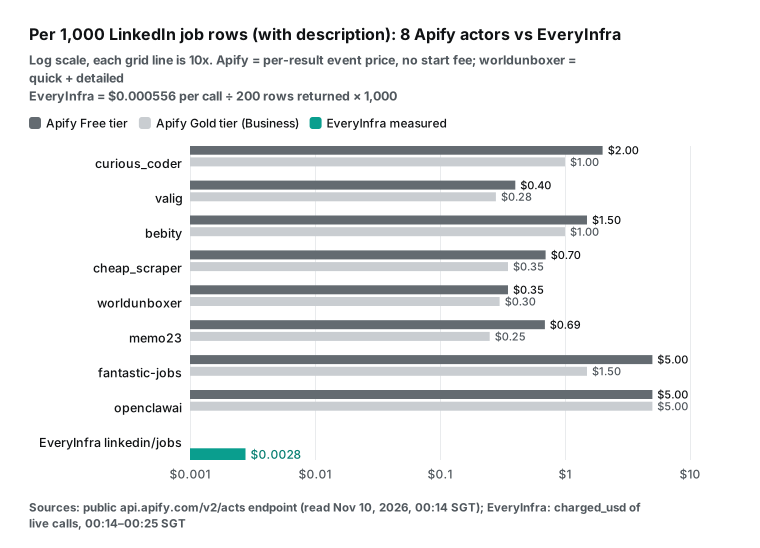
The multiple in the last column compares one usable job row on each side. Most of these actors return a description, salary and applicant count in each row. Some return more. For example, curious_coder lists remote status, apply method and company size, which our list rows do not have.
So the multiple compares "one usable job", not identical records. The worldunboxer quick mode costs only $0.10 per 1,000 but has no full description. You need its detailed mode for another $0.25, so the table shows the sum.
fantastic-jobs is a different kind of product. It sells its own job database with about a one-hour delay. That suits bulk pulls by industry or company size, which is not the same as a live LinkedIn search. It is in the table because it ranks high when you search the Store for "LinkedIn jobs".
That search returned 2,533 results when we read it. We took the top actors by recent users and added two that are very cheap or change price often. We also tracked one detail-only actor, piotrv1001, at $4.00 per 1,000.
How we tested and how we did the math
All live calls ran in the early hours of November 10, 2026, from 00:14 to 00:40 SGT. We used a test key with a limit of 10 requests per minute. So we waited 7 seconds between submissions and 65 seconds after any HTTP 429. We hit 9 rate limits in total.
A 429 costs nothing, and we do not count them in the request totals below. Job searches used async mode. We added "mode":"async" to the request body and got a job_id at once. Then we checked /api/v1/jobs/{job_id} every 15 seconds until the status was succeeded or failed.
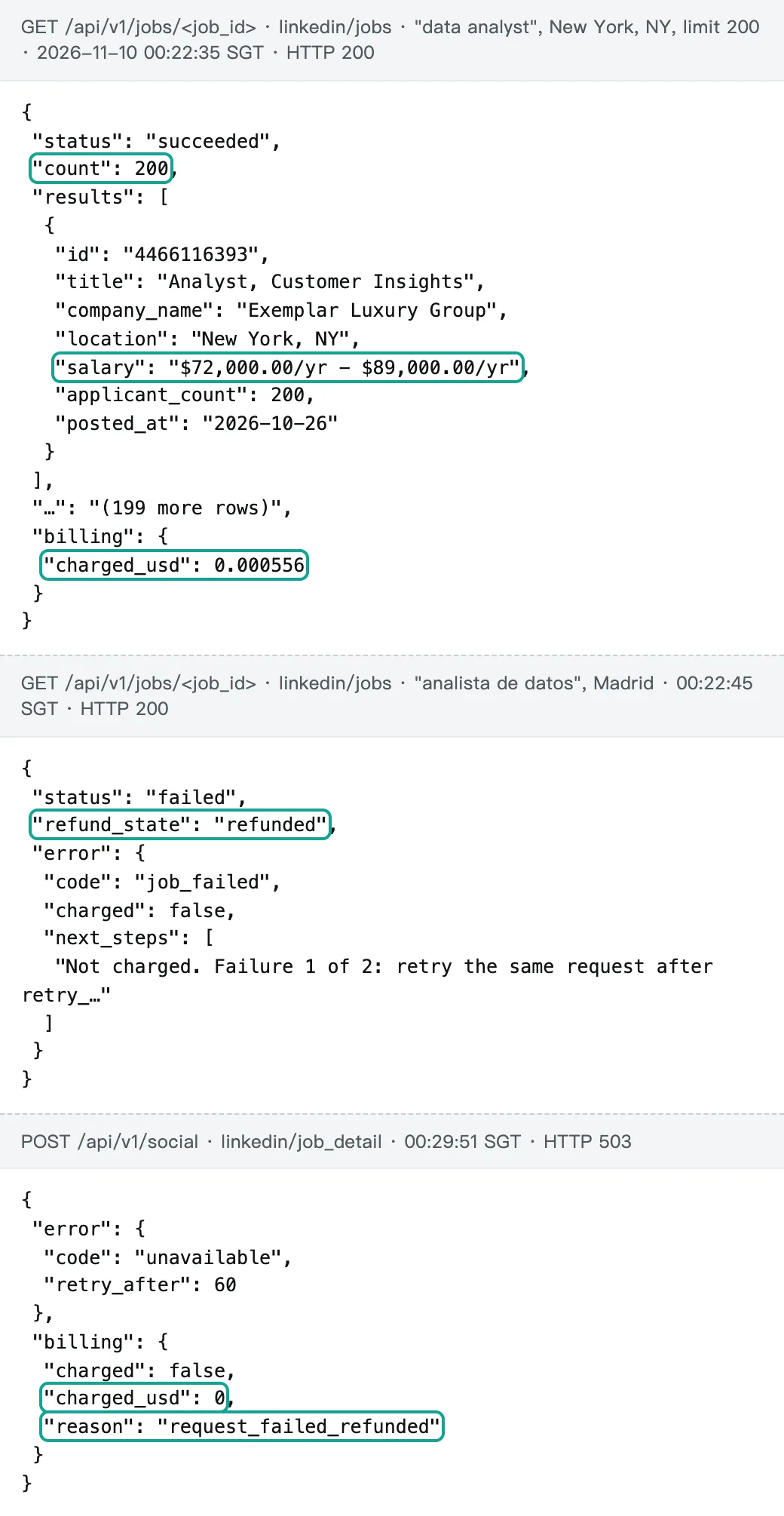
Each response has billing.charged_usd, the amount actually charged. A failed job also shows refund_state: refunded. The table below lists every search.
| ID | Keyword and location | Submitted (SGT) | Finished | Seconds | Rows | Charged |
|---|---|---|---|---|---|---|
| j01 | data analyst · New York, NY | 00:14:35 | 00:17:39 | 184.8 | 200 | $0.000556 |
| j02 | data engineer · New York, NY | 00:18:00 | 00:22:39 | 275.7 | 200 | $0.000556 |
| j03 | data scientist · New York, NY | 00:18:10 | 00:22:42 | 270.2 | 200 | $0.000556 |
| j04 | analista de datos · Madrid | 00:18:19 | failed 00:22:45 | 264.2 | 0 | refunded, $0 |
| j05 | data engineer · Madrid | 00:21:43 | 00:24:53 | 187.8 | 200 | $0.000556 |
| j06 | analista de datos · Mexico City | 00:21:52 | 00:25:15 | 200.4 | 200 | $0.000556 |
| j07 | data analyst · Singapore | 00:22:02 | 00:24:57 | 172.8 | 200 | $0.000556 |
| j08 | LinkedIn search URL: US, past week, remote | 00:22:11 | 00:25:19 | 185.8 | 200 | $0.000556 |
| j11 | repeat of j01 | 00:36:17 | 00:39:09 | 169.2 | 200 | $0.000556 |
| j12 | retry of j04 | 00:36:27 | 00:39:28 | 179.4 | 200 | $0.000556 |
The price per 1,000 uses one formula: amount charged ÷ rows returned × 1,000. So $0.000556 ÷ 200 × 1,000 = $0.00278. Across the whole test, 9 successful searches cost $0.005004. We dedupe by job id and get 1,618 unique jobs.
That gives $0.0031 per 1,000 unique jobs. Most of the overlap is the deliberate repeat: j11 and j01 share 176 jobs. The US past-week search (j08) shares 5 jobs with j01 and j03. The repeat j11 shares 5 more with j03 and j08. No other pair of searches overlaps.
Every share in this article uses the full 200 rows as the denominator. We also sent 27 other requests to test errors and the detail endpoint. One had no key.
One had a misspelled parameter. 23 were linkedin/job_detail calls, and 2 were MCP calls. We kept every raw response and the scripts that count them. Each number in the charts comes from those scripts.
How to read Apify LinkedIn Jobs Scraper prices: three billing shapes and two scheduled changes
Most Store actors now use pay per event. The Apify docs on pay per event explain the model. The developer defines events such as "actor start", "one result" or "one AI analysis", and each event has a price. The Actors in Store page says most pay-per-event actors include platform usage in the event price. Some charge it separately, so you must check before a run.
Each event can have different prices on the FREE, BRONZE, SILVER and GOLD discount tiers. These map to the Free, Starter, Scale and Business plans. The developer pricing page also says that developers keep 80% of event revenue.
The eight list actors fall into three billing shapes. The first shape charges one "result" event plus a tiny start fee.
curious_coder, bebity, valig and memo23 work this way, and the math is simple. The second shape charges a start fee by memory. cheap_scraper charges $0.005 per GB at start. Its Store page says the default is 4 GB, so each run costs $0.02 before any results. On a 20-job run, that start fee is larger than the result fee.
Apify's usage and resources page says run memory must be a power of 2. The range is 128 MB to 32,768 MB, and each 4,096 MB gives one CPU core. A smaller memory setting lowers this kind of start fee, but the run is slower.
The third shape splits one job into several events. worldunboxer charges $0.10 per 1,000 for quick mode and $0.25 more for full details ($0.20 on Gold). bebity adds $1.00 per 1,000 for premium company data. On 2026-11-07, cheap_scraper added an AI job analysis event at $0.50 per 1,000. memo23 charges $8.00 per 1,000 for AI enrichment.
| Billing shape | Actors | Events you pay for | Watch out for |
|---|---|---|---|
| One result event | curious_coder, bebity, valig, memo23 | start fee + each result | price changes in pricingInfos |
| Start fee by memory | cheap_scraper | $0.005 per GB at start + each result | $0.02 per run at 4 GB |
| Several events per job | worldunboxer, bebity, cheap_scraper, memo23 | quick result + detail, company data or AI analysis | add-ons can cost more than the base row |
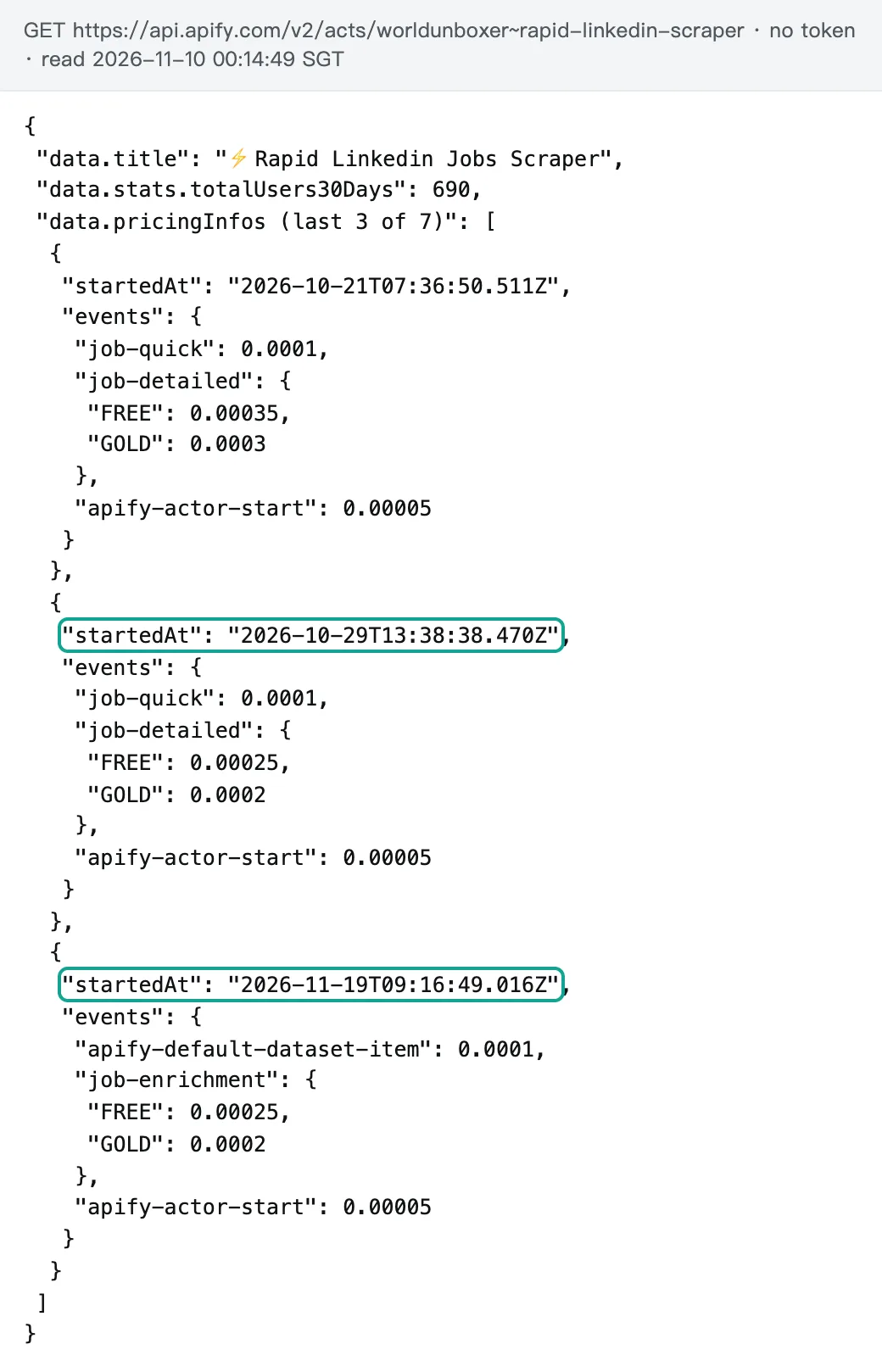
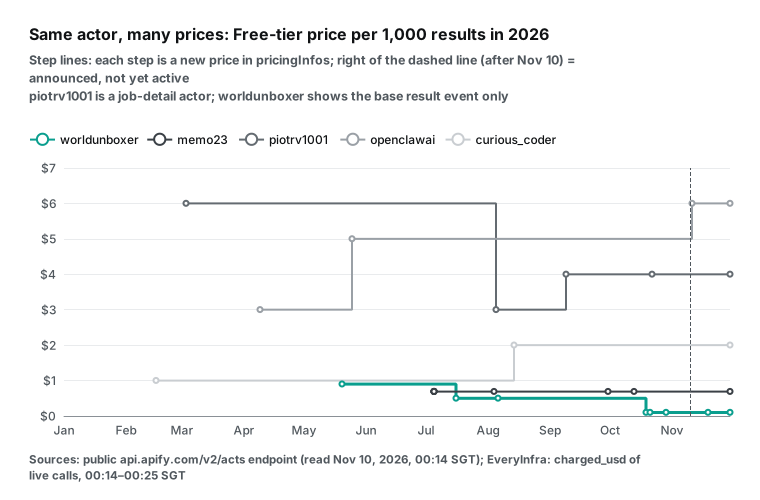
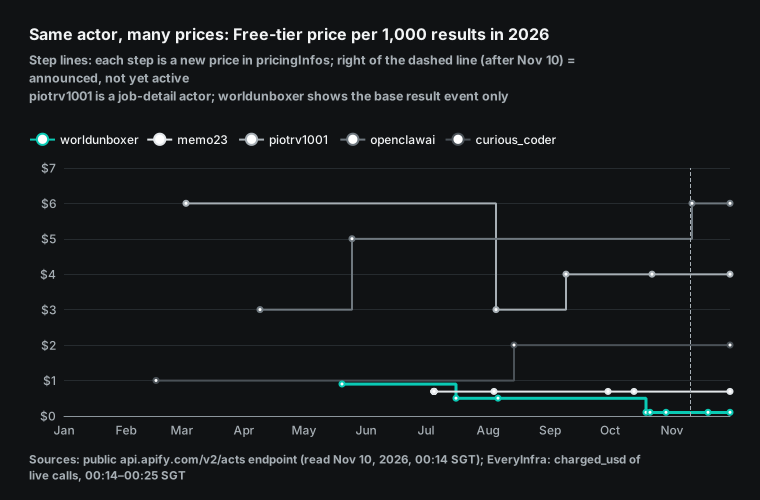
pricingInfos also shows prices that are announced but not yet active. On 2026-11-11, openclawai's job-board-scraper moves from $5.00 per 1,000 to $6.00 on Free and $4.00 on Gold. On 2026-11-19, worldunboxer renames its detailed event to job-enrichment, with no price change. The pace of change also differs a lot. worldunboxer changed its price list 7 times since May. memo23 changed it 8 times since July.
curious_coder raised its Free price from $1.00 to $2.00 per 1,000 on 2026-08-14. The detail actor piotrv1001 went from $6.00 to $3.00 and then to $4.00. Per-call services can change price too. But for a job that runs every day, "what will it cost next month" belongs in your budget sheet.
Apify plan prices are on apify.com/pricing. Free includes $5 of usage per month. Starter is $19 per month, Scale is $199 and Business is $999. The plan fee becomes prepaid usage for that month.
The pricing page says unused usage does not roll over. On the Free plan, access stops after the $5 until the next monthly cycle. So the Gold price is only for accounts that pay $999 per month. Most small teams should look at the Free and Bronze columns.
The fastest way to read a price is to skip the Store page. Open https://api.apify.com/v2/acts/<author>~<name> and find the last entry in pricingInfos. Then read eventPriceUsd and eventTieredPricingUsd for each event under pricingPerEvent.actorChargeEvents. This is the Get Actor endpoint. We read public actors without a token.
City scenario: data jobs in New York, Madrid, Mexico City and Singapore
A common first question in recruiting analytics is simple. How many data jobs are open in a city, and what do they pay? We used the same parameters in four cities. In New York we searched data analyst, data engineer and data scientist. In Madrid we searched data engineer and the Spanish analista de datos.
In Mexico City we searched analista de datos, and in Singapore, data analyst. We also ran one LinkedIn search URL for US data analyst jobs from the past week. Each search returned 200 rows. These are field counts for 200 rows, not a census of the city.
Some context helps here. The US Bureau of Labor Statistics JOLTS release of 2026-11-03 shows about 7.5 million job openings at the end of September. The Employment Situation release of 2026-11-06 reports 165,000 new payroll jobs in October and 4.1% unemployment.
| City · role | Rows | salary field filled | Pay range only in description | Pay found in total | applicant_count = 200 | Median days since posting |
|---|---|---|---|---|---|---|
| New York · data analyst | 200 | 40 (20%) | 111 (55.5%) | 75.5% | 125 (62.5%) | 14 |
| New York · data engineer | 200 | 56 (28%) | 97 (48.5%) | 76.5% | 91 (45.5%) | 15 |
| New York · data scientist | 200 | 41 (20.5%) | 116 (58%) | 78.5% | 89 (44.5%) | 13 |
| US · past week (URL search) | 200 | 22 (11%) | 111 (55.5%) | 66.5% | 110 (55%) | 4 |
| Madrid · data engineer | 200 | 11 (5.5%) | 8 (4%) | 9.5% | 16 (8%) | 15.5 |
| Madrid · analista de datos | 200 | 3 (1.5%) | 7 (3.5%) | 5% | 70 (35%) | 12 |
| Mexico City · analista de datos | 200 | 11 (5.5%) | 5 (2.5%) | 8% | 47 (23.5%) | 12.5 |
| Singapore · data analyst | 200 | 6 (3%) | 0 | 3% | 75 (37.5%) | 13 |
Look at the column "pay range only in description". Since November 1, 2022, New York City has required job ads to state a good-faith minimum and maximum salary. See the NYC Commission on Human Rights page. That is why 75%–79% of New York data jobs show pay.
But only 20%–28% put it in the structured salary field. The rest put it in the description, for example "The base salary range for this role is $95,000 – $120,000". A pipeline that reads only the salary field undercounts New York pay coverage by about three times.
The salary field: filled for one job in five, while pay laws push the rest into the text
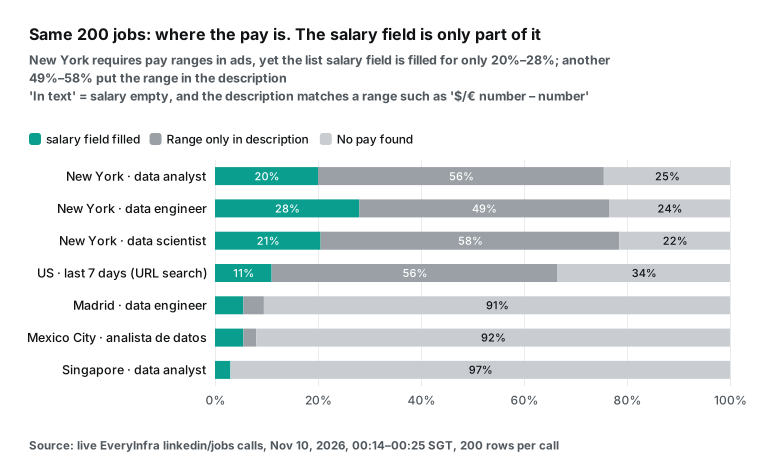
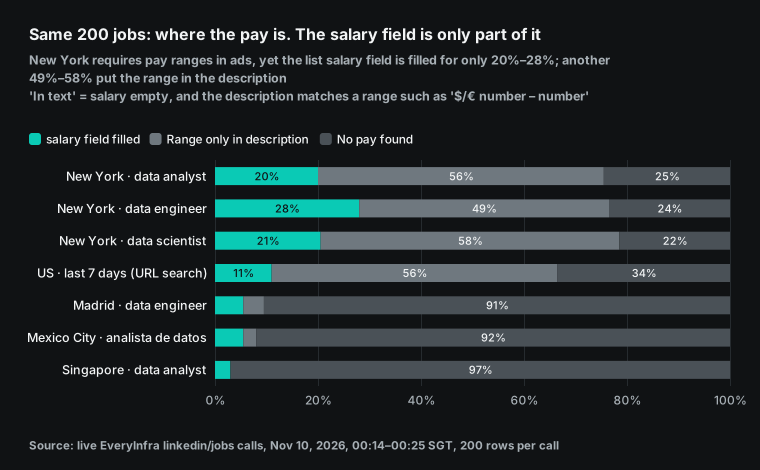
Here is how we count "only in description", so that nobody reads the number too high. We count a job only when the salary field is empty and the text has a range. A range means a currency sign, a number, a dash or "to", and another number. We accept US dollars, euros, pounds, Mexican pesos and Singapore dollars. A single number such as "up to $150,000" does not count, so this column is a conservative lower bound.
We drew 20 random jobs from the 111 New York analyst matches and read each one. All 20 were pay ranges. One was the range for the same role in another state. None was a funding amount or another kind of number.
The share matches outside data. Headcount Labs publishes a pay transparency job dataset on Hugging Face. Its snapshot from 2026-10-19 holds 3,145,962 US jobs. An IBTimes report from 2026-10-20 used it.
The report says 44.7% of US jobs show pay, with 69.9% in New York State and 70.9% in Washington State. The median advertised midpoint was $107,450. Our 75%–79% for New York data jobs is a little higher than the state as a whole. Data jobs cluster in large employers, so that gap makes sense.
Other state laws push the same way. Washington's RCW 49.58.110 requires employers with 15 or more employees to show a wage scale or salary range. Data teams should note one detail. The law's definition of a posting excludes ads that someone copied and published digitally without the employer's consent. So a reposted job on an aggregator may not fall under the rule. Missing pay there is not always a violation.
Colorado's Equal Pay for Equal Work Act also requires pay in postings. Cleveland's pay transparency law turned one year old on 2026-10-27. A Signal Cleveland report says employers are adapting but gaps remain. The city also runs a salary complaint form.
| Place | Rule on pay in job ads | Since | What we saw in 200 rows |
|---|---|---|---|
| New York City | good-faith minimum and maximum | 2022-11-01 | 75.5%–78.5% show pay, 20%–28% in the field |
| Washington State | wage scale or range, employers with 15+ staff | in force | not sampled |
| Colorado | pay in postings | in force | not sampled |
| Cleveland | pay range in postings | 2025-10-27 | not sampled |
| United Kingdom | "say what you pay" announced | 2026-11-05 | not sampled |
| European Union | Directive 2023/970, national laws due | 2026-06-07 | Madrid 5%–9.5% |
The UK is next. On 2026-11-05 the government announced a "say what you pay" law that will make pay mandatory in job ads. See the GOV.UK press release and the Reuters report. The release says 41% of employers always publish a pay range and 18% give an exact figure.
It also says 94% of consultation responses supported the change. If you analyze UK pay, this column will grow next year. A pipeline that already reads pay from the text will be ready.
Continental Europe is behind. Our two Madrid searches found pay in only 5% to 9.5% of jobs. The EU Pay Transparency Directive 2023/970 set June 7, 2026 as the deadline for national laws. Revelio Labs counted 30.4% of EU postings with pay in August 2026.
Spain was at 19% and the Netherlands at 59%. At that point, only 7 of 27 member states had passed a national law. In our Madrid data engineer sample, 42 of 200 jobs (21%) used the word "competitive" or "competitivo" in the text.
New York data salaries: analyst about $115K, scientist about $195K
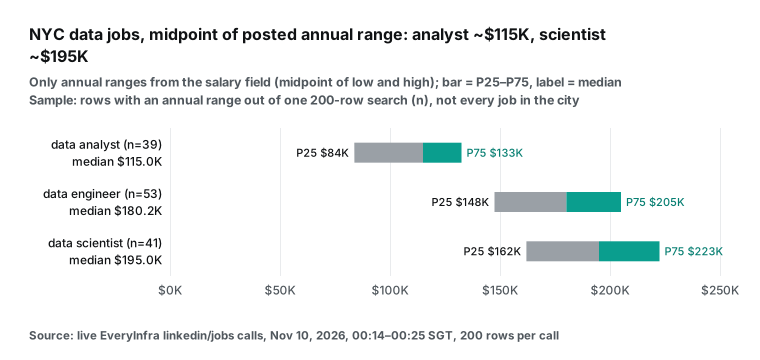
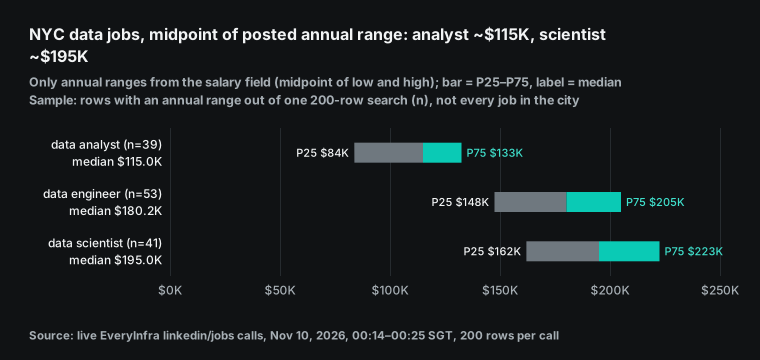
We used only annual ranges from the salary field. For each job we took the midpoint of the low and high values, and then we looked at the spread of those midpoints. New York data analyst had 39 annual ranges. The median midpoint was $115,000, with quartiles from $83,750 to $132,500. Data engineer had 53, with a median of $180,188 and quartiles from $147,500 to $205,000. Data scientist had 41, with a median of $195,000 and quartiles from $162,000 to $222,500.
The width of each range is also useful. For the analyst role, the median top of range is 26.7% above the bottom. Across the three roles this width is 26% to 35%. So one posting already has about 30% of room built in.
These numbers have three limits. First, the sample is the part of one 200-row search that shows annual pay. With n from 39 to 53, the data is good for scale and for ranking roles. It is not a citywide benchmark. Second, the salary field has some entry errors.
One New York data engineer shows "$65.00/yr - $70.00/yr", which looks like an hourly rate with the wrong unit. Two Madrid jobs show "€50.00/yr - €75.00/yr", which looks like thousands of euros without the zeros. We kept these values as they are. If you remove values below $1,000, the data engineer median moves from $180,188 to $182,594. The scale does not change.
Third, the repeat search 22 minutes later moved the analyst median from $115,000 to $108,120, and n went from 39 to 45. The repeat section below has the detail. One search is a sample that moves. For trends, fix the time of day and merge several runs.
To add the pay that sits only in the text, you need one more step. We did this step with one rule. For each row with an empty salary field, we took the first dollar range in the text. The rule reads "$95,000 – $120,000", "$160K - $210K" and "$85-$115k". It multiplies hourly ranges by 2,080. It drops results outside $20,000 to $1,000,000 per year.
This rule is a little wider than the "pay only in text" column above, so it finds a few more rows. It found 115 analyst rows, 106 engineer rows and 117 scientist rows. Only 1 range was hourly, and the rule dropped 1 range.
The result points one way: ranges in the text are lower than ranges in the salary field. For analyst, the text median is $107,500 and the field median is $115,000. For engineer, it is $162,750 against $182,594 (field median without the mislabeled hourly row). For scientist, it is $169,800 against $195,000.
With both parts merged, the analyst sample grows from 39 to 154 rows. The median is $108,120, and the quartiles are $85,000 and $132,725. Engineer has 158 rows with a median of $170,000. Scientist has 158 rows with a median of $173,850. So the field-only median is 6% to 11% higher than the merged median.
These 200-row samples cannot tell us why. For a pay benchmark, state which method you used. The extraction rule changes the result, so the medians at the top of this section still use the field only. We kept the rule and the script with the raw data.
Posting date and applicant count: both fields are full, but read them with care
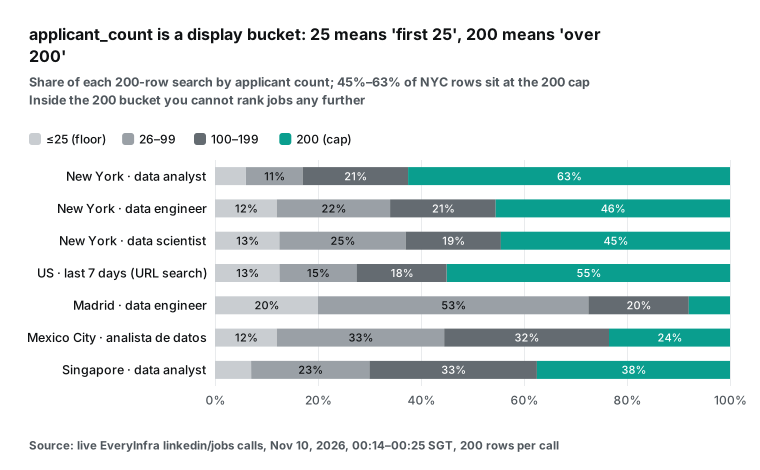
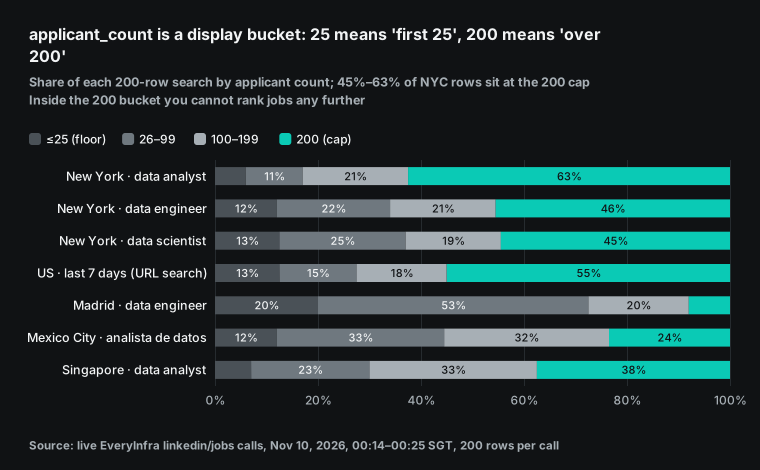
applicant_count had a value in all 1,800 rows we received. But it is not an exact head count. LinkedIn shows text buckets such as "Be among the first 25 applicants" and "Over 200 applicants", with exact numbers only in between. So 25 is a floor and 200 is a cap.
Of the 200 New York data analyst jobs, 125 show exactly 200. That is 62.5%. Only 12 show 25 or fewer.
For a recruiter, this means the field splits New York jobs into "over 200" and "not yet". Jobs above 200 cannot be ranked against each other. The field is more useful in a market like Madrid data engineering, where only 8% of jobs reach the cap.
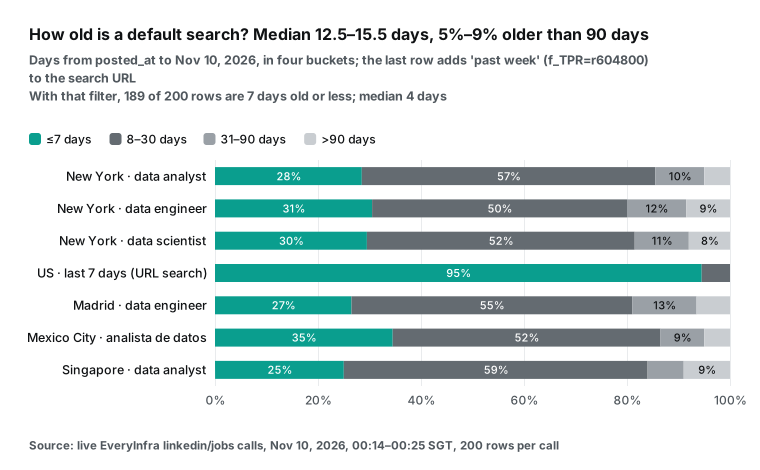
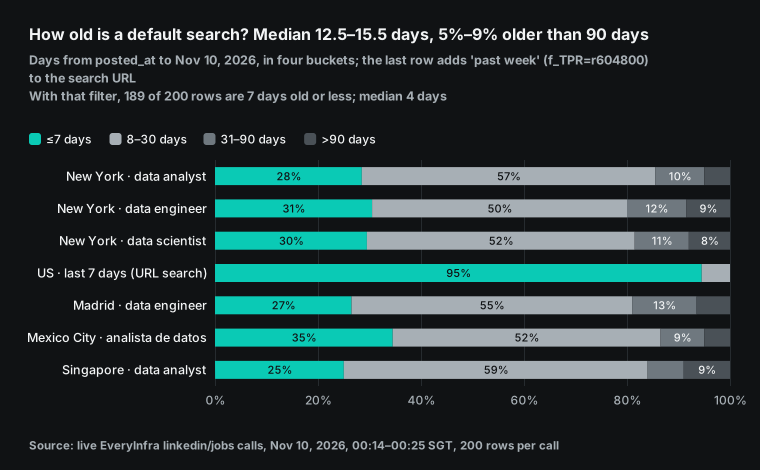
posted_at is a date, with the time set to midnight. It was also present in all 1,800 rows. A default search with no time filter had a median age of 12 to 15.5 days. Between 4% and 9% of jobs were older than 90 days. The oldest data scientist job was 719 days old, and one Mexico City job was 648 days old. These old jobs inflate a "new jobs" count.
The simple fix is to pass a LinkedIn search URL with f_TPR=r604800 (past week) or f_TPR=r86400 (past 24 hours). Our j08 search used the past-week filter. Of 200 jobs, 189 were 7 days old or less. The oldest was 8 days, and the median was 4 days. The keyword parameter accepts a full LinkedIn job search URL. The parameter docs state this.
seniority and employment_type also have values, but they carry different amounts of information. For New York data analyst, 148 of 200 jobs show "Not Applicable" for seniority. That is 74%. More than 95% show Full-time for employment type. If you want to split pay by junior and senior roles, the seniority field will not help much in New York. Use words in the title such as Senior, Lead or Junior instead.
Remote status: after the LinkedIn search change, the remote filter in URLs stopped working
Remote status was the hardest of the four fields. Our list rows have no dedicated remote field. We can only check the title and location for the word remote. For New York data analyst, only 2 of 200 rows matched. So in j08 we used a LinkedIn search URL with f_WT=2 (remote) and f_TPR=r604800 (past week).
The time filter worked. The remote filter did not. Only 22 of 200 jobs said remote in the title or location. That is 11%, and the rest named a specific city.
The cause is on LinkedIn's side. The LinkedIn Help Center says job search now uses AI search, and the classic search is retiring from September. The curious_coder Store page says that since August 2026 only a few URL filters still work. These are f_TPR (date posted), f_C (company), f_AL (Easy Apply) and f_EA (under 10 applicants).
That actor converts the old remote filter f_WT into words added to the keywords. Its author says this may not be fully accurate. So with any Apify actor or with our linkedin/jobs, check the results of a URL-based remote filter yourself.
Detail pages do carry remote data. In our catalog, linkedin/job_detail lists the fields workplace_type and is_remote. Google's JobPosting structured data guide uses jobLocationType: TELECOMMUTE for remote jobs on employer sites. But our detail endpoint is not available now (see the job detail section below). So we cannot measure the coverage of those two fields. We can only say they are in the catalog.
Repeat test: the same search 22 minutes later kept 176 jobs and swapped 24
To see how stable one search is, we sent j01 again at 00:36:17 SGT as j11. That was about 22 minutes after the first run. Both runs returned 200 jobs. By id, 176 jobs were the same (88%), and 24 appeared in only one run. The swapped jobs were not the newest ones.
The new set had posting dates from July to November 9, and the dropped set was just as spread out. So LinkedIn's ranking itself moves, and the 200-row window rotates. Only 12 of the top 20 appeared in both runs. For the shared jobs, the median rank moved by 11 places.
Some fields changed too. For 9 of the 176 shared jobs, applicant_count rose by 1 to 4. For example, 25 became 28 and 68 became 72. One job at the 200 cap stayed at 200.
For 1 job, posted_at moved from 2026-10-02 to 2026-11-09. The employer reposted an old job, and LinkedIn shows it as new. No salary field changed.
| Measure | j01 (00:14 SGT) | j11 (00:36 SGT) |
|---|---|---|
| Rows | 200 | 200 |
| Same job IDs | 176 | 176 |
| Only in this run | 24 | 24 |
| Same jobs in the top 20 | 12 | 12 |
| salary field filled | 40 (20%) | 47 (23.5%) |
| Pay only in text | 111 | 104 |
| Annual midpoint median | $115,000 (n=39) | $108,120 (n=45) |
| applicant_count = 200 | 125 | 123 |
For people who track applicant demand, this means daily collection works. For people who count "new jobs per day", this means you must dedupe by id and not only by date. Without that step, reposted jobs count twice.
The summary numbers moved with the sample. In j11, 47 jobs had a salary field value (23.5%, against 20% in j01), and 104 had pay only in the text. The median annual midpoint was $108,120 (n=45). That is 6% below the first run's $115,000.
The same search, city and keyword gave a 6% different median 22 minutes later. Treat a single 200-row median as a range. For weekly or monthly reports, collect at a fixed time and merge several runs.
Pagination and limits: 200 jobs per call, so 1,000 jobs means 5 searches
linkedin/jobs returns at most 200 jobs per call. In the catalog, max_limit is 200 and the default is 20. There is no offset or page parameter today. For one keyword and one location, you get only the top 200 jobs.
To reach 1,000, split the work into 5 different searches. Change the city, the role, the time window (past 24 hours, past week) or the company. Our 9 successful searches returned 1,618 unique jobs. Apart from the deliberate repeat, the groups barely overlapped, so splitting did not waste calls.
On Apify, the limit comes from LinkedIn. The curious_coder Store page says LinkedIn shows at most 1,000 jobs per search, and it suggests splitting search URLs by location. cheap_scraper also says each search returns up to 1,000 jobs. The open-source JobSpy README says most job boards cap a search at about 1,000 results. It also says LinkedIn returns HTTP 429 if you go too fast, and the block clears in about a minute.
So above 1,000 jobs, you must split searches with any tool. The difference is the unit. An Apify run can return all 1,000 jobs, and you pay per row. With us you send 5 calls, and you pay per call.
The split code is short. The Python example below combines three roles and two cities into 6 searches. It submits them in async mode and dedupes by id. At the catalog price, 6 calls cost 6 × $0.000556 = $0.003336 for up to 1,200 jobs.
import os, time, requests

API = "https://api.everyinfra.com"
H = {"Authorization": f"Bearer {os.environ['EVERYINFRA_API_KEY']}"}
roles = ["data analyst", "data engineer", "data scientist"]
cities = ["New York, NY", "Madrid, Spain"]

jobs, seen = [], set()
for role in roles:
    for city in cities:
        body = {"platform": "linkedin", "action": "jobs", "mode": "async",
                "params": {"keyword": role, "location": city, "limit": 200}}
        poll = requests.post(f"{API}/api/v1/social", json=body, headers=H).json()["poll_url"]
        while True:
            r = requests.get(API + poll, headers=H).json()
            if r["status"] in ("succeeded", "failed"):
                break
            time.sleep(15)
        for row in r.get("results", []):
            if row["id"] not in seen:
                seen.add(row["id"])
                jobs.append(row)
print(len(jobs), "unique jobs")
Job detail: not available now, $0 charged
The single-job endpoint did not work in this test. The catalog lists linkedin/job_detail as available, at $0.001194 per call. It takes a job URL or an ID of 8 to 12 digits. Compared with a list row, the catalog adds apply_url, workplace_type, is_remote, industries, benefits, view_count, job_state, expires_at, country_code, company_employee_count and company_website.
From 00:29:51 to 00:40:47 SGT we sent 23 requests. 19 were jobs from the city lists. We mixed jobs with a salary field, jobs with pay only in text, and jobs with no pay. One was the fake ID 9999999999.
One used async mode, one used a full URL, and one was the sample request from the API. We retested once more at 01:20 SGT. During our test, the detail endpoint returned HTTP 503 and charged nothing. Each error came back in 2 to 4 seconds with the code unavailable and the text "Not charged".
What this means for you: the apply link, remote flag, industries, benefits, view count and expiry date must come from another source for now. The list fields in the table below are not affected.
| Field group | `linkedin/jobs` list row (measured) | `linkedin/job_detail` (catalog only, not available now) |
|---|---|---|
| Title, company, location, URL | yes, 1,800 of 1,800 rows | yes |
| Full description | yes, 1,800 of 1,800 rows | yes |
| salary | 20%–28% in New York, 1.5%–5.5% elsewhere | yes, when posted |
| applicant_count, posted_at | yes, 1,800 of 1,800 rows | yes |
| seniority, employment_type | yes | yes |
| apply_url, workplace_type, is_remote | no | listed |
| industries, benefits, view_count, expires_at | no | listed |
| company_employee_count, company_website | no | listed |
The median description length for New York data analyst rows was 6,068 characters. The basket section below adds the detail endpoint at its catalog price and compares it with Apify detail prices.
Are failures and empty results charged?
| Case | Time (SGT) | Response | Charged |
|---|---|---|---|
linkedin/jobs with no key | 00:14:20 | 401 missing_key, "Nothing was charged." | $0 |
Parameter spelled keywrd | 00:14:27 | 422 missing_param, names keyword and gives a working example | $0 |
| Madrid analista de datos search failed | submitted 00:18:19, failed 00:22:45 | status failed, refund_state: refunded, retry after 20 seconds | charged then refunded, net $0 |
| Same search retried 18 minutes later | 00:36:27 | 200 jobs | $0.000556 |
23 linkedin/job_detail calls (including the fake ID 9999999999) | 00:29:51–00:40:47 | unavailable, not available now (see above) | $0 |
On Apify, the rules follow the events. A pay-per-event actor charges only for events that happen. If a run fails with no results, you still pay the start event. If it returns some rows, you pay for those rows. The sync run endpoint has two guards.
maxItems caps how many rows a pay-per-result actor can charge. maxTotalChargeUsd caps the total charge for the run. See the API reference. At the cap, the actor stops and keeps what it already collected.
Some authors add their own rules on the Store page. worldunboxer has "Exclude Job IDs". You pass the IDs from the last run, and those jobs are not returned or charged. A cheap_scraper tutorial video explains that exclude filters act before billing. Its "dynamic filters" scrape first and filter after, so filtered jobs are still charged.
The core difference is the billing unit. Apify charges per row produced, so more rows cost more and empty runs cost almost nothing. We charge per call, so 200 rows and 20 rows cost the same, and errors cost nothing. So always set limit to 200 with us.
Otherwise the price per 1,000 goes up fast. In our MCP test we asked for only 25 jobs and paid the same $0.000556. That is $0.0222 per 1,000, or 8 times the price at 200.
The basket: 1,000 list rows, 1,000 detail rows, and a daily job alert
| Use | Apify (Free / Gold) | EveryInfra | Cheaper |
|---|---|---|---|
| 1,000 list rows with description | curious_coder $2.00 / $1.00. valig $0.40 / $0.28 | 5 linkedin/jobs calls, $0.00278 | Us, 101 to 719 times |
| 1,000 rows with detail fields (apply link, remote, industries) | worldunboxer quick + detailed $0.35 / $0.30. valig $0.40 / $0.28 (includes description, recruiter and apply type) | list $0.00278 + 1,000 linkedin/job_detail calls at the catalog price $1.194 = $1.197 (detail not available now, see above) | Apify, about 3 to 4 times |
| 20 new jobs a day, 30 runs a month | valig $0.27, worldunboxer $0.21, curious_coder $1.20, cheap_scraper $1.02 | 30 × $0.000556 = $0.0167 | Us, but the Apify Free plan's $5 covers it |
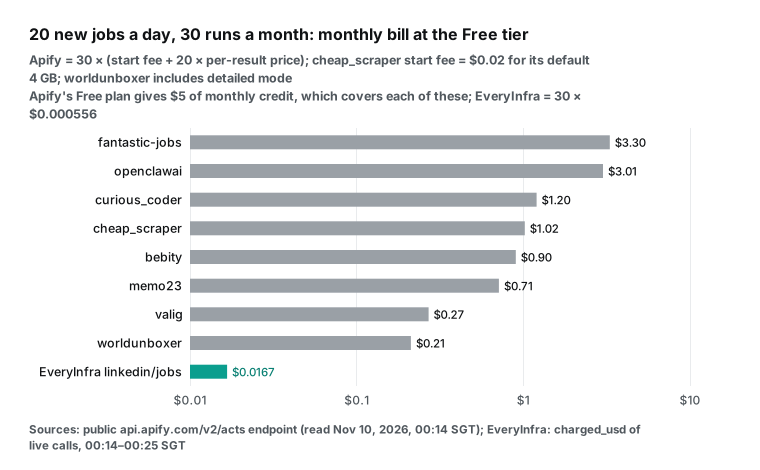
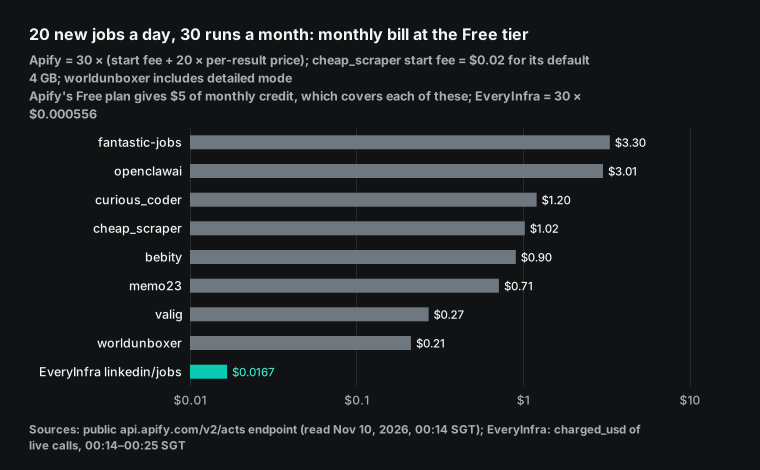
The third row needs a note. One person running a daily 20-job alert pays $0.21 to $3.30 per month on Apify. All of these fit inside the Free plan's $5, so the cost is zero in practice. With us it is $0.0167, which is also close to zero. At small personal scale, both sides are cheap. The gap opens with volume.
Take 10 cities × 5 roles × 200 jobs every day. That is 300,000 jobs per month. On Apify, valig on Gold costs about $85, including 1,500 start fees. curious_coder on Free costs about $600. With us it is 1,500 calls × $0.000556 = $0.834.
apify linkedin scraper jobs vs EveryInfra: how the calls compare
On Apify, a common way to run a job actor is the "run synchronously and get dataset items" endpoint. You send the actor input as the request body. When the run ends, the response holds the results. The example below follows the Apify API reference.
We have no Apify account, so we did not run it. Input field names depend on each actor. Here we use curious_coder, which accepts LinkedIn search URLs.
# Example only (not run): sync run of an Apify job actor, at most 1,000 rows and $2
curl -X POST "https://api.apify.com/v2/acts/curious_coder~linkedin-jobs-scraper/run-sync-get-dataset-items?maxItems=1000&maxTotalChargeUsd=2" \
  -H "Authorization: Bearer $APIFY_TOKEN" \
  -H "Content-Type: application/json" \
  -d '{"urls": ["https://www.linkedin.com/jobs/search/?keywords=data%20analyst&location=New%20York&f_TPR=r604800"]}'
Our side is one fixed POST /api/v1/social. To change platform, you change platform and action. Parameter names are in the LinkedIn job search docs and in the free catalog endpoint. Below is the same call pattern we used in the test: submit in async mode, then poll poll_url.
# Submit (returns job_id and poll_url at once)
curl -s -X POST https://api.everyinfra.com/api/v1/social \
  -H "Authorization: Bearer $EVERYINFRA_API_KEY" \
  -H "Content-Type: application/json" \
  -d '{"platform":"linkedin","action":"jobs","mode":"async",
       "params":{"keyword":"data analyst","location":"New York, NY","limit":200}}'

# Poll every 15 seconds until status is succeeded or failed
curl -s https://api.everyinfra.com/api/v1/jobs/<job_id> \
  -H "Authorization: Bearer $EVERYINFRA_API_KEY"
The effort is similar. The differences are wait time and failure handling. Our async searches of 200 jobs took 169 to 276 seconds from submit to result, with a median of about 186 seconds. Sync calls without mode suit small batches. Our MCP call for 25 jobs took 18.4 seconds.
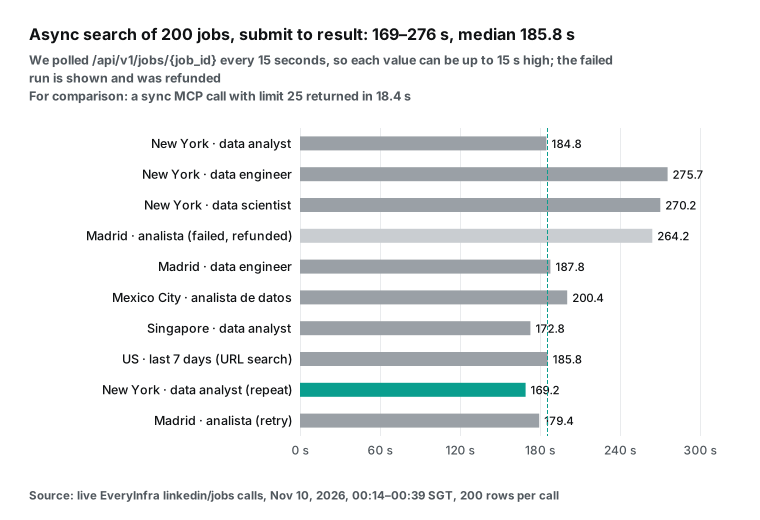
The Apify sync endpoint keeps the connection open until the run ends. For large runs, an async run plus a webhook is a better fit. Results go to a dataset, which exports to JSON, CSV or Excel. Our results come back in the poll response, and you decide where to store them. When a call fails, our response says whether you were charged and when to retry. Our guide to failure and refund reconciliation shows how to check charges by charge_id.
MCP: search jobs from inside an AI client
Both sides work with MCP clients. The Apify MCP server runs at mcp.apify.com. OAuth is the recommended sign-in, and an API token also works. It can search the Store, run actors and read results, and the code is open source on GitHub. The docs also describe "agentic payments", which let an agent pay without an Apify account.
Our remote MCP endpoint is https://api.everyinfra.com/mcp. Setup is on our MCP server page and in the remote MCP setup guide. Both sides follow the remote transport in the MCP specification.
| Apify MCP server | EveryInfra MCP | |
|---|---|---|
| Endpoint | mcp.apify.com | https://api.everyinfra.com/mcp |
| Sign-in | OAuth (recommended) or API token | Bearer API key |
| What the model can do | search the Store, run actors, read datasets | list capabilities, call endpoints, poll jobs |
| Cost of a job search | the actor's event prices | $0.000556 per call |
| Our test | not run (no account) | 12 tools listed, 25 jobs in 18.4 s |
At 00:39:32 SGT we called tools/list with no key. It returned 12 tools in 0.34 seconds, including everyinfra_list_capabilities, everyinfra_call_api and everyinfra_get_job. At 00:39:41 SGT we called everyinfra_call_api with the key. We asked for data engineer jobs in Singapore with limit 25. It returned 25 jobs in 18.4 seconds and charged $0.000556. A client config looks like this:
{
  "mcpServers": {
    "everyinfra": {
      "type": "http",
      "url": "https://api.everyinfra.com/mcp",
      "headers": { "Authorization": "Bearer ${EVERYINFRA_API_KEY}" }
    }
  }
}
After setup, you can ask in chat: "Find data engineer jobs in New York from the past 7 days and sort them by pay range." The model reads the catalog and then calls linkedin/jobs. To link jobs with company data, it can also call company profile and company employees. Our guide to LinkedIn account research with MCP in Copilot Studio shows a full example. Tell the model to set limit to 200. Models often ask for 20 or 25 rows, and with per-call pricing that makes each 1,000 rows several times more expensive.
When Apify is the better choice
In these cases, an Apify job actor fits better than our endpoint.
| Need | Apify option | Our status today |
|---|---|---|
| Detail fields on every row | valig, worldunboxer detailed, curious_coder | linkedin/job_detail not available now |
| All 1,000 jobs of one search | any list actor, one run | 200 per call, no pages |
| Filters such as under 10 applicants or Easy Apply | curious_coder, worldunboxer | keyword, location, working URL filters |
| Schedules, datasets, webhooks | Apify platform | API only |
| Job database or AI enrichment | fantastic-jobs, cheap_scraper, memo23 | raw jobs only |
First, you need detail fields on every job, and you need them today. Our linkedin/job_detail is not available now (see above). On Apify, valig returns the description, recruiter name and link, apply type, industry and function in one row. worldunboxer's detailed mode gives 23 fields, including industries, "actively hiring" and "early applicant". Both cost $0.28 to $0.40 per 1,000.
The most-used actor, curious_coder, lists remote status (workRemoteAllowed), workplace type, apply method, expiry date, company size and the job poster. All of that is in its $2.00 per 1,000 ($1.00 on Gold). Remote status is the one field our list cannot give you. At catalog prices, our "list plus detail" is about $1.197 per 1,000, so it costs 3 to 4 times more. This stays true after our endpoint recovers, because each detail call returns one job.
Second, you need all 1,000 jobs in one search. LinkedIn shows at most 1,000 per search, and an Apify list actor can get all of them in one run. We return at most 200 per call with no pages. For one keyword in one location, you get the top 200 only. If you need, for example, every New York data analyst job to map employers, Apify is easier.
Third, you need its filters and dedupe. worldunboxer filters by company ID, geo ID, radius, Easy Apply and early applicants. curious_coder has AI search filters such as "under 10 applicants". worldunboxer can also exclude job IDs from the last run and not charge for them. bebity adds premium company data. We have only keyword, location and the LinkedIn URL filters that still work.
Fourth, you need the platform around it. Apify schedules run jobs every day and store results in datasets. Webhooks, Make, Zapier and n8n can send them to a sheet or Slack. The Free plan runs 5 actors at once, and Starter runs 32.
See platform limits. We give you an API only. You build the schedule and storage yourself, or in a tool like n8n. Our Apify n8n alternative shows how.
Fifth, you want a history database or AI processing. The fantastic-jobs actor sells its own job database with about a one-hour delay. It returns up to 5,000 jobs per run and has a companion actor for expired jobs at $20 per month. Outside Apify it also has its own developer API with plan quotas, and the Pro-100k plan charges $0.0025 per job above quota. cheap_scraper and memo23 have built-in AI analysis events.
We return the jobs only, and you add your own model. Finally, a Store search for "LinkedIn jobs" returns 2,533 results. Someone may already have built your niche case.
Terms and legal limits: LinkedIn rules and public job data
This section only reports what the terms and court opinions say. It is not legal advice. Ask your own lawyer about your use case. The LinkedIn User Agreement took effect on November 3, 2025.
Section 8.2 says you must not use bots or other software to scrape the service. The LinkedIn Crawling Terms say crawling without express permission is prohibited. The Jobs Terms and Conditions govern employers who post jobs.
LinkedIn's own Job Posting API lets applicant tracking systems post jobs to LinkedIn. The docs say it does not accept new partners at this time. So an official API to read jobs is not open to most teams.
The US Court of Appeals for the Ninth Circuit issued its hiQ Labs v. LinkedIn opinion on April 18, 2022. It looked at whether scraping public pages that need no login is "unauthorized access" under the Computer Fraud and Abuse Act. It did not decide contract questions such as breach of the user agreement.
For recruiting analysts, the more practical risk is personal data. Job pages can show recruiter names and profile links. Data protection laws in the EU and UK cover that data. The LinkedIn Privacy Policy explains how LinkedIn handles member data. Our job fields do not include recruiter details. If you get them from another source, assess storage and use separately.
Recent changes (October and November 2026)
| Date | Change | Effect on job data |
|---|---|---|
| 2026-10-19 | Headcount Labs publishes a 3.1 million US job snapshot | Compare your pay coverage by state. If your New York share is far below its 69.9%, check your text extraction first |
| 2026-10-27 | Cleveland pay transparency law turns one | Treat Cleveland jobs like New York jobs: read the salary field, then the text |
| 2026-11-05 | UK announces "say what you pay" | Add pound ranges to your text extraction now, so the script is ready when the law starts |
| 2026-11-07 | cheap_scraper adds an AI job analysis event at $0.50 per 1,000 | Read the event lines in each bill. Do not turn on analysis you do not need |
| 2026-11-11 (announced) | openclawai rises to $6.00 per 1,000 on Free | Budget runs after November 11 at the new price |
| 2026-11-19 (announced) | worldunboxer renames its detailed event to job-enrichment | Add the new event name to billing scripts before November 19 |
Two more changes affect everyone who works with LinkedIn job data. LinkedIn replaced classic job search with AI search, so most URL filters no longer work. The remote section above has the detail. The EU pay transparency deadline of June 7, 2026 has passed. By August, only 7 of 27 member states had a national law.
What videos and forums say
One of the most-watched tutorials on this topic is "Scrape 1,000+ LinkedIn Jobs for 35 Cents". It has 9,488 views (video). Its price of 35 cents per 1,000 is in the same range as the low-price actors in our table. A cheap_scraper tutorial from 2026-06-22 (video, 1,718 views) explains several traps. Copy the search URL from an incognito window.
Each keyword and location pair is a separate search. A minimum-salary filter drops every job that shows no salary. And jobs whose posters skipped a LinkedIn filter field do not appear when you use that filter. That last point is the same kind of problem we saw with the remote filter.
Two Reddit threads in r/n8n are worth reading. In a thread about a free n8n job scraper, one user wrote that "the apify $5 just went away in a few minutes". One run cost more than $1, so they built their own flow. In a help thread, the poster hit empty results, a login wall and rate limits, and then moved to another job actor.
Both threads show the same pattern. The Free plan's $5 is enough for a small test. But one uncapped run that returns a few thousand rows can use it up. On Apify, set maxItems and maxTotalChargeUsd on every run.
Four rules for reading these fields in recruiting analysis
These four rules apply whether your data comes from an Apify actor or from us. Put them in your processing script.
| Field | Rule | Why |
|---|---|---|
| Salary | read the field, then extract ranges from the text, then convert to annual pay (for example 2,080 hours per year) | New York text holds 49%–58% more pay |
| Applicant count | treat 25 as "fewer than 25" and 200 as "more than 200", never average them | 45%–63% of New York jobs sit at 200 |
| Posting date | set the window with f_TPR, then dedupe by job ID | reposted jobs return with a new date |
| Remote status | screen titles for remote, hybrid or remoto, then check detail fields | the f_WT URL filter no longer works |
Finally, state the denominator for every share. "X of 200 rows" is harder to misread than "X% of jobs show pay". Also say whether the sample is one search or several merged runs.
FAQ
Is there a free apify linkedin job scraper?
(This question comes from the search suggestion "apify linkedin job scraper free".) No actor is fully free. But the Apify Free plan gives $5 of usage per month with no card. At today's Free prices, $5 covers about 12,500 jobs on valig, about 50,000 on worldunboxer quick mode, or about 2,500 on curious_coder. After that, the Free plan waits until next month.
With us, you can star two GitHub repos to get a $1 trial credit, valid for 24 hours. Our docs estimate about 720 typical data calls for $1. At $0.000556 per linkedin/jobs call, that is about 1,800 calls of 200 jobs each.
What does apify curious_coder linkedin jobs scraper cost now?
(Search suggestion "apify curious_coder linkedin jobs scraper".) At 00:14 SGT on 2026-11-10, each result cost $0.002 on Free and $0.001 on Bronze, Silver and Gold. That is $2.00 and $1.00 per 1,000, plus a $0.00005 start fee per run. This price took effect on 2026-08-14. Before that, the Free price was $1.00 per 1,000. It had 14,455 users in the last 30 days, the most of any LinkedIn job actor on the Store.
Is there a free LinkedIn job scraper API from LinkedIn itself?
(Search suggestion "linkedin job scraper api free".) LinkedIn has a Job Posting API, but it posts jobs to LinkedIn. It does not read them. Microsoft's docs say it does not accept new partners now. Google's JobPosting structured data is the format employers use to mark up jobs on their own sites. Search engines read it, but it is not LinkedIn data. To read public LinkedIn jobs today, the options are open-source libraries, actors on platforms such as Apify, or an API like ours.
Can I use a linkedin jobs scraper from GitHub as is?
(Search suggestions "linkedin jobs scraper github" and "linkedin jobs scraper python".) Yes. The most common are JobSpy (PyPI package python-jobspy) and py-linkedin-jobs-scraper. The first searches LinkedIn, Indeed, Glassdoor and other boards with one function. The second uses a headless browser.
Both are free, but you handle rate limits, proxies and LinkedIn changes. The JobSpy README says LinkedIn returns 429 if you go too fast. After LinkedIn moved to AI search, many scripts built on old search URLs need changes. For multi-board comparisons, we also offer an Indeed data API and a Glassdoor data API.
How to scrape LinkedIn jobs without code?
(Search suggestion "how to scrape linkedin jobs".) You can. In Apify Console, paste a search URL, click run, and download the results as Excel. On our side, each endpoint page has a try-it form: enter a keyword and location to see the response.
Getting started: rerun this test with your own city and roles
Step 1: get an API key. Star the everyinfra-agent-plugins and seo-skills repos on GitHub. Then sign up and claim the $1 trial credit under "Balance and top-up" in the console. The credit is valid for 24 hours. Top-ups never expire, and requests with bad parameters or failed auth are not charged. See the quickstart and pricing.
Step 2: open the LinkedIn job search docs. Use the try-it form with your own city and role, and set limit to 200. For detail fields, see the job detail docs. That endpoint is not available now.
Step 3: read charged_usd and the row count in the response. Compute your price as charged ÷ rows × 1,000, and compare it with your Apify run bill. Count how many jobs show pay in the salary field and how many show it in the text. That tells you whether your market needs text extraction.
All LinkedIn endpoints are on the LinkedIn data API page. To find other recruiting data by platform, see the data market. If you are reviewing your whole Apify bill, read Apify pricing explained and our Apify alternatives overview. The TikTok version of this comparison is Apify TikTok Scraper alternative. All comparison pages are under /alternatives.
References
- Apify Store: curious_coder/linkedin-jobs-scraper, <https://apify.com/curious_coder/linkedin-jobs-scraper> (read 2026-11-10)
- Apify Store: valig/linkedin-jobs-scraper, <https://apify.com/valig/linkedin-jobs-scraper> (read 2026-11-10)
- Apify Store: bebity/linkedin-jobs-scraper, <https://apify.com/bebity/linkedin-jobs-scraper> (read 2026-11-10)
- Apify Store: cheap_scraper/linkedin-job-scraper, <https://apify.com/cheap_scraper/linkedin-job-scraper> (read 2026-11-10)
- Apify Store: fantastic-jobs/advanced-linkedin-job-search-api, <https://apify.com/fantastic-jobs/advanced-linkedin-job-search-api> (read 2026-11-10)
- Apify Store: openclawai/job-board-scraper, <https://apify.com/openclawai/job-board-scraper> (read 2026-11-10)
- Apify Store: worldunboxer/rapid-linkedin-scraper, <https://apify.com/worldunboxer/rapid-linkedin-scraper> (read 2026-11-10)
- Apify Store: memo23/linkedin-jobs-scraper, <https://apify.com/memo23/linkedin-jobs-scraper> (read 2026-11-10)
- Apify Store: piotrv1001/linkedin-job-details-scraper, <https://apify.com/piotrv1001/linkedin-job-details-scraper> (read 2026-11-10)
- Apify public API: pricingInfos for worldunboxer/rapid-linkedin-scraper, <https://api.apify.com/v2/acts/worldunboxer~rapid-linkedin-scraper> (read 00:14 SGT, 2026-11-10)
- Apify pricing, <https://apify.com/pricing>
- Apify docs: Pay per event, <https://docs.apify.com/platform/actors/publishing/monetize/pay-per-event>
- Apify docs: Actors in Store, <https://docs.apify.com/platform/actors/running/actors-in-store>
- Apify docs: Actor pricing and costs, <https://docs.apify.com/platform/actors/publishing/monetize/pricing-and-costs>
- Apify docs: Actor usage and resources, <https://docs.apify.com/platform/actors/running/usage-and-resources>
- Apify API: Get Actor, <https://docs.apify.com/api/v2/actor-get>
- Apify API: Run Actor synchronously and get dataset items, <https://docs.apify.com/api/v2/act-run-sync-get-dataset-items-post>
- Apify docs: Webhooks, <https://docs.apify.com/platform/integrations/webhooks>
- Apify docs: Dataset, <https://docs.apify.com/platform/storage/dataset>
- Apify docs: Schedules, <https://docs.apify.com/platform/schedules>
- Apify docs: Limits, <https://docs.apify.com/platform/limits>
- Apify docs: Apify MCP server, <https://docs.apify.com/platform/integrations/mcp>
- GitHub: apify/actors-mcp-server, <https://github.com/apify/actors-mcp-server>
- Model Context Protocol specification, 2026-07-28 changelog, <https://modelcontextprotocol.io/specification/2026-07-28/changelog>
- EveryInfra data catalog (LinkedIn), <https://api.everyinfra.com/api/v1/social/catalog?platform=linkedin> (read 00:13 SGT, 2026-11-10)
- LinkedIn Help: AI job search, <https://www.linkedin.com/help/linkedin/answer/a6889044>
- LinkedIn User Agreement, <https://www.linkedin.com/legal/user-agreement>
- LinkedIn Crawling Terms, <https://www.linkedin.com/legal/crawling-terms>
- LinkedIn Jobs Terms and Conditions, <https://www.linkedin.com/legal/jobs-terms-conditions>
- LinkedIn Privacy Policy, <https://www.linkedin.com/legal/privacy-policy>
- Microsoft Learn: LinkedIn Job Posting API overview, <https://learn.microsoft.com/en-us/linkedin/talent/job-postings/api/overview>
- US Court of Appeals for the Ninth Circuit: hiQ Labs v. LinkedIn, 2022-04-18, <https://cdn.ca9.uscourts.gov/datastore/opinions/2022/04/18/17-16783.pdf>
- Google Search Central: JobPosting structured data, <https://developers.google.com/search/docs/appearance/structured-data/job-posting>
- NYC Commission on Human Rights: Pay Transparency, <https://www.nyc.gov/site/cchr/media/pay-transparency.page>
- Washington RCW 49.58.110, <https://app.leg.wa.gov/rcw/default.aspx?cite=49.58.110>
- Colorado Department of Labor and Employment: Equal Pay for Equal Work Act, <https://cdle.colorado.gov/dlss/equal-pay-for-equal-work-act>
- City of Cleveland: salary complaint, <https://www.clevelandohio.gov/city-hall/boards-commissions/fair-employment-wage-board/salary-complaint>
- Signal Cleveland: Cleveland's pay transparency law turns one, <https://signalcleveland.org/clevelands-pay-transparency-law-turns-one-employers-adapt-but-gaps-remain/>
- GOV.UK: New say what you pay law, 2026-11-05, <https://www.gov.uk/government/news/new-say-what-you-pay-law-to-help-young-people-into-work>
- Reuters: Britain to make salary disclosure in job ads mandatory, 2026-11-05, <https://www.reuters.com/business/world-at-work/britain-make-salary-disclosure-job-ads-mandatory-2026-11-05/>
- EU Directive 2023/970, <https://eur-lex.europa.eu/eli/dir/2023/970/oj>
- Revelio Labs: EU pay transparency directive, country by country, <https://www.reveliolabs.com/news/macro/eu-pay-transparency-directive-country-by-country>
- Headcount Labs: pay-transparency-jobs dataset, <https://huggingface.co/datasets/HeadcountLabs/pay-transparency-jobs>
- IBTimes: Median advertised annual salary in US tops $100,000, 2026-10-20, <https://www.ibtimes.com/median-advertised-annual-salary-us-tops-100000-most-job-listings-still-hide-pay-3808786>
- US Bureau of Labor Statistics: JOLTS, 2026-11-03, <https://www.bls.gov/news.release/jolts.nr0.htm>
- US Bureau of Labor Statistics: Employment Situation, 2026-11-06, <https://www.bls.gov/news.release/empsit.nr0.htm>
- Fantastic.jobs developer docs, <https://developer.fantastic.jobs/documentation/country-job-statistics>
- GitHub: speedyapply/JobSpy, <https://github.com/speedyapply/JobSpy>
- PyPI: python-jobspy, <https://pypi.org/project/python-jobspy/>
- GitHub: spinlud/py-linkedin-jobs-scraper, <https://github.com/spinlud/py-linkedin-jobs-scraper>
- Reddit r/n8n: I built a 100% free LinkedIn job scraper using n8n, <https://www.reddit.com/r/n8n/comments/1t4lk7a/i_built_a_100_free_linkedin_job_scraper_using_n8n/>
- Reddit r/n8n: Need help searching jobs on LinkedIn using n8n, <https://www.reddit.com/r/n8n/comments/1t61zji/need_help_searching_jobs_on_linkedin_using_n8n/>
- YouTube: Scrape 1,000+ LinkedIn Jobs for 35 Cents, <https://www.youtube.com/watch?v=nxhJJCMVl-0>
- YouTube: cheap_scraper LinkedIn Job Scraper tutorial, 2026-06-22, <https://www.youtube.com/watch?v=7oZorJOOa5Y>
Reference BL-126