Apify Pricing Explained: Plans, CU, Events, Proxy
Apify bills in five layers: plan fee, events, compute units, proxy and storage. For 10,000 rows a month the cheapest plan costs $19 to $30. Our real calls scale to $0.028 to $0.28.
If you need 10,000 rows a month, the cheapest Apify plan is Starter at $19 a month for each of the three jobs we priced. On Starter, 10,000 Instagram posts cost $23 and 10,000 Google Maps places cost $30. 10,000 TikTok comments cost $19, and $9 of that bill is unused credit that expires. We priced the same three jobs on EveryInfra from real calls on October 26, 2026, scaled up to 10,000 rows: $0.0278, $0.278 and $0.0345. That is 827, 108 and 551 times less.
A higher Apify plan has lower unit prices. But by Apify's own public prices, Instagram Scraper is cheaper on the $199 Scale plan only above 86,522 results a month. Below that, the higher plan only adds a fee.
In this article, "Apify pricing" means every line that can appear on your bill when you run a ready-made actor from Apify Store. An actor is Apify's name for a cloud scraping program. We did not sign up for Apify and we did not pay to run any actor. So every Apify number below comes from public material. We used the pricing page, the documentation and the public actor API at api.apify.com/v2/acts/<actor>, which needs no account. We also used bills that users posted on Reddit.
Every EveryInfra number comes from raw responses of live calls on the same day. We do not compare the fields that each side returns. We only compare billing rules and money.
Apify pricing explained in one table: 10,000 rows a month
We start with the result. The "paid this month" values use the rules on the Apify pricing page, read on October 26, 2026 at 17:06 Singapore time. On a paid plan, the monthly fee is prepaid usage. If your usage stays below the fee, you pay the fee.
If it goes above, the extra goes on the next invoice. On the Free plan you get $5 of usage a month. When it is used, the service stops until the next billing cycle, and you cannot pay to continue. The unit prices come from the public pricing API of three popular actors, read at the same time. They are Instagram Scraper, Google Maps Scraper and TikTok Comments Scraper.
| 10,000 rows a month | Apify actor and event | Free ($5 credit) | Starter ($19) | Scale ($199) | Business ($999) | EveryInfra, measured (action) |
|---|---|---|---|---|---|---|
| Instagram posts | Instagram Scraper, Result | Not possible, max 1,851 | $23 | $199 | $999 | $0.0278 (instagram/user_posts, 50 calls) |
| Google Maps places | Google Maps Scraper, Scraped place | Not possible, max 1,250 | $30 | $199 | $999 | $0.278 (google_maps_reviews/search, 200 calls) |
| TikTok comments | TikTok Comments Scraper, comment | Not possible, max 4,000 | $19 ($9 expires) | $199 | $999 | $0.0345 (tiktok/comments, 62 calls) |
The bold cells are the cheapest Apify plan for each job, and all three are Starter. The reason is simple. On Starter these jobs use $23, $30 and $10 of credit. That is far below the $199 Scale fee. A higher plan lowers the unit price, but you must pay the full fee first, and the part you do not use expires.
The last column is EveryInfra. Our actions bill per request: one request has one price, however many rows it returns, up to that action's max_limit. In today's tests, instagram/user_posts returned 200 rows per call. Two pages of google_maps_reviews/search for one keyword returned 100 places. Three calls to tiktok/comments averaged 161.7 rows.
We used these measured values to project the calls and cost for 10,000 rows. The test section lists every assumption. Our rule for conclusions is fixed: we write "cheaper" only at 2x or more. All three rows pass that line by far.
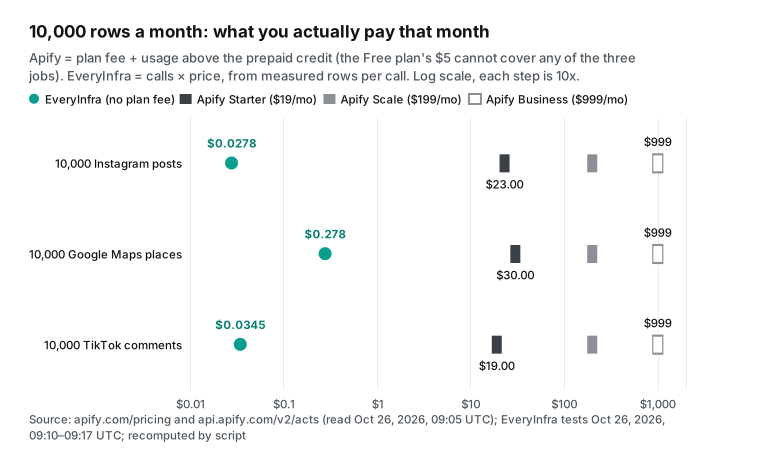
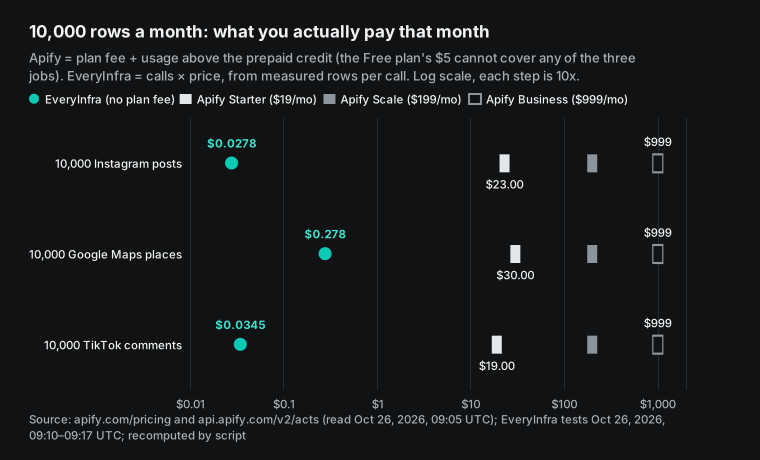
If you only compare the price per 1,000 rows and ignore the plan fee, the result is the same, with smaller gaps. Business has the lowest unit price of the self-serve plans. It is $1.50 per 1,000 Instagram posts, $1.50 per 1,000 Maps places and $0.50 per 1,000 TikTok comments. Our measured cost is $0.00278, $0.0278 and $0.00345 per 1,000. So Business is 540, 54 and 145 times more. Apify also has two tiers only for Enterprise customers, PLATINUM and DIAMOND, per the Apify docs.
They also show in the public API. At the lowest DIAMOND tier ($0.50, $0.756 and $0.15 per 1,000), the gaps are 180, 27 and 43 times. Our earlier Apify alternatives test compared unit prices row by row for nine data types. This article does not repeat that table. Here we look at how one month of usage turns into one bill.
The Apify pricing model has five layers
Many people search for "apify pricing explained" because the Store page says "$X per 1,000 results" and the invoice shows a different number. The cause is that an Apify bill has more than one layer. The Actors in Store page says each Store actor uses one of two models. Pay per event means the actor author sets the events and their prices, such as "one result" or "one run start". Most pay-per-event actors include platform usage in the event price.
The same page also says that some actors charge platform usage on top, so you must check the actor's pricing section. Pay per usage means the author adds nothing, and you pay only for the platform resources the run uses. These are compute units, data transfer, storage operations, and residential or SERP proxies. Both models use the prepaid credit in your plan, and extra usage goes on the next invoice.


Split these rules apart and an Apify bill has up to five layers. The table below is the frame for the rest of the article, and each later section covers one layer. Every price in the table comes from the plan table on the Apify pricing page or from the public actor API. We read all of them on October 26, 2026, between 17:05 and 17:06 Singapore time.
| Layer | What it charges | Unit | Self-serve price range | When it shows up |
|---|---|---|---|---|
| 1 Plan fee | Prepaid usage for the month | Per month | $0 / $19 / $199 / $999 | Every account |
| 2 Events | Main event (for example, one result) + start + add-ons | Per event | Set by the author for FREE, BRONZE, SILVER and GOLD | Pay-per-event actors |
| 3 Compute units (CU) | Memory × run time | 1 GB for 1 hour = 1 CU | $0.2 / $0.2 / $0.16 / $0.13 | Pay-per-usage actors, your own actors, a few "event + usage" actors |
| 4 Proxy | Residential traffic, SERP requests, datacenter IPs | Per GB, per 1,000, per IP | Residential $8 / $8 / $7.5 / $7 per GB | Runs that use Apify Proxy |
| 5 Storage and transfer | Reads, writes and storage time for datasets, key-value stores and request queues, plus external traffic | Per 1,000 operations, per GB | Dataset writes $0.005 per 1,000 (Free, Starter) | During and after runs |
Read this table by column, not by row. A pay-per-event actor shows only layers 1 and 2, if the author does not charge usage on top. In layer 5, it adds cost only when you read or write the dataset again after the run. The Actors in Store page says this in one sentence: dataset reads and writes after a run count as platform usage for all pricing models. A pay-per-usage actor is the opposite.
Layer 2 is empty, and layers 3, 4 and 5 all appear. The unit prices look low, but they are hard to predict. Apify's own advice is to test the actor on a small scope first and check the usage. The next five sections cover one layer each, and each one ends with a formula you can reuse.
Layer 1: Apify pricing plans are prepaid credit
The Apify pricing page lists four self-serve plans and Enterprise. Free gives $5 of usage a month. Starter costs $19, Scale costs $199 and Business costs $999. Enterprise says "Unlimited" and asks you to contact sales. Three sentences in the FAQ on that page decide the shape of your bill.
On a paid plan, usage above the prepaid credit goes on the next invoice, and Apify notifies you. On Free, the account stops until the next cycle. Unused credit does not roll over and expires at the end of the cycle. The billing docs add one more rule. If your overage reaches a threshold before the next cycle, Apify invoices it at once.
The threshold is $20 on Starter and $200 on higher plans. An upgrade is prorated. A downgrade moves only unused platform usage to the new plan. A cancel keeps the plan until the cycle ends.
| Plan | Fee = prepaid usage | When it runs out | Store discount tier | CU price | Residential proxy | Concurrent runs (pricing page) | Total memory |
|---|---|---|---|---|---|---|---|
| Free | $0 ($5 of usage) | Stops until next cycle | None (FREE prices) | $0.2 | $8 / GB | 5 | 16 GB |
| Starter | $19 | Extra is invoiced, at once from $20 | BRONZE | $0.2 | $8 / GB | 32 | 64 GB |
| Scale | $199 | Extra is invoiced, at once from $200 | SILVER | $0.16 | $7.5 / GB | 128 | 256 GB |
| Business | $999 | Extra is invoiced, at once from $200 | GOLD | $0.13 | $7 / GB | 256 | 512 GB |
Be careful with the concurrent-runs column. Two Apify sources give different values. The plan table on the pricing page says 5 for Free. The platform limits page says 25 for Free, 32 for Starter, 128 for Scale and 256 for Business. Only the Free value differs, so check the real limit in your account.
The pricing page also lists two discounts. Students get 30% off Starter and Scale. Startups get 30% off Scale. These discounts apply to the fee. They do not change the structure of the break-even math below, but they move the break-even points lower.
This rule gives a result that surprises many people. When your volume is small, a more expensive plan is not cheaper. It is only more expensive. Take TikTok comments. On Starter, 10,000 comments use 10,000 × $0.001 = $10 of credit.
That is less than the $19 fee, so you pay $19 and $9 expires. On Scale, the unit price drops to $0.00075 and the usage is only $7.50. But you pay $199, and $191.50 expires. So the answer to "which Apify plan is cheapest?" is always "the plan whose fee your usage just fills". Apify gives the same advice on its pricing page. Pick the lowest-priced plan with the features you need, and pay overage above it.
Layer 2: pay per event means more than one price per result
Most Store actors now use pay per event. The pay-per-event docs say that the actor author defines the events. The author can set a different price for each of four discount tiers: FREE, BRONZE, SILVER and GOLD. The platform also adds two "synthetic" events by default. The first is apify-actor-start.
It charges once per run start, at $0.00005 by default. A run with up to 1 GB of memory pays one start event, and each extra GB adds one more. So one start of a 4 GB run costs $0.0002. In return, Apify pays for the first 5 seconds of compute in each run. The second is apify-default-dataset-item.
It charges for each item written to the run's default dataset. It is on by default, and the author can remove it. The author receives 80% of event revenue, with "profit = 0.8 × revenue − platform costs", per the pricing and costs docs. The public API shows apifyMarginPercentage = 0.2 for each actor we read, which matches.
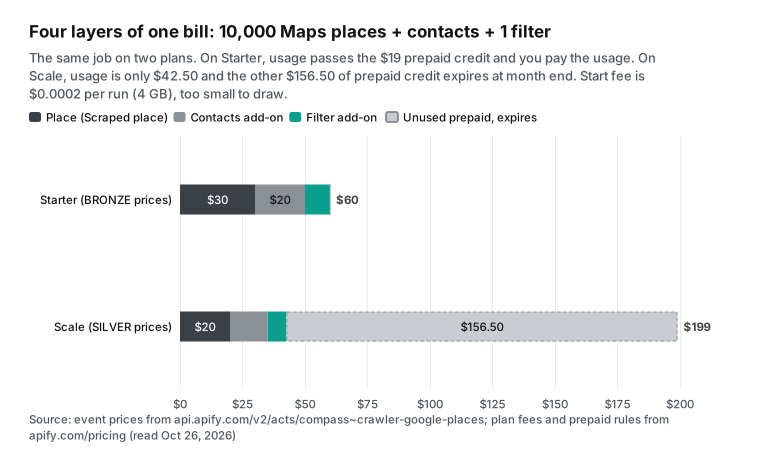
Add-on events make a bill grow fastest. The public API for Google Maps Scraper lists 11 events. The main event, "Scraped place", costs $0.004, $0.003, $0.002 and $0.0015 per place on Free, Starter, Scale and Business. "Filter applied" costs $0.001 to $0.000525 per place per filter. "Company contacts enrichment" pulls contact details from the place's website and costs $0.002 to $0.00105 per place. "Business leads enrichment" costs $0.10 per lead on Free and $0.005 on Starter, a 20x gap.
There are also events for reviews, images, social profiles and an AI competitor analysis. The same job of 10,000 places costs $30 on Starter with the main event only. Add contacts and it is $50. Add one filter and it is $60. The price per 1,000 places goes from $3 to $6.
Pay per event gives you two brakes. The first is a cost limit for one run. When you start a run, you can set maxTotalChargeUsd. The actor stops at that limit, and events above the limit are not charged, per the Actors in Store page. The example in the Run Actor API docs shows this field. The author can set a minimum for that limit.
The public API calls it minimalMaxTotalChargeUsd. It is $0.50 for Google Maps Scraper, TikTok Scraper and Google Search Results Scraper, and $0.0027 for Instagram Scraper. So with the first three actors, the lowest per-run limit you can set is 50 cents. The second brake is an account usage limit, which you set on the Limits tab of billing. This limit is not a hard cut. The Reddit section below shows one account that went 18.8% over it.
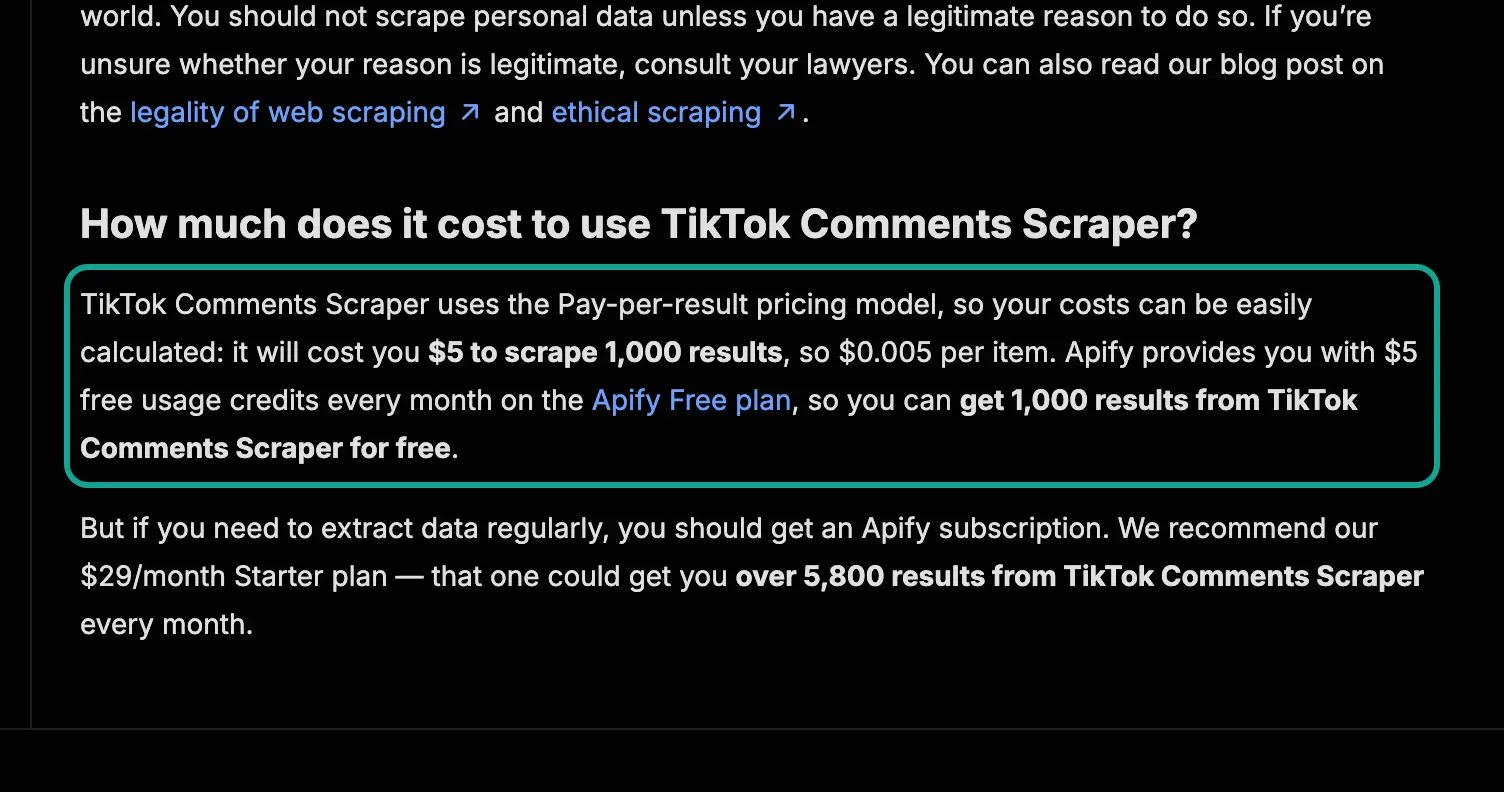
There is one more trap. The text on an actor page can be out of date, so trust the public API. On October 26, 2026 at 17:19 Singapore time, the FAQ on the TikTok Comments Scraper page still said "pay per result" and "$5 to scrape 1,000 results". It also recommended a "$29/month Starter plan" that "could get you over 5,800 results". At the same moment, the public API showed pay per event at $0.00125 per comment on Free ($1.25 per 1,000) and $0.001 on Starter.
The pricing page showed Starter at $19. The price history in the API shows how the page fell behind. In February 2023, the actor was a $20 monthly rental. In August 2024, it changed to $0.001 per result. On March 16, 2026, it changed to pay per event.
Here is how to read the public API. You do not need an account. Send a GET to api.apify.com/v2/acts/<author>~<actor-name>. In the response, data.pricingInfos is the price history, and the last element is the current price.
Under pricingPerEvent.actorChargeEvents you find each event name, its title and its price per tier (eventTieredPricingUsd). The Get Actor API docs and the pay-per-event docs both say to use this endpoint to list an actor's events. We read every Apify price in this article this way and kept the raw responses.
| Model | Who sets the price | What you pay for | Easy to predict? | Example in this article |
|---|---|---|---|---|
| Pay per event | Actor author, per tier | Main event + start + add-ons (usage usually included) | Yes, if you know your counts | Instagram Scraper, Google Maps Scraper, TikTok Comments Scraper |
| Pay per usage | No author fee | CU + proxy + storage + transfer | Hard; Apify advises a test run | Web Scraper |
| Event + usage | Actor author | Events and platform usage | Hardest; takes 14 days to switch on | Not used here |
| Rental (retired October 1, 2026) | Actor author | Monthly fee + platform usage | Moved to pay per usage | TikTok Scraper until March 2025 |
Layer 3: how compute units turn into money
A pay-per-usage actor charges no events. Apify's own Web Scraper is one example: its pricingInfos is empty and its default memory is 4,096 MB. Its bill is mostly compute units. The usage and resources docs define a CU as memory in GB × run time in hours. A 1,024 MB run for one hour is 1 CU, and time counts to the second.
Memory also sets the CPU. You get one full CPU core for each 4,096 MB, and 512 MB gives one eighth of a core. Disk is twice the memory. The CU price depends on the plan. The pricing page says $0.2 on Free and Starter, $0.16 on Scale and $0.13 on Business.
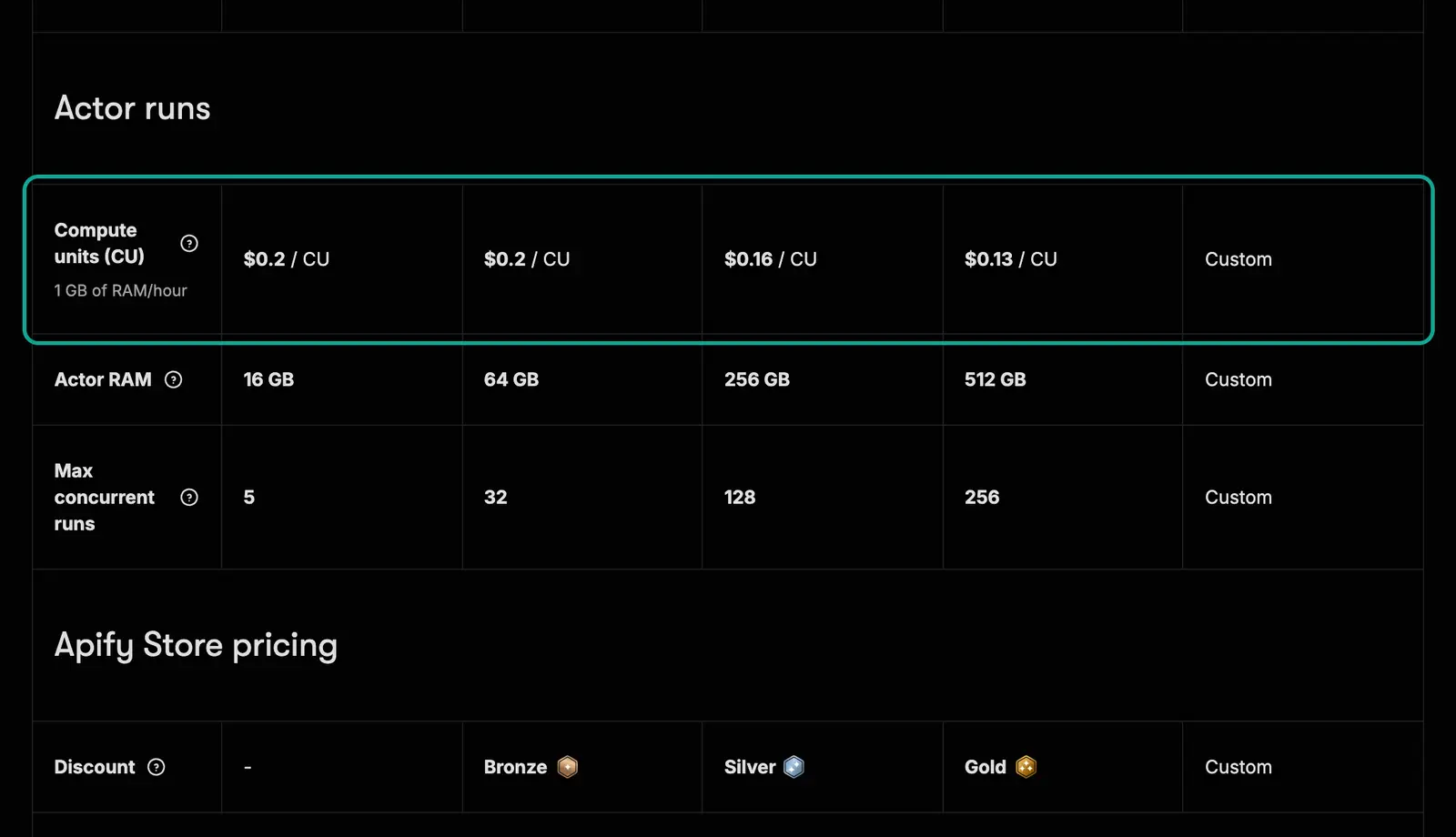
The hard part is the estimate. The docs give an hourly example. A 4,096 MB run takes 15 minutes, so each run uses 1 CU (4 × 0.25). One run every hour for a month is 720 CU. That is $144 on Starter, $115.20 on Scale and $93.60 on Business.
Apify's help article on how to estimate compute unit usage gives two averages. With a real browser, 1 CU handles about 300 pages. With plain HTML parsing (Cheerio), 1 CU handles about 3,000 pages. The same article warns that a small run with one URL cannot use autoscaling well, so you must test your own case.
| 10,000 pages, CU only | Estimated CU | Free / Starter ($0.2) | Scale ($0.16) | Business ($0.13) | Basis |
|---|---|---|---|---|---|
| Browser, 300 pages per CU | 33.33 | $6.67 | $5.33 | $4.33 | Apify help article average |
| HTML only, 3,000 pages per CU | 3.33 | $0.67 | $0.53 | $0.43 | Apify help article average |
| Docs example: 4 GB, 15 minutes every hour, one month | 720 | $144.00 | $115.20 | $93.60 | Apify usage and resources docs |
These CU costs look small, but CU is only layer 3. A pay-per-usage actor that visits a protected site almost always needs a proxy. Proxy is a separate layer, and it often costs more than CU. One more point is important. When a pay-per-event actor runs in Standby mode, the pay-per-event docs say users always pay platform usage on top of events.
The same applies when the author turns on the "event + usage" switch. That switch takes 14 days to start, and the docs say it lowers the actor's quality score. So most authors leave it off. You should still read the pricing section on the actor page before you run it.
Layer 4: Apify proxy pricing
"apify proxy pricing" and "apify residential proxy pricing" are near the top of the search suggestions for this topic. The pricing page lists four proxy types. Residential proxy is billed by traffic: $8 per GB on Free and Starter, $7.5 on Scale and $7 on Business. Datacenter proxy is billed by IP. Free includes 5 IPs.
Starter includes 30, then $1 per IP. Scale includes 200, then $0.8. Business includes 500, then $0.6. Google SERP proxy is billed per search results page, at $2.5 to $1.7 per 1,000. Unblocker costs $1.5 to $1 per 1,000 requests.
The residential proxy docs say traffic is measured for each connection. They also warn that a browser loads large files on every page, so it is easy to use up your prepaid traffic fast. Their advice is to block requests for images and similar files.
You can estimate residential traffic from a public page-weight figure. The HTTP Archive Web Almanac 2025 page weight chapter reports a median mobile inner page of 1,769 KB in July 2025. Home pages are larger, at 2.6 MB. Suppose a pay-per-usage actor loads 10,000 such inner pages in a browser through residential proxy. The traffic is 10,000 × 1,769 KB ≈ 16.87 GB. The proxy cost is about $134.96 on Starter, $126.53 on Scale and $118.09 on Business.
That is 20 to 27 times the CU cost for the same 10,000 pages. This is an upper estimate. If you block images, fonts and scripts, the traffic drops a lot, and an actor that calls a JSON endpoint uses even less. Test your own target site. But the scale tells you one thing: in a pay-per-usage bill, the proxy is often the largest line, not CU.
| Proxy type | Unit | Free | Starter | Scale | Business |
|---|---|---|---|---|---|
| Residential | Per GB of traffic | $8 | $8 | $7.5 | $7 |
| Datacenter | Per IP | 5 included | 30 included, then $1 each | 200 included, then $0.8 each | 500 included, then $0.6 each |
| Google SERP | Per 1,000 results pages | $2.5 | $2.5 | $2 | $1.7 |
| Unblocker | Per 1,000 requests | $1.5 | $1.5 | $1.25 | $1 |
| Example: 10,000 inner pages, full load, residential | 16.87 GB | $134.96 | $134.96 | $126.53 | $118.09 |
The proxy overview and the datacenter proxy docs explain that datacenter IPs are cheap and fast, but sites block them more easily. The Google SERP proxy docs say that proxy is only for Google search results pages. The pricing page FAQ adds a limit that is easy to miss. On the Free plan, Apify Proxy works only inside the platform, not from outside clients. Pay-per-event actors usually include proxy cost in the event price. So this layer mostly affects pay-per-usage actors and actors you write yourself.
Layer 5: storage and data transfer
The last layer is the smallest, but every run touches it. The pricing page prices three storage types. A dataset costs $0.005 per 1,000 writes and $0.0004 per 1,000 reads on Free and Starter, plus $1 per 1,000 GB-hours of storage. A key-value store charges 10 times more for writes, $0.05 per 1,000.
A request queue costs $4 per 1,000 GB-hours of storage. External data transfer costs $0.20 per GB, and internal transfer $0.05 per GB. The storage docs include an estimator. Its example is 1 GB stored in a dataset for 24 hours ($0.024) plus 1,000 reads and 1,000 writes, for about $0.0294 in total.
At these prices, writing 10,000 results to a dataset once costs $0.05, and reading them once costs $0.004. Next to event costs of tens of dollars, that is close to nothing. The retention rules matter more. The storage docs say unnamed storages are deleted when the retention period ends. On Free, Apify keeps your 10 most recent runs for 4 months.
To keep data longer, give the dataset a name, per the dataset docs. A named storage stays until you delete it, and it keeps paying for storage time. The other two storage types are described in the key-value store docs and the request queue docs. If you run a job every day and pull the full dataset each time, reads and external transfer add up day by day. The amount stays small, but it adds a line to the bill.
Apify pricing calculator: a formula you can fill in
Put the five layers together and you can write one month of Apify cost as the formula below. It works for the four self-serve plans. Enterprise prices are negotiated, so they are not in the formula.
Usage U = Σ (count of each event × that event's price on your tier)    ← layer 2, pay-per-event actors
        + Σ (start events per run × GB of memory × $0.00005)
        + CU × CU price                                                ← layer 3, pay-per-usage actors
        + residential GB × price per GB + SERP pages / 1000 × price     ← layer 4
        + storage operations and transfer                               ← layer 5

Paid this month =
  Free:      $0 if U ≤ $5; if U > $5 the job cannot finish (service stops until next cycle)
  Paid plan: fee F + max(0, U − F)                                      ← layer 1, F = $19 / $199 / $999
Which plan: compute U with each tier's prices, put it in the line above, take the lowest result
The worksheet below expands the formula for one US lead-generation case. The job is 10,000 dental clinics from Google Maps each month, with contacts and one filter, run once a day at 4 GB of memory. Every cell is filled in for all four plans. For your own job, change the counts in the first column and copy the unit prices for your actor from the public API.
| Row | What to fill in | Free | Starter | Scale | Business |
|---|---|---|---|---|---|
| a | Main event: 10,000 × price | $40.00 | $30.00 | $20.00 | $15.00 |
| b | Add-on: contacts, 10,000 × price | $20.00 | $20.00 | $15.00 | $10.50 |
| c | Add-on: one filter, 10,000 × price | $10.00 | $10.00 | $7.50 | $5.25 |
| d | Starts: 30 runs × 4 GB × $0.00005 | $0.006 | $0.006 | $0.006 | $0.006 |
| e | Usage U = a + b + c + d | $70.01 | $60.01 | $42.51 | $30.76 |
| f | Fee F (prepaid) | $0 ($5 credit) | $19 | $199 | $999 |
| g | Paid this month | Not possible | $60.01 | $199 | $999 |
| h | Expired credit = max(0, F − U) | — | $0 | $156.49 | $968.24 |
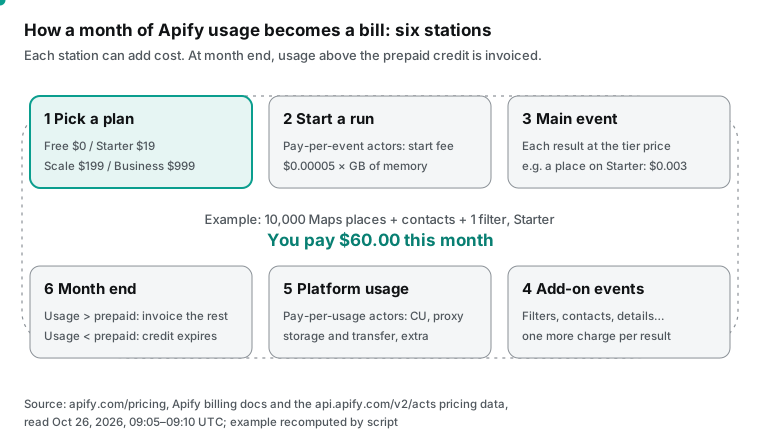
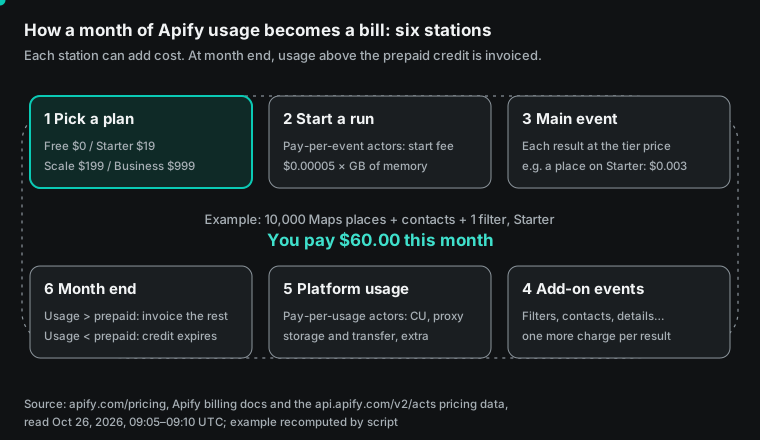
We tested the formula against a number that Apify itself publishes. We set the test before we saw the result. The formula must match Apify's own figure. If it does not, we report the gap and keep the formula.
The Instagram Scraper page says Starter costs $2.30 per 1,000 results, enough for "over 8,200 results per month". Scale costs $1.90 for 104,700 results, and Business $1.50 for 666,000 results. With the formula, the rows a fee covers are F ÷ unit price.
That gives $19 ÷ $0.0023 = 8,260, $199 ÷ $0.0019 = 104,736 and $999 ÷ $0.0015 = 666,000. All three match. So the "results per month" on Apify's page are the rows that use up the fee exactly. This also confirms that the fee and the prepaid credit are the same amount.
When does a higher plan pay off? Break-even points per actor
With the formula, you can find the volume where a higher plan starts to pay off. On Starter, once usage goes above $19, you pay the usage. On Scale, you pay a fixed $199 until usage goes above $199. So Starter and Scale cost the same where Starter usage equals $199. The rows at that point are $199 ÷ the Starter unit price.
In the same way, Scale and Business cost the same at $999 ÷ the Scale unit price. We did this for four actors. We also checked that at each break-even point the higher plan's usage is still below its fee. For example, at 86,522 Instagram Scraper results, Scale usage is $164.39, which is below $199. So the formula holds.
| Actor (main event) | Rows the Starter fee covers | Scale beats Starter above | Business beats Scale above |
|---|---|---|---|
| Instagram Scraper (Result) | 8,260 | 86,522 a month | 525,790 a month |
| Instagram Post Scraper (Post) | 12,666 | 132,667 a month | 768,462 a month |
| Google Maps Scraper (Scraped place) | 6,333 | 66,334 a month | 499,500 a month |
| TikTok Comments Scraper (comment) | 19,000 | 199,000 a month | 1,332,000 a month |
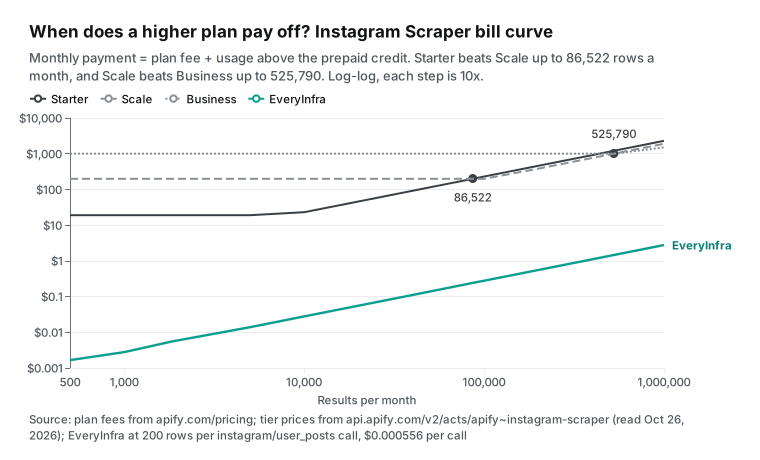
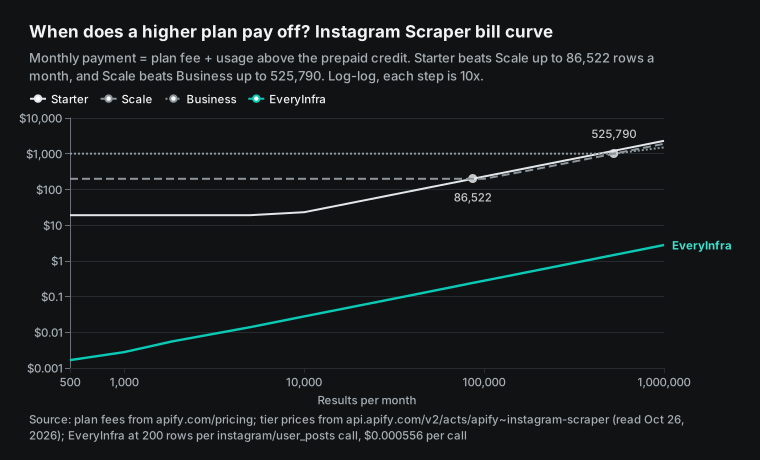
This table has two uses. First, it stops you from buying a plan for its unit price. Google Maps Scraper costs $2 per 1,000 places on Scale, one third less than $3 on Starter. But Scale only pays off above 66,334 places a month. Second, it shows that a different actor for the same data changes the bill. Apify maintains at least two actors for Instagram posts.
Instagram Scraper charges per "Result", at $2.70 per 1,000 on Free. Instagram Post Scraper charges per "Post", at $1.70 per 1,000 on Free. Its public API shows a new pricing record on October 7, 2026. For the same 10,000 posts on Starter, the second actor uses $15 of credit, so the $19 fee covers it. That is $4 less than the $23 bill for the first actor. Picking the actor is part of the math.
Apify pricing on Reddit: four real bills, checked with the formula
A formula needs real bills to test it. We found four Reddit posts with exact amounts, and we read each post and its replies. We do not show user names. The first is from r/B2BLeadGenPro. The poster says they used Google Maps Scraper for three months and logged every invoice.
Basic fields cost $4 per 1,000 places. With email and social profile scraping on, the cost was $6 per 1,000. At 20,000 places a month, that came to $120 a month and $1,440 a year (post). The formula gives the same number at Free prices. $0.004 for the place plus $0.002 for contacts is $6 per 1,000, so 20,000 places cost $120. On Starter, the price would be $3 + $2 = $5 per 1,000, so 20,000 places would cost $100.
The post does not say which tier the poster used, so we do not guess. Note also that the post promotes a desktop tool with a yearly fee. Its "not worth it above 3,500 records a month" compares Apify with that tool only.
The second post is on r/apify. The title asks if it is misleading that a "hard" limit of $110 ended at $130.70. The poster set the monthly usage limit to $110, and the dashboard later showed $130.70. Support said bursts of pay-per-event runs can create billable events faster than the account-wide limit check can block them. Support also declined to credit the $20.70 difference (post).
In this case the overshoot was 18.8%. For you, this means the account limit is a guard, not an exact brake. To cap one run, set maxTotalChargeUsd on the run. The pay-per-event docs say the platform stops charging at that limit. The same docs also say the limit applies to one run, not to a user's total spending.
The third post comes from an actor author on r/apify, with the title "Your Apify cost per 1,000 results is mostly a run-size problem" (post). The author uses a Google News actor as the example. The start costs $0.02 per run, and each page of results costs $0.0099. We recomputed the four figures in the post. One page in one run is $0.02 + $0.0099 = $0.0299, and the start is two thirds of it.
Ten pages in one run cost about $0.0119 per page. One hundred pages in one run cost $1.01. The same 100 pages as 100 separate runs cost 100 × $0.0299 = $2.99, almost three times more. All four figures match. The advice in the post is practical.
Put all watch terms for a schedule into one run. In n8n and similar workflow tools, do not put the actor node inside a loop that sends one item at a time. The author also admits that the input form showed $0.02 per page while the real price was $0.0099. That is the same kind of problem as the TikTok Comments Scraper page above.
The fourth post shows the author's side. A developer on r/SideProject says that before listing a job-data actor, they asked AI agents to find billing bugs (post). One finding was double billing. Apify's pay-per-event setup has a default charge for each item a run saves. The actor also had its own per-job charge, so each job would be billed twice.
Other findings were repeat charges after a run migrated or was resurrected, and an SDK that read a $0 limit as "no limit". The first problem matches the synthetic event apify-default-dataset-item in the docs. For a buyer, this means one check. Look for an actor whose event list has both its own "per result" event and the default dataset item event. For that actor, run a small test and count the charged events in the run detail.
| Reddit post (links in the text above) | Amount in the post | Recomputed with the formula | Result |
|---|---|---|---|
| r/B2BLeadGenPro, three months of Maps bills | $6 per 1,000; 20,000 a month = $120 | Free: $0.004 + $0.002 = $6; Starter would be $5 and $100 | Matches Free prices; Starter would be $20 less |
| r/apify, "hard" limit passed | Limit $110, usage $130.70 | $20.70 over, or 18.8% | The account limit is not an exact brake |
| r/apify, run size sets the unit cost | One page in one run ≈ $0.03; 100 pages in 100 runs $2.99 | $0.0299; $1.01 vs $2.99 | All four figures match |
| r/SideProject, double billing found before launch | Each item billed twice | Matches the synthetic event apify-default-dataset-item | Count charged events in a test run |
Prices keep moving: billing history of six popular actors
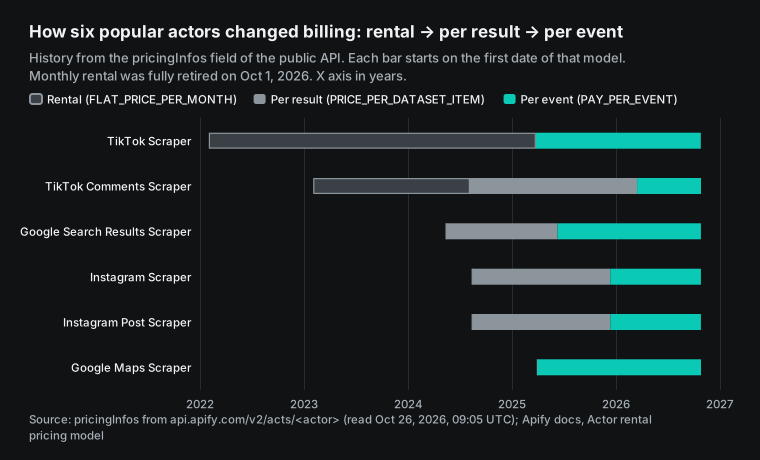
Apify prices are not one fixed table. The pricingInfos field in the public API is a list of past records. We sorted the history of six popular actors by billing model in the chart below. TikTok Scraper was a $45 monthly rental in February 2022.
It changed to pay per event on March 26, 2025. TikTok Comments Scraper went through rental, pay per result and pay per event. Google Search Results Scraper has 27 pricing records, and the newest is from October 7, 2026. Google Maps Scraper has used pay per event since March 31, 2025, with 15 records.
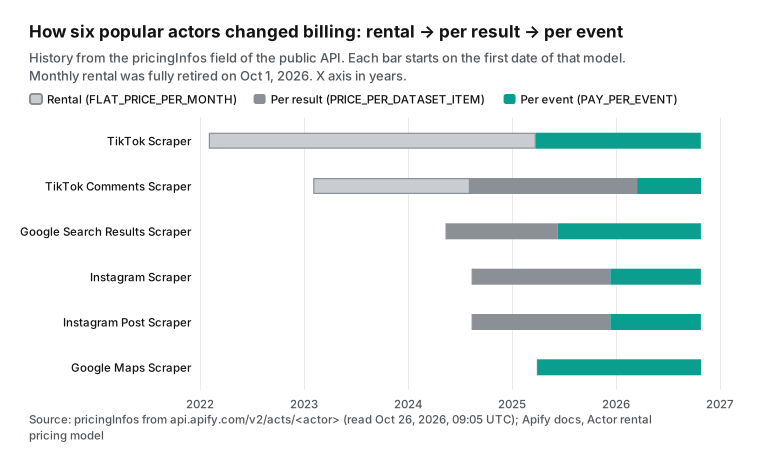
Apify pushed this change in public. Its blog post Why Apify is standardizing Actor pricing is dated April 14, 2026. It says 2,000 actors had already moved from pay per result to pay per event. The next step was to end rentals within six months. In a survey, 73% of customers said they prefer pay per event. One reason given is that rental made customers pay two amounts, a rental fee plus platform usage, so the total was hard to predict.
A guest post on the Apify blog, dated September 24, 2026, has an editor's note. It says rental retires fully on October 1, 2026, and rental actors that are not migrated move to pay per usage. The same post found that 46 of the author's 121 public actors used rental, and the Apify MCP server could not find them. For you, this means one thing. If you used a rental actor before October 1, its bill changed from a fixed fee to platform usage. Do the math again.
The prices also move inside one model. Google Maps Scraper moved to pay per event in 2025. Apify's help article of March 18, 2025 gave $0.007 per run start and $0.004 per place. Today the public API uses the platform's standard apify-actor-start event at $0.00005 per GB of memory. The Free price per place is still $0.004, but there are now BRONZE, SILVER and GOLD discounts, and the add-ons have grown to 11 events.
Use the API and the actor page on the day you calculate. The last modified date was 2026-10-23 for Instagram Scraper and Instagram Post Scraper. It was 2026-10-26 for Google Maps Scraper, TikTok Scraper, TikTok Comments Scraper and Google Search Results Scraper. The revenue split for authors is on the monetization overview.
Many pricing records also mean that any article, this one included, goes out of date. The safe method is to read the public API each time you calculate. You can also turn the worksheet above into a script that pulls unit prices from the API. Our recompute script works this way. It reads every unit price from the API responses we saved on the day.
How EveryInfra bills the same jobs, measured
EveryInfra's data API has one layer. Each request costs the catalog price of the action once, however many rows it returns, up to max_limit. There is no plan fee, no compute unit, no proxy line and no storage line. Failed requests and empty results are not charged. The catalog (GET /api/v1/social/catalog) is free. It lists price_usd, max_limit, paging rules and response_fields for each action.
This article uses three actions. Instagram posts (instagram/user_posts) cost $0.000556 per call, up to 200 rows. TikTok comments (tiktok/comments) cost $0.000556 per call, up to 200 rows. Google Maps place search (google_maps_reviews/search) costs $0.001389 per call, up to 50 places per page. The platform pages are Instagram data API, TikTok data API and Google Maps data API.
| Billing item | Apify (Starter) | EveryInfra |
|---|---|---|
| Monthly fee | $19, prepaid, expires at month end | None |
| Unit of charge | Each event (result, start, add-on) | Each request |
| Compute, proxy, storage lines | Yes for pay-per-usage actors | No |
| Minimum top-up | Plan fee | $10, balance does not expire |
| Empty result | Depends on the actor author | Refunded on the same charge |
# 1. Submit: ask for 200 posts (instagram/user_posts is async and returns a job_id first)
curl -s https://api.everyinfra.com/api/v1/social \
  -H "Authorization: Bearer ${EVERYINFRA_API_KEY}" \
  -H "Content-Type: application/json" \
  -d '{"platform":"instagram","action":"user_posts","params":{"username":"nasa","limit":200}}'

# 2. Poll: free; when status is succeeded, the rows are in results
curl -s https://api.everyinfra.com/api/v1/jobs/job_xxxxxxxx \
  -H "Authorization: Bearer ${EVERYINFRA_API_KEY}"

# 3. Maps page 2: send back next_page_token as is; past 60 rows, add "mode":"async"
curl -s https://api.everyinfra.com/api/v1/social \
  -H "Authorization: Bearer ${EVERYINFRA_API_KEY}" \
  -H "Content-Type: application/json" \
  -d '{"platform":"google_maps_reviews","action":"search","mode":"async","params":{"keyword":"dentist","location":"Chicago","country":"us","limit":50,"page_token":"pt1.…"}}'
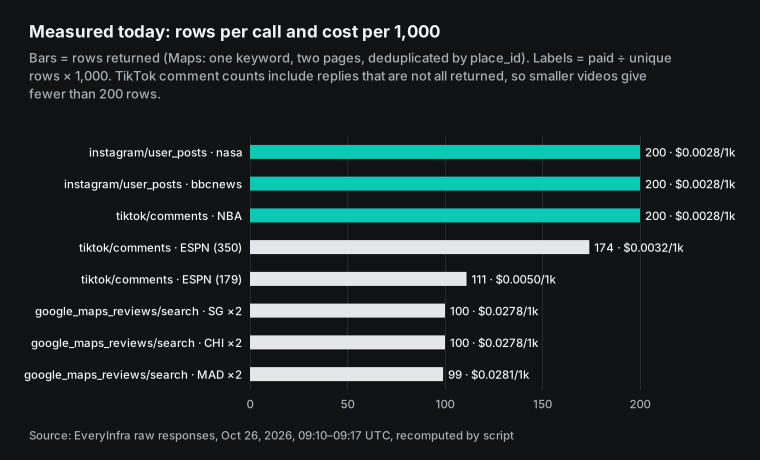
We sent 14 requests on October 26, 2026, from 17:10 to 17:17 Singapore time. The table shows each one. We counted rows from the array length in each raw response and removed duplicates by post_id, id or place_id. Cost per 1,000 = paid ÷ unique rows × 1,000.
| Time (SGT) | Action | Target | Returned / unique | Paid | Per 1,000 |
|---|---|---|---|---|---|
| 17:10:02 | instagram/user_posts | nasa, limit 200 | 200 / 200 (May 7 to October 25) | $0.000556 | $0.0028 |
| 17:10:09 | instagram/user_posts | bbcnews, limit 200 | 200 / 200 (October 19 to 26) | $0.000556 | $0.0028 |
| 17:10:11 | tiktok/user_videos | espn, limit 10 (to find videos) | 10 | $0.000556 | — |
| 17:10:42 | tiktok/comments | ESPN video, page shows 350 comments | 174 / 174 (38 replies) | $0.000556 | $0.0032 |
| 17:12:12 | tiktok/comments | ESPN video, page shows 179 comments | 111 / 111 (29 replies) | $0.000556 | $0.0050 |
| 17:14:28 | tiktok/comments | NBA video with many comments | 200 / 200 (89 replies) | $0.000556 | $0.0028 |
| 17:15:21, 17:15:40 | google_maps_reviews/search | dentist, Chicago, two pages | 100 / 100 (page 2: depth_limit, before the 19:53 fix) | $0.002778 | $0.0278 |
| 17:13:02, 17:13:32 | google_maps_reviews/search | dentist, Singapore, two pages | 100 / 100 | $0.002778 | $0.0278 |
| 17:16:32, 17:16:51 | google_maps_reviews/search | dentista, Madrid, two pages | 100 / 99 | $0.002778 | $0.0281 |
| 17:13:21 | google_maps_reviews/search | page 2 without async | 422 async_required | $0 | — |
| 17:14:31 | instagram/user_posts | an account that does not exist | 0 (refunded) | $0 | — |
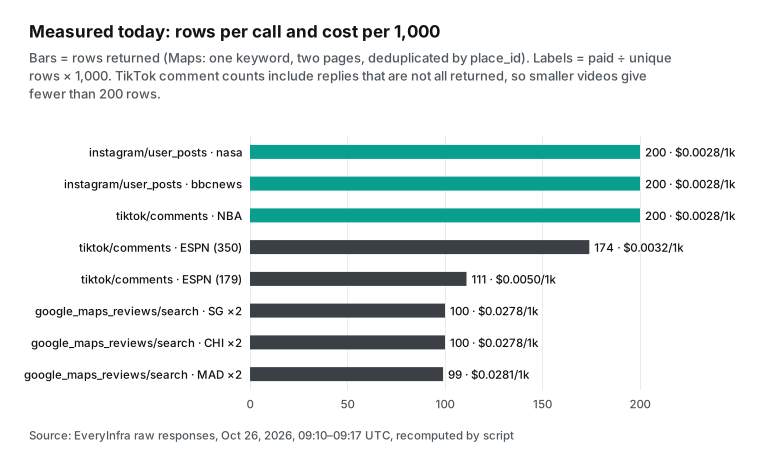
To project 10,000 rows from these 14 requests, we made three assumptions. Instagram posts: instagram/user_posts has no paging parameter, and one call returns up to the latest 200 posts of one account. So 10,000 posts means 50 accounts with 200 posts each. This holds only if each account has at least 200 posts. Both accounts in our test returned the full 200. TikTok comments: tiktok/comments returns up to 200 comments per video.
The catalog says each top-level comment carries at most two replies, so the full thread is not guaranteed. That is why the count on the video page is higher than what you get back. The two ESPN videos returned about half of the shown count (174 of 350 and 111 of 179). At our measured average of 161.7 rows per call, 10,000 comments take 62 calls and $0.0345. With only high-comment videos, it is 50 calls and $0.0278. Google Maps: google_maps_reviews/search returns up to 50 places per page.
In this test, the second page of one keyword hit the depth limit (stop_reason = depth_limit). That limit was fixed at 19:53 Singapore time on October 26, 2026. We checked again at 20:03–20:05 with dentist in Austin, TX: the three pages returned 50, 50 and 20 places, and page 3 stopped with depth_limit. So one keyword now gives at most 120 rows. Page 3 has only 20 places but costs one full request, so the math below still uses two calls and 100 places per keyword. For 10,000 places, prepare 100 "business type × city" keywords: 200 calls and $0.2778. Each page is fetched again from the start, so pages can overlap (the Madrid pages had one duplicate). Remove duplicates by place_id before you store the rows. Our Google Maps deduplication test covers this in detail.
For US lead lists, the Chicago test is the most direct sample. Its first page of 50 dental clinics had a rating on every row, with a range of 4.2 to 5.0 and an average of 4.85. The 50 places had 27,023 reviews in total, and the largest single count was 1,424. These are the kinds of fields a sales team filters on, and they come in the same $0.001389 call. You do not pay an add-on per filter. You filter the rows after you get them, in your own sheet or database.
The fields must match the catalog. The table below lists the 12 response_fields for tiktok/comments in the catalog. For each field, it gives the number of rows that had it in the 200-row NBA call. The first nine fields are on every row. reply_to_id is only on the 89 replies. reply_count and pinned_by_author are on some top-level comments only.
We also checked the other two actions. The catalog lists 22 fields for google_maps_reviews/search, and the first Chicago page had 19 of them: description, price and permanently_closed did not appear. The catalog lists 21 fields for instagram/user_posts, and the 200 nasa posts had 15 of them. video_url appeared only on the 56 video posts.
| Field (catalog `response_fields`) | Meaning | Rows with it, NBA video, 200 rows |
|---|---|---|
id | Comment ID | 200 |
text | Comment text | 200 |
author_username, author_id | Commenter account and ID | 200 |
like_count | Likes | 200 |
is_reply | Is it a reply | 200 |
liked_by_author | Liked by the video author | 200 |
posted_at | Time posted | 200 |
platform | Platform name | 200 |
reply_to_id | ID of the comment it replies to | 89 (replies only) |
reply_count | Number of replies | 111 |
pinned_by_author | Pinned by the author | 137 |
Errors and charges: who pays when a run fails
With pay per event, the actor author decides if a failure costs money. The pay-per-event docs have a section called "Charge for invalid input". It advises authors to charge for input that looks valid but fails, such as a URL that returns 404. The reason given is that the platform already spent resources. The docs also advise authors to return error items with clear error codes instead of failing the whole run.
The TikTok Comments Scraper page has an error-code table. For a missing or private profile, it writes an error item with an errorCode field to the dataset. The page does not say if that error item is charged, and we did not pay to run it, so we make no claim. As covered above, a per-run cost limit and an account limit can stop a runaway loop. But runs already in progress can pass the account limit.
EveryInfra's rule: bad parameters, failed authentication and similar errors are not charged. If a request is charged and then returns an empty result, the same charge is refunded. The pricing page states that failed or empty results are not billed. Two of today's calls test this.
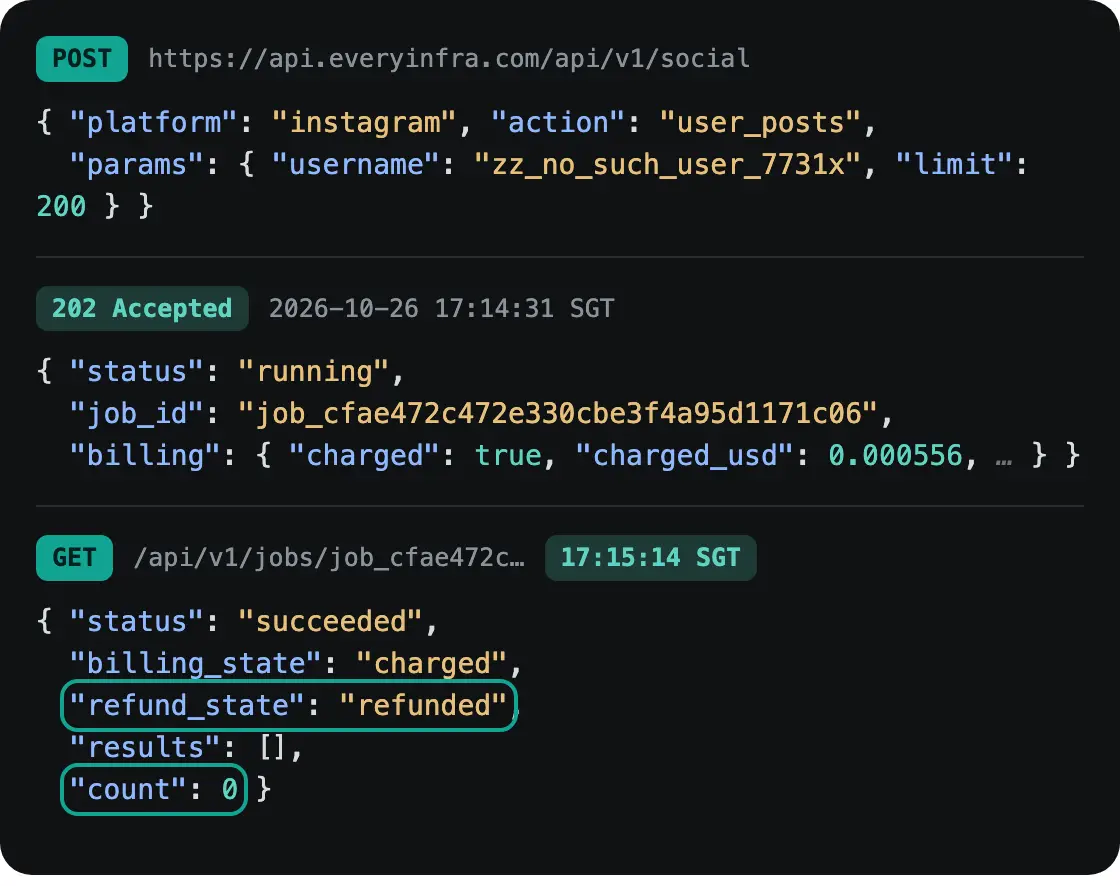
At 17:13:21, Maps page 2 without "mode":"async" returned 422 async_required. The error message said "Nothing was charged" and explained the fix. At 17:14:31, a call for an Instagram account that does not exist was charged $0.000556 on submit. When the job finished at 17:15:14, count was 0 and refund_state was refunded.
| Case | Apify (pay-per-event actor) | EveryInfra |
|---|---|---|
| Bad parameter | Author decides; docs advise charging for input that looks valid | 422, no charge, lists the allowed parameters and the fix |
| Not found, empty result | Author can write an error item; charge depends on the author | Charged, then refunded on the same record (refund_state: refunded) |
| Rate limit | Platform concurrency limit; runs wait or fail | 429, no charge, retry after retry_after |
| Runaway cost | Per-run maxTotalChargeUsd + account limit (can be passed) | Each API key can have a total USD spend limit and stops there |
| How to see cost | Usage chart and per-run detail in the console | charged_usd in every response, plus a ledger |
MCP and n8n: where the cost shows up
More people now call data from AI tools, so the cost must be clear at the tool level. The Apify MCP server is at mcp.apify.com, and OAuth sign-in is the recommended setup. Its call-actor tool waits up to 45 seconds. Run limits (memory, timeout, max items, maxTotalChargeUsd) go in callOptions.
The docs also say that per-request payment through MCP works only with pay-per-event actors. The open-source repository released v0.19.0 on October 19, 2026, with tools to create actors and update versions, and reached v0.19.3 on October 21, 2026. The Apify changelog entry of October 16, 2026 says the same thing. AI agents can now build actors, read build logs and check runs through MCP. The entry of October 6, 2026 added Store categories by use case.
EveryInfra's remote MCP server is at api.everyinfra.com/mcp (HTTPS). At 17:31 Singapore time today, a free tools/list call returned 25 tools. everyinfra_list_capabilities, everyinfra_get_job and everyinfra_billing cost nothing. everyinfra_call_api fetches data at the same price and rules as REST. Both servers use the Streamable HTTP transport from the MCP specification. In Claude Code, the official guide shows that one command adds a server:
claude mcp add --transport http everyinfra https://api.everyinfra.com/mcp \
  --header 'Authorization: Bearer ${EVERYINFRA_API_KEY}'
n8n works the same way. Apify has an n8n integration guide and a community node. The Reddit author above warns that an actor node inside a "Split In Batches" loop is the most expensive setup, because each item pays a start fee. EveryInfra needs no special node.
The built-in HTTP Request node sends the POST shown above, and an AI Agent node can use the MCP Client Tool. With per-request billing, a loop adds no start fee, but each call is still a charge, so set limit to the maximum on list actions. See our n8n daily report guide and our remote MCP setup guide.
When Apify is the better choice
Price is not the only factor, and Apify does several things that we do not. First, coverage. Apify Store has thousands of actors, and someone has written a scraper for almost any site. EveryInfra's catalog today has 91 platforms and 426 actions. For a site outside our catalog, use a platform like Apify or write your own scraper.
Second, your own code. Apify runs your code as an actor, with schedules (cron expressions), tasks (saved inputs), webhooks and run history, billed by CU. Apify is a run platform. We are a data API and do not host your code. Third, small trials with no monthly volume.
The Free plan gives $5 a month with no card, which buys 4,000 TikTok comments at the Free price. We have no monthly free credit. A star on our GitHub repository gives a $1 trial for 24 hours, and after that the minimum top-up is $10.
Fourth, agents that pay for themselves. The Apify agentic payments docs say an agent with no account can pay once through x402 or MPP. It then gets a temporary API token with a fixed spend cap and calls Apify like a normal user. The full steps are at agi.apify.com/AGENTS.md. EveryInfra needs a person to sign up, top up and create a key first. Fifth, Enterprise contracts.
At very high volume with DIAMOND prices, a single-object lookup (one row per call) can cost less than our $0.000556 per call. Our Apify alternatives test found that for profile lookups, we cost 11% more than DIAMOND. Sixth, official platform APIs. TikTok's Research API is open only to qualified researchers in the US, Europe, Canada and Brazil. Google's Places API Text Search Pro is free for the first 5,000 calls a month and $32 per 1,000 after that. If you qualify for an official API, it is the simplest choice for compliance, and no third party can match that.
| If you need | Better fit | Why |
|---|---|---|
| A site outside our 91 platforms | Apify Store or your own scraper | Thousands of actors cover more sites |
| To host and schedule your own code | Apify | It is a run platform with schedules, tasks and webhooks |
| Under $5 of data a month, with no card | Apify Free plan | $5 of usage each month; our trial is $1 for 24 hours |
| An agent that pays with no account | Apify agentic payments | x402 or MPP prepaid token |
| Lists of posts, comments or places at volume | EveryInfra | One price per request, up to 200 rows |
What changed in the last 60 days
- October 1, 2026: Apify fully retired rental pricing, and rental actors that were not migrated moved to pay per usage (Apify blog editor's note). For you: rental bills from before October are no longer a valid estimate; recalculate with event prices or CU.
- October 7, 2026: Instagram Post Scraper added a pricing record in the public API (Instagram Post Scraper API). So did Google Search Results Scraper (Google Search Results Scraper API). For you: one actor can have 10 to 27 pricing records, so read the API on the day you calculate.
- October 6 and October 16, 2026: the Apify changelog added Store categories by use case, such as lead generation and price tracking. Then it let AI agents build actors, read build logs and check runs through MCP. For you: calling actors from AI tools gets easier, so per-run start fees and minimum run limits matter more.
- October 14 to October 21, 2026: the Apify MCP server shipped 8 versions, from v0.18.1 to v0.19.3 (GitHub releases). Crawlee shipped v3.18.2 on September 29, 2026 and v4.0.0-rc.1 on October 6, 2026 (Crawlee releases). For you: teams that write their own actors should track versions, because run speed, and so CU cost, can change with the framework.
- October 26, 2026: the public API showed same-day changes for Google Maps Scraper and TikTok Comments Scraper. The last change to Instagram Scraper was on October 23, 2026. For you: the prices here are a snapshot from October 26; read them again before you use them.
FAQ
Is Apify free?
There is a free plan, but the credit is small. The pricing page says the Free plan gives $5 of usage a month with no card. When it is used, the service stops until the next cycle, and unused credit does not roll over. At the prices in this article, $5 buys about 1,851 Instagram Scraper results, 1,250 Google Maps places or 4,000 TikTok comments. Source of the question: the search suggestions "is apify free" and "is apify free reddit" (read October 26, 2026).
Which Apify pricing plans should I choose?
Choose the plan whose fee your usage just fills. Use the formula to compute usage with each plan's unit prices. Then compare "fee + usage above the fee" and take the lowest. The break-even table above gives the answer for four common actors.
For example, below 86,522 Instagram Scraper results a month, Starter is cheapest. This matches the advice on the pricing page: pick the lowest-priced plan with the features you need. Source of the question: the search suggestions "apify pricing plans" and "apify pricing tiers".
Is there an Apify pricing calculator?
The storage docs have an estimator for storage costs only. The usage docs advise a small test run and a check of the usage page. For the full bill with events and plans, use the formula and worksheet in the calculator section. Take unit prices from the public API at api.apify.com/v2/acts/<actor>. Source of the question: the search suggestion "apify pricing calculator".
How are Apify compute units calculated?
One GB of memory for one hour is 1 CU, counted to the second. The price is $0.2 on Free and Starter, $0.16 on Scale and $0.13 on Business (usage and resources docs, pricing page). The Apify help article gives averages of 300 pages per CU with a browser and 3,000 pages per CU with plain HTML parsing. Source of the question: the search suggestions "apify compute unit" and "how to calculate compute units".
What is Apify proxy pricing?
Residential proxy costs $8 per GB on Free and Starter and down to $7 on Business. Datacenter proxy is billed per IP, with 5 IPs included on Free. Google SERP proxy costs $2.5 to $1.7 per 1,000 pages (pricing page). With the HTTP Archive median inner page, 10,000 full page loads through residential proxy are about 16.87 GB, or $118 to $135. Source of the question: the search suggestions "apify proxy pricing" and "apify residential proxy pricing".
What does Reddit say about Apify pricing?
The four posts in this article point to three issues. Per-1,000 prices add up at volume (20,000 places a month for $120 on r/B2BLeadGenPro). The account usage limit can be passed ($110 that became $130.70 on r/apify). Start fees make small runs cost more per row (the author post on r/apify). The links are in the section "Apify pricing on Reddit" above. Source of the question: the search suggestion "apify pricing reddit".
Try it in three steps
Step one: sign up and get an API key (quickstart). Claim the trial credit or top up on the balance page in the console. Prices and top-up amounts are on the pricing page. Step two: open the docs page of an action and use the one-click trial in the playground.
Start with Instagram posts, TikTok comments or Google Maps place search. More platforms are in the data market. Step three: check charged_usd and the row count in the response.
Compute "paid ÷ rows × 1,000" for your case. Then put it next to the Apify bill you get from the formula in this article. If you are looking for an Instagram alternative in particular, our Apify Instagram Scraper alternative article prices five data types one by one.
Method and limits
Apify side: all unit prices come from the public pricing API, read on October 26, 2026 at 17:05 Singapore time. Plan, CU, proxy and storage prices come from the pricing page at the same time. We did not sign up for Apify or pay to run any actor. So we do not know the retry counts in real runs. We also do not know if error items are charged, or if a given actor adds platform usage. The formula assumes that the four pay-per-event actors here do not add platform usage.
We use the Enterprise PLATINUM and DIAMOND prices only to compare unit prices, not in monthly bills. They need a contract, and the public pages give no minimum commitment. The residential proxy example uses the HTTP Archive median page weight as an upper estimate, not the real traffic of any actor. The Reddit posts are personal accounts. We recompute their numbers, but we do not check who posted them or see the original invoices.
EveryInfra side: all 14 requests ran on October 26, 2026, from 17:10 to 17:17 Singapore time. We tested two or three targets per action. This shows rows and prices for these targets on this day. It does not show long-term success rates or speed. The 10,000-row bills are projections from measured rows per call. The test section states three assumptions: 50 accounts with 200 posts each, 161.7 comments per call on average, and 100 keywords with 100 places each.
A recompute script reads all numbers again from the raw responses we saved. The gross charge for this article was $0.012226. The $0.000556 for the missing account came back as a refund, so the net cost was $0.01167. Two generated images cost $0.06.
References
- Apify pricing (plans, CU, proxy, storage), Apify, read October 26, 2026, https://apify.com/pricing
- Actors in Store (pricing models, post-run storage, discount tiers), Apify docs, read October 26, 2026, https://docs.apify.com/platform/actors/running/actors-in-store
- Actor usage and resources (CU, memory and CPU), Apify docs, read October 26, 2026, https://docs.apify.com/platform/actors/running/usage-and-resources
- Billing (immediate overage threshold, prepaid credit), Apify docs, read October 26, 2026, https://docs.apify.com/platform/console/billing
- Pay-per-event pricing model (synthetic events, per-run limit, invalid input), Apify docs, read October 26, 2026, https://docs.apify.com/platform/actors/publishing/monetize/pay-per-event
- Actor pricing and costs (discount tiers, Enterprise tiers, author profit), Apify docs, read October 26, 2026, https://docs.apify.com/platform/actors/publishing/monetize/pricing-and-costs
- Monetize your Actor, Apify docs, read October 26, 2026, https://docs.apify.com/platform/actors/publishing/monetize
- Limits (concurrent runs, memory), Apify docs, read October 26, 2026, https://docs.apify.com/platform/limits
- Residential proxy, Apify docs, read October 26, 2026, https://docs.apify.com/platform/proxy/residential-proxy
- Datacenter proxy, Apify docs, read October 26, 2026, https://docs.apify.com/platform/proxy/datacenter-proxy
- Google SERP proxy, Apify docs, read October 26, 2026, https://docs.apify.com/platform/proxy/google-serp-proxy
- Proxy overview, Apify docs, read October 26, 2026, https://docs.apify.com/platform/proxy
- Storage (retention, estimator), Apify docs, read October 26, 2026, https://docs.apify.com/platform/storage/usage
- Dataset, Apify docs, read October 26, 2026, https://docs.apify.com/platform/storage/dataset
- Key-value store, Apify docs, read October 26, 2026, https://docs.apify.com/platform/storage/key-value-store
- Request queue, Apify docs, read October 26, 2026, https://docs.apify.com/platform/storage/request-queue
- Run Actor (maxTotalChargeUsd, usage fields), Apify API docs, read October 26, 2026, https://docs.apify.com/api/v2/act-runs-post
- Get Actor, Apify API docs, read October 26, 2026, https://docs.apify.com/api/v2/actor-get
- Apify MCP server, Apify docs, read October 26, 2026, https://docs.apify.com/platform/integrations/mcp
- n8n integration, Apify docs, read October 26, 2026, https://docs.apify.com/platform/integrations/n8n
- Webhooks, Apify docs, read October 26, 2026, https://docs.apify.com/platform/integrations/webhooks
- Schedules, Apify docs, read October 26, 2026, https://docs.apify.com/platform/schedules
- Standby mode, Apify docs, read October 26, 2026, https://docs.apify.com/platform/actors/running/standby
- Tasks, Apify docs, read October 26, 2026, https://docs.apify.com/platform/actors/running/tasks
- Runs and builds, Apify docs, read October 26, 2026, https://docs.apify.com/platform/actors/running/runs-and-builds
- Agentic payments, Apify docs, read October 26, 2026, https://docs.apify.com/agents/payments
- Actor quality score, Apify docs, read October 26, 2026, https://docs.apify.com/actors/publishing/quality-score
- How to estimate compute unit usage for your project, Apify Help Center, read October 26, 2026, https://help.apify.com/en/articles/3470975-how-to-estimate-compute-unit-usage-for-your-project
- Google Maps Scraper is going to pay-per-event pricing, Apify Help Center, March 18, 2025, https://help.apify.com/en/articles/10774732-google-maps-scraper-is-going-to-pay-per-event-pricing
- Why Apify is standardizing Actor pricing, Apify blog, April 14, 2026, https://blog.apify.com/standardizing-actor-pricing/
- What Apify MCP does to your Actor before an AI agent sees it (editor's note on rental retirement), Apify blog, September 24, 2026, https://blog.apify.com/fixing-actors-invisible-to-agents/
- Apify changelog, Apify, read October 26, 2026, https://apify.com/change-log
- Instagram Scraper public pricing API, Apify, read October 26, 2026, https://api.apify.com/v2/acts/apify~instagram-scraper
- Instagram Post Scraper public pricing API, Apify, read October 26, 2026, https://api.apify.com/v2/acts/apify~instagram-post-scraper
- Google Maps Scraper public pricing API, Apify, read October 26, 2026, https://api.apify.com/v2/acts/compass~crawler-google-places
- TikTok Comments Scraper public pricing API, Apify, read October 26, 2026, https://api.apify.com/v2/acts/clockworks~tiktok-comments-scraper
- TikTok Scraper public pricing API, Apify, read October 26, 2026, https://api.apify.com/v2/acts/clockworks~tiktok-scraper
- Google Search Results Scraper public pricing API, Apify, read October 26, 2026, https://api.apify.com/v2/acts/apify~google-search-scraper
- Web Scraper public API, Apify, read October 26, 2026, https://api.apify.com/v2/acts/apify~web-scraper
- TikTok Comments Scraper page, Apify Store, read October 26, 2026, https://apify.com/clockworks/tiktok-comments-scraper
- Instagram Post Scraper page, Apify Store, read October 26, 2026, https://apify.com/apify/instagram-post-scraper
- Instagram Scraper page, Apify Store, read October 26, 2026, https://apify.com/apify/instagram-scraper
- Google Maps Scraper page, Apify Store, read October 26, 2026, https://apify.com/compass/crawler-google-places
- apify-mcp-server releases, GitHub, October 21, 2026, https://github.com/apify/apify-mcp-server/releases
- Crawlee releases, GitHub, October 6, 2026, https://github.com/apify/crawlee/releases
- Google Maps Platform pricing, Google, read October 26, 2026, https://developers.google.com/maps/billing-and-pricing/pricing
- HTTP Request node, n8n docs, read October 26, 2026, https://docs.n8n.io/integrations/builtin/core-nodes/n8n-nodes-base.httprequest/
- MCP Client Tool node, n8n docs, read October 26, 2026, https://docs.n8n.io/integrations/builtin/cluster-nodes/sub-nodes/n8n-nodes-langchain.toolmcp/
- Model Context Protocol Specification 2025-11-25, MCP, read October 26, 2026, https://modelcontextprotocol.io/specification/2025-11-25
- Connect Claude Code to tools via MCP, Anthropic docs, read October 26, 2026, https://docs.anthropic.com/en/docs/claude-code/mcp
- TikTok Research API, TikTok for Developers, read October 26, 2026, https://developers.tiktok.com/products/research-api/
- EveryInfra catalog, EveryInfra, read October 26, 2026, 17:09 SGT, https://api.everyinfra.com/api/v1/social/catalog
- Web Almanac 2025: Page Weight, HTTP Archive, January 15, 2026, https://almanac.httparchive.org/en/2025/page-weight
- x402, x402 Foundation, read October 26, 2026, https://www.x402.org/
- Apify AGI: AGENTS.md, Apify, read October 26, 2026, https://agi.apify.com/AGENTS.md
- Apify's "hard" monthly usage limit was $110, but usage reached $130.70, Reddit r/apify, read October 26, 2026, https://www.reddit.com/r/apify/comments/1vsm4sm/apifys_hard_monthly_usage_limit_was_110_but_usage
- Your Apify cost per 1,000 results is mostly a run-size problem, Reddit r/apify, read October 26, 2026, https://www.reddit.com/r/apify/comments/1w6ahko/your_apify_cost_per_1000_results_is_mostly_a
- I ran the same search through Apify Google Maps Scraper and a flat-fee desktop tool, Reddit r/B2BLeadGenPro, read October 26, 2026, https://www.reddit.com/r/B2BLeadGenPro/comments/1sxd1af/i_ran_the_same_search_through_apify_google_maps
- My job data side project went live on Apify…, Reddit r/SideProject, read October 26, 2026, https://www.reddit.com/r/SideProject/comments/1x8n8az/my_job_data_side_project_went_live_on_apify_and
Reference BL-50