Copilot Studio MCP: build a pre-meeting account brief from LinkedIn and news
Add the EveryInfra MCP server to Copilot Studio so sellers get a LinkedIn and news brief in Teams. Setup, where the key goes, 25 live calls and cost.

An account executive in Teams types: "I meet Databricks next Tuesday. What are they up to?" A few seconds later, a one-page brief appears. It shows the company size, the roles they hire for, recent news and posts, and three talking points. In fall 2026 this became practical, because Copilot Studio now accepts MCP servers (Model Context Protocol, an open protocol that lets AI models call outside tools). The agent builder enters an MCP URL, and the agent can call those tools. After publishing, the agent appears in Teams and Microsoft 365 Copilot (add an MCP server by URL, publish to Teams and Microsoft 365).
This article uses the EveryInfra remote MCP server as the data source for that agent. It answers five questions. Which Microsoft routes accept which credentials? How do you configure Copilot Studio, and where does the key go?
What does one real round trip look like? What does it cost per seller per month? How should a team use LinkedIn data with care?
Here is the short answer. Microsoft has six routes to connect MCP to Copilot. With an API key, two routes work today: Copilot Studio (both the new and the classic experience) and the Agent 365 bring-your-own MCP registration, which is in preview. The declarative-agent MCP plugin page says "Not supported" for API keys. You also cannot add your own federated connector.
On 2026-11-07, from 00:18 to 00:37 Singapore time, we sent 25 live requests. Seven returned data for a total charge of $0.003892. The other 18 returned 503 (temporarily unavailable) or 429 (rate limited), and none of them was charged.
The failures fall into two groups. From 00:18 to 00:30, the whole API was unavailable, and all 12 requests in those 12 minutes failed. From 00:31, all 7 company profile and job requests worked, but all 6 company posts and Google News requests still failed. From 01:44 to 01:46, we tested those two parts again, two times each. They still returned 503 and cost nothing. So those two parts describe the design, not measured data.
At list price, one four-part brief costs about $0.0042 in data fees. At 16 briefs per seller per month, that is about $0.07. The large cost is on the Microsoft side. On the new experience, Microsoft estimates 100 to 300 Copilot Credits for a light task, or $1 to $3 per brief. On the classic experience, use by employees with a Microsoft 365 Copilot license shows "No charge".
We have no Microsoft 365 tenant on our test machine, so every Copilot Studio step below is a configuration example from Microsoft's own pages. We did not run it in a tenant. EveryInfra has no partnership with Microsoft or LinkedIn. All Microsoft and LinkedIn facts come from their public pages.
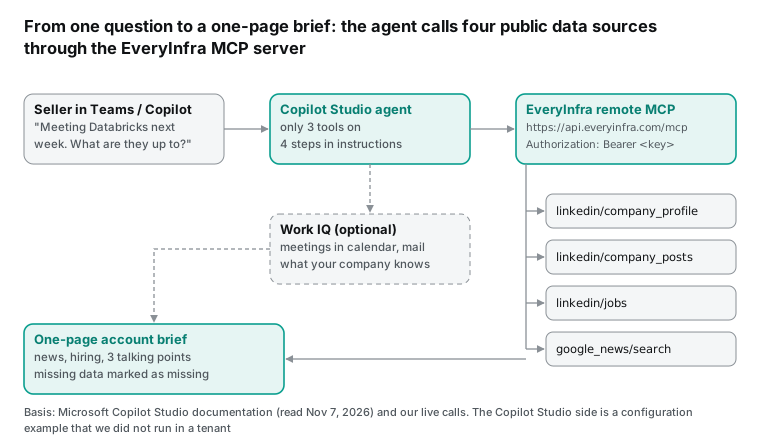
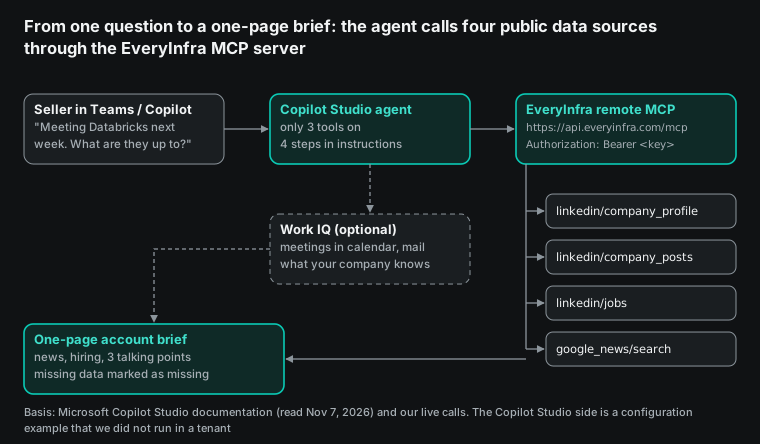
copilot studio mcp and the microsoft 365 copilot mcp connector: six routes, six key rules
"Connect an MCP server to Microsoft Copilot" sounds like one task. On learn.microsoft.com it is six different routes. Different teams own them, and each route has its own documentation tree.
The most important difference is the type of credential that each route accepts. The EveryInfra remote MCP endpoint https://api.everyinfra.com/mcp uses an API key in the header Authorization: Bearer <your key>. A second endpoint, /mcp/all, uses OAuth sign-in, but our authorization server does not offer dynamic client registration. We checked that in detail in our Snowflake article. So the practical question is simple: with an API key in your hand, which route works?
We read each page on 2026-11-07 and put the results in one table. Each cell comes from a page in the source list under the table.
| Route | Where you configure it | Accepts an API key? | Status (read Nov 7, 2026) | Good for this use case? |
|---|---|---|---|---|
| Copilot Studio new experience (GitHub Copilot harness), add MCP server by URL | Copilot Studio, Build > Tools > Add > Model Context Protocol | Yes. The page says "an API key or a client ID and secret" as the server requires | Page is marked preview, prerelease documentation | Yes, recommended |
| Copilot Studio classic experience (standard harness), MCP onboarding wizard | Copilot Studio, Tools > Add a tool > New tool > Model Context Protocol | Yes. API key in a header or a query parameter | Page shows no preview label | Yes |
| Declarative agent MCP plugin for Microsoft 365 Copilot | Microsoft 365 Agents Toolkit 6.12.0 or later in VS Code | No. MCP plugins support Entra SSO, dynamic registration, OAuth code flow and anonymous only | Page shows no preview label | Not with the EveryInfra /mcp endpoint today |
agentConnectors in the Microsoft 365 app manifest (plugins) | App manifest, toolSource.remoteMcpServer | Schema has ApiKeyPluginVault, but "a schema value doesn't guarantee support" | Depends on the host | Check each host first |
| Microsoft 365 Copilot federated connectors (live data through MCP) | Connections list in the Microsoft 365 admin center | Page says OAuth 2.0; "Custom connectors" is "No" for this type | Only default connectors from Microsoft | No, you cannot add a third-party MCP server |
| Agent 365 bring your own (BYO) MCP server | Agent 365 CLI registration, then admin approval | Yes. APIKey in a header or query parameter | Preview, and no new versions during preview | Yes, for IT teams that want central control |
Row one comes from add an MCP server by URL. Row two comes from the MCP onboarding wizard. Row three comes from plugin authentication and build a plugin from an MCP server. Row four comes from remote MCP servers in the app manifest. Row five comes from the Copilot connectors overview. Row six comes from BYO MCP server.
People who search for "microsoft 365 copilot mcp connector" usually want row five. Microsoft has two kinds of Copilot connectors.
Synced connectors index outside data into Microsoft Graph. Federated connectors fetch live data through MCP and do not index it. Federated connectors sound like the right tool, but the comparison table on the connectors overview page says "No" for custom connectors in that column. Microsoft supplies the default ones, and the page says that they are read-only. So today, a third-party MCP server gets into Microsoft 365 Copilot through an agent, not through the connector list.
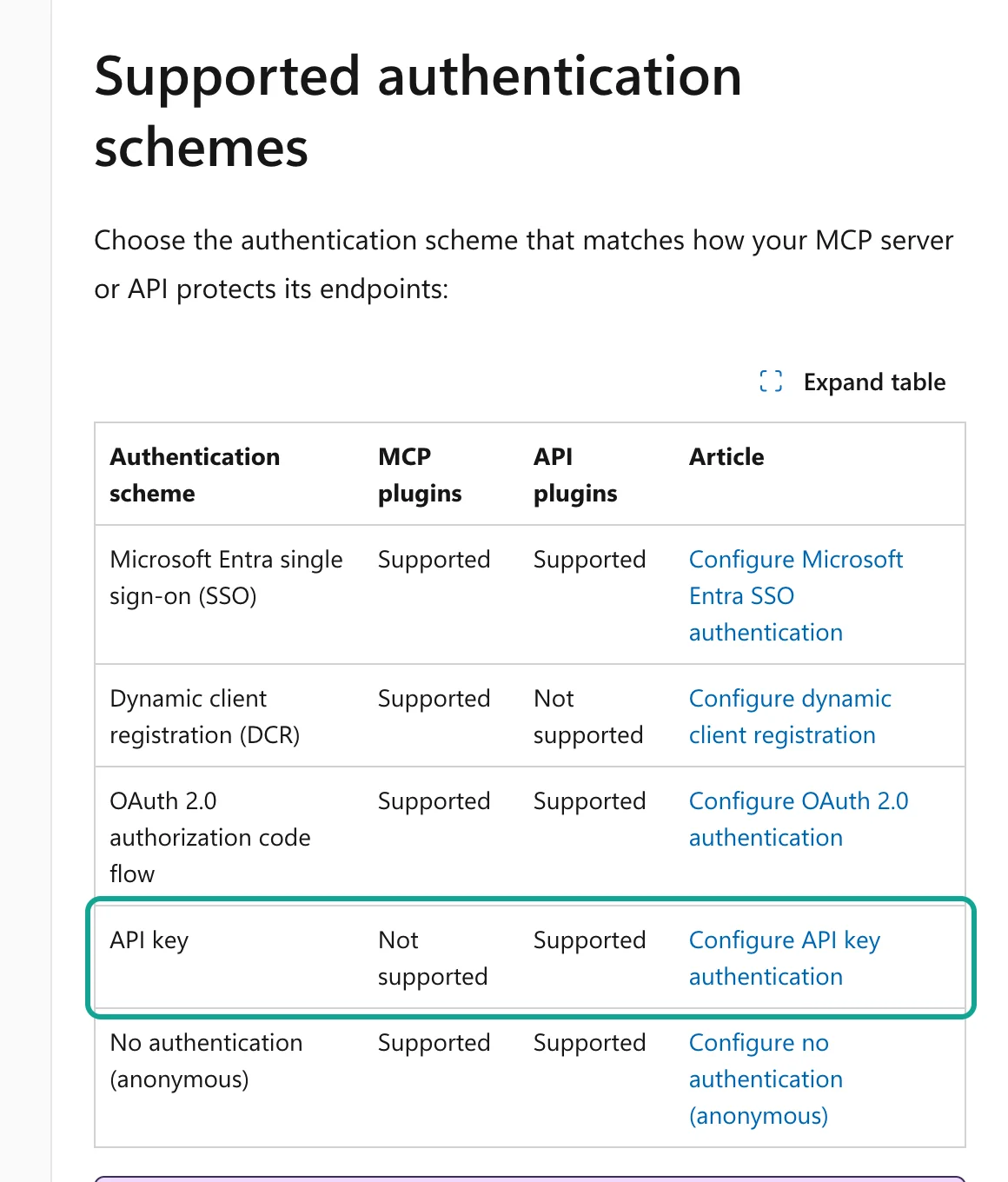
The second trap is row three. Many people read "Microsoft 365 Copilot supports MCP", open Agents Toolkit, and start a declarative agent. At the authentication step, they see only four options: OAuth with static registration, OAuth with dynamic registration, Entra SSO, and none. The plugin authentication table states it plainly. In the API key row, the MCP plugins column says "Not supported", and the API plugins column says "Supported". A note under the table adds that plugins in the app manifest agentConnectors use a different schema with ApiKeyPluginVault.
So the same API key fails as a declarative-agent MCP plugin. It works as an OpenAPI-based API plugin. In the app manifest, the result depends on the host. For a sales team, the simplest path is rows one and two. Build the agent in Copilot Studio and publish it to Teams and Microsoft 365 Copilot. The steps are in publish to Teams and Microsoft 365. Select "Make agent available in Microsoft Copilot", and the agent appears in Teams and in the Copilot agent list. Users type @ in Copilot and select it.
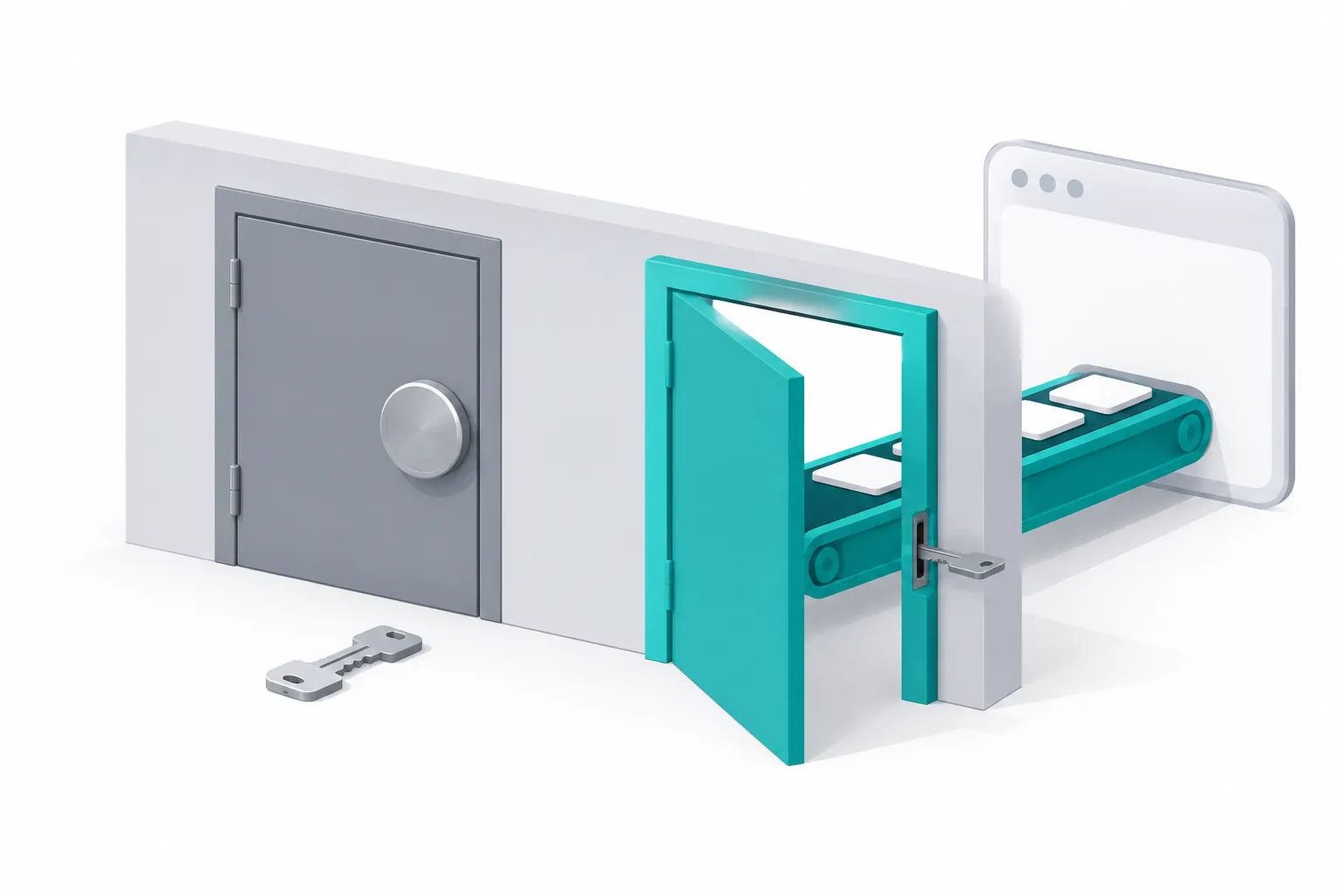
The documentation does not explain why two Microsoft products differ here, and we do not guess. What we can confirm is the different design. Declarative agents run inside Microsoft 365 Copilot orchestration. Their credentials go to the Microsoft enterprise token store. The user confirms the first call to a plugin (steps 4 and 5 in how plugins work).
Copilot Studio MCP uses Power Platform connectors. The classic page says "Access to MCP servers in Copilot Studio relies on Power Platform connectors". Thus, connector data policies also control the MCP server and each of its tools. This is important for IT. If you add EveryInfra in Copilot Studio, your tenant gets one more third-party connector, and the usual connector approval and block rules apply.
What the Work IQ preview of October 23 means for an account brief
A common summary online is "Work IQ, preview, October 23". The source pages tell a slightly longer story.
On 2026-09-25, the Dynamics 365 team announced that Work IQ also covers Dynamics 365 and Power Platform business data. The preview started on September 30 and continued through October (Dynamics 365 blog). On 2026-10-23, before the PPCC conference, the Power Platform blog said that "business applications in Work IQ" is in public preview. It listed five new preview items. Item 2 says that the Work IQ MCP server in Copilot Studio can also understand business context (Power Platform blog).
Then, on 2026-11-04, the Copilot Studio October update said that Work IQ is generally available in Copilot Studio. Every new agent on the GitHub Copilot harness gets it by default (Copilot Studio October update, Work IQ documentation). So the precise statement is this. Work IQ itself is generally available in Copilot Studio. Its "Business apps" workload is still in preview. You see it only after you turn on "Enable preview workloads" in the agent settings.
Work IQ matters for the account brief because it can answer "who am I meeting next week?"
Its sources include SharePoint, OneDrive, Outlook mail, Teams, Calendar and People. The documentation even gives a meeting-prep example that uses only Calendar and Outlook mail. We suggest a split. Work IQ finds next week's customer meetings in the calendar and the state of the email thread.
EveryInfra adds what is public outside your company: the LinkedIn company page, recent company posts, open jobs and news. The first half is what your company already knows. The second half is what is happening outside. A brief needs both halves.
One warning from the same page: "Write operations are on by default." A brief agent does not need to write anything. Keep only Calendar and Outlook mail under Sources, and confirm your permission policies.
Billing is also different. The page says that Work IQ runs on the GitHub Copilot harness and uses Copilot Credits. The older per-workload tools (Mail, Teams, Calendar and others) run on the standard harness and use classic Copilot Studio billing. This changes the cost math later in this article. The same brief agent can have two very different Microsoft bills, based on the harness.
What a harness is: one agent, two sets of rules
In the second half of 2026, Copilot Studio gave a name to the runtime layer under an agent: the harness. The harness overview lists three. The GitHub Copilot harness is for multistep reasoning across tools.
The Customer Conversation harness is for website chat and phone service. The standard harness is for rule-based agents with predictable answers. The page also says that the GitHub Copilot harness is a Copilot Studio framework, not the GitHub Copilot service. Customer data does not go to that service.
For an account brief, we see three differences.
| Item | GitHub Copilot harness (new experience) | Standard harness (classic experience) |
|---|---|---|
| MCP setup page | Add by URL, marked preview | Onboarding wizard, no preview label |
| Authentication options | API key, client ID and secret, and others, as the server requires | None, API key (header or query), OAuth 2.0 (dynamic discovery, dynamic, manual) |
| When billing starts | When you start to build. Preview, tests and evaluations use Copilot Credits | After you publish |
| Billing unit | Model tokens, tools (MCP included) and the harness, converted to Copilot Credits | Per feature: 2 Copilot Credits per generative answer, 5 per agent action, and so on |
| Free for Microsoft 365 Copilot license holders? | The page does not say | Employee use by a licensed user, under that user's identity: "No charge" |
Sources: add MCP by URL, classic wizard, usage-based billing overview, and classic billing rates.
The last row is the one for sales leaders. Footnote 1 of the classic rate table says this. Employee-facing Copilot Studio agents are included in the Microsoft 365 Copilot license.
Two conditions apply: the user holds that license, and the agent runs under that user's identity. Fair use limits also apply. The new-experience billing page has no such statement. It says that Copilot Credits cover model tokens, tools and the harness, and that "Billing starts when you start building."
So, if all your sellers already have Microsoft 365 Copilot licenses, a brief agent on the classic experience may add almost no Microsoft cost. On the new experience, every chat uses Copilot Credits by token. We did not test this in a real tenant, and Microsoft can change these pages. Before you build, ask your admin to check real usage in the Power Platform admin center.
Who can use it, which license, and what the admin must turn on
| Role | What they need | Source |
|---|---|---|
| Agent builder | Access to a Copilot Studio environment. A trial license lets you test in the test panel, but you cannot publish | Copilot Studio access and trial |
| Seller who uses the agent | Microsoft Copilot is available in the organization, and the agent is shared with the seller or the seller's security group | publish to Teams and Microsoft 365 |
| Teams admin | Allow Power Platform apps in Teams; approve "Built for your org" | Same page |
| Power Platform admin | Data policy allows this MCP connector; decide if maker-provided credentials are allowed | control maker-provided credentials |
| Microsoft 365 admin (optional) | See and block MCP servers under Agents > Tools; approve BYO registrations | Tools page overview |
Two limits are easy to miss. First, the "Copilot Studio for Teams" plan in some Microsoft 365 subscriptions has no Power Platform connectors and no generative orchestration (comparison table). MCP goes through connectors, so that free plan cannot run this agent. You need a standalone Copilot Studio subscription or pay-as-you-go. Second, the Teams install link does not work in the Teams mobile app. If sellers want the agent on their phones, an admin must approve it into the org app store (same publishing page).
Also, the Power Platform connector usage view on the Tools page is in preview. The Tools gateway is in preview too, and a connection to Azure AI Gateway needs the Global Administrator role.
Configuration example: add the EveryInfra remote MCP server in Copilot Studio
Our test machine has no Microsoft 365 tenant. All Copilot Studio steps below are configuration examples that follow Microsoft's pages, and we did not run them in Copilot Studio. The EveryInfra side is real. The URL, the auth header and the tool list come from a live tools/list call at 00:16 Singapore time on Nov 7, 2026.
For the new experience (GitHub Copilot harness), follow add an MCP server by URL. Open the agent and go to the Build tab. In the component panel, select Tools. In the Add a tool dialog, select Add next to the search box. Select Model Context Protocol, fill in four fields, and select Add.
The page says that Copilot Studio "contacts the MCP server, negotiates the protocol handshake, and then lists the tools". Read each tool name and description in that list. Then select Save. The values for EveryInfra are below.
Name:         EveryInfra public web data
Description:  Reads public company pages, company posts and job ads on LinkedIn,
              and Google News results, through EveryInfra. Use it when the user
              asks what a customer or prospect company is doing lately.
Server URL:   https://api.everyinfra.com/mcp
Authentication: API key
  Type:         Header
  Header name:  Authorization
  Value:        Bearer <a dedicated key from the EveryInfra console>
The classic experience (standard harness) uses an onboarding wizard with almost the same fields: Server name, Server description and Server URL. Then you select the authentication type. The page says that the API key "Type" can be Header or Query. You then enter the "name of the header or query parameter".
One detail needs a plain statement here. EveryInfra used to accept a key in the URL (?key=). That method stopped on 2026-11-04, and only the header works now. We tested the old method at 00:28 Singapore time. It returned 401 with the message "API key in the URL is no longer accepted". So select Header and enter Authorization as the name.
The page does not say whether Copilot Studio adds "Bearer " to the value for you. We cannot check that without a tenant. Enter Bearer plus the key as the value. On the first test call, read the result in the activity map. If you see a 401, try again without the prefix.
The description field matters. Both experiences say that the orchestrator uses the server name and description to decide when to call it. Write the description in the words a seller would use, and the agent will call it at the right time.
Where the key goes: one team key or one key per seller
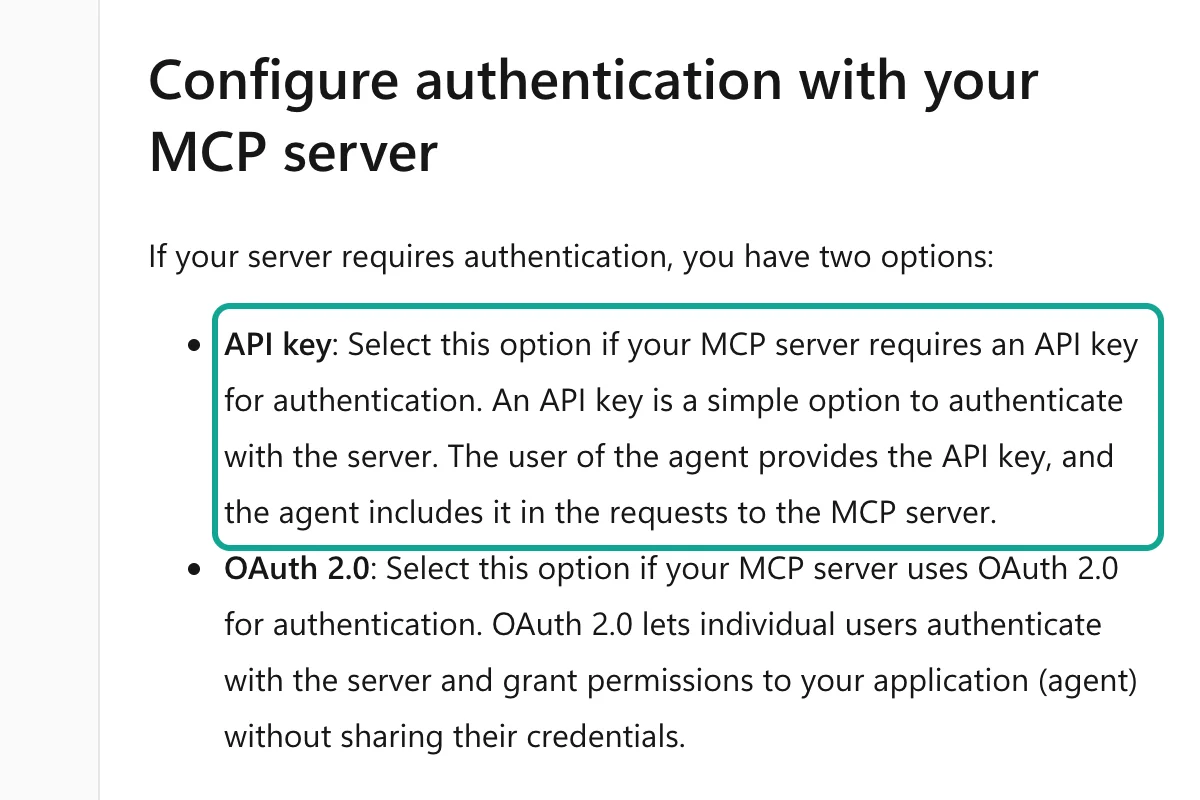
The sentence in the screenshot decides where the key goes. The classic page says: "The user of the agent provides the API key." By default, the person who uses the agent supplies the key. Copilot Studio also has maker-provided credentials. In that mode, the tool uses the builder's credentials, and all users share them.
The Power Platform admin controls this option for each environment. Control maker-provided credentials says that both "End-user" and "Maker-provided" are on by default. If the admin turns off maker-provided credentials, the setting "prevents any type of stored credentials, including API keys". All tools then ask users for credentials at run time. Scheduled or event-triggered agents fail, because nobody is there to sign in.
| Option | How | Benefit | Watch out for |
|---|---|---|---|
| One team key (maker-provided) | The builder enters one dedicated key in the connection, and all sellers share it | Sellers do nothing | The admin can turn this mode off. One heavy user can use up the limit for everyone |
| One key per seller (end-user) | Each seller enters a key in the connection card on the first call | Usage per person; you can stop one person's key | Each seller needs an EveryInfra account, or an admin issues keys |
| Never in the prompt | In both options, keep the key out of the agent instructions and knowledge files | The key does not appear in chats, logs or exported agents | The model receives the instructions, so a key there is a leaked key |
Whichever option you choose, create a separate EveryInfra key for this agent. In the console, you can set a total USD spend limit on each key. When the key reaches the limit, requests are refused and nothing is charged. You can also limit a key to a few capabilities.
A call outside the scope returns 403 capability_denied. A call over the limit returns 403 key_spend_limit_reached. In both cases, EveryInfra refuses the call before it charges anything.
For this agent, allow only linkedin/company_profile, linkedin/company_posts, linkedin/jobs and google_news/search. Then, if someone asks the agent to do something else, the worst case is that this key uses up its own limit. The quickstart shows how to create a key and set limits.
Turn on only 3 tools: how long are the 12 tool definitions?
When you add an MCP server, Copilot Studio reads all of its tools. At 00:16 we called tools/list, and the EveryInfra /mcp endpoint returned 12 tools. They cover the capability catalog, data calls, async jobs, search, AI chat, two CAPTCHA tools, account, request history, top-up link, and two support-ticket tools.
As compact one-line JSON, the 12 definitions (names, descriptions and input schemas) total 16,155 characters. An account brief needs only three. everyinfra_list_capabilities lists capabilities and parameters. everyinfra_call_api calls a data capability. everyinfra_get_job reads an async result. Together they are 3,221 characters, or 19.9% of the total.
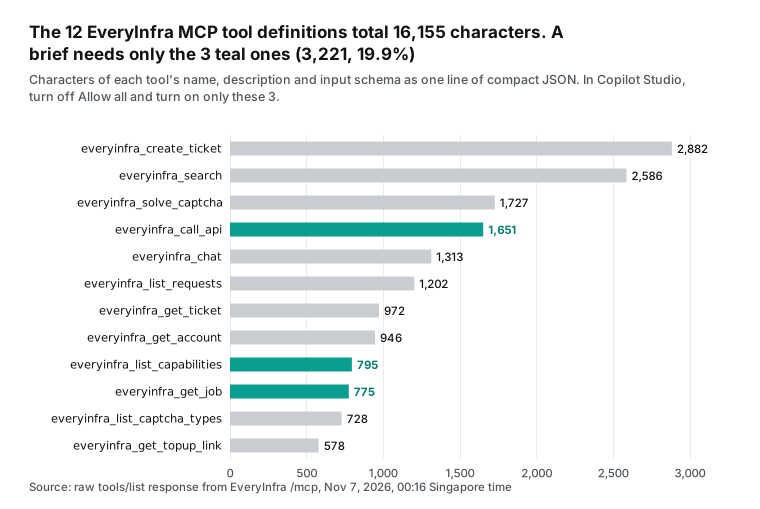
Microsoft's own pages give three reasons to turn off the other nine. First, the Limitations section of the declarative-agent plugin overview says that quality can drop when one plugin has more than 10 tools. EveryInfra has 12. Second, the Limits section of add an MCP server by URL says that each MCP server counts toward the agent's tool limit. It recommends that you add only the tools you need.
Third, the new experience bills Copilot Credits by token. Tool descriptions go to the model on each turn. If you send 80% fewer description characters, you send fewer billable input tokens. In the classic experience, open the MCP server settings and turn off Allow all.
Then turn on each tool you need (add MCP tools and resources). The page warns that, with Allow all off, new tools from the server stay off by default. For this agent, that is what we want.
We also turn off the AI chat and search tools. The brief agent has its own model, so it does not need a second model through EveryInfra. The brief needs only news, and google_news/search covers news. So the agent does not need general web search. If you add web search later, turn on everyinfra_search for that purpose. We turn off the account, top-up and ticket tools so that sellers do not do account tasks in chat. People with console access can do those tasks.
Microsoft's known issues, checked against each EveryInfra tool
Copilot Studio has an MCP troubleshooting page. It lists five known issues that the product team has not fixed yet. The page says that it was last updated on 2026-08-19. We scanned the input schema (inputSchema) of all 12 EveryInfra tools with a script for each issue.
| Known issue from Microsoft | Found in the 12 EveryInfra tools? | Effect |
|---|---|---|
| An SSE connection must return a full URL for the endpoint | Not relevant. EveryInfra uses Streamable HTTP, and the classic page says that SSE is not supported after August 2025 | None |
An integer exclusiveMinimum causes a format error | 0 | None |
| A type written as an array of types truncates the schema | 0 | None |
An input that uses $ref removes the whole tool | 0 | None |
enum is read as a plain string | 4: mode in everyinfra_call_api, plus 1 each in the search, CAPTCHA and ticket tools | The model can send a value that is not in the list. EveryInfra returns 422 with the allowed values |
Only the last issue applies. For the brief agent, it affects only mode (sync or async) in everyinfra_call_api. Copilot Studio reads it as a plain string, so in theory the model can send another value. EveryInfra returns 422 for a bad parameter.
The error lists the supported parameters, the allowed values and the closest match, and the request is not charged. The model usually reads the error and corrects itself. Our remote MCP setup guide shows the same behavior.
The agent instructions: four steps and three rules
In Copilot Studio, the Instructions field controls how the agent works. Both experiences say that the orchestrator picks a tool and its inputs from the tool names and descriptions (MCP overview). Below are the instructions we wrote for the brief agent. They fix the order of the four calls, what to write when a call fails, and which data to leave alone. Fixed steps use fewer calls than free-form reasoning, and fewer calls also mean fewer Copilot Credits on the Microsoft side.
You prepare a one-page account brief before a sales meeting.
1. Find the company's LinkedIn slug. Call everyinfra_call_api with
   platform "linkedin", action "company_profile", mode "async",
   params {"company": "<slug>"}; then call everyinfra_get_job until
   status is "succeeded". Check that "website" matches the company's
   real domain. If it does not, stop and ask the user for the URL.
2. Call linkedin/company_posts with {"company": "<slug>", "limit": 10}.
3. Call linkedin/jobs with {"keyword": "<job_search_url from step 1>",
   "limit": 25}.
4. Call google_news/search with {"keyword": "<company name>",
   "time_window": "week"}.
Write: (a) company in 3 lines, (b) recent news and posts with dates and
links, (c) hiring direction from job titles and locations, (d) three
talking points. If a call fails, write "not retrieved" for that part.
Never look up individual people. Never invent numbers.
Answer in the user's language.
Each rule comes from something we saw. Step 1 checks the website domain because of a mistake we made in the live test. We sent the LinkedIn slug anker-innovations for the charger and power-bank maker Anker. The result had the right name, but it was a 64-person page with headquarters in Kuwait. Its website field was a LinkedIn phishing-warning redirect to a .com.kw domain.
The correct slug, ankerinnovations, returned 1,966 employees and headquarters in Bellevue, Washington. A model that only reads the company name can mix up the two. The rule "write not retrieved" stops the model from filling gaps. Company posts and news failed that night.
Without this rule, a model can easily write a "recent news" section from its own old knowledge. The rule "never look up individual people" matches the LinkedIn section later in this article. Async is the default because a slow capability such as company profile takes 38 to 52 seconds. The test section below gives the details.
One real round trip: what the model sends and what EveryInfra returns
Below is a real MCP round trip at 00:33 Singapore time on Nov 7, 2026. For this test, the account is Mercado Libre. When a seller asks the agent a question, Copilot Studio sends a tools/call like this one. We sent the same request with curl to https://api.everyinfra.com/mcp, with the header Authorization: Bearer <key>. We kept the request and the response in our raw records. Here we removed the balance fields.
// 00:33:36 Singapore time, model -> EveryInfra
{"jsonrpc": "2.0", "id": 8, "method": "tools/call",
 "params": {"name": "everyinfra_call_api",
  "arguments": {"platform": "linkedin", "action": "company_profile",
                "mode": "async", "params": {"company": "mercadolibre"}}}}

// 1.83 s later, EveryInfra -> model (JSON inside content[0].text, excerpt)
{"status": "running",
 "job_id": "job_5550d526825de5da8f1151bfa30faee5",
 "billing": {"charged": true, "charged_usd": 0.000556},
 "next_step": "call everyinfra_get_job with job_id job_5550d526825de5da8f1151bfa30faee5"}

// 00:34:28, second everyinfra_get_job, status "succeeded" (excerpt)
{"name": "Mercado Libre", "employee_count": 70348,
 "follower_count": 3611599, "headquarters": "Buenos Aires, AR",
 "industries": ["Internet Publishing"],
 "job_search_url": "https://www.linkedin.com/jobs/search?geoId=92000000&f_C=14226%2C107272452"}
The response has a next_step field for the model. It names the next tool and the job ID, so three tools are enough to finish an async job. At 00:34:13, the first check said "finalizing". At 00:34:28, the second check said "succeeded".
From submit to result took about 52 seconds and three tool calls. The result includes job_search_url, which is the input for step 3. That is why the instructions start with the company profile.
A failure is also worth a look. At 00:33:25 we called google_news/search the same way. The HTTP status was 200, but the MCP result had isError set to true. The first text block said "unavailable: service temporarily unavailable". The second block was the billing record, with charged: false and reason: request_failed_refunded. The third block told the model what to do next.
It said to try once with a sample keyword. If that also fails, the model must "ask the user whether to open a support ticket". It opens a ticket only if the user agrees. This matches the MCP specification.
A tool error is a normal result with isError: true. The model sees the error and decides what to do (MCP specification: tools). For a Copilot Studio agent, this matters. The model does not open tickets on its own, and it does not turn a failure into "there is no news".
Test results: three companies, 25 requests, 7 with data
Our plan was to run all four parts for Databricks. In the first 12 minutes after 00:18, company profile, company posts and news all returned 503 (temporarily unavailable) or 429 (rate limited). The error message suggested a test with the catalog's sample keyword, "coffee". We tried it for news, and it also returned 503.
That points to a problem on the EveryInfra side, not a problem with the Databricks target. The error also said to ask the user before opening a ticket. This was a test for an article, so we did not open one.
The situation changed at 00:31. At that time, we sent the company profile in async mode. We got a job ID in 1.9 seconds, and the job finished within 38 seconds. After that, we used async mode for the profile and job ads of three companies, and all of those requests worked.
But company posts and news still failed in the same period. At 00:31:30 we sent company posts in sync mode, and at 00:31:55 in async mode. Both returned 503.
| Capability | Requests | Returned data | 503 | 429 | Charged |
|---|---|---|---|---|---|
linkedin/company_profile | 10 | 4 (all async) | 3 | 3 | $0.002224 |
linkedin/jobs | 3 | 3 (all async) | 0 | 0 | $0.001668 |
linkedin/company_posts | 7 | 0 | 6 | 1 | $0 |
google_news/search | 5 | 0 | 5 | 0 | $0 |
| Total | 25 | 7 | 14 | 4 | $0.003892 |
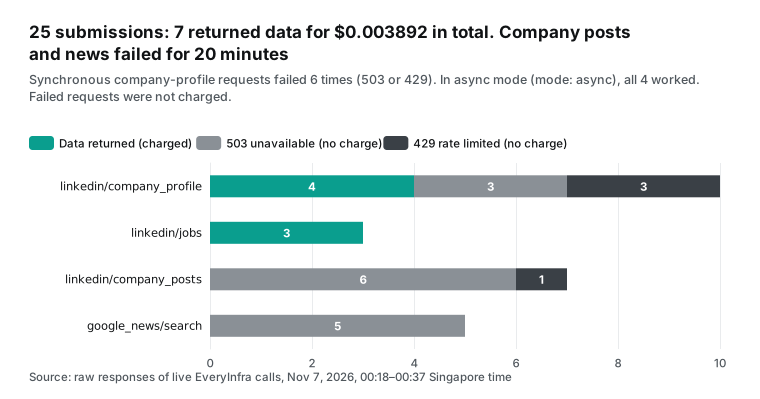
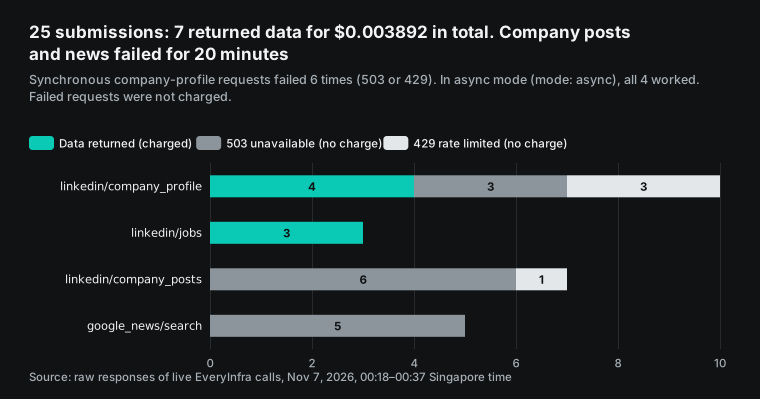
The 503 column includes the MCP news call. Its HTTP status was 200, but the content was the same 503 error. A split by time makes the result clear:
| Period (Singapore time) | Requests | Returned data | Failed |
|---|---|---|---|
| 00:18 to 00:30 | 12: 6 sync profile, 4 company posts, 2 news | 0 | 12 |
| 00:31 to 00:37 | 13: 4 async profile, 3 job searches, 3 company posts, 3 news | 7 (all profile and job requests) | 6 (all company posts and news requests) |
So the data shows that profile and jobs became available again at about 00:31. The data does not show that async mode is more reliable. All 6 sync profile failures were in the first 12 minutes, when the other capabilities also failed. After 00:31, company posts failed in async mode too.
We still recommend async mode as the default, because of the speed of the capabilities. The 4 async profile jobs took 38, 52, 48 and 47 seconds from request to result. The 3 job searches took 54 to 63 seconds each. In sync mode, one Copilot Studio tool call must wait that long, and Microsoft's pages do not give a timeout for MCP tool calls. In async mode, the job ID comes back in about 2 seconds. Each everyinfra_get_job call then returns in less than 0.2 seconds, so each step is short.
The cost is one or two extra everyinfra_get_job calls. In Copilot Studio, each one is another tool call, and you will see that in the cost section. Before we published, we tested the two missing parts again:
| Time (Singapore time) | Request | Result | Charged |
|---|---|---|---|
| 01:44:36 | linkedin/company_posts, Databricks, async, limit 10 | 503 | $0 |
| 01:44:38 | google_news/search, "Databricks", time_window week | 503 | $0 |
| 01:45:52 | linkedin/company_posts, same request | 503 | $0 |
| 01:45:54 | google_news/search, same request | 503 | $0 |
All 4 requests returned "service temporarily unavailable". The second error said "Failure 2 of 3" and asked us to wait 60 seconds. All 4 bills show request_failed_refunded, with no charge. We set a limit of two tests for each part, so we stopped there.
So at the time of publication, we have no measured data for company posts or news. Read those two parts as "how the design should work", not as "what we verified". The rule "write not retrieved" in the agent instructions is for this type of failure.
What the brief looks like: real Databricks data
Company profile (returned at 00:31 Singapore time): Databricks has 14,166 employees and 1,433,976 followers on LinkedIn. Headquarters are in San Francisco, and the industry is "Artificial Intelligence". The description calls the company "the data + AI company". It lists product names such as Genie, Lakebase, Agent Bricks and Unity Catalog.
Job ads (returned at 00:33): a search by company ID returned 25 public job ads. They were posted from 2026-10-18 to 2026-11-06, and 9 of them were posted on or after 2026-10-30. The two newest were a Seattle product manager role for Serverless Workspaces on 2026-11-06 and a San Francisco senior engineer role for Model Serving on 2026-11-05. On 2026-10-28, they also posted a backend engineering manager role in Bengaluru.
By location, 10 are in Washington State, 10 in California and 3 in New York. Bengaluru and Vancouver have one each. All 25 are "Mid-Senior level", and none shows a salary.
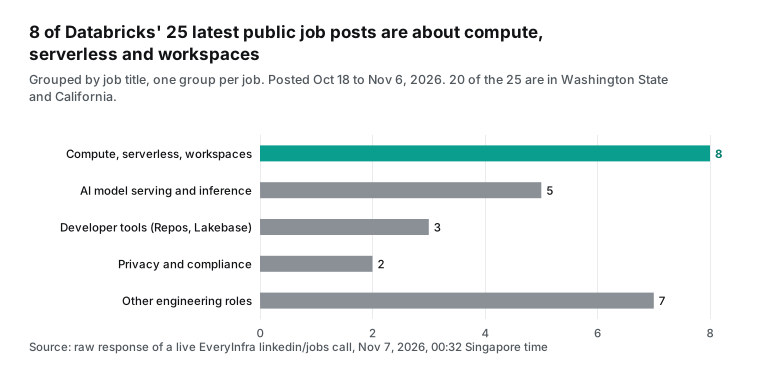
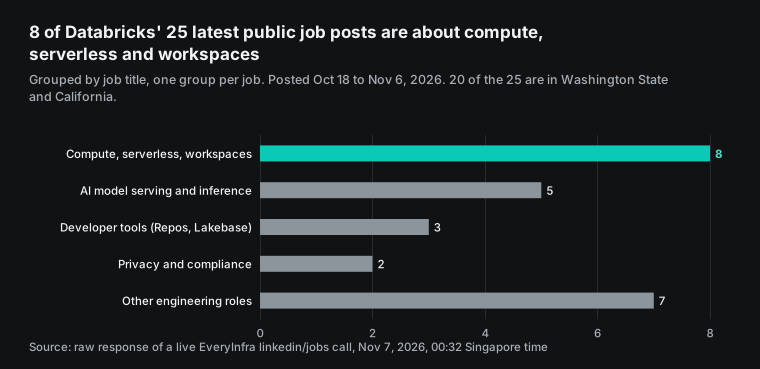
Grouped by title, the largest group is compute, serverless and workspaces, with 8 roles. Examples are an engineering manager for the Serverless Compute Platform and a product manager for Serverless Workspaces, hired in both Seattle and San Francisco. The next group is AI model serving and inference, with 5 roles. There are 2 privacy and compliance roles, both in Seattle, and 1 partner engineer role for Azure.
With the instructions above, the agent would write a brief like the table below. We built this table by hand from the real responses of that night. It is not Copilot Studio output.
| Part | Content | Source |
|---|---|---|
| Company | Databricks, a data and AI platform. LinkedIn shows 14,166 employees, headquarters in San Francisco | linkedin/company_profile |
| Recent news | Not retrieved (company posts and news returned 503 or 429 from 00:19 to 00:37, and 503 again in the 01:44 to 01:46 test) | linkedin/company_posts, google_news/search |
| Hiring direction | 8 of 25 public job ads are about compute, serverless and workspaces, and 5 are about model serving and inference. Washington State (Seattle, Bellevue) has 10, the same as California, where headquarters are | linkedin/jobs |
| Talking point 1 | They are growing the serverless and workspace platform. Ask about the cost and access problems that their team has with serverless | Job titles |
| Talking point 2 | They are hiring senior engineers for model serving and inference. Talk about inference cost and release flow | Job titles |
| Talking point 3 | Seattle is hiring a privacy counsel and a principal privacy engineer at the same time. Data governance and privacy compliance are a good opening | Job titles and locations |
Two data details need a plain statement. First, 13 of the 25 Databricks ads show exactly 200 applicants, and 10 of the 24 Mercado Libre ads also show 200. This looks like the "over 200 applicants" display cap on LinkedIn, so do not compare these numbers as real counts. Second, one Anker ad for a Store Development Manager in Seattle shows "$120.00/yr - $200.00/yr". Another post for the same role shows "$120,000.00/yr - $200,000.00/yr".
The first one clearly lost its thousands when the employer posted it. The API returns what the employer published and does not correct it. So "Never invent numbers" in the instructions also means "do not fix numbers for the employer".
Cost per seller per month: small data fees, a Microsoft bill that depends on setup
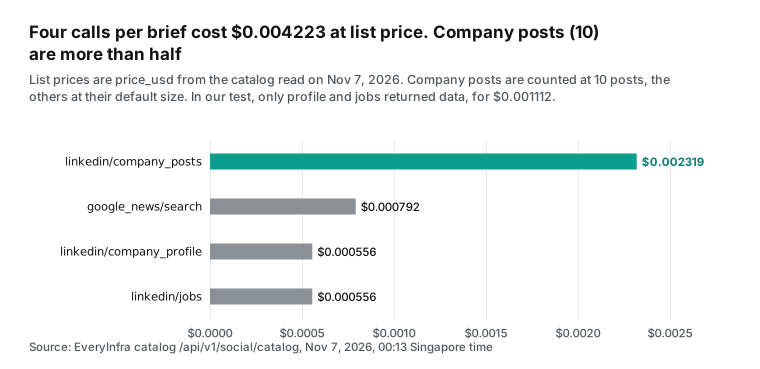
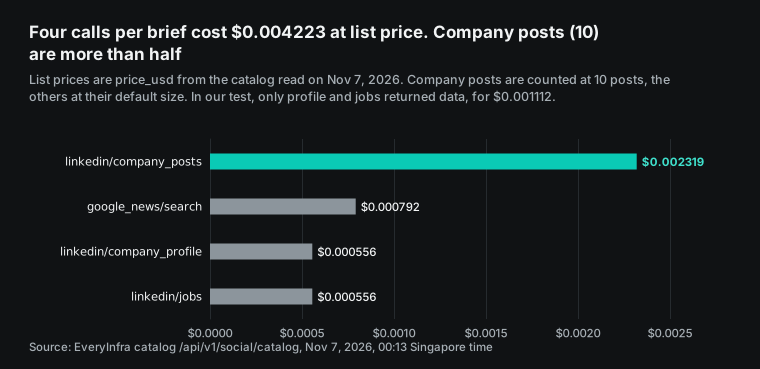
Start with data fees. Here are the catalog list prices for the four capabilities, read at 00:13 on Nov 7. Company profile costs $0.000556 per call. Company posts at 10 posts cost $0.002319.
Job ads cost $0.000556 per call. News costs $0.000792 per call. One full brief costs $0.004223. That night we got only the profile and job ads, and we paid $0.001112.
Assume that each seller meets 4 new accounts a week, or 16 briefs a month. Then data fees are about $0.07 per seller per month. Failed calls cost nothing, so retries do not raise this number.
Now the Microsoft side. There are three cases, and they differ a lot.
Case one is the classic experience, used by people who hold a Microsoft 365 Copilot license, with the agent running under the user's identity. In the billing rate table, every row says "No charge" in the column "Used by Microsoft 365 Copilot licensed user". A footnote adds fair use limits. In this case, the brief agent uses no extra Copilot Credits. The license itself costs $30 per user per month, paid yearly (Microsoft 365 Copilot enterprise pricing).
Case two is the classic experience for users without that license, paid in Copilot Credits. Each credit costs $0.01 on pay-as-you-go. The Azure Retail Prices API shows this meter with an effective date of 2025-09-01. The rate table says that a generative answer costs 2 credits and an agent action costs 5. In the order-processing example on the same page, "Actions and topics are agent actions" in generative orchestration, and 4 tool calls cost 20 credits.
By that rule, four synchronous calls plus one answer cost 22 credits, or $0.22. With our async method, each part adds 2 everyinfra_get_job calls. That makes 12 tool calls plus one answer, or 62 credits and $0.62. At 16 briefs a month, that is $3.52 or $9.92. If a reasoning model runs the orchestration, add 10 credits per 1,000 tokens.
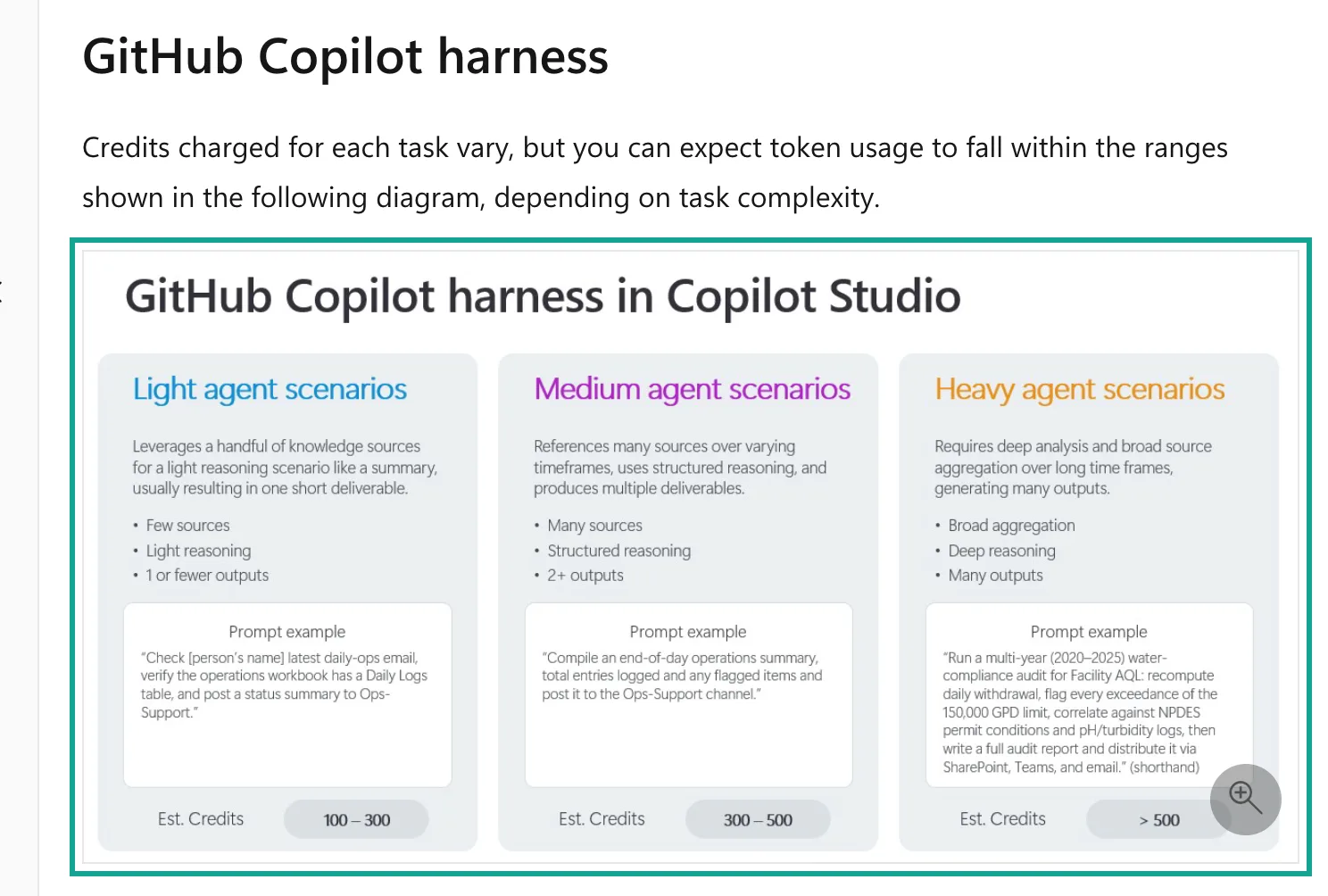
Case three is the new experience (GitHub Copilot harness). The usage-based billing overview gives no per-call price. Instead, it shows a diagram. A light task, with "few sources, light reasoning, 1 or fewer outputs", is about 100 to 300 credits.
A medium task, with "many sources, structured reasoning, 2+ outputs", is about 300 to 500. An account brief fits the light group. At $0.01 per credit, that is $1 to $3 per brief, or $16 to $48 per seller per month. Building and testing also use credits.
The table puts the three cases side by side.
| Case | Who and how | Credits per brief | Microsoft cost per seller per month (16 briefs) |
|---|---|---|---|
| 1 | Classic experience, user has a Microsoft 365 Copilot license | No charge | $0 extra; the license is $30 |
| 2 | Classic experience, no license, sync calls | 22 | $3.52 |
| 2 | Classic experience, no license, async calls with polling | 62 | $9.92 |
| 3 | New experience, light task | 100 to 300 | $16 to $48 |
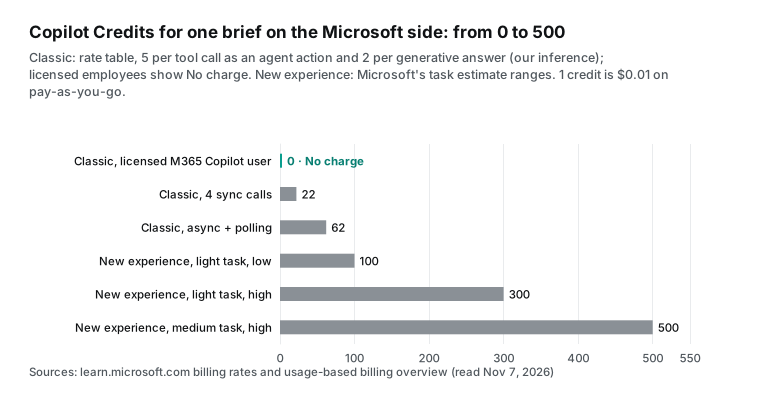
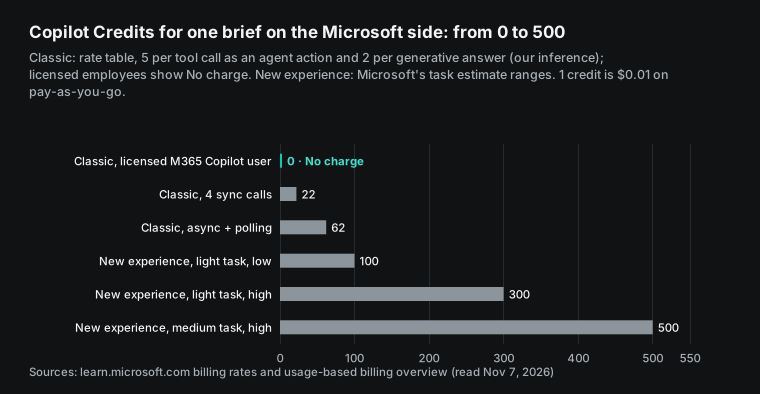
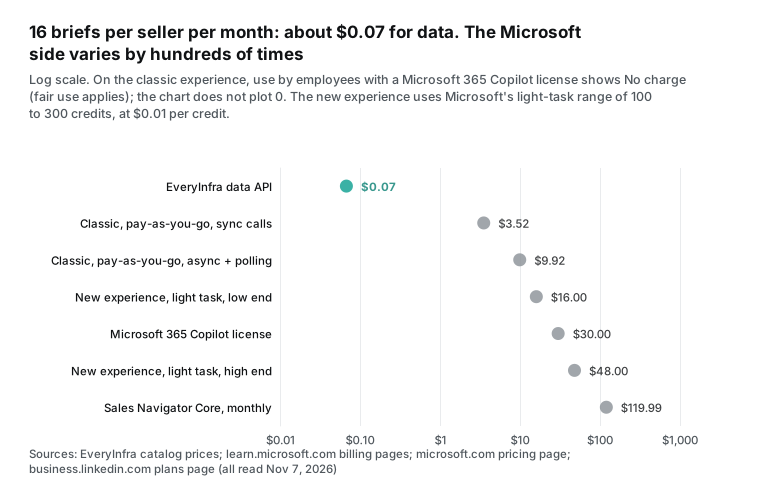
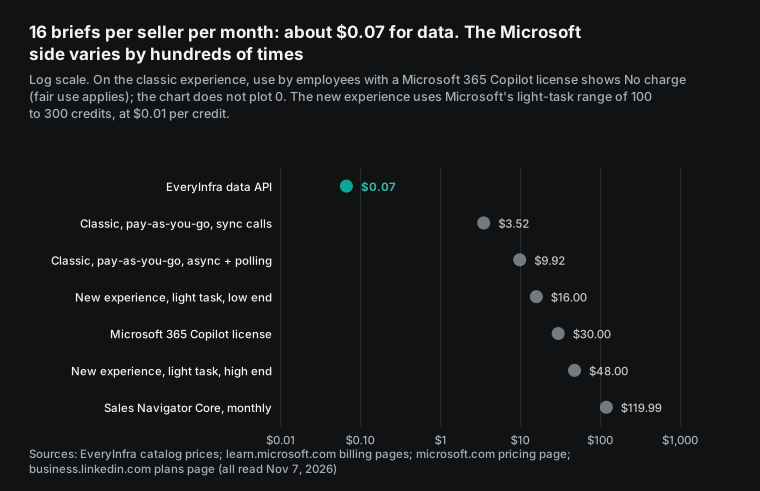
The chart shows that data fees are almost nothing in the total bill. Who uses the agent, and on which experience, decides whether it costs $0 or tens of dollars per seller per month. If your sellers already have Microsoft 365 Copilot licenses, build on the classic experience. If they do not, estimate the new-experience credits first. You can also ask an admin to use the Copilot Credit cost management that Microsoft added on Nov 4 to set limits per user.
Controls are ready on both sides. A Power Platform admin can set a monthly credit limit for one agent (manage Copilot Credits and capacity). The new experience also has a cost governance guide and an enforcement policy for when credits run out. On the EveryInfra side, set a USD spend limit on the key. With limits on both sides, your worst-case monthly cost is known.
If you buy capacity packs, the Copilot Studio pricing page shows 25,000 credits per pack for $200 per month. That is $0.008 per credit. Two points need a plain statement. The classic pages do not say how MCP tool calls are billed, so our "agent action" estimate is an inference. The new-experience range of 100 to 300 is Microsoft's own estimate. Without a tenant, we cannot measure how many credits one brief really uses.
Timeline of our live tests
For anyone who wants to check our work, here are the live calls.
| Time (Singapore time) | Call | Result |
|---|---|---|
| 00:16 Singapore time | tools/list on /mcp | 12 tool definitions |
| 00:28 Singapore time | /mcp with the old ?key= method | 401; the error starts "The EveryInfra API key in this connector's URL (?key=) stopped working on 2026-11-04." |
| 00:31 Singapore time | Databricks company profile, async | Done in the same minute, $0.000556 |
| 00:32 Singapore time | Databricks job search, async | 25 ads at 00:33, $0.000556 |
| 00:33 Singapore time | News through MCP; Mercado Libre profile through MCP | News failed, no charge; profile read through MCP at 00:34 |
| 00:35 Singapore time | Two Anker slugs and Anker job ads, async | Wrong slug found; 25 ads at 00:37 |
| 00:36 Singapore time | Last company posts and news retries | 503, no charge |
| 01:44 to 01:46 Singapore time | Company posts and news, two new tests each | All 4 returned 503, no charge |
LinkedIn data: use public company pages only, and say so
This section is not legal advice. It shows the source text so that you can decide with your own counsel. The current LinkedIn User Agreement says "Effective on November 3, 2025". In section 8.2, "Don'ts", item 2 says that members agree not to develop, support or use software, devices, scripts, robots or other means "to scrape or copy the Services".
Item 4 bans copying, using, showing or sharing information from the Services. In brackets, it names indirect use "through data aggregators or brokers". Section 5 says that section 8.2 survives the end of the contract.
These terms bind people who accepted that agreement. In 2022, the US Court of Appeals for the Ninth Circuit issued its opinion in hiQ Labs v. LinkedIn on April 18. The court found that scraping data that anyone can see is likely not access "without authorization" under the Computer Fraud and Abuse Act. Later, the district court found that hiQ breached the User Agreement, and the parties settled. Our LinkedIn scraper alternative article (see the blog index) covers these cases in more detail, so we do not repeat them here.
For this brief agent, we set three rules for ourselves, and we suggest that you do the same. First, use only public company-level information: the company page, the company's own posts, public job ads and news. Companies publish these four types of content because they want people to see them. Using them to prepare for a business meeting is close to "reading their website".
Second, do not pull data about people. The catalog has linkedin/employees, which can return a staff list with names, titles and locations, and sometimes email and phone fields. The catalog field notes say that these fields can be empty. Sellers often want to "also see who runs purchasing". That turns the chat into processing personal data.
Under GDPR Article 14, you must inform people even when you did not get their personal data from them. Other laws, such as Singapore's PDPA, also set rules for personal data. The agent in this article does not use that capability, and its key scope does not allow it.
Third, the result is for a person to read, not for bulk CRM import. A one-page brief is for the seller who goes to the meeting, and the seller can delete it after the meeting. If you want to write this data into a CRM in bulk and keep it, that is a different use. Assess that use on its own.
LinkedIn also has its own channels. Power Platform has a LinkedIn V2 connector, and you can use it in Copilot Studio. It can only list the company pages that you manage and post as you or as your company page. It cannot read another company's page or posts.
For account research inside LinkedIn's own products, the matching product is Sales Navigator. The page lists Core from $119.99 per license per month, or $1,079.88 per year, and Advanced from $159.99 per month. For Advanced, the annual price is $1,799.88. We checked the page again on Nov 7, 2026: $159.99 is the monthly-billing price.
The page says "Updated: September 27, 2026". It has account alerts, lead suggestions and CRM sync, and it is a per-person subscription. Our approach is a per-call data API that reads only public company information.
The two do not compete. If your team already has Sales Navigator, use it for people and relationships. Use the agent in this article for public company activity.
How this differs from our GitHub Copilot MCP and LinkedIn pricing articles
Our GitHub Copilot MCP article covers a developer use case. It configures MCP for the Copilot coding agent in repository settings. The agent writes a weekly competitor report script. The output is a scheduled script, and the key lives in repository secrets.
This article covers a sales use case. There is no repository and no script. A seller asks a question in Teams or Microsoft 365 Copilot, and the agent calls the data and writes the brief right away. The key lives in a Copilot Studio connection.
Governance goes through Power Platform and the Microsoft 365 admin center. Both articles use the same MCP URL, but the setup and the billing are different.
Our LinkedIn scraper alternative article (see the blog index) compares prices. It asks how much 1,000 company profiles and 1,000 job ads cost from each provider, with bulk tests and price-per-1,000 tables. This article looks at one small unit, a single pre-meeting brief. It asks how many calls one company needs, how many cents, how many seconds, and how Microsoft bills the agent.
For bulk LinkedIn prices, read that article. For field details, see the LinkedIn company profile API, the company posts API and the job search API. The platform page, LinkedIn Scraper API, has the full list. News uses the Google News search API, and its platform page is the Google News Scraper API.
When not to use this setup
There are three cases where this agent is not the best choice. First, your team may already use Dynamics 365 Sales or Salesforce with the Microsoft Sales agent. It brings CRM opportunities, email threads and meeting notes into Outlook and Teams. For the "internal" half of meeting prep, it does a better job than our agent. The Cowork Sales plugin also has a skill called meeting-prep.
In that case, use our agent only for public outside activity, or add EveryInfra as another tool source in Cowork. Second, you may want contacts, decision makers and relationship maps. That is personal data, so use a product with LinkedIn's permission, such as Sales Navigator. The previous section explains why.
Third, your team may meet only two or three new accounts a month. Then five minutes with the LinkedIn page and a news search is enough. You do not need an agent, a Copilot Studio subscription and a key to manage.
When does the agent pay off? Use the table in the cost section earlier in this article. Again, assume 16 briefs per seller per month and 5 minutes for one manual brief. Then manual work is 80 minutes, or about 1.33 hours, per seller per month.
On the classic experience with a Microsoft 365 Copilot license, Microsoft adds no charge. The extra cost is only $0.07 of data, so the agent pays off from the first brief. On the new experience, the Microsoft side is $16 to $48 per seller per month. With data, that is $16.07 to $48.07. Divide by 1.33 hours, and the break-even point is about $12 to $36 per hour of seller time. If an hour of seller time costs more than that, the agent saves money.
On the classic experience without a license, pay-as-you-go costs $3.59 to $9.99 with data. The break-even point is about $2.70 to $7.50 per hour.
These numbers do not include the one-time work to build the agent and manage the key. They also do not include the time to read the brief. For a small team, that one-time work is a larger share for each person. Some benefits are not in the numbers. Everyone already works in Teams. The briefs have one format, and they can go straight into a meeting invite.
Recent changes
| Date | Change | What it means for you |
|---|---|---|
| 2026-10-08 | 30 Dynamics 365 skills for Cowork; Sales Development Agent in public preview, billed in credits from 2026-11-16 (Microsoft Copilot blog) | Add Microsoft's own sales agent to your budget |
| 2026-11-04 | Work IQ generally available in Copilot Studio; Copilot Studio MCP server; credit cost management preview (October update) | You can cap the Microsoft cost of the agent per user or group |
| 2026-11-04 | EveryInfra /mcp stops accepting ?key= | In Copilot Studio, set the API key Type to Header |
| 2026-11-07 | We checked learn.microsoft.com again. The new-experience page title still has "(preview)" and says "prerelease documentation". The Agent 365 BYO MCP page still says "This feature is in preview" | Use these two paths as documented, and read the pages again before production |
copilot studio mcp FAQ
Where does the copilot studio mcp server api key go: header or query?
This question comes from the Google suggestion "copilot studio mcp server api key location" (read Nov 7, 2026). The classic onboarding wizard supports both. The page says that Type can be Header or Query (onboarding wizard). Agent 365 BYO registration also has Header and Query (BYO MCP server). The MCP server decides where the key goes, not Copilot Studio. Since 2026-11-04, EveryInfra accepts only the header Authorization: Bearer <key>, so select Header and enter Authorization.
A header is also safer. Proxies and logs often record full URLs, but they usually do not record headers.
Why is my copilot studio mcp server api key not working?
This question comes from the suggestion "copilot studio mcp server api key not working". From the EveryInfra side, we see four common causes.
The key is in the URL, which returns 401 since Nov 4, and the error says to use the header. The header name is something like X-API-Key, but EveryInfra reads Authorization. The value is missing the Bearer prefix or has it twice. The key has a capability scope or a USD limit, and the call is outside the scope or over the limit. That returns 403 (capability_denied or key_spend_limit_reached), with no charge.
On the Copilot Studio side, the new-experience page suggests a test question in the Preview tab. Then open the activity map to see which tool ran, what inputs it sent and what the tool returned. The raw 401 or 403 text appears there.
microsoft 365 copilot add mcp server: can a normal user add one?
This question comes from the suggestion "microsoft 365 copilot add mcp server". A normal user cannot paste an MCP URL into the Microsoft 365 Copilot chat. The people who can add one are agent builders. They build an agent in Copilot Studio and publish it to Microsoft 365 Copilot. They can also build a declarative agent in Agents Toolkit, but that route does not accept an API key today.
Microsoft supplies the federated connectors, and the custom connector column says "No" (Copilot connectors overview). Admins can also see and block every MCP server in the tenant under Agents > Tools in the Microsoft 365 admin center (Tools page).
Can the copilot studio linkedin connector read a customer's LinkedIn page?
This question comes from the suggestion "copilot studio linkedin connector". No, it cannot. The Power Platform LinkedIn V2 connector works in Copilot Studio, but it has only two kinds of actions. It lists the company pages that you manage, and it posts as you or as your company page. Several older actions show DEPRECATED. Each connection allows 100 calls per 60 seconds.
It cannot read another company's page, posts or job ads. That is why this article uses EveryInfra linkedin/company_profile, linkedin/company_posts and linkedin/jobs. For people and relationships, use Sales Navigator.
What copilot studio mcp limitations should I know first?
This question comes from the suggestion "copilot studio mcp limitations list". From the source pages, we picked six limits that matter here. Only Streamable HTTP is supported (MCP specification: transports), and SSE is not supported after August 2025. Only MCP tools and resources work, not prompts (MCP overview). The number of MCP server instances in one turn has a limit, and extra ones are skipped. The new-experience page does not give the number.
The troubleshooting page lists five known issues, such as enum read as a string and $ref inputs filtered out. Connector data policies also control MCP. The new-experience MCP page itself is still in preview.
Is the microsoft 365 copilot mcp connector the same as Copilot connectors?
This question comes from the suggestions "microsoft 365 copilot connectors" and "microsoft 365 copilot mcp connector". They are related but not the same. Copilot connectors are a family. Synced connectors index outside data into Microsoft Graph, and federated connectors fetch live data through MCP (connectors overview). So in Microsoft's terms, an "MCP connector" is a federated connector, and today only Microsoft supplies them. A third-party MCP server gets into Microsoft 365 Copilot through an agent, not through a connector.
Getting started
| Step | Where | What to do |
|---|---|---|
| 1 | EveryInfra console (quickstart) | Create a dedicated key with a USD limit. Allow only the four capabilities |
| 2 | Terminal (MCP server page) | Call POST /api/v1/social once with curl and read the fields |
| 3 | Copilot Studio | Add the MCP server: API key, Header, Authorization |
| 4 | Copilot Studio | Turn on only the three tools. Paste the instructions from this article |
| 5 | Copilot Studio test panel | Ask for a Databricks brief. Check each call in the activity map |
| 6 | Teams and Microsoft 365 channel | Select "Make agent available in Microsoft Copilot" and share with the sales group |
References
- Microsoft Learn, "Add a Model Context Protocol (MCP) server to your agent as a tool (GitHub Copilot) (preview)", read Nov 7, 2026: https://learn.microsoft.com/en-us/microsoft-copilot-studio/agents-experience/tools-add-mcp-server
- Microsoft Learn, "Connect your agent to an existing Model Context Protocol (MCP) server", read Nov 7, 2026: https://learn.microsoft.com/en-us/microsoft-copilot-studio/mcp-add-existing-server-to-agent
- Microsoft Learn, "Extend your agent with Model Context Protocol", read Nov 7, 2026: https://learn.microsoft.com/en-us/microsoft-copilot-studio/agent-extend-action-mcp
- Microsoft Learn, "Add tools and resources from a Model Context Protocol (MCP) server to your agent", read Nov 7, 2026: https://learn.microsoft.com/en-us/microsoft-copilot-studio/mcp-add-components-to-agent
- Microsoft Learn, "Troubleshooting Model Context Protocol (MCP) integration", read Nov 7, 2026: https://learn.microsoft.com/en-us/microsoft-copilot-studio/mcp-troubleshooting
- Microsoft Learn, "Harnesses in Copilot Studio", read Nov 7, 2026: https://learn.microsoft.com/en-us/microsoft-copilot-studio/harnesses-overview
- Microsoft Learn, "Overview of usage-based billing", read Nov 7, 2026: https://learn.microsoft.com/en-us/microsoft-copilot-studio/agents-experience/billing-credit-overview
- Microsoft Learn, "Billing rates and management", read Nov 7, 2026: https://learn.microsoft.com/en-us/microsoft-copilot-studio/requirements-messages-management
- Microsoft Learn, "Get access to Copilot Studio", read Nov 7, 2026: https://learn.microsoft.com/en-us/microsoft-copilot-studio/requirements-licensing-subscriptions
- Microsoft Learn, "Connect and configure an agent for Teams and Microsoft Copilot", read Nov 7, 2026: https://learn.microsoft.com/en-us/microsoft-copilot-studio/publication-add-bot-to-microsoft-teams
- Microsoft Learn, "Control maker-provided credentials for authentication", read Nov 7, 2026: https://learn.microsoft.com/en-us/microsoft-copilot-studio/configure-no-maker-authentication
- Microsoft Learn, "Work IQ in Microsoft Copilot Studio (GitHub Copilot)", read Nov 7, 2026: https://learn.microsoft.com/en-us/microsoft-copilot-studio/agents-experience/add-work-iq
- Microsoft Learn, "Configure authentication for MCP and API plugins in agents in Microsoft 365 Copilot", read Nov 7, 2026: https://learn.microsoft.com/en-us/microsoft-365/copilot/extensibility/plugin-authentication
- Microsoft Learn, "Build a plugin for a declarative agent from an MCP server", read Nov 7, 2026: https://learn.microsoft.com/en-us/microsoft-365/copilot/extensibility/build-mcp-plugins
- Microsoft Learn, "Configure Remote MCP Servers for Microsoft 365 Copilot Plugins", read Nov 7, 2026: https://learn.microsoft.com/en-us/microsoft-365/copilot/extensibility/configure-plugin-mcp-servers
- Microsoft Learn, "MCP and API plugins for declarative agents", read Nov 7, 2026: https://learn.microsoft.com/en-us/microsoft-365/copilot/extensibility/overview-plugins
- Microsoft Learn, "Copilot connectors overview", read Nov 7, 2026: https://learn.microsoft.com/en-us/microsoft-365/copilot/connectors/overview
- Microsoft Learn, "Bring your own (BYO) MCP server in Microsoft 365 admin center" (Agent 365, preview), read Nov 7, 2026: https://learn.microsoft.com/en-us/microsoft-365/admin/manage/manage-byo-mcp-server
- Microsoft Learn, "Overview of the Tools page in Microsoft 365 admin center", read Nov 7, 2026: https://learn.microsoft.com/en-us/microsoft-365/admin/manage/manage-tools-for-agent
- Microsoft Learn, "Manage Tools Gateway in Microsoft 365 admin center" (preview), read Nov 7, 2026: https://learn.microsoft.com/en-us/microsoft-365/admin/manage/manage-tools-gateway
- Microsoft Learn, "LinkedIn V2", read Nov 7, 2026: https://learn.microsoft.com/en-us/connectors/linkedinv2/
- Microsoft Learn, "Welcome to Sales agent", read Nov 7, 2026: https://learn.microsoft.com/en-us/microsoft-sales-copilot/introduction
- Microsoft Learn, "Available plugins for Copilot Cowork", read Nov 7, 2026: https://learn.microsoft.com/en-us/copilot/cowork/cowork-available-plugins
- Microsoft Learn, "Manage Copilot Credits and capacity for Copilot Studio", read Nov 7, 2026: https://learn.microsoft.com/en-us/power-platform/admin/manage-copilot-studio-copilot-credits-capacity
- Microsoft Learn, "Govern Copilot Credit consumption" (GitHub Copilot harness), read Nov 7, 2026: https://learn.microsoft.com/en-us/microsoft-copilot-studio/guidance/govern-credit-consumption
- Microsoft Learn, "Enforcement policy for agents consuming Copilot Credits", read Nov 7, 2026: https://learn.microsoft.com/en-us/microsoft-copilot-studio/agents-experience/enforcement-policy-credits
- Microsoft Learn, "Manage costs for agents" (GitHub Copilot harness), read Nov 7, 2026: https://learn.microsoft.com/en-us/power-platform/admin/manage-usage-github-copilot-harness
- Microsoft Learn, "Monitor agent performance overview (GitHub Copilot)", read Nov 7, 2026: https://learn.microsoft.com/en-us/microsoft-copilot-studio/agents-experience/analytics-overview
- Microsoft Learn, "Configure data policies for agents", read Nov 7, 2026: https://learn.microsoft.com/en-us/microsoft-copilot-studio/admin-data-loss-prevention
- Microsoft Learn, "Data policies", read Nov 7, 2026: https://learn.microsoft.com/en-us/power-platform/admin/wp-data-loss-prevention
- Microsoft Dynamics 365 blog, "Work IQ: business and workplace intelligence in the flow of work", published 2026-09-25, read Nov 7, 2026: https://www.microsoft.com/en-us/dynamics-365/blog/it-professional/2026/09/25/work-iq-business-and-workplace-intelligence-in-the-flow-of-work/
- Microsoft Copilot blog, "Bringing CRM into the flow of work and agents into business process for sales and service teams", published 2026-10-08, read Nov 7, 2026: https://www.microsoft.com/en-us/copilot/blog/2026/10/08/bringing-crm-into-the-flow-of-work-and-agents-into-business-process-for-sales-and-service-teams/
- Microsoft Power Platform blog on Dataverse and Work IQ at PPCC 2026, published 2026-10-23, read Nov 7, 2026: https://www.microsoft.com/en-us/power-platform/blog/2026/10/23/dataverse-and-workiq-ppcc-2026/
- Microsoft Copilot Studio blog, October update, published 2026-11-04, read Nov 7, 2026: https://www.microsoft.com/en-us/copilot/blog/copilot-studio/new-and-improved-agents-that-are-persistent-agents-for-customer-conversations-and-improved-maker-experience-in-microsoft-copilot-studio/
- Microsoft 365 Copilot enterprise pricing page ($30 per user per month, paid yearly), read Nov 7, 2026: https://www.microsoft.com/en-us/copilot/pricing/enterprise
- Microsoft Copilot Studio plans and pricing page (25,000-credit pack, $200 per month), read Nov 7, 2026: https://www.microsoft.com/en-us/microsoft-365-copilot/pricing/copilot-studio
- Azure Retail Prices API (Microsoft Copilot Studio, Pay As You Go Copilot Credit, $0.01), read Nov 7, 2026: https://prices.azure.com/api/retail/prices?$filter=productName%20eq%20%27Microsoft%20Copilot%20Studio%27
- Model Context Protocol specification 2025-06-18, "Transports", read Nov 7, 2026: https://modelcontextprotocol.io/specification/2025-06-18/basic/transports
- Model Context Protocol specification 2025-06-18, "Tools", read Nov 7, 2026: https://modelcontextprotocol.io/specification/2025-06-18/server/tools
- Model Context Protocol specification 2025-06-18, "Authorization", read Nov 7, 2026: https://modelcontextprotocol.io/specification/2025-06-18/basic/authorization
- LinkedIn, "User Agreement" (Effective on November 3, 2025), read Nov 7, 2026: https://www.linkedin.com/legal/user-agreement
- LinkedIn Sales Navigator, "Compare plans" (page says Updated: September 27, 2026), read Nov 7, 2026: https://business.linkedin.com/sales-solutions/compare-plans
- US Court of Appeals for the Ninth Circuit, hiQ Labs v. LinkedIn opinion, 2022-04-18, read Nov 7, 2026: https://cdn.ca9.uscourts.gov/datastore/opinions/2022/04/18/17-16783.pdf
- EUR-Lex, "Regulation (EU) 2016/679" (GDPR), read Nov 7, 2026: https://eur-lex.europa.eu/eli/reg/2016/679/oj
- EveryInfra LinkedIn capability catalog (fields and prices), read at 00:13 Singapore time, read Nov 7, 2026: https://api.everyinfra.com/api/v1/social/catalog?platform=linkedin
Reference BL-102