Apify LinkedIn Scraper Alternative: Cost per 1,000 Results, Tested
1,000 LinkedIn profiles cost $4.00 with the most used Apify scraper and $0.556 with EveryInfra. Jobs cost $0.0033 per 1,000. Live tests, Nov 2026.
You want 1,000 LinkedIn profiles. The most used profile scraper on Apify Store is harvestapi's LinkedIn Profile Scraper, with 15,718 users in the last 30 days. Its public price is $4.00 per 1,000 profiles on the Free and Starter tiers, $3.20 on Business, and $10.00 with email search. We tested EveryInfra linkedin/person_profile on November 5, 2026. One call returns one profile and costs $0.000556, so 1,000 profiles cost $0.556.
That is 7.2x less than the Free tier. The gap is much wider for data that comes back one page at a time. In Singapore, 11 linkedin/jobs searches returned 1,853 unique job posts for $0.006116 in total, or $0.0033 per 1,000. That is 606x less than the most used jobs scraper on the Free tier.
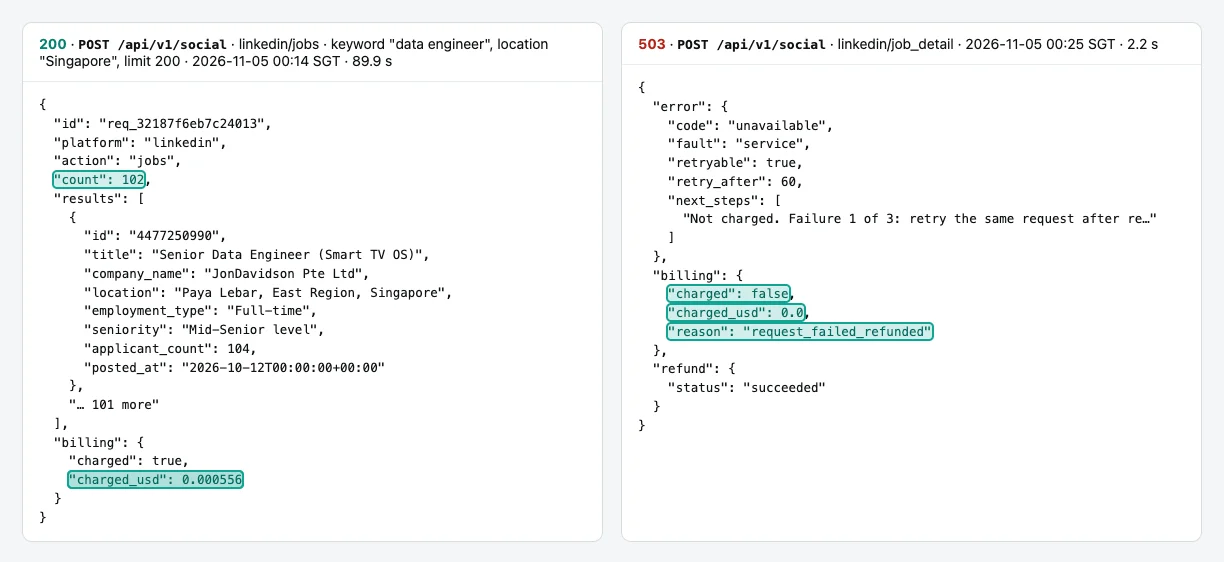
The other side of the story matters too. One Store profile API with only 132 users charges $0.02 per 1,000 profiles. It is 27.8x cheaper than us for single profiles. Our linkedin/job_detail returned 503 on all five test calls, with no charge. For single job details, Apify is the better choice today.
In this article, "price per 1,000" means the money a call really charged (charged_usd in the response), divided by the unique rows it returned, times 1,000. It answers one question: what do 1,000 usable results cost? EveryInfra bills per request. One request costs the same for 1 row or 200 rows.
Most LinkedIn scrapers on Apify Store bill per result, so each extra row adds a charge. You can only compare the two models with the same denominator. For Apify, we used only public material. We read Store pages, the pricing page, the docs and the public endpoint api.apify.com/v2/acts/<owner>~<name>.
We did not create an Apify account, and we did not run any actor (Apify's word for a cloud scraping program). So every Apify number here is a public unit price, not a measured bill. Every EveryInfra number is from a live call.
apify linkedin scraper vs EveryInfra: the summary table
This table holds only two kinds of numbers. The first kind is the Apify Store public unit price. We read these between 00:16 and 00:40 Singapore time on 2026-11-05, and the tier is in each cell. The second kind is our live result: Singapore time, capability, rows and charged_usd. Apify tiers follow your monthly plan.
The Free plan gives $5 of usage per month with no Store discount. Starter is $19 per month and maps to Bronze. Scale is $199 and maps to Silver. Business is $999 and maps to Gold. Platinum and Diamond are larger custom contracts.
| Data | Apify scraper (30-day users) | Apify per 1,000: Free / Diamond | EveryInfra capability | Live test (Singapore time, rows, charged) | EveryInfra per 1,000 | Gap (Apify Free / ours) |
|---|---|---|---|---|---|---|
| Profile | LinkedIn Profile Scraper, harvestapi (15,718) | $4.00 / $2.20 | linkedin/person_profile | 00:14-00:18, 5 calls, 1 row each, $0.000556 each | $0.556 | 7.2x |
| Profile + email | Same, email search mode | $10.00 / $10.00 | linkedin/person_profile (email field) | Same, 3 of 5 rows had email | $0.556 | 18x |
| Company | LinkedIn Company Details Scraper, harvestapi (8,071) | $4.00 / $1.20 | linkedin/company_profile | 00:14-00:22, 4 calls, 1 row each | $0.556 | 7.2x |
| Job list | Linkedin Jobs Scraper, curious_coder (15,193) | $2.00 / $1.00 | linkedin/jobs | 00:14-00:53, 11 calls, 1,853 unique rows, $0.006116 | $0.0033 | 606x |
| Job list (cheapest) | Rapid Linkedin Jobs Scraper quick mode, worldunboxer (632) | $0.10 / $0.10 | linkedin/jobs | Same | $0.0033 | 30.3x |
| Single job detail | Same, detailed mode | $0.35 / $0.30 | linkedin/job_detail | 00:25-01:10, 5 calls, all 503, $0 | List price $1.194 (failed today) | Apify 3.4x cheaper |
| People search | LinkedIn Profile Search Scraper, harvestapi (8,094) | short $4.00 / $1.00 | linkedin/profile_search | 00:26, 1 async call, 78 people, $0.000556 | $0.0071 | 561x |
| Company employees | LinkedIn Company Employees Scraper, harvestapi (6,420) | short $3.00 / $1.15, plus $0.02 per start | linkedin/employees | 00:22, 1 call, 200 people, $0.000556 | $0.0028 | 1,079x |
| Profile (cheapest) | LinkedIn Profile API, johnvc (132) | $0.02 / $0.02 | linkedin/person_profile | Same as row 1 | $0.556 | Apify 27.8x cheaper |
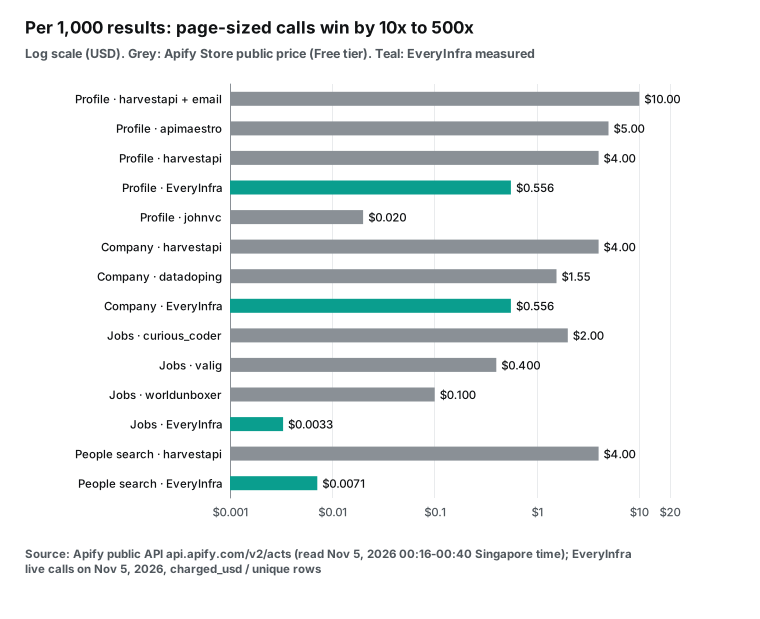
People misread this table in three ways. First, the fields are different on each side. A gap tells you the cost of one result. It does not tell you that both results hold the same data.
So each test section below lists our measured fill rates apart from the fields that Apify pages describe. We never say that the two sides are the same. Second, an Apify price is a Store unit price times 1,000. A real bill also depends on minimum results, start fees, failed reruns and the Free plan run limit.
Our side divides real charges by real rows, so empty and failed calls stay in the cost. Third, the big gaps all come from capabilities that return a page per call. For single profiles and companies the gap is only 7.2x. Against the cheapest third-party scraper on the Store, we cost more.
How we tested and how we calculated
We made all live calls early on November 5, 2026, from 00:14 to 01:17 Singapore time. We used one shared test key with a limit of 10 requests per minute. Other writers used the same key at the same time. So we waited 8 seconds between calls. On a 429 (too many requests), we waited 62 seconds and sent the call again.
We did not count the 429 attempts as results.
Profiles, companies and jobs each had five calls or more. We tested five public profiles and one unknown username. We tested four companies and one unknown name. Three company calls (Microsoft, Grab and Santander) got a 429 first, and the table counts only the retry. We ran 11 job searches in Singapore with 10 keywords, because we ran data engineer twice.
We also ran four job detail calls, one sync and one async people search, and one employee list. Only the async people search worked. These last three samples are small, so treat them as a guide only. Two more calls had no key or a misspelled parameter, so we could see whether failures cost money.
Each price per 1,000 uses one formula: total charged, divided by unique rows, times 1,000. Empty and failed calls stay in the numerator. Their rows do not go into the denominator. So a weak call can only make our price look higher.
We deduplicated jobs by id and people by profile URL. For Apify, we read each actor's pricingInfos and stats from the public endpoint. pricingInfos gives the price of each charge event on each tier. stats gives users, runs and success rates for the last 30 days.
We took the price of the main per-result event and multiplied it by 1,000. Some actors also charge per start or per search page. In those cases, we spread the fee over the page size that the page states, and we say so in the table.
We fixed the selection rule before we wrote the article. For each data type, we took the actor with the most users in the last 30 days. We also took the cheapest Free-tier actor among those with at least 100 users. This rule stops us from picking a weak competitor on purpose. It also exposed the one case where Apify beats us by a wide margin.
| Scenario | Calls | Calls with data | Rows returned | Total charged | Singapore time |
|---|---|---|---|---|---|
linkedin/person_profile | 7 | 5 | 5 | $0.002780 | 00:14-00:25 |
linkedin/company_profile | 5 (plus 3 uncounted 429s) | 4 (1 empty call was charged) | 4 | $0.002780 | 00:14-00:22 |
linkedin/jobs | 12 | 11 | 1,970 (1,853 unique) | $0.006116 | 00:14-00:53 |
linkedin/job_detail | 4 | 0 | 0 | $0 | 00:25-00:28 |
linkedin/profile_search | 2 | 1 | 78 | $0.000556 | 00:23-00:26 |
linkedin/employees | 1 | 1 | 200 | $0.000556 | 00:22 |
| Extra round: 3 jobs searches (US, Madrid, Mexico City), 2 companies (BBVA, Mercado Libre), 1 people search (Madrid), 1 job detail retry | 7 | 6 | 657 | $0.003336 | 00:56-01:10 |
| Through MCP (1 with a key, 2 without) | 3 | 1 | 1 | $0.000556 | 01:02-01:17 |
| Total | 41 | 29 | 2,915 | $0.016680 | 00:14-01:17 |
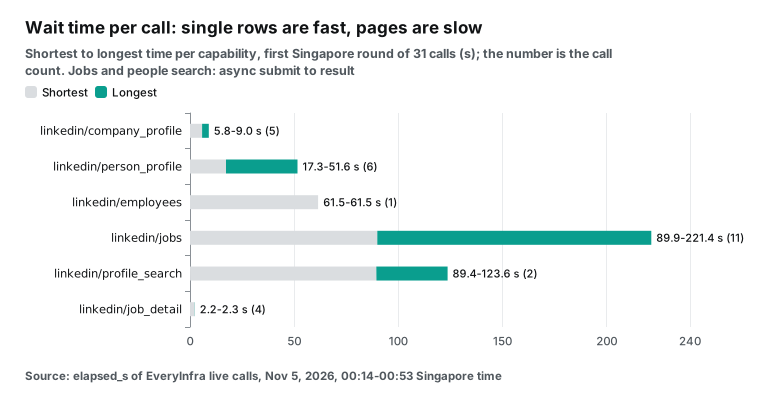
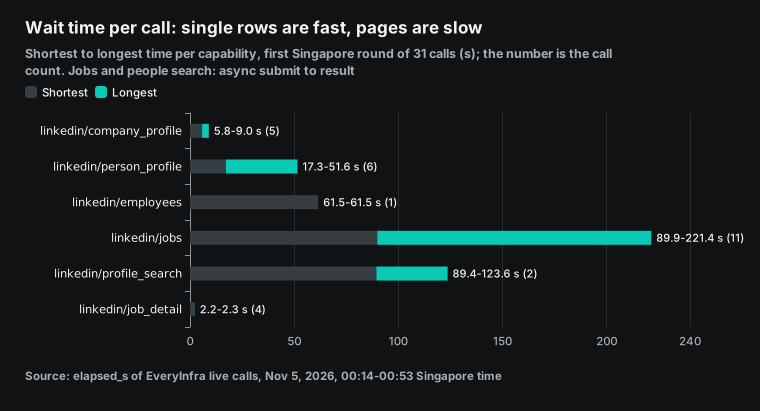
All live calls in this article cost $0.016680 in total. That is below the $0.10 limit we set before the test. Two illustrations came from an image service at about $0.03 each. We did not rerun calls to get better numbers.
The first sync people search timed out at 89 seconds with a 503 and no charge. We kept that result. Then we followed the error hint and ran the same search in async mode.
apify linkedin scraper cost: how to read Store prices
We searched Apify Store for "linkedin" at 00:17 Singapore time on November 5, 2026. The search listed 370 results. We read all 370 through the public API. Of these, 109 had at least 100 users in the last 30 days.
Of those 109, 78 say "No cookies", "No login" or similar in the title or description. So you do not have to give them your LinkedIn session.
Pricing models differ too. Of all 370, 31 use "pay per event + usage". With that model, you pay per result and you also pay for compute, proxy and storage. Of the 109 actors with 100+ users, only 4 use this model. The other 105 use pay per event only.
We then took the 12 profile scrapers with at least 100 users. Their median Free-tier price is $5.00 per 1,000 profiles. The lowest is $0.02 and the highest is $10.00 (with email).
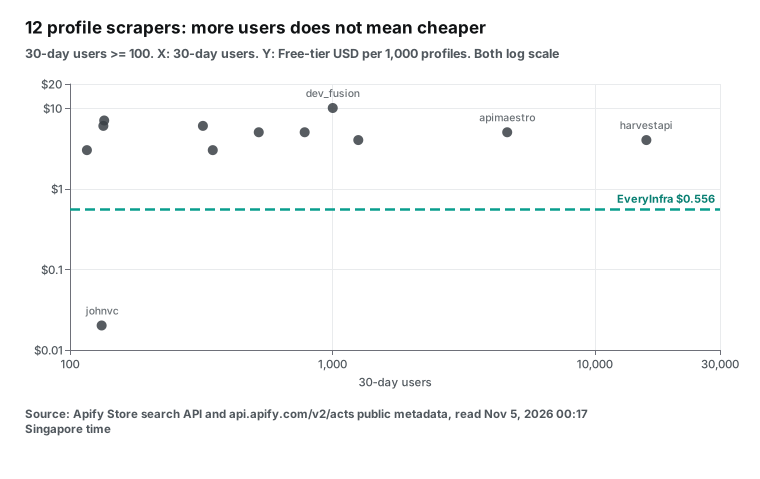
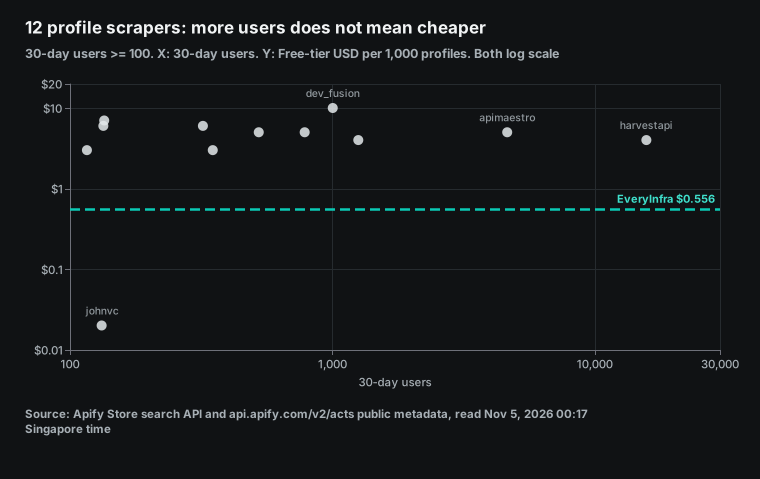
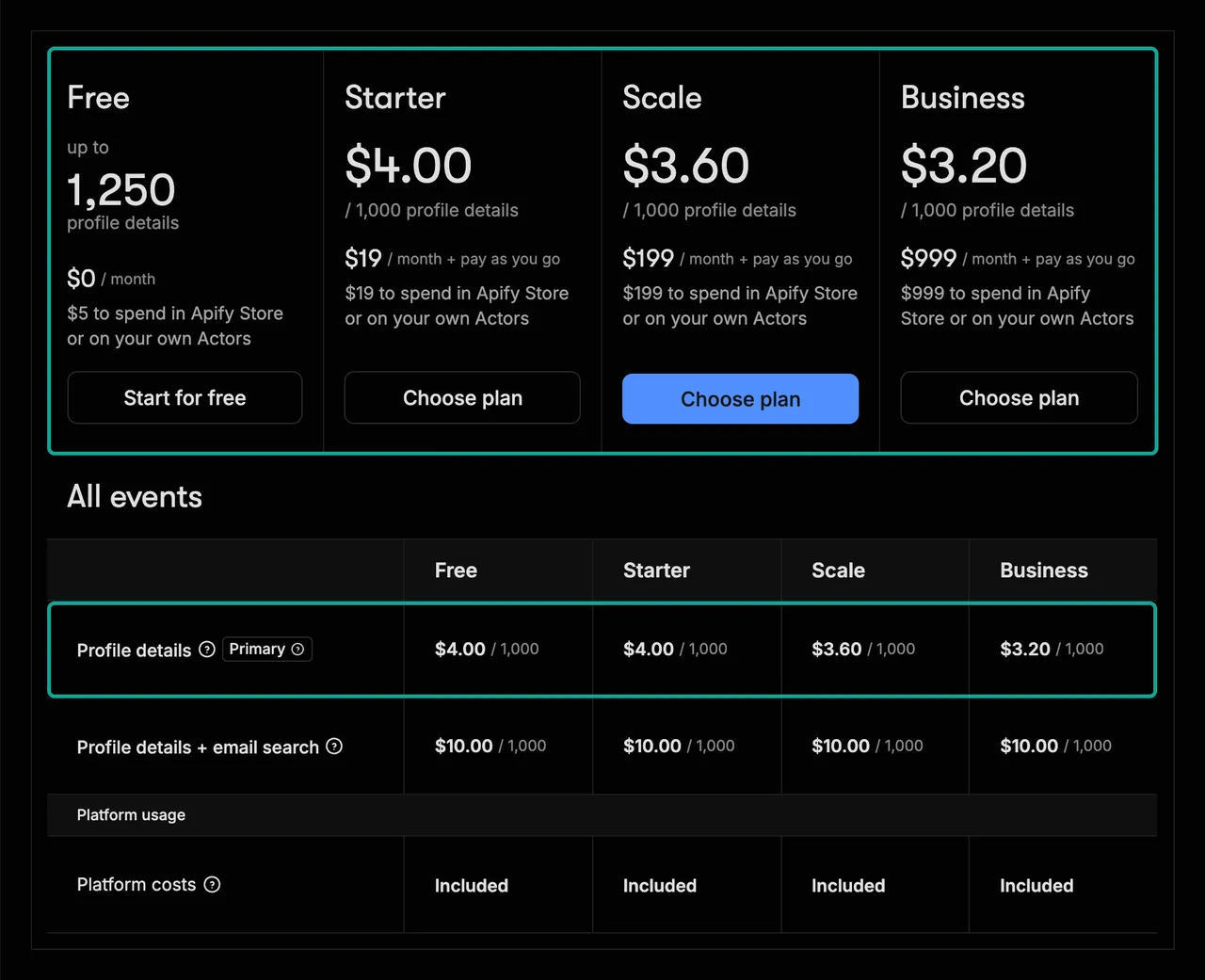
Apify prices have four traps. The first trap is the tier. The Apify pricing page says the Free plan gives $5 per month with "No Apify Store discount". Paid plans unlock the Bronze, Silver and Gold discount tiers. Each actor owner sets the discount for each tier. harvestapi's profile scraper costs $4.00 on Free and Bronze, $3.60 on Silver, $3.20 on Gold, $2.60 on Platinum and $2.20 on Diamond.
The curious_coder jobs scraper costs $2.00 on Free and $1.00 on all paid tiers. So the Free tier pays double. A solo user and a Business customer can see prices that differ by almost 2x for one actor. Check your tier before you compare.
| Apify plan | Monthly fee | Usage included | Store discount tier | Compute unit price |
|---|---|---|---|---|
| Free | $0 | $5 | None | $0.2 per CU |
| Starter | $19 | $19 | Bronze | $0.2 per CU |
| Scale | $199 | $199 | Silver | $0.16 per CU |
| Business | $999 | $999 | Gold | $0.13 per CU |
| Enterprise | Custom | Custom | Custom | Custom |
This table comes from the Apify pricing page, read at 00:39 Singapore time on 2026-11-05. After the included usage runs out, you pay as you go, and you can set a limit. A compute unit (CU) is 1 GB of memory for 1 hour. Pay-per-event actors usually do not add CU charges. The 31 "pay per event + usage" actors among all 370 do. Only 4 of them have 100+ users.
The second trap is the headline price. Some actors put a low price in the title or description. Often it is a high-tier price. The datadoping profile scraper says "For just $3 per 1,000 profiles".
The public API shows $4.00 on Free, $3.50 on Bronze and $3.00 only from Gold. Its company scraper says "$1.2 per 1,000 companies", but Free is $1.55. The curious_coder page says "Pricing from $1.00 / 1,000 results". The word "from" means Bronze and above.
Free plan users pay $2.00. This is not an error by the owners. You just have to read "from" with care.
The third trap is start fees and page fees. harvestapi's employee scraper charges $0.02 per start. Its people search scraper charges $0.10 per search page, with up to 25 people per page. The page says the fee applies "regardless of how many profiles were found on the page". We spread the page fee over a full page of 25. That gives $4.00 per 1,000 people, which is the best case for Apify.
A narrow search with few people per page costs more. valig's jobs scraper charges $0.001 per start. The fantastic-jobs API charges $0.01 per start on Free. For one run of a few thousand rows, these fees are small. Many n8n flows start one run per lead. In that design, start fees can become the main cost.
The fourth trap is the Free plan run limit. harvestapi's profile page says "Users on free-tier plans are limited to 50 runs in total". The Free plan's $5 buys 1,250 profiles at $4.00 per 1,000. That is where "up to 1,250" in the screenshot comes from. On r/n8n, one user shared a "free" flow that finds LinkedIn hiring posts. It scrapes LinkedIn posts on the Apify Free tier.
A reply said "the apify $5 just went away in a few minutes". The same reply said one run cost over $1. In another thread, two users suggested the curious_coder jobs scraper. They said its Free tier gives about 5,000 job results a month. We cannot check those bills.
At today's curious_coder Free price of $2.00 per 1,000, $5 buys only 2,500 jobs. The current price started on 2026-08-14, so the post may quote an old price. Store prices change, so check the Pricing tab before you trust any report.
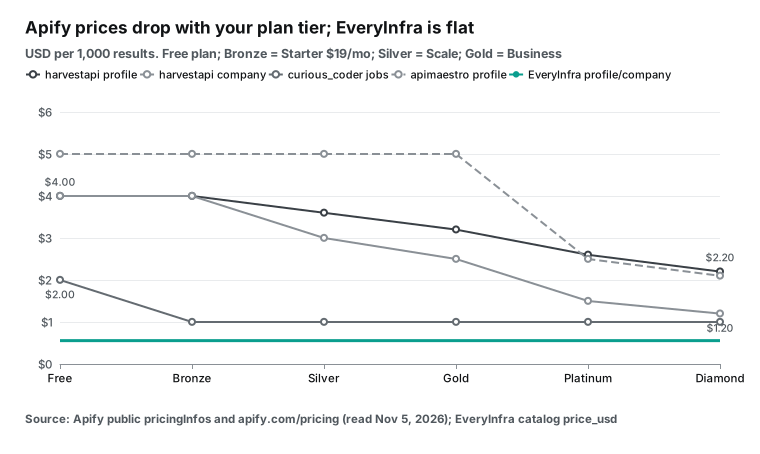
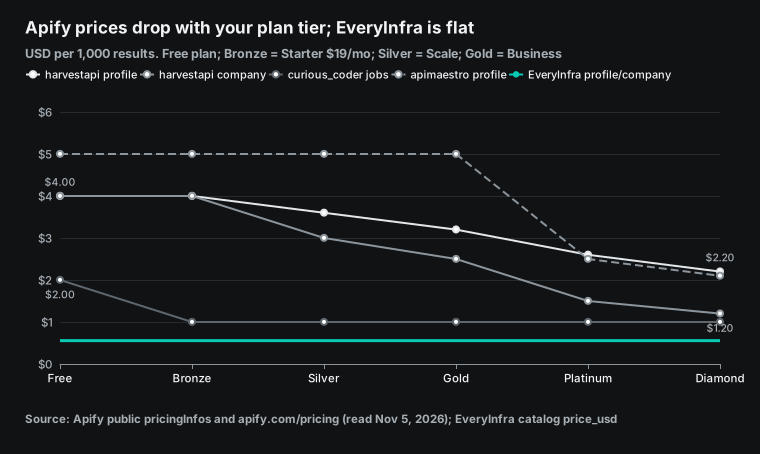
EveryInfra has no tiers. On LinkedIn, person_profile, company_profile, jobs, profile_search and employees each cost $0.000556 per call. job_detail costs $0.001194 and person_posts costs $0.004. There is no plan and no monthly fee.
You pay for what you use. For a trial, star two EveryInfra GitHub repositories and you get $1 of credit for 24 hours. Paid top-ups start at $10. Each capability page shows its price, for example the LinkedIn profile API and the LinkedIn jobs API.
| EveryInfra LinkedIn capability | Price per call | Max rows per call | Per 1,000 (full pages) |
|---|---|---|---|
linkedin/person_profile | $0.000556 | 1 | $0.556 |
linkedin/company_profile | $0.000556 | 1 | $0.556 |
linkedin/followers (count) | $0.000556 | 1 | $0.556 |
linkedin/job_detail | $0.001194 | 1 | $1.194 |
linkedin/search (posts) | $0.000556 | 50 | $0.011 |
linkedin/profile_search | $0.000556 | 100 | $0.0056 |
linkedin/jobs | $0.000556 | 200 | $0.0028 |
linkedin/employees | $0.000556 | 200 | $0.0028 |
linkedin/comments | $0.000556 | 200 | $0.0028 |
linkedin/company_posts | $0.002319 | 50 | $0.046 |
linkedin/person_posts | $0.004 | 50 | $0.080 |
The last column assumes that every call returns a full page. Real calls often return less. In this test, job searches returned 179 rows per call on average, so the real price was $0.0033, not $0.0028. People search returned 78 people, not 100, so the real price was $0.0071, not $0.0056. With per-request billing, your real price depends on how many rows each call returns.
Test 1: 1,000 LinkedIn profiles
We first called linkedin/person_profile for five people with public business roles. They were Satya Nadella of Microsoft, LinkedIn co-founder Reid Hoffman, Bill Gates, former LinkedIn CEO Jeff Weiner and LinkedIn executive Ryan Roslansky. The username parameter takes the handle from the profile path or the full profile URL. For the third call we sent the full URL, and the result was the same. All five calls returned 200 and charged $0.000556 each.
They took 17.3 to 51.6 seconds. The slowest call, at 00:18 Singapore time, had no work history and no education. The catalog explains this case. When the main source is not available, a backup source answers, and some fields can be empty.
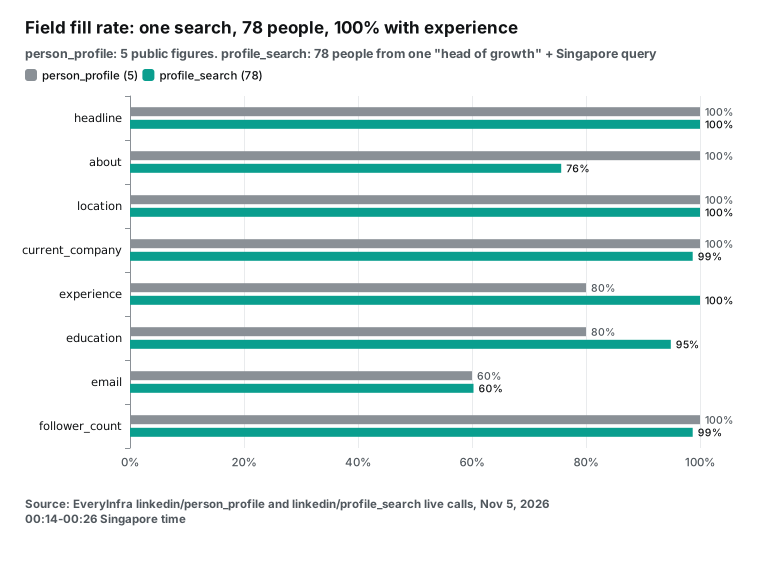
| Field | Rows with a value (of 5) | Note |
|---|---|---|
| headline, about, location, current_company | 5 / 5 | Public profile text |
| follower_count, connection_count | 5 / 5 | Followers and connections |
| experience | 4 / 5 | 5, 5, 3 and 7 entries |
| education | 4 / 5 | 2, 2, 2 and 1 entries |
| 3 / 5 | Catalog: work email inferred from public data and checked | |
| open_to_work, account_created_at | 4 / 5 | Can be empty from the backup source |
| top_skills | 0 / 5 | Empty in all five |
Next we sent an unknown username at 00:19 Singapore time. After 32 seconds the API returned 503 with the code unavailable. The billing block said charged false and reason request_failed_refunded. The charge was $0. So an unknown person shows up as "not available now", not as an empty 200.
You pay nothing. But one response cannot tell you if the person does not exist or if the call failed this time. The next_steps field says "Not charged" and tells you to retry after retry_after seconds. On the third failure it says what to check.
Apify has the widest choice of profile scrapers. The most used one, from harvestapi, costs $4.00 per 1,000, or $10.00 with email search. Its page says "No cookies or account required". It takes usernames, profile URLs or internal IDs.
The email mode runs SMTP checks. If a profile is too thin for an email search, the page says it does not charge for the search. apimaestro's Profile Details Scraper costs $5.00 per 1,000 and $2.10 on Diamond. It had 4,636 users in 30 days and a 100% run success rate.
The cheapest is johnvc's LinkedIn Profile API. It charges $0.00001 per profile plus $0.00001 per dataset item, so $0.02 per 1,000. Each start costs another $0.00001. It has only 132 users and a 91.12% run success rate in 30 days. harvestapi's rate is 99.97%.
On price alone, this actor is 27.8x cheaper than our single-profile call. We did not run it, so we do not know how full its fields are. Its page lists name, headline, location, current company, experience, education and follower counts.
So for single profiles the result is mixed. We are 7x to 9x cheaper than the most used Store scrapers. We are more expensive than the cheapest one. Do you only enrich a list of profile URLs each day, and can you accept a lower success rate? Then try that $0.02 actor first.
If you also need people search, jobs and company data, one account and one key save time on billing and on care of several actors. You can also start with people search. One search returns dozens of people with full work history, at a much lower cost per person. Test 4 shows the numbers.
Test 2: 1,000 LinkedIn company pages
We called linkedin/company_profile for four companies: Stripe, Microsoft, Grab and Santander (sent as a full URL). All four returned 200 in 6 to 9 seconds and charged $0.000556 each. Stripe shows 16,694 employees, an employee_count_range of 5001-10000 and 14 offices. Microsoft shows 231,125 employees, 29,447,391 followers and 45 offices. Grab shows 58,341 employees, a head office in Singapore and a 2012 founding year. Santander shows 131,291 employees and a head office in Boadilla del Monte, near Madrid.
Note that employee_count and employee_count_range can disagree. The first counts LinkedIn members who list the company as their current job. The second is the size band that the company picked. For Stripe and Grab, the member count is above the size band. If you score leads, keep the two fields apart.
| Company | employee_count | employee_count_range | follower_count | Head office | Offices |
|---|---|---|---|---|---|
| Stripe | 16,694 | 5001-10000 | 1,805,161 | South San Francisco, US | 14 |
| Microsoft | 231,125 | 10001+ | 29,447,391 | Redmond, US | 45 |
| Grab | 58,341 | 5001-10000 | 1,056,756 | Singapore | 16 |
| Santander | 131,291 | 10001+ | 2,240,169 | Boadilla del Monte, ES | 3 |
All four rows had description, website, industries, headquarters and offices. Only two had founded_year. None had crunchbase_url or latest_funding_round. The catalog says that the backup source can leave out funding, Crunchbase links and map points. If you buy company data mainly for funding rounds, do not count on those two fields from us.
We must report one problem in this test. At 00:20 Singapore time we sent a company name that does not exist. The API returned HTTP 200 with empty strings in every field, and it charged $0.000556. Our own rule says empty results are free. So this is our bug, and we sent it to our engineers.
Until the fix ships, check your company list before you send it. You can also log calls where results.name is empty with their request_id and ask us to check them. With this empty call included, the real cost of these five calls is $0.695 per 1,000 companies. That is 25% above the $0.556 that counts only good rows.
On Apify, the most used company actor is harvestapi's LinkedIn Company Details Scraper, with 8,071 users. It costs $4.00 per 1,000 on Free and $1.20 on Diamond, plus $0.00005 per start. Its page says "No cookies or account required". It can also find company URLs from company names in bulk. The cheapest is datadoping's Linkedin Company Details Scraper at $1.55 on Free and $1.20 from Gold.
It had 116 users and a 99.99% success rate. We are 2.8x cheaper than datadoping and 7.2x cheaper than harvestapi. One company per call keeps this gap small. The big gaps come from page-sized calls. You can try it on the LinkedIn company API page.
Test 3: 1,000 job posts (apify linkedin scraper jobs)
Jobs are the most common LinkedIn data need. They also show the widest gap between the two billing models. linkedin/jobs takes three parameters. keyword is the job search term, or a full LinkedIn job search URL.
location is the place. limit goes up to 200. We ran one search for each of 10 keywords in Singapore, each with limit 200. Later we ran data engineer again, for 11 searches in total. The keywords were data engineer, software engineer, product manager, data scientist, data analyst, marketing manager, account executive, business analyst, devops engineer and finance manager.
Large searches are slow. The first sync call took 89.9 seconds. After that we added "mode": "async". The API returned a job_id at once, and we polled poll_url every 8 seconds.
All 11 searches succeeded. There were 10 keywords, and we ran data engineer a second time 39 minutes later. Each search charged $0.000556, for $0.006116 in total. Each one returned 102 to 200 rows, for 1,970 rows in total.
After we removed duplicates by job id, 1,853 rows were left, so the price is $0.0033 per 1,000. Async jobs took 115 to 221 seconds from submit to result. After the seventh search we already had 1,193 unique jobs. So 1,000 unique Singapore jobs took only 7 requests and $0.003892 on our side.
Most duplicates came from the repeat search. At 00:14 Singapore time, the sync data engineer search returned only 102 rows. At 00:53, the async search for the same keyword returned 198 rows, and 101 of them matched the first call. Across different keywords there were only 14 duplicates. They came from data analyst and business analyst, two roles that overlap with other keywords.
We also ran searches outside Singapore. At 00:56, software engineer in the United States returned 198 jobs in 180.7 seconds for $0.000556. But those 198 jobs came from only 31 companies. Affirm alone had 100 of them, AWS had 32 and JPMorganChase had 20. A broad keyword across a whole country fills up with a few large posters, so search by city for a market view.
The city searches looked better. Analista de datos in Madrid returned 199 jobs from 165 companies. Data analyst in Mexico City returned 158 jobs from 126 companies. Each call cost $0.000556. Only 3 and 10 of those rows had salary.
| Keyword | Singapore time | Rows | New unique | Cumulative unique | Seconds |
|---|---|---|---|---|---|
| data engineer (sync) | 00:14 | 102 | 102 | 102 | 89.9 |
| software engineer | 00:29 | 194 | 194 | 296 | 131.9 |
| product manager | 00:31 | 200 | 200 | 496 | 221.4 |
| data scientist | 00:35 | 196 | 196 | 692 | 140.4 |
| data analyst | 00:37 | 198 | 192 | 884 | 156.6 |
| marketing manager | 00:40 | 189 | 189 | 1,073 | 164.2 |
| account executive | 00:43 | 120 | 120 | 1,193 | 115.4 |
| business analyst | 00:45 | 199 | 191 | 1,384 | 197.3 |
| devops engineer | 00:48 | 200 | 200 | 1,584 | 149.4 |
| finance manager | 00:51 | 174 | 174 | 1,758 | 123.9 |
| data engineer (repeat) | 00:53 | 198 | 95 | 1,853 | 156.1 |
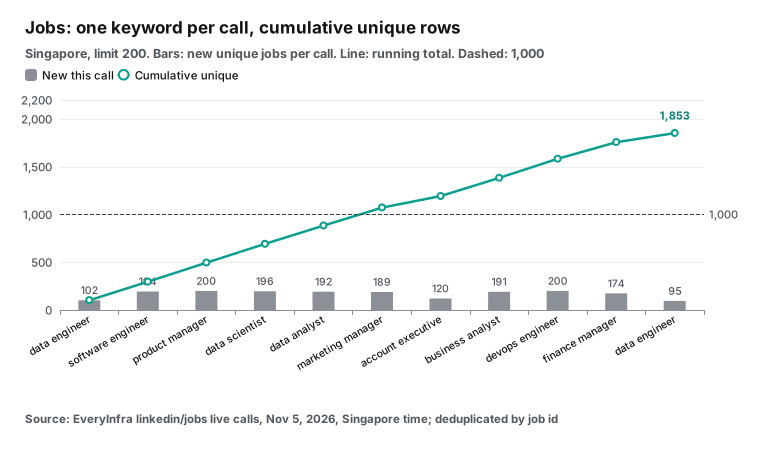
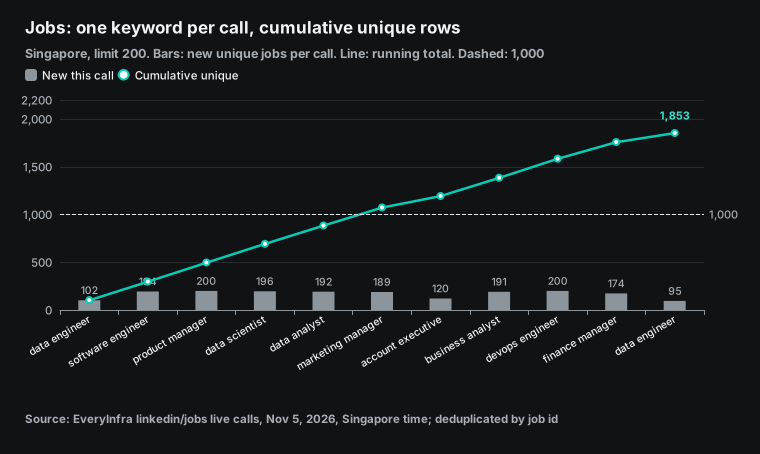
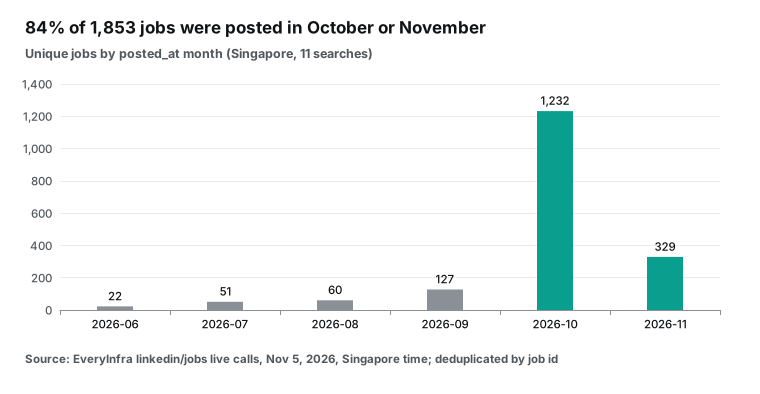
For fields, we looked at the first 102 jobs. title, text (the full job description), company_name, company_url, location, employment_type, seniority, applicant_count and posted_at were present in all 102. The median description was 3,567 characters long. Only 4 jobs had salary, because most Singapore job posts do not list pay. For dates, 64 of the 102 were posted in October 2026 and 25 in the first days of November.
Across all 1,970 rows from the 11 searches, only 66 (3.4%) had salary, always as a monthly or yearly range in Singapore dollars. Of all rows, 1,884 had full-time as employment_type and 1,046 had Not Applicable as seniority. The median applicant_count was 101.5.
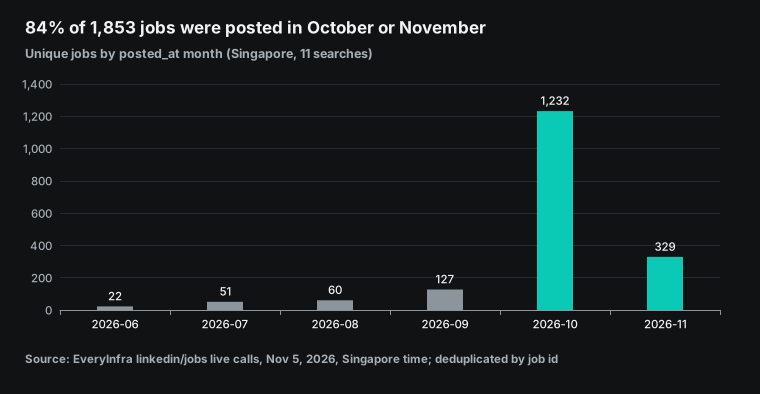
The 1,853 unique jobs came from 817 companies. The top three were OCBC with 35 jobs and GovTech Singapore and Shopee with 33 each. By posting month, 1,232 of the 1,853 jobs came from October and 329 from the first days of November, which is 84% in total.
The oldest post was from August 2024. So search results can include a few old posts that stay open. For new job alerts, filter again by posted_at.
Apify has the most jobs scrapers. The most used one is curious_coder's Linkedin Jobs Scraper, with 15,193 users. It costs $2.00 per 1,000 on Free and $1.00 from Bronze. Its page says it can add the job poster and company details.
The page also states a LinkedIn limit: "Linkedin limits number of jobs per search to 1000". For more jobs, you turn on "Split search urls by location". The actor then runs one search per city and removes duplicates. valig's LinkedIn Jobs Scraper, with 8,091 users, costs $0.40 per 1,000 plus $0.001 per start. cheap_scraper says "No login or cookies needed" and costs $0.70.
worldunboxer's Rapid Linkedin Jobs Scraper costs $0.10 per 1,000 in quick mode and $0.35 in detailed mode. Its page lists "cron schedules, webhooks and MCP for AI agents". The fantastic-jobs Advanced LinkedIn Job Search API is a different kind of product. It calls itself a database with more than 10 million new jobs per month, with recruiter data and AI fields. It costs $5.00 per 1,000 on Free and $1.50 from Gold.
Against these, our linkedin/jobs costs $0.0033 per 1,000. That is 606x less than curious_coder on Free, 121x less than valig and 30.3x less than the cheapest $0.10 option. Single job detail goes the other way. linkedin/job_detail lists at $0.001194 per call, or $1.194 per 1,000.
All five test calls returned 503 and cost $0. We tried two real job IDs, one unknown ID and the example ID from the error hint. At 01:10 we tried a third real ID from our data engineer search, and it also returned 503. worldunboxer's detailed mode costs $0.35 per 1,000, which is 3.4x below our list price. Our text field already holds the full description, so most projects do not need a detail call. If you need apply links or benefits, which appear only on the detail page, Apify is the better choice for now.
Test 4: people search and company employee lists
linkedin/profile_search finds people by current job title and location. keyword is the title, location is the place, and limit goes up to 100. We searched for "head of growth" in "Singapore" with limit 100. The first sync call returned 503 timeout after 89.4 seconds, with no charge.
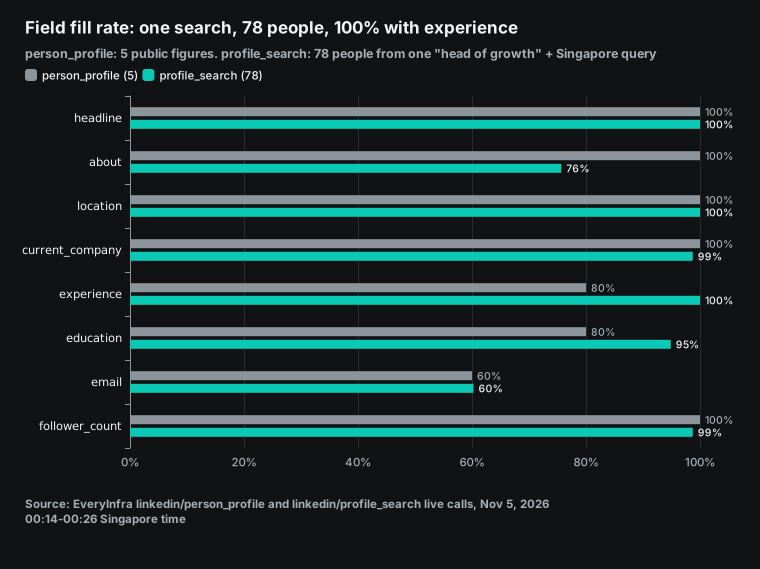
The hint in the response said to add "mode":"async" for large limits. At 00:26 Singapore time we sent the async version. About two minutes later we had 78 people for $0.000556, or $0.0071 per 1,000.
Of the 78 people, all had experience, with a median of 7 entries. 74 had education, 59 had about and 47 had email. 27 had is_premium set to true. So one search returns full profiles with work history. Per person, that is about 78x cheaper than single person_profile calls.
Note one thing: location does not mean "lives in this city now". Of the 78 people, only 27 had Singapore in location. The others were in Sydney, New York, the San Francisco Bay Area, Mumbai, London, Hong Kong, Paris and other places. But 48 of the 78 records named Singapore somewhere, so people who once worked there also seem to match.
At 01:06 we checked this again with data scientist in Madrid and limit 100. After 229.4 seconds we had 100 people for $0.000556. Of these, 55 had Madrid in location and 77 named Madrid somewhere in the record. And 94 had data scien in headline. If you need people who are in the city now, filter the results on location yourself. At these rates, about half of the returned people are usable.
linkedin/employees lists people at a company. We asked for Stripe with limit 200. In 61.5 seconds the API returned 200 people for $0.000556, or $0.0028 per 1,000. All 200 had headline and location.
None had email, because the catalog says employee emails appear only when the person makes them public. Of the 200, 106 had is_premium set to true. These two calls return the names and jobs of private people, so this article shows no names and no emails from them.
On Apify, harvestapi's LinkedIn Profile Search Scraper (8,094 users) has a short mode at $0.10 per page of up to 25 people. With full pages, that is $4.00 per 1,000. The full mode adds $0.004 per person, for $8.00 per 1,000. Email search costs more.
Its strength is filters. The page lists filters by company, industry, school and years of experience, and harvestapi has a separate actor that searches by name. harvestapi's Company Employees Scraper costs $3.00 per 1,000 in short mode, plus $0.02 per start, and $8.00 in full mode. Its page says "This actor can try to find contact emails".
Against short mode, our people search is 561x cheaper and our employee list is 1,079x cheaper. But we offer only two filters, title and location, and employees filters only by company. We have no filter by industry, school or tenure. For narrow audience lists, those Apify actors fit better.
One basket: 1,000 profiles, 1,000 companies and 1,000 jobs
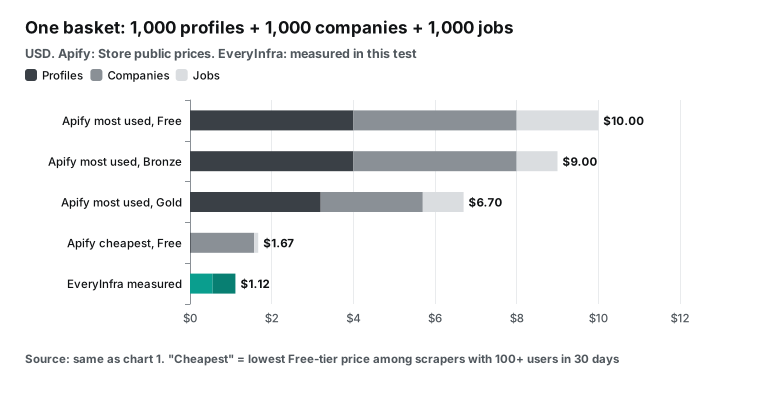
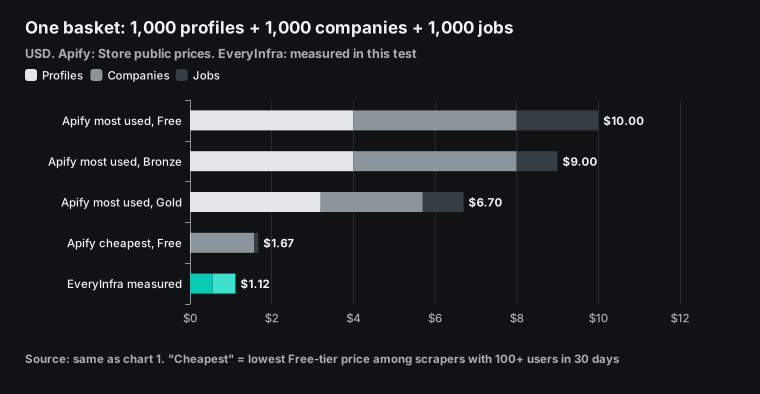
Now put the three most common needs in one basket. The result depends on how you pick actors on Apify. With the most used actor for each type, the Free tier costs $4.00 + $4.00 + $2.00 = $10.00. Starter (Bronze) costs $9.00 and Business (Gold) costs $6.70.
The Free plan gives only $5 per month, so it cannot pay for this basket. You need at least the $19 Starter plan. With the cheapest Free-tier actor for each type (100+ users), the cost is johnvc $0.02 + datadoping $1.55 + worldunboxer $0.10 = $1.67. Our cost is $0.556 + $0.556 + $0.0033 = $1.12.
| Option | Profiles | Companies | Jobs | Total | Gap vs EveryInfra |
|---|---|---|---|---|---|
| Apify most used, Free | $4.00 | $4.00 | $2.00 | $10.00 | 9.0x |
| Same, Starter (Bronze) | $4.00 | $4.00 | $1.00 | $9.00 | 8.1x |
| Same, Business (Gold) | $3.20 | $2.50 | $1.00 | $6.70 | 6.0x |
| Apify cheapest per type, Free | $0.02 | $1.55 | $0.10 | $1.67 | 1.5x |
| EveryInfra measured | $0.556 | $0.556 | $0.0033 | $1.12 | - |
The last Apify row is only 1.5x above our total. The reason is simple. The cheapest profile actor is 27.8x below us, and it cancels most of our lead on jobs. If profiles are most of your basket, "cheapest per type" on Apify can save money. The cost is care for three actors with different owners, inputs and success rates. If jobs, people search or employee lists are most of your basket, per-request billing wins by more each month.
Here is a closer look at a daily routine. A recruiting or sales team runs one job each day for 30 days. It searches jobs for 10 keywords, updates 50 target companies and enriches 20 candidate profiles. We use the 179 rows per job search from this test for both sides. Only the billing model differs.
| Daily task | EveryInfra (per month) | Apify most used, Free (per month) | Same, Starter or Bronze (per month) | Apify cheapest, Free (per month) |
|---|---|---|---|---|
| 10 job searches, about 1,790 rows | $0.17 | $107.42 | $53.72 | $5.39 |
| 50 company pages | $0.83 | $6.00 | $6.00 | $2.33 |
| 20 profiles | $0.33 | $2.40 | $2.40 | $0.01 |
| Total | $1.33 | $115.82 | $62.12 | $7.72 |
The table shows one thing. When a routine includes page-sized data, that data drives a per-result bill. With the most used actors, the $19 Starter credit is not enough, and you pay about $43 more as you go. With the cheapest actors, the month costs about $8. Ours costs $1.33, which is 5.8x less. Start fees are included per run, and they are small.
apify linkedin scraper api vs the EveryInfra API
Every Apify actor runs through the same REST API. The most common call runs an actor and returns its dataset in one request. The endpoint is POST https://api.apify.com/v2/acts/<owner>~<name>/run-sync-get-dataset-items. The request body is the input of that actor, and each actor has its own input fields. You find them on the Input tab of its Store page. Query parameters include timeout, memory, maxItems and maxTotalChargeUsd.
The Apify docs say maxItems sets the most items you pay for. It does not promise that the actor returns only that many. maxTotalChargeUsd caps the total cost of one run, for every pricing model. These two controls are a real strength of Apify.
We have no per-run cost cap, because each of our requests has a fixed price. The block below is an Apify configuration example. We did not run it, and you must fill the input file for the actor you pick.
# Configuration example (not run): run an Apify LinkedIn jobs actor, pay for at most 1,000 items, spend at most $2
curl -X POST \
  "https://api.apify.com/v2/acts/curious_coder~linkedin-jobs-scraper/run-sync-get-dataset-items?maxItems=1000&maxTotalChargeUsd=2" \
  -H "Authorization: Bearer $APIFY_TOKEN" \
  -H "Content-Type: application/json" \
  -d @input.json   # input fields come from the actor's Input tab
EveryInfra uses one URL for all platforms: POST https://api.everyinfra.com/api/v1/social. The body always has three keys: platform, action and params. To change platform or capability, you change only those values. For slow requests, add "mode": "async". The API returns a job_id and a poll_url at once, and you poll with GET.
The first response already shows the charge. If the job fails, the same charge record is refunded. This is the call we used in the test. The key comes from an environment variable.
# Live test call: search data scientist jobs in Singapore, async, up to 200 rows
curl -s https://api.everyinfra.com/api/v1/social \
  -H "Authorization: Bearer $EVERYINFRA_API_KEY" \
  -H "Content-Type: application/json" \
  -d '{"platform":"linkedin","action":"jobs","mode":"async",
       "params":{"keyword":"data scientist","location":"Singapore","limit":200}}'
# 202: {"job_id":"...","status":"running","poll_url":"/api/v1/jobs/...","billing":{"charged_usd":0.000556,...}}
curl -s "https://api.everyinfra.com/api/v1/jobs/<job_id>" -H "Authorization: Bearer $EVERYINFRA_API_KEY"
# poll until status=succeeded; results holds the job array
Errors also work in a different way on each side. At 00:25 Singapore time we spelled location as locaton on purpose. In 0.1 seconds the API returned 422 with the code unknown_param. The error listed the supported parameters and said "did you mean location".
The charge was $0. A call with no key returned 401 missing_key, also for $0. We wrote these messages for AI clients. A model that reads the 422 can fix the parameter and send the call again.
On Apify, each owner defines the actor input with a JSON Schema. The platform checks types and required fields before the run starts. How an actor treats extra fields depends on the actor. We did not test that part.
Apify also has official JavaScript and Python clients, a CLI, and n8n, Make and Zapier integrations. It has Schedules for timed runs and Webhooks for callbacks. EveryInfra has an OpenAPI file, an llms.txt file, plain HTTP Request nodes in n8n and the remote MCP server below. If you plan to move an n8n flow, read our Apify n8n alternative guide. It shows how to change each node.
Do you need a login or your own cookies?
LinkedIn shows most profile data only to signed-in members. So the first question for any LinkedIn scraper is this: do you have to hand over your own cookies? Our answer is simple. All EveryInfra LinkedIn capabilities use only your EveryInfra API key. They do not need, and do not accept, your LinkedIn account, password or cookies. No parameter asks for a login.
On Apify, most popular actors we read say in the title that they need no cookies. All four harvestapi actors (profile, company, search and employees) say "No cookies or account required". apimaestro says "No Cookies" and "No login required". cheap_scraper says "No login or cookies needed".
worldunboxer says "without login cookies", and lergassy says "No account at risk". The curious_coder and valig pages that we read do not say. For those two, we write "not stated on the page".
The Store also has actors that ask for your li_at cookie. Among the 109 actors with 100+ users, 31 do not say "no cookies" in the title or description. Read each one before you use it.
| Scraper | Page text | LinkedIn cookie needed? |
|---|---|---|
| harvestapi profile, company, search, employees | No cookies or account required | No |
| apimaestro profile, employees | No Cookies; No login required | No |
| cheap_scraper jobs | No login or cookies needed | No |
| worldunboxer jobs | without login cookies | No |
| lergassy profile | No account at risk | No |
| curious_coder jobs, valig jobs | Not stated on the page | Not stated |
| EveryInfra, all LinkedIn capabilities | EveryInfra API key only | No, and not accepted |
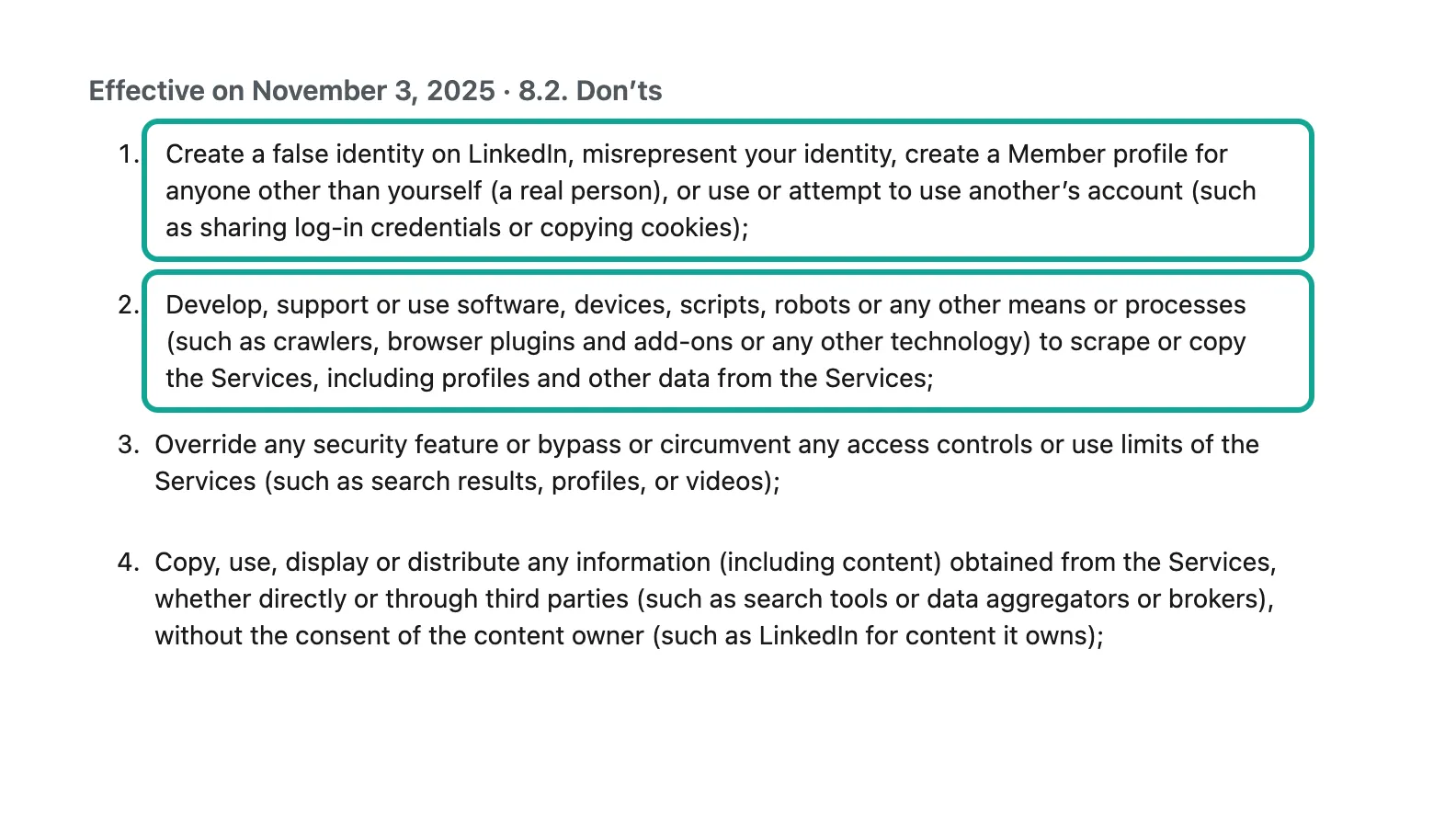
Why does this matter? Item 2 of Section 8.2 of the LinkedIn User Agreement bans crawlers, scripts and browser plugins that scrape or copy the Services. The next section quotes it. If you give your own cookie to a third-party tool, the scraping runs under your account. So if LinkedIn limits or bans that account, you carry the loss.
With another person's cookie, you also break Item 1. It says you must not "use or attempt to use another's account (such as sharing log-in credentials or copying cookies)".
What the LinkedIn User Agreement says about scraping
We read the current version at linkedin.com/legal/user-agreement. The page says "Effective on November 3, 2025". The most relevant part is section 8.2, "Don'ts". Under "You agree that you will not", item 2 covers software, devices, scripts, robots, crawlers, browser plugins and add-ons.
It says you must not use them "to scrape or copy the Services, including profiles and other data from the Services". Item 3 says you must not bypass access controls or use limits, for example on search results or profiles. Another item says you must not copy or share data from the Services through third parties, and it names "data aggregators or brokers". Section 5 says that section 8.2 stays in force after the contract ends.
These terms bind people who use LinkedIn and accept the agreement. US courts argued for years about visits to public pages without a login. One case is hiQ Labs v. LinkedIn. The Ninth Circuit gave its opinion on April 18, 2022. It said that scraping publicly visible profiles likely is not "without authorization" under the US Computer Fraud and Abuse Act (CFAA).
The court wrote that opinion after the Supreme Court's 2021 Van Buren decision on "exceeds authorized access". Later in 2022, the district court in Northern California found that hiQ broke the User Agreement. The case then ended in a settlement.
On January 24, 2025, LinkedIn sued Nubela, the company behind Proxycurl, in the Northern District of California (case 3:25-cv-00828). LinkedIn said Proxycurl used hundreds of thousands of fake accounts to scrape member data. Proxycurl announced its shutdown on July 4, 2025. In October 2025, LinkedIn sued ProAPIs and Netswift.
It said they used millions of fake accounts to scrape and resell data. The Record reports that the court later approved a consent judgment. The firms must stop scraping, selling and transferring member data, stop using fake accounts and delete the scraped data. In all these cases, the claims were about fake accounts or a way around the login wall.
LinkedIn also publishes Crawling Terms (last revised May 25, 2017) and a robots.txt file. They say that automated crawling without permission is not allowed, except for listed search engines. The official LinkedIn API docs on Microsoft Learn open only a few permissions to most developers. These are sign-in, your own basic profile and email, and posting for a member.
People search and full profiles of other members need partner programs such as Sales Navigator or Talent Solutions, with review. So LinkedIn has no open door for bulk reads of public data. That gap is why third-party scrapers have a market.
We do not give legal advice. Whether and how you use this data depends on your business, your location and your purpose. Ask a lawyer in your jurisdiction. Here are the facts we can state. The EveryInfra LinkedIn capabilities in this article return only data that public pages show, and they need no account from you.
In person_profile and profile_search, the email field is a work email inferred from public data and checked. In employees, an email appears only if the person makes it public. Treat personal data under your local law, for example the California Consumer Privacy Act (CCPA) or the EU GDPR. Check consent before you use it for marketing.
Do failures and empty results cost money?
Failure rules decide what a bad day costs. In this test we saw four kinds of failure.
| Case | Singapore time | HTTP | Error code | EveryInfra charge | Apify public rule |
|---|---|---|---|---|---|
| No API key | 00:25 | 401 | missing_key | $0 | No token, no run |
Misspelled parameter (locaton) | 00:25 | 422 | unknown_param | $0 | Input schema check; each actor differs |
| Unknown person | 00:19 | 503 | unavailable | $0 | Pay per event: no result event, no result fee; start fee still applies |
| Job detail not available (5 calls) | 00:25-01:10 | 503 | unavailable | $0 | Same |
| Sync people search timeout | 00:23 | 503 | timeout | $0 | Your timeout ends the run; events so far are charged |
| Unknown company | 00:20 | 200 | none | $0.000556 (our bug) | - |
Our rule is this. When we confirm a failure or an empty result, we refund the same charge_id to the same wallet. When the result is unknown, we keep the real state and check it first. The only call that broke this rule was the empty 200 for an unknown company, as we said above. Under Apify's pay per event model, the docs say an actor charges each time its code reports an event.
No result means no result event. But start events such as "Actor start" still apply, and so do per-page events such as "search page". harvestapi's search actor charges $0.10 per page "regardless of how many profiles were found". Its email mode says it does not charge for the email search if the profile is too thin. So on Apify each owner sets the cost of a failure. Read each actor.
MCP and AI tools
Both sides support MCP (Model Context Protocol, a standard that lets AI clients call outside tools). The Apify MCP server is at https://mcp.apify.com. The Apify docs say the first connection opens a browser for OAuth sign-in. You can also use a Bearer token.
By default it loads tools to search for actors, run them and read docs. You can add ?tools= to the URL to load only some actors. Without an account, only tools such as actor search and docs lookup work. For safety, actors that need full permissions are left out of MCP.
The server also supports "agentic payments" per request, for pay-per-event actors only. We called https://mcp.apify.com without a token on November 5, 2026, and it returned 401. That matches the docs.
The EveryInfra remote MCP server is at https://api.everyinfra.com/mcp. On November 5, 2026, tools/list returned 12 tools, all named everyinfra_*. everyinfra_list_capabilities lists capabilities and prices. everyinfra_call_api calls any platform capability.
everyinfra_get_job reads async jobs. everyinfra_get_account shows your balance. At 01:02 Singapore time on 2026-11-05, we sent an MCP tools/call to everyinfra_call_api with {"platform":"linkedin","action":"company_profile","params":{"company":"openai"}}. The answer came back in 6.4 seconds.
The content text held the same JSON as the REST API, about 3,300 characters. OpenAI showed an employee_count of 11,489, a size band of 1001-5000 and 12,126,872 followers. The charge was $0.000556, the same as REST. In Claude Code you add it with one block:
{
  "mcpServers": {
    "everyinfra": {
      "type": "http",
      "url": "https://api.everyinfra.com/mcp",
      "headers": { "Authorization": "Bearer ${EVERYINFRA_API_KEY}" }
    }
  }
}| Item | Apify MCP | EveryInfra MCP |
|---|---|---|
| URL | https://mcp.apify.com | https://api.everyinfra.com/mcp |
| Auth | OAuth sign-in by default, or Bearer token | API key (Bearer) |
| One tool call | Starts one actor run, returns the dataset | One API request, returns JSON |
| Billing | Rules of the actor you run (mostly per result) | Per request, mostly $0.000556 for LinkedIn |
| No credentials | Actor search and docs only | Tested at 01:04 and 01:17: isError, code unauthorized, "Nothing was charged" |
| This test | 401 without a token | 01:02 company call, 6.4 seconds, $0.000556 |
In an AI client, the key question is how much one tool call returns. An Apify MCP call starts one actor run and returns its dataset when the run ends. An EveryInfra MCP call is one API request and returns the JSON above. For an agent, "search jobs and get 200 rows" is one tool call for $0.000556 on our side. On Apify it is one actor run, billed per result. See the EveryInfra MCP server page for client setup.
When Apify is the better choice
This section lists what Apify has and we do not, and where Apify is cheaper. First, single profiles. johnvc's LinkedIn Profile API costs $0.02 per 1,000, which is 27.8x below us. Its success rate is 91.12%, but failed rows carry no result fee, so it stays cheaper per good row. If your only task is to enrich profile URLs, try it first.
Second, single job details. Our linkedin/job_detail returned 503 on all five test calls, and its list price is $1.194 per 1,000. worldunboxer's detailed mode costs $0.35 and it works.
Third, fine filters. harvestapi's search and employee actors filter by company, industry, school and tenure, and one actor searches by name. Our profile_search filters only by title and location, and employees only by company. Fourth, email finding. harvestapi's email mode with SMTP checks and dev_fusion's "verified email" and "phone number" are focused products.
For us, email is only a field in the profile. In this test it was present in 3 of 5 public profiles and 47 of 78 search results.
Fifth, a large ready-made jobs database. fantastic-jobs says it adds more than 10 million new jobs per month, with recruiter data and AI fields. For labor market analysis, its data model fits better. Sixth, run controls. maxTotalChargeUsd caps the cost of one run.
Schedules run actors on a timer. Webhooks send callbacks. Datasets store results and export CSV or Excel. We do not have these platform features, so you build them with cron and a database.
Seventh, range. The Store lists 370 LinkedIn actors, with separate tools for company posts, events, groups and Sales Navigator. We have 11 LinkedIn capabilities.
| Use case | Better fit | Reason |
|---|---|---|
| Enrich a list of profile URLs only | Apify (johnvc) | $0.02 per 1,000, 27.8x below us |
| Single job details and apply links | Apify (worldunboxer detailed) | $0.35 per 1,000; our 5 test calls got 503 |
| Narrow lists by industry, school or tenure | Apify (harvestapi search) | We filter by title and location only |
| Email finding with SMTP checks | Apify (harvestapi, dev_fusion) | We only return the email field in the profile |
| Many jobs, people or employees per call | EveryInfra | $0.0028 to $0.0071 per 1,000, gaps of 100x and more |
| Many platforms with one key, fixed price in AI clients | EveryInfra | One request format, fixed price per call |
We fit better in other cases. The first case is data that comes back many rows per call, such as jobs, people search, employee lists and comments. There the gap is 10x to 1,000x. The second case is a project that needs LinkedIn plus other platforms such as Instagram, TikTok or X.
You use one key, one request format and one account. The third case is MCP use in AI clients, where each tool call has a fixed price and cost cannot grow with result size. The fourth case is when you do not want to maintain several actors with different owners, inputs and changing prices. In this test, all four harvestapi actors had new prices from 2026-10-27, apimaestro from 2026-11-02 and worldunboxer from 2026-10-29. cheap_scraper had a new price set to start on 2026-11-07.
How this article differs from our other Apify articles
We have other Apify articles, and each covers one topic. Apify pricing explained covers plans, compute units and pay per event, for readers who are new to Apify. Apify alternatives lists options by platform. Apify Twitter scraper alternative and Apify Reddit scraper alternative compare prices for X and Reddit. This article covers only LinkedIn.
It adds three things the others do not have. It shows the price gap between one-row and one-page LinkedIn calls. It covers cookies and the User Agreement. It also names the Store profile actor that is cheaper than us. All comparison pages are at /alternatives.
Recent changes
Two kinds of change matter for your choice. The first is on the LinkedIn side. The LinkedIn Help Center says AI-powered job search is replacing classic job search step by step from September. You describe the job you want in your own words. That change can affect keyword job search results. To watch a market with linkedin/jobs or an Apify jobs actor, check row counts for fixed keywords now and then.
The second is on the Apify side. Popular LinkedIn actors changed their prices often in the last month (see the table). Check the Pricing tab before you trust a price from an old article or post. On 2026-10-30, the Agentic AI Foundation blog posted an Apify MCP team article. The team tried the token-saving TOON format on the Apify MCP server for 30 days. They saw no steady gain, so they went back to JSON. The Apify pricing page also now says "We're live on x402", so AI agents can pay per run.
| Date | Event | Source |
|---|---|---|
| 2026-10-07 | Current price of the johnvc LinkedIn Profile API starts | Apify public API |
| 2026-10-15 | Current price of the lergassy profile actor starts | Apify public API |
| 2026-10-22 | Current price of the johnvc company employees actor starts | Apify public API |
| 2026-10-27 | New prices for four harvestapi LinkedIn actors | Apify public API |
| 2026-10-29 | New price for the worldunboxer jobs actor | Apify public API |
| 2026-10-30 | Apify MCP team removes TOON after 30 days | Agentic AI Foundation |
| 2026-11-02 | New prices for apimaestro profile and company actors | Apify public API |
FAQ
What is the apify linkedin scraper cost?
Store public prices on November 5, 2026: profile scrapers cost $0.02 to $10.00 per 1,000. The most used one, harvestapi, costs $4.00 on Free and $10.00 with email. Company scrapers cost $1.55 to $5.00. Jobs scrapers cost $0.10 to $5.00, and the most used one, curious_coder, costs $2.00 on Free and $1.00 on paid plans.
Your real cost also depends on your tier, start fees and page fees. EveryInfra LinkedIn calls cost $0.000556 each ($0.001194 for job detail). Per 1,000 rows, that is $0.556 for profiles and companies, $0.0033 for jobs and $0.0071 for people search.
How do I call the apify linkedin scraper api?
Each Apify actor runs with POST /v2/acts/<owner>~<name>/run-sync-get-dataset-items, which runs it and returns the results. You fill input fields from the actor's Input tab. You can add maxItems and maxTotalChargeUsd to limit cost. Apify also has JavaScript and Python clients. EveryInfra uses one URL, POST /api/v1/social, with platform, action and params in the body.
How many results can apify linkedin scraper jobs return per search?
The curious_coder page says LinkedIn caps each job search at 1,000 results. For more, it splits the search by city and removes duplicates. Our linkedin/jobs takes a limit of up to 200 per call. In this test, 11 searches in Singapore returned 179 rows per call on average. The catalog says the backup source returns at most 25 rows per call.
Is there a free LinkedIn scraper?
The Apify Free plan gives $5 per month. At $4.00 per 1,000, that buys about 1,250 profiles, but harvestapi says Free plan users get only 50 runs in total. GitHub has open source LinkedIn scraping scripts too. You must maintain the login, proxies and page changes yourself.
If you run them with your own account, the User Agreement still applies. The EveryInfra trial gives $1 for 24 hours when you star two GitHub repositories. At $0.000556 per call, that is about 1,798 requests.
Does LinkedIn allow scraping?
Section 8.2 of the LinkedIn User Agreement says you must not use crawlers, scripts or similar tools to scrape or copy the Services. It also says you must not copy cookies to use another account. LinkedIn's Crawling Terms say automated crawling without permission is not allowed. Courts have ruled in different ways on public pages viewed without a login.
LinkedIn keeps suing firms that scrape with fake accounts. This article is not legal advice, so ask a lawyer where you live.
How much does the official LinkedIn API cost?
LinkedIn does not publish a per-call price list for member data. Most developers can use only sign-in, their own basic profile and email, and posting for a member. People search and full profiles of other members need partner programs such as Sales Navigator or Talent Solutions. Approved partners pay under contract.
How do I use this in n8n or Claude?
In n8n, use an HTTP Request node to call POST /api/v1/social. Apify has its own n8n node. In MCP clients such as Claude Code or Claude Desktop, add https://api.everyinfra.com/mcp or https://mcp.apify.com. Ours uses an API key. Apify signs in with OAuth by default.
Get started
Step 1: get an API key. Star two EveryInfra repositories on GitHub to get $1 of trial credit for 24 hours. Paid top-ups start at $10, which buys about 17,986 LinkedIn requests at $0.000556 each (quickstart, pricing). Step 2: open a capability page and run one call in its test box.
Try LinkedIn job search, people search, profiles, company pages or company employees. Step 3: read charged_usd and the row count in the response. Divide the charge by the rows and multiply by 1,000 to get your own price per 1,000. Then compare it with your current bill.
All 11 LinkedIn capabilities are on the LinkedIn data API page. The same key also works for the TikTok data API and the Instagram data API. You can browse all platforms in the data market.
If you move from Apify, the table shows what to change. With per-request billing, more rows per call means a lower price per row. So collect a batch, then search once.
| On Apify | On EveryInfra |
|---|---|
| Each actor has its own input fields | Three fixed keys: platform, action, params |
| Run the actor, wait, then read the dataset | One sync request, or "mode": "async" and polls of poll_url |
maxItems and maxTotalChargeUsd cap the cost | Each request has a fixed price, so count requests |
| One run per new lead | Collect a batch, then search once |
| Schedules and Webhooks | Your own cron job or an n8n schedule |
References
- LinkedIn Profile Scraper (Store page and Pricing tab), Apify / harvestapi, screenshot November 5, 2026, 00:28 Singapore time. https://apify.com/harvestapi/linkedin-profile-scraper
- LinkedIn Profile Scraper public metadata (pricingInfos, stats), Apify API, read November 5, 2026, 00:16 Singapore time. https://api.apify.com/v2/acts/harvestapi~linkedin-profile-scraper
- LinkedIn Company Details Scraper, Apify / harvestapi, read November 5, 2026. https://apify.com/harvestapi/linkedin-company
- LinkedIn Profile Search Scraper (25 per page, $0.10 per page), Apify / harvestapi. https://apify.com/harvestapi/linkedin-profile-search
- LinkedIn Company Employees Scraper, Apify / harvestapi. https://apify.com/harvestapi/linkedin-company-employees
- Profile Details Scraper for LinkedIn + EMAIL, Apify / apimaestro. https://apify.com/apimaestro/linkedin-profile-detail
- LinkedIn Profile API, Apify / johnvc. https://apify.com/johnvc/linkedin-profile-api
- Linkedin Profile Scraper with Email and Company Data, Apify / datadoping. https://apify.com/datadoping/linkedin-profile-scraper
- Linkedin Company Details Scraper, Apify / datadoping. https://apify.com/datadoping/linkedin-company-scraper
- Linkedin Jobs Scraper (1,000 jobs per search limit), Apify / curious_coder. https://apify.com/curious_coder/linkedin-jobs-scraper
- LinkedIn Jobs Scraper, Apify / valig. https://apify.com/valig/linkedin-jobs-scraper
- Rapid Linkedin Jobs Scraper, Apify / worldunboxer. https://apify.com/worldunboxer/rapid-linkedin-scraper
- LinkedIn Jobs Scraper, Apify / cheap_scraper. https://apify.com/cheap_scraper/linkedin-job-scraper
- Advanced LinkedIn Job Search API, Apify / fantastic-jobs. https://apify.com/fantastic-jobs/advanced-linkedin-job-search-api
- Apify pricing page (Free $5, Starter $19, Scale $199, Business $999, Store discount tiers), read November 5, 2026, 00:39 Singapore time. https://apify.com/pricing
- Run Actor synchronously and get dataset items (maxItems, maxTotalChargeUsd), Apify API docs. https://docs.apify.com/api/v2/act-run-sync-get-dataset-items-post
- Get Actor, Apify API docs. https://docs.apify.com/api/v2/act-get
- Get list of Actors in Store, Apify API docs. https://docs.apify.com/api/v2/store-get
- Actors in Store (owners set tier discounts), Apify docs. https://docs.apify.com/platform/actors/running/actors-in-store
- Monetize your Actor (pay per event rules), Apify docs. https://docs.apify.com/platform/actors/publishing/monetize
- Usage and resources, Apify docs. https://docs.apify.com/platform/actors/running/usage-and-resources
- Apify MCP server, Apify docs, read November 5, 2026. https://docs.apify.com/platform/integrations/mcp
- apify-mcp-server, GitHub. https://github.com/apify/apify-mcp-server
- Schedules, Apify docs. https://docs.apify.com/platform/schedules
- Webhooks, Apify docs. https://docs.apify.com/platform/integrations/webhooks
- Dataset, Apify docs. https://docs.apify.com/platform/storage/dataset
- Limits, Apify docs. https://docs.apify.com/platform/limits
- n8n integration, Apify docs. https://docs.apify.com/platform/integrations/n8n
- Zapier integration, Apify docs. https://docs.apify.com/platform/integrations/zapier
- Apify API client for JavaScript, Apify docs. https://docs.apify.com/api/client/js
- Apify CLI, Apify docs. https://docs.apify.com/cli
- LinkedIn User Agreement (Effective on November 3, 2025, section 8.2), screenshot November 5, 2026. https://www.linkedin.com/legal/user-agreement
- LinkedIn Crawling Terms and Conditions. https://www.linkedin.com/legal/crawling-terms
- LinkedIn Privacy Policy. https://www.linkedin.com/legal/privacy-policy
- LinkedIn Cookie Policy. https://www.linkedin.com/legal/cookie-policy
- LinkedIn Professional Community Policies. https://www.linkedin.com/legal/professional-community-policies
- LinkedIn API Terms of Use. https://www.linkedin.com/legal/l/api-terms-of-use
- Getting Access to LinkedIn APIs, Microsoft Learn. https://learn.microsoft.com/en-us/linkedin/shared/authentication/getting-access
- Sign In with LinkedIn using OpenID Connect, Microsoft Learn. https://learn.microsoft.com/en-us/linkedin/consumer/integrations/self-serve/sign-in-with-linkedin-v2
- LinkedIn Sales Navigator developer docs, Microsoft Learn. https://learn.microsoft.com/en-us/linkedin/sales/
- Job Posting API overview, Microsoft Learn. https://learn.microsoft.com/en-us/linkedin/talent/job-postings/api/overview
- API rate limiting, Microsoft Learn. https://learn.microsoft.com/en-us/linkedin/shared/api-guide/concepts/rate-limits
- LinkedIn Developer Solutions. https://developer.linkedin.com/
- hiQ Labs v. LinkedIn Corp., US Court of Appeals for the Ninth Circuit, April 18, 2022. https://cdn.ca9.uscourts.gov/datastore/opinions/2022/04/18/17-16783.pdf
- Van Buren v. United States, US Supreme Court, 2021. https://www.supremecourt.gov/opinions/20pdf/19-783_k53l.pdf
- hiQ v. LinkedIn Wrapped Up: Web Scraping Lessons Learned, ZwillGen. https://www.zwillgen.com/alternative-data/hiq-v-linkedin-wrapped-up-web-scraping-lessons-learned
- LinkedIn Corp. v. ProAPIs complaint, Northern District of California (CourtListener). https://storage.courtlistener.com/recap/gov.uscourts.cand.457309/gov.uscourts.cand.457309.1.0.pdf
- LinkedIn wins court order blocking mass scraping of user data, The Record. https://therecord.media/linkedin-wins-court-order-blocking-mass-scraping
- Proxycurl Shuts Down, Nubela, July 4, 2025. https://nubela.co/blog/goodbye-proxycurl/
- California Consumer Privacy Act (CCPA), California Attorney General. https://oag.ca.gov/privacy/ccpa
- General Data Protection Regulation (GDPR), EUR-Lex. https://eur-lex.europa.eu/eli/reg/2016/679/oj
- EveryInfra LinkedIn catalog (price_usd, response_fields, field_note), read November 5, 2026, 00:12 Singapore time. https://api.everyinfra.com/api/v1/social/catalog
- EveryInfra llms.txt. https://api.everyinfra.com/llms.txt
- EveryInfra OpenAPI. https://api.everyinfra.com/openapi.json
- EveryInfra remote MCP (tools/list), read November 5, 2026. https://api.everyinfra.com/mcp
- Model Context Protocol introduction. https://modelcontextprotocol.io/introduction
- Connect Claude Code to tools via MCP, Claude Code docs. https://code.claude.com/docs/en/mcp
- HTTP Request node, n8n docs. https://docs.n8n.io/integrations/builtin/core-nodes/n8n-nodes-base.httprequest/
- TOON (Token-Oriented Object Notation), GitHub. https://github.com/toon-format/toon
- We Added TOON to Our MCP Server, Then Removed It, Agentic AI Foundation, October 30, 2026. https://aaif.io/blog/we-added-toon-to-our-mcp-server-then-removed-it
- AI-powered job search (classic job search retired step by step from September), LinkedIn Help. https://www.linkedin.com/help/linkedin/answer/a6889044
- r/n8n: free LinkedIn job scraper flow and the "$5 in a few minutes" reply (user names hidden). https://www.reddit.com/r/n8n/comments/1t4lk7a/i_built_a_100_free_linkedin_job_scraper_using_n8n/
- r/n8n: LinkedIn job scraper workflow help (user names hidden). https://www.reddit.com/r/n8n/comments/1t9trjv/n8n_linkedin_job_scraper_workflow_help/
- LinkedIn Copyright Policy. https://www.linkedin.com/legal/copyright-policy
- LinkedIn User Agreement Summary. https://www.linkedin.com/legal/user-agreement-summary
- LinkedIn California Privacy Disclosure. https://www.linkedin.com/legal/california-privacy-disclosure
- LinkedIn Talent Solutions developer docs, Microsoft Learn. https://learn.microsoft.com/en-us/linkedin/talent/
- LinkedIn Marketing API docs, Microsoft Learn. https://learn.microsoft.com/en-us/linkedin/marketing/
- Runs and builds, Apify docs. https://docs.apify.com/platform/actors/running/runs-and-builds
- Billing, Apify docs. https://docs.apify.com/platform/console/billing
- Apify API client for Python, Apify docs. https://docs.apify.com/api/client/python
- Make integration, Apify docs. https://docs.apify.com/platform/integrations/make
- Apify Proxy, Apify docs. https://docs.apify.com/platform/proxy
Reference BL-91