Apify Alternatives: Cost per 1,000 Results, Tested
Apify lists $0.15 to $4.00 per 1,000 Instagram, TikTok or Google Maps results by tier. EveryInfra measured $0.0028 to $0.037. Single lookups favor Apify Enterprise.

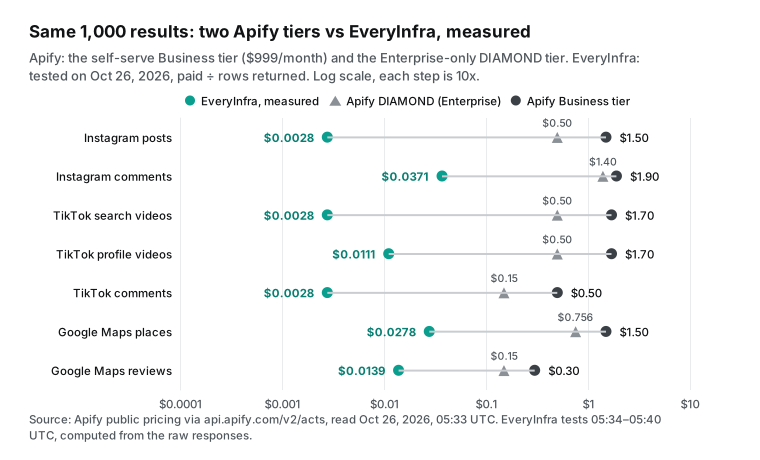
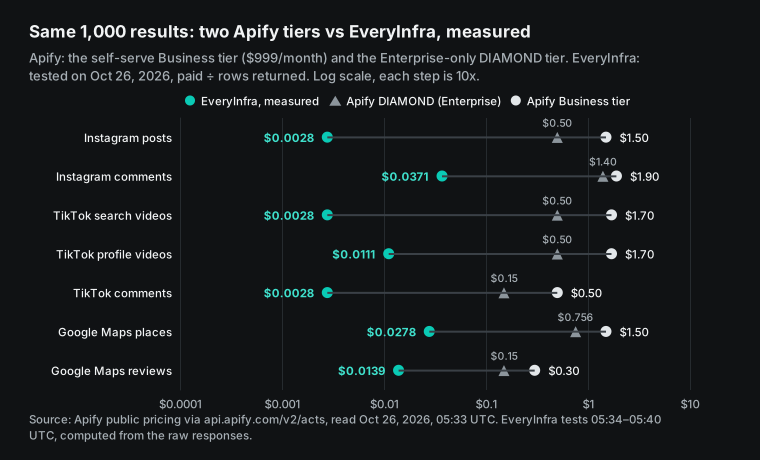
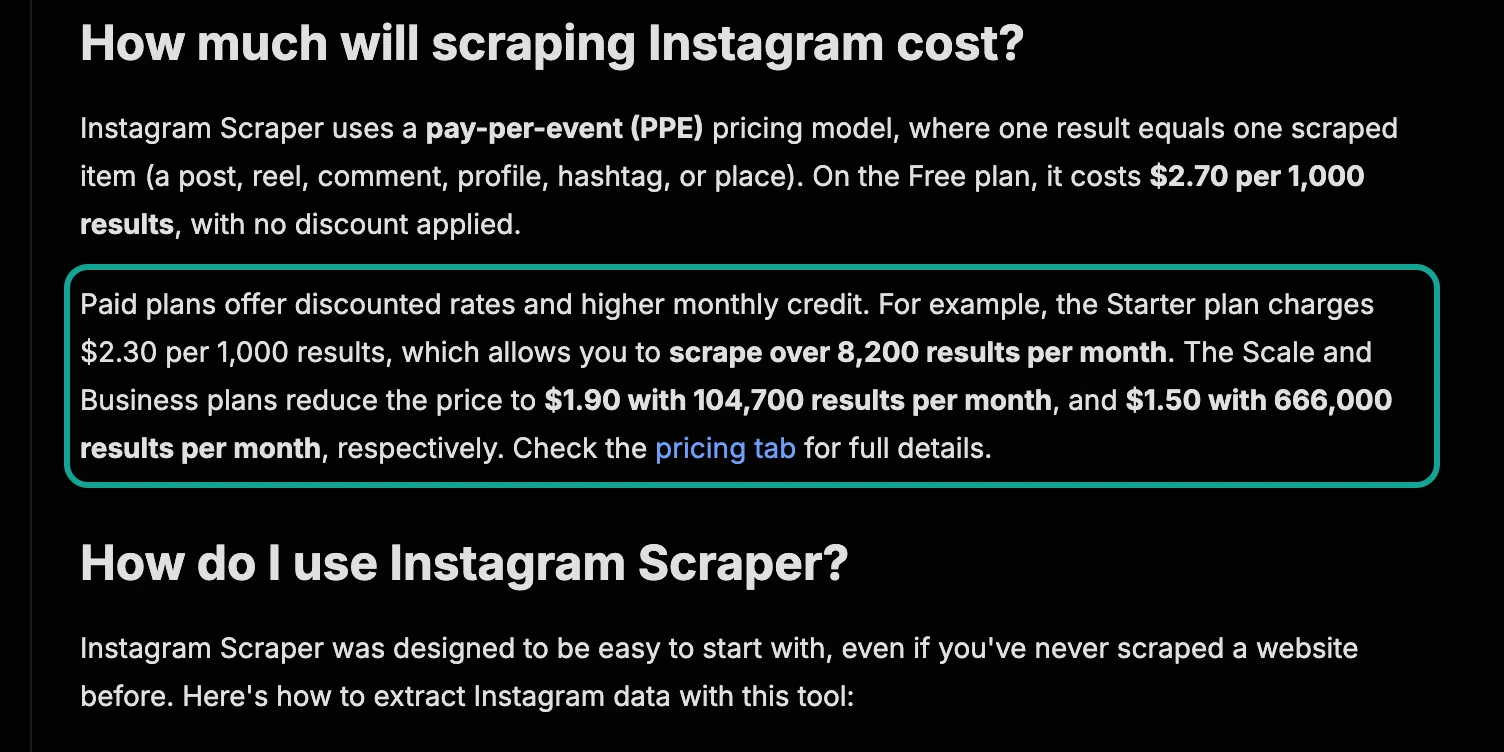
Apify Instagram Scraper lists 1,000 Instagram posts at $2.70 on the Free plan and $1.50 on the Business plan ($999 a month). Its DIAMOND tier, for Enterprise customers only, is $0.50. On October 26, 2026, one EveryInfra request returned 200 posts for $0.000556. That is $0.0028 per 1,000 posts, about 180 times less than DIAMOND. For TikTok videos, TikTok comments and Google Maps data, the gap was 11x to 180x against DIAMOND and 22x to 611x against Business. For one-object lookups, such as one profile or one place, we were only 1.8x to 2.9x below Business, and 11% to 22% above DIAMOND.
In this article, an "Apify alternative" is not another place to run actors. An actor is Apify's name for a cloud scraping program. The alternative here is a data API that bills per request. It returns the same kinds of public data: Instagram posts and comments, TikTok videos and comments, and Google Maps places and reviews.
We compare four things only. What does 1,000 results cost? What unit does each side count? Do failures and empty results cost money? How many steps does it take to get the first row?
We do not compare the fields that each side returns. We also do not rate Apify's data quality. We did not sign up for Apify, and we did not pay to run its actors. For Apify, we used only its public prices, documents and pages.


The short answer: Apify vs EveryInfra, cost per 1,000 results
Here is the main table. All Apify prices come from its public endpoint api.apify.com/v2/acts/<actor>. You can read it without an Apify account. Its pricingInfos list shows each actor's billable events and the price for each tier.
We read it on October 26, 2026, at 05:33 UTC and kept the raw JSON. Each event has six price tiers. Four tiers, FREE, BRONZE, SILVER and GOLD, map to the four self-serve plans. The other two, PLATINUM and DIAMOND, are for Enterprise customers only, as the Apify docs state.
The Instagram Scraper page names the first four prices as the Free, Starter, Scale and Business plans. Those prices match the endpoint exactly. Our table shows two self-serve tiers, Free and Business, and both Enterprise tiers, written as "PLATINUM / DIAMOND". The main ratio uses DIAMOND, the lowest of the six tiers, and the last column gives the Business ratio. PLATINUM sits in between: ratios against it are 1.2x to 2.2x the DIAMOND ratios.
The EveryInfra column shows our own calls on the same day. We divided the amount paid by the rows that came back, then multiplied by 1,000. We did not compute it from the limit that we asked for.
| Data | Apify actor | Apify Free | Apify Business | Apify Enterprise PLATINUM / DIAMOND | EveryInfra test (action) | Measured per 1,000 | vs DIAMOND | vs Business |
|---|---|---|---|---|---|---|---|---|
| Instagram posts | Instagram Scraper | $2.70 | $1.50 | $0.90 / $0.50 | instagram/user_posts, 200 rows | $0.0028 | about 180x lower | about 540x |
| Instagram comments | Instagram Comments Scraper | $2.60 | $1.90 | $1.70 / $1.40 | instagram/comments, 15 rows | $0.0371 | about 38x lower | about 51x |
| TikTok search videos | TikTok Scraper | $3.70 | $1.70 | $1.00 / $0.50 | tiktok/search, 200 rows | $0.0028 | about 180x lower | about 611x |
| TikTok profile videos | TikTok Scraper | $3.70 | $1.70 | $1.00 / $0.50 | tiktok/user_videos, 50 rows | $0.0111 | about 45x lower | about 153x |
| TikTok comments | TikTok Comments Scraper | $1.25 | $0.50 | $0.30 / $0.15 | tiktok/comments, 200 rows | $0.0028 | about 54x lower | about 180x |
| Google Maps places | Google Maps Scraper | $4.00 | $1.50 | $1.26 / $0.756 | google_maps_reviews/search, 50 rows | $0.0278 | about 27x lower | about 54x |
| Google Maps reviews | Google Maps Reviews Scraper | $0.60 | $0.30 | $0.20 / $0.15 | google_maps_reviews/reviews, 100 rows | $0.0139 | about 11x lower | about 22x |
| Instagram profile | Instagram Profile Scraper | $2.60 | $1.60 | $1.10 / $0.50 | instagram/profile, 1 row | $0.556 | we cost 11% more | about 2.9x |
| One place by URL | Google Maps Scraper (place + details add-on) | $6.00 | $2.55 | $1.89 / $1.134 | google_maps_reviews/profile, 1 row | $1.389 | we cost 22% more | about 1.8x |
Read the DIAMOND column first. It is the lowest unit price in Apify's public endpoint, but you need an Enterprise contract to get it. The lowest price that you can buy yourself is the Business tier, after a $999 monthly fee. Against DIAMOND, the seven bulk rows are still 11x or more, and Instagram posts and TikTok search are about 180x. The last two rows, with one result per call, turn the other way. DIAMOND costs less than we do, and Business costs only 1.8x to 2.9x more.
We set a labeling rule before the test. A ratio of 2x or more counts as "cheaper". A ratio from 1x to 2x counts as "close". Below 1x, we write "Apify is cheaper." By that rule, one place by URL against Business (1.8x) is "close", and both one-object rows against DIAMOND are "Apify is cheaper."
For each kind of data, we chose the actor with the most users that Apify maintains. People who want to leave Apify most likely use these actors today. The user counts and last-change dates come from the same public endpoint, read on October 26, 2026. The pricing endpoints for the four comment and profile actors are in the references.
| Apify actor | Total users | Users, last 30 days | Last changed |
|---|---|---|---|
| Instagram Scraper | 449,020 | 58,199 | October 23, 2026 |
| Instagram Profile Scraper | 262,941 | 38,410 | October 23, 2026 |
| Instagram Comments Scraper | 64,507 | 8,600 | October 23, 2026 |
| TikTok Scraper | 359,843 | 31,757 | October 26, 2026 |
| TikTok Comments Scraper | 49,844 | 5,624 | October 26, 2026 |
| Google Maps Scraper | 666,052 | 44,808 | October 22, 2026 |
| Google Maps Reviews Scraper | 64,731 | 8,570 | October 22, 2026 |
For Instagram posts, Apify has one more option that is better for Apify, so we show it. Apify's Instagram Post Scraper (147,748 users) reads posts only. At 14:48 SGT we read its prices from the same endpoint: $1.70 per 1,000 posts on Free, $1.00 on Business and $0.40 on DIAMOND. If you need only posts, the gap against its DIAMOND tier is about 144x, not 180x.
Why is the gap so large? Neither side has cheaper machines. The two sides count money in different units. Most Apify Store actors charge per event. The Apify pricing page says this plainly: most actors use pay-per-event pricing, and you pay for events such as returning a result. So 1,000 results are 1,000 events.
EveryInfra's data API charges per request. One request has one price, whether it returns 1 row or 200 rows. The cap is each action's max_limit in the catalog. When you take more rows per call, each row costs less. When you take one row per call, you are in effect paying per row. Then only the unit price makes a difference.
Apify pricing explained: per result vs per request
The pay-per-event docs explain the Apify rules. The actor's developer defines the events, such as "a result" or "a run start." Each event can have a different price for each discount tier. Apify also adds two synthetic events. The apify-actor-start event charges once per GB of run memory, $0.00005 by default. The apify-default-dataset-item event charges for each item in the default dataset.
Some actors charge for usage, not events. The Actors in Store page says that these actors bill compute units (CU), data transfer, storage operations and proxies. The developer adds nothing on top. Most pay-per-event actors include platform usage in the event price. Some charge for it separately, so you must read each actor's page.
The EveryInfra rule is simpler and also more rigid. Each action in the catalog GET /api/v1/social/catalog has one price_usd, the price of one request. In the catalog on October 26, most Instagram and TikTok actions cost $0.000556 per request. The three Google Maps actions cost $0.001389. A few heavy actions cost more, such as instagram/similar_profiles at $0.008806.
The pricing page puts all actions in four bands. Core costs $0.56 per 1,000 requests (105 actions). Standard costs $1.39 (271 actions). Deep costs $2.78 (5 actions), and Complex costs $5.56 (28 actions).
The limit in your request sets how many rows you want. Up to max_limit, it does not change the price. For more rows, you send another request with the next page or other parameters.
| Item | Apify Store (pay-per-event actors) | EveryInfra data API |
|---|---|---|
| Billing unit | Each result, each run start and each add-on event | One price per request, set per action |
| Price depends on plan | Yes: four self-serve plans (Free, Starter, Scale, Business) have different unit prices, plus two Enterprise tiers, PLATINUM and DIAMOND | No: one catalog price. The console shows the price that applies to your account |
| Monthly fee and minimum | Free $0 ($5 usage a month), Starter $19, Scale $199, Business $999 | No monthly fee. Top-ups start at $10: $10, $50, $100, $500, $1,000 |
| Unused credit | Plan usage expires at the end of each cycle | Balance does not expire. The pricing page says it is never cleared and has no expiry date |
| Failures and empty results | The actor developer decides. The docs advise a charge for inputs that look valid but fail | Not charged by rule. One exception in our test (see below) |
| Trial | Free plan, $5 a month, no card | $1 trial credit after you star a GitHub repo, valid 24 hours |
| Concurrency and rate | Pricing page: up to 5 runs at the same time on Free. Limits docs: 25 | 60 requests a minute per account by default, higher after larger top-ups |
| AI tools | Remote MCP server at mcp.apify.com, OAuth recommended | Remote MCP server at https://api.everyinfra.com/mcp, API key |
| n8n | Community node @apify/n8n-nodes-apify on self-hosted n8n | The built-in HTTP Request node |
Sources for the Apify column: plan fees and CU prices come from apify.com/pricing. The same page's FAQ says that plan usage expires and that the Free plan stops until the next cycle.
Two sources disagree on concurrency. The pricing page table gives 5, 32, 128 and 256 concurrent runs for the four plans. The Apify limits docs give 25 for Free and the same for the rest. We show both. Your account's real limit is the one that counts.
The n8n node comes from the Apify n8n docs, and MCP from the Apify MCP docs. The EveryInfra column comes from the pricing page. That page also states that the balance does not expire. Other sources are the API docs and the catalog of the day.


Per-result billing has good reasons. For the seller, each result costs proxy traffic and compute, so a per-result price follows the cost. For the buyer, the unit price is on the page, so the total is easy to compute. Per-request billing helps at the other end. When more rows per request add almost no cost, the buyer can push the unit price very low.
The catch is that you must know each action's max_limit, its paging and how many rows one request can return. If you take only a few rows per call, you pay for many more requests than you need. The three tests below check this on Instagram, TikTok and Google Maps, one at a time.
How an Apify bill stacks up
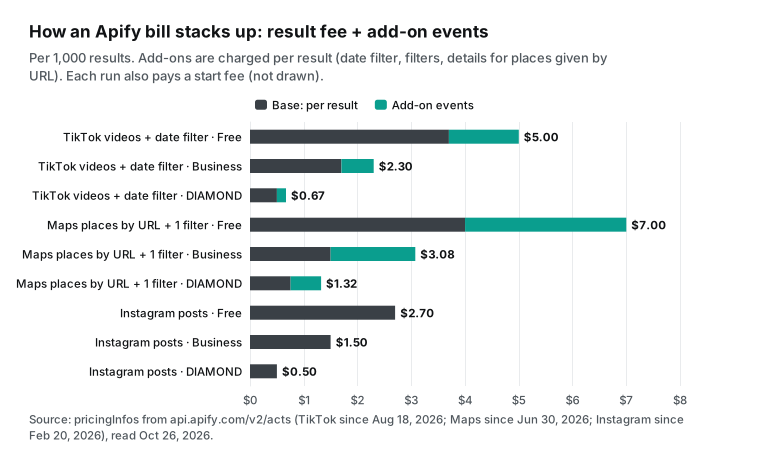
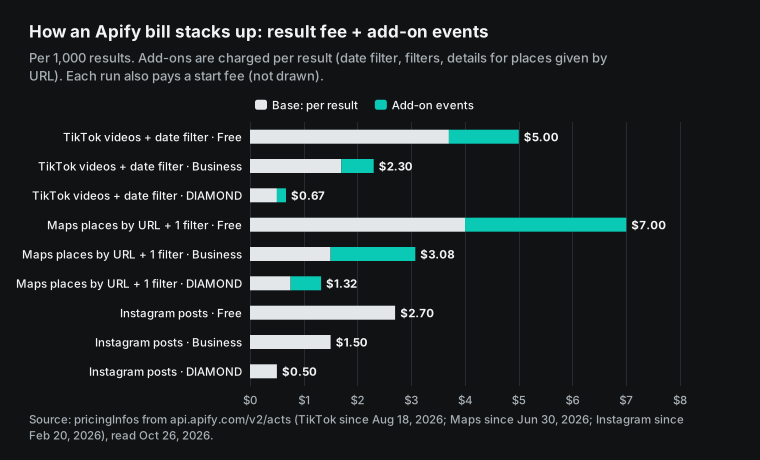
A single "per 1,000 results" number can hide the real cost on Apify, because many actors bill more than one event. TikTok Scraper's pricing has been in effect since August 18, 2026. Besides the base "Result" event, it has about ten add-on events. These include a date filter, a popularity filter, search sorting, country targeting, video download and AI summaries. Each add-on is charged per result. An "Actor start" event also costs $0.001 per run.
For example, take 1,000 videos after a given date on the Free tier. The base fee is $3.70 and the date filter adds $1.30, so the total is $5.00. That is almost three times the "from $1.70" on the actor page. The same mix costs $1.70 plus $0.60, or $2.30, on Business. On the Enterprise DIAMOND tier it costs $0.50 plus $0.17, or $0.67. That is still about 240x our tiktok/search cost of $0.0028 per 1,000.
Google Maps Scraper works the same way under its pricing from June 30, 2026. The base "Scraped place" event costs $4.00 per 1,000 places on the Free tier. Each filter, such as category, minimum rating or "has a website," adds $1.00 per 1,000 places.
If you already have place URLs and want details for them, the README says that this is a paid add-on. Its name is "Additional place details scraped". On the Free tier it adds $2.00 per 1,000 places, so the three items total $7.00. The same three items cost $3.08 on Business and $1.32 on DIAMOND.
An Apify help article from 2025 explained the same rule: filters are charged as places times filters. That article gave a start fee of $0.007 per run. The endpoint now shows the platform default of $0.00005 per GB of memory. Prices change, so read the endpoint on the day, not an old article.
| Apify plan | Monthly fee | Included usage | Compute unit (CU) | Residential proxy | Google SERP proxy |
|---|---|---|---|---|---|
| Free | $0 | $5 | $0.2 per CU | $8 per GB | $2.5 per 1,000 |
| Starter | $19 | $19 | $0.2 per CU | $8 per GB | $2.5 per 1,000 |
| Scale | $199 | $199 | $0.16 per CU | $7.5 per GB | $2 per 1,000 |
| Business | $999 | $999 | $0.13 per CU | $7 per GB | $1.7 per 1,000 |
We read this table from apify.com/pricing on October 26, 2026, at 05:32 UTC. The residential proxy docs say that residential proxies bill by traffic. You meet that cost directly only with your own actors or with pay-per-usage actors. One CU is 1 GB of memory for one hour. The usage docs give an example: 4 GB for 15 minutes is 1 CU, and nonstop use for 30 days is 720 CU.
Reads and writes to a dataset after a run also count as platform usage. So exports and later processing add small costs too.
The plan itself has one more cost that people often miss: included usage expires each month. The FAQ on the Apify pricing page says that unused usage ends with the billing cycle and does not roll over. When a Free plan runs out, the service stops until the next cycle. The Apify General Terms say that fees are non-cancellable and non-refundable. They also say that a downgrade or termination gives no refund, except for one case in section 15.5.2.
For a team that uses its full plan every month, this is not a problem. For a solo developer or a small team with uneven use, it works like a monthly minimum.
Apify alternatives for Instagram: posts and comments
We used the public National Geographic account, natgeo, with instagram/user_posts and a limit of 200. This action runs as an async job in the catalog. The submit call returns 202 and a job_id, and then you poll /api/v1/jobs/{job_id} for free. We submitted at 13:34 Singapore time (SGT) on October 26, 2026, and got the result at 13:35. It took under 50 seconds.
We got 200 posts, and 200 unique post_id values. They ran from August 22 to October 25. The charge was $0.000556. That is $0.0028 per 1,000 posts. Instagram Scraper lists $2.70 on Free and $1.50 on Business, so we were about 970x and 540x lower. Against the Enterprise DIAMOND tier of $0.50, we were still about 180x lower.
# 1. Submit: ask for 200 posts (async action, returns a job_id)
curl -s https://api.everyinfra.com/api/v1/social \
  -H "Authorization: Bearer ${EVERYINFRA_API_KEY}" \
  -H "Content-Type: application/json" \
  -d '{"platform":"instagram","action":"user_posts","params":{"username":"natgeo","limit":200}}'

# 2. Poll: free. When status is succeeded, the rows are in results
curl -s https://api.everyinfra.com/api/v1/jobs/job_xxxxxxxx \
  -H "Authorization: Bearer ${EVERYINFRA_API_KEY}"
Each post uses the field names in the catalog's response_fields. post_id and url identify the post. text is the caption and media_type is the media type. like_count and comment_count are the engagement counts, and posted_at is the post time. author_username, author_name and author_id identify the author. image_url, video_url, width and height give the media link and size.
The catalog lists 21 fields. This batch of 200 carried 15 of them. Six fields did not appear in this batch: view_count, location, hashtags, top_comments, is_comments_disabled and author_follower_count. Note one more point. All 200 rows had media_type set to image, but 104 of them had a video_url. To find videos, check video_url, not only media_type.
| Field group | Fields in the catalog | Rows that had it (of 200) |
|---|---|---|
| Post ID, link, text, type | post_id, url, text, media_type | 200 each |
| Engagement | like_count, comment_count | 200 each |
| Video link | video_url | 104 |
| Not in this batch | view_count, location, hashtags, top_comments, is_comments_disabled, author_follower_count | 0 |
Comments behaved differently. We ran instagram/comments on two natgeo posts. One post had 611 comments, and the other had 15,810. Both requests asked for limit: 100, and both returned 15 rows for $0.000556 each. So on that day, on those two posts, this action gave 15 comments per request. The cost was $0.0371 per 1,000 comments, not $0.0056 as 100 rows would give.
That is still about 38x below Apify's Instagram Comments Scraper on DIAMOND ($2.60 on Free, $1.90 on Business, $1.40 on DIAMOND). But if you want thousands of comments under one popular post, you need hundreds of requests at 15 rows each. You must know this before you start.
| Time (SGT) | Action | Parameters | Rows | Charge | Duration |
|---|---|---|---|---|---|
| 13:34 submit, 13:35 done | instagram/user_posts | username=natgeo, limit=200 | 200 | $0.000556 | about 48 s |
| 13:35 | instagram/comments | post with 611 comments, limit=100 | 15 | $0.000556 | about 11 s |
| 13:36 | instagram/comments | post with 15,810 comments, limit=100 | 15 | $0.000556 | about 12 s |
| 13:48 | instagram/profile | username=natgeo | 1 | $0.000556 | about 22 s |
| 13:41 | instagram/profile | a username that does not exist | username echo only | $0.000556 | about 9 s |
Two more points matter for Instagram. First, Meta's own API does not give this data. The Business Discovery docs, updated on August 12, 2026, say that it reads basic data and metrics of other professional accounts only. It does not return age-gated professional accounts. The caller also needs a professional account linked to a Facebook Page. Personal accounts and the full comments of a post are not in this API.
Apify's Instagram Scraper page uses this as a selling point too. It says that Instagram limited its official API in 2020. Second, Reels are not available from us today. In the catalog, instagram/reels had available=false on that day. If you need Reels by account, Apify's Instagram Reel Scraper is the better choice today. We list this again under "When Apify is the better choice."
TikTok: videos, search and comments
We sent five TikTok requests: four pulled data, and one looked up an account that does not exist. First, tiktok/user_videos read the NBA account with a limit of 50. We sent it at 13:36 SGT on October 26, 2026. It returned 50 unique videos in about 30 seconds.
The videos were posted from October 14 to October 26. Views ranged from 7,310 to 5.1 million, with a median of 43,050. The charge was $0.000556, or $0.0111 per 1,000.
Then we read the same account with a limit of 10 at 13:41. We got 10 rows for the same $0.000556, so the cost rose to $0.0556 per 1,000. That is five times higher. This is the clearest example of per-request billing: the fewer rows you take per call, the more each row costs.
Next, tiktok/search searched for "coffee shop" with a limit of 200. We sent it at 13:37, and it returned 200 unique videos in about 75 seconds. The oldest was from May 2022 and the newest was from that day. Then tiktok/comments read an NBA video with more than 500 comments, with a limit of 200. We sent it at 13:38. It returned 200 rows in about 75 seconds, and 81 of them were replies (is_reply=true).
Each of these two calls cost $0.000556, or $0.0028 per 1,000. Compare Apify's prices. TikTok Scraper's result event costs $3.70 on Free and $1.70 on Business. TikTok Comments Scraper costs $1.25 on Free and $0.50 on Business. At the Business tier, we were about 611x and 180x lower. At DIAMOND ($0.50 and $0.15), we were about 180x and 54x lower.
| Time (SGT) | Action | Parameters | Rows | Charge | Per 1,000 |
|---|---|---|---|---|---|
| 13:36 | tiktok/user_videos | username=nba, limit=50 | 50 | $0.000556 | $0.0111 |
| 13:37 | tiktok/search | keyword=coffee shop, limit=200 | 200 | $0.000556 | $0.0028 |
| 13:38 | tiktok/comments | one NBA video, limit=200 | 200 (81 replies) | $0.000556 | $0.0028 |
| 13:41 | tiktok/user_videos | username=nba, limit=10 | 10 | $0.000556 | $0.0556 |
| 13:43 | tiktok/profile | a username that does not exist | 0 | $0 (refunded) | n/a |
Small batches also have a fixed cost on Apify. TikTok Scraper charges a $0.001 start fee for each run, whatever the result count. Suppose that you pull the last 10 videos for each of 100 creators every day, with one run per creator. On Business, each run costs 10 × $0.0017 + $0.001 = $0.018, or $1.80 per 1,000 videos. With us, each call costs $0.000556, or $0.0556 per 1,000, about 32x less. On DIAMOND, each run costs 10 × $0.0005 + $0.001 = $0.006, or $0.60 per 1,000, about 11x more than us.
Both sides get more expensive for small batches. On Apify, the start fee comes on top of the result fee. With us, the request fee is the only charge. Against DIAMOND, the ratio falls from about 180x at full batches to about 11x. Against Business, it falls from about 611x to 32x. On DIAMOND the start fee is one sixth of each small run, so the lower the tier price, the more the start fee counts.
The fields match the catalog. The comment rows had all 12 fields in this run: id, text, author_username, author_id, like_count, reply_count, reply_to_id, is_reply, liked_by_author, pinned_by_author, posted_at and platform. For videos, the catalog lists 36 fields. These include views, likes, comments, shares, saves, duration, hashtags, music, ad status and shop status. They also include the author's follower count and verified status.
Speed needs an honest note. TikTok search and comments took about 75 seconds each, slower than Instagram. A synchronous request can run for up to 85 seconds. For large jobs, add "mode": "async" to the request body. Then poll the job_id.
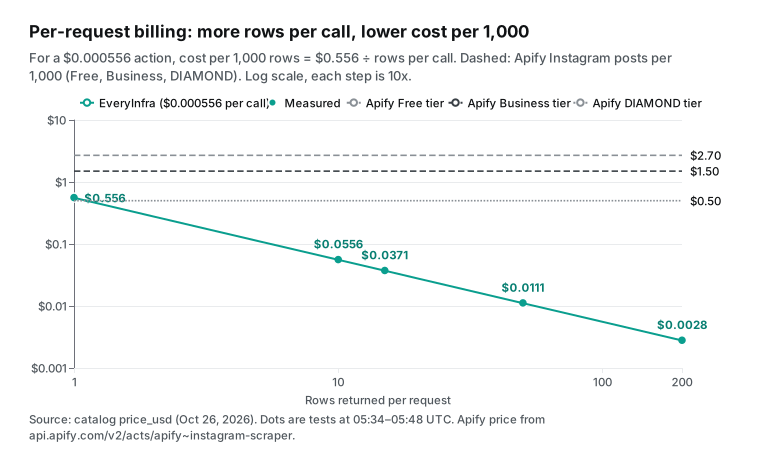
This chart shows the rule of per-request billing. The cost per 1,000 rows equals $0.556 divided by the rows per call. At 1 row per call, it is $0.556. That is below Apify's Business price of $1.50 for Instagram posts, but above the Enterprise DIAMOND price of $0.50.
The crossover is at about 1.1 rows per call. If each call gives 2 rows or more, we cost less than every Apify tier. At 1 row per call, an Enterprise customer pays less on Apify.
For more expensive actions, the crossover moves to the right. instagram/similar_profiles costs $0.008806 per call. If you use only 1 row from each call, that is more than many per-result actors charge. The check is simple.
Look up the action's price_usd and max_limit in the catalog. Then estimate how many rows you will really use per call. Divide our price per call by the other side's price per row to find the crossover.
Google Maps: places and reviews
Maps is one of Apify's biggest products. On October 26, the Google Maps Scraper page showed 666,000 total users and 45,000 monthly users, with a 4.7 rating from 1,818 reviews. We ran google_maps_reviews/search for "specialty coffee" in Singapore with a limit of 50. We sent it at 13:40 SGT on October 26, 2026. It returned 50 different places in about 12 seconds.
The most common ratings were 4.7 and 4.4 (9 places each) and 4.5 (8 places). The charge was $0.001389, or $0.0278 per 1,000 places. The rows carry name, category, address, postal code, country code, coordinates, phone, website, rating, review count and image. These match the 22 fields in the catalog for search.
For US readers, we ran the same search in Austin, Texas, at 14:07 SGT. It also returned 50 unique places for $0.001389. The places with the most reviews were Epoch Coffee (4.5 stars, 2,532 reviews), Radix House Coffee (4.9, 1,806) and Spokesman Coffee (4.7, 1,107). The average rating of the 50 places was 4.8. The cost per 1,000 places was the same $0.0278, against $1.50 on Apify's Business tier.
| Search | Time (SGT) | Rows | Unique places | Charge | Per 1,000 | Most reviewed place |
|---|---|---|---|---|---|---|
| specialty coffee, Singapore | 13:40 | 50 | 50 | $0.001389 | $0.0278 | Common Man Coffee Roasters, Martin Road (3,094 reviews) |
| specialty coffee, Austin, TX | 14:07 | 50 | 50 | $0.001389 | $0.0278 | Epoch Coffee (2,532 reviews) |
Next, google_maps_reviews/reviews read the newest reviews of Nylon Coffee in Singapore. The place page shows 2,324 reviews and a 4.7 rating. We asked for a limit of 100 sorted by newest, at 13:40. It returned 100 reviews in about 23 seconds, from May 4 to that day. Of the 100, 23 had a star rating but no text, which is common on Google.
The charge was $0.001389, or $0.0139 per 1,000 reviews. That is about 22x below the $0.30 Business price of Apify's Google Maps Reviews Scraper, and about 11x below its $0.15 DIAMOND price. This is the smallest gap of the seven bulk rows.
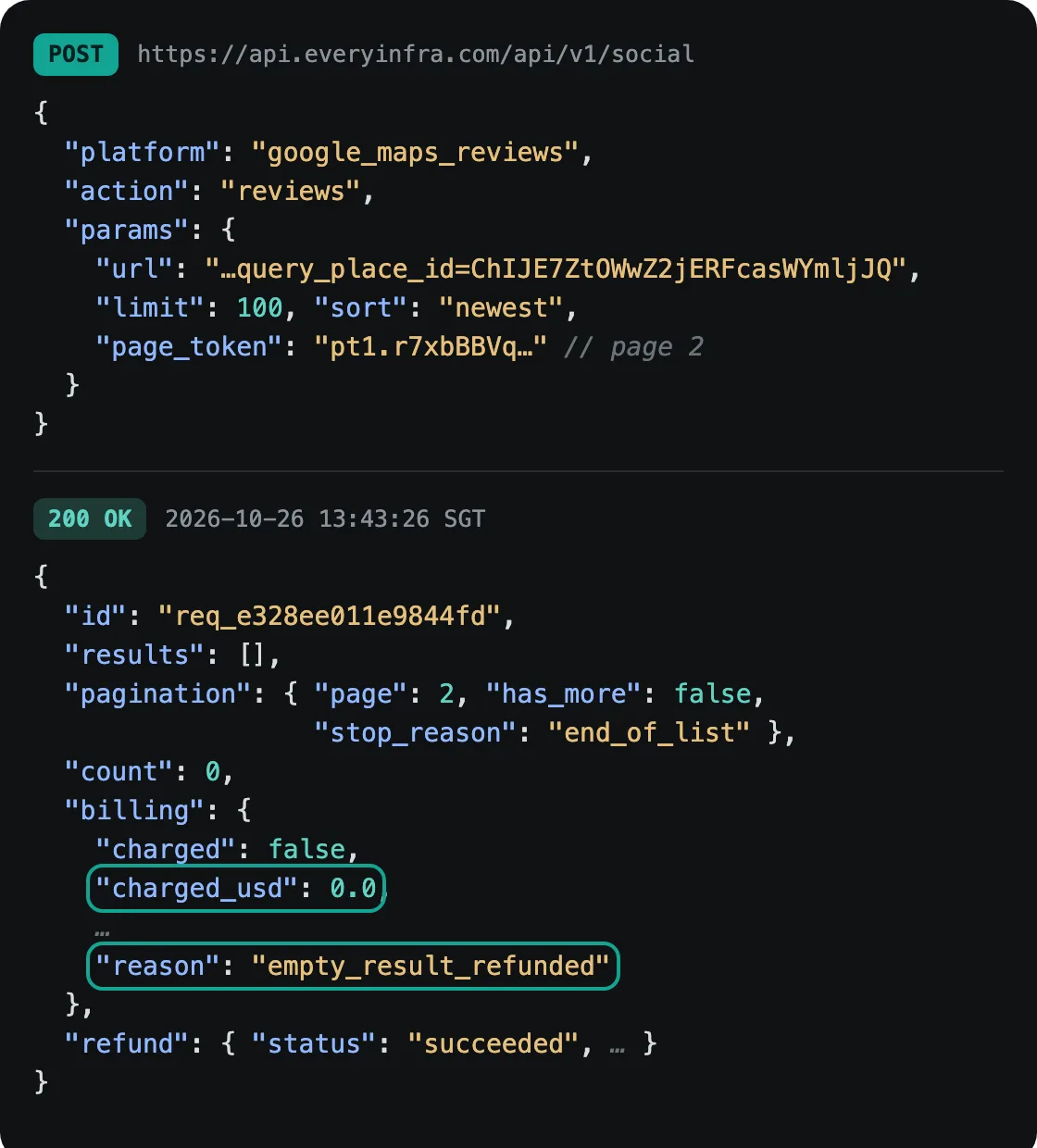
The first page said there was a next page. We sent the page_token for page 2 at 13:43. It came back empty, with end_of_list, and was refunded at once: charged_usd was 0. So on that day, sorted by newest, we got 100 reviews for this place, not all 2,324.
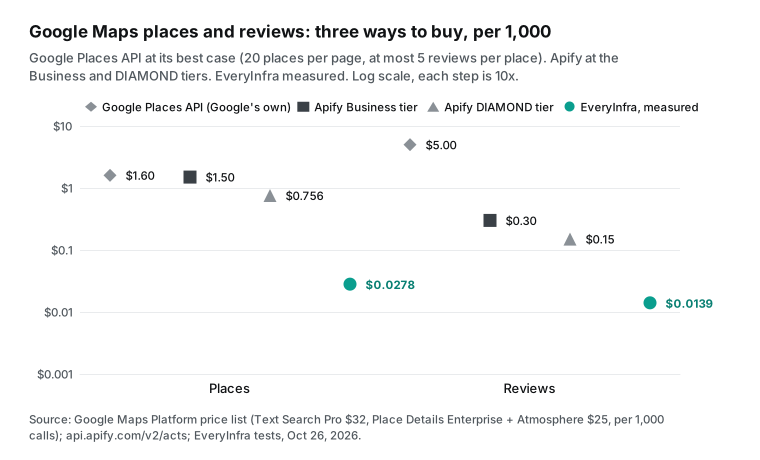
There is a third way to buy Maps data: Google's own Places API. The Google Maps Platform price list puts Text Search Pro at $32 per 1,000 requests. This is the first paid band, after 5,000 free calls a month. The Text Search docs allow up to 20 places per page and 60 per query. So the best case is $1.60 per 1,000 places.
Reviews need Place Details at the Enterprise + Atmosphere level, $25 per 1,000 requests. The Place resource docs return at most 5 reviews per place. So the best case is $5.00 per 1,000 reviews, and never more than 5 per place.
Google keeps adding fields too. The latest release note, on August 6, 2026, added entrances and navigation points. Google's API comes straight from the source and has a service level agreement. But it cannot give you many reviews for one place.
One more Maps detail. We sent a keyword of random letters plus "coffee" at 13:43, to test whether an empty result is refunded. Google's fuzzy match still returned 9 coffee places in Singapore. That call was billed $0.001389 at the normal price, because it did return data.
So "empty results are refunded" covers only truly empty results. A wrong keyword that still returns rows is billed. Before a large batch, test one or two keywords and check that the rows are what you want. Deduplication is another trap for Maps places, because a Place ID is not a permanent business identity. We wrote about this in a separate test.
The honest exception: one-object lookups save only 1.8x to 2.9x on Business, and cost more than DIAMOND
The three tests above pull a batch at a time. Much real work looks up one object at a time. Examples are follower counts for a list of creators, or opening hours for a list of place URLs. Here, per-request billing cannot spread the cost.
We ran instagram/profile on natgeo at 13:48. It returned 1 row with 268 million followers, 32,000 posts, verified status, links and recent posts. The charge was $0.000556, or $0.556 per 1,000 profiles. Apify's Instagram Profile Scraper charges $2.60 on Free and $1.60 on Business for its "Profile" event. We were 2.9x to 4.7x lower. But its DIAMOND tier is $0.50, about 10% below us.
We ran google_maps_reviews/profile on the Nylon Coffee URL at 13:49. It cost $0.001389 per call, or $1.389 per 1,000 places. On Apify, places by URL pay two events, "Scraped place" plus "Additional place details scraped." That is $6.00 on Free and $2.55 on Business. We were 1.8x to 4.3x lower. On DIAMOND it is $0.756 plus $0.378, or $1.134, about 18% below us.
| One object per call | Apify Free per 1,000 | Apify Business per 1,000 | Apify Enterprise per 1,000 PLATINUM / DIAMOND | EveryInfra per 1,000 (measured) | vs Business | vs DIAMOND |
|---|---|---|---|---|---|---|
| Instagram profile | $2.60 | $1.60 | $1.10 / $0.50 | $0.556 | 2.9x cheaper | we cost 11% more |
| One Maps place by URL | $6.00 | $2.55 | $1.89 / $1.134 | $1.389 | 1.8x (close) | we cost 22% more |
These two rows are the weakest numbers for us in this article, so read them first. Against PLATINUM ($1.10 per 1,000 profiles, $1.89 per 1,000 places by URL), we are 1.98x and 1.36x cheaper, which our rule labels "close". If your work is mostly "one lookup at a time" and you already have an Apify Enterprise contract, a move would cost you more. On a self-serve plan, the savings are small.
The cost to move, which includes code, field mapping and new tests, can be larger than the savings. In that case, compare other things: failure charges, setup steps and use inside AI tools. The next two sections cover these. For a full method to check creators one by one, see our creator due diligence article.
Failures and empty results: who pays?
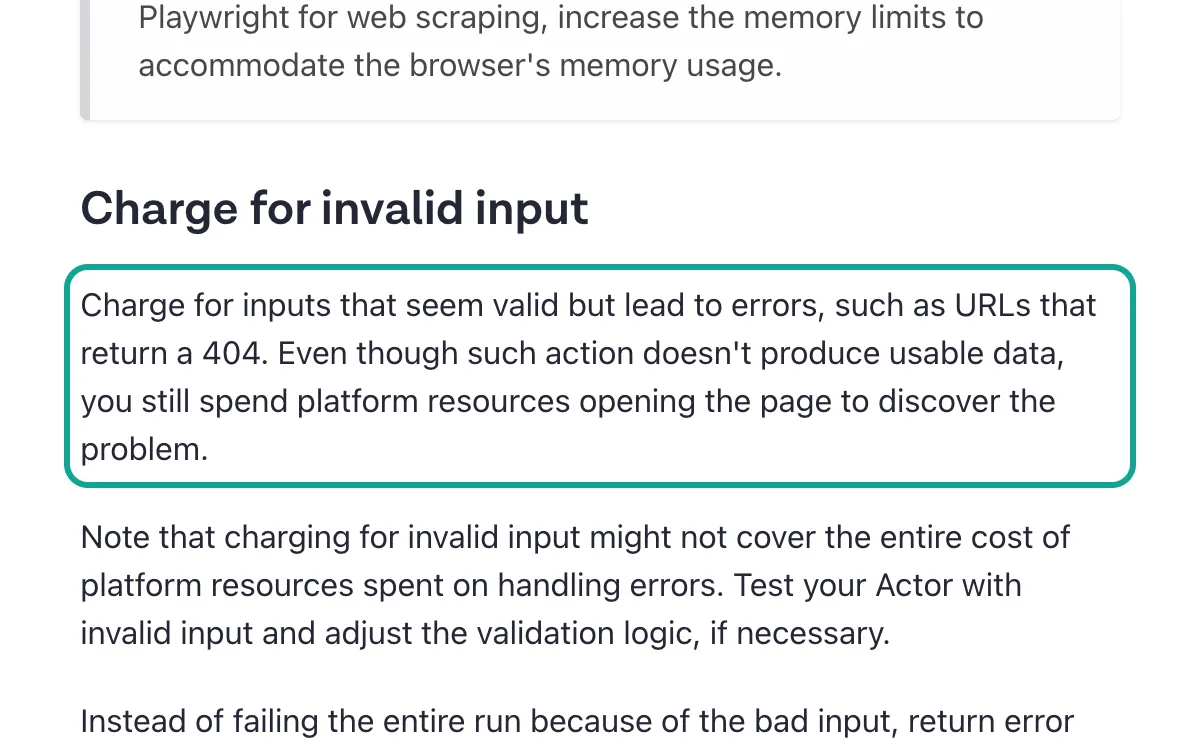
The Apify platform does not set failure rules for actors. Each actor developer decides. The developer docs even have a section named "Charge for invalid input". It advises developers to charge for inputs that look valid but fail, such as a URL that returns 404. The reason given is that opening the page still uses platform resources.
The same section advises developers to return items with error codes, so that the run does not fail as a whole. Then users can see why they were charged.
The same docs also state another rule: do not bill users for what they cannot access. For a buyer on Apify, a batch with missing accounts or dead links may cost money for each bad item, or it may not. It depends on the actor, so read its page before you use it. Runs can also end as FAILED, TIMED-OUT or ABORTED, as the runs docs explain. Events that already happened are usually still billed.
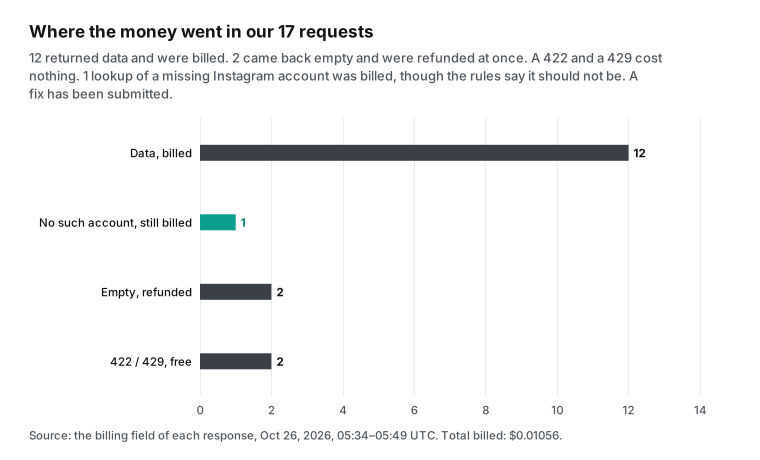
EveryInfra states its rule in llms.txt and on the pricing page: failures and empty results never become a final charge. We tested four cases with no data. A typo (usernme for username) at 13:41 returned 422. The error named the missing username, said that usernme is not a parameter and gave a working example. It cost nothing.
A request that came too fast, at 13:39, returned 429 with retry_after and cost nothing. A TikTok lookup of a missing account, at 13:43, returned an empty object with reason set to empty_result_refunded, so the charge was 0. The empty page 2 of Maps reviews, at 13:43, was refunded at once in the same way.
| Case | Apify (from the docs) | EveryInfra (measured) | Time (SGT) |
|---|---|---|---|
| Bad parameter | Depends on the actor's input checks. Most reject the input before the run | 422 with the right parameter name, free | 13:41 |
| Too many requests | The platform caps concurrent runs. The pricing page gives 5, 32, 128 and 256 by plan | 429 with retry_after, free | 13:39 |
| Missing account (TikTok) | The docs advise developers to charge for such inputs | Empty, refunded, $0 | 13:43 |
| Empty last page | No result event means no result fee, but the start fee still applies | Empty, refunded, $0 | 13:43 |
| Missing account (Instagram) | Same as above | Username echo only, billed $0.000556. Fixed on October 26; retest free | 13:41 |
The last row needs its own note. We ran instagram/profile on a username that does not exist. The results held only the username that we sent, with no real profile data. But charged_usd was $0.000556.
Our ledger showed this charge at 13:41. At 14:07 we checked the ledger again, and there was still no refund for it. The same test on TikTok was refunded correctly.
By our own rule, this was an empty result and should be refunded. We sent the request ID to our engineering team, and it was fixed on October 26. At 16:00:53 SGT we retested with a random username that does not exist: the call returned 200 with empty results, billing.charged was false and the reason was empty_result_refunded, so nothing was charged. We report this because a price comparison that shows only good numbers for its author is not worth your trust.
Apify alternative for n8n, MCP and AI tools
Many people search for "apify alternative n8n." The reason is setup. In n8n you must install a node, set a token and learn each actor's input format. The Apify n8n docs explain the steps. On self-hosted n8n, you install @apify/n8n-nodes-apify from Settings and Community Nodes. n8n Cloud has another path.
Next, you authorize your Apify account, pick an actor in the node and fill in its input JSON. You wait for the run to finish and then read the dataset. EveryInfra needs no special node. The built-in HTTP Request node sends one POST with the JSON body shown above. The response holds the data and the charge.
If you use an AI Agent node in n8n, you can also attach the MCP Client Tool sub-node. Then the EveryInfra remote MCP server works as a tool. Our n8n daily report guide runs every step, from the schedule trigger to the output table.
AI tools work in a similar way. Apify's MCP server is at mcp.apify.com, and Apify recommends OAuth sign-in. After you connect it, the AI can search the Store, pick an actor, start a run and read results. In its open-source repository, version 0.19.0 on October 19, 2026, added tools to create actors and update actor versions.
Both servers use the same protocol, Streamable HTTP from the MCP specification 2025-11-25. The EveryInfra remote MCP server is https://api.everyinfra.com/mcp, with 25 tools. The catalog, job and account tools are free. Data tools cost the same as REST and follow the same rules. In Claude Code, one command adds it:
claude mcp add --transport http everyinfra https://api.everyinfra.com/mcp \
--header 'Authorization: Bearer ${EVERYINFRA_API_KEY}'| Setup step | Apify | EveryInfra |
|---|---|---|
| Sign up | Email or a third-party account. No card for the Free plan | Email. Star a GitHub repo for a $1 trial credit, or top up $10 first |
| Find what you need | Pick from thousands of actors. One platform often has a dozen similar actors with different prices and fields | One catalog: GET /api/v1/social/catalog, by platform/action |
| First call | Fill in the actor's input JSON (different for each actor), start a run, wait, read the dataset | One POST with platform, action and params |
| n8n | Community node on self-hosted, or HTTP calls to the Apify API | The built-in HTTP Request node |
| MCP | mcp.apify.com, OAuth | api.everyinfra.com/mcp, API key |
| See what you spent | Usage chart in the console and cost per run | charged_usd in every response, plus a ledger endpoint |
Apify's strength is the second row of this table. The Store has a very large number of actors, and someone has written one for almost any site. The cost is in the same row. One platform often has a dozen similar actors from different authors, with different prices and upkeep. On r/apify, a user asked which Instagram and X actors give the best value (thread).
One actor author replied that his X scraper costs $15 per 1,000 results on free accounts and $0.35 on paid ones. Another reply warned that an Instagram actor without an update in two or three months may already be half broken. Picking an actor is a job in itself.
Moving off Apify: five things to change
After the price math, the real cost to move is in the engineering details. Picture a team that already runs Instagram, TikTok and Maps jobs on Apify. To move to a per-request API, it must change five things.
First, the unit of work. An Apify actor usually takes a batch of inputs, runs once and writes results to a dataset. One run can cover thousands of targets. EveryInfra takes one target per request. Multi-target parameters, such as urls or usernames, bill per target.
Your loop changes from "start a run" to "send one request per target." Also set limit as close to max_limit as you can. Otherwise you pay for many more requests, as the line in fig-05 shows.
Second, paging. Apify actors usually page inside the run, and you set only a total result cap. Our paged actions return next_page_token and pagination. For the next page, pass the token back as page_token and keep the other parameters. Each page is one request, and an empty last page is refunded, as with Maps reviews above.
A few actions do not have one price per request. The catalog marks them with rows_per_unit and bills per block of rows. For example, aliexpress/search bills per 50 rows and douyin/comments per 20 rows. Before you move, look up each action that you need in the catalog.
Third, async jobs and callbacks. Apify can notify you with a webhook when a run ends. With us, add "mode": "async" for slow actions, get a job_id and poll for free. Or set a job.finished webhook in the console. It sends a signed POST after the job succeeds or fails and after the charge or refund settles. Failed deliveries retry 7 times over 30 seconds to 6 hours, so deduplicate on the event ID.
Fourth, retries. Synchronous requests accept an Idempotency-Key header. If you send the same request with the same key within 24 hours, you get the first response back and no second charge. This helps a lot with network timeouts.
Fifth, spend control. Apify draws a daily usage chart in the console and shows the cost of each run. Every EveryInfra response carries charged_usd. A ledger endpoint lists each charge and refund. You can also give an API key a total USD limit (spend_limit_usd), so that a bad loop cannot spend your whole balance.
Plan for rate limits as well. The default is 60 requests a minute per account. After total top-ups of $50, $150 and $750, it rises to 180, 600 and 1,800 a minute. You can also buy a 30-day rate pack. Our test key had its own limit of 10 a minute, and the 429 at 13:39 hit that limit for free.
Of these five, the first two cause the most errors, because they set the bill. Here is a practical method. In the first week, run each job on one target only. Record the rows, charged_usd and duration. Compute "paid ÷ rows × 1,000" for the real cost per 1,000 and compare it with your Apify history.
If the numbers do not match, check three things. Is limit too small? Does the action bill per block of rows? Are many results empty? On the Apify side, the Get Actor API docs explain how to read each actor's event names. Use the same public endpoint to pull the current price of each actor that you use. Then put both sides in one table.
| Change | On Apify | On EveryInfra |
|---|---|---|
| Unit of work | One run per batch of inputs | One request per target, limit up to max_limit |
| Paging | Inside the run | next_page_token back as page_token, one request per page |
| Async and callbacks | Run webhook | "mode": "async", free polling, signed job.finished webhook |
| Retries | Depends on the actor | Idempotency-Key, no second charge for 24 hours |
| Spend control | Usage chart, cost per run | charged_usd, ledger, spend_limit_usd per key |
Monthly math: three common workloads
Monthly bills make the gap easier to see. The three cases below count data fees only, not plan fees. Apify uses the public Free, Business and Enterprise DIAMOND unit prices. EveryInfra uses catalog prices and the rows per call from this test.
| Workload | Apify Free | Apify Business | Apify DIAMOND | EveryInfra (catalog price) | How we computed it |
|---|---|---|---|---|---|
| 100,000 Instagram posts a month | $270 | $150 | $50 | $0.278 | 200 rows per call, 500 calls × $0.000556 |
| 1,000 TikTok comments a day for 30 days | $37.50 | $15.00 | $4.50 | $0.083 | 200 rows per call, 150 calls × $0.000556 |
| Newest 100 reviews for 50 places a week, 4 weeks | $12.00 | $6.00 | $3.00 | $0.28 | 200 calls × $0.001389 |
The first row is the extreme case. On Apify's Business tier, 100,000 posts a month cost $150 in data fees. The plan itself costs $999 a month, which includes $999 of usage that expires if unused. With us, the same work is 500 requests for $0.278. Even on the Enterprise DIAMOND tier, the data fee is $50, plus the cost of the Enterprise contract.
The third row has a smaller gap. Our Maps review calls cost $0.001389 each and return at most 100 rows, and Apify's review price is already low. These are data fees only. They leave out your servers, storage and staff. For a personal project with a few thousand rows a month, both data bills may be a few dollars. Then the better choice may be the tool you already know.
How to check these numbers yourself
The worst thing in a price comparison is "trust us, it is cheaper." So every number here has a path to check it. On the Apify side, open a URL such as https://api.apify.com/v2/acts/apify~instagram-scraper. You see JSON with no sign-in. Find the last item in data.pricingInfos, then read its startedAt date and its pricingPerEvent.actorChargeEvents.
Under each event, eventTieredPricingUsd gives the price per item for six tiers: FREE, BRONZE, SILVER, GOLD, PLATINUM and DIAMOND. Multiply by 1,000 to get the per-1,000 price.
For Instagram Scraper we read $0.0027, $0.0023, $0.0019, $0.0015, $0.0009 and $0.0005 per item. The first four match $2.70, $2.30, $1.90 and $1.50 per 1,000 on the actor page. This is our outside check that the first four tiers map to the four self-serve plans. The actor page does not show the last two. They appear only in the endpoint and in the Enterprise docs.
On the EveryInfra side, billing.charged_usd in each response is the real charge. The length of the results array is the real row count. We did not use the count field. We counted the array and deduplicated on post_id or id, so that repeated rows could not inflate the count.
The row counts in the three tests above are all after deduplication. Our script reads the raw responses and Apify's raw prices, and prints the per-1,000 price and ratio for each row. Every table and chart here comes from its output, not from hand entry. To redo the test with your own targets, compute "paid ÷ unique rows × 1,000."
Our ratios use DIAMOND, the lowest tier in Apify's public endpoint. This is the Enterprise price. On a self-serve plan, multiply the ratios by about 3 (Business) to 5 or more (Free). The last column of the first table shows the Business ratios. We also did not spread Apify's plan fees over each result, which makes its per-1,000 price look lower.
We did not add Apify's retry or idle costs for each actor. Those depend on how each actor works. We did not run them, so we will not guess. On our side, all ratios use the catalog price. The console shows the price that applies to your account.
When Apify is the better choice
After the prices, we must say clearly when we are not the better choice. The items below are facts that you can check. They are not polite words.
| Your need | What Apify has | EveryInfra today |
|---|---|---|
| A site that is not in our catalog | Thousands of actors in the Store, and you can deploy your own | 91 platforms and 426 actions. Other platforms are not available |
| Instagram Reels by account | Instagram Reel Scraper and other actors | instagram/reels was available=false on test day |
| Thousands of Instagram comments under one post | Per-result comment actors with high result caps | 15 comments per call in our test, so many calls |
| Every Google review of one place | Reviews Scraper can pull all reviews of a place | 100 newest in our test, with an empty page 2 |
| Contacts, email enrichment, AI competitor reports | Many paid add-ons on the Maps actor | No such add-ons |
| Scheduling, storage and webhooks on one platform | Built-in schedules, storage and dataset export | API and webhooks only. You run schedules and storage |
| Light trials under $5 a month | Free plan, $5 a month, no card | $1 trial credit for 24 hours, then a $10 minimum top-up |
| Enterprise contract, one object per call | DIAMOND: $0.50 per 1,000 profiles, $1.134 per 1,000 places by URL | $0.556 and $1.389 measured, 11% and 22% more |
Apify also has one thing that we do not: AI agents that pay for themselves. The FAQ on the Apify pricing page describes it. An autonomous agent with a crypto wallet can pay through the x402 and MPP agent payment protocols. It needs no account and no human sign-up. After it pays, it gets a temporary token with a spend cap and calls the Apify API like any user.
Each run comes out of that prepaid balance, and unused balance expires with the token. If you build agents that find and pay for tools with no human, only Apify offers this path today. EveryInfra needs a person to sign up, top up and issue a key first. Then an agent can use the key.
One more group should stay on Apify. These are teams that wrote their own actors and use its proxies and storage, with the full pipeline on the platform. For them, a move replaces a whole tool set, not one API. The saved data fees may not cover the staff time.
Now take the opposite case. Your needs are mainstream social, e-commerce and review platforms, and mostly bulk lists. You call them often from AI tools or n8n. Then per-request billing costs one to three orders of magnitude less, and you do not need to pick actors.
What changed at Apify in the last 60 days
- October 1, 2026, rental actors retired: Apify's rental pricing docs say that no new rental actors could be published from April 1. On October 1, all remaining rental actors moved to pay-per-usage pricing. Developers could switch to pay-per-event before that date. What it means for you: if you rented an actor by the month, your bill now uses a different unit. Compute your cost per 1,000 again.
- October 7, 2026, new Instagram Post Scraper pricing: in the public endpoint, the latest price set for this actor starts on October 7. The post price did not change, but a new per-result add-on, "music-data," costs $7.00 per 1,000 on Free and $2.00 on DIAMOND. What it means for you: Apify keeps adding add-on events, so one extra option can multiply the bill of the same actor.
- October 19, 2026, Apify MCP server v0.19.0: the release notes add tools to create actors and update actor versions, marked as breaking. Patches such as v0.19.3 followed on October 21, 2026. On October 14, 2026, v0.18.1 changed the message shown when no tool can start a run. What it means for you: Apify use inside AI tools is still changing fast, so test your workflows again before you upgrade.
- October 22 to 26, 2026, every actor in our table changed: the same endpoint shows the dates. The two Maps actors last changed on October 22 and the three Instagram actors on October 23. The two TikTok actors changed on October 26, the day of our test. What it means for you: prices and input formats can change at any time. Read the endpoint on the day, and do not copy numbers from old articles.
FAQ
These questions come from Google autocomplete, read on October 26, 2026 ("apify alternatives," "is apify," "apify pricing," "apify alternative n8n"), and from Reddit threads. We kept the raw suggestions on file.
Is Apify free?
It has a free plan, but not unlimited use. The pricing page gives $5 of usage a month on the Free plan, with no card. When you use it up, the service stops until the next cycle, and unused credit does not roll over. At $2.70 per 1,000 for Instagram Scraper on Free, $5 buys about 1,850 results.
On r/n8n, a user asked for an Apify alternative for Reddit, because "Apify's free plan consumes 5$ very quickly" (thread). In another r/n8n thread, a user with a personal learning project found a monthly subscription "a bit steep". A reply said that you can stay on the free plan if your usage stays under $5 a month (thread). EveryInfra has no monthly free credit. A star on a GitHub repo gives a $1 trial credit, valid for 24 hours.
Are there free Apify alternatives?
There are two fully free paths: the platform's own API, or your own scraper. The first covers little. TikTok's Research API accepts only academic institutions in the US, EEA, UK, Canada or Switzerland, and non-profit research bodies in the EU. Its developer changelog last changed on August 25, 2026.
Instagram's Business Discovery reads only basic data of professional accounts. Recent entries in Meta's Instagram platform changelog are about publishing and messaging, not reading other accounts' public data. Your own scraper has no data fee, but you must handle proxies, site changes and blocks, and staff time often costs more than data fees. So the real question is which paid option saves you the most. The first table in this article answers it.
What are the best Apify alternatives for Instagram?
For posts, comments, follower lists and hashtag posts, the Instagram data API bills per request. In our test, posts cost $0.0028 per 1,000 and comments $0.0371 per 1,000. Note two limits. Comments came back 15 per call, and Reels were not available on test day. If you need Reels, or a very large number of comments under one post, Apify is the better fit today.
On r/automation, a user asked for Google Maps options other than Apify. The top reply used Google's own Places API with n8n (thread). Our Maps section shows the price of that path.
What is a good Apify alternative for n8n?
Replace the Apify node with n8n's built-in HTTP Request node. Set the method to POST and the URL to https://api.everyinfra.com/api/v1/social. Add the header Authorization: Bearer <your key>. Put platform, action and params in the body. You do not wait for a run or read a dataset, because the response holds the data.
For slow actions, add "mode": "async" to the body. Then poll the job with a second HTTP Request node. For a full workflow, see our n8n guide.
How does Apify pricing work?
First, read the pricing model on the actor page. For pay-per-event actors, the bill is results × result price, plus each add-on count × add-on price, plus runs × start fee. Unit prices change with your plan tier. For pay-per-usage actors, the bill is CU × CU price, plus proxy traffic, storage operations and data transfer.
The most exact method is to read pricingInfos at api.apify.com/v2/acts/<author>~<actor> and take the last item. That is the price in effect now. The endpoint needs no sign-in, so you can pull the price of each actor that you use and compute it for your own tier.
Are there Apify alternatives for Claude and other AI tools?
Both sides work in AI tools. Apify's MCP server is at mcp.apify.com with OAuth sign-in. EveryInfra's is at https://api.everyinfra.com/mcp with an API key. Claude, ChatGPT and Cursor can add it as a remote server, with no local install. Our tests in Cursor with TikTok and Instagram data and our remote MCP setup check cover the setup and common problems.
Try it in three steps
Step 1: sign up and get an API key. On the console balance page, claim the trial credit or top up (quickstart). Step 2: run each one with the one-click trial on its capability page: try Instagram posts, try TikTok search or try Google Maps places.
Step 3: read charged_usd and the row count in the response. Compute "paid ÷ rows × 1,000" for your own cost per 1,000, and compare it with your current bill. For the full lists, see the TikTok data API, the Google Maps data API and the data market.
Method and limits
On the Apify side, we used public material only. That is the pricing from the public api.apify.com/v2/acts endpoint, read on October 26, 2026, at 05:33 UTC. We also used the pricing page, docs, Store pages and Reddit threads. We read Instagram Post Scraper again at 14:48 SGT, and we kept all raw responses on file. We did not sign up for Apify or run its actors. So we do not rate its data quality, speed or success rate.
All Apify prices in our tables are public unit prices, not measured spend. Real bills can be higher because of add-on events, start fees, retries and platform usage. Apify maintains Instagram Scraper and the other Instagram actors. The pages of TikTok Scraper (by Clockworks) and Google Maps Scraper (by Compass) also say "Maintained by Apify."
On the EveryInfra side, the 17 requests of the main test ran from 13:34 to 13:49 SGT on October 26, 2026. Three more calls for the English and Spanish versions ran at 14:07 and 14:08 SGT. Each action ran once or twice. That shows the price and row counts for these targets on that day. It does not show long-term success rate or speed.
The cost per 1,000 is paid ÷ rows returned. We kept the script and the raw responses on file. Ratios use Apify's lowest public tier, DIAMOND, and we also show Business. Our side uses catalog prices.
One item is still open: any minimum spend in an Apify Enterprise contract, because the public pages do not state it.
References
- Apify public endpoint: Instagram Scraper pricing (pricingInfos), Apify, read Oct 26, 2026, https://api.apify.com/v2/acts/apify~instagram-scraper
- Apify public endpoint: TikTok Scraper pricing, Apify, read Oct 26, 2026, https://api.apify.com/v2/acts/clockworks~tiktok-scraper
- Apify public endpoint: Google Maps Scraper pricing, Apify, read Oct 26, 2026, https://api.apify.com/v2/acts/compass~crawler-google-places
- Apify pricing (plans, CU, proxies, FAQ), Apify, read Oct 26, 2026, https://apify.com/pricing
- Instagram Scraper page, Apify, read Oct 26, 2026, https://apify.com/apify/instagram-scraper
- Actor pricing and costs (discount tiers), Apify docs, https://docs.apify.com/platform/actors/publishing/monetize/pricing-and-costs
- Pay-per-event pricing model, Apify docs, https://docs.apify.com/platform/actors/publishing/monetize/pay-per-event
- Actors in Store (pricing models), Apify docs, https://docs.apify.com/platform/actors/running/actors-in-store
- Usage and resources (CU), Apify docs, https://docs.apify.com/platform/actors/running/usage-and-resources
- Limits (concurrency), Apify docs, https://docs.apify.com/platform/limits
- Runs and builds (run status), Apify docs, https://docs.apify.com/platform/actors/running/runs-and-builds
- General Terms and Conditions, Apify, https://docs.apify.com/legal/general-terms-and-conditions
- Google Maps Scraper is going to pay-per-event pricing, Apify Help Center, Mar 18, 2025, https://help.apify.com/en/articles/10774732-google-maps-scraper-is-going-to-pay-per-event-pricing
- n8n integration, Apify docs, https://docs.apify.com/platform/integrations/n8n
- Apify MCP server, Apify docs, https://docs.apify.com/platform/integrations/mcp
- apify-mcp-server repository, Apify, GitHub, https://github.com/apify/apify-mcp-server
- apify-mcp-server v0.19.0 release notes, Oct 19, 2026, https://github.com/apify/apify-mcp-server/releases/tag/v0.19.0
- apify-mcp-server v0.18.1 release notes, Oct 14, 2026, https://github.com/apify/apify-mcp-server/releases/tag/v0.18.1
- HTTP Request node, n8n docs, https://docs.n8n.io/integrations/builtin/core-nodes/n8n-nodes-base.httprequest/
- Google Maps Platform price list, Google, https://developers.google.com/maps/billing-and-pricing/pricing
- Text Search (New), Google docs, https://developers.google.com/maps/documentation/places/web-service/text-search
- Place resource (at most 5 reviews), Google docs, https://developers.google.com/maps/documentation/places/web-service/reference/rest/v1/places
- Business Discovery, Meta for Developers, updated Aug 12, 2026, https://developers.facebook.com/docs/instagram-platform/instagram-api-with-facebook-login/business-discovery
- TikTok Research API, TikTok for Developers, https://developers.tiktok.com/products/research-api/
- EveryInfra capability catalog, read Oct 26, 2026, 05:31 UTC, https://api.everyinfra.com/api/v1/social/catalog
- r/apify: Best Cost-Efficient Apify Actor for Instagram and X Profile Search?, Reddit, https://www.reddit.com/r/apify/comments/1s81nhe/best_costefficient_apify_actor_for_instagram_and/
- r/n8n: Is there any alternative to apify for Reddit?, Reddit, https://www.reddit.com/r/n8n/comments/1v783nr/is_there_any_alternative_to_apify_for_reddit/
- Instagram Profile Scraper, Apify, https://apify.com/apify/instagram-profile-scraper
- Instagram Comments Scraper, Apify, https://apify.com/apify/instagram-comment-scraper
- TikTok Scraper, Apify (by Clockworks), https://apify.com/clockworks/tiktok-scraper
- TikTok Comments Scraper, Apify (by Clockworks), https://apify.com/clockworks/tiktok-comments-scraper
- Google Maps Scraper, Apify (by Compass), https://apify.com/compass/crawler-google-places
- Google Maps Reviews Scraper, Apify (by Compass), https://apify.com/compass/google-maps-reviews-scraper
- Apify public endpoint: Instagram Comments Scraper pricing, read Oct 26, 2026, https://api.apify.com/v2/acts/apify~instagram-comment-scraper
- Apify public endpoint: Instagram Profile Scraper pricing, read Oct 26, 2026, https://api.apify.com/v2/acts/apify~instagram-profile-scraper
- Apify public endpoint: TikTok Comments Scraper pricing, read Oct 26, 2026, https://api.apify.com/v2/acts/clockworks~tiktok-comments-scraper
- Apify public endpoint: Google Maps Reviews Scraper pricing, read Oct 26, 2026, https://api.apify.com/v2/acts/compass~Google-Maps-Reviews-Scraper
- Residential proxy, Apify docs, https://docs.apify.com/platform/proxy/residential-proxy
- Get Actor endpoint, Apify API docs, https://docs.apify.com/api/v2/actor-get
- MCP specification 2025-11-25, Model Context Protocol, https://modelcontextprotocol.io/specification/2025-11-25
- MCP Client Tool node, n8n docs, https://docs.n8n.io/integrations/builtin/cluster-nodes/sub-nodes/n8n-nodes-langchain.toolmcp/
- Places API (New) release notes, Google, https://developers.google.com/maps/documentation/places/web-service/release-notes
- TikTok developer changelog, TikTok, updated Aug 26, 2026, https://developers.tiktok.com/doc/changelog
- Instagram platform changelog, Meta, https://developers.facebook.com/docs/instagram-platform/changelog
- apify-mcp-server v0.19.3 release notes, Oct 21, 2026, https://github.com/apify/apify-mcp-server/releases/tag/v0.19.3
- r/n8n: apify free alterntive, Reddit, https://www.reddit.com/r/n8n/comments/1qu4fdg/apify_free_alterntive/
- r/automation: Alternatives for google maps scraper Apify, Reddit, https://www.reddit.com/r/automation/comments/1k5jvwj/alternatives_for_google_maps_scraper_apify/
- Actor rental pricing model (rental sunset), Apify docs, https://docs.apify.com/platform/actors/publishing/monetize/rental
- Apify public endpoint: Instagram Post Scraper pricing, read Oct 26, 2026, 06:48 UTC, https://api.apify.com/v2/acts/apify~instagram-post-scraper
Reference BL-46