Apify TikTok Scraper Alternative: Price per 1,000 Tested
Apify TikTok scrapers list $0.50–$3.70 per 1,000 results. Our live calls cost $0.003–$0.02 per 1,000 for comments, search and feeds. One-by-one profile lookups are a different story.
To get 1,000 TikTok comments, the most used Apify TikTok Comments Scraper lists $0.50 (Business tier) to $1.25 (Free tier). Its TikTok Scraper lists $1.70 to $3.70 per 1,000 search results. On October 26, 2026, we sent live calls to EveryInfra. Both tiktok/comments and tiktok/search returned 200 rows for one $0.000556 call. That is $0.0028 per 1,000, so even the Business tier costs 180 and 611 times more.
The gap exists only where one call returns many rows. A profile lookup or a single video lookup returns one row. At $0.556 per 1,000, we beat Clockworks Business by 1.8 times. The cheapest third-party scraper in the Apify Store lists $0.30 per 1,000 rows, and for those lookups it is cheaper than us.
This article tests five data types one by one. It also covers result limits and paging by date. It shows how failed and empty calls are billed. Last, it shows a price mismatch on Apify's own Store pages.
"Price per 1,000" in this article means the amount charged for a call, divided by the rows that call returned, times 1,000. It answers one question: what do 1,000 rows cost? EveryInfra charges per request. Apify Store actors (Apify's name for its cloud scrapers) charge per result or per event.
The two units only compare after we put them on the same base. We always divide by rows returned, not by the limit we asked for. So when a call returns fewer rows, our price goes up, never down.
On the Apify side we used only public material: Store pages, the pricing page, the docs, and the public API that needs no account. We did not sign up for Apify. We did not run any actor. So every Apify number below is a listed unit price, not a measured bill.


The summary table: seven TikTok data types, price per 1,000
The table puts the seven most common TikTok data types side by side. The Apify column uses public prices. Clockworks maintains the main TikTok scrapers, and the Store pages label them "Maintained by Apify." Each data type has a dedicated Clockworks actor. Prices change with the plan: Free, Bronze, Silver and Gold, where Gold is the Business plan. Two more tiers, Platinum and Diamond, are for Enterprise customers only (Actor pricing and costs).
We read these prices from the pricingInfos field of the public API at 17:04 Singapore time on October 26, 2026 (TikTok Scraper metadata). The EveryInfra column is all live calls from this article. The charged amount comes from billing.charged_usd in each response, or from the console call log for async jobs. The row count comes from results.
| Data | EveryInfra capability | Measured: calls / rows / charged | EveryInfra per 1,000 | Apify Clockworks (Free → Business) | Gap | Cheapest third party |
|---|---|---|---|---|---|---|
| Profiles | tiktok/profile | 1 / 1 / $0.000556 | $0.556 | Profile Scraper $3.00 → $1.00 | 1.8–5.4x | $0.30 (API Dojo), cheaper than us |
| Account videos | tiktok/user_videos | 3 / 150 / $0.001668 | $0.0111 | Profile Scraper $3.00 → $1.00 | 90–270x | $0.30, 27x |
| Single video | tiktok/video | 1 / 1 / $0.000556 | $0.556 | Video Scraper $3.00 → $1.00 | 1.8–5.4x | not compared |
| Comments | tiktok/comments | 1 / 200 / $0.000556 | $0.0028 | Comments Scraper $1.25 → $0.50 | 180–450x | $0.30, 108x |
| Video search | tiktok/search | 2 / 393 / $0.001112 | $0.0028 | TikTok Scraper $3.70 → $1.70 | 601–1,307x | $0.30, 106x |
| Account search | tiktok/search (content_type=profile) | 1 / 19 / $0.010556 | $0.556 | User Search Scraper $6.00 → $2.50 | 4.5–10.8x | not compared |
| Hashtags | tiktok/hashtag | 3 / 90 / $0.001668 | $0.0185 | Hashtag Scraper $3.00 → $1.00 | 54–162x | not compared |
The gap is always Apify's price divided by ours. The two ends are the Business and Free tiers. The third-party column is the cheapest similar actor we found in the Store, on its Free tier. For account videos, profiles and comments we used two pay-per-result actors from API Dojo at $0.30 per 1,000. For video search we used the TikTok Search Scraper by xmolodtsov at $0.30 (Free) and $0.20 (Business).
Two things matter when you read this table. First, the rows with gaps in the hundreds are all "one call returns one page." A fuller page makes each row cheaper. Our price per call is fixed: one row or 200 rows, the call costs $0.000556. Second, profiles and single videos are "one target per call." There, both sides charge one price per row.
In that case Apify's third-party actors and its Diamond tier ($0.30) are cheaper than us. Account search is a special case in our catalog. It is billed per account returned, so it also lands at $0.556 per 1,000.
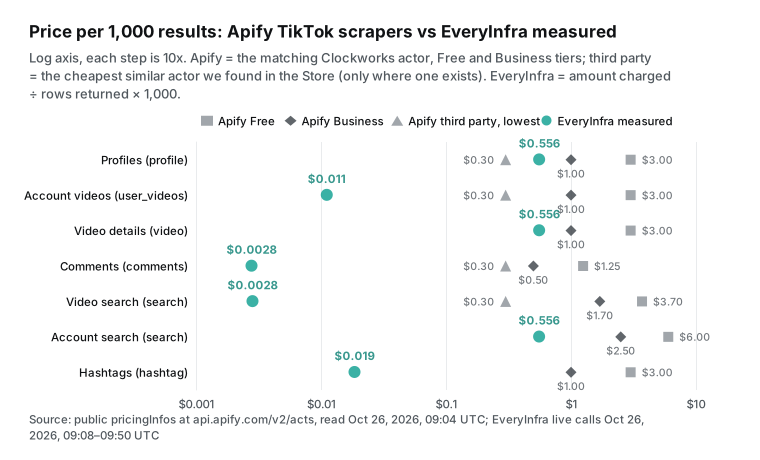
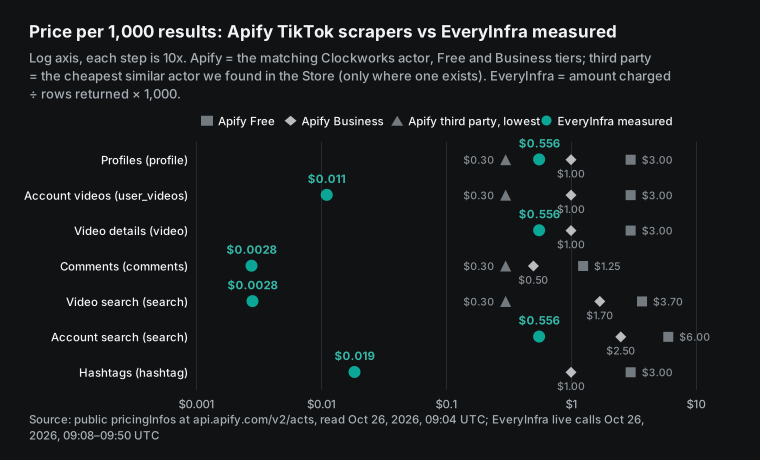
Our dots spread from $0.0028 to $0.556 for one reason: how many rows one call returns. That also sets the limit of our claim. Say you need profile data for 100,000 accounts. Our price is $0.556 per 1,000 accounts. That is 1.8 to 5.4 times cheaper than Clockworks, but about 85% more than API Dojo's $0.30. The large gaps apply only to data that comes back in batches: comments, search, hashtags and account feeds.
Apify TikTok Scraper price: one actor, twelve billing events
Most Apify Store actors now use pay-per-event pricing. The author defines a set of events and charges each time one happens. An event can be a result, an add-on, or one actor start (Actors in Store). The Clockworks TikTok Scraper is the most used TikTok tool in the Store. Its public stats show 361,662 users in total and 32,196 in the last 30 days.
Its current price list started on August 18, 2026, and has 12 events. The base event is Result. Nine add-ons follow: a date filter, a popularity filter, follower and following lists, search sorting, video download, comments, country mode, transcripts and AI text. The AI text comes as two events, a description and a summary. The last event is a $0.001 fee for each actor start.
| Event (TikTok Scraper) | Free | Bronze (Starter) | Silver (Scale) | Gold (Business) | Diamond (Enterprise) |
|---|---|---|---|---|---|
| Result, per 1,000 | $3.70 | $3.00 | $2.30 | $1.70 | $0.50 |
| Date filter, popularity filter, search sorting, video download, country: each adds per 1,000 | $1.30 | $1.00 | $0.80 | $0.60 | $0.17 |
| Comments, per 1,000 | $1.25 | $1.00 | $0.75 | $0.50 | $0.15 |
| Followers or following, per 1,000 accounts | $4.00 | $3.00 | $2.00 | $1.50 | $0.50 |
| Transcript, per started minute per video | $0.048 | $0.041 | $0.034 | $0.027 | $0.015 |
| Actor start | $0.001 | $0.001 | $0.001 | $0.001 | $0.001 |
Add-ons stack per row. Ask the Free tier for 1,000 search results "posted after a date, sorted by popularity". You pay $3.70 for the results, $1.30 for the date filter and $1.30 for sorting: $6.30 in total. That is 70% above the headline price. Our tiktok/user_videos also has a date upper bound (until), a sort order (sort) and a minimum like count (min_likes). The price is the same with or without them, because we charge per request, not per feature.
Plan fees are a separate layer.
| Apify plan | Monthly fee | Store tier | Compute unit | Residential proxy | Concurrent runs |
|---|---|---|---|---|---|
| Free | $0 ($5 usage) | Free | $0.20 | $8/GB | 5 (pricing page) or 25 (limits doc) |
| Starter | $19 | Bronze | $0.20 | $8/GB | 32 |
| Scale | $199 | Silver | $0.16 | $7.5/GB | 128 |
| Business | $999 | Gold | $0.13 | $7/GB | 256 |
Sources: Apify pricing and Platform limits, read Oct 26, 2026. For the Free plan, the two pages disagree on concurrent runs. Free gives $5 of usage each month. Starter costs $19, Scale $199 and Business $999 a month. The fee is prepaid usage, and usage above it is pay as you go. A higher plan gets a lower Store unit price (Apify pricing).
Most pay-per-event actors include platform usage in the event price. Some charge it on top, so check each actor's price section (Actors in Store). Platform usage means compute units, storage reads and writes, residential proxy and data transfer (Usage and resources). Residential proxy costs $8 per GB on the Free and Starter plans (Residential proxy, Apify pricing).


EveryInfra's rule sits in the catalog at GET /api/v1/social/catalog. Each capability has one price_usd, which is the price of one request. On October 26, 2026, the catalog listed 10 TikTok capabilities: search, profile, user_videos, video, comments, hashtag, followers, transcript, shop_search and shop_creator. All cost $0.000556 per call, and all showed available=true.
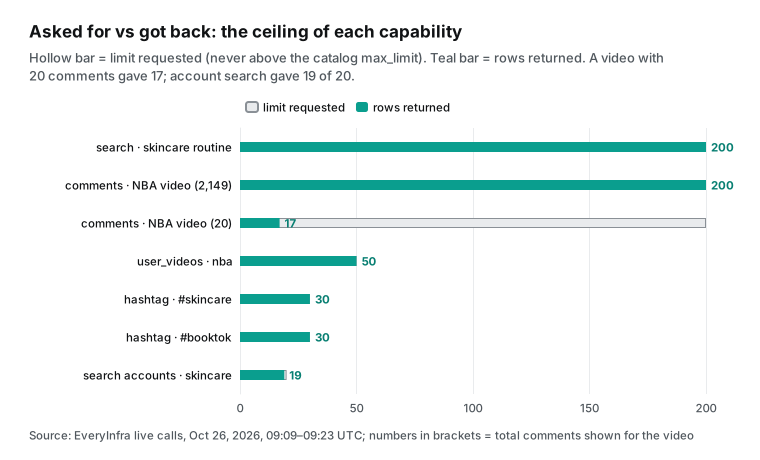
Our pricing page calls this the Core tier, at $0.56 per 1,000 calls. The same page says that "a few list capabilities are billed in steps by row count." For TikTok, that is account search. The limit in a request only sets how many rows you want. Up to the catalog's max_limit, it does not change the price. search and comments go up to 200, user_videos to 50 and hashtag to 30. For more rows, send another request with other parameters.
How we count
Price per 1,000 equals the amount charged for a call, divided by rows returned, times 1,000. When we ran one data type several times, we added up the money and the rows first, and then divided. A call with zero rows does not enter the base. We only check whether it was charged.
The gap equals an Apify tier price per 1,000 divided by our price per 1,000. We always show at least the Business and Free ends. Where a cheaper third-party actor exists, we add it, so we do not compare only against Clockworks. Gaps below 3x go into the table and the key findings, but not into the title.
Some prices in Apify's public API have a startedAt date after our read time. Those are announced prices that are not live yet. We mark them and do not use them as current prices. Apify's own docs say that the public Get Actor endpoint lists all billing events of an actor (Get Actor). So the API and the price table on the page come from one source.
Our live calls used a test key. Other team members used the same key that day. So we did not compute spend from the balance before and after. We matched each request_id against the response and the console call log.
From 17:08 to 17:23 we sent 20 calls with a key and one call without a key. From 17:46 to 17:51 we sent 4 repeat calls. All times are to the second, in Singapore time (UTC+8). We tested only brand and institution accounts: the official NBA account, skincare brands and public hashtags. We do not name personal creators.
Test 1: profiles, one account per call
We sent tiktok/profile for the official NBA account at 17:08:50 Singapore time on October 26, 2026. It answered in 17 seconds and cost $0.000556. It returned 16 fields. They match the catalog's response_fields one for one: user_id, username, display_name, bio, url, external_url, follower_count, following_count, like_count, video_count, friend_count, is_verified, is_private, avatar_url, created_at and platform. The follower_count was 27,400,000 and like_count was 1,200,000,000. These are the rounded numbers that the TikTok page shows.
At 17:22:29 we checked the same account with tiktok/followers. It returned follower_count 27,360,988 and like_count 1,176,725,385, with precision set to exact. So for a follower growth chart, use followers for the exact count. The profile numbers suit display only.
Both capabilities cost $0.000556 per call. We found no matching note on Apify's Profile Scraper page. Its sample output shows fans as round values such as 2,200,000, and we cannot check whether they are exact.
| Field | `tiktok/profile` (17:08:50) | `tiktok/followers` (17:22:29) |
|---|---|---|
| Followers | 27,400,000 | 27,360,988 |
| Likes | 1,200,000,000 | 1,176,725,385 |
| Videos | 24,700 | 24,742 |
| Precision flag | none | exact |
| Price per call | $0.000556 | $0.000556 |
On price, this row has the smallest gap in the article. The Clockworks TikTok Profile Scraper charges per result: $3.00 on Free, $1.00 on Business and $0.30 on Diamond. Going by its page, a result is a video record, and the account data rides along in each video's authorMeta. So one account costs at least one result. Per 1,000 accounts, our $0.556 is 1.8 times cheaper than Business and 5.4 times cheaper than Free.
The API Dojo Tiktok Profile Scraper lists $0.30 per 1,000 posts. Per row, that is cheaper than us. But it charges per post, not per account. Its page says the account must exist, must have at least 10 posts, and that you should not cap results too low. Free-plan users get 5 runs a month with 10 items per run.
If each account returns 10 posts, one account costs $0.003, or $3.00 per 1,000 accounts. That is more than 5 times our $0.556. If you want the last few dozen videos of each account anyway, the $0.30 price is real. In that case, compare it with user_videos in the next section.
Test 2: account videos with user_videos, 50 per call, paged back by date
We sent tiktok/user_videos for NBA with limit 50 and sort=newest at 17:09:07 Singapore time. It answered in 20 seconds with 50 rows and cost $0.000556, or $0.0111 per 1,000. Three of the 50 were pinned videos (is_pinned=true) from October 14, 17 and 23, and they came first. The other 47 covered 05:03 UTC on October 25, 2026, to 04:39 UTC on October 26, 2026.
That is less than one day. NBA posts 20 to 30 videos a day, so one page of 50 covers about a day. The real question is how to page back.
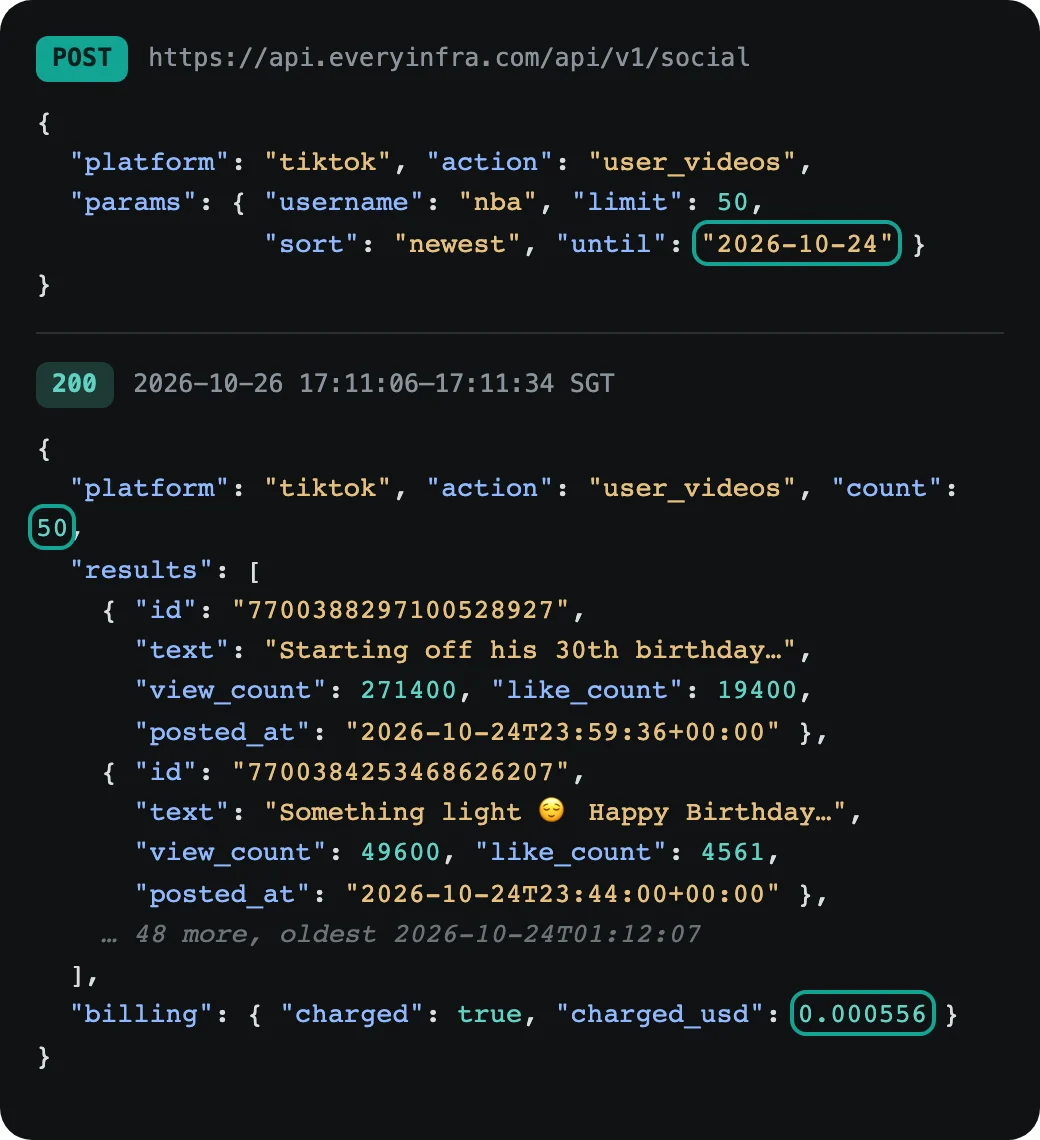
Our tiktok/user_videos has no cursor parameter. The catalog offers until instead: an upper bound on the post date, as a date. From 17:09 to 17:12 we sent five pages. Page 1 had no until.
The next pages used October 25, 24, 23 and 22. Each page returned the full 50 rows and cost $0.000556. In total that was 250 rows for $0.00278. After we removed repeats by video ID, 213 rows were left.
That is 37 repeats, or 14.8%. Per unique row, the price is $0.0131 per 1,000. That is 17% above the single-page price of $0.0111. It is still about 1/77 of the Clockworks Business price of $1.00.
| Page | `until` | Oldest video (UTC) | Newest video (UTC) | Rows | New | Repeats |
|---|---|---|---|---|---|---|
| 1 | none | Oct 25, 05:03 | Oct 26, 04:39 | 50 | 50 | 0 |
| 2 | 2026-10-25 | Oct 24, 23:44 | Oct 25, 23:55 | 50 | 25 | 25 |
| 3 | 2026-10-24 | Oct 24, 01:12 | Oct 24, 23:59 | 50 | 48 | 2 |
| 4 | 2026-10-23 | Oct 22, 17:20 | Oct 23, 23:38 | 50 | 50 | 0 |
| 5 | 2026-10-22 | Oct 22, 02:29 | Oct 22, 23:59 | 50 | 40 | 10 |
The oldest and newest columns skip the three pinned videos on page 1, which date from Oct 14 to Oct 23.
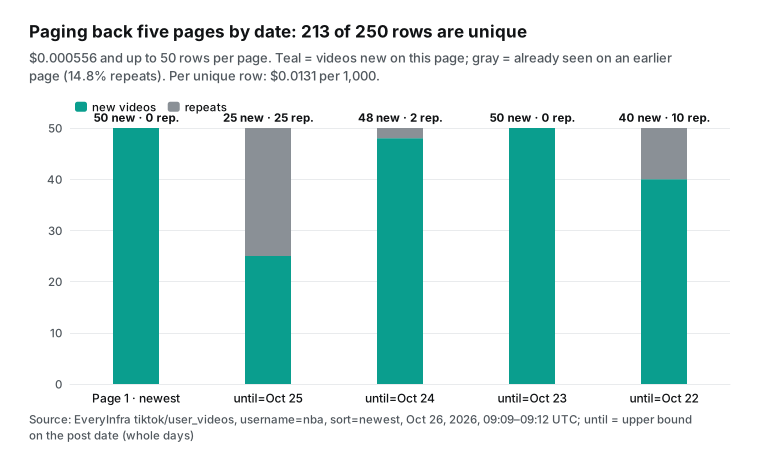
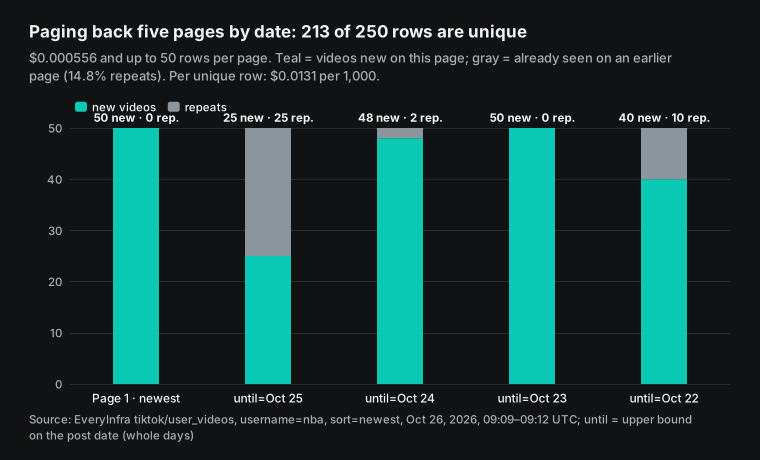
The time range of each page shows where the repeats come from. until works in whole days and includes the day itself. The page with October 25 started at 23:55 on October 25 and went back. Page 1 already had every video after 05:03 that day.
So those two pages shared 25 rows. The pages with October 23 and October 22 both held videos from the afternoon of October 22, so they shared 10 more. When you use "the oldest day on the last page" as the next until, the rest of that day comes back a second time. Remove repeats by id.
The other side matters more. If one day has more than 50 videos, the earliest part of that day is out of reach. The page with October 24 held 50 videos, all from October 24, the oldest at 01:12. The page with October 23 started at 23:38 on October 23. Between the two pages, 1 hour and 34 minutes had no coverage.
We do not know if NBA posted in that window, but the method cannot reach it. After removing repeats, NBA had 40 to 50 videos per day over these five days. Two days, October 22, 2026, and October 24, 2026, sat at exactly 50. Those two days may have more videos that we did not get.
For a brand account with fewer than 50 videos a day, paging back by day has no gap. For NBA, news outlets and other high-volume accounts, you have two options. You can pull each day's new videos at a fixed time every day, or you can accept small gaps.
Apify works differently. A Clockworks scraper takes resultsPerPage for the number of videos per account. It scrolls and pages on its own, and charges for each result it returns. You can add a date filter, but that is an add-on at $1.30 (Free) to $0.60 (Business) per 1,000 rows (TikTok Scraper input).
So the trade-off is clear. Apify pages for you and bills per row, which is the easy way to read deep into one account's history. We return 50 rows per call and bill per call. You build the paging by date yourself, and in return the unit price is two orders of magnitude lower.
Apify TikTok Scraper comments vs tiktok/comments: how many of 200 are replies
We sent tiktok/comments for an NBA video posted on October 23, 2026. The video page showed 2,149 comments. We used limit 200 in async mode. The call went out at 17:18:37 Singapore time, and we had the result at 17:20:09: 200 rows for $0.000556, or $0.0028 per 1,000. Of the 200 rows, 113 were top-level comments and 87 were replies (is_reply=true).
Fifty-five top-level comments had replies attached, never more than 2 each. That matches the catalog note: up to two replies per top-level comment, and no full thread. Those 113 top-level comments report 433 replies in total (reply_count). We got 87, about 20%. Against the whole video, 200 rows are 9.3% of 2,149 comments, spread from October 23 to October 26.
A second NBA video showed only 20 comments. We asked for 200 again at 17:21:27. It returned 17 and cost $0.000556, so the price became $0.0327 per 1,000, 12 times higher. The missing 3 may be deleted or hidden comments.
TikTok's own Research API docs say the API "returns less comments than the max count" for reasons such as user deletions (Query Video Comments). So the comment price depends on the video. A popular video comes close to $0.0028. A quiet video can cost 10 times more per row.
The Apify TikTok Comments Scraper charges $1.25 per 1,000 comments on Free, $0.50 on Business and $0.15 on Diamond. You set the comments per video with commentsPerPost and the replies per comment with maxRepliesPerComment. It pages on its own. At 200 rows per call, we are about 180 times cheaper than its Business tier and about 54 times cheaper than Diamond. At 17 rows from the quiet video, we are still about 15 times cheaper than Business.
It is clearly stronger at one thing. It can return every comment on a video and every reply to every comment. We return at most 200 per call, with no paging parameter and at most two replies. We tried a cursor parameter anyway. The API returned 422 and said that tiktok/comments accepts only url and limit. Nothing was charged.
| Comment test | Singapore time | Comments on video | Returned | Replies | Charged | Per 1,000 |
|---|---|---|---|---|---|---|
NBA video A, limit 200, async | 17:18:37–17:20:09 | 2,149 | 200 | 87 | $0.000556 | $0.0028 |
NBA video B, limit 200 | 17:21:27–17:22:06 | 20 | 17 | not counted | $0.000556 | $0.0327 |
| A video URL that does not exist | 17:23:05–17:23:32 | — | 0 | — | $0 (refunded at once) | — |
Test 3: video search and account search, 200 per call and billed per account
We sent tiktok/search for "skincare routine" with limit 200 in async mode at 17:12:46 Singapore time. The 200 rows were ready at 17:14:55, about 2 minutes and 9 seconds later, for $0.000556, or $0.0028 per 1,000. The 200 videos came from 175 creators. The oldest was posted on November 16, 2022, and the newest on the day of the test. Median views were 377,550 and the top video had 42.6 million. The language field showed English for 168 rows.
Thirty-eight rows had is_ad=true, so the search results include ad videos. Filter on that field before content analysis.
| "skincare routine" search, 200 rows | Value |
|---|---|
| Distinct video IDs | 200 |
| Distinct creators | 175 |
| Oldest and newest post | Nov 16, 2022, and Oct 26, 2026 |
| Median views / top views | 377,550 / 42.6 million |
Rows with is_ad=true | 38 |
| English rows | 168 |
| Charged / per 1,000 | $0.000556 / $0.0028 |
Compare that with the Apify TikTok Scraper. Its Result event costs $3.70 on Free and $1.70 on Business, so on this call we are 1,331 and 611 times cheaper (1,307 and 601 times over both calls). Sorting by popularity or date adds $1.30 (Free) or $0.60 (Business) per 1,000 on Apify. The TikTok Search Scraper by xmolodtsov is one of the cheaper Store options, at $0.30 per 1,000 on Free and $0.20 on Business. We are still about 108 and 72 times cheaper.
Set content_type to profile on the same search, and it becomes account search. We sent it at 17:15:02 for "skincare" and asked for 20 accounts. It returned 19 and cost $0.010556, exactly 19 × $0.000556. The console log lists the price as 800 billing units, which is 20 accounts.
The charge counted only the 19 that came back. So this capability bills per account returned, not per limit. Each account row is that account's latest video. The author fields (author_username, author_follower_count, author_is_verified and others) carry the account data.
The results included official brand accounts such as Paula's Choice and Dermalogica. The Apify TikTok User Search Scraper charges $6.00 per 1,000 accounts on Free, $2.50 on Business and $0.80 on Diamond. Our $0.556 per 1,000 is 4.5 times cheaper than Business.
Test 4: hashtags, 30 per call
tiktok/hashtag returns at most 30 rows per call. We sent #skincare at 17:16:38 Singapore time and got 30 rows in 18 seconds. We sent #booktok at 17:22:43 and got 30 rows in 14 seconds. Each call cost $0.000556, or $0.0185 per 1,000.
The 30 #skincare videos had median views of 604,100. The oldest was posted on February 23, 2026. So the hashtag page returns "top" videos, not "latest" ones. Eleven rows had is_ad, and 2 had a TikTok Shop product attached.
| Hashtag test | #skincare | #booktok |
|---|---|---|
| Sent (Singapore time) | 17:16:38 | 17:22:43 |
| Answer time | 18 s | 14 s |
| Rows / distinct creators | 30 / 27 | 30 / 30 |
| Oldest post | Feb 23, 2026 | Sep 6, 2022 |
| Median views / top views | 604,100 / 4.0 million | 667,800 / 58.3 million |
| Ads / shop products | 11 / 2 | 0 / 0 |
| Charged / per 1,000 | $0.000556 / $0.0185 | $0.000556 / $0.0185 |
The #booktok page reaches back four years, so "top" means all-time top, not this week.
The Apify TikTok Hashtag Scraper charges $3.00 per 1,000 videos on Free and $1.00 on Business, so we are 54 to 162 times cheaper. But its FAQ says it returns 400 to 800 results per hashtag on average, and that this is a limit set by the TikTok website. With several hashtags, it splits the total evenly. We return 30 per call with no paging. For hundreds of videos on one hashtag, you must switch to search with keywords, or collect once a day and build up a history. If you need "500 older videos for one hashtag in one go," Apify is the better fit.
Repeat runs: the price is stable, the content changes
Before the tests, we set a rule: we send the same request again at least 30 minutes later. The price per 1,000 must stay within 20% before we call it "stable." From 17:46 to 17:51 Singapore time, we sent three request types again. We also sent one control request with a different sort order.
| Request | First run | Repeat run, about 35 minutes later | Rows | Per 1,000 | Overlap with first run |
|---|---|---|---|---|---|
user_videos NBA, sort=newest | 17:09:07, 50 rows | 17:46:03, 50 rows | 50 → 50 | $0.0111 → $0.0111 | 50 / 50 |
search "skincare routine", 200 | 17:12:46, 200 rows | 17:46:41, 193 rows | 200 → 193 | $0.0028 → $0.0029 | 108 / 193 |
hashtag #skincare, 30 | 17:16:38, 30 rows | 17:50:25, 30 rows | 30 → 30 | $0.0185 → $0.0185 | 1 / 30 |
user_videos NBA, sort=popular | — | 17:49:52, 50 rows | 50 | $0.0111 | 0 overlap with the newest 50 |
The price is stable. The second search returned 7 fewer rows (193 rows, still above our 90% "full" line). It still cost one $0.000556 charge, so the price per 1,000 changed by only 3.6%. The NBA did not post a new video in those 37 minutes, so the two account-video pages were the same 50 rows.
The content is not stable. Of the 193 rows from the second search, only 108 (56%) were also in the first 200 rows. The median view count went from 377,550 to 292,000. The hashtag page changed more. The two #skincare pages of 30 rows had only 1 row in common. On the second page, the median view count was 1,800,000 and the oldest video was from April 17, 2025.
Thus search and hashtag results are "a set of popular results at that time," not a fixed list. For trend or hashtag tracking, collect at fixed times and remove duplicates by id. With per-call billing, this is cheap: 10 calls a day for one hashtag cost $0.0056.
With sort=popular, we got the 50 most popular NBA videos of all time. The oldest was from January 28, 2020, and the newest from June 11, 2026. The median view count was 14.3 million and the highest was 59.5 million. None of these 50 rows were in the newest 50. If you want both "newest" and "most popular" for one account, that is two requests and two charges of $0.000556. On the Apify TikTok Scraper, sorting by popularity is an add-on event of $0.60 (Business) to $1.30 (Free) per 1,000.
Transcripts, follower counts and single videos: one target per call
We sent tiktok/transcript for an 86-second NBA video at 17:22:13 Singapore time. It answered in 9 seconds with has_transcript=true and 28 timed segments, for $0.000556. The Apify TikTok Transcript Extractor charges two things. Each video is one result ($3.70 on Free and $1.70 on Business per 1,000). Then there is a transcript fee for each started minute of each video: $0.048 (Free) to $0.027 (Business).
An 86-second video counts as two started minutes. On Free, one video costs $0.0037 + 2 × $0.048 = $0.0997. On Business it costs $0.0557. That is 179 and 100 times our price.
| One 86-second video, transcript | Result fee | Transcript fee (2 started minutes) | Total per video | vs EveryInfra |
|---|---|---|---|---|
| Apify Transcript Extractor, Free | $0.0037 | $0.096 | $0.0997 | 179x |
| Apify Transcript Extractor, Business | $0.0017 | $0.054 | $0.0557 | 100x |
| Apify Transcript Extractor, Diamond | $0.0005 | $0.030 | $0.0305 | 55x |
EveryInfra tiktok/transcript | — | — | $0.000556 | 1x |
The transcript fee is the most expensive event on the Apify side, and the gap grows with video length. One caveat: we return the captions that the video has, or that the platform made. A video without captions returns has_transcript=false. Apify's transcript event may run its own speech-to-text, so the two are not exactly the same product.
tiktok/video looks up one video by URL. We sent it at 17:20:22 and got an answer in 2 seconds. It had 36 fields, such as views, likes, comments, shares, saves, length, hashtags, music, ad flag and shop flag. It cost $0.000556. We then changed the video ID in the same URL to a number that does not exist and sent it at 17:20:31.
After 49 seconds it returned an empty result with reason set to empty_result_refunded, and it cost $0. Like profiles, single videos are one target per call. The Clockworks TikTok Video Scraper charges $1.00 per 1,000 on Business, so we are 1.8 times cheaper. Its Diamond tier at $0.30 is cheaper than us.
Do failed and empty calls cost money? Six calls that got no data
The two sides use different rules here, so we tested six ways to get no data. Our llms.txt says that "failed calls and empty results are not charged" (llms.txt). Here is what happened.
| Case | Singapore time | HTTP | Our response | Charged |
|---|---|---|---|---|
| No key | 17:08:49 | 401 | missing_key, with "Nothing was charged" | $0 |
sort set to hottest | 17:18:23 | 422 | invalid_value, lists newest, oldest and popular | $0 |
cursor added to comments | 17:18:30 | 422 | unknown_param, lists url and limit, with an example | $0 |
| Profile for a username that does not exist | 17:17:03–17:18:16 | 200 | empty results, reason=empty_result_refunded | $0 |
| Video details for a video that does not exist | 17:20:31–17:21:20 | 200 | same, refunded at once | $0 |
| Comments for a video that does not exist | 17:23:05–17:23:32 | 200 | 0 rows, refunded at once | $0 |
All six cost $0. In the console call log, charged is false for each of them. One detail needs an honest note. At 17:18:23, for sort=hottest, the did_you_mean field suggested oldest.
It picked a word that looks similar, but it means the opposite. This was fixed at 19:53 Singapore time on October 26, 2026. We sent the same request again at 20:01:21, and did_you_mean now suggests popular. The allowed list did not change, and this call also cost $0.
On Apify, the Clockworks pages say this clearly. When an input returns no data (a private account, a deleted video, a missing hashtag), the scraper does not skip it in silence. It writes an error item with an errorCode to the dataset. There are 17 codes, such as NOT_FOUND, POST_NOT_FOUND_OR_PRIVATE, PROFILE_PRIVATE and SEARCH_QUERY_NOT_FOUND (TikTok Comments Scraper page). The page does not say whether error items cost money.
Apify's docs for actor authors recommend charging. They say to charge for "inputs that seem valid but lead to errors," such as URLs that return 404, because the platform resources were already spent. They suggest error items as a clear record of what users paid for (Pay-per-event docs). Some actors use the built-in event that charges once per item written to the default dataset (apify-default-dataset-item). An error item is also an item in that dataset, and the docs say this event charges every item automatically.
API Dojo's three TikTok scrapers use this event. A thread in Apify's SDK repository discusses counting this event for each push to the default dataset (apify-sdk-js #523). We did not run those actors. So we can only say that, by the docs, error items may be charged. Check the event counts on your own bill.
Apify protects users with caps. When you start a run, you can set maxTotalChargeUsd, and the run stops at that cost. Pay-per-result actors also accept maxItems. The docs say it "only ensures you won't be charged for more than this number of items." It does not promise that the actor returns only that many (Run Actor synchronously docs).
A developer who runs 51 scrapers on Apify wrote about four ways his own actors fired billing events when they returned nothing. Two examples: a "not found" row and a summary row that his code counted as results (dev.to, Aug 31, 2026). His check is to read the run detail endpoint and compare chargedEventCounts (Get run). On the author side, the SDK writes every charge to a charging log when it runs locally (SDK pay-per-event). So on a pay-per-event platform, whether an empty result costs money depends on how each author wrote the code. Users can only check event counts after the fact.
| No data, side by side | Apify (public docs) | EveryInfra (our test) |
|---|---|---|
| Private account or deleted video | Error item with errorCode in the dataset; billing not stated on the page | Empty result, empty_result_refunded, $0 |
| Bad input format | INVALID_INPUT ends the run | 422 with allowed values, $0 |
| Cap on spend | maxTotalChargeUsd per run; maxItems on pay-per-result actors | One fixed price per call; no cap needed per call |
| Where to check | Run detail, chargedEventCounts | billing in each response and the console call log |
Apify's Store pages do not match its own API
While we checked prices, we found that the Store FAQ on four Clockworks TikTok scrapers still shows old prices. The TikTok Comments Scraper page says it uses pay-per-result pricing at "$5 to scrape 1,000 results, so $0.005 per item". It also says: "We recommend our $29/month Starter plan," which "could get you over 5,800 results." The TikTok Profile Scraper page has the same two sentences. The TikTok Hashtag Scraper and TikTok Data Extractor pages say "$5 to scrape 1,000 results."
At the same time, the public API showed other prices. The current Free prices of these four scrapers were $1.25, $3.00, $3.00 and $3.00 (Comments Scraper metadata, Profile Scraper metadata). The Bronze prices (Starter plan) were $1.00, $2.00, $2.00 and $2.00. The Apify pricing page lists Starter at $19 a month.
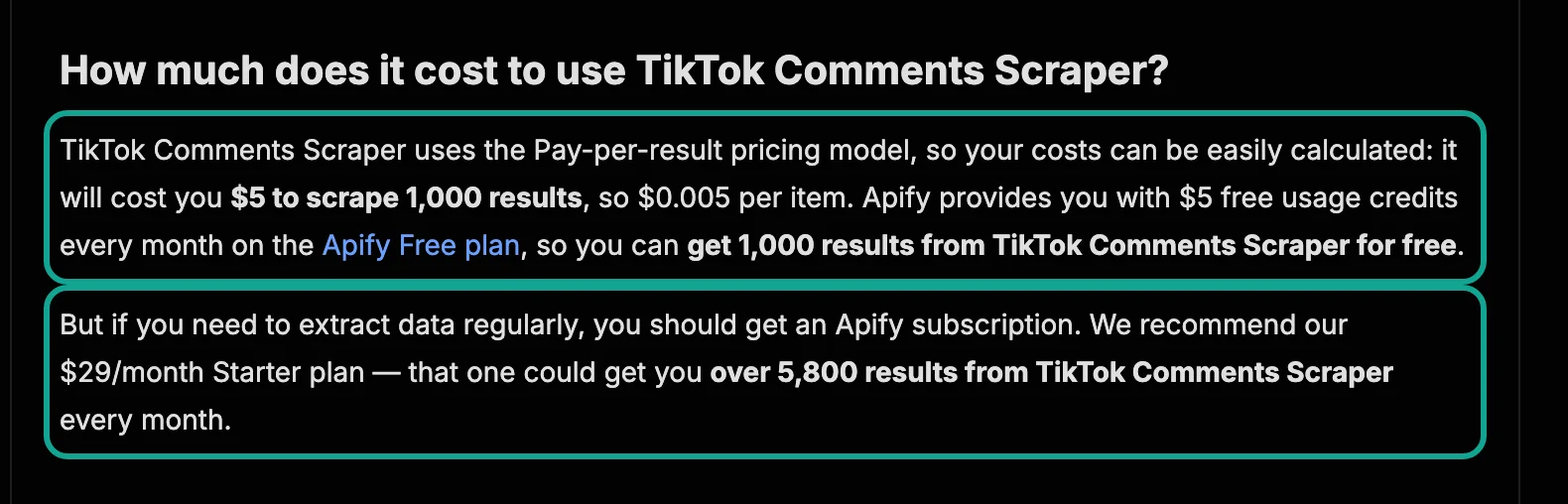
| Store page | FAQ says | Public API now (Free / Bronze) | Current price since |
|---|---|---|---|
| TikTok Comments Scraper | $5 per 1,000; Starter $29/month | $1.25 / $1.00 | 2026-03-18 |
| TikTok Profile Scraper | $5 per 1,000; Starter $29/month | $3.00 / $2.00 | 2026-06-29 |
| TikTok Hashtag Scraper | $5 per 1,000 | $3.00 / $2.00 | 2026-06-29 |
| TikTok Data Extractor | $5 per 1,000 | $3.00 / $2.00 | 2026-06-29 |
The price history in the public API explains part of this. The Profile Scraper charged $0.005 per video from March 15, 2023. That is the "$5 per 1,000" in the FAQ. It dropped to $0.004 on February 20, 2025, then moved to pay-per-event in March 2026, and then to today's price.
The FAQ never changed. The comments page does not match its history. The Comments Scraper charged $0.001 per comment from August 6, 2024, never $0.005. And the same FAQ paragraph on the Profile Scraper page says you can "get 1,000 results from TikTok Comments Scraper for free." These paragraphs look like a copied template.
What this means for you is simple. For Apify prices, read the price table on the actor page or the pricingInfos in the public API. Do not trust the FAQ sentence, or you may overstate the cost by 2 to 4 times. Our prices come from one source, the catalog's price_usd. The pricing page, the API doc pages and llms.txt are all built from it.
The same API also shows how prices move. The TikTok Scraper start fee was $0.005 per run in March 2025. It rose to $0.006 in June 2025 and fell to today's $0.001 on March 4, 2026. The Free Result price has stayed at $3.70 since June 2025.
| TikTok Scraper price version | Start fee per run | Result, Free, per 1,000 |
|---|---|---|
| From March 26, 2025 | $0.005 | $3.00 |
| From June 5, 2025 | $0.006 | $3.70 |
| From March 4, 2026 | $0.001 | $3.70 |
| From August 18, 2026 (current) | $0.001 | $3.70 |
The TikTok Search Scraper by xmolodtsov has already published its next price list in the public API (Search Scraper metadata). It starts on October 30, 2026, and users got notice on October 16, 2026. The page was last changed on October 22, 2026. The per-post price stays the same on the Free to Business tiers.
Two new add-ons arrive, comments and author profiles, at $1.00 and $0.75 per 1,000 on Free. So Store prices change every month or two. Compare on the day's API data.
Result limits and paging: how much each side can return
| Data | EveryInfra max per call | EveryInfra paging | Apify side (public docs) |
|---|---|---|---|
| Account videos | 50 rows (user_videos) | No cursor. Page back by date with until; 14.8% repeats in our test | resultsPerPage sets the count; pages on its own; date filter costs extra |
| Comments | 200 rows, up to 2 replies per top-level comment | None | commentsPerPost, maxRepliesPerComment; pages on its own |
| Video search | 200 rows | None | Pages on its own per keyword; sorting costs extra |
| Account search | Billed per account returned; 19 of 20 in our test | None | One result per account |
| Hashtags | 30 rows | None | 400–800 per hashtag on average (TikTok site limit) |
| Transcripts | 1 video | — | Per video plus a per-minute transcript fee |
| Followers | Follower count only (followers, exact) | — | Follower and following lists, $1.00–$4.00 per 1,000 |
You can read this table the other way round. Every "pages on its own" cell on the Apify side is depth that we do not offer. Our design is one request per page and one price per page. You get depth by sending more requests, at a low unit price. Apify's design is one run until it reaches your row count, at one price per row. You do not manage depth, but the unit price is higher.
Which one is cheaper depends on the job. Do you want "the latest page for many targets," or "the full history for a few targets"? For the first, we are tens to thousands of times cheaper. For the second, Apify is easier. With us you must stitch dates together, and you may miss the earliest part of a busy day on a high-volume account.
Break-even: when per-row pricing wins
There is a simple way to see the line between the two models. Our call costs $0.000556. An Apify actor costs its per-row price for each row. Divide our call price by the Apify per-row price, and you get the break-even rows per call. If our call returns more rows than that, we are cheaper. If it returns fewer, the per-row actor is cheaper.
| Apify price per 1,000 | Example | Break-even rows per call | What it means |
|---|---|---|---|
| $3.70 | TikTok Scraper, Free | 0.15 | Any call with one row is cheaper with us |
| $1.70 | TikTok Scraper, Business | 0.33 | Any call with one row is cheaper with us |
| $1.00 | Profile or Video Scraper, Business | 0.56 | Any call with one row is cheaper with us |
| $0.50 | Comments Scraper, Business | 1.1 | We need 2 rows per call to win |
| $0.30 | API Dojo, or Diamond tier | 1.85 | We need 2 rows per call to win |
| $0.15 | Comments Scraper, Diamond | 3.7 | We need 4 rows per call to win |
This table explains every result above. Profiles and single videos return one row, so we lose to the $0.30 actors and to Diamond. Comments, search, hashtags and account feeds return 17 to 200 rows, so we win by a wide margin, even against Diamond. Before you switch, count your typical rows per call. That number decides the answer, more than any headline price.
The monthly bill: five common TikTok jobs
We priced five common jobs over one month (30 days). For Apify, we picked the cheapest plan that holds the usage. Cost = max(plan fee, rows × that tier's price), and the Free plan counts only while usage stays at or below $5. A daily run adds the $0.001 start fee. We did not add proxy, storage or other platform usage. For EveryInfra, cost = calls × $0.000556.
| One month of work | Rows | Apify, cheapest plan | EveryInfra (calls) |
|---|---|---|---|
| 100 brand accounts, latest 10 videos each, daily | 30,000 | $90.03 (Starter) | $1.67 (3,000 calls) |
| 200 videos, 200 comments each | 40,000 | $40.00 (Starter) | $0.11 (200 calls) |
| 20 hashtags, 30 videos each, daily | 18,000 | $36.00 (Starter) | $0.33 (600 calls) |
| 10 keywords, 200 videos each, daily | 60,000 | $180.03 (Starter) | $0.17 (300 calls) |
| Same, with xmolodtsov's Search Scraper | 60,000 | $19.00 (Starter) | $0.17 (300 calls) |
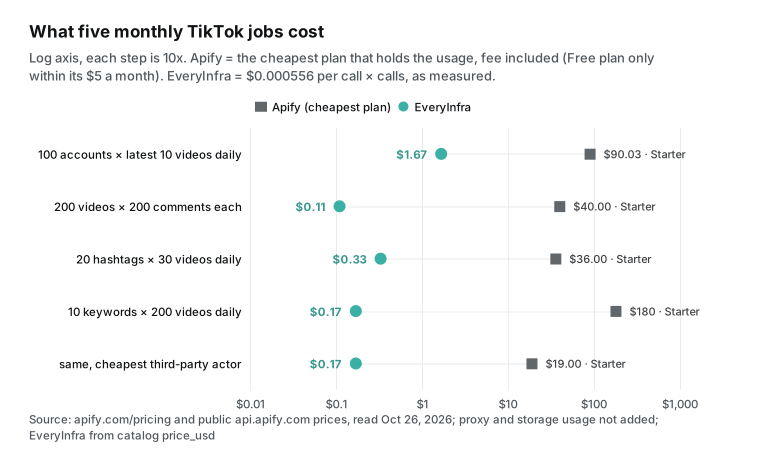
The first row needs a note. We send one user_videos call per account at $0.000556. It returns 50 rows, and you use the latest 10. Apify charges for the 10 rows you ask for. So our price per 1,000 rows in this job is $0.0556, not $0.0111. That is still 54 times cheaper than the $3.00 Starter tier.
The last row is the best case for Apify. The cheapest search actor in the Store needs only $15 of usage, but the Starter fee is $19, so the month costs $19. Our $0.17 is still about 114 times cheaper. One more point: this table counts only the work itself. Apify plan fees are prepaid usage.
Unused credit does not roll over and expires at the end of the billing cycle. Usage above the plan is billed as overage. The overage bill goes out at once at $20 on Starter or $200 on higher plans (Billing docs). Our balance does not expire (pricing page).
Apify TikTok Scraper API vs the EveryInfra API: code, n8n and AI clients
Both sides have an API. On Apify you start a run and then read its dataset. Results land in the run's dataset, and unnamed datasets expire after 7 days (Dataset). There is also a sync endpoint, and a run longer than 300 seconds returns a 408 timeout (Run Actor synchronously docs).
On EveryInfra one request returns one page. The sync limit is 85 seconds. For slow calls, add "mode": "async", take the job_id and poll. Here is the search call from this article:
curl -s https://api.everyinfra.com/api/v1/social \
  -H "Authorization: Bearer $EVERYINFRA_API_KEY" \
  -H "Content-Type: application/json" \
  -d '{"platform":"tiktok","action":"search","mode":"async","params":{"keyword":"skincare routine","limit":200}}'
# Returns 202 and a job_id; then GET https://api.everyinfra.com/api/v1/jobs/<job_id> for the rows
The video capabilities (search, user_videos, video and hashtag) return the same 36 fields. They match the catalog's response_fields one for one:
| Field | Meaning | What we saw |
|---|---|---|
id, url, text | Video ID, link, caption | 200 search rows had 200 distinct IDs |
view_count, like_count, comment_count, share_count, collect_count, repost_count | Views, likes, comments, shares, saves, reposts | Median search views 377,550 |
posted_at, duration_sec | Post time (UTC), length in seconds | The transcript video was 86 seconds |
hashtags, music, language, country | Hashtags, background music, language, country | 168 English rows in the search |
is_ad, is_sponsored, is_pinned, is_slideshow, has_shop_product | Ad, sponsored, pinned, photo slideshow, shop product | 38 ads in the search; 3 pinned on NBA page 1 |
author_* (11 fields) | Author username, followers, verified, seller and more | Account search relies on these fields |
cover_image_url | Cover image (signed link that expires) | Download it if you need to keep it |
Comments (comments) return 12 fields: id, text, author_username, author_id, like_count, reply_count, reply_to_id, is_reply, liked_by_author, pinned_by_author, posted_at and platform. All 12 appeared in our 200 rows.
In AI clients, EveryInfra is a remote MCP server. MCP is the Model Context Protocol, which AI clients use to call outside tools (specification 2025-06-18). All tool names start with everyinfra_. Add this config:
{
  "mcpServers": {
    "everyinfra": {
      "url": "https://api.everyinfra.com/mcp",
      "headers": { "Authorization": "Bearer ${env:EVERYINFRA_API_KEY}" }
    }
  }
}
Then you can ask: "Use EveryInfra to search TikTok for 200 'skincare routine' videos, drop the ads, and rank the top 20 by views." Apify has its own MCP server at mcp.apify.com. It recommends OAuth sign-in. The model can search the Store for an actor and then run it (Apify MCP server, source on GitHub). When the model searches, Apify ranks actors by a quality score (Actor quality score), not by price. So a model that picks for itself may not pick the cheapest actor.
Both feel similar inside an AI client. The difference is still the bill. When the model pulls more pages, Apify adds per row and we add per call. For setup, see our posts on using MCP in Cursor for TikTok, Instagram and Amazon data and checking a remote MCP setup.
In n8n, Apify keeps its own community node (n8n-nodes-apify). You install it, sign in with an API token or OAuth, pick "Run Actor" and paste the JSON input (Apify n8n integration). With us you need no extra node. One HTTP Request node with the URL and body above is enough. For a full daily report flow, see a daily report with n8n and EveryInfra.
On Reddit, one user built "Apify + n8n + Google Sheets" to collect top TikTok videos, sounds and accounts each week with no code. They found Apify very expensive and asked if the same tool could be free (r/n8n). By the fourth row of our monthly table, the same job on per-call pricing costs cents a month.
Switching from Apify: five things to change
Once the prices are clear, engineering details decide the cost of a switch. Picture a team that already runs TikTok monitoring on Apify. A move to per-request pricing changes five things.
First, the unit of work. An Apify actor usually takes a batch of inputs, runs once, and writes results to a dataset. One run can cover hundreds of accounts and dozens of hashtags. We work as "one target, one request." Your loop changes from "start one run" to "send one request per account, video or keyword." Set limit to the catalog's max_limit. If each call returns only a few rows, you pay for many extra calls.
Second, paging. On Apify, resultsPerPage and commentsPerPost let the actor page for you. With us, you stitch account videos together by date with until and remove repeats by id. On a busy account, the part of a day beyond 50 videos may be out of reach. Comments have no paging, so a popular video gives you only the latest 200 or so.
Third, fields. Our field names use one snake_case style (view_count, posted_at, author_username), and times are ISO strings with a time zone. Your cleanup scripts for Apify datasets need a new field map. Build it from the catalog's response_fields, not from memory.
Fourth, errors. On Apify, an error is an item with errorCode in the dataset, and you filter it out of the results. With us, an error is an HTTP status plus error.code. A 401, 422 or 429 is not charged. An empty result shows empty_result_refunded in billing.reason.
Fifth, scheduling and rate limits. Apify has built-in schedules and webhooks. With us, you schedule calls yourself with cron, n8n or a cloud function. Each account gets 60 calls a minute by default, shared by all of its keys. At $50, $150 and $750 of total top-ups, the limit goes up to 180, 600 and 1,800 calls a minute. You can also buy a 30-day rate package (pricing page).
The second point is the one most likely to make you stay. Say your report needs "every video from one account in the past year" or "all comments on one viral video." Then stitching pages by date is slow and has gaps, and Apify's automatic paging fits better. Say instead that your report is "today's latest content for these accounts, hashtags and keywords." Then all five changes are one-time work. After that, the monthly bill drops from tens or hundreds of dollars to one or two.
How we checked these numbers
Every number goes back to a raw response. First, we did not copy Apify prices from pages. We read the last live version of pricingInfos in the public API and wrote down each event at all six tiers. Then we compared that with the page price table and the FAQ. The mismatches became the table above.
Second, our charged amount for each call comes from billing.charged_usd in the response. The two async jobs (search and comments) have no amount in the response. For those, we looked up the request ID in the console call log. Both showed $0.000556.
Third, we counted rows as the length of the results array, not the count field. The two agreed on all calls. Fourth, we computed paging repeats by video id, pinned videos included.
Fifth, one script computes every gap, price per 1,000 and monthly cost from the raw responses. The chart script reads that output directly, and we checked each chart number against the text. We also state what we did not do. We did not sign up for Apify or run any of its actors. So the Apify side has listed unit prices only, with no measured bills, success rates or data quality.
When Apify is the better choice
A price comparison can easily show only the parts that favor the author. Here are seven cases where Apify fits better, or where we cannot do the job.
- You need the full history of one account, or every comment and reply on one video. Apify actors page on their own and bill per row. We return 50 videos or 200 comments per call, comments have no paging, and replies stop at two.
- You need follower or following lists. Apify's TikTok Scraper has a follower add-on, and there is a dedicated TikTok Followers Scraper. Our
followersreturns the count only, not the list. - You need video files, covers, avatars or AI video summaries. These are Apify add-ons, and our catalog does not have them.
- You need other TikTok pages: sounds, the Explore page, the ad library or shop reviews. A search for "tiktok" in the public Store API returns 3,248 results. We read it at 17:04 Singapore time on Oct 26, 2026 (Store search). That is far wider than our 10 capabilities.
- You need hundreds of videos for one hashtag. Apify gets 400 to 800 on average, and we return 30 per call.
- You look up single targets in volume. Profiles and single videos are one-row data. For them, API Dojo's $0.30 per 1,000 and the Diamond tier's $0.30 both beat our $0.556.
- You do not write code. You want to click "Start" on a web page, export to Excel, and connect ready-made automation and cloud-storage integrations. Apify's console, schedules and integrations are more complete (Schedules, Webhooks). It also runs more jobs at once: up to 256 concurrent runs on Business. For Free, the pricing page says 5 and the limits doc says 25 (Platform limits).
Our best cases are just as clear. We fit when you have many targets and need only the latest page of each: brand monitoring, competitor content, daily hashtag reports and comment sentiment. We also fit when an AI tool calls the data on its own. And we fit when you want "no data, no charge" as a fixed rule. You can see that rule, with the refund reason, in each response.
Compliance: public data, platform terms and research APIs
TikTok's US Terms of Service were updated on July 15, 2026. The contracting party is now TikTok USDS Joint Venture LLC. The terms forbid any automated system or bot that scrapes or exports data from the platform. TikTok can approve an exception in writing (TikTok US Terms of Service). The terms for the European Economic Area have the same limit (TikTok EEA terms). TikTok also wrote on its privacy blog about how it fights unauthorized scraping (How we combat scraping).
Apify's pages say that its TikTok scrapers take only what users chose to make public, and no private data such as email, gender or location. They add that results may still hold personal data under laws such as the GDPR, and that you should ask a lawyer when unsure. The same applies to us. We read public pages only. Private accounts are out of reach, and the is_private field shows them.
TikTok's help center says that only approved followers can see a private account's videos (public or private accounts). Usernames and comment text in the results are personal data. In the EU they fall under the GDPR (Regulation (EU) 2016/679). Store and use them under the law where you operate. This article is not legal advice.
The official routes are narrow. TikTok's Research API is open only to eligible academic and non-profit research groups. Approval usually takes about four weeks. The comments endpoint returns at most 100 rows per call.
The codebook defines the fields (Research Tools, Research API FAQ, Codebook, Query Video Comments). The last entry in TikTok's developer changelog is from August 25, 2026, and it covers Data Portability API setup. Nothing there opens public data to third parties (Developer Changelog).
In the EU, Article 40 of the Digital Services Act lets vetted researchers ask for platform data. The Commission adopted the delegated act with the procedure on July 1, 2025 (DSA, Delegated Regulation 2025/2050). But the NGO AlgorithmWatch wrote on October 2, 2026, that Article 40.4 had 77 applications in its first nine months, up to July 2026. None is known to have worked (DSA Observatory).
Two other developer APIs do not help with this comparison. The Display API reads a user's own profile and videos after that user signs in. It exists to show a creator's own work on your site (Display API, updated August 4, 2026). The Commercial Content API covers the ad library only, with ads from EU countries for now.
Approval takes one to two weeks (Commercial Content API). A business team that needs other people's public videos and comments cannot use these routes. That is why a search for "tiktok" in the Apify Store returns more than three thousand results.
Recent changes (September–October 2026)
| Date | Event | What it means for you |
|---|---|---|
| Oct 30, 2026 (announced) | New prices for the xmolodtsov TikTok Search Scraper: same per-post price, plus two new add-ons for comments and author profiles. Users got notice on Oct 16. | Even cheap actors now split one result into several charges. Price the add-ons before you turn one on. |
| Oct 26, 2026 | The 9 Clockworks TikTok scrapers we read all show modifiedAt 09:02 UTC on Oct 26, two minutes before our read. | Input formats and prices can change at any time. Compare with the day's public API data. |
| Oct 23, 2026 | On October 23, 2026, CNBC reported that TikTok USDS Joint Venture wants several gigawatts of compute, about 4 GW by the early 2030s, with Oracle as its main cloud (CNBC). | The US platform now runs under a new entity. Terms, page layout and anti-bot rules may change with it. |
| Oct 7, 2026 | On October 7, 2026, Blotato counted 130 API changes on 10 platforms. TikTok published no breaking change with both an announcement date and an effective date (Social Media API Report). | TikTok changes usually come without notice. Your pipeline needs alerts on failures, not just on run status. |
| Oct 2, 2026 | AlgorithmWatch: 77 DSA Article 40.4 applications, no known success (DSA Observatory). | Official research access will not replace commercial data APIs soon. |
| Aug 31, 2026 | A developer with 51 scrapers on Apify listed four ways his actors charged for empty results (dev.to). | If you use pay-per-event actors, check the event counts in run details from time to time. |
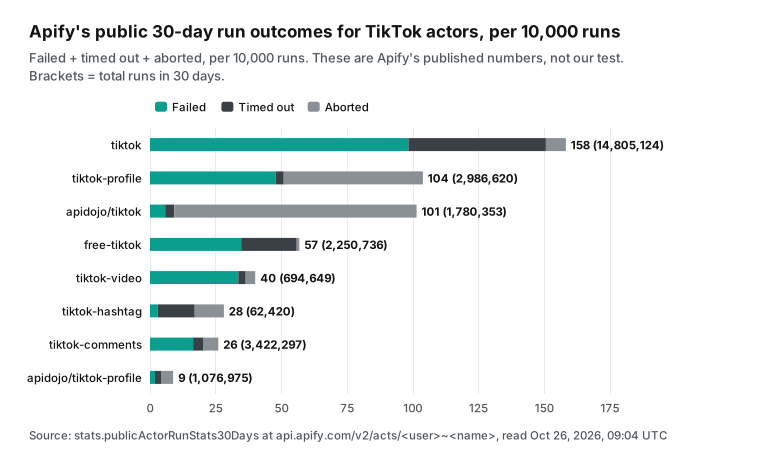
This chart shows Apify's own public 30-day run stats (publicActorRunStats30Days in the same public API), not our tests. Failed (FAILED), timed out (TIMED-OUT) and aborted (ABORTED) are terminal run states, as defined in Actor runs and builds. The TikTok Scraper ran 14.8 million times in 30 days. Per 10,000 runs, 98 failed, 52 timed out and 8 were aborted, about 1.6% in total.
For pay-per-event users this rate matters little, because a failed run usually produces no result events. It mostly shows that TikTok scraping is unstable for everyone, and every provider must handle retries. The same developer warns that a "succeeded" run status does not mean you got data (dev.to). That is why our comparison looks only at rows returned and money charged.
Getting started: from one trial call to a daily job
Step 1: sign up and get an API key. Star everyinfra-agent-plugins on GitHub, and you can claim a $1 trial credit in the console. It is valid for 24 hours. At $0.000556 per TikTok call, that is about 1,800 calls. Paid top-ups start at $10, and the balance does not expire (quickstart, pricing page).
Step 2: open the doc page of a capability. Run it once with the one-click trial on that page. Good first pages are TikTok search and TikTok comments. Then try TikTok account videos and TikTok hashtags.
Step 3: read charged_usd and the row count in the response. Compute "charged ÷ rows × 1,000" for your own job, and compare it with your current bill. All 10 TikTok capabilities are on the TikTok data API page. You can also compare the Instagram data API and the YouTube data API, or browse by platform in the data market. If you already run Instagram or Google Maps jobs on Apify, see our Apify alternatives overview and Apify Instagram Scraper alternative. All comparison pages are at /alternatives.
FAQ
What is the Apify TikTok Scraper price?
This question comes from the Google suggestion "apify tiktok scraper price". We read the public API on Oct 26, 2026. The Clockworks TikTok Scraper costs $3.70 per 1,000 results on Free and $3.00 on Starter. It costs $2.30 on Scale and $1.70 on Business. The Enterprise Diamond tier is $0.50.
Each run adds $0.001. Add-ons such as the date filter, sorting and video download each add $0.17 to $1.30 per 1,000. Plan fees are on top: Starter $19, Scale $199 and Business $999 a month (TikTok Scraper metadata, Apify pricing). Our tiktok/search costs $0.000556 per call for up to 200 rows.
Can the Apify TikTok Scraper get comments, and how are comments billed?
This question comes from the suggestions "apify tiktok scraper comments" and "apify scrape tiktok comments." Yes. Use the TikTok Comments Scraper, or turn on the comments add-on in the TikTok Scraper. The Comments Scraper costs $1.25 per 1,000 comments on Free and $0.50 on Business. You set the comments per video and the replies per comment.
Its FAQ line "$5 per 1,000" is an old price, so trust the price table (see the screenshot above). Our tiktok/comments returns up to 200 rows per call with up to 2 replies per top-level comment. In our tests it cost $0.0028 to $0.0327 per 1,000, depending on how many comments the video had.
Can the Apify TikTok Profile Scraper return only profile data?
This question comes from the suggestion "apify tiktok profile scraper." The Clockworks Profile Scraper returns video records with the account data inside each video. So one account costs at least one result, $1.00 per 1,000 on Business. The API Dojo actor costs $0.30 per post, but it wants at least 10 posts per account. Our tiktok/profile costs $0.000556 per account.
For an exact follower count, use tiktok/followers at the same price. For bulk lookups of single accounts with posts, API Dojo is cheaper. For profile data without videos, we are cheaper.
Is there a free TikTok scraper API?
This question comes from the suggestion "tiktok scraper api free." Only two routes are free. One is TikTok's Research API, open only to eligible academic and non-profit groups. The other is to write your own scraper and handle proxies, layout changes and blocks yourself. The Apify Free plan gives $5 of usage a month.
At the TikTok Scraper Free price of $3.70 per 1,000, that is about 1,350 results. API Dojo's TikTok Scraper gives Free-plan users 5 runs a month with 10 items each (API Dojo page). EveryInfra has no monthly free credit. A GitHub star gives a one-time $1, about 1,800 TikTok calls, which is over 300,000 videos at 200 per search.
Is it legal to scrape TikTok?
This question comes from the suggestions "is it legal to scrape tiktok" and "is it legal to scrape tiktok comments." TikTok's terms forbid automated scraping without permission. In many places, scraping public data is not illegal by default. But data protection laws such as the EU GDPR still apply. Apify's pages say the same.
Our advice: take public content only and skip private accounts. Treat usernames and comment text as personal data. Set purpose and retention under local law, and ask a lawyer when unsure. This article is not legal advice.
Apify is too expensive for my n8n workflow. Is there a cheaper option?
This question comes from two Reddit r/n8n threads. One user collects top TikTok videos, sounds and accounts weekly with Apify and n8n, finds Apify very expensive, and asks for a free way. Another wants a low-cost way to collect viral TikTok and Instagram content "without Apify" (thread one, thread two). By our monthly table, "10 keywords, 200 videos each, daily" costs $19 to $180 a month on Apify's cheapest plan, and about $0.17 on a per-call API. In n8n one HTTP Request node is enough. Note that we do not have trending sounds or the Explore page, so that part still needs Apify.
Why is the gap hundreds of times for some TikTok data and only 2x for others?
This question comes from our own tests. The big gaps are on data that comes back in batches: comments, search, hashtags and account videos. One call has one price, so more rows mean a lower unit price. The small gaps, or the cases where Apify wins, are on one-row data: profiles, single videos, and account search billed per account.
There both sides charge one price per row. So before you compare, check which kind your job is. Many targets with one page each favor per-call pricing. A few targets with row-by-row lookups or full history do not always lose on per-row pricing.
References
- TikTok Scraper (Store page, input, error codes), Apify / Clockworks, read Oct 26, 2026. https://apify.com/clockworks/tiktok-scraper
- TikTok Scraper public metadata (pricingInfos, stats), Apify API, read 17:04 SGT on Oct 26, 2026. https://api.apify.com/v2/acts/clockworks~tiktok-scraper
- TikTok Comments Scraper (Store page, FAQ price paragraphs, error codes), Apify / Clockworks, screenshot at 17:21 SGT on Oct 26, 2026. https://apify.com/clockworks/tiktok-comments-scraper
- TikTok Comments Scraper public metadata, Apify API, read Oct 26, 2026. https://api.apify.com/v2/acts/clockworks~tiktok-comments-scraper
- TikTok Profile Scraper, Apify / Clockworks, read Oct 26, 2026. https://apify.com/clockworks/tiktok-profile-scraper
- TikTok Profile Scraper public metadata, Apify API, read Oct 26, 2026. https://api.apify.com/v2/acts/clockworks~tiktok-profile-scraper
- TikTok Hashtag Scraper (FAQ: 400–800 results per hashtag), Apify / Clockworks, read Oct 26, 2026. https://apify.com/clockworks/tiktok-hashtag-scraper
- TikTok Video Scraper, Apify / Clockworks, read Oct 26, 2026. https://apify.com/clockworks/tiktok-video-scraper
- TikTok User Search Scraper, Apify / Clockworks, read Oct 26, 2026. https://apify.com/clockworks/tiktok-user-search-scraper
- TikTok Transcript Extractor, Apify / Clockworks, read Oct 26, 2026. https://apify.com/clockworks/tiktok-transcript-extractor
- TikTok Followers Scraper, Apify / Clockworks, read Oct 26, 2026. https://apify.com/clockworks/tiktok-followers-scraper
- Tiktok Scraper (Pay Per Result), Apify / API Dojo, read Oct 26, 2026. https://apify.com/apidojo/tiktok-scraper
- Tiktok Profile Scraper (Pay Per Result), Apify / API Dojo, read Oct 26, 2026. https://apify.com/apidojo/tiktok-profile-scraper
- TikTok Search Scraper, Apify / xmolodtsov, read Oct 26, 2026. https://apify.com/xmolodtsov/tiktok-search-scraper
- TikTok Search Scraper public metadata (with prices from Oct 30, 2026), Apify API, read Oct 26, 2026. https://api.apify.com/v2/acts/xmolodtsov~tiktok-search-scraper
- Apify Store search for "tiktok", Apify API, read 17:04 SGT on Oct 26, 2026. https://api.apify.com/v2/store?search=tiktok
- Apify pricing (plans, compute, proxy, storage), Apify, read Oct 26, 2026. https://apify.com/pricing
- Actors in Store (pricing models, Store discounts), Apify docs. https://docs.apify.com/platform/actors/running/actors-in-store
- Pay-per-event pricing model (synthetic events, charging for invalid input), Apify docs. https://docs.apify.com/actors/publishing/monetize/pay-per-event
- Actor pricing and costs (discount tiers, Enterprise tiers), Apify docs. https://docs.apify.com/platform/actors/publishing/monetize/pricing-and-costs
- Run Actor synchronously and get dataset items (300-second timeout, maxItems, maxTotalChargeUsd), Apify docs. https://docs.apify.com/api/v2/act-run-sync-get-dataset-items-post
- Apify MCP server, Apify docs. https://docs.apify.com/platform/integrations/mcp
- apify-mcp-server, GitHub. https://github.com/apify/apify-mcp-server
- n8n integration, Apify docs. https://docs.apify.com/platform/integrations/n8n
- Schedules, Apify docs. https://docs.apify.com/platform/schedules
- Webhooks, Apify docs. https://docs.apify.com/platform/integrations/webhooks
- Get Actor endpoint, Apify docs. https://docs.apify.com/api/v2/actor-get
- Usage and resources, Apify docs. https://docs.apify.com/platform/actors/running/usage-and-resources
- Platform limits, Apify docs. https://docs.apify.com/platform/limits
- Dataset (retention, export), Apify docs. https://docs.apify.com/platform/storage/dataset
- Track the number of apify-default-dataset-item events, GitHub apify-sdk-js #523. https://github.com/apify/apify-sdk-js/issues/523
- Apify pay-per-event billing: four ways I charged users for nothing, dev.to, Aug 31, 2026. https://dev.to/apify/apify-pay-per-event-billing-four-ways-i-charged-users-for-nothing-9m1
- TikTok US Terms of Service, TikTok USDS Joint Venture, updated Jul 15, 2026. https://www.tiktok.com/legal/page/us/terms-of-service/en
- TikTok EEA Terms of Service, TikTok. https://www.tiktok.com/legal/page/eea/terms-of-service/en
- How we combat unauthorized data scraping of TikTok, TikTok privacy blog. https://www.tiktok.com/privacy/blog/how-we-combat-scraping/en
- TikTok Research Tools: Access and Eligibility, TikTok for Developers. https://developers.tiktok.com/products/research-api/
- Query Video Comments (max_count up to 100), TikTok for Developers. https://developers.tiktok.com/doc/research-api-specs-query-video-comments
- Research API FAQ, TikTok for Developers. https://developers.tiktok.com/docs/en/research-api-faq
- Developer Changelog, TikTok for Developers, updated Aug 26, 2026. https://developers.tiktok.com/docs/en/changelog
- Regulation (EU) 2022/2065 (Digital Services Act), EUR-Lex. https://eur-lex.europa.eu/eli/reg/2022/2065/oj
- Commission Delegated Regulation (EU) 2025/2050 (data access for vetted researchers), EUR-Lex, Jul 1, 2025. https://eur-lex.europa.eu/eli/reg_del/2025/2050/oj
- Two Stories of DSA Data (Non)-Access from an NGO perspective, DSA Observatory, Oct 2, 2026. https://dsa-observatory.eu/2026/10/02/two-stories-of-dsa-data-non-access-from-an-ngo-perspective/
- TikTok U.S. hunts for multiple gigawatts of compute, CNBC, Oct 23, 2026. https://www.cnbc.com/2026/10/23/tiktok-us-compute-capacity.html
- Social Media API Report 2026, Blotato, Oct 7, 2026. https://www.blotato.com/research/social-media-api-report
- tiktok data scraper using n8n FREE alternative, Reddit r/n8n. https://www.reddit.com/r/n8n/comments/1rqth3s/tiktok_data_scraper_using_n8n_free_alternative/
- Looking for a low-cost way to scrape viral TikTok / Instagram content (without Apify), Reddit r/n8n. https://www.reddit.com/r/n8n/comments/1q8m6rb/looking_for_a_lowcost_way_to_scrape_viral_tiktok/
- EveryInfra capability catalog (price_usd, max_limit, response_fields), read Oct 26, 2026. https://api.everyinfra.com/api/v1/social/catalog
- EveryInfra llms.txt (failed calls and empty results are not charged). https://api.everyinfra.com/llms.txt
- Model Context Protocol specification 2025-06-18. https://modelcontextprotocol.io/specification/2025-06-18
- Display API Overview, TikTok for Developers, updated Aug 4, 2026. https://developers.tiktok.com/doc/display-api-overview
- Commercial Content API Overview, TikTok for Developers. https://developers.tiktok.com/products/commercial-content-api
- Research API Codebook, TikTok for Developers. https://developers.tiktok.com/doc/research-api-codebook
- Making your account public or private, TikTok Help Center. https://support.tiktok.com/en/account-and-privacy/account-privacy-settings/making-your-account-public-or-private
- Regulation (EU) 2016/679 (GDPR), EUR-Lex. https://eur-lex.europa.eu/eli/reg/2016/679/oj
- Get run endpoint (chargedEventCounts), Apify docs. https://docs.apify.com/api/v2/actor-run-get
- Pay-per-event monetization (SDK charging log), Apify SDK for JavaScript docs. https://docs.apify.com/sdk/js/docs/concepts/pay-per-event
- Actor quality score, Apify docs. https://docs.apify.com/platform/actors/publishing/quality-score
- Actor runs and builds (run states), Apify docs. https://docs.apify.com/platform/actors/running/runs-and-builds
- Billing (prepaid usage does not roll over, overage invoicing), Apify docs. https://docs.apify.com/platform/console/billing
- Residential proxy, Apify docs. https://docs.apify.com/platform/proxy/residential-proxy
- n8n-nodes-apify, GitHub. https://github.com/apify/n8n-nodes-apify
Reference BL-51