Apify n8n alternative: one workflow, two bills
In n8n, Apify bills per row and EveryInfra bills per call. Full pages cost 29x to 360x less per 1,000 rows. Small daily runs fit in the Apify free credit.
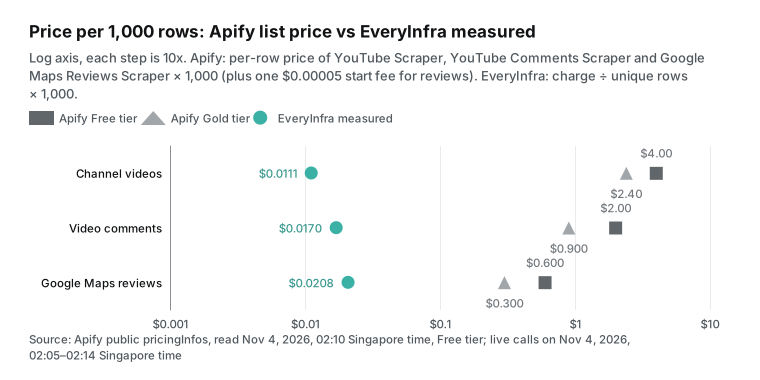
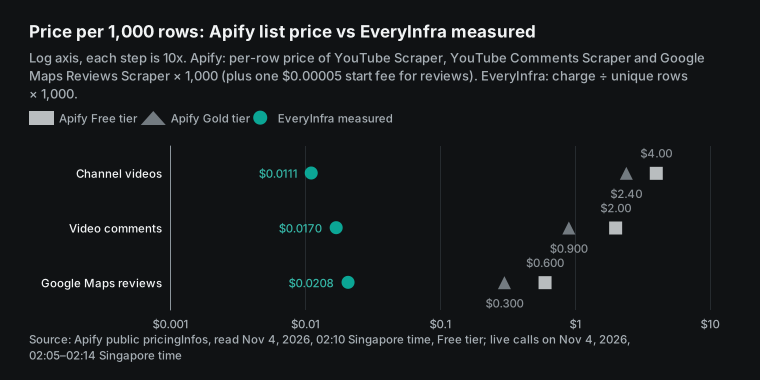
We built one n8n workflow on paper and priced it two ways. Each morning it gets new YouTube videos and comments from three competitors, plus new Google Maps reviews for their stores. With the Apify n8n node, the public Store prices are $4.00 per 1,000 channel videos, $2.00 per 1,000 comments and $0.60 per 1,000 map reviews. On Nov 4, 2026, we sent the same requests that an n8n HTTP Request node sends to EveryInfra, 17 times. We paid $0.0111, $0.0170 and $0.0208 per 1,000 rows. That is 360x, 118x and 29x less.
The gap comes from the billing unit. Apify Store scrapers (Apify calls them actors) charge for each row that goes into the dataset. EveryInfra charges for each request, and one request returns up to 50 or 100 rows. A request that returns 0 rows is refunded.
The ratio is not fixed, though. When you pull only new rows each day and a call returns one or two map reviews, Apify is cheaper. Also, the newest map review we got was from Oct 20, while the Apify review scraper reads the live page on each run. At the measured rates, this workflow for 3 channels and 3 stores costs about $0.43 a month on Apify. The first backfill costs about $3.28. Both fit inside the $5 monthly credit of the Apify Free plan, so you pay nothing there.
One more note before you start. All n8n node settings in this article are configuration examples based on the official docs. We did not run them in n8n. The API calls are real, and the responses and charges come from the raw replies. This article shows the node setup, the live calls, the daily and monthly cost, and the cases where Apify is the better choice.
Here is how we define "price per 1,000 rows". We take the money that was charged, divide it by the number of unique rows (deduplicated by id), and multiply by 1,000. It answers one question: how much do you pay a data service to get 1,000 rows into n8n? The n8n cost is the same on both sides, so we leave it out. Self-hosted Community Edition is free. n8n Cloud bills by workflow executions, and the n8n pricing page lists Starter at 20 euros a month, billed yearly, with 2,500 executions.
For Apify, we use only public material. That includes Store pages, the pricing page, the docs, and the public actor metadata endpoint that needs no account (Get Actor docs). We read it on Nov 4, 2026, at 02:10 Singapore time. We did not sign up for Apify or run its actors. So every Apify number is a list price times a row count, not a real invoice. Every EveryInfra number is a live call, and the charge comes from billing.charged_usd in the response.
Summary table: Apify n8n node vs an HTTP Request to EveryInfra, per 1,000 rows
This table is the result. For each data type, the Apify column uses the scraper with the most users in the Store. Channel videos use YouTube Scraper, with 16,846 users in the last 30 days. Comments use YouTube Comments Scraper, with 3,798 users. Map reviews use Google Maps Reviews Scraper, with 9,277 users.
We read unit prices from the pricingInfos field of the public metadata. For example, the YouTube Scraper metadata lists $0.004 per video on Free and $0.0024 on Gold. The map review scraper metadata lists $0.0006 per review on Free, plus a $0.00005 start fee per run. EveryInfra prices come from price_usd in the free catalog. youtube/user_posts and youtube/comments cost $0.000556 per call. google_maps_reviews/reviews costs $0.001389 per call.
| Data | Apify scraper (Free tier) | Apify per 1,000 | EveryInfra capability | Live: calls / rows / unique / charged | EveryInfra per 1,000 | Ratio |
|---|---|---|---|---|---|---|
| Channel video list | YouTube Scraper, $0.004 per row | $4.00 | youtube/user_posts | 2 / 100 / 100 / $0.001112 | $0.0111 | 360x |
| Channel video list (low-cost) | Fast YouTube Channel Scraper, $0.0013 per row | $1.30 | youtube/user_posts | same | $0.0111 | 117x |
| Video comments | YouTube Comments Scraper, $0.002 per row | $2.00 | youtube/comments | 3 / 98 / 98 / $0.001668 | $0.0170 | 118x |
| Google Maps reviews | Google Maps Reviews Scraper, $0.0006 per row + $0.00005 start | $0.60 | google_maps_reviews/reviews | 3 / 288 / 200 / $0.004167 | $0.0208 | 29x |
Each ratio is the Apify price divided by our price. Keep four points in mind when you read it. First, Free is the most expensive Apify tier. On the Business plan ($999 a month), Gold-tier prices are about 45% to 60% of Free. For example, comments drop from $0.002 to $0.0009. The ratios get about half as large, but they stay above 10x.
Second, the map review row uses 200 unique rows. The third request used since to get reviews after Oct 1, and 88 of its rows repeated page one. We still counted the money for that call, so our price is too high, not too low. With pages one and two only, the price is $0.0139 per 1,000.
Third, the table compares data fees only. It leaves out n8n execution fees and Apify storage operations. Apify docs say that reading or writing a dataset after the run counts as extra platform usage (Actors in Store).
Fourth, the two sides do not return the same fields for channel videos. In our video list, the like count and comment count were empty in this test. To get them, you call youtube/video once per video. The Apify YouTube Scraper Store page says it collects likes, views and subscriber counts in one result.
How we tested and how we judged the result
Before we wrote any text, we wrote down the pass and fail rules. Each data type needed at least two live calls, spread over three or more different times. The price per 1,000 rows always uses unique rows. The Apify side uses only public list prices, with no account. If Apify is cheaper, newer or easier in any case, we say so. We also had to record at least one call that returned no data, with its charge.
All calls went to POST https://api.everyinfra.com/api/v1/social. We used a test key with a limit of 10 calls per minute, set from an environment variable. We did not install n8n on our machine. We wrote the n8n node settings as configuration examples, based on the n8n docs. An HTTP Request node sends a normal HTTPS request. So we sent the same method, URL, headers and body with curl, and the response is the one n8n gets.
| Case | Capability and parameters | Calls | Time (Singapore time, Nov 4) | What we checked |
|---|---|---|---|---|
| New competitor videos | youtube/user_posts, Starbucks, Tim Hortons, Dunkin' (two handles), Costa; sort newest, limit 50; plus since | 7 | 02:05 to 02:13 | Rows per call, whether since returns only new videos, charge for empty results |
| Comments on new videos | youtube/comments, 3 videos, sort newest, limit 100 | 3 | 02:09 to 02:12 | Rows per video, replies |
| Map reviews of competitor stores | google_maps_reviews/search to find the store, google_maps_reviews/reviews for two pages, plus two since tests | 5 | 02:10 to 02:13 | Repeats across pages, date of the newest review |
| Wrong parameters | Maps search with query instead of keyword; comment sort set to latest | 2 | 02:07 and 02:14 | Error text and charge |
In total we made 17 calls and paid $0.008892. Ten calls were charged and seven were free. One script computes every number from the raw responses. The text, the tables and the charts all use its output.
What the n8n Apify node is: a community node, two credential types, run then fetch
Many people who search "apify n8n" think n8n ships an Apify node. It does not. The Apify team publishes a community node on npm, named @apify/n8n-nodes-apify. The source is in the n8n-nodes-apify repository on GitHub.
The npm registry record shows that version 0.9.0 came out on 2026-10-22. Version 0.8.1 came out on 2026-10-12, and 0.8.0 on 2026-09-22. That is one release every two to six weeks.
The Apify n8n integration docs give two ways to install it. On self-hosted n8n, open Settings > Community Nodes, select Install, and type the package name. On n8n Cloud, search for Apify in the nodes panel and select Install node. This works only if the instance owner has turned on verified community nodes in the admin panel.
There are also two credential types. An Apify API token works on both. OAuth2 works only on n8n Cloud.
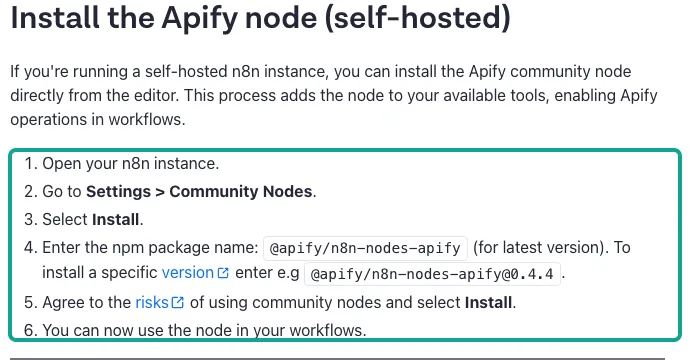
A community node has a cost of its own. The n8n page on community node risks is direct about it. A community node has full access to the machine that runs n8n. It can read the data in your workflows. A new version can break old workflows.
On self-hosted n8n, you can turn all community nodes off with N8N_COMMUNITY_PACKAGES_ENABLED=false. In many companies, an ops team runs n8n, and a new third-party package needs approval. For one person, this step is easy. For a team, it adds an approval step. HTTP Request and MCP Client are core n8n nodes, so you install nothing.
There is also n8n's own major release to watch. n8n 3.0 came out on 2026-10-27, with breaking changes (n8n 3.0 breaking changes). The GitHub releases page shows that versions 3.1.0 and 2.47.0 came out on 2026-11-03. Both include a fix for community package compatibility with the v3 node API. The Apify node package declares n8nNodesApiVersion: 1. Before you upgrade to 3.x, run the workflows that use it on a test instance.
After you install it, the Apify node works in two steps. The example in the integration docs starts with the Run Actor operation. You set Custom input (the actor's JSON input), Timeout, Memory, Build Tag and Wait for finish. Then you add a Get Dataset Items operation.
You put the defaultDatasetId from the first step into Dataset ID, and you get the rows that the run wrote. You can also use "Run an Actor and get dataset" as one step. It waits for the run to end and then returns the rows. A trigger, On new Apify event, starts a workflow when a run reaches Succeeded, Failed, Aborted or Timed Out.
| Apify node operation | What it does | Used in this workflow |
|---|---|---|
| Run an Actor | Starts an actor, can wait for it to finish | Yes, once per scraper |
| Run an Actor and get dataset | Starts, waits, returns dataset rows | Can replace the two steps |
| Get dataset items | Gets rows by Dataset ID | Yes |
| Run task / Run task and get dataset | Runs a saved task with fixed input | Optional |
| On new Apify event (trigger) | Starts an n8n workflow when a run ends | Optional, when Apify schedules the run |
| Web Fetch | Fetches one URL as Markdown and other formats, needs 0.8.0 or later | No |
If you do not want a community node, use an HTTP Request node to call the run-sync-get-dataset-items endpoint. One request starts the actor and returns the rows. One r/n8n thread is about a failed scrape. There, one user said to skip the native node and call this sync endpoint as a plain HTTP request (r/n8n thread). The endpoint has two parameters that control money.
maxItems caps how many rows a pay-per-result actor can charge. maxTotalChargeUsd caps the total charge of the run. The docs say maxItems does not limit the rows returned, only the rows charged. Set both when n8n runs Apify on a schedule.
Two plan limits also change how you build the workflow in n8n. The Apify pricing page lists 5 concurrent runs and 16 GB of RAM on Free, and 32 runs and 64 GB on Starter. Suppose you loop over 30 videos in n8n and start one comment run per video. On Free, run 6 and later must wait in a queue. If the n8n node timeout is short, a queued run times out before it starts.
The workflow then stops, and you get an error email instead of a report. So on Apify, put many URLs into one run's startUrls instead of a loop. Pay-per-usage actors also bill compute units, at $0.2 per unit on Free and Starter. All three scrapers in this article are pay-per-event, which usually includes platform usage, but check each Pricing tab.
| Apify plan (pricing page, read Nov 4, 2026) | Monthly price | Compute unit | Max concurrent runs | Actor RAM | Store discount tier |
|---|---|---|---|---|---|
| Free | $0, with $5 prepaid usage | $0.2 | 5 | 16 GB | none |
| Starter | $19 + pay as you go | $0.2 | 32 | 64 GB | Bronze |
| Scale | $199 + pay as you go | $0.16 | 128 | 256 GB | Silver |
| Business | $999 + pay as you go | $0.13 | 256 | 512 GB | Gold |
One workflow: new YouTube videos, comments and map reviews of three competitors, every morning
To compare the two sides fairly, we fix one workflow. Say you work in marketing at a coffee chain. You watch Starbucks, Tim Hortons and Dunkin'. Every morning at 8:00, the workflow gets new videos since yesterday from the three YouTube channels.
It gets the newest comments on videos from the last 7 days. It gets new Google Maps reviews for one flagship store of each brand. It writes the rows to a Google Sheet and posts a short summary to Slack. Only the data steps differ between the two sides.
| Step | n8n node | Apify way | EveryInfra way |
|---|---|---|---|
| 1 Schedule | Schedule Trigger, daily at 8:00 in your time zone | Same | Same |
| 2 New videos | Apify node or HTTP Request | Run Actor (YouTube Scraper, three channels, date filter) + Get dataset items | 3 calls to youtube/user_posts with since |
| 3 Comments | Apify node or HTTP Request, with Loop Over Items | Run Actor (YouTube Comments Scraper, many video URLs) | 1 call to youtube/comments per new video, with since |
| 4 Map reviews | Apify node or HTTP Request | Run Actor (Google Maps Reviews Scraper, three stores) | 3 calls to google_maps_reviews/reviews with since |
| 5 Clean up | Remove Duplicates or Code | Same | Same |
| 6 Sheet and alert | Google Sheets, Slack | Same | Same |
The Schedule Trigger docs point out one detail that people miss. The node uses the workflow time zone, or else the instance time zone. A self-hosted instance defaults to New York time. n8n Cloud tries to detect the owner's time zone at sign-up and falls back to GMT. If you are in Chicago and want a report at 8:00, set the workflow time zone to America/Chicago. Both sides have this issue, and it also decides which date you put in since.
On the Apify side, steps 2 to 4 can put all three channels into one run, or use one run per channel. One run is less work, but the rows from three channels share one dataset, so you must split them in step 5. One run per channel gives each run its own dataset, which is easier to debug. But the map review scraper then charges its $0.00005 start fee three times. EveryInfra has no runs and no datasets. One request is one query, and the results array is in the response, so the next node can use it at once.
Option one: a configuration example for the Apify node
Here is step 2, "new videos", as an Apify node configuration example. We did not run it. The node fields come from the Apify integration docs. The actor input fields come from the public input definition of the latest YouTube Scraper build: startUrls, maxResults and oldestPostDate.
The last one means "only scrape videos published after this date". The comment scraper uses startUrls, maxComments and oldestCommentDate. The map review scraper uses startUrls, maxReviews, reviewsSort and reviewsStartDate. So all three actors can take only new rows by date, like our since parameter.
{
  "node": "Apify",
  "resource": "Actor",
  "operation": "Run an Actor and get dataset",
  "credentials": "Apify API (token)",
  "actor": "streamers/youtube-scraper",
  "customBody": {
    "startUrls": [
      { "url": "https://www.youtube.com/@Starbucks/videos" },
      { "url": "https://www.youtube.com/@TimHortons/videos" },
      { "url": "https://www.youtube.com/@dunkin/videos" }
    ],
    "maxResults": 10,
    "oldestPostDate": "{{ $now.minus({ days: 1 }).toFormat('yyyy-MM-dd') }}"
  },
  "timeout": 300,
  "memory": 1024
}
Watch two things in this step. The first is money. The date filter for channel videos (oldestPostDate) is a separate add-on in the YouTube Scraper price list, "Date range for channels", at $0.0013 on Free. The metadata does not say what it counts. In our cost model, we charge it once per video.
That can be too high or too low, so check the Pricing tab before you rely on it. The second is time. A run starts a container, opens pages and writes a dataset. If the Timeout is shorter than the run, the node ends before it gets the data. We did not run Apify, so we do not give a duration.
Option two: an Apify alternative for n8n with the HTTP Request node
HTTP Request is a core n8n node. The docs say it can import a curl command. For credentials, use Bearer Auth or Header Auth from Generic Credential Type. The HTTP Request credentials docs say Bearer Auth is a header named Authorization with the value Bearer <token>.
Keep the EveryInfra key in the credential, not in the node fields. This curl command is step 4, "map reviews". We ran it live on Nov 4, 2026, at 02:13 Singapore time:
curl -s -X POST https://api.everyinfra.com/api/v1/social \
  -H "Authorization: Bearer $EVERYINFRA_API_KEY" \
  -H "Content-Type: application/json" \
  -d '{
    "platform": "google_maps_reviews",
    "action": "reviews",
    "params": {
      "url": "https://www.google.com/maps/search/?api=1&query=Starbucks%20Reserve%20Roastery%20New%20York&query_place_id=ChIJIQDZbb9ZwokRNRez4RviXGQ",
      "sort": "newest",
      "since": "2026-10-01",
      "limit": 100
    }
  }'
In n8n, paste it into Import cURL in the HTTP Request node. Then change since to an expression such as {{ $now.minus({ days: 1 }).toFormat('yyyy-MM-dd') }}. Now the node gets only reviews since yesterday. The response looks like this. It is an excerpt of the raw response from this call, with the review text and reviewer names removed:
{
  "platform": "google_maps_reviews",
  "action": "reviews",
  "count": 88,
  "results": [
    {
      "id": "…",
      "rating": 5,
      "posted_at": "2026-10-20T20:05:52.046000+00:00",
      "reviewer_review_count": 11,
      "is_local_guide": true,
      "place_name": "Starbucks Reserve Roastery New York",
      "platform": "google_maps_reviews"
    }
  ],
  "billing": { "charged": true, "charged_usd": 0.001389 }
}
In the next node, use Split Out on results to get one item per review. Then write the items to Google Sheets. The fields match response_fields in the catalog. Map reviews have 18 fields, such as id, text, rating, posted_at, owner_response, owner_response_at, detailed_rating, image_urls, place_id and place_name (capability page). YouTube comments have 9 fields: id, text, author_name, like_count, reply_count, posted_at, is_reply, reply_to_id and platform (capability page). Channel videos have 25 fields, such as title, view_count, duration, posted_at and description_links (capability page).
We suggest two node settings. First, set Timeout in Options to 120 seconds or more. The slowest Maps search took 76.3 seconds. In this test, the slowest youtube/user_posts call took 69.6 seconds. Second, when one workflow sends many requests, turn on Batching and wait a few seconds between batches. This keeps you under the per-minute limit of your key.
Option three: the MCP Client node with https://api.everyinfra.com/mcp
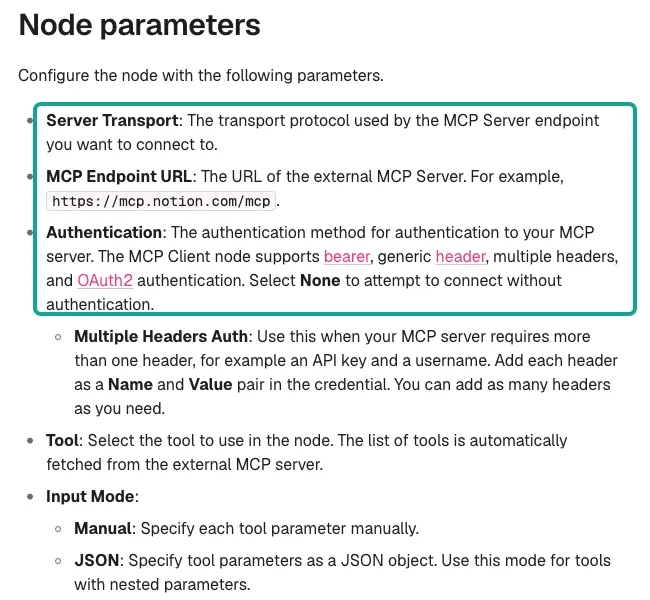
n8n now has two MCP nodes. The MCP Client node uses MCP server tools as normal workflow steps. You set Server Transport, MCP Endpoint URL and Authentication. Authentication supports Bearer, a generic header, multiple headers and OAuth2.
Then you pick one tool in the Tool list and fill its parameters in Manual or JSON mode. The MCP Client Tool node attaches to an AI Agent node. The model then picks which tool to call, and Tools to Include limits the tools it can see.
Our remote MCP address is https://api.everyinfra.com/mcp. On Nov 4, 2026, at 02:13 Singapore time, we sent tools/list with no key. It returned 12 tools. everyinfra_call_api gets data, everyinfra_list_capabilities lists capabilities, and everyinfra_get_job gets the result of a slow job.
{
  "node": "MCP Client",
  "serverTransport": "HTTP Streamable",
  "endpointUrl": "https://api.everyinfra.com/mcp",
  "authentication": "Bearer Auth (credential holds EVERYINFRA_API_KEY)",
  "tool": "everyinfra_call_api",
  "inputMode": "JSON",
  "toolParameters": {
    "platform": "youtube",
    "action": "comments",
    "params": { "url": "{{ $json.url }}", "sort": "newest", "since": "{{ $now.minus({ days: 1 }).toFormat('yyyy-MM-dd') }}" }
  },
  "options": { "timeout": 90000 }
}
This is a configuration example. The option names in the Server Transport list depend on your n8n version. The MCP specification calls the remote transport Streamable HTTP (MCP transports). Our n8n daily trending report guide ran the MCP Client node on n8n 2.45.3 against our API, with screenshots and fixes. We do not repeat it here.
How to choose between the three: if the workflow is fixed and you know each call, use HTTP Request. It is the clearest, and you can see each request and response when you debug. If you want an n8n AI Agent to pick platforms and capabilities, use MCP Client Tool. If you want something in between, with less request body to write, use MCP Client.
All three use the same API at the same price. Apify also runs an MCP server at mcp.apify.com (Apify MCP docs). You can attach it to MCP Client Tool in the same way, and it bills at actor prices.
Test one: new competitor videos, data from 2 of 3 channels
The first round started on November 4, 2026, at 02:05 Singapore time. youtube/user_posts returned 50 videos for the Starbucks channel in 27.5 seconds and charged $0.000556. It returned 50 videos for Tim Hortons in 33.0 seconds, also for $0.000556. The two calls gave 100 rows with no repeats, so the price is $0.0111 per 1,000.
At the YouTube Scraper Free price of $0.004 per row, the same 100 rows cost $0.40, which is 360x more. With the cheaper Fast YouTube Channel Scraper at $0.0013 per row, 100 rows cost $0.13, which is 117x more. Our Apify YouTube Scraper comparison tests search, comments and video details one by one. Here we only look at what changes inside a scheduled n8n workflow.
The third competitor did not work. We tried two handles, @dunkin and @DunkinDonuts, at 02:06 and 02:07 Singapore time. Both returned 0 rows, in 44.4 and 69.6 seconds. The response said empty_result_refunded, and the charge was $0. We then tried Costa Coffee, @costacoffee, at 02:11 Singapore time.
It also returned 0 rows at no charge. We did not confirm the cause. The handle can be wrong, or the channel can post mostly Shorts. The catalog says youtube/user_posts lists regular videos only, and Shorts need youtube/shorts.
For n8n users, the lesson is simple. A wrong address does not make the workflow fail. It only returns an empty array. So add an IF node in step 5. If one channel returns 0 rows for several days in a row, post an alert to Slack so that someone checks the address.
The since parameter worked as expected. At 02:09 Singapore time, we sent Starbucks with since: 2026-11-03. It returned 0 rows at no charge, because the newest video on that channel was "3w ago". At 02:13 Singapore time, we sent Tim Hortons with since: 2026-10-01. It returned 2 rows for $0.000556.
One was a new product ad from 2 weeks ago. The other was a trading card ad from 1 month ago with 88,000 views. So these two large brands post only one or two regular videos a month. On most mornings, this step will be "3 calls, 0 rows, $0".
One field needs care. In this test, posted_at was relative text such as "3w ago" or "2w ago", not a date. To get the exact day, filter with since, or call youtube/video for one video.
| Call (Singapore time, Nov 4) | Channel | Parameters | Rows | Seconds | Charged |
|---|---|---|---|---|---|
| 02:05 | Starbucks | newest, limit 50 | 50 | 27.5 | $0.000556 |
| 02:06 | @dunkin | newest, limit 50 | 0 | 44.4 | $0 |
| 02:07 | Tim Hortons | newest, limit 50 | 50 | 33.0 | $0.000556 |
| 02:07 | @DunkinDonuts | newest, limit 50 | 0 | 69.6 | $0 |
| 02:09 | Starbucks | since 2026-11-03 | 0 | 43.8 | $0 |
| 02:11 | @costacoffee | newest, limit 50 | 0 | 49.3 | $0 |
| 02:13 | Tim Hortons | since 2026-10-01 | 2 | 22.1 | $0.000556 |
Test two: comments on new videos, and how many one call returns
From 02:09 to 02:12 Singapore time, we called youtube/comments once for each of three videos, with sort newest and limit 100. The Tim Hortons trading card ad returned 67 comments. The Tim Hortons product ad returned 24. The new Starbucks video returned 7. That is 98 comments in total with no repeats.
Eleven of them are replies, with is_reply set to true and reply_to_id pointing to the parent comment. The charge was $0.001668, or $0.0170 per 1,000. The calls took 19.5, 16.9 and 11.7 seconds. At the YouTube Comments Scraper Free price of $0.002 per row, the same 98 comments cost $0.196, which is 118x more.
The ratio depends on the conditions. Our comment call returns up to 100 rows. The more comments a video has, the lower our price per row. The Starbucks video had only 7 comments.
We charged $0.000556 for the call, or $0.0000794 per comment, while Apify charges $0.002 per comment. That is still 25x.
The public price of this Apify scraper has no start fee. But its README describes one case: a video that is not available or has no comments. Then it writes one item with an error field to the dataset. The public docs do not say if that item is charged. We did not run it, so we do not guess. On our side, a call with 0 rows is refunded, and the reply says empty_result_refunded.
The gap is widest for popular videos with tens or hundreds of comments. When one call returns a full 100 rows, Apify Free charges $0.20 and we charge $0.000556. The catalog lists only two optional parameters for youtube/comments, since and sort, and no page token. So for a video with thousands of comments, one call from us does not get all of them.
On Apify, you can set maxComments much higher. That is a real strength of Apify. The catalog field_note also says that when other sources are down, a fallback source returns at most 40 comments.
| Video | Comments returned | Replies among them | Seconds | Charged | Apify Free for the same rows |
|---|---|---|---|---|---|
| Tim Hortons trading card ad | 67 | 7 | 19.5 | $0.000556 | $0.134 |
| Tim Hortons product ad | 24 | 4 | 16.9 | $0.000556 | $0.048 |
| Starbucks new video | 7 | 0 | 11.7 | $0.000556 | $0.014 |
| Total | 98 | 11 | $0.001668 | $0.196 |
Test three: Google Maps reviews, no repeats across pages, but the newest is from Oct 20
For map reviews, you first need the store URL. At 02:07 Singapore time, our first google_maps_reviews/search call used the parameter query by mistake. It got HTTP 422 with no charge. The error told us to use keyword instead. We did not save the raw reply of that call, so this is a summary, not a quote.
With keyword, the call at 02:10 Singapore time returned one store for $0.001389. It was Starbucks Reserve Roastery New York at 61 9th Ave, rated 4.4, with 7,957 reviews. The url in that result has a query_place_id, so you can pass it to google_maps_reviews/reviews as is. The catalog recommends this, because a link with only a name and map position may not find the same store each time.
At 02:12 Singapore time, we got page one with sort newest and limit 100. It returned 100 reviews in 9.4 seconds for $0.001389. At 02:13 Singapore time, we sent the next_page_token from that response to get page two. It returned 100 more reviews, with no repeats, in 10.2 seconds for $0.001389.
Two pages give 200 rows at $0.0139 per 1,000. With the later since call that repeated page one, the price is $0.0208 per 1,000 unique rows. For the same 200 rows, the Apify Google Maps Reviews Scraper Free price is 200 × $0.0006 + $0.00005 = $0.12005. That is 29x more, or 43x with the two pages only.
Of these 200 reviews, 12 have 1 or 2 stars. 89 have a star rating but no text. Only 2 have an owner reply. If you track competitor complaints, the "89 with no text" number is useful. Filter out empty text before you write to the sheet, and the sheet stays clean.
Two other fields are good filters for a morning report. reviewer_review_count is how many reviews the reviewer has written. The first reviewer on page one wrote 11 and is a Local Guide. A 1-star review from an account with one or two reviews deserves less weight, so give it its own column.
owner_response shows that this flagship store replies to almost no reviews on Google Maps. When you track competitors, reply speed is a good weekly metric. Subtract posted_at from owner_response_at to get it. The Apify map review scraper has the same kind of fields (reviewerNumberOfReviews, responseFromOwnerText), so both sides can build this sheet.
There is one thing that Apify may do better than us. On page one, the newest review was posted on 2026-10-20 at 20:05 UTC. The next ones were from 2026-10-19 and 2026-10-18, and the oldest of the 200 was from 2021-08-06. At 02:13 Singapore time, a call with since: 2026-11-03 returned 0 rows and was refunded.
At 02:13 Singapore time, a call with since: 2026-10-01 returned 88 rows, and the newest was again from Oct 20. A store with 7,957 reviews got 88 new reviews in the first 20 days of October. It very likely got new reviews from Oct 21 to Nov 3, and we did not get them.
We cannot check those two weeks from public pages, so we only report what we saw. If your workflow needs "yesterday's reviews by this morning", test since for a few days first. Check whether the newest date keeps up. The Apify review scraper opens the live page on each run, so it is more likely to be current. The Apify Store page also says its date filter works only with the "Newest" sort, or the run stops early (Google Maps Reviews Scraper).
| What we measured in 200 map reviews | Value |
|---|---|
| Newest review date | 2026-10-20 |
| Oldest review date | 2021-08-06 |
| Rows with 1 or 2 stars | 12 |
| Rows with no text | 89 |
| Rows with an owner reply | 2 |
| Repeats between page one and page two | 0 |
Rows returned with since: 2026-10-01 | 88 |
Rows per call decide who is cheaper: the break-even is 2 map reviews
When you plot all live calls by rows returned and money charged, the pattern is clear. A call with data costs one fixed price, for 2 rows or for 100 rows. A call with no data costs $0.
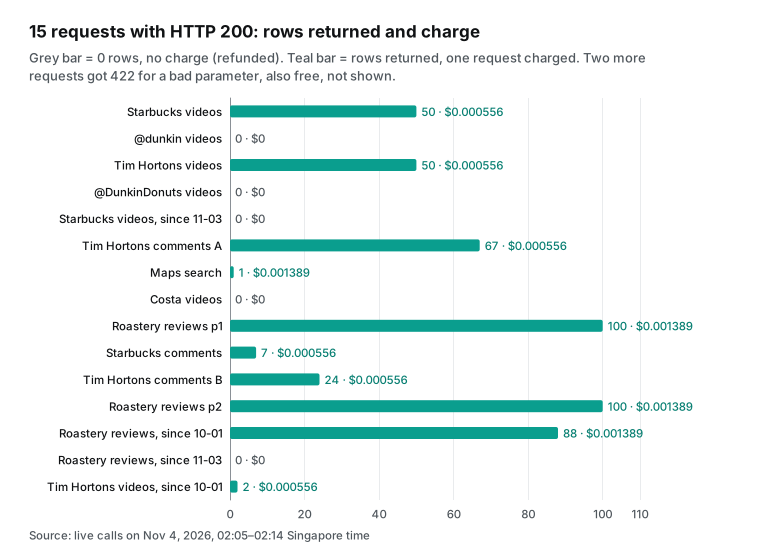
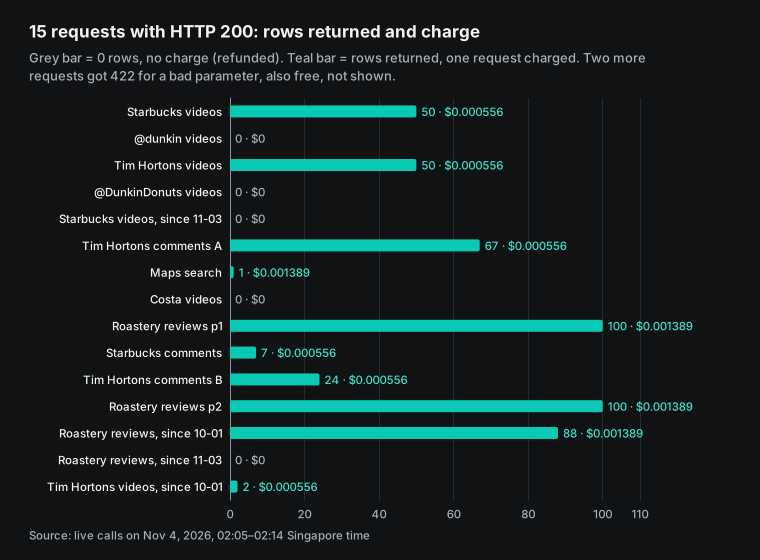
You can calculate where per-call and per-row pricing cross. For map reviews, one Apify run costs 0.0006 × rows + 0.00005. One of our calls costs $0.001389. The two are equal at about 2.23 rows. So if a call returns 1 new review, Apify costs $0.00065, about half of our price.
At 2 reviews, Apify costs $0.00125, still less than ours. At 3 reviews, Apify costs $0.00185, and we are cheaper. For YouTube comments, Apify charges $0.002 per row with no start fee. The break-even is 0.28 rows, so we are cheaper as soon as there is one comment.
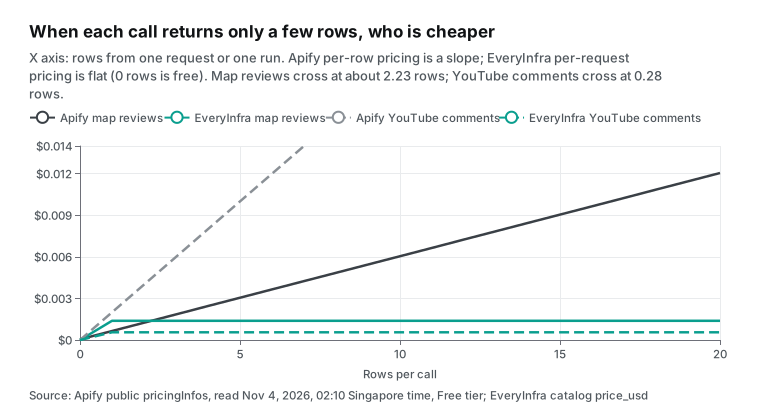
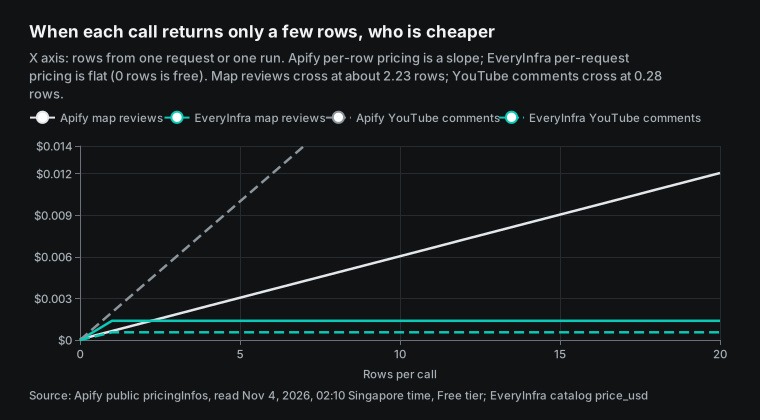
This break-even matters for a workflow that pulls new rows each morning. The flagship store had 88 new reviews from Oct 1 to Oct 20, about 4.4 a day. With one call per store per day and about 4 rows per call, we are about 2x cheaper than Apify. Apify costs about $0.00269 per call and we cost $0.001389. That is not the 29x in the table.
For a small local shop with one or two new reviews a day, Apify is cheaper per call. So first look at how many rows one call can collect. The more rows per call, the better per-call pricing works. With only one or two rows per call, per-row pricing is better.
Channel videos also lose most of the gap when you pull only new rows. At 02:13 Singapore time, our call for Tim Hortons with since: 2026-10-01 returned only 2 videos for $0.000556. That is $0.278 per 1,000, not the $0.0111 of a full page of 50. To filter by date on Apify YouTube Scraper, you pay $0.004 per result plus a $0.0013 date filter add-on, or $5.30 per 1,000. That is about 19x our price for this call. With Fast Channel Scraper at $1.30 per 1,000, it is only about 4.7x.
| Data type | Full page, per 1,000 rows | New rows only (measured call) | Gap, full page | Gap, new rows only |
|---|---|---|---|---|
| Channel videos | Apify $4.00, us $0.0111 | 2 videos: Apify $5.30 with date filter, us $0.278 | 360x | about 19x (4.7x against Fast) |
| Google Maps reviews | Apify $0.60, us $0.0208 | about 4.4 reviews: Apify $0.00269, us $0.001389 per call | 29x | about 2x |
| Video comments | Apify $2.00, us $0.0170 | depends on new videos that day | about 118x | 0 rows: we refund |
This is why the monthly gap below falls to about 2x.
| Rows in one call | Apify map reviews (Free) | EveryInfra map reviews | Apify YouTube comments (Free) | EveryInfra YouTube comments |
|---|---|---|---|---|
| 0 | $0.00005 | $0 | $0 | $0 |
| 1 | $0.00065 | $0.001389 | $0.002 | $0.000556 |
| 2 | $0.00125 | $0.001389 | $0.004 | $0.000556 |
| 3 | $0.00185 | $0.001389 | $0.006 | $0.000556 |
| 10 | $0.00605 | $0.001389 | $0.020 | $0.000556 |
| 100 | $0.06005 | $0.001389 | $0.200 | $0.000556 |
Moving from the Apify node: field map and dedup keys
If you already use the Apify node, your main worry is that a new data source breaks the Google Sheet and Slack message after it. In n8n, only one Set or Code node sits between them. Rename our fields to the column names in your sheet, and the later nodes stay the same. The table below matches key fields for comments and map reviews. Apify field names come from the public sample output on the Store pages (YouTube Comments Scraper, Google Maps Reviews Scraper).
Ours come from response_fields in the catalog. The two sides designed their fields separately. The table only matches the column that does the same job. It does not say the fields are the same.
| Column you need | Apify comment scraper | EveryInfra `youtube/comments` | Apify map review scraper | EveryInfra `google_maps_reviews/reviews` |
|---|---|---|---|---|
| Dedup key | cid | id | reviewId | id |
| Text | comment | text | text | text |
| Time | Not in the sample; the Store page says it collects the post date | posted_at | publishedAtDate | posted_at |
| Votes or rating | voteCount | like_count | stars | rating |
| Reply link or owner reply | replyToCid, replyCount | reply_to_id, reply_count | responseFromOwnerText | owner_response, owner_response_at |
| Author | author, authorIsChannelOwner | author_name | reviewerNumberOfReviews, isLocalGuide | reviewer_review_count, is_local_guide |
In the week you switch, run both sides in parallel for a few days. Compare the results by dedup key. Row counts can differ for reasons other than price. Coverage and sort order also matter.
The Apify comment scraper can set a high maxComments, while we return up to 100 rows per call. Our newest map review in this test was from Oct 20, and a live Apify run can be newer. After a few days, you know which column is short and by how much. Then you can switch all steps, switch only comments, or mix the two.
The map review step is a good place to split. Stores with many new reviews a day can use our per-call API. Small shops with one or two reviews a day can stay on per-row Apify. In n8n, one IF node routes each store by its daily review count, and both branches write to the same sheet.
Dedup is the step that people miss most with per-call pricing. Each call returns a full page. If you skip since and take the newest 100 every day, the same review shows up for several days, and the sheet has repeats. Per-row Apify has the same issue, and it charges again for a review it scrapes again. In our test, 88 reviews from after Oct 1 came back in both page one and the since call.
The newest of them were from 2026-10-18, 2026-10-19 and 2026-10-20. In n8n, the Remove Duplicates node can drop repeats across executions by id. Use it with since, so that a rerun after a failed day does not add rows twice. We still charged $0.001389 for the call with repeats. So since saves the money, and the dedup node keeps the sheet clean.
Retries are another difference. When an Apify run fails, the Run Actor node gets a FAILED status, and you decide in n8n whether to run it again. Our API returns an error code and a retryable field. The 422 for the wrong sort value said retryable: false. Its first next_steps item said to change only sort and send again, with nothing charged. So a retry without a fix does not help.
The HTTP Request node has Retry On Fail in its settings, and you can use it only for errors that can retry. Both ways can give a stable workflow. The difference is where the error lives: on the run status for Apify, and on each response for us.
First backfill, then daily and monthly cost
When a workflow goes live, you usually backfill history first. Say you take the last 50 videos from each of three channels. You take all comments for 30 of those videos. You take 400 reviews for each of three stores.
For comments we use the measured counts. The three videos had 67, 24 and 7 comments, or 32.7 on average. So 30 videos give about 980 comments. One call per video gets them all, because one call returns up to 100 rows.
For map reviews, check the page limit in the catalog. google_maps_reviews/reviews shows sync_max_rows: 200 and max_rows: 400. In sync mode, paging stops at 200 rows (2 pages). To get all 400 rows, add mode: async to the request and read the result from the returned poll_url. Each page is still one request at the catalog price. The table below uses public list prices and our catalog prices. It is an estimate, not an invoice.
| First backfill (estimate) | Rows | Apify Free tier | EveryInfra calls | EveryInfra catalog price |
|---|---|---|---|---|
| Channel videos | 150 | $0.60 (YouTube Scraper) or $0.195 (Fast Channel Scraper) | 3 | $0.001668 |
| Video comments | 980 | $1.96 | 30 | $0.01668 |
| Map reviews | 1,200 | $0.72015 (with 3 start fees) | 12 | $0.016668 |
| Total | 2,330 | $3.28 ($2.88 with the Fast scraper) | 45 | $0.035016 |
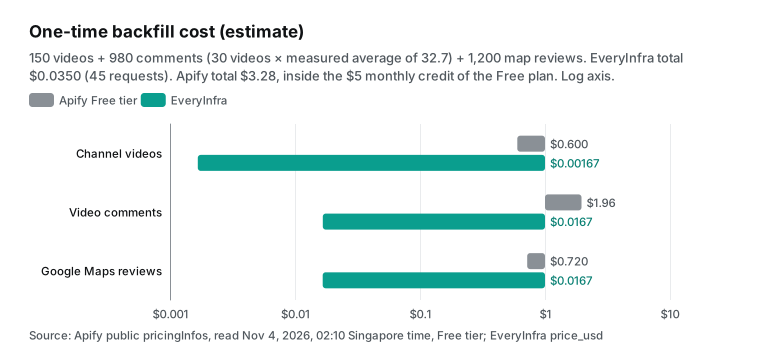
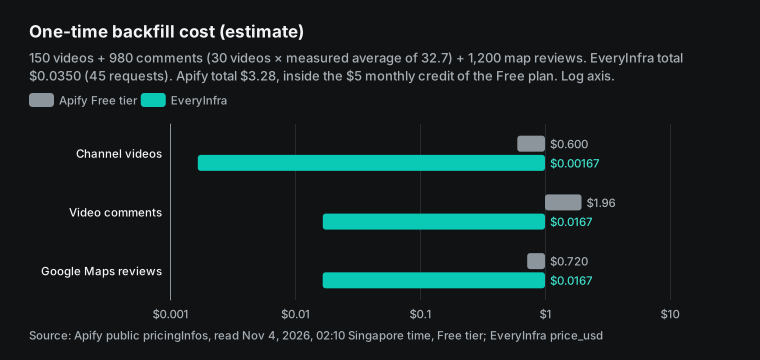
On Apify, this backfill costs $3.28. That is inside the $5 monthly credit of the Free plan, so in the first month you pay nothing. Only about $1.72 of credit is left for that month. On our side, it is 45 requests for $0.035, with no monthly fee and no free credit.
After the backfill come the daily new rows. All rates come from what we measured. From Oct 1 to Nov 4, which is 34 days, the three channels posted 3 new videos in total. Tim Hortons posted 2 and Starbucks posted 1. We got no data for Dunkin', so we count it as 0.
That is about 0.09 new videos a day. The 3 videos had 98 comments in total, or about 2.9 a day over 34 days.
| Daily rate | What we measured | Window | Per day |
|---|---|---|---|
| New videos, 3 channels | 3 videos (2 from Tim Hortons, 1 from Starbucks) | Oct 1 to Nov 4, 34 days | about 0.09 |
| Comments on those videos | 98 comments (67 + 24 + 7) | 34 days | about 2.9 |
| New reviews, 3 stores | 88 reviews at the flagship store | Oct 1 to Oct 20, 20 days | 4.4 × 3 = 13.2 |
The three stores get about 13.2 new map reviews a day, or 4.4 × 3. On our side we take the upper bound. That is 3 video calls, 1 comment call and 3 map review calls a day, all with data. It costs $0.006391 a day, or $0.19 for 30 days. On most days the video calls return 0 rows at no charge, so the real amount is lower.
At the measured rate, only two or three video calls a month return data, and the rest are refunded. That is about $0.14 for 30 days.
On the Apify side, new rows times Free prices plus 3 start fees give about $0.0143 a day, or about $0.43 for 30 days.
| Daily run (estimate) | New rows a day | Apify Free tier a day | EveryInfra upper bound a day |
|---|---|---|---|
| New channel videos | 0.09 | $0.00047 (with the date filter add-on) | $0.001668 (3 calls, refunded at 0 rows) |
| Comments on new videos | 2.9 | $0.0058 | $0.000556 (1 call) |
| New map reviews | 13.2 | $0.00807 (with 3 start fees) | $0.004167 (3 calls) |
| Total / 30 days | $0.0143 / $0.43 | $0.006391 / $0.19 |
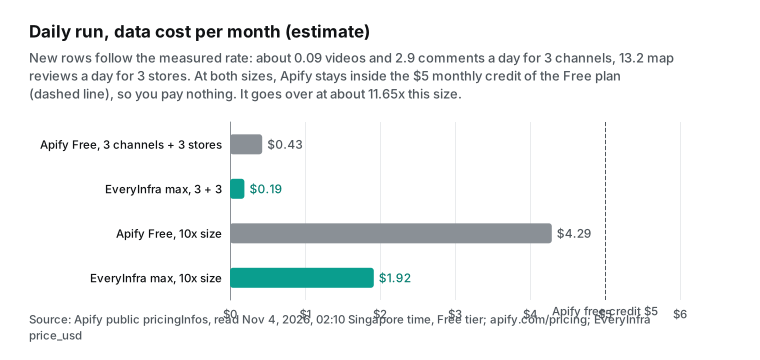
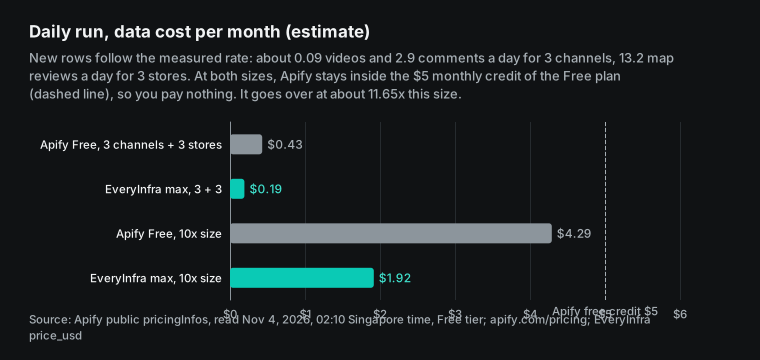
This chart shows a point in Apify's favor. A daily workflow of this size costs about $0.43 a month on Apify. That is inside the $5 of prepaid usage that the Free plan gives each month (Apify pricing). So if you run only this workflow, you pay Apify nothing, while you pay us $0.14 to $0.19 a month.
Per 1,000 rows we are tens of times cheaper. In cash at this size, Apify is $0 and we cost a few cents. The gap turns into real money only after you go over the free credit.
The next section shows where that limit is. The pricing page says that on Free, access stops until the next monthly cycle after you use up the credit. Starter starts at $19 a month. EveryInfra has no monthly fee and no monthly credit that expires. You pay for the calls you make.
Ten times the scale, and where the free credit runs out
Many teams do not stop at three competitors. Scale the daily workflow by ten: 30 channels and 30 stores. At the same measured rates, that is about 0.9 new videos, 29 new comments and 132 new map reviews a day. At Free prices, Apify costs about $0.143 a day, or $4.29 for 30 days. That is still inside the $5 free credit, but close to the limit.
At Bronze prices (the Starter plan, $19 a month), the same usage is about $3.23, so you do not need Starter at this size. Our upper bound is 30 video calls, 10 comment calls and 30 map review calls a day. That is $0.06391 a day and $1.92 for 30 days, with no monthly fee. At the measured rate, with empty calls refunded, it is about $1.43.
So you can calculate where the free credit runs out. Each 1x of daily new rows adds $0.429 a month on Apify. $5 ÷ $0.429 is about 11.7. So with daily new rows only, Apify goes over $5 a month at about 35 channels and 35 stores.
The backfill usually uses up the credit first. Take a backfill for 30 channels and 30 stores with the same row counts. It costs about $32.80 on Apify Free and $0.35 with us, in 450 requests. Popular videos with hundreds of comments also use the credit fast. After you go over, Free stops until the next month. Only then do you compare the $19 Starter fee with our per-call charges.
| Size | Apify Free, daily rows per month | Apify Free, one backfill | EveryInfra, month (max) | EveryInfra, one backfill |
|---|---|---|---|---|
| 3 channels, 3 stores | $0.43 | $3.28 | $0.19 | $0.035 |
| 30 channels, 30 stores | $4.29 | $32.80 | $1.92 | $0.35 |
| About 35 channels, 35 stores | about $5.00, the Free limit | about $38 | about $2.24 | about $0.41 |
| Daily run (estimate) | 3 channels, 3 stores | 30 channels, 30 stores |
|---|---|---|
| Apify, Free prices | $0.43 a month, inside free credit, $0 cash | $4.29 a month, inside free credit, $0 cash |
| Apify, Starter (Bronze prices) | Not needed | Not needed (about $3.23 at Bronze prices) |
| EveryInfra, upper bound | $0.19 a month | $1.92 a month |
Two conditions apply to this scale-up. First, we base comments on the three measured videos (98 comments in 34 days). A popular channel can get thousands of comments on one video in a few days. Then Apify costs grow with each row. We return at most 100 rows per call with no page token, so we get fewer rows than Apify.
Part of our lower price comes from getting less, so read price and coverage together. Second, we assume 4.4 map reviews a day per store, the rate of a flagship store. Normal stores usually get fewer. The smaller the store, the closer each call gets to the 2.23-row break-even, and the smaller our price edge. The safest plan at scale is to measure one week of your own data.
Find the average rows per call, then use the break-even to pick a side for each step.
Failures, empty results and bad parameters: are they charged?
| Case | Seen in this test | EveryInfra charge | Apify public rules |
|---|---|---|---|
| 0 rows returned | 5 calls (two Dunkin' handles, Costa, two late since dates) | $0, response says empty_result_refunded | A pay-per-row actor charges no row fee with no rows; an actor with a start fee still charges it |
| Wrong parameter | 2 calls (query instead of keyword, sort set to latest) | $0, HTTP 422 with the valid parameters and an example | The actor checks its input; failed runs follow the actor's rules |
| Video not available or no comments | Not seen in this test | $0 when 0 rows | YouTube Comments Scraper writes an error item with an error field to the dataset |
| Spending cap | Not needed, one fixed price per call | — | maxItems and maxTotalChargeUsd set limits |
Both sides make "no data, no data fee" a rule, but the details differ. With us, a call is either charged at a fixed price or refunded in full when it returns 0 rows. billing.charged_usd in the response tells you the charge. In n8n, you can add it to a sheet column in step 5 and check the total at the end of the month.
With Apify, you see the cost of each run on the run detail page and in Historical usage in the console (Actors in Store). To get it in n8n, you call Get run again. Public material does not say whether error items from the comment scraper are charged as rows. We did not run it, so we make no claim.
When Apify is the better choice
These are the cases where the Apify n8n node makes more sense. First, the platform is not in our catalog. Apify Store has thousands of actors for many long-tail sites. Our catalog has 106 platforms and 573 capabilities, the numbers in the everyinfra_list_capabilities tool description. Search the free catalog for your platform first. If it is not there, use Apify.
Second, each call has only one or two new rows. As shown above, Apify is cheaper for map reviews below about 2.23 rows per call. If your workflow runs every hour and each run finds 0 to 2 rows, per-row pricing costs less. Third, your scale fits inside the free credit.
This daily workflow alone costs about $0.43 a month on Apify. With the $3.28 backfill, it still fits inside the $5 Free credit, so the cash cost is $0. The 10x daily run ($4.29) also fits. If you already have an Apify account, a switch at this size saves no money. It costs you a few cents to about $2 a month with us. The reasons to switch are growth later, or a fixed per-call bill.
Fourth, you need data that is newer than what we returned. In our test, the newest map review was from Oct 20. If you need "today's reviews today", test since for a few days. If it does not keep up, use a live Apify run. Fifth, you want more fields in one row.
Our channel video list had empty like and comment counts in this test, so you must call youtube/video for each video. The Apify YouTube Scraper includes them in one result. At catalog price, one detail call per video is $0.000556, so 30 new videos cost $0.01668. That is still less than Apify. But the workflow gets a loop node and 30 more calls to wait for.
If you want a simple sheet, one Apify step that gets all fields is easier, and that ease has value.
Sixth, a single video has thousands of comments and you need all of them. Our comment call has no page token and returns up to 100 rows. Apify's maxComments can go much higher. Seventh, you want Apify to schedule the runs and n8n to receive the results.
The On new Apify event trigger starts an n8n workflow when an actor run ends. That suits large jobs that take hours. Our slow jobs use mode: async to get a job_id, and you poll GET /api/v1/jobs/{job_id}. In n8n you build that with a Wait node and a loop.
We are the better choice in other cases. One call can collect tens or hundreds of rows, as with comments, map review pages and channel lists. You do not want a community node. You want the result in the same request.
Or you want one key and one MCP address that also works in Claude, Cursor and other tools. Our Apify alternatives overview and Apify pricing explained list the price gaps and the Apify billing model by platform. Read them first if you want the big picture.
Compared with official APIs: YouTube Data API and Places API
People who search "apify alternative n8n" often look at official APIs too. n8n has a built-in YouTube node, but the official API has a quota. The YouTube Data API quota docs say a project gets 10,000 units a day by default. commentThreads.list costs 1 unit per call and returns up to 100 rows, so it is cheap for comments. The revision history says that from June 1, 2026, YouTube is moving to smaller quota groups by method.
For maps, the gap is larger. Places API place details return at most five reviews. The legacy Place Details docs say "up to five reviews". You cannot get the review history of a store this way. So "check new competitor reviews each day" needs a scraping service.
| Option | YouTube videos and comments | Google Maps reviews | What you need | In n8n |
|---|---|---|---|---|
| Official APIs | 10,000 units a day by default; comments cost 1 unit for up to 100 rows | Up to 5 per place | Google Cloud project, API key or OAuth | Built-in YouTube node; maps with HTTP Request |
| Apify node | Per row, $0.002 to $0.004 on Free | $0.0006 per row + $0.00005 start | Apify account and token, community node | Community node, two steps or one |
| EveryInfra | $0.000556 per call, up to 50 or 100 rows | $0.001389 per call, up to 100 rows, with pages | EveryInfra key | Built-in HTTP Request or MCP Client |
If you watch only your own channel and comment volume is low, the official API is free and stable. It is the first choice. For competitor map reviews, the five-review limit is too low. Then you choose between Apify and a service like ours.
Recent changes
On 2026-10-22, Apify released version 0.9.0 of the n8n node. Before that, 0.8.1 came out on 2026-10-12, and 0.8.0 on 2026-09-22 added Web Fetch (npm registry). What it means for you: the community node changes often. Pin the version in your workflows and test before you upgrade.
On 2026-10-27, n8n released 3.0, a major version with breaking changes and a migration tool (release notes). What it means for you: self-hosted users must check community nodes before they upgrade. HTTP Request and MCP Client are core nodes and upgrade with n8n.
On 2026-11-03, n8n released 3.1.0 and 2.47.0 together. The fixes include community package compatibility with the new node API (GitHub releases). What it means for you: 2.x users have a maintained branch for some time, so there is no rush to move to 3.x.
On 2026-09-02, Apify YouTube Scraper started its current price list, per startedAt in the metadata. What it means for you: Store prices change. Read the public metadata once a month, or set maxTotalChargeUsd on each run. From June 1, 2026, the YouTube Data API began to split quota by method groups. What it means for you: workflows on the official API must request more quota per method.
| Date | Change | What it means for an n8n workflow |
|---|---|---|
| 2026-11-03 | n8n 3.1.0 and 2.47.0 | Community package fix for the v3 node API; 2.x is still maintained |
| 2026-10-27 | n8n 3.0 | Breaking changes; test community nodes before you upgrade |
| 2026-10-22 | Apify n8n node 0.9.0 | Pin the node version in production |
| 2026-10-12 | Apify n8n node 0.8.1 | Releases come every few weeks |
| 2026-09-02 | YouTube Scraper price list | Store prices change; cap each run |
| 2026-06-01 | YouTube Data API quota by method | Official API quota requests change |
FAQ
Is the apify n8n community node an official n8n node?
It is not built into n8n. The Apify team maintains it as a community node named @apify/n8n-nodes-apify. On n8n Cloud, it shows in the nodes panel as a verified community node (Apify n8n docs). On self-hosted n8n, you install it in Settings > Community Nodes. The n8n risk notice says community nodes have full access to the machine. Source of the question: the search suggestion "apify n8n community node".
What credentials does the apify n8n integration need?
The Apify node needs an Apify API token, which works on self-hosted and Cloud, or OAuth2, which works on Cloud only. With an HTTP Request to EveryInfra, you create one Bearer Auth credential in n8n with your EveryInfra key. The MCP Client node also supports Bearer.
How is the n8n apify node different from an HTTP Request to Apify?
They do about the same job. The node wraps Run Actor, Get dataset items and other operations. An HTTP Request can call run-sync-get-dataset-items and get the rows in one step. One r/n8n user suggested the HTTP way when the native node had problems (thread). Both bill at actor prices.
How much does an apify n8n template cost per month?
It depends on row counts, not on the template. For the daily workflow in this article, at the measured rates, Apify costs about $0.43 a month. That fits in the $5 Free credit, so you pay nothing. The same data costs at most about $0.19 with EveryInfra. The per-row gap is largest at the first backfill of 2,330 rows: about $3.28 on Apify and about $0.035 with us. The Apify amount still fits in the free credit.
How much do Apify Free and paid unit prices differ?
Paid tiers are cheaper per row. For the three scrapers here, Gold (the Business plan) is about 45% to 60% of Free. For example, comments drop from $0.002 to $0.0009 per row. One r/n8n post shares an X posting workflow. Its author also said that one actor's per-1,000 price differs a lot between Free and Starter (thread).
Can an n8n AI Agent choose the platform on its own?
Yes. Attach an MCP Client Tool node to the AI Agent and set the address to https://api.everyinfra.com/mcp. The model uses everyinfra_list_capabilities to find capabilities and everyinfra_call_api to get data. You can use Tools to Include to expose only these two tools. The Apify MCP server can connect the same way and bills at actor prices.
Get started
- Sign up in the console and get a key. In n8n, create a Bearer Auth credential.
- Check the capability and parameters in the free catalog. See the YouTube data API and the Google Maps reviews API.
- Paste the curl command from this article into Import cURL in an HTTP Request node. Change
sinceto a date expression for yesterday. - Run it once by hand. Check
countandbilling.charged_usd, then turn on Schedule Trigger.
To try it in the browser first, use the playground in the data market. Prices are on the pricing page, and the remote MCP setup is on the MCP page. For the full method on map reviews, read how to scrape Google Maps reviews. For the Apify map scraper comparison, read Apify Google Maps Scraper alternative. Other platforms are in Apify TikTok Scraper alternative, Apify Amazon Scraper alternative and the alternatives overview.
References
We opened every link below with curl or a page reader between 02:05 and 02:30 on Nov 4, 2026 (Singapore time). The npmjs.com package page returned 403 to scripts, so we used the official npm registry metadata endpoint.
- n8n integration, Apify Docs, read Nov 4, 2026 (Singapore time): <https://docs.apify.com/platform/integrations/n8n>
- Apify MCP server, Apify Docs, read Nov 4, 2026 (Singapore time): <https://docs.apify.com/platform/integrations/mcp>
- Run Actor synchronously and get dataset items, Apify API Docs, read Nov 4, 2026 (Singapore time): <https://docs.apify.com/api/v2/act-run-sync-get-dataset-items-post>
- Actors in Store, Apify Docs, read Nov 4, 2026 (Singapore time): <https://docs.apify.com/platform/actors/running/actors-in-store>
- Usage and resources, Apify Docs, read Nov 4, 2026 (Singapore time): <https://docs.apify.com/platform/actors/running/usage-and-resources>
- Dataset, Apify Docs, read Nov 4, 2026 (Singapore time): <https://docs.apify.com/platform/storage/dataset>
- Webhooks, Apify Docs, read Nov 4, 2026 (Singapore time): <https://docs.apify.com/platform/integrations/webhooks>
- Run Actor, Apify API Docs, read Nov 4, 2026 (Singapore time): <https://docs.apify.com/api/v2/act-runs-post>
- Get Actor, Apify API Docs, read Nov 4, 2026 (Singapore time): <https://docs.apify.com/api/v2/act-get>
- Limits, Apify Docs, read Nov 4, 2026 (Singapore time): <https://docs.apify.com/platform/limits>
- Pay per event, Apify Docs, read Nov 4, 2026 (Singapore time): <https://docs.apify.com/platform/actors/publishing/monetize/pay-per-event>
- HTTP Request, n8n Docs, read Nov 4, 2026 (Singapore time): <https://docs.n8n.io/integrations/builtin/core-nodes/n8n-nodes-base.httprequest>
- HTTP Request credentials, n8n Docs, read Nov 4, 2026 (Singapore time): <https://docs.n8n.io/integrations/builtin/credentials/httprequest>
- MCP Client Tool, n8n Docs, read Nov 4, 2026 (Singapore time): <https://docs.n8n.io/integrations/builtin/cluster-nodes/sub-nodes/n8n-nodes-langchain.toolmcp>
- MCP Client, n8n Docs, read Nov 4, 2026 (Singapore time): <https://docs.n8n.io/integrations/builtin/core-nodes/n8n-nodes-langchain.mcpclient>
- Schedule Trigger, n8n Docs, read Nov 4, 2026 (Singapore time): <https://docs.n8n.io/integrations/builtin/core-nodes/n8n-nodes-base.scheduletrigger>
- Community nodes: Risks, n8n Docs, read Nov 4, 2026 (Singapore time): <https://docs.n8n.io/integrations/community-nodes/risks>
- Install verified community nodes, n8n Docs, read Nov 4, 2026 (Singapore time): <https://docs.n8n.io/integrations/community-nodes/installation-and-management/install-verified-community-nodes>
- Release notes, n8n Docs, read Nov 4, 2026 (Singapore time): <https://docs.n8n.io/release-notes>
- Google Sheets node, n8n Docs, read Nov 4, 2026 (Singapore time): <https://docs.n8n.io/integrations/builtin/app-nodes/n8n-nodes-base.googlesheets>
- Slack node, n8n Docs, read Nov 4, 2026 (Singapore time): <https://docs.n8n.io/integrations/builtin/app-nodes/n8n-nodes-base.slack>
- Loop Over Items, n8n Docs, read Nov 4, 2026 (Singapore time): <https://docs.n8n.io/integrations/builtin/core-nodes/n8n-nodes-base.splitinbatches>
- Code, n8n Docs, read Nov 4, 2026 (Singapore time): <https://docs.n8n.io/integrations/builtin/core-nodes/n8n-nodes-base.code>
- Remove Duplicates, n8n Docs, read Nov 4, 2026 (Singapore time): <https://docs.n8n.io/integrations/builtin/core-nodes/n8n-nodes-base.removeduplicates>
- n8n 3.0 breaking changes, n8n Docs, read Nov 4, 2026 (Singapore time): <https://docs.n8n.io/changelog/v30-breaking-changes>
- Install with npm, n8n Docs, read Nov 4, 2026 (Singapore time): <https://docs.n8n.io/deploy/host-n8n/install-options/install-with-npm>
- apify/n8n-nodes-apify, GitHub, read Nov 4, 2026 (Singapore time): <https://github.com/apify/n8n-nodes-apify>
- n8n releases, GitHub, read Nov 4, 2026 (Singapore time): <https://github.com/n8n-io/n8n/releases>
- apify/apify-mcp-server, GitHub, read Nov 4, 2026 (Singapore time): <https://github.com/apify/apify-mcp-server>
- @apify/n8n-nodes-apify package metadata, npm registry, read Nov 4, 2026 (Singapore time): <https://registry.npmjs.org/@apify/n8n-nodes-apify>
- YouTube Data API Overview, Google for Developers, read Nov 4, 2026 (Singapore time): <https://developers.google.com/youtube/v3/getting-started>
- CommentThreads: list, Google for Developers, read Nov 4, 2026 (Singapore time): <https://developers.google.com/youtube/v3/docs/commentThreads/list>
- Quota and Compliance Audits, Google for Developers, read Nov 4, 2026 (Singapore time): <https://developers.google.com/youtube/data/guides/quota_and_compliance_audits>
- YouTube Data API Revision History, Google for Developers, read Nov 4, 2026 (Singapore time): <https://developers.google.com/youtube/data/revision_history>
- Place Details (New), Google for Developers, read Nov 4, 2026 (Singapore time): <https://developers.google.com/maps/documentation/places/web-service/place-details>
- Place Details (Legacy), Google for Developers, read Nov 4, 2026 (Singapore time): <https://developers.google.com/maps/documentation/places/web-service/legacy/details>
- Transports, Model Context Protocol, read Nov 4, 2026 (Singapore time): <https://modelcontextprotocol.io/specification/2025-06-18/basic/transports>
- Introduction, Model Context Protocol, read Nov 4, 2026 (Singapore time): <https://modelcontextprotocol.io/introduction>
- Apify pricing, Apify, read Nov 4, 2026 (Singapore time): <https://apify.com/pricing>
- YouTube Scraper, Apify Store, read Nov 4, 2026 (Singapore time): <https://apify.com/streamers/youtube-scraper>
- YouTube Scraper pricing, Apify Store, read Nov 4, 2026 (Singapore time): <https://apify.com/streamers/youtube-scraper/pricing>
- YouTube Comments Scraper, Apify Store, read Nov 4, 2026 (Singapore time): <https://apify.com/streamers/youtube-comments-scraper>
- Fast YouTube Channel Scraper, Apify Store, read Nov 4, 2026 (Singapore time): <https://apify.com/streamers/youtube-channel-scraper>
- Google Maps Reviews Scraper, Apify Store, read Nov 4, 2026 (Singapore time): <https://apify.com/compass/google-maps-reviews-scraper>
- streamers/youtube-scraper public metadata, Apify API, read Nov 4, 2026 (Singapore time): <https://api.apify.com/v2/acts/streamers~youtube-scraper>
- streamers/youtube-comments-scraper public metadata, Apify API, read Nov 4, 2026 (Singapore time): <https://api.apify.com/v2/acts/streamers~youtube-comments-scraper>
- compass/google-maps-reviews-scraper public metadata, Apify API, read Nov 4, 2026 (Singapore time): <https://api.apify.com/v2/acts/compass~google-maps-reviews-scraper>
- n8n Plans and Pricing, n8n, read Nov 4, 2026 (Singapore time): <https://n8n.io/pricing/>
- Scraping OLX Brazil to Notion/Sheets failing (thread), Reddit r/n8n, read Nov 4, 2026 (Singapore time): <https://www.reddit.com/r/n8n/comments/1vzd9n6/desperate_for_help_scraping_olx_brazil_to/>
- Never stop posting on X (thread), Reddit r/n8n, read Nov 4, 2026 (Singapore time): <https://www.reddit.com/r/n8n/comments/1ne4iqy/never_stop_posting_on_x_source_code_included/>
- Social data catalog, EveryInfra API, read Nov 4, 2026 (Singapore time): <https://api.everyinfra.com/api/v1/social/catalog>
- Social data catalog, YouTube, EveryInfra API, read Nov 4, 2026 (Singapore time): <https://api.everyinfra.com/api/v1/social/catalog?platform=youtube>
Reference BL-86