Apify YouTube Scraper Alternative: Measured Price per 1,000 Rows
1,000 YouTube comments cost $0.90–$2.00 on Apify's public price list. We measured $0.0056. Search is 200x cheaper, but single-video lookups are not.
To get 1,000 YouTube search results, the most used YouTube Scraper on Apify costs $2.40 on the Business tier and $4.00 on the Free tier. To get 1,000 comments, the YouTube Comments Scraper costs $0.90 to $2.00. On November 1, 2026, we made live calls to EveryInfra. One youtube/search call cost $0.000556 and returned 47 rows, which is $0.0118 per 1,000 rows. One youtube/comments call returned 100 rows, which is $0.0056 per 1,000 rows. That is 203 to 338 times cheaper for search and 162 to 360 times cheaper for comments.
The gap is real only for data that comes back as a full page. Video details, channel profiles and transcripts return one row per call, so they cost $0.556 per 1,000 rows. For those, some third-party actors in the Apify Store cost about the same as us, and one is cheaper. We also have a hard limit: one video gives us about two hundred unique comments at most.
If you need all 5,610 comments on one video, Apify or the official YouTube API is the better tool. This article tests seven data types. It also shows the duplicate rates, a retest 13.8 hours later, the charge for failed calls, and one Store page with an old price.
In this article, "price per 1,000 rows" means the amount one call actually charged, divided by the rows it actually returned, times 1,000. It answers one question: what do you pay to get 1,000 results? EveryInfra charges per request. Apify Store actors for YouTube charge per result, or per event.
The two units become comparable only on the same denominator. We always divide by rows returned, never by the limit in the request. For example, youtube/shorts returned 41 rows this time, so we divide by 41. If a call returns fewer rows, our price looks higher, not lower.
On the Apify side, we used only public material. That is the Store pages, the pricing page, the documentation, and public endpoints that need no account. We did not sign up for Apify, and we did not run any actor (Apify's name for a cloud scraping program). So every Apify number in this article is a public list price, not a measured bill.
The summary table: seven YouTube data types, price per 1,000 rows
The table puts the seven most common YouTube data types side by side. For each type, we picked one "main" Apify actor by its user count in the last 30 days. Transcripts are the exception: there we used total users, and Test 3 explains why. Most main actors come from the Streamers developer account. On 2026-11-01, the Store pages of YouTube Scraper and YouTube Comments Scraper both showed "Maintained by Apify". YouTube Scraper had 16,506 users in the last 30 days and more than 190,000 users in total.
It is the YouTube actor with the most users in the Store. Apify prices have four discount tiers: Free, Starter (BRONZE), Scale (SILVER) and Business (GOLD). Two more tiers, Platinum and Diamond, are for enterprise customers only (Actor pricing and costs).
We read these prices from the public pricingInfos field. We used the last version with a startedAt before the read time. We read the data at 00:46 SGT and again at 14:40 SGT on 2026-11-01, and both reads matched (for example, YouTube Scraper metadata). The "cheapest third party" column comes from a Store search for "youtube".
The search returned 846 actors, from a reported total of 4,983 (Store endpoint). From actors of the same type with at least 100 users in 30 days, we took the one with the lowest Business price. On the EveryInfra side, every number is a live call. The charge comes from billing.charged_usd in the response, and the row count comes from count.
| Data | EveryInfra action | Measured: rows / charge | EveryInfra per 1,000 | Apify main actor (Free to Business) | Factor | Cheapest Store third party (Business) |
|---|---|---|---|---|---|---|
| Video search | youtube/search | 47 / $0.000556 | $0.0118 | YouTube Scraper $4.00 to $2.40 | 203x to 338x | $0.40 (grow_media), 34x |
| Comments | youtube/comments | 100 / $0.000556 | $0.0056 | YouTube Comments Scraper $2.00 to $0.90 | 162x to 360x | $0.20 (supreme_coder), 36x |
| Channel video list | youtube/user_posts | 50 / $0.000556 | $0.0111 | Fast YouTube Channel Scraper $1.30 to $0.50 | 45x to 117x | $0.40 (grow_media), 36x |
| Shorts | youtube/shorts | 41 / $0.000556 | $0.0136 | YouTube Shorts Scraper $4.00 to $2.40 | 177x to 295x | $0.02 (johnvc), only 1.5x |
| Transcripts | youtube/transcript | 1 / $0.000556 | $0.556 | Youtube Transcript Scraper (pintostudio, most total users) $10.00 | 18x | $0.70 (supreme_coder), only 1.3x |
| Channel profile | youtube/profile | 1 / $0.000556 | $0.556 | YouTube channel actor (API Dojo), by URL $5.50 | 9.9x | No cheaper actor found |
| Video details | youtube/video | 1 / $0.000556 | $0.556 | YouTube Scraper $4.00 to $2.40 | 4.3x to 7.2x | $0.50 (API Dojo), 10% cheaper than us |
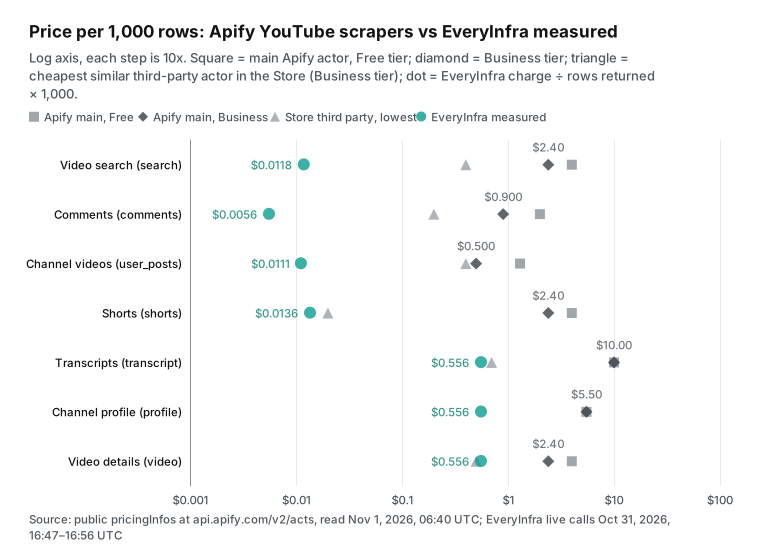
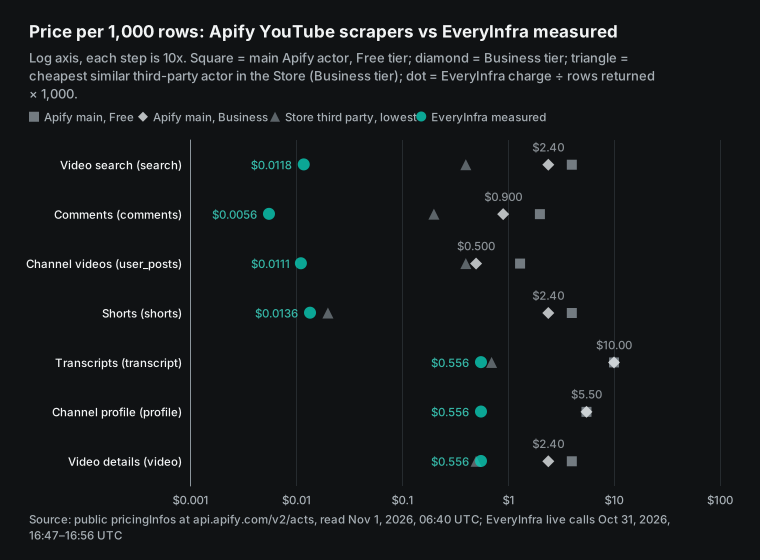
You can read this table in two ways. First, look at the top four rows. Search, comments, channel video lists and Shorts all return a full page per call. We charge $0.000556 once for a page of 41 to 100 rows. Per row, that is a small fraction of a cent, so the gap to the per-row Apify actors is two to three orders of magnitude.
Second, look at the bottom three rows. Transcripts, channel profiles and video details return one row per call. Here a per-request price loses its advantage. At $0.556 per 1,000 rows, we are only a few times cheaper than Apify. For video details, the API Dojo Youtube Scraper (Pay Per Result) is 10% cheaper than us.
The Shorts row also needs a note. The Store has a YouTube Shorts API actor that charges $0.00001 per Short plus $0.00001 per dataset row. That is $0.02 per 1,000 rows, only 1.5 times our measured $0.0136. Where the factor is below 2, we do not say "cheaper" in the title or the key points.
apify youtube scraper pricing, event by event
Apify's YouTube Scraper uses pay-per-event pricing. The developer defines a set of events, and each event has a price. Apify's documentation says that most pay-per-event actors include platform usage in the event price. Some actors charge platform usage separately, so you must check before you run one (Actors in Store).
The current YouTube Scraper price list started on September 2, 2026. It has five events. The base event is "per video". Four add-ons follow: a date filter for channels, an AI description, an AI summary, and a transcript charged per minute.
You pay for an add-on only when you turn it on. But add-ons cost much more than the base event. On the Free tier, a transcript costs $0.048 per minute. A 10-minute video transcript costs $0.48, which is more than the base fee for 100 videos. To limit spend, Apify requires a maximum charge per run, and the platform never charges above it (pay-per-event documentation). The synchronous run endpoint also accepts maxTotalChargeUsd (run-sync endpoint).
| YouTube Scraper event | Free | Starter (BRONZE) | Scale (SILVER) | Business (GOLD) | Platinum / Diamond (enterprise) |
|---|---|---|---|---|---|
| Per video | $0.004 | $0.003 | $0.0026 | $0.0024 | $0.0015 / $0.001 |
| Date filter for channels (per row) | $0.0013 | $0.001 | $0.0008 | $0.0006 | $0.0003 / $0.00017 |
| AI description (per video minute) | $0.015 | $0.01 | $0.0085 | $0.007 | $0.0043 / $0.0021 |
| AI summary (per video minute) | $0.015 | $0.01 | $0.0085 | $0.007 | $0.0043 / $0.0021 |
| Transcript (per started minute) | $0.048 | $0.041 | $0.033 | $0.027 | $0.02 / $0.015 |
The discount tier follows the Apify plan. Apify's documentation says that each paid plan includes a discount tier (BRONZE, SILVER, GOLD). The actor owner decides if the actor takes part. Apify pays the platform cost of Free plan users (Actors in Store, Actor pricing and costs). The Store page shows "from $2.40 / 1,000 videos".
That $2.40 is the GOLD tier, and GOLD comes with the Business plan at $999 per month. The page FAQ gives the Free tier price of $0.004 per video. It also says that the monthly $5 free credit covers about 1,250 videos. Both numbers match the public endpoint. In short, to pay $2.40 per 1,000 videos, you first pay $999 per month.
The plan itself is part of the bill. On 2026-11-01, the Apify pricing page listed four plans. Free is $0 with $5 of monthly credit. Starter is $19, Scale is $199 and Business is $999, billed monthly. Compute units cost $0.20, $0.20, $0.16 and $0.13.
On paid plans, the monthly fee is prepaid usage. The Billing documentation says "Unused prepaid usage does not rollover". Usage above the plan is billed as overage. On Starter, Apify sends an invoice at once when overage reaches $20. The plan also limits concurrent runs: 5 on Free, 32 on Starter, 128 on Scale and 256 on Business (Limits).
| Apify plan | Monthly fee | Prepaid usage | Discount tier | Per compute unit | Concurrent runs |
|---|---|---|---|---|---|
| Free | $0 | $5, stops when used | FREE | $0.20 | 5 |
| Starter | $19 | $19, unused part expires | BRONZE | $0.20 | 32 |
| Scale | $199 | $199, unused part expires | SILVER | $0.16 | 128 |
| Business | $999 | $999, unused part expires | GOLD | $0.13 | 256 |
Our Apify pricing explained article breaks down all five cost layers. For YouTube, the main result is simple. If your monthly volume is small, Starter is almost always the cheapest plan. You pay the higher of two numbers: the monthly fee or your usage.
EveryInfra has no plans and no discount tiers. In the 2026-11-01 catalog, all eight YouTube actions cost $0.000556 per call. The minimum top-up is $10, and the balance does not expire. Failed calls and empty results cost nothing (llms.txt).
The catalog also lists the row limit of each action. youtube/search and youtube/user_posts return up to 50 rows per call. youtube/comments and youtube/shorts return up to 100 rows per call. These limits are our most important boundary, and the next sections come back to them.
How we measured
We saved 31 live calls with one test key. One more call hit the rate limit and worked on retry, but we did not save it. The first call was at 00:47 SGT on 2026-11-01 and the last was at 14:38 SGT. The 13.8-hour gap was for a retest.
At 15:40 SGT, we added 7 search calls to measure overlap between related keywords (Test 1). For each call, we saved the request body, the send and receive times, the HTTP status and the full response. A script computed every price per 1,000 rows, duplicate rate and factor from those responses.
The charts use the same script output. On the Apify side, unit prices, 30-day run counts and user counts come from the public metadata of 12 YouTube actors. Both reads gave the same values. A request has one endpoint and three fields:
curl -s https://api.everyinfra.com/api/v1/social \
  -H "Authorization: Bearer $EVERYINFRA_API_KEY" \
  -H "Content-Type: application/json" \
  -d '{"platform":"youtube","action":"comments",
       "params":{"url":"https://www.youtube.com/watch?v=yCf2lZoRrEE","limit":100,"sort":"popular"}}'

To make the two sides comparable, we wrote our rules before the tests and did not change them after. We divide only by rows returned. Calls with zero rows stay out of the denominator and appear in the failure section. For Apify, we use only the price version in effect at read time. We always show the Free and Business tiers, plus the cheapest similar third party.
A factor below 3 goes into the tables but not into the title. A price is "stable" only if a retest at least 30 minutes later is within 20% per 1,000 rows. To decide if one video gives 1,000 comments, we use real calls. We do not add up rows from many calls and call it depth.
Test 1: video search gives 47 rows per call, and four sort orders give 122
At 00:47 SGT on 2026-11-01, we called youtube/search with the keyword "mechanical keyboard review" and limit 50. After 11.8 seconds, it returned 47 rows and charged $0.000556. That is $0.0118 per 1,000 rows. Each row has the title, channel, views, likes, comment count, duration, publish time and search_rank. The catalog response_fields list explains each field.
In the same hour, we also searched in Chinese and in Spanish ("teclado mecánico reseña"). Both calls returned the full 50 rows, which is $0.0111 per 1,000 rows. The table shows large differences between the three languages.
| Search (same topic) | Rows | Channels | Median views | Shorter than 1 minute | From 2026 | Per 1,000 rows |
|---|---|---|---|---|---|---|
| English, "mechanical keyboard review" | 47 | 27 | 569,223 | 14 | 15 | $0.0118 |
| Spanish, "teclado mecánico reseña" | 50 | 40 | 114,485 | 21 | 4 | $0.0111 |
| Chinese, same topic | 50 | 43 | 35,323 | 7 | 12 | $0.0111 |
If you scout creators or products in Spanish-language markets, split out the Shorts by duration first. For an English keyword, one call reaches fewer channels, so you need more keywords to build a wide creator list. These differences also exist on Apify. The difference is that with a per-row price, you also pay for the Shorts you do not need.
Is one page of 50 enough? That depends on the job. To watch the top results of 20 keywords each day, one page is enough. To get 1,000 unique videos for one keyword, there is a problem.
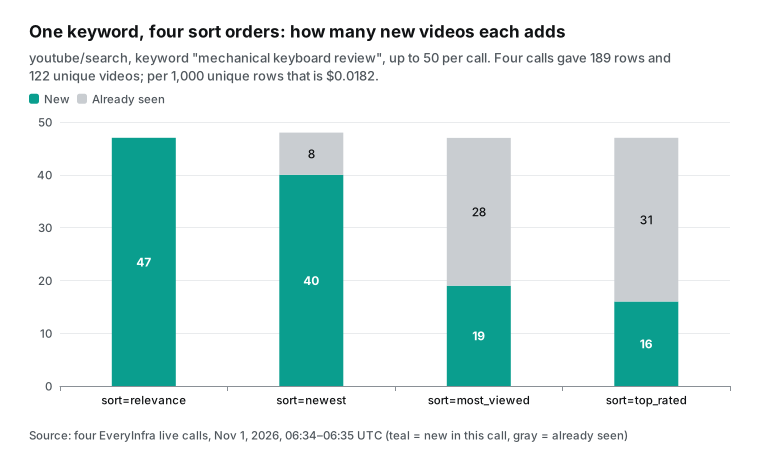
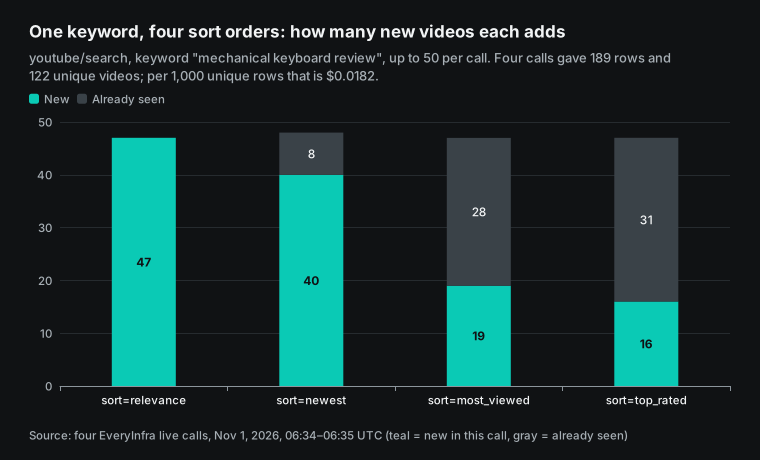
We have no page token, so you can only change the sort order or the keyword. From 14:34 to 14:35 SGT, we called the same keyword with four sort orders. Relevance returned 47 rows, newest 48, most_viewed 47 and top_rated 47. That is 189 rows and 122 unique videos.
The second call (newest) added 40 new videos. The third added only 19, and the fourth only 16. Per 1,000 unique rows, the price is $0.0182. That is 50% more than one call, but still 132 times less than Apify's $2.40.
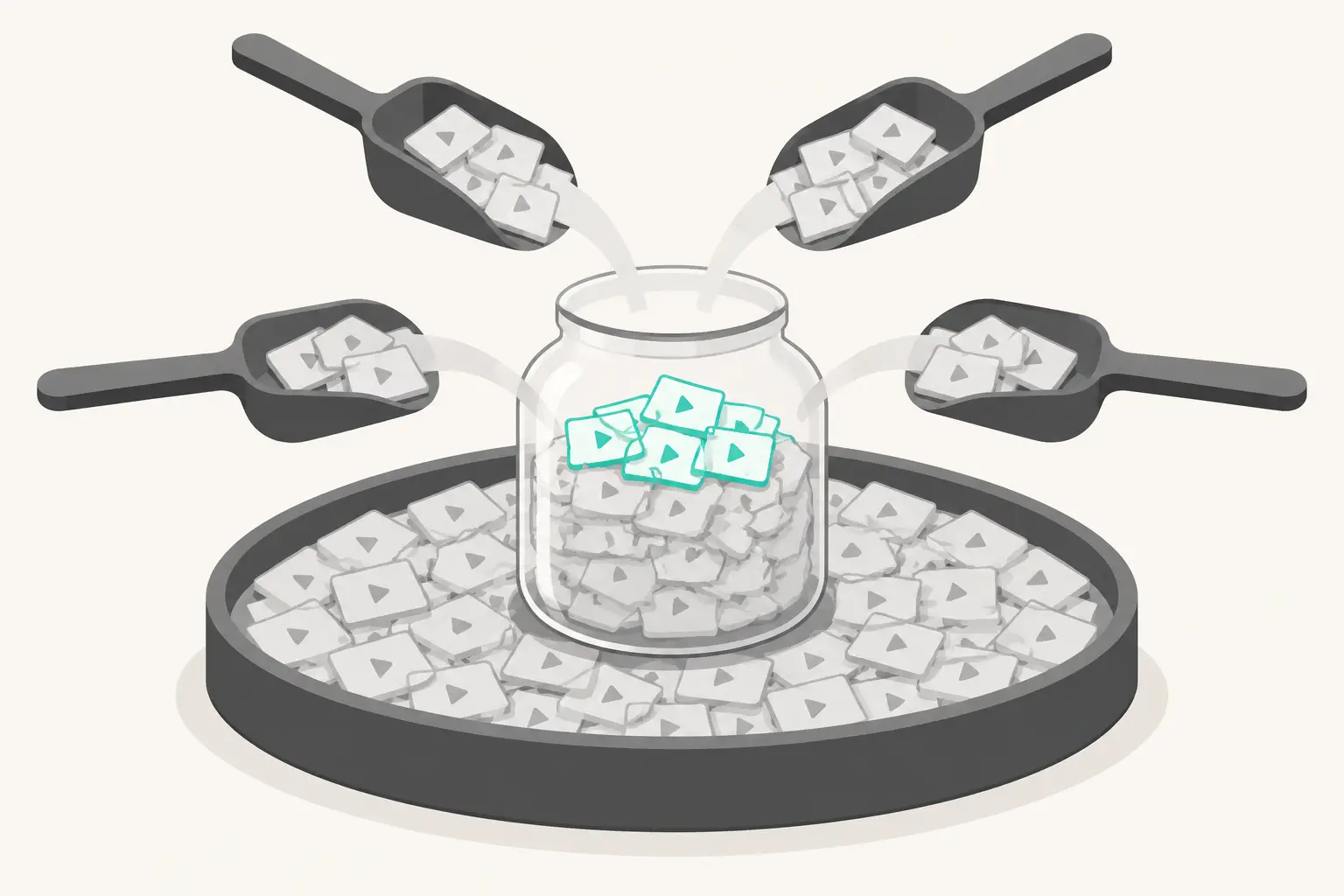
So "1,000 search results" is a different job on each side. On Apify, YouTube Scraper takes a large maxResults for one keyword, runs once and charges per row. With us, you prepare a set of related keywords. Examples are a brand name plus a model, plus "review", "unboxing" or "vs".
You run each keyword with one to four sort orders and remove duplicates by video ID. Related keywords also share results, so you cannot multiply 122 by the number of keywords. At 15:40 and 15:41 SGT, we ran four related keywords once each with relevance. Then we removed duplicates against the 122 videos from the four sort orders.
| Keyword | Rows | New unique | Already seen | Total unique |
|---|---|---|---|---|
| mechanical keyboard review (four sorts, 14:34 to 14:35) | 189 | 122 | 67 | 122 |
| mechanical keyboard unboxing | 50 | 41 | 9 | 163 |
| mechanical keyboard comparison | 50 | 20 | 30 | 183 |
| best mechanical keyboard | 48 | 24 | 24 | 207 |
| mechanical keyboard sound test | 50 | 40 | 10 | 247 |
Eight calls cost $0.004448 and gave 247 unique videos, or $0.018 per 1,000 unique rows. Keywords close to "review" repeat more. For "comparison", 30 of 50 rows were already in the set. For "unboxing" and "sound test", only 9 or 10 were.
Each new related keyword added 31 unique videos on average. At that rate, 1,000 unique videos take about 30 keywords, at least 33 calls and about $0.02. With more keywords, the overlap grows, so the real number of calls is higher. If you already track a keyword set, this method fits well. If you only care how deep one keyword goes, the Apify method is easier.
Test 2: apify youtube comments scraper vs `youtube/comments`, and 80 of 100 rows are replies
Apify's YouTube Comments Scraper charges per comment. The Free tier costs $0.002 per comment and Business costs $0.0009. The Store page says "from $0.90 / 1,000 comments". The page says that it extracts all comments from the videos you choose.
The maxComments input sets the maximum. At 00:50 SGT on 2026-11-01, we called youtube/comments on an English tech video with 5,610 comments and 7.02 million views. We set sort to popular. After 51.7 seconds, the call returned 100 rows and charged $0.000556, which is $0.0056 per 1,000 rows.
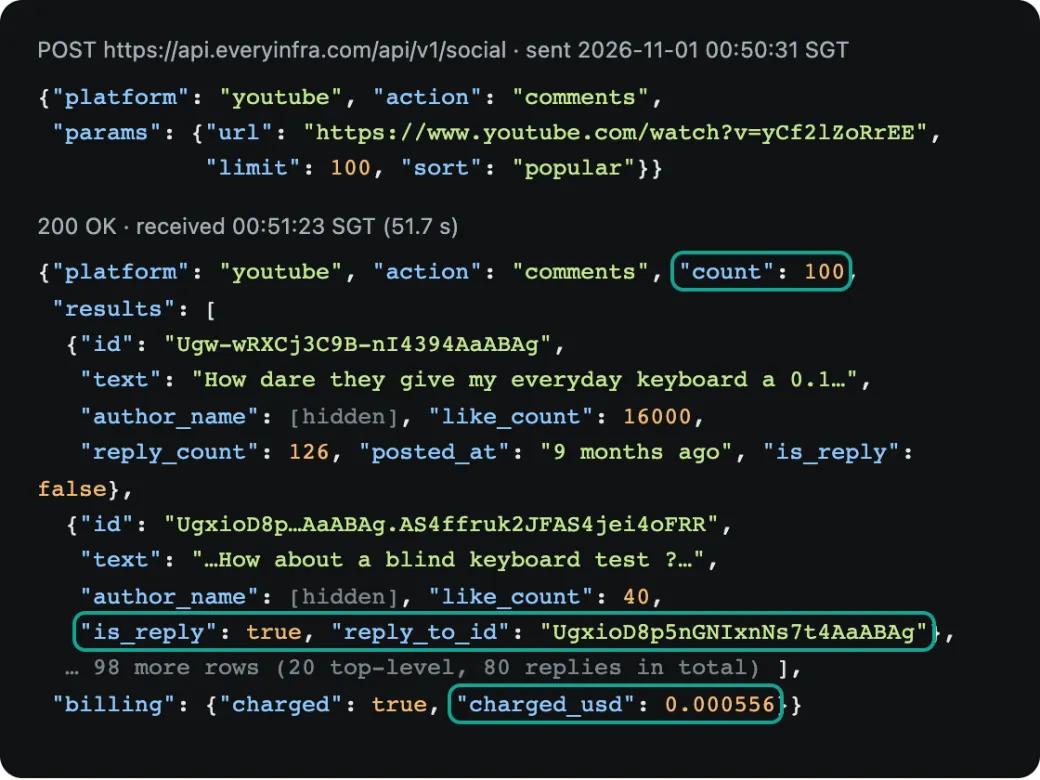
The 100 rows hide a detail that is easy to miss. Only 20 are top-level comments. The other 80 are replies to those 20. Each reply has is_reply: true and a reply_to_id that links it to its parent. The 20 top-level comments report 421 replies in total, so the 80 replies are only part of the threads.
We then called the same video with sort newest. That call returned 78 top-level comments and 22 replies. The first row was a pinned comment from 9 months ago. After it came comments from minutes and hours ago. The two calls together gave 189 unique rows, with 11 in both.
If you count only top-level comments, our useful row count is lower. If replies are useful to you, for example for sentiment analysis, you get two levels in one call. Our earlier article on YouTube comment reply paging explains that the official API pages top-level comments and replies separately. The reply_to_id field lets you rebuild those threads.
Next, we tested three more videos in other languages and with other comment counts. A Spanish keyboard video has 1,198 comments. Popular and newest gave 100 rows each and 185 unique rows, which is 15.4% coverage. A Chinese keyboard video has 277 comments.
One popular call gave 100 rows, or 36.1%. An English buyer's guide with 69 comments returned 54 rows in one call, or 78.3%. On the large video with 5,610 comments, we made five calls in total: each sort order twice, plus one call with since. They gave 245 unique rows, or 4.4%.
| Video (language) | Comments on page | Calls | Unique rows | Coverage | Replies | Total charge |
|---|---|---|---|---|---|---|
| Tech review (English) | 5,610 | 5 | 245 | 4.4% | 80 of 100 in popular | $0.00278 |
| Keyboard review (Spanish) | 1,198 | 2 | 185 | 15.4% | 60 of 100 in popular | $0.001112 |
| Keyboard guide (Chinese) | 277 | 1 | 100 | 36.1% | 20 | $0.000556 |
| Keyboard buyer's guide (English) | 69 | 1 | 54 | 78.3% | 17 | $0.000556 |
| NASA Moon Base (English) | 0 | 2 | 0 | n/a | n/a | $0 (both refunded) |
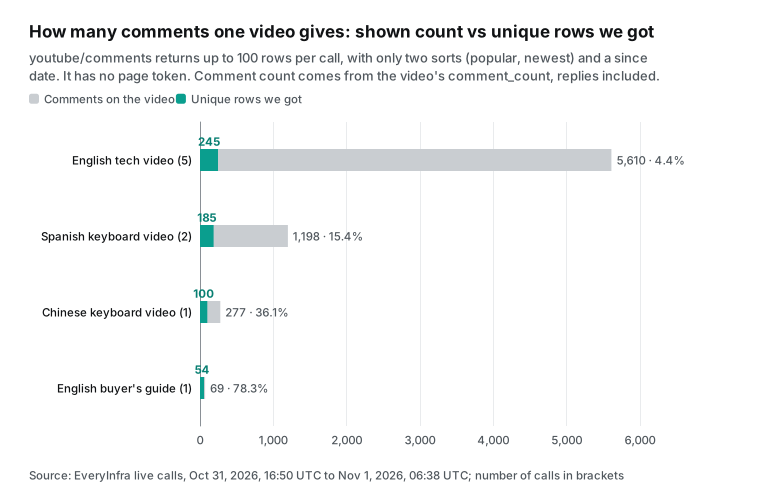
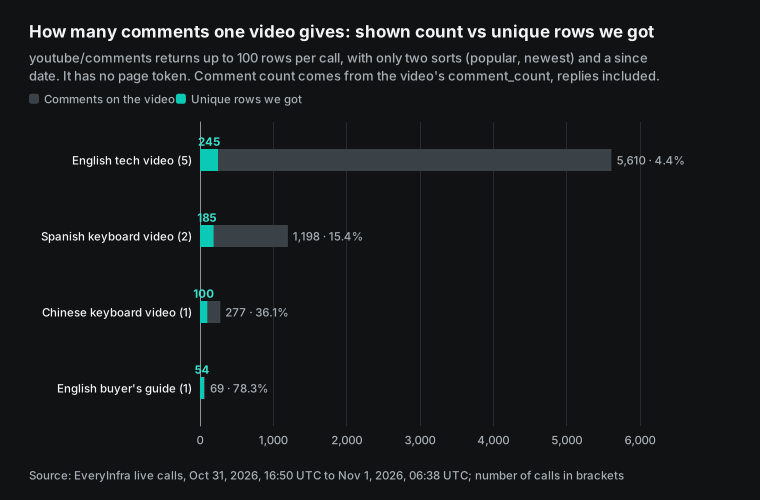
This is our hardest limit. youtube/comments returns up to 100 rows per call. It has two sort orders, popular and newest, and a since start date. It has no page token. In our tests, we added a page_token parameter to one request.
The API returned 422 and listed the four parameters it accepts: url, limit, since and sort. The since parameter does not add depth either. At 00:56 SGT, we called newest with since=2026-10-01. It returned 19 rows, and all 19 were already in the earlier newest call.
So "1,000 comments from one video" is not possible with us. What is possible is "many videos, with the top and newest one or two hundred comments from each". That costs $0.0056 to $0.0060 per 1,000 rows. To get the full comment section of one large video, use the Apify Comments Scraper or the official commentThreads endpoint. On the Business tier, 5,610 comments cost about $5.05 on Apify. The next sections cover the official endpoint.
We found two more details. First, a NASA Moon Base video from 2026-10-20 has comments turned on (is_comments_disabled is false), but its metadata shows 0 comments. Both comment calls returned 0 rows, and both were refunded. A youtube/video call first shows comment_count, and it saves this wait.
Second, the comment posted_at field is relative text from the YouTube page ("9 months ago", "2 days ago"). It is not a timestamp. You must convert it from the time of collection. Video search rows have ISO timestamps.
Test 3: channels, Shorts, transcripts and single videos
The channel video list youtube/user_posts also has one price per page, like Shorts. At 00:47 SGT, we asked for the 50 newest regular videos of the NASA channel. The call took 11.3 seconds and charged $0.000556, which is $0.0111 per 1,000 rows. At 00:48 SGT, we asked for Shorts from the same channel with limit 100. It returned 41 rows, which is $0.0136 per 1,000 rows.
For channel video lists, the Apify alternative is the Fast YouTube Channel Scraper. It costs $1.30 per 1,000 on Free and $0.50 on Business, which is 45x to 117x more. For Shorts, the alternative is the YouTube Shorts Scraper at $4.00 to $2.40, which is 177x to 295x more. Shorts have one exception.
The third-party Shorts actor we mentioned costs only $0.02 per 1,000 rows and had 722 users in 30 days. It is only 1.5 times our price. If you only need Shorts, the gap is too small to justify a change of tools.
For the three actions that return one row, the result is the other way around. At 00:56 SGT, youtube/transcript got the transcript of the 9-minute NASA video. In 8.7 seconds, it returned 160 timed segments and a list of 21 available languages: one manual English track and 20 auto-generated tracks. The Youtube Transcript Scraper has the most total users (26,996). It costs $0.01 per transcript.
It stopped its discounts on 2026-10-01, so it costs $10 per 1,000, or 18 times our price. By users in the last 30 days, the top transcript actor is the johnvc YouTube Transcript & Subtitles Scraper API. Its promotional price ended on 2026-10-13. The supreme_coder transcript actor is the cheapest of the three.
| Transcript actor on Apify | Users, 30 days | Users, total | Free per 1,000 | Business per 1,000 | Compared with our $0.556 |
|---|---|---|---|---|---|
| pintostudio, Youtube Transcript Scraper | 2,744 | 26,996 | $10.00 | $10.00 | 18x more |
| johnvc, YouTube Transcript & Subtitles Scraper API | 4,876 | 9,137 | $2.75 | $2.00 | 3.6x to 4.9x more |
| supreme_coder, Youtube Transcript Scraper | 1,270 | 3,774 | $1.00 | $0.70 | 1.3x to 1.8x more |
We kept pintostudio in the summary table because it has the most total users and a price that has not changed since October 1. The johnvc price is less than three weeks old.
The channel profile action youtube/profile returns the subscriber count (15.1 million for NASA), the video count (6,195) and total views (1.13 billion). It also returns the verified flag, the avatar and the banner. The API Dojo channel profile actor charges $0.005 per URL query plus $0.0005 per row. That is $5.50 per 1,000 by URL, or 9.9 times our price. Video details are the one type where Apify is clearly cheaper. The API Dojo video actor costs $0.50 per 1,000, which is 10% less than our $0.556.
| Action | Rows per call | EveryInfra per 1,000 | Cheapest similar Apify actor (per 1,000) | Cheaper side | Note |
|---|---|---|---|---|---|
youtube/user_posts | 50 | $0.0111 | $0.40 (grow_media, Business) | EveryInfra, 36x | Up to 50 per call, since filter |
youtube/shorts | 41 (limit 100) | $0.0136 | $0.02 (johnvc, Business) | EveryInfra, 1.5x | Gap below 2x |
youtube/transcript | 1 | $0.556 | $0.70 (supreme_coder, paid) | EveryInfra, 1.3x | Gap below 2x |
youtube/profile | 1 | $0.556 | $5.50 (API Dojo, by URL) | EveryInfra, 9.9x | Keyword search is priced apart |
youtube/video | 1 | $0.556 | $0.50 (API Dojo) | Apify third party, 10% | 17.7% of about 213,000 runs in 30 days did not succeed (failed, timed out or aborted); the cause is not public |
One more point about video details. The $0.50 API Dojo video actor shows 213,132 runs in 30 days in its public stats. Of these, 36,525 failed. With timeouts and aborts, 17.7% of the runs did not succeed.
Its rating is 3.29 from 21 reviews. These numbers show run results, not data quality. A failed run can come from a bad link that a user entered. A user can abort a run. One large customer can also push the failure count up. The public stats do not show the cause.
With pay-per-event pricing, a failed run usually returns no data, so it creates no "per video" event. A start fee depends on how each actor sets its events. So the 10% lower price is a fact. Before you change tools for 10%, test a small batch of your own links.
The break-even point: how many rows per call make per-request pricing cheaper
We can now compute a simple break-even point. One call costs us $0.000556. If the other side charges p dollars per row, one call must return at least $0.000556 ÷ p rows to be cheaper than per-row pricing. For Apify's own YouTube Scraper at $0.0024 per row (Business), the break-even is 0.23 rows. So even one row per call is cheaper with us. That is why video details are still 4.3 times cheaper than that actor.
For a third party at $0.0005 per row, the break-even is 1.1 rows. A single-video call returns one row, so it loses by 10%. For the Shorts actor at $0.00002 per row, the break-even is 27.8 rows. Our Shorts call returned 41 rows, just above that point, so we are only 1.5 times cheaper. A channel with fewer than 28 Shorts is cheaper on that actor.
| Compared with (price per row, Business) | Break-even: rows per call | Rows per call in our tests | Result |
|---|---|---|---|
| YouTube Scraper, $0.0024 | 0.23 | 47 for search, 1 for video details | EveryInfra cheaper in both |
| YouTube Comments Scraper, $0.0009 | 0.62 | 100 for comments | EveryInfra 162x cheaper |
| Youtube Search Api (grow_media), $0.0004 | 1.4 | 47 for search | EveryInfra 34x cheaper |
| Youtube Scraper (API Dojo), $0.0005 | 1.1 | 1 for video details | Apify third party 10% cheaper |
| YouTube Shorts API (johnvc), $0.00002 | 27.8 | 41 for Shorts | EveryInfra 1.5x cheaper, loses below 28 |
The practical rule is short. For data that can return dozens of rows, set limit to the action maximum, so each call returns a full page. For data that returns one row, check the Store for a third party below $0.0005 per row before you choose. Our catalog shows max_limit and default_limit for each action.
The default for comments is 20 rows. If you do not set limit, you get 20 rows, and your price per 1,000 rows goes up five times. People who move from Apify make this mistake most often.
Retest after 13.8 hours: same price, half the rows changed
Our rules say that a price is stable only after a retest at least 30 minutes later. At 14:34 SGT, we sent the 00:47 search again with the same parameters. It returned 47 rows and charged $0.000556 again, so the price per 1,000 rows did not change. At 14:35 and 14:36 SGT, we sent both comment sort orders on the large video again. Both returned 100 rows for $0.000556. The price stability check passes.
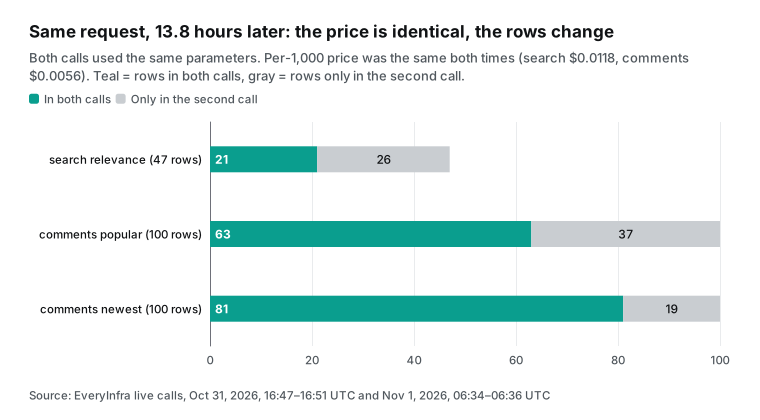
The rows did change. Only 21 of the 47 search rows matched the first call, and only 5 of the top 10. For comments, 63 of 100 popular rows matched, and 81 of 100 newest rows matched. Search ranking changes over time on YouTube itself.
This is not a fault of either tool, but it changes how you work. For rank tracking, run at a fixed time each day and record search_rank. To find all videos for a keyword, add each day's results to one list. Then remove duplicates by video ID.
After a few days, the list is wider than one deep call. Apify users see the same changes. The difference is that with per-row pricing, you pay again for every repeated video.
Do failed calls and empty results cost money? Eleven calls that cost $0
From 00:47 to 14:38 SGT, 11 of our 32 calls returned no data. The table lists each one with its time, cause, status code and charge. The charge comes from billing.charged_usd in the response. Rate-limited calls and calls without a key have no billing field. For those, we compared the balance before and after to confirm that nothing was charged.
| Time (SGT) | Request | Result | Status | Charge |
|---|---|---|---|---|
| 00:49, 00:49 | youtube/comments, NASA video, popular and newest | 0 rows (the video has 0 comments) | 200 | $0, empty_result_refunded |
| 00:51, 00:53, 00:53, 00:55 | One comments call, two search calls, one transcript call | Rate limit: the test key allows 10 calls per minute, and other test jobs shared that key at the time | 429 | $0; each call worked on retry after 63, 95, 112 and 30 seconds |
| 00:53 | youtube/search without a key | missing_key | 401 | $0 |
| 00:53 | youtube/search with sort most_popular | invalid_value, did_you_mean most_viewed | 422 | $0 |
| 00:53 | youtube/comments with an extra page_token | unknown_param, lists 4 valid parameters | 422 | $0 |
| 00:57 | youtube/comments with a video ID that does not exist | Timeout after 85 seconds (for slow jobs, add "mode":"async" and poll the job ID) | 503 | $0, request_failed_refunded |
| 14:38 | youtube/profile with a channel that does not exist | 0 rows | 200 | $0, empty_result_refunded |
The two 422 error texts are worth a look, because programs and AI agents read them. For the bad sort, the response says "sort must be one of: most_viewed, newest, relevance, top_rated". It adds did_you_mean: ["most_viewed"] and a next step: change only sort, then send again, and nothing was charged. For the extra parameter, the response says that page_token is not a parameter of youtube/comments. It lists the required url and the optional limit, since and sort, and it adds a working example request. An AI assistant on MCP can read this, fix the request and send it again without help.
On Apify, a result that is not written to the dataset creates no "per result" event. But the start fee is charged when the run starts: at least $0.01 per run for the search actor in the next section. So Apify charges for the events that happen, up to your cap. We charge one fixed price per call, and a failure costs zero.
A Store page and its API do not agree after a price change
When we checked prices, we found a new price version for the YouTube Search Scraper. From 21:36 UTC on 2026-10-26, the Free tier price per result went from $0.0025 to $0.005. The paid price went from $0.00025 to $0.0005. Both doubled. The stated reason is higher infrastructure and maintenance costs (actor metadata).
The header "from $0.50 / 1,000 results" and the title "$0.5/1000 results" show the new price. But the FAQ on the same page still shows the old price table. It also says "1,000 results cost about $2.51 on the Free plan or $0.26 on a paid tier". We took a screenshot at 14:40 SGT on 2026-11-01, five days after the change.
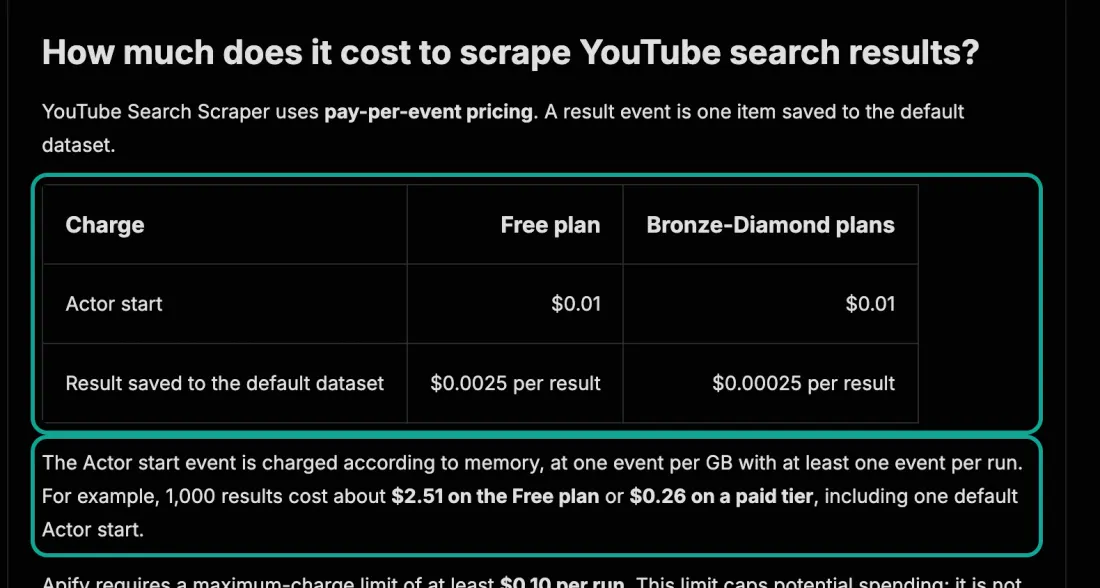
We do not say that anyone wrote this on purpose. The actor owner writes the Store page text. The platform builds the price table from the events. The two often fall out of step.
Our TikTok scraper comparison found the same problem. For you, the lesson is simple. To estimate cost on Apify, use the Pricing tab or the event prices in the public endpoint. Do not use the README or the FAQ.
Each version in pricingInfos shows its start time. At the current price, 1,000 search results from this actor cost $5.01 on the Free tier, including one start fee. That is more than the full $5 monthly Free credit.
One month of costs for four common jobs
Unit prices are only part of the bill. Monthly volume and the plan decide the rest. We took four common YouTube jobs and priced each one the cheapest way on each side. For Apify, we use the cheapest plan that fits.
On a paid plan, you pay the higher of the monthly fee and your usage. The Free plan fits only if usage stays at $5 or less. For EveryInfra, we extrapolate from the rows in our tests and the catalog price of $0.000556 per call. The $10 minimum top-up is not included.
| Monthly job | EveryInfra calls / cost | Apify main actor (cheapest plan) | Cheapest Store third party (cheapest plan) |
|---|---|---|---|
| 20 keywords searched daily, about 28,200 rows | 600 calls / $0.33 | YouTube Scraper, Starter: $84.60 | grow_media, Starter: $19 (usage $16.95) |
| 100 comments on each of 200 new videos, 20,000 rows | 200 calls / $0.11 | Comments Scraper, Starter: $30.00 | supreme_coder, Starter: $19 (Free needs $5.10, above $5) |
| 100 channels checked daily for 10 new videos, 30,000 rows | 3,000 calls / $1.67 | Channel Scraper, Starter: $30.00 | grow_media, Starter: $19 |
| Transcripts of 500 videos | 500 calls / $0.28 | pintostudio, Free at $5.00, you pay $0 | supreme_coder, Free at $0.50, you pay $0 |
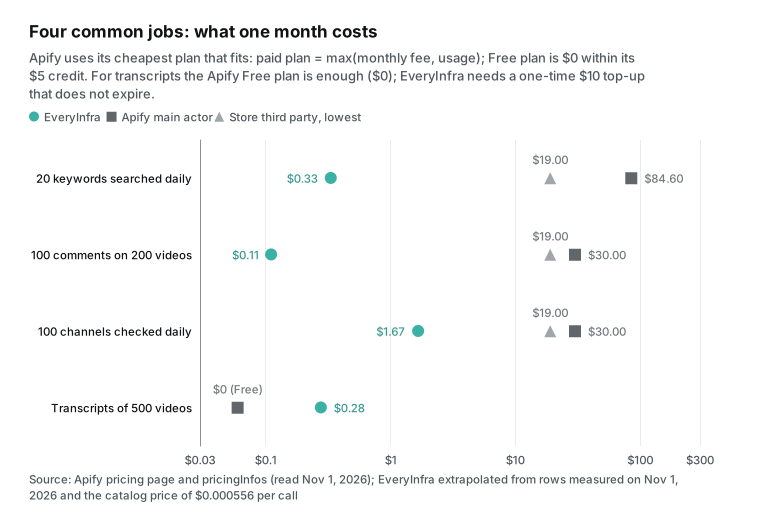
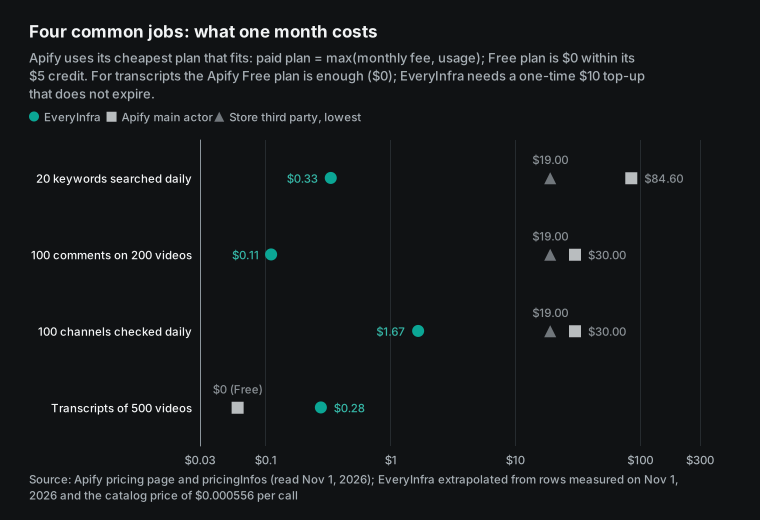
In the first three rows, our monthly cost is below $2. The Apify side costs at least $19 for Starter. The main cost is not the unit price but the Starter fee. Third-party usage is only $5 to $17. But if it goes above the $5 Free credit, you must pay $19 first.
The third row has one surprise. We charge per call, so "the 10 newest videos" costs the same as "50 videos". So 3,000 calls cost $1.67, more than the first two rows. If you check each channel every two days, the cost falls by half.
The fourth row is a case where Apify is better. For 500 transcripts per month, the Apify Free credit is enough, and you pay $0. Our cost is $0.28, but the first top-up is $10. The balance does not expire, so at this volume it lasts about 36 months.
If your monthly needs stay inside the Apify $5 Free credit, and you need no other platforms, the Apify Free plan costs less. Our Apify alternatives overview did the same math for social and map data and found the same result. The smaller your volume, the better Apify looks. Once you pass the Free plan, the $19 Starter fee becomes the main cost.
The official YouTube Data API: use it first when its free quota is enough
No comparison of YouTube data tools is complete without YouTube's own Data API v3. It is free, but it has a quota. By default, each Google Cloud project gets 100 search.list calls and 100 uploads per day. All other methods share 10,000 units per day. The quota resets at midnight Pacific Time (quota calculator, updated 2026-10-15).
Since June 1, 2026, search.list has its own quota bucket. Each call counts as one, with 100 calls per day (revision history). For comments, commentThreads.list costs 1 unit per call and returns up to 100 threads per page. A pageToken lets you page to the end. Replies need comments.list.
| Need | Default YouTube Data API quota | Maximum per day (theory) | Cost for the same volume on EveryInfra |
|---|---|---|---|
| Keyword search | search.list, 100 calls per day, up to 50 rows per page | 5,000 rows | 100 calls, $0.0556 |
| All top-level comments of one video | commentThreads.list, 1 unit per call, 100 per page | 1,000,000 rows from 10,000 units | Not possible for one full video |
| Video and channel details | videos.list, channels.list, 1 unit per call, up to 50 IDs | 500,000 items | $0.000556 each |
| Transcripts of other people's videos | captions.download, 200 units, and you must be able to edit the video | Not available | $0.000556 each |
The table shows two jobs where the official API has no equal. One is paging through the full comment section of a video. The other is bulk lookups of video and channel details. With 10,000 units per day, one project can page through one million top-level comments. No per-row or per-call tool is cheaper.
The official API has three weak points. You must set up a Google Cloud project and manage API keys. Search is limited to 100 calls per day. To download captions, you must have edit permission for the video (captions.download), so other people's videos are out of reach. For a higher quota, you must pass a YouTube compliance audit (quota and compliance audits).
So a practical setup often mixes tools. Use the official API for deep comment pulls on a few videos. Use a per-request API for search and transcripts across many keywords and channels. Look at Apify when neither one is enough.
How reliable are the YouTube actors on Apify?
Apify's public metadata shows 30 days of run results for each actor: succeeded, failed, timed out and aborted. We read the stats of 12 YouTube actors at 14:40 SGT and sorted them by "runs per 10,000 that did not succeed". YouTube Scraper, the actor with the most users, ran 2.947 million times in 30 days. It had 84 runs per 10,000 that did not succeed.
The comments actor from the same group had 182, and the channel actor had 221. The highest was the API Dojo video actor with 1,773 per 10,000. Next was the transcript actor with the most total users, at 1,282 per 10,000.
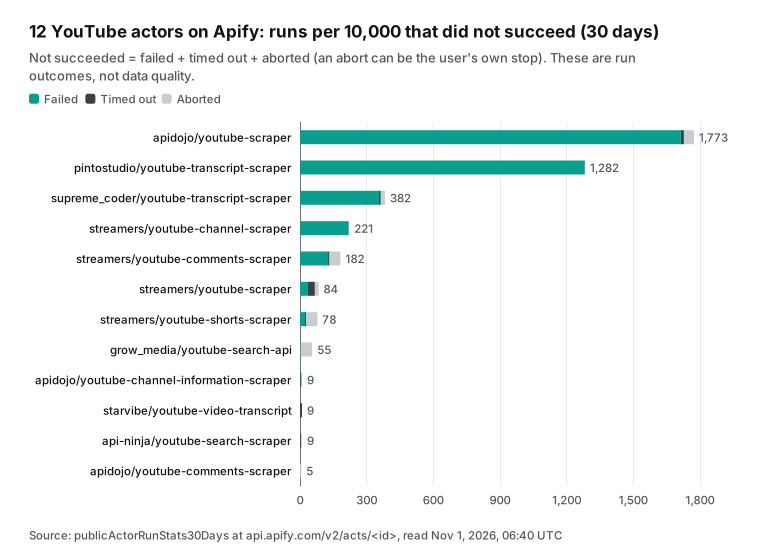
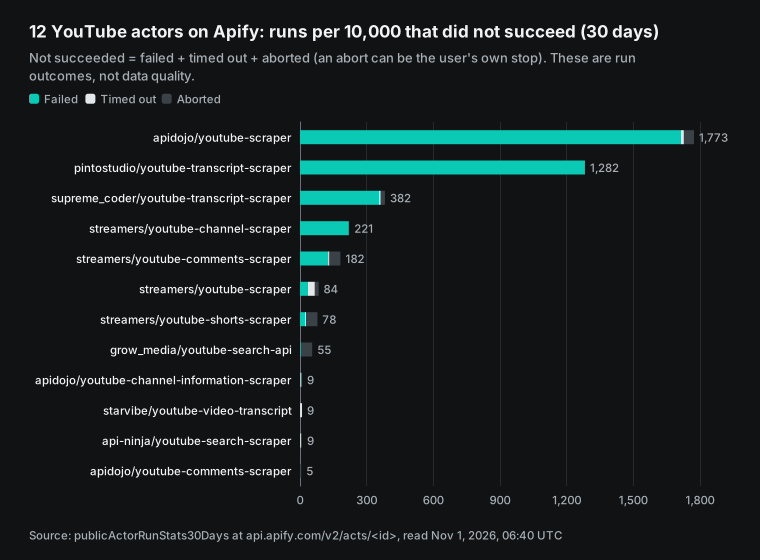
Read these numbers with care. They are run outcomes, not data quality. A user can abort a run. Some failed runs come from links that do not open. One large customer with big batches can raise the failure count of an actor.
The numbers show which actors at the same price have problems more often. Use them as one input when you choose a third-party actor. Apify also marks actors that fail its automated tests as "under maintenance" and ranks them lower in the Store (Actors in Store). On our side, only 1 of our 39 calls failed from a timeout, and we caused it with a video ID that does not exist. That sample is too small to compare with Apify's millions of runs.
Update dates are another public signal. In the modifiedAt field, all four Streamers YouTube actors were last updated on 2026-10-30. The three API Dojo actors were updated around 2026-10-31. The api-ninja and grow_media search actors were updated on 2026-10-27.
The pintostudio transcript actor was updated on 2026-10-19. Some actors have not changed for months. The starvibe transcript actor was last updated in March 2026. When YouTube changes its pages, scrapers must change too, so frequent updates mean faster recovery.
Prices also move. The johnvc transcript actor changed its price on 2026-10-13, and the search actor above changed on 2026-10-26. For third-party actors, one or two price changes per month are common.
YouTube scraper API in code, n8n and AI clients
In code, the curl call works the same way in any language. The Python function below runs one keyword with four sort orders and removes duplicates by video ID. This is the method from Test 1. On a 429, it waits 60 seconds and tries again. On a 422, it prints the did_you_mean value from the API.
import os, time, requests
URL = "https://api.everyinfra.com/api/v1/social"
HEAD = {"Authorization": f"Bearer {os.environ['EVERYINFRA_API_KEY']}"}

def search_all_sorts(keyword):
    seen, cost = {}, 0.0
    for sort in ["relevance", "newest", "most_viewed", "top_rated"]:
        body = {"platform": "youtube", "action": "search",
                "params": {"keyword": keyword, "limit": 50, "sort": sort}}
        r = requests.post(URL, json=body, headers=HEAD, timeout=120)
        if r.status_code == 429:
            time.sleep(60); r = requests.post(URL, json=body, headers=HEAD, timeout=120)
        data = r.json()
        if r.status_code == 422:
            print(data["error"].get("did_you_mean")); continue
        cost += data.get("billing", {}).get("charged_usd", 0)
        for row in data.get("results", []):
            seen.setdefault(row["id"], row)
    return list(seen.values()), cost
In an AI client, add EveryInfra as a remote MCP server. You do not install a local program. For Claude, Cursor and other clients with remote MCP support, use the configuration below. After you connect, the model calls everyinfra_list_capabilities to find the eight YouTube actions and their parameters.
Then it calls everyinfra_call_api to send requests. If a parameter is wrong, it reads the 422 hints and fixes the request. The full steps are in our remote MCP setup guide.
{
  "mcpServers": {
    "everyinfra": {
      "url": "https://api.everyinfra.com/mcp",
      "headers": { "Authorization": "Bearer YOUR_API_KEY" }
    }
  }
}
Apify also has an MCP server at mcp.apify.com with OAuth sign-in. It lets an AI search the Store and run actors. For safety, it excludes actors that need full permissions (Apify MCP documentation, source on GitHub). Both sides connect to AI tools. The difference is still the unit of charge. The protocol itself is in the Model Context Protocol specification.
For scheduled jobs, Apify has built-in Schedules. Each user can have up to 100 schedules, with up to 10 actors per schedule (Schedules, Limits). Results go into a dataset, and unnamed datasets expire after 7 days (Dataset). We have no built-in scheduler. Results come back in the response, and you decide where to store them.
Use cron, n8n or any workflow tool to call the API on a schedule. Our YouTube comment topic report shows a full monthly example. The YouTube scraper API page lists parameters and fields for each action. The most used are search, comments, transcripts, channel videos and Shorts.
Moving from Apify: five things to change
If you use Apify YouTube actors now, a move is more than a new endpoint. From our tests, these five points cause the most errors.
| Topic | Habit on Apify | What to do with EveryInfra |
|---|---|---|
| Unit of charge | A large maxResults costs more, because each row is charged | Set limit to the maximum (50 for search, 100 for comments). A small limit wastes money |
| Depth | One run can dig one keyword or one video to the end | Use many keywords and sort orders and remove duplicates by ID. Use the official API for deep pulls |
| Time fields | Depends on the actor | For comments and channel videos, posted_at is relative text. Convert it from the time of collection |
| Replies | Depends on the actor settings | Comment results include replies. Split them by is_reply and reply_to_id |
| Storage | Unnamed datasets keep data for 7 days | We do not store your data. Write each response to your own database |
When Apify is the better choice
The table lists the cases where Apify, or the official API, is the better choice. It also lists the cases where we cost less.
| Your need | Better choice | Why |
|---|---|---|
| Every comment on one video | Apify Comments Scraper or official commentThreads | We have no page token, and one video stops at about two hundred unique comments |
| Thousands of results for one keyword | Apify YouTube Scraper | One run with a large maxResults finishes the job |
| A few hundred transcripts or video details per month | Apify Free plan | The $5 Free credit is enough, so you pay $0. We need a $10 top-up |
| Video details only | API Dojo actor on Apify | $0.50 per 1,000 is 10% less than us |
| Date filter, transcript by the minute, AI summaries | Apify YouTube Scraper add-ons | We have no matching actions |
| The top page from many keywords, channels or videos | EveryInfra | One call returns a full page for $0.000556 |
| Search, comments, transcripts and profiles together | EveryInfra | One endpoint and one price for all eight actions |
You may also already run other workflows on Apify, with datasets, schedules and webhooks in place. Then a second tool adds work, and the cost gap must be large to pay for it.
We also cost less when you want a fixed unit price, where a failure costs zero. You want YouTube in the same API and the same balance as TikTok, Instagram or Reddit, for example our TikTok scraper API.
Compliance: public data, platform terms and a recent lawsuit
The YouTube Terms of Service do not allow access by automated means such as robots or scrapers. There are two exceptions. One is public search engines that follow robots.txt. The other is access with prior written permission from YouTube (YouTube Terms of Service, version effective 2023-12-15).
The official Data API has its own developer terms and policies. They require you to explain what you collect, how you store it and how you delete it. They also say not to keep user data forever (Developer Policies, API Services Terms of Service).
Comments include public user names and what people wrote. In the EU, these are personal data, and processing must follow the GDPR. The Apify Comments Scraper FAQ also says that results can contain personal data, and that you should not collect personal data without a legitimate reason.
On October 9, 2026, a federal court in Northern California let a suit by YouTube creators against Apple go forward. The creators claim that Apple went around YouTube's anti-scraping measures to download videos for model training. The judge held that those measures control how users access the videos and denied Apple's early motion to dismiss (MediaPost report). The case is about video downloads, not the metadata, comments and transcripts in this article, and there is no final ruling yet. We do not give legal advice. Before you use YouTube data to train models or publish it, ask a lawyer to review your use case.
What changed recently (September and October 2026)
The table lists the Apify price changes that we found in the public metadata of YouTube actors. The four Streamers actors had no new price version in September or October. The pintostudio actor changed twice since August.
| Date (UTC) | Actor | Change |
|---|---|---|
| 2026-10-26 | YouTube Search Scraper (api-ninja) | Per result: $0.0025 to $0.005 on Free, $0.00025 to $0.0005 on paid tiers |
| 2026-10-13 | YouTube transcript actor (johnvc) | Promotional price ended: $2.75 per 1,000 on Free, $2.00 on Business |
| 2026-10-01 | Youtube Transcript Scraper (pintostudio) | Discounts ended, $0.01 per transcript on all tiers |
| 2026-09-02 | YouTube Scraper (Streamers) | Current five-event price list starts, no change since |
October 26, 2026: an Apify YouTube search actor doubled its price. The YouTube Search Scraper in the screenshot above went from $0.0025 to $0.005 per result on Free. On paid tiers, it went from $0.00025 to $0.0005 (metadata). What it means for you: low-price third-party actors change prices more often than the actors Apify maintains. Read pricingInfos again each month when you estimate cost.
October 15, 2026: YouTube Data API documentation update. The videos.list page now explains how the made-for-kids flags update. The quota calculator and the audit page changed on the same day (revision history). What it means for you: the quota is still 100 searches and 10,000 units per day, with no recent increase.
October 9, 2026: Apple must face the YouTube scraping suit. See the section above (MediaPost). What it means for you: the legal risk of bulk downloads that go around platform controls is growing. Assess video files and metadata separately.
Mid-October 2026: an Apify co-founder on AI agent payments. On a podcast, he said that the x402 protocol processed about $1 million in 30 days. He also said that the Apify store lists about 80,000 actors and paid developers almost $2 million last month (BigGo report). What it means for you: AI agents that find and pay for tools on their own are still rare. In practice, a person still opens the account, adds funds and gives the key to the AI. So choose tools whose keys and bills are easy to manage.
October 1, 2026: the transcript actor with the most total users ended its discounts. The pintostudio transcript actor no longer gives paid tiers a lower price. All tiers pay $0.01 per transcript (Store page). What it means for you: for large transcript jobs on Apify, look for a cheaper third party or a per-request tool.
September 30, 2026: an image field for comments. The YouTube Data API comments resource added snippet.imageUrl for images or GIFs attached to a comment. It becomes available to all users in November 2026 (revision history). What it means for you: comment analysis may soon need to handle images, and text-only sentiment analysis will miss some content.
Get started: from one trial call to a daily job
Step one: open YouTube in the EveryInfra market, then open the comments or search page. The test console on the page sends one request without code. Check the fields and the charged_usd value. Step two: create an API key in the console and follow the quickstart to run the curl call above. Top-ups start at $10, and the balance does not expire.
Step three: put the keywords, channels and videos you track in a list. Run them once a day with the duplicate removal shown above. You can also add the remote MCP server to your AI client and let it write the requests. To compare other options, read the Apify alternatives overview and our alternatives page. Prices are on the pricing page.
FAQ
How does apify youtube scraper pricing work?
YouTube Scraper uses pay-per-event pricing. The base event is one video: $0.004 on Free, $0.003 on Starter, $0.0026 on Scale and $0.0024 on Business, or $4.00 to $2.40 per 1,000. Transcripts, AI summaries and the date filter are add-ons with their own prices. The discount tier follows the plan, so the Business price needs the $999 monthly plan. We read the public endpoint twice on 2026-11-01, and the prices matched. (Source of the question: Google autocomplete for "apify youtube scraper pricing", "pricing plans" and "pricing calculator", read 2026-11-01.)
Can the apify youtube comments scraper get every comment on a video?
The Store page says it extracts all comments from the videos you choose. The maxComments input sets the limit, and it charges per comment, $0.90 per 1,000 on Business. We cannot do this. youtube/comments returns up to 100 rows per call and has no page token.
On a video with 5,610 comments, five calls gave 245 unique rows. For every comment, use Apify or the official commentThreads endpoint. (Source of the question: Google autocomplete for "apify youtube comments scraper" and "how to scrape youtube comments", read 2026-11-01.)
Is there an apify youtube scraper api that I can call from code?
Yes. You can start any Apify actor through the API. The synchronous endpoint run-sync-get-dataset-items returns the dataset when the run ends, and maxTotalChargeUsd caps the spend. EveryInfra has one endpoint, POST /api/v1/social.
Set platform to youtube and action to search, comments or another action. The response includes charged_usd. (Source of the question: Google autocomplete for "apify youtube scraper api", read 2026-11-01.)
Which is cheaper, an apify youtube transcript scraper or youtube/transcript?
It depends on the actor. The pintostudio transcript actor, which has the most total users, costs $10 per 1,000, or 18 times our $0.556. The johnvc actor, which had the most users in the last 30 days, costs $2.75 on Free and $2.00 on Business, or 3.6x to 4.9x. The supreme_coder transcript actor costs $0.70 per 1,000 on paid tiers, only 1.3x our price, and $1.00 on Free, or 1.8x. For a few hundred transcripts per month, the Apify $5 Free credit is enough, and you pay $0. (Source of the question: Google autocomplete for "apify youtube transcript scraper", read 2026-11-01.)
Should I replace an apify youtube channel scraper or an apify youtube shorts scraper?
For channel video lists, yes. Fast YouTube Channel Scraper costs $0.50 to $1.30 per 1,000. Our youtube/user_posts returns 50 rows per call for $0.0111 per 1,000. For Shorts, it depends on the comparison.
Apify's own Shorts Scraper costs $2.40 to $4.00 per 1,000, more than 177 times our price. The cheapest third-party Shorts actor costs $0.02 per 1,000, only 1.5 times our price. (Source of the question: Google autocomplete for "apify youtube channel scraper" and "apify youtube shorts scraper", read 2026-11-01.)
Is there a cheaper way to scrape YouTube? What do Reddit users say?
On r/apify, one user wanted bulk YouTube video data but did not find a cost-effective solution and said that most places charge a lot. In another thread, a poster said that the official 10,000 daily quota burns out fast (thread one, thread two). Our tests point to this: for the top results across many keywords and videos, per-request pricing costs least. For a deep pull of one video's comments, the official API costs least.
A reply in the second thread also mentions the open-source yt-dlp. It is free, but proxies, maintenance and compliance are your job. (Source of the question: Google autocomplete for "apify youtube scraper pricing reddit", read 2026-11-01.)
References
- YouTube Scraper (Store page, prices, FAQ), Apify / Streamers, read 2026-11-01. https://apify.com/streamers/youtube-scraper
- YouTube Scraper public metadata (pricingInfos, stats), Apify API, read 2026-11-01 at 00:46 and 14:40 SGT. https://api.apify.com/v2/acts/streamers~youtube-scraper
- YouTube Comments Scraper (Store page, maxComments, personal data note), Apify / Streamers, read 2026-11-01. https://apify.com/streamers/youtube-comments-scraper
- YouTube Comments Scraper public metadata, Apify API, read 2026-11-01. https://api.apify.com/v2/acts/streamers~youtube-comments-scraper
- Fast YouTube Channel Scraper, Apify / Streamers, read 2026-11-01. https://apify.com/streamers/youtube-channel-scraper
- YouTube Shorts Scraper, Apify / Streamers, read 2026-11-01. https://apify.com/streamers/youtube-shorts-scraper
- YouTube Search Scraper (FAQ price section screenshot), Apify / API Ninja, captured 2026-11-01 at 14:40 SGT. https://apify.com/api-ninja/youtube-search-scraper
- YouTube Search Scraper public metadata (price change of 2026-10-26), Apify API, read 2026-11-01. https://api.apify.com/v2/acts/api-ninja~youtube-search-scraper
- Youtube Search Api, Apify / grow_media, read 2026-11-01. https://apify.com/grow_media/youtube-search-api
- Youtube Comments Scraper, Apify / supreme_coder, read 2026-11-01. https://apify.com/supreme_coder/youtube-comment-scraper
- Youtube Scraper (Pay Per Result), Apify / API Dojo, read 2026-11-01. https://apify.com/apidojo/youtube-scraper
- YouTube Comments Scraper API, Apify / API Dojo, read 2026-11-01. https://apify.com/apidojo/youtube-comments-scraper
- YouTube Shorts API, Apify / johnvc, read 2026-11-01. https://apify.com/johnvc/youtube-shorts-api
- Youtube Transcript Scraper (discounts ended 2026-10-01), Apify / pintostudio, read 2026-11-01. https://apify.com/pintostudio/youtube-transcript-scraper
- Youtube Transcript Scraper, Apify / supreme_coder, read 2026-11-01. https://apify.com/supreme_coder/youtube-transcript-scraper
- Fast YouTube Channel Scraper API (channel profiles), Apify / API Dojo, read 2026-11-01. https://apify.com/apidojo/youtube-channel-information-scraper
- Youtube Channel Video Scraper, Apify / grow_media, read 2026-11-01. https://apify.com/grow_media/youtube-channel-video-scraper
- Apify Store search for "youtube", Apify API, read 2026-11-01 at 00:45 SGT. https://api.apify.com/v2/store?search=youtube
- Apify pricing page (plans, compute units), Apify, read 2026-11-01. https://apify.com/pricing
- Actors in Store (pricing models, discount tiers, under maintenance label), Apify documentation. https://docs.apify.com/platform/actors/running/actors-in-store
- Pay-per-event pricing model (events, maximum charge), Apify documentation. https://docs.apify.com/platform/actors/publishing/monetize/pay-per-event
- Actor pricing and costs (discount tiers, enterprise tiers), Apify documentation. https://docs.apify.com/platform/actors/publishing/monetize/pricing-and-costs
- Run Actor synchronously and get dataset items (maxTotalChargeUsd), Apify documentation. https://docs.apify.com/api/v2/act-run-sync-get-dataset-items-post
- Apify MCP server, Apify documentation. https://docs.apify.com/platform/integrations/mcp
- Limits (concurrent runs, schedules), Apify documentation. https://docs.apify.com/platform/limits
- Billing (prepaid usage does not roll over, overage invoices), Apify documentation. https://docs.apify.com/platform/console/billing
- Schedules, Apify documentation. https://docs.apify.com/platform/schedules
- Webhooks, Apify documentation. https://docs.apify.com/platform/integrations/webhooks
- Get Actor endpoint, Apify documentation. https://docs.apify.com/api/v2/actor-get
- Usage and resources, Apify documentation. https://docs.apify.com/platform/actors/running/usage-and-resources
- Dataset (unnamed datasets expire after 7 days), Apify documentation. https://docs.apify.com/platform/storage/dataset
- Runs and builds (run states), Apify documentation. https://docs.apify.com/platform/actors/running/runs-and-builds
- Residential proxy, Apify documentation. https://docs.apify.com/platform/proxy/residential-proxy
- n8n integration, Apify documentation. https://docs.apify.com/platform/integrations/n8n
- Get run endpoint, Apify documentation. https://docs.apify.com/api/v2/actor-run-get
- Actor quality score, Apify documentation. https://docs.apify.com/platform/actors/publishing/quality-score
- Get list of Actors in Store endpoint, Apify documentation. https://docs.apify.com/api/v2/store-get
- apify-mcp-server, GitHub. https://github.com/apify/apify-mcp-server
- YouTube Data API Revision History (entries of 2026-10-15, 2026-09-30 and 2026-06-01), Google for Developers. https://developers.google.com/youtube/v3/revision_history
- Quota Calculator (updated 2026-10-15), Google for Developers. https://developers.google.com/youtube/v3/determine_quota_cost
- CommentThreads: list, Google for Developers. https://developers.google.com/youtube/v3/docs/commentThreads/list
- Comments: list, Google for Developers. https://developers.google.com/youtube/v3/docs/comments/list
- Search: list, Google for Developers. https://developers.google.com/youtube/v3/docs/search/list
- Videos: list, Google for Developers. https://developers.google.com/youtube/v3/docs/videos/list
- Channels: list, Google for Developers. https://developers.google.com/youtube/v3/docs/channels/list
- Captions: download (200 units, edit permission required), Google for Developers. https://developers.google.com/youtube/v3/docs/captions/download
- YouTube Data API Overview, Google for Developers. https://developers.google.com/youtube/v3/getting-started
- Quota and Compliance Audits (updated 2026-10-15), Google for Developers. https://developers.google.com/youtube/v3/guides/quota_and_compliance_audits
- YouTube API Services Developer Policies, Google for Developers. https://developers.google.com/youtube/terms/developer-policies
- YouTube API Services Terms of Service, Google for Developers. https://developers.google.com/youtube/terms/api-services-terms-of-service
- YouTube Terms of Service (effective 2023-12-15), YouTube. https://www.youtube.com/t/terms
- Understand your YouTube content performance, YouTube Help. https://support.google.com/youtube/answer/12220281
- EveryInfra catalog (price_usd, max_limit, response_fields), read 2026-11-01. https://api.everyinfra.com/api/v1/social/catalog
- EveryInfra llms.txt (failed calls and empty results not charged, minimum top-up), read 2026-11-01. https://api.everyinfra.com/llms.txt
- Model Context Protocol specification 2025-06-18. https://modelcontextprotocol.io/specification/2025-06-18
- Regulation (EU) 2016/679 (GDPR), EUR-Lex. https://eur-lex.europa.eu/eli/reg/2016/679/oj
- yt-dlp, GitHub. https://github.com/yt-dlp/yt-dlp
- Apple Must Face Suit Over YouTube Scraping, MediaPost, 2026-10-09. https://www.mediapost.com/publications/article/418644/apple-must-face-suit-over-youtube-scraping.html
- Apify's Jan Curn Says AI Agents Still Won't Pay, BigGo Finance, October 2026. https://finance.biggo.com/news/63f41820354173bb
- YouTube scraping question, Reddit r/apify. https://www.reddit.com/r/apify/comments/1bpx9re/youtube_scraping_question/
- I built a YouTube Scraper Pro on Apify to bypass API quotas, Reddit r/apify. https://www.reddit.com/r/apify/comments/1xjbqh4/i_built_a_youtube_scraper_pro_on_apify_to_bypass/
- YouTube Transcript & Subtitles Scraper API (price version from 2026-10-13), Apify / johnvc, read 2026-11-01. https://apify.com/johnvc/youtubetranscripts
Reference BL-61