How to scrape Google Maps reviews: Places API, Python or a data API
The Places API returns at most 5 reviews per place. We tested three paths, priced them per 1,000 reviews and share a Python CSV exporter.

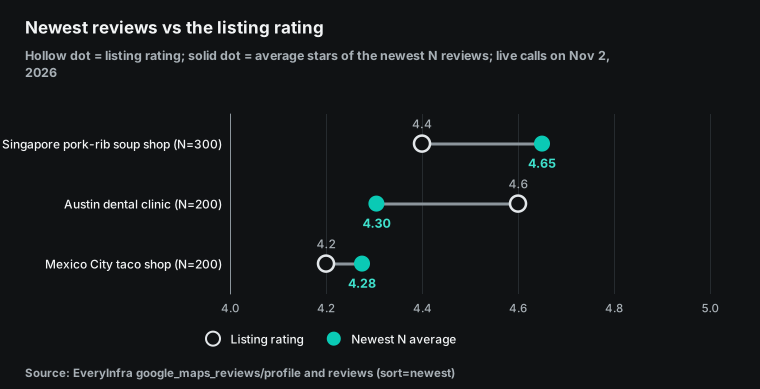
A dental clinic in Austin, Texas shows 4.6 stars on its Google Maps listing. Its newest 200 reviews average 4.305 stars, and 13% of them are one star. You cannot see that gap with the official Places API, because it returns at most five reviews per place, picked by relevance. On November 2, 2026, we tested three ways to get Google Maps businesses and reviews. The three paths are the official Places API, a do-it-yourself Python scraper and a pay-per-call data API. This guide shows what each path returns, what it costs per 1,000 reviews, and where it breaks.
Review data matters more each month. On October 8, 2026, Google published its first Fan-Favorite Dining Lists, built on reviews, ratings and direction requests [18]. On October 21, 2026, Google Maps added Gemini conversations to Apple CarPlay [19]. Search Engine Land cites Google's numbers: Ask Maps can use reviews from more than 500 million contributors [20].
More people now let AI read reviews and give an answer. So it matters which reviews the AI reads and what recent reviews say. That is why this guide keeps newest reviews and relevance-sorted reviews apart.
Decide what you need first
People who search for how to scrape Google Maps want very different things. A sales team wants the name, phone, website and rating of every dentist in a metro area. A franchise owner wants every review of 40 locations to answer complaints fast. A product team wants the one-star reviews of a competitor from the last quarter.
A researcher wants the rating spread of 500 restaurants in one district. Only the first job is a list of businesses. The other three need reviews, and the number of reviews, the date range and the owner of the listing decide which path works.
So answer three questions before you compare prices. First, how many reviews do you need per place, and are five enough? Second, are these places your own verified Google Business Profile locations? Third, does somebody on your team want to maintain a browser scraper and a proxy pool for years? The flow chart below splits the paths by these three questions. Each section after it tests one path with real requests or reads the official documents line by line.
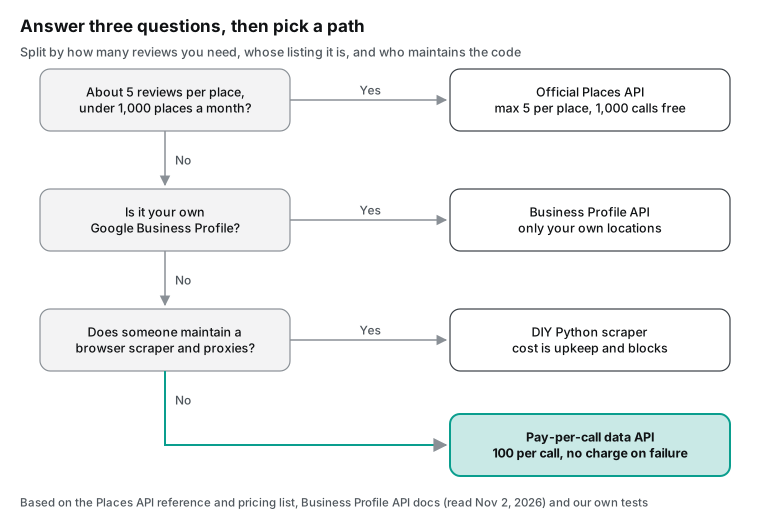
The chart includes the Business Profile API because many teams forget it. Google gives owners of verified locations an API that lists all their reviews [11]. It sorts by rating or by update time, with up to 50 reviews per page [12]. It needs OAuth consent and a verified location.
It cannot read a competitor. The table below puts the four approaches side by side. Each cell is a fact that we test or check later in this guide.
| Approach | Reviews per place | Order and paging | Cost per 1,000 reviews | Main cost |
|---|---|---|---|---|
| Official Places API (Place Details) | Up to 5 | Relevance only, no paging | $0 inside the free cap, then about $5.00 | Hard cap, author credit required |
| Business Profile API | All, for your own places | Rating or update time, 50 per page | $0 | Your own verified locations only |
| DIY Python with a browser | What the page shows | Simulated scrolling | Servers and proxies extra | Page changes, terms risk |
| EveryInfra data API | 400 rows per sort order, 100 per call | Newest or relevance, page tokens | $0.01389 at 100 per call | Pay per call, async after 200 rows |
Path 1: what the official Places API gives you
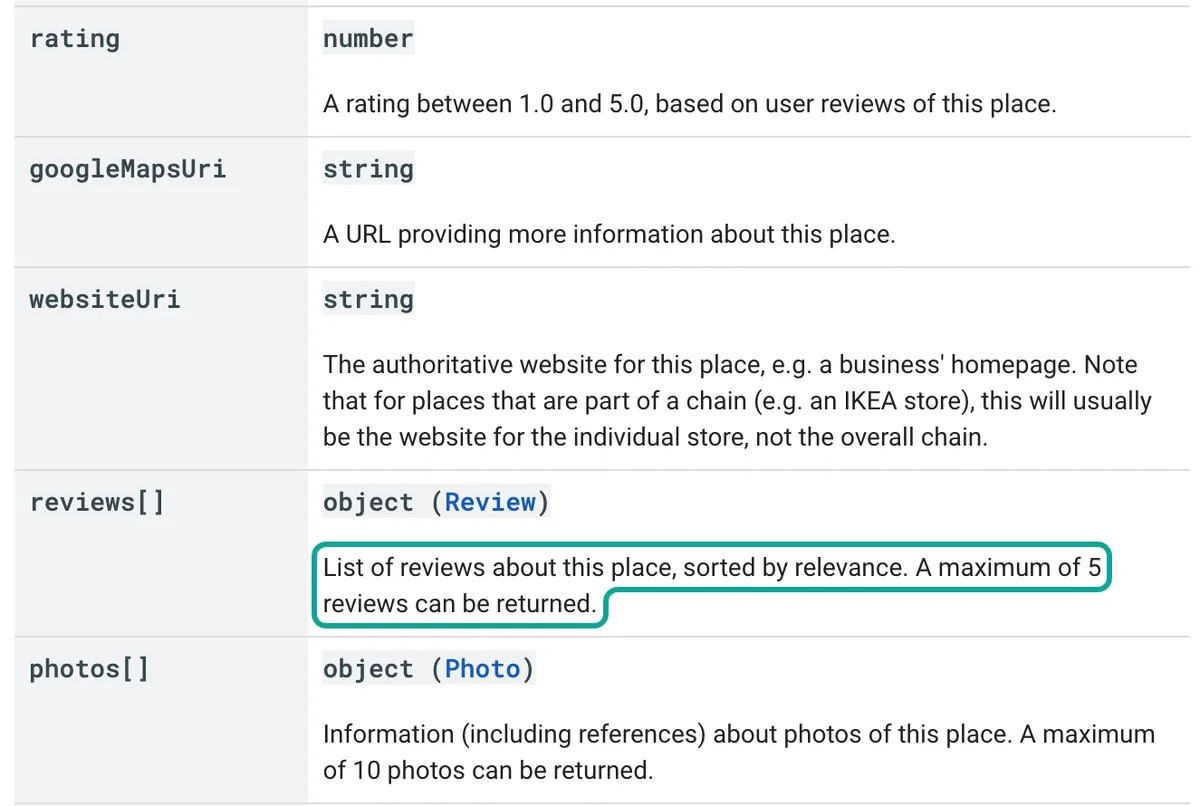
Start with Google itself. In the Places API (New), the Place resource has a reviews field. The reference text calls it a list of reviews about the place, sorted by relevance. It also says that a maximum of five reviews can be returned [1]. The cap does not change with your pricing tier. There is also no page token for reviews. We took a screenshot of that line and marked it with a teal box.
The request is simple. Place Details (New) is a GET request with a place ID in the path and a required field mask in a header [2]. The field mask tells Google which fields you want. Here is a configuration example based on the official documentation. We did not run it with a Google key.
# Configuration example (not run): rating, review count and up to 5 reviews for one place
curl -s "https://places.googleapis.com/v1/places/ChIJl6T2cnbMRIYR7eD538S3oWU" \
  -H "X-Goog-Api-Key: $GOOGLE_MAPS_API_KEY" \
  -H "X-Goog-FieldMask: displayName,rating,userRatingCount,reviews"
The field mask sets your bill. Google charges each request at the SKU of the most expensive field in the mask. The reviews field belongs to the Place Details Enterprise + Atmosphere SKU, so any request that asks for reviews pays that rate [3][5]. On March 1, 2025, Google replaced the old $200 monthly credit with free usage caps per SKU.
The caps are 10,000 calls for Essentials, 5,000 for Pro and 1,000 for Enterprise SKUs each month [4]. We read the price list on November 2, 2026. The billing overview page says it was last updated on 2026-10-30 [4]. The table shows the rows that matter for this guide, in US dollars per 1,000 requests.
| SKU (Places API New) | Free per month | Up to 100K | 100K to 500K | 500K to 1M | 1M to 5M | Over 5M |
|---|---|---|---|---|---|---|
| Place Details Pro | 5,000 | $17.00 | $13.60 | $10.20 | $5.10 | $1.28 |
| Place Details Enterprise | 1,000 | $20.00 | $16.00 | $12.00 | $6.00 | $1.51 |
| Place Details Enterprise + Atmosphere (has reviews) | 1,000 | $25.00 | $20.00 | $15.00 | $7.50 | $2.28 |
| Text Search Pro | 5,000 | $32.00 | $25.60 | $19.20 | $9.60 | $2.40 |
| Text Search Enterprise + Atmosphere | 1,000 | $40.00 | $32.00 | $24.00 | $12.00 | $3.40 |
With this table, one Place Details call costs $0.025 and gives at most five reviews. That is $5.00 per 1,000 reviews at the first paid tier. Above five million calls a month, the rate drops to $2.28 per 1,000 calls, which is still $0.456 per 1,000 reviews. The free cap matters too. If you need five reviews from each of 1,000 places a month, the official API costs nothing. We come back to that case in the section on when the official API is the better choice.
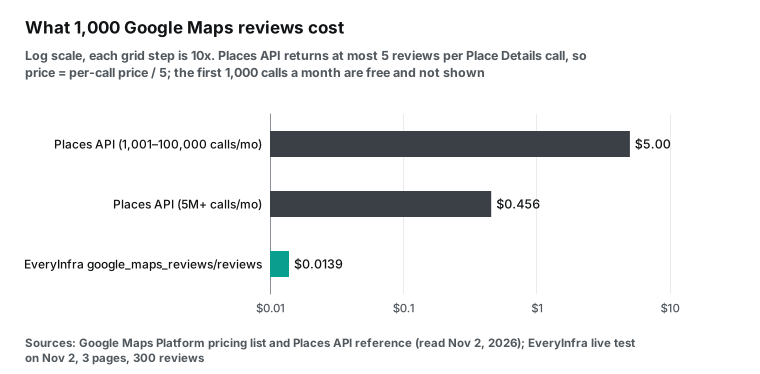
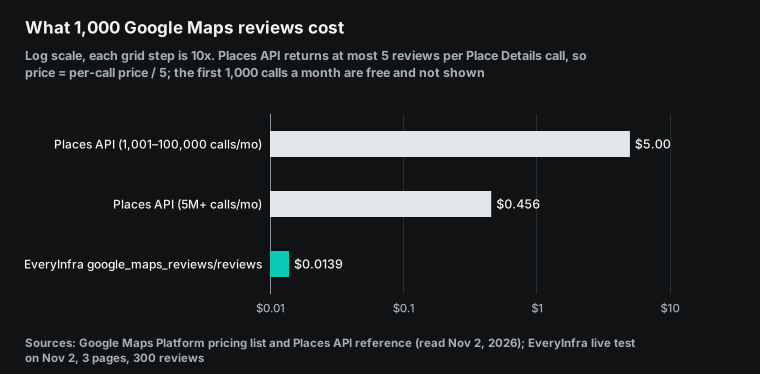
Three usage rules also decide what you can store and show. First, the Places API policies say that you must show the author attribution with each review, which includes the photo, name and profile link [7]. Second, you may store the place ID for a long time, but most other content cannot be cached. That means you cannot build your own long-term review database from official API results [7]. Google also says that you should refresh place IDs that are older than 12 months [8]. Third, the review order is always relevance.
That third rule is the most common complaint in developer forums. A Stack Overflow question from 2016 asks how to get more than five reviews from the Places API [39]. A question from 2019 asks how to get the latest reviews [40]. Both threads end at the same five-review cap. A Reddit thread in r/learnpython asks the same thing from a beginner's side [41]. The answer has not changed with the new API version.
Since May 8, 2025, the Places API can also return a review summary that Gemini writes [9][10]. A summary is not raw data, so you cannot count stars from it.
Path 2: a DIY Python scraper, and where it stops
Many tutorials on how to scrape Google Maps with Python start with requests and BeautifulSoup. We tried that first step on November 2, 2026 at 00:19:50 SGT. We sent one plain HTTP GET with the Python standard library to the Maps page of a Singapore restaurant. The status was 200, and the page had 210,679 bytes and 12 script tags.
The title was only "Google Maps". The restaurant name appeared only in the echo of our own URL. The review count of 8,226 was not in the page. None of 20 review snippets from the API was in the page either.
So the reviews load only after the page runs JavaScript in a browser. A DIY scraper must use browser automation, for example Playwright [37]. The sketch below shows the usual structure. It opens the place page, clicks the Reviews tab, scrolls the review panel and reads text from page elements. We did not run it, because bulk automated scraping of Google Maps pages breaks its terms of service. We show it only to make the work visible.
# Configuration example (not run): the usual structure of a browser review scraper
from playwright.sync_api import sync_playwright

PLACE_URL = "https://www.google.com/maps/place/?q=place_id:ChIJl6T2cnbMRIYR7eD538S3oWU&hl=en"

with sync_playwright() as p:
    browser = p.chromium.launch(headless=True)
    page = browser.new_page(locale="en-US")
    page.goto(PLACE_URL, wait_until="networkidle")
    page.get_by_role("tab", name="Reviews").click()          # breaks when the label changes
    panel = page.locator("div[role='feed']")                  # a guessed selector that changes often
    for _ in range(30):                                       # about 10 more reviews per scroll
        panel.evaluate("el => el.scrollBy(0, el.scrollHeight)")
        page.wait_for_timeout(1200)
    texts = page.locator("[data-review-id] span").all_inner_texts()
    print(len(texts))
    browser.close()
Each line of this sketch bets that the page will not change. The tab label, the panel selector, the number of reviews per scroll and the page language can all change. One front-end release from Google, or one verification page for your IP address, stops the script. To measure that upkeep, we looked at one of the most-starred open-source Google Maps scrapers on GitHub [32]. On November 2, 2026, it had 7,148 stars, 1,112 forks and an MIT license, and its last push was on October 21, 2026.
The project shipped eight releases, from v1.16.3 to v1.18.1, between July 13 and September 20, 2026 [36]. Fifteen issues were opened after August 1. The table shows the issues that touch reviews or stop jobs. The titles are paraphrased, and the links are in the references [33][34][35].
| Date | Issue | What users reported | State |
|---|---|---|---|
| 2026-09-01 | #327 | The extra reviews option returns only about 10 reviews, and an internal review endpoint returns 403 (v1.17.4) | Open |
| 2026-09-23 | #331 | Many scraping engine errors during runs | Closed |
| 2026-10-05 | #337 | After the v1.18.0 upgrade, the web job list stays empty and the start button does nothing | Open |
| 2026-10-06 | #338 | All scrape jobs fail because the browser page or context closed | Open |
| 2026-10-09 | #341 | The title is "300 Reviews per place" | Open |
| 2026-10-22 | #346 | A web job stays in a working state because a browser context does not close | Open |
This is not a comment on code quality. A project with 7,000 stars and eight releases in ten weeks still hits "only 10 reviews" and "all jobs fail" every few weeks. The cause is change on Google's side, not weak code. Issues #337 and #346 [42][43] show a different cost. They have no link to Google. They come from browser automation itself.
A review scraper that runs for months is a small service with an on-call person, not a weekend script. You must manage browser start and stop, memory, concurrency, timeouts, proxies and exit IP addresses. If you write your own, you also lose the community that finds the problems first. Budget for that work before you compare it with a per-call price.
DIY scrapers also skip robots.txt. We downloaded google.com/robots.txt at the same time [16]. Line 86 says Disallow: /maps/ and line 74 says Disallow: /maps?. The file also has Allow lines for /maps/place/ and /maps/search/.
Under RFC 9309, the longest matching rule wins, so normal place page paths are allowed. Other paths under /maps/ that have no allow line fall under the disallow rule [17]. RFC 9309 also says that robots rules are not a form of access authorization [17]. The real limit is the terms of service.
Terms, court cases and personal data
Start with the contract. If you are a Google Maps Platform customer, section 3.2.3(a) of the platform terms is titled "No Scraping". It says that customers will not export, extract or otherwise scrape Google Maps content for use outside the services [13]. For normal users, the Google Maps additional terms forbid mass downloads and bulk feeds of content [14]. Google last modified those terms on January 27, 2026. They also forbid using Google Maps to create or augment other mapping datasets, and business listings databases are on that list [14].
So neither the official API nor a DIY scraper lets you build a copy of Google's content. US courts have looked at the wider question. On April 18, 2022, the Ninth Circuit held in hiQ Labs v. LinkedIn that scraping public web data is likely not access "without authorization" under the Computer Fraud and Abuse Act [21].
On January 23, 2024, the Northern District of California granted summary judgment to a data collection company that Meta Platforms had sued (case 3:23-cv-00077). The court found that Meta did not show that its terms barred logged-off scraping of public data [22].
People often cite these two rulings to say that scraping public data is legal. They answer specific legal questions about specific contract text. They do not say that a breach of terms has no cost, and they do not apply outside the United States. This guide is not legal advice. Ask a lawyer before commercial use.
Then there is personal data. Reviewer names, photos and profile links are personal data. In California, the California Consumer Privacy Act gives consumers rights over data that businesses collect. The Attorney General updated its CCPA page on August 28, 2026 [23]. In the European Union, the GDPR applies [24].
Singapore has the Personal Data Protection Act [25][26], and Mexico published a new federal data protection law on March 20, 2025 [27]. Most analysis does not need the reviewer's identity. Keep the rating, date, text and owner reply, and drop names and photos. Our CSV exporter below does that.
If you copy other businesses' reviews onto your own page, Google's contribution policy on fake engagement also applies [15].
Path 3: a pay-per-call data API
The third path is a pay-per-call data API. You send one request, and the service returns structured business or review data. It handles browsers, proxies and page changes, and it bills per call. This market has several billing models. Common ones are cloud scraping platforms that bill per result, search result APIs that bill per query, and data APIs that bill per call. EveryInfra uses the last model.
This guide is a tutorial, not a vendor price table. It focuses on how to make the calls, what the data looks like and where it fails. Our own unit price and billing unit are on the Google Maps Reviews API page.
The Google Maps Reviews API on EveryInfra has four capabilities. google_maps_reviews/search finds places by keyword and location. google_maps_reviews/profile returns the details of one place. google_maps_reviews/reviews returns the reviews of one place. google_maps_reviews/contributor_reviews returns the reviews that one reviewer wrote.
We read the public catalog at 00:14:03 SGT on November 2, 2026. All four capabilities cost $0.001389 per call. Search returns up to 50 places per call and up to 120 rows across pages. Reviews returns up to 100 reviews per call and up to 400 rows across pages.
A synchronous request can go to row 200, and deeper pages need an async job. Reviews support two sort orders, newest and relevance. The since parameter limits results to reviews after a date, and lang sets the review language.
Here is one review request for the Austin clinic. A Google Maps place URL with a place ID is the most stable way to name a place.
curl -s https://api.everyinfra.com/api/v1/social \
  -H "Authorization: Bearer $EVERYINFRA_API_KEY" \
  -H "Content-Type: application/json" \
  -d '{"platform":"google_maps_reviews","action":"reviews",
       "params":{"url":"https://www.google.com/maps/search/?api=1&query=Swish%20Dental%20-%20Domain&query_place_id=ChIJl6T2cnbMRIYR7eD538S3oWU",
                 "sort":"newest","limit":100}}'
We sent this request at 00:20:36 SGT. It returned 100 reviews, and billing.charged_usd was 0.001389. The response had pagination.has_more set to true and a next_page_token. To get the next page, send the same request with that token in page_token, exactly as you got it. The screenshot below is a real response from the Singapore restaurant at 00:15 SGT, with reviewer names masked.
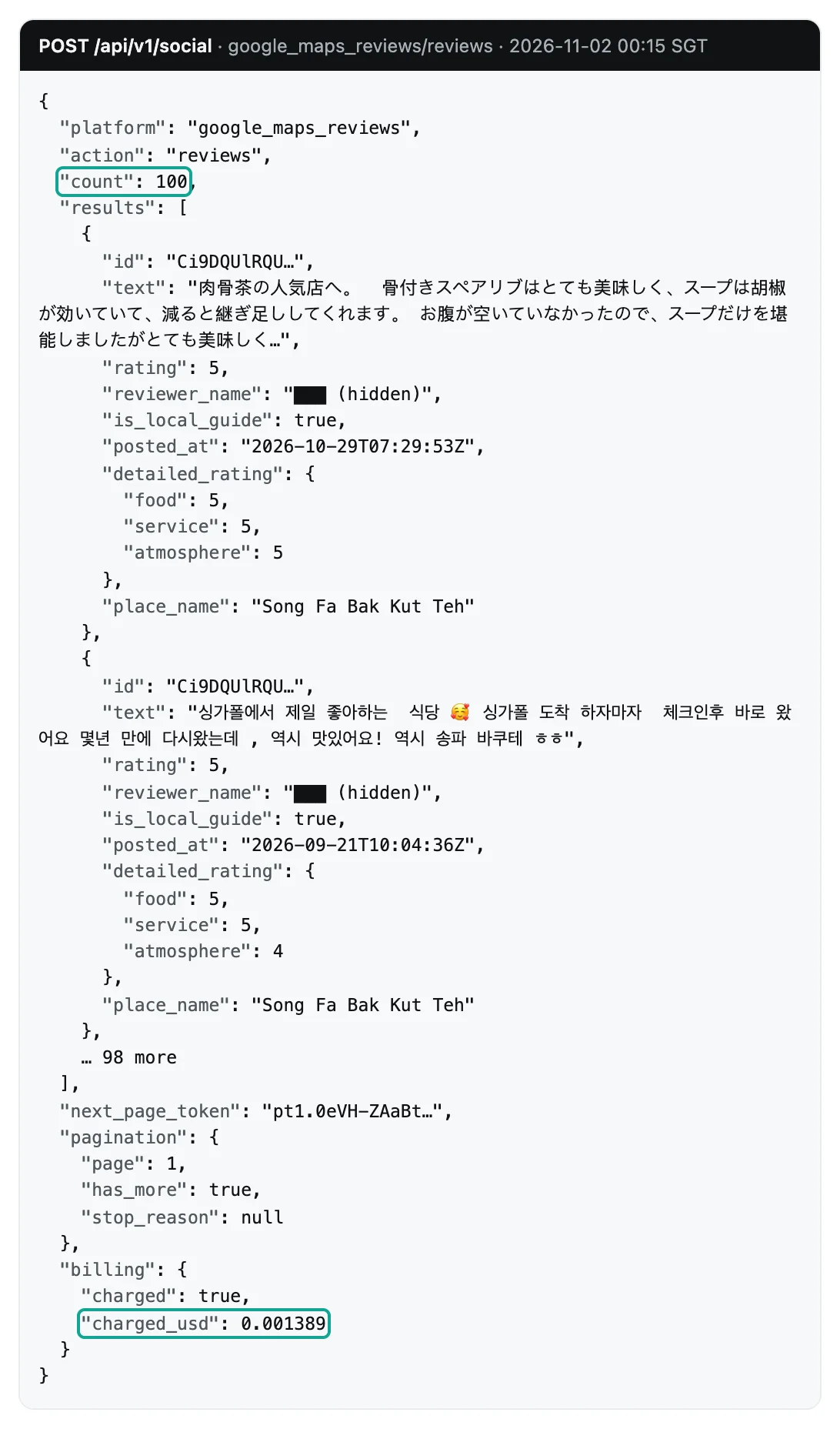
Each review record has the fields that the catalog lists. The table shows the fields that matter most for analysis, with counts from the 200 newest Austin reviews. Two of them, detailed_rating and owner_response, are not in the official Places API review object.
| Field | Meaning | In the 200 newest Austin reviews |
|---|---|---|
rating | 1 to 5 stars | 200 of 200 |
posted_at | Post time in UTC | 200 of 200 |
text | Review text, can be empty | 130 have text (65%) |
owner_response and owner_response_at | Owner reply and reply time | 146 (73%) |
detailed_rating | Sub-scores such as food or service | 0 for this clinic |
image_urls | Photos attached to the review | 3 |
is_local_guide and reviewer_review_count | Local Guide flag and the reviewer's review count | 58 from Local Guides |
like_count | "Helpful" votes | 200 of 200 |
id, url and place_id | Review and place identifiers | 200 of 200 |
The profile call google_maps_reviews/profile at 00:20:02 SGT returned the clinic's details: 4.6 stars, 1,659 reviews, the address, phone, website, opening hours and coordinates. The search call google_maps_reviews/search at 00:17:10 SGT used the keyword "dentist" and the location "Austin, TX". Page 1 returned 50 places.
Page 2 started at row 51, so the synchronous request at 00:23:59 SGT returned a 422 that asked for async mode. The async job at 00:24:22 SGT returned 50 more places. After deduplication by place ID we had 100 different clinics, and 99 of them had an Austin address. For a sales lead list, that is the whole job. Our guide on place ID deduplication helps when you merge several searches.
Test 1: an Austin dentist, listing stars against recent stars
This test answers one question for a US buyer. Does the star rating on a listing tell you how a clinic is doing now? We pulled the 200 newest reviews of Swish Dental in the Domain area of Austin, in two pages at 00:20:36 and 00:23:41 SGT. The listing shows 4.6 stars from 1,659 reviews.
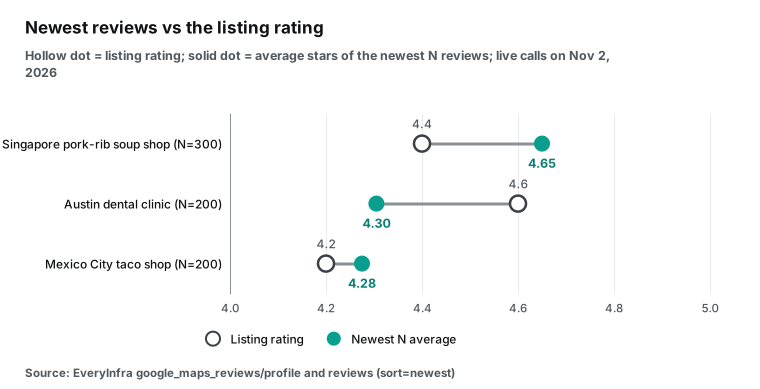
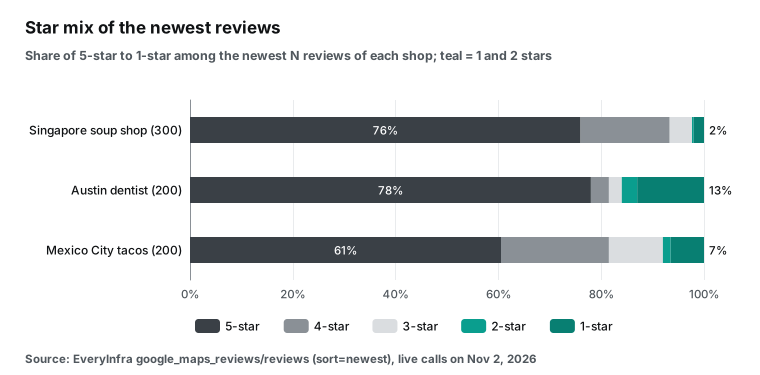
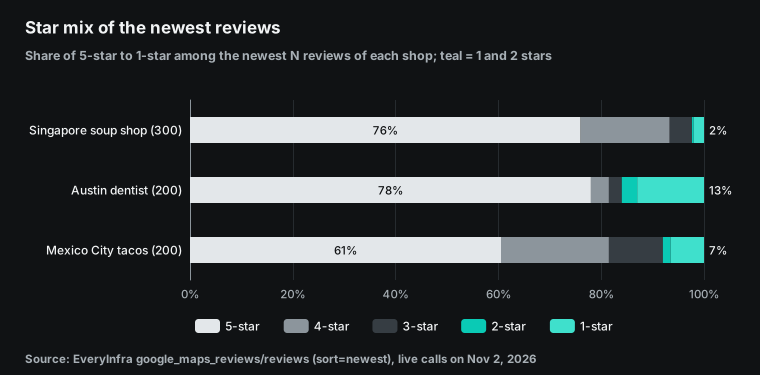
The 200 newest reviews average 4.305 stars, which is about 0.3 stars below the listing. There are 156 five-star reviews, 7 four-star, 5 three-star, 6 two-star and 26 one-star reviews. One-star reviews are 13% of the sample. The clinic replied to 146 of the 200 reviews, so somebody clearly manages its reviews.
For a patient, an investor or a competitor, the newest 200 reviews say more than the overall rating. The listing rating adds up many years. A cluster of new one-star reviews can mean a change in staff, front desk or billing. The official Places API cannot show that cluster, because it gives five reviews that it picks by relevance.
The text tells a second story. Of the 26 one-star reviews, 24 have text (92%), and the median length is 361.5 characters. Of the 156 five-star reviews, only 89 have text (57%), with a median of 119 characters. Unhappy patients explain why.
Happy patients often leave stars only. If you study only reviews with text, you give negative reviews more weight. If you study only star ratings, you miss the useful detail in the complaints.
Test 2: five relevant reviews against 300 recent ones
The second test shows what the five-review cap does to your picture of a place. We used Song Fa Bak Kut Teh at 11 New Bridge Road in Singapore. Its listing shows 4.4 stars, 8,226 reviews and 18,685 photos. We pulled the top 100 reviews by relevance at 00:16:10 SGT.
We also pulled the 300 newest reviews in three pages. Pages 1 and 2 were synchronous calls at 00:15:29 and 00:16:42 SGT, and page 3 was an async job at 00:18:27 SGT. The top five by relevance stand in for the five reviews that the official API returns.
The top five average 4.8 stars. All five have text and photos, and the median text length is 517 characters. All five authors are Local Guides, and the dates run from April to July 2026. The top 100 by relevance average 4.5 stars, all have text, and the median length is 357 characters. Their dates run from 2016 to September 2026. The newest 300 average 4.65 stars, only 63% have text, and the median length is 67 characters.
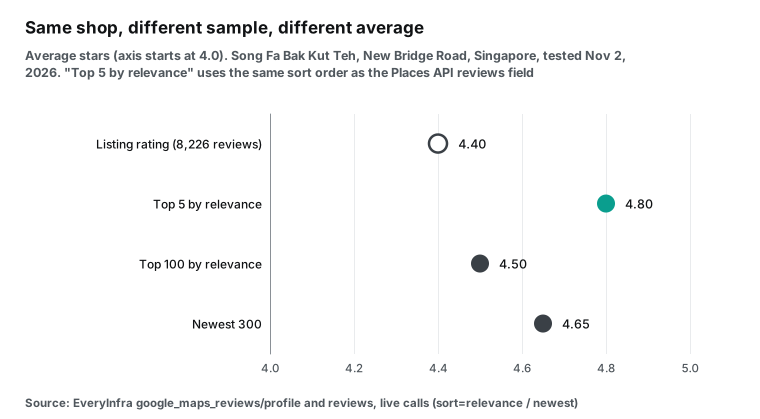
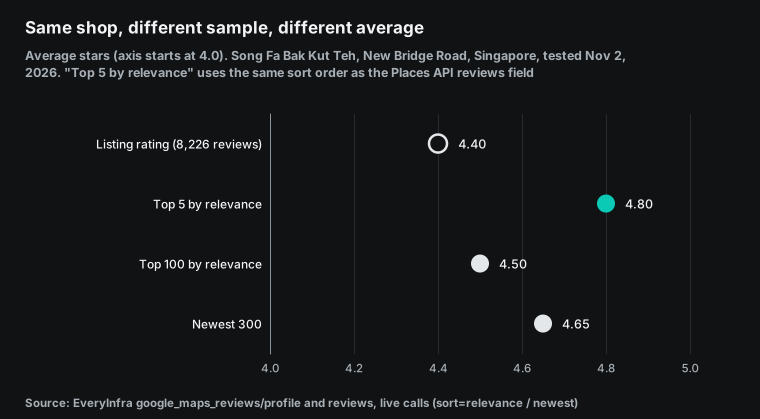
Google does not publish its relevance method. The data shows a clear preference for long reviews with photos from active reviewers, and those reviews tend to be positive. If you judge a place by the five reviews of the official API, you see the most representative praise, not the average recent customer. The top 100 by relevance and the newest 300 share only 21 reviews, so they are almost two different samples.
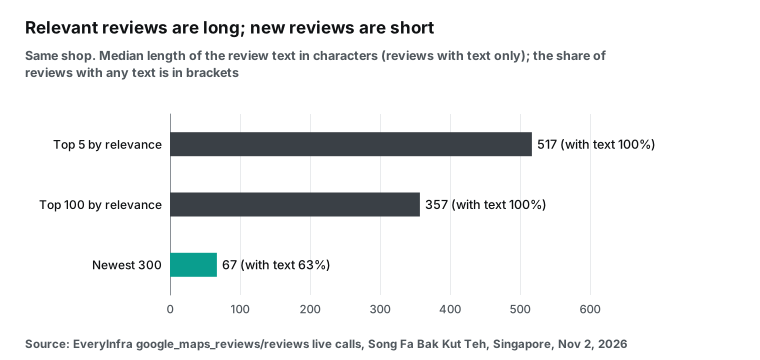
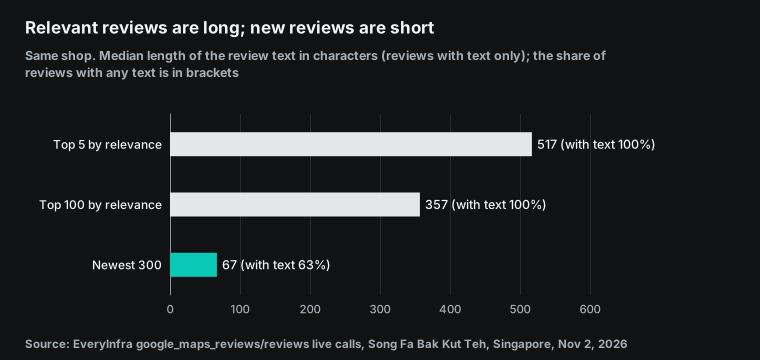
Reviews with no text are easy to miss. In the newest 300, 111 reviews have stars and no words, which is 37%. For keyword or sentiment work, that 37% is empty. For a star trend, that 37% is the part of the sample that long-review writers do not bias. The two kinds of analysis need different data, so a review API should return both stars and text, not only a summary.
Test 3: a Mexico City taqueria and a location trap
The third place is Tacos Chupacabras in Coyoacán, Mexico City. The listing shows 4.2 stars, 18,361 reviews and a price range of MXN 100 to 200. We pulled the newest 200 reviews with lang: es419 at 00:23:05 and 00:23:24 SGT. They average 4.275 stars, close to the listing. There are 121 five-star, 42 four-star, 21 three-star, 3 two-star and 13 one-star reviews. Only 55.5% have text, the median length is 69 characters, and the owner replied to none.
Put the three places side by side and the shapes differ. The dentist has many five-star and one-star reviews and few in the middle. The taqueria has more three-star and four-star reviews, which is a typical "great food, long line" pattern. A single average hides both shapes.
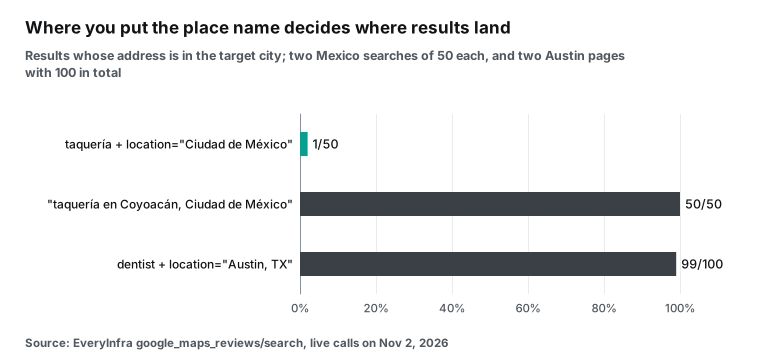
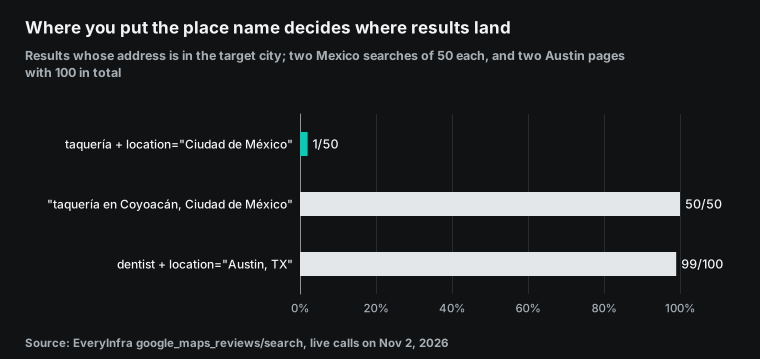
The Mexico City searches also showed a problem with the location parameter. At 00:17:32 SGT we searched for "taquería" with the location "Ciudad de México". All 50 results were in Mexico, but only 1 was in Mexico City. The other 49 were in 11 other states. Zacatecas had 14, Nuevo León 7, Chihuahua 6 and Jalisco 6.
At 00:19:39 SGT we put the place into the keyword as "taquería en Coyoacán, Ciudad de México". All 50 results were in Mexico City, and 47 were in Coyoacán. The Austin search used the location "Austin, TX". There, 99 of 100 results were in Austin, and the last one was in West Lake Hills, next to Austin.
We do not know the cause yet. The two requests differ in more than one way. The Mexico City call also sent language: es, and the Austin location included a state code. One pair of tests cannot show which difference matters. Until we know, put the city, and even the district, into the keyword. Run one search page first and count how many results are in the target city.
The newest sort is not strictly by date
Teams that monitor reviews often write the same loop. They sort by newest, read one page and stop at the first review that is older than the last saved one. We checked each row in our three newest-sorted sets. A row is out of order when its post time is later than the row above it. Singapore had 6 such rows in 300, Mexico City had 18 in 200, and Austin had 50 in 200, which is 25%. The Singapore set also had two reviews from 2023 mixed into 2026 pages.
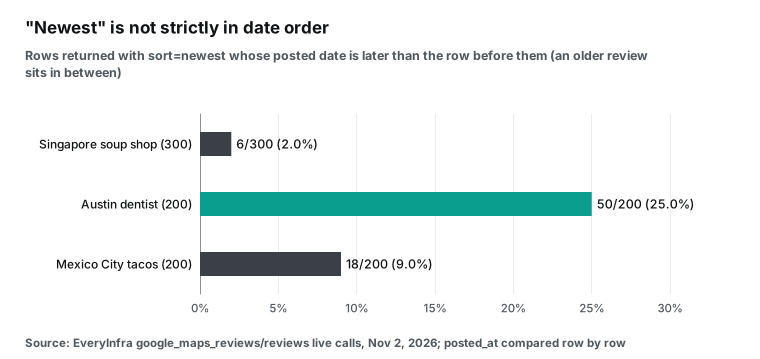
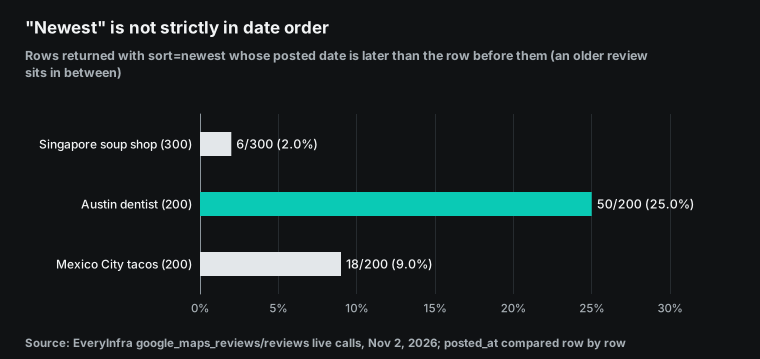
This comes from Google Maps itself, not from the API. Edited reviews and reviews with new owner replies can appear out of date order. The effect is real: a "stop at the first old review" loop can miss data. Two fixes work. Read one more page before you stop, or use since so that the API returns only reviews after a date. Then sort by posted_at yourself. The CSV exporter below sorts again as its last step.
Failures and refunds: what real errors look like
The main fear with per-call billing is a charge for a failed call. During the tests we triggered six kinds of errors, some on purpose and some by mistake. The table shows them as the API returned them. All times are SGT on November 2, 2026.
| Time (SGT) | What we did | Response | Charge | Next step in the response |
|---|---|---|---|---|
| 00:15:56 | Asked for page 2 right after page 1, above 10 a minute | 429 rate_limited, retry_after 4 seconds | None | Wait, then retry |
| 00:16:03 | Sent back an empty page token | 422 invalid_page_token | None | Send next_page_token back as received |
| 00:17:00 | Asked for review page 3 in sync mode (past row 200) | 422 async_required | None | Add "mode":"async" and poll the job |
| 00:20:55 | Set since to 2026-11-30, a future date | 200, 0 reviews, empty_result_refunded | Refunded, $0 | None |
| 00:21:38 | Sent a URL that is not a map page | 503, retryable, retry_after 20 seconds | Refunded, $0 | Says this is failure 1 of 3 |
| 00:22:07 | Set sort to oldest | 422 invalid_value, allowed values newest and relevance | None | Change only sort, then resend |
One of these should be better. A wrong URL returns a retryable 503, not a 422 that names the bad parameter. You pay nothing, but a client that retries every 503 three times waits about a minute for no result. The other five errors match the documentation. Parameter errors and rate limits cost nothing, empty results are refunded, and each error message lists the allowed values and the next step.
For the URL case, a check in your own code is enough. All place links in this guide start with https://www.google.com/maps/:
if not url.startswith("https://www.google.com/maps/"):
    raise ValueError("not a Google Maps place link")
Watch when async jobs are charged. They are charged when you submit them, not when you collect the result. We submitted the async job for Singapore page 3 at 00:18:27 SGT, and the submit response already showed charged_usd of 0.001389. The job status went from running to finalizing to succeeded, with 100 reviews. If an async job fails, the same charge ID is refunded.
Export Google Maps reviews to CSV with Python
The code below is the short answer to how to scrape Google Maps reviews. You give it one Google Maps place link. It reads the newest reviews page by page and writes them to CSV. It uses only the Python standard library. It handles rate limits, async deep pages and page tokens, sorts by post time at the end, and leaves reviewer names out of the file.
"""Export Google Maps reviews of one place to CSV via EveryInfra.
usage: EVERYINFRA_API_KEY=... python3 export_reviews_csv.py "<google maps place url>" reviews.csv [max_pages]
"""
import csv, json, os, sys, time, urllib.request, urllib.error

API = "https://api.everyinfra.com"
KEY = os.environ["EVERYINFRA_API_KEY"]
FIELDS = ["id", "place_name", "rating", "posted_at", "text", "owner_response",
          "owner_response_at", "like_count", "is_local_guide", "reviewer_review_count", "url"]

def call(method, path, body=None):
    req = urllib.request.Request(API + path, method=method,
                                 data=json.dumps(body).encode() if body else None,
                                 headers={"Authorization": f"Bearer {KEY}", "Content-Type": "application/json",
                                          "User-Agent": "reviews-csv/1.0"})
    try:
        with urllib.request.urlopen(req, timeout=120) as r:
            return r.status, json.load(r)
    except urllib.error.HTTPError as e:
        return e.code, json.load(e)

def fetch_page(params):
    body = {"platform": "google_maps_reviews", "action": "reviews", "params": params}
    for attempt in range(4):
        status, data = call("POST", "/api/v1/social", body)
        err = (data.get("error") or {})
        if status == 429 or (err.get("retryable") and status >= 500):
            time.sleep(err.get("retry_after", 20)); continue
        if err.get("code") == "async_required":          # deep pages run as a job
            body["mode"] = "async"; continue
        if status == 202 and data.get("poll_url"):
            billing, poll = data.get("billing"), data["poll_url"]   # async jobs are charged at submit
            while data.get("status") in ("queued", "running", "finalizing"):
                time.sleep(5); status, data = call("GET", poll)
            data["billing"] = data.get("billing") or billing
            return data
        if err:
            raise SystemExit(f"stop: {err.get('code')} {err.get('message')}")
        return data
    raise SystemExit("stop: retries used up")

def main():
    url, out = sys.argv[1], sys.argv[2]
    max_pages = int(sys.argv[3]) if len(sys.argv) > 3 else 2
    params = {"url": url, "sort": "newest", "limit": 100}
    seen, rows, spent = set(), [], 0.0
    for page in range(max_pages):
        data = fetch_page(params)
        spent += (data.get("billing") or {}).get("charged_usd") or 0
        for r in data.get("results") or []:
            if r["id"] in seen:
                continue
            seen.add(r["id"])
            rows.append({k: r.get(k, "") for k in FIELDS})
        token = data.get("next_page_token")
        print(f"page {page + 1}: {data.get('count')} rows, total {len(rows)}")
        if not token or not (data.get("pagination") or {}).get("has_more"):
            break
        params["page_token"] = token
    rows.sort(key=lambda r: r["posted_at"] or "", reverse=True)   # "newest" is not strictly ordered
    with open(out, "w", newline="", encoding="utf-8-sig") as f:
        w = csv.DictWriter(f, fieldnames=FIELDS)
        w.writeheader(); w.writerows(rows)
    print(f"wrote {len(rows)} reviews to {out}; charged: ${spent:.6f}")

if __name__ == "__main__":
    main()
We ran it three times on the Mexico City taqueria, three pages each. The first run started at 00:32:39 SGT. Pages 1 and 2 worked, and page 3 switched to an async job. Then the poll loop crashed, because the poll response has no poll_url and the code read it on every loop. The second run started at 00:33:18 SGT with that fix. Page 3 came back with zero rows, because the job has a finalizing state and the code took it as done.
The third run started at 00:35:21 SGT and ended at 00:36:21 SGT. It read three pages of 100, wrote 300 reviews with 300 unique IDs and charged $0.004167. The CSV uses utf-8-sig, so Excel opens it without broken characters. Line breaks inside review text stay inside cells, so the file has 374 lines for 300 rows, which is normal. The Python csv module documentation explains the dialect options [38].
Both bugs were invisible when we read the documentation and obvious in a real run. We kept the logs of all three runs. Test any new async API on a place with many reviews. Go to page 3 and print each status value.
After the export: five cleanup steps
Getting the data is half the work. Cleanup takes the rest. In our 700 reviews from three places, the problems fell into five groups. Each group has a simple fix. Add the fixes to your first analysis script, not after the numbers fail to match.
The first group is time. posted_at and owner_response_at are UTC times with a time zone suffix. Austin is UTC−6 in winter and UTC−5 in summer, so a review posted at 9 p.m. local time is already the next day in UTC.
If you count reviews per day, convert to the place's local time first. If you do not, each day shifts by several hours and weekend effects disappear. Our CSV keeps the raw UTC string, and the analysis converts it per city.
The second group is empty text. The newest reviews of our three places have no text in 35% to 45% of rows. For sentiment or keyword work, drop the empty rows and state the denominator in your report. For star trends, keep them. Run both views on the same data and compare them. The Austin numbers above show how far apart the two groups can be.
The third group is the language of sub-scores. The keys in detailed_rating follow the review language. With lang: es419 in Mexico City, the keys were comida, servicio and ambiente. In the English Singapore reviews, the keys were food, service and atmosphere.
If you merge several countries into one table, map the keys to one set first. If you do not, the same "service" score becomes two columns. The catalog field list does not show this. We found it when we put two responses side by side.
The fourth group is duplicates. One review can appear on two pages, most often when you run again a few hours later. New reviews push old ones down and page edges overlap. Deduplicate by review id, as the exporter does. Deduplicate places by place ID, because one place can appear under different names in different searches. Do not use the review url as a key, because it carries a language parameter such as hl=en.
The fifth group is place fields. The state and city values in search results are display text, not clean codes. In the Mexico City search with the location parameter, one state can have two spellings. Zacatecas has 13 rows as "Zacatecas" and 1 as "Zac.". Quintana Roo has 2 rows as "Quintana Roo" and 2 as "Q.R.". Nuevo León, Jalisco and Tabasco also have short forms.
The 49 rows outside Mexico City show 16 state strings but only 11 states. In the keyword search, state is "Cd. de México" in 42 rows and "CDMX" in 8. In the Singapore search, 2 of 50 rows have no city. If you group by raw state, one state becomes two rows. Map short forms to full names before you group, or use the latitude and longitude to find the area.
| Problem | What we saw | Fix |
|---|---|---|
| Time zones | posted_at is UTC | Convert to local time before you count per day |
| Empty text | 35% to 45% of newest rows | Drop for text work, keep for star trends |
| Sub-score keys | food in English, comida in Spanish | Map keys to one set before you merge |
| Duplicates | Page edges overlap between runs | Deduplicate by review id and place ID |
| Place fields | "Zac." and "Zacatecas", "CDMX" and "Cd. de México" | Map short forms to one name before you group |
Cost by use case
The unit prices are easier to judge inside real jobs. The numbers below use the unit prices from our tests and from Google's price list. They exclude servers, staff time and other costs.
The first job is a sales lead list: every dental clinic in Austin, with name, phone, website, rating and review count, and no review text. EveryInfra search returns 50 places per call for $0.001389. Our two pages gave 100 different clinics for $0.002778. A list of 1,000 clinics needs about 20 calls, or $0.028.
One keyword pages to 120 rows at most, so split the city into areas or vary the keyword. The official Text Search Pro SKU has 5,000 free calls a month and then costs $32 per 1,000 [3][6]. At this size, the free cap covers the whole job. The difference is the caching and display rules on official results [7].
The second job is review monitoring. A chain has 50 locations and checks each location for new reviews once a week. If the locations are your own, the Business Profile API is free and the best fit [12]. If they are franchise or agency locations, or you monitor for a client, you need a data API.
One call per place per week, 52 weeks and 50 places, is 2,600 calls, or about $3.61 a year. The official Places API cannot do this job. It does not return the newest reviews, and its top five can stay the same for months.
The third job is research. A district has 500 restaurants, and you want the newest 100 reviews of each, so 50,000 reviews in total. With a data API, that is 500 review calls plus about 15 search calls, or about $0.72. The official Places API gives at most 2,500 reviews (500 places times 5), and they are a chosen sample.
In our Singapore test, that sample averaged 0.15 stars above recent reviews and its text was more than seven times longer. A DIY scraper can do the job in theory. The open-source issue log suggests that you may meet the "only 10 reviews" problem halfway [33].
| Job | Official Places API | EveryInfra data API |
|---|---|---|
| 1,000 Austin clinics, list only | Inside the Text Search free cap | About 20 calls, $0.028 |
| 50 locations, weekly new reviews, one year | Not possible, no newest sort | 2,600 calls, about $3.61 |
| 500 restaurants, 100 newest reviews each | At most 2,500 chosen reviews | About 515 calls, about $0.72 |
How to choose a Google Maps scraper: six checks
People who search for the best Google Maps scraper do not need the most famous tool. They need a tool that returns their data reliably at a cost that works. We list checks by category, not by brand. You can test each check with a small trial run that costs a few cents.
| Check | How to test it | Our reference value |
|---|---|---|
| Reviews per place, and paging by date | Pick a place with over 1,000 reviews and go to page 3 | Official API 5. EveryInfra 400 rows per sort order |
| Unit of billing, and charges on failure | Send one bad parameter and one future since date | 422 and 429 free. Empty and failed calls refunded |
| Real cost per 1,000 reviews | Charge divided by rows returned, times 1,000 | $0.01389 at 100 per call |
| Fields | Look for owner replies, sub-scores and photos | owner_response, detailed_rating, image_urls |
| Location accuracy | Search one city with two location styles | Mexico City parameter 1 of 50, keyword 50 of 50 |
| Use from AI tools | Look for MCP or function-calling tool definitions | Yes, a remote MCP server |
The second row is the one that buyers skip most. Tools that bill per result usually do not charge for empty results, but rules for half-finished jobs differ. For per-call APIs, check whether empty results and failures are refunded. One test of a few cents gives the answer.
The third row is similar. Do not trust the list price. Divide the real charge by the real row count. Many per-1,000 prices assume full pages, and your place may have only a few dozen reviews.
When the official API or a DIY scraper is the better choice
A data API is not always the best answer. In three cases we suggest another path. First, if you need five representative reviews per place for fewer than 1,000 places a month, the official Places API free cap covers you. You can also show the reviews in your app legally, as long as you show author attribution.
Second, if the reviews are for your own locations, use the Business Profile API. It returns all reviews, lets you reply and costs nothing, and no third party can match that.
Third, if you need only a business list for one city, start with open government data. Singapore has a licensed eating establishments dataset with more than 36,000 rows [28]. The Singapore Food Agency updated its track records page on November 1, 2026 [29]. Mexico has the DENUE directory [30], and the US Census Bureau has County Business Patterns [31]. These sets have no ratings or reviews. A common mix is a government base table plus recent reviews for the places that you care about.
A DIY scraper is worth it in one case only. Your need is very specific, for example an element that only a browser shows, and your team accepts a long-term maintenance project. You must also accept that it can break at any time and that it can breach the terms of service. If the only goal is to save money, the numbers in this guide say otherwise. At $0.001389 per 100 reviews, one engineer's time to fix the script once costs more than a year of calls.
EveryInfra has limits too, and we saw them in these tests. One sort order stops at 400 rows. For a place with 8,226 reviews, you cannot get the full history. You get the newest 400 plus the top 400 by relevance, and the two sets overlap.
Rows past 200 need async mode and a poll loop. In Mexico City, the location parameter put only 1 of 50 results in the city, and we do not know the cause yet.
FAQ
Can you scrape Google Maps for free?
There are two legal free paths. The official Places API gives 1,000 free Place Details calls with reviews each month, with up to five reviews per call [3][4]. For your own locations, the Business Profile API reads all reviews for free [11]. A "free scraper" usually means open-source software, which is free to download, but servers, proxies and upkeep cost money.
How do I scrape Google Maps reviews with Python?
A plain HTTP request does not return reviews. In our test, none of 20 review snippets was in the page, so you need browser automation or a data API. This guide gives two code samples. One is a browser automation sketch that we did not run. The other is a complete exporter that calls a data API and that we ran three times. A Reddit r/learnpython user asked the same question [41].
Is it legal to scrape Google Maps?
Google's terms forbid bulk downloads and scraping of content [13][14]. US rulings in hiQ v. LinkedIn and in the Meta case against a data collection company favored scraping of public data. But they answer specific legal questions, and a breach of terms can still have a cost [21][22].
Reviewer data also falls under laws such as the CCPA and the GDPR. This guide is not legal advice.
Why does the Places API return only five reviews, and how do I get the latest ones?
Five is a design limit. The reference says a maximum of five reviews, sorted by relevance, and there is no page token [1]. For your own locations, sort by update time in the Business Profile API [12]. For other places, use a data API or a scraper. The answers to Stack Overflow questions 39223719 and 55235501 stop at the same cap [39][40].
What is the best Google Maps scraper?
There is no single answer. It depends on how many reviews you need, whether you need date paging and which billing model you accept. This guide gives six checks that you can test for a few cents. They cover reviews per place, charges on failure, real cost per 1,000 reviews, fields, location accuracy and use from AI tools.
How much does it cost to scrape Google Maps reviews?
With EveryInfra, one call returns up to 100 reviews for $0.001389, so 1,000 reviews cost about $0.01389. All tests in this guide used 36 requests and 26 charged calls, for $0.036113 in total. With the official Places API, 1,000 reviews cost about $5.00 above the free cap.
Get started
Open the quickstart to create an account and an API key. New accounts get trial credit, and the pricing page has the current terms. Read the free catalog at GET /api/v1/social/catalog and check the parameters and price of google_maps_reviews. Send the curl request from this guide for a place that you know. Check that the fields are what you need. Save the CSV exporter, run it on two pages and add pages as needed.
To compare review platforms, see the Yelp data API and the Tripadvisor data API. For a full build walkthrough, read our Google Maps reviews API tutorial.
Method and limits
We ran all EveryInfra calls on November 2, 2026, between 00:14 and 00:36 SGT. The test key had a limit of 10 requests a minute. Each of the three cities had one place, so the samples are those places' reviews at that time, not all businesses. Relevance and newest results change over time.
The Places API prices and limits come from Google's pages as of November 2, 2026. We did not call the Places API with a key. We did not run the browser automation code. Only one plain HTTP request ran on a Maps page.
We computed "per 1,000 reviews" as follows. On the EveryInfra side, we took charged_usd from each response, divided it by the reviews in that response and multiplied by 1,000. All nine review pages had 100 reviews, so each gave $0.01389. A place with fewer than 100 reviews, or a smaller limit, gives a higher price per review, because billing is per call.
On the Places API side, we divided the tier price by five, which assumes five reviews per call. Neither side includes free caps or trial credit. Monthly review counts showed swings that we cannot explain, so we did not draw a trend chart.
The table lists every charged call in this guide. All times are SGT on November 2, 2026.
| Time (SGT) | Capability | Target | Returned | Charge |
|---|---|---|---|---|
| 00:14:43 | google_maps_reviews/search | Singapore, bak kut teh | 50 places | $0.001389 |
| 00:15:07 | google_maps_reviews/profile | Song Fa Bak Kut Teh | 1 place | $0.001389 |
| 00:15:29, 00:16:42 | google_maps_reviews/reviews | Song Fa, newest pages 1 and 2 | 100 each | $0.001389 each |
| 00:16:10 | google_maps_reviews/reviews | Song Fa, relevance | 100 | $0.001389 |
| 00:18:27 | google_maps_reviews/reviews async | Song Fa, newest page 3 | 100 | $0.001389 |
| 00:17:10, 00:24:22 | google_maps_reviews/search | Austin dentist, two pages | 50 each | $0.001389 each |
| 00:20:02 | google_maps_reviews/profile | Swish Dental | 1 place | $0.001389 |
| 00:20:36, 00:23:41 | google_maps_reviews/reviews | Swish Dental, two pages | 100 each | $0.001389 each |
| 00:17:32, 00:19:39 | google_maps_reviews/search | Mexico City, two location styles | 50 each | $0.001389 each |
| 00:22:35 | google_maps_reviews/profile | Tacos Chupacabras | 1 place | $0.001389 |
| 00:23:05, 00:23:24, 00:34:37 | google_maps_reviews/reviews | Chupacabras, three pages | 100 each | $0.001389 each |
| 00:32:39 to 00:36:21 | google_maps_reviews/reviews | Three CSV exporter runs | 9 charged calls | $0.012501 |
The total is 26 charged calls and $0.036113. Two more calls were refunded (one empty result and one failure), and five parameter or rate-limit errors cost nothing.
References
- Google Maps Platform, Places API (New) REST reference, Place resource. https://developers.google.com/maps/documentation/places/web-service/reference/rest/v1/places
- Google Maps Platform, Place Details (New). https://developers.google.com/maps/documentation/places/web-service/place-details
- Google Maps Platform, core services pricing list. https://developers.google.com/maps/billing-and-pricing/pricing
- Google Maps Platform, billing and pricing overview, updated 2026-10-30. https://developers.google.com/maps/billing-and-pricing/overview
- Google Maps Platform, Places API usage and billing. https://developers.google.com/maps/documentation/places/web-service/usage-and-billing
- Google Maps Platform, Text Search (New). https://developers.google.com/maps/documentation/places/web-service/text-search
- Google Maps Platform, Places API policies. https://developers.google.com/maps/documentation/places/web-service/policies
- Google Maps Platform, Place IDs. https://developers.google.com/maps/documentation/places/web-service/place-id
- Google Maps Platform, review summaries. https://developers.google.com/maps/documentation/places/web-service/review-summaries
- Google Maps Platform, Places API release notes. https://developers.google.com/maps/documentation/places/web-service/release-notes
- Google Business Profile APIs, work with review data. https://developers.google.com/my-business/content/review-data
- Google Business Profile APIs, accounts.locations.reviews.list. https://developers.google.com/my-business/reference/rest/v4/accounts.locations.reviews/list
- Google Maps Platform Terms of Service, section 3.2.3(a). https://cloud.google.com/maps-platform/terms
- Google Maps and Google Earth Additional Terms of Service. https://www.google.com/help/terms_maps/
- Google Maps user contributed content policy, prohibited content. https://support.google.com/contributionpolicy/answer/7400114
- google.com robots.txt, downloaded 2026-11-02. https://www.google.com/robots.txt
- IETF, RFC 9309 Robots Exclusion Protocol. https://www.rfc-editor.org/rfc/rfc9309.html
- Google blog, Fan-Favorite Dining List, October 8, 2026. https://blog.google/products-and-platforms/products/maps/google-maps-fan-favorite-dining-list/
- 9to5Google, Gemini in Google Maps on CarPlay, October 21, 2026. https://9to5google.com/2026/10/21/google-maps-carplay-gemini/
- Search Engine Land, Google Ask Maps and local businesses. https://searchengineland.com/google-ask-maps-make-your-business-easier-to-recommend-496672
- US Court of Appeals for the Ninth Circuit, hiQ Labs v. LinkedIn, April 18, 2022. https://cdn.ca9.uscourts.gov/datastore/opinions/2022/04/18/17-16783.pdf
- US District Court N.D. Cal., Meta Platforms case 3:23-cv-00077, order of January 23, 2024. https://www.govinfo.gov/app/details/USCOURTS-cand-3_23-cv-00077/USCOURTS-cand-3_23-cv-00077-7
- California Attorney General, California Consumer Privacy Act. https://oag.ca.gov/privacy/ccpa
- European Union, Regulation (EU) 2016/679 (GDPR). https://eur-lex.europa.eu/eli/reg/2016/679/oj
- Singapore PDPC, PDPA overview. https://www.pdpc.gov.sg/about/the-legislation/pdpa-overview
- Singapore PDPC, Personal Data Protection Act. https://www.pdpc.gov.sg/overview-of-pdpa/the-legislation/personal-data-protection-act
- Mexico, federal law on personal data held by private parties, DOF 2025-03-20. https://www.ordenjuridico.gob.mx/Documentos/Federal/html/wo125102.html
- data.gov.sg, NEA licensed eating establishments. https://data.gov.sg/datasets/d_227473e811b09731e64725f140b77697/view
- Singapore Food Agency, track records, updated November 1, 2026. https://www.sfa.gov.sg/tools-and-resources/track-records
- INEGI, DENUE national directory of economic units. https://www.inegi.org.mx/app/mapa/denue/default.aspx
- US Census Bureau, County Business Patterns. https://www.census.gov/programs-surveys/cbp.html
- GitHub, open-source Google Maps scraper project, 7,148 stars. https://github.com/gosom/google-maps-scraper
- GitHub issue 327, September 1, 2026. https://github.com/gosom/google-maps-scraper/issues/327
- GitHub issue 338, October 6, 2026. https://github.com/gosom/google-maps-scraper/issues/338
- GitHub issue 341, October 9, 2026. https://github.com/gosom/google-maps-scraper/issues/341
- GitHub releases, v1.16.3 to v1.18.1. https://github.com/gosom/google-maps-scraper/releases
- Playwright for Python, installation. https://playwright.dev/python/docs/intro
- Python documentation, csv module. https://docs.python.org/3/library/csv.html
- Stack Overflow, more than 5 reviews from the Places API. https://stackoverflow.com/questions/39223719/to-get-more-than-5-reviews-from-google-places-api
- Stack Overflow, latest reviews with the Places API. https://stackoverflow.com/questions/55235501/how-to-get-latest-reviews-using-google-places-api
- Reddit r/learnpython, how to get place reviews. https://www.reddit.com/r/learnpython/comments/1c94ejb/how_can_i_get_places_reviews/
- GitHub issue 337, October 5, 2026. https://github.com/gosom/google-maps-scraper/issues/337
- GitHub issue 346, October 22, 2026. https://github.com/gosom/google-maps-scraper/issues/346
Reference BL-70