An n8n Daily Trends Report: Testing the 2.45 Scheduler
We ran n8n 2.45.3 on a schedule against EveryInfra trending lists for X, Weibo and Douyin, stopped it twice, and checked every run, every missed run and every charge.

A self-hosted n8n workflow can build a daily trends report from EveryInfra for $0.002224 per run. The hard parts are not the API calls. The first is the runs that fall due while n8n is down. The second is reruns that can look billed twice. The third is one failed call that can stop the whole report.
On October 26, 2026, from 10:36 to 11:25 Singapore time (SGT, UTC+8; 02:36–03:25 UTC), we ran n8n 2.45.3 on a Mac every 3 minutes. We stopped it twice on purpose. Then we checked 14 reports against the database, the metrics and our server logs.
In this article, a "daily trends report" is an n8n workflow on your own machine. A Schedule Trigger node starts it. A Code node lists the trending lists to read. An HTTP Request node calls EveryInfra with one API key. A second Code node writes the top 10 of each list, the overlap with the last run and the cost into a Markdown file.
The report tells you what people talk about this morning. It does not predict what will trend, and it does not check whether a topic is true.


The illustration shows the idea behind the durable scheduler. A run is not a timer in a process. It is a row in the database, written before it is due. When the time comes, one n8n process claims the row and runs it. The n8n documentation splits this into five stages: materialization, execution, recovery, retention and owner reconciliation. In each test below, we read the real rows in SQLite for these stages.
What one report looks like
This is the report of the run at 10:39:24 SGT. The original file came from the first version of step 5, which also numbered one promoted Weibo slot. We regenerated it from the raw responses of that run with the fixed step 5 (sort by rank, skip rows without a rank). We removed some list rows to keep it short.
# EveryInfra daily report 2026-10-26T10:39:24.294+08:00

## X US trends (52 items, $0.000556)
1. Lula
2. Brazil
3. Mahomes
4. Chiefs

## X Mexico trends (71 items, $0.000556)
1. Lula
2. Pachuca
3. #EleccionesBrasil2026

## Weibo hot search (10 items, 2 promoted slots skipped, $0.000556)
4. Brazil's President Lula wins re-election

## Deliberately misspelled list name: failed (HTTP 422, invalid_value)
- `boards` must be one of: challenge, entertainment, hotspot, seeding, social (got 'hot')

## Cost of this run
- Sum of charged_usd in the responses: $0.002224
- Actual charge after removing replays: $0.002224
The headings are in Chinese because our team wrote the workflow in Chinese. The labels are free text in the Code node, so you can change them to English in one line. Two things in this file are worth a closer look.
First, one event led four lists at the same time. Brazil held the second round of its presidential election on October 25 (Superior Electoral Court notice). At 10:39 SGT the next day (22:39 on October 25 in New York), "Lula" was number 1 on the X trends for the US and for Mexico. The same story was number 4 on Weibo hot search and number 5 on the Douyin hotspot list in China. The Weibo rank needs a note. The fourth row of the Weibo response was a brand campaign with no rank field: a promoted slot (the Weibo hot search rules list commercial ads as a label type). The Lula row had rank 4. Our first report node numbered rows by position, so it put Lula at 5 and listed the ad as a hot topic. Step 5 now sorts by rank, skips rows with an empty rank, and says in the heading how many it skipped. A report across platforms makes this kind of overlap visible in one glance. American trends follow sports at the same time: "Mahomes", "Chiefs" and "Packers" fill the rest of the US top 10.
Second, the failed call did not fail the report. The report shows it as a short note with the reason and the suggested value. The cost section says that the failure cost nothing. Test 4 explains why you must design this before the first error, not after it.
The pass lines we wrote before the first run
Before the first run, we wrote 10 pass lines into our check file. We did not change them after we saw the results. There is one exception. We planned to check charges with the account balance. At 10:33 SGT we saw that other writers use the same test key, so the balance also moves with their calls. Before any billed call, we changed the check: we look up each request_id in the server call log.
| ID | Check | Pass line | Result |
|---|---|---|---|
| J1 | Runs start by themselves | At least 3 runs with mode=trigger, each writes a report | Pass: 14 runs, 14 files |
| J2 | On time | Start minus planned time is 5 s or less in normal runs | Pass: 0.008–0.034 s |
| J3 | "Every N minutes" counts from publication | Gaps of 180 ±5 s, not aligned to whole minutes | Pass: all at 24.206 s past a 3-minute mark |
| J4a | Stop inside the grace period | A 32 s stop over one planned time: A and B both run late | Pass: both 21.8 s late |
| J4b | Stop beyond grace, default policy | A drops both missed runs | Pass |
| J4c | Stop beyond grace, catch-up policy | B runs one catch-up only | Pass: 1 run, 89.0 s late |
| J5 | Money | Each run without replays = 4 × $0.000556, and the server log agrees per call | Pass: all 56 billed calls match |
| J6 | One failure does not stop the report | The wrong call gets 422 with did_you_mean and $0, the other calls continue | Pass |
| J7 | MCP | The MCP Client node calls everyinfra_call_api, with the same fields as REST | Pass |
| J8 | How fast lists change | Count only: top-10 overlap between runs | See "How much the lists changed in 45 minutes" |
| J9 | The key never reaches the disk | 0 matches for the key in the n8n database, run data, reports and raw files | Pass: 0 matches |
| J10 | A replay is not billed again | Same Idempotency-Key again: replayed: true, no second log entry | Pass |
The hardest problems with scheduled jobs do not show as errors: a run is missing, a run happens twice, or a charge is a little too high, so the checks name counts, rows and cost in advance. One n8n user wrote about nodes that get zero items. The next nodes do not run, but the execution still shows "Success", and the error workflow never starts (Reddit r/n8n thread). You can only find such problems when you write down the expected count, rows and cost first.
Before you start: version, install method and Node.js
Version. The durable scheduler is on by default from n8n 2.45.0, released on October 20, 2026. The changelog says that Schedule Trigger nodes "now run on the durable scheduler by default". But on October 26 the npm registry still had 2.44.6 (October 22) under the latest tag. Version 2.45.3 (October 23) was under next and beta. So a plain npm install n8n today gives you 2.44.6, where the durable scheduler is still off by default. To repeat this test, you must name the version.
n8n also patches the two lines separately. The October 14 security update says "beta patched in v2.44.1" and "stable patched in v2.43.5".
| Install command | Version on Oct 26 | Durable scheduler | Used here |
|---|---|---|---|
npm install n8n | 2.44.6 (latest) | Off by default, set N8N_SCHEDULER_ENABLED=true | No |
npm install n8n@'2.45.3' | 2.45.3 (next, beta) | On by default | Yes |
| n8n Cloud | Managed by n8n | Follows the Cloud version | No (no sign-up) |
| Docker image | The tag you pull | On by default from 2.45 | Not tested (no Docker on this Mac) |
From October 13 to 23, the 2.44 and 2.45 lines shipped 7 versions on npm between them (2.44.0 to 2.45.3), and took turns with patches. If you install "the latest version" from an online tutorial, you can get either line.
Install method. We used npm because this Mac has Node.js and no Docker. You must know two costs. First, the npm install page says that "npm-based installs are deprecated from n8n 3.0". The 3.0 breaking changes page says that 3.0 needs Docker and that npm will not get a runnable n8n package. The n8n developer guide on GitHub puts v3 at about October 2026. Our own n8n printed this warning at start: "Running n8n outside a container is deprecated".
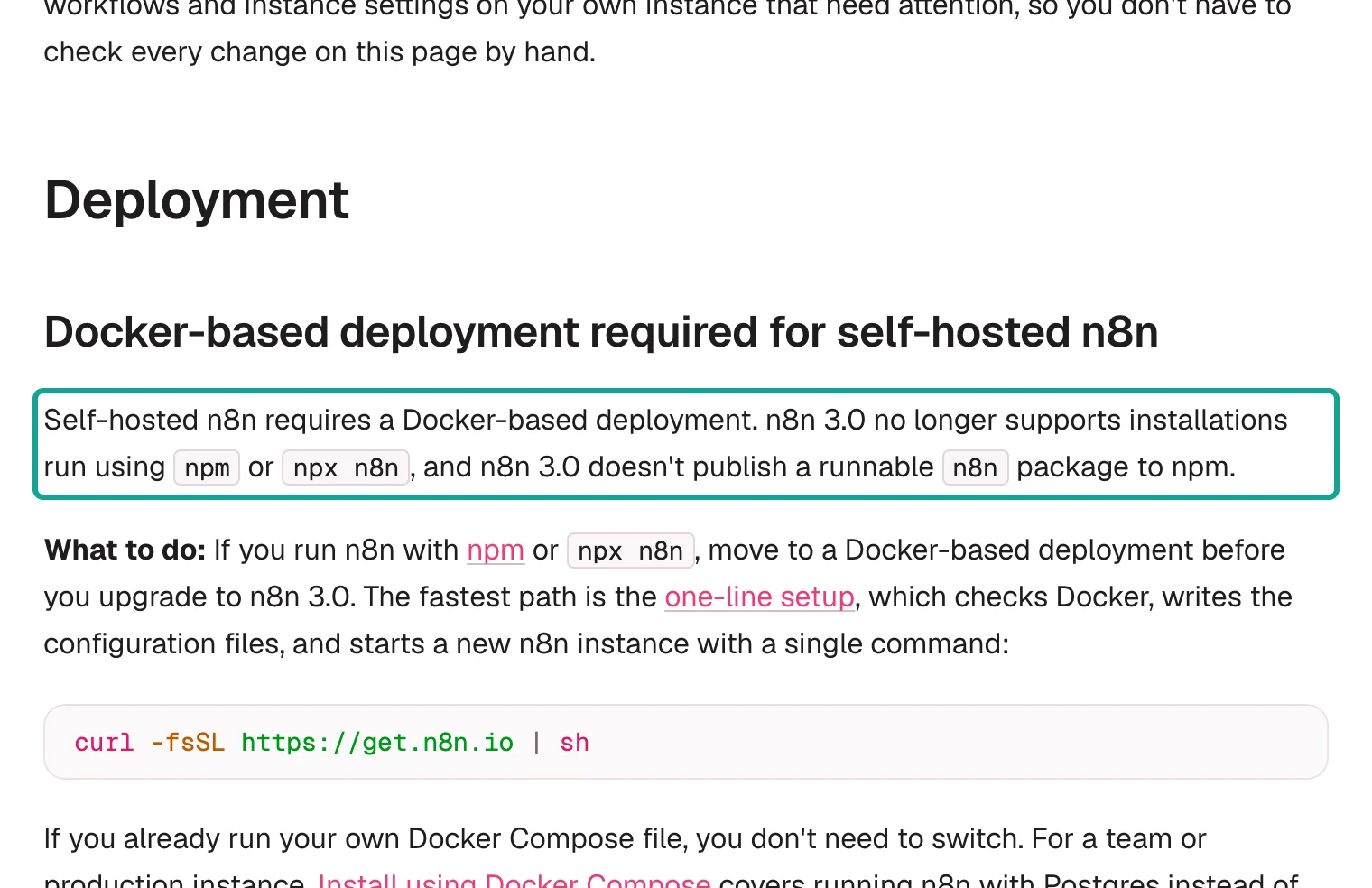
So npm is good for a test on a laptop. For a report that runs every day for months, use Docker Compose or the one-line setup.
Second, the size. A clean install added 2,328 packages in 6 minutes, and node_modules used 4.4 GB. Our first install stopped in the middle. The half-installed folder then failed at start with Cannot find module 'kuler'. A second npm install in the same folder did not fix it.
We deleted node_modules and package-lock.json, installed again, and n8n started. If an install stops, start again from an empty folder. This is the fastest fix.
Node.js version. The documentation and the package do not agree. The npm install page says "between 20.19 and 24.x". The package itself (npm view n8n@'2.45.3' engines) asks for >=24.0.0. The Node.js release table shows that 20 reached end of life in March 2026, 24 is LTS and 26 is "Current". We used 26.11.1 and saw no problems in this test. That is outside the documented range, so use Node.js 24 LTS for a long-running report.
There is one more trap: the port. We first set n8n to port 5679. n8n stopped at once with one line in the log: "n8n Task Broker's port 5679 is already in use". In n8n 2.x, Code nodes run in a built-in task runner, and its broker uses port 5679 by default. We moved N8N_PORT to 5690 and set N8N_RUNNERS_BROKER_PORT to 5691.
After that, n8n started. These are all the settings we used:
export N8N_USER_FOLDER=$HOME/Downloads/n8n-lf25/home      # database and encryption key live here
export N8N_PORT=5690 N8N_LISTEN_ADDRESS=127.0.0.1          # listen on this machine only
export N8N_RUNNERS_BROKER_PORT=5691                        # keep away from the broker default 5679
export GENERIC_TIMEZONE=Asia/Singapore TZ=Asia/Singapore   # the default is America/New_York
export N8N_RESTRICT_FILE_ACCESS_TO=$HOME/Downloads/n8n-lf25/reports
export N8N_DIAGNOSTICS_ENABLED=false N8N_VERSION_NOTIFICATIONS_ENABLED=false
export N8N_METRICS=true N8N_METRICS_INCLUDE_SCHEDULER_METRICS=true
npm install [email protected] --no-audit --no-fund
The same settings as a table, with the reason for each one:
| Variable | Default | Our value | Why |
|---|---|---|---|
N8N_USER_FOLDER | ~/.n8n | A folder in ~/Downloads | Keeps the database and the encryption key with the test |
N8N_PORT | 5678 | 5690 | Port 5679 is the task broker default |
N8N_LISTEN_ADDRESS | All interfaces | 127.0.0.1 | Only this machine can open the editor |
N8N_RUNNERS_BROKER_PORT | 5679 | 5691 | Set it on purpose, so no other setting collides with it |
GENERIC_TIMEZONE | America/New_York | Asia/Singapore | Decides which "8 a.m." the trigger uses |
N8N_RESTRICT_FILE_ACCESS_TO | ~/.n8n-files | The reports/ folder | The only folder that the file node can write |
N8N_METRICS and N8N_METRICS_INCLUDE_SCHEDULER_METRICS | false | true | Counters for missed and caught-up runs |
The listen address is 127.0.0.1 so that only this machine can open n8n. Censys, an internet scanning company, counted 113,926 n8n hosts on the public internet in its annual report of October 14; of those with a readable version, 76% had at least one recent critical vulnerability (Censys blog). n8n also ships security updates every two weeks (for example the October 1 update). To read the reports from another machine, sync the reports/ folder. Do not open the n8n editor to the internet.
Do not skip the time zone line. The time zone page says that a self-hosted instance uses America/New_York by default. The Schedule Trigger uses this zone to decide which "8 a.m." you mean. For a reader in New York this default is correct by accident. For anyone else, an 8 a.m.
report runs at the wrong hour. You can also set a time zone for each workflow in its settings. We set Asia/Singapore in both places.
The file line matters too. Since n8n 2.0, the Read/Write Files node can only use ~/.n8n-files by default. To write reports anywhere else, you must allow that folder with N8N_RESTRICT_FILE_ACCESS_TO. Allow only that one folder.
US readers: plan for November 1
If your report runs on US time, note one date. NIST says that in 2026, daylight saving time ends on November 1 at 2 a.m. local time, and the 1 a.m. hour repeats. A daily report at 8 a.m.
America/New_York is safe. It is far from the change, and the durable scheduler keeps the local wall time. A job at 1:30 a.m. is different, because that time happens twice on November 1.
This table gives the November 1 change for the main US zones, based on the NIST rules:
| IANA zone | Before Nov 1, 2026 | After Nov 1, 2026 | Safe daily report times |
|---|---|---|---|
America/New_York | UTC−4 | UTC−5 | Any time outside 1:00–2:59 a.m. |
America/Chicago | UTC−5 | UTC−6 | Any time outside 1:00–2:59 a.m. |
America/Los_Angeles | UTC−7 | UTC−8 | Any time outside 1:00–2:59 a.m. |
America/Phoenix | UTC−7 | UTC−7 (no DST) | Any time |
Pacific/Honolulu | UTC−10 | UTC−10 (no DST) | Any time |
The durable scheduler documentation says that hourly, daily, weekly and monthly schedules fire as before "in everyday use". It also says that the durable scheduler handles daylight saving transitions, leap years and the 53rd week more correctly than the in-memory scheduler, which "could be off by one period". We did not test a real time change, because it does not happen until next week. Our advice is simple. Do not put a daily report between 1 a.m.
and 3 a.m. local time. Set the workflow time zone to a real IANA name such as America/Chicago, not a fixed offset. The IANA time zone database is where these names and their rules live.
Build the workflow: six nodes, one action per step
The workflow has six nodes. This animation follows one run.


We did not click this workflow together in the editor. We wrote it as JSON and imported it with the n8n command line. This has two benefits. You can repeat every step exactly. You also do not need an owner account in your local n8n. For each step, we give the action, the result you should see, and the reason.
- Store the API key as an n8n credential. Run
jq -n --arg t "$EVERYINFRA_API_KEY" '[{"id":"eiBearer000001","name":"EveryInfra API Key","type":"httpBearerAuth","data":{"token":$t}}]' | n8n import:credentials --input=/dev/stdin. You should see "Successfully imported 1 credential".
The key part is --input=/dev/stdin. The key goes through an environment variable and a pipe only. It never reaches a file. When the data field is plain text, the import command encrypts it with the instance key before it writes the row (in the source code this is cipher.encryptV2). Do not type the key into a header field of the HTTP Request node.
If you do, it goes into the workflow JSON, every export and the version history as plain text. The HTTP Request credentials page lists Bearer, Header and other types. Use Bearer. It sends the Authorization: Bearer header from RFC 6750, which is the format that EveryInfra expects.
- Add a Schedule Trigger. For the test, set "every 3 minutes". For daily use, set "Days", 8 a.m., minute 0. After you publish, a new row appears in the SQLite table
scheduled_jobwithintervalSeconds180,misfirePolicyskipandmisfireGraceSeconds60.
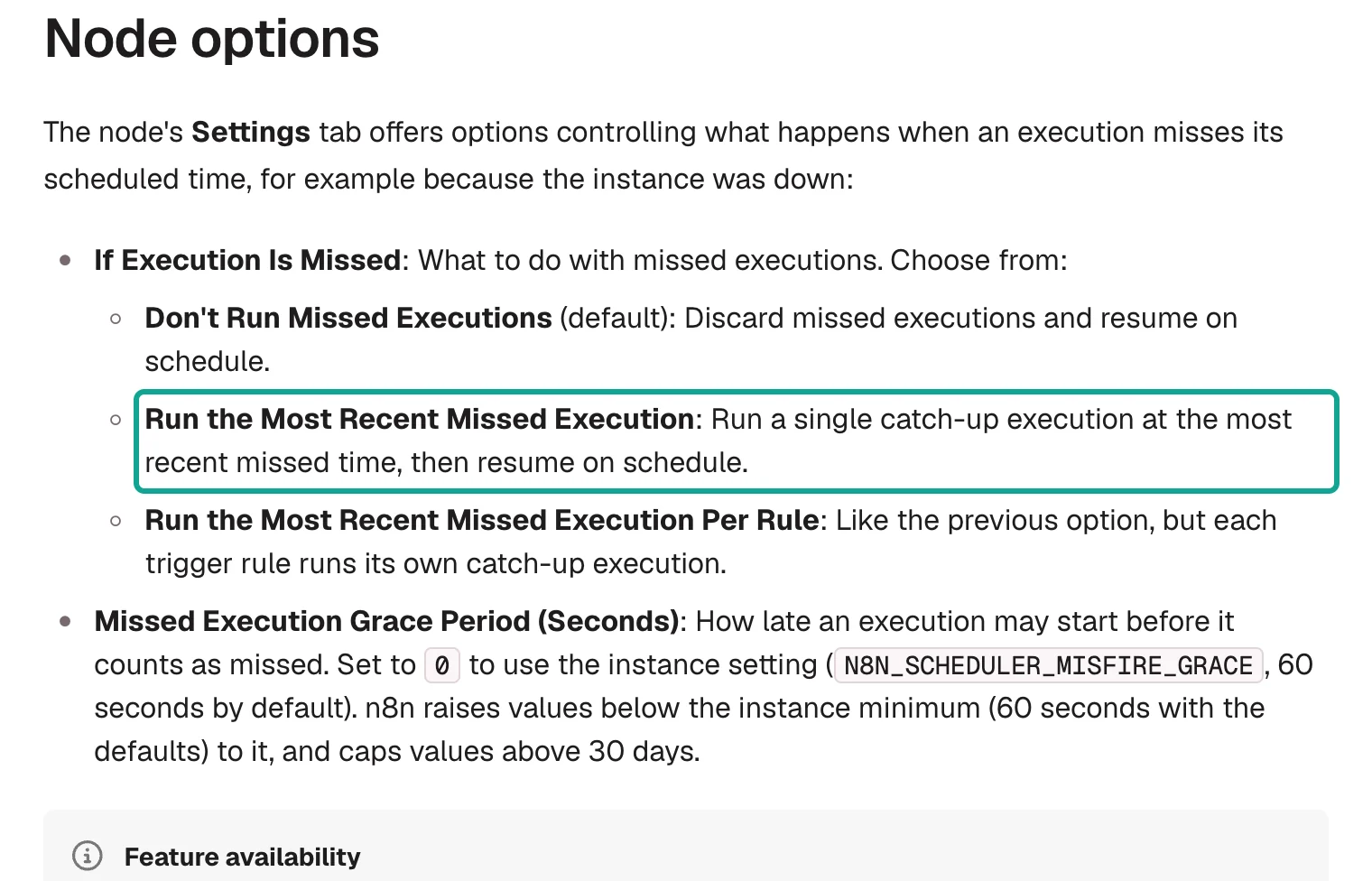
The Schedule Trigger page has two new node settings. "If Execution Is Missed" has three choices, and the default is to skip. "Missed Execution Grace Period (Seconds)" uses the instance value N8N_SCHEDULER_MISFIRE_GRACE, 60 seconds by default, when you leave it at 0. Both settings apply only to nodes added in 2.36 or later, and only when the durable scheduler is on. We read the node source to get the stored values: coalesce_owner is "Run the Most Recent Missed Execution", coalesce is the same per rule, and skip is the default.
- List the requests in a Code node, with one key per request. The node returns 5 items. Each item has the platform, the action, the parameters and an
idemfield. You should see 5 output items in the run data.
const now = DateTime.now().setZone('Asia/Singapore');
// Daily use: one key per day (a rerun on the same day is a replay). Test: one key per minute.
const KEY_BY = 'day';
const keyBase = KEY_BY === 'day' ? now.toFormat('yyyyLLdd') : now.toFormat('yyyyLLdd-HHmm');
const reqs = [
  { label: 'Weibo hot search', platform: 'weibo', action: 'trending', params: {} },
  { label: 'Douyin hot list', platform: 'douyin', action: 'trending', params: { boards: 'hotspot' } },
  { label: 'X US trends', platform: 'twitter', action: 'trending', params: { country: 'us' } },
  { label: 'X Mexico trends', platform: 'twitter', action: 'trending', params: { country: 'mx' } },
  { label: 'Misspelled list name', platform: 'douyin', action: 'trending', params: { boards: 'hot' } },
];
return reqs.map(r => ({ json: { ...r,
  idem: `daily-report-${keyBase}-${r.platform}-${r.params.country || r.params.boards || 'default'}`,
  firedAt: now.toISO() } }));
This is the exact code that we ran. The labels are Chinese because our team reads the reports in Chinese, and you can change the label strings freely.
Why build your own key? A daily report must not run twice, bill twice and produce two different files on the same day. The EveryInfra OpenAPI description says that a synchronous call with the same Idempotency-Key, platform, action and parameters within 24 hours "replays the first successful response". The call does not run again and is not billed again. Different parameters with the same key return 409 idempotency_conflict.
A key built from the date tells the API "one copy of today's list". The pattern matches the IETF Idempotency-Key header draft, which moved to version 08 on October 22, 2026. In our test we set KEY_BY to minute. With one key per day, every 3-minute test run after the first would be a replay, and we could not see how the lists change.
- Call EveryInfra with an HTTP Request node. Use method POST and the URL
https://api.everyinfra.com/api/v1/social. Select the Bearer credential from step 1. Add the headerIdempotency-Key: {{ $json.idem }}. Send a JSON body:{{ JSON.stringify({ platform: $json.platform, action: $json.action, params: $json.params }) }}. Turn on "Include Response Headers and Status" and "Never Error". Set batching to 1 item per batch with 1,500 ms between batches. You should see 5 items per run: 4 withstatusCode200 and 1 with 422.
"Never Error" is the most important switch in this step. The HTTP Request page explains that by default a non-2xx response makes the node fail. The run stops there, and the report node never runs. A daily report needs the opposite. When one list fails, the others still go into the report, and the failed list gets a clear note.
With "Never Error" and the full response, the 422 body and status go to the next node as normal data. The batch interval keeps you under the EveryInfra limit of 10 calls per minute per key. GET /api/v1/account returns this value as key_requests_per_minute. With 1.5 seconds between calls, one run took about 13 to 16 seconds.
- Write the report in a second Code node, and remember the last run. This node pairs the 5 responses with the 5 requests from step 3 in order. It takes the top 10 of each list by
rankand skips promoted rows that have no rank (see the code below). It reads the last top 10 from$getWorkflowStaticData('global'), counts the overlap and saves the new lists. You should see one item withmarkdownandfileName.
Get the top-10 step right on its own. The Weibo hot search response mixes in promoted slots. They have a title and a heat value, but no rank. In our 14 runs, promoted slots took 16 of the first 10 positions on Weibo in total; Douyin and X had none. If you number by position, an ad becomes a hot topic and every rank after it moves by one. Put this in the second Code node: if any row of a list has a rank, keep only rows with a rank and sort by it; fall back to position only when no row has a rank.
function top10(results) {
  const rows = results || [];
  const hasRank = rows.some(x => x.rank != null);
  const kept = hasRank ? rows.filter(x => x.rank != null).sort((a, b) => a.rank - b.rank) : rows;
  return {
    top: kept.slice(0, 10).map((x, i) => ({ rank: x.rank ?? i + 1, title: x.title || x.keyword || x.name })),
    promoted: rows.length - kept.length,   // goes into the heading: "N promoted rows skipped"
  };
}
These are the 7 promoted slots that appeared in our 14 runs. They sat in only two positions: 4th and 8th. Their titles look like normal hot topics, so only the empty rank gives them away. The last one, "Several eye creams accused of false advertising", reads like news, but it also has no rank, so we skip it too. If you want to keep such rows, you need a separate rule.
| Promoted slot title | Times seen | Position | When (SGT) |
|---|---|---|---|
| ROSÉ named Johnnie Walker Black Label global ambassador | 5 | 4th | 10:42–11:18 |
| Everyone who runs a household, come and try this | 3 | 4th | 11:03–11:15 |
| How Lynk & Co won 16 titles in seven years | 3 | 8th | 11:06–11:15 |
| Liu Haocun named Anta global brand ambassador | 2 | 4th | 10:39–11:00 |
| Mikimoto and Dilraba: a pearl trilogy | 1 | 8th | 10:39 |
| Shop 50%-off fashion and beauty on JD with Lou Yixiao | 1 | 4th | 11:21 |
| Several eye creams accused of false advertising | 1 | 8th | 11:21 |
Static data is the lightest memory between runs in n8n. The n8n documentation gives two limits. It is not saved in manual test runs, only when a published workflow runs from a trigger. It can also be unreliable at high frequency. So in a manual run, "overlap with the last run" is always empty.
That is expected. For data that you must keep, the documentation suggests data tables.
This node also computes the cost, in two ways. "Sum of responses" adds billing.charged_usd from all calls. "Actual charge" leaves out the calls where replayed is true. Test 3 shows why you need both numbers.
- Convert to a file and write it to disk. Use Convert to File with "Convert to Text File" on the
markdownfield. Then write the file to thereports/folder with the Read/Write Files node. You should see one newreport-<time>.mdfile per run.
If this step reports that the path is not writable or not allowed, check N8N_RESTRICT_FILE_ACCESS_TO first. The path must be inside the folder that it allows.
- Publish, then restart n8n. Run
n8n import:workflow --input=A.json, thenn8n publish:workflow --id=eiDailyReport01, thenn8n start. The start log should show "Scheduler started" and "Processed 0 draft workflows, 2 published workflows".
The command-line publish has one detail that is easy to miss. publish:workflow writes to the database directly. The command itself prints "Changes will not take effect if n8n is running". A running n8n must restart before it sees the change. This detail decides the answer in Test 1.
Test 1: is it on time, and where does "every N minutes" start?
n8n 2.45 changes the meaning of "every N minutes". The durable scheduler page says that these schedules "run at uniform intervals measured from workflow publication". They no longer align to whole minutes. To keep clock-aligned timing, you set N8N_SCHEDULER_TRIGGER_NODE_MODE=legacy. This is the original text, with the rule in a teal box.
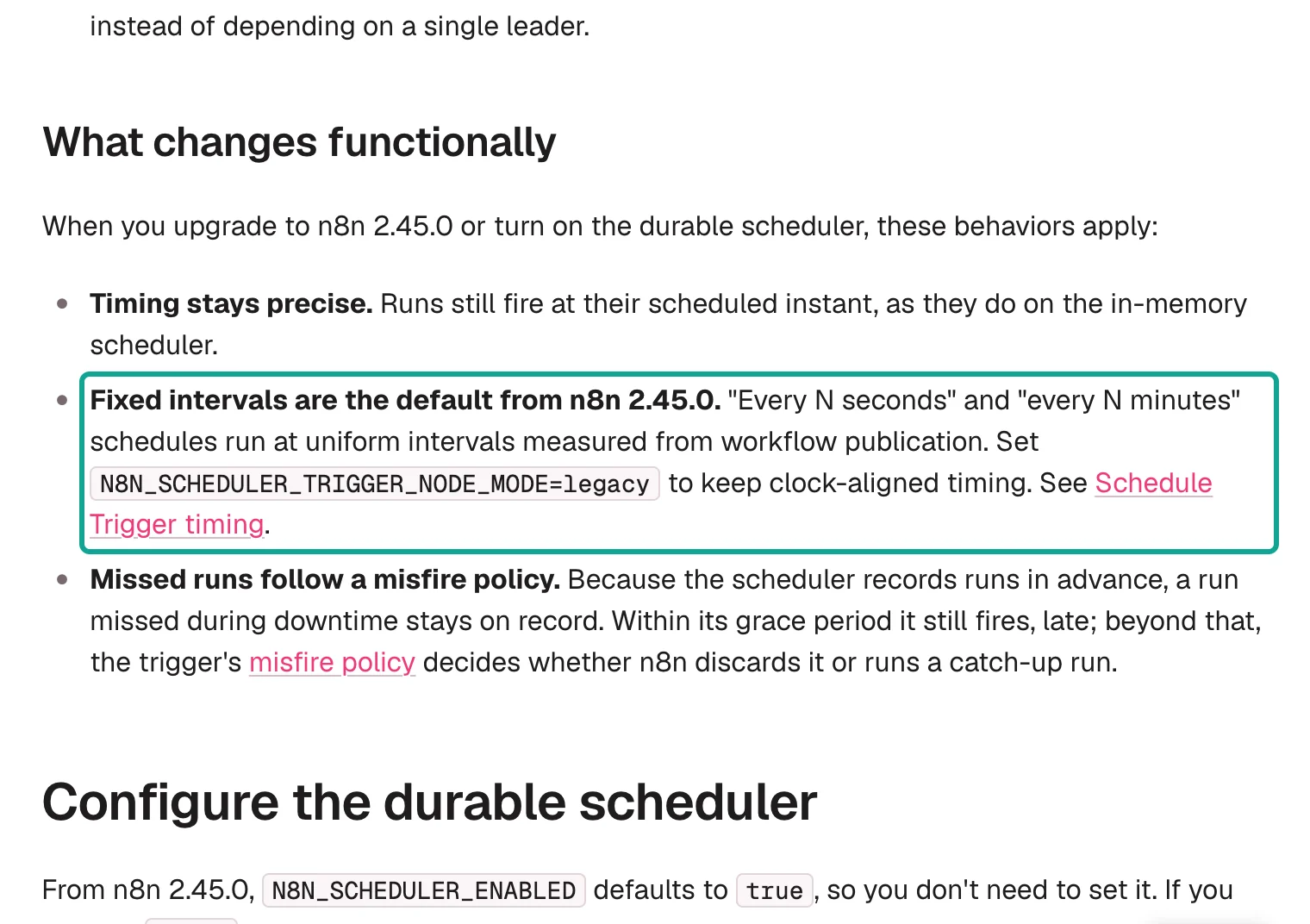
So which moment is "publication"? We published the two workflows from the command line at 10:32:59 and 10:33:01 SGT. n8n started at 10:36:20 and activated them at 10:36:24. The SQLite table scheduled_job gives the answer. Both rows have createdAt at 10:36:24.207 and 10:36:24.209, and the first nextRunAt is 10:39:24.206.
The count starts when a running n8n activates the workflow, not when the command writes the database. In the editor, the two moments are the same click. With the command line, they were 3 minutes 25 seconds apart.
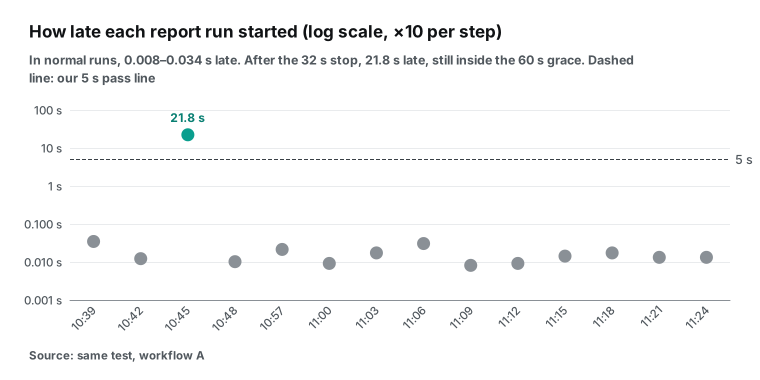
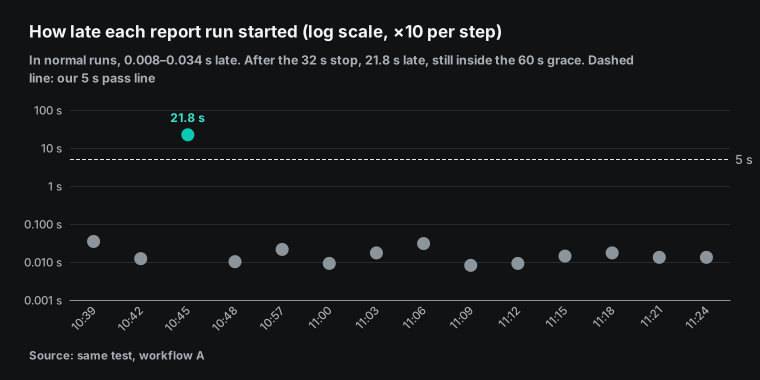
All 14 runs then fell on the same phase: 24.206 seconds past each 3-minute mark, from 10:39:24 to 11:24:24. In normal runs, the execution started 0.008 to 0.034 seconds after the planned time. That is far below our 5-second pass line. When no stop was involved, the gap between two runs was 179.978 to 180.013 seconds.
We restarted n8n twice during the test, and the phase did not change. After each restart, the scheduled_job row was still there, and nextRunAt continued from the old phase. A restart did not start a new count. This is the clearest difference from the old in-memory scheduler.
This table shows all 16 planned times, one by one. All values come from SQLite and the run data, and our analysis script analysis.py computes them. Times are SGT.
| Planned | Started | Late (s) | Billed calls | Charge | Rows: Weibo / Douyin / X US / X Mexico |
|---|---|---|---|---|---|
| 10:39:24.206 | 10:39:24.240 | 0.034 | 4 | $0.002224 | 10 / 8 / 52 / 71 |
| 10:42:24.206 | 10:42:24.218 | 0.012 | 4 | $0.002224 | 17 / 20 / 52 / 71 |
| 10:45:24.206 | 10:45:46.037 | 21.831 | 4 | $0.002224 | 20 / 20 / 52 / 71 |
| 10:48:24.206 | 10:48:24.216 | 0.010 | 4 | $0.002224 | 20 / 20 / 52 / 71 |
| 10:51:24.206 | Not run (stop, default skip) | — | 0 | $0 | — |
| 10:54:24.206 | Not run (stop, default skip) | — | 0 | $0 | — |
| 10:57:24.206 | 10:57:24.227 | 0.021 | 4 | $0.002224 | 20 / 20 / 52 / 71 |
| 11:00:24.206 | 11:00:24.215 | 0.009 | 4 | $0.002224 | 20 / 20 / 52 / 71 |
| 11:03:24.206 | 11:03:24.223 | 0.017 | 4 | $0.002224 | 20 / 20 / 52 / 71 |
| 11:06:24.206 | 11:06:24.236 | 0.030 | 4 | $0.002224 | 17 / 20 / 52 / 71 |
| 11:09:24.206 | 11:09:24.214 | 0.008 | 4 | $0.002224 | 20 / 20 / 52 / 71 |
| 11:12:24.206 | 11:12:24.215 | 0.009 | 4 | $0.002224 | 20 / 20 / 50 / 72 |
| 11:15:24.206 | 11:15:24.220 | 0.014 | 4 | $0.002224 | 15 / 20 / 50 / 72 |
| 11:18:24.206 | 11:18:24.223 | 0.017 | 4 | $0.002224 | 20 / 20 / 50 / 72 |
| 11:21:24.206 | 11:21:24.219 | 0.013 | 4 | $0.002224 | 19 / 20 / 50 / 72 |
| 11:24:24.206 | 11:24:24.219 | 0.013 | 4 | $0.002224 | 20 / 20 / 50 / 72 |
The last column shows one thing that has nothing to do with scheduling. In the first run, Weibo returned only 10 rows and Douyin only 8. After that, both returned 20 rows most of the time, which is the default_limit of both in the catalog. Test 3 explains what this means for cost.
What does this mean for a daily report? To get the report at 8:00 sharp, use the "Days" interval with 8 a.m. and minute 0. The documentation says that hourly, daily, weekly and monthly schedules behave the same in both modes in everyday use. Only "every N minutes" and "every N seconds" change.
If you used "every 30 minutes" to run at :00 and :30, after 2.45 it runs 30 minutes apart from the second when you clicked publish. To keep whole-hour alignment, use a cron expression such as 0 */30 * * * *. The documentation says that cron does not depend on this setting. You can also set legacy, but the documentation marks legacy as deprecated, and a future version will remove it.
Test 2: where does a run go when n8n is down?
This is the largest change in 2.45, and we spent the most time on it. The old in-memory scheduler keeps the next run in the process. The documentation says it plainly: "Restarts lose pending runs." A run that falls due during downtime is skipped. The durable scheduler writes each run to the database first, so a missed run "stays on record". If n8n comes back inside the grace period, the run starts late. Beyond the grace period, the misfire policy decides.

To compare two policies in the same downtime, we published two workflows. Workflow A is the report, with the default "Don't Run Missed Executions". Workflow B is a heartbeat. It calls no API and only writes the time to a file, so it costs nothing. B uses "Run the Most Recent Missed Execution".
Both run every 3 minutes on the same phase. A script stopped n8n with SIGTERM by process ID, waited for the process to exit, and started it again at a set time. The script logged every time.
| Downtime (Singapore time) | Planned times inside | Workflow A (skip) | Workflow B (most recent) |
|---|---|---|---|
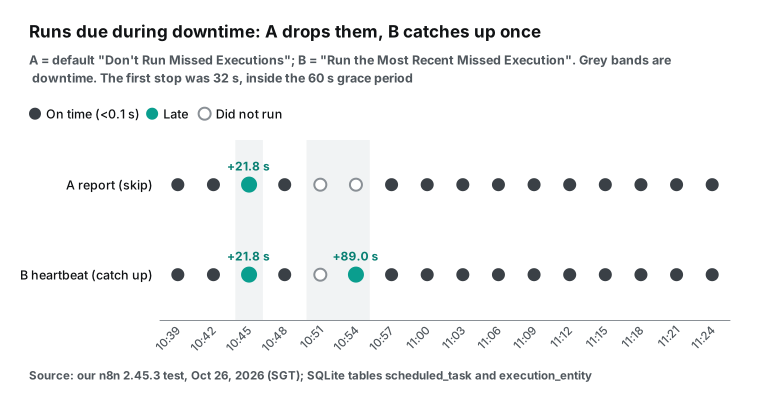
| 10:45:12 → 10:45:40, ready at 10:45:44 | 10:45:24 | Ran at 10:45:46.0, 21.8 s late | Ran at 10:45:46.0, 21.8 s late |
| 10:49:00 → 10:55:40, ready at 10:55:44 | 10:51:24 and 10:54:24 | Ran neither | One catch-up at 10:55:53, 89.0 s late |
First stop: 32 seconds, inside the grace period. We stopped n8n at 10:45:12 SGT, started it at 10:45:40, and it was ready at 10:45:44. The planned time 10:45:24 fell in the middle of the stop. The run was already in the table scheduled_task before the stop. The materialization window, N8N_SCHEDULER_MATERIALIZATION_WINDOW, is 60 seconds by default, so each run gets its row about a minute early. After the restart, A and B both started at 10:45:46.0, which is 21.8 seconds late and inside the 60-second grace.
One detail: before the stop, missedAfter for both rows was 10:46:24.206, the planned time plus 60 seconds. After the restart, n8n changed it to 10:46:45.677. It looks like the restart gave a new grace period from the start time. We saw this only once and did not test the rule further.
Second stop: 6 minutes 44 seconds, over two planned times. We stopped n8n at 10:49:00 SGT, started it at 10:55:40, and it was ready at 10:55:44. The planned times 10:51:24 and 10:54:24 both fell in the stop, and both were past their 60-second grace when n8n came back. The result matched the documentation.
A did not run either time, and its next run was 10:57:24. B ran once, at 10:55:53. That run belongs to the planned time 10:54:24, the most recent one, and it was 89.0 seconds late. B did not run a separate catch-up for 10:51:24.
Run data alone is not enough, because a missing run is simply not there. So we turned on the n8n Prometheus metrics and read /metrics once, at 10:56:30 SGT, after the second restart. The counters start at zero when the process starts, so they show only the second stop.
| Metric | Value | What it means |
|---|---|---|
n8n_scheduler_occurrences_misfired_total{policy="skip"} | 2 | A dropped 10:51:24 and 10:54:24 |
n8n_scheduler_occurrences_misfired_total{policy="coalesce_owner"} | 1 | B folded 10:51:24 into the catch-up |
n8n_scheduler_occurrences_materialized_total | 1 | B's catch-up went into the queue |
n8n_scheduler_tasks_dispatched_total | 1 | One run was dispatched |
n8n_scheduler_tasks_completed_total{result="success"} | 1 | The catch-up succeeded |
n8n_scheduler_tasks_reclaimed_total | 0 | No half-finished run was taken back |
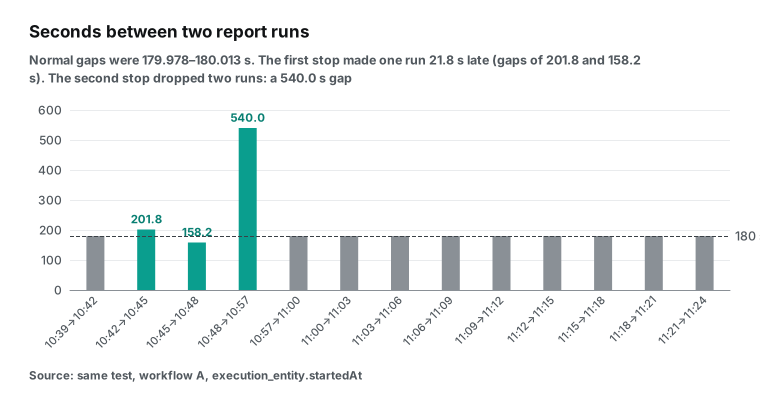
The gaps between report runs show both stops clearly. The first stop made one run 21.8 seconds late, so the gaps before and after it were 201.8 and 158.2 seconds. Together they are still 360 seconds, so the phase did not move. The second stop dropped two runs, and that gap was 540.0 seconds, exactly three periods.
Three sources tell the same story: the run data, the scheduled_task table and the metrics. This is why we mark J4 as passed. The scheduler variables page explains each counter. n8n also publishes a ready Grafana dashboard. If other people read your report, set an alert on occurrences_misfired_total. When it goes up, one day's report did not happen.
Which policy is right for a daily report? We suggest "Run the Most Recent Missed Execution", together with the date-based key from step 3. A daily report needs one copy per day. After a stop, you want today's copy. If n8n comes back on the next day, the catch-up uses the new date and a new key, so you get the new day's copy. The default skip policy suits jobs that are useless when late, such as a heartbeat every minute.
Set the grace period from your restart time. The documentation says it must be longer than the executor interval and not shorter than the materialization window, which gives 60 seconds with the defaults. If an upgrade restart on your machine takes 3 minutes, set the node grace to 300 seconds.
Test 3: money, and the replay that looks billed
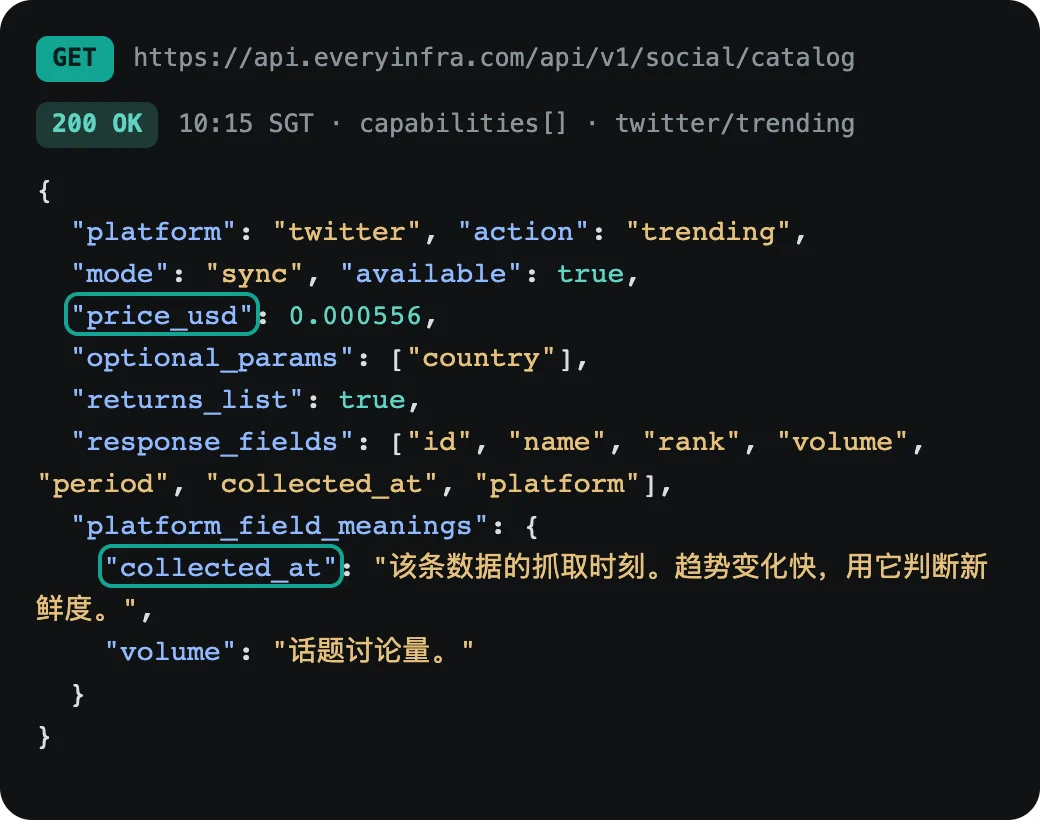
Each run calls 4 trending capabilities: twitter/trending for the US and for Mexico, weibo/trending and douyin/trending. In the EveryInfra catalog, read at 10:15 SGT, all three have price_usd 0.000556 per call. So each run should cost 4 × $0.000556 = $0.002224. This is the real catalog response for twitter/trending. The teal boxes mark the price and the meaning of collected_at.
All 14 runs cost exactly $0.002224 after we left out replays. The total was $0.031136.
We did not trust the responses alone. After the test, we read the server call log with GET /portal/api/logs and matched every request_id. All 56 billed calls from the 14 runs were in the log. Each had cost 40 credits, which is $0.000556, the same as charged_usd in the response to 6 decimal places. The 14 calls that returned 422 had no entry in the call log at all. So there was no charge for them.
The trap is the replay. At 10:40:46 SGT we sent the Weibo call from the 10:39 run again with curl, with the same key daily-report-20261026-1039-weibo-default.
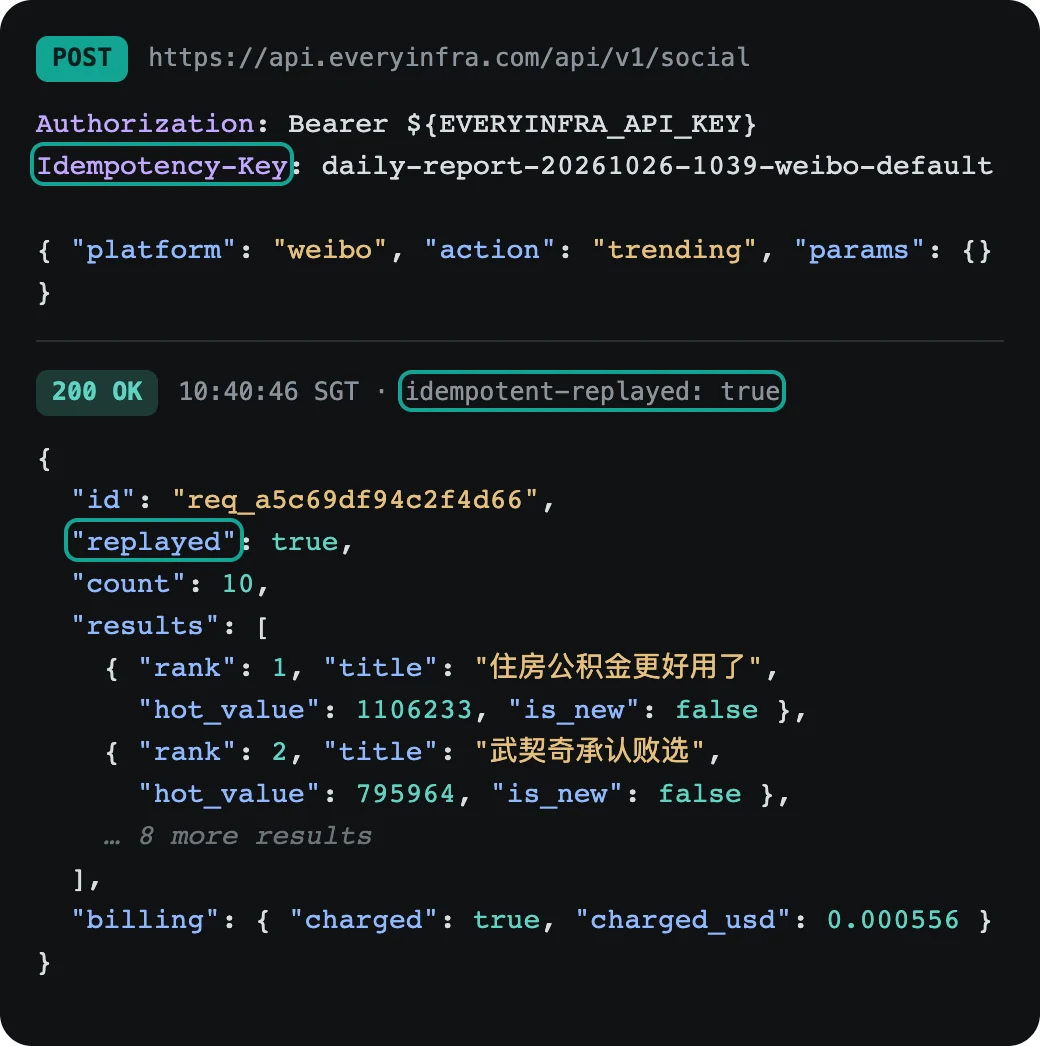
The response was 200, with the header idempotent-replayed: true and replayed: true in the body. The id was the first call's req_a5c69df94c2f4d66. The new request had its own ID in the x-request-id header, req_7278432b29f64594. The server log had no second charge. But the billing block still said "charged": true, "charged_usd": 0.000556.
The OpenAPI text explains why. A replay returns the stored first response, with the "same billing, not run or charged again". So billing describes the first charge, not this call.
In a daily report, this looks like the chart below. We set KEY_BY to day and ran the workflow twice by hand with n8n execute; the run records give start times of 10:56:46.565 and 10:57:04.358 SGT. In the second run, all 4 calls were replays, and the actual charge was $0. A report that adds every charged_usd, as most tutorials do, would show $0.002224 for the second run.
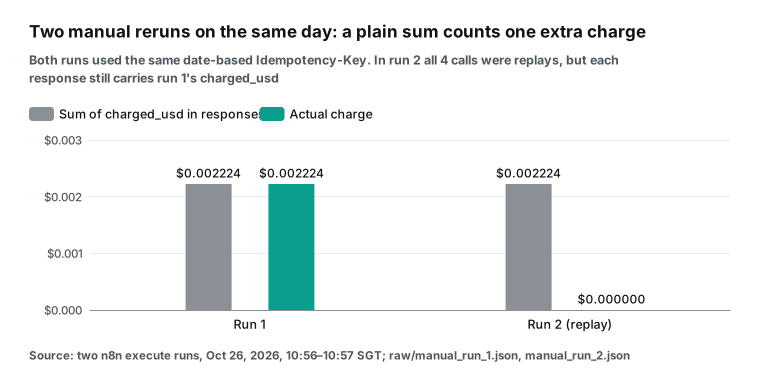
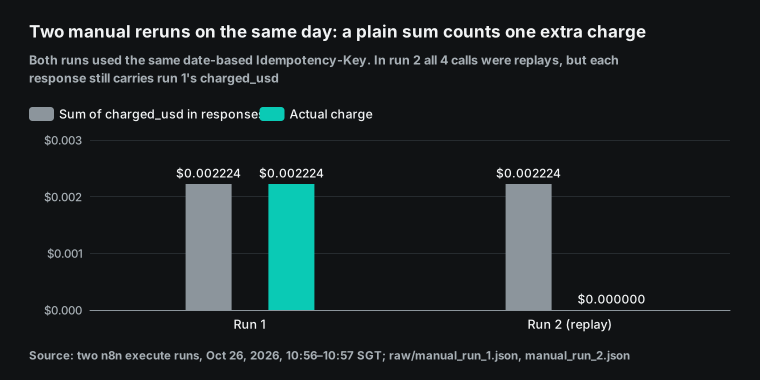
So count only the calls where replayed is not true. Our report shows both numbers. When the two numbers differ, a rerun happened that day, and you can find out who ran it and why.
We also tested the other case. At 10:40:54 SGT we sent the same key with different parameters. The API returned 409 idempotency_conflict, and next_steps said "send the new request with a new key. Nothing was charged." So a date-based key must also contain the platform and the parameters. If not, two different lists on the same day block each other. That is why the key in step 3 contains the platform and the country.
What it costs
This is the bill for the whole test. All amounts are the actual charge after replays, matched with the server log.
| Item | Calls | Charge |
|---|---|---|
| 14 scheduled report runs, 4 billed calls each | 56 | $0.031136 |
| 14 wrong calls on purpose (422) | 14 | $0 |
| 2 manual runs with a date-based key: 4 billed calls, 4 replays, 2 wrong calls | 10 | $0.002224 |
| 1 MCP Client call | 1 | $0.000556 |
| 1 replay with curl, 1 key conflict (409), 1 wrong board name sent alone (422), 1 call without a key (401) | 4 | $0 |
| Total for EveryInfra calls | 85 | $0.033916 |
For your own report, the cost depends on the schedule:
| Schedule | Billed calls per day | Per day | 30 days |
|---|---|---|---|
| Once a day at 8 a.m., 4 lists | 4 | $0.002224 | $0.06672 |
| Twice a day, 8 a.m. and 8 p.m. | 8 | $0.004448 | $0.13344 |
| Every hour | 96 | $0.053376 | $1.60128 |
| Once a day, plus one catch-up and one manual rerun (date-based key) | 4 billed + 8 replays | $0.002224 | $0.06672 |
All prices come from the catalog price_usd, read on October 26, 2026, at 10:15 SGT. The last row shows the value of the key: however often you rerun on one day, you pay once.
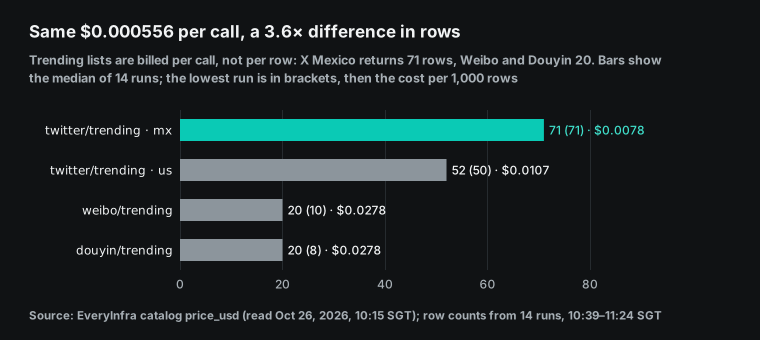
Another fact is easy to miss. Trending lists are billed per call, not per row. For the same $0.000556, the X Mexico list returned 71 rows and the Weibo and Douyin lists returned 20 rows each (medians of 14 runs). Per 1,000 rows, that is a 3.6× difference.
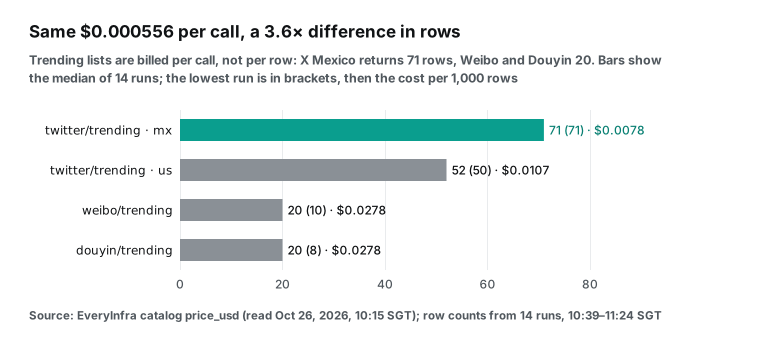
The row count also changes between calls. In the first run at 10:39 SGT, Weibo returned 10 rows and Douyin 8. In the next 13 runs, Douyin always returned 20 rows, and Weibo returned 15 to 20, mostly 20. That is the default_limit of both in the catalog, and weibo/trending has a max_limit of 200. The Weibo hot search rules describe a Top 50 list that updates every minute, so the default gives you only part of it.
Our report uses only the top 10, so the first run lost only 2 Douyin places. Need the full list? Check in the catalog whether limit is allowed. Then confirm the row count with one real call. Also write the row count of each run into the report.
Do not estimate from the default. A short response still costs $0.000556, so count it when you compute a price per row.
Test 4: one wrong call, and the report still arrives
In every run, the fifth call sets the Douyin boards value to hot. The correct value is hotspot. In all 14 runs, this call returned 422, the report still arrived, and the other 4 lists were complete. This is the real response from the 10:39 run:
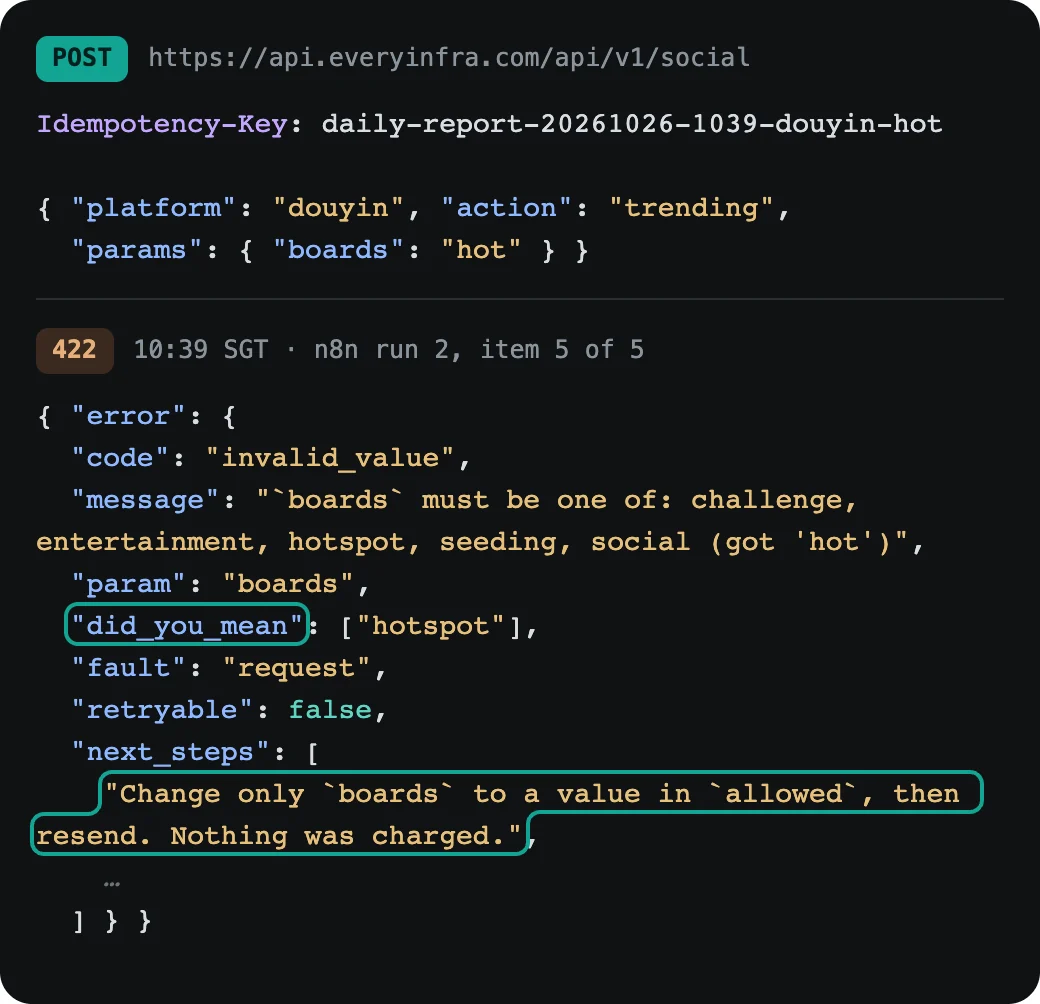
Why does this response suit automation? It gives the fix in fields that a program can read. allowed lists the valid values. did_you_mean gives the closest one. retryable: false tells you that the same request will fail again.
The first line of next_steps says "Nothing was charged". Our report node copies message and did_you_mean into the report, so a reader knows to change the value to hotspot. Status 422 is "Unprocessable Content" in RFC 9110: the request is well formed, but its content cannot be processed. A retry of the same request cannot succeed.
The "Never Error" switch in step 4 makes this design work. Without it, n8n marks the run as failed and starts your error workflow (error handling page), and there is no report that day. For a file that people read every day, one missing list is much better than no file. This table lists the responses that we caused in the test or found in the OpenAPI text, with what the report should do.
| Case | Status and code | Charge | What the report does |
|---|---|---|---|
| No key | 401 missing_key | None ("Nothing was charged") | Stop the run, alert, check the credential |
| Value not allowed | 422 invalid_value | None | Note the reason and did_you_mean, keep the other lists |
| Same key, other parameters | 409 idempotency_conflict | None | Fix the key pattern |
| Same key, first call still running | 409 idempotency_in_progress with Retry-After | None | Wait for Retry-After, then resend |
| Same key again | 200, replayed: true | No new charge, billing is the first one | Count the cost once |
| Success with no rows | 200, count: 0 | Full refund | Write "this list is empty today" |
| Refund result unknown | 503 | To be checked | Do not retry blindly, check the call log first |
We caused the first five cases ourselves. The 401 came from a call without a key at 10:18 SGT, and we keep the raw response on file. The last two rows come from the OpenAPI text. We did not cause them in this test.
Test 5: the same capability through the MCP Client node
n8n also has an MCP Client node. It uses the tools of any MCP server as a normal workflow step. The EveryInfra MCP endpoint is https://api.everyinfra.com/mcp. Listing tools needs no key, and at 10:39 SGT it listed 25 tools. We called everyinfra_call_api once with the same parameters as one REST call:
{
  "type": "@n8n/n8n-nodes-langchain.mcpClient",
  "typeVersion": 1.1,
  "parameters": {
    "endpointUrl": "https://api.everyinfra.com/mcp",
    "authentication": "bearerAuth",
    "tool": { "__rl": true, "mode": "id", "value": "everyinfra_call_api" },
    "inputMode": "json",
    "jsonInput": "{\"platform\":\"weibo\",\"action\":\"trending\",\"params\":{}}",
    "options": { "timeout": 90000 }
  },
  "credentials": { "httpBearerAuth": { "id": "eiBearer000001", "name": "EveryInfra API Key" } }
}
We ran it at 10:39:52 SGT with n8n execute --id=eiMcpCheck0001. The node took 9.3 seconds. content[0].text came back as an object with the top-level fields id, platform, action, results, count, billing, quota and async_hint. The count was 10, the charge was $0.000556, and the server log had the call (req_0e075488e27f44e6, 10:40:01). Each result had rank, title, hot_value, is_hot, is_new, label, url and platform, the same fields as the REST response at the same time. The transport was the default Streamable HTTP, one of the two standard transports in the MCP specification of 2025-11-25.
| REST with HTTP Request | MCP Client | |
|---|---|---|
| Request | POST /api/v1/social | tools/call on everyinfra_call_api |
| Weibo rows | 10 in the first run | 10 |
| Charge | $0.000556 | $0.000556 |
| In the server-side log | Yes, with its request_id | Yes, req_0e075488e27f44e6 |
Idempotency-Key header | Yes | No place to put it |
| Good for | Fixed scheduled calls | A model that picks what to look up |
Then why not use MCP for the report? There are two reasons. First, the HTTP Request node can send an Idempotency-Key header, and the MCP Client node has no place for it in the tool arguments. Without the key, a catch-up run has no "one charge per day" protection. Second, MCP is best when a model picks the tool and builds the arguments.
A report with 5 fixed calls does not need that. The MCP Client fits after an AI Agent node, where a model reads the report and decides whether to look deeper at one topic. For that, n8n has a separate MCP Client Tool node.
The command line has one more trap. While the n8n service runs, n8n execute starts its own task broker on the same port. We set N8N_RUNNERS_BROKER_PORT=5692 for that command only, and then it worked. To set up EveryInfra MCP in Claude, Cursor and other clients, read the remote MCP setup guide. The MCP server page has more details.
How much the lists changed in 45 minutes
Is one report a day enough? That depends on how fast each list changes. We measured only 45 minutes, from 10:39 to 11:24 SGT, so this answers "within an hour" and not "within a day". our analysis script analysis.py computes all numbers from the 14 run records.
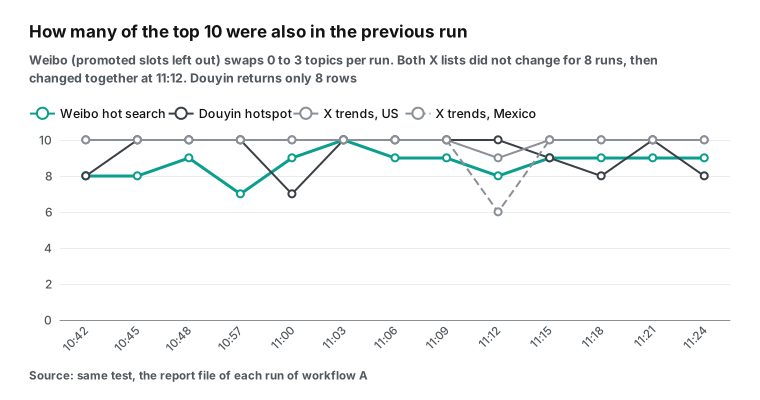
List by list, the numbers are these. For Weibo hot search we count by rank and leave out promoted slots (0 to 2 of the first 10 positions in each run; when we counted by position, they looked like new topics). Between two runs, 7 to 10 of the top 10 stayed, so 0 to 3 topics changed every 3 minutes, and in 9 of 13 pairs only one topic or none changed. The number 1 topic changed twice, at 10:57 and at 11:18 SGT. Only 4 topics were in both the first and the last top 10.
The pinned number 1 on the Douyin hotspot list never changed. Between two runs, 7 to 10 topics stayed, and 5 were in both the first and the last list (the first run had only 8 rows).
Both X lists did not change at all for the first 8 runs. Then, in the run at 11:12, both changed together. On the US list, "Chiefs" moved to number 1. On the Mexico list, a new hashtag for a TV show entered at number 2, and only 6 topics stayed from the run before. After that, both lists were stable again. Between the first and the last run, 9 topics stayed on the US list and 6 on the Mexico list.
| List | Kept between two runs in a row | First and last run | Different topics in 45 min | Changes of the #1 |
|---|---|---|---|---|
| Weibo (promoted slots left out) | 7–10 | 4 | 21 | 2 (10:57 and 11:18) |
| Douyin | 7–10 | 5 | 18 | 0 (the #1 is pinned) |
| X US | 9–10 | 9 | 11 | 1 (11:12) |
| X Mexico | 6–10 | 6 | 14 | 0 |
Here is the effect of the promoted slots on the Weibo numbers, side by side:
| Weibo hot search, 14 runs | By position (first report) | By `rank`, promoted slots skipped (fixed) |
|---|---|---|
| Overlap of top 10 between two runs | 7–9 | 7–10 |
| Overlap of first and last run | 4 | 4 |
| Distinct topics in 45 minutes | 27 | 21 |
| Lula's rank at 10:39 | 5th | 4th |
| Changes of the number 1 topic | 2 | 2 |
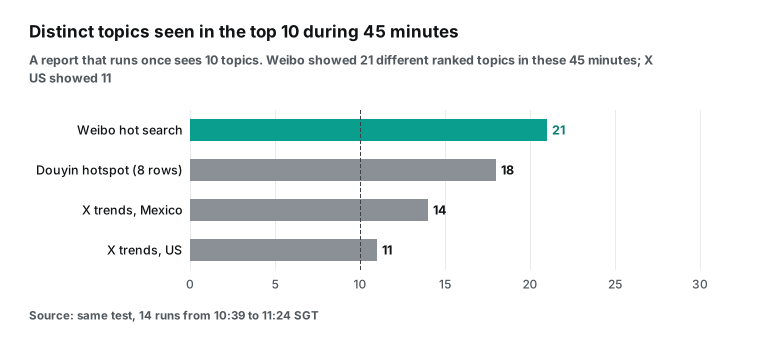
Here is the same data from another side. In 45 minutes, 21 different ranked topics reached the Weibo top 10 (27 if you count by position; the extra 6 are rotating promoted slots), 18 reached Douyin, 14 reached X Mexico and 11 reached X US. A report that runs once a day shows 10 of them per list. For X, that covers most of the hour. For Weibo, more than half of the topics that reached the top 10 in this hour (11 of 21) never appear in your report.
These numbers show that the four lists move at different speeds. They do not show that one list is better. The X lists were fresh on every call: collected_at was a few seconds before each call, for example 10:39:34 and 10:42:35 SGT. The top 10 stayed the same most of the time and then changed in one step. During this time, the Brazilian election from the night before held the top places.
We saw only one such step, so we cannot tell how often X refreshes its lists. The X trends recommendation page says that trends are topics that are "popular now". It also says that X filters out new accounts and accounts with few followers, and detects trends by country, region and city. So X trends move more slowly than the Weibo hot search, which updates every minute.
For your report, this means one or two runs a day are enough to follow big stories on X. To follow the ups and downs on Weibo, one run a day misses many topics that rise and fall between runs. Run more often, or keep every list and report "all topics seen today".
Did the key reach the disk?
A report runs for a long time. A key that lands in an export, run data or a backup stays there for a long time too.
After the test, at 11:25 SGT, we stopped n8n and searched for the key text in three places. The first place was the whole n8n data folder, with the SQLite database, its WAL file, the event log and the settings file. The second place was the 16 reports in reports/. The third place was all raw files of this article. There were 0 matches.
The credential table holds only the encrypted value. In the run data, the HTTP Request node output has the status, the response headers and the body, but not the request headers. The error data of the 422 calls did not have the key either.
We looked at error data on purpose. On October 14, n8n fixed a related problem: GHSA-qmvv-q3c9-wpp7 describes the Git, MongoDB Atlas Vector Store and Google Cloud Storage nodes. When an operation failed, these nodes put a password or token from their credential into the error data. A user who can see the run data but not the credential could read the secret. The fixed versions are 1.123.85, 2.44.1 and 2.43.5.
The HTTP Request node is not on the list, and our test found no leak. But it shows why you should search the run data for secrets after each upgrade.
Problems we actually hit
Each row below happened during this test, in order. Most are not n8n bugs. They come from new 2.x defaults that meet command-line use.
| Symptom | Cause | Fix |
|---|---|---|
Start fails with Cannot find module 'kuler' | The first npm install stopped half way, and a second install did not repair it | Delete node_modules and package-lock.json, install again (6 minutes) |
| n8n exits at once: "Task Broker's port 5679 is already in use" | N8N_PORT was 5679, the default port of the built-in task broker | Use another port, or set N8N_RUNNERS_BROKER_PORT |
publish:workflow succeeds, but nothing runs on schedule | The command writes the database, and a running n8n does not read it again | Restart n8n; the command prints this warning |
| Runs fall at :24 seconds, not on whole minutes | From 2.45, "every N minutes" counts from activation | Use "Days" or "Hours", or a cron expression |
n8n execute fails while the service runs | The command starts a second task broker on the same port | Set N8N_RUNNERS_BROKER_PORT and N8N_PORT for that command |
| "Overlap with the last run" is always empty in manual runs | Static data is saved only for published workflows started by a trigger | Expected; use data tables if you need it in tests |
| Many deprecation notes at start | The 2.x line prepares for 3.0 | Fine for a test; for daily use, move to Docker and an external task runner |
The first row cost us the most time, and it is easy to misread. The error names a logging package that has nothing to do with n8n, so it looks like a Node.js problem. It is not. The install did not finish, and a clean install fixes it.
Read rows three and four together. In the editor, writing the database and activating the workflow happen in the same click, so the phase is the second when you click. With the command line and a restart, the phase is the second when the restart activates the workflow. In our test, the two moments were 3 minutes 25 seconds apart. If you deploy reports from the command line and need "every N minutes" to line up with another system, the phase is set at restart.
The deprecation notes are worth one careful read. Our start log at 10:36 SGT listed six. N8N_UNVERIFIED_PACKAGES_ENABLED will default to false. The internal task runner mode will be removed, and you should move to the external mode. The task timeout N8N_RUNNERS_TASK_TIMEOUT will drop from 300 to 60 seconds.
Two limits of the compression node will drop. And "Running n8n outside a container is deprecated". The task timeout matters for reports. After 3.0, a Code node task that runs longer than 60 seconds stops, so set the timeout yourself or split the work. The task runner page explains the external mode.
How to check it yourself in SQLite
The n8n editor lists runs, but it does not show "a run that should have happened and did not". The durable scheduler keeps this in two tables, and sqlite3 can read them. We used these three queries to decide J1 to J4:
DB=$HOME/Downloads/n8n-lf25/home/.n8n/database.sqlite
# 1. Phase, interval, misfire policy and grace of each schedule
sqlite3 -header $DB "select name, intervalSeconds, nextRunAt, lastFiredAt, misfirePolicy, misfireGraceSeconds from scheduled_job;"
# 2. Each run in the queue: planned time, actual start, latest allowed start
sqlite3 -header $DB "select id, jobId, status, scheduledFor, startedAt, missedAfter from scheduled_task order by id;"
# 3. Runs that executed: trigger mode, status, start time (all times in UTC)
sqlite3 -header $DB "select id, workflowId, mode, status, startedAt from execution_entity order by id;"
Keep three things in mind. First, all times are UTC. Add 8 hours for Singapore time, or subtract 4 hours for New York time until November 1.
Second, scheduled_task holds only runs that entered the queue. The window is 60 seconds by default. A run that fell due during downtime, and was past its grace when n8n came back, never appears in this table. So you cannot count lost runs by counting rows. Work them out from the phase, or read n8n_scheduler_occurrences_misfired_total.
We did exactly this: A's runs at 10:51:24 and 10:54:24 SGT have no row. We found them from "phase + 180 s × k" and matched them with the counter value of 2.
Third, finished runs stay for one day by default (N8N_SCHEDULER_RETENTION is 86,400 seconds), and failed or missed runs stay for seven days. For a monthly review, export them on a schedule. We exported the three tables to executions.json, and our analysis script analysis.py computes every time in this article from that file.
This table maps each pass line to the evidence that decided it. We keep every file on record.
| Check | Evidence | What we compared |
|---|---|---|
| J1–J3 | executions.json (tables execution_entity, scheduled_task, scheduled_job) | Start time against planned time, gaps, phase |
| J4 | executions.json, metrics_1057.txt | Missing rows against the counters |
| J5 | run_*.json, logs_*.json | charged_usd per call against cost in the server log |
| J6 | run_*.json | Status 422, did_you_mean, no log entry |
| J7 | mcp_n8n_weibo_trending.json, run_2_eiDailyReport01.json | Field names, MCP against REST |
| J8 | analysis.json | Top-10 sets between runs |
| J9 | A search over the n8n folder, the reports and the saved raw files | The key text, 0 matches |
| J10 | replay_weibo.json, replay_weibo.headers, manual_run_*.json | replayed, headers, the server log |
Field reference: every field the report can use
The report uses only the name and the rank of each row, but the 4 capabilities return more. We checked this table field by field against the catalog response_fields, read at 10:15 SGT. The "This run" column shows which fields were present in the rows of the 10:39 run.
| Capability | Catalog `response_fields` | This run | Report uses | Meaning (from the catalog) |
|---|---|---|---|---|
twitter/trending | id, name, rank, volume, period, collected_at, platform | All 7 | name, rank | volume is the discussion volume; collected_at is the fetch time, so use it to judge freshness |
weibo/trending | rank, title, category, hot_value, label, is_hot, is_new, url, platform | No category in 14 runs; label present, either empty, "new" or "hot" | title, rank | hot_value is Weibo's own heat score and compares only inside the list; is_new means new on the list |
douyin/trending | rank, keyword, hot_value, video_count, board, image_url, event_time, sentence_id, group_id, label, word_type, article_count, is_pinned, max_rank, live_room_count, topic_view_count, sentence_tag, label_icon_url, related_music_id, platform | All 20 fields seen in 14 runs; hot_value and max_rank empty only for the pinned number 1 | keyword, rank | hot_value is Douyin's own heat score and can be empty on the hotspot list; event_time is the time of the event |
We found three things only when we checked the raw responses row by row. First, the pinned Douyin row (is_pinned: true) has no hot_value, but the other 19 rows have one. A sort by heat puts the pinned row last, so sort Douyin by rank.
Second, one field, event_time, came in two formats. The pinned row used "2026-10-26 10:41:56" with no time zone. The other rows used "2026-10-25T01:23:31.000Z" in UTC. A plain string compare gives wrong results, so parse both formats.
Third, Weibo never returned category in 14 runs. Do not assume that a field is always there. Read it with a default, for example x.category ?? '', or the Code node throws an error on the day the field is missing. Other boards values may behave differently, and we did not test them.
The full parameters and fields are on the X trends API page, the Weibo trending page and the Douyin trending page. The platform overviews are the X scraper API, the Weibo scraper API and the Douyin scraper API.
The same call in code
If you do not want to install n8n yet, this curl command sends the same request as the HTTP Request node in step 4. Use it to check your key and parameters in a terminal first.
curl -s https://api.everyinfra.com/api/v1/social \
  -H "Authorization: Bearer ${EVERYINFRA_API_KEY}" \
  -H "Content-Type: application/json" \
  -H "Idempotency-Key: daily-report-$(TZ=America/New_York date +%Y%m%d)-twitter-us" \
  -d '{"platform":"twitter","action":"trending","params":{"country":"us"}}' \
  | jq '{replayed, count, top3: [.results[0:3][].name], charged_usd: .billing.charged_usd}'
Run it a second time on the same day, and replayed becomes true. charged_usd still shows the first value, but there is no new charge. Note that the date in the key uses New York time here. Pick one time zone for the key, and use the same one in n8n. If not, a report near midnight can get a new key earlier or later than you expect.
To get a key and see the request and response format, start with the quickstart. Prices for each capability are on the pricing page. Does your report also check refunds for failed calls? The failed-call refund reconciliation guide shows how to match each charge with charge_id and the call log.
Other ways to do the same job
You do not need n8n for a daily report. This table lists only facts that we could check, and when each way fits.
| Method | A run due during downtime | Protection against double charges on rerun | Fits when |
|---|---|---|---|
| n8n 2.45+ durable scheduler (this article) | Late inside grace; beyond grace, dropped or one catch-up | The Idempotency-Key in each request | You want to edit the flow in a UI, with several steps and a failure branch |
| n8n 2.44 and earlier (in-memory scheduler) | Skipped, no catch-up | Same | Instances that you cannot upgrade yet |
| System cron + curl script | Skipped (cron does not run missed times) | Same, but your script builds the key | One or two calls, no UI needed |
| Ask by hand in an AI client through MCP | No schedule | No key in the tool arguments | A one-time question, no fixed daily output |
"Cron does not catch up" describes classic cron. Some timers can catch up, for example a systemd timer with Persistent=true. We did not test them. Our own rule: for one or two calls with no failure branch, cron and curl are lighter. For three or more steps, failures that must go into the report, or a flow that other people edit, use n8n. Our multi-platform reputation monitoring guide uses another approach, if you want to compare.
When this setup is the wrong choice
You need every run, exactly once. The catch-up policy runs at most the most recent missed run. It does not run every run. The documentation says that no policy replays a backlog run by run. If you need every hourly copy, for example to compute a daily average, check the planned times in the report and fill the gaps yourself.
You share one SQLite database between several n8n instances. We tested one instance only. The documentation says that with several main instances, one instance claims each run, but that needs Postgres and queue mode, which we did not test.
You need the full list. By default each call returns 20 rows, and the first call returned only 10 and 8 (see Test 3).
You need a long window. We measured 45 minutes on the morning of October 26 SGT. That was the day after the Brazilian election, when one story held the top of every list.
Recent changes
- October 20, 2026: n8n 2.45 turns on the durable scheduler by default. See the changelog and the GitHub release notes. The release also removes the unused
N8N_SCHEDULER_MIN_INTERVAL. For you: after an upgrade, "every N minutes" gets a new phase and downtime behaves differently, so review the misfire policy of each scheduled workflow. - From 3.0: Docker only. The 3.0 breaking changes page ends npm and
npx n8nsupport and removes the old Cron and Interval nodes. For you: the npm install in this article is for tests; move long-running reports to Docker, and replace Cron nodes with the Schedule Trigger. - October 14, 2026: n8n security update. The update lists 15 advisories, including credentials in execution error data. For you: keep self-hosted instances on the latest patch, and search run data for secrets after an upgrade.
- October 14, 2026: Censys names n8n the most exposed AI-related product. The Censys report counts 113,926 hosts. For you: a report n8n on your own machine has no reason to face the internet.
- October 6, 2026: Diagrid announces durable execution for n8n. A paid press release says that workflows continue from the failed node after a crash. An idempotency ledger prevents repeated side effects. For you: n8n 2.45 makes sure that a due run is not lost. A crash in the middle of a run is a different problem, and partners already work on it.
- October 12, 2026: ZoomInfo ships a native n8n node. The Business Wire release says that it also offers its data through API and MCP. For you: data services reach n8n through dedicated nodes and through MCP. EveryInfra has no dedicated n8n node today; this article uses the general HTTP Request and MCP Client nodes.
- October 22, 2026: the IETF Idempotency-Key draft reaches version 08. See the IETF datatracker page. For you: idempotency through a request header is becoming standard, so a date-based key also works with other APIs.
FAQ
How do I set the time zone of an n8n Schedule Trigger? (Source: Google suggestion "n8n schedule trigger time zone", read on Oct 26, 2026)
Self-hosted n8n uses America/New_York by default. Set GENERIC_TIMEZONE, for example to America/Chicago, and restart. You can also set a time zone in the workflow settings, which wins over the instance setting (Schedule Trigger page). We set Asia/Singapore in both places, so the file names use Singapore time.
Why did my n8n schedule trigger not run after a restart? (Source: Google suggestion "n8n schedule trigger not running", read on Oct 26, 2026)
Check the version first. Up to 2.44, the default in-memory scheduler skips every run that falls due during downtime. From 2.45, the durable scheduler runs it late if n8n comes back inside the grace period (60 seconds by default). Beyond that, the node setting "If Execution Is Missed" decides, and the default is also to skip. In our 6-minute-44-second stop, the default policy dropped two runs, as designed. To catch up, set "Run the Most Recent Missed Execution" and use a date-based key so that the catch-up is not billed twice.
How do I handle HTTP Request errors in n8n without stopping the workflow? (Source: Google suggestion "n8n http request error handling", read on Oct 26, 2026)
Turn on "Never Error" and "Include Response Headers and Status" in the HTTP Request node options. A non-2xx response then goes to the next node as data, and you branch on statusCode. In our 14 runs, the wrong call returned 422 every time, and the report arrived every time. EveryInfra errors carry next_steps, so you can put them into the report as they are.
Related reading
- Remote MCP setup: connect EveryInfra MCP in Claude, Cursor and other clients.
- Failed-call refund reconciliation: match every charge and refund.
- Selling topic reports from YouTube comments: another scheduled report, run monthly.
- MCP 2026 spec and production readiness: background on MCP transports and auth.
References
- Durable scheduler, n8n Docs, Oct 2026, <https://docs.n8n.io/deploy/host-n8n/configure-n8n/durable-scheduler/>
- Scheduler environment variables, n8n Docs, Oct 2026, <https://docs.n8n.io/deploy/host-n8n/configure-n8n/basic-configuration/use-environment-variables/scheduler/>
- Schedule Trigger node, n8n Docs, Oct 2026, <https://docs.n8n.io/integrations/builtin/core-nodes/n8n-nodes-base.scheduletrigger/>
- Changelog (durable scheduler on by default), n8n Docs, Oct 20, 2026, <https://docs.n8n.io/changelog/>
- Release notes (n8n 2.45 and 2.44), n8n Docs, Oct 20, 2026, <https://docs.n8n.io/changelog/release-notes/>
- Release n8n 2.45.0, n8n on GitHub, Oct 20, 2026, <https://github.com/n8n-io/n8n/releases/tag/n8n%402.45.0>
- v3.0 Breaking changes, n8n Docs, Oct 2026, <https://docs.n8n.io/changelog/v30-breaking-changes/>
- Developing v3 features, n8n on GitHub, 2026, <https://github.com/n8n-io/n8n/blob/master/.github/DEVELOPING_V3.md>
- Install with npm, n8n Docs, Oct 2026, <https://docs.n8n.io/deploy/host-n8n/install-options/install-with-npm/>
- n8n package metadata (dist-tags and release times), npm registry, read Oct 26, 2026, <https://registry.npmjs.org/n8n>
- Use Docker Compose, n8n Docs, Oct 2026, <https://docs.n8n.io/deploy/host-n8n/install-options/install-using-docker-compose/>
- One-line setup, n8n Docs, Oct 2026, <https://docs.n8n.io/deploy/host-n8n/install-options/one-line-setup/>
- Node.js Releases, Node.js, updated Oct 21, 2026, <https://nodejs.org/en/about/previous-releases>
- Set the timezone, n8n Docs, <https://docs.n8n.io/deploy/host-n8n/configure-n8n/basic-configuration/configuration-examples/set-the-timezone/>
- Daylight Saving Time Rules, NIST, 2026, <https://www.nist.gov/pml/time-and-frequency-division/popular-links/daylight-saving-time-dst>
- Time Zone Database, IANA, <https://www.iana.org/time-zones>
- Security environment variables, n8n Docs, <https://docs.n8n.io/deploy/host-n8n/configure-n8n/basic-configuration/use-environment-variables/security/>
- Read/Write Files from Disk node, n8n Docs, <https://docs.n8n.io/integrations/builtin/core-nodes/n8n-nodes-base.readwritefile/>
- Use the command line, n8n Docs, <https://docs.n8n.io/deploy/host-n8n/configure-n8n/use-the-command-line/>
- HTTP Request credentials, n8n Docs, <https://docs.n8n.io/integrations/builtin/credentials/httprequest/>
- RFC 6750: Bearer Token Usage, IETF, 2012, <https://www.rfc-editor.org/rfc/rfc6750>
- EveryInfra OpenAPI (idempotency keys, replays, errors), EveryInfra, read Oct 26, 2026, <https://api.everyinfra.com/openapi.json>
- The Idempotency-Key HTTP Header Field, draft-08, IETF HTTPAPI WG, Oct 22, 2026, <https://datatracker.ietf.org/doc/draft-ietf-httpapi-idempotency-key-header/>
- HTTP Request node, n8n Docs, <https://docs.n8n.io/integrations/builtin/core-nodes/n8n-nodes-base.httprequest/>
- getWorkflowStaticData, n8n Docs, <https://docs.n8n.io/build/code-in-n8n/cookbook/built-in-methods-and-variables-examples/getworkflowstaticdata/>
- Convert to File node, n8n Docs, <https://docs.n8n.io/integrations/builtin/core-nodes/n8n-nodes-base.converttofile/>
- Enable Prometheus metrics, n8n Docs, <https://docs.n8n.io/deploy/host-n8n/configure-n8n/basic-configuration/configuration-examples/enable-prometheus-metrics/>
- n8n-scheduler Grafana dashboard, n8n-observability on GitHub, <https://github.com/n8n-io/n8n-observability/tree/main/dashboards/grafana/n8n-scheduler>
- EveryInfra capability catalog, EveryInfra, read Oct 26, 2026, 10:15 SGT, <https://api.everyinfra.com/api/v1/social/catalog>
- Hot search rules, Weibo, <https://m.s.weibo.com/hot/description>
- RFC 9110: HTTP Semantics (422 Unprocessable Content), IETF, 2022, <https://www.rfc-editor.org/rfc/rfc9110>
- Handle errors gracefully, n8n Docs, <https://docs.n8n.io/build/flow-logic/handle-errors-gracefully/>
- MCP Client node, n8n Docs, <https://docs.n8n.io/integrations/builtin/core-nodes/n8n-nodes-langchain.mcpclient/>
- MCP Client Tool node, n8n Docs, <https://docs.n8n.io/integrations/builtin/cluster-nodes/sub-nodes/n8n-nodes-langchain.toolmcp>
- MCP specification 2025-11-25: Transports, Model Context Protocol, <https://modelcontextprotocol.io/specification/2025-11-25/basic/transports>
- Trends Recommendations, X Help Center, <https://help.x.com/en/resources/recommender-systems/trends-recommendations>
- Set up task runners, n8n Docs, <https://docs.n8n.io/deploy/host-n8n/configure-n8n/set-up-task-runners/>
- GHSA-qmvv-q3c9-wpp7: Credential Secrets Exposed in Execution Error Data, n8n on GitHub, Oct 14, 2026, <https://github.com/n8n-io/n8n/security/advisories/GHSA-qmvv-q3c9-wpp7>
- 5 Key Takeaways From Censys' State of the Internet Report, Censys, Oct 14, 2026, <https://censys.com/blog/state-of-the-internet-report-2026/>
- Security update — 01 October 2026, n8n Community, Oct 1, 2026, <https://community.n8n.io/t/security-update-01-october-2026/318054>
- Security update — 14 October 2026, n8n Community, Oct 14, 2026, <https://community.n8n.io/t/security-update-14-october-2026/321284>
- Diagrid Brings Durable Execution to n8n (paid press release), Business Wire via Yahoo Finance, Oct 6, 2026, <https://finance.yahoo.com/technology/ai/articles/diagrid-brings-durable-execution-n8n-130000140.html>
- ZoomInfo Launches Native Integration With n8n Through GTM.AI, Business Wire, Oct 12, 2026, <https://www.businesswire.com/news/home/20261012317239/en/ZoomInfo-Launches-Native-Integration-With-n8n-Through-GTM.AI>
- Faltam 12 dias: consulte propostas das candidaturas que disputam o 2º turno, Superior Electoral Court of Brazil, Oct 13, 2026, <https://www.tse.jus.br/comunicacao/noticias/2026/Outubro/faltam-12-dias-consulte-propostas-das-candidaturas-que-disputam-o-2o-turno>
- An n8n execution can show Success after processing zero items, Reddit r/n8n, <https://www.reddit.com/r/n8n/comments/1xadlkd/an_n8n_execution_can_show_success_after/>
Reference LF-26