Apify Google Maps Scraper Alternative: Price per 1,000
Apify Google Maps Scraper costs $1.50–$4.00 per 1,000 places. We measured $0.028 per 1,000 places and $0.014 per 1,000 reviews, plus n8n steps.

The Apify Google Maps Scraper charges $4.00 per 1,000 places on the Free tier and $1.50 on the Business tier, which costs $999 a month. On October 26, 2026, one EveryInfra request returned 50 dentists in Austin, Texas, for $0.001389, which is $0.0278 per 1,000 places. That is about 54 times cheaper than Business and 27 times cheaper than DIAMOND, the lowest Enterprise-only tier at $0.756.
Reviews show the same gap. Apify's Google Maps Reviews Scraper costs $0.15 to $0.60 per 1,000 reviews. We paid $0.0139 per 1,000 at 100 reviews per call. The gap closes when each call returns very few rows.
Take a single place lookup by URL, or a daily pull of 9 new reviews. These jobs are only 1.8 to 1.9 times cheaper than Business, and a little more expensive than DIAMOND. This article shows our 22 live calls, 9 more calls after the October 26 paging fix, and the raw Apify pricing data. It also shows our pagination and duplicate tests, and the n8n setup for both sides.
In this article, an "Apify Google Maps Scraper alternative" means a data API that you pay per request. You do not run a Google Maps actor (Apify's name for a cloud scraper) on the Apify platform. You get the same kinds of public map data directly. That means places by keyword and city, one place by URL, and the reviews of one place, page by page. We compare four things only.
These are the price for 1,000 rows and the unit that each side counts. They also include the free usage, the failure charges, and the setup steps in n8n, an API and MCP. We did not sign up for Apify or run its actors. So we do not rate its data quality or success rate, and we only use its public pricing endpoint, Store pages and docs. We describe our own response fields only.


Apify Google Maps Scraper pricing: every event, one table
First, here is how the Apify side charges. All numbers come from Apify's public endpoint api.apify.com/v2/acts/<actor>. You can read it without an account. Its pricingInfos field lists each actor's billable events and the price for each tier. We read four actors on 2026-10-26 at 17:05 Singapore time (SGT). These are Google Maps Scraper, Google Maps Reviews Scraper, Google Maps Extractor and Google Maps Email Extractor.
The current Google Maps Scraper price list started on 2026-06-30. The same endpoint shows 667,270 total users and 44,777 users in the last 30 days, with a last change on October 26. The Reviews Scraper price list started on 2026-03-13, and that actor has 65,028 total users. Each event has six price tiers.
FREE, BRONZE, SILVER and GOLD match Apify's four self-serve plans: Free, Starter, Scale and Business. The Actors in Store docs say that each subscription plan includes a discount tier. The pricing and costs docs say that PLATINUM and DIAMOND are for Enterprise customers only.
| Event (per 1,000) | Free | Starter | Scale | Business | PLATINUM | DIAMOND |
|---|---|---|---|---|---|---|
| Place scraped (base) | $4.00 | $3.00 | $2.00 | $1.50 | $1.26 | $0.756 |
| Add-on: category filter applied | $1.00 | $1.00 | $0.75 | $0.525 | $0.315 | $0.189 |
| Add-on: place details (always charged for URL or Place ID input) | $2.00 | $2.00 | $1.50 | $1.05 | $0.63 | $0.378 |
| Add-on: company contacts from the website | $2.00 | $2.00 | $1.50 | $1.05 | $0.63 | $0.378 |
| Add-on: each review | $0.50 | $0.50 | $0.37 | $0.26 | $0.1575 | $0.0945 |
| Add-on: each image | $0.50 | $0.50 | $0.37 | $0.26 | $0.1575 | $0.0945 |
| Add-on: business lead (each) | $100 | $5.00 | $5.00 | $4.00 | $3.00 | $3.00 |
| Add-on: social profile enrichment (each) | $100 | $8.00 | $7.00 | $6.00 | $4.00 | $3.00 |
| Add-on: AI competitor analysis (each place) | $25 | $20 | $18 | $16 | $15 | $13 |
| Reviews Scraper: each review | $0.60 | $0.45 | $0.40 | $0.30 | $0.20 | $0.15 |
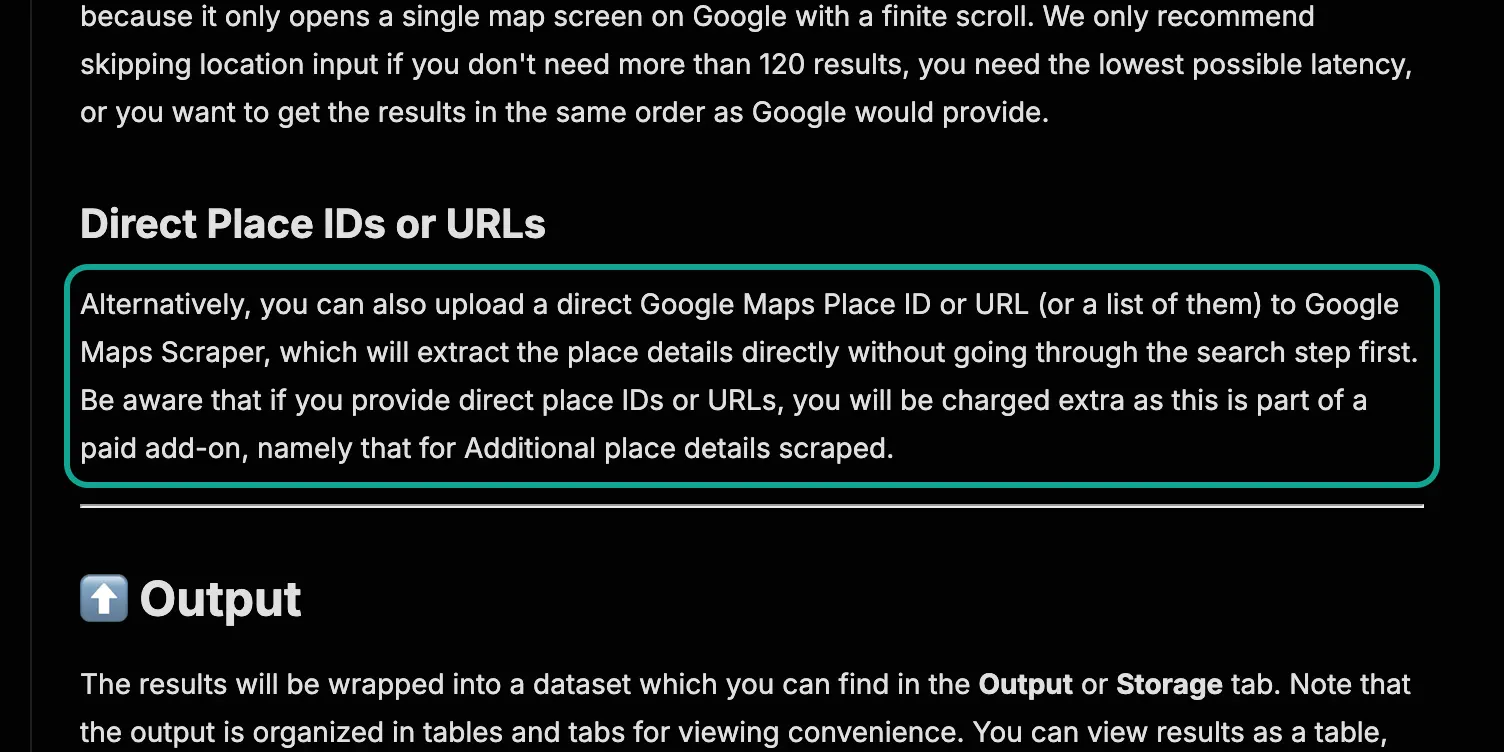
Three items in this table are easy to miss. First, when you give a direct URL or Place ID, Apify charges the place details add-on as well. Its Store page says that you "will be charged extra" for this input. So one place by URL costs $1.50 plus $1.05, or $2.55 per 1,000, on Business. Second, business leads, email checks and social profiles cost $0.10 each on the Free tier.
That is 12 to 25 times the paid-tier price, and the Store page itself says that social enrichment is "significantly higher" on Free. Third, each run also pays an apify-actor-start event. The pay-per-event docs give a default of $0.00005, charged once more for each extra GB of memory. This is small per run, but it adds up if you split a job into dozens of small city runs each day.
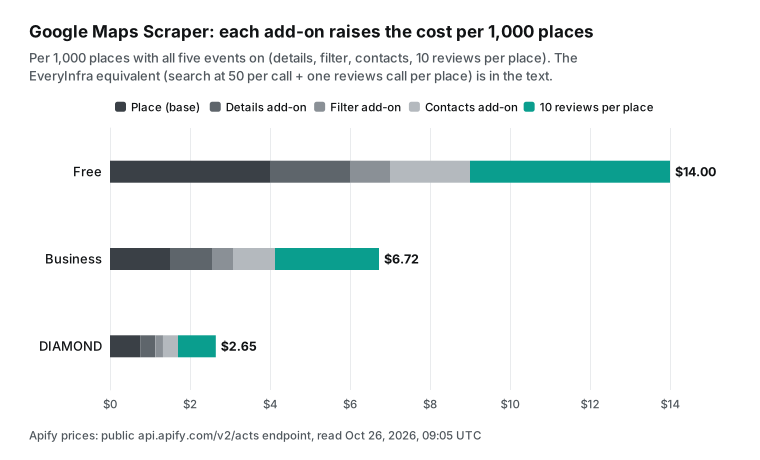
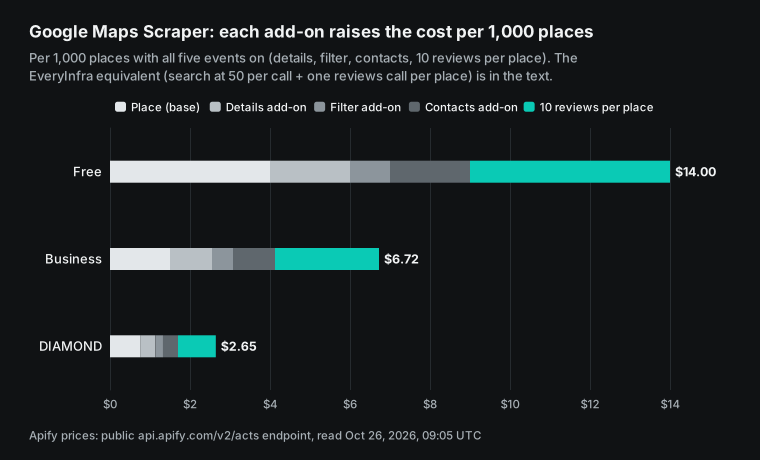
When you turn add-ons on, the price per 1,000 places goes up several times. The next chart turns on five common events: the base place, details, a filter, contacts and 10 reviews per place. Free goes from $4.00 to $14.00, Business from $1.50 to $6.72, and DIAMOND from $0.756 to $2.65. A user on Reddit who builds outbound lists posted bills in the same range.
He wrote that the Google Maps actor costs $4 per 1,000 with basic fields and $6 per 1,000 with email and social profiles (post). Note that this poster sells a desktop tool and compares Apify with his own product. We do not use his conclusion. We use only the two Apify prices that he posted, which match the Free tier in the public endpoint.
EveryInfra prices are simpler and also less flexible. In the catalog at GET /api/v1/social/catalog, the three Google Maps actions google_maps_reviews/search, google_maps_reviews/profile and google_maps_reviews/reviews each cost $0.001389 per request. That is the Standard tier on the pricing page, $1.39 per 1,000 requests. One request costs the same with 1 row or 50 rows.
search returns up to 50 places per call (the catalog max_limit), and reviews returns up to 100 reviews. There are no add-ons. Phone, website, rating, review count and opening hours are already in the response. Some fields are not in our response, such as a website email, social profiles or popular times. We do not have them, and you cannot buy them.
The same 1,000 rows: three Apify tiers vs EveryInfra, measured
This is the main comparison in the article. The Apify columns use public prices. The EveryInfra column uses our live calls on that day: the amount paid, divided by the rows returned, times 1,000. We counted rows from the length of the returned array, not from limit.
We set the ratio rule before the tests. A ratio of 2 or more means "cheaper", 1 to 2 means "close", and less than 1 means "Apify is cheaper". We show Business, the lowest self-serve price after a $999 monthly fee, and DIAMOND, the lowest of all six tiers, which needs an Enterprise contract.
| Data | Apify method | Apify Free | Apify Business | Apify DIAMOND | EveryInfra test (action, rows per call) | Measured per 1,000 | vs Business | vs DIAMOND |
|---|---|---|---|---|---|---|---|---|
| Place search | Google Maps Scraper, base | $4.00 | $1.50 | $0.756 | google_maps_reviews/search, 50 | $0.0278 | about 54x cheaper | about 27x cheaper |
| Reviews | Reviews Scraper | $0.60 | $0.30 | $0.15 | google_maps_reviews/reviews, 100 | $0.0139 | about 22x cheaper | about 11x cheaper |
| Reviews with places | Google Maps Scraper review add-on | $0.50 | $0.26 | $0.0945 | same, 100 | $0.0139 | about 19x cheaper | about 6.8x cheaper |
| New reviews only | Reviews Scraper | $0.60 | $0.30 | $0.15 | google_maps_reviews/reviews, 9 after since | $0.1543 | close (1.9x) | Apify about 3% cheaper |
| One place by URL | base + details add-on | $6.00 | $2.55 | $1.134 | google_maps_reviews/profile, 1 | $1.389 | close (1.8x) | Apify about 18% cheaper |
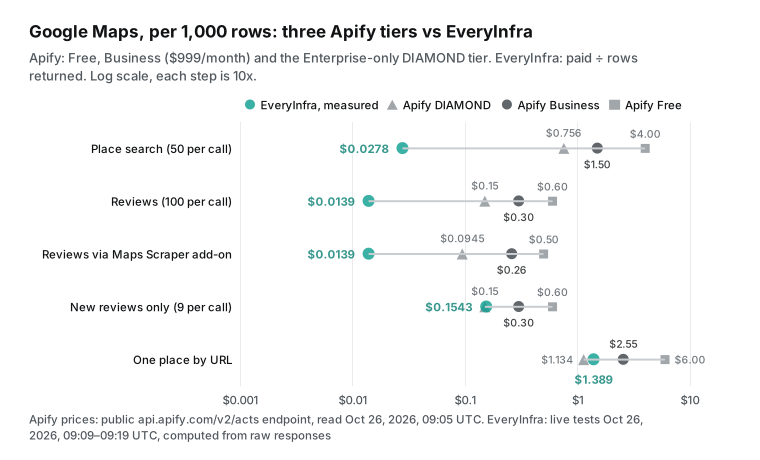
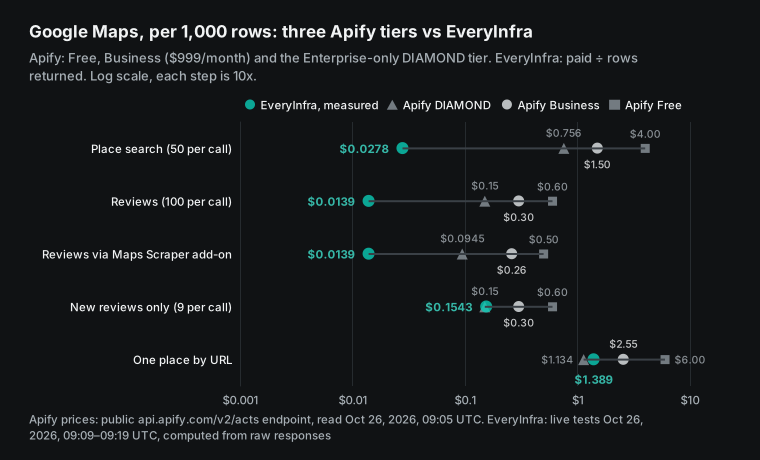
The gap in the first three rows comes from the billing unit. Apify's Google Maps actors charge per event. The pricing page says that most actors use pay per event, and you pay for events such as returning a single result. So 1,000 places are 1,000 events.
We charge per request, so 50 places pay one price, and each place costs $0.0000278. The last two rows are different because those jobs return very few rows per call by nature. A place lookup returns 1 row, and a daily pull of new reviews returned 9 rows on our test day. Then a per-request price works like a per-row price, and only the unit price matters.
These two rows matter for real choices, not only for balance. Suppose that your main job is to refresh 5,000 known places each day. At our price that costs $6.95 a day. Apify's event fees are $12.75 on Business and $5.67 on DIAMOND. The gap is much smaller than in bulk search.
Is the Apify Google Maps Scraper free? What $5 buys
"apify google maps scraper free" is one of the most common suggestions for this topic. The exact answer is this. Apify has a Free plan with no credit card, and it gives $5 of prepaid usage each month for any actor in the Store. The pricing page says that a Free account is blocked until the next billing cycle when it uses the $5.
It also says that unused prepaid usage does not roll over on any plan. The Google Maps Extractor Store page gives its own number: $5 on the Free plan buys 1,000 places, or fewer with add-ons. This matches the Extractor's Free-tier price of $5.00 per 1,000 in the public endpoint, so it is a useful outside check.
We used the same method to convert $5 into rows for common jobs. Google Maps Scraper with basic fields gives 1,250 places. With details it gives 833 places, and with details and a filter it gives 714. If each place also brings 10 reviews, only 555 places are left. The Reviews Scraper gives 8,333 reviews. The Reddit user above wrote that his $5 of free credit was gone "inside a single morning", which fits these numbers.
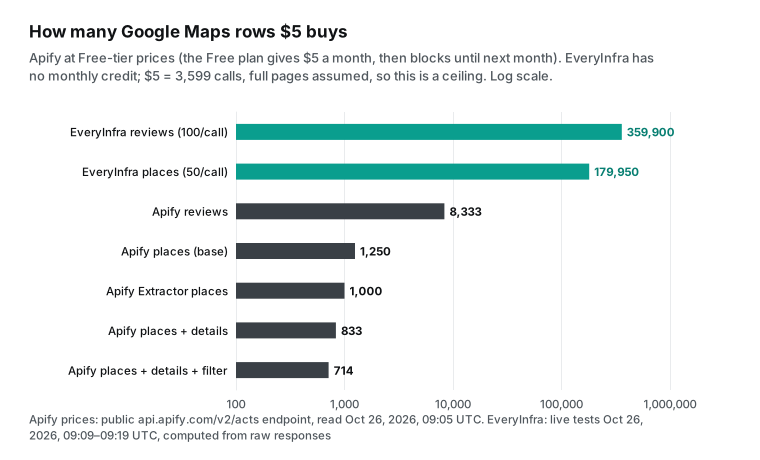
Two points on the EveryInfra side need to be clear. First, we do not give a monthly credit. The pricing page says that you can star everyinfra/everyinfra-agent-plugins on GitHub and claim $1 in the console after sign-up. It is valid for 24 hours and covers about 720 data calls, and a normal sign-up gets no credit. The minimum top-up is $10, about 7,199 calls, and a paid balance does not expire.
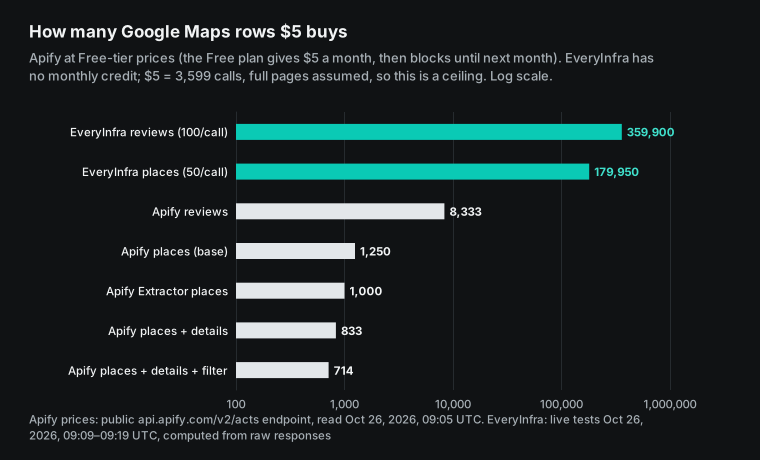
Second, the EveryInfra bars in the chart are a ceiling, not a promise. $5 buys 3,599 requests. You get 179,950 places or 359,900 reviews only if every call returns a full 50 places or 100 reviews. In practice, one search query gives at most 120 rows, and a few fewer places after a dedupe by place_id, as the next sections show. To get more places, you need more distinct queries and cities, and synonyms repeat a lot. A review call also returns 100 rows only for places with 100 or more reviews.
| Free and starting costs | Apify | EveryInfra |
|---|---|---|
| Use without paying | Free plan: $5 per month, then blocked until next month | GitHub star: $1 for 24 hours; a normal sign-up gets nothing |
| Lowest paid entry | Starter: $19 per month, which includes $19 of usage; overage goes to the next invoice | One top-up of at least $10; no monthly fee |
| Unused money | Expires at the end of the billing cycle | Stays until you use it |
| After the limit | Free plan is blocked; paid plans pay overage | Requests fail when the balance runs out; no overdraft |
| Concurrency and rate | Free plan: up to 5 concurrent runs | 60 calls per minute per account by default, shared by all keys; 180, 600 and 1,800 per minute at $50, $150 and $750 of total top-ups |
The monthly bill: the plan fee often beats usage
A small unit price is only part of the bill. On Apify, the plan fee is prepaid usage. So your real monthly cost is the larger of the plan fee and that month's usage. Here is a common size: 10,000 places and 100,000 reviews a month, about 10 reviews per place. At each tier's prices, usage is $75 on Starter, $60 on Scale and $45 on Business.
But Scale costs $199 and Business costs $999 a month, and the unused part of the fee expires. So the real costs are $75, $199 and $999. The plan with the lowest usage cost has the highest bill. We leave out the Free plan, because it blocks at $5.
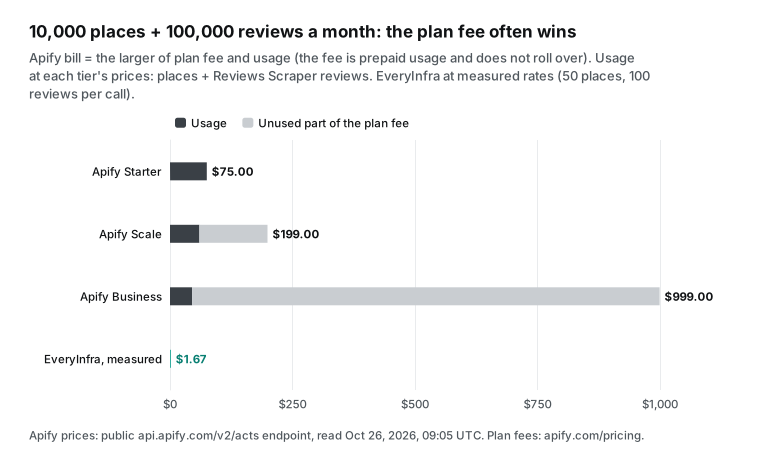
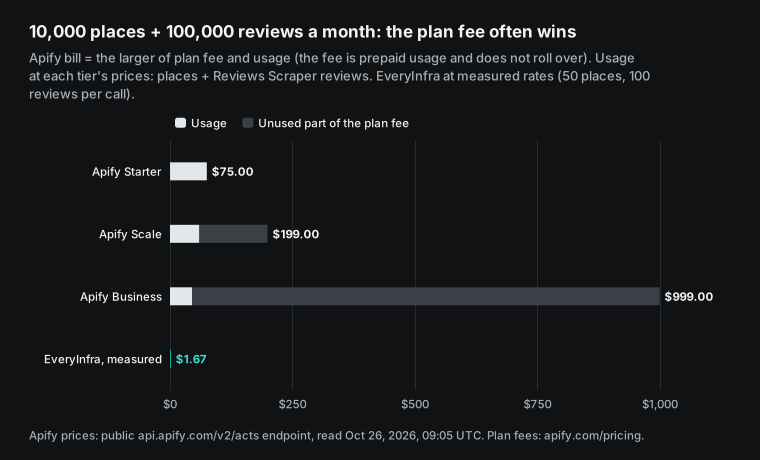
The same job costs $1.67 on EveryInfra. 10,000 places at 50 per call need 200 search calls. 100,000 reviews at 100 per call need 1,000 reviews calls. That is 1,200 requests at $0.001389 each. This is the best case, and it needs two conditions.
First, the 200 searches must be 200 distinct keyword and city pairs that each return 50 new places. Our tests below show a high repeat rate for synonyms, so you need more calls in practice. Second, each place needs 100 or more reviews to fill one call. Take the worst repeat rate in our tests, where a second synonym gave only 5 new places. Even then, 1,000 new places cost $0.278, about one fifth of Apify's Business price of $1.50.
| 10,000 places + 100,000 reviews per month | Usage (event fees) | Plan fee | Real cost |
|---|---|---|---|
| Apify Starter | $75.00 | $19 | $75.00 ($19 + $56 overage) |
| Apify Scale | $60.00 | $199 | $199.00 |
| Apify Business | $45.00 | $999 | $999.00 |
| Apify DIAMOND (Enterprise) | $22.56 | by contract, not on public pages | not confirmed |
| EveryInfra (measured rates) | $1.67 | none | $1.67 |
Do the math yourself: two formulas and one example
You can put your own numbers into two formulas. On Apify, monthly event fees are: places × (base price + the price of each add-on that you turn on) + reviews × review price + runs × start fee. Your real cost is the larger of that sum and your plan fee. On EveryInfra, the cost is (search calls + profile calls + review calls) × $0.001389. Search calls are about the number of new places that you need, divided by the new places per call.
Review calls are about the reviews per place divided by 100, rounded up, times the number of places. In both formulas, the hard part is "rows per call". On Apify it depends on the add-ons. On our side it depends on how many new places remain after you remove repeats.
Here is an example from a local marketing agency. It covers 30 cities and 3 categories, needs 100 places per pair, and pulls the newest 20 reviews per place each month. That is 9,000 places and 180,000 reviews. On Apify Business, places cost 9,000 × $1.50 = $13.50 and reviews cost 180,000 × $0.30 = $54.00. The total of $67.50 is below the $999 fee, so the real cost is $999. On Starter, event fees are 9,000 × $3.00 + 180,000 × $0.45 = $108, which is above the $19 fee, so the real cost is $108.
On EveryInfra, each pair needs 2 search calls for 100 rows (in our recheck after the fix, the first two pages held 92 to 100 unique places), which is 180 calls for 90 pairs. Each place needs 1 reviews call for 20 reviews, which is 9,000 calls. The total is 9,180 calls × $0.001389 = $12.75. If you pull reviews only for places rated below 4, you need far fewer review calls.
In this example our cost is about one eighth of Apify Starter. It assumes that each pair really returns 100 unique places. If it does not, page 3 adds 20 more for one more call. A narrow category or a small town returns fewer places for the same number of calls.
| 30 cities × 3 categories, 100 places each, 20 reviews per place | Places | Reviews | Event fees | Real monthly cost |
|---|---|---|---|---|
| Apify Business | 9,000 × $1.50 = $13.50 | 180,000 × $0.30 = $54.00 | $67.50 | $999 (plan fee) |
| Apify Starter | 9,000 × $3.00 = $27.00 | 180,000 × $0.45 = $81.00 | $108.00 | $108 |
| EveryInfra | 180 calls | 9,000 calls | 9,180 × $0.001389 | $12.75 |
Test 1: place search and pagination (Austin dentists)
The English version uses Austin, Texas, as the main sample, with Singapore and Mexico City as checks. Dental clinics are a good category for local lead lists, because they have many reviews and strong competition. The first Austin request ran at 17:15:52 Singapore time (4:15 a.m. in Austin).
It used google_maps_reviews/search with keyword dentist, location Austin, TX, country us and limit 50. It returned 50 places in 12.5 seconds and cost $0.001389. This is the request. Replace $EVERYINFRA_API_KEY with your own key.
curl -s https://api.everyinfra.com/api/v1/social \
  -H "Authorization: Bearer $EVERYINFRA_API_KEY" \
  -H "Content-Type: application/json" \
  -d '{"platform":"google_maps_reviews","action":"search",
       "params":{"keyword":"dentist","location":"Austin, TX","country":"us","limit":50}}'
# Response: results (50 places), next_page_token, pagination.has_more = true, billing.charged_usd = 0.001389
The second page showed the first limit that you need to know. In Singapore, we sent the next_page_token from page 1 with the same other parameters. At 17:09:40 SGT we got HTTP 422 with the error code async_required, and no charge. The message gives the reason.
A sync call can go only 60 rows deep from the first row, and page 2 asks for rows 51 to 100. You add "mode":"async" to the body, get a job_id, and poll GET /api/v1/jobs/{job_id}. The catalog pagination for search also shows sync_max_rows: 60 and max_rows: 120.
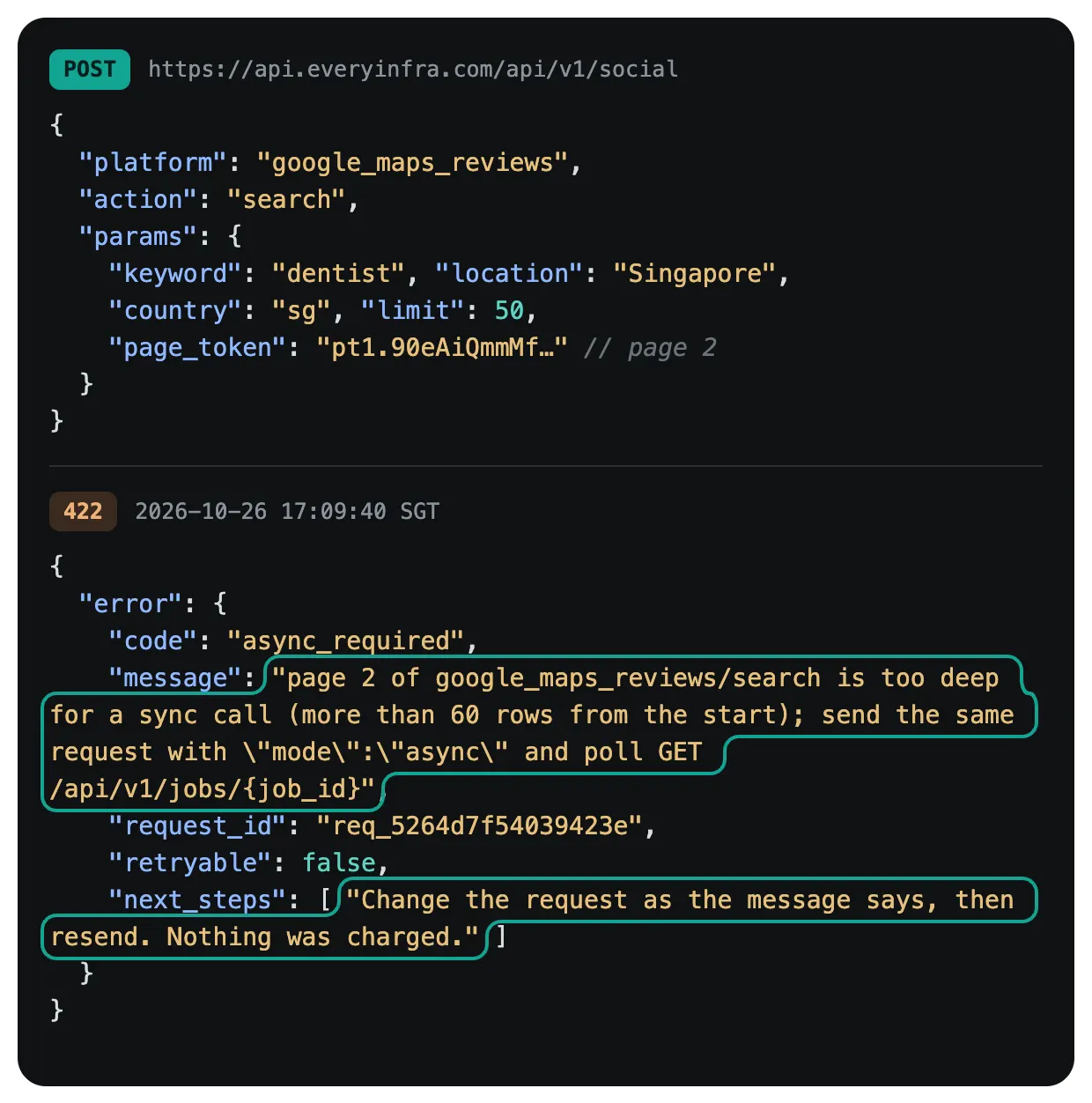
We sent page 2 again in async mode and got 202 with a job_id at once. That call cost $0.001389. In Austin, the job was submitted at 17:16:26 SGT and finished 44 seconds later with 50 places. The pagination.stop_reason was depth_limit, and has_more became false.
So before the paging fix at 19:53 SGT on October 26, one query at 50 places per page stopped at 100 places on page 2. It did not reach the catalog limit of 120. Singapore and Mexico City gave the same result: page 2 stopped at 100 places with depth_limit. In all three, the two pages had no repeats by place_id.
After the fix, we ran the same three queries again. In Austin, page 1 went out at 20:03:49 SGT and came back in 15.0 seconds with 50 places. Page 2 was submitted in async mode at 20:04:04 and finished about 44 seconds later with 50 places, and has_more was still true. Page 3 was submitted at 20:04:48 and finished about 42 seconds later with 20 places. Its stop_reason was depth_limit, and the response had no next_page_token. That is 120 rows for 3 requests, $0.004167. Singapore (20:01 to 20:03) and Mexico City (20:03 to 20:06) also gave 50, 50 and 20.
One thing to plan for: each page is fetched again from the start, and the order can change, so pages can overlap. Count "120 places per query" after a dedupe by place_id:
| Recheck after the fix | Rows in 3 pages | Unique places | Repeats between pages 1 and 2 | USD per 1,000 unique places |
|---|---|---|---|---|
| Austin TX, dentist | 120 | 119 | 1 | $0.0350 |
| Singapore, dentist | 120 | 120 | 0 | $0.0347 |
| Mexico City, dentista | 120 | 112 | 8 | $0.0372 |
| Search (SGT) | Page | Mode | Rows | Stop reason | Charge |
|---|---|---|---|---|---|
| dentist, Austin TX (17:15:52) | 1 | sync | 50 | more pages | $0.001389 |
| same, page 2 (17:16:26) | 2 | async, 44 s | 50 | depth_limit (before the fix) | $0.001389 |
| dentist, Singapore (17:09:23) | 1 | sync | 50 | more pages | $0.001389 |
| same, page 2 (17:09:40) | 2 | sync | 422 async_required | — | $0 |
| same, page 2 (17:09:49) | 2 | async, 42 s | 50 | depth_limit (before the fix) | $0.001389 |
| dentista, Mexico City (17:17:38 / 17:18:13) | 1–2 | sync + async | 50 + 50 | depth_limit (before the fix) | $0.002778 |
| dentist, Austin TX (from 20:03:49, after the fix) | 1–3 | sync + async | 50 + 50 + 20, 119 unique | page 3: depth_limit | $0.004167 |
| dentist, Singapore (from 20:01:41, after the fix) | 1–3 | sync + async | 50 + 50 + 20, 120 unique | page 3: depth_limit | $0.004167 |
| dentista, Mexico City (from 20:03:49, after the fix) | 1–3 | sync + async | 50 + 50 + 20, 112 unique | page 3: depth_limit | $0.004167 |
Speed is worth a note too. Sync search calls took 9 to 16 seconds in this test. The Singapore call at 17:09:23 SGT took 9.1 seconds, and the Chinese keyword call at 17:11:03 SGT took 16.0 seconds. Async page 2 jobs took 42 to 44 seconds from submit to finish. In the recheck after the fix, the 6 async jobs for pages 2 and 3 took about 42 to 69 seconds. We polled every 8 seconds, so these times can be up to 8 seconds off.
In n8n, set the HTTP Request timeout to 60 seconds or more, and poll async jobs about every 10 seconds. An Apify run time depends on the area, add-ons and memory. We did not run it, so we give no number.
This depth limit is not only ours. Google's own Text Search (New) docs say that pageSize is at most 20 per page. They also say that all pages together return at most 60 results, and that "this limit is subject to change". The page was last updated on 2026-10-23.
The Apify Google Maps Scraper page says that with only a search term and no location, a run returns at most 120 places. The reason is that it opens one map screen and scrolls to the end. To get more, you give an area, and the actor splits it into many map screens.
After the fix, our limit is also 120 rows per query, a few fewer after a dedupe by place_id. So all three tools face the same limit of a few dozen to about a hundred places per search. The difference is who splits the area for you. Apify splits it inside the actor, and one run can cover a whole city or even a country. With our API and Google's API, you split by neighborhood, ZIP code or narrower terms yourself.
The data needs two cleanup steps. In Singapore, the first result in both the English and Chinese searches was "Chan Jong Dr". Its address is the same as its name, and it has no rating or phone, so it looks like a road, not a clinic. In Mexico City, one of the 100 rows is a single dentist with no rating.
So the first step after a search is to drop rows where rating or review_count is empty. By field, all 100 Austin rows had phone, website, rating and review_count. In Singapore 99 of 100 had them, and in Mexico City only 83 of 100 had a website. In all three cities price and description were empty for this category, and no row had permanently_closed set to true.
Test 2: place_id dedupe, and what a synonym really adds
People who build local lead lists often search several synonyms to find more places. We ran one set in each of three cities. First we used dentist (or dentista) for two pages and got 100 places (17:09 to 17:18 SGT, before the paging fix, when page 2 was the last page). Then we searched dental clinic (or clínica dental) for 50 places. In Singapore we also searched the Chinese term for dental clinic. Then we compared all results by place_id.
In Austin, 44 of the 50 dental clinic places were already in the dentist list, so only 6 were new. In Singapore, 41 were repeats and 9 were new, and the Chinese term gave 45 repeats and 5 new places. In Mexico City, 42 were repeats and 8 were new. Across the three Singapore terms, 4 requests gave 200 rows, and 112 unique places after the dedupe.
| City | First query (2 pages) | Second query (50) | Repeats | New | Cost per 1,000 new places |
|---|---|---|---|---|---|
| Austin, TX | dentist, 100 | dental clinic | 44 | 6 | $0.232 |
| Singapore | dentist, 100 | dental clinic | 41 | 9 | $0.154 |
| Singapore | dentist, 100 | Chinese term for dental clinic | 45 | 5 | $0.278 |
| Mexico City | dentista, 100 | clínica dental | 42 | 8 | $0.174 |
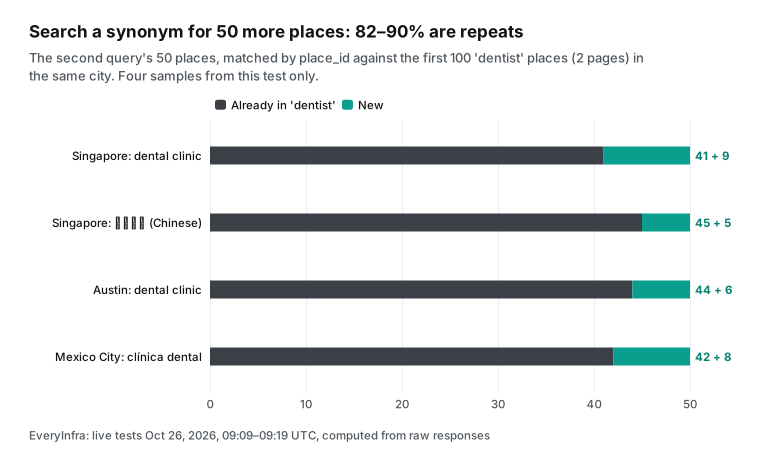
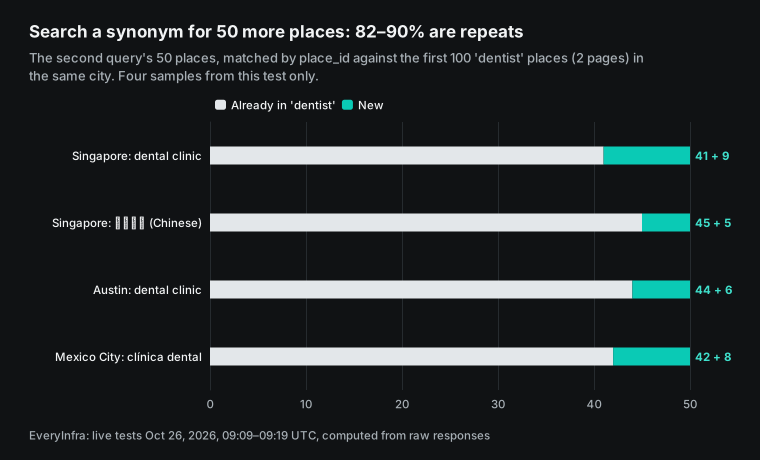
These numbers show two things. First, a synonym adds little. In these four samples, the second term added only 5 to 9 new places, a repeat rate of 82% to 90%. The sample covers one category in three cities, so it does not prove that every category behaves this way.
But it is enough to show that a stack of synonyms will not grow your list much. Apify's Store page gives the same advice. It says to use a few terms that mean different things and overlap only a little, such as restaurant, bar and cafe. It says that a long list of near duplicates, such as restaurant, restaurants and chinese restaurant, "will just increase the time of a run without providing more results".
Second, repeats change the real cost per new place. On our side, the second term's request still costs $0.001389. In Austin it brought 6 new places, so 1,000 new places cost $0.232. The worst case, the Chinese term in Singapore, brought 5 new places, which is $0.278 per 1,000. That is still 5 to 10 times cheaper than Apify Business at $1.50, but it is about ten times our full-page price of $0.0278. Plan your budget on unique places, not on returned rows.
On Apify, the Store page suggests that extra terms in the same run do not add results. We did not run it, so we do not know if a repeated place in one run is charged twice. One case is certain: across runs, the same places count again. If you run the same search each week, each run pays "place scraped" for the same places again.
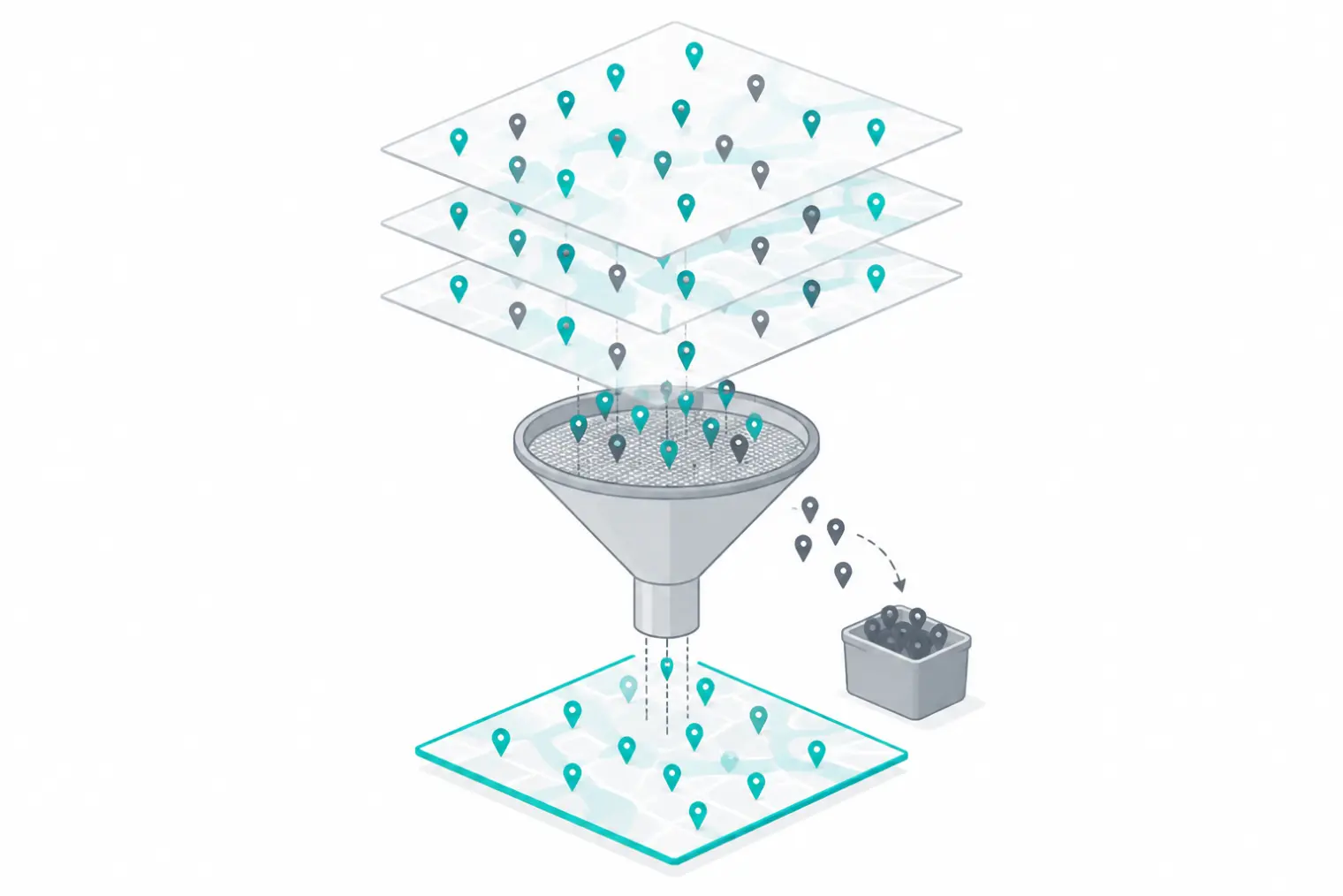
For the dedupe itself, place_id is enough. Google's Place ID docs say that Place IDs are exempt from the caching limits in the Google Maps Platform Terms (Section 3.2.3(b)). So you can store them. They also say that one place can have more than one ID, and that IDs can change over time. Google suggests that you refresh IDs older than 12 months, because an old ID can return NOT_FOUND.
Our article on Place ID dedupe explains how to keep your own business key and map it to the outside IDs. In the four tests here, each place_id came back with the same name and address under different terms. We saw no place with two IDs, but 112 places are too few to rule that out.
Test 3: review pagination for a clinic with 1,868 reviews
Reviews are the most costly part of Google Maps data, and the easiest part to get only in part. On r/apify, one team asked why their Google Maps review scraping cost $35 per 1,000 results (post). The thread did not end with a new vendor. It ended with a method: split the cost into browser compute, proxy traffic, requests per place and reviews per place.
Then check completeness against each place's own review count. A cheaper run that silently stops on high-review places is not cheaper, only wrong. We used this method on one place.
The sample is one of the most reviewed clinics in the Singapore search. At 17:15:10 SGT, google_maps_reviews/profile showed 1,868 reviews, a 4.9 rating and 344 photos. We pulled reviews newest first, 100 per page. Pages 1 and 2 came back in sync mode at 17:11:28 and 17:12:02 SGT. From page 3 the call is past the sync depth, which is 200 rows for reviews in the catalog.
So we sent pages 3 and 4 in async mode at 17:12:23 and 17:13:47 SGT, and they finished after 77 and 69 seconds. Page 4 stopped with depth_limit. The 4 pages gave 400 reviews, still 400 after a dedupe on id, so no page repeated another. The 4 calls cost $0.005556, or $0.0139 per 1,000 reviews.
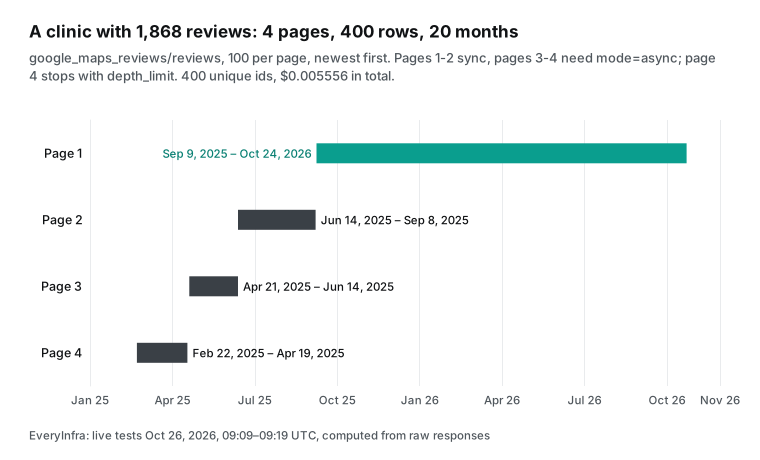
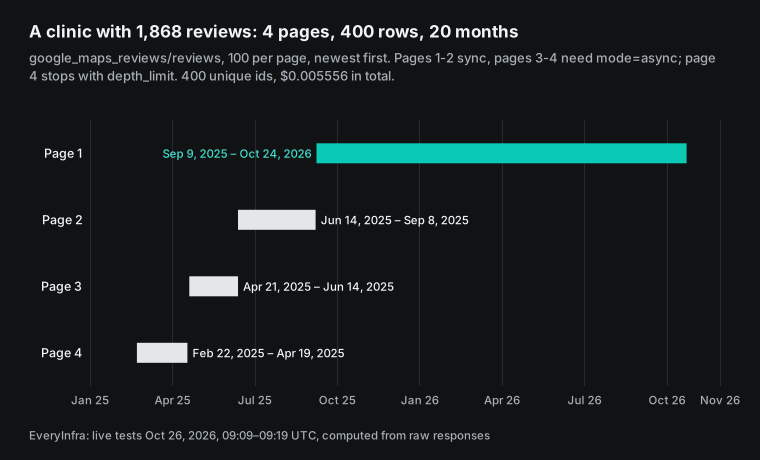
These 400 reviews are only 21% of the 1,868. They cover February 22, 2025, to October 24, 2026, about 20 months. This is a hard limit on the EveryInfra side: the catalog pagination.max_rows for reviews is 400. Maybe you need the full review history of a place for brand research or to train a classifier. For this clinic, we can give only the last 20 months.
The Apify Google Maps Scraper page says that each place item holds up to 5,000 reviews and then continues in a new item. Its Reviews Scraper pulls as many as you set. This is one clear case where Apify is the better fit, and we list it again below.
The content of the 400 reviews matters, because it decides what you can do with them. 357 had text and 43 had only stars. 396 had an owner reply, close to 99%. There were 388 five-star, 8 four-star and 4 one-star reviews, and no two-star or three-star reviews. With ratings this tight, think about sample bias before you run sentiment analysis.
The Austin sample is very different. Swish Dental - Domain has 1,657 reviews and a 4.6 rating. We pulled 100 reviews with sort=relevance at 17:17:16 SGT. We got 24 one-star and 62 five-star reviews, 65 owner replies, and dates from December 2022 to September 2026.
Relevance sort puts more negative and older long reviews first. Newest sort shows only the last few months. The two sorts give two different samples.
For daily or weekly monitoring, you usually pull only new reviews. At 17:19:27 SGT we asked for the same Singapore clinic with since set to 2026-10-01. We got 9 reviews, the oldest from October 6, with stop_reason end_of_list, for $0.001389. Per row that is $0.1543 per 1,000, which is 1.9 times cheaper than the Reviews Scraper on Business at $0.30.
By our rule that is only "close", and it is 3% more than DIAMOND at $0.15. If you watch 1,000 places that each get a few new reviews a week, the number of requests drives the bill. That is $1.39 a week for 1,000 calls, almost no matter how many rows come back.
| Review sample (SGT) | Place | Sort | Rows | What we saw | Charge |
|---|---|---|---|---|---|
| 17:11–17:14, 4 pages | Singapore clinic, 1,868 reviews | newest | 400 (page 4 depth_limit) | 21% coverage, 20 months, 396 owner replies | $0.005556 |
| 17:19:27 | same | newest, since Oct 1 | 9 (end_of_list) | one call for new reviews | $0.001389 |
| 17:17:16 | Austin clinic, 1,657 reviews | relevance | 100 | 24 one-star, 62 five-star | $0.001389 |
| 17:19:02 | Mexico City clinic, 863 reviews | newest, lang=es | 100 | 84 owner replies, June to October | $0.001389 |
Test 4: one place by URL, the smallest gap
google_maps_reviews/profile returns one place for one map URL. At 17:15:10 SGT we asked for the clinic above, and it came back in 11.9 seconds. It has more fields than search: neighborhood, plus_code, opening hours for 7 days, a photo count and a temporary closure flag. This job returns 1 row per call, so 1,000 places cost $1.389.
On Apify, the same job is Google Maps Scraper with URL input: the base fee plus the details add-on. That is $2.55 per 1,000 on Business, so we are 1.8 times cheaper, which counts only as "close". On DIAMOND it is $1.134, so Apify is 18% cheaper than us. On Free it is $6.00, and we are 4.3 times cheaper.
The result here is direct. Suppose that you already have a list of place IDs or URLs and only refresh the rating, review count and hours. Then our price advantage is small, and it depends on your Apify tier. The big gap is in jobs that return many rows per call: searching a city from zero, and pulling reviews in bulk.
Also, Google's Place ID docs say that a refresh with only the ID field is free, under the Place Details IDs Only SKU. Do you only need to check that an ID is still valid? Then use Google's API for that step and pay nobody.
What the Google Places API itself costs
Many people search "is google maps api free" or "cost for google maps api" to check Google's own API first. Google's price list, last updated on 2026-10-23, charges per SKU, and each SKU has a free monthly amount. Text Search Pro returns name, address, location and type. It costs $32 per 1,000 requests, and the first 5,000 requests each month are free. Rating, phone, website and hours need Text Search Enterprise at $35 per 1,000, with the first 1,000 requests free. Reviews need Enterprise + Atmosphere at $40 per 1,000.
The Text Search docs allow up to 20 places per page. So the best case is $1.60 per 1,000 places on Pro and $1.75 on Enterprise. Reviews are more limited: the Place resource reference returns at most 5 reviews per place, sorted by relevance.
| 1,000 places with rating and phone | Unit price | Free part | Reviews | Note |
|---|---|---|---|---|
| Google Text Search Enterprise | $35 per 1,000 requests, up to 20 places each → about $1.75 per 1,000 places | first 1,000 requests a month | up to 5 per place ($40 Atmosphere tier) | at most 60 places per query |
| Apify Google Maps Scraper, Business | $1.50 per 1,000 places | Free plan: $5 a month | $0.26 per review add-on | at most 120 places per query without a location |
EveryInfra google_maps_reviews/search | $0.001389 per call, 50 places → $0.0278 per 1,000 | GitHub star: $1 for 24 hours | reviews, 100 per call, up to 400 per place | at most 120 rows per query (page 3: depth_limit); dedupe by place_id |
Google's API has two things that nobody else can give you. It is Google's own data, and its terms and policies say clearly how you may show and cache it. Its free amounts are also enough for small projects. The cost is 5 reviews per place, 60 places per query, and the attribution rules that the policies set.
We do not compare data rights here. One reminder applies to every tool that collects public data: personal data in reviews must follow the privacy law where you work. The Apify Store page says the same.
Failures and empty results: who pays
Our rule is on the pricing page: bad parameters and failed authentication are not charged, and failed or empty results are not charged. We tested four cases. At 17:15:27 SGT we typed locaton instead of location on purpose. We got HTTP 422 with error code unknown_param, did_you_mean: ["location"] and the full list of allowed parameters, and paid $0.
The async_required page 2 call at 17:09:40 SGT was also a 422 with $0. At 17:19:45 SGT we sent a fake place_id to profile. After 63 seconds it returned an empty object with billing.reason empty_result_refunded, $0 charged and a refund status of succeeded.
Only one case was charged. At 17:15:32 SGT we searched Singapore with random letters plus "dental" as the keyword. It returned 20 real dental clinics. It looks like the unknown letters were ignored and the search ran on "dental". The result was not empty, so it cost $0.001389. A nonsense keyword is not treated as an empty result.
| Case (SGT) | Action | HTTP | Result | Charge |
|---|---|---|---|---|
Typo locaton (17:15:27) | search | 422 unknown_param | did_you_mean: ["location"] | $0 |
| Page 2 too deep for sync (17:09:40) | search | 422 async_required | resend with mode: async | $0 |
| Fake place_id (17:19:45) | profile | 200 | empty, empty_result_refunded | $0 |
| Random letters + "dental" (17:15:32) | search | 200 | 20 real clinics | $0.001389 |
On Apify, each actor's author decides how failures are billed. The pay-per-event docs advise developers to "charge for invalid input". That means inputs that seem valid but fail, such as URLs that return a 404, because the actor still spends resources to find the problem. Users get two controls.
You can set a maximum charge per run, and the actor stops at that limit, with no charge above it. The sync run and get dataset items endpoint also takes maxTotalChargeUsd. We did not run Google Maps Scraper, so we do not know how it bills "no results" or "dead link" cases. Run a small test first and read the charges on the run detail page.
Apify Google Maps Scraper n8n setup, side by side
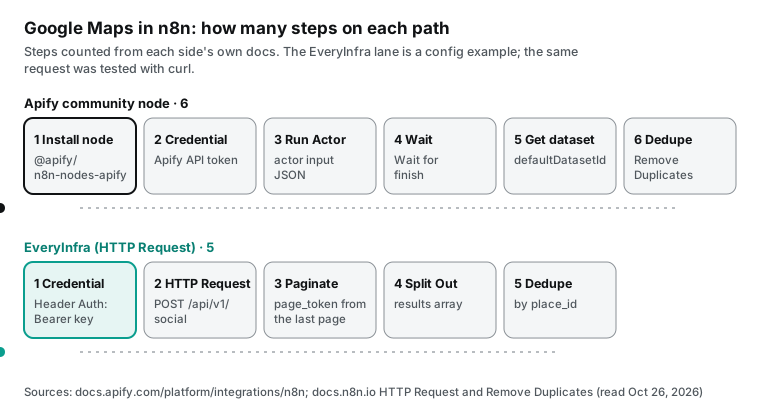
"apify google maps scraper n8n" and "google maps scraper n8n template" are other frequent suggestions for this topic. The animation above counts the steps from a blank canvas to the first rows in a sheet, from each side's own docs. On Apify, follow the Apify n8n integration docs. On self-hosted n8n, install @apify/n8n-nodes-apify in Settings → Community Nodes.
On n8n Cloud, search for Apify in the nodes panel. Add a credential with an Apify API token or OAuth2. Add a Run Actor node, fill in the actor input JSON and turn on Wait for finish. Then add Get Dataset Items with the defaultDatasetId from the step before.
The community node shipped v0.9.0 on 2026-10-22. It adds an input mode that fills the actor input field by field from its schema, so you need less hand-written JSON. v0.8.1 on 10-12 fixed issues from the n8n review.
On EveryInfra you do not install a node. The built-in HTTP Request node sends one POST. Store Authorization: Bearer <key> in an n8n Header Auth credential. For pages, use the node's own pagination option, as in the n8n pagination examples. Set the mode to Update a Parameter in Each Request, the type to Body and the name to params.page_token.
Set the value to {{ $response.body.next_page_token }} and stop when {{ !$response.body.pagination.has_more }} is true. Below is a config example for that node. We did not run n8n on our machine, so this follows the docs. The same request in curl is the one that we tested in Test 1.
{
  "parameters": {
    "method": "POST",
    "url": "https://api.everyinfra.com/api/v1/social",
    "authentication": "genericCredentialType",
    "genericAuthType": "httpHeaderAuth",
    "sendBody": true,
    "specifyBody": "json",
    "jsonBody": "={\"platform\":\"google_maps_reviews\",\"action\":\"search\",\"params\":{\"keyword\":\"{{ $json.keyword }}\",\"location\":\"{{ $json.city }}\",\"limit\":30}}",
    "options": {
      "pagination": {
        "pagination": {
          "parameters": { "parameters": [ { "type": "body", "name": "params.page_token", "value": "={{ $response.body.next_page_token }}" } ] },
          "paginationCompleteWhen": "other",
          "completeExpression": "={{ !$response.body.pagination.has_more }}",
          "maxRequests": 2
        }
      }
    }
  },
  "type": "n8n-nodes-base.httpRequest",
  "name": "EveryInfra Google Maps search"
}
The example sets limit to 30 and at most 2 pages. Both pages then stay inside the 60-row sync depth, and you need no async job. The cost is 60 places per term instead of the 120 rows that one term can reach after the fix. To go past 60 rows and get all 120 (3 pages of 50), add "mode":"async" to the body.
Then add a Wait node and an HTTP Request node that reads GET /api/v1/jobs/{job_id}. That adds two steps. This is one place where n8n takes more work with us than with Apify, and we state it here.
The last two steps are the same on both sides. Use the Split Out node to turn the results array into one item per place. Then use the Remove Duplicates node on place_id. Do not skip it: each page is fetched again, so pages can overlap. Its "Remove Items Processed in Previous Executions" mode remembers IDs across runs, 10,000 by default.
That is what you need to push only new places to your sheet each week. To run each day, add a Schedule Trigger at the start. Our n8n daily report guide runs every step from the schedule to the sheet, and you can adapt it.
| Setup step | Apify (n8n community node) | EveryInfra (HTTP Request) |
|---|---|---|
| Install | Self-hosted: @apify/n8n-nodes-apify; n8n Cloud: from the nodes panel | Nothing; the node is built in |
| Credential | Apify API token, or OAuth2 on n8n Cloud | Header Auth: Authorization: Bearer <key> |
| Start | Run Actor with the actor input JSON, then wait | One POST with platform, action, params |
| Get results | Get Dataset Items with defaultDatasetId | Results are in the response results |
| Pages | The actor handles them; you set maxCrawledPlacesPerSearch | Pagination option with page_token; async past 60 rows |
| Dedupe | Remove Duplicates on placeId | Remove Duplicates on place_id |
| Cost check | Console usage chart and run details | billing.charged_usd in each response |
Apify Google Maps Scraper API and MCP
If you write code instead of using n8n, Apify runs the actor through its platform API. The sync run and get dataset items endpoint starts the run, waits and returns the results in one call. It takes two spend limits: maxItems, the most result items that a pay-per-result actor can charge, and maxTotalChargeUsd. For long runs, start the run without waiting and use a webhook to hear when it ends. On EveryInfra, use the curl request above, which returns in sync mode.
For slow jobs, add "mode":"async" and poll the job_id. If you move from Apify, you change three things. The body changes from actor input JSON to platform + action + params. The results come from results in the response, not from a dataset endpoint. Pages use page_token, not actor settings.
AI tools can call both sides. The Apify MCP server is at mcp.apify.com and suggests OAuth sign-in. An AI can search the Store, pick an actor, start a run and read the results. Its open-source repo added tools to create actors and update versions in v0.19.0 on October 19, and reached v0.19.3 on October 21.
The EveryInfra remote MCP server is https://api.everyinfra.com/mcp. It uses the Streamable HTTP transport from the MCP specification 2025-11-25 with an API key. The AI first calls everyinfra_list_capabilities to find the three google_maps_reviews actions. Then it calls everyinfra_call_api, and for slow jobs it calls everyinfra_get_job.
The charges are the same as REST. In n8n, you can also attach the server to an AI Agent node with the MCP Client Tool. The config is:
{
  "mcpServers": {
    "everyinfra": {
      "url": "https://api.everyinfra.com/mcp",
      "headers": { "Authorization": "Bearer YOUR_API_KEY" }
    }
  }
}
What our response contains, field by field
This table lists the response_fields that the catalog shows for the three actions. The meanings come from the catalog's platform_field_meanings and parameter notes. The last column is what we saw in this test. We describe our side only and do not put Apify's fields next to ours.
| Action | Fields | Meaning | In this test |
|---|---|---|---|
search | place_id, name, url | Google place ID, name, map URL with query_place_id | All 520 search rows in this test had a place_id; you can pass url to profile and reviews |
search | category, categories | main category and all categories | all 520 rows had values |
search | address, city, state, postal_code, country_code, lat, lng | address and coordinates | Austin postal_code 100/100 |
search | phone, website | phone and website | Austin 100/100; Mexico City website 83/100 |
search | rating, rating_scale, review_count | rating (out of 5) and review count | empty for the road row and the single-dentist row |
search | price, description, permanently_closed, image_url, platform | price level, summary, closed for good, cover image, platform name | price and description empty in the dental sample |
profile | all of the above, plus neighborhood, plus_code, opening_hours, image_count, temporarily_closed | neighborhood, Plus Code, hours, photo count, temporary closure | 7 days of hours, 344 photos |
reviews | id, text, rating, rating_scale, posted_at, url | review ID, text, stars, post time, review URL | 400 unique id values; 43 with no text |
reviews | reviewer_name, reviewer_review_count, is_local_guide | reviewer, reviewer's total reviews, Local Guide status | personal data; follow privacy law before use |
reviews | like_count, owner_response, owner_response_at, detailed_rating, image_urls, place_id, place_name, platform | likes, owner reply and time, ratings by aspect, photos, the place | Austin sample: 65/100 owner replies |
Already on Apify? Four things to check before you switch
First, keep your old data. A Place ID is Google's ID for a place and belongs to no scraping tool. The Place IDs in your Apify datasets and the place_id in our search results point to the same Google IDs. So you can use them as the key to merge and dedupe. Do not match on names or addresses. The same place is written in different ways over time and in other languages.
Second, set a spend limit before you switch. On Apify you may use maxTotalChargeUsd on each run. Our requests have no per-call spend cap, and your cost follows the number of requests. So limit maxRequests and loops in your script or in n8n. Also make a separate key for this job in the console, so that you can disable it at any time.
Third, treat review dates as timestamps. Our posted_at is an ISO time with a time zone. The Reddit thread above warns about one risk. If your data has only relative dates such as "2 weeks ago" and no fetch time, you cannot fix a time series later. Fourth, run one or two cities on both sides for a week.
Compare place counts, review counts and the price per 1,000. Then decide on a full switch. The numbers in this article show only October 26, three cities and one category.
When Apify is the better choice
On price we are cheaper most of the time. But in the cases below, Apify's Google Maps tools are a better fit, and we say so.
First, you need the full review history of a place. We stop at 400 reviews per place. Apify's Google Maps Scraper holds up to 5,000 reviews per item and continues past that, and its Reviews Scraper pulls as many as you set. Second, you need sales leads and not only places. That means website emails and phones, Impressum contacts from German, Austrian and Swiss websites, staff names and titles, email checks and social profiles.
We have none of these add-ons. Third, you need one run to cover a whole city or country. Apify splits the area that you give, or a GeoJSON polygon in the RFC 7946 format, into many map screens. Its Orchestrator also splits several locations into runs and then merges and dedupes them. Our search stops at 120 rows per query, so you split large areas yourself.
Fourth, you need images, popular times, menus or hotel prices, or Apify's AI competitor report. Fifth, you are already an Apify Enterprise customer, and your main job is to refresh known places by URL. DIAMOND costs $1.134 per 1,000 there, which is less than our $1.389. Sixth, you collect only a few hundred places a month and do not want to top up. Apify's Free plan gives $5 each month, and our $1 trial lasts only 24 hours.
The cases where EveryInfra fits better are also clear. These are bulk place searches by city and category, bulk review pulls and weekly monitoring of many places. They fit best when you do not want to pay for unused plan fees. They also include jobs where one key must cover other platforms too. For example, you can compare Yelp and Tripadvisor reviews on the same bill. Our guide to a review brief for dental clinics uses this kind of data.
| Your job | Better fit | Why (data from this article) |
|---|---|---|
| Search a city's places by category | EveryInfra | $0.0278 vs $1.50 per 1,000 on Business |
| Pull reviews in bulk | EveryInfra | $0.0139 vs $0.30 per 1,000 on Business |
| Full review history of one place | Apify | we stop at 400 per place |
| Emails, contacts and social profiles | Apify | we have no such add-ons |
| Refresh known places by URL on an Enterprise contract | Apify | DIAMOND $1.134 vs our $1.389 |
| A few hundred places a month, no top-up | Apify | $5 free each month vs $1 for 24 hours |
Changes in the last 60 days
- 2026-10-22: Apify's n8n community node shipped v0.9.0, which fills actor inputs field by field from the schema. v0.8.0 on September 22 added a Web Fetch action. What it means for you: in n8n, you no longer need hand-written JSON for Google Maps Scraper input, so setup gets easier.
- 2026-10-19 to 10-21: the Apify MCP server shipped v0.19.0 to v0.19.3, with tools to create actors and manage versions. What it means for you: both sides now work as a remote MCP server in AI tools. So the choice comes back to price and coverage.
- 2026-10-23: Google updated its Text Search (New), Place ID and pricing pages. The 60-result limit per query and the 12-month Place ID refresh advice are still there. What it means for you: whatever tool you use, search depth stays limited and IDs still need a refresh.
- 2026-10-26: Apify's Google Maps Scraper, Reviews Scraper and Extractor all changed on the same day (the public
modifiedAtfield). Prices did not change: they are still the lists from June 30, March 13 and April 29. What it means for you: our price table is valid on the day that we read it, so read the endpoint again before you compare. - 2026-10-26: n8n shipped 2.45.4, and its migration report now links to the v3 breaking changes page. What it means for you: self-hosted n8n users should plan a major upgrade soon. Check community nodes for compatibility; the built-in HTTP Request node carries less risk.
- 2026-10-06: Apify's open-source scraping library Crawlee shipped v4.0.0-rc.1. What it means for you: teams that build their own map scrapers face a major framework change too, so add upkeep to a build-it-yourself estimate.
FAQ
Is the Apify Google Maps Scraper free?
In part. Apify's Free plan needs no credit card and gives $5 of prepaid usage each month. When you use it, the account is blocked until the next cycle, and unused usage does not roll over (Apify pricing). At Google Maps Scraper Free-tier prices, $5 buys about 1,250 basic places, or 8,333 reviews with the Reviews Scraper. EveryInfra has no monthly credit; a GitHub star gives $1 for 24 hours. Source of the question: the search suggestion "apify google maps scraper free".
What is the Apify Google Maps Scraper pricing?
Per 1,000 places: $4.00 on Free, $3.00 on Starter, $2.00 on Scale and $1.50 on Business, and $0.756 on the Enterprise DIAMOND tier. Details, filters, contacts, reviews and images are add-on events at extra cost (public pricing endpoint, read 2026-10-26). We measured $0.0278 per 1,000 places. Source of the question: the search suggestion "apify google maps scraper pricing".
Can I use the Apify Google Maps Scraper in n8n?
Yes. Apify has the n8n community node @apify/n8n-nodes-apify, and you use the Run Actor and Get Dataset Items operations (Apify docs). EveryInfra uses n8n's built-in HTTP Request node, with no community node. Source of the question: the search suggestion "apify google maps scraper n8n".
Does the Apify Google Maps Scraper have an API?
Yes. You run it through the Apify platform API, or with apify-client for Node.js or Python. The sync run endpoint takes a maxTotalChargeUsd spend limit (Apify API docs). EveryInfra is one POST request, with the results and the charge in the same response. Source of the question: the search suggestion "apify google maps scraper api".
What are the alternatives to the Apify Google Maps scraper?
Both r/automation and r/n8n have a thread called "Alternatives for google maps scraper Apify" (post). The poster wanted local businesses by niche and city. One reply said Apify's plans step from 0 to 40 to 200 to 1,000, which is hard for light users. A per-request data API is one alternative, and the second table above compares measured prices per 1,000. If you need emails, lead enrichment or full review history, Apify is still the better fit. Source of the question: the Reddit thread.
Is the Google Maps API free?
In part. Google Maps Platform charges per SKU, and each SKU has a free monthly amount. For example, the first 5,000 Text Search Pro requests and the first 1,000 Text Search Enterprise requests each month are free. After that they cost $32 and $35 per 1,000 (Google price list, updated 2026-10-23). One query returns at most 60 places, and at most 5 reviews per place. Source of the question: the search suggestion "is google maps api free".
Try it in three steps
First, sign up and get an API key, then claim the trial credit or top up on the balance page in the console (quickstart). Second, open the page for an action. Run it once with its try button: try place search, try one place, or try review pages. Third, read charged_usd and the number of results in the response.
Calculate paid ÷ rows × 1,000 for your own job, and compare it with your current bill. See all actions on the Google Maps data API page and in the data market. For a wider price comparison, read our Apify alternatives overview.
Method and limits
On the Apify side, we used public material only. That is the pricing from the public api.apify.com/v2/acts endpoint, read for four actors on 2026-10-26 at 17:05 SGT and saved as raw responses. We also used the pricing page, docs, Store pages and Reddit posts. We did not sign up for Apify or run its actors.
So all Apify prices here are public unit prices, not measured spend. A real bill can be higher because of start fees, add-on events and your plan fee. On the Google side, we used only its price list and docs.
On the EveryInfra side, the first 22 requests ran on 2026-10-26 from 17:09 to 17:19 SGT, and 19 were billed, for $0.026391 in total. After the paging fix at 19:53 SGT, we paged three cities 3 pages deep at 50 per page from 20:01 to 20:06 SGT: 9 requests, all billed, $0.012501. The sample is dental clinics in three cities, with a few calls per action. It shows the price, page depth and repeat rate for that day and those targets. It does not show long-term success rate or speed, and it does not apply to every category.
We computed each price per 1,000 as the amount paid divided by the rows returned, and we keep the script and raw responses. We could not confirm three points. The first is the minimum commitment in an Apify Enterprise contract beyond unit prices. The second is whether Google Maps Scraper bills a repeated place twice in one run. The third is the overlap between pages after the fix in general: we tested only one query in each of three cities (120, 119 and 112 unique places), and other terms or cities may overlap more.
References
- Apify, Google Maps Scraper public pricing endpoint (compass/crawler-google-places), read 2026-10-26. https://api.apify.com/v2/acts/compass~crawler-google-places
- Apify, Google Maps Reviews Scraper public pricing endpoint, read 2026-10-26. https://api.apify.com/v2/acts/compass~Google-Maps-Reviews-Scraper
- Apify, Google Maps Extractor public pricing endpoint, read 2026-10-26. https://api.apify.com/v2/acts/compass~google-maps-extractor
- Apify, Google Maps Email Extractor public pricing endpoint, read 2026-10-26. https://api.apify.com/v2/acts/lukaskrivka~google-maps-with-contact-details
- Apify, Google Maps Scraper Store page, read 2026-10-26. https://apify.com/compass/crawler-google-places
- Apify, Google Maps Reviews Scraper Store page, read 2026-10-26. https://apify.com/compass/google-maps-reviews-scraper
- Apify, Google Maps Extractor Store page, read 2026-10-26. https://apify.com/compass/google-maps-extractor
- Apify, Pricing, read 2026-10-26. https://apify.com/pricing
- Apify, Google Maps Scraper Orchestrator, read 2026-10-26. https://apify.com/lukaskrivka/google-maps-scraper-orchestrator
- Apify docs, Pay-per-event pricing model. https://docs.apify.com/platform/actors/publishing/monetize/pay-per-event
- Apify docs, Actor pricing and costs. https://docs.apify.com/platform/actors/publishing/monetize/pricing-and-costs
- Apify docs, Actors in Store. https://docs.apify.com/platform/actors/running/actors-in-store
- Apify docs, n8n integration. https://docs.apify.com/platform/integrations/n8n
- Apify docs, Apify MCP server. https://docs.apify.com/platform/integrations/mcp
- Apify API docs, Run Actor synchronously and get dataset items. https://docs.apify.com/api/v2/act-run-sync-get-dataset-items-post
- Apify docs, Webhooks. https://docs.apify.com/platform/integrations/webhooks
- GitHub, apify/n8n-nodes-apify v0.9.0, 2026-10-22. https://github.com/apify/n8n-nodes-apify/releases/tag/v0.9.0
- GitHub, apify/n8n-nodes-apify v0.8.1, 2026-10-12. https://github.com/apify/n8n-nodes-apify/releases/tag/v0.8.1
- GitHub, apify/n8n-nodes-apify v0.8.0, 2026-09-22. https://github.com/apify/n8n-nodes-apify/releases/tag/v0.8.0
- npm, @apify/n8n-nodes-apify. https://www.npmjs.com/package/@apify/n8n-nodes-apify
- GitHub, apify/apify-mcp-server v0.19.0, 2026-10-19. https://github.com/apify/apify-mcp-server/releases/tag/v0.19.0
- GitHub, apify/apify-mcp-server v0.19.3, 2026-10-21. https://github.com/apify/apify-mcp-server/releases/tag/v0.19.3
- GitHub, apify/crawlee v4.0.0-rc.1, 2026-10-06. https://github.com/apify/crawlee/releases/tag/v4.0.0-rc.1
- GitHub, n8n-io/n8n 2.45.4, 2026-10-26. https://github.com/n8n-io/n8n/releases/tag/n8n%402.45.4
- Google, Google Maps Platform pricing, updated 2026-10-23. https://developers.google.com/maps/billing-and-pricing/pricing
- Google, SKU details. https://developers.google.com/maps/billing-and-pricing/sku-details
- Google, Text Search (New), updated 2026-10-23. https://developers.google.com/maps/documentation/places/web-service/text-search
- Google, Place IDs, updated 2026-10-23. https://developers.google.com/maps/documentation/places/web-service/place-id
- Google, REST Resource: places. https://developers.google.com/maps/documentation/places/web-service/reference/rest/v1/places
- Google, Places API (New) release notes. https://developers.google.com/maps/documentation/places/web-service/release-notes
- Google, Places API usage and billing. https://developers.google.com/maps/documentation/places/web-service/usage-and-billing
- Google, Places API policies and attributions. https://developers.google.com/maps/documentation/places/web-service/policies
- Google, Google Maps Platform Terms of Service. https://cloud.google.com/maps-platform/terms
- n8n docs, HTTP Request node. https://docs.n8n.io/integrations/builtin/core-nodes/n8n-nodes-base.httprequest/
- n8n docs, HTTP Request pagination cookbook. https://docs.n8n.io/build/code-in-n8n/cookbook/http-request-node/pagination/
- n8n docs, Remove Duplicates. https://docs.n8n.io/integrations/builtin/core-nodes/n8n-nodes-base.removeduplicates/
- n8n docs, Split Out. https://docs.n8n.io/integrations/builtin/core-nodes/n8n-nodes-base.splitout/
- n8n docs, Community nodes GUI installation. https://docs.n8n.io/integrations/community-nodes/installation/gui-install/
- n8n docs, MCP Client Tool. https://docs.n8n.io/integrations/builtin/cluster-nodes/sub-nodes/n8n-nodes-langchain.toolmcp/
- n8n docs, Schedule Trigger. https://docs.n8n.io/integrations/builtin/core-nodes/n8n-nodes-base.scheduletrigger/
- n8n docs, HTTP Request credentials. https://docs.n8n.io/integrations/builtin/credentials/httprequest/
- Model Context Protocol, Specification 2025-11-25. https://modelcontextprotocol.io/specification/2025-11-25
- IETF, RFC 7946 The GeoJSON Format. https://datatracker.ietf.org/doc/html/rfc7946
- EveryInfra, data API catalog (google_maps_reviews), read 2026-10-26. https://api.everyinfra.com/api/v1/social/catalog
- Reddit r/apify, "Google Maps reviews scraping is costing us $35/1k results", read 2026-10-26. https://www.reddit.com/r/apify/comments/1vo81i0/title_google_maps_reviews_scraping_is_costing_us/
- Reddit r/B2BLeadGenPro, "I ran the same search through Apify Google Maps Scraper…" (the poster makes another tool), read 2026-10-26. https://www.reddit.com/r/B2BLeadGenPro/comments/1sxd1af/i_ran_the_same_search_through_apify_google_maps/
- Reddit r/n8n, "Alternatives for google maps scraper Apify", read 2026-10-26. https://www.reddit.com/r/n8n/comments/1k5jvdj/alternatives_for_google_maps_scraper_apify/
Reference BL-52