Apify Amazon Scraper Alternative: Search, Product and Review Costs per 1,000 Rows, Measured
Apify Amazon Product Scraper lists $3–$5 per 1,000 rows. Our search cost $0.054 per 1,000. Reviews were 8–56x cheaper, but US reviews hit a login wall.
The most-used Amazon scraper on Apify Store, Amazon Product Scraper, lists $3.00 (Business tier) to $5.00 (Free tier) for 1,000 results. On November 2, 2026 (Singapore time), we made 6 live amazon/search calls on EveryInfra. Each call cost $0.002236 and returned 19 to 50 products, which is 248 rows in total and $0.0541 per 1,000 rows. That is 55 to 92 times less.
Reviews tell a more mixed story. On the UK, German and Spanish marketplaces, each amazon/reviews call returned 13 reviews, which is $0.107 per 1,000 reviews. Apify's own Amazon Reviews Scraper lists $3.00 to $6.00, and the cheapest popular review scraper in the Store lists $0.90. But all 4 of our US review calls hit Amazon's login wall and returned 503 with no charge. Also, each product gives only the dozen or so featured reviews on its page, not its full review history.
Product details by ASIN (amazon/profile) cost $1.389 per 1,000. That is only 2.2 times less than Apify's Business tier, and it is more than Apify's Diamond enterprise tier ($0.80). Below, we test each data type and check which marketplaces work. We also record what failed calls cost and map the prices of more than 200 Amazon scrapers in the Apify Store.
Our "price per 1,000" is the amount charged for a call, divided by the rows that call returned, times 1,000. It answers one question: what does it cost to get 1,000 rows? EveryInfra bills per request, so a call costs the same for 1 row or 50 rows. Most Amazon scrapers in the Apify Store bill per result. We can compare the two models only with the same denominator.
We always divide by rows actually returned, not by the limit we asked for. So calls that return fewer rows make our own price look higher, never lower. On the Apify side we use only public material: Store pages, the pricing page, the docs, and public API endpoints that need no account. We did not sign up for Apify or run any actor (Apify's name for a cloud scraping program). Every Apify number here is a list price, not a measured bill.
Apify Amazon scraper vs EveryInfra: price per 1,000 rows for three data types
This table is the result of the article. For each data type, we picked two Apify scrapers. The first is the main scraper, with the most users in the last 30 days. The second is the cheapest Free-tier price among similar scrapers with at least 50 users in 30 days. We read all prices from the pricingInfos field of Apify's public actor endpoint on November 2, 2026, at 00:13 SGT (November 1, 16:13 UTC). No account is necessary.
Apify maps plans to price tiers as follows. The Free plan pays the Free price. Starter pays Bronze, Scale pays Silver, and Business pays Gold. Platinum and Diamond are for enterprise customers only (Actor pricing and costs). Every EveryInfra number is a live call. The charge comes from billing.charged_usd in the response, and the row count comes from results.
| Data | EveryInfra capability | Measured: calls / rows / charged | EveryInfra per 1,000 | Apify main scraper (Free to Business) | Ratio | Cheapest popular in Store (Free) |
|---|---|---|---|---|---|---|
| Search results | amazon/search | 6 / 248 / $0.013416 | $0.0541 | Amazon Product Scraper $5.00 to $3.00 | 55–92x | $0.60, 11x |
| Product details | amazon/profile | 1 / 1 / $0.001389 | $1.389 | Amazon Product Scraper $5.00 to $3.00 | 2.2–3.6x | $2.50, 1.8x |
| Reviews | amazon/reviews | 3 / 39 / $0.004167 | $0.107 | Amazon Reviews Scraper $6.00 to $3.00 | 28–56x | $0.90, 8.4x |
Each ratio is the Apify price divided by our price. The two ends match the Business tier and the Free tier. Read the table with three points in mind. First, the two rows with large gaps are "one page per call" capabilities. Search returns up to 50 rows per call and reviews return about a dozen, so a fuller page spreads our flat price thinner.
Second, product details are one ASIN per call. Both sides then charge "one price per row", and the gap drops to 2 to 3 times. An Apify enterprise customer on the Diamond tier pays $0.80 per 1,000, which is less than our $1.389. Third, the review row has a condition.
We get only the featured reviews on a product page, and we got none on the US site today. Apify's Amazon Reviews Scraper says it returns up to 100 reviews per star rating, so up to 500 per product. The two sides do not return the same volume of data, and the review section below explains this.
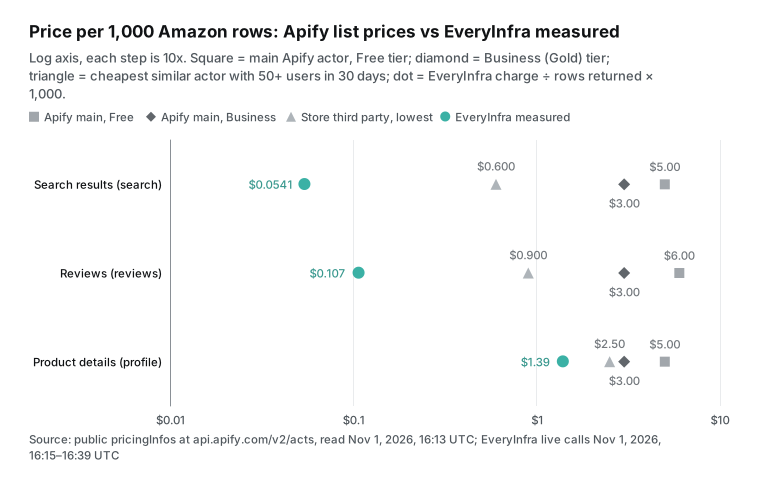
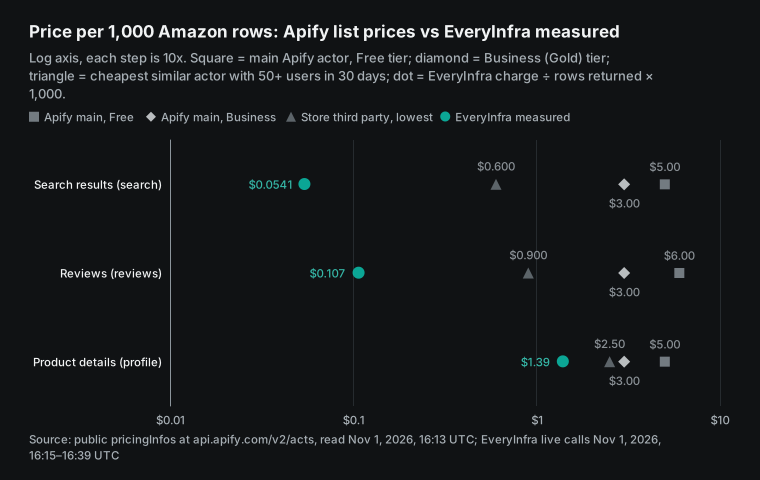
Our dots spread from $0.0541 to $1.389 because the denominator is different. We bill per call. One search call returns up to 50 rows, and one product call returns 1 row. So the same price of a little more than $0.001 per call gives a per-row price that differs by about 30 times. Amazon adds one more variable. The number of reviews does not depend on our request.
It depends on how many featured reviews Amazon shows on the product page. So "reviews are 28 to 56 times cheaper" is true only if you want the latest and most helpful dozen reviews per product. If you need the full review history of one product, the comparison does not apply, and you should read "When Apify is the better choice" below.
Apify Amazon Product Scraper pricing: one actor, four billable events
Most actors in the Apify Store now use pay-per-event pricing. The author defines a set of events and charges each time one occurs, for example one result or one run start. Most pay-per-event actors include platform usage in the event price, and some charge it separately (Actors in Store). The most-used Amazon actor is Amazon Product Scraper, which Apify maintains under the account junglee.
The public endpoint shows 29,819 total users, 4,147 users in the last 30 days and 890,632 runs in 30 days. The current price started on August 28, 2026, and it has four events:
| Event (Amazon Product Scraper) | Free | Bronze (Starter) | Silver (Scale) | Gold (Business) | Platinum | Diamond |
|---|---|---|---|---|---|---|
| Result, per 1,000 | $5.00 | $4.00 | $3.50 | $3.00 | $1.70 | $0.80 |
| Offer, extra per 1,000 | $2.50 | $2.00 | $1.70 | $1.50 | $1.00 | $0.40 |
| Seller, extra per 1,000 | $2.50 | $2.00 | $1.70 | $1.50 | $1.00 | $0.40 |
| Delivery Location (price by country or ZIP), extra per 1,000 | $60 | $50 | $40 | $35 | $22 | $10 |
The last row is the easiest to miss. Amazon prices and stock change with the delivery address. The Product Scraper page warns that a price can be missing when the delivery country has no sellers. It also says that offers change with the proxy location (Amazon Product Scraper page). If you set a ZIP code to get an accurate local price, each result also triggers a Delivery Location event.
On the Free tier that event costs $0.06 per result, 12 times the base result price. On the Business tier it costs $0.035, which is 11.7 times the base price. So 1,000 products priced for one ZIP code cost $3.00 + $35.00 = $38.00 on the Business tier. EveryInfra amazon/search and amazon/profile have no ZIP code parameter. Apify has this feature and we do not.
The pricing model has also changed over time. The pricingInfos field keeps the history. Amazon Product Scraper moved from a flat monthly fee to pay per event only on April 14, 2026. Amazon Reviews Scraper moved to a per-review price in June 2025.
So check the date when you read any article about "Apify Amazon scraper pricing". Most articles from before April 2026 describe the flat monthly price, not the current per-result price.
The plan fee matters too. These are the numbers on the Apify pricing page:
| Apify plan | Monthly fee | Store price tier | Runs at the same time | Compute unit |
|---|---|---|---|---|
| Free | $0, with $5 of usage | Free | 5 | $0.20 |
| Starter | $19 | Bronze | 32 | $0.20 |
| Scale | $199 | Silver | 128 | $0.16 |
| Business | $999 | Gold | 256 | $0.13 |
Prepaid usage expires at the end of each billing cycle. A Free plan user who goes over the limit is blocked until the next cycle. So the "$3.00 per 1,000 on Business" price assumes you already pay $999 a month, and a $19 Starter user pays the Bronze price of $4.00. EveryInfra has no monthly fee. The minimum top-up is $10, and our pricing page says the balance does not expire and failed or empty calls are free.
How we tested, and how we decided what counts
We wrote our pass and fail rules before the first call. The price table holds only two kinds of numbers. One kind is Apify list prices, with URL, read time and tier. The other kind is our live calls, with Singapore time, capability name, rows returned and amount charged. We always divide by rows actually returned.
We state "which marketplaces work" only from real 422 responses, not from documentation. For "do failed calls cost money", we needed at least two calls that returned no data, with their charge records. If we could not meet a rule, we did not write the related conclusion.
All live calls used one test key between 00:15 and 00:39 SGT on November 2, 2026 (16:15 to 16:39 UTC on November 1). We made 20 requests in total. There were 6 searches on five marketplaces (US, Germany, Mexico, Spain and Japan), with a repeat US search 23 minutes later. There were 2 product detail calls and 10 review calls. One call had no key on purpose, and one had a wrong marketplace on purpose.
We read every parameter, price and field from our free capability catalog first. amazon/search costs $0.002236 per call, and amazon/profile and amazon/reviews cost $0.001389 per call. All three show available: true. The catalog has 10 Amazon capabilities. We do not compare the other 7 here (best sellers, sellers, keyword ranks and others).
| What we tested | Calls | Marketplaces | Why |
|---|---|---|---|
amazon/search | 6 | US (twice), DE, MX, ES, JP | Rows per call, field fill, repeat stability |
amazon/profile | 2 | US | One real ASIN, one ASIN that does not exist |
amazon/reviews | 10 | US (4), UK, DE, ES, JP (2), MX | Login wall, overlap between sites, 422 |
| Error cases | 2 | — | No key; misspelled marketplace |
On the Apify side, we used the public Store search endpoint with three queries: amazon, amazon reviews and amazon product. The Store reported 1,752 results for "amazon". We took the top 100 of each query and removed duplicates, which gave 214 actors. Of these, 210 use pay-per-event pricing. Then we read the price history and 30-day run statistics of 11 main scrapers from the public actor endpoint. None of these endpoints needs an account.
Test 1: amazon/search, up to 50 rows per call, five marketplaces
Our first call went out at 00:15:12 SGT (16:15 UTC). It was amazon/search with the keyword "wireless earbuds", limit 50, on the US site. After 55.2 seconds it returned 49 rows and charged $0.002236, which is $0.0456 per 1,000. Each row has 20 fields that match the catalog's response_fields. They include ASIN, title, URL, brand, price, list price, currency, rating, rating count and stock flag. They also include category, main image, description, the Amazon's Choice flag, seller, image list, feature bullets and Best Sellers ranks.
curl -X POST https://api.everyinfra.com/api/v1/social \
  -H "Authorization: Bearer $EVERYINFRA_API_KEY" \
  -H "Content-Type: application/json" \
  -d '{"platform":"amazon","action":"search",
       "params":{"keyword":"wireless earbuds","domain":"amazon.com","limit":50}}'
# 200: count 49, billing.charged_usd 0.002236 (Nov 2, 2026, 00:15 SGT)
Next, at 00:18, 00:19, 00:22 and 00:39 SGT, we searched Germany ("bluetooth kopfhörer", 45 rows), Mexico ("audifonos bluetooth", 50 rows), Spain ("auriculares bluetooth", 19 rows) and Japan (a Japanese query for wireless earphones, 42 rows). Each call charged $0.002236. Row counts went from 19 to 50. The 6 calls gave 248 rows for $0.013416, an average of 41.33 rows per call. The Spanish call returned only 19 rows, so it was the most expensive one at $0.1177 per 1,000. That is still one fortieth of the Apify Free-tier price.
| Marketplace | Time (SGT) | Rows | Charged | Per 1,000 | Rows with a price |
|---|---|---|---|---|---|
| amazon.com | 00:15:12 | 49 | $0.002236 | $0.0456 | 42 (86%) |
| amazon.de | 00:18:23 | 45 | $0.002236 | $0.0497 | 33 (73%) |
| amazon.com.mx | 00:19:42 | 50 | $0.002236 | $0.0447 | 49 (98%) |
| amazon.es | 00:22:50 | 19 | $0.002236 | $0.1177 | 3 (16%) |
| amazon.com (repeat) | 00:38:28 | 43 | $0.002236 | $0.0520 | 36 (84%) |
| amazon.co.jp | 00:39:24 | 42 | $0.002236 | $0.0532 | 13 (31%) |
| Total | — | 248 | $0.013416 | $0.0541 | — |
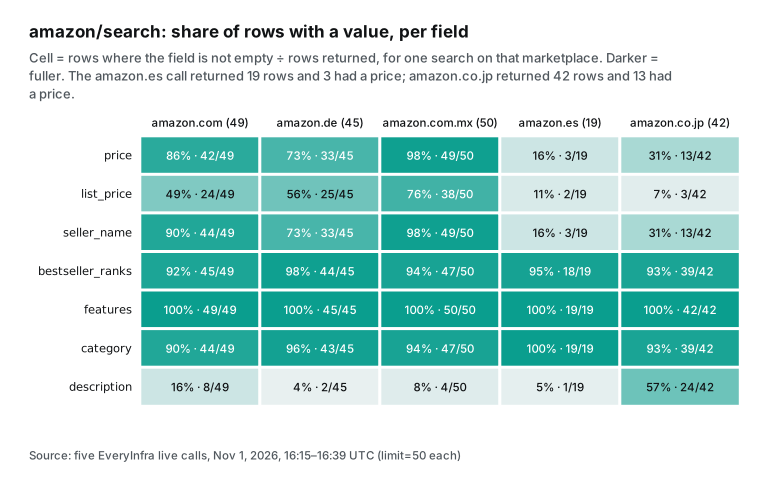
A low price does not mean full fields. We counted filled fields for one search per marketplace. The features field was 100% on all five sites. Best Sellers ranks were between 92% and 98%, and category was above 90%. But the price field varied a lot. Mexico had a price on 98% of rows, the US 86%, Germany 73%, Japan 31%, and Spain only 3 of 19 rows.
In the German result, 4 of the 33 priced rows were in US dollars. In the Japanese result, 3 rows were in US dollars, 10 in yen, and the rest had no currency. So one capability can give different completeness on different marketplaces. If you compare prices across sites, first check the sites and fields that matter to you.
If too few rows have a price, change the keyword or fill the gaps with amazon/profile. The catalog's field_note also has a warning. When the main sources are not available, US results come from a backup source with up to 20 rows per call and fewer fields.
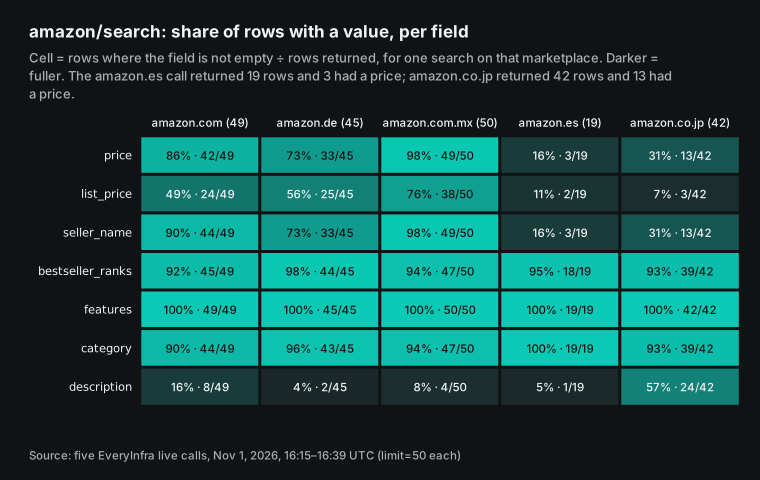
We did not run the Apify Amazon Product Scraper, so we do not know its price fill rate on the Spanish site. We can only quote its page. A price can be missing when the delivery country has no sellers, and a proxy country setting can help (Amazon Product Scraper page). Its input is also different. It takes Amazon category or search page URLs.
The page example is a subcategory URL that starts with /s?i=specialty-aps, and the page warns that Amazon sometimes limits one search term to 7 pages. Our amazon/search takes a keyword and a marketplace domain and returns one page. Apify suits "scan a full category". We suit "check the first page of a few dozen keywords every day".
The repeat test answers two questions: does the price stay the same, and does the content change? At 00:38:28 SGT we sent the same US search again. The price was the same, $0.002236. Rows went from 49 to 43. The two calls shared 41 ASINs, with 51 different ASINs in total.
Only 6 of the top 10 were the same. For the 34 ASINs that had a price in both calls, no price changed. In 23 minutes the ranking moved a lot, but prices did not. If you track rank, store snapshots by time and remove duplicate ASINs. Do not compare only "who is number one".
Test 2: amazon/profile, one ASIN per call, where Apify is close
At 00:16:26 SGT we called amazon/profile for a US pair of wireless earbuds with 259,992 ratings (ASIN B07J2Z5DBM). It returned in 8.7 seconds and charged $0.001389. The response is one product object. It has price $29.99, list price $32.99, rating 4.3, seller name, category path, 8 large images, 10 feature bullets and Best Sellers ranks. At 00:20:53 SGT we asked for an ASIN that does not exist (B0ZZZZZZZ9). After 27.8 seconds it returned 503 "request failed, retry shortly" and charged $0.
This capability costs $1.389 per 1,000 products. Apify Amazon Product Scraper also charges per result, and one product detail is one Result, so the comparison is direct. Against the Free tier ($5.00) and the Business tier ($3.00), we cost 3.6 and 2.2 times less. Platinum ($1.70) costs only 22% more than us. Diamond ($0.80) costs 42% less than us.
Among dedicated product-detail scrapers with at least 50 users in 30 days, the cheapest is Amazon Product Details Scraper by delicious_zebu. It lists $2.50 on Free and $1.50 on Gold, plus $0.05 per 1,000 starts. Another scraper by alfalfa lists $0.25 per 1,000 base results. But it charges an extra $1.00 per 1,000 for its "product details" event, and it had only 36 users in 30 days.
Our advice: if you need only price, rating, rank and feature bullets, do not look up each product. Those fields are already in search results. Use amazon/search by keyword in batches. At up to 50 rows per call, that is about $0.05 per 1,000.
Use amazon/profile only to fill missing prices, or when you already have a list of ASINs. In our five-marketplace search test, features and bestseller_ranks were filled on more than 92% of rows. Most tracking jobs do not need the detail endpoint.
Test 3: amazon/reviews vs Apify Amazon Reviews Scraper behind the login wall
Reviews need the most explanation in this article. From the second half of 2024, Amazon moved most reviews behind a sign-in. Only the featured reviews on the product page stay public, and the review list page sends signed-out visitors to a login page. Amazon did not announce this. We found only public reports from users and tool vendors.
One developer in a Reddit web scraping thread wrote that Amazon locked reviews past the top 10 behind login a few months earlier. He used cookies from a throwaway account, and he said that does not scale (r/webscraping thread). The Octoparse help center tutorial says that because of Amazon's restrictions, you must sign in before you can see all reviews (Octoparse help center).
Our catalog says it plainly. amazon/reviews supports 11 marketplaces. On every marketplace it gets only the featured reviews on the product page, usually a dozen or so per product, not the full history. Our live calls matched that description, and the US site was worse:
| Marketplace | Time (SGT) | Product | Result | Charged |
|---|---|---|---|---|
| amazon.com | 00:16:35 | B07J2Z5DBM | 503 access_blocked (needs a login or is restricted) | $0 |
| amazon.com | 00:17:39 | B0F53L8J78 | 503 access_blocked | $0 |
| amazon.com | 00:22:04 | B0BTYCRJSS | 503 access_blocked | $0 |
| amazon.com (retry after 15 minutes) | 00:37:25 | B0BTYCRJSS | 503 access_blocked | $0 |
| amazon.co.uk | 00:21:37 | B0BTYCRJSS | 200, 13 reviews | $0.001389 |
| amazon.de | 00:19:24 | B0BTYCRJSS | 200, 13 reviews | $0.001389 |
| amazon.es | 00:23:45 | B0BTYCRJSS | 200, 13 reviews | $0.001389 |
| amazon.co.jp | 00:24:39 and 00:38:06 | B0BTYCRJSS | 503 twice, request failed | $0 |
| amazon.com.mx | 00:19:19 | — | 422, marketplace not supported | $0 |
On the US site, 4 calls for 3 different products all returned 503 with the reason access_blocked. The message said the item needs a login or is restricted, the call was refunded, and an immediate retry would probably not help. It also gave a retry_after of 900 seconds. We waited 15 minutes and tried again, with the same result.
None of the four calls charged anything. charged_usd was 0 and reason was request_failed_refunded. The two Japanese calls returned an ordinary "request failed, retry shortly" and also cost nothing. This ASIN may not exist on the Japanese site, and we did not check further.
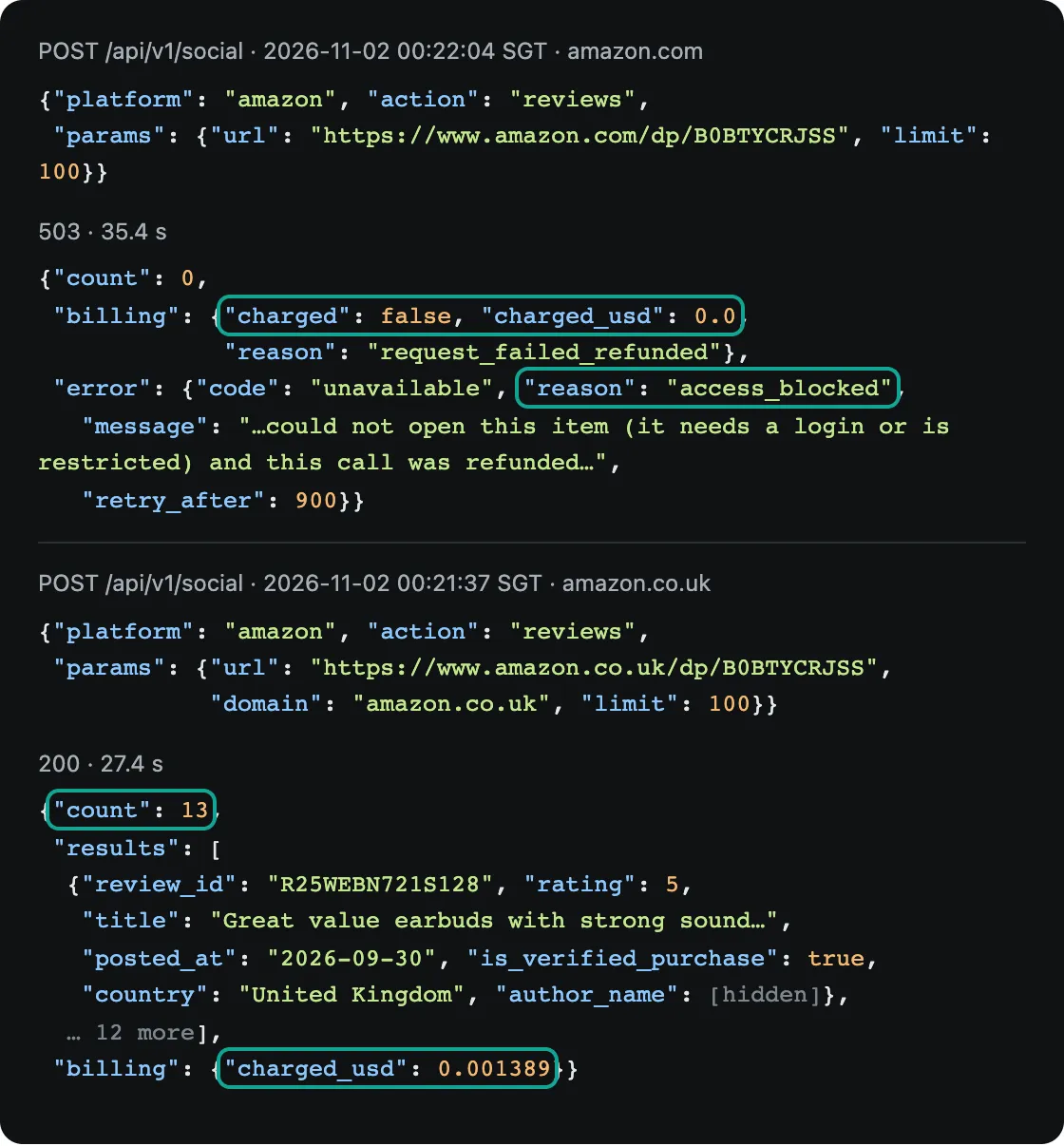
The UK, German and Spanish sites each returned 13 reviews. All were verified purchases, and none were Vine reviews. The reviews were recent. On the German site, the newest was from 2026-10-29, with one each from 2026-10-26, 2026-10-24, 2026-10-18, 2026-10-17, 2026-10-08 and 2026-10-03, and the oldest from 2026-07-30. So featured reviews are not only "the oldest and most voted". Amazon mixes in reviews from the last month, so you can see what recent buyers say.
There is also a trap. In each site's 13 reviews, 8 came from that site's country (UK, Germany or Spain). The other 5 were the same five "reviews from other countries" on all three sites, labeled Italy, Egypt, the Netherlands, Ireland and Australia. The three sites gave 39 rows, but only 29 unique review_id values. If you loop over marketplaces for one product and merge the results, you count those 5 reviews three times unless you remove duplicates. On the 29 unique reviews, the price is $0.144 per 1,000, which is still 6 to 42 times less than similar Apify scrapers.
Now look at what the 39 rows say. Every review had 4 or 5 stars, and no review had 3 stars or fewer (see the table below). So you cannot use featured reviews to estimate the star mix, and you cannot use them as a sample of bad reviews. For bad-review alerts, track changes in rating and rating_count, which both amazon/search and amazon/profile return. Use featured reviews to read what recent buyers praise and what problems they report.
| Site (same ASIN) | 5 stars | 4 stars | 3 stars or fewer | Median text length (characters) | Rows with a helpful count |
|---|---|---|---|---|---|
| amazon.de | 11 | 2 | 0 | 559 | 7 of 13 (highest 205) |
| amazon.co.uk | 12 | 1 | 0 | 350 | 5 of 13 |
| amazon.es | 12 | 1 | 0 | 252 | 2 of 13 |
The helpful count is often empty. Before you sort reviews by "helpful", check that this field has enough values on your marketplace.
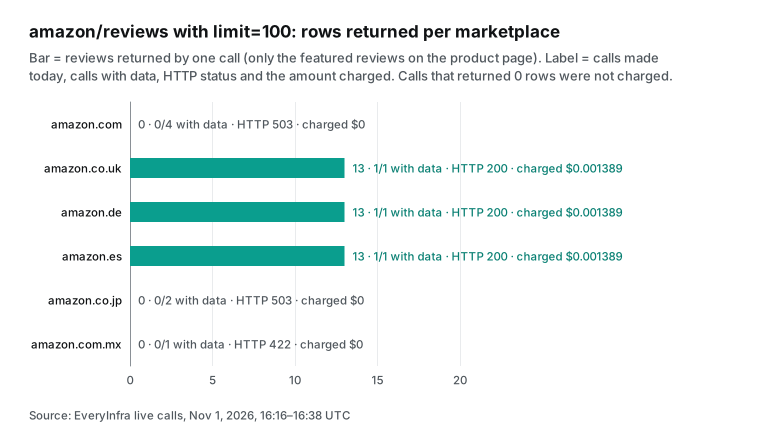
On the Apify side, Apify's own Amazon Reviews Scraper had 2,510 users and 137,607 runs in 30 days. It lists $6.00 per 1,000 on Free, $3.00 on Business and $1.00 on Diamond. A date filter adds $1.30 (Free) to $0.17 (Diamond) per 1,000. Its page says it returns up to 100 reviews per star rating, so up to 500 per product in the best case. It collects only reviews with text.
The second most-used is the Amazon Reviews Scraper by axesso_data. It costs $0.90 per 1,000 on every tier, and it had 1,188 users and 961,052 runs in 30 days. It takes an ASIN and a marketplace code and reads up to 10 pages, which its page calls a limit set by Amazon. The page lists 15 marketplaces: it adds Mexico, Brazil, the Netherlands, Sweden and the UAE, and it does not have Singapore. Neither page explains how the scraper handles the login wall. We did not run them, so we do not know how many US reviews they return today.
| Apify Amazon Reviews Scraper | axesso_data Amazon Reviews Scraper | EveryInfra `amazon/reviews` | |
|---|---|---|---|
| Price per 1,000 | $6.00 Free, $3.00 Business, $1.00 Diamond | $0.90 on every tier | $0.107 measured (13 per call) |
| Reviews per product | Up to 100 per star, 500 in total | Up to 10 pages | Featured reviews only, 13 today |
| Marketplaces | Not compared here | 15, with Mexico and Brazil, no Singapore | 11, with Singapore, no Mexico |
| Empty or invalid input | Writes an error item | Writes 3 penalty entries | 503 or 422, $0 |
| Source of these facts | Store page, not run | Store page, not run | Live calls on November 2, 2026 |
So the review result depends on what you need. Some jobs need only the latest and most helpful dozen reviews per product, such as reading recent buyer feedback, feature summaries or competitor checks. For these, we cost $0.107 to $0.144 per 1,000 on the UK, German and Spanish sites. That is a small fraction of the Apify price. But today the US site does not work, and failed calls are free.
If you need hundreds of older reviews for one product, for full sentiment analysis or research, we cannot do it. Use a per-result scraper that can read more pages, such as those on Apify, or use Amazon's own seller tools. Our Amazon review pipeline guide shows how to turn featured reviews into a weekly report, so we do not repeat it here.
Marketplace coverage: the 422 response is the source of truth
We do not copy marketplace lists from documentation. We check what the API says. At 00:19:19 SGT we asked amazon/reviews for the Mexican site (domain: amazon.com.mx) on purpose. It returned 422 in 0.12 seconds, before any scraping.
The message said that domain must be one of amazon.ca, amazon.co.jp, amazon.co.uk, amazon.com, amazon.com.au, amazon.de, amazon.es, amazon.fr, amazon.in, amazon.it or amazon.sg. It also gave did_you_mean suggestions and a note that nothing was charged. These 11 marketplaces are what the review capability supports today.
Search works differently. The domain parameter of amazon/search has no allow list. The Mexican site returned 50 rows and the Japanese site 42 rows. We also sent a domain that does not exist, amazon.xyz.
It did not return 422. After 8.1 seconds it returned 503 with a refund and $0 charged. So a misspelled marketplace costs no money, only about 8 seconds of waiting. For batch jobs, keep a fixed list of the marketplace domains you use. Do not build the domain from user input.
| Capability | Marketplace rule | Evidence from live calls |
|---|---|---|
amazon/reviews | Allow list of 11: US, UK, DE, FR, IT, ES, CA, AU, IN, JP, SG | Mexico 422 in 0.12 s with the 11 values; US 503 "needs a login" 4 times today |
amazon/search | Any Amazon marketplace domain, no allow list | US, DE, MX, ES, JP returned 19–50 rows each; amazon.xyz 503 with refund |
amazon/profile | Product URL decides the marketplace | US 200; unknown ASIN 503 with refund |
| Apify Amazon Reviews Scraper (axesso_data) | Page lists 15 marketplace codes | Page only, not run |
| Apify Amazon Product Scraper | Takes Amazon category or product URLs | Page only, not run |
Do failed and empty calls cost money? The two sides have different rules
Of our 20 requests, 10 returned no data. One had no key (401 missing_key, with a note that nothing was charged). One used a marketplace that is not on the allow list (422). One used a misspelled marketplace (503), and one used an ASIN that does not exist (503).
Four were US review calls blocked by the login wall (503), and two were failed Japanese review calls (503). All 10 had charged_usd of 0, with a reason of request_failed_refunded or a parameter error. The other 10 calls returned data and charged $0.018972 in total. That is the full cost of the live calls in this article.
| Case | Calls | HTTP | Charged | What the response says |
|---|---|---|---|---|
| No key | 1 | 401 | $0 | Send the key in the Authorization header; nothing charged |
| Review marketplace not supported | 1 | 422 | $0 | Lists the 11 allowed values and did_you_mean; nothing charged |
| Misspelled search marketplace | 1 | 503 | $0 | Request failed, not charged, can retry |
| ASIN does not exist | 1 | 503 | $0 | Request failed, not charged, can retry |
| US reviews need a login | 4 | 503 | $0 | access_blocked, refunded, an immediate retry will not help |
| Japanese review call failed | 2 | 503 | $0 | Request failed, not charged |
| Data returned | 10 | 200 | $0.018972 | One charge per call, shown in billing.charged_usd |
On Apify, each actor's author sets the rules. The pay-per-event docs describe a system event called apify-default-dataset-item, which charges automatically for each item written to the run's dataset. The same docs tell authors to charge only after results are saved and available. Authors must not bill users for data they cannot access (pay-per-event docs). The open question is what an actor writes to the dataset when it finds no data.
Now look at the pages of Apify's own Amazon Product Scraper and Amazon Reviews Scraper. Sometimes an input gives no data, for example a 404 product or a bad URL. The pages say the scraper then writes an "error item" with an error field to the dataset. It does not skip the input. The pages do not say whether these error items cost money. Their primary event is a custom Result event, not the automatic per-item system event.
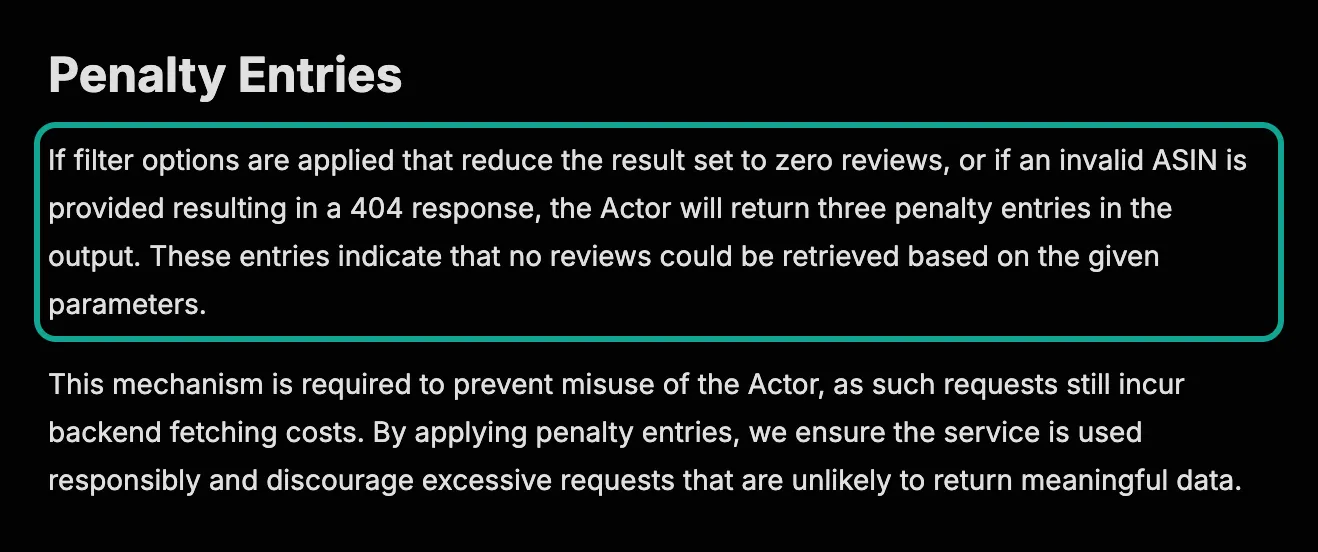
The review scraper by axesso_data is more direct, as the screenshot below shows. If filters reduce the result to zero reviews, or an invalid ASIN returns 404, the actor writes three "penalty entries" to the output. The page says this prevents misuse, because such requests still cost the author money to fetch. Its primary event is exactly apify-default-dataset-item, which the docs say charges once per item, at $0.90 per 1,000.
From these two public documents, an ASIN with no reviews would cost 3 × $0.0009 = $0.0027. That is more than one successful review call on EveryInfra ($0.001389). This is an estimate from public documents. We did not run the actor to confirm it.
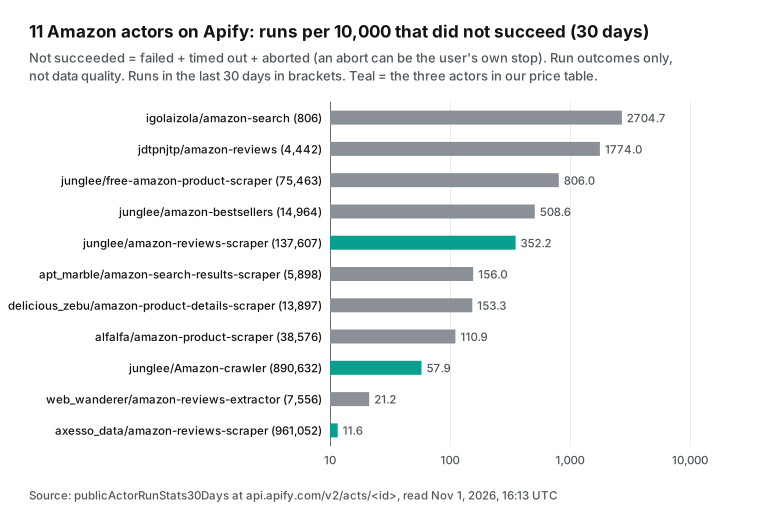
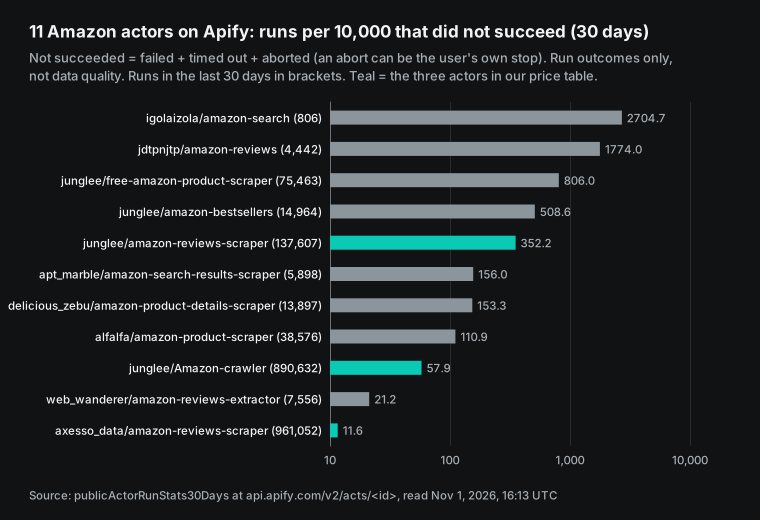
Runs that fail are another cost. Apify's public endpoint shows 30-day run statistics for each actor, split into succeeded, failed, timed out and aborted. We put the numbers for 11 Amazon scrapers side by side. The most-used Amazon Product Scraper had 57.9 runs per 10,000 that did not succeed. The axesso_data review scraper had only 11.6, and Apify's own Amazon Reviews Scraper had 352.2. One of the two cheapest search scrapers had 2,704.7, so about a quarter of its runs did not succeed.
An abort can be the user's own stop, so these numbers do not measure data quality. They show only that "will a run finish" varies a lot. Under pay-per-event pricing, a run that fails halfway still pays for the events it already triggered.
More than 200 Amazon scrapers in the Apify Store: how prices spread
"There are cheaper third-party scrapers in the Store" is the most common reply to any Apify price comparison. So we looked at all of them. After removing duplicates, three searches gave 214 actors, and 210 use pay-per-event pricing. We could read a primary event price for 203: 106 product or search actors and 97 review actors. We grouped them by Free-tier primary price times 1,000. Both groups have a median of $4.00 per 1,000, and most fall between $1 and $10.
The cheapest few cost less than $0.10 per 1,000, but they have very few users. So we also kept only popular scrapers with at least 50 users in 30 days:
| Group | Actors with a price | Median (Free, per 1,000) | Popular actors | Popular median | Popular minimum | EveryInfra measured |
|---|---|---|---|---|---|---|
| Product and search | 106 | $4.00 | 23 | $2.50 | $0.60 | $0.0541 (search) |
| Reviews | 97 | $4.00 | 9 | $1.80 | $0.90 | $0.107 |
Both of our measured prices fall in the lowest bucket.
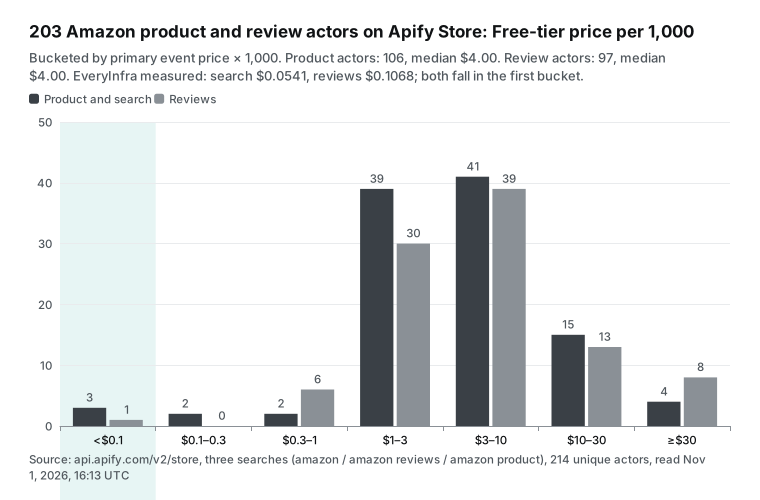
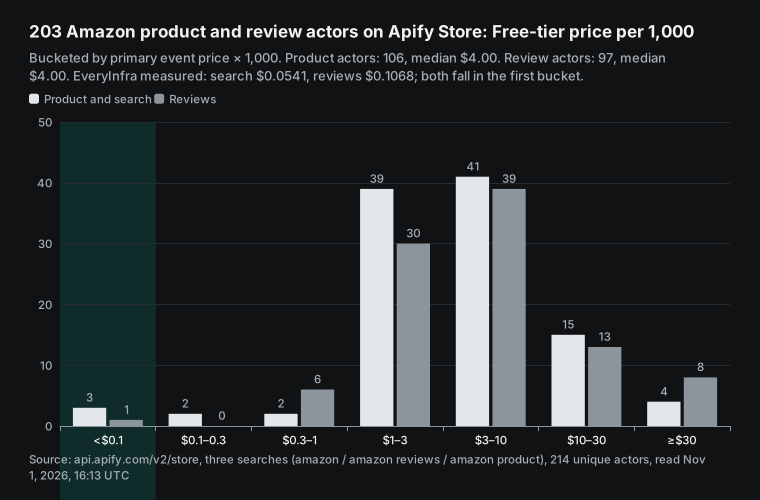
Two notes apply to this chart. First, the primary event is not always "one result". Some authors make a run start or a search page the primary event. We took the primary event price as written and did not read every description, so a single actor's price can be off. The median and the spread change little.
Second, prices change. One of the top search scrapers, the Amazon Search Results Scraper by apt_marble, costs $0.60 per 1,000 on all tiers since October 5, 2026. Its public endpoint already shows the next price. From November 6, Free goes up to $1.00, Bronze is $0.60, Silver is $0.55 and Gold goes down to $0.50.
The same scraper will cost Free users 67% more and Business users 17% less. Pay-per-event authors can change prices, and users get notice before the change. Check the start date when you compare prices.
One name can mislead. Search suggestions include "apify free amazon product scraper". That points to an actor that Apify maintains with "free" in its URL, but its Store title is Amazon Scraper. It lists $12.00 per 1,000 on Free and $6.20 on Gold, the highest price of the Amazon scrapers in this article. It also had 806 runs per 10,000 that did not succeed in 30 days. The "free" in the URL is a leftover, not a price.
The real free option on Apify is the $5 monthly credit on the Free plan. At the Amazon Product Scraper Free price, that buys 1,000 products. At our price, $5 buys 2,236 search calls, which at today's average of 41.33 rows per call is about 92,000 rows.
A monthly bill: three common jobs for 30 days
Unit prices matter less than "what does one job cost per month". We used today's measured averages to price three jobs that Amazon sellers and brands often run. Job one: search 20 keywords once a day (600 calls in 30 days, about 24,800 rows). Job two: check 500 ASINs once a day (15,000 calls).
Job three: get the featured reviews of 200 products once a week (800 calls in 4 weeks, about 10,400 reviews). EveryInfra is "calls × catalog price". Apify is "the same rows × primary event price", without any plan fee.
| Job | EveryInfra | Apify main, Free | Apify main, Business | Cheapest popular in Store |
|---|---|---|---|---|
| 20 keywords searched daily (24,800 rows) | $1.34 | $124.00 | $74.40 | $14.88 |
| 500 ASINs checked daily (15,000 rows) | $20.84 | $75.00 | $45.00 | $37.50 |
| Reviews of 200 products weekly (10,400 rows) | $1.11 | $62.40 | $31.20 | $9.36 |
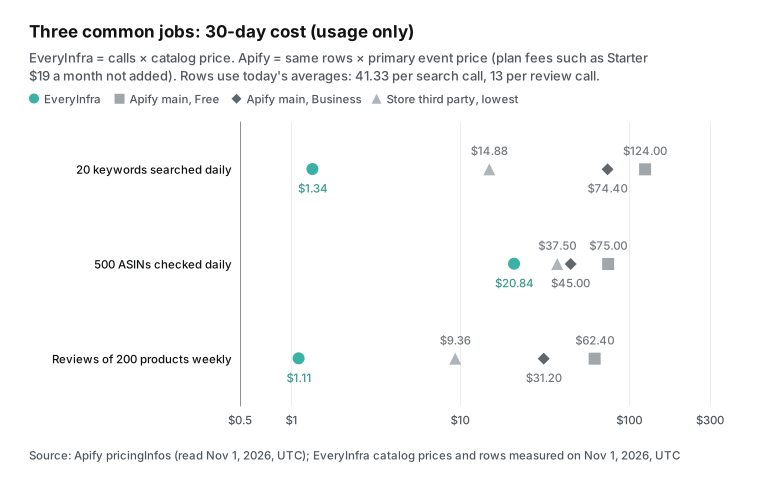
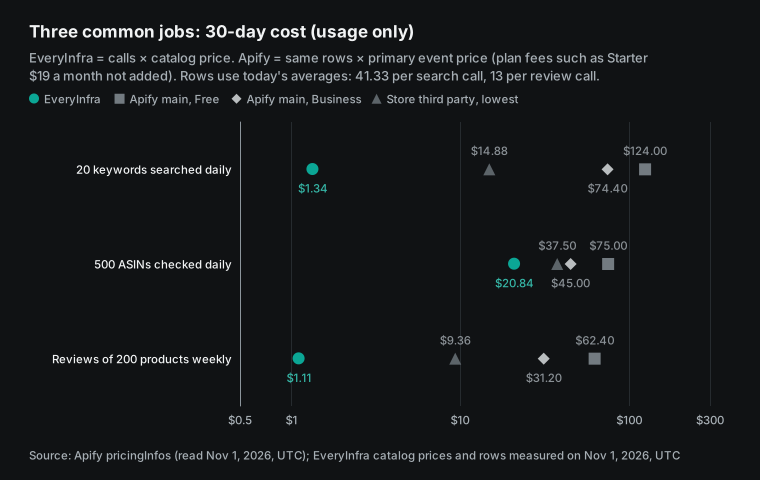
The second job has our smallest gap. Checking 500 ASINs a day costs $20.84 a month, less than half the Apify Business price. But an Apify Diamond customer pays $12.00 for the same 15,000 rows, which is less than our price. The third job needs one more reminder.
The $1.11 holds only for the UK, German, Spanish and similar sites. The US site does not work today, and each product gives only a dozen or so featured reviews. If all 200 of your products are on amazon.com, we cannot deliver this job today. Failed calls are free, but you also get no data.
Speed and concurrency: how much fits in one day
Batch jobs also depend on speed. In our test, amazon/search returned in 55.0 to 57.9 seconds per call, reviews in 9.3 to 54.0 seconds, and product details in 8.7 seconds. Each search takes almost one minute, because the call collects feature bullets, ranks and images for the whole page. One worker can make only about 60 search calls per hour, which is about 2,500 rows at 41.33 rows per call.
To go faster, run calls in parallel. Our pricing page says that the data API allows 60 requests per minute by default, counted across all keys in the account. For more, buy a speed pack in the console, or reach a top-up tier. 60 per minute is enough for a few parallel calls. With 5 parallel calls, one hour gives about 300 searches and 12,000 rows, so the 20-keyword daily job finishes in a few minutes.
On Apify, concurrency counts runs, as the plan table above shows. The actor decides how many pages each run fetches in parallel (pricing page, platform limits).
| Measured on November 2, 2026 | Time per call | Rows per call | Rows per hour, 1 worker | Rows per hour, 5 workers |
|---|---|---|---|---|
amazon/search | 55.0 to 57.9 s | 19 to 50, average 41.33 | about 2,500 | about 12,000 |
amazon/reviews (UK, DE, ES) | 9.3 to 54.0 s | 13 | about 870 at 54 s | about 4,300 |
amazon/profile | 8.7 s | 1 | about 410 | about 2,000 |
One Amazon Product Scraper run can take many category URLs and write all results to one dataset, so it suits "one big batch". We answer one request at a time, so we suit "a little data whenever you need it".
The billing also differs. Apify runs use memory time (compute units at $0.13 to $0.20 each). Most pay-per-event actors include this in the event price, and some charge it separately (usage and resources). We charge only per request, with no extra compute or traffic fees.
Also note the 85-second limit on synchronous calls. Our searches took more than 55 seconds each, so a slow network can cause a timeout. A timed-out call is free but must be sent again. For daily scheduled jobs, use "mode": "async" and collect the result later with the job_id.
Amazon scraper API: calls from code, automation and AI clients
All EveryInfra Amazon capabilities use one endpoint: POST https://api.everyinfra.com/api/v1/social. The request body has three fields: platform, action and params. For slow calls, add "mode": "async" to get a job_id at once, then read the result with GET /api/v1/jobs/{job_id}. The Python example below searches several keywords, retries a 503 after the suggested wait, and records each charge:
import os, time, requests

API = "https://api.everyinfra.com/api/v1/social"
HEAD = {"Authorization": f"Bearer {os.environ['EVERYINFRA_API_KEY']}"}

def amazon(action, **params):
    for attempt in range(3):
        r = requests.post(API, headers=HEAD, timeout=120,
                          json={"platform": "amazon", "action": action, "params": params})
        body = r.json()
        if r.status_code == 200:
            return body["results"], body["billing"]["charged_usd"]
        err = body.get("error", {})
        if r.status_code == 503 and err.get("reason") == "access_blocked":
            return [], 0.0            # login wall: refunded, retrying now will not help
        if not err.get("retryable"):
            raise RuntimeError(err)   # 401 / 422: fix the request, do not retry
        time.sleep(err.get("retry_after", 20))
    return [], 0.0

rows, spent = [], 0.0
for kw in ["wireless earbuds", "bluetooth speaker"]:
    res, usd = amazon("search", keyword=kw, domain="amazon.com", limit=50)
    rows += res; spent += usd
print(len({r["asin"] for r in rows}), "unique ASINs, spent", round(spent, 6))
In MCP clients such as Claude and Cursor, add our remote MCP server to the config. The Amazon capabilities then show up as everyinfra_* tools. The model picks the tool and the parameters. The protocol is in the Model Context Protocol specification. For client setup, see the Claude Code MCP docs and the OpenAI MCP connector docs. Our own guide is on the MCP server page:
{
  "mcpServers": {
    "everyinfra": {
      "type": "http",
      "url": "https://api.everyinfra.com/mcp",
      "headers": { "Authorization": "Bearer ${EVERYINFRA_API_KEY}" }
    }
  }
}
Apify also has its own MCP server (https://mcp.apify.com). It lets AI clients search and run actors from the Store. OAuth sign-in is the recommended option, and an API token also works (Apify MCP docs, source on GitHub).
The difference is in the tool shape. Apify's MCP treats the whole Store as a toolbox. The model first picks an actor and then fills in that actor's input form, and each actor has its own input and output fields. Our MCP is one fixed set of tools.
Field names stay the same across Amazon, Walmart, eBay and other platforms, so price, rating and rating_count mean the same thing everywhere. For scheduled jobs, Apify has schedules and webhooks. We are a plain HTTP API, so you can call us from your own cron job, n8n or GitHub Actions.
Moving from Apify: field mapping
If you already use an Apify Amazon scraper, the main change is field names. The left columns below come from the public sample output on the pages of Apify's two main scrapers. The right columns are fields from our catalog. The names differ and the meanings are close, but it is not the same data set, and the collection method differs. Run both on your own products once before you switch.
| Apify Amazon Product Scraper sample | EveryInfra `amazon/search`, `amazon/profile` | Apify Amazon Reviews Scraper sample | EveryInfra `amazon/reviews` |
|---|---|---|---|
asin | asin | productAsin | product_asin |
price.value / price.currency | price / currency | ratingScore | rating (plus rating_scale) |
listPrice.value | list_price | reviewTitle | title |
stars | rating | reviewDescription | text |
reviewsCount | rating_count | reviewedIn (country and date in one sentence) | country + posted_at (separate) |
breadCrumbs | category | isVerified | is_verified_purchase |
seller.name | seller_name | reviewReaction (for example "21 people found this helpful") | helpful_count (integer) |
features | features | variant | variant |
bestsellerRanks | bestseller_ranks | reviewImages | images |
inStock | in_stock | — | is_vine (Vine review flag) |
Two places need code changes. The first is the review date. Apify's sample puts country and date in one English sentence, "Reviewed in the United States on February 3, 2022", which you must parse. We split it into country and an ISO posted_at. The second is the helpful count.
Apify's sample is a sentence, and ours is an integer. Our reviews also have is_vine, which marks reviews from the Amazon Vine program, and we suggest you analyze those apart. Apify's product sample has starsBreakdown, answeredQuestions, delivery and returnPolicy. We do not have these fields.
How we checked these numbers
Every EveryInfra number in this article comes from the raw responses of our 20 requests. Row counts come from the length of results, charges from billing.charged_usd, and times from the Singapore time when each request left. One script calculates the price per 1,000, the ratios, the field fill rates, the duplicate counts and the repeat overlap from the raw responses. We then compared each number with the text, the tables and the charts, and the same script made the chart labels.
You can check every Apify price in the public endpoint. Open the actor metadata link in this article. Find the newest pricingInfos entry that starts before our read time. The primary event price times 1,000 is the number in our table. We did not read any Apify bill or run any actor.
So the Apify side shows list prices, not what someone actually paid. If you ran the same job on Apify, compare it with your bill. A pay-per-event bill shows the count and cost of each event on the historical usage page in the console (Actors in Store).
When Apify is the better choice
Price is not everything, and in some cases Apify fits better than we do. First, you need the full review history of a product. Apify's Amazon Reviews Scraper says up to 500 per product, and the axesso_data scraper reads up to 10 pages. We return only the dozen or so featured reviews on the page. Second, you need local prices and delivery by ZIP code or country. Apify Amazon Product Scraper has the Delivery Location event, and we have no matching parameter.
Third, you need every seller's offer (Offer) and seller details (Seller) for a product. Apify charges extra per row for these, and our detail call gives only the current seller name. Fourth, you need to scan a whole category. Apify takes category URLs, and its page says it returns more than 100,000 results on average. We return one page per keyword.
Fifth, you need reviews from Mexico, Brazil, the Netherlands, Sweden or the UAE. The axesso_data page lists these sites, and our review capability does not support them. Sixth, you are already an Apify Platinum or Diamond customer. For per-product details, your unit price is lower than ours.
We fit better for other jobs. Examples are daily keyword searches in batches and weekly featured reviews for a few hundred products. We also fit when you need exact per-call budget control, or when you do not want to pay for failed or empty calls. Another case is when you want the same fields for Walmart, eBay and other stores.
We break down Apify's full pricing model in Apify pricing explained. Our platform-wide comparison is in Apify alternatives and the alternatives overview. This article covers Amazon only.
Legal limits: public data, site terms and fake review rules
We do not give legal advice. We list only facts about Amazon data that you can check in the source. Amazon's robots.txt blocks many paths for general crawlers, and the review list needs a sign-in. That is a line Amazon drew itself.
Our review capability reads only the featured reviews that signed-out visitors can see on a product page. It cannot read content behind the sign-in. Today our 4 US review calls were treated as "needs a login" and refunded, with no attempt to get around the wall.
Review data also touches fake review rules. The US Federal Trade Commission rule on consumer reviews (16 CFR Part 465) bans buying or selling fake reviews and suppressing bad reviews. It took effect on October 21, 2024 (eCFR text, Federal Register). The UK Digital Markets, Competition and Consumers Act 2024 also bans fake reviews outright. The Competition and Markets Authority published guidance (Act text). The EU Digital Services Act sets transparency duties for large platforms, including their recommender systems (EUR-Lex text).
Collecting reviews for analysis is one thing. Rewriting scraped reviews, copying them, or passing them off as your own breaks these rules. Reviewer names and avatars are personal data. Apify's review scraper leaves these fields out by default. Our author_name and similar fields copy only what the page shows in public. We suggest that you do not store them, or that you mask them.
Why Amazon's own APIs are not enough
"Does Amazon have an API?" is a common search suggestion. The answer is yes, but each one has a gate. The Product Advertising API 5.0 for affiliates is deprecated and now returns 403. The message tells you to move to the new Creators API (PA-API documentation page). The Creators API needs a registered app in Associates Central and OAuth credentials, and offers move to OffersV2 (migration guide).
The Selling Partner API for sellers has a Catalog Items API. It finds products by ASIN or keyword and returns attributes, images and sales ranks. But it needs a seller account and the Product Listing role (Catalog Items API). Each operation has its own rate limit (usage plans and rate limits). Neither Amazon API returns review text.
| Option | What you need | Reviews? | Best for |
|---|---|---|---|
| Creators API (was PA-API 5) | Amazon Associates account, registered app | No | Affiliate and deal sites |
| Selling Partner API | Seller or vendor account, matching role | No | Sellers who manage their own listings |
| Apify Store Amazon scrapers | Apify account, pay per result | Yes, more pages | Deep reviews, ZIP pricing, category scans |
EveryInfra amazon/* | API key, pay per call, failed calls free | Yes, featured reviews only | Keyword tracking, batch featured reviews, one schema across stores |
What changed recently: price history of 11 Amazon scrapers
Per-result prices change. In the public Apify API, the pricingInfos field of each actor keeps the start date of every price change. The modifiedAt field keeps the date of the last edit. The table shows the records of the 11 Amazon scrapers in this article. We read them at 00:13 SGT on November 2, 2026. Prices are for the main event per 1,000 rows, on the Free tier and the Gold (Business) tier.
| Scraper (author/name) | Users, 30 days | Price now, Free / Gold | Price start date | Last price change | Last edit |
|---|---|---|---|---|---|
| junglee/Amazon-crawler | 4,147 | $5.00 / $3.00 | 2026-08-28 | Event text only, same prices; moved from monthly fee to pay per event on April 14 | 2026-10-27 |
| junglee/amazon-reviews-scraper | 2,510 | $6.00 / $3.00 | 2026-07-28 | Run start fee removed (cut from $0.006 to $0.001 in March) | 2026-10-27 |
| axesso_data/amazon-reviews-scraper | 1,188 | $0.90 / $0.90 | 2026-06-26 | Up from $0.75 to $0.90, a 20% increase | 2026-10-22 |
| web_wanderer/amazon-reviews-extractor | 641 | $1.00 / $0.70 | 2025-10-24 | Moved to a per-review price with a very small start fee | 2026-07-25 |
| apt_marble/amazon-search-results-scraper | 634 | $0.60 / $0.60 | 2026-10-05 | Removed the $1.00 "full product details" event; new price from Nov 6: Free $1.00, Gold $0.50 | 2026-10-30 |
| jdtpnjtp/amazon-reviews | 607 | $1.80 / $1.10 | 2026-06-10 | Free price changed from $1.50 to $1.80 on the same day | 2026-08-19 |
| junglee/amazon-bestsellers | 508 | $5.90 / $3.20 | 2026-03-18 | Event names changed, same prices | 2026-10-27 |
| junglee/free-amazon-product-scraper | 441 | $12.00 / $6.20 | 2026-08-31 | Start fee removed on July 28, same prices since | 2026-10-27 |
| delicious_zebu/amazon-product-details-scraper | 276 | $2.50 / $1.50 | 2026-09-27 | One flat $1.50 became tiers: Free up to $2.50, plus $0.05 per 1,000 starts | 2026-11-01 |
| igolaizola/amazon-search | 75 | $1.00 / $0.30 | 2026-06-12 | Moved from $3 per month to a per-result price | 2026-08-04 |
| alfalfa/amazon-product-scraper | 36 | $0.28 / $0.25 | 2026-09-17 | Extra "product details" event cut from $1.50 to $1.00 per 1,000 on Free | 2026-10-24 |
The table shows three things. First, 10 of the 11 current prices started in 2026. Only the web_wanderer price is from October 2025. Eight scrapers had their last edit on or after October 22, so authors keep making changes.
Second, prices go both up and down, and authors often move to tiers. delicious_zebu changed one flat price into a high Free price and a low Business price. apt_marble will do the same next week. So on one scraper, the gap between Free users and Business users keeps growing.
Third, the change is not only in the unit price. It is also in which events the actor charges. A removed start fee, a removed extra event, or a move to a per-result price all change the bill for the same job. What it means for you: for long jobs on Apify, read the public price again, at least before you renew a plan. Look for a future start date in pricingInfos. Our unit prices are in the free capability catalog as price_usd, and we suggest that you read it before a large batch job too.
Get started: from one trial call to a daily job
Star our plugin repository on GitHub to claim $1 of trial credit in the console. It lasts 24 hours, enough to repeat every request in this article. For production, the minimum top-up is $10 and the balance does not expire.
First, get a key from the quickstart. Then open the Amazon scraper API page to see all 10 Amazon capabilities. Next, run one call each in these playgrounds: Amazon search scraper API, Amazon product scraper API and Amazon review scraper API. The same fields also work for the Walmart scraper API and the eBay scraper API. Every capability and unit price is in the data market. To reconcile refunds for failed calls, read the failure refund reconciliation guide.
For the same per-1,000 test against Apify on another platform, see the Apify TikTok Scraper alternative. If you track prices, first read why Amazon price tracking gives false alerts, which compares different offers for the same ASIN. If you plan to build your own scraper, proxy traffic cost for Amazon product pages estimates the traffic cost of one page. For a model that calls a data API with exact fields, see Claude strict tool use with a data API.
FAQ
What is Apify Amazon Product Scraper pricing?
Apify's own Amazon Product Scraper charges per result. Since August 28, 2026, the price per 1,000 is $5.00 on Free, $4.00 on Starter (Bronze) and $3.50 on Scale (Silver). It is $3.00 on Business (Gold), $1.70 on Platinum and $0.80 on Diamond. Offers and sellers cost extra, and pricing by ZIP code adds $0.035 to $0.06 per result. We read these numbers from its public actor endpoint on November 2, 2026, at 00:13 SGT. The question comes from the search suggestion "apify amazon product scraper".
Can the Apify Amazon Reviews Scraper get all reviews of a product?
Its page says up to 100 reviews per star rating, so up to 500 per product in the best case, and only reviews with text. Amazon moved reviews beyond the featured ones behind a sign-in. A developer on Reddit wrote that only a few tools get reviews past the top 10, at about $1 per 1,000 (r/webscraping thread). Our amazon/reviews returns only featured reviews: 13 each on the UK, German and Spanish sites today, and none on the US site. The question comes from the suggestion "apify amazon reviews scraper".
Is there a free Amazon scraper API?
No option stays free for long. The Apify Free plan gives $5 of credit per month, which buys 1,000 products at the Amazon Product Scraper Free price. The actor with "free" in its URL lists $12.00 per 1,000. The cheapest popular Apify Amazon scraper for search lists $0.60 per 1,000. Our trial credit is $1 for 24 hours, which covers 447 amazon/search calls. The question comes from the suggestions "amazon scraper api free" and "apify free amazon product scraper".
Is it legal to scrape Amazon?
We cannot give legal advice, but you can check these facts. Amazon's robots.txt blocks many paths, and the review list needs a sign-in.
On August 4, 2026, the Ninth Circuit vacated a preliminary injunction in the Amazon and Perplexity case. On the facts before it, the user accessed Amazon with help from the AI assistant. So Amazon was unlikely to win its "unauthorized access" claim. The case went back to the lower court (Ninth Circuit opinion). Using data for analysis is different from copying reviews and passing them off as your own, which breaks the FTC and UK fake review rules. The question comes from the suggestion "is it legal to scrape amazon".
Does Amazon have an API, and why use a scraper at all?
Amazon has two: the Creators API for affiliate sites (PA-API 5 is deprecated) and the Selling Partner API for sellers. Both need a matching account, and neither returns review text. So people who track competitor prices, ranks and reviews still use scrapers such as those on Apify, or data APIs. The question comes from the suggestion "does amazon have an api".
Do failed Amazon review calls cost money?
Not on EveryInfra. All 10 calls in this article that returned no data cost $0, and the responses say they were refunded. On Apify it depends on the actor author. The axesso_data review scraper says it writes 3 penalty entries for an empty result or an invalid ASIN. At its $0.90 per 1,000, that is $0.0027 per such call. The question comes from the suggestion "amazon review scraper api".
References
- Amazon Product Scraper public actor metadata (pricingInfos, run statistics), Apify, read 2026-11-02, https://api.apify.com/v2/acts/junglee~Amazon-crawler
- Amazon Reviews Scraper public actor metadata, Apify, read 2026-11-02, https://api.apify.com/v2/acts/junglee~amazon-reviews-scraper
- axesso_data Amazon Reviews Scraper public actor metadata, Apify, read 2026-11-02, https://api.apify.com/v2/acts/axesso_data~amazon-reviews-scraper
- apt_marble Amazon Search Results Scraper public actor metadata, Apify, read 2026-11-02, https://api.apify.com/v2/acts/apt_marble~amazon-search-results-scraper
- Apify Store search results (amazon), Apify, read 2026-11-02, https://api.apify.com/v2/store?search=amazon&limit=100
- Apify Pricing, Apify, read 2026-11-02, https://apify.com/pricing
- Amazon Product Scraper page, Apify, read 2026-11-02, https://apify.com/junglee/amazon-crawler
- Amazon Reviews Scraper page, Apify, read 2026-11-02, https://apify.com/junglee/amazon-reviews-scraper
- Amazon Reviews Scraper (axesso_data) page, Apify, read 2026-11-02, https://apify.com/axesso_data/amazon-reviews-scraper
- Amazon Scraper (free-amazon-product-scraper) page, Apify, read 2026-11-02, https://apify.com/junglee/free-amazon-product-scraper
- Actors in Store, Apify docs, https://docs.apify.com/platform/actors/running/actors-in-store
- Pay-per-event pricing model, Apify docs, https://docs.apify.com/platform/actors/publishing/monetize/pay-per-event
- Actor pricing and costs, Apify docs, https://docs.apify.com/platform/actors/publishing/monetize/pricing-and-costs
- Get list of Actors in Store (API reference), Apify docs, https://docs.apify.com/api/v2/store-get
- Get Actor (API reference), Apify docs, https://docs.apify.com/api/v2/act-get
- Apify MCP server, Apify docs, https://docs.apify.com/platform/integrations/mcp
- apify-mcp-server, GitHub, https://github.com/apify/apify-mcp-server
- Schedules, Apify docs, https://docs.apify.com/platform/schedules
- Webhooks, Apify docs, https://docs.apify.com/platform/integrations/webhooks
- Usage and resources, Apify docs, https://docs.apify.com/platform/actors/running/usage-and-resources
- Limits, Apify docs, https://docs.apify.com/platform/limits
- Residential proxy, Apify docs, https://docs.apify.com/platform/proxy/residential-proxy
- Actor quality score, Apify docs, https://docs.apify.com/platform/actors/publishing/quality-score
- Automated testing, Apify docs, https://docs.apify.com/platform/actors/publishing/test
- General Terms and Conditions, Apify, https://docs.apify.com/legal/general-terms-and-conditions
- Crawlee, GitHub, https://github.com/apify/crawlee
- EveryInfra capability catalog, EveryInfra, read 2026-11-02, https://api.everyinfra.com/api/v1/social/catalog
- Issues when trying to scrape amazon reviews, Reddit r/webscraping, https://www.reddit.com/r/webscraping/comments/1o49g5o/issues_when_trying_to_scrape_amazon_reviews/
- Scrape product reviews from Amazon, Octoparse Help Center, https://helpcenter.octoparse.com/en/articles/6471075-scrape-product-reviews-from-amazon
- PA-API 5 Deprecation Notice, Amazon Associates, https://webservices.amazon.com/paapi5/documentation/
- Migrating to Creators API from Product Advertising API, Amazon Associates, https://affiliate-program.amazon.com/creatorsapi/docs/en-us/migrating-to-creatorsapi-from-paapi
- Catalog Items API, Amazon Selling Partner API, https://developer-docs.amazon.com/sp-api/docs/catalog-items-api
- Usage Plans and Rate Limits, Amazon Selling Partner API, https://developer-docs.amazon.com/sp-api/docs/usage-plans-and-rate-limits
- Amazon.com Services, LLC v. Perplexity AI, Inc., No. 26-1444, US Court of Appeals for the Ninth Circuit, 2026-08-04, https://cdn.ca9.uscourts.gov/datastore/opinions/2026/08/04/26-1444.pdf
- 16 CFR Part 465 Use of Consumer Reviews and Testimonials, eCFR, https://www.ecfr.gov/current/title-16/chapter-I/subchapter-D/part-465
- Trade Regulation Rule on the Use of Consumer Reviews and Testimonials, Federal Register, 2024-08-22, https://www.federalregister.gov/documents/2024/08/22/2024-18519/trade-regulation-rule-on-the-use-of-consumer-reviews-and-testimonials
- Digital Markets, Competition and Consumers Act 2024, legislation.gov.uk, https://www.legislation.gov.uk/ukpga/2024/13/contents
- Fake reviews (CMA208), UK Competition and Markets Authority, https://www.gov.uk/government/publications/fake-reviews-cma208
- Regulation (EU) 2022/2065 (Digital Services Act), EUR-Lex, https://eur-lex.europa.eu/eli/reg/2022/2065/oj
- amazon.com robots.txt, Amazon, read 2026-11-02, https://www.amazon.com/robots.txt
- Model Context Protocol Specification 2025-11-25, modelcontextprotocol.io, https://modelcontextprotocol.io/specification/2025-11-25
- Connect Claude Code to tools via MCP, Anthropic, https://code.claude.com/docs/en/mcp
- Connectors and MCP servers, OpenAI, https://platform.openai.com/docs/guides/tools-connectors-mcp
Reference BL-68