How to Scrape TikTok Comments: No-Code, Python and API Methods Tested, With a CSV Script
How to scrape TikTok comments three ways: tested costs for 10,000 comments, the 200-per-video limit, and a Python script that exports replies to CSV.

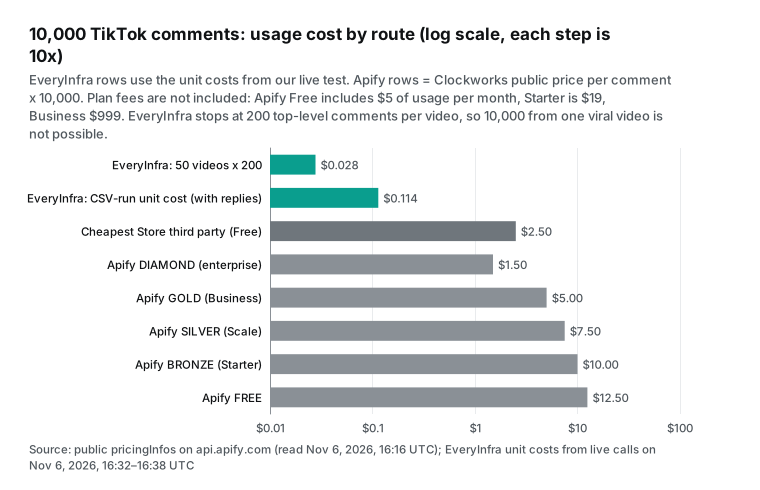
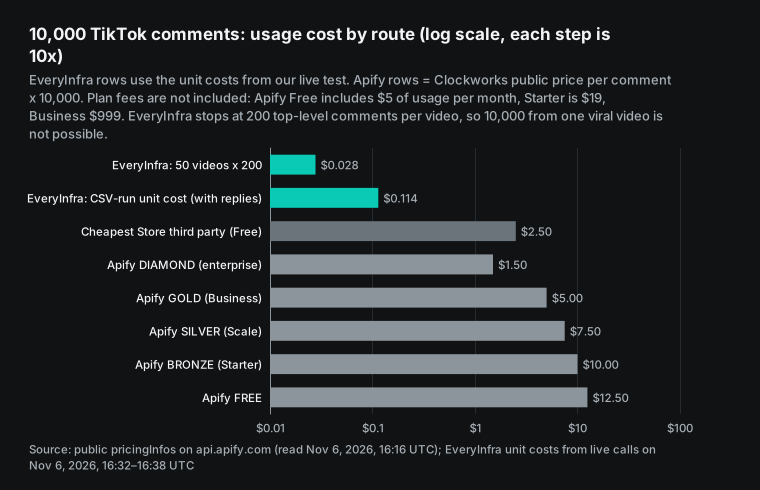
For 10,000 TikTok comments, the most-used comment scraper on the Apify Store costs $5.00 to $12.50 at its public prices. The cheapest third-party scraper on the Store costs $2.50.
On November 7, 2026, we called the EveryInfra tiktok/comments endpoint on real videos. One call returned 200 comments for $0.000556, so 50 videos at 200 comments each cost $0.028. With full reply threads, de-duplication and CSV output, our measured cost was $0.0114 per 1,000 rows, or about $0.11 for 10,000. There is one hard limit: we return at most 200 top-level comments per video, so we cannot give you 10,000 comments from one viral video. For that job, use Apify or the official TikTok Research API.
Our test runs also gave three numbers that we did not find in other guides. First, two pulls of the same video 75 seconds apart shared only 183 of 200 comment IDs. Second, the inline replies that come with each comment covered only 47% of the reply counts that those comments report. Reply paging then recovered 106 of 107 replies across 9 threads. Third, 14% of the comments under one skincare video had no text at all, because they were photo or sticker comments.
This is a tutorial. First, it shows the three routes: no-code tools, your own Python scraper, and an API. For each route, it shows the steps and where the route breaks. Then it gives a complete Python script that pages through comments and replies, removes duplicates and writes a CSV file that Excel opens correctly. Last, it uses one scenario, 10,000 comments, to compare cost and time. If you want a price comparison across all TikTok data types, read our Apify TikTok scraper alternative article. We do not repeat that table here.
How we measured
Every "price per 1,000" in this article uses one formula. We take the money that one call actually charged and divide it by the number of rows that the call actually returned. Then we multiply by 1,000. The divisor is the real row count, not the limit in the request. When a call returns fewer rows, our own unit price goes up, not down.
For the other tools, we used only public material: the Store page, the pricing page, the documentation, and public endpoints that need no account. We did not sign up for Apify or for any browser extension, and we did not buy their services. Thus their numbers in this article are public unit prices, not measured invoices. Every EveryInfra number goes back to a raw response that we saved. All times in this article are Singapore time (SGT, UTC+8) unless a line says otherwise.

What a TikTok comment contains: comments, replies and replies to replies
Before you scrape, define what you want. A TikTok comment section is a tree with two and a half levels. Top-level comments sit under the video. Replies sit under each top-level comment. A reply can also tag another reply, which makes a "reply to a reply". On the page, these replies stay flat under the same top-level comment and do not indent again.
The official TikTok Research API makes this split clear. A video_id gets the comments of a video, and a comment_id gets the replies of a comment.
You cannot use both in one query (Query Video Comments). Thus, with any tool, "scrape comments" is two jobs. First, get the top-level comments. Then, expand each comment that has replies. Many tools do only the first job, or do half of the second job. This is the easiest thing to miss when you compare prices.
Comments are also less and less text-only. On September 3, 2026, TikTok announced voice comments, comment polls, photo carousels of up to 9 images and Live Photo comments. The same announcement gave a figure of more than 1.7 billion comments per day (TikTok Newsroom, 2026-09-03). For data work, this means more rows with empty text. A sticker-only or voice-only comment becomes an empty text cell in most export tools. On May 25, 2026, a TikTokApi user reported that sticker comments return only a [Sticker] placeholder (issue #1303).
The fields worth keeping fall into a few groups: comment ID, text, like count, reply count, time posted, author, and the position in the tree. The table below lists the fields that the two EveryInfra comment endpoints return, next to the Research API fields. The catalog is public and needs no key (endpoint catalog, read at 00:13 SGT on 2026-11-07).
| Field | `tiktok/comments` | `tiktok/comment_replies` | TikTok Research API | Note |
|---|---|---|---|---|
| Comment ID | id | id | id | Use it to de-duplicate and to build the tree |
| Text | text | text | text | Can be empty for sticker or voice comments |
| Likes | like_count | like_count | like_count | |
| Reply count | reply_count (top-level only) | none | reply_count | The total that the comment reports |
| Is a reply | is_reply | is_reply | from parent_comment_id | |
| Parent comment | reply_to_id | reply_to_id | parent_comment_id | |
| Parent reply | none | reply_to_reply_id | none | Only on replies to replies |
| Author | author_username, author_id | also author_name, author_url, author_avatar_url | display_name (reply queries only) | Public fields, mask them on export |
| Liked or pinned by creator | liked_by_author, pinned_by_author | liked_by_author | none | |
| Language | none | language | none | |
| Posted at | posted_at (ISO 8601) | posted_at | create_time (Unix seconds) | |
| Paging | none, 200 max per call | next_page_token, 20 per page | cursor, has_more, 100 per call |
How to scrape TikTok comments: three routes at a glance
Search "how to scrape tiktok comments" and the top results fall into three groups.
There are Apify Store scraper pages, Reddit and GitHub threads, and Python video tutorials. They match three routes. You can use a ready-made tool and click a few buttons. You can write Python against the TikTok web page.
Or you can call an API that already returns clean rows. The routes also differ in four other ways. These are the maximum per video, reply coverage, the need for a login, and who handles errors.
| Route | Example | Steps to start | Max per video | Replies | Account or login | Per 1,000 (public or measured) |
|---|---|---|---|---|---|---|
| Browser extension | A comment export extension on the Chrome Web Store | Install, sign up, paste link, export | 200 free, more on paid plan | Yes | Extension account, your own browser | Paid price shown only inside the extension |
| Web export service | A tiered comment export website | Paste link, export | 100 free; paid tiers 5,000 to 250,000 | Yes | No sign-up on the free tier | Price table loads by script, not read |
| Cloud scraper | Apify TikTok Comments Scraper | Sign up, enter links and counts, run, export | Set by commentsPerPost | Set by maxRepliesPerComment | Apify account | $1.25 (Free tier) to $0.50 (Business tier) |
| Python library | TikTokApi 7.3.3 | Install, add Playwright, copy ms_token, write code | Can page in theory, often blocked | Has a method, not tested | ms_token from your browser | Free software, proxies and time extra, not tested |
| Official research API | TikTok Research API | Apply, wait about 4 weeks, get token | 100 per call, cursor paging | Yes | Approved academic and non-profit research only | Free, 1,000 requests per day |
| Data API | EveryInfra tiktok/comments + tiktok/comment_replies | Get a key, send one POST | 200 top-level per call, no paging | 20 per page, pages to the end | API key only | Measured: $0.0028 (comments), $0.0278 (reply pages) |
The most important column is "max per video". Some jobs need every comment under one viral video, for example tens of thousands of comments.
For those jobs, the free extensions and our API are not enough. The extensions stop at 100 or 200 comments on the free tier. Our tiktok/comments returns at most 200 top-level comments per call, with no paging parameter. We tested this in the Apify TikTok scraper alternative article: a cursor parameter gets a 422 error. For that job, use a per-item cloud scraper that pages to the end, such as Apify, or the approved Research API.
Other jobs need the top few hundred comments from tens or hundreds of videos. An example is a weekly check of what viewers say about a competitor's new videos. For those jobs, a per-call API costs a fraction of a cent per 1,000 comments, which is two to three orders of magnitude less. Decide which job you have before you read on.
Route 1: no-code tools, from browser extensions to the Apify TikTok Comments Scraper
No-code tools come in two types. One type runs in your own browser and reads the page in front of you. The other type runs on another company's servers, and you give it only a link.
A TikTok comment export extension on the Chrome Web Store is a typical example. You install it, create an account, paste a video link and export CSV or XLSX. The free tier stops at 200 comments, and the paid price shows only inside the extension. The store page says that it processes data on your computer. We read version 2.3.1, updated on November 4, 2026 (Chrome Web Store page, read on November 7, 2026). It scrolls the page in your browser with your own TikTok session, so each video needs an open tab and a manual paste.
A tiered comment export website is a typical web service. Its free tier needs no sign-up and gives 100 comments per video.
Personal gives 5,000 per video, Premium 50,000 and Business 250,000. CSV starts at Personal, and a reply_to column marks replies. The API is on Premium and Business only, by the API tier page of the website. Its price table loads by script, and we could not read the amounts on November 7, 2026. Thus we give its row limits but not its prices.
The main cloud scraper is the TikTok Comments Scraper by Clockworks on the Apify Store. You open this actor (Apify's name for a cloud scraping program) and enter links, commentsPerPost and maxRepliesPerComment. Then you run it and export the dataset as CSV, JSON or Excel. A deleted or private video gives an error record such as POST_NOT_FOUND_OR_PRIVATE, not a silent skip. As an API, the synchronous run endpoint returns CSV with format=csv. The maxTotalChargeUsd parameter caps the cost of one run (Run Actor synchronously and get dataset items).
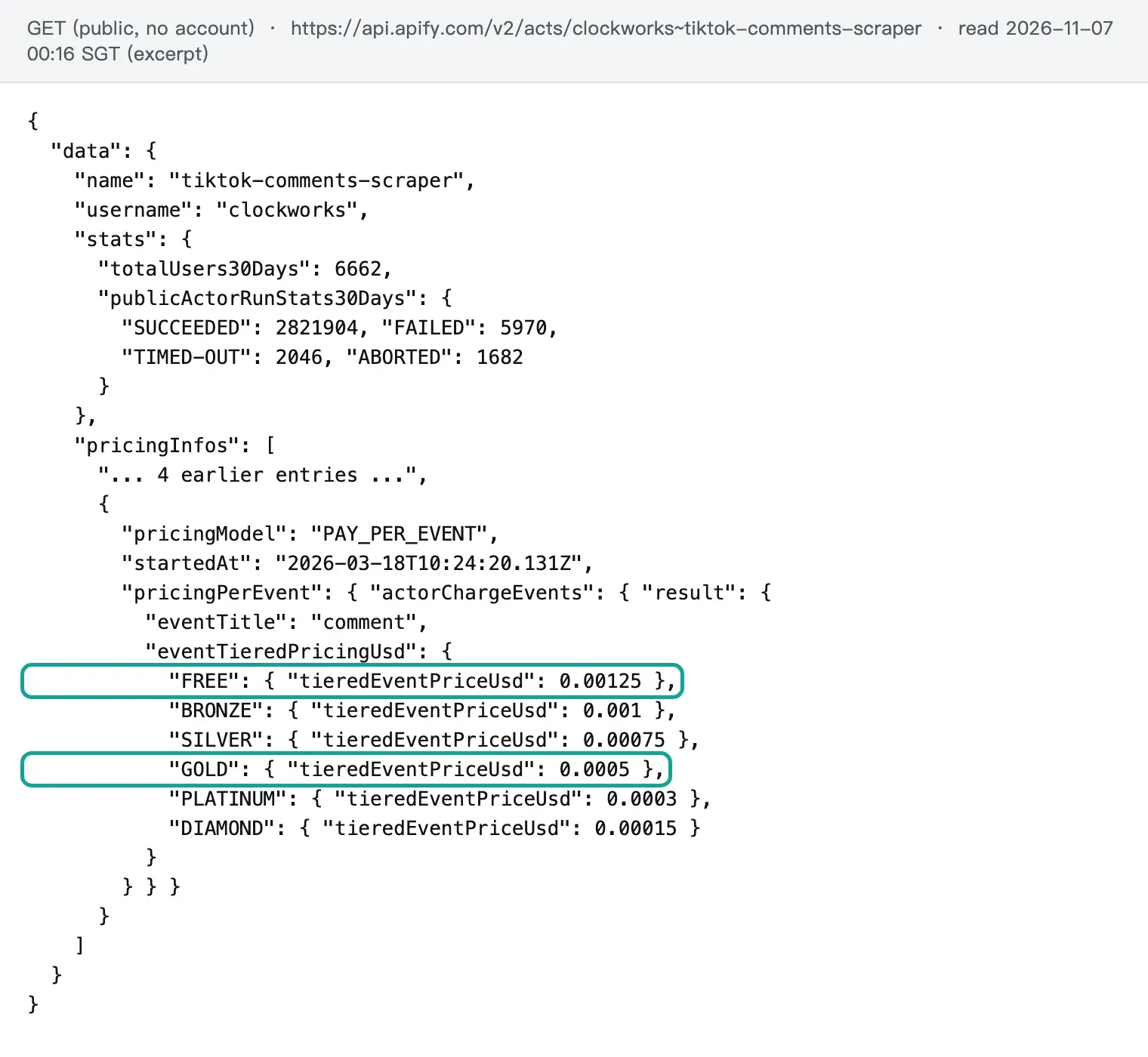
At 00:16 SGT on 2026-11-07, we read the actor's public metadata, which needs no account (Apify public endpoint). The model is pay per event since March 18, 2026, and the only event is one comment in the dataset. Per 1,000 comments, the six tiers cost FREE $1.25, BRONZE $1.00, SILVER $0.75, GOLD $0.50, PLATINUM $0.30 and DIAMOND $0.15.
| Apify tier | Plan | Monthly fee | Per 1,000 comments | 10,000 comments |
|---|---|---|---|---|
| FREE | Free | $0, with $5 of usage | $1.25 | $12.50 |
| BRONZE | Starter | $19 | $1.00 | $10.00 |
| SILVER | Scale | $199 | $0.75 | $7.50 |
| GOLD | Business | $999 | $0.50 | $5.00 |
| PLATINUM, DIAMOND | Enterprise | by contract | $0.30, $0.15 | $3.00, $1.50 |
Plan fees and tiers come from the Apify pricing page and Actor pricing and costs. Each plan includes the same amount of prepaid usage, and unused usage expires at the end of the month. One warning: the FAQ on the Store page still says "$5 per 1,000 results" and a "$29 Starter plan" (Store page, read on 2026-11-07). We reported this mismatch on 2026-10-27, and it is still there. For billing, trust the Pricing tab and the pricingInfos field, not the FAQ text.
Many people use this actor. It has 52,805 users in total and 6,662 in the last 30 days. In 30 days, it ran 2,831,602 times, and 2,821,904 runs succeeded, which is 99.66%. It has 97 reviews with an average of 4.73. This is why it ranks first for "tiktok comments scraper", and why we use it as the baseline.
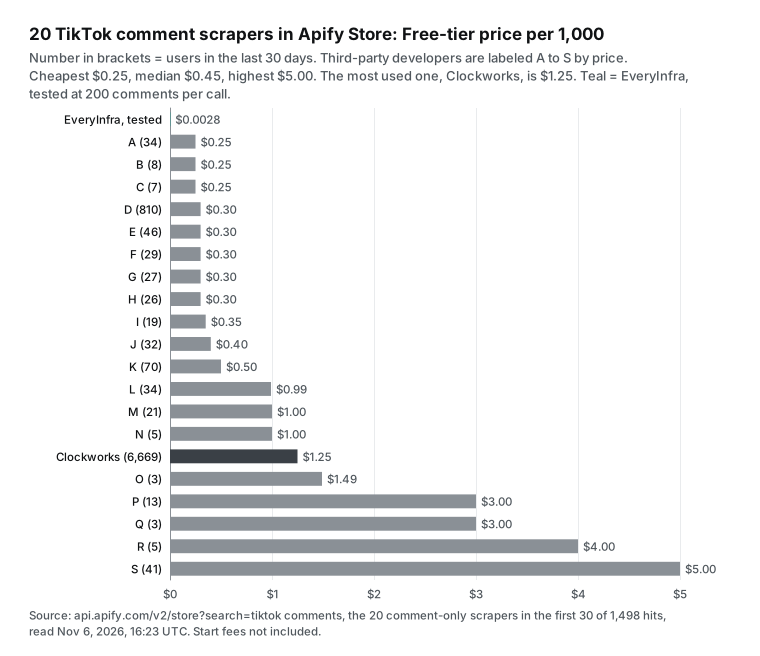
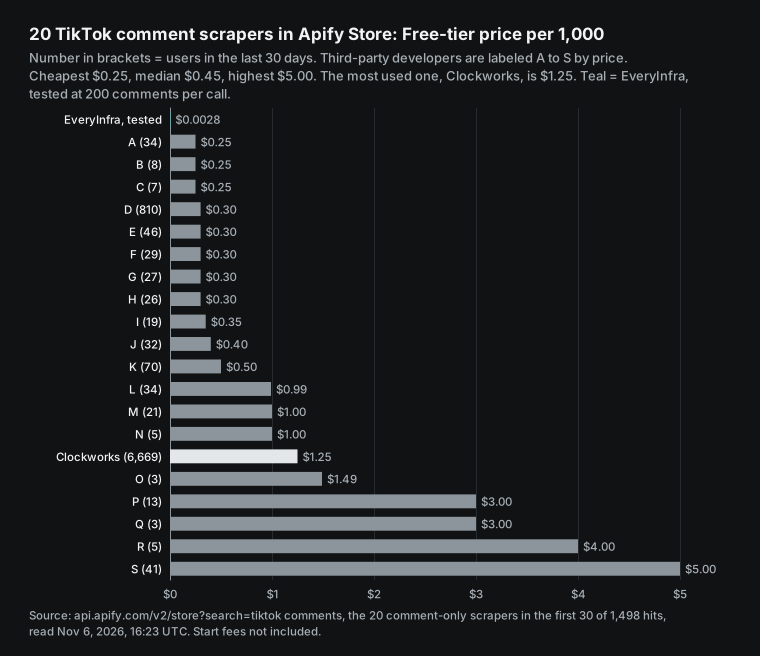
Clockworks is not the only choice. The public Store search for "tiktok comments" gave 1,498 results (Store search endpoint, read at 00:23 SGT on 2026-11-07). In the top 30, 20 tools scrape only TikTok comments. Their Free tier prices go from $0.25 to $5.00 per 1,000, with a median of $0.45.
Some add a start fee of up to $0.01 per run. One title says "$0.25/1000 results", but its public price is $5 per 1,000. The chart labels third-party authors A to S by price.
Route 2: scraping TikTok comments with Python, and whether open-source libraries still work
"Scraping tiktok comments python" is a common search. The need is simple: no per-item fees, just a short script. We checked the three projects that people recommend most. They can work, but the cost is maintenance, not money.
| Project | Version or last push | Stars | Comment support | Status |
|---|---|---|---|---|
| TikTokApi | 7.3.3 on PyPI, 2026-04-01; push 2026-08-24 | 6,733 | comments(count, cursor), 20 per request | Needs Playwright and ms_token; comment issues open |
| yt-dlp | 2026.10.26 | not counted | Comment count only | Comment request closed in 2022 |
| cubernetes/TikTokCommentScraper | push 2023-08-05 | 212 | Browser scroll and export | No updates for two years |
TikTokApi is the best-known unofficial Python wrapper (PyPI page, GitHub repository, read on 2026-11-07). Its video object calls the /api/comment/list/ path of the TikTok web app and pages with cursor.
Before you use it, run pip install TikTokApi and python -m playwright install (Playwright installation). Then copy an ms_token cookie from your own browser. The README says that an EmptyResponseException means that TikTok blocks you as a bot, and that you may need a proxy. A user reported broken comment scraping on August 28, 2025 (issue #1255). Another reported empty bodies on July 18, 2026 (issue #1311). Both issues are still open.
Many people expect yt-dlp to scrape comments with --write-comments. We read its TikTok extractor (tiktok.py, 1,749 lines, read on 2026-11-07). It maps only comment_count and has no function for comment text. The 2022 request for this feature is closed (issue #5037). The latest release is 2026.10.26 (release page). It downloads TikTok videos, but not TikTok comments.
Small GitHub projects named "TikTok comment scraper" are mostly old. Next to cubernetes, xtekky/TikTok-Comment-Scraper has 56 stars and a last push on December 2, 2023. RomySaputraSihananda/tiktok-comment-scrapper has 63 stars and a last push on December 8, 2025 (cubernetes, xtekky, RomySaputraSihananda). The cubernetes author said on Reddit that his scroll method works for thousands of comments, not tens of thousands (r/webscraping thread).
Why is a DIY scraper hard to maintain? The TikTok web request for comments must carry signature parameters and cookies that page scripts calculate. When the scripts change, the parameters stop working. We do not show how to bypass them. The TikTok US Terms of Service prohibit automated scraping without written approval (TikTok US Terms of Service, section 3.4).
In October 2026, US courts also refused to dismiss two cases about the bypass of anti-scraping measures (MediaPost report). The References list a legal opinion on this topic. This is not legal advice. It shows that a bypass needs constant work and adds legal risk.
Exported comments contain usernames, so treat them as personal data, as the compliance section shows. We did not test TikTokApi ourselves, because it needs a real TikTok session cookie. Our script below uses Python only to call an API, page, de-duplicate and write CSV.
Route 3: a TikTok comments scraper API, and how the two endpoints work together
The third route calls an API that already turns comments into structured rows. EveryInfra splits TikTok comments into two endpoints. Both use POST https://api.everyinfra.com/api/v1/social, and both cost $0.000556 per call (endpoint catalog, read at 00:13 SGT on 2026-11-07). See also the TikTok comments endpoint page and the comment replies endpoint page.
tiktok/comments gets the comments of one video. The only required parameter is url, a TikTok video link. The optional limit defaults to 20, with a maximum of 200. The catalog says that each top-level comment includes at most two replies, and that the full conversation tree is not guaranteed. One call returns the full batch, and there is no paging parameter. Thus one video gives at most 200 rows from this endpoint.
tiktok/comment_replies gets the replies of one comment. It requires url and comment_id, which is the id of a top-level comment from the first endpoint. The optional page_token takes the next_page_token from the previous page. Without it, you get page 1.
The catalog says that each page has at most 20 replies, each page is one call, and the token stays valid for 24 hours. limit has no effect on this endpoint. This endpoint fills the gap of "two replies per comment". Use tiktok/comments to find the comments with many replies, and then page through tiktok/comment_replies for each of them.
The simplest request is this:
curl -s https://api.everyinfra.com/api/v1/social \
  -H "Authorization: Bearer $EVERYINFRA_API_KEY" \
  -H "Content-Type: application/json" \
  -d '{"platform":"tiktok","action":"comments","params":{"url":"https://www.tiktok.com/@<creator>/video/<video_id>","limit":200}}'
In the response, results is the array of comments, and billing.charged_usd is the amount that the call charged. Failed calls and empty results are not charged. When a call returns no data, billing.charged is false, charged_usd is 0, and billing.reason gives the cause.
Your script must handle two rate cases. First, each key has a rate limit, and a call over the limit gets a 429 error with retry_after in seconds. Second, when the service is temporarily unavailable, you get a 503 or 429 with retryable set to true and a retry_after value. Test 3 below records what happened to us. For slow requests, you can add "mode":"async" to the request body. The call then returns a job_id immediately, and you poll for the result.
Test 1: what 200 comments from a video with 1.2 million views contain
Our test video is a skincare video posted on September 25, 2026. At 00:15 SGT on November 7, it had the most comments in a tiktok/search query for "skincare routine": 1,238,029 views and 1,116 reported comments. The creator is a private person, so we give only the video ID, 7689447084436573472. Its comment count is just over 1,000, so it shows which 200 comments one call returns.
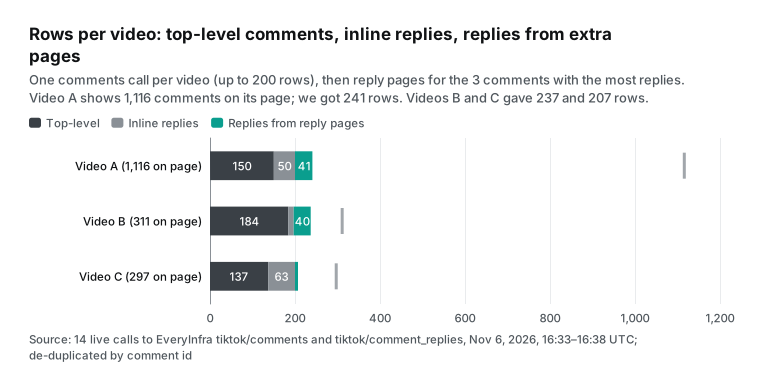
The call at 00:32:41 SGT succeeded in 36.71 seconds, after a run of failures. It returned 200 rows for $0.000556, which is $0.0028 per 1,000. There were 154 top-level comments and 46 inline replies. The 34 top-level comments with replies reported 97 replies in total, so the inline replies covered 47%. Eight threads had more than 2 replies and needed paging.
Four comments had empty text, because TikTok allows photo-only or sticker-only comments. The creator liked 19 comments, and no comment was pinned.
The dates ran from September 25 to November 6, and the order was not strictly by likes. The first comment had 1,667 likes, the second had 0, and the seventh had 1,316. This matches the default TikTok app order, which mixes popular and new comments. The median like count was only 1. For "new comments this week", filter by posted_at yourself.
At 00:33:56 SGT, the CSV run pulled the same video again, 75 seconds later. It also got 200 rows, but only 183 IDs were the same. The ranking is live, so the top 200 change as new comments and likes arrive. When you merge pulls, de-duplicate on id, not on row position.
To measure the change, we pulled the video a third time at 01:06 SGT, 33 minutes after the first pull. It returned 200 rows in 89.56 seconds for $0.000556. It shared 169 IDs with the 00:32 pull and 167 with the 00:33 pull. The three pulls gave 243 distinct comments. In all three pulls, the newest comment was from 14:42 UTC on November 6.
Thus no new comment entered the top 200 in that half hour, and the 31 changed rows came only from re-ranking. Repeat pulls are one way to get more distinct comments: three pulls cost $0.001668 and gave 43 more comments than one pull.
Test 2: how to page replies to the end, on a thread with 24 replies
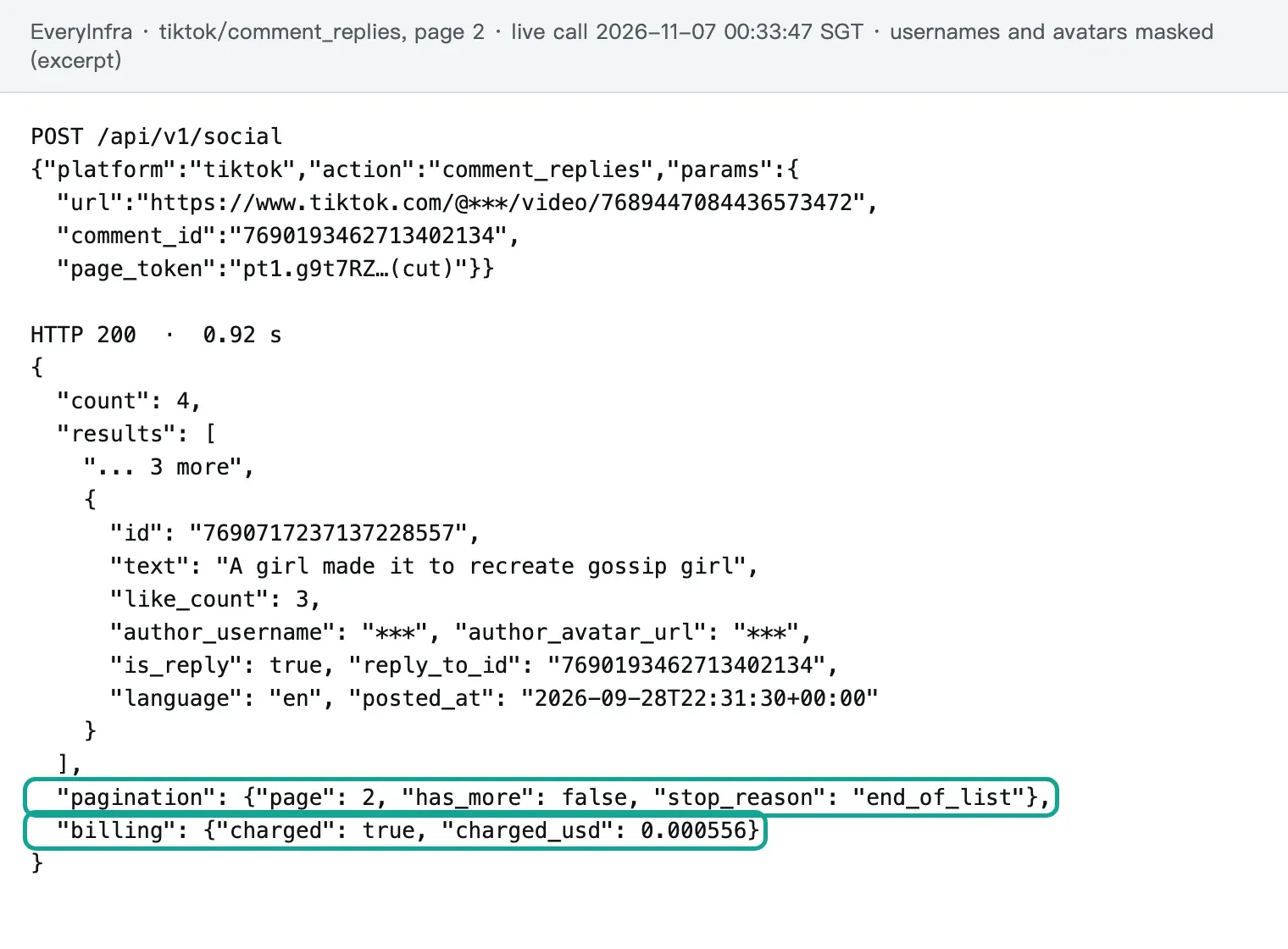
Next, we expanded the comment with the most replies (ID 7690193462713402134, which reported 24 replies). The table shows the two pages.
| Page | SGT | `page_token` in request | Rows | Time | `has_more` | `stop_reason` | Charged |
|---|---|---|---|---|---|---|---|
| 1 | 00:33:41 | none | 20 | 0.99 s | true | empty | $0.000556 |
| 2 | 00:33:47 | next_page_token from page 1 | 4 | 0.92 s | false | end_of_list | $0.000556 |
Page 1 returned 20 replies, pagination.has_more was true, and next_page_token was a token that starts with pt1..
We sent the token back without changes for page 2, which returned 4 replies with has_more false. The two pages gave 24 replies, which matches the reported count, with no duplicate IDs. The 2 inline replies from the comment call were also in these 24, so a merge creates duplicates that you must remove. Each page cost $0.000556. By reply count, that is $0.0463 per 1,000. A full page of 20 costs $0.0278 per 1,000, ten times the comment call, because one page holds only 20 rows.
Reply pages have more fields than comment calls. Of the 24 replies, 17 had reply_to_reply_id, so they were replies to replies (71%). Most people in this thread replied to other replies, not to the original comment. The two inline replies do not show this back-and-forth structure.
Each reply also has a language field. Here, 23 replies were English and 1 was French. They ran from 2026-09-27 to 2026-10-18, so people still replied three weeks after the original comment.
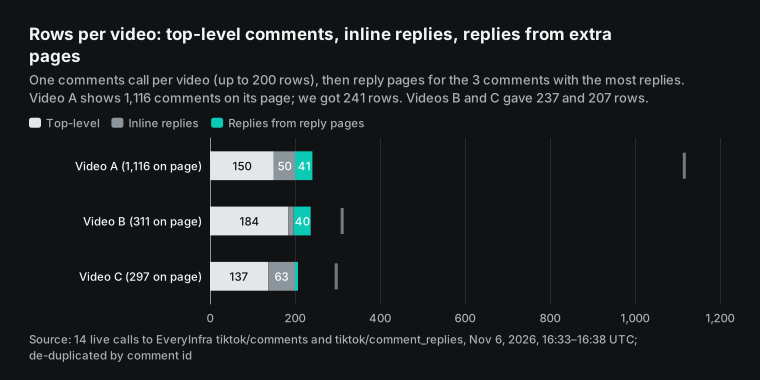
In the CSV run, the script expanded 9 threads, the 3 with the most replies on each video. Their reported reply counts added up to 107, and the reply pages returned 106 of them, or 99.1%. The only gap was a thread on video B that reported 31 replies. Its two pages returned 30, and the missing reply was probably deleted or hidden. The 11 reply calls took 0.74 to 1.65 seconds each, about two orders of magnitude faster than comment calls. Thus reply expansion adds calls, but it adds almost no wait time.
Test 3: 11 failures in half an hour, and what they cost
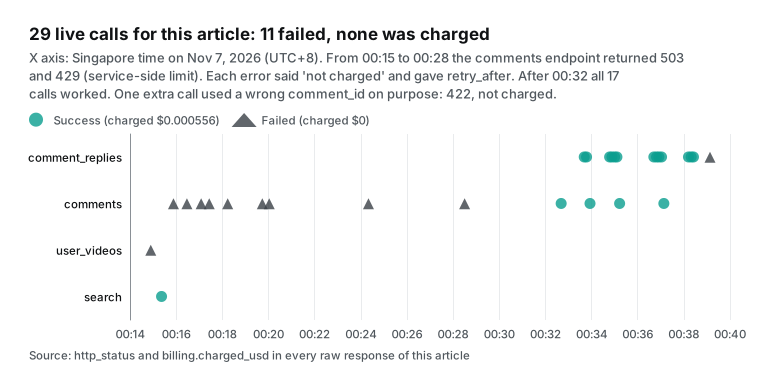
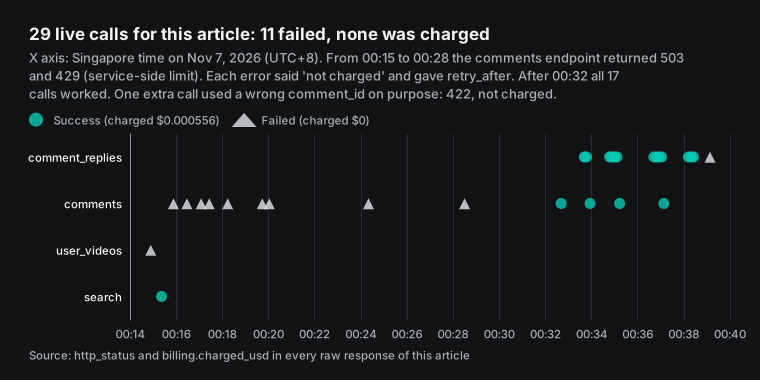
We made 30 test calls for this article, and 11 of them failed. The chart shows the 29 calls before 00:39 SGT. The 30th call, at 01:06, is in Test 1. None was charged. The 9 service-side failures had charged_usd 0 and billing.reason request_failed_refunded. The key-rate failure and the parameter error stopped before billing, and their error text said "Nothing was charged".
| Type | Count | SGT | Time per call | Error code and `fault` | Charged |
|---|---|---|---|---|---|
| Service temporarily unavailable | 7 | 00:14:54–00:20:02 | 10.4–20.5 s | 503 unavailable, service, retry_after 60 s | $0 |
| Service-side rate limit | 2 | 00:24:20, 00:28:30 | 10.4–10.7 s | 429 rate_limited (rate limit), service, retry_after 60 s | $0 |
| This key over its per-minute limit | 1 | 00:19:44 | 0.17 s | 429 rate_limited (rate limit), account, retry_after 16 s | $0 |
Bad parameter (comment_id not valid) | 1 | 00:39:08 | 0.20 s | 422 missing_param, request, do not retry | $0 |
The comments endpoint was down from 00:15 to 00:28 SGT, for every video and in async mode. Other TikTok endpoints also returned 503 at that time, for example tiktok/user_videos at 00:14:54. Only the tiktok/search call at 00:15:22 worked. Thus most of the API was down, not only the comments endpoint. None of these failures was charged. After 00:32, no comment call failed again.
Each error body has retryable, retry_after (60 seconds for service failures, 16 for the key limit) and max_retries. At the third failure of one endpoint in 10 minutes, the body adds an example request to try once. If the example works, the problem is your target video. If the example also fails, the problem is ours, and the body says to ask the user before you open a support ticket. Our example also failed, and we did not open a ticket for a test.
The fault field shows who must act. service and account mean wait and retry. request means change the parameters, because a retry does not help. The script follows these rules. On other routes, Apify notes that some pay-per-event actors also charge platform usage for the run (Actors in Store). A DIY script pays for failures with your time and proxy traffic.
Scrape TikTok comments to CSV: the full Python script
This is the exact script that we ran on November 7, with no cuts. It needs only requests (Requests documentation) and the standard library. It spaces calls under the key limit of 10 per minute and retries 429 and retryable errors after retry_after. It does not retry parameter errors. It gets up to 200 comments per video and pages the N threads with the most replies. Then it removes duplicates by id, writes the CSV and saves a .calls.json log of each call.
"""Export TikTok comments (and optional reply threads) to CSV with the EveryInfra API.

Usage:
    export EVERYINFRA_API_KEY=...            # never hard-code the key
    python tiktok_comments_to_csv.py urls.txt comments.csv --replies 3 --hash-authors

urls.txt has one public TikTok video URL per line.
"""
import argparse
import csv
import hashlib
import json
import os
import sys
import time

import requests

API = "https://api.everyinfra.com/api/v1/social"
MIN_INTERVAL = 6.5          # seconds between calls: stays under 10 requests per minute
FIELDS = ["video_url", "id", "is_reply", "reply_to_id", "reply_to_reply_id", "text",
          "like_count", "reply_count", "author", "posted_at", "liked_by_author",
          "pinned_by_author", "source"]

session = requests.Session()
session.headers["Authorization"] = "Bearer " + os.environ["EVERYINFRA_API_KEY"]
last_call = 0.0
spent_usd = 0.0
calls = []


def call(action, params, tries=3):
    """One POST with client-side pacing; retries 429 and retryable 5xx, never retries 4xx."""
    global last_call, spent_usd
    for attempt in range(tries):
        wait = MIN_INTERVAL - (time.time() - last_call)
        if wait > 0:
            time.sleep(wait)
        last_call = time.time()
        t0 = time.time()
        r = session.post(API, json={"platform": "tiktok", "action": action, "params": params}, timeout=120)
        body = r.json()
        billing = body.get("billing") or {}
        spent_usd += billing.get("charged_usd") or 0.0
        rows = body.get("results") if isinstance(body.get("results"), list) else []
        calls.append({"action": action, "params": params, "status": r.status_code, "rows": len(rows),
                      "charged_usd": billing.get("charged_usd"), "seconds": round(time.time() - t0, 2),
                      "at_utc": time.strftime("%Y-%m-%dT%H:%M:%SZ", time.gmtime(t0))})
        if r.status_code == 200:
            return body
        err = body.get("error") or {}
        if r.status_code == 429 or err.get("retryable"):
            time.sleep(err.get("retry_after") or 60)
            continue
        print(f"{action} failed: {r.status_code} {err.get('code')} {err.get('message')}", file=sys.stderr)
        return None
    return None


def author_of(row, hash_authors):
    name = row.get("author_username") or ""
    return hashlib.sha256(name.encode()).hexdigest()[:10] if hash_authors and name else name


def to_row(video_url, row, source, hash_authors):
    out = {k: row.get(k) for k in FIELDS if k in row}
    out.update(video_url=video_url, author=author_of(row, hash_authors), source=source)
    return out


def main():
    ap = argparse.ArgumentParser()
    ap.add_argument("urls")
    ap.add_argument("out")
    ap.add_argument("--limit", type=int, default=200, help="comments per video, 1-200")
    ap.add_argument("--replies", type=int, default=0, help="pull full reply threads for the N most-replied comments")
    ap.add_argument("--reply-pages", type=int, default=3, help="max reply pages per thread (20 replies per page)")
    ap.add_argument("--hash-authors", action="store_true")
    a = ap.parse_args()

    seen, rows = set(), []
    videos = [u.strip() for u in open(a.urls) if u.strip()]
    for url in videos:
        body = call("comments", {"url": url, "limit": a.limit})
        if not body:
            continue
        top = []
        for c in body["results"]:
            if c["id"] in seen:
                continue
            seen.add(c["id"])
            rows.append(to_row(url, c, "comments", a.hash_authors))
            if not c.get("is_reply"):
                top.append(c)
        # replies: only the threads with more replies than the two that come inline
        threads = sorted((c for c in top if (c.get("reply_count") or 0) > 2),
                         key=lambda c: c["reply_count"], reverse=True)[: a.replies]
        for c in threads:
            token = None
            for _ in range(a.reply_pages):
                params = {"url": url, "comment_id": c["id"]}
                if token:
                    params["page_token"] = token
                page = call("comment_replies", params)
                if not page:
                    break
                for rep in page["results"]:
                    if rep["id"] in seen:
                        continue
                    seen.add(rep["id"])
                    rows.append(to_row(url, rep, "comment_replies", a.hash_authors))
                token = next((x.get("next_page_token") for x in page["results"] if x.get("next_page_token")), None) \
                    or page.get("next_page_token")
                if not token:
                    break

    with open(a.out, "w", newline="", encoding="utf-8-sig") as f:   # BOM so Excel reads UTF-8 and emoji
        w = csv.DictWriter(f, fieldnames=FIELDS, extrasaction="ignore")
        w.writeheader()
        w.writerows(rows)
    print(json.dumps({"videos": len(videos), "rows": len(rows), "calls": len(calls),
                      "spent_usd": round(spent_usd, 6)}, ensure_ascii=False))
    json.dump(calls, open(a.out + ".calls.json", "w"), indent=1)


if __name__ == "__main__":
    main()
Three design choices need a short explanation. First, the script waits 6.5 seconds between calls, so it stays under 10 calls per minute before a 429 can occur. Second, one global seen set removes duplicates, because an inline reply comes back again on a reply page. In our run, 18 of 703 rows were duplicates of this type. Third, the file uses utf-8-sig, which writes a BOM marker (Python codecs documentation). Excel needs it to show emoji and non-English text correctly (Microsoft Support).
With pandas, read the file with encoding="utf-8-sig" (pandas.read_csv). The standard csv.DictWriter quotes line breaks, commas and double quotes by RFC 4180 (Python csv module, RFC 4180). The --hash-authors option replaces usernames with 10 characters of a SHA-256 hash (Python hashlib documentation). This is not anonymization, but it keeps names out of shared tables. Without requests, run uv run --with requests python3 tiktok_comments_to_csv.py urls.txt comments.csv --replies 3 --hash-authors (uv: running scripts).
| Column | From | Meaning | Value from our run |
|---|---|---|---|
video_url | script | The video of this row | https://www.tiktok.com/@…/video/7689447084436573472 |
id | API | Unique ID, the de-duplication key | 7690193462713402134 |
is_reply | API | false for a top-level comment, true for a reply | False |
reply_to_id | reply pages | The top-level comment of this reply | 7690193462713402134 |
reply_to_reply_id | reply pages | The reply that this reply answers | 17 of 24 have a value |
text | API | Comment text, empty for photo or sticker comments | 39 of 685 rows are empty |
like_count | API | Likes | Max 1,667 |
reply_count | comment calls | Reply count that the comment reports | Max 31 |
author | script | Username, or a hash with --hash-authors | 3f9c… (sample) |
posted_at | API | Time posted, UTC, ISO 8601 | 2026-09-27T12:55:18+00:00 |
liked_by_author | API | The creator liked it | 19 on video A |
pinned_by_author | API | The creator pinned it | none on video A |
source | script | comments or comment_replies | 597 / 88 |
For more columns, add field names to FIELDS. Reply rows also have language, author_name, author_url and video_id (field catalog).


We ran the script on three videos from 00:33:55 to 00:38:26 SGT on November 7, with --replies 3 --hash-authors. All 14 calls succeeded in 271 seconds and cost $0.007784. The script fetched 703 rows and kept 685 unique rows, which is $0.0114 per 1,000.
| Video | Reported comments | Comment call rows | Comment call time | Threads | Reply calls | Unique rows | Empty text |
|---|---|---|---|---|---|---|---|
| A (skincare, 1.24M views) | 1,116 | 200 | 51.2 s | 3 | 4 | 241 | 4 |
| B (skincare, 816K views) | 311 | 197 | 89.42 s | 3 | 4 | 237 | 33 |
| C (skincare, 336K views) | 297 | 200 | 64.01 s | 3 | 3 | 207 | 2 |
| Total | 1,724 | 597 | 204.6 s | 9 | 11 | 685 | 39 |
Almost all the time goes to comment calls: 204.6 seconds for 3 calls, against about 10 seconds for 11 reply calls. For videos with about 300 comments, the export covers most of the section: 76% for video B and 70% for video C. Video A, with more than 1,000 comments, gets only 22%. On video B, 33 of 237 rows have no text (14%), because many viewers posted only photos or stickers. Remove these rows before sentiment analysis, or a model can label them "neutral".
The posted_at field also shows the age of each comment section. The 237 rows of video B were posted between November 2, 2026 and November 6, 2026. The 207 rows of video C were posted between October 12, 2026 and November 5, 2026. Video A is older, from September 25, and its newest comment is from November 6, 2026 at 14:42 UTC. A new video gets most of its comments in its first week, so a daily export of new videos is enough.
10,000 comments: cost and time on each route
Let us fix the scenario: you need 10,000 TikTok comments in one CSV file. There are two cases. In case one, you need 200 top comments from each of 50 videos. In case two, you need 10,000 comments from one video. All prices use the public prices that we read on November 7, 2026, and our measured charges from the same day. They cover usage only, not plan fees. The time column gives only measured values, and we write "not tested" for the rest.
| Route | 50 videos × 200 | One video, 10,000 | Time | Basis and source |
|---|---|---|---|---|
| Browser comment export extension | Free tier stops at 200, more needs the paid plan | Paid plan | Paste each link by hand and wait for the scroll; not tested | Chrome Web Store page, price inside the extension |
| Tiered comment export website | Free tier 100 per video is not enough, paid tiers start at 5,000 per video | Middle tier or higher (50,000 per video) | Not tested | Price table loads by script, amounts not read |
| Apify Clockworks, Free tier | $12.50 | $12.50 | Not tested | $0.00125 × 10,000, more than the $5 Free plan credit, so you need Starter |
| Apify Clockworks, Starter (BRONZE) | $10.00 | $10.00 | Not tested | $0.001 × 10,000, Starter costs $19 per month with $19 of usage |
| Apify Clockworks, Business (GOLD) | $5.00 | $5.00 | Not tested | $0.0005 × 10,000, Business costs $999 per month |
| Cheapest third-party Store scraper | From $2.50 | From $2.50 | Not tested | Free tier $0.00025 × 10,000, some add a start fee |
| Your own Python scraper | $0 software, plus proxies and maintenance time | Same | Not tested | See Route 2 |
| EveryInfra, comments only | $0.028 | Not possible | Measured 37–90 s per call, about 55 minutes for 50 calls in sequence | 50 calls × $0.000556 |
| EveryInfra, comments plus replies | About $0.11 | Not possible | Measured 271 s for 3 videos, about 75 minutes for 50 by the same rate | Measured $0.0114 per 1,000 × 10 |
Read the third column first. For 10,000 comments from one video, our row says "not possible". The reason is not price. The API has no paging, and 200 is a hard limit.
For that job, use Apify or a third-party Store scraper at $2.50 to $12.50. Or apply for the TikTok Research API, which gives 100,000 records per day, but only to non-commercial researchers (Research API FAQ). For 200 top comments from each of 50 videos, the gap is two orders of magnitude. For the same 10,000 comments, we cost 2.8 cents. Apify Clockworks costs $5 on Business and $12.50 on Free.
Our time values come from measurement. The 5 successful comment calls took 66.2 seconds on average, so 50 videos in sequence take about 55 minutes. The 5 calls took 36.71 s at 00:32:41, 51.20 s, 89.42 s and 64.01 s in the CSV run, and 89.56 s at 01:06.
With "mode":"async", you can submit all 50 jobs and collect the results later. Under the limit of 10 calls per minute, you can submit all 50 jobs in 5 minutes. We did not run this parallel method in this test, so the table does not include it. We did not measure Apify or extension times either. An empty cell is more useful than a guess.
There is also a hidden cost beyond the price. When Apify Free plan usage goes over $5, you must wait for next month or upgrade. Our API takes each call from your balance and charges nothing for failures. The two billing models are different, so budget for each one separately.
Price per 1,000 comments: why the gap is two orders of magnitude
The gap in the last section is clearer as a price per 1,000 comments. The chart below uses a log scale, so each grid step is 10 times the last. It puts our three measured unit prices next to the Apify prices.
All three of our unit prices come from one number: $0.000556 per call. The only difference is the number of rows in one call. The table shows how this changes the price.
| Rows in one call | Measured on | Per 1,000 |
|---|---|---|
200 (tiktok/comments, limit: 200) | Video A at 00:32:41 SGT | $0.0028 |
197 (tiktok/comments) | Video B at 00:35:13 SGT | $0.0028 |
20 (tiktok/comment_replies, full page) | Page 1 at 00:33:41 SGT | $0.0278 |
4 (tiktok/comment_replies, last page) | Page 2 at 00:33:47 SGT | $0.139 |
| 685 rows in 14 calls (CSV run total) | 00:33:55–00:38:26 SGT | $0.0114 |
Thus, to save money with our API, fill each call. Always send limit: 200 on comment calls. Expand only the threads that you need. Do not page threads with fewer than 3 replies, because the first two replies already come inline.
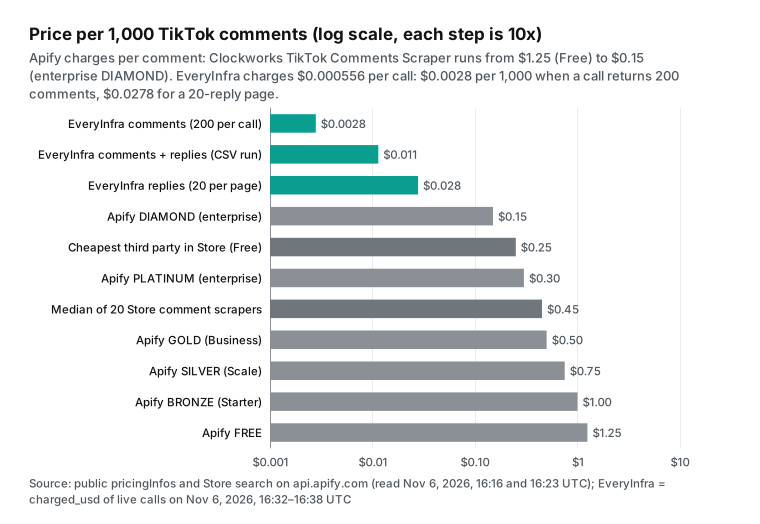
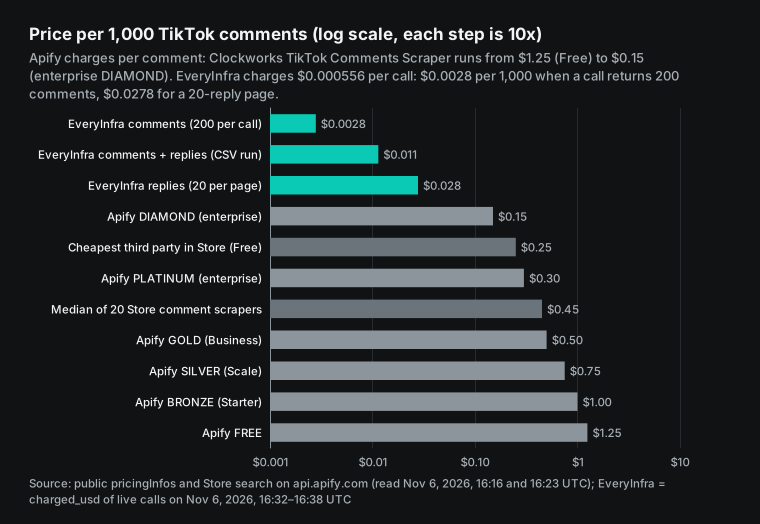
Apify charges per item, so the number of items in a run does not change the unit price. Your plan tier changes it, from $1.25 per 1,000 on Free to $0.15 on DIAMOND, a factor of more than 8. The median Free tier price of third-party Store scrapers is $0.45, and the lowest is $0.25. Our most expensive unit price, $0.0278 for reply pages, is still one order of magnitude below the cheapest $0.25 on the Store.
Connect to AI tools: a remote MCP configuration example
Many people send scraped comments to a large language model for sentiment labels or topic summaries. In an MCP client such as Claude or Cursor, you can skip the script. The model can call the comments endpoint directly.
MCP (Model Context Protocol) is an open protocol that lets AI clients call external tools (specification). The EveryInfra remote MCP address is https://api.everyinfra.com/mcp, and the data tool is everyinfra_call_api. Its parameters are the same platform, action and params as above. Details are on the MCP server page.
{
  "mcpServers": {
    "everyinfra": {
      "type": "http",
      "url": "https://api.everyinfra.com/mcp",
      "headers": { "Authorization": "Bearer ${EVERYINFRA_API_KEY}" }
    }
  }
}
This is a configuration example in the format of the Claude Code MCP documentation, where .mcp.json expands ${VAR} environment variables (Claude Code MCP documentation). All numbers in this article come from direct HTTP calls, not from an MCP run.
With MCP, pay attention to two things. The first is response size. 200 raw comments come to tens of thousands of characters and use a large part of the model context. In our Claude Code subagents article, we measured an MCP response of 54,819 characters for 200 comments. To reduce this, let a subagent fetch the data and return only a summary, or ask for limit 50.
The second is the confirmation prompt. everyinfra_call_api costs money, so the client asks you to confirm each call. Before a batch run, allow only this one tool in your permission settings. Apify also has its own MCP server (Apify MCP server). It lets a model search and run Store actors, at the price of each actor.
When Apify or an extension is the better choice
Based on our tests and the public documentation, Apify or an extension fits better in these cases.
| Case | Better choice | Reason |
|---|---|---|
| All comments from one viral video | Apify commentsPerPost, the top tier of a comment export website, Research API cursor | Our API stops at 200 top-level comments per video |
| One or two videos now and then, no code | Extension (200 free) or comment export website (100 free) | No API key or request needed |
| A workflow already on Apify | Stay on Apify | Schedules, webhooks and Make or Zapier links already work |
| Approved academic research | TikTok Research API | Free, 100,000 records per day, masked phone numbers and emails |
The first case is the most important. tiktok/comment_replies pages the replies of one comment to the end, but no endpoint gets top-level comment 201. For a full giveaway count under one viral video, the other tools can do the job, and we cannot. The research route has its own costs. The review takes about 4 weeks, the data is for research only, and archived statistics can be lower than live values (Research API FAQ).
In the other direction, some jobs need the top comments of tens or hundreds of videos, on a schedule, connected to AI tools. There, a per-call API costs two to three orders of magnitude less per 1,000 and charges nothing for failures. Calculate your own volume with the cost section before you choose.
Compliance and privacy: public comments are still personal data
Users post comments in public, but that does not mean free use. Look at three things separately: platform terms, personal data and your use of the data. This is not legal advice.
Platform terms. The TikTok US Terms of Service were updated on July 15, 2026. Section 3.4 prohibits automated scraping or export of platform data without written approval from the TikTok USDS Joint Venture (TikTok US Terms of Service).
Research API data is limited to the approved project (Research API Terms of Service). In hiQ v. LinkedIn, the Ninth Circuit found that scraping public pages is unlikely to be "access without authorization" under the CFAA (Ninth Circuit opinion, 2022). Contract claims and circumvention claims are separate questions.
Personal data. Usernames, user IDs and avatar links are personal data under the GDPR. You need a lawful basis, and you must collect only what you need (GDPR, Articles 5 and 6). The Research API masks phone numbers and email addresses in comment text (Query Video Comments). Our --hash-authors option follows the same idea. For sentiment or topic analysis, you do not need the author name.
Your use. An internal competitor review has a very different risk from a public repost of comments with authors. Article 40 of the EU Digital Services Act gives researchers a formal channel to request platform data (DSA, Article 40). EveryInfra returns only publicly visible comments. It does not return private accounts, direct messages or content behind a login.
Recent changes (September to November 2026)
| Date | Change | What it means for comment scraping |
|---|---|---|
| 2026-09-03 | TikTok launched voice comments, comment polls and photo carousel comments, and said that users post more than 1.7 billion comments per day (Newsroom) | Expect more empty-text rows. Flag them on export, and do not treat them as deleted comments |
| 2026-10-09 | A US federal judge denied Apple's motion to dismiss a YouTube scraping case, after a similar ByteDance request was denied earlier that month (MediaPost) | Circumvention of anti-scraping measures is becoming a legal claim, so a DIY signature bypass carries more risk |
| 2026-10-26 | yt-dlp released 2026.10.26, and its TikTok extractor still gets only the comment count (release page) | Do not expect --write-comments to export TikTok comments |
| 2026-11-04 | The Chrome comment export extension from Route 1 updated to 2.3.1, and its free tier is still 200 comments (Chrome Web Store page, read on November 7) | The extension keeps up with TikTok web changes, and the free limit did not change |
| 2026-11-06 | The Apify TikTok Comments Scraper had its last change, and its price is still the six tiers in effect since 2026-03-18 (public endpoint) | The Apify prices in this article are current as of November 7 |
Get started: from the playground to a daily export
Step 1: open the data market, find TikTok comments, and run one video link in the playground. Check that the fields are the ones you need. Playground calls cost the same as API calls, and failures are not charged. Step 2: get an API key in the console, and send the request above with curl, as the quickstart shows. Step 3: save the script as tiktok_comments_to_csv.py. Put your video links in urls.txt, one per line, and run the script. Open the CSV and check the row count.
Step 4: for a daily run, give the script to cron, GitHub Actions or your own scheduler, and pass only the videos posted that day. Our CSV run gave 685 rows for 3 videos, about 228 rows per video. Thus 50 videos per day with 3 reply threads each give about 11,400 rows. At $0.0114 per 1,000 rows, that costs about $0.13 per day, or about $3.90 per 30-day month. For current prices, see the pricing page and the price_usd field in the catalog.
For comments on other platforms, use the same key and the same endpoint, and change platform. Examples are YouTube comments and Instagram comments. For platform overviews, see the TikTok API and the YouTube API. For a price comparison of TikTok data types against Apify, read the Apify TikTok scraper alternative. To understand Apify billing itself, read Apify pricing explained. For alternatives on all platforms, read Apify alternatives.
FAQ
The questions come from search suggestions and forum posts, queried on 2026-11-07.
Can you scrape TikTok comments?
Technically, yes. All three routes get public comments. But section 3.4 of the TikTok US Terms of Service prohibits automated extraction without written approval (Terms of Service, section 3.4). Approved academic research can use the official Research API. Our API returns only publicly visible comments. Source: the Google suggestion "can you scrape tiktok comments".
Is there a free TikTok comments scraper?
Yes, with limits. A comment export website gives 100 comments per video for free, and a Chrome comment export extension gives 200. The Apify Free plan includes $5 of usage per month, about 4,000 comments at the Clockworks Free price. The Research API is free for approved researchers only. Source: the suggestion "free tiktok comments scraper" and an r/DataHoarder post about scraping without payment (Reddit).
How do I scrape TikTok comments to CSV and open them in Excel?
Use the script in this article. It writes a UTF-8 CSV with a BOM, so Excel shows emoji correctly. For a CSV without a BOM, use Data > From Text/CSV in Excel and select UTF-8 (Microsoft Support). On r/DataHoarder, a student paid for an export and got "random letters", which is an encoding problem (Reddit).
Is there a TikTok comments scraper API?
The TikTok Display API has only /v2/user/info/, /v2/video/list/ and /v2/video/query/. They read the data of the authorized user, and none returns comments (Display API overview). The official comment endpoint is in the Research API, which needs an application (Research API product page). Third-party APIs exist, such as tiktok/comments and tiktok/comment_replies in this article. Source: the suggestion "tiktok comments api".
Why does an Apify TikTok comment scraper ask for my cookie?
A Stack Overflow user asked this about an Apify setup (Stack Overflow tag page). Some third-party Store scrapers ask for login cookies, but the Clockworks input example has only links and counts. A cookie gives away your logged-in session, so do not share it if you can avoid it. Our API needs no TikTok account or cookie.
Can I get all comments from one video?
Not with our API. tiktok/comments returns at most 200, with no paging, but tiktok/comment_replies pages replies to the end. For all comments, use Apify commentsPerPost, a paid tier of a comment export website or the Research API cursor. Source: the suggestion "export all tiktok comments".
References
- Research API: Query Video Comments, TikTok for Developers, read on 2026-11-07
- Say more in the comments, TikTok Newsroom, 2026-09-03
- TikTok-Api issue #1303: sticker comments return a placeholder, GitHub, 2026-05-25
- Social API endpoint catalog (TikTok), EveryInfra, read at 00:13 SGT on 2026-11-07
- TikTok Comments Scraper (Clockworks), Apify Store, read on 2026-11-07
- Run Actor synchronously and get dataset items, Apify Docs, 2026-11-07
- clockworks~tiktok-comments-scraper public metadata, Apify API, read at 00:16 SGT on 2026-11-07
- Pricing, Apify, 2026-11-07
- Pricing and costs, Apify Docs, 2026-11-07
- Store search for "tiktok comments", Apify API, read at 00:23 SGT on 2026-11-07
- TikTokApi 7.3.3, PyPI, released 2026-04-01
- davidteather/TikTok-Api, GitHub, last push 2026-08-24, read on 2026-11-07
- Installation (Python), Playwright, read on 2026-11-07
- TikTok-Api issue #1255: comment scraping does not work, GitHub, 2025-08-28
- TikTok-Api issue #1311: HTTP 200 with an empty body, GitHub, 2026-07-18
- yt-dlp TikTok extractor source, GitHub, read on 2026-11-07
- yt-dlp issue #5037: TikTok comment extraction, GitHub, closed 2022-10-31
- yt-dlp 2026.10.26 release, GitHub, 2026-10-26
- cubernetes/TikTokCommentScraper, GitHub, last push 2023-08-05
- xtekky/TikTok-Comment-Scraper, GitHub, last push 2023-12-02
- RomySaputraSihananda/tiktok-comment-scrapper, GitHub, last push 2025-12-08
- Does an API exist to scrape TikTok comment text on videos, Reddit r/webscraping, 2026-11-07
- Terms of Service (US), section 3.4, TikTok, updated 2026-07-15
- Apple Must Face Suit Over YouTube Scraping, MediaPost, 2026-10-09
- Web Scraping as Illegal Circumvention?, Communications of the ACM, October 2026
- Actors in Store, Apify Docs, 2026-11-07
- Advanced Usage, Requests, 2026-11-07
- codecs: utf-8-sig, Python documentation, read on 2026-11-07
- Opening CSV UTF-8 files correctly in Excel, Microsoft Support, 2026-11-07
- pandas.read_csv, pandas, 2026-11-07
- csv: CSV File Reading and Writing, Python documentation, read on 2026-11-07
- RFC 4180: Common Format and MIME Type for CSV Files, RFC Editor, October 2005
- hashlib, Python documentation, read on 2026-11-07
- Running scripts, uv documentation, read on 2026-11-07
- Research API FAQ, TikTok for Developers, 2026-11-07
- Specification, Model Context Protocol, 2026-11-07
- Connect Claude Code to tools via MCP, Claude Code Docs, 2026-11-07
- Apify MCP server, Apify Docs, 2026-11-07
- Research API Terms of Service, TikTok, read on 2026-11-07
- hiQ Labs v. LinkedIn opinion (17-16783), US Court of Appeals for the Ninth Circuit, 2022-04-18
- Regulation (EU) 2016/679 (GDPR), EUR-Lex, 2016-04-27
- Regulation (EU) 2022/2065 (DSA), EUR-Lex, 2022-10-19
- Scraping TikTok comments without paying, Reddit r/DataHoarder, 2026-11-07
- How do I extract comments from TikTok for my research, Reddit r/DataHoarder, read on 2026-11-07
- Display API Overview, TikTok for Developers, 2026-11-07
- Research API product page, TikTok for Developers, read on 2026-11-07
- Active questions tagged tiktok, Stack Overflow, read on 2026-11-07
Reference BL-104