Claude Code Subagents: Haiku Workers for TikTok Accounts
One TikTok brand account is about 9,700 tokens of raw data. A Haiku 5.5 subagent returns a 95-token summary. 98 live calls, 429 handling and the cost for 50 accounts.
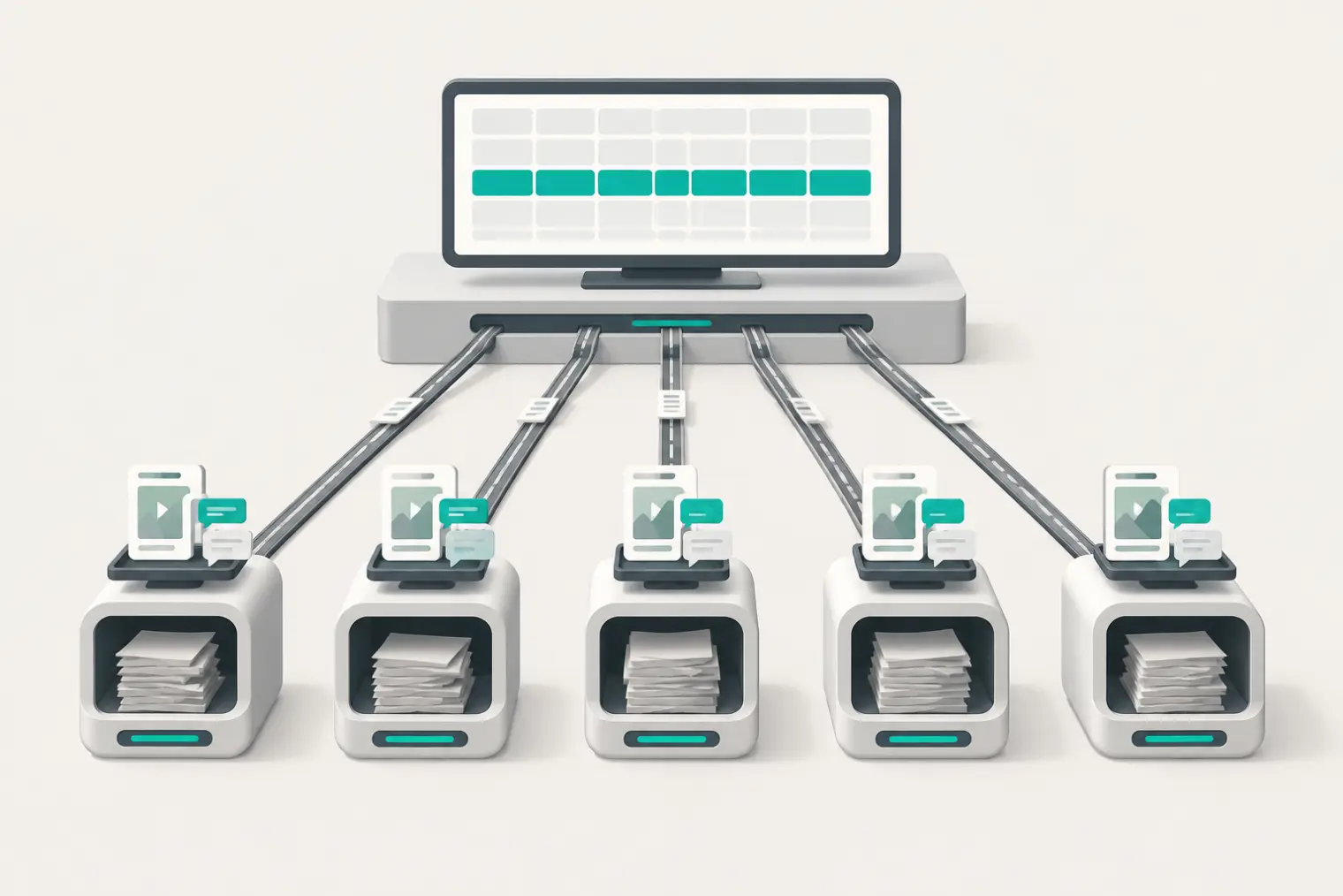
On Oct 26, 2026, from 17:25 to 17:48 SGT, we pulled 18 TikTok brand accounts through the EveryInfra API. For each account we took the profile, the 10 newest videos and the comments on one video. The raw results averaged 38,794 bytes per account, which is about 9,700 tokens at the ratio on Anthropic's pricing page (10 kB is about 2,500 tokens). A summary of the same account is about 382 bytes, or 95 tokens. That gap of about 100x is what Claude Code subagents save in the main context.
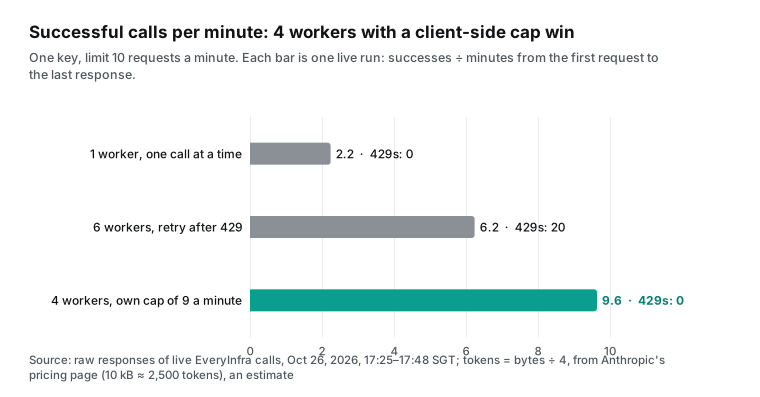
A second result is easy to miss. We capped our test key at 10 requests a minute (the account default is 60). Six parallel workers got 20 rate-limit errors (429) in 56 requests. Four workers with a client-side cap got more than 50% more results per minute.
This article answers one practical question. You have a list of a few dozen TikTok brand accounts: competitors, possible partners or your own regional accounts. You want Claude Code to pull the profiles, recent videos and comments, and then build a comparison table. How do you split the work across subagents? Which model and which tools does each subagent get? Which data calls does it make, what does it cost, and what happens when the API rate limit stops it?
The Claude Code settings in this article come from the official documentation and the changelog. We did not run the subagent itself on our machine, so we label that part as a configuration example. Every EveryInfra number comes from the raw responses of live calls.
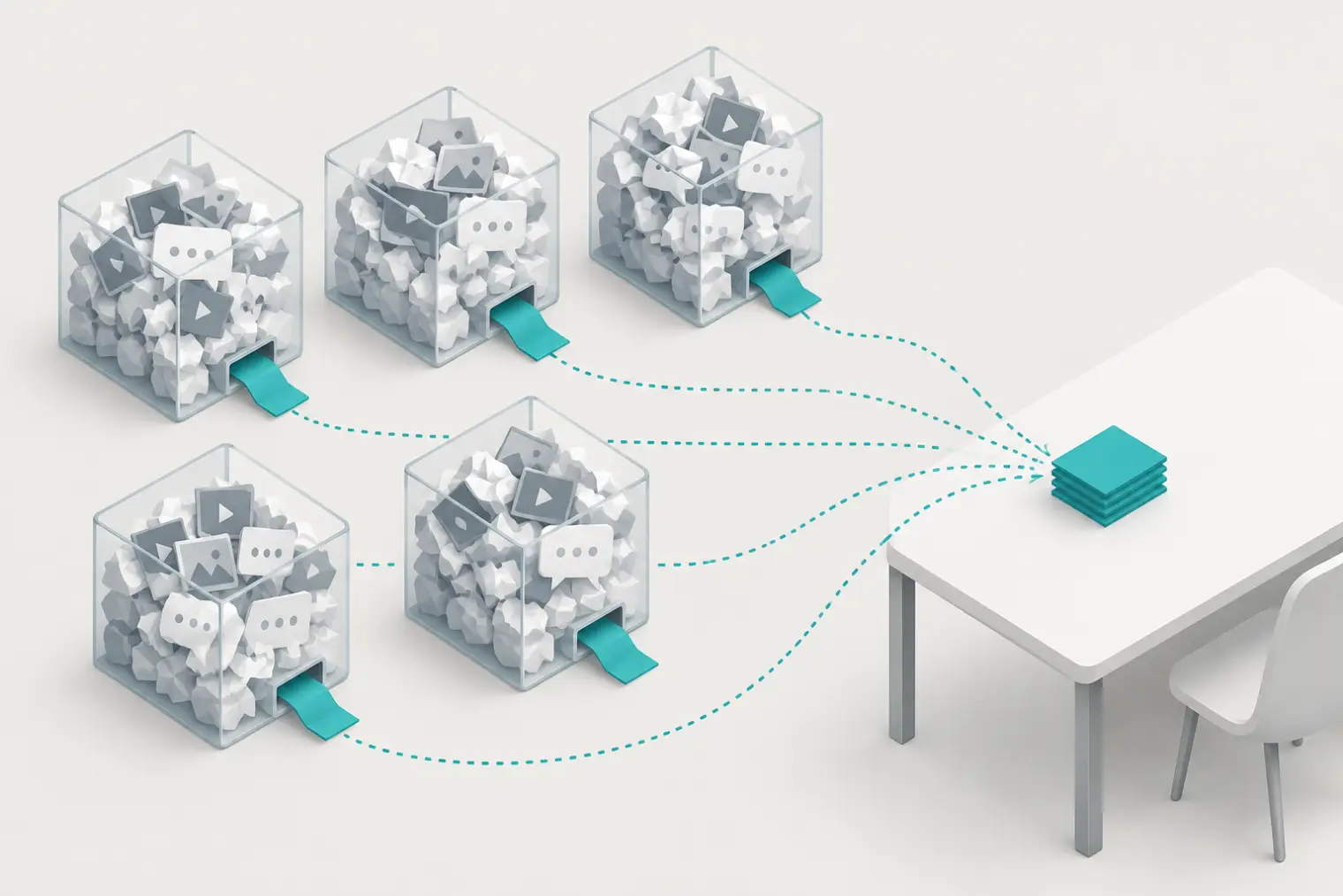
The job: 50 brand accounts, one comparison table
We define the job first, because every number later depends on it. The input is a list of TikTok usernames. For each account we want three things. The first is the profile (followers, video count, verified status).
The second is the 10 newest videos (views, likes, comments, posting time). The third is up to 50 comments on the most-commented of those 10 videos. The output is one table row per account. The columns are followers, median views of the recent videos, engagement rate, posts per week and the number of comments sampled, plus one short note.
This job has three properties that match what subagents are for. First, the accounts do not depend on each other. Pulling Nike does not need the Adidas result, so the work can run in parallel. Second, the job reads much more than it keeps. Each account returns tens of kilobytes, but the table keeps one row. Third, the steps are fixed and the decisions are simple, so a small, low-cost model can do them.
The Claude Code documentation describes subagents in the same terms. It says to use one when a side task would flood your main conversation. The flood can be search results, logs or file contents that you will not read again. The subagent does that work in its own context and returns only the summary (Claude Code subagents docs).
We tested 24 usernames in three groups. The US sportswear group had 8 accounts: Nike, Adidas, Gymshark, lululemon, Under Armour, New Balance, PUMA and HOKA. The China-based brands group had SHEIN, Temu, DJI, OnePlus and EcoFlow. It also had three usernames that we guessed from the brand names of Anker, Insta360 and Xiaomi.
The Spanish-language group had Zara, Bershka, Real Madrid, Telcel and Pull&Bear, plus three guessed usernames for Mercado Libre, OXXO and Bimbo. All six guesses were wrong, and the section on failures explains why that matters. The remaining 18 verified brand accounts are the base for all size, cost and speed numbers below, scaled to 50 where we say so.


Should you split at all? What Anthropic's Oct 22 guide says
Before the setup, look at the opposite advice. On Oct 22, 2026, Anthropic published a long guide called "When to fold subagents into your main agent loop" (Anthropic guide). It says that most agents should use fewer subagents. The default should be one model, one context window and one open tool loop. Domain procedures go into Skills, and lookups and hard limits go into tools. A Reddit summary reports that one customer's single loop ran about 2x faster than its multi-agent setup.
The companion single-agent-loop-kit is careful about this claim. Its README says that the kit does not assume that a single loop always wins. It measures each change on the same eval before and after. The same README also lists good reasons to keep a subagent. They are parallel research across fresh contexts, independent verification, and work that reads far more than the main agent needs afterward.
Pulling 50 TikTok accounts is the last case. Each account brings in about 9,700 tokens, and the main session needs one 95-token row. The Decoder reports Anthropic's three conditions to keep subagents. They are measurable quality loss from context growth, parallel tasks with separate contexts, or trouble with tool selection. Our job meets the first two.
| Reason to keep a subagent (Anthropic kit) | True here? | Data from this article |
|---|---|---|
| Parallel research across fresh contexts | Yes | The accounts do not depend on each other |
| Work that reads far more than the main agent needs | Yes | About 9,700 tokens read versus 95 returned per account |
| Independent verification | Partly | A fresh worker can rerun one account for a check |
| Trouble with too many tools | Yes, without a filter | 25 MCP tools versus 2 allowed |
Our decision is to split, but only one level and only for the "pull and compress" step. The table, the choice of which accounts need a closer look, and the decision to run another round stay in the main session. Those decisions need all accounts at the same time. This is not the "one subagent per team" pattern that the guide warns about. Our workers have no role. Each one has a fixed set of steps and one account.
Claude Code subagents: the file, the model field and the tool allowlist
A Claude Code subagent is a Markdown file. It starts with YAML metadata (the docs call it frontmatter), and the body becomes the system prompt of the subagent. Project subagents go in .claude/agents/ and you can commit them for your team. User subagents go in ~/.claude/agents/.
The docs say that only name and description are required. Field names use camelCase, and Claude Code ignores a misspelled field without an error (frontmatter reference). Here is our configuration example for this job. The paragraphs after it explain each choice.
---
name: tiktok-account-worker
description: Pull one TikTok account (profile, newest videos, comments on one video) and return a one-line JSON summary. Use one per account in the list.
model: claude-haiku-5-5
effort: low
tools: mcp__everyinfra__everyinfra_call_api, mcp__everyinfra__everyinfra_get_job
mcpServers:
  - everyinfra:
      type: http
      url: https://api.everyinfra.com/mcp
      headers:
        Authorization: "Bearer ${EVERYINFRA_API_KEY}"
maxTurns: 8
omitClaudeMd: true
---

Work on the one TikTok username in your task. Do these steps in order:
1. Call everyinfra_call_api with platform=tiktok, action=profile, params={username}.
   If is_verified is false and follower_count < 1000, stop and return {"username":..., "flag":"lookalike"}.
2. Call action=user_videos with params={username, limit:10}. Leave out is_pinned=true videos from medians and rates.
3. Take the video with the highest comment_count from step 2. Call action=comments with params={url, limit:50}.
4. On a 429, wait retry_after seconds and retry once. Do not change the parameters.
5. Output one JSON line only: username, verified, followers, median_views, engagement_pct,
   posts_per_week, comments_fetched, and one note of 25 words or less. Do not output raw data.
The model line uses the full model ID instead of the haiku alias. The next section explains why. The tools line is an allowlist. The docs say that a subagent with a tools list can use only those tools. A subagent without the list inherits every tool of the main conversation (available tools).
The EveryInfra remote MCP server returns 25 tools in tools/list. Two of them get data: everyinfra_call_api and everyinfra_get_job. The others manage the account, keys, support tickets and webhooks. A tool such as everyinfra_key_delete has no place in a batch job that a small model runs 50 times. The allowlist keeps two tools and removes that risk at the source.
The mcpServers line saves the most context. The docs say that an inline MCP server in a subagent connects when the subagent starts and disconnects when it finishes. So define the server inline, not in .mcp.json. Then its tool text stays out of the main context (scope MCP servers to a subagent).
We measured the EveryInfra tools/list response at 30,682 bytes, or about 7,670 tokens. The initialize response adds 3,924 characters of server instructions. The two allowed tools take 2,505 bytes, or about 626 tokens. The docs also state a trust rule: Claude Code loads an inline MCP server from a project .claude/agents/ file only after you trust that folder. Versions before v2.1.238 did not check this.
omitClaudeMd: true starts the subagent without the user, project and local CLAUDE.md files. By default, a subagent loads every CLAUDE.md level that the main conversation loads (what loads at startup). A worker that makes three API calls does not need most of those rules, and each of 50 workers would load its own copy. This field needs Claude Code v2.1.271 or later. maxTurns: 8 sets a turn limit. At the limit, Claude Code marks the output as partial, and the main session can resume the worker (v2.1.246 and later).
The key uses environment variable expansion. The Claude Code MCP docs say that .mcp.json and subagent MCP entries support ${VAR}. A team can share one file, and each person can use a personal key. But some credential names always expand to an empty value in the url and headers of a remote server.
These include ANTHROPIC_API_KEY, cloud provider credentials and NPM_TOKEN (MCP docs, environment variables). This rule stops a project file from sending your credentials to a server that the file names. Use your own variable name, such as EVERYINFRA_API_KEY.
You can also keep the server out of the subagent file. Add it to the project with one command. Then use its name in mcpServers:
claude mcp add --transport http everyinfra https://api.everyinfra.com/mcp \
  --scope project --header "Authorization: Bearer ${EVERYINFRA_API_KEY}"
One more setting can stop the job. In tools/list, everyinfra_call_api has readOnlyHint: false and destructiveHint: true, because each call costs money. The docs say what happens when a background subagent needs permission for a tool call. Claude Code shows the prompt in the main session and names the subagent (foreground and background).
Fifty workers can mean fifty prompts. Before you start, allow mcp__everyinfra__everyinfra_call_api in permissions.allow in your settings (permissions docs). Allow only that one tool.
The table below lists each field, its job and the official source with the version that it needs.
| Field | Value in this example | What it does | Source (version) |
|---|---|---|---|
model | claude-haiku-5-5 | Sets the subagent model. Aliases such as haiku and inherit also work | Subagents docs, "Choose a model" |
tools | Two MCP tools only | Allowlist; without it the subagent inherits all tools | Subagents docs, "Available tools" |
mcpServers | Inline EveryInfra server | Tool descriptions load only in the subagent | Subagents docs; trust check from v2.1.238 |
effort | low | Effort level for this subagent | Subagents docs, "Choose an effort level" |
maxTurns | 8 | Turn limit; output marked partial at the limit | Partial mark from v2.1.246 |
omitClaudeMd | true | Skips CLAUDE.md files | v2.1.271 and later |
Claude Code subagents model selection: four steps and the haiku alias trap
The model that a subagent runs on is the most cost-sensitive part of this job. It is also one of the most common questions. Google suggestions include "claude code subagents model selection", "claude code subagent model default" and "claude_code_subagent_model force". The docs give a four-step order.
First, the model parameter that the main session passes when it starts the subagent. Second, the model field in the subagent file, where inherit means the main model. Third, the CLAUDE_CODE_SUBAGENT_MODEL environment variable. Fourth, the model of the main conversation (Choose a model).
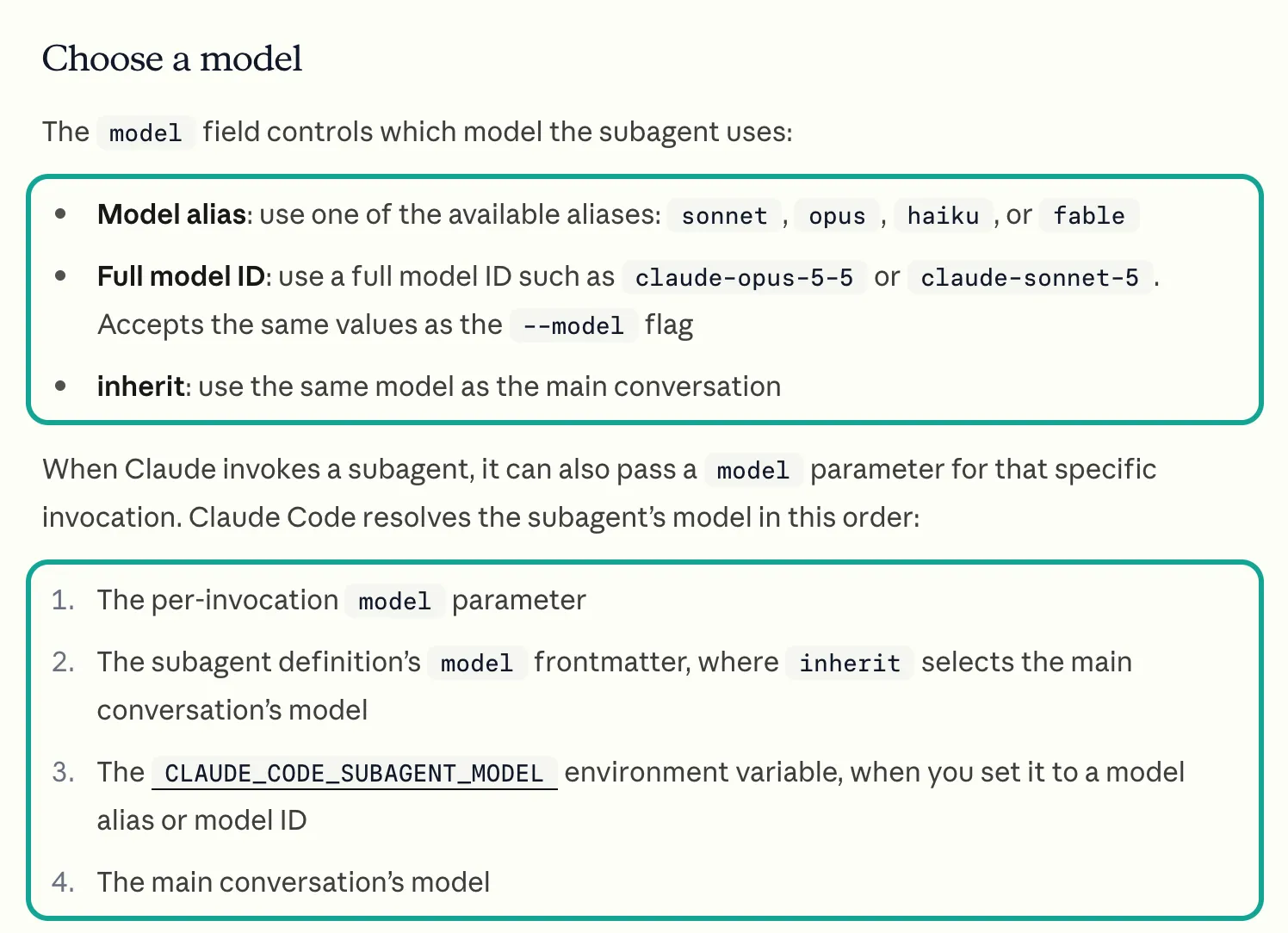
This order has two results. First, a subagent without a model field inherits the main model. If your main session runs Opus 5.5, a small data worker also bills at Opus rates. A Reddit post with 736 upvotes gave the same warning. The built-in Explore subagent no longer always runs on Haiku. It follows the main session (r/ClaudeCode thread).
Second, the environment variable comes after the file, so it is only a default. To force one model on every subagent, the docs say to also set CLAUDE_CODE_SUBAGENT_MODEL_FORCE=1. With that flag, Claude Code ignores the model field in subagent files. An older community post puts the variable first (r/claude thread). That order does not match the current docs, so follow the docs.
We use the full ID instead of haiku because the alias points to different models on different providers. The Claude Code model configuration docs have a table. On the Anthropic API, haiku means Haiku 5.5. On Claude Platform on AWS, Amazon Bedrock, Google Cloud and Microsoft Foundry, haiku still means Haiku 4.5 (model configuration docs). Haiku 4.5 lists at $1 per million input tokens and $5 per million output tokens. That is 10x the Haiku 5.5 price (Haiku 5.5 launch page price table).
The same subagent file on Bedrock can cost ten times more, and nothing shows an error. The Claude Code changelog says that Haiku 5.5 became the default Haiku model on the Anthropic API in v2.1.293 on 2026-10-07 (Claude Code changelog).
| Provider | `haiku` alias points to | Input / output per million tokens | What to do |
|---|---|---|---|
| Anthropic API | Haiku 5.5 | $0.10 / $0.50 (prompts up to 100k) | Alias or full ID |
| Claude Platform on AWS | Haiku 4.5 | $1 / $5 | Use the full ID |
| Amazon Bedrock, Google Cloud | Haiku 4.5 | Cloud provider prices | Use the provider model ID |
| Microsoft Foundry | Haiku 4.5 | Azure prices | Use the full ID |
Why Haiku 5.5 and not Sonnet? The Oct 7, 2026 launch page states the use: high-volume, cost-sensitive tasks such as summaries, compaction, database queries and classification. It says the model pairs well with Opus 5.5 and Sonnet 5.5 as a subagent. The same page says that Sonnet 5.5 and Opus 5.5 remain better for complex agentic coding. Haiku 5.5 is best for narrowly scoped tasks (Haiku 5.5 launch page).
Our worker does three things. It calls the API in order, picks the video with the most comments and computes a few medians. A script can check each output. That is a narrow task.
Community reports agree. One user ran Haiku 5.5 on 7 small, bounded tasks and got 140 of 140 accepted, the same as Opus 5.5. The same user warned that "one file plus a check is fine," but open-ended work drifts (r/ClaudeAI thread).
Haiku 5.5 also changes some API behavior. The migration guide says that Haiku 5.5 does not accept temperature, top_p or top_k. A thinking value with budget_tokens returns a 400 error, so use {"type": "adaptive"}. Assistant prefill is not supported (Haiku 5.5 migration guide). Claude Code handles these parameters for you. If you build workers with the Agent SDK or the API, check them.
The three EveryInfra calls each worker makes
All three capabilities come from the EveryInfra catalog (GET /api/v1/social/catalog, free, no key). We read and saved it on Oct 26, 2026, at 17:22 SGT. All three are in the TikTok tier with a price_usd of 0.000556, which is $0.000556 per call. One call costs the same no matter how many rows it returns.
user_videos returns up to 50 rows per call and comments up to 200 (TikTok catalog). The capability pages are tiktok/profile, tiktok/user_videos and tiktok/comments. The platform overview is the TikTok data API.
| Capability | Required parameter | Use in this article | Price per call | Fields used (match the catalog response_fields) |
|---|---|---|---|---|
tiktok/profile | username | 1 call per account | $0.000556 | username, display_name, follower_count, video_count, like_count, is_verified |
tiktok/user_videos | username | limit: 10 | $0.000556 | url, view_count, like_count, comment_count, posted_at, is_pinned |
tiktok/comments | url | limit: 50 | $0.000556 | id, like_count, reply_count, is_reply, posted_at |
tiktok/search | keyword | content_type: profile to find the right username | $0.000556 per account returned | author_username, author_is_verified, author_follower_count |
The last row needs a note. In the catalog, tiktok/search has a rows_per_unit_when field. It says that with content_type set to profile, each returned row counts as one unit. We used it to find the right usernames for three brands with limit: 5, and each call cost $0.002778, which is 5 × $0.000556. A video search costs one unit per call, but an account search costs one unit per account. This difference is easy to miss in a budget.
Here is the first worker step over REST. The key comes only from an environment variable. The billing.charged_usd field in the response shows the real charge for the call.
curl -s https://api.everyinfra.com/api/v1/social \
  -H "Authorization: Bearer $EVERYINFRA_API_KEY" \
  -H "Content-Type: application/json" \
  -d '{"platform":"tiktok","action":"user_videos","params":{"username":"nike","limit":10}}'
Two field details change the table. First, user_videos sorts by newest, but pinned videos (is_pinned: true) come first. Seven of 18 accounts had pinned videos in their newest 10, and SHEIN, DJI and Gymshark had 3 each. Pinned videos can be months old. Without the filter, the "last 10 videos" of SHEIN span 294 days, and the posting rate is wrong.
Second, use the number of comments that the call returns, not the comment_count on the video. The New Balance video showed 29 comments and the call returned 27. The Telcel video showed 10 and the call returned 5. The catalog also says that each top-level comment carries at most two replies, and the full thread is not guaranteed.
One real MCP round trip: what the model sends and what comes back
A subagent that calls the API through MCP uses the Streamable HTTP transport of the MCP specification. The order is initialize, then notifications/initialized, then tools/list, then tools/call (MCP 2025-06-18 transports, lifecycle).
We did this by hand at 17:30 SGT on Oct 26, 2026. initialize returned 200 with protocol version 2025-06-18. The response had no Mcp-Session-Id header, so this server does not need a session ID. notifications/initialized returned 202 with an empty body, as our remote MCP setup guide says. tools/list returned 25 tools.
At 17:45:05 SGT we sent one tools/call to everyinfra_call_api for the comments on a Nike video with limit: 200. This is the same call that a Haiku worker sends from Claude Code. The API returned 200 after 92.6 seconds. The full HTTP response was 61,653 bytes. Its content[0].text field had 54,819 characters with 177 comments and billing.charged_usd: 0.000556.
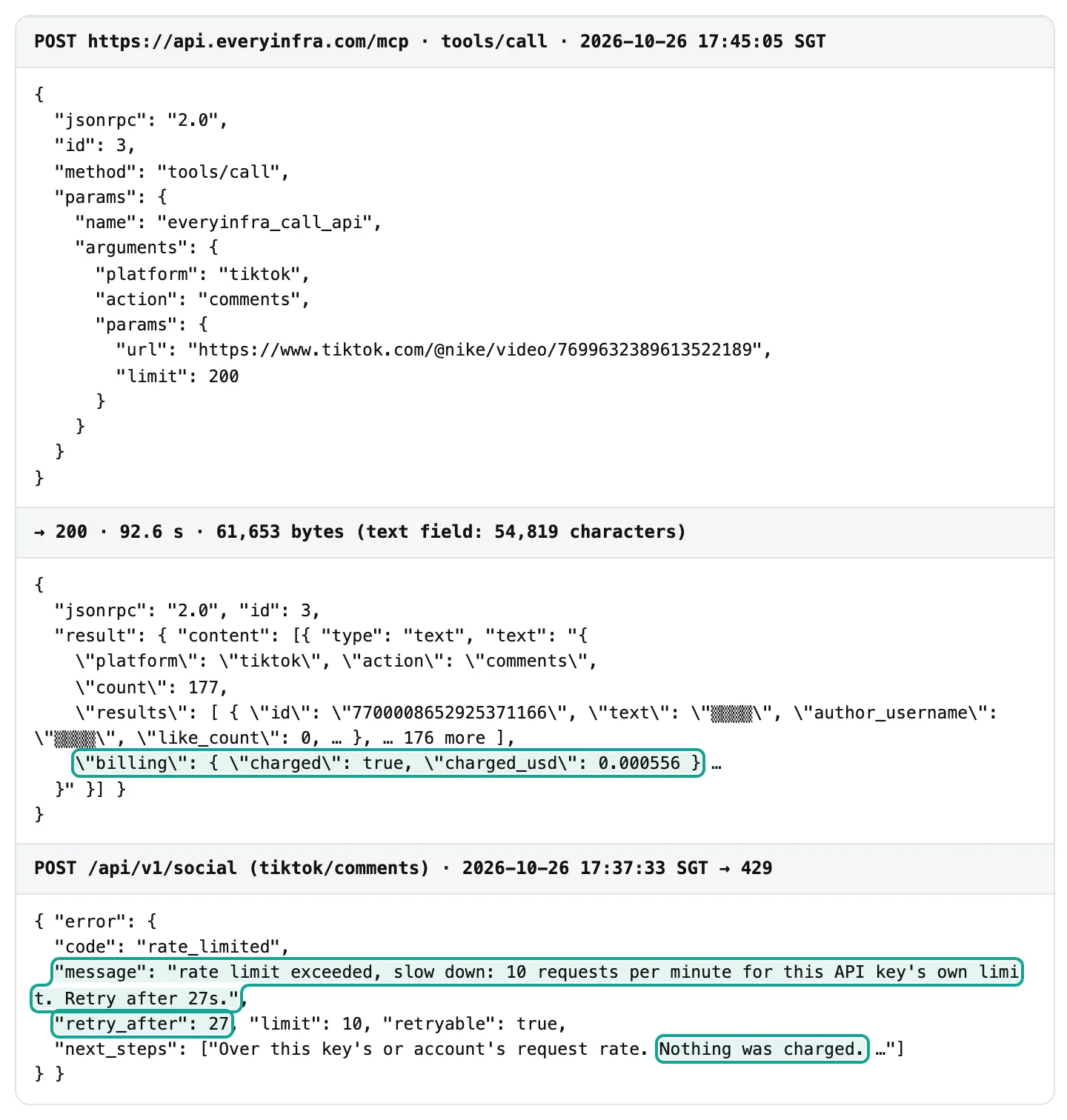
Compare the 54,819 characters with three limits in Claude Code. The MCP docs say that Claude Code shows a warning when an MCP tool output exceeds 10,000 tokens. The default limit is 25,000 tokens, and you can raise it with MAX_MCP_OUTPUT_TOKENS. Also, some tools do not have the anthropic/maxResultSizeChars annotation. For these tools, Claude Code saves a successful text result over 50,000 characters to a file. The conversation keeps only a file reference (MCP output limits).
| Claude Code limit for MCP results | Value in the docs | Our measured result | Crosses it? |
|---|---|---|---|
| Warning | 10,000 tokens | 200 comments: about 13,865 tokens | Yes |
Default output limit (MAX_MCP_OUTPUT_TOKENS) | 25,000 tokens | 200 comments: about 13,865 tokens | No |
Save to file (no anthropic/maxResultSizeChars) | 50,000 characters | 200 comments: 54,819 characters | Yes |
| Save to file | 50,000 characters | 50 comments: at most 24,749 characters | No |
| Save to file | 50,000 characters | 10 videos: at most 29,156 characters | No |
We checked the tools/list response, and the EveryInfra tools do not have this annotation. So one 200-comment call crosses the 10,000-token warning (about 13,865 tokens at 4 bytes per token), and Claude Code saves the result to disk. The worker then needs a Read call for that file. That adds one more turn and more context.
The fix is simple: use limit: 50 for comments. Our 18 responses with 50 comments averaged 14,106 characters of JSON, and the longest had 24,749. All are below 50,000. The longest 10-video response had 29,156 characters, also below the line.
If you need 200 comments, use mode: "async", take the job_id and read it with everyinfra_get_job. The tool description says that reading a job is free and does not count toward the per-minute limit. The model cannot see this line. It only takes an extra step after the save.
Test one: how large is one account's raw data?
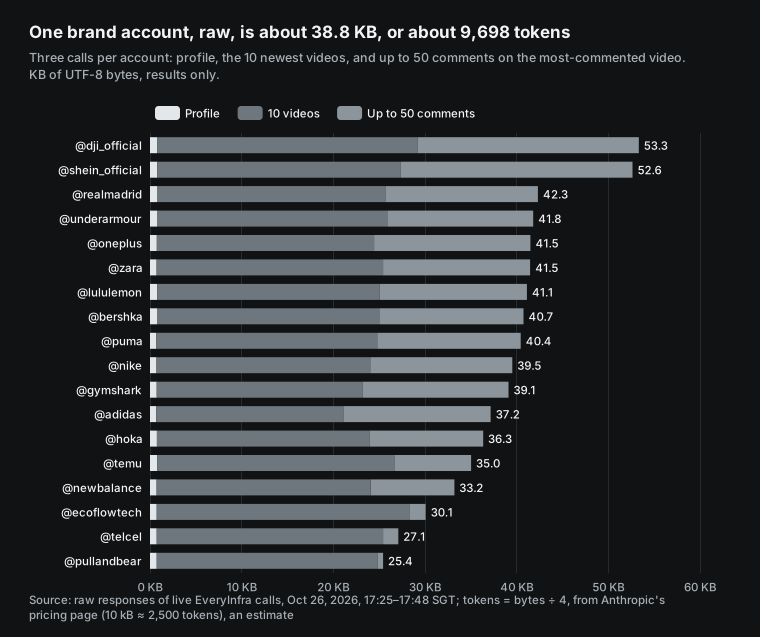
The chart below shows the result size of three calls for each of the 18 brand accounts. We count only the UTF-8 bytes of the results field and leave out billing and balance fields. The mean is 38,794 bytes per account and the median is 39,983. The smallest is Pull&Bear at 25,426 bytes, because its video had only 2 comments.
The largest is DJI at 53,324 bytes. The profile is small at 740 bytes on average. The 10 videos are the largest part at 24,514 bytes. The comments average 13,540 bytes.
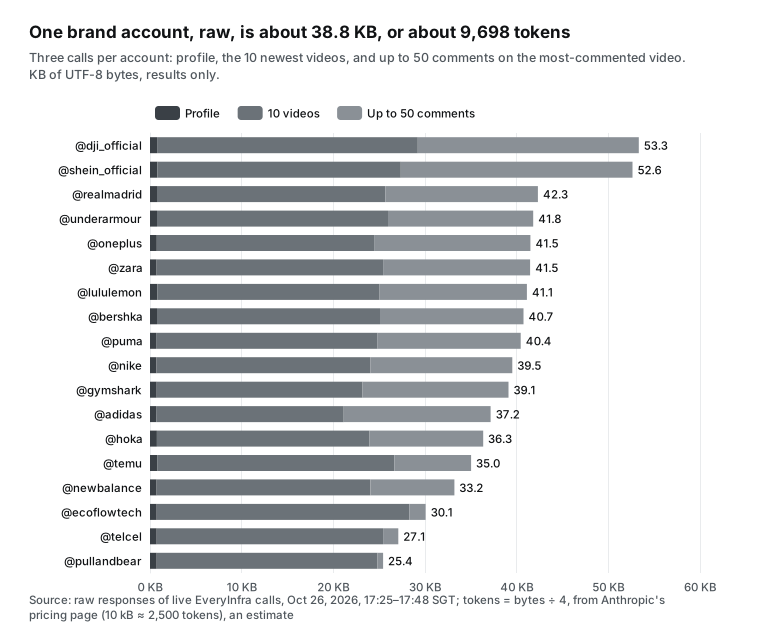
| Part of one account | Mean bytes | Estimated tokens (÷ 4) | With the new tokenizer (× 1.3) |
|---|---|---|---|
| Profile | 740 | 185 | 240 |
| 10 newest videos | 24,514 | 6,128 | 7,967 |
| Up to 50 comments | 13,540 | 3,385 | 4,400 |
| Total | 38,794 | 9,698 | 12,608 |
| Summary that the worker returns | 382 | 95 | 124 |
Why are videos so large? One video record has a cover image URL, an avatar URL and a music URL. Each URL has signed CDN parameters of three or four hundred characters. We removed every field that ends in _url but kept the video url. The mean size dropped to 25,175 bytes, so URL fields are 35.1% of the bytes. A comparison table needs none of them.
This is why the worker returns a summary and not "the cleaned data." Even without URLs, the main session would get 25 KB per account. With our summary format, it gets 382 bytes.
For the byte-to-token ratio we use an example on Anthropic's pricing page. An average 10 kB web page is about 2,500 tokens, or 4 bytes per token (Anthropic pricing, web fetch). The same page says that Claude 4.7 and later models use a new tokenizer that produces about 30% more tokens for the same text. So all token numbers here are estimates, and we give both "4 bytes per token" and "30% more." For exact counts, use the token counting endpoint. The docs say that it is free and limited only by requests per minute (token counting docs).
Why the context saving is real: three layers of the Claude Code Haiku subagent math
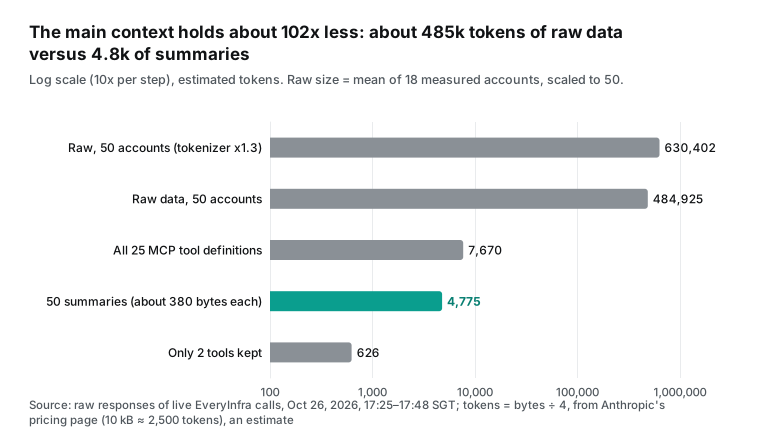
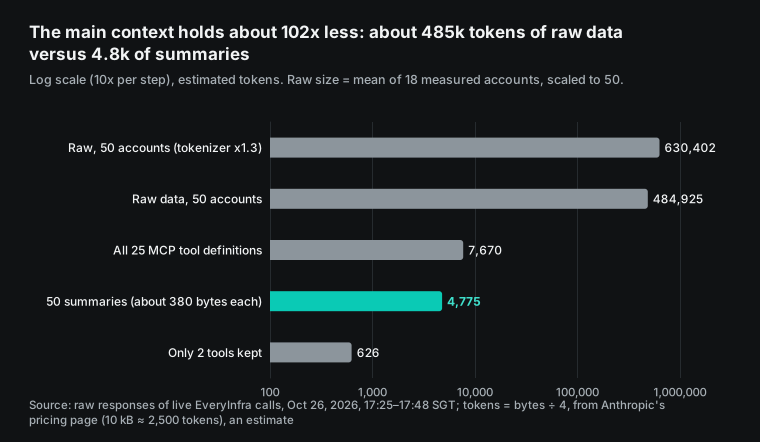
With one account's size known, we can count what the subagents save. The first layer is the main context. Scaled to 50 accounts, the raw results are about 1.94 million bytes, or about 485,000 tokens (about 630,000 with the new tokenizer). That is half to two-thirds of the 1-million-token context of Opus 5.5. As summaries, the 50 accounts take about 4,800 tokens, about 102x less.
The descriptions of all 25 EveryInfra tools take about 7,670 more tokens. With an inline mcpServers entry and an allowlist, that drops to 626 tokens, and only inside the worker.
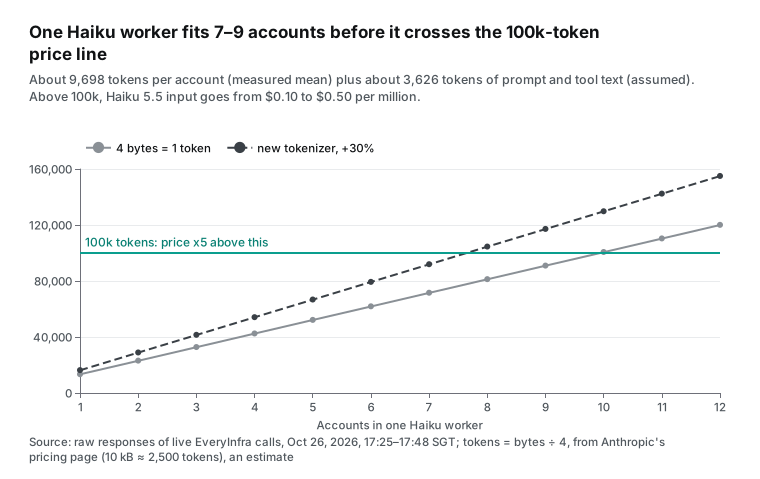
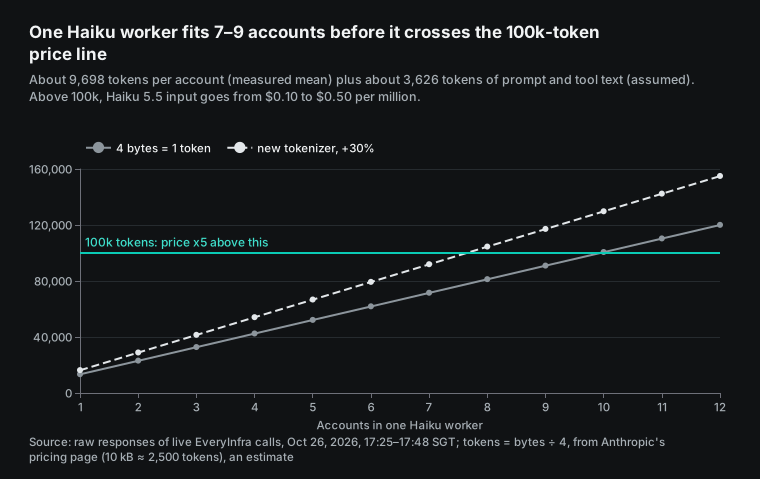
The second layer is the context of each worker, and it has a price line that people miss. Anthropic's pricing page says that Haiku 5.5 is priced by prompt length. Some requests have a prompt over 100,000 tokens, with cache reads and writes included. They pay $0.50 per million input tokens instead of $0.10. Output goes from $0.50 to $2.50 per million. The whole request pays the higher price (long context pricing).
Each extra account adds about 9,700 tokens to a worker. Add about 3,600 tokens of prompt and tool text. The 626 tokens of tool text is measured, and the 3,000 tokens of prompt and task text is our assumption. With these numbers, one worker fits 9 accounts. With the 30% tokenizer increase, it fits 7. After that, each request costs 5x more.
The third layer is money. The Claude Code cost docs explain why long sessions get expensive. Claude Code sends the full conversation with every request. Each tool use sends another request with the tool results.
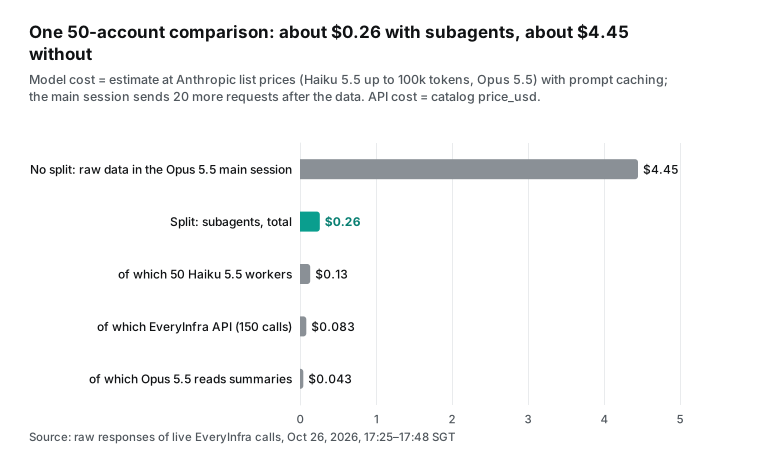
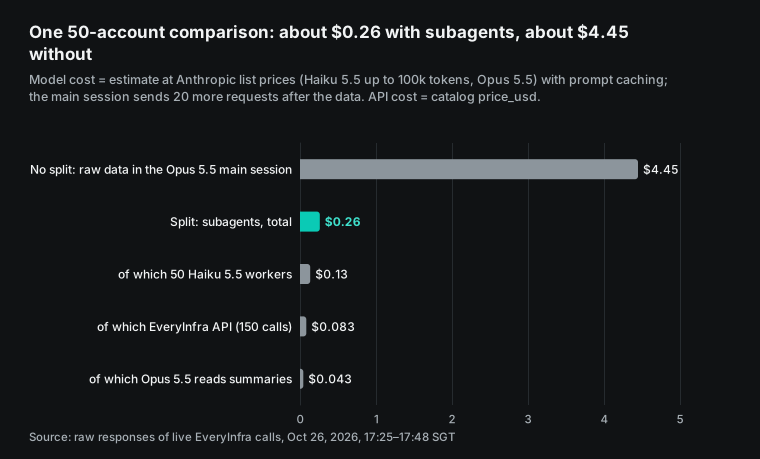
With prompt caching, the history is read again at the cached rate (Claude Code cost docs). So raw data in the main session costs money on every later request, not once. Here is our estimate at list prices, with the assumptions below the table:
| Setup | Main parts | Estimated cost for 50 accounts |
|---|---|---|
| Subagents | 50 Haiku 5.5 workers about $0.134, EveryInfra API $0.0834, Opus 5.5 main session reads summaries about $0.043 | About $0.26 |
| No split, raw data in the main session | EveryInfra API $0.0834, Opus 5.5 main session holds about 485,000 tokens and reads them again on 20 later requests, about $4.36 | About $4.45 |
The assumptions: each worker sends 4 requests (3 tool calls and 1 final answer) with about 400 output tokens each. We use Haiku 5.5 list prices per million tokens: $0.10 input, $0.125 cache write, $0.01 cache read and $0.50 output, with a 5-minute cache. For the main session we use Opus 5.5 list prices per million tokens: $4 input, $5 cache write (1.25x), $0.20 cache read. After the data arrives, the main session sends 20 more requests.
The Opus 5.5 prices come from the Anthropic models overview. The cache read price comes from the prompt caching part of the pricing page. If you use a Pro or Max plan, Claude Code does not charge these amounts. It uses your plan limits. The ratio stays the same, and raw data in the main session uses your limits more than ten times faster. The cost docs also say that subagent requests count toward the same usage limits (cost docs).
This estimate has limits. It leaves out the planning and the table writing in the main session, which are about the same in both setups. The 20 later requests are an assumption. A longer session makes the "no split" row more expensive.
Claude Code also compacts the main session when the context fills up. Compaction is itself a large request, and we did not count it. Also, 485,000 tokens is almost half of the Haiku 5.5 context of 1 million tokens. A main session on Haiku would also cross the 100,000-token price line.
Test two: how many parallel workers?
Subagents can run in parallel, but the API sets the pace. Our test key allows 10 requests a minute and returns 429 above that. We set this cap on this one key, and the 429 says reason: key_limit. The account default is 60 requests a minute, shared by all keys. At $50, $150 and $750 of total top-ups it goes up to 180, 600 and 1,800 (pricing page). Recalculate the worker count below with your own limit. At about 25 seconds per call, 60 requests a minute keeps about 25 workers busy. That is more than the default Claude Code limit of 20 concurrent subagents. We ran three rounds and measured real times.
Round one ran from 17:25 to 17:37 SGT. One worker pulled 24 profiles in sequence. It got 24 responses in 10.72 minutes, 2.24 a minute. The median call time was 18.2 seconds. No call got a 429, but most of the time went to waiting for responses.
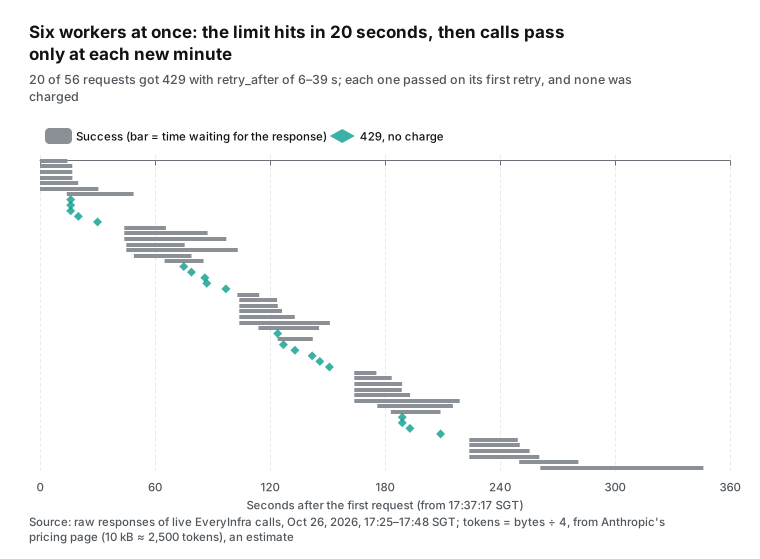
Round two ran from 17:37 to 17:43 SGT. Six workers pulled videos and comments for 18 accounts, two calls each. On a 429 each worker waited for retry_after and retried. Of 56 requests, 36 succeeded and 20 got 429. The round took 5.77 minutes, 6.24 successes a minute.
Round three ran from 17:46 to 17:48 SGT. Four workers shared one client-side limiter that allows at most 9 request starts in each clock minute. They pulled popular videos (sort: popular) for 12 accounts. All 12 calls succeeded with no 429. The round took 1.25 minutes, 9.64 successes a minute.
| Round | Time (SGT) | Workers and rule | Requests | Successes | 429s | Successes per minute | Median call time |
|---|---|---|---|---|---|---|---|
| 1 | 17:25–17:37 | 1 worker, in sequence | 24 | 24 | 0 | 2.24 | 18.2 s |
| 2 | 17:37–17:43 | 6 workers, retry after 429 | 56 | 36 | 20 | 6.24 | 26.1 s |
| 3 | 17:46–17:48 | 4 workers, cap of 9 a minute | 12 | 12 | 0 | 9.64 | 19.6 s |
The timeline of round two shows why the 429s slowed the run. Each row is one request. A gray bar is the wait for a response, and a teal diamond is a 429. The six workers used the whole minute's allowance in the first 16 seconds, and the next requests all failed. Each failed worker waited until the next full minute and then all tried again together.
The retry_after values ran from 6 to 39 seconds, and each one pointed to the start of the next clock minute. That shows that this key resets its count at each clock minute. The result is a rush at the start of each minute and a long idle gap after it.
From this you can compute a simple ceiling. The useful number of parallel workers is about the limit per minute times the mean call time in seconds, divided by 60. The mean time of all successful calls in our three rounds was 25.1 seconds, so 10 × 25.1 ÷ 60 ≈ 4.2. With fewer than 4 workers, part of the allowance goes unused. With more than 4, the extra workers only make 429s.
With this math, 150 calls for 50 accounts take at least 15 minutes on a key with 10 requests a minute, or 2.5 minutes at the account default of 60. In sequence they take about 63 minutes. Claude Code allows 20 subagents at the same time by default. The 21st spawn returns "Concurrent subagent limit reached", and CLAUDE_CODE_MAX_CONCURRENT_SUBAGENTS changes the limit (concurrent subagent limit). The default of 20 is far above 4, so tell the main session in plain words to run at most 4 workers at a time.
These rounds are small. Round three had only 12 calls and one capability, and call times change with the hour and the account. Do not copy 4.2 as is. Compute it again with your own limit and your own mean call time. GET /api/v1/account (MCP: everyinfra_account) shows the per-minute limit. The API docs say that this call is free and does not count toward the limit.
How to handle 429: the real response and a backoff pattern
Here is a real 429. At 17:37:33 SGT the Nike worker's comment request failed. The body had code: rate_limited, retry_after: 27, limit: 10, retryable: true and max_retries: 3. The next_steps field said "Nothing was charged." We checked all 20 of these errors.
None was charged, and each passed on the first retry after the wait. The HTTP standard defines 429 as too many requests in a given amount of time. The response may include Retry-After to tell the client how long to wait (RFC 6585, section 4; RFC 9110, Retry-After).
Handle it in three layers. Layer one: avoid the hit. Limit how many workers run at the same time in the main session, and add one shared limiter at the call level. That is why round three had no 429s.
Layer two: when you hit the limit, wait. Wait exactly retry_after and add a small random delay. Then a group of workers does not retry in the same second.
An AWS article explains this well. Load can cause the errors. If all clients then retry at the same time, the retries make the load worse. So add random time to spread the requests (Amazon Builders' Library).
Layer three: do not send a charged call again. 429, 422 and 401 happen before any charge, so a retry is safe. Do not resend a call that already returned 200 because the worker lost track. Our guides on self-healing API errors and refund checks show how to check by request ID.
This is the core of the limiter from round three. It uses the thread pool of the Python standard library (concurrent.futures docs). In Claude Code, you can tell the main session to schedule workers by the same rule. You can also put this logic in a script that the workers call.
import threading, time, random
lock = threading.Lock(); state = {"minute": None, "n": 0}
def acquire(per_min=9):            # at most per_min starts per clock minute
    while True:
        with lock:
            m = int(time.time() // 60)
            if state["minute"] != m:
                state["minute"], state["n"] = m, 0
            if state["n"] < per_min:
                state["n"] += 1
                return
        time.sleep(0.5)
def on_429(err):                    # err is the error object of the response
    time.sleep(err["retry_after"] + random.uniform(0.5, 2.0))
The cap is 9 and not 10. That leaves one slot each minute for other calls from the main session, such as a balance check or a catalog read.
Failures and charges: 422, empty results and wrong usernames
Apart from the 429s, we caused or met several failures in the same hour. Each one affects a batch job in a different way. Each row of the table below matches one real response.
| Case | Time (SGT) | HTTP and response | Charge | What the worker should do |
|---|---|---|---|---|
Misspelled parameter usernme | 17:43:20 | 422, missing_param, "usernme is not a parameter here", with a working example | $0 | Fix the parameter and resend |
| No key | 17:43:20 | 401, missing_key | $0 | Stop and report a setup problem |
| Too fast | 17:37:33 and 19 more | 429, retry_after 6–39 s | $0 | Wait and retry |
| Username does not exist | 17:33:34, 17:34:49 | 200, empty result, reason: empty_result_refunded | $0 (charged, then refunded) | Mark "not found," do not retry |
| Username exists but is not the brand | 17:31:16 and 3 more | 200, not verified, 4–222 followers | $0.000556 as usual | Mark "possible lookalike," let the main session decide |
The 422 response is written for a model to read. It says that username is missing, it says that usernme is not a parameter here, and it gives a working example request. A small model such as Haiku can fix the call from that text. The two empty results (our guesses for Mercado Libre and OXXO) returned 200 with charged_usd of 0 and the reason empty_result_refunded. They cost nothing.
The last row matters most. The four usernames that we guessed from brand names (one each for Anker, Insta360, Xiaomi and Bimbo) all exist, but they are ordinary personal accounts. None is verified. They have 4, 121, 222 and 14 followers and 0 to 8 videos. The API returned their data correctly, so the calls were charged.
The API cannot catch this kind of mistake. The worker must catch it. That is the source of step 1 in the example. Stop and flag an account that is not verified and has fewer than 1,000 followers.
You can find the right username with tiktok/search by account. We ran three searches from 17:43 to 17:44 SGT and found the verified insta360_official (2.4 million followers), xiaomi.official (8.3 million) and ankercharging (803,600), for $0.002778 each. Where your list comes from decides whether the table is right from the start.
The bill: API fees by number of accounts
The EveryInfra side is easy to count. It depends only on the number of calls, not on how many rows come back or which model runs the worker.
| Size | Calls | API fee at `price_usd` $0.000556 | Shortest time at 10 a minute |
|---|---|---|---|
| 1 account | 3 | $0.001668 | 18 seconds |
| 50 accounts | 150 | $0.0834 | 15 minutes |
| 50 accounts, weekly, for one month | about 650 | about $0.361 | 15 minutes per run |
| 500 accounts | 1,500 | $0.834 | 150 minutes |
This table assumes that the list is right. If you first need tiktok/search to find a username, add about $0.002778 per account (limit: 5). Our whole test used 98 requests: 97 over REST and 1 MCP tools/call, plus 3 free MCP handshake messages. 74 requests were charged, for a total of $0.04781.
The 24 calls without a charge were 20 errors (429), 2 empty results, 1 error 422 and 1 error 401. Each one matches the billing or error body of its response. For setup, the quickstart shows the three REST steps, and the MCP server page has client settings.
Choosing the summary format: the one line decides what the main session can do
What the worker returns is the step that deserves the most care. Our rule has two parts. The summary holds only the numbers that the main session needs for its decisions. A script can compute each number from the raw response. This has two benefits.
First, the main session can spot-check. It picks any account, asks a fresh worker to run it again and compares the numbers. It does not need to trust any worker's "understanding." Second, the size stays under control. Our format has 15 fields. The 18 summaries average 382 bytes of JSON, and the longest one, Real Madrid, is only 398 bytes, because its numbers have more digits.
Do not let workers return "whatever looks important." Open summaries vary in length. Some workers return half a page, and some copy comment text back. The main context grows again. Two workers can also judge "important" differently, and then the rows do not fit one table.
Be careful with comments in particular. Comment text includes usernames and personal statements of ordinary users, and if it reaches the main session, it can end up in the final report. Our format returns only the number of comments and the number with replies. For sentiment or topic work, classify inside the worker and return only the count for each class.
The instruction to the main session can be three sentences. Give each username in the list to tiktok-account-worker, at most 4 at the same time. When all are back, merge the summaries into one table and mark the accounts flagged as lookalike. For the top 3 and bottom 3 accounts by median views and engagement, write one sentence of explanation each.
The first two sentences are scheduling. Only the third needs the judgment of a large model. Anthropic's guide says that this kind of work belongs in the main loop.
What the main session gets: the US sportswear table
Here is the table that the main session builds from the worker summaries for the US sportswear group. To make the size reproducible, a script computed these summaries from the raw responses with the same rules as the worker example. Haiku did not write them. A note written by Haiku would add a few dozen bytes to each summary. Median views and engagement rate (the median of likes divided by views) leave out pinned videos.
| Account | Followers | Median views, recent videos | Engagement | Posts per week | Comments sampled |
|---|---|---|---|---|---|
| Nike | 9.3M | 24,250 | 3.82% | 11.9 | 50 |
| Adidas | 12.3M | 142,200 | 2.72% | 4.2 | 50 |
| Gymshark | 6.7M | 50,900 | 14.07% | 4.6 | 50 |
| lululemon | 1.5M | 34,900 | 1.08% | 3.0 | 50 |
| Under Armour | 1.0M | 28,600 | 5.20% | 4.8 | 50 |
| New Balance | 1.0M | 24,900 | 1.19% | 1.3 | 27 |
| PUMA | 6.2M | 15,450 | 6.68% | 4.8 | 50 |
| HOKA | 268,300 | 7,912 | 0.99% | 1.2 | 28 |
This table shows why judgment stays in the main session. Nike posts the most (11.9 a week), but its median views are lower than those of Adidas, which posts 4.2 a week. Gymshark has half the followers of Adidas but an engagement rate of 14.07%, more than five times higher. Gymshark also had 3 pinned videos from July in its newest 10. Without the pinned filter, its rates would mix old and new posts.
These comparisons need all rows at once and some common sense. That is a job for the large model in the main session, not for each worker alone. Outside this group, Real Madrid shows another trap. Its "466 posts a week" is not an error. All of its 10 newest videos came out on 2026-10-25, the same day, and a per-day rate turns that into a very large weekly number.
The same worker on other platforms: Instagram and YouTube
If your list also has brand accounts on Instagram and YouTube, the worker keeps its structure. Change three things: the platform name, the action name and the parameter name. The table below comes from the same catalog (read Oct 26, 2026, 17:22 SGT). We did not make live calls on these two platforms, so the table shows only the catalog prices and parameters. Measure the result size yourself once. The platform overviews are the Instagram data API and the YouTube data API.
| Platform | Profile | Recent posts | Comments | Price per call | Note |
|---|---|---|---|---|---|
| TikTok (measured here) | profile, parameter username | user_videos, up to 50 | comments, up to 200 | $0.000556 | Pinned videos come first |
profile, parameter username | user_posts, up to 200 | comments, up to 100 | $0.000556 | reels is unavailable for now | |
| YouTube | profile, parameter is the channel url | user_posts, channel url, up to 50 | comments, up to 100 | $0.000556 | Shorts use a separate shorts action |
These three capabilities cost the same on all three platforms. So three calls per account cost $0.001668, and 50 accounts cost $0.0834 on each platform. The parameters differ. The YouTube profile and video list take a channel URL, not a username, so step 1 of the worker must get the URL first.
The result sizes also differ. Instagram post records, like TikTok video records, carry many image URLs. From what we saw on TikTok, measure one account's raw data first. Then choose how many accounts per worker and how many comments per call. Maybe you already used MCP for these platforms in another editor. Our earlier article on TikTok, Instagram and Amazon data in Cursor has measured call times that help you size the worker count.
Limits and things to watch
First, platform terms. The TikTok US Terms of Service limit automated data collection. You may not scrape, crawl, export or extract platform data with an automated system. The exception is written approval from TikTok USDS Joint Venture (TikTok Terms of Service).
Academic and nonprofit researchers can apply for TikTok's research tools, and approval usually takes about 4 weeks (TikTok Research Tools, codebook). Decide for your own region and use case whether your use is suitable. This article covers only the data method.
A related point causes confusion. On Oct 5, 2026, TikTok said that the TikTok for Business MCP is now a connector on Claude and other AI platforms (TikTok newsroom). That MCP works on your own ad account: campaigns, creative and results (TikTok for Business blog). It does not read the public profiles and comments of other brands.
Second, comments are not complete. comments returns at most two replies for each top-level comment, and the count can be lower than the number that the video shows. In 5 of our 18 calls, fewer than 50 comments came back, because those videos had few comments. For sentiment work, put the sample size in the summary.
Third, more subagents is not always better. Besides the API limit, Claude Code has its own limits. Subagents can nest three levels deep by default, and CLAUDE_CODE_MAX_SUBAGENT_SPAWN_DEPTH changes that. A worker's context size comes from the worker's model, not from the main model (subagents docs).
For a list of thousands of accounts, the docs point to dynamic workflows. There, Claude writes a JavaScript script that schedules the agents. The default is up to 16 agents at the same time, and CLAUDE_CODE_WORKFLOW_MAX_CONCURRENT_AGENTS raises it to 256 (dynamic workflows docs). The API allowance per minute does not grow because of this.
Fourth, what we did not test. We did not run this subagent in Claude Code. We have no measured data on the quality of Haiku 5.5 summaries. We also did not measure how well it follows the is_pinned rule, or the real time of 50 workers. The size, charge, 429 and speed numbers are measured.
The model costs are estimates at list prices. Before you rely on this, run 10 accounts first. Check the model of each subagent in /tasks. Then check the subagent share in /usage.
Recent changes
2026-10-07: Anthropic released Claude Haiku 5.5. It costs $0.10 per million input tokens and $0.50 per million output tokens for prompts up to 100,000 tokens. Anthropic named subagent work as a main use (launch page). On the same day, Claude Code v2.1.293 made it the default Haiku model on the Anthropic API (changelog). What it means for you: a data worker now costs about a tenth of last month's price. But check which model haiku means on your provider.
2026-10-16: Claude Code v2.1.302 made the desktop app and VS Code always run the main conversation's subagents in the background, as the terminal does. Fork subagents also became the default in claude -p, the Agent SDK, the desktop app and VS Code (changelog). What it means for you: background workers send their permission prompts to the main session, so allow the one tool they need in advance.
2026-10-19 and 2026-10-21: v2.1.304 improved speed when many subagents run at the same time. It also fixed subagents that forgot recent work after a quick follow-up message. v2.1.307 told each fork subagent in a group which launch is its own, so forks start each other's work less often (changelog). What it means for you: parallel workers are more stable than a month ago. This article uses normal subagents, not forks.
2026-10-22: Anthropic published "When to fold subagents into your main agent loop." It tells most agents to use fewer subagents. Keep them only for measurable context growth, parallel disposable context, or too many tools (guide, kit). What it means for you: before you split, check that your job reads much, keeps little and has independent parts. If not, keep it in the main session with Skills.
2026-10-05: At Advertising Week New York, TikTok said that its ads MCP is a connector on Claude, Kimi, Perplexity and more (TikTok newsroom). What it means for you: use it to manage your own ads. To see how other brand accounts perform in public, you still need a public data API.
FAQ
Can Claude Code subagents use a different model?
Yes. Set model in the subagent file. It accepts an alias (sonnet, opus, haiku, fable), a full ID such as claude-haiku-5-5, or inherit. The order is: the parameter at spawn time, then the model field, then CLAUDE_CODE_SUBAGENT_MODEL, then the main model. (Question source: Google suggestions "claude code subagents different model" and "claude code subagents model selection"; answer: subagents docs)
What model does a Claude Code subagent use by default?
Without a model field, the order above ends at the main model, so the subagent inherits it. The built-in Explore subagent also no longer always runs on Haiku. To put every subagent on one model, set both CLAUDE_CODE_SUBAGENT_MODEL and CLAUDE_CODE_SUBAGENT_MODEL_FORCE=1. (Question source: suggestions "claude code subagent model default" and "claude_code_subagent_model force"; answer: subagents docs, r/ClaudeCode thread)
**Why is my Claude Code Haiku subagent still expensive with model: haiku?**
There are two common causes. On Bedrock, Google Cloud, Foundry or Claude Platform on AWS, the haiku alias means Haiku 4.5, which costs 10x Haiku 5.5. Or CLAUDE_CODE_SUBAGENT_MODEL_FORCE is set, and Claude Code ignores the model field. /tasks shows the real model of each subagent. (Question source: suggestions "claude code subagent model=haiku" and "claude code use haiku for subagents"; answer: model configuration docs, subagents docs)
What is the difference between Claude Code subagents and agent teams?
A subagent returns its result to the main agent, and subagents do not talk to each other. Agent team members share a task list and can message each other, which suits work that needs debate and coordination. The docs say that agent teams are experimental, off by default and use much more tokens. For a batch of independent accounts, subagents are enough. (Question source: suggestion "claude code subagents vs agent teams"; answer: agent teams docs)
How many subagents can Claude Code run at the same time?
By default 20 at the same time. The 21st returns "Concurrent subagent limit reached." CLAUDE_CODE_MAX_CONCURRENT_SUBAGENTS changes this from v2.1.217, and the total number in a session has no limit. For workers that call an outside API, the real limit is the API allowance. At the 10 requests a minute of our test key and about 25 seconds per call, more than 4 workers only produce 429s. At the account default of 60 a minute, the number is about 25. (Question source: suggestion "claude code run subagents in parallel"; answer: subagents docs, concurrent limit, and our test)
What does Claude Code do with a very large MCP tool result?
It warns above 10,000 tokens, and the default limit is 25,000 tokens (MAX_MCP_OUTPUT_TOKENS changes it). For a tool without anthropic/maxResultSizeChars, a successful result over 50,000 characters goes to a file. Our 200-comment TikTok result had 54,819 characters, so it would be saved. The longest 50-comment result had 24,749 characters, so it would not. (Question source: our test; answer: MCP docs, output limits)
References
- Create custom subagents, Claude Code docs, Anthropic, read 2026-10-26, https://code.claude.com/docs/en/sub-agents
- Connect Claude Code to tools via MCP, Claude Code docs, Anthropic, read 2026-10-26, https://code.claude.com/docs/en/mcp
- Claude Code changelog (v2.1.293 to v2.1.310), Anthropic, 2026-10-07 to 2026-10-23, https://code.claude.com/docs/en/changelog
- Manage costs effectively, Claude Code docs, Anthropic, read 2026-10-26, https://code.claude.com/docs/en/costs
- Model configuration, Claude Code docs, Anthropic, read 2026-10-26, https://code.claude.com/docs/en/model-config
- Environment variables, Claude Code docs, Anthropic, read 2026-10-26, https://code.claude.com/docs/en/env-vars
- Agent teams, Claude Code docs, Anthropic, read 2026-10-26, https://code.claude.com/docs/en/agent-teams
- Orchestrate subagents at scale with dynamic workflows, Claude Code docs, Anthropic, read 2026-10-26, https://code.claude.com/docs/en/workflows
- Explore the context window, Claude Code docs, Anthropic, read 2026-10-26, https://code.claude.com/docs/en/context-window
- Permissions, Claude Code docs, Anthropic, read 2026-10-26, https://code.claude.com/docs/en/permissions
- Settings, Claude Code docs, Anthropic, read 2026-10-26, https://code.claude.com/docs/en/settings
- Run Claude Code programmatically, Claude Code docs, Anthropic, read 2026-10-26, https://code.claude.com/docs/en/headless
- Skills, Claude Code docs, Anthropic, read 2026-10-26, https://code.claude.com/docs/en/skills
- Prompt caching, Claude Code docs, Anthropic, read 2026-10-26, https://code.claude.com/docs/en/prompt-caching
- CHANGELOG.md, anthropics/claude-code, GitHub, read 2026-10-26, https://github.com/anthropics/claude-code/blob/main/CHANGELOG.md
- Introducing Claude Haiku 5.5, Anthropic, 2026-10-07, https://www.anthropic.com/claude-haiku-5-5
- Claude Haiku 5.5 System Card, Anthropic, 2026-10-07, https://www.anthropic.com/claude-haiku-5-5-system-card
- Pricing, Claude Platform docs, Anthropic, read 2026-10-26, https://platform.claude.com/docs/en/about-claude/pricing
- Models overview, Claude Platform docs, Anthropic, read 2026-10-26, https://platform.claude.com/docs/en/about-claude/models/overview
- Migrating to Claude Haiku 5.5, Claude Platform docs, Anthropic, read 2026-10-26, https://platform.claude.com/docs/en/models/haiku-5-5/migration-guide
- Prompt caching, Claude Platform docs, Anthropic, read 2026-10-26, https://platform.claude.com/docs/en/build-with-claude/prompt-caching
- Token counting, Claude Platform docs, Anthropic, read 2026-10-26, https://platform.claude.com/docs/en/build-with-claude/token-counting
- Rate limits, Claude Platform docs, Anthropic, read 2026-10-26, https://platform.claude.com/docs/en/api/rate-limits
- Release notes, Claude Platform docs, Anthropic, read 2026-10-26, https://platform.claude.com/docs/en/release-notes/overview
- Tool search tool, Claude Platform docs, Anthropic, read 2026-10-26, https://platform.claude.com/docs/en/agents-and-tools/tool-use/tool-search-tool
- Tool use overview, Claude Platform docs, Anthropic, read 2026-10-26, https://platform.claude.com/docs/en/agents-and-tools/tool-use/overview
- Claude pricing (Pro, Max, Team), Anthropic, read 2026-10-26, https://claude.com/pricing
- Building agents: When to fold subagents into your main agent loop, Anthropic, 2026-10-22, https://claude.com/resources/articles/building-agents-when-to-fold-subagents-into-your-main-agent-loop
- single-agent-loop-kit, anthropics, GitHub, read 2026-10-26, https://github.com/anthropics/single-agent-loop-kit
- Transports (2025-06-18), Model Context Protocol specification, https://modelcontextprotocol.io/specification/2025-06-18/basic/transports
- Tools (2025-06-18), Model Context Protocol specification, https://modelcontextprotocol.io/specification/2025-06-18/server/tools
- Lifecycle (2025-06-18), Model Context Protocol specification, https://modelcontextprotocol.io/specification/2025-06-18/basic/lifecycle
- RFC 6585: Additional HTTP Status Codes (429), IETF, April 2012, https://www.rfc-editor.org/rfc/rfc6585
- RFC 9110: HTTP Semantics (Retry-After), IETF, June 2022, https://www.rfc-editor.org/rfc/rfc9110
- Timeouts, retries, and backoff with jitter, Amazon Builders' Library, 2019-12-05, https://aws.amazon.com/builders-library/timeouts-retries-and-backoff-with-jitter/
- concurrent.futures, Python docs, read 2026-10-26, https://docs.python.org/3/library/concurrent.futures.html
- TikTok Research Tools: Access and Eligibility, TikTok for Developers, read 2026-10-26, https://developers.tiktok.com/products/research-api/
- Research API Codebook, TikTok for Developers, read 2026-10-26, https://developers.tiktok.com/doc/research-api-codebook
- TikTok Unveils AI-Powered Updates for Advertisers, TikTok Newsroom, 2026-10-05, https://newsroom.tiktok.com/tiktok-unveils-ai-powered-updates-for-advertisers-driving-discovery-action-and-measurable-business-outcomes?lang=en
- Evolving TikTok for Business MCP, TikTok for Business blog, 2026-06-30, https://ads.tiktok.com/business/en-US/blog/tiktok-agentic-hub-ai-agents-skills-mcp
- TikTok Terms of Service (US), TikTok, read 2026-10-26, https://www.tiktok.com/legal/page/us/terms-of-service/en
- EveryInfra data catalog, EveryInfra, read 2026-10-26 17:22 SGT, https://api.everyinfra.com/api/v1/social/catalog
- EveryInfra TikTok catalog, EveryInfra, read 2026-10-26, https://api.everyinfra.com/api/v1/social/catalog?platform=tiktok
- Haiku 5.5 is 40x cheaper than Opus 5.5. Your Explore subagent is probably still running on Opus, Reddit r/ClaudeCode, 2026-10-08, https://www.reddit.com/r/ClaudeCode/comments/1x0kzbh/haiku_55_is_40x_cheaper_than_opus_55_your_explore/
- PSA: Claude Code subagents inherit your session model now, Reddit r/claude, read 2026-10-26, https://www.reddit.com/r/claude/comments/1v7iqqy/psa_claude_code_subagents_inherit_your_session/
- How much more effective is using Opus 5.5 with Haiku subagents, Reddit r/ClaudeAI, read 2026-10-26, https://www.reddit.com/r/ClaudeAI/comments/1x1buac/how_much_more_effectivebetter_is_using_opus_55/
- Anthropic's new guide (Oct 22) argues most agents should have fewer subagents, Reddit r/ClaudeAI, 2026-10-24, https://www.reddit.com/r/ClaudeAI/comments/1xdwquj/anthropics_new_guide_oct_22_argues_most_agents/
- Anthropic says one AI agent beats many subagents, The Decoder, 2026-10-25, https://the-decoder.com/anthropic-says-one-ai-agent-beats-many-subagents-now-that-models-can-handle-complexity-alone/
Reference BL-53