Firecrawl Alternatives: Seven Scraping Options Priced per 1,000 Pages and per 1,000 Results
Firecrawl alternatives compared per 1,000 pages and per 1,000 results, with 26 live calls on TikTok comments, Maps reviews, Amazon and failed calls.

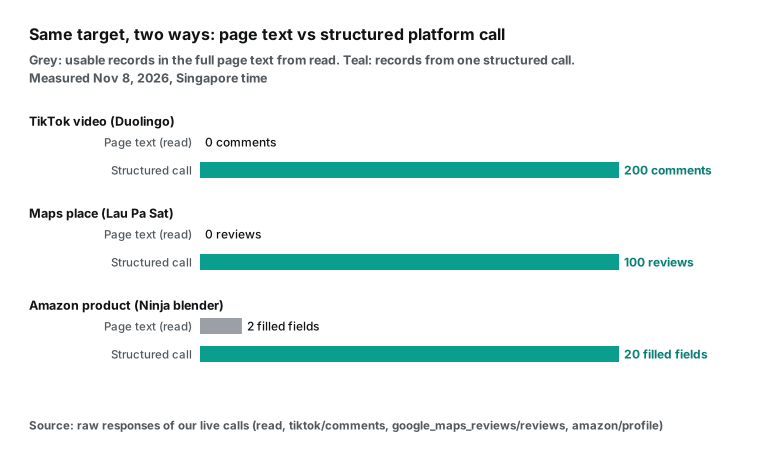
We sent one TikTok video URL to two of our own tools on November 8, 2026. The page reader returned 17,914 characters, 81 links to other videos and zero comments. The comments endpoint returned 200 comments for $0.000556, which is $0.00278 per 1,000 comments. That gap is the main point of this article. Many teams look for Firecrawl alternatives because the cost per page is too high. Often the real problem is different: they need items from a platform, and a page scraper does not return items.
This article is for developers and data teams who searched for a firecrawl alternative and want numbers, not a list of logos. We compare seven options: Firecrawl, Apify, Tavily, Bright Data, ScraperAPI, ZenRows and EveryInfra. We read every price from the vendor's own pricing page or documentation on November 8, 2026, between 00:20 and 00:45 Singapore time (SGT). We did not sign up for these services, and we did not use a key from any of them to get data. All live calls in this article went to our own API, with a test key, from a machine in Singapore.
Our Firecrawl comparison page is a one-page decision table with no live tests. This article adds the test data.
The short answer: which firecrawl alternative fits which job
If you only read one section, read this one. The table below matches common jobs to the best option. We based it on public prices and our live tests. It is not a ranking of the companies. Each one has a job that it does better than the others.
| Your job | Best fit | Why | Price per 1,000 (entry tier) |
|---|---|---|---|
| Crawl 10,000 pages of one site with depth and path rules | Firecrawl | Default crawl limit is 10,000 pages; path and depth controls | $3.80 (Hobby) |
| Screenshots, clicks, scrolls, forms | Firecrawl, ZenRows, Bright Data | They run real browser sessions | Varies by browser time |
| Many easy pages, raw HTML is fine | ZenRows, ScraperAPI | Standard request is 1 credit | $0.422 / $0.49 |
| Agent searches first, then reads a few pages | Tavily | Search and extract in one API; failed extracts are free | $1.60 (pay as you go) |
| Docs sites to clean Markdown, 20 pages per call is enough | EveryInfra crawl | Billed per call, not per page | $0.0347 (measured) |
| Comments, reviews, product fields on a known platform | EveryInfra structured endpoints | One call returns 100 to 200 items | $0.00278 to $1.389 |
| A platform that is not in our catalog | Apify | Large store of ready-made scrapers | Per scraper |
| Your own servers, data stays inside your network | Firecrawl open source | AGPL-3.0 license | Your own hosting cost |
The rows that matter most are the third and the sixth. The third row says that we are not the cheapest option for single easy pages. The sixth row says that for platform items, the price difference is two or three orders of magnitude. That difference does not come from a discount. It comes from the unit of billing.
How we measured: public prices, source text and 26 live calls
Seven vendors use seven different billing units. Firecrawl bills credits. A scraped or crawled page is 1 credit, and a map call is 1 credit. Search is 2 credits per 10 results, and JSON extraction adds 4 credits per page (Firecrawl billing docs).
Tavily bills 1 credit per 5 successful URLs for basic extraction (Tavily credits docs). ScraperAPI and ZenRows bill credits too, but the credit count per request changes with the target domain, JavaScript rendering and premium proxies. Bright Data bills per request for Web Unlocker and per record for its Web Scraper API. Apify store scrapers bill by compute unit or by event, for example per comment (Apify store billing docs).
To put these in one table, we used two denominators. For generic web pages, we divide by the number of pages the call actually returned. For platform data, we divide by the number of items the call actually returned. We never divide by the limit or num parameter, because a call can return fewer items than you ask for. For other vendors, we multiply their published credit rule by their published price per credit, and we show the tier.
Our side used one test key. We set its own limit to 10 requests per minute. The default limit for an account is 60 requests per minute, and it goes up with total top-ups (pricing page). We sent 26 requests between 00:16 and 00:28 SGT on November 8, 2026. The latency in this article is curl's time_total, from our machine in Singapore to the last byte of the response. Thirteen requests were charged, for a total of $0.010831.
The other thirteen cost nothing. They were one 401 without a key, one 422 for a wrong parameter and three 429 rate-limit responses. The rest were four 503 responses, one 404 target and three empty results.
We used our own read tool to stand for "a generic scraper" in the same-target tests. We did not call Firecrawl, so we cannot say what Firecrawl returns for a TikTok video. What we can say is what the page text contains when a tool fetches the URL without scrolling or clicking. Firecrawl has browser actions and JSON extraction that could get more from the page. We did not test those features, and we say "not tested" where it matters.
What Firecrawl costs: the credit price and the add-ons
Before you look for a firecrawl alternative, calculate what Firecrawl costs for your mix. Its pricing page says the prices are effective September 4, 2026. The free plan gives 1,000 credits per month and needs no card. There are four paid plans.
Billed monthly, Hobby is $19 for 5,000 credits and Standard is $99 for 100,000. Growth is $399 for 500,000, and Scale is $749 for 1,000,000. Annual billing lowers these to $16, $83, $333 and $599 per month. Only Scale credits roll over, and only for one month.
When you use all your credits, paid plans can buy more in $5 steps. On Hobby, $5 buys 1,000 credits. On Standard it buys 2,000, on Growth 2,500 and on Scale 5,000. So the marginal price on Hobby stays at $5 per 1,000 credits, which is higher than the plan price of $3.80 per 1,000.
| Firecrawl plan | Monthly price | Credits per month | $ per 1,000 credits (monthly) | $ per 1,000 credits (annual) | Extra credits per $5 |
|---|---|---|---|---|---|
| Free | $0 | 1,000 | $0 | $0 | Not available |
| Hobby | $19 | 5,000 | $3.80 | $3.20 | 1,000 |
| Standard | $99 | 100,000 | $0.99 | $0.83 | 2,000 |
| Growth | $399 | 500,000 | $0.798 | $0.666 | 2,500 |
| Scale | $749 | 1,000,000 | $0.749 | $0.599 | 5,000 |
The base price is only part of the bill. The billing docs list add-ons per page. JSON format adds 4 credits. Question format, highlights, audio or video transcription and PII redaction each add 4 credits. Zero data retention adds 1 credit.
PDF parsing adds 1 credit per PDF page. These add-ons stack, so JSON with zero data retention is 6 credits per page. Two URL types have their own price. X (Twitter) URLs have their own price of 30 credits each. LinkedIn profile and company URLs go to a data provider that you pick in the dashboard, for 5 to 40 credits.
| Firecrawl usage | Credits per page | Hobby, per 1,000 pages | Standard, per 1,000 pages | Scale, per 1,000 pages |
|---|---|---|---|---|
| Scrape or crawl to Markdown | 1 | $3.80 | $0.99 | $0.749 |
| Add PDF parsing (per PDF page) | +1 | +$3.80 | +$0.99 | +$0.749 |
| Add JSON extraction | 5 | $19.00 | $4.95 | $3.745 |
| JSON with zero data retention | 6 | $22.80 | $5.94 | $4.494 |
| JSON with PII redaction | 9 | $34.20 | $8.91 | $6.741 |
| X (Twitter) URL | 30 | $114.00 | $29.70 | $22.47 |
A user in the r/LocalLLaMA community asked "what is the best scraper tool right now" and listed two wishes for Firecrawl (Reddit thread). The first wish was that credits should roll over. The second was an explanation for why one site sometimes uses several credits. The add-on table answers the second wish.
A 15-page PDF, for example, is 1 base credit plus 15 PDF-page credits, so 16 credits. On Hobby that is about $0.061 for one document. At 00:25 SGT we sent the same 15-page paper (arXiv 1706.03762) to our read tool. It returned 52,380 characters in 1.78 seconds for $0.000694, with no charge per page.
Generic pages: the cheapest firecrawl alternative depends on how hard the site is
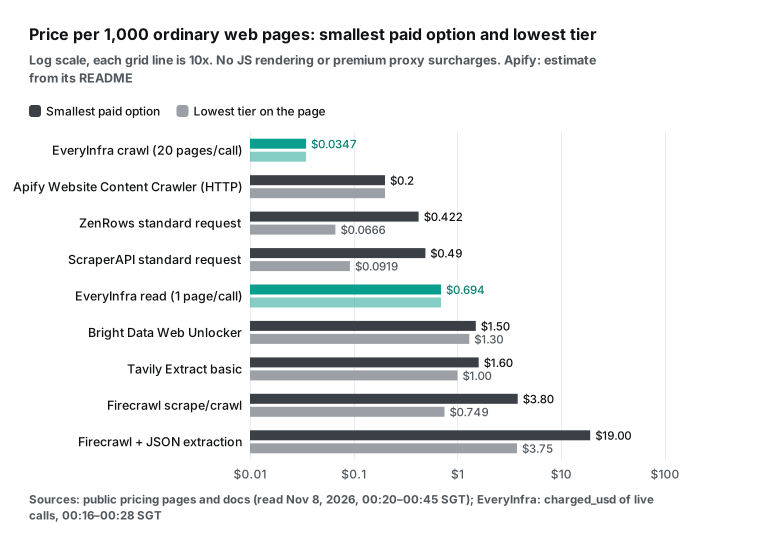
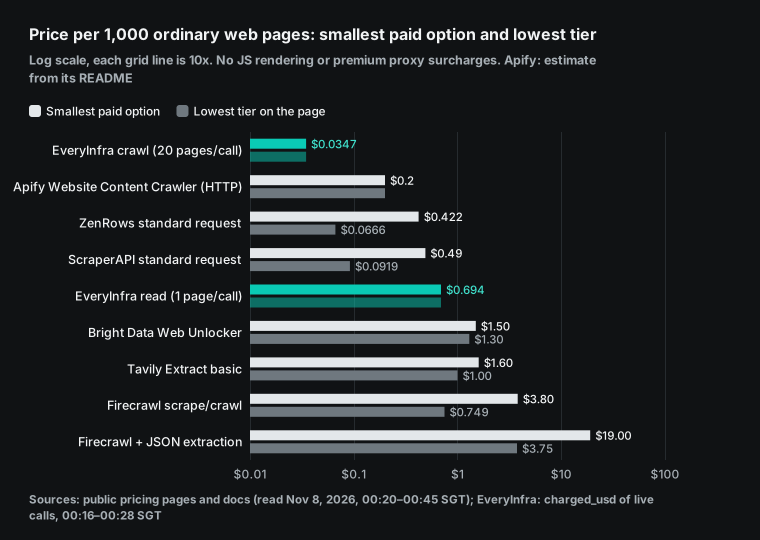
If you need page text for a RAG index or an agent, there are many alternatives to Firecrawl. For single easy pages, three of them cost less than our read. ZenRows charges 1 credit for a standard request, 5 for JavaScript rendering, 10 for premium proxies and 25 for both (ZenRows pricing docs). Its smallest plan, Build B1, is $19 for 45,000 credits, so $0.422 per 1,000 standard requests. Its largest listed plan, Scale S5, is $2,999 for 45 million credits, so $0.0666 per 1,000.
ScraperAPI's pricing page lists Hobby at $49 for 100,000 credits, which is $0.49 per 1,000 standard requests. The Advanced plan is $1,975 for 21.5 million credits, which is $0.0919 per 1,000. The Apify Website Content Crawler gives its own estimate. It is about $0.2 per 1,000 pages with raw HTTP, and $0.5 to $5 per 1,000 pages with a headless browser. Our read is $0.694 per page call, so $0.694 per 1,000 pages. On price per easy page, these three win.
The low prices have conditions. A standard request does not render JavaScript and does not use premium proxies. If the site needs rendering, ZenRows B1 goes to $2.11 per 1,000 (5 credits), and ScraperAPI Hobby goes to $4.90 per 1,000 (10 credits). If the site has strong bot protection, ScraperAPI adds 10 more credits.
ZenRows with rendering and premium proxies is 25 credits, or $10.56 per 1,000 on B1. These services also return HTML by default, so you convert to Markdown yourself or turn on an output option. Firecrawl and our read do not charge more for proxies. Firecrawl's docs say that enhanced proxies cost the same base credit, and our tools have one price for every page.
| Per 1,000 generic pages | Standard page | With JS rendering | With premium proxy or bot protection | Default output |
|---|---|---|---|---|
| Firecrawl Hobby | $3.80 | $3.80 | $3.80 | Markdown |
| ZenRows Build B1 | $0.422 | $2.11 | $4.22 to $10.56 | HTML |
| ScraperAPI Hobby | $0.49 | $4.90 | $5.39 to $12.25 | HTML |
| Apify Website Content Crawler | about $0.2 | $0.5 to $5 | Included in compute | Markdown or text |
| Bright Data Web Unlocker | $1.50 | $1.50 | $1.50 | HTML |
| Tavily Extract (basic, pay as you go) | $1.60 | Not listed | Not listed | Markdown or text |
EveryInfra read | $0.694 | $0.694 | $0.694 | Clean text |
So the real question for generic pages is: what share of your target pages needs rendering or bot bypass? If the share is low, ZenRows and ScraperAPI on high tiers are the cheapest. If the share is high, a flat price per page is easier to plan. Tavily is a fair option too. Its Extract endpoint charges 1 credit per 5 successful URLs, and its extract docs say failed extractions are free. Its crawl endpoint charges map credits plus extract credits, so 10 basic pages cost 3 credits.
Our crawl tool: 20 pages per charge, and its three limits
Our one strong price for generic pages is the crawl tool. The search tools catalog lists it at $0.000694 per call, with a num maximum of 20. At 00:17:02 SGT we crawled the Firecrawl docs site. The call returned 20 pages in 2.46 seconds.
At 00:17:28 we crawled the Model Context Protocol website and got 20 more pages in 1.28 seconds. Two charges of $0.000694 gave us 40 pages, so $0.001388 in total, or $0.0347 per 1,000 pages. That is about 1/21 of Firecrawl's Scale price per page.
| Generic page test (November 8, 2026, SGT) | Time | Latency | Result | Charged |
|---|---|---|---|---|
read Firecrawl billing docs | 00:16:43 | 0.85 s | 13,372 characters | $0.000694 |
map Firecrawl docs site | 00:16:50 | 0.84 s | 200 URLs | $0.000694 |
crawl Firecrawl docs site | 00:17:02 | 2.46 s | 20 pages | $0.000694 |
crawl MCP website | 00:17:28 | 1.28 s | 20 pages | $0.000694 |
read 15-page PDF from arXiv | 00:25:10 | 1.78 s | 52,380 characters | $0.000694 |
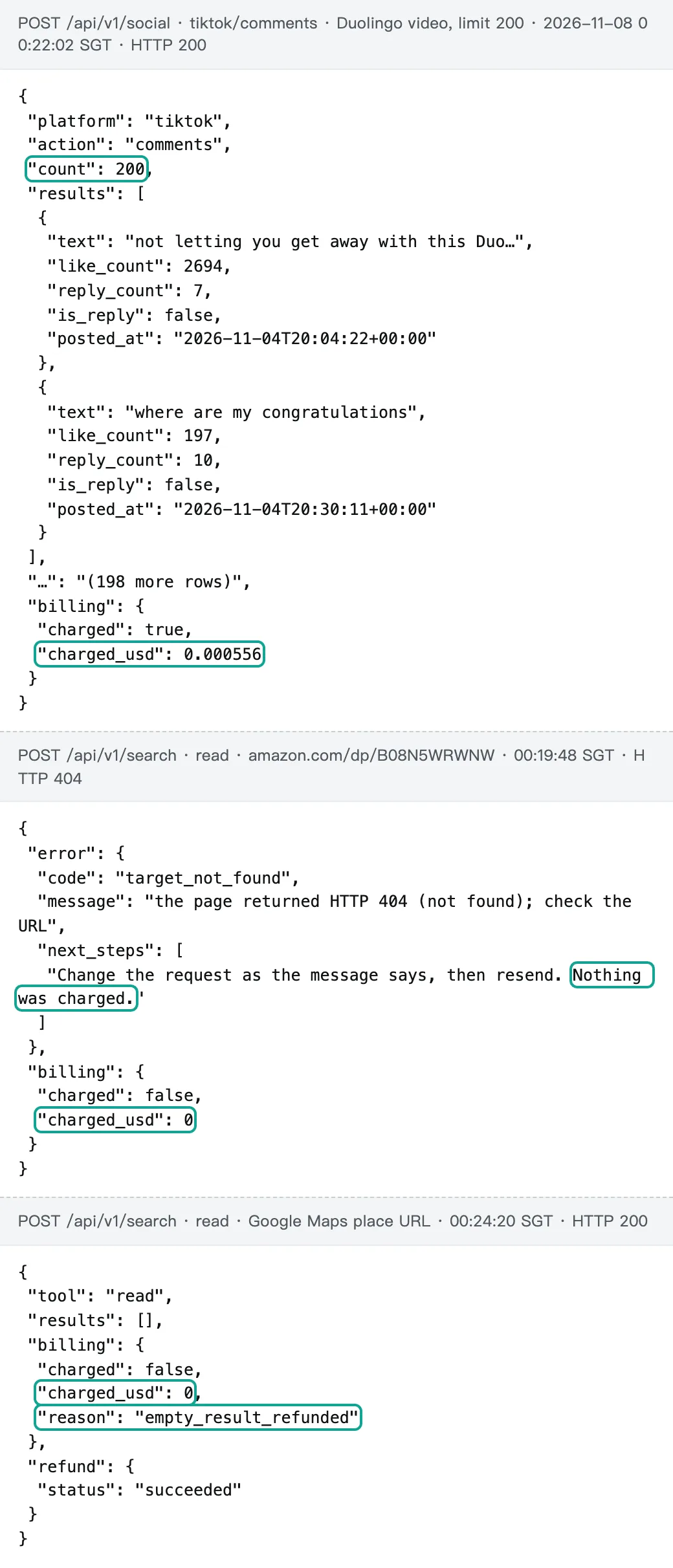
read removed Amazon product page | 00:19:48 | 5.98 s | 404, target not found | $0 |
The low price comes with three limits, and you should know them before you choose crawl. First, one call returns at most 20 pages. Firecrawl's crawl docs give a default limit of 10,000 pages per job. To get 1,000 pages from us, you can split the site into 50 start URLs. Or you can use map to list URLs and then read each page. The second method brings you back to $0.694 per 1,000 pages.
Second, 3 of our 40 pages had exactly 20,000 characters of text. That looks like a cap per page, so long pages are cut. The read tool does not have this cap: it returned more than 52,000 characters for the PDF. Third, crawl picks the 20 pages itself.
In the MCP website test, 19 of the 20 pages were under /community/, and the order looked like a sitemap sort. You can steer it with an instructions parameter, but we did not test that parameter. Both test sites were documentation sites with no bot protection. Store sites or sites behind a login can give different results and slower times.
Our map tool has a limit too. It returned 200 URLs for one call, which is the maximum. Firecrawl's map docs say a map call costs 1 credit even with a limit of 100,000 URLs. For a site with many thousands of URLs, Firecrawl's map is cheaper than ours. We say this plainly because it is the kind of detail that a comparison table hides.
TikTok comments: the same video, two methods
Now the case where many people who search for a firecrawl alternative actually land. A brand team wants the comments under a TikTok video for sentiment analysis. With a generic scraper, the plan is to fetch the video page and parse the comments out of it. We ran both methods on the same video: a Duolingo post from November 5, 2026, SGT (2026-11-04 19:58 UTC). At 00:17 SGT, our tiktok/user_videos call got the five latest videos of the account, and the newest was from 2026-11-06 (UTC). At that time, our video had 596 comments.
At 00:18:45 SGT, read fetched the video page in 2.39 seconds and returned 17,914 characters for $0.000694. The text had the video title, a cover image and a "You may like" list with 81 video links. We took the first 50 comment texts from the structured call and searched for each one in the page text. None of them appeared. The first HTML of the page does not hold the comments.
The front end loads them later, after a scroll. Any tool that only fetches the URL meets the same wall. Firecrawl has Interact, which runs a browser session for 2 to 7 credits per browser minute. We did not test it, so we do not know how many comments it would collect.
At 00:22:02 SGT, tiktok/comments with a limit of 200 returned 200 comments in 49.53 seconds for $0.000556. All 200 had unique IDs. Twenty-two were replies and 187 had text. Each comment had a like count, a reply count, flags for "liked by author" and "pinned by author", and a timestamp.
The comments were posted between 2026-11-04 20:00 and 2026-11-07 13:44 UTC. Together they had 3,683 likes, but the spread was very uneven. The top 10 comments had 96.6% of all likes, and 121 comments had no likes. If you weight sentiment by likes, your result can be very different from an unweighted count. You can do that only when each comment comes back as a record with its own fields.
One earlier call at 00:19:05 waited 31.15 seconds and returned 503 with "Not charged", so we sent it again. A comment call can take half a minute or more. Put it in a background job, not behind a button that a user waits on.
| Same TikTok video | Page text (`read`) | Structured (`tiktok/comments`) |
|---|---|---|
| Time (SGT) | 00:18:45 | 00:22:02 |
| Latency | 2.39 s | 49.53 s (an earlier try: 503 after 31.15 s, not charged) |
| What came back | 17,914 characters, 81 links to other videos | 200 comments, 22 replies, 187 with text |
| Usable comments | 0 | 200 |
| Charged | $0.000694 | $0.000556 |
| Per 1,000 comments | Not possible | $0.00278 |
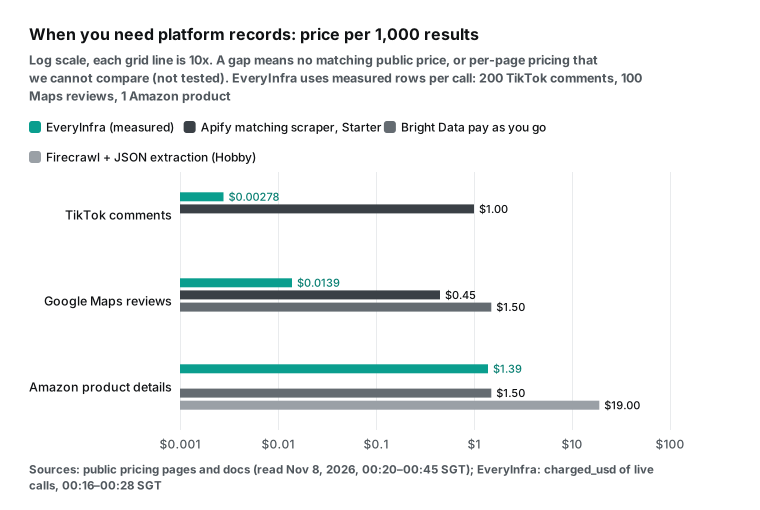
For the same 1,000 comments, the Apify TikTok Comments Scraper charges per comment. The price is $0.00125 on the free plan, $0.001 on the Bronze tier that matches Starter and $0.00015 on Diamond. That is $1.25, $1.00 and $0.15 per 1,000. Our $0.00278 is about 1/360 of the Starter price. Bright Data's Web Scraper API pricing is $1.50 per 1,000 records pay as you go. The page lists TikTok posts, but we did not find a TikTok comments scraper on it, so the table leaves that cell empty.
For a deeper guide to paging and fields, see how to scrape TikTok comments and the TikTok comments API page.
Google Maps reviews: page text was empty
Maps reviews were the most extreme case in our test. At 00:21:22 SGT, google_maps_reviews/search for "Lau Pa Sat Singapore" returned the hawker centre in 57.80 seconds for $0.001389. The result had a rating of 4.4, 39,457 reviews and a URL with a query_place_id. This was the slowest call in the whole test.
At 00:24:20, read fetched that URL. After 3.02 seconds it returned an empty result and an automatic refund, so the cost was $0. A Maps place page is built by scripts in the browser, so a text fetch finds nothing.
At 00:24:35 SGT, google_maps_reviews/reviews for the same URL with a limit of 100 returned 100 reviews in 8.50 seconds for $0.001389, or $0.0139 per 1,000. The reviews were dated from 2026-10-29 to 2026-11-07 (UTC), newest first. Seventy-five were 5 stars, 18 were 4 stars and 5 were 3 stars. One was 2 stars and one was 1 star.
The average was 4.65, above the all-time 4.4, so the last ten days were better than the long-term average. Only 38 reviews had text.
Seventy had separate food, service and atmosphere scores. Food had an average of 4.70 (69 reviews), atmosphere 4.57 (69) and service 4.38 (66). So service was the weakest of the three. Of the 100 reviewers, 79 were Local Guides, and 17 reviews had photos. Your reports can use these fields directly, without a model that reads the text. The response included a next_page_token for the next page, and each page is one call.
The Apify Google Maps Reviews Scraper charges per review. It is $0.60 per 1,000 on the free plan, $0.45 on Starter and $0.15 on the lowest tier. Each run start adds $0.00005. Bright Data's ready-made Maps reviews scraper is $1.50 per 1,000 records. Our $0.0139 is about 1/32 of the Apify Starter price. Our Google Maps reviews API page lists the fields, and how to scrape Google Maps reviews covers paging and sorting.
Amazon product data: close prices, different fields
Product pages are a middle case. At 00:23:04 SGT, read fetched the Amazon page of a Ninja portable blender. In 3.25 seconds it returned 785 characters for $0.000694. The text had the product title, one line of description and a "Found a lower price? Let us know" feedback form.
There was no price, no rating and no stock status. Fifteen seconds later, amazon/profile on the same URL returned one object in 16.82 seconds for $0.001389. It had 20 filled fields: price $39.99, list price $69.99, rating 4.2, 14,458 ratings, in stock and brand Ninja. It also had a rank of #369 in Home & Kitchen and #19 in Kitchen Small Appliances, 10 feature bullets and 12 images.
Amazon shows different page versions to different visitors. The price block often needs a certain region, cookie state or rendering. Generic scrapers usually fix this with JSON extraction. Firecrawl's JSON format is 5 credits per page, so $19.00 per 1,000 products on Hobby and $3.745 on Scale. That works only if the price is in the page the scraper sees.
ScraperAPI counts Amazon as 5 credits per request, so $2.45 per 1,000 on Hobby. Bright Data's Amazon product scraper is $1.50 per 1,000 records. Our amazon/profile is $1.389 per 1,000 products. That is only 7% below Bright Data, so on single product records we have no strong price lead. The Amazon product API page lists all fields.
| Per 1,000 Amazon product records | Price | Unit | Notes |
|---|---|---|---|
EveryInfra amazon/profile | $1.389 | Per call, 1 product | 20 filled fields in our test |
| Bright Data Web Scraper API | $1.50 | Per record, pay as you go | $1.30 above 384,000 records on the scale plan |
| ScraperAPI Hobby | $2.45 | 5 credits per Amazon request | Returns the page; we did not check its structured output |
| Firecrawl JSON, Scale | $3.745 | 5 credits per page | Price must be in the page it sees |
| Firecrawl JSON, Hobby | $19.00 | 5 credits per page | Same condition |
Reviews did not work in our test, and we report the failures. At 00:20:06 SGT, amazon/reviews on a removed product returned an empty result with a refund. At 00:23:48, the call for the Ninja blender returned 503 after 19.10 seconds. At 00:26:01 we sent it in async mode. The poll at 00:27:39 showed the job done with 0 reviews, and the $0.001389 charged at submit time was refunded.
At 00:27:46 we tried another product and got 503 again. Four tries, $0 in total.
| `amazon/reviews` try (SGT) | Product | Result | Latency | Final charge |
|---|---|---|---|---|
| 00:20:06 | Removed product | Empty result, refunded | 32.56 s | $0 |
| 00:23:48 | Ninja blender | 503 | 19.10 s | $0 |
| 00:26:01 async, polled at 00:27:39 | Ninja blender | Job done with 0 reviews, hold refunded | 1.88 s to submit | $0 |
| 00:27:46 | Another product | 503 | 16.88 s | $0 |
Our catalog also says this endpoint returns only the featured reviews on the product page, usually about a dozen. For full review history, the Apify Amazon Reviews Scraper is $5.00 per 1,000 on Starter, and Bright Data is $1.50. Our post on Apify Amazon scraper alternatives covers this category in more detail.
Platform items across vendors: one table
This table puts the three cases side by side. The gap comes from the unit of billing, not from a discount. A per-call endpoint returns 200 comments for one charge. A per-page scraper bills a page, and the comments are not in the page unless you pay for browser time. A per-item scraper charges again for every comment.
So when one call can return many items, such as comments or reviews, per-call billing is cheaper by two or three orders of magnitude. When one call returns one item, such as a product record, the prices sit close together. Then you compare fields and failure rules instead. The reverse is also true: if you need one comment, a per-item price is the cheapest.
| Per 1,000 platform items | EveryInfra (measured) | Apify (Starter / lowest tier) | Bright Data (pay as you go) | Firecrawl |
|---|---|---|---|---|
| TikTok comments | $0.00278 (200 per call) | $1.00 / $0.15 | Not found on pricing page | Billed per page; not tested |
| Google Maps reviews | $0.0139 (100 per call) | $0.45 / $0.15 | $1.50 | Billed per page; not tested (our read got empty page text) |
| Amazon product records | $1.389 (1 per call) | Not checked | $1.50 | JSON: $19.00 Hobby / $3.745 Scale |
| Amazon reviews | 0 returned in 4 tries, $0 | $5.00 / $1.00 | $1.50 | Same as above |
Firecrawl is also building its own data catalog. On September 22, 2026, it announced a $75M Series B and Alexandria (announcement). Alexandria puts live web pages, data providers, site connectors and Firecrawl's own index behind one entry point. On October 8, 2026, Universal Scrape let /scrape call Alexandria providers, and the announcement lists more than 200 of them. The Alexandria docs say discovery is free and each tool call costs the credits that the tool lists.
The full provider list is only visible after login. We did not log in, so we do not know if it covers TikTok comments or Maps reviews. If you already use Firecrawl, check that list in your dashboard first. You may not need to switch. These provider calls have their own prices, not a flat "1 credit per page", so check each price in the dashboard. Our approach is different. We maintain structured endpoints for 106 platforms ourselves, and every price is in a public catalog that you can read without a login.
Failed calls: who charges for a 404?
Failures are normal in scraping, so the failure rules can change a bill more than the unit price. Firecrawl's rule is in the "When credits are charged" section of its billing docs. The charge depends on whether Firecrawl returns a document, not on the status code of the target. If the target returns 403 or 404, Firecrawl still returns that response as a document and charges 1 credit. The docs tell you to check metadata.statusCode and to stop retrying URLs that keep blocking you. If no document comes back at all, the charge is 0.
Apply this rule to a full URL list. Suppose that 10% of 1,000 URLs are dead or always blocked. Under a "charge for any returned document" rule, those 100 URLs cost about $0.38 extra on Firecrawl Hobby, and they give you no usable text. An old URL list costs more. So remove dead links before a large job.
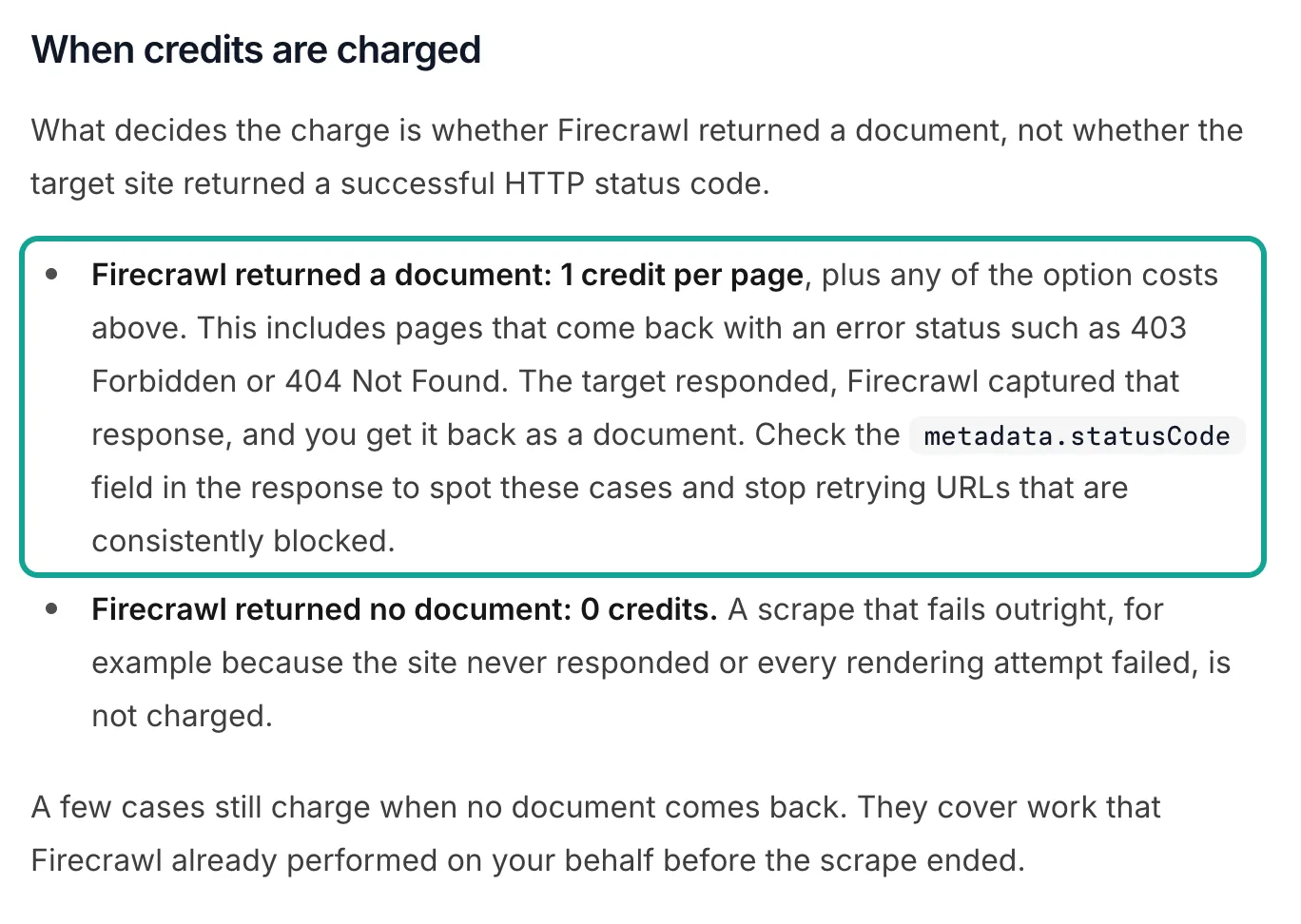
The docs also list cases that cost credits without a document. A threat-protection scan costs 2 credits per URL. A prompt-injection check costs 5 credits. A cache-only request that misses costs 1 credit. A browser session is billed per minute, with a minimum of one minute.
Other vendors have different rules. ScraperAPI's credits docs charge for 200 and 404 responses and for requests that you cancel within 70 seconds. ZenRows does not charge for failures, but it counts 404 and 410 as successes. Tavily never charges for a failed URL extraction. Bright Data's Web Unlocker pricing says you pay only for success.
| Case | Firecrawl | Apify | Tavily | Bright Data | ScraperAPI | ZenRows | EveryInfra (our test) |
|---|---|---|---|---|---|---|---|
| Target returns 404 | 1 credit | Depends on billing type | Failed extract is free | Pay for success only | Charged | Charged | $0 (00:19:48 SGT) |
| Timeout or full failure | Free | Compute time is billed | Free | Free | Free | Free | $0 (four 503s) |
| Empty result | Charged if a document returns | Free on per-event scrapers | Free | Not stated | Not stated | Not stated | Refunded (three times) |
| Wrong parameter | Not stated | Not stated | Not stated | Not stated | Not stated | Not stated | 422 before any charge |
| Rate limit | 429 | Not stated | Not stated | Page says no concurrency limit | 429, no charge | Not stated | 429, "Nothing was charged" |
Our 404 call at 00:19:48 SGT shows the difference best. The same removed Amazon page would cost 1 credit on Firecrawl and on ScraperAPI. On our side, the response said target_not_found and gave the HTTP 404 from the target. It also stated "Nothing was charged." At 00:16:37 SGT we also sent a crawl call with the parameter site instead of url. The API answered in 0.15 seconds with 422, the code unknown_param and the three allowed parameters. No charge, and an agent can fix the call from that message.
Rate limits: the real price depends on the tier you must buy
Rate limits are part of the cost. Firecrawl's rate limits page has two groups. Scrape, map and search allow 10 requests per minute on Free, 100 on Hobby, 500 on Standard, 5,000 on Growth and 10,000 on Scale. Crawl, agent and interact allow far fewer: 2 per minute on Free, 20 on Hobby and 2,000 on Scale. Concurrent browsers range from 2 on Free to 100 on Scale.
| Firecrawl plan | Scrape, map, search (per minute) | Crawl, agent, interact (per minute) | Concurrent browsers |
|---|---|---|---|
| Free | 10 | 2 | 2 |
| Hobby | 100 | 20 | 5 |
| Standard | 500 | 100 | 25 |
| Growth | 5,000 | 1,000 | 50 |
| Scale | 10,000 | 2,000 | 100 |
This matters for the price comparison. If you need hundreds of thousands of pages per day, a low entry price with a tight limit can push you to a higher tier. Then the true price per 1,000 pages is the price of that higher tier, not the entry tier. That is why every price table in this article shows both the entry tier and the lowest listed tier. Our test key had its own limit of 10 requests per minute, and we hit that limit three times. Each 429 said that nothing was charged, and a retry a few seconds later worked.
Latency: which calls fit a synchronous agent step
Price is one factor. Latency decides whether a tool can sit inside a synchronous step. In our 26 requests, the generic web tools were fast. map took 0.84 seconds.
The four successful read calls took 0.85 to 3.25 seconds, with a median of about 2.08 seconds. The two crawl calls took 2.46 and 1.28 seconds, and web search took 2.15 seconds.
The platform endpoints were much slower. TikTok account videos took 10.06 seconds. Amazon product data took 16.82 seconds. One hundred Maps reviews took 8.50 seconds, 200 TikTok comments took 49.53 seconds, and the Maps place search took 57.80 seconds.
The failed calls were slow too: each 503 took 16 to 31 seconds. These endpoints fetch fresh data from the platform at request time, so tens of seconds is normal. Firecrawl's crawl is also asynchronous. Its docs say credits are charged as each page finishes, which can be minutes or hours after you submit.
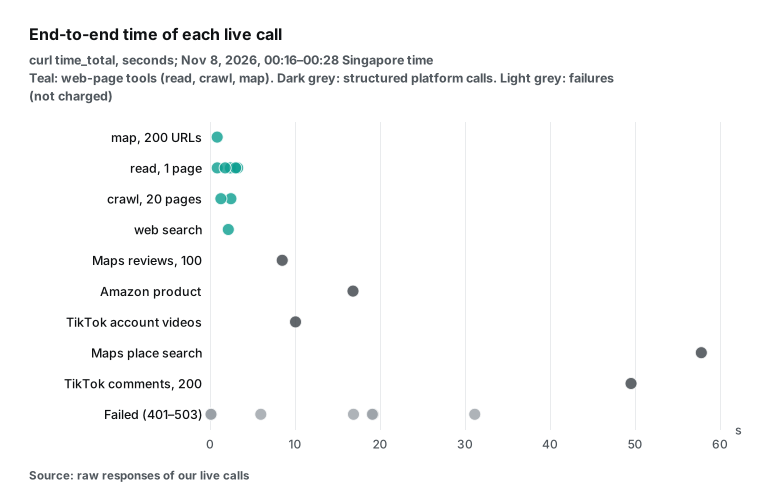
For an agent, the practical rule is simple. Put generic page reads in a synchronous tool call. Send comments and reviews in async mode, add "mode":"async" to the request body, and poll the poll_url. Or run them in a scheduled batch. Do not make a user wait a full minute for a reply.
One month, one workload, four ways to buy it
Unit prices are abstract, so here is one monthly bill. Picture a small cross-border store team with four jobs. They load 5,000 pages of product docs and help articles into a knowledge base. They pull 20,000 TikTok comments for brand monitoring.
They track price and rating on 2,000 Amazon products. They collect 10,000 Google Maps reviews for their shops. We price the API cost only, from public prices and the item counts per call in our test. We do not count the hours to write parsing code.
With our API, docs through read cost 5,000 × $0.000694 = $3.47. TikTok comments are 100 calls × $0.000556 = $0.0556. Amazon products are 2,000 × $0.001389 = $2.778. Maps reviews are 100 calls × $0.001389 = $0.1389.
The total is $6.44. A simple docs site can use crawl at 20 pages per call. Then the docs line drops to 250 × $0.000694 = $0.1735, and the total is $3.15.
With Firecrawl only, docs are 5,000 credits and Amazon products with JSON are 2,000 × 5 = 10,000 credits. That is 15,000 credits. Hobby includes 5,000, and 10 top-ups of $5 cover the rest, so the bill is $69. For TikTok comments and Maps reviews, Firecrawl needs Interact and JSON extraction. We did not test these features, so we cannot price those two jobs.
With Apify only, TikTok comments are 20,000 × $0.001 = $20 and Maps reviews are 10,000 × $0.00045 = $4.50. That is $24.50 on Starter, which starts at $19 per month (Apify pricing), but it leaves out docs and Amazon. Firecrawl plus Apify covers all four jobs for $93.50.
| Option | 5,000 doc pages | 20,000 TikTok comments | 2,000 Amazon products | 10,000 Maps reviews | Monthly total |
|---|---|---|---|---|---|
EveryInfra, docs with read | $3.47 | $0.056 | $2.778 | $0.139 | $6.44 |
EveryInfra, docs with crawl | $0.174 | $0.056 | $2.778 | $0.139 | $3.15 |
| Firecrawl only (Hobby plus top-ups) | 5,000 credits | Per-page price, not tested | 10,000 credits | Per-page price, not tested | $69.00 |
| Apify only (Starter) | Not priced | $20.00 | Not priced | $4.50 | $24.50 |
| Firecrawl plus Apify | In the $69 | $20.00 | In the $69 | $4.50 | $93.50 |
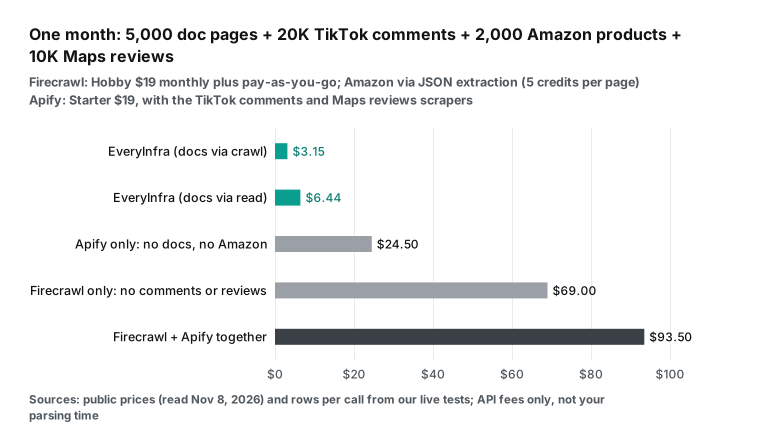
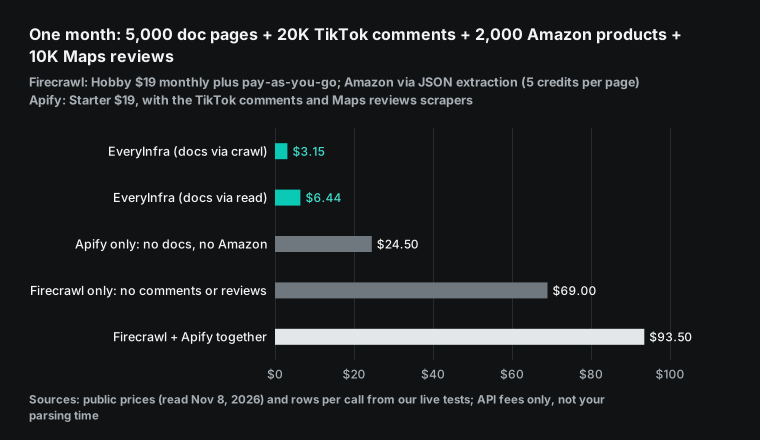
Two changes can flip this result. Your docs site can need rendering or have bot protection. Then our read and crawl may not get every page, and ZenRows or ScraperAPI on a high tier can be safer for that line. Also, our Amazon price is close to Bright Data's. In the mixed option, if you replace Firecrawl JSON extraction with Bright Data's product scraper, that line drops a lot. The big gap in this bill comes from comments and reviews, because each call returns many items.
When Firecrawl is the better choice
A fair comparison must list what Firecrawl does better. Here is the list, with sources.
Scale and control of site crawls come first. Firecrawl crawls up to 10,000 pages by default. You can filter by path, limit depth and include or exclude subdomains and external links. Results come back by polling, by WebSocket or by webhook. Batch scrape sends a large list of URLs in one job. Our crawl stops at 20 pages per call, and our map stops at 200 URLs.
Page features come second. Firecrawl's scrape endpoint supports full-page and viewport screenshots. Screenshot URLs expire after 24 hours. It also supports branding extraction (colors, fonts and components), summaries, link lists and parsing of PDF and Word files. Interact runs clicks, typing and scrolls in a browser session.
Change tracking watches pages for changes. LLM extraction pulls JSON from any site with a schema that you define. Our generic web tools read text, list URLs and crawl small batches. We have no screenshots, no browser actions and no change tracking.
Self-hosting comes third. The Firecrawl main repository is open source under the AGPL-3.0 license. On November 8, 2026 it had 199,441 stars, and the last push was on November 7, 2026. We and the other five vendors in this article have no full self-hosted version.
Apify open-sources a crawler library, not its platform.
The self-hosted Firecrawl is not the same as the cloud version, though. The self-host guide says the default stack does not include Fire-engine and its advanced anti-bot features. Screenshots and page actions are also not available in the default stack.
Also, the last tagged release of the main repository is v2.11.0 from 2026-06-19 (releases). Later changes are only on the main branch. If you self-host, you either follow the main branch or stay on the June release. The open source or cloud page says the difference is who sets up, protects and runs those extra services.
Fourth is the published quality data. Firecrawl's benchmarks page reports a test from January 13, 2026, on 1,000 URLs. The results were 96% coverage, a content F1 of 0.638 and a P95 latency of 3,387 ms. We did not run the same URLs, so we cannot compare success rates.
Fifth is buying and integration. Firecrawl is on Google Cloud Marketplace since October 19, 2026 (announcement), and its pricing page says you can bill through AWS or Google Cloud. If your company can only buy through a cloud marketplace, Firecrawl is easier to buy than most options here.
The other five, in one paragraph each
Apify's strength is its store. Almost every popular site has a ready-made scraper there. The Website Content Crawler alone had 14,350 users in the last 30 days when we read the page on November 8, 2026. Per-event scrapers have clear prices per item, and higher tiers cost less. For the three scrapers in this article, the Diamond price is one third to one seventh of the Starter price.
The cost is choice. One site can have a dozen scrapers with different fields and stability, and compute-unit scrapers need a test run before you know the price. If the platform you need is not in our catalog, or you need deep custom rules, Apify is a better start. Our Apify alternatives overview compares its price structure in more detail.
Tavily starts from search, not from scraping. Search, extract, map, crawl and research sit in one API. Extraction bills by successful URL, and failures are free. That fits an agent flow of "search first, then read a few pages".
Tavily wrote its own article on Firecrawl alternatives (Tavily blog). Its rule of thumb: start from a query, pick Tavily; start from a known site, pick Firecrawl. We think that split is fair. Our web search API comparison for AI agents covers search prices, so we do not repeat them here.
Bright Data has the widest product line of the seven. It sells proxies, Web Unlocker, the Fetch API (formerly the Crawl API, which turns a URL into Markdown, text, HTML or JSON-LD), ready-made scrapers billed per record and finished datasets. Its prices are simple: $1.50 per 1,000 for Unlocker and for scraper records pay as you go, with 5,000 free Unlocker requests per month. It fits teams that need strong anti-bot handling and steady delivery at volume.
ScraperAPI and ZenRows are classic scraping APIs. You send a URL, and they handle proxies, rendering and blocks. The credit multipliers are clear, and high tiers have very low unit prices. They fit teams that already have their own parsers and only need a reliable fetch layer. ZenRows also sells an Extract feature for automatic JSON, and it has an MCP server.
Connecting to an AI tool: MCP on both sides
Many people use Firecrawl through MCP in Claude, Cursor or a similar AI tool. Firecrawl's MCP docs give three ways to connect: no key, browser login, or an API key. The keyless endpoint exposes three tools, Search, Scrape and Parse, with daily limits per IP address. Its MCP server released v3.36.1 on November 3, 2026, under the MIT license.
Our remote MCP server is at https://api.everyinfra.com/mcp. At 00:23:40 SGT we called tools/list without a key. It returned 12 tools in 0.18 seconds, at no charge. everyinfra_search covers read, crawl and map, and everyinfra_call_api covers our 573 platform capabilities. You can add both servers to one client and let the agent pick per task:
{
  "mcpServers": {
    "everyinfra": {
      "type": "http",
      "url": "https://api.everyinfra.com/mcp",
      "headers": { "Authorization": "Bearer ${EVERYINFRA_API_KEY}" }
    },
    "firecrawl": {
      "type": "http",
      "url": "https://mcp.firecrawl.dev/v2/mcp"
    }
  }
}
The Firecrawl entry above is the keyless form from its docs. For the protocol itself, see the MCP specification. The split of work is natural. "Read this URL" or "crawl this docs site" can go to either server.
"What do people say under this video" or "recent reviews for this shop" goes to everyinfra_call_api. Before a call, the agent can use everyinfra_list_capabilities to check that a platform and endpoint exist, and that step is free. Client setup for each tool is on our MCP server page.
Get started in three steps
First, open the pricing page to see the trial credit. Top-ups and charges are in USD, with no monthly fee. Second, read the capability catalog and the search tools catalog without a key. Confirm the platform, endpoint, parameters and price_usd that you need. If you have not picked a platform yet, the data market lists all endpoints and prices by platform. The TikTok API page, Amazon API page and Google Maps reviews API page have field lists and examples.
Third, follow the quickstart and send your first request. These are the two requests from this article. Change the URL to your own:
# Generic pages: crawl a docs site, up to 20 pages, one charge of $0.000694
curl -s https://api.everyinfra.com/api/v1/search \
  -H "Authorization: Bearer $EVERYINFRA_API_KEY" \
  -H "Content-Type: application/json" \
  -d '{"tool":"crawl","params":{"url":"https://docs.firecrawl.dev","num":20}}'
# Returns results[]: url, title, content (about 20,000 characters max per page), billing.charged_usd# Platform data: comments on one TikTok video, up to 200 per call, $0.000556
curl -s https://api.everyinfra.com/api/v1/social \
-H "Authorization: Bearer $EVERYINFRA_API_KEY" \
-H "Content-Type: application/json" \
-d '{"platform":"tiktok","action":"comments","params":{"url":"https://www.tiktok.com/@duolingo/video/7704408143215758605","limit":200}}'
# Fields: id, text, author_username, author_id, like_count, reply_count, reply_to_id,
# is_reply, liked_by_author, pinned_by_author, posted_at, platformA wrong parameter returns 422 and the list of allowed parameters before any charge. Slow endpoints accept "mode":"async", and you poll the poll_url. Failures and empty results cost nothing, and billing.charged_usd in each response is the real cost of that call.
FAQ
We took each question below from Google search suggestions, read on November 8, 2026. We kept the raw suggestion lists.
Are there free firecrawl alternatives?
Yes, several. Firecrawl itself gives 1,000 free credits per month and a keyless MCP endpoint. ZenRows gives 5,000 credits per month, and Bright Data Web Unlocker gives 5,000 requests per month. Tavily gives 1,000 credits per month, Apify gives $5 per month and ScraperAPI gives 1,000 credits at sign-up. You can also self-host the Firecrawl open-source version, but the default stack has no advanced anti-bot features.
For a few hundred pages now and then, these free tiers are enough. For steady, large pulls of platform data, compare the per-1,000-item prices above.
Is Firecrawl free?
Partly. Its pricing page gives 1,000 credits per month, renewed monthly, with no card. That is about 1,000 standard pages. The keyless method has a daily limit per IP address.
Paid plans start at $19 per month for Hobby, or $16 per month billed annually. The open-source version is free, but you pay for servers, proxies and upkeep.
Is there a cheaper firecrawl alternative?
It depends on what you scrape. Firecrawl Hobby is $3.80 per 1,000 easy generic pages. ZenRows ($0.422), ScraperAPI ($0.49) and the Apify Website Content Crawler in HTTP mode (about $0.2) all cost less. Our crawl measured $0.0347.
With JSON extraction, Firecrawl Hobby is $19.00 per 1,000 pages, and a structured endpoint for that platform is usually cheaper. For comments and reviews, our measured prices are two to three orders of magnitude below per-page and per-item options.
Firecrawl vs Apify: which should I use?
Firecrawl is one scraping API billed per page. It fits "give a URL, get the text" and full-site crawls. Apify is a marketplace of ready-made scrapers, each with its own price. It fits "I need this data from this site, and someone already built the scraper". Both handle rendering and blocks.
Apify covers more sites; Firecrawl has one consistent API. If the platform is in our catalog, our per-item price is usually lower. If not, an Apify store scraper is a good start.
Firecrawl vs Tavily: what is the difference?
They start from different points. Tavily starts from a question and bills only successful URLs. Firecrawl starts from a known URL and bills 1 credit even for a 404 target. Tavily's own blog uses the same split. See "The other five" above for details.
Is the Firecrawl MCP free?
The keyless endpoint is free, but it has only three tools (Search, Scrape and Parse) and a daily limit per IP address. With an API key, each MCP call costs the same credits as a direct API call. Our MCP server works the same way: listing tools and reading the catalog are free, and data calls cost the catalog price.
Which firecrawl alternatives work with Claude?
Any option with a remote MCP server works with Claude and similar clients. In this article that includes Firecrawl itself, Apify, Tavily, Bright Data, ZenRows and EveryInfra. We did not check ScraperAPI's MCP status. The config block in the MCP section above shows our server and Firecrawl's keyless endpoint in one Claude config.
References
- Firecrawl Pricing, Firecrawl, effective 2026-09-04, read 2026-11-08.
- Billing, Firecrawl docs, read 2026-11-08.
- Rate Limits, Firecrawl docs, read 2026-11-08.
- Scrape, Firecrawl docs, read 2026-11-08.
- Crawl, Firecrawl docs, read 2026-11-08.
- Map, Firecrawl docs, read 2026-11-08.
- Batch Scrape, Firecrawl docs, read 2026-11-08.
- Change Tracking, Firecrawl docs, read 2026-11-08.
- Interact, Firecrawl docs, read 2026-11-08.
- LLM Extract, Firecrawl docs, read 2026-11-08.
- Alexandria, Firecrawl docs, read 2026-11-08.
- MCP Server: Get Started, Firecrawl docs, read 2026-11-08.
- Keyless MCP, Firecrawl docs, read 2026-11-08.
- Self-host, Firecrawl docs, read 2026-11-08.
- Open Source vs Cloud, Firecrawl docs, read 2026-11-08.
- firecrawl/firecrawl, GitHub, read 2026-11-08.
- firecrawl/firecrawl Releases, GitHub, read 2026-11-08.
- LICENSE (AGPL-3.0), GitHub, read 2026-11-08.
- firecrawl-mcp-server v3.36.1, GitHub, released 2026-11-03.
- Benchmarks, Firecrawl, read 2026-11-08.
- Introducing Alexandria and our $75M Series B, Firecrawl, 2026-09-22.
- Introducing Universal Scrape, Firecrawl, 2026-10-08.
- Firecrawl for Google Cloud, Firecrawl, 2026-10-19.
- Apify Pricing, Apify, read 2026-11-08.
- Website Content Crawler, Apify, read 2026-11-08.
- TikTok Comments Scraper, Apify Store, read 2026-11-08.
- Google Maps Reviews Scraper, Apify Store, read 2026-11-08.
- Amazon Reviews Scraper, Apify Store, read 2026-11-08.
- Apify Store billing, Apify docs, read 2026-11-08.
- Credits & Pricing, Tavily docs, read 2026-11-08.
- Tavily Extract, Tavily docs, read 2026-11-08.
- Tavily Crawl, Tavily docs, read 2026-11-08.
- 7 Best Firecrawl Alternatives for AI Agents in 2026, Tavily, read 2026-11-08.
- Web Unlocker Pricing, Bright Data, read 2026-11-08.
- Web Scraper API Pricing, Bright Data, read 2026-11-08.
- Fetch API, Bright Data docs, read 2026-11-08.
- ScraperAPI Pricing, ScraperAPI, read 2026-11-08.
- Credits and Requests costs, ScraperAPI docs, read 2026-11-08.
- Pricing, ZenRows docs, read 2026-11-08.
- EveryInfra capability catalog, EveryInfra, read 2026-11-08 00:15 SGT.
- EveryInfra search tools catalog, EveryInfra, read 2026-11-08 00:15 SGT.
- Model Context Protocol Specification 2025-11-25, MCP, read 2026-11-08.
- Attention Is All You Need (arXiv 1706.03762), arXiv, the target of our PDF read test.
- What is the best scraper tool right now? Firecrawl is great, but I want to explore more options, Reddit r/LocalLLaMA, read 2026-11-08.
Reference BL-114