Claude Meetings: Follow Up on Rivals with a Meeting Notes Connector
Claude Meetings plus a remote MCP connector: we pulled 7 days of posts for 3 rivals named in a call. 12 calls, 164 items, 15 own posts, $0.0127 in fees.
Anthropic announced Claude Meetings on November 10, 2026. Claude joins a Google Meet call as a participant, and it can use the connectors that each person has set up (TechCrunch, Help Center). We used the EveryInfra remote MCP server as that connector. A product team names three rivals in a call: Granola, Otter.ai and Fireflies.ai. After the call, we checked each rival on four channels.
The 12 calls returned 164 items. After a filter for "last 7 days, posted by the company, not a reply", only 15 social posts were left. The data fees for one meeting were $0.012669. Of the 11 news events we found, 5 showed up on one channel only.
What Claude Meetings is: the sources from November 10 to 12
Claude Meetings lets a team add Claude to a video call. Claude shows up as a visible participant. It writes docs, draws whiteboards and takes notes and action items while people talk. After the call, each meeting gets its own page in claude.ai (launch article). Reuters dates the announcement to Tuesday, November 10, 2026 (Reuters). The launch article on claude.com carries the date November 12, 2026 and says "now in beta".
The Claude release notes have an entry for November 12, 2026. It says that Claude Meetings is rolling out in beta on Team and Enterprise plans (release notes). Unite.AI also gives November 12 as the start of the rollout (Unite.AI). So we use two dates in this article. Anthropic announced the feature on November 10, and the rollout began on November 12.
Axios spoke with Nicholas Lin, who leads knowledge work products at Anthropic. He said the company tested the feature inside Anthropic for about two months. Today, Claude mostly waits for people to tell it what to do. Later, it will act more on its own (Axios).
| Item | What the source says | Source |
|---|---|---|
| Plans | Team and Enterprise, staged beta rollout | Launch article; Help Center |
| Meeting app | Google Meet only; other platforms "coming soon" | Launch article |
| Team default | On by default; an owner can turn it off | Help Center |
| Enterprise default | An owner turns it on for all or part of the org (custom roles) | Help Center |
| Excluded orgs | Zero data retention (ZDR), HIPAA-ready setup, customer-managed keys (CMEK) | Launch article |
| What it keeps | Transcript, summary and screen descriptions; no audio | Launch article; Help Center |
| Time limit | Up to 8 hours, with a warning before it leaves | Help Center |
| Connectors | Uses each person's own tools; asks the first time, and a yes applies going forward | Help Center |
| Spoken requests | For now, confirms who is speaking each time | Launch article; Help Center |
| Price | Notes, transcripts and answers without connectors are included (beta: free); answers with a connector count toward plan usage; docs and whiteboards free through February 10, 2027 | Launch article; Help Center |
| Admin switches | Owners manage three settings in Organization settings > Products > Claude Meetings (beta): on or off, calls with outside guests, and members' connectors in meetings | Help Center |
The connector row matters for the cost math later. The Pricing section of the Help Center is direct about it. Your connected tools count toward your own usage and "can lead to charges for your organization" (Help Center). So a rival check in a call has two costs.
The Claude side uses plan usage. The EveryInfra side uses the per-call list price.
The Team plan price is on its own Help Center page. A Standard seat is $25 per member per month on monthly billing and $20 on annual billing. A Premium seat is $125 monthly and $100 annually. A team needs at least 2 members and can have up to 150 seats (What is the Team plan?). These are US prices before tax.
The last part of the launch article names partners: Gong, Attention, Granola, Fireflies.ai, Otter and Plaud. Soon, teams will be able to send a meeting transcript to these tools. Unite.AI quoted the list on November 12 with five names and no Plaud. The page we read on November 15 has Plaud. Two of the three rivals in this article are on it. They compete with Claude Meetings for users, and they will also take its transcripts.
Which connectors claude meetings can call: the "During the call" section
The "During the call" section of the Help Center has one paragraph on connectors. The teal box in the screenshot marks it.
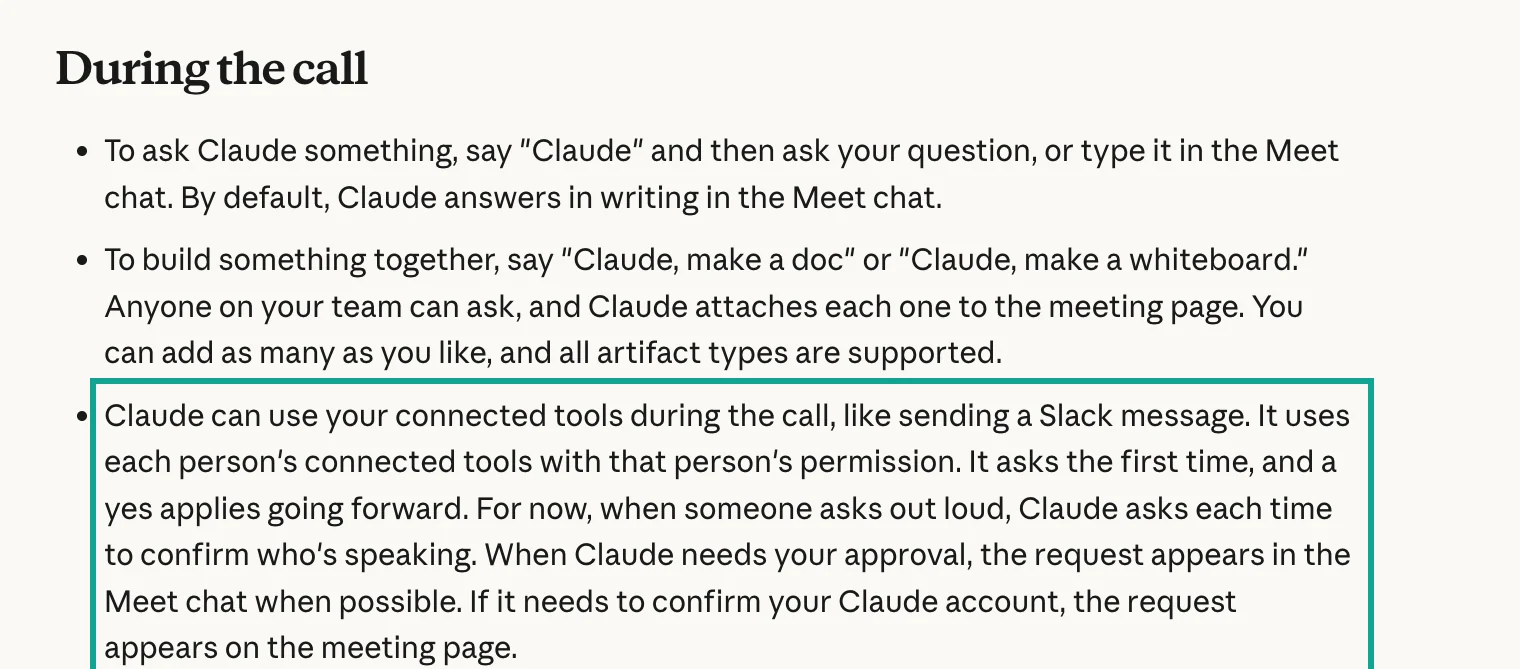
Look at the org settings first. The section "Manage Claude Meetings as an owner" lists a switch named "Members' connectors in meetings". It controls whether Claude can use the tools that members have connected. When this switch is off, none of the steps below work. Ask an owner to turn it on before you try a rival check in a call.
The paragraph in the screenshot makes four points. Each one changes how a rival check works in a live call.
First, connectors belong to people. Claude uses the tools of the person who asks. Suppose a marketing teammate asks, but only you have connected EveryInfra. Claude cannot use your connection for that teammate.
On Team and Enterprise plans, an owner adds a custom connector to the org. Then each member clicks "Connect" once (custom connector guide). So at least one person on the call must connect before the meeting.
Second, Claude asks the first time and then stops asking. The Help Center says, "It asks the first time, and a yes applies going forward." The first rival check puts an approval request in the Meet chat. The person who asked approves it. After that, the same person can ask again, and Claude calls the tool at once.
Third, spoken requests need a speaker check every time. The source says "For now", so this is beta behavior. In practice, a person says "Claude, check these three companies." Claude then asks who is speaking, and it waits for that answer. A typed question in the Meet chat skips this step, because the chat message already shows who sent it.
Fourth, answers in the Meet chat are visible to everyone on the call. The Help Center warns about this at the end of the same section. The chat on the meeting page stays inside your org. A rival summary is usually fine for the whole call. When guests are on the call, or the company is a partner, ask on the meeting page or after the call.
Ask during the call or after it
The Help Center gives a second path. After the meeting, you can ask Claude about past meetings that you have access to, in a regular chat (Help Center). Connectors work in regular chats too. The table compares the two paths. We wrote the "after the call" column from the source text. We did not run that flow inside Claude.
| During the call | After the call, in a regular chat | |
|---|---|---|
| How to ask | Say "Claude" and ask, or type in the Meet chat | Open a new chat in claude.ai, name the meeting, then ask |
| Approval | First use: approve in the Meet chat; spoken asks confirm the speaker | Same as any connector, set by tool permissions |
| Who sees the answer | Meet chat: everyone on the call; meeting page chat: your org | Only you, unless you share it |
| Calls with outside guests | Claude does not reply in the chat | No change |
| Slow calls | The meeting waits | Takes as long as it needs |
| Good for | A fact the discussion needs now, such as "Did they cut prices last week?" | A fixed "rival updates" section after each weekly meeting |
We prefer the after-call path, and the test data shows why. LinkedIn company posts take about 8.7 seconds per call. An X pull of 200 posts took 26.7 seconds. Twelve calls for three rivals, one after another, take a few minutes. That wait costs more in a live meeting than after it. During the call, ask one narrow question, such as "What did Fireflies post this week?" Two to four calls are enough for that.
Calls with outside guests: the two sources disagree
The launch article says that by default Claude stays out of a call when someone from outside your org is on the invite. If an outside person joins partway through, Claude leaves. An admin can change this (launch article). The Help Center section "Calls with outside guests" puts it another way.
On Team plans, Claude can join calls with outside guests by default, and an owner can turn this off. On Enterprise plans, an owner must allow it first. Each person also has a "Meetings with external guests" setting in Settings > Capabilities > Meetings (Help Center). The two pages give different Team defaults, so check the switch in your own admin settings.
The Help Center adds one more detail for orgs that do not allow outside guests. Claude leaves when an outside person joins partway through, and that includes "another company's notetaker bot". The source does not say how Claude treats an Otter or Fireflies bot that your own team runs. We did not test it either. If your team runs two note tools at the same time, watch whether Claude leaves early on the first try.
When outside guests are allowed, Claude listens and takes notes on those calls. It posts its notice in the chat but does not reply there. What guests say goes into the notes and transcript. Guests do not get the meeting page or the recap email. So for calls with customers or suppliers, the in-call rival check does not work. Ask after the call instead.
Who gets named in the call: 50 posts on X
We picked meeting note apps as the example for a reason. After the launch, almost every X post about Claude Meetings named these companies. We ran twitter/search for posts that named "Claude Meetings" and one of the three rivals. We asked for the 50 latest posts on November 15, 2026 at 00:39 Singapore time.
The call returned 50 posts from 50 different accounts. They ran from November 11, 12:15 to November 14, 15:05 (UTC). We then counted the names in each post.
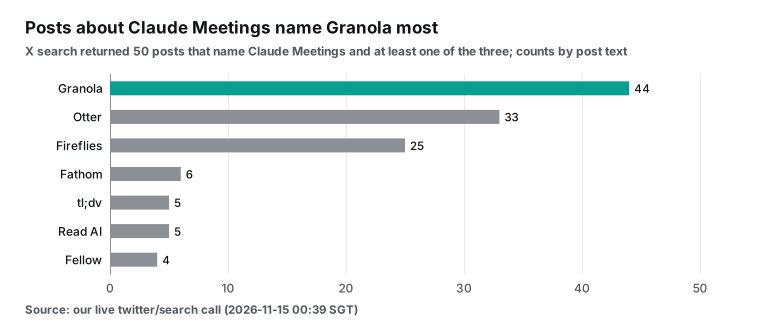
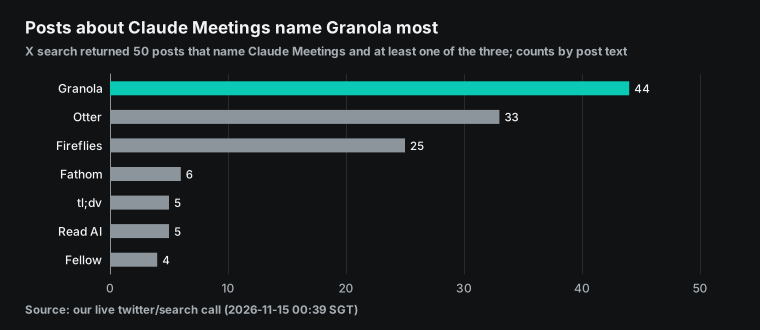
Granola appears in 44 of the 50 posts, Otter in 33 and Fireflies in 25. Fathom, tl;dv, Read AI and Fellow also appear. Sixteen posts use the root "kill" (13 posts) or the words "murder", "on notice", "lapped" or "dead". They mean that Claude Meetings will take users from these apps.
The top post had 26,331 views. The Reddit launch thread asks the same question. One comment asks if this kills Granola, Fireflies, Attention and similar tools. A reply points out that Granola does not join the call as a bot, so it works in a different way (r/ClaudeAI thread).
This data has limits. twitter/search uses X's own search. The sort: latest option asks for new posts first, but the catalog says it does not promise strict time order (catalog). Fifty posts also cover just over three days.
The data shows who gets named most in the talk. That is enough to pick which rivals to follow. It is not enough to estimate market share.
So here is the meeting for this article. A startup that makes a meeting notes product holds its weekly sync. The product lead says, "Claude Meetings is out, and Granola, Otter and Fireflies all shipped something this week. Let's check after the call." The rest of this article turns that sentence into a "rival updates" section in the notes.
Add EveryInfra as a claude meeting notes connector
Claude Meetings has no rival tracking of its own. What it can do is call the connectors that you set up, in the call and after it. A connector is Anthropic's name for a remote MCP server. The server lists a set of tools, and Claude reads the tool descriptions to decide when to call them and with which arguments (MCP tools spec). The EveryInfra remote MCP address is https://api.everyinfra.com/mcp.
We sent initialize to it on November 15, 2026 at 00:28 Singapore time. It returned protocol version 2025-06-18, and tools/list showed 12 tools. A rival check needs only three of them. everyinfra_list_capabilities reads the capability catalog, everyinfra_call_api runs one capability, and everyinfra_get_job reads the result of an async job.
Who can add it, and where
On Team plans, only Owners and Primary Owners can add a custom connector for the org. On Enterprise plans, a custom role with "Manage access to Libraries" can also do it (custom connector guide). The path is Organization settings > Connectors. Click "Add", pick "Custom", then "Web". Enter a name and the server URL, then pick the sign-in method (add an unlisted connector).
There are three sign-in options. With "Sign in now", an admin signs in once for the whole org. With "Sign in when needed", each member signs in on first use. "No sign in" skips sign-in. After the owner adds the connector, each member opens Customize > Connectors and clicks "Connect". Only then does that person have a working connection.
| Sign-in option | Who signs in | Fits EveryInfra how |
|---|---|---|
| Sign in now | One admin, once, for the whole org | Not used for EveryInfra |
| Sign in when needed | Each member, on first use | /mcp/all with OAuth |
| No sign in | Nobody; a request header carries the key | /mcp with a key |
EveryInfra has two entry points, and each one suits a different team:
| `/mcp/all` with OAuth | `/mcp` with a key in a request header | |
|---|---|---|
| Option in Claude | Sign in when needed | Put the key in Request headers |
| Whose wallet | Each member signs in to their own EveryInfra account | Everyone shares the wallet of one key |
| Upside | Each person pays for their own calls, and the request log is per person | Set up once; members need no account |
| Watch out | Each person needs an EveryInfra account | The Help Center warns that a shared credential gives its access to everyone |
| Auth details | The server publishes protected resource metadata (RFC 9728 metadata) | Anthropic's docs mark static credentials as "in beta" |
Pick the key option for a small team that wants a one-week trial. Pick OAuth when the whole org will use it for a long time. The block below shows the fields for the key option. It is a configuration example. We wrote it from the Anthropic and EveryInfra docs, and we did not click through it in the Claude admin screens.
Configuration example (Organization settings > Connectors > Add > Custom > Web)
Name:            EveryInfra rival updates
Remote MCP URL:  https://api.everyinfra.com/mcp
Authentication:  No sign in
Request headers:
  Authorization = Bearer <your EveryInfra API key>
Tool permissions (Customize > Connectors > EveryInfra rival updates):
  everyinfra_list_capabilities  Always allow
  everyinfra_call_api           Needs approval
  everyinfra_get_job            Always allow
  other 9 tools                 Blocked
Two things in the header line go wrong often. The Anthropic auth docs say that Claude sends the header value exactly as you type it. So type "Bearer", a space, and then the key. Anthropic also reviews custom header names (connector auth docs). The second trap is that you cannot change the sign-in method later. To move from a key to OAuth, you must remove the connector and add it again, and every member must connect again (add an unlisted connector).
On the server side, Claude connects from Anthropic's cloud, so the server must be public on port 443. If your company keeps its own services behind a firewall, Anthropic lists its outbound ranges as 160.79.104.0/21 and 153.61.208.0/20 (Anthropic IP addresses). The EveryInfra address is already public HTTPS, so you can skip this step. If you put your own service in front of EveryInfra, allow those two ranges.
Why we set "Needs approval"
The tools/list response gives everyinfra_call_api three annotations: readOnlyHint: false, destructiveHint: true and openWorldHint: true. In the MCP spec, these fields are hints for the client. They say whether a tool can change things and whether it reaches the outside world (MCP tools spec). Each call takes money from the wallet, so the tool is not marked read-only.
Together with the Claude Meetings consent rule, this gives two approval layers. Claude Meetings asks the person on first use. Claude also applies tool permissions, so a tool on "Needs approval" asks before each call. The Help Center says to click "Always allow" only for servers that you trust (custom connector guide).
Catalog reads and async result reads are free, so "Always allow" is fine for them. Paid calls stay on "Needs approval". One click in the call keeps the spend visible.
Owners can also limit what a connector may do across the org. The Help Center says to open Customize > Connectors and select the connector to see "Tool permissions". Tools are grouped by type, such as read-only tools and write or delete tools. Each group or tool can be "Always allow", "Needs approval" or "Blocked" (connectors guide).
everyinfra_call_api is not marked read-only, so we expect Claude to put it in the write group. We did not see this in the Claude admin screens. If your org blocks the whole write group, Claude will say it has no permission when someone asks for a rival check. In that case, open the same page and allow this one tool.
The order of switches on Enterprise
Enterprise orgs have one more layer: custom roles. The Help Center says that feature access follows a four-level chain, and the most restrictive level wins. The org-level toggle is the main switch, and custom roles are the per-member switches below it. A feature must be on at the org level before roles can control it (custom roles guide).
The same page says that role changes can take up to 15 minutes, and members may need to refresh the browser. So to give a marketing team Claude Meetings and the EveryInfra connector on Enterprise, use this order. Turn on Claude Meetings and members' connectors in the org settings. Add the Meetings capability and the connector to the role. Wait fifteen minutes, then ask a teammate to try it.
| Order | Where | What to set |
|---|---|---|
| 1 | Organization settings > Products > Claude Meetings (beta) | Claude Meetings on; "Members' connectors in meetings" on |
| 2 | Organization settings > Connectors | Add the EveryInfra custom connector |
| 3 | Custom role editor, Capabilities and Connectors tabs | Meetings capability and the EveryInfra connector |
| 4 | Wait up to 15 minutes | Members refresh the browser |
| 5 | Customize > Connectors | Each member clicks "Connect" |
The same address from code
A scheduled after-call job does not have to go through the Claude app. The Anthropic Messages API has an MCP connector too. You put the remote MCP server URL and credentials in the request, and the model can call that server's tools (MCP connector docs). Team plans include monthly Claude API credits. All seats share one pool with a cap of $500 (monthly API credits).
With those credits, a script could run every Monday morning. It could read last week's meeting notes and then call EveryInfra for the rival check. That is a workable plan, but we did not test it this time.
The EveryInfra remote MCP server uses the Streamable HTTP transport from the MCP spec (MCP transports spec). Sign-in on /mcp/all follows the MCP authorization spec. The client reads the protected resource metadata, finds the authorization server, and then runs OAuth (MCP authorization spec). RFC 9728 defines the metadata format (RFC 9728).
The spec source and its change history are on GitHub (MCP spec repository).
Meeting note tools are connectors too
Of the three rivals, Fireflies has its own MCP server docs (Fireflies MCP setup), and Granola has MCP 2.0. A team that records meetings in Fireflies can connect the Fireflies MCP server to Claude as well. Claude can then read past meetings from Fireflies next to public updates from EveryInfra.
With several tools connected, Claude can suggest a connected app by itself in a regular chat when it fits the question. When more than one app fits, it shows all of them and lets you pick. To keep an app out of one chat, use the "+" button in the chat box (how Claude suggests connected apps).
Some connectors are interactive. They show dashboards or task boards inside the chat. Team and Enterprise owners can turn off those interface calls on their own, and text calls keep working (interactive connectors guide). EveryInfra returns JSON text, so this switch does not affect it.
To show the rival updates visually in a call, ask Claude for a whiteboard. A whiteboard can become a doc or a deck, and it can go to Lucid or Miro. It counts toward plan usage like other work (Claude Whiteboards guide).
One sentence in the call, one more section in the notes
Here is the whole flow with the steps above in place:
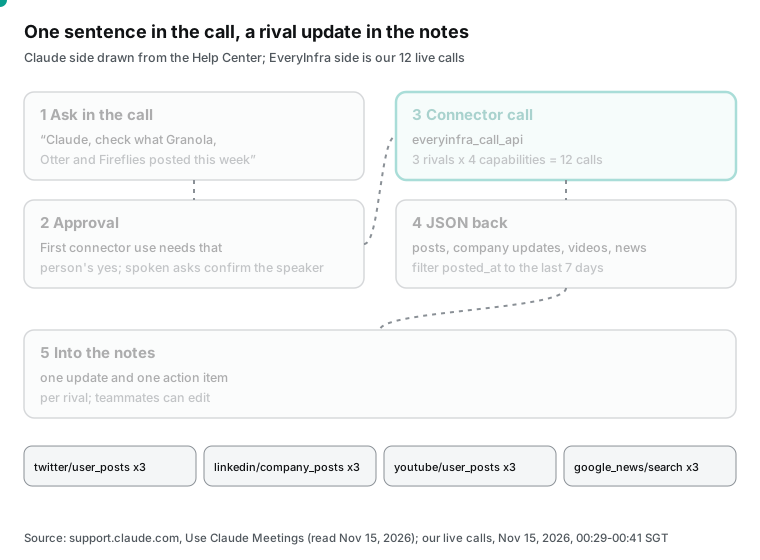
Each rival gets four channels, with one capability per channel:
| Channel | Capability | Arguments in this test | List price |
|---|---|---|---|
| X posts | twitter/user_posts | Handle, limit 20 | $0.000556 per call |
| LinkedIn company posts | linkedin/company_posts | Company page ID, limit 20 | $0.002319 per call |
| YouTube channel videos | youtube/user_posts | Channel URL, since 2026-11-08, newest first | $0.000556 per call |
| News | google_news/search | Keyword, time_window week, US English | $0.000792 per call |
The prices come from the capability catalog as we read it on November 15, 2026 at 00:27 Singapore time. Each capability has its own page. See the X posts API and the LinkedIn company posts API. See also the YouTube channel videos API and the Google News search API.
All four have a per-call price. A limit of 20 or 200 costs the same, one charge per call. The Fireflies section below uses this fact.
Why check all four channels? Our test data gives the reason. Of the 11 rival events this week, LinkedIn showed 8, X showed 7, news showed 4 and YouTube showed 1. Five events appeared on one channel only. Only a check of all four shows whether a launch is company talk alone or whether the press picked it up.
One real round trip: tools/call out, JSON back
This is the second call that we sent to https://api.everyinfra.com/mcp, on November 15, 2026 at 00:29:20 Singapore time. It asks for Granola's LinkedIn company posts. When Claude calls the connector after a meeting, it sends the same kind of JSON-RPC request. The only difference is that Claude fills in the arguments from what you said.
{
  "jsonrpc": "2.0",
  "id": 3,
  "method": "tools/call",
  "params": {
    "name": "everyinfra_call_api",
    "arguments": {
      "platform": "linkedin",
      "action": "company_posts",
      "params": {"company": "meetgranola", "limit": 20}
    }
  }
}
The server answered in 7.9 seconds with HTTP 200 and 30,088 bytes. The request ID was req_5a0ecc3c02ff4522, with 20 posts and a charge of $0.002319. The body uses the standard MCP format. A JSON string sits in result.content[0].text, and Claude reads that string. We parsed it and cut out the first two entries:
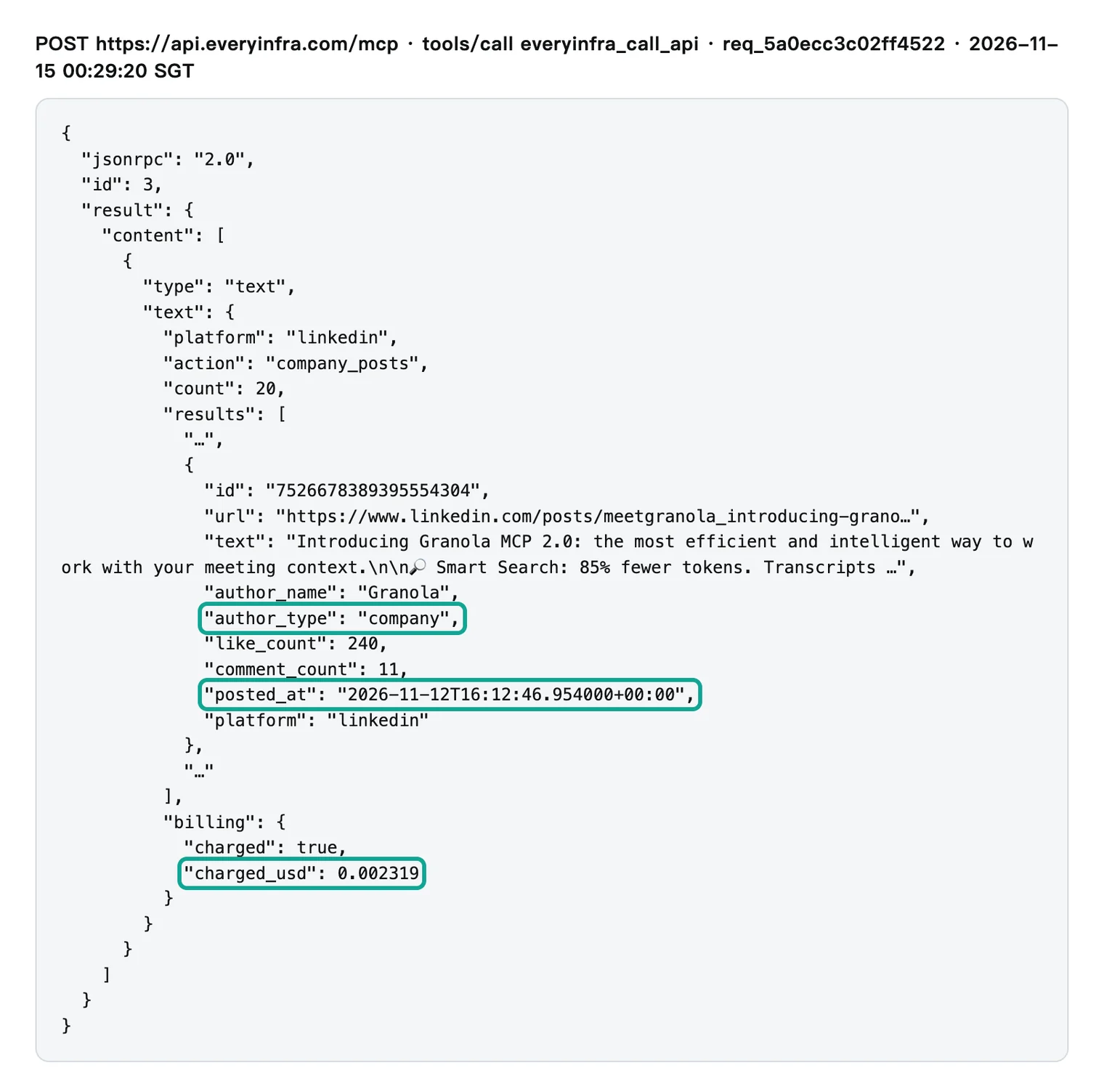
The notes need four fields. text is the post body, and posted_at is the post time in UTC. author_type tells company posts apart from posts by other people. url links to the post.
Four of Granola's 20 entries do not have author_type set to company. Staff or partners posted them. Without a filter, Claude would treat words from someone else's share as a Granola move and put them in the notes.
The response also has an async_hint field, which says that this call ran synchronously. For slow jobs, a request can add "mode": "async". It then gets a job ID at once, and everyinfra_get_job reads the result later at no charge, per the tool description. In a live call, async mode would let Claude say "I'm on it" while the meeting goes on. The catalog lists this mode, but we did not test it this time.
Seven days of rival activity: 164 items in, 15 own posts out
Batch b1 ran from 00:29:10 to 00:37:58 Singapore time, with 12 calls for 3 rivals and 4 capabilities. The shared test key has a limit of 10 requests per minute. Seven requests on the way returned rate_limited with the note "Nothing was charged". The script waited 60 seconds and tried again, and each retry worked.
The 12 calls returned 164 items in all. We kept an item only when it met three rules. It was posted within 168 hours before the call. The calls ran at about 00:30 Singapore time on November 15, so the window starts at about 00:30 Singapore time on November 8 (16:30 UTC on November 7). The company account posted it, not someone else. On X, it was not a reply and not a repost.
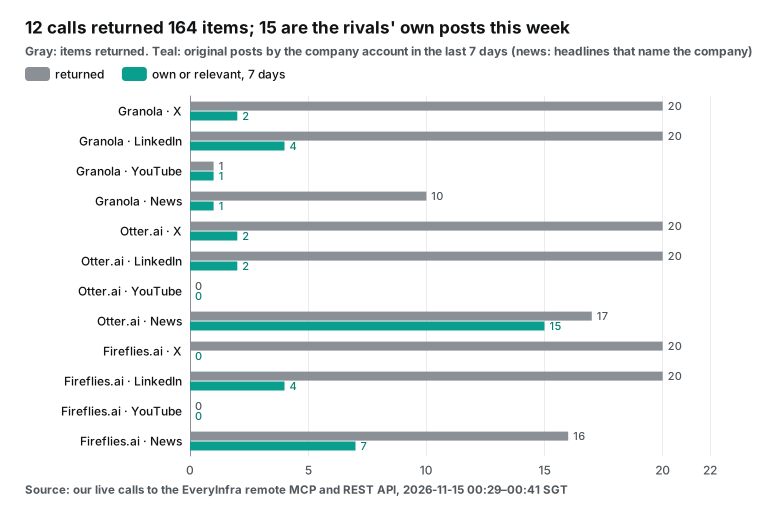
| Rival | Channel | Returned this time | In 7 days | Own posts in 7 days | Time |
|---|---|---|---|---|---|
| Granola | X | 20 | 20 | 2 (plus 18 replies) | 2.5 s |
| Granola | 20 | 4 | 4 | 7.9 s | |
| Granola | YouTube | 1 | 1 | 1 | 8.8 s |
| Granola | News | 10 | 10 | 1 names Granola | 2.5 s |
| Otter | X | 20 | 3 | 2 (plus 1 repost) | 2.2 s |
| Otter | 20 | 2 | 2 | 8.8 s | |
| Otter | YouTube | 0 (empty, refunded) | 0 | 0 | 32.5 s |
| Otter | News | 17 | 17 | 15 name Otter | 3.8 s |
| Fireflies | X | 20 | 20 | 0 (all 20 are replies) | 2.1 s |
| Fireflies | 20 | 5 | 4 | 17.6 s | |
| Fireflies | YouTube | 0 (empty, refunded) | 0 | 0 | 34.7 s |
| Fireflies | News | 16 | 16 | 7 name Fireflies | 2.6 s |
The three social channels returned 141 items, and the filter left 15. The news channel returned 43 items, and 23 headlines named one of the three rivals. If you hand all 164 items to Claude as they are, it has to pick for itself. The 20 Fireflies replies are support and small talk, such as thanks for feedback.
They add nothing to the notes.
Two YouTube calls came back empty. Otter and Fireflies had no new videos after November 8, so the API returned 0 items with empty_result_refunded in the billing field and charged nothing. To make sure that the channels really had nothing new, we called each one again without since at about 00:38. The newest Otter video was a "Work Mode" demo from two weeks earlier. The newest Fireflies video was a regular upload from 8 days earlier.
Fireflies said on LinkedIn that its November 11 launch would be "live on YouTube". That live stream did not appear in the channel video list. The launch link came from an X post instead.
When we matched the 15 own posts with the news results, the three rivals had 11 events in the week:
| ID | Rival | Event | Date (UTC) | Seen on |
|---|---|---|---|---|
| G1 | Granola | MCP 2.0: smart search with 85% fewer tokens, plus write tools | Nov 12 | X, LinkedIn, YouTube |
| G2 | Granola | Agent Briefs: a nightly brief about you for your AI agents | Nov 11 | X, LinkedIn |
| G3 | Granola | Voice typing in any app on iPhone, unlimited and free | Nov 9 | |
| G4 | Granola | GTM Series events in San Francisco on Nov 19 and Dec 8 | Nov 13 | X, LinkedIn |
| O1 | Otter | 27 new languages, 31 in total | Nov 10 | X, LinkedIn, news |
| O2 | Otter | At Web Summit in Lisbon | Nov 9 | X, LinkedIn |
| O3 | Otter | CEO interview on Bloomberg about growth and languages | Nov 11 | News |
| F1 | Fireflies | Fred, an AI teammate | Nov 11 | X, LinkedIn, news |
| F2 | Fireflies | Fly, a recording device | Nov 11 | News |
| F3 | Fireflies | 240+ integrations, 100+ of them MCP connectors | Nov 7, 18:03 | |
| F4 | Fireflies | Full 16-minute launch keynote video | Nov 11 | X |
F3 went up on November 7 at 18:03 UTC. In Singapore time, that is November 8 at 02:03, so it is inside the 168-hour window.
The choice of window changes the counts. Suppose that the window is November 8, 00:00 to November 15, 00:00 in UTC. Then Fireflies LinkedIn has only 4 posts in the window and 3 own posts. Fireflies news drops from 16 items to 15. The total of own social posts drops from 15 to 14, and F3 falls out of the notes.
So tell Claude which time zone sets the window. For posts near the window edge, ask Claude to write the UTC time too. Teammates in other time zones can then match the dates.
The Fireflies LinkedIn results also show a second point. The 20 posts are not in strict newest-first order. The launch post from November 11 is in ninth place, after posts from October 30 and November 3. So filter on posted_at, and do not take the first few items as the newest.
Sorted by date, the posts show that Fireflies teased Fred before the launch. The company page posted about Fred on November 5, 6, 9 and 10, and the first teaser came 6 days before the November 11 launch. A run after the previous weekly sync could have put "Fireflies launches an AI teammate on November 11" in those notes.
We checked the details of each event against the original sources. Otter's blog post from November 10 says that 13 new languages are live now and 14 more are coming, for 31 in total. The same post mentions 40 million users (Otter blog, supported languages).
The Fireflies press release from November 11, 2026 covers Fred, the Fly device, and "240+ tools including 100+ MCP connectors" (GlobeNewswire release). Granola's MCP page says the new version is 44% faster and uses 85% fewer tokens. It also says MCP is off by default for enterprise accounts (Granola MCP page). The launch post is on X (Granola launch post).
How far 20 posts reach: 31 minutes for Fireflies
X is the channel in that table that goes wrong most easily. All three accounts got the same limit: 20, but the time each one covers is very different:
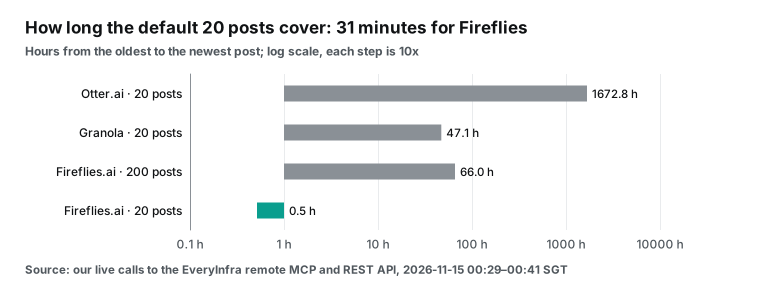
Otter posts little, so its 20 posts go back to September 1, a span of 1,672.8 hours. Granola's 20 posts span 47.1 hours. Fireflies spent that afternoon replying to users on X. All 20 posts sit in 31 minutes, from 13:55 to 14:26 UTC on November 14, and none of them is an original post. With only those 20 posts, the notes would say that Fireflies launched nothing on X this week. That is wrong.
At 00:38:14 Singapore time, we called Fireflies again with limit set to 200. The call took 26.7 seconds and returned 280,007 bytes, and the charge was still $0.000556. The 200 posts run from November 11, 20:23 to November 14, 14:26 UTC, which is 66 hours.
Of those 200 posts, 194 are replies and 6 are originals. One original is the full keynote video. The other five are jokes about Fred, such as "Day 2. Fred is still employed." Event F4 is in these 6 posts, and the default 20 posts miss it.
So the prompt can set a fixed rule. Always ask X for 200 posts, cut them to the last 7 days by posted_at, and then drop replies and reposts. The price is per call, so more posts cost nothing extra. The cost is about 20 more seconds. In a live call, 20 seconds is a long wait. After the call, nobody notices.
How many channels each event reached: 5 on one channel only
We set the 11 events against the 4 channels. Each cell holds the number of items on that channel that mention the event:
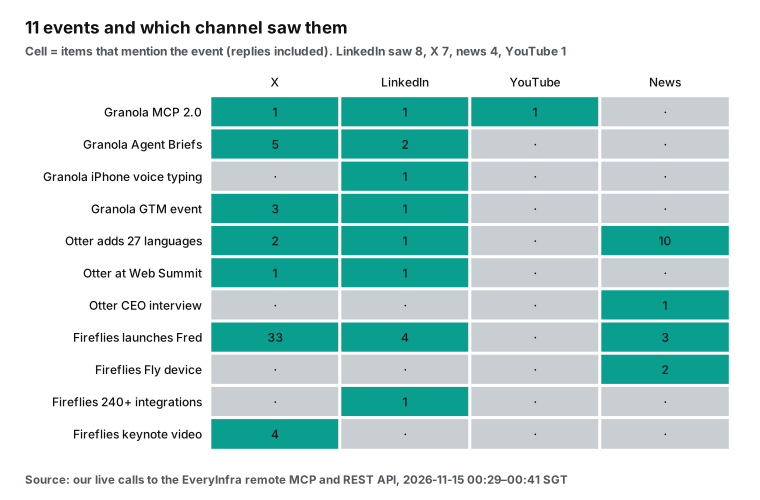
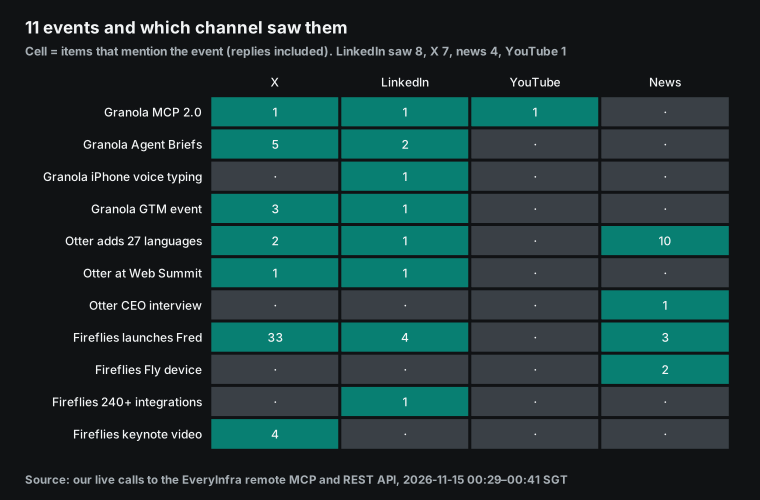
LinkedIn covers 8 events, X 7, news 4 and YouTube 1. Five events show up on one channel only. Granola's iPhone voice typing and the Fireflies 240+ integrations are only on LinkedIn. The Otter CEO interview and the Fireflies Fly device are only in the news. The Fireflies keynote video is only on X. Drop any one channel, and the notes miss at least one event.
If the budget allows only one channel, pick LinkedIn. It covers the most events and has the highest share of company posts. But LinkedIn is also the most expensive and the slowest capability. One call is $0.002319, more than the other three together.
A fourth rival from the news: ElevenLabs
The news searches for the three rivals returned 10 to 17 items each. Across all of them, 9 headlines are about Claude Meetings itself. Another 5 are about ElevenAI, the new meeting notes app from ElevenLabs. Nobody named it in the call. It came up in the news results.
At 00:40:53 Singapore time, we switched to the REST API and ran one news search for ElevenLabs. It returned 9 items, and the oldest was from November 11, 17:28 UTC. The charge was $0.000792.
TechCrunch reported on November 13, 2026 that ElevenAI is in preview with early access. It tells people on the call that recording is happening, and dictation works in more than 90 languages (TechCrunch on ElevenAI). ElevenLabs first showed it at its New York summit on November 11 (ElevenLabs NYC summit). This is the request that we used:
# Configuration example: a scheduled after-call job on REST, with an
# Idempotency-Key so that a retry does not charge twice
curl -sS https://api.everyinfra.com/api/v1/social \
  -H "Authorization: Bearer $EVERYINFRA_API_KEY" \
  -H "Content-Type: application/json" \
  -H "Idempotency-Key: weekly-rivals-2026-11-15-elevenlabs-news" \
  -d '{"platform": "google_news", "action": "search",
       "params": {"keyword": "ElevenLabs ElevenAI meeting notes",
                  "time_window": "week", "country": "us", "language": "en"}}'
In the same batch, we also checked the ElevenLabs X account. The result was empty and refunded automatically. The fault was ours. We typed the handle as elevenlabsio, but the X handle is ElevenLabs.
Empty results cost nothing, so the wrong handle cost only 3.3 seconds. When you ask Claude about a company that just came up, have it confirm the handle through news or the web first. Then call the social capabilities.
Why switch to REST? If the after-call rival check becomes a job that runs after every weekly sync, the script will hit timeouts and retries. The REST API accepts an Idempotency-Key header, and a resend with the same key charges once (Idempotency-Key test).
We hit this problem in our own test. The b1 script stopped partway through its MCP run, and we started it again. The Otter LinkedIn call ran twice, at 00:30:05 and 00:30:35. The two responses were almost the same size (32,271 and 32,270 bytes), and each one cost $0.002319. These calls had no idempotency key, so the server saw two new requests.
That is why the 19 successful calls cost $0.017128 in all, one LinkedIn charge more than the plan. For a click inside a Claude chat, MCP is easier. For a scheduled script, REST with that header is safer.
The cost of one meeting: 3 rivals for $0.012669
The EveryInfra side is the catalog unit price times the number of calls. The table uses the catalog prices that we read on November 15, 2026 at 00:27 Singapore time. Each line matches the charges in this test.
| Capability | Unit price | Calls per rival | Total for 3 | Share |
|---|---|---|---|---|
twitter/user_posts | $0.000556 | 1 | $0.001668 | 13.2% |
linkedin/company_posts | $0.002319 | 1 | $0.006957 | 54.9% |
youtube/user_posts | $0.000556 | 1 | $0.001668 | 13.2% |
google_news/search | $0.000792 | 1 | $0.002376 | 18.8% |
| Total | 4 | $0.012669 | 100% |
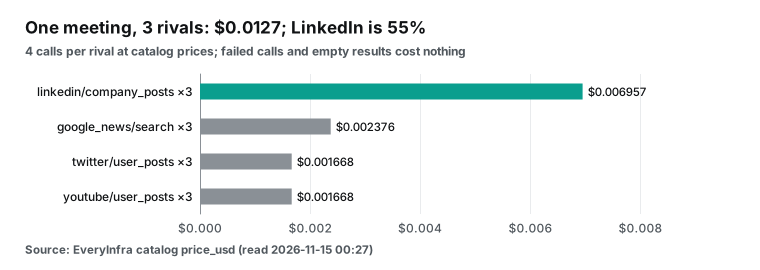
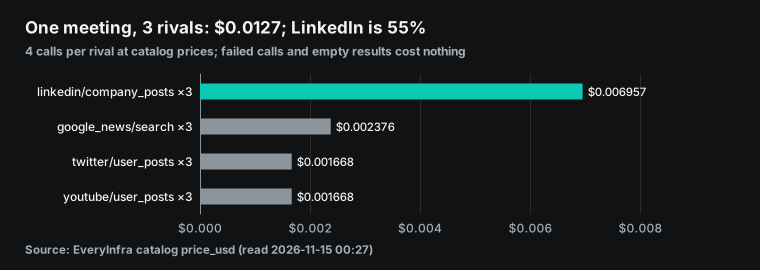
In batch b1, the Otter and Fireflies YouTube calls came back empty and were refunded, so the real charge was $0.011557. Add one twitter/search call to see how people talk about the rivals, and the total is $0.013461. At these prices, a weekly rival sync with 4 or 5 meetings a month costs less than $0.07 in data fees. Ten meetings a month cost $0.1267, and forty cost $0.5068. A Team Standard seat on monthly billing is $25 per member per month. Ten meetings of data fees come to 0.5% of one seat (Team plan pricing).
To spend less, start with LinkedIn. It is more than half the cost, and it is the slowest call. If a rival is busy on X, check LinkedIn every other week. If a rival is quiet on X, do the reverse. Otter's 20 X posts went back to September 1, so for Otter, check X less and LinkedIn every week. Put these choices in a fixed prompt for Claude, so nobody has to repeat them in each meeting.
The Claude side has no per-call number. The Help Center says that connector use counts toward your own usage and can lead to charges for your org (Help Center). The Team billing page covers seat billing and the monthly API credit pool (Team billing). It does not say how in-call connector use gets billed.
If all 164 items go into the chat, they fill a lot of context. Ask Claude to filter first and then write the notes, and the Claude side uses less. EveryInfra prices are on the pricing page, and each call is charged once.
How long each capability takes
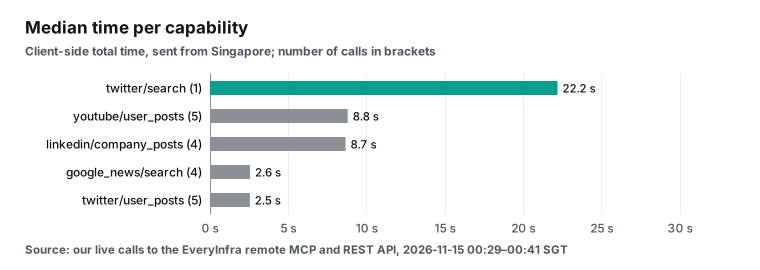
The main difference between asking in the call and after it is the wait. Here are the median times of the 19 successful calls, grouped by capability:
| Capability | Successful calls | Median | Longest |
|---|---|---|---|
twitter/user_posts | 5 | 2.5 s | 26.7 s (200 posts) |
google_news/search | 4 | 2.6 s | 3.8 s |
linkedin/company_posts | 4 | 8.7 s | 17.6 s |
youtube/user_posts | 5 | 8.8 s | 34.7 s (empty result) |
twitter/search | 1 | 22.2 s | 22.2 s |
X posts and news take about 3 seconds. LinkedIn and YouTube take about 9 seconds. An X search for 50 posts takes 22 seconds. The two slowest calls were the empty YouTube results, 32.5 seconds for Otter and 34.7 seconds for Fireflies. The API had to go through each channel before it could say that nothing was newer than November 8.
The 12 calls in b1 ran one after another and took 126 seconds in all. The two empty results took 67 of those seconds. Sent at the same time, the calls would take only as long as the slowest one.
So in a live call, ask about one rival on two or three channels, such as "What new features did Fireflies post this week?" The answer comes back in about ten seconds. Keep the full check of three rivals on four channels for after the call.
A notes template: one format for Claude
After the meeting, open a new chat in claude.ai, name the meeting, and send Claude the text below. Claude reads the notes for that meeting and then calls the connector. This text is a configuration example. We wrote it from the filter rules in this test, and we did not run it inside Claude Meetings.
Configuration example: send this to Claude in a regular chat after the call
Read the notes for "Product sync, November 15" and find every rival named in the call.
For each rival, call everyinfra_call_api through the EveryInfra connector:
  twitter/user_posts      limit 200
  linkedin/company_posts  limit 20
  youtube/user_posts      since 7 days ago, sort newest
  google_news/search      keyword = company name, time_window week
Filter: posted_at in the last 7 days; on X, drop replies and reposts;
        on LinkedIn, keep only author_type company; in news, keep headlines that name the rival.
Write a "Rival updates" section in the notes: one table per rival with date
(Singapore time, UTC in brackets), channel, event and post link.
Then write one action item per rival with an owner and a due date.
If a channel returns 0 items, write "Nothing new this week". Do not guess.
The last line is a hard rule for Claude. When YouTube returns 0 items, Claude may add a guess, such as "The company has posted few videos lately." The notes do not need that kind of line.
With the real data from this test, Claude's "Rival updates" section should look close to the table below. People fill the action items after the discussion. For this example, we wrote them from the events:
| Rival | This week | Channels | Action item |
|---|---|---|---|
| Granola | Nov 12: MCP 2.0, 85% fewer tokens, can write into Granola | X, LinkedIn, YouTube | Product: try the MCP 2.0 write tools by Wednesday and list the gaps against ours |
| Granola | Nov 11: Agent Briefs, a nightly user brief for AI agents | X, LinkedIn | Product: decide whether to build something similar; discuss at the next sync |
| Otter | Nov 10: 27 new languages, 13 live and 14 coming, 31 in total | X, LinkedIn, news | Marketing: check our language list and update the comparison page by Friday |
| Otter | Nov 11: CEO on Bloomberg about growth and languages | News | Marketing: watch the video and pull three quotable lines |
| Fireflies | Nov 11: Fred, an AI teammate, and the Fly recording device | X, LinkedIn, news | Sales: one page on how we differ from Fred, to sales by Monday |
| Fireflies | Nov 8 (Singapore time): 240+ integrations, 100+ of them MCP connectors | Engineering: list the top 10 integrations that we lack | |
| ElevenLabs | Nov 11: ElevenAI meeting notes app, in preview | News | Product: request ElevenAI early access and demo it next week |
After the action items go into the notes, teammates in the org can edit them on the meeting page (Help Center). Say each owner and due date out loud in the call. Claude puts them in the notes, and the after-call check can then use them without asking again.
What Claude Meetings cannot do, and what to watch
| Limit | Source or test | What to do |
|---|---|---|
| Google Meet only | Launch article: other platforms "coming soon" | Zoom or Teams users can paste their notes into a regular chat and check from there |
| Some orgs excluded | ZDR, HIPAA-ready and CMEK orgs are out during the beta | Wait for general availability |
| Does not act on its own | Axios interview: it mostly waits to be told | Say "Claude, check this" in the call, or send a fixed prompt after it |
| Speaker check on each spoken ask | Help Center: "For now" | Type the question in the Meet chat |
| No replies with outside guests | Help Center | For customer calls, ask after the call |
| No audio kept | It keeps the transcript, summary and screen descriptions | Use another tool when you need the audio |
| Up to 8 hours | It warns before it leaves | Add Claude again for all-day sessions |
| 20 X posts may cover half an hour | Test: 20 Fireflies posts were replies from 31 minutes | Always ask X for 200 posts; same price |
| LinkedIn includes other people's posts | Test: 4 of Granola's 20 were not from the company page | Filter by author_type |
| YouTube live streams missing from the video list | Test: the Fireflies keynote stream was not in the list | Take the link from X or LinkedIn |
Consent to transcription
The launch article and the Help Center both carry the same warning. Before you add Claude or turn on auto-join, make sure everyone agrees to transcription (launch article). Claude appears as a participant and posts a notice in the chat when it joins. That notice is not the same as consent from everyone.
Auto-join carries more risk. If you pick all meetings in Settings > Capabilities > Meetings > Auto-join, Claude joins every meeting on your calendar. That includes meetings where you did not warn people first (Help Center).
A Google Meet admin can require every participant to give explicit consent before "Take notes for me", recording or transcription starts. This setting is off by default (Google Meet help). Neither Google nor Anthropic says whether that consent prompt covers Claude Meetings. We did not test it.
Other vendors write about this too. In the Fly device release, Fireflies says that users should make sure everyone knows when they are recording and should follow local recording rules (GlobeNewswire release). TechCrunch reports that ElevenAI tells people on the call that it is recording (TechCrunch on ElevenAI).
The law differs by place. In California, Penal Code section 632 covers the recording of a confidential communication without the consent of all parties (California Penal Code 632). In the EU, GDPR Article 13 lists the information that you must give people when you collect their data from them (GDPR on EUR-Lex). This article is not legal advice. Ask your counsel about calls across borders.
| Source | What it says about consent or notice |
|---|---|
| Claude launch article and Help Center | Make sure everyone on the call is OK with transcription before you add Claude or turn on auto-join |
| Google Meet help | An admin can require explicit consent before notes, recording or transcription; off by default |
| Fireflies release on Fly | Make sure everyone knows when you record, and follow local recording rules |
| TechCrunch on ElevenAI | The app tells people on the call that it is recording |
| California Penal Code 632 | Covers recording a confidential communication without the consent of all parties |
| GDPR Article 13 | Lists the information to give people when you collect their data |
Connector permissions
A connector call in a meeting passes three gates. The owner decides in the admin settings whether Claude can use members' connectors in meetings. Tool permissions set each tool to "Always allow", "Needs approval" or "Blocked". Claude Meetings then asks the person on first use.
The custom connector guide has one more warning. In Research mode, Claude can call connector tools automatically without further approval, so the guide says to turn off tools that can write (custom connector guide). Each everyinfra_call_api call costs money. Does your team use Research mode for rival summaries? Then give EveryInfra its own key with a small wallet balance. Or turn this connector off in Research mode.
Teams on a shared key should keep one more point in mind. The Help Center says that a shared credential gives its access to everyone. Every member's calls draw from one wallet, and the request log cannot tell who made each call. For a team of more than five people, move to /mcp/all with OAuth. Each person then signs in to their own account.
Meeting note apps are all moving to MCP: the last 60 days
In the last 60 days, meeting note apps have done two things at once. They turn themselves into MCP servers, so other AI tools can read their meeting data. They also add MCP connectors, so their own AI can call other tools.
| Date | Company | Event | Source |
|---|---|---|---|
| October 20, 2026 | Otter | $320 million growth investment from General Catalyst | Otter blog |
| October 27, 2026 | Otter | Work Mode and Live Assist: prep before a meeting, prompts during it, follow-up after it | Otter blog |
| November 7, 2026 (UTC) | Fireflies | More than 240 integrations, with more than 100 new MCP connectors | Fireflies LinkedIn post, from our test data |
| November 10, 2026 | Anthropic | Claude Meetings; Granola, Fireflies.ai and Otter on the transcript partner list | launch article |
| November 10, 2026 | Otter | 27 new languages | TechCrunch on Otter |
| November 11, 2026 | Fireflies | Fred and Fly; MCP use of Fireflies up fourfold | GlobeNewswire release |
| November 11, 2026 | ElevenLabs | ElevenAI, model customization and a partner program | Unite.AI on ElevenLabs |
| November 12, 2026 | Granola | MCP 2.0 with write tools, a day after Agent Briefs | Granola MCP page |
For rival tracking, this trend means that more rival moves happen at the MCP and integration level. Two of the 11 events in this test are about MCP. Granola MCP 2.0 appeared on X, LinkedIn and YouTube, but in none of the news results for the three rivals. The Fireflies 240+ integrations appeared only on LinkedIn. LinkedIn and X catch more of these moves than news does.
FAQ
Does Claude Meetings support Microsoft Teams or Zoom?
Not yet. The launch article says only Google Meet is supported now, and other video platforms are "coming soon", with no date (launch article). Teams and Zoom users can paste the notes from their own tool into a regular Claude chat and run the connector from there. Source of the question: the Google suggestion "claude meetings teams" and the Reddit launch thread.
How do I check whether my account has Claude Meetings?
Check the plan first: only Team and Enterprise have it. Then check the org settings. Team has it on by default, and Enterprise needs an owner to turn it on. ZDR, HIPAA-ready and CMEK orgs are out during the beta.
If Claude cannot get into a call, check the Google Meet host settings. The host lets Claude in when it asks (Google Meet co-hosts). If all of this is fine, look for the Meetings page in Claude. If it is missing, your org may not have the rollout yet, or an owner turned it off. The launch article says "starting to roll out", so a Team org with the default setting can still wait for its turn.
After you can open the Meetings page, connect Google Calendar, pick a meeting and click "Add Claude". An owner must turn on Google Calendar for the org first. Without it, members see no meetings on the Meetings page (Help Center). Source of the question: a Reddit comment, "How do I check that I have access?" In r/artificial, a Team subscriber also says they cannot find the way in (r/artificial thread).
Does Claude Meetings record audio?
It does not keep audio. It keeps the transcript, summary and screen descriptions (Help Center). It appears as a participant and posts a notice in the meeting chat. The source asks you to make sure everyone agrees to transcription before you add Claude or turn on auto-join. Source of the question: the Google suggestions "claude record meetings" and "claude transcribe meetings".
What if my claude meeting notes connector does not connect?
Check four things in order. One, the server must be public on port 443, because Claude connects from Anthropic's cloud, not from your computer. Two, with a key in a header, the value must include "Bearer" and a space. Three, you cannot change the sign-in method after you add the connector, so a wrong choice means remove and add again.
Four, "Members' connectors in meetings" must be on in the admin settings (custom connector guide, connector auth docs). On the EveryInfra side, empty results and rate limits cost nothing, and the response states the reason. Source of the question: the Google suggestions "claude meeting notes connector not working" and "connection error".
Do connectors in meetings cost extra?
Yes, on both sides. On the Claude side, answers that use a connector count toward your plan usage. The Help Center says this can lead to charges for your org. Notes, transcripts and answers without connectors are included in the plan. On the EveryInfra side, each call has a price, and one meeting with 3 rivals in this test cost $0.012669. Source of the question: the Google suggestion "claude meetings how to use" and a Team subscriber's question in the r/artificial thread.
Can Claude Meetings replace Granola, Otter or Fireflies?
That depends on what you use them for. Claude Meetings joins the call, writes notes, and builds docs and whiteboards during the call. Granola does not join the call as a bot, as a Reddit reply points out. Otter supports 31 languages. Fireflies has a recording device and more than 240 integrations.
All three are also on Anthropic's partner list and will take Claude Meetings transcripts. In the 50 X posts, 16 say these apps will be replaced. That is one view, not a finding. Source of the question: a Reddit comment, "Granola, firefly, attention, etc killers?"
Can I add Claude from an Outlook calendar?
The Help Center only describes Google Calendar, and an owner must turn it on for the org first (Help Center). The source does not mention Outlook calendars, and we did not test one. Source of the question: the Google suggestion "claude meetings outlook".
Getting started
- Sign up for EveryInfra and get an API key. Follow the quickstart and make one REST call to
twitter/user_poststo test the key. - Read the MCP server page and pick
/mcpwith a key or/mcp/allwith OAuth. - Ask an owner to add a custom connector in the Claude org settings. The owner also turns on "Members' connectors in meetings" and sets tool permissions as in the example above.
- Each member who needs it clicks "Connect" in Customize > Connectors.
- In the call, say "Claude, check these companies after the call". Or send the notes template prompt in a regular chat after the call.
- After the first run, compare the output with the raw results. Check whether X returned only replies, and whether LinkedIn mixed in other people's posts.
The fields and arguments for each channel are on the X data API, LinkedIn data API, YouTube data API and Google News API pages. X search arguments are on the X search API page. Our earlier Claude connector setup steps are also in the Claude Duet article on Google Maps reviews for shop owners.
The same method works for other meetings. Change the companies and the capabilities. For a product review, use g2/reviews. For a mobile app sync, use app_store/reviews and google_play/reviews. All three cost $0.001389 per call. For a community meeting, use reddit/search at $0.000792 per call. The catalog lists these capabilities, but we did not test them this time.
For rival post alerts in Claude Code, see this article. For a live rival dashboard in Claude Artifacts, see this one. For brand monitoring with Gemini managed agents, see this one.
References
- Anthropic launches Claude Meetings to turn workplace discussions into plans and tasks. TechCrunch, read Nov 15, 2026. https://techcrunch.com/2026/11/10/anthropic-launches-claude-meetings-to-turn-workplace-discussions-into-plans-and-tasks/
- Use Claude Meetings. Anthropic Help Center, read Nov 15, 2026. https://support.claude.com/en/articles/18325154-use-claude-meetings
- Introducing Claude Meetings, now in beta. Anthropic, read Nov 15, 2026. https://claude.com/resources/articles/claude-meetings
- Anthropic brings Claude to Google Meet to tackle tasks live. Reuters, read Nov 15, 2026. https://www.reuters.com/technology/anthropic-brings-claude-google-meet-tackle-tasks-live-2026-11-10/
- Release notes. Anthropic Help Center, read Nov 15, 2026. https://support.claude.com/en/articles/12138966-release-notes
- Anthropic Launches Claude Meetings Beta for Live Video Calls. Unite.AI, read Nov 15, 2026. https://www.unite.ai/anthropic-launches-claude-meetings-beta-for-live-video-calls/
- Anthropic wants Claude to join your meetings. Axios, read Nov 15, 2026. https://www.axios.com/2026/11/10/anthropic-claude-meetings-knowledge-work
- What is the Team plan? Anthropic Help Center, read Nov 15, 2026. https://support.claude.com/en/articles/9266767-what-is-the-team-plan
- Get started with custom connectors using remote MCP. Anthropic Help Center, read Nov 15, 2026. https://support.claude.com/en/articles/11175166-get-started-with-custom-connectors-using-remote-mcp
- Introducing Claude Meetings (r/ClaudeAI thread). Reddit, read Nov 15, 2026. https://www.reddit.com/r/ClaudeAI/comments/1xunrsl/introducing_claude_meetings/
- EveryInfra capability catalog (GET /api/v1/social/catalog). EveryInfra, read Nov 15, 2026. https://api.everyinfra.com/api/v1/social/catalog
- Tools (MCP specification 2025-06-18). Model Context Protocol, read Nov 15, 2026. https://modelcontextprotocol.io/specification/2025-06-18/server/tools
- Add an unlisted connector. Anthropic, read Nov 15, 2026. https://claude.com/docs/connectors/custom/add-unlisted
- OAuth protected resource metadata for /mcp/all. EveryInfra, read Nov 15, 2026. https://api.everyinfra.com/.well-known/oauth-protected-resource/mcp/all
- Authentication for connectors. Anthropic, read Nov 15, 2026. https://claude.com/docs/connectors/building/authentication
- IP addresses. Anthropic, read Nov 15, 2026. https://platform.claude.com/docs/en/api/ip-addresses
- Use connectors to extend Claude's capabilities. Anthropic Help Center, read Nov 15, 2026. https://support.claude.com/en/articles/11176164-use-connectors-to-extend-claude-s-capabilities
- Manage custom roles on Enterprise plans. Anthropic Help Center, read Nov 15, 2026. https://support.claude.com/en/articles/13930452-manage-custom-roles-on-enterprise-plans
- MCP connector. Anthropic, read Nov 15, 2026. https://platform.claude.com/docs/en/agents-and-tools/mcp-connector
- Monthly API credits for Max, Ultra, and Team plans. Anthropic Help Center, read Nov 15, 2026. https://support.claude.com/en/articles/17154008-monthly-api-credits-for-max-ultra-and-team-plans
- Transports (MCP specification 2025-06-18). Model Context Protocol, read Nov 15, 2026. https://modelcontextprotocol.io/specification/2025-06-18/basic/transports
- Authorization (MCP specification 2025-06-18). Model Context Protocol, read Nov 15, 2026. https://modelcontextprotocol.io/specification/2025-06-18/basic/authorization
- RFC 9728: OAuth 2.0 Protected Resource Metadata. IETF, read Nov 15, 2026. https://datatracker.ietf.org/doc/html/rfc9728
- modelcontextprotocol/modelcontextprotocol: specification and documentation. GitHub, read Nov 15, 2026. https://github.com/modelcontextprotocol/modelcontextprotocol
- MCP Server Configuration. Fireflies.ai, read Nov 15, 2026. https://docs.fireflies.ai/getting-started/mcp-configuration
- How Claude suggests connected apps. Anthropic Help Center, read Nov 15, 2026. https://support.claude.com/en/articles/14730684-how-claude-suggests-connected-apps
- Use interactive connectors in Claude. Anthropic Help Center, read Nov 15, 2026. https://support.claude.com/en/articles/13454812-use-interactive-connectors-in-claude
- Get started with Claude Whiteboards. Anthropic Help Center, read Nov 15, 2026. https://support.claude.com/en/articles/18324319-get-started-with-claude-whiteboards
- Otter.ai Announces Its Biggest Multilingual Leap Yet: 27 New Languages and Multilingual Capabilities. Otter.ai, read Nov 15, 2026. https://otter.ai/blog/otter-ai-announces-its-biggest-multilingual-leap-yet-27-new-languages-and-multilingual-capabilities
- Supported languages. Otter.ai, read Nov 15, 2026. https://help.otter.ai/hc/en-us/articles/360047247414-Supported-languages
- Fireflies.ai Evolves From AI Notetaker to AI Teammate in Its Most Significant Expansion To Date. GlobeNewswire, read Nov 15, 2026. https://www.globenewswire.com/news-release/2026/11/11/3400748/0/en/fireflies-ai-evolves-from-ai-notetaker-to-ai-teammate-in-its-most-significant-expansion-to-date.html
- Granola MCP. Granola, read Nov 15, 2026. https://www.granola.ai/mcp
- Introducing Granola MCP 2.0 (post on X). X, read Nov 15, 2026. https://x.com/meetgranola/status/2120912538984747401
- ElevenLabs' new app combines meeting note-taking and dictation for teams. TechCrunch, read Nov 15, 2026. https://techcrunch.com/2026/11/13/elevenlabs-new-app-combines-meeting-note-taking-and-dictation-for-teams/
- ElevenLabs NYC Summit. ElevenLabs, read Nov 15, 2026. https://elevenlabs.io/blog/nyc-summit
- How is my Team plan bill calculated? Anthropic Help Center, read Nov 15, 2026. https://support.claude.com/en/articles/9267289-how-is-my-team-plan-bill-calculated
- "Take notes for me" in Google Meet. Google, read Nov 15, 2026. https://support.google.com/meet/answer/14754931
- California Penal Code, section 632. California Legislative Information, read Nov 15, 2026. https://leginfo.legislature.ca.gov/faces/codes_displaySection.xhtml?lawCode=PEN§ionNum=632
- Regulation (EU) 2016/679 (General Data Protection Regulation). EUR-Lex, read Nov 15, 2026. https://eur-lex.europa.eu/legal-content/EN/TXT/?uri=CELEX:32016R0679
- General Catalyst Backs Otter.ai's Voice AI Ambitions with $320M Growth Investment. Otter.ai, read Nov 15, 2026. https://otter.ai/blog/general-catalyst-backs-otter-ais-voice-ai-ambitions-with-320m-growth-investment
- Otter Rethinks the Meeting: New AI Preps You, Coaches You, and Follows Through. Otter.ai, read Nov 15, 2026. https://otter.ai/blog/otter-rethinks-the-meeting-new-ai-preps-you-coaches-you-and-follows-through
- Otter AI can now follow conversations across 30+ languages. TechCrunch, read Nov 15, 2026. https://techcrunch.com/2026/11/09/otter-ai-can-now-follow-conversations-across-30-languages/
- ElevenLabs Unveils Model Customization, ElevenAI and Partner Program. Unite.AI, read Nov 15, 2026. https://www.unite.ai/elevenlabs-unveils-model-customization-elevenai-and-partner-program/
- Claude Meetings thread (r/artificial). Reddit, read Nov 15, 2026. https://www.reddit.com/r/artificial/comments/1xtbgih/
- Add co-hosts in Google Meet. Google, read Nov 15, 2026. https://support.google.com/meet/answer/10885841
Reference BL-157