Claude Artifacts MCP: a live competitor dashboard that every viewer refreshes
Published Claude artifacts call MCP connectors with each viewer's own account. We tested 9 brands on TikTok, YouTube and Instagram and priced each open.

In July 2026, Claude gave published artifacts a new ability. Each time someone opens the page, it can call MCP connectors through the viewer's own claude.ai connections (Claude Code week 29 digest). That is a good fit for a competitor dashboard that shows fresh data to everyone who opens it. On 2026-11-05, from 00:18 to 01:05 Singapore time, we pulled recent posts for 9 brands through the EveryInfra remote MCP server. We made 39 data calls, 38 of them charged and 1 refunded, for $0.021128 in total.
Three brands (GoPro, Insta360 and DJI) feed the dashboard. The other six (Zara, Bershka, Mango, Garmin, Whoop and Oura) ran in round two to show more account types. The latency data and the data traps section use them.
On the Claude side, this whole article is a configuration example. We wrote the dashboard page code and replayed the real responses through it on our own machine. We did not publish it in claude.ai.
The most useful finding is about our own tool annotation. The EveryInfra data tool everyinfra_call_api currently declares readOnlyHint: false and destructiveHint: true. This is the current annotation of our tool. It is not a Claude platform rule for data tools.
Here is the practical result. The Claude page runtime does not cache results for this tool. The page also cannot call it with the auto-refresh watch method. So the page must keep its own cache.
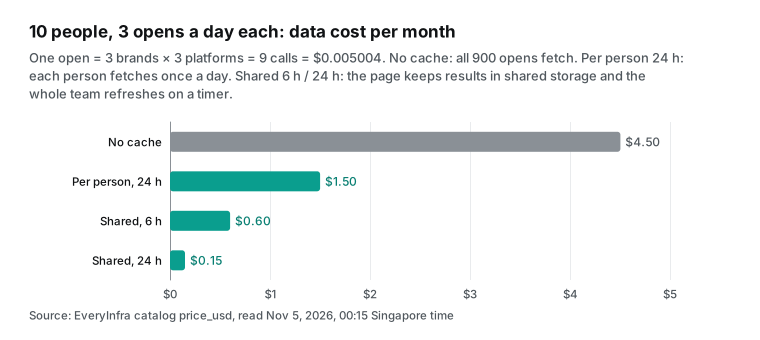
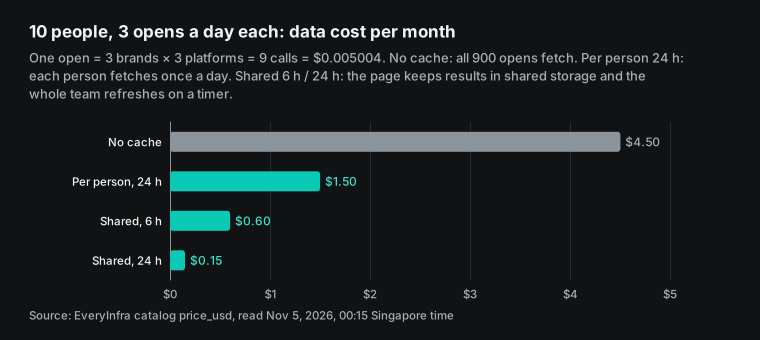
So a page with no cache of its own pays on every open. For 10 people who open it 3 times a day, that is 900 opens, 8,100 charged calls and $4.50 a month. With results kept in the artifact's shared storage and a 6-hour refresh, the same use costs $0.60 a month.
The money is small. The real costs are waiting time and the per-minute limit. Our slowest synchronous call took 69 seconds. And one shared key gets 90 calls in one minute when 10 people open the page before a stand-up.
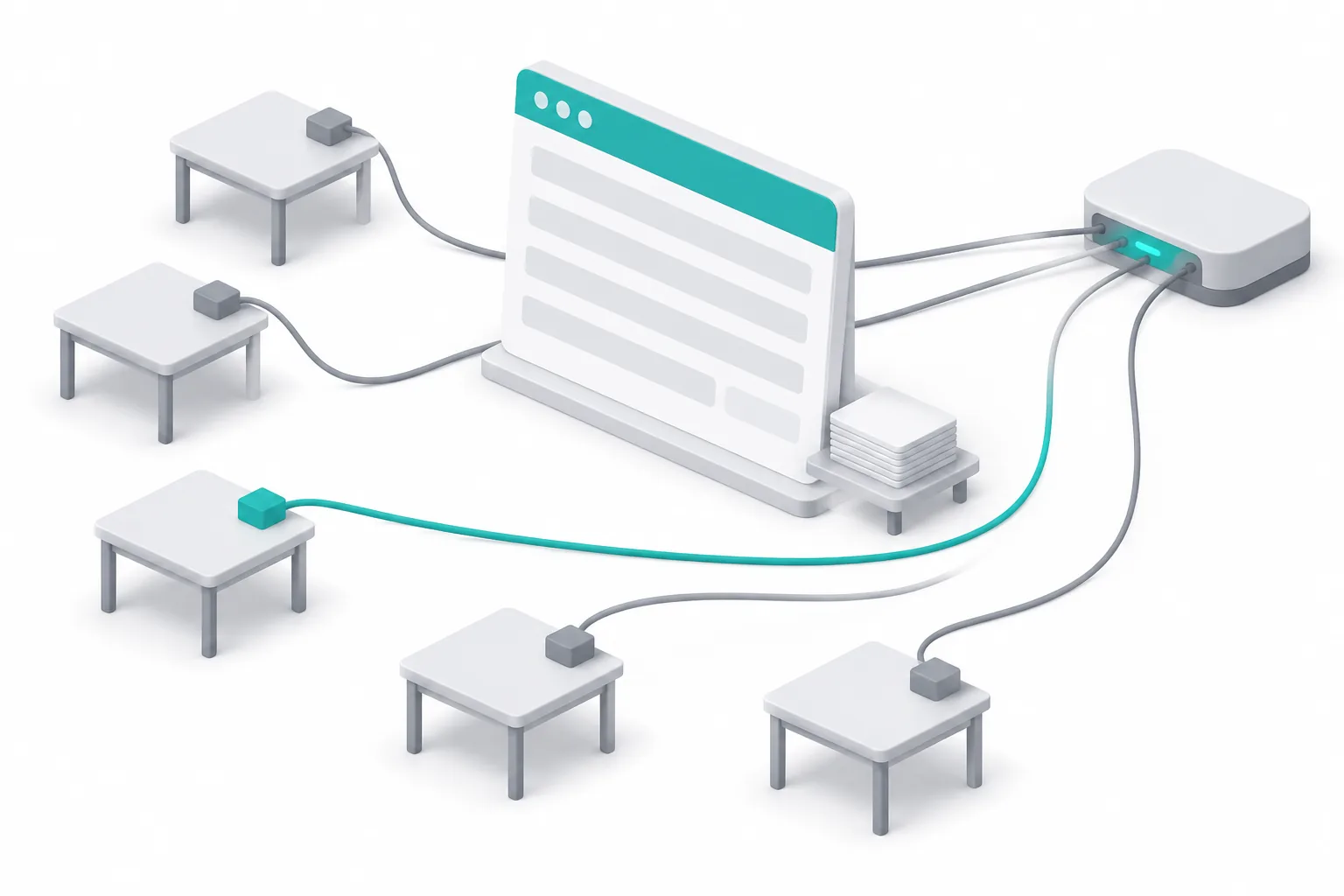
What claude artifacts mcp means: the page fetches data when it opens
An artifact is something Claude makes that you can show to other people. Docs, decks, designs, dashboards and small tools all count. The Help Center says you can share it, store data in it and connect it to your apps (What are artifacts?, read 2026-11-05). Artifacts made before 2026-09-16 are now "legacy artifacts". This article is about the "connect your apps" part. When the page opens, it calls a tool on an MCP server through a claude.ai connector and draws the result.
The Claude Code docs give the most detail (Artifacts, read 2026-11-05). A published page can call MCP connectors each time someone views it. So the page shows current data, not a snapshot from the session that built it. The page fetches data when it loads. It can also refresh on an interval or when a viewer uses a refresh control. Responses are cached in the viewer's browser, so a reopened page first draws the cached data and then updates.
When Claude publishes the page, it declares which connectors the page may call. The page cannot call anything outside that declaration. Only connectors from your claude.ai account qualify. Local servers from .mcp.json in Claude Code can supply data while Claude builds the page. The published page cannot call them.
On the Claude Code side, the feature shipped in the week of July 13 to 17, 2026 (v2.1.207 to v2.1.212). The digest says a page can call connectors "each time someone views it", and each call runs through the viewer's own connections (week 29 digest). Artifacts inside claude.ai chats got MCP and persistent storage earlier, on 2025-10-21 (Turn ideas into interactive AI-powered apps). The release notes entry for 2026-09-16 says designs, decks and docs now work in any conversation (release notes).
| Fact | What the source says | Source and read date |
|---|---|---|
| Plans that allow connector calls from artifacts | Pro, Max, Ultra, Team, Enterprise, on web and desktop | support.claude.com 17153992, 2026-11-05 |
| Minimum Claude Code version to publish such pages | v2.1.209 | code.claude.com/docs/en/artifacts, 2026-11-05 |
| Whose connection a viewer uses | Their own connectors; the page never sees credentials | code.claude.com/docs/en/artifacts, 2026-11-05 |
| First call | Each viewer approves before the first connector call | Same page |
| Tools that need approval for each action | Not available to artifacts | support.claude.com 17153992, 2026-11-05 |
| Page storage | Up to 20 MB per artifact, text only, personal and shared | support.claude.com 17153992, 2026-11-05 |
| Public links | Help Center: no "Anyone with the link" for app-connected artifacts. Claude Code docs: public sharing is possible, but signed-out and outside viewers see no live sections | support.claude.com 9547008 and code.claude.com, 2026-11-05 |
| Organization switch | "Enable artifact connectors" in Organization settings | code.claude.com and support.claude.com 16994751, 2026-11-05 |
Who can use it: plans, apps and admin switches
The Help Center section "Connect your apps to an artifact" lists Pro, Max, Ultra, Team and Enterprise. It names Claude on web and desktop as the apps (support 17153992). The same page says artifacts need the "Cloud code execution and file creation" setting. The Free plan is not on the list.
Custom connectors are on every plan, and Free is limited to one (Get started with custom connectors using remote MCP). But a Free account cannot make an artifact that calls connectors. So this dashboard needs at least one paid plan.
Prices come from the Claude pricing page, read on 2026-11-05 (claude.com/pricing). Pro is $17 a month on the annual plan or $20 monthly. Max starts at $100. Ultra is $200.
A Team standard seat is $20 a month on the annual plan or $25 monthly, and a premium seat is $100 or $125. Enterprise is $20 a seat plus usage at API rates. For a team of 10 on monthly Team standard seats, the seats cost $250 a month. Next to that number, the data cost below is very small.
Team and Enterprise add two switches. The first switch turns artifacts on or off for the organization. The second switch controls connector calls from artifacts. The Claude Code docs place it at Organization settings > Capabilities, under "Enable artifact connectors" (Artifacts).
The same switch also covers pages made in claude.ai chats. The admin guide adds a point that is easy to miss. Admins cannot limit which apps an artifact can reach. Usage counts toward each user's own limits (Artifacts admin guide for Team and Enterprise plans).
Whose connection runs after you publish
This is the most important rule, and the source is clear. When a published page calls a connector, the call uses the account of the person who views the page. It does not use the account of the publisher. Two people who open the same dashboard can see different data, because their accounts can reach different things. The page never sees anyone's credentials. claude.ai makes the calls for the page.
Each viewer approves before the page's first connector call. A viewer who declines, or who has not connected the connector, still sees the page without its live sections (Artifacts, "How connector calls work for viewers", read 2026-11-05). The Help Center says the same thing. Everyone connects their own apps, even on a shared or published artifact (support 17153992).
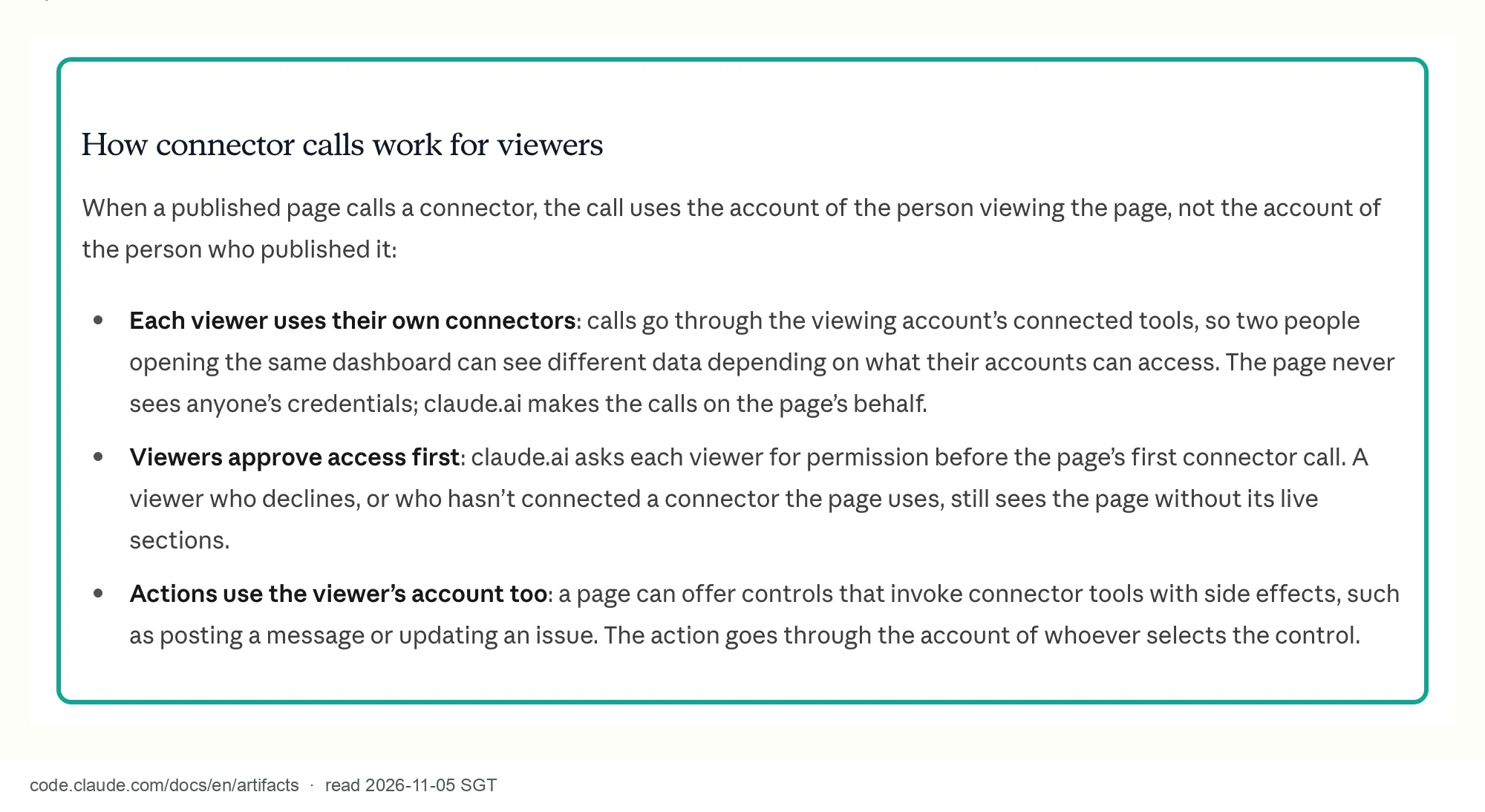
For this dashboard, "the viewer's own connection" can mean two different things. The two cases put the cost and the rate limit on different people. In the first case, the connector uses OAuth sign-in. Each person signs in to their own EveryInfra account when they add the connector. Every call from the page then charges that person's balance and counts against that person's per-minute limit.
In the second case, the connector uses one shared API key. A Team or Enterprise Owner adds the connector and enters the key in a request header. The Help Center says this gives everyone who uses the connector that key's access (support 11175166). In form, each person still uses "their own connection". In practice, all the cost and all the calls land on one EveryInfra account.
Two groups of people see no live data. The Help Center sharing article has the rules (Share artifacts, read 2026-11-05). Link sharing with "Anyone with the link" is not available for artifacts that connect to apps or use Claude. For people you invite from outside the organization, the parts that use Claude or connectors do not work. You can invite up to 50 outside people per artifact.
The Claude Code docs say you can share a connector-backed page publicly. But connector calls do not run for viewers who are not signed in to claude.ai or who are outside your organization. The two sources disagree on public links. They agree on the result: outside people see no live data. This article follows the stricter Help Center rule and shares the dashboard only inside the organization.
Several recent Reddit threads ask about this. One user built a recruiting dashboard on a database with Claude Code. They asked how to show it to managers without a Claude license. A reply explains that org sharing needs a signed-in member and that connector calls do not run on a public link (r/ClaudeCode thread). In another thread, the dashboard was empty for every teammate (r/ClaudeAI thread).
The cause was the same rule. Each person must connect every connector the page uses and approve it. So put a short note in each live section that names the connector to connect. The Claude Code docs give the same advice.
Call limits: what the sources say and what they do not say
On 2026-11-05 we read the artifact connector pages on claude.com, support.claude.com, code.claude.com and docs.claude.com. None of them gives a number such as "calls per minute" or "calls per day" for artifact connector calls. The admin guide only says artifact usage counts toward each user's limits. The runtime type definitions that come with our local Claude Code install include a rate_limited error code, with the note "reserved, never returned today".
So the honest answer is this. Claude publishes no call cap for these pages. The limits that can stop you are the written limits below and the rate limit of the connector server itself.
| Limit | Value | Source | Effect on the dashboard |
|---|---|---|---|
| Tool result size on claude.ai and desktop | About 150,000 characters | claude.com/docs/connectors/building, 2026-11-05 | 20 TikTok posts are about 50,000 bytes |
| Tool call timeout on claude.ai and desktop | 240 seconds | Same page | Our slowest sync call was 69 seconds |
| Page runtime reply budget | About 130 seconds | Runtime type definitions in our local Claude Code 2.1.309 install, version 0.2.96 (not a public doc, can change) | Slow platforms need async and polling |
| Artifact storage | 20 MB each, text only | support.claude.com 17153992 | Store only trimmed fields |
| Outside invitations | Up to 50 per artifact, no live sections for them | support.claude.com 9547008 | Share inside the organization |
| EveryInfra per-minute limit | 60 per account by default, all keys combined | everyinfra.com/pricing, 2026-11-05 | A shared key gives the team 60 per minute |
| EveryInfra per-key limit | A key can have a lower limit; our test key had 10 per minute | 429 response at 00:19:51 Singapore time, 2026-11-05 | Give the dashboard its own key |
The third row needs a short note. Claude Code ships a local copy of the artifact runtime type definitions. We read version 0.2.96, which came with Claude Code 2.1.309. It says the page gets its call function from claude.use("mcp") and waits about 130 seconds for a reply.
This file is not a public web page, and it can change. We treat it as current behavior only. Where a public doc covers the same rule, the public doc wins.
What data the dashboard needs: three platforms, three capabilities
We kept the dashboard small. Each brand gets three rows: TikTok, YouTube and Instagram. Each row shows posts per day, median views or median likes, TikTok engagement rate, followers, and the age of the newest post. Below the table, the page plots TikTok views per post for the last 30 days. Three EveryInfra capabilities supply the data. Prices are the catalog price_usd values we read at 00:15 Singapore time on 2026-11-05 (catalog).
| Platform | Capability | Parameters we sent | Price per call | Sync or async | Fields the page uses |
|---|---|---|---|---|---|
| TikTok | tiktok/user_videos | username, limit 20 (max 50) | $0.000556 | Sync | Post time, views, likes, comments, shares, pinned flag, followers, verified flag |
| YouTube | youtube/user_posts | Channel url, limit 20 (max 50) | $0.000556 | Sync | Title, relative post time, views, subscribers |
instagram/user_posts | username, limit 20 (default 30, max 200) | $0.000556 | Async: charged at submit, polling is free | Post time, media type, likes, comments |
All three are priced per call, not per row. One row and 50 rows cost the same, and an empty result is refunded. The platform pages are TikTok data API, YouTube data API and Instagram data API.
Why not use each platform's own API? The YouTube Data API has a default quota of 10,000 units a day (YouTube quota costs, page updated 2026-11-03). It can read other channels, but you need your own Google Cloud project. Instagram Business Discovery can read the followers, like counts and comment counts of other professional accounts. You need your own professional account and an access token (Meta developer docs).
TikTok /v2/video/list/ lists only the public videos of the user who granted access, 20 per page at most (TikTok developer docs). It cannot read a competitor. That is three sets of accounts and tokens behind a page that every colleague opens. One connector is easier to keep running.
How each cell is calculated: cadence, medians and engagement rate
The page calculates every number when it renders. The cache stores raw fields only, so you can change a formula without a new fetch. "Posts per day" is the number of non-pinned posts divided by the days from the oldest of those posts to the fetch time. YouTube gives relative post times such as "3w ago" or "2mo ago". After conversion to days, the precision is one week or one month. So the YouTube cell shows scale only.
We do not use "posts in the last 30 days". Test two below shows why: 20 rows do not cover 30 days on a busy account.
The page uses medians, not means, for views and likes. Social post views are very uneven. Among the newest 20 GoPro YouTube videos, the top one had 4.4 million views and the lowest normal one had 21,000. One or two hits pull a mean far up, and it jumps from day to day. TikTok engagement rate is likes plus comments plus shares, divided by views, per post. The cell shows the median of those rates.
The YouTube capability returns no likes, and the Instagram capability returns no views. Those cells stay empty, and the page does not fill them with other numbers. "Followers" comes from the author follower count on the first row. The Instagram capability does not return it, so that cell is also empty.
The empty cells are on purpose. A page that 10 people check every day has one big risk. The meaning of a cell can change and nobody notices. Suppose the Instagram capability starts to return views one day.
The engagement cell would go from empty to a value, and people would think the competitor changed its strategy. So the page names the field and the platforms under each column header. A cell with no data shows a dash.
Step 1: add EveryInfra as a Claude connector (configuration example)
EveryInfra has two remote MCP addresses for two payment models. The steps below are a configuration example. We did not sign in to Claude on the web for this test. The interface names come from the Claude Help Center on 2026-11-05, so check them against what you see.
Option one gives each person their own EveryInfra account. Use the address https://api.everyinfra.com/mcp/all. A request with no credentials gets a 401 and a WWW-Authenticate header. The header points to a metadata document whose authorization_servers field names the EveryInfra sign-in service.
We tested this at 00:12 Singapore time on 2026-11-05 (metadata document). This is the standard MCP flow. The server publishes protected resource metadata under RFC 9728, and the client uses it to find the authorization server (MCP authorization, 2025-11-25, RFC 9728).
The Claude connector docs say its OAuth client follows the 2025-03-26, 2025-06-18 and 2025-11-25 authorization specs. The callback address is https://claude.ai/api/mcp/auth_callback (Build an MCP server for Claude). This address lists 24 tools.
Option two gives the whole team one key. Use the address https://api.everyinfra.com/mcp. When you add the connector, enter Authorization: Bearer <EVERYINFRA_API_KEY> under "Request headers". This address lists 12 tools and accepts a key only. Note one limit here.
The Claude connector docs mark static header credentials as a beta for some organizations (Authentication for connectors, read 2026-11-05). Owners in other organizations do not see the "Request headers" section at all. The docs also say this key is the organization's credential, not a person's. Every member's requests carry the same key.
| OAuth at `/mcp/all` | Shared key at `/mcp` | |
|---|---|---|
| Who pays | Each viewer's own EveryInfra account | The one account that owns the key |
| Per-minute limit | 60 per viewer account | 60 for the whole team, or the key's own lower limit |
| Tools listed | 24 | 12 |
| Who can set it up | Any paid Claude user | Team or Enterprise Owner, and only if the beta "Request headers" field is on |
| Main risk | Each person needs an EveryInfra account and funds | Every member's calls carry the same key |
Configuration example (Claude web or desktop, Pro or Max account)
1. Customize > Connectors > + Add > Add custom connector
2. Name:  EveryInfra                     <- the page code must use this exact server name
3. URL:   https://api.everyinfra.com/mcp/all
4. Authentication: Sign in when needed   <- each person signs in to their own EveryInfra account
5. Add. In the connector's tool permissions, set everyinfra_call_api to Always allow
   (the Help Center says tools that need approval for each action do not work in artifacts)

Configuration example (Team or Enterprise, one Owner adds it, one shared key)
1. Organization settings > Connectors > Add custom connector
2. URL:   https://api.everyinfra.com/mcp
3. Request headers:  Authorization: Bearer <EVERYINFRA_API_KEY>
   (beta, only some organizations see this field; make a separate key with its own per-minute limit)
4. Organization settings > Capabilities > turn on Enable artifact connectors
5. Each member clicks Connect under Customize > Connectors
Step 5 is where most problems start. Claude puts each connector's tools into two groups, "read-only" and "write/delete". You can set each group to Always allow, Needs approval or Blocked (Use connectors to extend Claude's capabilities). In its tool declaration, everyinfra_call_api has readOnlyHint: false, destructiveHint: true and openWorldHint: true. We read the raw tools/list response at 00:12 Singapore time on 2026-11-05. This is the current annotation of our tool. In the MCP spec, the tool itself declares these fields as hints about its own behavior (MCP schema, 2026-07-28).
Your own permission page shows which group the tool is in. This configuration example did not open that page in claude.ai. Here is what to do. After you add the connector, open its tool permissions. Find the group that holds everyinfra_call_api, and set that group to Always allow.
The Help Center says connector tools that need approval for each action are not available to artifacts. So if the tool stays on "Needs approval", the dashboard stays empty. The polling tool everyinfra_get_job is marked read-only, so this does not affect it.
Step 2: a claude code artifacts mcp page skeleton
The core of the page does three things. It declares which connector tools it calls. It checks the shared cache first. It pays for a call only when the cache is too old.
Below is the fetch part of our dashboard. The full page is about 110 lines, and we left out the table and chart code. claude.use("mcp") and claude.use("db") are the two entry points from the page runtime. Each returns null when the view cannot use it, so the page must still render without them.
// Capability declaration that Claude submits at publish time.
// The page cannot call tools outside it.
// capabilities: { mcp: { servers: [{ server: "EveryInfra",
//                 tools: ["everyinfra_call_api", "everyinfra_get_job"] }] },
//                 db: {} }
const SERVER = "EveryInfra", CALL = "everyinfra_call_api", JOB = "everyinfra_get_job";
const TTL_MS = 6 * 3600 * 1000;                       // shared cache: 6 hours
const req = (b, p) => ({
  tiktok:    { platform: "tiktok",    action: "user_videos", params: { username: b.tiktok, limit: 50 } },
  youtube:   { platform: "youtube",   action: "user_posts",  params: { url: b.youtube, limit: 50 } },
  instagram: { platform: "instagram", action: "user_posts",  params: { username: b.instagram, limit: 50 } },
}[p]);
const KEEP = ["id", "post_id", "posted_at", "view_count", "like_count", "comment_count",
              "share_count", "is_pinned", "author_follower_count", "author_is_verified"];
const trim = (rows) => rows.map((r) => Object.fromEntries(KEEP.filter((k) => k in r).map((k) => [k, r[k]])));

let mcp = null, db = null;
async function fetchRows(b, p, force) {
  const key = `cache/${b.name}-${p}`.toLowerCase();
  if (db && !force) {                                   // 1. read the shared cache first
    const snap = await db.doc(key).get().catch(() => null);
    if (snap?.exists && Date.now() - snap.data().fetchedAt < TTL_MS) return snap.data();
  }
  if (!mcp) throw { code: "no_mcp" };
  let out = (await mcp.callTool(SERVER, CALL, req(b, p))).payload;   // 2. one paid call
  for (let i = 0; out.job_id && out.status !== "succeeded" && i < 20; i++) {
    if (["failed", "cancelled"].includes(out.status)) throw { code: "job_" + out.status };
    await new Promise((r) => setTimeout(r, 15000));                  // Instagram is async; polling is free
    out = (await mcp.callTool(SERVER, JOB, { job_id: out.job_id })).payload;
  }
  const doc = { fetchedAt: Date.now(), rows: trim(out.results || []) }; // 3. keep only the fields we use
  if (db) db.doc(key).set(doc).catch(() => {});        // view-only members cannot write; they still see data
  return doc;
}
(async () => { [mcp, db] = await Promise.all([claude.use("mcp"), claude.use("db")]); load(false); })();
We set several parts of this code from the real responses. First, payload is the first text block of the tool result, parsed as JSON by the runtime. EveryInfra returns JSON text, so the page reads payload.results directly.
Second, each response also has billing and quota blocks. They hold the charge for this call and the account balance. With a shared key, the page code can read the organization account's balance. So trim keeps only the ten fields the page needs. It does not write the balance to shared storage, and it does not show it.
Third, the page does not retry a failed call on its own. The local type definitions say that for a tool that is not read-only, a timeout or a lost connection leaves the result unknown. A new call must wait for the viewer to act again. An EveryInfra 429 is not charged, so the page can put a "Try again" button next to that error.
The page runtime returns error codes, and each code needs a different message. The table below maps the codes from the runtime type definitions to what our page shows.
| Error code | What it means | What the page shows |
|---|---|---|
server_not_connected | The viewer has no connector with this name | "Add the EveryInfra connector" |
approval_required | The call needs the viewer's approval | A button that makes the same call once |
needs_reauth | The connector sign-in expired | "Reconnect EveryInfra in Settings > Connectors" |
tool_error | The tool ran and reported a failure, such as a 429 | The error text and a "Try again" button |
server_unavailable | No reply in time, or a server error | "Unavailable", with no automatic retry for this paid tool |
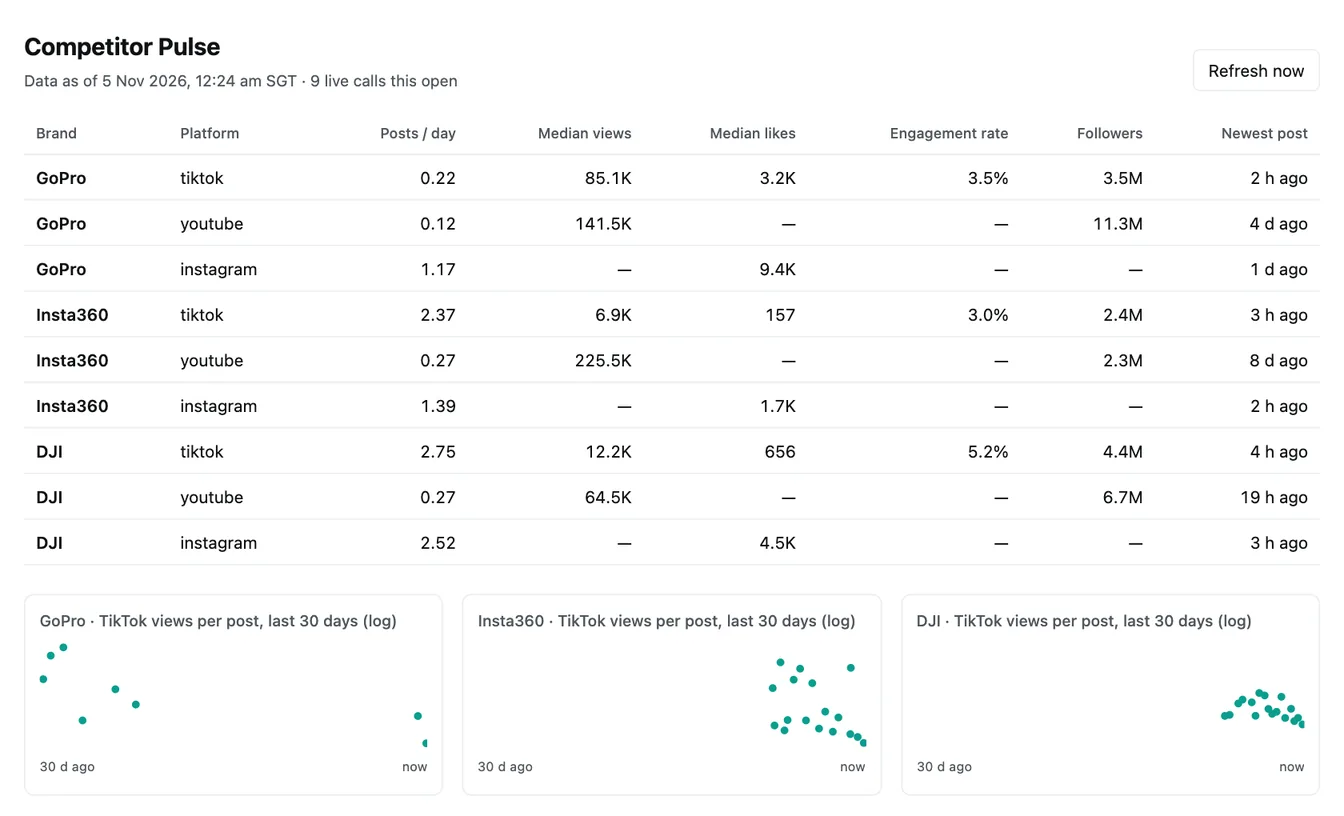
We did not take this screenshot in claude.ai. On the Claude side, this article gives a configuration example only, and we did not publish this dashboard in claude.ai. On our own machine, a small mock of claude.use() fed the saved real responses to the same page code. The screenshot shows that the page code and the response shape fit together. It also shows that the numbers are right.
Every cell that the JavaScript calculated matches the result of a separate Python script. The screenshot cannot show the claude.ai permission prompt, the first approval or the cache behavior. You will see those only after you publish in your own account.
One real round trip: each platform called once
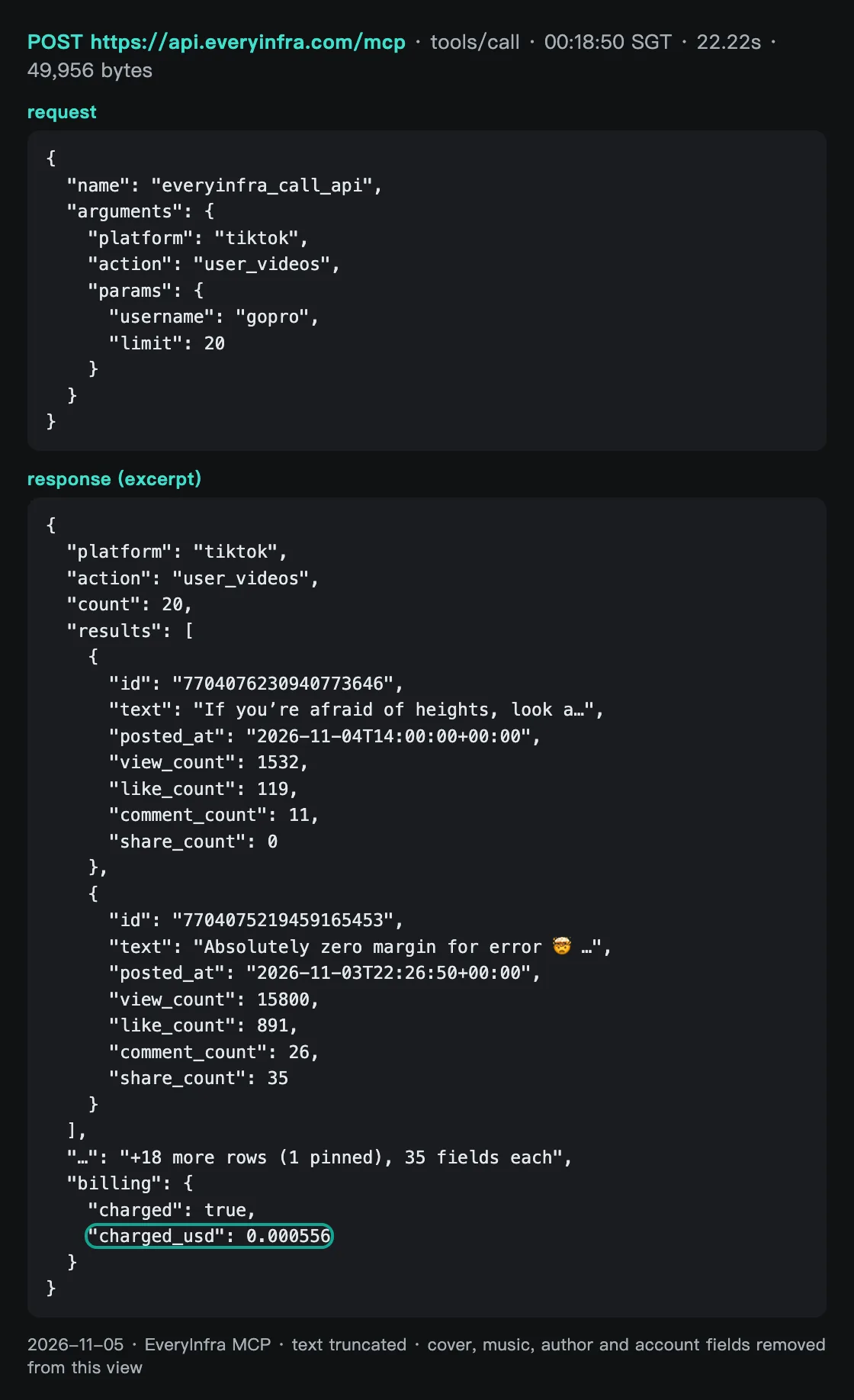
First, the raw TikTok round trip. At 00:18:50 Singapore time on 2026-11-05, we sent a tools/call to https://api.everyinfra.com/mcp. The tool was everyinfra_call_api, with the GoPro TikTok username and limit 20. After 22.22 seconds, 49,956 bytes of JSON came back.
There were 20 videos. One was a pinned ad from 2025. The other 19 were newest first, and the newest was posted on 2026-11-04, 2.3 hours before the fetch. Each row had 35 fields, and billing.charged_usd was 0.000556.
We sent the YouTube call at 00:19:16. It came back in 11.66 seconds with 13,047 bytes. There were 20 videos with titles, views and the channel subscriber count (11.3 million for GoPro). There were no like counts. Post times were relative, such as "4d ago", "3w ago" and "1mo ago". View counts were rounded, such as 125,000 and 300,000.
Two of the 20 rows were odd. Their post time field held "and NASA" or "and" plus a partner name, and their view count was 0. These are videos that GoPro posted together with a partner. The page must set such rows apart and keep them out of the median. If it does not, they pull the median views down.
Instagram is async. We submitted the GoPro request at 00:19:28. After 8.48 seconds, a job ID came back with status: running and a hint to read the result with everyinfra_get_job. The charge happens at submit time, and polling is free.
In round one we read the jobs only after all three brands were submitted. The GoPro job was still running 23 seconds after submit. At 223 seconds it had finished, with 20 posts and 34,031 bytes.
We polled the DJI job every 15 seconds. It showed running at 00:23:27, finalizing at 00:23:43 and succeeded at 00:23:58, about 56 seconds in total. The Instagram response has likes and comments. It has no views and no follower count. The catalog field notes say the same: this capability returns neither, and it returns at most 48 posts.
Test 1: how long each call takes
One open makes 9 calls. The time for each call decides how long the first screen stays empty. The chart below shows all 36 calls from rounds one, two and three, one dot per call. The median TikTok sync call took 21.23 seconds and the median YouTube call took 14.00 seconds. Both have a long tail of 50 to 70 seconds.
The Insta360 YouTube call took 66.58 seconds. The Oura YouTube call took 69.16 seconds and then returned 0 rows, with an automatic refund. Instagram submits are fast, with a median of 2.12 seconds. The result then takes one to several more minutes.
| Call | Calls | Median (s) | Fastest (s) | Slowest (s) |
|---|---|---|---|---|
| TikTok sync | 12 | 21.23 | 8.62 | 52.78 |
| YouTube sync | 12 | 14.00 | 8.71 | 69.16 |
| Instagram submit | 12 | 2.12 | 1.90 | 12.19 |
| Instagram done (upper bound) | 12 | 143 | 47 | 510 |
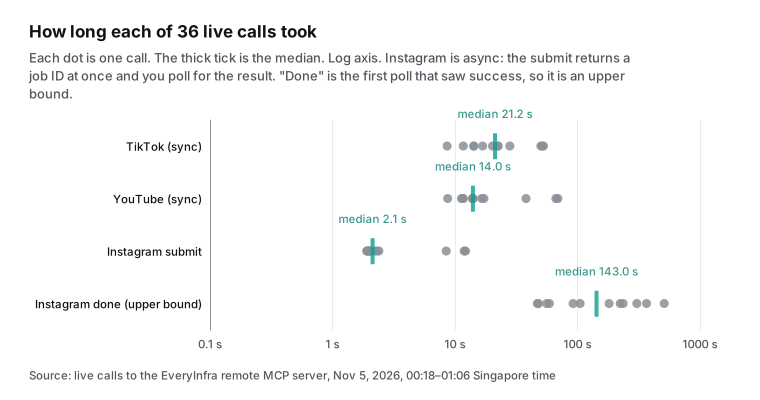
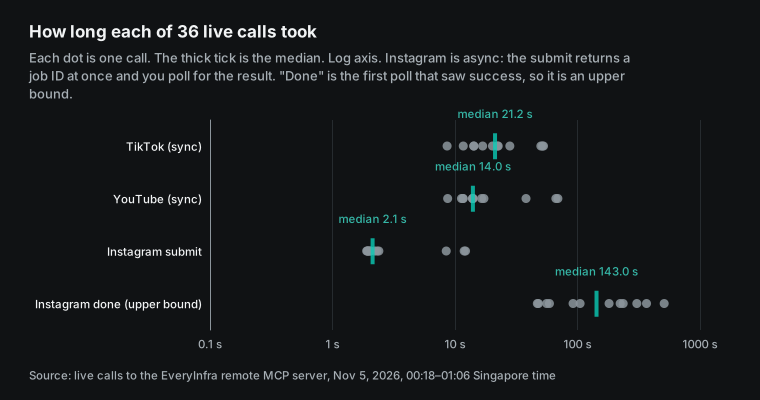
These numbers change the page design in three ways. First, the page must send the 9 calls in parallel. In a queue, the worst case is five or six minutes before the first screen is complete. Even in parallel, the slowest cell takes over a minute. So each cell needs its own "loading" state.
Second, Instagram must use submit, job ID and polling. One sync call will not do. The page runtime waits about 130 seconds for a reply, and Claude's hosted apps stop a tool call at 240 seconds. In round two, our slowest Instagram job took 510 seconds from submit to the first poll that saw success.
Part of that was our own late polling. In round three we polled every 15 seconds, and all three jobs finished within 47 to 59 seconds. Third, a cache removes all of this waiting. Reading 9 cells from shared storage takes milliseconds.
Test 2: how far back 20 rows reach
Rounds one and two used limit 20. For busy accounts, 20 rows cannot fill a 30-day window. For the wearable brands in this article, the picture is mixed. WHOOP's 20 TikTok videos covered 37.1 days, and its 20 Instagram posts covered only 14.3 days. Oura posts less: 19 TikTok videos covered 83.9 days and 20 Instagram posts covered 27.0 days. Garmin's 20 YouTube videos went back about 60 days, and its 20 Instagram posts covered 40.1 days.
The camera brands are busier. Insta360's 17 non-pinned TikTok videos covered only 7.2 days. That is why the page shows posts per day and not posts in 30 days.
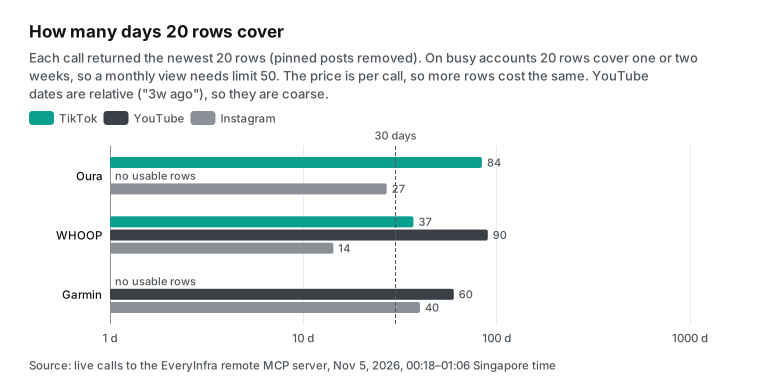
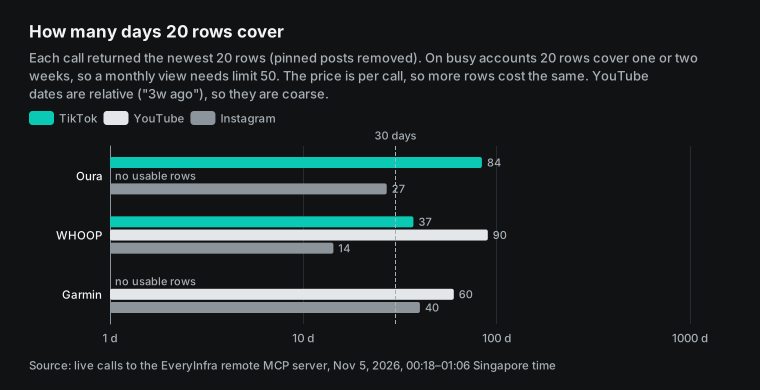
A larger limit is the better fix. All three capabilities are priced per call. TikTok and YouTube allow up to 50 rows, and Instagram allows up to 200. More rows cost the same. At 01:03 to 01:05 Singapore time we made 3 more calls with limit 50.
Insta360 on TikTok went from 7.2 days in 20 rows to 24.0 days in 50 rows. Mango on TikTok went from 14.1 to 56.1 days. GoPro on YouTube went from about 150 to about 365 days. Each call still cost $0.000556.
The cost is size. Each TikTok row has 35 fields. 20 rows are about 50,000 bytes, and 50 rows came to 137,072 bytes. That leaves only about 13,900 characters (the Insta360 call returned 136,062 characters) below the 150,000-character limit for one tool result on Claude's hosted apps.
This is the point we most want to stress from these tests. Do not push limit to the maximum without a check. TikTok at 50 rows is already close to the limit. More than that needs paging or async mode.
| Call (2026-11-05, Singapore time) | Days in 20 rows | Days in 50 rows | Characters returned | Room below 150,000 | Seconds |
|---|---|---|---|---|---|
| Insta360 TikTok, 01:03:59 | 7.2 | 24.0 | 136,062 | 13,938 | 19.75 |
| Mango TikTok, 01:04:27 | 14.1 | 56.1 | 121,794 | 28,206 | 30.70 |
| GoPro YouTube, 01:05:06 | 150 | 365 | 31,212 | 118,788 | 11.52 |
Here are the round-two numbers for the three wearable brands. Oura's newest TikTok video and newest Instagram post were both from 2026-11-02. Garmin's newest Instagram post was from 2026-10-31.
| Brand and platform | Posts per day | Median views | Median likes | Engagement rate | Followers |
|---|---|---|---|---|---|
| Oura, TikTok | 0.23 | 20,700 | — | 1.09% | 161,600 |
| Oura, YouTube | — (0 rows, refunded) | — | — | — | — |
| Oura, Instagram | 0.74 | — | 1,785 | — | — |
| WHOOP, TikTok | 0.54 | 17,250 | — | 2.82% | 415,900 |
| WHOOP, YouTube | 0.19 | 7,100 | — | — | 165,000 |
| WHOOP, Instagram | 1.40 | — | 3,412 | — | — |
| Garmin, TikTok | — (placeholder account) | — | — | — | 21 |
| Garmin, YouTube | 0.33 | 22,500 | — | — | 368,000 |
| Garmin, Instagram | 0.50 | — | 7,228 | — | — |
Test 3: TikTok view trends
The lower part of the dashboard plots TikTok views per post for the last 30 days. The chart below uses the real round-two responses for the wearable brands, on a log scale. WHOOP posts about every two days. Most of its videos have between 5,000 and 20,000 views, and the top one has 65,000.
Oura posts less often, with 5 videos in this window between 3,040 and 25,900 views. Its median video had 20,700 views and its median engagement rate was 1.09%. WHOOP's median was 17,250 views and its median engagement rate was 2.82%.
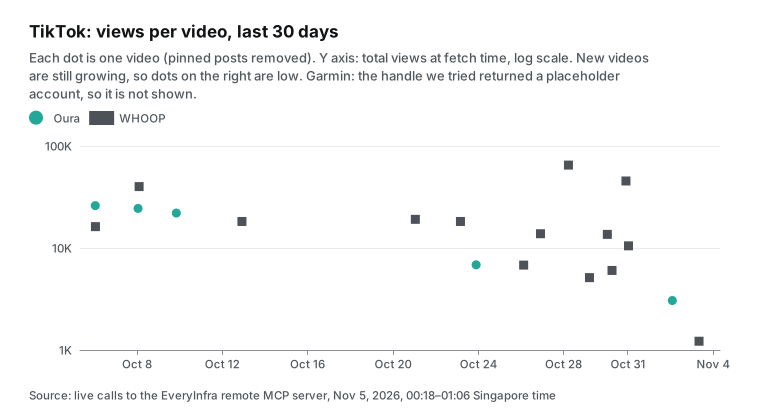
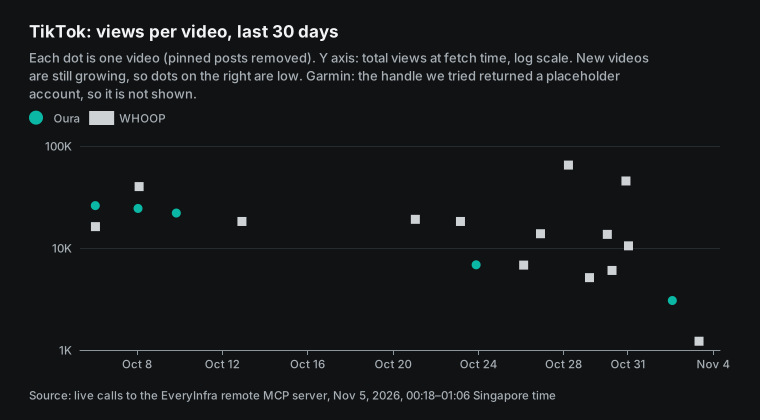
Read this chart with care. Each dot is the total view count at fetch time. It is not views in a fixed period. A video from yesterday and a video from three weeks ago are not a fair match, and the newer one always looks weaker. For "who did better this week", compare views in the first 48 hours after posting. That needs the page to store each video's views when it first sees the video and to fetch again 48 hours later.
Shared storage can do that, and the built-in cache cannot. Shared storage can keep history, and the browser cache keeps only the last result.
Test 4: how much the data changed in 41 minutes
The right cache age depends on how fast the data changes. At 01:00 to 01:03 Singapore time, we repeated the round-one calls for the three camera brands on all three platforms. The gap from round one was about 41 minutes (0.7 hours). We compared views or likes on the same posts.
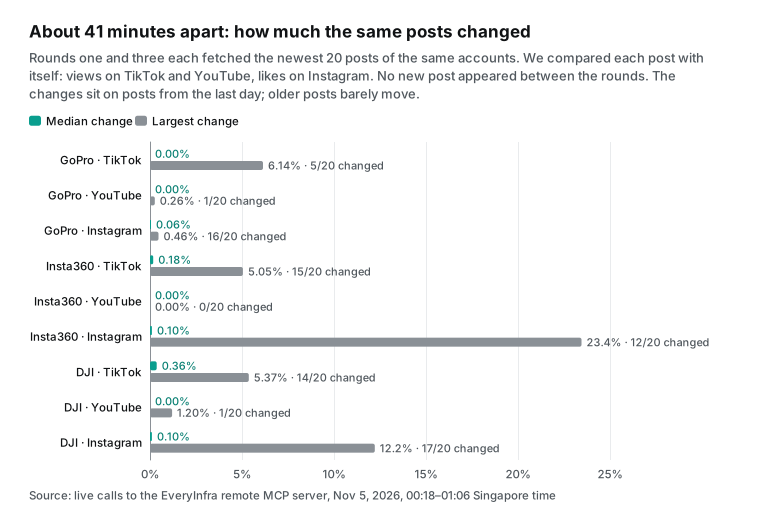
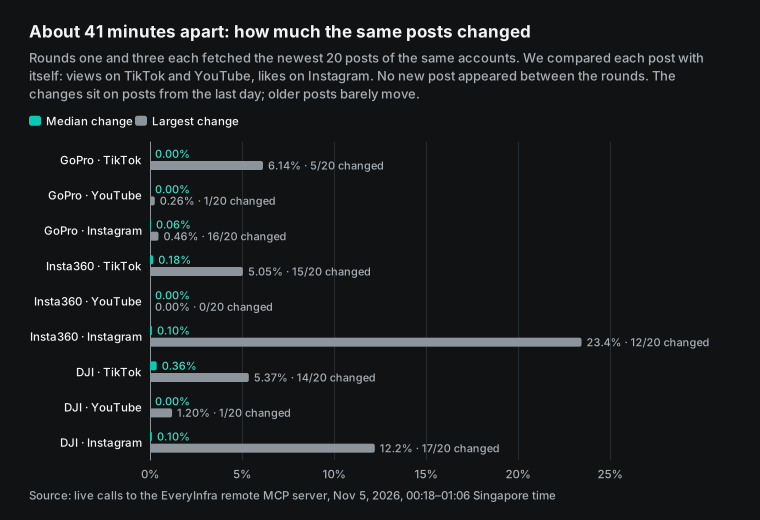
No new post appeared in any of the 9 cells between the rounds. Almost all changes sit on posts from the last day or two. On TikTok, 15 Insta360 videos changed, but the median rise was only 0.18%. The largest rise was a video from 2026-11-03, from 247,300 to 259,800 views (+5.05%).
The largest DJI rise was a video from 2026-11-04 (+5.37%). Only 5 GoPro videos moved. The largest was the 2026-11-04 video, from 1,532 to 1,626 views.
On Instagram, more posts changed (12 to 17 of 20), but the median rise was about 0.1%. The two largest rises were both new posts from 2026-11-04. One Insta360 post went from 742 to 916 likes (+23.4%). One DJI post went from 2,406 to 2,700 likes (+12.2%). On YouTube, at most 1 of 20 videos changed per channel. The view counts are rounded (for example 125,000), so small rises do not show.
| Brand and platform | Field | Rows changed of 20 | Median change | Largest change |
|---|---|---|---|---|
| GoPro TikTok | Views | 5 | 0.00% | 6.14% |
| GoPro YouTube | Views | 1 | 0.00% | 0.26% |
| GoPro Instagram | Likes | 16 | 0.06% | 0.46% |
| Insta360 TikTok | Views | 15 | 0.18% | 5.05% |
| Insta360 YouTube | Views | 0 | 0.00% | 0.00% |
| Insta360 Instagram | Likes | 12 | 0.10% | 23.45% |
| DJI TikTok | Views | 14 | 0.36% | 5.37% |
| DJI YouTube | Views | 1 | 0.00% | 1.20% |
| DJI Instagram | Likes | 17 | 0.10% | 12.22% |
The result is clear. For cells such as posts per day and median views, a 6-hour shared cache loses almost nothing. Older posts changed by less than 1% in 41 minutes. The posts that change are the ones from the last day.
Does the page track how fast new posts grow? Then give the last 48 hours their own row. Use a shorter cache for that row, such as 1 hour. Keep the other cells on a 6 to 24 hour refresh.
Test 5: response size and shared storage
Artifact storage is 20 MB each, text only (support 17153992). Our 9 raw responses for one open add up to about 326 KB. With trim keeping ten fields, they drop to 27.6 KB, or 8.5% of the original. Even with one copy every 6 hours kept as history, 120 copies a month take only 3.3 MB.
That is well inside 20 MB. Do not store the full raw response. Size is one reason. The other reason is the account balance inside it, because every member can read shared storage.
Data traps: placeholder accounts, partner videos and empty results
Out of 27 data cells in this test, three could not go on the dashboard as they were. Each had a different cause, and the page must detect all of them.
| Case | Real example (2026-11-05, Singapore time) | Charge | What the page does |
|---|---|---|---|
| The username belongs to someone else | Garmin on TikTok: the handle we guessed from the brand name returned 1 row from an unverified account with 21 followers | $0.000556 | Flag "check account" when followers are very low or author_is_verified is false, and leave it out of comparisons |
| Partner video rows | GoPro, Insta360 and DJI on YouTube each had 2 to 4 rows with a post time of "and" plus a partner name and 0 views | Normal charge | Keep rows with an unreadable post time out of the median and list them as "partner posts" |
| Empty result | The Oura YouTube channel address returned 0 rows after 69.16 seconds | Refunded, $0 | Show "no posts found at this address" and ask the user to check the channel address |
| Pinned posts | 5 of 9 TikTok accounts had pinned posts, 3 each for Insta360 and DJI | Normal charge | Remove pinned posts before cadence and medians |
| Per-minute limit reached | 4 responses with 429 in round one, 3 of them at 00:19:51; the text said the key's own limit was 10 per minute | No charge | Show the retry_after seconds and a "Try again" button |
The first row is the easiest to miss. A brand's TikTok username is not always the brand name. The handle we tried belongs to a small personal account. The call is charged as normal, because the API did return content. When you add a brand for the first time, ask Claude in a chat to check the account with a profile capability such as tiktok/profile. Check the verified flag and the follower count, and only then put the handle in the page.
Cost per open: 10 people, 3 opens a day
At the 2026-11-05 catalog price, each of the three capabilities costs $0.000556 per call. The dashboard has 3 brands and 3 platforms per brand, so one open is 9 calls for $0.005004. The Instagram polling tool everyinfra_get_job is free. Empty results are refunded, and 429 responses are not charged.
| Plan | Fetches a month | Charged calls | Data cost a month | Note |
|---|---|---|---|---|
| No cache | All 900 opens | 8,100 | $4.50 | 10 people × 3 opens × 30 days × $0.005004 |
| Per person, 24 hours | 1 a day each, 300 | 2,700 | $1.50 | The built-in cache cannot do this, because our tool is currently marked not read-only; use personal storage |
| Shared, 6 hours | 4 a day, 120 | 1,080 | $0.60 | Kept in the artifact's shared storage; the first person to open after expiry fetches |
| Shared, 24 hours | 1 a day, 30 | 270 | $0.15 | Good for a page you check at a weekly meeting |
| For reference: 10 Team standard seats, monthly | — | — | $250 | claude.com/pricing, 2026-11-05 |
All these amounts are small. The most expensive plan is under $5 a month, next to $250 for 10 Team seats. But think about two details first. With OAuth, the first person who opens the page after the cache expires pays for that fetch. So the colleague who arrives first each morning pays for everyone.
The amount is tiny, but say so on the page. With a shared key, all charges come from the organization's one account. If the balance runs out, the whole team's dashboard goes empty together. Set a low-balance alert for that account in the EveryInfra console.
How to cache so that not every open is charged
The Claude page runtime has its own call cache. For tools declared read-only (readOnlyHint: true), it keeps results for 5 minutes by default, and you can raise that to 7 days. The Artifacts docs also say a reopened page draws cached responses first. But the runtime type definitions in our local Claude Code 2.1.309 install (version 0.2.96, not a public doc) add a rule. For a tool that declares readOnlyHint: false, the cache options are ignored, and the call is never cached. The page also cannot use the auto-refresh watchTool method for it.
The current annotation of everyinfra_call_api falls under this rule. So the runtime never reuses a result for you, and each call is charged. What you do is simple: let the page keep its own cache. Our method follows.


We suggest the artifact's shared storage (the db capability). Store the trimmed result and the fetch time for each cell. On open, read it first, and fetch again only after 6 hours. This helps in three ways.
The cost drops from $4.50 to $0.60 a month. When the cache is fresh, the first screen draws in milliseconds instead of a minute. And the per-minute load drops, as the next chart shows.
By default, Contributors and above can write shared storage, and view-only members can only read it. So a view-only member who opens an expired page pays for one fetch and sees fresh data. But that member cannot write the result back, and the next person fetches again. The code must accept this case.
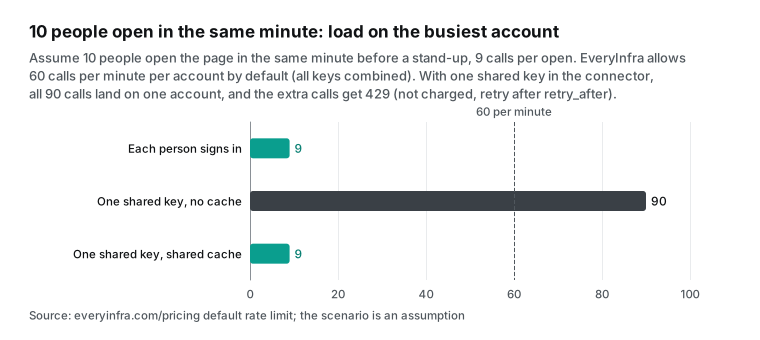
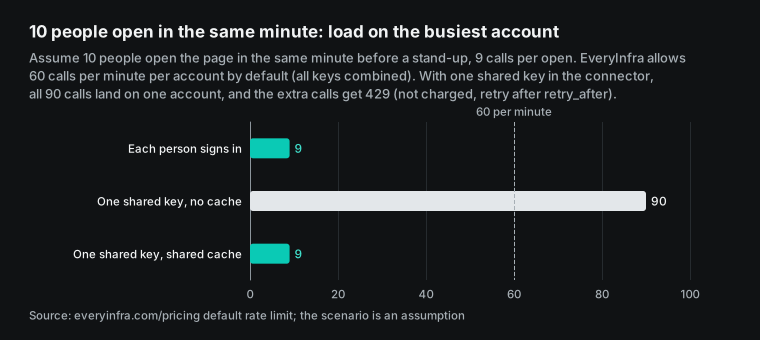
The per-minute limit matters only with a shared key. EveryInfra allows 60 calls per minute per account by default, with all keys combined (pricing page). Suppose 10 people open a page with no cache in the same minute before a stand-up. That is 90 calls on one account, and the last 30 get a 429. They are not charged, but those cells stay empty.
The test key in this article had its own limit of 10 per minute. In round one it hit that limit 4 times, 3 of them at 00:19:51. The text said the key's own limit was used up and asked us to retry after 9 seconds. So give the dashboard its own key with a per-minute limit below the account limit. Then the dashboard can never use up the calls that other programs on the same account need.
A shared cache has its own costs. A Reddit post about a HaloPSA service desk dashboard, and its comments, explain them well (r/halopsa thread). The first cost is access. The cached data was fetched with the access of the first person who fetched it.
Later viewers may see data outside their own access. Public competitor social data is the same for everyone, so this is not a problem for us. For internal data, it is a real problem.
The second cost is trust. Under the default rules, any Contributor can change the cache documents in shared storage. If someone writes fake numbers, every viewer sees them. To prevent this, limit writes on the cache path to Editors. The cost is that ordinary members then fetch on every open of an expired page.
Recent changes
On 2026-10-28, Anthropic added a gallery of ready-made legal artifacts to Claude for Legal. The post calls artifacts "interactive tools, such as trackers and dashboards" and says connectors bring in the sources teams already use (Introducing artifacts for legal work with Claude). Harvey, one of the launch partners, posted the same day. Its Intake artifact connects to Harvey through the Harvey MCP server (Harvey blog). On 2026-10-21, the Help Center release notes recorded Claude Duet and other updates (release notes). On 2026-10-15, artifact templates became on by default for Enterprise plans, according to the same release notes.
On 2026-10-08, Claude Dashboards and Claude Motion went into beta. Dashboards is on paid plans and connects to data platforms such as BigQuery and Snowflake. It also works with other connectors, and each chart shows when its data was last refreshed (Claude blog, Get started with Claude dashboards). The New Stack report from the same day quotes an Anthropic spokesperson.
By default, each viewer's own connections run the queries of a shared dashboard (The New Stack). Dashboards leans toward SQL on a data warehouse. For a page that calls social data APIs, like this one, a plain artifact with an MCP connector is more direct.
On the Claude Code side, v2.1.209 fixed publish accepting connector tool names that the connector does not expose. Since v2.1.265, publish checks the tool names the page declares and refuses the publish when none match (Claude Code changelog, Artifacts). The newest version we saw on 2026-11-05 was v2.1.318.
One GitHub issue is still open. On 2026-08-06, a user reported that an update from a cloud session clears the connector grants. The app has no place to grant them again (claude-ai-mcp #787). A Reddit user hit the same "not in this artifact's mcp_tools allowlist" error (r/ClaudeAI thread).
Claude artifacts FAQ
Can Claude Artifacts call connected MCP connectors?
Yes. Source: the Google suggestion "claude code artifacts can now call mcp connectors". A published artifact can call MCP tools each time someone opens it, through the viewer's claude.ai connectors. You need a Pro, Max, Ultra, Team or Enterprise plan. Publishing from Claude Code needs v2.1.209 or later. Only claude.ai connectors count, and the published page cannot call servers from a local .mcp.json (Artifacts).
Do claude artifacts mcp calls have a limit?
Source: the Google suggestion "claude artifacts mcp limits". As of 2026-11-05, Claude's public docs give no call limit for artifact connector calls. They only say usage counts toward each person's limits. The written limits are about 150,000 characters per result and 240 seconds per call on claude.ai and desktop (Build an MCP server for Claude). The connector server's own rate limit also applies. EveryInfra allows 60 calls per minute per account by default.
Can people without a Claude account see the live data?
No. Source: an r/ClaudeCode thread that asks how to show a database dashboard to managers with no Claude license. For outside people and signed-out public-link viewers, the connector parts do not run. The Help Center also says app-connected artifacts cannot use "Anyone with the link" (Share artifacts). For outside readers, export a static snapshot or build a small internal web page with its own sign-in.
Why is my shared dashboard empty for my teammates?
Source: an r/ClaudeAI thread where a dashboard was empty for everyone on the team. Connectors belong to each account. Each viewer must connect every connector the page uses and approve the first call. On Team and Enterprise, check that "Enable artifact connectors" is on. Also check that the tool is not set to "Needs approval" in the connector permissions. If the page calls tool names that the connector does not expose, the page is empty for everyone (Artifacts troubleshooting).
What does "not in this artifact's allowlist" mean after I republish?
Source: an r/ClaudeAI thread and GitHub issue 787 in claude-ai-mcp. The publish-time declaration decides which tools a page may call, not the page code. An update from a cloud session can clear that declaration. In the threads, the only fix that worked was to publish again from a local session with the full connector and tool names.
Can a shared cache show data people should not see, or be changed by someone?
Source: the comments on an r/halopsa service desk dashboard post. Yes, both risks are real. The cached data was fetched with the access of the first person who fetched it. Under the default rules, Contributors can write the cache documents.
Public competitor social data has no access difference. To prevent edits, limit writes on the cache path to Editors. Then ordinary members fetch on each open of an expired page.
Do claude artifacts cost extra?
Source: the Google suggestion "do claude artifacts cost money". Artifacts come with paid plans and have no price of their own, and usage counts toward each person's limits. The data API calls are separate. In this article's example, one open is $0.005004. For 10 people with 3 opens a day, no cache costs $4.50 a month and a 6-hour shared cache costs $0.60.
Getting started
- Sign up for EveryInfra and add funds. Follow the quickstart to get a key or prepare OAuth sign-in. The remote MCP guides are at MCP server and remote MCP setup.
- Add the connector in Claude as in the configuration example above. Name it EveryInfra and set
everyinfra_call_apito Always allow. - In a Claude chat, call the connector once for each brand. Check usernames, channel addresses and returned fields.
- Ask Claude to build the page from the skeleton in this article. Declare the
mcpanddbcapabilities, publish, and share it only inside the organization. - Each colleague connects the connector and approves the first call. State the cache age on the page, and say who pays for the fetch after expiry.
Related reading
- Claude Code subagents: Haiku subagents pull TikTok brand accounts in parallel: the same TikTok data, pulled in parallel by subagents in Claude Code.
- MCP 2026 spec and production readiness: tool declarations, authorization and remote MCP in production.
The EveryInfra blog has two other competitor articles. One SKILL.md for four AI tools: competitor review analysis puts review analysis into an Agent Skill. You run it once in a tool such as Claude Code or Codex, and you get a static report. ChatGPT Spaces competitor social tracker uses a shared page in a ChatGPT Space. That page does not update itself. A weekly scheduled task writes new numbers into it, so viewers always see the last task's data.
This article is different in two ways: when the data is fetched, and who pays for it. A Claude artifact fetches data at the moment each person opens the page, through that person's connectors. So a scheduled task does not set the refresh rate. The number of viewers and how often they open the page set it. The payer is not the person who set up a task.
With OAuth, the payer is each viewer. With a shared key, the payer is the organization that entered the key. These two facts decide the cache design, and every test below is about them. If you only need a weekly static report, the other two articles are simpler.
References
- Claude Help Center, What are artifacts and how do I use them?, read 2026-11-05: https://support.claude.com/en/articles/17153992-what-are-artifacts-and-how-do-i-use-them
- Claude Help Center, Share artifacts, read 2026-11-05: https://support.claude.com/en/articles/9547008-share-artifacts
- Claude Help Center, Artifacts admin guide for Team and Enterprise plans, read 2026-11-05: https://support.claude.com/en/articles/16994751-artifacts-admin-guide-for-team-and-enterprise-plans
- Claude Help Center, Get started with custom connectors using remote MCP, read 2026-11-05: https://support.claude.com/en/articles/11175166-get-started-with-custom-connectors-using-remote-mcp
- Claude Help Center, Use connectors to extend Claude's capabilities, read 2026-11-05: https://support.claude.com/en/articles/11176164-use-connectors-to-extend-claude-s-capabilities
- Claude Help Center, Get started with Claude dashboards, read 2026-11-05: https://support.claude.com/en/articles/17454700-get-started-with-claude-dashboards
- Claude Help Center, Release notes, read 2026-11-05: https://support.claude.com/en/articles/12138966-release-notes
- Claude Code docs, Artifacts, read 2026-11-05: https://code.claude.com/docs/en/artifacts
- Claude Code, Week 29 digest (July 13 to 17, 2026), read 2026-11-05: https://code.claude.com/docs/en/whats-new/2026-w29
- Claude Code, What's new index, read 2026-11-05: https://code.claude.com/docs/en/whats-new
- Claude Code docs, Connect Claude Code to tools via MCP, read 2026-11-05: https://code.claude.com/docs/en/mcp
- Claude Code changelog on GitHub, read 2026-11-05: https://github.com/anthropics/claude-code/blob/main/CHANGELOG.md
- Claude Code changelog in the docs, read 2026-11-05: https://code.claude.com/docs/en/changelog
- claude.com developer docs, Build an MCP server for Claude, read 2026-11-05: https://claude.com/docs/connectors/building
- claude.com developer docs, Authentication for connectors, read 2026-11-05: https://claude.com/docs/connectors/building/authentication
- Claude API docs, MCP connector, read 2026-11-05: https://docs.claude.com/en/docs/agents-and-tools/mcp-connector
- Claude pricing page, read 2026-11-05: https://claude.com/pricing
- Claude blog, Build live dashboards and animate explainers with Claude (2026-10-08), read 2026-11-05: https://claude.com/blog/dashboards-and-motion
- Claude, Introducing artifacts for legal work with Claude (2026-10-28), read 2026-11-05: https://claude.com/resources/articles/introducing-artifacts-for-legal-work
- Claude, Turn ideas into interactive AI-powered apps (with the 2025-10-21 update note), read 2026-11-05: https://claude.com/resources/articles/build-artifacts
- GitHub anthropics/claude-ai-mcp issue 787 (opened 2026-08-06), read 2026-11-05: https://github.com/anthropics/claude-ai-mcp/issues/787
- MCP specification 2025-06-18, Tools, read 2026-11-05: https://modelcontextprotocol.io/specification/2025-06-18/server/tools
- MCP specification 2025-06-18, Authorization, read 2026-11-05: https://modelcontextprotocol.io/specification/2025-06-18/basic/authorization
- MCP specification 2025-11-25, Authorization, read 2026-11-05: https://modelcontextprotocol.io/specification/2025-11-25/basic/authorization
- MCP specification 2026-07-28, Schema Reference, read 2026-11-05: https://modelcontextprotocol.io/specification/2026-07-28/schema
- IETF RFC 9728, OAuth 2.0 Protected Resource Metadata, read 2026-11-05: https://datatracker.ietf.org/doc/html/rfc9728
- IETF RFC 6750, OAuth 2.0 Bearer Token Usage, read 2026-11-05: https://datatracker.ietf.org/doc/html/rfc6750
- MDN, 429 Too Many Requests, read 2026-11-05: https://developer.mozilla.org/en-US/docs/Web/HTTP/Reference/Status/429
- Google for Developers, YouTube Data API quota costs (updated 2026-11-03), read 2026-11-05: https://developers.google.com/youtube/v3/determine_quota_cost
- Meta for Developers, IG User Business Discovery, read 2026-11-05: https://developers.facebook.com/docs/instagram-platform/instagram-graph-api/reference/ig-user/business_discovery
- Meta for Developers, Graph API rate limits, read 2026-11-05: https://developers.facebook.com/docs/graph-api/overview/rate-limiting
- TikTok for Developers, List Videos, read 2026-11-05: https://developers.tiktok.com/doc/tiktok-api-v2-video-list
- TikTok for Developers, Understanding TikTok API Rate Limits, read 2026-11-05: https://developers.tiktok.com/doc/tiktok-api-v2-rate-limit
- EveryInfra remote MCP (tools/list and tools/call), 2026-11-05: https://api.everyinfra.com/mcp
- EveryInfra protected resource metadata for /mcp/all, read 00:12 Singapore time on 2026-11-05: https://api.everyinfra.com/.well-known/oauth-protected-resource/mcp/all
- EveryInfra data capability catalog, read 00:15 Singapore time on 2026-11-05: https://api.everyinfra.com/api/v1/social/catalog
- EveryInfra OpenAPI document, read 2026-11-05: https://api.everyinfra.com/openapi.json
- Reddit r/ClaudeCode, Share an artifact with a database to users without a Claude License, read 2026-11-05: https://www.reddit.com/r/ClaudeCode/comments/1xhwscj/help_needed_share_an_artifact_with_a_database_to/
- Reddit r/ClaudeAI, Has anyone gotten a Claude artifact with connectors to work for their whole team?, read 2026-11-05: https://www.reddit.com/r/ClaudeAI/comments/1wb1ep7/has_anyone_gotten_a_claude_artifact_with/
- Reddit r/ClaudeAI, Problem with Artifact MCP permissions, read 2026-11-05: https://www.reddit.com/r/ClaudeAI/comments/1vr1k8q/problem_with_artifact_mcp_permissions_how_can_i/
- Reddit r/halopsa, The mother of all HaloPSA dashboards, built in Claude artifacts, read 2026-11-05: https://www.reddit.com/r/halopsa/comments/1wfttq0/the_mother_of_all_halopsa_dashboards_built_in/
- Reddit r/ClaudeAI, Artifacts cannot invoke custom MCP connectors, read 2026-11-05: https://www.reddit.com/r/ClaudeAI/comments/1q8gp3l/artifacts_cannot_invoke_custom_mcp_connectors/
- The New Stack, Claude can now build your dashboards (2026-10-08), read 2026-11-05: https://thenewstack.io/claude-dashboards-data-motion/
- Harvey, Harvey Brings Intake to Claude for Legal Artifacts Launch (2026-10-28), read 2026-11-05: https://www.harvey.ai/blog/harvey-intake-claude-for-legal-artifact
Reference BL-87