Gemini Managed Agents: Scheduled Brand Monitoring over Remote MCP
Gemini Managed Agents brand monitoring with Triggers and the EveryInfra remote MCP: 11 live calls, Reddit covers 8 hours, data costs $0.003 a run.
At 00:18 Singapore time on November 14, 2026, we sent one reddit/search call to the EveryInfra remote MCP server. We used the same request shape that the mcp_server tool in Gemini Managed Agents sends. The keyword was Anker, sorted by newest. The call returned 24 posts, and the oldest and newest post were only 8.04 hours apart. So a brand monitoring agent that wakes up once a day must either fetch more pages or run three times a day.
The 8.04 hours come from one period, 06:46 to 14:48 UTC on November 13. At that rate, one run a day misses most new posts.
In the same round, trustpilot/reviews returned only 9 reviews from the last 7 days, and 3 of them had one star. google_news/search with a one-week window returned 20 articles, which is the cap for one call. The data fee for the three calls was $0.002973 per round. We also estimated the model fee from Google's list prices and the bytes we measured. With the default model, Gemini 4 Hydrogen, one round costs $0.041 to $0.158 in tokens. That is 14 to 53 times the data fee.
The EveryInfra side is live. Between 00:18 and 00:51 Singapore time on November 14, 2026, we used an EveryInfra key against https://api.everyinfra.com/mcp.
We sent one handshake, two tools/list calls and 11 tools/call requests in three rounds, at 00:18, 00:34 and 00:50. One was a trial youtube/search call that is not part of the plan below. We also sent one REST call for comparison. We kept every raw response, so you can recompute each number.
The Gemini side is different. We did not open a paid Gemini API project, and we did not create a real agent or Trigger. Every Gemini code block in this article is a configuration example. It follows the text on ai.google.dev as we read it on November 14, 2026. The Gemini model fee is an estimate from public prices and measured bytes. It is not an invoice.

What Gemini Managed Agents is: the 2026 timeline
Gemini Managed Agents is the hosted agent feature of the Gemini API. One API call starts an agent in a Linux sandbox that Google hosts. The agent can reason, run code, manage files and use the web.
The Gemini API release notes give the launch date as May 19, 2026. On that day, Google released Managed Agents and the general Antigravity agent as a public preview (Gemini API release notes, 2026-05-19). The launch post on the Google blog describes the same idea in one line. One call starts an agent that reasons and runs code in an isolated, temporary Linux environment (Google blog: Build managed agents with the Gemini API).
The Agents overview page still says "Public Preview". It also tells you to review agent actions and output before you use them in sensitive workflows (Agents overview: security and best practices).
In the API, the entry point is the Interactions API. Its documentation says it became generally available in June 2026 and is the recommended interface for new projects. The server can keep conversation state, and long tasks can run in the background with background=true (Interactions API overview).
Most of the changes that matter for this article happened in the last two months. Here they are by date:
| Date | Change | What it means for a brand monitoring agent | Source |
|---|---|---|---|
| 2026-05-19 | Managed Agents and antigravity-preview-05-2026 in public preview | Starting point. The default model was Gemini 3.5 Flash | Release notes |
| 2026-09-17 | antigravity-preview-09-2026 released, old version shut down on October 5. Built-in file tools use PascalCase parameters | Code that reads only output_text needs a new agent name. Code that parses tool calls needs a rewrite | Release notes |
| 2026-10-19 | The official template repository moved every template to the 09-2026 base agent | Projects that start from a template get the new version | Template repository commits |
| 2026-10-27 | Gemini API CLI (gemini-api) beta can run managed agents from the command line | Cron scripts and CI jobs can call an agent without SDK code | Release notes |
| 2026-11-10 | Gemini 4 Carbon generally available, $2 input and $10 output until November 30 | The strongest optional model. The pricing page lists $4 input and $20 output from December 1 | Release notes, Pricing: Gemini 4 Carbon |
| 2026-11-12 | Gemini 4 Hydrogen generally available and the default model of the Antigravity agent | An agent without agent_config.model is billed at Hydrogen prices from this day | Release notes |
The last row affects your bill directly. The Antigravity agent page says that antigravity-preview-09-2026 uses gemini-4-hydrogen when you do not send agent_config. The other choices are Carbon, Argon, 3.8 Flash, 3.6 Flash and 3.5 Flash-Lite (Antigravity agent: model selection).
A named agent that you save with agents.create locks its model at creation time. You cannot change the model when you call it (Custom agents: limitations). If you created an agent before November 12 and did not set a model, its unit price changed on that day. Check it again.
Carbon needs its own note. The pricing page says that Carbon is not on the Free tier. The $2 input and $10 output prices last only through November 30. From December 1, input is $4 and output is $20 per million tokens (Pricing: Gemini 4 Carbon). That input price is 2.7 times the Hydrogen price. If a daily monitor is fixed to Carbon, the same tokens cost twice as much in December as in November.
The brand monitoring job in four steps
Our agent does one job. Every day, it reads new public content about Anker from three sources, picks the items that a person must see, and writes a short brief. Anker is a public brand with power banks, earbuds and home batteries. In June 2025, it recalled more than one million power banks in the United States because of a battery cell problem (U.S. CPSC recall notice, 2025-06-12). A brand team has a real reason to check it every day.
We picked three of the four candidate capabilities: reddit/search, trustpilot/reviews and google_news/search. We left out youtube/search. Reddit shows what users discuss on their own.
Trustpilot shows reviews after purchase. Google News shows what the media and the brand itself publish. Each one has a capability page on EveryInfra: Reddit search, Trustpilot reviews and Google News search. The platform overviews are Reddit data API, Trustpilot data API and Google News data API.
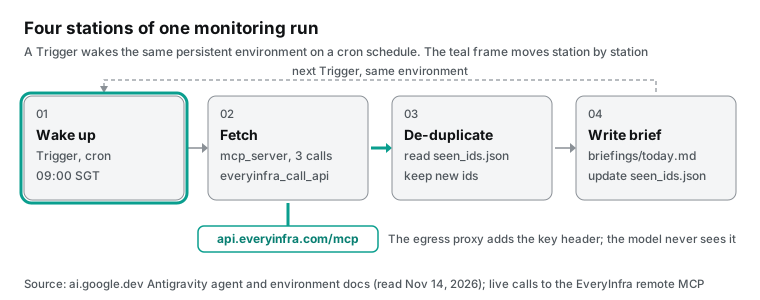
Each step has one owner. In step one, Gemini Triggers wakes the agent on a cron expression in a given time zone. Each run reuses the same environment, so files from the last run are still there (Antigravity agent: Triggers). In step two, the agent calls everyinfra_call_api once per platform through the attached remote MCP server. In step three, it compares post ids, review ids and news URLs with seen_ids.json in the sandbox and keeps only new items.
Time is only for sorting, not for deciding what is new. The posted_at time of a Reddit post can differ from the time it appears in search. In step four, the agent writes the brief into the briefings/ folder. It lists new one-star reviews, posts about fakes or faults, and press coverage in separate sections. Then it appends today's ids to seen_ids.json.
We copied this structure from the News Curator template in Google's official template repository. That template also runs on a Trigger and scans Google News, Hacker News and Medium. It keeps seen_items.json in the persistent environment so that no story appears twice.
It also writes curation_history.csv to track counts per run (News Curator template). Its README says that the persistent environment of a Trigger is both memory and personalization. Its three sources need no account and no token, and its network allowlist has three domains. Reddit posts and Trustpilot reviews are not in those sources, so we attach a data MCP server.
gemini managed agents api: attach a remote MCP server with mcp_server, credential and allowed_tools
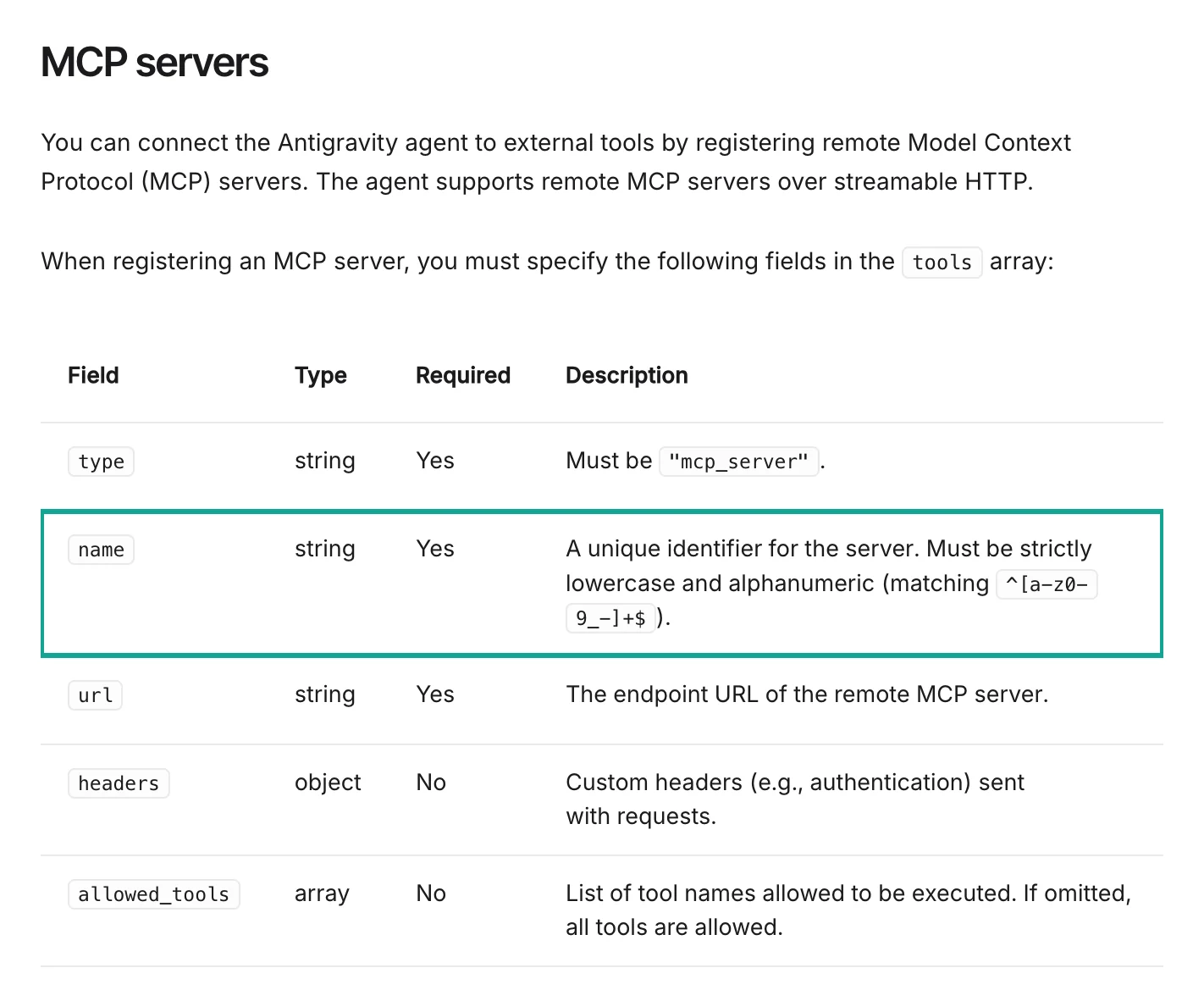
The "MCP servers" section of the Antigravity agent page lists all fields for a remote MCP server. type is always mcp_server. name can contain only lowercase letters, digits, underscores or hyphens. url is the server address, headers can carry an auth header, and allowed_tools limits which tools the agent can call. If you leave allowed_tools out, all tools are open. The only transport is Streamable HTTP (Antigravity agent: MCP servers).
The limitations section on the same page adds two traps. SSE transport is not supported. An uppercase letter in name returns a general 400 Bad Request, and the error message does not say that the name is the problem (Antigravity agent: limitations). We would add a lowercase check to any script that generates these configurations.
The EveryInfra remote MCP address is https://api.everyinfra.com/mcp. It uses Authorization: Bearer <your key>, which fits these rules. It uses Streamable HTTP.
Our initialize request at 00:19:44 took 0.145 seconds, and the negotiated protocol version was 2025-06-18. You can put the key in one of two places. The simple way is to write the key in headers. Then the key appears in every request body and lives in your own code and logs.
The documentation recommends Credentials instead. First you store a bearer_token credential with POST /credentials. Then you write "credential": "<credential id>" in the mcp_server entry.
An egress proxy adds the auth header to each request. The value is write-only, and no endpoint ever returns it (Credentials: use with MCP servers). A bearer_token sends Authorization: Bearer <token> by default, and header_name and prefix can change that (Credentials: Bearer token). EveryInfra uses the default format.
| Where the key lives | What you write | Who can read the key later | Our view |
|---|---|---|---|
headers in the mcp_server entry | "headers": {"Authorization": "Bearer <key>"} | Anyone with your code, logs or request bodies | Fine for a first local test only |
A bearer_token credential | "credential": "everyinfra-key" | Nobody: the value is write-only | Use this for any scheduled agent |
| A credential on the network allowlist | allowlist entry for api.everyinfra.com with the credential | Nobody | Use this for path B, where a sandbox script calls REST |
Below is a configuration example. We did not run it on the Gemini side. It follows the documentation as we read it on November 14, 2026. Part one stores the credential once. Part two runs one round by hand so that you can confirm the agent reaches the data:
# Configuration example: not run on the Gemini side. Follows ai.google.dev as read on 2026-11-14
import os
from google import genai

client = genai.Client(http_options={"api_version": "v1beta"})

# 1) Store the EveryInfra key as a write-only credential (no endpoint returns the value)
client.credentials.create(
    id="everyinfra-key",
    type="bearer_token",
    token=os.environ["EVERYINFRA_API_KEY"],   # sends Authorization: Bearer <token> by default
)

# 2) One manual round: open only everyinfra_call_api
interaction = client.interactions.create(
    agent="antigravity-preview-09-2026",
    agent_config={"type": "antigravity", "model": "gemini-3.5-flash-lite", "max_total_tokens": 120000},
    environment="remote",
    tools=[
        {"type": "code_execution"},
        {
            "type": "mcp_server",
            "name": "everyinfra",                  # lowercase only; uppercase gives a 400 with no reason
            "url": "https://api.everyinfra.com/mcp",
            "credential": "everyinfra-key",
            "allowed_tools": ["everyinfra_call_api"],
        },
    ],
    input=open("brand_brief_prompt.md").read(),
)
print(interaction.status, interaction.usage.total_tokens)
print(interaction.output_text)
Our tools/list call at 00:18 returned 12 tools in 16,250 bytes. The definition of everyinfra_call_api alone is 1,695 bytes. With everyinfra_get_job and everyinfra_list_capabilities, the three tools take 3,309 bytes. The Gemini pricing page says that function declarations and tool system instructions count as billed tokens (Pricing: Gemini 4 Hydrogen). Google's token guide estimates about 4 characters per token (Tokens guide).
By that estimate, all 12 tools take about 4,063 tokens, and one tool takes about 424. The agent carries these definitions at every step, so a four-step round differs by 14,556 tokens.
| Tools allowed | Definition bytes | Tokens at 4 characters per token | Tokens over a four-step round |
|---|---|---|---|
| All 12 EveryInfra tools | 16,250 | about 4,063 | about 16,250 |
everyinfra_call_api, everyinfra_get_job, everyinfra_list_capabilities | 3,309 | about 827 | about 3,309 |
everyinfra_call_api only | 1,695 | about 424 | about 1,696 |
The table shows the gap. Brand monitoring does not need tools for tickets, top-up links or CAPTCHA types. One tool saves money and gives the model one less chance to pick the wrong tool. If a slow capability needs mode=async, add everyinfra_get_job back. Reading a job result is free.
max_total_tokens is the budget switch of the Antigravity agent. When input, output and thinking tokens reach this number, the agent stops and returns status: "incomplete". Cached tokens do not count. The documentation calls this best effort, so the real total can go slightly over (Antigravity agent: budget controls). Set it on every unattended scheduled job. One loop that goes wrong can spend a whole day of budget. The AI Studio guide gives the same warning: one prompt can lead to unbounded token use, so tell the agent when to stop (AI Studio agents: managing token consumption).
One point is not clear in the documentation. We do not know if mcp_server requests also pass through the sandbox network.allowlist. The Agents overview says that outbound traffic from the sandbox is open by default and that an allowlist can restrict it (Agents overview: network access).
The Credentials page says that MCP servers and the allowlist use the same credential field and the same priority rules. We did not test this on the Gemini side. So the Trigger example below puts api.everyinfra.com in the allowlist. That works in both cases.
One real round trip: what tools/list and tools/call returned
Behind the agent, the Gemini mcp_server tool runs the standard three MCP steps. It sends an initialize handshake, a tools/list request for tool definitions, and tools/call requests to run tools. In the MCP specification, Streamable HTTP means that the client sends HTTP POST requests to one address. The server answers with JSON or with an SSE stream (MCP specification: Transports, 2025-06-18).
We wrote a short Python client that sends the same requests in the same order. In effect, it walks through the requests that a Gemini agent would send. Here is the body of the tools/call request at 00:18. It has the same argument structure that a Gemini agent sends:
{
  "jsonrpc": "2.0",
  "id": 3,
  "method": "tools/call",
  "params": {
    "name": "everyinfra_call_api",
    "arguments": {
      "platform": "reddit",
      "action": "search",
      "params": {"keyword": "Anker", "sort": "newest"}
    }
  }
}
The response field result.content[0].text holds a JSON string with a results array and a billing object. For reddit/search, billing.charged_usd was 0.000792, the same as price_usd in the catalog. Each post has fields such as id, url, title, text, community, like_count, comment_count and posted_at. These match response_fields in the catalog. We set all parameters from the catalog. reddit/search accepts sort=newest and covers the last month.
trustpilot/reviews needs the company website domain in company. Its date parameter has five values such as last7days, and one call returns up to 200 reviews. google_news/search takes time_window with hour, day, week, month or year, and one call returns up to 20 articles. We read the catalog at 00:17:49 Singapore time on November 14, before the first paid call.
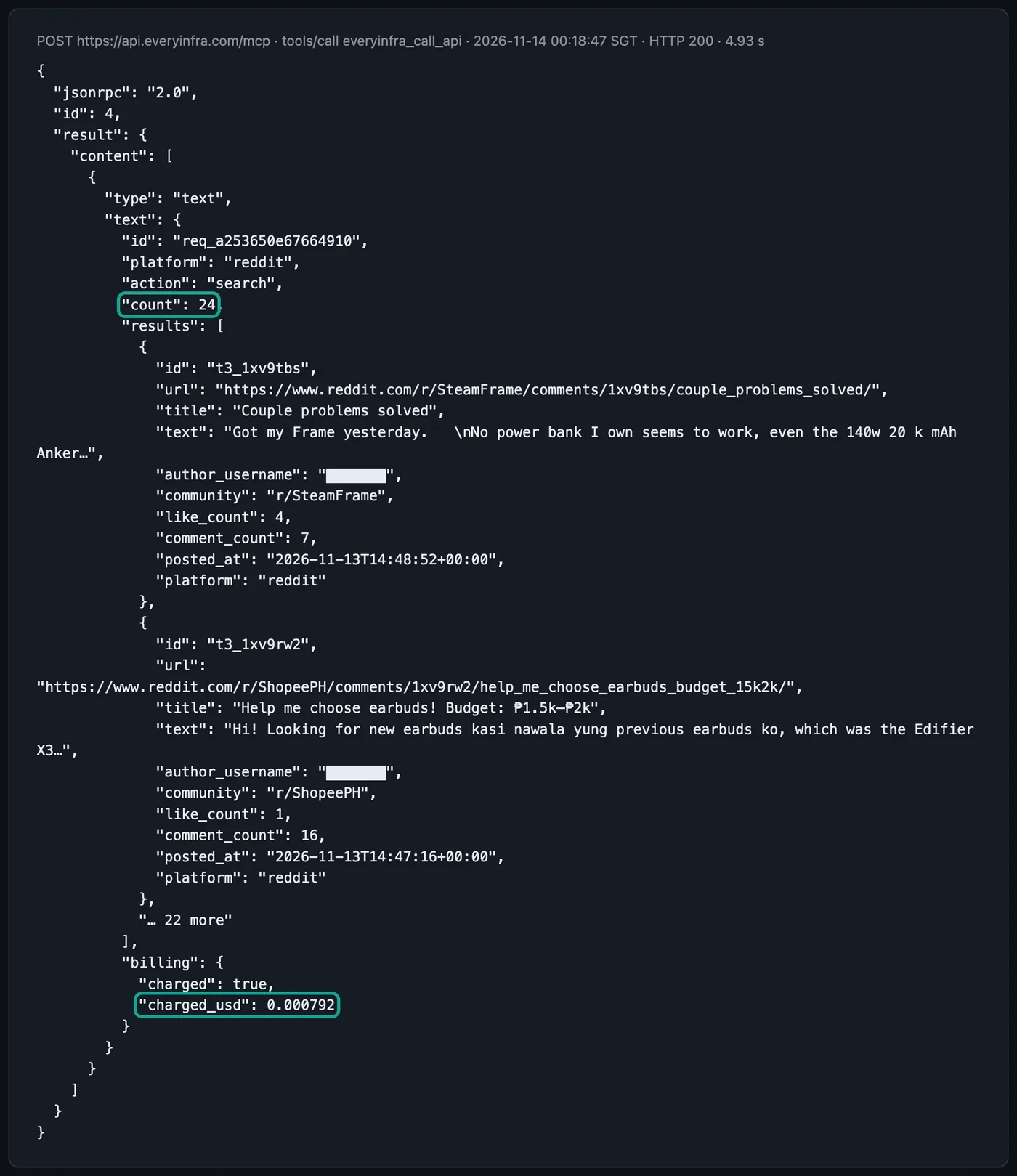
Over three rounds, we made 9 successful tools/call requests for these three capabilities and one REST call for comparison. At 00:18:58, one trustpilot/reviews call returned an error, cost nothing, and succeeded when we sent it again at 00:19:45. The table lists the successful calls. The total charge was $0.009711:
| Round | Sent (Singapore time) | Capability | Key parameters | Items | Time (s) | Charge (USD) |
|---|---|---|---|---|---|---|
| 1 | 00:18:47 | reddit/search | newest | 24 | 4.9 | 0.000792 |
| 1 | 00:19:06 | google_news/search | time_window week | 20 | 2.1 | 0.000792 |
| 1 | 00:19:45 | trustpilot/reviews | last7days | 9 | 44.7 | 0.001389 |
| 2 | 00:34:21 | reddit/search | newest | 24 | 5.9 | 0.000792 |
| 2 | 00:34:35 | trustpilot/reviews | last7days | 9 | 41.3 | 0.001389 |
| 2 | 00:35:24 | google_news/search | time_window day | 20 | 2.0 | 0.000792 |
| 3 | 00:50:03 | reddit/search | newest | 24 | 5.4 | 0.000792 |
| 3 | 00:50:16 | trustpilot/reviews | last7days | 10 | 48.0 | 0.001389 |
| 3 | 00:51:12 | google_news/search | time_window day | 20 | 1.9 | 0.000792 |
| 3 | 00:51:32 | google_news/search (REST) | time_window day | 20 | 2.9 | 0.000792 |
| Total | 0.009711 |
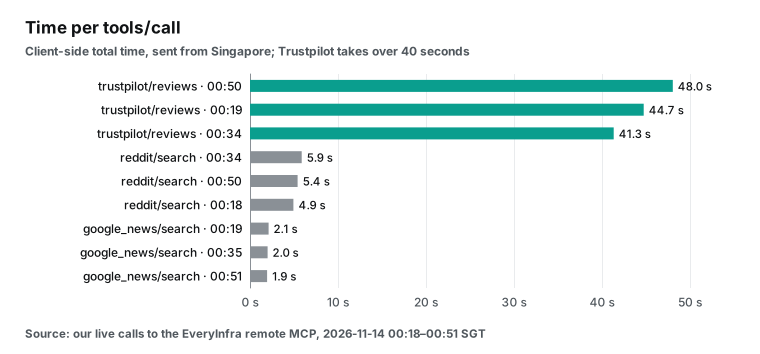
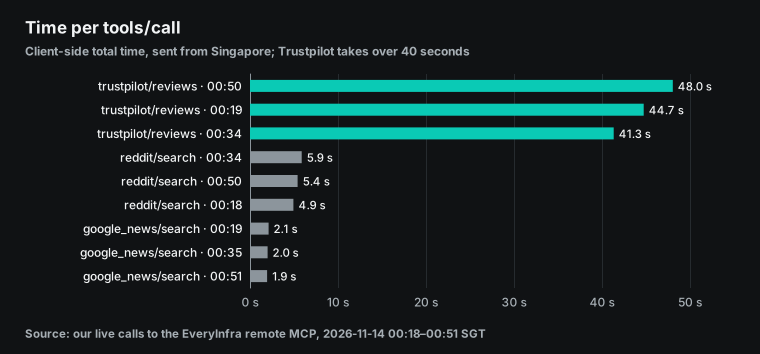
The times differ a lot. google_news/search took about 2 seconds each time, from 1.9 to 2.1 seconds. reddit/search took 4.9 to 5.9 seconds. trustpilot/reviews took more than 40 seconds every time: 44.7, 41.3 and 48.0 seconds.
A Gemini Trigger has a default timeout of 600 seconds per run (Antigravity agent: create a Trigger). The three calls take about one minute together, so they are far from that limit. If you later watch a dozen brands with Trustpilot for each one, serial calls add up. Then calculate the total, or increase execution_timeout_seconds.
An error response costs nothing, and the agent can retry. Still, put one rule in the prompt: if a source returns no data in a round, the brief must say "not retrieved". It must not say "no negative reviews".
How often each source must run
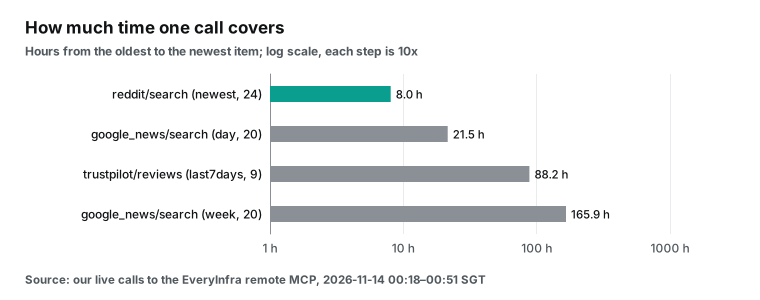
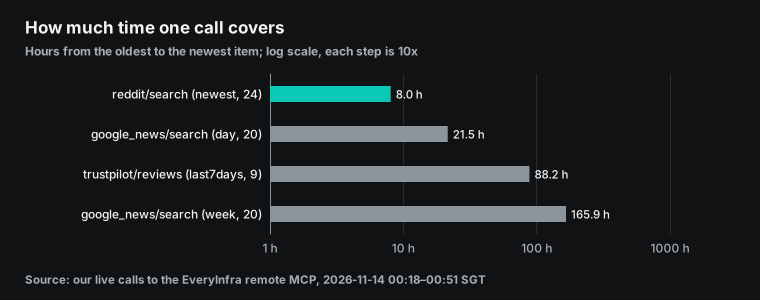
The number of runs per day depends on the fastest source. We used the first round to measure how much time one call covers for each source:
| Source | Parameters | Items returned | Oldest (UTC) | Newest (UTC) | Hours covered | Minimum calls per day |
|---|---|---|---|---|---|---|
reddit/search | Anker, newest | 24 | Nov 13 06:46 | Nov 13 14:48 | 8.04 | 3 |
trustpilot/reviews | anker.com, last7days | 9 | Nov 7 19:28 | Nov 11 11:38 | 88.18 | 1 |
google_news/search | Anker, week | 20 | Nov 6 17:17 | Nov 13 15:10 | 165.89 | see below |
The Reddit row sets the pace. The newest 24 posts cover only 8.04 hours, so you need at least 3 calls in 24 hours to leave no gap. The second round at 00:34 covered 9.47 hours, and the third round at 00:50 covered 9.22 hours.
All three rounds fell between 8 and 10 hours, so three runs a day is the minimum. All three rounds ran in the same 33 minutes after midnight in Singapore, so they measure one period, from morning to afternoon UTC. Posting is faster during the US day, so the window can be shorter then. We measured only this one period.
Across the rounds, the newest post moved from 14:48 to 16:23 and then 16:43 UTC. The oldest post moved from 06:46 to 06:55 and then 07:30. Both ends of the window move forward: each new post at the top pushes an old post out at the bottom.
Trustpilot is the opposite case. It had only 9 reviews in 7 days. One call a day is more than enough, and even one call every two or three days would miss nothing.
Speed is a separate question from coverage. The one-star review from the third round appeared in the results only 14 minutes after the customer posted it. The next section has the details. So the right Trustpilot schedule depends on how fast your team wants to answer bad reviews.
If you only want full coverage, call it once a day in the 09:00 run, for $0.001389 a day. If you want to see a bad review within a few hours, call it every 8 hours like Reddit. That adds 2 × $0.001389 = $0.002778 a day, or $0.083 per 30 days. The advantage of an agent is one brief with Reddit, news and reviews together. Next to a one-star review, you can see if Reddit users report the same fault on the same model.
The extra data fee is small next to the model fee. The other side of the cost is the model input. Each extra round makes the model read one more Trustpilot response of about 11 KB. At 4 characters per token, that is about 2,800 tokens per round when the result goes into the context.
We also read the text of all 9 Trustpilot reviews from round 1. The stars split into two ends: 3 one-star and 6 five-star reviews, with nothing in between. By content, the picture differs from the stars:
| Stars | Reviews | Topic | Country |
|---|---|---|---|
| One | 1 | Ordered a SOLIX C2000 and extra battery on the Anker site. The page said in stock, but the order did not ship on time | UK |
| One | 1 | No delivery after more than a month, with repeated promises from support | US |
| One | 1 | PowerCore III Elite 26K: USB-A ports failed after 3 months. No replacement because a third-party seller sold it | France |
| Five | 3 | Customer care: new earbuds sent the next day, a delivery problem solved by support | UK, Netherlands, US |
| Five | 3 | The product itself: durable earbuds and chargers. One review opens with the full name of the Zolo power bank | UK, Australia, US |
Two of the 3 one-star reviews are about orders and shipping, and only 1 is about a product fault. Three of the 6 five-star reviews praise customer care. So 5 of the 9 reviews are about service and delivery, not the product. If a team sends every one-star review to product managers, two go to the wrong people. Sort reviews by topic first (product fault, order and shipping, after-sales care), then by stars. The new one-star review from round 3, about an A2697 charger and a dispute over a replacement or refund, also belongs to after-sales care.
The Google News row has a different problem: it hits the cap. The one-week window returned 20 articles, the maximum for one call. So that week had more than 20 Anker stories. Reviews, buying guides and Black Friday deals took most of the slots. BGR alone had 5 articles, and Anker's own blog had 3.
The 20 articles spread from November 6 to November 13. Only 2 of them fell in the last day, one from PCMag and one from SlashGear. In the second round at 00:35, we changed the window to one day and again got 20 articles, covering 21.53 hours. 18 of them were not in the one-week list.
So for the same day, the one-day window showed 20 articles and the one-week window showed 2. When a one-week query hits the 20-item cap, it misses earlier stories, and it also misses most stories from the latest day. The two lists also had different outlets. The one-day list had 3 articles from Tech Times and 2 each from Kotaku, Trusted Reviews and 9to5Toys, and none from Anker's own blog.
So use a small window and call news often. With a one-day window once a day, the 20-item cap is much less likely to cut a story from that day. Brands with heavy coverage can use an hourly window or split the keyword, for example Anker, eufy and Soundcore as separate queries. Each extra call costs $0.000792. A daily one-day call costs $0.024 a month.
Rounds 2 and 3: what was new, by id
The second round at 00:34 came 15 minutes after the first. The third round at 00:50 came 16 minutes after the second. Each round called all three sources once. We compared items by id, or by URL for news, against all earlier rounds:
| Round | Source | Items | New | Seen before | New items, trimmed (bytes) | Full response (bytes) |
|---|---|---|---|---|---|---|
| 1 | 24 | 24 | 0 | 7,093 | 41,605 | |
| 1 | Trustpilot | 9 | 9 | 0 | 2,173 | 11,253 |
| 1 | Google News | 20 | 20 | 0 | 4,476 | 9,274 |
| 2 | 24 | 1 | 23 | 214 | 40,699 | |
| 2 | Trustpilot | 9 | 0 | 9 | 2 | 11,255 |
| 2 | Google News | 20 | 18 | 2 | 5,021 | 10,253 |
| 3 | 24 | 2 | 22 | 656 | 40,249 | |
| 3 | Trustpilot | 10 | 1 | 9 | 251 | 13,123 |
| 3 | Google News | 20 | 1 | 19 | 255 | 10,256 |
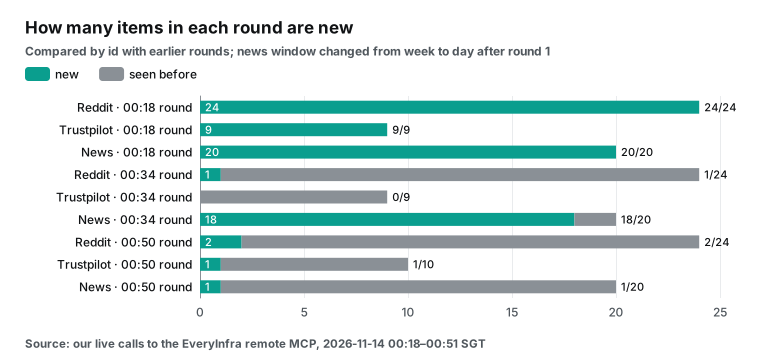
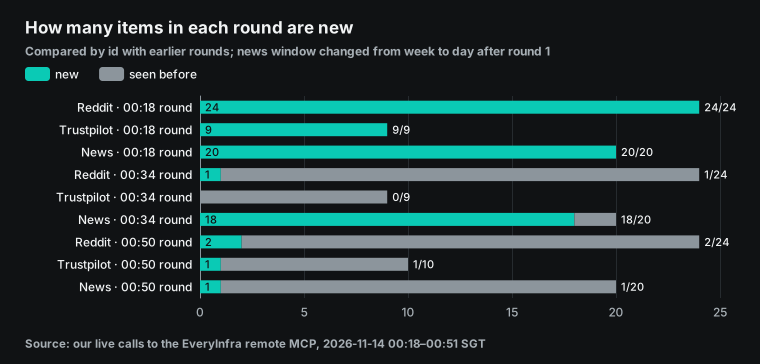
In 15 minutes, Reddit added only 1 post, and it was noise. In r/AynThor, a user asked how to run GTA IV smoothly on a handheld device. The word Anker in that post had nothing to do with the brand. Trustpilot added 0 reviews.
The 18 new news items came from our change of window from one week to one day. They do not mean that 18 stories appeared in 15 minutes. So keep a separate seen list for each source and parameter set. When the parameters change, "new" changes meaning.
Add the three rounds together. They returned 160 items: 72 from Reddit, 28 from Trustpilot and 60 from news. After deduplication by id and URL, only 76 items were distinct: 27 from Reddit, 10 from Trustpilot and 39 from news. That is less than half. 18 of the 39 news items came from our change of window, so with fixed parameters the share of repeats would be even higher. With path A, the model reads all 160 items, and the 84 repeats still cost tokens. That is why path B, later in this article, removes repeats before the model reads anything.
The third round had 4 new items. They show three cases that a brief must handle.
| Source | Posted (UTC) | Caught at (UTC) | What it is | Section of the brief |
|---|---|---|---|---|
| Trustpilot | Nov 13 16:36 | Nov 13 16:50 | One-star review of a 140W charger, model A2697, warranty dispute in Turkey | One- and two-star reviews, first line |
| Reddit, r/powerbanks | Nov 13 16:43 | Nov 13 16:50 | Question about low-current power for an LED strip, mentions an Anker 10,000 mAh bank | Product feedback |
| Reddit, French deals community | Nov 13 16:40 | Nov 13 16:50 | Black Friday price drop on an Anker 100W charger | Deals, one line |
| Google News | Nov 12 17:13 | Nov 13 16:51 | Review of an Anker travel charger, first seen in round 3 | Press coverage |
Trustpilot returned a new one-star review. Its posted_at was 2026-11-13 16:36 UTC, which is 00:36 on November 14 in Singapore. It did not exist at the second round at 00:34, and the third round at 00:50 caught it.
The reviewer is in Turkey. The review says that an Anker 140W four-port charger, model A2697, failed after five and a half months. An authorized service center confirmed a hardware fault. After that, the customer disagreed with the local retailer and Anker support about a replacement or a refund. A brand team wants to see this kind of review first. Our test criteria also say to list every one-star review on its own.
Reddit added 2 posts. In r/powerbanks, a user asked which power bank can feed a 5V LED strip at a low current for a long time. The user said that the low-current mode on their own Anker 10,000 mAh power bank switches off after the bank sleeps. That is a passing mention with real product feedback. The other post was a Black Friday deal in a French community, which belongs in one summary line. Both posts were less than 10 minutes old when we caught them.
Why not deduplicate by time? Rounds 2 and 3 each gave an example. In round 2, the new post had a posted_at of 16:23 UTC. Round 1 ran at 00:18 Singapore time, which is 16:18 UTC, so the post did not exist yet.
A time rule works in this case. But Reddit search can index a post with a delay. A post from 16:10 can appear in search at 16:30. If you store only "the newest time I saw", you lose that post forever.
We saw the same pattern with Google Maps reviews in Claude Managed Agents nightly review monitoring. There, some reviews were older but appeared for the first time later. The news in round 3 is a clearer case. The new article was a review of an Anker travel charger that one outlet published at 17:13 UTC on November 12.
It was older than most articles in that list, but it did not appear in the first two rounds. It entered the top 20 only in round 3. A "newest time" rule would drop it as old. With ids and URLs, index delays and ranking changes do not matter.
How many of the 24 Reddit posts are about Anker
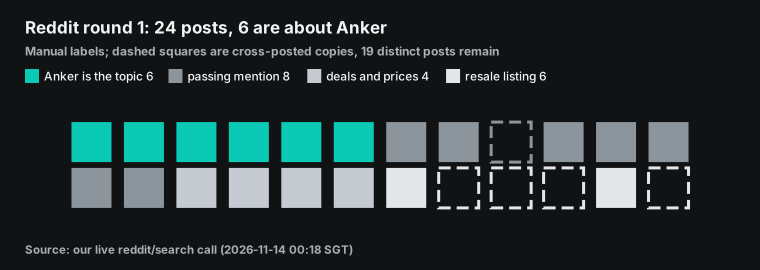
The keyword description of reddit/search is precise. It returns only posts that match the keyword in the title, the community name or the full post. Posts that match only part of a multi-word keyword do not come back (EveryInfra Reddit search page). Anker is one word, so all 24 posts mention Anker in the title or the text. Only 6 of them are about Anker. We read all 24 posts from round 1 while we wrote this article and sorted them by topic into four groups:
| Group | Rule | Posts | Example (community) |
|---|---|---|---|
| Anker is the topic | Questions, authenticity, setup, A-or-B choice | 6 | r/powerbanks asks if an A1384 is genuine. r/homeautomation wants to connect a Solarbank Max to Home Assistant |
| Passing mention | Appears in a recommendation, comparison or other question | 8 | r/SteamFrame says a 140W Anker power bank cannot run the headset. A headphone thread lists the Soundcore R60i |
| Deals and prices | Price drops, discount lists | 4 | A SOLIX C300 price drop in r/priceglitch. A Black Friday drop in r/ClubicFR |
| Resale | Private sale listings | 6 | One Arabic resale post for a power bank in 4 communities. An iPhone sale that includes an Anker charger |
The 24 posts came from 22 communities, and 5 of them were cross-posted copies. The headphone thread appeared twice, the Arabic resale post four times and the iPhone sale twice. Without the copies, 19 distinct posts remain. Only 6 titles name Anker or one of its brands, such as Soundcore, eufy, SOLIX or Nebula, and 4 titles are in Arabic.
A brand team would open the authenticity and setup questions in the first group. It would also open the headset power complaint from the second group. The first may point to fake products, and the second is a specific compatibility problem.
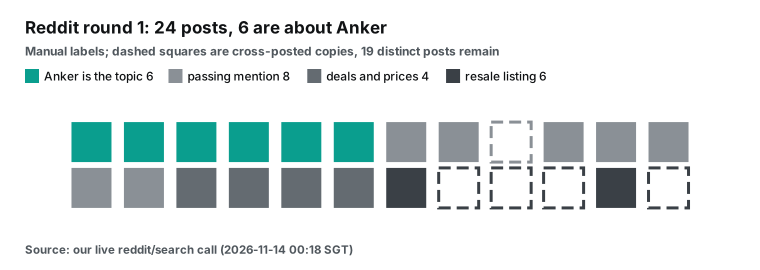
An agent can do the sorting. It reads the post text and applies the rules that you write in AGENTS.md. The table above is the result of our reading during writing, and the Rule column holds the rules. When an agent takes over, first run it on these 24 posts and count how many differ from the table. Then let it run every day. Check the posts in Arabic, Filipino and German first, because the agent must read them before it can sort them.
After sorting, a daily brief can look like this. Pick 2 or 3 new Reddit posts to read. List every new one- or two-star Trustpilot review. Keep only news about the company, product safety, lawsuits and recalls. Merge all deals into one line.
A US brand team can tune these groups for its own needs. Product managers may want every compatibility complaint, such as the headset power report. Customer care may want every warranty dispute, such as the Turkish review. Each team gets a separate section in the same brief, and the agent applies one set of rules per section.
Schedule it with Triggers: cron, time zone and a persistent environment
A Trigger binds an agent, an environment, a prompt and a schedule into one persistent resource that fires on cron. Each run reuses the same environment, so the next run can read the files from the last run. To create one, you must set schedule (a cron expression), time_zone (an IANA time zone name) and interaction. Two fields are optional. max_consecutive_failures pauses the Trigger after that many failures in a row, with a default of 5. execution_timeout_seconds limits each run, with a default of 600 seconds.
After you create a Trigger, you can pause it, resume it, run it at once, or list its runs. Each run record has an interaction_id and an environment_id (Antigravity agent: Triggers). Time zones use IANA names such as Asia/Singapore or America/New_York. The names come from the time zone database that IANA maintains (IANA time zone database).
| Trigger field | Required | Default | Our value | Why |
|---|---|---|---|---|
schedule | Yes | none | 0 1,9,17 * * * | Reddit covers 8 to 10 hours per call |
time_zone | Yes | none | Asia/Singapore | The brief lands in the morning of the team |
interaction | Yes | none | Named agent, prompt, tools, environment | One saved setup for every run |
max_consecutive_failures | No | 5 | 3 | Pause sooner when a key or a source breaks |
execution_timeout_seconds | No | 600 | 900 | Trustpilot took 41 to 48 seconds per call |
The coverage numbers above say that Reddit needs 3 runs a day, so the schedule fires every 8 hours. Here is a configuration example. We did not run it on the Gemini side:
# Configuration example: not run on the Gemini side. Fields follow the Triggers docs as read on 2026-11-14
trigger = client.triggers.create(
    schedule="0 1,9,17 * * *",          # every day at 01:00, 09:00 and 17:00
    time_zone="Asia/Singapore",         # a US team can use "America/New_York"
    display_name="anker-brand-monitor",
    max_consecutive_failures=3,
    execution_timeout_seconds=900,      # Trustpilot takes 40+ seconds per call; leave room
    interaction={
        "agent": "brand-monitor",       # named agent saved with agents.create; model locked at creation
        "input": "Run one round as AGENTS.md says. Query Reddit every run. Query Trustpilot and Google News only in the 09:00 run. "
                 "Report only items that are not in seen_ids.json. Write today's file under briefings/, then update seen_ids.json. "
                 "If a source returns no data, write 'not retrieved this run'. Do not write 'no negative items'.",
        "tools": [{"type": "mcp_server", "name": "everyinfra", "url": "https://api.everyinfra.com/mcp",
                   "credential": "everyinfra-key", "allowed_tools": ["everyinfra_call_api"]}],
        "environment": {"type": "remote", "network": {"allowlist": [{"domain": "api.everyinfra.com"}]}},
    },
)
print(trigger.id, trigger.next_run_time)
Two time limits apply to the persistent environment. After 15 minutes without use, the environment saves a snapshot and stops. The next request restores it, with one cold start. An offline environment stays for 7 days. If nobody uses it in 7 days, the platform deletes it, and an expired environment id returns 404 (Environments: lifecycle, Environments: limitations).
A daily Trigger never reaches the 7-day line. But if you pause the Trigger for a two-week vacation, seen_ids.json and old briefs may be gone when you return. The first run would then report all recent content as new. Download important history from the environment from time to time.
| Environment limit | Value | What it means for the monitor |
|---|---|---|
| Idle time before snapshot | 15 minutes | Each run starts with one cold start |
| Offline retention | 7 days | A paused Trigger can lose seen_ids.json after a week |
| Inline file size | 1 MB per file, 2 MB in total | Send the prompt and the script inline. Keep data files in the sandbox |
| Expired environment id | Returns 404 | Create a new environment and reload the history you downloaded |
Plan around these limits. The documentation gives endpoints to list files, download one file and download a folder as an archive (Environments: manage files).
seen_ids.json keeps growing. With round-1 numbers, Reddit adds about 24 ids per run and 3 runs per day. With Trustpilot and news, that is at most about 100 new ids per day, or more than 30,000 per year. As JSON, that is a few hundred KB.
The environment documentation gives limits only for files that you send in: 1 MB per inline file and 2 MB in total (Environments: limitations). It does not give a size limit for files that the agent writes in the sandbox. Archive the list each month and keep only the last 90 days of ids. The script reads faster, and the model spends fewer tokens if it must look at the file.
gemini managed agents pricing: what one daily run costs
The cost has three parts: the EveryInfra data fee, the Gemini model fee, and Gemini tool and sandbox fees. The data fee is the easiest. We read the catalog at 00:17 on November 14, 2026, Singapore time. reddit/search costs $0.000792 per call, trustpilot/reviews $0.001389 and google_news/search $0.000792. Every charged_usd value in our live calls matched the catalog price. Calls that return an error or an empty result cost nothing.
| Plan | Calls per day | Data fee per day | Data fee per 30 days |
|---|---|---|---|
| Each source once | Reddit 1, Trustpilot 1, news 1 | $0.002973 | $0.089 |
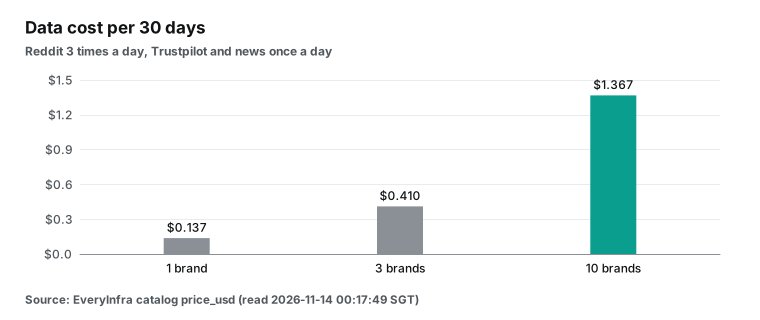
| Our recommendation | Reddit 3, Trustpilot 1, news 1 | $0.004557 | $0.137 |
| Every source every run | Reddit 3, Trustpilot 3, news 3 | $0.008919 | $0.268 |
| 10 brands, our recommendation | Same per brand | $0.04557 | $1.367 |
On the Gemini side, the "Pricing for agents" section of the pricing page is clear. Managed agents pay the standard price of the underlying model for tokens. This includes input, output and intermediate thinking tokens inside the agent loop. During the preview, environment compute is free, including CPU, memory and sandbox execution (Pricing: Pricing for agents). The Agents overview adds that one interaction can trigger many reasoning steps and usually uses 100,000 to 3,000,000 tokens (Agents overview: pricing).
The Antigravity agent page gives estimates by task type. A research and summary task costs $0.30 to $1.00 per run, with 100,000 to 500,000 input tokens and 10,000 to 40,000 output tokens. A data processing and analysis task costs $0.70 to $3.25. Usually 50% to 70% of input tokens hit the cache (Antigravity agent: estimated cost).
Those ranges are by task type, so we calculated a floor from the bytes we measured. We assume four model steps per round: plan and call Reddit, call Trustpilot, call news, and write the brief. Each response is read again by every later step, and the tool definitions come with every step. We use 4 characters per token. Hydrogen and Flash-Lite prices come from the pricing page as read on November 14, 2026 (Pricing: Gemini 3.5 Flash-Lite). The harness system prompt, AGENTS.md and thinking tokens are not included, so a real bill can only be higher than this table:
| Model | Tool definitions | Cache | Input tokens | Model fee per round (2,000 to 10,000 output tokens) | Times the data fee |
|---|---|---|---|---|---|
| Gemini 4 Hydrogen (default) | All 12 | No cache | 55,399 | $0.098 to $0.158 | 33 to 53 |
| Gemini 4 Hydrogen | 1 only | Re-reads at cache price | 40,844 | $0.041 to $0.101 | 14 to 34 |
| Gemini 3.8 Flash | 1 only | Re-reads at cache price | 40,844 | $0.021 to $0.051 | 7 to 17 |
| Gemini 3.5 Flash-Lite | 1 only | Re-reads at cache price | 40,844 | $0.011 to $0.031 | 3.5 to 10 |
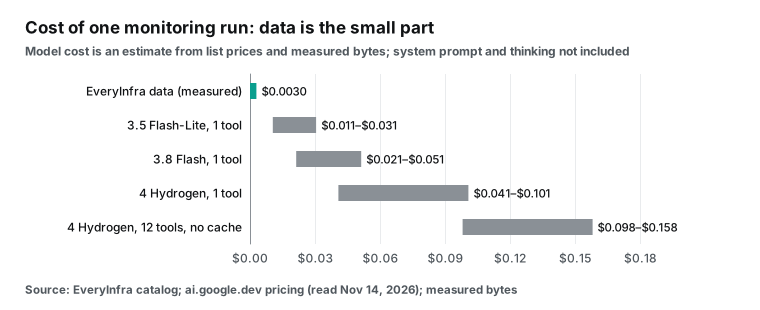
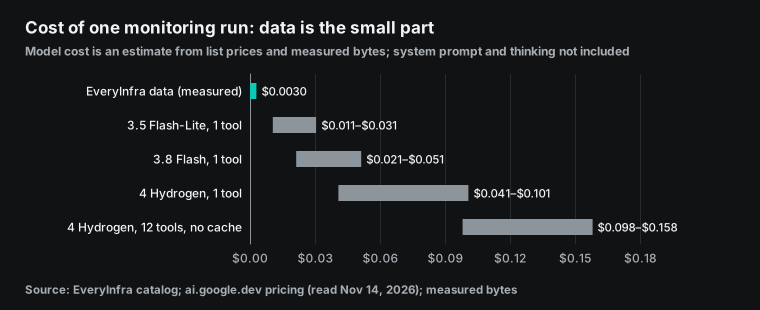
Data is the small part of the cost. Even the cheapest model, Flash-Lite, costs at least 3.5 times the data fee. Default Hydrogen with no changes costs 33 to 53 times the data fee.
So start your savings on the model side. Set agent_config.model, keep only the tools you need, set max_total_tokens, and tell the agent in the prompt when to stop. The Hydrogen pricing section also lists Batch and Flex tiers at half the standard price for input and output (Pricing: Gemini 4 Hydrogen). The documentation does not say if managed agents can use those tiers, so our table leaves them out.
The built-in Google Search tool has its own price. Gemini 3 and later models get 5,000 free searches per month, then $14 per 1,000 searches. Each project has a default limit of 1,500 searches per day (Pricing: tools). The Antigravity agent includes google_search by default. If you do not want your monitor to search the web on its own, list only code_execution and mcp_server, as in the examples above. That turns search off.
Free-tier projects can also use the Antigravity agent, with free rate and usage limits (Antigravity agent: availability and pricing). Tune the prompt on the free tier first, then move to a paid project. For a US team, the monthly total stays small either way. Ten brands on our schedule cost $1.367 in data per 30 days. The model fee depends on your choices above, and you can read the real number from usage.total_tokens after one week.
Two ways to connect: results in the context, or results in sandbox files
Most input tokens in the table above are the three full responses. The Reddit response alone is 41,605 bytes, or about 10,401 tokens, which is two thirds of the three responses. When the agent calls a tool through mcp_server, the whole response goes into the model context. The model cannot read only a few fields.
A managed agent has a second option. The sandbox can run code, and the network allowlist of the environment can bind a credential to a domain. Then the egress proxy adds the auth header to each request to that domain (Environments: network configuration). So the agent can run a script in the sandbox that calls the EveryInfra REST endpoint POST /api/v1/social directly. The script saves the full response to a file and removes items it saw before. Then it trims fields and prints only new items with the fields you need.
| Path A: mcp_server tool | Path B: sandbox script calls REST | |
|---|---|---|
| Setup | One mcp_server entry in tools, with a credential | A credential bound to api.everyinfra.com in network.allowlist, and a script next to AGENTS.md |
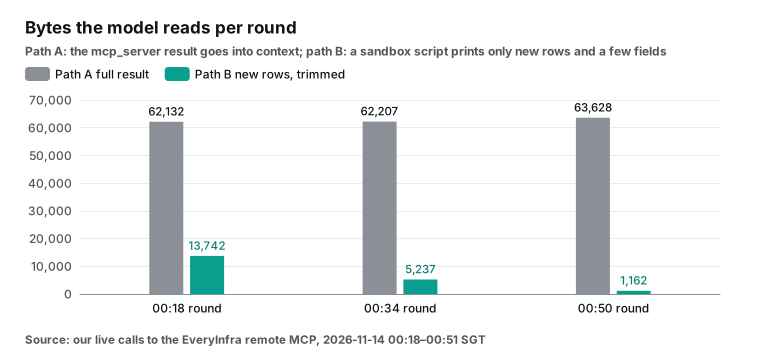
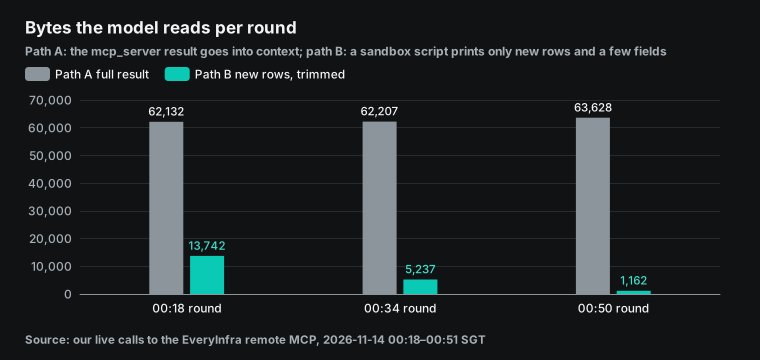
| What the model reads | The full responses (62,132 bytes for the three in round 1) | New items printed by the script (13,742 bytes in round 1, 1,162 bytes in round 3) |
| Where deduplication runs | The model compares after it reads, or runs code again | The script compares ids, and the model never sees old items |
| Best for | First tests, one-off questions, changing parameters | Fixed daily runs, fixed sources, large volume |
| Watch for | Larger responses cost more. Field meanings come from tool descriptions | The agent must read script errors. The key comes only from the credential, never from the script |
We calculated the bytes from the live responses with a script. In round 1, the three full responses totaled 62,132 bytes. We kept 7 Reddit fields (id, URL, title, community, time, likes and comments), 7 Trustpilot fields and 4 news fields, and cut titles at 160 characters. The new items then took 13,742 bytes, or 22.1% of the full size. Round 2 had 19 new items because the news window changed, for 5,237 trimmed bytes.
Round 3 kept the same parameters. It had only 4 new items, so the trimmed new items took 1,162 bytes. The full responses were still 63,628 bytes, 55 times larger. With path A, you pay for old items every round.
With path B, you pay only for new ones. At the Gemini 3.5 Flash-Lite input price, one read of the 3,436 trimmed tokens from round 1 costs $0.00103. One read of the full responses through path A costs $0.00466, so path B saves about three quarters. Later steps also skip the re-reads.
Here is the skeleton of the path B script. We tested the EveryInfra request format live, and charged_usd is in the billing object of each response. We did not run the script inside a Gemini sandbox, so that part is a configuration example:
# fetch_new.py: put it in .agents/skills/brand-monitor/ for the agent to call (sandbox run is a configuration example)
# No key here: network.allowlist binds a credential to api.everyinfra.com, and the egress proxy adds the auth header
import json, pathlib, urllib.request

SEEN = pathlib.Path(".agents/workspace/seen_ids.json")
seen = set(json.loads(SEEN.read_text())) if SEEN.exists() else set()
JOBS = [
    ("reddit", "search", {"keyword": "Anker", "sort": "newest"}, ["id", "url", "title", "community", "posted_at"]),
    ("trustpilot", "reviews", {"company": "anker.com", "date": "last7days", "sort": "newest", "limit": 20}, ["id", "url", "title", "rating", "posted_at"]),
    ("google_news", "search", {"keyword": "Anker", "time_window": "day"}, ["url", "title", "source", "published_at"]),
]
fresh, spent = [], 0.0
for platform, action, params, keep in JOBS:
    body = json.dumps({"platform": platform, "action": action, "params": params}).encode()
    req = urllib.request.Request("https://api.everyinfra.com/api/v1/social", data=body,
                                 headers={"Content-Type": "application/json"}, method="POST")
    data = json.loads(urllib.request.urlopen(req, timeout=120).read())
    spent += (data.get("billing") or {}).get("charged_usd", 0)
    for row in data.get("results") or []:
        key = f"{platform}:{row.get('id') or row.get('url')}"
        if key not in seen:
            seen.add(key)
            fresh.append({"src": platform, **{k: row.get(k) for k in keep}})
SEEN.write_text(json.dumps(sorted(seen)))
print(json.dumps({"new": fresh, "charged_usd": round(spent, 6)}, ensure_ascii=False))
We also called the REST endpoint of path B once. At 00:51:32, we sent the same parameters as the MCP news call 20 seconds earlier: Anker with a one-day window. REST returned 20 articles. 19 URLs matched the MCP call, 1 was different, and the order changed a little.
The charge was the same, $0.000792, and the call took 2.94 seconds. REST returns plain JSON of 9,156 bytes. MCP puts the same results into one text field of a JSON-RPC message. With the outer layer and escaping, that is 10,256 bytes, or 12% more.
That small difference is not why path B saves money. Path B saves money because the script removes old items and unused fields before the model sees anything. The data fee is the same on both paths. Choose between simpler setup and fewer tokens per round.
Our other hosted-agent articles
We wrote three articles on related topics, each on a different platform. For a nightly review check on the Claude side, read Claude Managed Agents nightly review monitoring. For MCP on the Google Cloud enterprise platform, read Gemini Enterprise Agent Platform with MCP. For connected apps in the Gemini app, read Gemini Connected Apps and data tools.
This article uses the Gemini Developer API on ai.google.dev, where one API key is enough to start. Google says that managed agents for enterprises are also in preview on Agent Platform. That platform uses a Google Cloud project and its own pricing page (Managed Agents API on Agent Platform).
Another field: product safety teams that track recalled models
With a different prompt, the same agent can serve a product safety team, a testing lab or a consumer group. Take Anker again. On June 12, 2025, the U.S. Consumer Product Safety Commission announced a recall of more than one million PowerCore 10000 power banks, model A1263. The cells could overheat, and the remedy was a replacement (CPSC recall notice, 2025-06-12). On September 18 of the same year, another recall offered a refund (CPSC recall notice, 2025-09-18).
Anker keeps one page that lists all its recalls (Anker product recalls). Its global voluntary recall from June 2025 lists five more models: A1647, A1652, A1257, A1681 and A1689. You must check the serial number to know if one unit is in scope (Anker global voluntary recall). After a recall notice, safety staff ask two questions. Do people still resell the recalled models? Do new posts describe overheating or fire?
You change only three things. Change the keyword from the brand name to recalled model numbers, such as A1263 and A1257. Run Reddit daily with sort=newest. Ask Trustpilot for low ratings only with stars=["1","2"]. Change the brief rules to "list every post that mentions resale, overheating, swelling, fire or burning on its own".
Our round-1 data already had two examples. First, the 6 resale posts. The Arabic post sold a 20,000 mAh Anker power bank without a model number, so we cannot tell if it is a recalled model.
A person must follow up on this kind of post. Second, a five-star Trustpilot review from November 8. Its first sentence names "Anker Zolo Power Bank (20K, 30W, Built-In USB-C Cable)". That name is the same as the product name of A1689 in the recall list.
The review praises the product, and it does not mean that the unit is in the recall. For a safety team, it is still a "name matches, check the serial" lead. The agent only finds, deduplicates and sorts public posts that may be relevant. The CPSC notice and the maker's recall check page decide if a product is in scope. Do not give that decision to a model.
Industry changes: the last 60 days for hosted agents
| Date | Change | What it means for you | Source |
|---|---|---|---|
| 2026-10-30 | Computer Use tool generally available | No use for managed agents yet. The Antigravity agent limits still say computer_use is not supported | Release notes, limitations |
| 2026-11-10 | The MCP blog published a draft extension for file upload and download, for the 2026-07-28 protocol | A standard way to pull a large CSV into a sandbox may come. It is still experimental | MCP blog, 2026-11-10 |
| 2026-11-11 | Gemini Decision 1 and the Decisions API for binary, multi-class and score decisions, with no output tokens | The post-sorting step could move to it later, and the agent keeps scheduling and writing | Release notes |
The MCP protocol itself also changes. The 2026-07-28 specification came out on July 28, 2026. The official blog calls it the largest revision since launch, with a stateless protocol core and routing by request header (MCP blog: the 2026-07-28 specification, MCP specification: Transports, 2026-07-28).
At 00:35, our initialize request offered 2026-07-28. EveryInfra answered with 2025-11-25. Under MCP version negotiation, the client can continue with that version. The Gemini documentation does not say which version the mcp_server tool offers, and we cannot see it from outside.
Limits and things to watch
First, the preview status. The Agents overview, the Antigravity agent page and the custom agents page all say preview. Features and request formats can change. Named agents have no versions or rollback, and agents cannot contain sub-agents (Custom agents: limitations). After you edit AGENTS.md, the next call uses the new configuration. There is no "go back one version", so keep the source files in Git.
Second, structured output. The Antigravity agent does not support structured output. Generation settings such as temperature and max_output_tokens return a 400 error (Antigravity agent: limitations). If another system must read the brief, let the agent write a JSON file in the sandbox. Then fetch the file with the file endpoints. Do not expect output_text to keep the same format every time.
Third, function calls work only in stateful mode, with previous_interaction_id to continue the last turn (same limitations section). Our design uses MCP and code execution, not custom functions. If you want a custom "send to Slack" function, follow this limit.
Fourth, the limits on the data side. reddit/search covers the last month, so a much-discussed brand like Anker needs 3 runs a day. google_news/search returns up to 20 articles per call, so use a small window. trustpilot/reviews needs the website domain, not the company name, so Anker is anker.com.
All three read public content only. Private subreddits and hidden Trustpilot reviews are out of reach. Remove personal usernames from the brief. Brand and media names are fine.
Fifth, timeout room. trustpilot/reviews took more than 40 seconds each time, so three serial calls take about one minute. If one Trigger watches a dozen brands, split the brands into several Triggers, or increase execution_timeout_seconds. When a call returns an error, the error comes back to the model as a tool result with retry_after. It costs nothing, and the agent can retry.
Sixth, retries. When a Trigger times out or the agent retries, the same call can go out twice. For scheduled jobs and calls that can retry, use the REST endpoint of path B and send an Idempotency-Key header. If a later step sends alerts or opens tickets, make it idempotent with the same key. See AI agent retries and Idempotency-Key for the method.
| Limit | Where it comes from | What to do |
|---|---|---|
| Preview, no versions or rollback | Gemini custom agents page | Keep AGENTS.md and scripts in Git |
| No structured output, generation settings return 400 | Antigravity agent limitations | Write a JSON file in the sandbox |
| Function calls only in stateful mode | Antigravity agent limitations | Use MCP and code execution, or chain with previous_interaction_id |
| 20 news articles per call | EveryInfra catalog | Run Reddit 3 times a day, use a one-day news window |
| Trustpilot takes 40+ seconds per call | Live calls | Split brands across Triggers or raise the timeout |
| Possible duplicate calls on retry | Trigger timeouts and agent retries | Use REST with Idempotency-Key for scheduled calls |
FAQ
We took these questions from Google search suggestions that we read on November 14, 2026. Each answer names the suggestion it comes from.
How does Gemini Managed Agents pricing work?
(Suggestion: gemini managed agents pricing.) You pay token fees at the standard price of the underlying model. Input, output and thinking tokens in the agent loop all count. Tools such as Google Search have their own prices.
During the preview, sandbox CPU and memory are free (Pricing: Pricing for agents). The default model, Gemini 4 Hydrogen, costs $1.50 per million input tokens and $7.50 per million output tokens. For our brand monitoring job, we estimated $0.011 to $0.158 per round in model fees, depending on the model and the number of tools. The EveryInfra data fee for the three calls was $0.002973 per round.
What features does the Gemini API managed agents service have?
(Suggestion: gemini api managed agents features.) The agent comes with code_execution, google_search and url_context. When you set an environment, it also gets file tools. You can add custom functions and remote MCP servers. It can run in the background, stream output and run on cron with Triggers. It can also store secrets with Credentials and use Hooks in the sandbox to intercept code runs and file actions (Antigravity agent: supported tools, Hooks). At about 135,000 tokens of context, it compresses the context automatically, so it suits long multi-step tasks (Antigravity agent: capabilities).
Which MCP servers can Gemini Managed Agents use?
(Suggestion: gemini managed agents mcps.) Any remote MCP server with Streamable HTTP works. SSE transport does not, and name must be lowercase. You can put auth in headers, or store it as a credential that the egress proxy adds. allowed_tools limits the tools the agent can call. We tested https://api.everyinfra.com/mcp against these rules: the handshake took 0.145 seconds, and tools/list returned 12 tools.
Which Gemini Managed Agents templates are there?
(Suggestion: google gemini gemini managed agents templates.) The official template repository has templates for data analysis, an AI radio show, repository maintenance, document processing, news curation and SEO audits. It also has a customer support template and a basic template. The news curation template runs on a Trigger and uses a persistent environment to skip repeats. We borrowed our structure from it (Template repository). You can also pick a template and try it on the Agents tab of AI Studio (Agents in AI Studio).
What API key does the Antigravity agent need?
(Suggestion: antigravity agent api key.) It uses a normal Gemini API key in the x-goog-api-key header, at generativelanguage.googleapis.com/v1beta/interactions. Both free and paid projects can use it, and the free tier has free rate and usage limits (Antigravity agent). Your EveryInfra key is a separate key. Store it in Gemini Credentials. Do not put it in a prompt or in AGENTS.md.
What does "brand monitoring agent" mean?
(Suggestion: brand monitoring agent meaning.) In this article, it means a program that wakes up on a schedule and reads public sources about a brand. It keeps only new items and writes a short report for people. The "agent" part is the model that reads and sorts the items by your rules. The data part is plain API calls that you can price per call. Our version reads Reddit, Trustpilot and Google News through the EveryInfra remote MCP server. For more platforms in one report, see multi-platform reputation monitoring.
Get started
- Sign up for EveryInfra and get an API key. Follow the quickstart to send one
reddit/searchcall with curl, and check the response and the charge. - Read the remote MCP server page, or follow the remote MCP setup guide. Connect a local MCP client to
https://api.everyinfra.com/mcpand runtools/listonce. - On the Gemini side, store the key as a
bearer_tokencredential. Run oneinteractions.createround by hand with the configuration example above. Checkusage.total_tokensandoutput_text. - Write the rules in
AGENTS.md. Save a named agent withagents.createand set the model. Then create the Trigger. - Find prices for each capability on the pricing page and in the data market.
References
- Gemini API release notes, 2026-05-19. Google AI for Developers, read Nov 14, 2026. https://ai.google.dev/gemini-api/docs/changelog#05-19-2026
- Google blog: Build managed agents with the Gemini API. Google, read Nov 14, 2026. https://blog.google/innovation-and-ai/technology/developers-tools/managed-agents-gemini-api
- Agents overview: security and best practices. Google AI for Developers, read Nov 14, 2026. https://ai.google.dev/gemini-api/docs/agents#security-best-practices
- Interactions API overview. Google AI for Developers, read Nov 14, 2026. https://ai.google.dev/gemini-api/docs/interactions-overview
- Gemini API release notes, 2026-09-17. Google AI for Developers, read Nov 14, 2026. https://ai.google.dev/gemini-api/docs/changelog#09-17-2026
- Template repository commits. GitHub, google-gemini, read Nov 14, 2026. https://github.com/google-gemini/gemini-managed-agents-templates/commits/main
- Gemini API release notes, 2026-10-27. Google AI for Developers, read Nov 14, 2026. https://ai.google.dev/gemini-api/docs/changelog#10-27-2026
- Gemini API release notes, 2026-11-10. Google AI for Developers, read Nov 14, 2026. https://ai.google.dev/gemini-api/docs/changelog#11-10-2026
- Pricing: Gemini 4 Carbon. Google AI for Developers, read Nov 14, 2026. https://ai.google.dev/gemini-api/docs/pricing#gemini-4-carbon
- Gemini API release notes, 2026-11-12. Google AI for Developers, read Nov 14, 2026. https://ai.google.dev/gemini-api/docs/changelog#11-12-2026
- Antigravity agent: model selection. Google AI for Developers, read Nov 14, 2026. https://ai.google.dev/gemini-api/docs/antigravity-agent#model-selection
- Custom agents: limitations. Google AI for Developers, read Nov 14, 2026. https://ai.google.dev/gemini-api/docs/custom-agents#limitations
- U.S. CPSC recall notice, 2025-06-12. U.S. CPSC, read Nov 14, 2026. https://www.cpsc.gov/Recalls/2025/More-than-One-Million-Anker-Power-Banks-Recalled-Due-to-Fire-and-Burn-Hazards-Manufactured-by-Anker-Innovations
- Antigravity agent: Triggers. Google AI for Developers, read Nov 14, 2026. https://ai.google.dev/gemini-api/docs/antigravity-agent#triggers
- News Curator template. GitHub, google-gemini, read Nov 14, 2026. https://github.com/google-gemini/gemini-managed-agents-templates/tree/main/news-curator
- Antigravity agent: MCP servers. Google AI for Developers, read Nov 14, 2026. https://ai.google.dev/gemini-api/docs/antigravity-agent#mcp-servers
- Antigravity agent: limitations. Google AI for Developers, read Nov 14, 2026. https://ai.google.dev/gemini-api/docs/antigravity-agent#limitations
- Credentials: use with MCP servers. Google AI for Developers, read Nov 14, 2026. https://ai.google.dev/gemini-api/docs/agent-credentials#mcp-servers
- Credentials: Bearer token. Google AI for Developers, read Nov 14, 2026. https://ai.google.dev/gemini-api/docs/agent-credentials#bearer-token
- Pricing: Gemini 4 Hydrogen. Google AI for Developers, read Nov 14, 2026. https://ai.google.dev/gemini-api/docs/pricing#gemini-4-hydrogen
- Tokens guide. Google AI for Developers, read Nov 14, 2026. https://ai.google.dev/gemini-api/docs/tokens
- Antigravity agent: budget controls. Google AI for Developers, read Nov 14, 2026. https://ai.google.dev/gemini-api/docs/antigravity-agent#budget-controls
- AI Studio agents: managing token consumption. Google AI for Developers, read Nov 14, 2026. https://ai.google.dev/gemini-api/docs/aistudio-agents#managing-token-consumption
- Agents overview: network access. Google AI for Developers, read Nov 14, 2026. https://ai.google.dev/gemini-api/docs/agents#network-access
- MCP specification: Transports, 2025-06-18. Model Context Protocol, read Nov 14, 2026. https://modelcontextprotocol.io/specification/2025-06-18/basic/transports
- IANA time zone database. IANA, read Nov 14, 2026. https://www.iana.org/time-zones
- Environments: lifecycle. Google AI for Developers, read Nov 14, 2026. https://ai.google.dev/gemini-api/docs/agent-environment#environment-lifecycle
- Environments: limitations. Google AI for Developers, read Nov 14, 2026. https://ai.google.dev/gemini-api/docs/agent-environment#limitations
- Environments: manage files. Google AI for Developers, read Nov 14, 2026. https://ai.google.dev/gemini-api/docs/agent-environment#download-files-from-the-environment
- Pricing: Pricing for agents. Google AI for Developers, read Nov 14, 2026. https://ai.google.dev/gemini-api/docs/pricing#pricing-for-agents
- Agents overview: pricing. Google AI for Developers, read Nov 14, 2026. https://ai.google.dev/gemini-api/docs/agents#pricing
- Antigravity agent: estimated cost. Google AI for Developers, read Nov 14, 2026. https://ai.google.dev/gemini-api/docs/antigravity-agent#availability-and-pricing
- Pricing: Gemini 3.5 Flash-Lite. Google AI for Developers, read Nov 14, 2026. https://ai.google.dev/gemini-api/docs/pricing#gemini-3.5-flash-lite
- Pricing: tools. Google AI for Developers, read Nov 14, 2026. https://ai.google.dev/gemini-api/docs/pricing#pricing-for-tools
- Environments: network configuration. Google AI for Developers, read Nov 14, 2026. https://ai.google.dev/gemini-api/docs/agent-environment#network-configuration
- Managed Agents API on Agent Platform. Google Cloud, read Nov 14, 2026. https://docs.cloud.google.com/gemini-enterprise-agent-platform/build/managed-agents
- CPSC recall notice, 2025-09-18. U.S. CPSC, read Nov 14, 2026. https://www.cpsc.gov/Recalls/2025/Anker-Power-Banks-Recalled-Due-to-Fire-and-Burn-Hazards-Manufactured-by-Anker-Innovations-1
- Anker product recalls. Anker, read Nov 14, 2026. https://www.anker.com/product-recalls
- Anker global voluntary recall. Anker, read Nov 14, 2026. https://www.anker.com/rc2506
- Gemini API release notes, 2026-10-30. Google AI for Developers, read Nov 14, 2026. https://ai.google.dev/gemini-api/docs/changelog#10-30-2026
- MCP blog, 2026-11-10. Model Context Protocol, read Nov 14, 2026. https://blog.modelcontextprotocol.io/posts/exploring-file-uploads-and-downloads-in-mcp/
- Gemini API release notes, 2026-11-11. Google AI for Developers, read Nov 14, 2026. https://ai.google.dev/gemini-api/docs/changelog#11-11-2026
- MCP blog: the 2026-07-28 specification. Model Context Protocol, read Nov 14, 2026. https://blog.modelcontextprotocol.io/posts/2026-07-28/
- MCP specification: Transports, 2026-07-28. Model Context Protocol, read Nov 14, 2026. https://modelcontextprotocol.io/specification/2026-07-28/basic/transports
- Antigravity agent: supported tools. Google AI for Developers, read Nov 14, 2026. https://ai.google.dev/gemini-api/docs/antigravity-agent#supported-tools
- Hooks. Google AI for Developers, read Nov 14, 2026. https://ai.google.dev/gemini-api/docs/agent-hooks
- Antigravity agent: capabilities. Google AI for Developers, read Nov 14, 2026. https://ai.google.dev/gemini-api/docs/antigravity-agent#capabilities
- Template repository. GitHub, google-gemini, read Nov 14, 2026. https://github.com/google-gemini/gemini-managed-agents-templates
- Agents in AI Studio. Google AI for Developers, read Nov 14, 2026. https://ai.google.dev/gemini-api/docs/aistudio-agents
- Antigravity agent. Google AI for Developers, read Nov 14, 2026. https://ai.google.dev/gemini-api/docs/antigravity-agent
Reference BL-143