WeChat Channels Data API in 2026: Official, GitHub or Pay-per-Call
WeChat Channels API in 2026: the official API reads only your own account, GitHub tools need a logged-in WeChat, pay-per-call starts at $0.32 per 1,000.

Yes, you can get WeChat Channels data through ready-made interfaces, and they come in three kinds. The WeChat Channels official API returns only the live, sales and store data of your own account. Open-source tools on GitHub read videos through a logged-in desktop WeChat on your own computer. Pay-per-call data APIs read public videos, profiles and comments from any account. EveryInfra is our company, and it sells one of those pay-per-call APIs. Our EveryInfra numbers come from live calls between 00:17 and 00:26 SGT on November 25, 2026. Our TikHub numbers come from its public price list and docs, and we did not call TikHub.
WeChat Channels is the short-video feed inside WeChat. Chinese users call it "Shipinhao". It sits one tap away from chats, groups and Moments, so its videos spread through friend networks more than through a single public feed. Tencent reported in its third-quarter results on November 18, 2026, that total user time on WeChat Channels grew more than 20% year over year. Brands, agencies and researchers want that data, but WeChat keeps most of it inside the app.
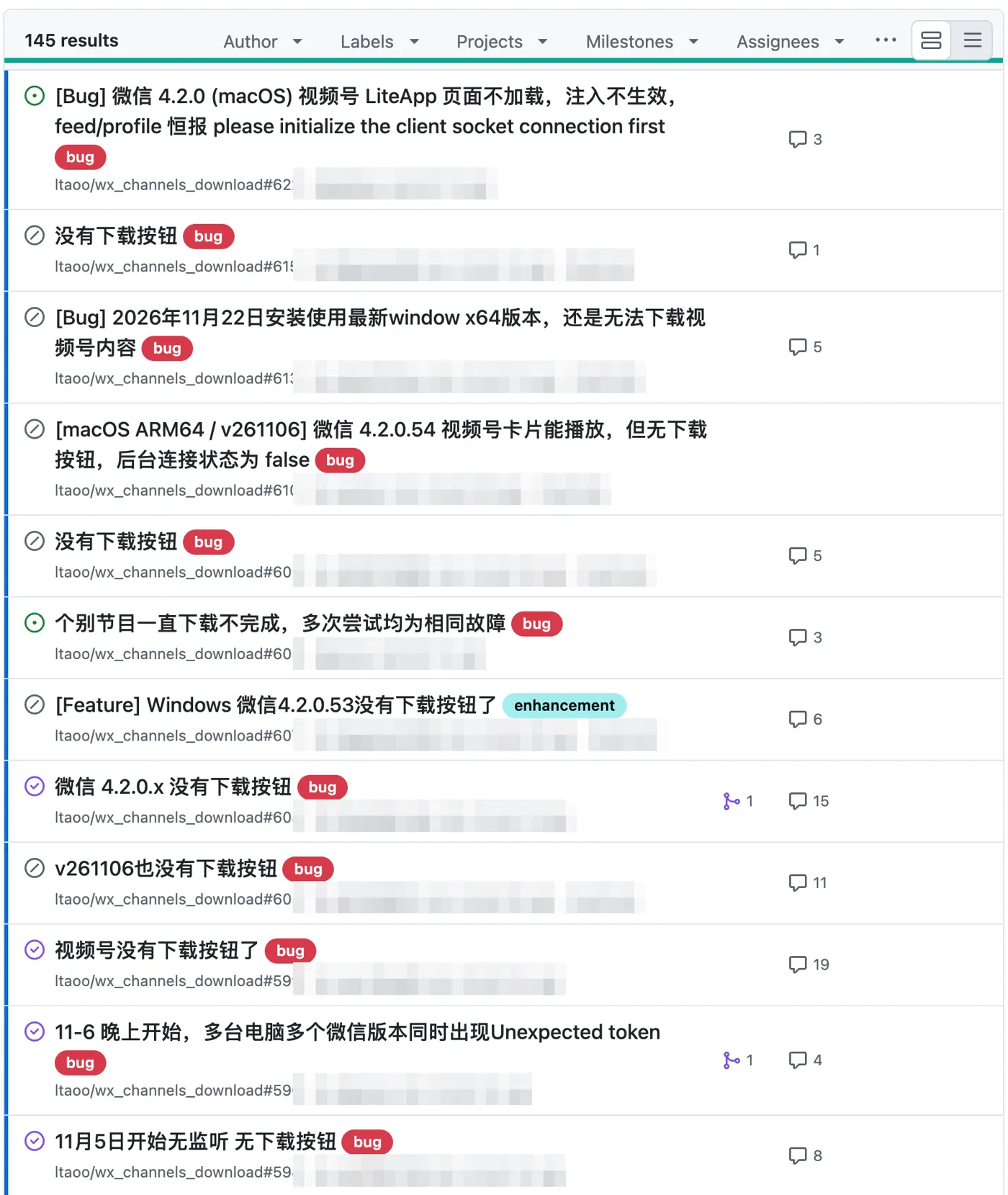
Three changes in November 2026 affect your choice. On the official side, we read the Channels Assistant API list page by page on November 25. It covers showcase products, lead forms, live data and a sales dashboard, and every page limits the caller to a "Channels Assistant" account. On the open-source side, wx_channels_download has more than 10,000 stars.
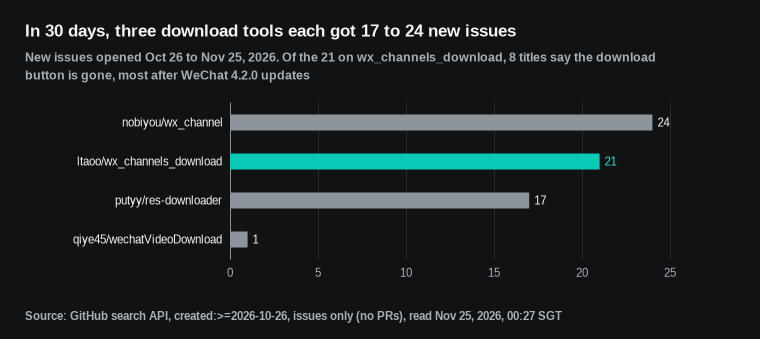
It received 21 new issues between October 26 and November 25, and 8 of those titles say the download button disappeared. Its author shipped fixes on November 6 and November 23. A second project, nobiyou/wx_channel, got a new report on November 24 that WeChat 4.2.1.9 shows no button.
On the pay-per-call side, all 5 EveryInfra WeChat Channels capabilities are available. At 00:22 Singapore time on November 25 we read the 15 latest videos of one public account for $0.046. That is $3.07 per 1,000 rows. In those 15 videos, saves were higher than likes every time, and the reply had no view count field.

WeChat Channels API comparison: three routes in one table
The official column comes from the WeChat Open Docs, which we read page by page on November 25, 2026. The open-source column comes from 10 WeChat Channels projects on GitHub. We read their README files and issues at 00:16 SGT on the same day. For pay-per-call, the EveryInfra prices come from the public catalog, read at 00:13 SGT. The TikHub prices come from its public price endpoint, which needs no key, read at 00:15 SGT, and from its FAQ. For a line-by-line price comparison of the two vendors, see TikHub alternatives and TikHub pricing explained.
| Item | WeChat official (Channels Assistant, WeChat Store API) | GitHub open-source tools | TikHub | EveryInfra |
|---|---|---|---|---|
| Whose data | Only accounts that authorize you | Videos your own WeChat opened | Public videos, accounts, comments, live records | Public videos, account posts, profiles, comments |
| What you get | Follower count, lead-form live audience and engagement, sales, showcase products, store orders | Video file, cover, title; some tools add comments | 24 Channels endpoints: search, detail, posts, collections, live, comments and more | 5 capabilities: search, video detail, account posts, profile, comments |
| What you need | A Channels Assistant or WeChat Store account, an AppSecret, an IP allowlist | A logged-in desktop WeChat and a root certificate, or another account's cookie | Sign up for a key | Sign up for a key |
| Billing unit | Free, with a daily quota per API | Free; you pay with your machine and time | Per request | Per request |
| Price per 1,000 calls | — | — | $10.00 (all 26 endpoints) | $6.81 to $60.00 |
| Failures and empty results | Not applicable | Not applicable | FAQ: bills only HTTP 200 responses | Failures and empty results are not charged |
| After a WeChat update | Docs carry version notes | Broke more than once in 30 days, per the issue lists; wait for a release | Vendor handles it | Vendor handles it |
| MCP | None | wx_channels_download opens a local MCP port | Yes, 19 WeChat tools | Remote MCP with the same key |
The three routes do not read the same data. The official API reads your own business data, such as the audience of a live stream or the sales from it. Open-source tools read what the WeChat on your computer has opened, so the volume depends on how much you click. The third route reads public Channels posts and finds them by account ID, video ID or share link. Decide whose data you need, and usually only one route is left.
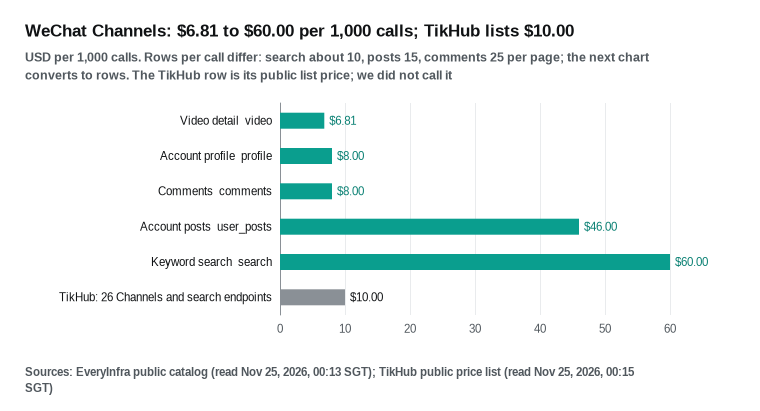
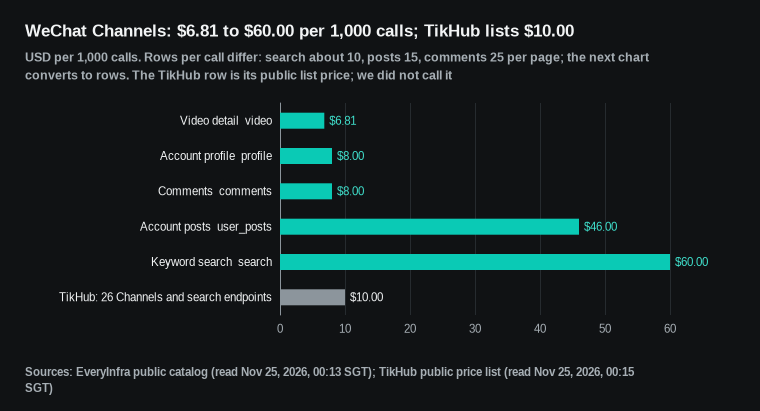
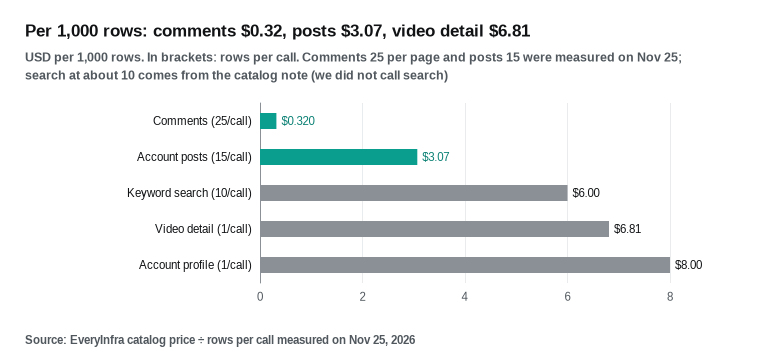
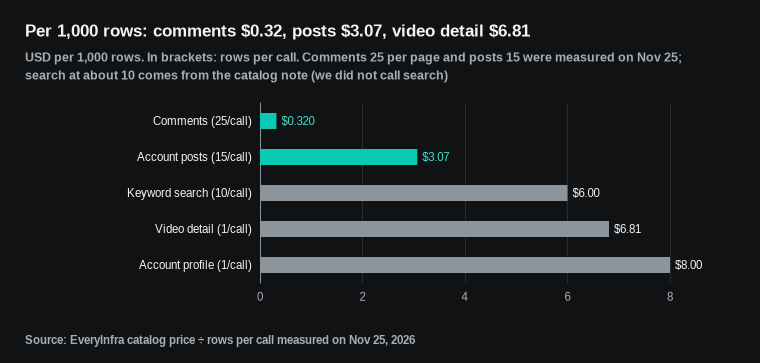
The five EveryInfra unit prices differ by almost 9 times because one call returns different amounts of data. wechat_channels/video reads one video per call. wechat_channels/user_posts returns the 15 latest videos of one account.
wechat_channels/comments returns one page of comments, and our page had 25 rows. Divide the price by the rows per call: account posts cost $3.07 per 1,000 rows and comments cost $0.32 per 1,000 rows. TikHub charges $0.01 per call on every endpoint. We did not call it, so we know its price per 1,000 calls but not its price per 1,000 rows.
Does WeChat Channels have an official API?
Yes, WeChat Channels has an official API, but it serves the account owner's own business data. In the WeChat Open Docs, the server APIs for Channels sit under "Channels Assistant API" and "WeChat Store". We read the Channels Assistant API list on November 25, 2026. It has six groups: live basic info, showcase management, lead-form components, lead-form live data, live big-screen data and a creator sales dashboard.
A separate group covers local services, such as group-buy products, voucher checks and fund reconciliation. The list has no API to read another account's posts, the likes on a video or its comments. It also has no API to publish a video.
Every API page ends with a scope section. Take Get Channels account info as an example. It says the API supports only the "Channels Assistant" account type, and other account types cannot call it unless the page says otherwise. The request body is an empty JSON object. The finder_attr object in the reply has three fields: the unique ID uniq_id, the name nickname and the follower count fans_count. It reads the account that owns the access_token, and no parameter switches it to another account.
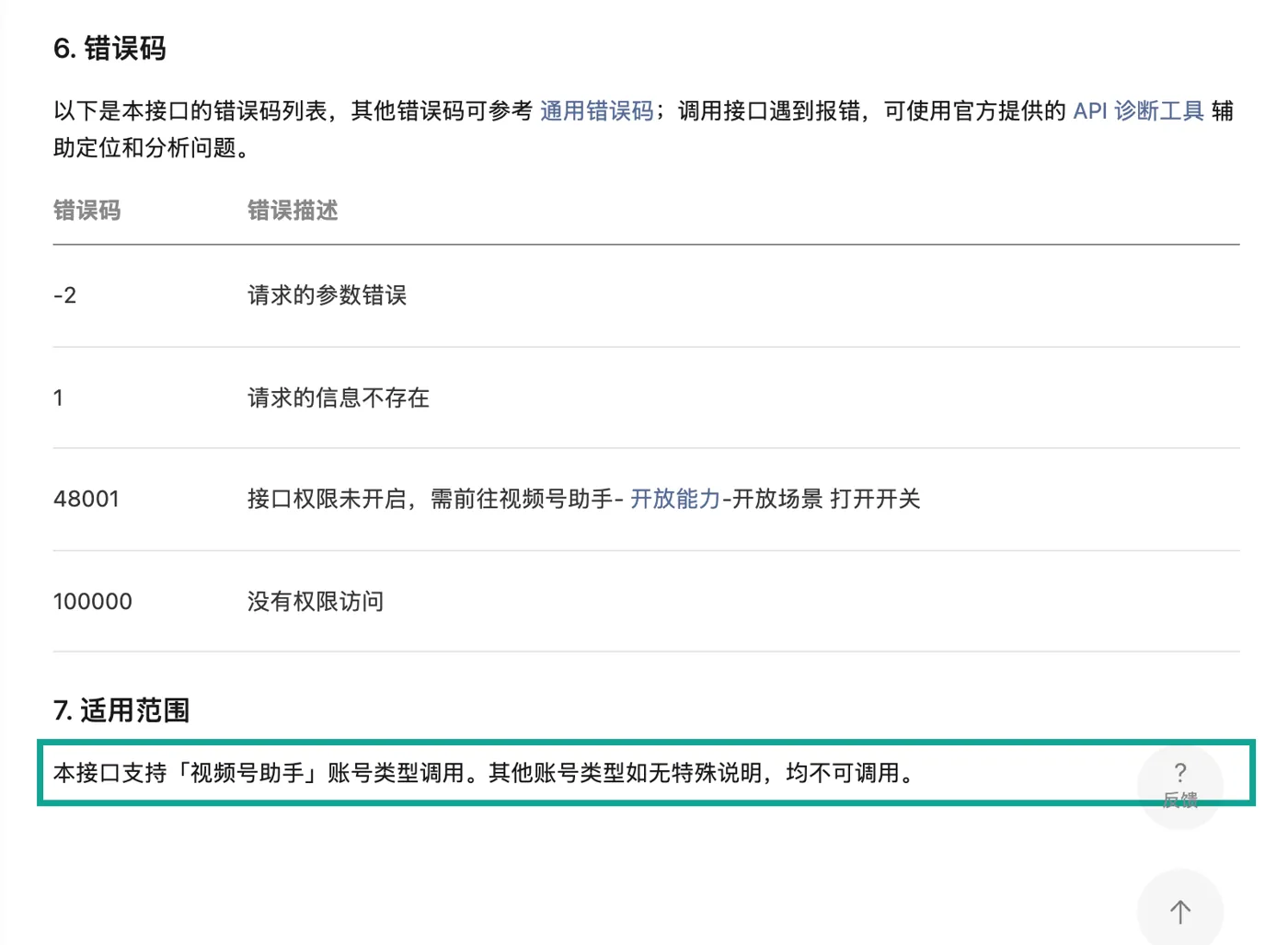
The setup steps are on the Channels Assistant page of the WeChat developer platform, last edited May 27, 2026. You generate the AppSecret in the Channels Assistant platform. After you turn on the API IP allowlist, only listed IPs can exchange the AppSecret for a token. The page lists five open capabilities: showcase, lead forms, lead-form live data, sales live data and the creator dashboard. You switch them on under "Live, Live management, Open capabilities". If you skip this step, a call returns error 48001.
Get lead-form live data pages through live streams by end time. For each stream it returns the audience count total_audience_count, cheers, shares, comments, the average watch time audiences_avg_seconds, the peak online count and new followers. The notes say it covers only streams after September 21, 2023, with a lead form shown for at least one minute. The creator dashboard's sales overview returns daily sales split by live, short video, showcase, product share and other, in cents. Public pages do not show average watch time or sales, and a pay-per-call API cannot read them either. Only the owner can get them from the official API.
| Official API group | Example APIs | What it returns | Who can call |
|---|---|---|---|
| Lead-form live data | get_finder_attr_by_appid, get_finder_live_data_list | Your own name and follower count; audience, average watch time, peak online and new followers per lead-form live stream | A Channels Assistant account, or an authorized third-party platform |
| Creator sales dashboard | compass/finder/overall/get and 3 more | Daily sales by channel, products sold, buyer profile | Same |
| Showcase management | window/product/add, list/get and 2 more | Products in your own showcase | Same |
| Local services and WeChat Store | order/get, funds/getfundsflowlist and more | Store orders, after-sales and fund flows | Store merchants |
Know a few limits before you start. You must call every API from a server. The docs say you cannot call them from a mini-program, a web page or an app front end. The access_token lasts 7,200 seconds, so you must cache and refresh it, as the common API list explains. Each API has a daily quota. You can read daily_limit, used and remain with Get API quota, last edited September 10, 2026.
A service provider can call on behalf of many creators through a third-party platform. Each API page names its permission set: account info is set 160 and the dashboard is set 176. After a creator authorizes you, you call with an authorizer_access_token. The third-party call guide shows the flow. Java teams can call the official APIs with the weixin-java-channel module of WxJava. That SDK has 33,204 stars, and its last commit was on November 17, 2026.
WeChat Channels and WeChat Official Accounts differ a lot on the official side, and that changes how you choose. The Official Account API has daily article statistics, so an owner can read reads and shares per article. In the Channels Assistant API we found no per-video statistics. Per-video likes, saves and shares appear only in the Channels Assistant web back office.
Even for your own Channels account, the official API cannot pull per-video engagement into a spreadsheet on a schedule. You export by hand each day, or you read your own account through a public-data API. For the same three-route choice on Official Accounts, see the WeChat Official Account data API guide.
Is there a ready-made WeChat Channels API on GitHub?
GitHub has ready-made WeChat Channels tools, and most of them are downloaders. At 00:16 SGT on November 25 we used the GitHub API to list 10 WeChat Channels projects by stars. We read their README files and their issues from the last 30 days. They get data in two ways. The first way starts a local proxy and adds a root certificate to the system trust store.
The proxy then intercepts the requests that desktop WeChat makes for Channels pages. It then injects a download button into the page. The second way uses another account's session, from a QR-code login to a web back office or a pasted cookie. Both ways need a WeChat or Tencent account that you can log in to.
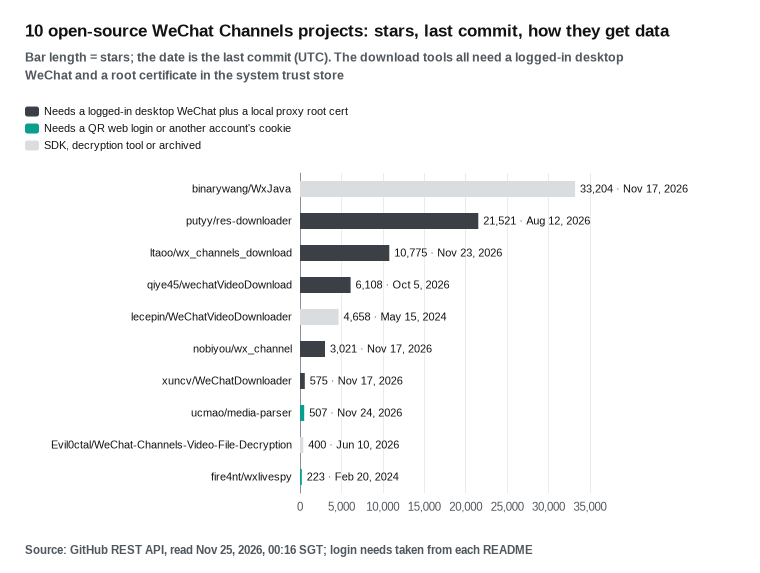
| Repository | Stars | Last commit (UTC) | License | How it gets data (from the README) |
|---|---|---|---|---|
| putyy/res-downloader | 21,521 | 2026-08-12 | Apache-2.0 | Local proxy that sniffs Channels, mini-program and Douyin resources |
| ltaoo/wx_channels_download | 10,775 | 2026-11-23 | MIT with Commons Clause | Runs as admin, installs a certificate on first start, adds a download button in desktop WeChat |
| qiye45/wechatVideoDownload | 6,108 | 2026-10-05 | None stated | Watches desktop WeChat; titles need two certificates installed by hand |
| lecepin/WeChatVideoDownloader | 4,658 | 2024-05-15 | None stated | Archived |
| nobiyou/wx_channel | 3,021 | 2026-11-17 | MIT | Windows; injects a button after a certificate install; a local API can read comments |
| xuncv/WeChatDownloader | 575 | 2026-11-17 | Apache-2.0 | Reads memory of the PC WeChat player; needs a logged-in PC WeChat |
| ucmao/media-parser | 507 | 2026-11-24 | MIT | Parses share links; anonymous mode gives only author and cover, full media needs a cookie from another platform |
| fire4nt/wxlivespy | 223 | 2024-02-20 | MIT | QR login to the Channels back office; watches comments and gifts in your own live room |
| Evil0ctal/WeChat-Channels-Video-File-Decryption | 400 | 2026-06-10 | MIT | Decrypts video files only; no data collection |
| binarywang/WxJava | 33,204 | 2026-11-17 | Apache-2.0 | Java SDK for the official APIs; no scraping |
The upkeep of these tools comes from the WeChat client. Channels pages run inside desktop WeChat. When WeChat updates, the page scripts and the load path can change, and the injected button stops showing.
The wx_channels_download issue list shows the sequence. On November 5, 2026, a user reported no listener and no button. On the evening of November 6, 2026, several computers on several WeChat versions showed only "Unexpected token". The author merged a fix that night and shipped v261106.
Then WeChat 4.2.0.53 and 4.2.0.54 removed the button again. A report came on November 21, 2026. The author then shipped v261123 on November 23, 2026. That is two breaks and two releases in one month. If you run a daily data job on it, plan for a few days of downtime after each WeChat update.
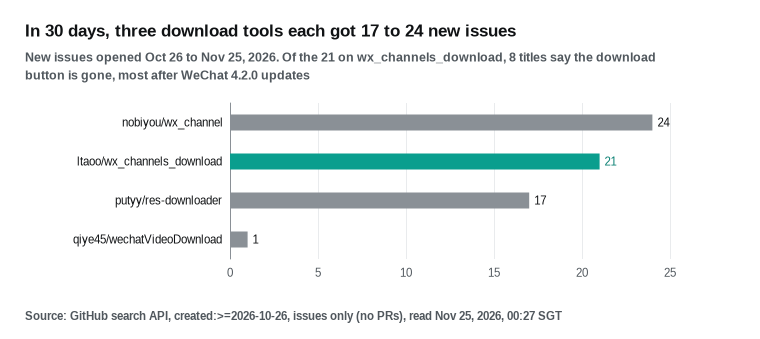
Issue #148 on nobiyou/wx_channel was opened on November 24, 2026. The user ran Windows 11 as admin, and the project's own environment check passed all 18 items. After WeChat moved to 4.2.1.9, the main page script did not go through the proxy, and the log had no injection record.
The day before, the same computer injected the script without problems. Around November 17, 2026, res-downloader got reports that downloads failed on both Windows and Mac. The three active projects each got 17 to 24 new issues in 30 days. qiye45/wechatVideoDownload got only 1, and its last commit was October 5.
The root certificate is a second cost. These tools put a self-signed root certificate in the system trust store so they can decrypt all HTTPS traffic on the machine. Issue #402 on res-downloader was opened on October 28, 2026. It says that release 3.1.3, marked "latest" on GitHub, still embeds one root private key for all users. The 4.0 beta changed this, and each machine now makes its own key. The reporter asked for a 3.1 maintenance release, or a note that tells old users to delete that certificate by hand.
A shared private key means anyone with that key could, in theory, decrypt traffic on machines that trust the certificate. Ask your IT team before you put such a tool on a work computer. Under one downloader tutorial near the top of YouTube results for a Chinese query on WeChat Channels data collection, we read 3 comments. One said WeChat videos would not open after using the tool, and asked how to restore them. A proxy or certificate that was not removed cleanly can cause this.
Licenses also limit use. The LICENSE of wx_channels_download is MIT with the Commons Clause. It does not grant the right to "Sell", which means you cannot offer a paid product or service whose value comes mainly from the software. The repositories of qiye45/wechatVideoDownload and the archived lecepin/WeChatVideoDownloader have no license file. If you plan to turn this code into a paid data service for clients, ask the authors first and check the terms yourself.
wx_channels_download now starts a local API service and an MCP service at 127.0.0.1:2022, as the terminal output in #612 shows. On your own computer, it lets an AI tool download a few videos you just watched, at no cost. xuncv/WeChatDownloader was checked on WeChat 4.2.0.52 for normal videos and live analysis. If you need the video file itself, in small volume, and you can wait a few days after a break, an open-source tool is enough.
Pay-per-call prices and billing
With a pay-per-call WeChat Channels API, the vendor handles logins, sessions, page changes and retries. You only send HTTP requests. We compare EveryInfra and TikHub on five points. They are billing unit, price per 1,000 calls, price per 1,000 rows, failure charges and the need for your own WeChat account. Other pay-per-call services exist. Their public prices are mostly per call, and you can convert them the same way, so we do not name them here.
The EveryInfra WeChat Channels page lists 5 capabilities. In the catalog we read at 00:13 SGT on November 25, all 5 were available: true. wechat_channels/search costs $0.06 per call and returns one page of about 10 videos. Search results carry no video ID and no account ID, so you cannot chain them into detail or posts calls. wechat_channels/video costs $0.006806 per call and accepts a video ID or a share link.
wechat_channels/user_posts costs $0.046 per call and returns the 15 latest videos of an account. wechat_channels/profile and wechat_channels/comments cost $0.008 per call. A comment page holds up to 25 rows and comes with a page token that stays valid for 24 hours. The full catalog then had 718 capabilities on 110 platforms. WeChat Channels shares one key with WeChat Official Accounts, Douyin and Kuaishou.
| Billing item | TikHub (public price list only) | EveryInfra (catalog and Nov 25 live calls) |
|---|---|---|
| Channels-related endpoints | 24 Channels endpoints (12 on v2 paths), 2 WeChat Search | 5 capabilities |
| Unit price | $0.01 per call on all | $0.006806 to $0.06 per call |
| Free credit | $0.05 for new accounts; all 26 endpoints are marked as not using free credit | Trial credit for new users, as shown in the console |
| Volume discount | FAQ lists tiered daily discounts; all 26 endpoints are marked as excluded | None |
| Failure charges | FAQ: bills only HTTP 200 responses | Failures and empty results are not charged; each call has a charge_id |
| Timeout | Docs suggest a 30-second client timeout; a shorter one may bill you with no response | Add "mode":"async" for slow calls and fetch by job_id |
| Rate limit | 10 per second per endpoint in the price list | Per-key limit; over-limit calls get 429 and are not charged |
| MCP | Yes, 19 WeChat tools | Remote MCP with the same key |
TikHub charges $0.01 per call on every endpoint. For one video detail that is more than the EveryInfra $0.006806. For search and account posts, the TikHub unit price is lower.
We did not call its posts endpoint, so we do not know how many rows one call returns. The TikHub FAQ says the old Official Account and Channels series went offline on June 13, 2026, and was rebuilt. The current series is wechat_channels/v2, and search moved under wechat_search/v2. The price list still shows 12 older non-v2 paths, and we cannot tell which of them still work. By the endpoint_type field in the price list, 11 of the 26 endpoints are marked third-party and 15 are marked self-operated. Each endpoint has a limit of 10 calls per second.
Its video detail doc asks you to set a 30-second client timeout. A shorter timeout can lead to a charge with no response.
Some teams want the video file and its decryption key, need high volume and already use other TikHub endpoints. Those teams can top up a small amount and test the reply format.
The TikHub FAQ also sets two rules that matter for a trial. A top-up is not refundable by default, except in the cases its refund policy lists. Alipay top-ups carry a fee of 2.6% plus $0.30, and PayPal and USDT top-ups carry 5% plus $0.30. A $5 PayPal top-up costs $5.55, and Enterprise accounts do not pay the fee. On a small trial, that fee costs more than the calls. Each successful TikHub reply also carries a cache_url that reopens the same reply free for 24 hours.
Each successful EveryInfra reply carries billing.charged_usd. An empty result puts a reason in billing. For example, at 00:19 SGT we asked for YouTube captions on a video that had none.
The reply said empty_result_refunded with a charge of 0. A 429 reply has no billing object and no charge record. Slow calls do not need to hold the connection. Add "mode":"async" to get a job_id at once, then poll for the result. For call-by-call reconciliation, see failure refund reconciliation.
Choose by job
Which WeChat Channels API is best depends on whose data you read, how much you need and how stable it must be.
| Your job | Route | Why | Monthly cost |
|---|---|---|---|
| Live audience, average watch time and sales of your own account | Official Channels Assistant API | Only the official API has these numbers; public pages do not show them | Free, within the daily quota |
| Orders, after-sales and fund flows of your own store | Official WeChat Store API | Orders are private data | Free |
| Real-time comments in your own live room | Open-source tools like wxlivespy, or the official live APIs | It is your own room, so you log in to your own back office | Free |
| Save a few videos you watched | Open-source downloader | Small volume; a few days of downtime after an update is fine | Free |
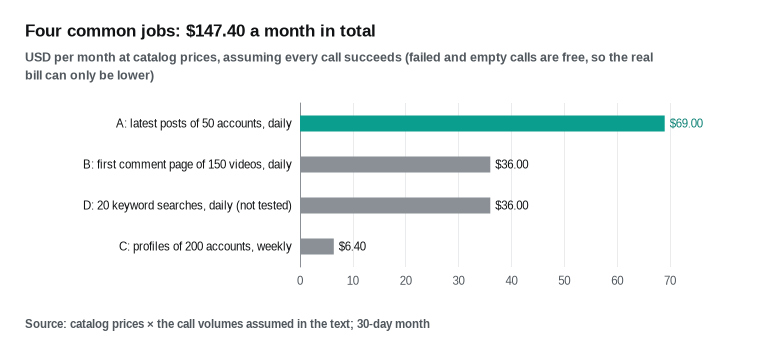
| Track new videos and engagement of 50 competitor or creator accounts each day | Pay-per-call user_posts | No WeChat login; scheduled reads by account ID | $69 (50 accounts × 30 days) |
| Read comments on trending videos each day for sentiment | Pay-per-call comments | 25 rows per page, with a page token | $36 (150 videos × 30 days, first page only) |
| Find new videos by keyword | Pay-per-call search | About 10 rows per call; no IDs, so pair it with share links | $36 (20 searches a day; catalog price, not tested) |
| Build files on 200 creators | Pay-per-call profile | Verification note, post count, linked Official Account | $6.40 (once a week) |
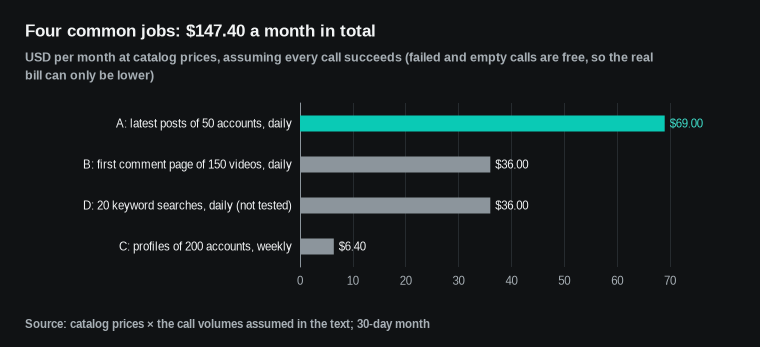
The pay-per-call costs use catalog unit prices times the call volume in the table, with every call a success. Failures and empty results are free, so the real figure can only be lower. All four jobs together cost $147.40 a month.
The biggest item is account tracking: 50 accounts read once a day at $0.046 per user_posts call is $69 a month. For Xinwen Lianbo, the 15 latest posts covered about 49 hours, so one read a day misses nothing. A slower account may need several days for 15 posts. Read it every few days, and this line drops in proportion. If an account posts more than 15 videos a day, one read a day misses some, so read it twice.
Agencies that run many creators often use two routes together. For the live audience, watch time and sales of signed creators, they use official third-party authorization. Each creator confirms on the authorization page, and the agency calls with an authorizer_access_token. The data is exact, and the agency never uses the creator's WeChat login. Creators cannot authorize data for other accounts in the same niche, so the agency reads those by account ID through a pay-per-call API. Keep each source in its own table. Join them in one weekly report on account name or linked Official Account.
Test one account for a week before you scale. Read its post list once a day: 7 user_posts calls cost $0.322. Read the first comment page of 3 new videos each day: 21 comments calls cost $0.168. The total is $0.49. After the test, check three things. Do 15 posts cover one day of uploads for this account? Is the first comment page enough? Do the fields go straight into your table? If all three pass, grow the list to dozens of accounts.
For the creator files row, profile lets you compare post count and live hours over time. Xinwen Lianbo showed 8,273 posts, 8 collections and 1,885 live hours. Read each profile once a week. The difference between two reads gives the new posts and live hours for that week. Deleted posts make the difference smaller. Follower counts are not available, so tier creators by post count, live hours and the median engagement of their 15 latest posts.
Search on WeChat Channels works differently from other platforms. The catalog says wechat_channels/search results have no video ID and no account ID. They return rank, title, cover, duration, post time, likes and author name. So you cannot read comments on a search hit right away. We did not call search this time. At $0.06 per call, it has the highest unit price of the five.
To start from keywords, search first. Then a person opens the target videos in WeChat and copies the share links for video. The author_username from video then goes to user_posts and profile.
A live test: from one share link to account, posts and comments
We chose an institutional account: Xinwen Lianbo, the evening news program of China Media Group. It posts often and draws many comments, so it shows what the API returns under real traffic. We started from a share link that a public web page had posted. We had only the link and no account ID. From 00:17 to 00:26 Singapore time on November 25, we made 5 WeChat Channels calls in the order below.
# Step 1: you have only a share link, so pass it to video
curl -s https://api.everyinfra.com/api/v1/social \
  -H "Authorization: Bearer $EVERYINFRA_API_KEY" \
  -H "Content-Type: application/json" \
  -d '{"platform":"wechat_channels","action":"video",
       "params":{"object_id":"https://weixin.qq.com/sph/AlJAQnWOuV"}}'
# 00:17:51 SGT reply: id 14957536921256204842, author_username v2_0600…@finder,
# like 535, collect 940, share 493, comment 12, duration_sec 606;
# charged_usd 0.006806

# Step 2: read the 15 latest posts with the author_username from step 1
curl -s https://api.everyinfra.com/api/v1/social \
  -H "Authorization: Bearer $EVERYINFRA_API_KEY" \
  -H "Content-Type: application/json" \
  -d '{"platform":"wechat_channels","action":"user_posts",
       "params":{"username":"v2_060000231003b20faec8c4e18110c5d2ce04e836b0779bf1983ed0d39ad66543866e9e4d1c86@finder"}}'
# 00:22:03 SGT reply: 15 rows, charged_usd 0.046
At 00:17:51 SGT, wechat_channels/video read a video posted on July 3, 2026, from the share link. It ran 606 seconds and had 535 likes, 940 saves, 493 shares and 12 comments. The call took 1.21 seconds. The reply's author_username is a long ID that starts with v2_ and ends with @finder. This step turns "we have a link" into "we know who posted it".
At 00:18:00 SGT, wechat_channels/profile read the account with that ID. It returned the display name, the verification note "China Media Group", 8,273 posts, 8 collections and 1,885 hours of live streams. It also listed a linked Official Account with the same name. The reply had no follower count field. The catalog says Channels profiles usually hide follower counts, and when the field is missing it is absent, not 0.
At 00:22:03 SGT, wechat_channels/user_posts returned 15 videos. They were posted from 12:15 UTC on November 22, 2026, to 13:44 UTC on November 24, 2026, about 49 hours. The first try at 00:21:44 SGT got HTTP 429 for the per-minute limit. The 429 cost nothing, and a retry 19 seconds later passed in 13.44 seconds. Each row carries a video ID, post time, likes, saves, shares, comments, duration and full caption.
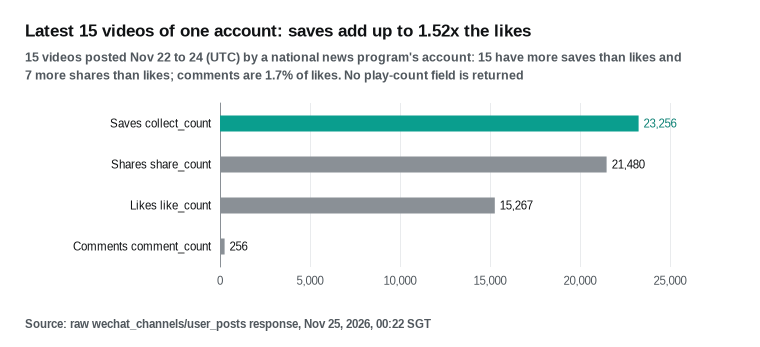
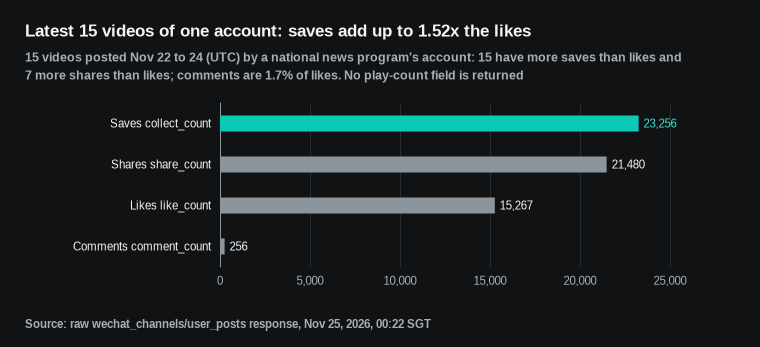
In all 15 videos, collect_count was higher than like_count. Total saves were 23,256, which is 1.52 times total likes of 15,267. Total shares were 21,480, or 1.41 times likes, and 7 videos had more shares than likes. Total comments were only 256, or 1.7% of likes. The medians were 694 likes, 1,003 saves, 442 shares and 17 comments.
| Metric (15 latest videos) | Total | Ratio to likes | Median per video |
|---|---|---|---|
| Likes | 15,267 | 1.00 | 694 |
| Saves | 23,256 | 1.52 | 1,003 |
| Shares | 21,480 | 1.41 | 442 |
| Comments | 256 | 0.017 | 17 |
| Views | Not returned | — | — |
We did not check in the WeChat app which button collect_count maps to, so read these ratios by field name. Ranked by like_count, the 7th video in the list (2,955 likes, 6,740 shares) comes second. Ranked by shares, it comes first. The sample is only 15 videos from one news account. Entertainment or sales accounts may show other ratios, and we did not check other accounts.
Video by video, the ratio of saves to likes stays between 1.22 and 2.06. The ratio of shares to likes runs from 0.28 to 3.61, a much wider range. The highest share ratio belongs to a 69-second policy news clip posted at 20:11 Beijing time on November 23. It had 361 likes and 1,303 shares. The lowest belongs to a 20-second clip about an astronaut, with 1,559 likes and only 442 shares.
Length does not explain engagement here. The median length is 99 seconds, and 14 of the 15 videos run under 3 minutes 30 seconds. The one long video, 1,535 seconds of a state event, had 694 likes, which is exactly the median. On this account, the share ratio splits the videos better than length does.
The account also posts several videos on one story. Four of the 15 cover the Shenzhou-24 launch, with 2,743 likes in total. Three cover a new elderly-and-childcare service plan, with 4,089 likes. Group videos on one story by keywords in description before you compare topics.
The reply has no view count, so plan your reports around that from day one. The fields that the catalog lists for user_posts and video do not include views. Above 10,000, like_count and collect_count are exact only to the hundreds and always end in 02. Above 100,000 they are always 100002, which matches the "100k+" label in the app. share_count is exact. To flag hit videos, use shares as the main signal and use the ratio of likes to saves as support.
At 00:26:04 SGT, wechat_channels/comments read the video with the most comments among the 15. It was posted on November 23, 2026, and had a comment_count of 43. One page returned 25 rows with a next_page_token in 1.08 seconds, for $0.008. The 25 comments came from 14 provincial regions, from the ip_location that the platform shows. Only 10 carried the commenter's Channels account ID. The other 15 commenters had no Channels ID, so the field was absent.
The first 19 rows go from 47 likes down to 1 like. The last 6 rows have 2 likes each and come after the rows with 1 like. So the first page is roughly sorted by likes, not strictly.
The 25 comments had 133 likes in total. This video had a comment_count of 43, so about 18 more comments sit on later pages. The 25 comments on page one span more than 30 hours, from 15:56 on November 23 to 22:33 on November 24, Beijing time.
The newest comments are not always at the top. To read all comments, follow the page token, and each page counts as one call.
| Comment page item | Value |
|---|---|
| Rows on page one | 25 |
Regions in ip_location | 14 (Guangdong 4, Beijing 3, Zhejiang 3, Fujian 3) |
| Rows with a commenter account ID | 10 of 25 |
| Likes on the top comment | 47 |
| Likes on all 25 comments | 133 |
| Next page token | Present |
| Latency and charge | 1.08 s, $0.008 |
{
  "platform": "wechat_channels",
  "action": "comments",
  "results": [
    {"id": "…", "text": "(comment text)", "like_count": 47,
     "posted_at": "2026-11-23T11:00:53+00:00", "ip_location": "Shandong",
     "author_username": "v2_…@finder", "next_page_token": "…"}
  ],
  "billing": {"charged": true, "charged_usd": 0.008}
}
At 00:26:05 SGT we used video to read the newest of the 15 videos again. We compared it with the user_posts numbers from 4 minutes earlier. Likes went from 275 to 281, saves from 567 to 575 and shares from 246 to 248. Comments stayed at 19. The video was posted at 13:44:53 UTC, so it was less than 3 hours old. In 4 minutes it gained 6 likes, 8 saves and 2 shares.
We rechecked only this video, so we do not know if a day-old video still grows. To find out, read the same video again a day later. To plot engagement on the first day, call video once an hour. That is 24 calls a day for one video, or $0.163.
| Time (SGT) | Capability | HTTP | Rows / result | Latency | charged_usd |
|---|---|---|---|---|---|
| 00:17:51 | wechat_channels/video (share link) | 200 | 1 video detail | 1.21 s | 0.006806 |
| 00:18:00 | wechat_channels/profile | 200 | Profile, no follower field | 11.70 s | 0.008 |
| 00:21:44 | wechat_channels/user_posts | 429 | Per-minute limit; retry after 19 s | — | 0 |
| 00:22:03 | wechat_channels/user_posts | 200 | 15 posts | 13.44 s | 0.046 |
| 00:25:56 | wechat_channels/comments | 429 | Per-minute limit; retry after 8 s | — | 0 |
| 00:26:04 | wechat_channels/comments | 200 | 25 comments, next page present | 1.08 s | 0.008 |
| 00:26:05 | wechat_channels/video (video ID) | 200 | 1 video detail, recheck | 9.69 s | 0.006806 |
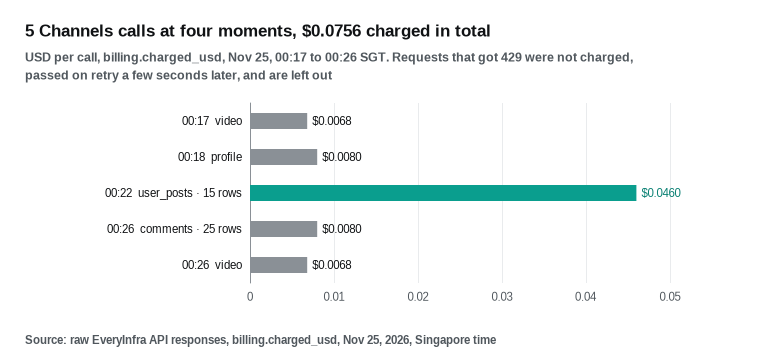
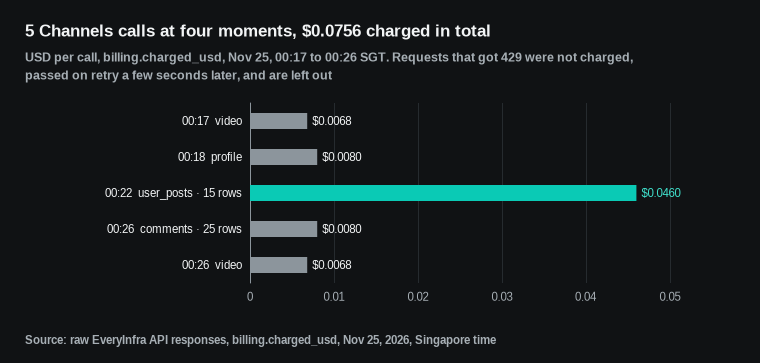
The 5 successful WeChat Channels calls cost $0.075612, and the two 429 replies cost 0. We also checked YouTube tutorials on Channels data with a search, captions for two videos (both empty, charge 0) and comments on one video, for $0.001334. The two platforms together cost $0.076946.
Latency varied across these synchronous calls. The two video calls took 1.21 and 9.69 seconds. profile took 11.70 seconds, user_posts 13.44 seconds and comments 1.08 seconds. In a scheduled job, set the client timeout to 30 seconds or more. For a batch of dozens of accounts, add "mode":"async" to get a job_id for each call, then collect the results together.
You can also use the API in an AI tool. Put the block below in your MCP config.
With this config, the AI starts with everyinfra_list_capabilities, which lists the 5 Channels capabilities and their parameters. Then it calls everyinfra_call_api. For slow calls it uses everyinfra_get_job. The remote MCP tool list we read at 00:29 SGT had 12 tools, including balance, request history and support tickets.
{
  "mcpServers": {
    "everyinfra": {
      "type": "http",
      "url": "https://api.everyinfra.com/mcp",
      "headers": { "Authorization": "Bearer ${EVERYINFRA_API_KEY}" }
    }
  }
}
From one link to a tracking table: how the fields connect
Two kinds of ID link the Channels capabilities. A video ID is a long number, such as 14957536921256204842 from the 00:17 call, and video and comments use it. An account ID is a long string that starts with v2_ and ends with @finder, and user_posts and profile use it. If you have only a share link, pass it to video. The reply holds both the video ID and the author_username. Each row from user_posts also carries a video ID, so you can read comments on any of them without going back to WeChat.
You can also start from the Channels ID on an account's home page. The catalog says user_posts accepts a sph ID from the home page as well as a v2_…@finder ID. A team with a list of Channels IDs can read post lists directly and store the first author_username as the account key.
Use file fields on the same day. video_url is a signed link that stays valid for about 24 hours. Channels encrypts the first part of the file, so a direct download does not play until you decrypt it with video_decode_key. cover_url is also signed and expires. To keep covers and videos, copy them on the day you read them. Store the video ID and read time, not only the link.
| ID type | Example | Used by | Where you get it |
|---|---|---|---|
| Share link | https://weixin.qq.com/sph/AlJAQnWOuV | video | Forward a video in WeChat and copy the link |
| Video ID | 14957536921256204842 | video, comments | video or user_posts reply, field id |
| Account ID | v2_…@finder | user_posts, profile | video or user_posts reply, field author_username |
| Comment page token | next_page_token | comments | Last comments reply; valid 24 hours |
Use the video ID as the primary key when you build a tracking table. The same video stays in the post list for days, so each daily read gives a new snapshot of it. Store the snapshots in a separate table by read time, and you can plot engagement after posting. posted_at is UTC with a time zone. The newest post we read at 00:22 SGT says 2026-11-24T13:44:53+00:00, which is 21:44 that evening in Singapore and Beijing. Convert the time zone before you group by day, or evening posts land on the previous day.
Post times also tell you when to read. In Beijing time, 10 of the 15 videos went out between 19:50 and 21:46, in the two hours after the TV news broadcast. Only 5 went out in the daytime, the earliest at 08:24. For this account, schedule the daily read after 22:00 Beijing time, so one snapshot holds the whole evening. A morning read sees evening posts about 10 hours after release, so the first hours of growth are not recorded. Other accounts post at other hours. Read an account for two or three days, check the hours in posted_at, and then set the read time.
| Post time (Beijing) | Videos among the 15 latest | Times |
|---|---|---|
| 08:00 to 12:59 | 2 | 08:24, 12:18 |
| 13:00 to 18:59 | 3 | 13:11, 14:16, 17:59 |
| 19:00 to 22:59 | 10 | 19:50 to 21:46 |
Read the number fields by the platform's display rules. Likes and saves above 10,000 are exact only to the hundreds and end in 02, and anything above 100,000 is 100002. If you sum these values as they are, large accounts look smaller than they are. Mark the "100k+" tier on its own when you rank.
In our 15 videos, the highest like count was 3,728 and the highest save count was 5,001. Both are below 10,000, so the totals and the 1.52 and 1.41 ratios above are exact. Shares are exact and work well for trends.Above 10,000, comment_count is sometimes rounded to the hundreds and ends in 02. Below 10,000 it is exact. The profile field linked_accounts lists the linked Official Account, which lets you join your Channels table to your Official Account table.
Your comment table should keep two more fields: ip_location and next_page_token. Location works for regional splits.
Our 25 comments came from 14 regions, with Guangdong 4, Beijing 3, Zhejiang 3 and Fujian 3. Shandong and Hubei had 2 each, and 8 regions, including Tibet, Qinghai and Shanghai, had 1 each. The page token stays valid for 24 hours, and after that you start again from page one. Commenter names and account IDs are personal data. For statistics, you can keep only location, likes and post time. Keep the text only when you need it, and never turn commenters into a contact list.
Reconcile your bill with the billing object in each reply. Charged calls carry charged_usd. Empty results show empty_result_refunded and a charge of 0. A 429 reply has no billing object and no charge record. Match this column against your own call log by time, and your monthly bill lines up call by call.
When another WeChat Channels route fits better
To read your own account, use the official API. A pay-per-call API cannot return follower count, average live watch time or sales. Our 00:18 SGT profile read of Xinwen Lianbo had no follower field. The official get_finder_attr_by_appid returns your own fans_count directly. For weekly reports on your own account, live reviews and store order checks, the official API is free and exact. It reads only your own data.
To save a few videos you watched, use an open-source downloader. It is free and runs on your own computer, and its on-demand volume is far below what a pay-per-call API is for. wx_channels_download also ships a local MCP, so an AI tool can fetch a few videos for you. The cost is a few days of downtime after each WeChat update and a root certificate on your computer.
If your team already uses TikHub, adding a few Channels endpoints there is simpler than signing up with another vendor. Its price list has endpoints that the EveryInfra catalog lacks, such as live history, live detail, collections and collection videos. It also converts between Channels IDs and account IDs. Its posts endpoint costs $0.01 per call. The price list does not say how many rows one call returns. Test it with a small top-up before you compare the cost per 1,000 rows.
For the video file and its key, its detail endpoint returns media and decode_key. EveryInfra video also returns video_url and video_decode_key, and neither vendor decrypts the file for you.
Comments carry commenter names, Channels IDs and locations. China's Personal Information Protection Law defines personal information and sets rules for its use. Check the law yourself, or ask your legal team, how it applies to these fields. We suggest statistics only: counts, regions and kinds of opinion, with no lists of people and no direct contact. When we searched YouTube for WeChat Channels data collection, one top result claimed to collect phone numbers from comment sections. That use is outside EveryInfra capabilities, and we do not recommend it with any route.
FAQ
Does WeChat Channels have an official API?
Yes, but only for the account owner's own data. The Channels Assistant API has groups for lead-form live data, a sales dashboard and showcase management. Each API limits the caller to a "Channels Assistant" account and cannot read other accounts' videos or comments. The WeChat Store API covers your own store's products, orders and funds. A user on GitHub also asked if a personal account can get detailed analytics through a public API, in community discussion #179334.
Can a WeChat Channels data API return view counts and follower counts?
For other accounts, our live calls on November 25 returned neither. The fields of user_posts and video have no view count. profile on Xinwen Lianbo had no follower field. You do get likes, saves, shares, comment counts and post counts. For your own account, the official get_finder_attr_by_appid returns fans_count.
Does a WeChat Channels scraper need a WeChat login, and does it break?
Almost all open-source Channels scrapers and downloaders need a login. Some need a logged-in desktop WeChat on your machine, some need a QR login to a web back office, and some need another account's cookie. They break when WeChat updates. wx_channels_download shipped fixes on November 6 and November 23. nobiyou/wx_channel got a new report on November 24 that it fails on WeChat 4.2.1.9. A pay-per-call API does not use your WeChat account.
A YouTube comment under a downloader tutorial also said WeChat videos stopped opening after an install.
Is a WeChat Channels link parser the same as a data API?
Not quite. A link parser turns a share link into a video file address so you can download it. A data API returns structured fields such as post lists, engagement counts and comments. EveryInfra wechat_channels/video returns both. Pass a share link to get the video ID, the author's account ID and engagement counts. The reply also has video_url and video_decode_key.
Can the Channels component in a mini-program return data?
No. The page Open a Channels video from a mini-program, last edited July 28, 2026, covers jumps and embeds. wx.openChannelsActivity jumps to a video, and the channel-video component embeds a video in the mini-program. Neither returns likes or comments. To get the feedId for an embed, you log in to Channels Assistant and copy the ID of a video you posted.
Is there a WeChat Channels API to publish videos?
The Channels Assistant API list we checked on November 25 has no API to publish posts. The WeChat Store resource API can upload videos, but only as product material. Projects on GitHub such as social-auto-upload use browser automation to log in to Channels Assistant and post. Channels Assistant is also testing "article to video" with a small group of users. Ebrun reported on November 19 that you use it after you log in to Channels Assistant on a desktop.
What changed on WeChat Channels in the last 30 days
| Date (2026) | Event | What it means for data work |
|---|---|---|
| Oct 28 | res-downloader #402: release 3.1.3 embeds a shared root key | Remove old certificates before you install a new build |
| Nov 6 | wx_channels_download v261106 fixes "Unexpected token" | Open-source tools need a new build after client changes |
| Nov 19 | "Article to video" test in Channels Assistant | More matching content across Official Account and Channels |
| Nov 23 | wx_channels_download v261123 for WeChat 4.2.0.5x | Second open-source fix in one month |
| Nov 24 | nobiyou/wx_channel #148 on WeChat 4.2.1.9 | Another client update breaks injection |
On November 19, 2026, Ebrun reported that Channels is testing "article to video" with a small group of users. It turns a script, an Official Account article link or audio into a video. As old Official Account posts turn into videos, the same organization will post more matching content on both. Use linked_accounts from profile to find the linked Official Account. Then compare the response on both sides with an Official Account data API for a fuller picture.
On the open-source side, wx_channels_download shipped two releases, on November 6, 2026, and November 23, 2026. A new nobiyou/wx_channel report followed on November 24, 2026. All three tie to updates of the WeChat 4.2 client. Issue #402 on res-downloader, from October 28, 2026, warns that the old release embeds a shared root private key. Teams that use open-source tools can turn off automatic WeChat updates and upgrade only after the tool confirms support.
How to start
- Sign up for EveryInfra and create an API key in the console. Store it as the environment variable
EVERYINFRA_API_KEY, not in code. See the quickstart and the pricing page. - Open the target video in WeChat. Tap forward and copy the link, which looks like
https://weixin.qq.com/sph/…. - Pass the link to
wechat_channels/videowith the first curl block above. Takeauthor_usernamefrom the reply. - Call
user_postswithauthor_usernameto read the 15 latest posts. Callprofilefor the verification note, post count and linked Official Account. - Call
commentswith a videoidfor the videos you want. For more rows, passnext_page_token. - To use an AI tool, add the MCP block above, and let the AI list capabilities before it calls them. To compare TikHub item by item, see TikHub alternatives. For a similar platform, see the Douyin data API guide.
References
- API list (Channels Assistant API), WeChat Open Docs, read Nov 25, 2026, https://developers.weixin.qq.com/doc/channels/api/
- Get Channels account info, WeChat Open Docs, last edited Aug 27, 2025, read Nov 25, 2026, https://developers.weixin.qq.com/doc/channels/api/channels/leadslive/api_getfinderattrbyappid.html
- Get lead-form live data, WeChat Open Docs, read Nov 25, 2026, https://developers.weixin.qq.com/doc/channels/api/channels/leadslive/api_getfinderlivedatalist
- Get sales overview (creator dashboard), WeChat Open Docs, read Nov 25, 2026, https://developers.weixin.qq.com/doc/channels/api/channels/compass/api_getfinderoverall
- Get API quota, WeChat Open Docs, last edited Sep 10, 2026, https://developers.weixin.qq.com/doc/channels/api/basic/api_getapiquota
- Channels Assistant (developer platform guide), WeChat Open Docs, last edited May 27, 2026, https://developers.weixin.qq.com/doc/oplatform/developers/product/channel/channel_management.html
- Common API list (WeChat Store), WeChat Open Docs, last edited Nov 18, 2025, https://developers.weixin.qq.com/doc/channels/API/basics/getaccesstoken.html
- API IP allowlist, WeChat Open Docs, https://developers.weixin.qq.com/doc/oplatform/developers/basic_func/ip_whitelist
- Third-party platform call guide, WeChat Open Docs, https://developers.weixin.qq.com/doc/oplatform/Third-party_Platforms/2.0/Before_Develop/call_interface
- Open a Channels video from a mini-program, WeChat Open Docs, last edited Jul 28, 2026, https://developers.weixin.qq.com/miniprogram/dev/framework/open-ability/channels-activity.html
- TikHub public price endpoint, read Nov 25, 2026, 00:15 SGT, https://api.tikhub.io/api/v1/tikhub/user/get_all_endpoints_info
- TikHub FAQ, read Nov 25, 2026, https://tikhub.io/faq
- Get Channels video detail, TikHub docs, modified Jul 21, 2026, https://docs.tikhub.io/472974842e0
- TikHub MCP, read Nov 25, 2026, https://tikhub.io/mcp
- EveryInfra public catalog, read Nov 25, 2026, 00:13 SGT, https://api.everyinfra.com/api/v1/social/catalog
- putyy/res-downloader, GitHub, read Nov 25, 2026, https://github.com/putyy/res-downloader
- ltaoo/wx_channels_download, GitHub, read Nov 25, 2026, https://github.com/ltaoo/wx_channels_download
- qiye45/wechatVideoDownload, GitHub, https://github.com/qiye45/wechatVideoDownload
- lecepin/WeChatVideoDownloader, GitHub, archived, https://github.com/lecepin/WeChatVideoDownloader
- nobiyou/wx_channel, GitHub, https://github.com/nobiyou/wx_channel
- xuncv/WeChatDownloader, GitHub, https://github.com/xuncv/WeChatDownloader
- ucmao/media-parser, GitHub, https://github.com/ucmao/media-parser
- fire4nt/wxlivespy, GitHub, https://github.com/fire4nt/wxlivespy
- Evil0ctal/WeChat-Channels-Video-File-Decryption, GitHub, https://github.com/Evil0ctal/WeChat-Channels-Video-File-Decryption
- binarywang/WxJava, GitHub, https://github.com/binarywang/WxJava
- wx_channels_download issue list, GitHub, read Nov 25, 2026, https://github.com/ltaoo/wx_channels_download/issues
- wx_channels_download #596, Nov 6, 2026, https://github.com/ltaoo/wx_channels_download/issues/596
- wx_channels_download PR #597, Nov 6, 2026, https://github.com/ltaoo/wx_channels_download/pull/597
- wx_channels_download #612, Nov 21, 2026, https://github.com/ltaoo/wx_channels_download/issues/612
- wx_channels_download v261123, Nov 23, 2026, https://github.com/ltaoo/wx_channels_download/releases/tag/v261123
- wx_channels_download LICENSE, https://github.com/ltaoo/wx_channels_download/blob/main/LICENSE
- nobiyou/wx_channel #148, Nov 24, 2026, https://github.com/nobiyou/wx_channel/issues/148
- res-downloader #402, Oct 28, 2026, https://github.com/putyy/res-downloader/issues/402
- API for WeChat Video, GitHub Community discussion #179334, https://github.com/orgs/community/discussions/179334
- Tencent Announces 2026 Third Quarter Results, PR Newswire, Nov 18, 2026, https://www.prnewswire.com/apac/news-releases/tencent-announces-2026-third-quarter-results-302943839.html
- Channels now turns Official Account articles and audio into videos (in Chinese), Ebrun, Nov 19, 2026, https://www.ebrun.com/20261119/721627.shtml
- Personal Information Protection Law of the People's Republic of China (in Chinese), NPC website, Aug 20, 2021, http://www.npc.gov.cn/npc/c2/c30834/202108/t20210820_313088.html
- Tutorial on WeChat Channels play data collection (YouTube video, in Chinese), Sep 14, 2026, https://www.youtube.com/watch?v=mMSJJMkZ5vA
- A faster WeChat Channels downloader (YouTube video, in Chinese), Feb 28, 2026, https://www.youtube.com/watch?v=jPjkQxjwZRk
- Channels Assistant, https://channels.weixin.qq.com/
- ucmao/media-parser WeChat Channels parser notes, GitHub, https://github.com/ucmao/media-parser/blob/main/docs/parsers/wechat-channels.md
Reference BL-231