Webflow MCP Copilot: Rewrite Landing Page Copy From 286 User Reviews
Webflow MCP now works in Microsoft Copilot. We counted themes in 286 Todoist reviews, built a quote-to-copy table, and drafted it in the CMS for $0.008.

On November 12, 2026, Webflow made its MCP server available as a Microsoft Copilot connector, so Copilot can now create Webflow CMS items. We used EveryInfra to pull 286 English reviews and posts about Todoist from five review platforms and Reddit. We counted them against 10 themes that we fixed in advance. Then we turned the result into a "user quote → copy change" table that an agent writes into the CMS as drafts. One full review pull costs $0.007737 in data API fees, and our 12 billed calls in three rounds cost $0.015474 in total. We also pulled 100 Spanish reviews and counted them on their own.
The first finding is the platform gap. For the same product, 1 to 2 star reviews are 42.6% of our Trustpilot sample and 0.0% of the G2 sample. The second is price: "price and subscription" has 75 mentions, and 53 of them are in 4 to 5 star reviews. A 1-star complaint that "even the simple reminders require payment" turns out to mix up "task reminders" and "custom reminders" on the pricing page. For this type of complaint, you can try new words first.
Webflow MCP Copilot: what shipped on November 12, 2026
Webflow announced the connector in a press release on November 12, 2026. The release calls it the MCP Connector for Microsoft Copilot and describes it as part of an "expanded collaboration with Microsoft". The Webflow product update page gives the same date. It says that the connector is free to install and does not use Webflow AI credits at present.
The release says that Copilot gets the same core Webflow capabilities that Claude, ChatGPT, Codex, and Slack already have. Agent activity goes into the Webflow activity log with AI attribution. The release lists six jobs for agents.
They are: build pages, manage CMS content, read Analyze and Optimize data, find SEO and AEO problems, check work before launch, and support developer workflows. This article uses the second job. The release text for it is "Create, update, organize, and publish CMS content".
Access has a license gate. The connector page in the Webflow Marketplace has a note at the bottom. Federated Copilot connectors are available only with a Microsoft 365 Copilot add-on license or Microsoft 365 E7. They "aren't supported with Copilot Studio licenses or Microsoft 365 Copilot pay-as-you-go". The Webflow Help Center article Connect Copilot to Webflow, updated November 11, 2026, adds two details.
Each person who uses the connector needs that license. On the Webflow side, any site role except Reviewer works, because the MCP server applies the role that each user already has. The setup has nine steps. You open Settings in Copilot, go to Sources, and select Connect next to Webflow. Then, on a Webflow page, you choose the sites or Workspaces to authorize.
The Help Center article also gives this default. Copilot reads from Webflow without asking. Before it creates, updates, or deletes anything, it asks you to confirm each time. You can allow the action once, for the rest of the conversation, or always.
The choice applies to the one tool that Copilot is using at that moment, not to the whole connector. So the "write a CMS draft" step has a built-in human check in Copilot. Our advice is to keep that default for the first weeks and to not select "always allow" for write tools.
The federated connectors overview on Microsoft Learn lists Webflow under "Site design". It says that federated connectors use MCP to get data in real time and do not index external data into Microsoft 365. They use the identity and permissions of the user, and write actions need the user's approval.
Admins can audit the activity in Microsoft Purview. The same page lists where the connectors work: Microsoft 365 Copilot Chat, Agents, Cowork, Copilot in Word, Excel, PowerPoint, and Outlook, and the Researcher agent. Researcher is read-only for these connectors.
Where the same Webflow MCP server works
Webflow MCP works in Copilot, Claude, ChatGPT, Codex, and Gemini. The table lists the entry points that we found in Webflow documents, updates, and press releases. We read every row on November 14, 2026.
| Entry point | How to connect | Authentication | Launch or doc date | Source |
|---|---|---|---|---|
| Microsoft 365 Copilot | Settings → Sources → Webflow → Connect | Webflow OAuth, plus a Microsoft 365 Copilot add-on license or E7 | November 12, 2026 | Webflow updates, Help Center |
| Claude desktop and web | Customize → Connectors, search for Webflow | Webflow OAuth | No date on the page | developers.webflow.com |
| Claude Code | Add the remote server from the CLI, then authorize with /mcp | Webflow OAuth in a browser window | No date on the page | developers.webflow.com |
| ChatGPT and Codex | Connect the Webflow workspace from ChatGPT or Codex | Webflow OAuth | Before October 15, 2026 | Webflow update of October 15, press release of November 12 |
| Google Gemini | Gemini connector | Webflow OAuth; Enterprise plan support is in development | October 15, 2026 | Webflow updates |
| Any client with remote MCP | Enter https://mcp.webflow.com/mcp | Webflow OAuth | No date on the page | Getting started page |
The Webflow getting started page gives about 5 minutes for setup. The three steps are: configure the AI tool, authorize sites with OAuth, and start to prompt. For a client without a ready-made plugin, you enter the server URL https://mcp.webflow.com/mcp. The How it works page says that the server runs on Webflow infrastructure.
You do not keep API keys on your machine, and tokens refresh automatically. The Governance section on the same page has two rules that matter for review. First, the server applies your Webflow permissions and roles: "An agent can do through the MCP server only what you can do in the Webflow Designer, and nothing more". Second, the server records each change that an agent makes in the site activity log.
What Webflow MCP can read and write for copy changes
We read the full list of Webflow data tools. Four areas matter for a review-driven landing page update. The first area is the CMS. The tool list says that the CMS tool manages collections, fields, and items, and that "Items are created and updated as drafts; publishing them live is a separate action". The second area is page elements. Since MCP 2.0, an agent can change element text, styles, links, and attributes without an open Designer session.
The changelog entry of July 21, 2026 calls this "Build without a Designer session". The third area is Agent Instructions. These are Markdown rules that live on the site, and the MCP server gives them to each agent that connects. The fourth area is Analyze and Optimize data. After the October 15, 2026 update, agents can read page traffic, goal conversions, and experiment results. You can then compare the page before and after a copy change.
The CMS details control how you write drafts. The Webflow CMS publishing guide says that each CMS item has the properties isDraft and lastPublished. The combination of the two sets the status in the Webflow UI. If you set isDraft: true on an item that is already live, the live version stays the same.
The changes stay in the draft until you publish the item again. The Create Items endpoint makes drafts by default, accepts up to 100 items per request (each locale variant counts as one item), and needs the cms:write scope. An endpoint such as updateItemLive writes straight to the live site and skips review. For this reason, our configuration example below lets the agent use only draft actions.
| Copy task | Where it lives in Webflow MCP | Needs the Designer open? | Goes live by default? |
|---|---|---|---|
| Keep each "user quote → rewrite" suggestion as a record for review | CMS collection and items | No | No, new items are isDraft: true |
| Change the headline, subheadline, or button text | Page elements (Data API since MCP 2.0) | No | No, you must publish |
| Tell agents which claims they must not write | Agent Instructions | No | The rules also start as drafts |
| Check clicks and conversions after the change | Analyze and Optimize (add-ons) | No | Read-only |
| Take a visual snapshot of an element | Designer tools through the MCP Bridge App | Yes | Read-only |
Two limits also set the pace. The Webflow rate limit page says that requests above the plan limit get HTTP 429 with a Retry-After header. The value is typically 60 seconds. A full site publish can succeed only once per minute.
The FAQ page says that each authorization covers one workspace, so to change workspaces you remove the connector and authorize again. Only site owners and admins can authorize a site; other users see the site greyed out. For localization, the server can read and update existing CMS items in secondary locales, but it cannot create new localized CMS items.
The Update Live Items endpoint changes up to 100 published items in one request. This article keeps that kind of write away from the agent.
Where the customer words come from: live calls to five review sources
We use Todoist as the example. It is a public to-do list SaaS with user reviews on five review platforms. People also compare it with other tools on Reddit. Its pricing page shows the features of the Beginner (free), Pro, and Business plans in a table.
We can check reviews against it. EveryInfra has no relationship with Todoist; we use its public reviews only as a sample.
We confirmed the capabilities and parameters in the free capability catalog first. trustpilot/reviews takes a company domain such as todoist.com and can filter by stars, language, and time window. g2/reviews takes a G2 product URL. app_store/reviews takes the numeric Apple app ID, and country selects the store. google_play/reviews takes the Android package name, and reviews change with language.
capterra/reviews takes a product name or product URL. reddit/search searches posts from the last month. The catalog price is $0.001389 per call for the review capabilities and $0.000792 per call for Reddit search, and all of them show available: true. From 13:06 to 13:38 Singapore time on November 14, 2026, we made 12 billed calls in three rounds. One call went through MCP tools/call; the others used REST.
| Time (Singapore) | Capability | Key parameters | Rows returned | charged_usd |
|---|---|---|---|---|
| 13:06 | trustpilot/reviews | company=todoist.com, language=en, sort=newest | 50 | 0.001389 |
| 13:07 | g2/reviews | url=g2.com/products/todoist, sort=newest | 49 reviews, plus 1 platform summary | 0.001389 |
| 13:08 | app_store/reviews | app_id=572688855, country=us, sort=newest | 50 | 0.001389 |
| 13:08 | reddit/search | keyword=todoist, sort=newest | 25 | 0.000792 |
| 13:17 | trustpilot/reviews | company=todoist.com, language=en, stars=1,2 | 23 | 0.001389 |
| 13:18 | app_store/reviews | app_id=572688855, country=us, sort=most_helpful | 50 | 0.001389 |
| 13:18 | google_play/reviews (MCP) | app_id=com.todoist, language=en, sort=newest | 40 | 0.001389 |
| 13:18 | reddit/search | keyword=todoist pro worth it, sort=relevance | 2 | 0.000792 |
| 13:34 | app_store/reviews | app_id=572688855, country=es, sort=newest | 50 | 0.001389 |
| 13:34 | google_play/reviews | app_id=com.todoist, language=es, sort=newest | 50 | 0.001389 |
| 13:35 | trustpilot/reviews | company=todoist.com, language=en, sort=relevance, date=last12months | 9 | 0.001389 |
| 13:38 | capterra/reviews (async) | company=capterra.com/p/149339/Todoist-for-Business/ | 19 | 0.001389 |
| Total | 12 calls | 417 rows (before duplicates are removed) | $0.015474 |
You can check the total from the table: 10 review calls × $0.001389 + 2 Reddit searches × $0.000792 = $0.015474. One Capterra call returned 503 and we were not charged. The retry succeeded and returned 19 rows. The Trustpilot call for the last 12 months by relevance returned 9 rows. All 9 were already in round 1, so they add nothing after we remove duplicates.
This is one call. The request body has three parts, platform, action, and params. In the response, count is the number of rows returned in this call and billing.charged_usd is the charge for the call.
curl -s https://api.everyinfra.com/api/v1/social \
  -H "Authorization: Bearer $EVERYINFRA_API_KEY" \
  -H "Content-Type: application/json" \
  -d '{"platform":"trustpilot","action":"reviews",
       "params":{"company":"todoist.com","language":"en","sort":"newest","limit":50}}'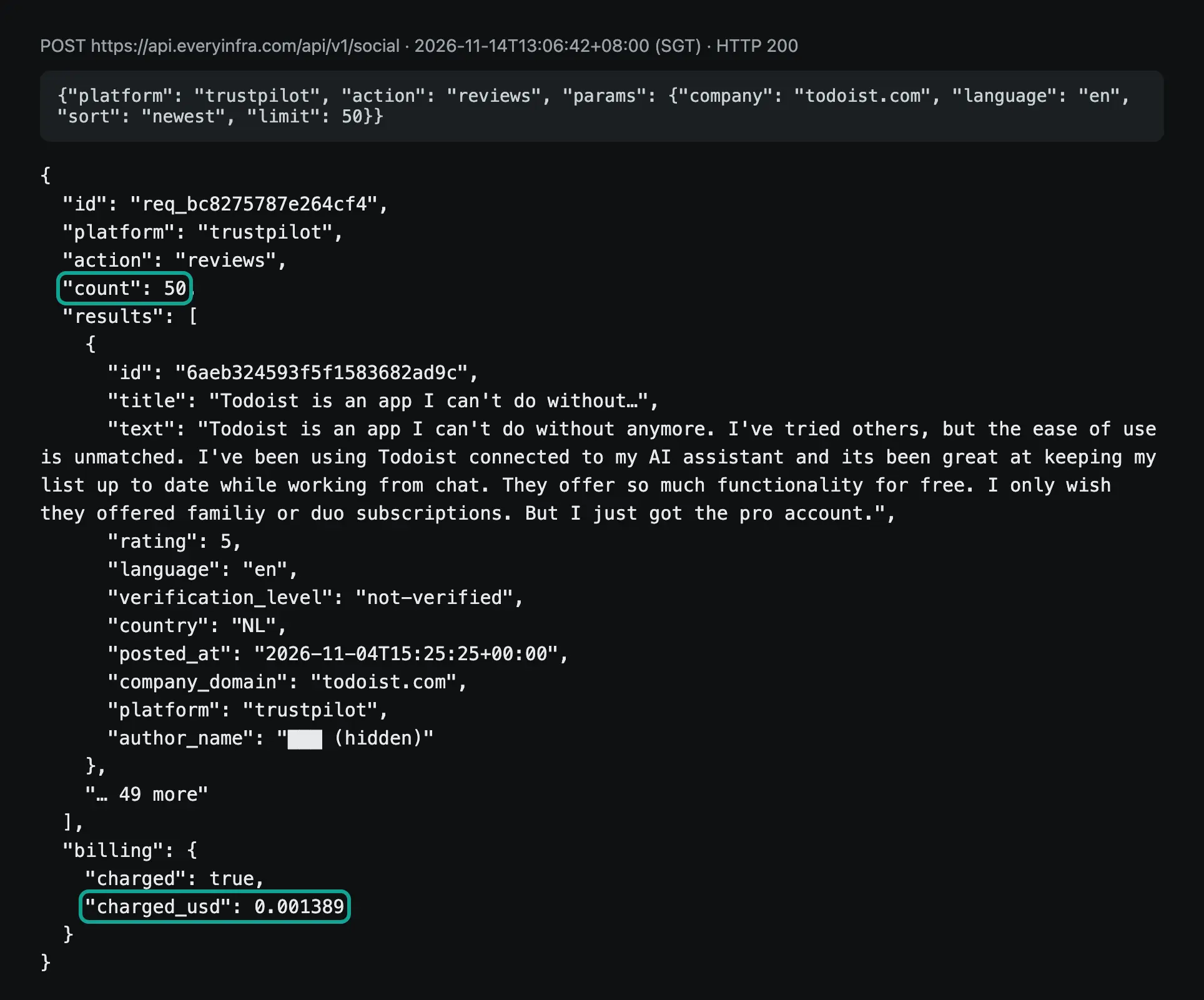
The fields match response_fields in the catalog. The copy analysis uses only a few of them. title and text give the words, and rating gives the stars (score on Google Play). posted_at gives the date, and id removes duplicates.
Trustpilot also returns reply_text for the company reply. Capterra returns separate pros and cons fields and an incentivized flag for reviews that the platform collected with an incentive. The first G2 record is a summary (record_type: summary) with G2's own top_pros and top_cons. We received author names and avatars, but we do not use them in the analysis and we do not quote them.
After we removed duplicates across the three rounds, the English sample had 286 reviews. Trustpilot has 54, G2 49, Capterra 19, App Store US 99, Google Play English 40, and Reddit 25 posts.
The 19 Capterra reviews come from the "Todoist for Business" product page (p/149339/Todoist-for-Business/), so read them as reviews from team users. Round 3 also pulled 100 Spanish reviews (50 from the Spanish App Store and 50 from Google Play in Spanish). We counted them with a Spanish word list in the Spanish section below. The two groups add up to 386 reviews, but we do not merge the counts. The theme table, the platform comparison, and the quote table use only the 286 English reviews.
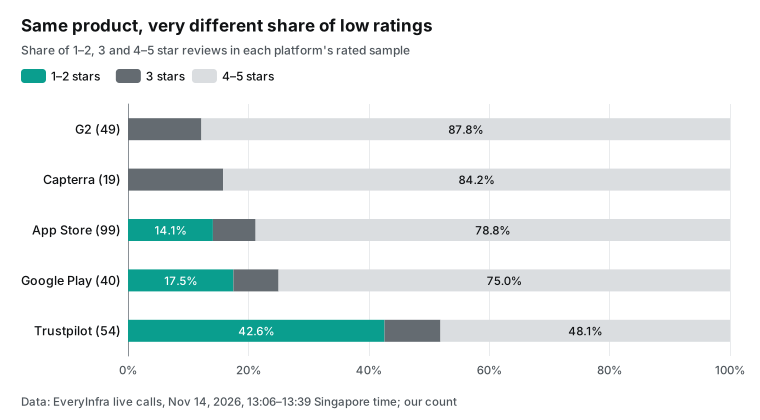
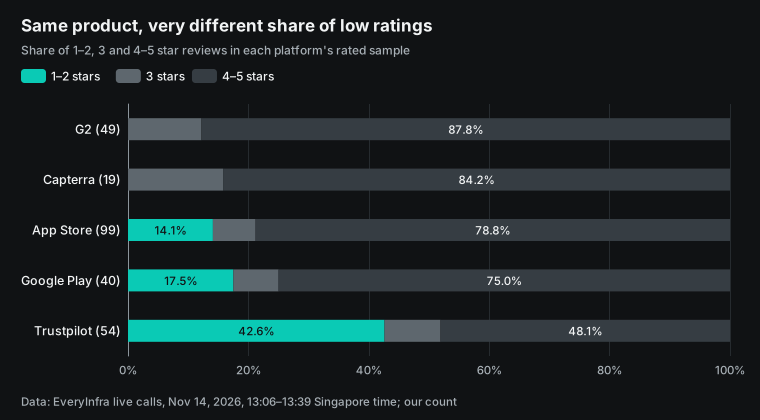
Of the 54 Trustpilot reviews, 13 mention support or refunds, 16 mention price or subscription, and 9 mention bugs.
Trustpilot has 23 reviews with 1 or 2 stars. In those 23, support and refunds has 6 matches, price and subscription 6, and bugs and sync errors 4. All praise themes together have only 6 matches. On G2, 0 of 49 reviews mention support or refunds. All 19 Capterra reviews have incentivized set, so the platform collected them, and none of them has 1 or 2 stars.
With one platform only, the low-star share can be anywhere from 0% to 42.6%. For each row of the quote table, check which platforms its count comes from (the last column of the theme table in the next section).
The shape of the rating spread is also different. Trustpilot has 19 one-star and 20 five-star reviews out of 54. Together that is 39 reviews, or 72.2%, and only 15 reviews have 2 to 4 stars. The reviews sit at the two ends.
G2 is the opposite. Of its 49 reviews, 23 have 4 stars, 20 have 5 stars, and 6 have 3 stars, with none below 3. The App Store US sample has 68 five-star and 10 one-star reviews out of 99. Google Play English has 28 five-star and 6 one-star reviews out of 40. On a platform with two ends, look for the step where users turn against the product. On a platform with a narrow spread, look for the words that happy users choose.
The counting script: what 286 reviews praise and criticize
We fixed the method before we pulled any data. It has 10 themes (5 praise, 5 complaint), 3 to 8 English keywords per theme, and one count per theme per review. Nobody picks sentences by hand.
For each review, the script joins title, text, pros, and cons. It removes duplicates by platform and ID, and it skips the G2 summary record. This is the full word list. With it, you can get each number in the table below.
PRAISE = {
    "P1 natural language quick add": [r"natural language", r"quick add", r"\bnlp\b", r"type (it|tasks?) (in|like)", r"parse"],
    "P2 sync across devices": [r"\bsync", r"devices?", r"across (all )?(my )?(platforms|devices)", r"cross[- ]platform", r"phone and (laptop|computer|desktop)"],
    "P3 simple / clean / easy": [r"\bsimple\b", r"\bclean\b", r"\beasy\b", r"intuitive", r"ease of use", r"minimal"],
    "P4 recurring tasks & reminders": [r"recurring", r"repeat(ing)? task", r"reminders?"],
    "P5 projects, labels, filters": [r"\bprojects?\b", r"\blabels?\b", r"\bfilters?\b", r"organi[sz]"],
}
COMPLAINT = {
    "C1 price & subscription": [r"\bprice", r"subscription", r"premium", r"\bpro\b", r"\bpay(ing|wall)?\b", r"expensive", r"\bcost", r"\bfree (plan|version|tier)"],
    "C2 missing features": [r"missing", r"\bwish\b", r"\black", r"feature request", r"doesn'?t have", r"no way to", r"needs? (the ability|a way)"],
    "C3 bugs & sync issues": [r"\bbug", r"crash", r"glitch", r"not working", r"doesn'?t work", r"sync (issue|problem)", r"stopped working", r"broken"],
    "C4 support & refunds": [r"\bsupport\b", r"refund", r"customer service", r"charged"],
    "C5 calendar & integrations": [r"calendar", r"integration", r"google cal", r"outlook"],
}
def hits(text, lex):
    t = text.lower()
    return [name for name, pats in lex.items() if any(re.search(p, t) for p in pats)]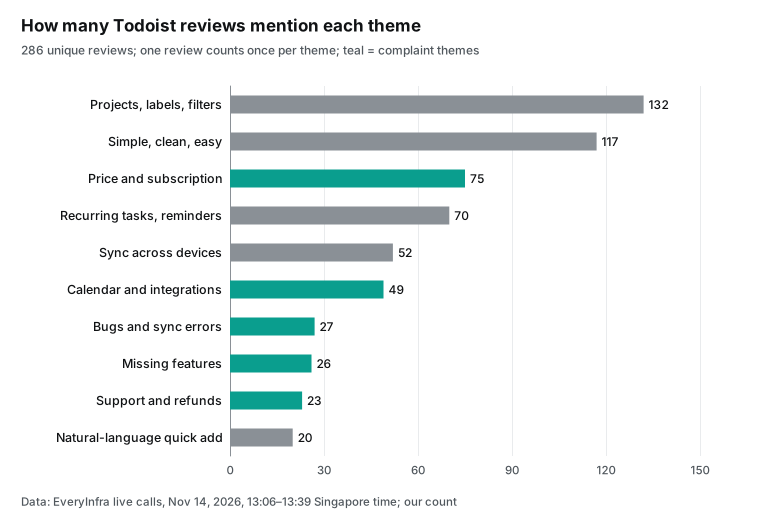
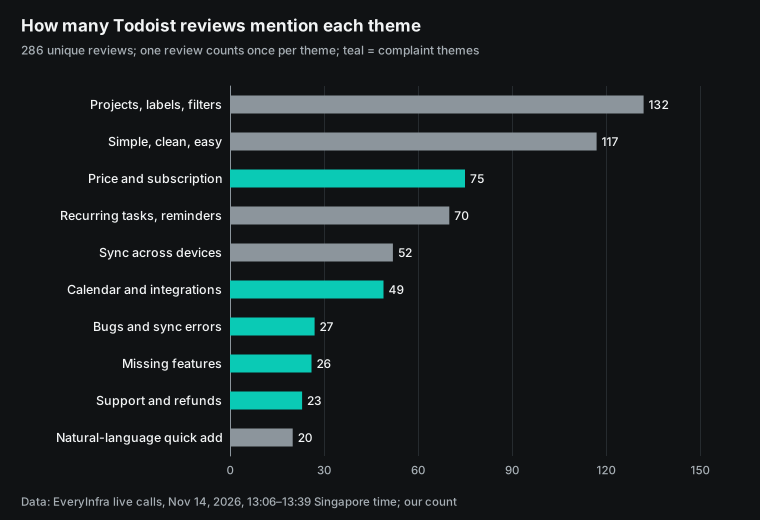
| Theme | Reviews that mention it | 4–5 stars | 1–2 stars | Mostly on |
|---|---|---|---|---|
| Projects, labels, filters | 132 | 106 | 4 | App Store 45, G2 41 |
| Simple, clean, easy | 117 | 100 | 5 | App Store 44, G2 40 |
| Price and subscription | 75 | 53 | 9 | App Store 23, G2 18 |
| Recurring tasks and reminders | 70 | 55 | 4 | G2 24, App Store 21 |
| Sync across devices | 52 | 35 | 3 | G2 18, App Store 11 |
| Calendar and integrations | 49 | 34 | 2 | App Store 17, G2 14 |
| Bugs and sync errors | 27 | 10 | 9 | Trustpilot 9, App Store 8 |
| Missing features | 26 | 18 | 3 | App Store 12, Trustpilot 5 |
| Support and refunds | 23 | 13 | 8 | Trustpilot 13, App Store 7 |
| Natural-language quick add | 20 | 15 | 1 | G2 8, Capterra 5 |
"Projects, labels, filters" and "simple, clean, easy" have the most mentions, and almost all of them are in high-rated reviews. Users praise a tool that holds a lot without clutter. Single features get fewer mentions. "Price and subscription" has 75 mentions and ranks third. But 53 of them are in 4 to 5 star reviews, and only 9 are in 1 to 2 star reviews.
When a high-rated review mentions price, a common point is that the free plan is enough or that Pro is worth it. "Natural-language quick add" has only 20 mentions, but the reviews that mention it are specific. For example, a 5-star G2 review from April 7, 2026 says that you can type a messy sentence. The app then parses the date, project, and priority at once.
Noise exists too. A Reddit search for "todoist" returns some posts about other tools that mention Todoist once, and keyword matching counts them. Three posts about a self-hosted project tool matched the calendar and project themes. We use Reddit only as a hint about which tools people compare and base the conclusions on the five rated platforms.
You can check the keyword count against G2's own summary. The first record in the G2 response is a platform summary. It says that Todoist has 859 G2 reviews with a mean of 4.5. Its top_pros and top_cons are labels and mention counts that G2 builds from the reviews. G2 does not say which reviews these counts use, so we compare only the order, not the numbers:
| G2 label (mentions) | Our theme | Our count in the 49 G2 reviews |
|---|---|---|
| Ease of Use (12), Intuitive (4) | Simple, clean, easy | 40 |
| Organization (4), Task Management (6) | Projects, labels, filters | 41 |
| Integrations (3) | Calendar and integrations | 14 |
| Missing Features (3), Limited Features (3) | Missing features | 4 |
| Expensive (2) | Price and subscription | 18 (includes praise of the price) |
| Calendar Issues (2), Lack of Integration (3) | Calendar and integrations | Same 14 |
The two sides point the same way. "Ease of use" and "organizing" lead the praise, and each complaint label has only two or three mentions, which agrees with 0 low-star G2 reviews.
Price is the difference. G2 counts "Expensive" only as a con, with 2 mentions. Our price word list counts any mention of price. Of the 18 G2 matches, 17 have 4 stars or more, and most of them say whether the plan is worth the money. So read the price count with the star columns. The total alone makes price complaints look larger than they are.
Todoist's App Store page and Google Play page put natural-language capture and Quick Add first, with the example "Submit report every Friday at 4pm #Work". The users praise other things most: "projects, labels, filters" (132 reviews) and "simple, clean, easy" (117), while natural-language quick add has 20. The features that the company leads with and the benefits that users name only partly overlap. That gap gives you a direction for an A/B test of the hero section: the company's words against the users' words.
The same count in Spanish
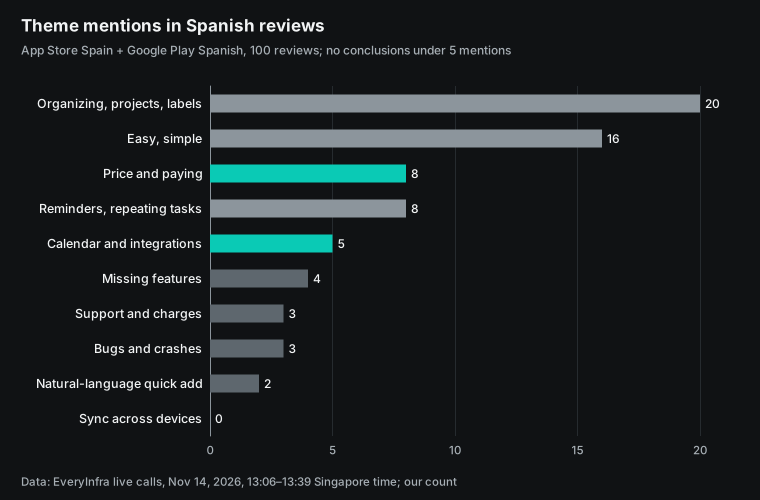
We took 50 reviews from the Spanish App Store and 50 from Google Play in Spanish. We counted them with a Spanish word list that we wrote before the pull. The top two themes match the English sample: organizing, projects, and labels (20), and easy or simple (16).
Reminders and repeating tasks (8) and price (8) come next. Several Spanish reviews that mention price praise the free plan. Themes with fewer than 5 mentions get no conclusion.
The two Spanish sources also differ. In the Spanish App Store, 10 of 50 reviews have 1 or 2 stars (20.0%). In Google Play in Spanish, 3 of 50 do (6.0%). As with the English sample, do not take complaint material for a Spanish page from one store only.
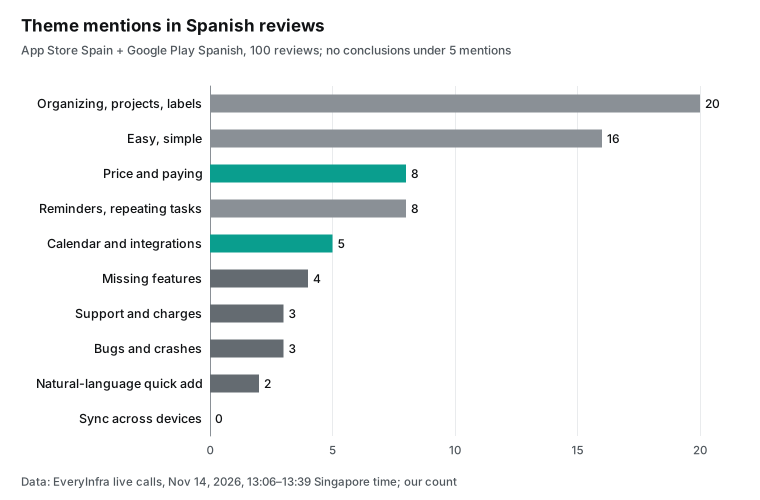
Two low-rated Spanish reviews point to the pricing page. A 2-star review says that the free plan does not show the weekly or monthly calendar. That is correct, because the Todoist pricing table puts the calendar layout outside the free plan, so the page should say so up front. A 1-star review says that reminders arrive only at the due time.
Reminders ahead of time are the Pro "Custom Reminders". This brings us back to the English 1-star review about paid reminders. The pricing table should list the two kinds of reminders on separate rows.
| Spanish quote (store, stars, date) | What it tells the page |
|---|---|
| "No puedes ver gratuitamente el calendario semanal" (App Store Spain, 2, April 19, 2026) | Say on the pricing table that the calendar view is a Pro feature |
| "no envía notificación de recordatorio, solo ya cuando venció" (Google Play, 1, August 23, 2026) | Name due-time reminders and custom reminders on separate rows |
| "No he pagado nada y aun así me está siendo demasiado útil" (Google Play, 5, November 3, 2026) | A "free for personal use" block above the plans |
User quotes to copy changes: one table
To turn the counts into copy, we use only themes with 5 or more mentions. Each quote excerpt has 12 English words or fewer and no author name. The "suggested rewrite" column is a reference for readers. It is not Todoist's real page and does not represent Todoist's position.
| Theme (mentions) | Quote excerpt (platform, stars, date) | Suggested rewrite | Page section |
|---|---|---|---|
| Simple, clean, easy (117) | "clean, intuitive, reliable … without getting in the way" (App Store, 5, November 5, 2026) | Use the users' own words in the headline: clean, stays out of your way. Add "a lot of tasks, no clutter". | Hero headline and subheadline |
| Projects, labels, filters (132) | "keeping everything organized without getting in the way" (same review) | First feature block is about organizing: projects, labels, and filters together | First feature block |
| Recurring tasks and reminders (70) | "I can repeat tasks every day if necessary" (App Store, 5, September 29, 2026) | A separate "repeating tasks" block with daily, weekly, and monthly examples | Feature blocks |
| Sync across devices (52) | "works flawlessly between all of my iOS devices" (G2, 5, March 12, 2026) | Under the platform icons: "Add it on your phone, finish it on your laptop" | Download section |
| Natural-language quick add (20) | "type a messy sentence … the app instantly parses" (G2, 5, April 7, 2026) | A live input example in the hero that splits one sentence into date, project, and priority | Hero demo |
| Price and subscription (75; 9 at 1–2 stars) | "even the simple reminders require payment" (App Store, 1, October 17, 2026) | In the pricing table, list "task reminders" and "custom reminders" on separate rows; the first is in the free plan | Pricing comparison table |
| Support and refunds (23; 8 at 1–2 stars) | "impossible to cancel a subscription after … a free trial" (Trustpilot, 1, February 13, 2025) | Add a pricing FAQ: where to cancel, and whether you get a reminder before the trial ends | Pricing FAQ |
| Bugs and sync errors (27; 9 at 1–2 stars) | "App refuses to launch after the iOS update" (App Store, 1, September 30, 2026) | No copy change. Send it to engineering and the status page, not the landing page | Not on the landing page |
The Capterra sample points to the price row too. In the cons field, 3 of its 19 reviews say that reminders are locked behind the paid plan. One says that reminders used to be in the free version.
The 3 reviews are from September 16, November 4, and November 12, 2026, all in the two months before we read them. They have 4, 5, and 4 stars, so users who give high ratings also report this problem. A search for "remind" in the cons field matches 4 reviews. The fourth says that daily tasks sometimes do not send a reminder, which a setting can change, so we do not count it. The 1-star App Store review says that "even the simple reminders require payment".
The Todoist pricing table shows "Task reminders" as available on all three plans and "Custom Reminders" only on Pro and Business. The reviewer probably hit the custom reminder limit and thought that it applied to all reminders. For a complaint of the type "the feature exists, but users think it does not", try new words first. Put both reminder names and the difference between them in the pricing table and the feature block. Then check if the count of this complaint goes down in the next run. The bugs row is the opposite case. New words do not fix a crash, so the table marks it "not on the landing page".
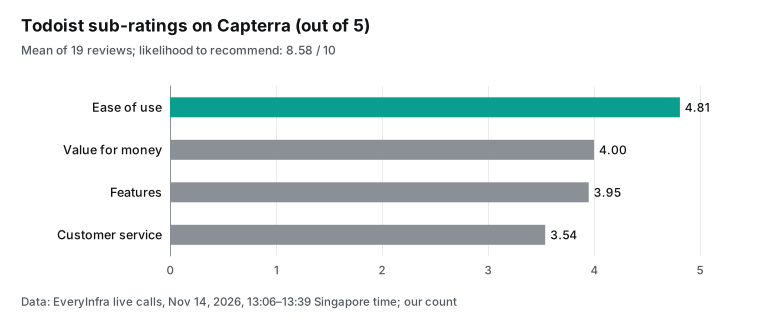
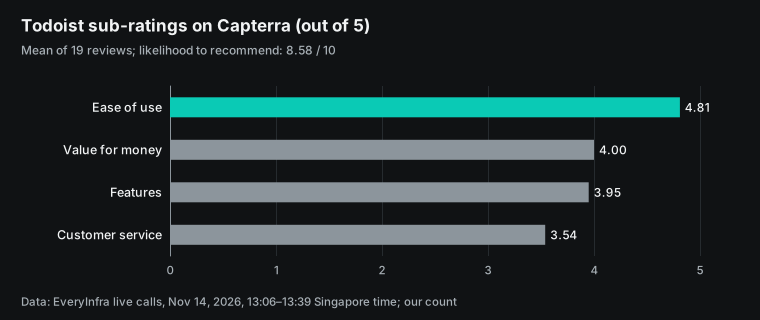
The 19 Capterra reviews also have sub-ratings. Ease of use averages 4.81, value for money 4.00, features 3.95, and customer service 3.54. Likelihood to recommend is 8.58 out of 10. Ease of use is well ahead of the rest, which matches the 117 mentions of "simple, clean, easy". Customer service is last, which matches the low ratings around support and refunds.
Write the suggestions back as CMS drafts (configuration example)
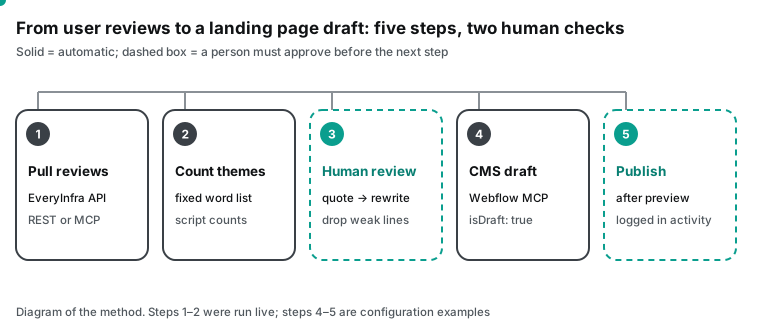
We did not run the Webflow side of this section. Our test machine has no Microsoft 365 tenant and our test account has no paid Webflow site. The commands, prompt, and tool calls below are configuration examples that follow the Webflow and Anthropic documents. The EveryInfra side is different.
We got the server URL, the authentication header, and the tool names from a live tools/list call at 13:12 Singapore time on November 14, 2026. The server returned 12 tools. This workflow uses everyinfra_call_api, which calls any data capability, and everyinfra_get_job, which reads the result of an async job.
Route 1: two MCP servers in one Claude Code session
The simplest way to pull review data and write to Webflow in one session is Claude Code. The Anthropic Claude Code MCP documentation gives the syntax for a remote server: claude mcp add --transport http <name> <url>. Servers that need a request header take --header. The Webflow Claude Code install page says that after you add the server, you type /mcp in a session and select Webflow. A browser window then opens an OAuth page where you choose the sites to authorize, and the MCP Bridge App installs at the same time. The page also recommends one project folder per site, with -s project, so that each authorization stays inside that folder.
# Configuration example: run in an empty folder that you use only for landing page work
export EVERYINFRA_API_KEY="key from the EveryInfra console"   # keep it in the environment, not in a file

# Webflow: OAuth, authorize in the browser the first time you run /mcp
claude mcp add --transport http -s project webflow https://mcp.webflow.com/mcp

# EveryInfra: API key in a request header
claude mcp add --transport http -s project everyinfra https://api.everyinfra.com/mcp \
  --header "Authorization: Bearer ${EVERYINFRA_API_KEY}"
The two commands use different authentication. Webflow uses OAuth, and the Webflow server keeps the token. EveryInfra uses an API key in the request header; our remote MCP page says that the client sends Authorization: Bearer on each request. The project scope keeps the Webflow authorization inside this one folder, so an agent in another folder cannot reach the site.
The prompt must say "drafts only" in plain words. This is the prompt that we give the agent. Before you publish, the /guide-publishing skill in the Webflow Help Center shows what changed since the last publish.
Task: Suggest landing page copy changes for a Todoist-style page from real user reviews.
Write the suggestions to the Webflow CMS as drafts. Do not publish.
1. Use everyinfra_call_api to pull reviews: trustpilot/reviews (company=todoist.com, language=en, limit=50),
   g2/reviews (url=https://www.g2.com/products/todoist/reviews, limit=50),
   app_store/reviews (app_id=572688855, country=us, limit=50). Do not use other capabilities.
2. Count themes with my word list. Output: theme / count / two quotes (max 12 words, no author names) /
   suggested rewrite / page section.
3. Use the Webflow data_cms_tool action create_collection_items to save each suggestion as a draft item
   in the "Copy suggestions" collection. Use only create_collection_items and list_collection_items.
   Do not call publish_collection_items. Do not edit page elements.
4. When you finish, list the IDs of the new items and wait for me.
Under the MCP specification, each tool call that the model makes is one tools/call message. With the prompt above, the agent should send three everyinfra_call_api calls and some data_cms_tool calls. In the Webflow data tools list, the create_collection_items action of data_cms_tool has the description "Create new items in a collection (as drafts)" and takes collection_id and request{fieldData}. We recommend four fields in the collection: theme, quote excerpt, suggested rewrite, and evidence count. Add one option field for status (pending, accepted, rejected). The reviewer then changes only that field and does not touch the page.
Route 2: the Webflow connector in Microsoft 365 Copilot
In Copilot, an admin allows the Webflow connector in the Microsoft 365 admin center, and each user connects it under Settings → Sources. The review data needs a different path because of authentication. The Microsoft Learn page Set up custom federated connectors lists three methods: Microsoft Entra SSO, OAuth 2.0, and No Auth. An API key in a request header is not on the list, and https://api.everyinfra.com/mcp uses an API key. We did not try to add it as a federated connector in a tenant. Two paths work:
- Build an agent in Copilot Studio that calls the EveryInfra MCP server, then publish the agent to Microsoft 365 Copilot. The Microsoft page Extend your agent with Model Context Protocol says that Copilot Studio supports MCP tools and resources. Its MCP setup accepts an API key. We checked each step in our Copilot Studio MCP article.
- Keep data collection out of Copilot. A weekly script pulls the reviews over REST, builds the theme table, and saves it as CSV or Excel in OneDrive. In Copilot, you ask it to read the table and use the Webflow connector to write the drafts. For scheduled calls and calls that retry, use REST with an
Idempotency-Keyheader, as our idempotency key article shows.
Two of the Copilot skills in the Webflow Help Center apply here. /guide-using-cms gives advice on CMS structure, and /guide-publishing shows the changes since the last publish and runs pre-publish checks. The Help Center also says that Copilot does not suggest skill names while you type, so you must type the full name.
Let the site keep the "do not write" rules in Agent Instructions
The Webflow How it works page says that Agent Instructions are Markdown rules on the site. The MCP server gives them automatically to each agent that connects. Copilot, Claude, and ChatGPT all get the same file. For review-driven copy, we suggest at least four rules:
# Landing page copy rules (Agent Instructions example)
- Quote only items in the "Copy suggestions" collection with status "accepted". Never show reviewer names or usernames.
- Do not change the meaning of a quote. Do not present a 3-star review as praise. Do not turn one review into "users agree".
- Do not use a number word ("thousands of users", "most people") without an evidence count.
- Create drafts only. A person publishes in Webflow.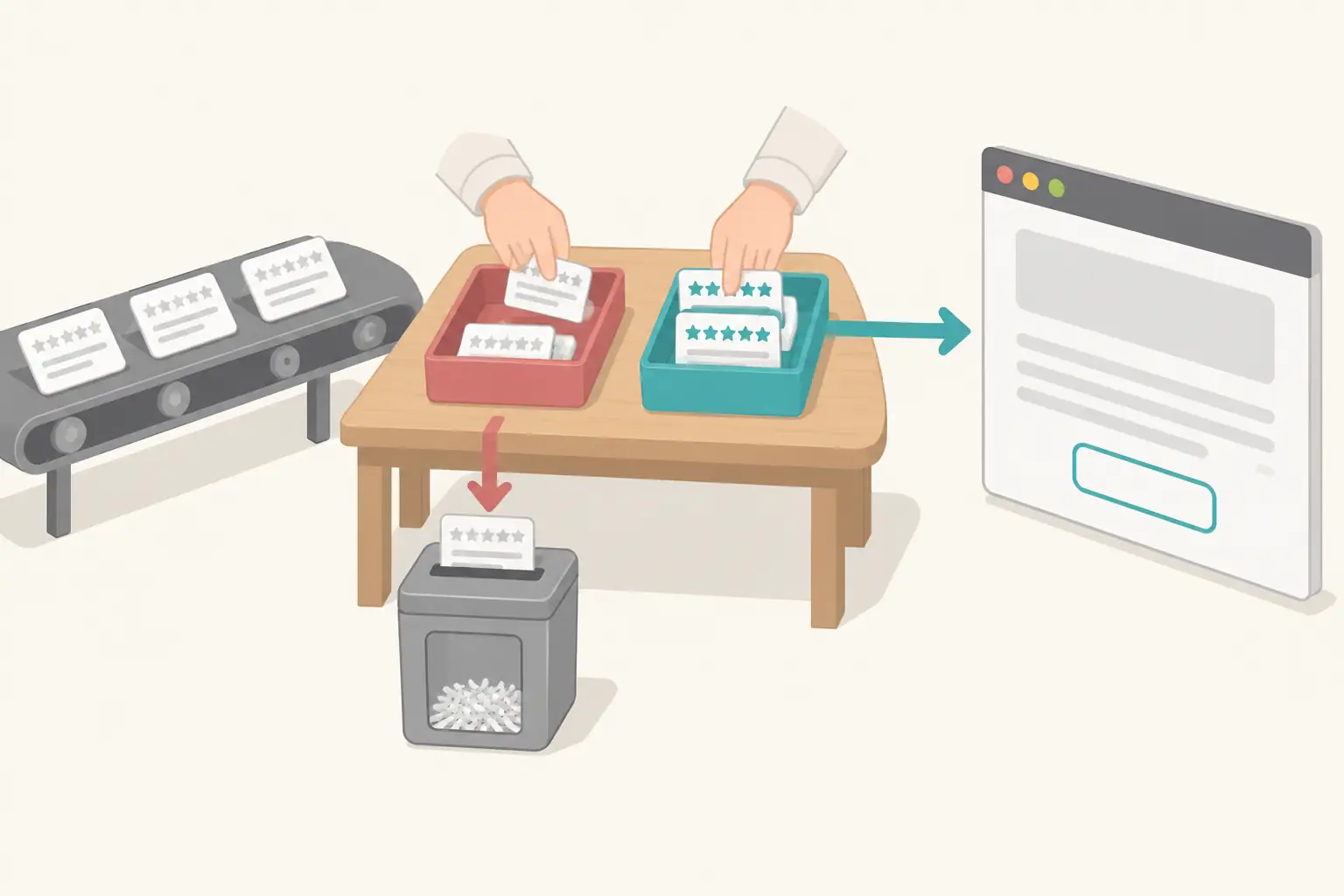
One real round trip: what the model sends and what we return
When the agent runs the prompt above, it exchanges MCP JSON-RPC messages with EveryInfra. We did not let a model send this one. At 13:18:55 Singapore time on November 14, 2026, we sent by hand a tools/call message with the same shape that a model sends. It asked for the newest English Google Play reviews of Todoist:
{"jsonrpc": "2.0", "id": 7, "method": "tools/call",
 "params": {"name": "everyinfra_call_api",
            "arguments": {"platform": "google_play", "action": "reviews",
                          "params": {"app_id": "com.todoist", "language": "en", "sort": "newest", "limit": 40}}}}
The result is in a text block in result.content. When you parse it, it has the same structure as the REST response (excerpt; we removed the author name and avatar):
{"id": "req_3a72a56574e74bb0", "platform": "google_play", "action": "reviews",
 "count": 40,
 "pagination": {"page": 1, "has_more": true},
 "next_page_token": "pt1.AC4vB2... (cut)",
 "results": [{"id": "9701e637-80cc-4fe0-9f20-fb22013ca30c", "app_id": "com.todoist",
              "text": "Easy to make to do list. Helps me finish work on time.",
              "score": 5, "reply_text": "Thanks for sharing, ...! We're happy Todoist helps you stay on top of your work",
              "reply_at": "2026-11-13T13:32:30.235000+00:00", "app_version": "v12342"}, "... 39 more"],
 "billing": {"charged": true, "charged_usd": 0.001389}}
Three parts of this round trip affect the agent's next step. count is 40, so the agent can decide whether that is enough. If it is not, the agent sends next_page_token to get the next page. The catalog says that the token is valid for 24 hours and that each page is one call.
reply_text is the company reply. The company replied to 27 of these 40 Google Play reviews, and this helps copy work too. The words that the company uses for its own features in replies are words that the team already accepts. billing.charged_usd is the cost of this call, so the agent can add up the charges and stop at a budget.
We counted the replies by star rating. A review counts as answered when reply_text is not empty:
| Platform and sample | 1–2 stars answered | 3 stars answered | 4–5 stars answered | Total |
|---|---|---|---|---|
| Trustpilot English (54) | 15/23 (65.2%) | 4/5 | 19/26 (73.1%) | 38/54 (70.4%) |
| Google Play English (40) | 6/7 (85.7%) | 3/3 | 18/30 (60.0%) | 27/40 (67.5%) |
| Google Play Spanish (50) | 3/3 | 2/2 | 30/45 (66.7%) | 35/50 (70.0%) |
On Google Play in English, the reply rate for low-rated reviews is 25.7 percentage points higher than for high-rated reviews. On Trustpilot the two rates are close.
The reply text needs a separate check. Of the 15 replies to low-rated Trustpilot reviews, 4 name a feature, a plan, or a settings path such as "Settings > Notifications/Reminder". On Google Play in English, 1 of 6 does. The rest are an apology and a link to a support ticket. So replies give a few feature names that the team uses. Use them to check the words on the pricing page and in the feature blocks. Do not use them as a source for the theme count.
For flows that retry automatically, use REST with an Idempotency-Key header so that a retry does not count as a new request. Our idempotency key article has the full pattern.
The cost of one landing page update
You can check the data API cost with the catalog prices. One full pull is one call each to five review platforms ($0.001389 each) plus one Reddit search ($0.000792). The total is 5 × 0.001389 + 0.000792 = $0.007737.
In this test, the first call on each platform returned 50 Trustpilot, 49 G2, and 19 Capterra rows. It also returned 50 App Store, 40 Google Play, and 25 Reddit rows. That is 233 in total. So one pull gives a little over 200 reviews, and the number depends on the day.
If you run it once a week, that is about 4.3 runs and about $0.033 a month. If you also pull a second sort order on each platform, as we did here, the cost doubles to less than $0.07 a month. The time of the people (the copywriter, the reviewer of the preview, and the person who publishes) costs much more than these API fees.
| Item | Price | One update | Per month (weekly) | Source and date read |
|---|---|---|---|---|
| EveryInfra review capabilities ×5 | $0.001389 per call | $0.006945 | about $0.030 | Capability catalog, November 14, 2026 |
| EveryInfra Reddit search ×1 | $0.000792 per call | $0.000792 | about $0.003 | Capability catalog, November 14, 2026 |
| Our actual spend (12 billed calls) | — | $0.015474 | — | Sum of charged_usd in the responses |
| Webflow MCP Copilot connector | Free to install, no Webflow AI credits at present | $0 | $0 | Webflow update page, November 14, 2026 |
| Microsoft 365 Copilot Business add-on | $18 per user per month (was $21), paid yearly | — | $18–21 per user | Microsoft pricing page, November 14, 2026 |
| Webflow site plan | Depends on the plan; CMS needs a paid site plan | — | Your current plan | Webflow pricing page |
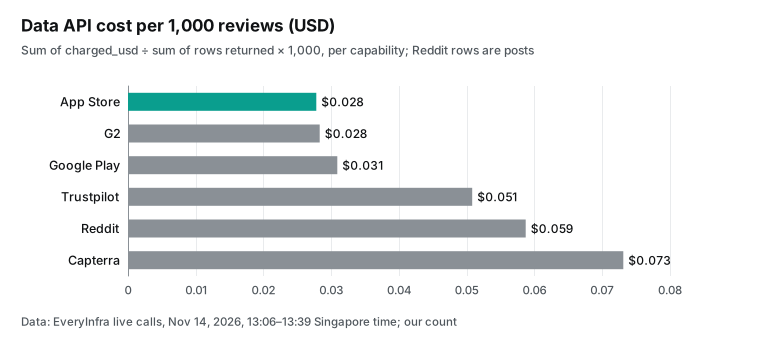
Per 1,000 reviews, the review capabilities cost between $0.028 (App Store) and $0.073 (Capterra). The difference comes from how many rows one call returns. The App Store and G2 returned about 50 rows per call, so the price per review is low. The Capterra call returned 19 rows, and the Trustpilot round for 1 and 2 star reviews returned 23.
So their price per review is higher. Most of the money is the license: one Microsoft 365 Copilot Business add-on license costs $18 per month at the current list price. That pays for $18 ÷ $0.007737 ≈ 2,326 full pulls, and each pull returns a little over 200 reviews. On the Claude Code route, the model side depends on your own Claude plan or API usage, and we did not estimate it.
Human review before anything goes live: rules, platform terms, and three gates
When you move customer words onto a landing page, the first line to watch is advertising law. In the United States, the FTC Rule on the Use of Consumer Reviews and Testimonials (16 CFR Part 465) covers fake and false reviews. Section 465.2 makes it an unfair or deceptive practice for a business to write, create, or spread a false review or testimonial. This includes a review that materially misrepresents whether the reviewer exists, used the product, or had the stated experience. The same rule defines a "consumer testimonial" as an advertising or promotional message that consumers are likely to believe reflects the experience of a real customer. A line such as "Users say: I can't live without it" on a landing page is that kind of message.
The FTC Guides Concerning the Use of Endorsements and Testimonials (16 CFR Part 255) make a similar point.
An endorsement must reflect the honest opinion of the endorser and must not be taken out of context. This is not legal advice. The process rule that follows from it is simple. Do not change the meaning of a quote. Do not show a positive half-sentence from a 3-star review as a 5-star endorsement. Get the reviewer's permission before you quote them.
The second line is the review platform's own terms. The February 2026 Trustpilot Guidelines for Businesses include the key point "Reviewers own their reviews", and reviewers can edit or delete them at any time. A quote that you fix on your page can stop matching the original a few months later. Our practice is to use the quotes for analysis and to put rewritten copy on the page, not the raw review.
If you want to show a review, use the platform's display widget or get the reviewer's consent first. The Google review snippet documentation and the 2019 Search Central post on review rich results cover this. Reviews that a business marks up about itself are "self-serving" and do not show star ratings. So copying third-party reviews onto your own page does not get you stars in search results.
The third line is the agent itself. The tools chapter of the MCP specification (2025-06-18) has a security section. It says that clients SHOULD prompt for user confirmation on sensitive operations and show tool inputs before the call. Webflow and Copilot follow that direction. Copilot asks before each write by default, and new Webflow CMS items are drafts.
The MCP server limits the agent to your site role, and the activity log records each change. A thread on r/webflow asks how agencies get client approval after AI drafts CMS content. The replies mention Google Docs comments, a Notion step in the middle, Webflow preview links, and staging domains. From all of this, we use three gates:
| Gate | Who | Where | If it fails |
|---|---|---|---|
| 1. Review the quote table | The copywriter | Status field in the "Copy suggestions" collection | Agent Instructions block quotes from items that are not "accepted" |
| 2. Preview the draft | Product or brand owner | Webflow draft or staging domain | Nothing is published; the draft stays in the CMS |
| 3. Publish | A person with publish rights, by hand | Webflow publish button | The agent has no permission for publish_collection_items |
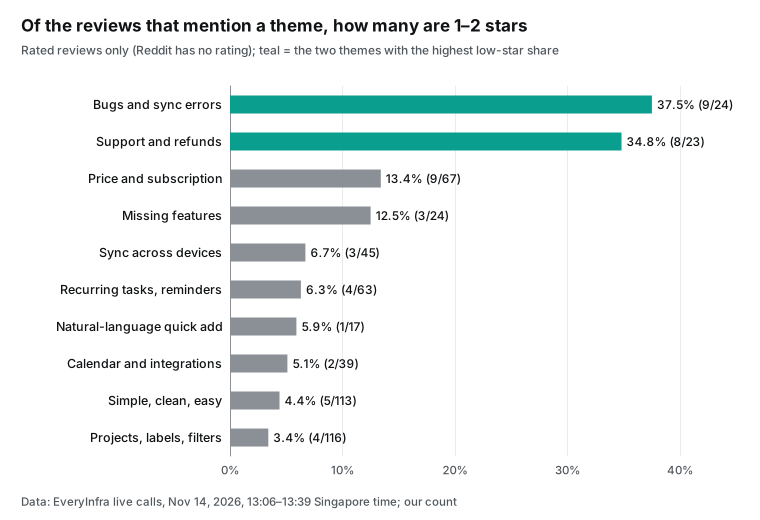
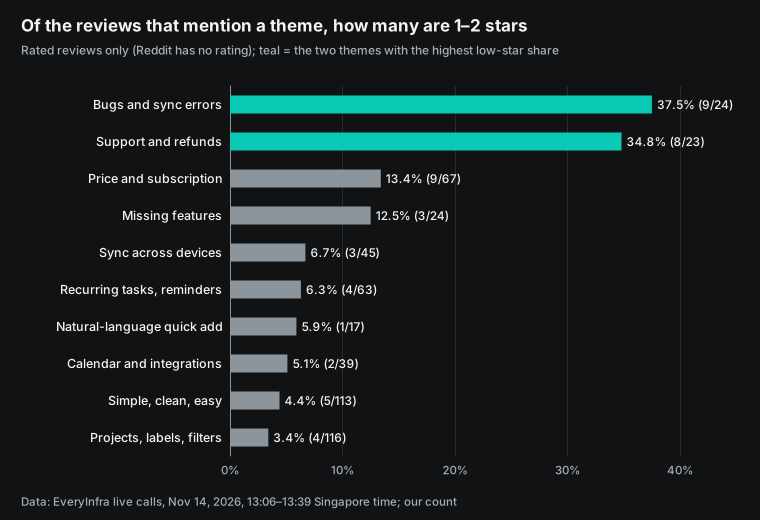
Reviews that mention bugs and sync errors, or support and refunds, have the highest share of low ratings. Copy cannot fix those problems. A line such as "rock-solid sync" on the page would contradict what those users lived through. At gate 1, the reviewer takes these two themes out of the quote table and sends them to the product and support teams.
Price is different. Of the 67 rated reviews that mention price, 53 have 4 or 5 stars. A clear free versus Pro comparison on the page helps more than silence about price.
Limits and points to check
A keyword count tells you whether a review mentions a theme. It does not tell you whether the review praises or criticizes it. The word "sync" can appear in "sync is bulletproof" and in "sync lost my data". We use the star rating to separate the two, but 3-star reviews and Reddit posts, which have no rating, stay in the middle. Our word list has 10 themes with 3 to 8 English keywords each.
For another product you must write a new list, and you must write it before you pull the data. If you need the direction of each opinion, you can ask a model to tag each review. A 2024 evaluation on arXiv and an earlier 2023 study compare large language models on aspect-based sentiment analysis. A 2025 tourism study compares GPT-4o tags with human tags. Check a sample of model tags by hand before you treat them as facts.
The sample has limits too. With newest-first order, the oldest English Trustpilot review for todoist.com in our pull is from 2019. The App Store "most helpful" order puts long reviews from earlier years first; the oldest is from 2017. So "how many people complain about X" describes these pages of reviews. It does not describe all users, and it does not describe the product today.
For a landing page, cut the sample by time, for example to the last 12 months. The Trustpilot capability takes date=last12months for this. Also look for bursts. On September 30, 2026, three 1-star App Store reviews on the same day said that the app did not open after an iOS update. That was an incident, not a long-term opinion, and it does not belong in copy.
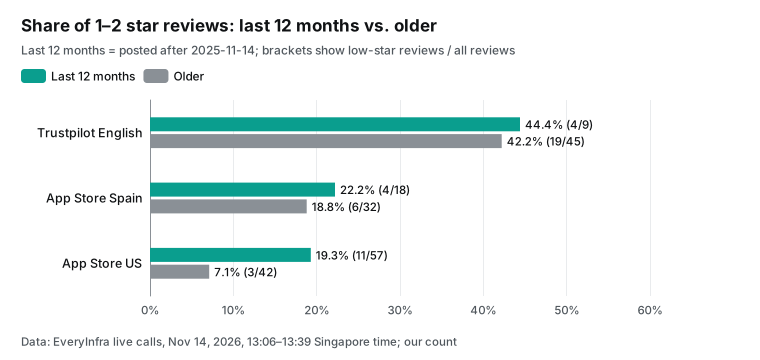
A time cut changes the result. Of the 99 App Store US reviews, 57 were posted in the last 12 months, and 11 of them have 1 or 2 stars (19.3%). Of the 42 older reviews, 3 do (7.1%). Three of the 11 come from the crash after the iOS update on September 30, 2026, and without them the recent share is still higher.
The sort order also matters: "most helpful" puts long, positive reviews from earlier years first, so the older sample leans toward praise. The Spanish App Store shows a smaller gap (22.2% against 18.8%), and Trustpilot has only 9 recent reviews, too few for a conclusion. Give recent reviews more weight. Before you reuse praise from an old review, check that the product still works that way.
On the Webflow side, every write step in this article is a configuration example. The Webflow FAQ page says that the MCP server supports "a focused set of Data and Designer API tools". So not every Webflow API endpoint is available through MCP, and it cannot create new localized CMS items yet. On the Copilot side, federated connectors need a Microsoft 365 Copilot add-on license or E7; Copilot Studio licenses and pay-as-you-go do not work. In the Researcher agent, federated connectors are read-only.
How this differs from our Notion MCP and VS Code articles
We have other articles that use review data, each from a different angle. The Notion MCP article is about keys, timestamps, and counts when two agents write to one competitor table. The VS Code cloud automations article sorts app store complaints every day for the engineering team. The Copilot Studio article compares six ways to connect the EveryInfra MCP server inside Microsoft tools, with their authentication rules.
In this article, the output is a Webflow CMS draft. The focus is the theme count, the quote table, and the human checks before publish.
Recent developments
| Date | What changed | Why it matters here |
|---|---|---|
| November 12, 2026 | Webflow released the MCP connector for Microsoft Copilot (update) | Microsoft 365 teams can edit Webflow sites without a tool change; each user needs a Microsoft 365 Copilot add-on license or E7 |
| November 3, 2026 | A developer reported on Microsoft Q&A that Copilot does not pass image results from a custom federated connector's MCP tool to the model as images (thread) | Send review text, not screenshots, through Copilot connectors |
| October 21, 2026 | Webflow launched agent presence, which shows on the canvas where an agent works through MCP (update) | Review can happen while the agent works, not only from the activity log afterward |
| October 19, 2026 | Microsoft Learn updated the custom federated connectors setup page: Entra SSO, OAuth 2.0, or no authentication | An MCP server that accepts only API keys needs OAuth or a Copilot Studio agent |
| October 15, 2026 | Webflow MCP added Analyze, Optimize, and AEO data and a Gemini connector (update, press release) | After a copy change, the same agent can read page conversions to check the result |
FAQ
We took the questions from Google autocomplete for "webflow mcp" and "webflow mcp copilot" on November 14, 2026, and from threads on r/webflow. The answers use only what the sources confirm.
What is the Webflow MCP server URL, and do I need an API key?
Source: the autocomplete phrase "webflow mcp server". The URL is https://mcp.webflow.com/mcp, as the Webflow getting started page shows. It uses OAuth. The How it works page says that you do not store API keys on your machine and that tokens refresh automatically. Only site owners and admins can authorize a site, and each authorization covers one workspace.
Does Webflow MCP work with Claude?
Source: the autocomplete phrases "webflow mcp claude" and "webflow mcp claude code". Yes. In Claude desktop and web, open Connectors and search for Webflow. In Claude Code, add https://mcp.webflow.com/mcp with claude mcp add --transport http, then authorize with /mcp in a session. The Webflow Claude Code install page has the steps.
Which license does the Webflow MCP Copilot connector need, and what does it cost?
Source: the autocomplete phrases "webflow mcp copilot plugin" and "webflow mcp copilot integration". The Webflow update page says that it is free to install and does not currently use Webflow AI credits. The connector page says that it needs a Microsoft 365 Copilot add-on license or Microsoft 365 E7. Copilot Studio licenses and pay-as-you-go are not supported. On November 14, 2026, the Microsoft business pricing page showed the Microsoft 365 Copilot Business add-on at $18 per user per month. The earlier price was $21, paid yearly.
Webflow MCP Copilot not working: what are the usual causes?
Source: the autocomplete phrase "webflow mcp copilot not working". The Webflow FAQ page lists these causes. The client needs a restart or an update to show a new server. A greyed-out site means that you are not its owner or admin.
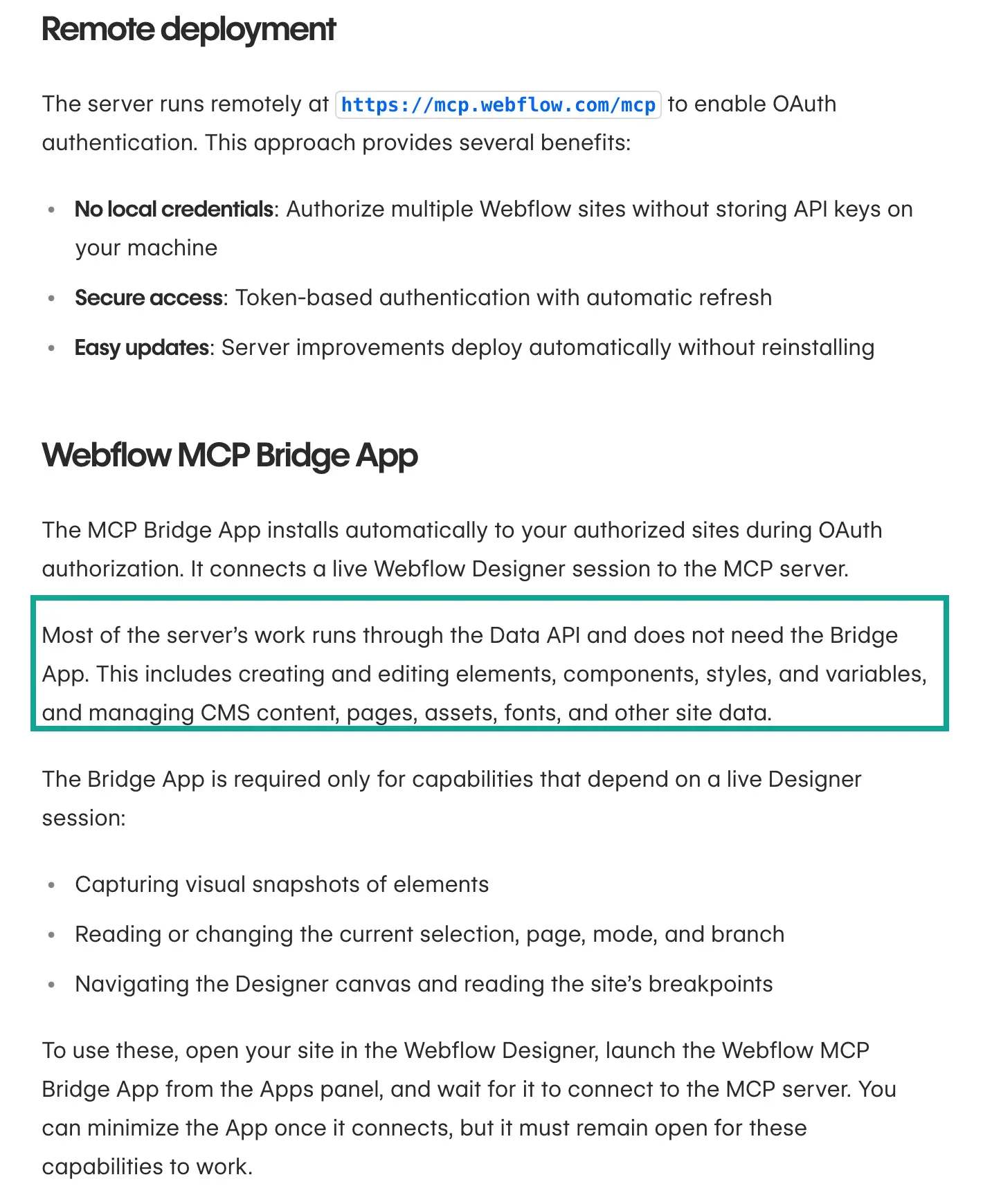
Features that need a live Designer need the MCP Bridge App open in the Designer, and the browser must not put that tab to sleep. A ModeForbidden error means that the current Designer mode does not allow the tool. In Copilot, also check that an admin allowed the connector in the Microsoft 365 admin center. You must also be in its staged rollout (federated connectors overview).
What does the Webflow MCP Bridge App do, and do I need it for CMS work?
Source: the autocomplete phrase "webflow mcp bridge app". The Bridge App installs on your sites during OAuth and connects an open Designer session to the MCP server. The How it works page says that most work goes through the Data API without it, including CMS content and pages. You need it only for element snapshots, the current selection, page, mode, and branch, and canvas navigation. CMS drafts do not need it.
How do I get client approval before AI-drafted CMS content goes live?
Source: the r/webflow thread Anyone using AI to draft CMS content — how do you get client approval before it goes live?. New Webflow CMS items are drafts, and a live item set to draft keeps its live version unchanged (CMS publishing guide). We add a status field that the reviewer changes, and the agent reads only "accepted" items. If the client does not want to log in to Webflow, send a staging domain link. In another r/webflow thread, a Webflow engineering lead wrote that Data API workflows are ready for production. The Designer API side is still maturing.
Get started
- Sign up at EveryInfra and create an API key. Use the quickstart to call
trustpilot/reviewsonce with curl, and check that the response hascountandbilling.charged_usd. - Start from the platform pages for Trustpilot, the App Store, and Google Play. Then check the parameters on the capability pages for Trustpilot, G2, and Capterra. Do the same for App Store, Google Play, and Reddit search. The data market and the free catalog endpoint list all capabilities and prices.
- Write the theme word list before you pull data, then run the counting script to get the quote table.
- In an empty folder, add the Webflow and EveryInfra MCP servers to Claude Code (see the configuration example). Or connect Webflow in Microsoft 365 Copilot and give it the table.
- Let the agent create CMS drafts only. A person publishes after all three gates pass.
References
- Webflow press release: Webflow Launches New MCP Connector for Microsoft Copilot, GlobeNewswire, November 12, 2026
- Webflow Updates: Microsoft Copilot connector, November 12, 2026
- Webflow Marketplace: Microsoft Copilot MCP Connector app page, read November 14, 2026
- Webflow Help Center: Connect Copilot to Webflow, updated November 11, 2026
- Microsoft Learn: Federated connectors overview
- Webflow Developer Documentation: MCP How it works
- Webflow Developer Documentation: MCP getting started
- Webflow Developer Documentation: MCP data tools
- Webflow developer changelog: MCP 2.0, July 21, 2026
- Webflow Updates: MCP with Analyze, Optimize and AEO, October 15, 2026
- Webflow Developer Documentation: publishing CMS items
- Webflow Data API reference: Create Items
- Webflow Data API reference: rate limits
- Webflow Developer Documentation: MCP FAQs
- GitHub: webflow/mcp-server repository
- Webflow Developer Documentation: Webflow MCP server overview
- Webflow Data API reference: Update Live Items
- Model Context Protocol specification 2025-06-18: Authorization
- Webflow Developer Documentation: install in Claude Desktop
- Todoist pricing page, read November 14, 2026
- EveryInfra capability catalog (free endpoint), read November 14, 2026
- App Store: Todoist app page (US)
- Google Play: Todoist app page
- Anthropic: Claude Code MCP documentation
- Webflow Developer Documentation: install in Claude Code
- Microsoft Learn: Set up custom federated connectors, October 19, 2026
- Microsoft Learn: Extend your agent with Model Context Protocol (Copilot Studio)
- eCFR: 16 CFR Part 465, Use of Consumer Reviews and Testimonials
- eCFR: 16 CFR Part 255, Guides Concerning the Use of Endorsements and Testimonials
- Trustpilot: Guidelines for Businesses, February 2026
- Google Search Central: review snippet structured data
- Google Search Central Blog: Making review rich results more helpful, September 16, 2019
- Model Context Protocol specification 2025-06-18: Tools
- r/webflow: Anyone using AI to draft CMS content, how do you get client approval before it goes live?
- arXiv 2412.02279: evaluation of large language models for aspect-based sentiment analysis (2024)
- arXiv 2310.18025: large language models and aspect-based sentiment analysis (2023)
- Tourism & Management Studies: GPT-4o compared with human aspect-based sentiment tags (2025)
- Microsoft Q&A: custom federated connector MCP image tool results, November 3, 2026
- Webflow Updates: agent presence on the canvas, October 21, 2026
- Webflow press release: Webflow and Google Gemini Announce New Agentic Integration, GlobeNewswire, October 15, 2026
- Microsoft: Copilot for business pricing, read November 14, 2026
- r/webflow: Webflow MCP experiences
Reference BL-153