Notion MCP with Two Agents: Keys, Times and Counts in One Competitor Table
Notion memory is private, so a team table needs its own rules. We tested 130 social rows: which key, which time and which count Claude Code and Codex keep.
On November 4, 2026, Notion said that Notion MCP gives all your agents "one shared brain". That memory is a private Memories database for one person. It is not a team table. Say you want Claude Code and Codex, signed in with a ChatGPT account, to write competitor social data into one Notion database. Notion does not solve the hard part for you.
You must decide three things yourself. Which field is the dedupe key? Which time is the update time? Which count wins when two sources disagree?
Our live test shows why. Seven list calls returned 130 rows, and only 68 rows (52.3%) were safe to insert as "a new post from this brand". Of the other 62 rows, 3 were pinned old videos. 19 came from other accounts: 2 Instagram collab posts and 17 non-brand videos in TikTok search. 40 were YouTube rows with only a relative date such as "10d ago".
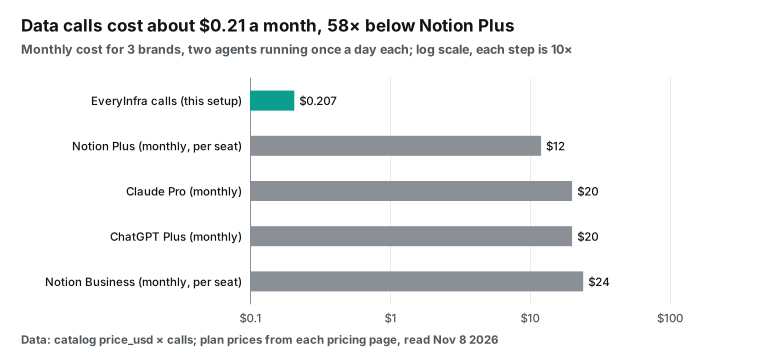
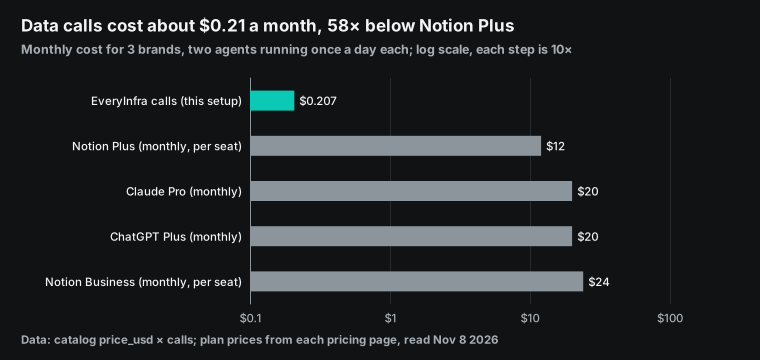
We sent 12 live calls to the EveryInfra data API on November 8, 2026, from 00:17 to 00:48 Singapore time. One call had no key on purpose and cost nothing. We pulled posts from two skincare brands, CeraVe and The Ordinary, on TikTok, Instagram and YouTube. At list prices, three brands and two agents that run once a day cost $0.048372 a week in data calls, or about $0.21 a month.
This guide covers one concrete job. A brand team already uses Claude Code for scripts and Codex, with a ChatGPT sign-in, for research. Both tools can connect to Notion MCP, and both can connect to the EveryInfra remote MCP server. The team wants each agent to pull part of the competitor data and write it into one Notion database. On Monday morning, everyone opens the same table.
First we explain what Notion shipped and where its limits are. Then we design the table, show what the live data taught us, give the config for both clients, and add up the weekly cost. We did not run anything inside a Notion workspace. So every Notion step in this article is a config example, based on the official Notion, Anthropic and OpenAI docs. Every EveryInfra number comes from a real API response.
What Notion shipped on November 4, and what "memory" means
On November 4, 2026, the Notion account on X made an announcement. ChatGPT, Claude, Muse and Bot can now save what they learn to one memory in Notion and use the same skills (Notion post on X). The same thread gives one setup prompt for ChatGPT and one for Claude. Other agents get a single line to paste. That line tells the agent to follow the setup guide in the developer docs and make Notion its context system.
The Help Center sums it up in three points. Every connected agent can pick up where the last one stopped. Agents save your preferences, decisions and project details in a Memories database that only you can see and edit. The setup prompt follows the structure of your current workspace and asks before it creates or changes anything (Notion Help Center: Notion MCP).
The memory feature itself shipped in October. The October 19 release notes say that memory sync went live that day (Notion release notes, October 19). So the November 4 event mostly added setup prompts.
The developer docs explain what this memory is. It is a personal Memories database plus an About page that sums it up. Notion creates both the first time you save a memory. Your memories belong to you, and they do not give any client access to content that you cannot see.
Memory over MCP works on all plans, but only through connections that act as the user. It does not work on connections that the workspace owns (Notion developer docs: personal memory). The write path is also clear: call notion-create-pages with parent set to "memory" (page tools reference).
Two official pages disagree on one point. The Help Center page on Memories says that Memories work in workspaces with Notion AI on. Notion AI is part of Business and Enterprise (View your Notion Agent Memories). The developer docs say "all plans". We could not test every plan. The safe check is simple: try to save one memory in your own workspace.
Put these sources side by side and the answer is clear. Notion memory is good for facts like "this person wants risks first in the weekly report" or "these are the brands in this project". It is not good for hundreds of competitor posts a day that a whole team reads. That data belongs in a normal team database, with fields and dedupe rules that you design. The table below compares the two places.
| Question | Notion personal Memories | Team competitor database (this guide) |
|---|---|---|
| Who can see it | Only you | Shared with the team by page and column permissions |
| How agents write | notion-create-pages with parent: "memory" | notion-create-pages into the database, notion-update-page to change |
| Connection type | User connections only, not workspace-owned | Both; workspace MCP tokens need Business or Enterprise |
| Good for | Preferences, decisions, project context | One structured row per post |
| Dedupe | Notion handles it | No unique constraint; agents look up first |
| Tested here | No | Data API side tested; Notion side is a config example |
Why competitor data goes into a database, not into Memories
There are three reasons. The first is visibility. Memories are private, so a colleague's agent cannot read yours. A competitor table exists so that a group can read it. The second is shape.
A memory is a short text that fills in context at the start of the next chat. A competitor post is a record with fixed columns. You sort it, filter it and count it by week. Notion databases and views do this well.
The third reason is audit. On October 29, Notion added notion-get-version-changes. It lists what changed in a page or database over a time range, and who made each change. This includes edits from Notion AI, Custom Agents and MCP clients.
On November 3, Notion added notion-restore-version, which restores a page or database to an earlier time (Notion developer changelog, change history tools reference). When two agents write to one table, you can find which agent made a bad write and roll it back. A private memory gives you none of that.
One more point is easy to miss. A Notion database has no unique-key constraint. An ID property gives each row a number, but Notion makes that number, and you cannot edit it (Notion Help Center: database properties). The numbers start at 1 for each page (Notion Help Center: Unique ID property). So an ID cannot stop a duplicate that comes from outside. If both agents treat the same TikTok video as new, the table gets two rows.
So you must plan the dedupe step in advance, and keep each lookup small.
Field design: 11 data fields, each from a named response field
We gave the table 11 data fields. We used three rules. Keep only what the weekly report needs. Every field must map to a field in the response_fields list of the EveryInfra catalog. The same name means the same thing on every platform. The catalog is free to read: GET https://api.everyinfra.com/api/v1/social/catalog returns the parameters, response fields and price_usd of each capability (EveryInfra catalog).
| Notion field | Type | TikTok (`tiktok/user_videos`, `tiktok/search`) | Instagram (`instagram/user_posts`) | YouTube (`youtube/user_posts`, `youtube/video`) |
|---|---|---|---|---|
| Key (title) | Title | tiktok: + id | instagram: + post_id | youtube: + id |
| Platform | Select | Fixed value | Fixed value | Fixed value |
| Brand | Select | From author_username | From author_username | From author_username |
| URL | URL | url | url | url |
| Posted at | Date (UTC) | posted_at | posted_at | posted_at from youtube/video |
| Text | Text, first 200 characters | text | text | title |
| Views | Number | view_count | Missing on some posts | view_count |
| Likes | Number | like_count | like_count | like_count |
| Comments | Number | comment_count | comment_count | comment_count |
| Observed at | Date (UTC) | Time of the call | Time of the call | Time of the call |
| Agent | Select | claude-code | codex | codex |
We set three of these rows only after we saw live data. The catalog text alone does not show them. First, the Key column must not use a number type for TikTok IDs. The next sections explain why. Second, Instagram returns two IDs.
post_id is an 11-character shortcode, for example DfU4LSwCopm. id has the form "number_number", for example 4023087433800911462_260452448, and the part after the underscore is the account. We use post_id, because it matches the shortcode in the post URL, so a person can check it by eye. Third, the YouTube post time must come from youtube/video, not from the channel list.
A last detail comes from Notion. If your database has a column named "URL", Notion MCP stores it under the key userDefined:URL. Since October 16, the response tells you about this fix in its warnings list (changelog entry for October 16). When an agent updates that row later, it must use the key name from the response.
The live data also made us add three flag columns. An agent computes them from rules. They do not come from the API. Count precision says if a count is exact or rounded.
Owned says if the posting account is the brand itself. Disclosed says if the post carries a partnership tag. The sections below show the data behind each flag.
Live calls: 7 list calls, 130 rows, and less than 60% safe to insert
We made the live calls in two batches on November 8, 2026, from 00:18 to 00:27 Singapore time. We split the work like a real team. Claude Code takes TikTok. Codex, with a ChatGPT sign-in, takes Instagram and YouTube. We picked CeraVe and The Ordinary because both brands have official accounts on all three platforms and post often.
One is a mass-market pharmacy brand. The other sells to ingredient-focused buyers. Their comment sections feel very different. Every call used the same test key.
| Singapore time | Capability | Parameters | Rows | Charged | Agent role |
|---|---|---|---|---|---|
| 00:18:08 | tiktok/user_videos | username: cerave, limit: 20 | 20 | $0.000556 | Claude Code |
| 00:18:28 | tiktok/search | keyword: cerave, content_type: video | 20 | $0.000556 | Claude Code |
| 00:18:44 | youtube/user_posts | url: youtube.com/@CeraVe | 20 | $0.000556 | Codex |
| 00:19:02 | instagram/user_posts | username: cerave (async) | 20 | $0.000556 | Codex |
| 00:21:58 | tiktok/user_videos (over MCP) | username: theordinary, limit: 10 | 10 | $0.000556 | Claude Code |
| 00:25:49 | youtube/video | URL of one CeraVe video | 1 | $0.000556 | Codex |
| 00:26:30 | instagram/user_posts | username: theordinary (async) | 20 | $0.000556 | Codex |
| 00:27:35 | youtube/user_posts | url: youtube.com/@theordinary | 20 | $0.000556 | Codex |
Each call has a flat price. A limit of 20 and a limit of 10 cost the same, $0.000556 per call. The catalog marks instagram/user_posts as async. The request returns HTTP 202 and a poll_url at once.
We polled that URL and got 20 rows at 00:21:47. The "7 list calls" are all the calls in the table except the single youtube/video lookup. Together they returned 130 rows.
We sorted the 130 rows into four groups with one fixed rule in a script. A row is safe to insert as "a new post from this brand" only if it passes three tests. The posting account is the brand account. is_pinned is not true. posted_at is an absolute ISO 8601 time. By these tests, 68 of the 130 rows (52.3%) are safe.
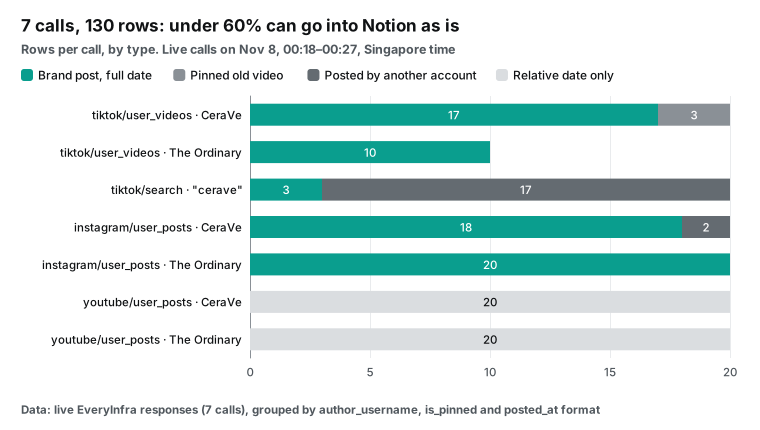
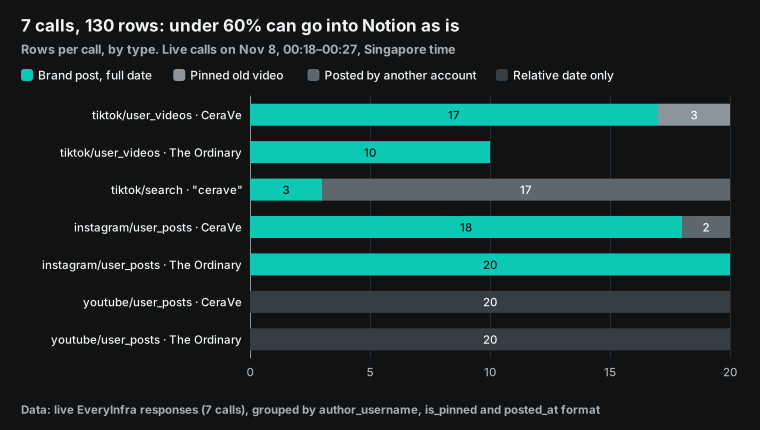
The chart shows three kinds of rows that look like data but are not safe to write as is. The first kind is pinned videos. The top 3 videos on the CeraVe TikTok profile are pinned. Their post dates are February 10, February 24 and August 31, 2026. The August video has 71.4 million views. They come first in the "latest videos" list.
If an agent takes the first few rows as this week's posts, it reports an August ad as new. It also adds 71.4 million views to this week. The response has an is_pinned field, so the fix is a filter. But the agent must know that it needs the filter. The 10 rows from The Ordinary had no pinned videos. So a spot check on one account can miss the problem.
The second kind is posts from other accounts. In the 20 CeraVe Instagram rows, 2 rows come from other accounts. One is a co-branded event from a coffee shop on November 6. One is a celebrity collab video from October 22.
They show up on the brand profile because an Instagram collab post appears on both accounts. Whether such a post counts toward brand reach is a business call. Either way, the table needs a column that says "the poster is not the brand". If not, the weekly report adds someone else's likes to the brand.
The third kind is relative dates on YouTube. Both brands' youtube/user_posts calls returned 20 rows each. Every posted_at value is relative text, such as "10d ago", "2w ago", "1mo ago" or "1y ago". None is an exact date.
This is not an API error. The channel video list shows dates this way. But a table that groups posts by week cannot use "1mo ago", which can mean 30 days or 59 days. A later section shows how to fill the gap.
Who talks about the brand: the US search layer
tiktok/search answers a different question from tiktok/user_videos. The profile list shows what the brand posts. The search shows who talks about the brand. Our search for "cerave" at 00:18:28 returned 20 videos. Only 3 came from the main brand account, 1 came from the brand's Thailand account, and 16 came from creators.
By the country field, 13 videos came from the US, 2 from Canada, and 1 each from Malaysia, Georgia, Thailand, Australia and the UK. 19 videos were in English and 1 in Thai. 12 of the 20 were posted in the 7 days before the call. The oldest was from May 17, 2026.
| Field in `tiktok/search` | Value for "cerave" (20 videos, 00:18:28 SGT) |
|---|---|
country | US 13, CA 2, MY 1, GE 1, TH 1, AU 1, GB 1 |
language | en 19, th 1 |
| Posted in the last 7 days | 12 of 20 |
Oldest posted_at | 2026-05-17 |
| Posting account | brand main 3, brand regional 1, creators 16 |
author_is_verified true | 6 of 20 |
The view counts spread over more than five orders of magnitude. The smallest video had 140 views. The largest, the pinned brand ad from August, had 71,440,950. The median was about 12,018. A weekly report that sums views would let the one brand ad hide every creator. So the report should show counts per row and a median, not only a total.
The most useful finding in this search is about sponsorship. 7 of the 20 videos carry a disclosure tag in their hashtags list: 6 use #ceravepartner and 1 uses #ad. One of the #ceravepartner videos comes from the brand account itself. The other five come from creators.
But the is_ad field is false on all 20 rows. is_ad marks a paid ad slot in the feed. It does not mark a creator post that the brand paid for. If your table trusts is_ad alone, it reports zero paid partnerships for a brand that runs at least five that week.
| Signal in the row | Videos with it | Of those, `is_ad` true |
|---|---|---|
#ceravepartner in hashtags (brand account) | 1 | 0 |
#ceravepartner in hashtags (creators) | 5 | 0 |
#ad in hashtags | 1 | 0 |
| No disclosure tag | 13 | 0 |
So the Disclosed column is a rule, not a copy. Set it to yes if is_ad is true. Also set it to yes if the hashtags include #ad, #sponsored, #partner or the brand's partner tag. Keep the list of tags on the rules page in Notion, so both agents use the same list. The tiktok/search capability page lists the fields in each row (TikTok keyword search).
The dedupe key: which ID, and why TikTok IDs cannot be numbers
When two agents write to one table, most duplicates come from one post that two capabilities return. We hit this in the two CeraVe TikTok calls. The tiktok/user_videos result and the tiktok/search result share 3 video IDs. If Claude Code writes the profile list first and then the search result, with no lookup, the table gets 3 extra rows.
The fix is a key that stays the same across capabilities: the platform name plus the platform's own post ID, for example tiktok:7704741979216694541. Before each write, look up the key. If it exists, update the row. If it does not exist, create a row.
The key type causes more bugs than the key content. TikTok video IDs have 19 digits. The 40 IDs from the two CeraVe calls all have 19 digits, and EveryInfra returns them as JSON strings. The trouble starts in the next step. If an agent decides "this is a number" and writes it to a Notion number property, or treats it as a number in JavaScript, the value breaks. A JavaScript number is an IEEE 754 double.
The largest integer it can hold exactly is 2^53 − 1, or 9,007,199,254,740,991 (MDN: Number.MAX_SAFE_INTEGER). A 19-digit TikTok ID is about 850 times larger. Our script converted all 40 IDs to doubles and back. 0 of 40 came back intact. The last digits changed every time.
So the key must be text, and the title column is the best place for it. Column permissions cannot restrict the title column in Notion (Notion Help Center: database property access). Notion also tells agents to rely on clear, descriptive titles (Notion MCP tips).
The 3 shared videos also showed a second problem. The same video has different count precision in the two capabilities. The two calls ran only 20 seconds apart.
| Video ID | Views in `tiktok/user_videos` | Views in `tiktok/search` | Likes in `tiktok/user_videos` | Likes in `tiktok/search` |
|---|---|---|---|---|
| 7680224710004722958 (Aug 31, pinned) | 71,400,000 | 71,440,950 | 22,900 | 22,850 |
| 7704741979216694541 (Nov 5) | 4,489 | 4,489 | 163 | 163 |
| 7705119448046357774 (Nov 6) | 2,538 | 2,538 | 82 | 82 |
Small counts match exactly. For large counts, the profile list gives rounded values (71,400,000 and 22,900), and the search gives more exact values (71,440,950 and 22,850). So "last write wins" is a bad rule. If the Codex side later updates this row from a rounded source, the exact 71,440,950 turns into 71,400,000. We suggest a Count precision column with two values, exact and rounded. Use two steps.
First, you can have two reads of one video, for example from the profile list and from search. Mark the value with fewer trailing zeros as exact, and mark the other one as rounded. Second, if you have only one read, use the shape of the number. A count of 10,000 or more is rounded if you can write it as K or M with one decimal. Examples are 22,900 (22.9K), 115,700 (115.7K) and 71,400,000 (71.4M).
The shape test has a known error. An exact count that is a round number, such as 22,000, also looks rounded. One CeraVe video posted on October 17, 2026 (UTC), showed 10,000 views in both reads. The number alone cannot tell you if it is exact.
A rounded count must not replace an exact count, unless the new value is more than 1% larger, which shows real growth. We set these rules from 3 shared videos, and only 1 of them has large counts. The sample is small, so test the rules on your own brands first.
Update time: Observed at, Posted at, and YouTube's "10d ago"
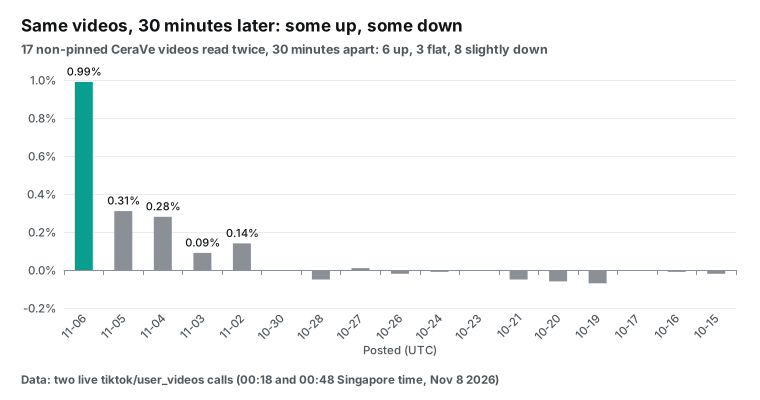
A table that agents update again and again needs two times. Posted at says when the post went live. Observed at says when the agent read the counts. If you keep only one, you lose information. We read the CeraVe TikTok profile twice, at 00:18:08 and at 00:48:17, 30 minutes apart.
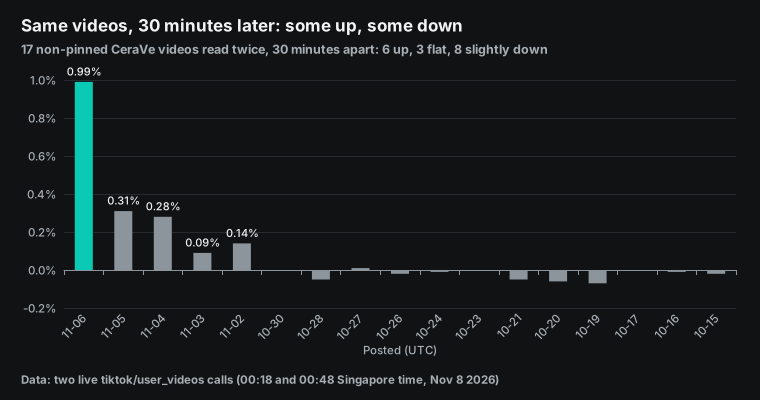
Of the 17 videos that are not pinned, 6 gained views, and the newest one, posted on November 6, gained 0.99%. 3 did not change, and one of them shows 115,700, a rounded count that hides small growth. The other 8 lost between 0.01% and 0.07% of their views. Counts can go down, because the platform corrects them later. So "keep the larger of two reads" is also a bad rule.
Trust the latest exact read. Without Observed at, two rows with different counts next Monday tell you nothing. You cannot tell real growth from two reads at two times.
| Change between 00:18:08 and 00:48:17 | Videos | Range |
|---|---|---|
| Up | 6 | +0.01% to +0.99% |
| No change | 3 | 0% |
| Down | 8 | −0.01% to −0.07% |
The Posted at problem lives on YouTube. As shown above, youtube/user_posts gives only relative dates. At 00:25:49 we looked up one CeraVe video with youtube/video. The channel list said "10d ago".
The single lookup returned posted_at as 2026-10-28T04:00:20+00:00. That is noon on October 28 in Singapore, 10 days and 20 hours before the call. So "10d ago" is a rounded-down value. The two capabilities also differ in other fields.
| Field | `youtube/user_posts` (00:18:44) | `youtube/video` (00:25:49) |
|---|---|---|
posted_at | "10d ago" | 2026-10-28T04:00:20+00:00 |
duration | "0:25" | "00:00:25" |
view_count | 664 | 670 |
Views went from 664 to 670 because the two reads were 7 minutes apart.
The official YouTube API field snippet.publishedAt is also an ISO 8601 time (YouTube Data API: Videos). So store every time as an ISO 8601 or RFC 3339 value in UTC (RFC 3339). Do not store text like "10d ago", which changes meaning every day.
The fix costs very little. Each week, the Codex side calls youtube/video once for each new video ID in the channel list. Our data shows 3 regular CeraVe uploads in the last three weeks ("10d", "2w" and "3w ago") and 1 from The Ordinary ("3w ago"). That is about 0.7 videos per brand per week, so three brands post about 2 a week. We plan for 3 a week to keep a margin, or about 13 lookups a month, at $0.000556 each. The YouTube single video page lists the fields of that lookup.
notion mcp claude code: config example for the Claude Code side
Claude Code needs two remote MCP servers: Notion and EveryInfra. Notion's official setup is one command. Then you run /mcp inside Claude Code and sign in with OAuth. The --scope project flag writes the config to .mcp.json in the project root, so the team can share it (Notion developer docs: connect Claude Code).
EveryInfra uses a Bearer key in the request header. Claude Code remote HTTP servers accept a --header flag, and ${VAR} values in .mcp.json expand from environment variables when Claude Code loads the file (Claude Code MCP docs). Below is a config example. We did not run this project inside Claude Code.
# Notion: OAuth. After you add it, run /mcp in Claude Code to sign in.
claude mcp add --transport http notion https://mcp.notion.com/mcp --scope project

# EveryInfra: read the Bearer key from an environment variable, not from the repo.
export EVERYINFRA_API_KEY=...   # keep it in your shell profile or secret manager
claude mcp add --transport http everyinfra https://api.everyinfra.com/mcp \
--header "Authorization: Bearer ${EVERYINFRA_API_KEY}" --scope project{
"mcpServers": {
"notion": { "type": "http", "url": "https://mcp.notion.com/mcp" },
"everyinfra": {
"type": "http",
"url": "https://api.everyinfra.com/mcp",
"headers": { "Authorization": "Bearer ${EVERYINFRA_API_KEY}" }
}
}
}The Claude Code docs give one clear warning. If a JSON entry has a url but no type, Claude Code treats it as a local stdio server, skips it and shows an error. So always write "type": "http" (Claude Code MCP docs). Also watch the tool count. The EveryInfra MCP server has 12 tools.
The full Notion MCP tool list has more than fifty (Notion MCP tool list). Both servers together use a lot of context. Notion suggests that you run /context to see how many tokens each MCP server uses. For this job, the EveryInfra side needs only two tools: everyinfra_call_api and everyinfra_get_job.
You have two ways to run the job on a schedule, and each has a cost. Local scheduled tasks in Claude Code Desktop read the config files on your machine, so the .mcp.json file with the header works. But they run only while the app is open and the computer is awake. If the computer sleeps, Claude Code skips that run (desktop scheduled tasks docs). Cloud scheduled tasks, which were called routines before, run on Anthropic's cloud even when your computer is off.
They are on the Pro, Max, Ultra, Team and Enterprise plans, and they run at most once an hour (cloud scheduled tasks docs). They use the connectors in your claude.ai account. We did not test how to pass a private server with a header into a cloud run. It depends on your cloud environment variables and repo config. Try one run before you rely on it.
notion mcp connector: why ChatGPT on the web cannot take a header, and why Codex can
The ChatGPT side has one more trap than the Claude side. In ChatGPT on the web, a custom MCP server is now a plugin. You open ChatGPT Plugins, click the plus sign, pick Add custom MCP server, enter a name and a server URL, and pick an auth method. The OpenAI docs list only three auth methods: OAuth, no authentication, and mixed OAuth or no authentication (OpenAI docs: Add custom MCP server). There is no field for a fixed header.
Users asked about this on the OpenAI forum when developer mode first came out (OpenAI community thread). The EveryInfra remote MCP server uses a Bearer key. We checked /.well-known/oauth-protected-resource and /.well-known/oauth-authorization-server, and both return 404. So the server does not support OAuth today.
Can ChatGPT on the web still connect? At 00:17:36 we called tools/call with no key. The server returned unauthorized. The error text says that the key can go in the Authorization: Bearer header or in a ?key= query parameter, and that nothing was charged. So in theory you can pick "no authentication" in ChatGPT and paste a URL with ?key=.
We do not recommend it. The key then shows up on the ChatGPT plugin settings page, in browser history and in logs. Anyone in the workspace who can see the plugin config can see the key. We did not test this path in ChatGPT.
The safer path for the ChatGPT side is Codex. The OpenAI Help Center says that when you sign in to Codex with a ChatGPT account, Codex uses the limits of your ChatGPT plan. From December, Plus, Pro and Business plans share one usage pool across ChatGPT and Codex (ChatGPT Work and Codex, Understanding ChatGPT and Codex usage limits). The Codex MCP config supports bearer_token_env_var.
You give it the name of an environment variable, and Codex puts its value in the Authorization header (Codex MCP docs). For Notion, the Notion docs add [mcp_servers.notion] to ~/.codex/config.toml and then run codex mcp login notion for OAuth (Notion developer docs: connect Codex). Here is a config example.
# ~/.codex/config.toml (config example, not tested)
[mcp_servers.notion]
url = "https://mcp.notion.com/mcp"

[mcp_servers.everyinfra]
url = "https://api.everyinfra.com/mcp"
bearer_token_env_var = "EVERYINFRA_API_KEY"
enabled_tools = ["everyinfra_call_api", "everyinfra_get_job"]
tool_timeout_sec = 120
default_tools_approval_mode = "writes"
We set two of these values from the live calls. The default tool_timeout_sec is 60 seconds, and a sync EveryInfra call can wait up to 85 seconds. Our sync REST calls took 3.8 to 32.5 seconds, and the slowest was youtube/video. Slow platforms can take more than 60 seconds, so we use 120. default_tools_approval_mode = "writes" asks for approval only for tools that are not marked read-only. EveryInfra marks everyinfra_call_api with readOnlyHint: false and destructiveHint: true, because each call costs money.
So Codex asks you every time. everyinfra_get_job is marked read-only, so job polls need no approval. ChatGPT on the web uses the same logic. It treats a tool with no readOnlyHint as a write tool and asks for approval. You can let it remember the choice for the chat (OpenAI docs). The MCP spec section on tools defines these annotations.
| Client | Connect Notion | Connect EveryInfra (Bearer key) | Unattended schedule | Status here |
|---|---|---|---|---|
| Claude Code (local) | OAuth, sign in with /mcp | --header or headers in .mcp.json | Desktop local task, computer awake | Config example |
| Codex (ChatGPT sign-in) | OAuth, codex mcp login notion | bearer_token_env_var | Not tested | Config example |
| ChatGPT web plugin | Notion app in the directory, OAuth | Only "no authentication" with ?key=; not advised | Not tested | Not tested |
| Any client to EveryInfra | Not applicable | Bearer header | Not applicable | 12 live calls |


One real round trip: what the model sends and what comes back
With the config in place, here is what happens at the MCP level when an agent pulls The Ordinary's TikTok profile. On November 8, 2026, at 00:21:58 Singapore time, we sent a JSON-RPC tools/call straight to https://api.everyinfra.com/mcp. The tool was everyinfra_call_api. The arguments were platform tiktok, action user_videos, username theordinary and limit 10.
The server answered with HTTP 200. result.content[0].text holds a JSON string. After parsing, it has 10 videos and a billing object, and charged_usd is 0.000556.
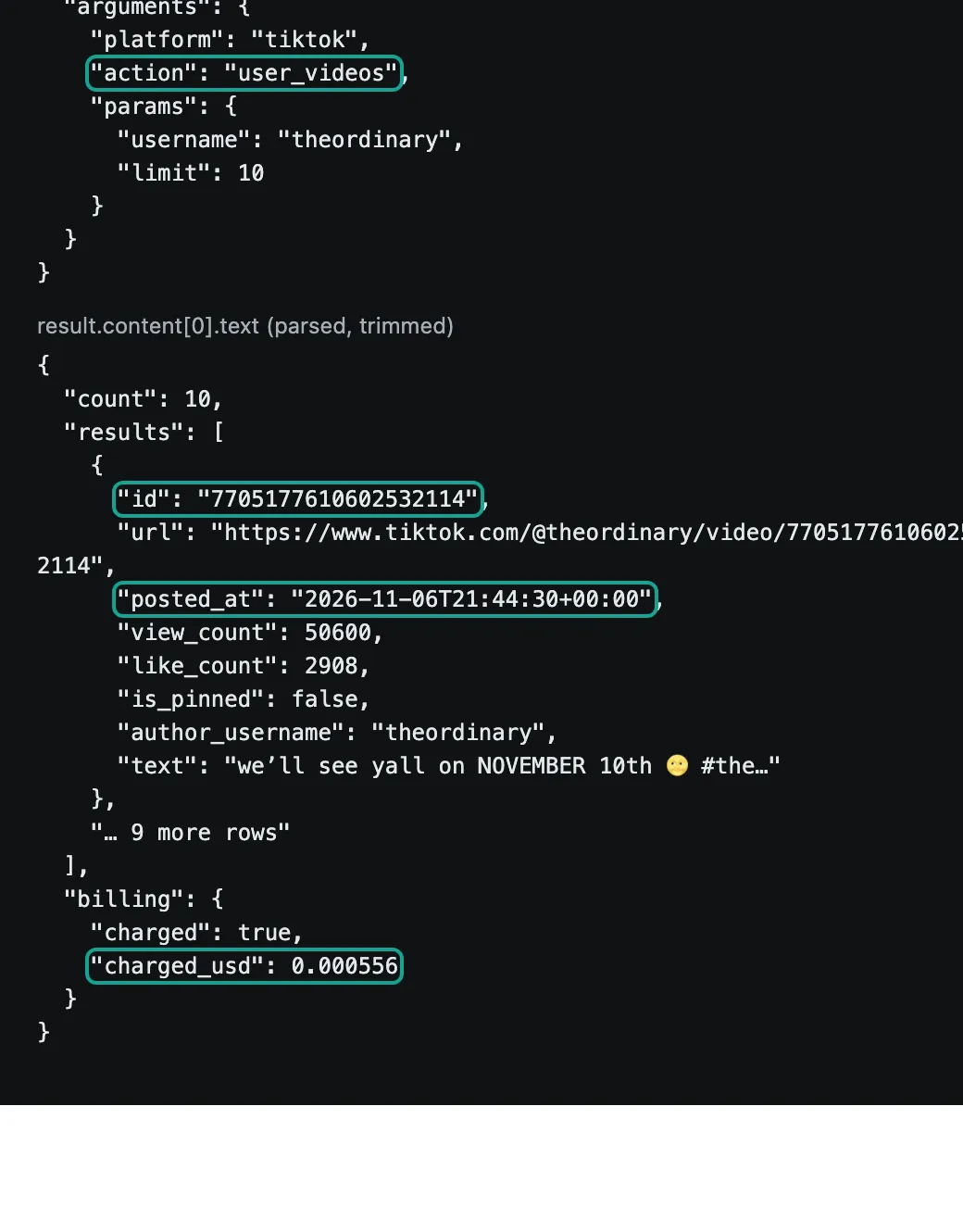
Two details in this round trip matter for the table. First, the id is the string "7705177610602532114", in quotes. The API does not treat it as a number. A bug can only happen when the agent writes the table.
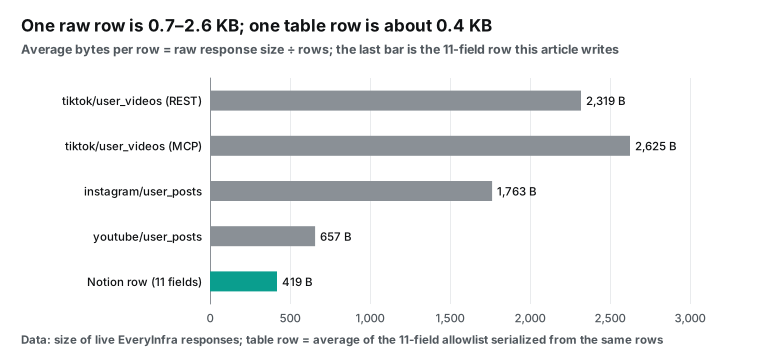
Second, the full response for 10 videos is 26,253 bytes, or about 2.6 KB per video. It holds dozens of fields: cover image URLs, music data, the author bio and more. If an agent pastes the full response into a Notion page body, each row gets heavy, and the next lookup reads more. That is why we fix the field list in advance.
How big is a row: why we write only 11 fields
We serialized the same rows again with only the 11 allowed fields. The average row is 419 bytes. The raw rows are 0.7 KB to 2.6 KB each. Most of the gap comes from three things.
Signed image and video URLs expire and have no value later. The full author profile repeats on every row. Music and hashtags come as nested objects.
Small rows help in three ways. The first is Notion's write limit. In one notion-create-pages call, all pages share one parse limit. If the content is too large or too complex, the whole call fails and Notion creates no page (page tools reference). The second is the agent's context. The lookup reads the last two weeks of rows back.
Smaller rows mean more rows fit in the same context. The third is the reader. The person who opens the table on Monday needs these 11 columns only. To keep the raw response, save it in a local file next to the agent. Put only a link in the table.
Writing to Notion: look up the key, then insert or update
The Notion side uses three tools. notion-query-data-sources reads the current rows. notion-create-pages creates rows. notion-update-page updates rows (database tools reference, page tools reference). The lookup step has three limits, and they shape the table design.
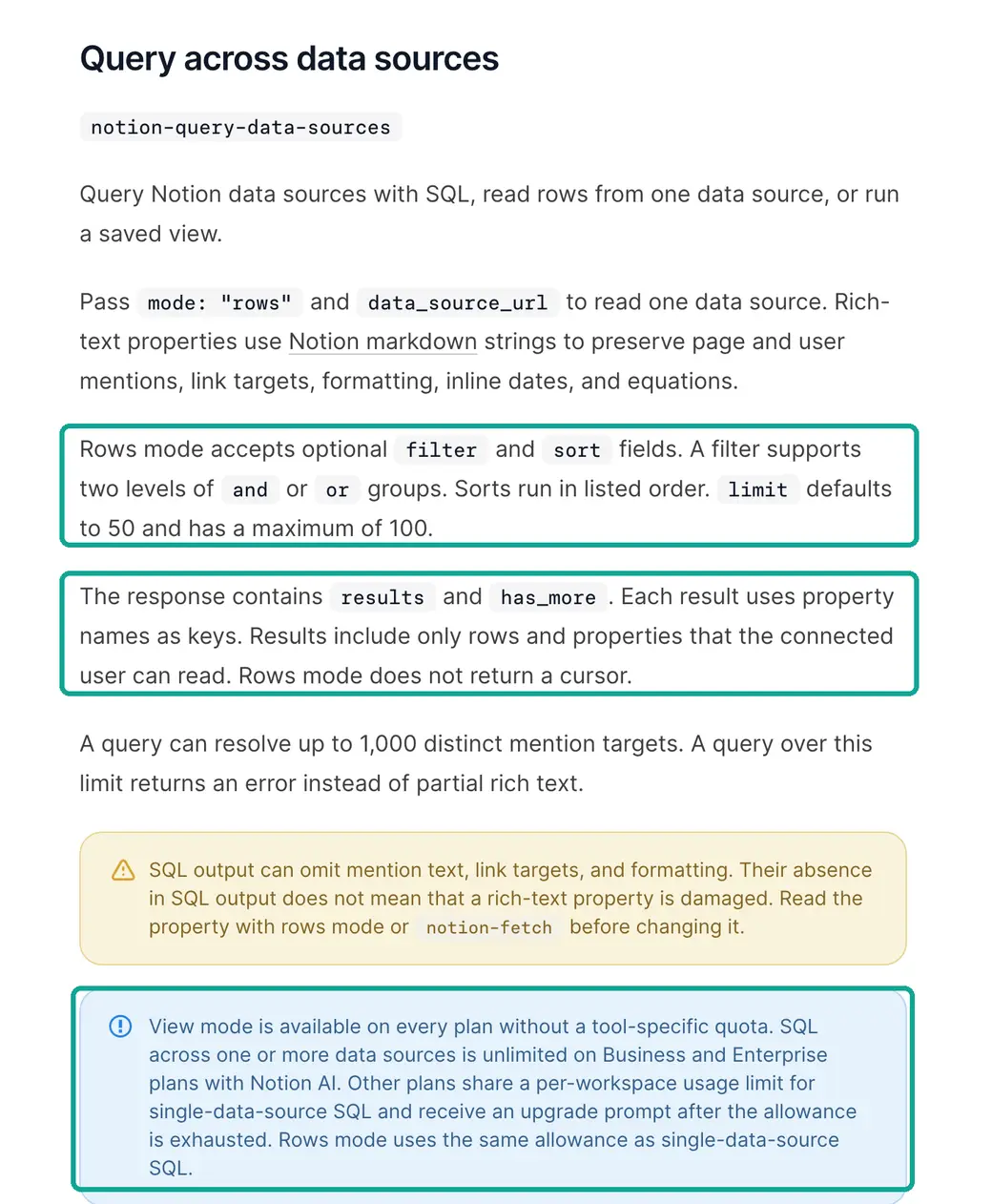
First, rows mode returns at most 100 rows, with no cursor, so you cannot read row 101. Second, on Free and Plus, SQL queries and rows mode share a metered allowance. Only view mode, which queries a saved view, is free on every plan. SQL is unlimited only on Business and Enterprise with Notion AI (Notion developer docs: plan differences). On Reddit, Plus users report that a query that used to work now returns a message that it needs Business or Enterprise (Reddit: Did Notion just significantly change the MCP capabilities on the free plan?). Another user complains that the agent could see only the first 25 entries of a database (Reddit: The reason why Notion MCP is a big fail).
Third, request rates. Business and Enterprise get 600 requests a minute per connection, and other plans get 180. Data source queries have a separate limit of about 3 per second (Notion request limits). If a wait is 2 seconds or less, Notion MCP retries once by itself. For a longer wait, it returns a rate_limited error to the agent (Notion MCP rate limits).
| Notion limit | Value | Source |
|---|---|---|
| Rows mode, rows per call | Default 50, maximum 100, no cursor | Database tools reference |
| View mode | Free on every plan | Database tools reference |
| SQL and rows mode allowance | Unlimited on Business and Enterprise with Notion AI; metered on other plans | Database tools reference |
| Requests per connection | 600 a minute on Business and Enterprise, 180 on other plans | Request limits |
| Data source queries | About 3 a second | Request limits |
| Automatic retry | Once, if the wait is 2 seconds or less | MCP rate limits |
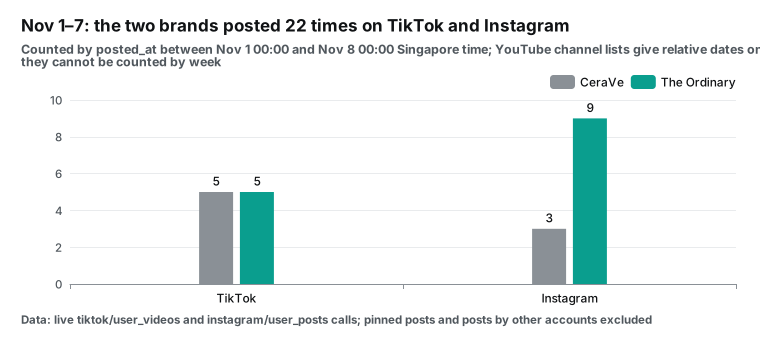
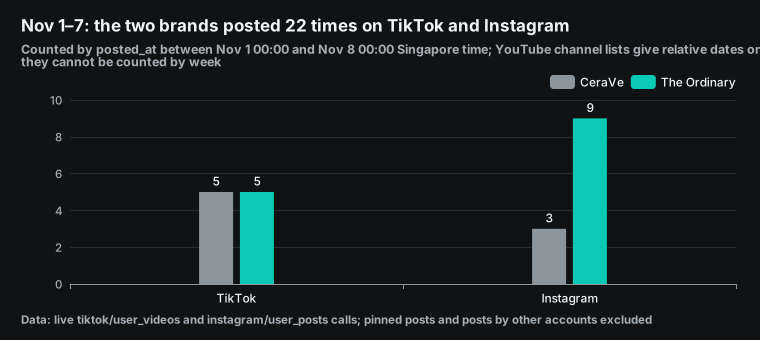
Put these limits next to the real post volume, and the table design follows. From November 1 to 7, Singapore time, the two brands posted 22 times on TikTok and Instagram. CeraVe posted 5 times on TikTok and 3 times on Instagram. The Ordinary posted 5 times on TikTok and 9 times on Instagram. At that rate, three brands make about 66 posts in two weeks.
Add YouTube and a margin, and the total still stays under 100. So we use one saved view in Notion named "Last 14 days". It filters on Posted at and sorts on Key. Before each write, both agents read this view in view mode and compare keys on their side. A new key gets a new page.
A known key gets an update. This lookup does not use the Free or Plus allowance and stays under the 100-row cap. When two weeks pass 100 posts, add one view per brand or per platform.
Here is a sample create call. The field names match the fields in this guide.
{
  "parent": "<the competitor table data source; see the notion-create-pages tool description>",
  "pages": [{
    "properties": {
      "Key": "tiktok:7705177610602532114",
      "Platform": "tiktok",
      "Brand": "The Ordinary",
      "URL": "https://www.tiktok.com/@theordinary/video/7705177610602532114",
      "date:Posted at:start": "2026-11-06T21:44:30Z",
      "Views": 50600, "Likes": 2908,
      "date:Observed at:start": "2026-11-07T16:21:58Z",
      "Agent": "claude-code", "Count precision": "rounded"
    }
  }]
}
This is a config example. We wrote the shape from the Notion page tools reference. For the exact form of parent for a database row, follow the notion-create-pages tool description in your client. In the response, a date appears under a key of the form date:<name>:start (page tools reference).
We did not create this page in Notion. After a write, read properties and warnings in the response. Notion tells you if it stored a key under a new name. Use that name in later updates.
The rules page: one page that tells each agent what to write
Two agents stay in step only if they read the same rules. The Notion setup guide tells the agent to find or create an Agent Operating Guide page. The agent reads it at the start of each job (Notion setup guide). Add a short "Competitor table" section to that page. Keep it to one screen, and write each rule as a step that an agent can follow, not as background.
| Rule | What the agent does |
|---|---|
| 1. Split | Claude Code writes only tiktok rows. Codex writes only instagram and youtube rows. Skip any other platform. |
| 2. Key | Key = platform name + ":" + post ID. Copy the ID string as is. On Instagram, use post_id. |
| 3. Time | Write Posted at and Observed at in UTC ISO 8601. Take the YouTube post time only from youtube/video. |
| 4. Overwrite | A rounded count never replaces an exact count, unless it is more than 1% larger. Observed at only moves forward. Between two exact counts, the newer read wins, even if it is smaller. |
| 5. Exceptions | Set Owned to no for posts from other accounts. Skip videos with is_pinned true. Put creator videos from search in a separate table. |
| 6. Errors | On rate_limited, wait retry_after_seconds and retry once. If it fails again, stop and leave a comment on the rules page with the failed batch. |
Rule 4 is the rule that teams forget most. Counts can go down, as the drift data above shows, so "keep the larger value" is wrong. Rule 6 matters because an agent that meets an error tends to try another path. On a shared table, a silent workaround is worse than a stop.
Rules in Notion beat rules in each agent's prompt, because one edit changes both agents. Since Notion 3.8, page version history names the editor, including agents (Notion 3.8 release notes). So you can see who changed the rules page itself. Keep the page read-only for agents if you can.
Notion supports column permissions on databases, and agents can get their own column permissions (Notion Help Center: database property access). But column permissions exist only on Business and Enterprise. On Plus, keep the rules page in a place that the agent connections cannot edit. Check its version history once a week.
Weekly cost: data calls, subscriptions and Notion allowances
The cost has three parts: EveryInfra data calls, two AI subscriptions and the Notion plan. We price data calls from the catalog price_usd. Our plan covers three brands. Each day, Claude Code calls tiktok/user_videos and tiktok/search once per brand, and Codex calls instagram/user_posts and youtube/user_posts once per brand.
That is 12 calls a day. Each week, Codex also calls youtube/video for about 3 new YouTube videos to get exact dates. All 5 capabilities list at $0.000556 per call (EveryInfra pricing).
| Item | Unit price | Calls a week | Cost a week | Cost a month (30 days) |
|---|---|---|---|---|
tiktok/user_videos × 3 brands | $0.000556 per call | 21 | $0.011676 | $0.050040 |
tiktok/search × 3 brands | $0.000556 per call | 21 | $0.011676 | $0.050040 |
instagram/user_posts × 3 brands | $0.000556 per call | 21 | $0.011676 | $0.050040 |
youtube/user_posts × 3 brands | $0.000556 per call | 21 | $0.011676 | $0.050040 |
youtube/video date lookups | $0.000556 per call | 3 | $0.001668 | $0.007228 (13 calls) |
| Data calls total | 87 | $0.048372 | $0.207388 (373 calls) |
For subscriptions, we read each pricing page on November 8, 2026. Notion Plus is $12 per seat a month on monthly billing, or $10 a month on yearly billing. Business is $24 a month, or $20 on yearly billing (Notion pricing). Claude Pro is $20 a month, or $17 a month on yearly billing (Claude pricing). ChatGPT Plus is $20 a month (OpenAI Help Center: What is ChatGPT Plus?).
Next to these plans, data calls at about $0.21 a month are too small to matter. Almost all of the cost is subscriptions. The real limits are the Notion lookup allowance and the usage limits of the two AI products. They decide if you can run every day.
Two costs do not show on any bill. The first is the lookup method that your Notion plan allows. On Free or Plus, the dedupe step must use view mode, not SQL. Only Business with Notion AI lets agents compare tables with SQL freely. The second is auth for unattended runs.
Notion MCP tokens let a client connect with a Bearer token and no browser sign-in. Only Business and Enterprise can create them, and only workspace owners (Notion developer docs FAQ). On Free and Plus you must use OAuth. So the scheduled job must run in a client that keeps an OAuth sign-in.
If you add the creator search for each brand on another market, the cost grows slowly. A second tiktok/search per brand each day adds 21 calls and $0.011676 a week. That is still a rounding error next to one seat of any plan.
Limits and things to watch
First, we did not test the Notion side. All Notion tool names, parameters and limits in this guide come from the Notion developer docs as we read them on November 8, 2026. Between October 13 and November 5, Notion changed its MCP tools about every two or three days (Notion developer changelog). Parameters can change at any time, so read the docs again before you build. The early open-source local MCP server package from Notion is no longer in active development. Notion's own docs point to the remote server at https://mcp.notion.com/mcp (GitHub: makenotion/notion-mcp-server).
Second, ChatGPT on the web has no good way to connect to EveryInfra today. We do not support OAuth, and ?key= puts the key on the settings page and in logs. Use Codex for the ChatGPT side. Reddit users also report that Notion stops working or will not connect inside ChatGPT (Reddit: Notion MCP not working in ChatGPT). We cannot debug that for Notion or OpenAI.
Third, the platform data has limits of its own. tiktok/search returns videos that match the keyword, not every video. youtube/user_posts gives relative dates only. instagram/user_posts includes collab posts. Counts change over time, and some capabilities round large counts.
is_ad does not catch creator partnerships. Mark each of these in a column. Do not act as if the data is clean. On the EveryInfra side, bad parameters, failed calls and empty results cost nothing, and each charge shows in billing.charged_usd in the response (EveryInfra MCP server).
Fourth, two agents can write the same row at the same time. Our plan splits the work by platform. Claude Code writes only TikTok rows, and Codex writes only Instagram and YouTube rows. One row has one writer, so the design avoids the conflict.
Do you let both agents pull the same platform? Then add a rule: only one agent may write a given Key within 10 minutes. Check notion-get-version-changes on a schedule.
Fifth, time zones. The table stores UTC, but a Notion date property shows the time in the viewer's time zone. A colleague in New York sees UTC minus 5 hours in November. Decide which time zone cuts the week before you count. This guide counts posts from 00:00 on November 1 to 00:00 on November 8, Singapore time.
In UTC, that is 16:00 on October 31 to 16:00 on November 7. One agent can cut the week in UTC and the other in local time. Then the weekly numbers do not match, and the cause is hard to see. Write the time zone on the rules page, and filter the weekly view in the same time zone.
Sixth, data about ordinary people. Most search results come from creators, and each row includes their display name, bio and avatar URL. The competitor table needs the post link, the post time and the counts. It does not need the creator's profile, which also goes stale. When the weekly report quotes a creator post, link to the post instead of naming the person. When you group by creator, use the author ID from the platform as the group key.
Industry moves (October and November 2026)
On November 4, 2026, Notion pitched MCP as one shared brain for all agents and gave setup prompts for ChatGPT and Claude (Notion post on X). For readers, this means Notion now treats "many agents read and write one workspace" as a main product line, and the tools will keep changing fast.
On November 3, 2026, Notion MCP added notion-restore-version. On October 29 it added notion-get-version-changes, and on October 27 it added suggested edits and notion-view-version (changelog). For readers, this means bad agent writes can now be found, viewed and undone. Two agents on one table carry much less risk than one month ago.
In early November 2026, the OpenAI Help Center announced a change for December. Plus, Pro and Business usage is shared across ChatGPT and Codex and measured in tokens (Understanding ChatGPT and Codex usage limits). For readers, this means a daily Codex data job uses the same pool as your ChatGPT chats. Trim long responses early.
FAQ
What is the notion mcp server url?
The remote server URL is https://mcp.notion.com/mcp, over Streamable HTTP. If a client does not support it, it can fall back to the SSE URL https://mcp.notion.com/sse (Notion developer docs). The EveryInfra remote MCP URL is https://api.everyinfra.com/mcp. (Question source: Google suggestions "notion mcp server url" and "notion mcp url".)
How does claude code notion mcp authentication work?
Run claude mcp add --transport http notion https://mcp.notion.com/mcp, then type /mcp in Claude Code and follow the OAuth sign-in (Notion developer docs). Do you need a connection with no browser sign-in? On Business or Enterprise, a workspace owner can create an MCP token in the developer portal. The client sends it as a Bearer token. (Question source: suggestions "claude code notion mcp authentication" and "setup notion mcp claude code".)
What should I do when notion mcp chatgpt is not working?
First check that you use ChatGPT on the web. The OpenAI docs say that you add custom MCP plugins on the web. Workspace roles and security settings such as Lockdown can limit them (OpenAI docs). The Notion changelog of October 20 also says that new tools appear in ChatGPT only after OpenAI reviews the updated Notion app (changelog). Most replies in Reddit threads on this problem say "wait for a fix" or "use Claude for now" (Reddit thread). (Question source: suggestion "notion mcp chatgpt not working".)
Does notion mcp codex work?
Yes. The Notion docs give the Codex setup: add [mcp_servers.notion] with the URL to ~/.codex/config.toml, then run codex mcp login notion. For a team, put the same config in .codex/config.toml in the project root (Notion developer docs). When you sign in to Codex with a ChatGPT account, Codex uses the limits of your ChatGPT plan. (Question source: suggestion "notion mcp codex".)
Can I use Notion MCP on the Free plan?
You can connect, with limits. On Free and Plus, SQL has a small metered single-source allowance, and rows mode counts against it. Only queries of saved views are free. MCP tokens need Business or Enterprise. Some search filters work only on Business and Enterprise (Notion developer docs FAQ). (Question source: Reddit post "Did Notion just significantly change the MCP capabilities on the free plan?")
Can chatgpt notion mcp write to a database?
Yes. The OpenAI docs say that ChatGPT supports read and write tools from MCP servers and asks you to approve writes by default (OpenAI docs). Notion's notion-create-pages and notion-update-page are write tools. Delete tools such as notion-delete-pages also need user_confirmed: true in the arguments. (Question source: suggestion "chatgpt notion mcp write".)
Get started
- Sign up in the EveryInfra quickstart, create an API key and put it in the
EVERYINFRA_API_KEYenvironment variable. - In Notion, create the competitor table with the 11 data fields and the three flag columns from this guide. Use the title column for Key, and add a "Last 14 days" view.
- On the Claude Code side, add the two MCP servers from the config example. On the Codex side, add the two blocks to
config.toml. - Run each side once by hand. Ask Claude Code to pull
tiktok/user_videosfor one brand, and ask Codex to pullinstagram/user_postsfor the same brand. Check that each run adds one set of rows and that no Key repeats. - When the rows look right, add the schedule, and check
notion-get-version-changesonce a week to see which agent wrote what.
For the fields of each platform, see the TikTok Scraper API, Instagram Scraper API and YouTube Scraper API. The capability pages for TikTok profile videos, TikTok keyword search, Instagram profile posts, YouTube channel videos and YouTube single video list every parameter.
Related reading
- GitHub Copilot MCP: a competitor social weekly report with 26 live calls. The same report, as a script for GitHub Actions.
- ChatGPT Spaces as a competitor social tracker: a ChatGPT-only setup to compare with the Codex path in this guide.
- Claude Code subagents pull TikTok brand accounts in parallel: how to pull many accounts in parallel in Claude Code and keep context small.
- Claude Artifacts with MCP as a live competitor dashboard: another way to show competitor data if you do not use Notion.
- EveryInfra remote MCP server: connection config for each client.
References
- "Give all your agents one shared brain in Notion", Notion on X, 2026-11-04, https://x.com/NotionHQ/status/2118059335930744999
- Connect AI tools with Notion MCP, Notion Help Center, read 2026-11-08, https://www.notion.com/help/notion-mcp
- Set up Notion for your agent (setup guide), Notion developer docs, read 2026-11-08, https://developers.notion.com/prompts/setup
- Use shared Skills and delegate to Notion Custom Agents (personal memory), Notion developer docs, read 2026-11-08, https://developers.notion.com/guides/mcp/tools-skills-agents
- Connect Notion to your AI assistant with MCP, Notion developer docs, last modified 2026-10-28, https://developers.notion.com/guides/mcp/get-started-with-mcp
- Notion MCP tools for projects, tasks, and teamwork, Notion developer docs, read 2026-11-08, https://developers.notion.com/guides/mcp/mcp-supported-tools
- Notion MCP FAQs and complete tool list, Notion developer docs, read 2026-11-08, https://developers.notion.com/guides/mcp/tools-faqs
- Database and view tools in Notion MCP, Notion developer docs, read 2026-11-08, https://developers.notion.com/guides/mcp/tools-databases-reference
- Page creation and editing tools in Notion MCP, Notion developer docs, read 2026-11-08, https://developers.notion.com/guides/mcp/tools-pages-reference
- Comments and change history tools in Notion MCP, Notion developer docs, read 2026-11-08, https://developers.notion.com/guides/mcp/tools-comments-reference
- Notion MCP rate limits, Notion developer docs, read 2026-11-08, https://developers.notion.com/guides/mcp/rate-limits
- Request limits, Notion API reference, read 2026-11-08, https://developers.notion.com/reference/request-limits
- Changelog, Notion developer docs, entries from 2026-10-13 to 2026-11-05, https://developers.notion.com/page/changelog
- Connect AI assistants to Notion with MCP (overview), Notion developer docs, read 2026-11-08, https://developers.notion.com/docs/mcp
- Agents, rebuilt to do more for less, Notion release notes, 2026-10-19, https://www.notion.com/releases/2026-10-19
- Notion 3.8: Context for your agents, Notion release notes, 2026-10-13, https://www.notion.com/releases/2026-10-13
- View your Notion Agent Memories, Notion Help Center, read 2026-11-08, https://www.notion.com/help/view-your-notion-agent-memories
- Manage database property access, Notion Help Center, read 2026-11-08, https://www.notion.com/help/database-property-access
- Pricing, Notion, read 2026-11-08, https://www.notion.com/pricing
- makenotion/notion-mcp-server, GitHub, read 2026-11-08, https://github.com/makenotion/notion-mcp-server
- Connect Claude Code to tools via MCP, Claude Code docs, read 2026-11-08, https://code.claude.com/docs/en/mcp
- Schedule recurring tasks in Claude Code Desktop, Claude Code docs, read 2026-11-08, https://code.claude.com/docs/en/desktop-scheduled-tasks
- Automate work with scheduled tasks, Claude Code docs, read 2026-11-08, https://code.claude.com/docs/en/routines
- Pricing, Claude, read 2026-11-08, https://claude.com/pricing
- Add custom MCP server, OpenAI docs, read 2026-11-08, https://developers.openai.com/api/docs/guides/custom-mcp-server
- Model Context Protocol (Codex), OpenAI docs, read 2026-11-08, https://developers.openai.com/codex/mcp
- ChatGPT Work and Codex, OpenAI Help Center, read 2026-11-08, https://help.openai.com/en/articles/20001275-chatgpt-work-and-codex
- Understanding ChatGPT and Codex usage limits, OpenAI Help Center, read 2026-11-08, https://help.openai.com/en/articles/20001625-understanding-chatgpt-and-codex-usage-limits
- What is ChatGPT Plus?, OpenAI Help Center, read 2026-11-08, https://help.openai.com/en/articles/6950777-what-is-chatgpt-plus
- MCP server tools now in ChatGPT developer mode, OpenAI Community, 2025-09-10, https://community.openai.com/t/mcp-server-tools-now-in-chatgpt-developer-mode/1357233
- Tools (annotations), Model Context Protocol specification 2025-06-18, https://modelcontextprotocol.io/specification/2025-06-18/server/tools
- Number.MAX_SAFE_INTEGER, MDN, read 2026-11-08, https://developer.mozilla.org/en-US/docs/Web/JavaScript/Reference/Global_Objects/Number/MAX_SAFE_INTEGER
- RFC 3339: Date and Time on the Internet: Timestamps, IETF, 2002-07, https://www.rfc-editor.org/rfc/rfc3339
- Videos (snippet.publishedAt), YouTube Data API, read 2026-11-08, https://developers.google.com/youtube/v3/docs/videos
- Did Notion just significantly change the MCP capabilities on the free plan?, Reddit r/Notion, read 2026-11-08, https://www.reddit.com/r/Notion/comments/1uc5cje/did_notion_just_significantly_change_the_mcp/
- The reason why Notion MCP is a big fail, Reddit r/Notion, read 2026-11-08, https://www.reddit.com/r/Notion/comments/1t7kpxp/the_reason_why_notion_mcp_is_a_big_fail/
- Notion MCP not working in ChatGPT, Reddit r/Notion, read 2026-11-08, https://www.reddit.com/r/Notion/comments/1ps8y93/notion_mcp_not_working_in_chatgpt_is_anyone_else/
- Database properties, Notion Help Center, read 2026-11-08, https://www.notion.com/help/database-properties
- Unique ID property, Notion Help Center, read 2026-11-08, https://www.notion.com/help/unique-id
- EveryInfra capability catalog, EveryInfra, read 2026-11-08, https://api.everyinfra.com/api/v1/social/catalog
- EveryInfra remote MCP endpoint, EveryInfra, tested 2026-11-08, https://api.everyinfra.com/mcp
Reference BL-111