scraperapi alternatives: cost per 1,000 results by job
ScraperAPI vs ZenRows, Bright Data, Firecrawl, Apify and EveryInfra: cost per 1,000 Amazon pages, Google searches and social posts, with 20 live calls.

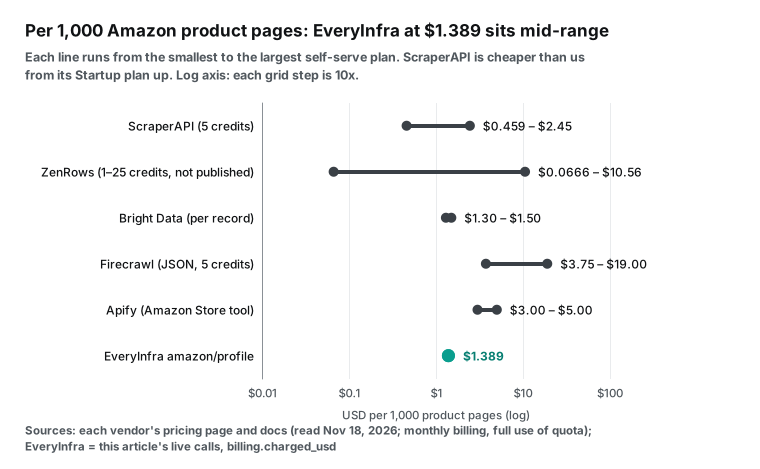
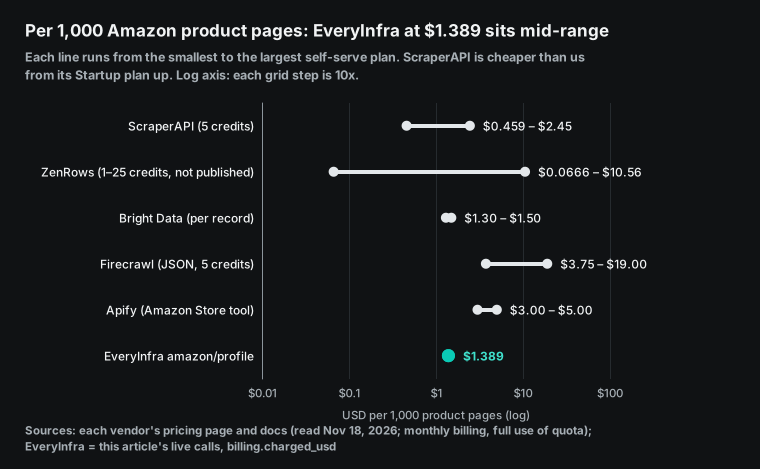
For 1,000 Amazon product pages, ScraperAPI costs $0.46 to $2.45 at its public prices on November 18, 2026, because each page uses 5 credits. From the $149 Startup plan up, that is cheaper than the $1.389 we charged at EveryInfra in our own test calls.
For 1,000 Google searches, ScraperAPI uses 25 credits per search. That is $2.30 to $12.25 per 1,000, which is 3.3 to 17.7 times the $0.694 we charged for the same job.
For social posts, the gap is wider. Bright Data charges $1.30 to $1.50 per 1,000 records, and the Apify Store tools for TikTok and Instagram charge $1.00 to $3.70. One EveryInfra request returns 20 to 30 posts, so 1,000 posts cost $0.0185 to $0.0278. For TikTok, that is 47 times less than Bright Data, the cheaper of the two. For Instagram, it is 54 times less than the lowest Apify post-tool price.
How we compared the scraperapi alternatives
This guide is a buyer's checklist. It does not repeat the full credit math for each ScraperAPI plan. Our ScraperAPI pricing breakdown does that line by line, and the ScraperAPI alternative page gives a short overview. Here we take four common jobs and put six services on the same unit: dollars per 1,000 results.
Competitor prices come from public pricing pages and documentation. We read them on November 18, 2026, between 00:17 and 00:40 Singapore time. We use monthly prices and assume that the full allowance is used. Annual discounts and custom contracts are not included.
Our own prices come from the charged_usd field in the responses to our test calls. We sent 20 requests between 00:15 and 00:41 Singapore time. Eighteen were charged, for $0.017474 in total. Seventeen amounts come from charged_usd. The async Instagram job shows no amount, so we counted it at the catalog price of $0.000556. One 429 rate-limit reply and one 422 reply were free. We also checked each charge against the price_usd value in our free catalog at GET /api/v1/social/catalog on the same day.
The six services return different field names, row limits and paging, so this article compares money and billing rules only.
The scraperapi alternatives table: units, failure rules, free tiers and AI tools
| Service | Billing unit | Per 1,000 Amazon product pages | Per 1,000 Google searches | Failed or empty results | Lowest paid entry | Free tier | AI tool access |
|---|---|---|---|---|---|---|---|
| ScraperAPI | Credits, multiplied by request type | $0.46–2.45 (5 credits) | $2.30–12.25 (25 credits) | Charges only 200 and 404, plus requests you cancel within 70 seconds | Hobby, $49/month | 5,000-credit trial for 7 days, then 1,000 credits/month | Remote MCP, 22 tools |
| ZenRows | Credits: 1 plain, 5 JS, 10 premium proxy, 25 protected | $0.07–10.56 (per-site cost not published) | Same range | Failures are free; 404 and 410 count as success | Build, $19/month | 5,000 credits/month | Remote MCP |
| Bright Data | Per delivered record or request | $1.30–1.50 | $1.31–1.50 | Failed deliveries are free | Pay as you go, no monthly fee | 5,000 records/month | MCP, 5,000 free requests/month |
| Firecrawl | Credits: 1 per page, plus 4 for JSON format | JSON $3.75–19.00, Markdown only $0.75–3.80 | $1.50–7.60 (2 credits per 10 results) | No result is free; returned 403 or 404 pages cost 1 credit | Hobby, $19/month | 1,000 credits/month | MCP v3 |
| Apify | Per event, one charge per result, cheaper on higher plans | $3.00–5.00 | $1.80–4.50 (per page) | Results written before a failure are charged | Starter, $19/month | $5 of usage/month | Remote MCP |
| EveryInfra | Per request, fixed price per call | $1.389 (amazon/profile, charged) | $0.694 (web search tool, charged) | Failures and empty results are free; a missing parameter returns 422 | First top-up $10, balance does not expire | $1 trial for starring two GitHub repositories, valid 24 hours | Remote MCP |
Each range runs from the most expensive self-serve plan to the cheapest one per credit. ScraperAPI Hobby is $49 for 100,000 credits, which is $0.49 per 1,000 credits. ScraperAPI Advanced is $1,975 for 21.5 million credits, which is $0.0919 per 1,000 credits (ScraperAPI pricing).
The ScraperAPI plan list below shows the monthly price, credits, cost per 1,000 credits, concurrency and regions. It comes from the same pricing page.
| ScraperAPI plan | Monthly price | Credits per month | Per 1,000 credits | Concurrent threads | Regions |
|---|---|---|---|---|---|
| Free | $0 | 1,000 | Free | 5 | Not stated |
| Hobby | $49 | 100,000 | $0.49 | 20 | US and EU |
| Startup | $149 | 1,000,000 | $0.149 | 50 | US and EU |
| Business | $299 | 3,000,000 | $0.0997 | 100 | Country level |
| Scaling | $475 | 5,000,000 | $0.095 | 200 | Country level |
| Professional | $975 | 10,500,000 | $0.0929 | 300 | Country level |
| Advanced | $1,975 | 21,500,000 | $0.0919 | 500 | Country level |
ZenRows Build is $19 for 45,000 credits, and its largest self-serve plan is $2,999 for 45 million credits (ZenRows pricing). Firecrawl Hobby is $19 for 5,000 credits, and Scale is $749 for 1 million credits (Firecrawl pricing).
The Bright Data Web Scraper API costs $1.50 per 1,000 records on pay as you go. Its Scale plan costs $499 a month and includes 384,000 records (Web Scraper API pricing). The SERP API costs $1.50 per 1,000 requests on pay as you go, and its Scale plan includes 380,000 requests (SERP API pricing).
Apify prices come from the public tool pages in the Apify Store. Each tool has four price tiers, one for each plan: Free, Starter, Scale and Business (Apify pricing, Store billing documentation).
How ScraperAPI credits multiply, and where its two documents disagree
Before you move away from ScraperAPI, find out how many credits each of your requests uses today. The multiplier depends on the target domain and on the parameters you send.
A plain web page costs 1 credit. Amazon, Walmart and eBay cost 5. Google and Bing searches cost 25, and LinkedIn costs 30. The parameter premium=true costs 10 and render=true costs 10. Both together cost 25. The parameter ultra_premium=true costs 30, and it costs 75 with rendering (credits and request costs).
This means that one Amazon page can cost 5 credits or 25 credits or more. The price per 1,000 pages can change by a factor of five. ZenRows and Firecrawl also sell credits, but their multipliers are different. The table below shows the three side by side.
| Request type | ScraperAPI (credits) | ZenRows (credits) | Firecrawl (credits) |
|---|---|---|---|
| Plain static page | 1 | 1 | 1 |
| JavaScript rendering | 10 | 5 | 1 (no extra charge) |
| Premium proxy | 10 | 10 | Not listed |
| Heavily protected site | 30 (ultra_premium), 75 with rendering | 25 | Not listed |
| Amazon, Walmart, eBay | 5 | Billed by the setup that worked, per-site cost not published | 1, plus 4 for structured JSON |
| Google search | 25 | Billed by the setup that worked | 2 per 10 results |
ScraperAPI gives you three tools to measure your real cost before you switch. The response header sa-credit-cost shows how many credits a request used. The parameter max_cost sets a limit, and a request above that limit returns 403 and does not run. The endpoint /account/urlcost shows the cost of a URL without a request (cost control documentation).
In June 2026, ScraperAPI also released a domain credit cost estimator (release note). Run your own URL list from last month through urlcost. You then know your real average multiplier, and you can compare it with the prices below.
ZenRows bills only the setup that worked when you use mode=auto. It does not publish which setup a given site needs, so you must test it (ZenRows API reference).
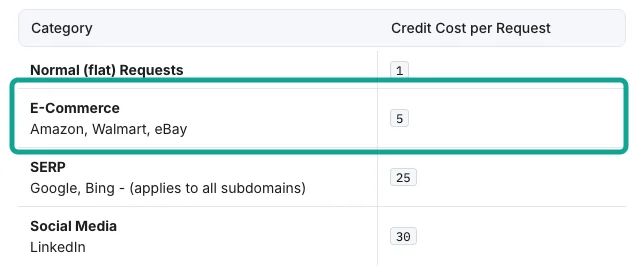
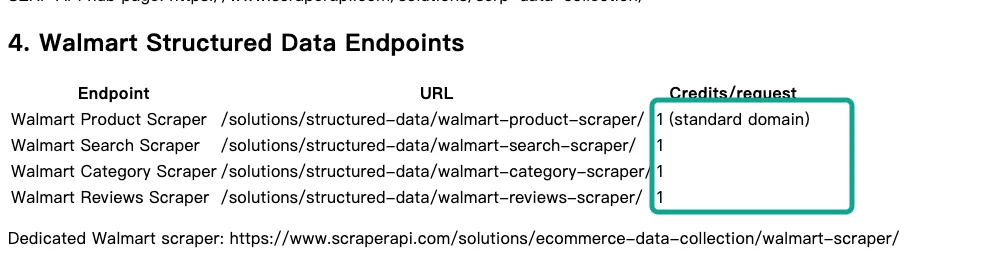
When we checked the Walmart price, we found that two ScraperAPI documents disagree. The credits page above puts Walmart in the e-commerce group at 5 credits. ScraperAPI also publishes a structured data page for AI tools. That page first says that a structured endpoint costs the same as the core API on the same domain. Its Walmart table then lists the product, search, category and review endpoints at 1 credit each (structured data page).
On the Hobby plan, 1 credit is $0.49 per 1,000 requests and 5 credits are $2.45. That is a factor of five. We do not have a ScraperAPI account, so we cannot confirm the real charge. Do you scrape Walmart at volume? Send a few real URLs and read the sa-credit-cost header before you sign. Keep a copy of the result.
On the same day, we searched for "wireless earbuds" with the EveryInfra walmart/search capability. At 00:27 Singapore time, it returned 20 products and charged $0.001389. That is $0.0695 per 1,000 products.
The ScraperAPI Walmart search endpoint returns one results page, but the documentation does not say how many products a page holds. If we assume 20, the cost is about $0.0046 to $0.0245 per 1,000 products at 1 credit, or $0.023 to $0.12 at 5 credits. For small, page-based Walmart jobs, ScraperAPI is a fair price. First, find out which of the two numbers is correct. The Walmart platform page lists all our Walmart capabilities and prices.
Job 1: Amazon product pages, where ScraperAPI wins from the Startup plan
The most common job is a daily check of price, rating and review count for a list of ASINs. The ScraperAPI structured Amazon endpoint costs 5 credits, the same as the core API. It returns title, price, rating, review count, ASIN, availability, images, description, specifications and seller information.
Across the six ScraperAPI plans, 1,000 product pages cost from $2.45 on Hobby to $0.459 on Advanced. On the $149 Startup plan, they cost $0.745. That is already less than our price.
We fetch one product per request with amazon/profile. The catalog price is $0.001389 per call. At 00:15 Singapore time, we requested ASIN B09FT58QQP. The call returned the TOZO A1 earbuds at $19.99, with a rating of 4.3 from 119,343 ratings. It took 53.3 seconds and cost $0.001389.
At 00:29 Singapore time, we requested the AirPods Pro 2 (B0BDHWDR12). The call returned a price of $265.77 and a rating of 4.7 from 57,993 ratings. It took 58.3 seconds and also cost $0.001389. Both calls used the catalog price, which is $1.389 per 1,000 product pages.
One product took almost one minute. If you build a live price comparison page, plan for this delay. ScraperAPI does not publish an average response time for its structured endpoints, so test both services with your own ASINs.
The result changes when you search by keyword. Our amazon/search capability costs $0.002236 per request and returns one page of results. At 00:16 Singapore time, a search for "wireless earbuds" returned 18 products. At 00:31 Singapore time, a search for "running shoes" returned 20 products. The average is $0.1177 per 1,000 products.
The ScraperAPI Amazon search endpoint also costs 5 credits per request. The number of products per page changes with the keyword. If we assume 20 per page, the cost is $0.023 to $0.12 per 1,000 products, which is close to our price.
Bright Data charges $1.30 to $1.50 per 1,000 records. The Apify Amazon product tool charges per result: $5.00 on Free, $4.00 on Starter, $3.50 on Scale and $3.00 on Business (Amazon product tool). For product lists, the three services that bill per page or per request are about ten times cheaper than the two that bill per record.
| Amazon job | ScraperAPI | ZenRows | Bright Data | Firecrawl | Apify | EveryInfra |
|---|---|---|---|---|---|---|
| One product detail, per 1,000 | $0.459–2.45 | $0.0666–10.56 | $1.30–1.50 | $3.75–19.00 (JSON) | $3.00–5.00 | $1.389 (charged) |
| Keyword search, per 1,000 pages | $0.459–2.45 | $0.0666–10.56 | Billed per record | $0.75–3.80 | Billed per result | $2.236 (charged) |
| Keyword search, per 1,000 products | About $0.023–0.12 (20 per page assumed) | Not published | $1.30–1.50 | Not published | $3.00–5.00 | $0.1177 (charged, 38 products) |
We also tried an ASIN that we expected to fail. At 00:30 Singapore time, we requested B000000000. Amazon sent this number to a real product, a bag of chips. The call returned normal data and cost $0.001389.
A made-up ASIN on Amazon does not always give an empty result. Clean your ASIN list before you run a large batch. We tested a real failure separately, in the section on failed requests.
This is a complete request for one product. Replace $EVERYINFRA_API_KEY with your own key:
curl -s https://api.everyinfra.com/api/v1/social \
  -H "Authorization: Bearer $EVERYINFRA_API_KEY" \
  -H "Content-Type: application/json" \
  -d '{"platform":"amazon","action":"profile","params":{"url":"https://www.amazon.com/dp/B0BDHWDR12"}}' \
  | jq '{title: .results.title, price: .results.price, rating: .results.rating, rating_count: .results.rating_count, charged: .billing.charged_usd}'
Job 2: Google search, where 25 credits per search make ScraperAPI 3.3 to 17.7 times more expensive
Google search has one of the highest ScraperAPI multipliers. Each search costs 25 credits, and the structured Google search, shopping and news endpoints use the same rate (structured data page). On Hobby, 1,000 searches cost $12.25. On Advanced, they still cost $2.30. Our price is $0.694 per 1,000, so every ScraperAPI plan costs 3.3 to 17.7 times more for this job.
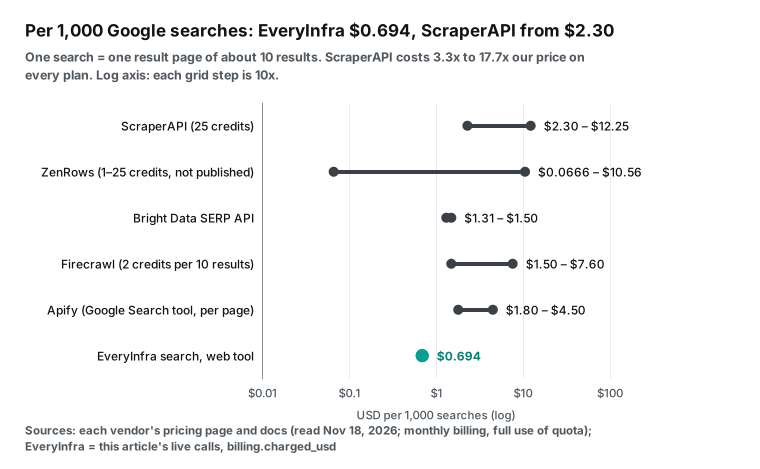
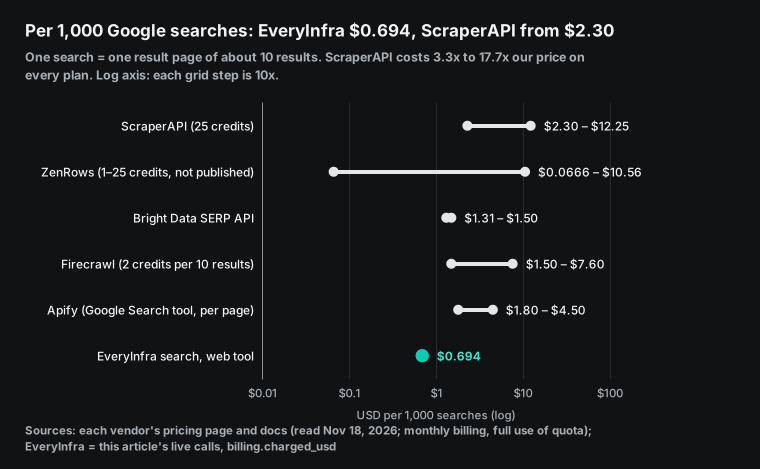
The Bright Data SERP API costs $1.50 per 1,000 requests on pay as you go and $1.31 on its Scale plan. Firecrawl search costs 2 credits per 10 results, so one search of 10 results is $1.50 to $7.60 per 1,000. The Apify Google search tool charges per results page (Google search tool). The price is $4.50 on Free, $2.50 on Starter, $1.95 on Scale and $1.80 on Business. ZenRows does not publish the multiplier that Google uses with its general API.
Our search uses POST /api/v1/search with the tool name web. The tool list at /api/v1/search/tools is free to read. We ran three searches.
| Time (Singapore) | Query | Results | Seconds | Charged (USD) | Relevant |
|---|---|---|---|---|---|
| 00:17 | scraperapi alternatives | 10 | 1.8 | 0.000694 | No, all unrelated |
| 00:31 | best running shoes | 9 | 2.7 | 0.000694 | Yes |
| 00:41 | scraperapi competitors | 10 | 1.9 | 0.000694 | Yes |
At 00:31 Singapore time, "best running shoes" returned 9 results in 2.7 seconds for $0.000694. At 00:41 Singapore time, "scraperapi competitors" returned 10 results in 1.9 seconds for $0.000694. The top ten included the Firecrawl alternatives post, the ScraperAPI comparison page and several alternative pages from other scraping companies.
At 00:17 Singapore time, the search "scraperapi alternatives" also returned 10 results and cost $0.000694. But all 10 were unrelated sites with "alternatives" in the title, such as a youth service, a credit union and a Linux command page. When we changed the words to "scraperapi competitors", the results were correct. If you search for a brand plus a common word, put the brand in quotes or use more specific words.
For rank tracking, location also matters. The ScraperAPI Google endpoints can return results by country. However, the Hobby and Startup plans can only use exit points in the US and the EU. Country-level targeting starts on the Business plan.
Our web tool uses the location parameter. You can give a country name or a two-letter country code. If you give a city, the tool uses the country of that city. The tool also supports a site filter, a date window and paging.
The number of results per search also changes the price per result. In these tests, our searches returned 9 to 10 organic results each. The Bright Data SERP API returns a full parsed page with ads and related searches. The ScraperAPI Google endpoint also returns ads, featured snippets and the knowledge panel. If you only need the top ten links, the four services return a similar amount of data. If you need ad slots and answer boxes, read each field list first. Our SERP API alternatives test compares this group in more detail.
Job 3: TikTok and Instagram, where per-record billing costs 47 to 54 times more
The ScraperAPI credits page lists LinkedIn at 30 credits. Its solutions page lists TikTok as a 1-credit plain page that returns HTML, so you must parse it yourself. Instagram is not listed.
ZenRows and Firecrawl also bill per page. They do not publish how many videos a TikTok search page contains. Only three services can be compared per 1,000 posts. Bright Data and Apify bill per record, and EveryInfra bills per request with a known row count.
For ScraperAPI, we can only estimate. A TikTok page costs 1 credit, which is $0.092 to $0.49 per 1,000 pages from the Advanced plan down to Hobby. If one page gives 20 videos, as our call does, that is about $0.0046 to $0.0245 per 1,000 videos, in the same range as our $0.0278. If the page needs render=true before the content appears, each page costs 10 credits, which is about $0.046 to $0.245 per 1,000 videos.
ScraperAPI does not publish how many videos one page gives, and you must write the parser yourself. Run a few pages with your own keywords before you decide. Instagram is not listed on the ScraperAPI solutions page. At the plain-page rate of 1 credit, you must also parse the page and count the rows yourself, so we do not estimate a price per 1,000 posts.
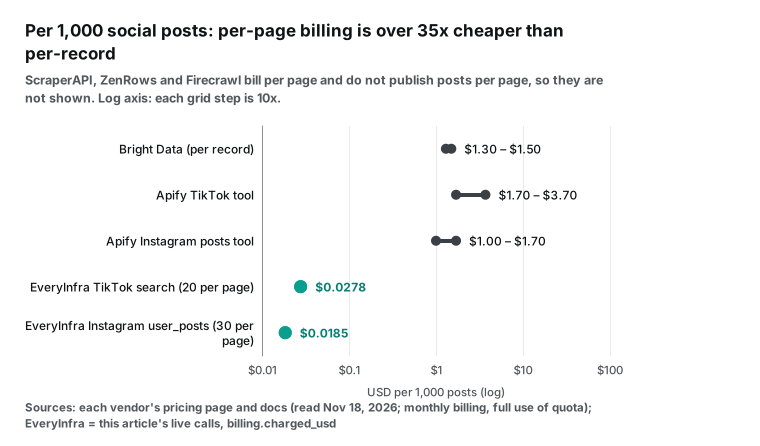
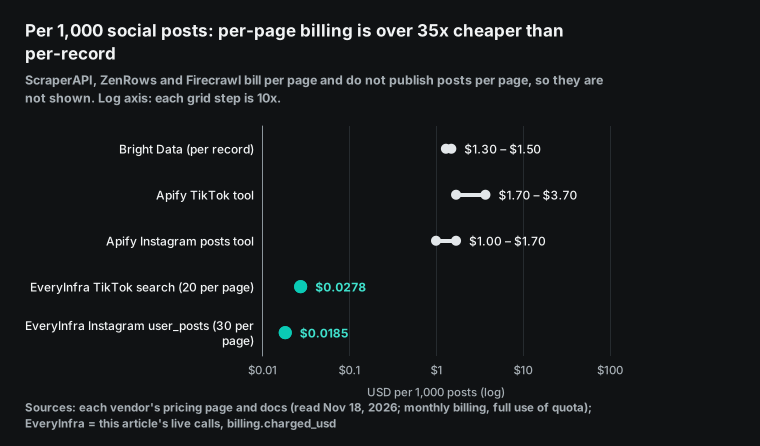
We ran tiktok/search three times with a limit of 20. The catalog price is $0.000556 per call. At 00:17 Singapore time, "wireless earbuds review" returned 20 videos in 11.4 seconds. At 00:31 Singapore time, "running shoes review" returned 20 videos in 22.6 seconds.
At 00:40 Singapore time, we searched for the random string "qzxvjkw9931plmnbt". After 62.6 seconds, the call still returned 20 videos and was charged. TikTok search returns similar videos for any keyword and does not return an empty list. If you use it for brand tracking, filter the results by title or hashtag. The three calls returned 60 videos, which is $0.0278 per 1,000.
For Instagram, we used instagram/user_posts on the NASA account with a limit of 30. This capability runs as an async job. At 00:27 Singapore time, we sent the request. After 14.1 seconds, we received a job ID. The job status went from running to finalizing to succeeded, and the job returned 30 posts with billing_state set to charged.
The async job result does not show the amount. We used the catalog price of $0.000556 for this call, which is $0.0185 per 1,000 posts. You can ask for up to 200 posts, and each page counts as one call.
| Social job | Bright Data | Apify | EveryInfra |
|---|---|---|---|
| TikTok videos, per 1,000 | $1.50 pay as you go, $1.30 on Scale | TikTok tool: Free $3.70, Starter $3.00, Scale $2.30, Business $1.70 | $0.0278 (charged, 20 per call) |
| Instagram posts, per 1,000 | $1.50 pay as you go, $1.30 on Scale | Post tool: Free $1.70, Starter $1.50, Scale $1.30, Business $1.00. General tool $1.50–2.70 | $0.0185 (catalog price, 30 per call) |
| Billing unit | Each delivered record | Each result written to the dataset | Each request |
Social data is also slower than web pages. Our three TikTok searches took 11.4, 22.6 and 62.6 seconds. The random keyword was the slowest, probably because the platform searched a wider range.
Instagram ran as an async job and gave a job ID after 14 seconds. On Bright Data, social "discover by keyword" requests also run as async jobs. On Apify, each request is a full actor run that takes from tens of seconds to minutes. For a live product, run social collection as a background job and show cached results.
The Apify prices come from each tool page (TikTok tool, Instagram post tool). Each tool has its own price. The TikTok tool page was updated on November 17, 2026, so read these pages again each month.
If your ScraperAPI work is mostly social data, a structured API that bills per record or per request removes your HTML parsing work. The TikTok platform page and the Instagram platform page list all the fields and prices we offer.
Job 4: arbitrary web pages and JavaScript, where ScraperAPI and ZenRows are cheapest at volume
The first three jobs use platform data. If your list has thousands of different websites and you need full HTML or page text, ScraperAPI is in its strongest area. A plain page costs 1 credit, which is $0.49 per 1,000 on Hobby and $0.092 on Advanced.
ZenRows also charges 1 credit for a plain page, which is $0.067 to $0.42 per 1,000. For JavaScript rendering, ZenRows charges 5 credits and ScraperAPI charges 10. Firecrawl charges 1 credit per page, handles JavaScript content and returns Markdown, at $0.75 to $3.80 per 1,000. Firecrawl is a good fit when the page goes straight into a language model.
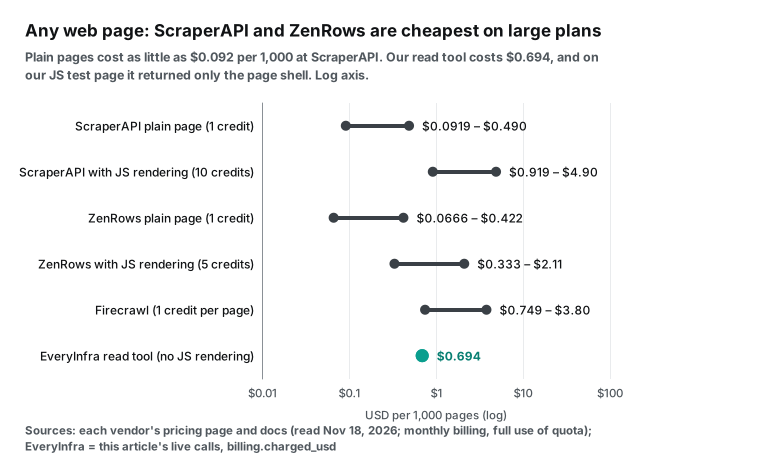
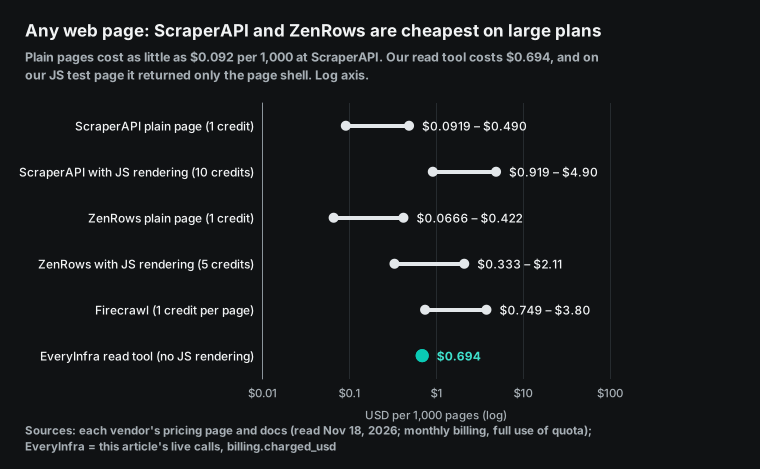
Our read tool costs $0.000694 per call, which is $0.694 per 1,000 pages. That is more than the plain-page price of ScraperAPI and ZenRows on their larger plans. At 00:27 Singapore time, we used it on quotes.toscrape.com/js/, a test page that builds its content with JavaScript. The call returned in 0.76 seconds and cost $0.000694. The text had only the title, a login link and a next-page link. It had none of the quotes.
In this test, our read tool did not run the page scripts. Some pages are single-page apps, some must wait for an element, and some need a screenshot. For these pages, use the ScraperAPI render=true and wait_for_selector options, or the ZenRows js_render option.
The same is true for a general proxy. ScraperAPI also sells a proxy port mode. It works as an HTTP proxy that rotates exit points.
You can connect it to an existing Scrapy or Playwright script without new parsing code. The country_code and session_number parameters fix the country and the session. EveryInfra sells APIs and structured data, not proxies. Maybe you already have your own crawlers and only need a way past blocks. Then ScraperAPI or ZenRows is a smaller change than a move to us.
Concurrency, regions and speed: three limits that the price table does not show
Two services with the same price per 1,000 can run very differently. The reasons are concurrency limits, available regions and the time per request.
ScraperAPI sets concurrency by plan. The free plan has 5 threads, Hobby has 20, Startup has 50, Business has 100, Scaling has 200, Professional has 300 and Advanced has 500. A request above the limit returns 429 and does not use credits. Regions also depend on the plan. Hobby and Startup can only use US and EU exit points, and country-level targeting starts on Business (ScraperAPI pricing). If you need local prices from Germany, Japan or Brazil, you need at least the $299 Business plan.
Firecrawl gives more detail. Concurrent browsers are 2 on Free, 5 on Hobby, 25 on Standard, 50 on Growth and 100 on Scale. Requests per minute for /scrape and /search go from 10 on Free to 10,000 on Scale (Firecrawl pricing).
The Bright Data Scraper API runs keyword discovery requests as async jobs. A sync request by URL can run longer than one minute. It then returns 202 with a snapshot_id and continues as an async job (sync and async requests). Apify starts a full run for each request, so it fits scheduled batches better than one-row live lookups.
| Our test call | Capability | Time (seconds) | Rows returned | Charged (USD) |
|---|---|---|---|---|
| 00:15 one Amazon product | amazon/profile | 53.3 | 1 | 0.001389 |
| 00:16 Amazon keyword search | amazon/search | 55.7 | 18 | 0.002236 |
| 00:17 TikTok keyword search | tiktok/search | 11.4 | 20 | 0.000556 |
| 00:27 Walmart keyword search | walmart/search | 35.8 | 20 | 0.001389 |
| 00:27 read one JavaScript page | search read tool | 0.8 | 1 (page shell only) | 0.000694 |
| 00:31 Google search | search web tool | 2.7 | 9 | 0.000694 |
| 00:40 TikTok random keyword | tiktok/search | 62.6 | 20 | 0.000556 |
All times in this table are Singapore time on November 18, 2026. Search and page reads returned in less than three seconds. Platform data took from ten seconds to one minute, and one Amazon product took almost one minute.
ScraperAPI also bills requests that you cancel within 70 seconds. So it expects some requests to need tens of seconds.
Our sync responses include an async_hint field. It tells you to add "mode":"async" to the request body for slow jobs. For a chat interface where a user waits, send platform requests as async jobs, then read the result with the job ID. Polling is free. For background batches, time matters less than concurrency and requests per minute.
How many Amazon pages each free tier buys
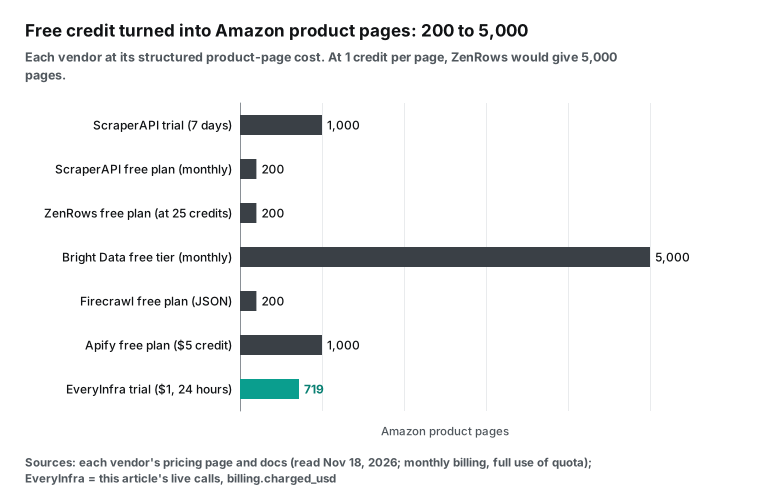
We converted the free tier of each service into one unit: Amazon product pages.
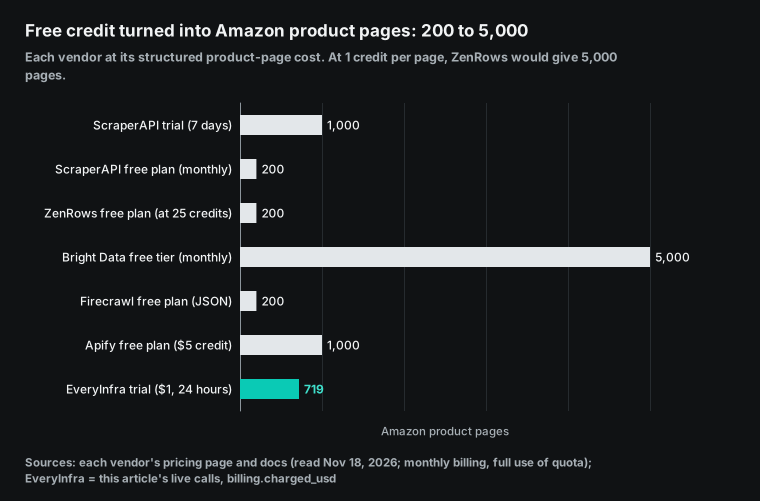
| Free tier | Allowance | Amazon product pages | Limits |
|---|---|---|---|
| ScraperAPI trial | 5,000 credits, 7 days | 1,000 | Expires after 7 days |
| ScraperAPI free plan | 1,000 credits per month | 200 | 5 concurrent threads |
| ZenRows free plan | 5,000 credits per month | 200 (at 25 credits) to 5,000 (at 1 credit) | Per-site cost needs a test |
| Bright Data free plan | 5,000 records per month | 5,000 | Billed per record |
| Firecrawl free plan | 1,000 credits per month | 200 (JSON) | 2 concurrent browsers |
| Apify free plan | $5 of usage per month | 1,000 | No plan discount |
| EveryInfra trial | $1, 24 hours | 719 | Star two GitHub repositories to claim it |
In this unit, the Bright Data free plan is the largest at 5,000 records each month. The ScraperAPI trial lasts only 7 days. After that, the free plan gives 1,000 credits a month, which buys only 200 product pages at 5 credits each.
Our trial converts to 719 product pages. If you use it for amazon/search at 20 products per call, $1 buys about 8,900 product rows. The pricing page explains how to claim it.
Failed requests, empty results and timeouts: which services charge
The price table shows only half of the bill. The other half is failed requests.
ScraperAPI charges only for status codes 200 and 404. It also charges for a request that you cancel within 70 seconds, because the work has started (credits documentation). A request above your concurrency limit returns 429 and is free. ZenRows says on its pricing page that failed requests are never charged, and it counts 404 and 410 as successful results.
Firecrawl says that a scrape with no result is free. A target page that returns 403 or 404 is still delivered to you and costs 1 credit (billing documentation). Bright Data charges per delivered record. Apify charges per event, so results written to the dataset before a run fails are still charged.
| Case | ScraperAPI | ZenRows | Firecrawl | Bright Data | Apify | EveryInfra |
|---|---|---|---|---|---|---|
| Target returns 404 | Charged | Charged (counts as success) | 1 credit | No record, no charge | Depends on the tool | Free |
| Blocked or timed out | Free | Free | Free | Free | Results written so far are charged | Free, refunded on the same charge ID |
| Wrong parameter | Free | Free | Free | Free | A start fee may apply | 422, free |
| You cancel the request | Charged within 70 seconds | Not stated | Not stated | Not stated | Usage so far is charged | Not tested |
At 00:40 Singapore time, we sent amazon/profile with a wrong parameter, asin in place of the required url. After 0.13 seconds, the call returned 422 missing_param. The response named the required parameter, gave a working example request and said "Nothing was charged". The charged_usd field was empty.
In the same round, the random TikTok search returned 20 videos, so it was charged as a normal result. For slow requests, we hold the charge first. If the result fails or is empty, we refund it on the same charge ID. Our failure refund reconciliation guide shows how to check this in your own records.
ScraperAPI has two more rules. Credits do not roll over to the next month. Only the Scaling plan and higher can buy extra credits on pay as you go (plans and billing FAQ).
ScraperAPI states that you can ask for a refund within 7 days. Firecrawl rolls credits over for one month on Scale only. ZenRows annual plans give 12 months for the price of 10. Our prepaid balance does not expire and has no monthly fee. Workload A below, 30,000 product pages plus 3,000 searches, costs $43.75 a month with us. Cut the usage in half and the bill halves too, with no jump to a higher plan.
Measure your own failure rate: cost per successful page
A price table shows the cost per 1,000 requests. Your bill is the cost per 1,000 pages that you can use. The difference is the failure rate and the retries.
To run the test, pick 100 to 200 random URLs from your own list, from the five or six domains that you scrape most. Run them on each service. Record three values for each URL: the status code, the charge, and whether you can parse the fields you need. Then divide the total cost by the number of parsed pages and multiply by 1,000. Compare services on this number. The ScraperAPI trial lasts 7 days and ours lasts 24 hours, so run the same inputs on all services while the trials overlap.
Here is an example. One service costs $0.49 per 1,000 requests. Of 200 URLs, 170 parse correctly. The other 30 return a challenge page or an empty page, and the service charges for them because they return status 200. The real cost is 0.49 × 200 ÷ 170 = $0.576 per 1,000 successful pages, which is 18% above the list price.
A second service lists $0.60 and does not charge for failures, so its real cost is $0.60. The difference is now only 4%, and a harder set of domains can reverse it. A Reddit reply in the forum section below gives the same advice.
At EveryInfra, the billing.charged_usd field in each response shows the dollar charge, and failures show zero. At ScraperAPI, read the sa-credit-cost header. At ZenRows and Firecrawl, read the usage log in the dashboard. Save the test results in a spreadsheet and run the test again when a service changes its prices.
We applied the same method to the 20 calls in this article. Four groups of calls returned HTTP 200 and were charged, but some rows were of no use to us. The 10 results for "scraperapi alternatives" were all off topic. The 20 TikTok videos for the random keyword mean nothing for brand tracking. The wrong ASIN returned a bag of chips. When we remove these rows, the price per 1,000 rows is about 50% above the list price. The two amazon/search calls returned 38 rows, not 40, and the $0.1177 figure already uses the rows that came back.
| Calls in this article | Cost (USD) | Rows returned | Useful rows | List price per 1,000 rows | Price per 1,000 useful rows |
|---|---|---|---|---|---|
Three web searches | 0.002082 | 29 | 19 | 0.0718 | 0.1096 |
Three tiktok/search calls | 0.001668 | 60 | 40 | 0.0278 | 0.0417 |
Three amazon/profile calls | 0.004167 | 3 | 2 | 1.389 | 2.08 |
Two amazon/search calls | 0.004472 | 38 | 38 | 0.1177 | 0.1177 |
Every service charges for some status 200 replies that you cannot use. ScraperAPI charges for 200, ZenRows counts 404 as a success, and Firecrawl charges 1 credit for 403 and 404 pages. Compare services on the price after you remove useless rows, because that price is closer to your monthly bill.
The filter rule depends on the platform. For search results, check that the title or URL contains the brand. For TikTok videos, check the caption and the hashtags. For Amazon products, compare the returned title with the product name in your list, and count a mismatch as a failure. Put these rules in your test script and use the same rules on every service. Keep the rules fixed between test rounds, or you cannot compare the results.
One month of usage: three workloads, six bills
The plan size also changes the bill. For three typical workloads, we picked the smallest monthly plan that covers the usage, or the pay-as-you-go price where one exists.
| Monthly workload | ScraperAPI | ZenRows | Bright Data | Firecrawl | Apify | EveryInfra |
|---|---|---|---|---|---|---|
| A: 30,000 Amazon product pages + 3,000 Google searches | Startup $149 (225,000 credits) | Launch $99 (10 credits, 500,000-credit tier) to Growth $199 (25 credits, 1.2 million-credit tier) | $49.50 pay as you go | Standard $99 + $140 extra, $239 total | $127.50 at Starter prices | $43.75 |
| B: 100,000 TikTok videos + 30,000 Instagram posts | Rows per page not published | Same | $195 pay as you go | Same | $345 at Starter prices | $3.34 (6,000 requests) |
| C: 2 million plain pages | Business $299 | Growth $279 (2 million-credit tier) | Not priced | Scale $749 + $1,000 extra, $1,749 total | Not a fit | $1,388 (read, no JavaScript) |
For workload A, a mix of products and searches, EveryInfra and Bright Data pay as you go cost the least. The 3,000 Google searches use 75,000 ScraperAPI credits at 25 each, and this pushes the account to the $149 Startup plan.
For workload B, social data, billing per request is about 100 times cheaper than billing per record. At 20 videos per call, 100,000 TikTok videos need only 5,000 requests.
For workload C, a large number of plain pages, ScraperAPI and ZenRows cost less than $0.15 per 1,000 pages on their larger plans: $0.10 on the ScraperAPI Business plan and $0.14 on the $279 ZenRows Growth tier. Our read bill is four to five times higher and does not render JavaScript. We do not recommend that you move this workload to us.
These are the assumptions. For ScraperAPI and ZenRows, we picked the smallest monthly plan that covers the credits. The ZenRows Growth plan has three tiers: $199, $279 and $399 a month for 1.2 million, 2 million and 3 million credits. Rows A and C use different tiers. ZenRows does not publish its multipliers for Amazon and Google, so we show the result at 10 and at 25 credits.
For Firecrawl, we used 5 credits per structured product page. Extra credits cost $5 per 2,000 on Standard and $5 per 5,000 on Scale. For Apify, we used Starter prices and counted the $19 plan fee as prepaid usage. For EveryInfra, we used the prices charged in our tests. If your multipliers are different, change the unit prices and calculate again.
# Price one month with your own usage and multipliers
amazon_pages, google_searches = 30_000, 3_000
scraperapi_credits = amazon_pages * 5 + google_searches * 25      # 225,000
everyinfra_usd = amazon_pages * 0.001389 + google_searches * 0.000694
print(scraperapi_credits, round(everyinfra_usd, 2))               # 225000 43.75
Budget limits and overage: what happens when the allowance runs out
Your monthly bill also depends on the rules that apply when your credits run out. The ScraperAPI Hobby, Startup and Business plans cannot buy extra credits. When the credits run out, you wait for the next month, or you turn on auto-upgrade before that happens. Auto-upgrade moves the account to the next plan. From Hobby to Startup, the monthly fee goes from $49 to $149.
Pay as you go is available only on Scaling and higher, with a monthly spending cap that you set (ScraperAPI pricing). Annual billing gives 10% off, and credits reset each month. Is your usage between two plans? Then you pay for the larger plan, or you stop scraping for a few days at month end.
All paid Firecrawl plans can buy extra credits in $5 steps. One step buys 1,000 credits on Hobby, 2,000 on Standard, 2,500 on Growth and 5,000 on Scale. You set a monthly limit, or enter 0 to turn it off. Credits that you buy by hand expire when you cancel the subscription.
| Overage rule | ScraperAPI | ZenRows | Firecrawl | Bright Data | Apify | EveryInfra |
|---|---|---|---|---|---|---|
| Buy extra credits | Scaling and higher only | Not stated | All paid plans, $5 steps | Pay as you go | Plan fee is prepaid usage | Top up any time |
| Unused credits roll over | No | Not stated | Scale only, one month | Not applicable | Not stated | Balance does not expire |
| Spending limit | max_cost per request, cap on pay as you go | Credit limit per key | Monthly pay-as-you-go limit | Not stated | Limit per run | Prepaid balance is the limit |
| Annual discount | 10% | 2 months free | 16.7% to 20% | Not applicable | Not stated | No subscription |
ZenRows added a credit limit per API key in early October. This is useful when you give a key to an AI agent. Bright Data pay as you go has no monthly fee. On Apify, the plan fee is prepaid usage for the month, and the Store discount tier follows your plan.
Connecting AI tools: MCP at all six services
All six services offer MCP. MCP is the Model Context Protocol, which lets AI tools such as Claude or Cursor call outside APIs (protocol introduction). The differences are the tool design and the billing.
| Service | MCP address or repository | Notes |
|---|---|---|
| ScraperAPI | https://mcp.scraperapi.com/mcp | Remote server with 22 tools in the documentation, same credit rules as the API (MCP docs, repository) |
| ZenRows | https://mcp.zenrows.com/mcp | Remote server on one shared credit balance (MCP docs, repository) |
| Bright Data | Remote or local | 5,000 free requests each month (MCP FAQ, repository) |
| Firecrawl | Remote or local | Version 3 released on November 12, 2026 (MCP docs, repository) |
| Apify | https://mcp.apify.com | Finds and runs Store tools (MCP docs, repository) |
| EveryInfra | https://api.everyinfra.com/mcp | Billed per request, slow jobs return a job ID (MCP setup page) |
Before you give a key to an AI tool, set a spending limit. On ScraperAPI, the max_cost parameter stops a request above the limit with a 403. On ZenRows, you can set a credit limit per key since October. We bill per request, and the most expensive call in this article was amazon/search at $0.002236. One hundred calls from a model cost $0.22, so you know the upper limit before the calls start.
This is our configuration:
{
  "mcpServers": {
    "everyinfra": {
      "url": "https://api.everyinfra.com/mcp",
      "headers": { "Authorization": "Bearer ${EVERYINFRA_API_KEY}" }
    }
  }
}
ZenRows also has a self-serve purchase path for AI agents. An agent can pay for credits on its own at $0.50 per 1,000 credits (agentic payments). This is a little more than the $0.42 on the Build plan, but no person has to start a subscription.
Which scraperapi alternative fits your team
The four jobs and three monthly bills give the decision table below. "First choice" means the service with the lowest cost or the smallest change for the same usage. We use the public prices and test results in this article. Your multipliers, regions and concurrency needs can change the answer.
| Main job | First choice | Second choice | Reason |
|---|---|---|---|
| Full HTML from thousands of sites, more than 1 million pages a month | ScraperAPI or ZenRows | Firecrawl | 1 credit per plain page, below $0.15 per 1,000 on large plans |
| Single-page apps that need JavaScript and screenshots | ZenRows | ScraperAPI | ZenRows rendering is 5 credits, ScraperAPI is 10 |
| Price and rating checks on hundreds of thousands of ASINs | ScraperAPI, Startup or higher | Bright Data | $0.46–0.75 per 1,000 |
| Amazon or Walmart product lists by keyword | EveryInfra | ScraperAPI | 20 rows per call, $0.07–0.12 per 1,000 products |
| Rank tracking for thousands of Google keywords a day | EveryInfra | Bright Data | $0.694 per 1,000, while ScraperAPI uses 25 credits per search |
| TikTok and Instagram monitoring | EveryInfra | Apify | Per-request billing, $0.02–0.03 per 1,000 posts |
| Web pages as Markdown for a language model | Firecrawl | EveryInfra read | Firecrawl returns Markdown at 1 credit per page |
| Existing Scrapy or Playwright scripts that only need a proxy | ScraperAPI | ZenRows | Proxy port mode, no parser changes |
For a solo developer or a small team, the first step is usually a trial. The ScraperAPI trial gives 5,000 credits for 7 days. That is enough for 1,000 Amazon product pages or 200 Google searches. The Bright Data free plan gives 5,000 records each month and lasts the longest. Our $1 trial is valid for 24 hours and covers 1,440 Google searches or 1,798 TikTok searches.
Run your three most common jobs a few dozen times each on the free tiers. Record the cost and the row count of each call. Then choose a service and a plan.
When ScraperAPI is the better choice among scraperapi competitors
In these cases, it is cheaper or easier to stay on ScraperAPI.
| Case where ScraperAPI fits better | ScraperAPI cost | Comparison |
|---|---|---|
| 2 million plain pages a month | $299 (Business) | EveryInfra read $1,388, Firecrawl $1,749, ZenRows $279 |
| JavaScript pages, waits, screenshots | 10 credits per rendered page | Our read returned only the page shell |
| Existing crawlers that need a proxy | Proxy port mode | EveryInfra does not sell proxies |
| Single Amazon products at volume | $0.459–0.745 per 1,000 (Startup and higher) | EveryInfra $1.389 per 1,000 |
The first case is full HTML from many websites at volume. A plain page costs 1 credit, which is $0.092 per 1,000 on the large plans. Two million pages a month cost $299. Our per-request price is $1,388, and Firecrawl is $1,749. ZenRows is close to ScraperAPI here, at $279 for 2 million credits on its second Growth tier, and its JavaScript multiplier is lower.
The second case is single-page apps that need JavaScript rendering, a wait for an element or a screenshot. In our test at 00:27 Singapore time, our read tool returned only the page shell. The ScraperAPI render=true option with wait_for_selector waits for the content before it returns. If you move these pages to us, you will not get the data.
The third case is existing crawlers that only need proxies and block handling. The ScraperAPI proxy port mode connects directly to Scrapy or Playwright scripts. In October 2026, ScraperAPI made its Akamai bypass automatic, so you no longer need the premium parameter for those sites (release note).
The fourth case is a large volume of single Amazon product pages on Startup or higher. At $0.459 to $0.745 per 1,000, ScraperAPI is cheaper than our $1.389. In July, ScraperAPI also removed the 5x multiplier from DataPipeline, its batch service (release note). Scheduled scraping now costs less too.
In three other cases, ScraperAPI costs clearly more. Google search uses 25 credits per search. Social data needs your own HTML parser. Keyword product search is billed per page, but the row count per page is not fixed.
For these three jobs, look at three other services. Bright Data has per-record billing and a large free tier. Apify has many ready-made tools with settings. EveryInfra has per-request billing. Our Bright Data alternatives, Firecrawl alternatives, ZenRows pricing breakdown and Apify vs Firecrawl articles compare the market from those angles.
What to change when you move from ScraperAPI
A move from ScraperAPI changes three parts of your code. The first is the request format. ScraperAPI uses the query parameters api_key and url, and its structured endpoints use different paths. We use a JSON body with platform, action and params, and the key goes in the Authorization header. The catalog shows the required parameters and an example for each capability.
The second part is field names. The two services return different names, so you need a mapping layer. The common fields, such as price, rating and review count, are present on both sides, but the names and the nesting are different.
The third part is slow jobs. The ScraperAPI async service uses callbacks or polling. Some of our capabilities, such as instagram/user_posts, always run as async jobs and return a job ID. You read the result with GET /api/v1/jobs/{job_id}, and polling is free.
The table below maps the Amazon product fields. The ScraperAPI column uses the return items in its structured data page. The EveryInfra column uses the real field names from our amazon/profile call at 00:29 Singapore time. Both sides cover most of the same data. Our single-product capability has no separate field for specifications. Product bullet points are in features, and keyword search results also include description and bestseller_ranks.
| Data | ScraperAPI structured endpoint (as documented) | EveryInfra `amazon/profile` (real fields) |
|---|---|---|
| Title | Title | title |
| Price | Price | price, currency |
| Rating and count | Rating, review count | rating, rating_scale, rating_count |
| ID | ASIN | asin |
| Stock | Availability | in_stock |
| Images | Images | image_url, images |
| Seller | Seller info | seller_name |
| Description and bullets | Description | features |
| Specifications | Product specifications | No separate field |
| Brand and category | Not listed | brand, category, is_amazon_choice |
Your cost tracking also changes. At ScraperAPI, you read the sa-credit-cost header. At EveryInfra, each sync response has billing.charged_usd with the dollar charge, and async jobs show billing_state. Log this field in your own system, and you can reconcile at month end without the dashboard.
What ScraperAPI changed in 2026: plans, batch jobs and protected sites
Before you move, look at the direction of ScraperAPI's own pricing. In May 2026, it added two plans above Scaling. Professional costs $975 for 10.5 million credits, and Advanced costs $1,975 for 21.5 million credits. For a limited time, they include 250,000 and 500,000 bonus credits, with 300 and 500 concurrent threads (release note). These plans bring the price to $0.093 and $0.092 per 1,000 credits.
In July, DataPipeline dropped its extra 5x multiplier, and ScraperAPI says that this makes it up to 80% cheaper. In June, it released the domain cost estimator. In October, it made the Akamai bypass automatic.
Changes in the last 30 days
- On November 17, 2026, Firecrawl announced its first office outside San Francisco, in Toronto. The release repeats its $75 million Series B from September (Business Wire release). For readers: Firecrawl is focused on data sources for AI agents, and its scraping prices did not change.
- On November 13, 2026, the Firecrawl changelog said that its Alexandria company data now covers more than 75 million companies (changelog). For readers: teams that need company data have one more credit-based source.
- On November 12, 2026, Firecrawl released MCP version 3, with 60 times higher rate limits and 4 times more usage. For readers: Firecrawl free credits last longer in AI tools.
- On November 16, 2026 and November 17, 2026, four of the five Apify Store tool pages in this article were updated. The Instagram post tool page shows no update time. For readers: Apify prices change per tool, so read them again each month.
- On October 22, 2026, Firecrawl added a government and legal index. On October 30, 2026, it added an integration with eve, the Vercel open-source agent framework. For readers: Firecrawl is moving from scraping into ready-made datasets.
- In October 2026, ScraperAPI made its Akamai bypass automatic. In early October, ZenRows added a Crawl endpoint and a credit limit per key (ZenRows changelog). For readers: if you used
premiumonly for Akamai sites on ScraperAPI, test again without it, because your multiplier can go down.
What YouTube videos and forums say about scraperapi alternatives
We used the EveryInfra youtube/search capability to search for "scraperapi alternatives". At 00:17 Singapore time, it returned 10 videos for $0.000778. We took the transcripts of the three most relevant videos with youtube/transcript, at 00:26 Singapore time, for $0.000556 each.
The first video, uploaded on October 26, 2026, is a 30-second ad from another scraping company. It says that on the ScraperAPI trial, its test cost "over $2 per thousand standard pages". At public prices, a plain page costs 1 credit, which is at most $0.49 per 1,000. A cost above $2 means that those pages used 5 credits or more. The video does not give its URLs or multipliers, so we cannot check the claim.
The second video, from June 2, 2026, is a review. Its main point is that credits run out fast with JavaScript rendering and anti-bot bypass. It tells teams that scrape millions of pages a month to calculate their costs before they buy a large plan. The third video, uploaded on October 19, 2026, compares five services. Its conclusion is that each request type uses a different number of credits, so you must estimate cost for the sites that you actually scrape.
All three videos have zero comments, and their view counts are 9, 59 and 175. The discussion is still small, so the transcripts are the only source of pain points.
| Video | Uploaded | Views | Main claim | What it does not show |
|---|---|---|---|---|
| ScraperAPI Alternative Same Pages Lower Cost 2026 Benchmark | 2026-10-26 | 9 | Over $2 per 1,000 standard pages on the ScraperAPI trial | Test URLs and credit multipliers |
| Scraper API Review: Best Web Scraper Tool in 2026? | 2026-06-02 | 59 | Credits run out fast with rendering and anti-bot bypass | How to measure the cost per site |
| Best Web Scraping API: five-provider comparison | 2026-10-19 | 175 | Each request type uses a different credit count | Any price per 1,000 results |
All three videos say "estimate cost per site", but none shows how. None of them uses the ScraperAPI /account/urlcost endpoint, the sa-credit-cost header, the max_cost limit or the domain estimator. The credit section of this article shows these tools. Run your own URL list through them to get your own multiplier.
On Reddit, a r/WebScrapingInsider thread asks which scraping API to use for e-commerce sites. One reply says to compare the cost per successful page for each domain. It cites a third-party benchmark in which 100,000 Amazon pages cost from $20 to $300 a month, depending on the provider.
A second thread is in r/scrapingtheweb. There, the poster says that credit-based services used credits too fast with JavaScript rendering and premium proxies. The poster later moved to Firecrawl.
Both are single-user reports without outside checks. Use them as a test list. First, calculate the cost per successful page for each domain. Next, check how much the multiplier goes up with rendering and premium proxies. Last, look at the monthly plan fee.
Legal limits
All six services collect data from public pages. You are responsible for the terms of the target site and for local law. If the reviews or posts that you collect contain personal data of people in the EU, follow the GDPR. This article compares prices and billing rules. It does not say whether a given site can be scraped, and it is not legal advice.
Get started: check the numbers with your own list
- Open the quickstart and sign up.
- Claim the $1 trial as the pricing page explains. It is valid for 24 hours.
- Open the Amazon platform page, the TikTok platform page or the data market.
- Run your own ASINs and keywords in the test panel.
- Record the row count and
charged_usdfor each call. - Check the ScraperAPI multiplier for the same URLs with
/account/urlcost. - Put both prices into the Python example above to get your monthly bill.
FAQ
Which scraperapi alternatives are the cheapest?
(Source: Google suggestions "scraperapi free alternative" and "scraperapi competitors") It depends on the job. At public prices on November 18, 2026, we are the cheapest for Google search at $0.694 per 1,000, while ScraperAPI costs $2.30 to $12.25. For social posts, we charge $0.0185 to $0.0278 per 1,000, at least 47 times less than Bright Data and Apify. For full HTML from arbitrary sites, ScraperAPI and ZenRows cost less than $0.15 per 1,000 pages on large plans, which is cheaper than us.
How do I choose between scraperapi vs firecrawl?
(Source: Google suggestion "scraperapi vs firecrawl") For full HTML, proxies and block handling, choose ScraperAPI, at $0.092 to $0.49 per 1,000 plain pages. For web pages as Markdown for a language model, choose Firecrawl. It costs 1 credit per page, or $0.75 to $3.80 per 1,000. Structured JSON costs 4 more credits per page on Firecrawl, so Amazon data goes above $3.75 per 1,000.
Is ZenRows or ScraperAPI cheaper?
(Source: Google suggestion "zenrows vs scraperapi") For plain pages, the two are close, and the ZenRows large plans are a little lower at $0.067 per 1,000 credits. For JavaScript rendering, ZenRows uses 5 credits and ScraperAPI uses 10, so ZenRows costs half. ZenRows does not publish its credit cost for Amazon or Google. ScraperAPI does (5 and 25), which makes the budget easier to plan. Both say that failed requests are free.
scraperapi vs apify: which is better for social media data?
(Source: Google suggestion "scraperapi vs apify") The Apify Store has ready-made TikTok and Instagram tools that bill per result, at $1.00 to $3.70 per 1,000, and return structured JSON. ScraperAPI scrapes TikTok as a plain page and returns HTML that you must parse, and it does not list Instagram. For social data only, Apify saves development time. EveryInfra bills per request and returns 20 to 30 posts per call, about $0.02 per 1,000 posts.
Is there a pay-as-you-go scraperapi alternative with no subscription?
(Source: Google suggestion "scraperapi free alternative", and credit complaints in the r/scrapingtheweb thread) Yes, there are three. Bright Data pay as you go has no monthly fee and costs $1.50 per 1,000 records. Firecrawl sells extra credits only on paid plans. EveryInfra uses a prepaid balance with a $10 first top-up that does not expire. Each request is charged at the catalog price, and failures and empty results are free. ScraperAPI offers pay as you go only from the Scaling plan up.
Does ScraperAPI have a free tier, and what happens when it runs out?
(Source: Google suggestions "scraperapi free tier" and "scraperapi free plan") Yes. A new account gets a 7-day trial with 5,000 credits. After that, the free plan gives 1,000 credits a month with 5 concurrent threads. Credits do not roll over, and plans below Scaling cannot buy extra credits. At 5 credits per Amazon page, the free plan covers only 200 pages a month. The Bright Data free plan gives 5,000 records a month, the most in this unit.
Is ScraperAPI safe and legal to use?
(Source: Google suggestions "is scraperapi legit" and "is scraperapi legal") ScraperAPI is an established commercial service with public prices, a 7-day refund window and documented billing rules. Whether your use is legal depends on the sites you scrape and how you use the data, and this is the same at every provider. Follow the terms of each target site, and handle personal data under the law where you operate.
References
- ScraperAPI pricing, ScraperAPI, read 2026-11-18, https://www.scraperapi.com/pricing/
- Credits and Requests Costs, ScraperAPI documentation, read 2026-11-18, https://docs.scraperapi.com/getting-started/quick-start/credits-and-requests-costs
- Plans and Billing FAQ, ScraperAPI documentation, read 2026-11-18, https://docs.scraperapi.com/resources/faq/plans-and-billing
- Cost Control, ScraperAPI documentation, read 2026-11-18, https://docs.scraperapi.com/control-and-optimization/cost-control
- MCP Server, ScraperAPI documentation, read 2026-11-18, https://docs.scraperapi.com/integrations/llm-integrations/mcp-server
- scraperapi-mcp repository, GitHub, read 2026-11-18, https://github.com/scraperapi/scraperapi-mcp
- Structured Data (AI version), ScraperAPI, read 2026-11-18, https://www.scraperapi.com/docs/ai/structured-data
- Pricing (AI version), ScraperAPI, read 2026-11-18, https://www.scraperapi.com/docs/ai/pricing
- Akamai-protected sites now unblocked automatically, ScraperAPI release notes, October 2026, https://docs.scraperapi.com/resources/release-notes/october-2026/akamai-protected-sites-now-unblocked-automatically
- DataPipeline is now up to 80% cheaper, ScraperAPI release notes, July 2026, https://docs.scraperapi.com/resources/release-notes/july-2026/datapipeline-is-now-up-to-80-cheaper
- New Domain Credit Cost Estimator, ScraperAPI release notes, June 2026, https://docs.scraperapi.com/resources/release-notes/june-2026/new-domain-credit-cost-estimator
- More credits, higher limits: new growth plans, ScraperAPI release notes, May 2026, https://docs.scraperapi.com/resources/release-notes/may-2026/more-credits-higher-limits-introducing-new-growth-plans-on-scraperapi
- ScraperAPI documentation index (llms.txt), read 2026-11-18, https://docs.scraperapi.com/llms.txt
- ZenRows pricing, read 2026-11-18, https://www.zenrows.com/pricing
- Universal Scraper API reference, ZenRows documentation, read 2026-11-18, https://docs.zenrows.com/fetch/api-reference
- Agentic payments, ZenRows documentation, read 2026-11-18, https://docs.zenrows.com/first-steps/agentic-payments
- MCP integrations, ZenRows documentation, read 2026-11-18, https://docs.zenrows.com/integrations/mcp/mcp-integrations
- zenrows-mcp repository, GitHub, read 2026-11-18, https://github.com/ZenRows/zenrows-mcp
- ZenRows changelog, read 2026-11-18, https://docs.zenrows.com/changelog
- Amazon ASIN scraping page, ZenRows, read 2026-11-18, https://www.zenrows.com/scrape/amazon-asin
- Bright Data pricing overview, read 2026-11-18, https://brightdata.com/pricing
- Web Scraper API pricing, Bright Data, read 2026-11-18, https://brightdata.com/pricing/web-scraper
- SERP API pricing, Bright Data, read 2026-11-18, https://brightdata.com/pricing/serp
- SERP API introduction, Bright Data documentation, read 2026-11-18, https://docs.brightdata.com/scraping-automation/serp-api/introduction
- MCP Server FAQs, Bright Data documentation, read 2026-11-18, https://docs.brightdata.com/products/mcp-server/faqs
- brightdata-mcp repository, GitHub, read 2026-11-18, https://github.com/brightdata/brightdata-mcp
- Sync vs async requests, Bright Data documentation, read 2026-11-18, https://docs.brightdata.com/concepts/sync-vs-async
- Firecrawl pricing, read 2026-11-18, https://www.firecrawl.dev/pricing
- Billing, Firecrawl documentation, read 2026-11-18, https://docs.firecrawl.dev/billing
- Scrape, Firecrawl documentation, read 2026-11-18, https://docs.firecrawl.dev/features/scrape
- Search, Firecrawl documentation, read 2026-11-18, https://docs.firecrawl.dev/features/search
- MCP Server, Firecrawl documentation, read 2026-11-18, https://docs.firecrawl.dev/mcp-server
- firecrawl-mcp-server repository, GitHub, read 2026-11-18, https://github.com/firecrawl/firecrawl-mcp-server
- Firecrawl changelog, read 2026-11-18, https://www.firecrawl.dev/changelog
- Firecrawl Brings Its Library for the World's Knowledge to Toronto, Business Wire, 2026-11-17, https://www.businesswire.com/news/home/20261117386615/en/Firecrawl-Brings-Its-Library-for-the-Worlds-Knowledge-to-Toronto
- Apify pricing, read 2026-11-18, https://apify.com/pricing
- Actors in Store, Apify documentation, read 2026-11-18, https://docs.apify.com/platform/actors/running/actors-in-store
- Apify MCP server, Apify documentation, read 2026-11-18, https://docs.apify.com/platform/integrations/mcp
- apify-mcp-server repository, GitHub, read 2026-11-18, https://github.com/apify/apify-mcp-server
- Amazon Product Scraper, Apify Store, read 2026-11-18, https://apify.com/junglee/amazon-crawler
- Google Search Results Scraper, Apify Store, read 2026-11-18, https://apify.com/apify/google-search-scraper
- TikTok Scraper, Apify Store, read 2026-11-18, https://apify.com/clockworks/tiktok-scraper
- Instagram Post Scraper, Apify Store, read 2026-11-18, https://apify.com/apify/instagram-post-scraper
- What is the Model Context Protocol, MCP documentation, read 2026-11-18, https://modelcontextprotocol.io/docs/getting-started/intro
- EveryInfra capability catalog, read 2026-11-18 00:14, https://api.everyinfra.com/api/v1/social/catalog
- EveryInfra search tool catalog, read 2026-11-18, https://api.everyinfra.com/api/v1/search/tools
- Which is the best web scraping API for e-commerce sites?, Reddit r/WebScrapingInsider, read 2026-11-18, https://www.reddit.com/r/WebScrapingInsider/comments/1vsd1ot/which_is_the_best_web_scraping_api_for_ecommerce/
- I'm looking for ScrapingBee Alternatives in 2026, Reddit r/scrapingtheweb, read 2026-11-18, https://www.reddit.com/r/scrapingtheweb/comments/1v85plc/im_looking_for_scrapingbee_alternatives_in_2026/
- ScraperAPI Alternative Same Pages Lower Cost 2026 Benchmark, YouTube, 2026-10-26, https://www.youtube.com/watch?v=PkaI1bDWhAw
- Scraper API Review: Best Web Scraper Tool in 2026?, YouTube, 2026-06-02, https://www.youtube.com/watch?v=niOu3F7fVlw
- Best Web Scraping API: five-provider comparison, YouTube, 2026-10-19, https://www.youtube.com/watch?v=hvmfHAYxgLQ
- Regulation (EU) 2016/679 (GDPR), EUR-Lex, https://eur-lex.europa.eu/eli/reg/2016/679/oj
Reference BL-183