ScraperAPI pricing: what 1,000 requests really cost on each plan
ScraperAPI charges $2.45 to $0.46 per 1,000 Amazon pages and $12.25 to $2.30 per 1,000 Google searches. We priced every plan against 12 live calls.

A ScraperAPI plan shows one price. Hobby, for example, is $49 a month for 100,000 API credits. But one request can use 1 credit or 75 credits, by target site and parameters. A plain page costs 1 credit, Amazon 5, Google and Bing 25, and LinkedIn 30. JavaScript rendering adds 10.
With those weights, Hobby costs $2.45 per 1,000 Amazon product pages and $12.25 per 1,000 Google searches. It costs $14.70 per 1,000 LinkedIn pages. Advanced, the largest self-serve plan at $1,975 a month, brings those numbers to $0.459, $2.30 and $2.76. On 2026-11-15 we made 12 live calls to the EveryInfra API. Our amazon/profile endpoint charged $0.001389 per call, or $1.389 per 1,000.
Our web search tool charged $0.694 per 1,000, and linkedin/company_profile charged $0.556 per 1,000. So the answer depends on the target. For Amazon product pages, only Hobby costs more than us. From Startup up, ScraperAPI is 1.9x to 3.0x cheaper, with full use. For search and LinkedIn, every self-serve plan costs more than us: 3.3x to 17.6x for Google and 5.0x to 26.4x for LinkedIn.
Every "per 1,000" number here uses one formula. We divide the plan price by the monthly credits, then multiply by the credits per request and by 1,000. This assumes full use of the allowance. ScraperAPI credits do not roll over, so partial use costs more. A volume curve later in the article prices that case.
For ScraperAPI, we used only its public pages: pricing, credit docs, cost control, structured endpoints, FAQ and release notes. We read them between 00:20 and 00:45 SGT on 2026-11-15. We did not sign up or call the ScraperAPI API, so its numbers are list prices. Our numbers are real charges from billing.charged_usd, checked against price_usd in our public catalog. The two services return different fields, so we compare prices and billing rules only.
Side by side: billing unit, failures, free tier and setup
ScraperAPI is a monthly subscription. You pay a fixed amount for a bucket of credits, and each request takes credits out. Unused credits expire at renewal. EveryInfra is prepaid. Each call takes the catalog price of that endpoint from your balance, and the balance does not expire.
| Item | ScraperAPI (list price, read 2026-11-15) | EveryInfra (live charge and catalog) |
|---|---|---|
| Billing unit | Credits; 1 to 75 per request | One fixed USD price per endpoint |
| Lowest monthly spend | Hobby, $49 ($44.10 annual) | No monthly fee; first top-up $10 |
| Free allowance | 7-day trial, 5,000 credits; free plan 1,000 credits a month | $1 trial credit for starring two GitHub repos; 24 hours after you claim it |
| Rollover | None | Balance does not expire |
| Failed requests | Only 200 and 404 billed; 429 is free | Failures and empty results free |
| Out of credits | Upgrade, pay-as-you-go from Scaling, or wait | Calls stop at zero; top up |
| Price before the call | sa-credit-cost header, max_cost, /account/urlcost | price_usd in a public catalog |
| Amazon product page | 5 credits: $2.45 to $0.459 per 1,000 | amazon/profile: $1.389 per 1,000 |
| Google or Bing search | 25 credits: $12.25 to $2.30 per 1,000 | web tool $0.694; bing/search $0.556 |
| LinkedIn company page | 30 credits: $14.70 to $2.76 per 1,000 | linkedin/company_profile $0.556 |
| Request shape | GET with the target in url | POST JSON: platform, action, params |
| MCP | Remote server; 22 MCP tools since June 2026 | Remote server; tools named everyinfra_* |
The ScraperAPI column quotes its pricing page and billing FAQ. The "per 1,000" values are our arithmetic, and a script later in the article reproduces them. The EveryInfra column comes from our pricing page, the catalog and our live calls.
The request shapes suit different teams. ScraperAPI's basic scrape is a GET with api_key, url and options such as render. It returns the target page itself, so you write the parser. Our API takes a POST with the key in the Authorization header. It returns one JSON shape with results and billing.
ScraperAPI pricing table: eight plans per 1,000 requests
On 2026-11-15 the pricing page listed a trial, a free plan, four self-serve plans, two high-volume plans and Enterprise. ScraperAPI also publishes a Markdown copy for AI readers with every field. We converted it to numbers line by line. The four price columns use 1, 5, 25 and 30 credits per request.
| Plan | Monthly (annual) | Credits | Threads | Plain page | Amazon | ||
|---|---|---|---|---|---|---|---|
| Free | $0 | 1,000 | 5 | — | — | — | — |
| Hobby | $49 ($44.10) | 100,000 | 20 | $0.490 | $2.450 | $12.250 | $14.700 |
| Startup | $149 ($134.10) | 1,000,000 | 50 | $0.149 | $0.745 | $3.725 | $4.470 |
| Business | $299 ($269.10) | 3,000,000 | 100 | $0.100 | $0.498 | $2.492 | $2.990 |
| Scaling | $475 ($427.50) | 5,000,000 | 200 | $0.095 | $0.475 | $2.375 | $2.850 |
| Professional | $975 ($877.50) | 10,500,000 | 300 | $0.093 | $0.464 | $2.321 | $2.786 |
| Advanced | $1,975 ($1,777.50) | 21,500,000 | 500 | $0.092 | $0.459 | $2.297 | $2.756 |
| Enterprise | Custom | 22,000,000+ | 500+ | — | — | — | — |
Prices are per 1,000 requests with full use. Professional and Advanced also show "limited offer" bonus credits of 250K and 500K. We left those out because the page marks them as temporary. Annual billing gives 10% off on every self-serve plan.
Threads and geotargeting change between plans. Hobby has 20 threads and Advanced has 500. A request over the limit returns 429, at no charge. Hobby and Startup target "US & EU" only, and country-level targeting starts at Business. That matters if you scrape Amazon Japan on a small plan.
The Enterprise price is private, but a footnote in the credit docs sets a floor. Accounts with a discount get a higher credit cost on Ultra Premium domains. The floor is $3 per 1,000 requests without rendering and $7 with rendering.
Professional and Advanced are new in 2026. The May 2026 release note added them as self-serve plans that you can buy without sales. A review from before May shows only Hobby to Scaling. With that table, the lowest Amazon price is $0.475 per 1,000 on Scaling.
In June, ScraperAPI added a per-domain credit estimator. The March MCP note opened structured endpoints to MCP. The June agent plugin has 22 MCP tools, which is the number in the MCP row above.
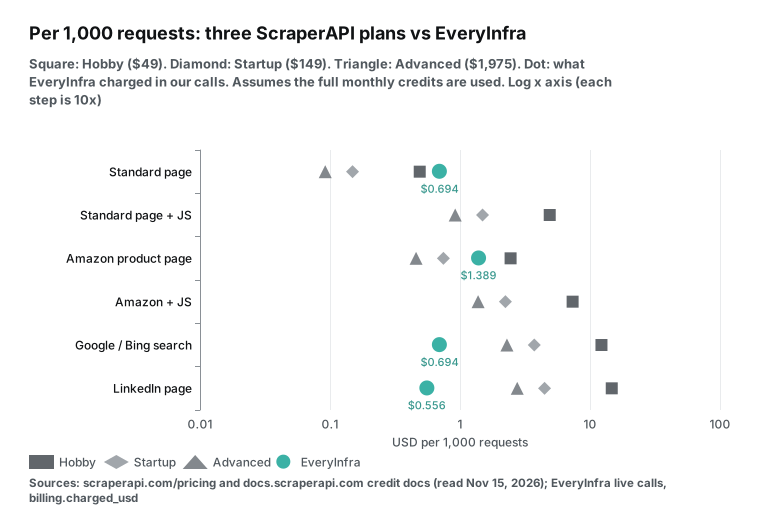
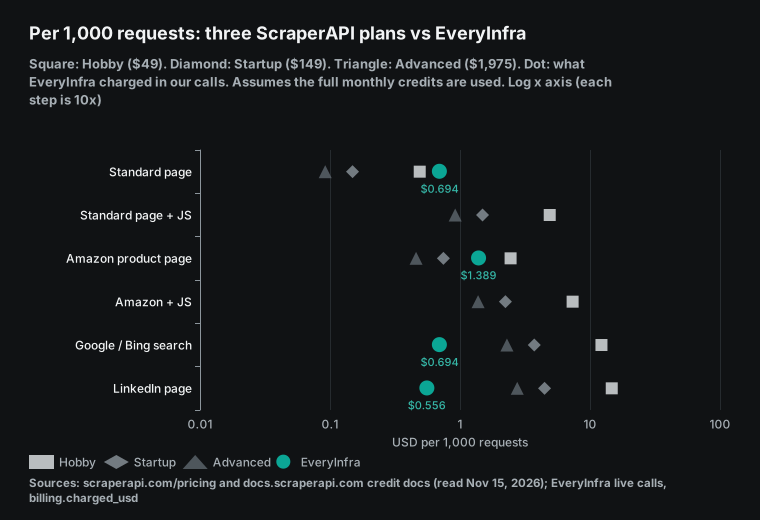
The dot chart puts six request types on one log axis. On every row, Advanced is 5.3x cheaper than Hobby, because one per-credit price drives all weights. The teal dots show our live charges, and their position changes by row. On plain pages, all three ScraperAPI plans beat our read tool. On Amazon, only Hobby costs more than us. On search and LinkedIn, all three plans cost more than us.
How ScraperAPI API credits work: one layer for the domain, one for parameters
The credit cost docs split the charge into two layers. The domain layer is 1 credit for normal sites and 5 for Amazon, Walmart and eBay. Google and Bing cost 25, and the docs say this "applies to all subdomains". LinkedIn costs 30. Sites behind Cloudflare, Turnstile, DataDome, PerimeterX/HUMAN or Akamai cost 10 per scrape.
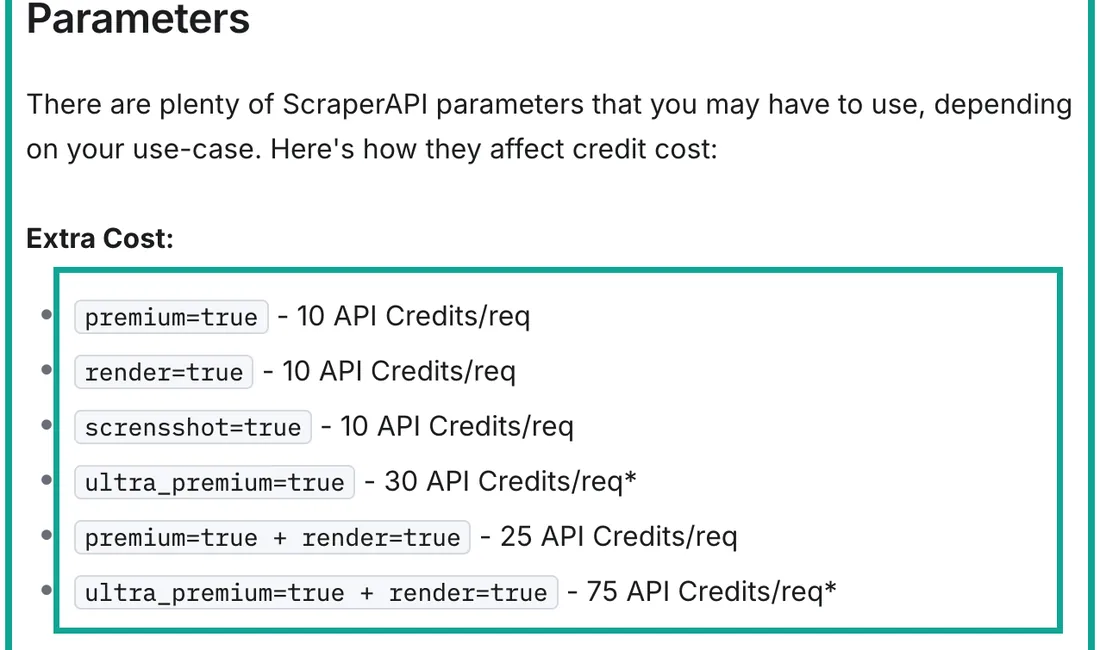
The parameter layer adds more. render=true, premium=true and screenshot=true cost 10 each. premium plus render costs 25. ultra_premium=true costs 30, and with render it costs 75, on paid plans only. Geotargeting, sessions, device type, output format and auto parsing are free.
| Request type | Credits | Where the docs say it | Hobby per 1,000 | Advanced per 1,000 |
|---|---|---|---|---|
| Plain page | 1 | Pricing table; credit docs "Domains" | $0.49 | $0.092 |
| E-commerce (Amazon, Walmart, eBay) | 5 | Same | $2.45 | $0.459 |
| Search (Google, Bing, subdomains) | 25 | Same | $12.25 | $2.297 |
| Social (LinkedIn) | 30 | Same | $14.70 | $2.756 |
| Bot-protection bypass | 10 | Credit docs "Bot-Protected Domains" | — | — |
render=true | 10 | Credit docs "Parameters" | $4.90 | $0.919 |
premium=true | 10 | Same | $4.90 | $0.919 |
premium=true + render=true | 25 | Same | $12.25 | $2.297 |
ultra_premium=true | 30 (paid plans) | Same | $14.70 | $2.756 |
ultra_premium=true + render=true | 75 (paid plans) | Same | $36.75 | $6.890 |
The docs give no formula for how the two layers combine. A normal site behind Cloudflare could cost 1 + 10 = 11, or 10. A pricing analysis on GitHub adds them and says protected sites "add another 10 credits on top". Our Hobby chart uses 11 and says so in the label.
ScraperAPI gives two tools to check a cost before you send traffic. One is the Domain Multiplier page in the dashboard. The other is the /account/urlcost endpoint, which accepts every parameter.
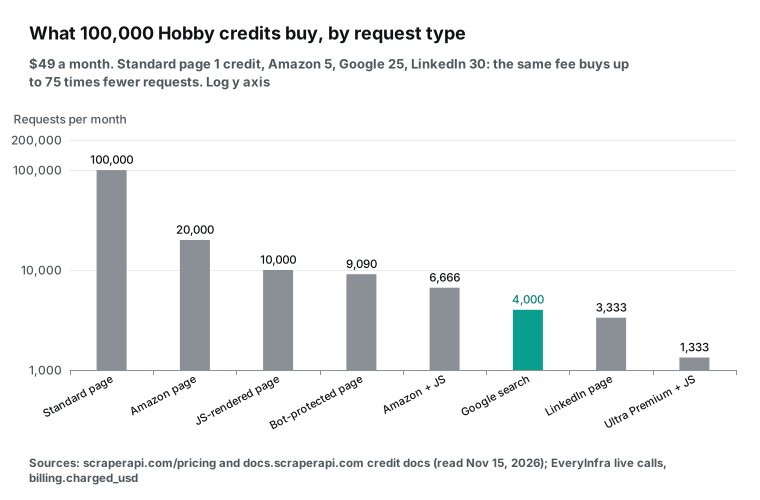
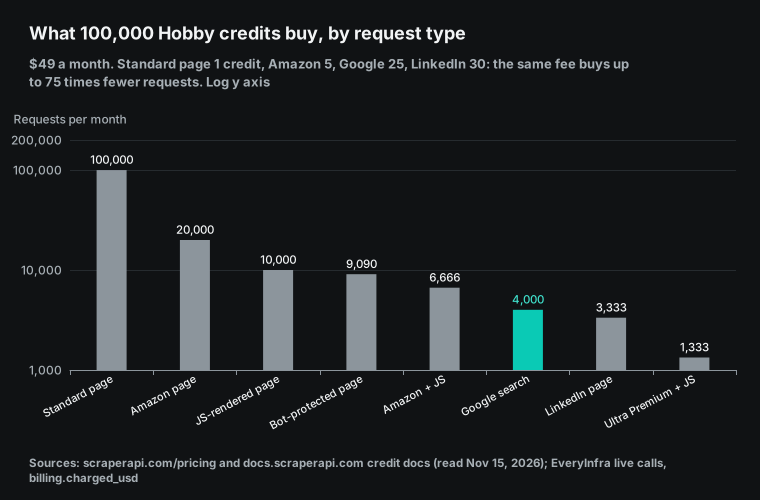
One $49 plan buys requests in a 75x range: 100,000 plain pages, 20,000 Amazon pages or 4,000 Google searches. The GitHub analysis gives an example: Amazon with rendering costs 15 credits, so 100,000 credits give about 6,600 scrapes. Our math from the docs gives 6,666.
A developer on r/webdev described scraping 36,000 pages on a Cloudflare site. The post says 100,000 Hobby credits ran out in one day, at 40 to 50 seconds per request. We did not repeat that test. By the docs, a protected page costs 11 credits, so Hobby gives only 9,090 requests. That is one eleventh of the plain-page count.
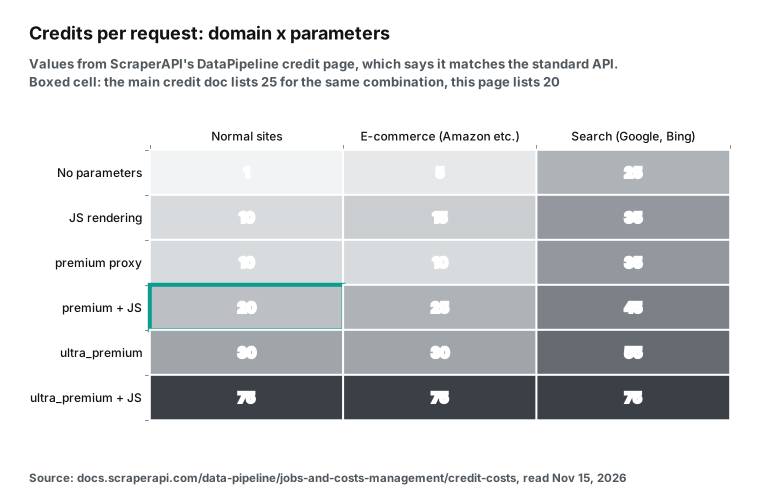
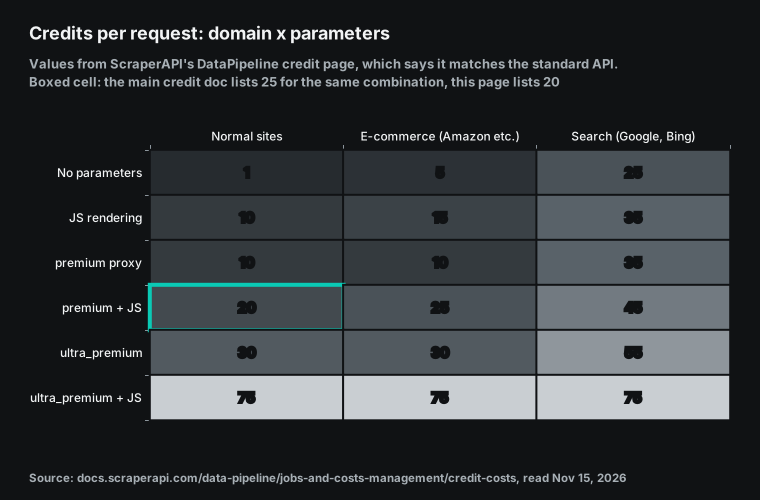
The full domain-by-parameter grid appears in one place only: the DataPipeline credit costs page. DataPipeline is the scheduled batch product. The page says that "DataPipeline credit costs now match our standard scraping rates". The July 2026 release note calls it "up to 80% cheaper". The heat map draws the grid as published.
Two places where the docs disagree
The first is premium plus JS rendering. The credit docs and the pricing page both say 25 credits. The DataPipeline grid shows 20 for normal sites, and it also claims to match standard rates. So one page is out of date. On Hobby, that is $9.80 or $12.25 per 1,000 requests, and our math uses 25.
The second is cancellation. The credit docs bill requests "cancelled from your side before giving us enough time to finish them (70 seconds)". So you pay if you disconnect within 70 seconds. The pricing FAQ says "for requests you cancel after 70 seconds", which points the other way. The general FAQ says ScraperAPI retries for up to 60 seconds. A client timeout above 70 seconds is the safe setting.
Running out: auto-upgrade, pay-as-you-go and threads
| Plan | When credits run out | Option you can turn on |
|---|---|---|
| Hobby, Startup, Business | Scraping pauses until renewal | Auto-upgrade to the next plan |
| Scaling, Professional | Scraping pauses until renewal | Auto-upgrade, or pay-as-you-go with a monthly cap |
| Advanced, Enterprise | Scraping pauses until renewal | Pay-as-you-go with a monthly cap |
| EveryInfra (any balance) | Calls stop at zero | Top up; no plan change |
The pricing page does not publish the pay-as-you-go rate, so we did not price overage. Auto-upgrade has a direct effect on the bill. A Hobby user who empties the bucket mid-month moves to Startup for that month. One traffic peak can lift the whole month.
Threads cap speed. The general FAQ gives an average of 4 to 12 seconds per request. At about 8 seconds, 20 Hobby threads finish about 9,000 requests an hour. So a month of Hobby Amazon pages (20,000) takes a little over two hours.
Success-only billing: 200, 404 and failed requests
The pricing FAQ asks "Does ScraperAPI charge for failed requests?" and answers "No". Only 200 and 404 responses are billed. A 404 counts because the site really answered "no such page". ZenRows also counts 404 and 410 as results. The general FAQ says to expect 1 to 3% failures, at no charge.
EveryInfra does not bill failures or empty results either. The billing block shows charged: false, charged_usd: 0.0 and a reason, and the refund happens in the same response. Two of our 12 calls failed. At 00:33 SGT, amazon/reviews returned HTTP 503 after 29.6 seconds with access_blocked. The message said the item needed a login, that the call was refunded, and that an instant retry would probably fail.
At 00:34 SGT, amazon/profile for a fake ASIN (B0ZZZZZZZ9) returned 503 after 15.1 seconds. It also cost $0. Both responses carried retry_after and next_steps.
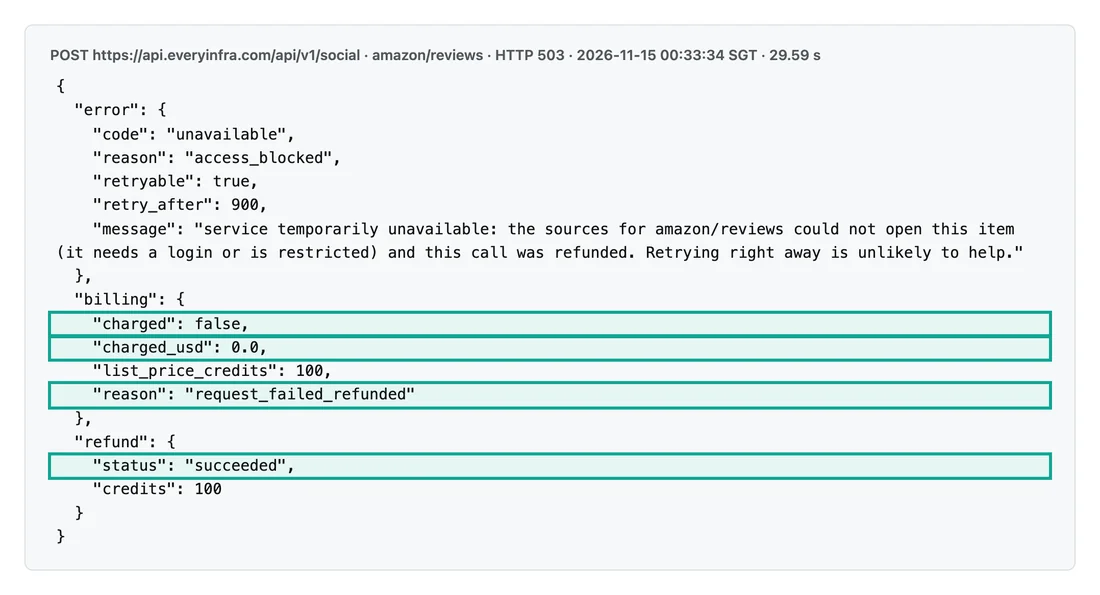
So the gap is in successful but useless requests. ScraperAPI bills 404, so each expired Amazon link still takes 5 credits. For example, 10,000 expired product links take 50,000 credits. That is half of the Hobby allowance, or $24.50 at the Hobby rate.
We charge nothing for a missing product, as the fake ASIN shows. Output differs too. A basic ScraperAPI scrape returns HTML for your parser. Our amazon/profile returned 19 fields, including price, rating_count, seller_name and bestseller_ranks.
EveryInfra live test: 12 calls in 3 rounds
We called the EveryInfra API in three rounds on 2026-11-15. Round one ran from 00:30 to 00:32 Singapore time. Round two ran from 00:33 to 00:34 SGT, and round three from 00:39 to 00:40 SGT. Each charge is billing.charged_usd from the response.
| Time (SGT) | Endpoint | Parameters | HTTP | Rows | Latency | Charged |
|---|---|---|---|---|---|---|
| 00:30 | amazon/search | wireless earbuds | 200 | 10 | 18.5 s | $0.002236 |
| 00:32 | web/search | scraperapi pricing, us | 200 | 10 | 1.7 s | $0.001389 |
| 00:32 | google_maps_reviews/search | coffee shop Austin TX | 200 | 15 | 7.0 s | $0.001389 |
| 00:33 | Search web tool | scraperapi pricing, us | 200 | 10 | 1.8 s | $0.000694 |
| 00:33 | amazon/profile | B09FT58QQP | 200 | 1 | 10.3 s | $0.001389 |
| 00:33 | amazon/reviews | B09FT58QQP | 503 | — | 29.6 s | $0 (refunded) |
| 00:34 | Search read tool | same Amazon page | 200 | 1 | 3.1 s | $0.000694 |
| 00:34 | amazon/profile | B0ZZZZZZZ9 (fake) | 503 | — | 15.1 s | $0 (refunded) |
| 00:39 | amazon/search | wireless earbuds, limit 50 | 200 | 50 | 41.4 s | $0.002236 |
| 00:39 | bing/search | scraperapi pricing | 200 | 10 | 5.2 s | $0.000556 |
| 00:40 | linkedin/company_profile | scraperapi | 200 | 1 | 4.6 s | $0.000556 |
| 00:40 | walmart/search | wireless earbuds | 200 | 20 | 41.0 s | $0.001389 |
The 12 calls cost $0.012528 in total. Ten succeeded, and every successful charge matched the catalog. amazon/profile read a pair of TOZO earbuds: $19.99, a 4.3 rating and 119,218 ratings. The read tool on the same page returned 766 characters with no price. So the cheap reader and the product endpoint return two different things.
linkedin/company_profile read ScraperAPI's own page: 37 employees, a size band of 11 to 50 and 2,266 followers. The Austin coffee search returned 15 places. The first was Jo's Coffee on South Congress, with a 4.4 rating and 2,013 reviews.
The two search options gave different results. web/search for "scraperapi pricing" returned 10 generic pricing pages. The web tool, at half the price, put the ScraperAPI pricing page first. All 10 Bing results were about ScraperAPI pricing. Results 1 and 2 were its pricing page and home page, and results 8 and 10 were its AI Parser pricing page and billing FAQ. The other 6 were third-party price lists or calculators.
Four of those 6 results showed a snippet date: 2026-11-01, 2026-10-16, 2026-08-19 and 2026-11-05. The title of the August page already says "$49–$1,975/mo", so it includes the Advanced plan from May. Check the date before you trust a third-party price list. A page from before May 2026 has no Professional or Advanced plan, so its high-volume prices are too high.
So we use the web tool's $0.694 as our search price and also show web/search at $1.389.
Each response also states a per_1k price. The first amazon/search call showed $2.236111, the same as the catalog. Search calls took under 6 seconds, and 50-row Amazon and Walmart searches took about 40 seconds. ScraperAPI states 4 to 12 seconds on average, with retries up to 60 seconds.
The curl request below repeats our Amazon search call. Put in your own key, or change platform and action to try another row.
curl -s https://api.everyinfra.com/api/v1/social \
  -H "Authorization: Bearer $EVERYINFRA_API_KEY" \
  -H "Content-Type: application/json" \
  -d '{"platform":"amazon","action":"search","params":{"keyword":"wireless earbuds","limit":50}}'
Amazon: the volumes where ScraperAPI costs less
With full use, ScraperAPI costs $2.45 per 1,000 Amazon pages on Hobby, 1.76x our $1.389. From Startup up, the order flips. Startup is $0.745, Business $0.498 and Advanced $0.459, so we cost 1.9x to 3.0x more.
Full use is an ideal case, though. Hobby covers only 20,000 Amazon pages. Page 20,001 needs Startup, which is full only at 200,000 pages. Between those points, the real ScraperAPI price is far above the table.
| Amazon pages per month | Smallest ScraperAPI plan | ScraperAPI | EveryInfra `amazon/profile` | Cheaper side |
|---|---|---|---|---|
| 5,000 | Hobby | $49 | $6.95 | EveryInfra, 7.1x |
| 20,000 | Hobby | $49 | $27.78 | EveryInfra, 1.8x |
| 50,000 | Startup | $149 | $69.45 | EveryInfra, 2.1x |
| 107,271 | Startup | $149 | $149.00 | Even |
| 150,000 | Startup | $149 | $208.35 | ScraperAPI, 1.4x |
| 200,001 to 215,262 | Business | $299 | $277.80 to $299 | EveryInfra, by up to $21 |
| 1,000,000 | Scaling | $475 | $1,389 | ScraperAPI, 2.9x |
| 4,300,000 | Advanced | $1,975 | $5,972.70 | ScraperAPI, 3.0x |
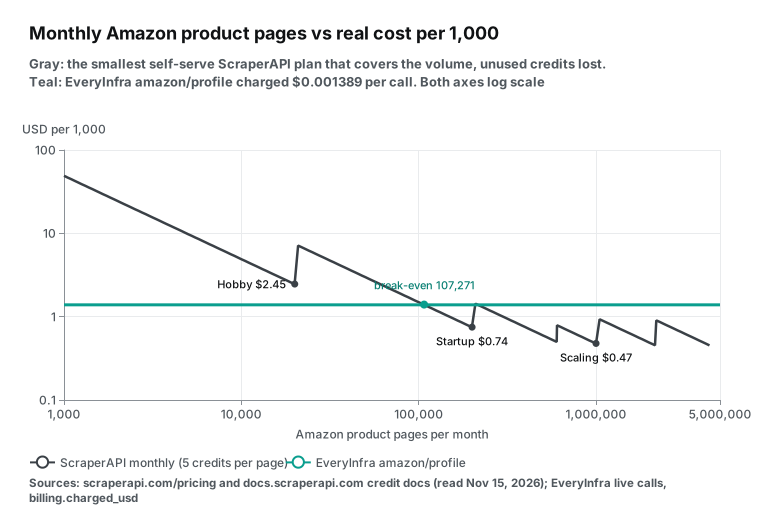
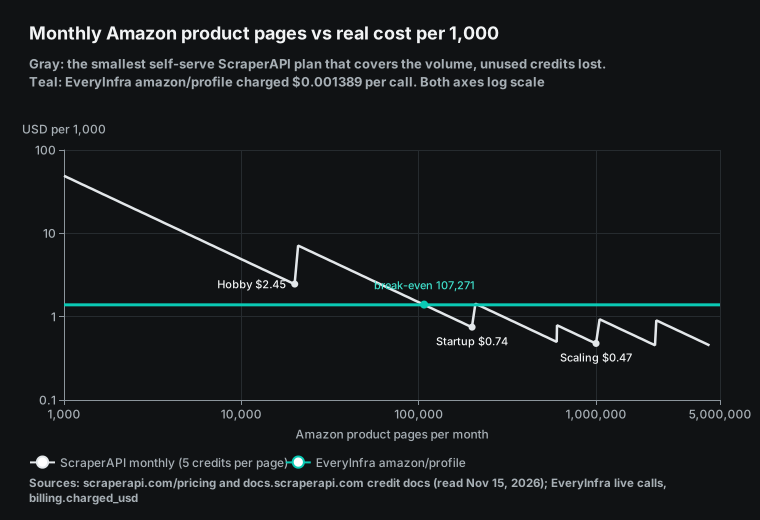
The gray line jumps at each plan change, because one extra page buys a whole plan. Then it slides down until that plan is full. The teal line is our flat $1.389. The lines first cross at 107,271 pages, which is $149 divided by $1.389 per 1,000. From there to 200,000 pages, ScraperAPI is cheaper.
At 200,001 pages you need Business, which breaks even with us at 215,262 pages. In that band of about 15,000 pages, we cost a little less. Above 215,262 pages, each break-even point falls inside its own plan, so ScraperAPI stays cheaper. A full Advanced plan, 4.3 million pages for $1,975, is about one third of our price.
Annual billing moves the crossing down. Startup at $134.10 breaks even at 96,544 pages. With annual billing, ScraperAPI stays cheaper from 96,544 pages up. Startup covers up to 200,000 pages. After that, Business at $269.10 a month is also below our $277.80 for 200,000 pages. So the band of about 15,000 pages where we win on monthly billing does not exist on annual billing.
Two conditions can change this result. First, 5 credits is the price without rendering. With rendering, Amazon costs 15 credits: $7.35 per 1,000 on Hobby and $1.378 on Advanced. The low success rate FAQ suggests render or premium when success drops.
Second, a basic scrape returns HTML, and you parse price and rating yourself. ScraperAPI also has an Amazon Product API that returns JSON, including all public reviews. Its docs state no credit cost. The pricing table puts Amazon in the 5-credit e-commerce band by domain and gives no separate price for structured endpoints. So 5 credits for the Amazon Product API is our inference from the domain.
Amazon search per 1,000 results
A search page returns many rows, so a per-row price is fairer. The sample in the Amazon Search API docs has 16 products. At 5 credits a page, that is $0.153 per 1,000 results on Hobby and $0.029 on Advanced. Our amazon/search costs $0.002236 per call. With 10 default rows, that is $0.224 per 1,000 results, and with limit=50 it is $0.045.
| Option | Rows per page | Per 1,000 results |
|---|---|---|
| ScraperAPI Hobby (5 credits a page) | 16 (docs sample) | $0.153 |
| ScraperAPI Startup | 16 | $0.047 |
| ScraperAPI Business | 16 | $0.031 |
| ScraperAPI Advanced | 16 | $0.029 |
EveryInfra amazon/search, default | 10 | $0.224 |
EveryInfra amazon/search, limit=50 | 50 | $0.045 |
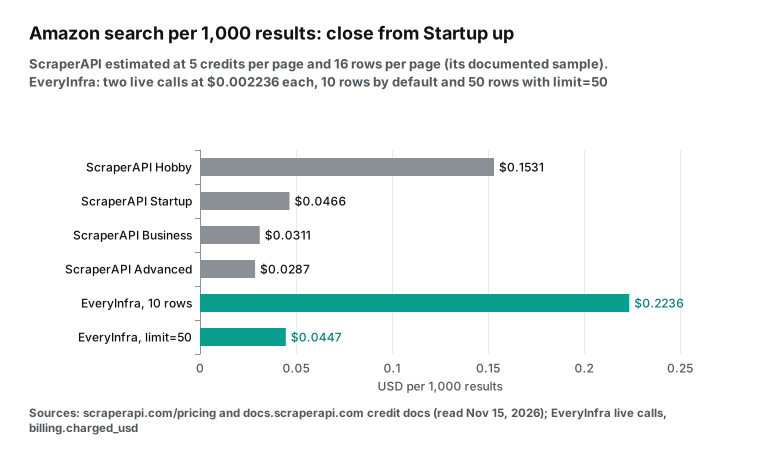
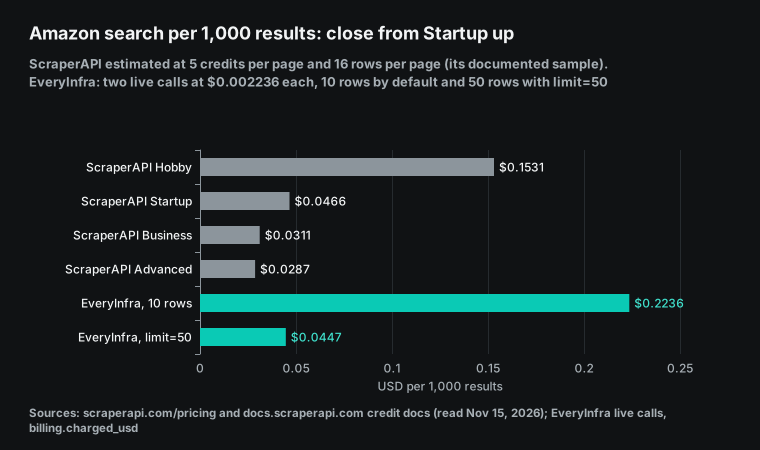
With default settings, our per-row price is the highest. With limit=50, we roughly match Startup, and Business and up cost less than us. The 16 rows per page are an estimate from the docs sample. With us, always send limit=50. With ScraperAPI, use Business or higher and use all the credits.
Google, Bing and maps: 25 credits a request
Google and Bing cost 25 credits a request. That is the second-highest domain weight, after LinkedIn at 30. The rate includes all subdomains, so Google Shopping, News and Maps fall in the same band. The Google SERP API docs and Google Maps Search API docs state no credit cost. We infer 25 for maps from the "all subdomains" sentence.
| Search type | ScraperAPI Hobby | ScraperAPI Advanced | EveryInfra live charge | ScraperAPI ÷ EveryInfra |
|---|---|---|---|---|
Google vs our web tool | $12.25 | $2.297 | $0.694 (10 rows) | 17.65x to 3.31x |
Google vs web/search | $12.25 | $2.297 | $1.389 (10 rows) | 8.82x to 1.65x |
Bing vs bing/search | $12.25 | $2.297 | $0.556 (10 rows) | 22.03x to 4.13x |
Maps (inferred) vs google_maps_reviews/search | $12.25 | $2.297 | $1.389 (15 places, up to 50) | 8.82x to 1.65x |
The Bing row is the cleanest match, because both sides search Bing. A full Advanced plan still costs 4.1x our price. The Google row needs a note. Our web tool returns ranked pages with a title, link and snippet. ScraperAPI's SERP endpoint returns Google's page as JSON blocks, such as ads and related searches. If you need those blocks, our endpoints here do not return them.
The Google Maps Platform pricing page, updated 2026-11-11, gives a reference. Text Search Pro is $32 per 1,000 with 5,000 free a month. Place Details Pro is $17 per 1,000. Those prices come with Google's own fields and license terms.
Per place, the gap grows. Our maps search returns up to 50 places a call, so the cost is $0.028 to $0.093 per 1,000 places. The ScraperAPI maps docs give no row count, so we compare per search only.
Low volume makes the gap larger, because the plan fee stays fixed. At 1,000 Google searches a month, Hobby gives an effective $49 per 1,000. Our web tool costs $0.69 for the same month. At 30,000 searches you need Startup, at $149 against our $20.82. Hobby's 100,000 credits give only 4,000 searches, and that is why small search volumes cost more on ScraperAPI.
LinkedIn, Walmart and plain pages
LinkedIn costs 30 credits: $14.70 per 1,000 on Hobby and $2.76 on Advanced. Our linkedin/company_profile costs $0.556, so we are 5.0x to 26.4x cheaper. ScraperAPI's FAQ notes that Meta and X prohibit scraping and that it supports public data only. Read each site's terms before you collect data.
Walmart is in the e-commerce band at 5 credits: $2.45 to $0.459 per 1,000 pages. Our walmart/search returned 20 rows at 00:40 SGT for $0.001389. Each row had a name, price, old price, rating and seller. ScraperAPI gives no Walmart search sample, so we skip a per-row comparison.
Plain pages are the other place where ScraperAPI costs less. An unprotected page takes 1 credit: $0.49 per 1,000 on Hobby and $0.092 on Advanced. Our read tool costs $0.694, 7.6x more than Advanced. read returns cleaned text for a model. ScraperAPI returns raw HTML, or Markdown through the free output_format parameter.
Next to ZenRows, Bright Data and Firecrawl
The table below adds three more public prices from the same day, for one plain web page. We divide each entry paid plan by its allowance and assume full use. Bright Data Web Unlocker bills per request, so it needs no conversion.
For each Bright Data product line, see our Bright Data pricing breakdown. For tools that read web pages for AI, see our Firecrawl alternatives post.
| Service | Entry paid plan | Per 1,000 plain pages | Weights and surcharges | Failures and 404 |
|---|---|---|---|---|
| ScraperAPI | Hobby $49, 100,000 credits | $0.490 | JS 10, Amazon 5, Google 25 | Failures free; 404 billed |
| ZenRows | Build $19 monthly, 45,000 credits | $0.422 | JS 5, premium 10, both 25 | Failures free; 404 and 410 billed |
| Bright Data Web Unlocker | Pay as you go | $1.50 | Per successful request | Success only |
| Firecrawl | Hobby $19, 5,000 credits | $3.80 | Search 2 per 10 results; JSON plus 4 | 403 and 404 cost 1 credit |
EveryInfra read tool | No monthly fee | $0.694 | One price per endpoint | Failures and empty results free |
The ZenRows pricing page shows annual prices by default, with Build at $16 and "Save 17%". Monthly Build is $19 for the same 45,000 credits, and we used that. ZenRows charges 5 credits for rendering, half of ScraperAPI's 10.
Its changelog lists two billing changes. From 2026-10-02, each API key can have its own credit cap per billing period, day, week or month. Only that key stops at the cap, and alerts go out at 80% and 100%. From 2026-10-05, AI agents can buy Fetch and Extract at live prices with no account or key. They pay over x402, MPP or a card, at the same credit weights, and only successful requests are billed.
ScraperAPI caps cost per request with max_cost. We stop calls when the balance reaches zero.
The Bright Data Web Unlocker page lists $1.5 per 1,000 requests and 5,000 free requests a month. The Firecrawl pricing page lists 1 credit a page and 4 more for JSON output. Its Hobby plan has the highest entry price per plain page in this group.
The picture has two parts. For plain pages, monthly credit plans with full use are cheapest, under $0.50 per 1,000. For Amazon, Google and LinkedIn, the credit price is multiplied by 5 to 30, and a flat per-call price starts to win.
Overage works differently on each service. ScraperAPI has no pay-as-you-go on Hobby to Business, so you upgrade. From Scaling up, pay-as-you-go exists, but the rate is not public. Firecrawl adds credits in $5 steps when a paid plan runs out. On Hobby, one step is 1,000 credits, or $5.00 per 1,000 plain pages, which is more than the $3.80 inside the plan. On Standard, one step is 2,000 credits, or $2.50 per 1,000.
Bright Data Web Unlocker charges $1.5 per 1,000 on pay as you go. Its Scale plan includes 383K requests and charges $1.3 per 1,000 after that. On rollover, only Firecrawl Scale keeps unused credits, for one month. Firecrawl Hobby, Standard and Growth and all ScraperAPI plans reset them. We did not check the ZenRows overage rules. We have no overage price: the millionth read call costs the same $0.000694 as the first.
Free plan, trial and minimum spend
| Allowance | Plain pages | Amazon pages | Google or web searches |
|---|---|---|---|
| ScraperAPI 7-day trial (5,000 credits) | 5,000 | 1,000 | 200 |
| ScraperAPI free plan (1,000 credits a month) | 1,000 | 200 | 40 |
| EveryInfra $1 trial (24 hours) | 1,440 (read) | 719 (amazon/profile) | 1,440 (web tool) |
| EveryInfra $10 first top-up | 14,409 (read) | 7,199 (amazon/profile) | 14,409 (web tool) |
ScraperAPI's trial needs no card, and its free plan has 5 threads. Ultra premium works on paid plans only. The billing FAQ offers a 7-day refund with no questions asked, and you can cancel at any time. A November 2025 release note set new billing from 2026-01-05. The full text is on the terms page.
People also search for "scraperapi coupon code". We found no public coupon, only the 10% annual discount and the limited bonus credits. For cost control, the cost control docs describe max_cost. A request over your cap returns 403 with "This request exceeds your max_cost". That cap stops a surprise bot-protection surcharge.
Both trials can test your own targets. With ScraperAPI's 5,000 trial credits, scrape 200 Amazon links and run 100 Google searches. Record sa-credit-cost each time. With our $1 trial, the same work costs about $0.28 plus $0.07. Then put both logs into the script in the next section to get both monthly bills on your own targets.
To get our $1 trial, star the everyinfra/everyinfra-agent-plugins and everyinfra/seo-skills repositories on GitHub. Then claim the credit in the console. It is valid for 24 hours after you claim it, and it does not cover captcha solving.
Check the math: a short Python script
The script below produces every "per 1,000" number above. It prints each plan's price per 1,000, the Amazon break-even volume and the bill for a mixed month. Change MIX to your own volume.
# ScraperAPI self-serve plans (scraperapi.com/pricing.md, read 2026-11-15): name, monthly USD, credits
PLANS = [("Hobby", 49, 100_000), ("Startup", 149, 1_000_000), ("Business", 299, 3_000_000),
         ("Scaling", 475, 5_000_000), ("Professional", 975, 10_500_000), ("Advanced", 1975, 21_500_000)]
CREDITS = {"page": 1, "amazon": 5, "google": 25, "linkedin": 30}          # credit docs, Domains table
OURS = {"page": 0.000694, "amazon": 0.001389, "google": 0.000694, "linkedin": 0.000556}  # live charges

for name, usd, credits in PLANS:
    per1k = {k: round(usd / credits * c * 1000, 3) for k, c in CREDITS.items()}
    breakeven = int(usd / OURS["amazon"])          # Amazon pages per month where both cost the same
    print(name, per1k, "Amazon break-even pages", breakeven)

MIX = {"amazon": 20_000, "google": 5_000, "linkedin": 1_000}      # your monthly volume
need = sum(n * CREDITS[k] for k, n in MIX.items())
plan = next(p for p in PLANS if p[2] >= need)
ours = sum(n * OURS[k] for k, n in MIX.items())
print(f"ScraperAPI needs {need:,} credits, smallest plan {plan[0]} ${plan[1]}; EveryInfra ${ours:.2f}")
The sample mix needs 255,000 credits, which does not fit in Hobby. So the smallest plan is Startup at $149. Our live prices give $31.81, a 4.7x gap. Search and LinkedIn weights push the credit total up and force a bigger plan.
scraperapi pricing by workload: seven cases
The table runs seven workloads through the same script. The ScraperAPI column uses the smallest monthly plan that covers the month. A ratio below 1 means ScraperAPI is cheaper.
| Monthly workload | Credits needed | ScraperAPI plan and price | EveryInfra | ScraperAPI ÷ EveryInfra |
|---|---|---|---|---|
| 5,000 Amazon pages | 25,000 | Hobby $49 | $6.95 | 7.06 |
| 50,000 Amazon pages | 250,000 | Startup $149 | $69.45 | 2.15 |
| 150,000 Amazon pages | 750,000 | Startup $149 | $208.35 | 0.72 |
| 1,000,000 Amazon pages | 5,000,000 | Scaling $475 | $1,389.00 | 0.34 |
2,000 Google searches (our web tool) | 50,000 | Hobby $49 | $1.39 | 35.3 |
| 300,000 Bing searches | 7,500,000 | Professional $975 | $166.80 | 5.85 |
| 5,000 LinkedIn company pages | 150,000 | Startup $149 | $2.78 | 53.6 |
Rendering, premium proxies and bot protection raise the ScraperAPI bill. The annual discount lowers it. Our bill drops a little, because failures and empty results are free.
When ScraperAPI is the better fit
First, steady volume above about 100,000 Amazon or similar product pages a month. ScraperAPI is cheaper from 107,272 to 200,000 pages and above 215,262. A full Advanced plan is about one third of our price. At that volume, the saving pays for your own parser.
Second, a large set of unprotected sites where you want raw HTML. At 1 credit a page, ScraperAPI beats our read tool on every plan. Geotargeting, sessions and output format are free.
Third, country-level exits, very high concurrency or async batches. Country targeting starts at Business, and Advanced has 500 threads. The Async API and DataPipeline handle batches, and the Crawler can crawl a site by rules. Our endpoints work one request at a time.
Fourth, full Google result blocks, or endpoints such as eBay and Redfin in the structured data overview. The AI Parser also turns a page into JSON from your description. The first parser is free, and each new one costs 30,000 credits. Our endpoints in this comparison have no custom parser of that kind.
Fifth, an existing ScraperAPI setup with parsers, retries and steady volume. A switch means new parsers, field maps, alerts and tests. If your bill is mostly plain pages and high Amazon volume, a switch may not save money. If part of it is search, maps or LinkedIn, move that part alone to per-call pricing. For example, at 5,000 LinkedIn company pages a month, the smallest ScraperAPI plan is Startup at $149. Our price is $2.78, so the gap is $146 a month.
For a feature comparison, see ScraperAPI alternative and ZenRows alternative.
Market moves, October and November 2026
- 2026-11-05: Benzinga and Firecrawl partnered on licensed financial data. The PR Newswire release adds six Benzinga products to Alexandria, the Firecrawl library that started in September 2026. The products include US equities news, analyst ratings and an M&A calendar. Developers read them through the Firecrawl API, MCP and CLI. The release gives no price, and the Firecrawl pricing page that we read on 2026-11-15 has no Alexandria line. A plain Firecrawl page costs $3.80 per 1,000 on Hobby, so ask how the licensed content is billed before you use it. The Firecrawl changelog shows ten dated entries from 2026-11-02 to 2026-11-13. The page we fetched had dates but no titles, so we could not find a billing change there. The pricing page says the current table is "Effective September 4, 2026".
- October 2026: ScraperAPI unblocks Akamai sites automatically. The release note drops the extra parameter. It tells users who sent
premiumorultra_premiumonly for Akamai to test without them. The credit docs, updated 2026-10-30, still list Akamai at 10 credits. On Hobby, anultra_premiumrequest is 30 credits, or $14.70 per 1,000, and the Akamai row is 10 credits, or $4.90. The parameter is gone, but the surcharge is not. - 2026-10-14: DigitalOcean and Bright Data partnered. BigDATAwire reports that DigitalOcean managed agents can use Bright Data search, access and extraction tools. They need no separate Bright Data account. The report gives no price, so we do not convert it.
Limits: when these numbers do not hold
ScraperAPI per-1,000 values assume full use, and we did not price pay-as-you-go overage. Two ScraperAPI docs disagree. The 25 credits for maps and the 5 credits for Amazon structured endpoints are inferences from the domain table.
We tested 9 EveryInfra endpoints once or twice each, so latency and row counts will vary. We compared price and billing rules, not result quality. Both sides can change prices after 2026-11-15, so check both pricing pages before you buy. Our prices are in the public catalog, which is free to read.
Get started: run your own workload on the trial credit
- Open the infrastructure market and find the endpoints you need.
- Try Amazon search, Amazon product details, Amazon reviews and web search.
- Also try Bing search, Google Maps search, LinkedIn company pages and Walmart search.
- Follow the quick start to get a key. Star our two GitHub repositories to claim the $1 trial credit.
- Call 50 real targets from last month once each, and record
billing.charged_usd. - Put your monthly volume into
MIXin the script above. - For overviews, see Amazon Scraper API, web search, Google Maps reviews, LinkedIn Scraper API and pricing.
- For an AI client, add the remote MCP server below and read the MCP guide.
{
  "mcpServers": {
    "everyinfra": {
      "type": "http",
      "url": "https://api.everyinfra.com/mcp",
      "headers": { "Authorization": "Bearer ${EVERYINFRA_API_KEY}" }
    }
  }
}
This config uses the Streamable HTTP transport in the MCP specification, with the key in a header. The ScraperAPI MCP docs give its remote server as https://mcp.scraperapi.com/mcp. You can add both to one client.
FAQ
Is ScraperAPI free? How much is the scraperapi free plan? (Search suggestions: "is scraperapi free" and "scraperapi free plan".) A 7-day trial gives 5,000 credits, and the free plan then gives 1,000 credits a month. See the trial table above for what that buys.
How many ScraperAPI API credits does one request use? (Search suggestions: "scraperapi api credits" and "scraperapi credits".) A plain page uses 1, Amazon 5, Google and Bing 25, and LinkedIn 30. The full table is in the credits section, and the sa-credit-cost header shows each real cost.
Does ScraperAPI charge for failed requests? (Billing questions under "scraperapi pricing".) No. Only 200 and 404 responses are billed. Set your timeout above 70 seconds, for the reason in the section on the two doc conflicts.
Is scraperapi premium worth it? (Search suggestion: "scraperapi premium".) premium=true costs 10 credits, ten times a plain page. The FAQ suggests it when success drops. Add max_cost to cap each request.
Is ScraperAPI cheaper than EveryInfra for Amazon? (Search suggestions: "scraper api amazon" and "scraperapi amazon reviews".) It depends on volume. Above about 107,000 pages a month, ScraperAPI is usually cheaper, for example $475 against $1,389 at 1 million pages. Below that, we are cheaper, for example $6.95 against $49 at 5,000 pages.
Is there a scraperapi coupon code? (Search suggestion: "scraperapi coupon code".) We found no public coupon. The savings are 10% on annual billing and limited bonus credits on the top plans.
ScraperAPI vs ZenRows: which one? (Search suggestion: "zenrows vs scraperapi".) For plain pages, ZenRows Build is $0.42 per 1,000 and ScraperAPI Hobby is $0.49. Rendering is 5 credits on ZenRows and 10 on ScraperAPI. A thread on r/WebScrapingInsider suggests a test on your own domains. A thread on r/webscraping covers the real costs of scraping.
References
- ScraperAPI Pricing, ScraperAPI, read 2026-11-15 00:26 SGT
- pricing.md (Markdown copy of the pricing page), ScraperAPI, read 2026-11-15
- Credits and Requests costs, ScraperAPI docs, updated 2026-10-30, read 2026-11-15
- Cost Control (max_cost), ScraperAPI docs, read 2026-11-15
- Supported Parameters, ScraperAPI docs, read 2026-11-15
- Plans and Billing FAQ, ScraperAPI docs, read 2026-11-15
- General FAQ, ScraperAPI docs, read 2026-11-15
- Low Success Rates FAQ, ScraperAPI docs, read 2026-11-15
- DataPipeline Credit costs, ScraperAPI docs, read 2026-11-15
- DataPipeline is now up to 80% cheaper, ScraperAPI release notes, July 2026
- Akamai-protected sites now unblocked automatically, ScraperAPI release notes, October 2026
- Introducing new growth plans, ScraperAPI release notes, May 2026
- New Domain Credit Cost Estimator, ScraperAPI release notes, June 2026
- ScraperAPI MCP expanded capabilities, ScraperAPI release notes, March 2026
- ScraperAPI plugin for AI agents, ScraperAPI release notes, June 2026
- Updates to our Terms of Service and billing policies, ScraperAPI release notes, November 2025
- Release Notes index, ScraperAPI docs, read 2026-11-15
- Structured Data Endpoints overview, ScraperAPI docs, read 2026-11-15
- Amazon Product API, ScraperAPI docs, read 2026-11-15
- Amazon Search API, ScraperAPI docs, read 2026-11-15
- Google SERP API, ScraperAPI docs, read 2026-11-15
- Google Maps Search API, ScraperAPI docs, read 2026-11-15
- MCP Server, ScraperAPI docs, read 2026-11-15
- Async API overview, ScraperAPI docs, read 2026-11-15
- AI Parser pricing and limits, ScraperAPI docs, read 2026-11-15
- ScraperAPI Crawler v2.0, ScraperAPI docs, read 2026-11-15
- ScraperAPI Terms, ScraperAPI, read 2026-11-15
- ZenRows Pricing, ZenRows, read 2026-11-15
- ZenRows Changelog, ZenRows docs, read 2026-11-15
- Web Unlocker pricing, Bright Data, read 2026-11-15
- Firecrawl Pricing, Firecrawl, read 2026-11-15
- Firecrawl Changelog, Firecrawl, latest entry 2026-11-13, read 2026-11-15
- Google Maps Platform pricing, Google for Developers, updated 2026-11-11, read 2026-11-15
- scraperapi-pricing-analysis, GitHub, read 2026-11-15
- I had to scrape 36,000 pages…, Reddit r/webdev, read 2026-11-15
- Which is the best web scraping API for e-commerce, Reddit r/WebScrapingInsider, read 2026-11-15
- The real costs of web scraping, Reddit r/webscraping, read 2026-11-15
- Benzinga Collaborates with Firecrawl, PR Newswire, 2026-11-05
- DigitalOcean and Bright Data Unlock the Web for AI Agents, BigDATAwire, 2026-10-14
- EveryInfra catalog, EveryInfra, read 2026-11-15 00:28 SGT
- EveryInfra search tools, EveryInfra, read 2026-11-15
- Model Context Protocol Specification 2025-11-25, MCP, read 2026-11-15
- October 2026 release notes, ScraperAPI release notes, October 2026
Reference BL-162