ZenRows pricing: what 1,000 requests cost on each of the 14 rungs
ZenRows charges $0.42 to $0.067 per 1,000 plain pages and $10.56 to $1.67 per 1,000 Google pages. We priced all 14 rungs against 14 live calls.
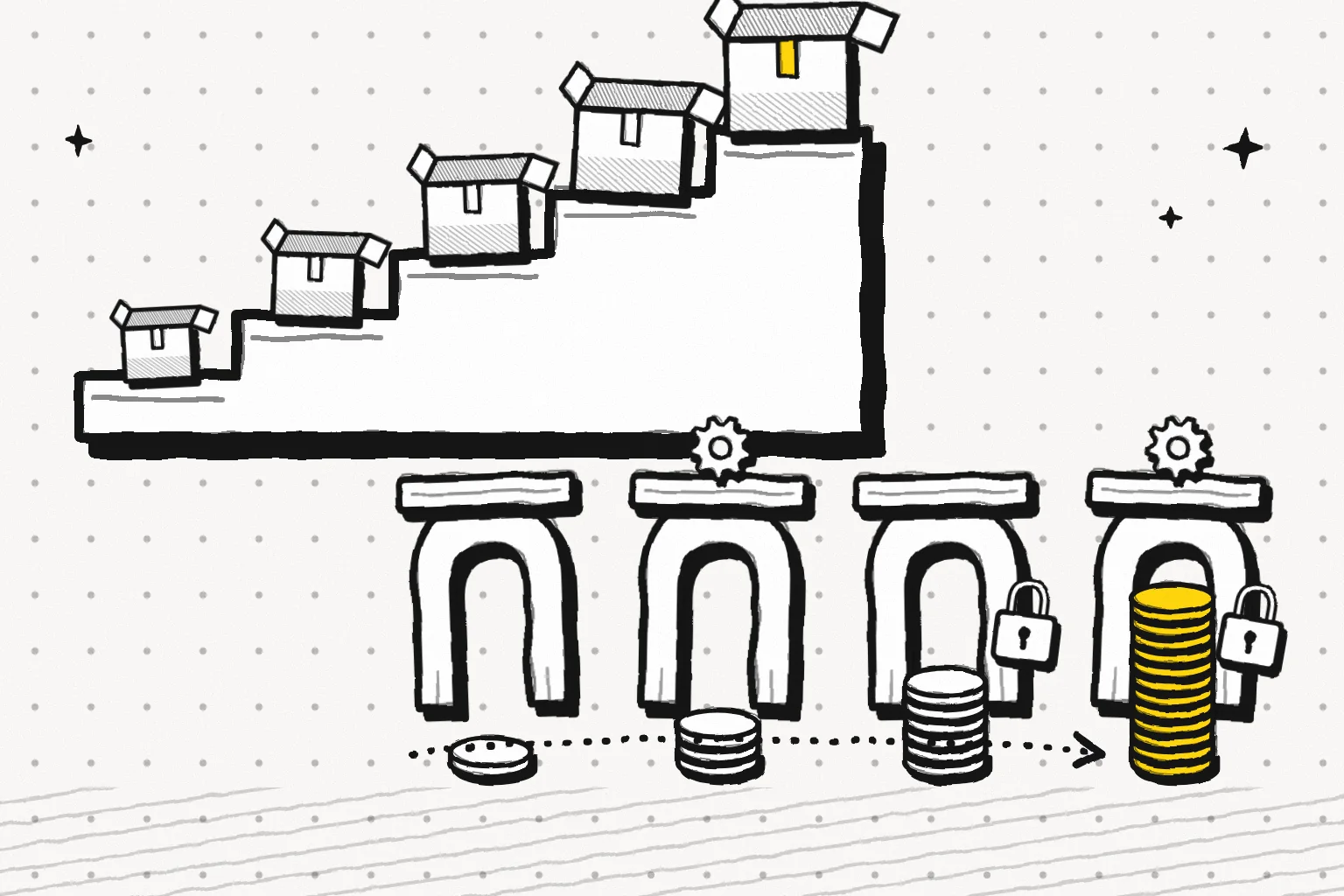
ZenRows sells four paid plan families: Build, Launch, Growth and Scale. Each family has three to five rungs, so the price list has 14 steps in total. Monthly prices run from $19 for 45,000 credits to $2,999 for 45 million credits. A request costs one of four amounts. A basic request costs 1 credit, JavaScript rendering 5, a premium proxy 10, and both together 25. The ZenRows docs say these four weights are the same on every plan.
Divide each rung's monthly fee by its credits and the picture is clear. On monthly billing with the allowance fully used, a plain page costs $0.422 per 1,000 on B1 and $0.0666 per 1,000 on S5. Our unified search read tool costs $0.694 per 1,000 pages, so ZenRows is cheaper on every rung, by 1.64 to 10.4 times. For an Amazon product page, the ZenRows cost guide shows Adaptive Stealth Mode charging 5 credits.
That is $2.11 to $0.333 per 1,000 pages, against $1.389 for our amazon/profile. Above 143,269 pages a month, ZenRows stays cheaper. For a Google results page, the same guide shows 25 credits, or $10.56 to $1.67 per 1,000. Our unified search web tool costs $0.694 per 1,000, so ZenRows costs 2.4 to 15.2 times more there.
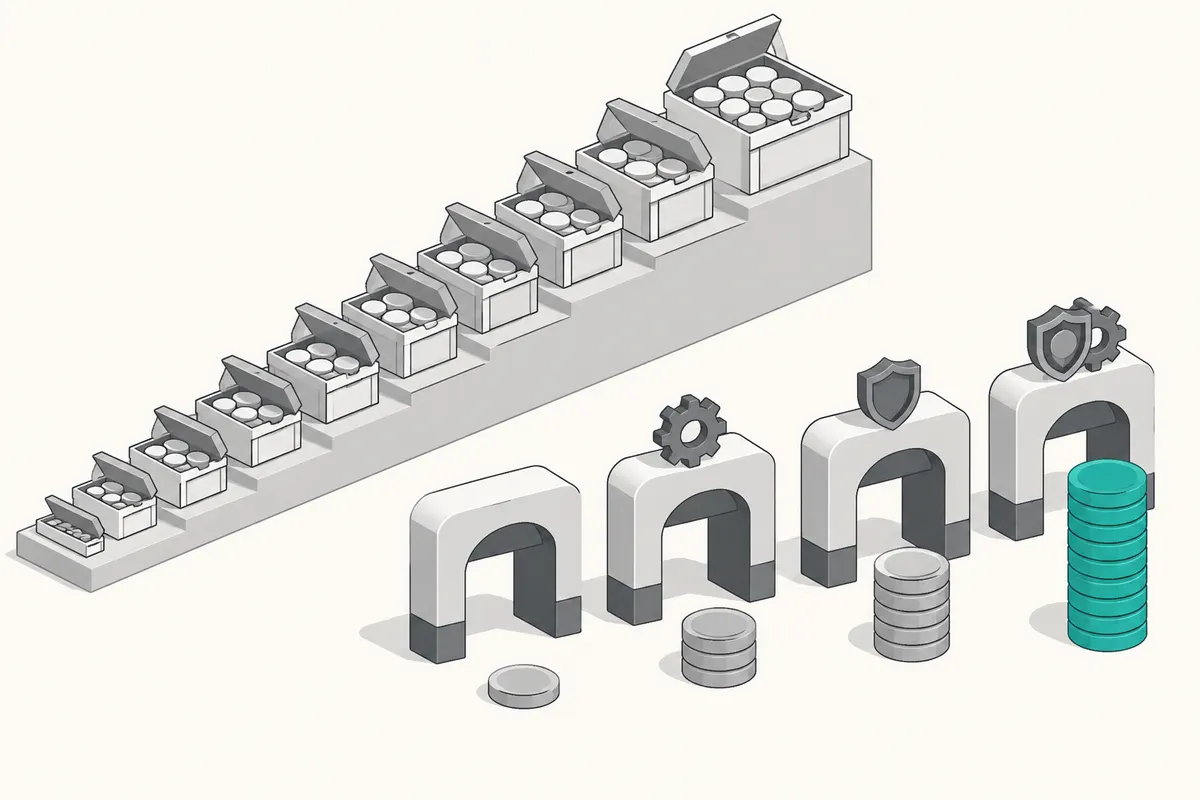
Every "per 1,000" figure in this article uses one formula. Take a rung's monthly price. Divide it by the rung's monthly credits. Multiply by the credit weight of the request. Multiply by 1,000. This assumes that you use the full allowance in the month.
For ZenRows, all numbers come from the pricing page, the pricing docs and the cost control guide. We also read the MCP docs, the changelog and the agent storefront file. We read them between 00:16 and 00:40 Singapore time on November 16, 2026, and made no live calls to ZenRows.
Every EveryInfra number is a charge from one of our 14 live calls, read from billing.charged_usd. We checked each charge against price_usd in our capability catalog.
Side by side: units, failures, free tiers and MCP
The two bills have different shapes. ZenRows is a subscription. You pay a fixed fee each month and get a pool of credits. Each request takes credits from the pool. Plan credits that you do not use expire at the end of the period. Top-up credits roll over once.
EveryInfra is prepaid. You add a balance, and each call takes the catalog price of that capability in US dollars. The balance does not expire. The ZenRows column comes from its pricing page and docs. Our column comes from our pricing page, the catalog and the live calls.
| Item | ZenRows (list price, read 2026-11-16) | EveryInfra (catalog price and live charges) |
|---|---|---|
| Billing unit | Credits: 1, 5, 10 or 25 per request | A fixed USD price per capability, per call |
| Lowest monthly spend | Build B1 at $19 a month, or $16 a month billed yearly | No monthly fee. First top-up from $10 |
| Free tier | Free plan: 5,000 credits a month, 5 concurrent requests, no top-ups | $1 trial credit for starring our GitHub repos, valid for 24 hours |
| Rollover | Plan credits expire. Top-ups roll over one period | The balance does not expire |
| Failed requests | Not billed. 404 and 410 count as success and are billed | Failures and empty results are not billed. The response shows charged: false |
| Running out | Up to 10 top-up packs per period, or upgrade | Calls stop at zero balance. Top up to continue |
| Cost per call visible | X-Request-Credits header shows credits used | billing.charged_usd in the response shows USD charged |
| Spend limits | Credit caps per API key: per period, day, week or month | The balance is the limit |
| MCP | Remote mcp.zenrows.com/mcp, 62 tools. The server itself is free | Remote api.everyinfra.com/mcp, 12 tools. Calls bill at catalog prices |
| Structured output | Extract is free for now on top of Fetch. The docs say billing may apply later | Each capability returns fields. The price includes them |
Annual billing changes the first number you see. On the ZenRows pricing page, the billing switch starts on Annual. So Build first shows as $16. The same rung costs $19 on monthly billing. The pricing docs describe annual billing as "pay for 10, get 12".
The full year of credits arrives at once, as one balance. This article uses monthly prices unless it says otherwise. Monthly prices are about 19% to 20% higher than annual prices. So where ZenRows already beats us on monthly billing, it beats us by more on annual billing.
ZenRows pricing table: 14 rungs as cost per 1,000
The 14 rungs appear in the Markdown version of the pricing page and in the pricing docs. The two lists match. The structured data on the pricing page shows a last change on 2026-10-13. Our script calculated every per-1,000 value below from the monthly fee and the monthly credits. Values are rounded to three decimals.
| Rung | Credits per month | Monthly | Annual, per month | Basic (1) | JS render (5) | Premium proxy (10) | JS + premium (25) |
|---|---|---|---|---|---|---|---|
| B1 | 45,000 | $19 | $16 | $0.422 | $2.111 | $4.222 | $10.556 |
| B2 | 80,000 | $29 | $24 | $0.363 | $1.813 | $3.625 | $9.063 |
| B3 | 120,000 | $39 | $33 | $0.325 | $1.625 | $3.250 | $8.125 |
| L1 | 250,000 | $69 | $58 | $0.276 | $1.380 | $2.760 | $6.900 |
| L2 | 500,000 | $99 | $83 | $0.198 | $0.990 | $1.980 | $4.950 |
| L3 | 700,000 | $129 | $108 | $0.184 | $0.921 | $1.843 | $4.607 |
| G1 | 1,200,000 | $199 | $166 | $0.166 | $0.829 | $1.658 | $4.146 |
| G2 | 2,000,000 | $279 | $233 | $0.140 | $0.698 | $1.395 | $3.488 |
| G3 | 3,000,000 | $399 | $333 | $0.133 | $0.665 | $1.330 | $3.325 |
| S1 | 5,000,000 | $549 | $458 | $0.110 | $0.549 | $1.098 | $2.745 |
| S2 | 8,000,000 | $749 | $624 | $0.094 | $0.468 | $0.936 | $2.341 |
| S3 | 12,500,000 | $999 | $833 | $0.080 | $0.400 | $0.799 | $1.998 |
| S4 | 28,000,000 | $1,999 | $1,666 | $0.071 | $0.357 | $0.714 | $1.785 |
| S5 | 45,000,000 | $2,999 | $2,499 | $0.067 | $0.333 | $0.666 | $1.666 |
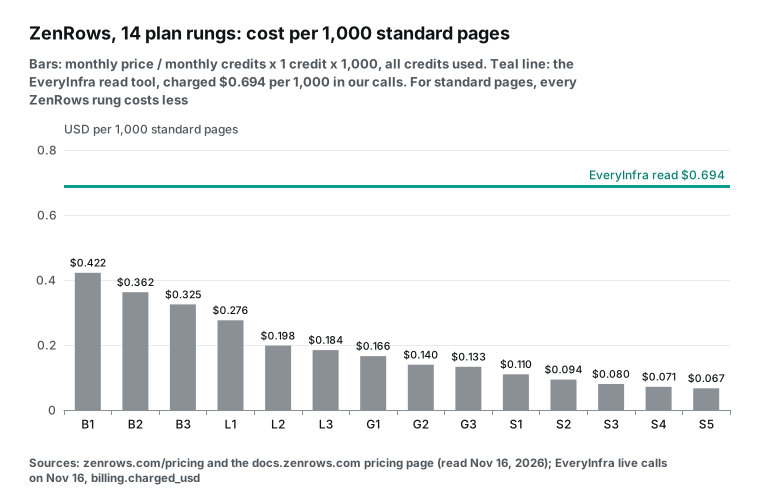
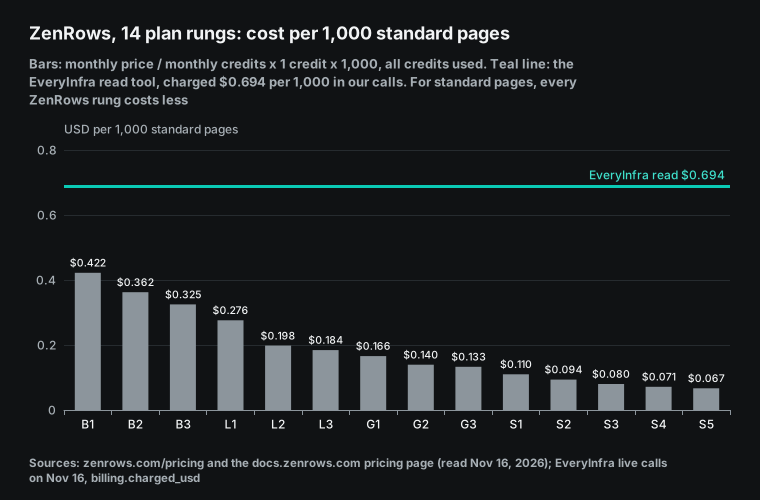
From B1 to S5, the price per 1,000 credits drops by 84%. Most of the drop happens early. B1 to L2 falls from $0.422 to $0.198. The next nine rungs only remove another $0.13. Rungs also differ in concurrency and in maximum response size. Build allows 20 concurrent requests, Launch 50, Growth 100 and Scale 200.
S4 and S5 allow 300 and 400. Build responses can be up to 5 MB. Launch and Growth allow 10 MB, and Scale allows 20 MB. A larger response returns HTTP 413. A cheap B1 plan can hit these limits before the credits run out.
Check the date on third-party price lists. The G2 pricing page for ZenRows says "Last updated on Apr 09, 2026". It lists Launch at $57, Growth at $165 and Scale at $456. Those numbers match neither the current annual prices ($58, $166, $458) nor the monthly prices ($69, $199, $549).
Our web search for "zenrows pricing" put a Capterra page third. Its snippet showed Build at $16 and Growth at $165. That is again an annual price mixed with an old one. A monthly budget from those pages would come out 15% to 20% too low.
Annual billing: the whole year arrives at once
The pricing FAQ adds a detail that matters more than the discount. On yearly plans, you get the full year of credits up front. You draw from one balance at any time in the year. The 10-pack top-up limit applies per year. Unused plan credits expire at the yearly renewal.
This helps steady workloads, but it can hurt spiky ones. Take a store that runs a big catalog sync three months a year. It reads 400,000 plain pages in each of those months and 40,000 pages in the other nine. Annual billing must cover 1.56 million credits for the year, so the store needs L1, not B3.
| Billing | Rungs bought | Cost for the year |
|---|---|---|
| Monthly | L2 ($99) for 3 months, B1 ($19) for 9 months | $468 |
| Annual | L1 at $58 a month, 3 million credits for the year | $696 |
EveryInfra read tool | 1.56 million calls at $0.000694 | $1,082.64 |
Here, annual billing costs 49% more than monthly billing. Run your own month-by-month numbers before you pick annual billing.
Credits per request: 1, 5, 10 or 25
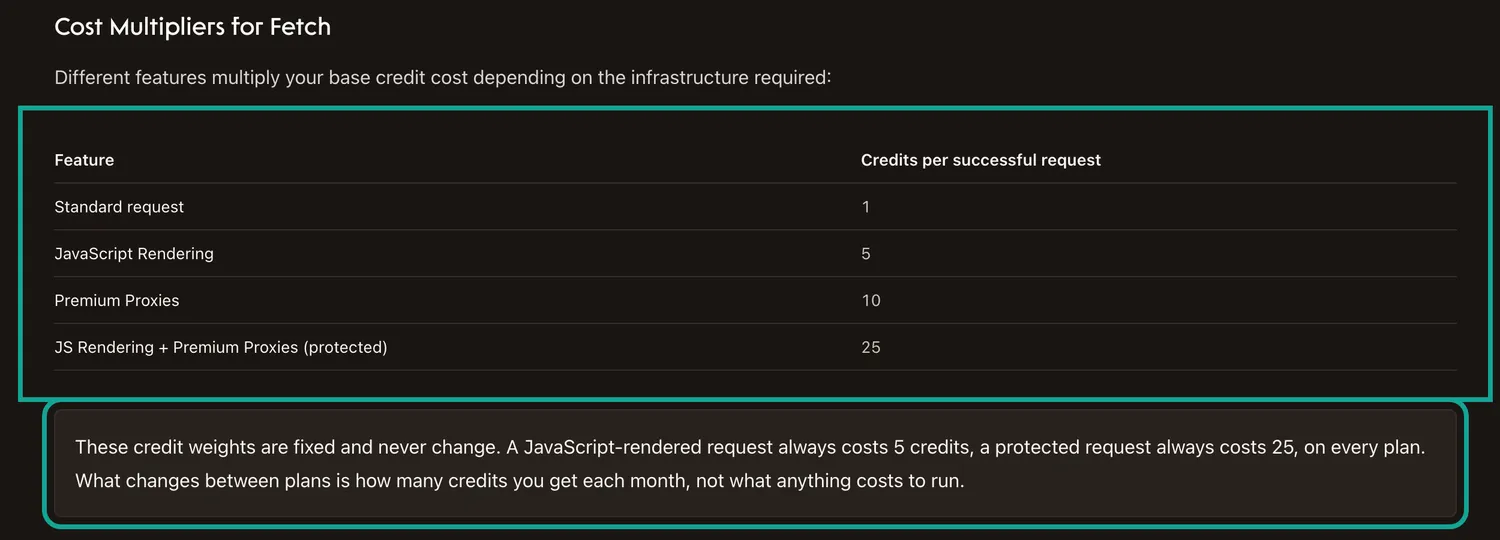
The "Cost Multipliers for Fetch" section of the pricing docs has four rows. The note below it says the weights are fixed and never change. A JavaScript-rendered request always costs 5 credits. A protected request always costs 25.
The plan only changes how many credits you get. Fetch is the current name of the general scraping API. The agent storefront file says its former name was Universal Scraper API. Other products have their own billing rules, in the same page and in their own docs.
| Product or setting | Credits used | Where it is written |
|---|---|---|
| Fetch, basic request | 1 | Pricing docs |
Fetch with js_render | 5 | Pricing docs |
Fetch with premium_proxy | 10 | Pricing docs |
| Fetch with both | 25 | Pricing docs |
Fetch with mode=auto | Only the setup that worked, 1 to 25. Failed internal tries are free | Adaptive Stealth Mode docs |
| Residential proxies, standalone | 25,000 per GB. Not on Free | Pricing docs |
| Hosted browser | 25,000 per GB of traffic, plus 5 per minute | Browser docs |
| Crawl | No fee of its own. Each page bills as a mode=auto Fetch, 1 to 25 | Pricing docs |
| Batch | Same as Fetch. Successful tasks and 404 or 410 tasks are billed | Batch docs |
| Extract | Free for now, on top of the Fetch charge. May be billed later | MCP docs |
| Site scraper pages | No separate price. Fetch in auto mode plus Extract | Site scraper pages |
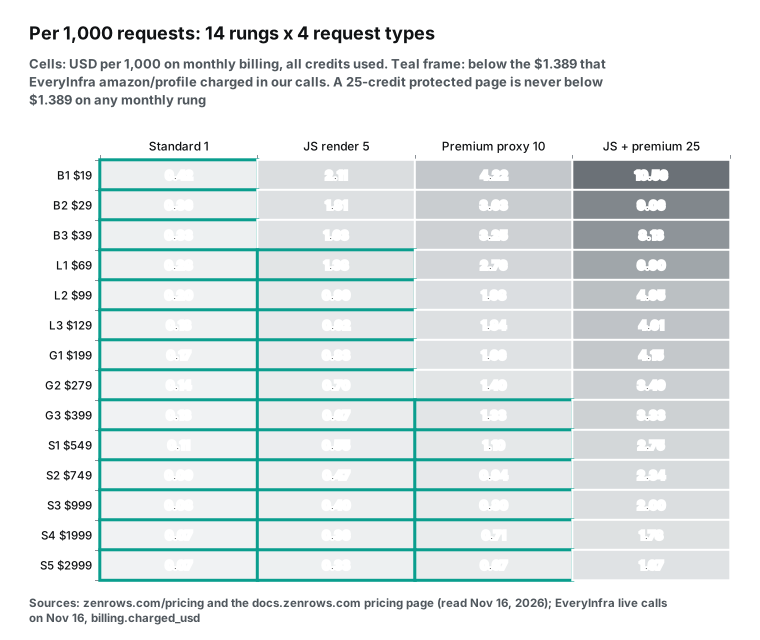
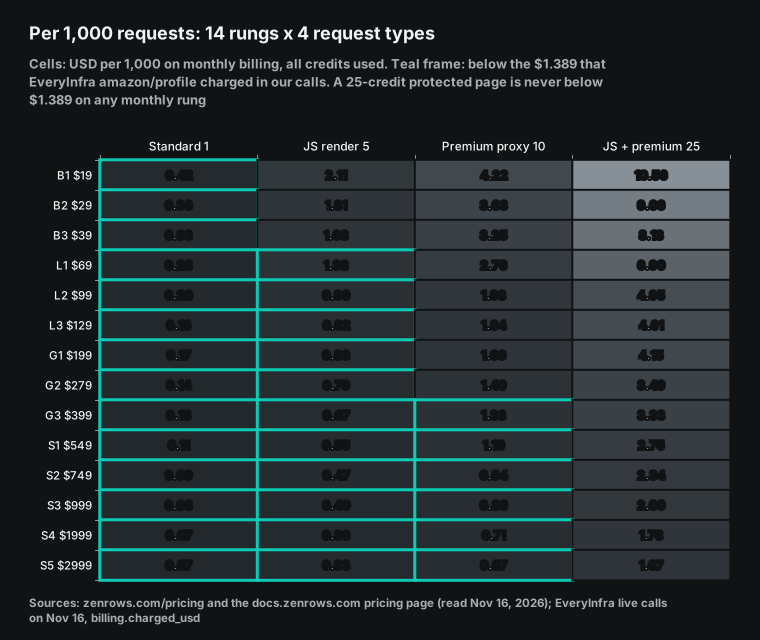
ZenRows costs less than our amazon/profile ($1.389 per 1,000) in these cells. The whole basic row is below our price. JS rendering joins at L1, at $1.380, one cent lower than ours. Premium proxy joins at G3. The 25-credit row has no frame on monthly billing. On annual billing, S5 reaches $1.388, which is a tenth of a cent under ours.
Which row does a real page land in? The ZenRows cost guide gives three examples in auto mode, with no tuning. The scrapingcourse.com catalog cost 1 credit. An Amazon product page cost 5. A Google results page cost 25. The guide then gives this advice.
Before a large run on one domain, send a few mode=auto requests. Read X-Request-Credits from each response. That number is your budget unit. So this article prices Amazon at 5 credits, from the guide, and at 25 credits, the ceiling. Google Search is priced at 25.
The Amazon scraper page on the ZenRows site was updated on 2026-10-20. Its example uses proxy_country=us. The Fetch reference says a country setting needs the premium proxy, except in auto mode. So if you turn off auto mode and force a US exit, Amazon costs at least 10 credits.
The site scraper pages cover 539 sites. They have no separate unit price. The pricing docs say they run Fetch in auto mode plus Extract. Extract is free today.
The MCP docs say billing may apply later, without a figure. A domain that is not yet prepared returns HTTP 403 with code REQS007, and you must call prepare_domain first. So today, structured Amazon fields from ZenRows cost only the Fetch part. If Extract starts to cost money, redo this math.
Two more rules apply to older accounts and shared use. Legacy plans (Developer, Startup and Business) bill residential traffic at 18,000 to 54,000 credits per GB, not 25,000. The pricing docs tell you to check your rate in the dashboard. Also, all products share one balance. On L1, for example, you can spend 150,000 credits on Fetch and 100,000 on the hosted browser in the same month.
The $0.001 header: do not use it to budget
The cost guide says each Fetch response has two headers. X-Request-Credits is the number of credits used. X-Request-Cost is "the same amount in US dollars". The guide's example shows 1 credit and a cost of 0.001.
So the header puts one credit at $0.001. But the plan math gives a different answer. On B1, the most expensive rung, one credit costs $0.000422. On S5 it costs $0.0000666. The agent storefront sells credits at $0.50 per 1,000, which is $0.0005 each.
| Method | Price per credit | Header value compared |
|---|---|---|
X-Request-Cost header (docs example) | $0.001 | 1x |
| Agent storefront, pay as you go | $0.0005 | Header is 2.0x |
| B1 monthly, full use | $0.000422 | Header is 2.37x |
| L2 monthly, full use | $0.000198 | Header is 5.05x |
| S5 monthly, full use | $0.0000666 | Header is 15.0x |
The docs do not explain where the dollar value comes from. Your bill is still the plan fee. If you add up X-Request-Cost for a monthly budget, you get 2.4 times your real spend on B1 and 15 times on S5. Multiply X-Request-Credits by your own rate per credit instead.
Pay for success: 404, 410 and failed requests
The pricing docs and the FAQ both say that only successful requests use credits. Failed requests and retries are free. But HTTP 404 and 410 count as success, because the request finished and returned valid data. The Batch docs add one more detail. Batch marks a task as failed when the target answers 404 or 410, but it still bills that task. So if your URL list comes from an old sitemap with removed products, those URLs cost the normal price.
In auto mode, ZenRows may try several setups to open a page. The Adaptive Stealth Mode docs say that only the setup that worked is billed.
To keep a session, the Fetch session_id parameter keeps the same exit IP for 10 minutes. For logins and clicks, there is the hosted browser.
The docs do not list one more case. Some sites answer with status 200 and a normal-looking page that holds no data. Under a pay-for-success rule, that page is billed. Only your own checks on the content can catch it.
Our rule is that failures and empty results are free. Two of our 14 calls failed. One used an ASIN that does not exist, on purpose. The other asked for Amazon reviews, and the review page needed a login.
Both returned HTTP 503. Both had charged_usd at 0, and a refund block with the status succeeded. For a missing product, ZenRows would bill a 404 from the target as a success. We treat it as a failure and refund it.
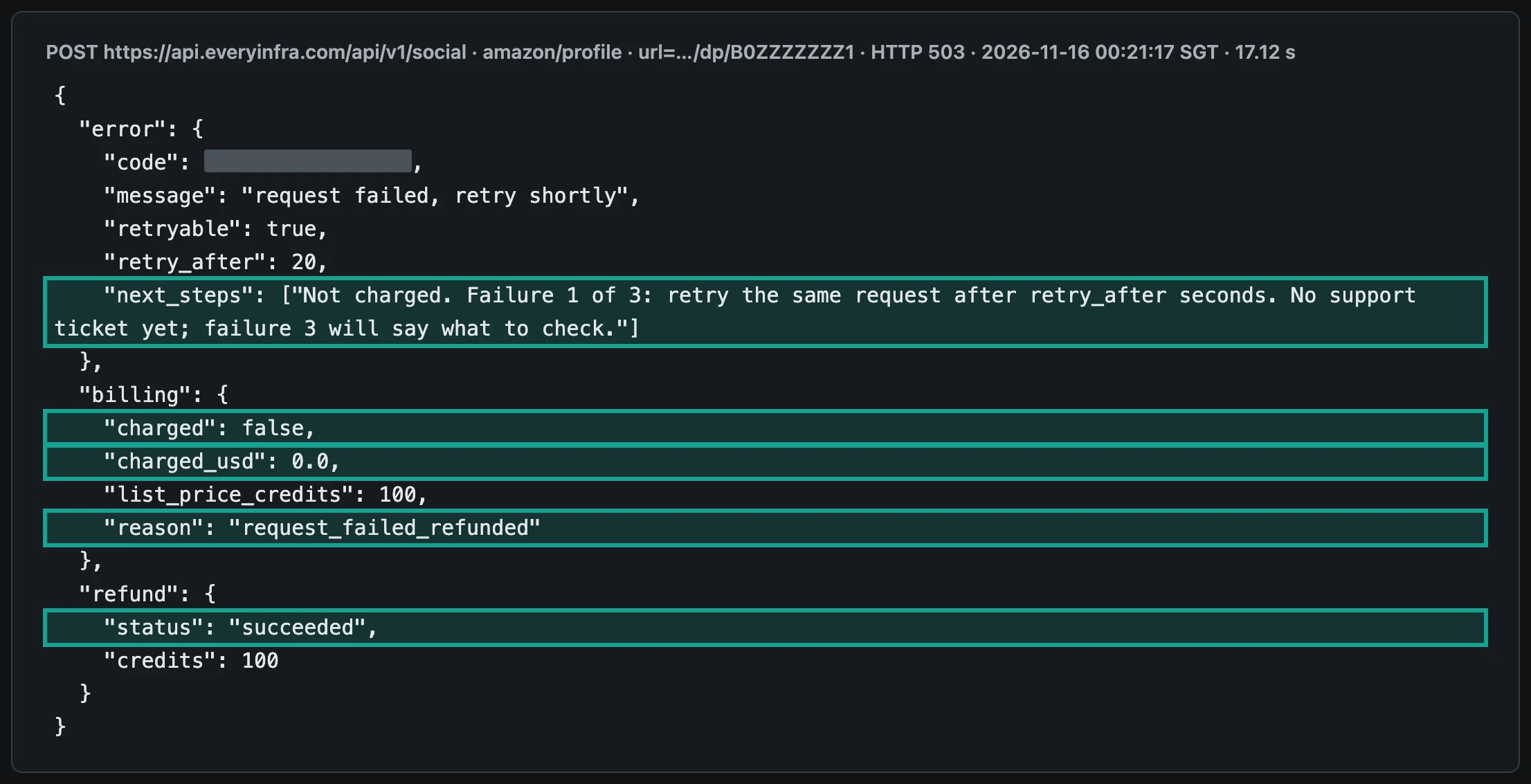
In the missing ASIN response, next_steps says this is failure 1 of 3, and retry_after is 20 seconds, with up to 2 retries. In the review response, error.code is access_blocked and retry_after is 900 seconds. Its next_steps says an instant retry will probably not help and that no support ticket is needed. Retries are free. The ZenRows error code docs also give a fix for each code.
Top-ups, annual plans and per-key caps
When the allowance runs out, paid plans can buy top-up packs. You can buy up to 10 per billing period. Unused top-up credits roll over one period and then expire. The Free plan, trials and accounts with an open invoice cannot buy packs.
Each rung has one pack size. B1 sells 11,000 credits for $6.50. S5 sells 6 million credits for $560. Per 1,000 credits, every pack costs 38% to 41% more than its plan rate.
Firecrawl handles overage differently. Its pricing page says that when credits run out, it adds credits in $5 steps.
One step is 1,000 credits on Hobby, 2,000 on Standard, 2,500 on Growth and 5,000 on Scale. Per 1,000 pages, Hobby overage costs $5.00 against $3.80 in the plan, 32% more. Standard overage costs $2.50 against $0.99, 2.5 times the plan rate. Growth overage costs $2.00 against $0.798, also 2.5 times. Scale overage costs $1.00 against $0.749, 34% more. ZenRows packs cost about 40% more on every rung, with no rung where the overage price more than doubles.
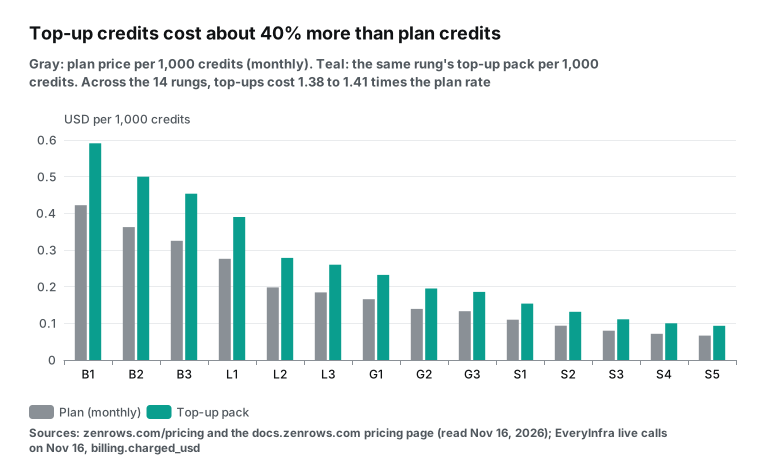
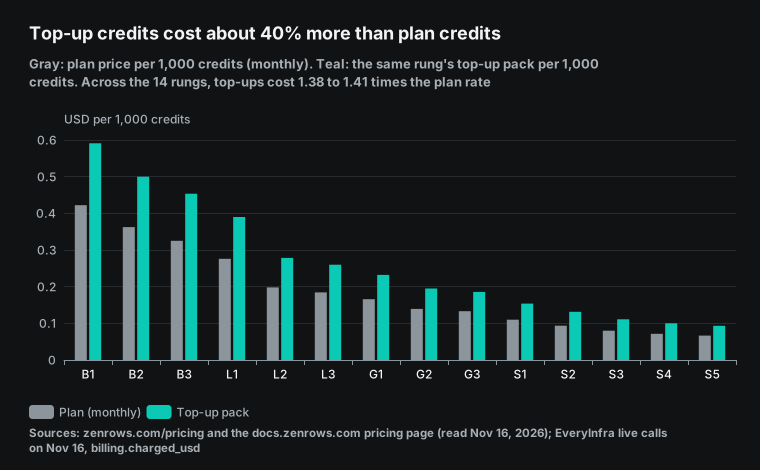
| Rung | Pack credits | Pack price | Per 1,000 credits | Plan rate per 1,000 (monthly) | Ratio |
|---|---|---|---|---|---|
| B1 | 11,000 | $6.50 | $0.591 | $0.422 | 1.40 |
| B3 | 43,000 | $19.50 | $0.453 | $0.325 | 1.39 |
| L2 | 70,000 | $19.50 | $0.279 | $0.198 | 1.41 |
| G2 | 400,000 | $78 | $0.195 | $0.140 | 1.40 |
| S3 | 1,800,000 | $200 | $0.111 | $0.080 | 1.39 |
| S5 | 6,000,000 | $560 | $0.093 | $0.067 | 1.40 |
Compare a pack with the next rung before you buy. On L2, a pack gives 70,000 credits for $19.50. Moving from L2 to L3 costs $30 more and adds 200,000 credits, or $0.15 per 1,000.
So if you are over by 70,000 credits or less, buy one pack. If you are over by more, two packs cost $39, so move up to L3 for $30. The docs say an upgrade starts at once, and unused credits move to the new rung as a bonus. A downgrade starts at the end of the period.
The pricing docs say each pack is sized so that one pack covers a shortfall and two packs make an upgrade the better deal. We checked this on all 14 rungs. It holds from B1 to S2, where two packs always cost more than the fee gap to the next rung. On B1, two packs cost $13, and B2 costs $10 more. On S2, two packs cost $326, and S3 costs $250 more.
S3 and S4 are the exceptions. S3 to S4 costs $1,000 more, and an S3 pack costs $200, so upgrading pays only from the sixth pack, above 9 million extra credits. S4 to S5 also costs $1,000 more, and an S4 pack costs $400, so upgrading pays from the third pack, above 8 million extra credits. Above S5 there is only Enterprise.
On annual plans, a pack costs 10 times the monthly pack price and adds 12 times its credits, with up to 10 packs a year. If you buy packs two months in a row, move up one rung.
Enterprise starts above 45 million credits. Its price depends on committed volume, and concurrency runs from 500 to more than 1,000. The pricing page shows no Enterprise price, so we leave it out.
Since 2026-10-02, an account can hold up to 10 API keys, and each key can have its own credit cap. A cap can apply per billing period, per day, per week or per month. ZenRows sends alerts at 80% and 100%. A key over its cap gets HTTP 402 with code AUTH014.
Other keys keep working. A key per project or per agent, each with a cap, helps you control a ZenRows bill. We do not have per-key caps. Your balance is your cap.
How to find your real credit cost before you buy
ZenRows gives several ways to see the cost of one request and the balance for the month. After you send a request, the X-Request-Credits header shows what was used. Two more headers, Concurrency-Limit and Concurrency-Remaining, show your concurrency total and the free slots at that moment.
For the whole account, the cost guide points to GET /v1/subscriptions/self/details. This call is free and does not use a concurrency slot. It returns credits used and the limit, the end of the period, the caps on the key, and usage per product. In that list, api means Fetch and scraping_browser means the hosted browser. The CLI command zenrows usage prints the same summary. In MCP, the tool is account_usage.
ZenRows uses different status codes and error codes for each limit. The error code docs list them. Know which one you hit, so you know whether to wait, upgrade or buy a pack.
| Situation | HTTP | Code | What to do |
|---|---|---|---|
| Account allowance used up for the period | 402 | AUTH004 | Wait for renewal, buy a pack, or upgrade |
| Auto-created free account not claimed after its first period | 402 | AUTH005 | Claim the account. The key and usage stay |
| One API key reached its own cap | 402 | AUTH014 | Other keys still work. Wait for the reset or raise the cap |
| Too many requests running at once | 429 | AUTH006 | Wait for running requests to finish, or move up a rung |
| Request rate limit reached | 429 | AUTH008 | Slow down and retry |
| Response larger than the rung allows | 413 | RESP005 | Move to a rung with a larger limit, or load fewer resources |
| Extract refused the page | 403 | REQS007 | Run prepare_domain first, or use Fetch |
None of these errors is a successful request, so the docs say none of them uses credits.
How ZenRows MCP is billed
The MCP docs say the ZenRows MCP server itself is free. Connecting and listing tools cost nothing. Each tool call bills against your subscription at the normal price of the product behind it. Scrape tools bill like Fetch, at 1 to 25 credits.
The extract tool uses Extract, which is free for now. The batch_* tools follow Batch rules. The account_usage tool is free and does not use a concurrency slot.
On 2026-11-16 we sent tools/list to the remote server without a key and got 62 tools. By name prefix, 38 are browser_* tools, 11 are batch_* tools and 8 are crawl_* tools. The other 5 are scrape, extract, prepare_domain, prepared_domain_status and account_usage. So 38 of the 62 tools drive the hosted browser, which bills by traffic and by minute. Per-request billing applies only to scrape, extract and each page inside Batch and Crawl.
The local package npx -y @zenrows/mcp starts without a key. On the first tool call, it creates a Free account with 5,000 credits for the first billing period and saves the key on your machine. If nobody claims that account, it stops at the end of the first period and returns HTTP 402 with AUTH005.
One network can create at most 3 such accounts in 24 hours. CI runners and shared networks reach that limit first. Based on the cost guide examples, 5,000 credits cover 5,000 plain pages, 1,000 Amazon product pages or 200 Google results pages.
Here is one agent task priced on both sides. The task is to research 50 Amazon products and run 3 Google searches. With ZenRows MCP and the guide's examples, 50 product pages at 5 credits and 3 results pages at 25 credits make 325 credits. On B1 that is about $0.137. The agent gets page text and must find the prices and ratings itself.
With our MCP, 50 amazon/profile calls and 3 web tool searches cost $0.0715 at our live prices. The agent gets price, rating and rating count as fields. If the 50 products were 50 plain web pages instead, ZenRows would use 50 credits, about $0.021. Our read tool would cost $0.035 for the same 50 pages.
Browser tools are where an agent bill can grow fastest. Each extra minute an agent stays in a session adds 5 credits. Each extra megabyte adds about 24 credits. Give the agent its own key with a daily cap, and stop the agent when it gets AUTH014.
The agent storefront opened on 2026-10-05. It lets AI agents pay for themselves. It sells only Fetch and Extract, paid over x402, MPP or card. Pay as you go costs $0.50 per 1,000 credits, with a minimum of 10,000 credits ($5).
For plain pages, that is $0.50 per 1,000, lower than our read tool at $0.694. For Google results pages at 25 credits, it is $12.50 per 1,000, more than B1 monthly. The storefront plans match the first rung of each family on the website.
| Item | ZenRows MCP | EveryInfra MCP |
|---|---|---|
| Remote URL | https://mcp.zenrows.com/mcp | https://api.everyinfra.com/mcp |
| Local package | npx -y @zenrows/mcp, works without a key | None, remote only |
| Authentication | OAuth 2.1, or the API key as a Bearer token | API key as a Bearer token |
| Tools (read 2026-11-16) | 62 | 12, all named everyinfra_* |
| Server fee | None | None |
| Tool call billing | Credits of the product behind the tool | Catalog price of the capability, in USD |
| Balance check | account_usage, free | everyinfra_get_account, free |
| Main use | Any web page, whole-site crawls, batches, browser actions | Structured results from 106 platforms, unified search, CAPTCHA, tickets |
The two servers overlap less than you might expect. ZenRows MCP suits an agent that must open any page, click buttons and scroll. Our MCP suits an agent that needs a platform result as fields. Examples are the price and rating of one Amazon product, or a list of places for one Maps query. The agent does not need to parse a page.
EveryInfra live tests: 14 calls in 4 rounds
We called the EveryInfra API in four rounds on November 16, 2026, at 00:18, 00:20, 00:21 and 00:23 Singapore time (SGT). Round 1 ran Amazon search, web search and Maps search. Round 2 ran Amazon product details plus the read and web tools of unified search. Round 3 ran Amazon reviews, a missing ASIN, a read of the G2 ZenRows page and a Zillow search.
Round 4 ran Amazon search in fast mode for 50 rows, Maps reviews, Walmart search and eBay search. Each charge comes from billing.charged_usd. Each row count is the number of rows returned.
| Time (SGT) | Capability | Input | HTTP | Rows | Time taken | Charged |
|---|---|---|---|---|---|---|
| 00:18 | amazon/search | robot vacuum, limit 20 | 200 | 20 | 23.0 s | $0.002236 |
| 00:18 | web/search | zenrows pricing, us | 200 | 9 | 2.1 s | $0.001389 |
| 00:18 | google_maps_reviews/search | ramen restaurant Seattle WA | 200 | 15 | 6.7 s | $0.001389 |
| 00:20 | amazon/profile | B0F4DKGRDN | 200 | 1 | 9.7 s | $0.001389 |
| 00:20 | Unified search read tool | zenrows.com/pricing | 200 | 1 | 0.8 s | $0.000694 |
| 00:20 | Unified search web tool | zenrows mcp, us | 200 | 10 | 1.6 s | $0.000694 |
| 00:21 | amazon/reviews | B0F4DKGRDN | 503 | none | 42.5 s | $0 (refunded) |
| 00:21 | amazon/profile | B0ZZZZZZZ1 (missing) | 503 | none | 17.1 s | $0 (refunded) |
| 00:21 | Unified search read tool | G2 page for ZenRows pricing | 200 | 1 | 2.2 s | $0.000694 |
| 00:21 | zillow/search | Austin, TX | 200 | 20 | 11.6 s | $0.001389 |
| 00:23 | amazon/search | robot vacuum, limit 50, fast | 200 | 48 | 8.4 s | $0.002236 |
| 00:23 | google_maps_reviews/reviews | Ramen DANBO Capitol Hill | 200 | 20 | 6.4 s | $0.001389 |
| 00:23 | walmart/search | robot vacuum | 200 | 20 | 47.5 s | $0.001389 |
| 00:23 | ebay/search | robot vacuum, limit 20 | 200 | 20 | 10.1 s | $0.001389 |
The 14 calls cost $0.016277 in total. Twelve succeeded and two failed. Each successful charge matched the catalog price. The amazon/profile call read an ILIFE V2 robot vacuum.
It returned a price of $99.99, a 4.2 rating, 24,342 ratings, the seller ILIFE Official Store and 9 full-size image links, in 9.7 seconds. In the same round, the read tool fetched the ZenRows pricing page in 0.8 seconds. It returned 4,671 characters of text, which opened with a note for AI agents about the storefront.
The Maps search for ramen in Seattle returned 15 places. The first was Ramen DANBO Capitol Hill, with a 4.5 rating and 3,929 reviews. We then passed its link to the Maps reviews capability and got 20 reviews. The newest one was posted on 2026-11-15, and another on 2026-11-12. The eBay search returned listings such as a certified refurbished Roborock at $229.99. The Walmart search returned an iRobot model at $158, down from $198.
The unified search web tool costs half as much as web/search, so we use $0.694 as our search price.
The 20 Maps reviews have posted_at timestamps in UTC from 2026-10-25 to 2026-11-15. That is 20 reviews in 22 days, with 3 on 2026-11-02 alone. Fifteen are 5 stars, four are 4 stars and one is 2 stars, posted on 2026-10-27. The mean is 4.65, above the place rating of 4.5. At this pace, two review calls a month catch every new review for one place. That costs $0.0028 per place per month, or $2.78 a month for 1,000 places. The ZenRows Maps page says a place page returns top reviews, with the date as Maps words it, for example "3 months ago". It does not say how many credits a reviews page uses or how many reviews one page holds, so we did not price review tracking on ZenRows. With relative dates, your incremental sync can be off by a month. With timestamps, it is exact to the second.
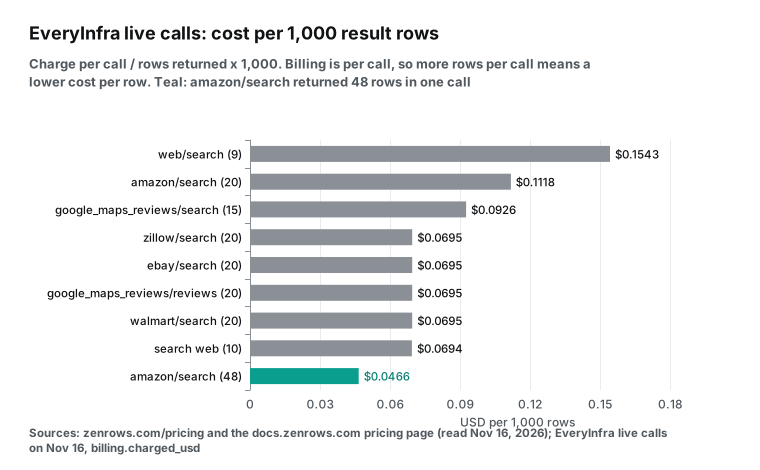
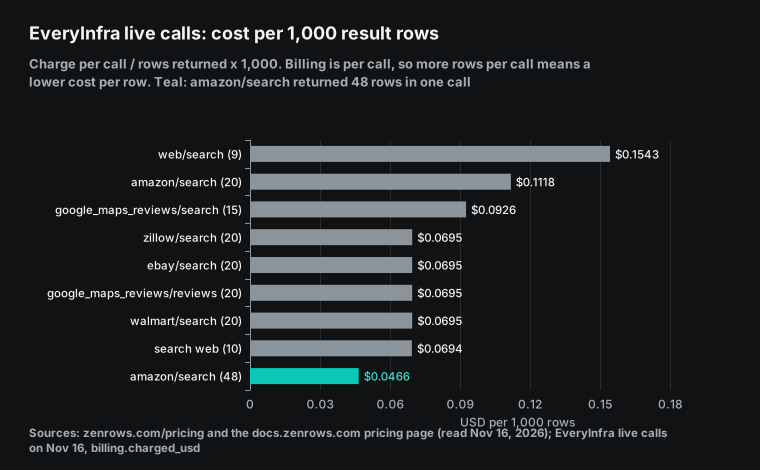
Per 1,000 rows, more rows per call means a lower price. Amazon search in fast mode returned 48 rows, which is $0.0466 per 1,000 rows. At the default 20 rows, the same call price gives $0.1118 per 1,000 rows. For ZenRows, assume an Amazon search page holds 20 to 50 products and costs 5 credits.
Then B1 costs about $0.042 to $0.106 per 1,000 rows, close to our fast mode. The ZenRows docs do not state either assumption, so test it yourself. On this item the two sides are close. Pick the one that matches whether you want to parse pages yourself.
Zillow, Walmart and eBay search each returned 20 rows for $0.001389, or $0.0695 per 1,000 rows. The ZenRows docs give no weight for these sites, but the formula still works. Say a search page costs 5 credits and holds 20 rows. Then B1 costs $0.106 per 1,000 rows and L2 costs $0.0495.
At 25 credits, B1 costs $0.528 and S5 costs $0.083. So if these pages need both options, ZenRows costs more on every rung. If a basic request opens them, ZenRows costs less on every rung.
Speed also has a cost. Amazon search took 23.0 seconds at 20 rows, but fast mode took only 8.4 seconds for 48 rows. Walmart took 47.5 seconds, the slowest call. The ZenRows concurrency docs show how speed and concurrency interact. With 5 slots and 10 seconds per request, you finish 30 requests a minute. At 1 second per request, you finish 300.
B1 has 20 slots. If your pages need 10 seconds with JS rendering, you may reach the throughput limit before you use 45,000 credits. The ZenRows Python SDK sets concurrency and retries in its constructor. Version 1.13.0, released on 2026-11-06, covers Fetch, Extract, Batch and Crawl. The concurrency docs say to set the SDK value to your plan limit. Above it, you get HTTP 429.
This curl command repeats the round 4 Amazon search. Replace the key with your own. To try another capability, change platform and action, and fill params from the catalog.
curl -s https://api.everyinfra.com/api/v1/social \
  -H "Authorization: Bearer $EVERYINFRA_API_KEY" \
  -H "Content-Type: application/json" \
  -d '{"platform":"amazon","action":"search","params":{"keyword":"robot vacuum","limit":50,"fast":true}}'
Amazon at 5 credits and at 25 credits
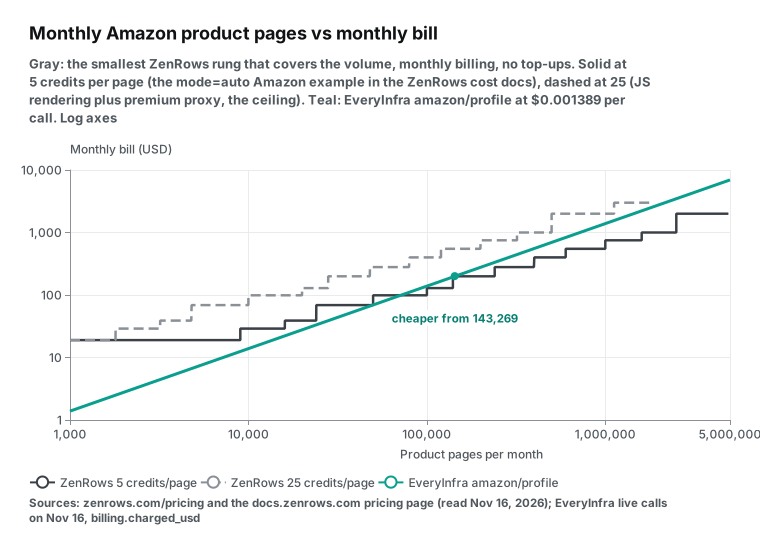
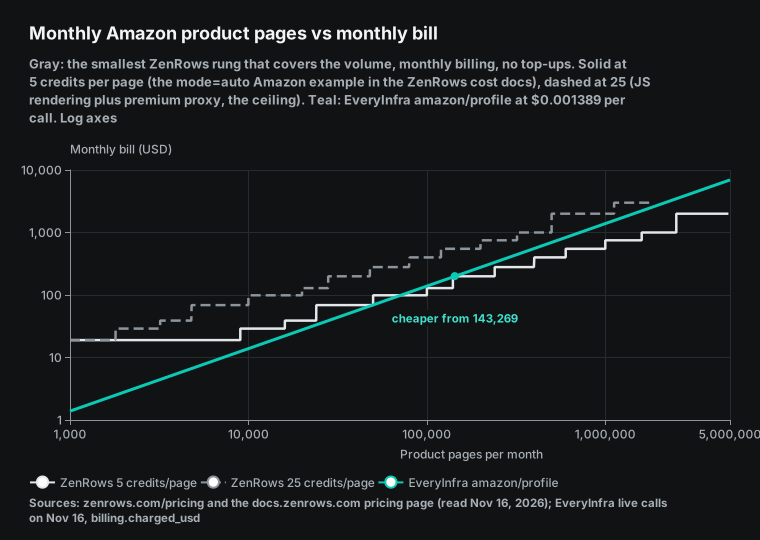
On monthly billing with full use, 1,000 Amazon product pages at 5 credits cost $2.111 on B1 and $0.333 on S5. From L1 at $1.380, ZenRows is under our amazon/profile price of $1.389. On S5, we cost 4.17 times as much. At 25 credits, the range is $10.56 to $1.666, and no monthly rung beats us. Full use is the best case, though. When your volume falls between two rungs, you must buy the larger one, and the extra credits go to waste.
So we checked every monthly volume from 1 page to 5 million pages. For each volume, we bought the smallest rung that covers it. The result is a sawtooth line.
| Amazon product pages per month | ZenRows at 5 credits (smallest rung, monthly) | ZenRows at 25 credits | EveryInfra `amazon/profile` |
|---|---|---|---|
| 1,000 | $0 (Free) | $19 (B1) | $1.39 |
| 10,000 | $29 (B2) | $69 (L1) | $13.89 |
| 50,000 | $69 (L1) | $279 (G2) | $69.45 |
| 100,000 | $99 (L2) | $399 (G3) | $138.90 |
| 500,000 | $399 (G3) | $999 (S3) | $694.50 |
| 1,000,000 | $549 (S1) | $1,999 (S4) | $1,389 |
The full scan at 5 credits gives seven bands. After 143,269 pages, ZenRows stays cheaper.
| Pages per month (5 credits, monthly billing) | Lower bill | Why |
|---|---|---|
| 1 to 1,000 | ZenRows | The Free plan covers it |
| 1,001 to 49,676 | EveryInfra | B1 to L1 are only partly used |
| 49,677 to 50,000 | ZenRows | L1 is almost full |
| 50,001 to 71,274 | EveryInfra | L2 starts mostly empty |
| 71,275 to 140,000 | ZenRows | L2 and L3 fill up |
| 140,001 to 143,268 | EveryInfra | G1 starts mostly empty |
| 143,269 and up | ZenRows | Every later rung beats $1.389 per 1,000 |
At 25 credits on monthly billing, we cost less at every volume from 201 to 1.8 million pages, the most that S5 can cover. On annual billing at 5 credits, ZenRows costs less from 59,756 pages a month up.
So the Amazon answer depends on what your pages really cost on ZenRows. The guide's example is 5 credits, which is the JS render row. If your pages often need a premium proxy, or you force a country with auto mode off, you land at 10 or 25. To test, run a few dozen of your own ASINs on the Free plan. Average the X-Request-Credits values and put that number into the Python script below.
Also count the work of parsing. ZenRows returns a page or Extract fields. We return the fields of amazon/profile. The fields differ between the two.
One request also returns different things on each side. The ZenRows Amazon scraper page shows a live call from October 20, 2026, on a Kindle product page. The call used auto mode, Extract and a US exit. It returned the title, brand, stock, rating, total ratings, the share of each star level, and a few top reviews from the page. Each review had an author, title, date, verified purchase flag and helpful votes.
Our amazon/profile call returned price, rating, rating count, seller, category, 9 images, 5 feature bullets and 2 best seller ranks. It had no reviews. Reviews need a separate amazon/reviews call, and that call failed this time because the review page needed a login. If you only need price and rating, one request is enough on either side. If you also want top reviews, ZenRows returns them from one page, while we need two calls.
Google Search and Maps: 25 credits per page
In the cost guide, a Google results page in auto mode costs 25 credits. On monthly billing, that is $10.56 per 1,000 on B1 and $1.666 on S5. Our unified search web tool costs $0.000694 per call for 10 results, or $0.694 per 1,000. ZenRows costs 15.2 times more on B1 and 2.4 times more on S5. Against our web/search capability at $1.389, S5 still costs 1.2 times more. Annual S5 at $1.388 ties with web/search and still costs twice the web tool.
For Maps, compare per place. Our google_maps_reviews/search returns 15 places for $0.001389, which is $0.0926 per 1,000 places. Maps reviews return 20 reviews per call, or $0.0695 per 1,000. The ZenRows Maps page does not say how many places one page returns. We assumed 15, the same as ours.
Then 30,000 places need about 2,000 requests. At 10 credits that is 20,000 credits (B1, $19). At 25 credits it is 50,000 credits (B2, $29). Our cost is $2.78, so ZenRows costs 6.8 to 10.4 times more. If one ZenRows page returns more places, the gap shrinks.
The ZenRows Maps scraper page shows a live call from October 20, 2026, for coffee shops in Austin. Each place has a name, a category, a rating and a review count. The review count is the printed string, such as "10,982", and place_id is null. The page FAQ says one search returns the places that Maps lists for that query and area.
For more places, split the area or the category and run each URL as a Batch task. Our google_maps_reviews/search returned a place_id, a numeric rating, a numeric review count and a full address for each of 15 places. The first place had an integer count of 3,929, ready to sort.
For Google Search, the ZenRows scraper page lists organic results, the AI Overview, People Also Ask, related searches and shopping results. An organic link can come back in a redirect form that starts with /goto?url=. Our web tool returns a title, a URL and a snippet for each row. The fields differ, so choose by the fields your next step needs.
Seven monthly workloads, priced
We priced common workloads for one month. ZenRows uses the smallest rung that fits, on monthly billing, with no packs. Our side uses the live price times the number of calls. Plain pages use our read tool.
Amazon uses amazon/profile. Google Search uses the unified search web tool. Maps uses google_maps_reviews/search.
| Workload | Monthly volume | ZenRows (low weight / high weight) | EveryInfra | ZenRows / EveryInfra |
|---|---|---|---|---|
| Docs site for RAG, plain pages | 20,000 pages | B1 $19 | $13.88 | 1.37 |
| Blogs and news, plain pages | 200,000 pages | L1 $69 | $138.80 | 0.50 |
| Large plain crawl | 2,000,000 pages | G2 $279 | $1,388 | 0.20 |
| Amazon product details | 50,000 | L1 $69 / G2 $279 | $69.45 | 0.99 / 4.02 |
| Amazon product details | 500,000 | G3 $399 / S3 $999 | $694.50 | 0.57 / 1.44 |
| Google searches | 30,000 | G1 $199 | $20.82 | 9.56 |
| Google Maps places | 30,000 | B1 $19 / B2 $29 | $2.78 | 6.83 / 10.43 |
| Hosted browser, 10,000 minutes plus 20 GB | none | L3 $129 (550,000 credits) | No matching capability | none |
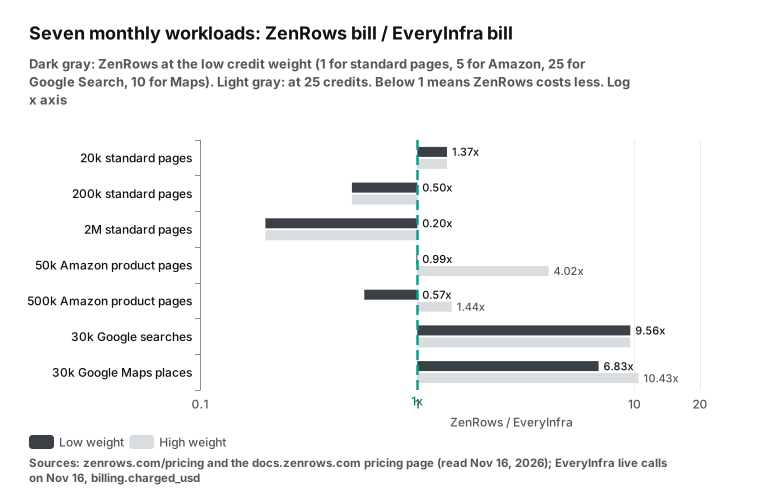
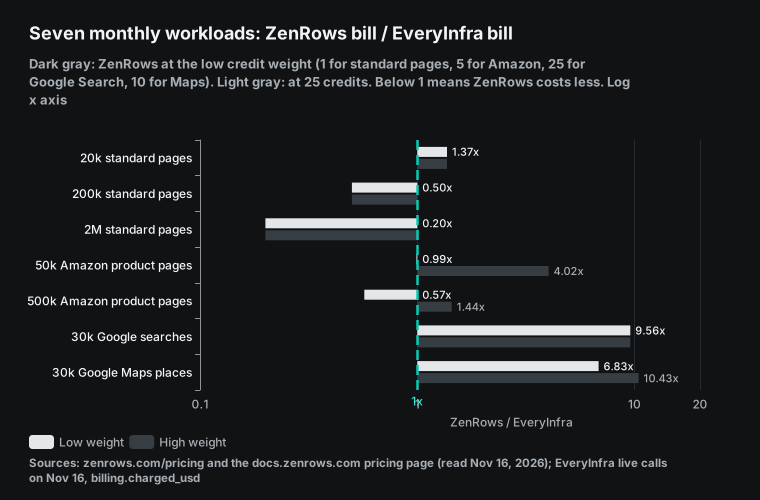
ZenRows clearly costs less in three of the seven: 200,000 plain pages, 2 million plain pages, and 500,000 Amazon pages at 5 credits. We cost less at 20,000 plain pages, because the smallest ZenRows rung is $19 and goes partly unused. We cost much less for Google Search and Maps. We have no match for the browser row.
The ZenRows hosted browser can log in, click and fill forms. Our capabilities return a structured result per request. We do not offer a browser session that you can drive.
Next to ScraperAPI, Bright Data and Firecrawl
Similar services bill in different units. Per 1,000 requests, they fit in one table. ScraperAPI and Firecrawl sell monthly plans with credits. Bright Data sells Web Unlocker and SERP API on pay as you go. The table uses only numbers written on each pricing page or in each set of docs, read on 2026-11-16.
| Service and plan | Plain page per 1,000 | Store product page per 1,000 | Google search per 1,000 | Failed requests |
|---|---|---|---|---|
| ZenRows B1 ($19, 45k credits) | $0.422 | $2.11 (at 5 credits) | $10.56 | Success only, see above |
| ZenRows S5 ($2,999, 45M) | $0.067 | $0.333 | $1.666 | Same |
| ScraperAPI Hobby ($49, 100k) | $0.49 | $2.45 (Amazon, 5 credits) | $12.25 | Billed only for 200 and 404 |
| ScraperAPI Advanced ($1,975, 21.5M) | $0.092 | $0.459 | $2.30 | Same |
| Firecrawl Hobby ($19, 5,000 credits) | $3.80 | $3.80 | $7.60 (2 credits per 10 results) | 403 and 404 still cost 1 credit |
| Firecrawl Standard ($99, 100k) | $0.99 | $0.99 | $1.98 | Same |
| Bright Data pay as you go | $1.50 (Web Unlocker) | $1.50 | $1.50 (SERP API) | Billed only for success |
| EveryInfra | $0.694 (read) | $1.389 (amazon/profile) | $0.694 (web tool) | Failures and empty results free |
The ScraperAPI credit docs say it bills only 200 and 404 responses, so it also counts 404 as success. At full use, ZenRows B1 costs about 14% less than ScraperAPI Hobby per plain page. The Firecrawl billing docs say its enhanced proxy and auto escalation add no credits.
A hard page still costs 1 credit, while ZenRows charges 10 for a premium proxy. The Bright Data Web Unlocker docs say only successful requests are billed. Its pay-as-you-go price of $1.50 per 1,000 applies to every page. That is lower than the 25-credit price on every ZenRows monthly rung, where S5 is $1.666. Bright Data has no monthly discount ladder like ZenRows, though.
The weight tables of ZenRows and ScraperAPI differ most on JavaScript rendering. The ScraperAPI credit docs list render=true at 10 credits, premium=true at 10, both together at 25, ultra_premium=true at 30 and ultra premium with rendering at 75. ZenRows charges 5 credits for JS rendering, and 10 and 25 for the other two, the same as ScraperAPI.
At full use, a JS-rendered page costs $4.90 per 1,000 on ScraperAPI Hobby, 2.3 times ZenRows B1 at $2.11. On ScraperAPI Advanced it costs $0.919, 2.8 times ZenRows S5 at $0.333. ZenRows has no 75-credit level, so its top weight is 25.
On ScraperAPI Hobby, the 75-credit level costs $36.75 per 1,000. If your pages need rendering but not a premium proxy, this is where the two differ most.
For per-domain ScraperAPI credits and its Amazon break-even, see ScraperAPI pricing explained. For Bright Data commitment plans, see Bright Data pricing explained. For AI-focused scraping tools, see Firecrawl alternatives. For a feature-by-feature view, see ZenRows alternatives.
Free tiers and rollover rules also differ, and at low or uneven volume they matter more than the unit price. ZenRows Free gives 5,000 credits a month, or 1,000 Amazon product pages at the guide's weight. ScraperAPI gives 1,000 API credits at signup with 5 concurrent connections, which is 200 Amazon pages at 5 credits each. Firecrawl gives 1,000 credits a month, about 1,000 pages. Bright Data Web Unlocker and SERP API each have a free tier of 5,000 requests a month.
On rollover, ZenRows plan credits expire, and top-up credits roll over one period. ScraperAPI resets the credit balance at each renewal. Firecrawl rolls unused credits over for one month on Scale only. Annual discounts are about 17% on ZenRows, and 16.7% on Firecrawl Hobby, Standard and Growth, with 20% on Scale. For spiky monthly use, the ZenRows annual plan, with the whole year of credits up front, is the most flexible of these rules.
Recompute it: a short Python script
The script below produced every per-1,000 value, break-even volume and workload bill in this article. The ZenRows rungs, fees and credits come from its pricing page. The weights come from its pricing docs. Our unit prices come from the live calls. Set PAGES and WEIGHT to your monthly volume and your measured credits per page.
# ZenRows 14 rungs (zenrows.com/pricing.md, read 2026-11-16 00:16 SGT): rung, monthly USD, monthly credits
RUNGS = [("B1", 19, 45_000), ("B2", 29, 80_000), ("B3", 39, 120_000), ("L1", 69, 250_000),
         ("L2", 99, 500_000), ("L3", 129, 700_000), ("G1", 199, 1_200_000), ("G2", 279, 2_000_000),
         ("G3", 399, 3_000_000), ("S1", 549, 5_000_000), ("S2", 749, 8_000_000),
         ("S3", 999, 12_500_000), ("S4", 1999, 28_000_000), ("S5", 2999, 45_000_000)]
FREE_CREDITS = 5_000
OURS = {"read": 0.000694, "web": 0.000694, "amazon/profile": 0.001389}  # live charges, 2026-11-16

def zenrows_bill(pages, weight):
    need = pages * weight
    if need <= FREE_CREDITS:
        return "Free", 0
    for name, usd, credits in RUNGS:
        if credits >= need:
            return name, usd
    return "Enterprise", None

for name, usd, credits in RUNGS:
    per1k = {w: round(usd / credits * w * 1000, 3) for w in (1, 5, 10, 25)}
    print(name, per1k)

PAGES, WEIGHT, CAP = 80_000, 5, "amazon/profile"
print(zenrows_bill(PAGES, WEIGHT), round(PAGES * OURS[CAP], 2))
The last two lines show one case. At 80,000 Amazon product pages a month and 5 credits, ZenRows needs L2 at $99. We charge $111.12. Set WEIGHT to 25 and ZenRows needs G2 at $279.
What the free tiers cover
The ZenRows Free plan gives 5,000 credits a month with no card. It allows 5 concurrent requests and 5 MB per response. It does not include standalone residential proxies or top-up packs. When you move from Free to a paid plan, unused free credits do not carry over.
Our trial is $1 of credit for starring our GitHub repos, valid for 24 hours. Both free tiers are large enough to test a few dozen of your own targets. Use them to measure what each page costs on ZenRows and how many rows each call returns on our side.
| Use | ZenRows Free (5,000 credits a month) | EveryInfra trial ($1) |
|---|---|---|
| Plain web pages | 5,000 pages | read tool, 1,440 calls |
| JS pages or Amazon product pages (5 credits) | 1,000 pages | amazon/profile, 719 calls |
| Premium proxy pages (10 credits) | 500 pages | none |
| Google results pages (25 credits) | 200 pages | web tool, 1,440 calls of 10 results |
| Amazon search | Billed per search page. The docs give no weight | amazon/search, 447 calls of up to 50 rows |
| Validity | Renews each month | 24 hours after you claim it |
When ZenRows is the better fit
First, generic scraping of any web page at real volume. If a basic request opens your pages, ZenRows costs $0.067 to $0.42 per 1,000. That is 1.6 to 10.4 times less than our read tool. On monthly billing it costs less at every volume above 27,377 pages. Under 5,000 pages, the Free plan costs nothing. Docs sites, blogs, news sites and public notices mostly fall in this row.
Second, browser sessions or residential proxies. To log in, click, follow infinite scroll, or capture screenshots and PDFs, ZenRows has a hosted browser. It bills 25,000 credits per GB plus 5 credits per minute. On B1, that is about $0.0021 per minute and about $10.56 per GB. You can also buy standalone residential proxy traffic and send your own requests. We offer neither.
Third, raw HTML, or a whole site with tens of thousands of pages. Our catalog covers 574 capabilities on 106 platforms. For other sites, unified search has three tools. The read tool returns the text of one page. The map tool lists up to 200 URLs per call, and crawl fetches up to 20 pages per call with their text.
The search tools list prices each call at $0.000694. ZenRows Crawl starts from one URL with no page limit and bills each page in auto mode. A Batch job takes up to 100,000 URLs. Up to 3 jobs run at once, Crawl jobs included, and results stay for 14 days, as the ZenRows changelog says.
Take a 1,000-page docs site where a basic request opens every page. ZenRows Crawl uses 1,000 credits, which the Free plan covers.
On our side, 5 map calls list the URLs and 50 crawl calls fetch the pages from section entry points. That is 55 calls, about $0.038. A read call per page would cost $0.694. Firecrawl lists Crawl at 1 credit per page and Map at 1 credit per call. So the same site costs about $3.80 at the Hobby rate, and its free 1,000 credits a month just cover it.
At 100,000 pages, ZenRows needs 100,000 credits, which is B3 at $39 with 120,000 credits. We would need 5,000 crawl calls and 500 map calls, about $3.82, but you must split the site into 5,000 entry points. Firecrawl needs 100,000 credits, the full Standard allowance at $99, plus a few Map calls. For a few thousand pages, both sides cost very little. For a site with tens of thousands of pages that you want to hand off as one job, ZenRows Crawl and Batch need less work.
Fourth, an agent that must start now with no account. The agent storefront lets an agent buy Fetch and Extract from $5, at $0.50 per 1,000 plain pages. The local MCP package gives 5,000 credits with no key. With us, you sign up for a key first, and the trial comes from starring our repos.
Fifth, large and steady volume. On the S rungs, 1,000 credits cost less than $0.11, and annual billing lowers that further. If most of your pages need a basic request or JS rendering, ZenRows pulls further ahead as volume grows.
Our per-call pricing costs less in other cases. Examples are structured fields from Amazon, Walmart, eBay or Zillow at modest volume, and Google Search or Maps results. Uneven monthly use also favors us, because there is no plan to fill. The ZenRows FAQ also says that CAPTCHAs inside forms are not solved for you. You must connect a third-party solver yourself. If you need CAPTCHA solving, see our CAPTCHA API.
ZenRows billing changes in October 2026
The ZenRows changelog had three billing-related entries in October. In our search results, the zenrows-mcp repo on GitHub carried the date 2026-11-07.
| Date | Change | Billing effect |
|---|---|---|
| October 2, 2026 | Credit caps per API key | A key over its cap gets 402 AUTH014 |
| October 5, 2026 | Agent storefront | Pay as you go at $0.50 per 1,000 credits, $5 minimum |
| October 9, 2026 | Crawl | No fee of its own, each page billed as Fetch |
Limits of these numbers
The ZenRows per-1,000 figures are best cases at full use. Real unit prices are higher when you do not use the full allowance. The volume scan buys the smallest rung each month, so it handles the gaps between rungs. It does not include top-up packs or changes from one month to the next.
The Amazon weight of 5 credits and the Google weight of 25 come from single examples in the cost guide. Your pages may land in another row. The Maps figure of 15 places per page is our assumption, and the ZenRows docs do not state it.
We opened no ZenRows account and made no live calls to ZenRows, so all ZenRows numbers come from public docs. We also made no live crawl or map calls, so those prices come from the search tools list.
ScraperAPI, Firecrawl and Bright Data prices come from their pricing pages and billing docs only. We tested 11 EveryInfra capabilities, once or twice each. Time and row counts change with keywords, regions and time of day. The two services return different fields, and we did not compare data quality or success rates. Prices were read on 2026-11-16. Check both pricing pages before you buy. Our prices are in the capability catalog, which you can read without a key.
Get started: test your own workload with the trial
- Find the capabilities you need on the infrastructure market. Start with Amazon search, Amazon product and Amazon reviews. Then try web search, Maps search and Maps reviews. Also see Zillow search, Walmart search and eBay search. Each page shows the inputs and a test console.
- Follow the quick start to get a key. Star our GitHub repos and claim the $1 trial in the console.
- Take 50 real URLs or keywords from last month. Run each one once. Record
billing.charged_usd, the row count and any failure reason. - Run the same 50 targets on the ZenRows Free plan. Record
X-Request-Creditsfor each. - Put both records into the Python script above to get both monthly bills.
- Read the platform pages for Amazon, web search, Google Maps and Zillow. Prices are on the pricing page.
- To use both services in an AI client such as Claude or Cursor, add both remote MCP servers. See MCP setup.
{
  "mcpServers": {
    "everyinfra": {
      "type": "http",
      "url": "https://api.everyinfra.com/mcp",
      "headers": { "Authorization": "Bearer ${EVERYINFRA_API_KEY}" }
    },
    "zenrows": {
      "type": "http",
      "url": "https://mcp.zenrows.com/mcp",
      "headers": { "Authorization": "Bearer ${ZENROWS_API_KEY}" }
    }
  }
}
Both entries use the Streamable HTTP transport from the MCP specification. The key goes in a header, not in the URL. For Claude Code, see its MCP docs. The agent can then call ZenRows for plain pages and everyinfra_call_api for platform fields, and use each where it costs less.
FAQ
How much is one credit worth in ZenRows pricing? Source: search suggestion "zenrows api pricing". Divide the plan fee by the plan credits. On monthly billing, one credit costs $0.000422 on B1 and $0.0000666 on S5. A request uses 1, 5, 10 or 25 credits. Do not budget with the $0.001 in the X-Request-Cost header. See the section on that header.
Is ZenRows free? Is there a free trial? Source: search suggestions "is zenrows free", "zenrows free trial", "zenrows free plan". Yes, the Free plan gives 5,000 credits a month. The pricing page states no trial period. See the section on free tiers for what the credits cover.
Is there a ZenRows discount code? Source: search suggestions "zenrows discount", "zenrows discount code". The pricing page shows no public code. Annual billing is the main saving. See the section on annual billing.
Does ZenRows charge for failed requests? Source: billing talk under the suggestion "is zenrows legit". No. Failed internal tries in auto mode are also free. For the exceptions, see the section on paying for success.
Is ZenRows MCP free? Source: search suggestion "zenrows mcp". The server is free. Each tool call bills the credits of the product behind it. account_usage is free. The remote URL is https://mcp.zenrows.com/mcp, and the local package is npx -y @zenrows/mcp.
Does the ZenRows Universal Scraper API still exist? Source: search suggestion "zenrows universal scraper api". Yes, under a new name: Fetch. The endpoint is still https://api.zenrows.com/v1/. It bills 1, 5, 10 or 25 credits per request.
Why are credit-based prices hard to compare? Source: Reddit threads in r/webscraping and r/SideProject. In an r/webscraping thread about 350 proxy pricing plans, the author replies that credit plans such as ScraperAPI and ZenRows are hard to compare. So they are not in the table. An r/SideProject post says credit pricing seems cheap at first and soon gets expensive. The fix is the method in this article. Convert every rung and weight to USD per 1,000, then scan your own monthly volume.
References
- ZenRows pricing page, ZenRows, last changed 2026-10-13, read 2026-11-16 00:16 SGT
- Pricing docs, ZenRows, read 2026-11-16
- Billing, ZenRows, read 2026-11-16
- FAQ, ZenRows, read 2026-11-16
- Track usage and control spend, ZenRows, read 2026-11-16
- Adaptive Stealth Mode, ZenRows, read 2026-11-16
- API key credit caps, ZenRows, read 2026-11-16
- API error codes, ZenRows, read 2026-11-16
- Concurrency, ZenRows, read 2026-11-16
- Fetch API reference, ZenRows, read 2026-11-16
- Sessions and forms, ZenRows, read 2026-11-16
- Browser introduction, ZenRows, read 2026-11-16
- Batch introduction, ZenRows, read 2026-11-16
- Batch FAQ, ZenRows, read 2026-11-16
- Crawl endpoints, ZenRows, read 2026-11-16
- MCP overview, ZenRows, read 2026-11-16
- MCP tool reference, ZenRows, read 2026-11-16
- Agentic payments, ZenRows, read 2026-11-16
- Agent toolkit overview, ZenRows, read 2026-11-16
- Fix common errors, ZenRows, read 2026-11-16
- Changelog, ZenRows, read 2026-11-16
- Agent storefront llms.txt, ZenRows, read 2026-11-16
- Amazon scraper, ZenRows, updated 2026-10-20, read 2026-11-16
- Google Maps scraper, ZenRows, read 2026-11-16
- zenrows-mcp, GitHub, dated 2026-11-07
- ZenRows CLI and agent skills, GitHub, read 2026-11-16
- @zenrows/mcp, npm, read 2026-11-16
- zenrows Python SDK, PyPI, version 1.13.0 released 2026-11-06
- Plans and Billing FAQ, ScraperAPI, read 2026-11-16
- ScraperAPI pricing, ScraperAPI, read 2026-11-16
- Credits and Requests costs, ScraperAPI, read 2026-11-16
- Firecrawl pricing, Firecrawl, read 2026-11-16
- Billing, Firecrawl, read 2026-11-16
- Web Unlocker pricing, Bright Data, read 2026-11-16
- SERP API pricing, Bright Data, read 2026-11-16
- Web Unlocker API introduction, Bright Data, read 2026-11-16
- SERP API introduction, Bright Data, read 2026-11-16
- Model Context Protocol specification 2025-11-25, MCP, read 2026-11-16
- Connect Claude Code to tools via MCP, Anthropic, read 2026-11-16
- EveryInfra capability catalog, EveryInfra, read 2026-11-16 00:16 SGT
- EveryInfra search tools, EveryInfra, read 2026-11-16
- EveryInfra MCP, EveryInfra, tools/list read 2026-11-16
- Zenrows Pricing 2026, G2, marked updated 2026-04-09, read 2026-11-16
- Zenrows Pricing 2026, Capterra, search snippet 2026-11-16
- I've collected 350 proxy pricing plans, Reddit r/webscraping
- I found web scraping APIs too expensive, Reddit r/SideProject
Reference BL-169