RainFocus Claude Connector: Research Speakers and Exhibitors Before the Event
The RainFocus Claude connector gives you the speaker list. A remote MCP adds 30 days of public posts: 12 live calls, $0.0173; 50 speakers, $0.20 to $0.39.

RainFocus released a connector for Claude on November 10, 2026. Event teams can now read RainFocus attendee, speaker, session, exhibitor and booth records from inside Claude (RainFocus press release). The roster tells you who is speaking. It does not tell you what that person posted on LinkedIn last week, or what an exhibitor announced this month. So we added the EveryInfra remote MCP to the same Claude conversation. We tested it on four public names from the AWS re:Invent 2026 keynote page.
We sent 12 requests. Ten were billed, for a total of $0.017251. For a show with 50 speakers and 30 key exhibitors, the pre-event research costs between $0.20 and $0.39 in API fees. Pulling the same X posts for 50 speakers at the X API list price costs $10.00.
What the rainfocus claude connector does: the November 10 release
RainFocus makes an event management platform called RainFocus Nexus. It covers registration, agendas, exhibitors and check-in (RainFocus Nexus product page). The company is based in Lindon, Utah. On 2026-11-10 it announced an Anthropic connector that lets AI agents read and write event data. PR Newswire carried the full text on the same day (PR Newswire release).
The release calls the connector "Anthropic-verified". It is listed in the Claude connector directory at claude.ai/directory/rainfocus.
The connector does not add a new API. It sits on MCP Profiles, which RainFocus released on 2026-07-07 (MCP Profiles press release). An admin sets up a profile in the Integration Suite of RainFocus Nexus. The admin picks the tools to expose and copies the server URL. When an AI client connects, it signs in with OAuth and gets a short-lived token with a limited scope. The November release turns that server into a one-click install from the Claude directory.
| Item | What the source says | Source |
|---|---|---|
| Release date | 2026-11-10, Lindon, Utah | RainFocus release; PR Newswire |
| Foundation | MCP Profiles in RainFocus Nexus (released 2026-07-07) | MCP Profiles release |
| Sign-in | OAuth with short-lived, scoped tokens | MCP Profiles release |
| Coverage | Tools across 17 domains | 2026-11-10 release |
| Read | Attendees and speakers, sessions, rooms and capacity, check-in, exhibitor and booth records | 2026-11-10 release |
| Write | Create and update meetings and other records; admin enables each write tool | 2026-11-10 release |
| Who can use it | RainFocus customers with Integration Suite access and a configured MCP Profile | 2026-11-10 release |
| Where to install | Claude directory, claude.ai/directory/rainfocus | 2026-11-10 release; directory page |
| Renamed modules | Configuration Agent is now Canvas; Sales Module is now Signal; Concierge Agent is now Concierge | 2026-11-10 release; RainFocus Nexus page |
Trade press picked up the news on the same day. Exhibitor magazine (Exhibitor story) and destinationCRM (destinationCRM story) both ran it on 2026-11-10. Neither story adds pricing or rollout details. RainFocus does not publish a price for the connector. The release lists Integration Suite access as a requirement, so ask your RainFocus account manager about cost.
We do not have a RainFocus account, and we did not sign up or buy anything. Every RainFocus step in this article is a configuration example based on the release and product pages. We did not run it.
Event platforms are opening up to Claude: three signals in one month
Cvent came first. On 2026-10-19, Cvent posted that its MCP connector for Claude is in beta and open for sign-ups (Cvent beta announcement). On 2026-10-16, Socialloop published a list that ranks event platforms by how well AI agents can operate them (Socialloop list). Event professionals also ask the question in public. One r/EventProduction thread asks whether Claude will disrupt event management platforms (r/EventProduction thread).
How to set up RainFocus for pre-event research (configuration example)
An MCP Profile grants access tool by tool. One RainFocus environment can hold several profiles for different people and jobs. For pre-event research, we suggest a separate read-only profile. Turn on the query tools for speakers, sessions, rooms, exhibitors and booths. Leave every write tool off. Also leave check-in and attendee detail tools off.
There are two reasons. First, the research only needs speaker and exhibitor lists. It does not need personal data about regular attendees, and each tool you leave off keeps one more kind of data out of the chat. Second, the release says an admin must turn on each write tool. Claude cannot see a tool that is off, so it cannot call it by mistake.
After you save the profile, RainFocus gives you a server URL. The November connector hides this step behind the directory install, but the same profile still controls access. If you turn off a tool in RainFocus, Claude loses that tool at the next connection. The person who owns event data and the Claude organization Owner are often different people. Before you start, they should agree on which tools are on and who can connect.
Roster in RainFocus, news on public platforms: event data mcp covers only its own data
Pre-event research has three parts. Part one is who is coming. That means names, titles, companies, session times and rooms for speakers, plus company names, booth numbers and contacts for exhibitors. All of this is in RainFocus, and the connector reads it.
Part two is what these people and companies did recently. That means a speaker's posts from last week, a company's launches and leadership changes this month, and talks they gave at other shows. Part three is matching the two. Which speaker's topics fit the track? Which exhibitor news is worth a line in the opening remarks? Which topic should the host avoid this week?
An event data mcp server handles part one. The RainFocus connector gives Claude structured records, and Claude can query them by session, company or booth.
Part two needs public data from outside the platform. That is where the EveryInfra remote MCP fits.
linkedin/person_posts reads a person's feed. linkedin/company_posts reads a company page. twitter/user_posts reads X posts. youtube/search finds past talks, and web/search finds news. Claude does part three in the same conversation, because both result sets are in its context.
We keep the roster and the research in one conversation because the two sides match on names. RainFocus may store "Presidio, Inc.", while the LinkedIn company slug is presidio-. A speaker types a full name on the form, but the LinkedIn slug may be a short form. With both data sets in one context, Claude can match them as it goes and list the gaps for you. In two separate chats, a person has to copy those links across by hand.
| Question before the event | Where the data is | What to use |
|---|---|---|
| Which session, time and room for each speaker | RainFocus speaker and session records | RainFocus connector (configuration example) |
| Booth number and size for each exhibitor | RainFocus exhibitor and booth records | RainFocus connector (configuration example) |
| What a speaker said in public in the last 30 days | LinkedIn and X profiles | linkedin/person_posts, twitter/user_posts |
| What an exhibitor announced in the last 30 days | LinkedIn company page, news | linkedin/company_posts, web/search |
| Company size, headquarters, follower count | LinkedIn company profile | linkedin/company_profile |
| Past talks by a speaker and their reach | YouTube | youtube/search |
The last four rows use public data. The EveryInfra catalog lists the parameters, response fields and unit price of each capability (capability catalog). We read the catalog at 00:15 Singapore time on 2026-11-16. All prices below come from the price_usd values in that read.
Who we tested: two keynote speakers and two companies from AWS re:Invent 2026
We needed a large show that names its speakers in a public agenda. AWS re:Invent 2026 runs from 2026-11-30 to 2026-12-04 in Las Vegas. The keynote page lists each speaker and guest (re:Invent keynote page).
The CEO keynote is on December 1, from 8:30 to 10:30 a.m. Matt Garman speaks, with guests Barbara Karuth-Zelle from Allianz and Tony Xu from DoorDash.
On December 2, Swami Sivasubramanian gives a keynote as VP of Agentic AI. The partner keynote is on December 2, from 3 to 4 p.m. Ruba Borno speaks, and Presidio CEO Bob Cagnazzi joins her. The AWS Partner Network also published a partner guide to the show on 2026-10-27 (APN partner guide).
We only borrow the public list. The event platform behind re:Invent does not matter here. For speakers, we picked the two keynote leads. Matt Garman is the AWS CEO, and Amazon investor relations publishes his biography (Matt Garman biography). Swami Sivasubramanian has an author page on About Amazon (Swami author page).
For companies, we picked the employers of two guests. DoorDash is a consumer company with a lot of recent news. Presidio is an IT services firm with a booth at re:Invent, so it works as the exhibitor example. We did not look up any regular attendee or private account, and none appear here.
| Target | Role | What we pulled | Handles used |
|---|---|---|---|
| Matt Garman | AWS CEO, December 1 CEO keynote | 20 LinkedIn posts, 40 X posts | mattgarman (LinkedIn), mattsgarman (X) |
| Swami Sivasubramanian | AWS VP of Agentic AI, December 2 keynote | 20 LinkedIn posts, 40 X posts, 20 YouTube results | swaminathansivasubramanian, SwamiSivasubram |
| DoorDash | CEO Tony Xu is a CEO keynote guest | 20 LinkedIn company posts, 10 web results | doordash |
| Presidio | CEO Bob Cagnazzi is a partner keynote guest; booth 520 | 20 LinkedIn company posts, 1 company profile | presidio- (presidio came back empty) |
The flow: roster from RainFocus, then EveryInfra in the same chat
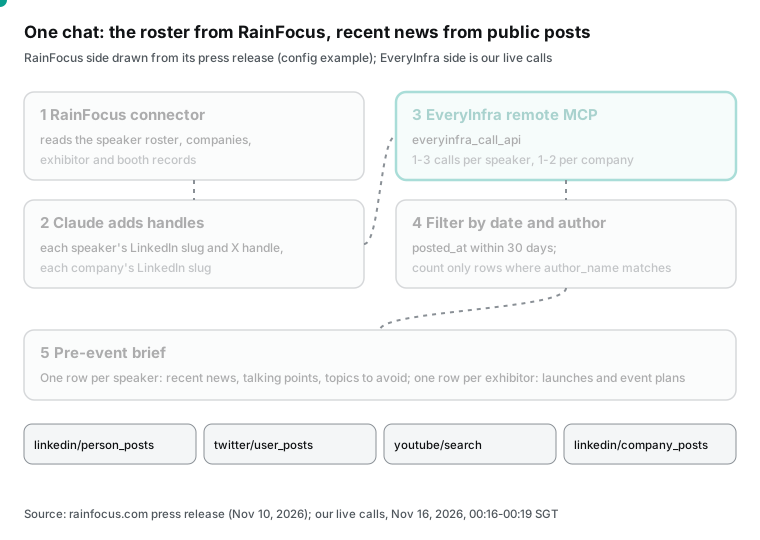
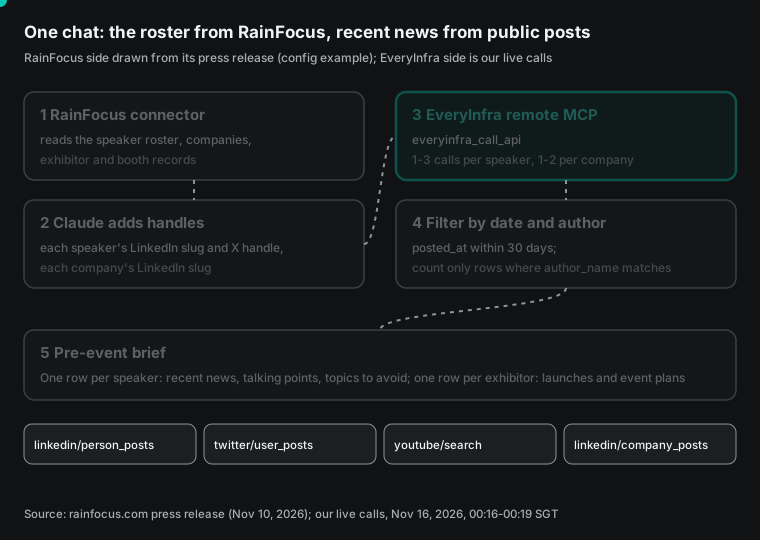
Step 1 runs on the RainFocus side. Steps 2 to 5 run between Claude and EveryInfra. Step 2 depends on the registration form. A RainFocus speaker record has a LinkedIn URL only if the organizer asked for it on the form. If not, Claude must find the profile from the name and company, and it can pick the wrong person.
The EveryInfra catalog has linkedin/profile_search at $0.000556 per call. It returns candidate profiles for a name and company. In this test we used slugs from public profiles, so we did not test that capability.
Add EveryInfra to Claude
Claude custom connectors work on the Free, Pro, Max, Ultra, Team and Enterprise plans. The Free plan allows one custom connector (custom connector help page). On Team and Enterprise, an Owner adds the connector in organization settings. Each member then connects on their own. Owners can also limit which actions are available across the organization.
Anthropic's guide to unlisted connectors shows the entry point and the sign-in options (add an unlisted connector). "Sign in now" means an admin signs in once for the whole organization. "Sign in when needed" means each member signs in at first use. "No sign-in" means no OAuth, and the credential goes in a request header.
Remote connectors connect from Anthropic's cloud on port 443. Your server must be reachable from the public internet. If your firewall needs an allowlist, Anthropic publishes the outbound ranges 160.79.104.0/21 and 153.61.208.0/20 (Anthropic IP addresses). The EveryInfra endpoint https://api.everyinfra.com/mcp is public, so no allowlist work is needed. The example below follows the Anthropic docs and the EveryInfra MCP server page.
Configuration example (Customize > Connectors > + > Add custom connector)
Name:            EveryInfra public activity
Remote MCP URL:  https://api.everyinfra.com/mcp
Authentication:  No sign-in
Request headers:
  Authorization = Bearer <your EveryInfra API key>
Tool permissions (Customize > Connectors > EveryInfra public activity):
  everyinfra_list_capabilities  Always allow
  everyinfra_call_api           Needs approval
  everyinfra_get_job            Always allow
  other 9 tools                 Blocked

Alternative: set Remote MCP URL to https://api.everyinfra.com/mcp/all,
choose Sign in when needed, and each person signs in with their own EveryInfra account.
The two options differ in who pays. With /mcp and a key in the header, the whole organization shares one wallet. You set it up once. With /mcp/all and OAuth, each person signs in to their own account and pays for their own calls.
We read the protected resource metadata for /mcp/all at 00:24 Singapore time on 2026-11-16. The authorization server is https://auth.everyinfra.com/oidc, and the scopes include data:call and search:call (protected resource metadata). RFC 9728 defines this metadata format (RFC 9728). The MCP authorization spec tells servers to publish their trusted authorization servers this way (MCP authorization spec). The tokens follow OAuth 2.1 (OAuth 2.1 draft).
On the RainFocus side, the release says you install from the Claude directory and then authorize with your RainFocus account over OAuth. Your environment must already have an MCP Profile. With both connectors live, Claude can call RainFocus tools and then EveryInfra tools in one conversation. You do not need to copy the roster by hand.
When you have many connectors: on-demand tools and approvals
The Claude help center says connector tools load automatically by default. With 10 or more connectors, you can set "Tool access" to on demand. Then tool descriptions take less context (connector help page; how Claude suggests connected apps). Event teams often connect a calendar, email, documents and a CRM. Add RainFocus and EveryInfra, and you reach 10 quickly.
The same page says that in Research mode, Claude can call connector tools without asking. Pre-event research needs dozens of calls, so Research mode saves clicks. But each everyinfra_call_api call is billed, so estimate the count first.
There is also the opposite problem. A GitHub issue reports that a custom connector on the Team plan asks for approval on every call (claude-ai-mcp issue 491). With 50 speakers, that is 50 or more clicks.
In that case, move the batch to the Claude API. The MCP connector in the Messages API connects to remote MCP servers. It supports tool calls only and needs the beta header mcp-client-2026-09-15 (MCP connector docs). In Claude Code, claude mcp add with an HTTP server also works (Claude Code MCP docs).
The prompt you give Claude
For RainFocus, the prompt describes the task and does not name tools. The EveryInfra capability names and parameters are the ones we called in this test.
Configuration example: send this to Claude two weeks before the event
1. Use the RainFocus connector. List every speaker in the main-stage sessions:
   name, title, company, session time, room. Then list the 30 largest
   exhibitor booths: company name, booth number.
2. For each speaker, call everyinfra_call_api on the EveryInfra connector
   with linkedin/person_posts (limit 20). If you cannot find a LinkedIn slug,
   list the name and ask me. Do not guess.
3. For each exhibitor, call linkedin/company_posts (limit 20).
4. Keep only posts with posted_at in the last 30 days and author_name equal
   to the person or company. Sort by posted_at.
5. Write one table. One row per speaker: up to 3 recent items with post links,
   topics that fit the session, and recent items to avoid. One row per
   exhibitor: recent launches and its plans for this event.
6. If a call returns 0 posts, write "No public posts in the last 30 days".
   Do not fill the gap with other content.
One real round trip: Presidio's company profile over MCP
At 00:19:31 Singapore time on 2026-11-16, we sent one tools/call request to https://api.everyinfra.com/mcp. This is the same request Claude sends when it uses the connector. In the MCP spec, the params of tools/call hold the tool name and arguments. The server returns the result in a content array (MCP tools spec). The transport is Streamable HTTP (MCP transports spec). Here is the request and a trimmed response.
{
  "jsonrpc": "2.0",
  "id": 7,
  "method": "tools/call",
  "params": {
    "name": "everyinfra_call_api",
    "arguments": {
      "platform": "linkedin",
      "action": "company_profile",
      "params": {"company": "presidio-"}
    }
  }
}

Response (JSON inside content[0].text, trimmed)
{
  "id": "req_bee73a621f5f4c29",
  "platform": "linkedin",
  "action": "company_profile",
  "results": {
    "name": "Presidio",
    "universal_name": "presidio-",
    "url": "https://www.linkedin.com/company/presidio-/",
    "industries": ["IT Services and IT Consulting"],
    "employee_count": 4584,
    "follower_count": 120912,
    "headquarters": "New York, NY, US"
  },
  "billing": {"charged": true, "charged_usd": 0.000556}
}
Claude receives this JSON and writes the brief from results. The charged_usd field in billing tells you the cost of the call. The id is the request ID, which you need for monthly reconciliation or a support ticket.
This was the only MCP call of the 12 requests. The JSON in content[0].text has the same field structure as a REST response (id, results, billing). So parameters that work in Claude also work in a REST script.
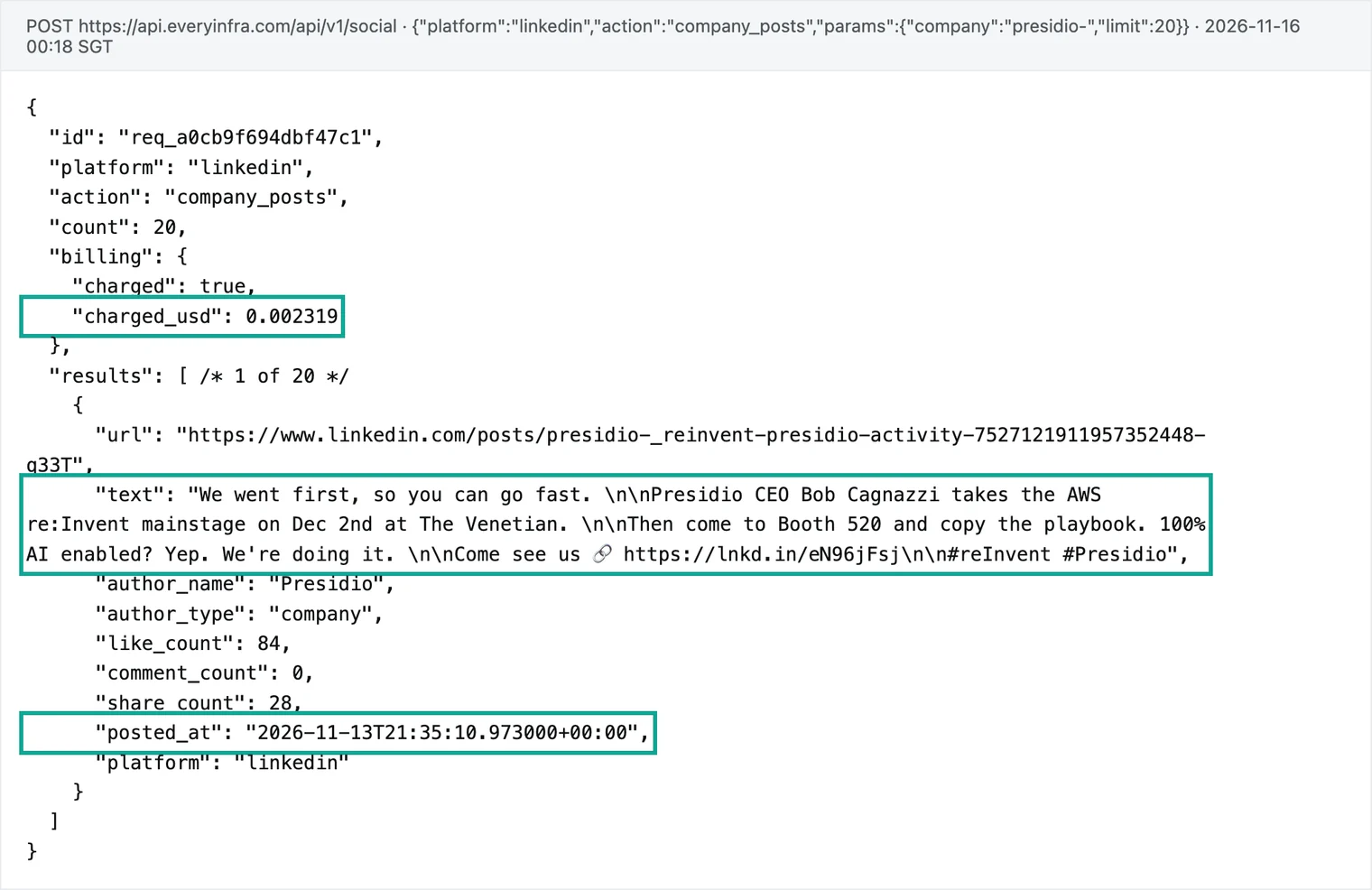
We first asked the REST endpoint for company posts with the slug presidio at 00:18:01 Singapore time. It returned 0 posts. The charged_usd field was 0, and the reason was empty_result_refunded. The real LinkedIn slug for Presidio ends in a hyphen: presidio-. With that slug, at 00:18:28 Singapore time, we got 20 posts and paid the list price of $0.002319.
A wrong slug costs nothing, but it costs one more round trip. When Claude guesses a company slug and gets 0 posts, it should try another slug before it reports "no activity". Our failed-call refund reconciliation guide shows how to match refunds in your records.
Test 1: what the two keynote speakers said on LinkedIn in 30 days
Our 30-day window runs from 00:20 on 2026-10-17 to 00:20 on 2026-11-16, Singapore time. We called linkedin/person_posts at 00:16:52 and 00:17:14 Singapore time. Each call returned 20 posts and cost $0.004. We set one rule before the calls: a post counts as the person's own only if author_name matches the target name.
| Matt Garman | Swami Sivasubramanian | |
|---|---|---|
| Posts returned | 20 | 20 |
| Oldest to newest | 2026-09-23 to 2026-11-12 | 2026-10-15 to 2026-11-14 |
| In the 30-day window | 12 | 19 |
| Own posts in the window | 7 | 15 |
| Posts by others (of 20) | 6 (AWS Newsroom, AWS company page, Paula Bellizia) | 4 (AWS company page, Andy Jassy, Kiro) |
| Median likes, own posts | 1,636 | 338 |
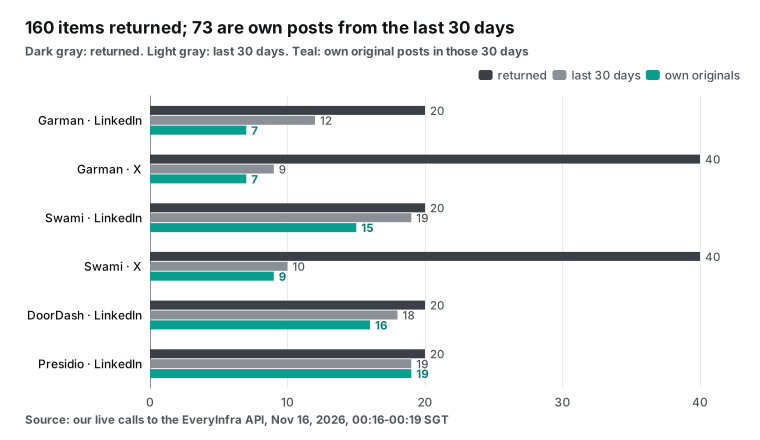
Six of Matt Garman's 20 posts came from other authors. A LinkedIn person feed includes posts the person shared or engaged with. The API returns them as they are, and author_name holds the original author. One of them is a Spanish post by Paula Bellizia of AWS on 2026-11-11 about the new AWS Region in Chile. A brief that says "Garman announced the Chile Region" gives him credit for someone else's post.
His own seven posts stay on a few topics. On October 29 he posted that AWS grew 39.3% year over year in Q3, and that post had 4,160 likes, the most of the 20. On October 22 he posted that AWS Continuum for code vulnerabilities is generally available. On October 20 he wrote about a €4.8 billion investment in the Frankfurt Region. Other posts covered running PyTorch code on new chips without rewrites (October 19), capacity (November 3) and AI in health care (November 10). For his December 1 keynote, a host can pick from two of these topics: growth and capacity.
Swami's 15 own posts are almost all product launches. They include Kiro bots on November 5 (1,238 likes) and an internal Strands Decider test on November 9 (1,263 likes). They also include AWS Emulator on November 11, AgentCore Runtime updates on November 12 and model routing by task difficulty on November 13. His December 2 keynote is about agentic AI, so these posts read like a preview of the talk.
Garman's 20 posts run from September 23 to November 12, and 8 of them are older than the 30-day window. Sort by posted_at first and then cut the window, so late-September posts do not count as recent. Step 4 of the prompt does this. The catalog lists the response fields for person feeds (LinkedIn person posts API). The posted_at value is an ISO 8601 timestamp with a time zone.
Convert times to the venue's time zone in the brief
The posted_at values are in UTC. Presidio's post about the main stage and booth has posted_at 2026-11-13T21:35Z. In Singapore that is 05:35 on November 14. In Las Vegas (Pacific Standard Time) it is 1:35 p.m. on November 13. The time zone you use for "last 30 days" moves each end of the window by up to a day.
We cut the window in Singapore time because we ran the tests from Singapore. For a brief that goes to a team at a Las Vegas venue, cut and write in Pacific time. Put the UTC time in brackets, so people can match it to the original post.
Test 2: how much X repeats LinkedIn
We called twitter/user_posts at 00:17:32 and 00:18:45 Singapore time. Each call asked for 40 posts and cost $0.000556. On X, the is_reply and is_repost fields separate original posts from the rest.
| X account | Matt Garman | Swami Sivasubramanian |
|---|---|---|
| Posts returned | 40 | 40 |
| Oldest to newest | 2026-08-04 to 2026-11-11 | 2026-06-18 to 2026-11-14 |
| Span | 98.9 days | 149.1 days |
| In the window: originals / reposts | 7 / 2 | 9 / 1 |
| Followers | 11,286 | 7,285 |
| Views on originals: median / max | 2,930 / 21,421 | 4,975 / 181,699 |
Neither speaker posts often on X, so you need 40 posts to cover 30 days. The catalog prices twitter/user_posts per call, so 40 posts cost the same $0.000556 as 20 (X user posts API).
Next, we matched each original X post with the nearest LinkedIn post by the same person. All 16 have a LinkedIn twin within 60 minutes. The largest gap is 13.3 minutes, and most gaps are under one minute.
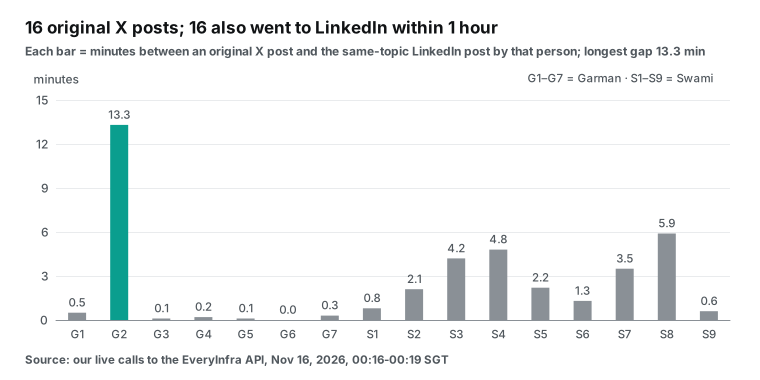
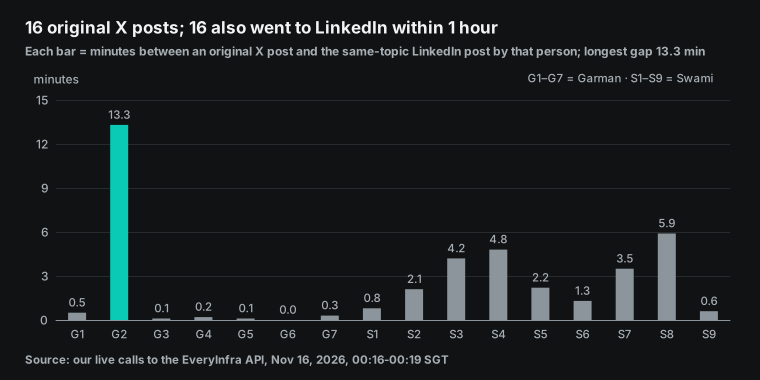
For these two executives, the X account is mostly a copy of LinkedIn. The reverse does not hold. Swami has 6 LinkedIn posts that never went to X. All 7 of Garman's own LinkedIn posts in the window are also on X. For a brief on these two, LinkedIn is the full set and X is a subset.
X adds one thing: view counts. Swami's top post in the window, about AWS Emulator, has 181,699 views. Use this number to see which topics travel. If you only need what the speaker said, LinkedIn is enough, and you save $0.000556 per person.
View counts also help a host pick an opening line. Swami's AWS Emulator post has more than 36 times his median views. That tells you that a local AWS copy for coding agents spread widely among developers. A host who mentions it before his December 2 talk will get a nod from the room. Garman's top post, at 21,421 views, is also about AI infrastructure.
This pattern only holds for these two people. Technical speakers, independent developers and journalists often post mainly on X and rarely on LinkedIn. With 50 names, check both platforms for 5 to 10 people first. Then decide which platform to use for the rest. That costs less than one rule for everyone.
Swami's 6 LinkedIn-only posts are these. On October 24 he wrote that he will join the AWS Breaking Barriers hackathon on November 3 to 5 (43 likes). On October 27 he shared a conversation with Garman. On October 30 he posted the 39.3% Q3 growth. On October 23 he posted that AWS Continuum for code vulnerabilities is generally available (670 likes). On November 4 he wrote about automated reasoning (758 likes), and on November 5 about Kiro credit pooling for teams (540 likes).
Two of these answer a common pre-event question: where did this speaker appear recently? The hackathon post says the event runs for three days in New York, Seattle and Washington, D.C. Social enterprises and tech experts form teams and use Amazon Bedrock, Kiro and AgentCore on education, health care and crisis response projects. The post does not show whether he attended. So the brief says "posted that he will join", not "joined". An X-only search misses all 6 posts, and the brief then holds only product launches.
Test 3: exhibitor news from DoorDash and Presidio
We called linkedin/company_posts for DoorDash at 00:17:45 Singapore time. It returned 20 posts and cost $0.002319. Eighteen fall in the 30-day window, and 16 came from the company page. Three came from employees, with their own names in author_name.
The company posts in the window cover several topics.
On October 29, DoorDash announced its intent to acquire Instacart. On November 5 it expanded its Lyft partnership. On November 2 it launched $12 meal boxes. On November 11, DoorDash Crimson connected to Plaid. On November 10 it published its Restaurant Price Index, up 3.1% year over year. Six more posts promote engineering blog articles about real-time dispatch, reinforcement learning, runtime configuration and incentive budgets.
The Instacart post has 9,081 likes, against a median of 136 for all 20 posts. That is more than 60 times the median. Any brief for Tony Xu must mention it. We cross-checked with web/search for "DoorDash announces" at 00:19:45 Singapore time, for $0.001389. Result 3 of 10 is the DoorDash investor relations release. It gives $65.00 per Instacart share, or an equity value of about $17 billion (DoorDash investor relations release).
The same search also returned May 2025 news about the SevenRooms and Deliveroo deals, at ranks 1 and 7. The web/search capability does not filter by date, so check the dates in each result (web search API). The DoorDash newsroom also lists recent items such as the Plaid link and Dot robot deliveries in Fremont (DoorDash newsroom).
We sorted the 10 search results by topic. Three are about the Instacart deal: rank 3 (the investor release), rank 5 (a news video) and rank 9 (a YouTube video). Three are about the 2025 SevenRooms and Deliveroo deals: ranks 1, 7 and 8. The other 4 are a newsroom index, an encyclopedia entry and stock quote pages with no specific event. So only 3 of 10 results for "company name + announces" are about this month.
In a pre-event brief, use web/search to find a primary source for a big item that you already saw in the company posts. Do not use it to discover news. For discovery, use linkedin/company_posts. It returns company page posts, each with posted_at, so the 30-day cut is simple.
| 10 results for "DoorDash announces" | Count | Ranks |
|---|---|---|
| This month's Instacart deal | 3 | 3, 5, 9 |
| 2025 SevenRooms and Deliveroo deals | 3 | 1, 7, 8 |
| Newsroom index, encyclopedia, stock quote pages | 4 | 2, 4, 6, 10 |
All 20 Presidio posts came from the company page, and 19 fall in the window. Nine are about events. Five mention re:Invent. Three mention Cisco Partner Summit, and two of those are award posts. One mentions Microsoft Ignite, which runs from November 17 to 20 (Ignite partner guide).
The 2026-11-13 post gives the date, the venue and the booth number. It says Bob Cagnazzi takes the re:Invent main stage on December 2 at The Venetian, and it names booth 520. This matches the AWS keynote page, which lists the partner keynote on December 2 at 3 p.m. You can also check the booth number against the RainFocus booth record. If the two do not match, one of them needs an update.
The MCP call to linkedin/company_profile gave company size: 4,584 employees, 120,912 followers and headquarters in New York. When you staff the expo hall or schedule exhibitor meetings, you can read these numbers next to booth size (LinkedIn company profile API).
| DoorDash | Presidio | |
|---|---|---|
| Returned / in window / company's own | 20 / 18 / 16 | 20 / 19 / 19 |
| Posts by others | 3 employee posts | 0 |
| Top post | 10-29 Instacart deal, 9,081 likes | 11-04 new engineering office in India, 564 likes |
| Event-related posts | 10-18 employee post about a merchant event in Copenhagen | re:Invent 5, Cisco Partner Summit 3, Ignite 1 |
| Fields to match with RainFocus | Guest session time | Session time, booth 520 |
| API fees in this test | $0.002319 + $0.001389 | $0.002319 + $0.000556 (plus 1 refunded empty call) |
Three ways public data and RainFocus records disagree
| Mismatch | Example from this test | What to do |
|---|---|---|
| Job title | The keynote page lists Swami Sivasubramanian as VP of Agentic AI; older talks and articles use other titles | Show both titles in the brief; the speaker liaison confirms before badges print |
| Time, room or booth | Presidio's post says December 2, The Venetian, booth 520; the keynote page says 3 to 4 p.m. | Check with the organizer; do not edit RainFocus from a public post |
| The company changed | DoorDash plans to acquire Instacart; the deal is not closed | Discuss booths, meetings and press plans if both are exhibitors |
A speaker filled in the form months ago, but posts and company sites show the current title. If RainFocus still holds an old title, the badge and the stage screen will be wrong.
For time and place, any difference from the RainFocus record needs a check with the organizer. Claude finds and lists the mismatch, and a person makes the change. A company change like the DoorDash deal does not show up in RainFocus exhibitor records at all. You need company posts and news to see it.
Test 4: YouTube search finds past talks, not recent news
We ran youtube/search for two queries, each with sort: newest and 20 results. The first try, at 00:18:59 Singapore time, got a 429 with a hint to retry in one second. The retry at 00:19:07 succeeded, and the 429 was not billed. Each of the two successful calls cost $0.000778 (YouTube search API).
The query "re:Invent 2026" returned 5 of 20 videos from the last 30 days, from 10 different channels. Most are small-channel previews and survival guides. Rank 3 is the 2025 Garman keynote replay with 12,197,187 views.
The query "Swami Sivasubramanian keynote" returned only 1 of 20 videos from the last 30 days. That is a Madrona interview from 2026-10-22 at rank 7, with 115 views.
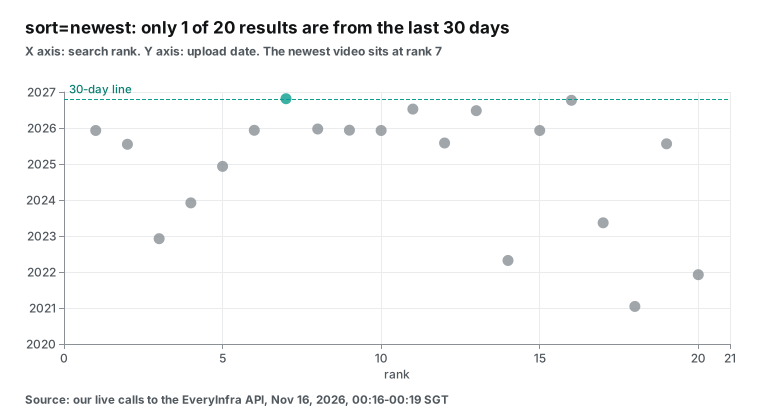
Even with sort by newest, the results mix in many older videos with high relevance. The only recent one sits at rank 7. So youtube/search is a poor tool for "what did this speaker do this month". It is a good tool for another question: what did this speaker present before, and how many people watched?
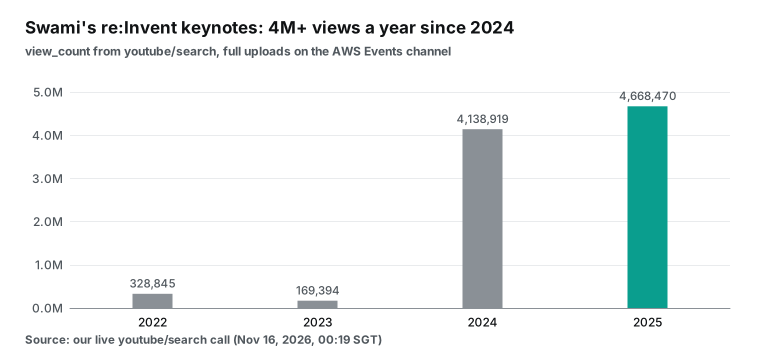
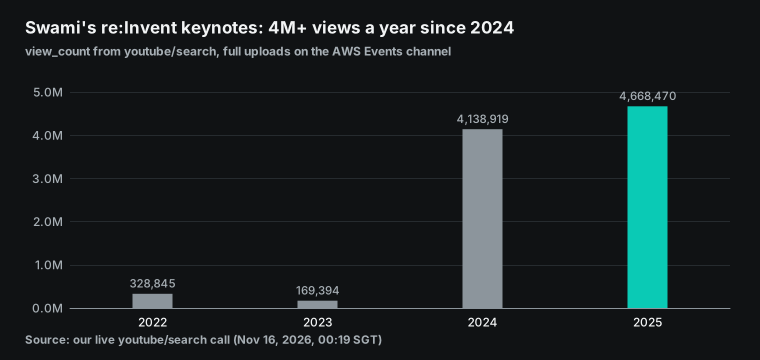
Swami's four re:Invent keynote replays have these views: 328,845 for 2022, 169,394 for 2023, 4,138,919 for 2024 and 4,668,470 for 2025. A host can scan last year's talk and its reach faster than they can read a feed.
If you must use YouTube for recent news, a different query may work better. Try the company name plus the event name, such as "Presidio re:Invent", or search one channel.
What the brief looks like: a sample from these test results
The sample follows the prompt above and uses the data from these calls. Each row is one target. The "Session" column comes from the AWS keynote page. In a RainFocus setup, Claude reads it from the RainFocus connector. The other columns come from EveryInfra responses. Dates use Singapore time.
| Target | Session | Last 30 days (own posts) | Topics that fit | Watch out |
|---|---|---|---|---|
| Matt Garman | 12-01 CEO keynote | 10-29 Q3 growth of 39.3%; 10-20 €4.8B for Frankfurt Region; 11-03 capacity | Growth and capacity | The Chile Region post is by someone else |
| Swami Sivasubramanian | 12-02 keynote | 11-05 Kiro bots; 11-11 AWS Emulator; 11-12 AgentCore Runtime update | Coding agents, agent runtime | Title is now VP of Agentic AI; check the badge |
| DoorDash | Guest Tony Xu, 12-01 CEO keynote | 10-29 intent to acquire Instacart; 11-05 wider Lyft partnership; 11-02 $12 meal boxes | Local merchants, delivery network | Deal not closed; say "plans to acquire" |
| Presidio | Guest Bob Cagnazzi, 12-02 partner keynote; booth 520 | 11-13 main stage and booth; 10-27 Cisco Global Innovation Partner of the Year; 11-04 India office | Lessons from a partner on stage | Team at Ignite in San Francisco, November 17 to 20; avoid those days for outreach |
This table uses 8 billed calls for $0.015695, not counting the two YouTube calls. For one row, Claude reads about 20 posts and keeps 3 items and two short notes. At that density, a brief for 50 speakers is about two pages.
Every item in the "last 30 days" column must trace back to a post with a link. Put this rule in the prompt. Claude makes inferences in the "topics" and "watch out" columns, and that is fine. The news column must only hold facts from the posts. We flagged "deal not closed" for DoorDash because its October 29 post says "intent to acquire", and the investor release also describes a planned deal.
What pre-event research costs for 50 speakers
All prices come from the catalog price_usd values we read at 00:15 Singapore time on 2026-11-16. We assume a mid-size trade show with 50 speakers and 30 key exhibitors. Here are three plans.
| Plan | What it covers | Calls | API fees |
|---|---|---|---|
| Minimum | One linkedin/person_posts call per speaker | 50 | $0.20 |
| Recommended | Minimum plus one youtube/search per speaker for past talks | 100 | $0.2389 |
| Full | Recommended plus one twitter/user_posts per speaker, and one each of linkedin/company_posts, linkedin/company_profile and web/search per exhibitor | 240 | $0.3946 |
| Full, weekly for 4 weeks | Weekly refresh in the month before the show | 960 | $1.5785 |
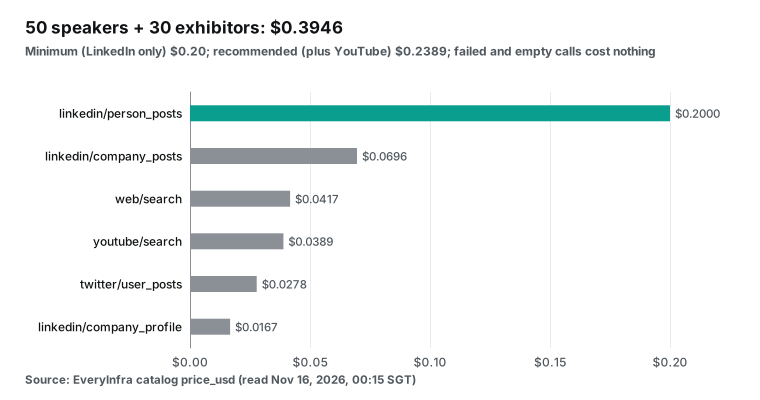
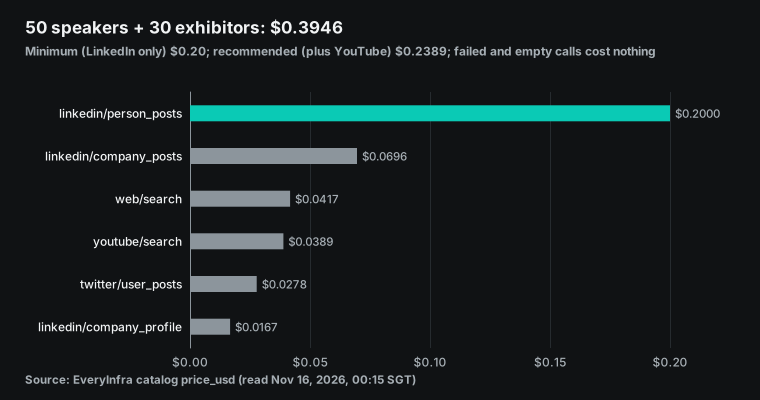
LinkedIn person posts are $0.20 of the full plan, about 51%, at $0.004 per call. That is the highest unit price of all the capabilities we used. For the two executives we tested, X is a subset of LinkedIn. For similar speakers, you can drop the $0.0278 for X person by person. Per speaker, one call each for LinkedIn, X and YouTube costs $0.005334.
Two more costs sit outside the API fees. Claude bills by plan. Pro costs $20 per month, or $17 per month billed yearly (Claude pricing, read on 2026-11-16). Usage has a five-hour window and a weekly cap (usage limits help page).
Data volume uses up that capacity. Raw LinkedIn plus X responses were 93,793 bytes for Garman and 107,386 bytes for Swami. For 50 people, that is about 5 MB of JSON. The prompt keeps only own posts from the last 30 days and asks for 20 posts per call. This keeps the data from filling the conversation. The RainFocus cost is not public, as noted above.
How to run 50 names in batches
We suggest three steps. First, run 5 speakers on LinkedIn, X and YouTube. Check the data volume, the overlap and any wrong-person matches. This step takes about 15 calls and costs less than $0.03.
Second, set rules from that trial. For executives, check LinkedIn only. For technical speakers, add X. For people with past keynotes, add YouTube. Third, give Claude the other 45 names with those rules in one run.
For more names or a weekly refresh, move the job to the Claude API or a scheduled task. Then use claude.ai only to read the results.
A weekly refresh does not need a full rerun. linkedin/person_posts is priced per call and returns 20 posts. Speakers rarely post more than 20 times a week, so one call per person per week is enough. Drop any post with posted_at before your last run, and give Claude only the new posts to update the brief. To catch speaker swaps or session changes, read the roster from the RainFocus connector again.
Other jobs for the same method
Speakers and exhibitors are only two kinds of names. RainFocus also holds sponsors, press and track hosts. The method is the same: get the list from RainFocus, add recent public activity, and write one table.
Sponsor sales. Before a sales rep calls a prospect, check the company's linkedin/company_posts for the last 30 days. See what it launched and which other shows it attends. Presidio posted about re:Invent, Cisco Partner Summit and Ignite in one month. Put prospects like that on the first call list. At $0.002319 per call, 100 prospects cost $0.2319.
Speaker vetting before you invite. Candidates you have not invited yet are not in RainFocus. Ask Claude to run youtube/search for their past talks and check quality and reach. Then run linkedin/person_posts to see their current topics. We used this method to find Swami's past keynotes.
| Job | Capabilities | Rough cost |
|---|---|---|
| Sponsor sales, 100 prospects | linkedin/company_posts | $0.2319 |
| Vetting one speaker before an invite | youtube/search + linkedin/person_posts | $0.004778 |
| Post-event follow-up, 50 speakers | linkedin/person_posts | $0.20 (not tested) |
Post-event follow-up. In the week after the show, speakers and exhibitors often post a recap on LinkedIn. Run the same calls again. You can add strong posts to the event report and see what exhibitors say about the show.
Doing the same job with each platform's own API
We read the developer docs for the three platforms on 2026-11-16. We only quote numbers from those docs.
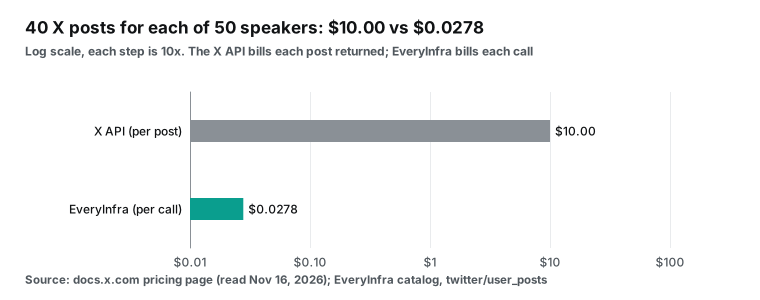
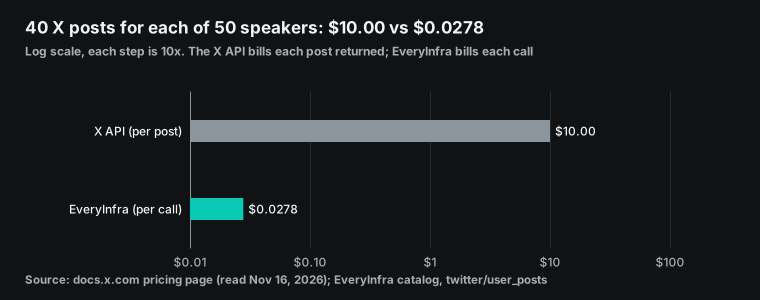
The X API bills per resource. Reading posts costs $0.005 per post, with a cap of 3 million post reads per month (X API pricing; X API rate limits). Forty posts per speaker cost $0.20 at that price. With twitter/user_posts, they cost $0.000556, which is 360 times less. For 50 speakers, that is $10.00 against $0.0278. The X API also needs a developer account and a project first (X API introduction).
The X pricing page also has a deduplication rule. If you read the same post again in the same UTC day, X charges once. The window resets at midnight UTC (X API pricing).
A weekly refresh in the month before the show falls on a different UTC day each time, so this rule does not help. For 50 speakers, 40 posts each, over 4 weeks, the X list price is 4 × $10.00 = $40.00. With twitter/user_posts, it is 4 × $0.0278 = $0.1112. The pay-per-use plan caps reads at 3 million posts per billing month. Our 4-week run is 50 × 40 × 4 = 8,000 posts, far below the cap, so for an event team only the unit price matters.
The YouTube Data API uses quota units. Google's quota docs say the default quota allows 100 search.list calls per day, and the quota resets at midnight Pacific Time. More needs a quota audit (quota cost table; search.list reference; quota and compliance audits). Fifty speakers fit in one day, but exhibitors on top do not. The YouTube API also comes with developer policy terms on data storage and display (YouTube API developer policies).
The LinkedIn Posts API cannot read other people's posts in practice. r_organization_social only reads company pages where you are an admin. r_member_social is a restricted permission for approved developers only (Posts API; increasing access). Likes and comment counts sit in the Social Metadata API, which also needs approval (Social Metadata API). An event team needs posts by outside speakers and outside companies, so this route does not help.
Setup time matters too. X needs a developer account, a project and a token. YouTube needs a Google Cloud project, an enabled API and a key, plus an audit if quota runs short. LinkedIn needs approval for restricted permissions, with no fixed answer or timeline.
After all three, you still need your own MCP server to expose them to Claude. For an event team, that is a small project. With EveryInfra, you need one key and one remote MCP URL, and all three platforms are in one catalog.
| Each platform's own API | EveryInfra | |
|---|---|---|
| X: 50 speakers × 40 posts | $10.00; 3 million reads per month cap; developer account needed | $0.0278, priced per call |
| YouTube: 50 searches | 100 searches per day on default quota; audit for more | $0.0389 |
| LinkedIn: other people's posts | Only company pages you admin; member posts restricted | $0.004 per person call, $0.002319 per company call |
| Empty results | Counted as usual | Not billed (empty_result_refunded) |
| Use in Claude | Build your own MCP server or middle layer | Add the remote MCP URL |
Limits and things to watch
Shared names are common on LinkedIn. When Claude searches by name and company, it may find a coworker at the same company or a former employee with the same name. Ask Claude to list the profile links it found for review before it calls linkedin/person_posts. A "LinkedIn profile" field on the speaker form removes this step. We checked both speaker slugs on their public profiles before the test.
With two connectors in one chat, Claude decides which to call first. Fix the order in the prompt: RainFocus for the roster, then EveryInfra for recent activity. This cuts the back and forth where Claude searches speakers first and then checks the roster.
Speaker data is personal data. Speakers own the copyright in their LinkedIn and X posts. The LinkedIn User Agreement says members own their content (LinkedIn User Agreement). In the brief, summarize and link to the post. Do not paste whole posts.
If any speakers live in the EU, GDPR rules on purpose limitation and data minimization apply (GDPR text). Collect data only for this event, keep only the fields you need, and delete working files after the show. This article only covers keynote speakers named on the public event site. Regular attendees are out of scope, and they should stay that way.
Conversation length is another limit. One linkedin/person_posts call returns 20 posts, which was 36,130 bytes for Garman and 35,116 bytes for Swami. If all raw responses for 50 people stay in one chat, Claude loses track of the early ones. A safer method is to have Claude write each person's row right after their calls. Keep only that row in the chat, and do not refer back to the raw posts. Or start a new chat every 10 people and merge at the end.
We ran the filter from step 4 of the prompt on our own responses to measure the savings. We kept only posts from the last 30 days where author_name matches the person or company. For each post we kept 4 fields: url, text, posted_at and like_count. Garman's 36,130 bytes dropped to 7,117 bytes (19.7%), because only 7 of his 20 posts are his own and in the window. Swami's 35,116 bytes dropped to 18,109 bytes (51.6%).
DoorDash went from 33,679 to 16,587 bytes (49.3%), and Presidio from 30,510 to 15,730 bytes (51.6%). For all four targets, 135,435 bytes became 57,543 bytes, about 42.5%.
With the average of the two speakers, raw LinkedIn data for 50 speakers is about 1.78 MB, and about 0.63 MB after the filter. The share you keep depends on how much the person posts. For someone like Garman, with many shared posts and few own posts, the filter removes about 80%. For someone like Swami, who posts almost every day, it removes about half. So filter each person and write that row before you call the next person.
| Target | Raw response (bytes) | Own posts in window | After filter (bytes) | Share kept |
|---|---|---|---|---|
| Matt Garman | 36,130 | 7 | 7,117 | 19.7% |
| Swami Sivasubramanian | 35,116 | 15 | 18,109 | 51.6% |
| DoorDash | 33,679 | 16 | 16,587 | 49.3% |
| Presidio | 30,510 | 19 | 15,730 | 51.6% |
| Total | 135,435 | 57 | 57,543 | 42.5% |
Plan for rate limits. The key we used allows 10 calls per minute, and we hit one 429. Account limits vary, so check your console. At 10 calls per minute, the 240 calls of the full plan for 50 speakers and 30 exhibitors take 24 minutes. EveryInfra also has an async mode. Add "mode": "async" to the request body to get a job ID at once, then fetch the result with everyinfra_get_job. This lets Claude send a batch and come back for the results.
What three Claude connector videos add
We read the transcripts of three popular YouTube videos about Claude connectors. All three are general tutorials. None mentions RainFocus or event data, so there is no RainFocus video to cite here.
Together, the three videos add some general tips (beginner tutorial; six connectors; connector walkthrough). The directory is under "Customize > Connectors > +". You can set each tool to blocked, needs approval or always allow. On a company account, IT may need to approve a connector first. The videos also say connectors usually cannot take file uploads, because file content uses a lot of tokens. This matters for event teams. Do not attach a RainFocus speaker export to the chat. Let Claude read it from the RainFocus connector.
FAQ
How do I install the rainfocus claude connector?
The RainFocus release describes this path. Find RainFocus in the Claude connector directory at claude.ai/directory/rainfocus, then connect and authorize with your RainFocus account over OAuth. Your RainFocus environment needs Integration Suite access, and an admin must have set up an MCP Profile with the tools you need. On Team and Enterprise, an Owner adds directory connectors to the organization first, and members then connect. After install, ask Claude to list the tools in the RainFocus connector. Check that every tool in the profile shows up before you query the roster. Source: search suggestion "rainfocus claude connector installation instructions". Answer based on the RainFocus release and the connector help page.
What if the rainfocus claude connector is not working?
Check three things. In RainFocus, confirm that the MCP Profile is active and the tools you need are on. In Claude, confirm that you connected the connector yourself, because on Team and Enterprise each member connects after the Owner adds it. OAuth tokens are short-lived, so authorize again after they expire. If every tool call asks for approval, compare with the discussion in GitHub issue 491. Source: search suggestion "rainfocus claude connector not working". Answer based on the MCP Profiles release, the custom connector help page and issue 491.
How is a Claude connector related to MCP?
A connector is the Claude product name for a remote MCP server. The server publishes a set of tools, and Claude reads the tool descriptions to decide when to call them. The RainFocus and EveryInfra connectors are both remote MCP servers, so they work together in one conversation. A local MCP server runs on your own machine and is set up in Claude Desktop instead. To use RainFocus and EveryInfra together, add both as connectors with no local install. Source: search suggestion "claude connector vs mcp". Answer based on the MCP tools spec and the local MCP server guide.
Is there a Claude connector for LinkedIn?
LinkedIn's own API cannot read posts by other people. To read speaker activity on LinkedIn inside Claude, you need a third-party remote MCP. This article uses linkedin/person_posts at $0.004 per call and linkedin/company_posts at $0.002319 per call from EveryInfra. For the same idea in Copilot Studio, see this article. Source: search suggestion "claude connector for linkedin". Answer based on the Posts API permission notes and our live call at 00:16:52 Singapore time.
Which event platforms offer an event data mcp server?
As of 2026-11-16, the RainFocus connector is in the Claude directory. Cvent's October announcement calls its Claude connector a beta with a sign-up form. For other platforms, start with the Socialloop list that ranks platforms by agent support, and check each one for a public MCP server. Source: search suggestion "event data mcp database". Answer based on the RainFocus release, the Cvent beta announcement and the Socialloop list.
Will Claude replace event management platforms?
Based on the last two months of launches, event platforms are opening their data to Claude. Claude queries and writes. Registration, payments, check-in and booth assignment still run in the platform. This is our reading of the launches. Source: Reddit thread "Is Claude going to disrupt event management platforms?" (r/EventProduction).
Get started
- Sign up for EveryInfra and get an API key. Follow the quickstart and call
linkedin/person_postsonce over REST to test the key. See pricing. - Read the MCP server page and the remote MCP setup guide. Choose
/mcpwith a key or/mcp/allwith OAuth. - Add EveryInfra as a custom connector in Claude. Set
everyinfra_call_apito needs approval. - Ask your RainFocus admin for a read-only MCP Profile. Then install the RainFocus connector from the Claude directory.
- Run a trial with 5 speakers. Compare LinkedIn and X overlap, and set rules for the rest. Then fix the brief template and refresh it weekly.
For parameters and fields, see the LinkedIn data API, X data API, YouTube data API and web search API pages. Company post parameters are on the LinkedIn company posts API page. For rival follow-ups after a call in Claude Meetings, see this article. For the same data in Bedrock AgentCore Gateway, see this article.
References
- RainFocus Launches Anthropic Connector for AI Agent Access to Event Data, RainFocus, 2026-11-10, https://www1.rainfocus.com/company/news-press/rainfocus-launches-anthropic-connector-for-ai-agent-access-to-event-data/
- RainFocus Launches Anthropic Connector for AI Agent Access to Event Data, PR Newswire, 2026-11-10, https://www.prnewswire.com/news-releases/rainfocus-launches-anthropic-connector-for-ai-agent-access-to-event-data-302933978.html
- RainFocus Launches AI Agent Connectivity for Event Data with MCP Profiles, RainFocus, 2026-07-07, https://www.rainfocus.com/company/news-press/rainfocus-launches-ai-agent-connectivity-for-event-data-with-mcp-profiles/
- RainFocus Nexus, RainFocus, read 2026-11-16, https://www.rainfocus.com/nexus/
- RainFocus (Claude connector directory), Anthropic, read 2026-11-16, https://claude.ai/directory/rainfocus
- RainFocus Launches Anthropic Connector, Exhibitor, 2026-11-10, https://www.exhibitoronline.com/news/article.asp?ID=25503
- RainFocus Launches Anthropic Connector, destinationCRM, 2026-11-10, https://www.destinationcrm.com/Articles/CRM-News/CRM-Across-the-Wire/RainFocus-Launches-Anthropic-Connector-177451.aspx
- Join upcoming beta programs, Cvent, 2026-10-19, https://release.cvent.com/eventmanagement/announcements/join-upcoming-beta-programs-1
- Best agent-operable event platforms, Socialloop, 2026-10-16, https://socialloop.ai/best/agent-operable-event-platforms
- Is Claude going to disrupt event management platforms?, Reddit r/EventProduction, read 2026-11-16, https://www.reddit.com/r/EventProduction/comments/1tkdzah/is_claude_going_to_disrupt_event_management/
- Get started with custom connectors using remote MCP, Anthropic Help Center, read 2026-11-16, https://support.claude.com/en/articles/11175166-get-started-with-custom-connectors-using-remote-mcp
- Use connectors to extend Claude's capabilities, Anthropic Help Center, read 2026-11-16, https://support.claude.com/en/articles/11176164-use-connectors-to-extend-claude-s-capabilities
- How Claude suggests connected apps, Anthropic Help Center, read 2026-11-16, https://support.claude.com/en/articles/14730684-how-claude-suggests-connected-apps
- How do usage and length limits work?, Anthropic Help Center, read 2026-11-16, https://support.claude.com/en/articles/11647753-how-do-usage-and-length-limits-work
- Getting started with local MCP servers on Claude Desktop, Anthropic Help Center, read 2026-11-16, https://support.claude.com/en/articles/10949351-getting-started-with-local-mcp-servers-on-claude-desktop
- What is the Team plan?, Anthropic Help Center, read 2026-11-16, https://support.claude.com/en/articles/9266767-what-is-the-team-plan
- Manage custom roles on Enterprise plans, Anthropic Help Center, read 2026-11-16, https://support.claude.com/en/articles/13930452-manage-custom-roles-on-enterprise-plans
- Add an unlisted connector, Anthropic, read 2026-11-16, https://claude.com/docs/connectors/custom/add-unlisted
- Authentication (building connectors), Anthropic, read 2026-11-16, https://claude.com/docs/connectors/building/authentication
- MCP connector, Anthropic developer docs, read 2026-11-16, https://platform.claude.com/docs/en/agents-and-tools/mcp-connector
- IP addresses, Anthropic developer docs, read 2026-11-16, https://platform.claude.com/docs/en/api/ip-addresses
- Connect Claude Code to tools via MCP, Anthropic, read 2026-11-16, https://code.claude.com/docs/en/mcp
- Claude pricing, Anthropic, read 2026-11-16, https://www.anthropic.com/pricing
- Custom connector asks for approval on every tool call (issue 491), GitHub anthropics/claude-ai-mcp, read 2026-11-16, https://github.com/anthropics/claude-ai-mcp/issues/491
- Tools (MCP specification 2025-11-25), Model Context Protocol, read 2026-11-16, https://modelcontextprotocol.io/specification/2025-11-25/server/tools
- Authorization (MCP specification 2025-11-25), Model Context Protocol, read 2026-11-16, https://modelcontextprotocol.io/specification/2025-11-25/basic/authorization
- Transports (MCP specification 2025-11-25), Model Context Protocol, read 2026-11-16, https://modelcontextprotocol.io/specification/2025-11-25/basic/transports
- RFC 9728: OAuth 2.0 Protected Resource Metadata, IETF, 2025-04, https://datatracker.ietf.org/doc/html/rfc9728
- The OAuth 2.1 Authorization Framework (draft-ietf-oauth-v2-1-13), IETF, read 2026-11-16, https://datatracker.ietf.org/doc/html/draft-ietf-oauth-v2-1-13
- EveryInfra capability catalog (GET /api/v1/social/catalog), EveryInfra, read 2026-11-16 00:15 SGT, https://api.everyinfra.com/api/v1/social/catalog
- OAuth protected resource metadata for /mcp/all, EveryInfra, read 2026-11-16 00:24 SGT, https://api.everyinfra.com/.well-known/oauth-protected-resource/mcp/all
- EveryInfra remote MCP endpoint, EveryInfra, read 2026-11-16, https://api.everyinfra.com/mcp
- AWS re:Invent 2026 Keynotes, Amazon Web Services, read 2026-11-16, https://aws.amazon.com/events/reinvent/sessions/keynotes/
- Know before you go: an AWS Partner's guide to re:Invent 2026, AWS Partner Network Blog, 2026-10-27, https://aws.amazon.com/blogs/apn/know-before-you-go-an-aws-partners-guide-to-reinvent-2026/
- Matt Garman (Officers and Directors), Amazon Investor Relations, read 2026-11-16, https://ir.aboutamazon.com/officers-and-directors/person-details/default.aspx?ItemId=80f6622c-efcb-4cce-94a7-591fb3d9a335
- Swami Sivasubramanian (author page), About Amazon, read 2026-11-16, https://www.aboutamazon.com/author/swami-sivasubramanian
- Microsoft Ignite 2026: know before you go, Microsoft Partner Blog, 2026-11-03, https://partner.microsoft.com/en-lb/blog/article/ignite-2026-know-before-you-go
- DoorDash to Acquire Instacart to Help Local Stores Win, DoorDash Investor Relations, 2026-10-29, https://ir.doordash.com/news/news-details/2026/DoorDash-to-Acquire-Instacart-to-Help-Local-Stores-Win/default.aspx
- News, DoorDash, read 2026-11-16, https://about.doordash.com/en-us/news
- Pricing (X API), X, read 2026-11-16, https://docs.x.com/x-api/getting-started/pricing
- Rate limits (X API), X, read 2026-11-16, https://docs.x.com/x-api/fundamentals/rate-limits
- Introduction (X API), X, read 2026-11-16, https://docs.x.com/x-api/introduction
- Quota Calculator (YouTube Data API), Google for Developers, read 2026-11-16, https://developers.google.com/youtube/data/determine_quota_cost
- Search: list (YouTube Data API), Google for Developers, read 2026-11-16, https://developers.google.com/youtube/data/reference/rest/v3/search/list
- Quota and Compliance Audits, Google for Developers, read 2026-11-16, https://developers.google.com/youtube/data/guides/quota_and_compliance_audits
- YouTube API Services Developer Policies, Google for Developers, read 2026-11-16, https://developers.google.com/youtube/terms/developer-policies
- Posts API, Microsoft Learn (LinkedIn Marketing), read 2026-11-16, https://learn.microsoft.com/en-us/linkedin/marketing/community-management/shares/posts-api?view=li-lms-2026-10
- Increasing Access, Microsoft Learn (LinkedIn Marketing), read 2026-11-16, https://learn.microsoft.com/en-us/linkedin/marketing/increasing-access?view=li-lms-2026-10
- Social Metadata API, Microsoft Learn (LinkedIn Marketing), read 2026-11-16, https://learn.microsoft.com/en-us/linkedin/marketing/community-management/shares/social-metadata-api?view=li-lms-2026-10
- User Agreement, LinkedIn, read 2026-11-16, https://www.linkedin.com/legal/user-agreement
- Regulation (EU) 2016/679 (GDPR), EUR-Lex, 2016-04-27, https://eur-lex.europa.eu/eli/reg/2016/679/oj
- Claude Connectors Tutorial for Beginners, Kevin Stratvert (YouTube), 2026-06-18, https://www.youtube.com/watch?v=FpRNId-jeTQ
- The 6 BEST Claude Connectors, Kevin Stratvert (YouTube), 2026-08-07, https://www.youtube.com/watch?v=hstCk_Upo-A
- Is This the Best Claude Feature? (Claude Connectors), The AI Productivity Coach (YouTube), 2026-06-07, https://www.youtube.com/watch?v=cSWx_ovkbPA
Reference BL-165