Bedrock AgentCore Gateway and MCP: What to Check Before You Connect
Before you put the EveryInfra MCP behind AgentCore Gateway: live response formats, key setup, billing traps and the monthly bill. AWS steps are examples.

This guide shows what to check before you put the EveryInfra remote MCP behind Amazon Bedrock AgentCore Gateway. We did not deploy Gateway, so every AWS command and setting below is a configuration example from docs.aws.amazon.com. Every EveryInfra number comes from live calls on November 10, 2026, from 00:17 to 00:43 Singapore time.
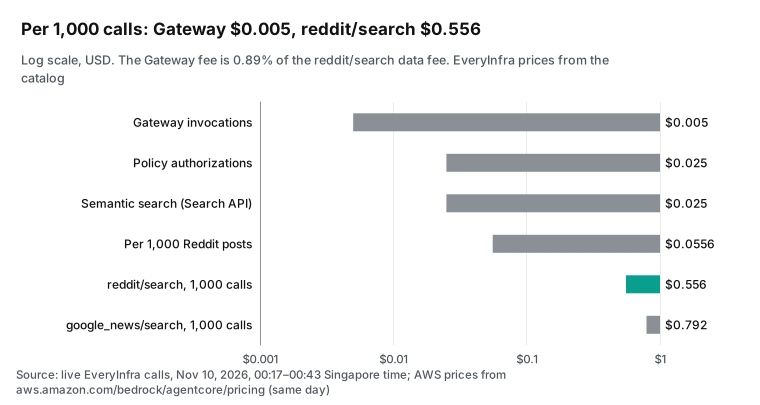
The Gateway fee is small. On the AWS pricing page that we read that day, Gateway charges $0.005 per 1,000 invocations. The same 1,000 calls to EveryInfra reddit/search cost $0.556, so the Gateway fee is 0.89% of the data fee. The hard parts are elsewhere.
Three results from the live calls changed our design. First, tools/list needs no key, so a target that syncs and shows READY does not prove that your API key works. Second, rate limits, bad parameters and missing keys all come back over MCP as HTTP 200 with isError. Third, one page of the newest Reddit posts covered only 72 minutes.
So the agent must check every hour.
This guide is for a platform team that already runs agents on AWS. The marketing group now wants an agent that reads what people say about the brand on Reddit, X, YouTube, Threads and in the news. The tools come from the EveryInfra remote MCP at https://api.everyinfra.com/mcp.
Security has three rules. Staff must sign in with the company identity. The EveryInfra key must never appear in agent code or prompts. Each team needs a daily spending cap.
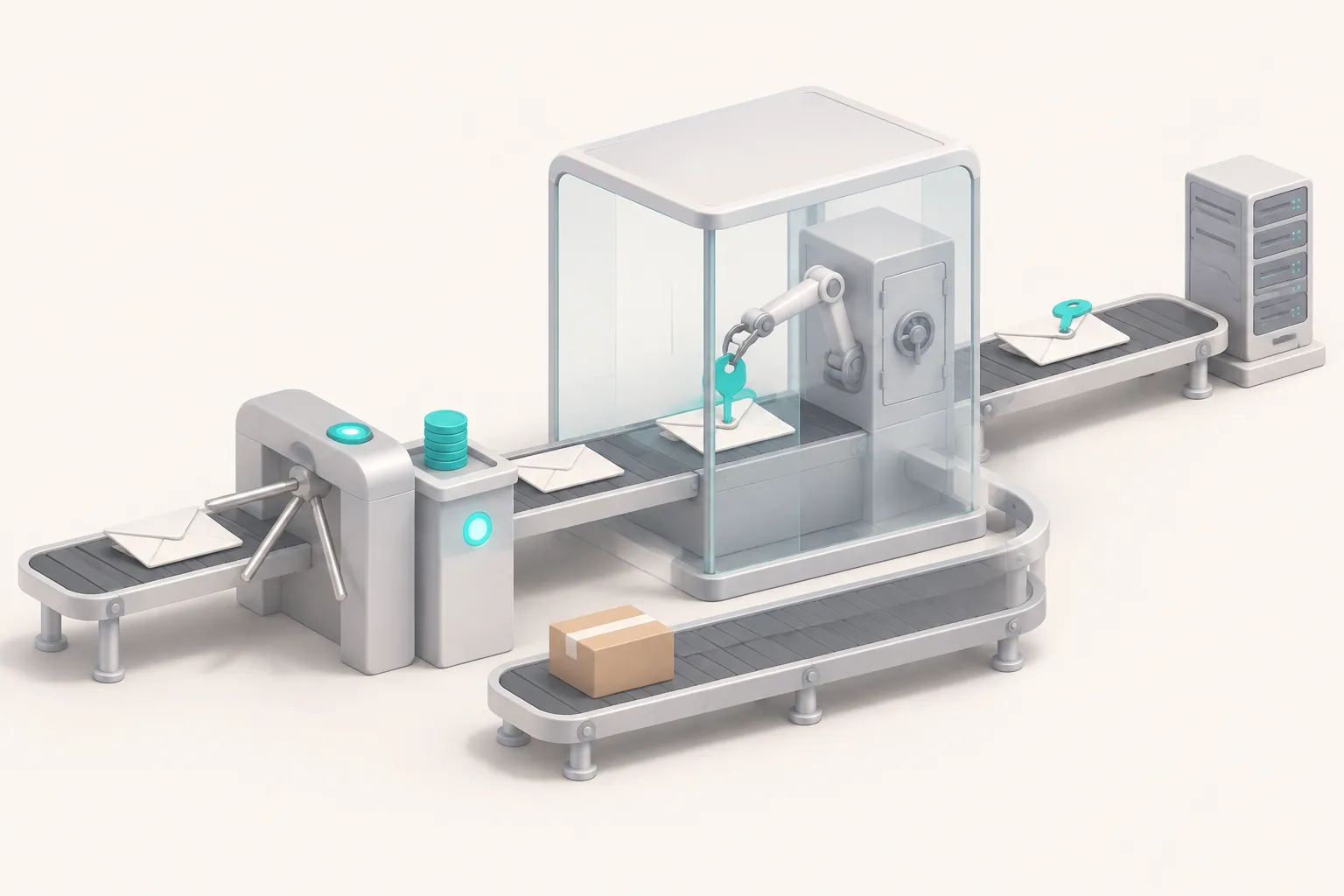
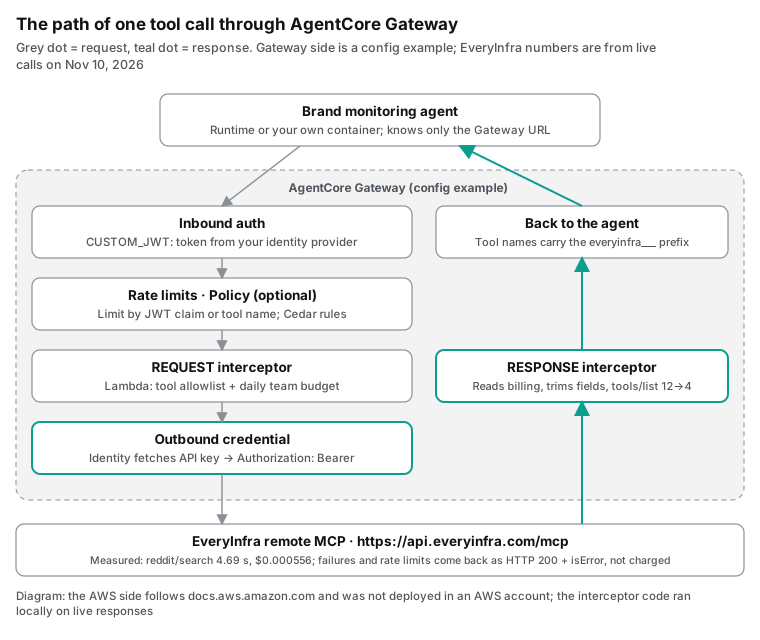
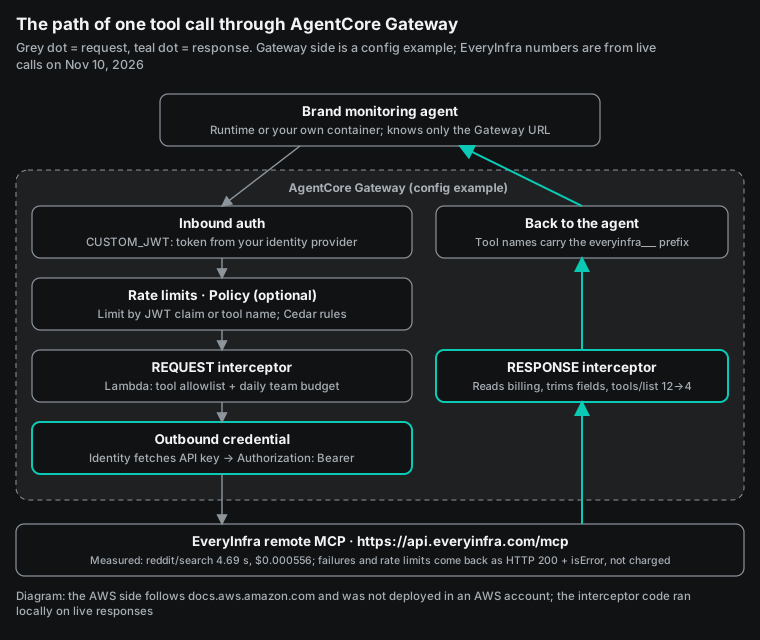
AgentCore Gateway handles all three rules in one place. It checks the inbound token, it attaches the outbound key, and it can run your own Lambda code before and after each call. Some statements describe what Gateway does with a request, such as how it removes the tool prefix or adds the key header. Those statements come from the AWS docs. Statements about what EveryInfra returns or charges come from our tests. We ran the interceptor code on a laptop, with the payload shape from the AWS docs and the real responses as input.
What AgentCore Gateway is in November 2026
AWS released AgentCore as a preview on July 16, 2025. The launch note described Gateway as a way to turn existing APIs and Lambda functions into MCP tools (AWS What's New, 2025-07-16). At general availability on October 13, 2025, AWS added the line that matters for this guide. Gateway could now connect to existing MCP servers (AWS What's New, 2025-10-13). From that day, a remote MCP that a third party hosts can sit behind Gateway with no wrapper code.
The docs now call Gateway a managed AI gateway. It gives agent traffic one secure entry point to tools, other agents and models (Gateway overview). Targets come in three kinds. MCP targets are aggregated, so Gateway merges them into one virtual MCP server. HTTP targets pass traffic through with no merge and no protocol change. Inference targets route model calls by model name (supported targets).
An MCP target has seven possible sources. They are Lambda, an API Gateway REST stage, OpenAPI, Smithy, an MCP server, a partner template and a built-in connector (MCP targets). This guide uses only the MCP server source. The table lists the changes that shape a brand monitoring setup.
| Date | Change | What it means for a monitoring agent | Source |
|---|---|---|---|
| 2025-07-16 | AgentCore preview | Gateway only wrapped APIs and Lambda | What's New, see above |
| 2025-10-13 | General availability; MCP server targets | A remote MCP such as EveryInfra can be a target | What's New, see above |
| 2025-11-26 | Interceptors | Your Lambda runs before and after each call | Launch post |
| 2026-02-24 | Server-side tool execution in the Bedrock Responses API | Model and tool calls can share one request | What's New |
| 2026-06-29 | AWS WAF on Gateway | Block traffic by IP, rate or managed rule | What's New |
| 2026-08-06 | Custom rate limits; temporal Policy rules | Limit by JWT claim or tool name with no code | What's New |
| 2026-09-01 | Identity hosted consent portal | No custom callback page for three-legged OAuth | What's New |
| October 2026 | MCP Tasks on Gateway; AgentCore CLI 1.0; private CA for targets | Tasks need protocol 2026-07-28; EveryInfra uses a public certificate | Release notes |
| 2026-10-22 | InvokeModel support and model fallback | Model calls and tool calls can share one gateway and one log | What's New |
| 2026-11-05 | Web Answer connector is generally available (US East only) | Use it for report background; get the source posts from EveryInfra | Launch post, connector docs |
In one year, Gateway grew from an API-to-MCP converter into a gateway with identity, limits, filters and model routing. Teams now put third-party data tools behind it for central control, not for protocol conversion.
Should a remote MCP sit behind Gateway at all?
The community has asked this directly. A thread in r/aws asked how to use a remote MCP that a SaaS vendor hosts, without running a container. The top answer said the agent code can call the remote MCP directly, and that Gateway is more than that case needs. Another reply said Gateway helps when many agents reach several remote MCP servers, because identity and logs then live in one place (r/aws thread). Both answers are correct. The difference is how many agents, how many teams and who owns the key.
We use three tests. With one developer, one agent and one EveryInfra key, connect directly. Put the key in Secrets Manager, read it at startup and send it as a header. Gateway would only add configuration to maintain.
With several teams that each build agents, the answer changes. The same is true when security says a third-party key may live in one place only, with a log line for every call. Then Gateway keeps the key in AgentCore Identity, and agent code only knows the Gateway URL. Staff sign in with the company identity provider, and Gateway checks the JWT. Budgets and tool lists live in the interceptor.
The third test is the Bedrock Responses API. The February 24, 2026 note says you put the Gateway ARN in the request as a tool connector. Bedrock then finds the tools, runs the calls and adds the results to the conversation (server-side tool execution note). If you want that flow, the tools must be behind Gateway.
| Situation | Our advice | Why |
|---|---|---|
| One developer, one agent, one service | Connect the agent to EveryInfra MCP directly | One less layer; the key goes in Secrets Manager |
| Several teams and agents with shared identity and logs | Put EveryInfra behind Gateway | Inbound JWT, outbound key and call logs in one place |
| Budgets or tool lists per team | Gateway plus an interceptor or Policy | Budget logic sits outside the agents |
| Bedrock Responses API runs the tools | Put EveryInfra behind Gateway | The note shows a Gateway ARN in the request |
We have two related guides. The Gemini Enterprise brand sentiment guide covers Google Cloud, where custom MCP data stores accept only OAuth or no auth. The Copilot Studio account research guide covers a sales use case on Microsoft. AWS is different because the MCP server target itself accepts an API key.
Connecting the MCP server target: versions, sync and tool names
The AWS docs set three rules for an MCP server target. The server must offer tools; prompts and resources are optional and sync when the server lists them. The protocol version must be 2026-07-28, 2025-11-25, 2025-06-18 or 2025-03-26. The endpoint must be URL-encoded, and Gateway calls that exact address (MCP server targets).
There are two listing modes. In DEFAULT mode, Gateway calls tools/list, prompts/list, resources/list and resources/templates/list when you create or update the target. It stores the results in one catalog. When the server changes its tools later, you call SynchronizeGatewayTargets. In DYNAMIC mode, Gateway asks the server on each client request, but semantic search and three-legged OAuth do not work.
We sent the same sync requests to https://api.everyinfra.com/mcp at 00:17 and 00:18 Singapore time on November 10, 2026. All of them were free. Here is the version check, which you can repeat in a few seconds.
# Ask for each protocol version Gateway supports and print what the server answers.
for v in 2026-07-28 2025-11-25 2025-06-18 2025-03-26; do
  curl -s https://api.everyinfra.com/mcp \
    -H "Content-Type: application/json" -H "Accept: application/json, text/event-stream" \
    -d '{"jsonrpc":"2.0","id":1,"method":"initialize","params":{"protocolVersion":"'"$v"'",
         "capabilities":{},"clientInfo":{"name":"version-check","version":"1"}}}' \
  | python3 -c 'import sys,json; print(sys.argv[1], "->", json.load(sys.stdin)["result"]["protocolVersion"])' "$v"
done
# Our output on 2026-11-10 at 00:18 Singapore time:
# 2026-07-28 -> 2025-11-25
# 2025-11-25 -> 2025-11-25
# 2025-06-18 -> 2025-06-18
# 2025-03-26 -> 2025-03-26
The answer for 2026-07-28 is the useful one. The MCP spec says a server that supports the requested version must return it. Otherwise it returns another version it supports, usually its newest (MCP 2025-11-25 lifecycle). EveryInfra returned 2025-11-25, which is on the Gateway list, so the handshake works.
The 2026-07-28 spec lists Tasks as an extension that both sides must agree on at startup (MCP 2026-07-28 specification). Gateway supports MCP Tasks only on that version (MCP tasks in Gateway). So Tasks are not available with EveryInfra today. EveryInfra has its own async path instead. Add "mode":"async" to an everyinfra_call_api call to get a job_id at once. Then poll with everyinfra_get_job. Polling is free and does not count against the per-minute limit.
The other sync results were simple. initialize took 0.16 seconds. tools/list took 0.12 seconds and returned 12 tools in 16,250 bytes. prompts/list returned 7 prompts, and one of them is named brand_monitoring.
resources/list returned 6 resources, and resources/templates/list was empty. The Gateway quota for one invocation is 15 minutes (AgentCore quotas). Our slowest synchronous call took 29.5 seconds.
| Sync step | What EveryInfra returned | Result |
|---|---|---|
| Protocol version | Asked 2026-07-28, got 2025-11-25 | Accepted by Gateway; no MCP Tasks |
| Tools | 12 tools, 16,250 bytes, no key needed | Sync works even with a wrong key |
| Prompts and resources | 7 prompts, 6 resources | Gateway syncs them too |
| Resource templates | 0 | No effect |
| Longest prefixed tool name | 42 characters | Far below the 256 limit |
Gateway renames tools. The public name is target___tool, with three underscores (tool naming). If the target is everyinfra, the agent sees everyinfra___everyinfra_call_api. We applied the rule to all 12 tools. The longest name is everyinfra___everyinfra_list_captcha_types at 42 characters. Use the prefixed names in the system prompt, in Policy rules and in rate limit keys. Or strip the prefix at ___ before you compare, as our interceptor does.
A cached tool list also hides failures. In one public GitHub issue, an MCP target with OAuth client credentials showed READY and returned tools. But every tools/call failed with an internal error, and the server never saw the call (agentcore-samples issue 809). In r/aws, one user tried to connect the GitHub remote MCP through Gateway. The user did not get three-legged OAuth to work (r/aws: AgentCore and GitHub MCP).
With EveryInfra the risk is easier to miss. Our initialize, tools/list and prompts/list all work with no key. If you store the wrong key in AgentCore Identity, the target still syncs and still shows READY.
So run a smoke test after you create the target. Call everyinfra_get_account through Gateway. At 00:24 it returned the balance and rate limit in 0.24 seconds and charged nothing. At 00:18 we called everyinfra_call_api with no key and got HTTP 200, isError and unauthorized, again with no charge. We did not test everyinfra_get_account with a wrong key. If the smoke test does not show a balance, check the credential first.
Outbound auth: how Gateway sends the EveryInfra key
The AWS outbound auth page has a matrix of auth types per target type. For MCP servers, six are supported: no auth, the Gateway service role (SigV4), OAuth client credentials, OAuth authorization code, OAuth token exchange and API key. Caller IAM credentials and token passthrough are not supported (outbound authorization).
SigV4 helps only when an AWS service that checks IAM signatures sits in front of the MCP server. Examples are AgentCore Runtime, API Gateway and Lambda function URLs. EveryInfra does not check IAM signatures, and it has no OAuth server today. That leaves the API key.
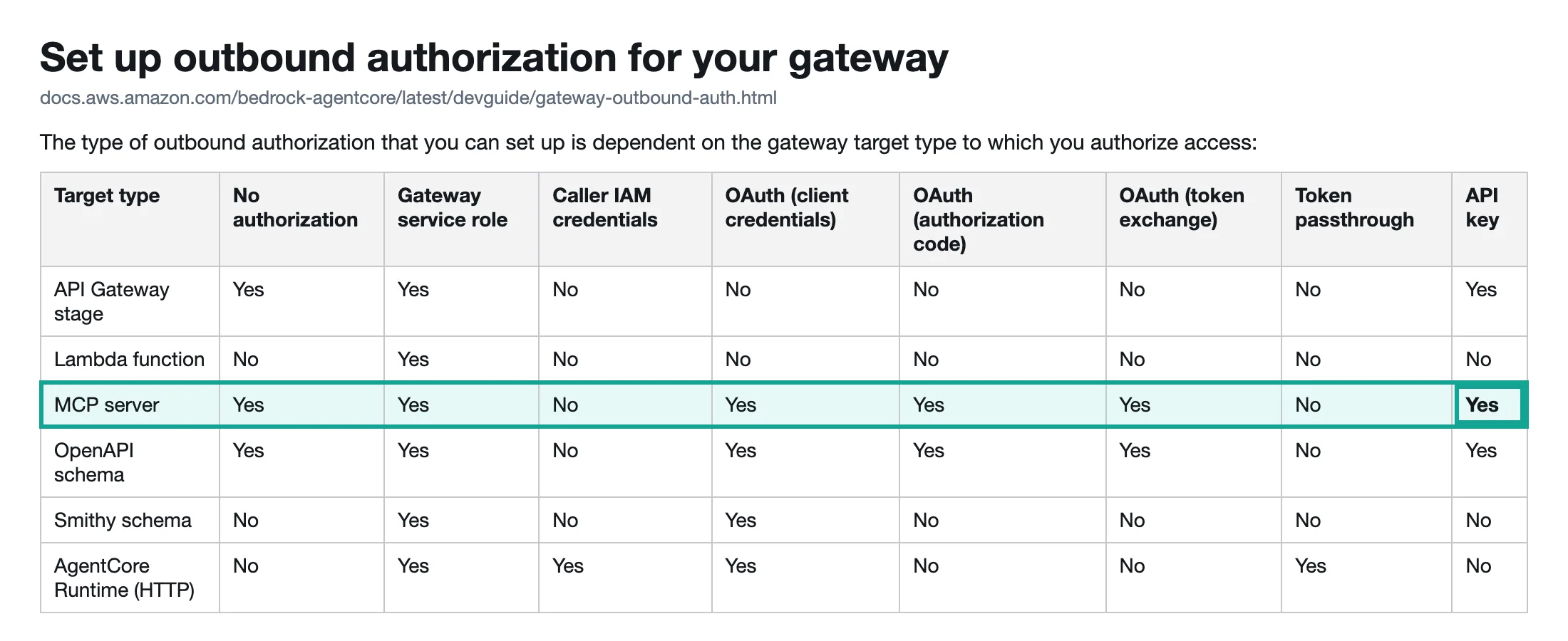
The setup has two steps. First, create an API key credential provider in AgentCore Identity. In the console, open Outbound Auth and choose Add API key. You can paste the key or point to a secret in Secrets Manager. The name can have up to 50 characters (add an API key). The API call is CreateApiKeyCredentialProvider (API reference).
Second, attach the provider to the target. Set credentialProviderType to API_KEY. Under apiKeyCredentialProvider, give four values: the provider ARN, the location (HEADER or QUERY_PARAMETER), the parameter name and the prefix (target authorization).
The right values depend on what EveryInfra accepts, so we tested them at 00:18. With Authorization: Bearer <key>, tools/call ran and charged. With an X-API-Key header, EveryInfra returned unauthorized. The message was "no API key provided (header Authorization: Bearer or ?key= query param)" and it said nothing was charged. With no key at all, the result was the same. So use HEADER, Authorization and Bearer.
The error text also mentions a ?key= query parameter. We do not recommend it. Query strings end up in access logs. Gateway can also write invocation logs to CloudWatch, S3 or Firehose (PrivateLink and invocation logging note, September 2025). A key in the URL is one more copy of the key.
# Configuration example with boto3. Not run on AWS. Region, ARNs and names are placeholders.
import boto3, os
ctl = boto3.client("bedrock-agentcore-control", region_name="ap-southeast-1")

# 1) Store the EveryInfra key in AgentCore Identity (read from the environment, never hard-coded).
provider = ctl.create_api_key_credential_provider(
    name="everyinfra-brandmon", apiKey=os.environ["EVERYINFRA_API_KEY"])

# 2) Gateway with JWT inbound auth and one Lambda interceptor for REQUEST and RESPONSE.
gw = ctl.create_gateway(
    name="brandmon-gw", roleArn="arn:aws:iam::123456789012:role/brandmon-gateway-role",
    protocolType="MCP", authorizerType="CUSTOM_JWT",
    authorizerConfiguration={"customJWTAuthorizer": {
        "discoveryUrl": "https://login.example.com/.well-known/openid-configuration",
        "allowedAudience": ["brandmon-gateway"]}},
    interceptorConfigurations=[{
        "interceptor": {"lambda": {"arn": "arn:aws:lambda:ap-southeast-1:123456789012:function:brandmon-interceptor"}},
        "interceptionPoints": ["REQUEST", "RESPONSE"],
        "inputConfiguration": {"passRequestHeaders": True}}])

# 3) The EveryInfra MCP server as a target, with the key sent as "Authorization: Bearer <key>".
ctl.create_gateway_target(
    gatewayIdentifier=gw["gatewayId"], name="everyinfra",
    targetConfiguration={"mcp": {"mcpServer": {"endpoint": "https://api.everyinfra.com/mcp"}}},
    credentialProviderConfigurations=[{"credentialProviderType": "API_KEY",
        "credentialProvider": {"apiKeyCredentialProvider": {
            "providerArn": provider["credentialProviderArn"], "credentialLocation": "HEADER",
            "credentialParameterName": "Authorization", "credentialPrefix": "Bearer"}}}])
Check two things against your own setup. First, your tooling version. A public issue on the AgentCore starter toolkit says that, in agentcore.json, MCP server targets only honored NONE and OAUTH outbound auth. API_KEY worked only for API Gateway targets, although CloudFormation supported it (starter toolkit issue 499, 2026-04-10). The October 2026 release notes announce AgentCore CLI 1.0, but they do not say whether this issue is fixed. Until you confirm it, call the control plane API or CloudFormation directly, as above.
Second, a custom Gateway service role needs three permissions: GetWorkloadAccessToken, GetResourceApiKey and secretsmanager:GetSecretValue on the secret. The outbound auth page has a full policy example (outbound authorization, API key section).
On cost, AgentCore Identity alone charges $0.010 per 1,000 token or API key requests. The pricing page also says Identity is free when you use it through AgentCore Gateway or Runtime (AgentCore pricing). So handing the EveryInfra key to Gateway adds no line to the bill.
Inbound auth: staff sign in with the company identity
Inbound auth decides who can use the monitoring agent. The docs list JWT, IAM and two offload types: authenticate only, and no auth (inbound authorization). Most companies sign staff in through Okta, Microsoft Entra ID or Cognito, so JWT is the usual choice. Create the gateway with CUSTOM_JWT, give the OIDC discovery URL, and limit tokens with allowedAudience, allowedClients or scopes.
When a token fails, Gateway returns an RFC 6750 error with a WWW-Authenticate header that names the required scopes. An MCP client can use it to start a new sign-in. The docs also say some JWT claims, including the subject, go into CloudTrail. Do not put an email address or other personal data in the subject.
Our budget logic uses a custom claim named team. In this example, the growth team in the US has growth-us and the support team in the UK has support-uk. After Gateway checks the signature, the interceptor reads the claim from the token in the request headers. Interceptors do not get headers by default, so set passRequestHeaders to true (configure interceptors). The same page warns that headers carry tokens, so do not log them.
The docs are blunt about no auth. Do not use it for testing. Do not connect it to targets that return sensitive data. Use it only for a public gateway with your own rate limits. For EveryInfra, Gateway adds your paid key to every outbound call. An open inbound side lets anyone with the URL spend your balance. Our remote MCP setup guide makes the same point: treat the key like a wallet.
| Inbound type | Good for | Use in the monitoring agent |
|---|---|---|
| CUSTOM_JWT | Staff who sign in through the company identity provider | Recommended; the team claim drives the budget |
| IAM | Machine-to-machine calls inside AWS | A scheduled job calls Gateway with an IAM role |
| Authenticate only (SigV4) | Authorization done by Policy or an interceptor | Possible; budgets then key on the IAM principal |
| No auth | Public services with their own rate limits | Do not use; Gateway adds a paid key on the way out |
A Lambda interceptor that keeps a daily budget per team
Interceptors arrived on November 26, 2025. The AWS launch post lists fine-grained access control, tool filtering by identity, and request and response changes as the main uses (interceptor launch post). At re:Invent in December 2025, the Gateway team said that customers had asked for one place to run shared logic between agents and tools. The remark is at 25:37 in the re:Invent 2025 AIM3313 talk.
The rules are short. A gateway has at most one REQUEST and one RESPONSE interceptor, and both are Lambda functions. REQUEST runs before Gateway calls the target. RESPONSE runs after the target answers and before Gateway replies. Gateway can retry an interceptor after a timeout or failure, so the function must be idempotent (interceptors overview).
The payload is the raw JSON-RPC message. In the REQUEST phase you get gatewayRequest.body with the method, such as tools/call, and the params. The RESPONSE phase adds gatewayResponse with a status code and body. If a REQUEST interceptor returns transformedGatewayResponse, Gateway sends it to the caller and skips the target. The RESPONSE interceptor still runs once after that (interceptor types and payloads).
AWS has an open-source sample that uses two Lambda interceptors on inference targets. It tracks cost per user and enforces daily and monthly caps. When a user goes over, it returns 403 with BUDGET_EXCEEDED (aws-samples usage interceptor). That sample meters model tokens. We use the same idea for MCP tool calls and meter data spend instead.
A budget interceptor must answer three questions. How much will this call cost? How much did it really cost? What happens when it fails?
For the first, the free EveryInfra catalog at GET /api/v1/social/catalog lists a price_usd for each capability. Cache it once a day and reserve that price before the call. For unknown capabilities, reserve a higher price.
For the second question, we looked at real MCP responses from 00:18 and 00:25. A successful tools/call has content but no structuredContent. The charge sits in billing.charged_usd inside the JSON string in content[0].text. A failed call has structuredContent.error with an error code. For the third question, EveryInfra does not charge for failures or empty results, so charged_usd is 0. If you record the real value, failures never count as spend.
The trap is the status code. At 00:18 and 00:19 we sent REST calls too fast and hit the test key limit of 10 calls a minute. REST answered with HTTP 429. At 00:24 we hit the same limit over MCP, and the answer was HTTP 200 with isError: true, the code rate_limited and retry_after: 14. At 00:24 we also sent sort: "hot" on purpose. MCP returned HTTP 200 with invalid_value and did_you_mean: ["popular", "top"].
The MCP spec puts tool errors inside the result so the model can read them and fix its next call. That is the right design. But it means a failed call also shows status 200 in the RESPONSE interceptor and in the Gateway invocation logs. Any success rate or budget logic that reads the status code will be wrong.
Here is the part of the RESPONSE logic that reads the charge. The full handler also checks the tool list and the budget in the REQUEST phase.
# RESPONSE phase only. Payload shape from the AWS docs (interceptorInputVersion 1.0).
# We ran it locally on the raw EveryInfra responses from 2026-11-10; it has not run on Gateway.
import json

def charge_of(result: dict) -> tuple[float, str | None]:
    """Return (charged_usd, error_code) for one tools/call result."""
    err = (result.get("structuredContent") or {}).get("error")
    if result.get("isError") or err:
        return 0.0, (err or {}).get("code", "unknown")   # rate_limited, invalid_value, unauthorized: HTTP 200, no charge
    try:
        payload = json.loads(result["content"][0]["text"])  # success: no structuredContent
        return float(payload.get("billing", {}).get("charged_usd") or 0), None
    except (KeyError, IndexError, ValueError):
        return 0.0, "unparsed"

def on_response(event, ledger, team_day):
    body = event["mcp"]["gatewayResponse"]["body"]
    charged, code = charge_of(body.get("result") or {})
    ledger[team_day] = ledger.get(team_day, 0.0) + charged   # in production: DynamoDB ADD on a team#date key
    return charged, code
We wrapped the real responses in the payload shape from the AWS docs and fed them to the full handler. The target name in the test is everyinfra, the same as in the configuration example, so each tool name has the prefix everyinfra___. The daily budget was $0.002, and the cases ran in the order below. This is a local result, not a Gateway result. It shows the logic handles real EveryInfra responses. It does not show that Gateway sends the payload exactly as documented.
| Case (real response as input) | What the interceptor did | Spent today |
|---|---|---|
tools/list with 12 tools | Kept 4; tools went from 16,883 to 4,357 bytes | — |
Call to everyinfra_solve_captcha | Blocked in REQUEST: not enabled for this agent | $0 |
reddit/search, 10 posts | Recorded $0.000556 | $0.000556 |
twitter/search, 25 posts | Recorded $0.000556 | $0.001112 |
| Rate limited over MCP | HTTP 200; recorded $0 | $0.001112 |
| Bad sort value | HTTP 200, invalid_value; recorded $0 | $0.001112 |
reddit/comments, 7 comments | Recorded $0.000556 | $0.001668 |
Next call to youtube/comments | Reserve $0.000556 would pass $0.002; blocked | $0.001668 |
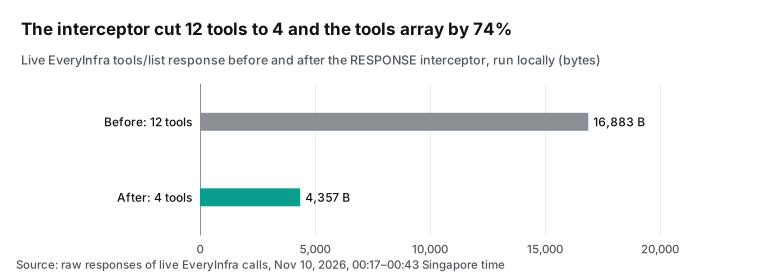
The tool filter is worth a closer look. EveryInfra MCP has 12 tools, and a monitoring agent needs 4: everyinfra_call_api, everyinfra_get_job, everyinfra_get_account and everyinfra_list_capabilities. The other tools take space in the model context and give the agent actions it should not have. After the filter, the tools array drops from 16,883 to 4,357 bytes, which is 74% less.
Tool descriptions go into the model context on every turn, so this saves about 3,000 tokens per turn. At 19:17 in the same re:Invent talk, AWS described agents with about 300 tools. These agents used hundreds of thousands of tokens only to load tool descriptions. The AWS fix was semantic search. With one MCP server and few tools, a filter in the interceptor is simpler, and it avoids the Search API fee of $0.025 per 1,000.
You could also write a static tool list into the target with mcpToolSchema. The API reference says every credential type supports it, but Gateway then stops syncing, so you must update it by hand (McpServerTargetConfiguration).
One more detail: everyinfra_call_api sets destructiveHint: true in its tool annotations, because it spends money. A rule that allows only read-only tools will block it. Write rules by tool name instead.
Interceptors, rate limits, Policy and WAF: which control does what
Interceptors are not the only control. On August 6, 2026, AWS shipped custom rate limits and temporal Policy rules together (announcement, rate limit post). A rate limit counts requests per dimension. Dimensions include the target name, the tool name in target___tool form, any JWT claim and the IAM principal. Request headers and body fields also work, but only together with an identity dimension (rate limit dimensions). A gateway can have up to 50 limits, and changes apply within 30 seconds at no extra charge.
| Control | What it decides | Keyed by | Price (pricing page, 2026-11-10) | Use in the monitoring agent |
|---|---|---|---|---|
| Interceptor (Lambda) | Anything you code: budgets, filters, rewrites | Anything in the payload | Lambda pricing | Dollar budget per team; tool filter |
| Rate limit | Requests per time window | Tool name, JWT claim, IAM principal | No extra charge | Keep each team under the EveryInfra per-minute limit |
| Policy (Cedar) | Allow or deny one tool call | Identity, tool, tool arguments | $0.000025 per request | Only the growth team may call twitter/search |
| WAF | Attacks and abuse at the network edge | IP, rate, managed rules | WAF pricing | Block scanners on a public gateway |
Rate limits are the easiest to misuse. The docs say, in bold, that rate limits fail open. If the limit service is down or a dimension cannot be resolved, the request goes through. Do not treat it as your only safety boundary (rate limits). Rate limits are good for keeping one team from using up the EveryInfra per-minute quota. A dollar cap needs your own count in an interceptor.
Policy uses Cedar rules that run before each tool call (Policy overview). It is good at who may call which tool with which arguments, but it does not know what a call costs. WAF sits further out. You attach one web ACL per gateway, and WAF checks every inbound request before it reaches any target (protect your gateway with WAF). Use all four together: WAF for scanners, rate limits for bursts, Policy for permissions, and the interceptor for money.
One live round trip: what the agent sends and what comes back
Gateway works in aggregation mode, so the call looks almost the same as a direct call. Only the tool name changes. Through Gateway, the agent calls everyinfra___everyinfra_call_api. Gateway strips the prefix, takes the key from AgentCore Identity, puts it in the Authorization header and forwards the call. The screenshot below shows our direct call at 00:18:20 Singapore time, with the original tool name so you can repeat it without a gateway.
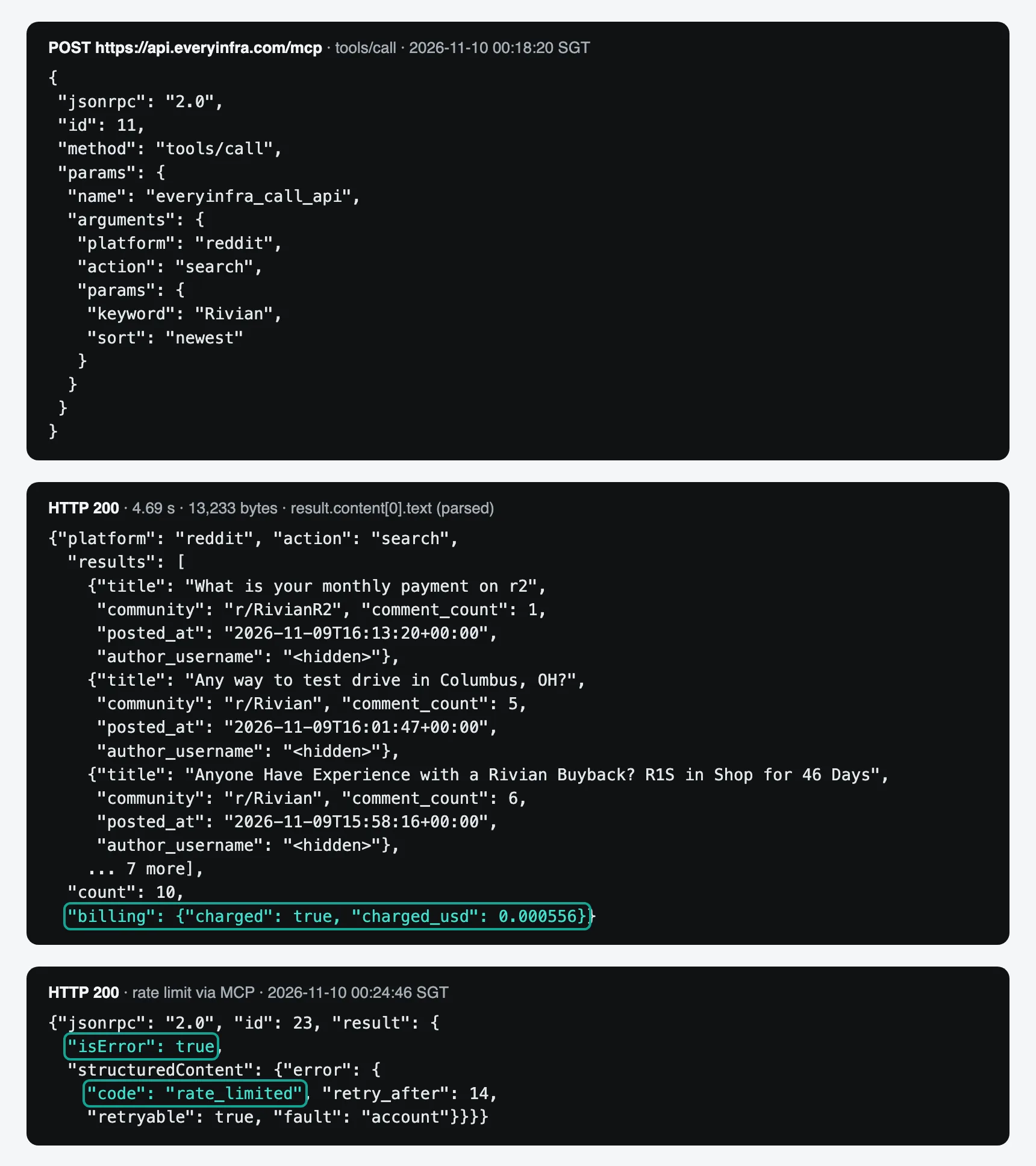
Each Reddit result has id, url, title, text, author_username, community, like_count, comment_count and posted_at. These match the response_fields of reddit/search in the catalog; see the Reddit search API page. A monitoring agent needs the title, the start of the text, the link, the time, the counts and the community. Author names do not help judge sentiment, and they are personal data that a brand report should not show.
The pricing page counts ListTools, InvokeTool and Ping as Gateway invocations, at $0.005 per 1,000 (AgentCore pricing). An agent run usually lists tools once and then calls several tools. If your MCP client runs initialize and tools/list before every call, invocations grow faster than tool calls. Our estimate counts one tool list per run plus the tool calls. We leave initialize out because the pricing page does not say whether it counts.
Gateway MCP sessions help here. With sessions on, Gateway stores the session ID of the MCP server target. It reuses that ID on later tool calls instead of starting over each time (Gateway features, MCP sessions). Turn them on.
| Time (SGT) | Via | Capability or method | Result | Time taken | Charged |
|---|---|---|---|---|---|
| 00:17:51 | MCP | initialize | 200, version 2025-11-25 | 0.16 s | $0 |
| 00:17:52 | MCP | tools/list | 12 tools, 16,250 bytes | 0.12 s | $0 |
| 00:18:20 | MCP | reddit/search newest | 10 posts | 4.69 s | $0.000556 |
| 00:20:28 | REST | twitter/search default sort | 25 posts, after four 429s | 29.52 s | $0.000556 |
| 00:21:17 | REST | youtube/search newest | 10 results | 7.18 s | $0.000556 |
| 00:24:29 | MCP | everyinfra_get_account | Balance and limits | 0.24 s | $0 |
| 00:25:03 | MCP | reddit/comments | 7 comments | 10.56 s | $0.000556 |
| 00:26:42 | MCP | twitter/search latest | 25 posts | 27.10 s | $0.000556 |
| 00:28:05 | MCP | youtube/comments newest | 20 comments | 14.64 s | $0.000556 |
| 00:42:08 | MCP | reddit/search newest, again | Same 10 posts | 4.39 s | $0.000556 |
| 00:42:25 | REST | reddit/search, narrower keyword | 5 posts | 4.83 s | $0.000556 |
| 00:42:56 | MCP | threads/search | 17 posts | 12.10 s | $0.000556 |
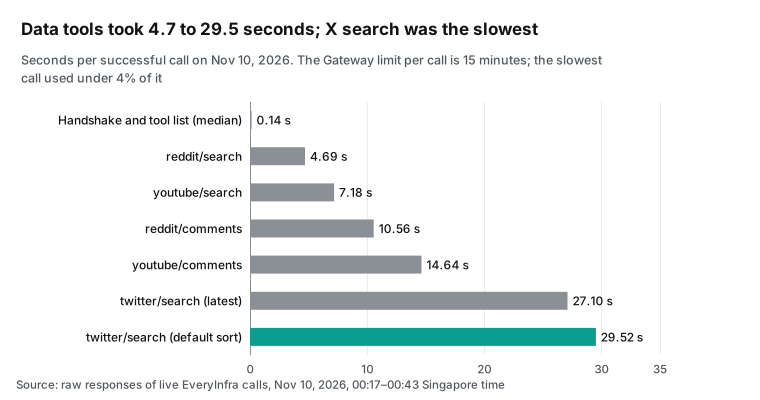
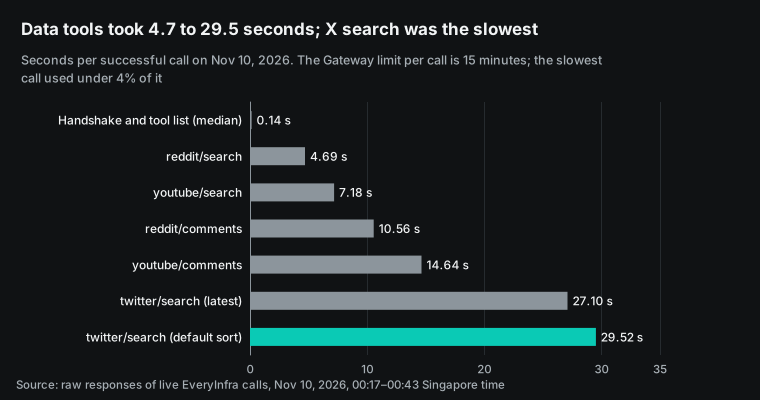
Data tools took between 4.7 and 29.5 seconds, and X search was the slowest. We could not measure the Gateway overhead without a deployed gateway. At these times, any normal gateway overhead is not the bottleneck.
Set the client timeout by the slowest tool. With a 10-second MCP client timeout, the client cuts off X search and the agent gets nothing. The EveryInfra request may still be running. We did not test whether a client disconnect still charges, so do not count on a free retry. The safer pattern is "mode":"async", then everyinfra_get_job.
What the monitoring data looks like
Gateway only guards the door. Whether the agent is useful depends on what each tool returns per call. We used the electric car maker Rivian as the test brand. Its new R2 was in deliveries in early November 2026, so Reddit, X, YouTube and Threads all had fresh posts.
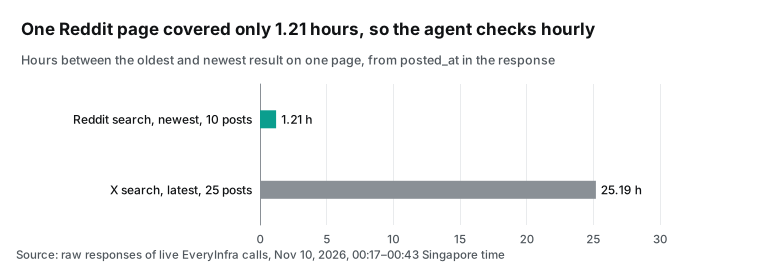
A Reddit page covers about an hour. reddit/search sorted by newest returned 10 posts. They ran from 15:01 to 16:13 UTC on November 9, 2026, a span of 1.21 hours. An agent that checks every six hours would miss most new posts unless it reads more pages. Each page costs $0.000556, so one page an hour and six pages every six hours cost about the same. One page an hour finds a complaint sooner. Our plan is 24 Reddit searches a day.
We repeated the search 23.8 minutes later, at 00:42 Singapore time. The 10 posts were the same, and the newest was still the 16:13 UTC post, although the call ran at 16:42 UTC. We cannot tell whether there were no new posts or whether search lagged. Either way, checking every 20 minutes would not catch more than checking every hour. The interceptor can also compare post id values and tell the agent that nothing is new. Then the model does not read the same page twice.
Keyword search is literal. We narrowed the keyword to Rivian R2 problem and got 5 posts. One asked about the resale price of an Alienware m18 R2 laptop, and one was about a game console. The search matches words, not meaning, so the agent needs its own relevance check before it writes a report.
**X latest spans a day and is not strictly ordered.** We ran twitter/search with Rivian since:2026-11-08 and sort set to latest. The 25 posts ran from 15:14 UTC on November 8 to 16:26 UTC on November 9, a span of 25.19 hours. They were not in strict newest-first order, so the agent cannot use the first timestamp as a cursor. It must remove duplicates by id.
The default sort is worse for monitoring. Of its 25 posts, 5 were more than 30 days old and 5 came from the brand account itself, which has 247,707 followers. Those posts say nothing about what customers think, but they still use model context. Tell the agent to use latest and to skip the brand's own accounts. See the X search API page for the parameters.
YouTube search mixes channels and old videos. youtube/search sorted by newest returned 10 results, and only 6 were videos from the last 7 days. The other 4 were a channel entry with no url or view_count, and older uploads, one from 2024. Our first analysis script read view_count directly and failed on the channel entry. Filter results by date before the model sees them.
YouTube comment times are relative. youtube/comments on video KP8I6yoWXsY, "Rivian Replaced My R2 After Just 2 Months", returned 20 comments. The posted_at values look like "30 minutes ago" and "1 day ago". Convert them to absolute times at fetch time, or the dates will drift. See the YouTube comments API page.
About a third of video comments are about the creator. We labeled 20 YouTube comments and 7 comments on a Reddit buyback thread by hand. One person did the labels with one written rule. Of the YouTube comments, 8 complained about the product, service or delivery, 6 were about the creator, 4 were questions and 2 were other. Of the Reddit comments, 3 were complaints and 4 discussed parts and legal details. A keyword count of negative words would overstate brand complaints on YouTube.
Threads is multilingual. threads/search for Rivian returned 17 posts in 12.1 seconds over 17 hours. All 17 mention Rivian, and some are in French and Ukrainian. Group posts by language before you summarize them. See the Threads data API.
News search did not complete twice. google_news/search returned HTTP 503 over REST at 00:21:45. Over MCP at 00:42:42, it returned HTTP 200 with isError and the code unavailable. Both responses said that nothing was charged. Treat this as "not checked", never as "no news". An interceptor that counts only successes would write "no news today" into the report.
| Source | What one call returned | What the agent should do |
|---|---|---|
| Reddit search, newest | 10 posts over 1.21 hours | Check hourly; skip pages with no new id |
| Reddit search, narrow keyword | 5 posts, 2 off-topic | Check relevance before reporting |
| X search, latest | 25 posts over 25.19 hours, not strictly ordered | Two runs a day; remove duplicates by id |
| X search, default sort | 5 old posts, 5 from the brand account | Use latest; skip brand accounts |
| YouTube search, newest | 6 recent videos, 4 other results | Filter by date and result type |
| YouTube comments | Relative times; a third about the creator | Convert times; label by topic |
| Threads search | 17 posts, several languages | Group by language |
Trimming responses in the RESPONSE interceptor
The Lambda bill is tiny; the model bill is not. The agent makes 37 tool calls a day. From our measured sizes, the responses add up to about 468,047 bytes a day. At about 4 bytes per token, that is about 117,000 tokens a day and 3.5 million a month. News is not included because we have no news sample. The RESPONSE interceptor already parses each result to read the charge, so removing unused fields there costs almost nothing.
We kept eight fields: url, title, text (first 280 characters), posted_at, like_count, comment_count, view_count and community. Author names, avatars, thumbnails, link domains and nested objects go. The byte counts below come from the real responses.
| Capability | Original bytes | Trimmed bytes | Saved |
|---|---|---|---|
reddit/search | 11,672 | 5,334 | 54.3% |
twitter/search | 32,604 | 8,001 | 75.5% |
youtube/search | 22,687 | 4,652 | 79.5% |
youtube/comments | 8,684 | 4,932 | 43.2% |
reddit/comments | 3,519 | 2,260 | 35.8% |
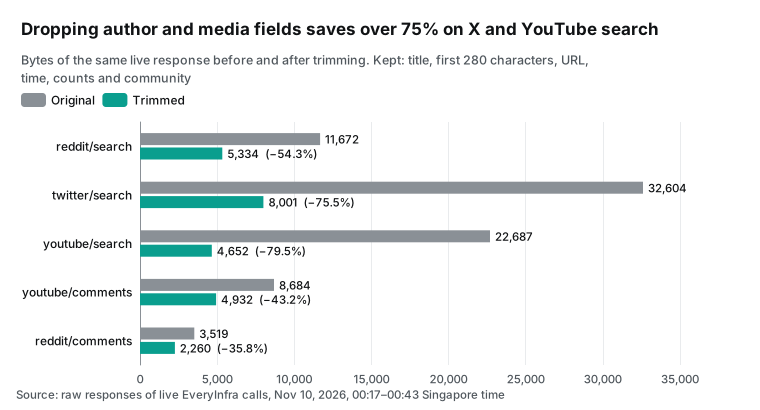
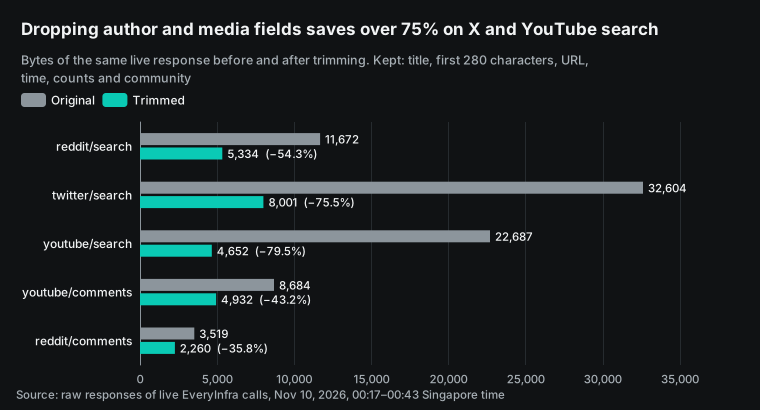
X and YouTube search save the most, because each post or video carries a full author profile and media links. Two rules apply when you change a response. First, the AWS docs say the transformedGatewayResponse from a RESPONSE interceptor replaces the original (interceptor types and payloads). The data is a JSON string inside content[0].text, so parse it, trim it and serialize it again. Keep the billing object, or the agent cannot see what it spent.
Second, removing author names is not only about tokens. The Reddit Data API Terms and the X Developer Policy both limit how you use user identity data. A brand report should not name private users anyway.
There is one gap a filter does not close. The AWS docs say Policy applies only to MCP tools. Whatever the evaluation mode, Gateway always allows prompts/list, prompts/get, resources/list, resources/read and resources/templates/list (use a Gateway with Policy). A post in r/AI_Agents warns that each new MCP server target can bring resources that Policy never sees (r/AI_Agents thread).
We checked what EveryInfra exposes. It lists 7 prompts, including brand_monitoring, and 6 resources. All 6 resources are public guides such as everyinfra://guide/getting-started and everyinfra://pricing. Reading them is free and touches no customer data, so there is no risk in this setup. If the same gateway also fronts an internal MCP server, review its resources separately.
Bedrock AgentCore Gateway pricing: what the agent costs per month
Here are the AWS prices we read on the AgentCore pricing page at 00:15 Singapore time on November 10, 2026. Lambda prices come from the Lambda pricing page.
| Item | Price | Used here? |
|---|---|---|
| Gateway invocations (ListTools, InvokeTool, Ping) | $0.005 per 1,000 | Yes, every tool list and tool call |
| Search API (semantic tool search) | $0.025 per 1,000 | No, only 4 tools |
| Tool indexing | $0.02 per 100 tools per month | Only with semantic search |
| Identity API key requests | $0.010 per 1,000; free through Gateway | Yes, at no charge |
| Policy authorization | $0.000025 per request ($0.025 per 1,000) | Optional |
| Custom rate limits | No extra charge | Yes |
| Data to customer-owned VPCs | $0.006 per GB | No, EveryInfra is on the public internet |
| Lambda (interceptors) | $0.20 per million requests plus GB-seconds; 1 million requests free each month | Yes, two phases per call |
The pricing page has its own example. An agent with 600,000 InvokeTool calls a month pays $3 for Gateway at $5 per million. The same example pays $1,400 for web search at $7 per 1,000 queries. Gateway is cheap; the tools behind it are where the money goes. That is true in our case too.
On the EveryInfra side, reddit/search, twitter/search, youtube/search, youtube/comments, reddit/comments and threads/search cost $0.000556 per call, or $0.556 per 1,000. google_news/search costs $0.792 per 1,000. Failures, rate limits, bad parameters and empty results are free.
Our live calls had 12 such cases: 7 rate limits, 2 unauthorized calls, 1 bad parameter and 2 news calls that did not complete. All were charged $0. Our 9 successful calls cost $0.005004 in total. See the pricing page for current prices.
Now the monthly plan from our measurements. Reddit search runs every hour, 24 times a day. Reddit comments run 5 times a day on complaint threads. X search runs twice a day, since one page covers about 25 hours. YouTube search runs once and YouTube comments 3 times.
News runs twice. That is 37 tool calls a day across 25 runs: 24 hourly runs and one daily report. Each run lists tools once.
| Line | Monthly volume | Monthly cost (USD) |
|---|---|---|
| EveryInfra data | 1,110 tool calls | 0.6313 |
| Gateway invocations | 1,860 (1,110 tool calls + 750 tool lists) | 0.0093 |
| Lambda for two interceptor phases, requests plus 100 ms at 128 MB each | 3,720 | 0.00152 (0 inside the free tier) |
| Policy authorization (optional) | 1,110 | 0.02775 |
| Tool indexing (optional, prorated for 12 tools) | 12 tools | 0.0024 |
| AWS total without Policy | 0.01082 |
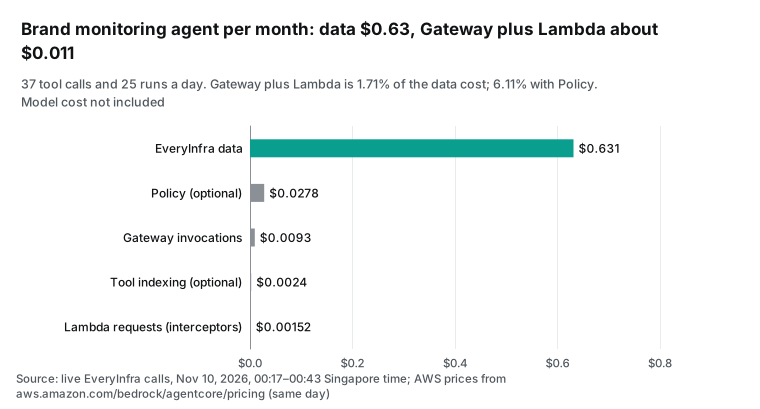
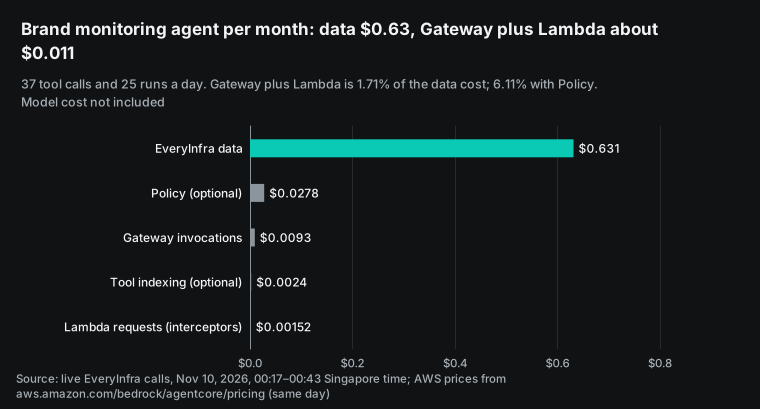
The result is clear. Gateway and the interceptor Lambda cost about $0.0108 a month, which is 1.71% of the EveryInfra data cost. With Policy on every tool call, the share rises to 6.11%. Policy costs $0.025 per 1,000, five times the Gateway invocation fee. Per 1,000 calls, the Gateway fee is 0.89% of reddit/search. Per 1,000 Reddit posts, the data costs $0.0556.
Two costs are not in the table: the DynamoDB reads and writes for the budget, and the model. The model reads about 3.5 million tokens of tool output a month. Its price depends on the model you pick, and it will almost certainly exceed every line above. That is why the trimming step matters.
The ratio holds as you grow. Ten brands on the same plan cost about $6.31 a month in data. Gateway and Lambda then cost about $0.108, because both sides charge per call. The ratio changes only when you add semantic search, which you need with hundreds of tools. Then each tool search costs $0.025 per 1,000, plus an indexing fee per tool. With EveryInfra as the only target, you do not need it.
How this compares with Gemini Enterprise and Copilot Studio
We have written up two other enterprise agent platforms with the EveryInfra MCP. Each guide has a different focus, so use the table to pick one.
| AgentCore Gateway (this guide) | Gemini Enterprise Agent Platform | Copilot Studio | |
|---|---|---|---|
| How the remote MCP gets a key | API key credential on the target, sent as Authorization | Platform MCP accepts OAuth or no auth; keys go through ADK and Agent Gateway | API key in the connector |
| Staff identity | Gateway inbound auth, JWT or IAM | Google identity | Microsoft Entra ID |
| Usage control | Interceptor, rate limits, Policy | See that guide | See that guide |
| Use case | Brand monitoring on Reddit, X, YouTube, Threads, news | Brand sentiment with live DJI calls | Sales account briefs from LinkedIn |
| Guide | This page | Gemini Enterprise brand sentiment | Copilot Studio account research |
If the data should land in a warehouse rather than a report, read the Snowflake Cortex Agents guide. Its MCP connector accepts only OAuth, so the setup is quite different. If you have not picked a platform yet, start with the multi-platform reputation monitoring blueprint. It covers target lists, duplicate removal, cursors and human review. For refunds on failed calls, see failure refund reconciliation.
Limits and open questions
These are the parts we did not test or that do not work today.
The AWS side has not run. All AWS commands, target and credential JSON, and the deployed interceptor behavior follow the AWS docs only. We ran the interceptor logic on a laptop with real responses in the documented payload shape. Gateway may send fields we did not see. Before you go live, run one tools/list and one tools/call on a test gateway.
API key outbound may not work in some tooling. One starter toolkit issue covers API_KEY outbound auth for an MCP target in agentcore.json. The setting had no effect after deploy (starter toolkit issue 499, 2026-04-10). We do not know whether it is fixed. Use the CreateGatewayTarget API or the console, and confirm with one tools/call.
Platform rules still apply. The data is public posts and comments. Its use still follows the Reddit Data API Terms, the X Developer Policy and the YouTube API Services Developer Policies. Quote post text and links in reports. Do not collect or show the profiles of private users.
The test key had a low limit. Our test key allowed 10 calls a minute, and we hit 7 rate limits. A production key shows its own limit in the everyinfra_get_account response. Set the Gateway rate limits to match, so Gateway blocks bursts before EveryInfra has to.
What changed in the last 60 days
The timeline at the top already lists the Gateway feature changes: MCP Tasks, InvokeModel fallback and Web Answer. This table adds four AWS posts from October 20 to November 6, 2026. They are not in the timeline, and they matter when a third-party tool sits behind Gateway.
| Date | Change | Link | What it means for a monitoring agent |
|---|---|---|---|
| 2026-11-06 | Agent access with Okta Cross App Access, part 2 | AWS post | If staff sign in through Okta, follow it for the inbound JWT setup |
| 2026-11-03 | Gateway calls ServiceNow with on-behalf-of token exchange | AWS post | Fits targets with per-employee permissions; a team-level API key fits per-team billing better |
| 2026-10-29 | MoEngage turned over 400 APIs into agent tools | AWS post | Semantic search and its index fee pay off with hundreds of tools, not with EveryInfra alone |
| 2026-10-28, 10-20 | An enterprise agent platform on AgentCore; Eon uses Gateway for multi-cloud investigation | Platform post, Eon story | Both use Gateway as the single exit for all agents, which is the case where we recommend it |
FAQ
What is the difference between AgentCore Gateway and AgentCore Runtime? (Search suggestion: "agentcore gateway vs runtime".) Runtime runs your agent code. Gateway manages the tools, models and other agents that the agent calls. The monitoring agent can run on Runtime or in your own container, as long as it reaches the Gateway URL over MCP (Gateway overview).
Is AgentCore Gateway the same as Amazon API Gateway? (Search suggestion: "agentcore gateway vs api gateway".) No. API Gateway serves general HTTP APIs. AgentCore Gateway speaks MCP and merges many tool sources into one MCP server. They work together: an API Gateway REST stage can be one kind of AgentCore Gateway target (MCP targets).
Can an MCP server target use an API key, and where does the key live? (Search suggestion: "agentcore gateway api key".) Yes. Store it with CreateApiKeyCredentialProvider in AgentCore Identity, then set the header to Authorization and the prefix to Bearer on the target. The key stays in Identity and never appears in agent code or prompts (add an API key). One CLI did not apply this setting for MCP targets (starter toolkit issue 499).
Do I need a REQUEST interceptor, a RESPONSE interceptor or both? (Search suggestion: "agentcore gateway interceptor request response".) Each gateway can have one of each. A budget needs both. REQUEST checks the budget and blocks the call. RESPONSE reads the real charge, records it and trims fields (configure interceptors).
How does bedrock agentcore gateway pricing work? (Search suggestion: "amazon bedrock agentcore gateway pricing".) Gateway costs much less than the data. In our plan, Gateway costs about $0.0093 a month and the data costs about $0.6313. The pricing section above shows the math.
Why use Gateway at all instead of connecting the agent to the remote MCP? (r/aws thread.) For one person and one agent, connect directly. The section "Should a remote MCP sit behind Gateway at all?" explains when Gateway pays off.
Does Policy block every MCP request? (r/AI_Agents thread.) No. Prompt and resource requests always pass. The end of the trimming section explains why this is safe for EveryInfra.
Getting started: connect directly first, then add Gateway
- Create an API key in the EveryInfra console. Follow the quickstart and send one
tools/listand onetools/callwith curl. The remote MCP setup guide and the MCP server page cover client setup. - Store the same key in AgentCore Identity with
CreateApiKeyCredentialProvider. - Create the gateway with
CUSTOM_JWTinbound auth. Give the discovery URL of your identity provider and the allowed clients. - Add an MCP server target for
https://api.everyinfra.com/mcp. Use the API key provider with the headerAuthorizationand the prefixBearer. - After the target syncs, send one
tools/callthrough Gateway, for examplereddit/search. Look forbillingin the result. A tool list alone does not prove the key works. - Deploy the REQUEST and RESPONSE interceptor. Put the team budget in an environment variable and test on a non-production gateway first.
- Set Gateway rate limits from the limit in the
everyinfra_get_accountresponse, with one limit per team claim.
Parameters and response fields for each platform are on the Reddit data API, X data API and YouTube data API pages. To compare other data, search and automation tools, see the infrastructure market.
References
We read every AWS page on November 10, 2026 (Singapore time). Dates in brackets are the publish dates shown on each page; docs pages without a date have none. EveryInfra numbers come from the raw responses of our live calls on the same day.
- AWS What's New: Amazon Bedrock AgentCore preview (2025-07-16) <https://aws.amazon.com/about-aws/whats-new/2025/07/amazon-bedrock-agentcore-preview/>
- AWS What's New: Amazon Bedrock AgentCore is now generally available (2025-10-13) <https://aws.amazon.com/about-aws/whats-new/2025/10/amazon-bedrock-agentcore-available/>
- AWS docs: Amazon Bedrock AgentCore Gateway <https://docs.aws.amazon.com/bedrock-agentcore/latest/devguide/gateway.html>
- AWS docs: Supported targets <https://docs.aws.amazon.com/bedrock-agentcore/latest/devguide/gateway-supported-targets.html>
- AWS docs: MCP targets <https://docs.aws.amazon.com/bedrock-agentcore/latest/devguide/gateway-targets-mcp.html>
- AWS Machine Learning Blog: Apply fine-grained access control with Bedrock AgentCore Gateway interceptors (2025-11-26) <https://aws.amazon.com/blogs/machine-learning/apply-fine-grained-access-control-with-bedrock-agentcore-gateway-interceptors/>
- AWS What's New: Server-side tool execution with AgentCore Gateway (2026-02-24) <https://aws.amazon.com/about-aws/whats-new/2026/02/amazon-bedrock-server-side-tool-execution-agentcore-gateway/>
- AWS What's New: AWS WAF for Amazon Bedrock AgentCore (2026-06-29) <https://aws.amazon.com/about-aws/whats-new/2026/06/aws-waf-amazon-bedrock-agentcore/>
- AWS What's New: Temporal policies and rate limits in AgentCore (2026-08-06) <https://aws.amazon.com/about-aws/whats-new/2026/08/temporal-policies-agentcore/>
- AWS What's New: AgentCore Identity hosted consent portal (2026-09-01) <https://aws.amazon.com/about-aws/whats-new/2026/09/amazon-bedrock-agentcore/>
- AWS docs: AgentCore release notes (November and October 2026) <https://docs.aws.amazon.com/bedrock-agentcore/latest/devguide/release-notes.html>
- AWS What's New: AgentCore Gateway InvokeModel support and model fallback (2026-10-22) <https://aws.amazon.com/about-aws/whats-new/2026/10/agentcore-gateway-invokemodel-fallback/>
- AWS Machine Learning Blog: Getting started with Web Answer on Amazon Bedrock AgentCore (2026-11-05) <https://aws.amazon.com/blogs/machine-learning/getting-started-with-web-answer-on-amazon-bedrock-agentcore/>
- Reddit r/aws: How to integrate AWS AgentCore with a remote MCP server <https://www.reddit.com/r/aws/comments/1pwtc53/how_to_integrate_aws_agentcore_with_a_remote_mcp/>
- AWS docs: MCP servers targets <https://docs.aws.amazon.com/bedrock-agentcore/latest/devguide/gateway-target-MCPservers.html>
- Model Context Protocol: Specification 2025-11-25: Lifecycle <https://modelcontextprotocol.io/specification/2025-11-25/basic/lifecycle>
- Model Context Protocol: Specification 2026-07-28 <https://modelcontextprotocol.io/specification/2026-07-28>
- AWS docs: MCP tasks in AgentCore Gateway <https://docs.aws.amazon.com/bedrock-agentcore/latest/devguide/gateway-mcp-tasks.html>
- AWS docs: Quotas for Amazon Bedrock AgentCore <https://docs.aws.amazon.com/bedrock-agentcore/latest/devguide/bedrock-agentcore-limits.html>
- AWS docs: Tool naming <https://docs.aws.amazon.com/bedrock-agentcore/latest/devguide/gateway-tool-naming.html>
- GitHub awslabs/agentcore-samples: Issue 809: tools/call internal error on an OAuth MCP target <https://github.com/awslabs/agentcore-samples/issues/809>
- AWS docs: Outbound authorization <https://docs.aws.amazon.com/bedrock-agentcore/latest/devguide/gateway-outbound-auth.html>
- AWS docs: Add an API key credential provider <https://docs.aws.amazon.com/bedrock-agentcore/latest/devguide/identity-add-api-key.html>
- AWS API Reference: CreateApiKeyCredentialProvider <https://docs.aws.amazon.com/bedrock-agentcore-control/latest/APIReference/API_CreateApiKeyCredentialProvider.html>
- AWS docs: Target authorization configuration <https://docs.aws.amazon.com/bedrock-agentcore/latest/devguide/gateway-building-adding-targets-authorization.html>
- AWS What's New: AgentCore Gateway PrivateLink and invocation logging (2025-09) <https://aws.amazon.com/about-aws/whats-new/2025/09/amazon-bedrock-agentcore-gateway-privatelink-invocation-logging/>
- GitHub aws/bedrock-agentcore-starter-toolkit: Issue 499: API_KEY outbound auth on an MCP target (2026-04-10) <https://github.com/aws/bedrock-agentcore-starter-toolkit/issues/499>
- AWS: Amazon Bedrock AgentCore pricing <https://aws.amazon.com/bedrock/agentcore/pricing/>
- AWS docs: Inbound authorization <https://docs.aws.amazon.com/bedrock-agentcore/latest/devguide/gateway-inbound-auth.html>
- AWS docs: Configure interceptors <https://docs.aws.amazon.com/bedrock-agentcore/latest/devguide/gateway-interceptors-configuration.html>
- YouTube: AWS re:Invent 2025 AIM3313: AgentCore Gateway (2025-12) <https://www.youtube.com/watch?v=DlIHB8i6uyE>
- AWS docs: Gateway interceptors <https://docs.aws.amazon.com/bedrock-agentcore/latest/devguide/gateway-interceptors.html>
- AWS docs: Interceptor types and payloads <https://docs.aws.amazon.com/bedrock-agentcore/latest/devguide/gateway-interceptors-types.html>
- GitHub aws-samples: sample-agentcore-gateway-usage-interceptor <https://github.com/aws-samples/sample-agentcore-gateway-usage-interceptor>
- AWS API Reference: McpServerTargetConfiguration <https://docs.aws.amazon.com/bedrock-agentcore-control/latest/APIReference/API_McpServerTargetConfiguration.html>
- AWS Machine Learning Blog: Configure rate limits for AI traffic on AgentCore Gateway (2026-08-06) <https://aws.amazon.com/blogs/machine-learning/configure-rate-limits-for-ai-traffic-on-agentcore-gateway/>
- AWS docs: Rate limit dimensions <https://docs.aws.amazon.com/bedrock-agentcore/latest/devguide/gateway-rate-limits-dimensions.html>
- AWS docs: Rate limits <https://docs.aws.amazon.com/bedrock-agentcore/latest/devguide/gateway-rate-limits.html>
- AWS docs: Policy in AgentCore <https://docs.aws.amazon.com/bedrock-agentcore/latest/devguide/policy.html>
- AWS docs: Protecting your gateway with AWS WAF <https://docs.aws.amazon.com/bedrock-agentcore/latest/devguide/gateway-waf.html>
- AWS docs: Gateway features <https://docs.aws.amazon.com/bedrock-agentcore/latest/devguide/gateway-features.html>
- AWS docs: Use MCP sessions with your AgentCore gateway <https://docs.aws.amazon.com/bedrock-agentcore/latest/devguide/gateway-sessions.html>
- Reddit: Data API Terms <https://redditinc.com/policies/data-api-terms>
- X Developer Platform: Developer Policy <https://docs.x.com/developer-terms/policy>
- AWS docs: Use an AgentCore Gateway with Policy <https://docs.aws.amazon.com/bedrock-agentcore/latest/devguide/use-gateway-with-policy.html>
- Reddit r/AI_Agents: AgentCore Gateway Policy covers MCP tools only <https://www.reddit.com/r/AI_Agents/comments/1xat5hx/agentcore_gateway_policy_covers_mcp_tools_only/>
- AWS: AWS Lambda pricing <https://aws.amazon.com/lambda/pricing/>
- Reddit r/aws: AgentCore connection to GitHub MCP? <https://www.reddit.com/r/aws/comments/1t7fp90/agentcore_connection_to_github_mcp/>
- Google for Developers: YouTube API Services Developer Policies <https://developers.google.com/youtube/terms/developer-policies>
- AWS Machine Learning Blog: Govern AI agent access with Okta Cross App Access and AgentCore, part 2 (2026-11-06) <https://aws.amazon.com/blogs/machine-learning/govern-ai-agent-access-with-okta-cross-app-access-and-amazon-bedrock-agentcore-part-2/>
- AWS docs: Web Answer connector <https://docs.aws.amazon.com/bedrock-agentcore/latest/devguide/gateway-target-connector-web-answer-tool.html>
- AWS Machine Learning Blog: ServiceNow on-behalf-of token exchange with AgentCore Gateway (2026-11-03) <https://aws.amazon.com/blogs/machine-learning/servicenow-on-behalf-of-token-exchange-with-bedrock-agentcore-gateway/>
- AWS Machine Learning Blog: How MoEngage turned over 400 APIs into agent tools with AgentCore Gateway (2026-10-29) <https://aws.amazon.com/blogs/machine-learning/how-moengage-turned-over-400-apis-into-agent-tools-with-agentcore-gateway/>
- AWS Machine Learning Blog: Building an agentic AI platform on Amazon Bedrock AgentCore (2026-10-28) <https://aws.amazon.com/blogs/machine-learning/building-an-agentic-ai-platform-on-amazon-bedrock-agentcore/>
- AWS Machine Learning Blog: How Eon built multi-cloud investigation with an MCP gateway on AgentCore (2026-10-20) <https://aws.amazon.com/blogs/machine-learning/how-eon-built-multi-cloud-investigation-with-an-mcp-gateway-on-amazon-bedrock-agentcore/>
Reference BL-123