OpenAI Agents API for review monitoring: a weekly low-star report from five review sites
A weekly review-monitoring agent on the OpenAI Agents API: 21 live calls on five review sites, $0.0069 a week per brand in data cost, config and limits.
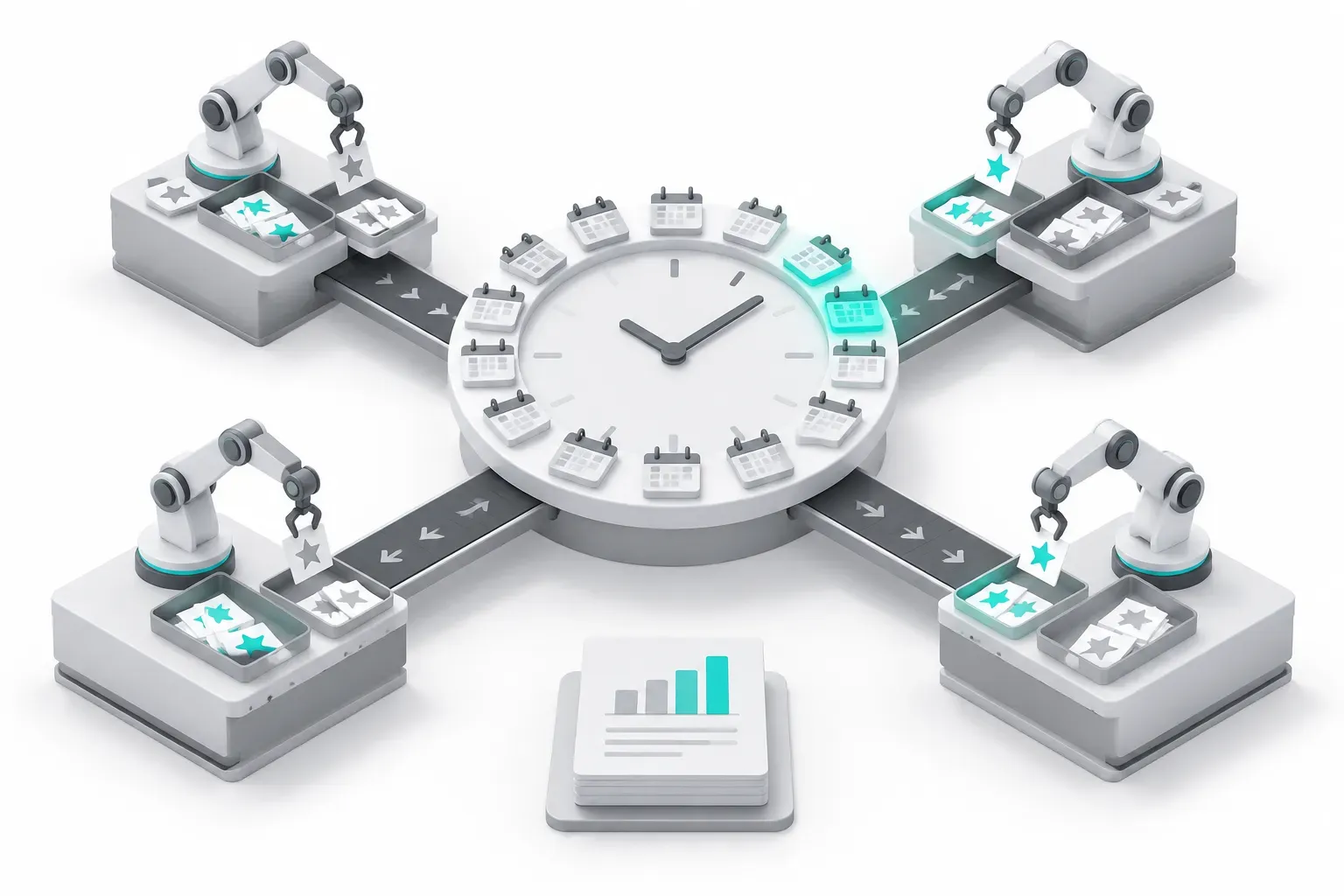
On November 1, 2026, from 00:47 to 15:45 Singapore time (SGT), we called EveryInfra review endpoints for Notion and ClickUp. We did 4 retests at 19:22–19:23 SGT. The sites were Trustpilot, G2, Capterra, the App Store and Google Play. A weekly check for one brand needs five calls and costs $0.006945 in data fees. The hard part is coverage, not price. On Google Play, the 200 newest Notion reviews go back only 22 days, but 20 low-star Notion reviews on Trustpilot go back to June.
The model bill is the big number. Our data fee is per call, so 200 rows cost the same as 20. But every extra row goes into the model context.
With our recommended limits, one week of Notion reviews is about 421 KB raw, or about 105k tokens. In the early run it was 652 KB, because of the page code that we describe below. At OpenAI list prices on November 1, 2026, that week costs about $0.03 to $2.9 in model tokens. The cheapest and the most expensive model differ 100 times in list price, so the model choice sets the bill.
Two traps also came out of the live calls. Capterra does not sort reviews by date. In the early run on November 1, some Capterra reviews had a pros field of about 100,000 characters of page code. That evening the gateway removed the page code and set a limit of 5,000 characters per field. Our retest at 19:23 SGT returned the same 86 reviews, and the longest field had 1,154 characters.
OpenAI opened the Agents API as a public beta on September 10, 2026. Can it run an agent that wakes every Monday, sends one subagent to each review site and writes a short low-star report? Every OpenAI field name, default and limit here comes from the OpenAI docs, which we downloaded and checked on November 1, 2026. We did not run the agent on an OpenAI account, so the OpenAI part is a configuration example. Every EveryInfra number comes from raw responses of live calls, failed calls included.
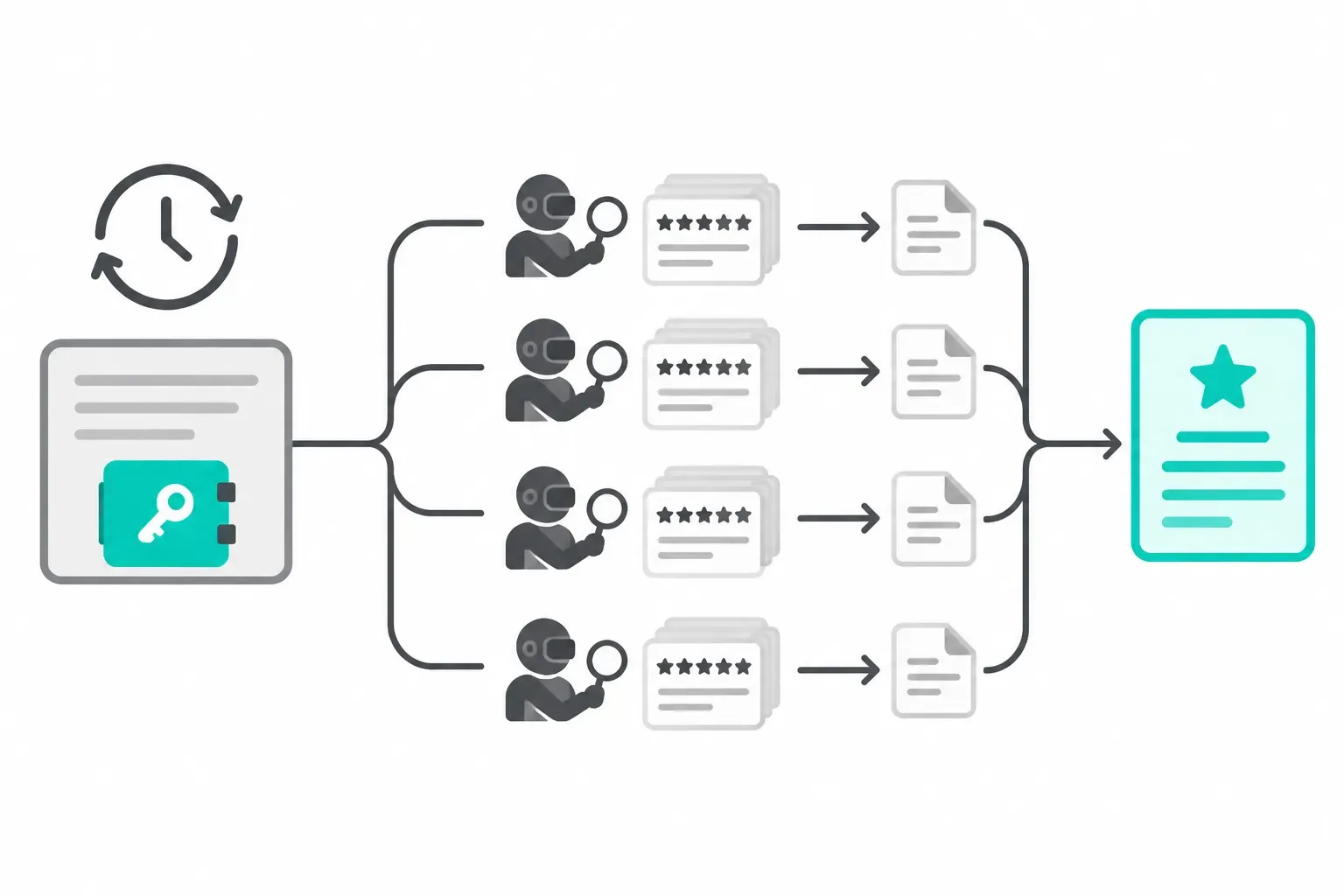
The job: a weekly low-star report from five review sites
We define the job first, because every number below depends on it. The input is a list of brands. For each brand you store one identifier per site. Trustpilot takes the company domain, for example notion.so. G2 takes the review URL or slug, and Capterra takes the product page URL. The App Store takes the numeric app ID, and Google Play takes the package name.
The output is one weekly report. Each brand gets one section with new and low-star reviews per site and the main complaint themes. It also lists issues that are new since last week, with links to the original reviews for support staff.
Why these five sites? They cover two different audiences. Trustpilot, G2 and Capterra are where buyers read before they buy software, so the readers are often decision makers. The App Store and Google Play hold feedback from current users, so complaints are specific and often carry a version number.
Our earlier multi-platform reputation monitoring blueprint explains how to record coverage before you judge a negative trend. Our 30-company test with Exa, G2 and Trustpilot shows a one-time competitor comparison. This article turns the check into an agent that runs every week without a person. It also uses live data to test whether one run a week is enough.
The job matches four features of the Agents API. The five sites do not depend on each other, so each can go to a subagent that returns only a summary. The schedule fits automations, which open sessions on a cron expression in a named time zone. The API key fits a vault, so it stays out of the instructions. The data source is a remote MCP server, which the Agents API can reach from the OpenAI side with no sandbox.
openai agents api compared with the Agents SDK
OpenAI released the Agents API as a public beta on September 10, 2026. The launch post says that one API call with a task, a model, tools and an environment creates a production agent. The agent runs the same harness as Codex (OpenAI launch post; changelog). The harness is the loop that calls the model, runs tools and manages context. The overview page splits the product into four concepts: Agent, Environment, Session, and Events and items (Agents API overview). The launch post also states that the Agents API has no extra fee: you pay for the tokens and tools that the agent uses (OpenAI launch post).
The name is easy to confuse with the Agents SDK. The SDK is an open-source orchestration framework that OpenAI released on March 11, 2025, and its agent loop runs inside your own application (changelog; openai-agents-python on GitHub). The OpenAI "Agents" guide has a comparison table. The table below follows that page (Agents guide: compare agent runtime options).
| Item | Agents API | Agents SDK | Responses API |
|---|---|---|---|
| Use for | Long tasks where OpenAI manages the agent and saves progress | Agents with custom tools and workflows in your app | Direct model calls, or an agent you build from scratch |
| Where the agent runs | OpenAI runs a managed Codex harness | The SDK runs inside your application | Your application, with optional hosted orchestration |
| Integration effort | Low | Medium | High |
| State between tasks | Saved session configuration, turns and items | Your storage and SDK sessions, or Responses conversation state | Manual history, response chaining or Conversations |
| Tool execution | Service-connected tools, app function handlers, optional sandbox | Tools and integrations in your application | Hosted tools and tools that your app runs |
For review monitoring, the table has a simple meaning. If you do not want to run a long-lived process for the agent loop, session storage and retries, the Agents API does that work. The cost is that agent state lives at OpenAI, and the product is still a beta. If your company needs data to stay in your own region, the SDK is the safer choice. The overview page says that the Agents API supports only US data residency and no Zero Data Retention (ZDR), even with a self-hosted sandbox (Agents API overview).


Step 1: add EveryInfra as an MCP connection
In the Agents API, an MCP server is one entry in agent.tools with type: "mcp". The connection can start from two places. With connection_origin: "service", which is the default, OpenAI connects to the server, so the server must be on the public internet. This mode works with or without an environment. With connection_origin: "environment", the connection starts inside the session sandbox, for servers on a private network (MCP connections docs).
The EveryInfra MCP endpoint is public at https://api.everyinfra.com/mcp, so the default service origin is correct, and the session environment can be none. The architecture page says that without an environment the agent can still call remote MCP tools. It only loses Bash, workspace files and executor MCPs (Agents API architecture). This matters for cost: with no sandbox, there is no container fee.
Here is the tool entry as a configuration example. We checked each field against the docs.
allowed_tools holds only everyinfra_call_api and everyinfra_get_job. The second tool reads the result of an async call (see Test 3). With required: true, the turn fails when the server cannot start. That is what we want, because otherwise the agent could write a report with no data. The docs say that MCP initialization is optional by default (MCP connections docs).
{
  "type": "mcp",
  "server_label": "everyinfra",
  "transport": { "type": "http", "server_url": "https://api.everyinfra.com/mcp" },
  "connection_origin": "service",
  "allowed_tools": ["everyinfra_call_api", "everyinfra_get_job"],
  "required": true
}
Why only two tools? At 15:45 SGT on November 1, 2026, we sent tools/list to the EveryInfra MCP server. It returned 12 tools, and their JSON descriptions total 16,669 bytes. The descriptions of everyinfra_call_api and everyinfra_get_job together are 2,505 bytes. At about 4 characters per token for English text, that is about 4,167 tokens against about 626 tokens (OpenAI Help Center: tokens).
Tool descriptions go into context on each turn, and five subagents each carry a copy. The difference is about 18k tokens per run. The tool list also changes when the service adds or removes tools, and an earlier read on the same day gave a different count. An allow list keeps this cost fixed. The docs define allowed_tools as the way to limit which tools the agent can discover and call (MCP connections docs).
| Tool list | Tools | Description JSON (bytes) | About tokens (÷4) | Five subagents |
|---|---|---|---|---|
No allowed_tools | 12 | 16,669 | 4,167 | about 20,835 |
Only everyinfra_call_api and everyinfra_get_job | 2 | 2,505 | 626 | about 3,130 |
The launch post says the Agents API also has tool search, which loads tool definitions only when the agent needs them (OpenAI launch post; tool search docs). That helps when the tool list is large and the task is open. Here the task needs two tools, so an allow list is simpler and makes the cost easier to predict.
Step 2: keep the key in a vault, not in the instructions
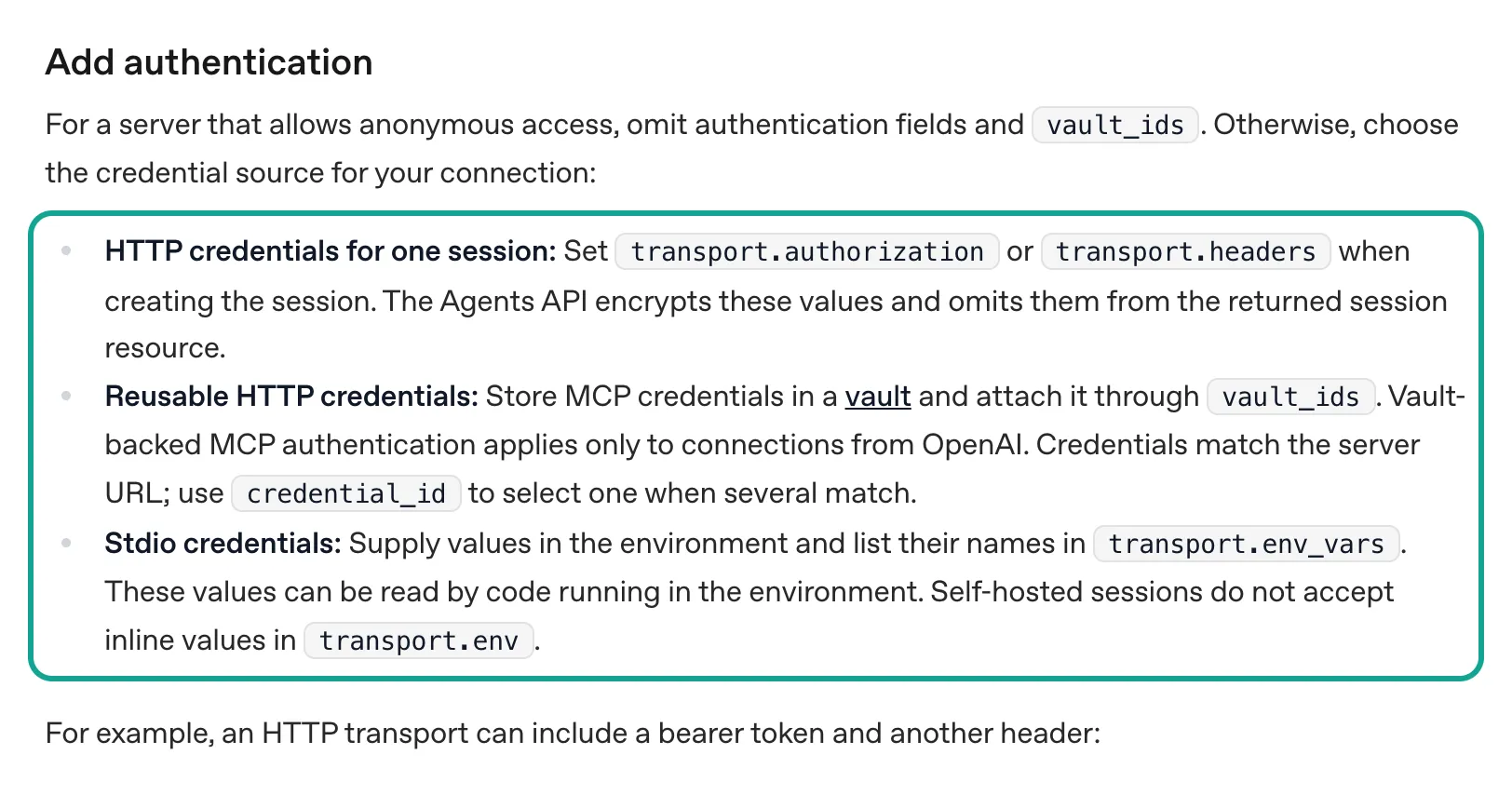
The MCP connection needs an EveryInfra key. The docs give three places for credentials. For one session, put the value in transport.authorization or transport.headers. The Agents API encrypts these values and leaves them out of the returned session.
For reuse, store the credential in a vault and attach the vault with vault_ids. For stdio servers, use environment variables, but then code in the sandbox can read the value (MCP connections docs: Add authentication). A weekly job is the second case.
The Vaults page shows the calls. First, client.beta.agents.vaults.create makes a vault. Then vaults.credentials.create adds a credential with auth.type: "static_bearer", the MCP URL in mcp_server_url and the key in token. The mcp_server_url value binds the credential to that server (Vaults docs). When you read a vault or a credential, the API does not return the secret. To manage vaults, your application key needs the api.vaults.read and api.vaults.write permissions (Vaults docs; sandbox security docs).
Two rules from the docs are easy to miss. First, vault MCP credentials apply only to connections that start from OpenAI. A connection with connection_origin: "environment" does not use them. Second, a deleted credential does not revoke the original token and does not stop a running session (Vaults docs: rotate or remove credentials). To revoke an EveryInfra key, you disable it in the EveryInfra console.
Step 3: one subagent per site, and the main agent only merges
In the Agents API, multi-agent mode is one switch. Set agent.multi_agent.enabled: true when you create the session. The harness then gives the agent tools to create, message, wait for and interrupt subagents, and you do not declare these tools (Multi-agent docs). max_concurrent_subagents limits how many subagents run at the same time. The default is 6, not counting the main agent, and our job has 5 sites, so the default is enough.
The same page has three rules that matter for this job. Subagents inherit the configured MCP tools, their credentials and their allowed tools. Subagents do not support function tools. Subagents share the file system only when the session has an environment (Multi-agent docs).
The first rule means that the vault key reaches every subagent with no extra setup. The second rule means that a subagent cannot write into your database through a function. The main agent must return the results, and your application stores them.
The docs also say when to split work. Independent tasks go to subagents. Short tasks and dependent steps stay with the main agent (Multi-agent docs: when to use subagents). The five review sites are independent.
The comparison with last week and the final summary need all five results, so they stay with the main agent. The automations page has a section on this exact pattern. For a long-running goal, the main agent keeps the goal and the schedule, gives each scheduled task to a subagent and keeps a short result. Then the detailed tool output from each check stays out of the main context (Scheduled automations docs: keep repeated work out of the main context).
These are the main agent instructions that we use in the example. Each line maps to a live test later in this article.
You run a weekly review check for the brands listed in the input.
Delegate each platform (trustpilot, g2, capterra, app_store, google_play) to its own subagent.
Each subagent calls everyinfra_call_api once per brand with the parameters given below,
uses mode=async when limit is 100 or more (read the rows with everyinfra_get_job),
keeps only reviews posted in the last 7 days (filter by posted_at yourself),
cuts every text field to 2,000 characters, and returns JSON:
{platform, brand, new_reviews, low_star, themes:[{name,count,example_url}], new_issue_vs_last_week}.
Do not return raw reviews. The main agent merges the five results into one report.
If a call returns an error with retryable=true, wait retry_after seconds and retry at most twice.
Never invent reviews. If a platform failed, say so in the report.
The input to each run carries the parameters per site. This table shows the values for Notion. Each choice comes from a test later in this article. Set limit so that one call covers at least two weeks. Do not use the maximum on every site. Test 1 and Test 4 show why.
| Subagent | Parameters per brand | Low-star rule | Reason |
|---|---|---|---|
| Trustpilot | company: "notion.so", stars: ["1","2"], sort: "recency", limit: 20, no date | Every row, because the call asks for 1–2 stars | 20 rows go back 129 days, about 1 low-star review a week, so read all 20 rows and filter by posted_at; use a catalog value for sort (Test 3) |
| G2 | url, sort: "newest", limit: 100, mode: "async" | rating at or below 2.5; skip the record_type: summary row | No star filter; ClickUp gets about 47 reviews a week (Test 1); a sync call took 50 seconds |
| Capterra | company set to the product URL, limit: 100, mode: "async" | rating at or below 2 | No sort order; take all rows and compare id with last week (Test 1) |
| App Store | app_id: "1232780281", country: "us", sort: "newest", limit: 50 | rating at or below 2; count by app_version | 50 rows cover 39 days; complaints follow releases (Test 2) |
| Google Play | app_id: "notion.id", sort: "newest", language: "en", limit: 200 | score at or below 2 | 40 rows covered only 4.2 days, 200 rows covered 22 days (Test 1) |
Note the field names. Google Play returns the star value in score, and the other four sites use rating.
Step 4: an automation opens a new session every Monday
Schedules live in a separate resource, POST /v1/agents/automations. With type: "periodic", you set expression (a standard five-field cron string) and timezone (an IANA name such as America/New_York). With type: "once", you set run_at in Unix seconds. There are two target types.
new_session opens a fresh session on each run and needs an agent or a saved agent_id, an environment and target.input. existing_session sends a reminder to a session that already exists, for work that needs earlier findings (Scheduled automations docs). The API reference shows that a new_session target accepts vault_ids and that its environment can be none (Create automation reference). Time zone names come from the IANA database (IANA Time Zone Database), and the five cron fields follow Unix crontab (crontab(5)).
Here is the full configuration example in Python. The SDK adds the OpenAI-Beta: agents=v1 header for you. With curl, you add it yourself (Agents API quickstart). We use a New York schedule here because most review traffic for these two brands is in English.
import os
from openai import OpenAI

client = OpenAI()  # app key needs api.agents.read / api.agents.write / api.responses.write / api.vaults.write
MCP_URL = "https://api.everyinfra.com/mcp"

vault = client.beta.agents.vaults.create(name="review-check")
client.beta.agents.vaults.credentials.create(
    vault.id,
    name="EveryInfra read-only key",
    auth={"type": "static_bearer", "mcp_server_url": MCP_URL, "token": os.environ["EVERYINFRA_API_KEY"]},
)

agent = client.beta.agents.create(
    model="gpt-6.1-terra",
    instructions=open("weekly_review_instructions.txt").read(),
    tools=[{
        "type": "mcp", "server_label": "everyinfra",
        "transport": {"type": "http", "server_url": MCP_URL},
        "connection_origin": "service",
        "allowed_tools": ["everyinfra_call_api", "everyinfra_get_job"], "required": True,
    }],
    multi_agent={"enabled": True, "max_concurrent_subagents": 5},
)

automation = client.beta.agents.automations.create(
    type="periodic",
    name="Weekly review check",
    expression="0 9 * * MON",
    timezone="America/New_York",
    target={
        "type": "new_session",
        "agent_id": agent.id,
        "environment": {"type": "none"},
        "vault_ids": [vault.id],
        "input": [{"role": "user", "content": [{"type": "input_text",
                   "text": "Brands: ClickUp (clickup.com; g2 clickup; capterra https://www.capterra.com/p/158833/ClickUp/; "
                           "app_store 1535098836; google_play co.mangotechnologies.clickup). Write this week's report."}]}],
    },
)
print(automation.id)
A few details in the docs change what "scheduled" means. A new automation has the status active, but it does not run at once. The first run is at the next matching time. Recurring runs get a small random delay to spread load.
When the target session is busy, the task waits. Each run creates an invocation, and an invocation with status: completed only means that delivery worked. It does not mean that the agent finished. For the result, watch for agent.session.turn.completed or turn.failed in the session events (Scheduled automations docs; Sessions docs).
Your application can read the report from the event stream or from a webhook. The agent.session.idle webhook means that the session can take new input. It also does not mean that the last turn succeeded (Webhooks docs). To test before Monday, send an empty POST /v1/agents/automations/{id}/invocations. A manual run does not change the saved schedule (Scheduled automations docs: try a run).
Which target is better, new_session or existing_session? A new session starts with a clean context each week, so the cost is easy to predict. The agent does not remember last week, so your application must put last week's summary into target.input. An existing session keeps earlier findings, and the Agents API compacts older context when the session gets near its limit (OpenAI launch post; compaction docs). We prefer a new session with last week's summary, which is only one or two thousand tokens, in the input.
One real MCP round trip: what the subagent sends, and what comes back
What a subagent sends to EveryInfra is one MCP tools/call. At 00:47:47 SGT on November 1, 2026, we sent this call to https://api.everyinfra.com/mcp with our test key. It is the call that the Trustpilot subagent would make: recent 1-star and 2-star reviews for notion.so. The arguments object is the input of everyinfra_call_api: the platform, the capability and its parameters.
{"jsonrpc":"2.0","id":2,"method":"tools/call","params":{"name":"everyinfra_call_api","arguments":{"platform":"trustpilot","action":"reviews","params":{"company":"notion.so","stars":["1","2"],"date":"last30days","sort":"recency","limit":20}}}}The response is a text block that parses as JSON. count is 14. Each row in results has title, text, rating, posted_at, verification_level, country and more, and the fields match the response_fields list for trustpilot/reviews in the catalog. billing.charged is true and charged_usd is 0.001389, which is the catalog price (catalog: trustpilot). The first review has the title "I find everything in Notion a bit too chaotic" and was posted on October 20, 2026. We opened the public Notion page on Trustpilot to compare, and the same review with the same date is there (Trustpilot: Notion).
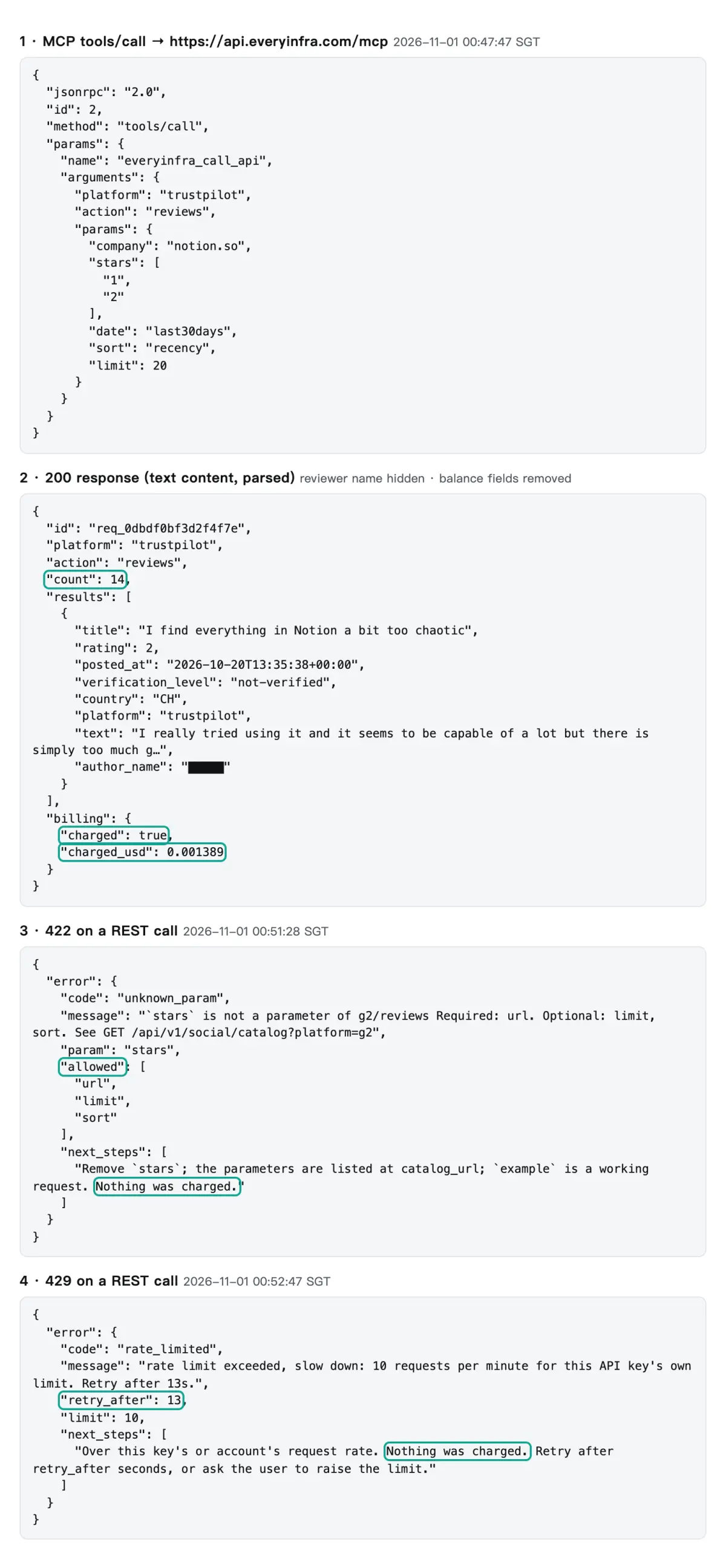
The same screenshot shows two failures that a subagent will meet in real runs. At 00:51:28 SGT we sent stars to g2/reviews on purpose, although that capability does not support it. The API returned 422 with error.code set to unknown_param. The allowed list named url, limit and sort, and next_steps said to remove stars and that nothing was charged.
At 00:52:47 and 00:53:46 SGT, two calls returned 429. At that time, several test jobs used the same test key and shared its limit of 10 requests per minute. The first 429 had retry_after set to 13 seconds, and our retry 37 seconds later worked. The retry after the second 429 came 15 seconds later and also worked. Neither 429 was charged.
Each error tells the model which parameter to change and how long to wait, so a subagent can correct itself. Our retry rule in the instructions uses this format.
One more failure needs a careful note, and we found its cause only in a control test. At 00:51:16 SGT, sort: "newest" on trustpilot/reviews returned a 503 with retryable: true, retry_after: 20 and no charge. The error said that this capability had failed 3 times in 10 minutes. All 3 of those failed calls (two came from other tests at the same time) had a value that the catalog does not list. Calls with listed values worked in the same minutes.
To test the cause, we sent the same parameters twice, at 15:39:46 and 15:40:07 SGT. The only change was sort: first newest, then recency, the value that the catalog lists. Both calls returned 200 and were charged $0.001389, but the rows were different.
The recency call returned the same 20 rows as the call at 00:54, all in English, each with a source field. The newest call shared only 14 rows with it. The other 6 rows were in German, French and Dutch, and no row had source or verification_level. The catalog field note says that these fields can be absent when results come from a backup source.
| `sort` | Time (SGT) | Response | Rows | Languages | `source` field | Charged |
|---|---|---|---|---|---|---|
newest (not listed) | 00:51:16 | 503 | — | — | — | No |
newest (not listed) | 15:39:46 | 200 | 20, only 14 shared with recency | 14 en, 3 de, 2 fr, 1 nl | No row | $0.001389 |
recency | 15:40:07 | 200 | 20, the same as at 00:54 | 20 en | All 20 rows | $0.001389 |
newest (after the evening fix) | 19:23:05 | 200 | 20, the same as recency | 20 en | All 20 rows | $0.001389 |
recency (after the evening fix) | 19:22:49 | 200 | 20, the same as at 00:54 | 20 en | All 20 rows | $0.001389 |
So the parameter check does not stop newest. The main source fails on it, and the result depends on the backup source at that moment. At 00:51 the backup also failed, and we got a 503. At 15:39 it worked, and we got a 200 with different data and a normal charge.
That is worse than an error, because a subagent cannot see the problem.
Those were the early and afternoon results on November 1. That evening the gateway changed sort. It now accepts newest (the same as recency), recency and relevance. Other values get a 422 before any charge, with the allowed values and a did-you-mean hint. Our retest at 19:22–19:23 SGT is in the table at the end of Test 3.
But a change of site often means a change of parameter name. So the instructions still fix the parameters per site and do not let the model guess. retry_after handles the short failures.
Test 1: is one run a week enough? It depends on how far back one call reaches
"Check once a week" sounds obvious, but it assumes something. One call per site must cover the full 7 days. If a site gets 60 new reviews a week and you read 20, the report sees only the weekend. So before any configuration, we measured how many days one call covers on each site.
For Notion and ClickUp, we called platform/reviews once on each of the five sites. We recorded the newest and oldest posting date and whether rows came newest first. We also counted the rows from October 25 to November 1, 2026 (UTC). The two brands took 12 live calls between 00:48 and 14:38 SGT on November 1, 2026.
| Site · brand | Rows asked | Rows returned | Oldest | Newest | Newest first | Last 7 days | Low-star |
|---|---|---|---|---|---|---|---|
| Trustpilot · Notion (1–2 stars only) | 20 | 20 | 2026-06-13 | 2026-10-20 | Yes | 0 | 0 |
| Trustpilot · ClickUp (1–2 stars only) | 20 | 20 | 2026-05-16 | 2026-10-29 | Yes | 2 | 2 |
| G2 · Notion | 20 | 19 reviews + 1 summary | 2022-11-28 | 2026-10-29 | Mostly, 3 old rows mixed in | 12 | 0 |
| G2 · ClickUp | 20 | 19 reviews + 1 summary | 2026-10-28 | 2026-10-31 | Yes | 19 | 0 |
| Capterra · Notion | 20 | 19 | 2025-12-11 | 2026-10-09 | No | 0 | 0 |
| Capterra · ClickUp | 20 | 17 | 2025-11-05 | 2026-10-21 | No | 0 | 0 |
| App Store · Notion | 50 | 50 | 2026-09-20 | 2026-10-29 | Yes | 9 | 6 |
| App Store · ClickUp | 50 | 50 | 2026-03-30 | 2026-10-29 | Yes | 2 | 2 |
| Google Play · Notion | 200 | 200 | 2026-10-08 | 2026-10-30 | Yes | 52 | 15 |
| Google Play · ClickUp | 200 | 200 | 2026-03-04 | 2026-10-31 | Yes | 5 | 1 |
The two extremes matter most. On G2, all 19 ClickUp reviews fall between October 28 and 31, three days. At that rate ClickUp gets about 47 G2 reviews a week, so 20 rows show only the last two or three days.
On Google Play, we first asked for 40 Notion reviews, which covered only 4.2 days. With 200 rows, the maximum for that capability, the call covered 22 days. At the other end, low-star Notion reviews on Trustpilot are rare. Twenty of them go back to June 13, about one a week.
So the same weekly schedule needs the maximum limit on some sites and only 20 rows on others. EveryInfra review endpoints charge per call. The 200-row Google Play call had charged_usd of 0.001389, the same as the 40-row call.
But the maximum on every site is not the best choice. During the revision we ran one more Notion round with the catalog max_limit on every site (Trustpilot 200, G2 100, Capterra 100, App Store 500, Google Play 200). The 500 App Store rows went back to February 14, 2026, and the low-star Trustpilot rows went back to April 2024. That is far more than a weekly report needs, and every extra row goes into the model context (Test 4 has the numbers).
Our rule: set limit so that one call covers at least two weeks. For Notion, that is Trustpilot 20, G2 100, Capterra 100, App Store 50 and Google Play 200. The subagent then filters by posted_at for the last 7 days. Your brands have different volumes, so measure one call per site first, as in the table above.
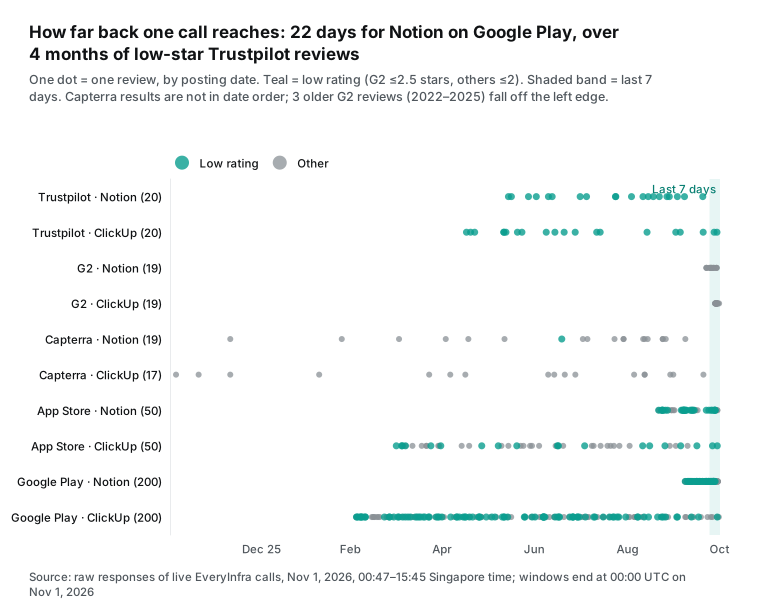
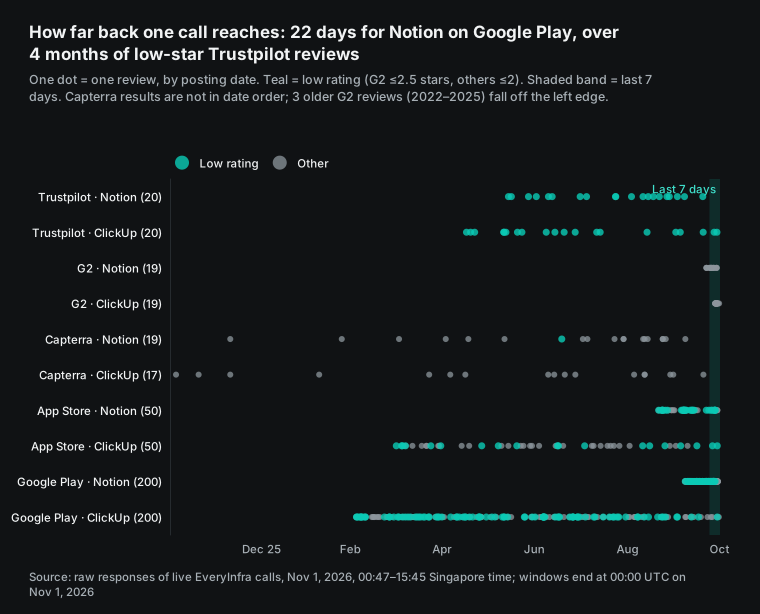
The chart shows a third case. The two Capterra rows are spread over a full year, and the order of results has no link to time. capterra/reviews has one required parameter, company, and no sort parameter. The 19 Notion reviews run from December 11, 2025 to October 9, 2026 in mixed order, and only 1 is in the last 30 days. The 17 ClickUp reviews look the same.
For the report, "take the newest N" does not work on Capterra. Ask for 100 rows each time and compare id and posted_at with last week's result. Capterra reviews are few, with 1 in 30 days for each brand, so a weekly run is enough.
G2 has a small trap too. The first row in the Notion response is not a review. It is a row with record_type: summary that holds the overall rating of 4.6, a total of 13,962 reviews, and the top pros and cons. The next 19 reviews are mostly newest first, but three reviews from 2022 to 2025 sit between them.
A subagent that uses the oldest date as "coverage" would think the call went back four years. The "filter by posted_at yourself" rule handles this. The summary row is useful, though. The report can quote this week's overall G2 rating without a separate g2/profile call.
Test 2: where the low-star reviews are
With coverage measured, we can compare where the low-star reviews are. We counted low-star reviews from the last 30 days that one call per site could see (G2 at or below 2.5 stars, the others at or below 2). Notion has 67 in total: 22 on the App Store, 42 on Google Play, 3 on Trustpilot, and 0 on G2 and Capterra. So 64 of 67, or 95.5%, are in the two app stores. ClickUp has 14 in total with a flatter spread. It has 5 on Trustpilot, 4 on the App Store, 5 on Google Play and 0 on G2 and Capterra.
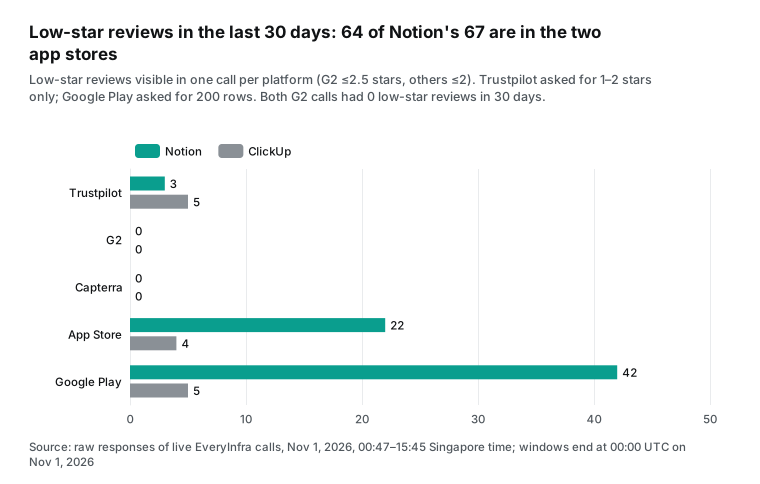
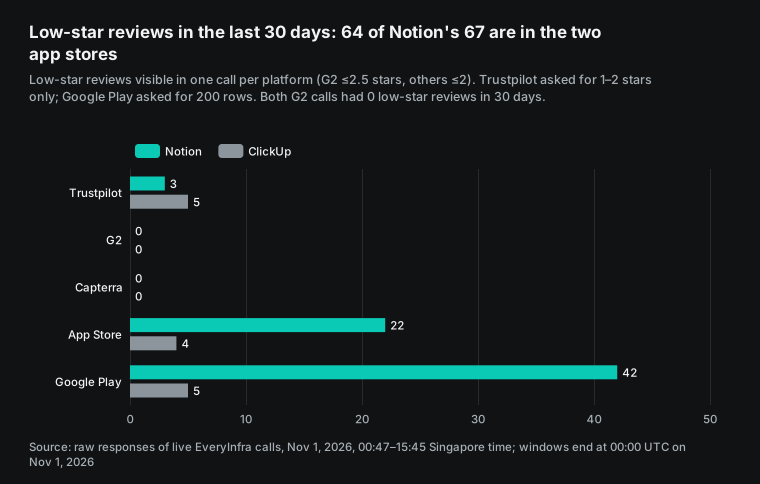
This spread has two lessons for the report. First, B2B review sites have few low-star reviews. Neither brand had a low-star G2 review in 30 days in a 20-row call. During the revision, a 100-row call for Notion returned 50 reviews: 41 from the last 30 days, and only 1 of them low-star. This fits the G2 summary rating of 4.6. A team that watches only G2 and Capterra could think that all is well.
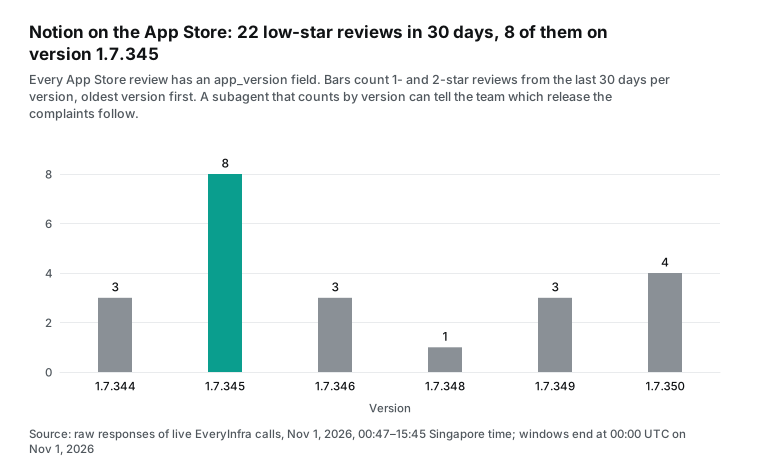
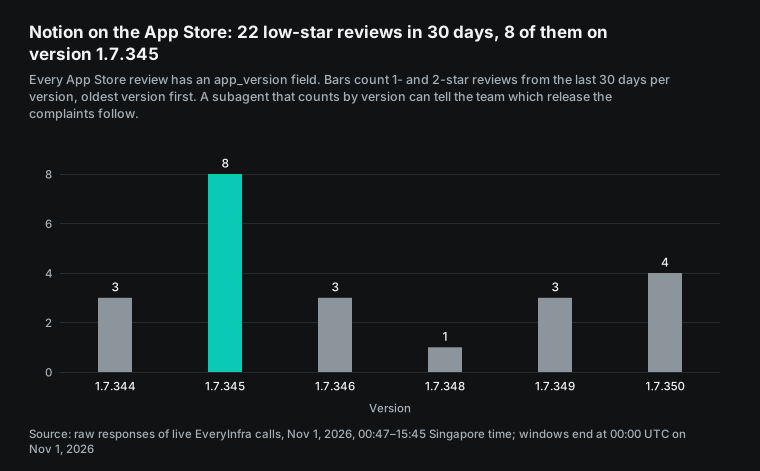
Second, app store complaints are many and specific, and most carry a version number. Every App Store row has an app_version field. Of the 22 low-star Notion reviews in 30 days, 8 come from version 1.7.345, more than any other version. A subagent that counts by version can write "low-star reviews cluster after 1.7.345", which an engineering team can act on.
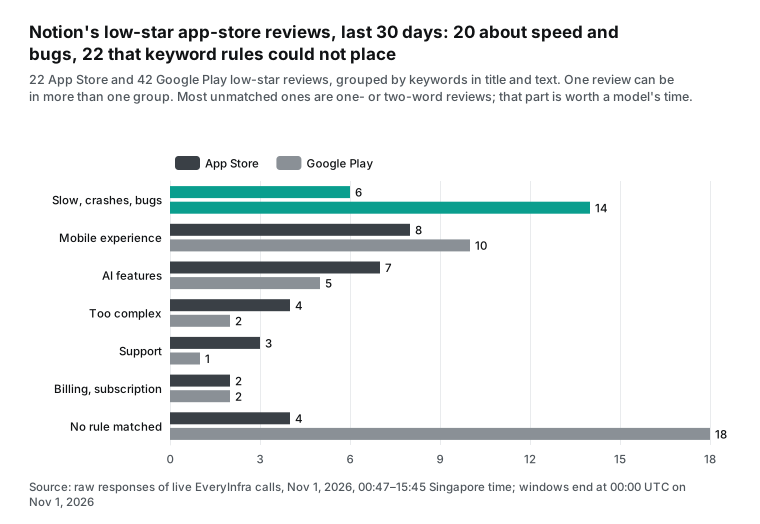
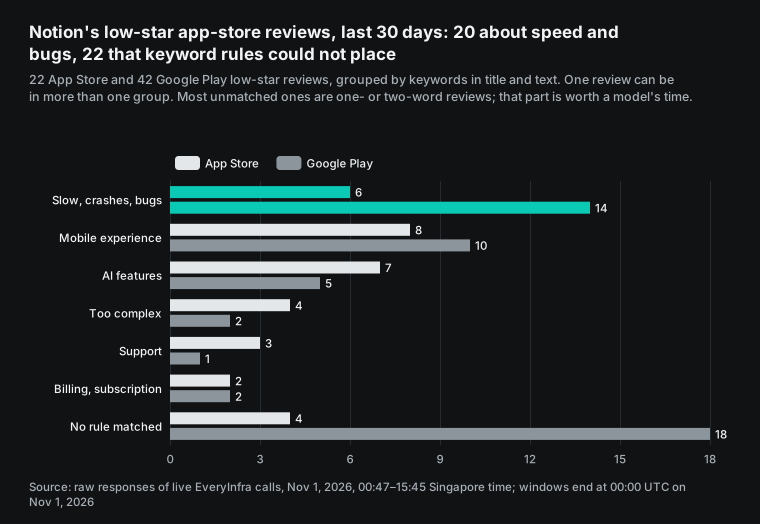
We also grouped these low-star reviews with keyword rules. The rules are in our recount script. For example, "slow", "crash" or "bug" in the title or text puts a review in the speed and bugs group. One review can be in more than one group.
Of the 64 low-star Notion reviews in the two app stores, 20 are about speed and bugs. 18 are about the mobile experience, and 12 are about AI features. The rules could not place 22 of them, and 18 of those are on Google Play. Most are reviews of one or two words.
That last group is where a model earns its cost. Rules handle long, clear complaints. They fail on "bad", "worst update" or sarcasm. So the subagent model should spend most of its tokens on the reviews that rules cannot place, not on a second read of every review.
One signal shows up only when you look across brands, but the sample is very small. In the last 30 days, 2 Notion App Store reviews and 1 ClickUp App Store review mention the "iPhone Duo". A 2-star Notion review from October 26 says that touch targets stop working, text disappears when selected, and the app crashes on iPhone Duo. A 1-star ClickUp review from October 29 has the title "No iPhone Duo support". The iPhone Duo is Apple's first foldable iPhone, and it went on sale in Apple Stores on October 23 (Apple Newsroom). In the first weeks of a new device, app support problems are common.
So three reviews do not prove a problem that either team must plan for. A good report line is "new device support, watch it, and check next week if the count grows". The useful lesson is about roles. In one brand it is one complaint. Across brands you can see that it points to one device. The main agent sees all subagent summaries, so this cross-brand step belongs in the main agent.
What the weekly report looks like, with this week's real data
It is easier to judge the output when you see it. The table below uses the week from October 25 to November 1, 2026 (UTC). For each site and brand it shows the new reviews that one call could see and how many were low-star. All values come from raw responses of live calls. This is the shape of the data that subagents give back to the main agent.
| Site | Notion new / low-star | ClickUp new / low-star | What the report should say |
|---|---|---|---|
| Trustpilot | 0 / 0 | 2 / 2 | Two 1-star ClickUp reviews: one about the support chatbot, one about 30-day notice for seat and billing changes. Send both to support and billing. |
| G2 | 12 / 0 | 19 / 0 | No low-star reviews for either brand. ClickUp gets about 47 a week, so set limit to 100. |
| Capterra | 0 / 0 | 0 / 0 | No new reviews this week. Results are not sorted, so compare id values with last week. |
| App Store | 9 / 6 | 2 / 2 | Notion complaints cluster on version 1.7.345. Three reviews across both brands mention the iPhone Duo; check again next week. |
| Google Play | 52 / 15 | 5 / 1 | The biggest source of Notion complaints. Send the 22 short reviews to the model. |
The main agent gets five short rows like these, plus each brand's overall rating. The G2 summary row gives one rating, and a trustpilot/profile call gives Notion a TrustScore of 2.2 from 442 reviews.
The main agent then makes three decisions. Which row grew a lot since last week? Does any issue repeat across sites or brands? Which original reviews deserve a link in the report? All three need all five results, so they stay in the main agent. Reading hundreds of reviews and counting by version and keyword is mechanical work, so it goes to subagents.
We suggest that the main agent returns fixed JSON and that your application turns it into an email or a chat message. Sessions accept an output schema in agent.text.format.schema, and the input plus the schema must stay under 4 MiB (Sessions docs). With a fixed schema, the report has the same shape every week, and week-over-week comparison is simple.
Test 3: one wrong parameter changes the result
The earlier sections mentioned some parameter problems. This table puts them together with the other cases that we saw. Each row is a live call. The last column is the rule that goes into the subagent instructions.
| What happened | Time (SGT, Nov 1, 2026) | Response | Charged | Fix |
|---|---|---|---|---|
Trustpilot with date: "last30days" returned more than 30 days | 00:47 | 14 rows from July 31 to October 20, only 3 in 30 days. After the evening fix, the retest at 19:22 returned 3 rows, all in 30 days. | Yes, $0.001389 | The preset works after the fix. For the weekly report, still filter by posted_at. |
G2 with an unsupported stars | 00:51 | 422 unknown_param, allowed: url, limit, sort | No | G2 has no star filter. Filter by rating yourself. |
| Several test jobs shared one key and used its 10 requests per minute | 00:52, 00:53 | 429, first retry_after 13 seconds; both retries worked | No | Wait for retry_after. |
Trustpilot with sort: "newest", a value that the catalog does not list | 00:51, 15:39 | First a 503. Then a 200 from a backup source, with 6 non-English rows and no source field. After the evening fix, newest is the same as recency. | 503 no; 200 yes, $0.001389 | Use catalog values. After the fix, a wrong value gets a 422. |
| Trustpilot, 200 rows, sync call | 15:40 | Timeout after 85 seconds, 503, with advice to use mode: "async" | No | Use async for a large limit and read the rows with everyinfra_get_job. The async call returned 131 rows. |
Capterra lookup by the name Notion | 00:49 | 20 rows, 3 without date or link, from a Google Sheets export add-on | Yes, $0.001389 | Use the product page URL /p/186596/Notion/. |
| Capterra lookup by product URL | 00:50 | 19 rows, not sorted, one pros field of 98,725 characters. After the evening fix, each field has 5,000 characters or fewer. | Yes, $0.001389 | Keep a cap on each text field, for example 2,000 characters. |
| G2 first row is a summary | 00:48 | record_type: summary, rating 4.6, 13,962 reviews | Yes, $0.001389 | Handle the summary on its own. Do not count it as a review. |
The Trustpilot row needs a closer look. The catalog describes date as a time preset, where last30days means the last 30 days. We sent it with 1-star and 2-star only and got 14 rows from July 31 to October 20, only 3 of them within 30 days. The same request with no date returned 20 rows back to June 13, and its first 14 rows were the same 14 rows.
So in the early run on November 1, the preset call stopped about three months back, not 30 days. A report that counted rows would say 14 low-star reviews in 30 days when the real number was 3.
That evening the gateway changed the presets to cut by posting date: 7, 30, 92, 183 and 366 days back. A wrong preset now gets a 422 before any charge. Our retest at 19:22 SGT returned 3 rows from October 3 to October 20. These are the 3 rows that were within 30 days in the early run. So you can now use last30days as a date filter. For the weekly report, we still read all 20 rows and filter by posted_at, because the subagent compares new reviews with older ones.
The Capterra name lookup shows a general point. Review sites list many products with the same or similar names, so a name lookup can mix in another product. The catalog note for company says to send the product link when possible to avoid this. With the product URL, all 19 rows were Notion reviews. Your brand list should store a link or an ID for each site, not a name. Decide this when you design the input.
The table below sums up our retests after the evening fix on November 1 (19:22–19:23 SGT), with the same parameters as during the day:
| Item | Early or afternoon run, November 1 | Evening retest | Charged |
|---|---|---|---|
Trustpilot sort: "newest" | 503 at 00:51; 200 at 15:39, but 6 rows not in English and no source | 200, the same rows as recency and as at 00:54, all in English | $0.001389 |
Trustpilot date: "last30days" | 14 rows, only 3 in 30 days | 3 rows, all in 30 days | $0.001389 |
Capterra product URL, limit: 100 | 86 rows, 375,315 bytes, longest field 103,138 characters | The same 86 rows, 144,341 bytes, longest field 1,154 characters | $0.001389 |
| Recommended weekly round (Notion) | 651,907 bytes, about 163k tokens | 420,933 bytes, about 105k tokens | — |
Test 4: the size of one week of raw reviews sets the model cost
Models charge by token, so you need the size of one week of raw reviews. Each row that a call returns goes into the subagent context as tool output. So limit sets how much the model reads. We measured three settings for Notion, each from real responses, and we did one evening retest of Capterra. Tokens use about 4 characters per token for English text (OpenAI Help Center: tokens).
| Setting (Notion, one call per site) | `limit` per site | Raw | About tokens | Text fields cut to 2,000 characters | About tokens |
|---|---|---|---|---|---|
| First round (00:47–00:57) | Trustpilot 20 (with last30days), G2 20, Capterra 20, App Store 50, Google Play 200 | 359,497 bytes | 89,874 | 246,387 bytes | 61,597 |
| Recommended | Trustpilot 20, G2 100, Capterra 100, App Store 50, Google Play 200 | 651,907 bytes | 162,977 | 422,892 bytes | 105,723 |
| Recommended, with the evening Capterra retest (19:23) | Same as above | 420,933 bytes | 105,233 | 420,732 bytes | 105,183 |
max_limit everywhere | Trustpilot 200, G2 100, Capterra 100, App Store 500, Google Play 200 | 1,021,087 bytes | 255,272 | 786,452 bytes | 196,613 |
For the recommended setting, G2 and Capterra come from two new calls at 15:42 and 15:43 SGT. G2 asked for 100 rows and returned 50 reviews plus 1 summary row. Capterra asked for 100 and returned 86. The other three calls are from the first round, with the same parameters. The max_limit round is about 197k tokens after the cut, 1.86 times the recommended setting. Most of the extra is 450 more App Store rows and 111 more Trustpilot rows, almost all far older than one week.
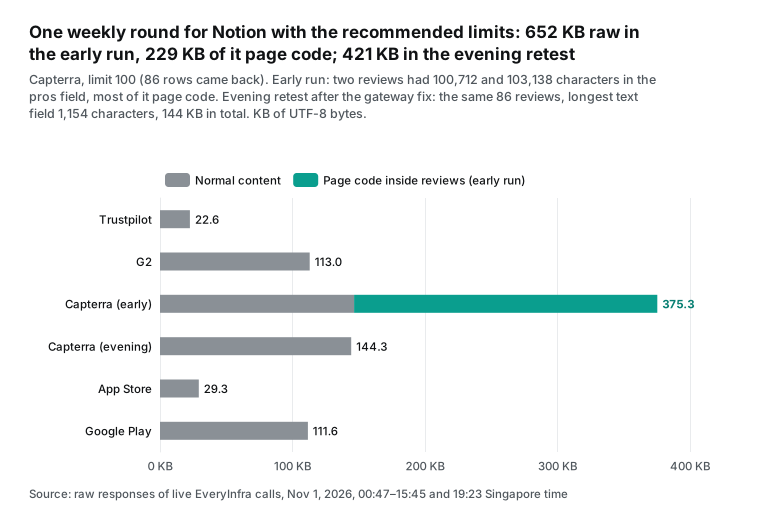
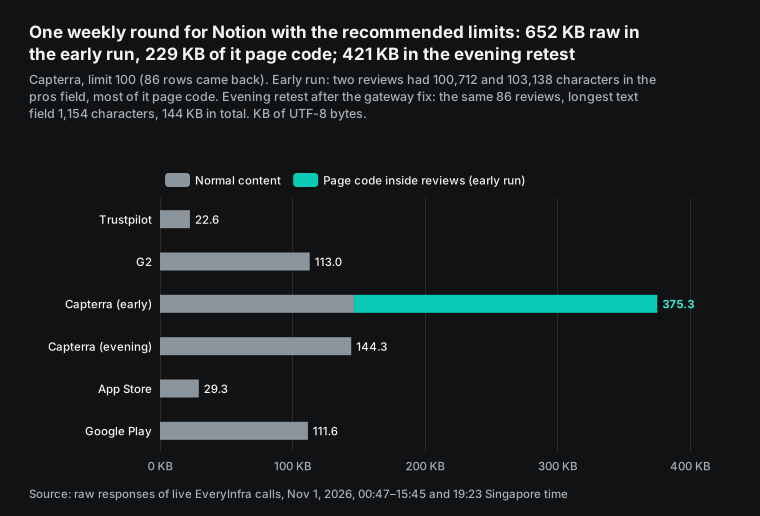
In the early run on November 1, more than a third of the 652 KB came from two reviews. In the first round, the 20-row Capterra response was 148,915 bytes, and one review in it was 114,983 bytes. Its pros field had 98,725 characters. It starts with a normal user comment and then continues with a long block of script data from the page. The 100-row response had two such reviews, with pros fields of 100,712 and 103,138 characters. The ClickUp Capterra response had one, with 103,556 characters.
The parser took page data along with the review.
With every text field cut to 2,000 characters, the 100-row Capterra response dropped from 375,315 bytes to 146,501 bytes. The recommended weekly round dropped from about 163k tokens to about 106k tokens. Without the cut, a subagent read 54% more.
That evening the gateway fixed the parser. It removes page code from pros, cons and text, and each field has 5,000 characters or fewer. Our retest at 19:23 SGT returned the same 86 reviews in 144,341 bytes, a little smaller than the 146,501 bytes after the early cut (see the table at the end of Test 3). The recommended weekly round is now about 105k tokens, only 0.5% different from the early number after the cut. So the model cost estimate below does not change.
A cap on text fields before data goes to a model is still a good habit. It costs nothing and protects you if another site has the same problem later.
This is where subagents pay off. Without them, the main agent reads all 106k tokens itself. With five subagents, each reads only its own site (Capterra, the biggest, is about 37k tokens after the cut), and the main agent gets a JSON summary of a few hundred tokens per site. The automations docs say the same: delegate each scheduled task to a subagent, and the detailed tool output stays out of the main context (Scheduled automations docs). Our Claude Code subagents test with TikTok brand accounts found raw data and summaries about 100 times apart.
The bill: openai agents api pricing and the data fee
Start with the data side. EveryInfra review endpoints charge per call, and the number of rows does not change the price. All five capabilities have a price_usd of 0.001389 (catalog; pricing page). One brand, five calls a week, costs $0.006945 a week and $0.3611 a year. Ten brands, your own plus nine competitors, cost $3.61 a year.
These numbers are not estimates. This article made 21 charged calls, 6 of them during the revision. Each returned charged_usd of 0.001389, for a total of $0.029169. The 6 failed calls (three 503s, one 422 and two 429s) were not charged. After the evening fix, we did 4 retests (3 on Trustpilot, 1 on Capterra). Each was charged $0.001389, for a total of $0.005556.
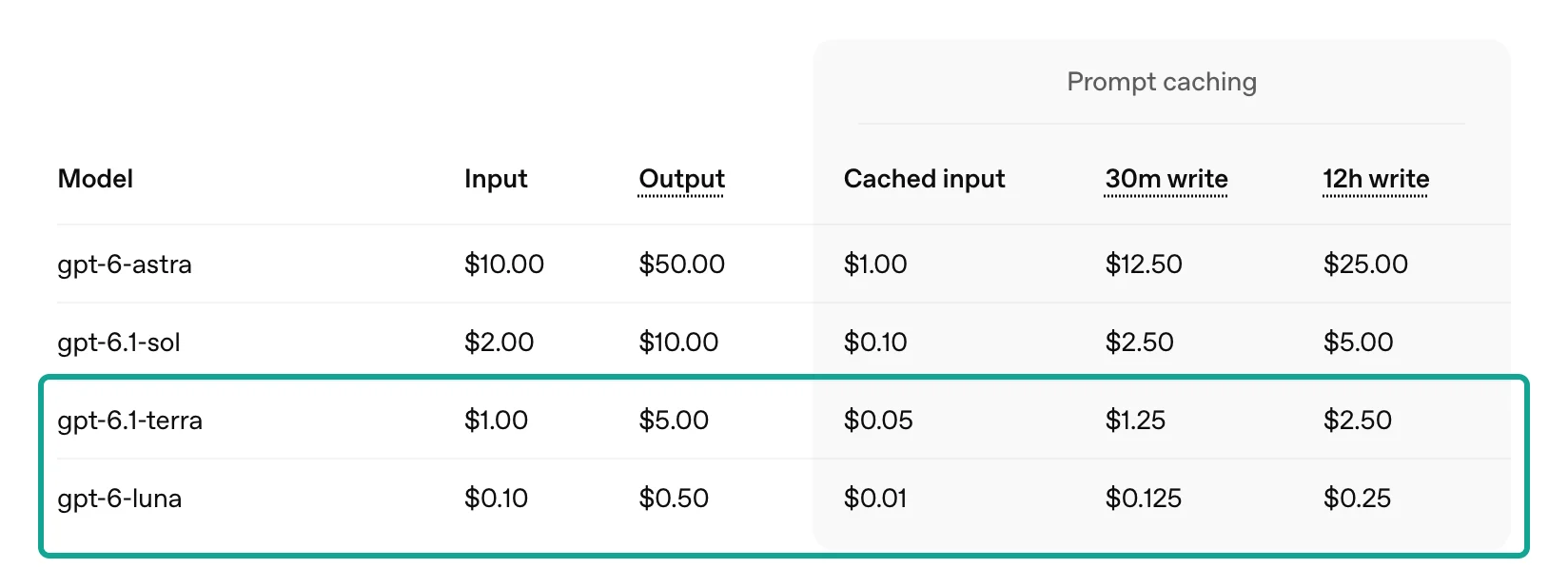
Now the OpenAI side. The overview page says that models bill at their API rates, tools at standard rates and hosted sandboxes at container rates (Agents API overview: pricing). Our setup uses no sandbox (environment: none) and no web search, so only model tokens remain. These are the standard list prices per million tokens, read on November 1, 2026 (OpenAI API pricing):
| Model | Input | Cached input | 30-minute cache write | Output |
|---|---|---|---|---|
| gpt-6-astra | $10.00 | $1.00 | $12.50 | $50.00 |
| gpt-6.1-sol | $2.00 | $0.10 | $2.50 | $10.00 |
| gpt-6.1-terra | $1.00 | $0.05 | $1.25 | $5.00 |
| gpt-6-luna | $0.10 | $0.01 | $0.125 | $0.50 |
Here is the method, so that you can use your own numbers. Input has three parts. One week of reviews with the recommended limits is about 105,723 tokens after the cut. Each of the 5 subagents adds about 8,000 tokens for instructions, tool description and context. The main agent adds about 20,000 tokens.
We price the first read at the 30-minute cache-write rate. For GPT-5.6 and later, a 30-minute cache write costs 1.25 times the input price, so this choice is on the high side (Prompt caching docs).
A subagent calls the model more than once in a turn. So we add two more reads of the reviews and the overhead at the cached rate. Output is 1,500 tokens per subagent and 3,000 for the main agent.
Only the review size is measured. The other inputs are assumptions, so we round to two significant figures. The estimate is about $0.029 on gpt-6-luna, about $0.27 on gpt-6.1-terra, about $0.55 on gpt-6.1-sol and about $2.9 on gpt-6-astra. The 100x spread between the models is only the ratio of list prices. The astra input price of $10.00 is 100 times the luna price, for any task.
| One brand, one week | Amount | One year (×52) | Basis |
|---|---|---|---|
| EveryInfra data calls (5) | $0.006945 | $0.3611 | Charged in our test |
| Model, gpt-6-luna | about $0.029 | about $1.5 | Estimate from list prices |
| Model, gpt-6.1-terra | about $0.27 | about $14 | Estimate from list prices |
| Model, gpt-6.1-sol | about $0.55 | about $29 | Estimate from list prices |
| Model, gpt-6-astra | about $2.9 | about $150 | Estimate from list prices |
Which assumption matters most? This table changes the overhead and the number of re-reads, three steps each. It uses gpt-6.1-terra, the recommended limits and the other assumptions as above.
| Overhead per subagent | 1 re-read | 2 re-reads | 4 re-reads |
|---|---|---|---|
| 4,000 tokens | $0.24 | $0.25 | $0.26 |
| 8,000 tokens | $0.27 | $0.27 | $0.29 |
| 16,000 tokens | $0.32 | $0.33 | $0.35 |
All nine results are between $0.24 and $0.35. Re-reads change almost nothing, because the cached price is 5% of the input price. Overhead changes a little more. The review size makes the big difference. With the same assumptions, max_limit everywhere costs about $0.40, and the small first round costs about $0.21. So first set limit and the text cut, and then choose the model.
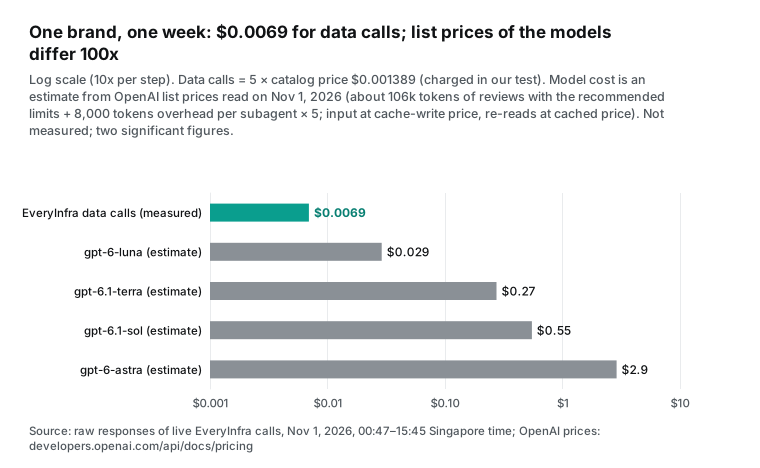
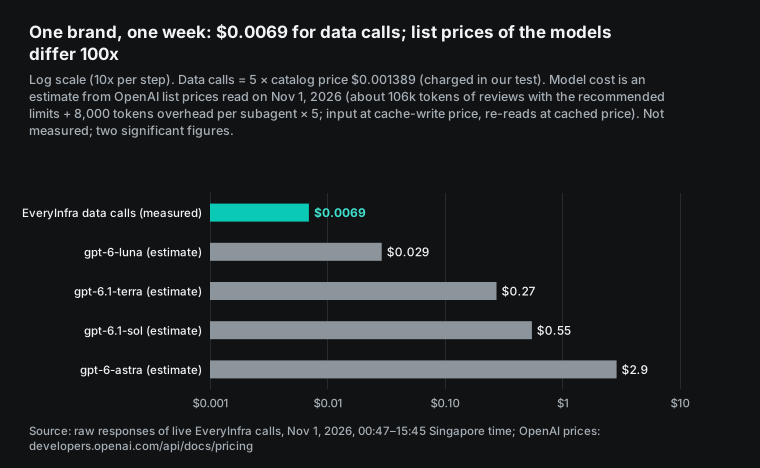
The table shows a ratio. The data fee is a small part of the total, and the model choice is the main variable. A low-star report reads a lot and makes simple decisions. So we would put subagents on gpt-6-luna or gpt-6.1-terra. Use a stronger model for the main agent only if the summary needs it.
A session can change model, reasoning.effort and service_tier later. It cannot change tools, instructions or multi_agent (configuration docs). So plan the model mix when you create the agent.
Two billing details are worth a note. First, the usage field in the Agents API is best-effort. It can be null, it can change later, and it is not a bill. It also has no separate count of cache-write tokens, so on models with a cache-write price, usage alone cannot give the exact model cost (Observability docs).
Second, if you add a hosted sandbox later, containers have list prices (4 GB at $0.12 per 20 minutes, billed by the minute with a 5-minute minimum since June 2, 2026). Since October 9, 2026, hosted sandboxes bill only during active turns, not for idle time between turns (OpenAI API pricing; changelog). Our setup has no sandbox, so this cost is zero.
Public beta limits to check before you ship
The Agents API is a public beta. Requests need the OpenAI-Beta: agents=v1 header, and the OpenAI SDKs use the beta.agents namespace (quickstart). The launch post says that OpenAI will change the product quickly during the beta on the way to general availability (OpenAI launch post). This table lists only limits that the docs state, and each one affects review monitoring.
| Limit | What the docs say | Effect on review monitoring | Source |
|---|---|---|---|
| Data residency and retention | Only US data residency. No Zero Data Retention, also with a self-hosted sandbox. | Public reviews are low risk. If the report mixes in support tickets, check compliance first. | Overview, your data |
| Schedules are not exact | Recurring runs get a small random delay. A busy target session makes the task wait. | The report arrives a few minutes after 9:00. Do not connect it to a step that needs exact timing. | Automations |
| Delivered is not done | An invocation with completed only means delivery worked. | Use turn.completed or turn.failed, and alert on failure. | Automations, webhooks |
| Vaults serve OpenAI-side connections only | Environment-origin HTTP connections do not use vault credentials. | The EveryInfra MCP server is public, so the default service origin fits. | MCP connections |
| No function tools in subagents | Subagents inherit MCP tools and credentials but cannot use function tools. | Only the main agent returns data. Your app stores it. | Multi-agent |
| Usage is not a bill | Best-effort, can be null, can change, no cache-write count. | Use the invoice for cost, not usage. | Observability |
| Size limits | Instructions plus tool configuration under 4 MiB. Each input under 4 MiB. | For long brand lists, send last week's summary, not last week's full data. | Configuration, sessions |
| MCP startup failure | With required: true, a failed start fails the turn with mcp_server_startup_failed (424). | This is what we want: no data, no report. | Errors |
What this setup cannot do, and what to watch
First, this setup reads public reviews. It does not reply to them. App Store and Google Play replies go through the Apple and Google developer consoles (Apple: ratings, reviews and responses; Google Play Console Help: ratings and reviews). Our responses include reply_text for Google Play and Trustpilot and vendor_response for Capterra. So the report can mark which reviews have a reply, but a person still writes it.
Second, do not use this setup to manipulate reviews. The US Federal Trade Commission final rule from August 2024 bans fake reviews and rewards that depend on positive or negative reviews. The rule names AI-generated fake reviews (FTC press release, 2024-08-14). A low-star report is for seeing problems early, not for changing the reviews.
Third, set the low-star threshold per site. G2 uses half stars, so we count 2.5 or lower as low. The other sites use 2 or lower. Neither brand had a low-star G2 review in 30 days. If your product is the same, raise the G2 threshold to 3 stars. Otherwise the G2 line always says 0, and readers stop looking at it.
Fourth, let the subagent apply keyword rules first. Send only the reviews that rules cannot place, like the 22 in Test 2, to the model. Programmatic tool calling is built for this. It filters results in code and brings only the relevant part back into context (OpenAI launch post; programmatic tool calling docs).
Recent changes
The Agents API changes every few weeks during the beta. These are the changes that affect this setup, newest last.
| Date | Change | What it means for this setup |
|---|---|---|
| September 10, 2026 | Public beta with hosted sandboxes, subagents and context compaction, and no platform fee (changelog; forum announcement) | Less agent code to maintain, so a first version is quick to build |
| October 9, 2026 | Hosted sandboxes bill only during active turns and can be pre-warmed (changelog) | A monitor that runs scripts no longer pays for idle time |
| October 16, 2026 | Ultrafast mode; hosted sandboxes include the Artifact SDK for spreadsheets and documents (changelog) | The report can be a spreadsheet file, but that needs a sandbox |
| October 20, 2026 | 12-hour prompt caching, with writes at 2.5 times the input price (changelog; prompt caching docs) | Weekly runs are far more than 12 hours apart, so caching helps only inside one run |
| October 26, 2026 | GPT-6.1 Terra released (changelog) | A price point between luna and sol; the $0.2154 weekly estimate uses it |
| October 28, 2026 | Eligible ChatGPT Pro and Business subscribers can claim up to $500 a month in API credits (changelog) | A small team may cover the model cost of this monitor with those credits |
| November 30, 2026 | Planned Agent Builder shutdown, announced on June 3, 2026 (deprecations) | Move old flows to the Agents API or the Agents SDK before that date. On the developer forum, OpenAI staff also told a user to use Agents API vaults for flows that rotate credentials (OpenAI developer forum) |
FAQ
How does openai agents api pricing work, and is there a platform fee?
There is no separate platform fee. The OpenAI launch post says there are no additional fees for the Agents API, and you pay for the tokens and tools that agents use. The overview page says that models bill at the selected model's rates, tools at standard rates and hosted sandboxes at container rates.
With no sandbox, our model estimate for one brand per week is about $0.029 (gpt-6-luna) to about $2.9 (gpt-6-astra). Data calls add $0.006945. (Question source: Google suggestions "openai agents api pricing" and "openai agents api cost". Basis: launch post, overview, pricing.)
openai agents api vs sdk: which one should I use?
Use the Agents API to let OpenAI run the loop, keep sessions and run schedules. Use the Agents SDK if the agent must run in your own application with your own storage. In the OpenAI comparison, integration effort is "Low" for the Agents API and "Medium" for the SDK. Teams that need Zero Data Retention must use the SDK for now. (Question source: Google suggestion "openai agents api vs sdk". Basis: Agents guide, overview.)
Can the openai agents sdk mcp client connect to the same EveryInfra server?
Yes. The SDK MCP docs support Streamable HTTP. Use https://api.everyinfra.com/mcp with your key, and the tool name and parameters are the same as in this article. The difference is that you write the schedule, the retries and the credential storage. (Question source: Google suggestions "openai agents sdk mcp" and "openai agents sdk mcp server". Basis: Agents SDK MCP docs, MCP transports spec.)
Which permissions does an openai agents api key need?
The quickstart lists api.agents.read and api.agents.write for sessions and api.responses.write for model inference. To manage vaults, add api.vaults.read and api.vaults.write. Keep this OpenAI key on your server, out of agent instructions and out of any sandbox. (Question source: Google suggestion "openai agents api key". Basis: quickstart, sandbox security.)
Can openai agents api computer use read the review sites directly?
The Agents API added computer use on September 29, 2026. An agent can work in an OpenAI-hosted browser, and your application handles approvals and sign-in. But paging through reviews in a browser needs a sandbox, takes longer and uses many more tokens.
The Trustpilot, G2 and Capterra pages also block scripted access: plain curl requests to all three returned 403 in our test. For structured reviews, a data API is more stable and costs less. (Question source: Google suggestion "openai agents api computer use". Basis: changelog.)
Is it safe to give an API key to an AI agent?
In the r/artificial thread on the launch, one comment says "Good luck trusting AI with passwords and secrets". In the OpenAI design, a vault does not return the secret when you read it. OpenAI adds MCP authentication at connection time, so agent code does not see the key.
The sandbox security page also says that values in environment variables are readable by agent code. So put the key in a vault, not in env, and give this agent a separate key. (Question source: r/artificial thread. Basis: Vaults, sandbox security.)
Get started
- Sign up for EveryInfra, get an API key and follow the quickstart to call the free catalog once. Check that
trustpilot/reviews,g2/reviews,capterra/reviews,app_store/reviewsandgoogle_play/reviewsshowavailable: true. Parameters and fields are on the capability pages: Trustpilot reviews, G2 reviews, Capterra reviews, App Store reviews, Google Play reviews. - Find the link or ID for each brand on each site and store them in one table. Site overviews are on the Trustpilot API, G2 API, Capterra API, App Store API and Google Play API pages.
- Before you use the Agents API, call each site once over REST for your brand. Measure how many days one call covers and set
limitas in Test 1. - On the OpenAI side, create the vault, the agent and the automation from the Step 4 example. Start one manual invocation and read the report and the session events.
- After two weeks, compare the model cost with your invoice. Move subagents to a lower-cost model if the quality stays the same.
To turn review data into a product for customers, read how review data becomes a paid product. For a similar job with ChatGPT scheduled tasks, see ChatGPT scheduled tasks as a demand radar. All capabilities and prices are in the data market.
References
- Agents API overview, OpenAI developer docs, read 2026-11-01, https://developers.openai.com/api/docs/guides/agents-api/overview
- Agents API quickstart, OpenAI developer docs, read 2026-11-01, https://developers.openai.com/api/docs/guides/agents-api/quickstart
- Agents API architecture, OpenAI developer docs, read 2026-11-01, https://developers.openai.com/api/docs/guides/agents-api/architecture
- Configuring agents, OpenAI developer docs, read 2026-11-01, https://developers.openai.com/api/docs/guides/agents-api/configuration
- Sessions, OpenAI developer docs, read 2026-11-01, https://developers.openai.com/api/docs/guides/agents-api/sessions
- Scheduled automations, OpenAI developer docs, read 2026-11-01, https://developers.openai.com/api/docs/guides/agents-api/sessions/automations
- Webhooks, OpenAI developer docs, read 2026-11-01, https://developers.openai.com/api/docs/guides/agents-api/sessions/webhooks
- Multi-agent, OpenAI developer docs, read 2026-11-01, https://developers.openai.com/api/docs/guides/agents-api/multi-agent
- Vaults, OpenAI developer docs, read 2026-11-01, https://developers.openai.com/api/docs/guides/agents-api/tools/vaults
- MCP connections, OpenAI developer docs, read 2026-11-01, https://developers.openai.com/api/docs/guides/agents-api/tools/mcp
- OpenAI-hosted sandboxes, OpenAI developer docs, read 2026-11-01, https://developers.openai.com/api/docs/guides/agents-api/environments/openai-hosted
- Sandbox security, OpenAI developer docs, read 2026-11-01, https://developers.openai.com/api/docs/guides/agents-api/environments/security
- Errors and recovery, OpenAI developer docs, read 2026-11-01, https://developers.openai.com/api/docs/guides/agents-api/errors
- Observability and usage, OpenAI developer docs, read 2026-11-01, https://developers.openai.com/api/docs/guides/agents-api/observability
- API pricing, OpenAI developer docs, read 2026-11-01, https://developers.openai.com/api/docs/pricing
- Changelog (entries from 2025-03-11 to 2026-10-30), OpenAI developer docs, read 2026-11-01, https://developers.openai.com/api/docs/changelog
- Deprecations (Agent Builder), OpenAI developer docs, read 2026-11-01, https://developers.openai.com/api/docs/deprecations
- Agents (compare agent runtime options), OpenAI developer docs, read 2026-11-01, https://developers.openai.com/api/docs/guides/agents
- Your data, OpenAI developer docs, read 2026-11-01, https://developers.openai.com/api/docs/guides/your-data
- Prompt caching, OpenAI developer docs, read 2026-11-01, https://developers.openai.com/api/docs/guides/prompt-caching
- Tool search, OpenAI developer docs, read 2026-11-01, https://developers.openai.com/api/docs/guides/tools-tool-search
- Programmatic tool calling, OpenAI developer docs, read 2026-11-01, https://developers.openai.com/api/docs/guides/tools-programmatic-tool-calling
- Compaction, OpenAI developer docs, read 2026-11-01, https://developers.openai.com/api/docs/guides/compaction
- Create automation (API reference), OpenAI, read 2026-11-01, https://developers.openai.com/api/reference/resources/beta/subresources/agents/subresources/automations/methods/create
- Agents (API reference), OpenAI, read 2026-11-01, https://developers.openai.com/api/reference/resources/beta/subresources/agents
- Introducing the Agents API, OpenAI, 2026-09-10, https://openai.com/index/introducing-the-agents-api/
- Introducing the Agents API and hosted sandboxes, OpenAI developer forum, 2026-09-10, https://community.openai.com/t/introducing-the-agents-api-and-hosted-sandboxes/1396481
- Agent Builder MCP Secrets API, OpenAI developer forum, read 2026-11-01, https://community.openai.com/t/agent-builder-mcp-secrets-api/1368113
- OpenAI launches Agents API public beta built on Codex harness, Reddit r/artificial, read 2026-11-01, https://www.reddit.com/r/artificial/comments/1wctpbu/openai_launches_agents_api_public_beta_built_on/
- openai/openai-agents-python, GitHub, read 2026-11-01, https://github.com/openai/openai-agents-python
- Model context protocol (Agents SDK docs), OpenAI, read 2026-11-01, https://openai.github.io/openai-agents-python/mcp/
- MCP specification: Transports (2025-06-18), Model Context Protocol, https://modelcontextprotocol.io/specification/2025-06-18/basic/transports
- RFC 6750: OAuth 2.0 Bearer Token Usage, IETF, 2012-10, https://datatracker.ietf.org/doc/html/rfc6750
- Time Zone Database, IANA, read 2026-11-01, https://www.iana.org/time-zones
- crontab(5), Linux man-pages, read 2026-11-01, https://man7.org/linux/man-pages/man5/crontab.5.html
- Ratings, reviews, and responses, Apple Developer, read 2026-11-01, https://developer.apple.com/app-store/ratings-and-reviews/
- View & analyze your app's ratings & reviews, Google Play Console Help, read 2026-11-01, https://support.google.com/googleplay/android-developer/answer/138230
- Understanding and counting tokens, OpenAI Help Center, read 2026-11-01, https://help.openai.com/en/articles/4936856-what-are-tokens-and-how-to-count-them
- Federal Trade Commission Announces Final Rule Banning Fake Reviews and Testimonials, US Federal Trade Commission, 2024-08-14, https://www.ftc.gov/news-events/news/press-releases/2024/08/federal-trade-commission-announces-final-rule-banning-fake-reviews-testimonials
- Notion Reviews, Trustpilot, read 2026-11-01, https://www.trustpilot.com/review/notion.so
- Notion Reviews, G2, read 2026-11-01, https://www.g2.com/products/notion/reviews
- Notion, Capterra, read 2026-11-01, https://www.capterra.com/p/186596/Notion/
- Notion app page, App Store, read 2026-11-01, https://apps.apple.com/us/app/notion-notes-tasks-ai/id1232780281
- Notion app page, Google Play, read 2026-11-01, https://play.google.com/store/apps/details?id=notion.id
- EveryInfra data catalog (trustpilot), EveryInfra, read 2026-11-01, https://api.everyinfra.com/api/v1/social/catalog?platform=trustpilot
- EveryInfra data catalog (all), EveryInfra, read 2026-11-01, https://api.everyinfra.com/api/v1/social/catalog
- ClickUp, Capterra, read 2026-11-01, https://www.capterra.com/p/158833/ClickUp/
- ClickUp app page, Google Play, read 2026-11-01, https://play.google.com/store/apps/details?id=co.mangotechnologies.clickup
- iPhone Duo arrives at Apple Store locations worldwide, Apple Newsroom, 2026-10, https://www.apple.com/newsroom/2026/10/iphone-duo-arrives-at-apple-store-locations-worldwide/
Reference BL-59