Apify Twitter Scraper Alternative: Search, Profile Posts and Replies per 1,000 Rows, Measured
Apify Tweet Scraper V2 lists $0.40 per 1,000 tweets. Our measured search cost was $0.0033. Replies were 10-25x cheaper, but capped at 50 per post.
The most used tweet scraper in the Apify Store is Tweet Scraper V2. Its public price is $0.40 per 1,000 tweets on every plan. On November 3, 2026, we ran 7 keyword searches through the EveryInfra twitter/search endpoint. Each call cost $0.000556 and returned 200 tweets.
After we removed duplicates, we had 1,190 unique tweets for $0.003892. That is $0.00327 per 1,000, or 122 times less than V2. Among popular Store tweet scrapers with full keyword search, the cheapest is xquik at $0.15, so the gap there is 46 times.
For 1,000 posts from one account, we measured $0.00334 per 1,000 unique posts. That is 120 times less than V2 and 36 times less than the cheapest popular option ($0.12). Replies are different. Our twitter/comments endpoint returns at most 50 replies per post.
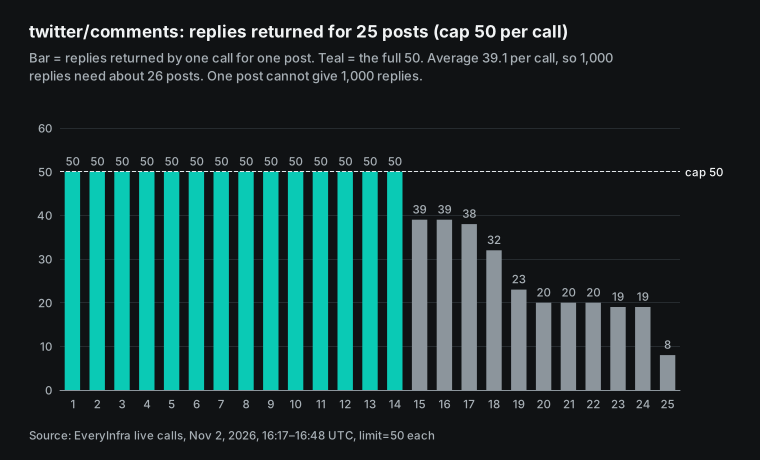
Across 25 posts, the mean was 39.1 replies per call, or $0.0142 per 1,000 replies. That is 10 to 25 times cheaper than the Apify reply scrapers we priced. But you cannot get 1,000 replies from one post with our endpoint. For that job, Apify is the better tool.
How to read the numbers in this article
Our "price per 1,000" is simple. We take the money that was actually charged, divide it by the rows that actually came back, and multiply by 1,000. EveryInfra bills per request, and one request has one price whatever the row count. Most Twitter scrapers in the Apify Store bill per result: each item written to the dataset is one charge. The two units are only comparable on the same denominator.
On our side, the denominator is unique rows, deduplicated by post ID. We never use the limit value as the denominator. So when a call returns fewer rows, or repeats rows, our price goes up in this article, not down. On the Apify side, we only use public material: Store pages, the pricing page, the docs and the public actor API that needs no account.
We did not sign up for Apify and did not run any actor. An actor is the Apify name for a cloud scraping program. So every Apify number below is a list price, not a measured bill.
Apify Twitter scraper vs EveryInfra: the summary table
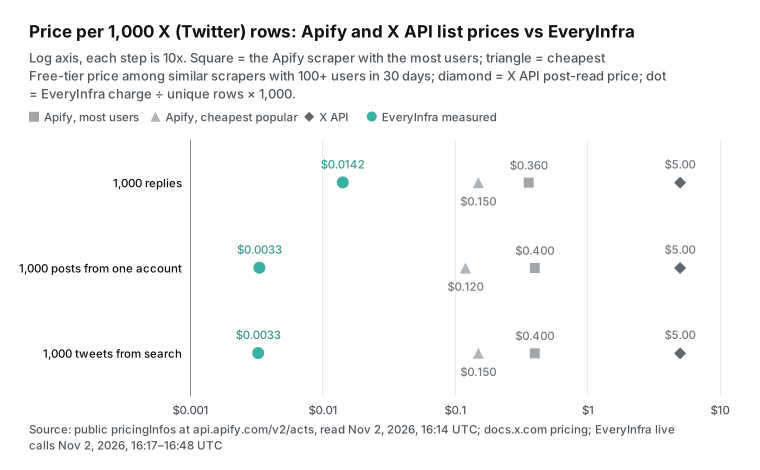
This table is the result. For each data type, we show two Apify scrapers. The first is the main scraper, the one with the most users in the last 30 days. The second is the cheapest scraper on the Free tier among those with at least 100 users in the last 30 days. We read all prices from the pricingInfos field of the public actor API at 16:14 UTC on November 2, 2026 (00:14 Singapore time on November 3).
The Apify docs map plans to price tiers. Free uses the Free price, Starter uses Bronze, Scale uses Silver, and Business uses Gold. Platinum and Diamond are for enterprise customers (Actor pricing and costs). For the Twitter scrapers in this article, the Free and Business prices are the same or differ by less than half. Our numbers all come from live calls. We read the charge from billing.charged_usd and the rows from results.
| Data | EveryInfra endpoint | Calls / rows / unique / charged | EveryInfra per 1K (unique) | Apify main scraper | Gap | Cheapest popular | Gap |
|---|---|---|---|---|---|---|---|
| Keyword search | twitter/search | 7 / 1,400 / 1,190 / $0.003892 | $0.00327 | Tweet Scraper V2, $0.40 | 122x | xquik, $0.15 | 46x |
| Posts from one account | twitter/user_posts + from: search | 8 / 1,592 / 1,330 / $0.004448 | $0.00334 | V2 with twitterHandles, $0.40 | 120x | feedminer, $0.12 | 36x |
| Replies to posts | twitter/comments | 25 / 977 / 977 / $0.0139 | $0.0142 | Replies Scraper, 20 posts x 50, $0.36 | 25x | xquik Reply, $0.15 | 10.5x |
Each gap is the Apify price divided by our price. Four notes apply. First, all three gaps come from page size. Search and account posts return up to 200 rows per call, and replies return up to 50. A full page spreads one fee over many rows. If you need one or two rows per call, the result flips, and the break-even section shows the math.
Second, the $0.36 reply figure uses a rule from the apidojo reply scraper page. On paid plans, about the first 40 replies per post are free. With 50 replies per post, one post costs a $0.014 query fee plus 10 items at $0.0004. Third, the xquik README says that Apify bills platform usage on top of its result fee (xquik README).
So $0.15 is not the full bill. Fourth, Apify prices change often. The "What changed recently" section lists the dates.
The $0.15 search price is not only xquik. The scrape.badger tweet scraper had 709 users in 30 days, with $0.15 on Free and $0.12 on Business. Feedminer is lower at $0.12, but its keyword terms without from: now come from X Communities. So we use feedminer only in the account row.
Apify tweet scraper pricing: V2, Unlimited and the reply scraper
People who search for "apify tweet scraper pricing" usually see several scrapers with similar names. One developer, apidojo, publishes three of them: Tweet Scraper V2, Twitter (X.com) Scraper Unlimited and the Twitter (X) Replies Scraper. All three use pay-per-event pricing. The developer defines billable events, and each run charges the event count times the event price.
The pay-per-event docs explain who pays for compute. By default, the developer pays platform usage out of revenue. A developer can switch on "Pay per event + usage", and then the user also pays platform usage. Apify covers platform usage for users on the free plan. V2 has one event. Each tweet written to the dataset costs $0.0004, which is $0.40 per 1,000 on all four plans.
The V2 Store page has a pricing note with four rules. The screenshot below shows the original text.
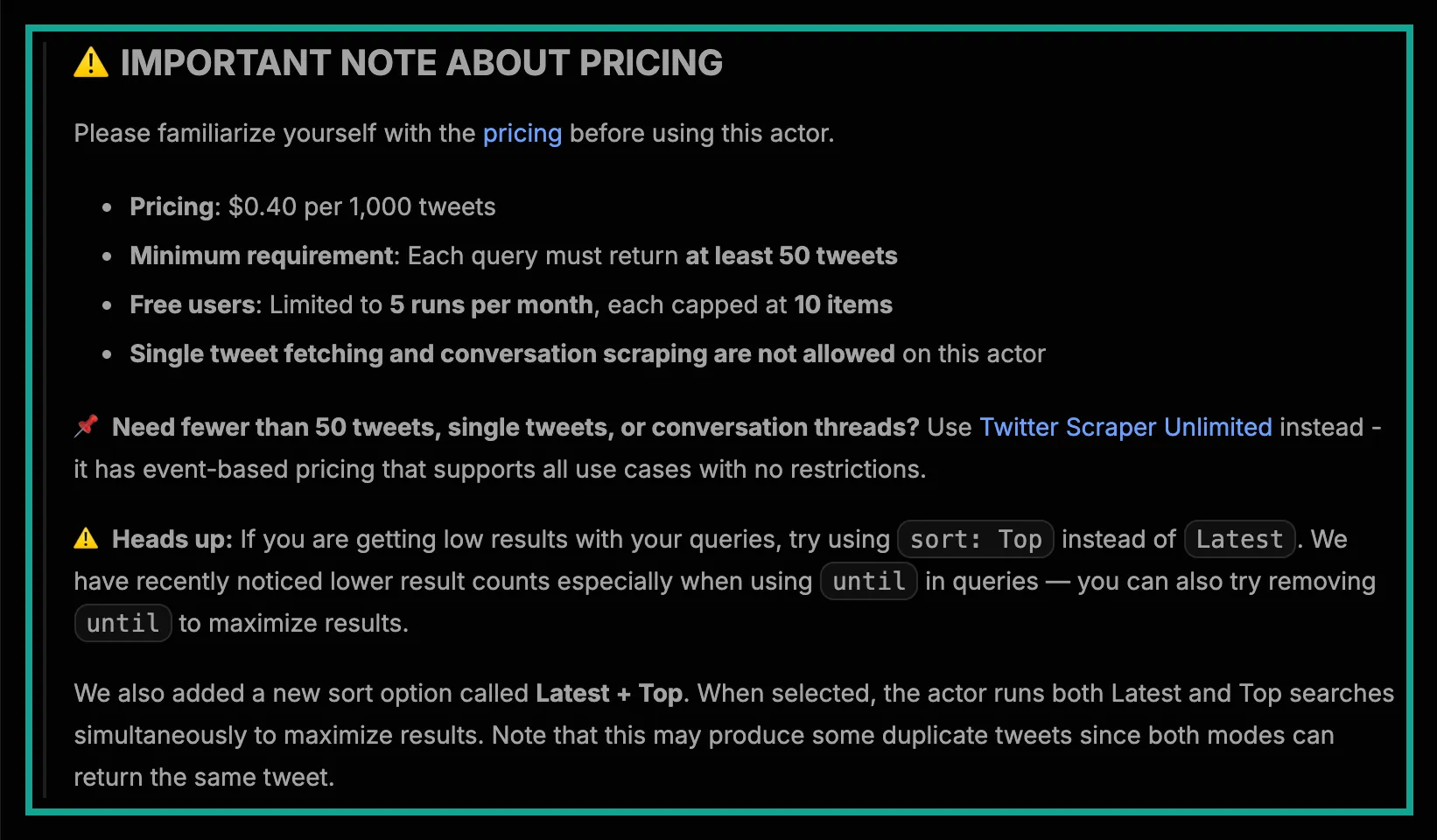
Two of these rules matter most for cost. The first rule is "at least 50 tweets per query". V2 is not built for small, exact queries, such as three posts from a small account this week. The page sends those jobs to Unlimited.
The second rule is the free-user cap of 5 runs per month with 10 items each. The free plan includes $5 of monthly platform credit (Apify pricing). But V2 gives free users only 50 tweets a month. The page also says that free users cannot call the actor through the API.
So a real V2 workload needs at least the Starter plan. The table shows the plans and the price tier that each plan uses.
| Apify plan | Monthly price | Price tier for actors | What it means for V2 |
|---|---|---|---|
| Free | $0, with $5 platform credit | Free | Demo mode: 5 runs, 10 items each, no API |
| Starter | From $19 | Bronze | Full V2 at $0.40 per 1,000 |
| Scale | $199 | Silver | Same V2 price |
| Business | $999 | Gold | Same V2 price |
The usage included in a plan does not roll over to the next cycle. The V2 page also has an "Important Note" section with two more limits. You get at most 1 concurrent run with up to 5 batched queries. And the page says "No monitoring": do not run the same query again and again at short intervals.
Unlimited has a more complex price. It charges $0.016 per query, which is each search term, handle or list. That fee includes about the first 40 results. Extra items cost $0.0004 to $0.002 each, and the price depends on how many queries are in one run. Up to 5 queries per run, each extra item costs $0.0004. Six to 10 queries cost $0.0008, 11 to 30 cost $0.0012, 31 to 100 cost $0.0016, and more than 100 cost $0.002.
A single tweet URL costs $0.05, and each run has a $0.02 minimum. All of this comes from the Unlimited actor metadata. So more queries in one run make each extra item more expensive. That is the opposite of the usual "bulk is cheaper" rule. One query for 1,000 tweets costs $0.016 plus 960 items at $0.0004, or about $0.40, the same as V2.
The reply scraper has a third set of rules. Its Store page charges a query fee for each post: $0.014 in the default flow and $0.016 with useSearch. Each reply costs $0.0004. Paid plans get about the first 40 items per query for free.
Free plans get a demo mode only, with 5 runs a month and 10 items per run. So 1,000 replies from one post cost about $0.014 + 960 x $0.0004 = $0.398. And 50 replies from each of 20 posts cost 20 x ($0.014 + 10 x $0.0004) = $0.36.
| Apify scraper (developer) | Event prices (Free tier to Business tier) | Fixed fee per run or query | Minimums and limits (page text) | Users, last 30 days |
|---|---|---|---|---|
| Tweet Scraper V2 (apidojo) | $0.0004 per item, all tiers | None | 50 tweets per query; free: 5 runs, 10 items | 10,137 |
| Scraper Unlimited (apidojo) | $0.0004 to $0.002 per extra item | $0.016 per query; $0.05 per tweet URL; $0.02 per run minimum | No minimum rows | 2,366 |
| Replies Scraper (apidojo) | $0.0004 per item | $0.014 per post ($0.016 search flow); about 40 free items per post on paid plans | Free: demo mode only | 132 |
| Cheapest Twitter Scraper (kaitoeasyapi) | $0.00025 to $0.00018 | None | None | 5,398 |
| X Tweet Scraper (xquik) | $0.00015, all tiers | None; platform usage extra | None | 3,374 |
| X Reply Scraper (xquik) | $0.00015 | None; platform usage extra | None | 165 |
| X Tweet Scraper (feedminer) | $0.00012 to $0.0001 | None | Keyword search note below | 107 |
| Profile Posts Scraper (scraper_one) | $0.0004 to $0.0003 | $0.0025 per run | None | 389 |
| Twitter Scraper (danek) | $0.0003 to $0.00024 | Start fee per GB of memory | None | 406 |
We read every price in this table from public actor metadata between 00:14 and 00:16 Singapore time on November 3 (16:14 to 16:16 UTC on November 2). User counts come from stats.totalUsers30Days in the same API. The Get Actor API docs describe that field. The Store has more than 400 scrapers with Twitter or X in the name. A later section shows how their prices spread.
How we tested, and what counted as a pass
We wrote our pass rules before we looked at any data. Each data type needed at least 2 live calls at 2 or more different times. Every price per 1,000 had to use unique rows. If Apify was cheaper or better for a task, the summary table and the text had to say so. At least 2 calls with no data had to record their charge.
All calls went to POST https://api.everyinfra.com/api/v1/social. For each call, we logged the send time, HTTP status, duration, row count and charged_usd. A script then recomputed every number from the raw responses. Every number in the text, tables and charts comes from that script.
| Scenario | Endpoint and parameters | Live calls | Time (UTC, November 2) | Purpose |
|---|---|---|---|---|
| Keyword search | twitter/search, keyword "openai", limit 200, one Latest sort, five day windows | 7 + 1 retest | 16:17 to 16:31, retest 16:47 | Rows per call, sort overlap, day windows |
| Account posts | twitter/user_posts for NASA, then 7 from:NASA searches | 8 + 1 retest | 16:19 to 16:33, retest 16:47 | How far back one account goes |
| Replies | twitter/comments on 25 posts, limit 50 | 25 + 1 retest | 16:19 to 16:40, retest 16:48 | Rows per call on big and small posts |
| No data | No key, rate limit, extra parameter, unknown user, unknown post, full URL as id | 6 | 16:21 to 16:29 | Which failures cost money |
| Other languages | Spanish keyword, El Pais account, Chinese keyword | 3 | 16:40 to 16:42 | Rows per call outside English |
All times in that table are UTC on November 2. Add 8 hours for Singapore time on November 3. The 52 calls cost $0.025576 in total. Our test key allows 10 requests per minute. One call hit that limit, and the response said "Nothing was charged". We waited 40 seconds and sent it again.
To pick reply targets, we took posts from brand accounts such as OpenAI and NASA and from search results. Their reply counts went from a few hundred to more than 20,000. We also picked one small post with 8 replies as a control. We hide post text and the names of ordinary users in this article. We name only brand and institutional accounts.
Test 1: the most common apify twitter scraper job, 1,000 tweets from a keyword search
On Apify, a tweet search usually starts with V2 input searchTerms and maxItems. The example input in the V2 actor metadata also has sort (Latest or Top), tweetLanguage, onlyVerifiedUsers and onlyImage. Our matching endpoint is twitter/search. It needs keyword and accepts limit and sort. You put X advanced search operators, such as from:, since:, until:, lang: and min_faves:, inside keyword.
The X developer docs explain the query syntax. A community list on GitHub covers the advanced search operators in more detail. Here is the first call we sent.
# 16:17:37 UTC Nov 2 (00:17:37 Singapore time Nov 3): HTTP 200, 41.8 s, count 200, charged_usd 0.000556
curl -s https://api.everyinfra.com/api/v1/social \
  -H "Authorization: Bearer $EVERYINFRA_API_KEY" \
  -H "Content-Type: application/json" \
  -d '{"platform":"twitter","action":"search","params":{"keyword":"openai","limit":200}}'
All 7 searches returned a full page of 200 rows, so 1,400 rows in total. The first call used the default sort, which is Top. The second used sort: latest. The two pages shared 137 posts, so the second call added only 63 new posts. "Latest" is also not strict time order. The oldest post in the Latest page was from November 2023.
The V2 page describes the same effect. Its new "Latest + Top" sort runs both searches and "may produce some duplicate tweets". With per-row billing, those duplicates count as rows too.
Next, we cut "openai" into five two-day windows with since: and until:. The windows started on 2026-10-30, 2026-10-27, 2026-10-24, 2026-10-21 and 2026-10-18. Each call still returned 200 rows. The new unique posts per call were 168, 168, 197, 196 and 198. After 7 calls, we had 1,190 unique posts for $0.003892, or $0.00327 per 1,000.
But the windows were loose. In the first three windows, only 70, 85 and 48 of the 200 posts fell inside the two days. The rest came from outside the window. So date slicing is a good way to get many new posts. It is not a good way to get exactly the posts from those two days.
Three other public sources point the same way. The V2 page says results drop when queries use until. The X API changelog says search endpoints moved to a new search index on May 4, 2026. And the feedminer Store page says X started to refuse its requests to the search index in late September. So X search results are not stable right now. You should filter dates again after any tool returns them.
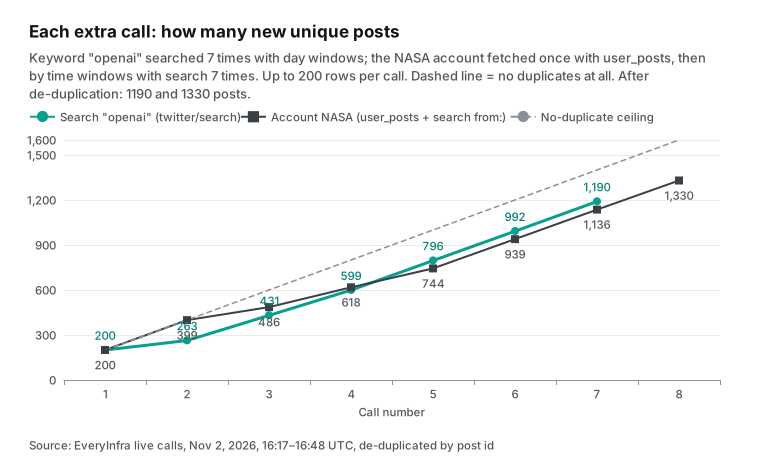
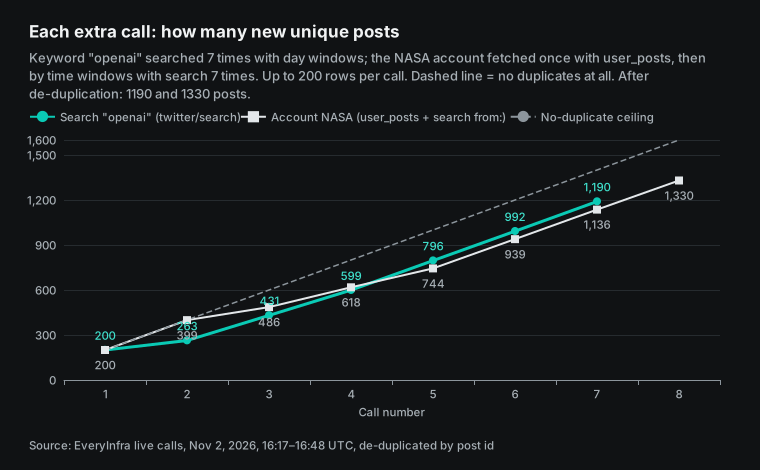
At 16:47 UTC (00:47 Singapore time), 30 minutes later, we ran the first search again with the same parameters. Of the 200 posts, 124 matched the first run and 76 were new. The Top sort changes over time. For brand monitoring, a run every 30 minutes brings some new posts. With per-row billing, you also pay again for the 124 repeated posts. On our side, the rerun cost $0.000556, the same as before.
Test 2: apify x scraper for 1,000 posts from one account
To get posts from one account on V2, you use twitterHandles or a from: term in searchTerms. The price is still $0.40 per 1,000. On our side, we start with twitter/user_posts. It returns up to 200 posts per call and has no cursor. For older posts, we switch to twitter/search with from:NASA plus date operators, just like the V2 docs suggest.
The user_posts call at 16:19 UTC (00:19 Singapore time) returned 200 posts. They covered 2026-09-08 to 2026-10-31. Of these, 48 were NASA replies to other accounts and 67 were reposts. That matches the "Posts and replies" tab on the X website.
Then we sent 7 from:NASA searches to go further back. We used until:2026-09-08, then until:2026-08-01 and until:2026-04-01. Then we used windows for the second half of 2025, the first half of 2025 and all of 2024. The 8 calls returned 1,592 rows and 1,330 unique posts. None of them came from another account. The total charge was $0.004448, or $0.00334 per 1,000.
The unique posts by year were 568 in 2026, 396 in 2025, 198 in 2024 and 82 in 2022. There were 23 from 2020, 39 from 2016, and single digits for the other years. Older years get thinner for the same reason as in Test 1. Dated searches mix in older, more popular posts from outside the window. Narrow windows add fewer new posts, and the third call added only 87.
At 16:47 UTC (00:47 Singapore time), we ran user_posts again. All 200 posts matched the run from 28 minutes earlier, and the newest post was the same one from 22:14 UTC on October 31. That is useful for archives. The same parameters give a stable result over a short time, so an incremental job only needs to compare the newest post ID.
The X API has a hard limit here. The user timeline endpoint returns only the most recent 3,200 posts (X timelines docs). For older posts, you need full-archive search.
Non-English content: how many rows come back
Many people use an apify x scraper for content that is not in English. At 16:40 UTC (00:40 Singapore time), we searched for inteligencia artificial lang:es. The call returned a full page of 200 posts, all in Spanish, from 167 different authors. They covered 2026-10-23 to 2026-11-02, with no reposts or replies.
At 16:41 UTC (00:41 Singapore time), user_posts for the El Pais account returned 200 posts. Of these, 197 were in Spanish. They covered less than two days, from October 31 to November 2. So a busy news account fills 200 rows in about two days. To archive one month, run the call once a day.
At 16:42 UTC (00:42 Singapore time), we searched for a Chinese term meaning "large model", with lang:zh. We asked for 200 rows and got 100, all in Chinese, from 67 authors. The oldest was from 2026-10-08. That one call cost $0.00556 per 1,000, about twice the English rate, because the page was half full.
It is still about 70 times less than V2. With per-row billing, a half page does not change the unit price. It just means you get fewer rows.
| Call (Singapore time, Nov 3) | Endpoint and input | Rows | Authors | Date range | Per 1,000 |
|---|---|---|---|---|---|
| 00:40 | twitter/search, Spanish keyword with lang:es | 200, all Spanish | 167 | 2026-10-23 to 2026-11-02 | $0.00278 |
| 00:41 | twitter/user_posts, El Pais | 200, 197 Spanish | 1 | 2026-10-31 to 2026-11-02 | $0.00278 |
| 00:42 | twitter/search, Chinese keyword with lang:zh | 100, all Chinese | 67 | 2026-10-08 to 2026-11-02 | $0.00556 |
Test 3: replies, where you must split the job in two
Replies have the smallest gap of the three data types, and they depend most on the job. Our twitter/comments endpoint needs id, which is the number after /status/ in the post URL. It returns up to 50 replies per call and has no cursor. We called it once on each of 25 posts. We got 977 replies for $0.0139, or $0.0142 per 1,000.
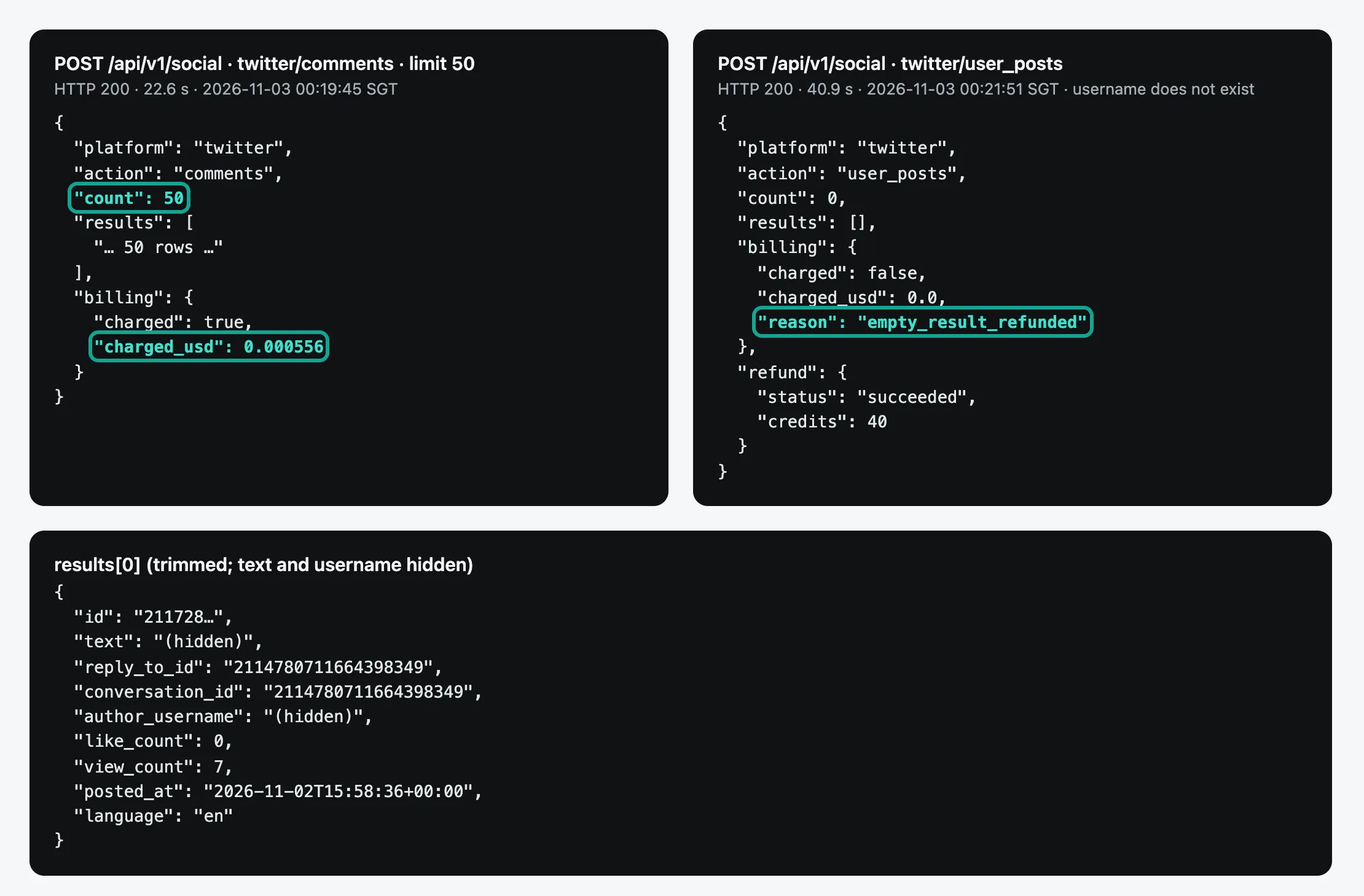
Case one is "a batch of replies from many posts". An example is a weekly look at feedback under 200 brand posts. Here we charge $0.000556 per post. The Apify reply scraper starts at $0.014 per post, so we are 25 times cheaper. Against the cheapest option, the xquik reply scraper at $0.00015 per reply, we are 10.5 times cheaper.
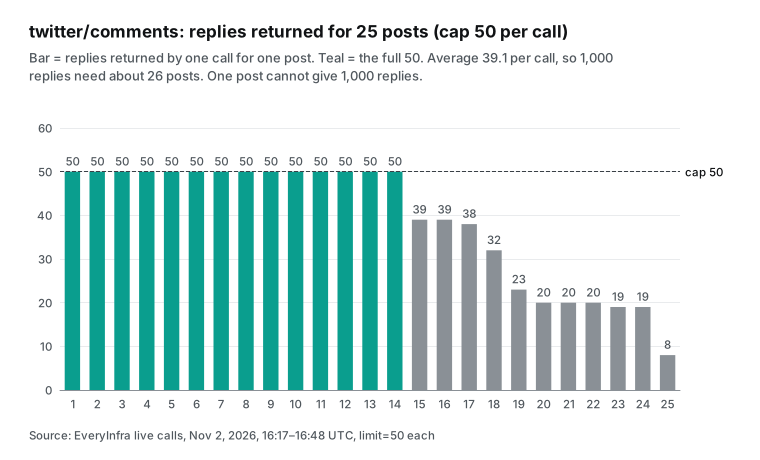
Of our 25 calls, 14 returned the full 50 replies. The other 11 returned 39, 39, 38, 32, 23, 20, 20, 20, 19, 19 and 8. The 8 came from our small control post, which has only 8 replies, so we got all of them. But 6 large posts with 2,500 to 6,800 replies each returned only 19 to 23.
We then read the raw responses of the 24 large posts. The pattern is clear. The 14 full calls returned recent replies, with a median of 0 likes per reply. The 10 short calls were on posts that are weeks to two years old. Their replies came sorted by likes, with median likes from 6 to 1,880.
So on new posts you get the latest replies. On old viral posts you get the top replies that X shows first, and the "show more replies" part stays closed. Our backend team must still confirm the root cause. For planning, expect 50 replies on new posts and about 20 on old viral posts.
Case two is "as many replies as possible from one post". An example is a study of thousands of comments under one viral post. Our endpoint stops at 50 per post, so it cannot do this job. The Apify reply scraper page says it pages through replies automatically. When the default flow returns too few, useSearch adds more through a conversation_id: search. One post with 1,000 replies costs about $0.398 there.
For this job, Apify is the better choice, and we have no matching endpoint. If you only need the thread that the author posted under their own post, we have twitter/thread. It returns up to 100 posts for $0.002153 per call. But a thread is not the full set of replies.
The mix of direct and nested replies also changes a lot. On the OpenAI post, 35 of the 50 replies were direct and 15 were nested. On one post with more than 20,000 replies, only 10 of the 50 were direct. On another post, 49 of 50 were nested replies from 19 authors, which looks like one long argument. For sentiment work, use reply_to_id to split the two levels. It has a value on 99% of replies.
At 16:48 UTC (00:48 Singapore time), we ran the OpenAI post again. The 50 replies were the same as 29 minutes before.

Fields: do both sides return the same data?
The two sides return different fields. Here we only report our fill rates and the Apify fields that we do not have. We checked each field on 1,400 search rows, 200 account posts and 977 replies. view_count, bookmark_count, language, author_follower_count and author_is_verified had a value on 100% of rows. media had a value on 42%, 44% and 18% of rows, because many posts have no image or video.
hashtags had a value on only 1% to 4% of rows. We checked these rows one by one. Every post with a # tag had the field, and the others had no tags to report.
| Field | Search (1,400) | Account posts (200) | Replies (977) | Note |
|---|---|---|---|---|
view_count, bookmark_count, language | 100% | 100% | 100% | On every row |
author_follower_count, author_is_verified | 100% | 100% | 100% | Author data comes with each post |
media | 42% | 44% | 18% | Empty when the post has no media |
mentions | 12% | 84% | 95% | Replies mention other accounts often |
links | 22% | 40% | 4% | Share of posts with an outside link |
reply_to_id | 0% | 24% | 99% | Only replies have it |
author_bio, source | 0% | 0% | 0% | Call twitter/profile for a bio |
The Apify reply scraper page says each reply has a full author profile, including the bio, and the posting client. Our three endpoints do not return those two fields. You need a separate twitter/profile call for the bio. If your analysis groups repliers by their bio, for example by job title, Apify gives you that in one pass.
The field names are also different, so a move needs a mapping step. In the V2 output example, likes are likeCount, reposts are retweetCount and the post time is createdAt. The time looks like Fri Nov 24 17:49:36 +0000 2023. Language is lang, and author data sits in a nested author object with userName and followers.
Our names are like_count, retweet_count, posted_at and language. Our time is ISO 8601 with a time zone. Author data is flat, in fields such as author_username and author_follower_count. The V2 example also has a source field for the posting client. That field is empty in our three endpoints.
Do failed and empty calls cost money?
On our side, all 6 calls with no data cost $0. They fall into three groups. The first group stops at authentication or parameter checks. A call with no key gets a 401 with the code missing_key.
A call with an extra parameter, max_items, gets a 422. The error lists the allowed parameters keyword, limit and sort, and it includes a working example request. A call over the rate limit gets a 429 with a retry time.
The second group is "not found". A username that does not exist, and a post ID that does not exist, each returned HTTP 200 after about 40 seconds. The count was 0, billing.reason was empty_result_refunded, and refund.status was succeeded. The third group was our own mistake.
We put a full post URL into id. The catalog says not to do that, but the API did not return a 422. It treated the call as "not found" and refunded it. That is not friendly for the user, and we logged it as an issue.
| Case | Time (Singapore time, Nov 3) | HTTP | Code or reason | `charged_usd` |
|---|---|---|---|---|
| No API key | 00:21 | 401 | missing_key | 0 |
| Unknown username | 00:21 | 200 | empty_result_refunded, refund succeeded | 0.0 |
| More than 10 calls per minute | 00:24 | 429 | rate_limited, "Nothing was charged" | 0 |
Full URL in id | 00:28 | 200 | empty_result_refunded | 0.0 |
Extra parameter max_items | 00:29 | 422 | unknown_param, allowed list shown | 0 |
| Unknown post ID | 00:29 | 200 | empty_result_refunded | 0.0 |
On the Apify side, we only quote page text. V2 says each query must return at least 50 tweets. It does not say what it charges when a query returns fewer. The reply scraper charges its query fee "once per tweetId or URL entry processed".
It also warns that a post with zero replies "returns an empty dataset and wastes run time". It does not say if it refunds the query fee for an empty result. The two scraper_one scrapers charge a fixed $0.0025 per run, and danek charges a start fee per GB of memory.
The Apify usage and resources docs explain how compute units, storage and data transfer are billed. The pay-per-event docs also tell developers to charge for results only after they are saved. If a run is aborted, users should not pay for results they cannot access.
The public actor API also shows run outcomes for the last 30 days. We turned the aborted, timed-out and failed counts into a rate per 10,000 runs for the nine scrapers in this article.
| Apify scraper | Runs, last 30 days | Aborted | Timed out | Failed | Not finished per 10,000 |
|---|---|---|---|---|---|
| Tweet Scraper V2 | 4,688,523 | 35,721 | 5,536 | 0 | 88.0 |
| Cheapest Twitter Scraper (kaitoeasyapi) | 2,653,176 | 41,433 | 3,276 | 1,583 | 174.5 |
| X Tweet Scraper (xquik) | 2,820,359 | 228 | 1 | 3 | 0.8 |
| Twitter Scraper (danek) | 2,396,418 | 3,132 | 422 | 0 | 14.8 |
| Scraper Unlimited (apidojo) | 1,552,877 | 418 | 609 | 0 | 6.6 |
| X Tweet Scraper (feedminer) | 58,004 | 1 | 147 | 0 | 25.5 |
| Profile Posts Scraper (scraper_one) | 36,776 | 17 | 55 | 0 | 19.6 |
| Replies Scraper (apidojo) | 6,118 | 7 | 2 | 0 | 14.7 |
| X Reply Scraper (xquik) | 39,518 | 32 | 0 | 0 | 8.1 |
Users stop many aborted runs themselves, so an abort is not always the scraper's fault. This table supports one claim only. The cheapest xquik tweet scraper was the most stable, with 0.8 unfinished runs per 10,000. V2, the most used scraper, had 88 per 10,000.
Kaitoeasyapi had the highest rate at 174.5. The pages do not say what those runs cost, and we cannot see that from outside. For how we reconcile failed calls and refunds, see failure refund reconciliation.
More than 400 Twitter scrapers in the Apify Store: how prices spread
We used the public Store search API (Store API docs) with four terms: twitter, tweet, x scraper and x.com. After we merged the results and removed duplicates, we had 406 actors. Of these, 380 use pay-per-event pricing, and 372 show a per-result price. We grouped them by name and description. There were 175 for tweets, 48 for profiles, 37 for followers, 36 for replies, 36 for trends and 40 for media and other data.
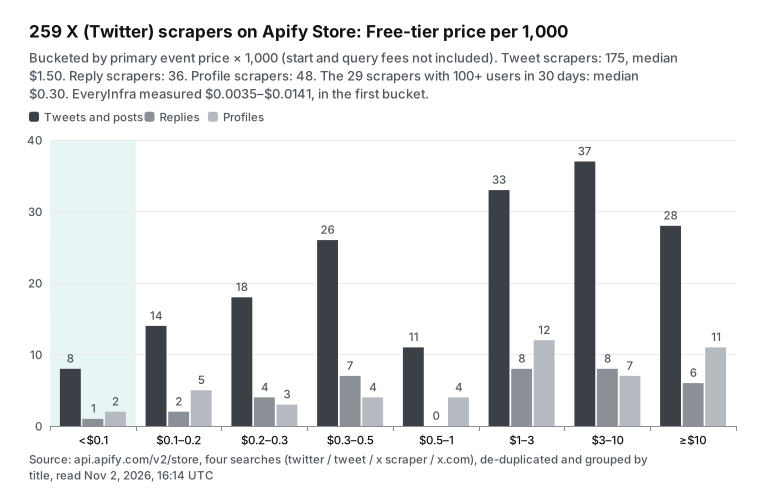
The median Free-tier price of the 175 tweet scrapers is $1.50 per 1,000. That is almost 4 times the V2 price. But many scrapers with few users pull the median up. If you keep only the 29 scrapers with at least 100 users in the last 30 days, the median is $0.30. If you weight by users in the last 30 days, the mean is $1.42 per 1,000.
Users are very concentrated. The top 5 scrapers hold 68.4% of all 30-day users across the 372 scrapers (32,822 users in total). The cheapest scraper lists $0.01 per 1,000, but it had only 8 users in 30 days, so we did not treat it as popular. In short, the Twitter scrapers that people use most cost $0.12 to $0.40 per 1,000. Our three measured prices are all below $0.015.
Our earlier article on Apify pricing explained covers Apify plans, compute units and pay-per-event rules in general. The Apify alternatives article compares several platforms. This article adds what those two do not have. It has Twitter row counts from live calls. It also has the price spread and run data for Store Twitter scrapers. For a wider view, start at our alternatives overview.
Break-even: when a few rows per call make per-row billing cheaper
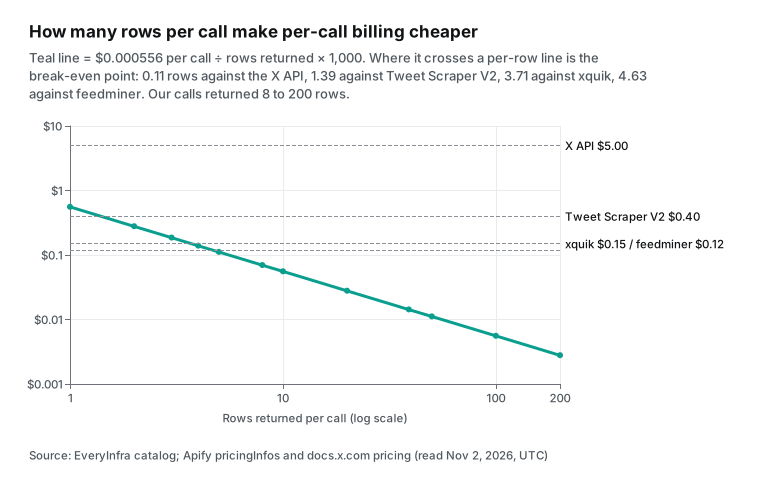
We bill per request, and most Twitter scrapers in the Store bill per row. The break-even point is easy to compute. Divide our request price of $0.000556 by the other side's price per row. V2 charges $0.0004 per row, so the break-even is 1.39 rows per call.
Xquik charges $0.00015, so it is 3.71 rows. Feedminer charges $0.00012 on the Free tier, so it is 4.63 rows, and 5.56 rows at its $0.0001 Business price. The X API charges $0.005 per post, so the break-even is 0.11 rows.
| Per-row price | Source | Break-even rows per call | EveryInfra is cheaper when a call returns |
|---|---|---|---|
| $0.005 | X API pay-per-use | 0.11 | 1 row or more |
| $0.0004 | Tweet Scraper V2 | 1.39 | 2 rows or more |
| $0.00015 | xquik | 3.71 | 4 rows or more |
| $0.00012 | feedminer, Free tier | 4.63 | 5 rows or more |
| $0.0001 | feedminer, Business tier | 5.56 | 6 rows or more |
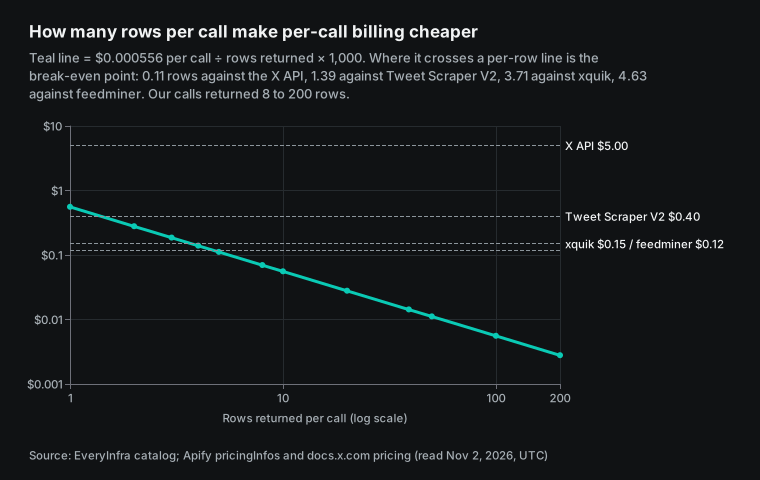
When does a call return only a few rows in real work? The first case is a single post lookup. Our twitter/post endpoint costs $0.000556 for one post, or $0.556 per 1,000. That is more than xquik or feedminer.
It is much less than the single-tweet price on Unlimited, which is $0.05 per tweet, because V2 does not allow single tweets. The second case is a small account that posts two or three times a day. Each check finds only a few new posts.
The third case is our small control post with 8 replies. We charged $0.0695 per 1,000 for it. The apidojo reply scraper charges one $0.014 query fee, and all 8 replies fall inside the free first 40. That is $1.75 per 1,000.
Xquik is $0.15 per 1,000. Scraper_one charges $0.0025 per run plus 8 replies, or $0.5625 per 1,000. So we are still the cheapest on that small post. But below about 3 rows per call, xquik and feedminer cost less.
A monthly bill: three common jobs for 30 days
Now we put the measured row counts into three common jobs. On our side, we turn rows into calls with the measured rows per call, then multiply by $0.000556. On the Apify side, we multiply the list price by the rows. That leaves out platform usage and the monthly plan fee. For the X API, we use $0.005 per post. That leaves out the 3 million posts per month cap and the same-day dedup discount.
| Job | Rows in 30 days | EveryInfra | V2 or apidojo replies | xquik | X API pay-per-use |
|---|---|---|---|---|---|
| Brand monitoring: 20 keywords, 200 tweets each, daily | 120,000 | $0.33 (600 calls) | $48.00 | $18.00 | $600.00 |
| Account archive: 50 accounts, 1,000 posts each | 50,000 | $0.17 (about 300 calls) | $20.00 | $7.50 | $250.00 |
| Reply monitoring: 200 posts a week, 50 replies each | 40,000 | $0.44 (800 calls) | $14.40 | $6.00 | $200.00 |
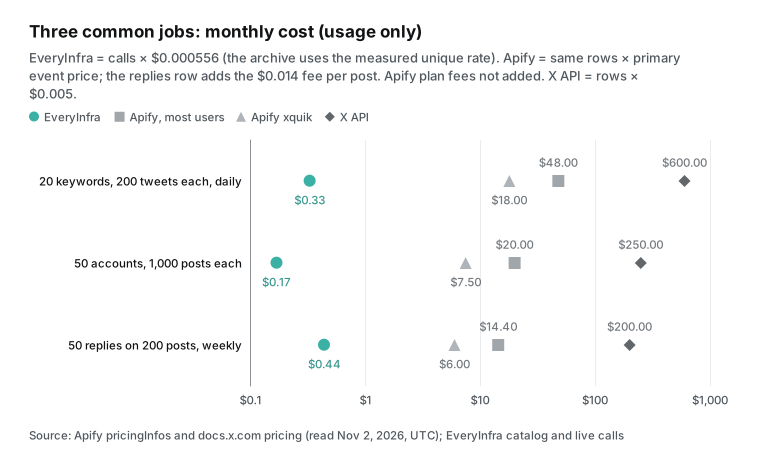
The table shows three things. First, for jobs that fill a page on every call, the gap stays at tens of times. The reason is that one charge covers 200 rows, or 50 rows for replies. Second, the Apify bill also needs a plan fee. Free V2 users get only 50 tweets a month, so these jobs need at least Starter, which starts at $19 a month. We have no monthly fee, paid balance does not expire, and failed calls are free.
Third, the V2 page limits each user to 1 concurrent run with up to 5 queries. It also says not to use V2 for monitoring with the same query at short intervals. So the brand monitoring row is not a supported V2 use case. The page points those jobs to Unlimited.
For the X API, the X pricing page lists $0.005 per post read and $0.010 per user read. Reads are capped at 3 million posts per month (usage and billing). The same post read twice in one UTC day counts once, so real bills are a little lower than the table.
A full example: a weekly brand reply report in n8n
Many readers of the "apify twitter scraper" pages build their jobs in n8n. Here is a weekly report with the three data types together. Every Monday, you search 20 keywords for 200 posts each to find the posts with the most discussion. Then you pick 50 posts by reply_count and get 50 replies from each. Last, a model sorts the replies into complaints, questions and praise.
On our side, that is 20 twitter/search calls plus 50 twitter/comments calls. The 70 calls cost $0.0389 a week, or about $0.16 for four weeks. That assumes full or near-full pages, as in our tests. In n8n, each call is one HTTP Request node. The node below shows the body for one search.
{
  "parameters": {
    "method": "POST",
    "url": "https://api.everyinfra.com/api/v1/social",
    "sendHeaders": true,
    "headerParameters": { "parameters": [
      { "name": "Authorization", "value": "=Bearer {{ $env.EVERYINFRA_API_KEY }}" }
    ] },
    "sendBody": true,
    "specifyBody": "json",
    "jsonBody": "={ \"platform\": \"twitter\", \"action\": \"search\", \"params\": { \"keyword\": \"{{ $json.keyword }}\", \"limit\": 200 } }"
  },
  "type": "n8n-nodes-base.httpRequest",
  "name": "EveryInfra twitter/search"
}
On Apify, the same job has two paths at list prices. Path one uses V2 and the reply scraper. Search is 4,000 rows x $0.0004 = $1.60, and replies are 50 posts x ($0.014 + 10 x $0.0004) = $0.90. That is $2.50 a week. But V2 says not to rerun one query for monitoring, and it takes at most 5 queries per run. So 20 keywords need 4 runs.
Path two uses Unlimited. Twenty queries cost 20 x $0.016 = $0.32. Each query returns 160 rows above the free 40. With 20 queries per run, those rows use the 11-to-30-query band at $0.0012. That is 3,200 x $0.0012 = $3.84.
With $0.90 for replies, the total is $5.06 a week. Neither path includes the Starter plan fee. The model step costs the same on both sides. In this example, we are 64 to 130 times cheaper. The gap is wider than in the summary table because of the Unlimited bands.
X API vs Apify vs EveryInfra
X moved its API to pay-per-use in February 2026. On August 14, it announced that legacy Pro plans would move to pay-per-use after September 1 (X developer forum). Pay-per-use has no monthly fee, but it costs more. Posts cost $5 per 1,000, which is 12.5 times V2 and about 1,500 times our measured search price.
There were two recent changes to free credits. Since October 2, new pay-per-use accounts get $20 after their first credit purchase, and up to $50 more for auto-recharge. On October 13, X changed the rule: a saved card alone no longer earns the $20. The credits expire after 3 months (free credits page).
The X API also has different rate limits and coverage. Recent search allows 450 requests per 15 minutes, and full-archive search allows 1 request per second (rate limits). Pay-per-use accounts can use full-archive search (search docs). User timelines stop at the 3,200 most recent posts. Since May 4, keyword search no longer returns reposts.
| X API item | Value | Source |
|---|---|---|
| Post read | $0.005 each | X pricing page |
| User read | $0.010 each | X pricing page |
| Monthly cap | 3 million post reads | Usage and billing page |
| Same post twice in one UTC day | Billed once | Usage and billing page |
| User timeline depth | Latest 3,200 posts | Timelines docs |
| Recent search rate limit | 450 requests per 15 minutes | Rate limits page |
| Full-archive search rate limit | 1 request per second | Rate limits page |
| Free credits | $20 after first purchase, up to $50 for auto-recharge, expire after 3 months | Free credits page |
The X API is the path that X prices itself, with the clearest terms. It can also post and manage your own account. See about the X API and getting access. X also publishes an open-source MCP server, xmcp.
Speed and concurrency
On our side, one twitter/search call with 200 rows took 35.2 to 53.4 seconds, with a median of 39.3 seconds. A user_posts call with 200 rows took about 33 seconds. A comments call with 50 rows took 14 to 23 seconds, with a median of 19.8 seconds. One process with sync calls gets about 300 tweets per minute. Our test key allowed 10 requests per minute, and the console shows the limit for production accounts.
| Tool | Rows per call or run | Measured or listed time | Rows per minute |
|---|---|---|---|
EveryInfra twitter/search | 200 | 35.2 to 53.4 s, median 39.3 s (measured) | About 300 per process |
EveryInfra twitter/user_posts | 200 | About 33 s (measured) | About 360 per process |
EveryInfra twitter/comments | Up to 50 | 14 to 23 s, median 19.8 s (measured) | About 120 per process at 39.1 rows per call |
| Tweet Scraper V2 | 50 or more per query | 30 to 80 tweets per second (page text) | 1,800 to 4,800 |
The V2 page says 30 to 80 tweets per second, which is 1,800 to 4,800 per minute. So one big V2 run is faster. The Apify platform limits set how many actors and how much memory one account can run at a time. If you need hundreds of thousands of posts as fast as possible, one large Apify run beats our page-by-page calls. For a few thousand posts a day on a schedule, both sides finish in minutes.
Use it from AI clients: the MCP setup
For AI clients, connect our remote MCP server at https://api.everyinfra.com/mcp. The tool names start with everyinfra_. The model can choose twitter/search or twitter/comments on its own.
The config below is a general example. Claude Code and other clients with remote MCP support use a similar format. For the exact syntax, see the Claude Code MCP docs and the OpenAI MCP docs. The protocol is in the MCP specification.
{
  "mcpServers": {
    "everyinfra": {
      "type": "http",
      "url": "https://api.everyinfra.com/mcp",
      "headers": { "Authorization": "Bearer ${EVERYINFRA_API_KEY}" }
    }
  }
}
Apify also has an MCP server that turns Store actors into tools for a model (Apify MCP docs, source on GitHub). The two designs differ. With the Apify MCP, the model starts an actor run, waits for it to finish and then reads the dataset. That suits large batches.
With our MCP, each tool call returns data at once. That suits a chat where you ask and check as you go. Our MCP server page lists the supported clients.
Moving from Apify: parameter mapping
If you already use V2 or the reply scraper, this table maps the inputs. The Apify parameter names come from the example input in public actor metadata and from Store pages. Output fields differ, so you must remap them with our response_fields.
| Task | Apify input | EveryInfra input | Note |
|---|---|---|---|
| Keyword search | V2 searchTerms + maxItems | twitter/search with keyword + limit (max 200) | One keyword per call; slice by date for more |
| Sort | V2 sort: Latest, Top, Latest + Top | sort: latest, or default Top | 137 of 200 rows overlapped in our test |
| Language | V2 tweetLanguage | lang:es inside keyword | Example: inteligencia artificial lang:es |
| One account | V2 twitterHandles or from: | twitter/user_posts with username; from: search for older posts | user_posts max 200 per call |
| Replies to a post | Reply scraper tweetIds or URL | twitter/comments with numeric id | Max 50 per post; a URL returns 0 rows, refunded |
| Single post | Unlimited tweet URL ($0.05) | twitter/post | $0.000556 per call |
| Followers | apidojo user scraper follower event | twitter/followers_list, up to 2,000 | $0.000556 per call |
Our Twitter scraper API has 21 endpoints, and all are available in the catalog today. Besides the three above, it covers profiles, follower and following lists, retweeters, community posts and video transcripts. You can read the parameters, response fields and price of each one in the free catalog (catalog API). The catalog needs no key.
How we checked these numbers
A script recomputed every EveryInfra number in the text, tables and charts from the 52 raw responses. Rows are the length of results. Dedup uses the post id. The charge is billing.charged_usd. The time is the local clock when we sent the call, logged in Singapore time.
We read all Apify prices, user counts and run counts from public metadata at the same time, 00:14 to 00:16 Singapore time. We also took a screenshot of the V2 pricing note. The break-even points and monthly bills only combine those two kinds of numbers. Three items are still open.
The root cause of the short reply calls on old posts is open, and Test 3 gives the pattern. We do not know the size of the xquik platform usage charge. And we cannot verify from outside that feedminer reads keyword searches from X Communities.
When Apify is the better choice
Here is where Apify does better, or where we have no match. First, thousands of replies from one post. We stop at 50 per post, and the Apify reply scraper pages through about 1,000 replies for about $0.40. Second, 1 to 3 rows per call. Per-row scrapers such as xquik and feedminer cost less, with break-even points at 3.71 and 4.63 rows.
Third, hundreds of thousands of posts as fast as possible. The V2 page says 30 to 80 tweets per second, and one large Apify run can do the job in parallel. We return one page per sync call. Fourth, schedules, storage and webhooks in one place. Apify has schedules, datasets and webhooks, so a run can push results to Google Sheets or your server. We return data only, and you run the schedule and storage yourself.
Fifth, author bios and the posting client. The Apify reply scraper page lists both, and our three endpoints do not return them. Sixth, exact date windows. In our day-window tests, only 48 to 85 of 200 posts fell inside the window. V2 also warns that until lowers result counts, but it has its own date options. Test both if exact windows matter to you.
| Job | Better choice | Why |
|---|---|---|
| Thousands of replies from one post | Apify reply scraper | We stop at 50 replies per post |
| 1 to 3 rows per call | xquik or feedminer | Per-row price wins below 3.71 or 4.63 rows |
| Hundreds of thousands of posts, fast | Apify | 30 to 80 tweets per second in one run |
| Schedules, storage and webhooks in one place | Apify | We return data only |
| Author bio and posting client on each reply | Apify reply scraper | Our three endpoints do not return them |
| Full pages of search, account posts or replies from many posts | EveryInfra | 10x to 122x lower per 1,000 rows |
X terms, the login wall and legal limits
The X Terms of Service took effect on October 9, 2026. They say that "crawling or scraping the Services in any form, for any purpose without our prior written consent is expressly prohibited" (X Terms of Service). The Developer Terms add limits on data from the API.
These terms bind people who use X. Ask your lawyer what they mean for your project. This article is not legal advice.
You can read the public records yourself: X Corp. v. Bright Data (docket), hiQ v. LinkedIn (opinion), and the EU action on X under the Digital Services Act (Commission news, action plan).
The login wall is a separate issue. The apidojo reply scraper page says "no login, no proxy". The V2 page says it returns what X search shows, and that X can change search, paging and filters at any time. On our side, you do not give us an X account.
None of our 52 calls returned a "login required" error, and all Twitter data calls returned HTTP 200.
What changed recently
| Date | Change and what it means for you | Source |
|---|---|---|
| 2026-10-13 | X updated its free credit rule. A saved card alone no longer earns $20. To get the bonus, you must buy credits first. | Free credits |
| 2026-10-09 | The new X Terms of Service took effect. Read the current text, because old quotes may be out of date. | X Terms |
| 2026-10-02 | X added first-purchase credits for pay-per-use accounts, up to $70, which expire after 3 months. Use them before they expire. | X API changelog |
| 2026-09-24 | The current danek Twitter Scraper prices took effect, with a start fee per GB of memory. Many small runs cost more. | danek metadata |
| Late September | The feedminer page says X began to refuse its search index requests. Keyword terms without from: now come from X Communities. Account posts are not affected. | feedminer Store page |
The main trend is that prices change often. Of the 14 Twitter scrapers we read, 10 have current prices that started in mid-August or later. Examples are xquik on August 29 and scraper_one on August 30 and 31. Each price period in the metadata has a startedAt date. For you, this means that Apify prices in any comparison, this one included, can be wrong in two or three months. Read the public metadata again before you buy, and note the read time.
Get started: from one trial call to a daily job
Star both of our GitHub repositories, everyinfra/everyinfra-agent-plugins and everyinfra/seo-skills, and you can claim $1 of trial credit in the console. It is valid for 24 hours, which is enough to run all 52 calls in this article more than 30 times. Get your key in the quickstart. Open the Twitter scraper API page to see all endpoints. Then try the playground on three pages. The pages are the Twitter search scraper API, the Twitter user posts scraper API and the Twitter replies scraper API.
For profile data, see the Twitter profile scraper API. The same pattern works for the Reddit scraper API and the Bluesky scraper API. All endpoints and prices are in the data market and on the pricing page. For other per-1,000 comparisons with Apify, read the Apify TikTok scraper alternative and the Apify Instagram scraper alternative. To make a model call data endpoints with exact fields, see Claude strict tool use with a data API.
FAQ
Is the Apify Twitter scraper free?
Source: the search suggestion "apify twitter scraper free", read on November 3, 2026. The Apify free plan gives $5 of platform credit each month. But the V2 and apidojo reply scraper pages both say that free users get 5 runs a month with at most 10 items each. V2 also says free users cannot call it through the API.
So "free" is enough to see the output format and not much more. On our side, the $1 trial lasts 24 hours. At 200 tweets per call, it covers more than 300,000 tweets. After that, you pay per request, with no monthly fee.
What is Apify tweet scraper pricing, and why do some posts say $0.004 per 1,000?
Source: the common search query "apify tweet scraper pricing" and an r/n8n post (thread). V2 costs $0.0004 per tweet, so $0.40 per 1,000. The r/n8n post wrote $0.004 per 1,000, which drops two decimal places. Use $0.40, as the public metadata shows.
Another r/n8n tutorial compared V2 with the X API as "40 cents per 1,000 tweets versus $200 for 15,000" (thread). That was the old Basic plan price. X now uses pay-per-use at $5 per 1,000 posts.
Can an Apify Twitter comments scraper get every reply to a post?
Source: the search suggestion "apify twitter comments scraper", read on November 3, 2026. The apidojo reply scraper page says it pages through replies on its own. If the default flow returns too few, useSearch adds a conversation_id: search. The page also says deleted and protected posts are not supported. Our twitter/comments stops at 50 replies per post and cannot get them all. For thousands of replies from one post, Apify is the better choice.
Does Twitter allow scraping, and is it legal to scrape X?
Source: the search suggestions "does twitter allow scraping" and "is it legal to scrape twitter", read on November 3, 2026. The X Terms of Service from October 9, 2026 ban scraping without written consent. The legal section above links to the X v. Bright Data docket, the hiQ v. LinkedIn opinion and the EU fine on X.
The answer depends on your country, the data and your use. Ask a lawyer. This article is not legal advice.
What is the cheapest Twitter scraper API?
Source: the search suggestion "twitter scraper api cheapest", read on November 3, 2026. We looked at Store scrapers with at least 100 users in 30 days.
By public price, the cheapest tweet scrapers are xquik and scrape.badger at $0.15, and feedminer at $0.12. Xquik adds platform usage, and feedminer has a keyword search limit. The lowest Store price is $0.01, but that scraper had 8 users. We bill per request: a full page of 200 rows is $0.00278 per 1,000, or $0.00327 after dedup. Below about 3 rows per call, per-row scrapers cost less.
Apify X scraper or the X API: which should I pick?
Source: the common search query "apify x scraper" and an r/n8n tutorial that compares the two (thread). The X API costs $5 per 1,000 posts with a cap of 3 million posts a month. It is the path that X prices itself, with the clearest terms, and it can also post and manage your own account. At the prices in this article, popular Apify scrapers cost $0.12 to $0.40 per 1,000, and we cost $0.003 to $0.014. The X terms limit scraping, so ask a lawyer about your project. Use the X API to run your own account. To read a lot of public discussion, compare the scraping tools on price and rows per call.
References
- Apify / apidojo. Tweet Scraper V2 - X Scraper / Twitter Scraper / X.com Scraper (Store page). read 2026-11-03.
- Apify API. apidojo~tweet-scraper public actor metadata (pricingInfos, stats). read 2026-11-03.
- Apify / apidojo. Twitter (X.com) Scraper Unlimited: No Limits (Store page). read 2026-11-03.
- Apify API. apidojo~twitter-scraper-lite public actor metadata. read 2026-11-03.
- Apify / apidojo. Twitter (X) Replies Scraper API (Store page). read 2026-11-03.
- Apify API. apidojo~twitter-replies-scraper public actor metadata. read 2026-11-03.
- Apify / kaitoeasyapi. Cheapest Twitter Scraper / RealTime Twitter Data Scraper API (Store page). read 2026-11-03.
- Apify API. kaitoeasyapi tweet scraper public actor metadata. read 2026-11-03.
- Apify / xquik. Twitter Scraper & X Scraper for Tweets & Search (Store page). read 2026-11-03.
- Apify API. xquik~x-tweet-scraper public actor metadata. read 2026-11-03.
- Apify / xquik. X Reply Scraper (Store page). read 2026-11-03.
- Apify API. xquik~x-reply-scraper public actor metadata. read 2026-11-03.
- Apify / feedminer. X (Twitter) Tweet Scraper $0.12/1K (Store page). read 2026-11-03.
- Apify API. feedminer~x-tweet-scraper public actor metadata. read 2026-11-03.
- Apify / scraper_one. X (Twitter) Profile Posts Scraper (Store page). read 2026-11-03.
- Apify API. scraper_one~x-profile-posts-scraper public actor metadata. read 2026-11-03.
- Apify API. scraper_one~x-post-replies-scraper public actor metadata. read 2026-11-03.
- Apify API. Store search API /v2/store?search=twitter. read 2026-11-03.
- Apify Docs. Get list of Actors in Store (API docs). read 2026-11-03.
- Apify. Apify pricing. read 2026-11-03.
- Apify Docs. Actors in Store. read 2026-11-03.
- Apify Docs. Actor pricing and costs. read 2026-11-03.
- Apify Docs. Usage and resources. read 2026-11-03.
- Apify Docs. Limits. read 2026-11-03.
- Apify Docs. Apify MCP server. read 2026-11-03.
- GitHub. apify/apify-mcp-server. read 2026-11-03.
- Apify Docs. Schedules. read 2026-11-03.
- Apify Docs. Webhooks. read 2026-11-03.
- GitHub / igorbrigadir. twitter-advanced-search (search operator list). read 2026-11-03.
- X Developer Platform. X API pay-per-usage pricing and credits. read 2026-11-03.
- X Developer Platform. Usage and Billing (3 million monthly cap, same-day dedup). read 2026-11-03.
- X Developer Platform. Search Posts. read 2026-11-03.
- X Developer Platform. Timelines (latest 3,200 posts). read 2026-11-03.
- X Developer Platform. X API Rate Limits. read 2026-11-03.
- X Developer Platform. Free credit incentives for X API pay-per-use accounts (updated 2026-10-13). 2026-10-13.
- X Developer Platform. X API changelog. 2026-10-29.
- X Developers forum. Important Update: Legacy X API Pro Plans Are Moving to Pay-Per-Use. 2026-08-14.
- X Corp.. X Terms of Service (effective 2026-10-09). 2026-10-09.
- X Developer Platform. Developer Terms. read 2026-11-03.
- GitHub / X. xdevplatform/xmcp. read 2026-11-03.
- European Commission. Commission fines X €120 million under the Digital Services Act. 2025-12-05.
- European Commission. Commission accepts X's action plan to comply with Digital Services Act. 2026-07-16.
- European Commission. Press release IP/25/2934. 2025-12-05.
- EUR-Lex. Regulation (EU) 2022/2065 (Digital Services Act). 2022-10-19.
- CourtListener. X Corp. v. Bright Data Ltd., 3:23-cv-03698 (docket). 2024-05-09.
- U.S. Court of Appeals for the Ninth Circuit. hiQ Labs v. LinkedIn, No. 17-16783 (Ninth Circuit opinion). 2022-04-18.
- Model Context Protocol. Model Context Protocol Specification 2025-11-25. 2025-11-25.
- Anthropic. Connect Claude Code to tools via MCP. read 2026-11-03.
- OpenAI. Connectors and MCP servers. read 2026-11-03.
- Reddit r/n8n. How to easily scrape data from Twitter / X using Apify. read 2026-11-03.
- Reddit r/n8n. This Automation Took Me From 0 to 175k Followers in Under 12 Months. read 2026-11-03.
- EveryInfra. EveryInfra capability catalog (free, no key). read 2026-11-03 00:16.
- GitHub / Xquik. Xquik-dev/x-twitter-scraper (README: platform usage billed separately). read 2026-11-03.
- Apify Docs. Pay per event. read 2026-11-03.
- X Developer Platform. Getting Access. read 2026-11-03.
- X Developer Platform. About the X API. read 2026-11-03.
- X Developer Platform. Build a query (query syntax). read 2026-11-03.
- Apify Docs. Get Actor (API docs). read 2026-11-03.
- Apify API. danek~twitter-scraper public actor metadata. read 2026-11-03.
Reference BL-75