Apify Google Search Scraper Alternative: Cost per 1,000 Organic Result Pages
1,000 result pages cost $4.50 on Apify Free and $1.80 on Business. Our organic-only web search cost $0.694 in a live test, with no People Also Ask.
Here is the short answer for 1,000 pages of organic web results. The Free tier of the official Apify Google Search Results Scraper costs 6.5x what EveryInfra cost in our test. The Business tier costs 2.6x. But one Apify page also has People Also Ask and related searches, and we do not. And three third-party scrapers in Apify Store cost less than we do.
Here are the numbers. Take 1,000 pages of web search results, with about 10 organic results per page. The official Apify Google Search Results Scraper charges $4.50 for them on the Free tier. It charges $2.50 on the $19 Starter plan and $1.80 on the $999 Business plan. We read these public prices on November 5, 2026, at 16:17 UTC (00:17 on November 6, Singapore time).
On the same night we made 18 live calls to EveryInfra. Each of the 13 web search calls cost $0.000694 for one page, which is $0.694 per 1,000 pages. The Apify Free tier costs 6.5x that amount, and Business costs 2.6x.
Two facts limit that result. First, one Apify page also contains People Also Ask (PAA) questions and related searches. Our web search returns only the title, URL, snippet, and date. Second, Apify Store has three third-party Google search scrapers at $0.45 to $0.60 per 1,000 pages. Those are 14% to 35% cheaper than us.
This article compares price, fields, pagination, failed-call billing, speed, and AI agent setup. When Apify is the better choice, we say so.
In this article, "price per 1,000 pages" means the real charge for one page of results, multiplied to 1,000 pages. The main charge event of the official Apify scraper is "Scraped search result page". It charges per page scraped. EveryInfra web search charges per call, and one call returns one page of up to 10 results. So both sides fit the same unit without conversion.
On the Apify side we used only public material. That is the Store page, the pricing page, the docs, and the public endpoint api.apify.com/v2/acts/<id>, which needs no account. We did not sign up for Apify and did not run its actors (Apify's name for its cloud scraping programs). All Apify numbers below are list prices, not bills from our own runs. All EveryInfra numbers come from charged_usd in the live responses.
One more point before the tables. EveryInfra web search is a general web search. The tool catalog lists its parameters. We compare the cost of one thing: a page of 10 web results with title, URL, and snippet. We do not claim that both sides return the same Google page.
The summary table: apify google search scraper vs EveryInfra for 1,000 pages
The table puts the common ways to buy side by side. The official Apify scraper has six price tiers. Free, Bronze, Silver, and Gold match the Free, Starter, Scale, and Business plans. Platinum and Diamond are for enterprise customers only. The Actors in Store docs say that the plan sets the discount tier.
We read the unit prices from the pricingInfos field of the public endpoint. The current price entry has applied since October 7, 2026. EveryInfra has two entry points for web search. The web tool of POST /api/v1/search costs $0.000694 per call. The web/search capability of POST /api/v1/social costs $0.001389 per call. Both return one page per call.
| Option | Billing unit | Per 1,000 pages | Multiple of EveryInfra search web | What one page contains |
|---|---|---|---|---|
| Apify official, Free | $0.0045 per page | $4.50 | 6.5x | Organic results, PAA, related searches. Ads and AI Overviews cost extra |
| Apify official, Starter (Bronze) | $0.0025 per page | $2.50 | 3.6x | Same |
| Apify official, Scale (Silver) | $0.00195 per page | $1.95 | 2.8x | Same |
| Apify official, Business (Gold) | $0.0018 per page | $1.80 | 2.6x | Same |
| Apify official, Diamond (enterprise) | $0.0012 per page | $1.20 | 1.7x | Same |
EveryInfra search web | $0.000694 per call | $0.694 | 1x (baseline) | Title, URL, snippet, date, up to 10 results |
EveryInfra data API web/search | $0.001389 per call | $1.389 | 2x | Adds a rank field, up to 10 results |
EveryInfra web + suggest | $0.001388 for two calls | $1.388 | 2x | Organic results plus 10 autocomplete terms, no PAA |
| Lowest third party in Store (third-party F) | $0.00045 per page | $0.45 | 0.65x (35% less) | Organic results, PAA, related searches, ads |
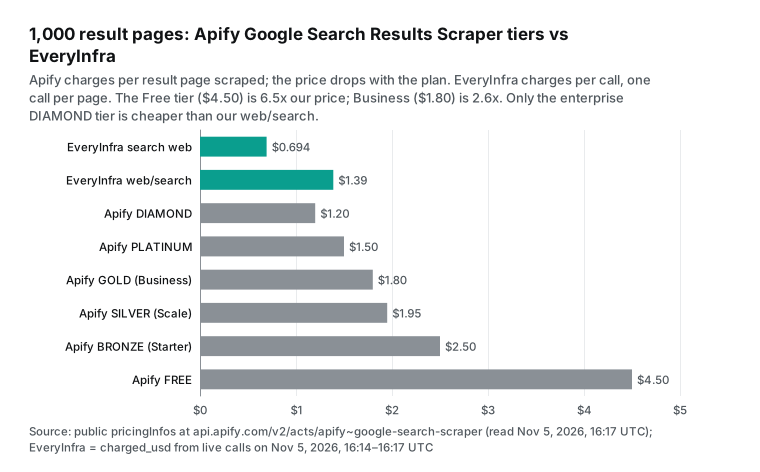
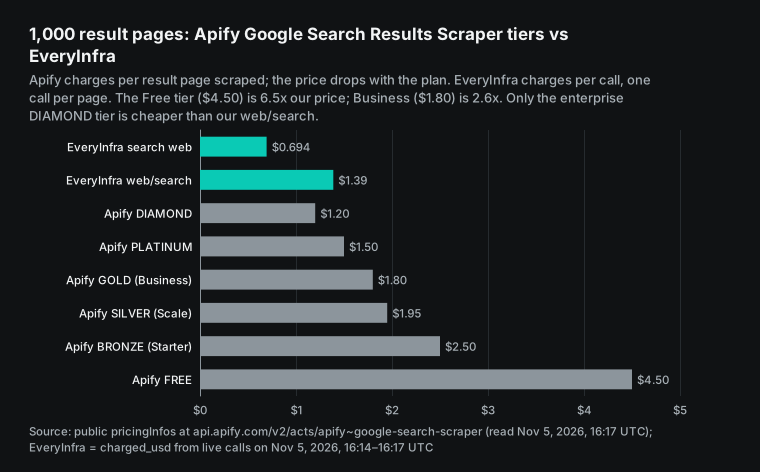
Read this table with three points in mind. First, the plan sets the Apify unit price. Free and Business differ by 2.5x, and Business needs a $999 monthly fee, as the Apify pricing page shows. Most solo developers and small teams use Free or Starter. For them, "3.6x to 6.5x our price" is closer to the truth than "2.6x".
Second, our own two entry points differ by 2x. For the same query and country, the web tool of /api/v1/search returned 10 results for $0.000694. The web/search capability of /api/v1/social also returned 10 results, for $0.001389. The extra cost buys a rank field and the shared data API format. That format has async mode and the same request body as all 106 platforms in our catalog. If you only need web results, use the cheaper entry point.
Third, the last row is a warning. If price is your only test, Apify Store has scrapers that cost less than we do. A later section covers them in detail.
Apify Google Search Results Scraper pricing: per page, six tiers, ten add-ons
The Store name of the official scraper is Google Search Results Scraper. The page title is "Google Search scraper and SERP API". It is the most used Google search tool in the Store. The public endpoint shows 227,822 users in total, about 27,000 in the last 30 days, and 11,769 in the last 7 days. It has 218 reviews with a mean score of 4.65 and 134 million runs in total. The latest build is version 0.0.476 from November 2, 2026, per the public endpoint.
The price label on the Store page reads "from $1.80 / 1,000 scraped search result pages" on the Pricing tab. So the largest number on the page is the Business price. A Free user pays 2.5x that number.
The billing model is pay-per-event. The developer defines a set of events, and each event has a price. The main event, "Scraped search result page", has this description: "Cost per page of Google Search results successfully scraped." A start event charges $0.00005 per GB of run memory. At the default 1 GB, that is $0.00005 per run, so you can ignore it.
The README says that each page has "approximately 10 results". To get 100 results, you set maxPagesPerQuery to 10, as the Store README explains. On this scraper, 1,000 pages and about 10,000 organic results are the same thing.
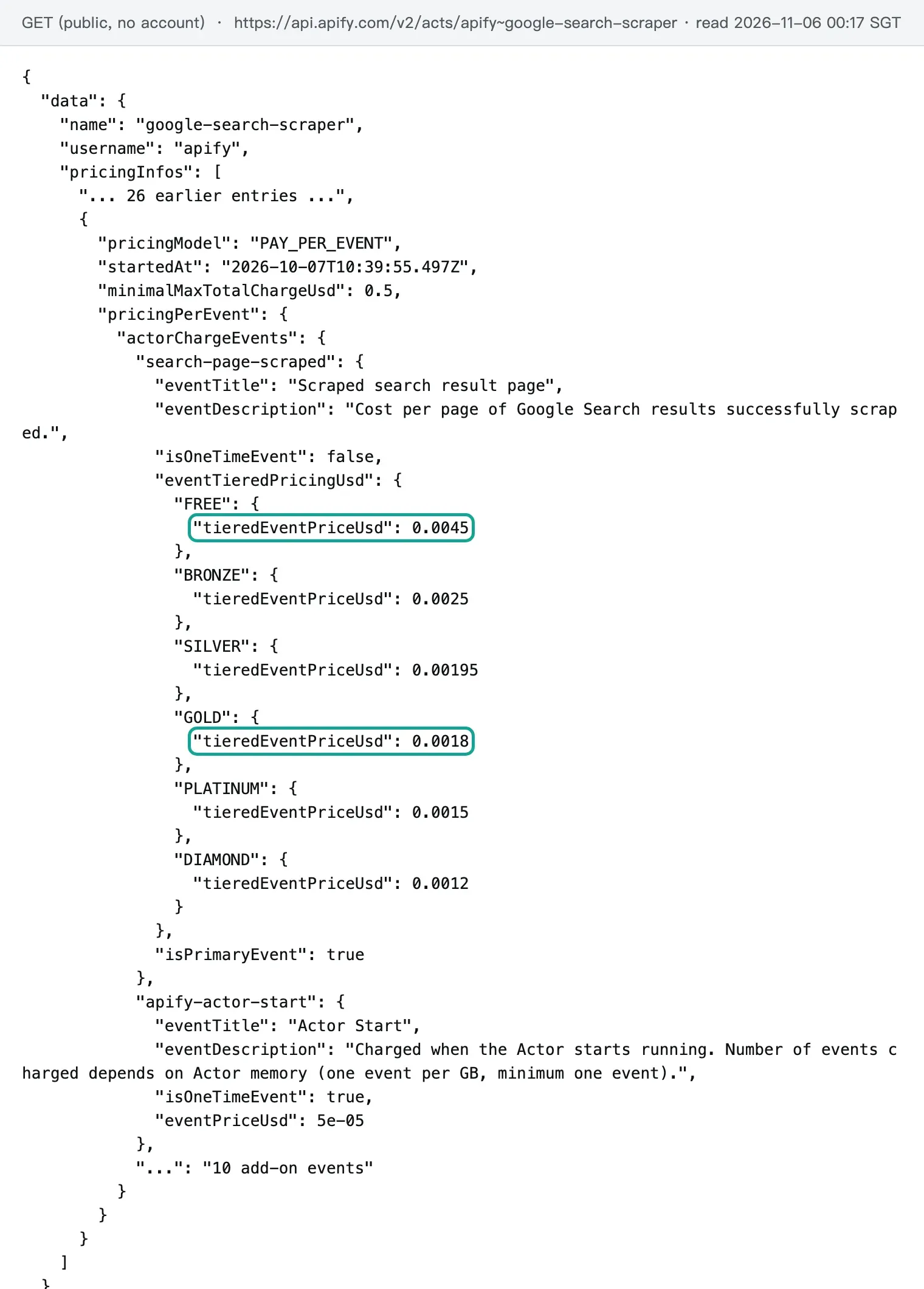
The scraper also has 10 add-on events. Each one applies only when you turn on its input option. The add-on prices vary much more than the main event, and the Free tier is where the gap is largest.
| Add-on event (per 1,000) | Free | Starter | Scale | Business | When it applies |
|---|---|---|---|---|---|
| Result page (main event) | $4.50 | $2.50 | $1.95 | $1.80 | Each page scraped |
| Paid results (ads) | $6.50 | $5.00 | $4.00 | $3.50 | Each page when ad extraction is on, with or without ads |
| Full AI Overview | $3.00 | $2.00 | $1.50 | $1.00 | Each query with an AI Overview |
| Google AI Mode | $200 | $5.00 | $3.00 | $2.00 | Each AI Mode answer |
| ChatGPT, Copilot, or Gemini search | $200 | $5.00 | $4.00 | $3.00 | Each answer |
| Perplexity search | $200 | $13.00 | $10.00 | $9.00 | Each answer |
| Full website page | $8.00 | $5.00 | $4.00 | $3.00 | Each result website scraped |
| Business leads | $100 | $5.00 | $5.00 | $4.00 | Each lead |
One number in this table is easy to miss. The five AI search add-ons cost $0.20 per answer on the Free tier. On Starter they cost $0.005 to $0.013, so the Free price is 15x to 40x the Starter price. The Apify pricing guide for developers mentions this pattern. It says high FREE-tier prices stop users from testing on enough data. It says high prices make sense only against fraud or to cover third-party costs such as LLM calls, per Actor pricing and costs.
For a reader, the result is simple. On a Free account, 100 AI add-on answers cost $20. That is four times the $5 monthly free credit. Set a spending limit before you test these add-ons.
Ad extraction also needs care. It charges per page, not per ad found. The original text says it applies "regardless of whether ads are found on the specific page". With ad extraction on, one Free-tier page costs $11.00 per 1,000 instead of $4.50.
The two sides also control spend in different ways. On Apify, the control is the run endpoint. The endpoint that runs an actor and returns its dataset accepts maxTotalChargeUsd. Its description says "Use it to cap the total amount charged for all pricing models", per Run Actor synchronously and get dataset items.
EveryInfra has no per-run cap. One call is one page at a fixed price, so one call can never cost more than $0.000694. You control total spend with the balance itself. The minimum top-up is $10, and the balance does not expire, per our pricing page.
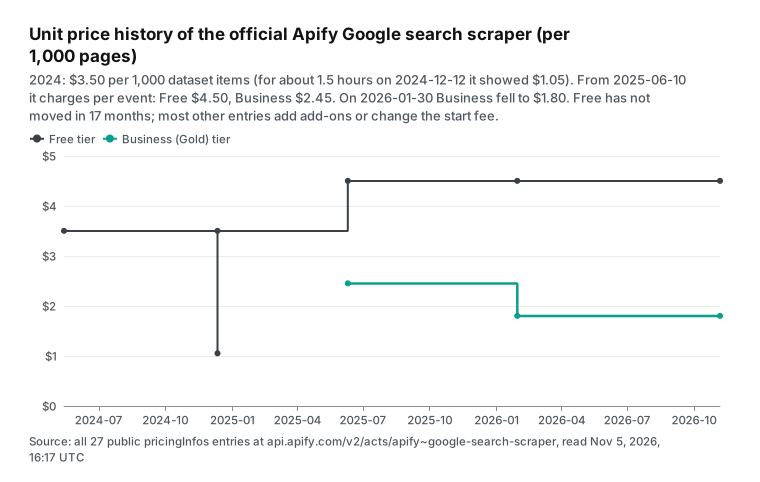
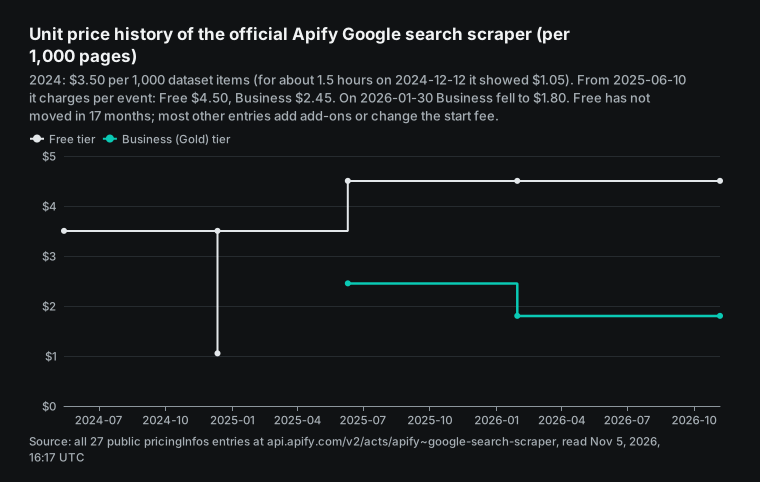
The public endpoint also shows the price history: 27 pricing entries. In May 2024 the scraper charged $3.50 per 1,000 dataset items, and one item was one page. One entry on December 12, 2024, showed $1.05, and about 1.5 hours later the price went back to $3.50. On June 10, 2025, it moved to pay-per-event, with Free at $4.50 and Business at $2.45. On January 30, 2026, Business fell to $1.80.
The later entries mostly add add-ons. Copilot arrived on May 4, Gemini on May 14, full website pages on June 22, and full AI Overviews on June 26, 2026. Other entries change the start fee. It fell from $0.002 to $0.001 per run on March 4, 2026. On October 7, 2026, it changed to the platform-wide $0.00005 per GB.
So in 17 months the Free page price did not drop once. All price cuts went to the paid plans.
What one page contains: the fields, side by side
A price comparison without a field comparison weighs two different things on one scale. The official Apify scraper outputs one record per page. The sample output in the README has searchQuery, organicResults, paidResults, paidProducts, peopleAlsoAsk, relatedQueries, and aiModeResult. The organic results carry title, URL, displayed URL, description, site name, date, emphasized keywords, site links, type, and position.
EveryInfra web search returns an array of results per page. Each result has title, URL, snippet, and date. A location field tells you if the country parameter applied, and at what level.
| Field | Apify official scraper | EveryInfra search `web` | EveryInfra `web/search` |
|---|---|---|---|
| Organic title and URL | Yes | Yes (title, url) | Yes (title, url) |
| Snippet | Yes (description) | Yes (snippet) | Yes (text) |
| Date | Yes (date, when shown) | Yes (published, when shown) | Yes (published_at) |
| Position | Yes (position) | No field, use the array order | Yes (rank) |
| Site links, site name | Yes | No | sub_links in the catalog fields |
| People Also Ask | Yes | No | No |
| Related searches | Yes (relatedQueries) | No. Call suggest for autocomplete terms | No |
| Ads and shopping ads | Only with the add-on, extra per page | No | No |
| AI Overview, AI Mode | Short version included. Full version and AI Mode cost extra | No | No |
| HTML snapshot of the page | Saved to the key-value store by default | No | No |
The result of this section is direct. If you need People Also Ask, related searches, ad slots, or AI Overviews, the official Apify scraper gives them on one page. We cannot. In that case a price comparison has no meaning. We match only the organic block: title, URL, snippet, and date.
Many tasks need only that block. Examples are search tools for AI agents, keyword watch lists, link collection for a topic, and checks that your own page appears. For those tasks the price comparison below holds.
There is one more difference. The Apify page is a Google results page. Since 2026-10-15, its searchQuery.domain is always google.com, with the country in the gl parameter, per the changelog. EveryInfra web search is a general web search, and its docs do not promise a match with one Google page. If your task is "reproduce the Google ranking for a keyword in one country on one day", use a tool that clearly scrapes Google pages. A client rank report is a good example. The official Apify scraper is one such tool.
Test 1: ten pages of one query, results per page and repeats
On November 5, 2026, from 16:14 to 16:17 UTC (00:14 to 00:17 on November 6, Singapore time), we ran one US query. The query was "best running shoes for flat feet" with the country set to the US. We called the web tool of the EveryInfra search endpoint for pages 1 to 10, one call per page.
All 10 calls succeeded. Each cost $0.000694, for a total of $0.00694. The 10 pages returned 95 results. Pages 1, 5, 8, 9, and 10 had 10 results each. Pages 2, 3, 4, 6, and 7 had 9 each.
That is a mean of 9.5 per page. Per 1,000 returned results, the cost was $0.0731.
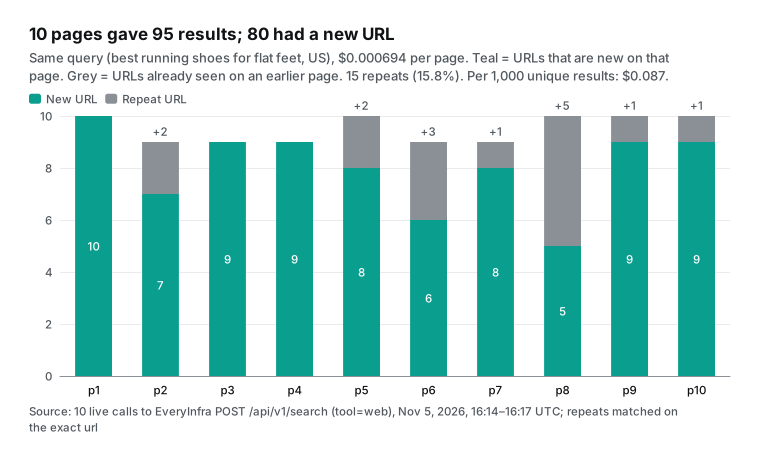
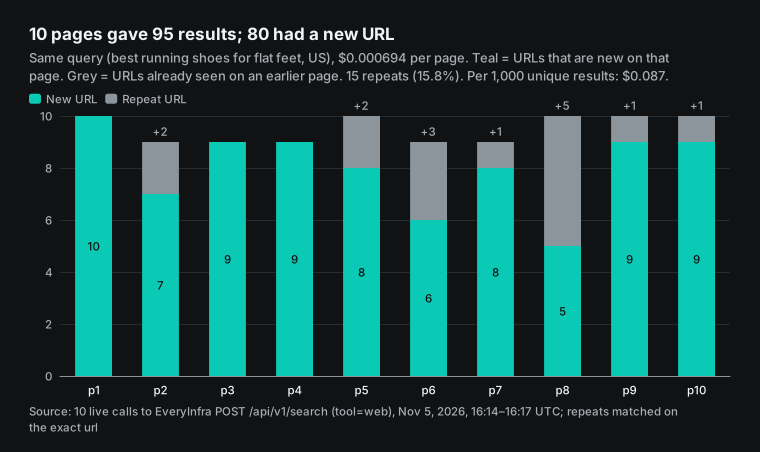
The problem with pagination is repeats. We compared the exact url of every result. Of 95 results, only 80 URLs were unique, so 15 were repeats (15.8%). The repeats were on the later pages. Page 8 had 5 repeats out of 10, page 6 had 3, and pages 2 and 5 had 2 each.
One article from doctorsofrunning.com ranked 10th on page 1 and appeared again on page 2. A shoestation.com guide was on both page 1 and page 2. Per 1,000 unique results, the cost was $0.087, which is 19% more than per returned result. This matters for keyword coverage work. If you plan a budget for "1,000 unique URLs", add about 20%.
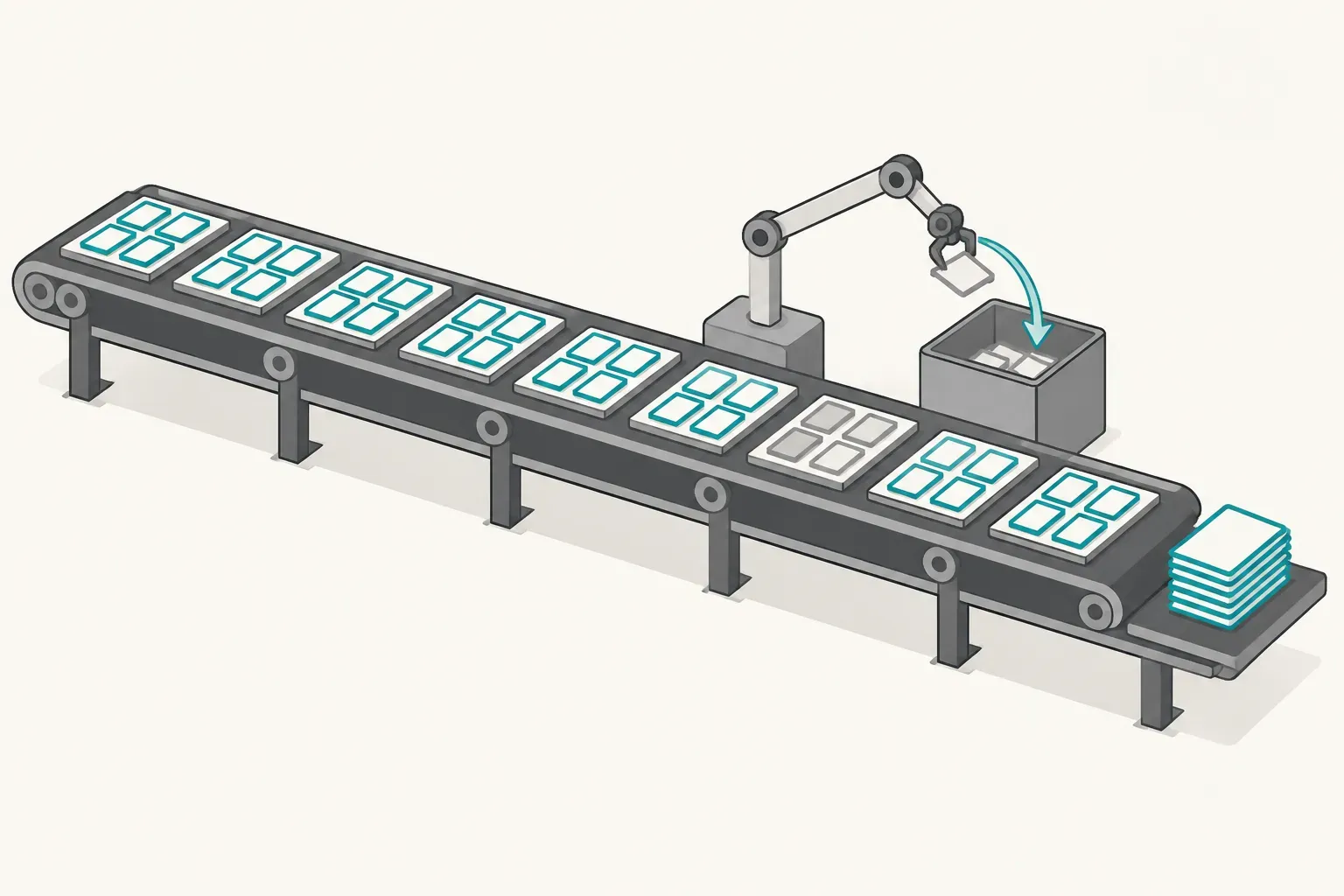
We did not run Apify, so we do not know its repeat rate across 10 pages. But its billing model decides who pays for repeats. It charges per page, so a page with 5 repeats costs the same as a page with none. We also charge per call, so repeats cost the same on both sides. Only the unit price differs.
A related fact is the end of the num=100 parameter. In September 2025, Google stopped showing 100 results on one page. Since then, every tool needs 10 pages to get the top 100. Search Engine Land data showed that 77% of sites lost keyword visibility in Search Console at that time. This is one reason why per-page pricing is now more common than per-result pricing.
Test 2: country, language, date range, and site filters
Rank trackers change four parameters most often: country, language, date range, and site. Both tools support them, but the names and the level of detail differ. The table maps them one by one. The Apify side comes from the input schema. The EveryInfra side comes from the free search tool catalog.
| Need | Apify official scraper | EveryInfra search `web` | Live test result |
|---|---|---|---|
| Country | countryCode (Google gl). locationUule goes down to city level | location: country name or 2-letter code. A city counts as its country | us and mx both applied |
| Language | languageCode (interface, hl) and searchLanguage (results, lr) are separate | No separate parameter. The query language and country decide | Spanish query plus mx gave 10 Spanish results |
| Date range | quickDateRange (for example d10), afterDate, beforeDate | after, before (dates) | after=2026-08-01 accepted |
| Site | site, relatedToSite, wordsInTitle, and other operators | site | site=apify.com gave 10 results, all on that site |
| Pages | maxPagesPerQuery | page, one page per call | See Test 1 |
| Mobile results | mobileResults | No | — |
At 16:15 UTC (00:15 Singapore time) we sent a Spanish query, "mejores tenis para correr pie plano", with location=mx and after=2026-08-01. It cost $0.000694 and returned 10 results. The response said "Applied at country level: Mexico". The date filter worked.
Five of the 10 results had dates: August 11, August 19, September 22, September 30, and October 25, 2026. All were after August 1. The other five had no date field: three Facebook items (two posts and one video), one YouTube video, and one Reddit thread.
So after filters on the date that the search engine detects. Results without a date can still appear. If you need "new content from the last three months", filter by date again in your own code. The Apify afterDate passes the date to the Google filter, so the same limit applies there.
At 16:15 UTC (00:15 Singapore time) we also searched "google search results scraper" with site=apify.com. All 10 results were on apify.com. They included the official scraper, its API page, and the Store topic page for Google search. The rest were similar scrapers from six third-party developers. That call gave us the list that we used for the third-party prices later in this article.
Language is where the two tools differ most. Apify splits interface language and result language into two parameters. It can also pin a city with a UULE code. That matters for local rankings, such as "dentist" plus a city name. EveryInfra web works at country level only, and the response says "Applied at country level".
If you need city-level local rankings, the official Apify scraper is the better choice. If country-level results are enough, both tools work.
Test 3: can autocomplete replace "related searches"?
People Also Ask and related searches are the two blocks that content planners want most. We do not return them. The closest substitute is the autocomplete tool suggest. At 16:14 UTC (00:14 Singapore time) we called it with the same query. It cost $0.000694 and returned 10 terms in 1.17 seconds. The terms ran from "best running shoes for flat feet men" and "women" to "and overpronation", "and plantar fasciitis", "and shin splints", "and wide toe box", "and bunions", and "and knee pain".
These autocomplete terms are not the same as the related searches at the bottom of a results page. Autocomplete shows what people type in the search box, so it adds one qualifier to the same phrase. Related searches and PAA come from the results page and often ask the question in a new way. For long-tail keyword ideas, autocomplete works well. For real questions to build an FAQ, it is not enough.
For that need, the official Apify scraper or a Store scraper with PAA is the better fit. With our tools, organic results plus autocomplete are two calls for $0.001388, or $1.39 per 1,000 keywords. That is still less than the $1.80 Business price on Apify, but you get one block less. Do the math for your own use.
Test 4: two entry points, one query, twice the price
EveryInfra web search has two entry points, and this is a point to watch on our side. At 16:14 UTC (00:14 Singapore time) we called web/search on the data API. We sent the same keyword with country=us and language=en. It returned 10 results in 2.32 seconds and cost $0.001389. Twenty-two seconds earlier, the web tool of the search endpoint returned 10 results in 2.18 seconds and cost $0.000694.
The first two results matched: runrepeat.com and a Reddit thread. After that, the order and the items differed. The data API call added hobibear.com and weartesters.com and dropped shoestation.com and one doctorsofrunning.com article.
The price gap comes from the catalog. The data API lists web/search at $0.001389 in the capability catalog, the same as other capabilities at that tier. Search endpoint tools all cost "one retrieval, $0.000694", per the /api/v1/search entry in the OpenAPI file. The data API supports "mode":"async" with a job ID and uses one request body for 106 platforms. That suits teams that already batch other platforms through it. If you only need web results, use the web tool of the search endpoint at half the price. Every "$0.694 per 1,000 pages" in this article refers to that entry point.
Do failed calls and empty results cost money?
Failed calls that still cost money are the main risk of per-call billing. We sent three requests that cannot return results, one of each type, and read the responses.
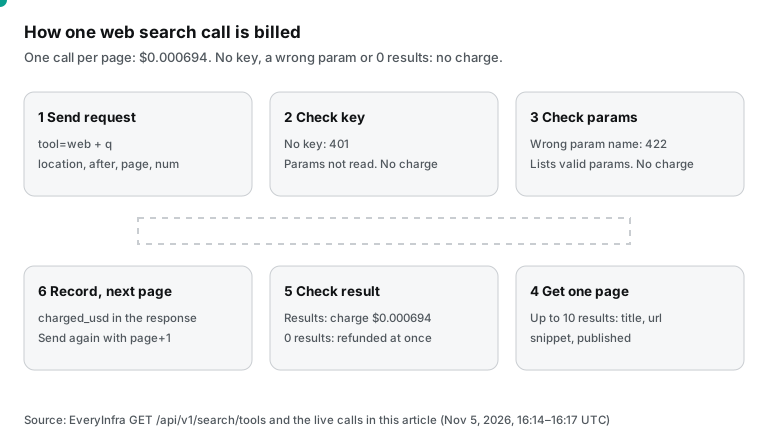
| Time (UTC, with Singapore time) | Request | HTTP | Response text | Charge |
|---|---|---|---|---|
| 16:15 UTC (00:15 SGT) | No key | 401 | unauthorized, "Nothing was charged." | $0 |
| 16:15 UTC (00:15 SGT) | Country sent as country (web accepts only location) | 422 | unknown_param, lists after, before, location, num, page, q, site | $0 |
| 16:15 UTC (00:15 SGT) | Random words with no results | 200 | charged: false, reason: empty_result_refunded, refund succeeded | $0 |
| 16:14 UTC (00:14 SGT) | Normal request | 200 | 10 results, charged_usd: 0.000694 | $0.000694 |
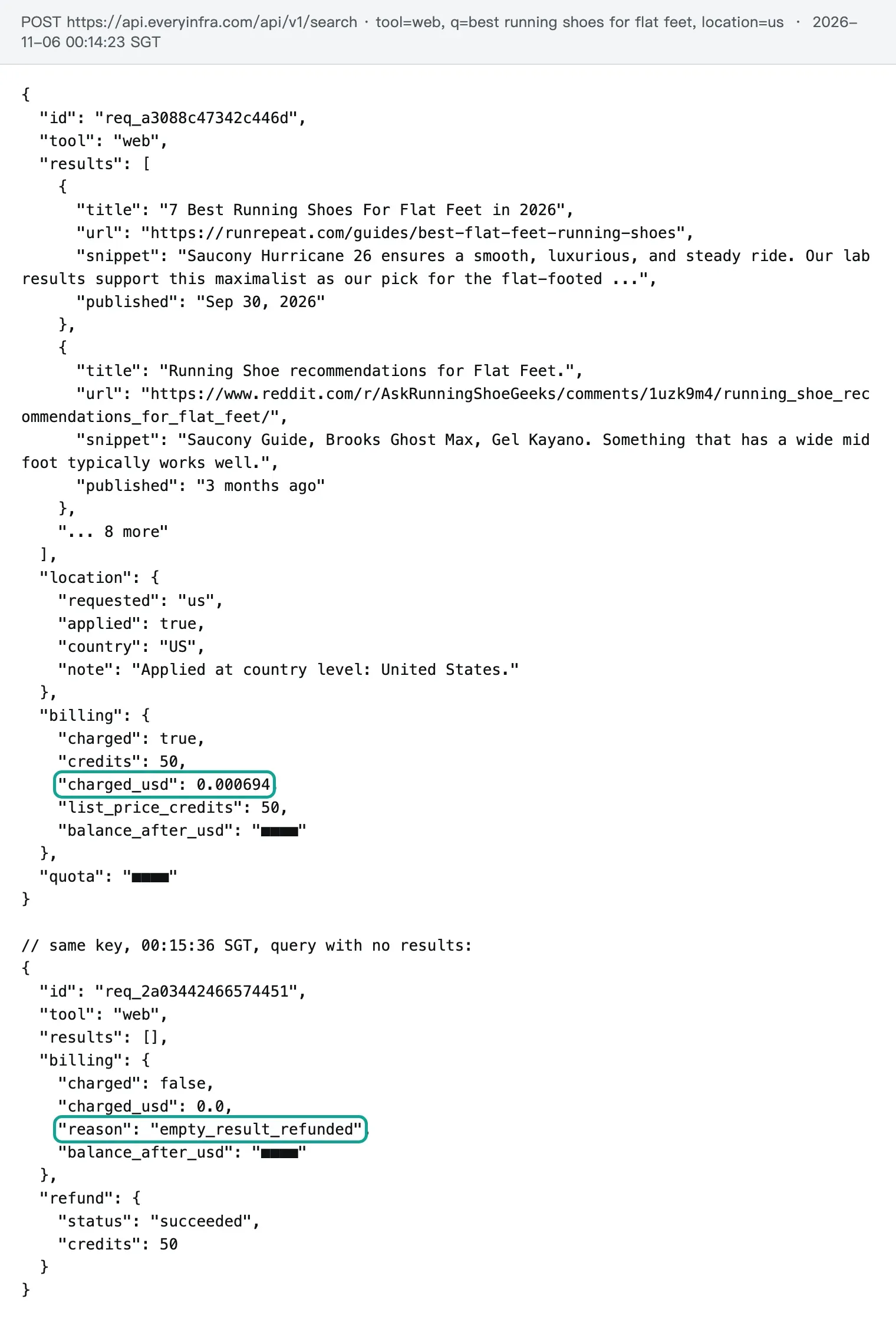
The 422 call needs a note. We sent country, a parameter name close to the Apify countryCode. The endpoint rejected it in 0.12 seconds. The error text was "country is not a parameter of tool web Supported: after, before, location, num, page, q, site". The next_steps field said "Remove country... Nothing was charged."
This helps code that moves from Apify, and it helps AI agents that write their own calls. A wrong parameter name is not silently ignored and billed. The error tells you the right name. Our self-healing errors guide shows how an agent reads this kind of error and fixes the call.
On the Apify side, the public material gives these rules. The main event charges per page "successfully scraped", so failed pages cost nothing. The start event charges when the run starts, at $0.00005, which you can ignore. Ad extraction is the exception: with the option on, it charges every page, with or without ads.
The docs and README that we read do not say if an empty Google result counts as a page "successfully scraped". So we mark it "not stated". Apify does publish run outcome statistics, and the next section uses them. If you reconcile billing, see our article on refund reconciliation for failed calls.
Speed: 2.6 seconds per synchronous call vs starting a run
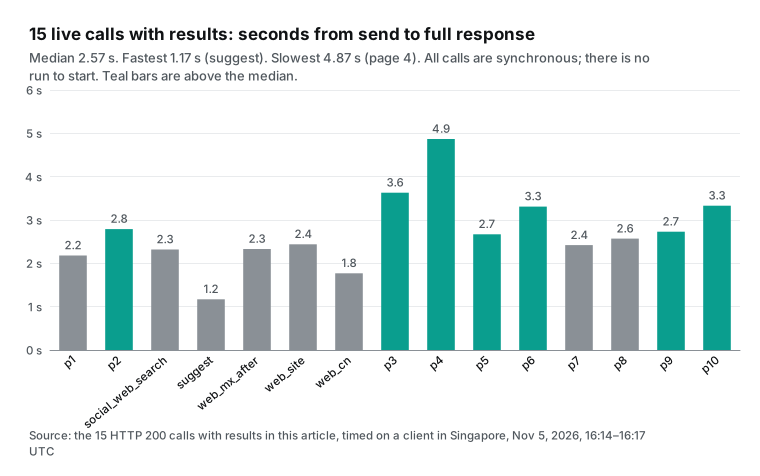
Our speed is easy to measure. We timed the 15 live calls with results on a client in Singapore, from send to full response, with the network round trip. All calls are synchronous: you send the request and wait for the result, with no queue and no start step.
| Measure (15 calls with results) | Seconds |
|---|---|
| Fastest (autocomplete) | 1.17 |
| Median | 2.57 |
| Mean | 2.70 |
| Slowest (page 4) | 4.87 |
| Rejected calls (401 and 422) | 0.15 or less |
Apify works in a different way. Each search job is one actor run. A run starts a container first. The public defaultRunOptions show 1 GB of memory and a timeout of 604,800 seconds.
One run can take many queries. Its strength is batch work: you send 1,000 queries in one run, and the platform handles concurrency, retries, and the dataset. Its weakness is the single query, because one query still needs one run.
We did not run Apify, so we report no measured seconds for it. We also do not repeat speed claims from third-party pages that we cannot verify. To compare speed, run a small batch of your own queries on both sides and time them the same way.
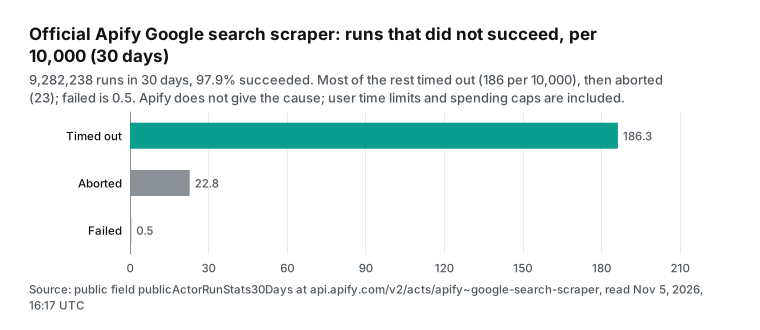
For reliability, Apify publishes the 30-day run outcomes of this scraper on its public endpoint.
| Run outcome, last 30 days | Runs | Share |
|---|---|---|
| Succeeded | 9,087,716 | 97.9% |
| Timed out | 172,957 | 1.86% |
| Aborted | 21,143 | 0.23% |
| Failed | 422 | 0.0045% |
| All runs | 9,282,238 | 100% |
Most of the runs that did not succeed timed out. But the statistics do not give the cause. A short user timeout or a spending cap also counts. So you cannot read this as "a 2.1% platform error rate".
None of our 18 live calls failed, but 18 is too small a sample to compare with 9 million runs. We give the facts and make no claim on reliability. Our live availability is public on the status page.
The monthly bill at four volumes
Unit price is half the story. The other half is the monthly fee. An Apify plan fee is prepaid usage. Starter costs $19 per month, Scale $199, and Business $999. The credit must be used in the same month, and unused credit expires.
A Free account gets $5 per month and stops when the credit is used. The FAQ on the pricing page says "unused usage credits are not rolled over to the next billing cycle". So one month of Apify costs the larger of the plan fee and pages times the tier price. EveryInfra has no monthly fee. It charges per call, with a $10 minimum top-up and a balance that does not expire.
| Pages per month | Cheapest Apify plan | Apify bill for the month | EveryInfra | Ratio |
|---|---|---|---|---|
| 1,000 | Free ($5 credit covers it) | $0 | $0.69 | Apify costs less |
| 10,000 | Starter | $25.00 | $6.94 | 3.6x |
| 100,000 | Scale ($199 fee covers $195 of use) | $199 | $69.44 | 2.9x |
| 1,000,000 | Business | $1,800 | $694.44 | 2.6x |
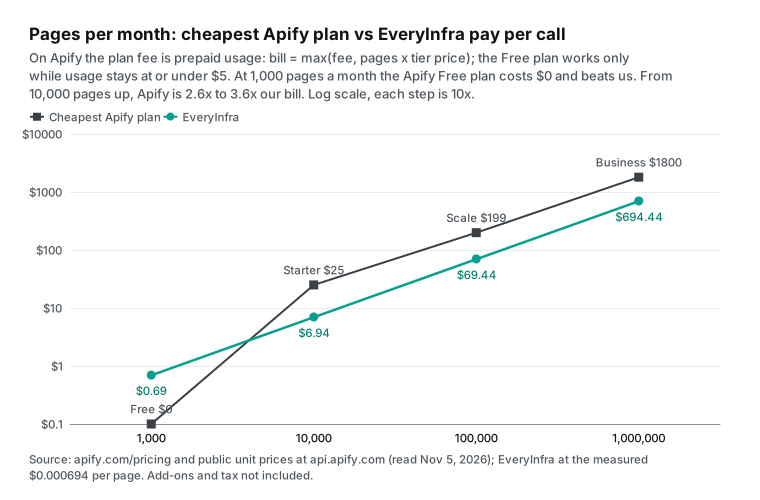
The first row needs a clear statement. If you need about 1,000 pages a month (up to about 1,111), the Apify Free account covers it with the $5 monthly credit. You pay nothing, which is less than our price. The README says "$5 of credit, which lets you scrape over 1,000 Google Search results". At about 10 results per page, $5 actually buys about 1,111 pages, or about 11,000 results. So the README number is conservative.
The EveryInfra free trial is smaller. You star two GitHub repos and get $1 that is valid for 24 hours, as our quickstart says. At $0.000694 per call, that is about 1,440 searches, but for one day only.
Above 10,000 pages, the Apify plan fees start to matter. 10,000 pages a month fall on Starter, for a bill of $25. At 100,000 pages Starter costs $250, but Scale costs only its $199 fee. At 1,000,000 pages, Business at $1,800 costs less than Scale at $1,950. Our cost stays linear across all four volumes, and the gap stays between 2.6x and 3.6x.
Two limits apply. First, the table has no add-ons. Ad extraction or AI Overviews add cost on the Apify side.
Second, rate limits apply. By default we allow 60 requests per minute per account. One million pages a month is about 23 per minute on average, so that works. To finish 100,000 pages in one hour, you need a speed pack of 1,800 per minute or more. Our pricing page lists 180, 600, and 1,800 per minute.
An Apify Free account runs up to 5 actors at once, and Starter runs 32. One run can also process many queries in parallel, so Apify handles bursts better.
Three common uses, three bills
Unit prices change when you put them into real work. The three uses below are the ones that we hear about most. Each uses the public prices that we read on November 5, 2026 (UTC), and our measured price, with no tax.
The first use is rank tracking for a US SEO agency. It tracks 200 keywords, checks the top 30 results (3 pages) every day, and runs 30 days a month. That is 18,000 pages. On the official Apify scraper, this volume is above the $5 Free credit. You need Starter, and the bill is 18,000 × $0.0025 = $45. If you also want the ad slots, ad extraction adds 18,000 × $0.005 = $90, for a total of $135.
With EveryInfra the bill is 18,000 × $0.000694 = $12.50, with no ad slots. About 15% of the top-30 URLs repeat (the rate from Test 1). Both sides need deduplication by URL for the report. If the client wants "Google rankings in Chicago", the Apify UULE location is something we do not have. Then you pay the 3.6x price for that feature.
The second use is web search for an AI agent. A research assistant answers 300 questions a day, runs 2 searches per question, and reads page 1 only. That is 18,000 calls a month.
The key point is not unit price. It is whether one call returns the results. The Apify MCP tool call-actor returns a run ID and storage IDs. The agent must call another tool to read the dataset. Each search also starts a run. The EveryInfra everyinfra_search tool returns the result array in one call.
On price, Apify Starter costs $45 and we cost $12.50. If the assistant answers only a few dozen questions a month, the Apify free credit is enough.
The third use is topic research for a content team. The team has 200 seed keywords and needs PAA and related searches for each, once a month. That is 200 pages. On a free Apify account, this costs $0.90 of the credit, so the team pays nothing, and it gets all fields. With our tools, organic results plus autocomplete are 400 calls for $0.28, but with no PAA. Apify is the better fit here, and there is no argument.
| Use | Monthly volume | Apify official scraper | EveryInfra | Better fit |
|---|---|---|---|---|
| Rank tracking (200 keywords × top 30 × 30 days) | 18,000 pages | Starter $45. With ad slots $135 | $12.50 (no ad slots) | Organic only: us. City level or ad slots: Apify |
| AI agent web search (600 calls a day) | 18,000 calls | Starter $45, two steps to get results | $12.50, one step | Us |
| Content topics (200 keywords with PAA) | 200 pages | Free account, $0 | $0.28 (no PAA) | Apify |
More than one option in the Store: cheaper third-party Google search scrapers
Most people who type "apify google search scraper" mean the official one. But Apify Store is a marketplace. A search for "google search results scraper" on the public Store search endpoint returned 4,439 hits. We read it on November 5, 2026, at 16:17 UTC (00:17 on November 6, Singapore time). We took the top similar scrapers by 30-day users. Then we converted each public price to "per 1,000 pages of about 10 results".
Most third-party developers are personal accounts, so the table labels them third-party A to F, by 30-day users from high to low. The References section at the end links each Store page.
| Scraper (developer hidden) | Users, last 30 days | Billing unit | Free tier per 1,000 pages | Business tier per 1,000 pages | PAA on the page |
|---|---|---|---|---|---|
| apify/google-search-scraper (official) | About 27,000 | Per page | $4.50 | $1.80 | Yes |
| Third-party A | 3,596 | Per page (up to 10 results) | $0.50 | $0.50 | Not stated |
| Third-party B | 251 | Per query (first 10 results included), extra results cost more | $2.00 | $1.94 | Not stated |
| Third-party C | 117 | Per page. PAA needs a full-page add-on | $0.60 | $0.40 | Add-on at $5.50 per 1,000 pages |
| Third-party D | 100 | Per page + $0.001 per run | $6.00 | $6.00 | Yes |
| Third-party E | 69 | Per result, × 10 for one page | $3.50 | $3.50 | Not stated |
| Third-party F | 43 | Per page | $0.45 | $0.45 | Yes, with related searches and ads |
EveryInfra search web | — | Per call (one page) | $0.694 | $0.694 | No |
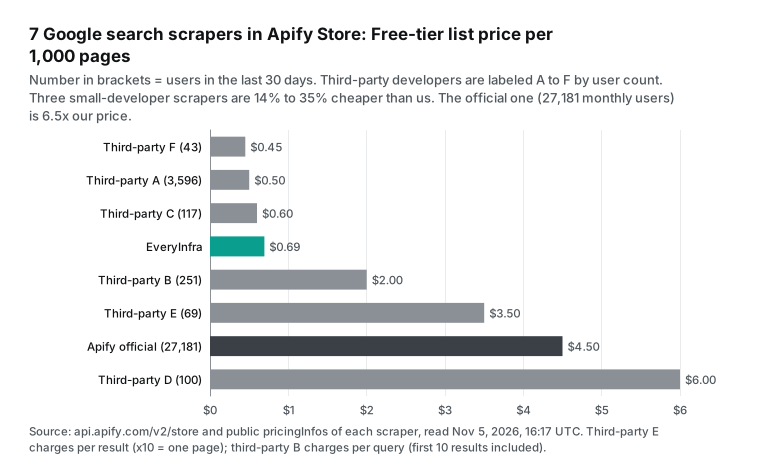
This table takes away half of the simple claim "we cost less than Apify". Third-party A costs $0.50 per 1,000 pages and had 3,596 users and 4.69 million runs in the last 30 days. That is not small. Third-party F costs $0.45 per 1,000 pages. Its page includes People Also Ask, related searches, text ads, and shopping ads. Its page says "platform usage is included, there is no start fee", per its Store page (reference 25).
Both cost less per page than we do, and both return more fields.
There is a cost. Both are scrapers from solo developers or small teams. Third-party F had only 43 users in 30 days. Of its 94,714 runs, 24,841 failed, which is 26.2%. The official scraper is at 2.1%.
Almost all of the 4.69 million third-party A runs succeeded. But its page says "Includes 100 free searches/month; an Apify paid plan is required to continue afterward". After 100 searches, you need a paid Apify plan, at $19 a month or more. At a few thousand pages a month, that fee cancels the $0.50 unit price. At hundreds of thousands of pages a month, these scrapers really are cheaper.
When we checked these prices, we found three cases where Store text and the endpoint price do not match. The event description of third-party D says "$1.50 per 1,000 pages". The eventPriceUsd of the same event is 0.006, which is $6.00 per 1,000 pages. The title of third-party E says "only $0.25 per 1,000 results". The price field is $0.00035 per result, which is $0.35 per 1,000 results.
The comparison table on the third-party A page lists the official scraper at $3.50 per 1,000. That price ended on June 10, 2025, and the Free tier is now $4.50. The price field in the endpoint is what you pay, so check the Pricing tab before you run.
Also, third-party B changed its pricing on November 4, 2026. It moved from one flat price to tiers by plan: $0.002 per query on Free and $0.00194 on Business. Store prices change often. The numbers in this article are true for November 5, 2026 (UTC) only.
You can check a Store price yourself with no Apify account. Take the "developer/name" part of the Store URL, change the slash to a tilde, and open api.apify.com/v2/acts/developer~name. Look at the last item of the pricingInfos array. startedAt is the time that the price started. Under pricingPerEvent, each event has eventPriceUsd (one price) or tieredEventPriceUsd per plan tier. The event with isPrimaryEvent: true is the main charge.
Multiply the unit price by 1,000. Then read the event description to see if one event is one page or one result. With this check, you can find a mismatch between a Store title and the real charge in about one minute.
curl -s https://api.apify.com/v2/acts/apify~google-search-scraper \
  | jq '.data.pricingInfos[-1] | {startedAt, events: .pricingPerEvent.actorChargeEvents | map_values(.eventPriceUsd // .eventTieredPricingUsd)}'
Do it yourself: the cost of your own Google search scraper
The autocomplete terms "google search scraper github" and "google search scraper python" show that many people think about writing their own. Open-source tools exist. Apify's own open-source library Crawlee supports Playwright, Puppeteer, and plain HTTP, for Node.js and Python. To call ready-made tools, the Apify Python client and n8n node are open source too.
The hard part is not the code. It is keeping the scraper alive. Since January 2025, Google Search needs JavaScript, so plain HTTP requests do not get the results page. You need a headless browser. A headless browser needs memory, and the Apify docs say that each 4,096 MB of memory gets one full CPU core, per usage and resources.
You also need to deal with IP blocks, which means proxies. The Apify proxy docs list datacenter, residential, and SERP proxies.
Proxies are the easiest cost to calculate. Apify sells a SERP proxy only for Google results pages. It costs $2.50 per 1,000 requests on Free and Starter and $1.70 on Business, per the pricing page. The docs say the proxy "can only be used for Google Search and Shopping". It charges per request and returns the raw HTML of the results page, per the SERP proxy docs.
So the proxy alone costs $1.70 to $2.50 per 1,000 pages. That is close to the full page price of the official scraper at the same tier. On Starter both cost $2.50. On Business it is $1.70 against $1.80. It does not include HTML parsing, /goto link resolution, or the swapped result pages that Nozzle found.
For a personal project at a few thousand pages a month, your own scraper is a good way to learn. Above that, ready-made endpoints and scrapers cost less and break less.
Connect an AI agent: the MCP setup on both sides
Many people look for a Google search scraper to give an AI agent a web search tool. Both services have a remote MCP server, but they work in different ways.
The Apify MCP server is at mcp.apify.com. The recommended sign-in is OAuth, and an API token also works. By default it loads Actor search, docs, and two web tools. For Google search only, add ?tools=apify/google-search-scraper to the URL, per the Apify MCP docs.
The important point is in the description of its call-actor tool. It waits waitSecs from 0 to 45 seconds. It "Returns the run status and storage IDs, not the results themselves". So the agent gets a status and storage IDs, and it must call another tool to read the results.
{
  "mcpServers": {
    "apify": { "url": "https://mcp.apify.com?tools=apify/google-search-scraper" },
    "everyinfra": {
      "url": "https://api.everyinfra.com/mcp",
      "headers": { "Authorization": "Bearer ${EVERYINFRA_API_KEY}" }
    }
  }
}
The EveryInfra MCP server is at api.everyinfra.com/mcp. You can list its tools with no key. At 16:22 UTC (00:22 Singapore time) we sent tools/list and got 12 tools. everyinfra_search is the search endpoint that this article tests. Set tool to web and put q, location, and page in params. One call returns the result array and the charge, with no second step.
If the agent sends a wrong parameter, it gets the 422 above with the list of valid parameters, so it can fix the call. You can connect both servers to one client. Let the agent call Apify for PAA, AI Overviews, and city-level rankings. Let it call us for low-cost organic results across many pages, or for data from Reddit, YouTube, and other platforms. Our MCP server page has the setup for each client. Our guide on how an agent picks a search tool explains what each search method is good at.
A direct HTTP call is also short. This is the exact request for page 2 in Test 1, with the key read from an environment variable:
curl -s https://api.everyinfra.com/api/v1/search \
  -H "Authorization: Bearer $EVERYINFRA_API_KEY" \
  -H "Content-Type: application/json" \
  -d '{"tool":"web","params":{"q":"best running shoes for flat feet","location":"us","num":10,"page":2}}'
# Returns results (up to 10: title, url, snippet, published), location, billing.charged_usd
On Apify, the same job uses its synchronous endpoint, part of the Actor run section of Apify API v2. You send one POST to /v2/acts/apify~google-search-scraper/run-sync-get-dataset-items. The body holds queries, maxPagesPerQuery, and countryCode, and you can add maxTotalChargeUsd as a cap. Both sides need one HTTP request. The difference is that one Apify request can hold many queries and pages, which suits batch work. We return one page per call, which suits work on demand.
Moving from Apify: parameter and field map
If your code already calls the official Apify scraper and uses only organic results, the change is small. A few names differ. Check them with this map:
# Apify input -> parameters of the EveryInfra search web tool
APIFY_TO_EVERYINFRA = {
    "queries": "q",                 # Apify takes many queries (one per line). We take one per call.
    "maxPagesPerQuery": "page",     # Apify takes a page count. We call page by page, from 1.
    "countryCode": "location",      # 2-letter country codes work as they are.
    "site": "site",
    "afterDate": "after",
    "beforeDate": "before",
}
# Output: organicResults[].title/url/description/date -> results[].title/url/snippet/published
# No position field: use the array index + (page-1)*10
Watch three points. First, languageCode and searchLanguage have no match. If you send them, you get a 422 with no charge, so remove them.
Second, we do not have peopleAlsoAsk, relatedQueries, or paidResults. Code that depends on them must keep Apify or accept the gap. Third, one Apify record is one page, but one EveryInfra record is one result. Change your storage from "page" to "result".
When Apify is the better choice
Here are the cases where Apify fits better, each with a source:
| Case | Why Apify fits | Source |
|---|---|---|
| You need People Also Ask, related searches, ad slots, AI Overviews, or AI Mode | The official scraper returns them on one page, and the add-on prices are public. We do not have these fields | Store README |
| You need city-level local rankings | Apify supports UULE location codes and separate interface and result languages. We stop at country level | input schema |
| You need about 1,000 pages a month | The $5 monthly Free credit covers it: $0 against our $0.69 | pricing page |
| You want the platform | Pinned builds keep fields stable. Up to 100 schedules per account, most within one second of the set time. Datasets export to JSON, CSV, and Excel, and unnamed datasets stay for 7 days. Webhooks fire at the end of a run, and an n8n node exists. We have async jobs and webhooks, but no storage or schedule panel | runs and builds, schedules, dataset docs, storage overview, webhooks, n8n integration |
| You need large custom scraping jobs | One run takes thousands of queries and can save each result page as Markdown. You can fork the code into your own actor. Apify runs any code, and we are a fixed API | Actor pricing and costs |
| An agent must pay with no account | Since October 2026, an agent can buy a temporary token with a hard spending cap over x402 or MPP. The minimum is $1, and the token is valid for 14 days. We need sign-up and a top-up first | agent payments docs |
We fit better in other cases. You need only organic results at more than 10,000 pages a month and want no monthly fee. You want one key for web search and for 106 platforms, such as Reddit, YouTube, and Xiaohongshu. You want an agent to get results in one call. Or you want a wrong parameter to return an error instead of a silent charge.
Compliance limits: Google search results are harder to get
With any vendor, you need to know three things. First, scraping is harder. Google Search started to need JavaScript in January 2025, dropped num=100 in September 2025, and moved result links to google.com/goto redirects in August 2026. A Search Engine Land analysis says that these steps make third-party SEO data "thinner". It adds that the data is less connected to real site performance, per the original article. The changelog of the official Apify scraper shows matching fixes on October 30 and November 2, 2026.
Second, watch for fake data. The rank tracking company Nozzle found swapped results on 8.0% of the pages that it collected since September 13, 2026. These pages looked normal. Before that date the rate was 0.17%, per the PPC Land report. This applies to every tool that collects search results, Apify and us included. Compare new results with your history, and do not act on one large jump.
Third, the legal limits still move. Google sued SerpApi in December 2025, and in July 2026 a federal court granted the motion to dismiss with leave to amend (references 39 and 40 link the docket and the order). This does not make any method "legal" or "illegal". The Apify README FAQ also says to consider the Google Terms of Service. Ask a lawyer about your own use. This article gives no legal advice.
Recent changes (September to November 2026)
| Date | Change | What it means |
|---|---|---|
| November 4, 2026 | A third-party developer (third-party B above) moved its Google search scraper to tier pricing by plan | Store prices can change within a week. Check the Pricing tab on the day you run |
| November 2, 2026 | The official Apify scraper released version 0.0.476 with better /goto link resolution. It fixed site: queries on October 30, 2026. Since October 26, 2026, it supports the short videos tab (udm=39) and full AI Overview text | The scraper follows Google changes, so its users must watch for field changes |
| October 15, 2026 | Google added more inline links and source context to AI Mode and AI Overviews, per the Google blog | Tools that read only organic results miss these sources. That is the part where Apify charges add-ons |
| October 8, 2026 | Apify published its agent payments docs (x402, MPP) | Apify wants AI agents that pay per call with no account |
| October 7, 2026 | The official scraper replaced its $0.001 per run start fee with the platform-wide $0.00005 per GB | Many small runs cost less. The page price did not change |
| From September 13, 2026 | Nozzle measured swapped results pages for rank trackers at 8.0%. Search Engine Roundtable reported it on October 12, 2026 | Check all search data against history |
One more date matters. The Google Custom Search JSON API is closed to new customers, and current customers must move by January 1, 2027. It gives 100 free queries per day, then $5 per 1,000, per the official docs. The Microsoft Bing Search APIs retired on August 11, 2025, per the Microsoft notice. Official search APIs are shrinking, and that is why the Store has more Google search scrapers every month.
How we checked these numbers
Every Apify price comes from a raw public endpoint response. For the official scraper we read api.apify.com/v2/acts/apify~google-search-scraper. For third parties we read the Store search endpoint and each acts endpoint. We read all of them on November 5, 2026, at 16:17 UTC (00:17 on November 6, Singapore time). The "current price" is the last pricingInfos entry with a start time before that moment. When Store text and the endpoint price differ, we use the endpoint price and name the difference.
We did not sign in to Apify or run any actor. So we have no measured values for Apify speed, repeat rate, or empty-result billing. The text marks those as "not stated" or "developer claim".
EveryInfra numbers come from 18 live calls with one test key, from 16:14:23 to 16:17:20 UTC on November 5, 2026 (00:14 to 00:17 on November 6, Singapore time). 15 calls returned results and were charged, for $0.011105 in total. That is 13 web calls and 1 suggest call at $0.000694 each, plus 1 web/search call at $0.001389. One empty result was refunded, and one 422 and one 401 cost $0. A script computed the per-1,000 prices, the repeat rate, and the median time from the raw responses.
| Live call type | Calls | Charge each | Total |
|---|---|---|---|
web on the search endpoint | 13 | $0.000694 | $0.009022 |
suggest | 1 | $0.000694 | $0.000694 |
web/search on the data API | 1 | $0.001389 | $0.001389 |
| Empty result (refunded) | 1 | $0 | $0 |
| Wrong parameter (422) | 1 | $0 | $0 |
| No key (401) | 1 | $0 | $0 |
| All calls | 18 | — | $0.011105 |
Limits: the pagination test used one English query, and the repeat rate changes with the query. The times come from a client in Singapore, and regions far from our servers will see slower times. Store prices change often, and our numbers hold only for the time we read them.
The web search product page lists all parameters of our web search. How Apify pricing adds up covers Apify plan fees, per-event prices, and proxy fees. This article compares only the Apify Google search scraper and does not repeat those articles.
Get started: from one test to a daily run
Step 1: open the web search category on the marketplace page and find "Web search". You can try one query with no code and see the response format. You can also read the web search product page.
Step 2: sign up through the quickstart and get a key. Star two GitHub repos for a $1 trial credit, valid for 24 hours. That is enough for about 1,440 searches.
Step 3: put the curl call or the MCP config above into your script or AI client, and schedule one keyword run per day. If you need other search sources, the catalog also has bing/search, duckduckgo/search, and google_news/search. They are on the Bing, DuckDuckGo, and Google News platform pages. The data API web search is web/search on the web search platform page. For a wider comparison, see the alternatives overview and Apify alternatives.
FAQ
How much does the Apify Google Search Scraper cost?
It charges per results page. We read the public prices on November 5, 2026 (UTC). Per 1,000 pages, Free costs $4.50 and Starter ($19 a month) costs $2.50. Scale ($199) costs $1.95, and Business ($999) costs $1.80. The enterprise Platinum and Diamond tiers are $1.50 and $1.20.
Each run also has a start fee of $0.00005. Ad extraction, AI Overviews, AI Mode, and other add-ons cost extra. The $5 monthly Free credit covers about 1,111 pages. (The question comes from the autocomplete term "apify google search scraper". Prices are on the Pricing tab.)
Can the Apify Google Search Results Scraper get People Also Ask and related searches?
Yes. The official scraper outputs peopleAlsoAsk and relatedQueries at no extra cost, inside the page price. EveryInfra web search does not have these two fields. The closest tool is suggest, but that is search box autocomplete, not related questions from the results page. (The question comes from the autocomplete term "apify google search results scraper". Another third-party scraper in the Store has "Organic SERP, PAA & Related" in its title.)
Is there a free google search scraper?
There are a few options. An Apify Free account gets $5 a month, about 1,111 pages on the official scraper. Third-party A in the Store gives 100 free searches a month, and then needs a paid Apify plan. The Google Custom Search JSON API gives 100 free queries a day, but it takes no new customers and stops on January 1, 2027.
Your own scraper with open-source code costs no fee, but you must handle JavaScript rendering and blocks. The EveryInfra trial is $1 for 24 hours. (The question comes from the autocomplete term "google search scraper free".)
How do I call a google search scraper API?
On Apify, use the synchronous run-sync-get-dataset-items endpoint. Send one POST with queries and a page count, and get the results when the run ends. On EveryInfra, use POST /api/v1/search with tool set to web, one page per call. The full curl is in the text above. Both need a key, and both return JSON. (The question comes from the autocomplete term "google search scraper api".)
How do I write a google search scraper in Python?
To call an API, one POST with requests is enough, with the same structure as the curl above. Apify has an official Python client for batch runs and dataset reads. A Python scraper for Google results pages from scratch must handle JavaScript rendering, /goto link resolution, and frequent blocks since 2025. Upkeep costs a lot, and that is why most people use a ready-made tool. (The question comes from the autocomplete term "google search scraper python".)
Is scraping Google search results legal?
This article gives no legal advice. These facts are clear. The Apify README FAQ says that scraping public data is generally legal. It also says that you must respect personal data and intellectual property and consider the Google Terms of Service.
The Google case against SerpApi from December 2025 was dismissed in July 2026, with leave to amend. Ask a lawyer about your own use. (The question comes from the autocomplete term "google search result scraping" and the Apify README FAQ title "Is it legal to scrape Google Search data?")
Is Apify good, and is it safe?
From public data, the official Google search scraper has 218 reviews with a mean of 4.65. It had 9.28 million runs in 30 days, and 97.9% succeeded. The Apify MCP server excludes actors that need full permissions by default. The two permission levels are in the permissions docs.
Note that Free-tier add-ons are expensive, at $0.20 per AI answer, so set a spending cap before you test them. (The questions come from the autocomplete terms "is apify good reddit" and "is apify safe". Data is from the public endpoint and the MCP docs.)
References
- Google Search Results Scraper public metadata (pricingInfos, stats), Apify, read 2026-11-05 UTC
- Google Search Results Scraper Store page and README, Apify, read 2026-11-05 UTC
- Google Search Results Scraper Pricing tab, Apify, read 2026-11-05 UTC
- Google Search Results Scraper input schema, Apify, read 2026-11-05 UTC
- Google Search Results Scraper changelog, Apify, 2026-11-02
- Public build 0.0.476 (input schema, README, changelog), Apify, 2026-11-02
- Apify pricing, Apify, read 2026-11-05 UTC
- Actors in Store, Apify docs, read 2026-11-05 UTC
- Actor pricing and costs, Apify docs, read 2026-11-05 UTC
- Run Actor synchronously and get dataset items, Apify API docs, read 2026-11-05 UTC
- Apify MCP server, Apify docs, read 2026-11-05 UTC
- Apify MCP server configurator, Apify, read 2026-11-05 UTC
- apify-mcp-server source, GitHub, read 2026-11-05 UTC
- Let your AI agent pay for Actor runs, Apify docs, 2026-10-08
- Actor and task schedules, Apify docs, read 2026-11-05 UTC
- Dataset, Apify docs, read 2026-11-05 UTC
- Webhook integration, Apify docs, read 2026-11-05 UTC
- n8n integration, Apify docs, read 2026-11-05 UTC
- Limits, Apify docs, read 2026-11-05 UTC
- Actor usage and resources, Apify docs, read 2026-11-05 UTC
- Google SERP proxy, Apify docs, read 2026-11-05 UTC
- Store search endpoint: google search results scraper, Apify, read 2026-11-05 UTC
- Third-party A: Google Search Results (SERP) Scraper Store page, Apify Store, read 2026-11-05 UTC
- Third-party A public metadata, Apify, read 2026-11-05 UTC
- Third-party F: Google Search Results Scraper & SERP API Store page, Apify Store, read 2026-11-05 UTC
- Third-party B: Google Search Results Scraper (SERP) Store page, Apify Store, read 2026-11-05 UTC
- Third-party B public metadata (new pricing from 2026-11-04), Apify, read 2026-11-05 UTC
- Third-party C: Google Search Results Scraper Store page, Apify Store, read 2026-11-05 UTC
- Third-party D: Google Search Results Scraper Store page, Apify Store, read 2026-11-05 UTC
- Another third-party Google Search Scraper ("Organic SERP, PAA & Related") Store page, Apify Store, read 2026-11-05 UTC
- EveryInfra search tool catalog, EveryInfra, read 2026-11-05 UTC
- EveryInfra capability catalog, EveryInfra, read 2026-11-05 UTC
- EveryInfra OpenAPI, EveryInfra, read 2026-11-05 UTC
- Model Context Protocol specification 2025-06-18, MCP, 2025-06-18
- Custom Search JSON API, Google for Developers, updated 2026-02-18
- Visual Elements Gallery of Google Search, Google Search Central, read 2026-11-05 UTC
- Google Terms of Service, Google, read 2026-11-05 UTC
- Bing Search APIs Retiring on August 11, 2025, Microsoft Learn, read 2026-11-05 UTC
- Google LLC v. SerpApi, LLC docket, CourtListener, from 2025-12-19
- Google LLC v. SerpApi LLC order granting motion to dismiss, court text on FindLaw, 2026-07-20
- Why we're taking legal action against SerpApi, Google, 2025-12-19
- More ways to connect with the web from Search, Google, 2026-10-15
- Google is making third-party SEO data harder to trust, Search Engine Land, 2026-09-24
- 77% of sites lost keyword visibility after Google removed num=100, Search Engine Land, 2025-09-18
- Google feeds rank trackers swapped results on 8% of pages, Nozzle finds, PPC Land, 2026-10-19
- Crawlee source, GitHub, read 2026-11-05 UTC
- apify-client-python source, GitHub, read 2026-11-05 UTC
- n8n-nodes-apify source, GitHub, read 2026-11-05 UTC
- RFC 9110 HTTP Semantics, 422 Unprocessable Content, IETF, 2022-06
- Actor permissions, Apify docs, read 2026-11-05 UTC
- Storage, Apify docs, read 2026-11-05 UTC
- Actor runs and builds, Apify docs, read 2026-11-05 UTC
- Apify API v2, Apify docs, version 2026-11-04
- Robots.txt Introduction and Guide, Google Search Central, read 2026-11-05 UTC
- Proxy, Apify docs, read 2026-11-05 UTC
Reference BL-99