ZenRows vs ScraperAPI: ZenRows for JS pages, ScraperAPI for protected pages
ZenRows vs ScraperAPI at Nov 20, 2026 prices: ZenRows costs less for JS pages at every volume; ScraperAPI costs less for protected pages from 29,000/month.
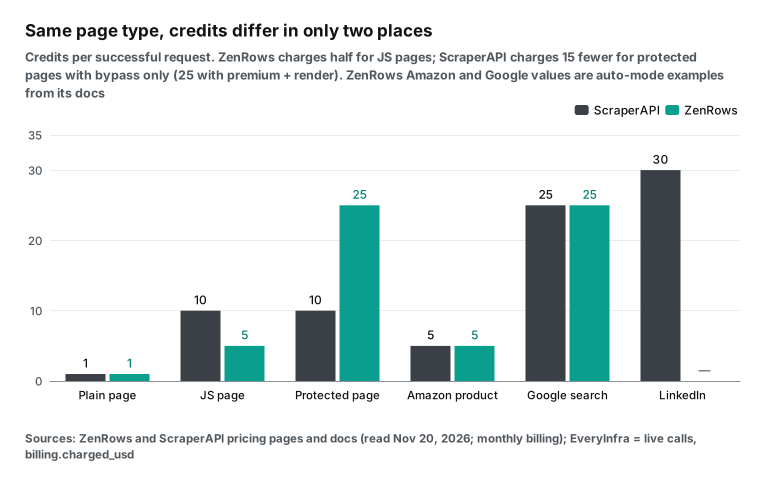
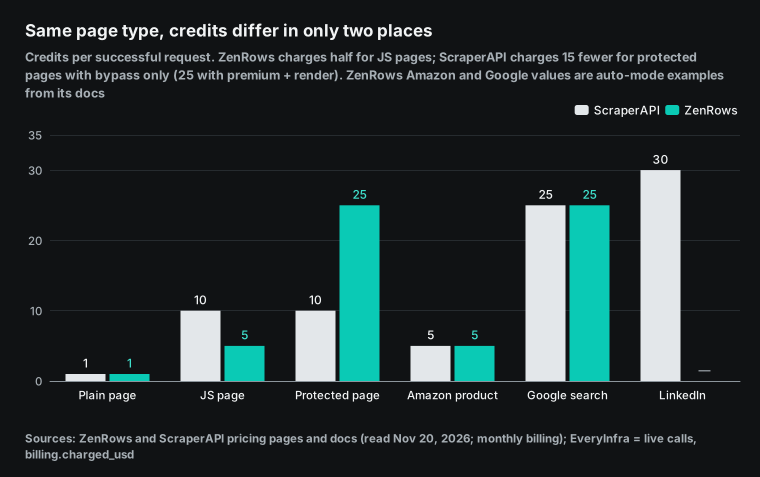
ZenRows and ScraperAPI both sell web scraping by the credit. For a plain HTML page, both charge 1 credit. The two prices split on two kinds of pages. For a page that needs JavaScript rendering, ZenRows charges 5 credits and ScraperAPI charges 10. For a page behind bot protection, ScraperAPI charges 10 credits for its bypass, and ZenRows charges 25 credits for rendering plus premium proxies.
We read both public price pages on November 20, 2026, between 00:15 and 00:19 Singapore time (SGT). Then we computed one monthly bill for each vendor at 5,000 volumes, from 1,000 to 5 million requests a month. At each volume, we took the cheapest single plan that holds the credits.
The result is not one winner. For JS-rendered pages, ZenRows has the lower monthly bill at every volume where both vendors sell a self-serve plan. For protected pages, ScraperAPI has the lower bill at every volume from 29,000 a month. At 100,000 protected pages a month, the bills are $149 at ScraperAPI and $399 at ZenRows.
For plain pages and Amazon product pages, the two credit weights are equal (1 and 5). The winner then depends only on where each vendor puts its plan steps. For Google results pages, both charge 25 credits, and the cheaper vendor changes 7 times between 29,000 and 500,000 searches a month.
EveryInfra does not sell credits for any URL. We sell structured data calls at a fixed price per call, with no monthly fee.
amazon/profile costs $1.389 per 1,000 product pages. Our web search tool costs $0.694 per 1,000 searches. walmart/search costs $1.389 per 1,000 calls, and one call returns 20 products. Between 00:17 and 01:06 SGT on November 20, 2026, we called walmart/search, amazon/search, amazon/profile, google_shopping/search and web search. Each charge matched the catalog price at the time of the call. A request that returned 503 and an empty result were not charged.
How we got the numbers
All vendor prices come from public pages that we read on November 20, 2026, between 00:15 and 00:19 SGT. For ZenRows, we read the Markdown version of the pricing page and the billing documentation. For ScraperAPI, we read the pricing page, its pricing.md version and the credits documentation.
Each monthly bill uses the monthly price of one plan. We did not add top-ups, and we did not use pay-as-you-go. A short Python script computes every number from the two plan tables. The script is in the section "Run the numbers yourself" below.
Our own prices come from billing.charged_usd in the live responses. We checked them against price_usd in the free catalog at GET /api/v1/social/catalog. The 14 ZenRows plans are in ZenRows pricing explained. The two layers of ScraperAPI weights are in ScraperAPI pricing explained.
ZenRows vs ScraperAPI in one table
The first two columns show the public rules of each vendor. The third column shows how EveryInfra does it, so that you can judge if a third option fits. Scraping any URL is what the two vendors do best. EveryInfra has no "give us a URL" credit product, so in that row we show our read tool, which returns the main text of a page.
| Item | ZenRows | ScraperAPI | EveryInfra |
|---|---|---|---|
| Billing unit | Credits, monthly allowance, one balance for all products | Credits, monthly allowance | Per call, USD balance, prepaid |
| Plain page | 1 credit | 1 credit | read tool, $0.694 per 1,000 |
| JS rendering | 5 credits | render=true, 10 credits | Not sold separately |
| Premium (residential) proxies | 10 credits | premium=true, 10 credits | Not sold separately |
| Protected page | Rendering plus premium proxies, 25 credits | Cloudflare, DataDome and similar bypass, 10 credits; premium plus render, 25 credits | Not sold separately |
| Amazon, Walmart | 5 credits in the auto mode example | E-commerce domains, 5 credits | amazon/profile, walmart/product_detail: $1.389 per 1,000 |
| Google results | 25 credits in the auto mode example | Search domains, 25 credits | Web search: $0.694 per 1,000 |
| Lowest monthly fee | $19 (B1, 45,000 credits) | $49 (Hobby, 100,000 credits) | No monthly fee |
| Free allowance | 5,000 credits a month, no end date | 7-day trial with 5,000 credits, then 1,000 a month | Trial credit for new accounts |
| Failed requests | Not charged; 404 and 410 count as results | Not charged; 200 and 404 are charged | Failures and empty results not charged |
| Concurrency, entry plan | 20 | 20 | Rate limit per key per minute |
| Annual billing | Pay for 10 months, get 12 | 10% off | None |
| Unused credits | Plan credits expire; top-up credits roll over one cycle | Expire at renewal | Balance does not expire |
| MCP | Hosted at mcp.zenrows.com/mcp | MCP server available | Remote MCP, tool names start with everyinfra_ |
The ZenRows weights come from "Cost Multipliers for Fetch" in its billing documentation and from "What a credit buys" on its pricing page. The values are: plain page 1, JS rendering 5, premium proxies 10, both together 25.
The ScraperAPI weights come from "API Credit Costs" in pricing.md. By domain, the values are: plain page 1, e-commerce 5, Google and Bing 25, LinkedIn 30. By parameter, they are: bot protection bypass 10, render 10, premium 10, premium plus render 25. The top values are ultra_premium 30 and ultra_premium plus render 75. The full parameter list is in the ScraperAPI supported parameters page.
ZenRows has no fixed per-domain price for Amazon and Google. Its cost control guide gives three auto mode examples. A scrapingcourse.com product catalog costs 1 credit. An Amazon product page costs 5 credits. A Google results page costs 25 credits. The table uses these three values.
What one credit costs: 20 plans on one line
A weight is only a multiplier. It multiplies the price of one credit. ZenRows has 14 plans, from $19 to $2,999 a month, with 45,000 to 45 million credits. ScraperAPI has 6 self-serve plans, from $49 to $1,975 a month, with 100,000 to 21.5 million credits. The table divides each monthly fee by its monthly credits, so it shows the price per 1,000 credits when you use all of them.
| ZenRows plan | Monthly fee | Credits | Per 1,000 credits | ScraperAPI plan | Monthly fee | Credits | Per 1,000 credits |
|---|---|---|---|---|---|---|---|
| B1 | $19 | 45,000 | $0.422 | Hobby | $49 | 100,000 | $0.490 |
| B3 | $39 | 120,000 | $0.325 | Startup | $149 | 1,000,000 | $0.149 |
| L2 | $99 | 500,000 | $0.198 | Business | $299 | 3,000,000 | $0.100 |
| G1 | $199 | 1,200,000 | $0.166 | Scaling | $475 | 5,000,000 | $0.095 |
| S1 | $549 | 5,000,000 | $0.110 | Professional | $975 | 10,500,000 | $0.093 |
| S5 | $2,999 | 45,000,000 | $0.067 | Advanced | $1,975 | 21,500,000 | $0.092 |
The two price curves cross more than once. The ZenRows entry plan, B1, costs $0.422 per 1,000 credits. That is 14% less than the ScraperAPI entry plan, Hobby, at $0.490. Near 1 million credits, the order flips: ScraperAPI Startup costs $0.149, and the ZenRows plan of the same size, G1, costs $0.166. At the top, ZenRows S5 drops to $0.067, and the largest ScraperAPI self-serve plan, Advanced, stays at $0.092.
ZenRows has more plan steps. Across its 14 plans, the monthly credits grow by about 1.7 times from one step to the next. ScraperAPI has 6 plans, and the step from Hobby to Startup is 10 times. If your volume is just above the Hobby allowance, your bill jumps from $49 to $149.
For annual billing, ZenRows gives "pay for 10, get 12" (about 17% off, with the full year of credits on day one), and ScraperAPI pricing.md gives 10% off. The monthly bills below use monthly prices.
How we compute a monthly bill: N requests, the cheapest plan that fits
The price per 1,000 credits is true only when you use every credit. Say that you need 30,000 JS-rendered pages a month. At ScraperAPI, that is 300,000 credits. Hobby holds 100,000, so you must buy Startup at $149, and 700,000 of its 1 million credits stay unused. At ZenRows, the same work needs 150,000 credits, and L1 at $69 (250,000 credits) is enough.
We applied this method to each request type and each monthly volume. The volumes go from 1,000 to 5 million in steps of 1,000, so there are 5,000 points. At each point, we took the cheapest plan whose credits are at least N times the weight, for each vendor. Then we compared the two monthly fees.
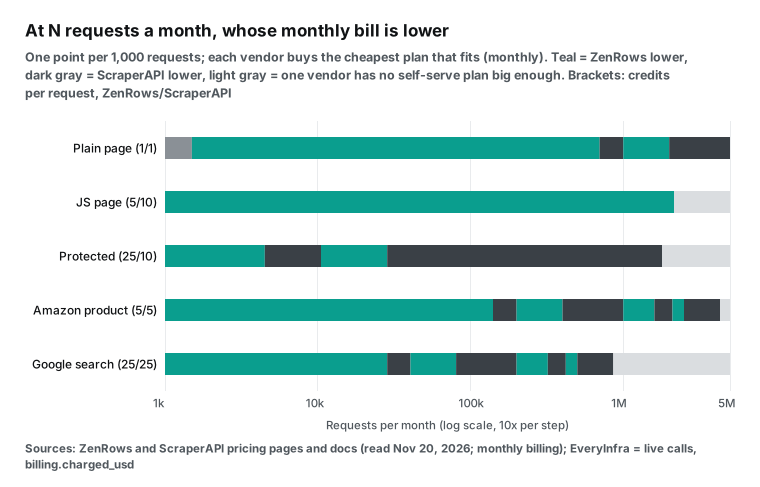
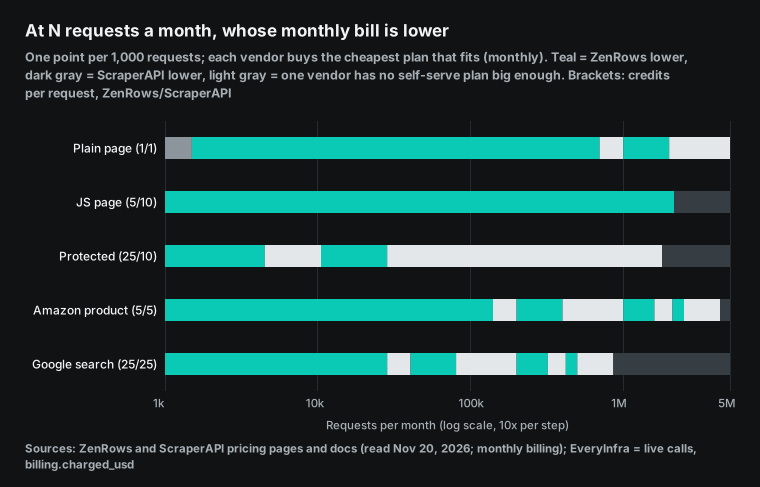
Here is the count across the 5,000 points:
| Request type | Weight (ZenRows / ScraperAPI) | Points where ZenRows is cheaper | Points where ScraperAPI is cheaper | Points where one vendor has no plan large enough | Times the cheaper vendor changes |
|---|---|---|---|---|---|
| Plain page | 1 / 1 | 1,699 | 3,300 | 0 | 3 |
| JS-rendered page | 5 / 10 | 2,150 | 0 | 2,850 | 0 |
| Protected page (ScraperAPI bypass only) | 25 / 10 | 22 | 1,778 | 3,200 | 3 |
| Protected page (ScraperAPI premium plus render) | 25 / 25 | 268 | 592 | 4,140 | 7 |
| Amazon product page | 5 / 5 | 1,340 | 2,960 | 700 | 7 |
| Google results | 25 / 25 | 268 | 592 | 4,140 | 7 |
The column "no plan large enough" counts the volumes that exceed the largest self-serve plan of one vendor. Above that line you must talk to sales for an enterprise price, so we do not compare.
The largest ZenRows self-serve plan, S5, holds 45 million credits a month. The largest ScraperAPI plan, Advanced, holds 21.5 million. For JS-rendered pages, the ScraperAPI self-serve plans stop at 2.15 million pages a month, and ZenRows reaches 9 million. For protected pages, ZenRows self-serve plans stop at 1.8 million. ScraperAPI reaches 2.15 million with bypass only, and 860,000 with premium plus render.
JS-rendered pages: ZenRows costs less at every volume
In the JS row, there is not one point where ScraperAPI is cheaper. There are two reasons. First, the weights are 5 and 10, so each ScraperAPI request costs twice as many credits. Second, the ScraperAPI plans have large gaps. The 100,000 Hobby credits hold only 10,000 JS pages, and above that the next plan costs $149.
| JS pages a month | ZenRows plan | ZenRows bill | ScraperAPI plan | ScraperAPI bill | ScraperAPI / ZenRows |
|---|---|---|---|---|---|
| 10,000 | B2 | $29 | Hobby | $49 | 1.7x |
| 16,000 | B2 | $29 | Startup | $149 | 5.1x (largest gap) |
| 100,000 | L2 | $99 | Startup | $149 | 1.5x |
| 241,000 | G2 | $279 | Business | $299 | 1.07x (smallest gap) |
| 1,000,000 | S1 | $549 | Professional | $975 | 1.8x |
Among the paid plans, the ScraperAPI bill is 1.07 to 5.1 times the ZenRows bill. At 16,000 pages, ZenRows B2 (80,000 credits) is enough, but ScraperAPI Hobby holds only 10,000 JS pages, so you must buy Startup.
This result has one condition. Your pages must need only render=true at ScraperAPI, not premium. If the same page is also behind bot protection, ScraperAPI charges 25 and ZenRows also charges 25. That case is in the protected pages section below.
On the ZenRows side, the auto mode decides if a page needs JS. Its Adaptive Stealth documentation says that mode=auto starts with the cheapest setup and adds rendering and premium proxies only after a failure. It charges only for the setup that finally works.
Protected pages: ScraperAPI costs less from 29,000 a month
In the protected row, ScraperAPI is cheaper at almost every point. ZenRows is cheaper at only 22 points: from 1,000 to 4,000 a month, and from 11,000 to 28,000 a month. At those points, the ZenRows B1 and L2 plans sit just under a ScraperAPI plan step.
| Protected pages a month | ZenRows (25 credits) | ScraperAPI (10 credits) | ScraperAPI if 11 credits |
|---|---|---|---|
| 20,000 | L2, $99 | Startup, $149 | Startup, $149 |
| 50,000 | G2, $279 | Startup, $149 | Startup, $149 |
| 100,000 | G3, $399 | Startup, $149 (2.7x less) | Business, $299 (1.3x less) |
| 1,000,000 | S4, $1,999 | Professional, $975 (2.1x less) | Advanced, $1,975 |
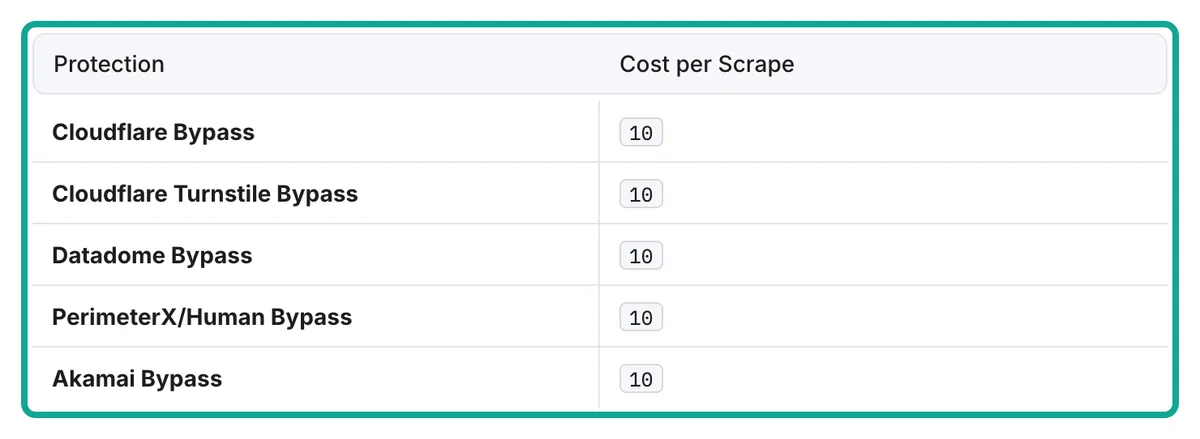
The "Bot-Protected Domains" table in the ScraperAPI credits documentation gives "Cost per Scrape 10" for Cloudflare, DataDome, PerimeterX/HUMAN, Akamai and similar protection. Its October release note says that Akamai sites now work with no extra parameters.
The documentation does not say if these 10 credits come on top of the 1 credit for a plain page, or if 10 is the total. If they come on top, each request costs 11 credits. Then 100,000 requests need 1.1 million credits, which is more than Startup holds, so you buy Business at $299. The gap drops from 2.7 times to 1.3 times, and ScraperAPI is still cheaper.
If the protected site also needs JS rendering to show its content, ScraperAPI needs premium plus render, at 25 credits. Then both weights are 25. The cheaper vendor changes 7 times between 29,000 and 500,000 a month, the same as the Google row.
On the ZenRows side, "25 credits for a protected page" comes from the FAQ on its pricing page. A protected page blocks automated access, so it needs JS rendering and premium proxies together. The auto mode tries 1, 5 and 10 credits first and charges the first level that works. So not every protected site costs the full 25. To find where your own site falls, run it and read the X-Request-Credits response header.
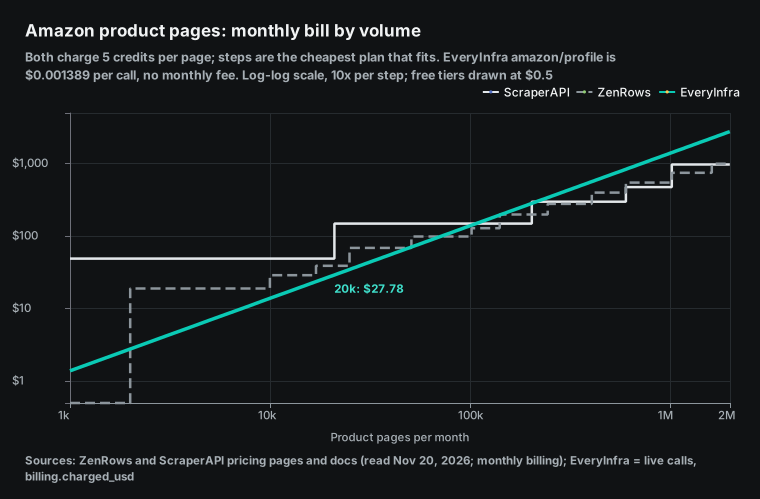
Amazon product pages: ZenRows costs less up to 140,000
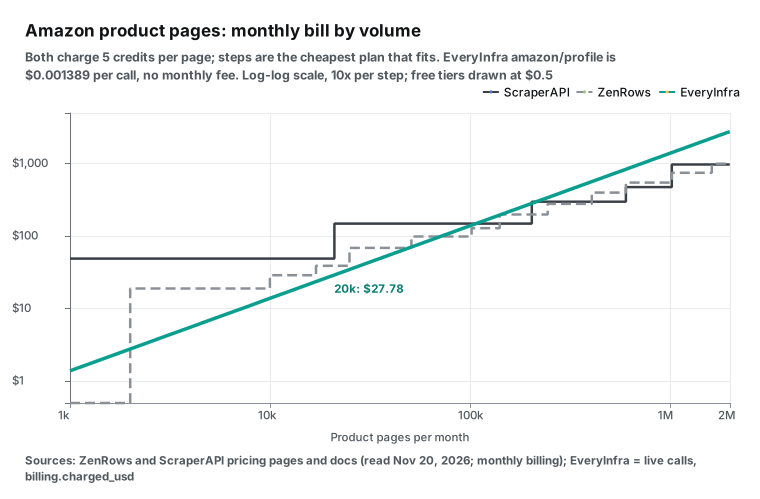
For Amazon, both vendors charge 5 credits, so only the plan steps decide.
| Amazon pages a month | ZenRows | ScraperAPI | EveryInfra `amazon/profile` |
|---|---|---|---|
| 1,000 | Free plan, $0 | Hobby, $49 | $1.39 |
| 20,000 | B3, $39 | Hobby, $49 | $27.78 |
| 100,000 | L2, $99 | Startup, $149 | $138.90 |
| 200,000 | G1, $199 | Startup, $149 | $277.80 |
At 200,000 pages a month the order flips, because ScraperAPI Startup holds exactly 1 million credits. From 141,000 pages, the cheaper vendor changes 6 more times. Above 2.5 million pages, ScraperAPI is cheaper. Above 4.3 million pages, no ScraperAPI self-serve plan is large enough.
The doubt in this row is on the ZenRows side. The "Amazon page costs 5" value in the cost control guide is one auto mode example, not a promise. The ZenRows geotargeting guide says that if you turn off auto mode and set proxy_country, you must also turn on premium_proxy. That costs at least 10 credits.
So if you scrape Amazon outside the US (Japan or Germany, for example), count 10 credits at ZenRows. At ScraperAPI, geotargeting adds no credits. But pricing.md says that Hobby and Startup offer only US and EU exits, and you need Business or higher to pick a country.
Google results: the cheaper vendor changes 7 times
Both vendors charge 25 credits for a Google results page, so the plan steps alone decide the winner.
| Google searches a month | ZenRows | ScraperAPI | EveryInfra `web` (links only) |
|---|---|---|---|
| 20,000 | L2, $99 | Startup, $149 | $13.88 |
| 50,000 | G2, $279 | Business, $299 | $34.70 |
| 100,000 | G3, $399 | Business, $299 | $69.40 |
| 500,000 | S3, $999 | Advanced, $1,975 | $347.00 |
All 7 changes between 29,000 and 500,000 happen where one vendor steps up to its next plan. If your volume moves by 10,000 or 20,000 searches, the answer can change sides.
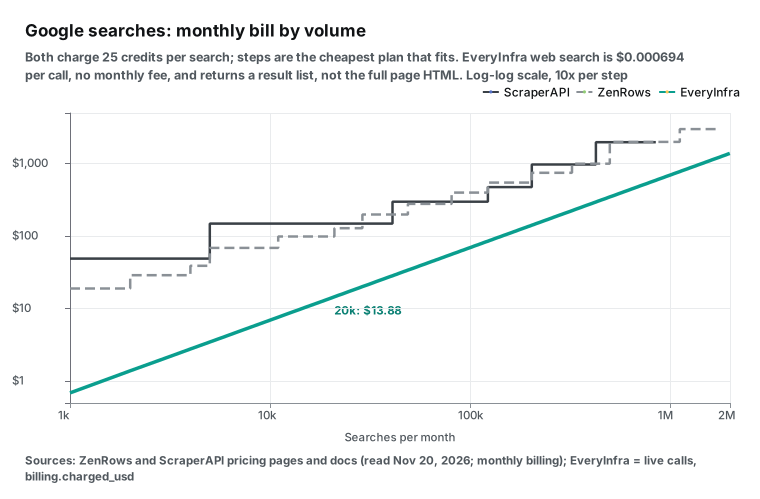
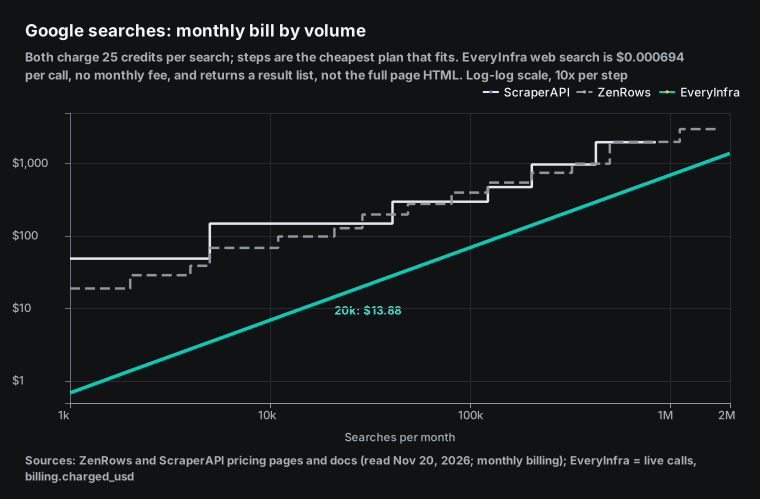
In the Google chart, the EveryInfra line stays under both step lines. Our web search tool, web, costs $0.694 per 1,000 calls with no monthly fee. That is $13.88 for 20,000 searches a month, $69.40 for 100,000 and $347.00 for 500,000.
Two limits apply. First, the web tool returns a list of search results: title, link, snippet, rank and date, with up to 10 results per call. It does not return the raw HTML of a Google page. Page parts such as ads, "People also ask" and the map pack are not in the response. If you need those parts, you need a full-page product like the two vendors sell.
Second, the web tool does not let you choose "Google only". It ranks results by keyword and link signals, and the catalog calls it "web search". These two limits do not matter if you want a set of relevant links for an AI model or for rank checks. They matter if you must copy what the Google page looks like.
Plain pages and JS pages: home ground for both vendors
Scraping any URL is what both vendors sell most. A plain page costs 1 credit at both. The lowest price per 1,000 is under $0.10 at both: ZenRows S5 costs $0.067, and ScraperAPI Advanced costs $0.092.
On the monthly bill, ZenRows is cheaper at every point from 2,000 to 700,000 pages. Its plans start at $19, and each plan costs less than the ScraperAPI plan of similar size. From 701,000 to 1 million pages, ScraperAPI Startup ($149 for 1 million credits) is cheaper, and ZenRows needs G1 at $199. Above 1 million, the order changes two more times.
EveryInfra is not cheaper in this row. Our read tool costs $0.694 per 1,000 pages. On the monthly bill, it beats ZenRows only from 6,000 to 27,000 pages a month. In that range, ZenRows needs B1 at $19, and we charge $4.16 to $18.74. It beats ScraperAPI Hobby ($49) from 2,000 to 70,000 pages. It also beats ScraperAPI Startup ($149) from 101,000 to 214,000 pages, where Hobby is too small and most of the Startup credits stay unused.
Above those ranges, both vendors cost less per page than we do. ZenRows B3 already costs $0.325 per 1,000 credits, which is less than half of our price. The value of read is that it uses the same key and the same balance as our structured data calls. If you already use those, you can read a few hundred pages now and then without a $19 or $49 subscription.
Any URL, pages that need JavaScript rendering and pages behind a bot challenge are home ground for the two vendors. They get these pages with JS rendering, residential proxies and an auto mode that steps up one level at a time. That is why they charge 5, 10 or 25 credits.
Our read tool reads the static text of a page. At 00:42 SGT on November 20, 2026, it read the static store page scrapingcourse.com/ecommerce. In 1.5 seconds it returned 5,734 characters, with product names and prices. At 01:06 it read the anti-bot challenge page on the same practice site. The result was empty, with reason set to empty_result_refunded, and there was no charge.
If your target is a list of any URLs, and many of them need rendering or sit behind protection, pick one of the two vendors. The strength of EveryInfra is structured calls: you send an ASIN, a product link or a keyword, and you get a record with fixed fields. The "Structured data" section shows what comes back.
Failures, 404s and soft blocks: what each vendor charges
Both vendors say "failed requests are free". The details are different. The ZenRows pricing page says: "Failed requests: Never charged. A 404 or 410 is a real answer, so it counts as a result." So a 404 or 410 is charged. Its billing documentation adds a Batch rule. If the target returns 404 or 410, the task shows as failed but is charged as a success.
ScraperAPI pricing.md says: "You're only charged for successful responses (200 and 404), and for requests you cancel after 70 seconds." But a note in its credits documentation says that requests "cancelled from your side before giving us enough time to finish them (70 seconds)" are charged. The two sentences point in opposite directions. If your client timeout is 30 seconds, take care: under the documentation wording, the requests that you drop are charged.
The ScraperAPI general FAQ says that it retries with new proxies for up to 60 seconds. In normal use, 1% to 3% of requests fail, at no charge. If more than 10% fail, it tells you to contact support. Its low success rates FAQ lists the steps to try first, such as premium or a different country_code.

| Case | ZenRows | ScraperAPI | EveryInfra |
|---|---|---|---|
| Error or failed request | Not charged | Not charged | Not charged, refund by charge_id |
| Target returns 404 | Charged | Charged | Not tested here |
| Target returns 410 | Charged | Not listed | Not tested here |
| You cancel the request | Not listed | Docs disagree on the 70-second line | Not tested here |
| A call returns an empty result | — | — | Not charged, reason is empty_result_refunded |
Neither vendor can catch a soft block. A soft block is when the target site detects a bot but does not return an error. It returns status 200 with an empty shell or fake data. We read the transcripts of three YouTube videos. One of them, with 13,788 views (YouTube), shows this case at the start. After a few minutes, the scraper gets empty data with no error.
Under the "200 counts as success" rule of both vendors, these pages are charged.
The same video says that ZenRows "charges per request attempt, not per successful result". That is the opposite of "Failed requests: Never charged" on the ZenRows pricing page. The video sells an anti-detect browser, so check the pricing page before you trust its claims. The only defense against soft blocks is in your own code. Check that the price field is not empty, that the title exists and that the item count is correct. If a check fails, log the page as a failure.
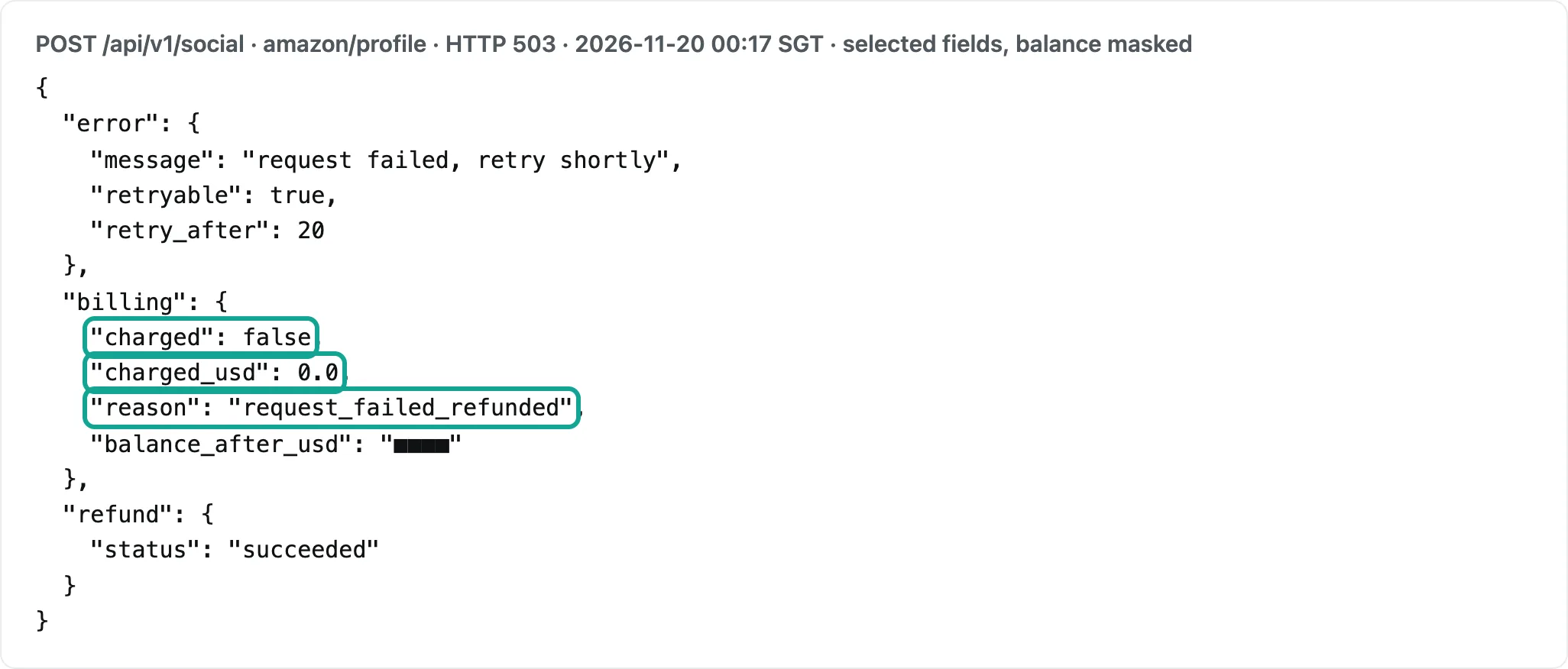
On the EveryInfra side, failures and empty results are refunded against the same charge_id. At 00:17 SGT on November 20, 2026, amazon/profile returned 503. In the response, billing.charged was false, charged_usd was 0.0 and reason was request_failed_refunded, and error.retry_after gave a wait time before a retry. At 01:06, the call for another product (B0CHWRXH8B) worked.
For slow calls, add "mode":"async" to the request body. You get a job_id at once and then poll GET /api/v1/jobs/{job_id}. A good synchronous response describes this in its async_hint field.
Failures also use concurrency and time. On June 19, 2026, ZenRows ran its own comparison (ZenRows blog, with the script and raw results on GitHub). It used 6 protected targets with 200 requests each. At 2 requests per second, ZenRows succeeded on 99.7% and ScraperAPI on 60.8%. At 10 requests per second, the rates were 99.9% and 51.2%. One of the two vendors ran this test, and ScraperAPI ran with default routing, without ultra_premium.
Suppose that your success rate is 60.8%. To get 1,000 good pages, you send about 1,645 requests. You pay no extra credits, but you use 64% more concurrency and time. The Hobby plan has only 20 concurrent requests, so this 64% turns directly into longer jobs. In the same test, the ScraperAPI requests that did succeed on protected pages had a median response time of 1.4 to 4.6 seconds. ZenRows had 2.7 to 17.9 seconds, and Google results pages were the slowest at a median of 17.9 seconds.
Structured data: one vendor stopped, one still sells
For structured fields from Amazon, Walmart and Google, the two vendors differ the most today. On its Scraper APIs page, ZenRows says that its per-site Scraper APIs (Amazon, Walmart, Google, Zillow, Idealista and others) are "deprecated". Existing integrations continue to work. New integrations should use Fetch, with Extract for structured JSON. The pricing page says that "Extract is currently free on top of the Fetch request it uses". The older Amazon scraper guide still describes the per-site product.
ScraperAPI still sells its structured data endpoints. They include the Amazon Product API, Amazon search, the Walmart Product API and the Google SERP API. Each has a sync and an async version. The credits are the same as for the domain: 5 for Amazon and 25 for Google.
This means two things if you plan to move. If you use the old ZenRows Amazon endpoint, a new project must move to Fetch plus Extract. The cost then falls between 1 and 25 credits under auto mode. If Extract starts to cost money one day, you must recompute. If you use the ScraperAPI structured endpoints, the price per page is fixed today. An Amazon product page costs $2.45 per 1,000 on Hobby and $0.459 per 1,000 on Advanced.
Our ZenRows alternatives article tested the fields with the sample ASIN from the ZenRows docs. Our ScraperAPI alternatives article found that two ScraperAPI documents give different Walmart weights. We do not repeat those tests here.
On the EveryInfra side, Amazon and Walmart are structured calls with a fixed price per call, and the catalog lists the fields that come back.
The catalog lists 20 fields for amazon/profile. Examples are asin, title, price, list_price, rating, rating_count, in_stock, seller_name and bestseller_ranks; our 01:06 call returned 16 of them. It costs $1.389 per 1,000. amazon/search returns one page of search results per call, at $2.236 per 1,000. The catalog lists 18 fields for walmart/search.
Our call returned 14 of them, such as item_id, name, price, was_price, rating, review_count, seller_name and in_stock, at $1.389 per 1,000. walmart/product_detail has the same price. These field names are our own. They do not map one to one to the fields of the two vendors, so plan a rename step if you move.
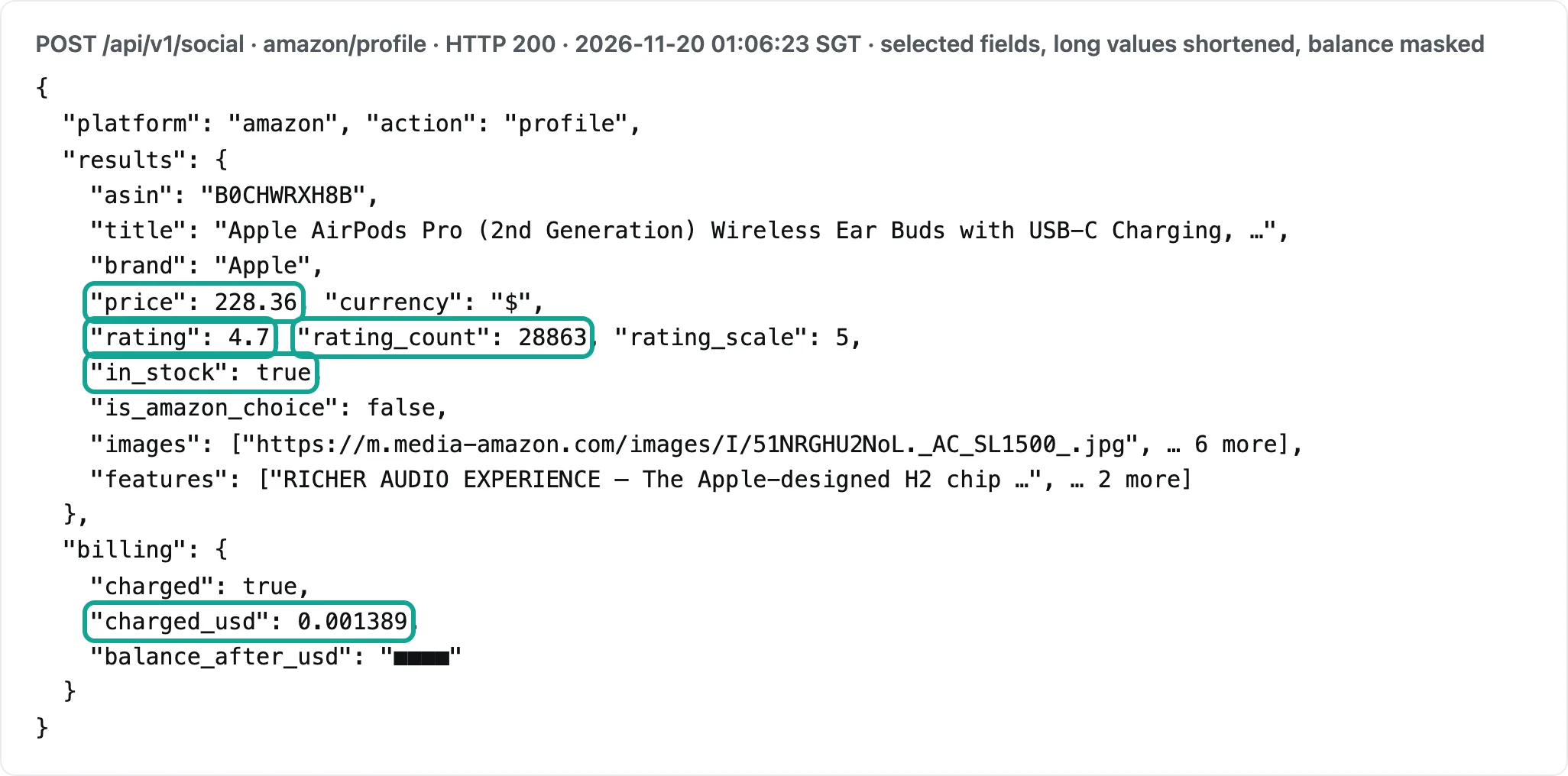
Here is what one record looks like, from the amazon/profile call at 01:06. The request had only one product link (B0CHWRXH8B, Apple AirPods Pro 2nd generation). The answer came in 7.7 seconds. brand was Apple, price was 228.36, rating was 4.7 and rating_count was 28,863. in_stock was true, images held 7 full-size image links and features held the 3 feature lines from the product page. billing.charged_usd was 0.001389.
Send the same product page to either vendor, and you get the full HTML back. With ZenRows Extract, you can also get JSON from your description. Your code must find the price node and remove the thousands separator from the rating count. When Amazon changes its layout, you also fix the selectors.
google_shopping/search returns a product list across stores. At 01:05 a search for "air fryer" returned 20 products in 22.1 seconds, priced from $39.99 to $279.95. All 20 had rating and review_count, and 16 had an old price in old_price. The top result, a bella PRO 8 qt fryer, was $49.99 with an old price of $130. In the merchant field, Walmart had 10 products, Target 3 and Best Buy 2, and Home Depot, Kohl's, Macy's and others had 1 each.
| Merchant in `google_shopping/search` "air fryer" (01:05 SGT) | Products | Price range | With `old_price` | Average rating |
|---|---|---|---|---|
| Walmart | 10 | $44.96–$109.00 | 7 | 4.49 |
| Target | 3 | $49.99–$64.99 | 2 | 4.47 |
| Best Buy | 2 | $39.99–$49.99 | 2 | 4.75 |
| Home Depot, Cuisinart, Kohl's, SharkNinja, Macy's | 1 each | $89.99–$279.95 | 5 | 4.4–4.7 |
For price comparison or sale tracking, one request gives you current prices, old prices and ratings across stores, and this call cost $0.000792. To do the same with the general scraping of the two vendors, a Google page costs 25 credits (the ScraperAPI search domain rate and the Google example in the ZenRows auto mode guide), and you parse the product cards yourself.
| Capability | Test time (SGT) | Result | Charged | Per 1,000 |
|---|---|---|---|---|
walmart/search "air fryer" | 2026-11-20 00:17 | 20 items, all priced, $29.98–$109 | $0.001389 | $1.389 |
amazon/search "wireless earbuds", fast=true | 2026-11-20 00:18 | 10 items, 9 priced | $0.002236 | $2.236 |
Web search web "zenrows vs scraperapi" | 2026-11-20 00:18 | 10 results | $0.000694 | $0.694 |
amazon/profile B08N5WRWNW | 2026-11-20 00:17 | 503, not charged | $0 | $1.389 |
walmart/search with query instead of keyword | 2026-11-20 00:42 | 422 missing_param, not charged | — | — |
read scrapingcourse.com/ecommerce | 2026-11-20 00:42 | 5,734 characters of text | $0.000694 | $0.694 |
Web search web "best air fryer 2026" | 2026-11-20 00:43 | 10 results | $0.000694 | $0.694 |
google_shopping/search "air fryer" | 2026-11-20 01:05 | 20 items, $39.99–$279.95, 22.1 s | $0.000792 | $0.792 |
amazon/search "wireless earbuds", no fast | 2026-11-20 01:05 | 10 items, 46.6 s | $0.002236 | $2.236 |
amazon/profile B0CHWRXH8B | 2026-11-20 01:06 | Success, 16 fields, 7.7 s | $0.001389 | $1.389 |
read scrapingcourse.com anti-bot challenge page | 2026-11-20 01:06 | Empty result, refunded | $0 | $0.694 |
One walmart/search call returns 20 products, so 1,000 products cost $0.069. This amazon/search call returned 10 products, so 1,000 products cost $0.224. The two vendors charge per page. One search results page costs 5 credits at ScraperAPI: $0.00245 on Hobby and $0.00046 on Advanced. The number of products on a page depends on the site, so compare per page on both sides.
One real round trip: request, response and charge
Here is walmart/search as an example. The request body has three parts: platform, action and parameters. The key goes in a header, from an environment variable:
curl -s https://api.everyinfra.com/api/v1/social \
  -H "Authorization: Bearer $EVERYINFRA_API_KEY" \
  -H "Content-Type: application/json" \
  -d '{"platform":"walmart","action":"search","params":{"keyword":"air fryer"}}'
At 00:17:26 SGT on November 20, 2026, this call took 42.0 seconds and returned 20 products. Here is the first product and the billing part (balance removed):
{
  "platform": "walmart", "action": "search", "count": 20,
  "results": [
    {"item_id": "20223605761", "name": "DAIVOS 5QT Air Fryer with Viewing Window, 12 Cooking Presets, 1500W Fast , Even Cooking",
     "price": 59.39, "currency": "USD", "url": "https://www.walmart.com/ip/20223605761"}
  ],
  "billing": {"charged": true, "charged_usd": 0.001389,
              "amount": {"per_1k": {"USD": 1.388889}}}
}
billing.charged_usd is the real charge for this call, and per_1k is the same price per 1,000 calls. At the two vendors, you read a response header instead. ZenRows sends X-Request-Credits and ScraperAPI sends sa-credit-cost. Both give the credits for this request. You multiply by the price of one credit on your plan to get money.
ZenRows also sends an X-Request-Cost header. In the cost control guide, the example maps 1 credit to $0.001. That is more than twice the real B1 price of $0.000422 per credit. For a monthly budget, multiply the credit count by the credit price of your own plan.
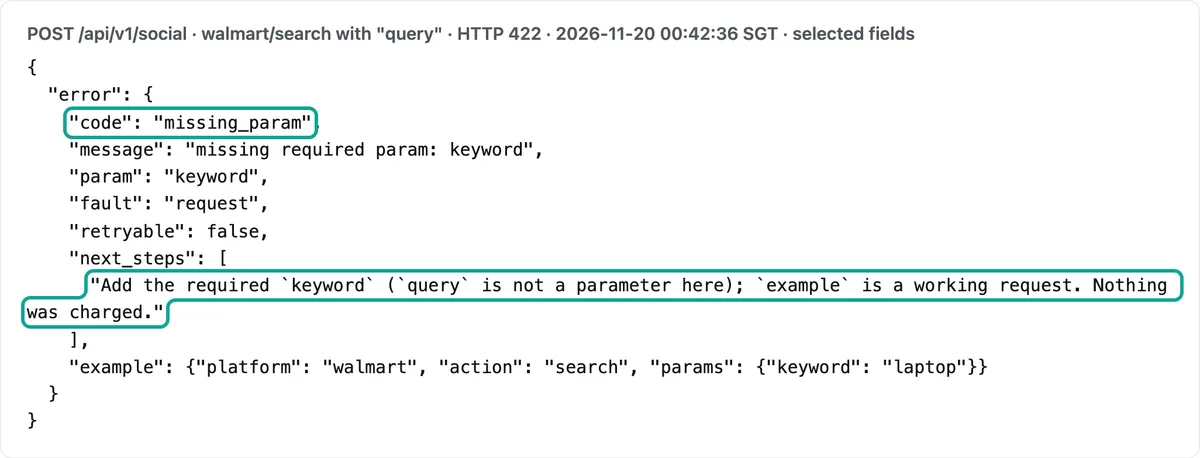
A wrong parameter also gets a different answer on each side. At 00:42:36 SGT on November 20, 2026, we sent walmart/search with query in place of keyword. It returned 422 in 0.12 seconds with the error code missing_param. The next_steps text said "query is not a parameter here", and the response included an example request that works. Nothing was charged.
The ScraperAPI cost control documentation offers a max_cost parameter. It sets a credit limit for one request, and a request above the limit does not run.
ScraperAPI also added a domain credit cost estimator in June 2026. On October 2, 2026, ZenRows added credit caps per API key (changelog). A cap counts per billing cycle, day, week or month. It sends alerts at 80% and 100%, and at the cap it stops only that key (key caps documentation). The ScraperAPI limit is per request and the ZenRows limit is per key. You can set both before a large batch job.
Live charges: they match the catalog, and the catalog can change
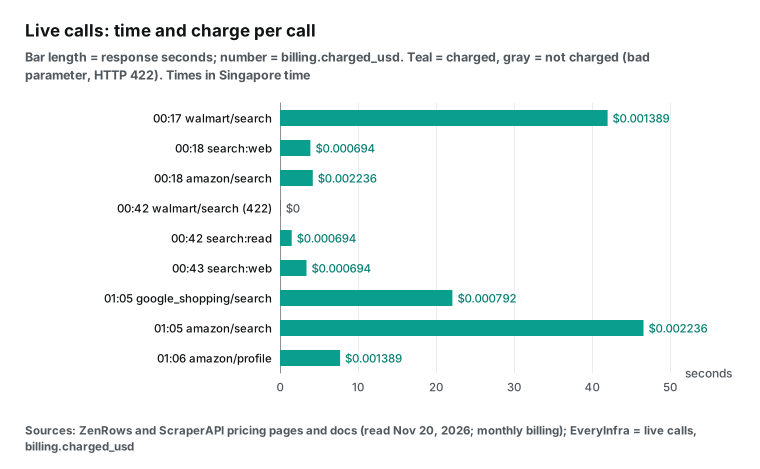
We called the API in three time windows on November 20, 2026, Singapore time (SGT): 00:17 to 00:18, 00:40 to 00:43, and 01:05 to 01:06. Each charge matched the catalog price: amazon/search $0.002236, walmart/search and amazon/profile $0.001389, and web and read $0.000694.
The price of google_shopping/search changed within the hour. When we read the catalog at 00:14, it cost $0.000556 per call. At 01:05 our call cost $0.000792, which matched the catalog at that time. Keep your records from billing.charged_usd in each response. Do not hard-code a catalog price from one day.
A parameter can change the time of a call but not its price. We searched amazon/search for "wireless earbuds" twice. At 00:18 with fast=true it took 4.2 seconds, and at 01:05 without fast it took 46.6 seconds. Both calls returned 10 products and cost $0.002236. One walmart/search call took 42.0 seconds for 20 products, and web took 3.4 to 3.9 seconds for 10 results.
For large jobs, run calls in parallel, or add "mode":"async" to the body, get a job_id and poll. Time is a cost at the two vendors too. Hobby gives 20 concurrent requests, and in the ZenRows test, Google pages had a median of 17.9 seconds. When you size a plan, count the hours as well as the dollars.
Concurrency, regions and running out: three things outside the price table
Concurrency is almost the same at both. The ZenRows numbers are from its billing documentation, and the ScraperAPI numbers are from pricing.md.
Above the limit, both return 429. ScraperAPI says that it does not charge for these. The ZenRows concurrency documentation sends Concurrency-Limit and the remaining slots in response headers.
From the free plan to the fifth level, the two vendors give the same concurrency: 5, 20, 50, 100, 200 and 300. Only the top plan differs: ZenRows S5 gives 400 and ScraperAPI Advanced gives 500. The gap shows when the plans do not line up. Take 1 million JS pages a month: ZenRows S1 is enough and gives 200 concurrent requests, while ScraperAPI needs Professional, which gives 300. More concurrency means more requests done in the same time window.
For geotargeting, ScraperAPI sets a higher bar. Its two entry plans, Hobby and Startup, offer only US and EU exits. To pick a country, you need Business at $299 or more. Geotargeting itself adds no credits: the geotargeting documentation uses the country_code parameter.
ZenRows offers proxy_country on every plan, but you pay in credits. To set a country by hand, you must turn on premium_proxy, which costs at least 10 credits. In auto mode, ZenRows decides. For pages that need a country, such as Amazon Japan, a small user pays more credits at ZenRows and a higher monthly fee at ScraperAPI.
When you run out of credits, the two vendors act differently. ZenRows paid plans can buy top-ups, up to 10 per cycle. Unused top-up credits roll over one cycle.
The B1 top-up is $6.50 for 11,000 credits, which is $0.591 per 1,000 credits. That is 40% more than the $0.422 inside B1. So a top-up is good for a small gap. For a large gap, move up a plan.
ScraperAPI Hobby, Startup and Business have no pay-as-you-go. When you run out, you either turn on "auto-upgrade" or wait for next month. From Scaling up, you can turn on pay-as-you-go with a monthly limit, and the page shows no unit price for it. Neither vendor rolls over plan credits. The ScraperAPI plans and billing FAQ says: "Your credit balance resets when your subscription renews". ZenRows says: "Plan credits don't roll over".
| Rule | ZenRows | ScraperAPI |
|---|---|---|
| Free use | 5,000 credits a month, no end date | 7-day trial with 5,000 credits, then 1,000 a month |
| Annual billing | Pay for 10 months, get 12 | 10% off |
| More credits mid-month | Top-ups, up to 10 per cycle; B1: $6.50 for 11,000 | Auto-upgrade; pay-as-you-go from Scaling only |
| Unused plan credits | Expire | Reset at renewal |
| Pick a country | Every plan; by hand needs premium_proxy (10 credits or more) | Hobby and Startup: US and EU only; any country from Business |
Moving from one vendor to the other
If the numbers above tell you to switch, three parts of your code change. The first is the request parameters. The names look alike, but the costs are not.
| Purpose | ZenRows Fetch | ScraperAPI |
|---|---|---|
| JS rendering | js_render=true, 5 credits | render=true, 10 credits |
| Premium proxies | premium_proxy=true, 10 credits | premium=true, 10 credits |
| Pick a country | proxy_country, needs premium_proxy | country_code, Business plan or higher |
| Let the service choose | mode=auto, 1 to 25 credits | Default routing; ultra_premium 30 credits |
| Credits for this request | X-Request-Credits header | sa-credit-cost header |
| Spend limit | Credit cap per API key | max_cost per request |
The second is the cost check. Does your code log the cost per request from a header? Then change the header name, or your cost report shows zeros.
The third is the error handling. ZenRows uses codes such as AUTH004 (no credits left) and AUTH014 (key cap reached), listed in its API error codes. ScraperAPI uses plain HTTP codes and retries on its side for up to 60 seconds. If your client timeout is shorter than 70 seconds, check the ScraperAPI cancel rule in "Failures, 404s and soft blocks" before you switch.
Do the move in two steps. First, send 5% of your URLs to the new vendor for one week and log the credits per URL from the response header. Then put those real credits into the script below, not the list weights. A site that you think of as "plain" can cost 5 or 10 credits under auto mode.
Connecting from AI tools: MCP at both vendors and at EveryInfra
All three connect to MCP clients such as Claude and Cursor. The ZenRows MCP server is hosted at https://mcp.zenrows.com/mcp. It accepts OAuth or an API key as a Bearer token (authentication). Its tools include scrape, extract, prepare_domain and account_usage. The MCP tool reference lists the credits for each tool. When credits run out it returns AUTH004, and when one key reaches its cap it returns AUTH014.
On October 5, 2026, ZenRows also opened paid calls for AI agents. An agent needs no account and no key. It reads live prices in the ZenRows agent store and pays with x402, MPP or a card. The credit weights are the same as in an account (changelog, Agentic Payments documentation). ScraperAPI has its own MCP server documentation, and its structured endpoints also work through MCP.
The EveryInfra remote MCP endpoint is https://api.everyinfra.com/mcp. All tool names start with everyinfra_. It uses the same key, the same balance and the same per-call prices as the REST API. In Claude Code, add this:
{
  "mcpServers": {
    "everyinfra": {
      "type": "http",
      "url": "https://api.everyinfra.com/mcp",
      "headers": {"Authorization": "Bearer ${EVERYINFRA_API_KEY}"}
    }
  }
}
Through MCP, a model gets the same JSON as the REST response above. It includes billing.charged_usd, so the agent can track its own spend. The protocol rules are in the Model Context Protocol specification, 2025-11-25.
The difference between the three is not "can it connect". It is what the agent gets back. The two vendors return full HTML, Markdown or JSON from Extract, and the agent must still find the fields. We return records with fixed fields, and the catalog defines each field name and its meaning.
Most third-party comparison pages show old prices
We opened the top pages for "zenrows vs scraperapi" and read their prices.
In the top 10 web results at 00:18 SGT on November 20, 2026, the first one was a comparison page from a third-party review site. Its title gives test data from October 2026. But its price table still shows ZenRows Developer at $69 for 250,000 credits, Startup at $99 for 1 million and Business at $249 for 3 million. Those are the ZenRows plans from before it moved to 14 plans. Under that table, 1 million ZenRows credits cost $99. Today they cost $199 (G1, 1.2 million credits).
The ZenRows comparison post also uses old names: "Developer plan" and "14 days, 1,000 basic requests". Today the ZenRows pricing page starts at Build B1 and has a free plan with 5,000 credits a month and no end date. The ScraperAPI side has its own ZenRows alternative page. Read it as one vendor writing about the other.
Broad "best of" lists have the same problem. TechRadar updated its "Best Scraper API of 2026" list on October 29, 2026 (the change date in its page data).
It says that ScraperAPI starts at "$49 per month for 100,000 API calls". That counts credits as calls. Under the ScraperAPI weights, those 100,000 credits buy only 10,000 JS pages or 4,000 Google searches (TechRadar). The review site gives a test window from October 1, 2026 to November 1, 2026. It measured success rates and speed, but its price table did not change with the test.
Video claims also need a check. A three-vendor video with 477 views (YouTube) says that ScraperAPI bills per call with "no hidden credit multipliers". It compares "$149 for 1 million" against other prices per million requests. But the ScraperAPI pricing page lists weights of 5, 10, 25, 30 and 75. 1 million credits buy only 200,000 Amazon pages or 40,000 Google searches.
A ZenRows review video with 25,541 views (YouTube) shows the "Add domain" steps in the dashboard. The menu still says Universal Scraper API and Scraping Browser. The docs now call them Fetch and Browser. If you follow an old tutorial, you will not find those menu items.
| Source | What it says | What the price page says on Nov 20, 2026 |
|---|---|---|
| Third-party review site (test window Oct 2026) | ZenRows Startup: $99 for 1 million credits | 1 million credits need G1 at $199 |
| ZenRows comparison post | "Developer plan", 14-day trial with 1,000 basic requests | Plans start at Build B1; free plan with 5,000 credits a month |
| TechRadar list (updated Oct 29, 2026) | ScraperAPI: $49 for 100,000 API calls | 100,000 credits; a JS page costs 10 |
| YouTube video, 477 views | ScraperAPI has "no hidden credit multipliers" | Weights of 5, 10, 25, 30 and 75 |
| YouTube review, 25,541 views | Menus named Universal Scraper API, Scraping Browser | Now named Fetch and Browser |
None of these 5 sources matches the two price pages of November 20, 2026, on price, plan name or menu name. Both vendors changed their plans this year. ScraperAPI added its Professional and Advanced plans only in May 2026 (release note; see also the full release notes). The structured data on the ZenRows pricing page gives a last change date of 2026-10-13. Before you quote a price table from someone else, compare it with the two price pages on the same day.
Pick by use case: a quick table
| You mostly scrape | Monthly volume | Cheaper option (monthly billing) | Why |
|---|---|---|---|
| Plain pages | 2,000 to 700,000 | ZenRows | Plans start at $19, each below the ScraperAPI plan of similar size |
| Plain pages | 701,000 to 1 million | ScraperAPI | Startup holds 1 million credits for $149 |
| JS-rendered pages | 1,000 to 2.15 million | ZenRows | Weights 5 vs 10 |
| Protected pages (ScraperAPI bypass only) | 29,000 and up | ScraperAPI | Weights 10 vs 25 |
| Amazon product pages | Up to 140,000 | ZenRows | Both 5 credits, ZenRows has more plan steps |
| Amazon product pages | 2,000 to 49,000 | EveryInfra | No monthly fee, $1.389 per 1,000 |
| Google results (full page) | Depends: the winner changes 7 times between 29,000 and 500,000 | Run your own volume | Both 25 credits |
| Search result links (no full page) | Any | EveryInfra | Web search at $0.694 per 1,000 |
| Pages that need login and clicks | Any | ZenRows | Browser product, billed per minute and per GB |
| Scheduled batches with no code | Any | ScraperAPI | DataPipeline at the standard API price |
The last two rows are products that one vendor has and the other does not. ZenRows Browser is a real browser session that can click, fill forms and stay logged in, at 5 credits per minute plus traffic. ScraperAPI DataPipeline runs scheduled batch jobs. Since July 2026 it costs the same as the standard API (release note: the old 5x markup is gone). EveryInfra has neither.
When ZenRows is the better choice
Pick ZenRows if most of your pages need JS rendering and you need up to 2.15 million a month. It costs less at every volume, by up to 5.1 times between paid plans.
ZenRows also fits a small or uneven monthly volume. The free plan gives 5,000 credits a month with no end date. B1 costs only $19. With annual billing, you get the full year of credits on day one.
For flows that need login, clicks or a kept session, ZenRows has its Browser product, and ScraperAPI has nothing like it. You may not want to choose the parameters for each site. The ZenRows auto mode starts at 1 credit and charges only for the level that works.
ZenRows also covers more volume on self-serve plans. S5 holds 45 million credits, so you reach 9 million JS pages a month before you must call sales. ScraperAPI stops at 2.15 million.
When ScraperAPI is the better choice
Pick ScraperAPI if most of your targets use Cloudflare, DataDome or similar protection but show their content without JS rendering. At 10 credits per request, it costs less at every volume from 29,000 a month, and 2.7 times less at 100,000.
ScraperAPI also fits some exact volumes. For 701,000 to 1 million plain pages, or about 200,000 Amazon pages, Startup holds the whole month.
ScraperAPI still sells ready structured endpoints for Amazon, Walmart and Google, with a fixed price per page. You do not need to wait for Extract pricing. If you need 500 concurrent requests on a self-serve plan, ScraperAPI Advanced is the only plan of the two that offers it. For scheduled batch jobs with no code, ScraperAPI has DataPipeline.
ScraperAPI also has a tool to check a domain before you buy. The domain credit cost estimator and the /account/urlcost call tell you what one URL costs. Use them on your 20 most important domains first.
When neither fits
You may need Amazon or Walmart product fields, or a set of search result links, at a few tens of thousands a month. Then a price per call is simpler. For 20,000 Amazon product pages a month, EveryInfra costs $27.78, ZenRows $39 and ScraperAPI $49. For 20,000 searches a month, EveryInfra costs $13.88, ZenRows $99 and ScraperAPI $149.
The EveryInfra catalog pages are Amazon API and Walmart API, and search is at web search. All platforms are in the API market, and prices are on the pricing page.
Above 50,000 Amazon pages a month, or if you need the full HTML of any URL, the credits of the two vendors cost less.
Run the numbers yourself: a short Python script
Every monthly bill above comes from this script. The plan tables are copied from the two price pages on November 20, 2026. Put in your own N and weights to see the cheaper vendor in seconds. When either vendor changes its prices, edit only the ZR and SA lists.
ZR = [("B1",19,45_000),("B2",29,80_000),("B3",39,120_000),("L1",69,250_000),("L2",99,500_000),
      ("L3",129,700_000),("G1",199,1_200_000),("G2",279,2_000_000),("G3",399,3_000_000),
      ("S1",549,5_000_000),("S2",749,8_000_000),("S3",999,12_500_000),("S4",1999,28_000_000),
      ("S5",2999,45_000_000)]
SA = [("Hobby",49,100_000),("Startup",149,1_000_000),("Business",299,3_000_000),
      ("Scaling",475,5_000_000),("Professional",975,10_500_000),("Advanced",1975,21_500_000)]
FREE = {"zr": 5_000, "sa": 1_000}

def cheapest(plans, free, n, weight):
    need = n * weight
    if need <= free:
        return ("Free", 0)
    return next(((name, usd) for name, usd, credits in plans if credits >= need), (None, None))

# 30,000 JS-rendered pages a month: ZenRows 5 credits, ScraperAPI 10
print(cheapest(ZR, FREE["zr"], 30_000, 5), cheapest(SA, FREE["sa"], 30_000, 10))
# -> ('L1', 69) ('Startup', 149)
The script checks only "one plan holds the month". It does not add top-ups or pay-as-you-go. ZenRows top-ups cost more than plan credits, and ScraperAPI does not publish its pay-as-you-go price. So one plan is the cheapest way at both. Volume jumps between two plans? Pick the plan for your busiest month, or look at annual billing.
Market moves, October to November 2026
On October 2, 2026, ZenRows added credit caps per API key (changelog). What it means for you: give each project its own key. If one project runs wild, only that key stops. If a team shares one account, you can give each project its own key and cap.
On October 5, 2026, ZenRows let AI agents call Fetch and Extract with no account. Agents pay with x402, MPP or a card (Agentic Payments documentation). What it means for you: an agent can spend money without you knowing. Set a limit on any wallet that an agent can use.
On October 9, 2026, ZenRows launched Crawl. You give it one start URL, and it follows links across the site. Each page costs 1 to 25 credits under auto mode Fetch, and max_pages sets the upper limit (billing documentation). The cost of a full-site crawl is pages times the level each page needs. Run a small max_pages first to find your average.
In October 2026, ScraperAPI began to get past Akamai-protected sites with no extra parameters (release note). If you added premium or ultra_premium only for Akamai, try your requests without them. The protected-site rate is 10 credits, less than the 30 of ultra_premium.
On November 8, 2026, the arXiv preprint ScrapeBench tested 1,626 popular sites that clearly forbid scraping. When told to "go scrape", most AI agents followed the site rules less than 5% of the time (the third version came out on November 11). If an agent gets scraping tools through MCP, one approach is to put the target's terms and robots.txt in the prompt. Another is to allow only a fixed list of tools. Check for yourself how those terms apply to your use.
On November 13, 2026, DeepSeek opened web search and URL reading in its API. Its pricing page gives a new rule from 12:00 Beijing time on November 18, 2026. Search and web fetch inside a model call now cost nothing extra, and you pay only for tokens.
Its separate Search API and Fetch API still cost $0.75 per 1,000 successful requests. The November 13 date is from an AICoder report. What it means for you: for "read this page as text for a model", model vendors now compete with plain-page scraping. $0.75 per 1,000 is close to the $0.42 to $0.49 per 1,000 plain pages on the two entry plans. JS rendering, bot protection and fixed fields stay with the two vendors and with structured APIs.
The ZenRows billing documentation also changed at 21:43 UTC on November 18, 2026 (05:43 SGT on November 19, 2026). That is the change time in its page data. The weights and concurrency limits here come from the version we read on November 20, 2026.
Limits: when these numbers do not hold
The monthly bills assume that every request has the same weight. Real jobs mix them. An e-commerce project can be 70% plain pages, 20% JS pages and 10% protected pages. Then use a weighted average. With that mix, ZenRows costs 0.7 + 1 + 2.5 = 4.2 credits per page on average. ScraperAPI costs 0.7 + 2 + 1 = 3.7 credits. Put 4.2 and 3.7 as the weights in cheapest above to get your answer.
| Mixed pages a month (70/20/10) | ZenRows at 4.2 credits | ScraperAPI at 3.7 credits |
|---|---|---|
| 10,000 | B1, $19 | Hobby, $49 |
| 50,000 | L1, $69 | Startup, $149 |
| 100,000 | L2, $99 | Startup, $149 |
| 500,000 | G3, $399 | Business, $299 |
| 1,000,000 | S1, $549 | Scaling, $475 |
With this mix, ZenRows costs less from 10,000 to 100,000 pages a month, and ScraperAPI costs less at 500,000 and 1 million. Between those points the winner changes with the plan steps: ScraperAPI at 200,000, ZenRows at 300,000.
Both vendors can charge a site differently from the list weights. ZenRows auto mode puts each site somewhere from 1 to 25 credits. The ScraperAPI documentation says that sites change their protection and the charge changes with it. It suggests that you check the Domain Multiplier in the dashboard or the /account/urlcost call first. The credits documentation also sets a floor for enterprise accounts on ultra_premium domains. It is $3 per 1,000 without rendering and $7 with rendering.
We did not call the API of either vendor, so for success rates we quote public tests only. One of the two vendors ran each test, or the test used a different target list. The EveryInfra prices come from the November 20, 2026 catalog and from live charges. Catalog prices can change. The final number is billing.charged_usd in the response to your call.
Getting started: test with 100 of your own URLs
- Sign up at the API market and create an API key in the dashboard. New accounts get trial credit.
- Follow the quick start to send your first request. First, check the names and parameters in the free catalog. Examples:
amazon/profile,amazon/search,walmart/search,walmart/product_detail. - Take 100 of your own targets (product links or keywords). Run them on the free credits of both vendors and on our trial credit. Write down what each good result cost. Do not count the failures.
- Put the good results and the real spend into the Python script above. Then pick the plan for your monthly volume.
To check refunds for failures and empty results by charge_id, see failure refund reconciliation. To connect AI tools, see the MCP setup guide. For one vendor at a time, see ZenRows pricing explained and ScraperAPI pricing explained. For overviews of other options, see the ZenRows alternatives page and the ScraperAPI alternatives page.
FAQ
Which is cheaper, ZenRows or ScraperAPI?
It depends on the page type and the monthly volume. For JS-rendered pages, ZenRows costs less at every volume where both sell a self-serve plan. For protected pages, ScraperAPI costs less from 29,000 a month. For plain pages, ZenRows costs less up to 700,000 a month. For Amazon and Google, the weights are equal and the cheaper vendor changes with the plan steps. This question comes from the Google suggestion "zenrows vs scraperapi" (read on November 20, 2026).
Is ZenRows legit?
ZenRows has a public pricing page, billing documentation, a changelog, and an open-source MCP server and CLI. Its enterprise plan lists an SLA, SOC 2 and ISO 27001 (pricing page). Its key caps documentation describes credit caps per API key with alerts at 80% and 100%. If your data use is legal depends on your purpose and on the terms of the target site. If you are not sure, ask a lawyer. This question comes from the suggestion "zenrows legit".
What does Reddit say about ScraperAPI?
In r/webscraping, one user says that they kept an old cheap ScraperAPI plan but often get 500 errors (Reddit thread). In another thread, the poster says that these services charge a high markup below 500,000 requests a month. The poster also says that prices per site are not clear (Reddit thread). These are personal reports with no data. This question comes from the suggestion "scraperapi reddit".
ZenRows vs Selenium or Puppeteer: should I run my own browser?
Selenium and Puppeteer are browser automation libraries that run on your own machine. They are free, but you must handle proxies, fingerprints and CAPTCHAs yourself. ZenRows and ScraperAPI package that work into an API that you pay for in credits.
For a few thousand plain pages a month, your own browser costs less. For large volumes of protected pages, running your own residential proxies and browsers becomes most of the cost. ZenRows prices residential traffic at 25,000 credits per GB and its browser at 5 credits per minute, which gives a rough scale for that part. This question comes from the suggestions "zenrows vs selenium" and "zenrows vs puppeteer".
What are the alternatives to ZenRows?
Our ZenRows alternatives article compares the price per 1,000 of six vendors by product line, and the ZenRows alternatives page gives an overview. These two pages cover options beyond the two vendors. This question comes from the suggestion "zenrows alternative".
Do the two vendors charge for failed requests?
Neither vendor charges for a failed request. Both charge when the target returns 404, and ZenRows also charges for 410. For requests that you cancel, see the two ScraperAPI quotes in "Failures, 404s and soft blocks". This question comes from the "Failed requests" lines on the two price pages.
Does a 200 response always mean that I got the data?
No. A site can return 200 with an empty shell or fake data, and both vendors charge it as a success. Before you count a page as good, check the fields in your own code. The price must not be empty, the title must exist and the item count must be correct. This question comes from the soft block case in a YouTube video transcript.
References
- Pricing (Markdown version), ZenRows, structured data last modified 2026-10-13, read 2026-11-20
- Pricing, ZenRows, read 2026-11-20
- Zenrows Pricing (billing documentation), ZenRows docs, read 2026-11-20
- Control costs, ZenRows docs, read 2026-11-20
- Adaptive Stealth Mode, ZenRows docs, read 2026-11-20
- Get content as seen from any country, ZenRows docs, read 2026-11-20
- Concurrency, ZenRows docs, read 2026-11-20
- MCP tool reference, ZenRows docs, read 2026-11-20
- Zenrows MCP Server, ZenRows docs, read 2026-11-20
- API Key credit caps, ZenRows docs, read 2026-11-20
- API Error Codes, ZenRows docs, read 2026-11-20
- Authentication, ZenRows docs, read 2026-11-20
- Agentic Payments, ZenRows docs, read 2026-11-20
- Changelog, ZenRows, latest entry 2026-10-09, read 2026-11-20
- Scraper APIs (deprecated), ZenRows, read 2026-11-20
- Amazon scraper guide, ZenRows, read 2026-11-20
- Best ScraperAPI Alternative for Anti-Bot Bypass, ZenRows blog, test date 2026-06-19, read 2026-11-20
- zenrows-vs-scraperapi-benchmark, GitHub, read 2026-11-20
- Pricing, ScraperAPI, read 2026-11-20
- pricing.md (Markdown version), ScraperAPI, read 2026-11-20
- Credits and Requests costs, ScraperAPI docs, read 2026-11-20
- General FAQ, ScraperAPI docs, read 2026-11-20
- Plans and Billing FAQ, ScraperAPI docs, read 2026-11-20
- Low Success Rates FAQ, ScraperAPI docs, read 2026-11-20
- Cost Control, ScraperAPI docs, read 2026-11-20
- Supported Parameters, ScraperAPI docs, read 2026-11-20
- Geotargeting, ScraperAPI docs, read 2026-11-20
- Structured Data Endpoints Overview, ScraperAPI docs, read 2026-11-20
- Amazon Product API, ScraperAPI docs, read 2026-11-20
- Walmart Product API, ScraperAPI docs, read 2026-11-20
- Google SERP API, ScraperAPI docs, read 2026-11-20
- Async API overview, ScraperAPI docs, read 2026-11-20
- MCP Server, ScraperAPI docs, read 2026-11-20
- Release Notes, ScraperAPI docs, read 2026-11-20
- Akamai-protected sites now unblocked automatically, ScraperAPI release note, October 2026
- More Credits, Higher Limits: Introducing New Growth Plans, ScraperAPI release note, May 2026
- DataPipeline is Now Up to 80% Cheaper, ScraperAPI release note, July 2026
- New: Domain Credit Cost Estimator, ScraperAPI release note, June 2026
- Best Zenrows Alternative in 2026, ScraperAPI, read 2026-11-20
- Best web scraping api's at the moment?, Reddit r/webscraping, read 2026-11-20
- What is the Stripe of Scraping API services?, Reddit r/webscraping, read 2026-11-20
- ZenRows: Why It Fails for Real Scraping, YouTube, transcript read 2026-11-20
- Whats the Best Web Scraper in 2026?, YouTube, transcript read 2026-11-20
- ZenRows Review - 2026, YouTube, transcript read 2026-11-20
- ScrapeBench: Evaluating Legal Compliance of AI Agents in Website Scraping, arXiv, v1 2026-11-08, v3 2026-11-11
- EveryInfra capability catalog, EveryInfra, read 2026-11-20 00:14 SGT
- EveryInfra search tool catalog, EveryInfra, read 2026-11-20
- Model Context Protocol Specification 2025-11-25, MCP, read 2026-11-20
- Best Scraper API of 2026, TechRadar, modified 2026-10-29, read 2026-11-20
- Models & Pricing, DeepSeek API docs, read 2026-11-20
- DeepSeek Stops Billing Server-Side Web Search and Fetch Inside Model Calls, AICoder, 2026-11-18
Reference BL-197