zenrows alternatives in 2026: a checklist by product line and job
ZenRows vs ScraperAPI, Bright Data, Firecrawl, Apify and EveryInfra: cost per 1,000 web pages, Amazon pages, Google searches and social posts, 27 live calls.

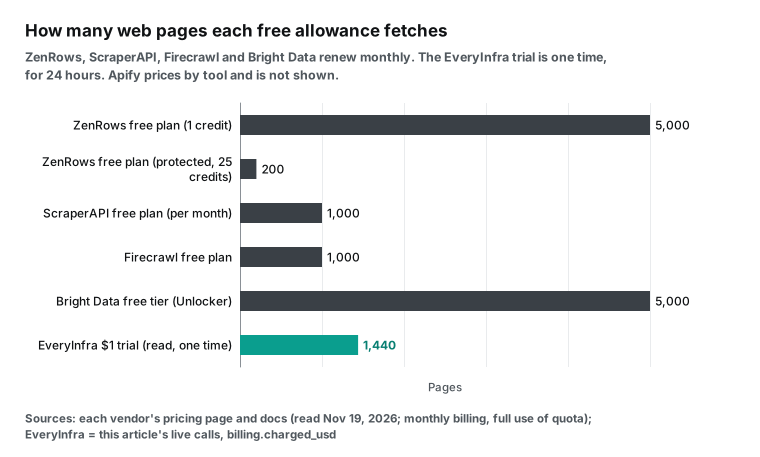
For 1,000 plain static web pages, ZenRows costs $0.067 to $0.42 at its public prices on November 19, 2026. That is cheaper than ScraperAPI, Firecrawl, Bright Data and EveryInfra. For 1,000 Google searches, ZenRows costs as little as $0.067 when a search uses 1 credit. At 5 credits the same 1,000 searches cost $0.33 to $2.11. EveryInfra charged a fixed $0.694 per 1,000 searches in our test calls.
Social data shows the widest gap. Bright Data charges $1.30 to $1.50 per 1,000 records. The Apify Reddit tool starts at $3.40 per 1,000 results. EveryInfra tiktok/profile costs $0.556 per 1,000 profiles. One reddit/subreddit_posts request returns 10 posts, which is $0.0556 per 1,000 posts. That is 2.3 to 61 times lower than the two per-record services. These multiples assume one request that returns the 10 newest posts. reddit/subreddit_posts cannot set the number of posts or a time range. To pull every post in a subreddit or a set number of posts, a per-record tool is the like-for-like unit, and the two prices do not compare directly.
ZenRows is the better choice in three cases. The first case is JavaScript pages and sites with anti-bot protection. Our read tool returned an empty page shell on one test page and an empty, refunded result on the other. The second case is residential proxy bandwidth. The third case is a real browser that clicks buttons and logs in. EveryInfra has no product for these three cases.
ZenRows is a web data API that bills in credits. You send it a URL. It decides from the page difficulty if it must render JavaScript or use a residential proxy. It deducts credits only when the request succeeds. A standard request costs 1 credit.
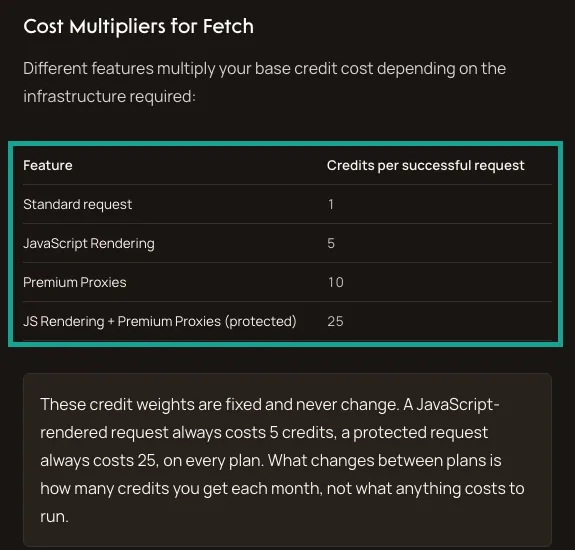
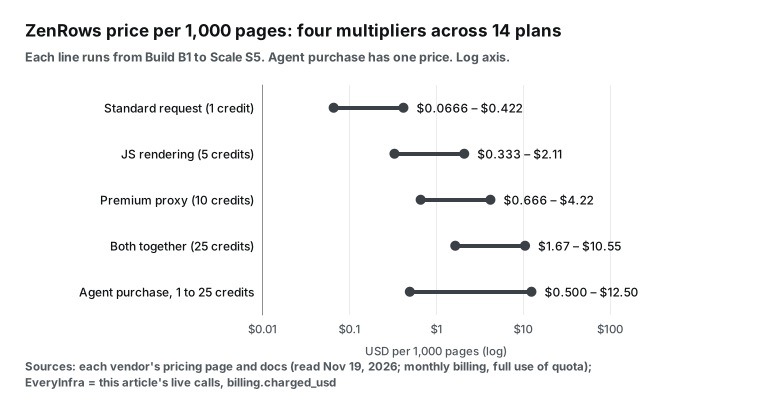
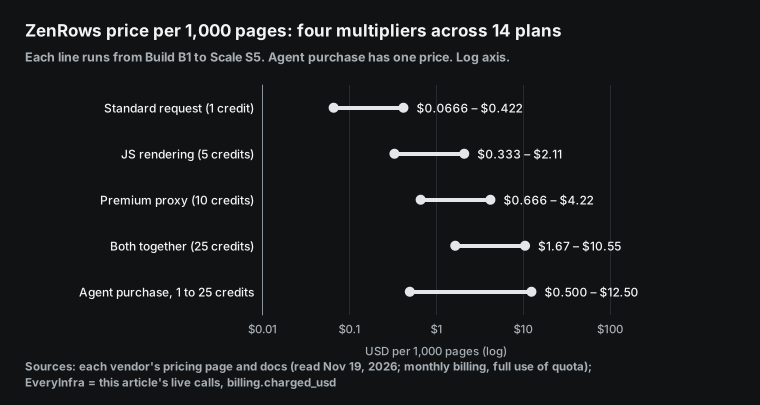
JavaScript rendering costs 5 credits. A premium proxy costs 10 credits. Both together cost 25 credits. Residential bandwidth costs 25,000 credits per GB. A Browser session costs 25,000 credits per GB plus 5 credits per minute (ZenRows pricing docs, read 2026-11-19).
Our ZenRows pricing guide converts each of the 14 monthly plans into a price per 1,000. Our ZenRows alternative page gives a short summary.
Vendor prices come from public pricing pages and documentation. We read them from 00:14 to 00:30 Singapore time on November 19, 2026. All prices use monthly billing and assume that you use the full allowance. Our prices come from the charged_usd field in the responses to our live calls.
We also checked them against price_usd in the catalog at GET /api/v1/social/catalog on the same day. The six services use different field names, row limits and paging rules. The tables compare only money, billing rules and access. They do not compare fields.
By product line: which ZenRows product do you use?
ZenRows now sells five primitives. Fetch gets one page. Extract turns the page into structured JSON in the same request. Crawl starts at one URL and follows links through a whole site. Batch accepts up to 100,000 URLs in one job.
Browser gives you a real browser session that can click and log in. ZenRows also sells residential proxies on their own (ZenRows docs index, November 2026 version). All of these share one credit balance. The answer to "move or stay" is different for each one.
| Your ZenRows product | How it bills | Who is cheaper | Reason to stay |
|---|---|---|---|
| Fetch, standard pages | 1 credit, $0.067–0.42 per 1,000 | Usually nobody | Lowest price of the six |
| Fetch with JS or on protected sites | 5 to 25 credits | Bright Data Unlocker at $1.30–1.50 | Adaptive mode bills only the tier that worked |
| Extract on ready sites (Amazon, Google, Maps, TikTok, Reddit) | Same as Fetch, Extract itself is free for now | Per-record or per-request structured APIs | Ready fields for 539 sites |
| Crawl, Batch | Each page bills as Fetch, no extra fee | Firecrawl Crawl at 1 credit per page | 100,000 URLs per job, schedules and webhooks |
| Browser | 25,000 credits per GB plus 5 credits per minute | Bright Data Browser API | Logins, clicks and multi-step forms |
| Residential proxies | 25,000 credits per GB, legacy plans 18,000–54,000 | Bright Data residential | Shares the Fetch balance |
Look at the ZenRows Amazon ASIN page, Google Search page, Google Maps page, TikTok page and Reddit page. Each one uses the same request: mode=auto plus extract=auto. Fetch opens the page in adaptive mode, and Extract returns the fields. All five pages show a real request from October 20, 2026.
None of them says if the page lands at 1, 5, 10 or 25 credits. The pricing page only says that adaptive mode starts with the lightest setup and escalates when the page needs it (ZenRows pricing page). So every ZenRows price for structured pages in this article is a range from 1 to 25 credits. The two ends of that range differ by more than 150 times.
Extract coverage: check the domain list before you move
Teams that use Extract must check one thing first. Is your target site on the list of prepared domains? ZenRows exposes this list as an endpoint. GET /v1/extract/domains returns every domain that Extract can handle today. The endpoint does not fetch pages, so it costs no credits. A request with extract=auto to a domain off the list returns REQS007. The title then says that the domain is not prepared (ZenRows Extract API reference).
You can submit a missing domain yourself. POST /v1/extract/prepared-domains takes the domain and 1 to 5 example URLs. ZenRows learns the page shapes and checks the fields. Then the status changes to ready, usually after a few minutes. Each account gets a monthly number of submissions. The count resets each UTC calendar month, and a submission over the limit returns 429 (Introduction to Extract).
Some sites are on the list and you need only standard fields: Amazon, Google, TikTok and Reddit are examples. For these sites, an API that gives fixed fields per platform is the easy move. Both sides take an ID and return fields, so the only differences are price and field names. Other sites are long-tail sites that you must submit for preparation. The ZenRows self-service preparation is a strength here.
Our catalog probably has no capability for those sites either, so keep them on ZenRows. Our capability list is public too. GET /api/v1/social/catalog works without a key. On November 19, 2026, it listed 612 capabilities, each with price_usd, params and response_fields (EveryInfra catalog). Compare the two lists and move the sites that appear on both first.
| Endpoint | Credits | Use |
|---|---|---|
GET /v1/extract/domains | 0 | List the domains that Extract serves today |
POST /v1/extract/prepared-domains | 0, uses one monthly slot | Ask ZenRows to prepare a new domain |
GET /v1/extract/prepared-domains/allowance | 0 | Check the slots left this month |
GET /api/v1/social/catalog (EveryInfra) | 0, no key | List capabilities, prices and fields |
The comparison table: billing unit, failure rules, minimum spend and MCP
| Service | Billing unit | Standard pages per 1,000 (USD) | Google searches per 1,000 (USD) | Failed or empty results | Minimum paid spend | Free allowance | AI tools |
|---|---|---|---|---|---|---|---|
| ZenRows | Credits, 1/5/10/25 | 0.067–0.42 | 0.067–10.56 (tier not published) | Failures free, 404 and 410 count as success | Build, $19 per month | 5,000 credits per month | Remote MCP |
| ScraperAPI | Credits, multiplied by domain and parameters | 0.092–0.49 | 2.30–12.25 (25 credits) | Charges only 200, 404 and requests you cancel within 70 seconds | Hobby, $49 per month | 5,000 for 7 days, then 1,000 per month | Remote MCP |
| Firecrawl | Credits, 1 per page | 0.75–3.80 | 1.50–7.60 (2 credits per 10 results) | No result is free, 403 and 404 cost 1 | Hobby, $19 per month | 1,000 credits per month | MCP |
| Bright Data | Per successful request or record | 1.30–1.50 (Unlocker) | 1.31–1.50 | Pays only for success | Pay as you go, no monthly fee | 5,000 credits per month | MCP, 5,000 free requests per month |
| Apify | Per event, usually per result | Not applicable | 1.80–4.50 (per page) | You can set a maximum charge per run | Starter, $19 per month | $5 credit per month | Remote MCP |
| EveryInfra | Per request, fixed price | 0.694 (read, charged) | 0.694 (web, charged) | Failures and empty results free, missing parameters return 422 | First top-up $10, balance does not expire | $1 for starring two GitHub repos, valid 24 hours | Remote MCP |
Each range runs from the cheapest to the most expensive self-service monthly plan, with the full allowance used. The ZenRows Build B1 plan costs $19 for 45,000 credits, which is $0.422 per 1,000 credits. The Scale S5 plan costs $2,999 for 45 million credits, which is $0.0666 per 1,000 credits (ZenRows pricing docs). The ScraperAPI Hobby plan costs $49 for 100,000 credits.
Its Advanced plan costs $1,975 for 21.5 million credits (ScraperAPI pricing). The Firecrawl Hobby plan costs $19 for 5,000 credits. Its Scale plan costs $749 for 1 million credits, and these prices apply from September 4, 2026 (Firecrawl pricing).
Bright Data Web Unlocker costs $1.50 per 1,000 requests on pay as you go. Its Scale package costs $499 and includes 383,000 requests (Web Unlocker pricing). SERP API costs $1.50 per 1,000 on pay as you go, and its Scale package includes 380,000 requests (SERP API pricing). The Bright Data free tier gives 5,000 credits each month.
Unlocker, SERP and Web Scraper each use 1 credit per request or record (Bright Data free tier docs). Apify prices come from the public tier prices on each Store tool page. The tiers follow the Free, Starter, Scale and Business plans (Apify pricing, Apify Store billing docs).
ZenRows credit multipliers: find your own average tier first
Before you move, you need one number: the average number of credits that your requests use. The ZenRows docs fix the multipliers. A standard request costs 1. JavaScript rendering costs 5.
Premium proxies cost 10. Both together cost 25. The docs say that these weights are fixed and the same on every plan. Only the monthly credit allowance changes between plans (ZenRows pricing docs).
Multiply the weight by the price per 1,000 credits, and you get the price per 1,000 pages. Here are five of the 14 self-service plans:
| ZenRows plan | Monthly price (USD) | Credits per month | Standard per 1,000 | JS rendering | Premium proxy | Protected (25) | Residential per GB |
|---|---|---|---|---|---|---|---|
| Build B1 | 19 | 45,000 | 0.422 | 2.11 | 4.22 | 10.56 | 10.56 |
| Launch L1 | 69 | 250,000 | 0.276 | 1.38 | 2.76 | 6.90 | 6.90 |
| Growth G1 | 199 | 1,200,000 | 0.166 | 0.83 | 1.66 | 4.15 | 4.15 |
| Scale S1 | 549 | 5,000,000 | 0.110 | 0.55 | 1.10 | 2.75 | 2.75 |
| Scale S5 | 2,999 | 45,000,000 | 0.067 | 0.33 | 0.67 | 1.67 | 1.67 |
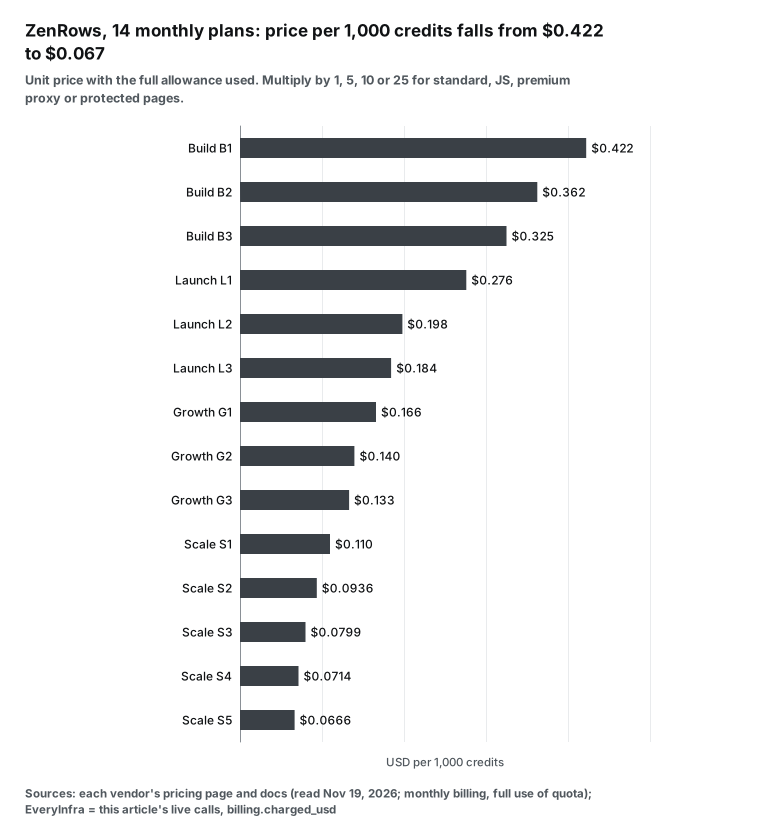
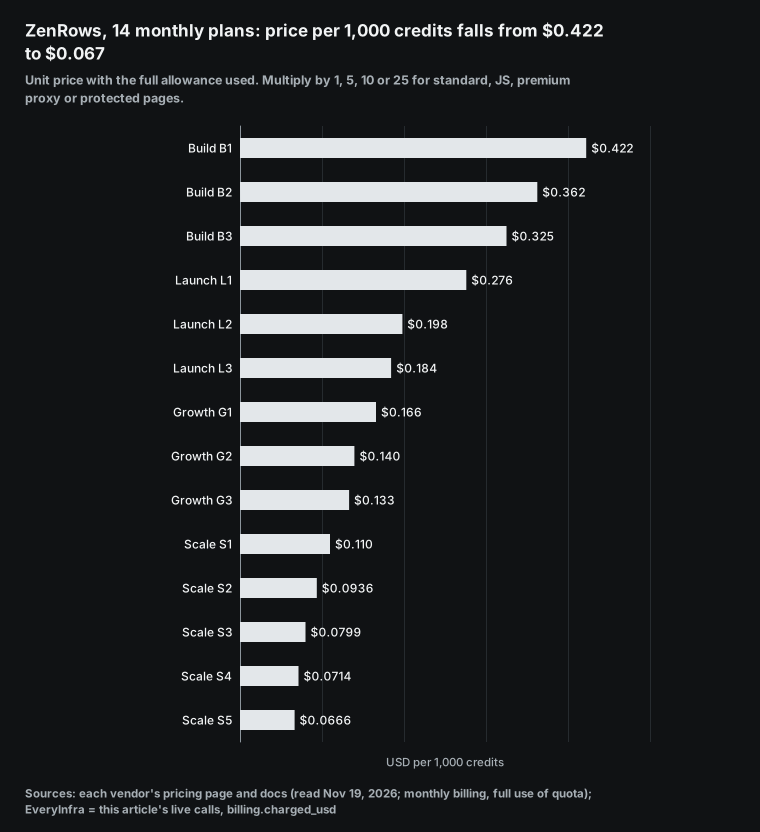
Two things push your real average tier up. The first is a minimum setup per domain. The ZenRows error code docs say that some domains require JavaScript rendering or premium proxies because of strong protection. ZenRows checks this rule by domain or URL before it fetches the page. A request with too few parameters returns REQS002 at no charge.
But a light setup is rejected every time, so there is no cheap first attempt on these domains (ZenRows error codes). The second thing is adaptive mode. mode=auto starts with the lightest setup and escalates. It bills the tier that worked last, so you do not know the tier before the request.
The simplest way to estimate your tier is a sample. Take 200 real URLs from the last month and run them with mode=auto. Then open the Activity Log in the dashboard. ZenRows launched it at the end of July 2026.
It filters by product and URL, and its time window goes from 24 hours to 60 days (ZenRows changelog). Read the credits of each row and calculate the average. Then multiply the other prices in this article by that average.
ScraperAPI also uses credits, but its multipliers are different. A standard request costs 1. Amazon, Walmart and eBay cost 5. Google and Bing searches cost 25. LinkedIn costs 30. render=true and premium=true cost 10 each, and both together cost 25.
Bypassing Cloudflare, DataDome, PerimeterX and Akamai costs 10 per request. ultra_premium=true costs 30, and with rendering it costs 75 (ScraperAPI credits docs). In October 2026, ScraperAPI started to unblock Akamai-protected sites with no extra parameter (ScraperAPI October release note). With JavaScript rendering on, ScraperAPI uses 10 credits and ZenRows uses 5. So one JavaScript page uses twice as many credits on ScraperAPI.
Job 1: any web page, where ZenRows is cheapest on standard pages and dearest on protected ones
First, any web page. We picked three test pages on ScrapingCourse.com, a public practice site for scrapers. We fetched each page once with the EveryInfra read tool.
The first page is a static product list. The second page shows products only after JavaScript runs. The third page has an anti-bot challenge.
At 00:17 Singapore time on November 19, 2026, the static list scrapingcourse.com/ecommerce/ came back in 1.28 seconds. The text had "Showing 1–16 of 188 results" and 16 products. It cost $0.000694, which is $0.694 per 1,000 pages. In the same minute, the JavaScript test page scrapingcourse.com/javascript-rendering took 11.44 seconds. The text had only two lines, "JS Rendering Challenge" and "Enable JavaScript to see products".
There were no products, and the call still cost $0.000694. Our read tool does not run JavaScript, so on such pages it returns the shell. At 00:18, the anti-bot page scrapingcourse.com/antibot-challenge took 11.98 seconds. The result was empty, the response said empty_result_refunded, and the charge was $0.
We can fetch static pages, but our unit price is higher than the lowest ZenRows and ScraperAPI plans. We cannot fetch JavaScript pages or protected pages. ZenRows charges 5 and 25 credits for these two kinds of page. From B1 to S5, that is $0.33 to $2.11 and $1.67 to $10.56 per 1,000 pages.
ScraperAPI rendering costs 10 credits, which is $0.92 to $4.90 per 1,000. Its bot bypass also costs 10 credits, so the range is the same. Bright Data Web Unlocker costs $1.30 to $1.50 per request at any difficulty. Firecrawl costs 1 credit per page with rendering included, which is $0.75 to $3.80 per 1,000.
The ZenRows docs recommend a step-by-step approach. Send a standard request first. Turn on JavaScript rendering only when content is missing. Turn on premium proxies only when the site still blocks you. Combine the two at 25 credits only when one is not enough (ZenRows getting started guide, Fetch parameter reference). Use the same logic to split a migration.
Any service can take static pages. JavaScript pages and protected pages stay with a service that renders. To find out if a page is static, look at the text that our read tool returns. If it contains your fields, the page is static. If it shows only a message like "Enable JavaScript", the page needs rendering.
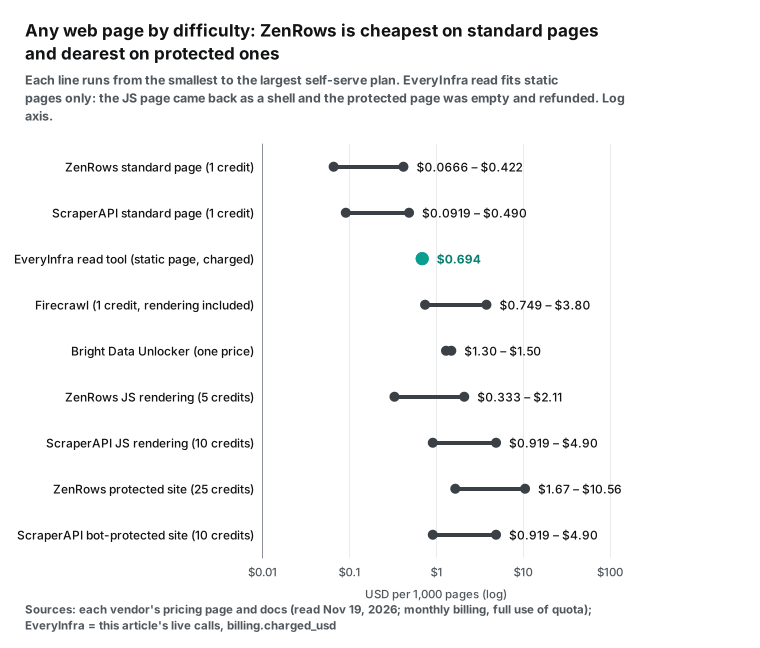
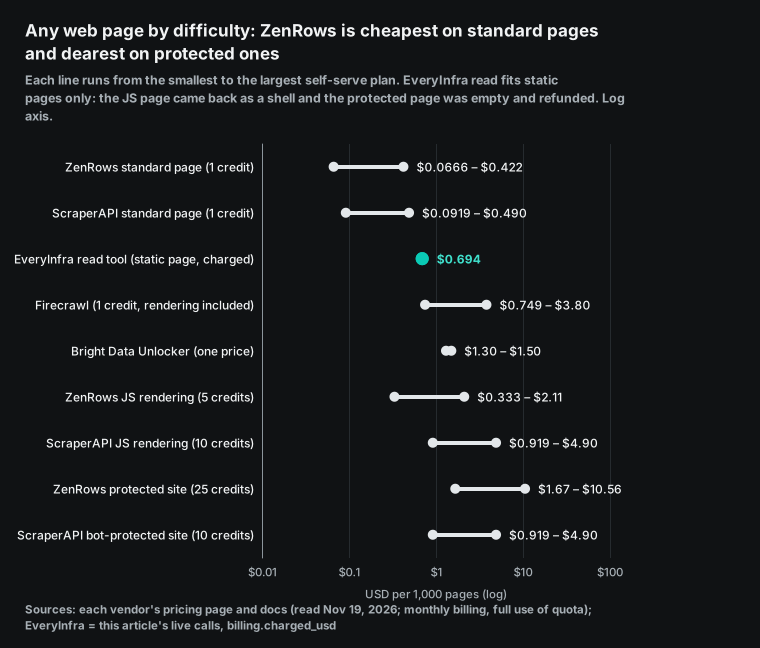
ZenRows is cheaper than ScraperAPI on standard pages, but the order flips on protected sites. The ZenRows 25-credit setup costs more than the ScraperAPI 10-credit bypass. On B1 it is $10.56 per 1,000 pages, against $4.90 on the ScraperAPI Hobby plan. ZenRows gives its reason in its own benchmark.
The test used four protected sites: Zim, Glassdoor, Idealista and Indeed. Each service got 100 requests per site, 400 in total, at 2 requests per second. ZenRows succeeded on 99.0% in 9.1 seconds on average. ScraperAPI succeeded on 49.0% in 36.0 seconds on average. The numbers appear in an r/LLMDevs post. Its first line says that the author writes technical content for ZenRows and that the data came from internal ZenRows tests. The post says that five services were tested but gives results for only three. The full tables are on the ZenRows blog.
At these success rates, each successful ScraperAPI page costs 1/0.49 times the list price, or about 2.04 times. These are ZenRows numbers. Before you decide, run 100 requests per service on your own protected sites.
Job 2: Amazon product pages, tested with the ZenRows example ASIN
The ZenRows Amazon ASIN page uses B0CRMZHDG8 as its example. This is the STANLEY Quencher H2.0 40 oz tumbler. The October 20 request returned an average rating of 4.75 and 206,884 ratings. The full record had 34 product details and 6 images (ZenRows Amazon ASIN page). At 00:19 Singapore time on November 19, we fetched the same product with amazon/profile.
It took 7.72 seconds. The response had the title, the brand STANLEY, a price of $42.30, a rating of 4.7, 207,914 ratings and an in-stock flag. It also had the category path, the description, images and bullet points. It cost $0.001389, which is $1.389 per 1,000 product pages. In the 30 days between the two reads, the rating count went up by 1,030.
At 00:34 Singapore time, we tried a second product: Apple AirPods Pro, 2nd generation (B0BDHWDR12). It came back in 7.56 seconds with a price of $265.78, a rating of 4.7, 57,992 ratings and the seller 6ave. It cost the same $0.001389. A product page has one price per request. Popularity and page length do not change it.
In the same minute, we searched "stanley tumbler 40 oz" with amazon/search. It returned 10 products in 4.51 seconds. Each had an ASIN, title, price, list price, rating and rating count. It cost $0.002236, which is $2.236 per 1,000 searches or $0.2236 per 1,000 products.
Six of the 10 results were colors of the Quencher H2.0. All six showed 207,914 ratings, the same as B0CRMZHDG8, because Amazon shows one combined rating count for all colors. Five of them cost $22.50 with a list price of $45.00, and one showed no price. The fuchsia version that we fetched alone cost $42.30.
So the same product in different colors differed in price by almost two times. Do you monitor list prices and ratings but not full details? Then the search page gives 10 products per request and costs 6.2 times less than one product page each.
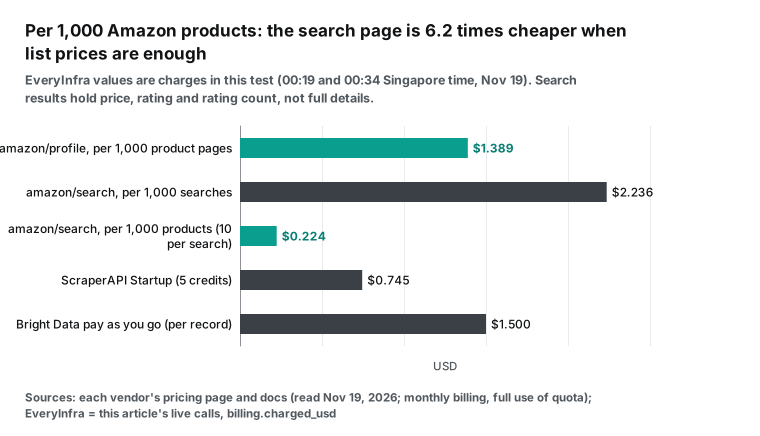
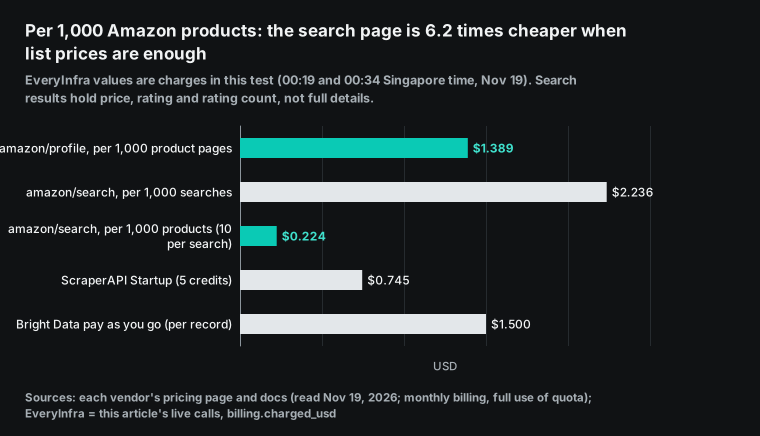
Here is the price per 1,000 product pages at the other services. ScraperAPI uses 5 credits per page: $2.45 on Hobby and $0.46 on Advanced. Bright Data Web Scraper bills per record: $1.50 on pay as you go and $1.30 on the Scale package. The Apify Store Amazon tool costs $0.003 to $0.005 per result, which is $3.00 to $5.00 per 1,000 (Apify Amazon tool page).
Firecrawl with JSON output uses 1 plus 4 credits per page, which is $3.75 to $19.00 per 1,000. ZenRows does not publish the Amazon tier. At 1 to 25 credits, it costs $0.067 to $10.56.
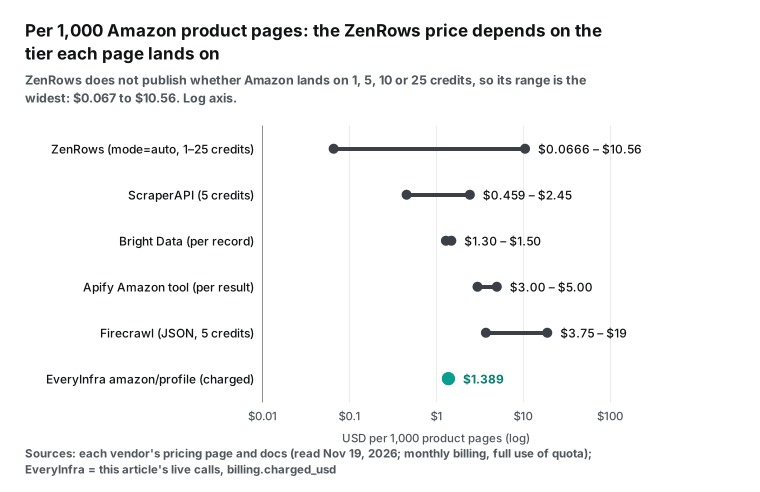
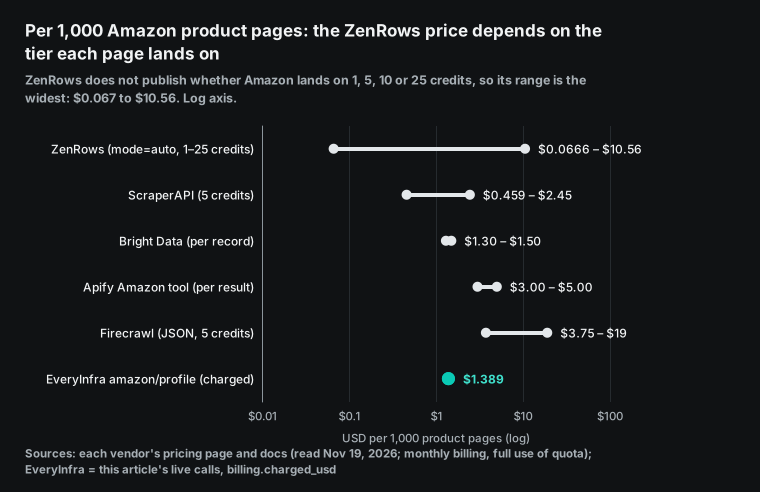
The ZenRows line is the longest. The answer depends on the average tier of your Amazon requests. At 1 credit, ZenRows costs $0.067 to $0.42 per 1,000 pages and beats every other service. At 5 credits, it costs $0.33 to $2.11, close to ScraperAPI. At 25 credits, B1 costs $10.56, which is 7.6 times our price. The Amazon tier must be measured. Test 200 of your own ASINs and read the Activity Log.
The third YouTube video below gives one data point. The author opened an Amazon search page in the ZenRows dashboard and turned on both premium proxies and JavaScript rendering. The dashboard said that the request would cost "only 0.025". The video does not give the unit or the plan. With both options on, the docs put the request in the 25-credit tier. For high-volume teams that need only product details, ScraperAPI is cheaper than us from the Startup plan up, at $0.745 per 1,000 pages. For smaller teams that do not want a monthly plan, the pay-per-call Amazon API is simpler. amazon/search and amazon/reviews use the same balance.
Job 3: Google search and Google Maps, at one fixed price per search
The ZenRows Google Search example uses the query "best running shoes" (ZenRows Google Search page). At 00:23 Singapore time, we sent the same query with the search web tool.
It returned 10 organic results in 2.8 seconds. They included RunRepeat, Runner's World, the r/runninglifestyle subreddit, Nike, YouTube and the Amazon best seller list. It cost $0.000694, which is $0.694 per 1,000 searches or $0.0694 per 1,000 results.
At 00:35 Singapore time, we searched for "zenrows alternatives" with the same web tool. It returned 10 results in 1.57 seconds for the same $0.000694. The first result was the ZenRows page of alternatives. The second and third were "ZenRows alternative" pages from ScraperAPI and Apify.
Eight of the 10 results came from scraping vendors. One came from a software review site, and one was a list article on Medium. Almost everything that you read for this query comes from an interested party, and each vendor ranks itself first. Check their pricing pages and docs before you decide.
Here is the price per 1,000 Google searches at the other services. Bright Data SERP API costs $1.50 on pay as you go and $1.31 on Scale. Firecrawl uses 2 credits per 10 results, which is $1.50 to $7.60. The Apify Google Search tool bills per results page. It costs $0.0018 to $0.0045 per page, or $1.80 to $4.50 per 1,000 (Apify Google Search tool page). ScraperAPI uses 25 credits per search, which is $2.30 to $12.25.
ZenRows costs $0.067 to $10.56.
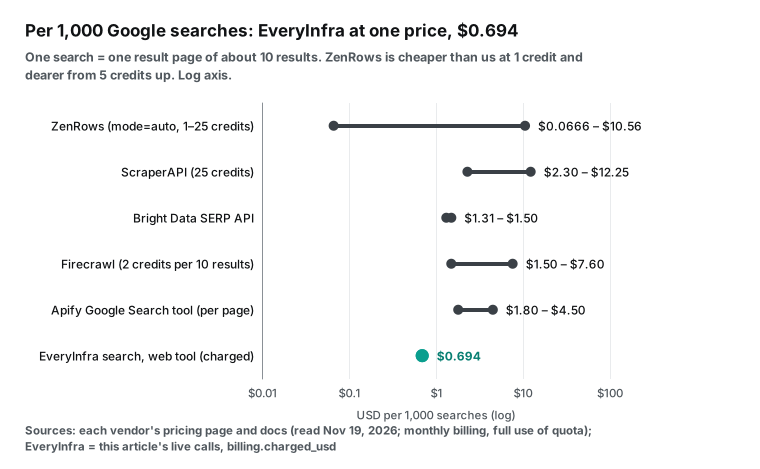
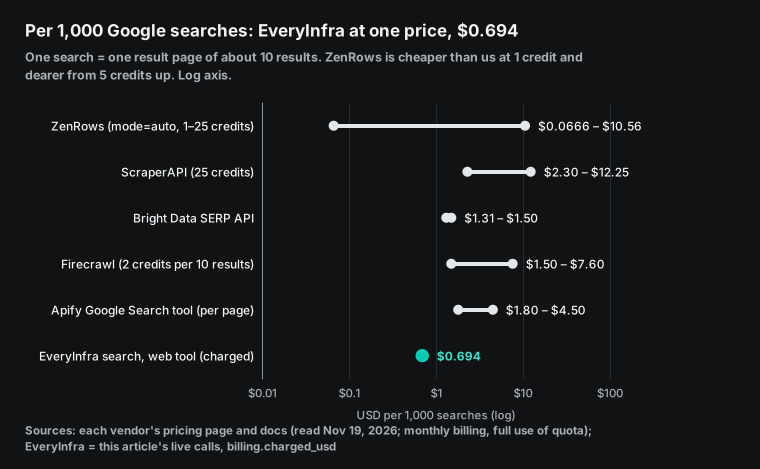
At 1 credit, ZenRows is cheaper than us. But ZenRows shows no example of a Google results page at 1 credit. Its example request uses mode=auto and proxy_country=us.
At an average of 5 credits, B1 costs $2.11 per 1,000 searches, which is 3 times our price. At 25 credits, B1 costs $10.56, which is 15 times our price. Our web tool has one price for every query, and there is no tier to guess.
For Google Maps, the ZenRows example query is "coffee shops in austin tx". The page says that the example shows only 3 of the places returned. It does not say how many places one search returns (ZenRows Google Maps page). At 00:24 Singapore time, we sent the same query to google_maps_reviews/search. It returned a 503 error with no charge.
The error message said that this capability had several failures in 10 minutes, all free, and that we should retry later. We retried at 00:35 and 00:40. Both retries returned 503 with no charge. The second error message included an example request, so that a client can check if the problem is the target or the service.
We then used the search places tool. At 00:40, we searched "coffee shops" with the location "Austin, TX". It returned 20 places in 2.41 seconds. Each place had a name, address, rating, rating count, category, phone, website, coordinates, opening hours and place_id. It cost $0.000694, which is $0.0347 per 1,000 places.
Mozart's Coffee Roasters had the most ratings of the 20, with 11,016 ratings at 4.5. Trippy Buck Coffee had the fewest, with 47 ratings at 4.9. Of the 20 places, 19 had a website, 19 had opening hours and 12 had a phone number. The 8 places rated 4.9 or higher had at most 435 ratings each. The 5 places with more than 1,000 ratings were all rated 4.4 to 4.7. When you rank a list by rating, read the rating count too. The places tool does not return review text. For review text, you must wait for google_maps_reviews to recover.
| Place (5 of the 20) | Rating | Ratings | Category |
|---|---|---|---|
| Jo's Coffee – South Congress | 4.4 | 2,013 | Coffee shop |
| Epoch Coffee | 4.5 | 2,543 | Coffee shop |
| Terrible Love Coffee | 4.9 | 435 | Coffee shop |
| Mozart's Coffee Roasters | 4.5 | 11,016 | Coffee shop |
| Summer Moon Coffee | 4.6 | 2,074 | Coffee shop |
Two services bill per place. Bright Data charges $1.30 to $1.50 per 1,000 Google Maps records. The Apify Google Maps tool charges $0.0015 to $0.004 per place, which is $1.50 to $4.00 per 1,000 (Apify Google Maps tool page). The Google Places API bills per call. Text Search returns at most 60 places, and Place Details returns at most 5 reviews (Google Maps Platform pricing).
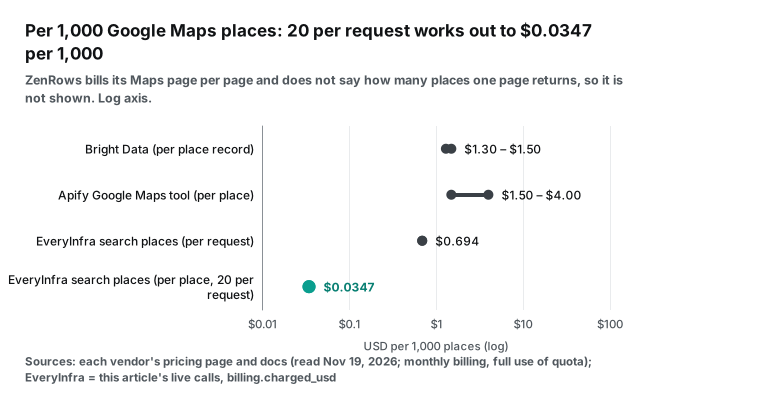
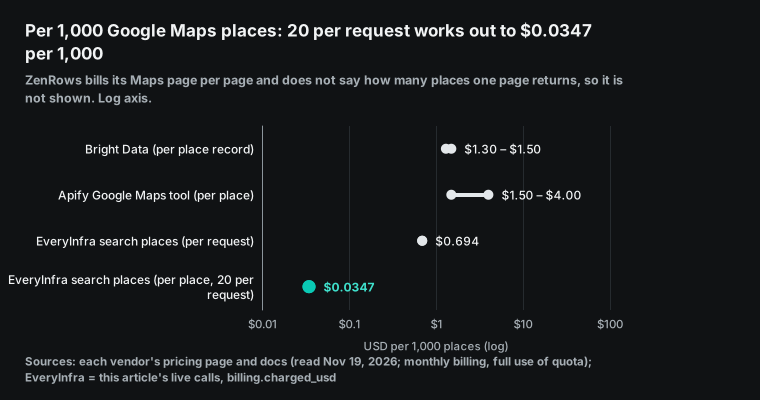
Twenty places per request at $0.0347 per 1,000 places is 37 to 115 times lower than the two per-place services. The gap comes from the billing unit. Places bills per request, and one request costs the same for any number of places. Bright Data and Apify bill per place. These multiples assume one request with 20 places and basic fields. To set the number of places, pull every shop in a city or include reviews, the units differ and the prices do not compare directly.
Do you pull lists of shops by category in hundreds of cities, with names, phones and ratings? Then the places tool is the cheapest option. Do you need the full review text for each shop? Then you need a per-place tool or the ZenRows Maps page.
Job 4: TikTok profiles and Reddit subreddits, where per-page and per-record billing differ by 10 times or more
The ZenRows TikTok page covers only public profiles. One profile URL goes in, and one profile record comes out. The example account is zachking. The October 20 request showed 86,820,822 followers, 1,304,199,204 likes and 619 videos (ZenRows TikTok page).
At 00:25 Singapore time, we fetched the same account with tiktok/profile. It came back in 1.83 seconds with 86,743,505 followers, 1,307,359,332 likes, 622 videos, a verified flag and a public flag. It cost $0.000556, which is $0.556 per 1,000 profiles. In 30 days, this account lost 77,317 followers, gained 3,160,128 likes and posted 3 more videos.
At 00:35 Singapore time, we fetched khaby.lame, an account about twice as large. It came back in 1.74 seconds with 162,895,918 followers, 2,695,175,517 likes and 1,362 videos. The charge was again $0.000556. A profile bills per request, and the size of the account does not change the price. The ZenRows TikTok page does not say which tier a profile lands on.
Its social listening page says that TikTok search results render in the browser. The TikTok Research API is open only to approved academic researchers and non-profit groups. TikTok usually replies to applications within 4 weeks (TikTok Research API). Commercial teams cannot use that path.
For Reddit, the comparison is r/webscraping. The ZenRows Reddit page uses this subreddit as its example. It returns the name, description, 22,206 weekly active users, the rules and the pinned posts (ZenRows Reddit page). At 00:25, we fetched the same subreddit with reddit/subreddit_posts. It returned 10 posts in 2.7 seconds.
Each post had a title, body, author, score, comment count, post time and flair. The first was the October monthly self-promotion thread, with 166 comments. Another was a November post about a 45% drop in residential proxy traffic after blocking fonts and media. It cost $0.000556. At 10 posts per request, that is $0.0556 per 1,000 posts. Apart from the pinned October thread, the other 9 posts were from November 15 to November 18, 2026 (UTC), so 10 posts covered just over three days. The post with the most votes was about a cease and desist letter that a web portal sent to the author of an open-source library, with 111 votes and 71 comments. Others asked for help with constant 403 errors on an eBay scraper and with DataDome in browser automation. For a subreddit with this pace, one fetch of new posts per day misses nothing.
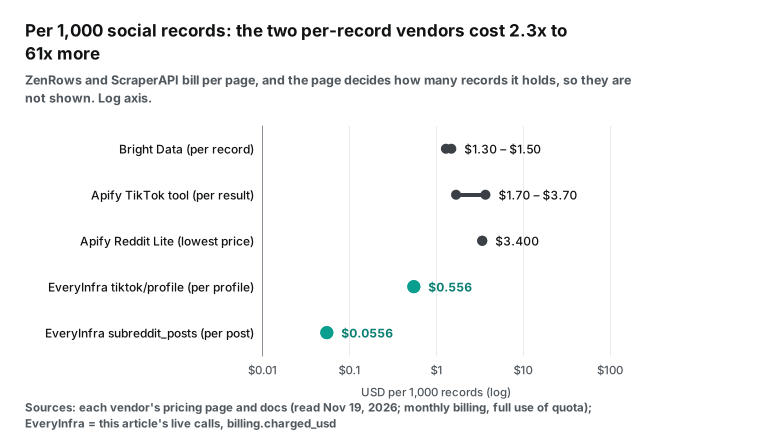
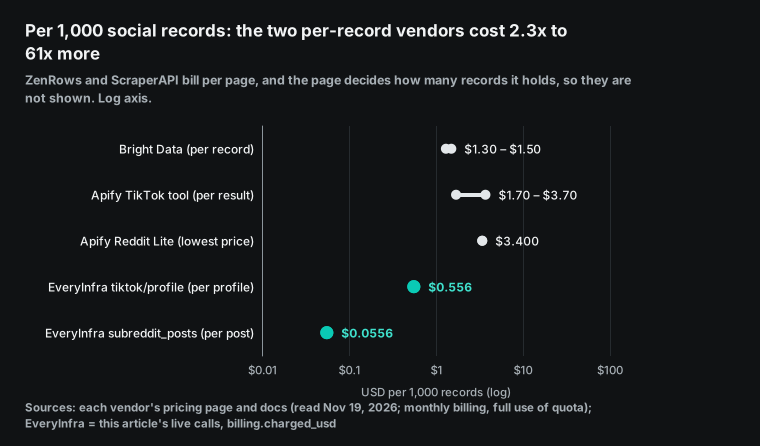
Two services bill per record. Bright Data charges $1.30 to $1.50 per 1,000 TikTok profiles or Reddit posts. The Apify TikTok tool costs $0.0017 to $0.0037 per result (Apify TikTok tool page). The Apify Reddit Lite tool starts at $3.40 per 1,000 results (Apify Reddit Lite page). For TikTok profiles, we cost 2.3 to 2.7 times less than Bright Data and 3.1 to 6.7 times less than Apify.
For Reddit posts, Bright Data costs 23 to 27 times our price, and Apify costs 61 times our price. ZenRows and ScraperAPI bill per page, and the page decides how many posts it holds. So their prices do not convert to a price per 1,000 posts. At 1 credit, one ZenRows subreddit page costs $0.000067 to $0.00042. That is in the same range as our $0.000556 per request. Bright Data and Apify charge for each record that you pull. Our side returns the 10 newest posts per request and cannot set the count. So these multiples hold only for a job like "check the 10 newest posts on a schedule". Jobs that pull every post or a time range do not compare this way.
The ZenRows Reddit example returns subreddit details: the description, weekly active users, the rules and the pinned posts. Our reddit/subreddit_posts returns a list of posts. These are two different kinds of data.
We have no capability for subreddit details alone. Our catalog lists 8 Reddit capabilities: search, subreddit posts, post details, comments, user posts, user comments, trending posts and pain-point summaries. Search and comments cost $0.000792 per request, user comments cost $0.032403, and pain-point summaries cost $0.072.
| Capability | Price per request (USD) | What it returns |
|---|---|---|
reddit/subreddit_posts | 0.000556 | 10 posts with score, comments and flair |
reddit/comments | 0.000792 | Comments on one post |
reddit/search | 0.000792 | Posts that match a query |
tiktok/profile | 0.000556 | One profile with counts |
tiktok/comments | 0.000556 | Comments on one video |
tiktok/shop_search | 0.000556 | TikTok Shop products for a query |
The TikTok group in our catalog lists 24 capabilities, and 22 are available. Videos, comments, hashtags, transcripts, follower lists and TikTok Shop product search all bill per request. Most cost $0.000556. The ZenRows TikTok page covers profiles only, and comments are on another page.
Do you need a profile, its recent videos and the comments on each video? With us, that is one call to each of three capabilities. With ZenRows, it is one fetch for each of three pages, each billed at the tier it lands on.
Residential proxies and browsers: what EveryInfra does not sell
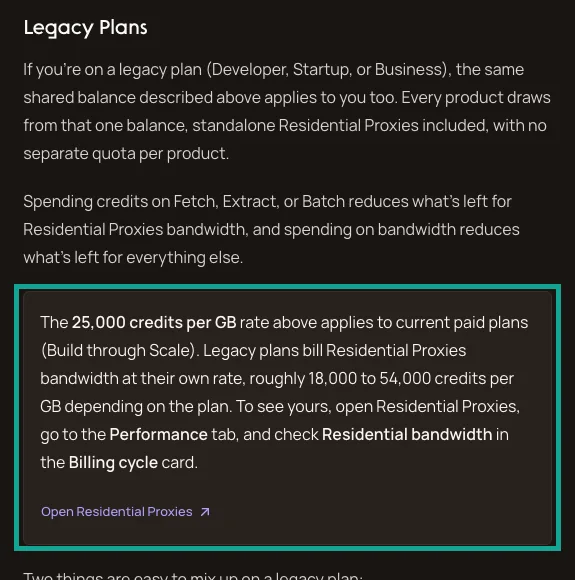
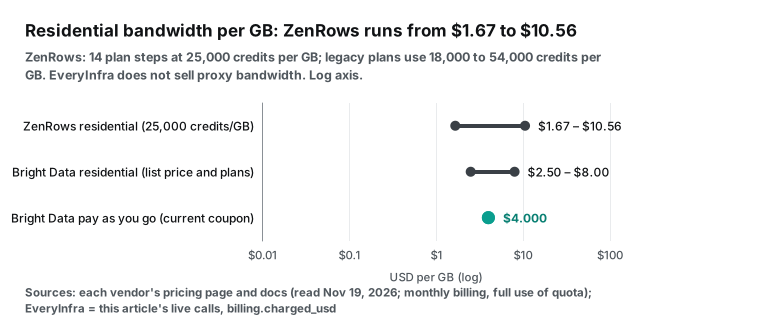
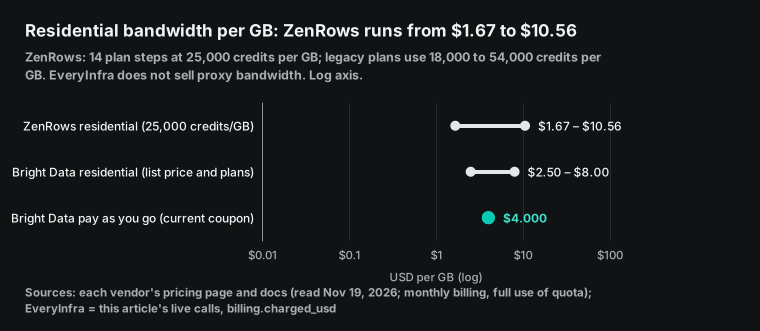
ZenRows bills residential bandwidth at 25,000 credits per GB. In US dollars, that is $10.56 per GB on B1 and $1.67 per GB on S5. ZenRows gives a rule of thumb: 1 GB is about 1,000 protected pages (ZenRows pricing docs). Accounts on legacy plans pay a different rate. Developer, Startup and Business plans use 18,000 to 54,000 credits per GB, by plan. You can see your own rate on the Performance tab of the residential proxy page (Legacy Plans section of the same docs page).
Bright Data lists residential proxies at $8 per GB on pay as you go. The page shows a 50% coupon, and with the coupon the price is $4. Its packages cost $499 for 141 GB ($3.54 per GB), $999 for 332 GB ($3.01 per GB) and $1,999 for 798 GB ($2.51 per GB) (Bright Data residential proxy pricing). Before you can use residential proxies, Bright Data requires a KYC check, which can include a video call. Web Unlocker does not need KYC (same page, FAQ). The ZenRows standalone residential proxies are not available on the free plan.
EveryInfra sells no proxy bandwidth and no remote browser for Puppeteer or Playwright. Do you use ZenRows mostly for residential proxies or Browser? Then we are not a replacement. A ZenRows Browser session lasts at most 15 minutes and costs 5 credits per minute plus 25,000 credits per GB (ZenRows Browser page). The matching product is the Bright Data Browser API.
The Reddit post above gives a way to save bandwidth at any provider. Block requests for fonts, images and media. The author saw residential traffic drop by about 45%. A commenter warned that Playwright route interception turns off the HTTP cache. So fetch the same domain twice and compare the GB before you trust the number (r/webscraping thread).
One real round trip: request, response and fields
After a move, each call is one POST request. You put the platform and the capability in the request body. You do not build a target URL, and you do not choose rendering or proxy options. Here is the TikTok profile request from 00:25, as we sent it, with the key in an environment variable:
curl -s https://api.everyinfra.com/api/v1/social \
  -H "Authorization: Bearer $EVERYINFRA_API_KEY" \
  -H "Content-Type: application/json" \
  -d '{"platform":"tiktok","action":"profile","params":{"username":"zachking"}}'
The results object holds the profile fields, and the billing object holds the charge for this call. Here is an excerpt, without the avatar link and the bio:
{
  "platform": "tiktok", "action": "profile",
  "results": {
    "user_id": "68616495085350913", "username": "zachking", "display_name": "Zach King",
    "follower_count": 86743505, "following_count": 185, "like_count": 1307359332,
    "video_count": 622, "is_verified": true, "is_private": false,
    "created_at": "2016-02-29T07:29:22+00:00", "platform": "tiktok"
  },
  "billing": { "charged": true, "credits": 40, "charged_usd": 0.000556 }
}
The field names match the response_fields of tiktok/profile in the catalog on the same day. The list is user_id, username, display_name, bio, url, external_url, follower_count, following_count, like_count, video_count, is_verified, is_private, avatar_url, created_at and platform. The ZenRows TikTok example puts similar data in three groups: profile, stats and videos. The two structures are different, so you must map the fields again when you move.
To use it in an AI tool like Claude or Cursor, add one remote MCP address. All tool names start with everyinfra_:
{
  "mcpServers": {
    "everyinfra": {
      "url": "https://api.everyinfra.com/mcp",
      "headers": { "Authorization": "Bearer ${EVERYINFRA_API_KEY}" }
    }
  }
}
Our 27 requests: time and charge for each
From 00:17 to 00:40 Singapore time on November 19, 2026, we sent 27 requests. One more request at 00:16 hit the rate limit and returned 429 with no charge, and we do not count it. The 27 requests covered twelve capabilities: search/read, search/web, search/places, amazon/profile, amazon/search, tiktok/profile, reddit/subreddit_posts, youtube/search, youtube/comments, youtube/transcript, google_maps_reviews/search and zillow/search. 15 requests were charged, for $0.012598 in total. 12 were free: 1 empty result was refunded, and 11 returned 503.
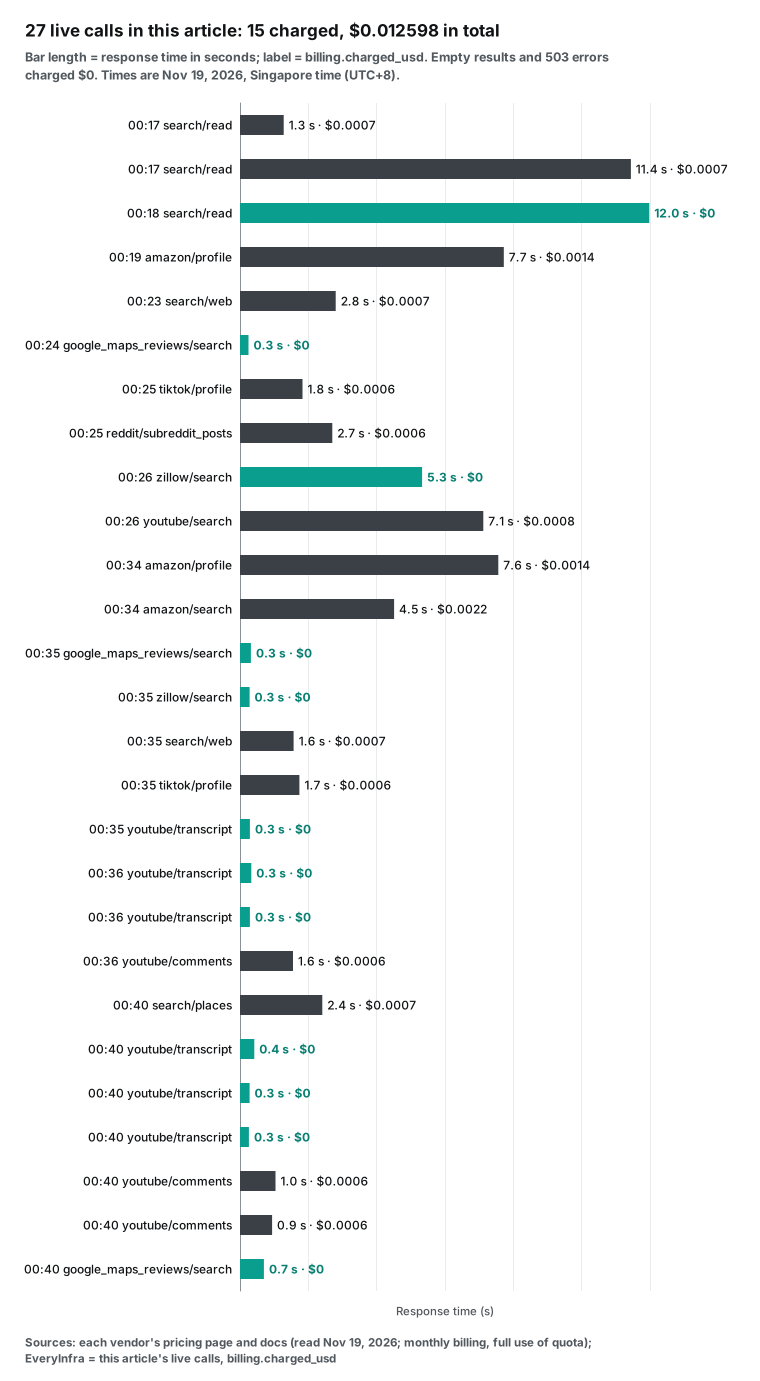
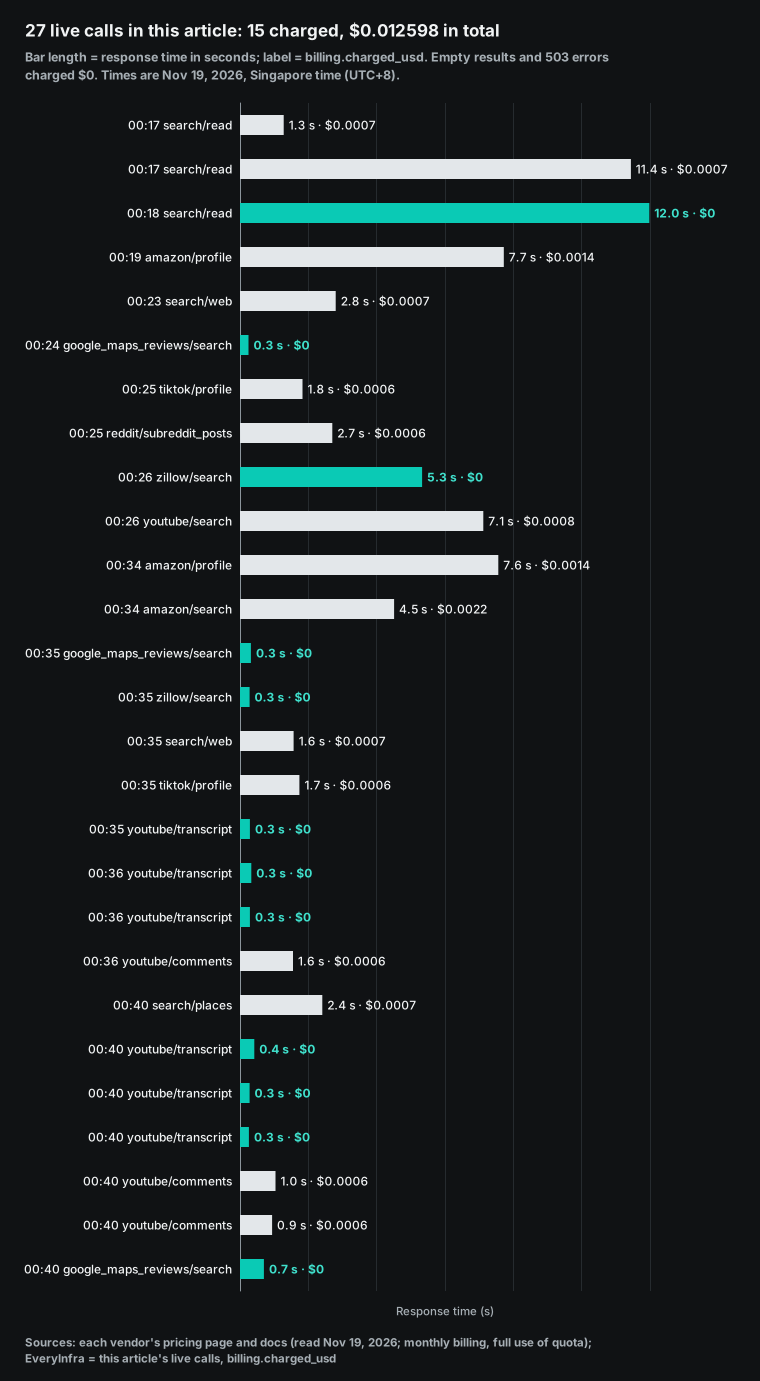
Response times fall into two groups. Among the successful requests, TikTok profiles, Reddit subreddits, search results and YouTube comments took 1 to 3 seconds. Amazon product pages took 7.6 to 7.7 seconds. Read took 11 to 12 seconds on the JavaScript page and the anti-bot page. Both wait for the target page to finish. Every 503 came back in less than 1 second. The response said that there was no charge and gave a retry delay, so the client does not wait for a timeout.
The 15 charged requests cost $0.00084 each on average. At 1 credit each, these 27 requests would use 27 ZenRows credits. The 5,000 free credits are enough. At 25 credits each, they would use 675 credits, which is also enough. The two sides differ only at volume, and the monthly workloads below show by how much.
Failures, empty results, 503 and 429: who charges
The failure rule sets the real price per successful result. ZenRows does not charge failures, but it counts 404 and 410 as successes and charges them (ZenRows pricing docs). A REQS002 rejection for too few parameters is also free (ZenRows error codes). ScraperAPI charges only for 200 and 404 responses and for requests that you cancel within 70 seconds. A 429 for too many concurrent requests is free (ScraperAPI pricing).
Firecrawl does not charge when there is no result. But it charges 1 credit when the target returns 403 or 404 (Firecrawl pricing). Bright Data says that you pay only for success. Most Apify tools bill per result, and you can set a maximum charge per run (Apify Store billing docs).
| What we saw | Time (Singapore) | Capability | Result | Charge (USD) |
|---|---|---|---|---|
| Per-key limit of 10 requests per minute on our test key | 00:16 | read | 429, "Nothing was charged", retry after 25 seconds | 0 |
| Anti-bot challenge page | 00:18 | read | 200, empty result, empty_result_refunded | 0 |
| JavaScript page returned only a shell | 00:17 | read | 200, two lines of text, no products | 0.000694 |
| Google Maps search | 00:24 | google_maps_reviews/search | 503, unavailable, "none was charged" | 0 |
| Zillow search | 00:26 | zillow/search | 503, no charge | 0 |
| Google Maps search, attempts 2 and 3 | 00:35, 00:40 | google_maps_reviews/search | 503 with an example request to check target or service | 0 |
| YouTube transcripts, two tries for each of three videos | 00:35–00:40 | youtube/transcript | 503, no charge | 0 |
| Zillow search, second attempt | 00:35 | zillow/search | 503, "failure 2 of 3", the third failure says what to check | 0 |
In the JavaScript shell row, the page had content, two lines of text, so it was not an empty result, and the normal charge applied. Before you use read on a site that renders in the browser, test one or two URLs. Check if the returned text contains your fields.
The 503 and 429 responses both say that there was no charge and how long to wait. A client can wait for retry_after and send the request again. Our failure refund reconciliation guide shows how to match each charge with its charge_id.
One month of usage: what three kinds of ZenRows user pay
We took three common workloads. For each service, we used the smallest monthly plan that covers the volume, or the pay-as-you-go price. For EveryInfra, we multiplied the unit prices that we were charged in this test:
| Monthly workload | ZenRows | ScraperAPI | Firecrawl | Bright Data | Apify | EveryInfra |
|---|---|---|---|---|---|---|
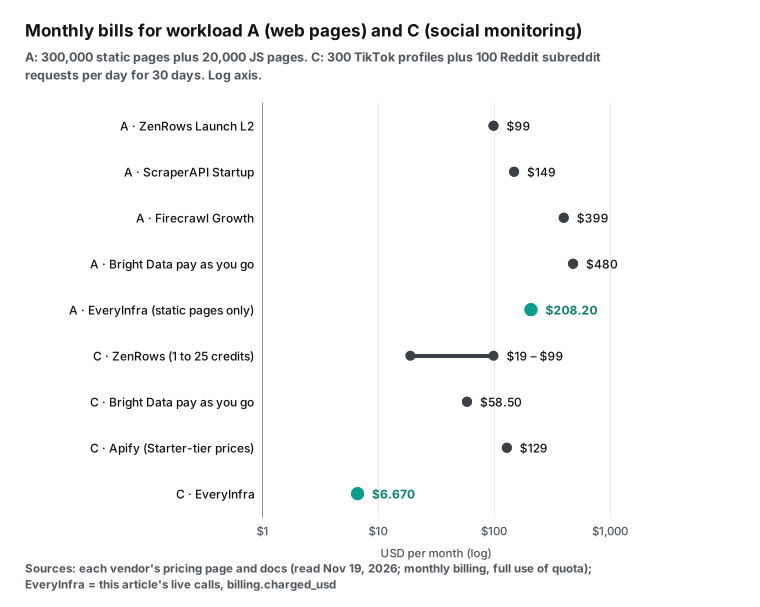
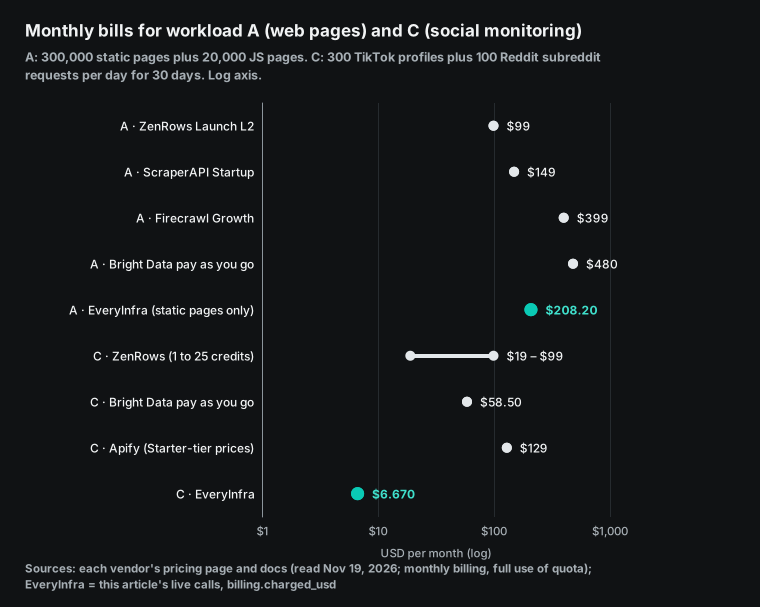
| A: 300,000 static pages plus 20,000 JS pages | 99 (Launch L2, 400,000 credits) | 149 (Startup) | 399 (Growth) | 480 (Unlocker, pay as you go) | Not applicable | 208.20 (only the 300,000 static pages) |
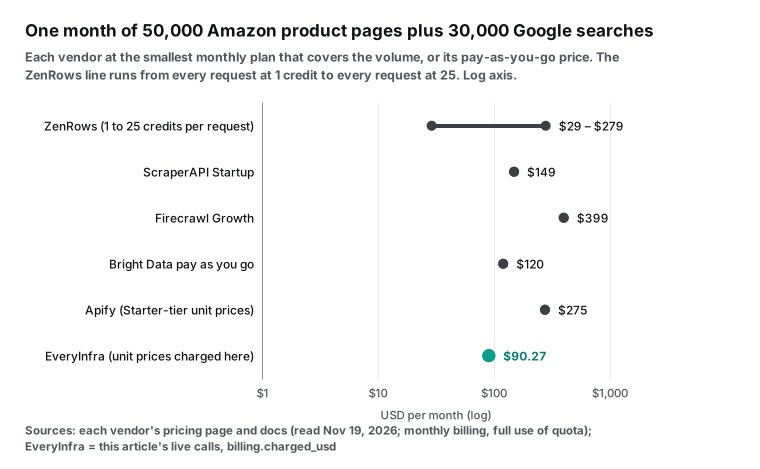
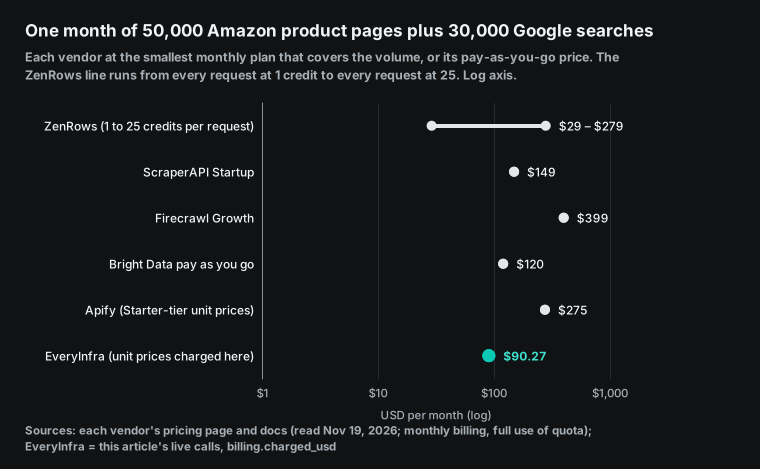
| B: 50,000 Amazon product pages plus 30,000 Google searches | 29 to 279 (all at 1 credit to all at 25) | 149 (Startup, 1 million credits) | 399 (Growth) | 120 (pay as you go) | About 275 (Starter-tier prices) | 90.27 |
| C: 300 TikTok profiles plus 100 Reddit subreddit requests per day | 19 to 99 (all at 1 to all at 25) | No published TikTok or Reddit multiplier | Not listed | 58.50 (pay as you go, 39,000 records) | About 129 (Starter-tier prices) | 6.67 |
Workload A is mostly static pages with some JavaScript pages. ZenRows is cheapest at $99. We charge $208.20 and still cannot do the 20,000 JavaScript pages. For workload A, stay on ZenRows. The result for workload B depends on the ZenRows average tier.
If Amazon and Google both land on 1 credit, ZenRows is cheapest at $29. At an average of 5 credits (400,000 credits), you need Launch L2 at $99. At 25 credits, you need $279. We charge $90.27 at any tier.
Workload C is social monitoring. It has 9,000 TikTok profiles and 3,000 Reddit requests, with 10 posts each, or 30,000 posts. We charge $6.67. Bright Data charges $58.50 for 39,000 records. If every ZenRows request lands on 1 credit, the smallest B1 plan at $19 is enough. That is about $12 more than us.
# Put your own monthly volume here. This compares ZenRows (by average tier) with EveryInfra (per call).
ZR = [(19, 45_000), (29, 80_000), (39, 120_000), (69, 250_000), (99, 500_000), (129, 700_000),
      (199, 1_200_000), (279, 2_000_000), (399, 3_000_000), (549, 5_000_000), (749, 8_000_000),
      (999, 12_500_000), (1999, 28_000_000), (2999, 45_000_000)]          # read 2026-11-19
EI = {"amazon/profile": 0.001389, "search/web": 0.000694, "search/read": 0.000694,
      "tiktok/profile": 0.000556, "reddit/subreddit_posts": 0.000556}  # charged in this test
def zenrows_month(requests, avg_credits):
    need = requests * avg_credits
    return min((p for p, c in ZR if c >= need), default=None)
def everyinfra_month(calls):          # calls = {"amazon/profile": 50_000, ...}
    return round(sum(EI[k] * n for k, n in calls.items()), 2)
print(zenrows_month(80_000, 5), everyinfra_month({"amazon/profile": 50_000, "search/web": 30_000}))
# -> 99 90.27
Concurrency, caps and budgets: four things the price table does not show
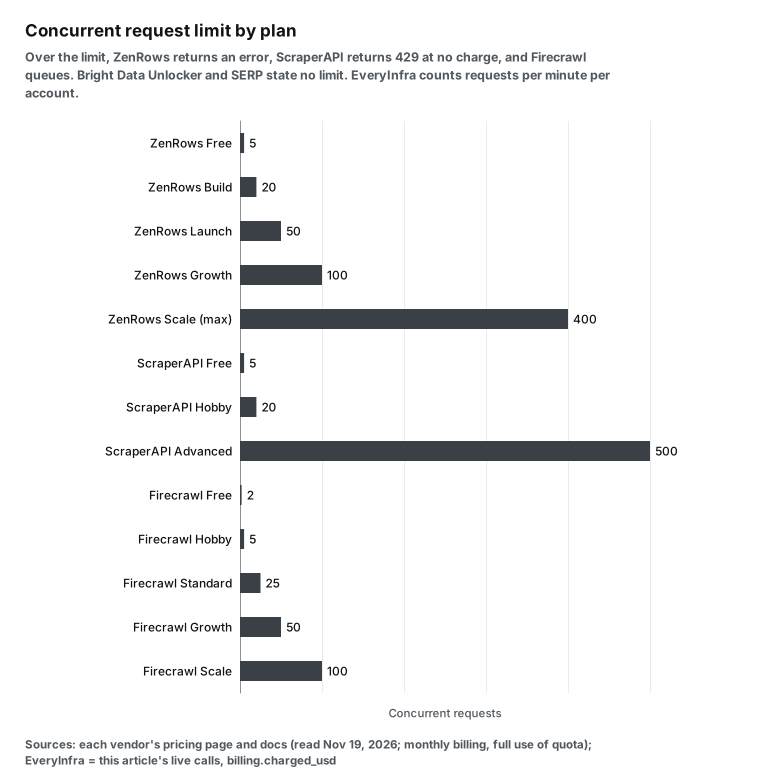
Concurrency limits decide how many pages you can finish in one hour. ZenRows sets them by tier: Free 5, Build 20, Launch 50, Growth 100 and Scale 200 to 400. Requests over the limit return an error (ZenRows pricing docs, ZenRows concurrency docs). ScraperAPI allows 20 on Hobby and up to 500 on Advanced, and a request over the limit returns 429 at no charge. Firecrawl allows 2 browsers at the same time on Free and 5 on Hobby, and queued jobs count toward the timeout (Firecrawl rate limits).
Bright Data says that Unlocker and SERP have no concurrency limit. We count requests per minute per account, across all keys, with a default of 60 per minute. You can buy a 30-day speed-up pack for a higher limit, and on 429 you retry after the delay in the response (EveryInfra pricing). The key in this test also had its own limit of 10 requests per minute, and the 429 at 00:16 came from that limit.
Budget caps are an area where ZenRows added detail in the last two months. Since October 2, 2026, each API key can have its own credit cap. A cap can apply per billing period, per day, per week or per month in UTC. When a key reaches its cap, only that key stops.
You get one alert at 80% and one at 100%, and one account can have up to 10 keys (ZenRows API key caps). When the allowance runs out, paid plans can buy top-up packs, up to 10 per billing period. Unused top-up credits roll over once to the next period. Plan credits do not roll over and reset at renewal.
ScraperAPI Hobby, Startup and Business have no pay-as-you-go option. When the credits run out, scraping stops unless you turn on auto-upgrade. Annual plans get the full year of credits at once (ScraperAPI pricing, ScraperAPI plans and billing FAQ). We use prepaid balance. The balance does not expire, and there is no monthly reset.
Response size also has a limit. A single ZenRows response can be 5 MB on Free and Build, 10 MB on Launch and Growth, and 20 MB on Scale. A larger response returns 413 and is not delivered (same pricing docs). You can reach this limit on large pages, long lists or PDFs.
The fourth thing is the cost of migration. A ZenRows request is a GET with a string of parameters: apikey, url, mode, extract and proxy_country. With us, it is a POST with a JSON body: platform, action and params. You must also map the response fields again.
Move one capability at a time. Start with the most expensive kind that is easy to reconcile, usually Google search and social data. Keep standard Fetch and protected sites on ZenRows. Run both balances side by side for a while.
Some more switches help you control spend. Each ZenRows response has an X-Request-Cost header with the credits for that call. Keys with a cap also get X-Key-Credits-Remaining (ZenRows JavaScript rendering docs). The ZenRows docs say that rendering costs 5 times a standard request and premium proxies cost 10 times. They advise you to turn on one feature first and combine them only when needed (ZenRows premium proxy docs).
ScraperAPI accepts a max_cost parameter. If a request would use more credits than that, it returns 403 and does not scrape (ScraperAPI cost control). New ScraperAPI users can ask for a refund within 7 days (ScraperAPI plans and billing FAQ). Firecrawl returns a cached copy up to two days old by default, and a cached result still costs 1 credit.
The cache saves time, not money (Firecrawl scrape docs). A ZenRows Browser session lasts 3 minutes by default and 15 minutes at most. The per-minute part of the bill depends on this setting (ZenRows session TTL docs). Our billing object shows US dollars directly, so there is no multiplier to convert.
Migration code: run the same IDs on both sides
The safest migration is a side-by-side run. Take one batch of product IDs or accounts. Fetch each one on ZenRows and on the new service. Compare field coverage and spend, and then decide which job to move.
The code below puts the ZenRows Amazon request next to our amazon/profile. On the ZenRows side, it records credits from the X-Request-Cost header. On our side, it records billing.charged_usd:
import os, requests
ZR_KEY, EI_KEY = os.environ["ZENROWS_API_KEY"], os.environ["EVERYINFRA_API_KEY"]
def zenrows(asin):
    r = requests.get("https://api.zenrows.com/v1/", params={
        "apikey": ZR_KEY, "url": f"https://www.amazon.com/dp/{asin}",
        "mode": "auto", "extract": "auto", "proxy_country": "us"}, timeout=120)
    return r.status_code, int(r.headers.get("X-Request-Cost", 0)), r.json() if r.ok else None
def everyinfra(asin):
    r = requests.post("https://api.everyinfra.com/api/v1/social",
        headers={"Authorization": f"Bearer {EI_KEY}"},
        json={"platform": "amazon", "action": "profile", "params": {"url": f"https://www.amazon.com/dp/{asin}"}}, timeout=120)
    body = r.json()
    return r.status_code, body.get("billing", {}).get("charged_usd", 0), body.get("results")
for asin in ["B0CRMZHDG8", "B0BDHWDR12"]:
    zs, credits, _ = zenrows(asin)
    es, usd, res = everyinfra(asin)
    print(asin, "ZenRows", zs, credits, "credits |", "EveryInfra", es, usd, "USD", (res or {}).get("rating_count"))
Using it in AI tools: MCP address and billing at six services
All six services have MCP servers. The ZenRows remote address is mcp.zenrows.com/mcp, and Fetch, Extract, Batch and Browser are tools (npm page, ZenRows MCP docs, source). The Python SDK is on PyPI. For Firecrawl, see the npm page and the Firecrawl MCP docs.
Bright Data gives each new account 5,000 free MCP requests per month (npm page, Bright Data MCP docs). The Apify remote address is mcp.apify.com, and it can search the Store for a tool and then call it (npm page, Apify MCP docs). Four of these MCP servers have public source code on GitHub. They are ZenRows MCP (plus a command-line tool), Firecrawl MCP, Bright Data MCP and Apify MCP. Read the tool list and release history of each before you connect.
These four servers release often. In the 30 days from October 20 to November 19, 2026, npm shows 9 stable ZenRows MCP releases (the latest is 2.19.0, on November 6), 10 for Firecrawl (3.40.0, November 12), 9 for Bright Data (4.8.0, November 10) and 21 for Apify (0.21.12, November 17). That is one release every three or four days. Tool names and parameters change with them, so teams that run an MCP server in production should pin the version and read the release notes before they upgrade.
| Service | MCP address | Tools | Billing |
|---|---|---|---|
| ZenRows | mcp.zenrows.com/mcp | Fetch, Extract, Batch, Browser | Same credit balance as the API |
| Firecrawl | mcp.firecrawl.dev/v2/mcp | Search, scrape, crawl, browser actions | Same credits as the API |
| Bright Data | Remote or local | Search, scrape, structured data, browser | 5,000 free requests per month, then pay as you go |
| Apify | mcp.apify.com | Tools from the Store | Event price of each tool |
| EveryInfra | api.everyinfra.com/mcp | everyinfra_*, by platform and capability | Same as the API, fixed price per call |
When a model picks the tools itself, it does not know which tier a page will use. So it cannot tell you the cost of a call in advance. With a fixed price per call, 100 calls cost 100 times the unit price.
The ZenRows answer to this is agent self-purchase, launched on October 5, 2026. An AI agent can buy Fetch and Extract at agents.zenrows.com without an account. The minimum is $5, at $0.50 per 1,000 credits, with the same multipliers as an account (ZenRows agentic payments).
Quick picks: by the job you run most
| Your most common job | Look first at | Per 1,000 (USD) | Why |
|---|---|---|---|
| Static pages at high volume | ZenRows Scale | 0.067–0.110 | Lowest of the six |
| JavaScript pages | ZenRows | 0.33–2.11 | 5 credits, ScraperAPI uses 10 |
| Protected sites of mixed difficulty | Bright Data Unlocker | 1.30–1.50 | One price at any difficulty |
| Pages as Markdown for an LLM | Firecrawl | 0.75–3.80 | Rendering included in 1 credit |
| Amazon product details | EveryInfra, or ScraperAPI on a large plan | 1.389 / 0.46–2.45 | One fixed price, or lower at volume |
| Google search | EveryInfra | 0.694 | Does not change with tier |
| Google Maps shop lists | EveryInfra places | 0.0347 per place | 20 places per request |
| TikTok profiles, Reddit posts | EveryInfra | 0.556 / 0.0556 | Billed per request, not per record |
| Residential proxies, real browser | ZenRows or Bright Data | 1.67–10.56 / 2.51–8.00 per GB | We do not sell them |
When ZenRows is the better choice
In these four cases, ZenRows fits better than the other services here, and better than us:
- High-volume general scraping of mostly static pages. Standard pages cost $0.067 to $0.42 per 1,000, the lowest of the six. On S5, it is 10 times cheaper than our read tool.
- JavaScript pages and protected sites. Our read tool returned a shell on one test page and an empty result on the other. ZenRows adaptive mode bills only the tier that worked, and a
REQS002rejection is free (ZenRows error codes). - Whole-site crawls and large jobs. Crawl launched on October 9, 2026, with no fee of its own. Each page bills as Fetch, and
max_pagescaps the spend (ZenRows Crawl docs). One Batch job takes 100,000 URLs, with schedules and webhooks (ZenRows Batch docs). - Residential proxies or a real browser. We sell neither.
In two other cases, another service fits better. Do you need only full-page HTML and proxies, at more than 5 million credits per month? ScraperAPI Scaling and higher plans can continue on pay as you go. Do you need to turn pages into Markdown for an LLM? Firecrawl costs 1 credit per page with rendering included. Bright Data fits teams that want proxies, Unlocker, SERP and structured records from one vendor and accept KYC.
Changes in the last 30 days
- On November 17, 2026, Firecrawl launched UltraSearch for agents, with data snippets on people, companies and stocks in search results. On November 13, its company database passed 75 million companies (Firecrawl changelog). The price list from September 4 did not change. For ZenRows users, Firecrawl is moving toward search plus data, and its price for one rendered page is still higher than the ZenRows JS tier.
- On November 9, 2026, ZenRows updated its social listening page. It says that Reddit, YouTube and TikTok search pages render in the browser and need adaptive mode (ZenRows social listening page). So social search on ZenRows probably lands at 5 credits or more.
- On November 6, 2026, the ZenRows Python SDK 1.13.0 came out. The SDK notes describe a Crawl client and a way to estimate the Batch cost before you submit. The retry rules are stricter now: a PUT is no longer retried on 429 or 5xx. After you upgrade, check your own retry logic, or failed tasks will raise errors.
- On October 20, 2026, ZenRows updated the examples on its ready scraper pages for Amazon, Google, Maps, TikTok, Reddit and more. All examples come from real requests that day, and Python SDK 1.11.0 came out on the same day. This gives one dated baseline for comparisons, and Jobs 2 and 4 above use it.
- In October 2026, ScraperAPI started to unblock Akamai-protected sites automatically. You no longer add a parameter for these sites, but each request still costs the 10-credit bypass price.
What YouTube and forums say about a zenrows alternative
At 00:26 Singapore time, we searched YouTube for "zenrows alternatives" with youtube/search. Five of the top 10 titles name ZenRows. Results 2 and 7 are two tutorials from the same channel about connecting ZenRows inside a workflow automation tool. They focus on that tool's setup, so we skipped them. We read results 1, 4 and 6. All three are linked to ZenRows promotion. The first is a review from January 20, 2026, with 25,533 views and 22 comments. Its description says that ZenRows sponsored it. The second is a comparison from June 4, 2026, with 13,783 views, and it promotes a browser fingerprint tool.
The third is a tutorial from December 17, 2025, with 25,232 views, and its link has paid promotion parameters. Our youtube/transcript returned 503 with no charge each time. So we read the transcripts from the public YouTube page text, and we checked each claim below against its timestamp. We fetched comments with youtube/comments, and three calls cost $0.001668.
| Video | Published | Views | Comments read | Promotion |
|---|---|---|---|---|
| ZenRows Review - 2026 | 2026-01-20 | 25,533 | 20 | Sponsored by ZenRows |
| ZenRows: Why It Fails for Real Scraping | 2026-06-04 | 13,783 | 1 | Promotes a browser fingerprint tool |
| Scrape ANY Website With AI For FREE with ZenRows | 2025-12-17 | 25,232 | 3 | Paid promotion link |
The videos show three steps that the web pages do not describe. The sponsored review starts in the dashboard. You paste a URL and click "Add domain". In the panel, you tick premium proxies and JavaScript rendering, then pick the output: JSON, Markdown, HTML or a screenshot. The right side generates Python code and can switch to Node, Java, PHP, Go, Ruby, a C-family language and curl. The advanced settings let you switch to POST, add a Referer header and keep cookies between requests with a session ID.
The video uses old product names, Universal Scraper API and Scraping Browser. The current docs call them Fetch and Browser, so the menus in the video do not match. The third video says that sign-up gives a 14-day free trial. The current pricing page shows a free plan with 5,000 credits per month and does not mention 14 days. Trust the pricing page.
The third video uses a search page on amazon.co.uk. The author turns on premium proxies, picks a country, turns on JavaScript rendering and picks auto-parsed JSON. Before the run, the dashboard says that the request costs "only 0.025". Besides JSON, Markdown, HTML and screenshots, the output can pull images, links, headings, emails, phone numbers, metadata and tables directly.
| What the video shows | What the current docs say |
|---|---|
| Universal Scraper API | Fetch |
| Scraping Browser | Browser |
| 14-day free trial | Free plan with 5,000 credits per month |
| Charges per attempt, failures included | Failures are free; 404 and 410 are charged |
Two claims in the second video do not match the docs or the other videos. The first is billing. It says that ZenRows charges per attempt, including failures. The docs say that failures are free and that 404 and 410 are charged. The second is sessions. It says that every ZenRows request is stateless, so it cannot stay logged in or keep cookies. But the first video shows a session ID setting that keeps cookies between requests, and ZenRows also sells Browser sessions that can log in and click. The second half of this video promotes a browser fingerprint tool, so read its points on ZenRows weak spots with that in mind. The video does describe a trap that applies at every provider, the "soft block".
A site detects a bot and does not return an error. It returns 200 with empty or fake content. Every provider counts that response as a success and charges for it. We saw the same kind of case on the ScrapingCourse JavaScript page: 200, two lines of text and a normal charge.
The comments focus on money and JavaScript pages. Under the sponsored review, one viewer asks how much it actually costs. Another says that proxy costs add up fast at scale. A third asks for a follow-up on a JavaScript-heavy shop, and a fourth warns that scraping may break site terms.
Under the third video, a viewer asks for a free alternative. The pinned comment on each of the three videos is a link with a discount code or promotion parameters. Keep that in mind when you watch review videos.
On the forums, a 2023 r/webscraping thread asks for the best scraping APIs and has 54 comments. The author lists three services in use. The author says that one legacy plan often returned 500 errors and that another service doubled its price. Some replies say to write your own scraper. Others say that a team should buy a managed service when scraping is not its core business (r/webscraping thread).
Moderators removed several replies in that old thread. The removal note says that the subreddit discourages talk about paid tools, including tools with a free trial, and that promotion belongs in the monthly self-promotion thread. The November 2026 benchmark from a ZenRows content partner appears above. In that post, the author also lists cases where other tools fit better. Pick Bright Data for direct, detailed control of proxies. If you already use the Scrapy framework, pick the service made for Scrapy.
Limits of these numbers
ZenRows does not publish the tier for its structured pages. So every ZenRows price here for Amazon, Google and social data is a range from 1 to 25 credits, and your URLs decide the real number. Vendor prices are monthly plan prices read on November 19 and assume full use of the allowance. If you use less, the unit price of monthly plans goes up, and pay-per-call prices do not change. The ZenRows success rates on protected sites come from its own tests, not from a third party.
EveryInfra prices are the charges in this test, and the catalog of the day sets each unit price. Collect only public data. Comments and profiles can contain personal data, so follow the law where you operate. The ZenRows Google Maps page also says that reviewer names are personal data.
Get started: check the numbers with your own URLs
- Open the quickstart and sign up. Star two GitHub repos to get a $1 trial credit, valid for 24 hours.
- Open the test console on the Amazon API, TikTok API, Reddit API or marketplace page. Run the products, accounts or subreddits behind your 20 most common ZenRows URLs. Record the rows and
charged_usd. - Open the Activity Log in the ZenRows dashboard. Read the credits for the same URLs, calculate the average tier and enter it in the Python code above. Compare one month of bills.
FAQ
zenrows vs apify: what is the difference?
ZenRows sells the ability to fetch any URL and bills credits by page difficulty. Apify is a store of tools. Each tool author sets the price, and most tools bill per result. Amazon costs $3.00 to $5.00 per 1,000 results, and TikTok costs $1.70 to $3.70. For many structured records from one platform, a ready Apify tool is easy. For arbitrary pages, ZenRows fits better.
Is zenrows legit and safe to use?
The ZenRows enterprise plan lists an SLA, SOC 2 and ISO 27001. ZenRows has a public status page and a trust center. Its MCP and CLI are open source on GitHub (ZenRows docs index, ZenRows legal terms). Legality depends on what you collect and how you use it. The ZenRows TikTok and Google Maps pages both say to collect only public data and that GDPR and CCPA apply to personal data. When in doubt, ask a lawyer.
Do unused ZenRows credits roll over?
Plan credits do not roll over and reset at renewal. Top-up packs on paid plans roll over once to the next period. ScraperAPI monthly plans do not roll over either. Its annual plans give the full year of credits at once, for use at any time. Firecrawl rolls over credits only on Scale.
We use prepaid balance that does not expire and has no monthly reset. Teams with uneven volume waste no allowance on pay per call.
Are the zenrows alternative picks on Reddit reliable?
Check who wrote the post. The November 2026 benchmark on four protected sites says in its first line that the author writes content for ZenRows. It also says that the data came from internal ZenRows tests. The r/webscraping moderators discourage talk about paid tools, and promotion belongs in the monthly self-promotion thread. Before you trust any claim, run your own 100 URLs on each service and calculate the cost per successful result.
References
- Pricing, ZenRows, read 2026-11-19, https://www.zenrows.com/pricing
- Zenrows Pricing (docs), ZenRows, read 2026-11-19, https://docs.zenrows.com/first-steps/pricing
- Changelog, ZenRows, read 2026-11-19, https://www.zenrows.com/changelog
- Amazon ASIN scraper, ZenRows, updated 2026-10-20, https://www.zenrows.com/scrape/amazon-asin
- Google Search scraper, ZenRows, updated 2026-10-20, https://www.zenrows.com/scrape/google-search
- Google Maps scraper, ZenRows, updated 2026-10-20, https://www.zenrows.com/scrape/google-maps
- TikTok scraper, ZenRows, updated 2026-10-20, https://www.zenrows.com/scrape/tiktok
- Reddit scraper, ZenRows, updated 2026-10-20, https://www.zenrows.com/scrape/reddit
- API Error Codes, ZenRows docs, read 2026-11-19, https://docs.zenrows.com/api-error-codes
- Concurrency, ZenRows docs, read 2026-11-19, https://docs.zenrows.com/fetch/features/concurrency
- API Keys and Credit Caps, ZenRows docs, read 2026-11-19, https://docs.zenrows.com/first-steps/api-key-credit-caps
- Crawl endpoints, ZenRows docs, read 2026-11-19, https://docs.zenrows.com/crawl/endpoints
- Batch REST API, ZenRows docs, read 2026-11-19, https://docs.zenrows.com/batch/developer-guide-restapi
- MCP overview, ZenRows docs, read 2026-11-19, https://docs.zenrows.com/mcp/overview
- Agentic Payments, ZenRows docs, read 2026-11-19, https://docs.zenrows.com/first-steps/agentic-payments
- Browser, ZenRows, read 2026-11-19, https://www.zenrows.com/products/browser
- Social listening data, ZenRows, updated 2026-11-09, https://www.zenrows.com/use-cases/social-listening
- zenrows-mcp, GitHub, read 2026-11-19, https://github.com/ZenRows/zenrows-mcp
- @zenrows/mcp 2.19.0, npm, released 2026-11-06, https://www.npmjs.com/package/@zenrows/mcp
- zenrows 1.13.0, PyPI, released 2026-11-06, https://pypi.org/project/zenrows/
- Pricing, ScraperAPI, read 2026-11-19, https://www.scraperapi.com/pricing/
- Credits and Requests Costs, ScraperAPI docs, read 2026-11-19, https://docs.scraperapi.com/getting-started/quick-start/credits-and-requests-costs
- Akamai-protected sites now unblocked automatically, ScraperAPI docs, October 2026, https://docs.scraperapi.com/resources/release-notes/october-2026/akamai-protected-sites-now-unblocked-automatically
- Pricing, Firecrawl, read 2026-11-19, https://www.firecrawl.dev/pricing
- Changelog, Firecrawl, updated 2026-11-17, https://www.firecrawl.dev/changelog
- Rate Limits, Firecrawl docs, read 2026-11-19, https://docs.firecrawl.dev/rate-limits
- MCP Server, Firecrawl docs, read 2026-11-19, https://docs.firecrawl.dev/mcp-server
- firecrawl-mcp 3.40.0, npm, released 2026-11-12, https://www.npmjs.com/package/firecrawl-mcp
- Web Unlocker Pricing, Bright Data, read 2026-11-19, https://brightdata.com/pricing/web-unlocker
- SERP API Pricing, Bright Data, read 2026-11-19, https://brightdata.com/pricing/serp
- Residential Proxies Pricing, Bright Data, read 2026-11-19, https://brightdata.com/pricing/proxy-network/residential-proxies
- Free tier, Bright Data docs, read 2026-11-19, https://docs.brightdata.com/general/account/billing-and-pricing/free-tier
- MCP server overview, Bright Data docs, read 2026-11-19, https://docs.brightdata.com/products/mcp-server/overview
- @brightdata/mcp 4.8.0, npm, released 2026-11-10, https://www.npmjs.com/package/@brightdata/mcp
- Pricing, Apify, read 2026-11-19, https://apify.com/pricing
- Actors in Store, Apify docs, read 2026-11-19, https://docs.apify.com/platform/actors/running/actors-in-store
- Apify MCP server, Apify docs, read 2026-11-19, https://docs.apify.com/mcp
- @apify/actors-mcp-server 0.21.12, npm, released 2026-11-17, https://www.npmjs.com/package/@apify/actors-mcp-server
- Amazon Product Scraper, Apify Store, read 2026-11-19, https://apify.com/junglee/amazon-crawler
- Google Search Results Scraper, Apify Store, read 2026-11-19, https://apify.com/apify/google-search-scraper
- Google Maps Scraper, Apify Store, read 2026-11-19, https://apify.com/compass/crawler-google-places
- TikTok Scraper, Apify Store, read 2026-11-19, https://apify.com/clockworks/tiktok-scraper
- Reddit Scraper Lite, Apify Store, read 2026-11-19, https://apify.com/trudax/reddit-scraper-lite
- Google Maps Platform pricing, Google for Developers, read 2026-11-19, https://developers.google.com/maps/billing-and-pricing/pricing
- Benchmarking 3 scraping APIs across 4 protected sites, Reddit r/LLMDevs, November 2026, https://www.reddit.com/r/LLMDevs/comments/1xog8dj/benchmarking_3_scraping_apis_across_4_protected/
- Best web scraping api's at the moment?, Reddit r/webscraping, 2023, https://www.reddit.com/r/webscraping/comments/1016j3l/best_web_scraping_apis_at_the_moment/
- Blocking fonts/media cut our proxy GB usage by 45%, Reddit r/webscraping, November 2026, https://www.reddit.com/r/webscraping/comments/1xydijg/blocking_fontsmedia_cut_our_proxy_gb_usage_by_45/
- Capability catalog, EveryInfra, read 2026-11-19, https://api.everyinfra.com/api/v1/social/catalog
- ZenRows Review - 2026, YouTube (Daniel | Tech & Data), published 2026-01-20, https://www.youtube.com/watch?v=Jn_m5tgol7Y
- ZenRows: Why It Fails for Real Scraping, YouTube (Weblab Media), published 2026-06-04, https://www.youtube.com/watch?v=NZi_50xbtzE
- Scrape ANY Website With AI For FREE with ZenRows, YouTube (The Metaverse Guy), published 2025-12-17, https://www.youtube.com/watch?v=jb5L2ouXQZo
- Introduction to Extract, ZenRows docs, read 2026-11-19, https://docs.zenrows.com/extract/introduction
- Extract API Reference, ZenRows docs, read 2026-11-19, https://docs.zenrows.com/extract/endpoints
- JavaScript Rendering, ZenRows docs, read 2026-11-19, https://docs.zenrows.com/fetch/features/js-rendering
- Premium Proxy, ZenRows docs, read 2026-11-19, https://docs.zenrows.com/fetch/features/premium-proxy
- Session TTL, ZenRows docs, read 2026-11-19, https://docs.zenrows.com/browser-sessions/features/session-ttl
- ZenRows CLI, GitHub, read 2026-11-19, https://github.com/ZenRows/cli
- firecrawl-mcp-server, GitHub, read 2026-11-19, https://github.com/firecrawl/firecrawl-mcp-server
- brightdata-mcp, GitHub, read 2026-11-19, https://github.com/brightdata/brightdata-mcp
- apify-mcp-server, GitHub, read 2026-11-19, https://github.com/apify/apify-mcp-server
- Scrape (caching and maxAge), Firecrawl docs, read 2026-11-19, https://docs.firecrawl.dev/features/scrape
- Cost Control, ScraperAPI docs, read 2026-11-19, https://docs.scraperapi.com/control-and-optimization/cost-control
- Plans & Billing, ScraperAPI docs, read 2026-11-19, https://docs.scraperapi.com/resources/faq/plans-and-billing
- Research API, TikTok for Developers, read 2026-11-19, https://developers.tiktok.com/products/research-api/
- llms.txt, ZenRows docs, read 2026-11-19, https://docs.zenrows.com/llms.txt
- Legal, ZenRows, read 2026-11-19, https://www.zenrows.com/legal
- Getting started guide, ZenRows docs, read 2026-11-19, https://docs.zenrows.com/first-steps/getting-started-guide
- Fetch API reference, ZenRows docs, read 2026-11-19, https://docs.zenrows.com/fetch/api-reference
Reference BL-189