Instagram Scraper Python: Scrape Instagram Posts and Comments Three Ways
Scrape Instagram posts and comments with Python: the Graph API, open-source libraries and a pay-per-call API, with real calls and cost per 1,000 rows.

If you want to scrape Instagram posts with Python in November 2026, you have exactly three routes. The official Instagram API reads only professional accounts that you own or that a client has authorized. The open-source libraries are free. But for the most popular one, 11 of the 16 issues opened from October 1 to November 9 were about blocks or failed logins. A pay-per-call API worked when we tested it on November 10.
One Python script pulled 50 posts from the CDC account and the comments on its three busiest posts. That gave 90 rows for $0.002224, about $0.025 per 1,000 rows. The limit to know before you start is about comments. Across 10 posts, the comments endpoint never returned more than 15 comments per post. A post with 959 comments gave us 1.6% of them.
All numbers about our own API come from real calls made between 00:14 and 00:51 Singapore time (SGT) on November 10, 2026. Each fact about Meta and the open-source projects links to an official document, a GitHub page or a release note. We opened each one on that day.

The three routes at a glance
The table below compares the three routes. The column about data lists only what we confirmed in official documentation, a library's own repository, or a live call. The failure column lists the most common way each route breaks, not every way. EveryInfra prices come from the public catalog on the day of testing, and each charge matches the charged_usd field in the live responses.
| Route | What you get | What you need | Cost | Where it breaks |
|---|---|---|---|---|
| Official Instagram API (Graph API) | All posts, comments and replies of professional accounts you own or that authorized your app; for other business or creator accounts, only the post list with like and comment counts | A Meta developer app, a professional account, plus App Review and Business Verification if you serve other people's accounts | No per-call fee; rate limited | No comment text for accounts that did not authorize you; new apps can no longer use the Instagram Login setup |
| Open-source libraries (instaloader, instagrapi and others) | Public profiles, posts, comments and stories, depending on version and login state | A Python environment; most features need a logged-in Instagram account | Library is free; accounts, proxies and maintenance time are not | 429, 401, 400 feedback_required, 302 redirects; you wait for a release after each platform change |
| Pay-per-call API (EveryInfra in this guide) | Public posts, post details, comments and hashtag posts; replies are in the catalog but this guide did not test them | One API key; no Instagram account | From $0.000556 per call; failures are free | At most 15 comments per post in our test; post details billed per URL; async jobs take 38 to 66 seconds |
What a post and a comment contain
Before you write any code, decide which columns you need. The core fields of a post are nearly the same on all three routes. They are an ID or shortcode, a URL, the caption, the media type, counts, a timestamp and an author. The differences sit at the edges.
The official API returns insights such as reach and plays for your own accounts, but only a few fields for other accounts. An open-source library returns whatever the web or mobile endpoint it parses happens to expose. Our API returns the fields listed in the catalog's response_fields. When the primary data source is unavailable, a few fields drop out, and the catalog's field_note names them.
| Data you want | Official API field (other accounts via Business Discovery) | EveryInfra field | Measured in this guide |
|---|---|---|---|
| Post text | caption | text | Present on all 50 WHO posts |
| Likes and comment count | like_count, comments_count | like_count, comment_count | Present on all posts |
| Publish time | timestamp | posted_at (UTC) | Present on all posts |
| Author | Only the account you queried | author_username, author_name, author_id | Collab posts show the partner who started them |
| Comment text | Your own or authorized accounts only | text from instagram/comments | At most 15 per post |
| Replies to a comment | replies field expansion or /replies | instagram/comment_replies | Not tested here |
| A few featured comments on a post | Not available | top_comments from instagram/post | 10 and 4 on two posts |
Two rows deserve a warning. First, the comment count is not the number of comments you can retrieve. Instagram's Help Center says that comments hidden by the "Hide unwanted comments" filter are still included in your total comment count. That filter is on by default.
Nobody outside the account can tell how many of a post's 959 comments are actually visible. Second, author_username is not always the account you asked for. Test three below shows how much that matters.
Route one: the official Instagram API reads only accounts that authorized you
Let us start by clearing up a common misunderstanding. There has not been an official Instagram API for reading arbitrary public posts for some time. In a developer blog post dated September 4, 2024, Meta announced that the Instagram Basic Display API would stop working on December 4, 2024. After that date, there would be no Instagram APIs for consumer developer apps. Every remaining official API targets professional accounts (businesses and creators). It acts on behalf of the account owner: publishing, moderating comments, answering messages and reading insights.
The way you connect to that API changed again in October 2026. Meta's Instagram Platform overview, updated on October 29, 2026, lists three setups: Unified Login, Instagram Login and Facebook Login. It recommends Unified Login for new integrations. The Unified Login page, updated on October 13, 2026, says new Instagram API features are released only for this setup.
The migration guide, updated on October 1, 2026, adds an important rule for new projects. Newly created apps cannot set up the Instagram API with Instagram Login. If you create an app today, you plan for a Business portfolio and Unified Login from the start.
Reading comments officially requires the post creator's token
The comment rules are on the Comments reference page, updated on October 20, 2026. A request to GET /<IG_MEDIA_ID>/comments needs an access token from the user who created the media object. Results come in reverse chronological order by default. Only top-level comments are returned, and you request replies through field expansion on replies. Each query returns at most 50 comments, and you cannot filter by time. The screenshot below shows the English page as our headless browser rendered it on November 10, with the relevant lines outlined in teal.
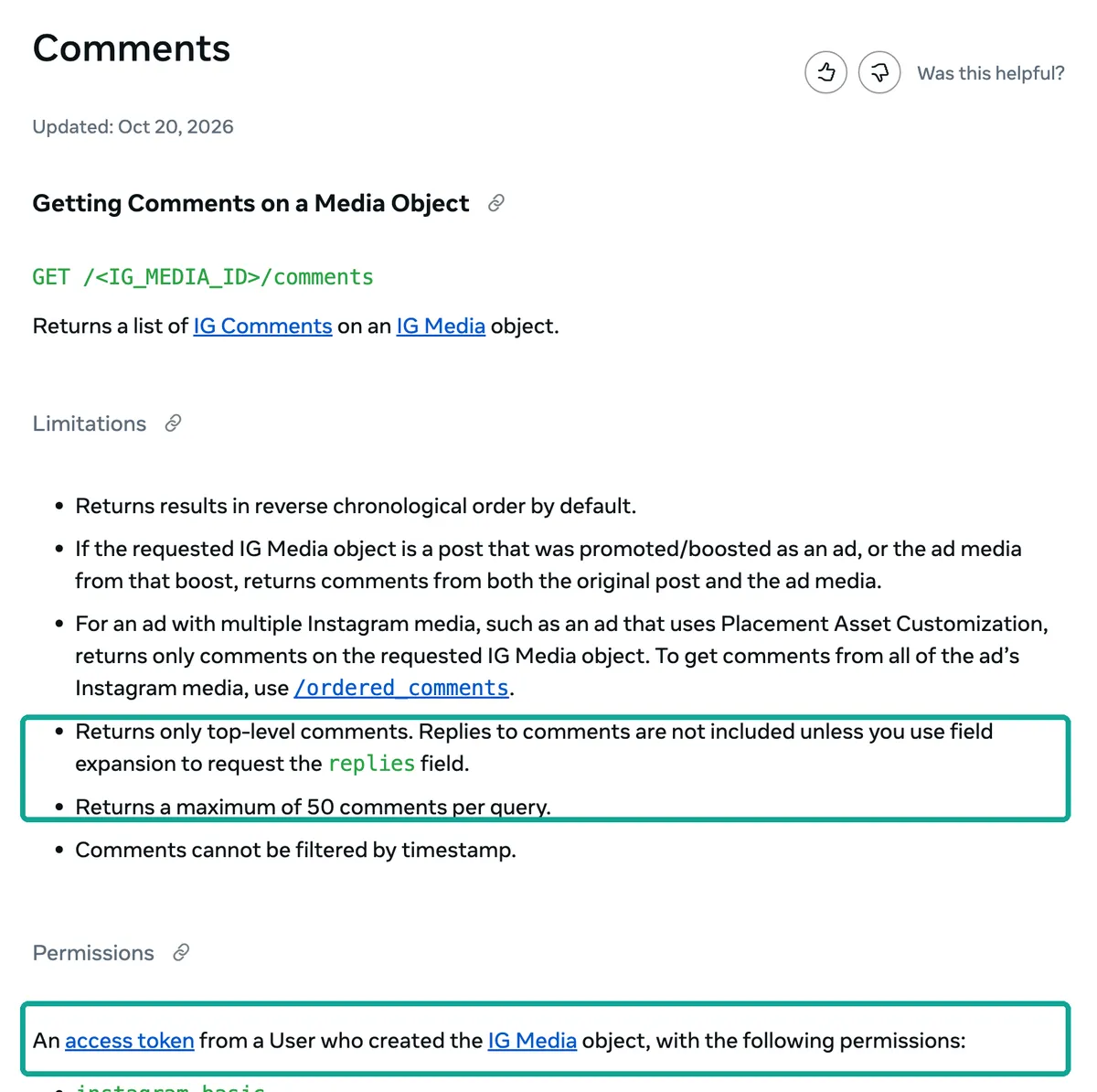
The reference page for comment replies has the same requirement. You need a token from the account that owns the comment, and deleted comments return no replies. In practice the official comments API fits one situation: you manage your own brand account, or a client has authorized your app to manage theirs. For that situation it is the most complete, most stable and most clearly permitted route. You get every top-level comment, 50 per page, plus replies, and you never get blocked.
Other accounts: Business Discovery gives numbers, not words
If you want to watch competitors or peer organizations, the official door is Business Discovery. You use your own professional account to look up another business or creator account and get its follower count, media count and recent media. Each media item can include comments_count and like_count, and the documentation example also shows view_count. You never get comment text, personal accounts cannot be queried, and age-gated business accounts return nothing. The page also notes one detail about other accounts. Their videos with copyrighted audio, and their Reels with downloads disabled, do not return a media_url.
Hashtag search is the other door. IG Hashtag Search requires the Instagram Public Content Access feature. The platform overview lists its uses: hashtag campaign content, public sentiment about your brand, and contest entrants. The hard limit is 30 unique hashtags per seven days, and sensitive hashtags return a generic error.
| Official API limit | Source | What it means for scraping |
|---|---|---|
| Comments need the post creator's token | Comments reference, updated 2026-10-20 | Only your own or authorized accounts |
| At most 50 comments per query | Same page | Page through with cursors |
| Other accounts return counts only | Business Discovery, updated 2026-08-12 | Engagement rates yes, comment analysis no |
| 30 unique hashtags per 7 days | IG Hashtag Search | Pick hashtags carefully |
| Serving other people's accounts needs Advanced Access | Platform overview, updated 2026-10-29 | App Review plus Business Verification |
| New apps cannot use Instagram Login | Migration guide, updated 2026-10-01 | New projects use Unified Login |
The official route in Python (configuration example)
The snippet below reads every comment on one post of your own account. We do not have a professional account token to run it, so it is a configuration example from the official documentation. Field names and paging follow the reference pages.
# Configuration example: read all comments on one post of your own (or an authorized) professional account
# IG_TOKEN comes from Unified Login; MEDIA_ID comes from /{ig-user-id}/media
import os, requests
GRAPH = "https://graph.facebook.com/v27.0"
url = f"{GRAPH}/{os.environ['MEDIA_ID']}/comments"
params = {"fields": "id,text,timestamp,like_count,replies{id,text,timestamp}",
          "access_token": os.environ["IG_TOKEN"]}
rows = []
while url:
    page = requests.get(url, params=params, timeout=30).json()
    rows += page.get("data", [])
    url = page.get("paging", {}).get("next")   # at most 50 per page; follow the cursor
    params = None                              # the next link already carries every parameter
print(len(rows), "top-level comments")
We use v27.0 because Meta released Graph API v27.0 in a developer blog post dated November 4, 2026. The same post says v21.0 will be removed on January 21, 2027, and v22.0 on May 20, 2027. The release also blocks several legacy features for new apps, including multi-ID requests and field aliases. An old snippet that uses ?ids= to fetch several posts at once will fail in a new app.
Route two: open-source libraries are free but fight the platform
Search suggestions for "instagram scraper python github" mostly point to two projects: instaloader (about 13,800 stars, MIT license) and instagrapi (about 7,090 stars). Both READMEs are candid, and they are worth paraphrasing closely.
The instaloader README says it downloads public and private profiles, hashtags, stories, feeds and post comments, and that private profiles need --login. Its disclaimer says the project is not affiliated with, authorized, maintained or endorsed by Instagram, and that you use it at your own risk. The instagrapi README says it combines public web and private mobile endpoints. It warns that private API automation is fragile in production because account trust, proxies, device state, challenges and rate limits can change independently. It recommends official APIs for account-owned workflows and says the project is best suited for testing, research and controlled internal automation.
32 issues in 100 days: most of the recent ones are blocks or logins
The most direct evidence of whether a library works is its issue tracker. We used the GitHub search API to pull all 32 instaloader issues opened between August 1 and November 9, 2026. We labeled each one by hand from its title and first paragraph. We used three labels.
"Blocked by the platform" covers 429, 401, 400 feedback_required, 302 redirects and empty JSON. "Login and session" covers failed logins, cookie import, checkpoints and two-factor prompts. "Feature, field change or other" covers everything else. In August and September, 7 of 16 issues were blocks or logins. From October 1 to November 9 it was 11 of 16, or 69%.
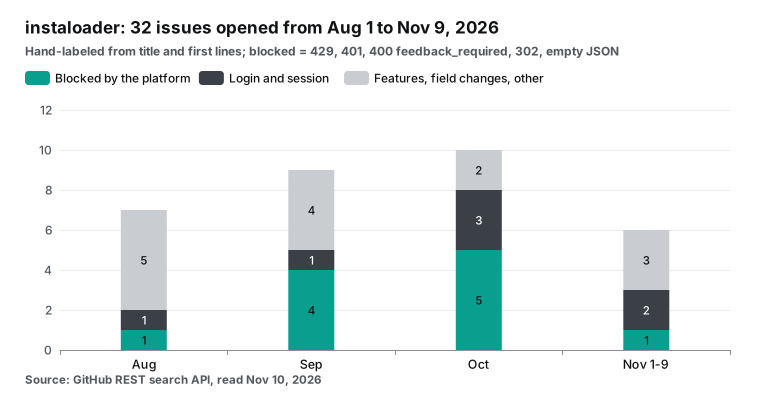
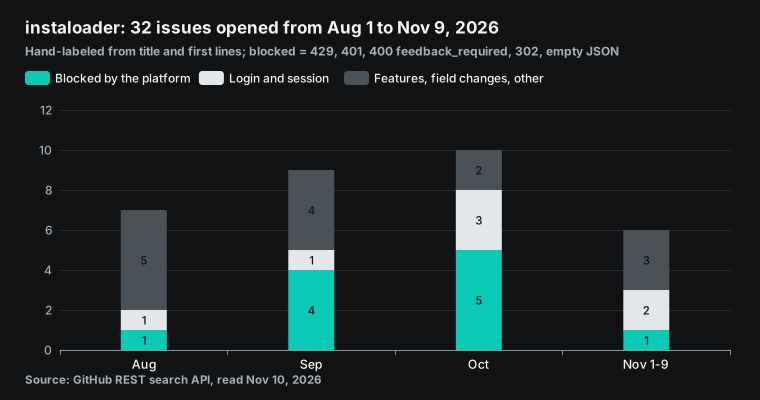
The timeline says more than the counts. Issue #2750, opened on October 10, reports HTTP 429 from the web_profile_info endpoint. Issue #2767, opened on October 13, 2026, reports that login returns feedback_required. In issue #2786, opened on October 21, a researcher asks whether instaloader still works reliably in 2026. They collect public posts from government and municipal accounts for a study. They keep hitting 429, even in a clean environment with a current version.
The maintainers shipped a 4.16 beta on October 21 and version 4.15.5 on October 24. Then they shipped version 4.16 on October 26, 2026, which fixes Profile.get_posts() both logged in and logged out. Four days later, issue #2792, opened on October 30, reports that both login and browser cookie import are broken again. Several users confirmed a community patch, PR #2795, on November 2. One of them reported the next day that it had worked for only a day.
Issue #2794 reports several days of 401 errors on logged-out downloads; users who upgraded to 4.16 say that fixed it. Issue #2803, opened on November 7, 2026, reports a 302 redirect to the home page on downloads. A browser on the same IP works normally.
| Date (2026) | Event | Source |
|---|---|---|
| October 10 | 429 Too Many Requests on web_profile_info | Issue #2750 |
| October 13 | Login returns feedback_required | Issue #2767 |
| October 21 | Researcher: persistent 429 even in a clean setup | Issue #2786 |
| October 24 | Version 4.15.5 released | GitHub Releases |
| October 26 | Version 4.16 released, fixes get_posts() | GitHub Releases |
| October 30 | Login and cookie import broken | Issue #2792 |
| November 2 | Community patch PR #2795 confirmed working | PR #2795 |
| November 7 | 302 redirect to home page; browser on same IP fine | Issue #2803 |
instagrapi is not having an easy time either. It shipped two versions in quick succession, 3.2.7 on November 7 and 3.2.8 on November 9 according to PyPI. Issue #2920, opened on November 3, reports that a pre-login endpoint started returning 404, so login fails before the password is even sent. Issue #2890, opened on October 18, reports a challenge_required loop that starts right after a successful login when the client makes its warm-up requests. We cite these issues only for their titles and stated facts and make no judgment about either project. The maintainers are fixing things quickly; the root cause sits on the platform side and can change at any time.
Account risk: what the terms and the Help Center say
Few library tutorials mention the risk to the Instagram account you log in with. Section 4.2 of the Instagram Terms of Use says you cannot access or collect information in unauthorized ways. This includes automated collection without Instagram's express permission, whether or not you are logged in. The Help Center has a dedicated article, Why your account has been restricted for data scraping.
It says Meta has teams that detect, investigate and block scraping patterns. Accounts can be restricted and sent for review. The top of the terms page says new terms take effect on January 20, 2027. A preview of the new terms is already published.
So the real cost of route two is not zero. You need accounts that you can put at risk, and you handle checkpoints and two-factor prompts. You upgrade the library after each platform change. On some days, nothing works.
instaloader's own troubleshooting page says its rate controller assumes that it is the only program sending requests. Thus frequent restarts trigger 429s easily. Cloud servers, VPNs and public proxies also get stricter anonymous limits.
# Configuration example (not run for this guide): read recent posts of a public account with instaloader
import instaloader                       # pip install instaloader==4.16
L = instaloader.Instaloader(download_pictures=False, download_videos=False,
                            save_metadata=False, max_connection_attempts=1)
# L.load_session_from_file("your_account")   # many features need a logged-in session
profile = instaloader.Profile.from_username(L.context, "cdcgov")
for i, post in enumerate(profile.get_posts()):
    print(post.shortcode, post.date_utc, post.likes, post.comments)
    if i >= 49:
        break
We did not run this snippet. Sending a large number of automated requests from our own Instagram account would break the clause quoted above, so we do not demonstrate it. It is here so that you can compare it with the script below and see the code-level difference. With a library you manage the class names, the session file and the connection retries yourself. In one instaloader tutorial we reviewed, the presenter hits "module object is not callable" on camera because a class name had the wrong capitalization.
Route three: a pay-per-call API and a complete script to scrape Instagram posts in Python
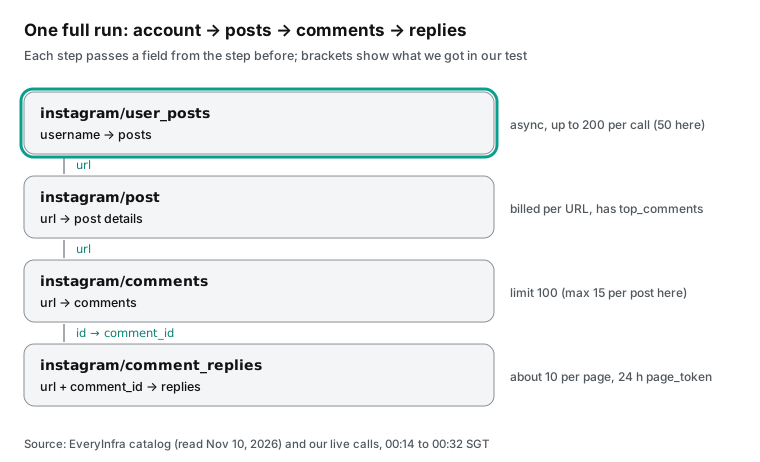
Route three hands the "how do I get it" problem to an API, so you only decide what to fetch and how much. Below, four EveryInfra capabilities form one complete pipeline. instagram/user_posts lists an account's posts, and instagram/post fetches post details by URL. instagram/comments fetches comments by post, and instagram/comment_replies fetches replies by comment ID. Every parameter, price and response field is in the public catalog, which needs no key. The Instagram API page and the user posts, post details, comments, comment replies and hashtags pages show them too.
| Capability | Required parameter | Mode | Price per call | Max per call | Returned per call in our test |
|---|---|---|---|---|---|
instagram/user_posts | username | Async | $0.000556 | 200 posts | 50 (limit 50) |
instagram/post | urls (array) | Sync, billed per URL | $0.000556 per URL | 11 URLs | 1 per URL |
instagram/comments | url | Sync | $0.000556 | 100 | 7 to 15 |
instagram/comment_replies | url, comment_id | Sync, per page | $0.000875 per page | About 10 | Not tested |
instagram/hashtag | hashtag | Sync | $0.000556 | 100 | 27 to 30 (limit 50) |
A Python script you can run as is
This is the exact script we ran at 00:26 SGT on November 10, 2026. Its only dependency is requests, and it reads the key only from the EVERYINFRA_API_KEY environment variable, never from the code. The script does four things. It pulls the 50 most recent posts of one account and keeps only the posts that account published itself. It then picks the three posts with the most comments and pulls their comments. Finally it writes posts and comments to two CSV files and prints the cost per 1,000 rows.
"""Scrape Instagram posts and comments with Python via EveryInfra (pay per call).

usage: EVERYINFRA_API_KEY=... python ig_posts_comments.py <username> [top_k]
writes posts.csv and comments.csv; prints cost per 1,000 rows
"""
import csv, os, sys, time
import requests

API = "https://api.everyinfra.com"
S = requests.Session()
S.headers.update({"Authorization": f"Bearer {os.environ['EVERYINFRA_API_KEY']}"})
spent = 0.0

def social(action, params, mode=None):
    """One call. Retries 429 and retryable 503; follows async jobs."""
    global spent
    body = {"platform": "instagram", "action": action, "params": params}
    if mode:
        body["mode"] = mode
    for _ in range(4):
        r = S.post(f"{API}/api/v1/social", json=body, timeout=120)
        d = r.json()
        err = d.get("error") or {}
        if r.status_code == 429 or (r.status_code == 503 and err.get("retryable")):
            time.sleep(err.get("retry_after", 15) + 1)
            continue
        break
    if "error" in d:
        raise RuntimeError(f"{action}: {r.status_code} {err.get('code')} {err.get('message')}")
    while d.get("job_id") and d.get("status") not in ("succeeded", "failed"):
        time.sleep(5)
        d = S.get(f"{API}/api/v1/jobs/{d['job_id']}", timeout=60).json()
    spent += (d.get("billing") or {}).get("charged_usd", 0.0)
    return d

def main(username, top_k=3):
    posts = social("user_posts", {"username": username, "limit": 50}, mode="async")["results"]
    own = [p for p in posts if p["author_username"] == username]   # collab posts carry the partner's name
    with open("posts.csv", "w", newline="", encoding="utf-8") as f:
        w = csv.DictWriter(f, ["post_id", "url", "posted_at", "media_type", "like_count", "comment_count", "author_username", "text"],
                           extrasaction="ignore")
        w.writeheader(); w.writerows(posts)
    rows = []
    for p in sorted(own, key=lambda p: p.get("comment_count") or 0, reverse=True)[:top_k]:
        got = social("comments", {"url": p["url"], "limit": 100})["results"]
        print(f"{p['url']}  comment_count={p['comment_count']}  returned={len(got)}")
        rows += got
    with open("comments.csv", "w", newline="", encoding="utf-8") as f:
        w = csv.DictWriter(f, ["post_url", "id", "posted_at", "like_count", "text"], extrasaction="ignore")
        w.writeheader(); w.writerows(rows)
    n = len(posts) + len(rows)
    print(f"posts={len(posts)} own={len(own)} comments={len(rows)} rows={n} charged=${spent:.6f} "
          f"(user_posts is billed per call: +$0.000556 if not shown) per_1k=${(spent + 0.000556) / n * 1000:.4f}")

if __name__ == "__main__":
    main(sys.argv[1], int(sys.argv[2]) if len(sys.argv) > 2 else 3)
Three parts of the script exist because we hit the problem first.
One: a requests.Session reuses connections and sends the auth header on every call, which is the pattern the Requests documentation recommends. Two: on 429 and on a retryable 503 the script waits for the retry_after value in the response and tries again. Our test key allows 10 requests per minute, and we hit 429 during the run. Three: the result of an async job does not include a billing field.
The charge is reported in the first response, when the job is submitted, so the last line adds the $0.000556 for user_posts separately. If you need exact reconciliation, keep billing.charged_usd from the first response. The CSV files are written with the standard library's csv.DictWriter, and extrasaction="ignore" stops extra fields from raising an error.
Test one: the CDC account, 90 rows for $0.002224
We ran the script against cdcgov at 00:26:10 SGT on November 10, 2026, and it finished at 00:27:35 SGT, 85 seconds end to end. It returned 50 posts published between October 7 and November 9, all published by the CDC account itself, with 502 comments between them. It then made one comments call for each of the three busiest posts. Two posts with 36 comments each returned 10 and 15 comments, and a post with 34 comments returned 15. That is 90 rows for $0.002224 (one user_posts call plus three comments calls at $0.000556 each), or $0.0247 per 1,000 rows.
| CDC post (shortcode) | Published | Topic | Likes | Comment count | Returned | Share |
|---|---|---|---|---|---|---|
| DfH8XY3F4pw | 2026-10-30 | Alcohol and cancer risk | 1,331 | 36 | 10 | 27.8% |
| De9jOyyl7Q2 | 2026-10-26 | Respiratory illness levels | 264 | 36 | 15 | 41.7% |
| DfCnYhRlnSG | 2026-10-28 | Rural respiratory deaths | 544 | 34 | 15 | 44.1% |
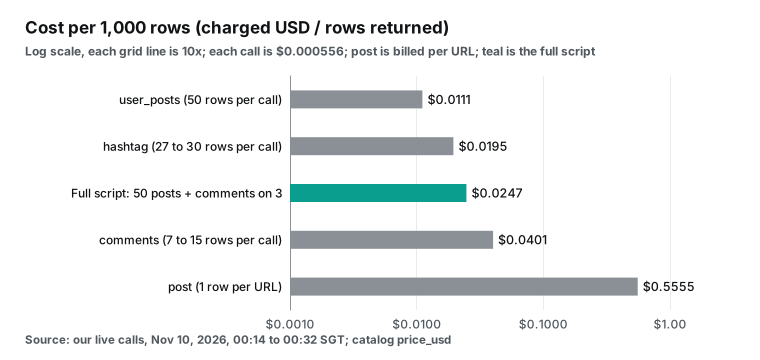
Read that number together with its assumptions. The cost per 1,000 rows depends almost entirely on the number of rows that one call returns. The post list returns 50 rows per call, so it costs $0.0111 per 1,000 rows. With limit at the catalog maximum of 200, the cost could fall to about $0.0028 per 1,000 rows.
We did not test 200, so this is an estimate. The comments endpoint returns at most 15 rows per call, so it costs at least $0.037 per 1,000 rows. Post details are billed per URL and return one row per URL, which means $0.556 per 1,000 rows. The chart below puts our measured unit costs side by side.
Test two: the WHO account, and how many comments you really get
Between 00:14 and 00:20 SGT we ran the same flow against who, one call at a time, so we could inspect each raw response. The async user_posts job submitted at 00:14:21 SGT returned 50 posts after 43.6 seconds. The oldest was from September 22 and the newest from November 9. There were 30 images and 20 videos.
Together they showed 5,706 comments, and the median like count was 2,116.5. At 00:15:27 SGT we called instagram/post with two URLs and were charged $0.001111, or $0.000556 per URL. The response included top_comments, 10 on one post and 4 on the other, and parsed hashtags such as COP31 and ClimateChange.
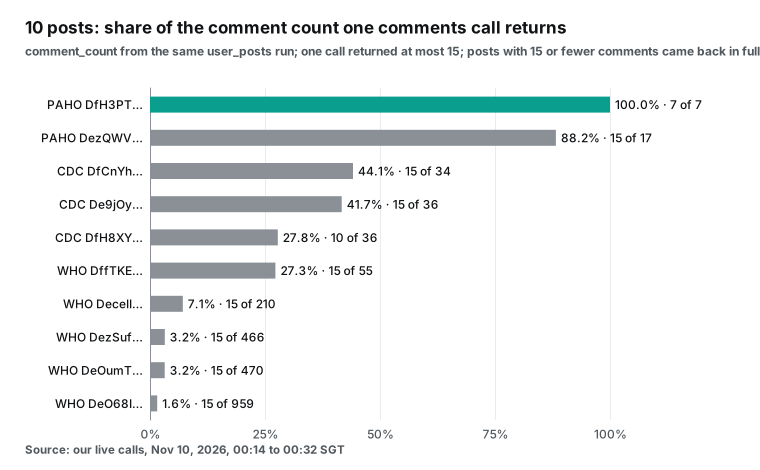
The next set of numbers is the most important in this guide. We picked five posts with many comments from the WHO feed (four of them turned out to be collab posts started by Dr. Tedros's personal account, as test three explains) and called instagram/comments once for each, always with limit set to 100.
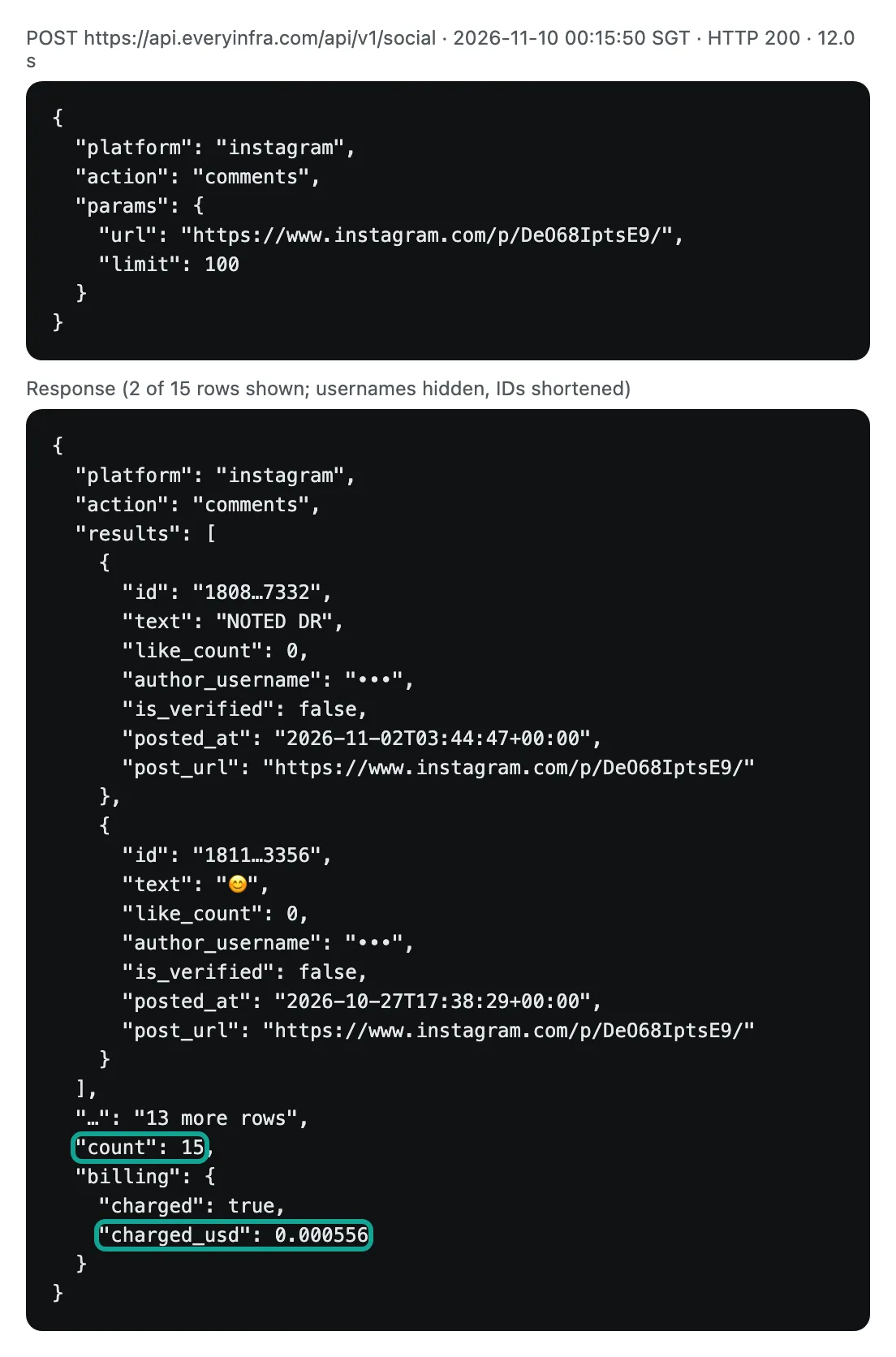
We added two posts from the Pan American Health Organization account (opspaho) and three from CDC, for 10 posts in total. Every call returned 15 comments or fewer. The post with 959 comments returned 15, which is 1.6%. It is an October 8 update on a suspected pneumonic plague case in a laboratory worker in Russia.
Posts with 470, 466, 210 and 55 comments also returned 15 each. A post with 17 comments returned 15 (88.2%), and a post with 7 comments returned all 7. The 10 posts showed 2,290 comments between them, and we got back 137, about 6.0%.
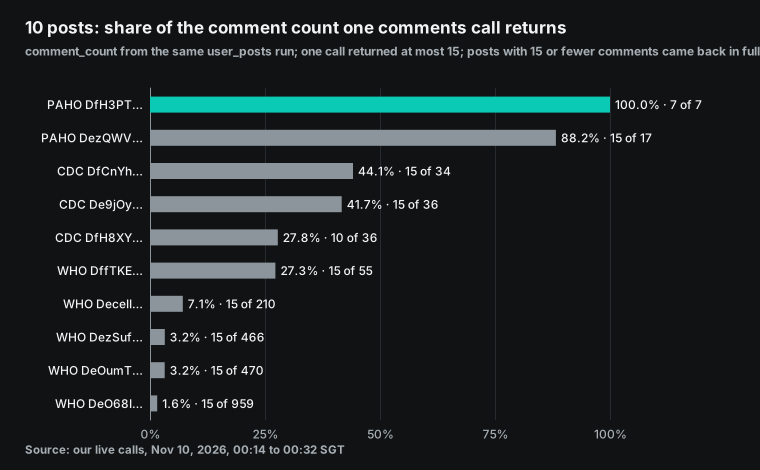
Which 15 comments do you get? The timestamps show a pattern. The 959-comment post was published on October 8, and the 15 comments we got were posted between October 19 and November 2. The 466-comment post was published on October 22, and its 15 comments all fell between November 1 and November 9.
The slice looks like a recent window, not the most liked comments and not the first ones. Most of the 15 had zero likes, and none on the 959-comment post had any. This matches what we measured on October 26 for our per-result versus per-call pricing comparison for Instagram. There, too, about 15 comments per post were reachable from outside. Two weeks later the number has not moved.
That limit decides what route three is good for. It is good for breadth: dozens or hundreds of accounts, with the most recent comments under each post. You can use them to judge sentiment, see new issues early and pull samples for human review. It is not good for depth.
Route three cannot give you all the comments of one viral post for full corpus analysis. For that, look at route one (owner authorization) or the research channels later in this guide. The catalog's field_note also says that when the primary data source is down, comments drop further (at most 80 or 30); in practice the ceiling we hit was 15.
What the 137 comments look like
Coverage is one question; the shape of the comments is another, and it decides how you analyze them.
We pooled all 137 comments from this round: 75 from five WHO posts, 22 from two PAHO posts and 40 from the CDC script run. No comment ID appeared twice. 15 comments (10.9%) contained only emoji, with no letter or digit at all. The median length was 46 characters. 28 comments had 10 characters or fewer, and 38 had more than 200.
The longest had 2,177 characters. Most of the long comments tell a personal story. 107 comments (78%) had zero likes, and the most liked had 20. Eight mentioned another account with @, and three contained a link. By date, 96 were posted in October and 41 in November.
| Measure (137 comments) | Value |
|---|---|
| Duplicate comment IDs | 0 |
| Emoji only, no letters or digits | 15 (10.9%) |
| Median length | 46 characters |
| 10 characters or fewer | 28 |
| More than 200 characters | 38 (longest 2,177) |
| Zero likes | 107 (78%), maximum 20 |
| Contains an @ mention | 8 |
| Contains a link | 3 |
| Posted in October / November | 96 / 41 |
Those numbers lead to three handling rules. Keep the emoji-only comments. Under a public health account, a row of clapping hands or a crying face is a sentiment signal. Thus, a good sentiment model must understand emoji, or you must change emoji to text first.
Long comments are usually personal stories or objections, and they carry much more information than short ones. For human review, start with the longest fifth. Store comments with id as the primary key and posted_at in UTC, and keep only a hash of author_username. Every comment we show in this guide has its username hidden and its ID shortened, and you should do the same in anything you publish.
Test three: 28% of a feed's 50 posts were not published by that account
At 00:30 SGT we pulled 50 posts from opspaho and found a detail that is easy to miss. Only 37 of the 50 had opspaho as author_username. The other 13 were collab posts that other accounts started. Three came from the PAHO director's account and three from Colombia's national health institute. Five other organizations and two personal accounts started the rest.
WHO was similar: 36 of 50 were its own posts. Dr. Tedros's verified personal account drtedros started 11 collab posts. The WHO offices for Europe and the Eastern Mediterranean, and one health organization, started one each. All 50 CDC posts were its own.
The three feeds also differ a lot in comment volume. WHO's 50 posts had 5,706 comments in total. CDC's 50 posts (October 7 to November 9, UTC) had 502, and PAHO's 50 had only 134, with a median of 83 likes. Thus the same 50-post pull gives WHO more than 40 times the comments of PAHO. If you split a comment budget across accounts, first add up comment_count per account. Then decide how many posts per account need a comments call.
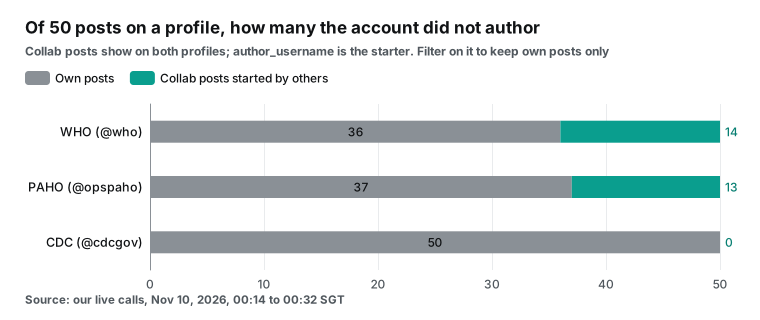
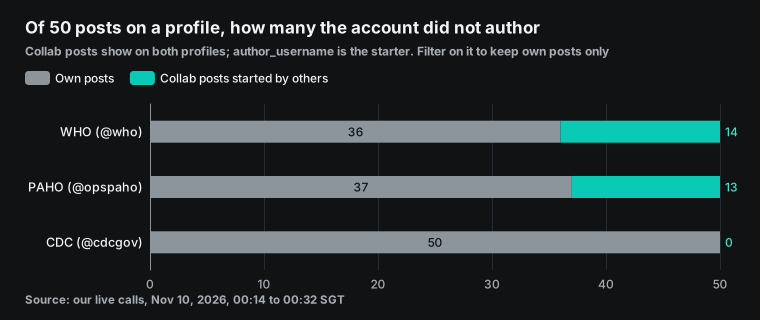
This changes your statistics. In WHO's 50 posts, four of the eight most commented posts were collab posts started by Dr. Tedros's account. The 14 collab posts carried 2,324 of the 5,706 comments, or 41%. Their median like count was 2,412.5, higher than the 1,917.5 of WHO's own 36 posts. If you compute "average comments on WHO's last 50 posts" without filtering by author, about four tenths of the result comes from another account's audience.
That is why the line own = [p for p in posts if p["author_username"] == username] is in the script. To study an organization's own reach, filter by author first. To study what its feed actually shows visitors, keep everything.
Test four: 30 hashtag posts covered 17 minutes
At 00:20 SGT we called instagram/hashtag for publichealth with limit set to 50 and got 30 posts. All 30 were published between 16:00 and 16:17 UTC on November 9, which is the first 17 minutes after midnight on November 10 in SGT. They came from 28 different accounts, all were images, the median like count was 0, and together they had 7 comments. The Spanish hashtag saludpublica, called at 00:28 SGT, returned 27 posts covering about five hours, with a median of 2 likes. Each call cost $0.000556.
| Hashtag | Called (SGT) | Rows (limit 50) | Time span covered | Distinct authors | Median likes | Total comments | Cost |
|---|---|---|---|---|---|---|---|
publichealth | 00:20 | 30 | 17 minutes | 28 | 0 | 7 | $0.000556 |
saludpublica | 00:28 | 27 | About 5 hours | 26 | 2 | 36 | $0.000556 |
The lesson is that the hashtag endpoint returns the newest posts, not the most popular. To use it for monitoring, poll often in small steps and deduplicate on post_id as you accumulate. One hashtag request will not find the most influential posts under a hashtag. For that, combine it with a list of accounts and instagram/user_posts. The official hashtag search has separate recent and top edges, but the limit of 30 hashtags per seven days makes frequent polling impractical there.
How to scrape Instagram comments: replies and paging
Comments come in two layers: top-level comments and replies. The official API expands replies as a field. Our API has a separate capability, instagram/comment_replies, which takes the post URL and a comment ID (the id from instagram/comments results). It returns about 10 replies per page. To get the next page, you send back the next_page_token from the response, which is valid for 24 hours. Each page is one call at $0.000875.
At the catalog price, a comment with 24 replies needs 3 pages, about $0.0026. The instagram/comments results have no reply count: the fields are id, text, like_count, posted_at, author_username, is_verified and a few more. Thus you cannot see in advance which comments have replies, and replies for 100 comments cost 100 calls. To spend less, first select the comments you want to read in depth, for example by likes or by length. Then request replies only for those.
We could not test this step. In this round we called it once for each of 9 comments on three posts. All 9 calls returned 503 and none were charged. Thus this guide does not report measured reply fields. The catalog lists id, text, like_count, posted_at, author_username, reply_to_id and next_page_token, among others. The paging code below follows the same structure as top-level comments and loops until there is no next_page_token.
# Paging through replies: about 10 per page, one call per page; stop when next_page_token is missing
def all_replies(post_url, comment_id, max_pages=20):
    out, token = [], None
    for _ in range(max_pages):
        p = {"url": post_url, "comment_id": comment_id}
        if token:
            p["page_token"] = token          # valid for 24 hours
        d = social("comment_replies", p)
        out += d.get("results", [])
        token = d.get("next_page_token")
        if not token:
            break
    return out
In September 2026 we published a TikTok comments tutorial, where the replies capability returned a full 24-reply thread at the time. We will retest Instagram replies and update this section. Until then, if your analysis must include replies, route one, with the account owner's authorization, is the only route certain to return all of them.
Failures, rate limits and billing: 16 requests that cost nothing
Whether failures cost money is the most common question about pay-per-call pricing. In this round we triggered several errors on purpose and ran into a few real ones. The table summarizes them. Every failure came back as a structured error with code, message, request_id and retryable. Parameter errors also named the missing parameter or the allowed values and included a working example request.
| Situation | HTTP | Response | Charged | Count |
|---|---|---|---|---|
| No API key | 401 | missing_key, with a hint to use the Authorization header | $0 | 1 |
username sent to the comments endpoint | 422 | missing_param: url, with a correct example | $0 | 1 |
Empty urls for post details | 422 | missing_param: urls | $0 | 1 |
results_type set to posts | 422 | invalid_value, allowed is reel, reels | $0 | 1 |
| More than 10 requests per minute | 429 | rate_limited, retry_after 7 to 17 seconds | $0 | 3 (plus 4 absorbed by automatic retries) |
| Comment replies | 503 | See the replies section | $0 | 9 |
| Account not found (twice) | 200 | Empty results, refund_state: refunded | Charged, then refunded | 2 |
The last row needs a word of explanation. user_posts is asynchronous, so $0.000556 is charged when the job is submitted. If the job finishes with no results, the charge is refunded, and the job result shows billing_state: charged together with refund_state: refunded. That happened for a misspelled handle and for a username we made up.
This is important for batch runs over a list of accounts. A typo in your list costs nothing. But when you reconcile, look at refund_state, not only at the charge on submission.
| Error code | `retryable` | What your code should do |
|---|---|---|
missing_key | false | Fix the Authorization header |
missing_param, invalid_value | false | Fix the request using the example in the message |
rate_limited (429) | true | Sleep retry_after seconds, then retry |
unavailable (503) | true | Retry after retry_after; after 3 failures, skip and log |
Empty results with refund_state: refunded | not an error | Check the username in your list |
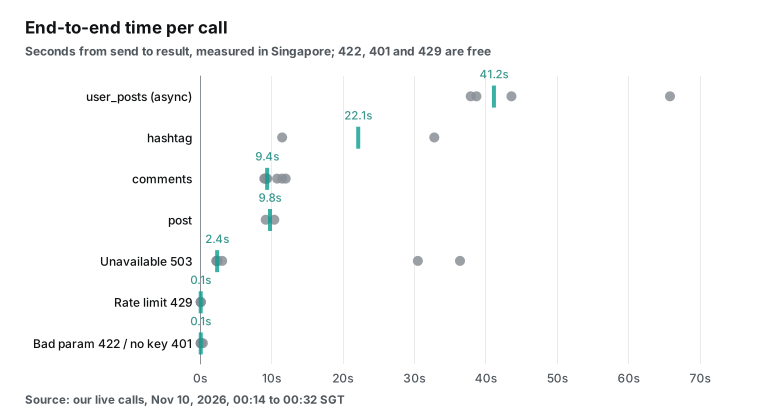
On latency, synchronous comments and post details took 9 to 12 seconds, and a hashtag call took 11.5 seconds (the other took 32.8 seconds because it waited out a 429 first). Async user_posts jobs took 38 to 66 seconds from submission to result. Parameter errors came back in 0.1 to 0.4 seconds at no charge. Thus, during development you can safely test the request format with wrong parameters first. If an AI agent retries automatically, the retryable field tells it whether to try again. missing_param and invalid_value are false, and 429 and 503 are true.
The money: 10,000 comments and a month of monitoring
Let us turn the measurements into two common jobs.
Job one is collecting 10,000 public comments for sentiment analysis. On route three, at the measured $0.0401 per 1,000 rows, that is about $0.40. (That rate comes from our 7 separate comment calls and 97 rows. With the 3 comment calls from the CDC script added, it is 10 calls, 137 rows and $0.0406 per 1,000.) But you need enough posts. At most 15 comments per post means at least 667 posts, and at the measured average of 13.7 it is about 730. If you want every comment on ten viral posts, route three cannot deliver.
On route one, if the posts belong to you or your client, the API fee is zero. 10,000 comments take about 200 page requests at 50 per page. The main cost is App Review and development time. Route two has no API fee; the cost is in accounts, proxies and maintenance. The October issue timeline also shows several periods when it did not work at all.
Job two is a daily watch on three public health accounts, for example WHO, PAHO and CDC. Each day you pull the latest 50 posts per account and comments on the ten busiest posts. That is 3 user_posts calls and 30 comments calls, or 33 calls a day. At the catalog price of $0.000556, it costs about $0.0183 a day, or about $0.55 for 30 days. At this scale money no longer decides anything; what decides is whether 15 comments per post is enough for your question.
| Job | Official API | Open-source library | Pay-per-call (EveryInfra) |
|---|---|---|---|
| 10,000 comments, a slice from many posts | Your own or authorized accounts only; API fee $0 | API fee $0; needs accounts and proxies; some periods blocked | About $0.40 ($0.0401 per 1,000 rows, measured) |
| 10,000 comments, all comments on a few viral posts | Yes, for authorized accounts, 50 per page | Depends on login state and version | Not possible (at most 15 per post) |
| Daily monitoring of 3 accounts for 30 days | Counts only for other accounts | Login and rate limits every day | About $0.55 (33 calls a day) |
| Metadata for 10,000 posts | Counts for other accounts via Business Discovery | Possible, subject to 429 | About $0.11 at 50 per call; about $0.028 at limit 200 (estimate, not tested) |
These figures cover API fees only, not people. Pay-per-call prices are catalog prices, and we will check them again before we publish. The current price is on the pricing page and in the catalog. Top-ups and volume discounts are not in this table.
Connect an AI tool: the remote MCP server
Your Python script may only prepare data for an AI assistant. In that case, you can skip the script and add EveryInfra's remote MCP server to any MCP client. On November 10 the tools/list call returned 12 tools. everyinfra_call_api calls the capabilities above, everyinfra_list_capabilities lists every platform and capability, and everyinfra_get_job fetches async job results. The configuration is on the MCP server page:
{
  "mcpServers": {
    "everyinfra": {
      "url": "https://api.everyinfra.com/mcp",
      "headers": { "Authorization": "Bearer YOUR_API_KEY" }
    }
  }
}| MCP tool | What it does | When you use it here |
|---|---|---|
everyinfra_list_capabilities | Lists platforms, capabilities, parameters and prices | Discover instagram/* capabilities |
everyinfra_call_api | Calls one capability | Posts, comments, hashtag pulls |
everyinfra_get_job | Fetches an async job result | Finish user_posts jobs |
everyinfra_list_requests | Lists recent requests and charges | Reconcile what was billed |
After you connect, ask the assistant to pull CDC's last 50 posts and fetch comments on the three busiest. It will call user_posts and then comments, and it can group the comments by theme. The same two cautions apply. Comments stop at 15 per post, so an assistant that says "here are all the comments" is misleading you. And you have to say in the prompt whether collab posts count.
For researchers: a fourth door
Researchers at universities or non-profits who do public-interest research have one more door. It is Meta's Content Library and Content Library API. It covers public content from Facebook, Instagram and WhatsApp channels. On Instagram it includes posts from business and creator accounts and from personal accounts that are verified or have at least 100 followers.
API endpoints include Instagram accounts, posts and comments, with up to 100,000 results per query. But you can analyze the data only inside a secure environment. The French secure data access center CASD reviews applications independently. In an update note, Meta says researchers can now search comments on a post by keyword and sort and filter them by date.
| Research channel | Who can use it | Instagram comments | Where data lives |
|---|---|---|---|
| Meta Content Library API | Researchers approved after independent review | Yes, keyword search within a post's comments | Secure research environment only |
| DSA Article 40 vetted access | Vetted researchers, EU procedure | Depends on the request | Defined per approval |
| Official Graph API | Account owners and authorized apps | Own or authorized accounts only | Your own systems |
| Pay-per-call public API | Anyone with a key | Recent slice, up to 15 per post in our test | Your own systems |
In the European Union, Article 40 of the Digital Services Act requires very large platforms to give vetted researchers access to public data. The European Commission's delegated act on data access sets the procedure and started a data access portal. These channels are imperfect. An arXiv paper updated on September 23, 2026 compared what users see with what research interfaces return. The Meta Content Library and the TikTok research API can miss up to about half of the content.
They can remove up to about 83% of context metadata and allow as few as about 1,000 requests per week. For a research project, the safer plan uses both. Apply for formal access, and use public APIs for small samples and cross-checks. Record the source and coverage of each dataset in your methods section.
Our article on research sample integrity with social data shows how the same query can change by half two minutes later. Our health misinformation monitoring piece shows how public health teams turn social signals into human triage. Both pair well with the coverage numbers here.
Compliance: public comments are still personal data
Public does not mean free to use any way you like. On October 29, 2024, the Australian Information Commissioner's office and 16 other data protection authorities issued a follow-up joint statement on data scraping. It asks platforms to keep deploying anti-scraping measures and asks that scraping for commercial or public-interest purposes happen under lawful and strict contractual safeguards.
As a user of the data, do at least three things. Collect only the fields the task needs; sentiment analysis does not need commenters' profile picture URLs. Pseudonymize commenter usernames in storage and display, as every screenshot and dataset in this guide does. Do not collect private accounts, and do not get around login walls or technical restrictions.
The script in this guide follows this rule. Its comments file has five columns: post_url, id, posted_at, like_count and text. The commenter's username from the response is not written to disk. If you must group several comments by the same person, store a hash of the username, not the name.
On the platform side, Section 4.2 of the Instagram Terms of Use quoted above is the key clause. Meta's own terms keep moving. In mid-October 2026 Meta added language to its commercial terms about scraping content from websites linked to business accounts. TechCrunch reported on October 17 that Meta removed the language.
MediaPost reported on November 6 that Meta paused the update indefinitely, so it would not start on November 20. That episode is separate from scraping Instagram posts, but it makes one point clear: terms change, and long-running projects should schedule regular terms reviews. This guide covers data methods and boundaries only and is not legal advice; for a specific use, consult a lawyer in your jurisdiction.
How this guide differs from our other Instagram article
For the unit price of each kind of Instagram data, see the Instagram data API page. The 15-comment limit that we measured two weeks ago has not changed. Meta's other apps, Facebook and Threads, use the same request shape; you only change the platform value.
Recent changes, October and November 2026
| Date | Change | What it means for you |
|---|---|---|
| 2026-10-01 | Instagram migration guide: new apps cannot use the Instagram Login setup | Design new projects for Unified Login and a Business portfolio |
| 2026-10-13 | Unified Login page: new features ship only on this setup | Plan the migration for older projects |
| 2026-10-26 | instaloader 4.16 released | Upgrade from 4.15.x, though login problems reappeared on October 30 |
| 2026-11-04 | Graph API v27.0 released; v21.0 removed on 2027-01-21 | Update hard-coded versions; new apps lose multi-ID requests |
| 2026-11-06 | Meta's scraping-related commercial terms update paused indefinitely | Terms change, so review them on a schedule |
| 2026-11-09 | instagrapi 3.2.8 released, after issue #2920 reported login failures | Pin private-API libraries and keep a rollback ready |
Two pieces of background. The Pew Research Center's fact sheet on social media use, updated on October 19, 2026, shows that about half of US adults use Instagram. Thus brands and agencies with US audiences can hardly ignore it. An arXiv paper published on October 5, 2026 studies engagement with more than 15 million sponsored Instagram posts. Large Instagram post datasets remain standard research material. Post metadata (likes, comment counts, captions) is much easier to get than comment text.
Mixing the three routes
Real projects often mix routes. Your own brand accounts go through the official API, and competitor and industry accounts go through pay-per-call. A research team can apply separately for formal access. When you mix, add a "source" column to every table and record each source's coverage. Do not add comment counts from different sources together. In this guide, the pay-per-call route covered 6.0% of the comments on 10 posts. The official API, for an authorized account, can in principle page through every public top-level comment. When both go into one table, add at least three columns: source, collection time and the post's total comment count. Calculate sentiment shares per source first, and merge only after that.
Getting started: from one test call to a daily job
The fastest start is one instagram/user_posts call with your own key, in the API market or through the quick start in the docs. Then make sure that the fields are what you need. Then save the script above as ig_posts_comments.py, set EVERYINFRA_API_KEY, and run python ig_posts_comments.py cdcgov 3. To run it daily, give it to your system scheduler. Change the script to append and deduplicate on post_id and comment id, instead of overwriting files. Misspelled accounts in your list are refunded automatically, but log refund_state so you notice the mistakes.
Two decisions need real thought. First, is the comment coverage enough? Run five to ten representative posts and compute "comments returned divided by comment count", as this guide does. If your posts mostly have a few dozen comments, route three returns nearly all of them. If they have hundreds or thousands, prepare route one or a research channel. Second, decide how to count collab posts, and put the rule in code.
FAQ
Can you scrape data from Instagram with Python?
Source: Google autocomplete for "can you scrape data from instagram". Technically yes, but separate the three methods. The official API reads only your own or authorized professional accounts. The open-source libraries call web or mobile endpoints directly.
Section 4.2 of the Instagram Terms of Use prohibits automated collection without permission, and Instagram can restrict the account that you log in with. A pay-per-call API does not need your Instagram account. Whichever you choose, touch only public content, never private accounts, and minimize commenters' personal data.
What does Instagram's scraping policy actually say?
Source: Google autocomplete for "instagram scraping policy". The clause is Section 4.2 of the Terms of Use. You cannot create accounts, or access or collect information, in unauthorized ways. This includes automated collection without express permission, whether or not you are logged in. The Help Center article on accounts restricted for data scraping says Meta has dedicated teams that detect scraping. New terms take effect on January 20, 2027, and the preview is public.
How to scrape Instagram comments for free?
Source: Google autocomplete for "how to scrape instagram comments for free". Only two ways are free. The official API can read comments on your own professional account at no per-call fee, but you must create an app and pass review. The open-source libraries are free, but you carry the account risk.
Since October there have been many periods when they did not work. Pay-per-call is not free, but one post's comments cost $0.000556 per call. Testing costs a few cents at most, and failures and empty results are free.
What should I do when instaloader returns 401 or 429?
Source: Google autocomplete for "instaloader 401", plus GitHub issues #2794 and #2786. Users in the tracker first upgraded to 4.16, and some 401 reports were resolved that way. 429 depends on your IP type, concurrency and how often you restart; the troubleshooting page advises against running several instances at once or restarting frequently. The login problems reported after October 30 (#2792) have a community patch, but it has not been stable. If your project cannot tolerate downtime, do not rely on an open-source library as your only source.
Can the Instagram Graph API get comments on other people's posts?
Source: Google autocomplete for "instagram graph api get comments". No. The Comments reference says reading comments requires an access token from the user who created the media object. For other business or creator accounts, Business Discovery returns comment and like counts but never comment text.
How do I scrape Instagram comments into Excel?
Source: Spanish-language autocomplete for "extraer comentarios de instagram a excel", one of the most searched phrasings. The script in this guide writes CSV, which Excel opens directly. Emoji and accented characters are written as UTF-8; if Excel shows garbled text, use Data, then From Text/CSV, and pick UTF-8.
References
- Instagram Platform overview, Meta for Developers, updated 2026-10-29, <https://developers.facebook.com/documentation/instagram-platform/overview>
- Comments (IG Media reference), Meta for Developers, updated 2026-10-20, <https://developers.facebook.com/documentation/instagram-platform/instagram-graph-api/reference/ig-media/comments>
- IG Comment Replies, Meta for Developers, <https://developers.facebook.com/documentation/instagram-platform/instagram-graph-api/reference/ig-comment/replies>
- IG User Business Discovery, Meta for Developers, updated 2026-08-12, <https://developers.facebook.com/documentation/instagram-platform/instagram-graph-api/reference/ig-user/business_discovery>
- IG Hashtag Search, Meta for Developers, <https://developers.facebook.com/documentation/instagram-platform/instagram-graph-api/reference/ig-hashtag-search>
- Instagram API with Unified Login, Meta for Developers, updated 2026-10-13, <https://developers.facebook.com/documentation/instagram-platform/instagram-api-with-unified-login>
- Migrate your App (Instagram Login migration guide), Meta for Developers, updated 2026-10-01, <https://developers.facebook.com/documentation/instagram-platform/instagram-api-with-instagram-login/migration-guide>
- Update on Instagram Basic Display API, Meta for Developers blog, 2024-09-04, <https://developers.facebook.com/blog/post/2024/09/04/update-on-instagram-basic-display-api/>
- Introducing Graph API v27.0 and Marketing API v27.0, Meta for Developers blog, 2026-11-04, <https://developers.facebook.com/blog/post/2026/11/04/introducing-graph-api-v27-and-marketing-api-v27/>
- Rate Limits, Graph API documentation, Meta for Developers, <https://developers.facebook.com/docs/graph-api/overview/rate-limiting>
- Changelog, Graph API, Meta for Developers, <https://developers.facebook.com/docs/graph-api/changelog>
- Changelog for Instagram Platform, Meta for Developers, updated 2026-10-28, <https://developers.facebook.com/documentation/instagram-platform/changelog>
- Terms of Use, Instagram Help Center, <https://help.instagram.com/581066165581870>
- Terms of Use preview (effective 2027-01-20), Instagram Help Center, <https://help.instagram.com/2159268501666222>
- Why your account has been restricted for data scraping, Instagram Help Center, <https://help.instagram.com/740480200552298>
- Hide comments or message requests you don't want to see, Instagram Help Center, <https://help.instagram.com/700284123459336>
- Meta Content Library and API, Meta Transparency Center, <https://transparency.meta.com/researchtools/meta-content-library/>
- Updates to Meta Content Library and API in Support of Independent Research, Meta Transparency Center, <https://transparency.meta.com/researchtools/meta-content-library/MCL-API-update-supporting-independent-research/>
- instaloader repository and README, GitHub, <https://github.com/instaloader/instaloader>
- instaloader v4.16 release notes, GitHub, 2026-10-26, <https://github.com/instaloader/instaloader/releases/tag/v4.16>
- instaloader v4.15.5 release notes, GitHub, 2026-10-24, <https://github.com/instaloader/instaloader/releases/tag/v4.15.5>
- instaloader issue #2750, 429 Too Many Requests, GitHub, 2026-10-10, <https://github.com/instaloader/instaloader/issues/2750>
- instaloader issue #2767, login error feedback_required, GitHub, 2026-10-13, <https://github.com/instaloader/instaloader/issues/2767>
- instaloader issue #2786, is Instaloader still working reliably in 2026, GitHub, 2026-10-21, <https://github.com/instaloader/instaloader/issues/2786>
- instaloader issue #2792, login and load-cookies are broken, GitHub, 2026-10-30, <https://github.com/instaloader/instaloader/issues/2792>
- instaloader PR #2795, GitHub, confirmed by users 2026-11-02, <https://github.com/instaloader/instaloader/pull/2795>
- instaloader issue #2794, logged-out post downloading, GitHub, 2026-10-31, <https://github.com/instaloader/instaloader/issues/2794>
- instaloader issue #2803, download aborted with 302 Found, GitHub, 2026-11-07, <https://github.com/instaloader/instaloader/issues/2803>
- instaloader Troubleshooting, instaloader documentation, <https://instaloader.github.io/troubleshooting.html>
- instaloader, PyPI, <https://pypi.org/project/instaloader/>
- instagrapi repository and README, GitHub, <https://github.com/subzeroid/instagrapi>
- instagrapi issue #2920, GitHub, 2026-11-03, <https://github.com/subzeroid/instagrapi/issues/2920>
- instagrapi issue #2890, GitHub, 2026-10-18, <https://github.com/subzeroid/instagrapi/issues/2890>
- instagrapi, PyPI (3.2.8, 2026-11-09), <https://pypi.org/project/instagrapi/>
- instascrape repository (archived), GitHub, <https://github.com/chris-greening/instascrape>
- Search (REST API), GitHub Docs, <https://docs.github.com/en/rest/search/search>
- Advanced Usage, Requests documentation, <https://requests.readthedocs.io/en/latest/user/advanced/>
- csv, CSV File Reading and Writing, Python documentation, <https://docs.python.org/3/library/csv.html>
- Platforms' Research API Data Access: What Users See vs. What Researchers can Retrieve, arXiv, v2 2026-09-23, <https://arxiv.org/abs/2601.12390>
- Predicting Engagement with Sponsored Content Across Account Types on Instagram, arXiv, 2026-10-05, <https://arxiv.org/abs/2610.06164>
- Social-HUMINT: An LLM-Augmented Unified Framework for Measuring Social Media Exposure, arXiv, 2026-10-22, <https://arxiv.org/abs/2610.31573>
- Delegated act on data access under the Digital Services Act, European Commission, <https://digital-strategy.ec.europa.eu/en/library/delegated-act-data-access-under-digital-services-act-dsa>
- Regulation (EU) 2022/2065 (Digital Services Act), EUR-Lex, <https://eur-lex.europa.eu/eli/reg/2022/2065/oj>
- Global privacy authorities issue follow-up joint statement on data scraping, Office of the Australian Information Commissioner, 2024-10-29, <https://www.oaic.gov.au/news/media-centre/global-privacy-authorities-issue-follow-up-joint-statement-on-data-scraping>
- Meta removes language that raised scraping and AI training concerns, TechCrunch, 2026-10-17, <https://techcrunch.com/2026/10/17/meta-removes-language-that-raised-scraping-and-ai-training-concerns/>
- Meta Pauses Data-Scraping Terms Following Criticism, MediaPost, 2026-11-06, <https://www.mediapost.com/publications/article/419294/meta-pauses-data-scraping-terms-following-criticis.html>
- Americans' Use of Social Media, Pew Research Center, 2026-10-19, <https://www.pewresearch.org/internet/fact-sheet/social-media/>
- EveryInfra social data catalog (public, no key needed), read 2026-11-10, <https://api.everyinfra.com/api/v1/social/catalog>
Reference BL-128