Boomi MCP connectors: sync public reviews and prices into your CRM and warehouse
Boomi added 8 MCP connectors to Connect in November, and none takes a third-party MCP URL. A daily sync of 200 stores and 200 products costs $16.67/month.
Boomi's November 2026 release, published on 2026-11-14, lists 8 new MCP connectors (Boomi: November 2026 release). On 2026-11-24 we read the doc page of each one. Six wrap an MCP server that the vendor hosts and show no tool list. Seven sign in with OAuth 2.0. None lets you enter the address of a third-party MCP server.
To bring public reviews and prices from EveryInfra into a CRM or a warehouse, the Boomi docs give four other doors. They are an Agentstudio MCP source, the Connect OpenAPI advanced connector, MCP Gateway, and the Integration HTTP Client.
Between 00:14 and 00:30 Singapore time we sent 17 charged requests to EveryInfra and loaded every row into SQLite. Three results shape the Boomi process. walmart/product_detail returned no price key in 3 calls on 2 products, while walmart/search returned price: 149 for the same item. An out-of-stock Amazon product had no price keys at all. Three pulls of the same "newest 20" Trustpilot page gave 60 rows and 21 unique reviews.
Picture one review pull for each of 200 stores and one price pull for each of 200 products every day. The EveryInfra fees come to $0.5556 a day, or $16.67 for 30 days. We have no Boomi account, so every Boomi step here is a configuration example from help.boomi.com. Every EveryInfra number comes from a real response.
What the 8 new Boomi MCP connectors are
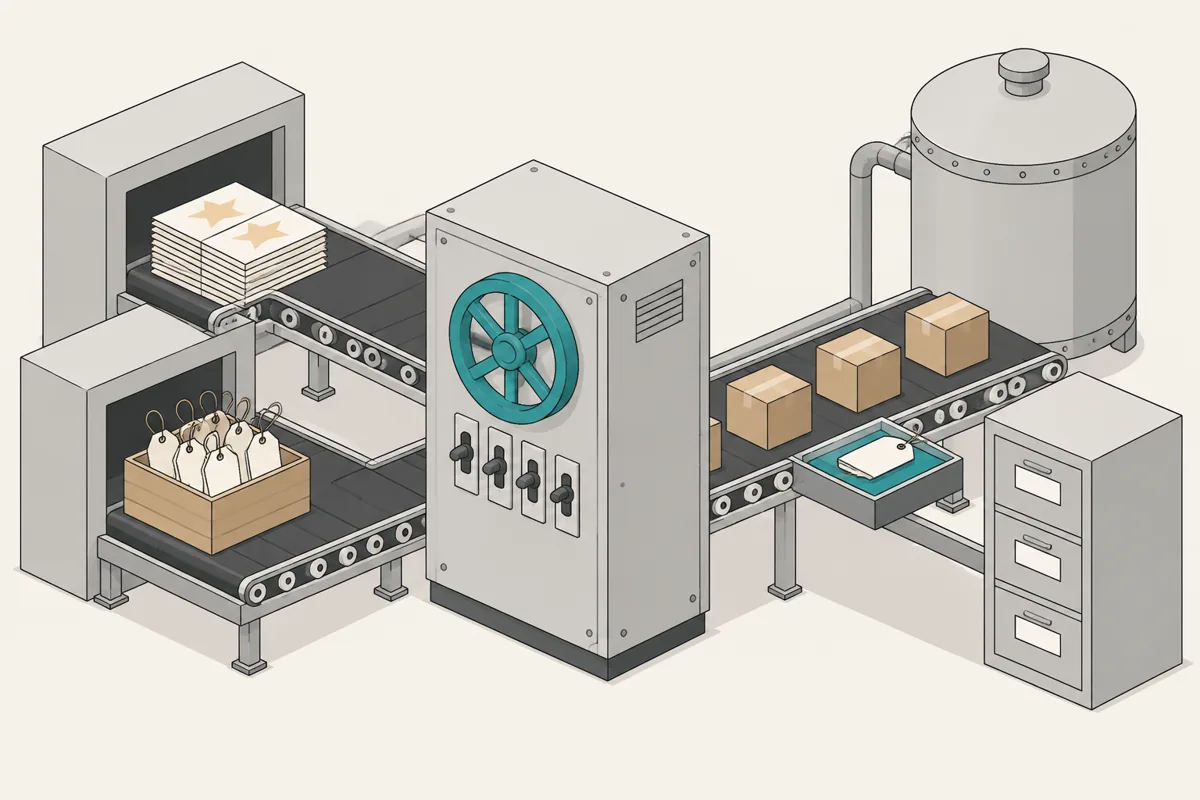
The release notes list the 8 connectors under Boomi Connect. They are Azure SQL Server, Boomi Platform, Gainsight CS, GitHub, Gong REST, IBM Planning Analytics (TM1), NetSuite, and Zoom Meetings. Boomi Connect is a managed MCP connector service. An admin creates a configuration, enters credentials for the target system, and selects the tools to expose. Connect then issues an MCP URL that staff add to Claude, ChatGPT, or Gemini (Boomi docs: Creating configurations).
The admin also picks an identity provider, and Connect returns a client ID and a client secret with the URL. Each configuration now has its own MCP registry URL. An admin can add tools to it without any change on the client side.
So these connectors let an AI assistant reach company systems through Boomi. They live in the Connect catalog, not on the Integration process canvas. Connect gives one entry point for authentication, audit, and tool scope (Boomi docs: Connect overview). The November release added tool scope by user group to Connect Enterprise. Boomi's own IT team uses Claude Cowork through Connect to reach Salesforce, NetSuite, Gong, and Zoom (Boomi blog). Every call goes through one gateway log.
We downloaded each connector page and counted three things with a script. We counted the auth method, the rows in the tool table, and any "no tools available" note. The six "MCP Remote" and "MCP Proxy" pages describe a front for a vendor-hosted server. For example, the Azure DevOps page, an Early Access connector outside the 8, forwards requests to https://mcp.dev.azure.com (Boomi docs). Microsoft maintains those tools (Microsoft Learn). Pages of this type have no tool table, because you discover the tools from the vendor after you connect.
| Connector | Type | Auth | Tool table | Doc updated |
|---|---|---|---|---|
| Boomi Platform | Boomi's own API | API key | 27 rows | 2026-11-06 |
| Gong REST | Tools on the REST API | OAuth 2.0 | 7 tools | 2026-11-06 |
| GitHub (MCP Remote) | Vendor-hosted MCP | OAuth 2.0 | None | 2026-11-06 |
| NetSuite (MCP Remote) | Vendor-hosted MCP | OAuth 2.0 | None | 2026-11-06 |
| Zoom Meetings (MCP Proxy) | Vendor-hosted MCP | OAuth 2.0 | None | 2026-11-06 |
| Azure SQL Server (MCP Remote) | Vendor-hosted MCP | OAuth 2.0 | None | 2026-11-06 |
| Gainsight CS (MCP Remote) | Vendor-hosted MCP | OAuth 2.0 | None | 2026-11-06 |
| IBM Planning Analytics (TM1) (MCP Remote) | Vendor-hosted MCP | OAuth 2.0 | None | 2026-11-06 |
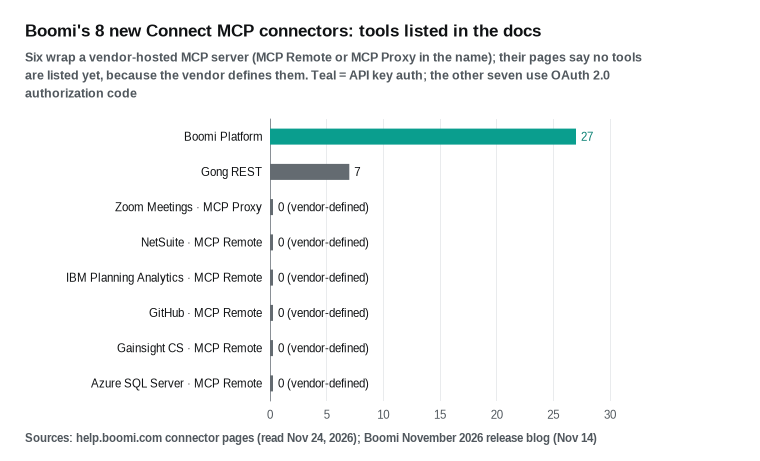
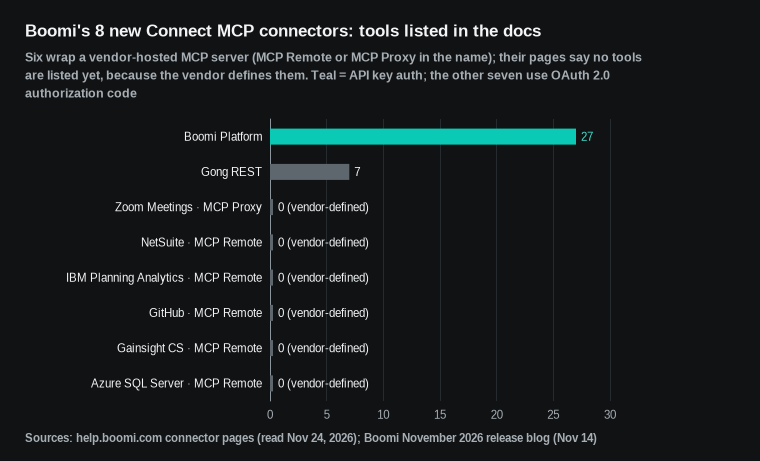
Two more connector pages, Boomi Integration MCP (2026-11-09) and Azure DevOps MCP Proxy (2026-11-18), are marked Early Access (Boomi docs: Boomi Integration MCP). They are not in the list of 8. Across these 10 pages, each connector is tied to one vendor. No connector takes an arbitrary MCP address.
Four routes into Boomi
An external data API needs a different door. We sorted the MCP and HTTP pages on help.boomi.com by who starts the call and where the data goes. The main split is between a fixed daily sync and an ad hoc request.
A daily sync must land the same columns in the same table each night. An ad hoc request starts when a person or a model decides what data it needs. Routes A and B serve the second case, and Route D serves the first. Route C fits teams that already route agents through MCP Gateway.
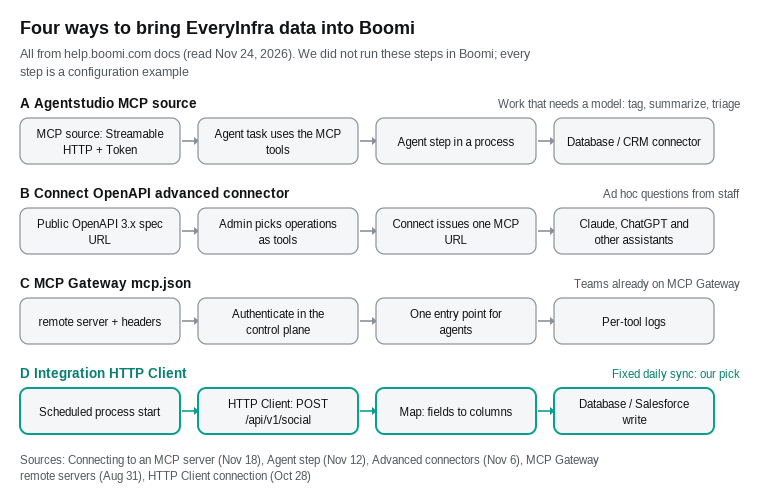
Route A is Agentstudio. In Agent Designer, you create a Model Context Protocol source with a URL, a transport, and an auth method. Then you run Test Connection and Discover Tools (Boomi docs: Connecting to an MCP server). The page, updated on 2026-11-18, supports remote servers only. It truncates tool responses over 100K tokens and caps input at 200K tokens.
An Agent step then runs the agent inside a process (Boomi docs: Agent step). That step takes one input and gives one output, and it needs Agentstudio (Boomi docs: Agent step FAQ).
Route B is the Connect OpenAPI advanced connector. The admin gives a public OpenAPI 3.0+ spec URL and picks operations as tools. A YAML spec over 3 MB fails, and Swagger 2.0 is not supported (Boomi docs: Considerations for using advanced connectors). At 00:13 Singapore time we downloaded https://api.everyinfra.com/openapi.json. It is OpenAPI 3.0.3 in JSON, 838,042 bytes, with 61 paths and bearerAuth. That fits Boomi's limits.
Route C is MCP Gateway. Its mcp.json file registers remote servers, and a headers object can carry Authorization (Boomi docs: Connecting remote MCP servers to MCP Gateway). That page dates from 2026-08-31, before the November release. A team that already runs MCP Gateway can add EveryInfra as one more remote server. The Gateway then logs each tool call in one place, next to the team's other servers.
Route D is the HTTP Client connector in an Integration process. Its auth options include None, Basic, Custom, OAuth 2.0, and AWS Signature (Boomi docs: HTTP Client connection). Request headers can be static or replacement variables (Boomi docs: HTTP Client operation). A Map step links fields to columns, and a Database or Salesforce connector writes the rows. No model is involved, so the same request gives the same shape each day.
| Route | Who decides the call | How it reaches EveryInfra | Good for | Documented limit |
|---|---|---|---|---|
| A: Agentstudio source + Agent step | The agent | Remote MCP | Tagging, triage | 100K-token tool response |
| B: Connect OpenAPI connector | Staff in an AI assistant | openapi.json | Ad hoc questions | 1 MB per request and response |
C: MCP Gateway mcp.json | Gateway agents | Remote MCP + headers | Teams already on Gateway | Page predates November |
| D: Integration HTTP Client | A schedule | POST /api/v1/social | Daily sync to CRM and warehouse | Try REST Client on timeouts |
Why the daily sync uses HTTP Client
An agent adds three kinds of doubt to a scheduled sync.
First, it decides how many calls to make. In one Boomi video, the agent skipped the tool on the first prompt (YouTube). The presenter said that it might need more prompting, and a schedule cannot wait for that.
Second, size matters. One Trustpilot call returns up to 200 rows. Our review pulls averaged 922 to 1,287 bytes a row (total response bytes divided by rows), so 200 rows come to about 60,000 tokens. Third, the Agent step's Structured mode returns fields that the model writes, not the API's own JSON.
The HTTP Client removes all three. The process starts on a schedule, sends one request per target, and passes the JSON to the Map unchanged. Errors show up as HTTP status codes, not as a model's guess. Use the agent for judgment instead. Route D loads raw rows each day. Route A reads only today's new bad reviews and writes a tag back to the CRM. Both share the review_key primary key.
At 00:29 Singapore time we pulled Chewy's newest 20 one-star and two-star reviews with stars=[1,2]. Text length ran from 78 to 1,819 characters, with a median near 448. Eight mention customer service, 6 shipping, 4 refunds, and 3 the pharmacy or a vet. One review can cover several topics. Keyword rules miss reviews that cover three topics, so a fixed category list in Decision Engine mode works better. Give the agent only review_key, the rating, and the text. Twenty reviews then come to about 12,000 characters, far below the input limit.
The agent writes only to a tag column. It never overwrites the review text or the rating. If you change the category list later, clear the tag column and run the agent again. The raw rows stay as they were. Of the 20 Chewy reviewers, 11 had written only this one review, and the most active had written 48. Of the 21 Back Market reviewers, 8 had written one review, and the most active had written 7. Keep author_review_count in the table, so that support can decide which callbacks come first.
One real MCP round trip
At 00:14 Singapore time, tools/list with no key returned 12 tools. Each tool carries readOnlyHint, destructiveHint, and openWorldHint annotations. Three tools handle data. everyinfra_list_capabilities and everyinfra_get_job are free, and everyinfra_call_api runs a capability at the catalog price. In the Discover Tools step, select only these three.
Of the 12 tools, only everyinfra_create_ticket has readOnlyHint set to false, because it opens a support ticket. With only the three data tools selected, the agent cannot reach any tool that writes.
At 00:16 Singapore time we called everyinfra_call_api with amazon/profile for an Echo Dot. It returned HTTP 200 in 22.99 seconds. The result is a JSON string in result.content[0].text, with price 39.99 and currency "$".
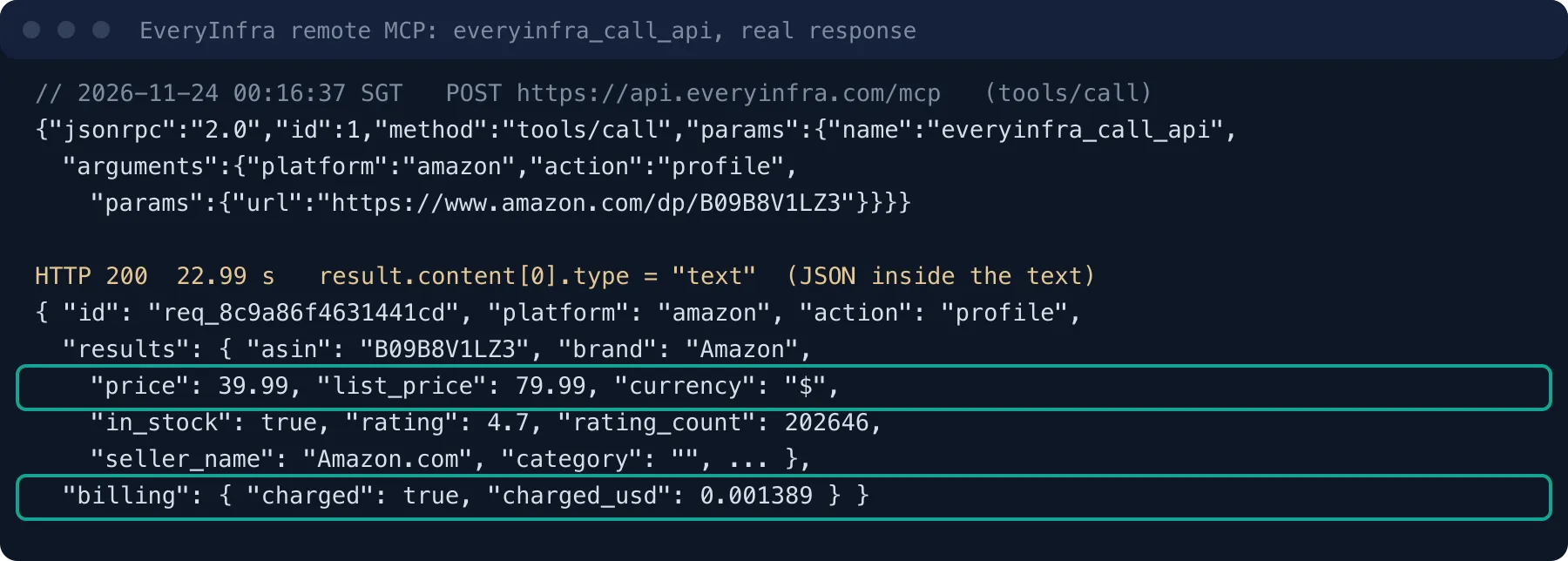
The annotations tell a client which tools only read data. All three data tools have readOnlyHint set to true. Of the three, only everyinfra_call_api has openWorldHint set to true, because it reads public websites, and it is the one that is charged.
The 2026-07-28 MCP spec allows any JSON value in structuredContent (MCP spec: 2026-07-28 changelog). EveryInfra puts it in text, so a process that skips the agent must parse the text. The HTTP route avoids that step. The same spec removes protocol sessions. As TechTarget noted on 2026-11-17, the caller must still track whether a step is done (TechTarget: Stateless MCP). For a sync, check the table before a retry. The review_key primary key handles that. The spec also asks tools/list results to carry ttlMs and cacheScope, so clients can cache the list.
Configuration example: an EveryInfra MCP source in Agentstudio
We did not run these steps in Boomi. For Token auth, the docs say the field does not accept API keys or other key types. EveryInfra sends its key as a Bearer token, and the docs do not say how Boomi treats it. Boomi's own demos use None plus a hand-made header (YouTube: MCP Explained). The November release added an "Is Secret" toggle that masks header values.
# Configuration example (Boomi Agentstudio, not run in Boomi)
Agent Garden > Sources > Create New Source > Model Context Protocol
Transport type:  Streamable HTTP
URL:             https://api.everyinfra.com/mcp
Authentication:  Token        # token value = your EveryInfra key
# If the connection test fails:
Authentication:  None
Headers:         Authorization = Bearer <your EveryInfra key>   [Is Secret: on]
Test Connection -> Discover Tools ->
  select everyinfra_list_capabilities, everyinfra_call_api, everyinfra_get_job
When a tool description changes, Agentstudio marks the tool Stale until you accept the update (Boomi docs: Managing MCP tools). EveryInfra descriptions change as the catalog grows past 718 capabilities. Agentstudio then asks you to review the tools before you save. The docs explain why: a tool update can change agent answers, so the developer may need new instructions.
Configuration example: four operations in Connect
Route B suits staff who ask an AI assistant about a store's reviews. The EveryInfra spec has 61 paths, including account operations such as accountKeyDelete. Expose only four operations:
socialfetches data and is charged per call.socialCatalogreads the catalog for free.socialFieldsshows field descriptions.getJobgets an async result.
Leave every other operation off, so that AI assistants cannot touch account settings.
Set auth to API key in a header named Authorization, with the value Bearer plus the key. Enter the server URL https://api.everyinfra.com by hand. The spec must be public, and the EveryInfra spec opens without a login. After the save, Connect issues an MCP URL. The admin then picks the user groups that see the tools. Each social call counts as one Connect tool call and one EveryInfra charge. Catalog and field reads are free on the EveryInfra side but still count as Connect tool calls.
Configuration example: HTTP Client in an Integration process
The Route D process has five shapes: a scheduled Start, Set Properties, HTTP Client, Map, and a Database or Salesforce write. Set Properties holds the target list, one store domain or product URL per document. The HTTP Client then sends one request per document. This keeps one failed target from stopping the other 399. Keep the key in Secrets Manager, which custom connector properties can reference since November (Boomi: November 2026 release).
# Equivalent curl: the request that the Boomi HTTP Client sends
curl -s https://api.everyinfra.com/api/v1/social \
  -H "Authorization: Bearer $EVERYINFRA_API_KEY" \
  -H "Content-Type: application/json" \
  -d '{"platform":"trustpilot","action":"reviews",
       "params":{"company":"backmarket.com","sort":"newest","limit":20}}'
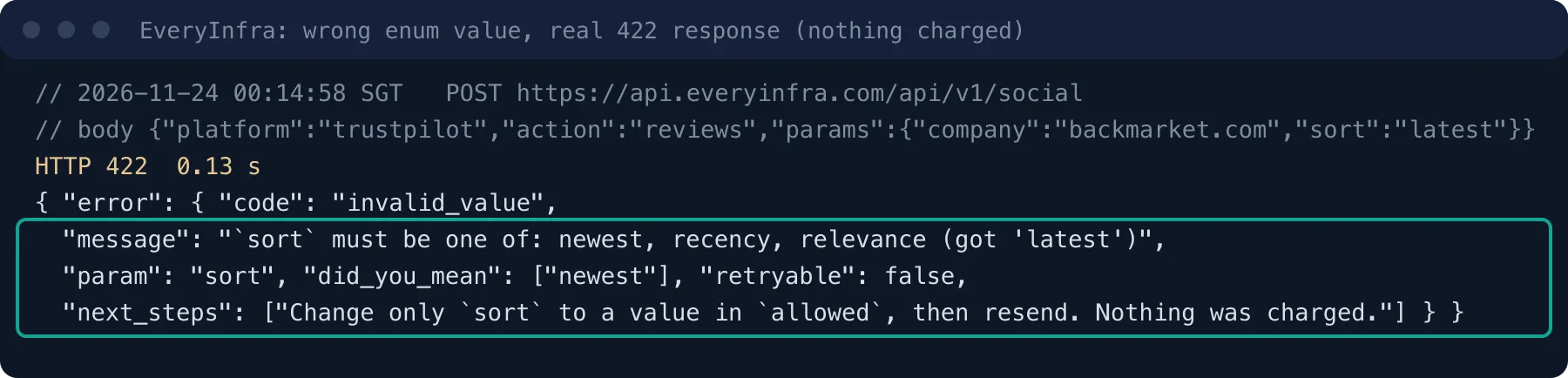
Turn on "Return HTTP Errors." With it off, a 4xx stops the step and the body is lost. With it on, the status code and body go into document properties. A Decision step can then route on the status code (Boomi docs: HTTP Client operation). Send 200 rows to the Map, 422 rows to an error table, and 429 rows to a retry branch. At 00:14 Singapore time we sent sort as latest on purpose. The 422 came back in 0.13 seconds with did_you_mean set to ["newest"] and no charge.
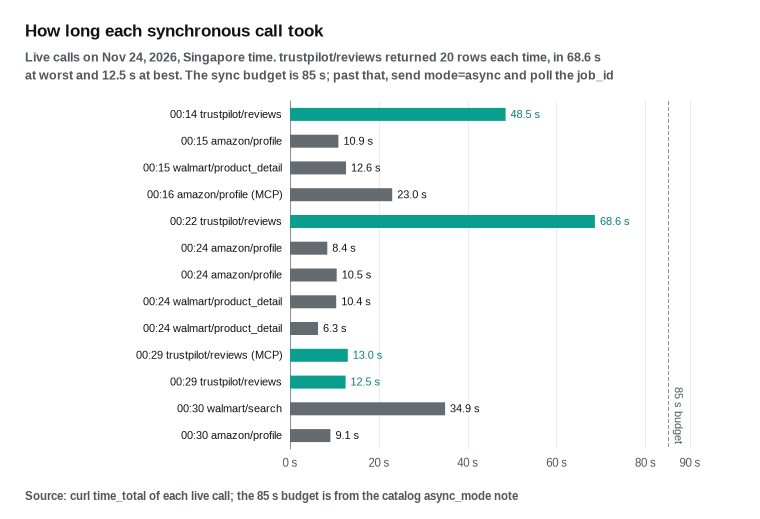
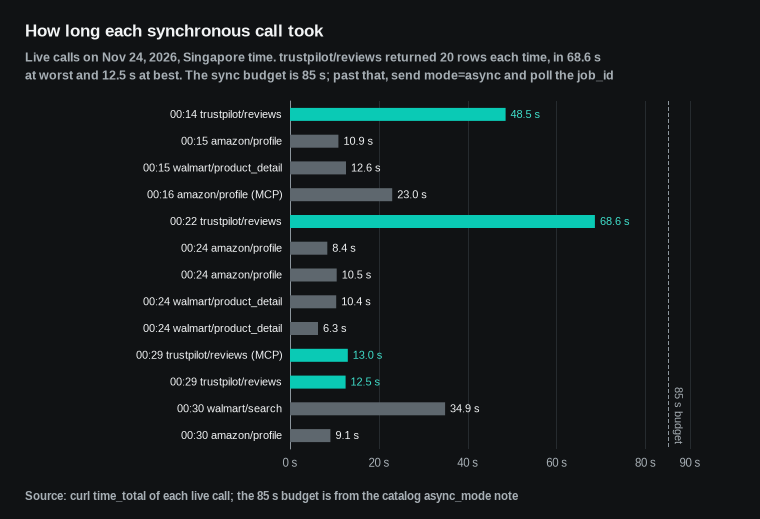
Plan for slow calls. Our trustpilot/reviews calls took 48.5, 68.6, and 13.0 seconds, and walmart/search took 34.9 seconds. A sync request waits up to 85 seconds.
Boomi suggests the REST Client if the HTTP Client times out (Boomi docs: REST Client connector). For slower jobs, send "mode":"async" and poll GET /api/v1/jobs/{job_id}. Every sync response carries an async_hint field that says the same thing.
In Boomi, the async version adds two shapes. The first HTTP Client sends the POST, and a Map stores the job_id in a document property. The second HTTP Client puts the job_id into the GET URL with a replacement variable. A Decision step checks status, and a wait step loops back until the job is done. Job checks are free, and the charge happens once, when the job returns data.
The HTTP Client 26.11.0 now sends traceparent and tracestate headers (Boomi docs: HTTP Client changelog; W3C: Trace Context). EveryInfra returns an x-request-id header. Store these values in a request_id column so that logs on each side line up.
Each response carries x-ratelimit-limit-requests, x-ratelimit-remaining-requests, and x-ratelimit-reset-requests. They give the per-minute limit of the key, the calls left, and the seconds until the reset. Over the limit, the API returns 429 with no charge, and a retry after the reset works. Use a Flow Control step to cap concurrency. Waiting for the reset value is faster than a fixed 60-second pause. Assume a key that allows 10 calls a minute: 400 requests then take about 40 minutes, which fits in an overnight window. You can see the limit of your own key in the console or in the first response header.
Live test: 17 charged requests
We loaded every response into two local SQLite tables, fact_review and fact_price_snapshot. The load script only takes fields by the mapping and merges on the primary key.
All times are Singapore time on 2026-11-24. The 17 charged requests all returned 200, for $0.020503 in total, and every charged_usd matched the catalog. The one 422 for a wrong parameter was free.
| Singapore time | Capability | Target | Rows | Time | USD |
|---|---|---|---|---|---|
| 00:14 | trustpilot/reviews | backmarket.com | 20 | 48.5 s | 0.001389 |
| 00:15 | amazon/profile | AirPods Pro 2 | 1 | 10.9 s | 0.001389 |
| 00:15 | walmart/product_detail | AirPods Pro 2, open box | 1 | 12.6 s | 0.001389 |
| 00:16 | amazon/profile (MCP) | Echo Dot | 1 | 23.0 s | 0.001389 |
| 00:17 | youtube/search | "boomi mcp" | 10 | 3.2 s | 0.000778 |
| 00:20 | youtube/transcript ×3 | Top three videos | 3 | 6.4–7.4 s | 0.000556 ×3 |
| 00:22 | trustpilot/reviews | backmarket.com, 2nd | 20 | 68.6 s | 0.001389 |
| 00:24 | amazon/profile ×2 | AirPods Pro 2, Echo Dot | 2 | 8.4, 10.5 s | 0.001389 ×2 |
| 00:24 | walmart/product_detail ×2 | Open box, AirPods Pro 3 | 2 | 10.4, 6.3 s | 0.001389 ×2 |
| 00:29 | trustpilot/reviews (MCP) | backmarket.com, 3rd | 20 | 13.0 s | 0.001389 |
| 00:29 | trustpilot/reviews | chewy.com, 1–2 stars | 20 | 12.5 s | 0.001389 |
| 00:30 | walmart/search | "AirPods Pro 3" | 20 | 34.9 s | 0.001389 |
| 00:30 | amazon/profile | Echo Dot, 3rd | 1 | 9.1 s | 0.001389 |
Prices: detail and search return different keys
All three Echo Dot calls returned price: 39.99, currency: "$", and seller_name: "Amazon.com". Both AirPods Pro 2 calls returned only in_stock: false, with no price, currency, or seller keys. The category value was an empty string on both products.
Ratings still came back when the price did not. AirPods Pro 2 returned rating 4.7 and rating_count 28,873 both times. Echo Dot returned 4.7 and 202,646. Check the rating and price columns for NULL apart, so an out-of-stock product can still feed a rating trend report.
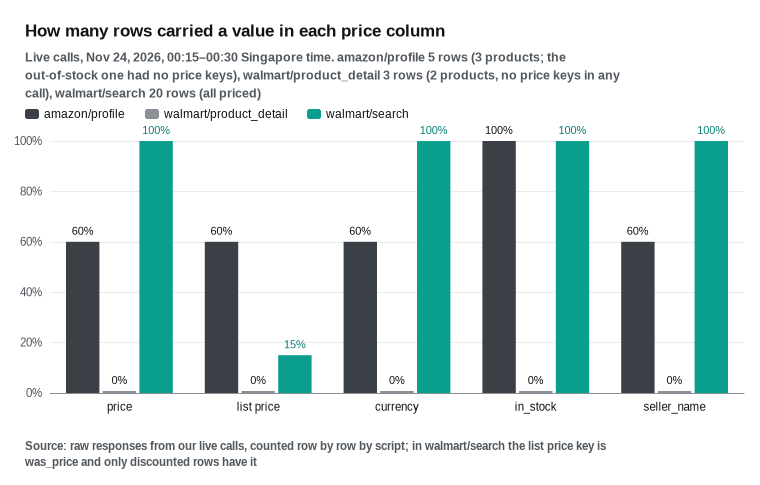
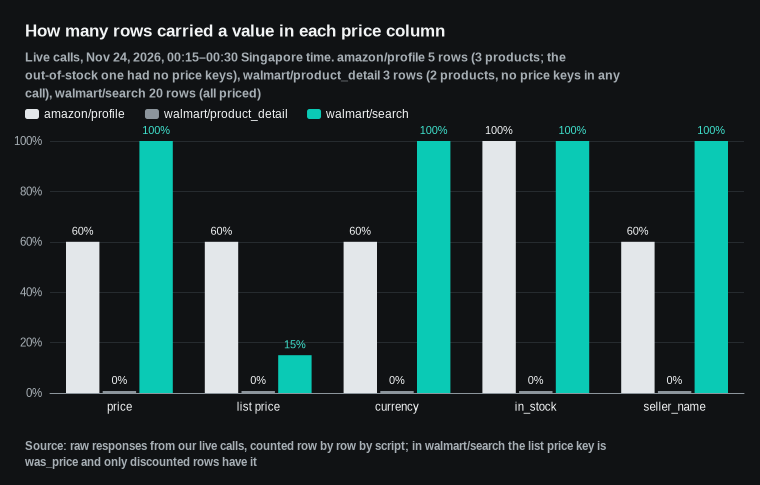
The three walmart/product_detail calls each returned 10 keys. Six price and stock keys never appeared: price, original_price, currency, in_stock, seller_name, and category. The open-box unit gave the same keys in two calls 9 minutes apart. The same AirPods Pro 3 led the walmart/search results with price: 149, was_price: 249, and currency: "USD". All 20 search rows had a price.
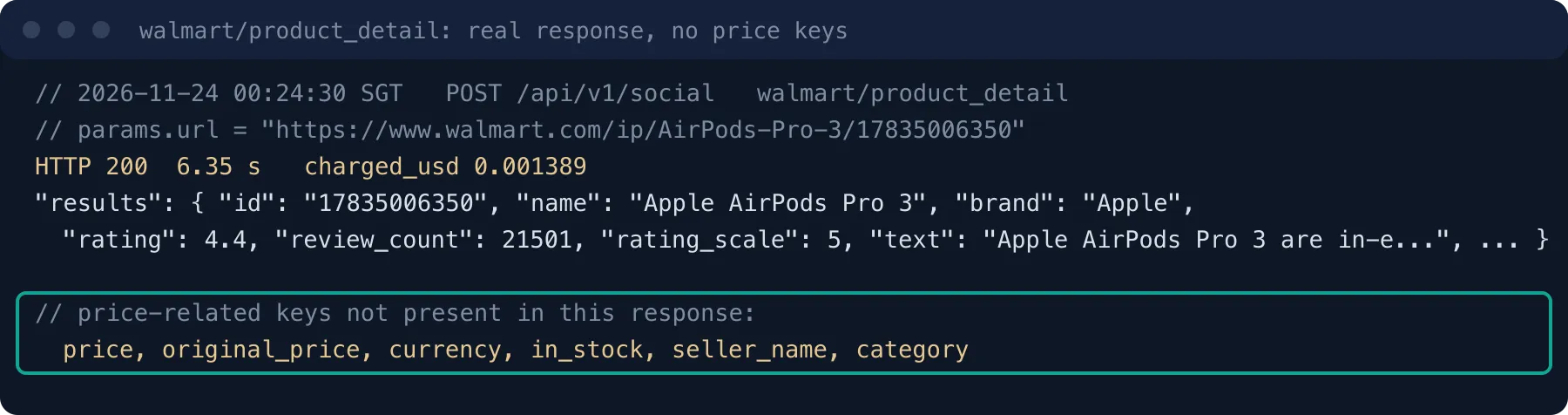
This result decides two parts of the design. First, take Walmart prices from search. Note that search uses item_id while detail uses id, so write separate Map rules. One search also returns competitor prices for the same keyword.
Second, let price be NULL. Add a price_missing_reason column for "out of stock" and "no price this time." Without it, an out-of-stock product shows a price of 0 in reports. Amazon returns the symbol $, and Walmart search returns the ISO code USD. Map $ to USD with a lookup table and keep the raw value in currency_raw.
Search needs a filter. Only 5 of the 20 rows were AirPods Pro 3. Walmart.com sold one new unit at $149. Third-party open-box and restored units cost $169.99 to $289.99. Two open-box units cost more than $125 above the new one.
The other 15 rows were other earbuds and accessories, down to $7.69. An average over all 20 prices would mix in other brands, ear hooks, and wired earbuds. Keep a lookup table of tracked item_id values. After the Map, a Decision step passes only those rows. Write the rest to a "competitor candidates" table for a person to review. The 20 rows had 15 different sellers, so group reports by product and seller.
The rating column in search results needs one more rule. Seven of the 20 rows had rating 0 and review_count 0. That means no ratings yet, not a score of zero. When review_count is 0, write rating as NULL, or a per-seller average drops. Among the 13 rated rows, the Walmart.com AirPods Pro 3 had 4.4 from 21,500 reviews. A third-party open-box unit at $289.99 had 3.7 from 105 reviews, and another at $274.99 had 5 from a single review. A sort on rating alone puts that single 5 above 21,500 reviews at 4.4, so report review_count next to rating.
Reviews: merge three pulls on ID
We pulled Back Market's newest 20 at 00:14, 00:22, and 00:29 Singapore time. The second pull had 1 new review and 19 overlaps. The new review was posted at 16:22 UTC on 2026-11-23, and the oldest one dropped off the page. The third pull matched the second. Sixty rows merged into 21 reviews on review_key. The review id stayed stable across the three pulls, and the merged count matched a manual check.
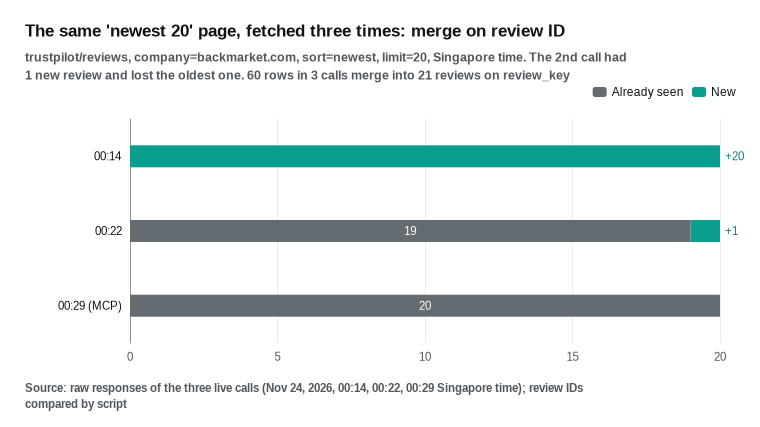
The 21 reviews span about 52 hours, or about 9 to 10 a day. So one pull of 20 a day leaves room for twice that rate. Chewy's 20 bad reviews span 19 days, about 1 a day, and none had a company reply. Set limit to at least twice the daily rate. Add one daily check as well. If all 20 reviews for a store are new today, the page is too small, so raise limit the next day. A limit of 200 is still one call at the same price.
On Back Market, 19 of 20 reviews were invited through BasicLink. All 20 Chewy reviews were Organic.
Each sample is one page, so it cannot rank the two stores. Store source and verification_level unchanged, so reports can split invited from organic ratings. If the platform adds a new value, the raw column still holds it.
Two fields are easy to misread. First, is_verified is not the same as verification_level. In the 21 merged Back Market reviews, 20 were invited, yet is_verified was false on all 21, and on all 20 Chewy reviews too. To find invited reviews, use source or verification_level, not is_verified.
Second, the rating does not follow the source. The only one-star Back Market review (943 characters, posted on 2026-11-22 UTC) came through an invite link, and the only Organic review gave five stars. After the split by source, still look at the rating spread inside each group. The 21 Back Market reviews had twenty five-star ratings and one one-star rating. Their text ran from 44 to 989 characters, with a median of 175, less than half the Chewy median of 448.
Also keep the gap between experience_at and posted_at as its own column. The 21 invited Back Market reviews came 1 to 45 days after the purchase, with a median of 16 days. The 20 organic Chewy reviews came 0 to 27 days after it, with a median of 1 day. Thirteen came on the same day or the next.
Cut the daily sync window on posted_at. On experience_at, most invited reviews posted today would land on a date two weeks back and miss the daily report. To match a review to an order or a shipment, use experience_at. To measure how fast support responds, use posted_at.
Reviews can also change later. Company replies arrive in reply_text and reply_at, and only 1 of our 41 unique reviews had one. When updated_at changes, overwrite the text. Otherwise update only reply_text, reply_at, and last_seen_at. The catalog notes that some requests do not return updated_at, so treat it as optional.
API fields to CRM and warehouse columns
The "With value" column counts 80 review rows and 5 Amazon price rows. We did not load author_name or author_image, because a CRM does not need them.
| API field | Column | Type | Conversion | With value |
|---|---|---|---|---|
id | review_key (PK) | text | trustpilot:<id> | 80/80 |
company_domain | account_domain | text | Remove www., lowercase | 80/80 |
rating, rating_scale | Same | integer | Unchanged | 80/80 |
title, text | title, body | text | Unchanged | 80/80 |
posted_at | posted_at_utc | timestamptz | Parse with time zone | 80/80 |
reply_text, reply_at | Same | text, timestamptz | Can be NULL | 3/80 (1 review × 3 pulls) |
source, verification_level | Same | text | Unchanged | 80/80 |
x-request-id header | request_id | text | For log lookups | 1 per call |
| API field (Amazon / Walmart search) | Column | Type | Conversion | With value (Amazon) |
|---|---|---|---|---|
asin / item_id | product_id | text | PK with platform, fetched_at | 5/5 |
price | price | numeric(12,2) | Can be NULL | 3/5 |
list_price / was_price | list_price | numeric(12,2) | Can be NULL | 3/5 |
currency | currency, currency_raw | char(3), text | $ to USD | 3/5 |
in_stock | in_stock | boolean | Unchanged | 5/5 |
seller_name | seller_name | text | Can be NULL | 3/5 |
Trustpilot returns company_domain as www.backmarket.com. A CRM usually stores backmarket.com, so remove www. and lowercase both sides before a match. company_name reads "Back Market - United States," which suits display but not matching.
posted_at looks like 2026-11-23T08:43:15+00:00, an RFC 3339 timestamp. Parse it with a time zone in the Map, or Boomi reads it as local time. experience_at holds the purchase date only, so keep it apart from the posting time. Turn the empty category string into NULL. Then a count of products with a category stays correct.
In the warehouse, MERGE is simplest (Snowflake docs: MERGE; Google Cloud: DML syntax). PostgreSQL uses INSERT ... ON CONFLICT (PostgreSQL docs: INSERT). We ran the merge logic on our local SQLite copy and rewrote it in Snowflake syntax. We did not run it on Snowflake.
-- Review table: merge on review_key (Snowflake)
MERGE INTO fact_review t
USING staging_review s ON t.review_key = s.review_key
WHEN MATCHED THEN UPDATE SET
  reply_text = s.reply_text, reply_at_utc = s.reply_at_utc, last_seen_at = s.fetched_at
WHEN NOT MATCHED THEN INSERT
  (review_key, account_domain, rating, title, body, posted_at_utc, request_id, first_seen_at, last_seen_at)
VALUES
  (s.review_key, s.account_domain, s.rating, s.title, s.body, s.posted_at_utc, s.request_id, s.fetched_at, s.fetched_at);
-- The price table only appends snapshots.
The November release added DATETIMEOFFSET and JSONB support to Database connector operations. You can keep each raw row in a PostgreSQL jsonb column for later checks.
The Boomi Database connector upserts PostgreSQL rows on the primary key only, not on a unique key (Boomi docs: Database connector). So make review_key the primary key itself. In Salesforce, upsert on an external ID field such as Review_Key__c. Two matches return error 300 (Salesforce docs: Upsert a Record Using an External ID). Since November, the Salesforce REST connector accepts updateOnly=true on Upsert. Use it for status write-backs so that a bad key cannot create a stray record. Do not store reviews as Tasks or Notes, which have no external ID.
Pick the CRM object by reader. For customer success, create a custom object such as Public_Review__c with a lookup to Account. The match key is the cleaned account_domain. For a sales team that tracks prices, create Price_Snapshot__c and keep only 30 days of snapshots. Keep the full history and raw JSON in the warehouse. A company can get dozens of reviews a day, so sort the related list on Account by posting time, newest first.
The cost of syncing 200 products or stores a day
In the catalog of the day, all four capabilities cost $0.001389 per call, or $1.389 per 1,000 calls. A call that returns many rows is charged once. Our 17 charged requests came to $0.020503, about $0.0012 each. That is below $0.001389 because 4 were YouTube calls: youtube/search costs $0.000778 and youtube/transcript $0.000556. A review and price sync does not use them, so the estimates use $0.001389. We assume one call per target per day.
| Scenario | Calls per day | Per day | 30 days | 365 days |
|---|---|---|---|---|
| 200 stores, reviews | 200 | $0.2778 | $8.33 | $101.40 |
| 200 products, prices | 200 | $0.2778 | $8.33 | $101.40 |
| Both | 400 | $0.5556 | $16.67 | $202.79 |
| Walmart prices from search, 10 keywords | 10 | $0.0139 | $0.42 | $5.07 |
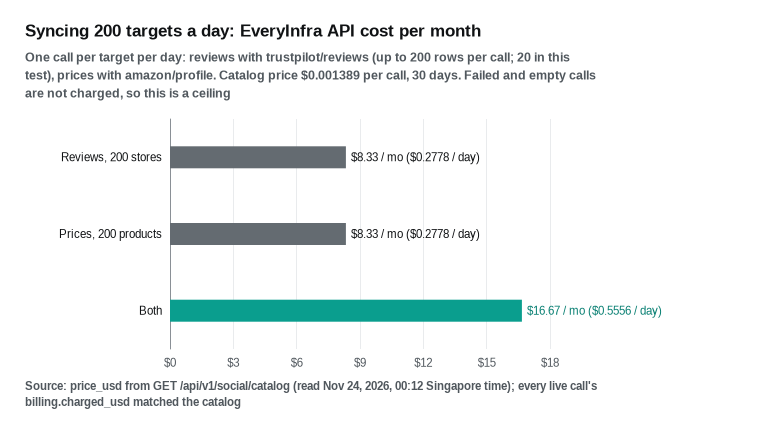
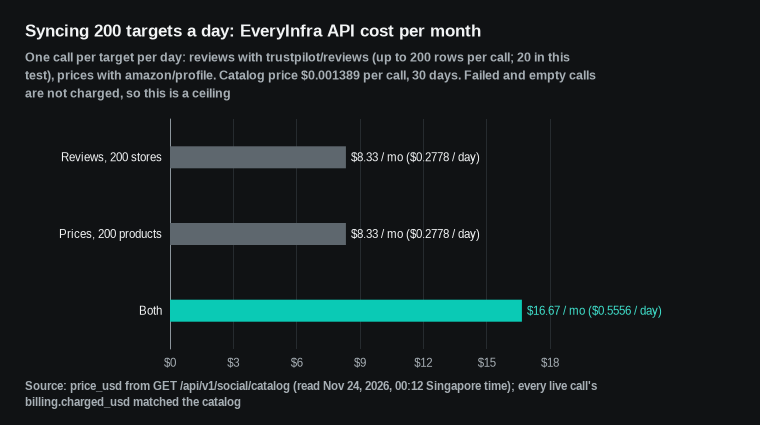
This is an upper bound, because failed calls and empty results are free. An out-of-stock product is still charged, since in_stock: false is data. A 422 for a wrong parameter and a 429 over the per-minute limit cost nothing. One Walmart search returns 20 products, so grouping tracked products by keyword cuts calls by ten. The last table row assumes 10 keywords.
The cost also scales up. At two review pulls and four price pulls a day, the total is 1,200 calls and about $50.00 for 30 days. Add frequency only when the data shows a need. The "all new" review check and the count of price changes per snapshot tell you when.
Boomi's public pricing page shows Pay-As-You-Go from $99 a month plus usage (Boomi: Pricing).
Connect is licensed by yearly tool call volume (Boomi docs: Connect licensing). The Base tier gives 25,000 tool calls a month and 3 sources, for existing customers only. Each call has a 1 MB cap on the request and on the response. Over the quota, Connect keeps working, and Boomi contacts you about a higher tier.
Route B at 400 calls a day uses 12,000 tool calls a month, inside the Base tier. Route D does not go through Connect, so it uses no tool calls. The 1 MB cap also fits reviews. The longest single review row in our pulls was 2,423 bytes, so 200 rows of that size come to about 480,000 bytes.
Three numbers to check each day
Check three numbers in the warehouse: new reviews, products with no price, and failed calls. The third needs a call_log table with status codes. We ran the first two queries on our local SQLite copy.
-- 1) New reviews today, with low-star count
SELECT account_domain, COUNT(*), SUM(CASE WHEN rating <= 2 THEN 1 ELSE 0 END)
FROM fact_review WHERE first_seen_at >= CURRENT_DATE GROUP BY account_domain;
-- 2) Products with no price today, by reason
SELECT platform, CASE WHEN in_stock = false THEN 'out_of_stock' ELSE 'no_price_key' END, COUNT(*)
FROM fact_price_snapshot WHERE fetched_at >= CURRENT_DATE AND price IS NULL GROUP BY 1, 2;
On our data, query 1 returned 21 reviews for backmarket.com and 20 for chewy.com. Query 2 returned 2 out-of-stock Amazon rows and 3 Walmart rows with no price key. If the second group does not shrink over a few days, move those products to search pricing.
The third query reads the call log:
-- 3) Failed calls today, with a request_id for lookups
SELECT status_code, COUNT(*), MIN(request_id) FROM call_log
WHERE called_at >= CURRENT_DATE AND status_code <> 200 GROUP BY status_code;
Query 3 groups failures by status code. A 429 means the key passed its per-minute limit, and a retry after the reset handles it. A 422 means that a parameter is wrong, so fix the process.
What the videos show and the docs do not
At 00:17 Singapore time, youtube/search for "boomi mcp" returned 10 results. Nine came from four Boomi channels: Boomi Documentation (4), Boomi Services and Support (2), Boomi Community (2), and Boomi (1). The most viewed, at 5,195 views, is a 2024 API Management demo on the Boomi channel. We pulled transcripts of the top three.
The MCP Server connector demo from 2026-04-23 has 458 views (YouTube: MCP Server Connector Demo Overview). It shows the reverse direction, where Boomi processes become MCP tools. In tech preview it supports only SSE, and the runtime must be public. The doc page does not stress either point.
The presenter stresses specific tool descriptions, because the agent reads them to decide when to call a tool. everyinfra_call_api has a 1,013-character description of its parameters. everyinfra_list_capabilities has 451 characters, and everyinfra_get_job has 476. In Agentstudio, add one line to the task: "Use list_capabilities first, then call_api." That cuts 422 errors from guessed parameters.
The two videos from 2026-01-26 add an MCP source with auth set to None and an x-agent-key header (YouTube: MCP Explained). Then they run Test Connection, Discover Tools, and save (YouTube). The None-plus-header fallback in the Agentstudio example comes from these videos. The third video also shows an agent that skipped its tool on the first try.
Limits and cautions
We did not run the Boomi side. The docs also conflict. The MCP overview page (2026-11-19) says OAuth comes later, while the connection page (2026-11-18) lists OAuth 2.0 and 2.1 (Boomi docs: MCP overview). EveryInfra uses a Bearer token, so the conflict does not affect a Bearer-token setup.
The sample is small: 3 products, 2 stores, and 16 minutes. Walmart detail had no price in 3 calls, but we cannot say that every product behaves this way. Test your own top 20 products before launch. Call each one once, count the missing price values, and then decide which products use detail and which use search. The Echo Dot price did not change in 14 minutes, which says nothing about a full day.
We also could not confirm plan rules. Boomi's docs say that Connect has Base, Professional, and Enterprise tiers by tool call volume. Tool scope by user group is an Enterprise feature. The 8 connector pages list no plan limits. Ask your Boomi account manager which plan includes each one. Route D runs in Integration, so ask separately how Integration counts connections.
Trustpilot responses include reviewer names. Decide which fields to store with your legal team, and check the terms of each platform yourself. This approach covers public data only: public reviews and public product prices. Orders, stock, and your own seller data need the seller APIs of each platform, or Boomi's ecommerce connectors such as Shopify.
Industry updates
- 2026-11-17: TechTarget covered stateless MCP, where any server can take any request (TechTarget: Stateless MCP). For a sync, check the business key in your table before a retry.
- November 2026: InfoQ reported that Uber's MCP Gateway governs more than 800 servers and 5,000 tools. New tools start disabled until the owning team reviews them (InfoQ; Uber Engineering). Boomi Connect, where an admin picks tools, follows the same idea.
- 2026-11-20: The Google Developers Blog showed how to link internal Cloud Run MCP servers to Gemini Enterprise (Google Developers Blog). The Agentstudio docs, by contrast, list remote servers only.
- 2026-11-17: Cisco listed agent identity, tool authorization, and audit as security basics (Cisco Blogs). Every data call should trace back to a process and a key, which is the job of the
request_idcolumn.
FAQ
What is the difference between a Boomi MCP server and a Boomi MCP connector?
They go in opposite directions. The MCP Server connector, in tech preview, publishes Boomi processes as tools for outside agents. It supports only SSE for now. Connect MCP connectors let AI assistants call other systems through Boomi. All 8 November connectors are of the second type.
Can Boomi MCP Gateway connect to a third-party MCP server?
Yes. An Agentstudio MCP source can also reach any remote server. For the Gateway, register the server in mcp.json with streamable-http or sse and an auth header (Boomi docs).
What is the Boomi MCP registry?
It is the registry in API Control Plane that records which MCP servers agents can reach. Each Connect configuration registers its MCP URL there. The November release added document sync status, which reports success or failure on each change.
Does Boomi MCP work with Claude?
Yes. Boomi's IT team uses Claude Cowork through Connect. The docs show how to add a Connect MCP URL to Claude, ChatGPT, or Gemini (Boomi docs: MCP client setup).
Which authentication methods does Boomi MCP support?
Agentstudio sources support None, Platform JWT, Token, Basic, and OAuth 2.0/2.1. Most Connect connectors use OAuth 2.0. For EveryInfra, use Token, or None plus a Bearer header.
How much does a daily sync cost?
EveryInfra fees for 200 stores plus 200 products are about $16.67 a month. Failed calls and empty results are free. Boomi's cost depends on your plan, from $99 a month on Pay-As-You-Go. On Connect, the Base tier allows 25,000 tool calls a month.
Get started
- Get a key from the EveryInfra quickstart and see prices on the market page.
- Check Trustpilot reviews, Amazon product detail, and Walmart search in the free catalog.
- See the Trustpilot, Amazon, and Walmart platform pages.
- Run the curl example once and create the two tables.
- Build Route D in Boomi, and add the EveryInfra MCP server for agent work.
Related reads: Sourcegraph connectors, Airbyte MCP, Bedrock AgentCore Gateway, BigQuery data agent, Amazon price tracking, and pricing.
References
- Boomi Integration and Automation Platform Release - November 2026, Boomi, 2026-11-14, https://boomi.com/blog/everything-you-want-to-know-about-the-november-2026-boomi-integration-and-automation-platform-release/
- MCP connectors, Boomi Documentation, 2026-11-09, https://help.boomi.com/docs/Atomsphere/AIGateway/MCPGateway/routing/BoomiConnect/MCPConnectors/Connect_MCPConnectors
- Connect overview, Boomi Documentation, 2026-11-06, https://help.boomi.com/docs/Atomsphere/AIGateway/MCPGateway/routing/BoomiConnect/Connect_overview
- Creating configurations, Boomi Documentation, 2026-11-06, https://help.boomi.com/docs/Atomsphere/AIGateway/MCPGateway/routing/BoomiConnect/MCPAdmin/Connect_create_config
- Connect licensing, Boomi Documentation, 2026-11-06, https://help.boomi.com/docs/Atomsphere/AIGateway/MCPGateway/routing/BoomiConnect/Connect_licensing
- Considerations for using advanced connectors, Boomi Documentation, 2026-11-06, https://help.boomi.com/docs/Atomsphere/AIGateway/MCPGateway/routing/BoomiConnect/MCPAdmin/BasicAndAdvancedConnectors/Connect_adv_conn_considerations
- Basic and advanced connectors in Boomi Connect, Boomi Documentation, 2026-11-06, https://help.boomi.com/docs/Atomsphere/AIGateway/MCPGateway/routing/BoomiConnect/MCPAdmin/BasicAndAdvancedConnectors/Connect_basic_advanced_connectors
- Azure DevOps MCP Proxy (Early Access), Boomi Documentation, 2026-11-18, https://help.boomi.com/docs/Atomsphere/AIGateway/MCPGateway/routing/BoomiConnect/MCPConnectors/azure-devops-mcp-proxy
- Boomi Integration MCP (Early Access), Boomi Documentation, 2026-11-09, https://help.boomi.com/docs/Atomsphere/AIGateway/MCPGateway/routing/BoomiConnect/MCPConnectors/boomiintegrationmcpproxy
- Boomi Platform MCP connector, Boomi Documentation, 2026-11-06, https://help.boomi.com/docs/Atomsphere/AIGateway/MCPGateway/routing/BoomiConnect/MCPConnectors/boomiplatform
- Gong REST MCP connector, Boomi Documentation, 2026-11-06, https://help.boomi.com/docs/Atomsphere/AIGateway/MCPGateway/routing/BoomiConnect/MCPConnectors/gongrest
- Github (MCP Remote) MCP connector, Boomi Documentation, 2026-11-06, https://help.boomi.com/docs/Atomsphere/AIGateway/MCPGateway/routing/BoomiConnect/MCPConnectors/githubmcpproxy
- NetSuite (MCP Remote) MCP connector, Boomi Documentation, 2026-11-06, https://help.boomi.com/docs/Atomsphere/AIGateway/MCPGateway/routing/BoomiConnect/MCPConnectors/netsuiteai
- Zoom Meetings MCP Proxy, Boomi Documentation, 2026-11-06, https://help.boomi.com/docs/Atomsphere/AIGateway/MCPGateway/routing/BoomiConnect/MCPConnectors/zoom-meeting-mcp-proxy
- Connecting to an MCP server, Boomi Documentation, 2026-11-18, https://help.boomi.com/docs/Atomsphere/Platform/Connecting_to_an_MCP_server
- Managing MCP tools, Boomi Documentation, 2026-11-12, https://help.boomi.com/docs/Atomsphere/Platform/Managing_MCP_tools
- MCP Support on the Boomi Platform, Boomi Documentation, 2026-11-19, https://help.boomi.com/docs/Atomsphere/Platform/MCP_overview
- Agent step, Boomi Documentation, 2026-11-12, https://help.boomi.com/docs/Atomsphere/Integration/Process%20building/int-Agent_step
- Agent step FAQ, Boomi Documentation, 2026-10-12, https://help.boomi.com/docs/Atomsphere/Integration/Process%20building/int-Agent_step_faq
- Connecting remote MCP servers to MCP Gateway, Boomi Documentation, 2026-08-31, https://help.boomi.com/docs/Atomsphere/AIGateway/MCPGateway/get-started/connecting_your_servers/connecting_your_remote_servers
- HTTP Client connection, Boomi Documentation, 2026-10-28, https://help.boomi.com/docs/Atomsphere/Integration/Connectors/r-atm-HTTP_Client_connection_8943f71e-1290-4dbd-9092-6dd36b483532
- HTTP Client operation, Boomi Documentation, 2026-09-16, https://help.boomi.com/docs/Atomsphere/Integration/Connectors/r-atm-HTTP_Client_operation_be7c3036-1c53-429a-99f2-29bc28f055e1
- HTTP Client changelog, Boomi Documentation, 2026-11-12, https://help.boomi.com/docs/Atomsphere/Integration/Connectors/r-atm-HTTP_Client_changelog
- REST Client connector, Boomi Documentation, 2026-09-02, https://help.boomi.com/docs/Atomsphere/Integration/Connectors/int-REST_Client_connector_686f3452-ce89-4a04-bf73-2dfd603ae3f7
- Database connector, Boomi Documentation, 2026-09-10, https://help.boomi.com/docs/Atomsphere/Integration/Connectors/int-Database_V2_connector_7b04dbdd-ef36-4a2f-b6ff-b038b3f60ff2
- MCP client setup for common AI assistants, Boomi Documentation, 2026-11-06, https://help.boomi.com/docs/Atomsphere/AIGateway/MCPGateway/routing/BoomiConnect/MCPSetup/Connect_config
- Boomi Pricing and Editions, Boomi, read 2026-11-24, https://boomi.com/pricing/
- How Boomi IT Uses Boomi Connect, Boomi, 2026-11-12, https://boomi.com/blog/boomi-connect-it-use-case/
- Azure DevOps remote MCP server, Microsoft Learn, read 2026-11-24, https://learn.microsoft.com/en-us/azure/devops/mcp-server/remote-mcp-server
- MCP specification 2026-07-28: Key Changes, MCP, 2026-07-28, https://modelcontextprotocol.io/specification/2026-07-28/changelog
- MCP specification 2026-07-28: Tools, MCP, 2026-07-28, https://modelcontextprotocol.io/specification/2026-07-28/server/tools
- Trace Context, W3C, 2021-11-23, https://www.w3.org/TR/trace-context/
- MERGE, Snowflake Documentation, read 2026-11-24, https://docs.snowflake.com/en/sql-reference/sql/merge
- DML syntax, Google Cloud BigQuery, read 2026-11-24, https://cloud.google.com/bigquery/docs/reference/standard-sql/dml-syntax
- INSERT, PostgreSQL Documentation, read 2026-11-24, https://www.postgresql.org/docs/current/sql-insert.html
- Upsert a Record Using an External ID, Salesforce Developers, read 2026-11-24, https://developer.salesforce.com/docs/atlas.en-us.api_rest.meta/api_rest/dome_upsert.htm
- OpenAPI Specification v3.0.3, OpenAPI Initiative, 2020-02-20, https://spec.openapis.org/oas/v3.0.3.html
- Stateless MCP, TechTarget, 2026-11-17, https://www.techtarget.com/news/stateless-mcp-a-new-era-for-enterprise-ai-integration/874933/
- Uber Builds MCP Gateway, InfoQ, November 2026, https://www.infoq.com/news/2026/11/uber-mcp-gateway-ai-agents/
- Designing an MCP Gateway, Uber Engineering, read 2026-11-24, https://www.uber.com/us/en/blog/designing-mcp-gateway/
- Connect internal Cloud Run MCP servers to Gemini Enterprise, Google Developers Blog, 2026-11-20, https://developers.googleblog.com/how-to-securely-connect-internal-cloud-run-mcp-servers-to-gemini-enterprise/
- Building a Security Framework for the Agentic Enterprise, Cisco Blogs, 2026-11-17, https://blogs.cisco.com/security/building-a-security-framework-for-the-agentic-enterprise
- MCP Server Connector Demo Overview, Boomi Documentation (YouTube), 2026-04-23, https://www.youtube.com/watch?v=gU6hMVMKNLs
- MCP Explained, Boomi Services and Support (YouTube), 2026-01-26, https://www.youtube.com/watch?v=DihndI7hZ2M
- Connecting the API Control Plane to the Boomi Agent Garden using MCP, Boomi Services and Support (YouTube), 2026-01-26, https://www.youtube.com/watch?v=LQxi1TrtHXg
- EveryInfra data catalog, EveryInfra, read 2026-11-24, https://api.everyinfra.com/api/v1/social/catalog
- EveryInfra OpenAPI spec, EveryInfra, read 2026-11-24, https://api.everyinfra.com/openapi.json
- RFC 3339, IETF, 2002-07, https://www.rfc-editor.org/rfc/rfc3339
Reference BL-222