Airbyte MCP Server and Public Reviews: Matching Bad Reviews to Returns
Airbyte MCP reads your synced orders but no public reviews. We added EveryInfra MCP: 3 of 63 bad reviews trace to an order. Join, config and costs inside.

Airbyte released its hosted MCP server on October 27, 2026. It lets Claude, ChatGPT or Cursor query the orders and refunds that Airbyte syncs into BigQuery or Snowflake. It has no tool that reads public reviews on the web. We started the open-source server on our own machine on November 10, 2026, at 00:15 Singapore time (SGT). We checked all 47 tools.
Then we connected the EveryInfra remote MCP server to the same agent and pulled 71 Trustpilot reviews for three brands. Of the 63 reviews with one or two stars, only 3 came from a merchant invitation that the merchant can trace to an order. The other 60 were written without an invitation, and 0 of 71 contained an order number. So you cannot match one bad review to one refund. You can put weekly refund counts next to weekly bad-review counts.
On the review side, the Trustpilot and Reddit calls that worked on the test night cost about $0.09 per store per month. Amazon reviews for 20 products raise this to about $0.93, but those calls returned no data on the test night.

Here is the problem this article solves. You run a direct-to-consumer brand on Shopify. Airbyte already syncs your orders and refunds into BigQuery or Snowflake. Your support lead asks a simple question: "The products with the most returns this month, what do the bad reviews say about them?" Airbyte MCP gives your agent the warehouse half of that answer. It cannot give the public-review half.
We tested both halves. First, we read the Airbyte documentation and its commit history, and we ran the open-source server locally. Then we called the EveryInfra trustpilot/reviews, amazon/search, amazon/reviews, reddit/search, jd/search and jd/reviews capabilities with a real key. We measured which fields can link a review to an order, a product or a week. We have no Airbyte Cloud account, so every Airbyte step that we did not run has the label "config example". Every EveryInfra number comes from a real response on the test night.
The main brand in this article is Allbirds, a US footwear brand that sells direct.
It signed an asset purchase agreement on March 29, 2026 (SEC Form 8-K, 2026-03-29). It filed the 8-K for the completed sale on June 9, 2026 (SEC Form 8-K, 2026-06-09). After a change of owner, support and returns are often the main topics in reviews, so the brand is a good test. We added Anker, a consumer electronics brand with many model names, and Ecoalf, a Spanish clothing brand with reviews in Spanish. All three brands have public Trustpilot pages. We quote titles and counts only, and we never show a reviewer name.
What is Airbyte MCP? The October 27 launch and the context layer
The Airbyte press release of October 27, 2026, says that the new MCP server lets users chat with their data. It also lets them monitor syncs and fix pipelines from Claude, Cursor or ChatGPT. CEO Michel Tricot said that MCP was the feature that customers asked for most in more than five years (Business Wire press release, 2026-10-27). The same release says that Airbyte Cloud and Enterprise Flex users also get a new context layer through MCP. The context layer queries data from more than 50 source connectors directly in Snowflake and BigQuery. The example in the release is "which customer accounts still have open tickets".
Airbyte published a blog post on the same day, updated on November 4 (Airbyte blog, 2026-10-27). A 1 minute 21 second demo video from the same day shows the steps. You add the server to an agent, set up a source and a destination, and sync. Then the agent fixes a failed sync from logs and answers questions (Airbyte demo video, 2026-10-27). No step reads a public web page or a review.
The product documentation lists six jobs. The server builds and troubleshoots pipelines, reads sources and destinations, explains connector settings, searches synced data and answers questions about Airbyte (Airbyte MCP docs). The same page gives the usage limit. Each organization gets 100,000 direct reads and searches per month at no cost. Tools that manage connections or read logs do not count. Direct reads also use the rate limit of the source API, and destination queries use compute in your warehouse.
The limits section says that the hosted server is for Airbyte Cloud and Flex, and self-managed Core runs it locally. Direct reads and search are read-only.
Before you follow a tutorial, check which product it describes. We read the commit history of the docs/platform/airbyte-mcp folder in the main Airbyte repository. The timeline is longer than the press release, and one product name disappeared in the middle. You can open each pull request on GitHub.
| Date (UTC) | Change | What it means for you | Source |
|---|---|---|---|
| 2026-10-02 | First docs for Airbyte MCP and the context layer, marked private beta | Tutorials from early October use the private beta. Tool names can be different now. | PR #87633 |
| 2026-10-14 | Moved to open beta | Any Cloud account can connect without an invitation. | PR #88922 |
| 2026-10-27 | Beta labels removed, same day as the press release | General availability starts here. | PR #89777 |
| 2026-10-30 | Hosted server accepts ?read-only=true; Airbyte Agents docs retired | Clients that cannot send headers can still limit tools. Do not follow old Agents tutorials. | PR #90250, PR #89805 |
| 2026-11-03 | Docs for context layer search | Keyword, semantic and hybrid search are available. | PR #90239 |
| 2026-11-06 | cloud prefix removed from tool names | Old tool names in prompts or allowlists stop matching. | PR #91190 |
| 2026-11-09 | Insiders tools and ?insiders=true documented | New tools appear first in insiders mode and stay hidden by default. | PR #91203 |
The October 30 row retired Airbyte Agents, an older data layer for agents (Show HN, benchmarks). Its install steps do not match the hosted MCP server, so skip tutorials about it from around May 2026.
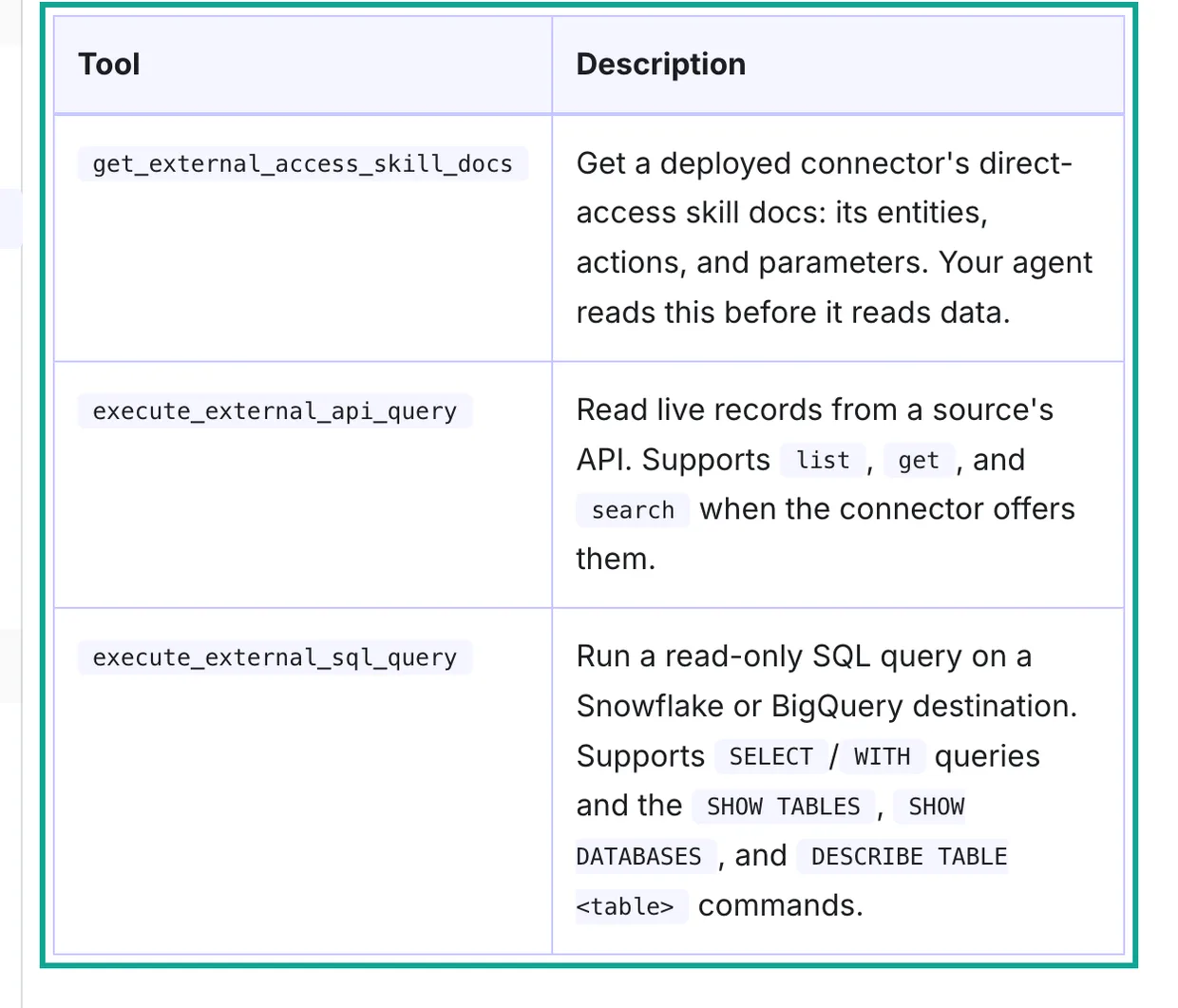
Each tool reads a source or destination for which you already saved credentials in Airbyte. execute_external_api_query reads live records from sources such as Zendesk or HubSpot. execute_external_sql_query runs read-only SQL on BigQuery or Snowflake (Airbyte MCP tools).
The context layer page compares replicated data, direct reads and search (Context layer docs). Refunds fit the first group. Public reviews fit none, because no Airbyte source reads them.
Can the Airbyte MCP server read public reviews? We counted its tools
Documentation changes, so we asked the server itself. For self-managed Core, start a local server with uvx --from=airbyte@latest airbyte-mcp (Use the Airbyte MCP with Airbyte Core). We ran that command on November 10, 2026, at 00:15 SGT. We set placeholder values for the environment variables. We sent only initialize and tools/list, and we did not connect to any Airbyte deployment.
| Local run fact | Value |
|---|---|
| First start, with dependency download | 32.0 seconds |
Package version from airbyte@latest | 0.71.3 (PyPI, 2026-10-26) |
| Framework and protocol version | 3.4.11, 2025-06-18 |
Tools in tools/list | 47 |
| Read-only hint, destructive hint | 25, 12 |
Tool names with cloud | 36 |
A server can mark a tool as read-only or destructive, and a client can then ask the user first (MCP specification: Tools).
We read every name and description. All 47 tools work on Airbyte objects: workspaces, organizations, sources, destinations, connections, sync jobs, custom connectors and the connector registry. No tool accepts a URL, a keyword or a store name to fetch an outside page. No tool reads Trustpilot, Amazon or Reddit reviews. The local server also does not have the three direct-read tools from the screenshot. That matches the self-managed docs, which say that the context layer, direct reads, search and connector skills are on Airbyte Cloud only.
The local run also showed a detail that the docs do not show (PyPI: airbyte). The local tools still use names such as list_deployed_cloud_connections and run_cloud_sync. The Airbyte tools page dropped the cloud prefix on November 6, for example list_connections and run_connection_sync (PR #91190).
From November 2 to 6, PyAirbyte changed the "destructive" hint for review by OpenAI (PR #1441). It also added ?insiders=true (PR #1456). Keep separate tool lists for the hosted and local servers, and check them after each upgrade.
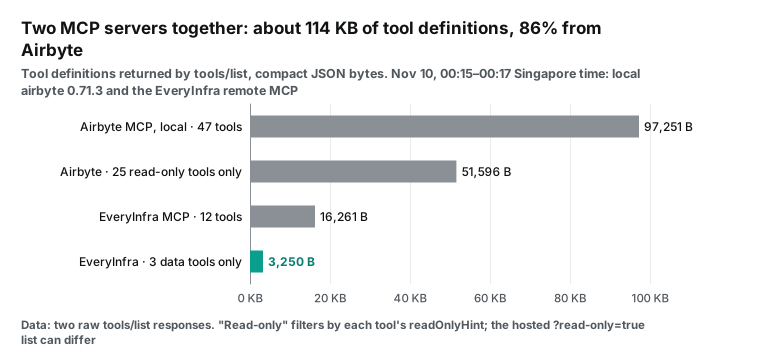
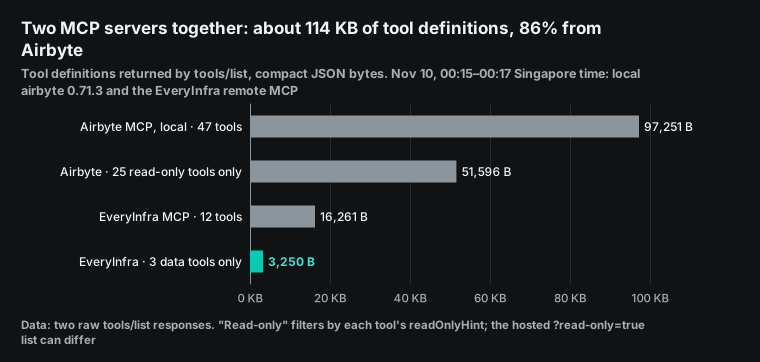
Two servers in one agent also means two sets of tool definitions in the context. The chart above measures compact JSON. The local Airbyte server has 97,251 bytes for 47 tools, of which 43,196 bytes are description text, and all 47 tools have an output schema. The EveryInfra remote server has 16,261 bytes for 12 tools. Together that is about 114,000 bytes, or roughly 28,000 tokens at 4 bytes per token.
Claude Code turns on tool search by default and loads definitions when it needs them, so the cost there is smaller. Clients without on-demand loading carry all definitions in every turn. Both servers let you reduce this. On the hosted server, ?read-only=true keeps only read-only tools. The X-MCP-Include-Modules header turns on only the modules you name (Airbyte MCP advanced configuration). On the EveryInfra side, data work needs only three tools: everyinfra_list_capabilities, everyinfra_call_api and everyinfra_get_job, with 3,250 bytes in total.
What the hosted server returns before you sign in
We also asked the hosted server about authentication, without credentials, at 00:14 SGT.
| Request | Status | What came back |
|---|---|---|
POST https://mcp.airbyte.com/mcp (initialize) | 401 | www-authenticate points to /.well-known/oauth-protected-resource/mcp |
GET /.well-known/oauth-protected-resource/mcp | 200 | Authorization server https://mcp.airbyte.com/, scopes openid, email, profile, token in header |
GET /.well-known/oauth-protected-resource | 404 | Nothing at the root path |
This behavior follows the MCP authorization rules. A server must publish OAuth 2.0 protected resource metadata, and the client uses it to find the authorization server (MCP specification: Authorization). RFC 9728 says that when the resource URL has a path, the client puts /.well-known/oauth-protected-resource between the host and the path (RFC 9728). So the 404 at the root is correct. If your team writes its own client or proxy, do not look for metadata at the root.
The Airbyte docs give two sign-in methods (Install the Airbyte MCP). A person uses browser OAuth. Scripts and CI send the Client-Id and Client-Secret headers of an Airbyte application. Use a service account, because the application acts with the permissions of its creator.
The advanced configuration page adds one sentence that matters here. Clients such as Claude cannot send custom headers, so read-only mode is also a URL parameter, ?read-only=true (Airbyte MCP advanced configuration). A custom connector in claude.ai or Claude Desktop connects from Anthropic cloud servers (Claude Help Center: custom connectors). Header-only switches, such as "hide destructive tools" or "turn on only some modules", are not available in Claude on the web. The read-only URL parameter is the only way to limit tools there.
Config example: two MCP servers in one Claude Code project
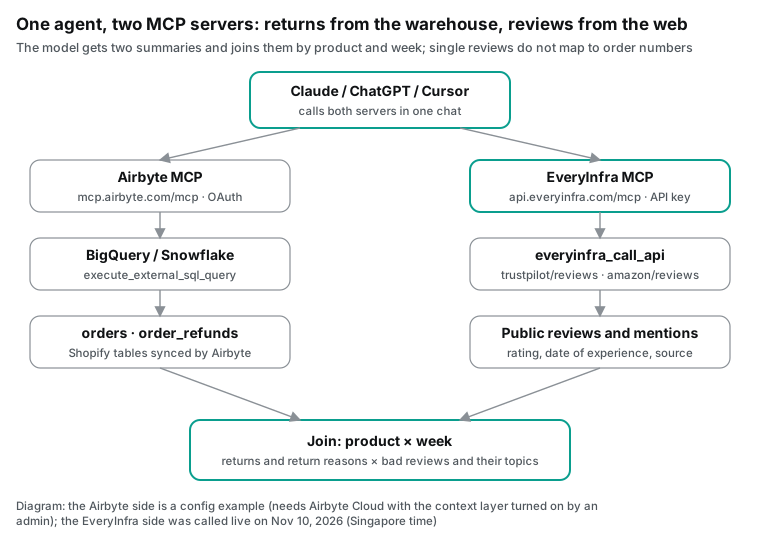
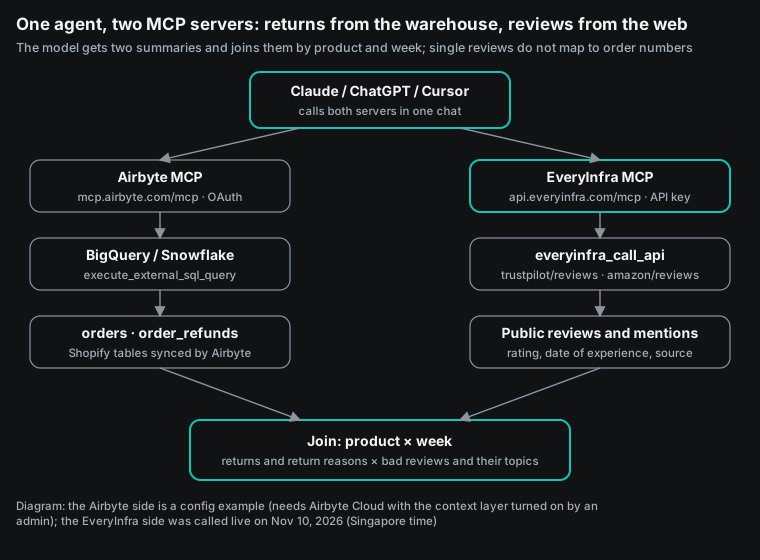
The block below is a project-level config example for Claude Code. Put it in .mcp.json at the root of your repository. The Airbyte entry uses the read-only URL. On the first connection, Claude Code opens a browser for the Airbyte Cloud sign-in. The EveryInfra entry sends an API key in an Authorization: Bearer header. The key comes from an environment variable, so the key is not in the file.
For clients that cannot send headers, follow the setup on the MCP server page. The two servers use different sign-in methods, and they do not interfere in one agent.
Claude Code expands ${VAR} in url and headers, and /mcp shows a warning when a variable is missing (Claude Code MCP docs). We did not run this block against Airbyte Cloud, so it is a config example. The EveryInfra URL and header are the same ones that we used for the live calls.
{
  "mcpServers": {
    "airbyte": {
      "type": "http",
      "url": "https://mcp.airbyte.com/mcp?read-only=true"
    },
    "everyinfra": {
      "type": "http",
      "url": "https://api.everyinfra.com/mcp",
      "headers": { "Authorization": "Bearer ${EVERYINFRA_API_KEY}" }
    }
  }
}
Read-only is the correct default for this use case. The Airbyte safety section says that delete tools work only on resources with delete-me or deleteme in the name. It also says that each tool tells the client whether it is read-only or destructive (Airbyte MCP tools: Safety). An agent that answers questions about reviews and returns never needs to change a pipeline. Read-only mode is safer, and it also cuts the tool definitions roughly in half.
To let the agent read your warehouse, an organization admin must turn on agent access in Airbyte. The destination must be BigQuery or Snowflake, and the agent can run only SELECT and SHOW TABLES (Agent access docs). Ask your admin for a warehouse role that can read only the refund and order views. That role limits the cost of a bad query and limits what the agent can see.
The second setting to check is the output limit for tools. Claude Code shows a warning when one MCP tool result is larger than 10,000 tokens. The default limit is 25,000 tokens, and MAX_MCP_OUTPUT_TOKENS changes it (Claude Code MCP docs). Our MCP call to trustpilot/reviews returned 20 reviews as 24,265 characters of text, or about 6,000 tokens. That is far below the warning. With limit at 200, or with reviews for many products in one call, you can hit the limit. Let the warehouse aggregate first, and pull reviews in small batches per product.
The review side: live calls on the night of November 10
We read the capability names, parameters and prices from the free catalog first: GET /api/v1/social/catalog, read at 00:14 SGT. The catalog listed 573 capabilities on 106 platforms at that time. trustpilot/reviews needs company, which is the company domain. It accepts stars, date, sort, lang and verified_only. It returns 20 rows by default and up to 200, and each call costs $0.001389 (Trustpilot reviews API). amazon/reviews needs a product URL, returns up to 100 rows, and has the same price (Amazon reviews API).
The table lists every call on the test night. All times are SGT. The charge comes from charged_usd in each response.
| Time (SGT) | Capability | Main parameters | Result | Charge |
|---|---|---|---|---|
| 00:15 | trustpilot/reviews | allbirds.com, 1–2 stars, last 3 months | 20 rows | $0.001389 |
| 00:16 | trustpilot/reviews | allbirds.com, all stars, last 30 days | 503, retry_after 20 s | $0 |
| 00:16, 00:18 | amazon/search | allbirds tree runner | 10 rows each (one repeat by mistake) | $0.002236 each |
| 00:19 | reddit/search | allbirds return, newest | 0 rows | $0 |
| 00:21 | trustpilot/reviews | anker.com, 1–2 stars, last 3 months | 20 rows | $0.001389 |
| 00:22 | trustpilot/reviews | ecoalf.com, Spanish, last 12 months | 20 rows | $0.001389 |
| 00:22 | trustpilot/reviews | date set to last14days | 422 with allowed values and two nearest | $0 |
| 00:22 | trustpilot/reviews | allbirds.com, all stars, last 3 months, limit 200 | 31 rows | $0.001389 |
| 00:23, 00:25 | amazon/reviews | two Tree Runner ASINs, limit 100 | 503 both times | $0 |
| 00:26 | MCP everyinfra_call_api | same as the first row | 20 rows, same ids and order as REST | $0.001389 |
| 00:28 | amazon/reviews | async retry | done at 00:30 with 0 rows, hold refunded | $0 |
| 00:42 | jd/search | a power bank keyword for Anker | 5 rows | $0.002472 |
| 00:42 | jd/reviews | first item_id from the search | 10 rows | $0.001389 |
The table shows three facts about billing.
First, failures cost nothing. The 503 body says "Not charged" and gives retry_after. The 422 body lists allowed and did_you_mean, and its text says: "Change only date to a value in allowed, then resend. Nothing was charged." Second, empty results cost nothing. reddit/search returned 0 rows and charged 0. The async amazon/reviews job put a hold on the balance, finished with 0 rows, and changed refund_state to refunded.
Third, a trustpilot/reviews call with limit 200 costs the same as the default 20 rows. Allbirds had only 31 reviews in the last three months, so one call got all of them, at about $0.0000448 per review. Six more requests got a 429 because the test key has a limit of 10 requests per minute. A 429 costs nothing.
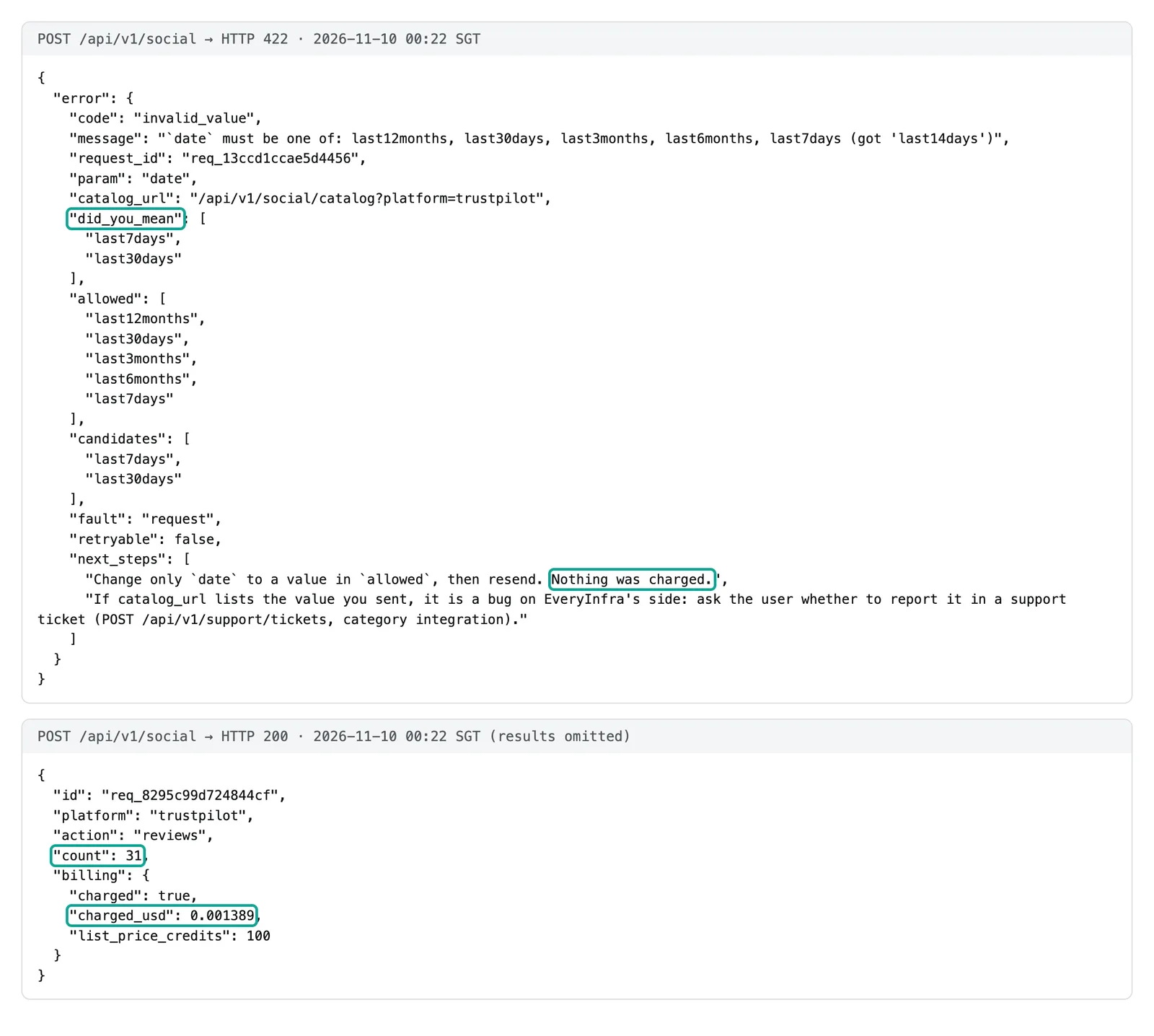
The MCP round trip gave the same result as REST. At 00:26 we sent tools/call for everyinfra_call_api with the same parameters as the REST call at 00:15. The 20 review ids matched the REST ids 20 of 20, in the same order, and the charge was the same $0.001389. Below is the call that the model sends, and the first returned review with only the fields that matter for a join. We removed the reviewer name.
{"jsonrpc":"2.0","id":2,"method":"tools/call","params":{"name":"everyinfra_call_api",
 "arguments":{"platform":"trustpilot","action":"reviews",
  "params":{"company":"allbirds.com","stars":["1","2"],"date":"last3months"}}}}

{"id":"6aef3ce784d3a1aee4e3841a","rating":1,"title":"Customer Service not Customer Satisfaction",
 "language":"en","is_verified":false,"verification_level":"not-verified","source":"Organic",
 "country":"US","experience_at":"2026-11-05T00:00:00+00:00","posted_at":"2026-11-07T16:59:51+00:00",
 "company_domain":"allbirds.com","rating_scale":5}
We got no Amazon reviews that night, but amazon/search showed a fact that every join needs. The query "allbirds tree runner" returned 10 results with 10 different ASINs. Eight results were the Tree Runner: the men's ASINs shared a rating count of 779, and the women's ASINs shared 746. The other two were the Tree Runner Go, with 236 and 292 ratings (Amazon search API). Each color and size has its own ASIN, and the reviews belong to the parent product. So the 10 ASINs map to only 4 parent products.
Most list prices were between $50 and $100, but one was $1,642.72. That price is an outlier, so remove it before you calculate an average.
Your Shopify order lines have product_id and variant_id. Amazon reviews have a product ASIN and a variant. Before a join, build a mapping table from parent product to child ASIN to Shopify variant. Without it, a join by ASIN splits one shoe into ten rows. Our Snowflake article of November 6 also got 503 and empty results from amazon/reviews (Snowflake Cortex Agents MCP and social reviews). So the conclusions in this article use Trustpilot data only. Test Amazon reviews on one or two ASINs before you add them to a daily schedule.
Can one bad review be matched to one refund? 3 of 63
To match a bad review to a refund, the review needs an order number or a reference number that the merchant can look up. We checked the fields of all 71 Trustpilot reviews from the three brands. Each row from trustpilot/reviews has id, rating, posted_at, experience_at, country, source and verification_level. All 71 rows had all of these fields. The catalog field note says that a backup source can omit experience_at and source, but no backup source was used that night.
The field that decides the order link is source. Organic means that the person found the page and wrote a review without an invitation. Shopify, InvitationApi and BasicLink mean that the merchant sent an invitation through an integration or a link.
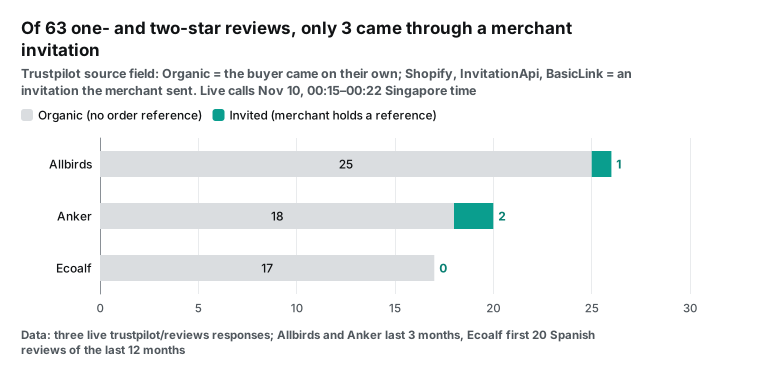
The chart shows the result. Allbirds had 31 reviews in the last three months. 5 came from the Shopify integration and have the verified label: 4 have five stars and 1 has one star. Of the 26 organic reviews, 25 have one or two stars. So the reviews that you can trace to an order are mostly good, and the bad reviews are mostly on the side you cannot trace.
The star counts make the same point. The 31 Allbirds reviews had 21 one-star, 5 two-star and 5 five-star ratings, with no three-star or four-star review. Of the 26 organic reviews, 25 were bad and 1 had five stars. Of the 5 invited reviews, 4 had five stars. People who come to Trustpilot on their own mostly come to complain, and invited customers mostly rate well. If you average the two groups, the weekly score moves with the number of invitations that the merchant sent, not with product quality. Keep source as its own column in the join.
Anker had 20 one-star reviews in the same period. One came through InvitationApi with the verified label, one came through BasicLink with the label "invited", and 18 were organic. All 20 Spanish reviews for Ecoalf were organic. Across the three brands, 3 of 63 bad reviews came from an invitation, which is 4.8 percent. We also scanned the text for "order #", "order number" or "pedido" followed by four or more digits, and 0 of 71 matched.
Why can an invited review lead back to an order? A merchant who uploads an invitation list sends customer email, customer name and a reference number (Trustpilot Help Center: send invitations by file upload). The reference number stays in the merchant's own back office and is not in any public response.
So the merchant can match at most that 4.8 percent, from its own Trustpilot Business export. For the rest, the reviewer enters only a date of experience within the last 12 months (Trustpilot Help Center: write a review).
Two more details make the match harder.
The first is the product. A Trustpilot service review is about the company, not about one SKU. We scanned the 63 bad reviews for model names.
For Allbirds, 4 of 26 named a model such as Tree Runner, Wool Runner, Dasher or Trail Runner. For Anker, 9 of 20 named a product line such as Soundcore, eufy or AeroClip. For Ecoalf, 1 of 17 named a product. In total, 14 reviews (about 22 percent) named a product.
The second detail is the channel. One Allbirds bad review had a title about service in the Marunouchi store in Tokyo. An in-store visit is not in your Shopify order table at all. So "which product does this review describe" is a question that you must answer first, and for most reviews the answer is "we do not know".
A closer look at Allbirds after the asset sale
Allbirds is a good example of the weekly view, because its review volume is small and its topics are clear. We loaded the 31 reviews from 00:22 into a local DuckDB file. We grouped one and two star reviews by the week of the date of experience. We also counted three keyword groups in the bad reviews: returns, quality and size. The result had 15 weeks with data and 26 bad reviews.
The busiest week was the week of September 21, with 4 bad reviews. 3 of them mention a return and 3 mention size. The same week had 3 reviews that came through Shopify invitations, and one of them is a one-star review about a wrong size. The latest week, the week of November 2, had 2 bad reviews, and both mention a return and a size problem. Per brand per week, bad reviews ranged from 0 to 4. Per product per week, the count is almost always 0 or 1.
With counts this small, a single week can only show that something is unusual. To compare trends, use a four-week rolling window or group similar products. We filled empty calendar weeks with 0 and summed every four weeks. The 16 weeks from the week of July 20 to the week of November 2 make four blocks.
| Four-week block (week starts) | Bad reviews | Mention a return | Mention size |
|---|---|---|---|
| Jul 20 to Aug 10 | 7 | 4 | 0 |
| Aug 17 to Sep 7 | 6 | 1 | 1 |
| Sep 14 to Oct 5 | 7 | 3 | 3 |
| Oct 12 to Nov 2 | 6 | 4 | 2 |
In the weekly view, the week of September 21 looks like a spike. In the four-week view, its block has 7 bad reviews, which is the same as the other blocks. The spike is only a few reviews that fell in the same week. The one real change is size. The first eight weeks had 1 bad review about size, and the last eight weeks had 5.
Five reviews are not enough for a conclusion. They are enough to ask the warehouse one question: in the same weeks, what share of refunds had the reason "size"? That is exactly the type of question that the join answers. The agent can ask Airbyte MCP for refund reasons by week and compare them with this column.
What the bad reviews talk about
You cannot match single orders, but counts by topic still help. Suppose half of the bad reviews talk about returns, and refunds in your warehouse go up in the same weeks. Support and operations should look at those two facts together. We did not ask a model to label the reviews. We wrote five keyword rules first, ran them without case sensitivity on titles and text, and let one review match more than one topic.
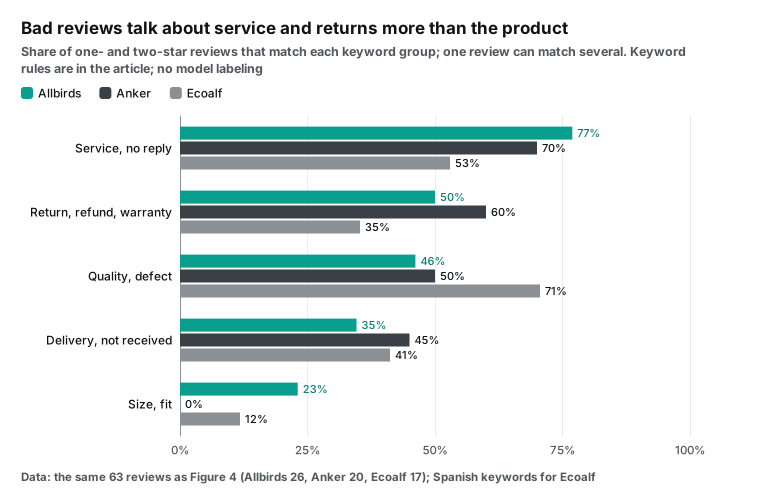
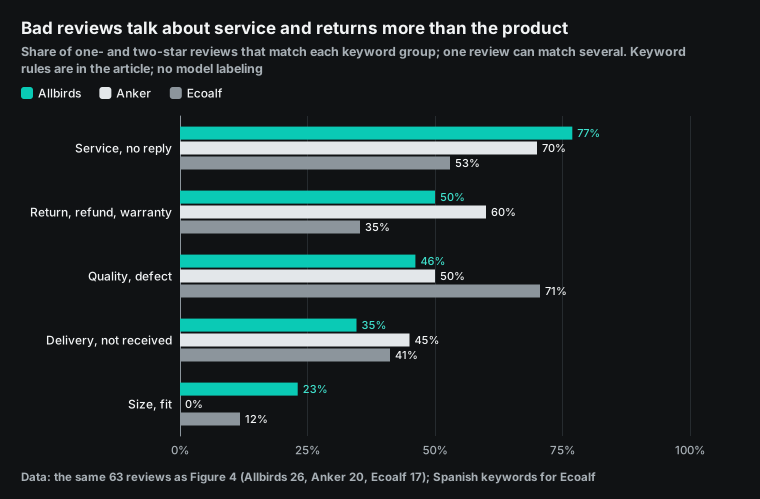
| Topic | English keywords (Allbirds, Anker) | Spanish keywords (Ecoalf) | Allbirds (26) | Anker (20) | Ecoalf (17) |
|---|---|---|---|---|---|
| Support did not respond | customer service, no response, email, phone, contact, support, ignored | atención al cliente, correo, teléfono, respuesta, contacto | 20 | 14 | 9 |
| Returns, refunds, warranty | return, refund, exchange, final sale, warranty, replacement | devolución, reembolso, cambio, abono, dinero | 13 | 12 | 6 |
| Quality and defects | quality, defect, fell apart, hole, faded, broke, bricked, stopped working | calidad, defecto, tara, roto, descosido, tinte, desgaste | 12 | 10 | 12 |
| Delivery, not received | deliver, shipping, arrived, never received, wrong size, tracking | entrega, envío, transporte, paquete, pedido, recibido | 9 | 9 | 7 |
| Size and fit | size, sizing, fit, tight, narrow, wide | talla, ajuste, pequeño, estrecho, ancho | 6 | 0 | 2 |
For Allbirds and Anker, "support did not respond" is the top topic, at 70 percent or more. For Ecoalf, quality is first, at 71 percent. Note that the windows are different: the Ecoalf sample covers the last 12 months (posts from February 24 to November 2), and the other two cover the last three months. Compare the topic mix inside each brand, not the rank between brands. The topic mix also matches how each brand replies on Trustpilot.
Allbirds replied to 0 of 31 reviews, Anker to 0 of 20, and Ecoalf to 19 of 20. The most useful row for the join is the second one. Half of the Allbirds bad reviews mention a return, an exchange or "final sale". 60 percent of the Anker bad reviews mention a refund or warranty.
Those are the reviews to put next to order_refunds. Keyword rules have false hits and misses. "Email" can mean only "I sent an email", and "fit" can appear in "fits perfectly". Use the rules for trends, not for a verdict on one review. If you want a model to label each review, check a sample of its labels against the rule results.
Merchant replies give one more column. trustpilot/reviews returns reply_at, the time of the public reply.
| Brand | Replies | Fastest | Median | Slowest | Within 24 h | Within 72 h |
|---|---|---|---|---|---|---|
| Ecoalf | 19 of 20 | 3.1 h | 22.5 h | 177.2 h | 10 | 16 |
| Allbirds | 0 of 31 | – | – | – | 0 | 0 |
| Anker | 0 of 20 | – | – | – | 0 | 0 |
If Airbyte also syncs support tickets, compare the public reply time with the first ticket reply time in the same week. Both slow means support is short of people. Only public replies slow means nobody watches the review site. Allbirds and Anker had 0 replies.
How wide should the time window be? A median of 1.81 days
A join by product and time needs dates with the same meaning on both sides. In the warehouse, processed_at in order_refunds is the refund time (Airbyte Shopify docs, Shopify Refund). On the review side there are two dates. posted_at is the time of the post, and experience_at is the date of experience that the reviewer enters, with no time of day.
Use the date of experience for the join, because it is closer to the purchase and the return. The gap between the two dates tells you how wide the window must be.
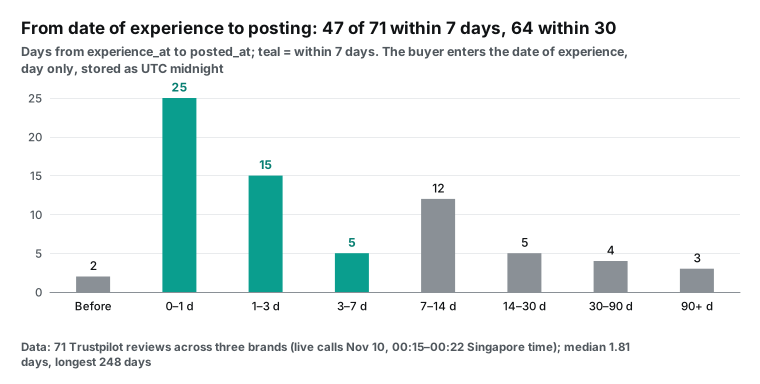
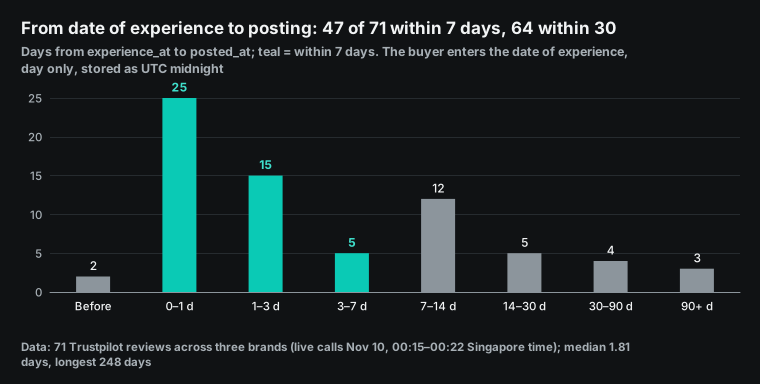
The median gap for the 71 reviews was 1.81 days. 47 reviews (66 percent) came within 7 days, 59 (83 percent) within 14 days and 64 (90 percent) within 30 days. The longest gap was 248 days.
Two reviews were posted a few hours before their date of experience. The date of experience is stored as midnight UTC, and the post time has hours and minutes. A time zone offset can make the gap negative. Treat a negative gap as 0.
By brand, the median gap was 0.91 days for Ecoalf, 1.57 days for Anker and 3.52 days for Allbirds. The Allbirds long tail includes reviews such as "I ordered two months ago and it has not arrived", where the reviewer entered the order date as the date of experience.
So aggregate refunds by the week of processed_at and reviews by the week of experience_at. Then compare each week with the week before and the week after. A 7-day window covers two thirds of the reviews, and a 30-day window covers nine tenths. A wider window also adds more refunds that have other causes, so do not make it wider than you need.
The Airbyte changelog adds one warning. Shopify connector 4.3.4, released on November 3, 2026, fixed a problem where incremental syncs of the transactions stream missed refund status changes. But order_refunds still cannot capture status changes incrementally, so refresh that stream to correct old rows (Airbyte Shopify connector changelog, PR #89704). If your refund counts do not match the Shopify admin, refresh the stream before the join.
The join: Airbyte for the warehouse half, EveryInfra for the review half
When both halves are ready, the cheapest split is this: the warehouse calculates refunds, and the agent receives only two small weekly tables. Airbyte execute_external_sql_query accepts only SELECT, WITH and a few SHOW and DESCRIBE commands (Airbyte MCP tools). That is enough for the query below.
The query is a config example in BigQuery SQL. Table names follow the default stream names of the Airbyte Shopify connector, and refund_line_items holds the product lines of each refund. We have no Shopify store and no Airbyte Cloud account, so we did not run this query on a real warehouse.
-- Config example: sent through Airbyte MCP execute_external_sql_query (read-only)
WITH refunds AS (
  SELECT
    DATE_TRUNC(DATE(r.processed_at), WEEK(MONDAY)) AS week,
    CAST(JSON_VALUE(li, '$.line_item.product_id') AS INT64) AS product_id,
    SUM(CAST(JSON_VALUE(li, '$.quantity') AS INT64)) AS units_refunded,
    COUNT(DISTINCT r.order_id) AS refund_orders
  FROM shopify.order_refunds AS r,
       UNNEST(JSON_QUERY_ARRAY(r.refund_line_items)) AS li
  WHERE r.processed_at >= TIMESTAMP_SUB(CURRENT_TIMESTAMP(), INTERVAL 92 DAY)
  GROUP BY week, product_id
)
SELECT week, product_id, units_refunded, refund_orders
FROM refunds
ORDER BY week, units_refunded DESC;
We did run the review half. The DuckDB weekly table in the Allbirds section uses the same logic: one row per week, with counts of bad reviews and of each topic. The agent does not need SQL for the final join. It lines up the weeks, puts refunded units next to bad-review counts, and adds the top review topic as a third column.
We put four rules into the system prompt, and each rule comes from a number that we measured. First, use only weekly aggregates, and never pair one review with one refund, because 0 of 71 reviews had an order number. Second, put reviews without a model name on a "whole brand" row, because only 22 percent named a product. Third, make no claim for a week with fewer than 3 bad reviews, because most weeks had 0 to 4.
Fourth, state the date range of the window and say whether the first block is complete. We used date=last3months, which filters by post date, but we grouped by the date of experience. So the earliest weeks contain only July experiences that people posted after early August, and those weeks are too low. Because 64 of 71 reviews were posted within 30 days, treat the first four weeks as incomplete. These four rules are more stable than letting the model decide.
Store reviews in the warehouse with an Airbyte declarative connector
Some teams want a history of reviews in the warehouse instead of a live pull on every question. You can write EveryInfra as a custom Airbyte source and sync it on a schedule into BigQuery or Snowflake. Airbyte custom connectors use a declarative YAML format. Airbyte MCP has a publish_custom_source_definition tool that publishes the YAML (Airbyte MCP tools). We wrote a small manifest and ran it four times with PyAirbyte on our own machine.
# Version that worked on the fourth local PyAirbyte run. The key comes from config, not from this file.
version: 6.44.0
type: DeclarativeSource
streams:
  - type: DeclarativeStream
    name: trustpilot_reviews
    primary_key: [id]
    retriever:
      type: SimpleRetriever
      requester:
        type: HttpRequester
        url_base: https://api.everyinfra.com
        path: /api/v1/social
        http_method: POST
        authenticator:
          type: BearerAuthenticator
          api_token: "{{ config['api_key'] }}"
        error_handler:
          type: DefaultErrorHandler
          max_retries: 8
          backoff_strategies:
            - type: WaitTimeFromHeader
              header: Retry-After
            - type: ConstantBackoffStrategy
              backoff_time_in_seconds: 30
        request_body_json:
          platform: trustpilot
          action: reviews
          params:
            company: "{{ config['company'] }}"
            limit: 200
            date: last3months
      record_selector:
        type: RecordSelector
        extractor: { type: DpathExtractor, field_path: [results] }
    schema_loader:
      type: InlineSchemaLoader
      schema:
        type: object
        additionalProperties: true
        properties:
          id: { type: string }
          rating: { type: [integer, "null"] }
          experience_at: { type: [string, "null"], format: date-time }
          posted_at: { type: [string, "null"], format: date-time }
          source: { type: [string, "null"] }
verification_level: { type: [string, "null"] }| Run (SGT) | Change | Result |
|---|---|---|
| 1, 00:26 | stars: ["1", "2"], default backoff 1 to 16 s | 11 failures (5 were 429), gave up |
| 2, 00:30 | constant 25 s backoff | 429 (10 requests per minute) used up the retry budget |
| 3, 00:33 | 8 retries at 30 s | failed every time |
| 4, 00:39 | no stars, limit: 200 | 31 rows in 14.3 s |
The default backoff ignored the retry_after of 20 seconds in the error body, but that was not the root cause.
A local echo server showed the exact request: "stars": [1, 2]. The template engine had turned the strings into numbers. At 00:38 we replayed both forms by hand with the same python-requests User-Agent. Numbers failed, and strings returned 200 with 20 rows.
So remember one rule: send stars in trustpilot/reviews as strings, such as ["1", "2"]. Integers return 503, and that failure is not charged. The Airbyte declarative template turns "1" into the integer 1, so do not send stars from a manifest. Filter by rating in warehouse SQL.
The fourth run matched the REST count from 00:22. Airbyte added _airbyte_raw_id, _airbyte_extracted_at and _airbyte_meta, which incremental dedupe needs.
We also made a mistake of our own. In the fourth run, the schema declared only id, rating and the dates. The local cache table then had no source or verification_level column, even though additionalProperties was true. source is the only field that tells you whether a review can lead to an order, so the manifest above declares both fields. Airbyte bills custom sources like API sources, at 6 credits per million rows (Airbyte credits docs). A few dozen reviews per brand per quarter cost almost nothing.
Use a live pull for questions and quick checks. Use a warehouse sync for history, SQL joins with refunds, or context layer search. Search indexes only agent connector pairs (Context layer search docs), and the docs do not say whether a custom source qualifies.
Reviews with variant fields: a marketplace comparison
Trustpilot reviews rate a company, so the join key is coarse by design. To see what decides the key, we compared a marketplace that stores the variant in each review. At 00:42 SGT we searched Anker power banks with jd/search and read reviews for the first item_id (JD search API, JD reviews API). Both calls returned 200. The search returned 5 rows for $0.002472, and the reviews returned 10 rows for $0.001389.
| Field | `jd/reviews` (one Anker power bank, 10 reviews) | `trustpilot/reviews` (anker.com, 20 one-star reviews) | What it means for the join |
|---|---|---|---|
| Product | item_id in 10 of 10 | No product field; the review is about the company | Marketplace reviews map to a product directly |
| Variant | color and size in 10 of 10 | None | Maps to the Shopify variant_id level |
| Time | posted_at to the second, no time zone | posted_at with time zone, plus experience_at by day | Only Trustpilot has a date of experience |
| Units bought | buy_count: 7 rows with 1, others 2, 5 and 30 | None | Shows bulk buyers |
| Source | No invitation or verification field | source, verification_level | Only Trustpilot separates invited reviews |
| Order number | None | None | Neither side matches single orders |
The lesson: the join key depends on what the review platform rates, not on which MCP server pulls it. A marketplace review sits on one product and records the variant that the buyer picked. So you can join by product, variant and week, which is two levels finer than brand and week. There is still no order number, so single-order matching is still not possible.
All 10 reviews had five stars, and 3 had no text. jd/reviews has no star filter, so page further or filter in the warehouse. Decide whether empty reviews count in the bad-review rate before you join.
What does it cost per month? $0.09 tested, $0.93 with Amazon
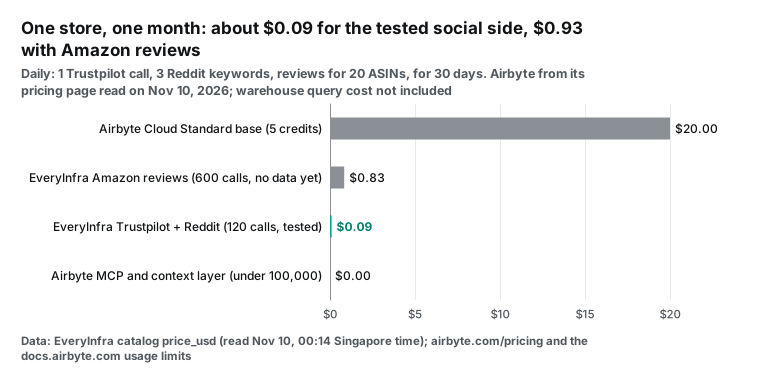
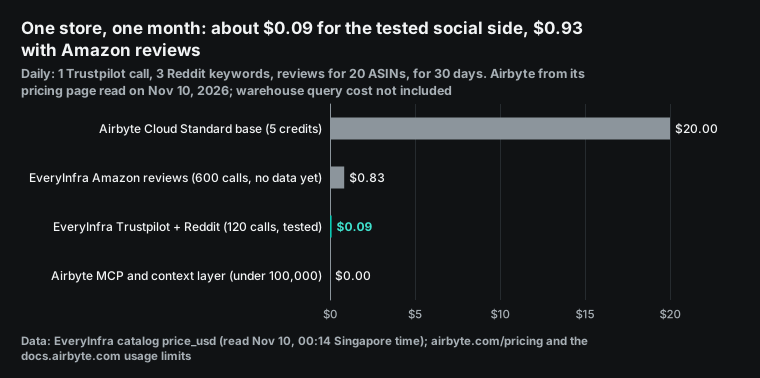
Our model is a mid-size Shopify store. Each day it makes 1 trustpilot/reviews call (up to 200 rows). It also makes 20 amazon/reviews calls, one per main product, and 3 reddit/search calls.
At the catalog prices read at 00:14 SGT, look at two levels. The Trustpilot and Reddit calls worked on the test night: 120 calls per month, about $0.09. Add 600 Amazon review calls, and the total is 720 calls, about $0.93. Amazon is 90 percent of that total. It returned no data on the test night, so test it before you put it in a budget.
You can also cut the Amazon calls. In the search above, 10 ASINs mapped to 4 parent products, and the reviews belong to the parent. One call per parent product is enough. If your 20 main products map to 5 parents, Amazon needs 150 calls per month, about $0.21, and the month costs about $0.30 in total. Failures and empty results cost nothing, so the real bill is lower. The EveryInfra pricing page uses the same prices as the catalog.
| Item | Unit price (date read) | Monthly use | Monthly cost | Source |
|---|---|---|---|---|
EveryInfra trustpilot/reviews | $0.001389 per call, up to 200 rows (Nov 10) | 30 calls | $0.0417 | catalog price_usd |
EveryInfra amazon/reviews (no data on test night) | $0.001389 per call, up to 100 rows (Nov 10) | 600 calls | $0.8334 | catalog price_usd |
EveryInfra reddit/search | $0.000556 per call (Nov 10) | 90 calls | $0.0500 | catalog price_usd |
| Airbyte MCP server | Free (Nov 10) | No limit | $0 | Airbyte MCP docs |
| Context layer reads and search | Free up to 100,000 per organization per month (Nov 10) | Far below 100,000 | $0 | Context layer docs |
| Airbyte Cloud Standard | From $20 per month with 5 credits, about 1 GB (Nov 10) | About 0.18 credits for 30,000 order and refund rows | $20 | Airbyte pricing |
| Warehouse queries | Billed by your warehouse | A few weekly aggregates per day | Depends on the warehouse | Agent access docs |
The Airbyte row needs one note. 30,000 order and refund rows use about 0.18 credits at 6 credits per million rows. The pricing page does not show the price of extra credits, and a third-party summary says $5 per credit (Skyvia on Airbyte pricing, 2026-10-20).
At 40 or more credits per month, Airbyte suggests the Plus plan, from $189 per month for 40 credits (Airbyte pricing). New accounts get a trial of 14 days or 400 credits, whichever ends first (Airbyte credits docs). The real risk is the warehouse. Each execute_external_sql_query call uses warehouse compute. An agent that scans the full refund table in every turn can cost more than all other rows in this table. Give the agent a weekly aggregate view, and the problem goes away.
Limits and things to watch
| Item | Status | What to do |
|---|---|---|
| Match one bad review to one order | 3 of 63 bad reviews came from invitations; the reference number is only in the merchant's Trustpilot account | Join by product and week; export invited reviews from your own account for order-level work |
| Know which product a review describes | About 22 percent name a model | Put the rest on a "whole brand" row; do not guess |
| Amazon reviews | Two 503 responses and one empty result on the test night, all free | Test one or two ASINs first; build a parent-to-child ASIN map from amazon/search |
| Context layer | Airbyte Cloud only; not on self-managed Core or Flex with a customer data plane | Self-managed users get pipeline tools only; query the warehouse with your own SQL client |
| Limit Airbyte tools in Claude on the web | Custom headers cannot be sent | Use ?read-only=true; Claude Code and Cursor can send headers |
| Tool names | Local 0.71.3 still has the cloud prefix; the hosted server renamed tools on Nov 6 | Do not hard-code tool names in allowlists or prompts; check again after upgrades |
| Personal data | Reviews include reviewer names and avatar links | Drop author_* fields before loading; keep only the columns you count |
Author fields do not help you count bad reviews and refunds, and in the warehouse they reach more people. Airbyte also warns that direct reads can show records that a user cannot see in the source (Airbyte MCP docs). Our manifest declares no author field.
How this article differs from our earlier posts
Related posts use the same data in other ways. The Snowflake Cortex Agents article loads reviews into a Snowflake table first. The Google Data Agent Kit article aligns three platforms in one wide BigQuery table. The brand sentiment agent in our Gemini Enterprise article covers brand sentiment. This article keeps reviews out of the warehouse and asks whether a public review can match an order at all.
FAQ
Is Airbyte MCP free?
(From the autocomplete phrase "is airbyte free".) The MCP server is free on all plans, including self-managed Core. Context layer reads and searches are free up to 100,000 per organization per month. Management tools do not count (Airbyte MCP docs). You pay for the Airbyte Cloud sync plan and for warehouse compute.
Is Airbyte open source, and is the MCP server open source too?
(From the autocomplete phrase "is airbyte open source".) Yes. Airbyte Core is free to self-manage under the Elastic License 2.0 (Airbyte pricing). The MCP server code is in the PyAirbyte repository, and uvx --from=airbyte@latest airbyte-mcp starts it locally. We ran 0.71.3 on November 10. The open-source server has no context layer.
Can the Airbyte MCP server connect to Shopify directly?
(From the autocomplete phrase "airbyte shopify connector".) It reads live Shopify data only after an admin turns on agent access for that connector in Airbyte Cloud. The usual path is to sync orders and order_refunds with the Airbyte Shopify connector, then query them through execute_external_sql_query (Airbyte Shopify connector docs).
Can bad Trustpilot reviews be matched to my orders?
(From the autocomplete phrase "trustpilot bad reviews".) Mostly no. Of our 63 one-star and two-star reviews, only 3 (4.8 percent) came from a merchant invitation. The reference number stays in the merchant's own Trustpilot account. 0 reviews had an order number in the text. Join by product and week. For order-level work, export invited reviews from your Trustpilot Business account. That export keeps the reference number from your invitation file (Trustpilot Help Center: send invitations by file upload).
For reports, is MCP or a warehouse copy better?
(From a Reddit thread in r/Odoo.) A user asked whether Odoo data should go through MCP or into a warehouse. The top answers agreed: MCP for questions in chat, warehouse tables for dashboards, and one definition per number (r/Odoo discussion). Our result points the same way. Keep refunds in the warehouse, pull small and fast-changing review data live, and join at the weekly level.
Get started
- Get an EveryInfra key with the quickstart. Failed calls and empty results cost nothing.
- Read the free catalog,
GET /api/v1/social/catalog?platform=trustpilot, or open the Trustpilot data API page. - Add the EveryInfra server to your client with the MCP server page.
- Add the Airbyte server with the read-only URL from the config example above.
- For Amazon variants and Reddit mentions, see the Amazon data API and
reddit/search.
References
- New Airbyte MCP Server Lets Users Chat with Their Data, Business Wire, 2026-10-27, https://www.businesswire.com/news/home/20261027843580/en/New-Airbyte-MCP-Server-Lets-Users-Chat-with-Their-Data-Simplifies-Pipeline-Management-and-Improves-User-Experience
- Introducing the Airbyte MCP Server and Context Layer, Airbyte blog, 2026-10-27 (updated 2026-11-04), https://airbyte.com/blog/airbyte-mcp
- Airbyte MCP: Build Pipelines, Troubleshoot Syncs & Chat With Your Data, Airbyte YouTube channel, 2026-10-27, https://www.youtube.com/watch?v=C4-eGrBePUQ
- Airbyte MCP, Airbyte docs, read November 2026, https://docs.airbyte.com/platform/airbyte-mcp
- Install the Airbyte MCP, Airbyte docs, read November 2026, https://docs.airbyte.com/platform/airbyte-mcp/install
- Airbyte MCP tools, Airbyte docs, read November 2026, https://docs.airbyte.com/platform/airbyte-mcp/tools
- Advanced Airbyte MCP configuration, Airbyte docs, read November 2026, https://docs.airbyte.com/platform/airbyte-mcp/advanced-configuration
- Use the Airbyte MCP with Airbyte Core, Airbyte docs, read November 2026, https://docs.airbyte.com/platform/airbyte-mcp/self-managed
- Context layer, Airbyte docs, read November 2026, https://docs.airbyte.com/platform/context-layer
- Agent access, Airbyte docs, read November 2026, https://docs.airbyte.com/platform/context-layer/agent-access
- Search your data, Airbyte docs, read November 2026, https://docs.airbyte.com/platform/context-layer/search
- Manage billing and credits, Airbyte docs, read November 2026, https://docs.airbyte.com/platform/cloud/managing-airbyte-cloud/manage-credits
- Shopify source connector (changelog 4.3.4 and 4.3.5), Airbyte docs, 2026-11-03, https://docs.airbyte.com/integrations/sources/shopify
- Airbyte Pricing, Airbyte, read 2026-11-10, https://airbyte.com/pricing
- docs: add Airbyte MCP and Context layer docs (private beta), GitHub PR #87633, 2026-10-02, https://github.com/airbytehq/airbyte/pull/87633
- docs: move Airbyte MCP and context layer to open beta, GitHub PR #88922, 2026-10-14, https://github.com/airbytehq/airbyte/pull/88922
- docs: remove beta references from Airbyte MCP and context layer docs, GitHub PR #89777, 2026-10-27, https://github.com/airbytehq/airbyte/pull/89777
- docs(mcp): document ?read-only=true URL, GitHub PR #90250, 2026-10-30, https://github.com/airbytehq/airbyte/pull/90250
- docs: retire Airbyte Agents documentation, GitHub PR #89805, 2026-10-30, https://github.com/airbytehq/airbyte/pull/89805
- docs: add context layer search documentation, GitHub PR #90239, 2026-11-03, https://github.com/airbytehq/airbyte/pull/90239
- docs(airbyte-mcp): update tool names after cloud prefix removal, GitHub PR #91190, 2026-11-06, https://github.com/airbytehq/airbyte/pull/91190
- docs(mcp): document insiders tools, GitHub PR #91203, 2026-11-09, https://github.com/airbytehq/airbyte/pull/91203
- Shopify: emit transactions of orders updated since the saved state, GitHub PR #89704, 2026-11-03, https://github.com/airbytehq/airbyte/pull/89704
- fix(mcp): apply broad destructiveHint definition for OpenAI review, PyAirbyte PR #1441, 2026-11-02, https://github.com/airbytehq/PyAirbyte/pull/1441
- feat(mcp): add ?insiders=true URL param, PyAirbyte PR #1456, 2026-11-06, https://github.com/airbytehq/PyAirbyte/pull/1456
- airbyte (PyAirbyte) package page, PyPI, 0.71.3 released 2026-10-26, https://pypi.org/project/airbyte/
- airbyte-agents-benchmarks, GitHub, https://github.com/airbytehq/airbyte-agents-benchmarks
- Show HN: Airbyte Agents, Hacker News, May 2026, https://news.ycombinator.com/item?id=48023496
- Tools, Model Context Protocol specification 2025-06-18, https://modelcontextprotocol.io/specification/2025-06-18/server/tools
- Authorization, Model Context Protocol specification 2025-06-18, https://modelcontextprotocol.io/specification/2025-06-18/basic/authorization
- RFC 9728: OAuth 2.0 Protected Resource Metadata, IETF, 2025, https://www.rfc-editor.org/rfc/rfc9728
- Connect Claude Code to tools via MCP, Anthropic docs, read November 2026, https://code.claude.com/docs/en/mcp
- Get started with custom connectors using remote MCP, Claude Help Center, read November 2026, https://support.claude.com/en/articles/11175166-get-started-with-custom-connectors-using-remote-mcp
- Write a review, Trustpilot Help Center, read November 2026, https://help.trustpilot.com/s/article/Write-a-review?language=en_US
- Send service review invitations by importing a customer data file, Trustpilot Help Center, read November 2026, https://help.trustpilot.com/s/article/Send-service-review-invitations-by-uploading-a-file-with-customer-data?language=en_US
- Refund resource, Shopify developer docs, read November 2026, https://shopify.dev/docs/api/admin-rest/latest/resources/refund
- Allbirds, Inc. Form 8-K (asset purchase agreement), SEC, 2026-03-29, https://www.sec.gov/Archives/edgar/data/1653909/000162828026022181/bird-20260329.htm
- Allbirds, Inc. Form 8-K (completion of the asset sale), SEC, 2026-06-09, https://www.sec.gov/Archives/edgar/data/1653909/000162828026043145/bird-20260609.htm
- EveryInfra social data catalog, EveryInfra, read 2026-11-10 00:14 SGT, https://api.everyinfra.com/api/v1/social/catalog
- Using Claude Dashboards with Odoo 19: connect via MCP or replicate to a data warehouse?, Reddit r/Odoo, November 2026, https://www.reddit.com/r/Odoo/comments/1x3wmhj/using_claude_dashboards_with_odoo_19_connect_via/
- Airbyte Pricing 2026: Plans, Credits and Real Costs, Skyvia blog, 2026-10-20, https://skyvia.com/blog/airbyte-pricing/
- Connect Codex to Self-Managed Airbyte Core with the Airbyte MCP, Airbyte blog, 2026-11-07, https://airbyte.com/blog/connect-codex-to-airbyte-core-with-airbyte-mcp
- Known issue: links include /api/public/v1, PyAirbyte issue #563, https://github.com/airbytehq/PyAirbyte/issues/563
Reference BL-124