Sourcegraph MCP connectors: check real fields before you edit a parser
Sourcegraph 8.2 turns connectors on. Live EveryInfra MCP samples show one field on 0 to 9 of 20 rows per target. A field check costs $0.0097.

At 00:27 on November 23, 2026 (Singapore time), we asked EveryInfra for the Amazon product page of AirPods Pro 2. The product was out of stock. The response had no price, no list_price, no currency and no seller_name. Ten minutes earlier, the same capability returned all four keys for an Echo Dot. A parser that reads row["price"] works until the day stock runs out. Code search cannot find this problem, because it is in the data.
Other live samples from the same night show the same pattern. GitHub merged_at appeared on 9, 0 and 8 of 20 rows in three repositories. Reddit image_urls appeared on 0, 3 and 5 of 25 posts in three subreddits. GitHub is_draft had no key on 13 issue rows and a key on all 27 pull request rows. Amazon currency held the symbol $, and two of three products had an empty category.
Sourcegraph released self-hosted 8.2 on November 18, 2026. In that release, connectors are on by default. Agents in Agentic Batch Changes can call tools on outside MCP servers, and users can add their own connectors (Sourcegraph: Sourcegraph self-hosted 8.2). This gives the agent a place to pull one real response before it changes parser code.
To show the effect, we wrote a 31-column sample parser. It reads fields with plain r["field"], the common style, and it has 3 old scraper habits that we put in on purpose. We replayed 138 live rows through it. Fifteen columns failed on at least one row: 10 because an optional key was absent on some rows, and 3 because of the planted habits.
A check of 5 capabilities with 2 samples each costs $0.0097 in EveryInfra fees at the November 23 catalog prices. The EveryInfra calls are live tests. We do not have a Sourcegraph Enterprise instance. All Sourcegraph steps are configuration examples built from the public docs, and we did not run them in Sourcegraph.

What Sourcegraph 8.2 connectors are
A connector is the way a Sourcegraph agent reaches an outside MCP server. The docs say connectors give Agentic Batch Changes access to tools beyond code. Examples are issue trackers, internal docs, observability tools and CI. Any server that speaks the Model Context Protocol can be a connector. Two kinds of agents can use them: the coordination agent, and the coding agents in coding agent steps (Sourcegraph docs: Connectors).
The feature first appeared in the November 2nd changelog under the title "Connect Agentic Batch Changes to the outside world". Its examples were Linear and Jira tickets, CI results, Confluence and Notion docs, and CVE trackers (Sourcegraph changelog: Agentic Batch Changes connectors). The 8.2 release note says that connectors are now on by default. Agents can call connector tools, and users can add connectors from their own settings. To stop personal connectors, an admin removes the Connectors: Write User grant in role-based access control (Sourcegraph: 8.2 release notes).
The 8.2 page has the date November 18, 2026. Patch 8.2.1283 came out on the same day and fixes a usage check on offline instances that bring their own model keys (Sourcegraph: 8.2.1283).
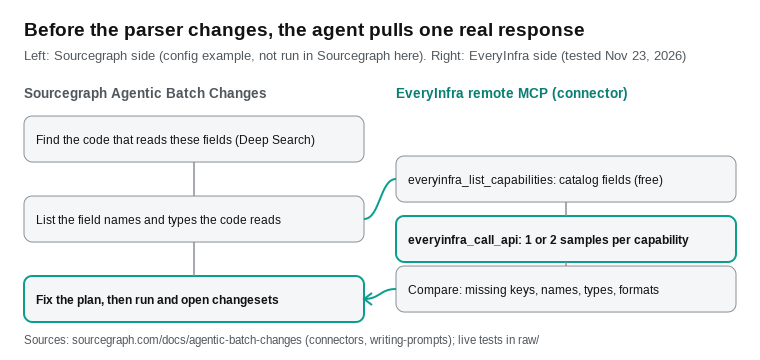
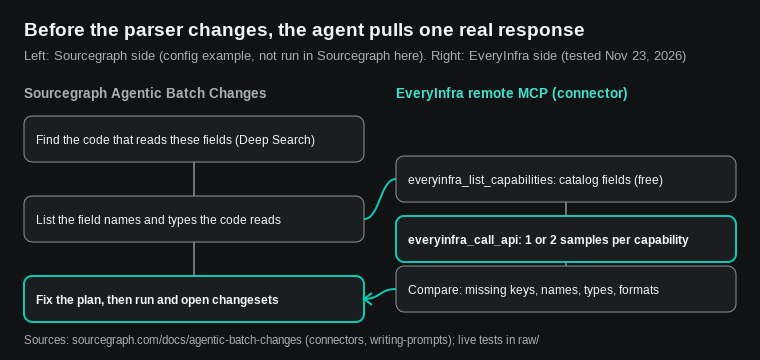
An Agentic Batch Changes task starts with research. The agent uses Deep Search on the codebase and returns a plan. The plan says which repositories are in scope, what changes, and which repository to try first (Sourcegraph docs: Writing prompts). A field check costs least in the plan stage. No code has changed, no changeset is open, and a field problem only changes the plan.
| Item | What the source says | Source |
|---|---|---|
| Version and date | Self-hosted 8.2, page date November 18, 2026; latest patch 8.2.1283 | 8.2 and 8.2.1283 release pages |
| Default | Connectors on by default; users can add personal connectors in settings | 8.2 release notes, Agents |
| Who uses them | The coordination agent and coding agents in coding agent steps | Connectors docs |
| Admin page | Administration → Integrations → Connectors (the changelog says Administration → Connectors) | Connectors docs, Nov 2 changelog |
| Permissions | Shared connectors need Integration Management: Write; personal connectors need Connectors: Write User, on for the User role by default | Nov 2 changelog, 8.2 release notes |
| Transport | Streamable HTTP with HTTP+SSE fallback; stdio-only servers are not supported | Connectors docs |
| Auth | OAuth (recommended), no auth, shared bearer token, per-user API token; basic auth added Nov 16 | Connectors docs, Nov 16 changelog |
| Billing | Agentic Batch Changes bills per merged changeset; model use is not billed on its own | Configuration docs |
Per the configuration docs, a changeset counts once it merges, on the code host or in Sourcegraph. Closed or unmerged changesets are free. Model use by agents and coding steps is not billed on its own.
Current rates and usage are in the Enterprise Portal (Sourcegraph docs: Configuration and administration). The rate per changeset is not public.
Connectors and the Sourcegraph MCP server go in opposite directions
The Sourcegraph MCP server works in the other direction. There, Sourcegraph is the MCP server. Outside agents such as Claude Code, Cursor and Codex call Sourcegraph code search. The docs say that the MCP server is available on Enterprise plans.
It has three endpoints. /.api/mcp holds the core tools, /.api/mcp/all holds every tool, and /.api/mcp/deepsearch holds Deep Search only (Sourcegraph docs: Sourcegraph MCP Server). Connectors go the other way. The Sourcegraph agent is the MCP client and calls another server.
| Direction | Who calls whom | Entry point | Good for |
|---|---|---|---|
| Sourcegraph MCP server | Claude Code, Cursor, Codex, Amp and others call Sourcegraph | https://<instance>/.api/mcp | Local coding with search and navigation across the whole codebase |
| Sourcegraph connectors | Agentic Batch Changes calls an outside MCP server | Connectors page in admin or user settings | Batch changes across many repositories that need tickets, CI or outside data |
| Both at once | A local agent connects to Sourcegraph MCP and EveryInfra MCP | The MCP config file of the client | Field checks on your laptop without Agentic Batch Changes |
Why a parser change needs a real response first
Deep Search can find every line that reads row["merged_at"] and every caller of those functions. It cannot know that an open pull request has no merged_at key in the response. Field problems show up only when you run real data through the code, and they often show up on some rows only.
A Sourcegraph video compares two code search servers on a similar job. Before you change a table, you must find every piece of code that writes to it. One of the writers was a migration that names the table only inside a string (YouTube: GitLab Orbit vs. Sourcegraph MCP, October 20, 2026). Field names in a parser are strings too. keyword_search finds them. Whether the data still has them is a question for a different tool.
The data side also changes without notice. A Cloud Security Alliance note from November 15, 2026 looks at dependency drift in MCP servers. Of 35 servers that Corelight reviewed, 23 install paths resolve dependencies from a public registry at start or build time. One server with a pinned version and commit ran with 15 different dependency sets in five weeks (CSA: Pinned but Not Frozen).
That note is about the dependencies of MCP servers. On the data side, a platform redesign can change response fields. Parser code depends on those fields, so run the check before each change.
Add EveryInfra as a Sourcegraph connector (configuration example)
We wrote these steps from the Connectors docs. We do not have a Sourcegraph Enterprise instance, and we did not click through the admin pages. The EveryInfra remote MCP address is https://api.everyinfra.com/mcp. Auth is a request header, Authorization: Bearer <your key>. In Sourcegraph terms, this is "Bearer token" or "Per-user API token" (Sourcegraph docs: Connectors).
The difference between the two is who pays. With a bearer token, every agent call in the team goes on the one key that the admin enters. With a per-user API token, each user stores a personal key in settings, and each wallet pays for its own calls.
| Sourcegraph auth option | How the docs describe it | For EveryInfra |
|---|---|---|
| OAuth (recommended) | The server supports OAuth sign-in, and each user signs in with their own account | Does not apply: EveryInfra MCP uses an API key |
| No authentication | Public or internal servers that need no credentials | Does not apply: without a key you can only list tools |
| Bearer token | The server accepts one shared token for all users | Good for one team budget; use a dedicated key |
| Per-user API token | Each user enters a personal token | Good when each user pays; each user stores a key in settings |
Admin steps (configuration example):
- Open Administration → Integrations → Connectors. Create a connector. You need the
Integration Management: Writepermission. - Enter
https://api.everyinfra.com/mcpas the URL. Select "Bearer token". Paste an EveryInfra key that only Sourcegraph uses. - Save the connector. Click "Refresh tools". Check the tool list and the effect class of each tool. Turn off the tools that you do not need.
- On a self-hosted instance, make sure that
EXTERNAL_DENY_LISTdoes not blockapi.everyinfra.com.
Admin connectors use the same networks as code host connections. The requests go out from the frontend and worker services. Personal connectors reach public addresses only. On self-hosted instances, UNTRUSTED_EXTERNAL_ALLOW_LIST widens this. api.everyinfra.com is a public address, so a user can add it in Settings → Connectors. After that, the user must select "Use in Agentic Batch Changes", or the agent ignores the connector (Sourcegraph docs: Connectors).
The tool list: all 12 tools start on
Sourcegraph sorts each tool into one of four classes from the hints that the MCP server sends. The classes are read-only, writes (changes data but does not delete or overwrite), destructive (can delete or overwrite) and unknown effects (no hints). The first two classes start on. Destructive and unknown tools start off. Sourcegraph refreshes the tool list every 6 hours, and a new destructive tool starts off (Sourcegraph docs: Connectors).
The hints come from ToolAnnotations in the MCP spec. The default for readOnlyHint is false, and the default for destructiveHint is true. The spec also says that these are hints only. A client must not trust them when they come from a server that it does not trust (MCP spec 2026-07-28: Schema).
At 00:14:39 on November 23 (Singapore time), we called tools/list without a key. The server returned 12 tools, and each tool had annotations.
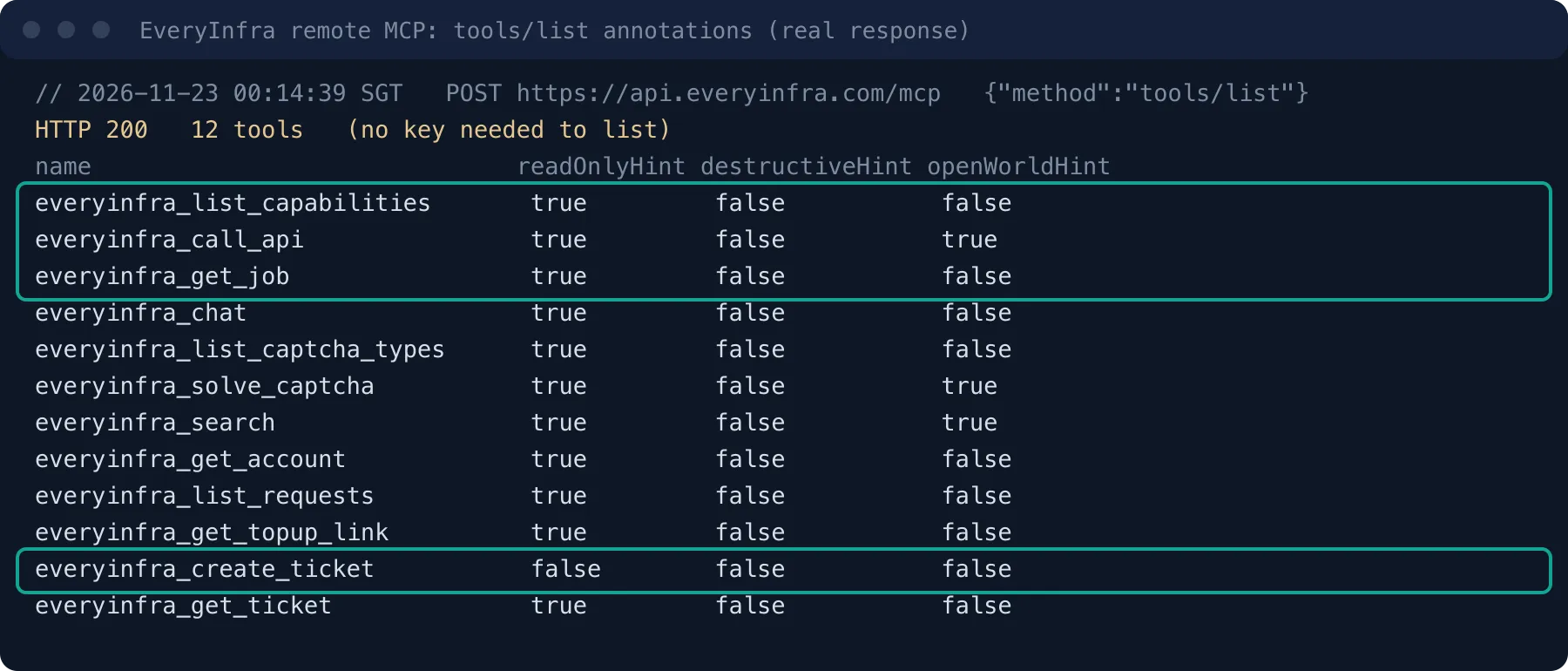
Apply the Sourcegraph rules to this list. The 11 tools with readOnlyHint: true go into "read-only". everyinfra_create_ticket has readOnlyHint: false and destructiveHint: false, so it goes into "writes". Both classes start on, so all 12 tools are on after you connect.
everyinfra_call_api says it is read-only, because it changes nothing on your side. But each call costs money at the catalog price, and its openWorldHint is true. Sourcegraph classes look at data changes, not at cost. For a field check, keep three tools: everyinfra_list_capabilities (reads the catalog, free), everyinfra_call_api (takes samples) and everyinfra_get_job (collects async results). Turn off the other nine in the connector tool list.
Two of the nine can still help. everyinfra_get_account reads the balance. everyinfra_list_requests lists the calls on the key, with status code, time, rows, charge flag and amount. Both are free, so keep everyinfra_list_requests if you want to audit what each sample cost.
The everyinfra_get_job description says it is free and does not count against the per-minute limit. everyinfra_create_ticket is the only tool with readOnlyHint: false. It opens a support ticket with people at EveryInfra. A batch change agent does not need it, and with the tool off, the agent stops and reports when calls fail.
Two decisions for the admin
First, decide who pays. A bearer token puts every call on one key. You get one wallet and one bill, and a runaway agent loop spends that balance. A per-user token splits the cost, but each user needs an EveryInfra account first.
At about $0.0097 per change, a month of field checks for one team costs well under a dollar. The risk is a loop, so use a dedicated key and keep only a small balance in its wallet.
Second, decide who fixes a broken connection. The docs say that Sourcegraph notifies site admins when a server rejects credentials. For a personal connector, it notifies the owner. An expired OAuth connection shows "Connection expired" and a Reconnect button (Sourcegraph docs: Connectors).
A bearer token has no expiry screen. If someone deletes the key or the wallet runs dry, calls fail and the agent gets no samples. Put one line in the prompt: if you cannot get samples, stop and report, and do not skip the check. EveryInfra MCP tool names are only added, never removed. A new read-only tool turns on after the next 6-hour refresh in Sourcegraph. If you want only the three tools above, read the tool list after a refresh.
| Decision | Default in 8.2 | Our suggestion |
|---|---|---|
| Who pays | Your choice of shared or per-user token | A dedicated key with a small balance |
| Broken credentials | Admin or owner gets a notice | The prompt says: no samples, stop and report |
| New tools | Read-only and write tools start on | Read the tool list after a refresh |
A local agent with both servers (configuration example)
You can do the same job without Agentic Batch Changes. Connect Claude Code to Sourcegraph MCP and to EveryInfra MCP at the same time. The Sourcegraph docs give this command for Claude Code: claude mcp add --transport http --scope user sourcegraph https://sourcegraph.example.com/.api/mcp. With an access token, the header is Authorization: token ${SOURCEGRAPH_ACCESS_TOKEN} (Sourcegraph docs: Client Integrations). The Claude Code docs say that headers in .mcp.json expand environment variables (Claude Code docs: Connect Claude Code to tools via MCP). Put this file in the project root:
{
  "mcpServers": {
    "sourcegraph": {
      "type": "http",
      "url": "https://sourcegraph.example.com/.api/mcp",
      "headers": { "Authorization": "token ${SOURCEGRAPH_ACCESS_TOKEN}" }
    },
    "everyinfra": {
      "type": "http",
      "url": "https://api.everyinfra.com/mcp",
      "headers": { "Authorization": "Bearer ${EVERYINFRA_API_KEY}" }
    }
  }
}
The two auth prefixes are different. A Sourcegraph access token uses token, and EveryInfra uses Bearer. One wrong word gives you a 401. We did not connect this file to a real Sourcegraph instance. The EveryInfra half matches the live calls in the next section.
The Client Integrations page also covers Amp, Codex and Cursor. For Codex, add [mcp_servers.sourcegraph] to ~/.codex/config.toml. If sign-in fails with invalid_scope, add scopes = ["mcp"] (Sourcegraph docs: Sourcegraph MCP Server). Amp uses amp mcp add sourcegraph <url> (Amp docs: MCP).
One real MCP round trip
In the plan stage, the agent does two things. It reads the catalog fields, and then it takes one real response. Step one is everyinfra_list_capabilities. At 00:17:57 on November 23, we called it with {"platform":"github"}.
The response came back in 0.28 seconds with 6,697 bytes of text. It listed the 9 GitHub capabilities. Each capability had a price line, a parameter line and a returns: field list.
The github/repository_issues entry says: up to 100 items per call, 30 by default, $0.000958 per call, 22 fields from id to platform (EveryInfra catalog). This step is free. The GitHub Issues API page shows the same fields.
Step two is everyinfra_call_api. In the same second, we sent this request for the 25 newest posts in r/dataengineering:
curl -s https://api.everyinfra.com/mcp \
  -H "Authorization: Bearer $EVERYINFRA_API_KEY" \
  -H 'Content-Type: application/json' \
  -H 'Accept: application/json, text/event-stream' \
  -d '{"jsonrpc":"2.0","id":1,"method":"tools/call",
       "params":{"name":"everyinfra_call_api",
                 "arguments":{"platform":"reddit","action":"subreddit_posts",
                              "params":{"subreddit":"dataengineering","sort":"newest","limit":25}}}}'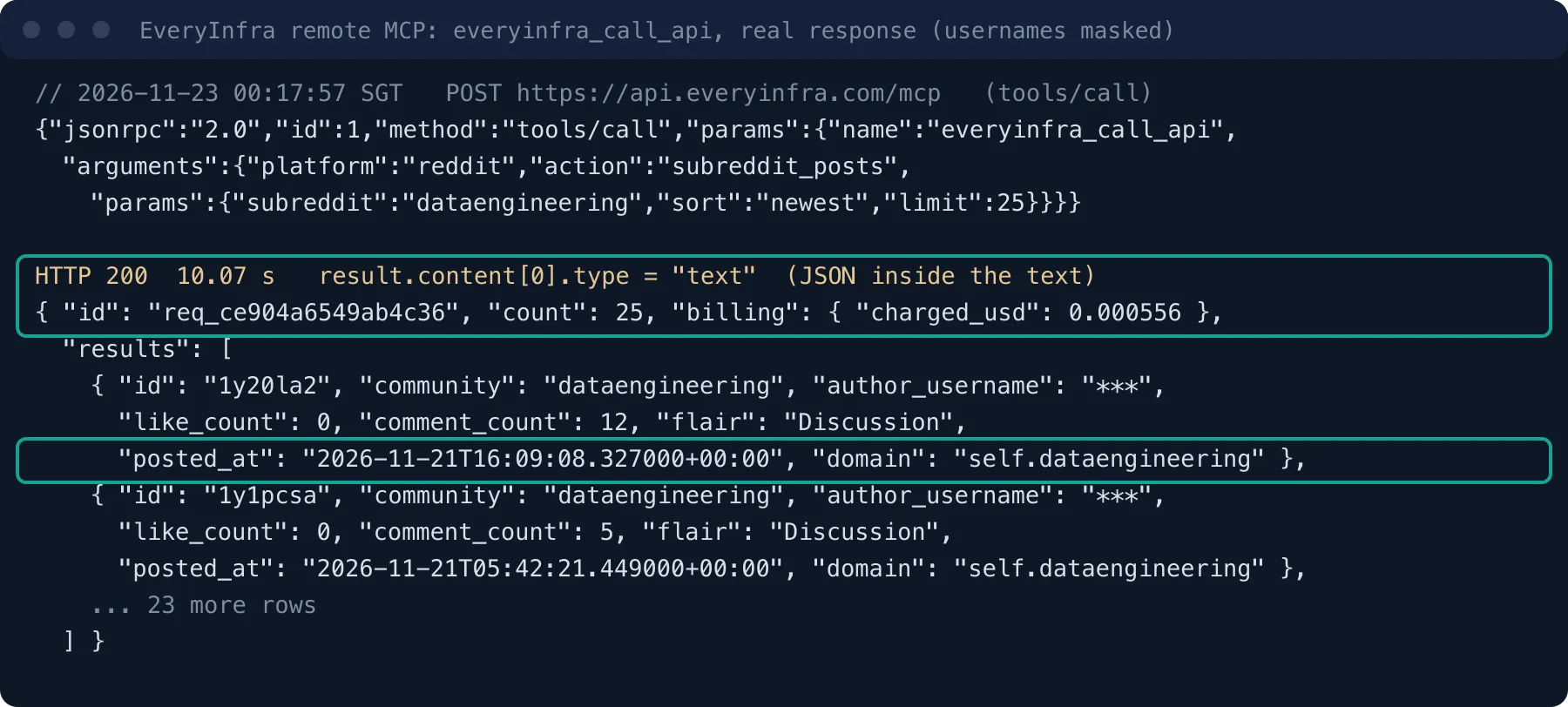
The response came back after 10.07 seconds with 25 posts, and the charge was $0.000556. The result sits in result.content[0].text as JSON text. It does not use structuredContent from the MCP spec. The spec allows both forms, and outputSchema is optional (MCP spec 2026-07-28: Tools). For the agent, this means one extra parse step before the field check. For you, it means that the field types are the JSON types: like_count is a number and posted_at is a string with a time zone.
The screenshot shows one more detail. Reddit posted_at has six decimal places, for example 2026-11-21T16:09:08.327000+00:00. GitHub posted_at has none.
The MCP call for r/dataengineering and the REST calls for r/webscraping and r/ClaudeAI return rows with the same shape. Twelve keys are on every row. flair, thumbnail_url, image_urls and external_link come and go with the post type. So a sample that the agent takes through MCP is a fair sample of what production code sees through REST.
Can outputSchema replace samples?
The 2026-07-28 spec lets a tool declare outputSchema. The server describes the result shape with JSON Schema and puts the result in structuredContent. The spec examples use required to list the fields that are always present. For older clients, a tool with structured results should also put the same JSON in a text block (MCP spec 2026-07-28: Tools). With an outputSchema that leaves optional fields out of required, the agent could see that merged_at is not on every row. Some of our 10 "optional key absent" columns would show up before any sample.
The November 23 tools/list from EveryInfra had no outputSchema. everyinfra_call_api is one entry point for more than 700 capabilities, and each capability has different fields. One schema on one tool cannot describe all of them. The field notes live in the catalog and in the text from everyinfra_list_capabilities.
A per-capability schema would still not remove the sample step. Is currency "$" or "USD"? Can category be an empty string? Is list_price 27 or 27.0?
These are questions about values. A schema covers types and key presence. Two of the 15 failed columns, currency and category, are value problems. The list_price mix of integers and decimals needs the JSON Schema split between number and integer to describe it. YouTube duration is one more case. For video 71mHvFVWC00 it is the string "00:03:03", not 183 seconds, so code that adds durations must parse the string first.
Live test: a 31-column parser against 138 real rows
We took three samples each from three capabilities between 00:15 and 00:27 on November 23 (Singapore time). From the GitHub Issues API, we took 20 items each from scrapy/scrapy, microsoft/playwright and sourcegraph/scip, with state=all, sorted by update time.
The three repositories differ a lot. One is an old scraping framework, one is a busy browser automation project, and one is the Sourcegraph code index format. By is_pull_request and state, scrapy had 17 pull requests (13 closed) and 3 issues. Playwright had 10 pull requests (9 open) and 10 issues. Scip had 19 pull requests and 1 issue.
From the Reddit subreddit posts API, we took the 25 newest posts each from r/webscraping, r/dataengineering (this call went through remote MCP) and r/ClaudeAI. From the Amazon product API, we took one item each: Echo Dot (B09B8V1LZ3), the book "Atomic Habits" (0735211299) and AirPods Pro 2 (B0CHWRXH8B). That is one device, one book and one product with no stock.
| Capability | Targets | Rows | Time (SGT) | Charge per call |
|---|---|---|---|---|
| github/repository_issues | scrapy/scrapy, microsoft/playwright, sourcegraph/scip | 3 × 20 | 00:15:16, 00:20:44, 00:26:15 | $0.000958 |
| reddit/subreddit_posts | r/webscraping, r/dataengineering (MCP), r/ClaudeAI | 3 × 25 | 00:15:17, 00:17:57, 00:26:17 | $0.000556 |
| amazon/profile | Echo Dot, "Atomic Habits", AirPods Pro 2 | 3 × 1 | 00:15:29, 00:18:07, 00:27:28 | $0.001389 |
The parser is ingest/fields.py in a sample repository. It has three mapping tables with 31 columns. Each column is one read on one result row. Most field names come from the catalog response_fields.
We also left three old habits in the code on purpose. GitHub reads milestone, which is not in the catalog. Reddit uses score, an old scraper name. Reddit time is parsed as Unix seconds.
We wrote this parser as a demo, and it is not code from a real project. We planted the three habits, so 3 of the 15 failed columns were known in advance. The other 12 use field names that are in the catalog. Here is one table:
POST_FIELDS = {  # reddit/subreddit_posts
    "post_id":   lambda r: r["id"],
    "subreddit": lambda r: r["community"],
    "score":     lambda r: r["score"],
    "comments":  lambda r: r["comment_count"],
    "created":   lambda r: datetime.fromtimestamp(r["posted_at"], tz=timezone.utc),
    "flair":     lambda r: r["flair"].strip(),
    "images":    lambda r: len(r["image_urls"]),
    "link":      lambda r: r.get("external_link"),
}
A script ran every column on every one of the 138 rows. It counted the rows that passed and the errors on the rows that failed. The chart shows the result.
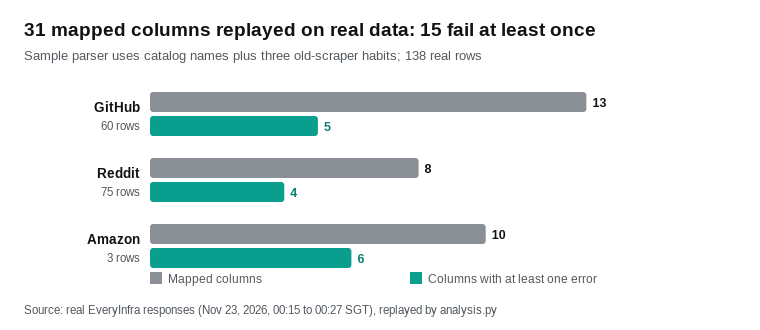
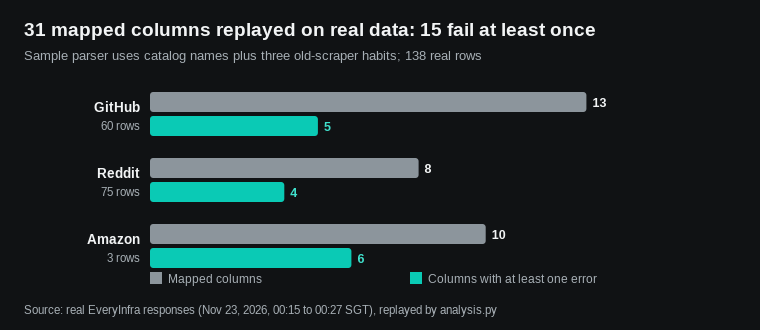
Fifteen of 31 columns failed on at least one row. Amazon had the highest share: 6 of 10 columns. Amazon had only 3 rows, but the three products are very different. A book, an Amazon device and an out-of-stock product each return a different set of keys.
| Key | Echo Dot | "Atomic Habits" | AirPods Pro 2 (no stock) |
|---|---|---|---|
| Keys in total | 18 | 18 | 14 |
price, list_price, currency, seller_name | yes | yes | no |
features | 6 items | no | 3 items |
bestseller_ranks | no | 4 lists, rank 170 overall | no |
images | 9 | 1 | 7 |
rating / rating_count | 4.7 / 202,626 | 4.8 / 150,571 | 4.7 / 28,874 |
Code that takes the second image as a thumbnail fails on the book row. Code that takes images[0] passes on all three. Products from different categories expose more problems than more products from one category.
Fields in code × real response
"Present" is the number of rows that have the key. "Catalog" says if the field is in the catalog response_fields. The rows are the 15 failed columns plus author_id, which passed.
| Capability | Read in code | Catalog | Present | Real type and value | Replay result |
|---|---|---|---|---|---|
| github/repository_issues | r["is_draft"] | yes | 46/60 | bool; absent on all 14 issue rows (is_pull_request=false) | 14 rows KeyError |
| github/repository_issues | r["labels"] | yes | 19/60 | list of strings; absent when there are no labels | 41 rows KeyError |
| github/repository_issues | r["closed_at"] | yes | 25/60 | ISO 8601 string; absent while open | 35 rows KeyError |
| github/repository_issues | r["merged_at"] is not None | yes | 17/60 | ISO 8601 string; absent on issues and unmerged PRs | 43 rows KeyError |
| github/repository_issues | r["milestone"] | no | 0/60 | not in the response | 60 rows KeyError |
| github/repository_issues | int(r["author_id"]) | yes | 60/60 | string, for example "102957288" | passes (string converts) |
| reddit/subreddit_posts | r["score"] | no | 0/75 | the catalog name is like_count, int | 75 rows KeyError |
| reddit/subreddit_posts | fromtimestamp(r["posted_at"]) | yes | 75/75 | string 2026-11-21T18:13:35.219000+00:00 | 75 rows TypeError |
| reddit/subreddit_posts | r["flair"].strip() | yes | 65/75 | string, can contain emoji; absent on 10 rows | 10 rows KeyError |
| reddit/subreddit_posts | len(r["image_urls"]) | yes | 8/75 | list of strings | 67 rows KeyError |
| amazon/profile | float(r["price"]) | yes | 2/3 | float; absent when out of stock | 1 row KeyError |
| amazon/profile | round(r["list_price"], 2) | yes | 2/3 | 79.99 (float) on one row, 27 (int) on another | 1 row KeyError; mixed types pass |
| amazon/profile | three-letter currency check | yes | 2/3 | "$", not USD | 2 rows ValueError, 1 row KeyError |
| amazon/profile | non-empty category | yes | 3/3 | empty string "" on two rows; the book has a full path | 2 rows ValueError |
| amazon/profile | r["bestseller_ranks"][0]["rank"] | yes | 1/3 | list of objects, book only | 2 rows KeyError |
| amazon/profile | r["description"][:500] | yes | 0/3 | absent on all three rows | 3 rows KeyError |
author_id passed because int() converts a digit string. GitHub id is a string too, for example "1737964070", while number is an integer such as 5943. If code compares that id with an integer key, Python returns False for "1737964070" == 1737964070. There is no error, only a silent mismatch.
The absent keys fall into two groups. The first group is in the catalog already. The platform_field_meanings text says that labels is absent when there are no labels. It says the same for closed_at on open items and merged_at on issues and unmerged PRs (EveryInfra catalog). The Reddit field_note says that flair, thumbnail_url and image_urls are sometimes absent. An agent that reads only the response_fields names, and skips the field notes, treats all of these as always present.
The second group shows up in real responses. currency holds the symbol $. category can be an empty string. list_price is the JSON integer 27 when the price is a whole number.
description did not appear in any of the three samples. is_draft has no key on issue rows.
Reddit flair is in this group too. In r/webscraping, 10 of 25 posts had no flair. The other 15 had values with emoji, such as Bot detection 🤖, Getting started 🌱 and Hiring 💰.
.strip() does not remove a trailing emoji. If code maps flair to a fixed list of categories, decide first what to do with the emoji. In r/ClaudeAI, flair is plain text such as Built with Claude. Each subreddit sets its own style.
list_price did not fail, but it mixes integers and decimals. JSON has one number type, and RFC 8259 defines only "number" (RFC 8259). Python json decodes a number without a decimal point as int and a number with one as float (Python docs: json). round(27, 2) works, so the replay passed. A strict Pydantic float field or a JSON Schema integer check is different. It can pass one product and fail another (Pydantic docs: Strict Mode; JSON Schema: Numeric types).
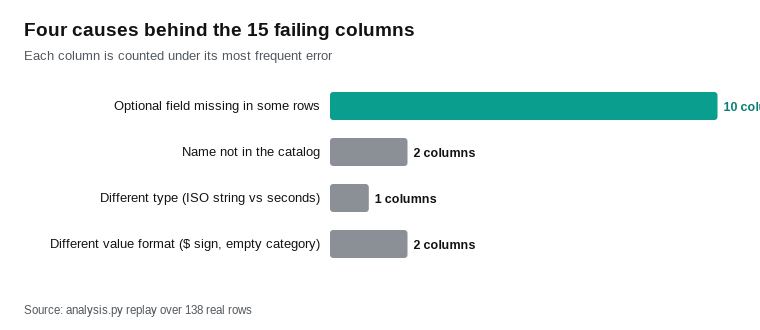
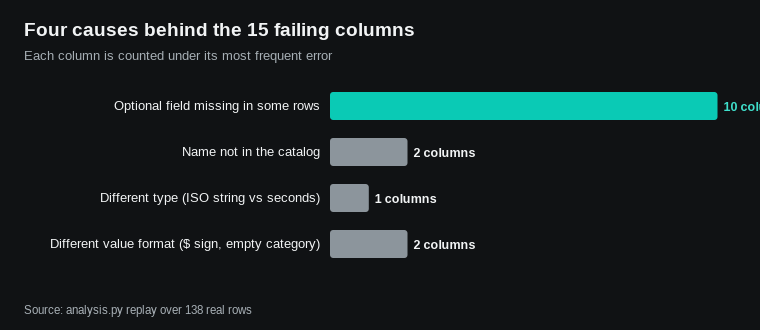
We put each of the 15 columns under its most common error. Absent optional keys cause 10 columns, and wrong names cause 2. A "read the catalog first" plan stops the 2 wrong names: milestone and score are not in response_fields, and a static diff finds them. It does not stop most of the other 13. Those fields are in the catalog, but not on every row, or their values have a different shape.
One sample can mislead you
Take a sample from a different target, and the share of an optional field can jump from zero to half. The chart shows six optional fields in three samples each.
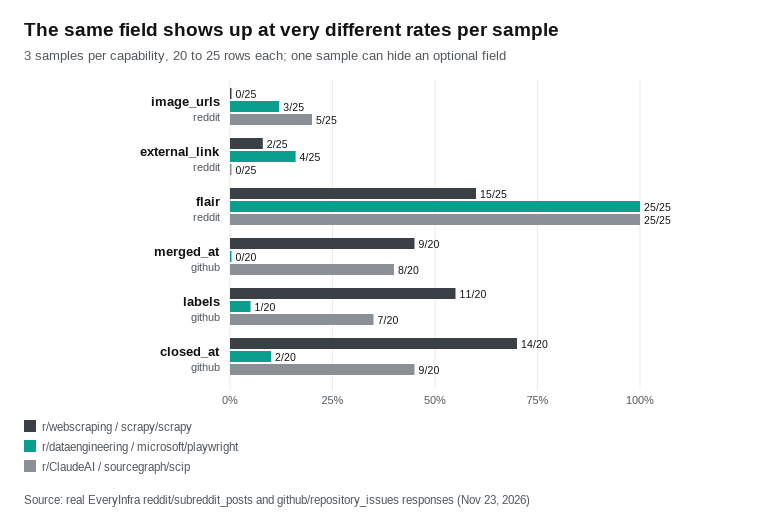
With only the r/webscraping sample, an agent concludes that image_urls never appears. With only the microsoft/playwright sample, it concludes that merged_at never appears. The 20 playwright items were sorted by update time, and 18 of them were still open, so none had a merge time. The scrapy and scip samples had 9 and 8 merged pull requests.
Reddit shows the same effect. A text post has domain set to self.<subreddit>: 23, 18 and 20 of 25 posts in the three subreddits. Only link posts have external_link (2, 4 and 0 posts), and thumbnail_url appeared 2, 6 and 1 times. like_count ran from 0 to 265 and comment_count up to 122, both integers.
Put the sample rule in the plan. Take at least 2 different targets per capability. Pick targets in different states: an active repository and a slow one, a product with stock and one without.
Time formats differ between capabilities
The field name is posted_at in all 5 capabilities, but there are three formats. GitHub and YouTube use 2026-11-22T13:10:16+00:00. Reddit adds six decimal places: 2026-11-21T18:13:35.219000+00:00. All 30 App Store reviews use -07:00, for example 2026-11-20T07:29:32-07:00. All three are valid RFC 3339 times (RFC 3339), and Python datetime.fromisoformat reads all three (Python docs: datetime).
Two habits break. If you compare the first 19 characters as UTC, App Store reviews are 7 hours off. If you cut the string with a fixed-width pattern, Reddit times break. Our sample parser reads Reddit time as Unix seconds, and all 75 rows fail with a TypeError. That is a third way to break, and it happens when you move from an older API that sends seconds.
The App Store sample is the newest 30 reviews of the GitHub iOS app (app_id 1477376905). The reviews run from October 27 to November 20, 2026, and all of them use the -07:00 offset. A parser that reads the offset and converts to UTC before it compares times works with any offset. This is the only capability of the five with all declared fields on every row: 12 fields on 30 rows.
Fourteen reviews have 5 stars and 8 have 1 star. rating is an integer with rating_scale 5, so convert it before you store it next to the decimal Amazon ratings. app_version covers four versions from 1.282.1 to 1.285.0, and helpful_count is an integer with a maximum of 1. See the App Store reviews API.
The YouTube video API sample (video 71mHvFVWC00) returned 23 keys, without hashtags or search_rank. All 10 results of the youtube/search call at 00:18:21 had search_rank, with 16 keys per result. A single video lookup has no rank to give. We read the video description, and it has no hashtags.
The detail call adds channel numbers: author_follower_count 8,490, author_video_count 68 and author_view_count 1,197,423, all integers. Three booleans (is_comments_disabled, is_members_only, is_paid_partnership) are false. Search and detail on one platform return different key sets, so one mapping table cannot read both.
The GitHub samples have one more time issue. All three repositories were sorted by updated_at. In scrapy, 3 of 20 items were created before November 1, 2026, and in scip, 12 of 20. The oldest scip pull request dates from May 23, 2022.
All 20 playwright items were created after November 19. An incremental sync that filters "last 7 days" on posted_at misses most scip updates. Filter on updated_at.
Fix the 15 columns, then run again
There are four kinds of fix.
| Cause | Fix | Example from the replay |
|---|---|---|
| Optional key absent on some rows | Read with r.get(); treat "" as a missing key | closed_at, labels, flair, price |
| Name not in the catalog | Use the catalog name, or drop the column | score becomes like_count; milestone goes |
| Different type | Parse the real type | posted_at uses fromisoformat |
| Different value format | Store the value as it comes; convert downstream | currency stays $; empty category becomes None |
def opt(r, key, conv=lambda v: v):
    v = r.get(key)
    return None if v in (None, "") else conv(v)

PRODUCT_FIELDS = {  # amazon/profile
    "price":      lambda r: opt(r, "price", float),
    "list_price": lambda r: opt(r, "list_price", float),
    "currency":   lambda r: opt(r, "currency"),
    "category":   lambda r: opt(r, "category", lambda s: s.split(" > ")[0]),
    "top_rank":   lambda r: (r.get("bestseller_ranks") or [{}])[0].get("rank"),
    "desc":       lambda r: opt(r, "description", lambda s: s[:500]),
}
We ran the same 138 rows through the fixed code, ingest/fields_fixed.py. All 31 columns passed on all 138 rows. With no errors left, the nulls are now a data question. closed is None on 35 rows, flair on 10 and link (external_link) on 69. On the Amazon side, price, list_price and currency are None on 1 row each. category and top_rank are None on 2 rows, desc on all 3, and milestone on every row.
Put these counts in the plan too. The target table must allow nulls in these columns. A dashboard with an average price or a count per category must say how it treats products with no stock and empty categories. Send the null counts downstream together with the code change.
float() on list_price also fixes the integer and decimal mix. Both 27 and 79.99 become floats, so a strict check downstream does not fail on a whole-dollar price. We did not convert $ to USD in the parser. One symbol does not map to one currency code, because Canadian and Australian dollars also use $. All three samples came from amazon.com, so the site tells you the currency is US dollars. Do that step downstream, where the code knows the site.
Let the agent do it: a prompt and a check script
The Agentic Batch Changes prompt docs say that your first message can be imperfect. It must state the result you want (Sourcegraph docs: Writing prompts). Here is a field check as a fixed plan step. This is a configuration example, and we did not run it in Agentic Batch Changes.
Move every parser under ingest/ that reads EveryInfra results to the new warehouse schema.
Before you write the plan, run a field check:
1. Use keyword_search to find each r["..."] and r.get("...") in ingest/. Group the field names by platform/action.
2. For each platform/action, call everyinfra_list_capabilities for response_fields and field notes.
   Then call everyinfra_call_api for 2 samples from different targets, with limit 5 or less.
3. Make a table: field name, in catalog or not, rows present in samples, real type, type the code expects.
4. For each field that is missing from the catalog, absent in some rows, or of a different type,
   write the fix in the plan before you run it.
5. If you cannot get samples, stop and report. Do not skip the check.
The five columns in step 3 match the five sources of trouble in the field table. They are name, catalog entry, rows present, real type and expected type. Step 4 asks for the fix before the run, so a person sees "this column can be empty" in the plan, before any changeset test.
The limit of 5 in step 2 has a reason. The sourcegraph/scip sample of 20 items was 286,640 bytes. One issue body in it had 57,983 characters. The scrapy sample of 20 items was only 26,658 bytes. The agent needs the fields, not the full text, so a small limit saves context.
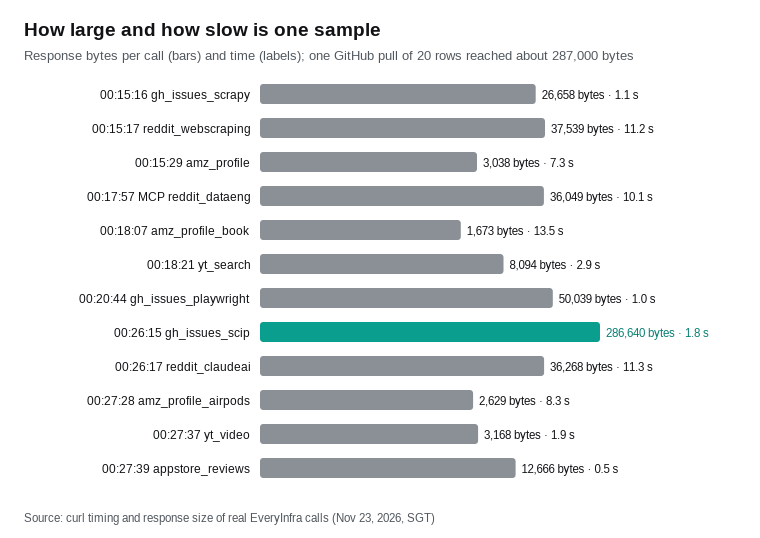
Time also goes into the plan. Reddit took 10 to 11 seconds per call, Amazon 7 to 13.5 seconds, and GitHub and App Store less than 2 seconds. Five capabilities with 2 samples each take about a minute in series. The catalog says that any capability accepts "mode":"async". You get a job_id and poll for the result (EveryInfra catalog). The agent can send all requests at once and collect them with everyinfra_get_job.
You can also give the agent a script and skip the model comparison. You can check a script result row by row. Our script does three things.
It pulls every r["field"] and r.get("field") from the parser with a regular expression and diffs them against response_fields. It counts the rows and types for each field in the samples. It runs each column on each row and records the exceptions. The core is short:
for col, fn in fmap.items():          # fmap is a table such as ISSUE_FIELDS
    ok, errs = 0, {}
    for r in rows:                    # rows holds every result row from the samples
        try:
            fn(r); ok += 1
        except Exception as e:
            key = type(e).__name__ + ": " + str(e)[:60]
            errs[key] = errs.get(key, 0) + 1
    replay[col] = {"ok": ok, "fail": len(rows) - ok, "errors": errs}
Find every read in step 1 (configuration example)
Step 1 decides how complete the table is. Sourcegraph search supports regular expressions (patterntype:regexp), language filters (lang:) and path filters (file:). count:all returns all results (Sourcegraph docs: Search Query Syntax). For the style in our sample parser, a query can look like this:
lang:python file:^ingest/ patterntype:regexp count:all r(\[|\.get\()\x22\w+\x22The pattern uses \x22 for the double quote, so the search box does not read the quote as a delimiter. We tested this pattern with Python re on the sample parser only. It matched all 33 reads in the 31 columns, because currency and category are read twice. We did not run it on a Sourcegraph instance.
One search pattern is not enough. In another file, the same field can be row.get("merged_at") or df["merged_at"]. It can be merged_at: datetime | None in a Pydantic model, a jq path, or a column name in SQL. The migration in the Sourcegraph GitLab Orbit video is an example: the table name appears only in a string. Use two passes.
First, search by code style. Then search for each field name from response_fields as a plain keyword, and add the files that the first pass missed. The Sourcegraph MCP tools keyword_search and nls_search cover exact search and natural-language search (Sourcegraph docs: MCP).
More reads mean more capabilities to sample. A parser repository that reads 5 capabilities costs 5 samples per round. One that reads 20 costs four times as much. Check only the capabilities that the changed files read. The Deep Search plan already lists the files to change, so map each file to its capabilities and sample only those.
Example plan: add a merged column (hypothetical)
This is a hypothetical change. It shows what a field check looks like in a plan. We did not run it in Agentic Batch Changes. The numbers come from the three GitHub samples above.
Assume that a sync job reads open issues only. The change adds closed issues and pull requests, and writes merged into a boolean column. Code search finds 13 GitHub reads in the sample parser. Three of them matter here: closed_at, merged_at and is_draft.
The agent reads the github/repository_issues catalog entry first. The notes say that closed_at and merged_at are absent when they do not apply, so the plan reads both as optional. This step is free.
Then the agent takes 5 items each from two repositories in different states. One is a slow repository with mostly merged pull requests. The other is a busy one with open issues and pull requests. In our samples, 9 of 20 scrapy items had merged_at and no playwright item did. is_draft appeared on pull request rows only, and all 13 issue rows had no key.
The plan gains three lines. merged uses "merged_at" in r, not r["merged_at"] is not None. closed uses opt(). draft means "not a draft" when the key is absent, and the schema notes say why the column is empty on issue rows. Two samples cost $0.001916. Code from this plan is the fixed version above, which passes all 13 GitHub columns on all 60 rows.
What it costs
All EveryInfra prices come from the catalog price_usd that we read at 00:13 on November 23. The 5 capabilities in a check are GitHub, Reddit and Amazon from above, plus two more. They are the YouTube video API and the App Store reviews API. We made one live call to each of the last two at 00:27, and the charges matched the catalog.
| Capability | price_usd (per call) | Live charges while sampling |
|---|---|---|
| github/repository_issues | $0.000958 | 3 calls at $0.000958 |
| reddit/subreddit_posts | $0.000556 | 3 calls at $0.000556 (1 through MCP) |
| amazon/profile | $0.001389 | 3 calls at $0.001389 |
| youtube/video | $0.000556 | 1 call |
| app_store/reviews | $0.001389 | 1 call, 30 reviews |
| Total: one change, 1 sample per capability | $0.004848 | — |
| Total: one change, 2 samples per capability | $0.009696 | — |
Assume a team makes 40 parser changes per month and checks 2 samples each time. The API fee is $0.39 per month, and $4.65 for 480 changes in a year. The Sourcegraph side is on a different scale. On November 23, the public pricing page showed only the Enterprise starting price. That price is a $16K minimum annual contract with AI feature usage (Sourcegraph: Pricing), about $1,333 per month. Agentic Batch Changes also bills per merged changeset, and the rate is in the Enterprise Portal only.
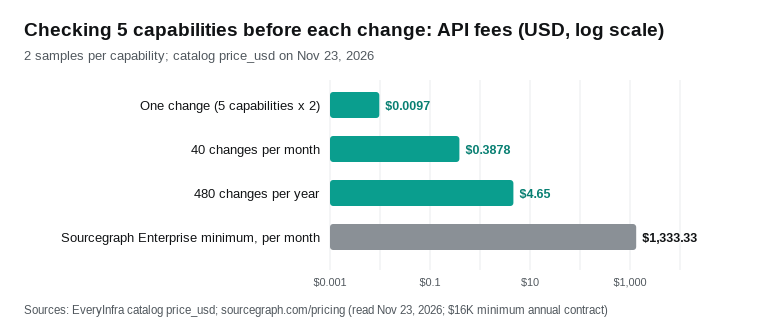
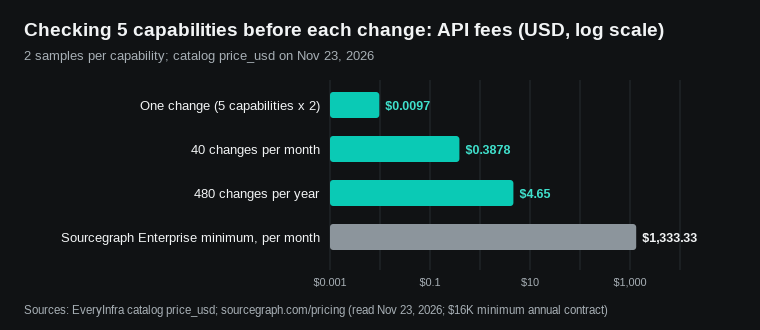
The price is per call, not per item. github/repository_issues returns up to 100 items per call, 30 by default, and 5 items cost the same as 20. Our 20-item calls each cost $0.000958, the same as the catalog price. A smaller limit saves context and transfer time, not money. To save money, check fewer capabilities: only the ones that the changed files read.
The 11 sample calls in the table cost $0.010654 in total. The catalog, tools/list and everyinfra_list_capabilities are free. A 422 for a wrong parameter and a 429 for the rate limit are also free. Prices for all capabilities are on the pricing page.
Errors and charges: three cases for the agent
| Case | When it happens | HTTP | Charge | What the agent does |
|---|---|---|---|---|
Wrong parameter name (repo instead of url) | Live test, 2026-11-23 00:20:45 | 422 missing_param | none | Read next_steps and example, fix the parameter, send again |
| More calls per minute than the key allows | Many samples sent at once | 429 rate_limited | none | Read x-ratelimit-reset-requests, wait for the reset, send again |
| Normal response | Live test, 2026-11-23 00:15–00:27 | 200 | catalog price | Parse results and run the field check |
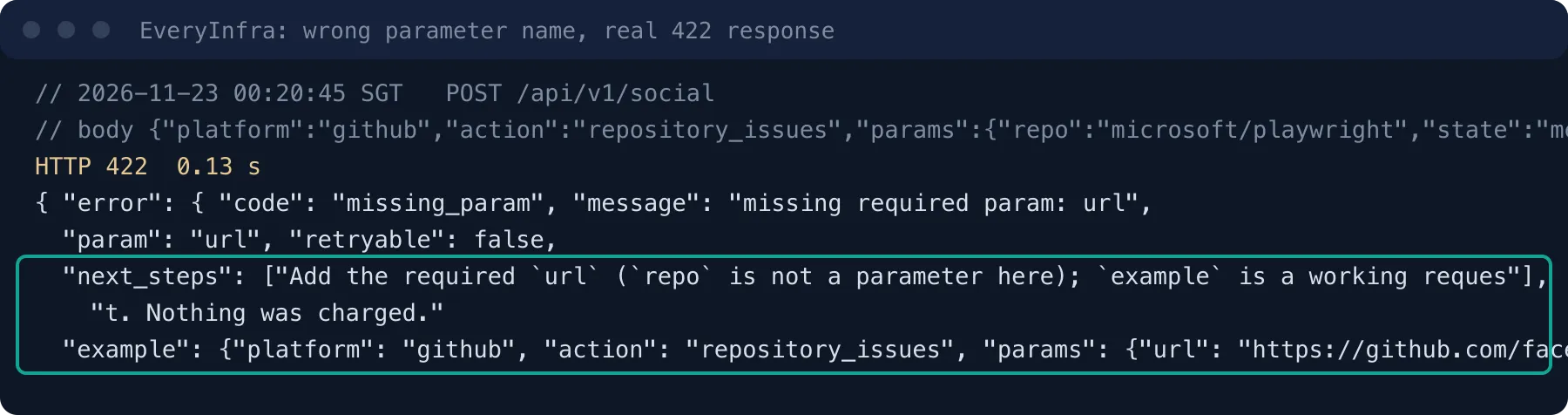
An agent can fix a request from the 422 body alone. next_steps says to add the required url and that repo is not a parameter here. It includes an example that runs as is. The last sentence is "Nothing was charged".
A wrong field or parameter name in the plan costs one round trip of 0.13 seconds and no money.
Three more fields in the error body tell the agent what to do next. fault is request, so the problem is in the request. retryable is false, so the same request fails again until the agent changes it. catalog_url points to /api/v1/social/catalog?platform=github, the parameter list for that platform.
A 429 is the other case: the request is fine, and the same request works after the limit resets. Our 200 responses carry x-ratelimit-limit-requests, x-ratelimit-remaining-requests and x-ratelimit-reset-requests. An agent that reads the remaining count before it sends parallel samples stays inside the limit. Put both cases in the prompt. Then the agent does not retry a 422 in a loop or stop after one 429.
When to run the check and when to skip it
The check belongs in the plan stage because changes are cheapest there. Take the same merged_at KeyError. In the plan, the agent adds one line: "read merged_at as optional". In a changeset test, the coding step runs again.
After the merge, on a repository with only open pull requests, someone reads logs, finds the change and opens a fix. One Agentic Batch Changes task can cover many repositories, with one changeset per repository. One missed field in the plan means that all of those changesets need a fix.
description did not appear in any of our three Amazon samples, so a non-null rule on that column fails on the first write.
| Change | Field check | Why |
|---|---|---|
| New capability in the parser | Always | No earlier sample exists |
| Times, amounts, currencies, categories | Always | Value format matters, and types alone do not show it |
Optional field becomes required (NOT NULL) | Always | One absent key fails the first write |
| Log format, variable rename, dependency upgrade | Skip | No field read changes |
| Fields checked this week on the same targets | Skip | A new sample adds cost and no new facts |
Store the 138 rows as test input for the parser, and you have a regression test with an outside source of truth. The old code fails 15 columns on them, and the fixed code passes all 31. After each field check, put the new samples in the "API response sample" file of your tests. Then the tests use what the API returns today.
Limits and cautions
In 8.2, admin context filters (experimentalFeatures.agents.contextFilters) apply to all Sourcegraph MCP tools (Sourcegraph: 8.2 release notes; Sourcegraph docs: Agent Context Filters). The agent cannot search a repository that a filter excludes. Parser code in that repository stays out of the field check.
A sample proves that a field can appear. It does not prove that a field always appears. description did not appear in 3 Amazon samples, but other products can have it. hashtags did not appear on one YouTube video.
Treat absent fields as optional in code.
Async samples need everyinfra_get_job. If you turn it off in the connector, a sample sent with "mode":"async" returns only a job_id. The field table then has a gap for that capability. Teams that use sync calls only can turn it off.
Our samples have limits too: 3 targets per capability and 138 rows in total. That is enough to find shape problems, but not enough to estimate the true absence rate of a field.
What the videos show and the docs do not
At 00:18:21 on November 23 we searched YouTube for "sourcegraph mcp" with youtube/search. All 10 results came from the official Sourcegraph channel. The most viewed was an Amp setup demo from January 15, 2026, with 145,404 views. The top three in rank were a Cursor setup (January 7, 2026, 1,712 views), a short codebase video (March 31, 2026, 786 views) and a GitLab Orbit comparison (October 20, 2026, 446 views). At 00:30 we pulled the transcripts of all three with youtube/transcript.
| Video | Date | Views | What it shows | What it leaves out |
|---|---|---|---|---|
| A Smarter Way to Search Code | Jan 7, 2026 | 1,712 | Cursor mcp.json paste and four search prompts | Token or OAuth sign-in |
| Understand your codebase | Mar 31, 2026 | 786 | One prompt about an auth system, 54 seconds | Any setup step |
| GitLab Orbit vs. Sourcegraph MCP | Oct 20, 2026 | 446 | 7 writers of one table versus 6, with one config entry counted twice | The data inside the table |
The first video opens the MCP settings from the Cursor command palette and pastes JSON that points at a Sourcegraph endpoint. Then it runs several prompts. It draws an ASCII diagram of an auth service. It lists recent changes in a migrations folder. It finds every README that describes deployment and compares them.
It searches the Kubernetes commit history for security fixes (YouTube: A Smarter Way to Search Code). The video does not show a token step or an OAuth sign-in. The docs do. An access token uses the token prefix, and an OAuth client with invalid_scope needs the scope mcp.
In the third video, the same agent, model and prompt ask which code in the GitLab codebase writes to the ci_running_builds table. GitLab Orbit reports 6 places, and one of them is a config entry that it counts twice. Sourcegraph reports 7, counts that config entry once, and finds 2 places that Orbit missed. One is a delete that runs when a job is force-failed and skips the normal state change. The other is a migration that names the table only in a string (YouTube: GitLab Orbit vs. Sourcegraph MCP).
The video answers "which code touches this table". It does not answer "what data is in the table". With a connector, Sourcegraph finds all the code, and an outside MCP server supplies the samples. None of the three videos shows connectors. The feature came out after the videos.
Industry updates
| Date | What changed | What it means for you |
|---|---|---|
| Nov 18, 2026 | Sourcegraph self-hosted 8.2: connectors on by default, context filters apply to all MCP tools (Sourcegraph: 8.2) | After the upgrade, any user can connect an outside MCP server. Decide on Connectors: Write User first. |
| Nov 16, 2026 | The default Sourcegraph MCP endpoint gets every tool; connectors get basic auth (Sourcegraph changelog: November 16th updates) | Clients on /.api/mcp since March now see Deep Search and more. Check the context cost again. |
| Nov 15, 2026 | Cloud Security Alliance note on dependency drift in MCP servers (CSA) | A remote server resolves no packages on your machine, but it still changes. Read its tool list again from time to time. |
| Nov 11, 2026 | Agent Skills joins MCP in the Agentic AI Foundation; the 2026-07-28 spec makes MCP stateless (Google Open Source Blog) | The spec drops the initialize handshake: our curl call sent no initialize, and the server answered (MCP spec 2026-07-28: Key Changes). Clients move at different speeds, so one config can act differently in two clients. |
| Nov 9, 2026 | Agentic Batch Changes adds merge approval in the thread; nothing merges until you click Allow (Sourcegraph changelog: November 9th updates). The feature has been generally available since September 14, 2026 (Sourcegraph changelog: Agentic Batch Changes GA) | With the field check in the plan, a person still approves each merge. |
FAQ
How do I connect Sourcegraph MCP to Claude Code?
The Sourcegraph docs give claude mcp add --transport http --scope user sourcegraph https://<instance>/.api/mcp. Then run claude mcp login sourcegraph, or type /mcp in Claude Code to sign in through the browser. Without --scope user, the server applies to the current project only (Sourcegraph docs: Client Integrations). To add EveryInfra as well, add a second server to .mcp.json as shown earlier.
Is Sourcegraph MCP free?
No. The docs that we read on November 23 say that the MCP server is "Supported on Enterprise plans". The public pricing page lists Enterprise only. Code Finder uses the instance allowance and returns an error when it runs out (Sourcegraph docs: MCP; Sourcegraph: Pricing). On the EveryInfra side, you pay per call, and tool lists and the catalog are free.
Is there a Sourcegraph MCP repository on GitHub?
In the Sourcegraph docs that we read, the MCP server is an HTTP endpoint inside the instance, /.api/mcp. The documented setup installs no package from GitHub. A client needs only the URL and auth (Sourcegraph docs: MCP).
What do I do when Sourcegraph connectors are not working?
Go through the Connectors docs item by item. Is the server stdio-only? That is not supported.
Does a personal connector point at a private address? Personal connectors reach public addresses only. Does EXTERNAL_DENY_LIST on a self-hosted instance block the host? Does the connection show "Connection expired"?
Click Reconnect. Is "Use in Agentic Batch Changes" selected in your settings? When a server rejects credentials, Sourcegraph notifies the admin or the owner (Sourcegraph docs: Connectors). For EveryInfra, also check that the header uses the Bearer prefix.
Which tools does Sourcegraph MCP have?
The docs list read_file, list_files, list_repos, list_refs, keyword_search, nls_search, evaluator, go_to_definition, find_references, commit_search, diff_search, compare_revisions, get_contributor_repos, code_finder, deepsearch and deepsearch_read. Admins can turn off single tools with mcp.tools.disabled (Sourcegraph docs: MCP).
The default endpoint changed twice. On March 30, 2026, Sourcegraph cut /.api/mcp down to 8 tools. The reason was that many clients load every tool definition at once (Sourcegraph changelog: Curated default MCP tools). On November 16, it put every tool back, including Deep Search and code navigation (Sourcegraph changelog: November 16th updates). The per-endpoint table in the MCP docs that we read on November 23 still shows compare_revisions and find_references as absent from /.api/mcp. Call tools/list and read the real list.
Does Sourcegraph MCP work with Codex?
Yes. Add [mcp_servers.sourcegraph] with a url to ~/.codex/config.toml, then run codex mcp login sourcegraph. If sign-in fails with invalid_scope, add scopes = ["mcp"] to the same section (Sourcegraph docs: Client Integrations). The Codex docs describe MCP servers in config.toml too (ChatGPT Learn: Model Context Protocol).
Get started
- Get an API key in the EveryInfra quickstart. Make a separate key for Sourcegraph.
- Read the free catalog at
GET https://api.everyinfra.com/api/v1/social/catalog. Find eachplatform/actionthat your parser reads. Readresponse_fields,platform_field_meaningsandfield_note. - Add a connector in Sourcegraph as shown earlier (configuration example). Or connect both servers locally with
.mcp.json. The EveryInfra MCP page describes the remote server. - Take 2 samples from different targets per capability with
limit5 or less. Compare the fields with the reads in your code. - Platform pages: GitHub API, Reddit API, Amazon API. Related articles: GitHub Copilot MCP connectors, Atlassian MCP server, Claude Code code mode, HubSpot MCP pricing.
References
- Sourcegraph self-hosted 8.2. Sourcegraph changelog, November 18, 2026. https://sourcegraph.com/changelog/releases/8.2
- Sourcegraph self-hosted 8.2.1283. Sourcegraph changelog, November 18, 2026. https://sourcegraph.com/changelog/releases/8.2.1283
- Connect Agentic Batch Changes to the outside world. Sourcegraph changelog, November 2, 2026. https://sourcegraph.com/changelog/agentic-batch-changes-connectors
- November 16th updates. Sourcegraph changelog, November 16, 2026. https://sourcegraph.com/changelog/2026-11-16
- November 9th updates. Sourcegraph changelog, November 9, 2026. https://sourcegraph.com/changelog/2026-11-09
- Curated default MCP tools. Sourcegraph changelog, March 30, 2026. https://sourcegraph.com/changelog/mcp-curated-default-tools
- Agentic Batch Changes is generally available. Sourcegraph changelog, September 14, 2026. https://sourcegraph.com/changelog/agentic-batch-changes-ga
- Connectors. Sourcegraph docs, read November 23, 2026. https://sourcegraph.com/docs/agentic-batch-changes/connectors
- Configuration and administration. Sourcegraph docs, read November 23, 2026. https://sourcegraph.com/docs/agentic-batch-changes/configuration
- Writing prompts. Sourcegraph docs, read November 23, 2026. https://sourcegraph.com/docs/agentic-batch-changes/writing-prompts
- Sourcegraph MCP Server. Sourcegraph docs, read November 23, 2026. https://sourcegraph.com/docs/api/mcp
- Client Integrations. Sourcegraph docs, read November 23, 2026. https://sourcegraph.com/docs/api/mcp/client-integrations
- MCP Authentication. Sourcegraph docs, read November 23, 2026. https://sourcegraph.com/docs/api/mcp/authentication
- Agent Context Filters. Sourcegraph docs, read November 23, 2026. https://sourcegraph.com/docs/context-filters
- Deep Search. Sourcegraph docs, read November 23, 2026. https://sourcegraph.com/docs/deep-search
- Search Query Syntax. Sourcegraph docs, read November 23, 2026. https://sourcegraph.com/docs/code-search/queries
- Pricing. Sourcegraph, read November 23, 2026. https://sourcegraph.com/pricing
- Agentic Batch Changes product page. Sourcegraph, read November 23, 2026. https://sourcegraph.com/agentic-batch-changes
- MCP stories from the field. Sourcegraph blog, March 20, 2026. https://sourcegraph.com/blog/mcp-stories-from-the-field
- Changelog. Sourcegraph, read November 23, 2026. https://sourcegraph.com/changelog
- Tools. MCP specification 2026-07-28. https://modelcontextprotocol.io/specification/2026-07-28/server/tools
- Schema Reference (ToolAnnotations). MCP specification 2026-07-28. https://modelcontextprotocol.io/specification/2026-07-28/schema
- Key Changes. MCP specification 2026-07-28. https://modelcontextprotocol.io/specification/2026-07-28/changelog
- Transports. MCP specification 2026-07-28. https://modelcontextprotocol.io/specification/2026-07-28/basic/transports
- Authorization. MCP specification 2026-07-28. https://modelcontextprotocol.io/specification/2026-07-28/basic/authorization
- Connect Claude Code to tools via MCP. Claude Code docs, read November 23, 2026. https://code.claude.com/docs/en/mcp
- MCP. Amp docs, read November 23, 2026. https://ampcode.com/docs/customize/mcp
- Model Context Protocol. ChatGPT Learn (Codex), read November 23, 2026. https://learn.chatgpt.com/docs/extend/mcp
- RFC 8259: The JavaScript Object Notation (JSON) Data Interchange Format. IETF, December 2017. https://www.rfc-editor.org/rfc/rfc8259
- RFC 3339: Date and Time on the Internet: Timestamps. IETF, July 2002. https://www.rfc-editor.org/rfc/rfc3339
- datetime. Python docs, read November 23, 2026. https://docs.python.org/3/library/datetime.html
- json. Python docs, read November 23, 2026. https://docs.python.org/3/library/json.html
- Numeric types. JSON Schema, read November 23, 2026. https://json-schema.org/understanding-json-schema/reference/numeric
- Strict Mode. Pydantic docs, read November 23, 2026. https://docs.pydantic.dev/latest/concepts/strict_mode/
- REST API endpoints for issues. GitHub docs, read November 23, 2026. https://docs.github.com/en/rest/issues/issues
- Pinned but Not Frozen: Dependency Drift in Coding-Assistant MCP Servers. Cloud Security Alliance, November 15, 2026. https://labs.cloudsecurityalliance.org/research/csa-research-note-mcp-server-dependency-drift-20261115-csa-s/
- Scaling AI agents with open standards. Google Open Source Blog, November 11, 2026. https://opensource.googleblog.com/2026/11/scaling-ai-agents-open-standards-mcp-aaif.html
- A Smarter Way to Search Code (Cursor + Sourcegraph MCP). Sourcegraph YouTube channel, January 7, 2026. https://www.youtube.com/watch?v=71mHvFVWC00
- Understand your codebase with the Sourcegraph MCP server. Sourcegraph YouTube channel, March 31, 2026. https://www.youtube.com/watch?v=t7_Xgw_xdD8
- GitLab Orbit vs. Sourcegraph MCP. Sourcegraph YouTube channel, October 20, 2026. https://www.youtube.com/watch?v=a25w5gKZsjw
- EveryInfra data API catalog. EveryInfra, read November 23, 2026 at 00:13 SGT. https://api.everyinfra.com/api/v1/social/catalog
Reference BL-214