Apify Pricing Calculator: Monthly Bill by Platform, Volume and Run Frequency
A runnable Apify pricing calculator: 30,000 TikTok videos a month cost $90.03 on Starter vs $0.33 with us. At 24 runs a day, small-job gaps fall to 48x.

Say you need 30,000 TikTok keyword videos a month and you run the job once a day. With the public Apify prices we read on November 13, 2026, the cheapest plan for that job is Starter, and the month costs $90.03. The same job on the EveryInfra tiktok/search capability costs $0.33, a 270x gap. We base that on three live calls that evening. Each request was charged $0.000556 and returned 50 rows, so 1,000 rows a day take 20 requests, or 600 requests a month.
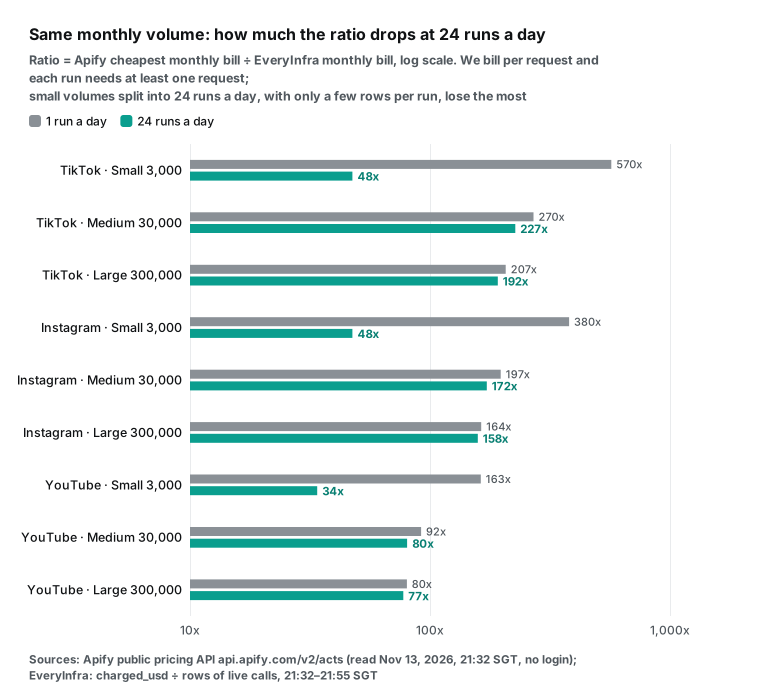
Now split the same monthly volume into 24 small runs a day. The gap gets smaller, and it shrinks most for small jobs. At 3,000 results a month, TikTok drops from 570x to 48x and YouTube drops from 163x to 34x. The reason is simple: we bill per request, and each run needs at least one request. For single-object lookups, such as checking 50 Instagram profiles every hour, the gap is only 4.1x.

Two earlier posts on this site cover parts of this topic. Apify pricing explained, from 2026-10-27, breaks an Apify invoice into five layers: plan fee, events, compute units, proxy and storage. Apify alternatives, from 2026-10-26, compares the price per 1,000 results across nine data types.
On the Apify side we use public material only. That is the pricing page, the official docs and the public endpoint api.apify.com/v2/acts/<actor>, which needs no account.
We did not sign up for Apify and we did not pay to run any of its actors. The two services are separate products with their own fields and data. This guide compares money only.
| Summary | Apify | EveryInfra |
|---|---|---|
| How it bills | Per event (result, start, add-ons) or per usage, inside a monthly plan | Per request, no plan |
| Monthly floor | $0 up to $5 of usage; then $19 (Starter) | No floor; the balance does not expire |
| 30,000 TikTok videos a month, 1 run a day | $90.03 (Starter) | $0.33 |
| 3,000 results a month, 24 runs a day | $19.00 | $0.40 to $0.56 (34x to 48x less) |
| 36,000 single profile lookups a month | $82.80 (Starter) | $20.02 (4.1x less) |
The four inputs an Apify pricing calculator needs
Whether you can predict an Apify bill depends on the pricing model of the actor you pick. The Apify docs now list two models: pay per event and pay per usage. The Actors in Store page says that most pay-per-event actors include platform usage in the event price. A few charge platform usage on top. You can calculate a pay-per-event actor exactly, because the price of every event is public in the API.
For a pay-per-usage actor you can only run a small test and scale it up. The docs say an estimate in advance is hard and that the best method is a small test run. So this calculator handles pay-per-event actors, and a later section gives an estimate formula for pay-per-usage actors.
A pay-per-event actor needs four inputs. The first is the actor itself, because it sets the events and the price on each plan. The second is the main event you pay for, which is usually "one result". The third is the number of results per month. The fourth is the number of runs per day.
That number sets the runs per month, and each run can carry a start fee. The Apify pricing and costs page for developers says that each event can have four tier prices. The tiers are FREE, BRONZE, SILVER and GOLD. These match the Free, Starter, Scale and Business plans. So you calculate the same input on all four tiers and keep the cheapest plan.
| Input | Effect on the Apify bill | Effect on the EveryInfra bill |
|---|---|---|
| Platform and actor or capability | Sets the event list and four tier prices, read from pricingInfos | Sets the price per request, read from the free catalog field price_usd |
| Results per month | Results × main event price, plus add-on events | Results ÷ rows returned per request = requests |
| Runs per day | Runs × start fee; the unit price does not change | Each run needs at least 1 request, so small runs add requests |
| Plan | The monthly fee is prepaid usage, and unused usage expires | No plan and no monthly fee; the balance does not expire |
Unused prepaid usage expires, so small jobs lose the most. The FAQ on the Apify pricing page gives the rule. Each plan includes prepaid usage equal to the monthly fee. Usage above that amount goes on the next invoice. On the Free plan, service stops until the next billing cycle.
Unused prepaid usage does not roll over. It expires at the end of the cycle. The billing docs add one more rule: overage is invoiced at once when it reaches a threshold before the next cycle. The threshold is $20 on Starter and $200 on higher plans. On our side, the EveryInfra pricing page says that a top-up balance does not expire and that you pay for actual use.
The formula: calculate each plan, keep the cheapest
Here are the rules above as a formula. The monthly bill of one pay-per-event actor is:
Usage U(plan)     = results per month × main event price(plan)
                  + Σ add-on event count × add-on event price(plan)
                  + runs per month × start fee(plan)
Pay(Free)         = 0 if U ≤ $5; otherwise the job cannot run this month
Pay(paid plan F)  = max(F, U), with F = $19 / $199 / $999
Best plan         = the plan with the lowest pay
EveryInfra month  = ceil(results per run ÷ measured rows per request) × runs per month × charged price
There are two kinds of start fee. Apify has a synthetic event, apify-actor-start. The pay-per-event docs give its default price as $0.00005.
It is charged once for each GB of run memory, with a minimum of one, so a 4 GB run pays $0.0002. In return, Apify covers the compute for the first 5 seconds of each run. The other kind is a start event that the author defines and prices.
The docs let an author raise the price of the synthetic event. They also say that a higher price does not buy more free compute time. Of the four actors we read, TikTok Scraper uses a custom actor-start event at $0.001 per run on every tier.
That is 20 times the synthetic default. Google Maps Scraper uses the synthetic event with a default of 4,096 MB, so it pays $0.0002 per run. Instagram Scraper and YouTube Scraper have no start event.
The API also defines the result event. For Instagram Scraper, the Result event description is "each result written to the dataset". The dataset docs say a run writes its results to its default dataset. The input and output docs tell you to read each actor's README to learn what it produces. That is why this guide takes the "one profile is one result" rule for Instagram Scraper from its Store page.
Keep two details in mind. First, the price tier follows your plan. You cannot buy Starter and pay Gold prices. Second, max(F, U) applies to paid plans only.
The Free plan is a hard cap. The pricing page says service stops after $5 until the next cycle. You cannot pay more to keep going. We checked the formula against the example on the pricing page itself.
Instagram Scraper on Starter costs $2.30 per 1,000 results, and the example bar shows 10,000 results. The formula gives max($19, 10,000 × $0.0023) = $23. That is the $19 prepaid usage plus $4 pay as you go.
We checked the formula a second time against the Instagram Scraper Store page, read at 23:25 SGT on 2026-11-13. The page says Starter costs $2.30 per 1,000 and lets you "scrape over 8,200 results per month". It gives 104,700 results for Scale at $1.90 and 666,000 for Business at $1.50.
With the formula, the result count that uses up the monthly fee exactly is fee ÷ unit price. That gives $19 ÷ $0.0023 = 8,261, $199 ÷ $0.0019 = 104,737 and $999 ÷ $0.0015 = 666,000. All three are within 0.1% of the numbers on the Apify page.
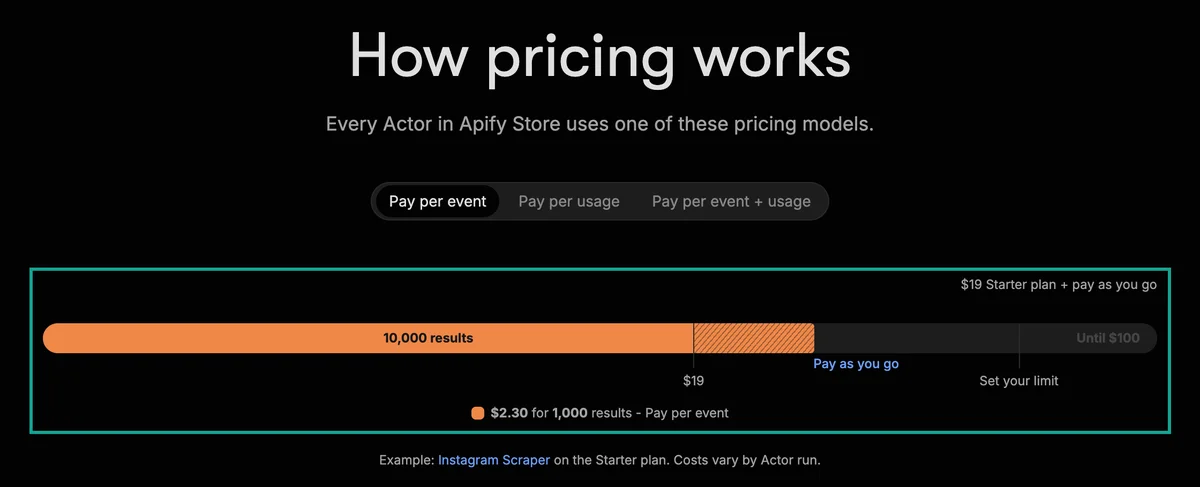
The calculator code: it reads the public Apify pricing API
The Get Actor API docs and the pay-per-event docs both say that you can read all events of an actor from this endpoint. For a public actor, a plain GET works with no token. In the response, data.pricingInfos is the pricing history and its last item is the current price.
Under pricingPerEvent.actorChargeEvents, each event has eventTieredPricingUsd with six tiers, FREE to DIAMOND. The calculator below uses the Python standard library only (urllib.request, math, argparse). Every Apify bill in this guide comes from this code. You can also use the official Python client, apify-client on PyPI. Its actor("author/name").get() call uses the same endpoint and returns the same pricingInfos.
import argparse, json, math, os, urllib.request

PLANS = [("FREE", "Free", 0, 5), ("BRONZE", "Starter", 19, None), ("SILVER", "Scale", 199, None), ("GOLD", "Business", 999, None)]

def load_actor(actor, offline=None):
    if offline:
        return json.load(open(os.path.join(offline, f"act_{actor}.json")))["data"]
    req = urllib.request.Request(f"https://api.apify.com/v2/acts/{actor}", headers={"User-Agent": "Mozilla/5.0"})
    return json.load(urllib.request.urlopen(req, timeout=30))["data"]

def current_pricing(data):
    return (data.get("pricingInfos") or [{}])[-1]          # last pricing record = current price

def start_fee(events, mem_mb):
    if "apify-actor-start" in events:                      # synthetic start event: once per GB of memory, minimum 1
        return events["apify-actor-start"].get("eventPriceUsd", 0.00005) * max(1, math.ceil(mem_mb / 1024))
    for name, ev in events.items():                        # custom start event set by the author, per run, per tier
        if "start" in name:
            return {t: v["tieredEventPriceUsd"] for t, v in ev["eventTieredPricingUsd"].items()}
    return 0.0

def apify_month(data, event, results, runs_per_day, days=30, addons=()):
    events = current_pricing(data)["pricingPerEvent"]["actorChargeEvents"]
    mem = (data.get("defaultRunOptions") or {}).get("memoryMbytes", 1024)
    runs, fee, rows = runs_per_day * days, start_fee(events, mem), []
    for tier, plan, F, free_cap in PLANS:
        unit = events[event]["eventTieredPricingUsd"][tier]["tieredEventPriceUsd"]
        unit += sum(events[a]["eventTieredPricingUsd"][tier]["tieredEventPriceUsd"] for a in addons)
        start = fee[tier] if isinstance(fee, dict) else fee
        U = results * unit + runs * start                   # usage this month
        pay = (0.0 if U <= free_cap else None) if free_cap is not None else max(F, U)
        rows.append({"plan": plan, "usage": U, "pay": pay})
    return rows, min((r for r in rows if r["pay"] is not None), key=lambda r: r["pay"])

def everyinfra_month(price_per_request, rows_per_request, results, runs_per_day, days=30):
    runs = runs_per_day * days
    return math.ceil(results / runs / rows_per_request) * runs * price_per_request

if __name__ == "__main__":
    ap = argparse.ArgumentParser()
    ap.add_argument("actor"); ap.add_argument("event"); ap.add_argument("results", type=int); ap.add_argument("runs_per_day", type=int)
    ap.add_argument("--addon", action="append", default=[]); ap.add_argument("--offline")
    ap.add_argument("--ei-price", type=float); ap.add_argument("--ei-rows", type=float)
    a = ap.parse_args()
    rows, best = apify_month(load_actor(a.actor, a.offline), a.event, a.results, a.runs_per_day, addons=a.addon)
    for r in rows:
        print(r["plan"], round(r["usage"], 2), "blocked" if r["pay"] is None else round(r["pay"], 2))
    print("cheapest", best["plan"], round(best["pay"], 2))
    if a.ei_price:
        ei = everyinfra_month(a.ei_price, a.ei_rows, a.results, a.runs_per_day)
        print("EveryInfra", round(ei, 4), "per 1k", round(a.ei_price / a.ei_rows * 1000, 4), "ratio", round(best["pay"] / ei, 1))
Run it as python3 calc.py clockworks~tiktok-scraper result 30000 1 --ei-price 0.000556 --ei-rows 50. Write the actor as "author~name". The second argument is the main event name, which you can see in the same API response. Then come results per month and runs per day. To add an add-on event, pass --addon event-name.
For example, contact details on Google Maps Scraper are --addon contact-details-scraped. To work offline, save the API response to a file and pass --offline folder. We saved the four responses on 2026-11-13 between 21:31 and 21:32 SGT. The two EveryInfra numbers come from one live call of your own. Put billing.charged_usd from the response in --ei-price, and put the returned row count, count, in --ei-rows. The next sections give the values from our three rounds of calls.
$ python3 calc.py clockworks~tiktok-scraper result 30000 1 --offline external --ei-price 0.000556 --ei-rows 50
Free 111.03 blocked
Starter 90.03 90.03
Scale 69.03 199
Business 51.03 999
cheapest Starter 90.03
EveryInfra 0.3336 per 1k 0.0111 ratio 269.9
You can check the EveryInfra line by hand. 30,000 results a month at 1 run a day is 1,000 rows per run. This test returned 50 rows per request, so a run needs ceil(1,000 ÷ 50) = 20 requests. 30 runs a month make 600 requests, and 600 × $0.000556 = $0.3336.
The price per 1,000 is the charge per request ÷ rows returned × 1,000 = $0.000556 ÷ 50 × 1,000 = $0.0111. The ratio is the cheapest Apify bill ÷ the EveryInfra bill = $90.03 ÷ $0.3336 = 269.9, or 270x when rounded.
Usage on Scale ($69.03) is lower than on Starter ($90.03), but Scale costs $199 first, so you pay more. Business has the lowest usage ($51.03) and costs $999.
A higher plan with lower unit prices only saves money when your usage fills its monthly fee. For TikTok Scraper at 1 run a day, Starter usage reaches $199 at 66,323 results a month. Above that point Scale is cheaper than Starter.
Current prices of four actors (read 2026-11-13)
We picked one popular, publicly priced Store actor per platform, and matched each one to an EveryInfra capability. All table values come from one read of the public API. The four sources are TikTok Scraper, Instagram Scraper, YouTube Scraper and Google Maps Scraper. "Price since" is the startedAt of the last pricingInfos record. "Records" is how many pricing records the actor has.
| Actor (main event) | Users, last 30 days | Free per 1k | Starter per 1k | Scale per 1k | Business per 1k | Start fee per run | Price since | Records | EveryInfra capability |
|---|---|---|---|---|---|---|---|---|---|
| TikTok Scraper (Result) | 36,395 | $3.70 | $3.00 | $2.30 | $1.70 | $0.001 (custom) | 2026-08-18 | 20 | tiktok/search |
| Instagram Scraper (Result) | 68,455 | $2.70 | $2.30 | $1.90 | $1.50 | none | 2026-02-20 | 8 | instagram/user_posts |
| YouTube Scraper (Video) | 17,662 | $4.00 | $3.00 | $2.60 | $2.40 | none | 2026-09-02 | 11 | youtube/search |
| Google Maps Scraper (Scraped place) | 48,349 | $4.00 | $3.00 | $2.00 | $1.50 | $0.0002 (4 GB × $0.00005) | 2026-06-30 | 15 | google_maps_reviews/search |
The four event lists differ a lot in length. Instagram Scraper has one event, Result, so its bill is the easiest to predict. YouTube Scraper has five: the other four are a channel date filter, AI descriptions, AI summaries and transcripts billed per minute. TikTok Scraper has twelve, with separate events for date filters, popularity filters, country targeting, video download, comments, transcripts and AI descriptions.
Google Maps Scraper has eleven, including contact enrichment, business leads, email checks, social profiles, reviews, images and AI competitor analysis. With the main event only, all four Starter prices sit between $2.30 and $3.00 per 1,000. Add-on events can double the price of one result, as the add-on section below shows.
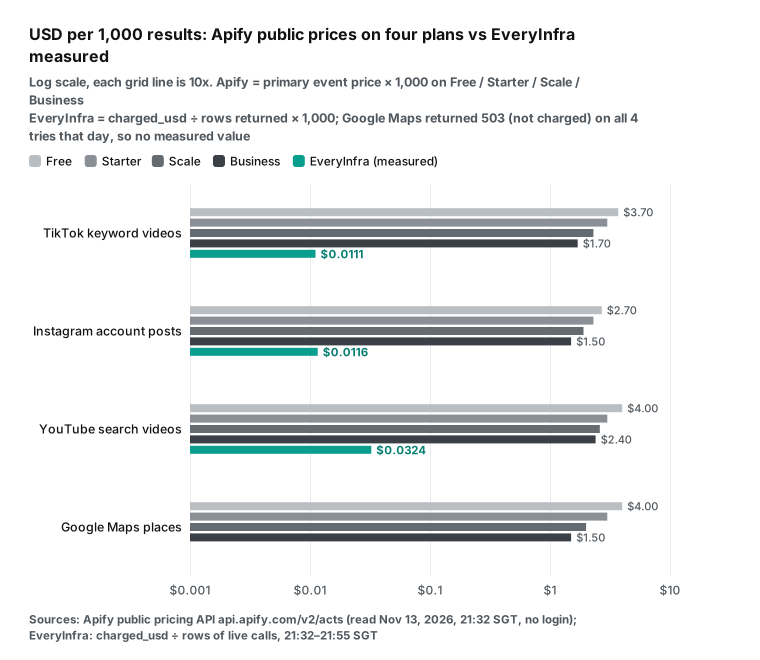
TikTok Scraper has 20 pricing records since February 2022, and the latest started on August 18, 2026. YouTube Scraper has 11 records since July 2023, and the latest started on September 2.
The Apify migration guide says that a price cut applies at once. A price increase needs 14 days of notice and can happen at most once a month. So a number from the calculator holds for about two weeks at most. The calculator reads the API again on every run.
The public endpoint has a few more fields that help with cost work. stats.totalUsers30Days is the user count for the last 30 days. stats.totalRuns is the total run count; on 2026-11-13 it was about 151 million for TikTok Scraper and about 231 million for Instagram Scraper.
defaultRunOptions.memoryMbytes is the default memory, which sets how many GB the synthetic start event charges. modifiedAt is the last update time, and all four actors were updated that day.
Our side: live calls on three capabilities at three times
The EveryInfra data API bills per request. One request has one price, whatever number of rows it returns up to the capability's maximum. So the price per 1,000 rows depends on two numbers: the catalog price per request, and the rows a request actually returns. The first is in the free catalog at api.everyinfra.com/api/v1/social/catalog. We read it at 21:32 SGT on 2026-11-13: tiktok/search and instagram/user_posts cost $0.000556 per request, youtube/search costs $0.000778, and google_maps_reviews/search costs $0.001389.
| Capability | Catalog price per request | Rows returned per request (this test) | Price per 1,000 rows (this test) |
|---|---|---|---|
tiktok/search | $0.000556 | 50 | $0.0111 |
instagram/user_posts | $0.000556 | 48 | $0.0116 |
youtube/search | $0.000778 | 24 (median) | $0.0324 |
google_maps_reviews/search | $0.001389 | supported in the catalog; not measured in this test | n/a |
The second number needs live calls. We made the same calls at three times on November 13: 21:32, 21:43 and 21:53 SGT. The "Rows" column is the count field of each response.
| Time (SGT) | Capability | Input | HTTP | Rows | charged_usd |
|---|---|---|---|---|---|
| 21:32 | tiktok/search | keyword air fryer recipe, async | 202, then 200 on poll | 50 | $0.000556 |
| 21:33 | instagram/user_posts | account natgeo, async | 202, then 200 on poll | 48 | $0.000556 |
| 21:34 | youtube/search | keyword air fryer recipe | 200 | 24 | $0.000778 |
| 21:43 | tiktok/search | same | 202, then 200 on poll | 50 | $0.000556 |
| 21:44 | instagram/user_posts | same | 202, then 200 on poll | 48 | $0.000556 |
| 21:45 | youtube/search | same | 200 | 24 | $0.000778 |
| 21:54 | tiktok/search | same | 202, then 200 on poll | 50 | $0.000556 |
| 21:54 | instagram/user_posts | same | 202, then 200 on poll | 48 | $0.000556 |
| 21:55 | youtube/search | same | 200 | 23 | $0.000778 |
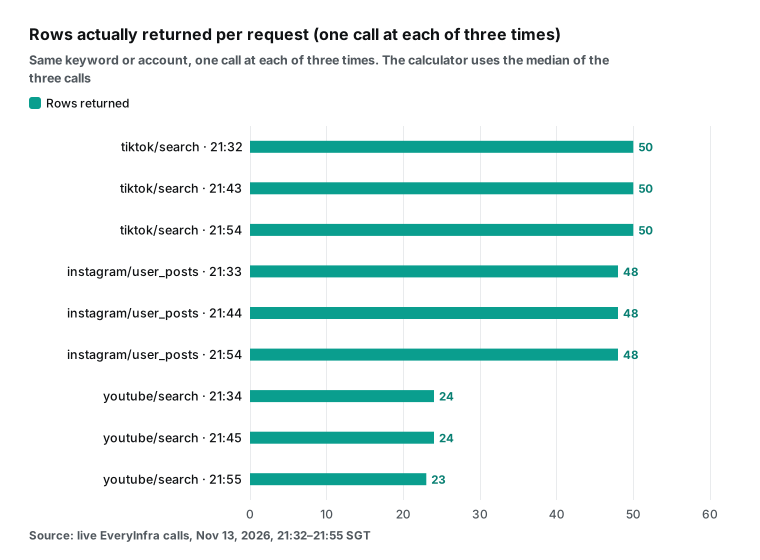
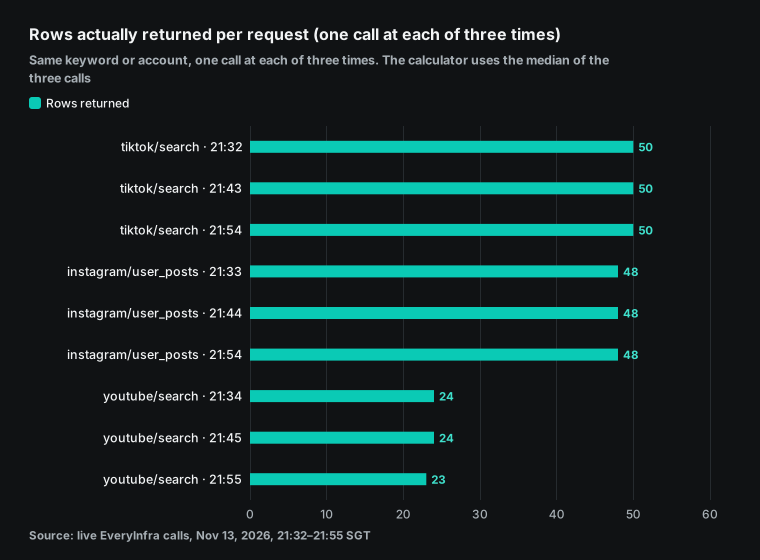
The row counts were nearly the same at all three times. In this test, TikTok keyword search returned 50 rows each time, and Instagram account posts returned 48. YouTube search returned 24 twice and 23 once, so the calculator uses the median of 24.
Every EveryInfra bill, price per 1,000 and ratio below uses these returned row counts. With a different keyword or account the count can change. Make one live call with your own input and put the returned count in --ei-rows.
Charge per request ÷ rows returned × 1,000 gives $0.000556 ÷ 50 × 1,000 = $0.0111, $0.000556 ÷ 48 × 1,000 = $0.0116 and $0.000778 ÷ 24 × 1,000 = $0.0324. For all three capabilities, the charge on each call matched the catalog price.
The catalog lists Google Maps place search as supported, at $0.001389 per request, but we did not measure it in this test. So the Google Maps rows below show the Apify price only, and no ratio includes Google Maps.
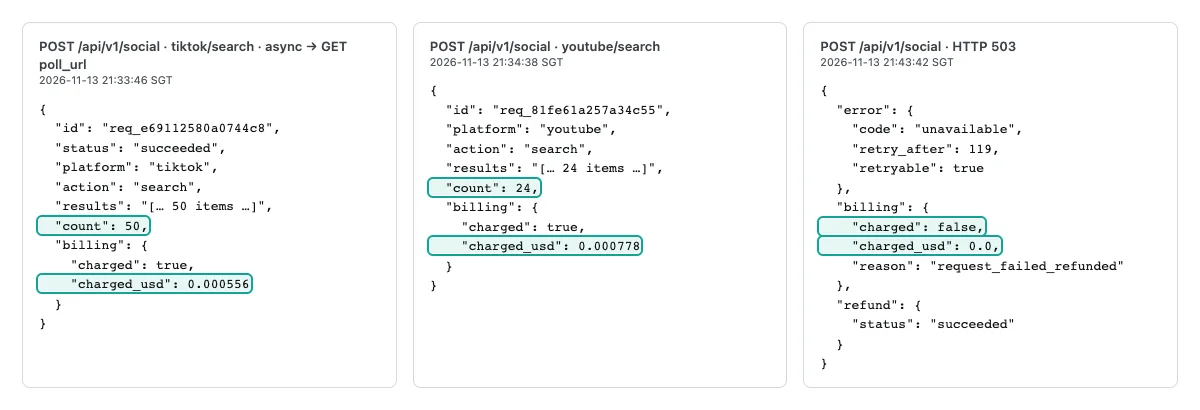
A request looks like this. Keep the key in an environment variable. For long jobs, add "mode":"async" to get a job_id at once, then poll the returned poll_url. This avoids the 85-second limit of a synchronous request. In the catalog, instagram/user_posts runs async by default.
curl -s https://api.everyinfra.com/api/v1/social \
  -H "Authorization: Bearer $EVERYINFRA_API_KEY" \
  -H "Content-Type: application/json" \
  -d '{"platform":"tiktok","action":"search","params":{"keyword":"air fryer recipe"},"mode":"async"}'
# Returns 202 and a job_id. GET poll_url until status is succeeded.
# In the result, count is the row count and billing.charged_usd is the charge.
The platform pages are TikTok API and YouTube API. Inputs and output fields for the three capabilities are on the tiktok/search, instagram/user_posts and youtube/search pages. Google Maps is on the Google Maps reviews API page and the google_maps_reviews/search page.
Apify pricing per month at three volumes
When people search "apify pricing per month", the usual confusion is how the plan fee and usage add up. A new user on r/apify asked exactly that: "Do I only pay for using this actor, or do I also need to pay for an Apify subscription plan?" He only wanted 8 to 10 LinkedIn profiles a day (thread). The reply said the $5 Free credit would cover it.
We calculated all four platforms at three monthly volumes, fixed before the calculation. Small is 3,000 results, medium is 30,000 and large is 300,000. Each month has 30 days and the job runs once a day.
| Results per month (1 run a day) | Platform | Cheapest Apify plan | Apify pays | Apify per 1k | EveryInfra pays | EveryInfra per 1k | Ratio |
|---|---|---|---|---|---|---|---|
| 3,000 | TikTok keyword videos | Starter | $19.00 | $6.33 | $0.0334 | $0.0111 | 570x |
| 3,000 | Instagram account posts | Starter | $19.00 | $6.33 | $0.0500 | $0.0167 | 380x |
| 3,000 | YouTube search videos | Starter | $19.00 | $6.33 | $0.1167 | $0.0389 | 163x |
| 3,000 | Google Maps places | Starter | $19.00 | $6.33 | not measured | n/a | n/a |
| 30,000 | TikTok keyword videos | Starter | $90.03 | $3.00 | $0.3336 | $0.0111 | 270x |
| 30,000 | Instagram account posts | Starter | $69.00 | $2.30 | $0.3503 | $0.0117 | 197x |
| 30,000 | YouTube search videos | Starter | $90.00 | $3.00 | $0.9803 | $0.0327 | 92x |
| 30,000 | Google Maps places | Starter | $90.01 | $3.00 | not measured | n/a | n/a |
| 300,000 | TikTok keyword videos | Scale | $690.03 | $2.30 | $3.34 | $0.0111 | 207x |
| 300,000 | Instagram account posts | Scale | $570.00 | $1.90 | $3.49 | $0.0116 | 164x |
| 300,000 | YouTube search videos | Scale | $780.00 | $2.60 | $9.73 | $0.0324 | 80x |
| 300,000 | Google Maps places | Scale | $600.01 | $2.00 | not measured | n/a | n/a |
In this table, "per 1k" on both sides is the monthly bill ÷ results per month × 1,000. The EveryInfra bill counts requests from the rows each request returned in our test.
You can check each cell by hand. Instagram at 30,000 results a month has Starter usage of 30,000 × $0.0023 = $69.00, above the $19 fee, so you pay $69.00. On our side each run needs 1,000 rows. At 48 rows per request that is ceil(1,000 ÷ 48) = 21 requests, or 630 a month, and 630 × $0.000556 = $0.3503. The ratio is $69.00 ÷ $0.3503 = 197x. TikTok at 300,000 a month has Scale usage of 300,000 × $0.0023 + 30 runs × $0.001 = $690.03, above $199, so you pay the usage.
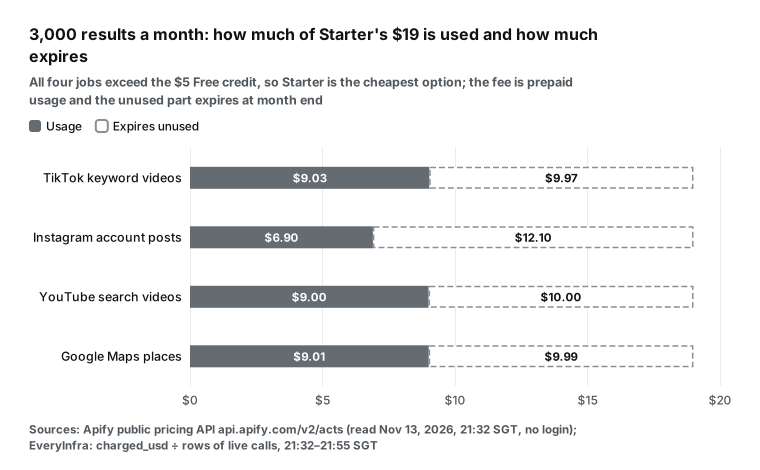
At the small volume every Apify platform costs $6.33 per 1,000, whatever the actor's list price. All four jobs exceed $5 on Free (TikTok usage $11.13, Instagram $8.10, YouTube $12.00, Google Maps $12.01). So they need Starter, and you pay the $19 fee: $19 ÷ 3,000 × 1,000 = $6.33. At the large volume the cheapest plan is Scale, and no job reaches Business.
Business has the lowest unit price, but 300,000 results ($450 to $720 of usage) does not fill its $999 fee. Our price per 1,000 is higher at the small volume. At 3,000 results and 1 run a day, each run needs 100 rows. At the 50 rows per TikTok request in this test, two requests are enough. At 48 rows per Instagram request, a run needs three, and the third needs only 4 rows but costs one full request.
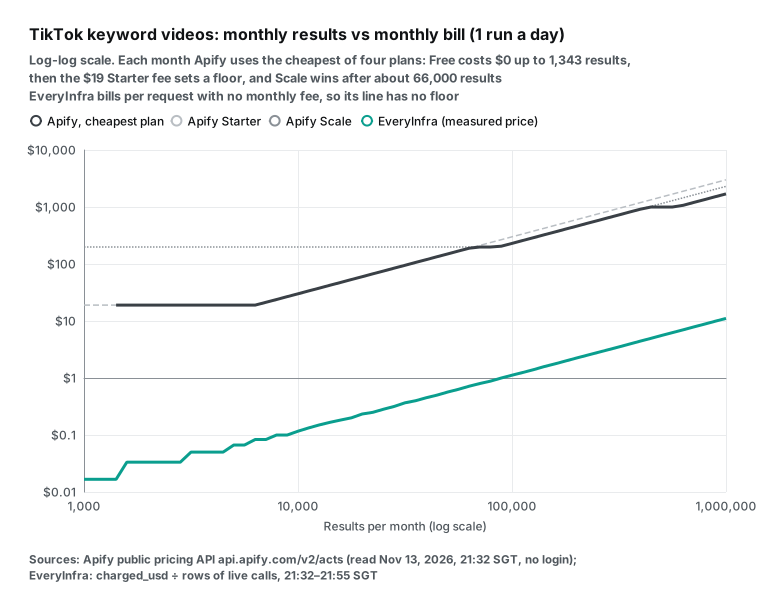
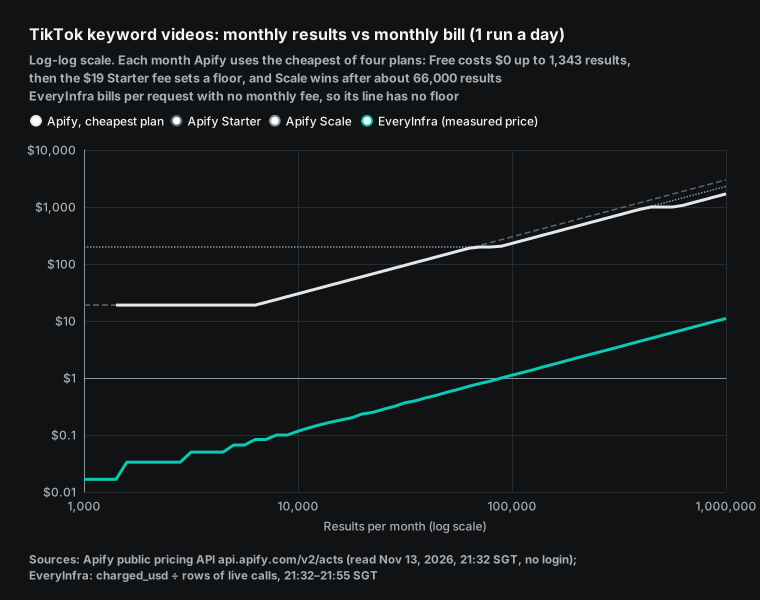
The chart shows the TikTok bill as a continuous line from 1,000 to 1,000,000 results a month. The cheapest Apify plan costs $0 up to 1,343 results, because the $5 Free credit covers that. From there the $19 fee holds it flat, and above about 6,300 results it rises with usage. At 66,323 results it moves to Scale.
At about 434,000 results Scale usage reaches $999, so Business is cheaper from that point. Business stays flat at $999 up to about 588,000 results. The EveryInfra line slopes from start to end, with no monthly fee as a floor. So the smaller the volume, the larger the gap between the lines. At large volumes the gap moves toward the ratio of the two unit prices (Scale at $2.30 vs our $0.0111, about 207x).
Runs per day: how frequency changes the bill
Scheduled runs are a normal way to use Apify. The Schedules docs say you can set run frequency with a cron expression. Each schedule can hold up to 10 actors and 10 tasks. In a May 2026 Apify video on price monitoring, 50 product URLs become one task that runs every 2 hours (video).
In the top 10 web results for "apify pricing calculator", no page uses "runs per day" as an input. In a top YouTube result, Apify itself says to sign up for free and do a test run to learn the cost (video). Below, the same three volumes are split into 24 runs a day, with results spread evenly across runs.
| Results per month | Platform | 1 run a day: Apify / EveryInfra / ratio | 24 runs a day: Apify / EveryInfra / ratio |
|---|---|---|---|
| 3,000 | TikTok keyword videos | $19.00 / $0.0334 / 570x | $19.00 / $0.4003 / 48x |
| 3,000 | Instagram account posts | $19.00 / $0.0500 / 380x | $19.00 / $0.4003 / 48x |
| 3,000 | YouTube search videos | $19.00 / $0.1167 / 163x | $19.00 / $0.5602 / 34x |
| 30,000 | TikTok keyword videos | $90.03 / $0.3336 / 270x | $90.72 / $0.4003 / 227x |
| 30,000 | Instagram account posts | $69.00 / $0.3503 / 197x | $69.00 / $0.4003 / 172x |
| 30,000 | YouTube search videos | $90.00 / $0.9803 / 92x | $90.00 / $1.1203 / 80x |
| 300,000 | TikTok keyword videos | $690.03 / $3.34 / 207x | $690.72 / $3.60 / 192x |
| 300,000 | Instagram account posts | $570.00 / $3.49 / 164x | $570.00 / $3.60 / 158x |
| 300,000 | YouTube search videos | $780.00 / $9.73 / 80x | $780.00 / $10.08 / 77x |
The two bills react to frequency in opposite ways. Apify charges per result. However you split the work, the result count stays the same, so the main event cost stays the same.
Only the start fee grows. TikTok Scraper at 24 runs a day makes 720 runs a month, and 720 × $0.001 = $0.72, so the 30,000-result bill goes from $90.03 to $90.72. Instagram Scraper and YouTube Scraper have no start event, so their bills do not change at all.
EveryInfra charges per request, and each run needs at least one request. When 3,000 results a month are split into 720 runs, each run needs only about 4 rows but still costs one request. TikTok and Instagram cost 720 × $0.000556 = $0.40, and YouTube costs 720 × $0.000778 = $0.56.
So the ratio falls from the hundreds to 34x to 48x. At 300,000 results a month, each run needs 417 rows, which takes 9 requests anyway. The extra requests from splitting are only a small part of that, so the ratio falls by only 3% to 7%. TikTok goes from 207x to 192x, Instagram from 164x to 158x and YouTube from 80x to 77x.
Merge small scheduled runs where you can. For example, change "every hour" to "every 6 hours", or make each run ask for about the number of rows one request returns (50 for TikTok keyword search in this test). Apify's own material gives the same advice from its side.
The migration guide quotes example data from an Apify webinar. In it, 72% of runs were "light" runs with fewer than 100 results. They produced only 15% of all results.
Small runs cost more platform resources per result, so authors use start events to pass that cost on to users. For a buyer, the author sets the start price. TikTok Scraper's $0.001 is already 20 times the default, so check the "start" line in the calculator output.
When your keyword returns a different row count
The ratios above use the row counts from our three test times. Another keyword or account can return fewer rows per request, and then our monthly bill changes. The Apify side bills per result, so it does not change. Below, the same calculator runs the TikTok job (30,000 results a month, 1 run a day) with --ei-rows set to 10, 20, 30 and 50. --ei-price is 0.000556 each time, and Apify is $90.03 on Starter each time.
| Rows per request (`--ei-rows`) | Requests per run | Requests per month | EveryInfra pays | Per 1,000 | Ratio |
|---|---|---|---|---|---|
| 10 | 100 | 3,000 | $1.668 | $0.0556 | 54x |
| 20 | 50 | 1,500 | $0.834 | $0.0278 | 108x |
| 30 | 34 | 1,020 | $0.567 | $0.0185 | 159x |
| 50 (this test) | 20 | 600 | $0.334 | $0.0111 | 270x |
The ratio moves almost in proportion to the row count. At one fifth of the rows, the ratio falls from 270x to 54x. The 30-row case costs a little more, because 1,000 ÷ 30 is not a whole number. A run needs 34 requests, and the last one needs only 10 rows.
Before you apply a ratio from this guide to your own job, make one live call with your own keyword. Then read count in the response. The "per 1k" line of the calculator is --ei-price ÷ --ei-rows × 1,000, so you can match it to this table. YouTube search works the same way. At 30,000 results a month and 1 run a day, 24 rows per request gives $0.98 and 92x.
If your keyword returns only 12 rows per request, a run needs ceil(1,000 ÷ 12) = 84 requests. That is 2,520 requests a month × $0.000778 = $1.96, and the ratio falls to about 46x. Apify stays at $90.00 on Starter.
To measure your own row count, call your real keyword or account at a few different hours of one day. Enter the lowest count in the calculator, which gives a cautious monthly estimate for a budget. In our test the counts at three times differed by less than 5% (YouTube search returned 24, 24 and 23). Each call costs less than $0.001, so three calls cost less than one cent.
Comment data: a fourth live test
Comments are another common list job. At 21:38 SGT we made one live youtube/comments call on a video with 8,851 comments. This call returned 40 rows and was charged $0.000556, so the price per 1,000 is $0.000556 ÷ 40 × 1,000 = $0.0139.
On the Apify side we read the public API of YouTube Comments Scraper at 21:32 SGT on 2026-11-13. Its main event, Comment, costs $2.00 per 1,000 on Free, $1.50 on Starter, $1.20 on Scale and $0.90 on Business. It has no start event, and the current price started on 2026-03-03. This test is one call that returned 40 rows, so the ratios below only apply to that row count. A video with fewer comments returns fewer rows per request, and the bill is then higher than the table shows.
| Comments per month | Cheapest Apify plan | Apify pays | EveryInfra, 1 run a day | Ratio | EveryInfra, 24 runs a day | Ratio |
|---|---|---|---|---|---|---|
| 3,000 | Starter | $19.00 | $0.050 | 380x | $0.400 | 48x |
| 30,000 | Starter | $45.00 | $0.417 | 108x | $0.801 | 56x |
| 300,000 | Scale | $360.00 | $4.17 | 86x | $4.40 | 82x |
The comment ratios are lower than the video search ratios, because the Apify comment price is lower to begin with. Starter costs $1.50 per 1,000, half of the $3.00 for TikTok Scraper videos. At 3,000 comments a month, Free usage is 3,000 × $0.002 = $6.00, above $5, so the job lands on the $19 Starter plan again. At 30,000 a month, Starter usage of $45 is above the $19 fee. It does not fill the $199 Scale fee, so Starter is still the cheapest.
For the other two platforms we can only calculate the Apify side. Our catalog lists tiktok/comments and instagram/comments as supported, at $0.000556 and $0.000792 per request, but we did not measure their row counts in this test. So the table below shows no ratio. The Apify prices come from the public API of TikTok Comments Scraper ($1.25, $1.00, $0.75 and $0.50 per 1,000 on Free, Starter, Scale and Business) and Instagram Comments Scraper ($2.60, $2.30, $2.10 and $1.90). Neither has a start event.
| Comments per month (1 run a day) | TikTok Comments Scraper | Instagram Comments Scraper |
|---|---|---|
| 3,000 | Free, $0 (usage $3.75, inside $5) | Starter, $19.00 (Free usage $7.80, above $5) |
| 30,000 | Starter, $30.00 | Starter, $69.00 |
| 300,000 | Scale, $225.00 | Scale, $630.00 |
Of all the jobs in this guide, only TikTok comments at 3,000 a month stay on Free. At $1.25 per 1,000, $5 buys 4,000 comments. The same 3,000 Instagram comments cost about twice as much per result, so they need the $19 Starter plan.
Prepaid usage: how much expires at small volumes
Expiring prepaid usage hurts small jobs most. At 3,000 results a month, all four jobs need Starter, and only about half of the $19 gets used. The rest expires at month end.
If your usage stays inside the $5 Free credit, Apify charges nothing. We have no free credit that resets each month. Our pricing page offers a one-time $1 trial when you star two GitHub repositories, and it is valid for 24 hours. With the Free tier prices and the start fee at 1 run a day, $5 a month buys at most:
| Actor | Free price per result | Start fees per month (1 run a day) | Most results per month on $5 | Same volume at EveryInfra |
|---|---|---|---|---|
| TikTok Scraper | $0.0037 | $0.03 | 1,343 | $0.0167 (30 requests) |
| Instagram Scraper | $0.0027 | $0 | 1,851 | $0.0334 (60 requests) |
| YouTube Scraper | $0.004 | $0 | 1,250 | $0.0467 (60 requests) |
| Google Maps Scraper | $0.004 | $0.006 | 1,248 | not measured |
The last column uses 1 run a day (30 runs a month) and the row counts from this test. TikTok at 1,343 results needs about 45 rows per run, so 1 request at 50 rows is enough: 30 × $0.000556 = $0.0167. Instagram at 1,851 results needs about 62 rows per run, so 2 requests at 48 rows: 60 × $0.000556 = $0.0334. YouTube at 1,250 results needs about 42 rows per run, so 2 requests at 24 rows: 60 × $0.000778 = $0.0467.
A user on r/n8n asked for a free alternative and said $30 a month was too much for a personal learning project. One reply told him to do the math. With no more than 3,000 results a month and 100 per run, Free works if monthly usage stays under $5 (thread). Another user in the same thread had a budget of $10 a month at most.
The next plan up cost $25, with nothing in between. Both comments came before the Starter price cut. Starter is $19 now, but the structure is the same: if your usage falls between $5 and $19, the difference expires.
Single-object lookups: the gap shrinks to 4.1x
Per-result and per-request billing differ most on list data and least on single objects. Suppose a team watches 50 Instagram accounts and checks each profile (followers, post count) every hour. That is 50 × 24 × 30 = 36,000 lookups a month.
Instagram Scraper has one event, Result. Its Store page says one result equals one scraped item (a post, reel, comment, profile, hashtag or place), and profiles use the Details mode. By that rule, one profile is one result. On EveryInfra you would use instagram/profile, one request per account. A live call for natgeo at 21:38 SGT was charged $0.000556.
| Option | Billing | Usage for 36,000 lookups a month | You pay |
|---|---|---|---|
| Apify Free | $0.0027 per result | $97.20 | blocked (over $5) |
| Apify Starter | $0.0023 per result | $82.80 | $82.80 |
| Apify Scale | $0.0019 per result | $68.40 | $199.00 ($130.60 expires) |
| Apify Business | $0.0015 per result | $54.00 | $999.00 |
EveryInfra instagram/profile | $0.000556 per request | 36,000 requests | $20.02 |
The gap here is only 4.1x. A single lookup is "one object, one charge" on both sides, so the ratio equals the ratio of unit prices. The hundreds-fold gaps on list data come from one of our requests returning dozens of rows. So before you use the calculator, decide whether your job "pulls lists" or "looks up single objects". For single lookups, Apify's DIAMOND tier (enterprise only, $0.0005 per result for Instagram Scraper) is even lower than our $0.000556 per request.
On the other hand, if the same 50 accounts are checked once a day, that is 1,500 lookups a month. Apify Free usage is 1,500 × $0.0027 = $4.05, which is under $5, so it costs nothing. We would charge 1,500 × $0.000556 = $0.83. For low-frequency single lookups, the Free plan wins.
Add-on events and start fees: switches that double the bill
Count add-on events separately. The public API for Google Maps Scraper lists 11 events. The main event, "Scraped place", costs $0.003 per place on Starter. "Company contacts enrichment", which pulls contact details from the business website, adds $0.002 per place. "Filter applied" adds $0.001 per place for each filter.
"Business leads enrichment" costs $0.10 per lead on Free and $0.005 on Starter, so Free is 20 times more. Use --addon in the calculator. At 30,000 places a month and 1 run a day, the main event alone costs $90.01 on Starter. With contact details it costs $150.01. With one filter as well it costs $180.01, so the price per 1,000 places goes from $3.00 to $6.00.
| Google Maps places, 30,000 a month, 1 run a day | Starter usage | Scale usage | Cheapest plan pays | Per 1,000 places |
|---|---|---|---|---|
| Main event only | $90.01 | $60.01 | $90.01 (Starter) | $3.00 |
| + contact enrichment | $150.01 | $105.01 | $150.01 (Starter) | $5.00 |
| + contact enrichment + 1 filter | $180.01 | $127.51 | $180.01 (Starter) | $6.00 |
| Actor | Add-on event (Starter price) | Effect on the main price |
|---|---|---|
| TikTok Scraper | Date filter, popularity filter, search sorting, country targeting: $0.001 per result each | Each one adds a third to the $0.003 main event |
| TikTok Scraper | Transcript: $0.041 per minute | Depends on video length |
| YouTube Scraper | AI description, AI summary: $0.01 per result each | More than 3 times the $0.003 main event |
| Google Maps Scraper | Contact enrichment $0.002, filter $0.001, business leads $0.005 per place | Contacts plus one filter doubles the price |
All three rows stay on Starter, because Scale usage ($60.01 to $127.51) does not fill $199. TikTok Scraper's add-ons are finer. Date filters, popularity filters, search sorting and country targeting each cost $0.001 per result on Starter.
Transcripts cost $0.041 per minute. YouTube Scraper's AI descriptions and AI summaries cost $0.01 per result on Starter, more than 3 times the $0.003 main event. For start fees, Apify lets an author set a minimum for the per-run spending cap, called minimalMaxTotalChargeUsd in the API.
It is $0.50 for both TikTok Scraper and Google Maps Scraper, so the lowest per-run cap you can set is 50 cents. The pay-per-event docs say this cap applies per run, not per user. If you start many runs at once, total spending can be higher than this cap.
Pay-per-usage actors: adding compute units and proxy to the calculator
A pay-per-usage actor has no event fees, and the bill is platform usage. The usage and resources docs define 1 compute unit (CU) as 1 GB of memory for 1 hour, with one CPU core for each 4,096 MB. Memory must be a power of 2 from 128 MB to 32,768 MB. On the pricing page we read on 2026-11-13, a CU costs $0.2 on Free and Starter, $0.16 on Scale and $0.13 on Business.
Residential proxy is billed by traffic, at $8, $8, $7.5 and $7 per GB. Google SERP proxy is for Google result pages only and costs $2.5 to $1.7 per 1,000 requests. Unblocker costs $1.5 to $1 per 1,000 requests. Datacenter proxy uses the IPs that come with your plan. The pricing page lists 5 on Free, 30 on Starter, 200 on Scale and 500 on Business, and more IPs cost extra. Add these to the calculator and usage U becomes:
U  = CU × CU price + residential GB × price per GB + SERP requests / 1000 × price
   + storage reads and writes + external transfer GB × $0.20
CU = memory GB × hours per run × runs per month
The storage item is small. The storage docs list $0.005 per 1,000 dataset writes and $0.0004 per 1,000 reads. Writing 10,000 results once costs $0.05.
EveryInfra has none of these layers. Proxy, compute and storage are in the request price, and the invoice only shows requests.
On the Apify side, the hard part is that you do not know CU and traffic in advance. An Apify help article, How to estimate compute unit usage for your project, gives two averages. With a browser, 1 CU handles about 300 pages. With plain HTML download and parsing, 1 CU handles about 3,000 pages.
The usage docs give an example of 4,096 MB, 15 minutes per run, once an hour: 720 CU a month, or $144 on Starter. The general Web Scraper in the Store uses this model. Its public API shows 4,096 MB of default memory, a 3,600-second timeout, a last update on 2026-11-10, and an empty event list. So you can only estimate its bill with this formula.
Frequency enters the bill here too. If you split the same pages into hourly runs, each run carries fixed start and finish overhead. The docs note that autoscaling only helps runs of at least 30 seconds with several URLs.
For small jobs with one URL, they suggest lower memory. The new dynamic memory feature lets an author set memory from input size (for example 512 MB for 10 URLs and 4 GB for 1,000 URLs). It runs once before the run starts and does not change memory during the run.
How Apify pricing changed in the last three months
Here are the changes we confirmed, each with what it means for your math.
| Date | Change | Source | What it means for the calculator |
|---|---|---|---|
| 2026-08-26 | Free plan concurrent runs cut from 25 to 5 | UsagePricing; limits docs now say 5 | No price change, but parallel jobs on Free now queue |
| 2026-09-11 | Starter cut from $29 to $19 a month, with prepaid usage also $19; annual billing $17 a month | UsagePricing | The floor for small jobs fell from $29 to $19 |
| 2026-10-01 | All rental actors retired; actors not migrated moved to pay per usage | Apify migration guide; the old rental docs page returned 404 on 11-13 | No rental fees to model; the Store has pay per event and pay per usage only |
| 2026-10-15 | Creator plan spending cap cut from $100 to $85 a month, one-time only | UsagePricing; Creator plan page | Only affects developers who build actors |
| 2026-11-11 | Server Actors (formerly Standby) generally available; 267 million weekly runs in October | VMblog copy of the announcement; Server Actors docs | Single-tenant Server Actors also charge platform usage, so add CU |
| read 2026-11-13 | Agentic payments: no account, a prepaid token with a spending cap; docs say any pricing model works if the actor has limited permissions | Monetize docs; Agentic payments | Unused token value expires with the token, like monthly prepaid usage |
The last row differs from what was said in September. A post from September 18 about the rental retirement quoted the docs of that time and said agentic payments only supported pay-per-event actors (imisofts). The Monetize docs we read on November 13 say any pricing model works if the actor uses limited permissions.
The Server Actors row also matters for billing. The Server Actors docs describe multi-tenant and single-tenant types. A multi-tenant one charges event fees only. A single-tenant one starts runs in your own account. The pay-per-event docs say users of a single-tenant Server Actor "always pay platform usage" on top of event fees.
Failures and empty results: who pays
A pay-per-event actor only charges when an event happens. No results means no result events, but a start event still applies. The pay-per-event docs tell authors to charge after a result is saved and available to the user. They also say users should not pay for results they cannot get when a run is aborted.
The same docs warn authors that an abnormal stop leaves no time to charge for finished work, so authors should charge as they go.
For buyers, a failed run usually costs the start fee plus any results already produced. Pay-per-usage actors differ: a failed run still uses CU and proxy traffic. The pricing page FAQ says cost also depends on how many retries follow a failed request. You can also resurrect a finished run. The runs and builds docs say a run that succeeded, failed, was aborted or timed out can return to the running state. New results after that cost event fees as usual.
| Case | Apify pay-per-event actor | Apify pay-per-usage actor | EveryInfra (this test) |
|---|---|---|---|
| Normal response | Result events + start fee | CU, proxy, storage | Per request; 23 to 50 rows at one request price |
| No results | Start fee only (if any) | Resources used so far | No empty result in this test |
| Failed request | Depends on events already charged | Resources used so far | 503, charged_usd 0 |
| No key | n/a | n/a | 401 missing_key, no charge |
| Spending control | Per-run cap maxTotalChargeUsd, with an author minimum | Account usage limit | Fixed price per request; control the request count |
On our side, a failed request returns 503 and costs nothing. In one 503 response from this test, billing.charged was false and charged_usd was 0. The response also has retry_after in seconds, so retry after that time. A retry is a new request and is charged only when it returns data. On limits, the Run Actor API docs show the per-run cap parameter maxTotalChargeUsd. The Apify billing docs say service pauses when the account usage limit is reached.
Three common jobs, calculated
The three volumes above use "one job, one keyword". Real projects often run many accounts or keywords together. We ran three such jobs through the same calculator.
The Apify side reads the public API as usual. The EveryInfra side uses the values we measured at the three times above. For each job, the table shows how many requests one run needs.
| Job | Results per month | Runs per month | Cheapest Apify plan (usage) | Apify pays | EveryInfra requests | EveryInfra pays | Ratio |
|---|---|---|---|---|---|---|---|
| Watch 100 Instagram accounts, pull new posts daily (about 12 per account) | 36,000 | 30 | Starter ($82.80) | $82.80 | 3,000 | $1.67 | 50x |
| 20 brand keywords, YouTube search 4 times a day (24 videos per keyword) | 57,600 | 120 | Starter ($172.80) | $172.80 | 2,400 | $1.87 | 93x |
| Weekly TikTok competitor report, 5,000 results a month | 5,000 | 4 | Starter ($15.00) | $19.00 | 100 | $0.056 | 342x |
The first job's ratio is only 50x, far below the 197x for Instagram posts at 30,000 a month. The cause is the request count. The Instagram Scraper Store page says one run takes one or more account URLs, added in bulk if you want. It charges per result. Here we assume all 100 accounts go into one run a day, so the account count does not change the unit price. Our instagram/user_posts looks up one account per request.
So 100 accounts a day means 100 requests, and each one needs only 12 rows but costs a full request. The more accounts you watch, and the fewer new posts each one has per day, the smaller the gap. If you pull every 3 days instead (about 36 posts per account per request), our monthly requests fall to 1,000 and the cost to $0.56. The Apify result count stays the same at $82.80, so the ratio goes back to about 149x.
The second job matches the YouTube search rows above. Each keyword needs 24 videos per run, and this test returned 24 per request, so one request covers each keyword. The ratio is close to the ratio of the two unit prices. On Apify, 57,600 results means $172.80 of usage, close to the $199 Scale fee.
About 8,700 more results (about 66,300 a month) and you should move to Scale. Going from 20 to 25 keywords would cross that line. The third job is a typical small job.
It runs only 4 times a month, so TikTok Scraper charges only 4 start fees, $0.004 in total. But 5,000 results cost $18.50 of usage on Free, above $5, so Starter is the only option. Starter usage of $15.00 does not fill $19, so $4.00 expires at month end. On our side each run needs 1,250 rows, or 25 requests. That is 100 requests a month, or $0.056.
In the calculator, "runs per day" and "rows per run" set the request count on our side, but on Apify they mostly change the start fee. So before you estimate, break your job into "runs per month, objects per run, rows per object", then enter those numbers.
When Apify is the better choice
| Situation | Why Apify fits | Number from this guide |
|---|---|---|
| Usage inside $5 a month | Free plan charges nothing | 1,250 to 1,850 results a month |
| Platform we do not cover | 119,448 actors vs our 106 platforms | 540 of our 574 capabilities available on 11-13 |
| Large volume of single lookups | Gap is small; DIAMOND tier is lower | 4.1x on Starter |
| Any website or your own scraper | Crawlee and general actors | We cover fixed platforms only |
| Extra processing in one run | Transcripts and AI add-ons | $0.01 to $0.041 add-on prices |
| Low-frequency single lookups | Fits inside Free | 1,500 lookups: $0 vs $0.83 |
In these cases Apify fits better, or we cannot offer the same thing.
First, usage within the $5 Free credit. Per the table above, up to about 1,250 to 1,850 results a month, with few runs, Apify charges nothing. Actors with a low unit price fit more: TikTok comments at 3,000 a month stay inside Free. Our cheapest job costs a few cents, and we have no free credit that resets each month. Second, coverage.
On November 13 the Apify pricing page said the Store has 119,448 actors. Our catalog has 106 platforms and 574 capabilities, with 540 available that day. Third, large volumes of single-object lookups.
As shown above, the gap is only 4.1x, and enterprise customers on Apify's DIAMOND tier can pay less per lookup than we charge. Fourth, crawling any website instead of a fixed platform, or writing your own scraper. Apify has the open-source Crawlee and general pay-per-usage actors. We only offer data APIs for fixed platforms.
Fifth, extra processing in the same run, such as transcripts or AI summaries, which Apify actors offer as add-on events. Sixth, low-frequency single lookups. Checking 50 Instagram profiles once a day is 1,500 lookups a month, which fits in the $5 Apify Free credit, while we would charge $0.83.
Connecting through MCP and schedules: how each side bills
Many readers use these services from AI tools. The Apify MCP server docs say the remote address is https://mcp.apify.com, with OAuth as the recommended sign-in and a Bearer token as an option. By default it loads actor tools and documentation tools, and you can add ?tools= to the URL to choose actors. For security, actors with full permissions are not available for search or run through MCP.
The open-source code is on GitHub. As of 2026-10-31, the Apify plugin was in the top 50 of the Claude directory. It had about 57,000 installs (VMblog copy of the announcement). An actor run through MCP is billed the same as a direct run, so the calculator still applies. A prepaid agentic payment token has a spending cap, and any unused value expires with the token.
The EveryInfra remote MCP address is https://api.everyinfra.com/mcp. Tool names start with everyinfra_, and each call is billed at the same catalog price as the HTTP API. See remote MCP setup and the MCP server page. The protocol itself is in the MCP specification.
| Apify MCP | EveryInfra MCP | |
|---|---|---|
| Address | https://mcp.apify.com | https://api.everyinfra.com/mcp |
| Sign-in | OAuth (recommended) or Bearer token | Bearer key |
| Billing | Same as a direct actor run | Same catalog price as the HTTP API |
| Tool choice | ?tools= in the URL | Tools named everyinfra_* |
For schedules, Apify uses Schedules plus tasks that save inputs, and a run can send a webhook when it ends. We have no built-in scheduler. Most users call us from n8n, cron or the scheduler in their AI tool. Our post on replacing Apify in n8n compares the cost of one workflow on both sides.
{
  "mcpServers": {
    "everyinfra": {
      "url": "https://api.everyinfra.com/mcp",
      "headers": { "Authorization": "Bearer ${EVERYINFRA_API_KEY}" }
    }
  }
}
FAQ
The questions come from Google autocomplete ("apify pricing", "apify pricing per month", "apify pricing calculator", "apify cost", "apify free plan", "apify pricing tiers") and from Reddit threads. Each answer names its source.
Does Apify have an official pricing calculator?
Not one for buyers. The Rental to pay-per-event calculator in the Store is for actor authors. It reads an author's own usage history to help move a rental actor to pay per event. Only the owner of an actor can use it.
As a buyer, you can use the calculator in this guide, which reads the public pricing API. Or you can follow Apify's own advice in its video: do a small test run on Free and scale the result up (video). Source: autocomplete "apify pricing calculator".
What is Apify pricing per month?
It starts at $0 (Free, up to $5 of usage). The cheapest paid plan is Starter at $19 a month, or $17 a month billed annually. Then come Scale at $199 and Business at $999, and Enterprise is by quote (pricing page, read 2026-11-13).
The monthly fee is prepaid usage, and usage above it is billed as you go, so what you pay each month = max(monthly fee, usage). By our calculation, 30,000 TikTok videos a month cost $90.03, and 300,000 cost $690.03 on Scale. Source: autocomplete "apify pricing per month".
Do I pay only for the actor, or also for a subscription?
They are the same money. The plan fee is prepaid usage, and actor event fees come out of it. Free gives you $5 a month and then stops. Paid plans bill as you go after the prepaid usage is gone.
The r/apify user who wanted 8 to 10 LinkedIn profiles a day needs at most 300 a month. At the $4 per 1,000 he quoted, that is $1.20, inside Free (thread). Source: the Reddit thread.
Is the Apify Starter plan $19 or $29?
It is $19 now. On September 11, 2026, Starter went from $29 to $19, and its prepaid usage also went to $19 (UsagePricing record). On November 13 the pricing page still showed $19.
Posts and videos from before the cut say $29. A November thread by another user already uses $19 (thread). Source: autocomplete "apify pricing plans" and top video transcripts.
What is the Apify cost per 1,000 results?
It depends on the actor and the plan. For the four actors in this guide, with the main event only, Starter costs $2.30 to $3.00 per 1,000 and Business costs $1.50 to $2.40. But the $19 fee holds up small jobs: at 3,000 results a month, the real price is $6.33 per 1,000.
Add-on events can double it. Google Maps places with contact details and one filter cost $6.00 per 1,000 on Starter. Source: autocomplete "apify cost" and "apify costs".
How many results does the Apify Free plan give per month?
At $5 and Free tier prices, TikTok Scraper gives about 1,343 results (at 1 run a day, with start fees). Instagram Scraper gives 1,851, YouTube Scraper 1,250 and Google Maps Scraper 1,248 places. Free allows 5 concurrent runs (limits docs), and its included proxies only work inside the platform (pricing page). The proxy docs say you need a paid plan to connect to Apify Proxy from outside the platform. Source: autocomplete "apify free plan".
When should I move from Starter to Scale?
When usage passes $199. Take 1 run a day with the main event only. TikTok Scraper crosses at 66,323 results a month and YouTube Scraper at about 66,333. Instagram Scraper crosses at about 86,522 and Google Maps Scraper at about 66,331 places. Below that line, the lower Scale unit price saves nothing, because the $199 fee comes first.
Above it, Scale saves $0.40 to $1.00 for each extra 1,000 results compared with Starter. Add-on events move the line lower. Source: autocomplete "apify pricing tiers".
Try it in three steps
Step one: find the actor you need in the Apify Store and enter its "author~name" in the calculator. Run it once without --ei-price to see the four plan bills and the start fee. For a small test run on Apify itself, you can use the Apify CLI. Step two: find the matching capability in the EveryInfra market and get a key with the quickstart.
Make one call with your real input, and note billing.charged_usd and count. Step three: enter those two numbers as --ei-price and --ei-rows, set your runs per day, and calculate the full month. If your platform is not one of the four here, our alternatives page compares platform by platform, for example YouTube Scraper alternative.
Method and limits
Apify prices come from the public API of four actors, read on 2026-11-13 between 21:31 and 21:32 SGT. We also took a pricing page screenshot at 21:40 the same day. EveryInfra prices come from the free catalog read at 21:32, and real requests between 21:32 and 21:55 SGT. The charged requests cost $0.006782 in total, and requests that returned 503 cost nothing.
Every monthly bill comes from the calculator above. The Free plan is treated as "blocked above $5". We did not apply annual, student or startup discounts. The pricing page offers students 50% off paid plans and startups 30% off Scale. There are four limits.
One: rows per request are the counts returned at our three test times (comments: one call). All ratios and prices per 1,000 use them, and they change with a different keyword or account, so test your own job. Two: the catalog lists Google Maps place search as supported, but we did not measure it in this test. Its rows show the Apify side only. Three: the two services differ in fields, coverage and freshness.
This guide compares money, not data. Four: Apify prices can change at any time. Use the numbers the calculator reads when you run it.
References
- Apify, Pricing, read 2026-11-13, https://apify.com/pricing
- Apify Docs, Actors in Store, read 2026-11-13, https://docs.apify.com/platform/actors/running/actors-in-store
- Apify Docs, Pay-per-event pricing model, read 2026-11-13, https://docs.apify.com/platform/actors/publishing/monetize/pay-per-event
- Apify Docs, Actor pricing and costs, read 2026-11-13, https://docs.apify.com/platform/actors/publishing/monetize/pricing-and-costs
- Apify Docs, Actor usage and resources, read 2026-11-13, https://docs.apify.com/platform/actors/running/usage-and-resources
- Apify Docs, Billing, read 2026-11-13, https://docs.apify.com/platform/console/billing
- Apify Docs, Limits, read 2026-11-13, https://docs.apify.com/platform/limits
- Apify Docs, Actor and task schedules, read 2026-11-13, https://docs.apify.com/platform/schedules
- Apify Docs, Server Actors, read 2026-11-13, https://docs.apify.com/platform/actors/running/server-actors
- Apify API, Get Actor, read 2026-11-13, https://docs.apify.com/api/v2/act-get
- Apify API, Run Actor, read 2026-11-13, https://docs.apify.com/api/v2/act-runs-post
- Apify Docs, Monetize Actors, read 2026-11-13, https://docs.apify.com/platform/actors/publishing/monetize
- Apify Docs, Agentic payments, read 2026-11-13, https://docs.apify.com/agents/payments
- Apify Docs, Apify MCP server, read 2026-11-13, https://docs.apify.com/platform/integrations/mcp
- Apify Docs, Dynamic Actor memory, read 2026-11-13, https://docs.apify.com/platform/actors/development/actor-definition/dynamic-actor-memory
- Apify Docs, Residential proxy, read 2026-11-13, https://docs.apify.com/platform/proxy/residential-proxy
- Apify Docs, Google SERP proxy, read 2026-11-13, https://docs.apify.com/platform/proxy/google-serp-proxy
- Apify Docs, Storage usage, read 2026-11-13, https://docs.apify.com/platform/storage/usage
- Apify Docs, Actor tasks, read 2026-11-13, https://docs.apify.com/platform/actors/running/tasks
- Apify Docs, Webhooks, read 2026-11-13, https://docs.apify.com/platform/integrations/webhooks
- Apify Help, How to estimate compute unit usage for your project, read 2026-11-13, https://help.apify.com/en/articles/3470975-how-to-estimate-compute-unit-usage-for-your-project
- Apify, apify-mcp-server (GitHub), read 2026-11-13, https://github.com/apify/apify-mcp-server
- Python docs, urllib.request, https://docs.python.org/3/library/urllib.request.html
- Python docs, math, https://docs.python.org/3/library/math.html
- Python docs, argparse, https://docs.python.org/3/library/argparse.html
- Model Context Protocol, Specification 2025-06-18, https://modelcontextprotocol.io/specification/2025-06-18
- EveryInfra, data capability catalog (free, no key), read 2026-11-13 21:32 SGT, https://api.everyinfra.com/api/v1/social/catalog
- Apify public API, clockworks/tiktok-scraper, read 2026-11-13 21:31 SGT, https://api.apify.com/v2/acts/clockworks~tiktok-scraper
- Apify public API, apify/instagram-scraper, read 2026-11-13 21:32 SGT, https://api.apify.com/v2/acts/apify~instagram-scraper
- Apify public API, streamers/youtube-scraper, read 2026-11-13 21:32 SGT, https://api.apify.com/v2/acts/streamers~youtube-scraper
- Apify public API, compass/crawler-google-places, read 2026-11-13 21:32 SGT, https://api.apify.com/v2/acts/compass~crawler-google-places
- Apify Blog, Rental to pay-per-event pricing: migrate your Actor, 2026-08-25, https://blog.apify.com/migrating-to-pay-per-event-pricing/
- Apify Store, Rental to pay-per-event calculator, read 2026-11-13, https://apify.com/apify/rental-to-pay-per-event-calculator
- Apify, Creator plan, read 2026-11-13, https://apify.com/pricing/creator-plan
- UsagePricing, Apify cuts the Starter plan from $29 to $19, 2026-09-11, https://www.usagepricing.com/blueprint/activity/apify-2026-09-11-starter-plan-price-cut
- UsagePricing, Apify cuts Free-plan concurrent Actor runs from 25 to 5, 2026-08-26, https://www.usagepricing.com/blueprint/activity/apify-2026-08-26-free-plan-concurrency-cut
- UsagePricing, Apify cuts the Creator plan's spend cap from $100 to $85, 2026-10-15, https://www.usagepricing.com/blueprint/activity/apify-2026-10-15-creator-plan-spend-cap-cut
- VMblog, Apify Unveils New AI Agent Capabilities and Server Actors, 2026-11-12, https://vmblog.com/news/apify-unveils-new-ai-agent-capabilities-and-server-actors-to-support-growing-demand/
- imisofts, Apify Retires Rental Actors on 1 October, 2026-09-18, https://imisofts.com/blog/apify-rental-actors-retired/
- Reddit r/apify, Confusion on Apify Pricing!, https://www.reddit.com/r/apify/comments/1sxx2qu/confusion_on_apify_pricing/
- Reddit r/n8n, apify free alterntive, https://www.reddit.com/r/n8n/comments/1qu4fdg/apify_free_alterntive/
- Reddit r/saasbuild, I priced 3 common scraping jobs on Apify and on my own API, 2026-11, https://www.reddit.com/r/saasbuild/comments/1xp4flz/i_priced_3_common_scraping_jobs_on_apify_and_on/
- YouTube (Apify), How much does web scraping with Apify cost?, 2023-05-03, https://www.youtube.com/watch?v=-wyz2iscZ30
- YouTube (Apify), Your competitor dropped prices at 2 AM, 2026-05-25, https://www.youtube.com/watch?v=7p9uM2BCKBc
- Apify Docs, Datasets, read 2026-11-13, https://docs.apify.com/platform/storage/dataset
- Apify Docs, Runs and builds, read 2026-11-13, https://docs.apify.com/platform/actors/running/runs-and-builds
- Apify Docs, Datacenter proxy, read 2026-11-13, https://docs.apify.com/platform/proxy/datacenter-proxy
- Apify Docs, API client for Python, read 2026-11-13, https://docs.apify.com/api/client/python
- PyPI, apify-client, read 2026-11-13, https://pypi.org/project/apify-client/
- Apify Docs, Apify CLI, read 2026-11-13, https://docs.apify.com/cli/docs
- Apify public API, apify/web-scraper, read 2026-11-13 21:31 SGT, https://api.apify.com/v2/acts/apify~web-scraper
- Apify Store, Instagram Scraper (Store page), read 2026-11-13 23:25, https://apify.com/apify/instagram-scraper
- Apify API, streamers/youtube-comments-scraper, read 2026-11-13 21:32, https://api.apify.com/v2/acts/streamers~youtube-comments-scraper
- Apify API, clockworks/tiktok-comments-scraper, read 2026-11-13 21:32, https://api.apify.com/v2/acts/clockworks~tiktok-comments-scraper
- Apify API, apify/instagram-comment-scraper, read 2026-11-13 21:32, https://api.apify.com/v2/acts/apify~instagram-comment-scraper
- Apify Docs, Unblocker, read 2026-11-13 23:30, https://docs.apify.com/platform/proxy/unblocker
- Apify Docs, Proxy, read 2026-11-13 23:30, https://docs.apify.com/platform/proxy
- Apify Docs, Actor input and output, read 2026-11-13 23:30, https://docs.apify.com/platform/actors/running/input-and-output
Reference BL-140