Schedule Social Media from ChatGPT? Check the Trend First
Schedulers now post from ChatGPT or Claude, but their tool lists skip public trends. We found candidate tags and read them again hours later: $0.0077.

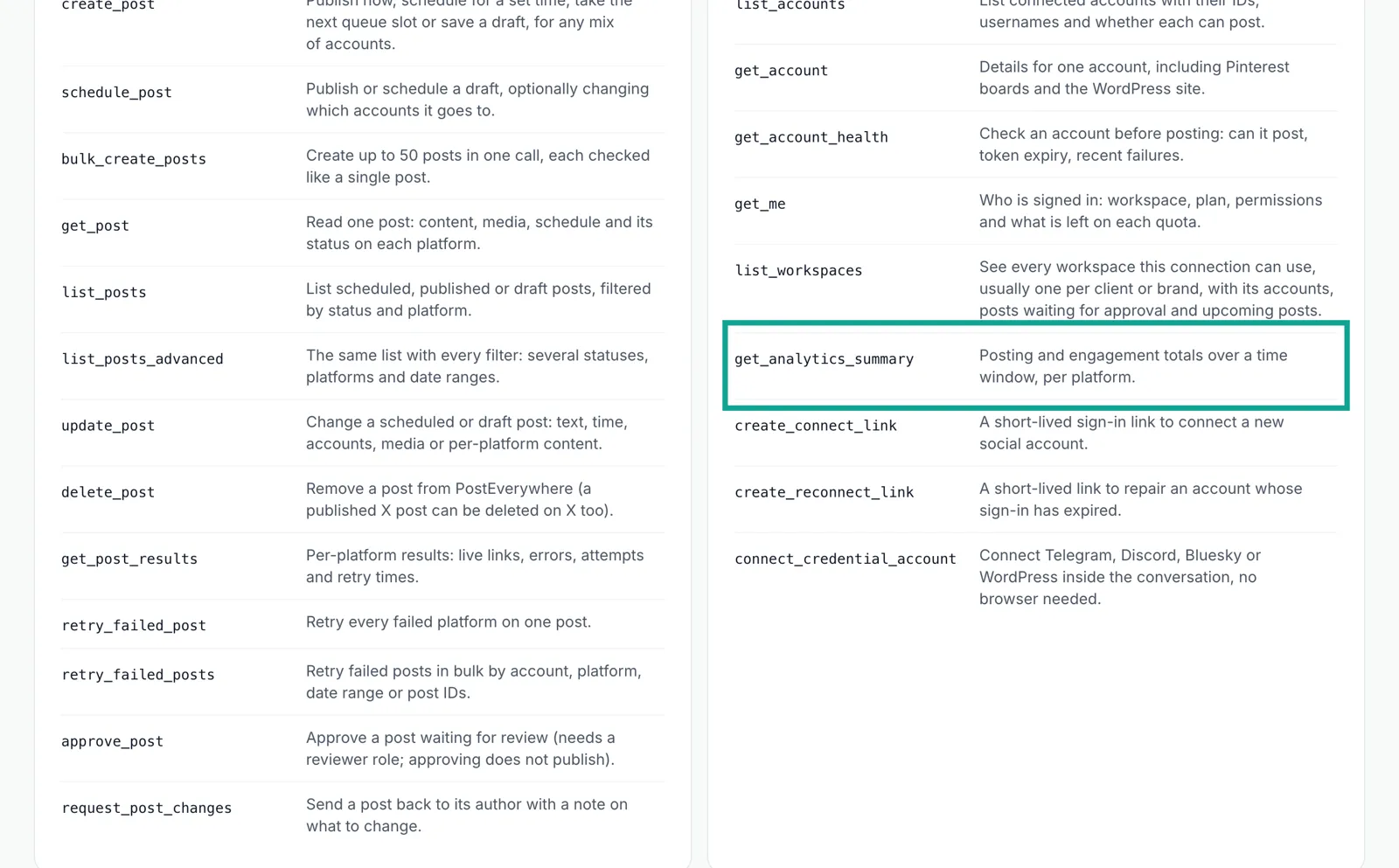
In October and November 2026, PostEverywhere, Blotato, Buffer, Social9 and Metricool all made it possible to schedule social posts from a ChatGPT or Claude chat. We read their sites and documents. The PostEverywhere hosted MCP server has 45 tools, and none of them reads public trends across a platform. Its data tools read only your own account history.
We used the EveryInfra remote MCP server at three moments on November 13 and 14, 2026 (SGT). First, tiktok/hashtag_search turned 5 holiday seed words into a list of related candidate hashtags. Then we read them again about 2.7 hours later.
The fastest tag was a candidate that we did not pick: #blackfridayfinds grew by 0.98%. Of the 5 tags that we picked, #buenfin (day one of the Mexican sale) grew about 19 times faster per hour than #giftguide. But #giftguide gained only 665 videos in that window, so a few hours of data can only rank the tags.
One round of this check is 10 calls for $0.007712. One round a day for a week costs about $0.054.
How to schedule social media from ChatGPT or Claude: what five tools say
We read the product pages, the docs and the press releases of five tools. We kept only what the source text states. The PostEverywhere page for ChatGPT says that you add it from the ChatGPT Plugins page and sign in once. After that, ChatGPT can schedule the posts that you wrote together to 13 destinations, through the official API of each network.
The founder, Jamie Partridge, published a step-by-step guide on Oct 13, 2026. The guide gives the hosted MCP address https://mcp.posteverywhere.ai/mcp. It says that Claude users can add the tool from the connector directory with one click. It also says that the tool works on ChatGPT Free, Plus and Pro, and that Business and Enterprise admins may need to allow it. The guide gives this warning: if scheduled_for has no time zone offset, the server treats the time as UTC.
Thus, a shop owner in New York who says "9am" can get a post at 5am local time. Write the offset into the prompt. Ask the agent to read back the UTC time before it books the post. A Startup Fortune report from about Nov 10, 2026 repeats the company's own figures. PostEverywhere started in August 2025 in the United Kingdom, and its site claims 2,831 customers.
Blotato is in both directories. Its press release of Nov 5, 2026 says that it is now in the ChatGPT Plugins directory. OpenAI verified and reviewed it first. A second release on Nov 11, 2026 says that it joined the Claude connector directory with the Community label.
The Blotato announcement adds three limits. The listing names 32 tools, and the full list has 35. Comments and DMs work only on Instagram and Facebook. Analytics covers 8 of its 9 publishing platforms, because LinkedIn returns no metrics yet.
Blotato needs a paid plan from $29 a month. Its 7-day trial covers the web app only, and its authentication help page says the same thing about API and MCP access. The Buffer MCP page says that MCP access is free on every plan, Free included. The Buffer developer guide gives the remote address https://mcp.buffer.com/mcp. Its tools read channels, browse the queue and drafts, schedule and edit posts, save ideas and pull post analytics.
Social9 opened its MCP connection on Nov 4, 2026. Its press release lists more than 60 tools and a test mode that is on by default for each new connection. In test mode, nothing goes out to a network. The Social9 docs say that you need a paid plan and that sign-in uses OAuth at https://app.social9.com/mcp. Metricool published a Claude and LinkedIn guide on Oct 30, 2026. It lists five uses for its MCP: schedule posts, check analytics, find the best times, review competitors and manage daily tasks.
| Tool | How it reaches ChatGPT or Claude | Platforms named in the source | Entry price (read Nov 13, 2026) | Tools that touch "what to post" |
|---|---|---|---|---|
| PostEverywhere | ChatGPT Plugins, Claude directory, hosted MCP | 13 | $9/month for 2 accounts, card for the trial | get_best_times, get_analytics_summary (your accounts) |
| Blotato | ChatGPT Plugins (Nov 5), Claude directory, Community (Nov 11) | 9 | $29/month, trial has no MCP | Analytics for your accounts on 8 platforms |
| Buffer | Remote MCP, OAuth or API key | Not totaled in the docs | MCP on the Free plan | Analytics for your own posts |
| Social9 | Remote MCP, OAuth, test mode on | 6 | Paid plan only; no price on the docs page | Reads your best past posts |
| Metricool | Its own MCP for Claude, ChatGPT, Cursor, Make, n8n | Not totaled in the guide | Not on that page | Competitor activity, best times |
In the public tool lists of PostEverywhere, Blotato and Buffer, the data tools read your own account history or suggest a time slot. Metricool also reads the competitor accounts that you name. We did not get the full tool lists of Social9 and Metricool.
Social media scheduler MCP: 45 tools, and what they cover
The PostEverywhere MCP page is titled "All 45 tools, named". We counted each group on the page. There are 13 tools for posts and scheduling, 9 for accounts, 6 for the media library, 6 for webhooks and 5 for campaigns.
There are 2 for AI captions and images, 2 for the queue and best times, 1 for the brand kit and 1 for platform rules. That makes 45. The page adds that the Claude directory version has every tool except generate_image, and that the ChatGPT app has 34 tools.
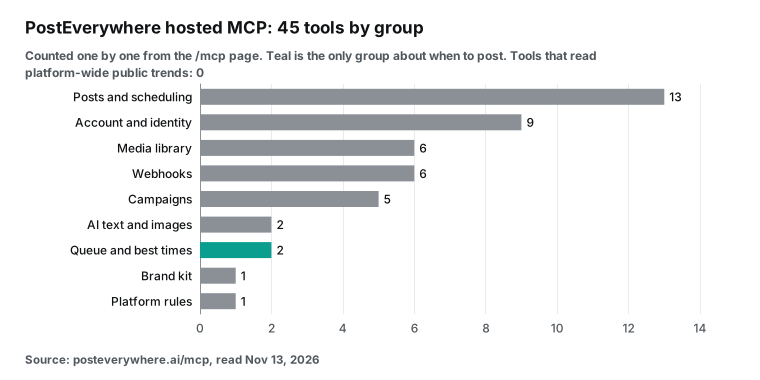
The Blotato and Buffer tools are also mostly for posting. Blotato has tools to create, list and move scheduled posts, plus comments and DM automations. Its data tools report on your own accounts. Buffer lists tools for the account, channels, posts, ideas and templates, plus post analytics.
A thread on r/SocialMediaManagers asked people how they use these connectors day to day. Several replies came from people who said they work at scheduler companies. They use MCP to pull old captions as prompts, to plan months ahead and to build monthly reports. One person said that the setup pays off if you post at least once a day. No reply used MCP to check what is rising this week.
What the platforms allow: posting limits and trend limits
Schedulers can publish because they connect to the publishing API of each network. The limits are in the official docs. The Instagram content publishing guide, updated Oct 20, 2026, allows 100 API-published posts per account in a moving 24-hour window. A carousel counts as one post. The Threads troubleshooting page shows a quota response with 250 posts, 1,000 replies and 100 deletes per 24 hours.
The TikTok Content Posting API guide says that an app needs the video.publish scope. Content from an unaudited client stays private. The YouTube quota calculator, updated Nov 12, 2026, now gives videos.insert and search.list their own buckets. Each bucket allows 100 calls per day by default, and all other methods share 10,000 units per day.
The read side is narrower. The Threads keyword search docs allow 2,200 queries per user in a rolling 24 hours. Until the app has the threads_keyword_search permission, a search returns only posts from the signed-in account. The Instagram hashtag search docs, updated Aug 17, 2026, allow 30 unique hashtags per account in a rolling 7 days, after app review. YouTube search.list stops at 100 calls a day. An agency with 10 brands, 5 keywords per brand and three checks a day needs 150 calls, so it runs out on day one.
TikTok shows trending hashtags and songs in its Creative Center, now titled "TikTok One Creative Suite", but only in a web page. Reddit launched Reddit Pro Trends on Jan 7, 2025. It is free and shows how often a keyword comes up over time, also in a web page.
| Platform | Official posting limit | Official read access for public posts | Doc date |
|---|---|---|---|
| 100 posts per account per 24 h | 30 hashtags per account per 7 days, app review | Updated Oct 20 and Aug 17, 2026 | |
| Threads | 250 posts and 1,000 replies per 24 h | 2,200 keyword queries per 24 h; own posts only without approval | Updated Jan 21, 2026 |
| TikTok | Needs video.publish; private until audit | Creative Center web pages, no data API for regular accounts | Read Nov 13, 2026 |
| YouTube | videos.insert 100 per day | search.list 100 per day | Updated Nov 12, 2026 |
| Not tested here | Reddit Pro Trends web page, free | Launched Jan 7, 2025 |
These limits apply to apps that use the official API of each network. The EveryInfra remote MCP only reads. It looks up public videos, posts and comments by keyword, hashtag or account. It does not sign in to any social account and it does not post.

Two MCP servers in one chat: a configuration example
We called the EveryInfra address, auth and tool names on Nov 13, 2026. The scheduler side comes from the vendor docs, and we did not test it. We did not open a scheduler account and we did not schedule a real post.
The Claude Code MCP docs say that you add a remote HTTP server with claude mcp add --transport http. In .mcp.json, each entry needs "type": "http". Without it, Claude Code reads the entry as a local process and skips it.
{
  "mcpServers": {
    "everyinfra": {
      "type": "http",
      "url": "https://api.everyinfra.com/mcp",
      "headers": { "Authorization": "Bearer ${EVERYINFRA_API_KEY}" }
    },
    "posteverywhere": {
      "type": "http",
      "url": "https://mcp.posteverywhere.ai/mcp",
      "headers": { "Authorization": "Bearer ${POSTEVERYWHERE_API_KEY}" }
    }
  }
}
For ChatGPT, the OpenAI developer docs describe the path. Open ChatGPT Plugins, select the plus button and choose "Add custom MCP server". Enter a name, a description and the URL with the /mcp path, then set up auth. The server must use public HTTPS and support streamable HTTP. The OpenAI help center warns that an untrusted MCP server can raise the risk of prompt injection.
For Claude on the web or desktop, read the Anthropic help article on custom connectors. The connection starts from Anthropic's cloud, so the server must be reachable from the public internet. Some connectors use an API key or another fixed credential, and Claude stores it encrypted. The Anthropic page on connector review explains the Verified, Community and Custom labels. It also says that a directory listing and a connector that you add by URL use the same technology.
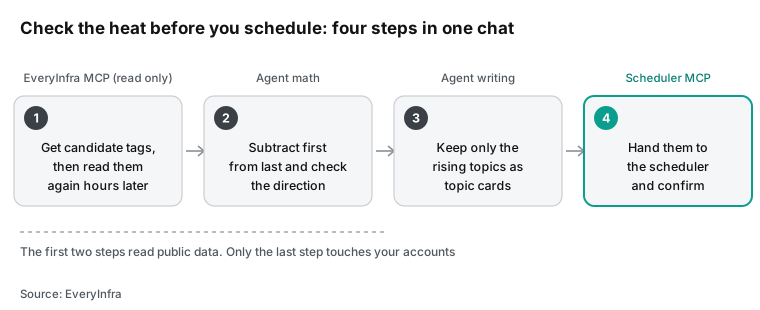
With both servers in one session, the agent first calls everyinfra_call_api to read data. Then it calls the scheduler's create_post. Put the order in the prompt, and ask the agent to read the numbers back before it books anything:
Before you schedule next week's posts, do four things:
1. Call everyinfra_call_api with tiktok/hashtag_search for giftguide, blackfriday and regalosnavidad. Each call returns 20 related hashtags. Keep each one with more than 10,000 videos as a candidate, and save its video_count.
2. Call youtube/search for "holiday gift guide 2026". List the 10 newest videos with their view counts.
3. Subtract the numbers that I saved yesterday at the same time. Sort by growth per hour. Use only the top two in the captions.
4. If a step returns 503, wait for retry_after and try one more time. If it fails again, use the data from the other platforms.
Write every scheduled_for time with -05:00. Before you book a post, read back the data time, the post time zone, the UTC time and each number.
One real round trip: what the agent sends and what comes back
At 21:36:20 Singapore time (SGT) on Nov 13, 2026, we sent tools/list to https://api.everyinfra.com/mcp with a test key. The server returned 12 tools. Three matter here: everyinfra_list_capabilities lists platforms and capabilities, everyinfra_call_api calls any data capability, and everyinfra_get_job reads an async job for free. The tool text gave the size of the catalog at that time: 106 platforms and 574 capabilities.
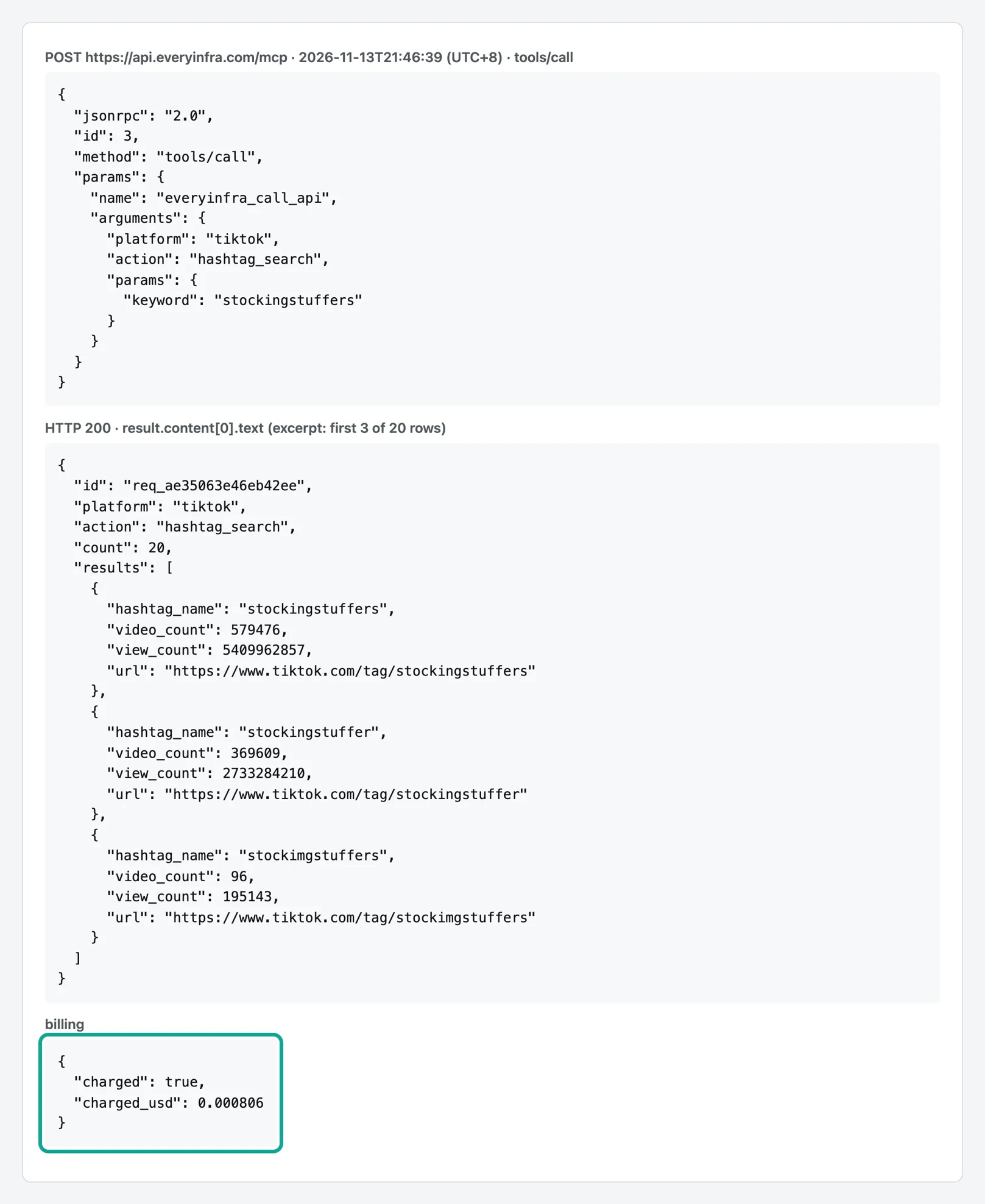
At 21:46:39 SGT we sent tools/call for tiktok/hashtag_search with the keyword "stockingstuffers". This is the kind of first step an agent takes before it writes a holiday caption:
{"jsonrpc":"2.0","id":3,"method":"tools/call","params":{"name":"everyinfra_call_api",
 "arguments":{"platform":"tiktok","action":"hashtag_search",
  "params":{"keyword":"stockingstuffers"}}}}
The server answered HTTP 200 with 11,589 bytes of JSON text. The count was 20, and billing.charged_usd was 0.000806, the same as price_usd in the catalog. The first row was #stockingstuffers with a video_count of 579,476 and a view_count of 5,409,962,857. The second row was the singular #stockingstuffer with 369,609 videos. The third largest was #stockingstufferideas with 205,584 videos. Below them were small tags such as #stockingstuffersideas (3,182) and misspelled variants such as #stockimgstuffers (96) and #stockingsstuffers (99).
Each row in this response has hashtag_id, hashtag_name, url, video_count, view_count and a next_page_token for the next page. These 20 rows are a ready list of candidates. One seed word brings back its singular and plural forms, its "ideas" forms and its regional forms. One call tells the agent how big a hashtag is now. To know if it is growing, the agent must call again later and subtract.
What the three most data-like scheduler features calculate
The PostEverywhere best times guide says that get_best_times returns time slots, such as "Tuesday, 12:00". Each slot has a basis field with one of three values. The value personal uses the posts of your own account. It needs 30 or more posts with stats, published 3 to 90 days ago.
The value platform uses the results of other PostEverywhere users on the same platform, in their local time. It fills in when your account has fewer than 30 posts. The value general is general advice that no audience data supports. It applies where data is too thin, for example on X, Telegram and Discord.
The same guide gives two more details. The score field compares a slot with a typical post, so 1.25 means about 25% better. TikTok and YouTube slots rank by views, and most other platforms rank by engagement.
You can also pass schedule_at: "best_time" to create_post or schedule_post. The tool then picks the slot and tells you which one it picked and why. get_best_times gives the basis for each slot. Its inputs are post times and engagement only. It has no topic and no keyword, so it cannot tell you whether to post a gift guide or a Black Friday deal this week.
The analytics summary guide describes get_analytics_summary. It totals the posts in your workspace for a period such as today, week or month. It counts drafts, scheduled posts, published posts and failures. It also adds up views, likes, comments and shares for published posts.
The guide warns that metrics counts only destinations that published. It also warns that each platform reports different metrics. For example, Instagram views, impressions and saves need the insights permission on the token.
The PostEverywhere plugin repository for Claude ships 15 skills. They plan a content calendar, review post results, recycle top posts, learn your brand voice and run an approval flow. The repository says that Claude always shows you a post before it goes live. These skills also start from your account history and from the material you give them. The API reference lists 50 endpoints in ten groups, from introspection and accounts to webhooks and platform rules. None of the groups reads public content on a platform.
| Feature | Data it uses | Limit or scope | Question it answers |
|---|---|---|---|
get_best_times (personal) | Posts from this account | 30+ posts with stats, 3 to 90 days old | When do my posts do best? |
get_best_times (platform) | Other PostEverywhere users on the platform | Used when the account has fewer than 30 posts | When do posts on this platform do best? |
get_analytics_summary | Published posts in your workspace | today, week, month, all or custom | How did my posts do in this period? |
| Plugin skills (review, recycle) | Your account history and your files | Needs a connected account | What should I write next, and which old post can I reuse? |
| The step this article adds | Public posts from all accounts | Pay per call, read only | Which topic is rising this week? |
Test design: get candidate tags, then read them at three moments
November 13, 2026 was day one of El Buen Fin, the Mexican sale. Black Friday is on November 27, 2026, and gift-guide content is going up fast. We picked holiday gifts as the topic.
We read the same topics at three moments: about 21:31 SGT and 23:33 SGT on November 13, and about 00:15 SGT on November 14. In New York, that is 8:31 a.m., 10:33 a.m. and 11:15 a.m. on Friday, November 13. The window covers the US morning scroll.
The gaps are not equal: about 2 hours, then about 40 minutes. For this reason, we compare all changes per hour.
Each moment runs the same 10 calls with the same parameters, with 9 seconds between calls. The second and third rounds each took 3 to 4 minutes.
The first round was different. We changed the Reddit keyword twice and added two TikTok keywords during it. Its 10 calls ran between 21:31 and 21:46 SGT. For the hourly rates, we use the timestamp of each call.
| Capability | Parameters | What we read | Price (catalog `price_usd`) |
|---|---|---|---|
tiktok/hashtag_search × 5 | giftguide, blackfriday, regalosnavidad, buenfin, stockingstuffers | video_count and view_count of the exact-name hashtag and of the related hashtags in the response | $0.000806 per call |
tiktok/hashtag | Hashtag giftguide, 30 videos | Age of the videos on the hashtag page, and who posts them | $0.000556 |
youtube/search | "holiday gift guide 2026", 20 results | Views gained per hour by the same video, matched by id | $0.000778 |
reddit/search | "christmas gifts", 25 results | What the posts discuss, and how many comments they have | $0.000792 |
threads/search × 2 | "gift guide" and "regalos de navidad", 30 results | Whether Threads users are talking about it | $0.000778 per call |
Each TikTok keyword has a job. #giftguide is the general English tag for gift lists. #blackfriday is the big sale in two weeks. #stockingstuffers covers the small gifts that go in a Christmas stocking. #regalosnavidad is Spanish for "Christmas gifts", and #buenfin is the Mexican sale that started on November 13.
The first two are large and crowded. The last three are smaller and belong to one region or one group of buyers.
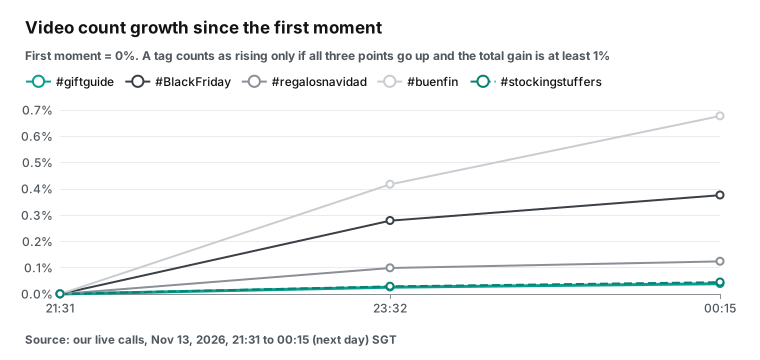
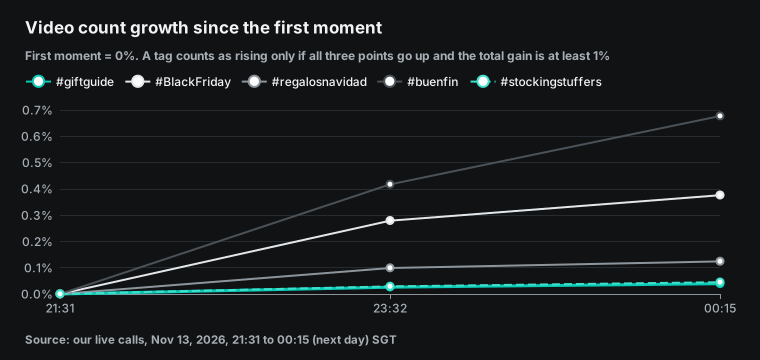
We wrote the rule before the test and did not change it after we saw the results. A topic is "rising" only if two things are true. Its video count or view count goes up at each of the three moments. And the third value is at least 1% above the first. If it fails either test, it is "noise", even if the last value is higher than the first.
We report two numbers for each hashtag. New videos per hour is an absolute number and shows how busy the tag is. Growth as a share of the start is a relative number and shows how crowded it is.
Step one: find candidate tags
If you watch only the tags that you picked, you do not see the tags next to them that are rising. Thus, we let the seed words bring back candidates. Each tiktok/hashtag_search call returns 20 hashtags with similar names, so 5 seed words give 100 per round.
We kept the tags that were in the first and the last response for the same seed word and that had more than 10,000 videos. That gave 22 candidates. For each one, we subtracted the first value from the last value. The script and its output are in the raw data of this article.
| Candidate tag | Seed word | First read | Last read | New videos | Growth | Growth per hour |
|---|---|---|---|---|---|---|
| #blackfridayfinds | blackfriday | 36,723 | 37,082 | 359 | +0.98% | 0.36% |
| #buenfin | buenfin | 245,543 | 247,206 | 1,663 | +0.68% | 0.27% |
| #blackfridayespaña | blackfriday | 12,642 | 12,692 | 50 | +0.40% | 0.14% |
| #BlackFriday | blackfriday | 11,146,551 | 11,188,411 | 41,860 | +0.38% | 0.14% |
| #stockingstufferideas | stockingstuffers | 205,584 | 205,991 | 407 | +0.20% | 0.08% |
| #blackfridaydeals | blackfriday | 2,725,366 | 2,729,520 | 4,154 | +0.15% | 0.06% |
| #regalosdenavidad | regalosnavidad | 141,901 | 142,083 | 182 | +0.13% | 0.05% |
| #giftguide | giftguide | 1,718,228 | 1,718,893 | 665 | +0.04% | 0.01% |
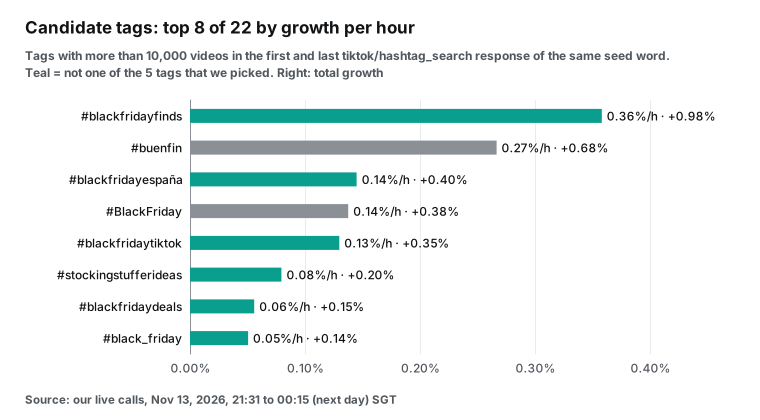
We did not pick #blackfridayfinds, but it had the highest growth per hour of the 22 candidates. Its three values were 36,723, 36,970 and 37,082, so it went up at each read. The name tells you the content: "Black Friday finds". It is narrower than #BlackFriday and more than 70 times smaller than #blackfridaydeals.
On the Spanish side, #regalosdenavidad (142,000 videos) is larger than #regalosnavidad (120,000), the tag that we picked, and it grew a little faster. For a Spanish Christmas gift post, the first one is the better main tag. The same is true for stocking gifts: #stockingstufferideas grew more than 4 times faster per hour than #stockingstuffers.
In the same data, old tags such as #BlackFriday2020 changed by −1 to 0 videos. That is the size of the noise, so look only at gains of a few dozen videos or more. We kept only candidates with more than 10,000 videos for the same reason. A tag with a few hundred videos gets 1% from 5 new videos, and that says little about how many people post. Also remove misspelled forms. For example, #stockimgstuffers has only 96 videos, and it comes from the same people as #stockingstuffers.
Give the agent three filters for the candidate list. Keep tags with more than 10,000 videos. Remove names with an old year or a misspelling. Keep tags that link to what you sell. Then let it subtract the values for the tags that are left. Each candidate also has a url, so the agent can put the link in the topic card for you to open.
The catalog also lists tiktok/trending_hashtags. It returns a full trending hashtag list by country, by industry and for a 7-, 30- or 90-day window. The price is $0.000806 per page, the same as hashtag_search. The catalog states that it is supported, but we did not test it this time.
The two methods can work together. The trending list shows what is hot on the whole platform this week. The seed words show what is rising next to your own topic.
Five TikTok hashtags: which ones grew, and how fast
For each keyword, we took the row with the exact hashtag name. We subtracted the first value from the last and divided by the hours between the two calls. All five hashtags went up at each moment (5 of 5). But none of them grew by 1% in this window. The largest gain was 0.68%.
Under the rule that we wrote before the test, no hashtag counts as "rising" in this run. The table shows "Under 1%".
| Hashtag | First read (SGT) | Videos at start | Last read | Videos at end | New videos per hour | Growth | Up at all 3 | Verdict |
|---|---|---|---|---|---|---|---|---|
| #BlackFriday | 21:31 | 11,146,551 | 00:15 | 11,188,411 | 15,352 | +0.38% | Yes | Under 1% |
| #buenfin | 21:43 | 245,543 | 00:15 | 247,206 | 656 | +0.68% | Yes | Under 1% |
| #giftguide | 21:31 | 1,718,228 | 00:15 | 1,718,893 | 244 | +0.04% | Yes | Under 1% |
| #stockingstuffers | 21:46 | 579,476 | 00:16 | 579,739 | 106 | +0.04% | Yes | Under 1% |
| #regalosnavidad | 21:32 | 120,426 | 00:15 | 120,575 | 55 | +0.12% | Yes | Under 1% |
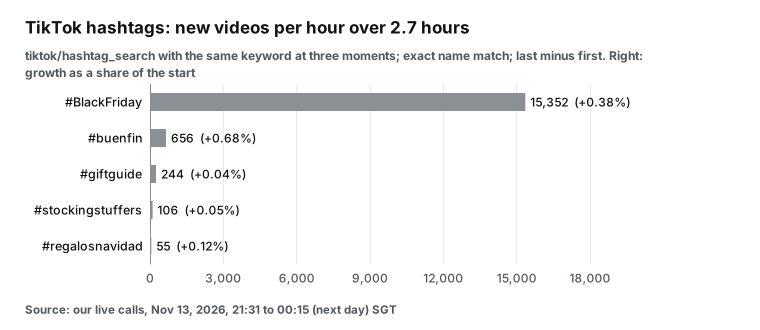
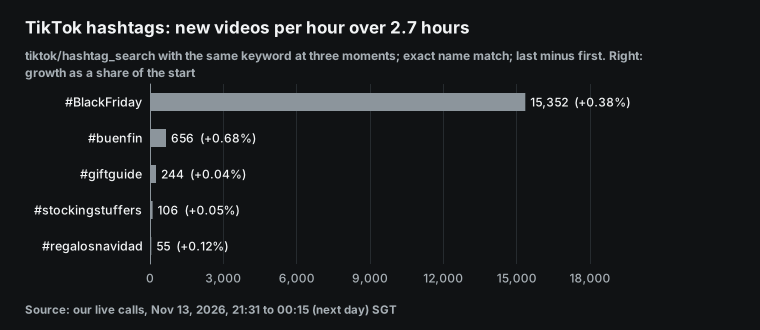
#BlackFriday gained about 15,352 new videos an hour, 63 times the rate of #giftguide. It also gained about 30,399,099 views an hour. But it already holds more than 11 million videos, so the new videos were only 0.38% of the start. A small shop that posts with #BlackFriday now shares the hashtag page with more than ten thousand new videos every hour.
In 2.5 hours, #buenfin gained 1,663 videos, or 0.68%. The two windows are not the same length: 2.5 hours for #buenfin and 2.7 hours for #giftguide. Thus, we compare growth per hour: about 0.27% for #buenfin and about 0.014% for #giftguide. The first is about 19 times the second.
This ratio has a very small base. #giftguide gained only 665 videos in its window, so a few dozen videos more or less change the ratio by several points.
The order is the part that you can trust. Our three moments fell on the morning of day one of El Buen Fin in Mexico City. #buenfin grew faster than the English gift tags. The Spanish hashtag #regalosnavidad is the smallest, at about 120,000 videos. It gained only 55 videos an hour, but its growth of 0.12% was third. That is more than the English #giftguide and #stockingstuffers.
The video count shows how many people post. The view count shows how many people watch. The same tiktok/hashtag_search call also returns view_count.
We divided the views gained per hour by the videos gained per hour. The result is the number of views that the tag gained for each new video. These views do not all go to the new videos, because old videos also get views. But the number gives a rough comparison of watchers and posters on one tag.
| Hashtag | Views gained per hour | Videos gained per hour | Views gained per new video | Average views per video in the total |
|---|---|---|---|---|
| #giftguide | 1,160,147 | 244 | about 4,757 | about 12,975 |
| #buenfin | 2,043,372 | 656 | about 3,115 | about 17,425 |
| #stockingstuffers | 251,349 | 106 | about 2,380 | about 9,336 |
| #BlackFriday | 30,399,099 | 15,352 | about 1,980 | about 8,288 |
| #regalosnavidad | 78,305 | 55 | about 1,434 | about 14,705 |
#giftguide gets new videos slowly, but each new video comes with the most new views, so watchers outnumber posters. #BlackFriday is the opposite. Its videos grow fast, but each new video comes with only about 1,980 new views. That is much less than its average of 8,288 views per video, so the new videos share the same attention. #buenfin does well on both: it has the highest growth per hour and more than 3,000 new views per new video. For a small account, this number is closer to "will people see my post" than the video count alone. These numbers also come from three moments only, so use them to rank the tags, not to decide.
The limits of the 1% rule in a three-hour window
We set the rule before the test, and we did not change it. But in a window of 2.5 to 2.7 hours, the rule can almost never pass a tag. For #giftguide to gain 1% in 2.7 hours, it needs about 6,294 new videos an hour. Its real rate was 244, more than 20 times lower. Even the fastest candidate, #blackfridayfinds, got only to 0.98%.
The sample is also small. Each tag has 3 points. The first gap is 2 hours and the second gap is only 40 minutes. The normal rise and fall of a tag during one day can be larger than the gain.
For these reasons, the three hours of data in this test can only rank the tags. They cannot show that a tag is "rising". "Under 1%" in the table means only that three hours were not enough to see a result.
Here is a method that you can use. Make the window longer and keep the time fixed. Read the tags once a day at the same time, for example 21:30 SGT, which is 8:30 a.m. in New York. Do this for three to five days. Then apply the rule to the first and the last day: up each day, and at least 1% up from first to last. A fixed time removes the daily rise and fall.
At the hourly rates of this test, #buenfin crosses 1% in less than 4 hours and #BlackFriday in about 7 hours. #giftguide needs about 70 hours, or about 3 days. Thus, three days of reads separate all three types of tags. The cost of one round a day is in the cost section below: less than 6 cents a week.
The #giftguide page: a shop challenge drives it
In the tiktok/hashtag_search response, the #giftguide row has a hashtag note (description). The note describes a TikTok Shop brand challenge. Creators post videos with #GiftGuide and #TTSDelightNow between November 12 and 25, and they feature selected Black Friday products. Sales from November 15 to 27 set the ranking. First place wins $2,000, and places 4 to 50 win $100 each.
This note explains why the videos on the page are so new. It also tells you that shop videos will fill this hashtag for the next two weeks. If you do not sell those products, #giftguide may be a poor main hashtag for you.
tiktok/hashtag reads 30 videos from the same hashtag page. At the first read (21:36 SGT), 12 videos were less than one day old and 29 were less than seven days old. The median age was 1.68 days. At the second read (23:34 SGT), 16 videos were less than one day old, with a median age of 0.85 days. At the last read (00:17 SGT), the count was 12 again, with a median age of 2.02 days. At that read, 24 videos were less than seven days old.
Only 2 of the 30 videos appeared in both the first and the last read. The page changed almost completely. One read of a hashtag page shows one moment only. Do not treat it as the best content of the hashtag. Of the videos in both reads, the fastest one gained about 2,234 views an hour. It had 89,400 views at the first read.
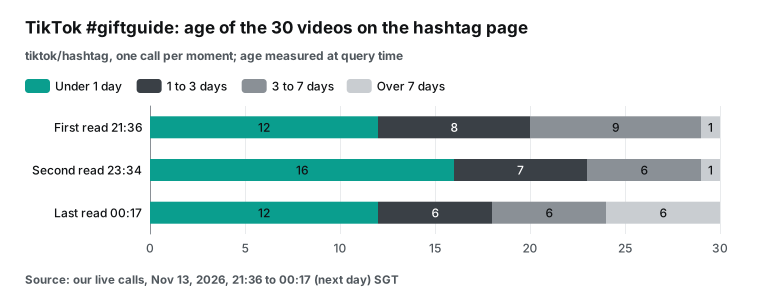
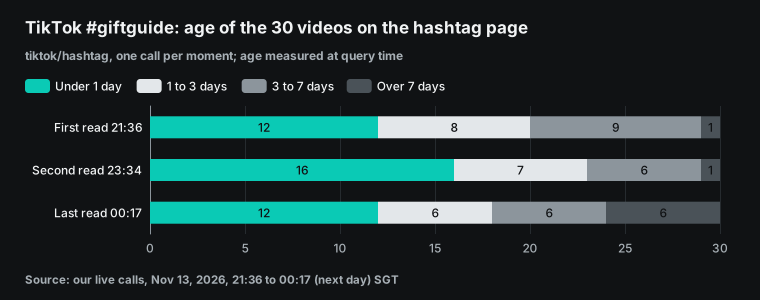
Our rule says that a source shows "this week's content" only if more than half of its results are less than 7 days old. The #giftguide page had 29 of 30 at the first read and 24 of 30 at the last read. So this page shows what people post this week. Use it to see what other creators film: unboxings, gift lists and picks by price. Most of them link to Amazon or TikTok Shop.
YouTube "holiday gift guide 2026": for 13 matched videos, age and hourly gain are not related
At the first read, 18 of the 20 results from youtube/search were less than 7 days old. That is more than half, so this source shows this week's content. 13 videos appeared in both the first and the last read, and we matched them by id. The table shows the top 6. We show individual creators as letters and give a summary of each title.
| Video (summary) | Channel | Age at first read | Views, first read | Views, last read | New views per hour | Growth |
|---|---|---|---|---|---|---|
| 50 gifts for her | Creator A | 1.0 h | 1,319 | 7,351 | 2,207 | +457.32% |
| Consoles and hardware gift guide | IGN | 89.5 h | 130,338 | 133,271 | 1,073 | +2.25% |
| 115+ Christmas gift ideas for her | Creator B | 92.0 h | 122,987 | 124,528 | 564 | +1.25% |
| 2026 holiday gift guide | Creator C | 120.5 h | 51,049 | 52,148 | 402 | +2.15% |
| 200+ Christmas wishlist ideas | Creator D | 68.3 h | 24,357 | 24,955 | 219 | +2.46% |
| 175+ Christmas wishlist ideas | Creator E | 16.3 h | 5,568 | 6,148 | 212 | +10.42% |
The order of search results changes. If you compare "result 1" with "result 1", you may compare two different videos. Always match by video ID.
The other 7 results were not new uploads. At the last read, 7 videos came into the top 20. They were 46 to 579 hours old, with a median of about 93,000 views. The 7 videos that dropped out had a median of about 15,000 views. Between the reads, the results moved toward older videos with more views. If you look only at which videos changed in the top 20, you can think that a new hit came up.
The top video by hourly gain was "50 gifts for her". It was about 1.0 hours old at the first read. Its views went from 1,319 to 7,351, or about 2,207 views an hour. Its growth of 457% comes mostly from a start of only about 1,300 views, which is usual for a video in its first hours.
Second and third were IGN at 89.5 hours and Creator B at 92 hours. We ranked the 13 videos by age and by hourly gain and compared the two ranks. The rank correlation is only 0.05, so there is almost no relation. With n=13, this result applies only to this one search.
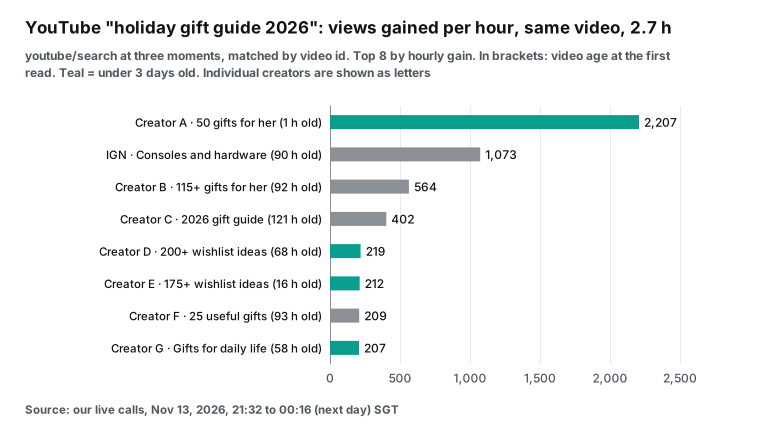
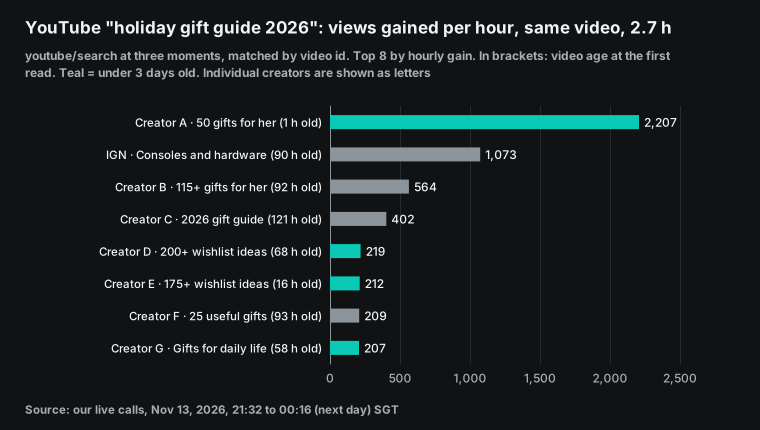
The IGN guide to consoles and hardware already had 130,338 views. It grew 2.25% in 2.7 hours, or about 1,073 views an hour. Of the top 8 videos by hourly gain, 4 were less than 3 days old at the first read. The other 4 were 3 to 5 days old. For this keyword, videos that are a few days old still gain views at a steady rate. The right topic matters more than a post on day one. To test the idea that "early is better", read the same new videos for several days.
Reddit "christmas gifts": 18 posts, and half of the comments are on the top 3
At the last read, reddit/search returned 18 posts. At the first read, 6 of them were less than 7 days old, and the oldest was about 28 days old. That is less than half. Under our rule, this source shows the discussion of the last month, not new topics from this week.
The 18 posts have 1,248 comments in total. The 3 posts with the most comments have 701, or 56%. On r/AskWomen, "What gifts do you want to receive for christmas?" has 382. On r/GiftIdeas, "Christmas Gifts are so disappointing" has 166. On r/Christmas_gift, a post that asks what a mom wants other than a household item has 153.
| Post title | Subreddit | Post age at the last read | Comments |
|---|---|---|---|
| What gifts do you want to receive for christmas? | r/AskWomen | 6.1 days | 382 |
| Christmas Gifts are so disappointing. We need suggestions please. | r/GiftIdeas | 8.8 days | 166 |
| What Christmas gift would you appreciate as a mom that isn't another household item? | r/Christmas_gift | 7.1 days | 153 |
| Christmas gift ideas for a sister who has no hobbies and usually prefers experiences over material gifts? | r/ChristmasGiftIdeas | 20.8 days | 116 |
| What is a thoughtful homemade Christmas gift that people genuinely appreciate? | r/AskReddit | 8.5 days | 69 |
| How is everyone affording Christmas gifts this year? | r/AskReddit | 11.2 days | 56 |
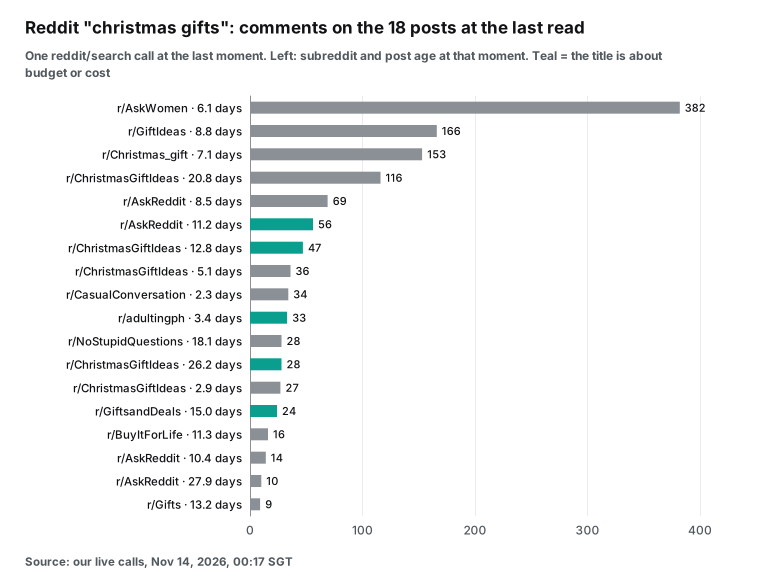
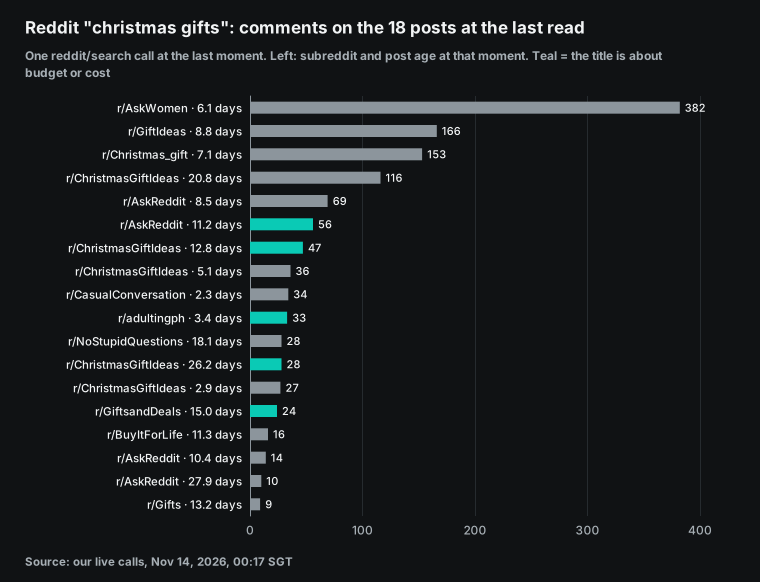
Budget is the theme that repeats in the titles. "How is everyone affording Christmas gifts this year?" has 56 comments. "The little Christmas gifts add up so fast" has 47. Others ask for gifts "that don't cost the earth" (28), for gifts "actually worth buying early" (24) and for where to shop wisely (33). That is 5 posts.
Two subreddits, r/ChristmasGiftIdeas and r/GiftIdeas, hold 6 of the 18 posts. The posts with the most comments ask who the gift is for: a woman, a mom, a sister with no hobbies. This matches the YouTube gift lists that are sorted by person.
We divided the comments of each post by its age to get the average comments per day. This is an average, not the change over these days. But it lets you compare new and old posts. At the last read, the 5 posts that were less than 7 days old had a median of about 9.8 comments a day. The 13 older posts had a median of about 1.6.
The r/AskWomen post averages about 63 a day, nearly 3 times the second post. The 5 budget posts average 1.1 to 9.8 comments a day, and 4 of them are more than 11 days old. People still talk about budget, but these are not the hottest posts in this group. To find what people discuss now, first keep the posts from the last 7 days, and then sort by comments per day. To get the real change, read the same posts again one day later.
Threads: many posts and little engagement
threads/search returned 503 without a charge, and it succeeded on a retry. "gift guide" and "regalos de navidad" each returned 30 posts and each cost $0.000778. This round has Threads data from one moment only, so we cannot calculate a change. But the data shows two things.
The first is posting speed. All 30 posts for "gift guide" were less than about 26 minutes old. All 30 posts for "regalos de navidad" were less than 1.3 hours old. So both keywords get dozens of new posts every hour. From the time that the 30 posts cover, "gift guide" gets about 70 posts an hour and "regalos de navidad" about 23.
| Keyword | Posts | Oldest post | Posts with likes | Posts with no replies | Charge |
|---|---|---|---|---|---|
| "gift guide" | 30 | About 26 minutes | 3 | 26 | $0.000778 |
| "regalos de navidad" | 30 | 1.3 hours | 2 | 30 | $0.000778 |
The second is engagement. For "gift guide", only 3 of 30 posts had any likes, with a maximum of 3, and 26 had no replies. For "regalos de navidad", 2 posts had likes and none had replies.
In the 60 posts, gift shops take Christmas orders, craft shops show candles and custom frames, and a brand announces its own gift guide. On Threads, these keywords are mostly sellers who post for themselves, and readers have not gathered yet: 56 of the 60 posts have no replies. We did not test whether a post that asks a question gets more replies.
Turn the results into topic cards
After the agent has these numbers, it writes topic cards that a scheduler can use. Then it shows them to you. The table shows topic cards from this run. You can trace each row back to a call above. No tag passed the 1% rule in this run, so these cards give an order only. Read the tags for several days before you make the cards final.
| Topic | Evidence from this run | Platform and format | When to schedule |
|---|---|---|---|
| Black Friday finds | Candidate #blackfridayfinds +0.98% in 2.7 hours, the highest growth per hour of 22 candidates | TikTok short video, main tag #blackfridayfinds | This week, before Black Friday |
| El Buen Fin deals (Spanish) | #buenfin +0.68% in 2.5 hours, the highest of the 5 tags that we picked | TikTok short video in Spanish | November 13 to 17, during the sale |
| Budget stocking stuffers | 5 of 18 Reddit posts are about budget; the candidate #stockingstufferideas grew more than 4 times faster per hour than #stockingstuffers | TikTok short video with #stockingstufferideas | This week |
| Spanish Christmas gifts | #regalosdenavidad has 142,000 videos and +0.13%, larger than #regalosnavidad | TikTok in Spanish, main tag #regalosdenavidad | After El Buen Fin |
| Gift lists by person | The top 3 Reddit posts by comments ask about gifts for a woman, a mom and a sister | YouTube list | This week |
| #giftguide shop challenge | The hashtag note shows a TikTok Shop challenge from Nov 12 to 25 | Only for accounts that sell the challenge products | Before November 25 |
Run the same 10 calls at the same hour the next day. The agent puts the two days side by side. Keep the topics that rose yesterday and rise again today. Remove the topics whose growth falls to about zero. Add new tags from the candidate list, such as a new tag from a brand challenge. After three to five days, apply the 1% rule and make the cards final.
Before the scheduler: text limits and publishing rules
The caption on each topic card must pass the publishing API of each platform. The agent must know the limits when it writes. Meta updated the Threads posts guide on October 30, 2026. A text post can have up to 500 characters, and each emoji counts as its number of UTF-8 bytes. A caption with several gift and tree emojis reaches the limit sooner than it looks. The guide also says to wait about 30 seconds after you create a media container before you publish it.
The TikTok Direct Post reference says that you first query the creator information and then start the upload. A caption can have up to 2,200 UTF-16 characters. Each user access token can make up to 6 requests a minute. An app without an audit can publish only private posts. The request has brand_content_toggle for a paid partnership and brand_organic_toggle for your own business. The TikTok docs tell you to set one of them for promoted content.
In your prompt, tell the agent to check each caption with the scheduler's platform rules. Also give the time-zone offset. EveryInfra reads the data, and the agent calculates the change and writes the topic cards. The scheduler checks the text, sets the time, publishes and reports back.
Weekly cost: about 5 cents for one round a day
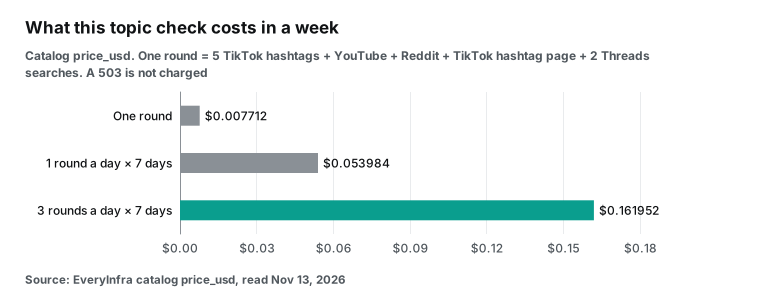
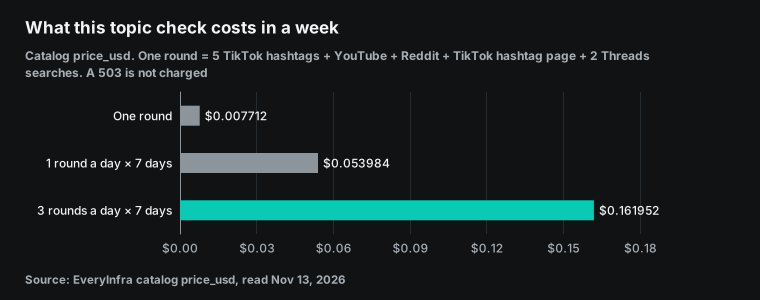
With catalog price_usd, one round in this article has these calls. There are 5 calls to tiktok/hashtag_search at $0.000806 each and 1 call to tiktok/hashtag at $0.000556. There is 1 call to youtube/search at $0.000778 and 1 call to reddit/search at $0.000792. There are 2 calls to threads/search at $0.000778 each. The total is $0.007712. A call that returned 503 was not charged, so the real cost can only be the same or lower.
One round a day for 7 days costs $0.053984. Three rounds a day, as in this article, costs $0.161952. You need more than one round a day to calculate an hourly change.
| Use | Calls a day | Calls a week | Weekly cost |
|---|---|---|---|
| One round before you schedule | 10 | 70 | $0.053984 |
| Three rounds a day for hourly change | 30 | 210 | $0.161952 |
| Only the 5 TikTok hashtags, three rounds a day | 15 | 105 | $0.084630 |
| An agency with 10 brands, one round each | 100 | 700 | $0.539840 |
It is easier to think in cost per candidate tag. One tiktok/hashtag_search call returns 20 hashtags for $0.000806, or about $0.00004 per hashtag. Five seed words give 100 candidates per round for $0.00403. In step one, we kept 22 of these 100 candidates with more than 10,000 videos. When we read the same seed words again, the new values for all of them came back in the same calls. Each candidate costs nothing extra.
For the method that we suggest, one round at the same time each day for 5 days, the cost is 10 calls × 5 days = $0.03856. For less than 4 cents, you get a 5-day growth curve.
The last row is for agencies. Ten brands with one round a day each need 700 calls a week, for less than $0.54.
In this test, the sum of billing.charged_usd across all responses is $0.023498. That sum agrees with the catalog prices. Every call that returned 503 was $0.
Errors and charges
threads/search returned HTTP 503 without a charge, and it succeeded on a retry. The response said that the call was not charged: billing.charged_usd was 0 and refund.status was succeeded. It also gave a retry_after value in seconds, and a next_steps field said that a support ticket was not necessary. An agent can read that text and mark the step as "retry later". It can then build the schedule draft from the other platforms first.
On the Reddit side, the catalog entry for reddit/search says that it returns only posts whose title, subreddit name or body matches the keyword. The time window is fixed to the last month. On Reddit, people seldom type the phrase "gift guide". They write "gift ideas" or "what should I get my dad". Thus, our final keyword was "christmas gifts". When you write the prompt, give the agent the words that readers actually use.
Limits and things to check
EveryInfra only reads. Our MCP server has no tool that posts, schedules or edits a post. It does not sign in to any social account.
Scheduling, publishing and approval stay in the scheduler that you choose. Each side has its own credential. The EveryInfra key controls data reads and charges. The scheduler key or OAuth grant controls your accounts. Keep both keys in environment variables. Do not put them in a prompt or in a shared .mcp.json file. When you read public data, read only public content. Do not touch direct messages or private accounts. Reddit revised its Data API Terms on 2026-07-20. If you plan to build a product with Reddit data, read those terms first.
Three moments can only rank a few hours of movement. On TikTok, video_count and view_count are running totals for the hashtag. The difference between two reads is the growth in that interval, and it includes videos in all languages. On YouTube, the order and the set of search results change over time, so you must match each video by id before you subtract. Before you put a topic in next week's plan, read it at the same hour each day for several days. Then apply the rule.
A big number does not mean a good fit. #BlackFriday has more than six times as many videos as #giftguide. It also grows much faster. But a short video from a small craft shop with #BlackFriday competes with more than ten million other videos. For this reason, our topic cards show two numbers: new videos per hour, and growth as a share of the total. A topic with a small share is already crowded.
We did not run the scheduler side ourselves. We took the addresses, tool names and prices of three schedulers from their own sites and documents. Each table shows the read date. The real interface can change between versions. The OpenAI Help Center and the Claude support article on custom connectors both tell you to connect only MCP servers that you trust. Before the agent schedules a post, make it read the time and the text back to you.
The shopping calendar: the next two weeks
On 2026-09-28, Adobe forecast USD 275.1 billion in US online spending for November and December. It expects USD 15.1 billion on Cyber Monday, November 30, and USD 12.9 billion on Black Friday. The NRF report on 2026 holiday plans says that 64% of shoppers will wait until Thanksgiving weekend to buy most of their gifts. If you plan gift content, most of your window is in the next two weeks. With the method above, start one round a day at the same time from today. By Thanksgiving, you will have a full week of data.
Get started: add the trend check to your scheduling chat
Step 1: Get a key. Create an EveryInfra account and get an API key. Follow the quickstart. Put the key in the EVERYINFRA_API_KEY environment variable. Do not paste it into the chat.
Billing is per call, with no monthly fee. One round of the checks in this article costs less than 1 cent. All three moments together cost less than 3 cents. To see the parameters, fields and price of each capability, filter by platform in the data market. An agent can also read the machine-readable catalog at /api/v1/social/catalog. Each entry in it has a price_usd field.
Step 2: Connect both servers. In Claude Code, use the .mcp.json file from the configuration section. You can also add the server with one command from our remote MCP setup guide. In Claude on the web or desktop, add a custom connector with the address https://api.everyinfra.com/mcp. In ChatGPT, add a custom MCP server under Plugins as the OpenAI developer docs describe.
For the scheduler, follow its own documents. The PostEverywhere MCP docs and its GitHub repository describe a hosted setup and a local setup. Both servers use the Streamable HTTP transport from the MCP specification. For this reason, one client can connect to both remote servers at the same time.
Step 3: Save a fixed pre-scheduling prompt. Store it as a saved instruction or a skill in your client. The prompt must state five things. First, the seed words that bring back candidate tags. Second, the fields to keep: video_count and view_count for a TikTok hashtag, and id and view_count for each YouTube video.
Third, the fixed time of day for each read. Fourth, the rule for "rising". In this article, a topic is rising when each read goes up and the total gain is at least 1%. Apply the rule after several days of reads. Fifth, the agent must read the topic cards and the post times back to you. It calls the scheduler only after you say "schedule".
If you already use scheduled tasks, give step 3 to a scheduled task. We described the same pattern in a ChatGPT scheduled task for demand signals and in Claude Code scheduled tasks for Reddit pain points. Read the same data at the same hour each day and save the numbers in a file. Then subtract yesterday from today. For trending audio and hashtags on TikTok and Instagram, read check trending audio before Instagram Edits cuts. That article uses the same MCP server.
Capabilities in this article: tiktok/hashtag_search finds hashtags by keyword with video and view counts. tiktok/hashtag reads the videos on one hashtag page. youtube/search finds videos by keyword.
reddit/search finds posts from the last month by keyword. threads/search finds Threads posts by keyword. The full lists are on the TikTok, YouTube, Reddit and Threads platform pages. All connection methods are on the MCP server page.
FAQ
Can I schedule social media from ChatGPT for free?
It depends on the scheduler. The PostEverywhere setup guide from Oct 13, 2026 says that its app works on the ChatGPT Free, Plus and Pro plans. But the PostEverywhere pricing page starts at $9 a month for 2 accounts, and the trial needs a card. The Buffer MCP page says that MCP access is in every plan, including the free plan.
Blotato needs a paid plan from $29 a month. Its 7-day trial does not include API or MCP access, as its authentication page states. "Schedule social media from ChatGPT free" appeared in the search suggestions for this topic on Nov 13, 2026.
What is the best free social media scheduler with MCP?
Of the five tools we read on Nov 13, 2026, only Buffer says in writing that its free plan includes MCP. The address is https://mcp.buffer.com/mcp, in the Buffer developer docs. The trend check on EveryInfra is billed per call. One round in this article cost $0.007712, and there is no monthly fee.
Does this work in ChatGPT, or only in Claude?
Under one Blotato demo video, a viewer asks whether the skills can go into ChatGPT or must stay in Claude. The question is in the comments of the original YouTube video.
MCP is an open specification, so the same remote server connects to both. The entry point is different. Claude uses the connector directory or a custom connector, as the Anthropic Help Center explains. ChatGPT uses Plugins, as the OpenAI Help Center explains. If a demo depends on a feature of one client, rewrite that part as a plain prompt in the other client. The MCP tools stay the same.
I post twice a week. Is MCP worth it?
In a thread on r/SocialMediaManagers, one reply says that it pays off only if you post at least once a day. The trend check does not depend on how often you post. With two posts a week, it is still worth less than 1 cent to confirm that a topic is rising before you post. You can schedule by hand at first and add the scheduler MCP when you post more often.
How many calls a day does the official YouTube API allow?
Google updated the YouTube quota calculator on Nov 12, 2026. The search.list method has its own bucket of 100 calls a day by default. videos.insert also has 100 calls a day, and all other methods share 10,000 units a day. search.list returns only the search results. To get view counts, you call videos.list too. A scheduler that uploads YouTube videos uses the videos.insert bucket.
References
- PostEverywhere: PostEverywhere for ChatGPT, 2026-11-13
- PostEverywhere: How to schedule social media posts with MCP, 2026-10-13
- Startup Fortune: PostEverywhere lets you schedule social media straight from ChatGPT and Claude, 2026-11-10
- EIN Presswire: Blotato launches ChatGPT plugin for social media scheduling and DMs, 2026-11-05
- EIN News: Blotato joins Claude's connector directory, 2026-11-11
- Blotato: Blotato Claude connector, 2026-11-13
- Blotato Help: Authentication, 2026-11-13
- Buffer: Buffer MCP, 2026-11-13
- Buffer Developers: MCP integration guide, 2026-11-13
- SC Times press release: Social9 lets businesses plan, write and schedule social media posts from Claude and ChatGPT, with guardrails built in, 2026-11-04
- Social9: AI apps docs, 2026-11-13
- Metricool: How to schedule posts with a Claude LinkedIn connector, 2026-10-30
- PostEverywhere: PostEverywhere MCP: all 45 tools, named, 2026-11-13
- Reddit r/SocialMediaManagers: Anyone actually running their social posting through Claude or ChatGPT connectors (MCP)? How's it going?, 2026-11-13
- Meta for Developers: Instagram Platform: Content publishing, 2026-10-20
- Meta for Developers: Threads API: Troubleshooting, 2025-07-14
- TikTok for Developers: Content Posting API: Get started, 2026-11-13
- Google for Developers: YouTube Data API: Quota calculator, 2026-11-12
- Meta for Developers: Threads API: Keyword search, 2026-01-21
- Meta for Developers: Instagram Platform: Hashtag search, 2026-08-17
- TikTok: TikTok One Creative Suite (Creative Center), 2026-11-13
- Reddit for Business: Reddit Pro Trends launch, 2025-01-07
- Claude Code Docs: Connect Claude Code to tools via MCP, 2026-11-13
- OpenAI Developers: Connect from ChatGPT, 2026-11-13
- OpenAI Help Center: Connecting custom MCP servers in ChatGPT, 2026-11-13
- Claude Help Center: Getting started with custom connectors using remote MCP, 2026-11-13
- Claude Docs: Connector verification, 2026-11-13
- PostEverywhere: Best Times to Post API, 2026-11-13
- PostEverywhere: Analytics Summary Reference, 2026-11-13
- GitHub: posteverywhere/claude-plugin, 2026-11-13
- PostEverywhere: API Reference, 2026-11-13
- Meta for Developers: Threads API: Posts, 2026-10-30
- TikTok for Developers: Content Posting API: Direct Post, 2026-11-13
- Reddit, Inc.: Data API Terms, 2026-07-20
- Adobe: U.S. holiday shopping season to hit record $275.1 billion online, 2026-09-28
- NRF: 2026 holiday shopping trends: what consumers are planning, 2026-11
- EveryInfra: Social data catalog (machine-readable), 2026-11-13
- EveryInfra: Remote MCP endpoint, 2026-11-13
- PostEverywhere: MCP integration docs, 2026-11-13
- GitHub: posteverywhere/mcp, 2026-11-13
- Model Context Protocol: Specification 2025-11-25: Transports, 2026-11-13
- PostEverywhere: Pricing, 2026-11-13
- YouTube: Blotato demo video and comments, 2026-07-22
- Claude Help Center: Use connectors to extend Claude's capabilities, 2026-11-13
- OpenAI Help Center: Plugins in ChatGPT, 2026-11-13
- Google for Developers: YouTube Data API: Search: list, 2026-11-13
- Google for Developers: YouTube Data API: Videos: list, 2026-11-13
Reference BL-139