Responses API WebSocket Test: Is It Worth It When Your Tools Are Slow?
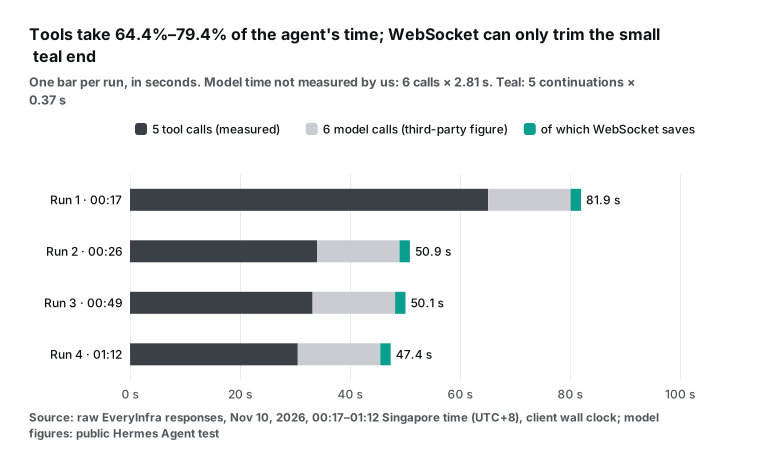
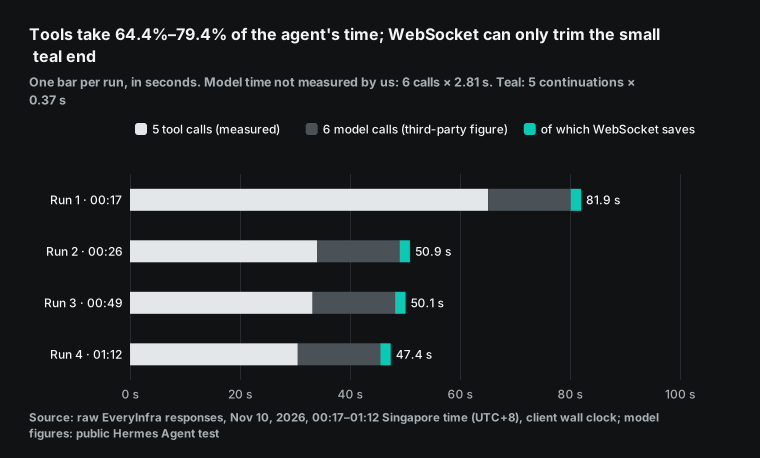
We timed a 5-step data agent 4 times. Tools took 64.4%–79.4% of the run, so the Responses API WebSocket mode saves only 1.5%–3.9%.
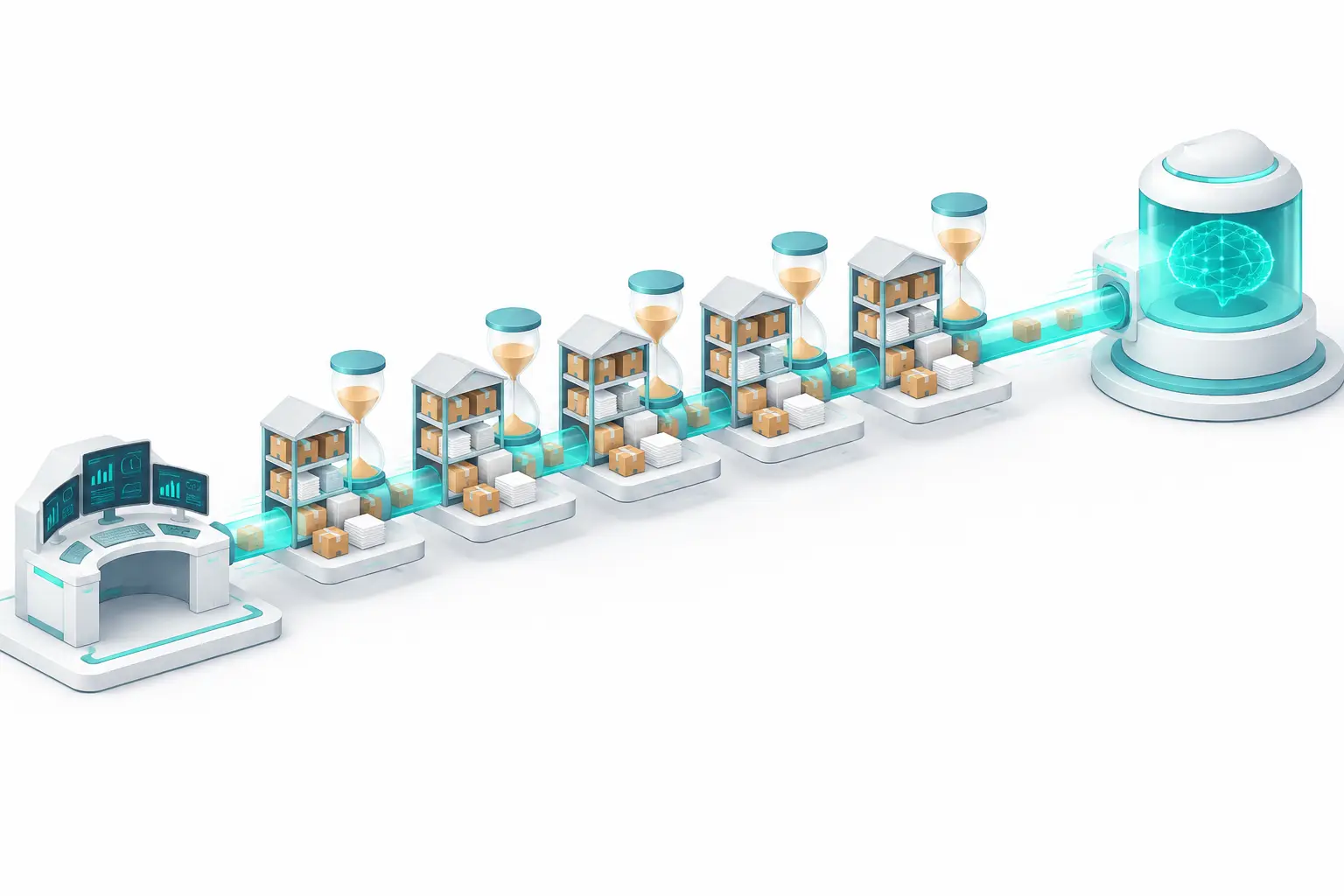
OpenAI says its Responses API WebSocket mode makes long agent runs up to about 40% faster. That number comes from coding agents, whose tools read local files in a few milliseconds. We wanted to know what happens when the tools are data APIs that take seconds. So on November 10, 2026, we ran a 5-step research agent against EveryInfra data APIs 4 times, at 00:17, 00:26, 00:49, 01:12 Singapore time (UTC+8).
The agent searched the web, searched Reddit, read a Reddit thread, searched YouTube and pulled a transcript. The five tool calls took 30.5 to 65.1 seconds per run, with a median of 33.6 seconds. We did not send a single model request to OpenAI. The model time and the per-turn saving both come from a public third-party test, and only the tool side is our own measurement. We added the model side at that test's figure of 2.81 seconds per call.
With that, the tools took 64.4% to 79.4% of the total run time.
WebSocket mode only speeds up the model "continuation" after each tool result. A public 84-round test in the Hermes Agent project on GitHub measured that gain at 0.24 to 0.37 seconds per model call. On our tool chain, that is a saving of 1.5% to 3.9%.
Even a generous upper bound, which credits each continuation with 40% of a model call, gives only 6.9% to 11.9%. Our answer: turn WebSocket mode on, because it is free and easy, but do not expect it to fix slow tools. Parallel calls, async jobs and faster capabilities save far more time.
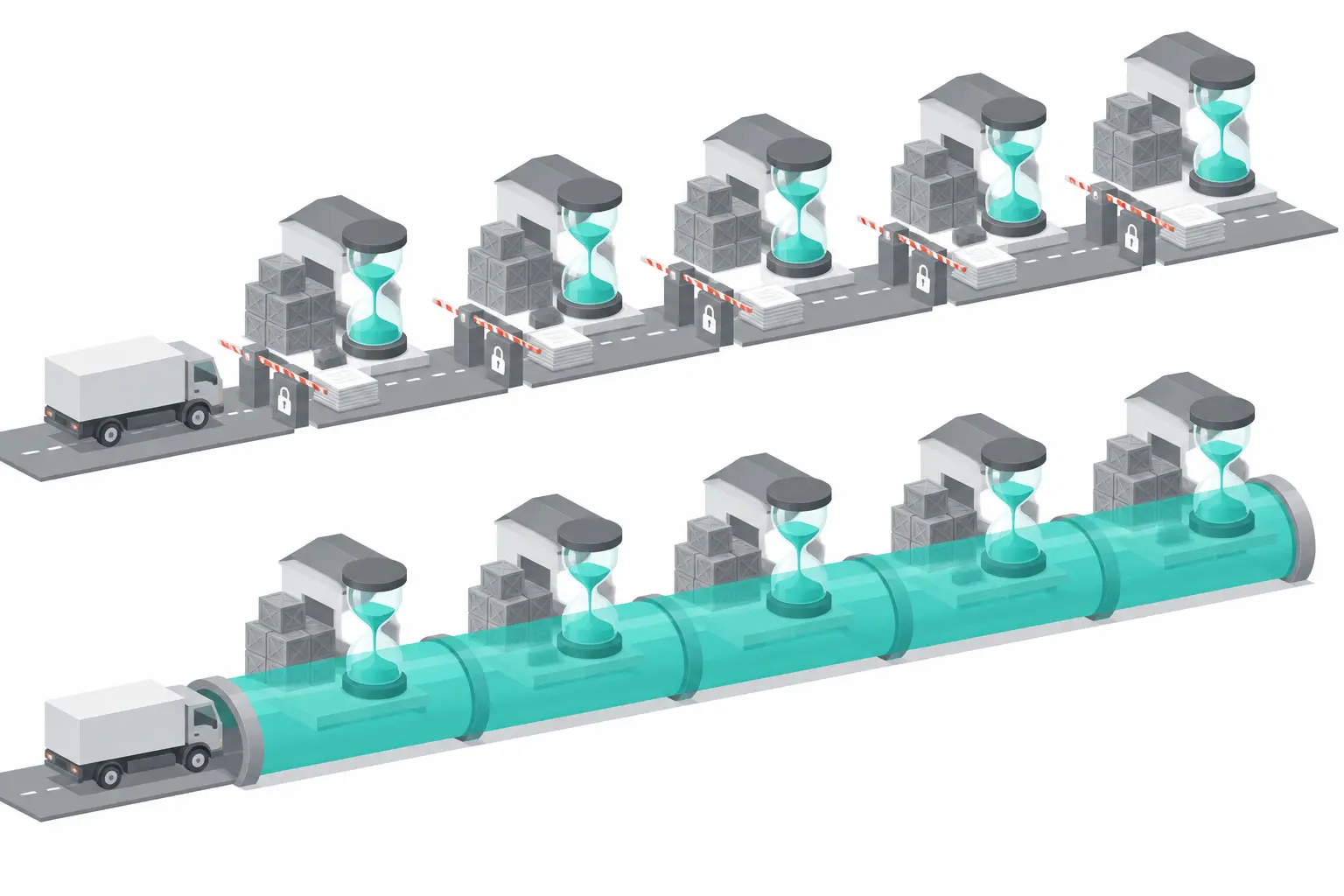
The short answer: what WebSocket saves on a 5-step data agent
Here is the full account for each run. The later sections explain each part. Tool time is the client wall clock of our live calls, including network round trips.
We matched each call by request_id to the server-side latency in the test account's request log. We did not run OpenAI models ourselves, so we do not invent model timings. We use one public measurement: in the Hermes Agent test, the median time to response.completed over HTTP streaming was 2.81 seconds.
A 5-tool agent makes 6 model calls: one to plan the first call, then one after each tool result. That is 16.9 seconds of model time. WebSocket helps only the last 5 calls, because the first call has no state to continue.
| Run | Singapore time | 5 tools | Total over HTTP | Tool share | Saves 0.24 s/turn | Saves 0.37 s/turn | Generous cap |
|---|---|---|---|---|---|---|---|
| Run 1 | 00:17 | 65.1 s | 81.9 s | 79.4% | 1.5% | 2.3% | 6.9% |
| Run 2 | 00:26 | 34.0 s | 50.9 s | 66.9% | 2.4% | 3.6% | 11.1% |
| Run 3 | 00:49 | 33.2 s | 50.1 s | 66.3% | 2.4% | 3.7% | 11.2% |
| Run 4 | 01:12 | 30.5 s | 47.4 s | 64.4% | 2.5% | 3.9% | 11.9% |
Each "saves" column is the seconds that WebSocket removes, divided by the total run time over HTTP.
The 0.24 s and 0.37 s figures come from the Hermes Agent test: the mean gap in completion time and the median gap to the first event. The "generous cap" assumes that each continuation saves 40% of one model call. That puts all of OpenAI's "up to roughly 40%" claim on the continuation step, which is more than any real setup will get.
Even then, the fastest run saves only 11.9%. With the third-party figures, every run stays at or below 3.9%, which is 1.20 to 1.85 seconds. The Reddit thread step alone changed by more than that between two runs.
What is the OpenAI Responses API WebSocket mode?
The OpenAI API changelog entry for February 23, 2026, reads "Launched WebSocket mode for the Responses API" (OpenAI changelog). The official guide says the mode is for "long-running, tool-call-heavy workflows" (WebSocket mode guide). The client keeps one persistent connection to /v1/responses and sends a response.create event for each turn. The event uses the same top-level fields as an HTTP POST /v1/responses, with two exceptions.
You do not send stream, because streaming is implicit. And background mode is not supported (WebSocket events reference). The endpoint is wss://api.openai.com/v1/responses; the Pipecat docs, for example, use it as the default URL for their WebSocket variant (Pipecat docs). To continue a conversation, the client sends only the new input items, such as the last tool output, plus previous_response_id.
The speed comes from a connection-local, in-memory cache.
While the connection stays open, the service keeps the most recent response state in memory for that connection. A continuation from the latest response can reuse that state. Because the state stays in memory and is never written to disk, the mode works with store=false and with Zero Data Retention (ZDR).
The trade-off: if the previous_response_id is not in the cache, a store=true setup may load it from stored data, but "it loses the in-memory latency benefit". With store=false, there is no fallback, and the request fails with previous_response_not_found. If a same-lane continuation returns a 4xx or 5xx error, the service also removes that response ID from the cache.
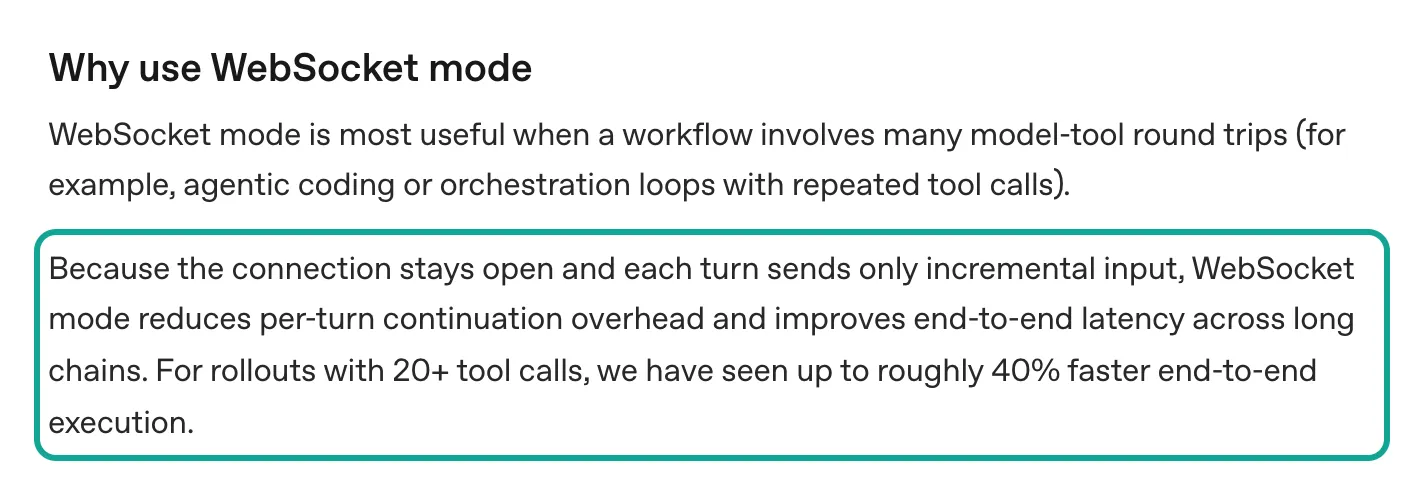
The table below lists the limits that the guide states. Note one difference from Microsoft Azure. The Azure OpenAI page for the same feature was updated July 28, 2026.
It says that one connection runs one response at a time, with no multiplexing (Azure OpenAI WebSocket mode). The OpenAI guide allows up to 16 responses in flight through stream_id. If you use both clouds, write your code for the stricter one.
| Item | What the OpenAI guide says | What it means for an agent |
|---|---|---|
| Launch date | February 23, 2026 (changelog) | Python needs openai[realtime]>=3.8.0; Node needs openai@^7.10.0 plus ws |
| Connection length | Up to 60 minutes, then websocket_connection_limit_reached | Long jobs must reconnect; the cache is empty after a reconnect |
| Concurrency | Up to 16 responses in flight per connection; extra ones wait in a queue | Parallel tool results can continue on separate lanes |
| Named lanes | Up to 32 distinct stream_id values; first in, first out within a lane | One connection can carry several independent conversations |
| Cache | In memory for that connection only; with store=false, a miss returns previous_response_not_found | After a disconnect, start again with the full context |
| Warmup | response.create with generate: false returns no output and prepares state | Load tools and instructions before the first real turn |
| Not supported | background mode | Long background jobs still use HTTP |
The feature is still changing fast. openai-python v3.41.0 (October 28, 2026) can recover queued frames after a reconnect. v3.42.0 (October 31, 2026) added WebSocket warmup support. v3.43.0 (November 3, 2026) added "lane overflow isolation" for WebSocket streams (openai-python releases). In the Agents SDK, v0.24.0-alpha.6 (November 3, 2026) routes native MCP through the model WebSocket path. Alpha.7 (November 8, 2026) states that buffered mode does not use WebSockets (openai-agents-python releases).
Mid-turn steering with response.steer arrived in September and works only over WebSockets. The Ultrafast mode docs strongly recommend WebSockets too (Mid-turn steering, Ultrafast mode). In short, WebSocket is moving from an optional speed switch to a requirement for some new features.
Where the time saving comes from: server work, not the handshake
Many developers assume that WebSocket saves the HTTP handshake on every call. That is not quite right. HTTP/1.1 connections are persistent by default. TCP and TLS setup happens once per connection (RFC 9112, section 9), and the major SDKs reuse pooled connections.
In each of our 4 runs, we timed 10 new and 10 reused connections to each host. For api.everyinfra.com, DNS plus TCP plus TLS had a median of 25.5 ms and a maximum of 32.6 ms. For api.openai.com, the median was 20.9 ms and the maximum 44.8 ms.
Connection reuse cut the time to first byte by 34.7 ms and 22.8 ms. That is all the "transport overhead" we can measure from our side. It is tens of milliseconds, about 0.1% of a tool chain that took 30.5 to 65.1 seconds.
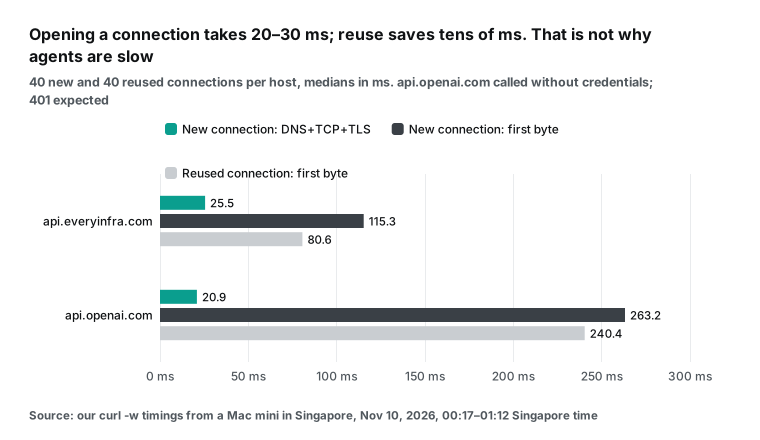
So where does OpenAI's 40% come from? The OpenAI engineering post "Speeding up agentic workflows with WebSockets in the Responses API" splits each agent loop into three parts. They are API service work, model inference and client-side tool time (OpenAI engineering post). WebSocket mode cuts the first part.
The service caches the previous response, its output items, the tool definitions and the rendered tokens on the connection. The next turn does not validate and render the whole history again. The post says Codex moved most of its Responses API traffic to WebSocket mode soon after launch. The post also gives partner figures.
The Vercel AI SDK saw latency fall by up to 40%. Cline's multi-file workflows ran 39% faster. OpenAI models in Cursor became up to 30% faster.
The most-watched YouTube explainer on the launch (published March 4, 2026, about 170,000 views when we checked), makes the point in plainer words (video).
Over HTTP, an agent sends the full conversation again after every tool call. Prompt caching saves the model from computing those tokens again, but it does not stop the upload or the server-side processing of those bytes. The video says that the real value of WebSocket is a guarantee. Your next turn lands on the same API machine, which already holds your state.
We pulled 50 comments and replies under the video. Seven mention sticky sessions, and one asks directly how this differs from store: true. They all ask the obvious follow-up. If server state is the point, why not use store: true with previous_response_id, or sticky sessions on a load balancer? The OpenAI guide answers the first part: a store=true continuation can load from stored data but "loses the in-memory latency benefit". The memory cache belongs to one connection.


Put the two views together and the pattern is clear. A coding agent gets 30% to 40% because its tools are local: reading a file or running grep takes milliseconds. Over dozens of tool calls, almost all the time goes to the model and the API service, so the service-side saving stands out. A data agent calls tools that fetch web pages, search social platforms or pull transcripts. Each call takes seconds or tens of seconds, and the fraction of a second that the service saves is lost in that time.
What others measured: 40% from OpenAI, 39% from Cline, 0.24 s per turn
Before our own runs, we read every public number we could find at its original source. The table groups them by what they measure. An end-to-end percentage and a per-turn number are not the same thing. The percentage depends on the number of turns and the tool speed in that test. The per-turn seconds are what you can carry over to your own agent.
| Source | Date | Setup | Number |
|---|---|---|---|
| OpenAI WebSocket mode guide | Read November 10, 2026 | Runs with 20+ tool calls | "Up to roughly 40%" faster end to end |
| OpenAI engineering post | April 22, 2026 | Vercel AI SDK, Cline, Cursor | Up to 40%, 39%, up to 30% |
| Cline post on X | February 23, 2026 | Simple tasks; complex multi-file tasks | About 15%; about 39%; best cases 50%. Handshake adds slight TTFT on short tasks |
| Hermes Agent PR comment | October 11, 2026 | 84 alternating SSE and WebSocket rounds, about 15,000 input tokens | Median first event 0.37 s faster; completion 0.16 s (median) and 0.24 s (mean) faster; TCP+TLS about 11 ms |
| YouTube explainer (about 170,000 views) | March 4, 2026 | Explainer that cites OpenAI | Over 90% less bandwidth, 20% to 30% faster |
For a data agent, the Hermes Agent number is the most useful (GitHub comment). The tester was in Japan and used the Codex OAuth backend with one model. The test alternated SSE and WebSocket over 84 rounds of about 15,100 input tokens each. From request to response.created, SSE had a median of 1.00 s and WebSocket 0.59 s. To response.completed, SSE had a median of 2.81 s and WebSocket 2.61 s, with a mean gap of 0.24 s.
The tester called it a "modest win" and estimated about 4 seconds saved over 20 sequential calls. That does not conflict with OpenAI. An earlier thread in the same project, Hermes Agent issue #6057, opened on April 8, 2026. There, the maintainers first declined the feature, because the gain looked small for the extra complexity.
The Cline post has a detail that is easy to miss. On short, simple tasks, the WebSocket handshake makes the first token slightly later (Cline on X). An agent that makes only one or two tool calls can even get slower.
The AI SDK team framed its launch-day result as "save up to 40% time to first byte" (AI SDK on X). Cursor's post said OpenAI models became "up to 30% faster" (post on X). All of these come from coding agents with fast, local tools.
Open-source agent frameworks asked for the feature right away. An OpenClaw feature request for "multi-tool-call acceleration" appeared on launch day (OpenClaw issue #24830). But "many tool calls" and "slow tool calls" are different problems. WebSocket is good at the first one. Our test separates the two.
How we tested: one tool chain, 4 times of day, two clocks
The test machine was a Mac mini in Singapore running Python 3 with the standard http.client module. The whole tool chain shared one keep-alive connection. The first step opened it and the later steps reused it, as a connection pool does.
Each run did five things. First, curl -w timed connection setup, 10 new and 10 reused connections per host. Second, the agent ran its 5-step tool chain.
Third, it repeated step 1 on a new connection as a control. Fourth, it called one slow capability once in sync mode and once in async mode. Fifth, it sent one MCP tools/list and one tools/call.
The four runs started at 00:17, 00:26, 00:49 and 01:12 Singapore time. Runs 1, 3 and 4 are at least 20 minutes apart. Run 2 came only 9 minutes after run 1, because we reran after a fix to the polling script.
The chain imitates a common research task: "what do developers say about this API?" Step 1 uses our web search API. Steps 3 and 5 depend on the results before them, so they cannot run in parallel. This turn-after-turn shape is exactly what WebSocket mode is meant to speed up.
| Step | Capability | Input | Depends on |
|---|---|---|---|
| 1 | search/web | "openai responses api websocket", 10 results | — |
| 2 | reddit/search | "responses api websocket", 10 results | — |
| 3 | reddit/comments | first post from step 2, 20 comments | Step 2 |
| 4 | youtube/search | "openai websocket mode responses api", 10 results | — |
| 5 | youtube/transcript | first video from step 4 | Step 4 |
We used two clocks. The client wall clock runs from sending the request to reading the full response body, network included. The server time comes from the test account's request log (GET /portal/api/logs in the console, which records latency_ms for each call), matched by request_id. The difference is the transport overhead on our side: network, TLS and body transfer. Our test key had a limit of 10 calls per minute.
So we left 7 seconds between paid calls and waited for Retry-After on every 429. Rejected calls cost nothing and are not in the results. We sent no model requests to OpenAI. Our only traffic to api.openai.com was unauthenticated connection timing, where a 401 is the expected reply. Every OpenAI-side number in this article comes from the sources in the previous section.
Test 1: how long each tool step takes
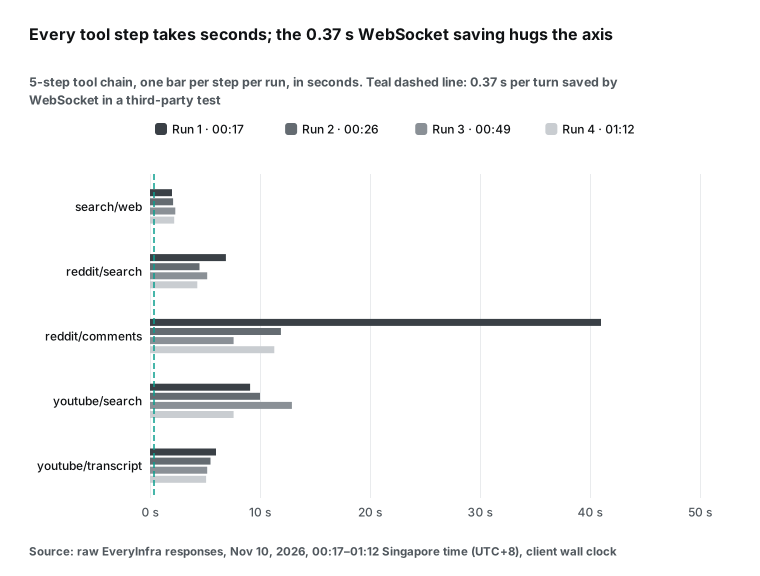
Here is each step in each run, as client wall clock in seconds. Web search was the fastest and most stable at 2.0 to 2.3 s. Reading Reddit comments varied the most: 7.6 s at best and 41.0 s at worst, for the same post and the same 20 comments. YouTube search stayed between 7.6 and 12.9 s, and transcripts between 5.1 and 6.0 s.
Almost all of the difference between runs comes from that one step. Run 1 took 65.1 s, and the comments step alone was 63% of it. Without that step, the other four steps took 19 to 26 s in every run, a spread of less than 7 s. The fastest run was run 4 (01:12 Singapore time) at 30.5 s. The total time of a dependent chain follows its least stable step. For capacity planning, use the p95 of each step, not the mean.
| Step | Capability | Run 1 | Run 2 | Run 3 | Run 4 | Median |
|---|---|---|---|---|---|---|
| 1 | search/web | 2.0 | 2.1 | 2.3 | 2.2 | 2.2 |
| 2 | reddit/search | 6.9 | 4.5 | 5.2 | 4.3 | 4.9 |
| 3 | reddit/comments | 41.0 | 11.9 | 7.6 | 11.3 | 11.6 |
| 4 | youtube/search | 9.1 | 10.0 | 12.9 | 7.6 | 9.6 |
| 5 | youtube/transcript | 6.0 | 5.5 | 5.2 | 5.1 | 5.4 |
| Total | 5 calls | 65.1 | 34.0 | 33.2 | 30.5 | 33.6 |
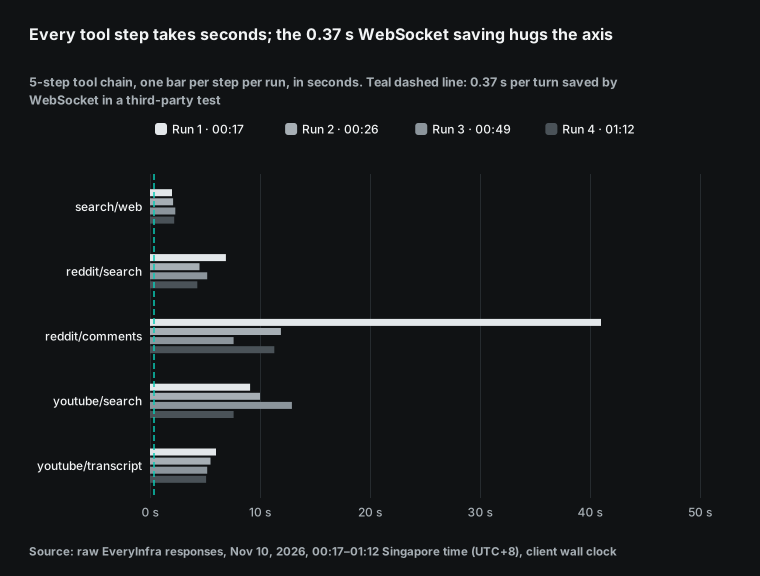
The gap between client time and server time is the transport overhead we can see. Over 20 sync calls, the median gap was 179 ms, the smallest 108 ms and the largest 556 ms. The largest was a YouTube search with a 26 KB body, so most of that gap is transfer time.
Even if all of our network overhead went away, the five steps would save less than one second, against tens of seconds of tool work. One more detail surprised us. Every sync reply includes an async_hint field.
It says that the call was synchronous. For slow tasks or large limits, add "mode":"async", get a job ID at once and poll for it. The API itself tells the agent not to sit and wait.
Per capability, the client and server medians tell the same story. The gap is one to two hundred milliseconds for every step, which is small next to the seconds of tool work.
| Capability | Client wall clock (median) | Server time (median) | Gap (median) |
|---|---|---|---|
search/web | 2.16 s | 1.81 s | 228 ms |
reddit/search | 4.86 s | 4.70 s | 160 ms |
reddit/comments | 11.60 s | 11.29 s | 214 ms |
youtube/search | 9.55 s | 9.22 s | 177 ms |
youtube/transcript | 5.36 s | 5.24 s | 125 ms |
The largest single gap was a youtube/search call, which has the largest body, about 26 KB, so most of that extra time is transfer. By median, all five gaps are between 125 and 228 ms, and youtube/transcript, with a body of about 4 KB, has the smallest. A smaller limit cuts both the server time and the transfer time.
Compare the swing in each step with what WebSocket can save. The Reddit comments step changed by tens of seconds between runs. WebSocket saves a fraction of a second per turn, about two orders of magnitude less. If your agent feels slow, first find which tool is slow and why, not how you connect.
Our Reddit comments API takes a limit, and fewer comments come back faster. The YouTube search API and the YouTube transcript API were steady in our runs. That makes them good middle steps in a dependent chain.
Test 2: new connection versus reused connection
| Host | New connection setup (median) | Slowest | First byte, new connection | First byte, reused connection | Saved by reuse |
|---|---|---|---|---|---|
api.everyinfra.com | 25.5 ms | 32.6 ms | 115.3 ms | 80.6 ms | 34.7 ms |
api.openai.com | 20.9 ms | 44.8 ms | 263.2 ms | 240.4 ms | 22.8 ms |
This table rules out a common belief. WebSocket mode is not faster because it shakes hands less often.
Over HTTP, the SDK already reuses connections, and a new connection costs only 20 to 30 ms. The Hermes Agent test measured TCP plus TLS at about 11 ms, the same order as ours. Its per-turn gap was 240 to 370 ms, ten times larger, and that difference can only come from work the server no longer does.
In each run we also repeated step 1 on a new connection, and TCP plus TLS took 24.5 to 28.4 ms. So even a framework that opens a new connection for every tool call adds only about a hundred milliseconds over five steps. "My tool server is far away and handshakes are slow" is not a reason to switch. "My agent calls the model dozens of times with a large context" is.
Test 3: wait on a slow tool, or submit it and poll?
Some data tools are slow by nature. We picked twitter/search (X search API), one of the most-used and slowest capabilities in our 30-day data. In each run, we called it once in sync mode and once in async mode, 20 results each. The sync call took 22.1 to 27.5 s, with a median of 23.7 s, and the agent could do nothing during that time.
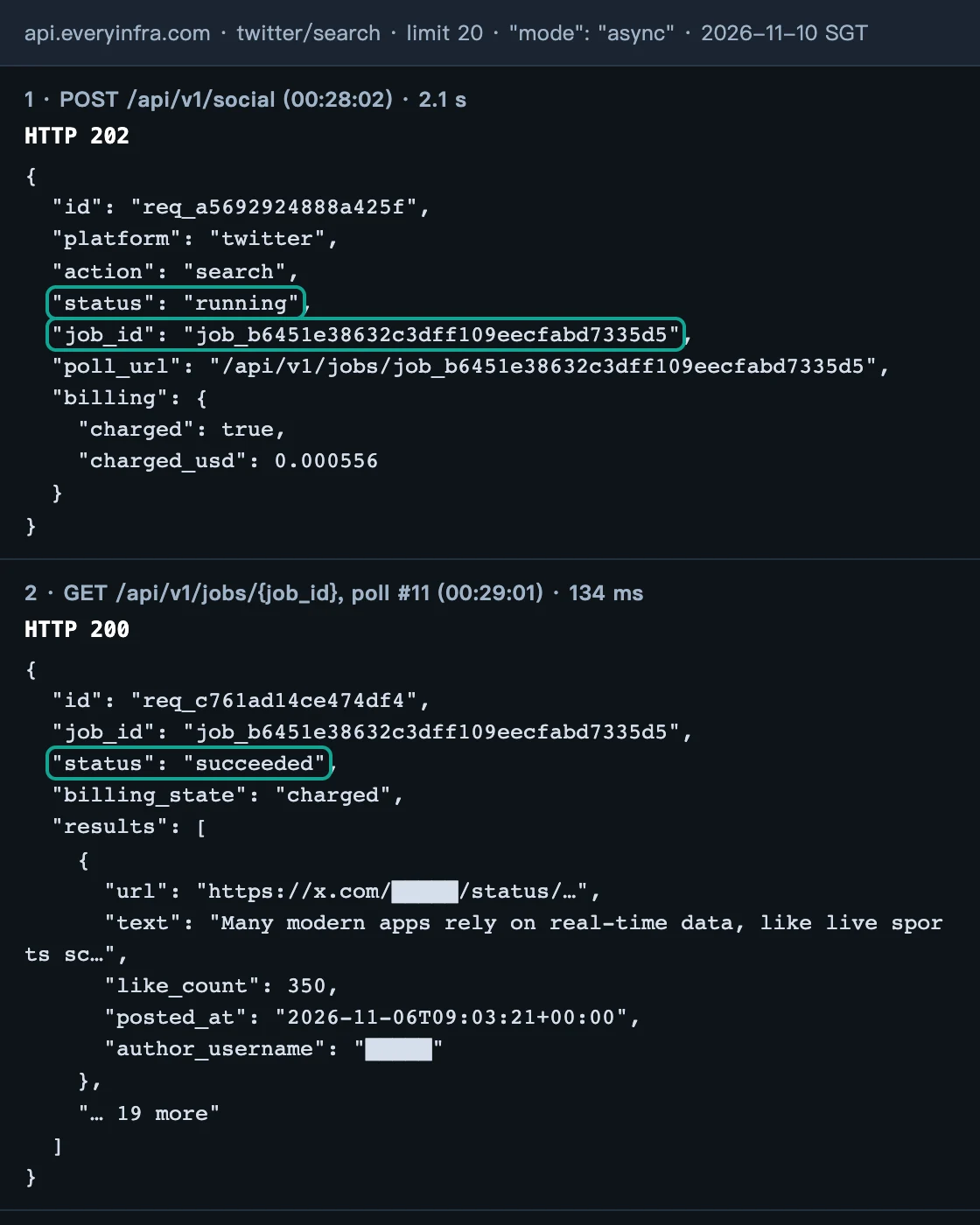
The async call adds "mode": "async" to the request body. The API answered with HTTP 202 and a job_id in 2.43 s (median). We then called GET /api/v1/jobs/{job_id} every 5 seconds, and the status moved from running to finalizing to succeeded. Across 4 runs we sent 36 polls. Their median was 88 ms, with a range of 59 to 773 ms, and they cost nothing.
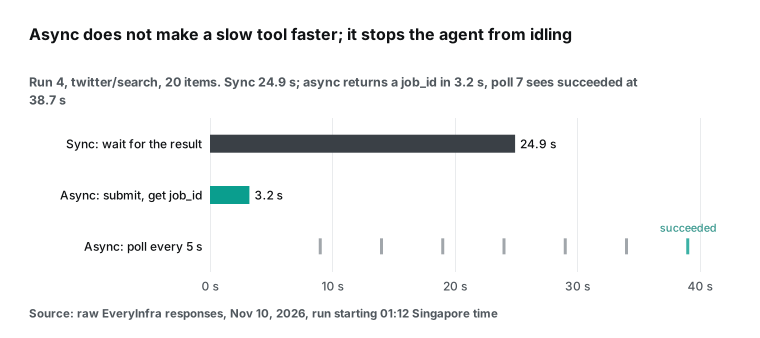
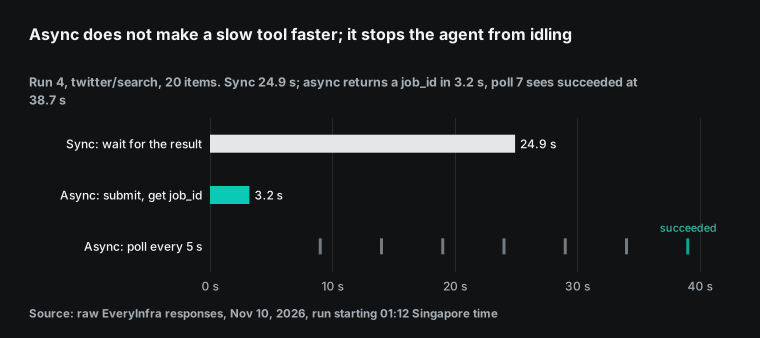
To be clear, async does not make the tool itself faster. We followed 3 async jobs to succeeded. In run 1, our poll script stopped early at finalizing, so we do not count that job. A free read later showed that it succeeded with 20 results. From submit to succeeded, the three jobs took 38.5, 38.7, 58.4 s, which is longer than the sync call each time.
Here is why. A job reached finalizing 23 to 48 s after submit, about the same as the sync call at 22.1 to 27.5 s. The finalizing stage then took another 10 to 15 s, and the 5-second poll interval can add up to 5 s more. The same data gives a poll schedule. Every poll in the first 23 s returned running, so you can send the first poll at about 20 s and then poll every 5 s. That saves two or three requests per job and some of your per-minute quota.
The value of async is that the agent gets those 20-plus seconds back.
After submitting, it can start other tool calls, answer the user, or let the model work on results it already has. OpenAI released async tool calling (async: true) with GPT-6 Astra on September 3, and it follows the same idea. The model sends a tool call, keeps going, and collects the result later with a wait step (Async tool calling).
Test 4: one round trip over MCP
Many teams do not write tool functions. Instead, they connect the EveryInfra remote MCP server (https://api.everyinfra.com/mcp, see the MCP server page) to their agent.
We used MCP once per run. tools/list returned 12 tools in about 16.3 KB of JSON, with a median of 100 ms, at no charge. Run 1 was the slowest at 264 ms; the other three runs took 71 to 125 ms. tools/call ran everyinfra_search for the same web search. The 3 calls that went through had a median of 2.26 s, close to the 2.2 s of the REST search/web call.
The run 1 call was rate-limited. Note that MCP reports rate limits as HTTP 200 with a JSON-RPC isError result, not as HTTP 429. Retry logic must look for rate_limited in the body.
There are three ways to connect MCP tools to the Responses API, and they differ in who runs the tool and what WebSocket can save:
| Setup | Who runs the tool | Round trip per tool call | What WebSocket changes |
|---|---|---|---|
| Function tool; your code calls the REST API | Your process | Model → you → EveryInfra → you → model | One continuation saved each time you return a tool result |
Hosted MCP (type: "mcp") | OpenAI's servers | OpenAI → EveryInfra → OpenAI; not through you | One response can make several tool calls, so there are fewer continuations to save |
Agents SDK MCPServerStreamableHttp | An MCP client in your process | Same as a function tool | Same as a function tool |
The hosted MCP row is the key to the "is it worth it" question. OpenAI's MCP guide gives three facts. The model can make several mcp_call items in one response. The tool list (mcp_list_tools) is not fetched again while it stays in context.
MCP tool calls have no per-call fee of their own (MCP and Connectors guide). In this setup, tool results do not travel back to your process first. So there are fewer continuations for WebSocket to speed up, and the tool time stays the same. The WebSocket events reference lists mcp among the tool types for response.create.
Agents SDK alpha.6 also routes native MCP over WebSocket, so the two work together. Just do not expect the gains to add up to much.
30 days and 8,823 calls: data tools take seconds as a rule
A few dozen calls in four runs could be a fluke. So we also pulled the 30-day call quality report from the test account's console (2026-10-11 to 2026-11-09, UTC dates). It covers only this account's own calls, and it measures latency on successful calls only.
In that window there were 8,823 calls and 8,070 successes, a success rate of 91.5% (empty results count as successes). 45 capabilities had 30 or more samples. Their median latency ranged from 1.0 s to 32.7 s. Of those capabilities, 84.4% had a median above 2 s and 68.9% above 5 s. Weighted by call count, the median call took about 2.1 s.
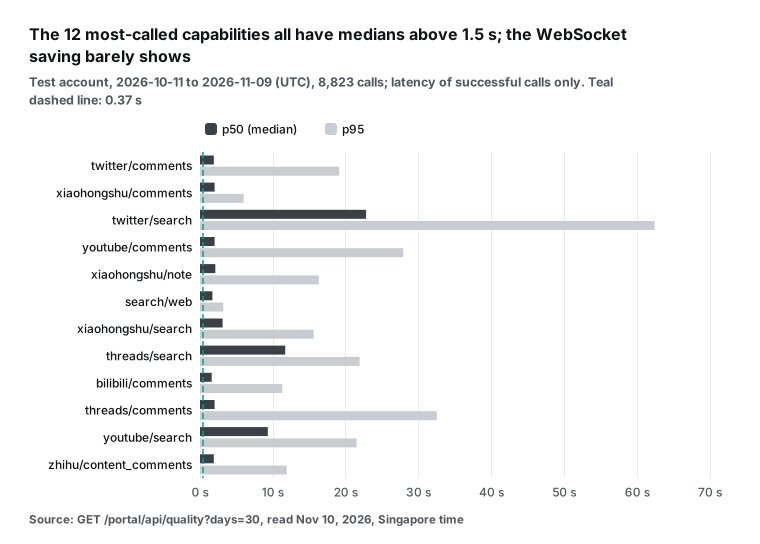
The fastest capabilities in the chart, such as the comment endpoints and web search, have medians near 2 seconds. Search endpoints are slower. twitter/search has a median of 22.8 s and a p95 of 62.4 s. threads/search has a median of 11.7 s, and youtube/search 9.3 s.
The p95 is often several times the median, which means about one call in twenty takes much longer. For an agent, the p95 matters more than the median: in a 5-step dependent chain, one step at p95 slows the whole run. On this chart, the per-turn WebSocket saving is a thin line against the axis.
The math for a 5-step agent: transport versus tool time
Here are the numbers as one formula. Let t be the average time per tool call and M the time per model call. An agent that makes n tool calls makes n+1 model calls. WebSocket saves s seconds on each of the last n continuations. The saved share is then:
saved share = n × s ÷ ((n+1) × M + n × t)
In this article, n = 5 and M = 2.81 s. With s = 0.24 s from the Hermes Agent test, a model-only task (t = 0) saves 7.1%. With s = 0.37 s, it saves 11.0%.
With the generous cap (40% of model time per continuation), it saves 33.3%. That last value is in line with OpenAI's "up to roughly 40%" for 20+ tool calls, which shows the formula does not undercount WebSocket. As t grows, the share falls fast.
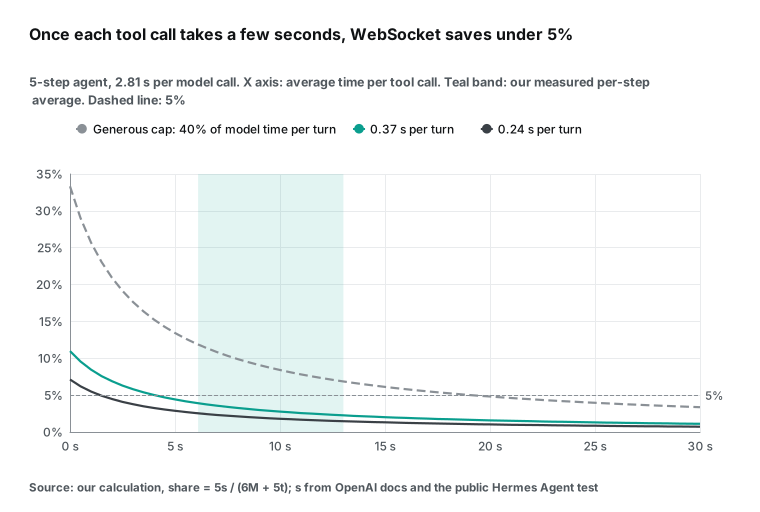
The inverse is more practical: how slow can each tool call be if you want WebSocket to save at least a given share? The table shows the result for a 5-step agent at 2.81 s per model call.
| Saving per continuation | Tool time for ≥10% | Tool time for ≥5% | Tool time for ≥2% | With zero tool time |
|---|---|---|---|---|
| 0.24 s (third-party mean) | Not reachable | ≤ 1.4 s | ≤ 8.6 s | 7.1% |
| 0.37 s (third-party median, first event) | ≤ 0.3 s | ≤ 4.0 s | ≤ 15.1 s | 11.0% |
| 40% of model time (generous cap) | ≤ 7.9 s | ≤ 19.1 s | ≤ 52.8 s | 33.3% |
Our measured chain averaged 30.5 ÷ 5 to 65.1 ÷ 5 seconds per step, which is roughly 6 to 13 seconds. That is in the "less than 5%" zone of the table, and only the generous-cap row comes close to 5%. This is the numeric answer to "is WebSocket worth it when tools are slow?"
With the third-party per-turn saving, a tool call of more than about 4.0 s means you save less than 5%. Past about 15.1 s, you save less than 2%. Now take the opposite case: fast tools (local files, an in-memory cache), many turns (20 or more) and a large context. Then expect gains close to the 30% to 40% that OpenAI and Cline report.
The number of turns, n, matters less than you might think. More turns mean more seconds saved, but the share barely moves, because both the top and the bottom of the formula grow with n. For large n, the share tends toward s ÷ (M + t).
So "my agent calls 50 tools" is not a reason to switch by itself. "Each tool call is fast" is. For a data agent with s = 0.37 s and t = 10 s, that limit is about 2.9%.
Four agent shapes in the same formula: when does WebSocket matter?
One tool chain is not the whole picture, so we put four common agent shapes through the same formula. Model time is 2.81 s per call in every row. Tool times are typical values that we set for each shape, not measurements. The second row uses the median of our measured chain, 33.6 seconds for five tools.
| Agent shape | Tool calls | Total tool time (assumed) | Saves 0.24 s/turn | Saves 0.37 s/turn | Generous cap |
|---|---|---|---|---|---|
| Coding agent: reads files and runs grep, about 0.03 s each | 40 | 1.2 s | 8.2% | 12.7% | 38.6% |
| Research agent: our 5-step data chain | 5 | 33.6 s (measured median) | 2.4% | 3.7% | 11.1% |
| Sales lead enrichment: 6 company lookups at 3 s each | 6 | 18 s | 3.8% | 5.9% | 17.9% |
| Support bot: one knowledge-base lookup at 0.5 s | 1 | 0.5 s | 3.9% | 6.0% | 18.4% |
The coding agent row reaches 38.6% under the generous cap, which matches OpenAI's "up to roughly 40%" and Cline's 39% on complex multi-file tasks. So the formula reproduces the official numbers when tools are fast, and that is why its small results for slow tools deserve trust. The lead enrichment row shows the middle ground: 3-second lookups are not slow by data-API standards, yet the third-party figures give only 4% to 6%. The support bot row is a special case.
With one tool call, there is only one continuation to speed up. The Cline post also warns that on short tasks the handshake can delay the first token. Measure before you switch in that case.
So, to decide, estimate two numbers: how many tool calls your agent makes, and how long each takes on average. If the average is under 1 second and there are 10 or more calls, WebSocket is almost always worth turning on. If the average is over 5 seconds, fix the tools first and leave WebSocket for last. And if you need mid-turn steering, or Ultrafast mode where the docs strongly recommend WebSockets, the question is not whether WebSocket is worth it. The question is whether you need those features.
How to measure your own agent: log model time and tool time apart
The formula needs only two inputs, but many teams do not have them. They have only a total, such as "the run took 80 seconds". We suggest that you log these timestamps in your agent loop. Add the two kinds of time and compare the sum with the total. The rest is queueing and transport on your side.
| Timestamp | Event | What it tells you |
|---|---|---|
| T1 | You send response.create | Start of a model turn |
| T2 | response.created arrives | T2 − T1: time to first event |
| T3 | response.completed arrives | T3 − T1: model time for the turn |
| T4, T5 | A tool call starts and ends | T5 − T4: tool time; compare with latency_ms in the request log |
You can split the tool side one more level. Every EveryInfra response carries an id (the request_id), and the console request log shows the server-side latency_ms for that ID. Client wall clock minus that value is network and transfer. In our runs the median was only 179 ms, so for most agents in the cloud, tool time is almost all real server work.
Then the fixes are capability choice, parameters, parallel calls and async, not the network. Then run the same batch of tasks over HTTP and over WebSocket a dozen times each. Alternate the two. Compare medians and means, as the Hermes Agent tester did. The result is your real gain for your workload.
When tools are slow, do these four things before WebSocket
First, run independent calls in parallel.
In our chain, steps 1, 2 and 4 do not depend on each other: web search, Reddit search and YouTube search can go out together. In run 1, the three steps took 2.0 + 6.9 + 9.1 s in sequence. In parallel, the time is that of the slowest step, about 9.1 s. That removes almost 9 seconds, dozens of times the full WebSocket saving for the run.
By default, the Responses API lets the model emit several tool calls in one turn (parallel_tool_calls). Your tool runner must then execute them at the same time. The WebSocket stream_id lanes then let one connection carry several independent sub-tasks.
Second, move slow tools to async.
WebSocket cuts the time the model waits for you; async cuts the time you wait for the tool. A sync twitter/search blocks for more than 20 seconds, which equals the WebSocket saving of about a hundred turns in the Hermes Agent test. With mode: async, you get a job_id in about 2 seconds and the agent can move on. With OpenAI's async tool calling, the model does not stop and wait either. Do not poll too often.
Our test key allows only 10 calls per minute. Polls are free. But in run 1 we polled every 2 seconds, and with the other calls, that pushed one MCP call into a rate limit. After we moved to 5-second polls, the problem did not come back.
Third, pick faster capabilities and ask for less data. To learn "what developers say", web search had a median of 2.2 seconds in our runs, Reddit search 4.9 seconds and YouTube search 9.6 seconds. If the top 10 web results answer the question, call the others only when needed. limit also drives latency: 20 comments and 100 comments differ in more than price. With hosted MCP, allowed_tools exposes only the tools you need, which also keeps most of the 16 KB tools/list reply out of the context.
Fourth, cache tool results.
Research agents often look up the same keyword or the same post again in one session. Cache results by parameters for a few minutes, and the second call takes zero seconds. Keep the cache short. In our four runs, the same reddit/search keyword with a limit of 10 returned 8, 8, 6 and 7 posts within an hour. Community content changes all the time. A few minutes to a quarter of an hour is a safe range. This is not the same as the WebSocket cache.
WebSocket caches conversation state on the model side. You cache data on the tool side, and for a data agent that has a much larger effect. Once you have done all four, the model's share of the time goes up, and then WebSocket gives a larger gain.
| Fix | What it saved or cost in our runs | Effort |
|---|---|---|
| Run steps 1, 2 and 4 in parallel | About 9 s in run 1 | A thread pool in the tool runner |
Submit twitter/search with mode: async | Frees 20+ s of agent time per call | Poll a job URL every 5 s |
| Prefer web search when it is enough | Median 2.2 s versus 4.9 to 9.6 s | Change the tool order in the prompt |
| Cache results by parameters | 0 s on a repeat lookup | A small key-value store |
| Turn on WebSocket | 1.20 to 1.85 s per run | One setting in the SDK |
Configuration example: Responses API WebSocket with an EveryInfra function tool
This is a configuration example. We did not run it with an OpenAI key on our machine. The WebSocket part follows the Python sample in the OpenAI guide. The tool part calls the same API that we tested live.
There are three points. Open one persistent connection with client.responses.connect(). Call EveryInfra through a requests.Session, which reuses its connection. After each tool result, send only the function_call_output items and previous_response_id.
# Configuration example: pip install "openai[realtime]>=3.8.0" requests
import json, os, requests
from concurrent.futures import ThreadPoolExecutor
from openai import OpenAI

client = OpenAI()
ei = requests.Session()
ei.headers["Authorization"] = "Bearer " + os.environ["EVERYINFRA_API_KEY"]

TOOLS = [{
    "type": "function",
    "name": "everyinfra_social",
    "description": "Fetch public social data, e.g. reddit/search or youtube/transcript.",
    "parameters": {
        "type": "object",
        "properties": {
            "platform": {"type": "string"},
            "action": {"type": "string"},
            "params": {"type": "object"},
        },
        "required": ["platform", "action", "params"],
    },
}]

def run_tool(call):
    args = json.loads(call.arguments)
    r = ei.post("https://api.everyinfra.com/api/v1/social", json=args, timeout=120)
    return {"type": "function_call_output", "call_id": call.call_id, "output": r.text}

with client.responses.connect() as conn, ThreadPoolExecutor(max_workers=4) as pool:
    prev = None
    new_input = [{"role": "user", "content": "Summarize what developers say about Responses API WebSocket mode."}]
    while True:
        conn.response.create(model="gpt-6.1-sol", store=False, tools=TOOLS,
                             previous_response_id=prev, input=new_input)
        for ev in conn:
            if ev.type == "response.completed":
                resp = ev.response
                break
            if ev.type in {"response.failed", "response.incomplete", "error"}:
                raise RuntimeError(ev.to_json())
        calls = [o for o in resp.output if o.type == "function_call"]
        if not calls:
            print(resp.output_text)
            break
        prev = resp.id
        new_input = list(pool.map(run_tool, calls))  # run the tool calls of one turn in parallel
If you use the OpenAI Agents SDK, switching transport takes one line: set_default_openai_responses_transport("websocket"). You can also set use_responses_websocket=True on OpenAIProvider and tune keepalive pings with responses_websocket_options (Agents SDK models docs). The loop above runs the calls of one turn in parallel with a thread pool, which is the first fix from the previous section. For slow capabilities, add "mode": "async" to the arguments and poll GET /api/v1/jobs/{job_id}. We tested that part live.
Long runs: the 60-minute limit, reconnects and warmup
Data agents differ from coding agents in one more way: their runs are long. One 5-step research pass takes half a minute to a minute. Sweep dozens of keywords with comments and transcripts for each, and a run can take 30 to 60 minutes.
That is right at the 60-minute connection limit. The OpenAI guide gives three ways to recover. If you stored a prior response (store=true) and have a valid ID, continue from it. If you cannot continue (with store=false, or after previous_response_not_found), set previous_response_id to null and send the full context.
If the context is too long, compact it with /responses/compact and use the compacted window as the new input. For data agents, open a new connection at the end of each sub-task, such as one keyword. Do not wait for a forced close at 60 minutes. Then a reconnect always falls between sub-tasks and never splits one.
Warmup also helps.
A response.create with generate: false returns no output but loads tool definitions and instructions onto the connection. Its response ID can be the previous_response_id of the next turn. Tool definitions can be large, for example all 12 tools of the EveryInfra MCP server (about 16.3 KB). Then warmup gives the first real request less to process.
Multiplexing fits a "one lane per keyword" design: run several sub-tasks on one connection with different stream_id values. Each lane stays first in, first out and continues its own state. Keep below 16 responses in flight, or the extra ones queue. Azure does not support this pattern today.
One real round trip
Here are the real request and response for step 2 of run 2 (sent at 00:26:12 Singapore time; 4.5 s client wall clock; 8 results). We kept only the fields that matter here and removed user names. async_hint is the hint exactly as the API returned it.
curl -s https://api.everyinfra.com/api/v1/social \
  -H "Authorization: Bearer $EVERYINFRA_API_KEY" \
  -H "Content-Type: application/json" \
-d '{"platform":"reddit","action":"search","params":{"keyword":"responses api websocket","limit":10}}'{
"id": "req_c7040939545343c3",
"platform": "reddit",
"action": "search",
"count": 8,
"results": [
{"title": "Websocket or REST?", "community": "r/Backend", "comment_count": 25, "posted_at": "2026-10-23T23:12:38+00:00"},
{"title": "Responses WebSocket Error", "community": "r/codex", "comment_count": 1, "posted_at": "2026-10-21T16:12:06+00:00"}
],
"billing": {"charged": true, "charged_usd": 0.000556},
"async_hint": "this call was synchronous; add \"mode\":\"async\" to the request body to get a job_id immediately (poll GET /api/v1/jobs/{job_id}) for slow tasks or large limits"
}The second result is a reminder that the feature still has rough edges. On October 21, 2026, a user on r/codex asked about a "Responses WebSocket Error" that kept coming back (thread). That is the background to the openai-python releases in late October and early November that fixed reconnect recovery and lane isolation.
Cost: WebSocket is free; tokens are the bill
The OpenAI pricing page has no separate WebSocket price. You pay for tokens, the same as over HTTP (OpenAI pricing, read November 10, 2026). Here is the cost of one 5-step run:
| Item | Unit price (read November 10, 2026) | One 5-step run | 1,000 runs |
|---|---|---|---|
search/web | $0.000694 per call | $0.000694 | $0.69 |
reddit/search, reddit/comments, youtube/search, youtube/transcript | $0.000556 per call each | $0.002224 | $2.22 |
| EveryInfra tools, total | — | $0.002918 | $2.92 |
| Tool results read by the model (about 15.3k tokens, gpt-6.1-sol uncached input at $2.00 per million) | Estimate | About $0.032 | About $32 |
| WebSocket transport | No extra charge | $0 | $0 |
EveryInfra prices come from price_usd in the free catalog at GET /api/v1/social/catalog (capability catalog; web search in the search tools list). Every live call's billing.charged_usd matched the catalog, and failed or empty calls are not charged.
We estimated the token count from the size of the five responses, about 61.4 KB in total, at about 4 bytes per token. Use it only for scale: the model reading tool results costs about ten times the tools themselves. WebSocket does not change token pricing. Over HTTP, each turn resends and reprocesses the history, and prompt caching bills the repeated part at the cached rate (gpt-6.1-sol cached input is $0.10 per million).
A user on r/codex reported a much higher cache hit rate after the switch to WebSockets (thread). That is one user's observation, and OpenAI has published no matching figure. Our 4 live runs made 35 charged calls for a total of $0.020978. Each run paid for the five chain steps, the new-connection repeat, the sync call, the async submit and the MCP tools/call. Polls and tools/list are free, and the rate-limited MCP call in run 1 was not charged. With 3 more calls to read the video transcripts and comments for this article, the total was 38 calls and $0.022646.
Limits and things to watch
First, what we did not test. We sent no model requests with an OpenAI key. So every per-turn saving on the OpenAI side comes from the original docs and the public third-party test. If your model, reasoning effort and context size differ a lot from the Hermes Agent setup (about 15,000 input tokens, medium reasoning, sent from Japan), your per-turn saving will differ too.
Put your own s and M into the formula above. Our tool times hold for these keywords at these times on the night of writing. The 30-day data is from the same test account. Your own account shows its own percentiles on the call quality page in the console, and you can also check the status page.
Second, the limits of WebSocket mode itself.
A connection lasts up to 60 minutes. When it closes, the connection cache is gone, and with store=false you must start again with the full context, so long jobs need reconnect logic. A 4xx or 5xx on a same-lane continuation evicts the referenced response from the cache.
background mode does not work over WebSocket. Azure documents one response per connection with no multiplexing, unlike the 16 in-flight responses on OpenAI. Cline's test warns that on short tasks the handshake can delay the first token.
There are edge cases too. openai-python issue #2919 (opened March 3, 2026) reports a connection that closes with code 1000 and no events. The cause was a decimal temperature, such as 1.2 (issue #2919). If a connection closes cleanly with no output, check your parameters first. Finally, openai-python fixed reconnect recovery, warmup and lane isolation between late October and early November, so stay on a recent version.
| Number in this article | Measured by us | Taken from a source |
|---|---|---|
| Tool time per step and per run | Yes, 4 runs on November 10, 2026 | — |
| Connection setup and reuse | Yes, curl timings | — |
| 30-day latency by capability | Yes, test account report | — |
| Model time per call (2.81 s) | No | Hermes Agent public test |
| Saving per continuation (0.24 to 0.37 s) | No | Hermes Agent public test |
| "Up to roughly 40%" end to end | No | OpenAI guide and engineering post |
Recent changes
- October 22, 2026: Google API Gateway streaming enters public preview. It covers SSE, WebSockets and gRPC, with streams of up to one hour (Google Developers Blog).
- October 20, 2026: OpenAI adds a 12-hour prompt cache lifetime; writes cost 2.5 times the normal input rate (prompt caching guide).
- October 16, 2026: the Agents API supports Ultrafast mode. On October 8, 2026, Ultrafast added GPT-6.1 Sol; its docs strongly recommend WebSockets (changelog).
FAQ
Responses API WebSocket vs HTTP: what is the actual difference?
The difference is on the server. Over HTTP, each turn makes the service receive and process the whole history again. In WebSocket mode, the service keeps the last turn's state in memory for that connection and processes only the new input. So WebSocket saves server work, not handshakes (a new connection took about 25.5 ms). The section on where the time saving comes from has the details.
Isn't store: true with previous_response_id the same thing?
This is a typical question under the explainer video. It is not the same. A store=true continuation loads state from storage, and the OpenAI guide says it "loses the in-memory latency benefit". The WebSocket memory cache also works with store=false and Zero Data Retention.
Can sticky sessions or HTTP keep-alive do the same?
Keep-alive reuses only the TCP and TLS connection, and we measured that at tens of milliseconds. Sticky sessions are a setting on your own load balancer. They cannot choose which OpenAI machine serves your request. WebSocket mode is OpenAI doing that job for you: one connection, one place, state in memory. A viewer comment under the video put it well: the point is not WebSockets versus polling, it is the move to stateful backends.
Is the Azure Responses API WebSocket mode the same as OpenAI's?
Mostly. The difference is concurrency. Azure documents one response at a time per connection, with no multiplexing. OpenAI allows up to 16 in-flight responses through stream_id. If you use both, follow the Azure pattern. The limits table above has the full comparison.
What does a Responses API WebSocket Python example look like?
Install openai[realtime]>=3.8.0, open a connection with client.responses.connect(), and send tool results back as function_call_output items with previous_response_id. The configuration example section above has a full loop for the EveryInfra data API. With the Agents SDK, set_default_openai_responses_transport("websocket") switches the transport.
Does WebSocket mode lower my bill?
Not directly. OpenAI charges nothing extra for WebSocket, and tokens are billed as usual. For a data agent, most of the spend is the model reading tool results, about ten times the tool fees. A smaller limit saves more money than a transport change. The cost section above shows the math.
Get started
First, create an EveryInfra API key in the console and put it in the EVERYINFRA_API_KEY environment variable. Second, read the free catalog at GET /api/v1/social/catalog and choose capabilities. Examples are the Reddit data API with its search endpoint, the YouTube data API, and the X (Twitter) data API. Third, call each tool once with curl and note the time; for any capability over 10 seconds, add "mode": "async".
Fourth, connect the tools to your agent. Adapt the configuration example above, or use the remote MCP server with the remote MCP setup guide. Fifth, run a full task and log tool time and model time apart. Put them into the formula, and turn on WebSocket when the model share is large.
The quickstart has the full setup, the pricing page lists per-call prices, and the data marketplace lists every capability. If your agent retries tools after timeouts, read our API idempotency key test. To choose a search tool, see the best web search API for AI agents and how agents pick search tools. For a monitoring agent on OpenAI's Agents API, see our review.
References
- WebSocket Mode, OpenAI API docs, read November 10, 2026, https://developers.openai.com/api/docs/guides/websocket-mode
- Changelog (February 23, 2026, "Launched WebSocket mode for the Responses API", and later entries), OpenAI API docs, read November 10, 2026, https://developers.openai.com/api/docs/changelog
- Responses WebSocket events (response.create), OpenAI API reference, read November 10, 2026, https://developers.openai.com/api/reference/resources/responses/websocket-events
- Speeding up agentic workflows with WebSockets in the Responses API, OpenAI engineering post, April 22, 2026, https://openai.com/index/speeding-up-agentic-workflows-with-websockets/
- Async tool calling, OpenAI API docs, read November 10, 2026, https://developers.openai.com/api/docs/guides/async-tool-calling
- Mid-turn steering, OpenAI API docs, read November 10, 2026, https://developers.openai.com/api/docs/guides/steering
- Ultrafast mode, OpenAI API docs, read November 10, 2026, https://developers.openai.com/api/docs/guides/ultrafast-mode
- MCP and Connectors, OpenAI API docs, read November 10, 2026, https://developers.openai.com/api/docs/guides/tools-connectors-mcp
- Conversation state, OpenAI API docs, read November 10, 2026, https://developers.openai.com/api/docs/guides/conversation-state
- Prompt caching, OpenAI API docs, read November 10, 2026, https://developers.openai.com/api/docs/guides/prompt-caching
- Latency optimization, OpenAI API docs, read November 10, 2026, https://developers.openai.com/api/docs/guides/latency-optimization
- Background mode, OpenAI API docs, read November 10, 2026, https://developers.openai.com/api/docs/guides/background
- Pricing, OpenAI API docs, read November 10, 2026, https://developers.openai.com/api/docs/pricing
- Rate limits, OpenAI API docs, read November 10, 2026, https://developers.openai.com/api/docs/guides/rate-limits
- Multi-agent, OpenAI API docs, read November 10, 2026, https://developers.openai.com/api/docs/guides/responses-multi-agent
- Agents API: MCP tools, OpenAI API docs, read November 10, 2026, https://developers.openai.com/api/docs/guides/agents-api/tools/mcp
- Models (Responses WebSocket transport), OpenAI Agents SDK docs, read November 10, 2026, https://openai.github.io/openai-agents-python/models/
- openai-python releases (v3.43.0, v3.42.0, v3.41.0), OpenAI on GitHub, read November 10, 2026, https://github.com/openai/openai-python/releases
- openai-python v3.43.0, OpenAI on GitHub, November 3, 2026, https://github.com/openai/openai-python/releases/tag/v3.43.0
- openai-python v3.42.0, OpenAI on GitHub, October 31, 2026, https://github.com/openai/openai-python/releases/tag/v3.42.0
- openai-agents-python releases (v0.24.0-alpha.7, alpha.6), OpenAI on GitHub, read November 10, 2026, https://github.com/openai/openai-agents-python/releases
- openai-python issue #2919: Responses WebSocket closes with code 1000 when temperature is a decimal, GitHub, March 3, 2026, https://github.com/openai/openai-python/issues/2919
- Hermes Agent PR #18436 comment: 84-round SSE versus WebSocket comparison, GitHub, October 11, 2026, https://github.com/NousResearch/hermes-agent/pull/18436#issuecomment-6109869053
- Hermes Agent issue #6057, GitHub, April 8, 2026, https://github.com/NousResearch/hermes-agent/issues/6057
- OpenClaw issue #24830: OpenAI Responses API WebSocket mode for multi-tool-call acceleration, GitHub, February 23, 2026, https://github.com/openclaw/openclaw/issues/24830
- WebSocket mode for Azure OpenAI Responses API, Microsoft Learn, July 28, 2026, https://learn.microsoft.com/en-us/azure/foundry/openai/how-to/websockets
- Multi-agent orchestration (Azure), Microsoft Learn, read November 10, 2026, https://learn.microsoft.com/en-us/azure/foundry/openai/how-to/responses-multi-agent
- OpenAI provider: WebSocket fetch, AI SDK docs, read November 10, 2026, https://ai-sdk.dev/providers/ai-sdk-providers/openai
- AI SDK post on X about Responses WebSocket support, X, February 23, 2026, https://x.com/aisdk/status/2026031263925039591
- Cline post on X with early test numbers, X, February 23, 2026, https://x.com/cline/status/2026031848791630033
- Post on X about OpenAI models in Cursor, X, February 23, 2026, https://x.com/leerob/status/2026030244407468259
- OpenAI Responses LLM (WebSocket variant, default wss://api.openai.com/v1/responses), Pipecat docs, read November 10, 2026, https://docs.pipecat.ai/api-reference/server/services/llm/openai-responses
- RFC 6455: The WebSocket Protocol, IETF, December 2011, https://www.rfc-editor.org/rfc/rfc6455
- RFC 9112: HTTP/1.1 (section 9, connection management), IETF, June 2022, https://www.rfc-editor.org/rfc/rfc9112
- RFC 8446: TLS 1.3, IETF, August 2018, https://www.rfc-editor.org/rfc/rfc8446
- MCP Specification 2026-07-28: Transports, Model Context Protocol, read November 10, 2026, https://modelcontextprotocol.io/specification/2026-07-28/basic/transports
- MCP Specification 2026-07-28: Changelog, Model Context Protocol, read November 10, 2026, https://modelcontextprotocol.io/specification/2026-07-28/changelog
- curl manual (-w timing variables), curl, read November 10, 2026, https://curl.se/docs/manpage.html
- http.client — HTTP protocol client, Python docs, read November 10, 2026, https://docs.python.org/3/library/http.client.html
- EveryInfra developer reference (async jobs, MCP, errors), EveryInfra, read November 10, 2026, https://api.everyinfra.com/llms-full.txt
- EveryInfra capability catalog, EveryInfra, read November 10, 2026, https://api.everyinfra.com/api/v1/social/catalog
- EveryInfra search tools list, EveryInfra, read November 10, 2026, https://api.everyinfra.com/api/v1/search/tools
- "I can't believe nobody's done this before..." (video), YouTube, March 4, 2026, https://www.youtube.com/watch?v=sFEDAkJy9Dc
- openai websockets is improving our usage cost, Reddit r/codex, read November 10, 2026, https://www.reddit.com/r/codex/comments/1t2n38c/openai_websockets_is_improving_our_usage_cost/
- Responses WebSocket Error, Reddit r/codex, October 21, 2026, https://www.reddit.com/r/codex/comments/1xbrg4j/responses_websocket_error/
- WebSockets for Responses API, OpenAI Developer Community, read November 10, 2026, https://community.openai.com/t/websockets-for-responses-api/1374906
- OpenAI Introduces Websocket-Based Execution Mode to Reduce Latency in Agentic Workflows, InfoQ, May 2026, https://www.infoq.com/news/2026/05/openai-websocket-responses-api/
- Streaming comes to API Gateway, Google Developers Blog, October 22, 2026, https://developers.googleblog.com/streaming-comes-to-api-gateway-real-time-and-ai-ready-apis-without-changing-your-spec/
Reference BL-125