OpenClaw and Hermes Daily Briefing to Discord: Measured Data Calls and Configuration Examples
Set up an OpenClaw daily briefing or a Hermes Agent Discord job with six data calls a day: real costs, Discord message limits, and how to stop repeats.

On November 25, 2026, from 00:17 to 00:20 Singapore time (SGT), we made the six data calls that one morning briefing needs. We used a small MCP client of our own. It sent the calls to the same remote MCP address that OpenClaw and Hermes Agent use. The calls returned 12 items: 3 GitHub trending repositories, 3 Product Hunt launches, 3 Reddit posts and 3 Google News stories. They cost $0.004891 in total, which is $4.89 per 1,000 briefings (not per 1,000 calls) and about $0.15 for a 30-day month.
We did not run OpenClaw or Hermes on our machine. To estimate the repeats of a job with no memory, we used a substitute: the 7-day send log of the trend-digest demo channel. Four of the 12 items were in that log. All 3 GitHub repositories had gone out on November 22, 2026. Both agents' docs say that a scheduled job starts in a fresh session. So an agent job with no memory will probably get the same repeats.
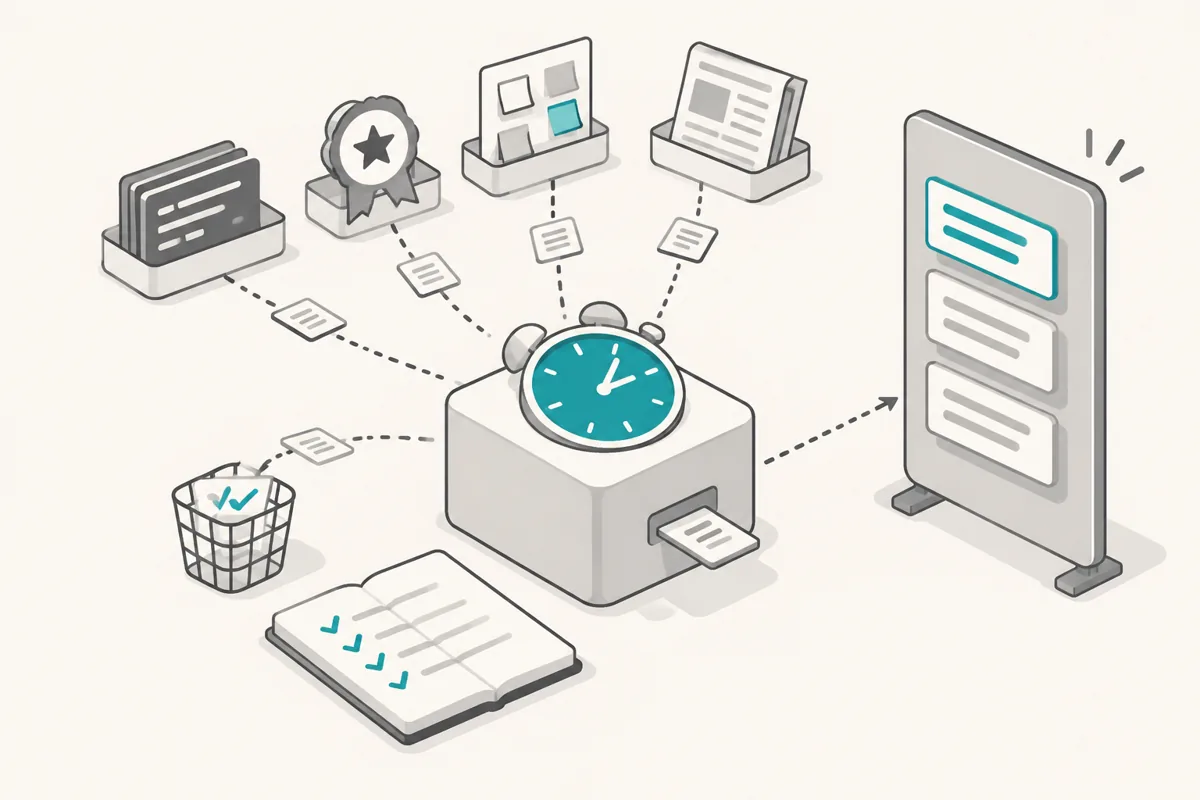
What the two agents' own tutorials say
We read both projects' docs on November 25, 2026, between 00:14 and 00:40 SGT. Hermes has a separate tutorial for a daily briefing. OpenClaw uses a morning brief as the first example in its scheduler docs.
Hermes Agent: "Tutorial: Daily Briefing Bot"
Hermes has a full tutorial for this job at hermes-agent.nousresearch.com/docs/guides/daily-briefing-bot. It describes a flow of five steps.
At 8:00 AM the cron scheduler starts the job. Hermes opens a fresh agent session with your prompt. Web search gets the latest news. The model writes a short briefing. The gateway delivers it to Telegram or Discord.
The prerequisites are short, but two of them are easy to miss. The gateway must run, because the gateway daemon runs cron jobs. The tutorial gives hermes gateway install for a user service and sudo hermes gateway install --system for a Linux server. For web search, the tutorial also needs an API key for a third-party search service in your environment.
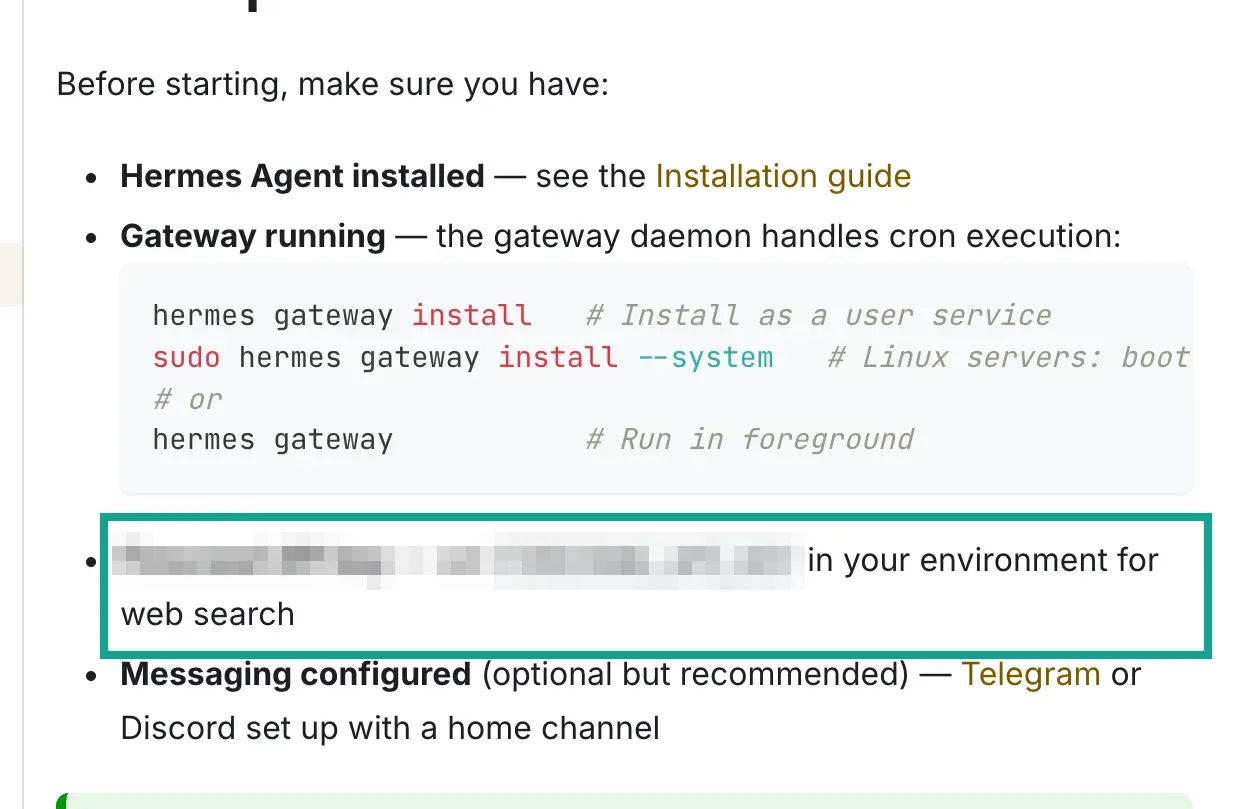
Step 1 of the tutorial is a manual test in chat. Step 2 creates the job in one of two ways. You can say "Every morning at 8am, search the web for ... Deliver to telegram." in chat, and Hermes creates the job with its cron tool. Or you can type a slash command:
/cron add "0 8 * * *" "Search the web for the latest news about AI agents and open source LLMs. Find at least 5 recent articles from the past 24 hours. Summarize the top 3 most important stories ..."The tutorial then gives its "golden rule". A cron job runs "in a completely fresh session", with "no memory of your previous conversations". So the prompt must hold everything: what to search, how many items, the format and the tone. Step 4 manages the jobs with /cron list, /cron remove <id> and hermes cron status.
The Hermes cron reference adds the details that matter for Discord. The delivery target discord sends to the home channel in DISCORD_HOME_CHANNEL. The target discord:#engineering sends to a channel by name. A failed hand-off is recorded as its own status, delivery_failed, and the output stays in hermes cron runs. The scheduler does not send it again on its own.
OpenClaw: the "Morning brief" example
OpenClaw does not have a separate briefing tutorial page. Its scheduler docs use a morning brief as the main example of a recurring job. The page Automations: managing jobs gives this command:
openclaw automations create "0 7 * * *" \
  "Summarize overnight updates." \
  --name "Morning brief" \
  --tz "America/Los_Angeles" \
  --session isolated \
  --announce \
  --channel slack \
  --to "channel:C1234567890"
For Discord you change --channel slack to --channel discord and give a Discord channel ID. The CLI reference says that openclaw automations create is an alias for openclaw automations add. It also says that openclaw cron still works as an older name.
The execution style decides what the job can remember. The payloads page has a table of four styles. isolated runs in a dedicated cron:<jobId> session and is "best for reports". session:custom-id runs in a "persistent named session" for "workflows that build on history". An isolated run "does not read that conversation's history".
Two more OpenClaw switches matter for a briefing. --light-context works on isolated agent jobs only. It keeps the bootstrap context empty, so the prompt is shorter and the model starts faster. A briefing has all of its instructions in the prompt, so it does not need the workspace files.
The second switch is silence. If the final reply is only NO_REPLY, the job posts nothing. Use it for days when the memory removes every item, so that the channel does not get an empty briefing.
The same page gives three tools for memory. Each job can keep private "scratch" text of up to 256 KiB, which the scheduler puts into each run. After a successful run, the job's last result is "included as bounded context in its next prompt". And the docs say to put "listing and diffing, dedupe, and checkpoints" in a workspace script, because the model "works out from scratch" on every run.
The two tutorials side by side
| Question | OpenClaw | Hermes Agent |
|---|---|---|
| Schedule command | openclaw automations create "0 7 * * *" "<prompt>" | /cron add "0 8 * * *" "<prompt>" or hermes cron create |
| Time zone | --tz "Area/City" per job | --timezone Area/City per job, or the profile timezone |
| Session for a report | --session isolated (dedicated cron:<jobId>) | Always a fresh session |
| Memory between runs | Scratch (256 KiB), last result, or a script | --continuity puts the last output into the next run |
| Discord target | --announce --channel discord --to "channel:<id>" | --deliver discord (home channel) or discord:#name |
| Missed run while offline | Catches up by default (cron.skipMissedJobs: false) | Catch-up window: half the period, 2 minutes to 2 hours |
| Run without a model | Command payload (--command) | --no-agent --script <file> |
| Long text in Discord | 2,000 characters or 17 lines per message | Over 8 messages (about 16,000 characters) becomes a .md file |
| What the tutorial uses for data | Your prompt and tools | Web search with a key for a third-party search service |
Sources: OpenClaw pages and Hermes pages, all read on November 25, 2026. For OpenClaw: payloads, managing jobs and Discord. For Hermes: cron and Discord.
The six EveryInfra skills on ClawHub
EveryInfra has six skills on ClawHub. We read each page and its public API record on November 25, 2026 at 00:14 and 00:37 SGT. All six are version 1.0.0 under the MIT-0 license, and each skill asks for one environment variable, EVERYINFRA_API_KEY. The install commands in the table are copied from each skill page.
Hermes reads ClawHub as a community source. Its skills page uses the form hermes skills install clawhub/.... The Hermes source file tools/skills_hub_clawhub.py also accepts clawhub/@owner/slug. With the owner in the name, Hermes rejects a skill with the same slug from a different author. The Hermes commands in the table use that form.
| Skill (slug) | What its page says it does | OpenClaw install (from the ClawHub page) | Hermes install | Needed for the briefing |
|---|---|---|---|---|
everydata | Structured data from social, shopping and news sources as JSON | openclaw skills install @xiaoxihexiaoyu/everydata | hermes skills install clawhub/@xiaoxihexiaoyu/everydata | Yes: all six calls |
everyinfra | Routes a task to the right EveryInfra product | openclaw skills install @xiaoxihexiaoyu/everyinfra | hermes skills install clawhub/@xiaoxihexiaoyu/everyinfra | Optional |
everysearch | Web, news, forum and academic search | openclaw skills install @xiaoxihexiaoyu/everysearch | hermes skills install clawhub/@xiaoxihexiaoyu/everysearch | Optional: extra news |
everyinfra-crosscheck-research | Checks a claim with more than one search method | openclaw skills install @xiaoxihexiaoyu/everyinfra-crosscheck-research | hermes skills install clawhub/@xiaoxihexiaoyu/everyinfra-crosscheck-research | No |
everyinfra-bulk-data-export | Bounded exports to CSV or JSON with cost controls | openclaw skills install @xiaoxihexiaoyu/everyinfra-bulk-data-export | hermes skills install clawhub/@xiaoxihexiaoyu/everyinfra-bulk-data-export | No |
everyai | Text tasks through EveryInfra | openclaw skills install @xiaoxihexiaoyu/everyai | hermes skills install clawhub/@xiaoxihexiaoyu/everyai | No |
A skill is instructions, not a connection. All six skills use the remote MCP server at https://api.everyinfra.com/mcp, and you add that server once in each agent. The skill text says: "The live MCP tool list is the runtime truth." So the counts of platforms and capabilities come from the MCP tools/list call and the catalog at run time. The catalog that we read at 00:16 SGT listed 718 capabilities on 110 platforms, and tools/list returned 12 tools.
For a briefing you need only everydata. Its two MCP tools are everyinfra_list_capabilities and everyinfra_call_api. Install everysearch if you also want a free-text news search in the same message.
Set it up in OpenClaw (configuration example)
We did not run these OpenClaw commands on our machine. Each one comes from the OpenClaw docs or from the ClawHub skill page. The data calls that the job makes use the same capabilities and parameters as the six calls that we measured.
- Install the data skill.
openclaw skills install @xiaoxihexiaoyu/everydata. The skills CLI page also accepts--version 1.0.0to pin the version. - Get an API key from the EveryInfra quickstart. Put it in the Gateway host's environment as
EVERYINFRA_API_KEY. Do not paste it into the prompt. - Add the MCP server. The skill page gives
openclaw mcp add everyinfra --url https://api.everyinfra.com/mcp --transport streamable-http. Then set theAuthorizationheader. Use a reference such asBearer ${EVERYINFRA_API_KEY}. The MCP transports page says that the Gateway resolves it from the environment.openclaw mcp doctorwarns about literal tokens in a header. - Raise the request timeout. One of our six calls took 52.98 seconds. Use
openclaw mcp configure everyinfra --timeout 90, or setrequestTimeoutMsto90000in the server entry. - Check the server.
openclaw mcp doctor everyinfra --probeconnects and lists the tools. - Connect Discord. The Discord setup page asks you to turn on "Message Content Intent" for normal guild messages. A briefing job only posts, so give the bot the Send Messages permission in one channel. It does not need Administrator.
- Create the job. Use the prompt from "The prompt" section, and pin the job to an agent with
--agent.
# Configuration example (OpenClaw docs, read Nov 25, 2026). Not run on our machine.
openclaw skills install @xiaoxihexiaoyu/everydata
openclaw mcp set everyinfra '{"url":"https://api.everyinfra.com/mcp","transport":"streamable-http","requestTimeoutMs":90000,"headers":{"Authorization":"Bearer ${EVERYINFRA_API_KEY}"}}'
openclaw mcp doctor everyinfra --probe

openclaw automations create "0 7 * * *" "$(cat ~/briefing/prompt.md)" \
  --name "Morning briefing" \
  --tz "Asia/Singapore" \
  --agent main \
  --timeout-seconds 600 \
  --session isolated \
  --announce \
  --channel discord \
  --to "channel:<your-channel-id>"

openclaw automations list
openclaw automations run <job-id> --wait
For memory, keep a short list of sent item IDs in the job's scratch. The payloads page gives the automations tool actions scratch_get and scratch_set inside a run. From the shell, openclaw automations scratch <job-id> --set "..." writes it. The docs warn: "Do not put API keys, tokens, or other secrets in scratch."
Set it up in Hermes Agent (configuration example)
We did not run these Hermes commands on our machine either. The commands come from the Hermes docs, and the skill target comes from the Hermes ClawHub source file.
- Install Hermes and start the gateway, as the tutorial says:
hermes gateway install. - Install the data skill:
hermes skills install clawhub/@xiaoxihexiaoyu/everydata. - Put
EVERYINFRA_API_KEY=...in~/.hermes/.env. - Add the MCP server to
~/.hermes/config.yaml. The Hermes MCP page shows an HTTP server with aheadersblock. It also says that${VAR}placeholders inurlandheadersare "resolved at server-connect time from environment variables (which include everything in~/.hermes/.env)". The same page lists a per-servertimeoutfor tool calls. - Connect Discord with
hermes gateway setupand pick Discord. The wizard checks the token, tells you if Message Content Intent is off and prints an invite link. - Type
/sethomein the channel that should get the briefing. Or setDISCORD_HOME_CHANNELin~/.hermes/.env. - Create the job with
--continuityso that the next run sees what this run sent.
# ~/.hermes/config.yaml — configuration example (Hermes docs, read Nov 25, 2026)
mcp_servers:
  everyinfra:
    url: "https://api.everyinfra.com/mcp"
    headers:
      Authorization: "Bearer ${EVERYINFRA_API_KEY}"
timeout: 90# Configuration example. Not run on our machine.
hermes skills install clawhub/@xiaoxihexiaoyu/everydata
hermes cron create "0 8 * * *" "$(cat ~/briefing/prompt.md)" \
--skill everydata \
--timezone Asia/Singapore \
--deliver discord \
--continuity \
--name "Morning briefing"
hermes cron list
hermes cron statusThe --skill everydata flag in the example loads that skill before the job runs the prompt. The cron page says that skills load in order and that the prompt goes on top of them. The full skill text does not have to be in the prompt.
The same page gives the order for the model. A model pinned on the job comes first (hermes cron edit <job_id> --provider <provider> --model <model>). Next is cron.model. If neither is set, the job uses the main model at the time it fires. If you change the main model in chat, an unpinned briefing changes model on its next run, and the model cost can change with it. For a daily briefing, pin one model.
The cron page explains --continuity. Recurring jobs "normally start every run with amnesia — a news scout re-reports the same stories". With continuity on, "the previous output is prepended with continuity framing ('avoid repeating what was already reported')". Only the latest output goes in, so this covers one day back. For a 7-day window, keep a file of sent IDs in the job's project directory as well.
Hermes also ships a blueprint called news-digest. Its prompt says "Dedupe against what you sent in previous runs". In the blueprint file at commit 4c84e78, that entry does not set continuity. We did not check whether the installer turns it on. If you use the blueprint, turn on --continuity yourself, or the instruction has nothing to compare against.
The prompt: the trend-digest default layout in words
Both agents can use the same prompt. This prompt is an example, and we did not run it in an agent. It copies the default digest.toml of the everyinfra/trend-digest template at commit 63aeeeb (November 24, 2026). That file sets six sources, at most 12 items, at least 10 items, and a 7-day memory. We changed one thing. The prompt asks github/trending and producthunt/trending for their full lists and lets the memory pick, because the template does the same in code.
You write the morning briefing for #ai-news. Use only the everyinfra MCP tools.
Call everyinfra_call_api six times, one after the other, with these arguments:
1. platform github, action trending, no params. Keep the first 3 repos that are not in SENT.
2. platform producthunt, action trending, no params. Keep the first 3 launches not in SENT.
3. platform reddit, action subreddit_posts, params {subreddit: LocalLLaMA, sort: top, date_range: past_day, limit: 5}. Keep 2.
4. platform reddit, action subreddit_posts, params {subreddit: MachineLearning, sort: top, date_range: past_day, limit: 5}. Keep 1.
5. platform google_news, action search, params {keyword: "AI agents", time_window: day, limit: 5}. Keep 2.
6. platform google_news, action search, params {keyword: "AI coding tools", time_window: day, limit: 5}. Keep 1.
SENT is the list of ids in your scratch (OpenClaw) or in sent.json (Hermes). Skip every id in SENT.
If a call returns isError, do not retry more than once. If it still fails, write the section title and "not available today".
Read billing.charged_usd from each response and add them up.
Output plain text, no tables, no embeds:
EveryInfra Trend Digest · <weekday, month day>
then one block per section: the section name, then one line per item as "n) title · metric" and the URL on the next line.
End with: "<calls> API calls · $<total> today".
After you post, add the ids you used to SENT and drop ids older than 7 days.
Three choices in the prompt come from our runs. The numbered line uses n) and not n., because Discord turns a line that starts with 1. into a list. The section "Two Discord formatting traps" in our GitHub Actions digest article shows that problem. The limit: 5 on Reddit and Google News gives the memory spare items to choose from. The rule "do not retry more than once" keeps one slow source from using the whole run.
One real round trip
We ran the six calls through POST https://api.everyinfra.com/mcp with the MCP method tools/call and the tool everyinfra_call_api. This is the same tool that the everydata skill tells an agent to use. We used the per-source limits of the template, as an agent would if you gave it the template's numbers.
We did not use an agent for these calls. We wrote a small MCP client that does what an agent does with a remote MCP server. It sends initialize, then notifications/initialized, then tools/list to get the tool definitions, and then one tools/call for each source. The key goes only in the Authorization: Bearer header and comes from an environment variable.
In our saved request logs, it is replaced with <key>. In OpenClaw or Hermes, the agent does the first three steps. Your prompt only says what to call in the fourth step.
| Time (SGT) | Capability | Parameters | Items | Seconds | charged_usd |
|---|---|---|---|---|---|
| 00:17:23 | github/trending | limit 3 | 3 | 1.90 | 0.000806 |
| 00:17:29 | producthunt/trending | limit 3 | 3 | 52.98 | 0.001389 |
| 00:19:27 | reddit/subreddit_posts | LocalLLaMA, top, past_day, limit 2 | 2 | 8.59 | 0.000556 |
| 00:19:40 | reddit/subreddit_posts | MachineLearning, top, past_day, limit 1 | 1 | 9.01 | 0.000556 |
| 00:19:53 | google_news/search | AI agents, day, limit 2 | 2 | 2.38 | 0.000792 |
| 00:20:00 | google_news/search | AI coding tools, limit 1 | 1 | 1.48 | 0.000792 |
| Total | 6 calls | 12 | 76.34 | 0.004891 |
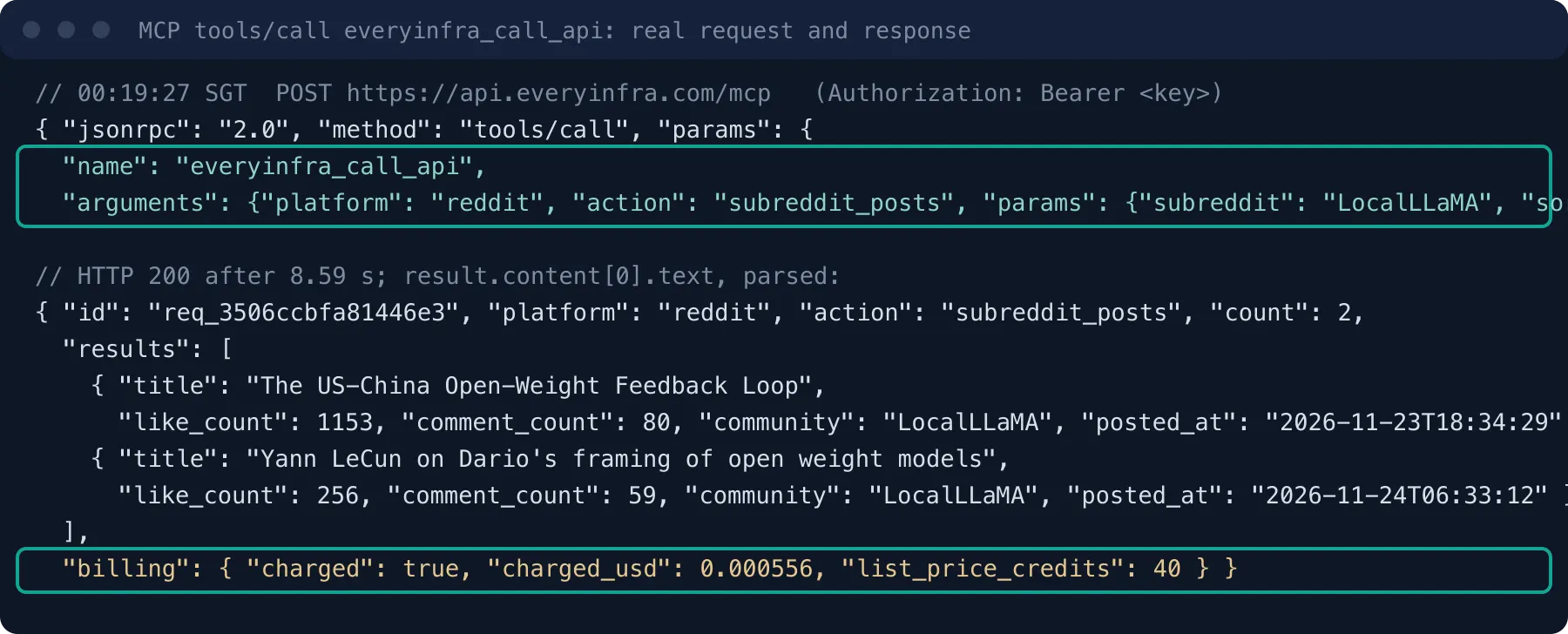
Each response holds the items and a billing block. The block has charged, charged_usd and the list price. An agent can add up charged_usd and print the total in the footer, as the prompt asks. Our footer would say "6 API calls · $0.0049 today".
The 12 items in this run
The GitHub section had Claude-BugHunter, superpowers and HKUDS/CLI-Anything. For repositories under a personal account, we give only the repository name. The first is a set of bug-hunting skills for Claude Code, with 20,968 stars and 1,833 new stars that day. The second had 325,712 stars and 1,006 new ones. The third had 64,459 stars and 1,075 new ones.
Each row has the fields star_count and stars_today, so a line can say "★20,968 · +1,833 today". The model copies the numbers. It does not count them and cannot mix them up.
The Product Hunt section had Astrolabio, Context and distribution.dev. The first lets your AI tools on a Mac continue where they stopped. The second is a calendar that prepares you for each meeting. The third sells ads on many developer sites.
Their launch dates were November 23, 2026, November 10, 2026 and November 17, 2026. So the Product Hunt trending list is sorted by interest, not by launch date. If you want only new launches, tell the model to filter on posted_at before it keeps 3.
The Reddit section had two posts from r/LocalLLaMA and one from r/MachineLearning. "The US-China Open-Weight Feedback Loop" had 1,153 likes and 80 comments. "Yann LeCun on Dario's framing of open weight models" had 256 likes and 59 comments. "Peak ICLR 2027 rebuttal experiences [D]" had 75 likes and 13 comments. All three were from the past 24 hours, because sort: top with date_range: past_day returns the most liked posts of one day. That matches the template's defaults.
The Google News section had two stories for "AI agents". WIRED wrote about a honeypot for AI agents. Ars Technica wrote about AI agents that found and used a zero-day flaw. "AI coding tools" returned a press release about a report on AI coding tools, from Morningstar. All three had a published_at date of November 24 and a source field with the outlet name. A briefing line can say "title · outlet", so readers see who wrote it.
| Section | Item | What the response gave |
|---|---|---|
| GitHub trending | Claude-BugHunter | 20,968 stars, +1,833 today |
| GitHub trending | superpowers | 325,712 stars, +1,006 today |
| GitHub trending | HKUDS/CLI-Anything | 64,459 stars, +1,075 today |
| Product Hunt | Astrolabio | launched November 23, no vote count |
| Product Hunt | Context | launched November 10, no vote count |
| Product Hunt | distribution.dev | launched November 17, no vote count |
| Reddit r/LocalLLaMA | The US-China Open-Weight Feedback Loop | 1,153 likes, 80 comments |
| Reddit r/LocalLLaMA | Yann LeCun on Dario's framing of open weight models | 256 likes, 59 comments |
| Reddit r/MachineLearning | Peak ICLR 2027 rebuttal experiences [D] | 75 likes, 13 comments |
| Google News "AI agents" | WIRED | published November 24 |
| Google News "AI agents" | Ars Technica | published November 24 |
| Google News "AI coding tools" | Morningstar | published November 24 |
The GitHub rows now carry two numbers: star_count and stars_today. The first repository on November 25 had 20,968 stars and 1,833 new stars that day. The Product Hunt rows had a name, a tagline and a URL, but no vote count in this run. So the briefing line for Product Hunt has no metric.
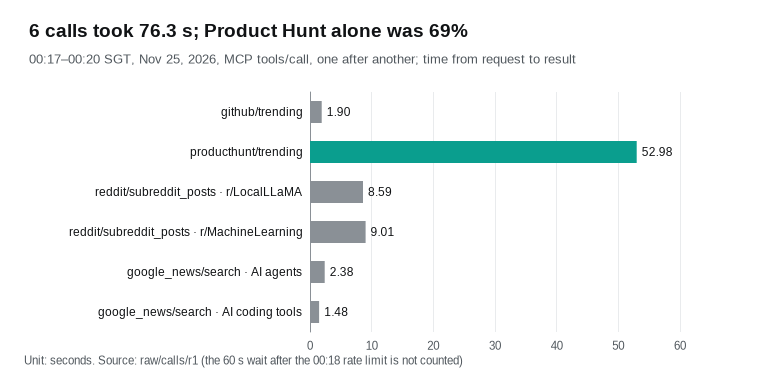
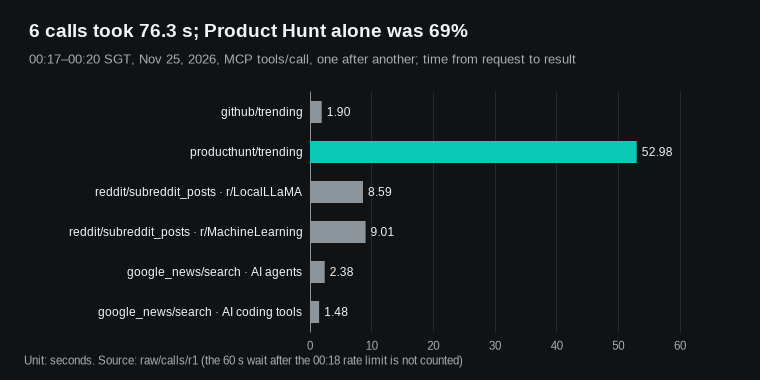
The run took 76.34 seconds of call time, and Product Hunt took 69.4% of it. That number sets two settings. Each agent's MCP timeout must be longer than the slowest call, so we use 90 seconds in the examples. And the job's own time limit must cover all six calls plus the model's work. OpenClaw gives command payloads a default limit of 10 minutes. For an agent job, set --timeout-seconds 600 so that the limit is clear.
We measured two parts of the time. The six calls, one after the other, took 76.34 seconds, and Product Hunt alone took 52.98 seconds. The webhook send to Discord in the template run took 0.55 seconds. We did not measure the model's time to read the prompt, remove repeats and format the text. That time depends on your model. Parallel calls could cut the data part to about 53 seconds, but then several calls start in the same second.
Each key has a limit of calls per minute. Above that limit, the MCP response has isError: true, and the text starts with rate_limited and says how many seconds to wait. Nothing is charged, and a retry after a few seconds succeeds. If one key runs several briefing jobs, give each job a different minute.
Structured data versus web search
The Hermes tutorial tells the model to search the web and write three stories from what it finds. Web search can find any topic, which is its strength. But each result has a different shape. Sometimes the model gets an article, sometimes a list page.
It must read before it can choose, and it must find star counts, likes or comment counts inside page text. If it copies a wrong number, the reader cannot tell. With everydata, every call returns JSON with the same fields. GitHub rows have star_count and stars_today.
Reddit rows have like_count and comment_count. News rows have source and published_at. The model only chooses and formats, and it copies the numbers as they are.
Your topic may not be on these lists, for example a policy change in one industry. Then install everysearch and add one free-text search to the prompt, next to the six fixed calls.
OpenClaw or Hermes?
The differences come from the default behavior in the two agents' docs. OpenClaw runs missed slots by default. Hermes runs a missed slot only inside a window of at most 2 hours. Its --continuity flag adds the last output to the next run. The GitHub Actions template needs no computer that stays on. But in the template repository, the scheduled run for November 23 started 11 hours 34 minutes late.
| Your situation | Choice | Why |
|---|---|---|
| OpenClaw already runs with Discord | OpenClaw job | Scratch, catch-up and plain links are ready |
| Repeats are your main worry | Hermes with --continuity | One flag puts the last output into the next run |
| Your laptop is off some mornings | OpenClaw, or GitHub Actions | Hermes runs a missed daily job only within 2 hours |
| You want no model cost | Either agent, no-model route | The scheduler runs the template; only data calls are paid |
| You run neither agent | GitHub Actions template | No computer that stays on |
Why fresh sessions repeat yesterday's items
Both tutorials say that a scheduled job starts with no chat history. We did not run an agent, so we used a substitute test. The trend-digest demo channel keeps a 7-day send log in state/state.json. We used that log as the list of items sent on earlier days and compared our 12 items with it.
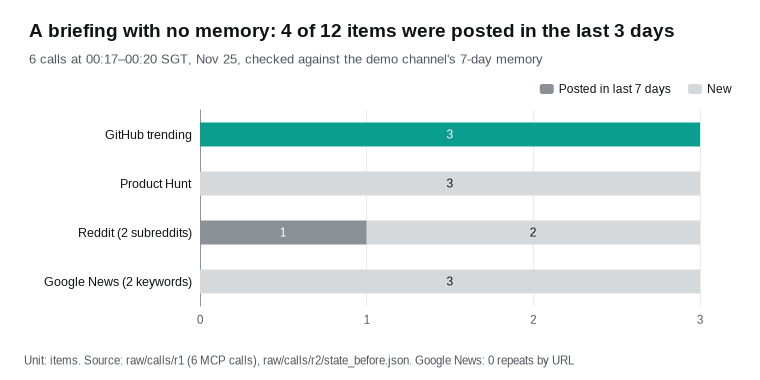
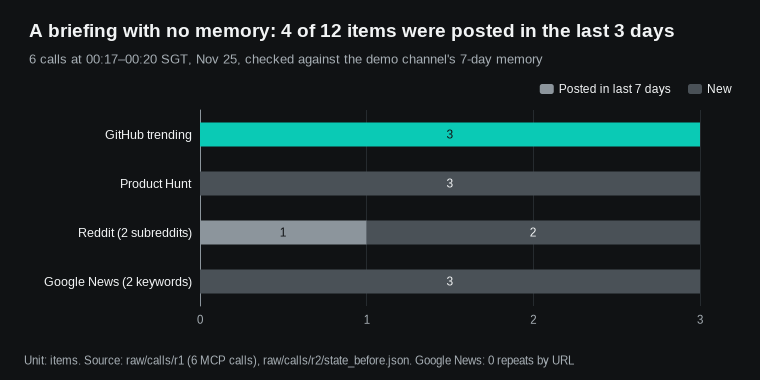
| Section | Items in our run | Already sent in the last 7 days | Sent on |
|---|---|---|---|
| GitHub trending | 3 | 3 | November 22 |
| Product Hunt | 3 | 0 | — |
| 3 | 1 | November 23 | |
| Google News | 3 | 0 | — |
| Total | 12 | 4 |
GitHub trending changes slowly. The same repositories stay at the top for days. So a GitHub section with limit: 3 gives the same three rows each morning until one of them drops. The template does not have this problem, because it does not pass limit to the API. It asks for the full list and picks the first rows that are not in its memory.
At 00:26:40 SGT we called github/trending with no parameters. It returned 16 rows and cost $0.000806, the same price as the call with limit: 3.
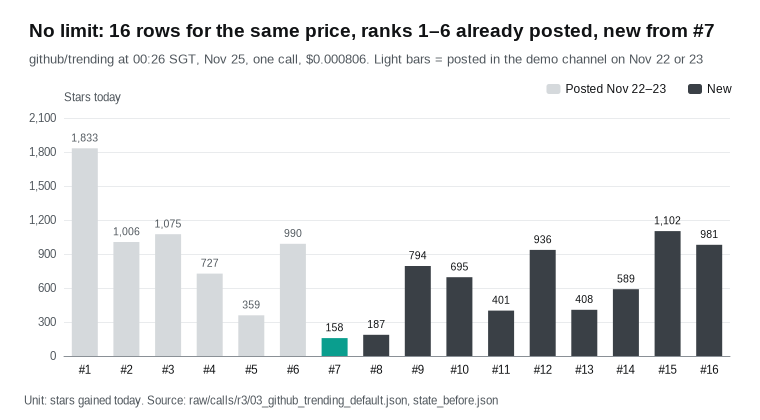
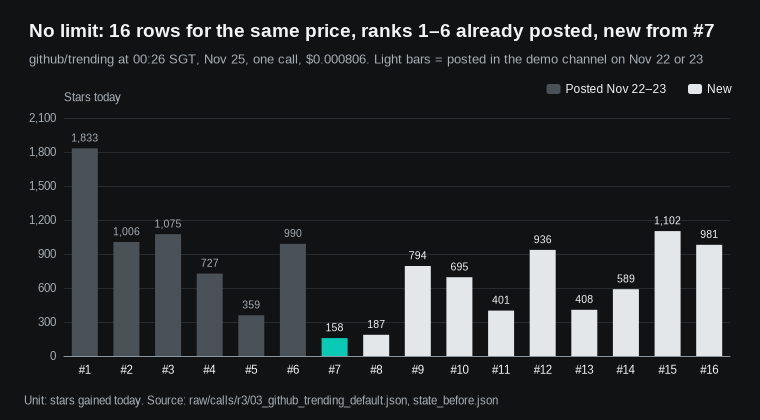
Ranks 1 to 3 had gone out on November 22 and ranks 4 to 6 on November 23. Rank 7, nginx/nginx, was the first new row. The template's own run from 00:20:26 to 00:22:09 SGT picked ranks 7, 8 and 9 from the full list. They were nginx/nginx (33,155 stars, +158 that day), openvinotoolkit/openvino (12,403 stars, +187) and diagram-design (71,682 stars, +794).
Memory also changes the size of the message. When we gave the same 12 items to the template's code with the 7-day memory, it kept 8. The 4 repeats went out, and with limit set per source there were no spare items to fill the gap. So the prompt asks for 5 items from Reddit and Google News and keeps 2 or 1.
The template run did not pass limit, so it had spare items. In the Reddit section, it skipped the r/MachineLearning post that went out on November 23 and used "Arr october 2026 reviews (R)" from the same subreddit (23 upvotes, 37 comments). In the GitHub section, it used ranks 7 to 9. The message still had 12 items in 5 embeds with 2,817 characters. From the first data call to the Discord HTTP 200, the run took 103 seconds.
| Run | Memory | Items posted | Characters | Lines | Discord messages at 17 lines |
|---|---|---|---|---|---|
| Agent text, fresh session | none | 12 | 1,987 | 35 | 3 |
| Agent text, 7-day memory, per-source limits | 7 days | 8 | 1,477 | 25 | 2 |
| Template run (embeds) | 7 days, full lists | 12 | 2,817 in embeds | — | 1 |
Plain text in Discord: three messages, no link cards
On the agent route, the model writes text. The template sends one webhook message with embeds. We sent both styles to a test channel through a webhook.
At 00:26:55, 00:26:56 and 00:26:59 SGT we posted the agent-style text in three parts. We split it the way the OpenClaw docs say it splits text by default. Each part used flags: 4, which is Discord's SUPPRESS_EMBEDS flag, and allowed_mentions with an empty parse list. Discord returned HTTP 200 for all three, with flags: 4 and an empty embeds list.
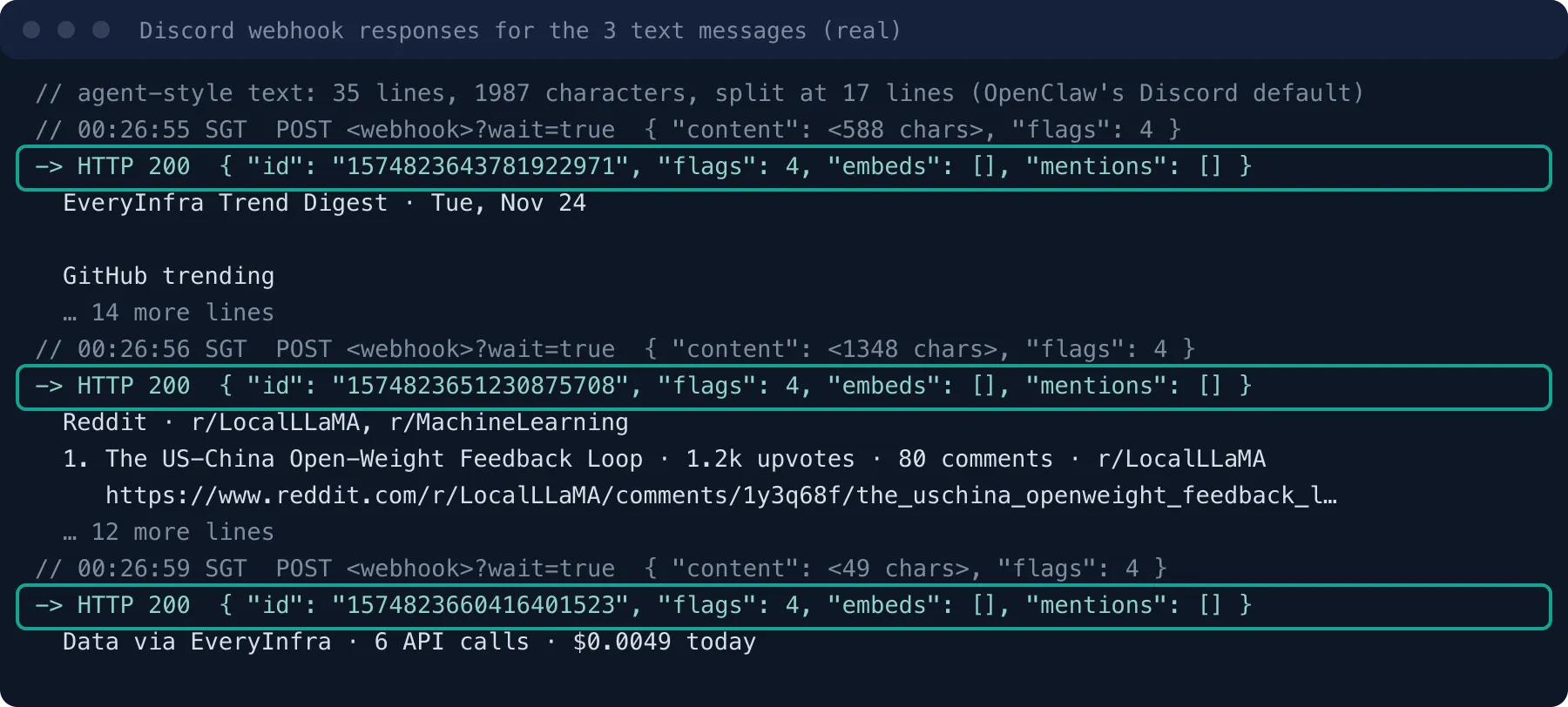
The OpenClaw Discord page sets textChunkLimit to 2,000 and maxLinesPerMessage to 17 by default. Our 35-line text became messages of 17, 17 and 1 lines. The last message held only the footer. If you want one message, raise maxLinesPerMessage to 40 for this channel. Our text was 1,987 characters, under Discord's 2,000-character limit for content, but only just. A longer title on one item would push it to two messages again.
OpenClaw also turns off link previews by default. Its messaging page says that it "suppresses those generated embeds on outbound Discord messages by default". With previews on, a briefing with 12 links would show 12 preview cards and fill the screen.
If you want embed cards from an agent, OpenClaw's messaging page names an exception. A message with explicit Discord embeds is not affected by the default that turns off link previews. The agent's message tool can also pass suppressEmbeds: false for one message. But for embeds, the model must build JSON in Discord's field format, and each field has a length limit.
One field that is too long stops the whole message. Plain text has fewer ways to fail. For cards, use the no-model template route. For the agent route, send plain text.
Hermes splits differently. Its Discord page says that a reply that "would need more than 8 Discord messages (about 16,000 characters)" goes out as one reply-<id>.md file. A briefing of 2,000 characters stays far below that. Hermes does not list a per-message line limit on that page.
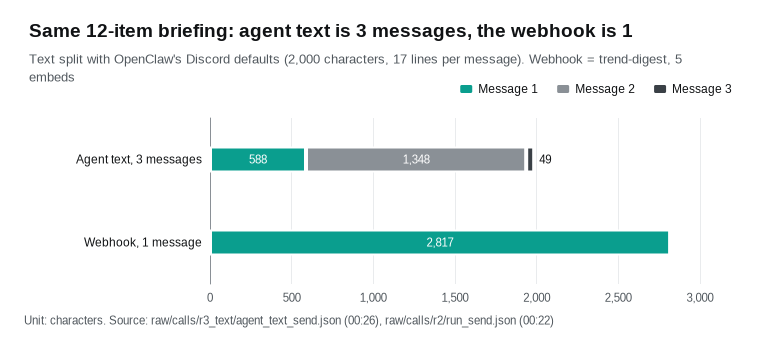
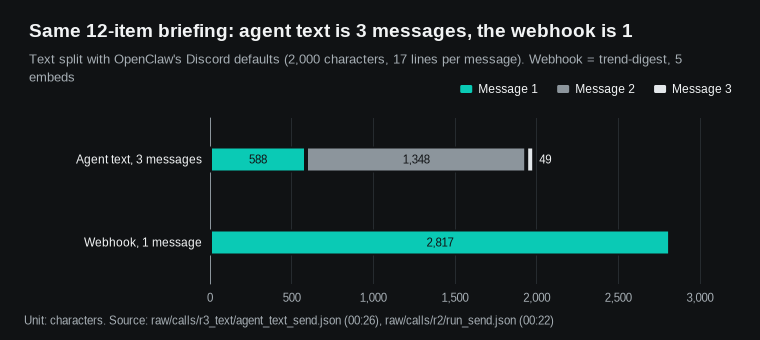
| Agent text (OpenClaw defaults) | Template webhook (embeds) | |
|---|---|---|
| Messages in the channel | 3 | 1 |
| Characters | 1,987 in content | 2,817 in 5 embeds |
| Discord limit that applies | 2,000 per content | 6,000 embed characters per message |
| Link previews | Off (flags: 4) | No previews; links are inside embeds |
| Who formats | The model, from your prompt | Code, the same every day |
A route without a model: let the scheduler run the template
A model is useful when you want it to judge, rank or explain. A list of 12 links needs no judgment. Both agents can run a plain program on their schedule and skip the model.
In OpenClaw this is a command payload. The payloads page says that command payloads "run scripts inside the Gateway scheduler without starting a model-backed turn". The scheduler delivers stdout. A non-zero exit records an error and can trigger a failure alert.
In Hermes this is no-agent mode. The cron page gives hermes cron create "every 5m" --no-agent --script memory-watchdog.sh --deliver telegram. Script stdout is "delivered verbatim as the message", empty stdout is a "silent tick", and the script must be inside $HERMES_HOME/scripts/.
The template already posts to Discord with its own webhook. So the scheduler only needs to run it and stay quiet.
# OpenClaw configuration example: run the template, deliver nothing.
openclaw automations create "7 7 * * *" \
  --name "Trend digest (no model)" \
  --tz "Asia/Singapore" \
  --command "python -m trend_digest --no-site" \
  --command-cwd "/srv/trend-digest" \
  --command-env "EVERYINFRA_API_KEY=${EVERYINFRA_API_KEY}" \
  --command-env "DISCORD_WEBHOOK_URL=${DISCORD_WEBHOOK_URL}" \
  --no-deliver

# Hermes configuration example: $HERMES_HOME/scripts/trend-digest.sh
#   cd /srv/trend-digest && python -m trend_digest --no-site > /dev/null
hermes cron create "7 8 * * *" --no-agent --script trend-digest.sh --deliver discord --name "Trend digest"
The Hermes script sends its output to /dev/null, so a good run posts nothing through Hermes. The template posts the digest itself. A run that exits with an error makes Hermes post an alert to the home channel. This route costs $0.004891 a day in data calls and no model tokens. The template keeps its own 7-day memory in state/state.json, so the repeat problem goes away.
Note one detail about --command-env. The OpenClaw docs say that on automations edit it "replaces all stored environment overrides", so repeat both variables on every edit.
What it costs
We read the catalog at https://api.everyinfra.com/api/v1/social/catalog?compact=1 at 00:16:41 SGT on November 25, 2026. The price_usd field gives the price of one call.
| Capability | Calls per briefing | Price per call | Per 1,000 calls | 30 days at one briefing a day |
|---|---|---|---|---|
github/trending | 1 | $0.000806 | $0.81 | $0.0242 |
producthunt/trending | 1 | $0.001389 | $1.39 | $0.0417 |
reddit/subreddit_posts | 2 | $0.000556 | $0.56 | $0.0334 |
google_news/search | 2 | $0.000792 | $0.79 | $0.0475 |
| Total | 6 | $0.004891 per briefing | $4.89 per 1,000 briefings | $0.1467 |
A 31-day month is $0.1516. These data costs do not include model tokens. An agent job also pays for the model that reads six responses and writes the message. We did not run a model in an agent, so we have no measured number for that cost. The video "How I Built a Daily News Brief With OpenClaw AI Agents" from April 1, 2026 estimates $10 to $30 a month when models add analysis, for a larger setup with several modules. The no-model route above has no model cost.
We cannot give the model cost for you, but we can measure how much the model must read. Our six responses were 10,899 characters of JSON, from 1,460 to 2,088 characters each. The tool definitions are larger. When an agent connects to the MCP server, it reads the tool definitions into its context. EveryInfra's tools/list returned 12 tools with 16,921 characters of definitions.
The briefing needs only everyinfra_call_api, whose definition is 1,798 characters.
The other 11 tools are everyinfra_list_capabilities, everyinfra_get_job, everyinfra_chat, everyinfra_list_captcha_types, everyinfra_solve_captcha, everyinfra_search, everyinfra_get_account, everyinfra_list_requests, everyinfra_get_topup_link, everyinfra_create_ticket and everyinfra_get_ticket. They cover the catalog, async jobs, AI, CAPTCHA, search, the account and support tickets, and the briefing uses none of them. If you load only everyinfra_call_api, each run reads about 15,000 fewer characters, about 90% less. In OpenClaw, use openclaw mcp tools everyinfra --include 'everyinfra_call_api' or toolFilter.include in the server entry. In Hermes, use tools.include in the server entry. Fewer tools also mean fewer ways for text from a web page to lead the model to do something else.
| What the agent reads or writes in one run | Characters |
|---|---|
All 12 tool definitions from tools/list | 16,921 |
The everyinfra_call_api definition only | 1,798 |
| The 6 responses of one briefing | 10,899 |
| The text that it posts to Discord | 1,987 |
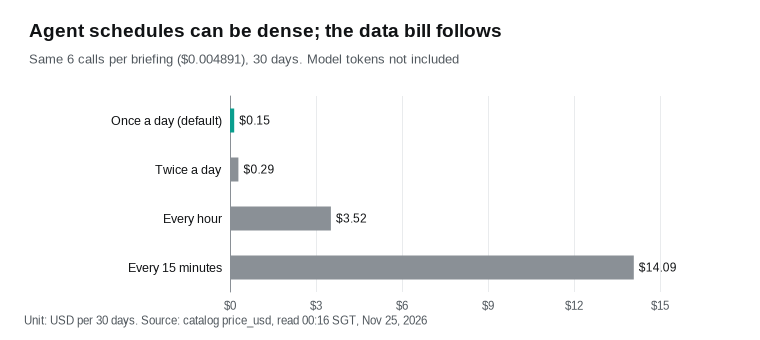
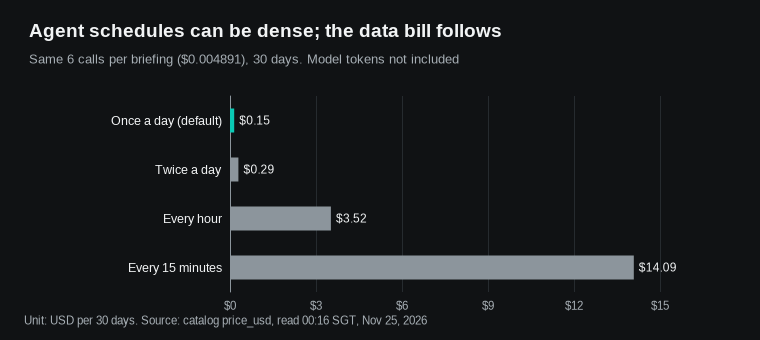
With the same six sources, twice a day is $0.29 a month. Every hour is $3.52. Every 15 minutes is $14.09, and at that rate most items are repeats. If you want to add sources, these catalog prices apply per call: reddit/trending_posts, twitter/trending, weibo/trending and douyin/trending each cost $0.000556, and xiaohongshu/trending costs $0.005556. The Reddit data API page and the GitHub data API page list the other capabilities.
A Chinese-language channel: Weibo, Douyin, GitHub
The trend-digest template has a Chinese preset, presets/zh.toml. It has three sources: Weibo trending, Douyin trending and GitHub trending. Each gives 4 items, with at most 12 in total. The time zone is Asia/Shanghai, and the title is in Chinese. Xiaohongshu trending is off in the preset.
A comment in the file says that it costs $5.56 per 1,000 calls, more than the other sources. To use this preset in an agent, change the prompt. Replace the six calls with weibo/trending, douyin/trending and github/trending. Then ask for the output in Chinese.
At today's catalog prices, the three calls cost $0.000556 + $0.000556 + $0.000806 = $0.001918 a run, or about $0.058 for 30 days. That is less than the English default, because there are only three calls. With Xiaohongshu trending on, a run costs $0.007474, or about $0.224 for 30 days, and that one source is more than 70% of the cost. Turn it on only if your readers look for things on Xiaohongshu.
| Setup | Calls per run | Per run | 30 days |
|---|---|---|---|
English default (digest.toml) | 6 | $0.004891 | $0.1467 |
| Chinese preset: Weibo, Douyin, GitHub | 3 | $0.001918 | $0.0575 |
| Chinese preset with Xiaohongshu trending | 4 | $0.007474 | $0.2242 |
Weibo trending also has topic boards. The preset lists the board values in a comment: hot is the default, and the others are society, entertainment, life, sports, tech and acg. For a tech channel, add params = { board = "tech" } to that call. The price stays the same. Chinese trending titles often have hashtags and emoji, and a model can treat them as format marks. Add "keep each title as it is, with no bold and no rewriting" to the prompt.
Schedules: what happens when the machine is off
An agent runs on a computer that you own. If that computer sleeps at 07:00, the briefing is late or missing. The two agents handle this in different ways.
OpenClaw catches up. The managing jobs page says that cron.skipMissedJobs defaults to false. When the Gateway starts again, it runs the slots that it missed. Set it to true if a late briefing is worse than no briefing.
Hermes has a window. The cron page says: "A missed cron occurrence is run late only inside a catch-up window: half the job's period, clamped to 2 minutes–2 hours." For a daily job, half the period is 12 hours, so the window is the 2-hour maximum. A laptop that wakes at 09:30 for an 07:00 job does not get a briefing that day. --grace-minutes changes the window, and paused jobs never catch up.
Set the time zone too. OpenClaw takes --tz for each job. Hermes takes --timezone for each job and otherwise uses the profile time zone.
The OpenClaw troubleshooting page adds three points. A cron expression without --tz uses the time zone of the Gateway host. A one-time at schedule without a time zone uses UTC. A job's activeHours setting has its own time zone. On a Gateway that runs on a cloud server in another region, these three can move a briefing by several hours. The Hermes docs say that a job with a pinned zone runs at that zone's wall-clock time.
So a 09:00 job stays at 09:00 across daylight saving changes. If your readers live in several zones, pick the morning of most readers. Or create one job per zone, each for its own channel. The data cost goes up by one briefing per job, which is still cents a month.
For comparison, we looked at the trend-digest template's own schedule on GitHub Actions on November 25. Its daily run due at 13:00 UTC on November 23 started at 00:34:10 UTC on November 24, 694.2 minutes late. The run due at 13:00 UTC on November 24 had not appeared by 16:20 UTC. A machine of your own, with a catch-up rule, is more predictable than a shared scheduler. Our GitHub Actions digest article has the full count.
Errors and charges
An unattended job must handle a bad call without a person. We made three calls at 00:26 SGT to see what the agent receives.
| Time (SGT) | Call | What came back | Charged |
|---|---|---|---|
| 00:26:15 | reddit/subreddit_posts with sort: hot | isError: true, text invalid_value: sort must be one of: newest, popular, relevance, rising, top (got 'hot'), and "Nothing was charged" | $0 |
| 00:26:21 | google_news/search with a nonsense keyword, time_window: hour | 0 results, billing.reason: empty_result_refunded, refund.status: succeeded | $0 |
| 00:26:40 | github/trending with no parameters | 16 rows | $0.000806 |
The error text lists the allowed values and says what to change. A model can fix its call from that text without a person. An empty result is refunded, so a quiet news day does not cost money. Tell the model in the prompt to read billing.charged_usd and not to guess the cost.
Know what each agent does when delivery fails. Hermes records a failed hand-off as delivery_failed. The output stays in the run history and is not sent again. So when the channel is empty one morning, look in hermes cron runs first. A common cause is a Gateway that was not running.
OpenClaw has failure alerts: after a number of failed runs in a row, the scheduler posts an alert where you told it to. A command payload that exits with a non-zero code also counts as a failure. Neither agent posts the missed briefing to the channel for you. You decide whether to run it again.
| Event | OpenClaw | Hermes Agent |
|---|---|---|
| Delivery fails | Failure alert after failed runs in a row | delivery_failed; output kept, not sent again |
| Machine is off at the set time | Runs the missed slot when the Gateway starts | Runs late only inside the catch-up window |
| Nothing new today | A final reply of NO_REPLY posts nothing | Empty stdout in no-agent mode; the news-digest blueprint answers [SILENT] |
| A call returns an error | The model reads isError and the allowed values | Same; the MCP result is the same |
There is one Hermes report that is useful here. Issue #34120 describes a recurring daily news digest set up from Discord where the cron tool kept failing with "schedule is required for create". If the chat route fails, the CLI route hermes cron create takes the schedule as a plain argument. This is a configuration example. We did not reproduce the error.
Security: a public channel is a prompt
A briefing bot reads text from the internet and writes into a channel. That makes two risks.
First, the text that the model reads can contain instructions. The April 2026 OpenClaw video above makes this point for a public Discord: "I don't want to run any security issues of people being able to prompt inject". The builder in that video started with a private review mode and switched to automatic posting later. Hermes notes something related in issue #4595: cron output goes straight to the delivery target, and the main session cannot review it first.
Second, the bot has permissions. The Hermes Discord setup video from April 10, 2026 turns on all three gateway intents and gives the bot Administrator. A briefing bot needs much less. It needs Send Messages and View Channel in one channel. Give it no role that can delete, ban or mention everyone. Our sends used allowed_mentions with an empty parse list, and all three responses had an empty mentions list. So an item title with @everyone in it pings nobody.
| Risk | What to do | Where it comes from |
|---|---|---|
| Instructions inside fetched text | Restrict the job's tools to the MCP server; in OpenClaw, cap toolsAllow | OpenClaw payloads page |
| Key in config or prompt | Bearer ${EVERYINFRA_API_KEY} in the header; never in scratch | OpenClaw transports page, Hermes MCP page |
| Bot with too many rights | Send Messages and View Channel in one channel | Discord permissions; our sends |
| Mass mentions | allowed_mentions: {"parse": []} | Discord Message Resource |
| A job that keeps posting after you remove the skill | Remove the scheduled job, not only the skill | r/openclaw thread |
One more point is easy to miss. Scratch and continuity both go into the model's context. The OpenClaw docs say that scratch is not shown in job lists or run history, but it "becomes model prompt context". So keep only item IDs and dates in it, never a key or a webhook URL.
Hermes continuity puts the full last output into the next run. If odd text got into yesterday's briefing, it goes into today's context too. That is one more reason to start with private review and switch to automatic posting later.
The last row comes from an r/openclaw thread titled "Help, I can't disable daily briefings and the spam". The answer there is that "Uninstalling the skill leaves the cron entry alive". A skill and a job are separate things. Use openclaw automations list and openclaw automations remove <job-id>, or /cron remove <id> in Hermes.
Check it yourself before you rely on it
On the first day, do not wait for the next morning. Run the job by hand. In OpenClaw, use openclaw automations run <job-id> --wait. In Hermes, ask in chat to run it now, or set the schedule a few minutes ahead. Then check three things in the channel.
Are there about 12 items? Is any section empty? Does the footer say 6 calls and about $0.005? If one of these is wrong, read the run history. Use openclaw automations runs <job-id> in OpenClaw or hermes cron runs in Hermes.
On the second morning, check for repeats. Compare today's GitHub section with yesterday's. If the three repositories are the same, the memory does not work. In OpenClaw, look at the scratch and see if the IDs are there.
In Hermes, check that the job has --continuity.
Last, check the bill. In the EveryInfra console, look at the calls for those two days. Each day should show 6 data calls. More calls usually mean that the model retried a failed call several times, or that the prompt let it make an extra search.
The rule "do not retry more than once" in the prompt is there for this. The data cost is $0.15 a month. The model cost is on your model's bill. The two together are the full cost of the briefing.
Sometimes the briefing does not arrive on time. For this case, the OpenClaw troubleshooting page gives a list of commands. They include openclaw gateway status, openclaw automations status and openclaw automations runs <jobId> --limit 20. They also include openclaw automations show <jobId> and openclaw logs --follow.
Some causes on that page apply directly to a briefing. The cron.enabled setting, or OPENCLAW_SKIP_CRON in the Gateway's launch environment, can stop all automatic runs. A missing or wrong channel or to target means that the job runs but nothing is sent. A Discord error such as unauthorized or Forbidden means that the bot's credentials stopped the delivery.
Two more points are easy to miss. Only a final reply that is exactly NO_REPLY in uppercase, after trimming, is silent. A lowercase form or extra words go to the channel as text. Also, a run can finish as ok after a failed exec call if the agent replies. To see if a data call failed, read diagnostic: in openclaw automations show <jobId>.
The Hermes cron page describes checks before each run. The skills on the job must be ready, so everydata must have its EVERYINFRA_API_KEY. The delivery target must have Gateway credentials. Each MCP server that the job names must give at least one tool. If a check fails, the job's last_status becomes blocked_config and Hermes sends one alert. No model call is made, so a bad job uses no tokens.
The same page shows how to create a job in a paused state: hermes cron create ... --paused --paused-reason "Awaiting review". When the job is correct, run hermes cron resume <job_id>. hermes cron run <job_id> is an extra run, and the scheduled run still happens.
| When | What to check | Where | Expected |
|---|---|---|---|
| Day 1, after a manual run | Item count, empty sections, footer | The Discord channel | About 12 items, no empty section, 6 calls, about $0.005 |
| Day 1 | Run status | openclaw automations runs <job-id> or hermes cron runs | A finished run with no error |
| Day 2 | Repeats | Today's GitHub section against yesterday's | Different repositories |
| Day 2 | Number of calls | The EveryInfra console | 6 data calls a day |
Steps from two tutorial videos
We used the youtube/search and youtube/transcript capabilities to read the transcripts of three videos on November 25, 2026. Two of them show steps that the web docs do not give.
- "How I Built a Daily News Brief With OpenClaw AI Agents (EP 7)", April 1, 2026. The builder asks the agent to put a blank line between items and to split the post in two when it gets long. He starts with private review, where he presses approve each day, and turns on automatic posting later. He estimates $10 to $30 a month with model analysis.
- "Hermes Agent Setup with Discord (Complete Guide)", April 10, 2026, 44,760 views. On a new VPS,
sudo hermes gateway install --systemfailed with "command not found". The fix was to runwhich hermesand call the full path with sudo. He types/sethomefirst, so that cron output goes to that channel. He also notes that mentioning the bot opens a new thread.
When this setup is the wrong tool
You do not run a computer all day. Both agents need a Gateway process that is awake at the scheduled time. If your laptop sleeps, use the GitHub Actions template or a cron line on a small server. Both run the same six calls.
You want one alert within minutes of a post. A daily briefing is the wrong shape for that. Our Reddit to Discord article posts new subreddit posts with a 37-line script on a short cron.
You need private data. Order data, private channels and pages behind a login are not part of these capabilities. Use the platform's own developer API with your account.
How this setup differs from three related setups
| Article | What it builds | Runs on | Memory |
|---|---|---|---|
| Reddit to Discord without RSS | New posts from one subreddit, one by one | Your cron | A file of seen IDs |
| Discord daily digest with GitHub Actions | The trend-digest template, embeds, six channels | GitHub Actions | state/state.json, 7 days |
| OpenClaw MCP, self-hosted | A chat assistant with the EveryInfra MCP server | Your OpenClaw | The chat itself |
| Agent scheduled briefing | The same briefing as a scheduled agent job in OpenClaw or Hermes | Your agent's Gateway | Scratch, --continuity or a file |
Recent changes that affect this setup
- November 24, 2026: OpenClaw v2026.11.8. Its notes include "Dependable automations", where scheduled work uses "its own scratch and delivery history". The OpenClaw scratch memory depends on that.
- November 24, 2026: Hermes Agent v0.23.4. On the same day, commit b9b36c9 changed the
morning-briefblueprint. That blueprint now says to suggest actions but "do not send mail, edit events, or create tasks". - November 24, 2026: the trend-digest demo repository committed "Digest for 2026-11-24" (63aeeeb). The prompt example copies that default layout.
- November 24, 2026: OpenClaw v2026.11.10-beta.3, a beta. Its "Automation outcomes" note says that it stops duplicate cron replies. It also stops false failure notices after recovered tool calls and after replies that are silent on purpose. A briefing that uses
NO_REPLYfor silence is in that area. Until this change is in a stable release, look for the same briefing twice in the channel. - November 23, 2026: OpenClaw v2026.11.10-beta.2, a beta. Pin a stable version for a job that runs every day.
- November 23, 2026: a Hermes Agent canary build fixed a cron problem: a damaged
[SILENT]marker no longer goes into the chat. Thenews-digestblueprint replies[SILENT]on days with nothing new. - November 20, 2026: Hermes Agent v0.23.3. We read the Hermes docs on November 25 against the main branch at commit 4c84e78, which is newer than this release. If
--continuityis missing in your install, runhermes update. - November 19, 2026: OpenClaw v2026.11.10-beta.1, a beta. It adds an opt-in tool index that ranks tools by use, MCP tools included. Its aim is the same as the
--includefilter above: the model reads fewer tool definitions that it does not need.
FAQ
How do I stop an OpenClaw daily briefing that keeps posting?
Remove the job, not the skill. A user on r/openclaw uninstalled the skill and the briefings kept coming, because "Uninstalling the skill leaves the cron entry alive". Run openclaw automations list, then openclaw automations remove <job-id>. In Hermes, use /cron list and /cron remove <id>.
Why does my Hermes cron job not remember what it sent yesterday?
Each run is a fresh session. The Hermes tutorial calls this the golden rule, and an r/hermesagent answer calls cron jobs "fire-and-forget isolated sessions". Create the job with --continuity, or turn it on later with hermes cron edit <job_id> --continuity. For a 7-day window, also keep a file of sent IDs.
Should I use cron or heartbeat in OpenClaw for a daily briefing?
Use a scheduled job. A guide on r/openclaw explains that "a cron job ... spins up a fresh isolated session every time", and a fresh session is enough for a report at a fixed hour. Keep the memory in scratch or in a script, as the OpenClaw payloads page recommends.
Does the Hermes Discord bot need Administrator to post a briefing?
No. It needs Send Messages and View Channel in the target channel, and Message Content Intent if you also chat with it. One setup video gives Administrator, but a briefing job only posts.
**Why did my Hermes cronjob create fail with "schedule is required"?**
Issue #34120 reports this when a daily news digest was set up from Discord. The CLI form hermes cron create "0 8 * * *" "<prompt>" passes the schedule as a plain argument.
Should a Hermes briefing go to Discord or Telegram?
Either works. Send it where your readers are. In Hermes, discord and telegram are both home-channel targets. The cron page also lists TELEGRAM_CRON_THREAD_ID to put scheduled output in one topic of a forum group. Discord has more channels and finer permissions, so you can give the briefing its own read-only channel. A briefing of about 2,000 characters fits in both.
How do I list the scheduled jobs in Hermes?
Type /cron list in chat, or run hermes cron list in a terminal. Both show the ID, name, schedule, next run and delivery target. To check that the Gateway is running, use hermes cron status. If the Gateway is not running, no scheduled job runs.
How much does an OpenClaw daily briefing cost with EveryInfra?
The six data calls cost $0.004891 a day, about $0.15 a month, at the catalog prices of November 25, 2026. Model tokens are extra. The no-model route has no model cost.
Getting started
- Create an API key in the EveryInfra quickstart.
- Install
everydatafrom ClawHub in your agent. Add the MCP server athttps://api.everyinfra.com/mcpand read the key from an environment variable. - Create the job with the prompt above, run it once by hand, and check the channel.
- Turn on memory: scratch in OpenClaw,
--continuityand a sent-ID file in Hermes. Or use the no-model route with the trend-digest template. - Browse the GitHub trending capability and the Reddit data API to change the sources.
References
- Automations (scheduled jobs). OpenClaw Docs. Read November 25, 2026.
- Automations: schedules. OpenClaw Docs. Read November 25, 2026.
- Automations: payloads, scratch, command payloads, execution styles. OpenClaw Docs. Read November 25, 2026.
- Automations: delivery modes. OpenClaw Docs. Read November 25, 2026.
- Automations: managing jobs (cron.skipMissedJobs). OpenClaw Docs. Read November 25, 2026.
- Automations: troubleshooting. OpenClaw Docs. Read November 25, 2026.
- CLI reference: openclaw automations. OpenClaw Docs. Read November 25, 2026.
- CLI reference: openclaw skills. OpenClaw Docs. Read November 25, 2026.
- CLI reference: openclaw mcp (registry, doctor, probe). OpenClaw Docs. Read November 25, 2026.
- MCP transports (headers, ${VAR} references). OpenClaw Docs. Read November 25, 2026.
- Discord channel (textChunkLimit, maxLinesPerMessage). OpenClaw Docs. Read November 25, 2026.
- Discord setup (privileged intents). OpenClaw Docs. Read November 25, 2026.
- Discord messaging (link previews). OpenClaw Docs. Read November 25, 2026.
- ClawHub quickstart. OpenClaw Docs. Read November 25, 2026.
- ClawHub CLI. OpenClaw Docs. Read November 25, 2026.
- ClawHub security audits. OpenClaw Docs. Read November 25, 2026.
- OpenClaw v2026.11.8. GitHub, Nov 24, 2026. Read November 25, 2026.
- OpenClaw v2026.11.10-beta.2. GitHub, Nov 23, 2026. Read November 25, 2026.
- OpenClaw v2026.11.10-beta.3. GitHub, Nov 24, 2026. Read November 25, 2026.
- OpenClaw v2026.11.10-beta.1. GitHub, Nov 19, 2026. Read November 25, 2026.
- Hermes Agent canary.20261123T065600Z-v0.23.3. GitHub, Nov 23, 2026. Read November 25, 2026.
- OpenClaw releases. GitHub. Read November 25, 2026.
- Tutorial: Daily Briefing Bot. Hermes Agent Docs. Read November 25, 2026.
- Scheduled Tasks (Cron): continuity, catch-up window, no-agent mode. Hermes Agent Docs. Read November 25, 2026.
- Skills (ClawHub source). Hermes Agent Docs. Read November 25, 2026.
- Discord (home channel, long replies). Hermes Agent Docs. Read November 25, 2026.
- MCP (HTTP servers, ${VAR} substitution, tool timeouts). Hermes Agent Docs. Read November 25, 2026.
- tools/skills_hub_clawhub.py (identifier parsing). GitHub. Read November 25, 2026.
- cron/blueprint_catalog.py (news-digest, morning-brief). GitHub. Read November 25, 2026.
- Hermes commit b9b36c9 (morning-brief blueprint). GitHub, Nov 24, 2026. Read November 25, 2026.
- Hermes Agent v0.23.4. GitHub, Nov 24, 2026. Read November 25, 2026.
- Hermes Agent releases. GitHub. Read November 25, 2026.
- cronjob tool: create action fails with "schedule is required for create" (#34120). GitHub. Read November 25, 2026.
- Cron output not interactable by the main agent session (#4595). GitHub. Read November 25, 2026.
- EveryInfra - Data, Search and AI API Router. ClawHub. Read November 25, 2026.
- EveryData - TikTok, Instagram, Amazon and 90 Platforms. ClawHub. Read November 25, 2026.
- EverySearch - Web, News, Forum and Academic Search. ClawHub. Read November 25, 2026.
- EveryInfra Cross-check Research. ClawHub. Read November 25, 2026.
- EveryInfra Bulk Data Export to CSV and JSON. ClawHub. Read November 25, 2026.
- EveryAI. ClawHub. Read November 25, 2026.
- everyinfra/trend-digest. GitHub. Read November 25, 2026.
- digest.toml (default sources and limits). GitHub. Read November 25, 2026.
- trend-digest README (7-day memory, layouts). GitHub. Read November 25, 2026.
- trend-digest Actions runs. GitHub. Read November 25, 2026.
- Webhook Resource (Execute Webhook, wait). Discord Developer Docs. Read November 25, 2026.
- Message Resource (SUPPRESS_EMBEDS flag, content limit). Discord Developer Docs. Read November 25, 2026.
- Rate Limits. Discord Developer Docs. Read November 25, 2026.
- Data API catalog (price_usd). EveryInfra. Read November 25, 2026.
- Help, I can't disable daily briefings and the spam. Reddit r/openclaw. Read November 25, 2026.
- My OpenClaw day-to-day guide is now on GitHub. Reddit r/openclaw. Read November 25, 2026.
- How to proactively make Hermes contact me and create a new session?. Reddit r/hermesagent. Read November 25, 2026.
- How I Built a Daily News Brief With OpenClaw AI Agents (EP 7). YouTube, Apr 1, 2026. Read November 25, 2026.
- Hermes Agent Setup with Discord (Complete Guide). YouTube, Apr 10, 2026. Read November 25, 2026.
- How I run my life in Discord using Hermes. YouTube, Aug 28, 2026. Read November 25, 2026.
- The Only Way To Never Run Out Of Hermes Agent Tokens. YouTube, Nov 24, 2026. Read November 25, 2026.
Reference BL-226