Discord Daily Digest with GitHub Actions: 6 Calls, $0.15 a Month
A GitHub Actions template posts one Discord daily digest of GitHub trending, Product Hunt, Reddit and Google News: 6 API calls a day, about $0.15 a month.
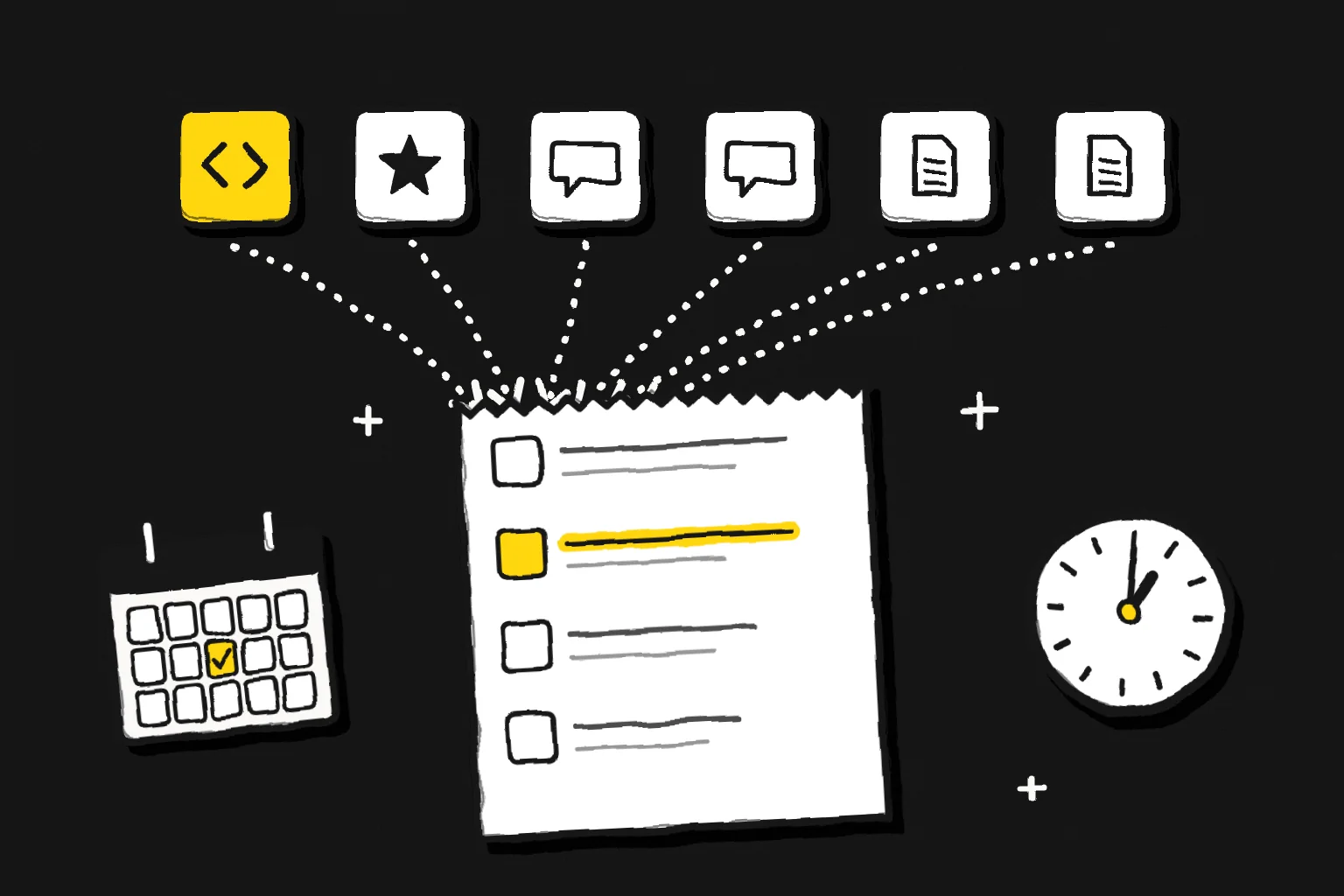
On November 24, 2026 at 00:19 Singapore time (SGT), our local clone of the template everyinfra/trend-digest posted one message to a test Discord channel. The message had 3 GitHub trending repositories, 3 Product Hunt launches, 3 Reddit posts and 3 Google News stories. The run made 6 data calls and cost $0.004891, which is $4.89 per 1,000 runs and about $0.15 for a 30-day month. On the same day we counted scheduled runs in three public repositories.
An hourly cron fired 24 times in 24 hours. A cron that runs every 5 minutes fired 3 times out of 288. The template's own daily run at 13:00 UTC did not appear.
What arrives in the channel
The message is one Discord post with five embeds. The first embed holds the title, "EveryInfra Trend Digest · Mon, Nov 23", and a line of three keywords for the day. Each of the next four embeds is one section: GitHub trending, Product Hunt, Reddit (both subreddits in one section) and Google News. The last embed has a footer with the number of calls and the charge for the day.
Under the embeds there is one link button. We sent the request with ?wait=true, so Discord returned the saved message instead of an empty 204 response. The response holds the message ID, five embeds, the escaped 1\. at the start of each item line and empty mention lists.
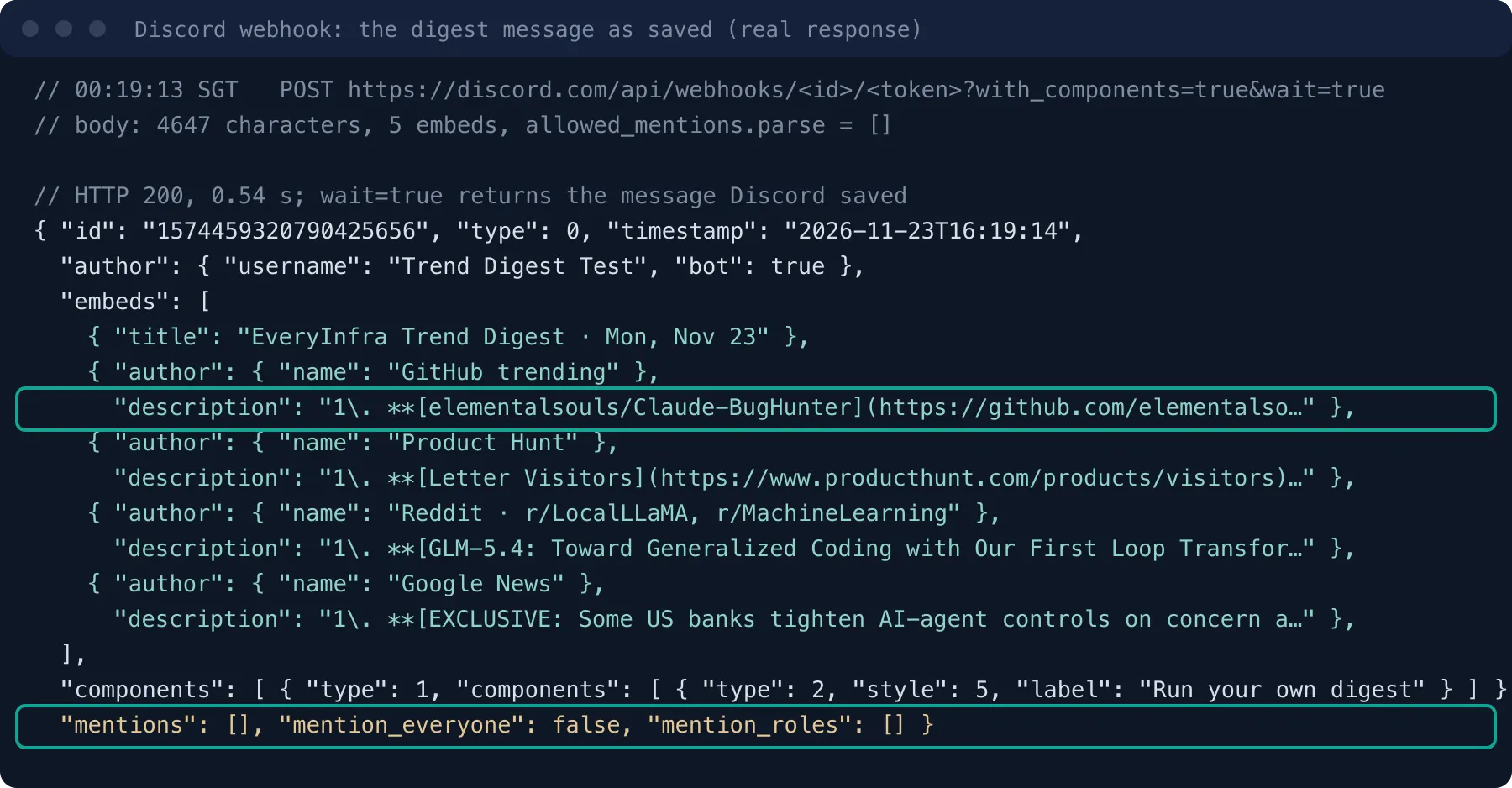
Why does the record matter? The template sends to Discord without wait=true. Discord's Webhook Resource says that wait "defaults to false; when false a message that is not saved does not return an error". A run that logs "discord -> discord.com: ok" proves that Discord accepted the request.
It does not prove that the message exists. For a channel that other people read, we add wait=true during the first test. After one good response, the default is acceptable, because a failed save then shows up as a missing message on the next morning.
| Part of the message | What we got at 00:19 SGT | Discord limit |
|---|---|---|
| Embeds | 5 | 10 per message |
| Embed text (title, description, author, footer) | 3,313 characters | 6,000 per message |
| Longest description (Google News) | 1,256 characters | 4,096 per embed |
| Request body | 4,647 characters of JSON | Not a Discord limit |
| Mentions | none (allowed_mentions.parse = []) | Webhooks parse user mentions by default |
| Time to save | 0.54 seconds | No published target |
The limits in the right column come from the "Embed Limits" table in Discord's Message Resource page. The template measures every message body before it sends. If a digest is too long for Discord, the template removes the last item of the longest section and measures again. Every item still goes into the web archive, so a removed item is not lost.
Set it up in five steps
The template's README says "Set it up in 5 minutes". These five steps come from the README and the GitHub docs. They are a configuration guide with the expected result of each step. Our own sends ran in a local clone, so we did not do these steps in a new GitHub repository.
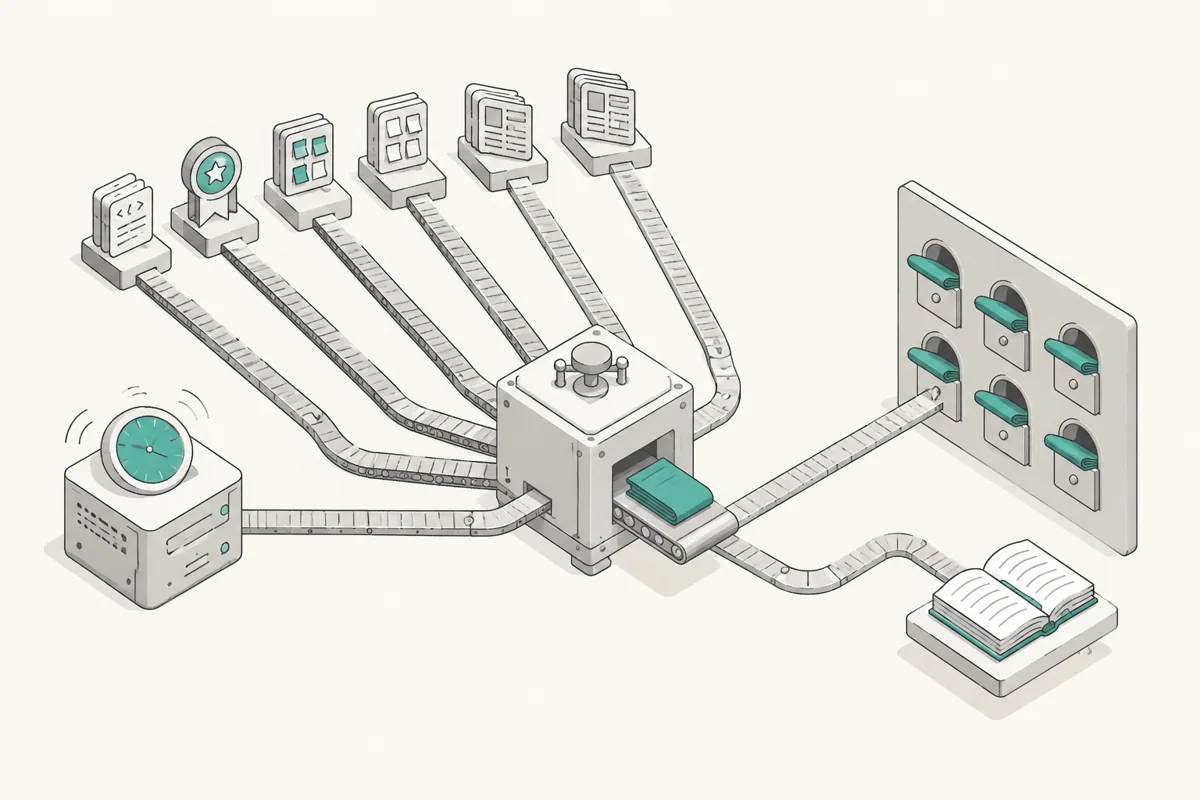
- Open everyinfra/trend-digest and click Use this template, then Create a new repository. Expected result: a new repository with one commit. GitHub's page on creating a repository from a template says that a template copy "starts with a single commit". A fork keeps the full history.
- Make a Discord webhook. In the channel settings, open Integrations, then Webhooks, then New Webhook, and click Copy Webhook URL. Expected result: a URL that starts with
https://discord.com/api/webhooks/. - In the new repository, open Settings, then Secrets and variables, then Actions. Add two repository secrets:
EVERYINFRA_API_KEY(a key from the quickstart) andDISCORD_WEBHOOK_URL. Expected result: two names in the list, with hidden values. - Open Actions, select Trend digest and click Run workflow. Expected result: a green run in one or two minutes and one message in the channel.
- Optional: open Settings, then Pages, select Deploy from a branch, branch
main, folder/docs. Put the address that GitHub shows intosite_urlindigest.toml. Expected result: each message gets a Web archive button.
Step 1 has one fork trap. If you fork instead of using the template, GitHub turns off workflows in the fork. GitHub's page on disabling and enabling a workflow says "When a public repository is forked, scheduled workflows are disabled by default". The README tells fork users to click I understand my workflows, go ahead and enable them on the Actions tab. A repository made with Use this template does not need that click.
Step 3 is where a webhook URL can leak. Slack's incoming webhook guide says "Your webhook URL contains a secret", and WeCom's group robot page asks users not to share the address on GitHub or in blogs. A Discord webhook URL works in the same way: anyone with the URL can post in your channel. Keep it in a secret, never in digest.toml. GitHub's guide to using secrets also gives a command: gh secret set DISCORD_WEBHOOK_URL. If you paste the value at its prompt, the value stays out of your shell history.
Step 4 uses workflow_dispatch. GitHub's events reference says that the "Run workflow" button appears only "if the workflow file exists on the default branch". This matters if you edit the workflow on a branch: the button and the schedule both read the copy on main. The first run in a copy has one more effect.
The template keeps a 7-day memory of items in state/state.json, and the template's own repository uses that file for its demo. When the run sees that it is in a different repository, it starts with an empty memory and deletes the demo's archive days. Our local copy printed "This repository is a copy of the template: starting with an empty 7-day memory."
Step 5 needs the /docs folder. GitHub's page on publishing sources for GitHub Pages says that the source folder "can either be the root of the repository (/) on the source branch or a /docs folder". The workflow commits docs/archive/YYYY-MM-DD.html, docs/data/YYYY-MM-DD.json and docs/index.html after each run, so the archive grows by one page a day. The demo archive shows what the pages look like.
Inside one run: six calls, then one message
The workflow file, digest.yml, is short. It runs on ubuntu-latest with a 15-minute timeout. It checks out the repository with actions/checkout@v7, installs Python 3.12 with actions/setup-python@v7 and runs python -m trend_digest --config digest.toml. A second step commits docs and state, and it runs "even when one channel failed, so the 7-day memory stays correct". The job asks for contents: write, because it must push those files. A concurrency group stops two runs from pushing at the same time.
on:
  schedule:
    - cron: "0 13 * * *"   # 13:00 UTC = 21:00 Singapore = 08:00 US Eastern in winter
  workflow_dispatch:

permissions:
  contents: write

concurrency:
  group: trend-digest
  cancel-in-progress: false

jobs:
  digest:
    runs-on: ubuntu-latest
    timeout-minutes: 15
    steps:
      - uses: actions/checkout@v7
      - uses: actions/setup-python@v7
        with:
          python-version: "3.12"
      - name: Build and send the digest
        env:
          EVERYINFRA_API_KEY: ${{ secrets.EVERYINFRA_API_KEY }}
          DISCORD_WEBHOOK_URL: ${{ secrets.DISCORD_WEBHOOK_URL }}
        run: python -m trend_digest --config digest.toml
This workflow keeps only Discord. The full file also passes Slack, Telegram, Feishu, DingTalk, WeCom and optional language-model secrets. A channel whose secret is empty is skipped.
From 00:13 to 00:15 SGT, we called each of the four capabilities once. Each call is one POST https://api.everyinfra.com/api/v1/social with a body such as {"platform": "github", "action": "trending", "params": {}}. The prices are the price_usd values in the catalog, which we read at 00:13 SGT. At that time the catalog listed 718 capabilities on 110 platforms.
| Time (SGT) | Capability | Parameters | Items | Seconds | charged_usd |
|---|---|---|---|---|---|
| 00:13:16 | github/trending | none | 16 | 2.07 | 0.000806 |
| 00:13:18 | producthunt/trending | none | 20 | 54.55 | 0.001389 |
| 00:14:13 | reddit/subreddit_posts | LocalLLaMA, top, past_day | 10 | 35.35 | 0.000556 |
| 00:14:48 | google_news/search | AI agents, day | 20 | 5.37 | 0.000792 |
Three details from these responses affect the digest. First, github/trending returned 16 repositories, and the catalog gives 25 as max_limit. The template uses only the first 3, so the shorter list did not matter. Each repository came with star_count and stars_today, which the digest shows as "★ 19,186 (+2,037 today)". The call at 00:13 returned a star_count of 19,181, and the dry-run two minutes later showed 19,186. The star count is the value at the time of the call.
Second, the Product Hunt response held name, tagline, url and posted_at, but no rank or vote_count. The catalog's field_note says that on some requests these fields are missing. Without votes, the digest shows the tagline and no number. Third, the two slow calls (54.55 and 35.35 seconds) set the length of the run, because the template makes the six calls one after another.
The fields of the other two capabilities map to the digest lines. Each reddit/subreddit_posts item has like_count, comment_count, flair, domain and external_link. The digest takes the vote and comment counts from the first two. Each google_news/search item has rank, source, published_at and image_url, and the digest shows the outlet name and an age such as "1h ago". In this test r/LocalLLaMA returned 10 posts and the "AI agents" search returned 20 stories. The template uses the first few and keeps the rest only in the snapshot.
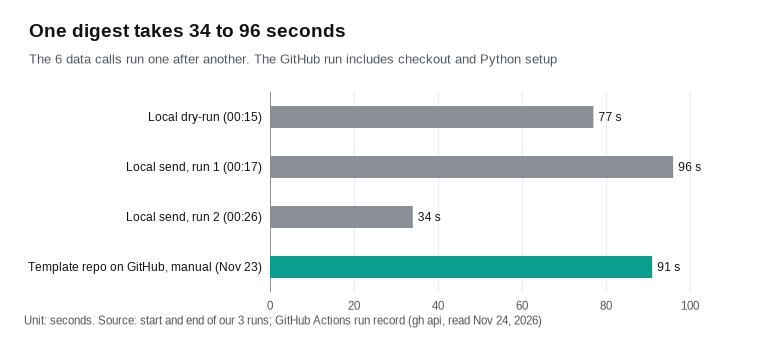
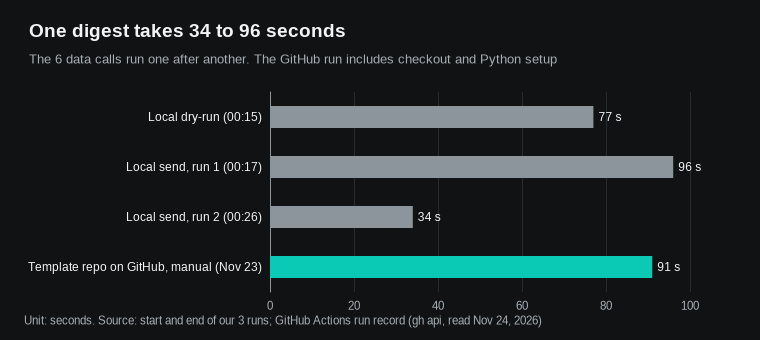
The four full runs took 34 to 96 seconds. The 91-second figure is the full GitHub job of the template's manual run on November 23 at 00:56 UTC. It includes checkout and the Python setup. The 15-minute timeout in the workflow leaves room for a slow day. The runs also stay far below the 6-hour job limit in GitHub's Actions limits table.
To test one call before you build anything, use the same request that the template makes. Put the key in an environment variable first. The response contains results, count and a billing object with charged_usd.
curl -s https://api.everyinfra.com/api/v1/social \
  -H "Authorization: Bearer $EVERYINFRA_API_KEY" \
  -H "Content-Type: application/json" \
  -d '{"platform": "reddit", "action": "subreddit_posts",
       "params": {"subreddit": "LocalLLaMA", "sort": "top", "date_range": "past_day"}}'
The capability pages list every parameter and field: github/trending, producthunt/trending, reddit/subreddit_posts and google_news/search.
Change the sources in digest.toml
All choices are in one file, digest.toml. Each sources entry is one API call per run, and limit is the number of items that the entry may add. The digest never holds more than max_items (12 by default). When a source comes back empty or short, the other sources may each add up to 2 more items until the digest holds min_items (10 by default). The default file has six entries:
language = "en"
timezone = "America/New_York"
title = "EveryInfra Trend Digest"
max_items = 12
min_items = 10

[[sources]]
use = "github/trending"
limit = 3
[[sources]]
use = "producthunt/trending"
limit = 3
[[sources]]
use = "reddit/subreddit_posts"
params = { subreddit = "LocalLLaMA", sort = "top", date_range = "past_day" }
limit = 2
[[sources]]
use = "reddit/subreddit_posts"
params = { subreddit = "MachineLearning", sort = "top", date_range = "past_day" }
limit = 1
[[sources]]
use = "google_news/search"
params = { keyword = "AI agents", time_window = "day" }
limit = 2
[[sources]]
use = "google_news/search"
params = { keyword = "AI coding tools", time_window = "day" }
limit = 1
The limits add up to 12. Our dry-run at 00:15 SGT still showed 3 Reddit posts and 3 news stories. Product Hunt and GitHub filled their 3 places each, and the fill rule gave the free places to the other sources. To follow a different community, change subreddit.
To follow a different topic, change keyword. The catalog page for google_news/search says that the keyword accepts - to exclude a word, OR, and site:. Note that Reddit applies date_range only when sort = "top". If you set sort = "newest", the date range has no effect, and the 7-day memory becomes the only filter.
timezone in this file controls the date in the title and which day is Monday. It does not control when the job runs. That is the cron line in the workflow. On Mondays the template adds a weekly list of the repositories that gained the most stars and the posts with the most comments.
It builds this list from the daily snapshots in state/state.json. Our runs on Monday, November 24 in Singapore were still Sunday, November 23 in New York, so they had no weekly list. That is the effect of the default America/New_York value.
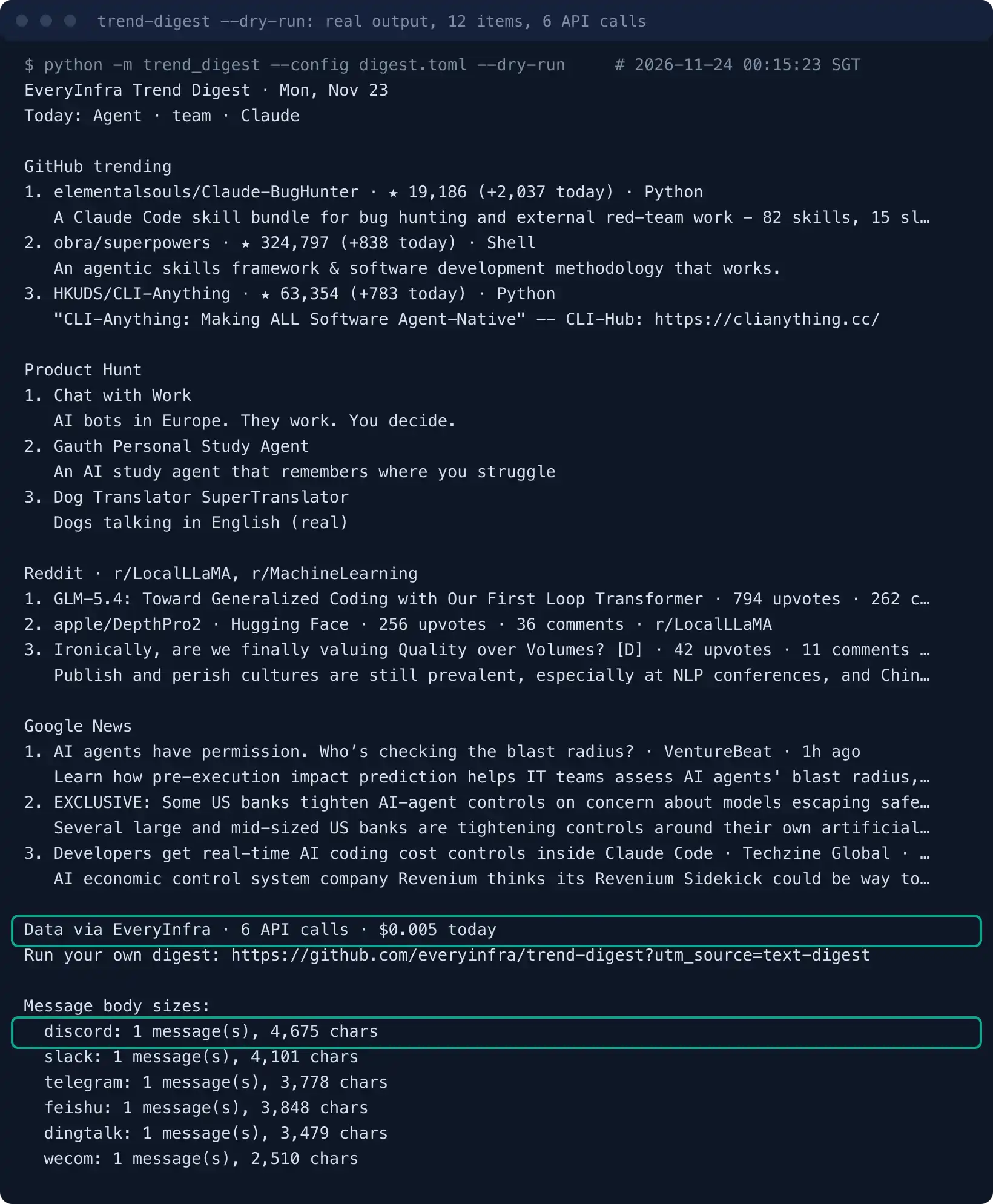
In that dry-run, the first Reddit item was an r/LocalLLaMA post with 794 upvotes and 262 comments. The three news stories came from VentureBeat, Reuters and Techzine Global, published 1 to 6 hours before. The footer rounds the charge to $0.005; the archive JSON keeps the exact $0.004891.
Before you change the schedule, run python -m trend_digest --dry-run with the key in your environment. It prints the digest and the size of each channel's message body, and it sends and saves nothing. That dry-run printed sizes of 4,675 characters for Discord, 4,101 for Slack, 3,778 for Telegram, 3,848 for Feishu, 3,479 for DingTalk and 2,510 for WeCom. The first real send at 00:17 had a Discord request body of 4,647 characters. The two runs did not get exactly the same items, so the sizes differ. A dry-run makes the same 6 calls, so it costs the same as a real run.
What it costs, call by call
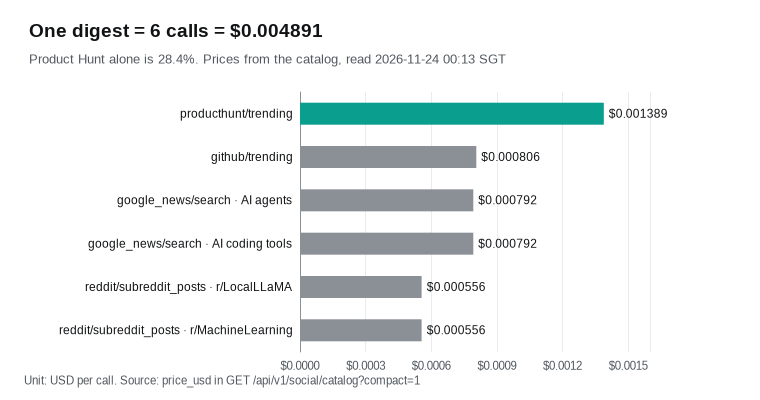
The README's cost table gives $4.90 per 1,000 runs. It rounds each price to the cent first. With the exact catalog prices, one run is $0.000806 + $0.001389 + 2 × $0.000556 + 2 × $0.000792 = $0.004891. That is $4.891 per 1,000 runs, $0.1467 for a 30-day month and $0.1516 for a 31-day month. The archive file of our second send recorded "calls": 6, "charged_usd": 0.004891 and no failed sources, so the formula and the actual charge agree.
| Source in digest.toml | Calls per run | Price per call | Per 1,000 calls | 30 days |
|---|---|---|---|---|
github/trending | 1 | $0.000806 | $0.81 | $0.0242 |
producthunt/trending | 1 | $0.001389 | $1.39 | $0.0417 |
reddit/subreddit_posts | 2 | $0.000556 | $0.56 | $0.0334 |
google_news/search | 2 | $0.000792 | $0.79 | $0.0475 |
| Total | 6 | $0.004891 per run | $4.89 per 1,000 runs | $0.1467 |
Product Hunt is the largest single item at 28.4% of a run. If you do not need launches, removing that entry lowers the month to about $0.105. Adding entries works the other way. In the README, the optional sources twitter/trending, reddit/trending_posts, weibo/trending and douyin/trending cost $0.556 per 1,000 calls. xiaohongshu/trending costs $5.556, which is ten times more.
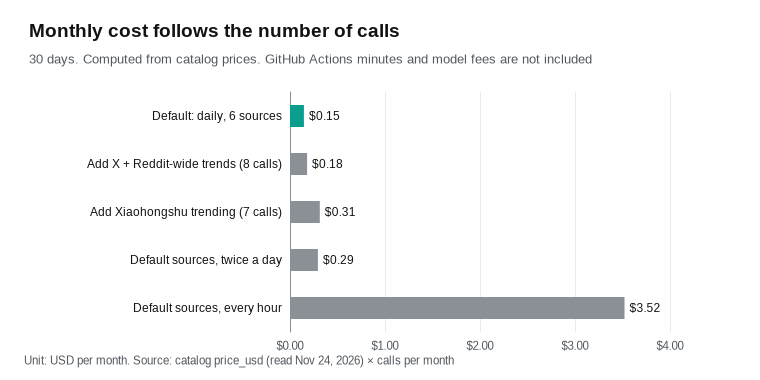
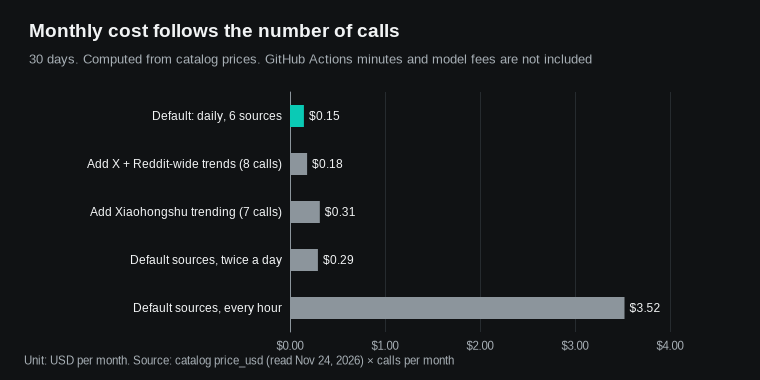
Running the default sources every hour costs $3.52 a month and posts 24 messages a day. For alerts within minutes, use the 37-line script in Reddit to Discord without RSS on your own cron.
GitHub's side of the bill is zero for a public repository. GitHub's Actions billing page says that standard GitHub-hosted runners are free "In public repositories". For a private repository, GitHub Free includes $12 of compute a month, and a standard 2-core Linux runner costs $0.006 per minute. If each run uses 2 minutes, 30 runs use 60 minutes, which is $0.36 out of the included $12.
Failed and empty calls are not charged. At 00:17 SGT we searched Google News for a phrase that has no articles. The call returned 0 results with "charged_usd": 0.0 and "reason": "empty_result_refunded". At the same minute we sent sort = "hot" to reddit/subreddit_posts, which is not an allowed value.
The API returned HTTP 422 with "code": "invalid_value" and the allowed list newest, popular, relevance, rising, top. It also returned the suggestion "did_you_mean": ["popular", "top"] and the note "Nothing was charged". The API has no hot sort. If you edit digest.toml by hand, use popular or top, as did_you_mean suggests. When one source fails, the template logs it, lists it under failed in the archive file and posts the other sources. The run turns red only when every source fails (exit code 1) or a channel fails (exit code 2).
GitHub Actions schedules: the docs and our count
The cron line decides when the digest runs. Before you depend on the time, read the note in the schedule section of GitHub's events reference.
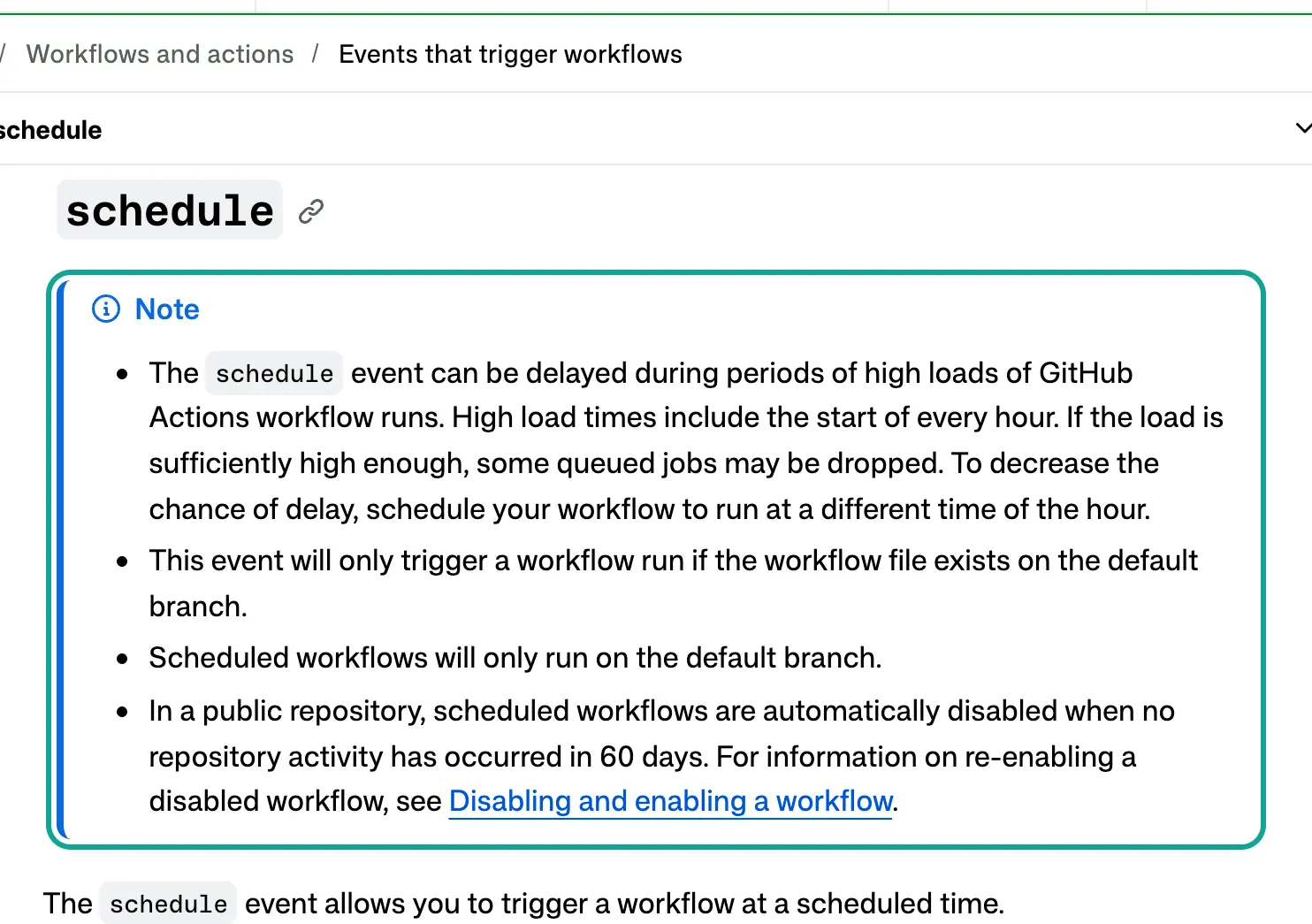
The same page states three numbers and rules. "The shortest interval you can run scheduled workflows is once every 5 minutes." Cron times are UTC by default. Since the March 19, 2026 changelog, you can add a timezone key with an IANA name next to the cron line. And "Notifications for scheduled workflows are sent to the user who last modified the cron syntax", so the person who edits the cron line gets the failure emails.
The template's comment says that 13:00 UTC is "08:00 US Eastern in winter (09:00 in summer)". With the timezone key, the run can stay at 08:00 in New York all year. We also move the minute away from 0, because GitHub names the start of every hour as a busy time. The README gives the same advice:
on:
  schedule:
    - cron: "7 8 * * *"
      timezone: "America/New_York"
  workflow_dispatch:
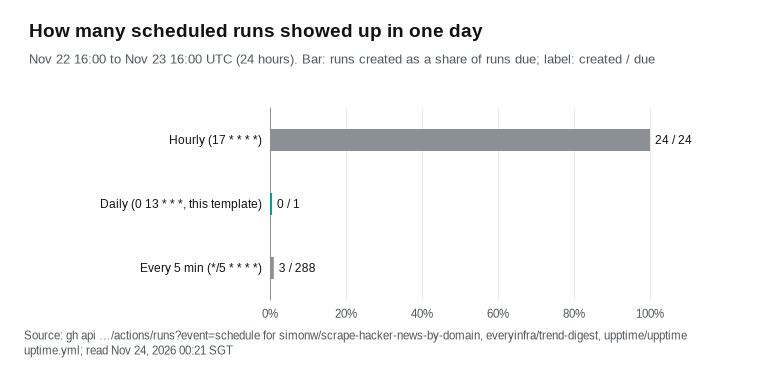
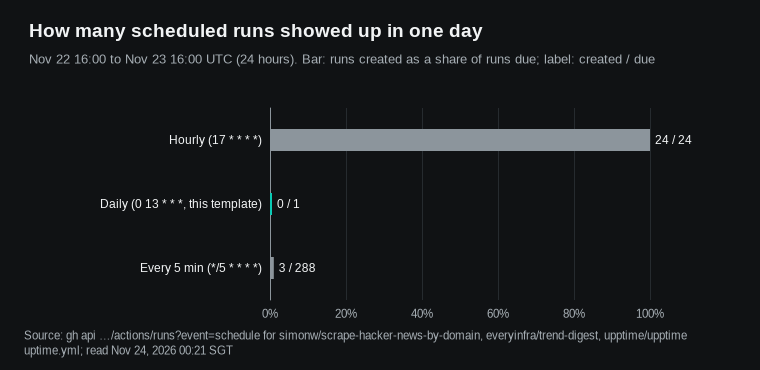
The docs say runs "can be delayed" and that "some queued jobs may be dropped", but they give no numbers. So at 00:21 SGT on November 24 we pulled the schedule runs of three public repositories with gh api repos/<owner>/<repo>/actions/runs?event=schedule. The window was the 24 hours from November 22, 16:00 UTC to November 23, 16:00 UTC. The public repository scrape-hacker-news-by-domain has an hourly cron at minute 17. upptime has an uptime.yml cron that runs every 5 minutes. And the template itself runs at 13:00 UTC.
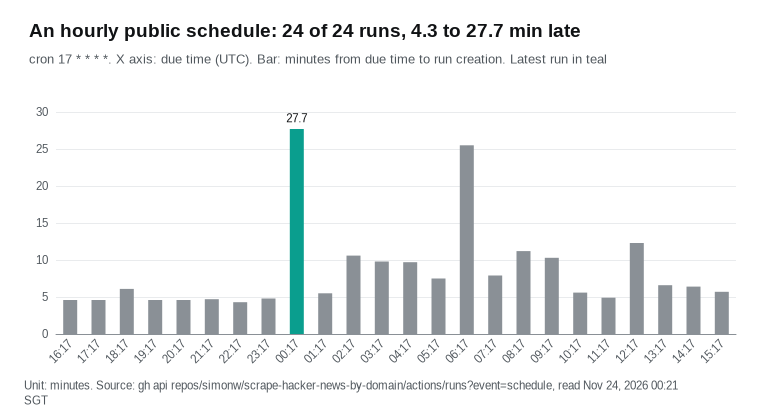
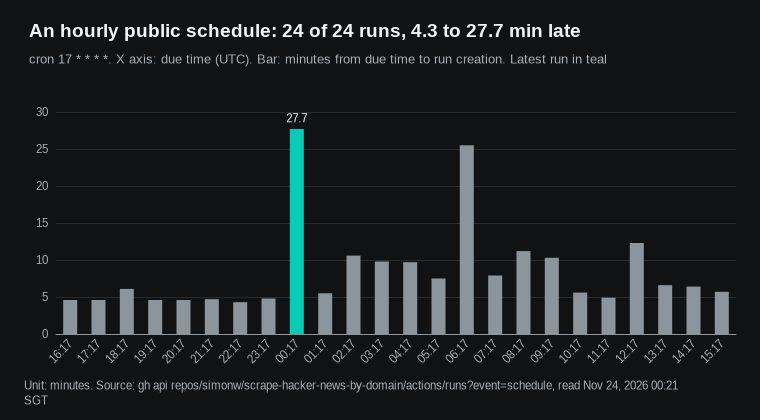
The hourly job fired every time: 24 of 24 runs, created 4.3 to 27.7 minutes after the due minute, with a median of 6.25 minutes. The 5-minute job fired 3 times out of 288. The template's daily run fired 0 times out of 1. We read its run list on November 24 at 00:21 SGT, 3 hours and 21 minutes after the due time. The list had a manual run and page builds, but no schedule run. A second check at 00:54 SGT, 3 hours and 54 minutes after the due time, showed the same.
One missed daily run is a sample of one, and we do not know the cause. The count does match two threads in the GitHub Community. One, from November 19, 2026, is about scheduled workflows delayed by up to 6 hours. The other, from November 12, 2026, is about schedules that missed about 94% of runs. In the second thread, a reply reports that the upptime/upptime 5-minute cron "only gets 4 to 6 scheduled runs a day" since October; our count of 3 agrees with that.
The 24 hourly delays break down as follows. All 24 runs ended with success.
| Delay after the due minute | Hourly runs |
|---|---|
| 5 minutes or less | 8 |
| More than 5, up to 10 minutes | 10 |
| More than 10, up to 12.3 minutes | 4 |
| 25.5 and 27.7 minutes | 2 |
The three 5-minute runs started at 19:59, 00:36 and 08:07 UTC, which is 4 hours 37 minutes and then 7 hours 31 minutes apart. We found no fixed interval between them.
A delay of 5 to 30 minutes does not matter to a morning summary, so the default schedule is fine for most channels. A missing day does matter if people expect the post. In that case, keep the schedule and add a second trigger from a clock that you control. A cron on a small server, a scheduled cloud function or another repository can call the workflow dispatch endpoint:
curl -X POST \
  -H "Authorization: Bearer $GH_TOKEN" \
  -H "Accept: application/vnd.github+json" \
  https://api.github.com/repos/OWNER/REPO/actions/workflows/digest.yml/dispatches \
  -d '{"ref": "main"}'
A fine-grained token with Actions write access on that one repository is enough. If both triggers fire on the same day, the template does not post the same items twice. A second run on the same day skips the items of the first run. We tested that with two real sends at 00:17 and 00:26 SGT.
The first posted 12 items. The second posted 12 different items (for example, minimind in place of Claude-BugHunter), and 0 of its 24 item links repeated. The workflow's concurrency group also queues a second run while the first one is still pushing.
The 60-day rule is the other silent stop. In a public repository, GitHub disables scheduled workflows "when no repository activity has occurred in 60 days". The template commits the archive after each run. The docs do not say if commits from the workflow count as activity. So the README tells you how to start the workflow again if the digest stops: open Actions, select Trend digest and click Enable workflow.
Two Discord formatting traps
The template's commit 3a1e924 of November 23, 2026, "Fix Discord item lines: no list numbering, no escapes inside link text", fixes both traps.
The first trap is the number at the start of each item. The renderer's code comment says that "a line that starts with "1. " becomes a list" in Discord. An item line such as 1. **[owner/repo](<link>)** · ★ 324,797 (+838 today) therefore becomes a numbered list.
The comment in render/discord.py explains the visible effect: "the rest of the line (the metric) then drops to the next line". The fix is one backslash: write 1\.. Discord shows "1." as plain text and keeps the stars on the same line. The template's n8n workflow got the same fix later that day in commit ba928ac.
The second trap is the reverse. The renderer escapes Markdown characters in titles and summaries, so a title with * or _ shows the character instead of bold or italic. Inside the text of a masked link, [text](url), Discord does not remove the backslash. A repository title such as user_name/tool_kit showed up as user\_name/tool\_kit. The fixed renderer does not escape link text. It changes only the three characters that break a link: [ and ] become ( and ), and * becomes the look-alike ∗.
def link_text(text):
    """Text for the inside of a masked link `[text](url)`.
    Discord shows backslash escapes literally inside link text, so nothing is
    escaped here."""
    text = " ".join((text or "").split())
    return text.replace("[", "(").replace("]", ")").replace("*", "∗")

def item_block(number, item, why):
    # "1\." and not "1.": a line that starts with "1. " becomes a list
    head = f"{number}\\. **[{link_text(item['title'])}]({link_target(item['url'])})**"
The source for the link-text rule is the message of commit 3a1e924, and the template has a test for it in tests/test_render.py. If you write your own renderer, test both cases in a private channel first. Then point it at a public channel.
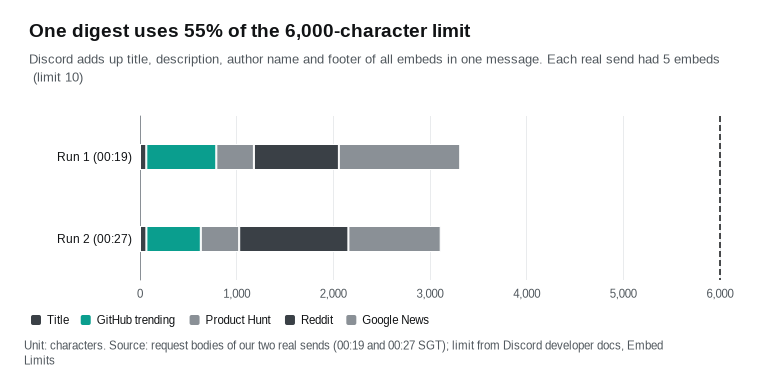
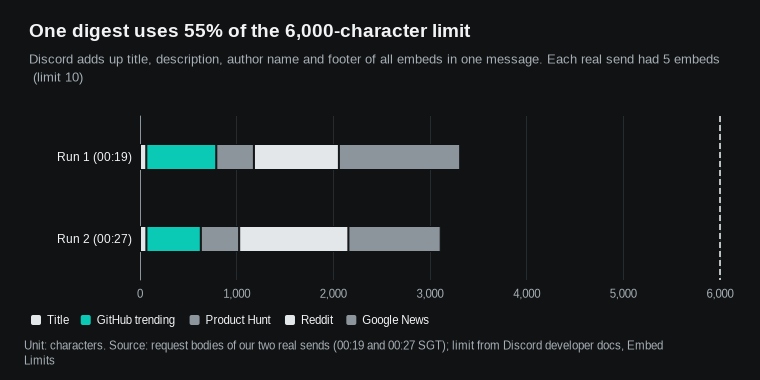
Other Discord rules shape the message. Discord counts the title, description, author name and footer of all embeds in one message toward 6,000 characters. A message can hold up to 10 embeds. Our two sends used 3,313 and 3,111 characters, which leaves room for the optional "Why it matters" line per item.
Discord's Message Resource also says "Embeds are deduplicated by URL", so the renderer gives each section embed a different url (an anchor on the archive page). The body sets allowed_mentions to {"parse": []}, so a user mention inside a post title does not ping that user. The default table on the same page says that a regular message without allowed_mentions parses user, role and @everyone mentions. Webhooks and interactions parse only user mentions by default. And the request adds with_components=true. The Webhook Resource requires this flag when a webhook that no app owns sends components such as the link button.
Other channels: Slack, Telegram, Feishu, DingTalk, WeCom
Discord is one of six targets. Add the secrets for the channels you want; the run skips the others. The same digest is rendered six times, once in each platform's format, and the limits differ.
| Channel | Secret(s) | Limit that the template handles | Source |
|---|---|---|---|
| Discord | DISCORD_WEBHOOK_URL | 10 embeds, 6,000 embed characters | Discord Message Resource |
| Slack | SLACK_WEBHOOK_URL | 50 blocks per message | Slack Block Kit |
| Telegram | TELEGRAM_BOT_TOKEN, TELEGRAM_CHAT_ID | 1 to 4,096 characters after entities parsing | Bot API sendMessage |
| Feishu / Lark | FEISHU_WEBHOOK_URL (+ FEISHU_SECRET) | 20 KB body; 100 messages a minute, 5 a second | Feishu custom bot |
| DingTalk | DINGTALK_WEBHOOK_URL (+ DINGTALK_SECRET) | Keyword or signature security setting | DingTalk custom robot |
| WeCom | WECOM_WEBHOOK_URL | Markdown content at most 4,096 bytes | WeCom message push |
Telegram is the only channel where the template splits a long digest into several messages instead of dropping items. The other channels drop the last items of the longest section, and the archive keeps everything. The Feishu guide gives a warning: do not send exactly on the hour or half hour, such as 10:00 or 17:30. At those times, system load can cause error 11232. A cron minute such as 7 avoids that and GitHub's busy minute at the same time.
Compared with other ways to get a daily digest in Discord
There are four other common ways to get a daily news or GitHub trending feed in Discord. You can use an RSS bot, a no-code workflow, a ready-made open-source digest or an agent that writes the digest. The star and view counts are from November 24, 2026. The GitHub numbers are from gh api, and the n8n numbers are from n8n's public template API.
| Option | Data it reads | Runs on | Cost to you | Count (Nov 24) |
|---|---|---|---|---|
| trend-digest (this template) | 6 data API calls a day | GitHub Actions | about $0.15 a month | template, MIT |
| MonitoRSS | RSS feeds you add | Its hosted bot or your server | Free tier and paid tiers | 1,302 stars |
| n8n template 2866 | GitHub trending page HTML | Your n8n | Your n8n hosting | 9,185 views |
| n8n template 8452 | Google News, weekly, with a model summary | Your n8n | Hosting plus model calls | 1,186 views |
| An open-source Chinese hot-list aggregator | Many Chinese hot lists and RSS | Docker or Actions | Free; you host it | 63,830 stars, GPL-3.0 |
| gh-digest | New repositories sorted by stars (approximate trending) | Actions | Free | 0 stars |
| weekly-ai-news-digest | Agentic workflow research | GitHub Agentic Workflows | Actions plus model usage | not collected |
The closest match to this template is gh-digest. Its README says that GitHub's trending page has no public API, so it approximates trending with new repositories sorted by stars. The n8n template 2866, the most viewed GitHub trending template, reads the HTML of github.com/trending, so it breaks when the page layout changes. github/trending returns structured fields such as rank, star_count and stars_today, so a layout change on the page does not break your workflow file.
MonitoRSS is the better choice if your sources already publish RSS feeds: a blog, a changelog or a status page. It reads RSS and posts each new entry, which suits "every new item, soon" better than "the best 12 items, once a day". The Chinese hot-list aggregator with 63,830 stars covers many more Chinese lists, and you host it yourself. Its license is GPL-3.0. If you plan to change it and ship it inside a product, check the license terms yourself. You can also run it next to this template, with each one posting to its own channel.
The agentic approach in weekly-ai-news-digest lets a model choose and summarize the stories. It splits the work into three workflows (research, merge, deploy) and uses a pull request as a review step before anything is published. In a July 30, 2026 video, its author says that one run takes "between 9 and 10 minutes". Our runs took 34 to 96 seconds.
If you only need to post a fixed text from a workflow, a general action such as action-discord (463 stars) is enough. It sends a message; it does not collect anything.
Steps from three tutorial videos
We searched YouTube for "discord daily digest github actions" at 00:20 SGT with youtube/search and read the transcripts of the three most relevant results with youtube/transcript.
The October 22, 2026 video Build a Free Daily AI Report Bot with GitHub Actions builds a similar bot for GitHub issues. It shows three steps. It sets an odd cron minute ("Why seventeen and not zero?") and the timezone key. It reports that Discord rejected Python's default user agent with a 403 and error 1010 "before it even looked at the webhook", and that any custom User-Agent header fixed it. The template's HTTP client already sends its own User-Agent, so this does not affect it, but a hand-written script with urllib will hit it. And it reminds viewers that failure emails for scheduled runs go to the person who last changed the cron line.
The May 3, 2026 video How to Sync GitHub Notifications with Discord via Webhooks solves a different problem. It adds /github to the end of the webhook URL so that GitHub repository events (pushes, pull requests, issues) post to Discord. That is the GitHub-compatible webhook and it carries events from your own repository. It does not produce a digest of what is trending elsewhere. The search results mix the two meanings, so check which one a tutorial teaches before you follow it.
When this template is the wrong tool
You need an alert within minutes of a post. A digest runs once or twice a day, and GitHub schedules can be late by half an hour or more. For instant posts from r/selfhosted, use the 37-line script in Reddit to Discord without RSS. Run it on cron. For sources that still publish feeds, use an RSS bot.
You follow many accounts one by one. Each sources entry is one call per run. Fifty X accounts polled every 5 minutes is 14,400 calls a day, which is about $240 a month at $0.556 per 1,000 calls. At that volume, compare the price with a notification tool that charges a monthly fee.
You need the reasons, not the list. The digest shows titles, star counts, votes and a one-line summary. A model-written briefing with analysis needs an optional model key in this template, or an agentic project such as weekly-ai-news-digest. Both add model costs.
You cannot accept a missing day. Add the external workflow_dispatch trigger from the schedule section. Or run python -m trend_digest from cron on a machine that you control. The code needs only the Python standard library, so it runs anywhere with Python 3.11 or newer.
You need private data. Order data, private channels and logged-in pages are not part of these capabilities. Use the platform's own developer API with your account for that.
Recent changes that affect this setup
- November 22, 2026: Telegram released Bot API 10.5. The
sendMessagecall that the template uses keeps its 4,096-character limit, so the template's Telegram split does not change. - November 9, 2026: GitHub's secret scanning started to check Actions workflow logs, in public preview for Enterprise Cloud (changelog). It does not detect "secrets already masked by Actions", so the rule stays the same: never print the webhook URL.
- October 28, 2026: GitHub-hosted Linux runners started to run on more than one cloud (changelog). Runner IP addresses now come from more ranges, which is one more reason why the Feishu IP allowlist does not work for this job. The README already says so.
Reddit stopped its RSS feeds on November 13, 2026, as it announced in r/modnews on September 30, 2026. Discord setups that read subreddit RSS stopped posting. Our article on the Reddit RSS shutdown covers the dates.
FAQ
What is a Discord daily digest?
It is one scheduled message that collects the top items of the day from several sources. Discord has no built-in digest. A bot that summarizes a server's own chat is a different tool. This template posts outside news into the channel through a webhook.
Do I need a Discord bot to post GitHub trending?
No. A webhook posts without a bot user and without a login. You need a bot only to read messages, answer commands or join voice. The template uses only the webhook URL.
Can I post Google News only to a Discord webhook?
Yes. Delete the other sources entries and keep one or more google_news/search entries with your keywords. Two keywords make two calls, $0.001584 a day, or about $0.05 a month.
Why did my scheduled run not start at 13:00?
GitHub runs schedules on a best-effort basis. Our count on November 24 showed an hourly cron 4.3 to 27.7 minutes late, and one daily run that did not appear. Use a minute other than 0 and check the Actions tab. If a missing day is a problem, add an external workflow_dispatch trigger.
Does the GitHub Actions template also post to Slack or Telegram?
This one. Add SLACK_WEBHOOK_URL, or TELEGRAM_BOT_TOKEN and TELEGRAM_CHAT_ID, as secrets. The run skips channels without secrets, and a failure on one channel does not stop the others.
How is this different from the Discord webhook GitHub notifications setup?
The /github webhook posts events from your own repository, such as pushes and pull requests. This template posts a digest of outside sources. You can use both in the same channel.
Getting started
- Create an API key in the EveryInfra quickstart. Prices for every capability are on the pricing page.
- Click Use this template on everyinfra/trend-digest and add
EVERYINFRA_API_KEYandDISCORD_WEBHOOK_URLas repository secrets. - Click Run workflow once, then change the cron minute and the
timezonekey to the time that suits your readers. - To add sources, browse the GitHub data API and Reddit data API pages. For a weekly version, read a weekly hot-posts digest.
References
- everyinfra/trend-digest. GitHub. Read November 24, 2026.
- trend-digest README (setup, cost table, channel limits). GitHub. Read November 24, 2026.
- digest.yml (the workflow). GitHub. Read November 24, 2026.
- digest.toml (default sources). GitHub. Read November 24, 2026.
- render/discord.py. GitHub. Read November 24, 2026.
- Fix Discord item lines: no list numbering, no escapes inside link text. GitHub, Nov 23, 2026. Read November 24, 2026.
- n8n: keep Discord from reading the numbered line as a list. GitHub, Nov 23, 2026. Read November 24, 2026.
- trend-digest demo archive. GitHub Pages. Read November 24, 2026.
- Events that trigger workflows (schedule, workflow_dispatch). GitHub Docs. Read November 24, 2026.
- GitHub Actions: Late March 2026 updates (timezone for schedules). GitHub Changelog, Mar 19, 2026. Read November 24, 2026.
- Creating a repository from a template. GitHub Docs. Read November 24, 2026.
- Using secrets in GitHub Actions. GitHub Docs. Read November 24, 2026.
- Configuring a publishing source for your GitHub Pages site. GitHub Docs. Read November 24, 2026.
- GitHub Actions billing. GitHub Docs. Read November 24, 2026.
- Disabling and enabling a workflow. GitHub Docs. Read November 24, 2026.
- Manually running a workflow. GitHub Docs. Read November 24, 2026.
- Control the concurrency of workflows and jobs. GitHub Docs. Read November 24, 2026.
- Actions limits. GitHub Docs. Read November 24, 2026.
- REST API: Create a workflow dispatch event. GitHub Docs. Read November 24, 2026.
- actions/checkout. GitHub. Read November 24, 2026.
- actions/setup-python. GitHub. Read November 24, 2026.
- Secret scanning detects secrets in GitHub Actions workflow logs. GitHub Changelog, Nov 9, 2026. Read November 24, 2026.
- pull_request_target blocked by default December 2. GitHub Changelog, Nov 2, 2026. Read November 24, 2026.
- GitHub Actions adds multi-cloud compute to improve reliability. GitHub Changelog, Oct 28, 2026. Read November 24, 2026.
- Scheduled Workflows delayed by up to 6h (even for self-hosted runners). GitHub Community, Nov 19, 2026. Read November 24, 2026.
- GitHub Actions scheduled workflows missing ~94% of runs despite successful manual execution. GitHub Community, Nov 12, 2026. Read November 24, 2026.
- scrape-hacker-news-by-domain. GitHub. Read November 24, 2026.
- upptime. GitHub. Read November 24, 2026.
- Webhook Resource (Execute Webhook, wait, with_components). Discord Developer Docs. Read November 24, 2026.
- Message Resource (Embed Limits, Allowed Mentions). Discord Developer Docs. Read November 24, 2026.
- Rate Limits. Discord Developer Docs. Read November 24, 2026.
- Sending messages using incoming webhooks. Slack Developer Docs. Read November 24, 2026.
- Block Kit: blocks reference. Slack Developer Docs. Read November 24, 2026.
- Telegram Bot API: sendMessage. Telegram. Read November 24, 2026.
- Bot API changelog (Bot API 10.5). Telegram, Nov 22, 2026. Read November 24, 2026.
- Custom bot usage guide. Feishu Open Platform. Read November 24, 2026.
- Custom robots send group messages. DingTalk Open Platform. Read November 24, 2026.
- Message push (group robot) configuration. WeCom Developer Center. Read November 24, 2026.
- gh-digest. GitHub. Read November 24, 2026.
- weekly-ai-news-digest. GitHub. Read November 24, 2026.
- MonitoRSS. GitHub. Read November 24, 2026.
- action-discord. GitHub. Read November 24, 2026.
- Send automated weekly news digest from Google News to Discord. n8n. Read November 24, 2026.
- Scrape latest Github trending repositories. n8n. Read November 24, 2026.
- I Built a Daily News Digest with GitHub Agentic Workflows. YouTube, Jul 30, 2026. Read November 24, 2026.
- Build a Free Daily AI Report Bot with GitHub Actions (Python). YouTube, Oct 22, 2026. Read November 24, 2026.
- How to Sync GitHub Notifications with Discord via Webhooks (2026 Guide). YouTube, May 3, 2026. Read November 24, 2026.
- Continuing our infrastructure updates: What's changing in the coming months. Reddit r/modnews, Sep 30, 2026. Read November 24, 2026.
- Trending repositories. GitHub. Read November 24, 2026.
- Product Hunt. Product Hunt. Read November 24, 2026.
- Data API catalog (price_usd). EveryInfra. Read November 24, 2026.
Reference BL-220