Reddit to Discord After the RSS Shutdown: a 37-Line Webhook Script
Reddit RSS stopped on Nov 13. A 37-line script now sends new subreddit posts to a Discord webhook from cron or GitHub Actions. Cost: about $1.60 a month.

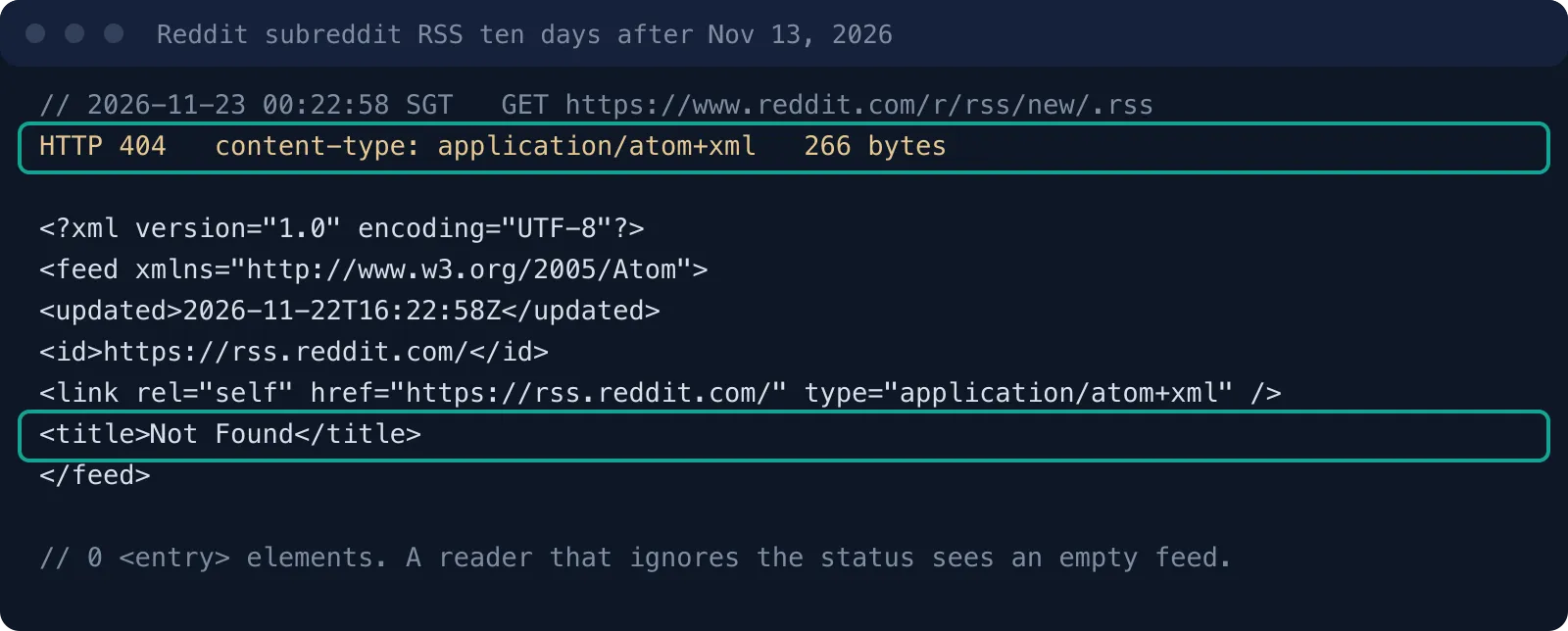
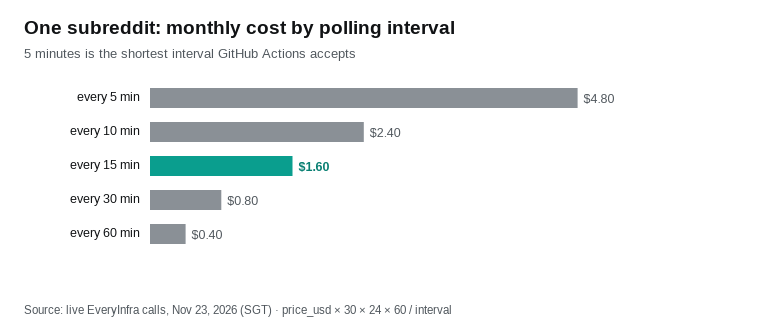
On November 23, 2026 at 00:22 Singapore time (SGT), we requested https://www.reddit.com/r/rss/new/.rss. Reddit returned HTTP 404 with a 266-byte Atom document titled "Not Found" and zero entries. That is what a "reddit rss discord" setup now receives ten days after Reddit stopped RSS on November 13, 2026. The replacement is a 37-line Python script. It is built to call reddit/subreddit_posts every 15 minutes, skips post IDs it has already seen, and posts new titles to a Discord webhook. Each call cost $0.000556 in our tests, so one subreddit costs about $1.60 a month and 70 subreddits cost about $112.
What broke on November 13, 2026
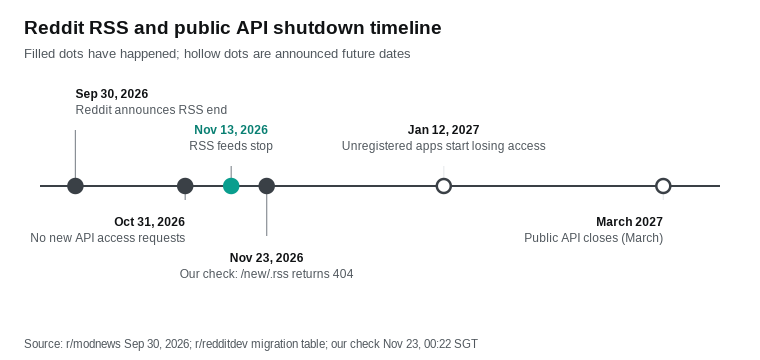
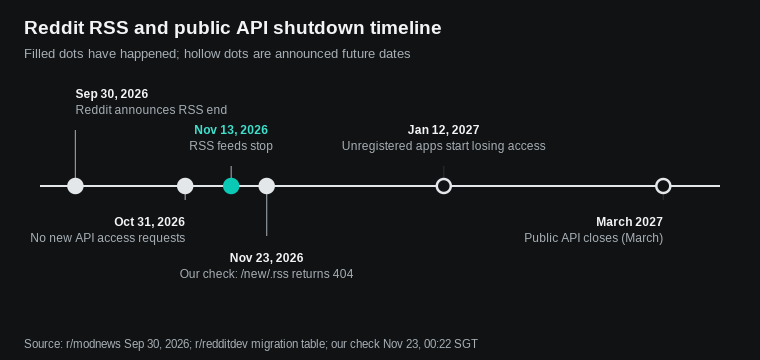
Reddit announced the change on September 30, 2026 in r/modnews. The post says Reddit will "stop supporting RSS feeds on November 13, 2026", and it gives a reason: RSS is "a common surface for large-scale scraping and automated abuse" (r/modnews). The same post sends moderators to a Developer Platform app named Discord Relay. For everyone else, it has one sentence: "If you use RSS for feeds outside of a community you moderate, there is no replacement."
The developer post from the same day gives the API dates (r/redditdev). New requests for public API access stopped on October 31, 2026. On January 12, 2027, access starts to close for apps and users that did not register. In March 2027, "public access will close for all remaining apps and users". TechCrunch reported the same dates on September 30, and TechRepublic listed them again on October 2, 2026.
| Date | What happens | Source |
|---|---|---|
| Sep 30, 2026 | Reddit announces the RSS end and the API timeline | r/modnews, r/redditdev |
| Oct 31, 2026 | No new requests for public API access | r/redditdev |
| Oct 31, 2026 | A feed reader developer reports that Reddit cut off Feedly's API access | Golden Hill Software |
| Nov 13, 2026 | RSS feeds stop | r/modnews |
| Nov 23, 2026, 00:22 SGT | Our request to /r/rss/new/.rss returns 404 and an empty Atom feed | raw response, image below |
| Jan 12, 2027 | Access starts to close for unregistered apps | r/redditdev |
| March 2027 | Public API access closes for all remaining apps | r/redditdev |
The 404 response has a detail that matters for Discord bots. The body is valid Atom with a title and no entries. A feed tool that reads the body and ignores the status code sees an empty feed, not an error. The channel then goes quiet, and nobody gets an alert. A second request one second later, to /r/selfhosted/.rss, returned HTTP 429 with an empty body. The feed URLs of these two subreddits no longer give posts.
The 266-byte Atom body has two more details that can mislead a feed tool. Its <updated> value is 2026-11-22T16:22:58Z, which is 00:22:58 SGT, the second of our request. Each new request moves this time forward. Its <id> and its self link are https://rss.reddit.com/, not the subreddit URL /r/rss/new/. A tool that checks only updated can decide that the feed changed a moment ago.
If you maintain a feed tool, treat two signals as a dead feed. The first is a status code that is not 200. The second is a feed id that is not the URL you asked for. Both are more reliable than a count of entries.
Users in r/rss are still sorting this out. On November 22, 2026, a post asked "It's been a week since Reddit killed RSS — what did you actually end up doing?", and one of its options was "Moved alerts to Discord/Slack?" (r/rss). On November 20, 2026, a moderator asked why a RedditRSS feed for their own subreddit showed no updates (r/rss). Another user asked for "any service that turns a discussion into an RSS feed" (r/rss). We read these three posts at 00:14 SGT on November 23. For comments, search feeds and research data after the shutdown, see Reddit RSS shutdown: what to switch to.
reddit rss discord: which old setups still work
A typical reddit to discord setup before November 13 had three parts. A subreddit RSS URL gave the posts, a feed bot or an automation tool read the URL, and a Discord channel showed the result. The first part is gone. We read each vendor page and price on November 23, 2026. We did not test each bot inside a Discord server, so the "after Nov 13" column only repeats what the vendor or Reddit wrote.
| Option | How it reads Reddit | Interval | Price (read Nov 23, 2026) | After Nov 13 |
|---|---|---|---|---|
| Readybot | "Readybot uses Reddit's public feeds" (Readybot) | Free: every 10 min; paid: 5 min; Premium: every minute | Free; $5.99/month; $20.99/month (plans) | Page still says "public feeds"; we did not verify delivery |
| MonitoRSS | Any RSS URL you paste (MonitoRSS) | Free: 20 min; supporters: 2 min | Free for 3 feeds; MIT source (GitHub) | Needs a working feed URL; Reddit URLs return 404 |
| Pingcord | Reddit integration, "Speed: Up to 2 minutes" (Pingcord) | Up to 2 min | Plans on site | Not stated on the page |
| IFTTT applets | Reddit service trigger, "Any new post in subreddit" (IFTTT) | Not stated | Free and paid tiers | Not stated on the page |
| n8n template 5105 | Reddit node; setup says "Create a Reddit app" (n8n) | Every 15 min | Self-hosted n8n | New API access requests stopped Oct 31, 2026 |
| Discord Relay (Reddit app) | Runs inside Reddit for moderators (Discord Relay) | Events, or a scan every minute | Free | Works, but only for subreddits you moderate |
| Your own Reddit API app | OAuth app on the public Data API | You choose | Free under Reddit terms | No new access since Oct 31, 2026; closes March 2027 |
| The 37-line script | reddit/subreddit_posts plus a webhook | You choose; the example uses 15 min | $0.000556 per call | Tested on Nov 23, 2026 |
The n8n template and Discord Relay each have one hard limit. The n8n template from June 2025 still says to create a Reddit app, but Reddit stopped accepting new public API requests on October 31. Discord Relay is the replacement that Reddit recommends, and its setup guide asks for "A moderator account with full permissions in the community" (Reddit Help). If you follow r/selfhosted as a reader, you cannot install it there.
The feed bots in the first rows are the low-cost path if they still deliver Reddit posts. Readybot's free plan checks every 10 minutes, which is faster than the 15 minutes in the script example. A user in r/discordbots wrote earlier this year that "the only one still active i know is readybot, but the interval between each notification are to long" (r/discordbots). The Readybot page still names Reddit's public feeds as its source. Test it in a private channel before you depend on it.
The pipeline: one timer, one API call per subreddit, one webhook
A Discord webhook is a URL that posts a message into one channel. Discord's documentation calls webhooks "a low-effort way to post messages to channels in Discord" that "do not require a bot user or authentication to use" (Discord Developer Docs). You do not host a bot, you do not ask for gateway intents, and you do not need app verification. A server member with the Manage Webhooks permission creates the URL in Server Settings, then Integrations (Discord Support).
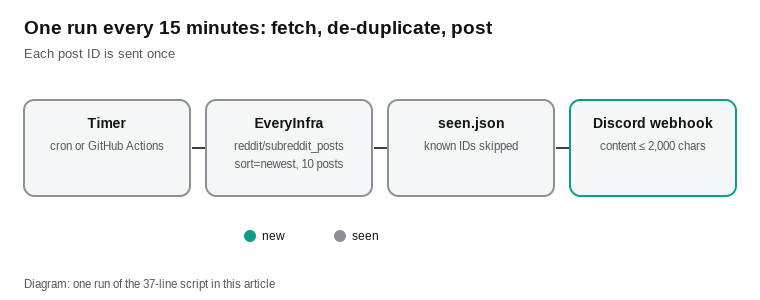
The script does four things on each run. It reads seen.json, a small file of post IDs. For each subreddit it calls POST /api/v1/social with reddit/subreddit_posts and gets the 10 newest posts. It drops the IDs it already knows. It posts the rest to the webhook, oldest first, and writes the new IDs back to the file. Nothing runs between two runs, so the cost is only the API calls and the minutes of the timer.
The data side needs only one capability. The reddit/subreddit_posts page lists its parameters: subreddit is required, and sort and date_range are optional. The catalog we read at 00:13 SGT on November 23 gave price_usd 0.000556 per call, default_limit 10 and max_limit 100. The Reddit API overview lists the other Reddit capabilities. Two of them can replace the subreddit list with a wider feed: reddit/trending_posts for site-wide hot posts and reddit/search for keywords.
| Capability | Required | Optional | Default / max posts | Price per call (catalog, 00:13 SGT, Nov 23, 2026) |
|---|---|---|---|---|
reddit/subreddit_posts | subreddit | sort, date_range | 10 / 100 | $0.000556 |
reddit/search | keyword | sort | 10 / 25 | $0.000792 |
reddit/user_posts | username | sort, date_range | 10 / 50 | $0.000556 |
reddit/trending_posts | none | page_token | not listed | $0.000556 |
reddit/popular_posts | none | country, date_range, sort | 25 / 100 | $0.000792 |
To switch capability, change only the params part of the script and the key in seen.json. To follow a keyword, set action to search and replace "subreddit": sub with "keyword": sub. Then put keywords in SUBREDDITS. Remove the r/ prefix from the message too. seen.json still keeps IDs per string.
At one call every 15 minutes, reddit/search costs $2.28 a month for 2,880 calls. That is a little more than a subreddit, and a call can return up to 25 posts. For the posts of one public account, reddit/user_posts has the subreddit price, $1.60 a month. We did not test these capabilities with a channel. We only read the catalog.
The full script, section by section
The script below is 37 lines. It uses only the Python standard library, so a cron host or a GitHub runner needs no pip install. It started as a 35-line version from November 22. We added sort=newest after the sort test, and a retry for HTTP 429.
"""New posts from a few subreddits -> one Discord channel webhook. Run it every 15 minutes (cron or GitHub Actions).
env: EVERYINFRA_API_KEY, DISCORD_WEBHOOK_URL, SUBREDDITS="rss,selfhosted"   (DRY_RUN=1 prints instead of posting)
"""
import json, os, pathlib, time, urllib.error, urllib.request

API = "https://api.everyinfra.com/api/v1/social"
SEEN = pathlib.Path(os.environ.get("SEEN_FILE", "seen.json"))


def post_json(url, body, headers=None):
    req = urllib.request.Request(url, json.dumps(body).encode(), {"Content-Type": "application/json", "User-Agent": "reddit-to-discord/1.1", **(headers or {})})
    for _ in range(3):
        try:
            with urllib.request.urlopen(req, timeout=120) as r:
                return json.loads(r.read() or b"{}")
        except urllib.error.HTTPError as e:
            if e.code != 429:
                raise
            time.sleep(float(e.headers.get("Retry-After") or 5))  # Discord says how long to wait
    raise RuntimeError("still rate limited after 3 tries")


seen = json.loads(SEEN.read_text()) if SEEN.exists() else {}
for sub in [s.strip() for s in os.environ["SUBREDDITS"].split(",") if s.strip()]:
    data = post_json(API, {"platform": "reddit", "action": "subreddit_posts", "params": {"subreddit": sub, "sort": "newest"}},
                     {"Authorization": "Bearer " + os.environ["EVERYINFRA_API_KEY"]})
    old = seen.get(sub)
    new = [p for p in reversed(data.get("results", [])) if p["id"] not in (old or [])]  # oldest first
    for p in new if old is not None else []:  # a subreddit seen for the first time is recorded, not posted
        text = f"**r/{sub}** {p['title']}\n{p['url']}"[:2000]
        if os.environ.get("DRY_RUN"):
            print(text)
            continue
        post_json(os.environ["DISCORD_WEBHOOK_URL"], {"content": text, "allowed_mentions": {"parse": []}})
        time.sleep(1)
    seen[sub] = ([p["id"] for p in reversed(new)] + (old or []))[:500]  # newest first, keep 500
    SEEN.write_text(json.dumps(seen))
Lines 1 to 7: settings come from the environment. The script reads three required variables and two optional ones. EVERYINFRA_API_KEY and DISCORD_WEBHOOK_URL are secrets, so keep them out of the file and out of Git. SUBREDDITS is a comma-separated list. SEEN_FILE moves the state file, which helps when a cron job runs from another directory. DRY_RUN=1 prints the messages instead of posting them, and we used it to test without a channel.
Lines 10 to 20: one function for both HTTP calls. The EveryInfra API and the Discord webhook both take a JSON POST. The urllib.request module sends the body as JSON (Python docs). On HTTP 429 the function reads Retry-After, waits, and tries again, up to three times. Discord's rate limit page tells apps to "rely on the Retry-After header or retry_after field" (Discord Developer Docs). Our API also sent HTTP 429 with a wait time in our test, and the same code handled it. Any other error stops the run, and the next run tries again.
Lines 23 to 28: fetch and compare. The script asks for the newest posts of each subreddit. It keeps a list of the IDs it already sent. It reverses the result so that the oldest new post goes out first and the channel reads in time order. The check p["id"] not in old is the whole de-duplication step. Reddit post IDs, such as 1y2e6n8, are stable, so a title edit does not create a second message.
Lines 29 to 35: no flood on the first run. A subreddit may have no entry in seen.json. Then old is None, and the loop posts nothing. The script records the 10 current IDs and waits for the next run. This also covers a subreddit that you add later: the new name gets one quiet run, and the old names keep posting. The message is the subreddit name in bold, the title, a line break, and the post URL, cut at 2,000 characters. allowed_mentions with an empty parse list stops a title such as @everyone from notifying anyone.
Lines 36 and 37: save after each subreddit. The script writes seen.json after each subreddit, not once at the end. If the run stops at the third subreddit, the first two are already saved, and the next run does not post their messages again. The file keeps the newest 500 IDs per subreddit. The script adds only IDs that are new, so 500 IDs are 500 new posts. In r/technology, our busiest test subreddit, 10 posts covered about 2.7 hours, so 500 IDs take about 5 days to fill. A post stays in the top 10 for only 2.7 hours.
What the API returned, and why `sort=newest` matters
We tested the sort order first. At 00:13:53 SGT we called reddit/subreddit_posts for r/rss without sort. At 00:14:08 we called it again with sort=newest. Both calls returned HTTP 200 with 10 posts and charged $0.000556.
The default list was not in date order. It put a November 22 post with 22 upvotes first. It put a November 20 post at rank 6, after a November 21 post. It also left out two posts from November 19 and 20 that the newest list had.
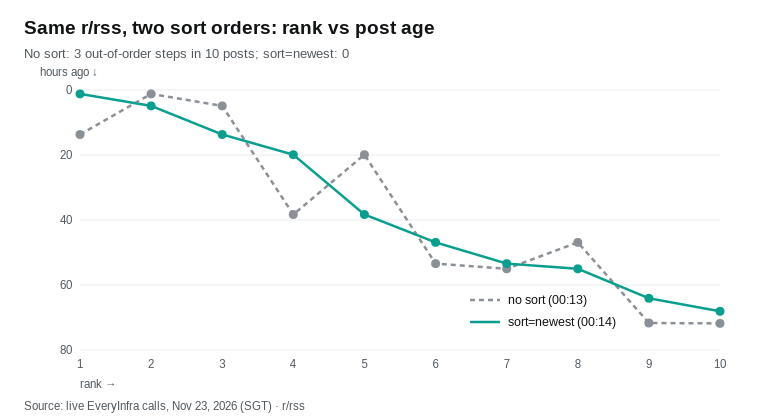
For a feed, date order matters for two reasons. First, the script posts in the order it receives, so a mixed order makes the channel jump back and forth in time. Second, a "hot" list can drop a new post with no votes. That post never enters seen.json, and it is never sent. With sort=newest, the 10 results are the 10 newest posts, so a gap appears only if more than 10 posts arrive between two runs.
The catalog lists one more optional parameter, date_range, with values such as past_hour, past_day and past_week. The catalog note says that Reddit applies this window only when sort=top. That makes it useful for a daily digest of top posts. Use sort=top with date_range=past_day once a day. That is 30 calls a month per subreddit, about $0.02. The 37-line script sends new posts, so it does not use the parameter.
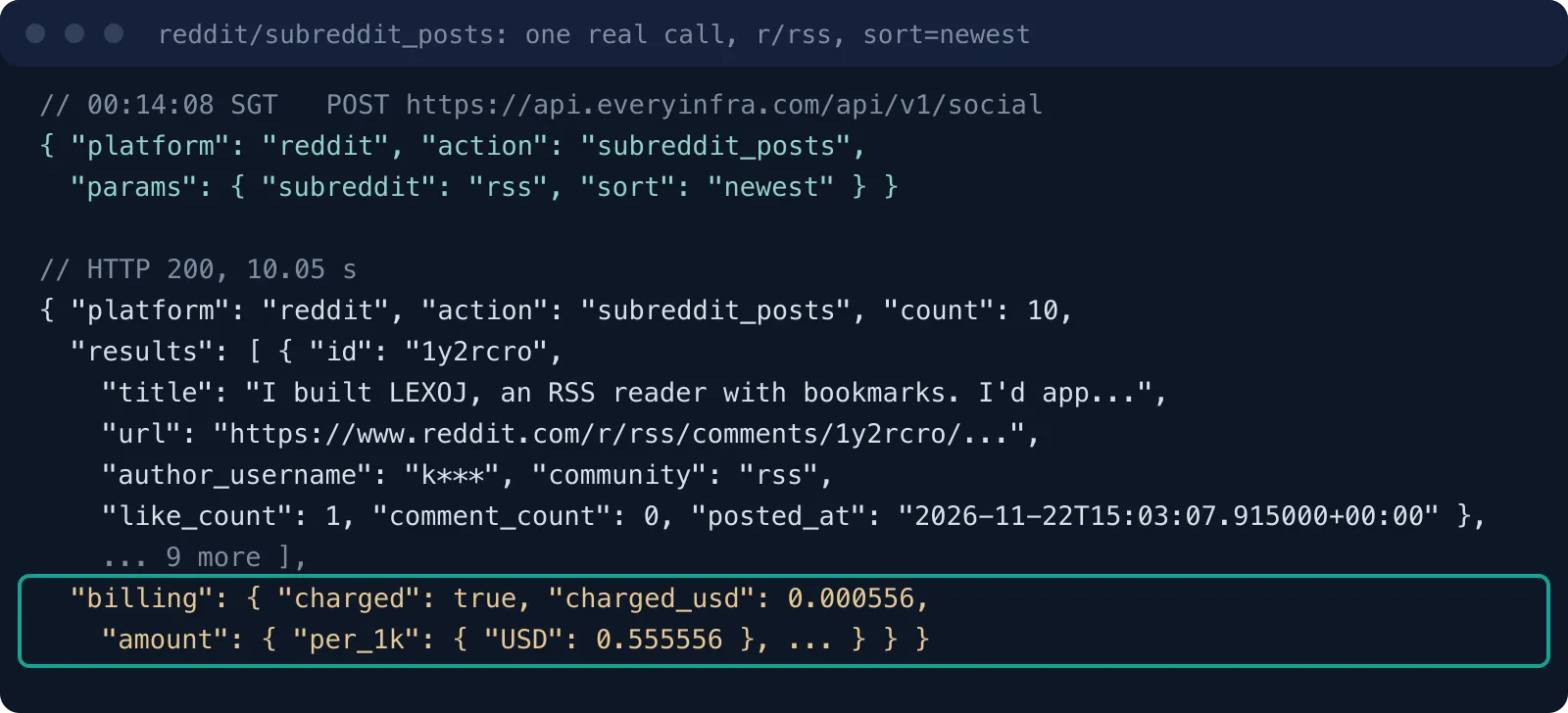
The response fields match the catalog's response_fields list for this capability. The script uses three of them: id, title and url. The others are there if you want a richer message.
| Field | Example from the 00:14 call | Used by the script | Use in a richer message |
|---|---|---|---|
id | 1y2rcro | Yes, de-duplication | Stable key |
title | "I built LEXOJ, an RSS reader with bookmarks…" | Yes | Embed title (Discord limit 256) |
url | reddit.com permalink | Yes | Link and preview |
posted_at | 2026-11-22T15:03:07.915000+00:00 | No | Embed timestamp |
like_count, comment_count | 1, 0 | No | Filter weak posts |
author_username | masked here | No | Embed author |
flair, domain, external_link, thumbnail_url, image_urls | sometimes empty | No | Filter by flair, add an image |
The catalog note for this capability says that "On some requests, results do not return flair, thumbnail_url or image_urls". If you build a message from these fields, check that they exist. The 37-line script avoids the problem because it reads only the three fields that are always present.
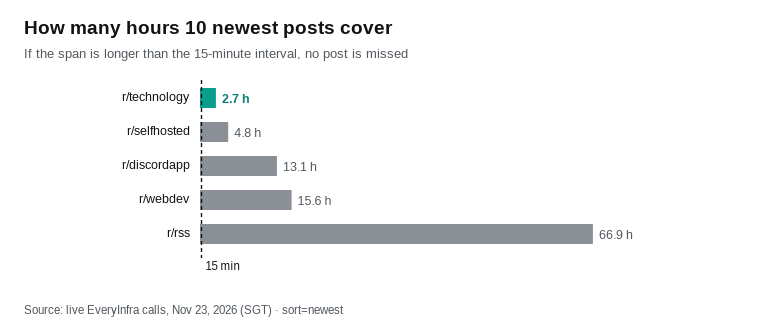
In r/technology, the busiest of our five test subreddits, the 10 newest posts covered 2.7 hours. A 15-minute run sees each post about ten times before it leaves the top 10. A subreddit would need more than 10 new posts in 15 minutes to lose one. For large subreddits, set a shorter interval or ask for more posts per call. The limit=25 test is in the section on four changes you can add.
First run, second run: the test with a real channel
We started the script by hand from a laptop, with one API key and a webhook in a private test channel. The cron and GitHub Actions files are configuration examples, and we did not run them on a schedule. A small wrapper recorded each HTTP request and response without the key or the webhook URL. We added ?wait=true to the webhook URL. With this parameter, Discord returns the created message, so we could check the message ID, the time and the mention fields directly. These are the 7 runs:
| Run (SGT, Nov 23) | Subreddits | Posts fetched | Posts sent | API calls charged |
|---|---|---|---|---|
| Run 1, 00:15 | r/rss, r/selfhosted, r/discordapp | 30 | 0 | 3, $0.001668 (plus 1 HTTP 429, not charged) |
| Run 2, 00:26 | r/rss, r/selfhosted, r/discordapp | 30 | 0 | 3, $0.001668 |
| Run 3, 00:33 | r/rss, r/selfhosted, r/discordapp, r/webdev | 40 | 0 | 4, $0.002224 |
| Run 4, 00:36 | r/rss, r/selfhosted, r/discordapp, r/webdev | 40 | 0 | 4, $0.002224 |
| Run 5, 00:37 | r/technology | 10 | 0 | 1, $0.000556 |
| Run 6, 00:46 | r/rss, r/selfhosted, r/discordapp, r/webdev, r/technology | 50 | 1 | 5, $0.002780 |
| Run 7, 01:00 | r/rss, r/selfhosted, r/discordapp, r/webdev, r/technology | 50 | 4 | 5, $0.002780 |
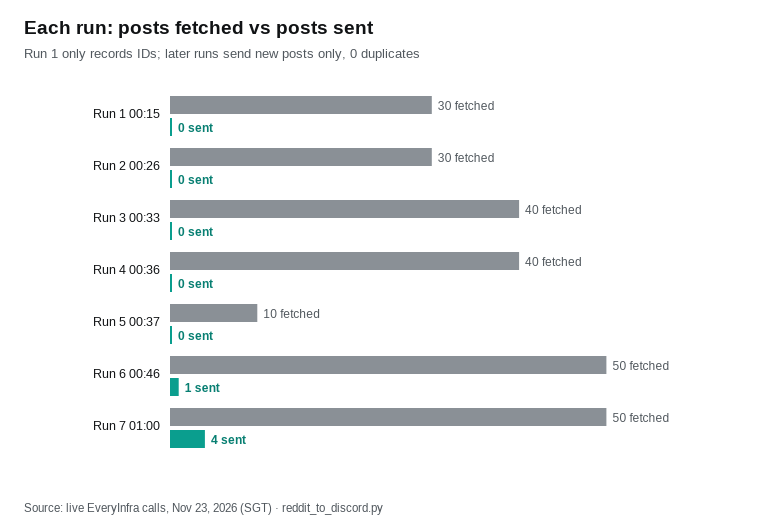
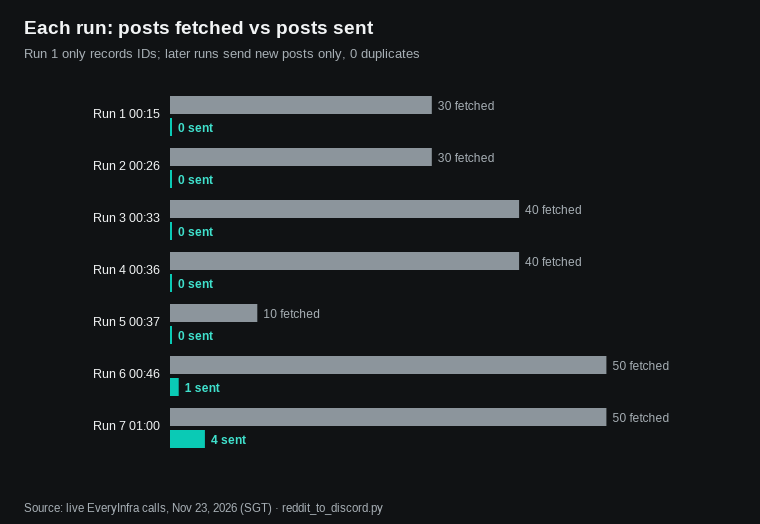
Run 1 at 00:15 is the first run. It fetched 30 posts from three subreddits and sent nothing, as designed. Runs 2 to 4 fetched the same posts again and sent nothing, because no new post appeared in those subreddits between 00:15 and 00:37. Run 3 added r/webdev, and run 5 ran r/technology alone for the first time. Each new name was recorded without a message. Run 6 at 00:46 sent one message, the r/technology post "Siri co-founder backs Helix for its voice ID tech", which appeared after run 5. Run 7 at 01:00 sent 4 more: one from r/webdev and three from r/technology. The r/technology post from run 6 was not sent again. Across all 7 runs the script sent 5 messages and 0 duplicates. The 25 charged calls in these runs cost $0.013900 in total.
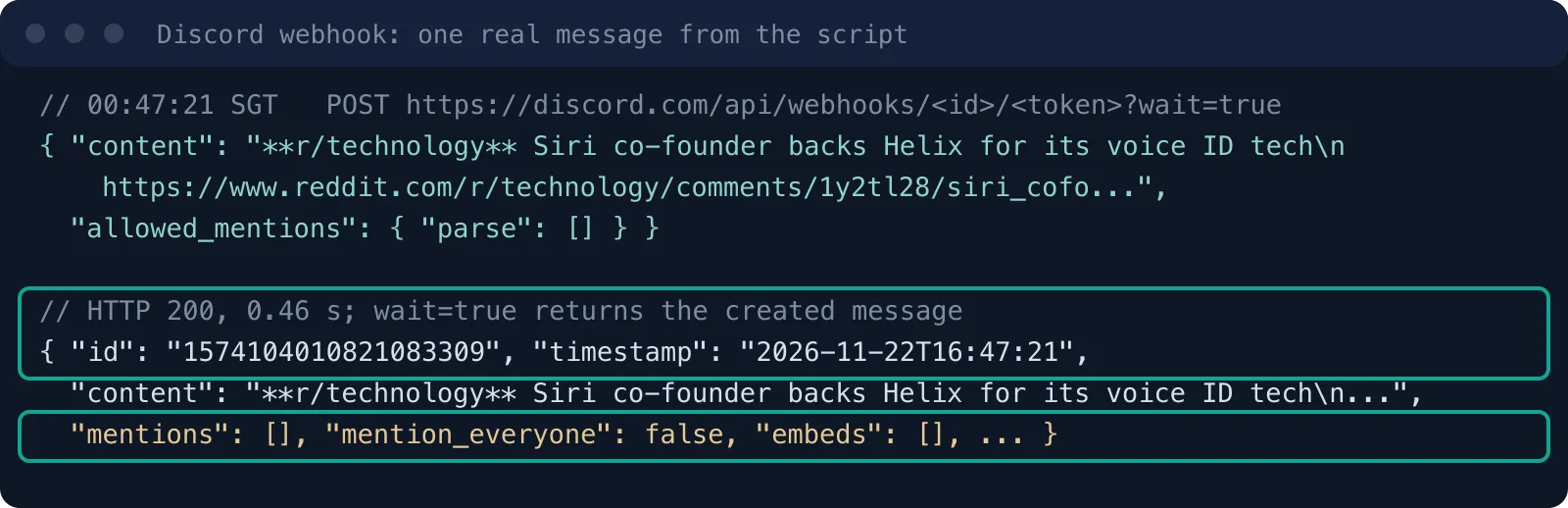
All 5 Discord posts returned HTTP 200 in 0.38 to 0.56 seconds. Run 7 sent its 4 messages in this order. At 01:01:42 SGT it sent the r/webdev post "How is loop engineering actually used practically?". At 01:01:57, 01:01:58 and 01:02:00 it sent three r/technology posts. The first is about the first payoff of quantum computing in energy. The second is about PC hardware makers that limit performance. The third is about a court that banned BYD from selling a "Defender clone" SUV in the EU.
The 15 seconds between the r/webdev post and the first r/technology post is the next API call. The 1 to 2 seconds between the three r/technology posts is time.sleep(1) plus Discord's response time. The three posts arrived in the same order as on Reddit.
In one test call the API returned HTTP 429 at 00:15:49 SGT. The response had retry_after and nothing was charged. The script waited, and the retry at 00:16:00 returned 200.
Discord webhook limits that apply to this script
A discord webhook has fewer moving parts than a bot, but it has limits. The numbers come from Discord's developer documentation, read on November 23, 2026. "No fixed number" means that Discord does not publish one.
| Limit | Value | Source |
|---|---|---|
Message text (content) | Up to 2,000 characters | Webhook Resource |
| Embeds per message | Up to 10 | Webhook Resource |
| Embed title / description / field value | 256 / 4,096 / 1,024 characters | Message Resource |
| All embed text in one message | 6,000 characters | Message Resource |
| Mentions parsed by default in webhooks | User mentions only | Message Resource |
| Requests per webhook | No fixed number; read the rate limit headers | Rate Limits |
| Invalid requests (401, 403, 429) per IP | 10,000 per 10 minutes, then a temporary block | Rate Limits |
| Webhook that returns 404 | Do not use it again | Rate Limits |
Watch the request rate. Discord publishes no fixed number. It writes that "rate limits should not be hard coded into your app", and that per-route limits also apply per webhook (Rate Limits). Reddit titles are short, and the script cuts the text at 2,000 characters. The script waits one second between messages and obeys Retry-After. In run 7 it sent 4 messages in a row, and all 4 returned 200.
Discord's default for webhooks is to parse user mentions only, so @everyone in a title does not notify a whole server (Message Resource). A title can still contain a raw user mention. The script sends "allowed_mentions": {"parse": []}, which turns off all mentions for these messages. Discord's own warning on the Execute Webhook endpoint recommends allowed_mentions when you pass "user-generated strings into message content" (Webhook Resource).
If someone deletes the webhook, every message returns 404. A script that retries 404 forever can reach the 10,000 invalid requests in 10 minutes. Discord says that a client that gets 404 from a webhook "should not attempt to use it again" (Rate Limits). Our script raises an error on 404, stops the run, and the next run tries once more. At one run per 15 minutes that is 96 failed requests a day, far below the limit. Check your logs, then create a new webhook.
The Discord side: details that stop a first setup
First, you need the Manage Webhooks permission in the server. Without it, the Integrations page shows no button to create one (Discord Support). Second, a webhook posts only into the channel that it belongs to. You can move it later, because the Modify Webhook endpoint takes "the new channel id this webhook should be moved to", and the URL stays the same (Webhook Resource).
Third, a webhook name cannot contain the substrings "clyde" or "discord", and it can be up to 80 characters long (Webhook Resource). A name such as "Reddit posts" works. ### Three more parameters of Execute Webhook
The three items below come from Discord's Webhook Resource page, read on November 23, 2026. They are configuration examples. We did not test them in a real channel.
The first is wait. The docs say that it "defaults to false", and that "when false a message that is not saved does not return an error". The 37-line script does not send this parameter. If Discord does not save a message, the script gets 204 and no error. In our test we added ?wait=true to the URL, and all 5 posts returned the message body and ID.
To turn a lost message into an error in the log, put ?wait=true at the end of DISCORD_WEBHOOK_URL. The script does not change. Each post then waits until Discord saves the message, 0.46 seconds in one of our posts. The returned message ID has one more use. The docs list Edit Webhook Message and Delete Webhook Message endpoints. If you keep the ID, you can edit or delete the Discord message when the Reddit post is removed.
The second is forum channels. The docs say that for a forum or media channel, "you must provide either thread_id in the query string params, or thread_name in the JSON/form params". The 37-line script sends only content, so Discord refuses a webhook in a forum channel. To open one forum thread per Reddit post, add "thread_name": p["title"] to the JSON. To send all posts into one thread, add ?thread_id= and the thread ID to the URL.
The third is flags. Execute Webhook accepts only three flags: SUPPRESS_EMBEDS, SUPPRESS_NOTIFICATIONS and IS_COMPONENTS_V2. The Message Resource page gives SUPPRESS_EMBEDS as 1 << 2 (4) and SUPPRESS_NOTIFICATIONS as 1 << 12 (4096). A message with the second flag "will not trigger push and desktop notifications" and shows only an unread badge. Does a feed channel get a dozen posts an hour? Add "flags": 4096, and phones do not ring for each post. Add "flags": 4 to hide link previews and keep the channel compact.
Which timer to choose
The three common timers differ in shortest interval, punctuality and cost. Each cell comes from the crontab manual or the GitHub docs, read on November 23, 2026.
| Timer | Shortest interval | Punctuality | Cost | Where `seen.json` lives |
|---|---|---|---|---|
| cron on your own host | Every minute (crontab(5)) | On time while the host is up | Your host | Local disk |
| GitHub Actions, public repository | Every 5 minutes (GitHub Docs) | Late under load; queued jobs may be dropped | Free on standard runners | Actions cache, removed after 7 days without use |
| GitHub Actions, private repository | Every 5 minutes | Same as above | About $5.76 a month at every 15 minutes on ubuntu-slim | Same as above |
If you have an always-on machine, use cron. If you do not, and the repository is public, use GitHub Actions and accept a late run now and then. In a private repository, choose ubuntu-slim. The two-core runner costs $17.28 a month for the same schedule, which is more than the API calls. The script does not change with the timer. Set SEEN_FILE to put the state file where the timer can keep it.
Run it every 15 minutes with cron
On any always-on Linux host, cron is the simplest timer. The crontab(5) manual defines the five time fields. */15 in the minute field means minutes 0, 15, 30 and 45. Cron starts each job with a short environment, so load the variables from a file that only your user can read.
# /opt/reddit2discord/.env  (chmod 600)
export EVERYINFRA_API_KEY="your key"
export DISCORD_WEBHOOK_URL="https://discord.com/api/webhooks/..."
export SUBREDDITS="selfhosted,webdev"

# crontab -e
*/15 * * * * cd /opt/reddit2discord && . ./.env && flock -n .lock python3 reddit_to_discord.py >> run.log 2>&1
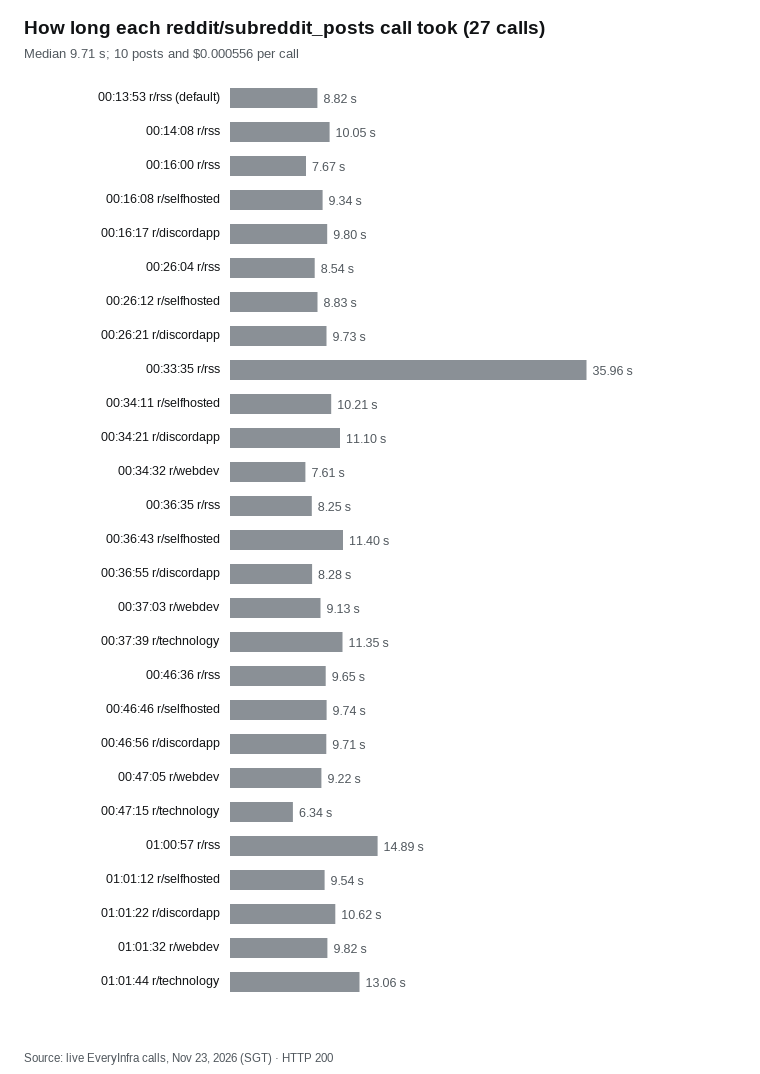
The flock -n .lock part stops two runs from overlapping. If a run takes longer than 15 minutes, the next one exits at once instead of reading the same seen.json (flock(1)). With a few subreddits that never happens. Our 27 calls had a median of 9.7 seconds each. At the median, 70 subreddits in one sequential run take about 11.3 minutes, which is close to the 15-minute interval. That is one more reason to stop adding subreddits to one script at that scale.
Run it on GitHub Actions
If you do not have a server, GitHub Actions can run the script on a schedule. The workflow below is a configuration example. We did not run it on GitHub. Every setting in it comes from GitHub's documentation, read on November 23, 2026.
name: reddit-to-discord
on:
  schedule:
    - cron: "7,22,37,52 * * * *"   # every 15 minutes, away from the top of the hour
  workflow_dispatch:                # lets you start a run by hand
concurrency:
  group: reddit-to-discord
  cancel-in-progress: false
jobs:
  post:
    runs-on: ubuntu-slim
    timeout-minutes: 10
    steps:
      - uses: actions/checkout@v7
      - uses: actions/setup-python@v7
        with:
          python-version: "3.12"
      - uses: actions/cache/restore@v6
        with:
          path: seen.json
          key: seen-${{ github.run_id }}
          restore-keys: seen-
      - run: python reddit_to_discord.py
        env:
          EVERYINFRA_API_KEY: ${{ secrets.EVERYINFRA_API_KEY }}
          DISCORD_WEBHOOK_URL: ${{ secrets.DISCORD_WEBHOOK_URL }}
          SUBREDDITS: selfhosted,webdev
      - uses: actions/cache/save@v6
        if: always()
        with:
          path: seen.json
          key: seen-${{ github.run_id }}
The schedule. GitHub writes that "The shortest interval you can run scheduled workflows is once every 5 minutes", and that schedules use UTC unless you add a timezone key (GitHub Docs). The same page warns that "The schedule event can be delayed during periods of high loads", that "High load times include the start of every hour", and that "some queued jobs may be dropped". The cron line above uses minutes 7, 22, 37 and 52 for that reason. workflow_dispatch adds a button to run the workflow by hand (GitHub Docs).
The state. A runner starts empty, so seen.json must survive between runs. The cache steps restore the newest seen- entry and save a new one under the run ID.
A cache key cannot be overwritten (actions/cache). GitHub removes "any cache entries that have not been accessed in over 7 days", and a repository has 10 GB of cache by default (GitHub Docs). If the schedule stops for more than 7 days, the cache is gone. The next run is then a first run, and the first-run rule makes sure that it posts nothing old.
The time zone. GitHub reads cron in UTC by default. A schedule every 15 minutes does not depend on the time zone. A daily digest does: 0 9 * * * runs at 9:00 UTC, which is 17:00 in Singapore. Convert the hour, or add timezone: "Asia/Singapore" under the schedule, as the docs describe (GitHub Docs).
The secrets and the overlap. Store the API key and the webhook URL as repository secrets, and read them with ${{ secrets.NAME }} (GitHub Docs). The concurrency group makes a new run wait while an older one is still running, which does the same job as flock (GitHub Docs). ubuntu-slim is GitHub's single-CPU Linux runner for "lightweight operations" and "short-running jobs" (runner reference). We added setup-python so the job does not depend on what the slim image includes.
The cost. Standard GitHub-hosted runners are free in public repositories. In a private repository, GitHub Free includes $12 of compute a month (Actions billing). GitHub "rounds the minutes and partial minutes each job uses up to the nearest whole minute", and ubuntu-slim costs $0.002 a minute (runner pricing). At 96 runs a day for 30 days, that is 2,880 minutes and $5.76 on ubuntu-slim, inside the $12. On the two-core ubuntu-latest at $0.006 a minute, the same schedule is $17.28 and goes past the free amount.
The 60-day rule. "In a public repository, scheduled workflows are automatically disabled when no repository activity has occurred in 60 days" (GitHub Docs). A cache save does not count as a commit. Put a reminder in your calendar. If GitHub turns the workflow off, enable it again from the Actions tab (GitHub Docs).
How reliable are scheduled workflows this month?
The docs warn about delays, so we counted the complaints. At about 00:35 SGT on November 23, we searched GitHub Community discussions in community/community. We counted threads with "scheduled" and "workflow" in the title, per 30-day window.
The last 30 days had 42 threads. The five windows before had 5, 2, 0, 2 and 0. All 42 are in the Actions category. In 37 titles the schedule did not trigger, created no runs or missed most runs, and 19 of these titles use the word "never". 21 titles say that manual runs (workflow_dispatch) or push runs work. 6 titles report runs that start hours late or a longer interval.
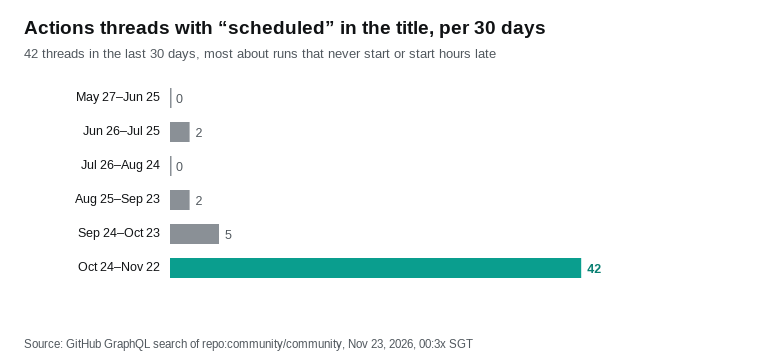
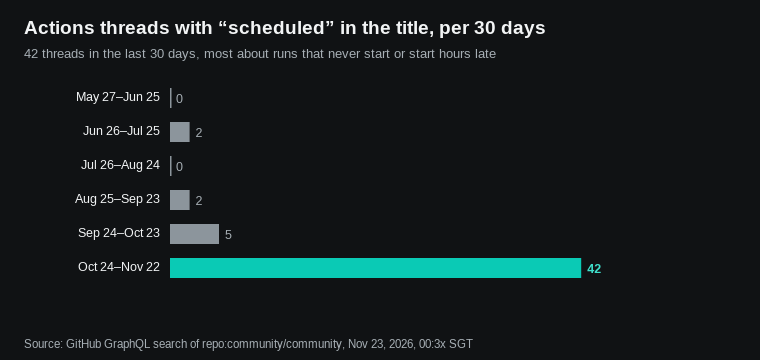
On November 6, 2026, a user wrote that scheduled workflows "never start" in their repository (GitHub Community). On November 12, 2026, another reported that scheduled workflows were "missing ~94% of runs" while manual runs worked (GitHub Community). On November 19, 2026, a third wrote that runs were "delayed by up to 6h (even for self-hosted runners)" (GitHub Community). A title search is a rough count. It misses threads with other words and counts some duplicates. It still shows a clear rise in November, so treat a GitHub schedule as best effort and check the channel after you set it up.
A late run does not lose posts. A run that starts two hours late still sees the 10 newest posts, and for most subreddits that covers the gap (see the coverage chart above). A dropped run is also safe, because the next run catches up. Posts are lost only when more than 10 new posts arrive between two runs that actually start. If your channel must not miss posts, use cron on a host you control.
The bill: one subreddit, seventy subreddits
The prices come from the catalog that we read at 00:13 SGT on November 23, 2026. reddit/subreddit_posts costs $0.000556 per call, about $0.56 per 1,000 calls, and one call returns 10 posts. Failed calls and rate-limited calls are not charged. The 429 in our test and our deliberate 422 both returned "Nothing was charged" in the response. All prices are on the pricing page.
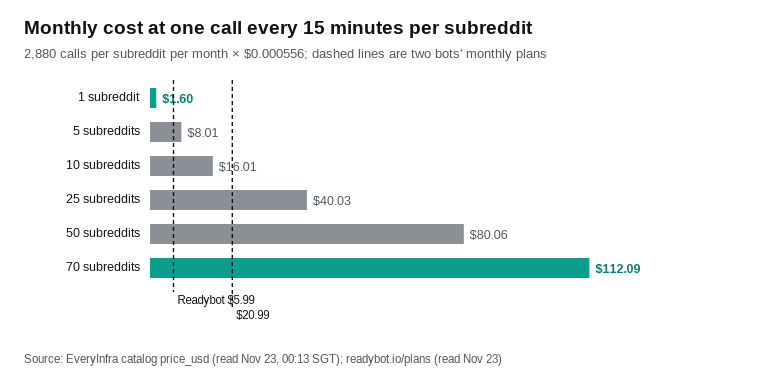
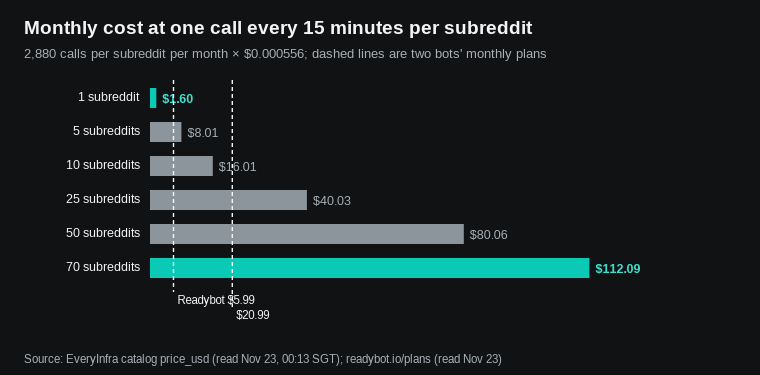
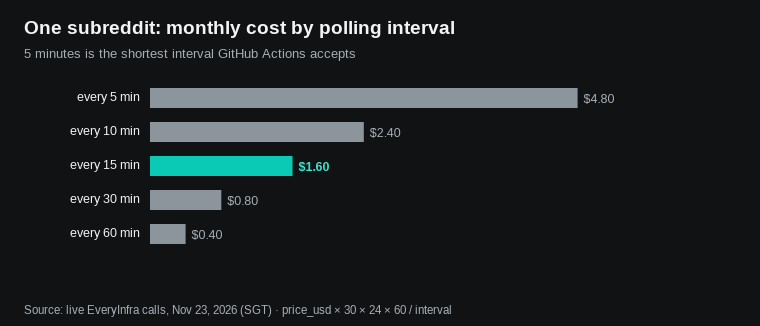
One subreddit every 15 minutes is 96 calls a day. Over 30 days that is 2,880 calls, and 2,880 × $0.000556 = $1.60. Seventy subreddits at the same interval are 201,600 calls and $112.09 a month. The interval changes the bill in a straight line: every 5 minutes (GitHub's minimum) costs $4.80 a month per subreddit, and every hour costs $0.40.
| Setup | Calls a month | API cost a month | Timer cost a month | Read on |
|---|---|---|---|---|
| 1 subreddit, every 15 min, cron on your host | 2,880 | $1.60 | your host | Nov 23, 2026 |
1 subreddit, every 15 min, Actions ubuntu-slim, private repo | 2,880 | $1.60 | $5.76 of the $12 included | Nov 23, 2026 |
| 5 subreddits, every 15 min | 14,400 | $8.01 | same as above | Nov 23, 2026 |
| 70 subreddits, every 15 min | 201,600 | $112.09 | same as above | Nov 23, 2026 |
| Feed bot plan (Readybot Membership / Premium) | n/a | $5.99 / $20.99 | n/a | plans, Nov 23, 2026 |
A concrete example: two subreddits, r/selfhosted and r/webdev, every 15 minutes, are 5,760 calls a month, about $3.20. On GitHub Actions in a public repository, standard runners are free, so $3.20 is the whole bill. In a private repository, add $5.76 for ubuntu-slim, which is still inside the $12 that GitHub Free includes each month.
On the chart, at about four subreddits, the API cost passes a $5.99 feed bot plan, and at about thirteen it passes $20.99. Those plans depend on a feed source that we could not confirm after November 13, so the comparison holds only if the bot still delivers. At one run every 15 minutes, 70 subreddits make this script the expensive choice. A feed reader, a feed bot, or a longer interval for quiet subreddits is the better plan at that size.
Set the interval from the posting rate
The 15-minute interval is there for speed, not for completeness. The 10 newest posts of each subreddit in run 7 (01:01 SGT) give a rough posting rate. Ten posts have nine gaps, so the rate is 9 divided by the hours between the newest and the oldest post. This is one sample from the early morning of November 23. The rate changes in the day and at weekends.
| Subreddit | Hours covered by 10 posts | New posts per hour, about | New posts between two hourly runs | Monthly cost, one run per hour |
|---|---|---|---|---|
| r/technology | 2.7 | 3.3 | 3.3, fewer than 10 | $0.40 |
| r/selfhosted | 4.8 | 1.9 | 1.9 | $0.40 |
| r/discordapp | 13.1 | 0.7 | 0.7 | $0.40 |
| r/webdev | 15.6 | 0.6 | 0.6 | $0.40 |
| r/rss | 66.9 | 0.13 | 0.13 | $0.40 |
At these rates, even r/technology gets only about 3 new posts in an hour, far below the 10-post limit. One run per hour loses no posts there. A new post only waits up to one hour before it reaches the channel.
r/rss gets 10 posts in about three days, so most calls every 15 minutes return posts that the script already sent. For 70 subreddits, one run per hour costs $28.02 a month instead of $112.09, and one run every 30 minutes costs $56.04. The script does not change. Split the busy and the quiet subreddits into two SUBREDDITS lists, with one cron line and one SEEN_FILE each.
The same math works on GitHub Actions in a private repository. One run per hour is 720 minutes a month, or $1.44 on ubuntu-slim at $0.002 a minute. That is a quarter of the runner cost of a 15-minute workflow. Give the two workflows different concurrency groups and different cache key prefixes. Otherwise they wait for each other, or one reads the seen.json of the other.
Errors you will see, and what they cost
The script handles only one error on purpose, HTTP 429. Everything else stops the run and writes a stack trace to the log, and the next run starts clean. Our tests on November 23, 2026 showed four errors. Two came from the EveryInfra API and two from the Reddit feed URLs. We saw Discord's 404 only in the docs.
| Error | When we saw it (SGT) | What the response said | Charged |
|---|---|---|---|
EveryInfra HTTP 429 rate_limited | In our tests; the quoted body is from the call at 00:21:59 | "rate limit exceeded", retry_after 1, "Nothing was charged"; the retry after the wait succeeded | No |
EveryInfra HTTP 422 invalid_value | 00:16:51 (sort=newestt on purpose) | Allowed values, did_you_mean newest, "Nothing was charged" | No |
| Reddit RSS HTTP 404 | 00:22:58 | Atom feed titled "Not Found", 0 entries | n/a |
| Reddit RSS HTTP 429 | 00:22:59 | Empty body | n/a |
| Discord HTTP 404 on a webhook | not seen | Discord: do not use the webhook again | n/a |
The 422 response is useful when you edit the script. We sent sort=newestt with a typo. The API answered in 0.38 seconds with the list of allowed values (newest, popular, relevance, rising, top) and a did_you_mean of newest. A typo in a cron job fails on the first run with a clear message, and it costs nothing. The quickstart shows the full error format.
Both error bodies have a retryable field. The 429 had true and max_retries 3. The 422 had false and param sort, which names the wrong parameter. The 37-line script checks only for status 429. For a more general retry, read retryable. It separates "wait and try again" from "fix the parameter first", and you do not need your own list of status codes.
Four changes you can add
We thought of these four changes after our 7 test runs. We tested only limit: 25. Each one is a few lines, and each one uses only fields that the API already returns.
| Change | Lines to change | Did we test it? |
|---|---|---|
More posts per call ("limit": 25) | 1 | Yes: 25 posts at 00:52 for $0.000556 |
| Send an embed | About 5 | Not in the real channel; check one message in a private channel |
| One channel per subreddit | About 2 | No; the logic is the same as one channel |
Reset seen.json by hand | No code | Not needed in our runs |
More posts per call for busy subreddits
The catalog lists max_limit 100 for reddit/subreddit_posts. At 00:52 SGT on November 23, 2026, we called it for r/technology with "limit": 25. The call returned 25 posts in 9.25 seconds and charged $0.000556, the same price as a 10-post call.
From the newest to the oldest post, the 25 posts covered about 13.4 hours. With the same method, 10 posts at 01:01 covered 2.7 hours. For a large subreddit, add "limit": 25 to params in the script. The monthly bill does not change, and a gap between two runs must then be more than 25 posts to lose one.
A richer message with an embed
A plain content message shows the title and lets Discord build a link preview. An embed gives you a fixed layout with a title link, a time and a footer. Replace the post_json call for Discord with the lines below. The values come from the response fields in the table above, and the limits come from Discord's Message Resource page.
embed = {"title": p["title"][:256], "url": p["url"], "timestamp": p["posted_at"],
         "footer": {"text": f"r/{sub}"}}
if p.get("image_urls"):
    embed["image"] = {"url": p["image_urls"][0]}
post_json(os.environ["DISCORD_WEBHOOK_URL"], {"embeds": [embed], "allowed_mentions": {"parse": []}})
The title is cut at 256 characters, which is Discord's limit for an embed title. The image line runs only when the post has images, because the catalog says that image_urls is sometimes missing. We tested the plain content version against the real channel, not this embed version, so check one message in a private channel first.
One channel per subreddit
A webhook belongs to one channel. For one channel per subreddit, create one webhook per channel. Then pass a map instead of one URL. For example, set WEBHOOKS='{"selfhosted": "<webhook URL 1>", "webdev": "<webhook URL 2>"}' and read it with json.loads(os.environ["WEBHOOKS"])[sub]. The state file stays the same, because it is already keyed by subreddit name. Each webhook has its own rate limit bucket, so two channels do not slow each other down.
What `seen.json` holds, and how to reset it
After our runs, seen.json was a 630-byte file. It maps each subreddit name to a list of post IDs, newest first, for example {"technology": ["1y2tl28", "1y2t7fd", …]}. To post the latest post again for a test, remove its ID from the list and run the script once. To make a subreddit start fresh, delete its key, and the next run records it without posting. Do not delete the whole file in a busy channel unless you want one quiet run for every subreddit.
If the webhook URL leaks
Anyone who has the webhook URL can post into your channel. Discord's Webhook Resource page lists endpoints that work "with token", without a bot or a login. Treat the URL as a password. Keep it in a secret store, and do not paste it into an issue, a log line or a screenshot. Our test wrapper replaced it with <id>/<token> before it wrote anything to disk.
If the URL leaks, delete the webhook in Server Settings, then Integrations, and create a new one. The old URL then returns 404, and the script stops at the next run with an error in the log. Update the secret, and the run after that posts as before. Because of the first-run rule, nothing old floods the channel when you swap the URL.
Troubleshooting checklist
| What you see | Likely cause | What to do |
|---|---|---|
| Nothing posts for hours | No new posts, or a run did not start | Run once by hand; check the timer log |
| First run posted nothing | Working as designed | Wait one interval, then check again |
| Messages arrive in a burst after a pause | A GitHub schedule started late | Expected; the script catches up in order |
| HTTP 401 from the API | Wrong or missing EVERYINFRA_API_KEY | Check the secret name and value |
| HTTP 422 from the API | A typo in sort or another parameter | Read did_you_mean in the response |
| HTTP 429 three times in a row | Other programs make many calls with the same key | Create a separate key for this script, or run less often |
| HTTP 400 from Discord in a forum channel | Forum and media channels need thread_name or thread_id | Add one, as in "Three more parameters" |
| Discord seems to accept a post that never appears | Without wait, an unsaved message returns no error | Add ?wait=true to the URL |
| HTTP 404 from Discord | The webhook was deleted | Create a new webhook and update the secret |
| HTTP 400 from Discord | A message or embed over Discord's limits | Check the 2,000 and 6,000 character limits |
| Duplicate messages | Two runs at once, or a lost seen.json | Add flock or concurrency; keep the cache |
| No link preview on one message | Discord builds previews after delivery | Usually fixes itself; not a script error |
What the top videos show that the top pages leave out
We searched YouTube with the youtube/search capability of our YouTube API for "reddit to discord" (00:14 SGT) and "discord webhook reddit posts" (00:22 SGT). We took the first three relevant results and fetched their transcripts with youtube/transcript. The first video is a demo from an RSS feed generator tool, October 23, 2025 (YouTube). The second is a demo from a Reddit data tool, August 4, 2022 (YouTube). The third is a Zapier tutorial by a YouTube creator from March 25, 2021, with about 20,000 views (YouTube). The 2022 video has music and no speech, so its transcript gives no steps.
The feed generator video says that the tool "will automatically forward the latest three posts to test the connection". That is the opposite of the first-run rule in the 37-line script. Three old posts are fine in a test channel, but in a busy channel they look like a repost. Our script sends nothing on the first run. If you want a test message, run once with DRY_RUN=1, or post one message by hand with curl.
The Zapier video shows two details.
First, the presenter puts a space between the title and the link, because without it "Discord is not going to be able to read the link properly". Our script puts the URL on its own line for the same reason. Second, the first test message showed no image preview, and a retest did. Discord builds link previews after the message arrives, so a missing preview on one message is not a script error. The video also shows the Zapier Discord step asking for the "administrator" permission. A webhook needs no bot in the server at all.
The Zapier tutorial starts with a Reddit sign-in and picks a "new hot post" trigger. That has two effects. First, it reads hot posts, not new ones. That is the same problem as the default sort in our test: a new post with no votes may never reach the channel. Second, it depends on Zapier's own Reddit API access, and we did not check whether that access changed after October 31. If you follow this tutorial from 2021 today, watch a private channel for a few days first.
Both tool videos also change the sender name and avatar. A webhook can do that per message with the username and avatar_url fields (Webhook Resource). Add "username": "r/" + sub to the JSON body if you want each subreddit to look like a different sender.
If you moderate the subreddit: what Discord Relay does
Reddit's replacement for moderators is the Discord Relay app on the Developer Platform (Discord Relay). Its readme says that it runs when subreddit events happen. It supports up to six Discord or Slack webhook destinations.
Each destination picks its own event types: posts, comments, mod log, modmail, mod queue and reported items. It has two relay modes. "Immediately" relays content when it is created. "Front Page" scans up to 100 top posts once per minute and does not relay comments. Delays are optional, but a delay that is not zero must be at least three minutes.
Compared with the 37-line script, Discord Relay is free and runs on Reddit's own events instead of polling. It can also forward moderation items that an outside script never sees. Its limit: you must moderate the subreddit. The Reddit Help setup guide asks for "A moderator account with full permissions in the community". It also asks for the Manage Webhooks permission in Discord, and it says the setup takes about 15 to 20 minutes (Reddit Help). Use Discord Relay for subreddits you moderate, and use the script for subreddits you only read.
Moving from an old RSS bot
If your channel used an RSS bot for Reddit posts, it has probably been quiet for ten days. To move to the 37-line script without duplicates and without a flood of old posts, follow this order.
First, copy the feed list from the old bot's dashboard. The part after /r/ in each RSS URL is the subreddit name. For example, reddit.com/r/selfhosted/.rss gives selfhosted, and URLs with /new/ or /top/ give the name in the same way. Join the names with commas, and that is the value of SUBREDDITS.
| Feed URL in the old bot | Value in `SUBREDDITS` |
|---|---|
reddit.com/r/selfhosted/.rss | selfhosted |
reddit.com/r/webdev/new/.rss | webdev |
reddit.com/r/technology/top/.rss?t=day | technology (for daily top posts, use sort=top with date_range=past_day) |
Second, create a new webhook in the same channel, and keep the old bot for now. Run the script once with this webhook. This is the first run, so it only writes seen.json, and nothing appears in the channel. Third, run it again after one interval, and check that new posts arrive in time order and only once. Fourth, delete the dead Reddit feeds in the old bot. In another order, the channel stays empty for a while. Readers may then think that the subreddit went quiet.
After the move, the messages look different. RSS bots often include a summary, and this script sends only the title and the link. For a summary, add the first 200 or 300 characters of the text field. Keep the whole message under 2,000 characters.
When this script is the wrong tool
Use something else in these cases. If you moderate the subreddit, use Reddit's Discord Relay. It is free and runs on Reddit events, and it can also forward the mod queue, reports and modmail. It supports up to six webhook destinations and can wait a set number of minutes before it sends a post. At one run every 15 minutes, above about 13 subreddits, the monthly cost passes the $20.99 feed bot plan. A feed reader that you already pay for is then cheaper. If you need comments, user pages or keyword search across Reddit, a subreddit poller is the wrong shape. Look at reddit/search and our Reddit comment completeness test instead.
The script also has limits that we chose. It does not edit or delete a Discord message when the Reddit post is removed. It does not filter by flair, score or keyword. It does not handle private or quarantined subreddits. Each of these is a few more lines, and the response fields above are enough for a flair or score filter. Do you want a daily digest instead of one message per post? Our article on a Reddit pain point report with Claude Code scheduled tasks shows a nightly job.
Two more changes in the last 60 days
- Nov 16, 2026: Discord server pages show channel summaries. Summaries of public channels on Discoverable Servers "may appear on it from November 16, 2026". Messages follow from mid-December (Discord Support). On a public server, a feed channel can become searchable on the web. Check the Web Presence settings.
- Nov 30, 2026: Reddit's migration bounty registration closes. Do you have a Reddit bot already? The funded path to the Developer Platform ends this month (r/redditdev).
FAQ
How do I get a discord webhook url?
Open Server Settings, then Integrations, then Webhooks, and create a webhook for the channel. Copy the URL and store it as a secret. You need the Manage Webhooks permission (Discord Support). To see a failed post as an error in the log, add ?wait=true to the end of the URL.
Can a Reddit to Discord embed show the image?
Yes. Discord builds a link preview from the post URL. For more control, send an embeds object with title, url and image from image_urls. Stay under the embed limits. The catalog says that image_urls is sometimes missing, so a post without an image gets only the title and the link.
Can I post Reddit videos or GIFs to Discord?
The script sends the post URL, and Discord builds the preview from it. For a richer layout, use the embed version above with the first entry of image_urls. We did not test video posts on November 23, 2026, so check one in a private channel.
Do I need a discord webhook bot for this?
No. A webhook posts without a bot user and without a login, as Discord's Webhook Resource page says. You need a bot only to read messages, answer commands or join voice.
Is "link reddit to discord" the same thing as the 37-line script?
No. "Link" or "connect" usually means adding your Reddit account to your Discord profile, so other people can see it. The script sends new subreddit posts into a channel.
Getting started
- Create an API key in the EveryInfra quickstart. Store it in
EVERYINFRA_API_KEY. - In Discord, open Server Settings, then Integrations, and create a webhook for one channel. Store the URL in
DISCORD_WEBHOOK_URL. - Save the 37-line script as
reddit_to_discord.py. SetSUBREDDITS, for exampleselfhosted,webdev. - Run it once with
DRY_RUN=1. It prints nothing on the first run and writesseen.json. - Run it again after 15 minutes without
DRY_RUN. New posts appear in the channel. - Add the cron line or the GitHub Actions file. Check the
reddit/subreddit_postspage for parameters and the pricing page for the current price.
References
- Continuing our infrastructure updates: What's changing in the coming months. Reddit r/modnews, September 30, 2026. Read November 23, 2026.
- Moving Data API Apps to the Developer Platform: migration dates and next steps. Reddit r/redditdev, September 30, 2026. Read November 23, 2026.
- Reddit is killing RSS feeds and ending public API access because of AI bots. TechCrunch, September 30, 2026. Read November 23, 2026.
- Reddit RSS and Public API Shutdown: Key Deadlines. TechRepublic, October 2, 2026. Read November 23, 2026.
- Setting up mod alerts in Discord or Slack. Reddit Help. Read November 23, 2026.
- Discord Relay. Reddit Developer Platform. Read November 23, 2026.
- Feed Relay. Reddit Developer Platform. Read November 23, 2026.
- Data API/PRAW to Devvit migration guide. Reddit Developer Platform. Read November 23, 2026.
- App registration. Reddit Developer Platform. Read November 23, 2026.
- Data API Terms. Reddit, Inc.. Read November 23, 2026.
- Another Update on Reddit Shutting Down Their RSS Feeds. Golden Hill Software, October 31, 2026. Read November 23, 2026.
- It's been a week since Reddit killed RSS — what did you actually end up doing?. Reddit r/rss, November 22, 2026. Read November 23, 2026.
- RedditRSS. Reddit r/rss, November 20, 2026. Read November 23, 2026.
- Service that turns Reddit discussion into RSS feed. Reddit r/rss, November 20, 2026. Read November 23, 2026.
- Are there any bot that still has Reddit Feed to Discord Channel notification?. Reddit r/discordbots. Read November 23, 2026.
- Webhook Resource. Discord Developer Docs. Read November 23, 2026.
- Message Resource (Allowed Mentions, Embed Limits). Discord Developer Docs. Read November 23, 2026.
- Rate Limits. Discord Developer Docs. Read November 23, 2026.
- Channel Resource. Discord Developer Docs. Read November 23, 2026.
- Discord Developer Policy. Discord. Read November 23, 2026.
- discord-api-docs. Discord, GitHub. Read November 23, 2026.
- Intro to Webhooks. Discord Support. Read November 23, 2026.
- Enabling Server Discovery. Discord Support. Read November 23, 2026.
- Events that trigger workflows (schedule). GitHub Docs. Read November 23, 2026.
- Workflow syntax for GitHub Actions. GitHub Docs. Read November 23, 2026.
- Dependency caching reference. GitHub Docs. Read November 23, 2026.
- Using secrets in GitHub Actions. GitHub Docs. Read November 23, 2026.
- Control the concurrency of workflows and jobs. GitHub Docs. Read November 23, 2026.
- Disabling and enabling a workflow. GitHub Docs. Read November 23, 2026.
- Manually running a workflow. GitHub Docs. Read November 23, 2026.
- GitHub-hosted runners reference. GitHub Docs. Read November 23, 2026.
- GitHub Actions billing. GitHub Docs. Read November 23, 2026.
- Actions runner pricing. GitHub Docs. Read November 23, 2026.
- actions/cache. GitHub. Read November 23, 2026.
- actions/checkout. GitHub. Read November 23, 2026.
- actions/setup-python. GitHub. Read November 23, 2026.
- Scheduled Workflows delayed by up to 6h (even for self-hosted runners). GitHub Community, November 19, 2026. Read November 23, 2026.
- GitHub Actions scheduled workflows missing ~94% of runs despite successful manual execution. GitHub Community, November 12, 2026. Read November 23, 2026.
- Scheduled workflows never start in my repository. GitHub Community, November 6, 2026. Read November 23, 2026.
- crontab(5). Linux man-pages. Read November 23, 2026.
- flock(1). Linux man-pages. Read November 23, 2026.
- urllib.request. Python docs. Read November 23, 2026.
- Reddit to Discord: Send Subreddit Posts to Discord. Readybot. Read November 23, 2026.
- Pricing: Free, Membership and Premium. Readybot. Read November 23, 2026.
- MonitoRSS. MonitoRSS. Read November 23, 2026.
- synzen/MonitoRSS. GitHub. Read November 23, 2026.
- Pingcord. Pingcord. Read November 23, 2026.
- Connect Discord to Reddit. IFTTT. Read November 23, 2026.
- Automatically Post Latest Reddit Content to Discord with Image Extraction. n8n. Read November 23, 2026.
- Add a Reddit Bot to Your Discord Server. YouTube, October 23, 2025. Read November 23, 2026.
- How to Send Reddit Posts to Discord Automatically. YouTube, March 25, 2021. Read November 23, 2026.
- Setting up Discord Alerts for new Reddit posts. YouTube, August 4, 2022. Read November 23, 2026.
- Data API catalog (reddit/subreddit_posts price_usd). EveryInfra. Read November 23, 2026.
Reference BL-213