GitHub Copilot MCP: Config Example and 26 Real API Calls for a Weekly Competitor Social Report
A GitHub Copilot MCP config example plus 26 real API calls: the coding agent writes a competitor report script that Actions runs weekly for $0.011961.

A product marketer at a B2B SaaS company often gets the same request every Monday. The request is simple: what did our three main competitors post last week? We built the data side of that report on November 6, 2026, between 00:17 and 00:38 SGT. We made 26 real calls to the EveryInfra API for Notion, ClickUp, and Asana.
One limit comes first: we do not have a Copilot subscription on our test machine. The Copilot setup, the issue, and the workflow here are configuration examples from the GitHub docs. We did not run them in Copilot. Every measured number comes from a real EveryInfra API response.
For the week from October 30 to November 5, ClickUp posted 14 items on YouTube, TikTok, and Instagram. Asana posted 3. Notion posted 2.
The plan in this article uses the GitHub Copilot coding agent once. The agent reads a few real responses through MCP, and then it writes a plain Python script and a scheduled workflow. After you merge the pull request, GitHub Actions runs the script each week, and no model runs again. At catalog prices, four platforms for three brands cost $0.011961 per week, which is about $0.0518 per month.
The question in this article is narrow. You want a Markdown report in a repository every Monday morning. The report lists what each competitor posted on four platforms, which post did best, and how the posting rate changed. You want GitHub Copilot to write the code for this report. You do not want an AI model to search for the data again each week.
Every GitHub fact in this article comes from the GitHub Changelog or from docs.github.com, read on November 6, 2026. Every EveryInfra number comes from a real API response that we saved.
The short answer: split the github copilot mcp job in two
The most common mistake with this report is to mix two jobs. One job is to write the code. The other job is to collect the data each week. On October 28, 2026, GitHub shipped two features that match these two jobs.
The first feature is connectors plus the repository MCP configuration, which let Copilot call outside tools while it works. The second feature adds new tools, triggers, and cost controls to Copilot Automations (changelog for automation tools, triggers, and cost controls). Automations let Copilot run on a schedule.
If Copilot collects the data and writes the report each week, each run starts a cloud agent session. The automations docs say that each run uses AI credits and Actions minutes (Copilot automations docs, billing section). A fixed weekly report does not need a model to make decisions. So we suggest that the model works only once, when it writes the code.
The workflow is simple. You open an issue that states the rules, the handles, and a test example. You assign the issue to Copilot. Before the agent writes code, it uses the EveryInfra MCP tools to read the catalog and to make three or four test calls.
It sees the real field names and the real date formats. Then it writes weekly_report.py and .github/workflows/weekly-report.yml and opens a pull request for your review. After the merge, a scheduled Actions job sends POST /api/v1/social, builds the Markdown file, and commits it.


The table below compares the two ways to run the report. The facts come from GitHub docs. The left column is our suggestion.
| Item | Scheduled Actions script (our suggestion) | Copilot Automations each week |
|---|---|---|
| Who collects the data each week | A script calls the REST API | A cloud agent session calls MCP tools |
| AI credits each week | 0 | Each run uses credits; the lowest per-run cap is 30 credits |
| Repository type | Public or private | Private or internal only |
| Plan | A plan that can use the cloud agent, for the one-time build | Pro, Pro+, Max, Business, or Enterprise |
| Output format | Same code, same format each week | The model writes a new report each run |
| Best for | A fixed report that you compare week to week | Work that needs judgment each week |
The 30-credit value is the minimum per-run limit that you can set when you create an automation (create automations docs). One AI credit equals $0.01 (usage-based billing for individuals). The docs do not say how many credits a typical run uses, so we do not guess. The one fact that we can state is simple: the Actions script path uses zero AI credits per week. You can also mix the two paths. The script produces the numbers each week, and sometimes you ask Copilot to read four weeks of reports and write a short analysis.
If you still want Copilot to run each week, use an automation. It can use the tools from the repository MCP settings, so the JSON in this article works there too. The trigger and billing rules are in the Copilot automations docs. Set an AI credit limit per run and per week before you turn one on.
What the October 28 changelog changed
Many people search for "github copilot mcp" after they read a changelog post from October 28, 2026. Its title is "Connect your tools to Copilot without all the setup". The post announces GitHub-verified MCP servers, also called connectors, in public preview. You pick a service, sign in, and approve access. Then the connector works in the Copilot app, Copilot CLI, VS Code, Copilot in the cloud, and GitHub Mobile (changelog post). At launch there are 26 services, which include Slack, Figma, Notion, Sentry, Linear, Atlassian Rovo, Cloudflare, Vercel, and Work IQ.
The post also covers plans. The rollout goes to all Copilot plans. For Copilot Business and Enterprise, an admin must turn on the "Editor preview features" policy. If an enterprise uses an MCP allowlist, the admin must also add these services to it. A community thread for the launch collects user questions (GitHub Community discussion 211002).
This launch matters for our report in three ways. First, EveryInfra is not one of the 26 connectors, and GitHub has not verified our server. To use our data, you add it in the repository MCP configuration or in your personal MCP configuration. Both paths use a short JSON block that you write.
Second, the connectors docs say that connectors work in local sessions and cloud sandbox sessions. They do not work yet in sessions that run on GitHub Actions (Copilot connectors docs). One example is the session that starts when you assign an issue to Copilot. The repository MCP page repeats this note at the top (repository MCP configuration docs).
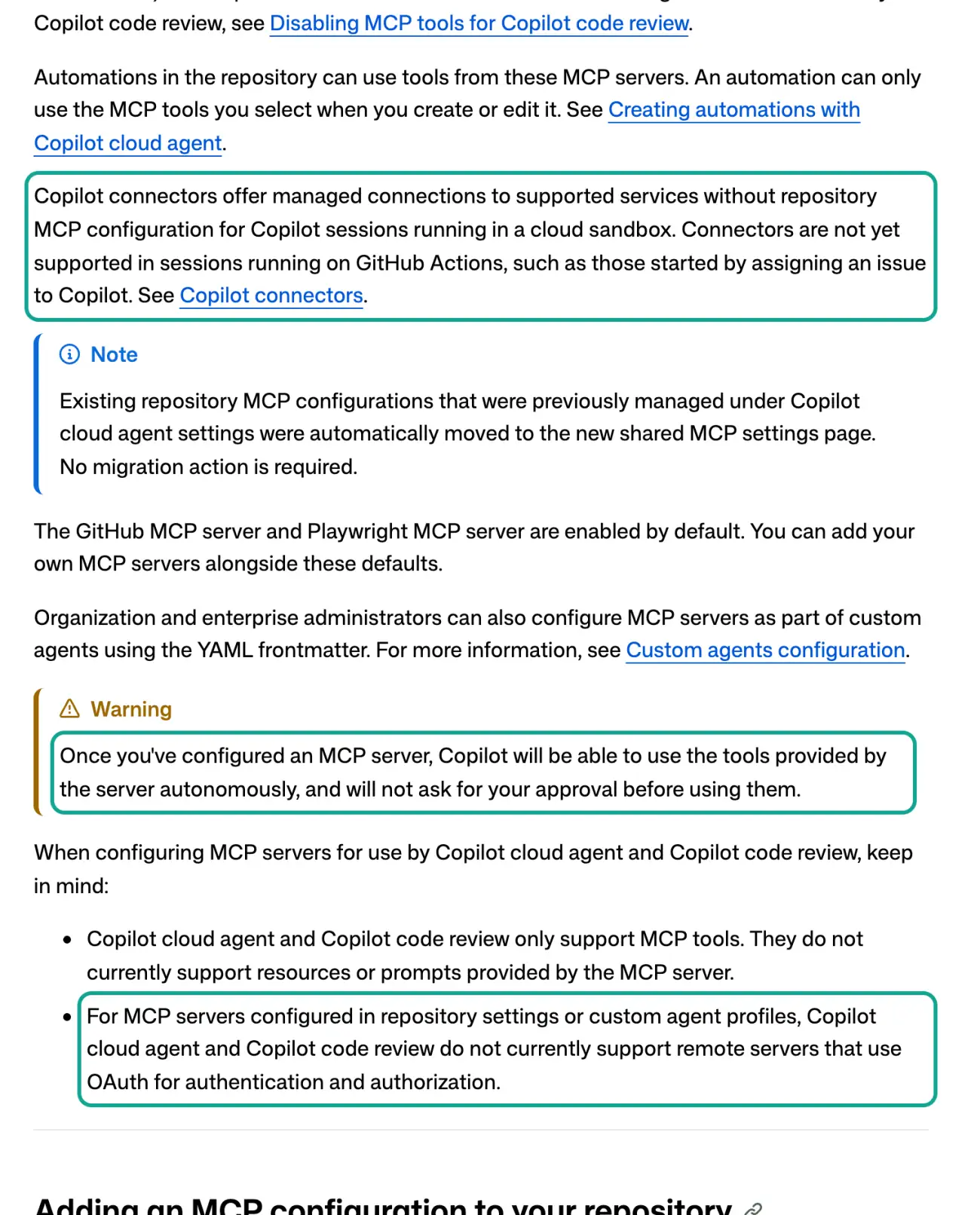
The third point is the product name. Many people still say "Copilot coding agent". On docs.github.com, the same feature now has the name "Copilot cloud agent" (about the cloud agent). The old coding agent MCP link goes to the new page. In this article, the two names mean the same feature.
| Way to connect | Who sets it up | Works with EveryInfra | Session types | Note from the docs |
|---|---|---|---|---|
| GitHub-verified connector | A user signs in | No, not one of the 26 | Local and cloud sandbox; not Actions yet | Public preview, all plans |
| Repository MCP configuration | A repository admin pastes JSON | Yes, type: http plus a header | Cloud agent (with automations) and code review | Tools only; no OAuth remote servers |
| Personal MCP configuration | Each user | Yes | Cloud sandbox sessions | Not for Actions sessions |
| Copilot CLI or VS Code on your machine | Each developer | Yes | Local sessions | Separate from the repository setup |
copilot coding agent mcp setup: the JSON in repository settings
You add the repository MCP configuration on the repository page under Settings, then Copilot, then MCP servers. The format is one mcpServers object. Each key is a server name. Each server must have a type key and a tools key. A remote server also needs a url, and a server that needs authentication uses headers. A header value can refer to a secret whose name starts with COPILOT_MCP_, as $COPILOT_MCP_API_KEY or ${COPILOT_MCP_API_KEY} (repository MCP configuration docs).
The docs strongly suggest that you list only specific read-only tools in tools. The reason is clear: the agent calls the tools on its own and does not ask you first. The EveryInfra remote MCP endpoint is https://api.everyinfra.com/mcp. It uses a Bearer key, not OAuth, so it fits what the docs support. Here is our configuration example:
{
  "mcpServers": {
    "everyinfra": {
      "type": "http",
      "url": "https://api.everyinfra.com/mcp",
      "headers": {
        "Authorization": "Bearer ${COPILOT_MCP_EVERYINFRA_API_KEY}"
      },
      "tools": [
        "everyinfra_list_capabilities",
        "everyinfra_call_api",
        "everyinfra_get_job"
      ]
    }
  }
}
Why only three tools? At 00:16 SGT we sent tools/list without a key. At 00:26 SGT we sent it again with a key. Both responses listed 12 tools in 16,247 bytes.
The report needs three of them: one to read the catalog, one to make a call, and one to read an async job. The other nine tools read the balance, make a top-up link, open a support ticket, or solve a captcha. Those tools do not help the report. On the allowlist, they only give the agent more ways to go wrong.
Each of the 12 tools has MCP annotations. A real response shows one detail that you do not see in the docs. everyinfra_call_api has readOnlyHint: false and destructiveHint: true, because it can charge money. The GitHub docs say that Copilot code review uses only tools with annotations.readOnlyHint set to true in tools/list. Code review skips tools without this annotation and tools with false. So with one repository configuration, the cloud agent can call our data tool, but Copilot code review cannot.
That result is good for this report, because a code review should not spend money on data. If you want code review to skip all MCP tools, the docs also give a setting for that. The MCP specification explains the annotation fields in its tools section (MCP specification, tools).
| Tool | readOnlyHint | Charges money | Put on the report allowlist |
|---|---|---|---|
everyinfra_list_capabilities | true | No | Yes: read capabilities, parameters, and prices |
everyinfra_call_api | false | Catalog price; failures and empty results are refunded | Yes: make test calls |
everyinfra_get_job | true | No | Yes: read async job results |
everyinfra_list_requests | true | No | Optional: check each charge |
everyinfra_get_account | true | No | No |
everyinfra_search | false | Yes | No, the report does not search the web |
| Six other tools (chat, captcha, top-up link, tickets) | Mixed | Mixed | No |
Two more limits affect the setup. The cloud agent and code review support MCP tools only. They do not support resources or prompts from a server. Our report uses tools only, so this limit does not matter here.
The second limit is about how you check the setup. Assign an issue to Copilot, open the session log, and find the "Start MCP Servers" step. The end of that step lists the tools that started.
A Reddit user set up an Atlassian MCP server for the coding agent and saw a successful connection with "retrieved 0 tools" (r/GithubCopilot thread). If you see this, first compare each name in tools with the names from tools/list. The names must match exactly.
Where secrets go: two keys, two drawers
This step is where most setups go wrong. GitHub now has a separate secret type for the cloud agent, called Agents secrets. It sits next to Actions, Codespaces, and Dependabot secrets. The docs say that the cloud agent cannot read Actions, Codespaces, or Dependabot secrets and variables. It reads only the Agents type.
An Agents secret whose name starts with COPILOT_MCP_ goes only to MCP servers. It is not an environment variable for the commands that the agent runs (secrets and variables for the cloud agent). Your scheduled workflow uses Actions secrets, and it cannot read Agents secrets. So the report needs two keys.

| Key | Where it goes | Name | Who can read it | What it does |
|---|---|---|---|---|
| Key one | Settings, Secrets and variables, Agents | COPILOT_MCP_EVERYINFRA_API_KEY | Only the MCP server that refers to it | Test calls while the agent writes code |
| Key two | Settings, Secrets and variables, Actions | EVERYINFRA_API_KEY | Steps in the scheduled workflow | Weekly data calls |
| Never | Code, issue text, or automation prompts | None | Everyone who can see the repository | None |
The same docs give three more rules. A secret name cannot start with GITHUB_. The Agents type has secrets and variables, but in a cloud sandbox the agent gets only secrets, not variables. An Agents secret without the COPILOT_MCP_ prefix becomes an environment variable for the commands and tools that the agent runs.
So do not add an EveryInfra key without the prefix unless you want the agent to run the script with network access. An organization-level Agents secret can serve many repositories. That option is good for a team that tracks competitors in several repositories.
Why not use one key with one name for both jobs? There are three reasons. First, GitHub keeps the two drawers apart, so one name does not help. Second, two EveryInfra keys with clear names make the request log easy to read. If one key leaks or spends too much, you see which one.
Third, by default GitHub push protection blocks only the key formats that it knows. An EveryInfra key is not one of them (push protection changelog). If the agent writes the key into a test file, the push may not stop. So write in the issue that the key comes only from an environment variable.
The firewall adds one more trap. By default, a firewall limits the network for the cloud agent. The docs say that the firewall applies to processes that the agent starts with its Bash tool. It does not apply to MCP server processes (firewall docs, limitations).
So MCP calls to EveryInfra work. But the agent may try to run the new weekly_report.py in the session. Then the request to api.everyinfra.com stops at the firewall, and a warning shows in the pull request body.
You have two options. You can add api.everyinfra.com to the custom allowlist under Internet access, and add a third key without the COPILOT_MCP_ prefix for agent commands. Or you can ask the agent to save one real MCP response as a fixture. Then the tests read the fixture and do not use the network.
We suggest the second option. The first option puts a key into the command environment of the agent. The docs say that logs mask secret values, but you do not need to open that door.
How to write the issue for the agent
GitHub's best-practice page says that a task for Copilot should state the problem, the acceptance criteria, and the files to change. Small, clear tasks work best (best practices for Copilot tasks). For this report, the most important parts are the handle list and the test example. Do not let the agent guess handles.
In our test, three guessed handles returned empty lists. There was no error and no charge, and the report quietly lost a row. Here is an issue example:
## Task
Write weekly_report.py and .github/workflows/weekly-report.yml.
Every Monday at 09:00 Asia/Singapore, read config/competitors.yml.
For each brand, collect posts from last Monday 00:00 to Sunday 23:59 UTC.
Write reports/<ISO year>-W<week>.md and commit it to main.

## Data (check parameters with everyinfra_list_capabilities, then make one test call each)
- YouTube: youtube/user_posts, param url (channel link), since=last Monday, mode=async
- TikTok: tiktok/user_videos, param username, limit=30
- Instagram: instagram/user_posts, param username, limit=30, mode=async
- LinkedIn: linkedin/company_posts, param company (the part after /company/), limit=20

## Handles (do not change, do not guess; LinkedIn names are not checked yet)
notion:  youtube https://www.youtube.com/@Notion | tiktok notionhq | instagram notionhq | linkedin notionhq
clickup: youtube https://www.youtube.com/@ClickUpProductivity | tiktok clickup | instagram clickup | linkedin clickup-app
asana:   youtube https://www.youtube.com/channel/UC2BoogM0AqwOJyoSp1S4ClQ | tiktok asana | instagram asana | linkedin asana

## Must handle
1. TikTok: drop is_pinned=true rows, then filter by posted_at. Do not stop at the first old row.
2. YouTube posted_at can be relative text such as "1d ago". Convert it from the fetch time.
3. HTTP 503 or status=failed: wait retry_after, retry once, then write "not collected this week".
4. Zero rows: write "0 this week" and list the handle at the end of the report for a manual check.
5. Read the key only from the EVERYINFRA_API_KEY environment variable. Never write it to a file.
6. Tests read JSON fixtures in tests/fixtures/ (real MCP responses). Tests use no network.

## Test example
With the fixtures, ClickUp TikTok this week = 4 posts (not 0, not 7), total views = 60463.
The last line is the most important line in the issue. Its expected values come from the real tiktok/user_videos response for ClickUp at 00:19 SGT. Of the 10 rows, the first 3 were pinned videos from 2024 with 20.1 million, 7.5 million, and 3.2 million views. The list is newest first, but pinned videos always come first.
That order causes three wrong answers. A script that treats the first row as the latest post says that ClickUp last posted on TikTok in 2024. A script that reads newest first and stops at the first row older than the window counts 0 posts. A script that drops pinned rows but does not filter by date counts 7.
The correct answer is 4. When this number is in the issue, one test run shows whether the code is correct. You do not need to read each line of the code.
One real round trip: what Copilot sends and what comes back
We did not run Copilot. But MCP is an open protocol. When the agent calls a tool, it sends one standard JSON-RPC tools/call request over the Streamable HTTP transport. Each message is one HTTP POST.
The client must accept both application/json and text/event-stream (MCP specification, transports). So curl can send the same request that the agent sends, and we can see what our server returns. We sent this request on November 6, 2026, at 00:26:28 SGT:
curl -s https://api.everyinfra.com/mcp \
  -H "Authorization: Bearer $EVERYINFRA_API_KEY" \
  -H "Content-Type: application/json" \
  -H "Accept: application/json, text/event-stream" \
  -d '{"jsonrpc":"2.0","id":2,"method":"tools/call",
       "params":{"name":"everyinfra_call_api",
                 "arguments":{"platform":"tiktok","action":"user_videos",
                              "params":{"username":"notionhq","limit":5}}}}'
The server returned HTTP 200 after 31.1 seconds. The field result.content[0].text held a JSON string of 13,272 characters. It had 5 Notion TikTok videos, each with posted_at, view_count, like_count, is_pinned, and more. The newest video was from May 26, 2026, with 22,800 views.
At the end, billing showed charged: true and charged_usd: 0.000556. The agent sees the same data before it writes code. It learns the field names and the ISO date format. It also learns that this account has not posted on TikTok for more than five months.
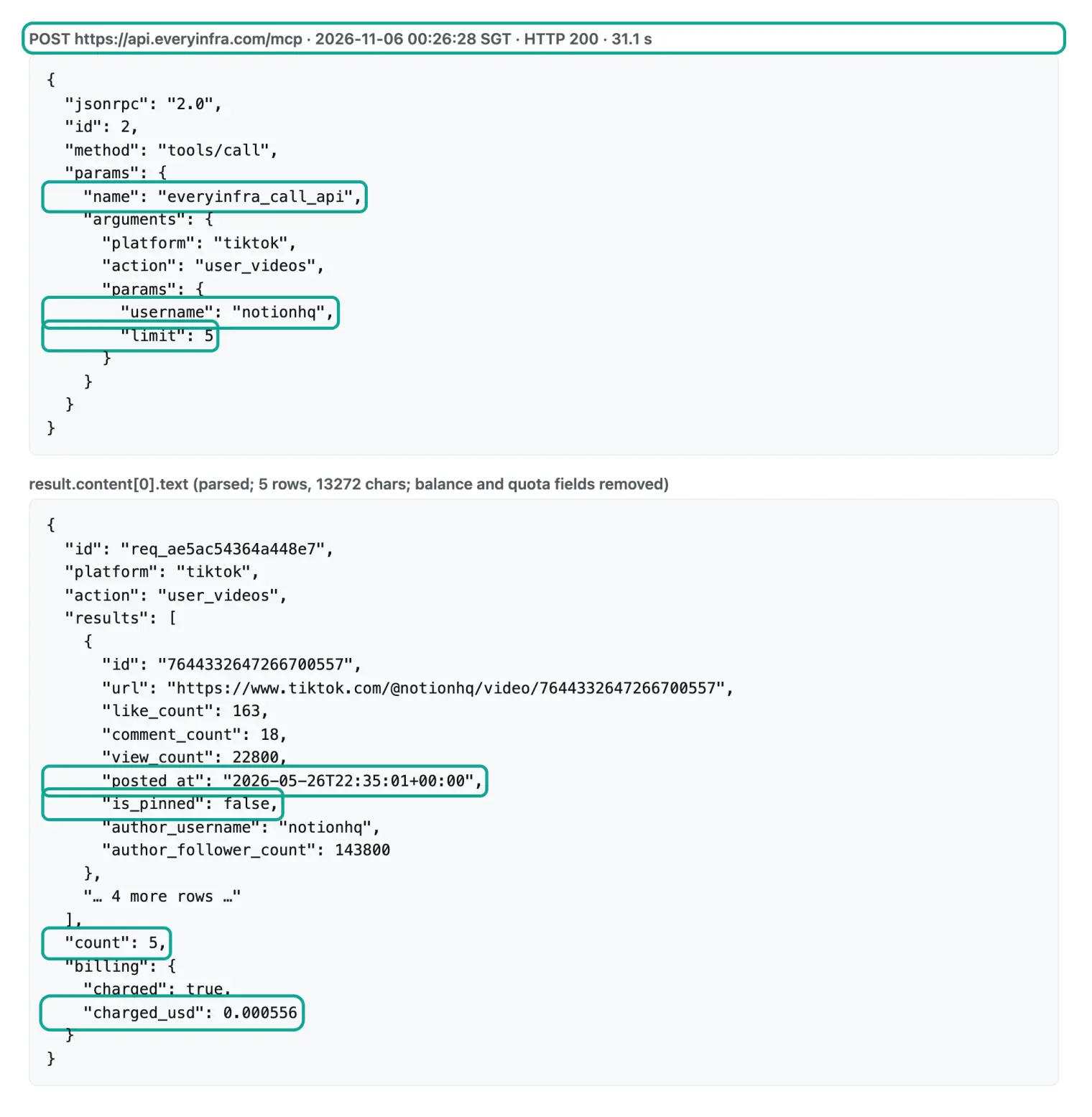
| Field in the response | Value for the newest Notion video | What the script learns |
|---|---|---|
posted_at | 2026-05-26T22:35:01+00:00 | TikTok dates are ISO strings in UTC |
is_pinned | false | Pinned rows exist and need a filter |
view_count | 22800 | Views are plain integers |
billing.charged_usd | 0.000556 | Each call shows its own charge |
We ran the report first with 26 real calls
Before you ask an agent to write the script, you need the correct answer. So we ran the report ourselves first, on November 6, 2026, from 00:17 to 00:38 SGT. The window is seven UTC dates, from October 30 to November 5. Each capability and its parameters come from the free catalog at GET /api/v1/social/catalog. The four capabilities are youtube/user_posts (required url, optional since and sort), tiktok/user_videos (required username), instagram/user_posts (required username, async in the catalog), and linkedin/company_posts (required company). The capability pages are YouTube user posts, TikTok user videos, Instagram user posts, and LinkedIn company posts.
| Brand | YouTube this week | TikTok this week | Instagram this week | Total | Latest TikTok | |
|---|---|---|---|---|---|---|
| Notion | 1 | 0 | 1 | 503, not collected | 2 | 2026-05-26 |
| ClickUp | 3 | 4 | 7 | 503, not collected | 14 | 2026-11-05 |
| Asana | 0 | 0 | 3 | 503, not collected | 3 | 2026-06-04 |
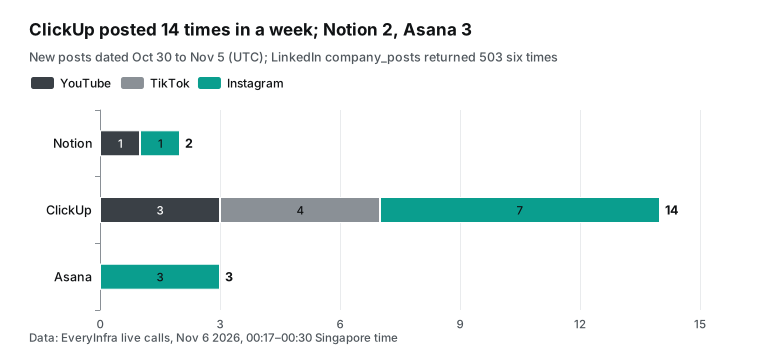
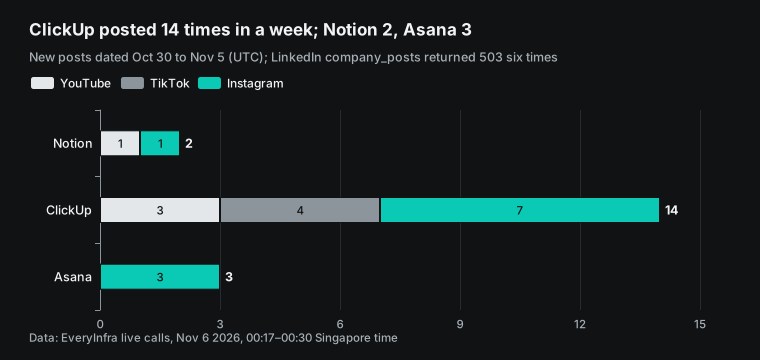
This table is the core of a weekly report, and it shows three things. First, the three brands post at very different rates. ClickUp posted 14 items on three platforms in one week. On Instagram, 7 of its 10 newest posts are from this week. On TikTok it posted 4, and on YouTube it posted 3.
Second, Notion and Asana have almost stopped posting on TikTok. Their newest TikTok videos are from May 26, 2026 and June 4, 2026. For Asana, 7 of the 10 newest videos are from that one day in June, and the other 3 are from 2025 and 2023. A "0 this week" row is a useful signal. But it is useful only if you know that the handle is correct, because a wrong handle also gives 0.
Third, Instagram is the only platform where all three brands posted this week. If you can watch only one platform, this table points to Instagram.
These results have limits. The window is one week, and the sample is three brands. For TikTok and Instagram we asked for 10 rows each. For ClickUp Instagram, 10 rows covered 9 days.
For a SaaS team, that is usually enough. A consumer brand is different. The limit must match how often each account posts, and a higher limit costs nothing extra, because these capabilities charge per call, not per row.
A sample report from this week's data
Counts alone are not enough. A marketing team also wants to know which post did best and what it was about. The table below is a sample report that we built by hand from the real responses. You can paste it into the issue as the format that the agent must produce.
It shows the top post per brand and platform. TikTok rows exclude pinned videos. Instagram rows sort by likes, and YouTube rows sort by views. We converted the YouTube dates from "1d ago" and "5d ago" at fetch time, so they are correct only to the day.
| Brand | Platform | Top post this week | Date (UTC) | Views | Likes |
|---|---|---|---|---|---|
| ClickUp | TikTok | Office humor skit about a word lost in translation | 2026-11-04 | 27,400 | 1,175 |
| ClickUp | New merch for a product team, asks for feedback | 2026-10-30 | n/a | 73 | |
| ClickUp | YouTube | Update 50 tasks at once with ClickUp Brain | about 2026-11-04 | 388 | n/a |
| Notion | YouTube | Connect ChatGPT or Claude to Notion | about 2026-11-04 | 3,400 | n/a |
| Notion | A campus leader profile | 2026-11-04 | n/a | 143 | |
| Asana | Who follows up after a client call | 2026-10-30 | n/a | 43 |
This sample shows two things that counts do not show. First, ClickUp uses office humor on TikTok. Its 4 posts this week, on 2026-11-05, 2026-11-04, 2026-11-02, and 2026-10-30, had 60,463 views and 3,392 likes in total. The top post had 27,400 views.
One day before the window, on October 29, a post had 145,200 views. So this account seems to have one large hit about once a week. If the report uses a sliding window of "the last 7 days from run time," such a hit can move in and out of the report.
Second, all three brands now talk about AI. The only Notion YouTube video this week shows how to connect ChatGPT or Claude to Notion. All three ClickUp YouTube videos are about AI. On October 30, the ClickUp weekly recap on Instagram mentioned its new Salesforce MCP. Two days before the window, on October 28, Asana used Instagram to promote its AI assistant, Dash. If you also sell collaboration software, a column for "what they talked about" can be more useful than a post count.
To compare likes, you also need the base. ClickUp Instagram had 7 posts with 273 likes in total, from 1 to 73 per post. Asana had 3 posts with 82 likes. Notion had 1 post with 143 likes, which is more than any single ClickUp post.
A count suggests that ClickUp leads on Instagram, but likes per post suggest that Notion does. So we suggest three columns in the report: post count, total engagement, and median engagement per post. Add a fourth column for the top post. The script can calculate all four from fields that the response already has, with no extra calls and no extra cost.
| Brand and platform | Posts this week | Total likes | Median likes per post | Top post likes |
|---|---|---|---|---|
| ClickUp Instagram | 7 | 273 | 41 | 73 |
| Asana Instagram | 3 | 82 | 22 | 43 |
| Notion Instagram | 1 | 143 | 143 | 143 |
| ClickUp TikTok (pinned removed) | 4 | 3,392 | 767.5 | 1,776 |
Six traps from the real calls, and how the script handles them
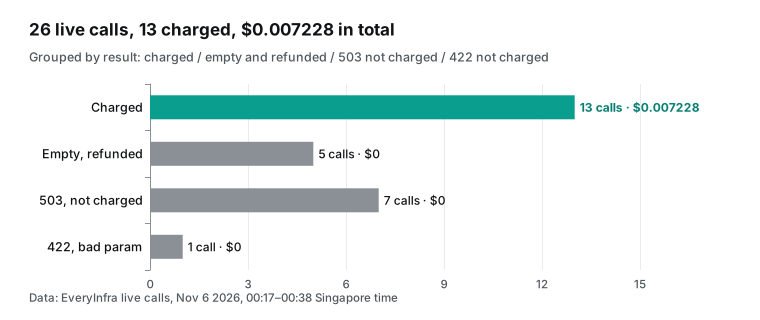
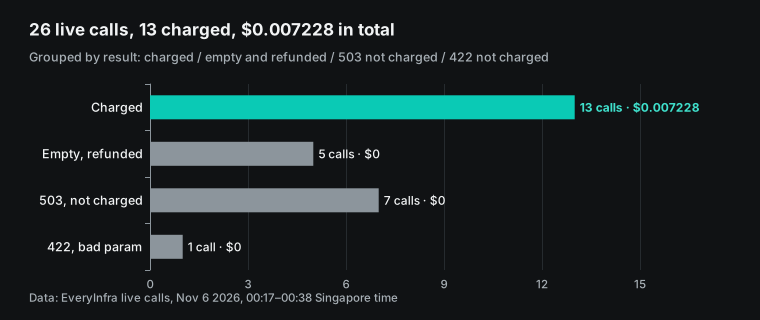
Half of the 26 real calls did not charge. We put them into groups. 13 calls charged. 5 calls returned empty results and were refunded. In 4 of them, we guessed the handle wrong. The fifth used the correct Asana channel, which had no new video that week.
7 calls returned 503: 6 LinkedIn company posts calls and 1 YouTube sync call that timed out. 1 call was our planned 422 test with a wrong parameter. No failed call charged money. The total charge was $0.007228, which is exactly 13 × $0.000556.
Each group of failures matches one part of the script. The "Must handle" list in the issue comes from this table:
| Trap | Evidence (SGT) | What the script does |
|---|---|---|
| A wrong handle returns an empty list | 00:18 YouTube @ClickUp returned 0 rows and a refund. The real channel is @ClickUpProductivity, which returned 3 rows at 00:28 | Keep checked handles in a config file; list zero-row handles for a manual check |
| A sync call over 85 seconds returns 503 | 00:21 YouTube @asana waited 89.8 seconds, then 503 timeout, no charge | Use mode: async for YouTube and Instagram, then poll with job_id |
| Pinned TikTok videos come first | 00:19 the first 3 ClickUp rows were pinned 2024 videos | Drop is_pinned=true, then filter by posted_at |
| YouTube dates are relative text | 00:17 the newest Notion video had posted_at "1d ago" | Convert from the fetch time and state the rule in the report |
| A capability is not available for a while | 00:18 to 00:38 LinkedIn company_posts returned 503 six times | Retry once, then write "not collected this week" and go on |
| A wrong parameter name | 00:27 channel instead of url returned 422 | Log the error message; do not retry a 422 |
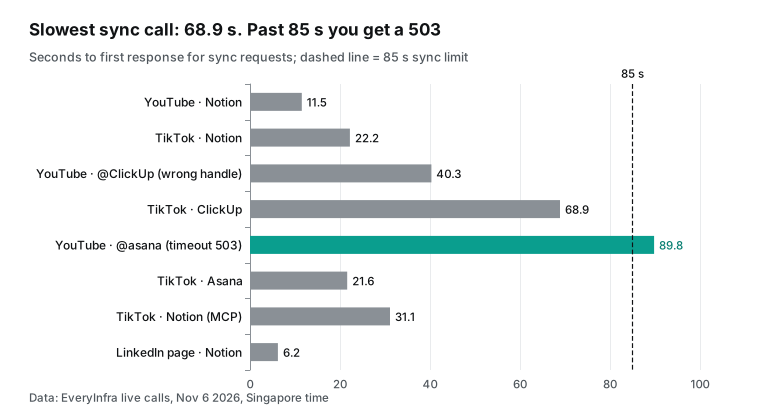
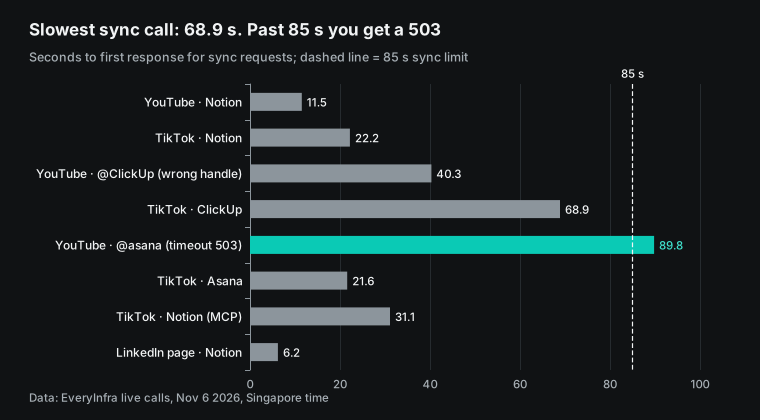
The second trap needs more detail. We measured the time to the first response for the 8 sync calls that returned data or timed out. The 6 LinkedIn 503 calls came back in 2.2 to 2.4 seconds and the 422 call in 0.2 seconds, so the chart leaves them out. The three TikTok calls took 22.2, 68.9, and 21.6 seconds, and the MCP call took 31.1 seconds. A YouTube call with the correct handle took 11.5 seconds.
A YouTube call with a wrong handle took 40.3 seconds to return an empty list, and another call returned 503 after 89.8 seconds. The error message says that a sync call waits up to 85 seconds. The ClickUp TikTok call took 68.9 seconds, only 16 seconds below that limit.
On Actions, an extra wait is not a problem. A timeout means that you must send the call again. So use async mode when the catalog allows it. The submit call returns a job_id at once. Then the script reads GET /api/v1/jobs/{job_id} every few seconds, and a job read costs nothing.
The fifth trap is LinkedIn. From 00:18 to 00:38 SGT, linkedin/company_posts returned 503 six times for Notion, ClickUp, Asana, and google, the sample company from the error message. The error code was unavailable, and each response had billing.charged_usd of 0. After the third failure, next_steps said that three calls had failed in ten minutes with no charge. It suggested one call with the sample request. If the sample also failed, the problem was on our side, and the message said to ask the user before opening a ticket.
At the same time, linkedin/company_profile worked. At 00:34 SGT it read the Notion company page in 6.2 seconds and charged $0.000556. The response had 1,137,647 followers and 7,211 employees. In a week when posts fail, the LinkedIn column can still show the change in followers.
The catalog still marked company posts as available that night. So the script cannot trust the catalog alone, and it must handle a 503. A report that says "LinkedIn not collected this week" is better than a report that silently drops a column. For how failed calls are refunded and how to check them, see our failure refund reconciliation guide.
What the script looks like: the workflow the agent should return
The pull request from the agent should have at least two files. Below is a workflow configuration example. The key rules come from the GitHub Actions docs. A schedule uses UTC by default, and now it can take a timezone with an IANA name. The shortest interval is 5 minutes. At the start of each hour, scheduled runs can be late.
Under high load, some queued runs can be dropped. So the docs suggest a time that is not on the hour. Scheduled runs use only the default branch. In a public repository, scheduled workflows turn off after 60 days with no activity (events that trigger workflows, schedule). The five cron fields follow the POSIX crontab specification.
name: weekly-competitor-social-report
on:
schedule:
- cron: "17 9 * * 1" # Monday 09:17, not on the hour
timezone: "Asia/Singapore"
workflow_dispatch: {}
permissions:
contents: write
concurrency: weekly-report
jobs:
report:
runs-on: ubuntu-latest
timeout-minutes: 20
steps:
- uses: actions/checkout@v4
- uses: actions/setup-python@v5
with:
python-version: "3.12"
- name: Build report
env:
EVERYINFRA_API_KEY: ${{ secrets.EVERYINFRA_API_KEY }}
run: python weekly_report.py --config config/competitors.yml --out reports/
- name: Commit report
run: |
git config user.name "weekly-report-bot"
git config user.email "weekly-report-botThe script needs one main function. It sends a request. If the status is running, it polls with job_id. If it gets a 503, it waits retry_after and tries once more.
Then it returns rows or a "not collected" marker. Here is a skeleton based on our tests. The field names match response_fields in the catalog, so you can paste it into the issue as a reference:
import os, time, json, urllib.request, urllib.error

API = "https://api.everyinfra.com"
KEY = os.environ["EVERYINFRA_API_KEY"]          # read only from the environment

def call(platform, action, params, mode="sync"):
    body = {"platform": platform, "action": action, "params": params}
    if mode == "async":
        body["mode"] = "async"
    for attempt in (1, 2):
        req = urllib.request.Request(API + "/api/v1/social", json.dumps(body).encode(),
              {"Authorization": "Bearer " + KEY, "Content-Type": "application/json",
               "User-Agent": "weekly-report/1.0"})
        try:
            data = json.load(urllib.request.urlopen(req, timeout=100))
        except urllib.error.HTTPError as e:
            err = json.load(e).get("error", {})
            if e.code == 503 and attempt == 1:
                time.sleep(err.get("retry_after", 60)); continue
            return {"unavailable": True, "code": e.code, "reason": err.get("code")}
        while data.get("status") in ("submitting", "running", "finalizing"):
            time.sleep(8)
            job = urllib.request.Request(f"{API}/api/v1/jobs/{data['job_id']}",
                  headers={"Authorization": "Bearer " + KEY, "User-Agent": "weekly-report/1.0"})
            data = json.load(urllib.request.urlopen(job, timeout=60))
        if data.get("status", "succeeded") != "succeeded":   # job failed: mark it, never report it as 0 rows
            return {"unavailable": True, "status": data.get("status"), "reason": data.get("error")}
        if "results" not in data:                              # success without results: raise
            raise RuntimeError(f"no results field: {platform}/{action}")
        return {"rows": data["results"], "count": len(data["results"])}
Look at the User-Agent header. Some site protection rules block the default Python user agent. A clear user agent can save you from a strange 403 in the Actions log. The timeout=100 value is a little longer than the 85-second server limit. So on a timeout, you get the server 503 with its retry_after, and not a client disconnect.
The last two checks matter most. If an async job ends with any status other than succeeded, the function returns the unavailable marker, and the report says "not collected this week". If a job succeeds but has no results field, the function raises an error, and the Actions step turns red. The report says "0 posts this week" only when a call really succeeded with an empty list. Without these two checks, a service failure becomes "the competitor stopped posting", which is the worst error a weekly report can make.
Check five things in the pull request
When the agent returns the pull request, you do not need to read every line of Python. Check five things. Each check takes a few minutes. First, secrets.EVERYINFRA_API_KEY appears only in the env of the data step. It is not printed with echo, and it is not written to a file. GitHub masks secret values in logs, but it does not mask a value that is committed to a file (using secrets in GitHub Actions).
Second, open the sample JSON files in tests/fixtures/. They must be real responses that the agent saved from MCP calls, and their field names must match the field table in this article. If the agent wrote the samples itself, the tests only repeat its own code. Third, check that the test example is a real test: ClickUp TikTok has 4 posts this week and 60463 views. These numbers come from a real response, and the agent cannot change them. The code must match them.
Fourth, check the failure paths. A 503 waits once and retries. A status: failed writes "not collected." Zero rows add the handle to a "check this handle" list. A 422 does not retry.
If one path is missing, send the pull request back. Fifth, a workflow on an agent pull request runs only after a person with write access clicks "Approve and run workflows". Run it once with workflow_dispatch, read the time and charge for each call in the Actions log, and then merge. You can also compare each charge with the request log in the EveryInfra console, where failed calls show no charge.
Weekly and monthly API cost at catalog prices
The cost has two parts: the EveryInfra API fee and the GitHub side. Our fee comes from price_usd for each capability in the catalog. These capabilities charge per call. A call that returns 1 row costs the same as a call that returns 30 rows. Failed calls and empty results do not charge. You can also see the prices on the EveryInfra pricing page.
| Capability | Catalog price per call | Calls per brand per week | Per brand per week |
|---|---|---|---|
youtube/user_posts | $0.000556 | 1 | $0.000556 |
tiktok/user_videos | $0.000556 | 1 | $0.000556 |
instagram/user_posts | $0.000556 | 1 | $0.000556 |
linkedin/company_posts | $0.002319 | 1 | $0.002319 |
| Total | n/a | 4 | $0.003987 |
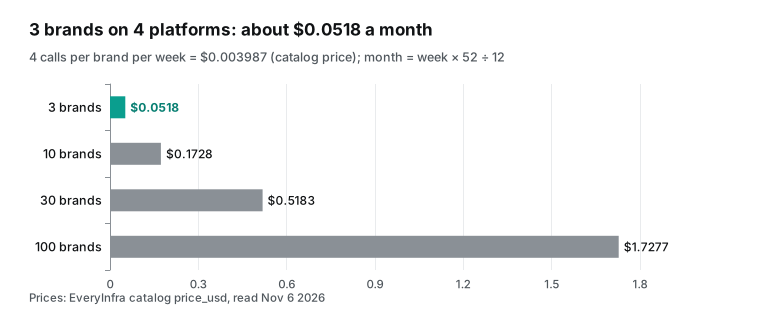
Three brands cost $0.011961 per week. At 52 weeks divided by 12 months, that is about $0.0518 per month. A larger list stays small too. Ten brands cost about $0.1728 per month, 30 brands about $0.5183, and 100 brands about $1.7277. The real run this week cost even less.
YouTube charged twice, because the Asana call was empty and refunded. TikTok and Instagram charged three times each. LinkedIn failed three times with no charge. That is 8 charged calls, $0.004448.
GitHub has three costs. Two are clear, and for the third we can give only a range. The first is Actions minutes. Standard GitHub-hosted runners are free in public repositories. Private repositories use the compute that your plan includes each month: $12 for GitHub Free, and $18 for GitHub Pro and Team. A standard Linux runner costs $0.006 per minute (GitHub Actions billing).
From our measured times, 12 calls in sequence take about 5 minutes, which is about $0.03 per week in a private repository. If the script submits all async jobs first and then polls them together, the run can take one or two minutes. The second cost is the Copilot plan. For example, Copilot Pro costs $10 per month with 1,500 AI credits, and Pro+ costs $39 per month with 7,000 (Copilot plans).
The third cost is the AI credits for the one session that writes the script. That number depends on the model and the session length. The docs give no typical value, and we did not run Copilot, so we do not give a number. The Copilot usage page shows the real value.
| Cost | Amount | How often | Source |
|---|---|---|---|
| EveryInfra API fee, 3 brands | $0.011961 | Each week | Catalog price_usd |
| EveryInfra API fee, this week's real run | $0.004448 | Once | Real charged_usd |
| Actions minutes, private repository | About $0.03 | Each week | $0.006 per minute × about 5 minutes (estimate) |
| Actions minutes, public repository | $0 | Each week | Standard runners are free in public repositories |
| Copilot session that writes the script | Not measured | Once | Real AI credits used |
| Automations each week instead | AI credits for each run | Each week | Automations billing docs |
Fields: each platform returns different data
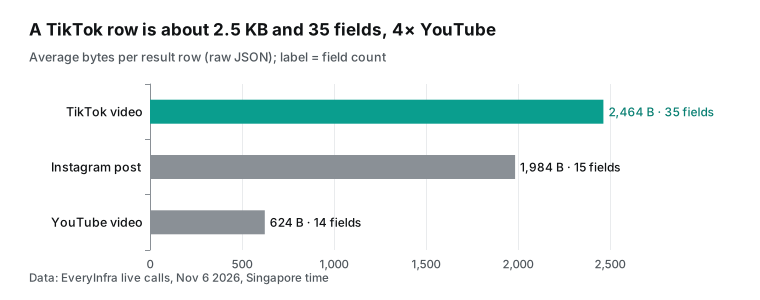
The report compares four platforms, and the hardest part is that the fields do not match. The catalog lists response_fields for each capability. We checked each real response against it and found three differences that change the report columns. First, Instagram user_posts had no view_count in any of the 50 rows from 5 accounts that night. The catalog field_note also says that some Instagram requests do not return view_count, is_comments_disabled, author_follower_count, or top_comments. Such requests return up to 48 posts. So the Instagram column can compare likes and comments, but not views.
Second, the catalog lists 25 fields for YouTube user_posts. A channel list returned only 14 in our test. It had view_count, title, and duration. It did not have like_count, comment_count, or is_paid_partnership, and posted_at was relative text. Third, TikTok user_videos had 35 fields. It has the most information, and it also uses the most space.
| Report column | YouTube field | TikTok field | Instagram field | LinkedIn field |
|---|---|---|---|---|
| Post time | posted_at (relative text) | posted_at (ISO) | posted_at (ISO) | posted_at |
| Views | view_count | view_count | Missing on some requests | None (has reactions and share_count) |
| Likes | Not returned in channel lists | like_count | like_count | like_count |
| Comments | Not returned in channel lists | comment_count | comment_count | comment_count |
| Pinned | None | is_pinned | None | None |
| Ad or partner post | In the catalog as is_paid_partnership, not returned | is_ad, is_sponsored | None | None |
| Link | url | url | url | url |
This table belongs in the issue too. Do not let the agent guess which platform has views. Tell it that the Instagram and LinkedIn views columns show "n/a," and that the report compares engagement as likes plus comments. The agent finds most differences when it reads real responses. When the table is in the issue, the agent does not need to guess at all.
How this differs from the Claude Code and ChatGPT articles
Our blog has four close articles. They are Claude Code subagents for TikTok brand accounts, ChatGPT scheduled tasks as a weekly demand radar, a Codex Cloud review weekly report, and a ChatGPT Spaces competitor social tracker. If you want ChatGPT to run the report itself each week, read the scheduled tasks article.
This article is different in one main way. The AI works only once, when it writes the code, and after that a plain script runs each week. The benefits are a stable format, no model cost each week, and clear Actions logs when something fails. The cost is one pull request review, and a config change when you add a brand or a platform. If your report needs a weekly opinion, such as why a video did well, the ChatGPT approach fits better. You can also let the script produce the numbers and then ask Copilot to read a month of reports and write an analysis.
Why not use each platform's own API
A fair question is why you need EveryInfra when each platform has a developer API. The answer is that reading another company's public content is not easy with most platform APIs. Each row in the table below comes from the platform's own developer docs.
| Platform | Platform API | Barrier to read competitor posts | Source |
|---|---|---|---|
| YouTube | YouTube Data API | Can read public channels; default 10,000 units per day, plus 100 search.list calls per day | YouTube quota calculator |
| Business Discovery in the Instagram Graph API | You need your own Business or Creator account and permissions such as instagram_basic; it reads only Business and Creator accounts | Business Discovery docs | |
| TikTok | Research API | For researchers, with an application; a reply usually comes within 4 weeks | TikTok research tools page |
| Community Management API | Mainly for managing your own company pages; needs an access application | Community Management overview |
The YouTube Data API is a good fit for part of this report. If you track only YouTube, use it directly. With four platforms, you must keep four types of authentication, four quotas, and four response formats. The script from the agent also grows four branches. EveryInfra puts the four platforms behind one request format, one billing model, and one set of error codes.
So the script needs only one call() function. For more data on each platform, see the YouTube data API and the TikTok data API. Also see the Instagram data API and the LinkedIn data API. When LinkedIn company posts are not available, the LinkedIn company profile capability can fill a followers column.
Limits and cautions
The first risk is prompt injection. The report reads post text from competitors, and that text goes into the agent context through MCP. OWASP calls this risk indirect prompt injection (OWASP LLM01 prompt injection). Content from an outside source, such as a web page or a file, changes how a model behaves. The GitHub risk page says that GitHub filters hidden characters in issues and comments (cloud agent risks and mitigations). So HTML comments do not reach the agent.
That description does not cover post text from MCP tool results. The plan in this article lowers the risk. The agent reads only a few samples when it writes code. The weekly report comes from a script, and a script never runs post text as instructions. An allowlist of three tools also limits what an injected agent can do.
The second point is the agent's permissions. The docs say that the cloud agent can push only to its own copilot/ branch. A person must review and merge its pull request. The agent cannot mark a pull request as ready, approve it, or merge it. A workflow on its pull request runs only after a person with write access clicks "Approve and run workflows". So the workflow from the agent cannot spend your API budget before your review.
The third point is that a schedule in Actions is not an exact alarm. The docs say that runs near the start of the hour can be late, and runs under high load can be dropped. So the data window must be "last Monday to last Sunday," not "7 days back from run time." Otherwise, a one-hour delay loses one hour of data. In a public repository, scheduled workflows stop after 60 days with no activity. A weekly commit of the report counts as activity.
The fourth point is our own scope. We read only public content: posts, videos, and engagement counts from public brand accounts. We cannot read private accounts, ad spend, or audience data. The LinkedIn outage that night is a real example.
The script must handle such a gap, and the report must say so. Also, GitHub and EveryInfra have no business relationship. This article only uses the public GitHub MCP configuration to connect to our public API.
Recent changes
- October 28, 2026: GitHub launched GitHub-verified MCP servers, or connectors, in public preview with 26 services, rolling out to all Copilot plans (changelog). What it means for you: services such as Slack and Notion now connect in one step. A third-party data API still needs a repository MCP configuration, and connectors do not work yet in Actions sessions.
- October 28, 2026: Copilot Automations can use tools from custom MCP servers, and they gained 24 GitHub event triggers, 20 GitHub tools, and AI credit limits per run, day, week, and month (changelog). Shared automations, billed to the repository owner, started to roll out the same day (shared automations changelog), and VS Code can now manage cloud automations (VS Code automations changelog). What it means for you: a weekly Copilot run is now possible, but each run uses credits, so set a limit first.
- October 28, 2026: Copilot became one connected cloud experience. Sessions run in a cloud sandbox by default, and the included Actions quota became a shared dollar pool for runners and cloud sandboxes (changelog). What it means for you: the report workflow minutes and the agent sandbox time come from one pool. In a private repository, watch the total.
- October 28, 2026: GitHub Agentic Workflows became generally available. You write a task in Markdown, and it compiles to Actions YAML that can use Copilot or another coding agent (changelog, project page). Workflow lockfiles also became generally available, so you can pin actions such as
actions/checkoutto an exact commit (lockfiles changelog). What it means for you: you can pin the actions in the report workflow so that a dependency cannot change without notice. - October 27, 2026: GitHub Copilot added server-to-server authentication for GitHub Apps on organizations, in public preview (changelog). Services built with the Copilot SDK can call Copilot without a signed-in user, and the organization pays. What it means for you: a team service can later read the weekly reports with Copilot under the organization budget.
- October 22, 2026: the Copilot usage metrics API now lists custom MCP servers, skills, and custom agents by name (changelog). It shows up to 25 of each type. What it means for you: an organization admin can see whether people actually use the
everyinfraMCP server.
FAQ
Where does the github copilot mcp configuration go, and is it the same as mcp.json?
This question comes from the search suggestions "github copilot mcp configuration" and "github copilot mcp.json". They are not the same. The configuration for the cloud agent and code review goes on GitHub, under Settings, Copilot, MCP servers for the repository. It is one mcpServers object, and each server needs type and tools.
VS Code uses .vscode/mcp.json in the repository or your user settings. To move a VS Code setup over, you must make a few changes (repository MCP configuration docs, VS Code MCP docs). For example, you add tools and replace inputs with env.
Can a copilot coding agent mcp server be a remote HTTP server?
This question comes from the suggestions "copilot coding agent mcp server" and "github copilot coding agent mcp configuration". Yes. The type can be local, stdio, http, or sse. A remote server uses url and headers.
The limit is OAuth: for remote servers in the repository configuration, the cloud agent and code review do not support OAuth yet. A key in a header works. EveryInfra uses a Bearer key (repository MCP configuration docs).
Where do I put the token for an MCP server in the coding agent?
This question comes from a Reddit thread about an Atlassian MCP server in the coding agent (r/GithubCopilot thread). Put it in Agents secrets for the repository or organization, with a name that starts with COPILOT_MCP_. Then refer to it in the configuration as $COPILOT_MCP_NAME. Only MCP servers get this type of secret (secrets and variables for the cloud agent).
The log says that MCP connected but retrieved 0 tools. What do I do?
This question comes from a Reddit thread with the same error (r/GithubCopilot thread). First, check that each name in your tools allowlist matches a name from tools/list exactly. Then check whether the server offers only resources or prompts, because the cloud agent uses tools only. For EveryInfra, one tools/list POST without a key shows all 12 tool names, as in our 00:16 SGT test (repository MCP configuration docs).
Can the github copilot mcp allowlist block a server that I add?
This question comes from the suggestions "github copilot mcp allowlist" and "github copilot mcp registry". It can. The connectors docs list policies that affect MCP. If an organization or enterprise turns off "MCP servers in Copilot," no MCP server works.
If "Restrict MCP access to registry servers" allows only registry servers, clients that enforce that policy block connectors. If an enterprise defines an allowedMcpServers list, the server address must be on it. Ask your admin about these settings first (Copilot connectors docs).
Is a weekly Copilot automation cheaper than an Actions script?
This question comes from our own test and the suggestion "copilot coding agent mcp". For money alone, the Actions script uses zero AI credits each week, and the API fee for three brands is $0.011961 per week. An automation uses AI credits on each run. The lowest per-run limit is 30 credits, or $0.30, and automations work only in private or internal repositories. An automation is easier when you need a weekly analysis (automations docs, create automations docs). A script is cheaper when you need only numbers.
Get started
- Create two keys in the EveryInfra console, named "copilot-mcp" and "weekly-actions." See the quickstart.
- In the repository, add
COPILOT_MCP_EVERYINFRA_API_KEYunder Agents secrets andEVERYINFRA_API_KEYunder Actions secrets. - Paste the JSON from this article under Settings, Copilot, MCP servers, with three tools. For other MCP clients, see the EveryInfra MCP server page.
- Open the issue from the template in this article and assign it to Copilot. Before you merge, run the workflow once with
workflow_dispatch.
References
- Connect your tools to Copilot without all the setup, GitHub Changelog, October 28, 2026.
- Copilot connectors, GitHub Docs, read November 6, 2026.
- Configure MCP servers for your repository, GitHub Docs, read November 6, 2026.
- Configure secrets and variables for Copilot cloud agent, GitHub Docs, read November 6, 2026.
- Copilot automations, GitHub Docs, read November 6, 2026.
- Creating automations with Copilot cloud agent, GitHub Docs, read November 6, 2026.
- About Copilot cloud agent, GitHub Docs, read November 6, 2026.
- Risks and mitigations for GitHub Copilot cloud agent, GitHub Docs, read November 6, 2026.
- Customizing or disabling the firewall for GitHub Copilot, GitHub Docs, read November 6, 2026.
- Best practices for using GitHub Copilot to work on tasks, GitHub Docs, read November 6, 2026.
- Plans for GitHub Copilot, GitHub Docs, read November 6, 2026.
- Usage-based billing for individuals, GitHub Docs, read November 6, 2026.
- Events that trigger workflows, GitHub Docs, read November 6, 2026.
- GitHub Actions billing, GitHub Docs, read November 6, 2026.
- Using secrets in GitHub Actions, GitHub Docs, read November 6, 2026.
- New tools, triggers, and cost controls for Copilot Automations, GitHub Changelog, October 28, 2026.
- Build shared workflows for your team with Copilot Automations, GitHub Changelog, October 28, 2026.
- Create and manage Copilot Automations in Visual Studio Code, GitHub Changelog, October 28, 2026.
- Work from anywhere with a new, connected Copilot cloud experience, GitHub Changelog, October 28, 2026.
- GitHub Agentic Workflows generally available, GitHub Changelog, October 28, 2026.
- GitHub Actions workflow lockfiles are generally available, GitHub Changelog, October 28, 2026.
- Push protection beyond predefined secret patterns, GitHub Changelog, October 28, 2026.
- GitHub Copilot supports server-to-server authentication, GitHub Changelog, October 27, 2026.
- Custom skills, agents, and MCP servers in usage metrics API, GitHub Changelog, October 22, 2026.
- Secret scanning blocks Anthropic keys by default, adds Salesforce, GitHub Changelog, October 13, 2026.
- Connect your tools to Copilot without all the setup, discussion 211002, GitHub Community, October 28, 2026.
- GitHub Agentic Workflows, GitHub Next, read November 6, 2026.
- Tools, Model Context Protocol specification 2025-11-25, read November 6, 2026.
- Transports, Model Context Protocol specification 2025-11-25, read November 6, 2026.
- crontab, The Open Group Base Specifications Issue 7, 2018.
- LLM01:2025 Prompt Injection, OWASP GenAI Security Project, read November 6, 2026.
- Quota Calculator, YouTube Data API, Google for Developers, read November 6, 2026.
- IG User Business Discovery, Meta for Developers, read November 6, 2026.
- TikTok Research Tools: Access and Eligibility, TikTok for Developers, read November 6, 2026.
- Community Management Overview, LinkedIn on Microsoft Learn, read November 6, 2026.
- Add and manage MCP servers in VS Code, Visual Studio Code docs, read November 6, 2026.
- GitHub Copilot Code Agent: Retrieved 0 tools from MCP server, Reddit r/GithubCopilot, read November 6, 2026.
- How to use MCP atlassian on Github coding agent, Reddit r/GithubCopilot, read November 6, 2026.
- EveryInfra data capability catalog, EveryInfra, read November 6, 2026, 00:16 SGT.
- Configure the development environment for agents on GitHub Actions, GitHub Docs, read November 6, 2026.
- Copilot allowlist reference, GitHub Docs, read November 6, 2026.
- github/github-mcp-server, GitHub, read November 6, 2026.
Reference BL-94