ChatGPT Spaces competitor social tracker: setup, MCP and live tests
Build a shared competitor social tracker page in ChatGPT Spaces. Pages do not refresh on their own. We tested TikTok, X and Reddit: $0.006672 a week.

OpenAI markets ChatGPT Space pages as pages that "stay updated". Its own docs say Keep Updated "isn't available at launch," so a weekly refresh needs a scheduled task or a team task (Work with agents in Space). On 2026-11-04, from 00:16 to 00:33 Singapore time, we pulled TikTok, X and Reddit data for Duolingo, Babbel and Busuu through EveryInfra. One weekly round is 12 calls and costs $0.006672 in API fees, or about $0.0289 a month. The number that decides whether the page is right is how far back one call reaches. Fifty TikTok videos reach back 55 to 272 days, but one Reddit search for Duolingo reaches back only 4.0 hours.
This guide is for a growth or marketing team in an English-speaking market. The team wants one competitor page in ChatGPT that several people and ChatGPT keep up to date. Every Monday it should show followers, posts and engagement for each rival.
We answer six questions in order: where the page should live, where the data comes from, and how ChatGPT connects to a data API. Then we cover what starts the weekly update, what it costs each month, and which numbers mislead you.
We did not sign in to ChatGPT for this guide. Every ChatGPT step comes from the Help Center, learn.chatgpt.com and the developer docs, and we label it a configuration example. Every EveryInfra number comes from a real call. We kept each raw response, so anyone on the team can check the numbers again.
What ChatGPT Spaces is: Space, pages and teams
Get the name right first. The product name is "Space," in the singular. The Help Center defines Space as the place for your pages, files and other ChatGPT work (Getting started with Space in ChatGPT). You create and edit pages with ChatGPT, group related work into spaces, and share them. People search for "chatgpt spaces" in the plural, and they mean the same thing. Each account has a personal space, and you can add more spaces by topic or team.
A page is an editable document. The Help Center suggests project briefs, meeting notes, research summaries and team updates. Several people can edit one page at the same time, and each person can ask their own ChatGPT to help. The Help Center adds one line that matters for this guide. Pages can include charts, trackers and interactive tools that ChatGPT makes. A competitor tracker is a weekly table with a few notes and charts, so it fits on one page.
OpenAI launched Space at DevDay 2026 on 2026-09-29 (DevDay 2026 recap). The product page says it is "Available on Pro, Business, and Enterprise plans" (Space product page). The Help Center gives more detail. Web and desktop can create and edit pages.
Mobile can find, read and share pages and move between subpages, but cannot edit. Business and Enterprise workspaces with data residency in Canada or the UAE get Space "soon". Space replaces Library on these plans, and Projects do not change (Help Center 20001549, read 2026-11-04).
| Item | What the docs say | What it means for the tracker |
|---|---|---|
| Plans | Pro, Business, Enterprise; not Free, Go or Plus | One person needs at least Pro 100 ($100 a month) |
| Editing | Web and desktop edit; mobile reads and shares | Read the page on your phone on Monday, edit it on a computer |
| Replaces | Library; Projects stay | You do not move old Projects |
| Sharing unit | One page, or a whole space; subpages inherit access | Put the tracker in a team space, and new people see it when they join |
| Page content | Text, tables, charts, trackers, tools, files | One page holds the table, the weekly summary and charts |
| Regions | Canada and UAE data residency "soon" | Those workspaces wait |
Teams arrived on the same day. The Business release notes say you can create a team, add coworkers and share a page or space with it (ChatGPT Business release notes). Teams can also share plugins and keep team tasks that run on a schedule. The Help Center page on teams draws the line clearly.
A team defines who works together, and a space holds the work and context they share (Teams in ChatGPT). One team can have many spaces, and one space can go to many teams. Teams exist only in Business and Enterprise workspaces, so a personal Pro account has no team and no team tasks.
ChatGPT Spaces vs Projects: where the tracker should live
The search suggestion "chatgpt spaces vs projects" ranks high, so many people mix them up. Both can be shared, both hold files, and in both ChatGPT can use the content to answer. They organize different things, though. Projects keep related chats, files and instructions together (Projects in ChatGPT). Space organizes pages and files, and the page itself is the deliverable. For a competitor tracker, the differences look like this.
| Point | Space (pages) | Projects |
|---|---|---|
| Plans | Pro, Business, Enterprise | Sharing works on Free, Go, Plus, Pro, Business, Enterprise and Edu |
| Main object | A page that several people edit live | Chats, files and project instructions |
| People | No limit stated; Business and Enterprise share with a team | Free 5, Plus and Go 10, Pro 100; workspace projects up to 100 |
| Files | Not stated | Free 5, Plus and Go 25, Pro and workspaces 40 |
| Memory | Each person uses their own ChatGPT and memory; what goes on the page is visible to everyone with access | Shared projects use project-only memory and do not read personal memory |
| Access levels | View, comment, edit (team invites may offer view and edit only) | Chat, edit |
| Mobile | Read and share only | Works on web and mobile |
| Good for the tracker? | Yes: the table is the result, and people edit one page | Good for the weekly "why did this drop" chat and raw CSV exports |
The Projects figures come from Help Center article 10169521. The Space access levels come from Collaborate in Space. Our call is simple. Put the tracker in a Space, because people want a table that changes, not a list of chats.
Keep the weekly discussion next to the page, in a chat or in page comments. If one teammate has only Plus, that person cannot open the Space. In that case, export the weekly numbers to a CSV in a shared project, and let the Plus user ask ChatGPT there.
Memory deserves a closer look, because competitor notes can be sensitive. With memory on, ChatGPT may use your personal context when it helps you write a page (ChatGPT Space: sharing, data, and controls). Once that text is on the page, everyone who can see the page can read it. A collaborator with memory on may also have their ChatGPT remember the page, even if you turned memory off.
Training settings follow each person, too. On personal plans, the settings of whoever's agent read or wrote the page apply. Business and Enterprise do not train on your data by default. So if you invite coworkers to a page from a personal Pro account, check each person's "Improve the model for everyone" setting first, or use a Business workspace.
One more trap is migration. Personal dots, Pages and Spaces do not move with a personal workspace into Business or Enterprise (Migrating your personal workspace). You must save them yourself first. Maybe you will test on personal Pro for a month and then move to Business. In that case, keep the page layout as a prompt or a CSV template. Then rebuild the page after the move, and do not expect it to follow you.
ChatGPT space pages: tables, Visualize and Prompt blocks
The learn.chatgpt.com guide Work with pages breaks a page into blocks. Type / while you edit to open the insert menu. You can add headings, lists, checklists, tables, code, highlights, images, files, subpages and links to other pages. You can also add references to files and chats, plus a "Visualize" block for an interactive chart.
Three blocks are for agents: Prompt, Task and Agent Instructions. A Prompt block saves a request that a reader can click to start a chat. A table block can be set to normal, flexible or full width, and the column widths can fit the content.
These blocks map well to a tracker. At the top, a table block holds this week's numbers. Below it, a Visualize block shows four weeks of trend. Below that, a Prompt block stores the request "pull this week's data by the rules on this page and update the table".
At the bottom, one subpage per week keeps the raw summary. The table holds the conclusions, and the subpages hold the evidence. If a teammate doubts a number, they open that week's subpage and see which posts the call returned.
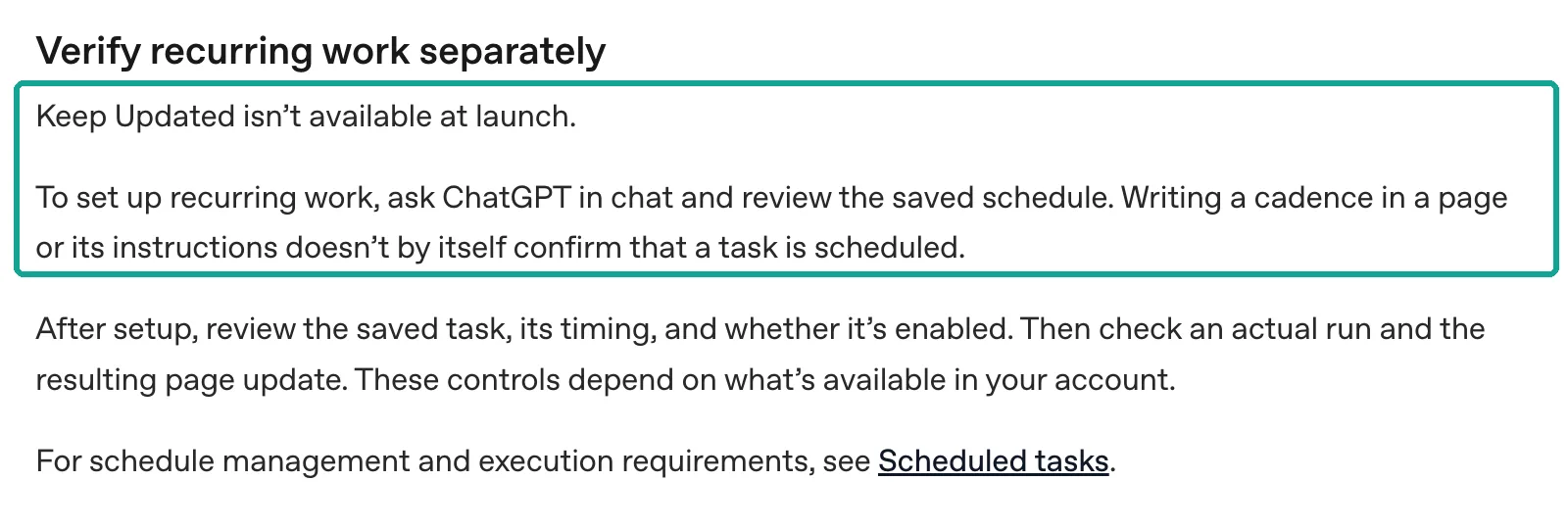
Take the "pages stay updated" claim with care. The product page says "Pages can stay updated from your connected tools" (Space product page). The agents guide in the same doc set is blunt. Keep Updated is not available at launch.
To set up recurring work, ask ChatGPT in a chat to create the schedule, and then check the saved schedule. A line on the page such as "update every Monday" does not prove that any task exists (Work with agents in Space, read 2026-11-04). So in this guide the scheduled task does the update, and the page is only where the result goes.
Can a normal Chat edit a page? OpenAI does not say so directly. It does say that you create Slides in Work (Creating and collaborating on slides in ChatGPT). On 2026-10-01 a community user also reported that a normal chat can only read an attached page. Editing worked in Work (Pages in Spaces for normal ChatGPT chats). So the setup below edits pages in Work.
What the tracker counts, and where each number comes from
Fix the columns before anything else, because the columns decide which calls you make each week. We use one row per brand per platform. A column only holds a number that one call can give you accurately. The table below is the layout of the table block on the page. The right column shows which EveryInfra capability and field each number comes from. You can find every field in the catalogs for the TikTok data API, the X data API and the Reddit data API.
| Column | Meaning | Source field |
|---|---|---|
| Followers | Followers at Monday's pull | tiktok/profile → follower_count; on X, author_follower_count in each twitter/user_posts row |
| New posts, last 7 days | Posts published in the 7 days before the pull; TikTok excludes pinned videos | posted_at, is_pinned |
| Original posts, last 7 days (X) | Excludes replies and reposts | is_reply, is_repost |
| Median views | Median views of new posts in the last 7 days; "none" if there are no new posts | view_count |
| Median engagement rate | (likes + comments + shares) / views | like_count, comment_count, share_count |
| Top post this week | Link and views | url, view_count |
| Reddit discussion | Busy brand: top posts in the brand community this week. Quiet brand: mentions in 7 days | Duolingo: reddit/subreddit_posts. Babbel, Busuu: reddit/search |
| Notes | Written by a person, or drafted by @ChatGPT and edited | Page comments |
Why the median and not the mean? Duolingo posted 5 TikTok videos in the last 7 days. The top one had 2.4 million views and the median was 803,300. One big video would pull the mean up, and the weekly number would jump around.
Why drop pinned videos on TikTok? In our test, the first video for every brand under "newest" was a pinned video. Duolingo's pinned video is from 2025-06-10. If you keep it, the "latest post" is wrong by more than a year.
The data: four capabilities, parameters and prices
The tracker uses four capabilities, plus one more for Reddit communities. We read the catalog at 00:16 Singapore time on 2026-11-04. All five showed available: true and a price of $0.000556 per call (catalog, free to read). You pay per call, and one call returns up to max_limit rows. The row count does not change the price. Failed calls and empty results cost nothing.
| Capability | Required | Useful options | Max per call | Price | Used for |
|---|---|---|---|---|---|
tiktok/profile | username | — | 1 account | $0.000556 | Followers, total likes, video count |
tiktok/user_videos | username | sort (newest/oldest/popular), until, min_likes | 50 rows | $0.000556 | New videos, views, engagement |
twitter/user_posts | username | — | 200 rows | $0.000556 | Original posts, views, likes |
reddit/search | keyword | sort (includes newest) | 25 rows | $0.000556 | Latest brand mentions |
reddit/subreddit_posts | subreddit | sort, date_range | 100 rows | $0.000556 | Top posts this week in a community |
To test outside ChatGPT, call the API with curl. Put the key in a request header, and never commit it to a code repository.
# Example: Babbel's newest 50 TikTok videos (real call at 00:18 Singapore time, 2026-11-04, charged_usd 0.000556)
curl -s https://api.everyinfra.com/api/v1/social \
  -H "Authorization: Bearer $EVERYINFRA_API_KEY" \
  -H "Content-Type: application/json" \
  -d '{"platform":"tiktok","action":"user_videos","params":{"username":"babbel","sort":"newest","limit":50}}'
Read each capability's field_note in the catalog, too. Two notes change how the tracker works. The note on twitter/user_posts says that when other sources fail, results come from a fallback source. That source has no replies, so is_reply and reply_to are empty. If that fails as well, bio and follower fields may be missing, and the last fallback returns at most 60 rows.
The note on reddit/search says the time range is fixed to the last month, and the sort order does not change that range. It returns only posts that match the keyword, so you may get fewer rows than limit. When nothing matches, the call counts as empty and you get a refund. In short, "original posts" on X are only exact when the reply field has values, and a Reddit search never looks back more than a month.
Connecting the EveryInfra remote MCP in ChatGPT: personal vs Business
The short version: on Business, ask an admin to add EveryInfra as a workspace plugin. On a personal Pro account, run one call by hand first and see whether ChatGPT asks for approval each time. Then schedule the task. ChatGPT now calls outside tools "plugins" (plugins product page). Workspaces have switches such as use plugins, create plugins with MCP (off by default on Enterprise) and publish to the workspace (Plugins in ChatGPT).
The steps for a custom MCP server are in Connecting custom MCP servers in ChatGPT. When we read it on 2026-11-04, the page said "Updated 2 days ago". Open Plugins, click the plus sign and choose "Add custom MCP server". Enter a name and a description.
Under Connection, enter a public HTTPS MCP URL, or pick Tunnel for a Secure MCP Tunnel. Set up authentication and tick "I understand and want to continue". Then choose "Create as a plugin" and check the tools and metadata it finds.
The developer guide Connect and test your plugin gives the same steps. It also suggests that you test every tool in MCP Inspector first. A private MCP server can use Secure MCP Tunnels. Our server has a public URL, so you do not need a tunnel.
Who can do this depends on the plan. The Help Center is precise, so we put it in a table.
| Account | Custom MCP? | Who creates and publishes | What it means for the tracker |
|---|---|---|---|
| Pro (personal) | Yes, "with read/fetch permissions"; full MCP is for Business and Enterprise/Edu | You | The data tool is not marked read-only. Test whether Pro asks for approval on each call |
| Business | Yes, full MCP | Only admins and owners create and publish | Members ask an admin to add EveryInfra as a workspace plugin |
| Enterprise / Edu | Yes, full MCP | Admins grant test access with role-based access control; only admins and owners publish | You can publish only the tools you need |
| Mobile | No; set it up on the web | — | Do the setup on a computer |
The Pro line comes from the FAQ "Are apps and full MCP beta available to Pro users?" in Help Center 12584461. Pro users can build apps with the Apps SDK. Full MCP is only on Business and Enterprise/Edu for now. Pro users can connect custom MCP servers with read and fetch permissions. That conflicts with how the data tool is marked.
At 00:16 Singapore time we sent one free tools/list request to https://api.everyinfra.com/mcp. Of the 12 tools, the data tool everyinfra_call_api shows readOnlyHint: false, destructiveHint: true and openWorldHint: true. The MCP spec says readOnlyHint means the tool does not change its environment (MCP spec, ToolAnnotations). A data pull does not change anything on TikTok.
It does take money from your balance on every call, so our server does not mark it read-only. From OpenAI's wording, we infer that Pro will likely ask you to approve each data call. The docs do not say whether a scheduled task stops at that prompt, and we did not test it in ChatGPT.
Authentication is the biggest change in this section. The developer guide ChatGPT Developer mode lists three options for MCP: OAuth, no authentication, and mixed. Mixed means some tools need no sign-in and others use OAuth. The Apps SDK Authentication guide adds detail.
OAuth uses version 2.1, ChatGPT can identify itself with a Client ID Metadata Document (CIMD), and the server publishes its OAuth settings at known URLs. So ChatGPT has no field for "paste an API key into a header". The old workaround was "no authentication" with the key in a ?key= URL.
That method does not work now. At 00:28 Singapore time on 2026-11-04 we sent a tools/call with the key in the URL. The server answered 401. The message said "The EveryInfra API key in this connector's URL (?key=) stopped working on 2026-11-04".
It named two new URLs: https://api.everyinfra.com/mcp with the key in a header, or https://api.everyinfra.com/mcp/all with sign-in. This 401 cost nothing. For ChatGPT only the second URL works, because ChatGPT will not put your key in a header for you.
From 00:28 to 00:29 Singapore time we checked the sign-in setup on /mcp/all. All three requests were free. First, initialize with no credentials returned 401. The WWW-Authenticate header carried a resource_metadata URL, which is the discovery method the MCP authorization spec requires (MCP authorization).
Second, that URL serves protected resource metadata as defined in RFC 9728. It names https://auth.everyinfra.com/oidc as the authorization server and lists scopes such as data:call, search:call, account:read and offline_access (metadata). Third, the OpenID configuration shows client_id_metadata_document_supported: true, lists offline_access, and accepts only S256 for PKCE.
The offline_access scope matches a ChatGPT requirement. The Help Center says that with OAuth, your identity provider must issue refresh tokens. In OpenID Connect you request offline_access and list it in scopes_supported. Without a refresh token, ChatGPT may disconnect when the first grant expires, and users must sign in again.
CIMD comes from an IETF draft, and version -03 came out on 2026-11-02 (IETF draft). Here is a configuration example based on these docs. We did not click through it in ChatGPT.
# Configuration example: ChatGPT web → Plugins → + → Add custom MCP server
Name:           EveryInfra social data
Description:    Public TikTok, X and Reddit data; each call billed at catalog price, failures free
Connection:     https://api.everyinfra.com/mcp/all
Authentication: OAuth (ChatGPT identifies itself with CIMD; sign in to EveryInfra and approve)
[x] I understand and want to continue
→ Create as a plugin → check the tools it finds (everyinfra_call_api, everyinfra_list_capabilities, everyinfra_get_job ...)

# Business workspace: only an admin or owner can create it. Then publish in
# Admin Console → Plugins → Manage Legacy Apps → Drafts → Publish, and share it with the tracker's team.
Sign-in has another benefit: you never hand your key to ChatGPT. Our server creates one internal key for each user, client and entry point. Billing, refunds, rate limits and call logs follow that account, and the key dies when you disconnect. See the MCP server page and the remote MCP setup guide for details. In a Business workspace, the person who signs in pays from their EveryInfra balance. Sign in with a shared team EveryInfra account, not a coworker's personal one.
One last workspace rule affects long-term stability. The Help Center FAQ says that after an admin first approves an MCP server, ChatGPT uses a frozen snapshot of its tool list. Later server changes take effect only after an admin reviews and publishes again. If the live tools and the snapshot differ, calls may fail. A compatible change, such as a new optional parameter, may still work.
An incompatible one needs an admin to refresh the plugin in workspace settings. ChatGPT does not prompt for an update or tell the admin when this happens. Our tool names only grow and never disappear, so old names keep working, but we do add fields. A monthly refresh in Admin Console is cheaper than debugging a broken run.
One real round trip: what ChatGPT sends and what comes back
When ChatGPT calls our server through a plugin, it sends a standard MCP tools/call request. At 00:29 Singapore time on 2026-11-04 we sent the same request to https://api.everyinfra.com/mcp/all. We used a key on our side. After an OAuth connection the tools and responses are the same. The call asked for Duolingo's 10 newest TikTok videos. It returned in 16.78 seconds with charged_usd 0.000556.
{"jsonrpc":"2.0","id":7,"method":"tools/call",
 "params":{"name":"everyinfra_call_api",
           "arguments":{"platform":"tiktok","action":"user_videos",
                        "params":{"username":"duolingo","sort":"newest","limit":10}}}}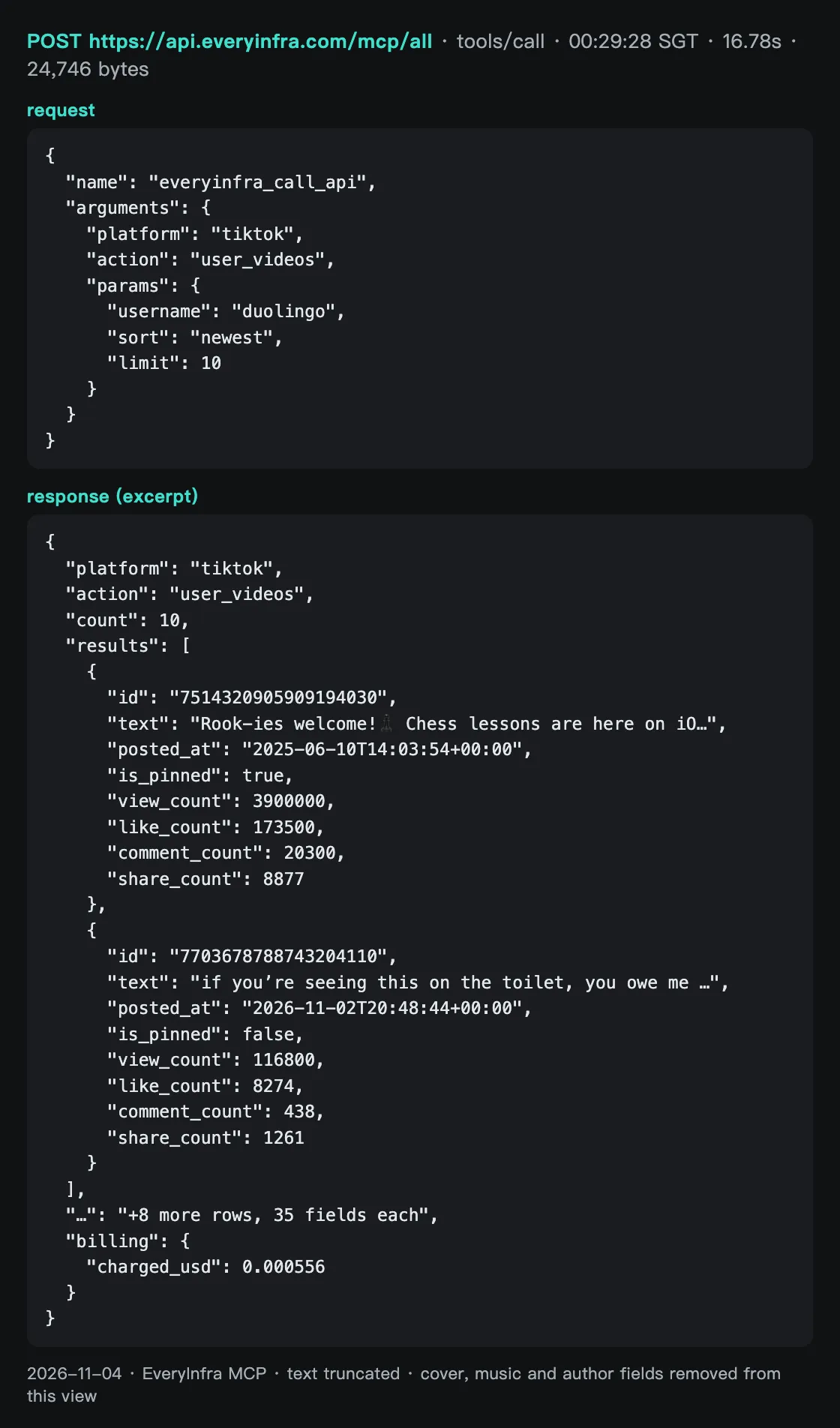
The content[0].text field holds a JSON string of 24,746 bytes. Each of the 10 videos has 35 fields. Beyond views, likes, comments, shares and saves, there are cover image URLs, music, hashtags, an ad flag, a product flag and the author's follower count. The screenshot shows the first surprise of this test. With sort: newest, row one is a pinned video from 2025-06-10, and row two is the new video from 2026-11-02. If the tracker takes row one as the latest post, it is wrong by more than a year.
After this round trip, ChatGPT holds structured JSON. Next it must count by the rules on the page. It drops rows where is_pinned is true, keeps rows where posted_at is in the last 7 days, and takes the median. Write those rules in the Prompt block or the task instructions. That is more stable than asking ChatGPT to guess each week.
How the weekly update runs: scheduled tasks and team tasks
The page does not change by itself, so a task must do the update. There are two paths, depending on the account. The table sums up what the docs say.
| Point | Personal: ChatGPT Work scheduled task | Business / Enterprise: team task |
|---|---|---|
| Where you create it | Ask ChatGPT in a chat, or view it under Scheduled | The Scheduled area on the team page |
| Plugins | Yes: tasks made with Work on the web, or with Work or Codex on desktop, can use plugins | Yes: shared team plugins, through connections the workspace set up for the team |
| Identity | Your own account and connections | The team service account; tasks do not inherit the creator's memory, custom instructions or chat history |
| Timing | Daily, weekly or custom; advanced users can write an RRULE | "Schedule" for repeats or "Date and time" for once; each task has its own time zone |
| Needs you online? | Not on the web; on desktop, tasks that use local files need the computer on | No, it runs in the cloud |
| First sign-in | Sign in to plugins in a chat first | Unattended runs cannot finish a new sign-in, so sign in ahead of time |
| Spend cap | Your personal plan allowance | Admin spending controls; personal task limits do not apply |
The left column comes from learn.chatgpt.com, Scheduled tasks. The right column comes from the Help Center article Creating and managing team tasks in ChatGPT. That article has four lines that matter for a tracker. Sharing a space with a team does not put everything in the space into each run, so name the sources in the instructions.
"Completed" on a schedule only means no runs are left, not that a run worked. Some temporary errors retry on their own, but a failed app action during a run may not. Before you rerun a task that edits files, check what the last run already did.


The task instructions decide whether the page gets clean numbers every week. We wrote them as below. Put them in a Prompt block at the top of the page. Paste the same text into the scheduled task. Keep both copies the same. Each rule answers a problem we hit in the tests that follow.
# Task instructions example (every Monday 09:00, America/New_York)
Use @EveryInfra social data. Call once per brand for Duolingo, Babbel and Busuu, in this order, one call at a time:
1. tiktok/profile {username}; tiktok/user_videos {username, sort: newest, limit: 50}
2. twitter/user_posts {username, limit: 50}
3. Reddit. Duolingo: reddit/subreddit_posts {subreddit: duolingo, sort: top, date_range: past_week, limit: 25}
   Babbel and Busuu: reddit/search {keyword: brand name, sort: newest, limit: 25}
Counting rules:
- TikTok: drop videos where is_pinned is true; keep only posted_at within 7 days before the run
- X: drop posts where is_reply or is_repost is true, then count original posts in the last 7 days
- Reddit search: count only posts with posted_at in the last 7 days; count posts with the brand in the title or community name separately
- Use the median, not the mean. Views and likes over 10,000 are rounded by the platform; call a change under 1% "flat"
- On 429, wait retry_after seconds and try once more. On 422, fix the parameter from did_you_mean
Output: update only the "This week" table and the three-line weekly summary; put the raw rows in a subpage named after this week's date
Why "one call at a time"? The key in this test allows 10 calls a minute. In the first round we got a 429 at 00:17:48 and another at 00:17:55 Singapore time. Each response said retry_after: 12 and "Nothing was charged". ChatGPT may send several tool calls at once in one task. Twelve calls in the same minute will hit the limit.
Test 1: how far back one call reaches
We set the bar before the test. A weekly tracker needs one call to cover at least 7 days, or "new posts in the last 7 days" comes out too low. The three platforms gave very different results.
| Brand · platform | Rows returned | Oldest row, age at pull time | Rows in the last 7 days | Enough for weekly? |
|---|---|---|---|---|
| Duolingo · TikTok | 49 (plus 1 pinned) | 55 days | 5 | Yes |
| Babbel · TikTok | 49 (plus 1 pinned) | 85 days | 1 | Yes |
| Busuu · TikTok | 47 (plus 3 pinned) | 272 days | 1 | Yes |
| Duolingo · X | 50 | 12.8 days | 28 (10 original) | Yes, with little margin |
| Babbel · X | 50 | 131 days | 2 | Yes |
| Busuu · X | 50 | 1,129 days | 0 | Yes, but the account is almost silent |
| Duolingo · Reddit search | 23 | 4.0 hours | 23 | No |
| Babbel · Reddit search | 23 | 9.1 days | 17 | Just enough |
| Busuu · Reddit search | 23 | 15.6 days | 9 | Yes |
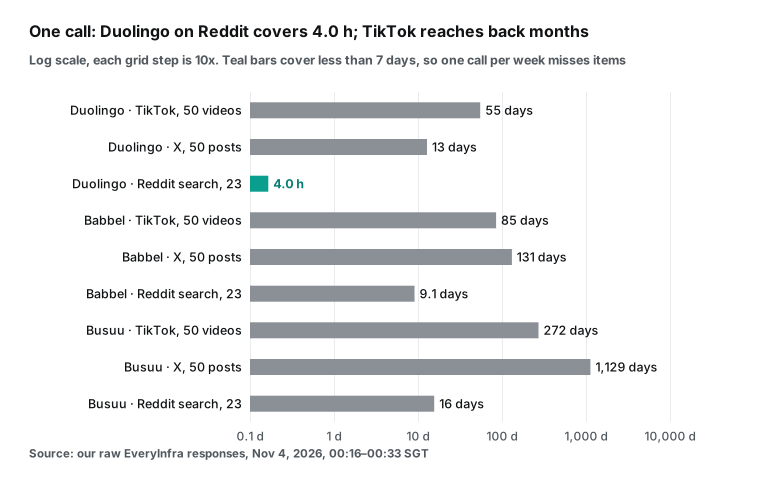
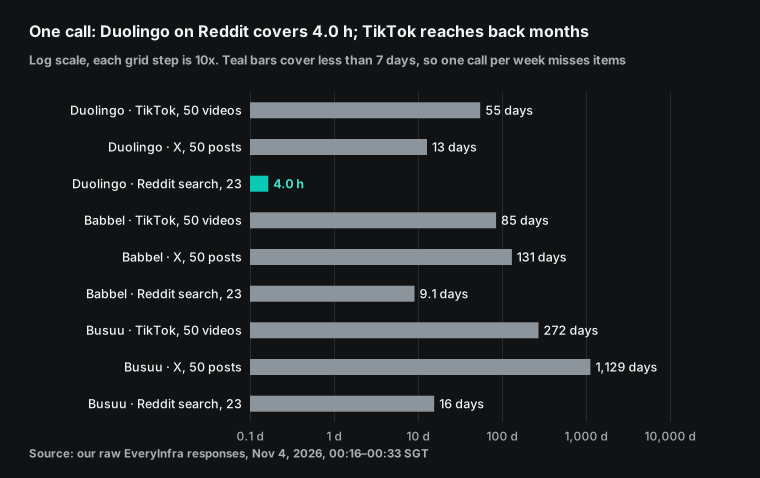
The biggest surprise was the Duolingo Reddit search. We asked for 25 posts sorted by newest and got 23. The oldest was only 4.0 hours old, between 12:23 and 16:05 UTC on 2026-11-03. So more than twenty Reddit posts mention Duolingo every four hours. A weekly pull sees only those few hours on Monday morning.
At this rate, a full week would need about 40 calls in a row. Also, reddit/search is fixed to the last month and returns at most 25 rows per call. Counting a week of mentions is not what it does well. Babbel and Busuu are much quieter, and one call covers 9.1 and 15.6 days.
This result has limits. The sample is one pull between November 3 and 4, and weekends or launch weeks will differ. The 23 rows are what remained after posts that did not match the keyword were removed, and the catalog says counts can fall below limit. The direction will hold, though. The same capability can cover 50 times more time for a small brand than for a big one. Set the number of calls per brand, and do not apply one recipe to all brands.
For Duolingo we switched to the brand community. At 00:28 Singapore time, reddit/subreddit_posts pulled the top 25 posts of the week in r/duolingo (sort: top, date_range: past_week). One call covered 6.1 days, from 2026-10-27 to 2026-11-02 (UTC). The 25 posts had 1,528 comments in total, and the top post, from 2026-10-29, had 1,615 upvotes. This tells you what people argue about in the brand's own community this week. That is more useful than how many people named the brand, and it costs one call.
Babbel and Busuu do not need this change. One search covers 9.1 days for Babbel and 15.6 days for Busuu. The oldest rows are from 2026-10-25 and 2026-10-19 (UTC). That is more than a week, so one reddit/search call counts all mentions from the last 7 days: 17 for Babbel and 9 for Busuu.
The weekly recipe therefore picks the Reddit capability per brand. Duolingo gets the community top list, and Babbel and Busuu get the search. Each brand still makes one Reddit call, so the total stays at 12. The two capabilities count different things. Do not compare these Reddit rows directly. Write in the notes which kind each row is.
For an English-language team, there is a second community worth one call. At 00:33 Singapore time we pulled the top 25 posts of the week in r/languagelearning, the general forum for the category. One call covered 6.6 days, from 2026-10-27 to 2026-11-03 (UTC), with 732 comments in total and 481 upvotes on the top post. Category threads show which apps people compare when nobody is talking to a brand directly. Add one row to the tracker for this community. Let ChatGPT list the brands in the top post titles.
Test 2: pinned videos, rounded counts and is_ad on TikTok
We pulled 50 videos per brand with sort: newest. Pinned videos came first for all three brands. Duolingo had 1 (2025-06-10), Babbel had 1 (2025-07-11), and Busuu had 3, the oldest from 2022-11-17. After the pinned rows, the rest were in strict date order from newest to oldest, and we checked every row. The rule is simple: check is_pinned first, then filter by posted_at.
| Brand | Pinned rows | Non-pinned rows reach back | Posts in 7 days | Median views (latest 50) | Median engagement | Rows with `is_ad` |
|---|---|---|---|---|---|---|
| Duolingo | 1 (2025-06-10) | 55 days | 5 | 660,600 | 14.1% | 42 of 50 |
| Babbel | 1 (2025-07-11) | 85 days | 1 | 35,700 | 3.26% | 0 of 50 |
| Busuu | 3 (oldest 2022-11-17) | 272 days | 1 | 2,769 | 1.57% | 1 of 50 |
The second finding is rounding. All 50 Duolingo videos had more than 10,000 views, and all 50 view counts were rounded, such as 3,900,000 or 116,800. None had more than 4 significant digits. All 43 Babbel videos over 10,000 were rounded too.
We do not round anything. TikTok shows "3.9M" on the web, and the count arrives in that form. The effect is that a video with millions of views changes in steps of 100,000.
We pulled one video at 00:16 and again at 00:29 Singapore time. Its views went from 2.4 million to 2.5 million in 13 minutes. You cannot tell whether it gained 50,000 or 140,000 views. Another video went from 116,100 to 116,800, so that one clearly gained 700. That is why the task instructions say "call a change under 1% flat".
The third finding is is_ad. Duolingo had 42 of 50 videos with is_ad: true, Babbel had 0 and Busuu had 1. The catalog describes the field as "whether the video is an ad". When a brand's own video carries the flag, a common reason is that the same video also ran as a paid ad. We did not check the reason for each video. So the tracker shows it as a note column and does not adjust views by it.
Engagement also differs a lot. The median engagement rate of non-pinned videos was 14.1% for Duolingo, 3.26% for Babbel and 1.57% for Busuu. Median views were 660,600, 35,700 and 2,769. In the last 7 days, Babbel and Busuu each posted once, with 9,377 and 696 views. With only a "last 7 days" column, a small brand would swing wildly on a sample of one. So we keep "median of the latest 50" as a reference column.
Test 3: more than half of Duolingo's 50 posts on X are replies
One twitter/user_posts call returned 50 posts. For Duolingo, those 50 posts covered only 12.8 days, because the account replies a lot. There were 29 replies and 4 reposts. Of the 17 original posts, 10 were quote posts. Counting only original posts, Duolingo posted 10 in the last 7 days. Their median was 56,364 views and 1,077 likes.
Babbel's 50 posts had 12 replies and 38 original posts. It took 131 days to reach 50 posts, and only 2 came in the last 7 days. The median original post had 1 like. Busuu's newest post was from 2025-02-12, so it had 0 posts in the last 7 days.
| Account | Followers | Replies | Reposts | Original (incl. quotes) | 50 posts reach back | Original posts in 7 days |
|---|---|---|---|---|---|---|
| @duolingo | 1,049,014 | 29 | 4 | 17 | 12.8 days | 10 |
| @babbel | 34,286 | 12 | 0 | 38 | 131 days | 2 |
| @busuu | 35,699 | 3 | 1 | 46 | 1,129 days | 0 |
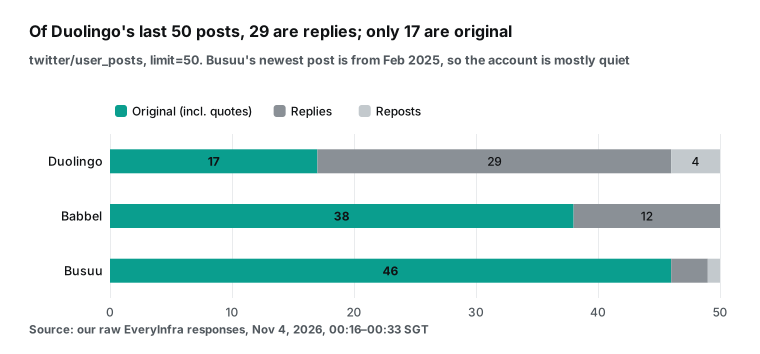
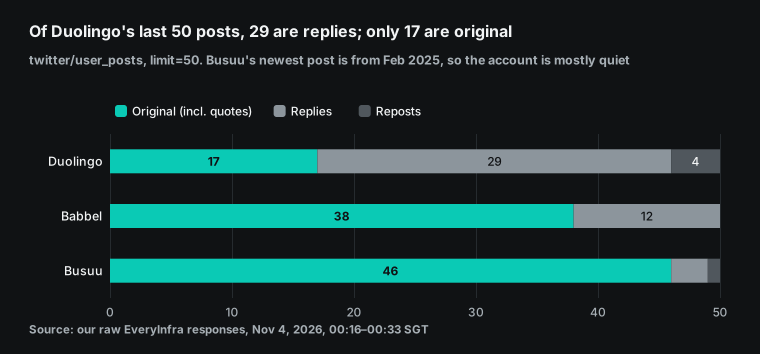
These numbers teach two things. First, if the post count includes replies, Duolingo looks 14 times busier than Babbel: 28 posts against 2 in 7 days. Without replies it is 10 against 2. Many replies show that Duolingo uses X mostly to talk with users.
That is worth a line in the notes, but it does not belong in "how much content they post". Second, when an account goes quiet for months, the tracker should say "no new posts". It should not compute a median from posts made in 2025. Our task instructions say "none" when there are no original posts in the last 7 days.
The fallback source sets one more limit. The catalog says twitter/user_posts has no replies when it uses the fallback, and is_reply is empty. In that week all 50 Duolingo rows would be original posts. Coverage would grow, and "original posts in 7 days" would get more exact. The reply share, though, could not be computed. So the reply share goes in the notes, not in the main table you compare week by week.
Test 4: how much of a Reddit brand search is noise
Reddit search matches the keyword in titles and bodies. A brand name in someone's personal intro also counts as a match. We split the 23 results with a rough rule. If the brand is in the title or the community name, the post is "about the brand". If it is only in the body, it is "a passing mention". Duolingo had 15 against 8, Babbel had 5 against 18, and Busuu had 6 against 17.
| Keyword | Rows | Newest to oldest | Brand in title or community | Body only | Communities | Comments |
|---|---|---|---|---|---|---|
| duolingo | 23 | 4.0 hours | 15 | 8 | 16 | 96 |
| babbel | 23 | 9.1 days | 5 | 18 | 19 | 462 |
| busuu | 23 | 15.6 days | 6 | 17 | 20 | 660 |
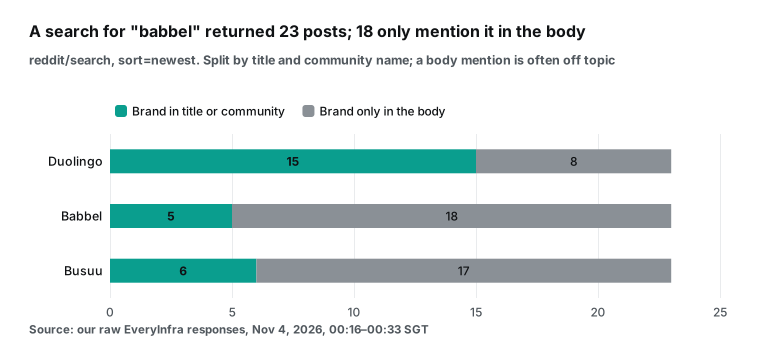
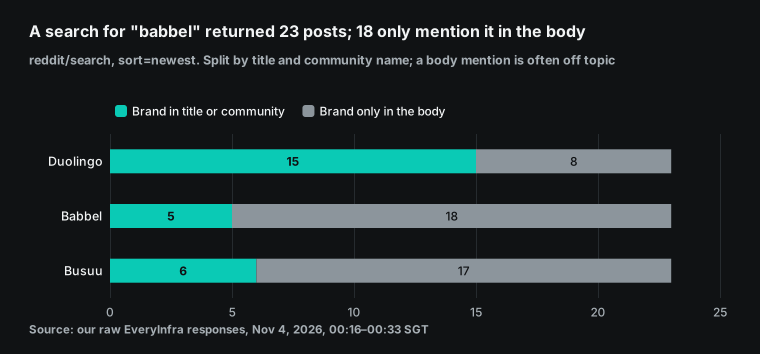
Here is a concrete case. The newest of Duolingo's 23 results was a friendship post in r/MakeFriendsOver30. The author listed many hobbies, and one was using Duolingo. The same batch held posts from communities such as r/jaxfanclub and r/CultofDaisy, which have nothing to do with language learning.
Babbel's 23 results came from 19 communities, and only 3 were in the brand's own r/babbel. These posts are not bad data. Counting them as "brand buzz" is the mistake.
So the Reddit rows depend on the brand. For Duolingo, the main table uses the brand community's top posts of the week from reddit/subreddit_posts, which takes one call. For Babbel and Busuu, the main table shows the mentions from the last 7 days. A second number counts the posts with the brand in the title or community name. ChatGPT reads only that small group to pick posts that compare products, and it puts those posts in the notes. Fix this rule in the instructions, or ChatGPT will pick by a different standard each week.
Test 5: how big the responses are, and whether the page can hold them
Data arrives in ChatGPT as JSON, so the size sets how much each task must read. We measured the raw bytes of each response. tiktok/profile was about 1.5 KB. tiktok/user_videos with 50 rows averaged 119 KB.
twitter/user_posts with 50 rows was about 54 KB, and reddit/search with 23 rows was about 50 KB. Ten TikTok videos over MCP came to 24,746 bytes of text.
The 12 calls of the first round, with a Reddit search for all three brands, totaled 675,752 bytes. At a rough 4 bytes per token, that is about 169,000 tokens. With the recipe above, the Duolingo Reddit call returns the community top list instead. That response is 18,916 bytes, not 27,508, so the total drops to about 667,000 bytes. The scale stays the same.
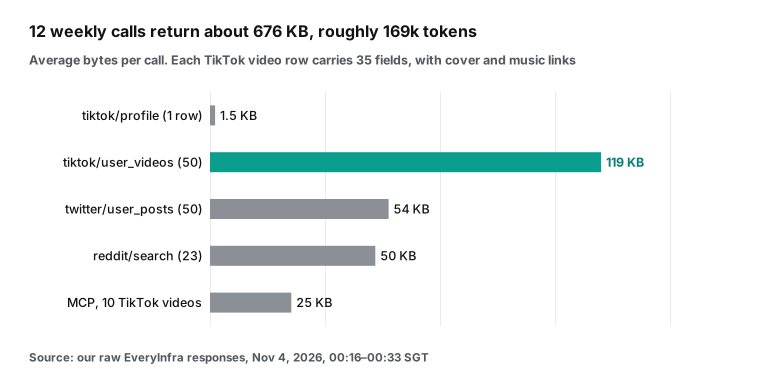
The 169,000 tokens figure is an estimate, not a measurement, but it shows the scale. Each TikTok video has 35 fields. Cover images and music links are long signed URLs, and the tracker uses none of them. You can save in two ways. First, set limit to what you need.
Twenty TikTok videos cover 7 days for all three brands: Duolingo posted 5 in 7 days, plus 1 pinned video. That cuts the size to about two fifths. Second, tell ChatGPT to write a small six-field table after each call before the next call. Do not let it keep all 12 raw responses until the end.
What the tracker looks like in week one
Here is the main table for the round on 2026-11-04, using the rules above. Every number comes from this round of real calls. "Last 7 days" counts back from each call's Singapore time.
| Brand | Platform | Followers | New posts, 7 days | Median views, 7 days | Median of latest 50 | Notes |
|---|---|---|---|---|---|---|
| Duolingo | TikTok | 18.4M | 5 | 803,300 | 660,600; engagement 14.1% | 42 of 50 flagged is_ad |
| Duolingo | X | 1,049,014 | 10 original (18 replies and reposts) | — | 56,364 views on originals | 50 posts cover 12.8 days |
| Duolingo | Reddit r/duolingo | — | 25 top posts this week | — | 1,528 comments | Community top list; top post 1,615 upvotes |
| Category | Reddit r/languagelearning | — | 25 top posts this week | — | 732 comments | Top post 481 upvotes |
| Babbel | TikTok | 587,800 | 1 | 9,377 | 35,700; engagement 3.26% | Newest video 10-28 |
| Babbel | X | 34,286 | 2 original | — | 636 views on originals | Median 1 like |
| Babbel | Reddit search "babbel" | — | 17 mentions | — | 462 comments on 23 posts | Search; 5 name the brand in title or community, 3 in r/babbel |
| Busuu | TikTok | 844,200 | 1 | 696 | 2,769; engagement 1.57% | 3 pinned videos |
| Busuu | X | 35,699 | 0 | — | — | Newest post 2025-02-12 |
| Busuu | Reddit search "busuu" | — | 9 mentions | — | 660 comments on 23 posts | Search; 6 name the brand in title or community, 2 in r/Busuu |
Do not compare the Reddit rows with each other. The Duolingo row is the brand community's top list. The Babbel and Busuu rows are site-wide search mentions from the last 7 days. The notes column says which kind each row is, and the comment totals cover all 23 rows of one pull.
We left the X 7-day median empty on purpose. There are too few original posts in 7 days, such as 2 for Babbel, so a median means little. The reference column uses original posts in the latest 50. This is week one, so there is no "change" column yet. From week two, ChatGPT adds one by reading last week's subpage.
Weekly and monthly API fees: about $0.0289 a month
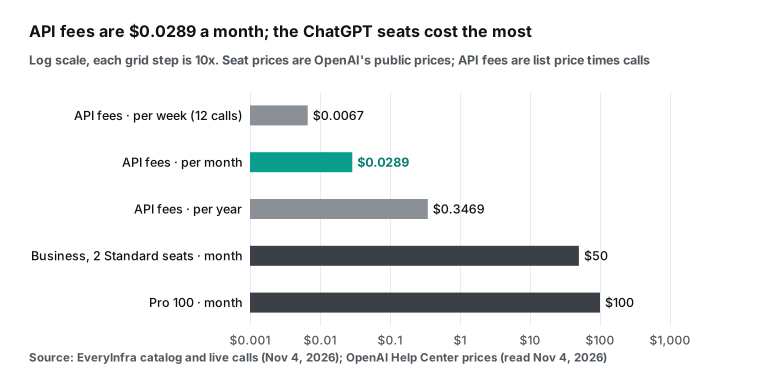
API fees are the catalog price times the number of calls. The base recipe is 3 brands × 4 calls = 12 calls, or $0.006672 a week. The four calls are tiktok/profile, tiktok/user_videos, twitter/user_posts and one Reddit call: reddit/subreddit_posts for Duolingo, reddit/search for Babbel and Busuu. Over 52 weeks that is $0.346944 a year. A month at 52/12 weeks is about $0.0289. Both Reddit capabilities have the same price, so the choice per brand does not change the total.
Calling both the search and the top list for all three brands makes 15 calls: $0.00834 a week and about $0.0361 a month. The r/languagelearning row adds one call, $0.000556 a week. In this round we paid for 17 calls, $0.009452 in total. The five calls beyond the first round were extra tests: two community top lists, one Spanish-language search, one old account and the MCP round trip.
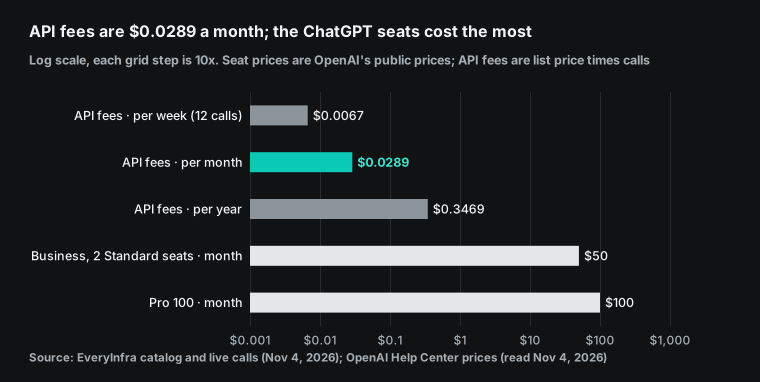
| Item | Per week | Per month | Source |
|---|---|---|---|
| EveryInfra API fees (12 calls) | $0.006672 | about $0.0289 | Catalog price $0.000556 per call, read 2026-11-04 |
| EveryInfra API fees (15 calls, search and top list for all three brands) | $0.00834 | about $0.0361 | Same |
| ChatGPT Pro 100 (personal, includes Space) | — | $100 | About ChatGPT Pro tiers |
| ChatGPT Business Standard seat | — | $25 per user ($20 yearly), 2-seat minimum | ChatGPT Business overview, Managing billing and seats |
| ChatGPT Business Premium seat | — | $125 per user ($100 yearly) | Same; Premium seats announcement |
We read the ChatGPT prices on 2026-11-04. Pro comes in $100, $200 and $500 tiers. The Business Standard seat dropped by $5 on 2026-04-02 (Help Center 8792536), and you buy at least 2 seats (Sign up for ChatGPT Business). Pro and Business plans now include API credits for OpenAI's own API (Help Center 20001626).
Pro gets $100 to $500 a month by tier. Business gets $20 per Standard seat, up to $500 per workspace. Those credits have nothing to do with our API fees.
The result is plain. The tracker's API fees are under 3 cents a month, about three orders of magnitude below one ChatGPT seat. Whether to build it depends on whether your team already pays for Pro or Business, not on the cost of data. The ChatGPT allowance each run uses varies by model and workload, and the docs give no number we can quote.
Errors and charges: 429, 422 and 401 cost nothing
Of the 21 requests in this round, 4 were not charged. All fell between 00:17 and 00:29 Singapore time, and we kept every raw response. Two 429s at 00:17:48 and 00:17:55 came from the limit of 10 calls a minute on the test key. Each returned retry_after: 12. We retried about 4 minutes later, at 00:21:57 and 00:22:11. Both retries worked and were charged as usual.
One 422 at 00:28:29 was on purpose: we set sort to latest. The response listed the allowed values newest, oldest and popular, gave newest as did_you_mean, and said "Nothing was charged". One 401 at 00:28 was the MCP call with the key in the URL, described above.
| Case | HTTP | What the response holds | Charged | What the ChatGPT task should do |
|---|---|---|---|---|
| Too many calls a minute | 429 | retry_after seconds, retryable: true | No | Wait and retry once; no parallel calls |
| Wrong parameter value | 422 | allowed, did_you_mean, catalog_url | No | Change the one parameter from did_you_mean and resend |
| Key in the URL | 401 | The two new URLs | No | Delete the old connector and connect /mcp/all |
| Empty result | 200 | count: 0 | Refunded | Write "no data this week" on the page |
The 422 message is written for an AI to read. When ChatGPT sees did_you_mean, it can fix the parameter by itself. That is why the task instructions say to fix the parameter from did_you_mean on a 422. The full error fields are in the OpenAPI spec.
What a ChatGPT Space tracker cannot do
Here are the limits in one place, so you do not find them after launch. First, Keep Updated is not available at launch. The page does not refresh itself, and in a week with no scheduled task the table stays on last week. Second, mobile can read and share pages but cannot edit them. Third, custom MCP on personal Pro has read and fetch permissions. Test by hand whether the data tool asks for approval on each call before you schedule it.
Fourth, the frozen tool snapshot on Business means new fields or parameters appear in your workspace only after an admin refresh. Fifth, reddit/search looks back one month at most and returns up to 25 rows per call. It cannot count a big brand's weekly mentions. Sixth, TikTok counts over 10,000 are rounded, so weekly changes on videos with millions of views move in steps of 100,000. Seventh, everyone who can see the page can read the competitor notes on it. A collaborator with memory on may have their ChatGPT remember that content.
The data itself has limits, too. We pull public profiles and public posts. Private accounts, direct messages and ad spend are out of reach. is_ad only says the platform flagged the video as an ad, not how much was spent. Label any "how much they spent on ads this week" note on the page as a guess.
| Limit | Where it comes from | Workaround |
|---|---|---|
| No Keep Updated at launch | learn.chatgpt.com agents guide | A scheduled task or team task |
| No editing on mobile | Help Center 20001549 | Edit on web or desktop |
| Pro gets read and fetch MCP only | Help Center 12584461 | Test approval prompts, or use Business |
| Frozen tool snapshot | Help Center 12584461 | Admin refresh once a month |
| Reddit search: one month, 25 rows | EveryInfra catalog | Community top lists |
| Rounded TikTok counts | Our test, 50 of 50 rounded | Call changes under 1% flat |
Recent changes
2026-09-29: Space, teams and team tasks launched at DevDay. Business and Enterprise can share pages and spaces with a team (Business release notes). What it means for you: share the tracker with a team instead of adding people one by one.
2026-10-01: OpenAI resolved the incident with elevated errors on Space Pages (community reply). What it means for you: early October page errors were a known issue, so judge the page tools by what you see today.
2026-10-15: Business admins can manage up to 25 plugins at once in Admin Console. They can make plugins available, install them for the workspace, or turn them off (Business release notes). What it means for you: rolling out a data plugin to a team takes fewer steps.
2026-10-26: Affected Enterprise workspaces can no longer create new custom GPTs. New reusable workflows use Plugin Creator (Enterprise and Edu release notes). What it means for you: build the tracker as a plugin plus a task, not as a GPT.
2026-11-02: The IETF Client ID Metadata Document draft reached version -03 (IETF draft). What it means for you: the way ChatGPT signs in to MCP servers is still being standardized, and details may change.
2026-11-04: EveryInfra stopped accepting MCP URLs with the key in ?key=. What it means for you: in ChatGPT, connect https://api.everyinfra.com/mcp/all, choose OAuth and sign in. Delete old connectors and add them again.
ChatGPT Spaces FAQ
ChatGPT Spaces vs Notion: should we move our competitor table?
This question comes from the search suggestion "chatgpt spaces vs notion". In the docs, the strength of Space is that each collaborator can ask their own ChatGPT or dot to edit the same page. A page can also hold visualizations that ChatGPT makes. The weak points are that Keep Updated is not available at launch, mobile cannot edit, and you need Pro or higher (Help Center 20001549). A community feature request also says Space lacks basics such as pinning and deeper sidebar levels (Space needs the rest of its UX). Keep the master copy of the data where you can export it. Use the Space page to read and discuss each week.
What should I do about errors in ChatGPT space pages?
The search suggestion "elevated errors in chatgpt space pages" points to the OpenAI status incident "Elevated errors in ChatGPT Space Pages" (status page). OpenAI support said in the community that it was resolved on 2026-10-01. If you hit problems later, check two things first. Are you in Work and not in a normal chat? Are you on web or desktop and not on mobile? Those two causes come up most in community threads (community thread).
Can a ChatGPT Space pull TikTok data through EveryInfra?
Yes, once you add EveryInfra as a plugin. Use https://api.everyinfra.com/mcp/all, pick OAuth and sign in. In a Business workspace, only admins and owners can add it. On personal Pro, the docs say custom MCP gets read and fetch permissions. Call the data tool once by hand to see whether it asks for approval each time (Help Center 12584461).
What does Reddit say about ChatGPT Spaces?
The suggestion "chatgpt spaces reddit" leads to threads such as one in r/ChatGPTPro. A user said ChatGPT failed to create a page from the phone and used a Google Doc instead. A reply said Chat cannot edit pages but Work can (r/ChatGPTPro). This is one user's experience, not an OpenAI statement. It matches the OpenAI note that you build Slides in Work, though.
Getting started
- Sign up and add funds in the EveryInfra console. Use the free catalog to confirm that each capability you need shows
available: true. - Call each of the four capabilities once with curl or in the playground. Check the fields and row counts, then set
limitper brand. - In ChatGPT on the web, add a custom MCP under Plugins:
https://api.everyinfra.com/mcp/allwith OAuth. Sign in with the shared team account. - Create a team space and the tracker page. Add a table block, a Visualize block, a Prompt block and one subpage per week.
- In Work, ask ChatGPT to create a task for Mondays at 09:00 (a team task on Business). Click "Run now" once and check the table and the subpage.
Related reading
- ChatGPT dots product radar: why the data pull belongs in an assigned task: the two permission sets of an always-on dot. This guide is about one table that a team maintains.
- ChatGPT scheduled tasks as a demand radar: one person gets a daily message. Here the output is a team page, and Business uses team tasks and a service account.
- Claude Code scheduled tasks for Reddit pain points: a similar weekly report with Claude, with the data kept in local files.
- Claude Cowork scheduled tasks for competitor prices and reviews: a weekly competitor report on prices and reviews.
- MCP server setup
References
- Getting started with Space in ChatGPT, OpenAI Help Center, read 2026-11-04, https://help.openai.com/en/articles/20001549-getting-started-with-space-in-chatgpt
- ChatGPT Space: sharing, data, and controls, OpenAI Help Center, read 2026-11-04, https://help.openai.com/en/articles/20001544-chatgpt-space-sharing-data-and-controls
- Teams in ChatGPT, OpenAI Help Center, read 2026-11-04, https://help.openai.com/en/articles/20001541-teams-in-chatgpt
- Creating and managing team tasks in ChatGPT, OpenAI Help Center, read 2026-11-04, https://help.openai.com/en/articles/20001540-creating-and-managing-team-tasks-in-chatgpt
- Connecting custom MCP servers in ChatGPT, OpenAI Help Center, read 2026-11-04, https://help.openai.com/en/articles/12584461-connecting-custom-mcp-servers-in-chatgpt
- Plugins in ChatGPT, OpenAI Help Center, read 2026-11-04, https://help.openai.com/en/articles/20001256-plugins-in-chatgpt
- Projects in ChatGPT, OpenAI Help Center, read 2026-11-04, https://help.openai.com/en/articles/10169521-projects-in-chatgpt
- About ChatGPT Pro tiers, OpenAI Help Center, read 2026-11-04, https://help.openai.com/en/articles/9793128-about-chatgpt-pro-tiers
- ChatGPT Business overview, OpenAI Help Center, read 2026-11-04, https://help.openai.com/en/articles/8792828-chatgpt-business-overview
- Managing billing and seats in ChatGPT Business, OpenAI Help Center, read 2026-11-04, https://help.openai.com/en/articles/8792536-managing-billing-and-seats-in-chatgpt-business
- Sign up for ChatGPT Business, OpenAI Help Center, read 2026-11-04, https://help.openai.com/en/articles/8980713-sign-up-for-chatgpt-business
- ChatGPT Business release notes, OpenAI Help Center, read 2026-11-04, https://help.openai.com/en/articles/11391654-chatgpt-business-release-notes
- ChatGPT Enterprise and Edu release notes, OpenAI Help Center, read 2026-11-04, https://help.openai.com/en/articles/10128477-chatgpt-enterprise-and-edu-release-notes
- Migrating your personal workspace to ChatGPT Business or Enterprise, OpenAI Help Center, read 2026-11-04, https://help.openai.com/en/articles/8801890-migrating-your-personal-workspace-to-chatgpt-business-or-enterprise
- Creating and collaborating on slides in ChatGPT, OpenAI Help Center, read 2026-11-04, https://help.openai.com/en/articles/20001605-creating-and-collaborating-on-slides-in-chatgpt
- API credits benefit for eligible ChatGPT subscriptions, OpenAI Help Center, read 2026-11-04, https://help.openai.com/en/articles/20001626-api-credits-benefit-for-eligible-chatgpt-subscriptions
- Work with pages, learn.chatgpt.com, read 2026-11-04, https://learn.chatgpt.com/docs/space/pages
- Work with agents in Space, learn.chatgpt.com, read 2026-11-04, https://learn.chatgpt.com/codex/space/agents
- Collaborate in Space, learn.chatgpt.com, read 2026-11-04, https://learn.chatgpt.com/codex/space/collaboration
- Scheduled tasks, learn.chatgpt.com, read 2026-11-04, https://learn.chatgpt.com/codex/automations
- Connect and test your plugin, OpenAI developer docs, read 2026-11-04, https://developers.openai.com/plugins/deploy/connect-chatgpt
- ChatGPT Developer mode, OpenAI developer docs, read 2026-11-04, https://developers.openai.com/api/docs/guides/developer-mode
- Authentication (Apps SDK), OpenAI developer docs, read 2026-11-04, https://developers.openai.com/apps-sdk/build/auth
- Secure MCP Tunnels, OpenAI developer docs, read 2026-11-04, https://developers.openai.com/api/docs/guides/secure-mcp-tunnels
- MCP specification, Schema Reference (ToolAnnotations), version 2025-11-25, https://modelcontextprotocol.io/specification/2025-11-25/schema#toolannotations
- MCP specification, Authorization, version 2025-11-25, https://modelcontextprotocol.io/specification/2025-11-25/basic/authorization
- RFC 9728, OAuth 2.0 Protected Resource Metadata, IETF, 2025-04, https://datatracker.ietf.org/doc/html/rfc9728
- OAuth Client ID Metadata Document (draft-03), IETF, 2026-11-02, https://datatracker.ietf.org/doc/draft-ietf-oauth-client-id-metadata-document/
- EveryInfra data catalog, read 00:16 Singapore time, 2026-11-04, https://api.everyinfra.com/api/v1/social/catalog
- EveryInfra /mcp/all protected resource metadata, read 00:28 Singapore time, 2026-11-04, https://api.everyinfra.com/.well-known/oauth-protected-resource/mcp/all
- EveryInfra OpenAPI spec, read 2026-11-04, https://api.everyinfra.com/openapi.json
- DevDay 2026 Recap, OpenAI, 2026-09-29, https://openai.com/index/devday-2026-recap/
- ChatGPT Space product page, OpenAI, read 2026-11-04, https://chatgpt.com/features/space/
- Plugins in ChatGPT product page, OpenAI, read 2026-11-04, https://chatgpt.com/features/plugins/
- Premium seats are coming to ChatGPT Business, OpenAI, read 2026-11-04, https://openai.com/index/premium-seats-chatgpt-business
- ChatGPT is now a partner for your most ambitious work, OpenAI, 2026-07-09, https://openai.com/index/chatgpt-for-your-most-ambitious-work/
- Elevated errors in ChatGPT Space Pages, OpenAI status page, read 2026-11-04, https://status.openai.com/incidents/01M3R1T4FCR1337FBBYY9K2RPB
- Pages in Spaces for normal ChatGPT chats, OpenAI Developer Community, 2026-10-01, https://community.openai.com/t/pages-in-spaces-for-normal-chatgpt-chats/1402509
- ChatGPT work "Spaces" creates download links that do not download (support reply), OpenAI Developer Community, 2026-10-16, https://community.openai.com/t/chatgpt-work-spaces-creates-download-links-that-do-not-download/1402511/3
- Space needs the rest of its UX, OpenAI Developer Community, 2026-10-06, https://community.openai.com/t/space-needs-the-rest-of-its-ux/1403608
- Spaces / Pages... so half baked, Reddit r/ChatGPTPro, read 2026-11-04, https://www.reddit.com/r/ChatGPTPro/comments/1x9pt47/spaces_pages_so_half_baked/
Reference BL-80