GPT-6 Intelligent UI for a Reddit and X brand report: MCP setup example and data tests
GPT-6 Intelligent UI can answer with tables and charts. OpenAI does not say it draws MCP data. Our 3-brand report cost $0.003336 in API fees.

GPT-6 arrived in the ChatGPT Chat tab on October 7, 2026, together with Intelligent UI. With Intelligent UI, the model decides whether an answer gets text, charts, buttons or a form (OpenAI launch post). This article tests one specific job. You connect the EveryInfra remote MCP server to ChatGPT and ask: "Compare these 3 brands on Reddit and X last week, by volume and sentiment". Can you get a stable, interactive report?
We ran 16 live API requests on November 5, 2026, between 00:18 and 00:27 Singapore time. The brands were EcoFlow, Jackery and BLUETTI, three portable power station makers. Thirteen requests were billed, for a total of $0.007228. The answer has three parts.
First, OpenAI does not say that Intelligent UI draws data that a custom MCP server returns. Second, our MCP server returns a JSON string, so the model must read it and build the table itself. Third, three numbers in the raw data will mislead the model if your prompt does not handle them.
This article is different from our three other ChatGPT articles. The ChatGPT Spaces competitor tracker covers a shared page that a team updates every week. The ChatGPT dots product research radar covers an always-on agent and its two permission sets. The ChatGPT scheduled tasks demand radar covers one weekly push to one person.
Here we look at one thing only: how a one-off answer becomes an interactive table and chart. We also show how to design the data so the model does not count wrong. We did not sign in to ChatGPT. Every ChatGPT step comes from OpenAI documentation and is marked as an example setup. Every EveryInfra number comes from a saved raw response that you can recompute.

What is GPT-6 Intelligent UI: what OpenAI actually wrote
Start with the official words. The OpenAI launch post "GPT-6 and Intelligent UI for everyone" calls Intelligent UI a new capability of GPT-6 in ChatGPT. Answers can be fully interactive interfaces that make everyday answers more visual and complex topics easier to learn. ChatGPT can also build a small tool for the task in front of you (OpenAI launch post, read November 5, 2026).
OpenAI built a library of native, streamable components and a compiler. The interface appears step by step while the model writes. The library gives a common design base, and the model decides how the parts fit together.
The Help Center page "Intelligent UI in ChatGPT" gives more detail. GPT-6 was trained to compose answers from text, visuals and interactive elements. An answer can include graphics, tappable buttons, forms, charts and interactive experiences inside the chat. The format depends on the question: a comparison may sit side by side, and an explanation may use an interactive diagram.
When plain text is the best answer, you get plain text. Source: Help Center 20001598, read November 5, 2026. The page showed an update about 14 days earlier. So OpenAI's answer to "when do interactive components appear?" is simple: the model decides from the question. There is no "always chart" switch.
The same page answers four questions that matter for a report. You can add preferences in Custom Instructions, and OpenAI's own example is "use tables when comparing options". OpenAI adds that these preferences only guide the answer, and the exact layout can change. Some components, such as checklists, keep their state when you refresh the chat, but not across chats.
Intelligent UI works in Chat only, not in the Work tab and not in Voice. On the web you can choose Personalization, then Layout and Visuals, then Simple. Some visual elements may still appear after that.
| Question | What OpenAI wrote | Source | What it means for a report |
|---|---|---|---|
| What is it | The model builds text, visuals, buttons, forms and charts from native components; a compiler streams the layout | Launch post, Help Center 20001598 | The model draws the table; a plugin does not hand over a finished widget |
| When do components appear | The model chooses by question type; simple questions get text | Help Center 20001598 | Ask for a table in the prompt and in Custom Instructions |
| Special prompt needed | No; ordinary text answers still happen | Help Center 20001354 | You may get a chart without asking, but the layout can change |
| Separate usage quota | No; model, tool and plan limits apply | Help Center 20001354 | Report cost is your plan plus API fees |
| Does plugin data become components | Only: connected plugins "will continue to work" | Help Center 20001598 | Not documented; do not assume it |
| Can you turn it off | Web: Personalization, Layout and Visuals, Simple; another page says turn off Layout and visuals in Settings | Help Center 20001598, 20001354 | The two pages use different menu names; follow what your screen shows |
The path to turn it off needs a note. The Help Center page "GPT-6 and other models in ChatGPT" says you can reduce visual elements if you open Settings on the web and turn off Layout and visuals. The Intelligent UI page says Personalization and Simple (Help Center 20001354). Both pages say some visual elements may still appear.
Neither offers a full text-only mode. For a report, this means you do not fully control the layout. The same prompt can give a plain text table to a colleague who chose Simple.
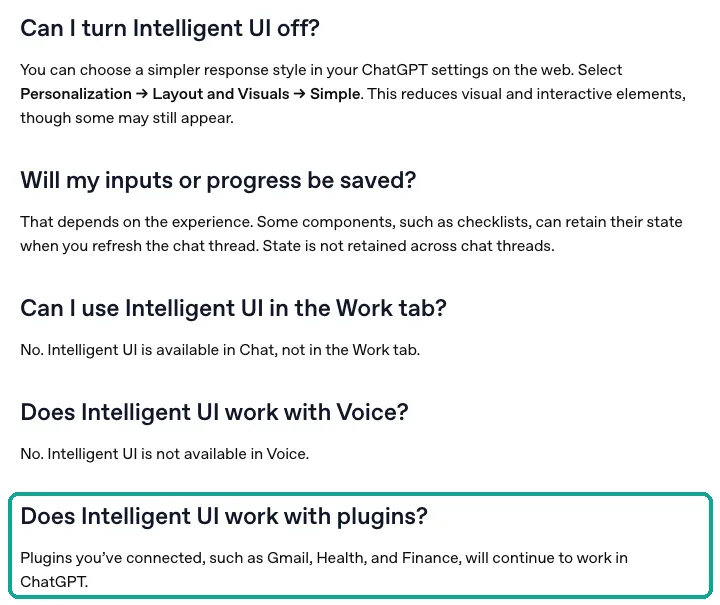
The sentence in the teal box is the most important text for this article. "Will continue to work" tells you that plugins do not break. It does not tell you that plugin data goes into the Intelligent UI component library. We also checked the developer side. The OpenAI plugin docs describe a different mechanism, where the server supplies its own UI template.
We cover that in the next section. In the Help Center, the launch post and the developer docs, we found no sentence that says Intelligent UI renders MCP tool results as charts. So we write "not documented". We do not write "yes", and we do not write "no".
GPT-6 and Intelligent UI in ChatGPT: who gets it and where
The launch post gives the rollout. On October 7, 2026, GPT-6 with Intelligent UI started to roll out globally to Plus, Pro, Business and Enterprise in the Chat tab. The next day it expanded to Free and Go. Enterprise access depends on admin settings.
Paid tiers use GPT-6 Sol, and Free and Go use GPT-6 Luna; both are tuned for everyday chat (OpenAI launch post). The post also says Work and Codex models did not change. The OpenAI developer community announcement repeats this scope. It adds that GPT-6 Instant starts to answer web-search questions 44% sooner on average than GPT-5.6 Instant (OpenAI Community announcement).
The Help Center is clear about thinking levels. Intelligent UI works from Instant through Extra High. The Pro thinking option uses GPT-6 Astra and does not support Intelligent UI (Help Center 20001598). The Business "models and limits" page repeats the Astra limit, and it says a Business Standard seat includes 15 Pro messages per month (Help Center 12003714). The Business release notes entry for October 7, 2026 says GPT-6 is rolling out in Chat to eligible Business workspaces. Access depends on workspace settings and supported clients (Business release notes).
| Plan | GPT-6 in Chat | Intelligent UI | Custom MCP |
|---|---|---|---|
| Free | GPT-6 Luna, from October 8 | Yes | Not listed on the custom MCP page |
| Go | GPT-6 Luna, from October 8 | Yes | Not listed |
| Plus | GPT-6 Sol, from October 7 | Yes | Developer mode lists Plus; the Plugins page names Pro, Business and Enterprise/Edu |
| Pro | GPT-6 Sol; Pro thinking is Astra | Sol yes, Astra no | Yes, but with read and fetch permissions |
| Business | GPT-6 Sol, per workspace | Yes | Only admins and owners create and publish |
| Enterprise / Edu | GPT-6 Sol, per admin settings | Yes | Admins can grant creation to members with role-based access |
Plan prices are in the section "API fees for one report" below. The Enterprise and Edu page says GPT-6 is rolling out to eligible Enterprise workspaces. If GPT-6 is not in your model menu, your workspace does not have it yet (Help Center 11165333).
Clients matter too. The Help Center says older macOS and Windows desktop apps do not support Intelligent UI, and the Business notes say "supported clients". If a teammate says "I get no charts", check three things first. Are they in the Chat tab and not in Work?
Did they choose the Pro thinking level? Is their desktop app old? In the r/ChatGPT launch thread, one paid user said GPT-6 Sol was active. But the answers had no visuals, even with the prompts from the launch page. That is most likely a rollout or client gap (r/ChatGPT launch thread).
Can custom MCP data become tables and charts?
This is the core question, and there are two paths. Path one is Intelligent UI. The model reads what the tool returns and builds a table or chart from ChatGPT's own components. For this path, OpenAI has only the one sentence about plugins. Path two is MCP Apps, from the OpenAI plugin docs.
The MCP server ships its own UI template. ChatGPT shows that template in an isolated frame inside the chat, and the template draws the tool result (developer docs: ChatGPT UI). Both paths look like "a chart in the chat". But who draws it, and how stable it is, are very different.
The developer docs describe path two in detail. A tool points to a resource with _meta.ui.resourceUri, and the resource URI starts with ui://. The resource type is text/html;profile=mcp-app. ChatGPT loads the template, and the template talks to the host with JSON-RPC messages that start with ui/. The older _meta["openai/outputTemplate"] key still works as an alias (developer docs: Build your MCP server).
The MCP Apps extension docs describe the same model (MCP Apps docs). The tool declares a UI resource, and the host renders it in a sandbox. OpenAI also recommends a decoupled pattern. Data tools return data, and a separate render tool mounts the UI. Then a button such as "Re-roll" can call a data tool again without a full remount.
| Item | Intelligent UI | MCP Apps (server UI) | EveryInfra MCP today |
|---|---|---|---|
| Who draws | ChatGPT's model and component library | An HTML template from the MCP server | No template |
| How data arrives | The model reads tool text and structured content | structuredContent goes to the template | One content[0].type = "text" JSON string |
| Documented to draw tool results | No | Yes, that is its purpose | Not applicable |
| Layout stability | Can change each time; users can pick Simple | Fixed template, stable | Depends on the model |
| Who builds it | Nobody; it is built in | The server owner builds, reviews and publishes | We do not ship a template |
| Where it works | Chat, Instant to Extra High | Where plugins work | Same as plugins |
The MCP specification is explicit about structured results. The tools section of the 2025-06-18 version lets a tool declare an outputSchema and return data in structuredContent. For backward compatibility, a tool that returns structured content should also put serialized JSON in a TextContent block (MCP specification: Tools). On November 5, 2026 we sent initialize and tools/list to https://api.everyinfra.com/mcp without a key, which is free.
The server reports protocol version 2025-06-18. None of its 12 tools declares an outputSchema or a _meta UI template. A real tools/call result has content only, with no structuredContent.
So, with the EveryInfra remote MCP in ChatGPT, only path one is open. The model reads a JSON string, counts, calculates, and decides whether to use a table or chart. That is not all bad. Intelligent UI components belong to ChatGPT, so they match the chat and need no development.
But their stability depends on two things. The prompt must say clearly what you want. The data must be clean and short enough that the model does not miscount inside 900 KB of text. The next two sections cover the setup and these two things.
Connect the EveryInfra remote MCP in ChatGPT: personal plans vs Business
The Help Center page "Connecting custom MCP servers in ChatGPT" gives the current steps. In Plugins, select "+" and then Add custom MCP server. Enter a name, the server URL and the authentication type. Read and accept the risk warning, then select Create as a plugin.
In the current Plugins experience you do not need to turn on Developer Mode first (Help Center 12584461, read November 5, 2026). The page also says you can add servers on the web only, not on mobile. With OAuth, your identity provider must issue refresh tokens, so the scopes must include offline_access.
# Example setup (we did not sign in to ChatGPT; steps follow the Help Center; not run in ChatGPT)
# ChatGPT on the web -> Plugins -> + -> Add custom MCP server
Name:            EveryInfra
MCP server URL:  https://api.everyinfra.com/mcp/all
Authentication:  OAuth
# The consent page sends you to https://auth.everyinfra.com/oidc to sign in to EveryInfra
# Grant at least data:call (data calls) and offline_access (refresh token for ChatGPT)
# Accept the risk warning -> Create as a plugin
# Business workspace: only admins or owners create and publish; members then enable it in Plugins
# Enterprise / Edu: admins can use role-based access control (RBAC) to let chosen members create connections
Why /mcp/all and not /mcp? The EveryInfra /mcp endpoint takes a key in a request header. That suits clients that can set headers, such as Claude Code or Cursor. ChatGPT custom MCP offers OAuth, no authentication, or mixed. It has no "put a key in a header" option (developer docs: Developer mode). /mcp/all uses OAuth.
Its protected resource metadata names https://auth.everyinfra.com/oidc as the authorization server, and its scopes include data:call and offline_access (EveryInfra protected resource metadata).
That matches the OpenAI authentication guide. The resource server publishes protected resource metadata, and the authorization server publishes OAuth metadata. The client identifies itself with CIMD, dynamic registration or a predefined client (developer docs: Authentication). This follows the authorization part of the MCP specification (MCP specification: Authorization). Some users once put the key in a ?key= URL with no authentication. Those connections stopped working on November 4, 2026; our Spaces article records the 401 reply.
The difference between personal plans and Business is direct. In a Business workspace, only admins and owners can create custom MCP connections and publish them. Enterprise and Edu admins can use role-based access to let selected members create connections, but only admins and owners publish. For personal plans, the FAQ "Are apps and full MCP beta available to Pro users?" says full MCP is for Business and Enterprise/Edu.
Pro users can connect custom MCP servers with read and fetch permissions. The Business release notes also list two plugin admin updates. From October 15, 2026, admins can manage several plugins at once. From October 21, 2026, Business workspace settings are in Admin Console (Business release notes).
| Setup | Who adds it | Confirmation before a data call | Watch out for |
|---|---|---|---|
| Plus / Pro personal | You | Yes; everyinfra_call_api is not marked read-only | Pro says "read and fetch"; how Pro treats a non-read-only tool is not clear, so test first |
| Business | Admin or owner creates and publishes | Yes; admins can set the approval policy | Members cannot add it; authorize with a shared team EveryInfra account |
| Enterprise / Edu | Admin, or a member with permission; admin publishes | Yes | The workspace must enable GPT-6 and plugins |
| Free / Go | Not listed | Not applicable | Intelligent UI shows, but custom MCP is not documented |
The confirmation comes from tool annotations. In our tools/list reply, the data tool everyinfra_call_api has readOnlyHint: false, destructiveHint: true and openWorldHint: true. The catalog tool everyinfra_list_capabilities is read-only. The developer mode docs say ChatGPT treats tools without a read-only hint as write actions.
You must confirm before each call, and you can choose to remember the approval for that conversation (developer docs: Developer mode).
The destructiveHint: true value is stronger than necessary. In the MCP specification, this hint means that the tool can make destructive updates to its environment. A data call only reads public posts on Reddit and X and changes nothing there. A charge to your balance is not a destructive update (MCP specification: Tools). For you, the result is the same: the tool is not marked read-only, so ChatGPT asks before it calls.
In practice, a 6-call report asks once. If you choose to remember, the other calls in that chat do not ask again.
Get stable tables: prompt and field design
Intelligent UI needs no special prompt. But "compare the three brands by volume and sentiment" is loose. What counts as volume? Which seven days are "last week"? Whose sentiment rule? The model may read it differently each time.
We suggest a prompt in three parts. The fetch part says which capabilities and parameters to use. The count part says which posts count. The output part says what table, what chart, and what note goes under the table. OpenAI's Custom Instructions example, "use tables when comparing options", can go in your profile so that every comparison gets a table by default.
# Example prompt (example setup; not run in ChatGPT)
Use @EveryInfra to compare EcoFlow, Jackery and BLUETTI on X and Reddit last week
(UTC 2026-10-26 00:00 to 2026-11-02 00:00): discussion volume and sentiment.
Fetch, once per brand:
1. twitter/search: keyword = "<brand> since:2026-10-26 until:2026-11-02", limit = 200
2. reddit/subreddit_posts: r/Ecoflow_community, r/Jackery, r/bluetti, sort = newest, limit = 100
3. reddit/search: keyword = brand name, sort = newest, limit = 25 (for off-community mentions only, not weekly totals)
Count:
- Count only posts with posted_at inside the week. If X returns exactly 200, or the subreddit list does not reach Monday, write "at least".
- Split X posts by the language field: English, Japanese, other.
- Sentiment means the stance toward the brand, not the tone of the whole post. List posts from brand accounts separately and leave them out of sentiment.
Output:
- One table: brand | X posts | X likes | English / Japanese share | subreddit posts | subreddit comments | note
- One grouped bar chart: X posts and subreddit posts side by side
- One line under the table: how each column was counted, and which numbers are floors
On the data side, each EveryInfra twitter/search post has about 30 fields. The catalog lists 38 possible fields, including author avatar, bio, follower count, hashtags and links (EveryInfra catalog). Each reddit/subreddit_posts row has 14 fields, and each reddit/search row has 10. A report needs only a few. The table below maps each metric to its fields, based on our live results. If your prompt names these fields, the model does not need to guess.
| Metric | X field | Reddit field | Note |
|---|---|---|---|
| Volume | posted_at, id | posted_at, id | Filter to the week by posted_at first, then count |
| Engagement | like_count, reply_count, view_count | like_count, comment_count | Reddit has no view count, so do not add the two |
| Language | language | None | The model must judge the language of Reddit posts |
| Brand's own posts | author_username | author_username | Use only to exclude; do not show personal usernames |
| Post type | is_reply, is_quote | flair (subreddit posts only), community | r/Ecoflow_community uses help flairs; the other two do not |
| Sentiment | text | title, text | No sentiment field; the model must read, or you compute it |
Some teams run their own MCP layer in front of EveryInfra, such as an internal data service. They can use the MCP specification to make this more stable. Declare an outputSchema. Put the 10 filtered fields in structuredContent, and put the same JSON as text in a TextContent block. We measured the effect.
We serialized the X result arrays for the three brands again, without escape characters. That gave 815,904 bytes. With only id, url, posted_at, language, like_count, reply_count, view_count, is_reply, is_quote and text cut to 280 characters, they were 292,415 bytes, or 36%. The model reads two thirds less, so it has fewer chances to miscount or skip rows.
One real round trip: what the model sends and what comes back
Once the plugin is connected, the model calls EveryInfra with a standard MCP tools/call. On November 5, 2026 at 00:25:25 Singapore time, we sent the same request format to https://api.everyinfra.com/mcp. We used a key in the header; ChatGPT uses an OAuth token, but it calls the same data tool. We asked for EcoFlow's top Reddit posts of the last month. This is the request body as sent:
{
  "jsonrpc": "2.0",
  "id": 7,
  "method": "tools/call",
  "params": {
    "name": "everyinfra_call_api",
    "arguments": {
      "platform": "reddit",
      "action": "search",
      "params": {"keyword": "EcoFlow", "sort": "top", "limit": 25}
    }
  }
}
The server replied after 6.43 seconds with HTTP 200 and charged_usd 0.000556. result.content had one element, with type set to text. Its text was a JSON string of 72,067 bytes. There was no structuredContent, no isError and no UI template. Inside the string were platform, action, count: 16 and 16 rows.
Each row had 10 fields: id, url, title, text, author_username, community, like_count, comment_count, posted_at and platform. Billing details came last. We asked for 25 rows and got 16. The catalog says reddit/search covers the last month only. If there are fewer top posts, you get fewer rows, and the price per call stays the same.
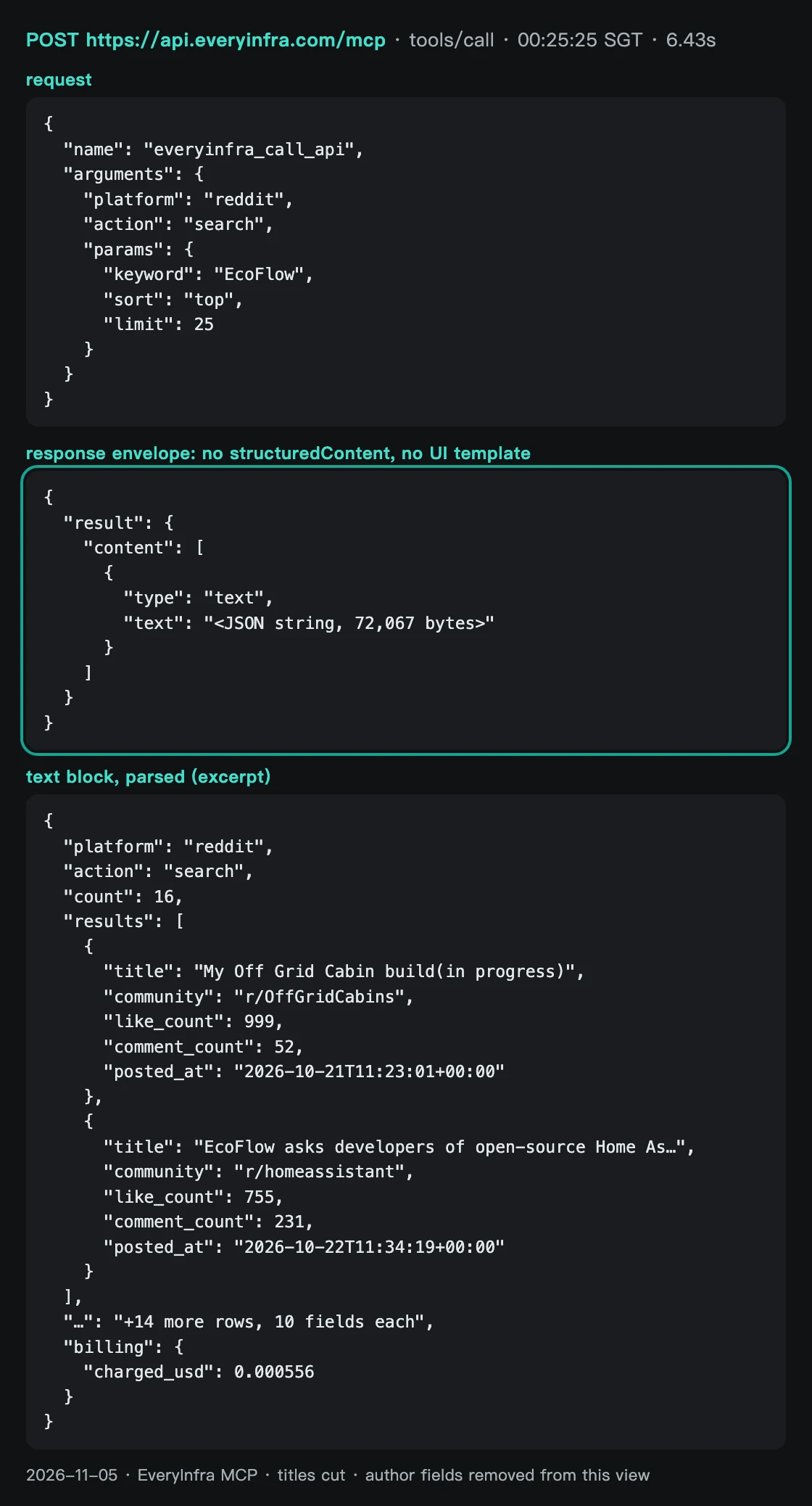
The top two of those 16 posts show how hard "brand discussion" is to define. The first is a build log of an off-grid cabin on Prince Edward Island, Canada. Only one sentence mentions EcoFlow: the owner runs the cabin on an EcoFlow Delta Pro, an extra battery and three 495 W panels. It still got 999 likes. The second is an r/homeassistant thread about EcoFlow and open-source Home Assistant developers, with 755 likes and 231 comments.
That one expresses a real view about the brand. None of the 16 posts fell inside last week; they ran from October 5 to November 4, 2026. The "top" sort answers "what did people read most this month". It cannot answer "how much did people talk last week".


Split a report into the six steps above. The first three are between ChatGPT and the API. The last three belong to the model. The API guarantees the steps before step four: correct parameters return raw data, and failed or empty calls are free.
Step five, filter and count, is where reports go wrong. All five tests below happen at this step. The model may not filter by posted_at, or it may treat a capped number as a total. Then the chart can look good and still have the wrong bar heights.
All live calls in this article are in the log below. Times are Singapore time on November 5, 2026.
| Time | Capability | Brands | Rows back | Billed |
|---|---|---|---|---|
| 00:18 to 00:19 | reddit/search newest | 3 | 16, 24, 24 | 3 x $0.000556 |
| 00:19 to 00:21 | twitter/search last week | 3 | 200, 200, 167 | 3 x $0.000556 |
| 00:22 to 00:24 | reddit/subreddit_posts newest | 3 (2 retries after 429) | 100 each | 3 x $0.000556 |
| 00:25 | MCP tools/call, reddit/search top | EcoFlow | 16 | $0.000556 |
| 00:25 to 00:27 | reddit/search top | Jackery, BLUETTI (1 retry) | 22, 22 | 2 x $0.000556 |
| 00:26 | twitter/search Spanish | All 3 in one query | 24 | $0.000556 |
Test 1: last week's X results included posts from after the week
X search supports the since: and until: date operators. The EveryInfra catalog says the twitter/search keyword can include platform search syntax (EveryInfra catalog). The X Help Center says only that you can find posts before a date, after a date or within a range. Its example uses since:2013-12-30 until:2014-01-02 for New Year posts.
It does not say whether the until: day is included or which time zone applies (X Help Center: advanced search). On November 5, 2026, from 00:19 to 00:21 Singapore time, we ran one search per brand. The keyword was "brand since:2026-10-26 until:2026-11-02" and the limit was 200.
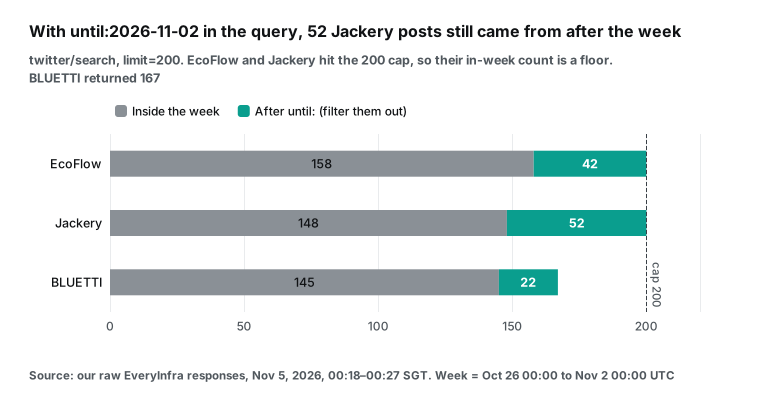
All posts came after the since: date, but many came after until:. EcoFlow returned 200 posts, and 42 had a posted_at on or after November 2, 2026 UTC. Jackery had 52 of 200, and BLUETTI 22 of 167. Most extra posts were from November 2 (EcoFlow 40, Jackery 48, BLUETTI 19), with two to four from November 3. If the model uses count as volume, EcoFlow is 27% too high and Jackery is 35% too high. So keep the line "count only posts with posted_at inside the week" in the prompt.
The second issue is the cap. One twitter/search call returns at most 200 posts. EcoFlow and Jackery both returned exactly 200, so the week may hold more. Write 158 and 148 as "at least". BLUETTI returned 167 and did not reach the cap, so 145 is everything this search could see.
The catalog says X ranks by Top by default, and latest does not guarantee strict time order. So a capped result is not "the newest 200". To count accurately, split the week into two or seven parts and run one call per part. The call count goes up; the cost section below has the numbers.
Test 2: one Reddit search covered only one to two days
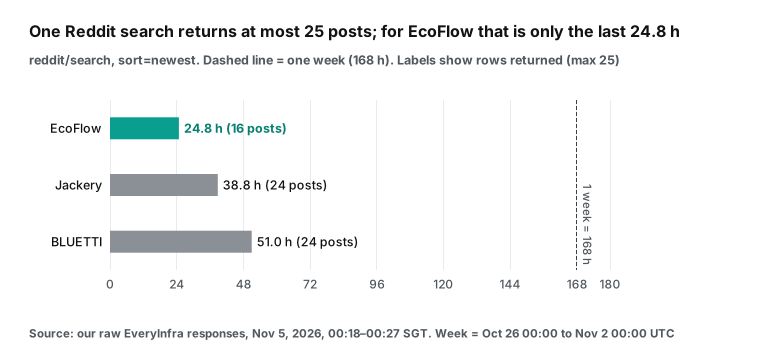
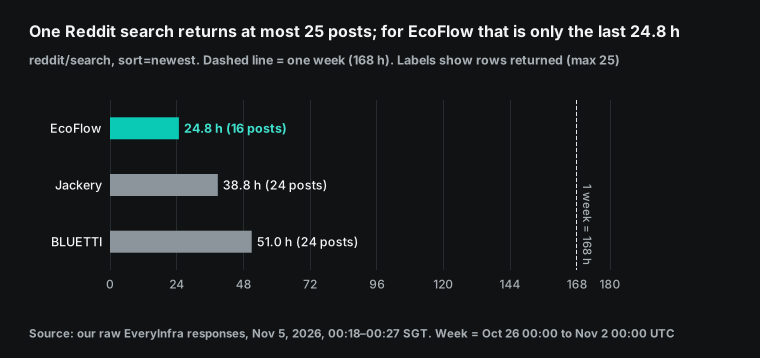
reddit/search returns at most 25 posts, and it covers the last month only. On November 5, 2026, at 00:18 and 00:19 Singapore time, we ran one newest search per brand. EcoFlow returned only 16 posts. The oldest was from the afternoon of November 3 UTC, so the search covered 24.8 hours.
Jackery returned 24 posts over 38.8 hours, and BLUETTI 24 posts over 51.0 hours. Each span is the time from the newest post to the oldest post. None reached last week. From the gaps between posts, we estimate site-wide mention rates of about 15.5, 14.9 and 11.3 posts per day. These are estimates, not counts.
Site-wide search is also noisy. EcoFlow's 16 posts were spread over about ten communities, such as r/Ecoflow_community (6 posts), r/prepping, r/dieselheater and r/overlanding. Jackery had 9 of 24 in r/Jackery; the rest were deal posts and preparedness communities. BLUETTI had only 4 of 24 in r/bluetti.
Brand-community posts were 37.5%, 37.5% and 16.7% of the three searches. This kind of data shows where a brand gets mentioned. It does not give a weekly total. At 25 posts per call, a busy brand fills the result in one day. You also cannot be sure how far back each extra call reaches.
For weekly totals, the brand's own community is more reliable. From 00:22 to 00:24 Singapore time we pulled the newest 100 posts of each community with reddit/subreddit_posts. r/Ecoflow_community had at least 73 posts and 492 comments last week. The 100 posts did not reach Monday (the oldest was October 26 at 16:01 UTC), so 73 is a floor. r/Jackery had 13 posts and 206 comments, and r/bluetti had 20 posts and 93 comments.
We hit two 429 rate-limit replies in this round. We waited 60 seconds and tried again. The two 429 replies were not billed.
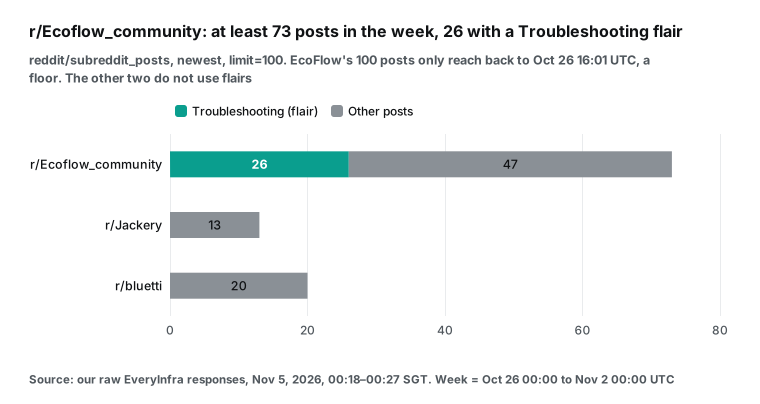
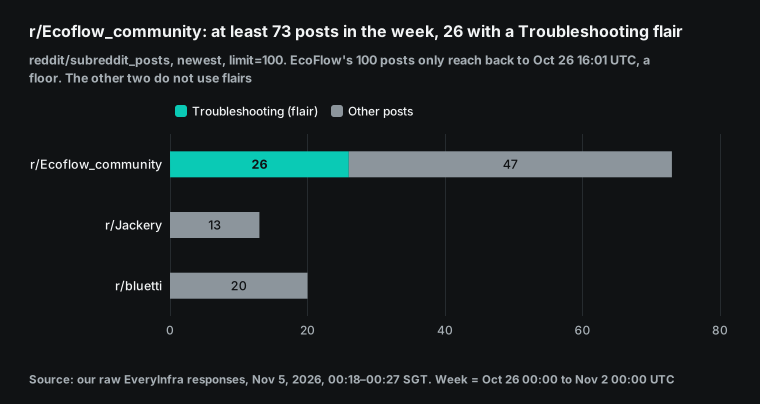
r/Ecoflow_community is the only one of the three that uses flairs. Last week it had 29 Open Discussion posts and 26 Troubleshooting Help posts, plus small groups such as DIY, power backup and reviews. The 26 help posts are at least 36% of the week. You can put that straight into a report as a quality signal.
The model does not need to judge sentiment, because members set the flair value themselves. The other two communities have no flairs, so the model must classify titles. This is why the same prompt gives results of different detail for each brand: the data itself has a different structure.
Test 3: half the posts were in Japanese
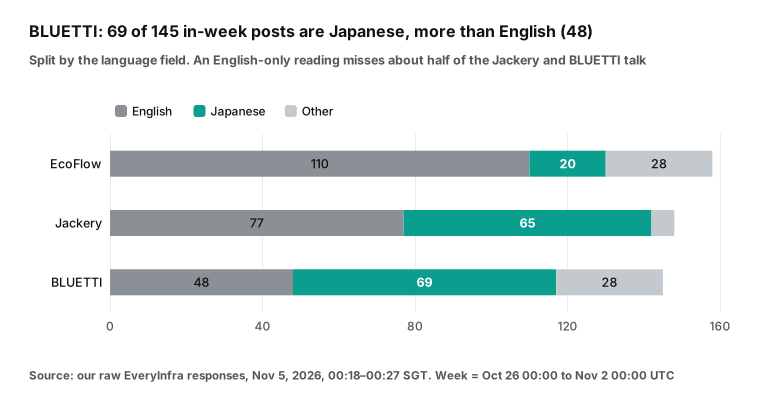
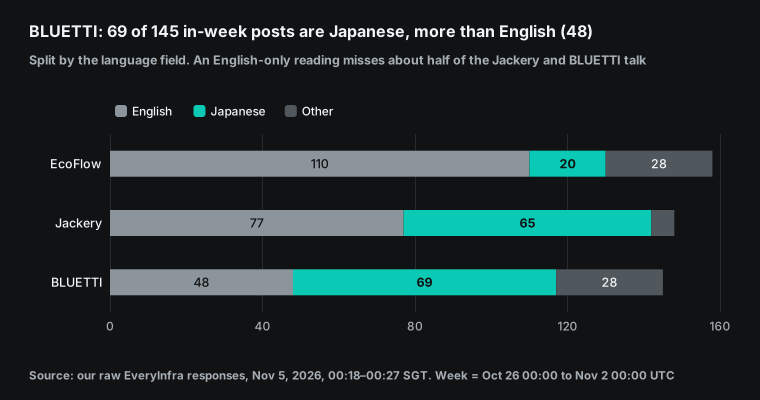
Sentiment is the second number the prompt asks for. The easy route is to read English posts only. But the X language field shows very different language mixes last week. EcoFlow had 158 posts: 110 English, 20 Japanese and 28 in other languages, such as German, Spanish, Ukrainian and Portuguese.
Jackery had 148 posts: 77 English and 65 Japanese. BLUETTI had 145 posts: 48 English and 69 Japanese, so Japanese led. As shares, Japanese was 44% of Jackery's and 48% of BLUETTI's X posts last week.
There is a clear news story behind the Japanese posts, and it starts in the UK. The UK government launched new emergency preparedness advice that encourages households to take "small, simple steps" (GOV.UK news release). The campaign site lists supplies for 3 days (Be Ready site). The Guardian reported on October 22, 2026 that every Briton was urged to keep water and three days of food (The Guardian). Reuters followed on October 23, 2026 (Reuters). Its headline: the UK told the public to keep three days of emergency supplies at home.
Last week's most-liked post across all three brands came out of that story. A Japanese writer posted a long thread on October 27, 2026. It says Japan should follow the UK and ask everyone to prepare. It lists the UK items: water for three days, a hand-crank radio, food, medicine and printed copies of ID and insurance papers.
Later it recommends large power banks and says family members have used Jackery, EcoFlow and BLUETTI, and all three are good. The post got 4,406 likes and 643,989 views. For US and UK readers, the lesson is that an English-only report misses where this week's preparedness talk actually happened.
That post also shows a bigger problem than language. It names all three brands, but only the BLUETTI search returned it. The EcoFlow and Jackery searches both returned the full 200 posts, and it was not in either. Across the three results, any two brands share only 1 to 8 posts. So the most-liked post about all three brands last week does not exist in two of the three brand reports.
We cannot tell why from the response. The 200 cap may have cut it, or the search may not match brand names inside Japanese text with no spaces. The rule is clear anyway. Treat a capped search as a sample, not the whole week. A serious report should merge the three results, remove duplicates, and tag each post with every brand it names.
The three brands also post in Japan themselves. EcoFlowJapan, jackeryjapan and BLUETTI_JAPAN posted 5, 3 and 9 times last week. If the report reads English only, nearly half of BLUETTI's posts drop out of the sentiment score, and so does the most-liked post. The prompt line "split X posts by language" is there so that the model shows the language mix first. GPT-6 can read Japanese. But whether it splits by language, and whether it uses the same rule for each language, depends on the prompt.
Test 4: who scores sentiment, and by count or by likes
We wanted a check that does not come from a model, so we scored last week's English posts with the open-source VADER 3.3.2 lexicon. A compound score of 0.05 or more is positive, and -0.05 or less is negative. VADER is a common rule-based tool for social media text (VADER repository). By post count, the negative shares are close: EcoFlow 17% (19 of 110), Jackery 21% (16 of 77) and BLUETTI 19% (9 of 48). Weighted by likes, the picture changes. Negative posts hold 54% of EcoFlow's English likes, 38% of Jackery's and 22% of BLUETTI's.
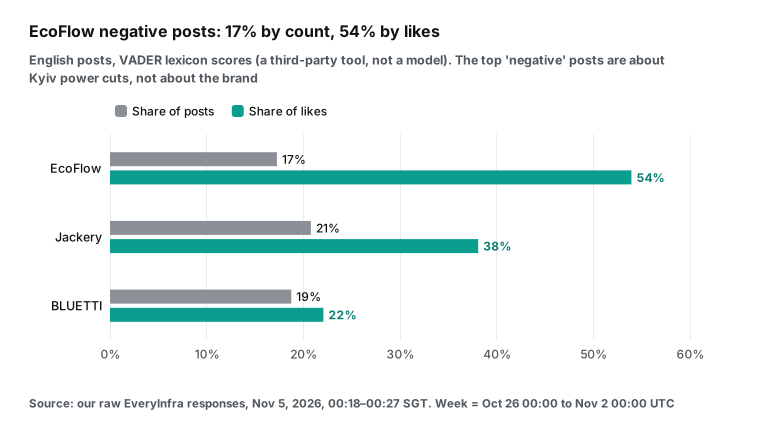
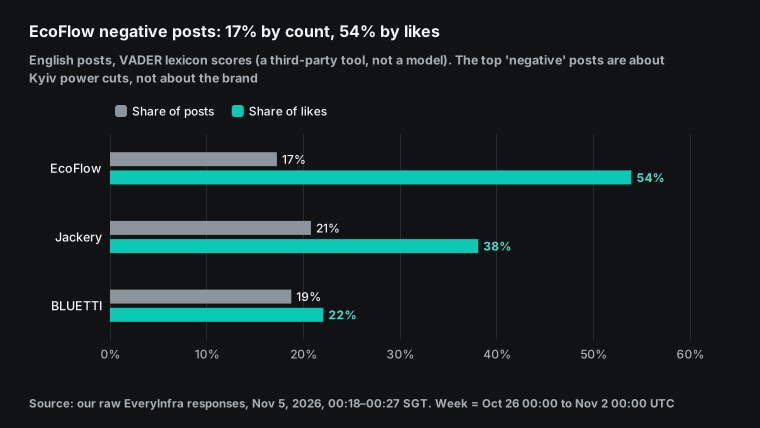
"54% negative" sounds like a crisis for EcoFlow. It is not. We read the 15 most-liked English posts for each brand and labeled the stance toward the brand.
The rule: praise, a recommendation, a purchase or happy use is positive, and brand marketing is positive too. A complaint about the brand or product is negative. A mention only, a fundraising list, news, or use without a judgment is neutral. The article author made all labels in one pass, and no second person checked them. So we use these labels only to show where VADER goes wrong, not as an accuracy score.
For EcoFlow, 14 of 15 were neutral and 1 was positive. None complained about EcoFlow. The top posts were about power cuts in Kyiv.
After Russia's largest attack on Ukraine's energy grid this year, Kyiv had emergency power cuts and water outages (Kyiv Independent). The posts mention EcoFlow units as the way people get through outages. Others are fundraising lists for the front, where EcoFlow is one item. The lexicon sees "attack", "blackout" and "war" and scores negative. Those words are about the war, not the brand.
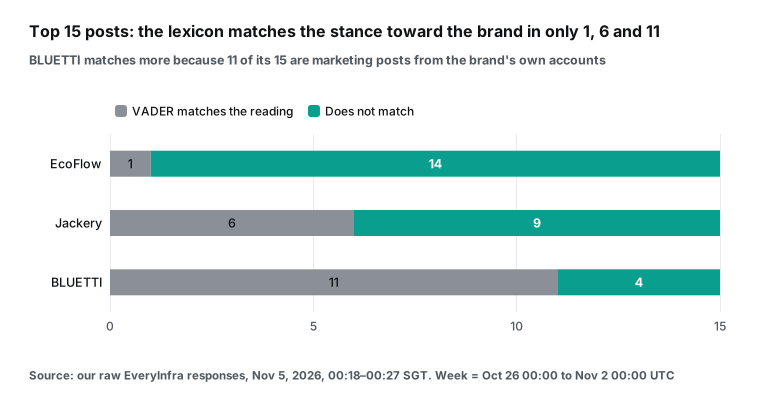
The three brands side by side make the problem clearer. VADER matched our reading on only 1 of EcoFlow's 15 posts. It matched 6 for Jackery, whose top posts sit in excited preparedness threads but are neutral about the brand. It matched 11 for BLUETTI, which looks best.
The reason is that 11 of those 15 posts came from bluetti_inc itself, as Halloween and launch marketing. Brand marketing is positive in tone and positive about the brand, so the lexicon and our labels agree. Brand accounts posted a lot last week: EcoFlow accounts 19 times (EcoFlowTech 9, EcoFlowJapan 5 and others), BLUETTI accounts 23 times (bluetti_inc 14, BLUETTI_JAPAN 9) and Jackery accounts 5 times. If you do not remove them, much of "BLUETTI has the best sentiment" is BLUETTI talking about itself.
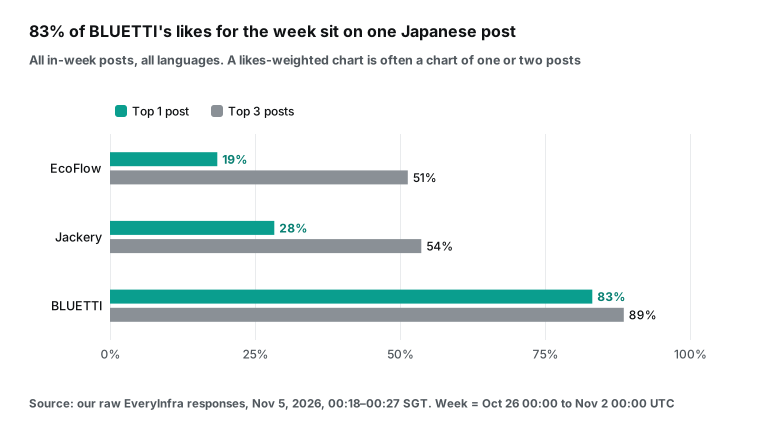
One more number changes the conclusion without any sentiment: how concentrated the likes are. BLUETTI's 145 posts last week had 5,299 likes. The Japanese thread above had 4,406 of them, or 83%. The top three posts had 89%. For EcoFlow and Jackery, the top three had 51% and 54%.
So "BLUETTI had the most engagement" really means "one Japanese post that names BLUETTI went viral". And that post names all three brands; only the BLUETTI search caught it. A report should show median views next to the totals (EcoFlow 171.5, Jackery 137.5, BLUETTI 191) and the top-three share. Then readers can see if one post drives the heat.
These tests give three rules for the sentiment column, and the prompt above includes all three. Judge the stance toward the brand only. List brand-account posts separately. Show both the share by count and the share by likes.
GPT-6 reads full text far better than a lexicon. We did not test its labels in ChatGPT. But one thing is certain. If the prompt says only "analyze sentiment", the model will judge the tone of the whole post. Then it makes the same mistake as the lexicon.
Test 5: how big is one report's data?
The last test asks how much the model must read. We measured each saved response. One twitter/search (up to 200 posts) averaged about 261 KB. One reddit/search (up to 25 posts) was about 50 KB, and one reddit/subreddit_posts (100 posts) about 94 KB.
The MCP text block was 72 KB. A basic report, with one X call and one Reddit search per brand, came to 930,618 bytes. At about 4 bytes per token, that is roughly 233,000 tokens. The full report, with subreddit lists and monthly top posts, came to 1,395,246 bytes, roughly 349,000 tokens.
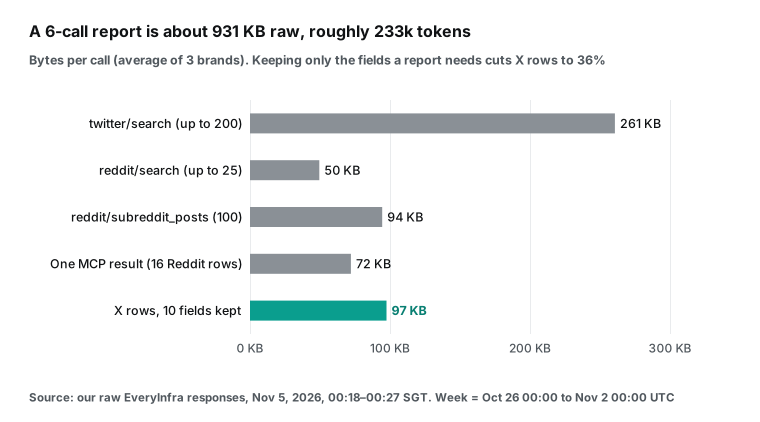
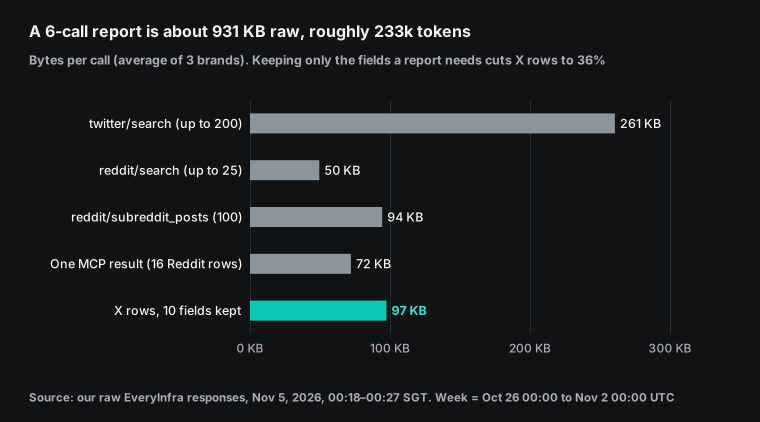
The OpenAI Help Center does not say how much tool output one GPT-6 chat can hold, and we did not test it in ChatGPT. So we do not say "it fits" or "it does not fit". What we can say is that X data is most of the weight. Each post is about 1.3 to 1.4 KB, and fields such as author avatar URL, bio and media details are useless for a report.
With 10 fields and text cut to 280 characters, the X part dropped from 815,904 to 292,415 bytes. These two numbers use the serialized result arrays. The 930,618 bytes above use the saved file sizes, so do not subtract one from the other. If you use the EveryInfra MCP directly, without your own layer, you can ask for less: lower the X limit from 200 to 100. The trade-off is that in-week counts become floors more often.
What the report looks like: the first comparison table
Here are the rules above applied to the live data, for last week (UTC October 26 to November 1, 2026). We computed this from the raw responses with the prompt rules. It is the table that Intelligent UI should draw in the best case. We did not test what ChatGPT actually draws.
| Brand | X posts in week | X likes / median views | English / Japanese | Subreddit posts in week | Subreddit comments | English negative (count / likes) | Note |
|---|---|---|---|---|---|---|---|
| EcoFlow | 158 or more | 4,869 / 171.5 | 110 / 20 | 73 or more (r/Ecoflow_community) | 492 | 17% / 54% | Negative likes come from Kyiv outage and fundraiser posts, not brand complaints; 26 help posts in the community |
| Jackery | 148 or more | 2,016 / 137.5 | 77 / 65 | 13 (r/Jackery) | 206 | 21% / 38% | Japanese is 44%; top posts sit in preparedness threads |
| BLUETTI | 145 | 5,299 / 191 | 48 / 69 | 20 (r/bluetti) | 93 | 19% / 22% | 83% of likes on one Japanese post that names all three brands; top English posts are brand marketing |
The table supports three conclusions. First, X volume for the three brands is in the same range. The gap is smaller than the error in the data, because two brands hit the 200 cap.
Second, EcoFlow's Reddit community is clearly the most active. It has several times the posts and comments of the other two, and 26 posts have a help flair. The table shows only the count. A person must read these posts to know if they point to one product problem.
Third, the most-liked posts last week were about power cuts and preparedness. The Japanese post that names all three brands starts from the UK three-day supplies advice. EcoFlow's most-liked English posts are about power cuts in Kyiv.
API fees for one report
EveryInfra prices come from the catalog we read on November 5, 2026. twitter/search, reddit/search and reddit/subreddit_posts each cost $0.000556 per call. Failed, rate-limited and empty calls are free (EveryInfra catalog; you can also check the pricing page). The price is per call, not per row. A reddit/search that returns 16 rows costs the same as one that returns 24, and a twitter/search with 200 posts is still one call.
| Report version | Calls | API fees |
|---|---|---|
| Basic: 3 brands, one X search and one Reddit search each | 6 | $0.003336 |
| Full: add newest 100 subreddit posts and Reddit monthly top | 12 | $0.006672 |
| Accurate X counts by day (3 brands x 7 days) plus subreddits | 24 | $0.013344 |
| One full report per week, per month (52 weeks / 12) | about 52 | $0.028912 |
| One full report per week, per year | 624 | $0.346944 |
| This article, November 5, 2026, 00:18 to 00:27 Singapore time | 16 requests, 13 billed, 3 rate-limited | $0.007228 |
ChatGPT does not charge per report. Intelligent UI has no separate quota, and plugin calls have no extra fee; they count against your plan (Help Center 20001354).
Plan prices on the Help Center on November 5, 2026: Plus is $20 per month (Help Center 20001493). Pro is $100, $200 or $500 per month (Help Center 9793128). Business Standard is $25 per seat per month, or $20 billed yearly (Help Center 8792828). So the real cost is a fixed plan fee plus API fees that are close to zero. A year of 52 full reports costs $0.35 in API fees.
That is about 1/57 of one month of Plus. The expensive part is people's time. Someone must check each report for the cap, the language mix and brand-account posts.
Rate limits are a cost too. Our test key allows 10 requests per minute, and we hit three 429 replies. The body said "10 requests per minute", "retry after 17s" and "nothing was charged". The headers had retry-after: 17 and x-ratelimit-limit-requests: 10.
Six calls from one ChatGPT question will not normally hit the limit. If several teammates share one EveryInfra account and run reports at the same time, they can. The model sees the 429 text, which is written for an AI to read, and it usually waits and tries again.
What Reddit and Hacker News say
We searched Reddit and Hacker News for "gpt 6 intelligent ui" over the last month. We looked for one thing: an example of custom MCP data that Intelligent UI drew as a chart. We found no example and no counterexample. Most threads discuss Intelligent UI itself, and we removed usernames from all quotes. In the r/OpenAI launch thread, the top comment called it the first feature in a long time that helps normal users, not just coders. Another comment compared it to Java applets (r/OpenAI launch thread).
In the r/ChatGPT launch thread, one user asked how this differs from the artifacts that other models make. Another noted that it works in Chat only, not Work (r/ChatGPT launch thread). An r/codex thread asked what it can do that was not possible before (r/codex thread). Hacker News criticism focused on more images and white space, so less information per screen (Hacker News thread). The r/technology repost was mostly doubtful about models doing all the work (r/technology thread).
One r/ChatGPT thread title matters most for reports. It says Intelligent UI is good but still a sketchpad, not infrastructure (r/ChatGPT thread). This view fits our advice. Use Intelligent UI as a quick view at question time. Keep numbers that you track over time in a shared page or in your own spreadsheet. Our Spaces article shows the shared page.
Limits and things to watch
| Trap | What we saw | What to do |
|---|---|---|
| Out-of-week posts | X until: let in 42, 52 and 22 posts | Filter by posted_at |
| Caps | 200 X posts, 100 subreddit posts | Write "at least", or split the week |
| Missed posts | Top post named 3 brands, found by 1 search | Merge brand results and remove duplicates |
| Language | Japanese was 44% and 48% for two brands | Split by language first |
| Brand accounts | 11 of BLUETTI's top 15 English posts | List them apart from sentiment |
OpenAI does not promise that Intelligent UI renders custom MCP results. This whole method depends on the model reading text and building the table itself. That is inside OpenAI's statement that answers can include tables and charts, but it is not a separately documented feature. Before you roll it out to a team, run the same prompt three times on your own account. Check that the layout is stable before you depend on it.
The data tool asks for confirmation. everyinfra_call_api is not marked read-only, so developer mode and plugin permissions make ChatGPT ask before it calls. Business admins can change the approval policy in plugin settings. For personal Pro, OpenAI says "read and fetch permissions". The docs do not say if a non-read-only tool on Pro runs, asks or is blocked, and we did not test it in ChatGPT.
Intelligent UI state does not carry across chats. The Help Center says components such as checklists keep state after a refresh, but not in a new chat. Next week's question gives a brand-new report, and last week's toggles and filters do not come with it. For week-over-week comparison, copy each table out, or use a Spaces page.
You cannot get Intelligent UI through the API. The developer docs describe chat-latest as the latest Instant model used in ChatGPT (chat-latest model page). The changelog records its snapshot updates (API changelog). We found no statement that Intelligent UI components come through the API. To build the same report inside your own product, draw the charts yourself.
There are three data traps. X until: lets in posts from after the week, so filter by posted_at again. The caps of 200 for twitter/search and 100 for reddit/subreddit_posts turn busy brands' counts into floors. A capped search can also miss the week's biggest post. Reddit rows have no language field, so the model must judge Japanese or Spanish posts itself. The prompt above covers all three, and the note under each table should repeat them.
Reddit and X have their own rules. EveryInfra returns public posts for market research and brand monitoring. If you redistribute results, train models on them or profile individuals, read the platform terms first. The Reddit Data API page says the Developer Terms and Data API Terms set the rules of use (Reddit Data API Wiki). Read the Reddit Data API Terms before you reuse data. This article is not legal advice.
Recent changes
| Date | Change |
|---|---|
| October 7, 2026 | GPT-6 and Intelligent UI roll out in Chat to Plus, Pro, Business and Enterprise; the Business release notes record it the same day. |
| October 8, 2026 | Free and Go get GPT-6 Luna. |
| October 22, 2026 | The Guardian reports the UK Be Ready advice; Reuters follows on October 23, 2026. |
| November 4, 2026 | EveryInfra MCP connections with a key in the URL stop working; ChatGPT users move to /mcp/all with OAuth. |
| November 5, 2026 | our live calls and the read date for every official page. |
GPT-6 Intelligent UI FAQ
Can free users get GPT-6 Intelligent UI?
Yes. The launch post says Free and Go got it from October 8, 2026, with GPT-6 Luna, and the Help Center says Luna supports Intelligent UI. But the custom MCP Help Center page does not list Free or Go among plans that can add custom MCP servers. So a free account sees Intelligent UI answers, but OpenAI does not document whether it can connect EveryInfra. Sources: OpenAI launch post, Help Center 20001598.
Can I turn Intelligent UI off?
Not fully; you can only make it simpler. The Intelligent UI page says Personalization, then Layout and Visuals, then Simple, on the web. The GPT-6 models page says turn off Layout and visuals in Settings. Both pages say some visual elements may still appear, and there is no full text-only mode. Sources: Help Center 20001598, Help Center 20001354.
Can developers use Intelligent UI in the API?
Not as documented. The API has chat-latest, described as the latest Instant model used in ChatGPT. But the API docs and changelog we read do not say Intelligent UI components come through the API. For interactive UI in your own app, OpenAI's documented route is a plugin with an MCP Apps template. Sources: chat-latest model page, developer docs: ChatGPT UI.
Does Intelligent UI draw custom MCP data automatically?
Not as documented. On plugins, the Help Center says only that connected plugins "will continue to work". The EveryInfra MCP returns a JSON string with no structuredContent and no UI template. The model must read it and build a chart with Intelligent UI.
Whether a chart appears, and whether it looks the same each time, depends on the prompt and the data size. For a fixed chart layout, the documented route is MCP Apps. Sources: Help Center 20001598, MCP specification: Tools.
Why does my chat show GPT-6 Sol but no visuals?
Check four things. Are you in the Chat tab? Work and Voice do not support it. Did you pick the Pro thinking level? GPT-6 Astra does not support it.
Is your desktop app an old version? Did you choose Simple in settings? The rollout was gradual, and some paid users on Reddit still had no visuals days after launch. Sources: Help Center 20001598, r/ChatGPT launch thread.
Get started
- Sign up and add funds in the EveryInfra console. Use the free catalog to check that
twitter/search,reddit/searchandreddit/subreddit_postsare available. - Call each capability once with curl or the playground. Check the fields, caps and date syntax for X search and Reddit search.
- In ChatGPT on the web, add a custom MCP server in Plugins:
https://api.everyinfra.com/mcp/allwith OAuth. See remote MCP setup and the MCP server page. In Business, ask an admin. - Add a Custom Instruction: "Use tables when comparing options, and say how each number was counted". Ask with the prompt above. Confirm the first call and choose to remember it for the chat.
- Check the table against the three traps: out-of-week posts, caps and language. Then share it with your team.
Related reading
- ChatGPT Spaces competitor tracker: a shared page that a team updates weekly, a good home for this report's numbers.
- ChatGPT dots product research radar: two permission sets for an always-on agent, and why paid data calls go in assigned tasks.
- ChatGPT scheduled tasks demand radar: one person gets a weekly push of Reddit complaints and questions.
- Reddit data API and X data API: all capabilities, parameters and prices.
References
- GPT-6 and Intelligent UI for everyone, OpenAI, read November 5, 2026, https://openai.com/index/gpt-6-for-everyone/
- Intelligent UI in ChatGPT, OpenAI Help Center, read November 5, 2026, https://help.openai.com/en/articles/20001598-intelligent-ui-in-chatgpt
- GPT-6 and other models in ChatGPT, OpenAI Help Center, read November 5, 2026, https://help.openai.com/en/articles/20001354-gpt-6-and-other-models-in-chatgpt
- Connecting custom MCP servers in ChatGPT, OpenAI Help Center, read November 5, 2026, https://help.openai.com/en/articles/12584461-connecting-custom-mcp-servers-in-chatgpt
- ChatGPT Business release notes, OpenAI Help Center, read November 5, 2026, https://help.openai.com/en/articles/11391654-chatgpt-business-release-notes
- ChatGPT release notes, OpenAI Help Center, read November 5, 2026, https://help.openai.com/en/articles/6825453-chatgpt-release-notes
- ChatGPT Enterprise and Edu release notes, OpenAI Help Center, read November 5, 2026, https://help.openai.com/en/articles/10128477-chatgpt-enterprise-and-edu-release-notes
- ChatGPT Business models and limits, OpenAI Help Center, read November 5, 2026, https://help.openai.com/en/articles/12003714-chatgpt-business-models-and-limits
- ChatGPT Enterprise and Edu models and limits, OpenAI Help Center, read November 5, 2026, https://help.openai.com/en/articles/11165333-chatgpt-enterprise-and-edu-models-and-limits
- ChatGPT Business overview, OpenAI Help Center, read November 5, 2026, https://help.openai.com/en/articles/8792828-chatgpt-business-overview
- About ChatGPT Pro tiers, OpenAI Help Center, read November 5, 2026, https://help.openai.com/en/articles/9793128-about-chatgpt-pro-tiers
- ChatGPT back-to-school offer for students (states the Plus price), OpenAI Help Center, read November 5, 2026, https://help.openai.com/en/articles/20001493-chatgpt-back-to-school-offer-for-students
- Build your MCP server, OpenAI developer docs, read November 5, 2026, https://developers.openai.com/plugins/build/mcp-server
- ChatGPT UI, OpenAI developer docs, read November 5, 2026, https://developers.openai.com/plugins/build/chatgpt-ui
- Authentication, OpenAI developer docs, read November 5, 2026, https://developers.openai.com/plugins/build/auth
- Connect and test in ChatGPT, OpenAI developer docs, read November 5, 2026, https://developers.openai.com/plugins/deploy/connect-chatgpt
- Plugins changelog, OpenAI developer docs, read November 5, 2026, https://developers.openai.com/plugins/changelog
- ChatGPT Developer mode, OpenAI developer docs, read November 5, 2026, https://developers.openai.com/api/docs/guides/developer-mode
- chat-latest, OpenAI developer docs, read November 5, 2026, https://developers.openai.com/api/docs/models/chat-latest
- API changelog, OpenAI developer docs, read November 5, 2026, https://developers.openai.com/api/docs/changelog
- GPT-6 and Intelligent UI in ChatGPT (announcement), OpenAI Developer Community, read November 5, 2026, https://community.openai.com/t/gpt-6-and-intelligent-ui-in-chatgpt/1404139
- Tools (MCP specification 2025-06-18), Model Context Protocol, read November 5, 2026, https://modelcontextprotocol.io/specification/2025-06-18/server/tools
- Authorization (MCP specification 2025-11-25), Model Context Protocol, read November 5, 2026, https://modelcontextprotocol.io/specification/2025-11-25/basic/authorization
- MCP Apps, Model Context Protocol, read November 5, 2026, https://modelcontextprotocol.io/docs/extensions/apps
- EveryInfra data capability catalog (free), read November 5, 2026 at 00:17 Singapore time, https://api.everyinfra.com/api/v1/social/catalog
- EveryInfra /mcp/all protected resource metadata, read November 5, 2026, https://api.everyinfra.com/.well-known/oauth-protected-resource/mcp/all
- EveryInfra MCP server (initialize, tools/list and tools/call live calls), read November 5, 2026, https://api.everyinfra.com/mcp
- How to use advanced search, X Help Center, read November 5, 2026, https://help.x.com/en/using-x/x-advanced-search
- Reddit Data API Wiki, Reddit Help, read November 5, 2026, https://support.reddithelp.com/hc/en-us/articles/16160319875092-Reddit-Data-API-Wiki
- Data API Terms, Reddit, read November 5, 2026, https://www.redditinc.com/policies/data-api-terms
- vaderSentiment (VADER 3.3.2), GitHub, read November 5, 2026, https://github.com/cjhutto/vaderSentiment
- Households encouraged to take small, simple steps to stay prepared in an emergency, GOV.UK, read November 5, 2026, https://www.gov.uk/government/news/households-encouraged-to-take-small-simple-steps-to-stay-prepared-in-an-emergency
- Be ready for emergencies, GOV.UK campaign site, read November 5, 2026, https://beready.campaign.gov.uk/
- UK tells public to keep three days' emergency supplies at home, Reuters, October 23, 2026, read November 5, 2026, https://www.reuters.com/business/aerospace-defense/uk-tells-public-keep-three-days-emergency-supplies-home-2026-10-23/
- Every Briton should stockpile water and food supplies, government advises, The Guardian, October 22, 2026, read November 5, 2026, https://www.theguardian.com/politics/2026/oct/22/britain-prepare-infrastructure-attacks-hostile-states-wes-streeting
- Kyiv faces emergency power cuts, widespread water outages after Russia's largest attack on energy infrastructure this year, Kyiv Independent, read November 5, 2026, https://kyivindependent.com/kyiv-faces-emergency-power-cuts-widespread-water-outages-after-russias-largest-attack-on-energy-infrastructure-this-year/
- EcoFlow launches new residential storage series with Titan range, ess-news, October 14, 2026, read November 5, 2026, https://www.ess-news.com/2026/10/14/ecoflow-launches-new-residential-storage-series-with-titan-range/
- Tiny Titan: new residential battery system from EcoFlow starts small, electrek, October 18, 2026, read November 5, 2026, https://electrek.co/2026/10/18/tiny-titan-new-residential-battery-system-from-ecoflow-starts-small/
- EcoFlow's new TITAN batteries can keep your central air running through a blackout, PopSci, read November 5, 2026, https://www.popsci.com/gear/ecoflow-titan-5000-home-battery/
- BLUETTI Unveils Early Access for Apex 200: Next-Gen Versatile Power Station (PRNewswire release), Yahoo Finance, October 20, 2026, read November 5, 2026, https://finance.yahoo.com/energy/articles/bluetti-unveils-early-access-apex-160900669.html
- GPT-6 and Intelligent UI for everyone (thread), r/OpenAI, read November 5, 2026, https://www.reddit.com/r/OpenAI/comments/1x045qs/gpt6_and_intelligent_ui_for_everyone/
- GPT-6 and Intelligent UI for everyone (thread), r/ChatGPT, read November 5, 2026, https://www.reddit.com/r/ChatGPT/comments/1x052jr/gpt6_and_intelligent_ui_for_everyone/
- GPT-6's Intelligent UI is genuinely good. It's still a sketchpad, not infrastructure, r/ChatGPT, read November 5, 2026, https://www.reddit.com/r/ChatGPT/comments/1x6crjw/gpt6s_intelligent_ui_is_genuinely_good_its_still/
- What can GPT-6 + Intelligent UI do that wasn't already possible, r/codex, read November 5, 2026, https://www.reddit.com/r/codex/comments/1x04lt9/what_can_gpt6_intelligent_ui_do_that_wasnt/
- OpenAI Introduces "Intelligent UI" For ChatGPT With GPT-6, r/technology, read November 5, 2026, https://www.reddit.com/r/technology/comments/1x04ajv/openai_introduces_intelligent_ui_for_chatgpt_with/
- GPT-6 and Intelligent UI (thread), Hacker News, read November 5, 2026, https://news.ycombinator.com/item?id=49996425
Reference BL-90