ChatGPT dots product radar: why the data pull belongs in an assigned task
ChatGPT dots proactive research cannot change content via plugins, so billed data pulls go in an assigned task. Amazon, TikTok, Temu tests: $0.015558/day.

ChatGPT dots can do "proactive research" while you are away. OpenAI's docs say this research cannot change content through plugins, send messages, or control a browser or computer. ChatGPT also treats any MCP tool without readOnlyHint as a write action. A tool that fetches product data costs money on every call, so EveryInfra does not label it read-only.
From these two facts, we infer that a dot cannot use the EveryInfra remote MCP to pull fresh Amazon data on its own. We have not tested this inside a dot. So put the data pull in a daily task that you assign. Proactive research can then read the stored result and tell you what changed.
We tested this on 2026-11-01 (Singapore time, SGT). We made 27 real calls against Amazon Kitchen & Dining lists, one Amazon product page, TikTok Shop and Temu. Seventeen calls were charged, for a total of $0.022794. The best sellers list had prices on only 0 to 48 of 100 rows.
Its ranks did not change at all within one hour. After 12.6 hours, the median item moved two places. On Temu, 26 of 47 matching items changed price. The daily recipe in this article uses 13 calls and costs $0.015558 in API fees.

The use case is specific. A cross-border seller wants a dot to watch Amazon best sellers and new releases every day. The seller also wants the dot to check a few keywords on TikTok Shop and Temu for new items and price changes. When something moves, the dot should send a note.
First we check what dots are, which plans include them, and whether they work in the EU and UK. We use OpenAI's own text for this. Then we show how to connect the EveryInfra remote MCP. Finally, we use real call data to answer three questions.
Is a daily radar worth it? What does one run cost? Which fields need a second call?
We do not have a Pro or Business Premium account to test with. So every ChatGPT step in this article is a configuration example. Every EveryInfra number comes from a real response.
What ChatGPT dots is: an always-on agent with its own computer
OpenAI announced dots at DevDay on 2026-09-29. The launch page describes a dot as an always-on agent that runs on GPT‑6 Astra (OpenAI, "Introducing dots"). Each dot has its own cloud computer and browser. It can reach more than 4,000 apps through plugins. You can talk to it in the ChatGPT desktop app, on the web and in the mobile app. You can also reach it in Slack and Teams (developer docs, "Channels").
Since 2026-10-28, US Pro users can also text a dot over iMessage or RCS (9to5Mac, 2026-10-28). This is a beta. The Help Center says the texts pass through a third party called Linq and are not end-to-end encrypted (Help Center, "Getting started with your dot"). Do not put API keys or private price lists in those messages.
A dot differs from a normal ChatGPT chat in two ways. First, it has its own computer. The developer page "Computers and apps" says each dot gets a cloud machine with a browser and common software (developer docs). It can also use your own computer through the ChatGPT desktop app. The Verge describes it as a coworker that can use other software (The Verge hands-on). In that test, the dot stopped at a human check and at a bank form, and it asked the reviewer to take over.
Second, a dot works when you are quiet. When idle, it uses your connected apps for proactive research. It then brings back a suggestion or a question (developer docs, "Tasks and memory"). For a seller, this is the attractive part. The ideal dot checks the lists each morning and sends a note when a new item jumps up or a rival cuts a price. But OpenAI puts one hard limit on proactive research, and that limit shapes the whole design.
A dot starts with context from ChatGPT memory and keeps its own notes about your preferences, decisions and current work, per the same "Tasks and memory" page. The privacy FAQ says OpenAI does not train directly on proactive research or its notes. Other dot conversations and work follow your data control settings (privacy FAQ, data controls). For a product radar, you can tell the dot your rules one time. For example: "kitchen gadgets, $15 to $60, fewer than 100 reviews." The dot can then apply those rules in later research.
Which plans include ChatGPT dots, and the EU and UK question
The Help Center page "Getting started with your dot" has a section called "Which plans include dots?" We took a screenshot of it at 14:42 SGT on 2026-11-01. The plans paragraph is boxed below.
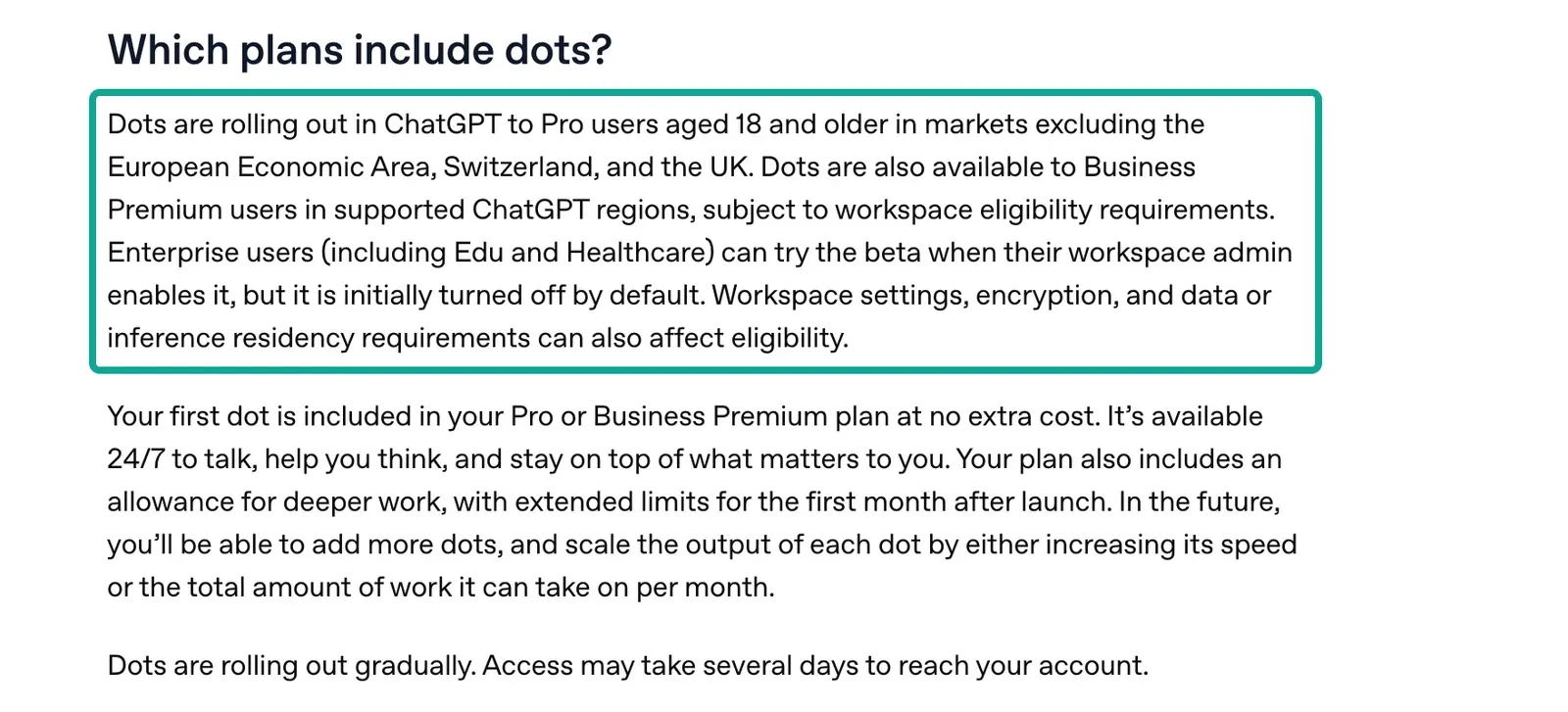
The table below combines that paragraph with other OpenAI pages. All prices are public list prices that we read on 2026-11-01. They can change, so check the OpenAI pages again before you buy.
| Plan | Public price (read 2026-11-01) | Includes dots? | Region and age | Source |
|---|---|---|---|---|
| Pro 100 / Pro 200 / Pro 500 | $100 / $200 / $500 per month | Yes, first dot at no extra cost | 18+, outside the EEA, Switzerland and the UK | Help 20001530, Pro tiers |
| Business Premium seat | $125 per user per month billed monthly, $100 billed yearly, 2-seat minimum | Yes | Help: supported ChatGPT regions, subject to workspace eligibility. Developer docs: rolling out worldwide | Business overview, Business FAQ, developer docs |
| Enterprise, Edu, Healthcare | Contract | Beta, off by default, admin turns it on | Per workspace | Workspace dots, admin guide |
| Plus, Go, Free | n/a | Not on the Help Center list | n/a | Help 20001530 |
Readers in the EU and UK must look at two cases. Personal Pro dots are not available in the EEA, Switzerland or the UK. That is the Help Center's own text, not our guess. Business Premium uses different words.
The Help Center says "supported ChatGPT regions, subject to workspace eligibility." The developer docs say dots are "rolling out worldwide." Neither text excludes Europe by name. Neither text promises that a given European workspace has dots today. A European team should ask its workspace admin to look for the dots switch in the admin console. We have no European workspace, so we cannot go further than the text.
A few more details sit in the Help Center and release notes. In the first month, a dot comes with extra usage. Chats with your dot do not count toward ChatGPT usage limits. Tasks that the dot starts in ChatGPT Work or Codex do count (Help 20001530).
Dots do not work on the mobile web, only in the apps and on desktop web. A Business Premium seat includes five times the usage of a Standard seat (Business FAQ). The workspace page also notes that Enterprise model controls do not apply to the main dot (workspace dots).
The release notes for 2026-10-29 add a usage change (ChatGPT release notes). Pro 100 and Pro 500 now get twice their previous Work and Codex allowance. The announced cut for Pro 200 is canceled. A dot that starts tasks on your behalf draws on that allowance. A larger allowance makes a once-a-day radar less likely to hit a cap.
TechCrunch interviewed Codex product lead Alexander Embiricos on 2026-10-26 (TechCrunch). The article confirms that dots start at a $100-a-month plan. So the "$0.015558 per day" in this article is only the EveryInfra API fee. It assumes you already pay at least $100 a month for ChatGPT. For a small seller who watches a few categories, the ChatGPT plan is the real cost. The API fee is close to zero next to it.
Proactive research versus assigned tasks in ChatGPT dots
This is the most important section. The developer page "Tasks and memory" splits dot work into two types. The first type is a task that you assign. It can run once or on a schedule.
The second type is proactive research that the dot does alongside assigned work. The page says the dot can research information it has permission to read and keep private notes. On limits, the exact sentence is: "Proactive research itself doesn't send messages, change connected apps, or control a browser or computer." We took a screenshot of that section at 00:57 SGT on 2026-11-01.
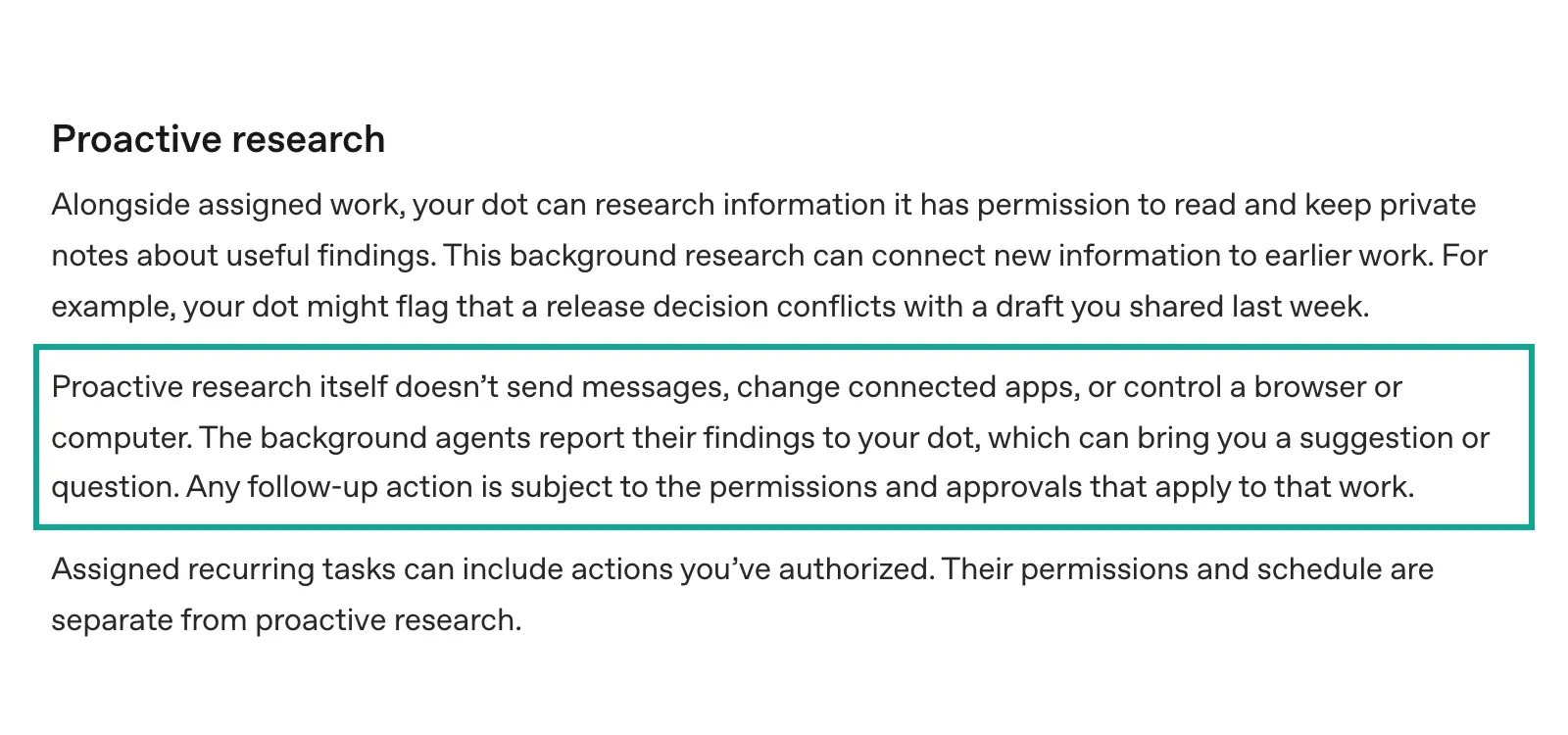
The privacy and safety FAQ gives more detail (Help 20001529). Proactive research can read permitted connected sources and save private notes. But its research tools cannot directly send messages to other people, change content through plugins, or control a browser or computer. The same page says custom rules cannot change Auto-review or the restrictions on proactive research.
The "Tasks and memory" page adds two points. Assigned recurring tasks can include actions you have authorized, and their permissions and schedule are separate from proactive research. During proactive research, background agents report findings to the dot, and the dot can bring you a suggestion or a question.
None of these pages uses the words "read-only" or readOnlyHint. The claim "proactive research can only call tools labeled read-only" is our inference. ChatGPT probably decides whether a plugin tool "changes content" from its readOnlyHint. The basis is the "Custom MCP server" guide, quoted in the readOnlyHint section below. We have not tested this inside a dot.
| Proactive research | Your assigned daily task | |
|---|---|---|
| Who starts it | The dot, when idle | You, with a task and a time |
| Tools it can use | Reads what it may read; by our inference, only tools labeled read-only | Tools you have authorized, including write actions |
| Send messages or change content | No | Yes, within your permissions |
| Control a browser or computer | No | Yes, within your permissions |
| Can custom rules widen it | No | Yes, through rules and app permissions |
| Its job in the radar | Read stored results and flag changes | Call the API on a schedule and store results |
| Source | Tasks and memory, privacy FAQ | Same |
For a seller, the table points one way. Proactive research is good for reading and thinking. It can scan yesterday's table, compare quotes in your inbox, or flag a jump in rank. It is not good at going out to fetch new data, at least when the fetch needs a tool that is not read-only.
ChatGPT dots versus a normal ChatGPT scheduled task
Many readers ask why they need dots at all. Normal ChatGPT has had scheduled tasks for a long time. For this use case, the two differ in three places.
First, a dot has its own cloud computer and browser. In an assigned task, it can open a web page that no API covers. A normal scheduled task cannot do that. The cost is extra Work or Codex usage, and the dot may stop at a human check and wait for you.
Second, a dot brings back suggestions when you did not ask. A normal scheduled task runs at a set time and returns one result. Third, a dot can reach you in Slack, Teams or by text, so you are more likely to see the alert.
For a product radar, the second point has the most value. But as the last section showed, by our inference it can read and cannot fetch. So a sensible split looks like this. The fixed daily data pull goes to an assigned task, or to a scheduler outside ChatGPT.
The judgment call goes to proactive research. That judgment call is "after reading today's and yesterday's tables, which item deserves your attention?" It costs nothing in API fees. If you already run a demand radar with normal ChatGPT scheduled tasks, dots mainly add the second half. The data pull barely changes.
Why we infer proactive research cannot call data tools: readOnlyHint
The MCP specification defines hint fields for each tool. One of them, readOnlyHint, says that the tool does not change its environment (MCP spec, ToolAnnotations). OpenAI's developer guide "Custom MCP server" is explicit about how ChatGPT uses it (developer docs). ChatGPT respects readOnlyHint.
A tool without this hint counts as a write action. Write actions need your confirmation by default. The plugin planning guide also asks developers to label read tools and write tools apart (Plan tools).
At 14:37 SGT on 2026-11-01, we sent tools/list to https://api.everyinfra.com/mcp, once with a key and once without. Both replies matched. We read it again at 15:39 SGT during this revision, with the same result. The list has 12 tools. Seven report readOnlyHint=true and five report false. The data tool everyinfra_call_api and the web search tool everyinfra_search both report readOnlyHint=false, openWorldHint=true and destructiveHint=true.
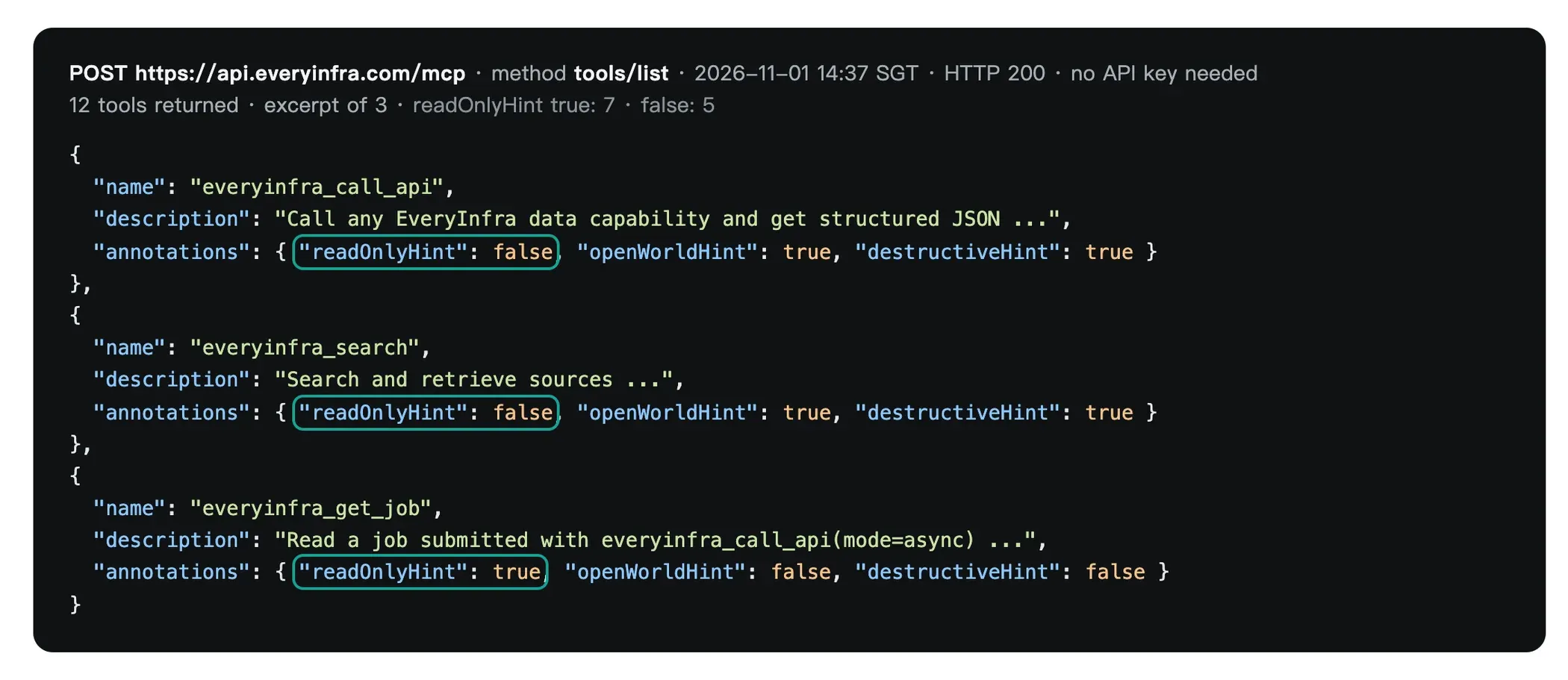
| Tool | readOnlyHint | What it does | Usable in proactive research? (our reading of OpenAI's rules) |
|---|---|---|---|
everyinfra_call_api | false | Calls any data capability, billed per call | No |
everyinfra_search | false | Web search, billed per call | No |
everyinfra_chat | false | AI chat, billed by usage | No |
everyinfra_solve_captcha | false | Captcha solving, billed per call | No |
everyinfra_create_ticket | false | Opens a support ticket | No |
everyinfra_list_capabilities | true | Reads the capability catalog | Yes |
everyinfra_get_job | true | Reads an async job's status and result, free | Yes |
everyinfra_get_account | true | Reads balance and usage | Yes |
everyinfra_list_requests | true | Reads the call history | Yes |
| Three more read-only tools | true | Captcha types, top-up link, read a ticket | Yes |
The data tools do not change anything on Amazon or TikTok. But each call takes money from your balance. The plugin guide says readOnlyHint is true only when the tool cannot change state (Plan tools). By that definition, a paid call is not read-only.
By our inference, proactive research alone cannot get fresh product data from EveryInfra. It can read stored data in a connected drive or sheet. It may also use everyinfra_get_job to read the result of an async job that an assigned task started. We have not tested either case inside a dot.
For an unattended assigned task, a second label matters more. everyinfra_call_api also reports destructiveHint=true. The plugin guide defines this hint as a tool that can cause irreversible or hard-to-reverse outcomes. The Help article "Managing app permissions" says such actions may need extra review. Under "allow low-risk actions," higher-risk actions may still need confirmation or be denied.
No OpenAI page we read says how ChatGPT uses destructiveHint. So we cannot say whether each data call will trigger a prompt.
The safe setup has three parts. First, give this one plugin the "allow all actions" level, or add a "take action without asking" rule for everyinfra_call_api. The Help article says the account-wide default does not offer "allow all actions," but a single app may. Second, cap spend with the key limit below. Third, after the first run, look in the dot's task activity for a step that waits for approval.
Connecting the EveryInfra remote MCP to ChatGPT dots: configuration example
Dots share plugins with ChatGPT, ChatGPT Work and Codex. If you install and authorize a plugin in one place, your dot can use it, with the same permissions (privacy FAQ, Codex plugins). The Help Center page "Connecting custom MCP servers" lists the steps (Help 12584461). Open Plugins and click "+".
Select "Add custom MCP server." Enter a name and the connection URL. You can also use a Secure MCP Tunnel for a private server (Secure MCP tunnels). Pick the authentication type, tick "I understand and want to continue," and choose "Create as a plugin" (Connect and test your plugin).
This option is only on the web. The Help Center FAQ asks whether there are geographic limits, and the answer is no.
Plan the authentication step first. EveryInfra does not publish OAuth metadata. At 14:51 SGT on 2026-11-01, we sent a GET to each of the three discovery URLs. All three returned 404. Without a key, the MCP returns an error.
The error says it accepts a key in a request header or as ?key= in the URL. So in ChatGPT, choose "No authentication" and put the key in the connection URL. Below is our configuration example. We have not clicked through it inside a dot.
# Configuration example (ChatGPT web → Plugins → + → Add custom MCP server)
Name:            EveryInfra product data
Description:     Amazon lists and product pages, TikTok Shop and Temu search.
                 Each call is billed at the catalog price.
Connection URL:  https://api.everyinfra.com/mcp?key=<a key made only for ChatGPT>
Authentication:  No authentication
[x] I understand and want to continue
→ Create as a plugin

# App permissions (Settings → Apps → EveryInfra product data)
The assigned daily task must call everyinfra_call_api:
  - Personal account: approve the prompt, or add a custom rule
    "Take action without asking" for this tool
  - Workspace: an admin creates and publishes the plugin, then allows it by role
A key in a URL has a cost. ChatGPT stores the URL, and anyone who can see the app setup can see it. Make a separate key for ChatGPT with three limits. First, allow only the amazon/*, tiktok/* and temu/* capabilities (key scope_mode=selected).
Second, set a total dollar cap (spend_limit_usd). When the cap is reached, calls return 403 key_spend_limit_reached and nothing is charged. Third, set an expiry date. All three fields are in our OpenAPI spec.
With the recipe below, a year of API fees is about $5.68. A $10 cap covers a full year. If the URL leaks, your loss stays under that cap. For client-by-client setup, see remote MCP setup and the MCP server page.
Now the largest open question: can Pro call non-read-only tools? The developer guide "Custom MCP server" says ChatGPT supports both read and write tools. Write actions need confirmation by default. You can make ChatGPT remember "allow" for one conversation, and a new conversation asks again. We follow this developer guide. On that reading, everyinfra_call_api works on Pro, and the first call needs your approval.
But the FAQ on Help 12584461 does not agree. It says Pro users can connect custom MCP servers with read and fetch permissions, and full MCP is only for Business and Enterprise/Edu. We list both texts. Until someone tests this inside a dot, we cannot say which one is right.
An unattended daily task adds one more risk. If the task stops at a confirmation prompt, that day gets no data. So set this app to "allow all actions" first, or add a "take action without asking" rule for the data tool.
Workspaces are clearer. In a Business workspace, only admins and owners can create and publish custom MCP plugins. Enterprise and Edu use role-based access control (Help 12584461).
App permissions have four levels: always ask, allow read actions, allow low-risk actions, and allow all actions (Managing app permissions). Custom rules have four behaviors. They are: take action without asking, take action when you say so, ask before taking action, and hand off to you. Auto-review also checks each action.
Password changes and money transfers always need you to take over (Auto-review). So even with "take action without asking," the rule only applies to your assigned task. The privacy FAQ says custom rules cannot change the restrictions on proactive research.
One real MCP round trip: what the dot sends and what comes back
After you connect a custom MCP, each tool call from the dot is a JSON-RPC tools/call. At 00:52 SGT on 2026-11-01, we sent the same request with curl. The key was in a request header. The call read the Amazon Kitchen & Dining best sellers list with the short name kitchen.
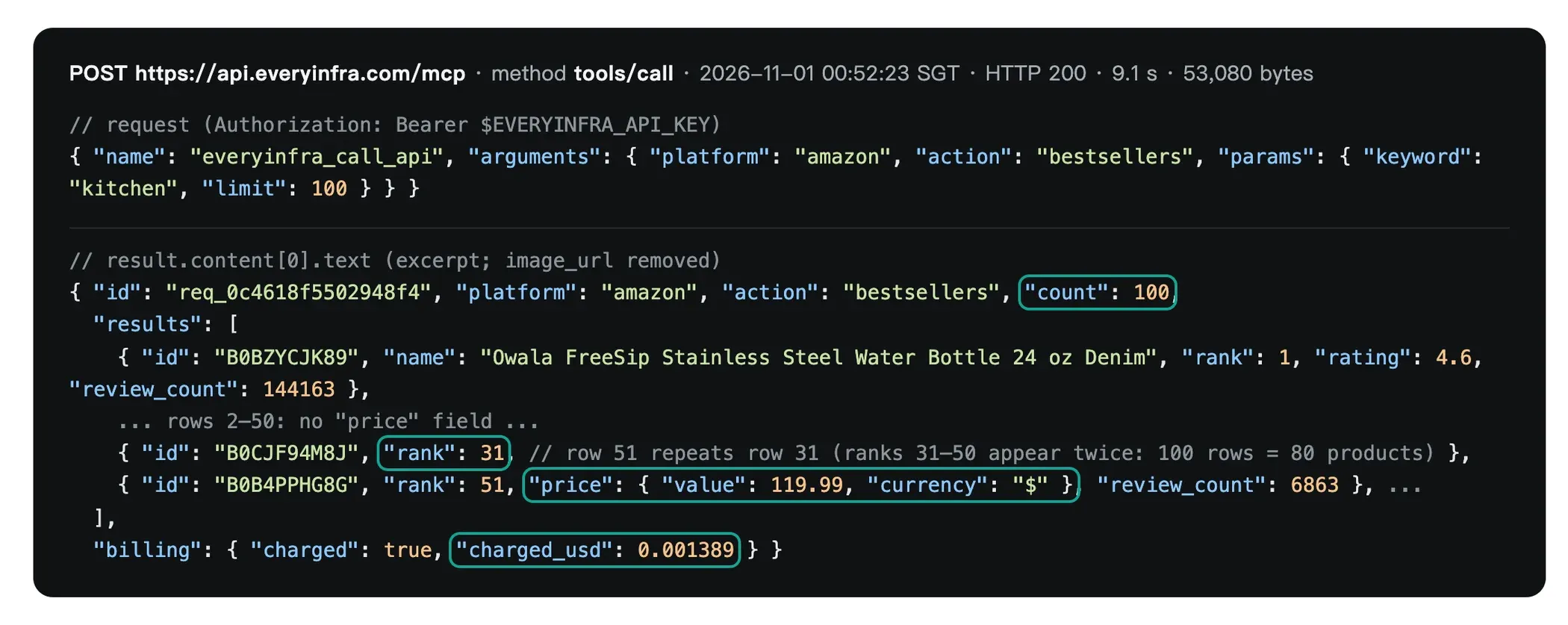
// Request: tools/call (2026-11-01 00:52:23 SGT)
{"jsonrpc":"2.0","id":1,"method":"tools/call",
 "params":{"name":"everyinfra_call_api",
           "arguments":{"platform":"amazon","action":"bestsellers",
                        "params":{"keyword":"kitchen","limit":100}}}}

// Response (excerpt, 9.1 s, 53,080 bytes)
{"platform":"amazon","action":"bestsellers","count":100,
 "results":[{"id":"B0BZYCJK89","rank":1,"name":"Owala FreeSip Stainless Steel Water Bottle 24 oz",
             "rating":4.6,"review_count":144163},          // ranks 1 to 50: no price
            …,
            {"id":"B0CJF94M8J","rank":31, …},              // row 51: rank restarts at 31
            …,
            {"id":"B0B4PPHG8G","rank":51,"name":"Ninja PossibleCooker PRO 8-in-1",
             "price":{"value":119.99,"currency":"$"},"rating":4.6,"review_count":6863}],
 "billing":{"charged":true,"charged_usd":0.001389}}
This response shows three things. First, count is 100, but only 80 product IDs are unique. From row 51, the ranks restart at 31, so 20 rows are duplicates. Second, only 30 rows have a price, and all of them sit at ranks 51 to 80. The top 50 have no price.
Here price is an object with value and currency. The product page returns a plain number, and TikTok Shop returns a string with a dollar sign. Normalize all three before you store them. Third, the charge is the catalog price of $0.001389, the same as on the best sellers capability page. Each of these facts changes the radar design, and the tests below follow from them.
Product pages work better in async mode. Add "mode":"async" to the arguments. The API returns a job_id at once. Then read the result with everyinfra_get_job, which is read-only and free. We sent the request at 00:54:58 SGT. At 00:55:36 SGT the job was "finalizing," and at 00:55:41 SGT it was "succeeded."
// 1) Start (00:54:58 SGT). Returns at once. $0.001389 charged.
{"name":"everyinfra_call_api","arguments":{"platform":"amazon","action":"profile",
  "params":{"url":"https://www.amazon.com/dp/B0DB6KW9SQ"},"mode":"async"}}
→ {"status":"running","job_id":"job_d404515c…","charged_usd":0.001389,
   "next_step":"call everyinfra_get_job with job_id job_d404515c…"}

// 2) Read the result (00:55:41 SGT). get_job is read-only and free.
{"name":"everyinfra_get_job","arguments":{"job_id":"job_d404515c…"}}
→ {"status":"succeeded","results":{"asin":"B0DB6KW9SQ",
   "title":"Ninja Blast Max …","price":59.49,"list_price":99.99,"rating_count":3290}}
This split matches the two permission layers in a dot. The assigned task starts the job with the non-read-only call_api. In theory, proactive research can read the result with the read-only get_job. Sync calls have an 85-second budget.
A list read takes about 9 seconds. A product page sometimes takes 20 to 30 seconds. When one task mixes both, async mode avoids timeouts.
The radar flow: ChatGPT dots runs it once a day, in 6 steps
Put the limits together and you get a radar that can actually run. The assigned daily task fetches and stores the data. Proactive research reads the stored data and contacts you when a change is worth your time.


Below is the daily task text for the dot. It is strict on purpose. We do not want the model to choose what to call each day. Capabilities, parameters, keywords and the call limit are all fixed. The model only compares and writes the summary. This is a configuration example that we have not run inside a dot.
Daily task: product radar (every day, 08:00 Singapore time)
Tools: EveryInfra product data plugin only. At most 13 everyinfra_call_api calls per run.
1. amazon/bestsellers keyword=https://www.amazon.com/Best-Sellers-Kitchen-Dining/zgbs/kitchen limit=100
2. amazon/bestsellers keyword=https://www.amazon.com/gp/new-releases/kitchen limit=100
   Deduplicate both lists by id. Keep the rank from the first time an id appears.
3. tiktok/shop_search keyword=portable blender / silicone baking mat / ice maker, country=US
4. temu/search with the same 3 keywords, sort=newest, limit=50
5. From steps 1 and 2, pick 5 items: new on a list, up 10+ ranks, or under 100 reviews.
   Call amazon/profile for these 5 (mode=async, read results with everyinfra_get_job).
6. Compare with yesterday's table: rank change, price change of 5% or more, new ids.
7. Append today's rows to the "Product radar" sheet. Write a summary of 8 lines or less.
   On any error, write the error code and request_id. Do not retry more than 2 times.
   If TikTok Shop still fails after 2 retries, skip it for today.
Several choices here come from the tests. Why use the full list URL and not the short name? At 00:47 and 00:52 SGT, the URL form and the short-name form gave different results. Their top 44 items differed by 3 products and by 31 ranks. To compare day to day, use one form only.
Why a 5% price threshold? On Temu, 11 of the 26 changed prices moved by less than 1%. Without a threshold, you get a pile of "down 0.1%" notes every day. Why only 5 product pages? The next section explains.
Test 1: price coverage on the best sellers list is 0 to 48 rows
Between 00:47 and 14:37 SGT on 2026-11-01, we read the Kitchen & Dining best sellers list five times. Only the input form and the time changed. For each read, we removed duplicate IDs and counted rows with a price.
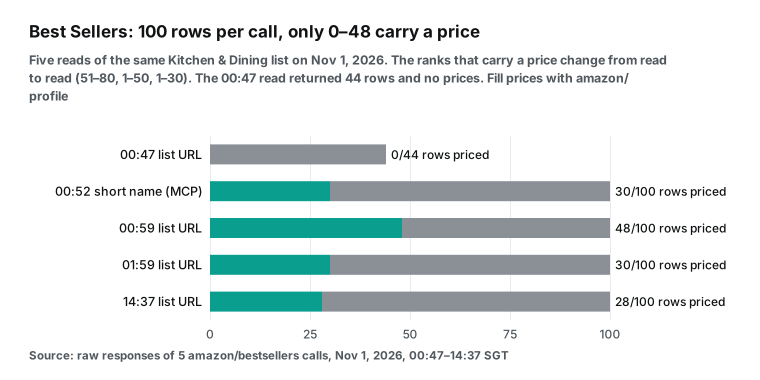
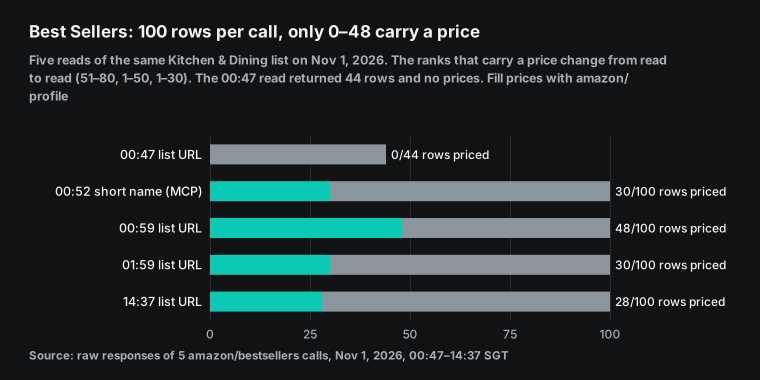
| Time (SGT) | Input form | Rows returned | Unique items | Rows with price | Ranks with price |
|---|---|---|---|---|---|
| 00:47:53 | List URL | 44 | 44 | 0 | n/a |
| 00:52:23 | Short name kitchen (MCP) | 100 | 80 | 30 | 51–80 |
| 00:59:40 | List URL | 100 | 100 | 48 | 1–50 |
| 01:59:26 | List URL | 100 | 100 | 30 | 51–80 |
| 14:37:38 | List URL | 100 | 100 | 28 | 1–30 |
Price coverage jumps between 0% and 48%. The priced rows always form one block of ranks: the top 50, ranks 51 to 80, or the top 30. The list page may load in two parts, with prices in only one part per read. Whatever the cause, the result for the radar is the same. Use the best sellers list for "who is on the list, at what rank, with how many reviews." Do not rely on it for price.
For price, call the product page capability. That is why the recipe fills only 5 product pages per day. Filling all 100 would cost $0.1389 a day on product pages alone. That is nine times the whole recipe. Usually only a few new climbers deserve a price check.
The other issue is duplicate rows. The short-name read and the 00:48 new releases read both returned 100 rows but only 80 unique items. The last 20 rows restarted at rank 31 and repeated earlier items. If you compare those 100 rows with yesterday, the 20 repeats all look like rank changes. So the task text says to deduplicate by ID and keep the first rank.
Test 2: how much ranks move in a day
For the same list and the same input form, we have three reads: 00:59, 01:59 and 14:37 SGT. The first two are one hour apart. All 100 items kept the same rank. The second and third reads are 12.6 hours apart. The chart shows that gap.
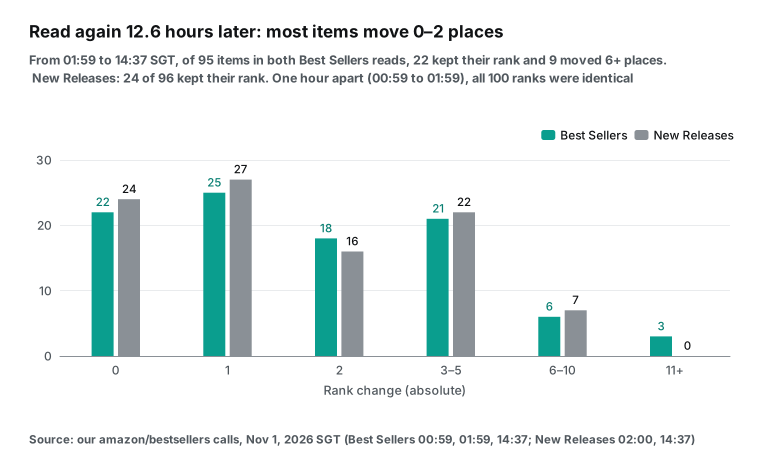
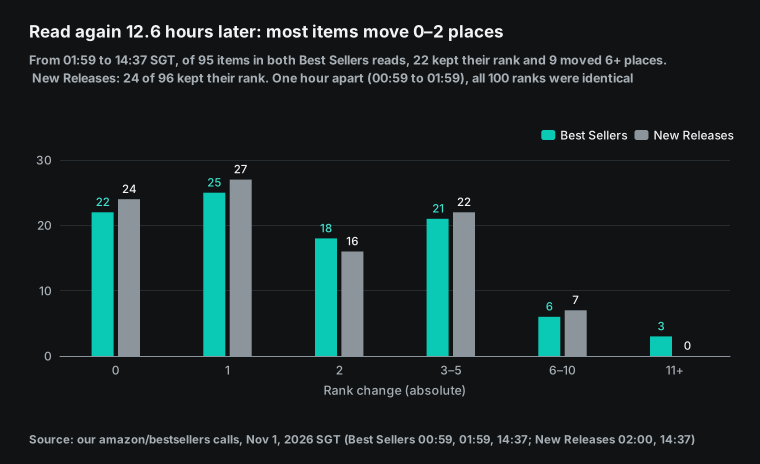
On the best sellers list, 95 of 100 items appeared in both reads. Five items entered and five left. Of the 95, 22 kept their rank. The median move was 2 places and the largest was 15. Only 3 items moved 10 places or more.
The top 10 stayed the same set of products. New releases looked similar: 96 overlapping, 24 unchanged, a median move of 1, a largest move of 10, and 4 new items. The two new releases reads at 00:48 and 02:00 SGT were about one hour apart. Their 80 shared items kept the same rank.
Amazon's own seller blog says the best sellers lists are "updated frequently" (Amazon seller blog, "Product ideas"). In this category, though, ranks did not move within an hour and moved one or two places in half a day. One check per day is enough. More checks per day add cost and noise.
To catch sudden climbers, Amazon has a separate Movers & Shakers list. The same blog post says it updates hourly and shows the biggest sales-rank gains over 24 hours. We did not test it, so it is not in the recipe.
| Comparison | Gap | Overlap | Same rank | Median move | Largest move | Entered / left |
|---|---|---|---|---|---|---|
| Best sellers 00:59 → 01:59 | 1 hour | 100 | 100 | 0 | 0 | 0 / 0 |
| Best sellers 01:59 → 14:37 | 12.6 hours | 95 | 22 | 2 | 15 | 5 / 5 |
| New releases 00:48 → 02:00 | 1.2 hours | 80 | 80 | 0 | 0 | 20 / 0 (first read had 80 unique) |
| New releases 02:00 → 14:37 | 12.6 hours | 96 | 24 | 1 | 10 | 4 / 4 |
Test 3: 69% of new releases have fewer than 100 reviews
Amazon's seller blog gives one product idea: high-demand products with few reviews suggest lower competition. The new releases list is a natural place to find them. We took the 14:37 SGT new releases read and grouped the 99 rows that had a review count.
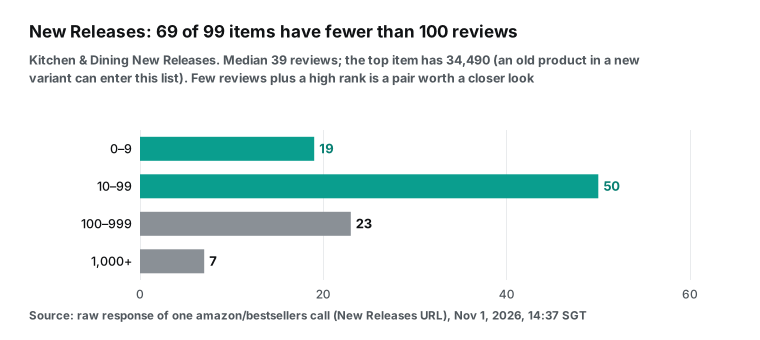
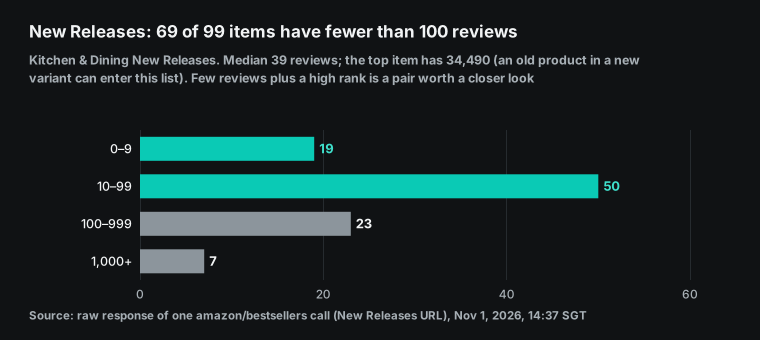
Of 99 items, 69 had fewer than 100 reviews and 19 had fewer than 10. The median was 39. But 7 items had more than 1,000 reviews, and one had 34,490. That one is clearly a new version of an older product. So "new release" does not always mean "new product." The radar should filter again by review count, and only items under 100 reviews count as new faces.
At that moment, only one item was on both the new releases list and the best sellers list. It was B0GKHWGMBS, a neoprene sleeve for iced drinks, at #1 on new releases and #27 on best sellers. An item that is high on new releases and already on best sellers is exactly what the radar should show you first.
Test 4: one keyword, three marketplaces, three price ranges
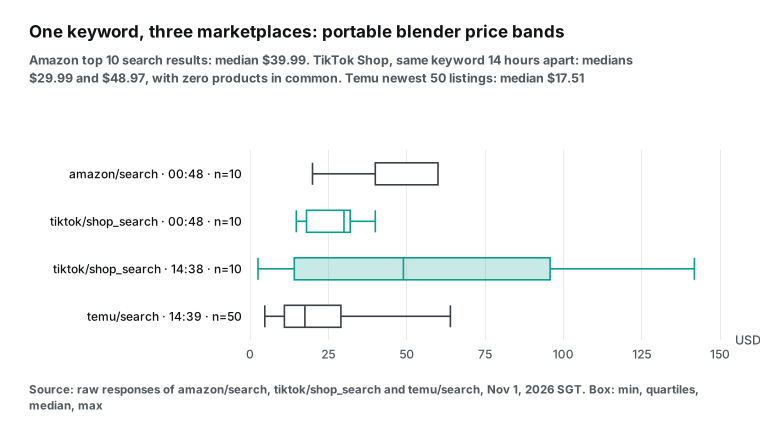
The other half of the radar watches other marketplaces. Where do prices sit on TikTok Shop and Temu for the same category? We searched "portable blender" on all three. We searched TikTok Shop again in the afternoon.
| Source (SGT) | Capability | Results | Low | Median | High | Note |
|---|---|---|---|---|---|---|
| Amazon search 00:48 | amazon/search | 10 | $19.95 | $39.99 | $59.99 | All 10 rows priced |
| TikTok Shop 00:48 | tiktok/shop_search | 10 | $14.77 | $29.99 | $39.98 | 1 to 2,334 sold |
| TikTok Shop 14:38 | tiktok/shop_search | 10 | $2.56 | $48.97 | $141.84 | 0 overlap with morning, 3 are cords |
| Temu 00:48 | temu/search | 50 | n/a | $17.29 | n/a | 18 with 0 sold, 47 with no reviews |
| Temu 14:39 | temu/search | 50 | n/a | $17.51 | n/a | 47 overlap with morning |
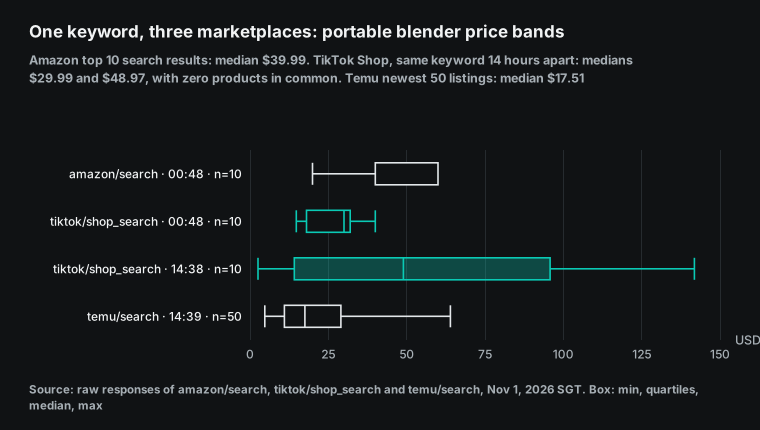
TikTok Shop gave the biggest surprise. With the same keyword and parameters, the afternoon's 10 results had zero overlap with the morning's 10. Three afternoon results were charging cords for portable blenders. TikTok Shop keyword ranking changes fast and does not stick to one category.
So the radar cannot compare "today's top 10" with "yesterday's top 10." It must track products by ID. Keep every ID that appears, and then follow each ID's price and units sold over time. Also note that TikTok Shop returns price as a string with a dollar sign, such as "$129.99."
Some cross-platform matches do appear. On Amazon, the Ninja Blast Max product page (B0DB6KW9SQ) showed $59.49 at 00:55 SGT, with a $99.99 list price and 3,290 ratings. In the afternoon, TikTok Shop returned "Ninja Blast Max Portable Blender - BC251" at $129.99 with 1,130 sold. The model codes differ, so this may not be the same bundle.
We treat it as a signal to look at by hand, not as a price gap. This is the step that suits proactive research best. The dot reads two stored tables, spots likely matches, and asks you whether to dig deeper.
Test 5: on Temu, half the prices moved in 14 hours
For Temu we used sort=newest. At 00:48 and 14:39 SGT we got 50 results each. Forty-seven appeared in both reads and three were new. That is much more stable than TikTok Shop, so Temu works well for price tracking. Of the 47 shared items, 26 changed price.
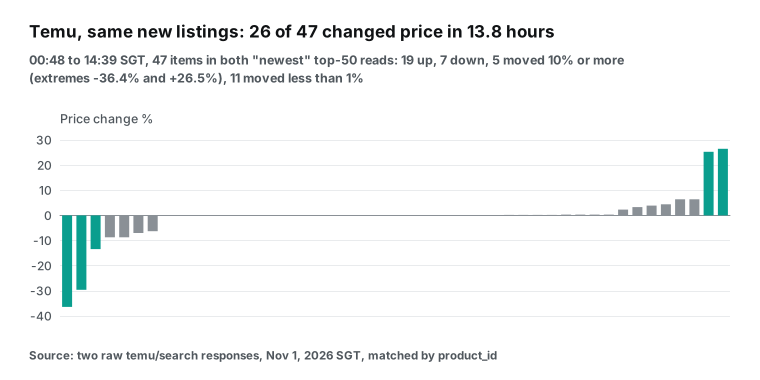
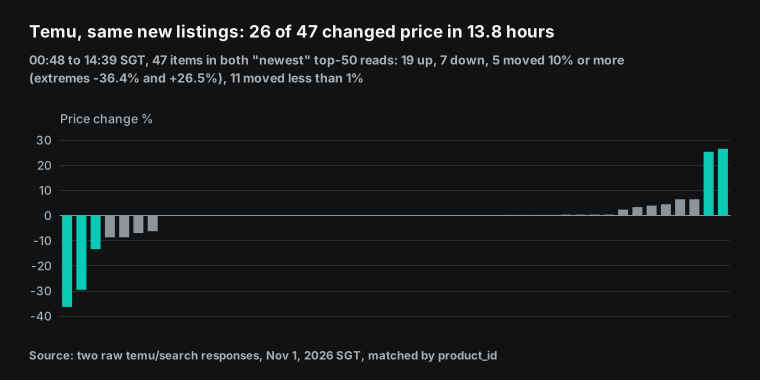
Of the 26, 19 went up and 7 went down. Eleven moved 5% or more, and five moved 10% or more. The largest drop was 36.4% and the largest rise was 26.5%. Another 11 moved by a few cents, under 1%. Two lessons follow.
First, Temu prices are worth a daily check, because half the items moved within a day and some moved a lot. Second, you need a threshold, or a 0.1% rise becomes news. With a 5% threshold, this data set gives about 11 changes per day. One person can review that many in a few minutes.
We first tried to sort by sales with sort=bestselling. At 00:51 SGT the API returned 422. The error listed the allowed values: newest, popular, price_asc, price_desc and relevance. It also said that nothing was charged.
We write errors this way for AI callers. A dot that reads this error can switch to popular and retry without your help. See the full parameters on the Temu search page and the TikTok Shop search page.
Filling prices: three reads of one product page
The best sellers list does not give reliable prices, so the radar uses amazon/profile. We picked a silicone baking mat (B0HFS7K4GP) from the new releases list and read it three times in one day.
| Time (SGT) | Price | List price | Rating | Ratings | Kitchen & Dining rank | Baking Mats rank |
|---|---|---|---|---|---|---|
| 00:49:20 | $15.88 | $16.88 | 4.1 | 34 | 179 | 1 |
| 02:03:26 | $15.88 | $16.88 | 4.1 | 34 | 175 | 2 |
| 14:38:17 | $15.88 | $16.88 | 4.2 | 38 | 187 | 2 |
The price did not change across the three reads. The category rank moved between 175 and 187. The subcategory rank went from 1 to 2. Four new ratings arrived in half a day. The product page returns far more fields than the list.
It gives price, list price, rating, rating count, stock, seller name, the full category path and two ranks. A pairing like "#1 in Baking Mats, #179 in Kitchen & Dining" is useful. It says the item leads a niche but still has room in the wider category. The lists do not give these fields, so 5 product pages a day are worth the cost.
Decide the table format early, because the dot reads this table every day. Use one row per item per day. Include at least these columns: date, platform, product ID, list name, rank, USD price and review count. Add units sold where the source gives it, which is TikTok Shop and Temu. Also store the request_id of the call.
With the request_id, you can trace any odd number back to the raw response. With a long table that grows by day, the dot only needs the last two days to compare. Keep the table in Google Drive, OneDrive or SharePoint, so ChatGPT can connect to it. Deep research and proactive research only use read actions from these apps (deep research, connected apps).
| Test | What we measured | Design decision |
|---|---|---|
| 1. Price on best sellers | 0 to 48 of 100 rows priced; 20 duplicate rows in two reads | Price from amazon/profile; deduplicate by ID |
| 2. Rank movement | 0 moves in 1 hour; median 2 places in 12.6 hours | One check per day |
| 3. Reviews on new releases | 69 of 99 under 100 reviews; 7 over 1,000 | Filter new releases by reviews |
| 4. Three marketplaces | TikTok Shop: 0 overlap in 14 hours; prices in three formats | Track by ID; normalize prices |
| 5. Temu prices | 26 of 47 changed; 11 by under 1% | 5% change threshold |
The daily API cost of a ChatGPT dots radar: 13 calls, $0.015558
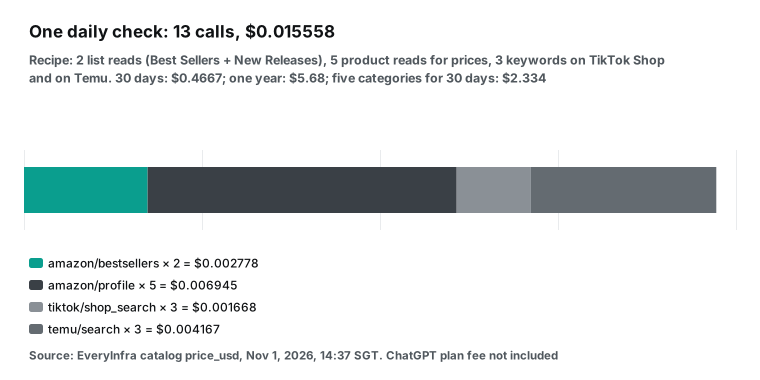
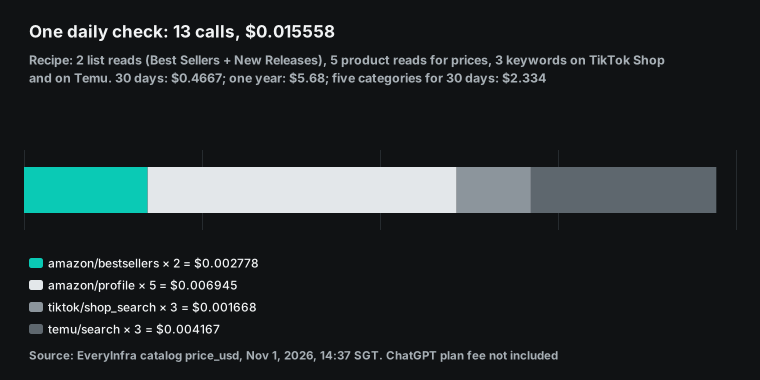
The table shows calls and API fees for one day of the recipe. Each unit price is the price_usd from the capability catalog, read at 14:37 SGT on 2026-11-01. Each price matches the charged_usd in our real responses.
| Capability | Calls per day | Unit price (USD) | Daily subtotal (USD) |
|---|---|---|---|
amazon/bestsellers (best sellers and new releases) | 2 | 0.001389 | 0.002778 |
amazon/profile (5 product pages) | 5 | 0.001389 | 0.006945 |
tiktok/shop_search (3 keywords) | 3 | 0.000556 | 0.001668 |
temu/search (3 keywords) | 3 | 0.001389 | 0.004167 |
| Total | 13 | n/a | 0.015558 |
Thirty days cost $0.4667. A year costs about $5.68. Five categories at once cost about $2.334 per 30 days. The largest line is product pages, at 45% of the total. If you only care about rank and not price, cut product pages to 2.
Then a day costs about $0.0114. Failed calls are free. Of our 27 calls that day, 17 were charged and 10 were not. This table splits them by capability.
| Capability | Sent | Succeeded (charged) | Did not succeed (free) |
|---|---|---|---|
amazon/bestsellers | 8 | 8 | 0 |
amazon/search | 1 | 1 | 0 |
amazon/profile | 6 | 4 | 2 rate limits |
tiktok/shop_search | 7 | 2 | 4 server failures (refunded), 1 rate limit |
temu/search | 3 | 2 | 1 bad parameter |
everyinfra_get_job (async status) | 2 | n/a | Free |
| Total | 27 | 17 | 10 |
TikTok Shop was the least stable step. Leave out the rate limit, and 2 of 6 searches succeeded that day. The 4 failures came at 00:52 to 00:53 and at 02:02 SGT. The 14:38 search worked again.
So the recipe allows at most 2 retries for TikTok Shop. After that, skip it for the day and fetch again tomorrow. The long table tracks items by ID, so one missing day does little harm.
Next to the ChatGPT plan, this API fee is close to nothing. The cheapest Pro tier costs $100 a month. Business Premium needs at least 2 seats, or $250 a month on monthly billing. So the real question is not whether the API is expensive.
It is whether you already have Pro or Business Premium. If not, opening Pro only for this radar is a poor deal. A cheaper path is in the section "No Pro? Fetch outside ChatGPT." See all prices on the pricing page.
Errors and charges: 429, 422 and server failures
A dot runs alone each day, and nobody watches when a call fails. So each error must make sense to the model. We met three kinds of errors in our tests. All rows below are real responses.
| Case | Real response (SGT) | Charged | What the dot should do |
|---|---|---|---|
| Rate limit | 00:52:56 to 00:53:40, 3 × rate_limited, reason=key_limit, limit=10, retry_after of 4, 30 and 20 s | $0 | Wait for retry_after, then retry |
| Bad parameter | 00:51:15 invalid_value, lists the 5 allowed sort values | $0 | Change to an allowed value and resend |
| Server failure | All on TikTok Shop search: 3 via MCP from 00:52:40 to 00:53:20, 1 via REST at 02:02:17 (HTTP 503). reason=request_failed_refunded, refund succeeded, retry_after=20, max_retries=2 | $0 | Wait 20 s and retry 2 times at most. If it still fails, skip that step today and say so in the summary |
The 3 rate limits did not come from the recipe itself. During the test, several jobs shared one key with a limit of 10 calls a minute. The OpenAPI spec says the per-minute limit for paid calls applies to the account, and all keys on the account share it. A key can also have a lower limit of its own. The response header x-ratelimit-limit-requests shows the current value.
Thirteen calls a day will not hit the limit. But several categories on one account, all set for 08:00, can collide. Spread the start times by a few minutes. Server failures state the failure count and the retries left.
On the third failure, the error says what to check. Step 7 of the task text uses this, so the dot does not retry forever. The full error code list is in the quickstart docs.
What proactive research cannot do
Here are three limits for this use case, based on OpenAI's text and our tests. Read them before you spend $100.
First, by our inference, proactive research cannot fetch new data. OpenAI's text says it cannot change content through plugins, and custom rules cannot lift that limit. ChatGPT treats tools without readOnlyHint as write actions, and EveryInfra's data tools are not labeled read-only. Put together, "the dot checks today's lists in its free time" probably does not work with EveryInfra. We have not tested it in a dot. "Your assigned task fetches at 08:00 and the dot reads the result later" is the setup we can stand behind.
Second, proactive research does not buy, change prices or list products. It cannot send messages, change app content or control a browser or computer. Those actions belong to assigned tasks, within the permissions you give. Password changes and money transfers always need you, even in an assigned task.
Third, the dot does not judge platform terms for you. Amazon, TikTok Shop and Temu each have rules on automated access. Product research with public data differs from large-scale resale of that data. The recipe here makes 13 requests a day, which fits the first case. For your own use, read the platform terms yourself.
There is also dot reliability to consider. A Reddit thread on r/OpenAI with 204 points and 161 comments complained early on that dots could not connect to things (Reddit thread). The MacStories review says scheduled tasks fail too often, for reasons that are not always clear. These are user reports, not our tests. Still, they show why the daily task must write results to a sheet you can see. A chat line that says "no changes today" is not enough.
No Pro? Fetch outside ChatGPT and let the dot read
You may be in a region without Pro dots, such as the EU or the UK. You may lack Business Premium. Or you may find that Pro blocks non-read-only tools. In all three cases, there is another path: do not fetch data inside ChatGPT at all.
Run your own scheduler once a day, such as cron on a server, n8n or GitHub Actions. Call the REST API and write the result to a sheet in a drive that ChatGPT can read. Then a dot or a normal ChatGPT chat reads that sheet with read-only access. The data pull no longer depends on ChatGPT permission rules.
The limits on proactive research stop being a problem. Below is the REST form. It reads $EVERYINFRA_API_KEY from an environment variable.
# Runs at 08:00 every day from your own scheduler. Write the output to a sheet ChatGPT can read.
curl -s https://api.everyinfra.com/api/v1/social \
  -H "Authorization: Bearer $EVERYINFRA_API_KEY" \
  -H "Content-Type: application/json" \
  -d '{"platform":"amazon","action":"bestsellers",
       "params":{"keyword":"https://www.amazon.com/gp/new-releases/kitchen","limit":100}}' \
  | jq '[.results[] | {id, rank, name, price: .price.value, review_count}]
        | group_by(.id) | map(min_by(.rank)) | sort_by(.rank)'
Our October 27 article, a ChatGPT scheduled-task demand radar, compares "connect the MCP directly" with "fetch outside, ChatGPT reads only." The same conclusion holds for dots. For price monitoring design, see Amazon price tracking with comparable offers and turning price monitoring into a subscription product.
Start from the platform pages to pick capabilities. They are Amazon data API, TikTok data API and Temu data API. Amazon also has search besides lists and product pages. TikTok Shop also has a hot products list. We did not test it here, but it is a good next addition to the recipe.
Pick a setup that fits your situation
The right setup depends on your ChatGPT plan and your region. The table below collects the conclusions from the sections above. Each row also says what we have not confirmed.
| Your situation | Recommended setup | Where the fetch runs | What the dot does | Not yet confirmed |
|---|---|---|---|---|
| Personal Pro user in the US or another allowed region | Try the MCP first, then fall back to an outside fetch | The dot's assigned task, or your own scheduler if non-read-only tools fail | Reads the sheet, compares, alerts | Whether Pro allows non-read-only tools in assigned tasks |
| Team with Business Premium | Admin publishes the plugin and allows the data tool by role | The dot's assigned task | Reads, compares, alerts. Each member's dot reads the same sheet | Whether dots are on in your workspace region |
| Individual seller in the EU or UK | Outside fetch, read by normal ChatGPT or another agent | Your own scheduler | Personal Pro dots are not available | Nothing |
| Occasional checks only | Skip dots and call the MCP in a chat when needed | You, by hand, in a chat | Nothing | Nothing |
Our view is simple. If you already pay for Pro or Business Premium, dots are worth a try. The API fee is under $0.50 a month, so the extra cost is close to zero. If you would open Pro only for this radar, first run an outside scheduler with normal ChatGPT for two weeks.
See whether you actually read the daily summary. The most common failure of a product tool is not missing data. It is data that nobody reads.
Adding a category is easy. Change the two list URLs and the three keywords in the task text. Calls and costs grow in a straight line. Start with one category you know well and run it for a full week. Check the alert count for each threshold in your category.
The three thresholds are a climb of 10+ ranks, a price change of 5% or more, and fewer than 100 reviews. Then copy the setup to other categories. Speed of change can differ a lot by category. Kitchen ranks moved one or two places in half a day. Seasonal categories can turn over half their list in one day around a big sale.
Recent changes
2026-10-06 and 2026-10-07: Amazon ran Prime Big Deal Days. Adobe counted $9.86 billion in US online spend, up 8.5% year over year (Digital Commerce 360, 2026-10-08). What it means for you: the weeks after a big sale are when lists reshuffle and new items climb. A radar started now catches the run-up to the holiday peak.
October 13, 2026: the TikTok Shop newsroom published its holiday outlook. Black Friday and Cyber Monday campaigns run from November 11 to 30. The platform saw more than 100 billion searches with shopping intent in 2025. Product selection grew 1,200% since 2024 (TikTok newsroom). What it means for you: TikTok Shop search results already change fast and will change faster in peak season. Tracking by product ID matters more than comparing ranks.
October 21, 2026: Anthropic released Claude Duet as a research preview for Pro, Max and Ultra users, with a waitlist (Claude Duet). It checks connected accounts every few hours and works with more than 6,000 connectors. Meta also launched Muse on September 8 (Meta newsroom). What it means for you: always-on agents now come from several vendors. The split in this article works with any of them: the fetch goes in an assigned task, and the always-on part stays read-only.
October 28, 2026: dots gained iMessage and RCS texting, for US Pro users only, in beta (9to5Mac). What it means for you: radar alerts can reach your phone as texts. The texts pass through a third party and are not end-to-end encrypted, so keep keys and private quotes out of them.
October 29, 2026: the ChatGPT release notes doubled the Work and Codex allowance for Pro 100 and Pro 500 (release notes). The planned Pro 200 cut is canceled. What it means for you: tasks your dot starts draw on this allowance. More room means a daily radar is less likely to hit a cap.
OpenAI has also published a policy piece on agentic AI in the EU (OpenAI). It argues that small European firms are adopting agents fast. That does not change the Help Center rule for personal Pro dots in the EEA.
ChatGPT dots FAQ
How much do ChatGPT dots cost, and do they work on Plus?
Personal use needs Pro, at $100, $200 or $500 a month, and the first dot has no extra cost. Teams use Business Premium seats at $125 per user per month billed monthly, or $100 billed yearly, with a 2-seat minimum. Plus is not on the Help Center plan list. (Question source: search suggestions "chatgpt dots price" and "chatgpt dots for plus". Sources: Help 20001530, Pro tiers, Business FAQ, read 2026-11-01.)
Are ChatGPT dots available in the EU and the UK?
Not on personal Pro. The Help Center says Pro dots are for users aged 18+ outside the EEA, Switzerland and the UK. Business Premium says "supported ChatGPT regions, subject to workspace eligibility," and the developer docs say "rolling out worldwide." European teams should ask an admin to check the console. Adding a custom MCP has no geographic limit. (Question source: search suggestions "openai dots europe" and "openai dots eu". Sources: Help 20001530, developer docs, Help 12584461.)
Can ChatGPT dots proactive research call MCP tools?
The docs say proactive research can read what it has permission to read. It cannot change content through plugins, send messages, or control a browser or computer. ChatGPT treats a tool without readOnlyHint as a write action. So we infer that proactive research can only call tools labeled read-only, but we have not tested this in a dot.
EveryInfra's data tools are billed per call and report readOnlyHint=false, so the fetch belongs in an assigned task. (Question source: search suggestions "chatgpt dots proactive research tool" and "chatgpt dots mcp". Sources: Tasks and memory, Custom MCP server, our tools/list at 14:37 SGT on 2026-11-01.)
How do ChatGPT dots compare with Claude Duet?
Both are always-on agents that bring suggestions on their own. Dots are open to Pro and Business Premium, and each dot has its own cloud computer. Claude Duet launched on 2026-10-21 as a research preview with a waitlist for Pro, Max and Ultra users. It checks connected accounts every few hours.
The split in this article works for both. (Question source: search suggestion "chatgpt dots vs claude". Sources: Introducing dots, Claude Duet.)
Do ChatGPT dots work on mobile?
Yes, in the ChatGPT mobile app. On iOS there is also a widget and Shortcuts actions. The mobile web does not support dots. US Pro users can also text their dot over iMessage or RCS. (Question source: search suggestions "chatgpt dots mobile" and "chatgpt dots rcs google messages". Sources: Help 20001530, MacStories.)
Related reading
A ChatGPT scheduled-task demand radar covers normal ChatGPT scheduled tasks and the "fetch outside, ChatGPT reads only" split. Remote MCP setup shows how each client takes the URL and key. Amazon review pipeline shows how to pull reviews in bulk once you pick an item. Cursor MCP for TikTok, Instagram and Amazon data shows the same MCP inside a code editor.
References
- Introducing dots, OpenAI, 2026-09-29, https://openai.com/index/introducing-dots/
- Getting started with your dot, OpenAI Help Center, read 2026-11-01, https://help.openai.com/en/articles/20001530-getting-started-with-your-dot
- Dots privacy, security and safety FAQs, OpenAI Help Center, read 2026-11-01, https://help.openai.com/en/articles/20001529-dots-privacy-security-and-safety-faqs
- Tasks and memory, OpenAI developer docs, read 2026-11-01, https://developers.openai.com/codex/dots/tasks-and-memory
- Computers and apps, OpenAI developer docs, read 2026-11-01, https://developers.openai.com/codex/dots/computers-and-apps
- Controls, OpenAI developer docs, read 2026-11-01, https://developers.openai.com/codex/dots/controls
- Dots, OpenAI developer docs, read 2026-11-01, https://developers.openai.com/codex/dots
- Getting started (dots), OpenAI developer docs, read 2026-11-01, https://developers.openai.com/codex/dots/getting-started
- Channels, OpenAI developer docs, read 2026-11-01, https://developers.openai.com/codex/dots/channels
- Dots admin guide, OpenAI developer docs, read 2026-11-01, https://developers.openai.com/codex/enterprise/dots-admin-guide
- Manage dots in ChatGPT workspaces, OpenAI Help Center, read 2026-11-01, https://help.openai.com/en/articles/20001554-manage-dots-in-chatgpt-workspaces
- About ChatGPT Pro tiers, OpenAI Help Center, read 2026-11-01, https://help.openai.com/en/articles/9793128-about-chatgpt-pro-tiers
- ChatGPT release notes, OpenAI Help Center, entry of 2026-10-29, https://help.openai.com/en/articles/6825453-chatgpt-release-notes
- ChatGPT Business overview, OpenAI Help Center, read 2026-11-01, https://help.openai.com/en/articles/8792828-chatgpt-business-overview
- ChatGPT Business general FAQ, OpenAI Help Center, read 2026-11-01, https://help.openai.com/en/articles/8542115-chatgpt-business-general-faq
- Connecting custom MCP servers in ChatGPT, OpenAI Help Center, read 2026-11-01, https://help.openai.com/en/articles/12584461-connecting-custom-mcp-servers-in-chatgpt
- Managing app permissions in ChatGPT, OpenAI Help Center, read 2026-11-01, https://help.openai.com/en/articles/20001495-managing-app-permissions-in-chatgpt
- Connected apps in ChatGPT, OpenAI Help Center, read 2026-11-01, https://help.openai.com/en/articles/11487775-connected-apps-in-chatgpt
- Data controls in ChatGPT, OpenAI Help Center, read 2026-11-01, https://help.openai.com/en/articles/7730893-data-controls-in-chatgpt
- Deep research in ChatGPT, OpenAI Help Center, read 2026-11-01, https://help.openai.com/en/articles/10500283-deep-research-faq
- Custom MCP server, OpenAI developer docs, read 2026-11-01, https://developers.openai.com/api/docs/guides/custom-mcp-server
- Secure MCP tunnels, OpenAI developer docs, read 2026-11-01, https://developers.openai.com/api/docs/guides/secure-mcp-tunnels
- Plan tools, OpenAI plugin developer docs, read 2026-11-01, https://developers.openai.com/plugins/plan/tools
- Connect and test your plugin, OpenAI plugin developer docs, read 2026-11-01, https://developers.openai.com/plugins/deploy/connect-chatgpt
- Plugins (Codex), OpenAI developer docs, read 2026-11-01, https://developers.openai.com/codex/plugins
- Auto-review, ChatGPT learning center, read 2026-11-01, https://learn.chatgpt.com/docs/sandboxing/auto-review
- Model Context Protocol specification 2025-11-25: ToolAnnotations, https://modelcontextprotocol.io/specification/2025-11-25/schema#toolannotations
- MCP Inspector, Model Context Protocol docs, read 2026-11-01, https://modelcontextprotocol.io/docs/tools/inspector
- How OpenAI turned its coding tools into dots, TechCrunch, 2026-10-26, https://techcrunch.com/2026/10/26/how-openai-turned-its-coding-tools-into-dots-an-always-on-personal-assistant/
- OpenAI's Dot agent can help you work and order dinner, The Verge, October 2026, https://www.theverge.com/ai-artificial-intelligence/1004096/openai-chatgpt-dots-hands-on-agent
- OpenAI expanding ChatGPT dot access to iMessage and RCS, 9to5Mac, 2026-10-28, https://9to5mac.com/2026/10/28/openai-expanding-chatgpt-dot-access-to-imessage-and-rcs/
- ChatGPT Dots Gain Widget and New Shortcuts Actions, MacStories, read 2026-11-01, https://www.macstories.net/reviews/chatgpt-dots-gain-widget-and-new-shortcuts-actions/
- Am I crazy or are dots totally worthless?, Reddit r/OpenAI, read 2026-11-01, https://www.reddit.com/r/OpenAI/comments/1wwur33/am_i_crazy_or_are_dots_totally_worthless/
- Claude Duet, Anthropic, 2026-10-21, https://claude.com/resources/articles/claude-duet
- Introducing Muse, Meta, 2026-09-08, https://about.fb.com/news/2026/09/introducing-muse-personal-ai-agent/
- The EU's next chapter in AI is agentic, OpenAI, read 2026-11-01, https://openai.com/index/the-eus-next-chapter-in-ai-is-agentic/
- Product ideas, Amazon seller blog, read 2026-11-01, https://sell.amazon.com/blog/product-ideas
- What's shaping the holiday season on TikTok Shop, TikTok newsroom, 2026-10-13, https://newsroom.tiktok.com/whats-shaping-the-holiday-season-on-tiktok-shop?lang=en
- Amazon Prime Big Deal Days in October drove $9.86 billion in online spending, Digital Commerce 360, 2026-10-08, https://www.digitalcommerce360.com/2026/10/08/amazon-prime-day-big-deal-days-sales-2026/
- EveryInfra MCP endpoint (real tools/list and tools/call), 2026-11-01, https://api.everyinfra.com/mcp
- EveryInfra capability catalog (price_usd), read 14:37 SGT 2026-11-01, https://api.everyinfra.com/api/v1/social/catalog
- EveryInfra OpenAPI spec, read 2026-11-01, https://api.everyinfra.com/openapi.json
- Amazon Best Sellers: Kitchen & Dining, read 2026-11-01, https://www.amazon.com/Best-Sellers-Kitchen-Dining/zgbs/kitchen
- Amazon Hot New Releases: Kitchen & Dining, read 2026-11-01, https://www.amazon.com/gp/new-releases/kitchen
Reference BL-58