Copilot Connectors and Supabase: A Daily Data Table
Copilot added 8 verified MCP connectors on November 18, 2026, Supabase among them. We built a daily table for 30 rival accounts at $0.0167 per day.

On November 18, 2026, GitHub added 8 new Copilot connectors. A connector is an MCP server that GitHub verifies and hosts. One of the 8 is Supabase, and the full list now has 34 entries (GitHub Changelog, November 18, 2026; Supported Copilot connectors). With the connector, a Copilot session can read the Supabase schema and apply a migration. The data for the table still needs a separate data API and a daily load. We used this release for one small job: a daily table of Instagram stats for 30 rival brands.
The Supabase connector creates the table. The EveryInfra remote MCP server lets the model test the data call. A plain script fills the table each day.
We ran the data side for real on November 21, 2026, between 00:18 and 00:26 Singapore time. We asked instagram/profiles_batch for 30 audio brands. The API billed 27 accounts and did not bill 3 misses. The raw responses held 1,264,944 bytes.
The 11 columns that the table needs held 7,219 bytes, which is 175 times less. EveryInfra charged $0.015 for the data that day. If a Copilot model reads the same raw responses once, the input cost at the Claude Sonnet 5.5 rate is about $0.63. That is 42 times the charged data fee, so the daily load does not go through the model.

What the November 18 Copilot connectors release added
GitHub launched connectors on October 28, 2026, with 26 services. The first group included Slack, Figma, Notion, Sentry, Linear, Atlassian Rovo, Cloudflare, Vercel and Work IQ (GitHub Changelog, October 28, 2026). The November 18 entry added 8 more. For Supabase, the changelog gives one line: work with projects and databases. Its example asks Copilot to check the Supabase schema before it writes a migration (GitHub Changelog, November 18, 2026).
We opened the supported list on November 21. It has 34 rows. Each row gives a connector name and an MCP URL with one shared prefix. The Supabase row is https://api.github.com/copilot-connectors/api/v1/connectors/githubcopilotsupabasemcp/mcp (Supported Copilot connectors). 26 plus 8 is 34, so the count agrees with the two changelog entries.
| New connector | What GitHub says it does | Use in this job |
|---|---|---|
| Supabase | Work with projects and databases | Create tables, read the schema, write migrations |
| Box | Search and manage content, use Box AI | None |
| Buildkite | Work with pipelines and builds | None |
| Calendly | Manage schedules and meetings | None |
| ClickUp | Track tasks and projects | Could log bad handles as tasks |
| Mixpanel | Look at product analytics | Could sit next to the social data |
| Webflow | Manage sites and content | None |
| Wix | Manage sites and business tools | None |
A connector and a self-configured MCP server use the same protocol. The difference is who manages the sign-in and the configuration. The GitHub concept page says that you connect once and sign in once. After that, the connector works in every supported Copilot surface, and GitHub handles the server configuration and the authentication (Copilot connectors).
The VS Code docs call connectors "GitHub-hosted MCP servers". The connection follows your GitHub account, so every client that uses the same account shares it. To remove one, you select Disconnect. Editing a configuration file does not remove it (VS Code: Copilot connectors).
After you connect, the VS Code MCP server list shows an entry named "Connector: Supabase" next to your own servers. To add a service that is not on the list, such as the EveryInfra data API, you still configure your own MCP server. Both kinds can run in the same session.
Where GitHub Copilot MCP connectors work, and where they do not
The concept page lists four entry points. In the Copilot app, you use Customize in the side bar. In Copilot CLI, you run /mcp and open the Connectors view. In VS Code, you use Customizations in the Agents window. On the web, you use the Copilot customize page. After you connect, cloud sessions in GitHub Mobile and in a mobile browser can also use the connector (Copilot connectors).
The same page states a limit. Connectors work in local sessions and in cloud sandbox sessions, which includes sessions that start from GitHub.com. They do not yet work in sessions that run on GitHub Actions. The example that GitHub gives is an issue that you assign to Copilot. The repository MCP page states the same limit again (Configure MCP servers for your repository).
This limit changes the design. A daily load cannot depend on "open an issue each day and assign it to Copilot", because that session runs on Actions and the Supabase connector is not there. VS Code adds one more condition. Connectors supply tools only to the new Copilot harness.
Sessions on the old Local harness do not see them (VS Code: Copilot connectors). The GitHub changelog of November 16 says that VS Code 1.146 deprecates the Local harness. GitHub will remove it in February 2027. New sessions use the Copilot harness by default since VS Code 1.143 (GitHub Changelog, November 16, 2026).
| Where the session runs | Supabase connector | Self-configured remote MCP (EveryInfra) | Where the key goes |
|---|---|---|---|
| VS Code, Copilot harness | Yes | Yes, in .mcp.json or the user mcp-config.json | Local environment variable, ${EVERYINFRA_API_KEY} |
| VS Code, Local harness (deprecated) | No | Yes, in the old .vscode/mcp.json | ${input:…} or envFile |
| Copilot CLI and Copilot app | Yes | Yes | Local environment variable |
| Cloud sandbox session (web or mobile) | Yes | Yes | GitHub cloud settings |
| Session on GitHub Actions (issue assigned to Copilot) | No | Yes, in the repository MCP settings | Agents secret with the COPILOT_MCP_ prefix |
The table gives a simple split. Create the table in a local session. Give the daily load to a script that does not need the connector.
Connector or self-configured Supabase server? The connector uses one GitHub-hosted sign-in for every client on the account, and a disconnect also applies to the whole account. We did not find a setting that limits it to one project, to read-only mode or to the database tools. A self-configured server takes the URL parameters project_ref, read_only=true and features=database, so it can run only read queries on one project. The cost is a sign-in on each client, or a token in CI. Use the connector for a test project and a self-configured server for real data.
The admin gates
Personal plans (Free, Pro, Pro+ and Max) can connect right away. When the subscription comes from an organization or an enterprise, the concept page lists four settings. If one of them is off, users do not see connectors (Copilot connectors):
| Setting | Value that connectors need | If it is wrong |
|---|---|---|
Editor preview features policy | On | No connectors, because they are in public preview |
MCP servers in Copilot policy | On | No MCP servers and no connectors |
Restrict MCP access to registry servers | Allow all | Registry only blocks connectors in clients that apply it |
allowedMcpServers in managed-settings.json | Each connector URL or one wildcard | Connectors that are not listed are blocked; deniedMcpServers still wins |
The enterprise allowlist page gives the order of the checks. Built-in default servers are always allowed. A denylist match blocks.
If an allowlist exists and the server does not match it, the server is blocked. The client also blocks a URL or command with an unresolved variable such as ${VARIABLE}. It cannot check that value (Configuring an MCP server allowlist). If the allowlist JSON is not valid, the client treats it as an empty list and blocks every server except the built-in ones. To allow the Supabase connector and the EveryInfra remote MCP server, you change one file:
{
  "allowedMcpServers": [
    { "serverUrl": "https://api.github.com/copilot-connectors/api/v1/connectors/githubcopilotsupabasemcp/mcp" },
    { "serverUrl": "https://api.everyinfra.com/mcp" }
  ],
  "deniedMcpServers": [
    { "serverUrl": "https://api.everyinfra.com/mcp/all" }
  ]
}
The deny entry blocks /mcp/all, because that endpoint adds account tools such as key deletion and webhook changes.
The same page says that the allowlist controls servers in user settings and repository settings. It does not control servers in custom agent files in a repository. For those, you limit the firewall domains. To allow only Supabase, list its URL as above.
To allow all connectors, use the wildcard from the docs: https://api.github.com/copilot-connectors/api/v1/connectors/*/mcp. The November 18 changelog has a warning for one group. If your allowlist names connectors one by one, an admin must add the 8 new ones by hand (GitHub Changelog, November 18, 2026).
The split: connector for the table, data API for the test, script for the load
The goal is a daily table of rival accounts. Each day, the job takes a snapshot of 30 rival Instagram profiles. It keeps followers, following, post count, verified status, category and the bio link. After a few weeks, you can see which brand grows fastest. Supabase holds the table. The EveryInfra Instagram Scraper API supplies the data.
Each MCP server does one half of the work in the Copilot session. The Supabase connector reads the schema and applies the migration. The EveryInfra remote MCP server runs one test call, so you can see the response shape before you write the script.
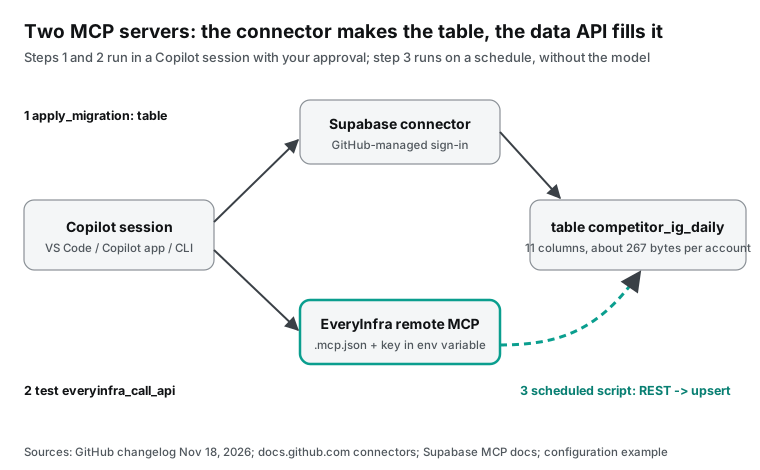
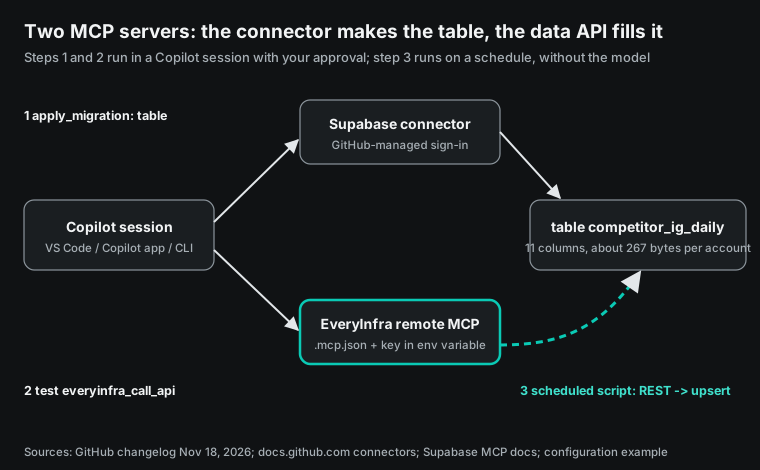
Step 3 does not go through Copilot, for two reasons that you can measure. The first reason is size. Our two batch calls on November 21 returned 1,264,944 bytes. Most of it is the 12 recent posts that come back with each account (the catalog lists them as recent_posts). The table uses 11 columns, and those come to 7,219 bytes for 27 accounts.
The second reason is money. Since June 1, 2026, GitHub Copilot bills by tokens. One AI credit is $0.01. Each token that a model reads has a price in the rate table (GitHub: usage-based billing; Models and pricing). If the model calls the tool in the session and then writes the SQL, 1.26 MB of raw data goes into the context each day.
Step 1: create the table with the Supabase connector
After you connect, tell Copilot: "Use the Supabase connector to list the tables in public. Then create the tables from the SQL below. Show me the migration first." In the Supabase MCP tool groups, the database group has list_tables, list_migrations, apply_migration and execute_sql (Supabase MCP Server). Use apply_migration to create tables. The migration then stays in the project history, and list_migrations can find it later. The column names are the response_fields names of instagram/profile in the EveryInfra catalog, so the script needs no name mapping:
create table if not exists public.competitor_handles (
  username    text primary key,
  brand       text not null,
  checked_at  timestamptz,          -- when a person checked the account
  is_official boolean
);

create table if not exists public.competitor_ig_daily (
  snapshot_date   date        not null default (now() at time zone 'utc')::date,
  username        text        not null references public.competitor_handles(username),
  display_name    text,
  follower_count  bigint,
  following_count bigint,
  post_count      integer,
  is_verified     boolean,
  is_business     boolean,
  category        text,           -- missing in 20 of 27 test accounts
  external_url    text,
  reels_count     integer,
  highlight_count integer,
  fetched_at      timestamptz not null default now(),
  primary key (snapshot_date, username)
);

alter table public.competitor_handles  enable row level security;
alter table public.competitor_ig_daily enable row level security;
Some choices come from the test data. All columns except the username and the date can be null. In our 27 accounts, category was missing 20 times, highlight_count 16 times, external_url 9 times and reels_count 7 times. The catalog field_note also says that these fields can be missing on some requests.
The primary key is the date plus the username, and the script upserts on that key. So a second run on the same day replaces the row and does not add a new one. Both tables have row level security on and no policies. So only the service key can read or write them. Supabase asks you to do this for every table in an exposed schema (Supabase: Row Level Security).
After you create the handle table, you can tell Copilot to insert the first 30 usernames with execute_sql. Fill the brand column with the brand name. Leave checked_at and is_official empty until a person checks the accounts. Two tables make name changes easy.
If a brand changes its username, add a new row in the handle table. Set the old row to is_official = false. The daily table keeps the old snapshots. To draw a trend, join the two usernames by brand.
Supabase lists two layers of approval. The first layer is the MCP client. A VS Code Copilot session starts with Manual permissions. A tool call that no rule covers shows a prompt, where you select Allow Once or Skip (VS Code: Manage approvals). The second layer is elicitation on the Supabase server.
If the client supports forms, execute_sql and apply_migration ask again when the SQL looks destructive. Supabase says that this is a guard and does not catch every destructive statement (Supabase MCP Server). Creating a table has low risk. For drop or truncate, read both prompts before you click.
Step 2: add the EveryInfra remote MCP server in .mcp.json
EveryInfra is not on the connector list, so you add it yourself. The VS Code configuration reference is clear on the file. The new Copilot configuration goes in .mcp.json at the workspace root or in ~/.copilot/mcp-config.json for the user. The top-level key is mcpServers. The old .vscode/mcp.json uses the deprecated Local harness format with the top-level key servers. The Copilot harness does not read it directly (VS Code: MCP configuration reference).
For an HTTP server, a header value can use ${NAME} to read an environment variable. The variable must exist in the environment of the machine that runs or connects to the server. The Copilot harness does not support ${input:…} prompts. It also does not forward old configurations that use them.
{
  "mcpServers": {
    "everyinfra": {
      "type": "http",
      "url": "https://api.everyinfra.com/mcp",
      "headers": { "Authorization": "Bearer ${EVERYINFRA_API_KEY}" },
      "tools": ["everyinfra_list_capabilities", "everyinfra_call_api", "everyinfra_get_job"]
    }
  }
}
Put the key in a shell environment variable. For example, use a file that ~/.zshrc loads and that stays out of version control. The .mcp.json file then holds only the variable name, so you can commit it for the team. The docs tell you not to commit tokens, passwords or filled-in auth headers. They also say that a personal configuration file is not a place for secrets (VS Code: MCP configuration reference). Use the braced form ${NAME}. The docs warn that the VS Code MCP client reads a bare $NAME as plain text.
Copilot CLI reads the same format. From the current folder up to the repository root, it loads each .mcp.json and .github/mcp.json, and .mcp.json wins if both exist. It does not read .vscode/mcp.json (Copilot CLI: Adding MCP servers). It loads project files only from a folder that you trust.
Your organization may block connectors and you may still want to read the Supabase schema in a session. Then add the hosted Supabase MCP server to the same file. Use URL parameters to limit it to one project and read-only database tools: https://mcp.supabase.com/mcp?project_ref=<your project ref>&read_only=true&features=database (Supabase MCP Server). Write the project ref into the URL as text, not as a variable. The enterprise allowlist blocks a server whose URL has an unresolved variable.
The Copilot app can also add a server from its UI. A YouTube tutorial from November 3, 2026 shows the store form on the Customize page (YouTube). The form fills in the server name and URL. You add the request header, and you can set a timeout. In the video, the key is pasted as plain text.
Type Bearer ${EVERYINFRA_API_KEY} in the header instead, so the key stays in the environment. Set the timeout to 120 seconds or more. Through MCP, one tiktok/profile call took 19.7 seconds, and the 20-account batch took 15.5 seconds.
To test the server, start a new session. Name the everyinfra server and ask how many accounts instagram profiles_batch takes per call. The catalog answer is 20. everyinfra_list_capabilities is free, so you can use it for a connection test. Then scroll up in the session and look for the tool call.
What to type in the Copilot session
When the connector and .mcp.json are ready, the prompt must say three things. It names the server. It says where to stop and wait for you. It says who approves the paid call.
In the GitHub channel tutorial on Copilot CLI from April 7, 2026, the host names the server in each prompt (YouTube). The VS Code connector docs give the same advice in their troubleshooting table. If the agent does not call the tool, name the connector in the prompt. A prompt for step 1 can look like this:
Use the Supabase connector:
1. Call list_tables for the public schema. Tell me if competitor_ig_daily exists.
2. If it does not exist, make a migration from the SQL I paste. Show me the full migration. Do not apply it.
3. When I reply "apply", call apply_migration. Then call list_tables again and confirm that both tables exist.
The second prompt tests the data API. It is only for a look at the fields, so keep the number of accounts small:
Use the everyinfra server:
1. Call everyinfra_list_capabilities. Find instagram profiles_batch. Tell me the parameters, the unit price and the maximum accounts per call.
2. Call everyinfra_call_api once with usernames ["bose", "sennheiser", "jbl"].
3. Do not paste recent_posts. For each account, list only username, follower_count, is_verified, is_business and external_url. Then report billing.charged_usd.
Line 3 controls what the model repeats to you. It does not stop the tool result from entering the context. The client gives the full tool result to the model, and the model then picks the columns to show. So keep the test small.
On November 21, the three accounts in this prompt returned 196,216 bytes, or about 49,000 tokens. Our 20-account batch returned 717,356 bytes, about 179,000 tokens. One such call goes past the 100K threshold of the Claude Haiku 5.5 long-context rate.
After the table has data, you can also do daily checks in a session. Tell Copilot to run the query for official accounts with no data today through the Supabase connector execute_sql. Then call instagram/profile through the everyinfra server for one or two of those accounts, to see if the account changed its name or went private. This step reads the table and calls one or two accounts, so the context and the cost stay small.
With Manual permissions, VS Code shows a prompt before each everyinfra_call_api call. The prompt shows the full input. Before you select Allow Once, count the items in usernames. The count times $0.000556 is the most that this call can cost.
Tool permissions: allow 3 of 12 tools
At 00:18 Singapore time on November 21, we sent initialize and tools/list to two endpoints. https://api.everyinfra.com/mcp returned 12 tools with 16,771 bytes of definitions. /mcp/all returned 24 tools with 34,002 bytes. The extra tools include everyinfra_create_key, everyinfra_delete_key, everyinfra_set_webhook and everyinfra_update_settings. The table job needs three tools.
everyinfra_list_capabilities reads the catalog. everyinfra_call_api calls the API. everyinfra_get_job reads async jobs. Their definitions come to 3,442 bytes, which is 20.5% of the full /mcp list.
The annotations in tools/list put the other 9 tools on /mcp into three groups. Five have readOnlyHint set to true: everyinfra_get_account, everyinfra_get_ticket, everyinfra_get_topup_link, everyinfra_list_captcha_types and everyinfra_list_requests. Three have destructiveHint set to true, like everyinfra_call_api, and each call to them is billed: everyinfra_chat, everyinfra_search and everyinfra_solve_captcha. The last one, everyinfra_create_ticket, opens a support ticket. These are the values we read at 00:18. From 08:29 the same day, the four billed tools are marked read-only (readOnlyHint: true, destructiveHint: false), so 11 of the 12 tools on /mcp are read-only and only everyinfra_create_ticket is not. Billing did not change.
The definition of everyinfra_call_api is 1,804 bytes on /mcp and 2,909 bytes on /mcp/all, because /mcp/all has longer parameter text.
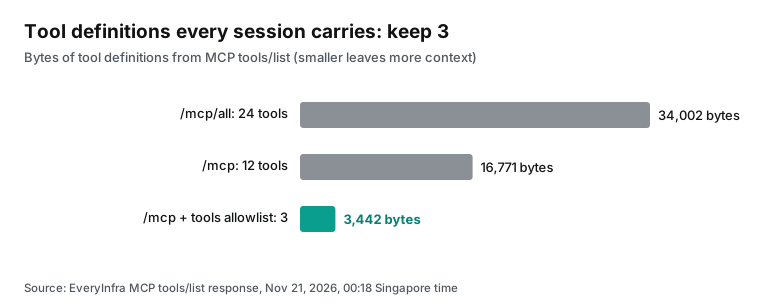
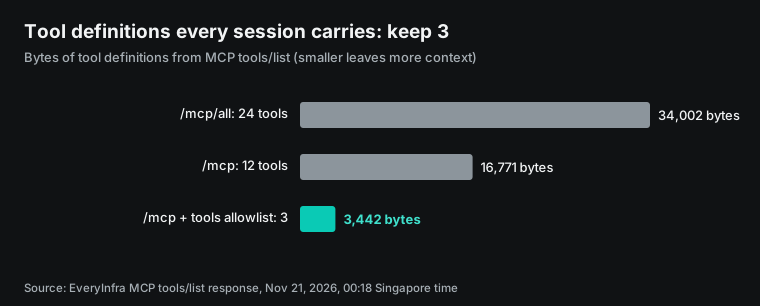
The tools field means the same thing in the GitHub docs and the VS Code docs. A list of names allows only those tools, and ["*"] allows all. The field controls which tools the model sees. It does not skip approvals (VS Code: MCP configuration reference; Copilot CLI: Adding MCP servers).
The repository MCP page uses stronger words. The cloud agent calls the configured tools on its own and does not ask you first. So GitHub strongly recommends that you allow only specific read-only tools (Configure MCP servers for your repository).
The annotations in a tool definition also change how Copilot acts. In the MCP specification, a tool can carry hints such as readOnlyHint and destructiveHint. Clients should ask the user to confirm sensitive actions (MCP specification: Tools). In our responses at 00:18, everyinfra_list_capabilities and everyinfra_get_job had readOnlyHint set to true. everyinfra_call_api had destructiveHint set to true, because it spends money. From 08:29 the same day, everyinfra_call_api has readOnlyHint: true and destructiveHint: false, and each call is still charged.
The GitHub docs say that Copilot code review uses only MCP tools with readOnlyHint set to true (Configure MCP servers for your repository). By that rule, after the annotation change everyinfra_call_api is no longer left out because of its hints. If code review uses the same repository MCP configuration and tools lists it, a pull request review may call it, and each call is charged. We have not run this on the Copilot side, before or after the change. The cloud agent configuration later in this article does not list it, so the tools allowlist keeps it out.
| Tool | readOnlyHint | destructiveHint | Allowed here | Reason |
|---|---|---|---|---|
everyinfra_list_capabilities | true | false | Yes | Free; shows parameters and price_usd |
everyinfra_call_api | false (true from 08:29 on Nov 21) | true (false from 08:29 on Nov 21) | Yes, approve each call | The only tool that charges |
everyinfra_get_job | true | false | Yes | Free; reads async results |
The other 9 on /mcp | True for 5 (8 from 08:29) | True for 3 (0 from 08:29) | No | Not needed for the table; includes top-up links, tickets and captcha tools |
The 12 extra on /mcp/all | Mixed | everyinfra_delete_key is true | Do not use the endpoint | Key and account management does not belong in a session |
Pick the right permission level in VS Code too. The approvals page lists three levels (VS Code: Manage approvals):
| Level | What it does | Use here |
|---|---|---|
| Manual (default) | Asks about each call that no rule or saved approval covers | Both sessions in this job |
| Assisted | A model decides which calls need your review; the docs say it can make mistakes | Not for paid tools |
| Allow all | Skips ordinary tool prompts, also for destructive actions | Not here |
Keep the data test session on Manual, because each approval of everyinfra_call_api is one charge. Keep the table session on Manual too, because apply_migration changes the schema. When a prompt shows, the menu has three scopes:
| Scope | How long it lasts | Use it for |
|---|---|---|
| Allow Once | This call only | everyinfra_call_api, apply_migration |
| In this Session | The current session; a new session does not get it | The two free read-only EveryInfra tools |
| Always Allow | All later sessions on the same host | No tool that charges or changes the schema |
One real round trip: what the model sends and what comes back
When Copilot calls a remote MCP tool, it sends a JSON-RPC tools/call. We sent the same format from a script. The first try was at 00:20:43 Singapore time on November 21. The key had sent more than its limit of 10 calls in one minute. The response was a tool result with isError: true. It contained rate_limited, retry_after: 17, retryable: true and the text "Nothing was charged".
At 00:26:26 Singapore time, we sent the same call again. After 19.7 seconds, it returned the Bose TikTok profile: a verified account with 517,100 followers and 1,375 videos. The charge was $0.000556, which is the catalog price of tiktok/profile.
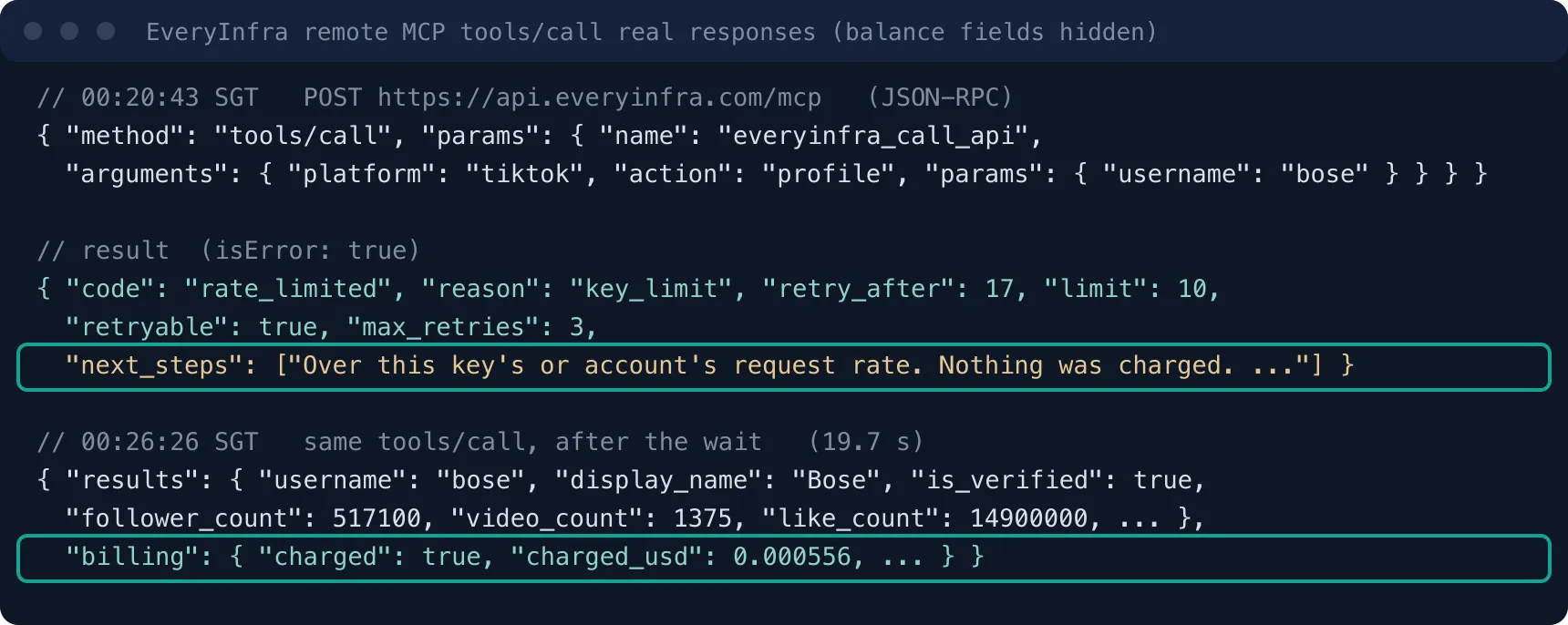
A 429 comes back as a tool execution error (isError: true), so the model can read retry_after and next_steps and decide how long to wait. The MCP specification keeps this kind of error apart from protocol errors (MCP specification: Tools).
The rate-limit result was 861 bytes and came back in 0.145 seconds. These are its fields:
| Field | Value | What it tells the model |
|---|---|---|
code | rate_limited | The call was refused before any work, with no charge |
reason | key_limit | The limit belongs to this key |
fault | account | The parameters are correct; the account side caused it |
retry_after | 17 | Seconds to wait |
limit | 10 | Calls per minute for this key |
max_retries | 3 | How many retries make sense |
So the cause is the limit of this key, not a bad parameter, and the client can retry up to 3 times. next_steps also says that the user can raise the limit. You can add one line to the prompt: "On a rate limit, wait for retry_after and retry at most 3 times."
The good result was 1,865 bytes with one text content item and no structuredContent, so Copilot gets the JSON as text. It is one profile, like an Instagram account, but it is more than ten times smaller, because tiktok/profile has no video list. A good result carries billing.charged_usd. The model sees the cost of each call in the session. You can also tell it to report the running total after each call.
Live test: 30 usernames in two batches
The daily table starts from a list of rival usernames. As an assumed example, take a headphone and audio brand with 30 rivals. We guessed 30 Instagram usernames from the brand names. Then we called instagram/profiles_batch twice.
The catalog says that this capability takes up to 20 accounts per call. It bills per account at $0.000556. Accounts that are not found are free and appear in missed in the response (EveryInfra catalog).
| Batch (Singapore time) | Requested | Billed | missed | charged_usd | Raw response | 11 columns only |
|---|---|---|---|---|---|---|
| Batch 1, 00:18:02 | 10 | 9 | audiotechnica_official | $0.005 | 547,588 bytes | 2,507 bytes |
| Batch 2, 00:25:47 | 20 | 18 | soundcore_global, edifierglobal | $0.01 | 717,356 bytes | 4,712 bytes |
| Total | 30 | 27 | 3 | $0.015 | 1,264,944 bytes | 7,219 bytes |
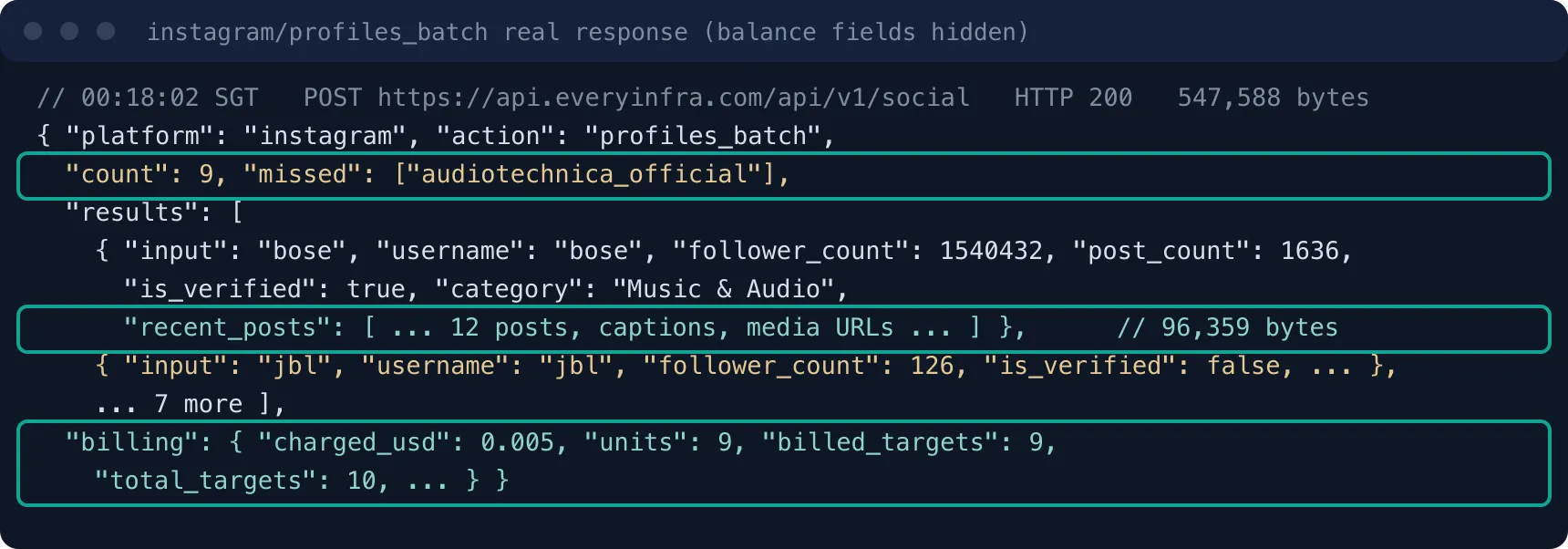
The charge and the refund agree with the catalog. In batch 1, total_targets is 10 and billed_targets is 9. The system held the price of 10 accounts and refunded $0.000556 for the one miss at once, so 9 accounts cost $0.005. In batch 2, 2 of 20 accounts were not found, and the refund was the price of 2 accounts, so the charge was $0.01.
The two batches cost $0.015 in total. Thirty single calls cost the same money, but two batch calls mean 2 requests instead of 30. With a key limit of 10 calls per minute, that is a big difference.
Nine of the 27 billed accounts looked wrong. They are jbl (126 followers), soundcore (94), jbl_audio (14), focal (73) and klipsch (309). The others are raycon (189), astrogaming (46), audeze (1,246) and grado (350). All 9 have is_verified set to false. The other 18 are verified, with followers from 143,287 (Jabra) to 7,308,302 (Razer). We did not check the 9 accounts one by one on Instagram.
We can only say that they do not match the official brand accounts. The API found them as real accounts, so it billed them. Of 30 guesses, 12 failed: 3 were not found (free) and 9 found someone else (billed).
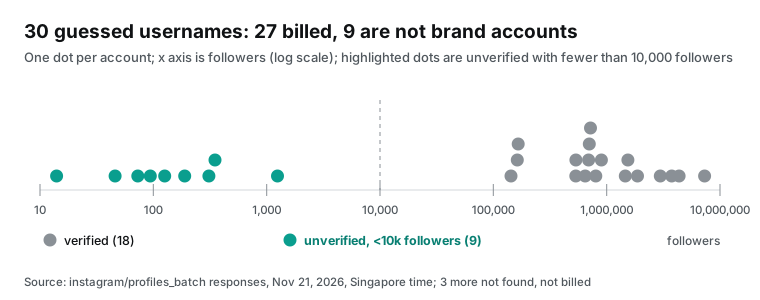
This result added two columns to competitor_handles: checked_at and is_official. When a new list goes in, run one batch call. Flag rows where is_verified is false or followers are below a threshold. A person checks those rows once, and only checked rows go into the daily job. Pick the threshold for your market; 10,000 is only for the chart. In a Copilot session, the Supabase connector can list rows where is_official is null and update them after you confirm.
We put the fields of the 27 billed accounts side by side and found one more pattern. All 9 suspect accounts have is_business false and external_url empty. All 18 verified accounts have is_business true and a value in external_url. In this sample, "is_verified and is_business both true" splits the official accounts from the rest with no follower threshold.
The sample is 27 accounts from one industry. Small brands and solo creators often have official accounts with no badge. So use this rule as a "please check" flag and not as a reason to delete a row.
| Rule | Verified accounts the rule keeps (of 18) | Suspect accounts the rule rejects (of 9) |
|---|---|---|
is_verified is true | 18 | 9 |
is_business is true | 18 | 9 |
external_url is not empty | 18 | 9 |
| Followers ≥ 10,000 | 18 | 9 |
external_url is on the brand's own domain | 9 | 9 |
The bio link is a weak check against the brand domain. Only 9 of the 18 verified accounts link to their own domain, such as sennheiser.com, marshall.com, corsair.com and nothing.tech. The other 9 link to link-in-bio services such as linktr.ee, linkin.bio, linkr.bio and sprout.link, or to short links such as bit.ly and steelseri.es. A domain check would flag half of the official accounts.
The Beats link also has a long campaign query string. Remove the part after the question mark before you store it. If you do not, the column changes with each campaign and looks like a profile edit.
The category column is even weaker as a filter. Only 7 of the 27 accounts have a value, and similar brands use different values. Bose is Music & Audio, Sennheiser is Product/service, and Beats and Skullcandy are Electronics. Bang & Olufsen is Brand, Razer is Computers (Brand) and HyperX is Gamer.
On Instagram, a professional account picks its own category, and there is no shared list of values. Keep the column to see when a rival changes its category. To decide if an account is a rival, use the brand value that a person typed in the handle table.
Keep 1.26 MB out of the context
The raw response is large because of recent_posts. Each account with posts brings back its 12 latest posts with captions, media URLs and engagement counts. Bose was the largest account at 96,359 bytes. A few small accounts with no posts were about 1,500 bytes. By total bytes, the 27 accounts average 46,850 bytes each. The 11 columns average 267 bytes.
The average mixes two kinds of account. Twenty of the 27 returned the full 12 posts, at 63,439 bytes on average, from 28,667 to 96,359 bytes at the extremes. The other 7 had no posts or one post and were between 1,501 and 6,607 bytes. All 7 are small unverified accounts.
The size does not follow the total post count. The Sonos profile has 19 posts in total and returned 88,669 bytes. The unverified account named klipsch has 8,938 posts and returned 28,667 bytes. The size comes from the captions and media URLs of the latest 12 posts. So for a brand account in a session test, about 60,000 bytes per account is a better estimate.
The table does not keep these 12 posts, but their dates show how often a brand posts. The 12 Logitech G posts fall between November 13 and November 20, 2026. The 12 Turtle Beach posts fall between November 14 and November 19, 2026. That is more than ten posts in one week. The 12 Sennheiser posts run from April 21 to November 19, 2026, so 12 posts took more than six months.
| Account | Oldest of the 12 posts | Newest of the 12 posts |
|---|---|---|
| Logitech G | November 13, 2026 | November 20, 2026 |
| Turtle Beach | November 14, 2026 | November 19, 2026 |
| Bose | October 21, 2026 | November 20, 2026 |
| Sennheiser | April 21, 2026 | November 19, 2026 |
The oldest posts can be pinned posts, which make the span longer. To keep this signal, take the latest posted_at in recent_posts in the script, and store it as one more column. That adds about 25 bytes per account.
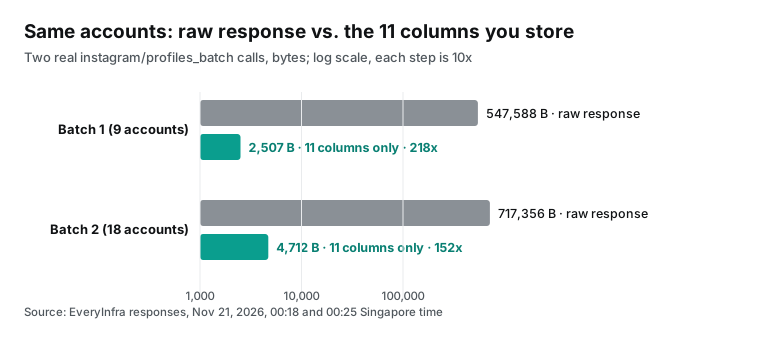
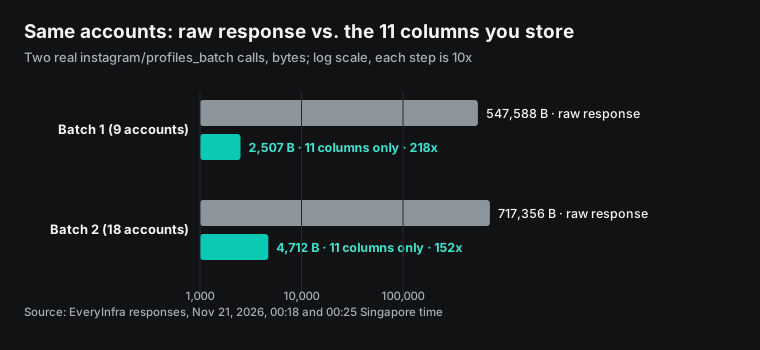
To turn bytes into tokens, we used a rule of thumb from the OpenAI help center. It is about 4 characters of English text per token (OpenAI: What are tokens). The raw response for 27 accounts is then about 316,236 tokens. The 11 columns are about 1,805 tokens. JSON has many URLs and numbers, so the real token count can differ from this ratio. Treat the dollar amounts below as the order of size.
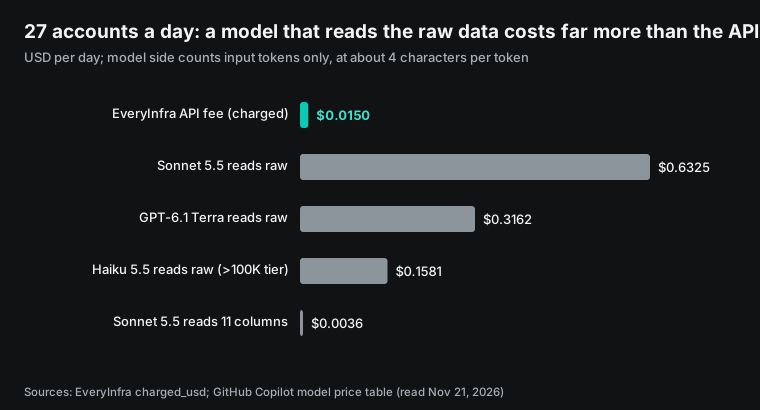
We used the Copilot input prices from the rate table, read on November 21 (Models and pricing). Claude Sonnet 5.5 is $2.00 per million input tokens, so one read of the raw data is about $0.63. GPT-6.1 Terra is $1.00, about $0.32. Claude Haiku 5.5 uses the long-context rate of $0.50 above 100K tokens, about $0.16. On the same day, EveryInfra charged $0.015 for the data.
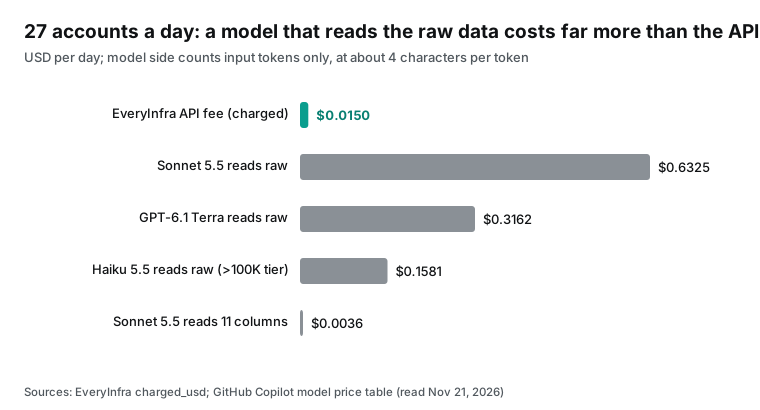
A Copilot agent sends the session context to the model again at each step. A tool result that it read earlier is billed again later, at the cheaper cached rate (Sonnet 5.5 cached input is $0.10 per million). So the amounts above are the low end. A session test of one or two accounts costs a few cents and shows you the fields. Give the daily move of 30 accounts to a script that does not call a model.
Our article on Claude Code subagents uses the same idea for TikTok accounts. It keeps the raw data inside a subagent context (Claude Code subagents for TikTok brand accounts). This job does not need a subagent at all, because the load needs no judgment.
Can the API return less? We checked the catalog on November 21. instagram/profiles_batch has one parameter, usernames. It has no option to turn off recent_posts or to pick fields.
So the caller does the trimming: the script reads 11 columns, and the session test uses few accounts. The catalog field_note also says that some requests return a fixed field set, and that recent_posts, category and highlight_count can be missing. Even with a field option later, these columns must allow null.
Step 3: a load script that writes only 11 columns
The script does three things. It reads the checked usernames from competitor_handles. It calls instagram/profiles_batch in groups of 20. It upserts 11 columns into the daily table. The write uses the Supabase REST API (PostgREST) with merge on conflict. That matches upsert in the Supabase JS client and INSERT … ON CONFLICT in Postgres (Supabase: upsert; PostgreSQL: INSERT).
"""competitor_ig_daily.py: run once a day. Keys come only from environment variables."""
import os, requests

EI = "https://api.everyinfra.com/api/v1/social"
SB = os.environ["SUPABASE_URL"].rstrip("/") + "/rest/v1"
H_EI = {"Authorization": f"Bearer {os.environ['EVERYINFRA_API_KEY']}"}
H_SB = {"apikey": os.environ["SUPABASE_SERVICE_KEY"],
        "Authorization": f"Bearer {os.environ['SUPABASE_SERVICE_KEY']}",
        "Content-Type": "application/json"}
COLS = ["username", "display_name", "follower_count", "following_count", "post_count",
        "is_verified", "is_business", "category", "external_url", "reels_count", "highlight_count"]

handles = [r["username"] for r in requests.get(
    f"{SB}/competitor_handles?is_official=eq.true&select=username", headers=H_SB, timeout=30).json()]

rows, spent, missed = [], 0.0, []
for i in range(0, len(handles), 20):          # catalog: at most 20 per call
    body = {"platform": "instagram", "action": "profiles_batch",
            "params": {"usernames": handles[i:i + 20]}}
    r = requests.post(EI, json=body, headers=H_EI, timeout=120)
    if r.status_code == 429:                  # no charge on a rate limit; wait retry_after
        raise SystemExit(f"rate limited, retry after {r.json()['error'].get('retry_after')}s")
    r.raise_for_status()
    d = r.json()
    spent += d["billing"]["charged_usd"]
    missed += d.get("missed") or []
    rows += [{c: p.get(c) for c in COLS} for p in d["results"]]

requests.post(f"{SB}/competitor_ig_daily?on_conflict=snapshot_date,username",
              json=rows, headers={**H_SB, "Prefer": "resolution=merge-duplicates"},
              timeout=60).raise_for_status()
print(f"rows={len(rows)} missed={missed} spent_usd={spent:.6f}")
The EveryInfra request body in this script is the same as in our two real calls on November 21. The last line prints the charge and the missed accounts. Look at the log each day. If an account that worked yesterday is in missed today, the brand probably changed its username.
Remove duplicates from the list before the script uses it. The catalog note on usernames says that one account can appear only once per request. Letter case does not make it a new account. Each item can be a username or a profile URL, and a leading @ is removed. People type the list by hand, so Bose and bose in the same list is common. Change all names to lower case and remove the @ before you split the list. That saves one rejected request.
SUPABASE_SERVICE_KEY is the server key that bypasses row level security. Keep it only in the secrets of the place where the script runs. Do not put it in .mcp.json, and do not let a Copilot session read it.
Where to run the schedule depends on what you have. The GitHub Actions schedule event runs a workflow on a cron (GitHub Actions: Events that trigger workflows). Put the keys in the repository Actions secrets. The workflow below runs each day at 09:10 Singapore time. The cron uses UTC, so 01:10 UTC is 09:10 in Singapore:
name: competitor-ig-daily
on:
  schedule:
    - cron: "10 1 * * *"
  workflow_dispatch:
jobs:
  run:
    runs-on: ubuntu-latest
    timeout-minutes: 10
    steps:
      - uses: actions/checkout@v4
      - run: pip install requests
      - run: python competitor_ig_daily.py
        env:
          EVERYINFRA_API_KEY: ${{ secrets.EVERYINFRA_API_KEY }}
          SUPABASE_URL: ${{ secrets.SUPABASE_URL }}
          SUPABASE_SERVICE_KEY: ${{ secrets.SUPABASE_SERVICE_KEY }}
workflow_dispatch lets you start one run by hand on the Actions page. For the first run, start it by hand and check rows and spent_usd in the log. Then wait for the schedule.
The GitHub docs warn that the schedule event can be late at times of high load, and the start of each hour is the busiest. So this example uses minute 10. The workflow does not call Copilot and does not use a connector, so the limit on connectors in Actions does not apply to it.
You can also write the logic as a Supabase Edge Function and call it once a day with Supabase Cron. Cron runs on pg_cron and can send HTTP requests (Supabase: Cron). In both cases, the script must reach api.everyinfra.com and your *.supabase.co project. If the Copilot cloud agent runs the script in its own environment, the GitHub firewall allows only the default domain list. Add both domains to the custom allowlist (Customizing the firewall).
Why not 30 single instagram/profile calls? The unit price is the same. But at 10 calls per minute, 30 single calls need at least 3 minutes. The batch needs 2 requests. The 10-account batch took 10.7 seconds and the 20-account batch took 15.5 seconds.
Twice the accounts added less than half the time, so the 120-second timeout in the script has a wide margin. It also lists the misses in one missed field, so the script does not handle a 404 per account.
After the data is in the table: three queries
After a few days of data, the three queries below are useful. They only read. You can run them in a session with the Supabase connector execute_sql, or save them as views in the Supabase SQL editor for a dashboard:
-- 1. Follower gain in the last 7 days, largest first
select username,
       max(follower_count) filter (where snapshot_date = current_date)
     - max(follower_count) filter (where snapshot_date = current_date - 7) as gain_7d
from competitor_ig_daily
where snapshot_date in (current_date, current_date - 7)
group by username
order by gain_7d desc nulls last;

-- 2. Official accounts with no data today (renamed, private or deleted)
select h.username
from competitor_handles h
left join competitor_ig_daily d
  on d.username = h.username and d.snapshot_date = current_date
where h.is_official and d.username is null;

-- 3. Accounts that added 5 or more posts in one day
select t.username, t.post_count - y.post_count as new_posts
from competitor_ig_daily t
join competitor_ig_daily y
  on y.username = t.username and y.snapshot_date = t.snapshot_date - 1
where t.snapshot_date = current_date
  and t.post_count - y.post_count >= 5;
Query 2 and the missed field in the script log work together. The log tells you which account failed on which day. Query 2 finds the checked official accounts with no row today. In our two batches on November 21, the 3 usernames in missed were wrong guesses from the start. After you check the list, a name that shows up here usually means a username change or a switch to private.
Query 3 finds a burst of posts. Then you can pull only those days with a capability such as instagram/user_posts. That costs much less than 12 posts per account every day. After a few weeks, a weekly report script can read this table and skip the weekly API calls. For an example of such a script, see GitHub Copilot MCP competitor social weekly report.
Use one time zone for the dates. The default for snapshot_date is the UTC date. current_date in a query follows the database time zone, which you can see with show timezone;. For a report in Singapore time, use (now() at time zone 'Asia/Singapore')::date in the write and the queries. If you change only one side, the run near 08:00 Singapore time falls on a different day.
Daily cost of 30 rival accounts
The data fee uses the catalog price. instagram/profiles_batch costs $0.000556 per account, so 30 accounts per day cost about $0.0167.
That is $0.50 for 30 days and about $6.08 for a year. Accounts that are not found are free, so the real fee can be lower. You can also add the TikTok profiles of the same 30 brands, because tiktok/profile has the same price. The total is then about $0.0333 per day and $1.00 for 30 days.
| Item | Per day | 30 days | 1 year | Source |
|---|---|---|---|---|
| EveryInfra data fee, 30 Instagram accounts | $0.0167 | $0.50 | $6.08 | Catalog price_usd, read November 21, 2026 |
| Plus 30 TikTok profiles | plus $0.0167 | plus $0.50 | plus $6.08 | Same |
| Model reads the raw response (Sonnet 5.5, input once) | about $0.63 | about $19 | about $231 | Copilot rate table, 4 characters per token |
| Script load, no model | $0 | $0 | $0 | The scheduled job calls no model |
| Supabase storage, 11 columns | about 8 KB | about 0.24 MB | about 2.9 MB | Test average, 267 bytes per account |
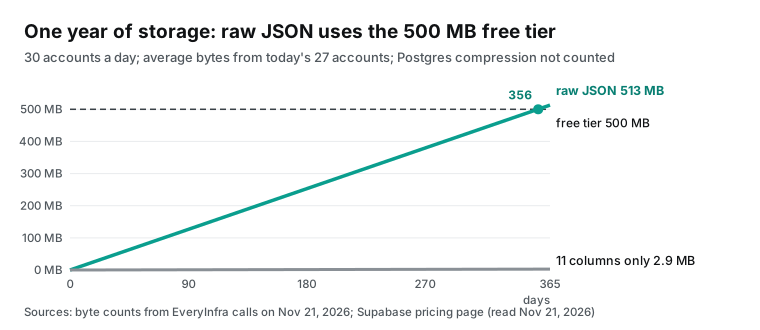
| Supabase storage, raw JSON | about 1.4 MB | about 42 MB | about 513 MB | 1,264,944 bytes for 27 test accounts, 46,850 bytes per account |
| Copilot plan (fixed) | — | Pro $10 with 1,500 AI credits; Business $19 per seat with 1,900 | Pro $120 | Plans for GitHub Copilot; credits for the table and test steps depend on the model and the chat length |
When the list grows, the fee grows with the account count, and the request count steps up by groups of 20. For 100 accounts, the job sends 5 batch requests a day, about $0.0556 per day and about $1.67 for 30 days. For 300 accounts, it sends 15 requests, about $0.167 per day and about $5.00 for 30 days. With a limit of 10 calls per minute, the 15 requests need two minutes. A pause of 7 seconds between batches keeps the script under the limit.
Look at the two storage rows on their own. The Supabase free tier gives each project a 500 MB database (Supabase pricing). We took the average size of our 27 accounts and projected it forward. If you store 30 raw JSON responses each day, the project reaches 500 MB near day 356. With 11 columns only, a year is about 2.9 MB.
Postgres compresses large values with TOAST, so the real size of raw JSON is smaller than the uncompressed number. We did not measure the ratio on Supabase (PostgreSQL: TOAST). If you want to keep raw data for audits, put it in object storage with one file per day. That costs less than a jsonb column in the database.
Free projects also pause after one week of inactivity (Supabase pricing). The page does not say if one write per day counts as activity, and we did not test it. For a long-term table, use a paid plan or alert on script failure. A failed write raises an error, and GitHub Actions marks the run as failed.
Running it with the Copilot cloud agent
If you like to write tasks as issues and assign them to Copilot, change the method for this job. That session runs on GitHub Actions, and connectors do not work there. Remote servers in the repository MCP settings do not support OAuth sign-in yet (Configure MCP servers for your repository). The hosted Supabase MCP server uses OAuth by default.
For CI, Supabase tells you to create a personal access token and send it in the Authorization header. In the dashboard, you can limit the token to one project and to the permissions that you need. Scoped tokens start with sbp_fc (Supabase MCP Server; Supabase: Personal access tokens).
{
  "mcpServers": {
    "everyinfra": {
      "type": "http",
      "url": "https://api.everyinfra.com/mcp",
      "headers": { "Authorization": "Bearer $COPILOT_MCP_EVERYINFRA_KEY" },
      "tools": ["everyinfra_list_capabilities", "everyinfra_get_job"]
    },
    "supabase": {
      "type": "http",
      "url": "https://mcp.supabase.com/mcp?project_ref=abcdefghijklmnop&read_only=true&features=database",
      "headers": { "Authorization": "Bearer $COPILOT_MCP_SUPABASE_PAT" },
      "tools": ["list_tables", "execute_sql"]
    }
  }
}
This JSON goes in repository Settings, then Copilot, then MCP servers. Create both keys as Agents secrets whose names start with COPILOT_MCP_; the MCP configuration can see only those (same page). Since May 8, 2026, you can set Agents secrets at the organization level, apart from Actions secrets (GitHub Changelog, May 8, 2026).
We did not give the cloud agent everyinfra_call_api, because it calls tools without asking a person. Since November 21 the tool is also marked read-only, so it fits the letter of "allow only read-only tools", but each call is still charged, so we still leave it out. Here the agent only edits the load script and writes migrations, and the catalog and read-only table access are enough for that.
The cloud agent firewall covers processes that the agent starts with Bash and the built-in Playwright MCP server. It does not cover other MCP servers (Customizing the firewall). So the tool allowlist is the only gate here.
The Supabase token adds its own permission layer. The Supabase docs say that, with a personal access token, the token permissions limit which MCP tools work. If the token can only read the database of one project, a call to apply_migration fails, even when the model sees the tool. So the cloud agent path has three limits that you can stack:
| Limit | Where you set it | What it stops |
|---|---|---|
read_only=true | Supabase MCP URL | All write SQL on the server |
| Token scope | Supabase dashboard, personal access token | Other projects and actions outside the token permissions |
tools allowlist | Repository MCP JSON | Tools the model must not see, such as apply_migration |
Any one of them stops schema changes. Set all three, because the cloud agent picks its own tools and no person approves each call.
The same table for Threads and Facebook
The handle table uses brand as its anchor, so rival profiles on other platforms can go into the same tables. The November 21 catalog lists two more batch capabilities with the same billing as instagram/profiles_batch. Each takes up to 20 items per call and bills per item at $0.000556. Items that are not found go into missed and cost nothing (EveryInfra catalog).
The parameters and fields in the table below come from the catalog. We read the Threads and Facebook rows in the catalog only. We did not call those two capabilities.
| Capability | Each item can be | Fields for the daily table | Post array in the response |
|---|---|---|---|
instagram/profiles_batch | Username (a leading @ is removed) or profile URL | follower_count, post_count, is_verified, is_business, external_url | Yes, recent_posts, up to 12 |
threads/profiles_batch | Username (with or without @) or profile URL | follower_count, is_verified, is_private, external_url, public_view_count | Not in the field list |
facebook/profiles_batch | The part after facebook.com/, a numeric ID or a page URL | follower_count, like_count, category, website, rating | Not in the field list |
To put all three into one daily table, change the primary key. Add a platform column, and make the key the date, the platform and the username. Add platform to the handle table too, so one brand has one row per platform.
The Instagram response is large because each account brings 12 posts. The Threads and Facebook field lists have no post array. The load script still reads only the columns that it needs, so you do not need a second script.
The Facebook field list also has phone and email. Brand pages often show a support phone number and an email address there. Rival tracking does not need these two fields, so keep them out of the daily table and the handle table.
alter table public.competitor_handles  add column platform text not null default 'instagram';
alter table public.competitor_ig_daily add column platform text not null default 'instagram';
alter table public.competitor_ig_daily drop constraint competitor_ig_daily_pkey;
alter table public.competitor_ig_daily add primary key (snapshot_date, platform, username);
These four lines also go through apply_migration. In a Copilot session, tell the Supabase connector to call list_tables first and show the name of the current primary key. Then it can write the migration for your review.
All rows in the daily table are Instagram rows before this change, so the default 'instagram' fills the old rows. The foreign key references competitor_handles(username) must change to the two columns (platform, username), and the handle table needs the same new primary key.
Limits and cautions
The Copilot steps are configuration examples from the GitHub, VS Code and Supabase docs. They include the connector sign-in, the apply_migration prompt, the .mcp.json load and the cloud agent setup. We did not run them in Copilot. The same applies to the Supabase part of the load script, the GitHub Actions workflow and the primary key migration.
The EveryInfra numbers come from real calls on November 21. These are two Instagram batch calls, two TikTok tools/call requests through MCP and tools/list on two MCP endpoints. One TikTok request hit the rate limit and cost nothing.
Connectors are in public preview, and GitHub says that they can change (Copilot connectors). The GitHub docs do not say if a connector can take parameters such as project_ref or read_only. The connector docs that we checked on November 21 cover only connect, disconnect and policies, with no place to set parameters for one connector. For a production database, Supabase advises a project scope, read-only mode and fewer tool groups (Supabase MCP Server). If you cannot set these, a self-configured Supabase server with parameters is safer than the connector.
The Instagram data covers what a public profile shows. Private accounts return no posts. Fields such as category and highlight_count are often missing. If you need full data for your own account, or business data for another business account, use the official Meta API. Instagram Business Discovery lets your own professional account read follower and post counts of other professional accounts. It needs app review and an access token (Meta: Business Discovery).
The model writes the SQL when the Supabase connector creates a table, so read it before it runs. The Supabase docs warn about prompt injection. User content in a table can lead the model to run other queries (Supabase MCP Server). The display_name and external_url columns in the daily table are also text that other people wrote. Take the same care when a model reads this table.
If something fails
| Symptom | Likely cause | What to do |
|---|---|---|
| The session does not show the Supabase connector | The session uses the Local harness, or the organization has the preview policy off | Change to the Copilot harness; ask an admin to check the four settings |
| The everyinfra server returns 401 on connect | The editor process has no EVERYINFRA_API_KEY | Add the variable to the shell config, quit the editor fully and open it again |
| The everyinfra server is blocked in an enterprise | The allowlist does not have the URL, or the URL has a variable | Add https://api.everyinfra.com/mcp; put variables only in headers |
Tool result has isError with code rate_limited | The key hit its per-minute limit | Wait for retry_after; this call has no charge |
An account is in missed | The username does not exist, changed or went private | No charge; check the handle table |
| The API returns 422 | A parameter name or enum value is wrong | Use the supported parameters and the close match in the error |
| The script fails in the cloud agent environment | The firewall does not allow the domain | Add api.everyinfra.com and the project domain to the custom allowlist |
Recent changes
| Date | Change | What it means for you |
|---|---|---|
| October 28, 2026 | GitHub launched connectors with 26 services in public preview (GitHub Changelog) | Common SaaS tools need one sign-in, not one MCP setup per client |
| October 28, 2026 | Microsoft opened the Copilot harness to Microsoft Foundry; VS Code, the Copilot app and the CLI share one runtime (Microsoft blog) | One .mcp.json file works for the editor and the CLI |
| November 16, 2026 | VS Code 1.146 deprecated the Local harness, with removal in February 2027 (GitHub Changelog) | Move from .vscode/mcp.json and ${input:…} to environment variables before February |
| November 18, 2026 | GitHub added Supabase and 7 more connectors; team plugin defaults became generally available (GitHub Changelog; also Data Studios) | "Read the schema, then write the migration" is one step in Copilot |
FAQ
The six questions below come from Google search suggestions.
Copilot connectors vs MCP: what is the difference?
The protocol is the same, and both give the model MCP tools. GitHub hosts the configuration and the sign-in for a connector. You pick from 34 services, connect once and use it everywhere. For your own server, you write the URL and manage the key. Each new client needs its own setup, unless you share a .mcp.json file.
Copilot connectors list: which services can I connect?
The supported list that we read on November 21, 2026 has 34 entries. It includes Slack, Figma, Notion, Sentry, Linear, Atlassian Rovo, Cloudflare, Vercel, Neon, Netlify and Postman. It also has the 8 new ones from November 18 (Supported Copilot connectors).
Copilot connectors admin preview: why can my enterprise not see connectors?
Check that the Editor preview features and MCP servers in Copilot policies are on. Then check that the MCP registry limit is not Registry only. Last, check that the allowlist in managed-settings.json has the connector URL or the wildcard.
GitHub Copilot MCP allowlist: how do I write it without blocking connectors?
Add { "serverUrl": "https://api.github.com/copilot-connectors/api/v1/connectors/*/mcp" } to allow all connectors, or list each connector URL that you need. Do not use variables in the URL, because the client blocks an unresolved variable (Configuring an MCP server allowlist).
Where does the GitHub Copilot mcp.json file go?
The VS Code Copilot harness and Copilot CLI both read .mcp.json at the workspace root, with the top-level key mcpServers. Put personal settings in ~/.copilot/mcp-config.json. The CLI also reads .github/mcp.json. The old .vscode/mcp.json is only for the deprecated Local harness.
Supabase MCP GitHub Copilot: can the Supabase connector work in an issue assigned to Copilot?
No. That session runs on GitHub Actions, and connectors do not work there. To use Supabase MCP there, set the hosted URL and a personal access token in the repository MCP settings. Store the token as an Agents secret with the COPILOT_MCP_ prefix.
Get started
- Get an API key in the EveryInfra console and store it in the local environment variable
EVERYINFRA_API_KEY. - On the Instagram Scraper API page, check the
profiles_batchparameters and price. Run one test with 3 usernames and look atmissedandis_verified. - Connect the Supabase connector on the Copilot Customize page. Create the two tables with the SQL from step 1.
- Put the
.mcp.jsonfile from step 2 in the repository root. Make sure thattoolslists only 3 tools. Tell Copilot to calleveryinfra_call_apionce and check the fields. - Put the load script in GitHub Actions or a Supabase Edge Function and run it once a day. For the full MCP setup, see the EveryInfra remote MCP page. For billing rules, see the pricing page.
References
- Connect Supabase, Box, Calendly, and more to Copilot, GitHub Changelog, November 18, 2026, https://github.blog/changelog/2026-11-18-connect-supabase-box-calendly-and-more-to-copilot/
- Connect your tools to Copilot without all the setup, GitHub Changelog, October 28, 2026, https://github.blog/changelog/2026-10-28-connect-your-tools-to-copilot-without-all-the-setup/
- Supported Copilot connectors, GitHub Docs, read November 21, 2026, https://docs.github.com/en/copilot/reference/supported-connectors
- Copilot connectors, GitHub Docs, read November 21, 2026, https://docs.github.com/en/copilot/concepts/customizations/copilot-connectors
- Configuring an MCP server allowlist for your enterprise, GitHub Docs, read November 21, 2026, https://docs.github.com/enterprise-cloud@latest/copilot/how-tos/administer-copilot/manage-mcp-usage/configure-enterprise-allowlist
- Connect services with Copilot connectors in VS Code, Visual Studio Code Docs, November 18, 2026, https://code.visualstudio.com/docs/agent-customization/copilot-connectors
- MCP configuration reference, Visual Studio Code Docs, read November 21, 2026, https://code.visualstudio.com/docs/copilot/reference/mcp-configuration
- Add and use MCP servers in VS Code, Visual Studio Code Docs, November 18, 2026, https://code.visualstudio.com/docs/copilot/customization/mcp-servers
- Use tools with agents, Visual Studio Code Docs, November 18, 2026, https://code.visualstudio.com/docs/agents/run/tools
- Manage approvals and permissions, Visual Studio Code Docs, read November 21, 2026, https://code.visualstudio.com/docs/agents/run/approvals
- VS Code retires the Local harness in February 2027, GitHub Changelog, November 16, 2026, https://github.blog/changelog/2026-11-16-vs-code-retires-the-local-harness-in-february-2027/
- Adding MCP servers for GitHub Copilot CLI, GitHub Docs, read November 21, 2026, https://docs.github.com/en/copilot/how-tos/copilot-cli/customize-copilot/add-mcp-servers
- Configure MCP servers for your repository, GitHub Docs, read November 21, 2026, https://docs.github.com/en/copilot/how-tos/copilot-on-github/customize-copilot/configure-mcp-servers
- Customizing or disabling the firewall for GitHub Copilot, GitHub Docs, read November 21, 2026, https://docs.github.com/en/copilot/how-tos/use-copilot-agents/cloud-agent/customize-the-agent-firewall
- More flexible secrets and variables for Copilot cloud agent, GitHub Changelog, May 8, 2026, https://github.blog/changelog/2026-05-08-more-flexible-secrets-and-variables-for-copilot-cloud-agent/
- Configure secrets and variables for Copilot cloud agent, GitHub Docs, read November 21, 2026, https://docs.github.com/en/copilot/how-tos/copilot-on-github/customize-copilot/customize-cloud-agent/configure-secrets-and-variables
- Plans for GitHub Copilot, GitHub Docs, read November 21, 2026, https://docs.github.com/en/copilot/get-started/plans
- Models and pricing for GitHub Copilot, GitHub Docs, read November 21, 2026, https://docs.github.com/en/copilot/reference/copilot-billing/models-and-pricing
- GitHub Copilot is moving to usage-based billing, GitHub Blog, April 27, 2026, https://github.blog/news-insights/company-news/github-copilot-is-moving-to-usage-based-billing/
- Requests in GitHub Copilot (legacy), GitHub Docs, read November 21, 2026, https://docs.github.com/en/copilot/concepts/billing/copilot-requests
- Introducing the Microsoft Copilot harness, Microsoft, October 28, 2026, https://blogs.microsoft.com/blog/2026/10/28/introducing-the-microsoft-copilot-harness-unlocking-the-potential-of-truly-multi-model-agentic-work/
- Supabase MCP Server, Supabase Docs, read November 21, 2026, https://supabase.com/docs/guides/getting-started/mcp
- Personal Access Tokens, Supabase Docs, read November 21, 2026, https://supabase.com/docs/guides/platform/personal-access-tokens
- Row Level Security, Supabase Docs, read November 21, 2026, https://supabase.com/docs/guides/database/postgres/row-level-security
- JavaScript: upsert, Supabase Docs, read November 21, 2026, https://supabase.com/docs/reference/javascript/upsert
- Cron, Supabase Docs, read November 21, 2026, https://supabase.com/docs/guides/cron
- Pricing and Fees, Supabase, read November 21, 2026, https://supabase.com/pricing
- INSERT, PostgreSQL Documentation, read November 21, 2026, https://www.postgresql.org/docs/current/sql-insert.html
- TOAST, PostgreSQL Documentation, read November 21, 2026, https://www.postgresql.org/docs/current/storage-toast.html
- Tools, Model Context Protocol specification 2025-06-18, https://modelcontextprotocol.io/specification/2025-06-18/server/tools
- Authorization, Model Context Protocol specification 2025-06-18, https://modelcontextprotocol.io/specification/2025-06-18/basic/authorization
- Events that trigger workflows, GitHub Docs, read November 21, 2026, https://docs.github.com/en/actions/reference/workflows-and-actions/events-that-trigger-workflows
- What are tokens and how to count them, OpenAI Help Center, read November 21, 2026, https://help.openai.com/en/articles/4936856-what-are-tokens-and-how-to-count-them
- Business Discovery, Meta for Developers, updated August 12, 2026, https://developers.facebook.com/docs/instagram-platform/instagram-api-with-facebook-login/business-discovery
- Connect your tools to Copilot without all the setup (community discussion 211002), GitHub Community, October 28, 2026, https://github.com/orgs/community/discussions/211002
- GitHub Copilot App Tutorial #7 - MCP Servers & Skills, YouTube tutorial channel, November 3, 2026, https://www.youtube.com/watch?v=iT_ZRG-wBpQ
- How to use MCP servers with GitHub Copilot CLI, GitHub, YouTube, April 7, 2026, https://www.youtube.com/watch?v=DtQjVIRRszM
- GitHub Copilot MCP Servers Explained, YouTube tutorial channel, September 18, 2026, https://www.youtube.com/watch?v=ABjCyMBjBl0
- GitHub Copilot team plugin defaults GA: 8 new MCP connectors, Data Studios, November 20, 2026, https://www.datastudios.org/post/github-copilot-team-plugin-defaults-ga-8-new-mcp-connectors
- GitHub Copilot Adds Eight Service Connectors in Public Preview, Technobezz, November 20, 2026, https://www.technobezz.com/news/github-copilot-eight-service-connectors-public-preview
- Stop Setting Up the Same MCP Server in Every Copilot Tool, Medium author post, October 30, 2026, https://medium.com/codetodeploy/github-copilot-connectors-verified-mcp-servers-856e538c8ea2
- Sandbox Copilot agent sessions, Visual Studio Code Docs, read November 21, 2026, https://code.visualstudio.com/docs/agents/run/agent-sandboxing
- Migrate customizations to the Copilot harness, Visual Studio Code Docs, read November 21, 2026, https://code.visualstudio.com/docs/agent-customization/migrate-customizations
- EveryInfra data API catalog, EveryInfra, read November 21, 2026, https://api.everyinfra.com/api/v1/social/catalog
- EveryInfra llms.txt, EveryInfra, read November 21, 2026, https://api.everyinfra.com/llms.txt
Reference BL-199