Gemini Skills Replace Gems: A Weekly Hot Posts Digest
Gemini Gems go read only on Nov 17. Move to Gemini skills with a weekly hot posts digest: SKILL.md, three data routes and real tests of four hot list APIs.

What to do now: on a personal Google Account (18 or over), Gemini Gems become read only on November 17, 2026. Google removes them on December 17, 2026. That is 13 days from today. Rebuild each Gem that you still use every week as a skill now, and download its knowledge files.
Work and school accounts have later dates: no sooner than March 1, 2027 and June 1, 2027. Skills inside Workspace apps are also "delayed until further notice". All of these dates come from Google's own Workspace Updates blog and Gemini Help pages. The first section gives the source for each date.
This article uses one real job to show the move. We build a weekly hot posts digest as a SKILL.md file. Each Monday, Gemini reads one week of Reddit popular posts, the Zhihu hot list, Weibo hot search and X trends, and writes a one-page report. On the way, we hit the most important limit of the Gemini app: skill scripts cannot go online or send requests to external websites. So data fetching must stay outside the skill.
We give three ways to bring the data into Gemini. They are local snapshots with an upload, a custom Connected App, and a Gemini API agent with a trigger. We also check if the same SKILL.md works in Claude and Codex.
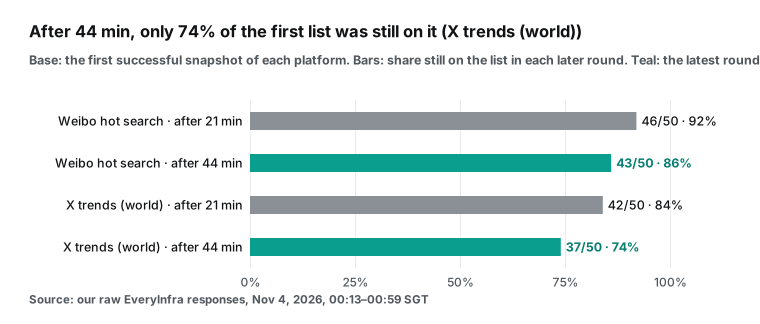
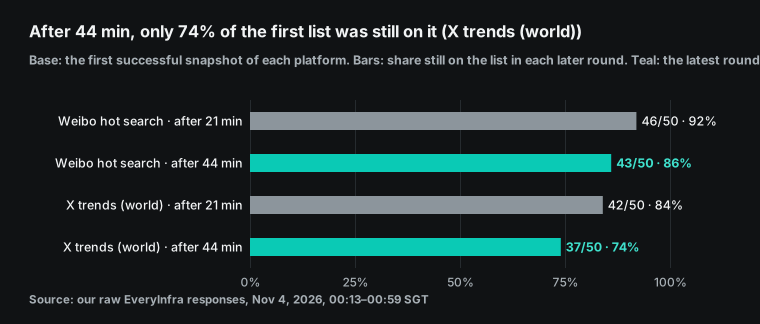
We made real calls on the data side. On November 4, 2026, from 00:13–00:59 SGT, we called EveryInfra reddit/trending_posts, zhihu/hot_list, weibo/trending and twitter/trending in 3 rounds. One call went through the remote MCP tools/call method. At 02:05 SGT, we tried the two failed lists once more. The main result is that the lists change fast. After 44 minutes, only 86% of the Weibo list was still on it.
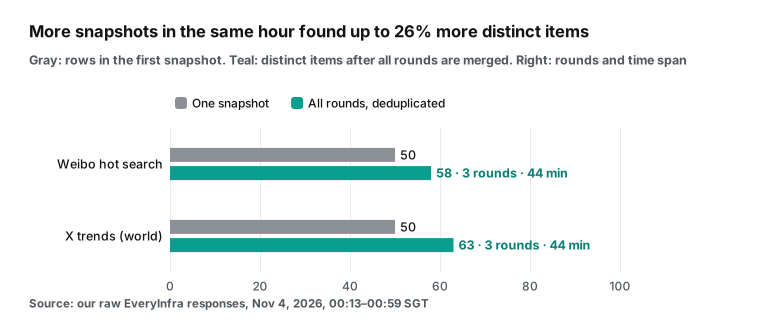
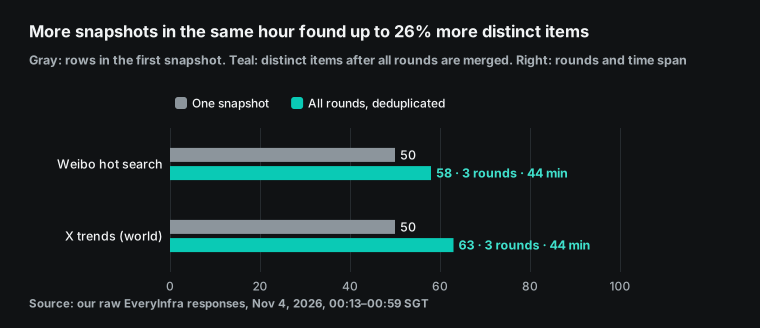
After 44 minutes, only 74% of the X list was still on it. The 3 rounds together found 16% and 26% more distinct topics than one snapshot, so a weekly digest needs several snapshots per day.
The Zhihu hot list and Reddit popular posts were not available during the test. All 8 Zhihu requests returned 503, and Reddit gave data only in round 1. Failed calls had no charge. So the digest numbers below come only from Weibo and X. This also shows why the skill must say "if there is no data, say so". At catalog prices, our example rate of four snapshots a day costs $0.297 per month for all four lists.
Gemini is not signed in on our test machine. So the skill upload, the custom app and the Gemini API trigger are configuration examples, not runs. They come from the official documentation of November 4.


What to do now: Gemini Gems read only on November 17
The dates matter more than the features, so we start with them. The Gemini Apps Help page on the transition is direct. For personal Google Accounts of users aged 18 or over, Gems become read only on November 17, 2026. You can still open them, but you cannot use them, edit them or create new ones. On December 17, 2026, Gems leave Gemini Apps and you lose access (Gemini Apps Help: About the transition from Gems to skills).
Work accounts get more time. The same page lists March 2027 for Workspace business, enterprise and nonprofit accounts, and June 2027 for education accounts. The Workspace Admin Help page gives the exact days: March 1, 2027 and June 1, 2027 (Admin Help). The Workspace Updates post uses the words "no sooner than" for both dates (Workspace Updates, September 30, 2026).
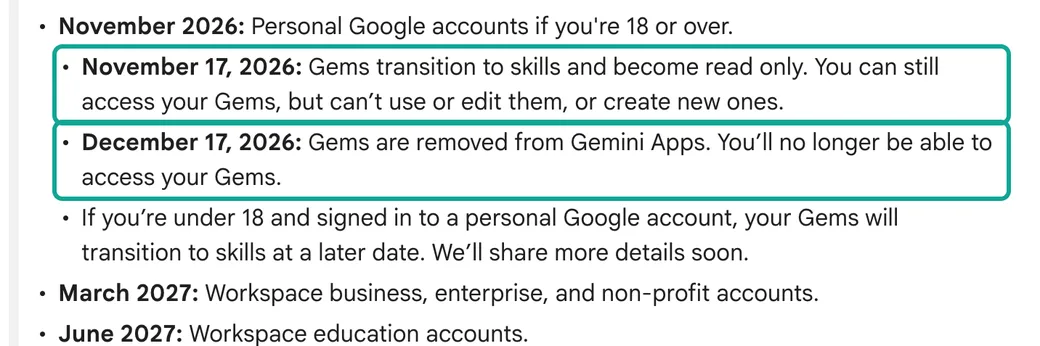
One detail causes confusion. The September 30 Workspace Updates post has a "Key dates" list. Its November 17 line says that Gems move to the Settings panel and that users can still create, edit and use them. The Help page for personal accounts says "read only" on the same day. The two lines are about different accounts.
The blog line sits in the Workspace timeline. The Help page line is only for personal accounts of users 18 or over. Many second-hand articles merge the two lines into "read only for everyone on November 17". That is not what the sources say.
| Account type | Read only, or moved to Settings | Gems stop working | Gems removed | Source |
|---|---|---|---|---|
| Personal Google Account, 18 or over | 2026-11-17, read only | 2026-11-17 | 2026-12-17 | Gemini Apps Help |
| Personal account, under 18 | "a later date" | Not stated | Not stated | Gemini Apps Help |
| Workspace business, enterprise, nonprofit | 2026-11-17, moved to Settings, still usable | No sooner than 2027-03-01 | Same day; remaining Gems become draft skills | Workspace Updates, Admin Help |
| Workspace education | Same as above | No sooner than 2027-06-01 | Same day, also Classroom and LTI | Same |
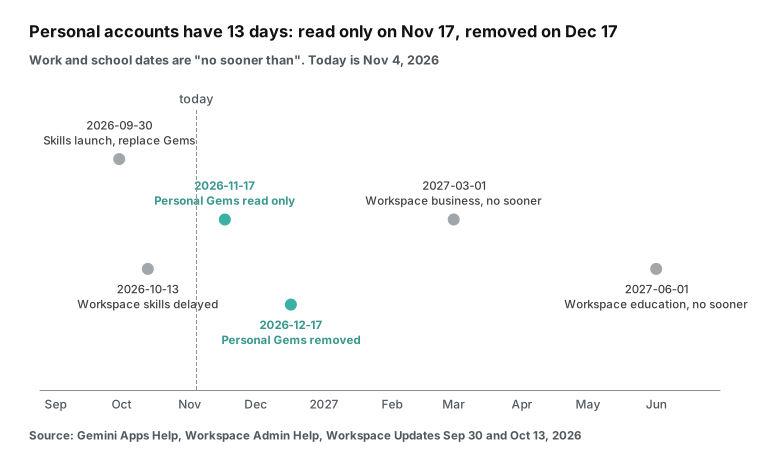
For a personal account, you have 13 days from the day we wrote this. We see three tasks. First, download the instructions and knowledge files of each Gem that you still use. A skill can hold at most 100 MB of files.
If a Gem is larger, the automatic migration removes the largest files first. Audio, video, archives, GitHub files and legacy Office files (.doc, .xls, .ppt) do not move at all. After December 17 you cannot get them back (same Help page, "Limits on files during the transition").
Second, rebuild your weekly Gems as skills by hand. Do not wait for the automatic migration. The migration creates "inactive drafts", and you must review and activate each one before you can use or share it (Admin Help, "How automated migration will work"). Third, check the tools that each Gem needs. The Help page says that skills do not yet work with Create video, Create music, Canvas, Deep Research and Guided learning. If a Gem depends on one of these tools, plan a different method.
Work accounts have time, but one thing changed already. In Workspace Studio, you cannot add an "Ask a Gem" step to a new flow. Existing flows keep working until 2027. Also, skills inside Workspace apps are late. The October 13 update says that the rollout to Rapid Release and Scheduled Release domains is "delayed until further notice" (Workspace Updates, October 13, 2026).
Skills in the Gemini app are on schedule. They started on October 13 with completion expected by mid-November. The same post says that skills do not sync between the Gemini app and Workspace apps. You must create each skill in both places.
Gemini skills vs Gems: what changed
A Gem is a separate custom version of Gemini. You open it and chat in its own window. A skill is a set of instructions that you can bring into any chat. You type / and the skill name, and the Help page says the shortcut will change to @.
Gemini can also pick a skill by itself when the name and description match your prompt. You can stack several skills in one chat (Create & manage skills for Gemini Apps). Workspace Updates says that skills are "built entirely on the open, Markdown-native SKILL.md standard". Thus you can copy skills from other platforms into Gemini (Workspace Updates, September 30, 2026).
| Item | Gems | Skills in the Gemini app (read Nov 4, 2026) |
|---|---|---|
| How you use it | Open the Gem in its own window | Type / (later @) in any chat, or let Gemini apply it |
| How many at once | One | Several; a skill can also refer to other skills |
| Format | Web form | Web form, or upload SKILL.md, a folder or a .zip |
| Name rule | Free text | All lowercase with hyphens, for example my-new-skill |
| Files | Knowledge files | 100 MB total; plain-text style files only; no audio, video or archives |
| Tools | Video, music, Canvas, Deep Research and more | Works with Connected Apps; not yet with video, music, Canvas, Deep Research, Guided learning |
| Scripts on the internet | Not applicable | No: uploaded scripts cannot access the internet or send requests to external websites |
| Plan needed | Free | Skills are free; scheduled Tasks need Google AI Pro or Ultra |
| Sharing | Yes | "In the coming weeks" |
The row about scripts is the problem that this article solves. A weekly hot posts digest needs outside data: hot posts on Reddit, the Zhihu hot list, Weibo trending searches and X trends. In Claude Code or Codex, a skill can run a script that calls an API, or the agent can call an MCP tool. Our article on one SKILL.md across four AI tools shows that method. The Gemini app is different.
Its Help page has two limits in the upload section. Scripts that need internet access are not supported. Under "Security restrictions", scripts cannot perform actions or send requests to external websites. So in the Gemini app, the skill does not fetch data. The data must come from another place.
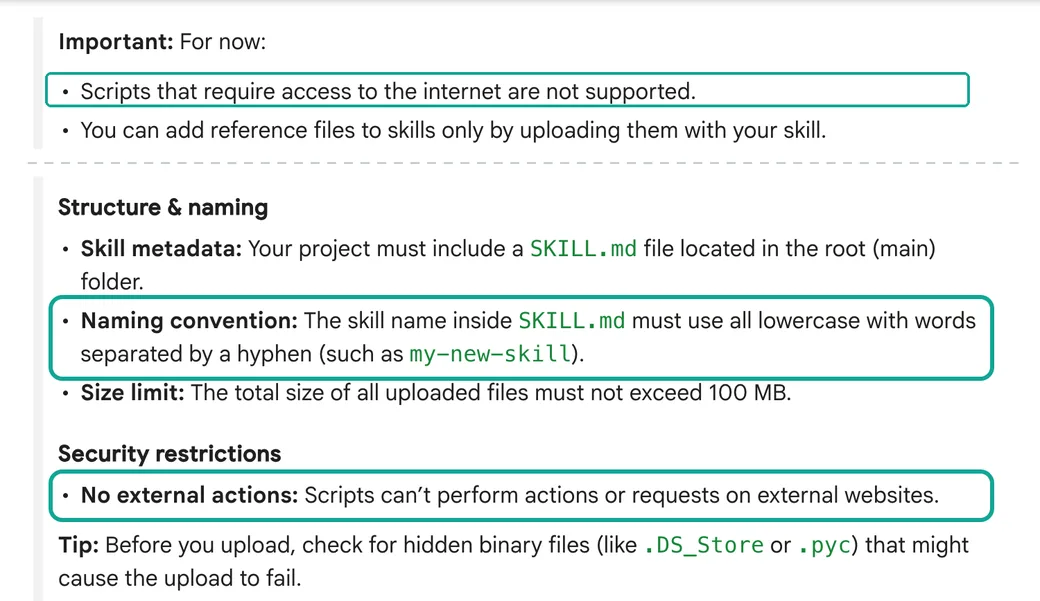
This limit gives the article its shape. The skill tells Gemini how to write the digest. The data takes a separate path. We first describe the job, then three paths that bring data into Gemini.
How to move a Gem to a skill
The Help page gives three manual steps. Open the Gem and download its knowledge files one by one. Create a new skill and copy the name, description and instructions from the Gem. To add files, download the skill as a folder, add the files and upload the full folder (Help page). In practice, you should rewrite four parts instead of copying them.
The first part is the name. A Gem can have any name. A skill name must be lowercase English words with hyphens, such as weekly-hot-posts-digest. The Help article on effective skills says to start the name with a verb. It also says to avoid empty words such as helper, tools or data (Write effective skills).
The second part is the description. A Gem description is for people. A skill description is for Gemini, because Gemini reads only the name and description to decide if the skill applies. Write it in the third person: what the skill does, then "Use when…" with the cases.
The limit is 1,024 characters. The same article says to write the steps as a checklist and to tell Gemini what to do when data is missing. For a digest, that second point is critical. An example rule is "if a platform has no data this week, say so and do not fill it from memory".
The third part is the knowledge files. A Gem often reads one large reference file every time. A skill loads content only when it needs it. Gemini reads the name and description first.
It reads the full instructions only if the skill looks relevant, and it opens attached files only when a step needs them. So put long templates and sample reports in a references/ folder. Then write "in step 5, use references/report-template.md" in the instructions.
The fourth part is tools. If a Gem used Deep Research or Canvas, that part does not work in a skill yet. Our digest does not need those tools. It only needs Gemini to read a table, group items and write text.
The job: a weekly hot posts digest, and how many snapshots it needs
The deliverable is a one-page weekly report. It answers three questions about the last seven days on Reddit, Zhihu, Weibo and X. Which topics stayed on the hot lists for many days? Which topics went up fast and then went away?
Did the same story appear on more than one platform? The readers are content planners, brand and PR teams, and market analysts. On Monday morning they open one page, and they do not have to read four hot lists.
Writing the report is the easy part. The hard part is to get one week of data. A hot list is a snapshot, not a log. Each platform shows only the current top items, and the list changes after some minutes. No platform gives you "all items that were on the list this week". The platforms say this in their own rules.
Weibo says that its hot search list updates every minute and shows the top 50 (Weibo hot search rules). Zhihu says that its hot list updates every 10 minutes and shows the top 30 (Zhihu hot list introduction). Reddit and X do not publish a refresh rate. In our catalog, reddit/trending_posts returns about 25 posts per page, and its page token is valid for 24 hours. twitter/trending returns the list for one location, and each row has a collected_at time. The field note says that trends change quickly, so use that time to judge how fresh a row is.
| Hot list | EveryInfra capability | Rows per call | How the platform ranks | Refresh rate | Catalog price (Nov 4, 2026) |
|---|---|---|---|---|---|
| Reddit popular posts | reddit/trending_posts | About 25 per page; more pages with a token | Not published | Not published | $0.000556 per page |
| Zhihu hot list | zhihu/hot_list | Up to 30 | Search, reading, interaction and click rate | Every 10 minutes | $0.000806 per call |
| Weibo hot search | weibo/trending | Default 20, up to 200 (the list itself has 50) | (Search + discussion + spread) × interaction rate | Every minute | $0.000556 per call |
| X trends | twitter/trending | About 50 for one location | Not published | Not published | $0.000556 per call |
So the correct method for a weekly digest is to take many snapshots during the week and then merge them. For each item, the report needs three numbers: how many snapshots showed it, its best rank, and its highest heat value. One snapshot of all four lists costs $0.002474 (3 × $0.000556 + $0.000806, from the catalog field price_usd). The real question is how many snapshots you need.
Too few, and you miss topics. Too many, and you pay for data that you do not use. We ran 3 rounds of real calls to answer this question. The results are in the test section below.
A price check also shows why we do not suggest the official platform APIs for this job. The X developer documentation lists pay-per-use prices, and the Trends endpoint costs $0.010 per request (X API pricing). That is about 18 times the catalog price of twitter/trending. Reddit's own API needs approval first. The "Platform terms" note in the limits section gives the details.
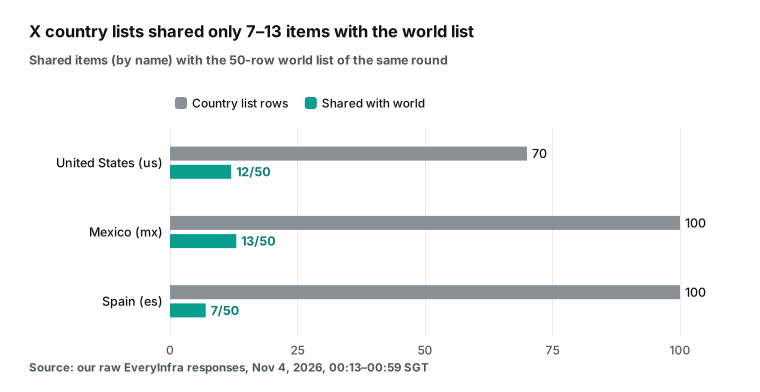
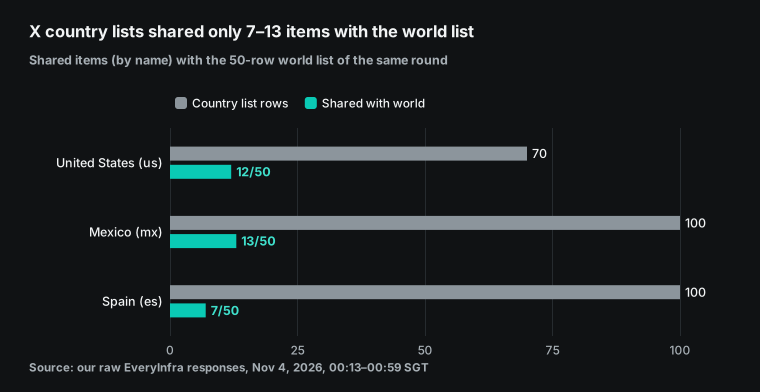
For a US reader, the X location matters. The default country=world list is a global mix. In our second round, we also called country=us, and it returned 70 rows instead of 50. If your audience is in the United States, use us. The catalog lists the other location values.
The SKILL.md skeleton: weekly-hot-posts-digest
Below are the full folder and the SKILL.md file. The skill does one thing. It takes one week of hot list snapshots as a table and writes a one-page digest. It does not fetch data, because skill scripts in the Gemini app cannot go online.
We wrote the instructions in English. The examples on the Gemini, Claude and Codex help pages are in English, and all three platforms read them. If you want the digest in another language, say so when you call the skill.
weekly-hot-posts-digest/
├── SKILL.md                     # required: name, description, instructions
└── references/
└── report-template.md # output template for step 5---
name: weekly-hot-posts-digest
description: Builds a one-page weekly digest of hot posts and trending topics from Reddit, Zhihu, Weibo and X snapshot data. Use when the user uploads this week's weekly.csv or snapshots.jsonl, or asks for a weekly trending summary across these four platforms.
---
# Weekly hot posts digest
## Inputs
- weekly.csv: one row per post or topic. Columns: platform, key, title, url, community, first_seen, last_seen, times_seen, snapshots_total, best_rank, max_heat.
- If the user gives snapshots.jsonl instead, group rows by platform and key first, then work from the grouped rows.
## Steps
Copy this checklist and track progress:
- [ ] 1. For each platform, count snapshots_total and the date range. Write them at the top of the digest.
- [ ] 2. Rank items by times_seen / snapshots_total first, then by best_rank. An item seen in most snapshots is a "week topic". An item seen once is a "spike".
- [ ] 3. Pick 5 week topics and 3 spikes per platform. Keep the original title. For Zhihu and Weibo, add a one-line English gloss after the title.
- [ ] 4. Group the picked items into at most 6 themes across platforms. A theme needs items from 2 or more platforms.
- [ ] 5. Fill the template in references/report-template.md.
## Rules
- max_heat is only comparable inside one platform. Do not compare Weibo hot_value with Zhihu hot_value or Reddit like_count.
- X trends may have an empty volume. Write "no volume" instead of 0.
- Do not guess why a topic is hot. If the title is not enough, write "reason unclear" and give the url.
- Remove user names from Reddit titles and text if they appear. Keep brand and organization names.
## Missing information
- If a platform has 0 snapshots this week, write "no data for <platform> this week" and continue with the others. Do not fill it from memory or web search.
- If snapshots_total is below 5 for a platform, add the line "low coverage: N snapshots".The template file is short. It has a title line with the week dates in SGT and a coverage line. Then come a themes table, a "week topics" section per platform, a "spikes" section and notes. The full file is 399 bytes. It is in a separate file because of progressive disclosure. Gemini opens it only at step 5, so it uses no tokens while Gemini decides if the skill applies.
Each rule in the instructions comes from something that we saw in the real calls. The rule "max_heat is only comparable inside one platform" comes from the catalog field notes. The Weibo hot_value is a Weibo metric that is "only comparable within the list". The Zhihu hot_value is the page text, such as "5.97 million heat", changed to an integer.
The two platforms use different formulas. Weibo's rules give "(search heat + discussion heat + spread heat) × interaction rate". Zhihu's page lists search heat, reading heat, interaction heat and click rate (Weibo hot search rules, Zhihu hot list introduction). A sort across the two lists has no meaning.
The rule "X trends may have an empty volume" comes from our tests. The field section below has the numbers. The rule "if data is missing, say so" comes from the Zhihu hot list, which returned HTTP 503 in all our attempts during this test. Without this rule, Gemini can fill the gap with old hot list items from its memory. The digest then looks complete, but part of it is invented.
| Rule in the skill | Test result or document behind it | Without the rule |
|---|---|---|
| Compare max_heat only inside one platform | Weibo and Zhihu use different heat formulas; the catalog says Weibo heat is comparable only within its list | A meaningless cross-platform "heat ranking" |
| Write "no volume" for an empty X volume | X volume was empty in all our X snapshots | The model reads the empty value as 0 |
| Do not guess; write "reason unclear" | A hot list gives only a title and a link | The model invents a reason from memory |
| No data means "no data" | The Zhihu hot list returned 503 for each request in this test | The model fills the gap with old items |
| Below 5 snapshots, write "low coverage" | Part of each list changes within 44 minutes | Readers think the digest covers the full week |
Can Claude and Codex use the same SKILL.md?
Yes. Gemini, Claude Code, Codex and Antigravity all say that their skills follow the open Agent Skills standard. The specification has only two required fields. name uses lowercase letters, digits and hyphens, up to 64 characters. description has up to 1,024 characters (Agent Skills specification).
Claude Code adds extension fields, such as invocation control and subagent execution (Claude Code docs). Codex requires both name and description (Codex: Build skills). Antigravity lets you omit name and then uses the folder name (Antigravity docs). Our skill has both fields and no extension fields, so all four tools can read it without changes.
Only one thing is different. In Claude Code, Codex and Antigravity CLI, the same skill can call the EveryInfra remote MCP server and get the hot lists. In the Gemini app, a skill cannot go online, so you must prepare the data first. Our article one SKILL.md across four AI tools: a competitor review test compares skill folders, call methods and network rules. That article shows a skill that runs together with MCP calls. This article shows how to split data and instructions when the skill cannot go online.
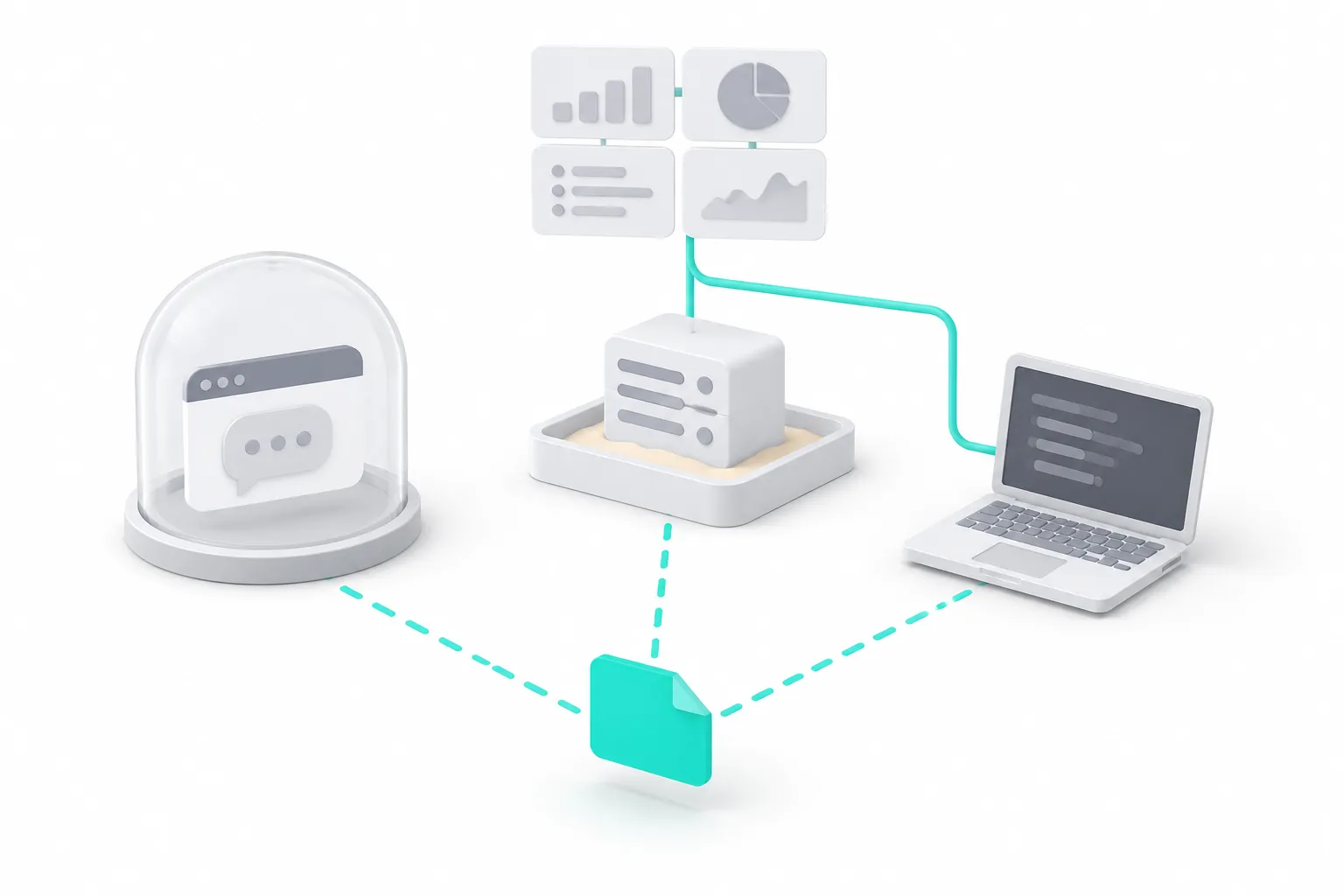
How the Gemini app gets external data: three routes
The skill does not fetch data, so the data must come from outside. We read the official documentation on November 4, 2026 and found three routes. Each route has different requirements and suits a different user. Each route below is a configuration example. Gemini is not signed in on our test machine, and we did not run any step on the Gemini side.
| Route | Who can use it | How the data comes in | Weekly automation | What we tested |
|---|---|---|---|---|
| A. Local snapshots, upload a table on the weekend | Every account that has skills | weekly.csv as a chat attachment | Fetching is automatic; a person uploads the file | The data API calls (our 3 rounds) |
| B. Custom Connected App (remote MCP) | 18 or over, in the US, personal account, English | Gemini calls MCP tools | The Help page says that custom apps work in Tasks | Only our MCP side |
| C. Gemini API: Antigravity agent and a trigger | Developers with a Gemini API key | The agent calls an mcp_server tool in a sandbox | Yes, a trigger runs on a cron schedule | Only our MCP side |
The routes that you can use depend on where you are and on your account:
| Your situation | Routes | Why |
|---|---|---|
| In the US, personal account, English | A, B, C | Custom apps are only for personal accounts in the US |
| Personal account in another country (for example Canada or Singapore) | A, C | No custom apps; Tasks need AI Pro or Ultra |
| In the EEA, Switzerland or the UK | A (a person uploads), C | Scheduled Gemini Tasks are not available there |
| Workspace work account | A, C (after Workspace skills launch) | Workspace skills are delayed, and the two kinds of skills do not sync |
Route A: local snapshots, weekend upload. This route has the lowest requirements and gives you the most control. On your computer or a small server, run a fetch script one or more times each day. The script adds the raw results of the four hot lists to snapshots.jsonl.
On the weekend, a merge script turns the week of snapshots into weekly.csv. You upload that file to a Gemini chat and type /weekly-hot-posts-digest. CSV is in the list of supported file types on the Gemini Help page (Create & manage skills).
The advantage is that fetching and writing are fully separate. A fixed program does the fetching, and it records each charge and each failure in a file. The model that writes the digest sees only one table, so it cannot "search and fill the gap". The disadvantage is that a person must upload the file each week. Our real calls in the next section use the same API calls.
Route B: a custom Connected App. On the Gemini web app, you can add a "custom app" with the URL of an MCP server. After you connect it, it works in the mobile app, on the web and in Tasks (custom apps Help page). The requirements are clear. You must be 18 or over, be in the United States, sign in with a personal Google Account, and keep Keep Activity on. For now, the feature supports only English, and you can add an app only on the web.
For authentication, the Developer Mode documentation uses Dynamic Client Registration (RFC 7591). You configure how Gemini sets up client and user credentials with your MCP server. There is also a separate OAuth 2.1 guide (Gemini Apps Developer Mode overview). So this route uses an OAuth sign-in.
You do not paste an API key into a request header. The EveryInfra remote MCP server has an OAuth entry point at https://api.everyinfra.com/mcp/all, with metadata at /.well-known/oauth-protected-resource/mcp/all. We did not try to connect it in Gemini, so we cannot say that it connects. If you are in the US and try this route, send us the error if the connection fails.
Route B has one more detail that follows from the documentation, but we did not test it. The Developer Mode page says that Gemini reads the readOnlyHint and destructiveHint annotations of each MCP tool (MCP tools specification). With the chat context, it uses them to decide if it shows a confirmation card first. The Help page also says that Gemini always asks you to confirm write actions. On November 4, we read the EveryInfra MCP tool list with tools/list.
This call works without a key and has no charge. The general data tool everyinfra_call_api has the annotations readOnlyHint: false and destructiveHint: true, because each call has a charge. From the documentation, this probably means that Gemini asks you to confirm each hot list call. Thus an unattended scheduled task can stop at the confirmation step. Check this when you connect the app.
Route C: the Gemini API Antigravity agent and a trigger. If you can write a few lines of Python, use this route. It is the only route where fetching, writing and scheduling all happen on Google's side. The Gemini API Interactions endpoint can use a remote MCP server as a tool. The fields are type: "mcp_server", name, url, headers and allowed_tools. Only Streamable HTTP is supported, not SSE, and the name must not contain a hyphen (Gemini API: Function calling, Remote MCP section).
The Antigravity agent is a general agent that runs in a Linux sandbox that Google manages. You can mount AGENTS.md and skills under .agents/skills/ into the sandbox (Gemini API: Antigravity agent). The Interactions API reference has an example that uses an inline source to write a SKILL.md file to .agents/skills/<name>/SKILL.md (Interactions API reference). In the "Triggers" section, a trigger joins an agent, an environment, a prompt and a cron schedule into one persistent resource. Each run uses the same environment, so files from the last run are still there. For unattended runs, the page suggests a stored credential instead of a token in the request.
Together, these three facts give a configuration that writes a digest each Monday morning. Below is a configuration example. We copied the field names from the official documentation, but we did not run the code.
# Configuration example (not run): one snapshot each day at 08:00 SGT,
# and on Mondays also the digest for the last week.
# Sources: ai.google.dev/gemini-api/docs/antigravity-agent (MCP servers, Triggers, Budget controls)
#          ai.google.dev/api/interactions-api (inline sources for an environment)
from google import genai

client = genai.Client()  # reads GEMINI_API_KEY from the environment
SKILL_MD = open("weekly-hot-posts-digest/SKILL.md", encoding="utf-8").read()
TEMPLATE = open("weekly-hot-posts-digest/references/report-template.md", encoding="utf-8").read()

everyinfra = {
    "type": "mcp_server",
    "name": "everyinfra",                     # lowercase letters and digits only
    "url": "https://api.everyinfra.com/mcp",
    "headers": {"Authorization": "Bearer " + EVERYINFRA_API_KEY},  # read from a secret store
    "allowed_tools": ["everyinfra_call_api"],
}
environment = {
    "type": "remote",
    "sources": [
        {"type": "inline", "content": SKILL_MD,
         "target": ".agents/skills/weekly-hot-posts-digest/SKILL.md"},
        {"type": "inline", "content": TEMPLATE,
         "target": ".agents/skills/weekly-hot-posts-digest/references/report-template.md"},
    ],
}
PROMPT = (
    "Step 1: call everyinfra_call_api four times: reddit/trending_posts, zhihu/hot_list (limit 30), "
    "weibo/trending (limit 50), twitter/trending (country us). Append one JSON line per call to "
    "/workspace/snapshots.jsonl with taken_at, platform, http status, charged_usd and results. "
    "If a call fails, write the error and continue. "
    "Step 2: only if today is Monday in Asia/Singapore, use the weekly-hot-posts-digest skill on the "
    "last 7 days of /workspace/snapshots.jsonl and save the digest to /workspace/digests/."
)
trigger = client.triggers.create(
    schedule="0 8 * * *", time_zone="Asia/Singapore", display_name="hot-lists-weekly",
    interaction={
        "agent": "antigravity-preview-09-2026",
        "agent_config": {"type": "antigravity", "model": "gemini-3.5-flash-lite",
                         "max_total_tokens": 300000},
        "environment": environment,
        "tools": [everyinfra],
        "input": PROMPT,
    },
)
print(trigger.id, trigger.next_run_time)
Three parts of this example need an explanation. First, fetching and writing are in one trigger. The documentation says that each run "reuses the same environment", so files from the last run are visible. That sentence is about one trigger. With two triggers, the second trigger must refer to the environment by its ID to read the snapshots. The Environments section shows that you can pass an existing ID such as env_abc123, but that is one more step that can fail.
Second, the model is the lowest-cost gemini-3.5-flash-lite, and the example sets a max_total_tokens limit. The Antigravity agent runs in an autonomous loop. For a "research and summary" task, the documentation estimates 100,000 to 500,000 input tokens. That is about $0.30 to $1.00 per run, and up to about $5 for complex tasks. When the run reaches the limit, it stops and returns status: "incomplete".
Third, do not put the key in the code. The Triggers section tells you to refer to a stored credential for unattended runs. The outbound proxy reads the credential at each run, so you can change the key without a change to the trigger. The headers line in the example is only for a first manual test.
On route C, also watch three items in the Gemini API changelog (Gemini API changelog). From October 26, 2026, new paid-tier projects store generateContent requests by default (store=true). If your digest text has user data, decide if you want to set store=false per request. On October 27, 2026, the stateless command line client gemini-api entered public beta. It can run managed agents on the Interactions endpoint, but we did not check if it supports triggers.
A deprecation notice of November 2, 2026 says that from December 1, requests to gemini-2.5-flash go to gemini-3.5-flash-lite. Function calling has changes that are not backward compatible. If an old digest script pins a 2.5 model, change the model name and test it again before that date.
One more route: Antigravity CLI. If you already work in a terminal, Antigravity CLI is the tool that Google uses to replace Gemini CLI. It also reads skills under .agents/skills/. You put the remote MCP server in mcp_config.json, and the system scheduler (cron or launchd) runs agy -p. Our article Antigravity CLI for video comment monitoring: tests and configuration gives the full setup.
The difference from route C is where it runs. The CLI runs on your machine, so it stops when the machine is off. Route C runs in Google's sandbox. Our article on the Gemini Deep Research API with a remote MCP server is about a different use: research with citations, not scheduled snapshots.
The test: one real round trip for each of the four hot lists
This section is our real test. On November 4, 2026, from 00:13–00:59 SGT, we ran 3 rounds of the four hot lists. At 02:05 SGT, we tried the Zhihu hot list and Reddit popular posts once more, and we called two replacement endpoints (see the end of this section).
We sent 27 requests in total. 13 of them succeeded and had a charge, for a total of $0.007228. The 14 failed requests had no charge. We kept the raw response, the headers and the time of each request, so each number in this article goes back to a raw response.
One snapshot is four calls. Here it is with curl. Keep the key in an environment variable, not in the script.
# One snapshot: one call to each of the four hot lists (as tested on 2026-11-04)
API=https://api.everyinfra.com/api/v1/social
for body in \
  '{"platform":"reddit","action":"trending_posts","params":{}}' \
  '{"platform":"zhihu","action":"hot_list","params":{"limit":30}}' \
  '{"platform":"weibo","action":"trending","params":{"limit":50}}' \
  '{"platform":"twitter","action":"trending","params":{"country":"us"}}'
do
  curl -s -X POST "$API" -H "Authorization: Bearer $EVERYINFRA_API_KEY" \
       -H 'Content-Type: application/json' -d "$body" \
  | jq -c '{platform, action, count, charged: .billing.charged_usd, error: .error.code}'
  sleep 7   # stay under 10 calls per minute
done
The response structure is the same for all four platforms. results is the array of items, count is the number of items, and billing.charged_usd is the charge for the call. A failed call has no results. It has error, with fault (whose problem it is), retryable, retry_after (seconds to wait) and the next steps. The item fields are different on each platform. This is the most important point when you merge a week of data.
| Capability | Item key | Rank | Heat field | Rows in the first good snapshot | Text, images, volume |
|---|---|---|---|---|---|
reddit/trending_posts | id | Order of the response | like_count, comment_count | 25 | text empty in 18 rows |
zhihu/hot_list | id | rank | hot_value (the page's "10k heat" as an integer) | 0 | — |
weibo/trending | Title (no id) | rank | hot_value | 50 | label empty in 26 rows |
twitter/trending | Name (no stable id) | rank | volume | 50 | volume empty in 50/50 rows |
The daily fetch script is the same four calls in Python. It adds one line per snapshot to snapshots.jsonl.
Below is an example collect.py, with English comments. It sends the same API calls as our 3 rounds. It uses only the Python standard library (urllib.request) and reads the key only from the environment. On a retryable 503, it waits for retry_after and tries once more. If the call fails again, it writes the error to the file.
#!/usr/bin/env python3
"""Run once (or a few times) a day: fetch four hot lists and append one snapshot line each to snapshots.jsonl. The key comes only from the EVERYINFRA_API_KEY environment variable."""
import json, os, sys, time, urllib.request, urllib.error
from datetime import datetime, timezone, timedelta

API = "https://api.everyinfra.com/api/v1/social"
LISTS = [
    ("reddit", "trending_posts", {}),
    ("zhihu", "hot_list", {"limit": 30}),
    ("weibo", "trending", {"limit": 50}),
    ("twitter", "trending", {"country": "world"}),
]
SGT = timezone(timedelta(hours=8))

def call(platform, action, params):
    body = json.dumps({"platform": platform, "action": action, "params": params}).encode()
    req = urllib.request.Request(API, data=body, method="POST", headers={
        "Authorization": "Bearer " + os.environ["EVERYINFRA_API_KEY"],
        "Content-Type": "application/json", "User-Agent": "hot-digest/1.0"})
    try:
        with urllib.request.urlopen(req, timeout=120) as r:
            return r.status, json.loads(r.read())
    except urllib.error.HTTPError as e:
        return e.code, json.loads(e.read() or b"{}")

def main(out_path):
    taken_at = datetime.now(SGT).isoformat(timespec="seconds")
    with open(out_path, "a", encoding="utf-8") as out:
        for platform, action, params in LISTS:
            status, data = call(platform, action, params)
            if status == 503 and (data.get("error") or {}).get("retryable"):
                time.sleep(int(data["error"].get("retry_after", 60)))
                status, data = call(platform, action, params)
            row = {"taken_at": taken_at, "platform": platform, "action": action, "http": status,
                   "charged_usd": (data.get("billing") or {}).get("charged_usd", 0),
                   "error": (data.get("error") or {}).get("code"), "results": data.get("results", [])}
            out.write(json.dumps(row, ensure_ascii=False) + "\n")
            print(platform, action, status, len(row["results"]), row["charged_usd"])
            time.sleep(7)  # stay under 10 calls per minute

if __name__ == "__main__":
    main(sys.argv[1] if len(sys.argv) > 1 else "snapshots.jsonl")
On the weekend, merge.py turns the week of snapshots into one table. The rules are simple. Reddit and Zhihu items match by id. Weibo and X have no stable id, so they match by title.
Each row records first seen, last seen, times seen, best rank and highest heat. For each platform, the table also records the number of good snapshots in the week (snapshots_total). The skill uses that number to check coverage. The output is standard CSV (RFC 4180), and the Gemini Help page lists CSV as a supported upload type.
#!/usr/bin/env python3
"""Merge one week of snapshots.jsonl into weekly.csv: one row per post or topic, with first and last seen, times seen, best rank and highest heat."""
import csv, json, sys
from collections import defaultdict

def key_of(platform, r):
    return r.get("id") if platform in ("reddit", "zhihu") else (r.get("title") or r.get("name"))

def heat_of(platform, r):
    if platform == "reddit": return r.get("like_count")
    if platform in ("zhihu", "weibo"): return r.get("hot_value")
    v = r.get("volume")  # X volume can be an empty string
    return v or None

def main(src, dst):
    rows = [json.loads(l) for l in open(src, encoding="utf-8") if l.strip()]
    snaps = defaultdict(set); items = {}
    for s in rows:
        if s["http"] != 200: continue
        p = s["platform"]; snaps[p].add(s["taken_at"])
        for i, r in enumerate(s["results"], 1):
            k = key_of(p, r)
            if not k: continue
            it = items.setdefault((p, k), {"platform": p, "key": k, "title": r.get("title") or r.get("name"),
                 "url": r.get("url", ""), "community": r.get("community", ""), "first_seen": s["taken_at"],
                 "last_seen": s["taken_at"], "times_seen": 0, "best_rank": None, "max_heat": None})
            it["last_seen"] = max(it["last_seen"], s["taken_at"]); it["first_seen"] = min(it["first_seen"], s["taken_at"])
            it["times_seen"] += 1
            rank = r.get("rank") or i
            it["best_rank"] = rank if it["best_rank"] is None else min(it["best_rank"], rank)
            h = heat_of(p, r)
            if isinstance(h, (int, float)): it["max_heat"] = h if it["max_heat"] is None else max(it["max_heat"], h)
    out = sorted(items.values(), key=lambda x: (x["platform"], -x["times_seen"], x["best_rank"] or 999))
    for it in out: it["snapshots_total"] = len(snaps[it["platform"]])
    with open(dst, "w", newline="", encoding="utf-8") as f:
        w = csv.DictWriter(f, fieldnames=["platform", "key", "title", "url", "community", "first_seen", "last_seen",
                                          "times_seen", "snapshots_total", "best_rank", "max_heat"])
        w.writeheader(); w.writerows(out)
    print(dst, len(out), {p: len(v) for p, v in snaps.items()})

if __name__ == "__main__":
    main(sys.argv[1], sys.argv[2])
The same capabilities also work through the remote MCP server. In an MCP client, add https://api.everyinfra.com/mcp and call the general tool everyinfra_call_api with the same arguments as the request body above. The image below is our real MCP tools/call request for weibo/trending at 00:37:15 SGT, with only 2 rows and short links. It returned in 0.6 seconds, with a charge of $0.000556.
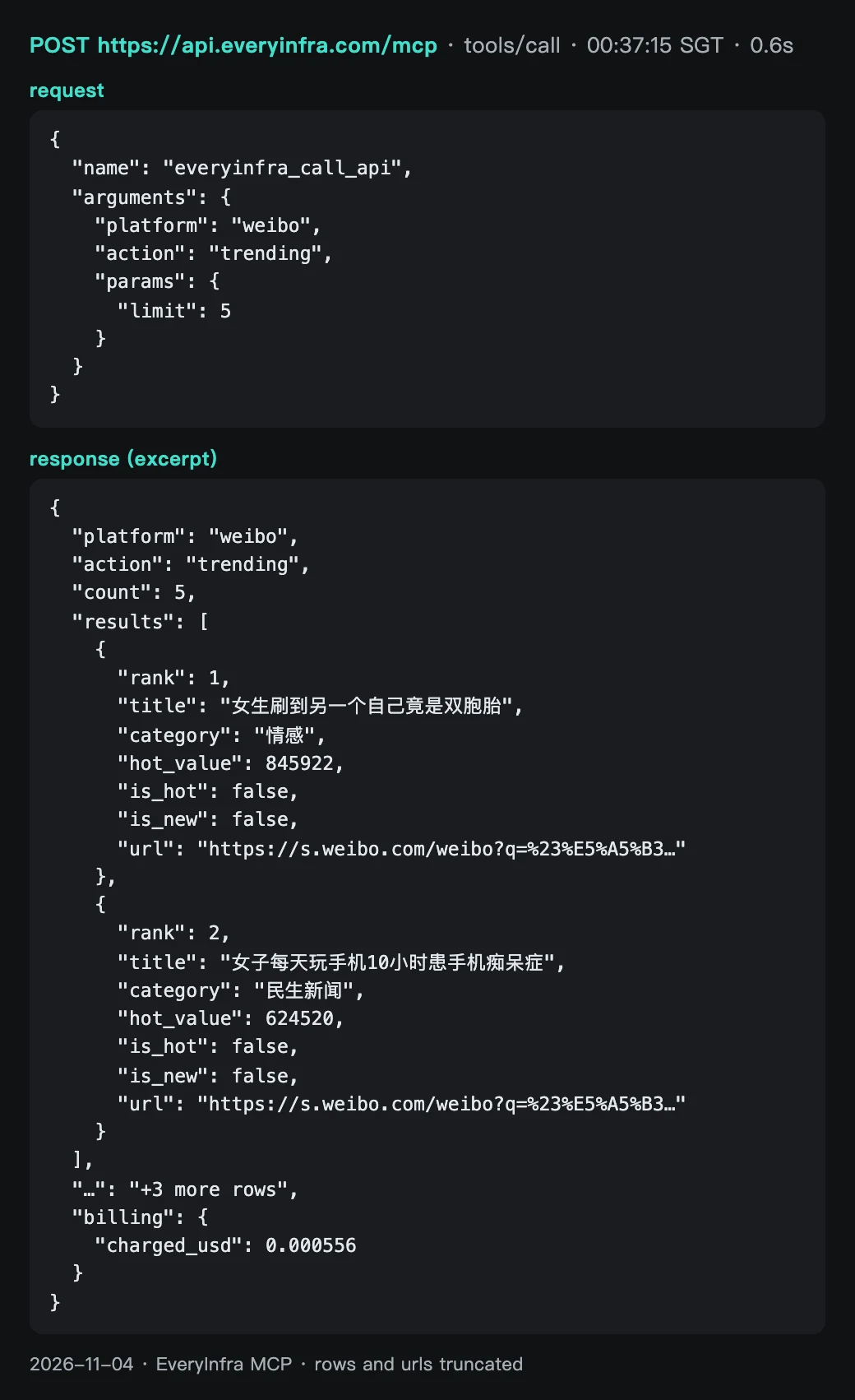
The 3 rounds and their results are below. Each round calls the four lists in the same order, with a few seconds between calls to stay under 10 calls per minute. After a failure, we waited 60 seconds, as retry_after said, and tried once more.
| Round (SGT) | Reddit popular | Zhihu hot list | Weibo hot search | X trends | Extra calls |
|---|---|---|---|---|---|
| Round 1, 00:13–00:15 | 25 rows | 503 ×3 | 50 rows | 50 rows | — |
| Round 2, 00:35–00:37 | 503 ×3 | 503 ×2 | 50 rows | 50 rows | X us 70 rows |
| Round 3, 00:58–00:59 | 503 ×2 | 503 ×2 | 50 rows | 50 rows | X mx 100 rows, X es 100 rows |
| Extra, 00:37 | — | — | 5 rows (MCP, limit=5) | — | The API response screenshot is this call |
| Retry, 02:05 | 503 ×1 | 503 ×1 | — | — | Replacements: reddit/subreddit_posts 25 posts, zhihu/search 20 rows |
The Zhihu hot list and Reddit popular posts were not available during the test. From 00:13 to 02:05, all 8 Zhihu requests returned 503, with fault: service and retryable: true, and none had a charge. Reddit popular posts gave 25 rows in round 1. After that, 6 requests gave no data: 4 REST calls returned 503, and 2 MCP calls returned isError. None had a charge.
At 02:05, one more try for each list also returned 503. So the retention, merge and field numbers in the next sections come only from weibo/trending and twitter/trending. The Zhihu and Reddit hot list columns are empty.
For a digest, this part matters. A hot list endpoint can be unavailable for a long period. The fetch script must write each failure to the file. The skill must write "no data for Zhihu this week" in the digest. It must not let the model fill the gap.
If one hot list is not available, the digest can fill that column from a different endpoint. But it must name the new source. At 02:05 SGT, we called two replacement endpoints, at $0.000556 each. reddit/subreddit_posts on r/GeminiAI (sort=top, date_range=past_week) returned 25 posts. They were posted from October 28, 2026 to November 3, 2026 (SGT), with 156 to 1,583 upvotes. 11 titles included "Carbon", 21 posts had an empty text, and all 25 had a flair.
zhihu/search for "Gemini", sorted by newest, returned 20 rows: 13 articles and 7 answers. They were posted from October 23, 2026 to November 4, 2026 (SGT). The highest like_count was 294, and 4 rows had 0 likes.
Neither endpoint is a hot list. The first gives the top posts of one community for one week. The second gives keyword results by time. So do not call them "Reddit popular" or "Zhihu hot list" in the digest. Add a rule to the skill: for a replacement endpoint, write its name after the column title.
Test results: how fast the lists change, and how many snapshots a week needs
Our question was: for a weekly hot posts digest, is one pull per week enough? We wrote the test rule before the calls. If a list stays almost the same after some tens of minutes, one or two pulls per week are enough. If a clear share of the list changes, you must take many snapshots per day and merge them.
The answer is the second case. We used the first good snapshot of each platform as the base. After 44 minutes, only 86% of the Weibo hot search list was still on it. After 44 minutes, only 74% of the X trends list (world) was still on it. In 44 minutes, the 3 rounds together showed 58 different Weibo topics and 63 different X trends. That is 16% and 26% more than the 50 rows of any one snapshot.
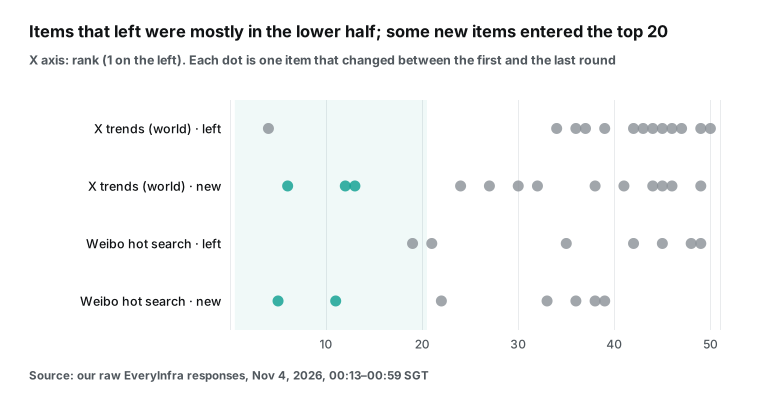
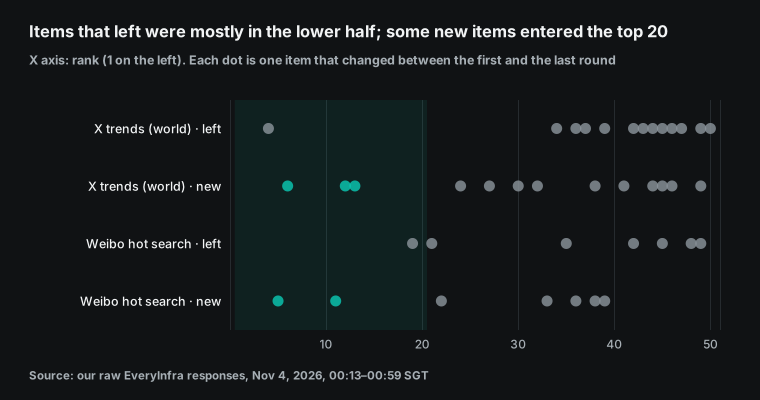
The position of the changed items also shows a pattern. From the first to the last round, 5 of the 7 Weibo items that left the list were in the lower half. For X, it was 12 of 13. The lower half of a list changes fastest.
But not all new items start at the bottom. 2 new Weibo items and 3 new X items were in the top 20 when they first appeared. These are the "spikes" that a digest wants most. They go up and down between two snapshots, and a single Monday morning list does not show them.
This gives a snapshot frequency, but only as an example. We measured for only 44 minutes, so we cannot project the numbers to a full week. We also did not measure retention after 6 or 24 hours. We can give only a lower limit: in 44 minutes, about 26% of the X list changed.
With one snapshot per day, there are 24 hours between two snapshots, and you lose some topics that go up and down in that time. Our example rate is four snapshots per day, for example at 08:00, 13:00, 18:00 and 23:00 in your time zone. That gives 28 snapshots per week. With a small budget, take one per day, and write "covers one time of day" in the digest. To set your own rate, take one snapshot per hour for one day. Then check how much of the list remains after 6 and 24 hours, and use a lower rate if most items remain.
Which fields are usable, and which numbers the digest cannot show
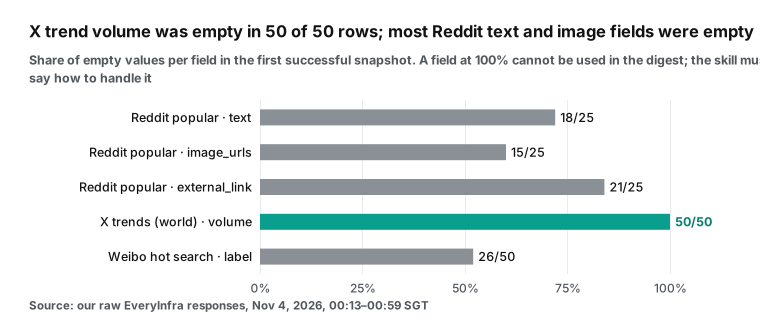
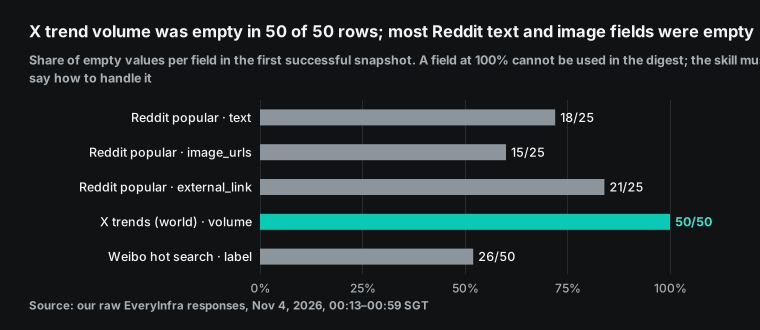
Missing fields set the rules in the skill. The X volume field was empty in all 6 snapshots across three locations, and period was always "Live". So for X, the digest can show only rank and times seen, not discussion volume. Of the 25 Reddit popular posts, text was empty in 18 rows (most are image or link posts) and image_urls was empty in 15 rows.
So the skill tells Gemini to read only the title. The Weibo label field (marks such as "new" and "hot") was empty in 26 rows. Those items have no mark on the list. The data is not missing.
Select the right X location. In the same period, the 50 country=world rows shared only 12 items with the 70 us rows. With mx (100 rows) they shared 13, and with es (100 rows) they shared 7. The world list is a global mix.
The US midterm election was on November 3, 2026 (US time). On that day, "Election Day" was rank 1 on the us list and rank 6 on the world list of the same round. For a digest about one market, use the list of that country.
Merge the data before you send it to Gemini
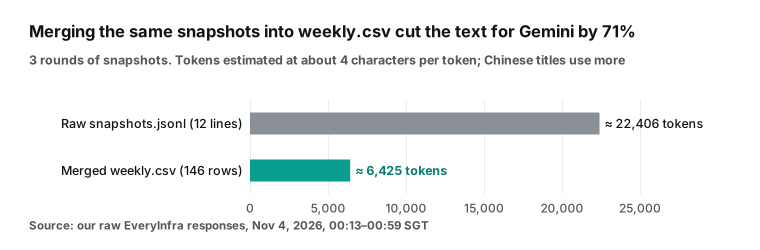
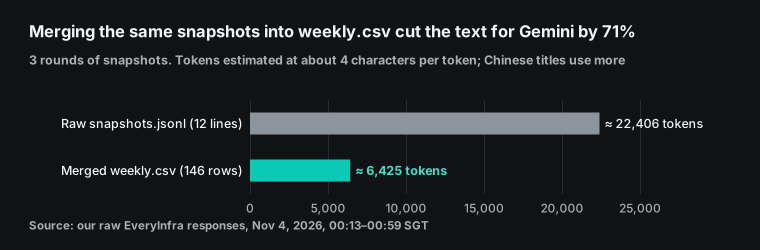
Why does the skill want weekly.csv and not the raw snapshots? We wrote the raw results of our 3 rounds to snapshots.jsonl in the collect.py format: 12 lines, about 22,406 tokens. After merge.py, weekly.csv has 146 rows and about 6,425 tokens, which is 71% less. We used the Gemini API rule of thumb of about 4 characters per token (Understand and count tokens); Chinese titles use more. At four snapshots per day for one week, the raw snapshots of Reddit, Weibo and X alone are about 304,000 tokens (the average size per list in our rounds × 28).
The merged table grows only with the number of distinct items, because a repeated topic uses one row. More important, a fixed program does the merge. Times seen, best rank and highest heat are calculated. Gemini only selects and writes. It does not count.
Weekly and monthly cost
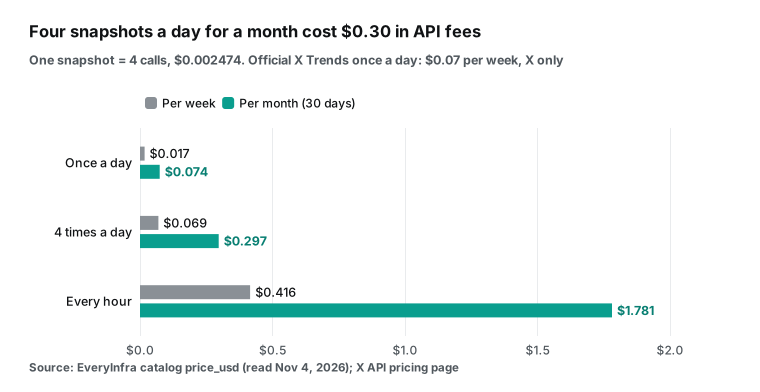
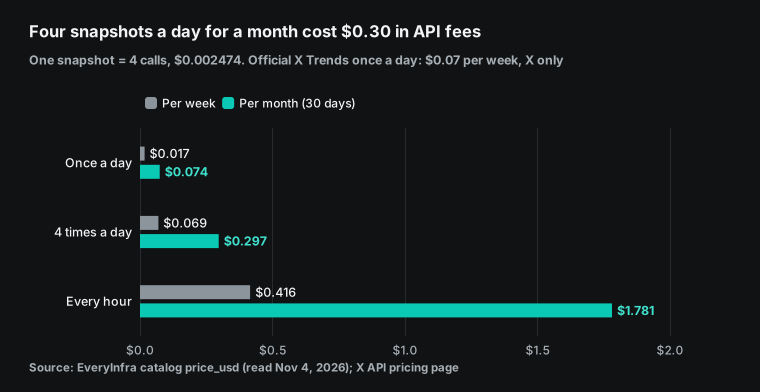
API fees depend only on the number of snapshots per week. From the catalog price_usd on November 4, 2026, one snapshot is four calls and costs $0.002474. Once a day: $0.017 per week and $0.074 per month (30 days). Four times a day: $0.069 per week and $0.297 per month.
Once an hour: $0.416 per week and $1.781 per month. A second Reddit page adds $0.000556 per snapshot. Failed calls have no charge, so the Zhihu failures did not add to the bill.
| Frequency | Snapshots per week | API fees per week | API fees per month (30 days) | Good for |
|---|---|---|---|---|
| Once a day | 7 | $0.017 | $0.074 | Only "what people talked about this week" |
| Four times a day (example) | 28 | $0.069 | $0.297 | To separate week topics from spikes |
| Once an hour | 168 | $0.416 | $1.781 | Breaking events and brand monitoring |
The Gemini side has its own cost. Skills in the Gemini app need no plan. Scheduled runs (Tasks) need Google AI Pro or Ultra and a personal account of a user 18 or over (Manage your tasks & workflows). Route C on the Gemini API has token prices. The pricing page lists gemini-3.5-flash-lite at $0.30 per million input tokens and $2.50 per million output tokens. gemini-3.8-flash is $0.75 and $3.75 until December 31, 2026, and the price doubles on January 1, 2027 (Gemini API pricing).
Since October 8, 2026, requests to gemini-3.7-flash go to gemini-3.8-flash, so a script with the old name already pays the new price.
The Antigravity agent runs in an autonomous loop, so most tokens go to its own reasoning and tool round trips. The documentation estimates 100,000 to 500,000 input tokens for a "research and summary" task. At the Flash-Lite input price, that is about $0.03 to $0.15 per run. That is about 12 to 60 times the API fees of one snapshot. We did not measure this. Your bill is the reference.
Limits and things to watch
| Limit | Effect on the digest | What to do |
|---|---|---|
| Skills in the Gemini app cannot go online | The skill cannot get the lists itself | Fetch outside the skill (route A, B or C) |
| Custom apps only for personal accounts in the US | No route B in other countries | Use route A or C |
| No Tasks in the EEA, Switzerland, the UK or Nigeria | Gemini cannot run each week by itself | Use a system scheduler or a Gemini API trigger |
| A hot list endpoint can return 503 for a long period | One platform may have no data this week | Log the failure; the skill writes "no data" |
| X trends have no volume | Only rank and times seen | Call twitter/search if you need volume |
We did not run any step on the Gemini side. The Skills page, custom apps, Tasks and the Gemini API trigger are all configuration examples. We wrote them from the Help pages and developer documentation that we read on November 4, 2026. Google changed these products often in the last two months (even the skill shortcut is changing from / to @). If the interface is different from this article when you try it, follow the official page of that day.
The skill does not fetch data, and it must not fill gaps. This is a hard limit of the Gemini app. It is also why our skill says "if there is no data, say so". The main risk in a summary task is not bad writing. The main risk is that the model uses old hot list items from its memory as if they were this week's data. A rule in the skill is more reliable than a reminder in each chat, but you must still read the "coverage" line each Monday.
A hot list is a platform ranking, not "real popularity". The Weibo formula includes an interaction-rate weight, and the list has separate marks for paid placements. The Zhihu score includes the click rate. Both platforms say that their algorithms have controls against manipulation, but they do not publish the weights. So a rank in the digest is a signal, not a market share. For this reason, our skill ranks by "times seen" and "best rank", and it does not compare heat values across platforms.
X trends had no volume in our rounds. The catalog field note for twitter/trending mentions a fallback source. When other sources are not available, results come from it, and it returns no volume or period. In all our rounds, volume was empty for every row of the X lists, and period was "Live". So the digest can show only rank and times seen for X. If you need discussion volume, call twitter/search for the few topics that the digest selects.
Some lists can be unavailable for a period. In our test, all 8 zhihu/hot_list requests returned HTTP 503, and reddit/trending_posts gave no data in 6 requests after round 1. The lists were not available at that time, and none of these calls had a charge.
The fetch script must record the failure and continue. Do not skip it without a record. If you do, on the weekend you cannot tell if a Zhihu topic was "not on the list" or "not fetched".
The Reddit list is 25 posts per page. reddit/trending_posts returns about 25 posts per page. For more, pass next_page_token; each page has its own charge, and the token is valid for 24 hours. The site-wide list mixes many communities and leans to entertainment and general topics: in our first round, 25 posts came from 24 communities. For a digest about one industry, reddit/subreddit_posts on a few fixed communities is a better fit.
Platform terms. Reddit's Responsible Builder Policy says that every developer must get approval before access to its data, and commercial use needs written approval.
The policy also has clear limits on AI training, commercial use and inference of sensitive user traits. The X developer terms also set rules for data use. A digest that uses only titles, links, ranks and public counts, and that does not build user profiles, is the safer method. For how the terms apply to your business, read the original texts or ask a lawyer. This article does not give legal advice.
Recent changes: four dates that matter for the digest
This list has only the changes that affect a weekly hot posts digest. It is in date order, and the dates are the dates on the official pages.
September 30, 2026: skills arrive in Gemini chats and replace Gems. The Google blog says that skills launched in Gemini chats worldwide on that day. Workspace customers get them "in the coming weeks". The same post says that Gems for personal accounts go away from November. Opal shuts down in the same period (Google blog). What it means: if your weekly report is a Gem, move it now.
October 13, 2026: skills in Workspace are delayed. Skills in the Gemini app started their rollout on that day. Skills in Workspace Studio and in Workspace apps are "delayed until further notice". The post also says that sharing and Google Drive integration will come later (Workspace Updates, October 13, 2026). What it means: if your team wants to use the same digest skill directly in Docs or Sheets, it must wait. Use it in the Gemini app first.
October 28, 2026: the Connected Apps platform opens as a preview. Developers can now connect their apps to Gemini and Search with cloud MCP servers. They register, test and submit the apps for review in the Google Connected Console (Google blog). What it means: in addition to the personal "custom app" of route B, data services may later appear in Gemini as reviewed apps.
November 17, 2026 (13 days from now): Gems become read only for personal accounts. See the first section of this article.
Quick start
- Sign up for EveryInfra and get an API key.
- Follow the quick start. Call
weibo/trendingonce with curl. - Make sure that the response has
resultsandbilling.charged_usd. - Read the parameters and fields: Reddit popular posts, Zhihu hot list, Weibo hot search, X trends.
- Put
collect.pyon a computer that is on each day. Put the key inEVERYINFRA_API_KEY. - Use cron or launchd to run the script one to four times a day.
- After one week, check
httpandcharged_usdin each line ofsnapshots.jsonl. - Zip the
weekly-hot-posts-digest/folder and upload it on the Gemini Skills page. - On the weekend, run
merge.py, uploadweekly.csvto a chat and type/weekly-hot-posts-digest.
Each platform page lists all its capabilities. See Reddit Scraper API and Zhihu Scraper API. See also Weibo Scraper API and X (Twitter) Scraper API. For full automation, use the route C example. You can also run the job on your own machine, as in the Antigravity CLI article.
The MCP server page shows how to connect. The pricing page shows how billing works. For the same method in other tools, read Claude Code scheduled tasks for Reddit pain points. Also read ChatGPT scheduled tasks as a demand radar.
| Step | Where | API cost | When |
|---|---|---|---|
| 1. Test one call | Terminal with curl | $0.000556 | Once |
| 2. Capture the four lists | cron or launchd with collect.py | $0.017–$0.069 per week (1 to 4 snapshots a day) | Every day |
| 3. Write the digest | Gemini chat with the skill | No API cost; skills need no plan | Every Monday |
| 4. Automate everything | Gemini API trigger | Gemini tokens per run, see the cost section | Optional |
FAQ
The questions come from Google search suggestions and from a public thread in the Gemini Help Community. The answers use the official pages as we read them on November 4, 2026.
Gemini skills vs Gems: do I need to change my Gems now?
For a personal account, yes. From November 17, 2026, Gems are read only: you cannot use or edit them. On December 17 they are removed. The automatic migration turns each Gem into an inactive draft skill, and you must review and activate each one. Files over the 100 MB limit, audio, video, archives and legacy Office files do not move. Rebuild the Gems that you use each week by hand now.
At the same time, change each description to "what it does" plus "Use when…". Work and school accounts have more time. Business and enterprise: no sooner than March 1, 2027. Education: no sooner than June 1, 2027. (Question from the search suggestions "gemini skills vs gems" and "claude skills vs gemini gems".)
Gemini Gems read only: can I still export after November 17?
You can view the Gems and download their files, but you cannot use them. The Help page says that after November 17 you can still access your Gems, but you cannot use or edit them, or create new ones. It also tells personal accounts to download files that cannot migrate before December 17. So the read-only month is your last chance to get your knowledge files back. (Question from the suggestion "gemini gems read only mode".)
Gemini skills MCP: can a skill in the Gemini app call MCP directly?
The skill itself cannot go online. The Help page says that uploaded scripts cannot access the internet or send requests to external websites. But a skill can work with Connected Apps, and a "custom app" is an MCP server URL. For that, you must be 18 or over, be in the US, use a personal account, and use English.
If you do not meet these requirements, fetch the data locally and upload a table. You can also use the Gemini API Antigravity agent (it supports an mcp_server tool) or Antigravity CLI. (Question from the suggestions "gemini skills mcp" and "gemini cli skills mcp".)
Gemini skills like Claude: can I upload a Claude skill to Gemini?
For the format, yes. Both are based on the open Agent Skills standard, and the Gemini Help page says that you can upload SKILL.md, a folder or a .zip. Check three things. The name must be lowercase with hyphens.
Gemini does not read extension fields that are specific to Claude Code, such as invocation control or subagent execution. If the skill has a script that goes online, that script does not run in the Gemini app. Our skill uses only name and description, and data fetching stays outside the skill. (Question from the suggestion "gemini skills like claude".)
Why does Gemini not use my skill automatically?
The Help page says that Gemini applies only skills that are turned on. You can turn a skill off or on again on the Skills page. Gemini decides from the name and description only. If the description is too general (for example "data helper"), Gemini does not know when to use it.
The most reliable method is to type / (or @) in the chat and select the skill. Also, the Help page says that skills are now available to personal accounts of users 18 or over, and to work and school accounts "soon". If your Workspace account does not show a Skills page, the rollout may not have reached it. (Question from a Gemini Help Community thread, Will a Skill have an always on state.)
References
We read all pages below on November 4, 2026 (SGT).
- Gemini Apps Help: About the transition from Gems to skills
- Workspace Admin Help: About the transition from Gems to skills
- Workspace Updates, Sep 30, 2026: skills in the Gemini app and Workspace
- Workspace Updates, Oct 13, 2026: an update on the skills launch
- Google blog, Sep 30, 2026: automate tasks with skills
- Gemini Apps Help: release updates (Sep 30 and Oct 13, 2026)
- Gemini Apps Help: Create & manage skills
- Gemini Apps Help: Write effective skills
- Gemini Apps Help: Manage your tasks & workflows (region and plan limits)
- Gemini Apps Help: limits and upgrades for Google AI subscribers
- Gemini Apps Help: Connect & manage custom apps
- Gemini Help Community: Will a Skill have an always on state
- Google Connected Apps developer documentation
- Gemini Apps Developer Mode overview
- Google blog, Oct 28, 2026: the Connected Apps platform preview
- MCP specification: Tools (annotations readOnlyHint, destructiveHint)
- MCP specification: Transports (Streamable HTTP)
- RFC 7591: OAuth 2.0 Dynamic Client Registration
- RFC 9728: OAuth 2.0 Protected Resource Metadata
- IETF draft: The OAuth 2.1 Authorization Framework
- Gemini API: Function calling (Remote MCP section)
- Gemini API: Antigravity agent (MCP, Triggers, Budget)
- Gemini API: managed agents overview
- Gemini API: Interactions API overview
- Gemini API reference: Interactions (inline environment sources)
- Gemini API pricing
- Gemini API: Understand and count tokens
- Gemini API changelog
- Gemini API: deprecations
- Gemini API CLI (gemini-api) guide
- Gemini API: Computer Use
- Gemini API: Coding agent setup
- GitHub: google-gemini/gemini-skills
- Agent Skills specification
- GitHub: agentskills/agentskills
- Antigravity: Agent skills
- Antigravity: MCP
- Antigravity CLI: headless mode
- Claude Code: Extend Claude with skills
- Claude docs: Agent Skills overview
- Claude Help: Use skills in Claude
- Codex: Build skills
- Weibo hot search rules
- Zhihu hot list introduction
- X API pricing
- X API: Trends
- X Developer Agreement and Policy
- Reddit Responsible Builder Policy
- Reddit Data API Terms
- EveryInfra capability catalog (price_usd and field notes, read Nov 4, 2026)
- Python docs: urllib.request
- RFC 4180: the CSV format
- Apple developer docs: scheduling timed jobs with launchd
Reference BL-82