Databricks Genie plugin in chat, cross-checking public reviews
Databricks Genie plugins reached ChatGPT, Claude, Copilot Cowork and Grok Bot on 2026-11-11. We test asking internal metrics and pulling public reviews in one chat turn.
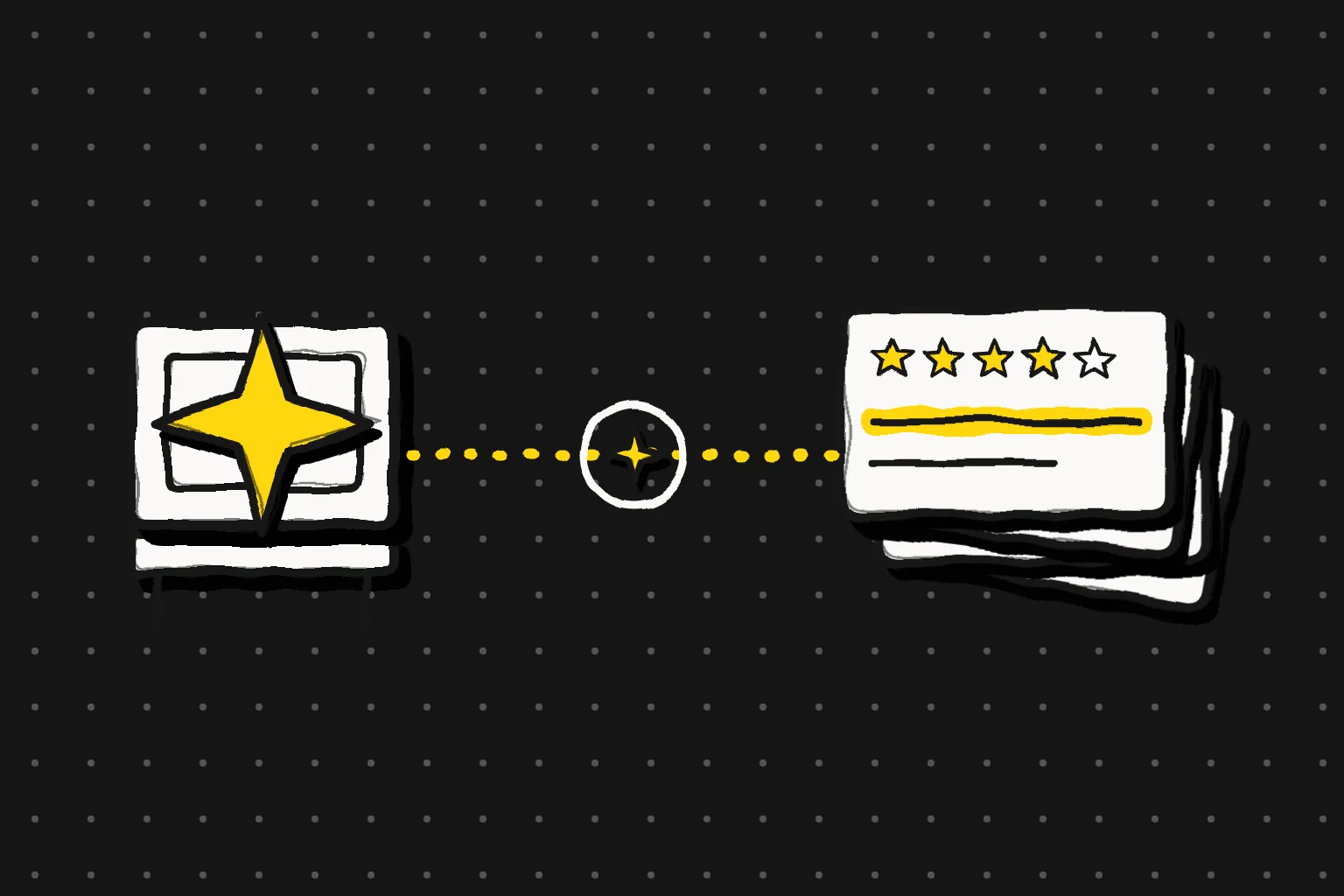
Databricks shipped Genie plugins into four chat clients on 2026-11-11 — ChatGPT, Claude, Microsoft Copilot Cowork and Grok Bot. Those agents can now query a company's governed internal data inside Databricks (Databricks blog, AWS November release notes). In the same chat box, you can also attach a standard MCP server to bring public data in. We ran one real round-trip at 2026-11-17 00:29 Singapore time (SGT) with EveryInfra's remote MCP. One call pulled Notion's latest App Store reviews.
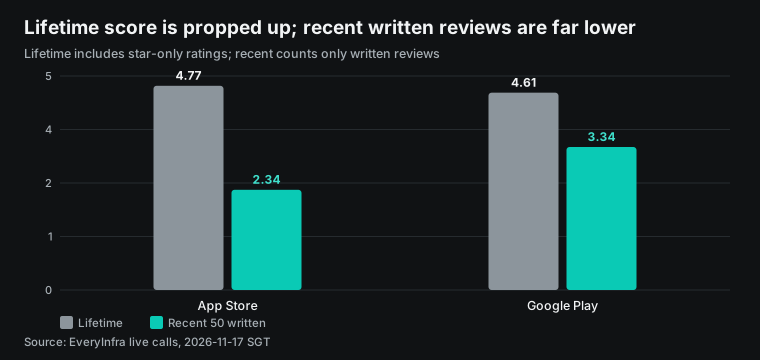
The response returned 20 items with a charged_usd of $0.001389. For the same product, five public review sources that day gave scores from 1.93 to 4.77. Reading only one source would point the "why" the wrong way.
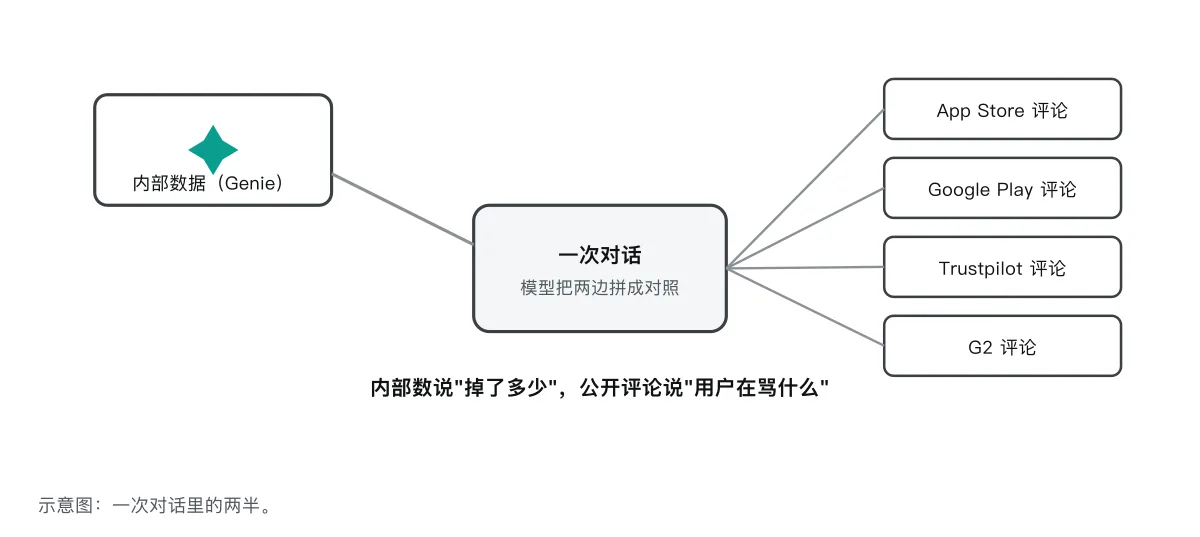
Put it in one sentence. The left desk holds the company's governed internal numbers. The right desk holds public reviews. One chat turn joins the two. The internal number answers "how much dropped"; the public reviews answer "why users are unhappy".
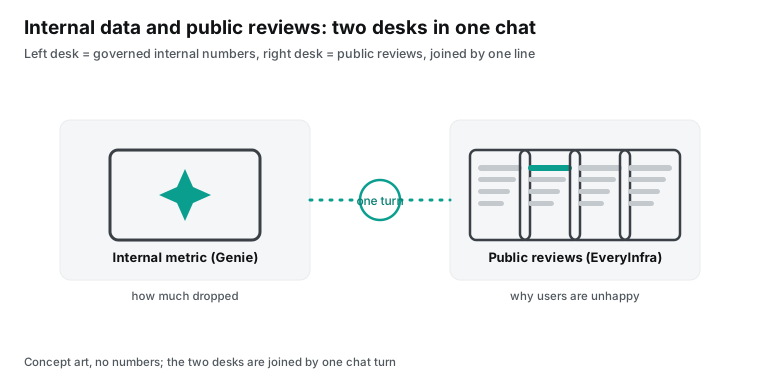
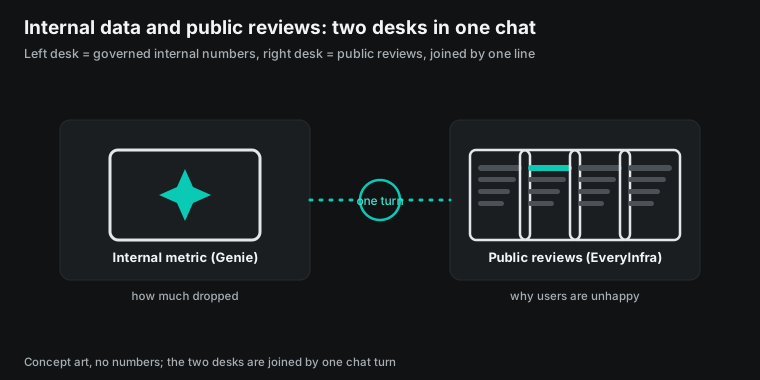
What the Databricks Genie plugin is: four chat clients on 2026-11-11
Databricks frames the problem this way. Before an agent answers a business question, it needs a map of the business. Without the map it walks a near-random path across data sources and lands on the wrong answer (Databricks blog). That map is Genie Ontology, the governed semantic layer inside Databricks that combines agreed metric definitions with context learned from enterprise assets. It became generally available on 2026-11-11 (Genie Ontology GA, product page). The Genie plugins carry that map into the chat agents a team already uses.
Each client has its own entry point. The ChatGPT plugin is on the OpenAI business plugin page. The Claude connector is in the Claude marketplace. The Grok Bot plugin is on x.ai.
The Microsoft Copilot Cowork plugin is in the Microsoft marketplace. The release notes put dates on each one. Connect ChatGPT, connect Claude, and connect Grok Bot/Cursor are all dated 2026-11-11. Allowing ChatGPT and Claude as partner platforms in ingress policy is dated 2026-11-10 (November release notes).
The product facts of this launch, each checked against the official page, are below.
| Fact | Date / state | Official source |
|---|---|---|
| Genie plugins native in ChatGPT, Claude, Copilot Cowork, Grok Bot | 2026-11-11 | databricks.com blog; AWS release notes |
Layer underneath is Genie One MCP (system.ai.genie_one_mcp, Unity Gateway) | GA; Beta endpoint EOL 2026-11-30 | docs.databricks.com genie-mcp |
Genie One MCP tools: genie_ask, genie_poll_response, genie_get_query_result | GA | docs.databricks.com genie-mcp |
| MCP Apps interactive view in supporting clients | 2026-11 | modelcontextprotocol.io; docs genie-mcp |
| ChatGPT and Claude allowed as partner platforms in ingress policy | 2026-11-10 | docs.databricks.com partner-platforms |
| Genie Ontology generally available | 2026-11-11 | databricks.com announcing-ga-genie-ontology |
The four plugins connect the same way. An admin first publishes the plugin in the workspace. Each user then clicks connect. After a redirect, the user signs in with a Databricks account (Genie One MCP docs, plugins section).
The docs state the plugins use default OAuth apps, so the admin does not create an OAuth app. The Azure Copilot Cowork plugin needs a Microsoft 365 Copilot license and a workspace with Genie One enabled. The user enters the workspace host name and signs in with a Microsoft Entra ID account. Each user keeps a separate connection that cannot be shared (Azure Databricks Genie plugin docs).
The entry points are the same, but the details differ, and the details decide which admin controls who can reach the internal data. On ChatGPT, an admin opens Plugins in workspace settings. The admin searches for Databricks Genie, creates a draft from a template, enters the workspace URL, and publishes. Each user then connects and signs in.
On Claude the object is a connector, set up by a team admin. On Grok Bot/Cursor, a Cursor team admin publishes the plugin and each user signs in with a Databricks account. On Copilot Cowork, you need the Microsoft 365 Copilot license and connect with Entra ID. Small as these differences look, they decide whose admin holds the gate to "who can ask the internal number in chat".
The connect step per client is below.
| Client | Shipped | Who sets up | How a user connects |
|---|---|---|---|
| ChatGPT | 2026-11-11 | workspace admin publishes from a template | connect, sign in with Databricks account |
| Claude | 2026-11-11 | team admin adds the connector | connect, sign in |
| Grok Bot / Cursor | 2026-11-11 | Cursor team admin publishes | sign in with Databricks account |
| Copilot Cowork | 2026-11-11 | needs M365 Copilot license | enter host name, sign in with Entra ID |
These dates sit in a tight window, so it helps to lay them out. On 2026-11-09 the Databricks Slack app and the Microsoft Teams app went generally available, and Genie Search went generally available. On 2026-11-10 ChatGPT and Claude became allowed partner platforms in ingress policy, and the Genie One Chrome new-tab extension entered Beta. On 2026-11-11 the four chat plugins shipped, Genie Ontology and Pages went generally available, and the Genie One desktop app for Windows entered Beta. On 2026-11-12 Genie ZeroOps entered Beta (November release notes). The chat plugin is one face of Genie being "everywhere" in the same week, not a stand-alone feature.
This piece is separate from BL-151. That article covers Genie as a resident agent that runs in the background and does a job you hand it. This piece covers the chat plugin side. You type a question in the ChatGPT or Claude box.
The agent decides the question belongs to Genie and hands it over. Genie runs its own loop and returns an answer with citations. One Genie One MCP server, two uses: an agent that works on your behalf, and a tool you reach for inside a chat.
The chat example Databricks gives maps straight onto data cross-checking. The blog describes a business analyst explaining why a region's quarterly revenue came in 10% below forecast. Claude can ask Genie for revenue, order volume and average deal size under the metric definitions finance relies on. Claude then has Genie search pricing memos, sales-call notes and competitor reports.
It returns an analysis with a citation behind each claim (Databricks blog). Genie holds the inside half well. What is missing is the voice outside the company wall: what users complain about on public platforms.
Under the plugin sits Genie One MCP: how one question flows
The plugin is not a new protocol. It attaches the Genie One MCP server to a chat client. That server exposes Genie as a conversational tool. A client sends a natural-language question. Genie searches enterprise data, writes SQL, and returns an answer grounded in Genie Ontology with citations (Genie One MCP docs).
It uses the MCP Streamable HTTP transport and carries a Databricks token in an Authorization: Bearer <token> header. It enforces Unity Catalog permissions on every request. A user only reads data they are allowed to see.
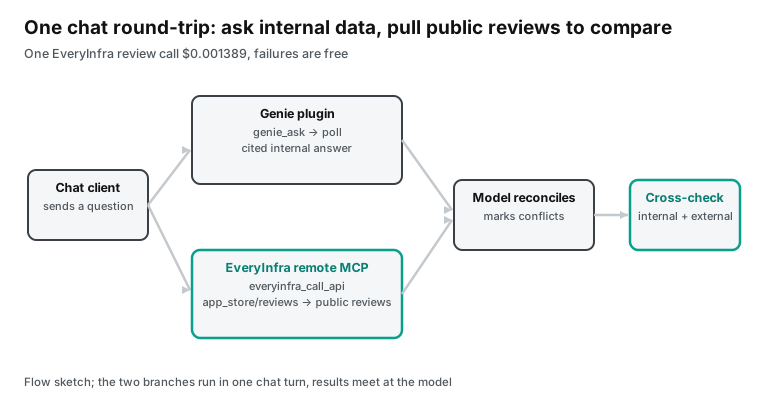
Because Genie searches data and runs SQL, the answer is asynchronous. The documented flow has three steps. Call genie_ask to start an answer and get a conversation_id and response_id with status in_progress. Poll genie_poll_response, where progress steps appear.
When the status becomes completed (or incomplete, or failed), take the full answer with an "Explore in Databricks" deep link (Genie One MCP docs, ask a question). To continue the same conversation, the follow-up reuses the earlier conversation_id. When a result is large, genie_ask and genie_poll_response return truncated rows. The agent then calls genie_get_query_result for the full table.
The docs also set the polling cadence: wait for the prior genie_poll_response to finish before you poll again. To run a query on a chosen SQL warehouse, pass warehouse_id in the _meta parameters (the docs). These details are mostly invisible to a person using the plugin in chat, because the agent manages them. They explain why a Genie answer can take a few seconds. It runs a loop that searches data, writes SQL and checks sources.
On authentication, Genie One MCP accepts any Databricks token in the bearer header. That includes OAuth user-to-machine, machine-to-machine and personal access tokens. It recommends on-behalf-of user OAuth, so clickthrough to Genie sources stays smooth (Genie One MCP docs, considerations). The caller needs EXECUTE on system.ai.genie_one_mcp, plus USE CATALOG on the system catalog and USE SCHEMA on the system.ai schema.
For the chat plugin the sign-in OAuth carries this, so a user does not configure it by hand. It means one thing. The internal data a user can reach in chat equals exactly what that signed-in user is allowed to see in Databricks.
One timeline is worth remembering. The Beta endpoint https://<workspace-hostname>/api/2.0/mcp/genie is deprecated and reaches end of life on 2026-11-30. After that date, requests fail. Teams must move to the generally available system.ai.genie_one_mcp (Genie One MCP docs, access through Unity Gateway). For people using the plugin in chat, the plugin manages this URL. For a team wiring Genie One MCP in its own code, the URL and OAuth scope must change before the end of November.
Clients that support the MCP Apps extension also get an interactive view. The Genie One MCP server provides an MCP App. On a supporting client, the server returns a panel embedded in the conversation. The panel shows Genie's progress, charts and the final answer with Ontology citations (Genie One MCP docs, MCP App).
MCP Apps is an official extension of the Model Context Protocol. It lets a server return interactive HTML rendered in a sandboxed iframe. The documented clients include Claude, Claude Desktop, VS Code GitHub Copilot and Microsoft 365 Copilot (MCP Apps overview). So Genie's charts and citations show inside the conversation, without leaving the chat.
Why pull public reviews in the same turn
Genie is good at reconciling internal definitions that disagree. Databricks states the problem plainly. Leaders have plenty of data, yet struggle to answer "why did net revenue drop 8% at our largest account last week". The answer spans sales, finance, promotions, inventory and account data. Each source is correct alone but uses a different definition (Genie One MCP blog). Genie Ontology anchors "net revenue" to the agreed metric definition, reconciles conflicts by authority and certification, and returns an answer under each user's permissions.
Take that one step further. The internal number can say "revenue for a region came in 10% below forecast". Genie can split the gap into order volume and deal size under agreed definitions. It can search pricing memos and competitor reports. All of that stays inside the company wall.
Outside the wall, what did users in that region say on public platforms during the same weeks? Were they complaining about a price rise or a lost feature? That part is not in the internal data. The missing piece is the outside voice, and it comes from public reviews.
Reviews outside the wall also disagree, and no Ontology reconciles them for you. For one product, the five sources often give very different impressions. That holds across the App Store lifetime score, the Google Play lifetime score, the Trustpilot sample, the G2 aggregate and the Capterra sample. An internal metric tells you "enterprise adoption dropped last week", but the reason lives in public reviews. If you pull only one source, you may pull the one that points the opposite way. So the cross-check in chat should pull several outside sources at once and let the model reconcile them, the way Genie reconciles inside definitions.
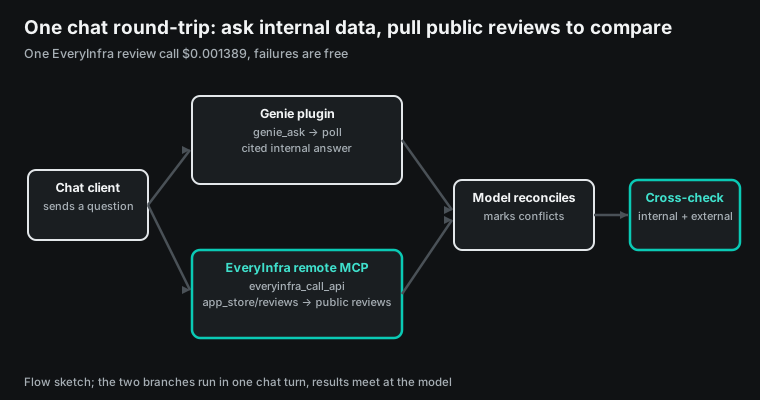
EveryInfra's data interface is the layer that brings those public sources into the conversation. It is a standard MCP server that can sit beside the Genie plugin in any MCP-capable chat client. In one turn, you ask Genie for the internal adoption or revenue number. You then ask EveryInfra to pull the same product's public reviews from the App Store, Google Play, Trustpilot and G2. The model stitches the two together, reading the internal numbers and the outside reviews against the same question.
Why in the "same turn" rather than two separate steps? Because the value of a cross-check is that both sides answer the same question. Split across two steps, a person has to bridge the internal conclusion and the outside reviews, which is easy to get wrong. You see revenue drop and search one review site, and that one site may point the opposite way. Kept in one turn, the model holds the specific signal from the internal metric: which account, which weeks, which product line. It pulls the matching public sources against that signal, with no human guess in the middle.
Attach EveryInfra's remote MCP to the same chat client
All four clients support attaching an external MCP server or connector, and the step resembles adding the Genie plugin. ChatGPT and Claude support custom connectors. Cursor on the Grok Bot side supports MCP servers. On the Copilot Cowork side, a Microsoft 365 admin adds it under "manage plugins, skills and MCP servers".
Databricks' own blog states that agents without a native plugin can reach Genie through the MCP server (Databricks blog). Under the same open protocol, EveryInfra's remote MCP is attached the same way. Here is the configuration snippet for attaching EveryInfra to a client that supports remote MCP. The key is read from an environment variable and never written into the file.
{
  "mcpServers": {
    "everyinfra": {
      "type": "http",
      "url": "https://api.everyinfra.com/mcp",
      "headers": { "Authorization": "Bearer ${EVERYINFRA_API_KEY}" }
    }
  }
}
Once attached, the client connects and lists the tools. We walked the handshake by hand at 2026-11-17 00:28:11 SGT. initialize returned 200 with protocol version 2025-06-18 and no Mcp-Session-Id header, so the server does not require a session ID. notifications/initialized returned 202 with an empty body. tools/list returned 12 everyinfra_* tools. The MCP spec for Streamable HTTP asks for exactly this. Every JSON-RPC message is a new HTTP POST to one endpoint. The Accept header lists both application/json and text/event-stream. The server returns 202 with no body for a notification or response (MCP 2025-06-18 transports).
The handshake returned these results, which match the Streamable HTTP spec.
| Step | Result |
|---|---|
initialize | 200, protocol 2025-06-18, no Mcp-Session-Id header |
notifications/initialized | 202, empty body |
tools/list | 12 everyinfra_* tools, 16,318 bytes |
tools/call (bad sort) | isError, did_you_mean: newest, nothing charged |
tools/call (sort: newest) | 200, 20 reviews, charged_usd 0.001389 |
Of the 12 tools, everyinfra_call_api pulls data and everyinfra_get_job reads an async job; the rest list capabilities, search, account and tickets. In a chat client you usually only expose everyinfra_call_api to the model and leave the rest out. Before a call, read the free catalog GET /api/v1/social/catalog once to confirm capability names, parameters, price_usd and available. Public-review capabilities are app_store/reviews, google_play/reviews, trustpilot/reviews, g2/reviews and capterra/reviews, all marked available: true. The capability pages are app_store/reviews, google_play/reviews, trustpilot/reviews and g2/reviews. The platform overviews are at App Store data API and Trustpilot data API.
One real MCP round-trip: what the model sends, what the API returns
After the handshake, an agent that wants reviews sends one tools/call. We sent one at 2026-11-17 00:29:09 SGT, tool name everyinfra_call_api, for Notion's latest 20 App Store reviews in the US. This is the same shape a model would emit inside ChatGPT or Claude.
{
  "jsonrpc": "2.0", "id": 4, "method": "tools/call",
  "params": {
    "name": "everyinfra_call_api",
    "arguments": {
      "platform": "app_store", "action": "reviews",
      "params": { "app_id": "1232780281", "country": "us", "limit": 20, "sort": "newest" }
    }
  }
}
The API returned 200. The whole HTTP response was 14,646 bytes. The content[0].text field held a 13,666-character JSON with 20 reviews and billing.charged_usd: 0.001389. The billing.amount.per_1k.USD was 1.389. Each review carried rating, title, text, app_version and posted_at, matching the catalog response_fields. From that text the model can work out "how many stars in the last 20, and which version the complaints cluster on".
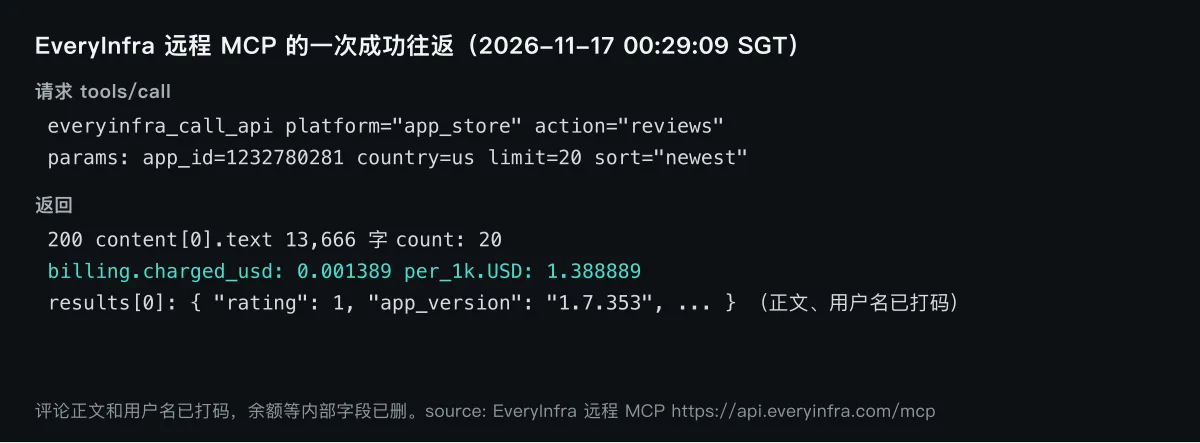
The successful round-trip also carried a billing object that counted the cost in detail. It held charged true, credits 100, charged_usd 0.001389, per_1k.USD 1.388889, and rate_source set to live. For a chat scenario that calls the API automatically, that billing object is useful. Each review pull carries its own cost.
A main loop that wants a budget cap can add up charged_usd and stop near the limit. Internal fields such as balance should be dropped when the model shows anything to the user. That is why the figure shows only charged_usd and the count.
The size of this response is worth noting. At about 4 bytes per token, 13,666 characters is roughly 3,400 tokens. That is under the 10,000-token warning line for MCP tool output in Claude Code. It is also under the 50,000-character line that writes the result to a file (Claude Code MCP docs).
So a 20-review response goes straight into the conversation, with no truncation or file write. To pull hundreds at once, set mode to async, get a job_id, and read it with everyinfra_get_job. Reading a job is free and does not count against the per-minute rate.
One round-trip with a wrong parameter: how the API lets the model fix itself
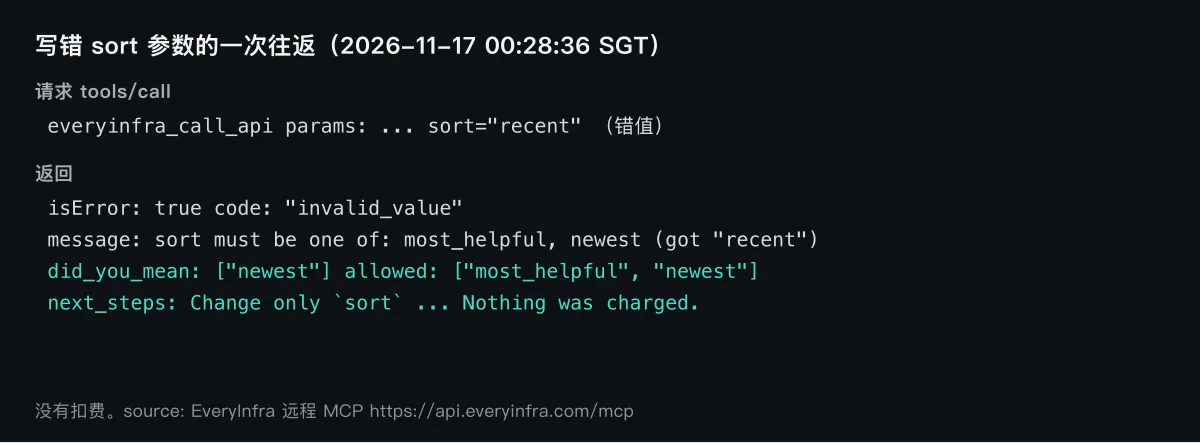
We sent the first call with a wrong sort parameter, sort set to recent. The API did not silently ignore it and charge anyway; it returned an error written for the model. The error body held several fields. It had code invalid_value and a message "sort must be one of: most_helpful, newest (got 'recent')".
It had did_you_mean of ["newest"], an allowed list of two legal values, and isError true. The next_steps said "change only sort, then resend. Nothing was charged." The model read did_you_mean, changed sort to newest, sent it again, and got the successful response above.
invalid_value: `sort` must be one of: most_helpful, newest (got 'recent')
did_you_mean: ["newest"]   next_steps: Change only `sort` to a value in `allowed`, then resend. Nothing was charged.
This matters for automatic calls in chat. A model building parameters in a conversation has nobody watching each call. The error text must read for the model, not only for a developer.
did_you_mean gives a value it can use, and allowed lists every legal value. next_steps says what to do in one line, so the model changes one field and resends. If the API only replied "parameter error", the model would guess, and might break a parameter that was already correct.
A wrong parameter returns 422, and an illegal sort returns the did_you_mean hint. Both happen before any charge, so they are safe to retry. A call that already returned 200 is the one that charged, so do not resend it for the model's own reason. We describe how to attach the remote MCP and reconcile by request ID in the remote MCP setup notes.
Live test: how far five public sources diverge for one product
We use a public product, Notion (a notes and collaboration tool), for the demo; the method is the same for any product. In a real setting, the Genie side is your company's internal retention or adoption numbers, and the EveryInfra side is public reviews. We pulled five public sources at 2026-11-17 00:20-00:27 SGT, each for the same product, and the numbers come from the raw responses.
| Public source | Score that day | Sample | Time window | Main complaint |
|---|---|---|---|---|
| App Store (lifetime) | 4.77 | 90,724 ratings | all-time | — (includes star-only) |
| App Store (recent written) | 2.34 | 50 | 2026-10-01 to 11-14 | crashes, features cut, AI |
| Google Play (lifetime) | 4.61 | 407,304 ratings | all-time | — |
| Google Play (recent written) | 3.34 | 50 | 2026-11-10 to 11-15 | crashes, slow |
| Trustpilot | 1.93 | 30 | 2026-06-26 to 11-13 | billing, locked accounts |
| G2 | 4.6 | 13,980 | all-time aggregate | steep learning curve |
| Capterra | 4.0 | 30 | sample | limits as a back end |
At a glance, the same product scores from 1.93 to 4.77. The spread comes from two places. First, the audiences differ. The App Store and Google Play carry consumers, and G2 and Capterra carry enterprise buyers. A large share of Trustpilot writers are there to complain about billing. Different audiences care about different things, so they score the same product very differently.
Second, and more hidden, is the gap inside one store. On the App Store, the lifetime score of 4.77 and the recent 50-review average of 2.34 differ by more than double. A single "rating" number can mislead. It may be an all-time aggregate, or the mood of the people who recently wrote text. Both are called "rating" on the same page.
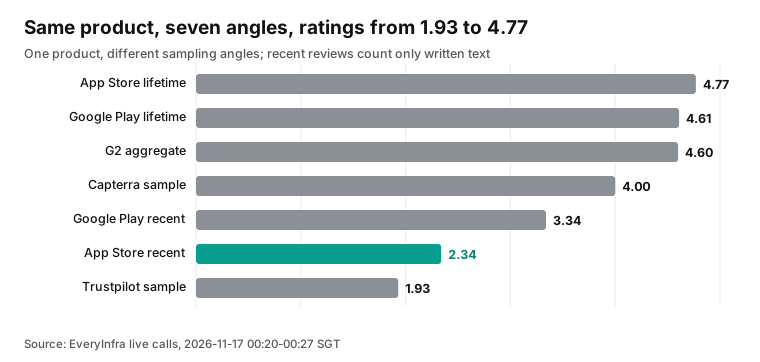
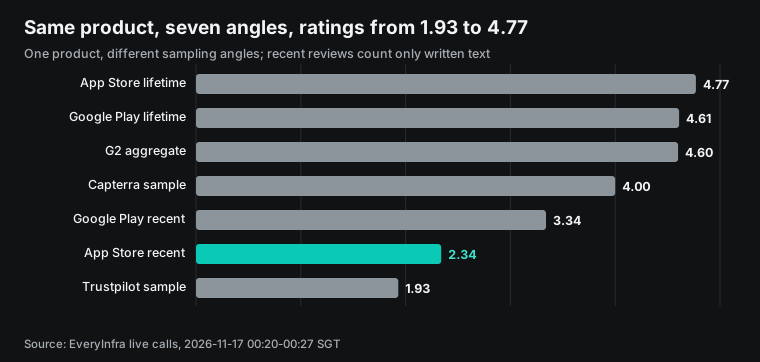
The Capterra sample of 30 that day was all four-star, average 4.0, a narrow band. That is likely a sampling and sorting effect: the few dozen pulled back happened to sit at four stars. It does not mean the product has only four-star reviews on Capterra. So the Capterra row is marked "sample" and is not treated as the source's overall verdict. It is a reminder.
The average from each source must be read with its sample size and its pull method, not lifted out as a single number. Capterra's 4.0 alone would suggest happy enterprise buyers. Yet the G2 aggregate of 13,980 reviews lists "steep learning curve" 872 times. Two B2B sources together show satisfaction that comes with a hard onboarding.
The difference between lifetime and recent written is not a fight; it is two different quantities. The lifetime score counts users who only tapped a star and never wrote text; they are mostly a silent majority with no incident. The recent written average counts only text reviews. Some of those writers came specifically to raise a problem. We also pulled the App Store "current version rating", still 4.77, equal to the lifetime score.
Folding in the star-only ratings outside the written reviews keeps the number high. Meanwhile, 26 of the people who sat down to write in the last month gave one star. For an analysis explaining why enterprise adoption dropped last week, the useful signal is the written reviews. The 4.77 held up by the silent majority does not help.
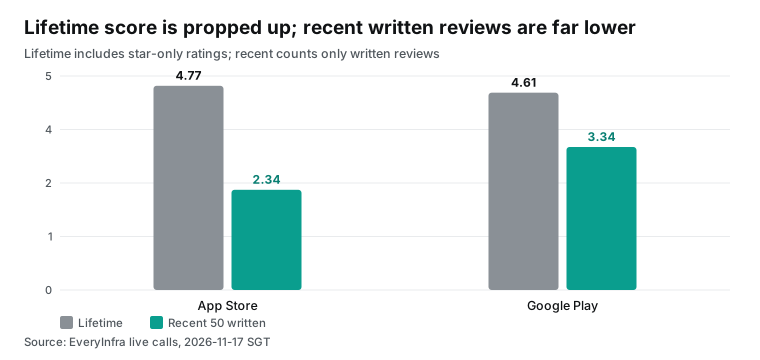
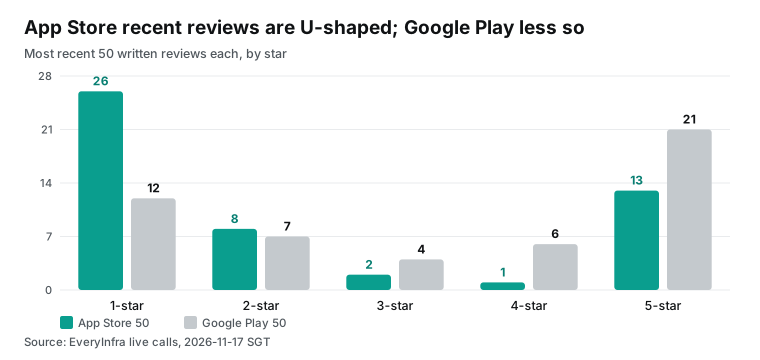
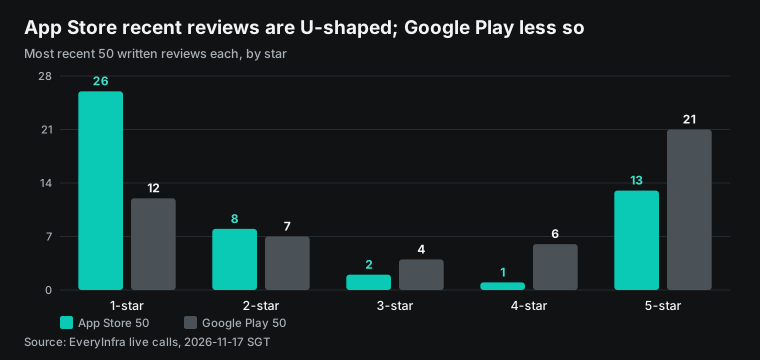
Spread the App Store recent 50 by star: 26 one-star, 8 two-star, 2 three-star, 1 four-star, 13 five-star. One and five are large and the middle is empty. This shape is common when a product hits a specific problem. Content users do not write, while the pleased and the angry both do. Google Play's recent 50 is 12 one-star, 7 two-star, 4 three-star, 6 four-star, 21 five-star, with anger less concentrated. Two stores, same product, same period, and the writers have different tempers.
Same score does not mean same reason: negative themes side by side
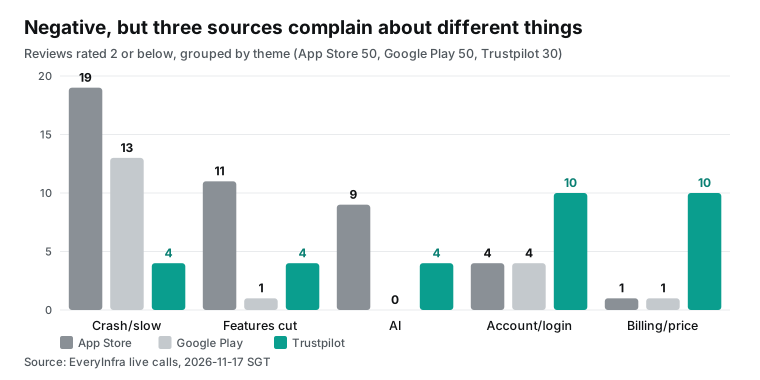
Beyond the score, the point is what the negatives complain about. We grouped the reviews rated two stars or below in three sources by keywords in the title and text. The grouping rule is fixed in the script, and a hand check matched the read-through. Negative as they all are, the three sources complain about different things.
| Negative theme | App Store (<=2) | Google Play (<=2) | Trustpilot (<=2) |
|---|---|---|---|
| crashes, slow, broken after update | 19 | 13 | 4 |
| features cut, worse than before | 11 | 1 | 4 |
| AI (allowance, forced) | 9 | 0 | 4 |
| account, login, locked | 4 | 4 | 10 |
| billing, price rise, pre-charge | 1 | 1 | 10 |
In the App Store negatives, crashes and "broken after update" lead with 19. One-star titles repeat "latest version keeps crashing", "the update ruined it" and "will not run on older devices". AI complaints add 9. A few one-star reviews, in short, read "maybe use a little less AI", "it updates so often and locks you out if you do not" and "crashes on open on the latest iOS, no issues with other apps". These are translated where needed, with user names removed. Those target the version and stability, almost nobody mentions price.
Trustpilot is a different face entirely: billing and accounts, 10 each, and the writers come to complain about pre-charges, price rises and locked accounts. A few one-star reviews read "extremely predatory billing and nonexistent support", "charged after I deleted my account", "a free trial canceled midway for no reason". Same product, same period: App Store writers complain it crashes, Trustpilot writers complain it over-charges. If your internal metric shows "paid conversion dropped", pulling reviews from the App Store would misread the cause as "the app keeps crashing".
Only Trustpilot shows "users are complaining about billing". Both sources are right, each tells half. That is why a cross-check cannot trust one source. Given only the App Store stack, the model would write a billing problem up as a stability problem. The paid conversion would never find its matching reason.
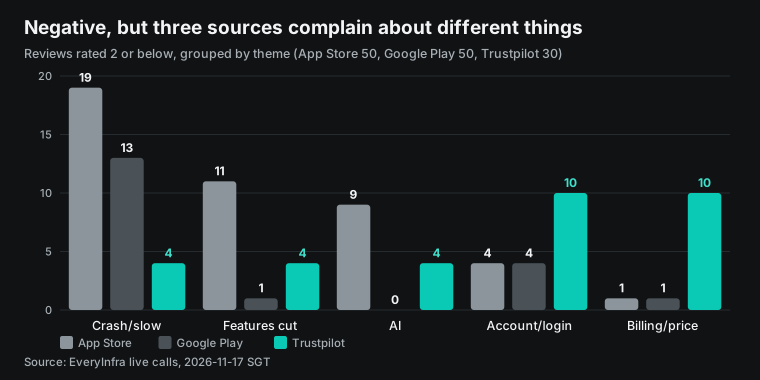
This is exactly the reason to pull several sources in one turn. The G2 aggregate adds another layer. It groups the complaints of 13,980 reviews into labels. The labels are led by "steep learning curve" (872 mentions), "slow large workspaces" (617), "confusing interface" (494), "overwhelming feature set" (469) and "time-consuming setup" (441).
The praise side is "easy everyday use" (2,135) and "flexible workspace" (2,053). Enterprise buyers care about onboarding cost and performance at scale, which is a different thing from the crashes consumers complain about in the App Store. Pull these sources together in chat, and the model assembles the whole face.
The timing of the reviews matters too. These App Store 50 are dated 2026-10-01 to 2026-11-14. The Google Play 50 cluster on 2026-11-10 to 2026-11-15. The Trustpilot 30 are spread wider, 2026-06-26 to 2026-11-13.
Different windows bias a direct average comparison: Trustpilot's 1.93 mixes in half-year-old accounts, and Google Play's 3.34 covers only the last few days. For the cross-check, the fix is simple. Have the model pull by the same sort and write the window into the conclusion, rather than putting averages from different windows side by side.
Which internal metric pairs with which external source
Pairing each internal metric with an external review source is the step that keeps the cross-check from drifting. The internal metric answers "which number moved", and different external sources answer a different kind of "why". The table below pairs common internal metrics with suitable public sources, based on the live observations above.
| Internal metric (Genie side) | Suitable public source | The "why" it supplies | Evidence in this test | Observed |
|---|---|---|---|---|
| consumer daily active, retention drop | App Store, Google Play recent written | crashes, broken after update, features cut | App Store crash negatives 19, features cut 11 | 2026-11-17 |
| paid conversion, renewal drop | Trustpilot | billing, price rise, pre-charge, locked account | Trustpilot billing 10, account 10 | 2026-11-17 |
| enterprise adoption, slow to scale | G2, Capterra | learning curve, performance at scale, back-end limits | G2 learning curve 872, slow 617 | 2026-11-17 |
| new-feature adoption | App Store, Google Play recent + G2 | feature forced, experience regressed | App Store AI negatives 9 | 2026-11-17 |
The table is a reminder, not a hard rule. Given a signal that an internal metric moved, work out which kind of "why" you want. Then decide which sources to pull. Consumer retention pairs with app stores, paid and account issues with Trustpilot, enterprise adoption with G2 and Capterra. Pull the wrong source and the reviews point the wrong way. Pull several, and the model sees which kind of complaint is most concentrated on this product.
What the cross-check costs, per thousand
The EveryInfra side is easy to budget. It depends only on call count, not on how many rows come back or where the model runs. The review capabilities mostly cost $0.001389 per call in the catalog, which is $1.389 per thousand (one call returns one page of reviews). The prices below come from the catalog, the returned counts from this live test.
| Capability | Per call (USD) | Per thousand (USD) | This test returned | Time (SGT) |
|---|---|---|---|---|
app_store/reviews | 0.001389 | 1.389 | 50 / 20 | 00:22:39 / 00:29:09 |
google_play/reviews | 0.001389 | 1.389 | 50 | 00:22:48 |
trustpilot/reviews | 0.001389 | 1.389 | 30 | 00:21:10 |
g2/reviews | 0.001389 | 1.389 | 30 | 00:26:50 |
capterra/reviews | 0.001389 | 1.389 | 30 | 00:27:04 |
One cross-check across five sources costs 5 x $0.001389 = $0.006945. Pull one round a day for one product and a month is about $0.208. Scale it up. A customer-success team watches 20 key customers' products, each pulled from five sources daily. That is 100 calls a day, $0.139, about $4.17 a month.
Pull only when an internal metric alerts, a dozen times a week, and a month is a few cents. That cost is small against what it buys. When the internal metric alerts, the model brings the reasons from public reviews along with it. Nobody re-opens several review sites by hand.
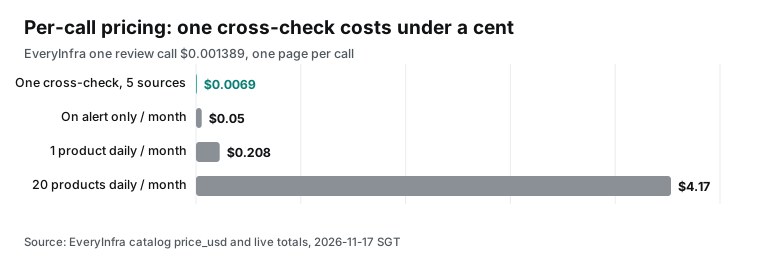
The cost is predictable because it tracks only call count. One call returns one page, whether that page holds 20 reviews or 50. To pull hundreds, use async, get a job_id, and read it for free. This differs from pricing by returned rows.
With per-call pricing, the budget equals "sources to pull times rounds", clear at a glance. It does not jump because a product has many reviews. For a cross-check wired into an automatic flow, that predictability matters more than the unit price.
The Genie side is a different scheme. The Genie One MCP uses Genie's own consumption pricing, tied to SQL warehouse compute. It is billed by the Databricks Genie pricing page (Genie pricing, Genie One MCP docs, considerations), read 2026-11-17. We do not convert it to a per-call price, because it depends on your warehouse size and query complexity, with no single per-call figure. What compares is this: the inside runs on your existing Databricks usage, and the outside is $0.001389 for one page of public reviews.
Pairing the cross-check with Genie's internal data: two reconciliations
What Genie Ontology does inside is reconcile conflicting definitions into one trustworthy answer. Databricks' how-to guide breaks it into layers. Get the data foundation right and align metric definitions. Genie then ranks context by authority, applies permissions, and feeds the most useful context to Genie at answer time (operationalizing Genie Ontology guide).
In other words, "customer" may mean active accounts in sales and every account in support. The same customer may hold three IDs across systems. Genie uses the Ontology to decide which to trust.
The cross-check in chat brings the same reconciliation outside the wall. Public reviews also have three IDs. For one product, there is one score on the App Store, another on Trustpilot, a third on G2. Each carries a different audience and window. The model makes the same kind of move Genie makes on internal definitions.
It does not take one source as the only truth. It puts the evidence from several sources together and marks where they diverge.
There is a symmetry here that is easy to miss. Databricks writes about the cost of connecting data directly. Giving an agent raw structured and unstructured sources gives access, not shared business meaning. It does not tell the agent which sources, definitions or SQL joins are approved. So the agent keeps inspecting schemas, documents and relationships, burning tokens and time (Genie One MCP blog). External public data has the same problem.
Drop a pile of raw review pages on a model, and it has to work out which row is which product. It also has to judge which score to trust and whether the window lines up. EveryInfra's data interface pulls these into structured fields (rating, posted_at, app_version, matching the catalog). That is a clean entry on the outside side too. The model does not dig through pages.
One point keeps the analogy honest. Genie Ontology is the company's own governed internal semantic layer, with authority and certification. The EveryInfra side governs no internal definition; it only pulls public reviews into uniform fields. Reconciling the conflict among several external sources is a judgment the model makes in the conversation, not something EveryInfra decides.
So the correct statement is this. The authoritative internal definitions are guaranteed by Genie and Ontology. The several external sources are pulled back faithfully by the data interface. Which is more credible is judged by the model from the evidence on both sides.
Databricks' three chat scenarios map onto this layer. In the blog's retention scenario, a customer-success lead asks Copilot Cowork which customers show declining adoption, rising support volume and renewal risk. Genie connects governed customer, product-usage, support and contract data (Databricks blog). There the internal number tells you "which customers are slipping".
Attaching EveryInfra to pull those customers' products' public reviews adds the reason: "they slip because the public reviews complain about billing and crashes". The Genie One MCP blog's finance and marketing scenarios share the structure. Genie anchors the internal definition, and the data interface fills in the outside voice (Genie One MCP blog).
Boundaries: sampling, sort, and what the plugin does not do
A few boundaries keep this cross-check from looking stronger than it is. First, reviews are a sample, not a census. We pulled 20 to 50 per source, and the App Store and Google Play "recent written" came back in each store's default sort. The windows differ: App Store spans 2026-10-01 to 11-14, Google Play only 2026-11-10 to 11-15. So an average across sources is not "this source's overall verdict on the product"; it is the average of the few dozen pulled this time. For a steadier result, pull again by the same sort, count and window.
Second, lifetime score and written average are two quantities, do not mix them. The first includes star-only ratings; the second counts only written reviews. Every "lifetime" in this piece is marked as including star-only. Every "recent written average" is marked as text only. Mixing them yields a misread like "App Store rating collapsed" — in fact the silent majority is unchanged and the writers turned harsher.
Third, the plugin only brings Genie into chat; it does not change Genie's permission model. Unity Catalog permissions apply on every request. A user in chat still only reads internal data they are allowed to see (Genie One MCP docs, considerations). On the outside, EveryInfra pulls publicly visible reviews and touches no private, logged-in data. Each side keeps its own boundary, and what is stitched together is "governed internal numbers" plus "publicly visible voice", not anyone's private data mixed in.
Fourth, the entry point for attaching an external MCP to a chat client shifts with the client's version. Whether an admin opens it is the client's decision. Databricks also leaves enterprises a gate. Context-based ingress policies can allow ChatGPT and Claude as partner platforms from 2026-11-10.
That lets those hosted MCP clients reach the workspace (partner platforms docs). The docs state the rule matches traffic by the partner's published egress IP ranges or OAuth app, synced every one to two weeks. It allows only that partner's traffic, while users and service principals still authenticate. So enterprises control which chat client can reach internal Genie, and the external data interface should be attached by each company's own rules.
Fifth, the plugin round-trip has latency; the cross-check is not a zero-cost instant operation. The Genie side runs a background loop that searches data and writes SQL, so the answer is asynchronous. The EveryInfra review call this time took from hundreds of milliseconds to a few seconds per round-trip. Put both in one turn and the user waits for both. That is fine for interactive questions. It is wrong for a sub-second requirement, which fits a background scheduled task that pulls the cross-check and pushes a finished view.
One external check is worth recording. We searched the keyword "databricks genie plugin chatgpt" for video. The top results were general Genie, Genie Code and MCP tutorials from 2026-04 to 2026-11. None demonstrated the 2026-11-11 chat plugins' admin-publish, user-sign-in connect flow.
The closest, a 2026-11-15 beginner video, covers connecting an MCP server with OAuth, JWT and API key, which is not the native marketplace connection. That video's comments did not return. So the chat-side connect flow for these plugins still leans mostly on the official docs; the video side is empty.
Industry notes
- 2026-11-11: Databricks launched a second-generation Genie, an always-on autonomous agent that delegates subagents and reaches out when a decision is needed (press release). For readers: the chat plugin is one face of Genie; the resident agent is another.
- 2026-11-11: Genie Ontology and Pages went generally available, so governed business definitions can be organized by domain, certified and deprecated (Genie Ontology GA). For readers: the steadier the inside's trusted definitions, the more a cross-check is worth attaching.
- 2026-11-10: Genie Search went generally available, indexing 100-plus sources such as Google Drive, Jira and Confluence (release notes). For readers: the broader the inside search, the more public data marks the inside-outside line.
- 2026-11-09: The Databricks Genie app for Slack and the app for Microsoft Teams went generally available (November release notes). For readers: Genie is entering more chat surfaces, each able to sit beside an external data interface.
- 2026-11-12: Genie ZeroOps entered Beta, watching jobs, pipelines and tables in the background and proposing fixes when it finds failures (November release notes). For readers: the more the inside monitoring automates, the more the outside verdict needs its own source.
FAQ
Which chat clients does the Databricks Genie plugin support, and when did it ship? (from the suggestion "databricks genie plugin")
Four natively: ChatGPT, Claude, Microsoft Copilot Cowork and Grok Bot, shipped 2026-11-11. Agents without a native plugin can reach Genie through the Genie One MCP server (Databricks blog, November release notes).
How does the genie chatgpt plugin connect, and do I build my own OAuth app? (from the suggestion "genie chatgpt plugin")
An admin publishes the plugin in the ChatGPT workspace. Each user clicks connect and signs in with a Databricks account. The plugin uses default OAuth apps, so the admin does not build one (Genie One MCP docs).
Can one chat ask Genie and pull public reviews together? (from this test)
Yes. Chat clients support attaching an external MCP server or connector. EveryInfra's remote MCP can sit beside the Genie plugin. One turn can ask the internal number and pull public reviews. This is MCP as an open protocol; it does not mean the two have a partnership.
Is the genie chatgpt plugin free, and what do public reviews cost? (from the suggestion "genie chatgpt plugin free")
The Genie side bills under Databricks Genie consumption pricing (Genie pricing). The EveryInfra side pulls public reviews at $0.001389 per call, $1.389 per thousand, with failures and empty results free.
Why do the same product's ratings differ so much across sites? (from the suggestion "why are app ratings so different")
Audiences and windows differ. App Store and Google Play carry consumers, G2 and Capterra enterprise buyers, and many Trustpilot writers come to complain. Lifetime scores include star-only ratings, while recent written counts only text. The two can differ by more than double. So pull several sources to cross-check.
Does a wrong parameter get charged? (from this test)
No. A wrong parameter returns 422 or a did_you_mean hint, both before any charge. The response says "Nothing was charged". Only a call that returns 200 is charged.
Getting started in three steps
- Read the free catalog
GET https://api.everyinfra.com/api/v1/social/catalogonce to confirm the parameters andprice_usdforapp_store/reviews,trustpilot/reviewsandg2/reviews. - In your chat client, attach EveryInfra's remote MCP (
https://api.everyinfra.com/mcp) as a connector beside the Databricks Genie plugin. The snippet is on the MCP server page, with remote setup in the setup notes. - In one conversation, ask Genie for the internal number. Then have the model use
everyinfra_call_apito pull the same product's reviews from several public sources. Quick start has the three REST steps. Related work is in competitor review analysis and auditing storefront reviews in ChatGPT.
References
- Databricks, "Bring your business context to ChatGPT, Claude, Microsoft Copilot Cowork and Grok Bot", 2026-11-11, https://www.databricks.com/blog/bring-your-business-context-chatgpt-claude-microsoft-copilot-cowork-and-grok-bot
- Databricks on AWS, "November 2026 release notes", 2026-11, https://docs.databricks.com/aws/en/release-notes/product/2026/november
- Databricks, "Genie One MCP server" docs, 2026-11, https://docs.databricks.com/aws/en/agents/mcp-tools/genie-mcp
- Databricks, "Genie One MCP server" docs, Ask a question, https://docs.databricks.com/aws/en/agents/mcp-tools/genie-mcp#ask-a-question
- Databricks, "Genie One MCP server" docs, Access through Unity Gateway, https://docs.databricks.com/aws/en/agents/mcp-tools/genie-mcp#access-through-unity-gateway
- Databricks, "Genie One MCP server" docs, MCP App, https://docs.databricks.com/aws/en/agents/mcp-tools/genie-mcp#mcp-app
- Databricks, "Genie One MCP server" docs, Considerations, https://docs.databricks.com/aws/en/agents/mcp-tools/genie-mcp#considerations
- Databricks, "Genie One MCP server" docs, plugins section, https://docs.databricks.com/aws/en/agents/mcp-tools/genie-mcp#databricks-genie-plugins-for-chatgpt-claude-and-grok-botcursor
- Databricks, "Genie One MCP: Give any AI Agent the Right Business Context", 2026, https://www.databricks.com/blog/genie-one-mcp-give-any-ai-agent-right-business-context
- Databricks, "Operationalizing Genie Ontology in Your Data Stack", 2026-09-01, https://www.databricks.com/blog/operationalizing-genie-ontology-your-data-stack
- Databricks, "Announcing GA of Genie Ontology", 2026-11-11, https://www.databricks.com/blog/announcing-ga-genie-ontology
- Databricks, Genie Ontology product page, https://www.databricks.com/product/genie/ontology
- Databricks press release, "Databricks Launches New Always-on Genie: Autonomous AI for Complex Enterprise Work", 2026-11-11, https://www.databricks.com/company/newsroom/press-releases/databricks-launches-new-always-genie-autonomous-ai-complex
- Databricks, Genie pricing page, https://www.databricks.com/product/pricing/genie
- Databricks, Genie product page, https://www.databricks.com/product/genie/
- Databricks on AWS, Genie Ontology docs, https://docs.databricks.com/aws/en/genie/genie-ontology/
- Databricks on AWS, "Allow partner platforms in context-based ingress policies", 2026-11-10, https://docs.databricks.com/aws/en/security/network/front-end/partner-platforms
- Databricks on AWS, Genie One desktop app for Windows (Beta) release note, 2026-11-11, https://docs.databricks.com/aws/en/genie-one/desktop#install-windows
- Databricks on AWS, Genie One Chrome extension (Beta) release note, 2026-11-10, https://docs.databricks.com/aws/en/genie-one/chrome-extension
- Azure Databricks, "Azure Databricks Genie plugin for Microsoft Copilot Cowork", 2026-11, https://learn.microsoft.com/en-us/azure/databricks/integrations/msft-cowork
- Azure Databricks, "November 2026 release notes", 2026-11, https://learn.microsoft.com/en-us/azure/databricks/release-notes/product/2026/november
- OpenAI, ChatGPT Databricks business plugin page, https://openai.com/business/plugins/databricks/
- Claude, Databricks connector (Claude marketplace), https://claude.com/marketplace/connectors/databricks
- x.ai, Grok Bot Databricks plugin, https://x.ai/bot/plugin/86276802
- Microsoft, Azure Databricks Genie plugin (marketplace), https://marketplace.microsoft.com/en-us/product/WA200013104
- Model Context Protocol, "Transports (2025-06-18)" spec, https://modelcontextprotocol.io/specification/2025-06-18/basic/transports
- Model Context Protocol, "Lifecycle (2025-06-18)" spec, https://modelcontextprotocol.io/specification/2025-06-18/basic/lifecycle
- Model Context Protocol, "MCP Apps" overview, https://modelcontextprotocol.io/extensions/apps/overview
- Model Context Protocol, client support matrix, https://modelcontextprotocol.io/extensions/client-matrix
- Model Context Protocol, introduction, https://modelcontextprotocol.io/introduction
- GitHub, modelcontextprotocol/ext-apps, https://github.com/modelcontextprotocol/ext-apps/
- GitHub, modelcontextprotocol/python-sdk, https://github.com/modelcontextprotocol/python-sdk
- Claude Code, MCP docs (output limits, file-write line), https://code.claude.com/docs/en/mcp
- Databricks on AWS, "Connect AI agents to Genie One MCP" section, https://docs.databricks.com/aws/en/agents/mcp-tools/genie-mcp#connect-ai-agents-to-genie-one-mcp
- Databricks on AWS, Unity Gateway docs, https://docs.databricks.com/aws/en/ai-gateway/
- Databricks on AWS, "Govern an MCP" docs, https://docs.databricks.com/aws/en/ai-gateway/govern-mcp-service
- EveryInfra, data capability catalog, https://api.everyinfra.com/api/v1/social/catalog
- Databricks, Unity Catalog product page, https://www.databricks.com/product/unity-catalog
- Databricks, Unity Catalog Semantics page, https://www.databricks.com/product/unity-catalog/business-semantics
- Databricks on AWS, Chat in Genie One docs, https://docs.databricks.com/aws/en/genie-one/chat
- Databricks on AWS, "Supported coding and work agents" docs, https://docs.databricks.com/aws/en/ai-gateway/coding-agent-supported-agents
- Databricks on AWS, "Other MCP clients" docs, https://docs.databricks.com/aws/en/ai-gateway/coding-agent-mcp-skills
- Unite.AI, "Databricks Launches Native Genie Plugins for Four AI Agents", 2026-11-12, https://www.unite.ai/databricks-launches-native-genie-plugins-for-four-ai-agents/
- AlphaSignal, "Databricks Brings Genie Into ChatGPT to Query Company Data Instantly", 2026-11, https://alphasignal.ai/news/databricks-brings-genie-into-chatgpt-to-query-company-data-instantly
Reference BL-174