Snowflake Cortex Agents MCP: how to load social complaints next to your returns
Snowflake MCP connectors accept only OAuth. Config examples for external access and a monthly cost estimate, with 12 API calls (Amazon reviews failed).
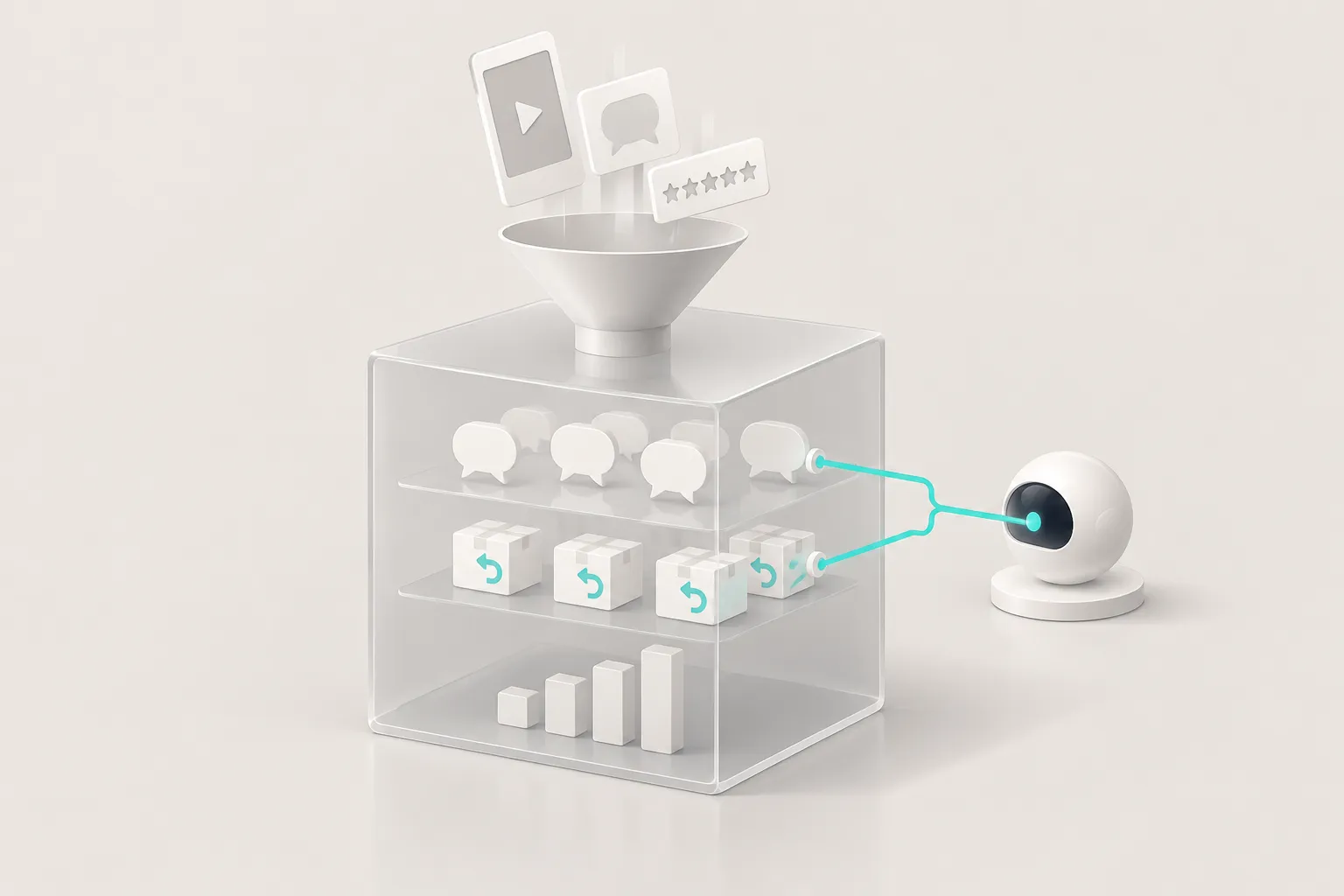
Returns are one of the largest hidden costs in consumer retail. The National Retail Federation estimated that US shoppers would return about $849.9 billion of merchandise in 2025. That is 15.8% of sales, and the rate for online purchases is 19.3% (NRF press release). Most brands already load sales and return data into a warehouse. Far fewer brands load what customers say in public about the product. This article connects the two inside Snowflake.
The trigger is Snowflake Expedition 2026. On November 3, 2026, Snowflake launched CoWork, the new name for Snowflake Intelligence, and new Cortex Agents features (press release). The feature that caught our attention is MCP connectors. With them, an agent can call tools on an outside MCP server (MCP connectors documentation). A brand team will see the use case at once. Put Amazon reviews, Reddit posts and TikTok comments next to the sales and returns tables. Then ask the agent which complaint theme rises together with the return rate.
We tested the data side for real. Between 00:16 and 00:36 Singapore time (SGT) on 2026-11-06, we made 12 calls to the EveryInfra API. We kept every request and response. The Snowflake side in this article is configuration examples only. We do not have a Snowflake account on this machine, so we did not run the SQL, the procedures or the agent. Every Snowflake fact comes from snowflake.com or docs.snowflake.com, with the read date in References.
Here is the short answer. You cannot add the EveryInfra MCP server as a Snowflake MCP connector today.
Snowflake accepts only OAuth, and it needs a specific client registration that our server does not offer yet. Even with OAuth, a connector would not solve this problem, because connector results stay inside one chat and never reach a table. The route that works is a Snowflake external access integration. A Python stored procedure calls the API on a schedule and writes the reviews into tables. Then a Cortex Agent joins those tables with sales and returns. Be clear about what this article does not show. The Amazon review calls returned no data that night, and we have no returns data, so you get a build plan and a cost estimate, not a finding about which complaint drives returns. EveryInfra has no partnership with Snowflake. Every Snowflake fact here comes from its public documents and press releases.
What Snowflake launched at Expedition 2026: snowflake cowork and Cortex Agents
The main product of the event is Snowflake CoWork. The press release describes it as an agent workspace for business users at ai.snowflake.com. Cortex Code, or CoCo, is the companion tool for developers and data engineers (Expedition 2026 press release, CoWork product page).
A second press release on the same day announced Business Ontology and Cortex AI Gateway. Business Ontology stores the approved meaning of business terms and serves those definitions to agents. Cortex AI Gateway governs how agents access models, invoke tools and take action across company systems (Business Ontology and AI Gateway press release). Both matter for our question later. A term such as "return rate" needs one agreed formula, or two agents will give two different answers.
For this article, CoWork is the place where people ask, and Cortex Agents do the work.
Each CoWork assistant is a Cortex Agent object. The agent specification lists its model, its instructions and its tools. The tools include Cortex Analyst for SQL over semantic views and Cortex Search for text. Other tools are code execution, custom tools, MCP connectors and web search (Cortex Agents overview, Create and manage agents). So the quality of the answer depends mostly on the tables and the semantic view. The agent turns a question into SQL and explains the result.
The table below shows the status of the two features that matter here, as we read it on 2026-11-06. "Not stated" means that neither the documentation nor the press release names a status.
| Feature | Status on 2026-11-06 | Source |
|---|---|---|
| CoWork Automations | Not stated | Automations docs |
| Cortex Agents MCP connectors | Docs do not state a status, OAuth only | Connectors docs |
The CoWork blog post also mentions analytical search, which is in preview. Its example is close to ours: which customer issues came up most last month (CoWork blog). The Automations limits and access rules are in the weekly email section below.
Analytical search works on documents that are already in Snowflake. It narrows the set with Cortex Search, then counts and compares with AI functions and SQL. Our problem has one extra step. The customer voice lives on Amazon, Reddit and TikTok, outside the warehouse. So the first job is to move it in, on a schedule, in a shape that joins with sales and returns.
Can snowflake cortex agents mcp connect to EveryInfra directly?
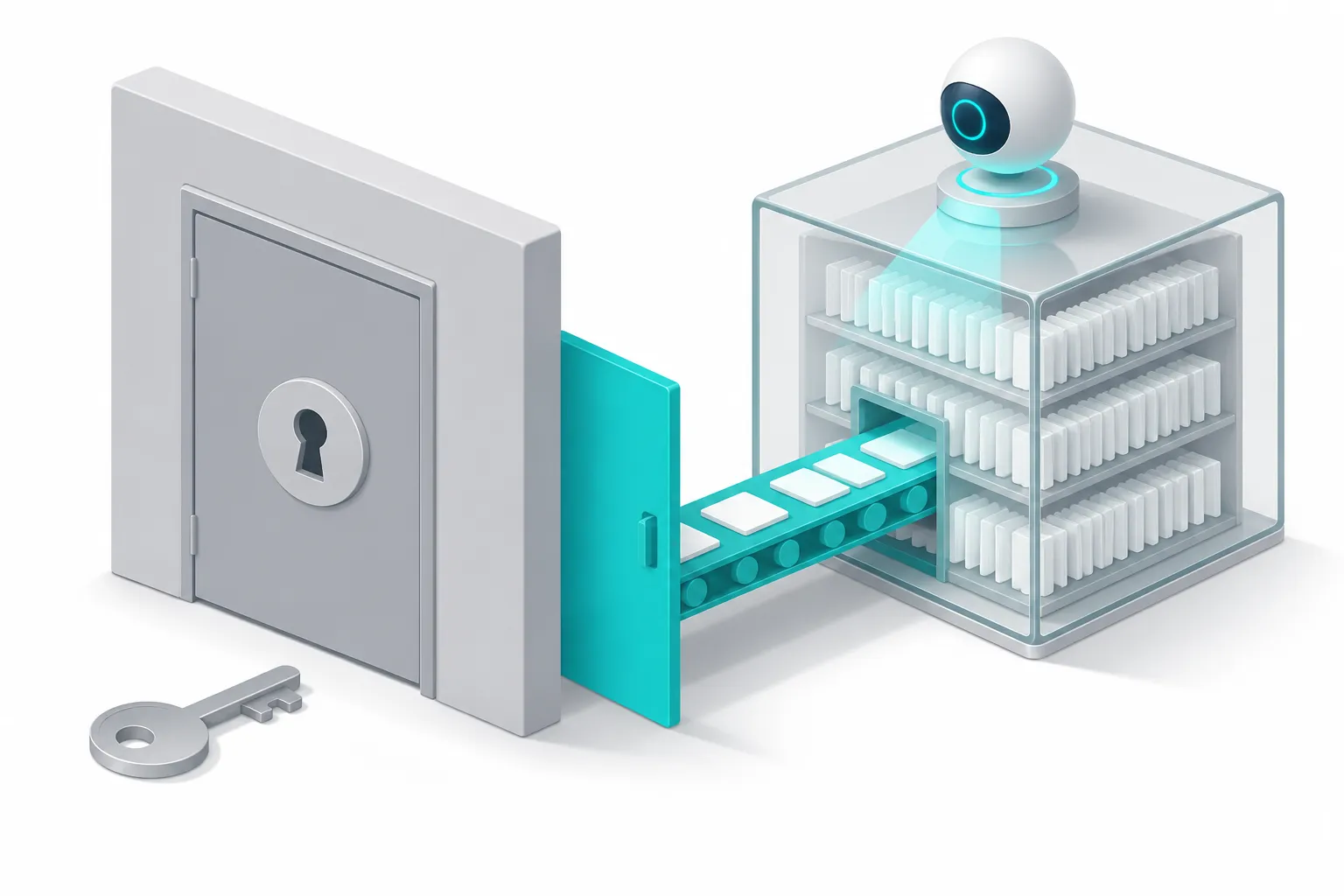
This is the obvious first idea. EveryInfra already runs a remote MCP server (EveryInfra MCP server). Cortex Agents can now call outside MCP servers. So why not paste the server address into Snowflake? We compared the Snowflake requirements with what our server does, one item at a time. The answer is no, and the blocker is how the OAuth client is registered.
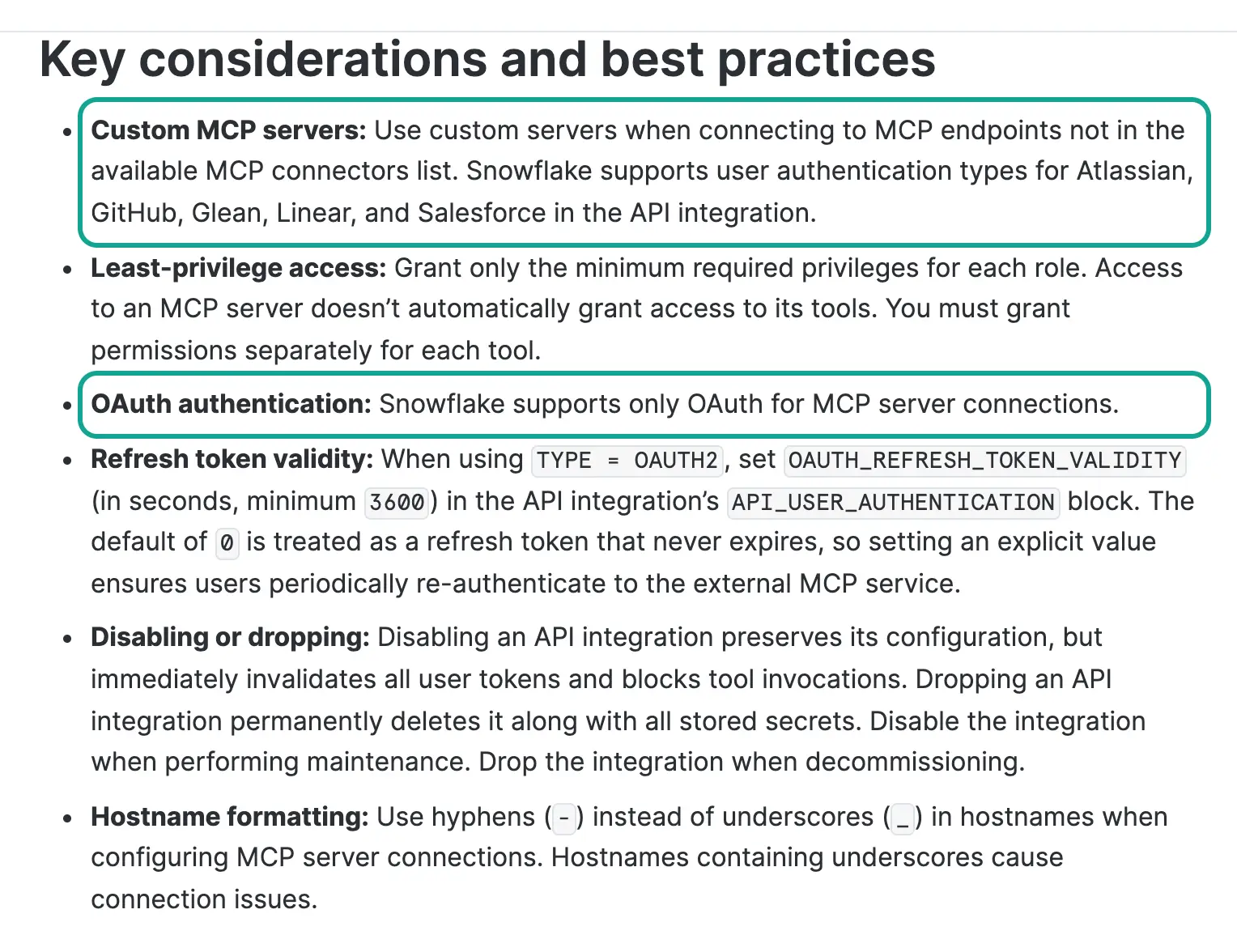
The Snowflake documentation is direct about it. It says that Snowflake supports only OAuth for MCP server connections. An admin creates an API integration with API_PROVIDER = external_mcp that holds the OAuth settings. Then the admin creates an external MCP server object that points to that integration (MCP connectors documentation). There are two ways to fill in the OAuth settings.
The first way is standard OAuth. You register an app with the remote authorization server and get a client ID. The client can have a secret, or it can be a public client without one.
You must also register the callback URL https://identity.snowflake.com/oauth2/callback with that app. The second way is dynamic client registration, where Snowflake asks the remote server for a client ID by itself. That needs the remote server to implement RFC 7591 (RFC 7591). The ready-made connectors are Atlassian, GitHub, Glean, Linear and Salesforce, and the Atlassian example uses dynamic registration.
EveryInfra has two MCP addresses. The common one, https://api.everyinfra.com/mcp, uses an API key in a Bearer header. At 00:43 SGT on 2026-11-06, we requested its protected resource metadata and its authorization server metadata. Both returned 404, so this address does not offer OAuth discovery. The full address, https://api.everyinfra.com/mcp/all, behaves differently. In the same minute, a request without credentials returned 401 with a WWW-Authenticate header.
That header points to resource metadata in the RFC 9728 format, and the metadata names auth.everyinfra.com/oidc as the authorization server (RFC 9728). We then read the authorization server metadata, which follows RFC 8414 (RFC 8414). It supports PKCE with S256 and public clients without a secret. But its registration_endpoint value is empty, so there is no dynamic registration. Our public documentation also has no self-service page where a customer can register an OAuth client.
| What Snowflake needs | EveryInfra `/mcp` (API key) | EveryInfra `/mcp/all` (tested 00:43 SGT, 2026-11-06) |
|---|---|---|
| OAuth only | No, it uses a Bearer API key | Yes, 401 with RFC 9728 metadata |
| Dynamic client registration (RFC 7591) | Not applicable | No, the metadata has no registration endpoint |
| Standard OAuth with a registered client and callback | Not applicable | No self-service registration in public docs |
| Tool capabilities only | Yes, all tools are MCP tools | Yes |
| Host name without underscores | Yes | Yes |
The MCP specification itself does not require OAuth. Version 2025-06-18 says that authorization is optional. If a server supports it, the server must publish RFC 9728 and RFC 8414 metadata, and dynamic registration is a "should", not a "must" (MCP authorization, 2025-06-18). So an API key server follows the specification, and an OAuth-only client also follows it. The two simply do not meet.
Snowflake has a second place for outside MCP servers. Cortex AI Gateway lets an admin add a custom MCP server. Its documentation also requires OAuth, a URL that ends in /mcp, and the ACCOUNTADMIN role (AI Gateway custom apps). Our OAuth address ends in /mcp/all, and our address that ends in /mcp takes only a key. No single address meets both conditions.
Suppose the registration problem goes away. A connector still would not fit this job. Each user clicks Connect in CoWork, signs in on the remote page and approves access. After that, the agent calls the remote tools during a chat, and the results stay in that chat (Use MCP connectors in Snowflake CoWork). Every person who asks needs their own EveryInfra account. More importantly, no review ever lands in a table, so the agent cannot join three months of reviews with three months of returns.
A question about trends needs history, and history lives in tables. Connectors suit a different kind of question, for example "what are people arguing about under this video right now". That question is one-off and needs no storage.
We found four ways to connect Snowflake with an outside data API. The table sorts them by two tests: does the data reach a table, and does the route need OAuth.
| Route | Data lands in a table | Needs OAuth | Good for | Source |
|---|---|---|---|---|
| MCP connector (external MCP server object) | No, chat only | Yes | One-off questions | Connectors docs |
| External access integration, stored procedure and task | Yes | No, the key sits in a secret | Daily loads, our pick | External network access |
| Collector outside Snowflake, then Snowpipe | Yes | No | Teams that already run collectors | Snowpipe |
| External MCP in the Cortex Code Agent SDK | No, unless your code writes back | No, headers are allowed | Developers testing in code | Agent SDK custom tools |
In the fourth route, a Snowflake developer tool lets you put an API key in a request header (Agent SDK documentation). That route lives in developer code, not in the CoWork business interface. The rest of this article follows the second route, because it writes data into tables on a schedule under normal Snowflake access control.
The working route: external access and a stored procedure (configuration example)
The whole flow fits in one picture. The EveryInfra API collects public reviews and comments from Amazon, Reddit and TikTok. Inside Snowflake, a scheduled task calls a stored procedure once a day. The procedure calls the API through an external access integration, stores each raw response, and then expands it into review tables. Your own sales data and Amazon FBA returns report load into two more tables, as they do today. A semantic view and a Cortex Agent sit on top, and business users ask questions in CoWork.


An external access integration is the standard Snowflake way to let procedures and functions reach the internet. It uses three objects. A network rule lists the hosts and ports that code may reach. A secret holds the credential. The integration ties the two together. You grant it to specific roles (External network access overview, Creating and using an external access integration).
Our rule allows only api.everyinfra.com. Even if someone edits the procedure code, it cannot reach another host. The key stays in the secret object, so the code never contains it in plain text. The role that runs the procedure cannot read it either. In the example below, voc is the database name. It stands for "voice of the customer".
-- 1. Allow outbound traffic to one host only
CREATE OR REPLACE NETWORK RULE voc.raw.everyinfra_egress
  MODE = EGRESS
  TYPE = HOST_PORT
  VALUE_LIST = ('api.everyinfra.com');

-- 2. Store the API key. Create a separate key in the EveryInfra console
--    and give it its own per-minute call limit.
CREATE OR REPLACE SECRET voc.raw.everyinfra_key
  TYPE = GENERIC_STRING
  SECRET_STRING = '<EveryInfra API key>';

-- 3. Tie the rule and the secret together
CREATE OR REPLACE EXTERNAL ACCESS INTEGRATION everyinfra_access
  ALLOWED_NETWORK_RULES = (voc.raw.everyinfra_egress)
  ALLOWED_AUTHENTICATION_SECRETS = (voc.raw.everyinfra_key)
  ENABLED = TRUE;

-- 4. Grant it only to the loading role
GRANT USAGE ON INTEGRATION everyinfra_access TO ROLE voc_loader;
GRANT READ ON SECRET voc.raw.everyinfra_key TO ROLE voc_loader;
The syntax follows the Snowflake SQL reference (CREATE NETWORK RULE, CREATE SECRET, CREATE EXTERNAL ACCESS INTEGRATION). Creating the integration needs an account-level privilege, so an admin usually does it once. After that, the loading role only needs usage on the integration and read on the secret. The Snowflake examples page shows complete procedures that call outside APIs with a secret (External network access examples).
The procedure has one design choice that changes the bill: wait for each result, or submit and come back later. The EveryInfra API supports both.
A synchronous call holds the connection open until the data arrives. In our test, the slowest Amazon review call held it for 67 seconds. An asynchronous call adds "mode": "async" to the request body. The API answers with status 202 and a job ID in about two seconds. You fetch the result later with GET /api/v1/jobs/{job_id} (Docs).
In Snowflake, that difference turns into money. The procedure runs on a warehouse, and the warehouse bills for every second it runs. Each second of waiting is a billed second. So we split the load into two procedures and two tasks. One procedure only submits, and it finishes in seconds. The other collects the jobs that are done.
The table lists every Snowflake object in this setup, what it does and who usually creates it.
| Object | Purpose | Usually created by |
|---|---|---|
Network rule everyinfra_egress | Allows outbound traffic to one host | Account admin |
Secret everyinfra_key | Holds the EveryInfra API key | Account admin |
External access integration everyinfra_access | Ties the rule and the secret together | Account admin |
Procedure submit_pulls | Submits async jobs for each watchlist row | Data engineer |
Procedure collect_results | Collects finished jobs into raw tables | Data engineer |
Tasks t_submit and t_collect | Run the two procedures on a schedule | Data engineer |
Semantic view voc_returns | Defines themes, weeks and return measures | Analytics engineer |
Agent with VocAnalyst | Answers questions in CoWork | Analytics engineer |
CREATE OR REPLACE PROCEDURE voc.raw.submit_pulls()
  RETURNS VARIANT
  LANGUAGE PYTHON
  RUNTIME_VERSION = '3.11'
  PACKAGES = ('snowflake-snowpark-python', 'requests')
  HANDLER = 'run'
  EXTERNAL_ACCESS_INTEGRATIONS = (everyinfra_access)
  SECRETS = ('ei' = voc.raw.everyinfra_key)
AS
$$
import json, requests, _snowflake

API = "https://api.everyinfra.com/api/v1/social"

def run(session):
    key = _snowflake.get_generic_secret_string("ei")
    headers = {"Authorization": f"Bearer {key}", "Content-Type": "application/json"}
    # watchlist: one row per product URL, video URL or search keyword
    rows = session.sql(
        "SELECT watch_id, platform, action, params FROM voc.raw.watchlist WHERE active"
    ).collect()
    submitted = 0
    for r in rows:
        body = {"platform": r["PLATFORM"], "action": r["ACTION"],
                "params": json.loads(r["PARAMS"]), "mode": "async"}
        resp = requests.post(API, headers=headers, json=body, timeout=30)
        payload = resp.json()
        session.sql(
            """INSERT INTO voc.raw.jobs
               (watch_id, job_id, http_status, charged_usd, first_payload, submitted_at)
               SELECT ?, ?, ?, ?, PARSE_JSON(?), CURRENT_TIMESTAMP()""",
            params=[r["WATCH_ID"], payload.get("job_id"), resp.status_code,
                    (payload.get("billing") or {}).get("charged_usd"), json.dumps(payload)],
        ).collect()
        submitted += 1
    return {"submitted": submitted}
$$;
The procedure follows the Snowflake guide for Python procedures. The SECRETS clause maps the secret object to a name, and the code reads it with _snowflake.get_generic_secret_string. The PACKAGES clause lists the outside packages (Python stored procedures overview). Two details are worth copying. First, keep the full first response. It states the exact dollar charge, so you can reconcile with the EveryInfra billing page each month.
Second, do not retry the same target inside the procedure. The API does not charge for bad parameters, temporarily unavailable targets or empty results, and the response says why. Let tomorrow's run try again. Our Amazon 503 responses even said that an immediate retry on the same item was unlikely to help.
The collector has the same shape. It reads job IDs that are still open in voc.raw.jobs and asks for each status. It skips jobs that are running or finalizing. It writes finished results into voc.raw.api_responses and marks them as collected. In our own test, we first treated only running as unfinished. As a result, we read one job too early, while it was still finalizing. Add both states to the check.
Schedule the submit task for 02:00 Singapore time each day. Schedule the collector for 02:20 and 03:20, so the second run picks up anything the first run missed. Do not run the collector every few minutes. Each warehouse resume bills at least 60 seconds, so frequent runs mostly buy idle time. We also suggest an auto-suspend of 60 seconds instead of the default of 10 minutes.
CREATE OR REPLACE TASK voc.raw.t_submit
  WAREHOUSE = voc_xs_wh
  SCHEDULE = 'USING CRON 0 2 * * * Asia/Singapore'
AS
  CALL voc.raw.submit_pulls();

CREATE OR REPLACE TASK voc.raw.t_collect
  WAREHOUSE = voc_xs_wh
  SCHEDULE = 'USING CRON 20 2,3 * * * Asia/Singapore'
AS
  CALL voc.raw.collect_results();

ALTER TASK voc.raw.t_collect RESUME;
ALTER TASK voc.raw.t_submit RESUME;
Task syntax is in CREATE TASK and the introduction to tasks. You can also remove WAREHOUSE and use a serverless task, which Snowflake bills by actual compute. The Service Consumption Table lists a 0.9 multiplier for serverless tasks (Service Consumption Table).
Four tables: reviews, social mentions, sales and returns
Three rules shape the tables. Keep each raw response as it arrived. Keep only the fields that the analysis needs in the expanded tables. Drop personal data when you can. The API returns reviewer names and avatars, and the return-rate analysis never uses them. Dropping them saves storage and removes a privacy question. Below are four core tables and one mapping table. Sales and returns come from your own systems, so we show only their structure.
-- Raw responses: one row per API response, stored as VARIANT
CREATE TABLE IF NOT EXISTS voc.raw.api_responses (
  job_id        STRING,
  platform      STRING,
  action        STRING,
  fetched_at    TIMESTAMP_TZ,
  payload       VARIANT
);

-- Amazon reviews (expanded from amazon/reviews)
CREATE TABLE IF NOT EXISTS voc.core.reviews (
  review_id            STRING PRIMARY KEY,
  asin                 STRING,
  country              STRING,
  rating               NUMBER(3,1),
  title                STRING,
  body                 STRING,
  posted_at            TIMESTAMP_TZ,
  is_verified_purchase BOOLEAN,
  helpful_count        NUMBER,
  variant              STRING,
  fetched_at           TIMESTAMP_TZ
);

-- Social mentions: TikTok comments and Reddit posts in one table
CREATE TABLE IF NOT EXISTS voc.core.social_mentions (
  platform      STRING,          -- tiktok or reddit
  source_id     STRING,          -- comment or post ID
  source_url    STRING,          -- video URL or post URL
  community     STRING,          -- Reddit community, empty for TikTok
  product_key   STRING,          -- key from product_map
  body          STRING,
  like_count    NUMBER,
  reply_count   NUMBER,
  is_reply      BOOLEAN,
  posted_at     TIMESTAMP_TZ,
  fetched_at    TIMESTAMP_TZ,
  themes        ARRAY,           -- labels from AI_CLASSIFY
  PRIMARY KEY (platform, source_id)
);

-- Daily sales from your order system
CREATE TABLE IF NOT EXISTS voc.core.sales_daily (
  sale_date     DATE,
  sku           STRING,
  asin          STRING,
  units_ordered NUMBER,
  PRIMARY KEY (sale_date, sku)
);

-- FBA customer returns report (GET_FBA_FULFILLMENT_CUSTOMER_RETURNS_DATA)
CREATE TABLE IF NOT EXISTS voc.core.fba_returns (
  return_date           TIMESTAMP_TZ,
  order_id              STRING,
  sku                   STRING,
  asin                  STRING,
  fnsku                 STRING,
  quantity              NUMBER,
  fulfillment_center_id STRING,
  detailed_disposition  STRING,
  reason                STRING,
  status                STRING,
  customer_comments     STRING,
  return_themes         ARRAY
);

-- Product map: which ASINs, SKUs, videos and keywords belong to one product
CREATE TABLE IF NOT EXISTS voc.core.product_map (
  product_key   STRING,
  asin          STRING,
  sku           STRING,
  tiktok_urls   ARRAY,
  reddit_terms  ARRAY
);
The returns table copies the Amazon SP-API FBA customer returns report. The report type is GET_FBA_FULFILLMENT_CUSTOMER_RETURNS_DATA. Its fields include return date, order ID, SKU, ASIN, FNSKU, product name, quantity, fulfillment center, detailed disposition, reason, status, license plate number and customer comments. The documentation says that Amazon updates it daily (SP-API FBA report types).
The customer comments column matters most here. It is free text, like a TikTok comment. If you classify both with the same theme list, the two sides line up by theme. The reason column uses fixed Amazon codes, which are much coarser than a theme such as "the lid leaks". Reason codes alone cannot tell you which theme drives returns.
The next table maps API fields to table columns. Field names come from the EveryInfra catalog at GET /api/v1/social/catalog, read on 2026-11-06 (catalog).
| Capability | API fields | Table column | Note |
|---|---|---|---|
amazon/reviews | review_id, product_asin, country | reviews.review_id, asin, country | Deduplicate on review ID |
amazon/reviews | rating, title, text, posted_at | rating, title, body, posted_at | Rating from 1 to 5 |
amazon/reviews | is_verified_purchase, helpful_count, variant | Same names | Color and size live in variant |
amazon/reviews | author_name, author_id, author_avatar_url | Not stored | Personal data the analysis does not need |
tiktok/comments | id, text, like_count, reply_count, is_reply, posted_at | Matching social_mentions columns | Each top comment carries up to 2 replies |
tiktok/comments | author_username, author_id | Not stored | Same reason |
reddit/search | id, url, title plus text, community, like_count, comment_count | source_id, source_url, body, community, like_count, reply_count | Title and body joined into one text |
reddit/search | author_username | Not stored | Same reason |
The expand step needs only SQL. Select rows by platform from api_responses, use LATERAL FLATTEN on payload:results, and MERGE into the target table on the ID. When you pull the same video again, old comments get new like counts and new comments are appended. Later in this article, you will see that pulling the same video again after some months is the most useful step in this setup.
One real round trip: REST, async and MCP
We could not run the Snowflake side. But the procedure sends the same requests to the same API that we used on our own machine. It gets the same response format. Between 00:16 and 00:36 SGT on 2026-11-06, we made 12 calls with a test key. They cover the three capabilities in this article, plus two searches that helped us choose targets. We kept the request, start and end time, HTTP status, duration and charge for each call.
| # | SGT | Capability | Mode | Result | Duration | Charge |
|---|---|---|---|---|---|---|
| 1 | 00:16:52 | amazon/search, keyword portable blender | Sync | 10 products, 9 of them Ninja | 42.14 s | $0.002236 |
| 2 | 00:17:41 | amazon/reviews, product B0C2FF4JD1 | Sync | 503, temporarily unavailable (not charged) | 60.12 s | $0 |
| 3 | 00:18:41 | amazon/reviews, product B0CN3S2SW2 | Sync | 503 | 58.57 s | $0 |
| 4 | 00:19:47 | amazon/reviews, product B09B8V1LZ3 | Sync | 0 rows, empty result refunded | 67.25 s | $0 |
| 5 | 00:20:55 | reddit/search, portable blender, newest | Sync | 14 posts | 6.56 s | $0.000556 |
| 6 | 00:21:13 | tiktok/search, ninja blast portable blender review | Sync | 10 videos | 3.78 s | $0.000556 |
| 7 | 00:21:21 | tiktok/comments, cheap-versus-expensive test video | Sync | 200 comments | 52.30 s | $0.000556 |
| 8 | 00:22:13 | walmart/reviews, product page | Sync | 0 rows, empty result refunded | 54.34 s | $0 |
| 9 | 00:24:22 | amazon/reviews, product B0D2YYHN1B | Sync | 503 | 19.48 s | $0 |
| 10 | 00:25:26 | reddit/search, ninja blast | MCP | 7 posts | 7.62 s | $0.000556 |
| 11 | 00:27:36 | tiktok/comments, single-product try-on video | Async | 202, done after about 100 s, 73 comments | Submit 1.95 s | $0.000556 |
| 12 | 00:36:23 | amazon/reviews, product B0C2FF4JD1 again | Sync | 503 | 38.42 s | $0 |
Six of the 12 calls were charged, for a total of $0.005016. The other six returned 503 or an empty result, and none were charged. We guessed the Walmart product URL in call 8 from a product name, so the empty result is our own mistake. It still confirms that the empty-result refund also applies to Walmart reviews.
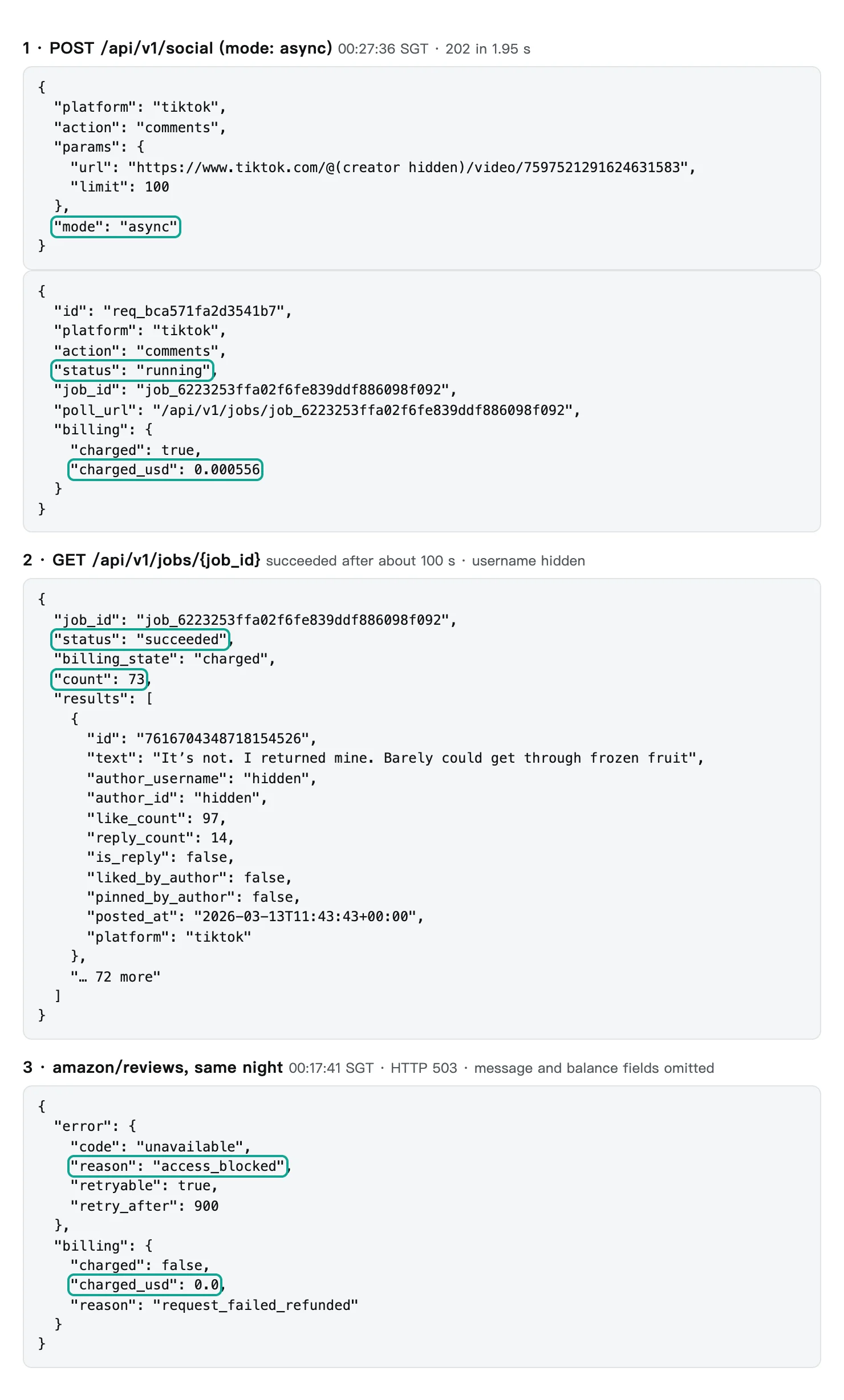
Part one of the screenshot is what the submit procedure receives. It returned 202 in 1.95 seconds with a job ID, and the response states the charge of $0.000556 at submit time. Part two is what the collector receives. The state moved from running to finalizing to succeeded. We polled about every 8 seconds, 12 times in total, and the job finished about 100 seconds after submit.
Part three shows a failure. The status is 503, the reason is access_blocked, the suggested retry is after 900 seconds, and the charge is 0. A procedure only has to branch on the status code and these fields.
Call 10 is for comparison. It ran the same Reddit search through the MCP tool everyinfra_call_api. It returned 7 posts in 7.62 seconds as a tool result of 18,619 characters, inside a 19,490-byte response. If a Cortex Agent made that call through an MCP connector, those 18,619 characters would go into the model context as input tokens. The same data loaded into a table costs the agent only the few rows it reads. This is why we prefer "load first, ask later" to "fetch live in every chat".
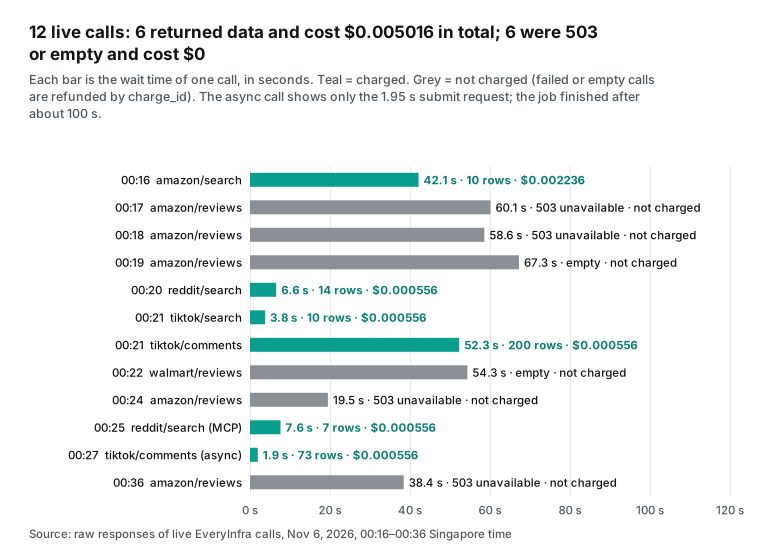
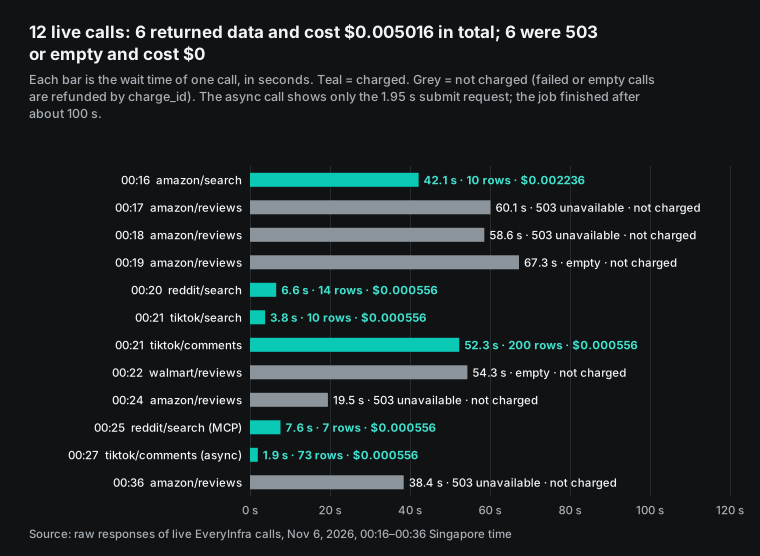
This latency chart decides the Snowflake cost model. By data size, all three capabilities are light. One TikTok comments call with 200 comments was 71,228 bytes, and one Reddit search was about 30,000 bytes. By waiting time, a synchronous review or comment call often takes 50 to 70 seconds.
A warehouse bills per second, with a 60-second minimum each time it resumes (Warehouses overview, Understanding compute cost). During a synchronous call, the warehouse spends nearly all its time waiting on the network. The cost section turns that into dollars.
Test 1: how many TikTok comments describe a product problem?
We picked a category that most readers know: portable blenders. Call 1 used amazon/search for "portable blender". Nine of the top 10 results were Ninja products, priced from $19.95 to $59.99 (Amazon data API, Amazon search). Call 6 used tiktok/search for "ninja blast portable blender review". From the 10 videos it returned, we took the two with the most comments. We pulled their comments with tiktok/comments (TikTok data API, TikTok comments API, TikTok search API).
The first video is a "cheap versus expensive" blender test posted on 2025-07-27. When we pulled it, it had 2,586,703 views and 251 comments. We received 200 comments, which is the limit for one call. The second video is a single-product try-on posted on 2026-01-20, with 208,916 views and 98 comments. We received 73, of which 17 were replies. This article does not name either creator.
| Video | Posted | Views | Comments on video | Comments received | Replies | Product problems | Share |
|---|---|---|---|---|---|---|---|
| Cheap-versus-expensive test | 2025-07-27 | 2,586,703 | 251 | 200 | 23 | 4 | 2.0% |
| Single-product try-on | 2026-01-20 | 208,916 | 98 | 73 | 17 | 13 | 17.8% |
First we tried the most common shortcut: a keyword list. Battery, leak, broke, returned, expensive, too small. A comment that matched any word counted as a complaint. In the first video, the list matched 42 of 200 comments. Then we read every comment by hand. Only 4 of the 42 described a problem with the blender, so the keyword rule was right 9.5% of the time.
The reason is easy to see. The comment section of a "cheap versus expensive" video is mostly jokes about the format, with requests to test cheap and expensive versions of other things. Thirty comments matched "expensive" or a price word. Only 7 of them said the blender was not worth the price. In Snowflake, theme labels must come from a model, and you must define "product problem" in writing first.
The table shows our hand labels for the 42 comments that the keyword list matched in the first video.
| Hand label | Comments |
|---|---|
| Not a product signal (jokes, other topics) | 29 |
| Price objection only | 7 |
| Product problem | 4 |
| Unclear | 2 |
| Total keyword matches | 42 |
Our hand-labeling rule was strict. A comment counts only if it says this product had a problem. The problem types are lid or spill, short battery life, weak on ice, a missing part, hard to clean and broke quickly. A general "not worth it, I returned it" also counts. Price complaints, brand comparisons, jokes and emoji do not count. With that rule, the two videos look very different.
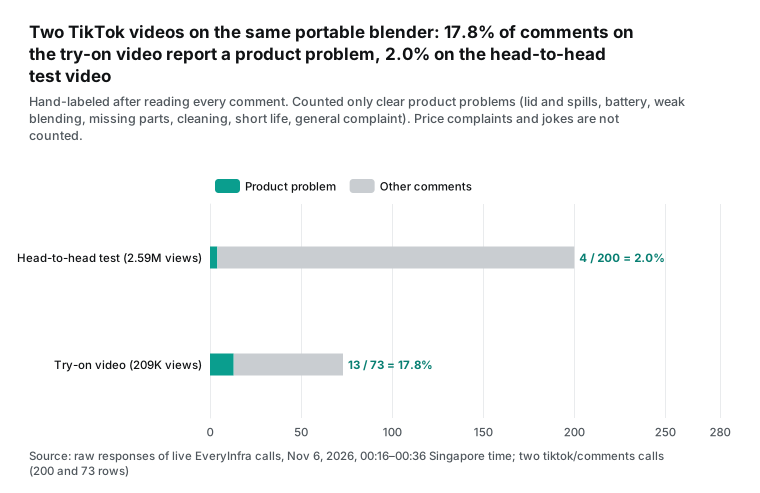
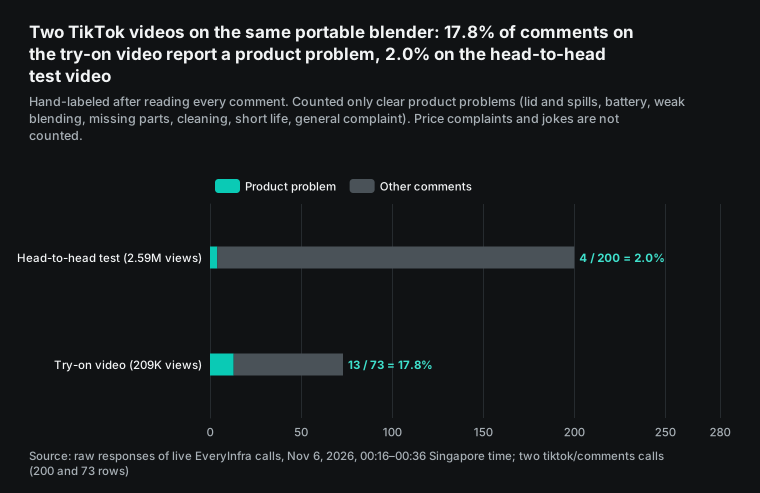
The video with ten times more views has only 2.0% product-problem comments. The smaller try-on video has 17.8%. The reason is the audience. A comparison video attracts people who watch for fun. A try-on video attracts people who own the product or plan to buy it, and they are the ones who write "mine leaked too". For the Snowflake design, the choice of videos in product_map matters more than the number of comments per video.
At the same price of $0.000556 per call, a try-on video gave almost nine times more signal. You can automate that choice too. Search with tiktok/search, then keep videos whose captions use words such as "review", "trying" or "honest" and that have tens to hundreds of comments.
Across both videos, 17 of 273 comments described a product problem. The themes break down as follows.
| Theme | Comments | Example (original text, author hidden) | Likes |
|---|---|---|---|
| Lid or spill | 6 | The way I just gasped when it spilled. Were you supposed to open it from the top instead? | 79 |
| Battery | 3 | the batteries do not last long enough to make a full smoothie | 9 |
| General negative, returned | 2 | Not worth it, returned after a week | 0 |
| Weak on ice or frozen fruit | 2 | It's not. I returned mine. Barely could get through frozen fruit | 97 |
| Missing part | 2 | ours both didn't come with the blade cap | 0 |
| Broke quickly | 1 | they are shit, lasts 2 spins | 1 |
| Hard to clean | 1 | Hard to wash | 0 |
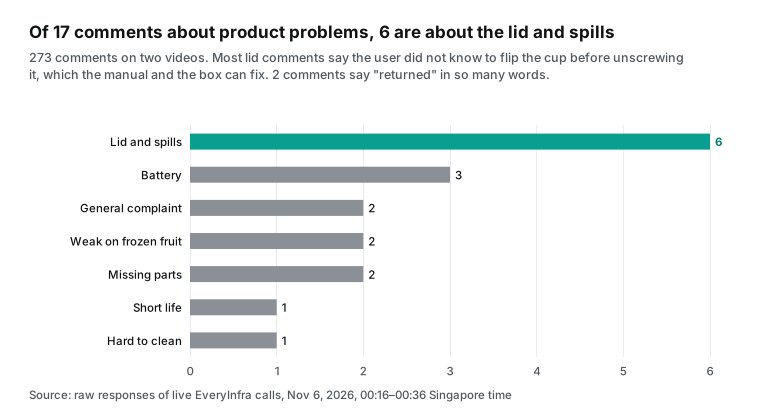
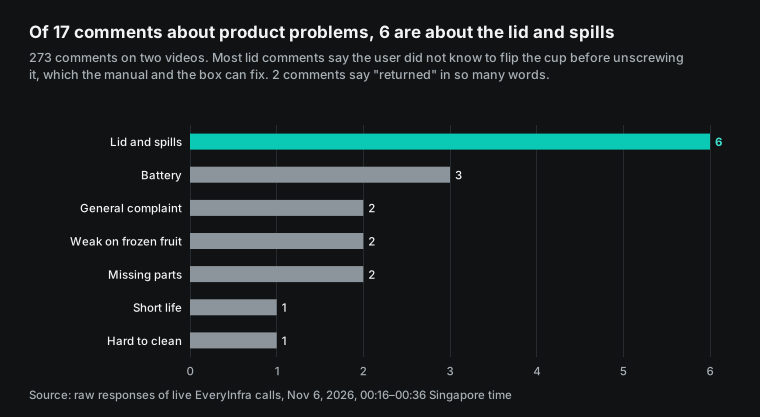
Lid and spill problems form the largest group. The most liked comment in that group, with 79 likes, asks whether you should open the lid from the top instead. Another says the writer spilled it the same way the first time and did not think to use the cap. A comment from 2026-01-22 warns others not to use the button on the lid, because it breaks and no replacement is sold.
This kind of problem differs from battery or motor complaints. Better instructions, packaging or product photos can often fix it, and the return rate can then fall quickly. That is exactly what the question "which complaint theme rises with returns" is meant to find. Once a theme lines up with a return spike, the action is concrete.
Keep the like count in the table. A "I returned mine" comment with 97 likes and a complaint with 0 likes do not speak for the same number of people. In the semantic view, define two measures: the comment count, and a like-weighted count. Ask the agent to report both.
In Snowflake, AI_CLASSIFY can do the labeling. Use the seven themes plus "not a product issue" as categories. Set multi-label output. Add a task description that excludes price complaints and jokes. The documentation recommends no more than about 20 categories, and it accepts examples (AI_CLASSIFY documentation).
One usage note in that documentation matters. Input in English gives the best results, and other languages can perform worse. Most TikTok and Amazon US comments are in English, so this is a small issue for a US brand. If you also track Spanish-language or other markets, check a hand-labeled sample first. The task description and the categories also count as tokens on every row. So the real token count per row is higher than the comment length.
UPDATE voc.core.social_mentions
SET themes = AI_CLASSIFY(
      body,
      ['lid_or_spill', 'battery', 'weak_on_ice', 'missing_part',
       'breaks_quickly', 'hard_to_clean', 'general_negative', 'not_a_product_issue'],
      {'output_mode': 'multi',
       'task_description': 'Label only comments that report a problem with this blender. Price complaints, jokes and brand comparisons are not_a_product_issue.'}
    ):labels
WHERE themes IS NULL;
Run the same classification on the customer_comments column of the returns table and write the result into return_themes. Both sides then use the same themes, the same model and the same description, so a comparison by theme makes sense. AI_SENTIMENT can also score each comment from negative to positive (AI_SENTIMENT documentation). It helps less here, because the question is which problem, not how unhappy.
Test 2: what does a Reddit search return?
Many teams treat Reddit as the home of honest user talk, so we checked whether it could add to TikTok. Call 5 used reddit/search for "portable blender", sorted by newest, and returned 14 posts. Call 10 searched "ninja blast" through MCP and returned 7 posts (Reddit data API, Reddit search API). This capability always searches the last month and returns up to 25 posts per call. Our 14 posts covered only 2026-10-30 to 2026-11-05 (UTC), and the 7 posts covered November 3 to November 5.
We read every post. None of the 21 discussed whether a blender works well. Of the 14 "portable blender" posts, 10 were deal posts. Most were in deal communities such as r/priceglitch, with titles like "Ninja Blast Max Portable Blender, Twist & Go, 22oz" plus a color and a price. Deal posts appeared on 2026-10-31, 2026-11-01 and 2026-11-05. Daily Amazon deal roundups appeared on 2026-11-02 and 2026-11-03.
The other 4 posts had nothing to do with blenders. One user asked about a portable ThinkPad, and two posts in 3D software Blender communities asked about laptop specs. Of the 7 "ninja blast" posts, 4 were deals. The other 3 matched the word by accident: one was about a video game, and two were in a community for the Ninjago animated series.
| Query | Posts | Deal posts | Off topic | Product talk | Date range (UTC) |
|---|---|---|---|---|---|
| portable blender (REST) | 14 | 10 | 4 | 0 | 2026-10-30 to 2026-11-05 |
| ninja blast (MCP) | 7 | 4 | 3 | 0 | 2026-11-03 to 2026-11-05 |
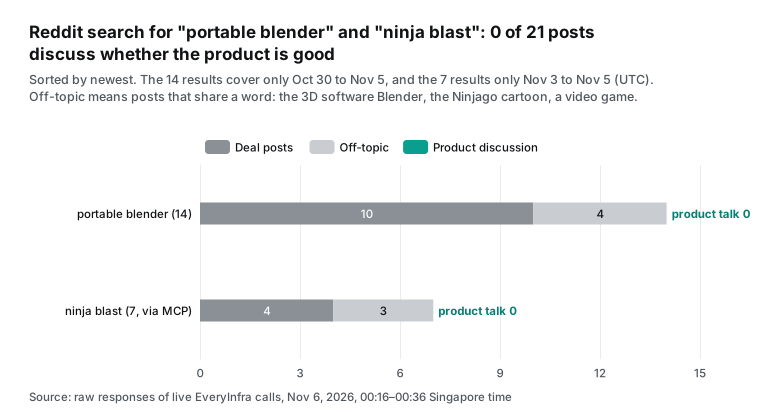
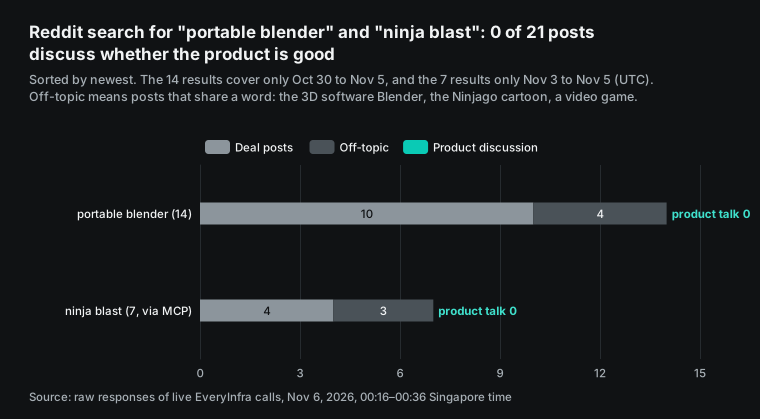
This does not mean Reddit is useless. It means a short keyword sorted by newest is the wrong query. For a Snowflake load, make three changes. First, judge relevance on the title only, and require "blender" to follow portable, personal, smoothie or a brand name. Our first rule matched "blender" in post bodies and counted 3D software posts as product posts.
Second, keep deal posts as their own category, because they are useful data. How often one blender appears in deal communities in a month, and at what price, can sit next to your sales table. You can then see whether a deal week leads to a return spike. Third, real product talk tends to live in a few communities, such as smoothie or fitness food groups. Use reddit/comments on relevant threads there, instead of a site-wide search.
Test 3: Amazon reviews returned 503, and nothing was charged
The data we wanted most was Amazon reviews. Reviews and returns come from the same platform and the same buyers. But our five amazon/reviews calls returned no reviews at all (Amazon reviews API). At 00:17, 00:18 and 00:24 SGT, three different Ninja and Hamilton Beach products each returned 503 with the reason access_blocked. That means reviews for the item were temporarily unavailable, nothing was charged, and the response suggests a retry after 900 seconds.
At 00:19 SGT we tried an older product. It returned 200 with 0 rows, and the call was refunded as an empty result. At 00:36 SGT, 19 minutes after the first try, we called the first product again and got 503 again. All five calls show charged_usd as 0.
| SGT | Product | HTTP status | Reason | Duration | Charge |
|---|---|---|---|---|---|
| 00:17:41 | B0C2FF4JD1 | 503 | access_blocked | 60.12 s | $0 |
| 00:18:41 | B0CN3S2SW2 | 503 | access_blocked | 58.57 s | $0 |
| 00:19:47 | B09B8V1LZ3 | 200 | Empty result, refunded | 67.25 s | $0 |
| 00:24:22 | B0D2YYHN1B | 503 | access_blocked | 19.48 s | $0 |
| 00:36:23 | B0C2FF4JD1 | 503 | access_blocked | 38.42 s | $0 |
We report this as it happened, because a daily Snowflake task will meet the same thing. Under EveryInfra rules, targets that are temporarily unavailable or need a login return 503 with a reason and a retry hint. They never return an empty 200 that claims there are no reviews. This difference matters for the loader. A 503 means "no data today, try tomorrow". An empty 200 means "there really is nothing here".
If the procedure mixes the two, the semantic view will show fake "zero complaint" days for some products. The agent will then draw wrong conclusions from them. Store the HTTP status and reason in the jobs table. Expand only responses with status 200. Add a "days with missing data" measure to the semantic view, so the agent can say which days had no data.
The catalog also says that amazon/reviews returns only the featured reviews shown on the product page. That is usually a dozen or so per product, with a maximum of 100 per call, across 11 Amazon marketplaces.
So even on a good day, it is not every review. It is the set that Amazon chooses to show. That set is fine for "what do the most visible complaints say". It is not enough to count all complaints. For full counts, your Seller Central data and the customer comments in the FBA returns report are more complete. That report feeds the fba_returns table above.
Ask the Cortex Agent: which complaint theme rises with the return rate?
Once the tables exist, build a weekly view. Each row holds one product, one theme and one week, with the social mention count, the returned units and the units sold. The theme return rate is returned units for that theme divided by units sold in that week.
CREATE OR REPLACE VIEW voc.core.theme_returns_weekly AS
WITH mentions AS (
  SELECT s.product_key,
         DATE_TRUNC('week', s.posted_at)::DATE AS week_start,
         t.value::STRING AS theme,
         COUNT(*) AS mentions,
         SUM(1 + COALESCE(s.like_count, 0)) AS weighted_mentions
  FROM voc.core.social_mentions s,
       LATERAL FLATTEN(input => s.themes) t
  WHERE t.value::STRING <> 'not_a_product_issue'
  GROUP BY 1, 2, 3
),
returns AS (
  SELECT pm.product_key,
         DATE_TRUNC('week', f.return_date)::DATE AS week_start,
         COALESCE(t.value::STRING, 'unclassified') AS theme,
         SUM(f.quantity) AS returned_units
  FROM voc.core.fba_returns f
  JOIN (SELECT DISTINCT product_key, asin FROM voc.core.product_map) pm
    ON pm.asin = f.asin,
       LATERAL FLATTEN(input => f.return_themes, OUTER => TRUE) t
  GROUP BY 1, 2, 3
),
sales AS (
  SELECT pm.product_key,
         DATE_TRUNC('week', d.sale_date)::DATE AS week_start,
         SUM(d.units_ordered) AS units_sold
  FROM voc.core.sales_daily d
  JOIN (SELECT DISTINCT product_key, asin FROM voc.core.product_map) pm
    ON pm.asin = d.asin
  GROUP BY 1, 2
),
theme_weeks AS (
  SELECT COALESCE(m.product_key, r.product_key) AS product_key,
         COALESCE(m.week_start, r.week_start) AS week_start,
         COALESCE(m.theme, r.theme) AS theme,
         COALESCE(m.mentions, 0) AS mentions,
         COALESCE(m.weighted_mentions, 0) AS weighted_mentions,
         COALESCE(r.returned_units, 0) AS returned_units
  FROM mentions m
  FULL OUTER JOIN returns r
    ON r.product_key = m.product_key
   AND r.week_start = m.week_start
   AND r.theme = m.theme
)
SELECT tw.product_key, tw.week_start, tw.theme,
       tw.mentions, tw.weighted_mentions, tw.returned_units,
       s.units_sold,
       tw.returned_units / NULLIF(s.units_sold, 0) AS theme_return_rate
FROM theme_weeks tw
LEFT JOIN sales s
  ON s.product_key = tw.product_key AND s.week_start = tw.week_start;
Three choices in this view keep returns from going missing. First, mentions and returns meet in a full outer join on product, week and theme, and sales join afterward on product and week. So if social posts in one week mention only lid problems, battery returns from that week still get their own row. Second, OUTER => TRUE keeps returns that have no comment or no theme, under the label unclassified. Third, one ASIN can map to several SKUs in product_map, so the view joins on distinct product and ASIN pairs, or returns and sales would be counted more than once. One caution: a comment can carry two themes, so theme rows can add up to more than the real number of returned units. For the total return rate, sum fba_returns directly instead of adding theme rows.
Next, build a semantic view on top of it. It tells Cortex Analyst what each column means and which columns are measures (Semantic views overview, CREATE SEMANTIC VIEW). Define at least four measures: theme mentions, like-weighted mentions, returned units by theme and return rate by theme. The dimensions are product, theme and week. Add synonyms too. Map "leak", "spill" and "cap" to lid_or_spill, so the agent understands the words that business users actually type.
The agent specification is YAML. The minimum is one Cortex Analyst tool on this semantic view. We add one custom tool that returns the most liked comments for a product and theme. The structure follows CREATE AGENT. The Cortex Agents documentation says custom tool parameters cannot use the object type, so keep parameters simple (Cortex Agents overview).
models:
  orchestration: claude-sonnet-5-5
orchestration:
  budget:
    seconds: 120
    tokens: 40000
instructions:
  orchestration: >
    For questions about complaint themes and returns, use VocAnalyst on weekly data.
    Compare each theme's mentions with the same week and the next 1 to 4 weeks of
    theme_return_rate. Report weeks with missing review data. Never treat a missing
    week as zero complaints.
  response: >
    Give the theme, the weeks, both raw and like-weighted mention counts, and the
    return rate change. Quote at most two comments from TopComments, without author names.
  sample_questions:
    - question: "Which complaint theme rises together with the return rate?"
    - question: "Did lid complaints for the Ninja Blast track returns over the last four weeks?"
tools:
  - tool_spec:
      type: cortex_analyst_text_to_sql
      name: VocAnalyst
      description: Weekly social complaint themes, returns and sales by product.
  - tool_spec:
      type: generic
      name: TopComments
      description: Returns the most liked comments for one product and one theme.
      input_schema:
        type: object
        properties:
          product_key: {type: string, description: Product key from product_map}
          theme: {type: string, description: One theme label}
        required: [product_key, theme]
tool_resources:
  VocAnalyst:
    semantic_view: voc.core.voc_returns
  TopComments:
    type: procedure
    identifier: voc.core.top_comments
    execution_environment:
      type: warehouse
      warehouse: voc_xs_wh
"Rises together" needs a precise meaning. The instructions tell the agent to compare the same week and the next one to four weeks of returns. Our own data shows why. Complaints and returns do not happen at the same time. The chart below shows the 17 product-problem comments by month.
The comparison video went up on 2025-07-27, and its 4 problem comments came 6, 44, 245 and 245 days later. The try-on video went up on 2026-01-20. Only 2 of its 13 problem comments came in the first week, and the rest spread from March to September. Both comments that mention a return came in March 2026, one 245 days after its video and one 52 days after.
| Comment (author hidden) | Theme | Comment date | Days after video | Likes |
|---|---|---|---|---|
| Asks whether to open the lid from the top | Lid or spill | 2026-01-20 | 0 | 79 |
| Do not use the lid button, it breaks | Lid or spill | 2026-01-22 | 2 | 5 |
| Says everyone calls this blender terrible | General negative | 2026-03-01 | 40 | 23 |
| Returned it, weak on frozen fruit | Weak on ice | 2026-03-13 | 52 | 97 |
| Batteries do not last a full smoothie | Battery | 2026-03-14 | 53 | 9 |
| Both units came without the blade cap | Missing part | 2026-07-31 | 192 | 0 |
| Bought a second unit for a spare lid | Lid or spill | 2026-09-12 | 235 | 0 |
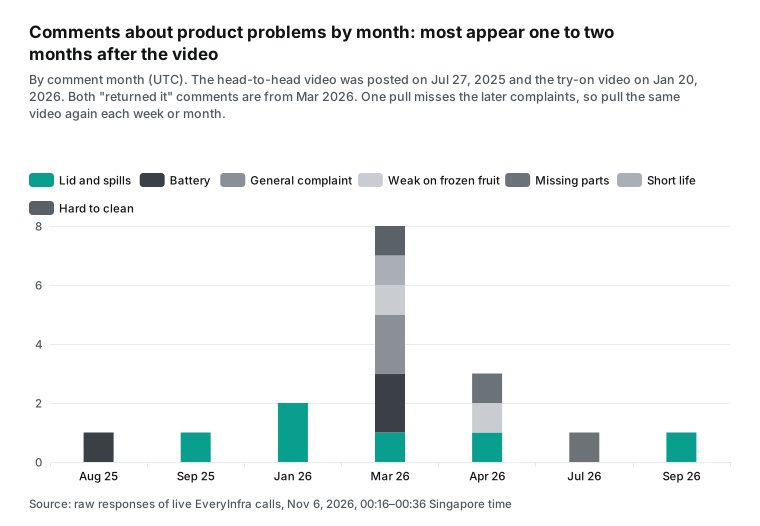
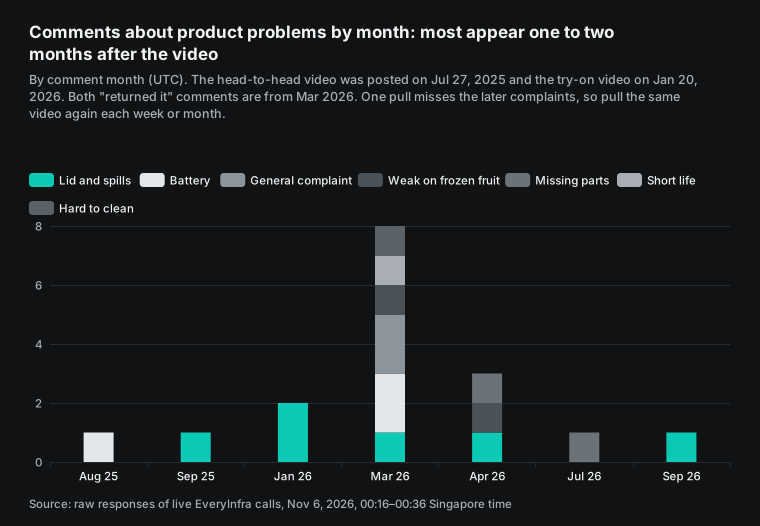
This chart changes the Snowflake design in two ways. First, never pull a video only once. A pull in the first week only would have missed 3 problem comments on the first video. It would have missed 11 on the second. So the watchlist should pull the same videos every week or month, and the MERGE appends the new comments.
Second, a same-week join between complaints and returns will probably show nothing. Buyers use a product for a while before they complain and return it. Let the data find the lag. Do not assume it.
We must also be honest about volume. Two videos produced 17 problem comments over 14 months, so most weeks have zero. A correlation on data that sparse means nothing.
To give the agent a solid base, track 20 to 30 try-on style videos per product, plus Amazon reviews and return comments. Start with monthly grain and move to weekly when the data allows it. This limit comes from data volume, not from Snowflake, and any tool would have it. That is also why the instructions tell the agent to report weeks with missing data. An honest "too little data" is better than a trend invented from three comments.
What a month costs: API fees and Snowflake fees
Start with a concrete plan, then price it. One brand tracks 20 ASINs and 20 TikTok videos, and pulls reviews or comments for each once a day. It searches 5 Reddit keywords daily and 5 TikTok keywords weekly to find new videos. Over 30 days, that is 1,370 API calls. The API fee uses the catalog prices read on 2026-11-06, so it is a real price.
Every Snowflake line is an estimate, and the table shows the method. Prices come from the Service Consumption Table effective 2026-11-04 and the on-demand Standard edition price in AWS US East. A platform credit is $2.00. An AI credit is $2.00 at the global rate (Service Consumption Table, pricing page, Cortex AI pricing).
| Item | Method | Per month |
|---|---|---|
| EveryInfra API fee | 600 amazon/reviews × $0.001389 + 600 tiktok/comments × $0.000556 + 150 reddit/search × $0.000556 + 20 tiktok/search × $0.000556 | $1.26 |
| Warehouse waits for responses (sync, serial) | Measured durations: Amazon reviews 67.25 s (the slowest of our 5 calls, an empty result; with the 19.48 to 60.12 s of the 503 calls, this line is $24.61 to $38.16), TikTok comments 52.3 s, Reddit 7.62 s, TikTok search 3.78 s. Total 20.27 hours × 1 credit per hour on XS × $2 | $40.54 |
| Warehouse waits (sync, 10 parallel calls) | Same, divided by 10 | $4.05 |
| Warehouse (async, two tasks) | About 46 submits a day × 2 s, plus 2 collector runs at the 60 s minimum, plus 60 s of idle time before auto-suspend after each of 3 runs. About 392 s a day, or 3.3 hours a month | About $6.5 |
AI_CLASSIFY theme labels | 10,000 comments × about 150 tokens = 1.5 million tokens × 1.62 AI credits per million × $2 | $4.86 |
| Cortex Agent questions (Sonnet 5.5) | 50 questions × 20,000 input and 1,500 output tokens, at 1.30 input and 6.50 output AI credits per million | $3.58 |
| Cortex Agent questions (Haiku 5.5) | Same, at 0.065 input and 0.325 output | $0.18 |
| Agent SQL on the warehouse | 50 queries × 60 s minimum × $2 per credit-hour | $1.67 |
| Storage | 1 GB at $23 per TB per month | About $0.02 |
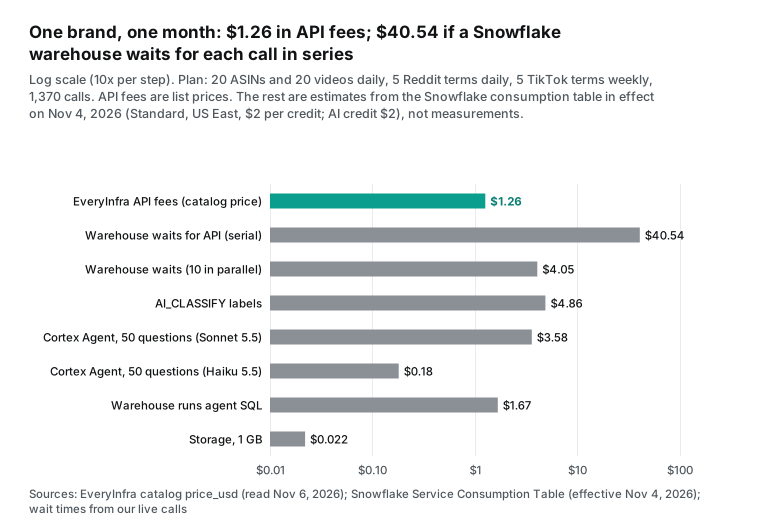
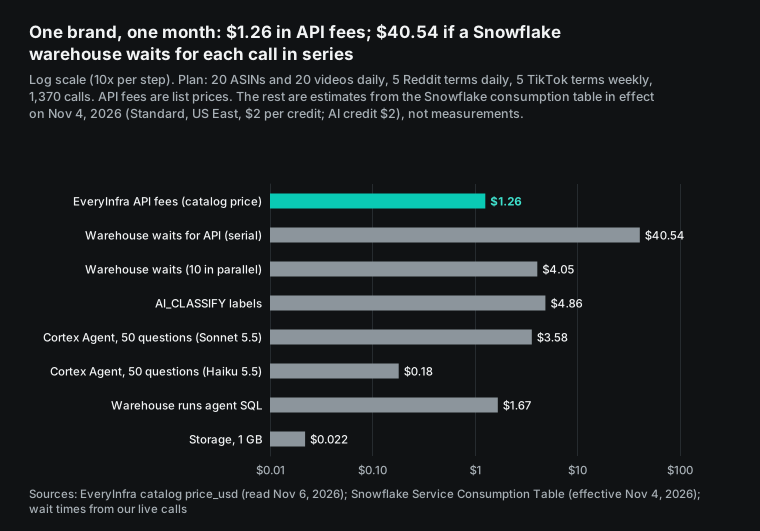
The second row is the one to watch. The API itself costs $1.26 a month. But if the procedure uses the simplest code, one synchronous call after another, the warehouse runs for more than 20 hours a month. That is about $40.54, or 32 times the API fee. With 10 parallel calls or the async two-task design, this line drops to between $4 and $7.
Parallel calls are cheapest in our estimate, but you must manage threads and timeouts in Python yourself. The async design costs two or three dollars more. In return, no single request gets cut off for waiting too long, and a failed job simply runs again the next day. We prefer the async design.
In total, the serial design costs about $51.93 a month and the parallel design about $15.44. In the Singapore region, a Standard edition credit is $2.50, so multiply the warehouse lines by 1.25. On Enterprise edition, the US East on-demand price is $3.00 per credit, with the same scaling.
The model is the second lever. Cortex Agent orchestration bills by tokens, and the model prices in the consumption table differ a lot. For the same 50 questions, Sonnet 5.5 costs about $3.58 and Haiku 5.5 about $0.18. Opus 5.5 costs 2.60 per million input tokens and 13.00 per million output tokens, twice the Sonnet price. The table lists the prices that matter for this article, in AI credits per million tokens. AI functions bill on total tokens, without an input and output split.
| Model or function | Input | Output | Use in this article |
|---|---|---|---|
| claude-sonnet-5-5 (CoWork, Agents) | 1.30 | 6.50 | Agent orchestration, default in the cost table |
| claude-haiku-5-5 (CoWork, Agents) | 0.065 | 0.325 | Low-cost orchestration |
| claude-opus-5-5 (CoWork, Agents) | 2.60 | 13.00 | Not needed for routine reports |
| openai-gpt-6.1-sol (CoWork, Agents) | 1.30 | 6.50 | Same price as Sonnet |
AI_CLASSIFY | 1.62 (total) | Theme labels for comments and return notes | |
AI_SENTIMENT | 1.60 (total) | Optional sentiment score | |
AI_AGG | 1.85 (total) | Optional summary of text by theme |
The figure of 20,000 input tokens per question is our assumption. It covers the semantic view, the instructions and one or two rounds of tool results. If the agent calls tools many times in one chat, or reads long comments into its context, the real number goes up. After launch, the CORTEX_AGENT_USAGE_HISTORY view gives real numbers. CoWork questions appear in SNOWFLAKE_COWORK_USAGE_HISTORY, and neither view includes the requests of the other (Cortex Agent usage view, CoWork usage view).
Each outbound request from the procedure appears in the EXTERNAL_ACCESS_HISTORY view, which can lag by up to 3 hours (External access history). Match it by time against the charged_usd values in voc.raw.jobs, and you can check calls and spend on both sides each month. Snowflake also lets you set resource budgets per agent and quotas per user (Cortex Agents resource budgets). On the EveryInfra side, give this key its own per-minute call limit. With a limit on each side, a broken task cannot make tens of thousands of calls overnight.
One line in the consumption table is easy to misread. "Cortex Tools" charges 8 AI credits per 1,000 tool calls when third-party agents access non-Snowflake endpoints, and nothing for Snowflake endpoints. In our design, a Snowflake stored procedure calls the EveryInfra API, not an agent. The agent only reads Snowflake tables, so we did not include that line.
Suppose you switch to MCP connectors and let the agent call outside tools during chats. The documents do not say whether this line applies or how it counts. Ask your Snowflake account team before launch. A new account can try the whole setup on the trial: the pricing page lists 30 days and $400 of credits.
A weekly email with snowflake cowork automations
With the data and the agent in place, the last step is to put the answer in front of the right people on time. CoWork Automations do exactly that. You set a question to run on a schedule, for example every Monday at 09:00. A good question is "Which complaint theme rose with the return rate over the last four weeks?" The result arrives by email (Automations documentation).
Know the documented limits first. An automation runs at most once an hour. Results go only to email, and each recipient must verify an email address in Snowflake first. Run history stays for 60 days. Each automation runs with the rights of the person who created it, so any table that person can read can appear in the email.
| Documented limit | Value | Effect on a weekly complaint report |
|---|---|---|
| Fastest schedule | Once an hour | No effect, the report is weekly |
| Delivery | Email only, verified addresses | Recipients must verify first |
| Run history | 60 days | Keep the answers in a table if you need longer history |
| Rights | Creator's rights | The email can contain any table the creator can read |
| EXECUTE AGENT TASK | Granted to PUBLIC by default | Revoke and grant by role if needed |
None of these limits blocks our use case. Complaints and returns are weekly topics, so hourly runs are more than enough. Email-only delivery means no direct Slack post. The press release says that Snowflake for Slack is now in public preview (Expedition 2026 press release).
The real watch point is access. The EXECUTE AGENT TASK privilege goes to the PUBLIC role by default, so anyone in the account can create an automation for themselves. An automation runs with its creator's rights. A person who can read all sales data can therefore send that data to any address they enter. If that is not acceptable, an admin should revoke the privilege from PUBLIC and grant it by role.
Limits of this test
Everything on the Snowflake side is a configuration example. We have no Snowflake account here, and we did not run this SQL, these procedures or this agent specification. The syntax follows docs.snowflake.com as read on 2026-11-06. Snowflake shipped a large release this month, so syntax and limits can still change. Run each block in your own account before you depend on it.
In the cost table, only the API fee is a real price. Every Snowflake line is an estimate from public prices and our assumptions. The two largest unknowns are the real token count per classified comment and the real token count per agent question.
On the data side, all 5 Amazon review calls failed to return reviews this time. So the theme analysis uses only 273 TikTok comments. One author labeled them by hand with the rule above, and nobody checked the labels a second time. The 17 problem comments are enough to say that lid and spill problems deserve attention. They are not enough to estimate the true problem rate of this product.
This article gives only the structure of the sales and returns tables, with no real or invented numbers. The answer to "which complaint theme rises with returns" arrives when your own data does.
One limit concerns EveryInfra itself. Our MCP server cannot be added as a Snowflake connector today, for the reasons above. The external access route does not depend on that, and it is the route we recommend. But if your team wants a one-click connection inside CoWork, that is not possible yet. We will check this status again when this article goes live.
How this differs from our earlier articles
Our earlier review articles kept the data inside an agent or a file: Claude Cowork scheduled tasks, Claude Managed Agents for nightly review checks, Qwen Agent MCP in practice and DeepSeek V4 in Claude Code for review cleaning. They answer "what are people complaining about lately". Here, reviews move into the company data warehouse, under the same access rules and business definitions as sales and returns, so the question becomes "which complaint actually costs us money". The price is one more warehouse bill and a set of tables, about fifteen dollars a month for one brand as computed above. If your sales and returns are not in Snowflake yet, the earlier approaches are lighter. If they are already there, this setup lets complaints meet the financial numbers for the first time.
Recent changes
On 2026-11-04, the new Snowflake Service Consumption Table took effect. All model prices, AI function prices and the "Cortex Tools" line in this article come from that version (Service Consumption Table).
On the same day, a release note added background runs to the Snowflake-managed MCP server. The CORTEX_AGENT_RUN and CODING_AGENT tools gained a background argument that returns a handle at once. Servers with those tools now get three extra tools automatically: ASYNC_AGENT_RUN_STATUS, ASYNC_AGENT_RUN_CANCEL and AGENT_RUN_RESULT. A new content_cel_filter parameter lets a client read an outline first, then only the parts it needs (November 4, 2026 release note).
FAQ: snowflake cortex agents mcp and snowflake cowork
Is the snowflake cortex agents mcp server the same thing as an MCP connector?
No. They point in opposite directions. Source: Google autocomplete for "snowflake cortex agents mcp server". The Snowflake-managed MCP server makes Snowflake the server. Outside clients call your agents, Cortex Search, Cortex Analyst and SQL through MCP. Its tool types are CORTEX_AGENT_RUN, CODING_AGENT, CORTEX_SEARCH_SERVICE_QUERY, CORTEX_ANALYST_MESSAGE, SYSTEM_EXECUTE_SQL and GENERIC. The documentation recommends OAuth over hard-coded tokens (Snowflake-managed MCP server, CREATE MCP SERVER).
An MCP connector makes Snowflake the client, so Cortex Agents and CoWork can call an outside MCP server, with OAuth only (connectors documentation). This article needs the second direction, and in the end it uses external access instead of MCP.
What is the difference between snowflake cowork and CoCo (Cortex Code)?
Source: Google autocomplete for "snowflake cowork vs coco". Per the press release of 2026-11-03, CoWork serves business users. They ask questions in plain language at ai.snowflake.com, open dashboards and set automations. CoCo serves developers and data engineers, who use it to write code and build data objects. Analysts can also describe a dashboard to CoCo to build it (Expedition 2026 press release, Cortex Code documentation).
In this article, data engineers build the tables, procedures and semantic view with CoCo or plain SQL. Business users ask questions and receive the weekly report in CoWork.
Can Cortex Agents call an outside API with an API key instead of OAuth?
Yes, but not through an MCP connector. Source: the follow-up question that the "OAuth only" line in the Snowflake connectors documentation raises. Store the key in a secret of type GENERIC_STRING through an external access integration. Write a Python stored procedure that calls the API, and add that procedure to the agent as a custom tool. When the agent calls it, the procedure runs on a warehouse and bills by warehouse time (external network access, Cortex Agents overview). We prefer a scheduled task that loads tables, so each question avoids an API wait.
Does AI_CLASSIFY work on comments that are not in English?
It works, but check it first. Source: the usage notes in the Snowflake AI_CLASSIFY documentation. The documentation says English input works best and other languages can perform worse (AI_CLASSIFY documentation). If you track Spanish-language or other markets, label about 100 comments by hand and compare. Where categories disagree, make the task description and examples more specific. You can also have a stronger model in Cortex Agents judge each comment, at a higher cost.
Does EveryInfra charge for failed or empty calls?
No. Source: the responses of our 12 live calls. Bad parameters, temporarily unavailable targets (status 503) and empty results are not charged, and every charged response states the exact amount. All 6 calls in this article that returned no data show charged_usd as 0. In async mode the charge happens at submit, and a job that fails later is refunded against the same charge.
Getting started
- Sign up for EveryInfra and follow the quickstart. Create an API key only for Snowflake, with its own per-minute limit.
- Call each product URL, video URL and keyword once with
curl. Check the fields and row counts before you add targets to thewatchlisttable. - In Snowflake, create the network rule, secret and external access integration from the examples above. Then create the two procedures and two tasks.
- After a few days of loads, build the weekly view and the semantic view. Label comments and return notes with the same
AI_CLASSIFYthemes. - Create the Cortex Agent and ask it a few questions in CoWork. When it reports missing weeks correctly, set the weekly automation.
All the data capabilities are listed in the EveryInfra catalog. The remote MCP setup is on the MCP server page, and per-call prices are on the pricing page.
References
- Snowflake press release, Expedition 2026: CoCo and CoWork, read 2026-11-06: https://www.snowflake.com/en/news/press-releases/expedition-2026-coco-cowork/
- Snowflake press release, Business Ontology and Cortex AI Gateway, read 2026-11-06: https://www.snowflake.com/en/news/press-releases/expedition-2026-business-ontology-ai-gateway/
- Snowflake blog, AI agents, governed data and business context, read 2026-11-06: https://www.snowflake.com/en/blog/ai-agents-governed-data-business-context/
- Snowflake blog, Snowflake CoWork Adds Profiles, Dashboards and Automations, read 2026-11-06: https://www.snowflake.com/en/blog/snowflake-cowork-profiles-automations-dashboards
- Snowflake blog, Snowflake CoCo cloud agents and automations, read 2026-11-06: https://www.snowflake.com/en/blog/snowflake-coco-cloud-agents-automations/
- Snowflake CoWork product page, read 2026-11-06: https://www.snowflake.com/en/product/snowflake-cowork/
- Snowflake pricing options, read 2026-11-06: https://www.snowflake.com/en/pricing-options/
- Snowflake Service Consumption Table, effective 2026-11-04, read 2026-11-06: https://www.snowflake.com/legal-files/CreditConsumptionTable.pdf
- Snowflake docs, Cortex Agents MCP connectors, read 2026-11-06: https://docs.snowflake.com/en/user-guide/snowflake-cortex/cortex-agents-mcp-connectors
- Snowflake docs, Cortex Agents MCP connectors, Limitations section, read 2026-11-06: https://docs.snowflake.com/en/user-guide/snowflake-cortex/cortex-agents-mcp-connectors#limitations
- Snowflake docs, Cortex Agents, read 2026-11-06: https://docs.snowflake.com/en/user-guide/snowflake-cortex/cortex-agents
- Snowflake docs, Create and manage agents, read 2026-11-06: https://docs.snowflake.com/en/user-guide/snowflake-cortex/cortex-agents-manage
- Snowflake docs, CREATE AGENT, read 2026-11-06: https://docs.snowflake.com/en/sql-reference/sql/create-agent
- Snowflake docs, Cortex Agents Run API, read 2026-11-06: https://docs.snowflake.com/en/user-guide/snowflake-cortex/cortex-agents-run
- Snowflake docs, Cortex Agents resource budgets, read 2026-11-06: https://docs.snowflake.com/en/user-guide/snowflake-cortex/cortex-agents-resource-budgets
- Snowflake docs, Cortex Agents code execution tool, read 2026-11-06: https://docs.snowflake.com/en/user-guide/snowflake-cortex/cortex-agents-code-execution-tool
- Snowflake docs, Snowflake-managed MCP server, read 2026-11-06: https://docs.snowflake.com/en/user-guide/snowflake-cortex/cortex-agents-mcp
- Snowflake docs, CREATE MCP SERVER, read 2026-11-06: https://docs.snowflake.com/en/sql-reference/sql/create-mcp-server
- Snowflake release note, November 4, 2026: Background runs and additional supplementary tools for agents, read 2026-11-06: https://docs.snowflake.com/en/release-notes/2026/other/2026-11-04-mcp-async-agent-tools
- Snowflake docs, Cortex AI Gateway custom apps and MCP servers, read 2026-11-06: https://docs.snowflake.com/en/user-guide/snowflake-cortex/cortex-ai-gateway/tools/admin-custom-apps
- Snowflake docs, Cortex Code Agent SDK, MCP and custom tools, read 2026-11-06: https://docs.snowflake.com/en/user-guide/cortex-code-agent-sdk/mcp-custom-tools
- Snowflake docs, Cortex Code, read 2026-11-06: https://docs.snowflake.com/en/user-guide/cortex-code/cortex-code
- Snowflake docs, Snowflake CoWork, read 2026-11-06: https://docs.snowflake.com/en/user-guide/snowflake-cortex/snowflake-cowork
- Snowflake docs, CoWork Automations, read 2026-11-06: https://docs.snowflake.com/en/user-guide/snowflake-cortex/snowflake-cowork/automations
- Snowflake docs, Cortex AI pricing, read 2026-11-06: https://docs.snowflake.com/en/user-guide/snowflake-cortex/pricing
- Snowflake docs, Cortex AI Functions, read 2026-11-06: https://docs.snowflake.com/en/user-guide/snowflake-cortex/aisql
- Snowflake docs, AI_CLASSIFY, read 2026-11-06: https://docs.snowflake.com/en/sql-reference/functions/ai_classify
- Snowflake docs, AI_SENTIMENT, read 2026-11-06: https://docs.snowflake.com/en/sql-reference/functions/ai_sentiment
- Snowflake docs, Semantic views overview, read 2026-11-06: https://docs.snowflake.com/en/user-guide/views-semantic/overview
- Snowflake docs, CREATE SEMANTIC VIEW, read 2026-11-06: https://docs.snowflake.com/en/sql-reference/sql/create-semantic-view
- Snowflake docs, External network access overview, read 2026-11-06: https://docs.snowflake.com/en/developer-guide/external-network-access/external-network-access-overview
- Snowflake docs, Creating and using an external access integration, read 2026-11-06: https://docs.snowflake.com/en/developer-guide/external-network-access/creating-using-external-network-access
- Snowflake docs, External network access examples, read 2026-11-06: https://docs.snowflake.com/en/developer-guide/external-network-access/external-network-access-examples
- Snowflake docs, CREATE NETWORK RULE, read 2026-11-06: https://docs.snowflake.com/en/sql-reference/sql/create-network-rule
- Snowflake docs, CREATE SECRET, read 2026-11-06: https://docs.snowflake.com/en/sql-reference/sql/create-secret
- Snowflake docs, CREATE EXTERNAL ACCESS INTEGRATION, read 2026-11-06: https://docs.snowflake.com/en/sql-reference/sql/create-external-access-integration
- Snowflake docs, Writing stored procedures in Python, read 2026-11-06: https://docs.snowflake.com/en/developer-guide/stored-procedure/python/procedure-python-overview
- Snowflake docs, CREATE TASK, read 2026-11-06: https://docs.snowflake.com/en/sql-reference/sql/create-task
- Snowflake docs, Introduction to tasks, read 2026-11-06: https://docs.snowflake.com/en/user-guide/tasks-intro
- Snowflake docs, Snowpipe, read 2026-11-06: https://docs.snowflake.com/en/user-guide/data-load-snowpipe-intro
- Snowflake docs, Overview of warehouses, read 2026-11-06: https://docs.snowflake.com/en/user-guide/warehouses-overview
- Snowflake docs, Understanding compute cost, read 2026-11-06: https://docs.snowflake.com/en/user-guide/cost-understanding-compute
- Snowflake docs, CORTEX_AGENT_USAGE_HISTORY view, read 2026-11-06: https://docs.snowflake.com/en/sql-reference/account-usage/cortex_agent_usage_history
- Snowflake docs, SNOWFLAKE_COWORK_USAGE_HISTORY view, read 2026-11-06: https://docs.snowflake.com/en/sql-reference/account-usage/snowflake_cowork_usage_history_view
- Snowflake docs, EXTERNAL_ACCESS_HISTORY view, read 2026-11-06: https://docs.snowflake.com/en/sql-reference/account-usage/external_access_history
- MCP specification, Authorization, version 2025-06-18, read 2026-11-06: https://modelcontextprotocol.io/specification/2025-06-18/basic/authorization
- IETF RFC 9728, OAuth 2.0 Protected Resource Metadata, read 2026-11-06: https://datatracker.ietf.org/doc/html/rfc9728
- IETF RFC 8414, OAuth 2.0 Authorization Server Metadata, read 2026-11-06: https://datatracker.ietf.org/doc/html/rfc8414
- IETF RFC 7591, OAuth 2.0 Dynamic Client Registration Protocol, read 2026-11-06: https://datatracker.ietf.org/doc/html/rfc7591
- Amazon SP-API documentation, FBA report type values, read 2026-11-06: https://developer-docs.amazon/sp-api/docs/report-type-values-fba
- National Retail Federation, Consumers expected to return nearly $850 billion in merchandise in 2025, read 2026-11-06: https://nrf.com/media-center/press-releases/consumers-expected-to-return-nearly-850-billion-in-merchandise-in-2025
- Analytics India Magazine, Snowflake introduces Business Ontology and Cortex AI Gateway, read 2026-11-06: https://analyticsindiamag.com/ai-news/snowflake-introduces-business-ontology-cortex-ai-gateway-to-bring-ai-agents-into-enterprise-workflows
- EveryInfra capability catalog, GET /api/v1/social/catalog, read 2026-11-06: https://api.everyinfra.com/api/v1/social/catalog
- EveryInfra remote MCP address, tested 2026-11-06: https://api.everyinfra.com/mcp
- EveryInfra protected resource metadata for the full MCP address, tested 2026-11-06: https://api.everyinfra.com/.well-known/oauth-protected-resource/mcp/all
Reference BL-97