Prep Competitor Map Data for Claude Whiteboards: 1,220 Reviews
Claude on a whiteboard cannot call connectors. We pulled 1,220 reviews of five project tools through the EveryInfra MCP and turned them into map points.
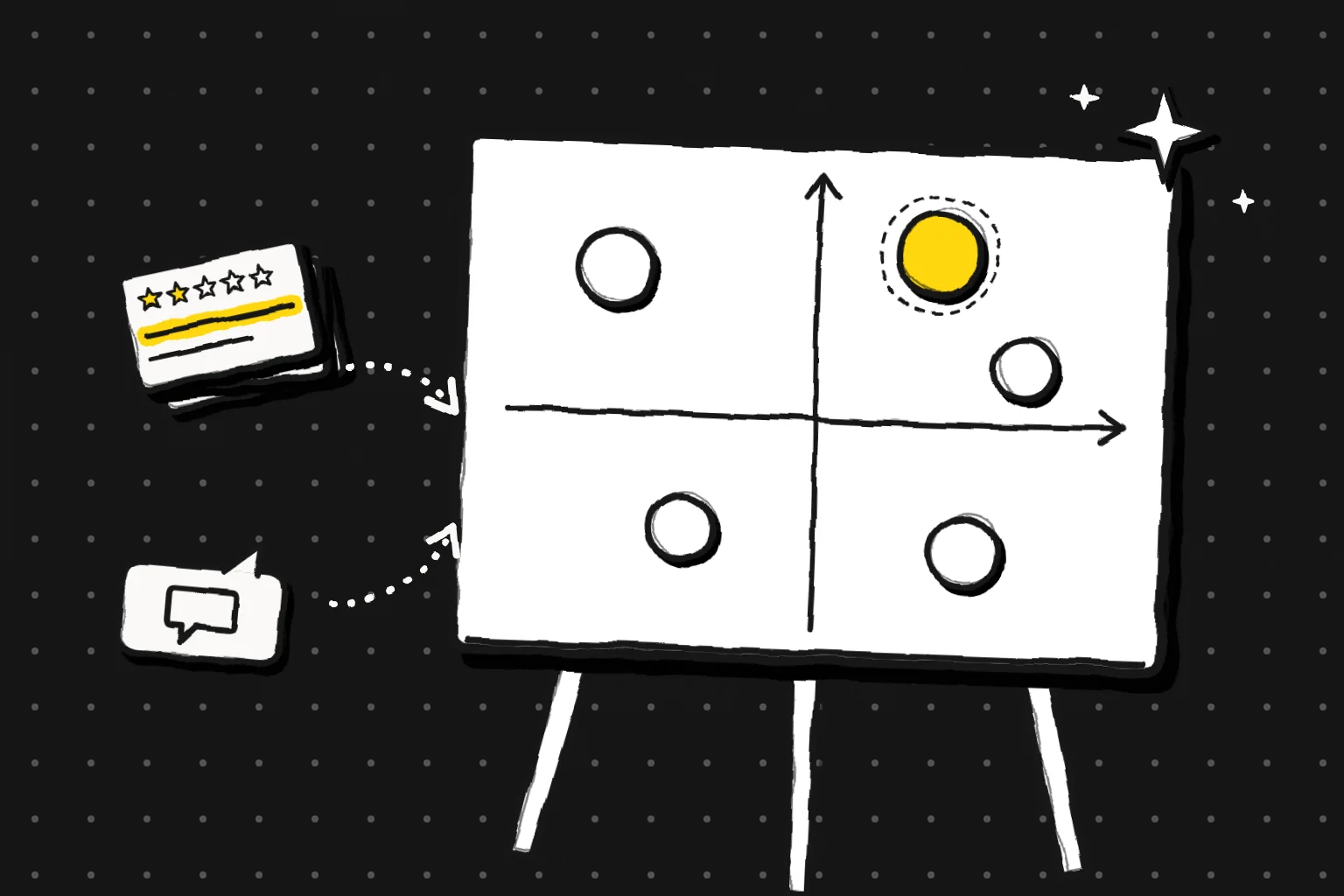
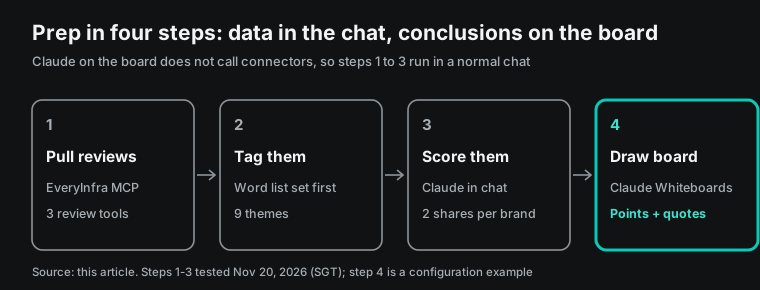
Anthropic added Whiteboards to Claude on November 10, 2026, as a beta for paid plans. On a board, Claude draws diagrams, groups sticky notes and points out gaps. The help center also says that Claude on a board does not use your connected apps. So the data for a competitor map must be ready in a normal chat first.
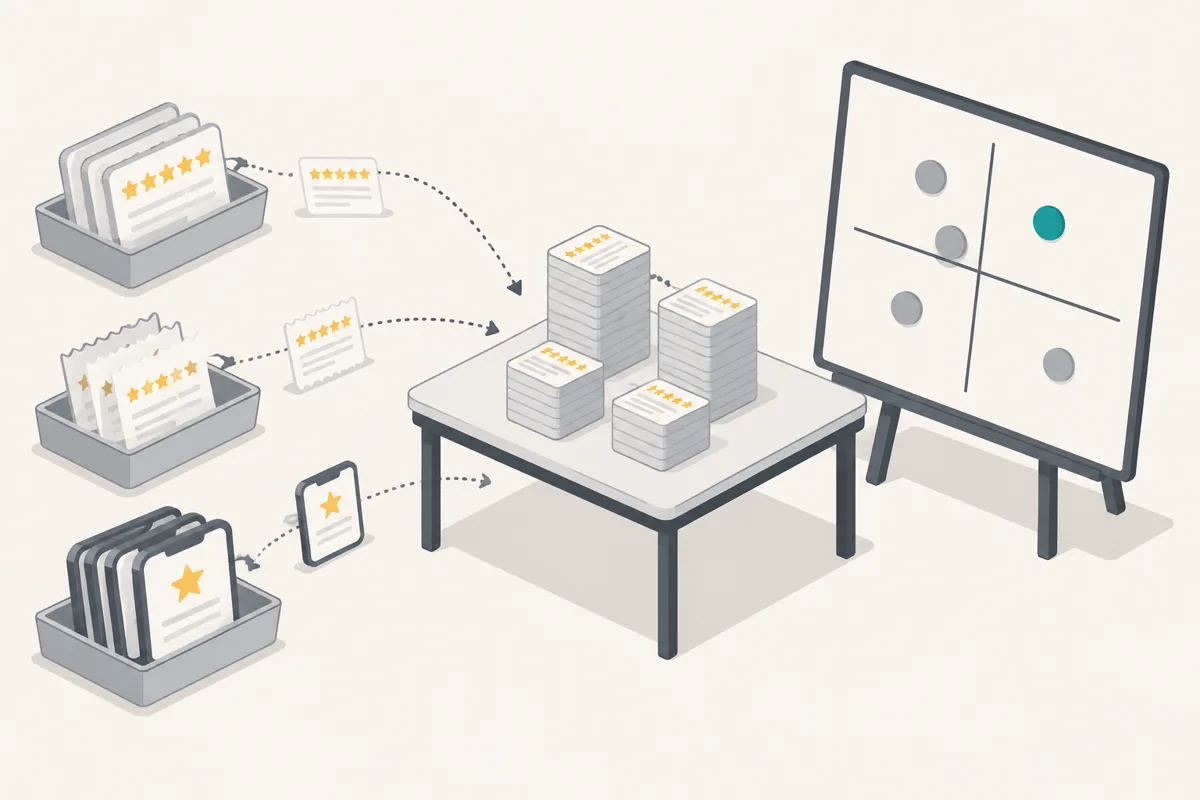
We tested the data step on November 20, 2026, between 00:16 and 00:32 Singapore time (SGT). We used the EveryInfra remote MCP server and REST API to pull 1,220 reviews of Asana, monday.com, ClickUp, Trello and Smartsheet. The reviews came from G2, Trustpilot and the US App Store.
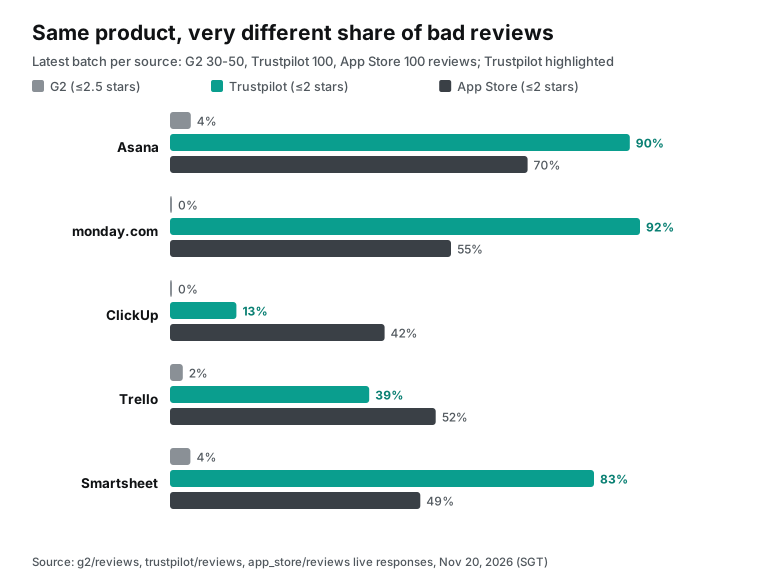
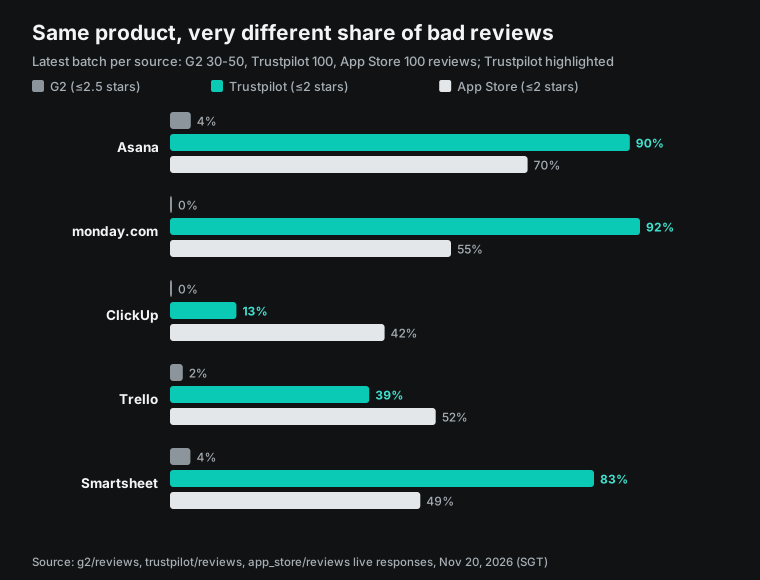
Each source told a different story. G2's own summary puts the learning curve first for four of the five tools. Trustpilot complaints rank billing and support first for all five. App Store complaints focus on the phone app and on bugs.
One field changed the picture. On Trustpilot, 80 of ClickUp's latest 100 reviews came through an invitation link. Without a split on the source field, ClickUp looks like the best-loved tool of the five.
The whole test used 25 live calls and cost $0.025977 in API fees. We tested the pull, the grouping and the map points. We did not open a live board. The board steps are a configuration example based on the help center.
What Claude Whiteboards is
Anthropic launched Claude Whiteboards, Claude Sheets and Claude Data on November 10, 2026 (Anthropic launch post). Whiteboards and Sheets are in beta. Claude Data is the new name for Claude Dashboards, and it is generally available. The launch post describes Whiteboards as a shared board for a team and Claude together.
The launch post gives three short scenes. You describe a messy plan, and Claude lays it out as a board with a timeline, owners and dates. In a retro, each person adds notes, and Claude groups them by theme and drafts follow-ups. You can also drag a box around one area and ask about that area only. A second post from the same day calls it a place to collect ideas in a meeting. Claude then sums them up (Anthropic, November 10).
The help center page has the hard facts. Its last update date is November 10 (Get started with Claude Whiteboards). We read it on November 20, 2026. Whiteboards is a beta on Pro, Max, Ultra, Team and Enterprise plans. It works on the web, in Claude Desktop and in Claude Mobile.
The page also covers admin settings. Team plans have the feature on by default. Enterprise plans have it off by default, and an admin turns it on under Organization settings > Artifacts. Claude for Teachers does not support it yet.
Each board is an artifact that Claude builds from shapes, arrows and sections. Anyone on the board can move items, and every board is saved in the Artifacts tab. Dictation works in 25 languages and follows the browser language.
The pricing page lists Whiteboards (beta) for Pro and higher plans, not for Free (Claude pricing, read on November 20, 2026). Pro costs $20 per month, or $17 per month billed yearly. The help center says board use counts toward the same plan limits as chat (usage and length limits). If you paste hundreds of reviews into a chat and then draw a board, both steps draw from the same five-hour and weekly limits.
| Item | What Anthropic's pages say | What it means for competitor data |
|---|---|---|
| Plans | Pro, Max, Ultra, Team, Enterprise, in beta | Free accounts cannot use it. Enterprise needs an admin first. |
| Default setting | On for Team, off for Enterprise | Large companies should talk to an admin before a trial. |
| Platforms | Web, Desktop, Mobile | Pull data on a computer. Review the board on a phone. |
| Connectors | Claude on the board works only from board content | Pull reviews in the chat first, then move results to the board. |
| Import | Images and videos can go on a board. A board cannot be imported from a file. | An existing Miro board cannot come in. |
| Export | Turn into a doc or deck. Send to Lucid, Miro, Zoho Vani. Export PNG. | A design or research team can take the map further. |
| Usage | Counts toward plan limits | Long raw reviews hit the five-hour limit sooner. |
Claude on the board does not call connectors
The "Current limitations" section of the help center starts with connected apps. On a board, Claude works from what is on the board and does not use context from connected apps (same page).
The second item is about data controls. Organizations with HIPAA-ready setups cannot use Whiteboards. Some organizations have zero data retention for Claude Code. They can use boards in chat and Cowork. Boards are outside that retention setting and do not work in Claude Code.
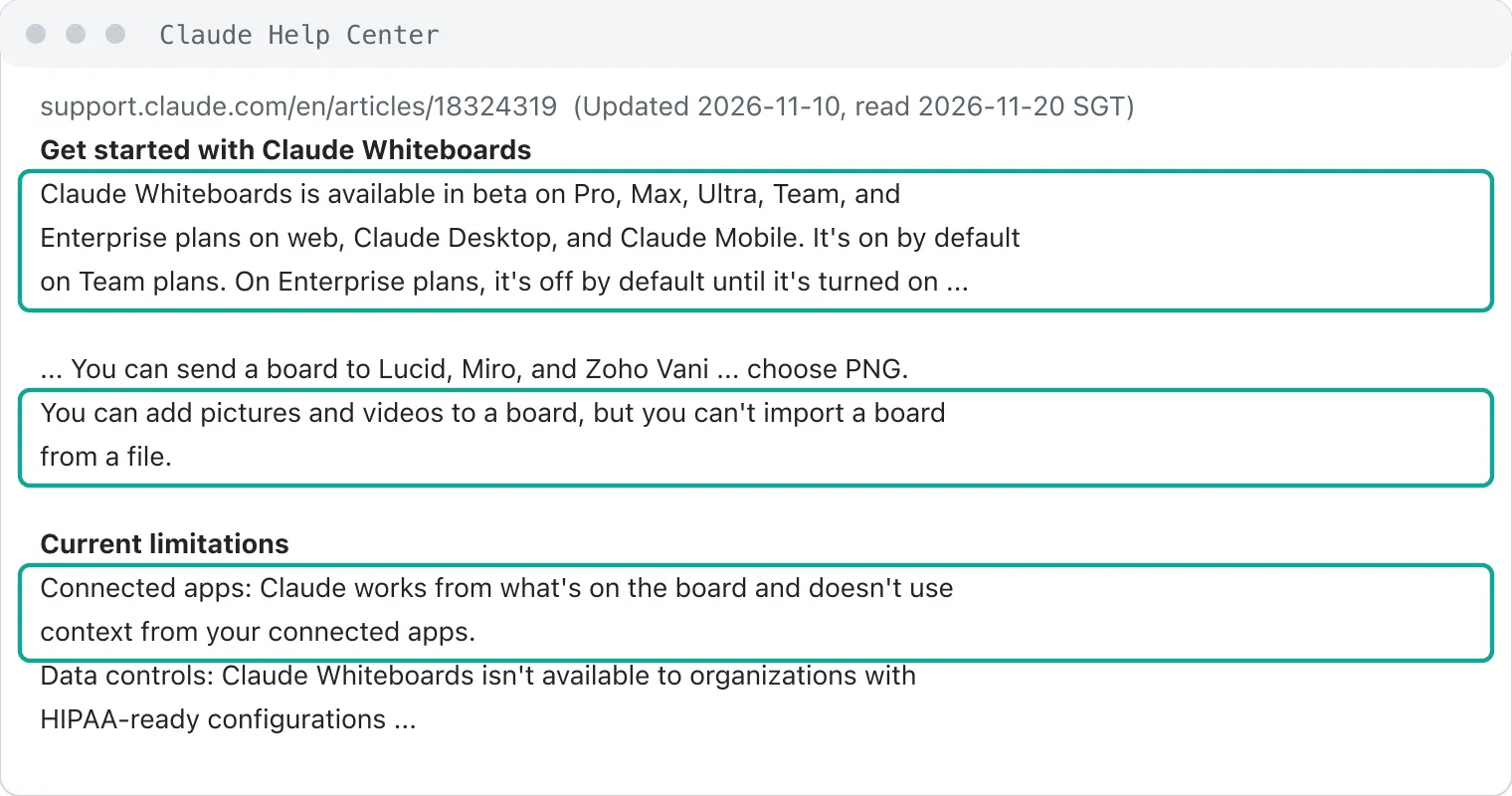
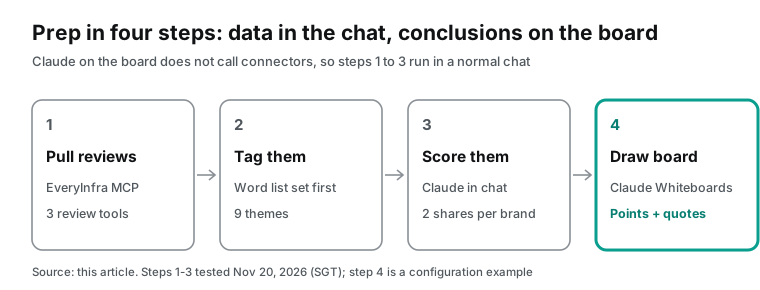
Competitor reviews live on G2, Trustpilot, the App Store and Reddit. A connector has to fetch them, but Claude on the board cannot reach a connector. So the fetch step stays in a normal chat. In that chat, you turn on the EveryInfra connector and ask Claude to pull reviews, group them by theme and compute each competitor's position. When those results are in the chat, you ask Claude in the same chat to put them on a board.
After that, Claude on the board sees your notes, sections and numbers. It does not see the raw reviews. Do you want a sixth competitor or a new time window? Go back to the chat and call the tools again. Then update the board. The sharing page adds one more rule. For people invited from outside your organization, artifact parts that use Claude or your connectors do not work (Publish and share artifacts).
Raw reviews contain user names and personal stories. Keep them in the chat, and put only grouped results on the board. Our Claude Meetings article covers the meeting version of this pattern.
Add the EveryInfra remote MCP server to Claude: three setups
The EveryInfra remote MCP endpoint is https://api.everyinfra.com/mcp (MCP server page). It uses stateless Streamable HTTP. Each request carries an Authorization: Bearer <your API key> header. Streamable HTTP is one of the two standard transports in the MCP specification. The client sends JSON-RPC over HTTP POST, and the Accept header lists both application/json and text/event-stream (MCP transports).
At 00:19 SGT on November 20, 2026, we sent tools/list to this endpoint. It returned 12 tools in 16,900 bytes. The review pulls use everyinfra_call_api. The free everyinfra_list_capabilities tool lists capabilities and their parameters.
In claude.ai, a connector that is not in the directory starts at Customize > Connectors > Add custom connector (Add an unlisted connector). The page lists three sign-in modes: each user signs in with OAuth, users sign in when needed, or no sign-in. For a server that uses an API key, pick "No sign-in" and put the key in Request headers. Claude stores it as an encrypted credential for that connector and sends it with each request.
Plan rules apply. On Team and Enterprise, only Owners can add custom connectors. On Enterprise, members with a matching custom role can also add them. Free, Pro, Max and Ultra users add connectors to their own account. A Free account can add one custom connector.
Anthropic's connector docs say that static credentials in Request headers are still in beta and open to some organizations only (Authentication for connectors). Owners without access do not see the Request headers field. The same page says credentials must go in headers, never in URL query strings. So the setup depends on the dialog you see:
| Setup | Best for | How the key travels | Can the board use the results directly? |
|---|---|---|---|
| A. claude.ai custom connector with Request headers | Accounts or organizations that see the Request headers field | Header Authorization, value Bearer <key> | Yes. Pull data in a chat, then open a board in the same chat. |
| B. Claude Code with an HTTP MCP server, export to CSV | Accounts without the Request headers field, or teams that want a raw copy | claude mcp add --transport http ... --header | Indirectly. Attach the CSV to a claude.ai chat, then open a board. |
| C. Call the REST API from a script, export to CSV | Teams with an existing data pipeline | curl or Python with a Bearer header | Indirectly, as in B |
Here is a configuration example for setup A. We did not add it in the claude.ai dialog ourselves. Field names follow the dialog you see. Anthropic notes that the dialog layout differs by organization.
Customize > Connectors > Add custom connector
  Name            EveryInfra
  MCP server URL  https://api.everyinfra.com/mcp
  Authentication  No sign-in
  Request headers Authorization = Bearer <your EveryInfra API key>
Setup B uses claude mcp add in Claude Code. The Claude Code docs say to pass a remote server's API key or token with --header (Claude Code MCP docs). Keep the key in an environment variable so it stays out of your shell history.
export EVERYINFRA_API_KEY=...   # keep it in your local environment only
claude mcp add --transport http everyinfra https://api.everyinfra.com/mcp \
  --header "Authorization: Bearer ${EVERYINFRA_API_KEY}"
In every setup, the connection starts in Anthropic's cloud, not on your computer. This is also true for Claude Desktop and Cowork. So the MCP server must be reachable from the public internet on port 443 (custom connectors guide). If your firewall uses an allowlist, Anthropic publishes fixed IP ranges for outbound MCP calls (IP addresses). The EveryInfra endpoint is already public, so this rule matters only when you connect an internal system to Claude.
After you add the connector, turn it on from the "+" menu in the chat box. Each chat has its own switch (connectors overview). Turn it on only in the chat where you pull data. With a connector on, Claude can call tools when it decides they help (Use connectors). Each everyinfra_call_api call is billed at the catalog price.
The sample: five project tools, three review sources
Assume a US company that sells team collaboration software. Its product marketing team wants a positioning map of project tools for a quarterly planning review. We picked five competitors: Asana, monday.com, ClickUp, Trello and Smartsheet. Each one has more than 14,000 reviews on G2, a Trustpilot company page and an iPhone app in the US App Store. So the three sources line up for all five.
Three of the five are also in Anthropic's first group of interactive connectors from November 10. Asana, monday.com and Smartsheet can now open as full apps inside Claude (Anthropic). For context, here are the list prices from the pricing pages we read on November 20, 2026.
| Competitor | Entry paid plan (per user per month, billed yearly) | Next plan | Source |
|---|---|---|---|
| Asana | Starter $10.99 | Advanced $24.99 | asana.com/pricing |
| Trello | Standard $5 | Premium $10, Enterprise $17.50 | trello.com/pricing |
| Smartsheet | Pro $9 ($12 monthly) | Business $19 ($24 monthly) | smartsheet.com/pricing |
| monday.com | Prices change with seat count and plan, 3 seats minimum, 18% off yearly | Not shown as a fixed number | monday.com/pricing |
| ClickUp | The page loads prices with a script, and our read showed no numbers | Not shown | clickup.com/pricing |
Why three sources and not one? The reviewers and the rules differ. G2 serves business software buyers. Reviewers verify their identity, and staff check each review before it goes live (G2 Review Validity).
On Trustpilot, anyone with a real experience can write a review, with or without an invitation from the company (Trustpilot Trust Center). App Store reviews come from phone users. Developers can ask for a rating in the app up to three times a year (Apple Developer).
Before the calls, we read the free catalog to confirm parameters. We read GET /api/v1/social/catalog at 00:14 SGT on November 20, 2026, and it listed 626 capabilities. These are the points that matter for this job:
| Capability | Required | Optional | Max rows per call | Catalog price per call |
|---|---|---|---|---|
g2/reviews | url (G2 product page or slug) | sort: newest, relevance, top_rated | 100 | $0.001389 |
trustpilot/reviews | company (website domain) | date, lang, sort, stars, verified_only | 200 | $0.001389 |
app_store/reviews | app_id (numeric ID) | country, sort: newest, most_helpful | 500 | $0.001389 |
reddit/search | keyword | sort | 25 | $0.000792 |
The fields differ by capability. g2/reviews returns rating, title, text, posted_at and author_business_size.
It also returns one record with record_type set to summary. That record holds aggregate_rating, total_reviews, top_pros and top_cons. trustpilot/reviews returns rating, title, text, posted_at, is_verified, reply_text and country. app_store/reviews returns rating, title, text, app_version, helpful_count and posted_at. The G2, Trustpilot and App Store pages have the full field lists.
Look up each key parameter once before the run. For G2, url takes the product page address or its slug. One company can have several product pages. monday.com has both monday-com and monday-work-management, and the second one returned an empty result in our test.
For Trustpilot, company takes the website domain, such as clickup.com. For the App Store, app_id is the number after "id" in the app page address. Asana's is 489969512. You can check all three in a browser.
One real MCP round trip
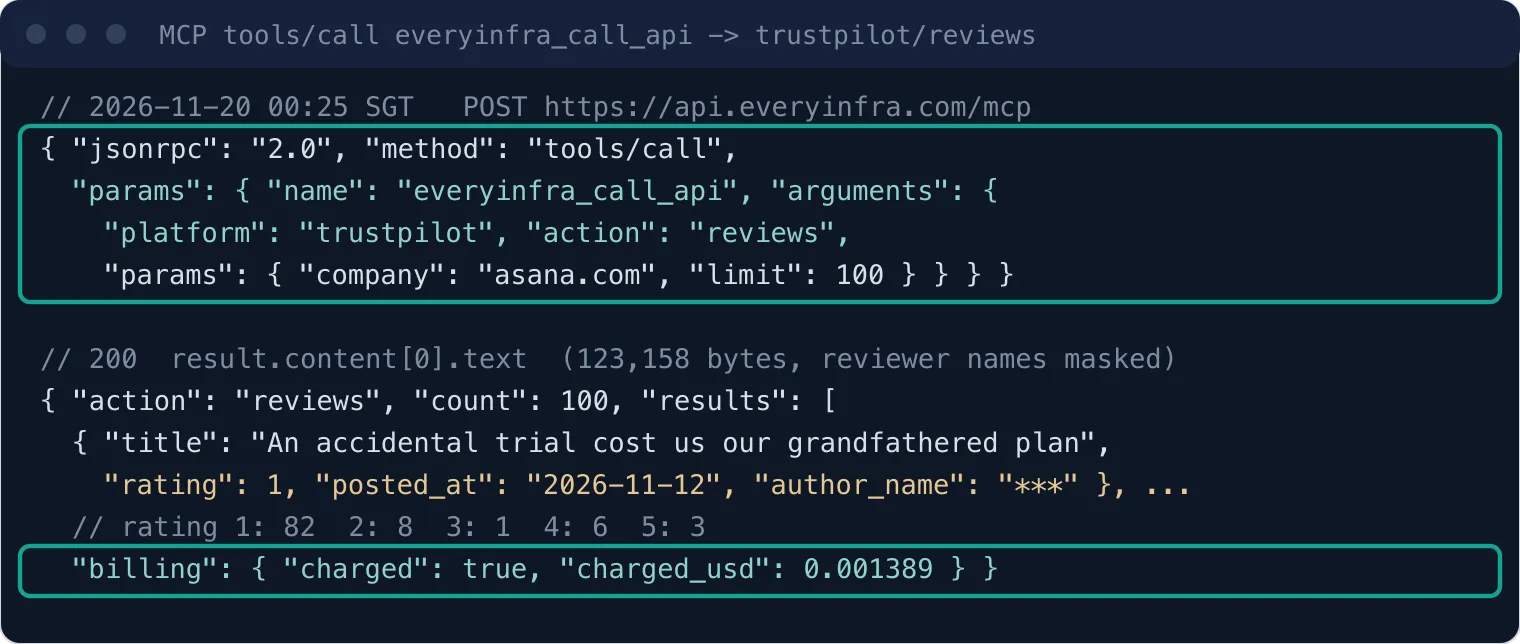
When Claude pulls reviews in a chat, it sends an MCP tools/call request. The tool is everyinfra_call_api, and the arguments name the platform, the action and the action's own parameters. At 00:25 SGT on November 20, 2026, we sent the same request that Claude sends. It asked for Asana's latest 100 Trustpilot reviews.
{
  "jsonrpc": "2.0", "id": 2, "method": "tools/call",
  "params": {
    "name": "everyinfra_call_api",
    "arguments": {
      "platform": "trustpilot", "action": "reviews",
      "params": { "company": "asana.com", "limit": 100 }
    }
  }
}
The reply was HTTP 200 after 18.1 seconds. The result sat in result.content[0].text as a JSON string of 115,210 characters. count was 100, and billing.charged_usd was 0.001389. That is the catalog price for one call, whatever the row count. Of the 100 reviews, 82 had 1 star, 8 had 2 stars, 1 had 3 stars, 6 had 4 stars and 3 had 5 stars.
Ninety-eight reviews had the source value Organic, which means the user came to write on their own. Only 2 carried a verified label.
The dates ran from November 14, 2024 to November 12, 2026. The first review told a short story. A former colleague had started a premium trial by mistake. When the trial ended, the team lost access to its projects and its old price. So the whole team moved to ClickUp.
At about four characters per token, 115,210 characters come to roughly 29,000 tokens. That is one competitor from one source. All 15 review pulls in this test came to 1,219,054 characters, or roughly 300,000 tokens.
We tried a simple trim. We kept only rating, date, title and the first 300 characters of text. Asana's 100 reviews fell from 115,501 bytes to 34,036 bytes, which is 29% of the original.
We applied the same trim to the review arrays of all three sources. G2's 220 reviews fell from 378,844 characters to 93,920 (25%). Trustpilot's 500 reviews fell from 567,011 to 172,230 (30%). App Store reviews are short to begin with, so 500 of them fell only from 255,977 to 133,035 (52%). After the trim, the three sources still total about 400,000 characters, or roughly 100,000 tokens. So group each competitor right after you pull it. Keep only the counts and the sample quotes in the chat, then pull the next one.
A prompt for the chat: pull and group
The three steps before the board all run in a normal chat with the connector on. The prompt below follows the live calls above, with the same parameters. We sent those calls one by one from a script. We did not run the full prompt in claude.ai. Replace the competitor list, app IDs and theme list with your own. Write the theme list before you look at the data, and put it in the prompt. Claude then tags reviews with that fixed list, and the results cannot drift toward whatever the reviews happen to say.
Use the EveryInfra connector to prepare data for a competitor positioning map.
1. Call everyinfra_list_capabilities. Confirm the parameters of the reviews action on g2, trustpilot and app_store.
2. Call each source once for each of the five competitors:
   g2/reviews: url=<G2 slug>, sort=newest, limit=100
   trustpilot/reviews: company=<website domain>, limit=100
   app_store/reviews: app_id=<numeric ID>, country=us, sort=newest, limit=100
   If a call fails or returns nothing, do not retry in a loop. Note it and tell me at the end.
3. Keep only rating, posted_at, title and the first 300 characters of text. For Trustpilot, also keep source.
4. Tag every 1-2 star review with this list (one review can get several tags):
   price and billing, support, speed and bugs, complexity, missing features, mobile, AI.
5. Split Trustpilot reviews by source into Organic and other. Leave invited reviews out of the complaint shares.
6. For each competitor, compute two numbers: the share of 1-2 star reviews about price or billing,
   and the share about complexity or speed and bugs. Show a table with three short quotes per competitor, no names.
We added step 5 after the test, because of ClickUp. When a competitor collects many Trustpilot reviews through invitations, its complaint share looks smaller than it is. Star counts alone then put it in the wrong place on the map. Step 2 says "do not retry in a loop" for a reason. With a connector on, Claude decides when to retry, and each successful call is billed. A short failure note lets a person decide what to do next.
What each source returned
All live calls ran in the early hours of November 20, 2026. Round one ran from 00:16 to 00:22 SGT and pulled G2 reviews and video transcripts. Round two ran from 00:22 to 00:30 SGT and pulled Trustpilot plus one more G2 page.
Round three ran from 00:30 to 00:32 SGT and pulled the App Store, a ClickUp Trustpilot retry, Reddit and video comments. The full span was 16 minutes. Each source below has its row counts, date ranges and complaint shares. We removed all reviewer names.
G2: up to 51 rows per call, and only 5 complaints
Between 00:16 and 00:22 SGT, we called g2/reviews once for each competitor with sort=newest and limit=100. No call returned 100 rows. Asana, ClickUp and Smartsheet each returned 50 reviews plus 1 summary record. Trello returned 40 reviews, and monday.com returned 30. Our first monday.com slug, monday-work-management, returned an empty result and no charge. At 00:30 SGT we switched to monday-com and got data. Check the slug in the G2 page address before the run.
Across the 220 G2 reviews, only 5 had 2.5 stars or less. That is 2.3%. One Asana row had a rating of 0, which means the rating was missing, so we did not count it as a complaint.
Average scores ran from 4.23 for Smartsheet to 4.6 for monday.com. The low count follows from how G2 collects reviews. Reviewers verify through LinkedIn or a work email. Some reviews come from vendor invitations or G2 reward campaigns, and rewarded reviews carry an Incentivized label (G2 Community Guidelines).
So single G2 reviews are a poor base for counting complaints. The useful part is the summary record. It carries aggregate_rating, total_reviews and top_cons. top_cons is G2's own list of complaint labels with mention counts across all reviews. That sample has tens of thousands of reviews, far more than the few dozen rows we pulled.
In the rows we pulled, the author_business_size field gives the size of each reviewer's company. For ClickUp, 45 of 50 reviewers work at companies with 50 or fewer staff. For Smartsheet, only 16 of 50 do. Another 26 work at companies with 51 to 1,000 staff, and 8 at companies with more than 1,000. This is only the newest batch, not the full base behind top_cons. But it shows that the two tools get G2 reviews from companies of very different sizes.
| Competitor | G2 rating / total reviews | `top_cons` #1 (mentions) | #2 | #3 |
|---|---|---|---|---|
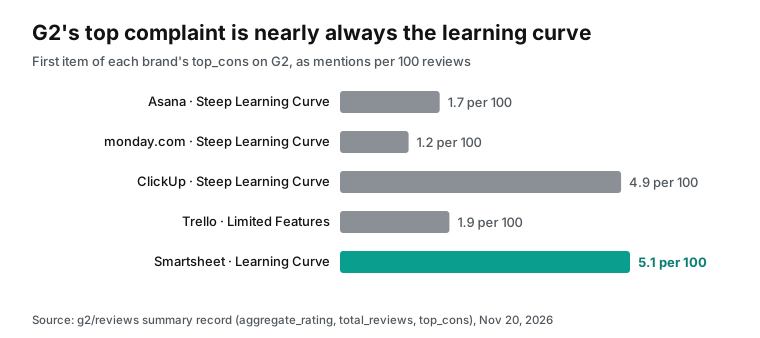
| Asana | 4.4 / 14,132 | Steep Learning Curve (247) | Key Features Behind Paywall (163) | Excessive Notifications (159) |
| monday.com | 4.7 / 17,972 | Steep Learning Curve (216) | Slow Board Loading (172) | High Subscription Costs (170) |
| ClickUp | 4.6 / 15,829 | Steep Learning Curve (780) | Slow Workspace Performance (766) | Too Many Features (601) |
| Trello | 4.4 / 14,078 | Limited Features (270) | Missing Features (259) | Limited Functionality (198) |
| Smartsheet | 4.4 / 23,269 | Learning Curve (1,183) | Missing Features (899) | Not Intuitive (842) |
Four of the five list the learning curve first. Only Trello's top four labels are all about missing or limited features. Per 100 reviews, Smartsheet gets 5.1 learning-curve mentions and ClickUp gets 4.9. Asana gets 1.7 and monday.com gets 1.2, so the gap is about three to four times. On the board, keep G2's labels as written and show the mention count and the total next to each one.
We did not find a note about short G2 pages on the G2 platform page. To reach 100 rows, call the same product again with sort=relevance or sort=top_rated, then remove duplicates by review ID. We skipped that step, because single G2 reviews do not feed the map points.
Trustpilot: many complaints, but check the `source` field first
The Trustpilot round ran from 00:25 to 00:31 SGT with limit=100. All five calls returned 100 reviews. The Asana pull used MCP, as shown above. The other four used the REST API, and both paths returned the same fields.
ClickUp's first call at 00:26 SGT returned a 503 error. The billing record marked it as failed and refunded, so we paid nothing. A retry at 00:30 SGT returned 100 reviews after 59.7 seconds.
| Competitor | 1-2 star reviews | Average stars | Date range of the latest 100 | Top two complaint themes |
|---|---|---|---|---|
| Asana | 90 | 1.40 | Nov 14, 2024 to Nov 12, 2026 | Price and billing 52, support 46 |
| monday.com | 92 | 1.40 | Aug 28, 2025 to Nov 12, 2026 | Support 47, price and billing 45 |
| ClickUp | 13 | 4.38 | Jul 23, 2026 to Nov 18, 2026 | Support 9, price and billing 8 |
| Trello | 39 | 3.14 | Sep 20, 2021 to Nov 17, 2026 | Price and billing 15, support 11 |
| Smartsheet | 83 | 1.73 | Feb 28, 2015 to Oct 20, 2026 | Price and billing 45, support 43 |
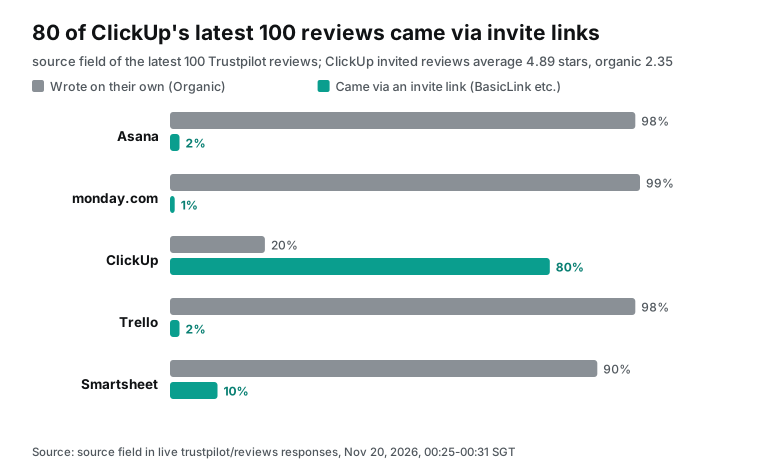
ClickUp's row was far from the other four, so we checked the source field on each review. Eighty of ClickUp's latest 100 reviews had the value BasicLink. Those reviewers came through an invitation link that the company sent. The 80 invited reviews average 4.89 stars and include no 1-2 star reviews. The other 20 reviews are Organic and average 2.35 stars. Thirteen of those 20 have 1 or 2 stars.
The other four companies look the opposite way. Organic reviews make up 98 of Asana's 100, 99 of monday.com's, 98 of Trello's and 90 of Smartsheet's. Trustpilot's rules let companies invite reviews or not (Trustpilot Trust Center). The problem appears when you compare. If one company invites many reviewers and another invites none, their star counts do not start from the same baseline.
monday.com differs in two more ways. First, 35 of its 100 reviews carry a company reply in reply_text, and the other four have none. Second, 29 of its complaints mention AI. Most of these are billing complaints about AI credits. One reviewer wrote that the plan page lists AI credits as included, but the credits did not work. Another added one user for a test and left after a $69 charge.
In our tags, such reviews fall into both "price and billing" and "AI". On the board, you can give them a separate note.
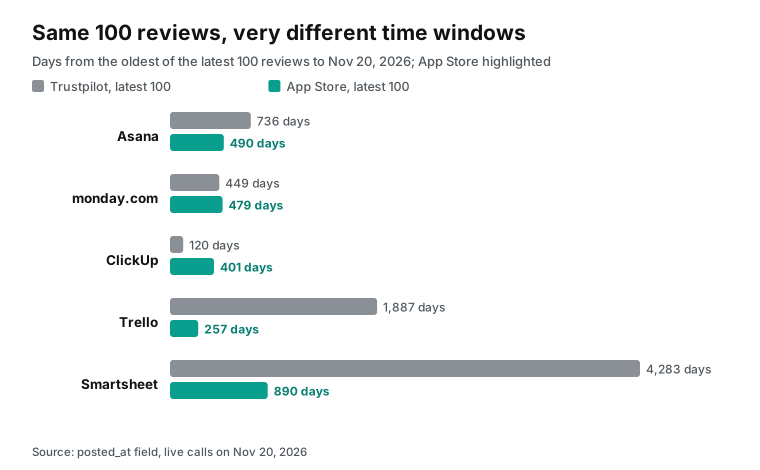
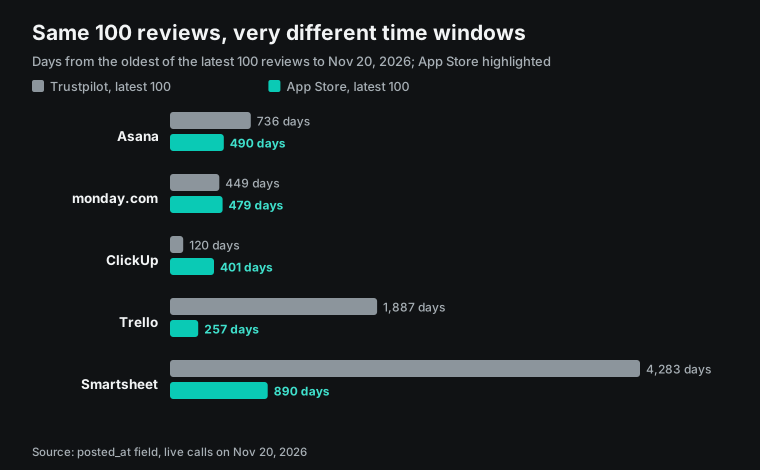
Watch the date ranges too. The same "latest 100" request reaches back to 2015 for Smartsheet, a span of 11 years. For ClickUp it reaches back only to July 2026, less than 4 months. If the map must answer "what have users complained about in the last year", add the date parameter for Smartsheet and Trello. As an alternative, ask Claude in the chat to drop reviews older than one year by posted_at.
App Store: phone complaints follow a different pattern
At 00:31 SGT, we called app_store/reviews for the five iPhone apps with country=us and sort=newest. Each call returned in 0.7 to 1.1 seconds with 100 reviews. Complaint shares ran from 42% for ClickUp to 70% for Asana. The App Store does not separate invited and organic reviews. Developers can only use the system prompt to ask for ratings, at most three times a year (Apple Developer).
The App Store themes differ clearly from Trustpilot. Across the five apps, there were 268 reviews with 1 or 2 stars. Of these, 24% mention the phone app, and 18% mention lag, crashes or bugs.
Only 17% mention price or billing, and 18% mention support. For ClickUp, 14 of 42 complaints mention bugs or lag. One reviewer wrote that the iPad app is worse than the iPhone app. Task headers have different heights, and the keyboard covers custom fields.
Other apps show similar notes. A Trello reviewer wrote that cards open more slowly than on desktop. Another wrote that a list status flips between two states every second. An Asana reviewer wrote that the app freezes when they set a date. Each App Store review carries app_version, so you can tie a phone problem to a release. The three ClickUp reviews above came from versions 7.0.2, 7.3.4 and 7.5.1.
For apps that ship often, the latest 100 reviews map to recent releases. Trello's latest 100 go back only to March 8, 2026. Its 52 complaints spread across 18 versions, and 13 of them came from versions 2026.10.1 and 2026.11.
The App Store also gave one match. Smartsheet's 49 phone complaints rank price and billing first (15) and support second (12). Those are the same top two themes as on its Trustpilot page.
We checked one guess against the review text: that most Smartsheet phone users are staff whose company pays. Only 7 of the 49 complaints (14.3%) mention a company, an employer, an admin or a license. Asana has 14 of 70 (20.0%), and monday.com has 13 of 55 (23.6%). Some of the 7 Smartsheet reviews describe an old work email after a job change, or a person who pays for a personal plan.
Eleven of Smartsheet's 49 complaints (22.4%) mention a cancellation, a refund or a charge. That is the highest share of the five. Asana has 14 of 70 (20.0%) and monday.com has 9 of 55 (16.4%). ClickUp and Trello have none.
One 1-star review from October 28, 2026 says the in-app cancel steps lead to a web page with no way to confirm. Meanwhile, a $12 charge kept coming for six months. So Smartsheet's billing complaints on the App Store come mostly from individual payers who want to cancel, not from staff on a company plan.
The three sources side by side: the themes do not match
We set the test before the first call. For each competitor, compare the two most common themes in 1-2 star reviews on Trustpilot and on the App Store. If both pairs are the same, the result is "match". If not, the result is "no match".
Sources with fewer than 5 complaints do not take part, so single G2 reviews stay out of this step. Only Smartsheet matched. The other four did not.
| Competitor | Trustpilot top two | App Store top two | Result | Re-run without "mobile" |
|---|---|---|---|---|
| Asana | Price and billing, support | Mobile, price and billing | No match | Match (price and billing, support) |
| monday.com | Support, price and billing | Mobile, price and billing | No match | No match (price and billing, missing features) |
| ClickUp | Support, price and billing | Mobile, speed and bugs | No match | No match (speed and bugs, missing features) |
| Trello | Price and billing, support | Speed and bugs, mobile | No match | No match (speed and bugs, support) |
| Smartsheet | Price and billing, support | Price and billing, support | Match | Match |
We added the last column after we saw the results. App Store reviews are written on phones, so words like "iPhone" and "app version" appear often. That pushes the "mobile" theme up by default.
Without it, two competitors match: Asana and Smartsheet. The direction stays the same. For at least three of the five, web complaints and phone complaints focus on different things. Because we added this column late, treat it as a check only. The verdict uses the column we wrote in advance.
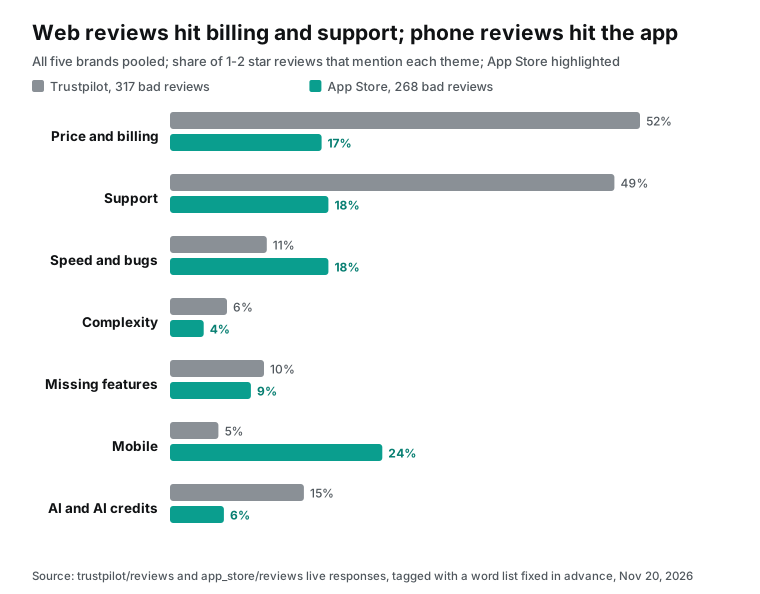
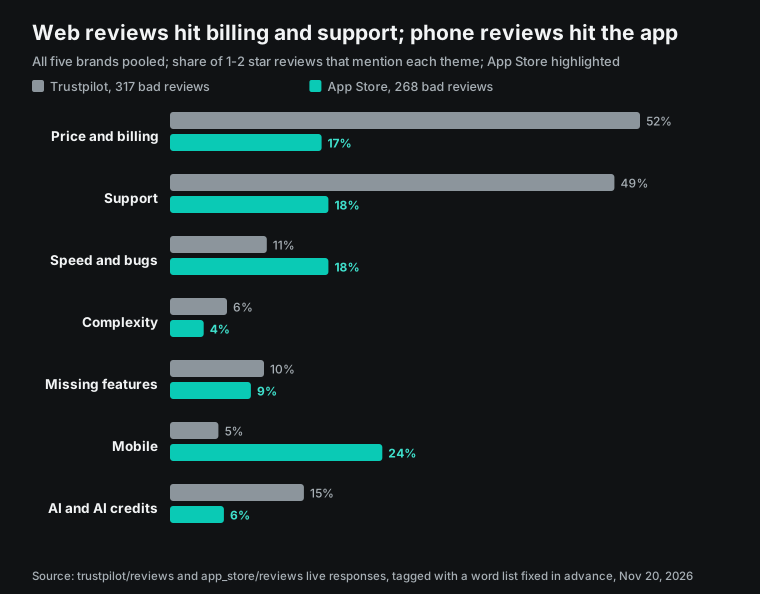
The gap with G2 is even larger. G2 lists the learning curve as the top complaint for four of five tools. Yet only 4% to 6% of Trustpilot and App Store complaints mention complexity or a learning curve.
Before you draw the map, decide whose question it answers. For a buying decision, use G2's top_cons. For renewal and support teams, use Trustpilot. For a mobile team, use the App Store.
| Map question | Best source | Field to use | Caution |
|---|---|---|---|
| Why do buyers hesitate during evaluation? | G2 | top_cons in the summary record | Single G2 reviews are mostly positive |
| Why do paying customers leave or complain? | Trustpilot | rating, text, source | Split invited and organic reviews first |
| What breaks for daily phone users? | App Store | rating, text, app_version | The "mobile" theme runs high by default |
| What are switchers discussing right now? | reddit/search results | Two searches returned only one post each |
Complaints about cancellations and charges also split by source. We counted reviews with these English keywords: cancel, refund, charged, billed, billing, unsubscribe. On Trustpilot, the hit rates among complaints are ClickUp 8 of 13 (61.5%), Asana 37 of 90 (41.1%) and Trello 15 of 39 (38.5%). Smartsheet has 26 of 83 (31.3%), and monday.com has 24 of 92 (26.1%). Asana has 20 complaints that use the word refund, the most of the five.
On the App Store, only three tools get hits: Smartsheet 22.4%, Asana 20.0% and monday.com 16.4%. We added this keyword count after the theme results, so it explains the gap but does not feed the map.
Compute the map points
We fixed both axes before we saw the App Store data. The x-axis is the share of a competitor's 1-2 star reviews on Trustpilot and the App Store that mention price or billing. The y-axis is the share of the same complaints that mention complexity or speed and bugs.
We call this "product friction". Dot size is the number of complaints. We use shares, not counts, so a tool with few complaints, like ClickUp, can sit on the same map as the others.
| Competitor | Complaints (Trustpilot + App Store) | X: price and billing | Y: product friction | Support | AI and AI credits |
|---|---|---|---|---|---|
| Asana | 160 | 42.5% | 16.3% | 38.8% | 7.5% |
| monday.com | 147 | 37.4% | 15.6% | 36.7% | 22.4% |
| ClickUp | 55 | 20.0% | 30.9% | 23.6% | 12.7% |
| Trello | 91 | 17.6% | 19.8% | 20.9% | 5.5% |
| Smartsheet | 132 | 45.5% | 16.7% | 41.7% | 4.5% |
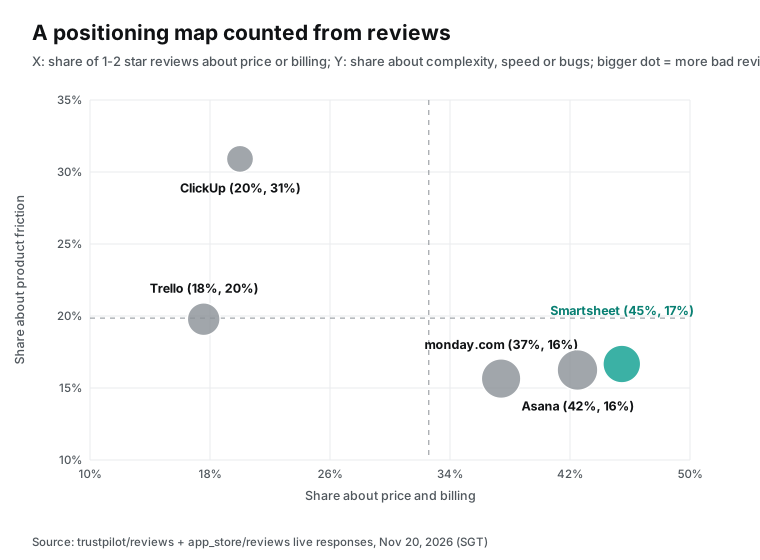
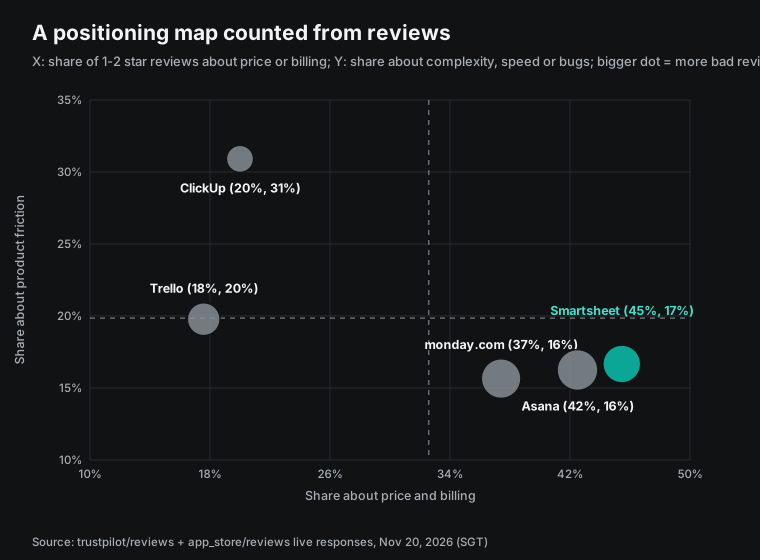
On the map, the five tools form three groups. Asana, monday.com and Smartsheet sit together at the lower right. About four in ten of their complaints are about money, and only about one in six is about a hard-to-use product. ClickUp sits alone at the upper left. Only two in ten of its complaints are about money, and more than three in ten are about lag and bugs. Most of those come from the App Store.
Trello sits at the middle left with low values on both axes. Its complaints spread across support, missing features and the phone app.
The map shows only where each tool's complaints cluster. For the three lower-right tools, they cluster on billing. For ClickUp, they cluster on stability, mostly from the phone app. The map does not say which product is better overall.
The last column of the table also varies a lot. At monday.com, 22.4% of complaints mention AI or AI credits, the highest of the five. ClickUp has 12.7%, and the other three have 4.5% to 7.5%. In a quarterly rerun, record this column next to the two axes to see if AI billing complaints go up or down.
Write the sample limits in a corner of the board. Each competitor has only about one hundred complaints, so the shares have real error margins. Trustpilot date ranges differ a lot between competitors. ClickUp has only 13 Trustpilot complaints, so the App Store sets most of its position.
The regions also differ. The App Store pull is for the US only. Trustpilot does not filter by country, and US reviewers make up only 26 (Asana, monday.com) to 40 (Smartsheet) of the latest 100. monday.com has 36 UK reviewers, more than its 26 from the US.
A quarterly rerun with the same prompt and theme list uses 15 review calls for five tools across three sources, or $0.020835 at catalog price. Keep two points in mind. Both Trustpilot and the App Store return the "latest 100" reviews, so a busy page can leave a gap between two pulls. For close tracking, rerun more often or add the date parameter. If you change the theme list, the old and new maps no longer compare directly.
Draw it on the board: a configuration example (no live board)
We did not open a live board in Claude to test the steps below. They are a configuration example based on the help center and three training videos. The data and map points must already be in the same chat.
The help center says you can ask Claude in a chat to open a board, or create one from the Artifacts page. Boards are saved in the Artifacts tab (Whiteboards help center). A prompt for the board can look like this:
Use the map points above to open a whiteboard with a competitor positioning map:
1. Draw a cross-shaped grid. Label the x-axis "share of complaints about price or billing"
   and the y-axis "share of complaints about complexity, speed or bugs".
   Put dashed lines at the five-brand averages (x 32.6%, y 19.9%).
2. Draw one dot per competitor, sized by complaint count. Add the name and both percentages.
3. Next to each dot, add three sticky notes with one or two sentences from real reviews,
   the star rating and the date. No reviewer names.
4. In a column on the right, list the top three G2 top_cons with mention counts.
   Mark that column as a G2 summary that does not feed the axes.
5. In the lower-left corner, add a sample note: latest 100 Trustpilot and App Store reviews per competitor,
   pulled on 2026-11-20. 80 of ClickUp's Trustpilot reviews came from invitation links and are tagged.
The averages in the prompt come from the map table. The x average is (42.5 + 37.4 + 20.0 + 17.6 + 45.5) / 5 = 32.6%. The y average is (16.3 + 15.6 + 30.9 + 19.8 + 16.7) / 5 = 19.9%.
The help center lists these board actions: ask Claude to tidy the layout, point out gaps or answer questions about one boxed area. The training videos show another method. You select a few notes and type a request in the small box below, and only the selected items change. To review with colleagues, create a link with Share. To invite people outside your organization by email, an admin must turn on that setting first.
After the meeting, use Send to for Miro or Lucid. You can also ask Claude to turn the board into a doc or a slide deck. If your team works in Mural, the pull step stays the same, and only the last step moves to Mural's tools. Our Mural MCP Server article covers that path for workshop sticky notes.
The Reddit layer: too few posts
We planned a Reddit layer on top of the three review sources. At 00:31 SGT, we ran reddit/search twice with limit=25. The first search was "asana vs clickup vs monday" over MCP. The second was "switched from asana" over REST. Each search returned only 1 post.
The first post, from November 5, 2026, is in the ClickUp community. A 30-person operations team said its renewal email bundled AI into the plan at $4 more per seat. The team was looking at monday.com instead. The second post described a switch to another tool and read more like a promotion. Both posts support the "price and billing" group, but two posts cannot form a layer. For a real Reddit layer, try more specific keywords, or use the Reddit search capability to pull posts by community.
The cost of five competitors at 100 reviews each
We checked every cost below against the catalog price and against billing.charged_usd in the live responses. Both matched. All three review capabilities cost $0.001389 per call in the catalog, whatever the row count. So it pays to ask for the full limit in one call.
| Pull plan | Calls | Catalog price | Charged in this test |
|---|---|---|---|
| One source, five competitors at 100 each (Trustpilot or App Store) | 5 | $0.006945 | Trustpilot 5 calls $0.006945, App Store 5 calls $0.006945 |
| Three sources, one call each (G2 returned 30-50 rows) | 15 | $0.020835 | 15 calls $0.020835 |
| Extra G2 calls with two more sort orders to reach about 100 rows | 5 to 10 more | $0.006945 to $0.013890 more | Not done in this test |
| All live calls in this test (with video, Reddit and two calls that were not charged) | 25 | Not applicable | $0.025977 |
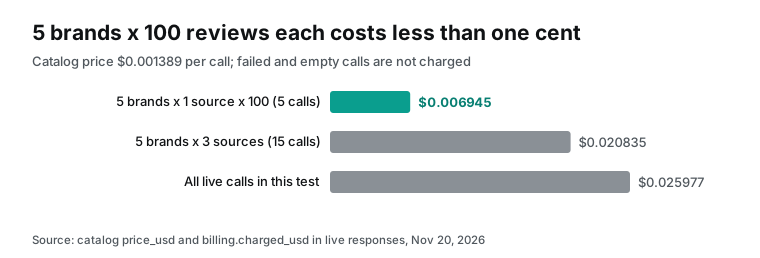
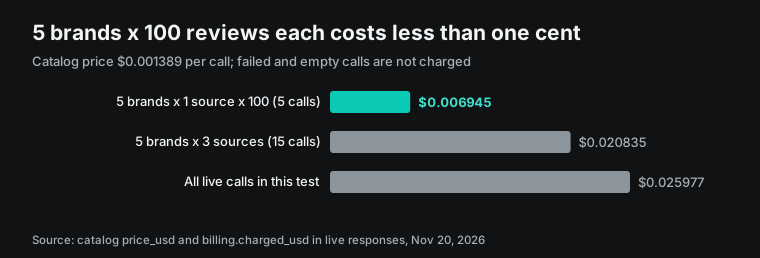
Two calls were not charged. The monday.com G2 slug monday-work-management returned an empty result. ClickUp's first Trustpilot call returned a 503 error, and a retry worked. Both billing records show a failed call with a refund.
Of the 25 calls, the six video calls cost $0.003558 in total. The one youtube/search call cost $0.000778, and the three transcripts and two comment pulls cost $0.000556 each. The two Reddit calls cost $0.000792 each, or $0.001584. The rest were review pulls. For current prices, see the pricing page and the free catalog.
What the training videos show that the docs leave out
At 00:16 SGT on November 20, 2026, we ran youtube/search for "claude whiteboards". It returned 10 videos published between November 10 and November 19. We took the top three tutorials by relevance and pulled their transcripts with youtube/transcript. The first is Educraft's "Claude Whiteboards Are Here", published November 12 with 21,642 views when we read it. The second is "Anthropic Just Dropped Claude Whiteboard, Sheets and Data" by an AI tools creator, published November 10 with 377,948 views. The third is a 16-minute tutorial by an automation creator, published November 12 with 25,281 views.
For the third video, the transcript call returned an Arabic dubbed track by default. This video has several audio tracks. To get the English original, pass the language parameter. We compared the transcripts with the help center line by line. Four steps appear in the videos but are not clear in the help center. The reports we read from TechCrunch, Tom's Guide and eesel also skip them.
First, after you open a board, click "Open chat" to show the chat panel before you ask for anything. The Educraft video warns against the "Ask Claude" button under the board. Reference files, whole folders, design systems and the model picker all live in the chat panel. For competitor data, this means you attach the review CSV from the chat panel. Do not drag it onto the board.
Second, select a few objects on the board and type a request in the small input box below. Only the selected objects change. The help center describes boxing an area to ask about it. The video shows selecting items to edit them, which changes those items directly. On a positioning map, you can select the notes in one quadrant and ask Claude to rewrite them without moving any dots.
Third, you can tag Claude in comments. In the video, a colleague joins as a commenter and leaves a comment on one element. The board owner replies and tags Claude, and Claude makes the change in the comment thread. In the demo, Claude once edited the wrong object, then admitted it and offered a few fixes. The sharing page adds a limit. Commenters invited from outside the organization cannot ask Claude in comments, except in docs (Publish and share artifacts).
Fourth, an "Anyone with the link" share works for viewers without a Claude account. People invited by email must sign in to a Claude account. The second video also drops a zip file of messy CSV files into a chat and turns it into a board in one step. That matters for our method. The review CSV from setup B or C can go into the chat the same way.
We also read the comment sections. At 00:32 SGT, we used youtube/comments on both videos. We pulled all 10 comments on the Educraft video and the 50 most popular comments on the second video.
Three kinds of sticking points relate to boards. The first is a missing entry point. One viewer could not find the option shown in the left sidebar. Another asked why the three new artifacts did not show up in an existing account. The help center explains most of these cases: boards need a paid plan, and Enterprise admins must turn them on under Artifacts.
The second sticking point is a custom connector that will not connect. One commenter said an MCP server hosted inside a company network failed, so live dashboards did not work. Anthropic's connector docs say the connection starts in Anthropic's cloud. The server must be reachable on public port 443. The EveryInfra endpoint at https://api.everyinfra.com/mcp is public, so this limit does not apply to it.
The third is file size. One viewer tried to upload an Excel file to Sheets and got a message that a sheet holds at most 200,000 cells. That limit is for Sheets. The Whiteboards help center gives no size number for boards. Reviews trimmed to four fields are much smaller in the chat.
Limits and cautions
On the board side, we did not open a live board. Every "draw the board" step is a configuration example based on the help center and the videos. We did not check if Claude puts the dots at the given points or places the dashed lines correctly. Whiteboards is still in beta, and the help center labels its limits "At launch". These limits will change, so read that page again before you start.
A board cannot be imported from a file, so an existing Miro or Lucid board cannot come in. In the other direction, Send to supports only Lucid, Miro and Zoho Vani. On the Lucid side, Team and Enterprise admins must turn on MCP access first. FedRAMP accounts are not supported (Lucid MCP guide, updated November 12, 2026; Lucid admin guide, updated November 3, 2026).
On the data side, the three sources reach different people, so do not compare their average scores directly. G2 asks reviewers to verify with LinkedIn, a work email or a personal email plus a screenshot. Rewarded reviews carry an Incentivized label, and rewards are capped at $100 (G2 Community Guidelines; G2 Review Validity). Trustpilot's TrustScore is a weighted score. Newer reviews weigh more, and the formula adds seven neutral reviews at 3.5 stars (TrustScore explained).
The App Store computes ratings per region. Developers can reset the summary rating with a new version, but written reviews stay (Apple Developer). Because of these rules, large gaps between one product's averages on three sites are normal. Build the map from shares inside one source, and do not compare scores across sources.
In 2024, the US Federal Trade Commission adopted a rule on consumer reviews. It bans fake reviews and the suppression of negative reviews (16 CFR Part 465; FTC final rule notice). The rule covers how businesses collect and show reviews. Do you plan to quote competitor reviews in public marketing? Then read the rule text yourself or ask your legal team first.
Reviews contain personal names and stories, so remove names before anything goes on the board. Keep only the quote and the date, especially for an "Anyone with the link" share.
Industry timeline
| Date | What happened | What it means for readers |
|---|---|---|
| September 29, 2026 | OpenAI showed Spaces and Pages for ChatGPT at DevDay, as workspaces that people and agents edit together (TechCrunch). | Chat tools are moving toward shared outputs, and research results no longer live only in a chat log. |
| October 7, 2026 | Miro said AI tools had called its MCP server more than 19 million times since February. September alone had about 6.3 million calls. Claude Desktop and Claude Code made up 61% of the August use (Miro blog). | Send to Miro from Claude Whiteboards connects to a busy channel. |
| October 26, 2026 | Bending Spoons completed its all-cash purchase of Miro (Bending Spoons investor news). | Watch for plan and export changes under the new owner. |
| November 4, 2026 | G2, Capterra, Software Advice and GetApp began to share one review form and one review process. A new review counts on all four sites. The system picks one site to show the full text (G2 Community Guidelines; G2 review activity docs). | G2 and Capterra pulls will now overlap, so remove duplicates by review ID and text. |
| November 10, 2026 | Anthropic launched Whiteboards, Sheets, Claude Data and full-screen interactive connectors. The first interactive connectors include Asana, monday.com and Smartsheet (Anthropic). | Three tools in our sample already open inside Claude. |
| November 17, 2026 | Mural released Mural MCP, which lets Claude, ChatGPT, Cursor and Copilot create content on Mural canvases (Mural press release). | For a team on Mural, the pull step stays the same. |
FAQ
Can Claude Whiteboards use connectors?
Question source: search suggestion "does claude whiteboards work". Not on the board. The help center's "Current limitations" says Claude on a board works only from board content and does not use connected apps. Use connectors in a normal chat instead. Pull reviews with the EveryInfra tools, group them and compute map points there. Then ask Claude in the same chat to open a board. Boards in Claude Meetings follow the same rule, as our Claude Meetings article explains.
Can I use Whiteboards in Claude Code?
Question source: search suggestion "whiteboard claude code". The help center mentions Claude Code only in its zero data retention note. For organizations with zero data retention on Claude Code, Whiteboards does not work in Claude Code. What Claude Code can do is setup B above. Add EveryInfra with claude mcp add and export the reviews as CSV. Attach the CSV to a claude.ai chat, then open the board there. The artifacts page also says Claude Code can publish session output as an artifact page (What are artifacts).
How does Claude Whiteboards compare with Miro?
Question source: the Hacker News launch thread. The help center and the launch posts treat Send to Miro, Lucid and Zoho Vani as exits from a board. A board cannot import another tool's board.
The Hacker News thread had 299 points. One comment argued that built-in boards will stay at the quick-draft stage. In that view, serious editing returns to dedicated tools (Hacker News thread). For a competitor map, the hard part is the data, not the board. A board that the whole company will maintain belongs in the tool your team already uses.
Is there a template for a competitive positioning map?
Question source: search suggestion "competitive positioning map template". The two-axis map is an old marketing method. In 1979, Hauser and Koppelman compared several methods in the Journal of Marketing Research. They found that factor analysis did best on prediction, ease of interpretation and ease of use (DOI 10.1177/002224377901600406). Our two axes are counted from reviews. Each competitor has only 55 to 160 complaints, so use the map to start a discussion.
Can Claude Whiteboards export to Confluence?
Question source: search suggestion "claude confluence whiteboard". As of November 20, 2026, the help center lists only Lucid, Miro and Zoho Vani for Send to and says more will come. You can also export a PNG, or ask Claude to turn the board into a doc or a deck. Confluence is not on the list. Since November 10, Atlassian's interactive connector can open Confluence pages full-screen inside Claude (Anthropic). So one path is to turn the board into a doc first, then let the chat write it into Confluence.
Why can I not see Whiteboards in my Claude account?
Question source: a comment on an AI tools video asking why the three new artifacts did not appear. The help center gives three conditions. Whiteboards needs a Pro, Max, Ultra, Team or Enterprise plan, not Free.
Team has it on by default, but Enterprise has it off until an admin turns it on under Organization settings > Artifacts. Claude for Teachers does not offer it. Organizations with HIPAA-ready setups cannot use it either. Still no board after all these checks? Create one from the Artifacts page, or ask Claude in a chat to open one.
Get started
- Sign up in the console quickstart and get an API key. Trial balance terms are on the pricing page; a plain sign-up does not add a trial balance.
- Open the MCP server page. Add
https://api.everyinfra.com/mcpto Claude or Claude Code with setup A or B. - In a chat, ask Claude to call
everyinfra_list_capabilitiesfor g2, trustpilot and app_store. Then run the prompt above. For field details, see the G2 reviews page and the Trustpilot reviews page. The App Store reviews page has the rest. - In the same chat, ask Claude to open a board with the map points and three quotes per competitor.
- Do you want review data that stays current? Read review data productization. Also see competitor review analysis with Agent Skills.
References
- Get started with Claude Whiteboards, Claude Help Center, updated November 10, 2026, read November 20, 2026.
- What are artifacts and how do I use them, Claude Help Center, read November 20, 2026.
- Available beta and research preview features, Claude Help Center, read November 20, 2026.
- Get started with custom connectors using remote MCP, Claude Help Center, read November 20, 2026.
- Use Claude Meetings, Claude Help Center, read November 20, 2026.
- Get started with Claude Sheets, Claude Help Center, read November 20, 2026.
- How do usage and length limits work, Claude Help Center, read November 20, 2026.
- Artifacts admin guide for Team and Enterprise plans, Claude Help Center, read November 20, 2026.
- Publish and share artifacts, Claude Help Center, read November 20, 2026.
- Use connectors to extend Claude's capabilities, Claude Help Center, read November 20, 2026.
- Auto-connect your organization's apps to Claude, Claude Help Center, read November 20, 2026.
- Add an unlisted connector, Claude connector docs, read November 20, 2026.
- Authentication for connectors, Claude connector docs, read November 20, 2026.
- Connectors overview, Claude connector docs, read November 20, 2026.
- Connect Claude Code to tools via MCP, Claude Code docs, read November 20, 2026.
- Anthropic outbound IP addresses, Claude platform docs, read November 20, 2026.
- Transports, spec version 2025-06-18, Model Context Protocol.
- Authorization, spec version 2025-11-25, Model Context Protocol.
- Anthropic launch post: Sheets, Whiteboards and Data, Anthropic, November 10, 2026.
- Anthropic post: Sheets, Whiteboards and interactive connectors, Anthropic, November 10, 2026.
- Anthropic post: interactive connectors, Anthropic, November 10, 2026.
- Anthropic post: Claude Meetings, Anthropic, November 10, 2026.
- Claude pricing, read November 20, 2026.
- EveryInfra capability catalog, read at 00:14 SGT on November 20, 2026, 626 capabilities.
- Catalog: G2, read November 20, 2026.
- Catalog: Trustpilot, read November 20, 2026.
- Catalog: App Store, read November 20, 2026.
- Catalog: YouTube, read November 20, 2026.
- Catalog: Reddit, read November 20, 2026.
- G2 Community Guidelines, G2, read November 20, 2026.
- G2 Review Validity, G2, read November 20, 2026.
- Trustpilot Trust Center, Trustpilot, read November 20, 2026.
- TrustScore and star rating explained, Trustpilot Help, read November 20, 2026.
- Ratings, reviews, and responses, Apple Developer, read November 20, 2026.
- 16 CFR Part 465: Use of Consumer Reviews and Testimonials, eCFR.
- FTC final rule notice, US Federal Trade Commission.
- Hauser & Koppelman (1979), Alternative Perceptual Mapping Techniques, Journal of Marketing Research.
- Integrate Lucid with AI tools using the Lucid MCP server, Lucid Help Center, updated November 12, 2026.
- For admins: Lucid MCP server security and authorization, Lucid Help Center, updated November 3, 2026.
- Bending Spoons completes the acquisition of Miro, Bending Spoons investor relations, October 26, 2026.
- Mural press release: Mural MCP and other AI features, Mural press release, November 17, 2026.
- Miro blog: MCP server usage, Miro blog, October 7, 2026.
- TechCrunch: Anthropic launches Claude Meetings, TechCrunch, November 10, 2026.
- TechCrunch: OpenAI's ChatGPT office suite, TechCrunch, September 29, 2026.
- Hacker News launch thread, 299 points and 218 comments when read on November 20, 2026.
- Educraft: Claude Whiteboards Are Here, YouTube, November 12, 2026.
- YouTube video: Anthropic Just Dropped Claude Whiteboard, Sheets and Data, YouTube, November 10, 2026.
- YouTube tutorial: Claude Whiteboards in 16 minutes, YouTube, November 12, 2026.
- Asana pricing, Trello pricing, Smartsheet pricing, monday.com pricing, ClickUp pricing, read November 20, 2026.
Reference BL-193